DIGITAL ELECTRONICS
Dr.M.MANIKANDAN
Associate Professor
Department of Electronics and
Engg.
MIT- Campus
Anna University
PART-1
NUMBER SYSTEMS
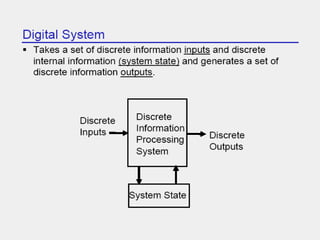
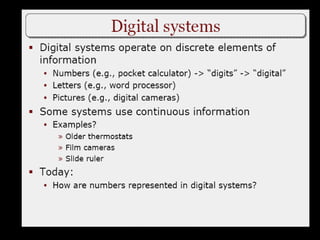
Digital Computer Systems
• Digital systems consider discrete amounts of data.
• Examples
26 letters in the alphabet
10 decimal digits
• Larger quantities can be built from discrete values:
Words made of letters
Numbers made of decimal digits (e.g. 239875.32)
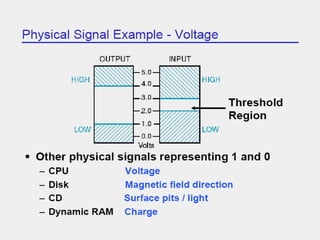
• Computers operate on binary values (0 and 1)
• Easy to represent binary values electrically
Voltages and currents.
Can be implemented using circuits
Create the building blocks of modern computers
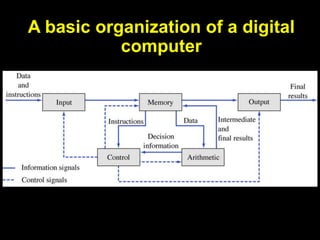
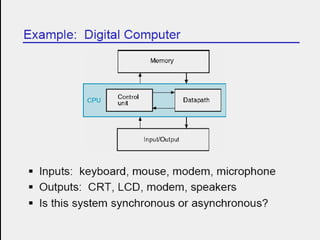
A basic organization of a digital
computer
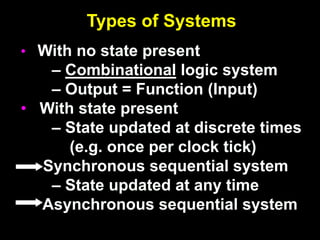
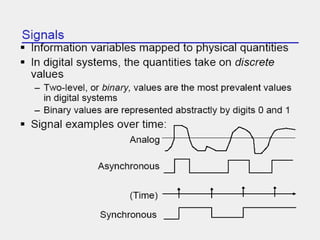
Types of Systems
• With no state present
– Combinational logic system
– Output = Function (Input)
• With state present
– State updated at discrete times
(e.g. once per clock tick)
Synchronous sequential system
– State updated at any time
Asynchronous sequential system
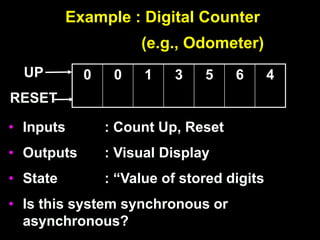
Example : Digital Counter
(e.g., Odometer)
• Inputs : Count Up, Reset
• Outputs : Visual Display
• State : “Value of stored digits
• Is this system synchronous or
asynchronous?
0 0 1 3 5 6 4
UP
RESET
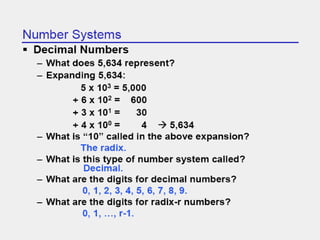
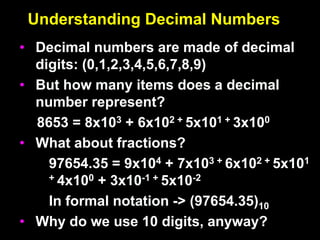
Understanding Decimal Numbers
• Decimal numbers are made of decimal
digits: (0,1,2,3,4,5,6,7,8,9)
• But how many items does a decimal
number represent?
8653 = 8x10³ + 6x10² + 5x101 + 3x100
• What about fractions?
97654.35 = 9x10⁴ + 7x10³ + 6x10² + 5x101
+ 4x100 + 3x10⁻¹ + 5x10⁻²
In formal notation -> (97654.35)10
• Why do we use 10 digits, anyway?
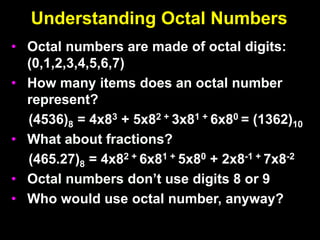
Understanding Octal Numbers
• Octal numbers are made of octal digits:
(0,1,2,3,4,5,6,7)
• How many items does an octal number
represent?
(4536)8 = 4x83 + 5x82 + 3x81 + 6x80 = (1362)10
• What about fractions?
(465.27)8 = 4x82 + 6x81 + 5x80 + 2x8-1 + 7x8-2
• Octal numbers don’t use digits 8 or 9
• Who would use octal number, anyway?
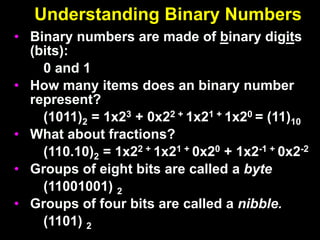
Understanding Binary Numbers
• Binary numbers are made of binary digits
(bits):
0 and 1
• How many items does an binary number
represent?
(1011)2 = 1x23 + 0x22 + 1x21 + 1x20 = (11)10
• What about fractions?
(110.10)2 = 1x22 + 1x21 + 0x20 + 1x2-1 + 0x2-2
• Groups of eight bits are called a byte
(11001001) 2
• Groups of four bits are called a nibble.
(1101) 2
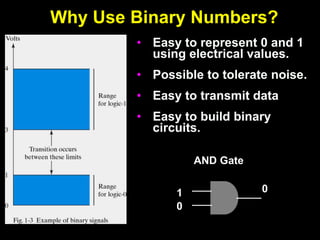
Why Use Binary Numbers?
• Easy to represent 0 and 1
using electrical values.
• Possible to tolerate noise.
• Easy to transmit data
• Easy to build binary
circuits.
AND Gate
1
0
0
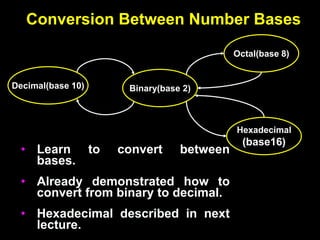
Conversion Between Number Bases
Decimal(base 10)
Octal(base 8)
Binary(base 2)
Hexadecimal
(base16)
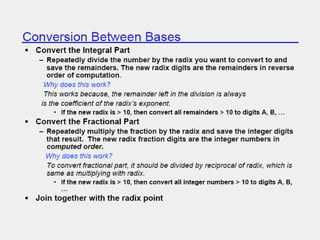
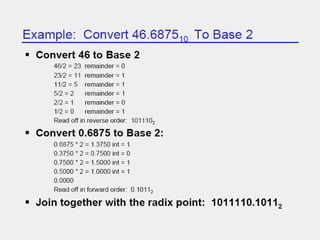
• Learn to convert between
bases.
• Already demonstrated how to
convert from binary to decimal.
• Hexadecimal described in next
lecture.
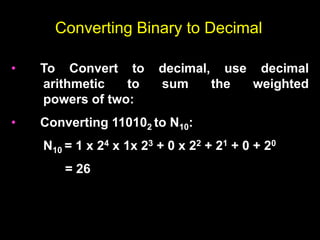
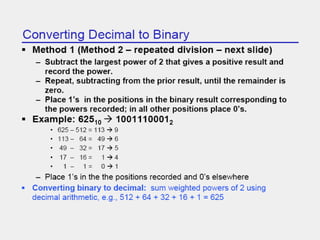
Converting Binary to Decimal
• To Convert to decimal, use decimal
arithmetic to sum the weighted
powers of two:
• Converting 110102 to N10:
N10 = 1 x 24 x 1x 23 + 0 x 22 + 21 + 0 + 20
= 26
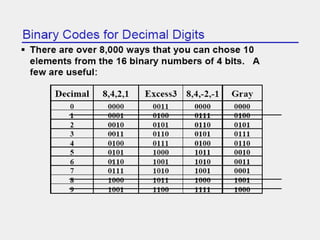
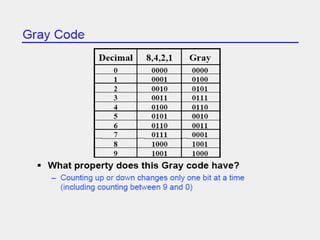
Gray Code
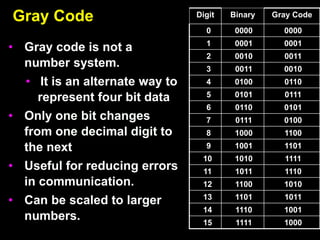
• Gray code is not a
number system.
• It is an alternate way to
represent four bit data
• Only one bit changes
from one decimal digit to
the next
• Useful for reducing errors
in communication.
• Can be scaled to larger
numbers.
Digit Binary Gray Code
0 0000 0000
1 0001 0001
2 0010 0011
3 0011 0010
4 0100 0110
5 0101 0111
6 0110 0101
7 0111 0100
8 1000 1100
9 1001 1101
10 1010 1111
11 1011 1110
12 1100 1010
13 1101 1011
14 1110 1001
15 1111 1000
Binary Arithmetic
• Single Bit Addition with Carry
• Multiple Bit Addition
• Single Bit Subtraction with Borrow
• Multiple Bit Subtraction
• Multiplication
• BCD Addition
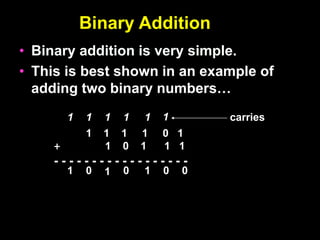
Binary Addition
• Binary addition is very simple.
• This is best shown in an example of
adding two binary numbers…
1 1 1 1 0 1
+ 1 0 1 1 1
- - - - - - - - - - - - - - - - - -
0
1
0
1
1
1
1
1
1
1 1 0
0
carries
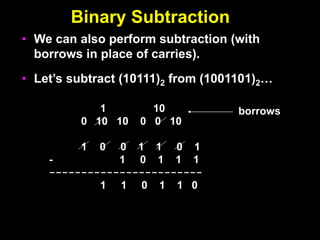
Binary Subtraction
• We can also perform subtraction (with
borrows in place of carries).
• Let’s subtract (10111)2 from (1001101)2…
1 10
0 10 10 0 0 10
1 0 0 1 1 0 1
- 1 0 1 1 1
------------------------
1 1 0 1 1 0
borrows
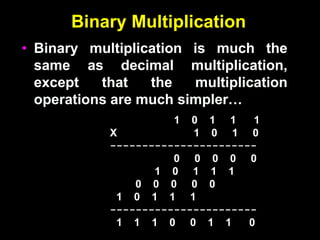
Binary Multiplication
• Binary multiplication is much the
same as decimal multiplication,
except that the multiplication
operations are much simpler…
1 0 1 1 1
X 1 0 1 0
-----------------------
0 0 0 0 0
1 0 1 1 1
0 0 0 0 0
1 0 1 1 1
-----------------------
1 1 1 0 0 1 1 0
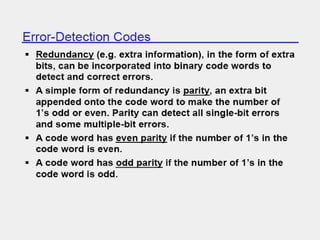
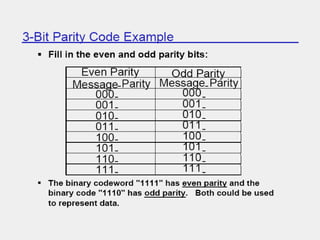
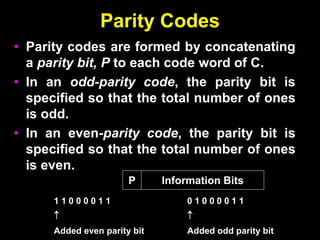
Parity Codes
• Parity codes are formed by concatenating
a parity bit, P to each code word of C.
• In an odd-parity code, the parity bit is
specified so that the total number of ones
is odd.
• In an even-parity code, the parity bit is
specified so that the total number of ones
is even.
Information Bits
P
1 1 0 0 0 0 1 1

Added even parity bit
0 1 0 0 0 0 1 1

Added odd parity bit
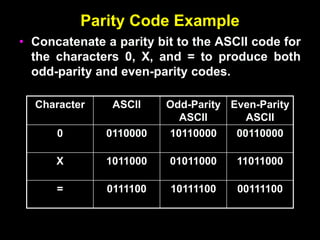
Parity Code Example
• Concatenate a parity bit to the ASCII code for
the characters 0, X, and = to produce both
odd-parity and even-parity codes.
Character ASCII Odd-Parity
ASCII
Even-Parity
ASCII
0 0110000 10110000 00110000
X 1011000 01011000 11011000
= 0111100 10111100 00111100
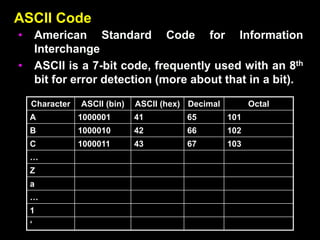
ASCII Code
• American Standard Code for Information
Interchange
• ASCII is a 7-bit code, frequently used with an 8th
bit for error detection (more about that in a bit).
Character ASCII (bin) ASCII (hex) Decimal Octal
A 1000001 41 65 101
B 1000010 42 66 102
C 1000011 43 67 103
…
Z
a
…
1
‘
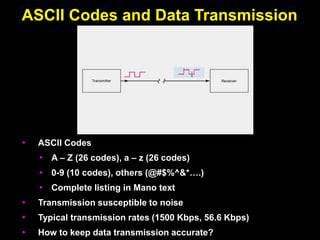
ASCII Codes and Data Transmission
• ASCII Codes
• A – Z (26 codes), a – z (26 codes)
• 0-9 (10 codes), others (@#$%^&*….)
• Complete listing in Mano text
• Transmission susceptible to noise
• Typical transmission rates (1500 Kbps, 56.6 Kbps)
• How to keep data transmission accurate?
Overview
• Hexadecimal numbers
• Related to binary and octal numbers
• Conversion between hexadecimal, octal
and binary
• Value ranges of numbers
• Representing positive and negative
numbers
• Creating the complement of a number
• Make a positive number negative (and
vice versa)
• Why binary?
Understanding Binary Numbers
• Binary numbers are made of binary digits
(bits):
0 and 1
• How many items does an binary number
represent?
(1011)2 = 1x23 + 0x22 + 1x21 + 1x20 = (11)10
• What about fractions?
(110.10)2 = 1x22 + 1x21 + 0x20 + 1x2-1 + 0x2-2
• Groups of eight bits are called a byte
(11001001) 2
• Groups of four bits are called a nibble.
(1101) 2
Understanding Hexadecimal Numbers
• Hexadecimal numbers are made of 16 digits:
(0,1,2,3,4,5,6,7,8,9,A, B, C, D, E, F)
• How many items does an hex number represent?
(3A9F)16 = 3x163 + 10x162 + 9x161 + 15x160 = 1499910
• What about fractions?
(2D3.5)16 = 2x162 + 13x161 + 3x160 + 5x16-1 =
723.312510
• Note that each hexadecimal digit can be represented
with four bits.
(1110) 2 = (E)16
• Groups of four bits are called a nibble.
(1110) 2
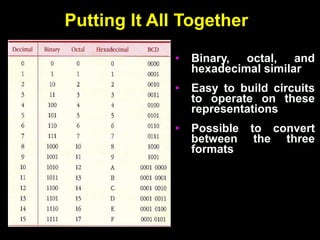
Putting It All Together
• Binary, octal, and
hexadecimal similar
• Easy to build circuits
to operate on these
representations
• Possible to convert
between the three
formats
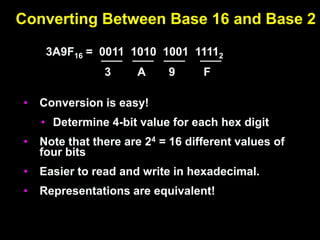
Converting Between Base 16 and Base 2
• Conversion is easy!
• Determine 4-bit value for each hex digit
• Note that there are 24 = 16 different values of
four bits
• Easier to read and write in hexadecimal.
• Representations are equivalent!
3A9F16 = 0011 1010 1001 11112
3 A 9 F
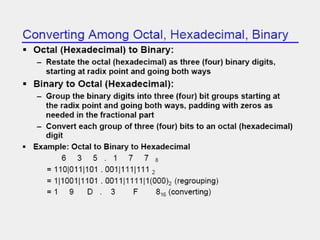
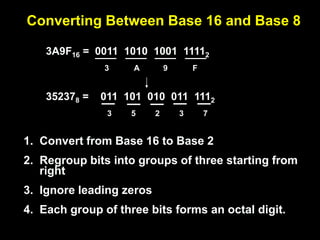
Converting Between Base 16 and Base 8
1. Convert from Base 16 to Base 2
2. Regroup bits into groups of three starting from
right
3. Ignore leading zeros
4. Each group of three bits forms an octal digit.
3A9F16 = 0011 1010 1001 11112
3 A 9 F
352378 = 011 101 010 011 1112
5 2 3 7
3
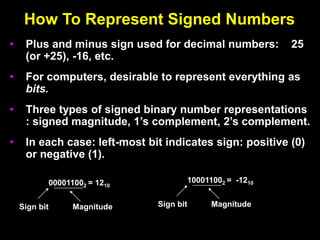
How To Represent Signed Numbers
• Plus and minus sign used for decimal numbers: 25
(or +25), -16, etc.
• For computers, desirable to represent everything as
bits.
• Three types of signed binary number representations
: signed magnitude, 1’s complement, 2’s complement.
• In each case: left-most bit indicates sign: positive (0)
or negative (1).
000011002 = 1210
Sign bit Magnitude
100011002 = -1210
Sign bit Magnitude
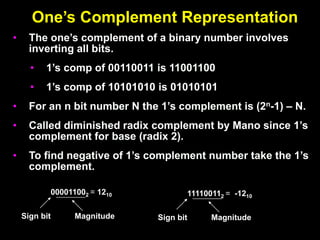
One’s Complement Representation
• The one’s complement of a binary number involves
inverting all bits.
• 1’s comp of 00110011 is 11001100
• 1’s comp of 10101010 is 01010101
• For an n bit number N the 1’s complement is (2n-1) – N.
• Called diminished radix complement by Mano since 1’s
complement for base (radix 2).
• To find negative of 1’s complement number take the 1’s
complement.
000011002 = 1210
Sign bit Magnitude
111100112 = -1210
Sign bit Magnitude
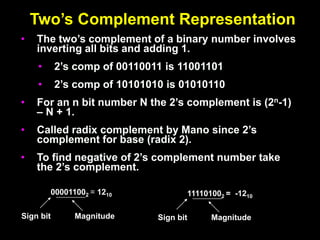
Two’s Complement Representation
• The two’s complement of a binary number involves
inverting all bits and adding 1.
• 2’s comp of 00110011 is 11001101
• 2’s comp of 10101010 is 01010110
• For an n bit number N the 2’s complement is (2n-1)
– N + 1.
• Called radix complement by Mano since 2’s
complement for base (radix 2).
• To find negative of 2’s complement number take
the 2’s complement.
000011002 = 1210
Sign bit Magnitude
111101002 = -1210
Sign bit Magnitude
Two’s Complement Shortcuts
• Algorithm 1 – Simply complement each bit and then
add 1 to the result.
Finding the 2’s complement of (01100101)2 and of its
2’s complement…
N = 01100101 [N] = 10011011
10011010 01100100
+ 1 + 1
--------------- ---------------
10011011 01100101
• Algorithm 2 – Starting with the least significant bit,
copy all of the bits up to and including the first 1 bit
and then complementing the remaining bits.
N = 0 1 1 0 0 1 0 1
[N] = 1 0 0 1 1 0 1 1
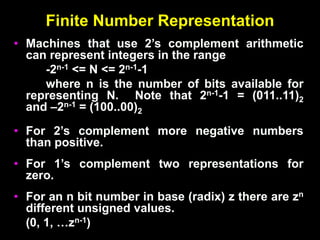
Finite Number Representation
• Machines that use 2’s complement arithmetic
can represent integers in the range
-2n-1 <= N <= 2n-1-1
where n is the number of bits available for
representing N. Note that 2n-1-1 = (011..11)2
and –2n-1 = (100..00)2
• For 2’s complement more negative numbers
than positive.
• For 1’s complement two representations for
zero.
• For an n bit number in base (radix) z there are zn
different unsigned values.
(0, 1, …zn-1)
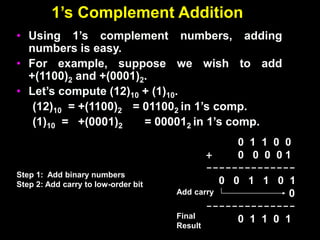
1’s Complement Addition
• Using 1’s complement numbers, adding
numbers is easy.
• For example, suppose we wish to add
+(1100)2 and +(0001)2.
• Let’s compute (12)10 + (1)10.
(12)10 = +(1100)2 = 011002 in 1’s comp.
(1)10 = +(0001)2 = 000012 in 1’s comp.
0 1 1 0 0
+ 0 0 0 0 1
--------------
0 0 1 1 0 1
0
--------------
0 1 1 0 1
Add carry
Final
Result
Step 1: Add binary numbers
Step 2: Add carry to low-order bit
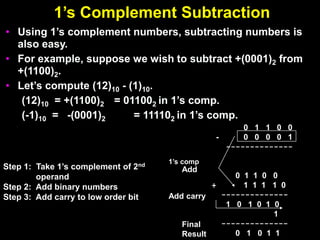
1’s Complement Subtraction
• Using 1’s complement numbers, subtracting numbers is
also easy.
• For example, suppose we wish to subtract +(0001)2 from
+(1100)2.
• Let’s compute (12)10 - (1)10.
(12)10 = +(1100)2 = 011002 in 1’s comp.
(-1)10 = -(0001)2 = 111102 in 1’s comp.
Step 1: Take 1’s complement of 2nd
operand
Step 2: Add binary numbers
Step 3: Add carry to low order bit Add carry
Final
Result
1’s comp
Add
0 1 1 0 0
- 0 0 0 0 1
--------------
0 1 1 0 0
+ 1 1 1 1 0
--------------
1 0 1 0 1 0
1
--------------
0 1 0 1 1
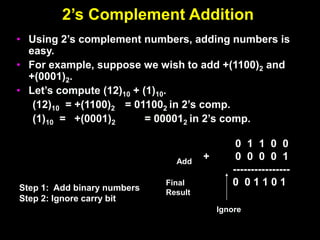
2’s Complement Addition
• Using 2’s complement numbers, adding numbers is
easy.
• For example, suppose we wish to add +(1100)2 and
+(0001)2.
• Let’s compute (12)10 + (1)10.
(12)10 = +(1100)2 = 011002 in 2’s comp.
(1)10 = +(0001)2 = 000012 in 2’s comp.
0 1 1 0 0
+ 0 0 0 0 1
----------------
0 0 1 1 0 1
Final
Result
Step 1: Add binary numbers
Step 2: Ignore carry bit
Add
Ignore
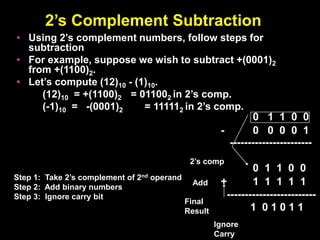
2’s Complement Subtraction
• Using 2’s complement numbers, follow steps for
subtraction
• For example, suppose we wish to subtract +(0001)2
from +(1100)2.
• Let’s compute (12)10 - (1)10.
(12)10 = +(1100)2 = 011002 in 2’s comp.
(-1)10 = -(0001)2 = 111112 in 2’s comp.
0 1 1 0 0
- 0 0 0 0 1
-----------------------
0 1 1 0 0
+ 1 1 1 1 1
-------------------------
1 0 1 0 1 1
Final
Result
Step 1: Take 2’s complement of 2nd operand
Step 2: Add binary numbers
Step 3: Ignore carry bit
2’s comp
Add
Ignore
Carry
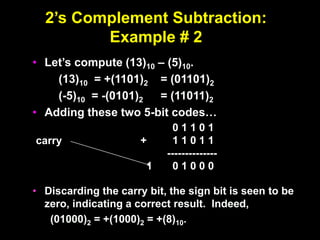
2’s Complement Subtraction:
Example # 2
• Let’s compute (13)10 – (5)10.
(13)10 = +(1101)2 = (01101)2
(-5)10 = -(0101)2 = (11011)2
• Adding these two 5-bit codes…
• Discarding the carry bit, the sign bit is seen to be
zero, indicating a correct result. Indeed,
(01000)2 = +(1000)2 = +(8)10.
0 1 1 0 1
+ 1 1 0 1 1
--------------
1 0 1 0 0 0
carry
2’s Complement Subtraction:
Example #3
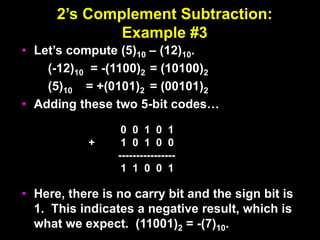
• Let’s compute (5)10 – (12)10.
(-12)10 = -(1100)2 = (10100)2
(5)10 = +(0101)2 = (00101)2
• Adding these two 5-bit codes…
• Here, there is no carry bit and the sign bit is
1. This indicates a negative result, which is
what we expect. (11001)2 = -(7)10.
0 0 1 0 1
+ 1 0 1 0 0
----------------
1 1 0 0 1
digitalelectronics.ppt

digitalelectronics.ppt

  • 1.
    DIGITAL ELECTRONICS Dr.M.MANIKANDAN Associate Professor Departmentof Electronics and Engg. MIT- Campus Anna University
  • 2.
  • 5.
    Digital Computer Systems •Digital systems consider discrete amounts of data. • Examples 26 letters in the alphabet 10 decimal digits • Larger quantities can be built from discrete values: Words made of letters Numbers made of decimal digits (e.g. 239875.32) • Computers operate on binary values (0 and 1) • Easy to represent binary values electrically Voltages and currents. Can be implemented using circuits Create the building blocks of modern computers
  • 6.
    A basic organizationof a digital computer
  • 7.
    Types of Systems •With no state present – Combinational logic system – Output = Function (Input) • With state present – State updated at discrete times (e.g. once per clock tick) Synchronous sequential system – State updated at any time Asynchronous sequential system
  • 8.
    Example : DigitalCounter (e.g., Odometer) • Inputs : Count Up, Reset • Outputs : Visual Display • State : “Value of stored digits • Is this system synchronous or asynchronous? 0 0 1 3 5 6 4 UP RESET
  • 13.
    Understanding Decimal Numbers •Decimal numbers are made of decimal digits: (0,1,2,3,4,5,6,7,8,9) • But how many items does a decimal number represent? 8653 = 8x10³ + 6x10² + 5x101 + 3x100 • What about fractions? 97654.35 = 9x10⁴ + 7x10³ + 6x10² + 5x101 + 4x100 + 3x10⁻¹ + 5x10⁻² In formal notation -> (97654.35)10 • Why do we use 10 digits, anyway?
  • 14.
    Understanding Octal Numbers •Octal numbers are made of octal digits: (0,1,2,3,4,5,6,7) • How many items does an octal number represent? (4536)8 = 4x83 + 5x82 + 3x81 + 6x80 = (1362)10 • What about fractions? (465.27)8 = 4x82 + 6x81 + 5x80 + 2x8-1 + 7x8-2 • Octal numbers don’t use digits 8 or 9 • Who would use octal number, anyway?
  • 15.
    Understanding Binary Numbers •Binary numbers are made of binary digits (bits): 0 and 1 • How many items does an binary number represent? (1011)2 = 1x23 + 0x22 + 1x21 + 1x20 = (11)10 • What about fractions? (110.10)2 = 1x22 + 1x21 + 0x20 + 1x2-1 + 0x2-2 • Groups of eight bits are called a byte (11001001) 2 • Groups of four bits are called a nibble. (1101) 2
  • 16.
    Why Use BinaryNumbers? • Easy to represent 0 and 1 using electrical values. • Possible to tolerate noise. • Easy to transmit data • Easy to build binary circuits. AND Gate 1 0 0
  • 17.
    Conversion Between NumberBases Decimal(base 10) Octal(base 8) Binary(base 2) Hexadecimal (base16) • Learn to convert between bases. • Already demonstrated how to convert from binary to decimal. • Hexadecimal described in next lecture.
  • 20.
    Converting Binary toDecimal • To Convert to decimal, use decimal arithmetic to sum the weighted powers of two: • Converting 110102 to N10: N10 = 1 x 24 x 1x 23 + 0 x 22 + 21 + 0 + 20 = 26
  • 33.
    Gray Code • Graycode is not a number system. • It is an alternate way to represent four bit data • Only one bit changes from one decimal digit to the next • Useful for reducing errors in communication. • Can be scaled to larger numbers. Digit Binary Gray Code 0 0000 0000 1 0001 0001 2 0010 0011 3 0011 0010 4 0100 0110 5 0101 0111 6 0110 0101 7 0111 0100 8 1000 1100 9 1001 1101 10 1010 1111 11 1011 1110 12 1100 1010 13 1101 1011 14 1110 1001 15 1111 1000
  • 35.
    Binary Arithmetic • SingleBit Addition with Carry • Multiple Bit Addition • Single Bit Subtraction with Borrow • Multiple Bit Subtraction • Multiplication • BCD Addition
  • 36.
    Binary Addition • Binaryaddition is very simple. • This is best shown in an example of adding two binary numbers… 1 1 1 1 0 1 + 1 0 1 1 1 - - - - - - - - - - - - - - - - - - 0 1 0 1 1 1 1 1 1 1 1 0 0 carries
  • 37.
    Binary Subtraction • Wecan also perform subtraction (with borrows in place of carries). • Let’s subtract (10111)2 from (1001101)2… 1 10 0 10 10 0 0 10 1 0 0 1 1 0 1 - 1 0 1 1 1 ------------------------ 1 1 0 1 1 0 borrows
  • 38.
    Binary Multiplication • Binarymultiplication is much the same as decimal multiplication, except that the multiplication operations are much simpler… 1 0 1 1 1 X 1 0 1 0 ----------------------- 0 0 0 0 0 1 0 1 1 1 0 0 0 0 0 1 0 1 1 1 ----------------------- 1 1 1 0 0 1 1 0
  • 41.
    Parity Codes • Paritycodes are formed by concatenating a parity bit, P to each code word of C. • In an odd-parity code, the parity bit is specified so that the total number of ones is odd. • In an even-parity code, the parity bit is specified so that the total number of ones is even. Information Bits P 1 1 0 0 0 0 1 1  Added even parity bit 0 1 0 0 0 0 1 1  Added odd parity bit
  • 42.
    Parity Code Example •Concatenate a parity bit to the ASCII code for the characters 0, X, and = to produce both odd-parity and even-parity codes. Character ASCII Odd-Parity ASCII Even-Parity ASCII 0 0110000 10110000 00110000 X 1011000 01011000 11011000 = 0111100 10111100 00111100
  • 43.
    ASCII Code • AmericanStandard Code for Information Interchange • ASCII is a 7-bit code, frequently used with an 8th bit for error detection (more about that in a bit). Character ASCII (bin) ASCII (hex) Decimal Octal A 1000001 41 65 101 B 1000010 42 66 102 C 1000011 43 67 103 … Z a … 1 ‘
  • 45.
    ASCII Codes andData Transmission • ASCII Codes • A – Z (26 codes), a – z (26 codes) • 0-9 (10 codes), others (@#$%^&*….) • Complete listing in Mano text • Transmission susceptible to noise • Typical transmission rates (1500 Kbps, 56.6 Kbps) • How to keep data transmission accurate?
  • 46.
    Overview • Hexadecimal numbers •Related to binary and octal numbers • Conversion between hexadecimal, octal and binary • Value ranges of numbers • Representing positive and negative numbers • Creating the complement of a number • Make a positive number negative (and vice versa) • Why binary?
  • 47.
    Understanding Binary Numbers •Binary numbers are made of binary digits (bits): 0 and 1 • How many items does an binary number represent? (1011)2 = 1x23 + 0x22 + 1x21 + 1x20 = (11)10 • What about fractions? (110.10)2 = 1x22 + 1x21 + 0x20 + 1x2-1 + 0x2-2 • Groups of eight bits are called a byte (11001001) 2 • Groups of four bits are called a nibble. (1101) 2
  • 48.
    Understanding Hexadecimal Numbers •Hexadecimal numbers are made of 16 digits: (0,1,2,3,4,5,6,7,8,9,A, B, C, D, E, F) • How many items does an hex number represent? (3A9F)16 = 3x163 + 10x162 + 9x161 + 15x160 = 1499910 • What about fractions? (2D3.5)16 = 2x162 + 13x161 + 3x160 + 5x16-1 = 723.312510 • Note that each hexadecimal digit can be represented with four bits. (1110) 2 = (E)16 • Groups of four bits are called a nibble. (1110) 2
  • 49.
    Putting It AllTogether • Binary, octal, and hexadecimal similar • Easy to build circuits to operate on these representations • Possible to convert between the three formats
  • 50.
    Converting Between Base16 and Base 2 • Conversion is easy! • Determine 4-bit value for each hex digit • Note that there are 24 = 16 different values of four bits • Easier to read and write in hexadecimal. • Representations are equivalent! 3A9F16 = 0011 1010 1001 11112 3 A 9 F
  • 51.
    Converting Between Base16 and Base 8 1. Convert from Base 16 to Base 2 2. Regroup bits into groups of three starting from right 3. Ignore leading zeros 4. Each group of three bits forms an octal digit. 3A9F16 = 0011 1010 1001 11112 3 A 9 F 352378 = 011 101 010 011 1112 5 2 3 7 3
  • 52.
    How To RepresentSigned Numbers • Plus and minus sign used for decimal numbers: 25 (or +25), -16, etc. • For computers, desirable to represent everything as bits. • Three types of signed binary number representations : signed magnitude, 1’s complement, 2’s complement. • In each case: left-most bit indicates sign: positive (0) or negative (1). 000011002 = 1210 Sign bit Magnitude 100011002 = -1210 Sign bit Magnitude
  • 53.
    One’s Complement Representation •The one’s complement of a binary number involves inverting all bits. • 1’s comp of 00110011 is 11001100 • 1’s comp of 10101010 is 01010101 • For an n bit number N the 1’s complement is (2n-1) – N. • Called diminished radix complement by Mano since 1’s complement for base (radix 2). • To find negative of 1’s complement number take the 1’s complement. 000011002 = 1210 Sign bit Magnitude 111100112 = -1210 Sign bit Magnitude
  • 54.
    Two’s Complement Representation •The two’s complement of a binary number involves inverting all bits and adding 1. • 2’s comp of 00110011 is 11001101 • 2’s comp of 10101010 is 01010110 • For an n bit number N the 2’s complement is (2n-1) – N + 1. • Called radix complement by Mano since 2’s complement for base (radix 2). • To find negative of 2’s complement number take the 2’s complement. 000011002 = 1210 Sign bit Magnitude 111101002 = -1210 Sign bit Magnitude
  • 55.
    Two’s Complement Shortcuts •Algorithm 1 – Simply complement each bit and then add 1 to the result. Finding the 2’s complement of (01100101)2 and of its 2’s complement… N = 01100101 [N] = 10011011 10011010 01100100 + 1 + 1 --------------- --------------- 10011011 01100101 • Algorithm 2 – Starting with the least significant bit, copy all of the bits up to and including the first 1 bit and then complementing the remaining bits. N = 0 1 1 0 0 1 0 1 [N] = 1 0 0 1 1 0 1 1
  • 56.
    Finite Number Representation •Machines that use 2’s complement arithmetic can represent integers in the range -2n-1 <= N <= 2n-1-1 where n is the number of bits available for representing N. Note that 2n-1-1 = (011..11)2 and –2n-1 = (100..00)2 • For 2’s complement more negative numbers than positive. • For 1’s complement two representations for zero. • For an n bit number in base (radix) z there are zn different unsigned values. (0, 1, …zn-1)
  • 57.
    1’s Complement Addition •Using 1’s complement numbers, adding numbers is easy. • For example, suppose we wish to add +(1100)2 and +(0001)2. • Let’s compute (12)10 + (1)10. (12)10 = +(1100)2 = 011002 in 1’s comp. (1)10 = +(0001)2 = 000012 in 1’s comp. 0 1 1 0 0 + 0 0 0 0 1 -------------- 0 0 1 1 0 1 0 -------------- 0 1 1 0 1 Add carry Final Result Step 1: Add binary numbers Step 2: Add carry to low-order bit
  • 58.
    1’s Complement Subtraction •Using 1’s complement numbers, subtracting numbers is also easy. • For example, suppose we wish to subtract +(0001)2 from +(1100)2. • Let’s compute (12)10 - (1)10. (12)10 = +(1100)2 = 011002 in 1’s comp. (-1)10 = -(0001)2 = 111102 in 1’s comp. Step 1: Take 1’s complement of 2nd operand Step 2: Add binary numbers Step 3: Add carry to low order bit Add carry Final Result 1’s comp Add 0 1 1 0 0 - 0 0 0 0 1 -------------- 0 1 1 0 0 + 1 1 1 1 0 -------------- 1 0 1 0 1 0 1 -------------- 0 1 0 1 1
  • 59.
    2’s Complement Addition •Using 2’s complement numbers, adding numbers is easy. • For example, suppose we wish to add +(1100)2 and +(0001)2. • Let’s compute (12)10 + (1)10. (12)10 = +(1100)2 = 011002 in 2’s comp. (1)10 = +(0001)2 = 000012 in 2’s comp. 0 1 1 0 0 + 0 0 0 0 1 ---------------- 0 0 1 1 0 1 Final Result Step 1: Add binary numbers Step 2: Ignore carry bit Add Ignore
  • 60.
    2’s Complement Subtraction •Using 2’s complement numbers, follow steps for subtraction • For example, suppose we wish to subtract +(0001)2 from +(1100)2. • Let’s compute (12)10 - (1)10. (12)10 = +(1100)2 = 011002 in 2’s comp. (-1)10 = -(0001)2 = 111112 in 2’s comp. 0 1 1 0 0 - 0 0 0 0 1 ----------------------- 0 1 1 0 0 + 1 1 1 1 1 ------------------------- 1 0 1 0 1 1 Final Result Step 1: Take 2’s complement of 2nd operand Step 2: Add binary numbers Step 3: Ignore carry bit 2’s comp Add Ignore Carry
  • 61.
    2’s Complement Subtraction: Example# 2 • Let’s compute (13)10 – (5)10. (13)10 = +(1101)2 = (01101)2 (-5)10 = -(0101)2 = (11011)2 • Adding these two 5-bit codes… • Discarding the carry bit, the sign bit is seen to be zero, indicating a correct result. Indeed, (01000)2 = +(1000)2 = +(8)10. 0 1 1 0 1 + 1 1 0 1 1 -------------- 1 0 1 0 0 0 carry
  • 62.
    2’s Complement Subtraction: Example#3 • Let’s compute (5)10 – (12)10. (-12)10 = -(1100)2 = (10100)2 (5)10 = +(0101)2 = (00101)2 • Adding these two 5-bit codes… • Here, there is no carry bit and the sign bit is 1. This indicates a negative result, which is what we expect. (11001)2 = -(7)10. 0 0 1 0 1 + 1 0 1 0 0 ---------------- 1 1 0 0 1