





Accounting
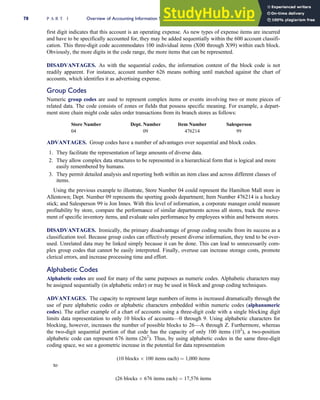
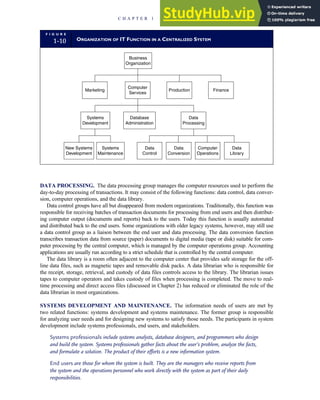
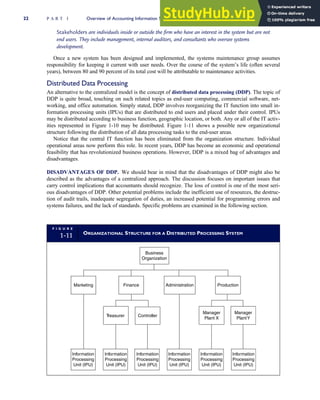
Information
Systems
SEVENTH EDITION
JAMES A. HALL
Peter E. Bennett Chair in
Business and Economics
Lehigh University
http://avaxhome.ws/blogs/ChrisRedfield
Accounting Information Systems,
Seventh Edition
James A. Hall
VP/Editorial Director: Jack W. Calhoun
Editor-in-Chief: Rob Dewey
Sr. Acquisitions Editor: Matt Filimonov
Editorial Assistant: Lauren Athmer
Developmental Editor: Maggie Kubale
Marketing Manager: Natalie King
Marketing Coordinator: Heather McAuliffe
Associate Content Project Manager: Jana Lewis
Manager of Technology, Editorial: Matt McKinney
Media Editor: Bryan England
Sr. Manufacturing Buyer: Doug Wilke
Production Technology Analyst: Starratt Alexander
Production House: Cadmus Communications
Printer: Edwards Brothers
Art Director: Stacy Jenkins-Shirley
Marketing Communications Manager: Libby Shipp
Permissions Acquisition Manager: Roberta Broyer
Cover Designer: Itzhack Shelomi
Cover Image: iStock Photo
Printed in the United States of America
1 2 3 4 5 13 12 11 10 09
ª 2011, 2008 Cengage Learning
ALL RIGHTS RESERVED. No part of this work covered by the copy-
right herein may be reproduced, transmitted, stored or used in any form
or by any means graphic, electronic, or mechanical, including but not
limited to photocopying, recording, scanning, digitizing, taping, Web
distribution, information networks, or information storage and retrieval
systems, except as permitted under Section 107 or 108 of the 1976
United States Copyright Act, without the prior written permission of the
publisher.
For more information about our products, contact us at:
Cengage Learning Academic Resource Center,
1-800-423-0563
For permission to use material from this text or product, submit a
request online at http://www.cengage.com/permissions.
South-Western Cengage Learning, a part of Cengage Learning.
Cengage, the Star logo, and South-Western are trademarks used
herein under license.
Library of Congress Control Number: 2009938064
ISBN-13: 978-1-4390-7857-0
ISBN-10: 1-4390-7857-2
Cengage Learning
5191 Natorp Boulevard
Mason, OH 45040
USA
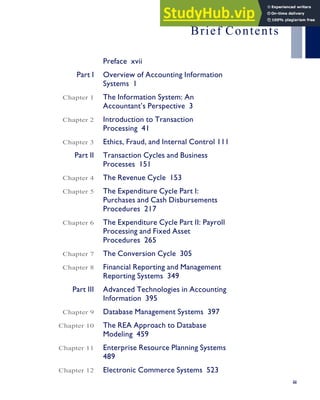
Brief Contents
Preface xvii
Part I Overview of Accounting Information
Systems 1
Chapter 1 The Information System: An
Accountant’s Perspective 3
Chapter 2 Introduction to Transaction
Processing 41
Chapter 3 Ethics, Fraud, and Internal Control 111
Part II Transaction Cycles and Business
Processes 151
Chapter 4 The Revenue Cycle 153
Chapter 5 The Expenditure Cycle Part I:
Purchases and Cash Disbursements
Procedures 217
Chapter 6 The Expenditure Cycle Part II: Payroll
Processing and Fixed Asset
Procedures 265
Chapter 7 The Conversion Cycle 305
Chapter 8 Financial Reporting and Management
Reporting Systems 349
Part III Advanced Technologies in Accounting
Information 395
Chapter 9 Database Management Systems 397
Chapter 10 The REA Approach to Database
Modeling 459
Chapter 11 Enterprise Resource Planning Systems
489
Chapter 12 Electronic Commerce Systems 523
iii
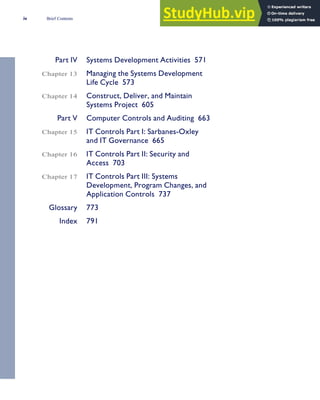
Part IV Systems Development Activities 571
Chapter 13 Managing the Systems Development
Life Cycle 573
Chapter 14 Construct, Deliver, and Maintain
Systems Project 605
Part V Computer Controls and Auditing 663
Chapter 15 IT Controls Part I: Sarbanes-Oxley
and IT Governance 665
Chapter 16 IT Controls Part II: Security and
Access 703
Chapter 17 IT Controls Part III: Systems
Development, Program Changes, and
Application Controls 737
Glossary 773
Index 791
iv Brief Contents
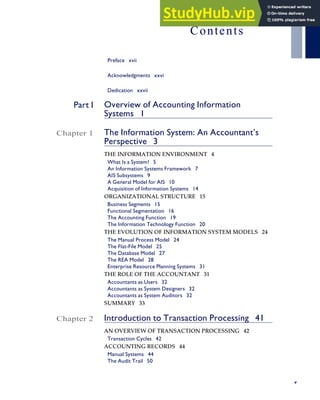
Contents
Preface xvii
Acknowledgments xxvi
Dedication xxvii
Part I Overview of Accounting Information
Systems 1
Chapter 1 The Information System: An Accountant’s
Perspective 3
THE INFORMATION ENVIRONMENT 4
What Is a System? 5
An Information Systems Framework 7
AIS Subsystems 9
A General Model for AIS 10
Acquisition of Information Systems 14
ORGANIZATIONAL STRUCTURE 15
Business Segments 15
Functional Segmentation 16
The Accounting Function 19
The Information Technology Function 20
THE EVOLUTION OF INFORMATION SYSTEM MODELS 24
The Manual Process Model 24
The Flat-File Model 25
The Database Model 27
The REA Model 28
Enterprise Resource Planning Systems 31
THE ROLE OF THE ACCOUNTANT 31
Accountants as Users 32
Accountants as System Designers 32
Accountants as System Auditors 32
SUMMARY 33
Chapter 2 Introduction to Transaction Processing 41
AN OVERVIEW OF TRANSACTION PROCESSING 42
Transaction Cycles 42
ACCOUNTING RECORDS 44
Manual Systems 44
The Audit Trail 50
v
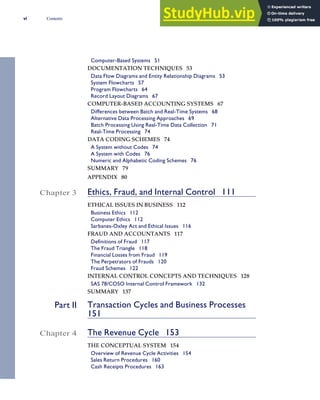
Computer-Based Systems 51
DOCUMENTATION TECHNIQUES 53
Data Flow Diagrams and Entity Relationship Diagrams 53
System Flowcharts 57
Program Flowcharts 64
Record Layout Diagrams 67
COMPUTER-BASED ACCOUNTING SYSTEMS 67
Differences between Batch and Real-Time Systems 68
Alternative Data Processing Approaches 69
Batch Processing Using Real-Time Data Collection 71
Real-Time Processing 74
DATA CODING SCHEMES 74
A System without Codes 74
A System with Codes 76
Numeric and Alphabetic Coding Schemes 76
SUMMARY 79
APPENDIX 80
Chapter 3 Ethics, Fraud, and Internal Control 111
ETHICAL ISSUES IN BUSINESS 112
Business Ethics 112
Computer Ethics 112
Sarbanes-Oxley Act and Ethical Issues 116
FRAUD AND ACCOUNTANTS 117
Definitions of Fraud 117
The Fraud Triangle 118
Financial Losses from Fraud 119
The Perpetrators of Frauds 120
Fraud Schemes 122
INTERNAL CONTROL CONCEPTS AND TECHNIQUES 128
SAS 78/COSO Internal Control Framework 132
SUMMARY 137
Part II Transaction Cycles and Business Processes
151
Chapter 4 The Revenue Cycle 153
THE CONCEPTUAL SYSTEM 154
Overview of Revenue Cycle Activities 154
Sales Return Procedures 160
Cash Receipts Procedures 163
vi Contents
Revenue Cycle Controls 166
PHYSICAL SYSTEMS 170
MANUAL SYSTEMS 171
Sales Order Processing 171
Sales Return Procedures 174
Cash Receipts Procedures 174
COMPUTER-BASED ACCOUNTING SYSTEMS 177
Automating Sales Order Processing with Batch Technology 177
Keystroke 178
Edit Run 180
Update Procedures 180
Reengineering Sales Order Processing with Real-Time
Technology 180
Transaction Processing Procedures 180
General Ledger Update Procedures 182
Advantages of Real-Time Processing 183
Automated Cash Receipts Procedures 183
Reengineered Cash Receipts Procedures 185
Point-of-Sale (POS) Systems 185
Daily Procedures 185
End-of-Day Procedures 187
Reengineering Using EDI 187
Reengineering Using the Internet 188
Control Considerations for Computer-Based Systems 188
PC-BASED ACCOUNTING SYSTEMS 190
PC Control Issues 190
SUMMARY 191
APPENDIX 192
Chapter 5 The Expenditure Cycle Part I: Purchases and
Cash Disbursements Procedures 217
THE CONCEPTUAL SYSTEM 218
Overview of Purchases and Cash Disbursements Activities 218
The Cash Disbursements Systems 225
Expenditure Cycle Controls 228
PHYSICAL SYSTEMS 230
A Manual System 230
The Cash Disbursements Systems 232
COMPUTER-BASED PURCHASES AND CASH
DISBURSEMENTS APPLICATIONS 234
Automating Purchases Procedures Using Batch Processing
Technology 234
Contents vii
Cash Disbursements Procedures 239
Reengineering the Purchases/Cash Disbursements System 240
Control Implications 242
SUMMARY 243
Chapter 6 The Expenditure Cycle Part II: Payroll
Processing and Fixed Asset Procedures 265
THE CONCEPTUAL PAYROLL SYSTEM 266
Payroll Controls 274
THE PHYSICAL PAYROLL SYSTEM 275
Manual Payroll System 275
COMPUTER-BASED PAYROLL SYSTEMS 277
Automating the Payroll System Using Batch Processing 277
Reengineering the Payroll System 279
THE CONCEPTUAL FIXED ASSET SYSTEM 281
The Logic of a Fixed Asset System 281
THE PHYSICAL FIXED ASSET SYSTEM 283
Computer-Based Fixed Asset System 283
Controlling the Fixed Asset System 286
SUMMARY 288
Chapter 7 The Conversion Cycle 305
THE TRADITIONAL MANUFACTURING
ENVIRONMENT 306
Batch Processing System 307
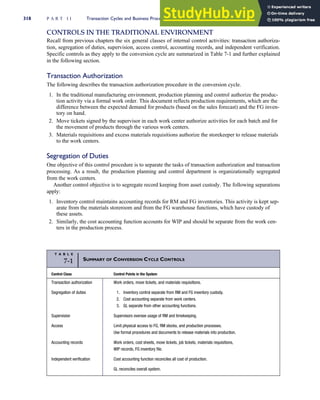
Controls in the Traditional Environment 318
WORLD-CLASS COMPANIES AND LEAN
MANUFACTURING 320
What Is a World-Class Company? 320
Principles of Lean Manufacturing 320
TECHNIQUES AND TECHNOLOGIES THAT PROMOTE LEAN
MANUFACTURING 322
Physical Reorganization of the Production Facilities 322
Automation of the Manufacturing Process 323
ACCOUNTING IN A LEAN MANUFACTURING
ENVIRONMENT 326
What’s Wrong with Traditional Accounting Information? 326
Activity-Based Costing (ABC) 328
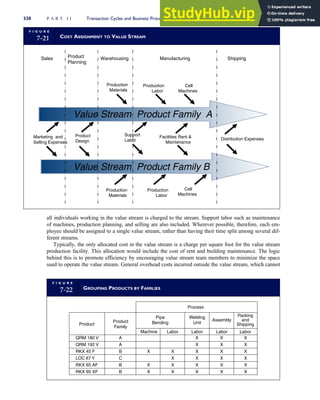
Value Stream Accounting 329
INFORMATION SYSTEMS THAT SUPPORT LEAN
MANUFACTURING 331
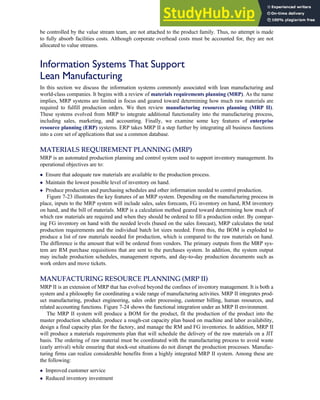
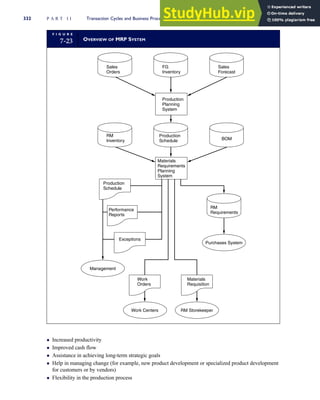
Materials Requirement Planning (MRP) 331
viii Contents
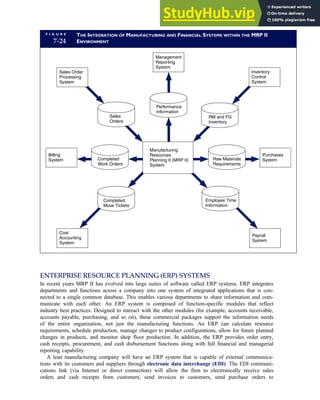
Manufacturing Resource Planning (MRP II) 331
Enterprise Resource Planning (ERP) Systems 333
SUMMARY 334
Chapter 8 Financial Reporting and Management
Reporting Systems 349
THE GENERAL LEDGER SYSTEM 349
The Journal Voucher 350
The GLS Database 350
GLS Procedures 352
THE FINANCIAL REPORTING SYSTEM 352
Sophisticated Users with Homogeneous Information Needs 352
Financial Reporting Procedures 352
XBRL—REENGINEERING FINANCIAL REPORTING 355
XML 355
XBRL 356
The Current State of XBRL Reporting 361
CONTROLLING THE FRS 362
SAS 78/COSO Control Issues 362
Internal Control Implications of XBRL 364
THE MANAGEMENT REPORTING SYSTEM 365
FACTORS THAT INFLUENCE THE MRS 365
Management Principles 365
Management Function, Level, and Decision Type 368
Problem Structure 370
Types of Management Reports 371
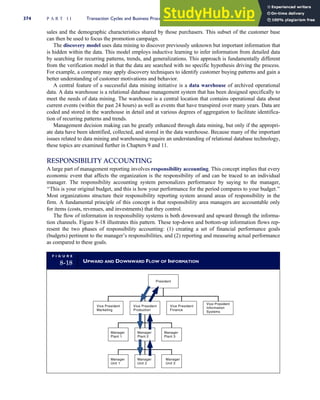
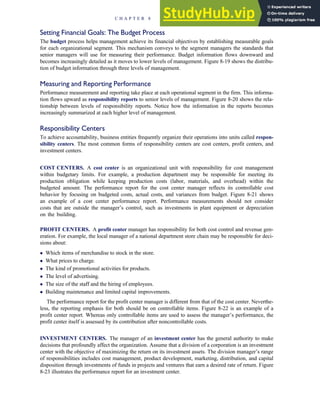
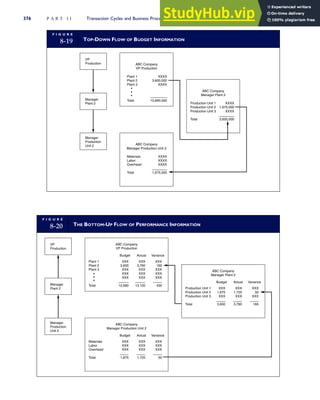
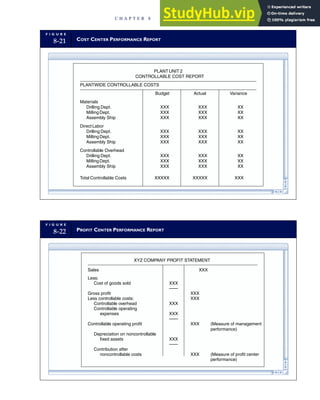
Responsibility Accounting 374
Behavioral Considerations 378
SUMMARY 380
Part III Advanced Technologies in Accounting
Information 395
Chapter 9 Database Management Systems 397
OVERVIEW OF THE FLAT-FILE VERSUS DATABASE
APPROACH 398
Data Storage 398
Data Updating 398
Currency of Information 399
Task-Data Dependency 399
The Database Approach 399
Flat-File Problems Solved 400
Contents ix
Controlling Access to the Database 400
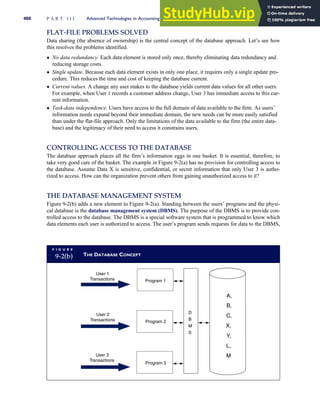
The Database Management System 400
Three Conceptual Models 401
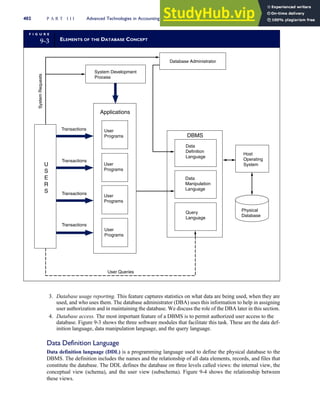
ELEMENTS OF THE DATABASE ENVIRONMENT 401
Users 401
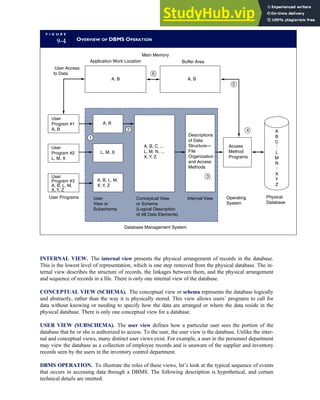
Database Management System 401
Database Administrator 404
The Physical Database 407
THE RELATIONAL DATABASE MODEL 407
Relational Database Concepts 408
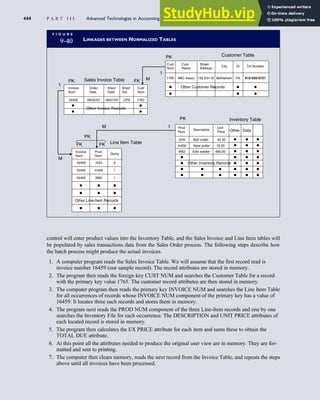
Anomalies, Structural Dependencies, and Data Normalization 412
DESIGNING RELATIONAL DATABASES 419
Identify Entities 419
Construct a Data Model Showing Entity Associations 421
Add Primary Keys and Attributes to the Model 422
Normalize Data Model and Add Foreign Keys 422
Construct the Physical Database 423
Prepare the User Views 424
Global View Integration 427
DATABASES IN A DISTRIBUTED ENVIRONMENT 427
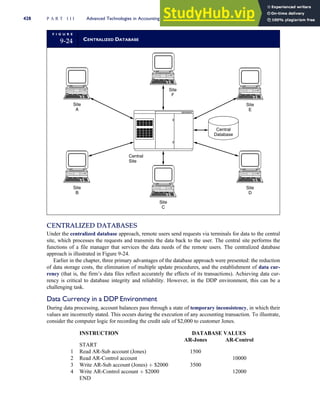
Centralized Databases 428
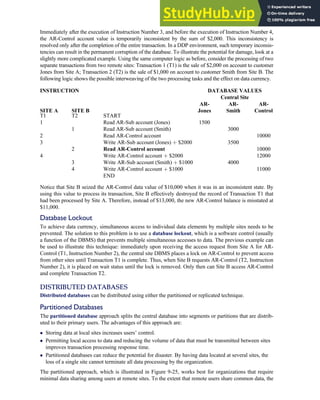
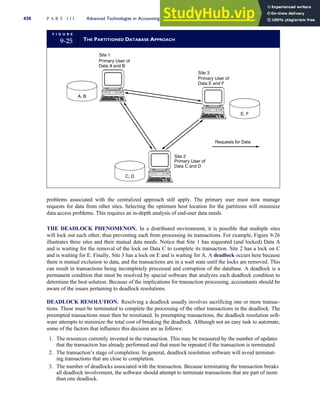
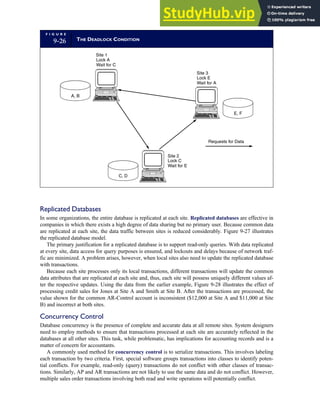
Distributed Databases 429
SUMMARY 433
APPENDIX 433
Chapter 10 The REA Approach to Database
Modeling 459
THE REA APPROACH 460
The REA Model 460
DEVELOPING AN REA MODEL 462
Differences between ER and REA Diagrams 463
View Modeling: Creating an Individual REA Diagram 463
VIEW INTEGRATION: CREATING AN
ENTERPRISE-WIDE REA MODEL 470
Step 1. Consolidate the Individual Models 470
Step 2. Define Primary Keys, Foreign Keys, and Attributes 475
Step 3. Construct Physical Database and Produce User Views 477
REA and Value Chain Analysis 481
REA Compromises in Practice 482
SUMMARY 482
x Contents
Chapter 11 Enterprise Resource Planning Systems 489
WHAT IS AN ERP? 490
ERP Core Applications 491
Online Analytical Processing 492
ERP SYSTEM CONFIGURATIONS 492
Server Configurations 492
OLTP Versus OLAP Servers 493
Database Configuration 496
Bolt-on Software 496
DATA WAREHOUSING 497
Modeling Data for the Data Warehouse 497
Extracting Data from Operational Databases 498
Cleansing Extracted Data 498
Transforming Data into the Warehouse Model 500
Loading the Data into the Data Warehouse Database 501
Decisions Supported by the Data Warehouse 501
Supporting Supply Chain Decisions from the Data Warehouse 502
RISKS ASSOCIATED WITH ERP IMPLEMENTATION 503
Big Bang Versus Phased-in Implementation 503
Opposition to Changes in the Business’s Culture 504
Choosing the Wrong ERP 504
Choosing the Wrong Consultant 505
High Cost and Cost Overruns 506
Disruptions to Operations 507
IMPLICATIONS FOR INTERNAL CONTROL
AND AUDITING 507
Transaction Authorization 507
Segregation of Duties 508
Supervision 508
Accounting Records 508
Independent Verification 508
Access Controls 509
Internal Control Issues Related to ERP Roles 509
Contingency Planning 511
SUMMARY 512
APPENDIX 512
Chapter 12 Electronic Commerce Systems 523
INTRAORGANIZATIONAL NETWORKS AND EDI 524
INTERNET COMMERCE 524
Internet Technologies 524
Contents xi
Protocols 527
Internet Protocols 528
Benefits from Internet Commerce 530
RISKS ASSOCIATED WITH ELECTRONIC COMMERCE 532
Intranet Risks 532
Internet Risks 533
Risks to Consumers 533
SECURITY, ASSURANCE, AND TRUST 539
Encryption 539
Digital Authentication 540
Firewalls 542
Seals of Assurance 542
IMPLICATIONS FOR THE ACCOUNTING PROFESSION 543
Privacy Violation 543
Continuous Auditing 544
Electronic Audit Trails 545
Confidentiality of Data 545
Authentication 545
Nonrepudiation 545
Data Integrity 545
Access Controls 545
A Changing Legal Environment 546
SUMMARY 546
APPENDIX 546
Part IV Systems Development Activities 571
Chapter 13 Managing the Systems Development Life
Cycle 573
THE SYSTEMS DEVELOPMENT LIFE CYCLE 574
Participants in Systems Development 575
SYSTEMS STRATEGY 576
ASSESS STRATEGIC INFORMATION NEEDS 576
Strategic Business Needs 576
Legacy Systems 577
User Feedback 577
DEVELOP A STRATEGIC SYSTEMS PLAN 580
CREATE AN ACTION PLAN 580
The Learning and Growth Perspective 581
The Internal Business Process Perspective 582
xii Contents
The Customer Perspective 582
The Financial Perspective 582
Balanced Scorecard Applied to IT Projects 582
PROJECT INITIATION 583
SYSTEMS ANALYSIS 583
The Survey Step 583
The Analysis Step 586
CONCEPTUALIZATION OF ALTERNATIVE DESIGNS 587
How Much Design Detail Is Needed? 587
SYSTEMS EVALUATION AND SELECTION 589
Perform a Detailed Feasibility Study 589
Perform Cost-Benefit Analysis 590
Prepare Systems Selection Report 595
Announcing the New System Project 596
User Feedback 597
THE ACCOUNTANT’S ROLE IN MANAGING THE SDLC 597
How Are Accountants Involved with SDLC? 597
The Accountant’s Role in Systems Strategy 598
The Accountant’s Role in Conceptual Design 598
The Accountant’s Role in Systems Selection 598
SUMMARY 598
Chapter 14 Construct, Deliver, and Maintain Systems
Project 605
IN-HOUSE SYSTEMS DEVELOPMENT 606
Tools for Improving Systems Development 606
CONSTRUCT THE SYSTEM 610
The Structured Design Approach 610
The Object-Oriented Design Approach 610
System Design 615
Data Modeling, Conceptual Views, and Normalized Tables 615
Design Physical User Views 615
Design the System Process 622
Design System Controls 625
Perform a System Design Walk-Through 625
Program Application Software 626
Software Testing 627
DELIVER THE SYSTEM 628
Testing the Entire System 628
Documenting the System 628
Converting the Databases 630
Converting to the New System 630
Contents xiii
Postimplementation Review 631
The Role of Accountants 633
COMMERCIAL PACKAGES 633
TRENDS IN COMMERCIAL PACKAGES 633
Advantages of Commercial Packages 635
Disadvantages of Commercial Packages 635
CHOOSING A PACKAGE 635
MAINTENANCE AND SUPPORT 639
User Support 639
Knowledge Management and Group Memory 639
SUMMARY 640
APPENDIX 640
Part V Computer Controls and Auditing 663
Chapter 15 IT Controls Part I: Sarbanes-Oxley
and IT Governance 665
OVERVIEW OF SOX SECTIONS 302 AND 404 666
Relationship between IT Controls and Financial Reporting 666
Audit Implications of Sections 302 and 404 667
IT GOVERNANCE CONTROLS 671
ORGANIZATIONAL STRUCTURE CONTROLS 671
Segregation of Duties within the Centralized Firm 672
The Distributed Model 674
Creating a Corporate IT Function 675
Audit Objectives Relating to Organizational Structure 676
Audit Procedures Relating to Organizational Structure 676
COMPUTER CENTER SECURITY AND CONTROLS 677
Computer Center Controls 677
DISASTER RECOVERY PLANNING 679
Providing Second-Site Backup 680
Identifying Critical Applications 681
Performing Backup and Off-Site Storage Procedures 681
Creating a Disaster Recovery Team 682
Testing the DRP 683
Audit Objective: Assessing Disaster Recovery Planning 683
Audit Procedures for Assessing Disaster Recovery Planning 683
OUTSOURCING THE IT FUNCTION 683
Risks Inherent to IT Outsourcing 684
Audit Implications of IT Outsourcing 685
SUMMARY 687
APPENDIX 687
xiv Contents
Chapter 16 IT Controls Part II: Security and Access 703
CONTROLLING THE OPERATING SYSTEM 704
Operating System Objectives 704
Operating System Security 704
Threats to Operating System Integrity 705
Operating System Controls and Test of Controls 705
CONTROLLING DATABASE MANAGEMENT SYSTEMS 710
Access Controls 710
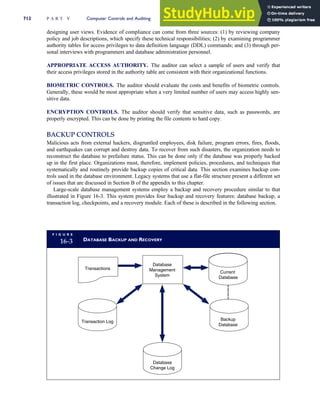
Backup Controls 712
CONTROLLING NETWORKS 713
Controlling Risks from Subversive Threats 713
Controlling Risks from Equipment Failure 721
ELECTRONIC DATA INTERCHANGE (EDI) CONTROLS 722
Transaction Authorization and Validation 723
Access Control 724
EDI Audit Trail 724
SUMMARY 726
APPENDIX 726
Chapter 17 IT Controls Part III: Systems Development,
Program Changes, and Application Controls
737
SYSTEMS DEVELOPMENT CONTROLS 738
Controlling Systems Development Activities 738
Controlling Program Change Activities 740
Source Program Library Controls 740
The Worst-Case Situation: No Controls 741
A Controlled SPL Environment 741
APPLICATION CONTROLS 745
Input Controls 745
Processing Controls 747
Output Controls 750
TESTING COMPUTER APPLICATION CONTROLS 752
Black Box Approach 753
White Box Approach 753
White Box Testing Techniques 756
The Integrated Test Facility 759
Parallel Simulation 760
SUBSTANTIVE TESTING TECHNIQUES 761
The Embedded Audit Module 761
Generalized Audit Software 763
SUMMARY 766
Contents xv
This page intentionally left blank
Preface
Welcome to the Seventh Edition
T
he seventh edition of Accounting Information Systems includes a full range of
new and revised homework assignments and up-to-date content changes, as
well as several reorganized chapters. All of these changes add up to more stu-
dent and instructor enhancements than ever before. As this preface makes clear, we
have made these changes to keep students and instructors as current as possible on
issues such as business processes, systems development methods, IT governance and
strategy, security, internal controls, and relevant aspects of Sarbanes-Oxley legislation.
Focus and Flexibility in Designing
Your AIS Course
Among accounting courses, accounting information systems (AIS) courses tend to be
the least standardized. Often the objectives, background, and orientation of the instruc-
tor, rather than adherence to a standard body of knowledge, determines the direction
the AIS course takes. Therefore, we have designed this text for maximum flexibility:
• This textbook covers a full range of AIS topics to provide instructors with flexibil-
ity in setting the direction and intensity of their courses.
• At the same time, for those who desire a structured model, the first nine chapters
of the text, along with the chapters on electronic commerce and computer controls,
provide what has proven to be a successful template for developing an AIS
course.
• Earlier editions of this book have been used successfully in introductory,
advanced, and graduate-level AIS courses.
• The topics in this book are presented from the perspective of the managers’
and accountants’ AIS-related responsibilities under the Sarbanes-Oxley Act.
• Although this book was written primarily to meet the needs of accounting majors
about to enter the modern business world, we have also developed it to be an effec-
tive text for general business and industrial engineering students who seek a
thorough understanding of AIS and internal control issues as part of their
professional education.
Key Features
CONCEPTUAL FRAMEWORK
This book employs a conceptual framework to emphasize the professional and legal
responsibility of accountants, auditors, and management for the design, operation, and
control of AIS applications. This responsibility pertains to business events that are nar-
rowly defined as financial transactions. Systems that process nonfinancial transactions
are not subject to the standards of internal control under Sarbanes-Oxley legislation.
Supporting the information needs of all users in a modern organization, however,
requires systems that integrate both accounting and nonaccounting functions. While
xvii
providing the organization with unquestioned benefit, a potential consequence of such
integration is a loss of control due to the blurring of the lines that traditionally separate
AIS from non-AIS functions. The conceptual framework presented in this book dis-
tinguishes AIS applications that are legally subject to specific internal control
standards.
EVOLUTIONARY APPROACH
Over the years, accounting information systems have been represented by a number of
different approaches or models. Each new model evolved because of the shortcomings
and limitations of its predecessor. An interesting feature in this evolution is that older
models are not immediately replaced by the newest technique. Thus, at any point in
time, various generations of legacy systems exist across different organizations and of-
ten coexist within a single enterprise. Modern accountants need to be familiar with the
operational characteristics of all AIS approaches that they are likely to encounter.
Therefore, this book presents the salient aspects of five models that relate to both
legacy and state-of-the-art systems:
1. manual processes
2. flat-file systems
3. the database approach
4. the resources, events, and agents (REA) model
5. enterprise resource planning (ERP) systems
EMPHASIS ON INTERNAL CONTROLS
The book presents a conceptual model for internal control based on Statement on
Auditing Standards no. 78 (SAS 78) and the Committee of Sponsoring Organizations
of the Treadway Commission (COSO) frameworks. This SAS 78/COSO model is used
to discuss control issues for both manual processes and computer-based information
systems (CBIS). Three chapters (Chapters 15, 16 and 17) are devoted to the control of
CBIS. Special emphasis is given to the following areas:
• computer operating systems
• database management systems
• electronic data interchange (EDI)
• electronic commerce systems
• ERP systems
• systems development and program change processes
• the organization of the computer function
• the security of data processing centers
• verifying computer application integrity
EXPOSURE TO SYSTEMS DESIGN AND
DOCUMENTATION TOOLS
This book examines various approaches and methodologies used in systems analysis
and design, including:
• structured design
• object-oriented design
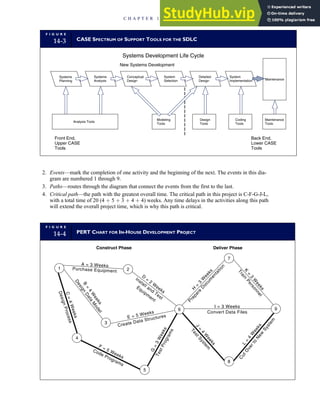
• computer-aided software engineering (CASE)
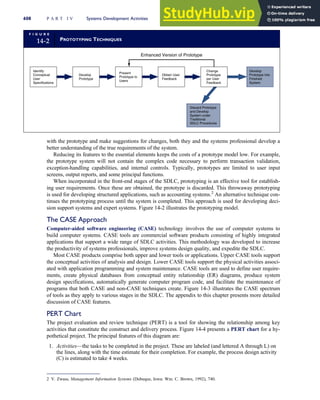
• prototyping
xviii Preface
In conjunction with these general approaches, professional systems analysts and pro-
grammers use a number of documentation techniques to specify the key features of sys-
tems. The modern auditor works closely with systems professionals during IT audits
and must learn to communicate in their language. The book deals extensively with
documentation techniques such as data flow diagrams (DFDs) and entity relation-
ship diagrams (ERDs), as well as system and program flowcharts. It contains
numerous systems design and documentation cases and assignments intended to
develop students’ competency with these tools.
Significant Changes in the Seventh Edition
Chapter 2, ‘‘Introduction to Transaction Processing’’
This chapter has been updated to include a discussion of data coding schemes and their
role in transaction processing and AIS as a means of coordinating and managing a
firm’s transactions. The chapter presents the advantages and disadvantages of the major
types of numeric and alphabetic coding schemes. In the sixth edition, this material was
included in Chapter 8; it was moved in this edition because of its relevance as an ele-
ment of transaction processing.
Chapter 3, ‘‘Ethic, Fraud, and Internal Control’’
This chapter has been revised to include the most recent research results published by
the Association of Certified Fraud Examiners (ACFE). The ACFE study provides esti-
mates of losses due to fraud, categorizes fraud by various factors, and creates a profile
of fraud perpetrators. In addition, the chapter presents an expanded discussion of com-
mon fraud schemes.
Chapter 4, ‘‘The Revenue Cycle’’; Chapter 5 ‘‘The Expenditure Cycle Part I:
Purchases and Cash Disbursements Procedures’’; Chapter 6, ‘‘The Expenditure Cycle
Part II: Payroll Processing and Fixed Asset Procedures’’
The end-of-chapter material for these chapters has been significantly revised. This
entailed revising all the end-of-chapter internal control cases and creating several new
ones, In particular, great attention was given to internal control case solutions to ensure
consistency in appearance and an accurate reflection of the cases in the text. In the sev-
enth edition, all case solution flowcharts are numerically coded and cross-referenced to
text that explains the internal control issues. This approach, which has been classroom
tested, facilitates effective presentation of internal control case materials.
Chapter 8, ‘‘Financial Reporting and Management Reporting Systems’’
This chapter has been revised to include a discussion of the expanding role of XBRL
(Extendable Business Reporting Language). The chapter outlines the technological fea-
tures of XBRL and points to the advantages it offers organizations for which online
reporting of financial data has become a competitive necessity. It also presents a num-
ber of internal control and audit implications that accountants should recognize.
Chapter 11, ‘‘Enterprise Resource Planning Systems’’
A significant change to this chapter has been the addition of a SAP internal control
case, available online to all schools that are members of the SAP University Alliance
Program. This case teaches students how to navigate the SAP system and allows them
to process revenue, expenditure, and conversion cycle transactions for a hypothetical
company that manufactures and sells classic sports car parts and accessories. Important
aspects of the case are its focuses on internal controls and on the establishment of roles
in a SAP environment.
Preface xix
Chapter 15, ‘‘IT Controls Part I: Sarbanes-Oxley and IT Governance’’
A major new section in this chapter deals with IT outsourcing. It examines the motiva-
tions and theories underlying outsourcing decisions and speaks to a number of risk issues
that auditors need to understand. The chapter has also been expanded to include a discus-
sion of several computer fraud techniques. Computer fraud loss estimates vary greatly
among researchers. Uncertainty exists, in part, because computer fraud is itself not well
defined. All agree, however, that computer fraud is a rapidly growing phenomenon.
Organization and Content
PART I: OVERVIEW OF ACCOUNTING
INFORMATION SYSTEMS
Chapter 1, ‘‘The Information System: An Accountant’s Perspective’’
Chapter 1 places the subject of accounting information systems in perspective for
accountants. It is divided into four major sections, each dealing with a different aspect
of information systems.
• The first section explores the information environment of the firm. It introduces ba-
sic systems concepts, identifies the types of information used in business, describes
the flow of information through an enterprise, and presents a framework for viewing
accounting information systems in relation to other information systems compo-
nents.
• The second section deals with the impact of organizational structure on AIS. The
centralized and distributed models are used to illustrate extreme cases.
• The third section reviews the evolution of information systems models. Accounting
information systems are represented by a number of different approaches or models.
Five dominant models are examined: manual processes; flat-file systems; the data-
base approach; the resources, events, agents (REA) model; and enterprise resource
planning (ERP) systems.
• The final section discusses the role of accountants as users, designers, and auditors
of AIS. The nature of the responsibilities shared by accountants and computer pro-
fessionals for developing AIS applications are examined.
Chapter 2, ‘‘Introduction to Transaction Processing’’
Chapter 2 divides the treatment of transaction processing systems into five major sec-
tions.
• The first section provides an overview of transaction processing, showing its vital
role as an information provider for financial reporting, internal management report-
ing, and the support of day-to-day operations. Three transaction cycles account for
most of a firm’s economic activity: the revenue cycle, the expenditure cycle, and the
conversion cycle.
• The second section describes the relationship among accounting records in both
manual and computer-based systems.
• The third section of the chapter presents an overview of documentation techniques
used to describe the key features of systems. Five types of documentation are com-
monly used: data flow diagrams, entity relationship diagrams, system flowcharts,
program flowcharts, and record layout diagrams.
• The fourth section presents two computer-based transaction processing systems—
batch processing using real-time data collection and real-time processing—and the
operational efficiency issues associated with each.
• The final section examines data coding schemes, their role in transaction processing
and AIS as a means of coordinating and managing a firm’s transactions, and the
xx Preface
advantages and disadvantages of the major types of numeric and alphabetic coding
schemes.
Chapter 3, ‘‘Ethics, Fraud, and Internal Control’’
Chapter 3 deals with the related topics of ethics, fraud, and internal control.
• The chapter first examines ethical issues related to business and specifically to
computer systems. The questions raised are intended to stimulate class discussions.
• Next, the chapter addresses fraud. There is perhaps no area of greater controversy
for accountants than their responsibility to detect fraud. Part of the problem stems
from confusion about what constitutes fraud. This section distinguishes between
management fraud and employee fraud. The chapter presents techniques for identi-
fying unethical and dishonest management and for assessing the risk of management
fraud. Employee fraud can be prevented and detected by a system of internal con-
trols. The section discusses several fraud techniques that have been perpetrated in
both manual and computer-based environments. The results of a research study con-
ducted by the Association of Certified Fraud Examiners as well as the provisions of
the Sarbanes-Oxley Act are presented.
• The final section of the chapter describes the internal control structure and control
activities specified in SAS 78/COSO. The control concepts discussed in this chapter
are applied to specific applications in chapters that follow.
PART II: TRANSACTION CYCLES AND
BUSINESS PROCESSES
Chapter 4, ‘‘The Revenue Cycle’’; Chapter 5, ‘‘The Expenditure Cycle Part I:
Purchases and Cash Disbursements Procedures’’; and Chapter 6, ‘‘The Expenditure
Cycle Part II: Processing and Fixed Asset Procedures’’
The approach taken in all three chapters is similar. First, the business cycle is reviewed
conceptually using data flow diagrams to present key features and control points of
each major subsystem. At this point the reader has the choice of either continuing
within the context of a manual environment or moving directly to computer-based
examples. Each system is examined under two alternative technological approaches:
• Each system is first examined under automation. Automation preserves basic func-
tionality by replacing manual processes with computer programs.
• Next, each system is reengineered to incorporate real-time technology. Reengineer-
ing involves radically rethinking the business process and the work flow. The objec-
tive of reengineering is to improve operational performance and reduce costs by
identifying and eliminating non–value-added tasks.
Under each technology, the effects on operational efficiency and internal controls
are examined. This approach provides the student with a solid understanding of the
business tasks in each cycle and an awareness of how different technologies influence
changes in the operation and control of the systems.
Chapter 7, ‘‘The Conversion Cycle’’
Manufacturing systems represent a dynamic aspect of AIS. Chapter 7 discusses the
technologies and techniques used in support of two alternative manufacturing environ-
ments: traditional mass production (batch) processing and lean manufacturing. These
environments are driven by information technologies such as materials requirements
planning (MRP), manufacturing resources planning (MRP II), and enterprise resource
planning (ERP). The chapter addresses the shortcomings of the traditional cost account-
ing model as it compares to two alternative models: activity-based costing (ABC) and
value stream accounting.
Preface xxi
Chapter 8, ‘‘Financial Reporting and Management Reporting Systems’’
Chapter 8 examines an organization’s nondiscretionary and discretionary reporting
systems.
• First, it focuses on the general ledger system (GLS) and on the files that constitute a
GLS database.
• Next, it examines how financial statement information is provided to both external
and internal users through a multistep reporting process. The emerging technology
of XBRL is changing traditional financial reporting for many organizations. The
key features of XBRL and the internal control implications of this technology are
considered.
• The chapter then looks at discretionary reporting systems that constitute the Man-
agement Reporting System (MRS). Discretionary reporting is not subject to the pro-
fessional guidelines and legal statutes that govern nondiscretionary financial
reporting. Rather, it is driven by several factors, including management principles;
management function, level, and decision type; problem structure; responsibility
accounting; and behavioral considerations. The impact of each factor on the design
of the management reporting system is investigated.
PART III: ADVANCED TECHNOLOGIES IN
ACCOUNTING INFORMATION
Chapter 9, ‘‘Database Management Systems’’
Chapter 9 addresses the design and management of an organization’s data resources.
• The first section demonstrates how problems associated with traditional flat-file sys-
tems are resolved under the database approach.
• The second section describes in detail the functions and relationships among four
primary elements of the database environment: the users, the database management
system (DBMS), the database administrator (DBA), and the physical database.
• The third section is devoted to an in-depth explanation of the characteristics of the
relational database model. A number of database design topics are covered, includ-
ing data modeling, deriving relational tables from ER diagrams, the creation of user
views, and data normalization techniques.
• The chapter concludes with a discussion of distributed database issues. It examines
three possible database configurations in a distributed environment: centralized,
partitioned, and replicated databases.
Chapter 10, ‘‘The REA Approach to Database Modeling’’
Chapter 10 presents the resources, events, and agents REA model as a means of speci-
fying and designing accounting information systems that serve the needs of all users
within an organization. The chapter is composed of five major sections.
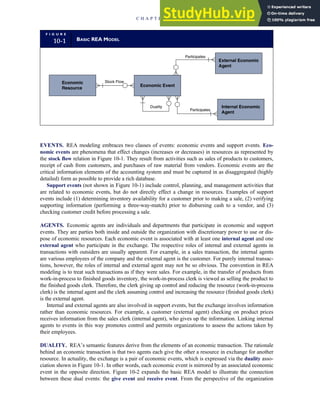
• The chapter begins by defining the key elements of REA. The basic model employs
a unique form of ER diagram called an REA diagram. The diagram consists of three
entity types (resources, events, and agents) and a set of associations linking them.
• Next the rules for developing an REA diagram are explained and illustrated in
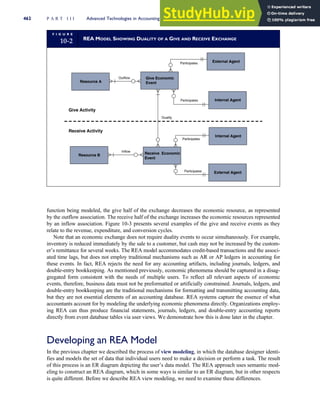
detail. An important aspect of the model is the concept of economic duality, which
specifies that each economic event must be mirrored by an associated economic
event in the opposite direction.
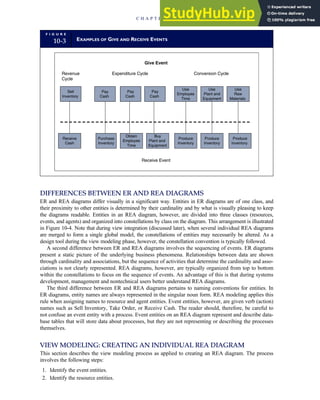
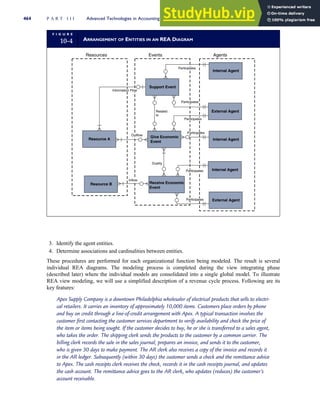
• The chapter illustrates the development of an REA database for a hypothetical firm
following a multistep process called view modeling. The result of this process is an
REA diagram for a single organizational function.
xxii Preface
• The chapter’s fourth section explains how multiple REA diagrams (revenue cycle,
purchases, cash disbursements, and payroll) are integrated into a global or
enterprisewide model. The enterprise model is then implemented into a relational
database structure, and user views are constructed.
• The chapter concludes with a discussion of how REA modeling can improve com-
petitive advantage by allowing management to focus on the value-added activities
of their operations.
Chapter 11, ‘‘Enterprise Resource Planning Systems’’
Chapter 11 presents a number of issues related to the implementation of enterprise
resource planning (ERP) systems. It is composed of five major sections and an
appendix.
• The first section outlines the key features of a generic ERP system by comparing the
function and data storage techniques of a traditional flat-file or database system to
that of an ERP.
• The second section describes various ERP configurations related to servers, data-
bases, and bolt-on software.
• Data warehousing is the topic of the third section. A data warehouse is a rela-
tional or multidimensional database that supports online analytical processing
(OLAP). Issues discussed include data modeling, data extraction from opera-
tional databases, data cleansing, data transformation, and loading data into the
warehouse.
• The fourth section examines risks associated with ERP implementation. These
include ‘‘big bang’’ issues, opposition to change within the organization, choosing
the wrong ERP model, choosing the wrong consultant, cost overrun issues, and dis-
ruptions to operations.
• The fifth section reviews several control and auditing issues related to ERPs. The
discussion follows the SAS 78/COSO framework.
• The chapter appendix provides a review of the leading ERP software products,
including SAP, Oracle E-Business Suite, Oracle | PeopleSoft, JD Edwards,
EnterpriseOne, SoftBrands, MAS 500, and Microsoft Dynamics.
Chapter 12, ‘‘Electronic Commerce Systems’’
Driven by the Internet revolution, electronic commerce is dramatically expanding and
undergoing radical changes. Although electronic commerce has brought enormous
opportunities for consumers and businesses, its effective implementation and control
present urgent challenges to organizations’ management teams and accountants. To
evaluate the potential exposures and risks in this environment properly, the modern
accountant must be familiar with the technologies and techniques that underlie elec-
tronic commerce. Chapter 12 and its associated appendix deal with several aspects of
electronic commerce.
• The body of the chapter examines Internet commerce including business-to-
consumer and business-to-business relationships. It presents the risks associated
with electronic commerce and reviews security and assurance techniques to reduce
risk and promote trust.
• The chapter concludes with a discussion of how Internet commerce impacts the
accounting and auditing profession.
• The internal usage of networks to support distributed data processing and traditional
business-to-business transactions conducted via EDI systems are presented in the
appendix.
Preface xxiii
PART IV: SYSTEMS DEVELOPMENT ACTIVITIES
Chapter 13, ‘‘Managing the Systems Development Life Cycle,’’ and
Chapter 14, ‘‘Construct, Deliver, and Maintain Systems Projects’’
The chapters in Part IV examine the accountant’s role in the systems development
process.
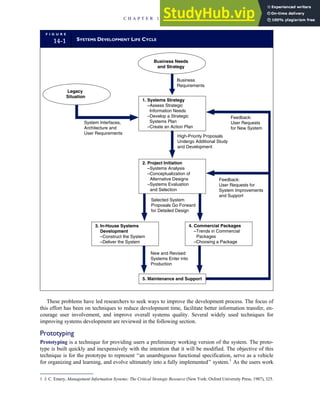
• Chapter 13 begins with an overview to the systems development life cycle (SDLC).
This multistage process guides organization management through the development
and/or purchase of information systems.
• Next, Chapter 13 presents the key issues pertaining to developing a systems strat-
egy, including its relationship to the strategic business plan, the current legacy situa-
tion, and feedback from the user community. The chapter provides a methodology
for assessing the feasibility of proposed projects and for selecting individual projects
to go forward for construction and delivery to their users.
• The chapter concludes by reviewing the role of accountants in managing the SDLC.
• Chapter 14 covers the many activities associated with in-house development, which
fall conceptually into two categories: (1) constructing the system and (2) delivering
the system. Through these activities, systems selected in the project initiation phase
(discussed in Chapter 13) are designed in detail and implemented. This involves cre-
ating input screen formats, output report layouts, database structures, and application
logic. Finally, the completed system is tested, documented, and rolled out to the
user.
• Chapter 14 then examines the increasingly important option of using commercial
software packages. Conceptually, the commercial software approach also consists
of construct and delivery activities. In this section we examine the pros, cons, and
issues involved in selecting off-the-shelf systems.
• Chapter 14 also addresses the important activities associated with systems mainte-
nance and the associated risks that are important to managers, accountants, and
auditors.
Several comprehensive cases designed as team-based systems development projects
are available online at www.cengage.com/accounting/hall. These cases have been used
effectively by groups of three or four students working as a design team. Each case has
sufficient details to allow analysis of user needs, preparation of a conceptual solution,
and the development of a detailed design, including user views (input and output),
processes, and databases.
PART V: COMPUTER CONTROLS AND AUDITING
Chapter 15, ‘‘IT Controls Part I: Sarbanes-Oxley and IT Governance’’
Chapter 15 provides an overview of management and auditor responsibilities under
Sections 302 and 404 of the Sarbanes-Oxley Act (SOX). The design, implementation,
and assessment of internal control over the financial reporting process form the central
theme for this chapter and the two chapters that follow. This treatment of internal con-
trol complies with SAS 78 and the Committee of Sponsoring Organizations of the
Treadway Commission (COSO) control framework. Under the SAS 78/COSO model,
IT controls are divided into application controls and general controls. Chapter 15
presents risks, controls, and tests of controls related to IT governance, including organ-
izing the IT function, controlling computer center operations, designing an adequate
disaster recovery plan, and IT outsourcing.
Chapter 16, ‘‘IT Controls Part II: Security and Access’’
xxiv Preface
Chapter 16 continues the treatment of IT controls as described by the SAS 78/COSO
control framework. The focus of the chapter is on SOX compliance regarding the secu-
rity and control of operating systems, database management systems, and communica-
tion networks. This chapter examines the risks, controls, audit objectives, and tests of
controls that may be performed to satisfy either compliance or attest responsibilities.
Chapter 17, ‘‘IT Controls Part III: Systems Development, Program Changes, and
Application Controls’’
Chapter 17 concludes the examination of IT controls as outlined in the SAS 78/COSO
control framework. The chapter focuses on SOX compliance regarding systems devel-
opment, program changes, and applications controls. It examines the risks, controls,
audit objectives, and tests of controls that may be performed to satisfy compliance or
attest responsibilities. The chapter examines five computer-assisted audit tools and
techniques (CAATT) for testing application controls:
• the test data method
• base case system evaluation
• tracing
• integrated test facility
• parallel simulation
It also reviews two substantive testing techniques: embedded audit modules and
generalized audit software.
SUPPLEMENTS
Product Website
Additional teaching and learning resources, including access to additional internal con-
trol and systems development cases, are available by download from the book’s web-
site at http://academic.cengage.com.
PowerPoint¤
Slides
The PowerPoint¤
slides, prepared and completely updated by Patrick Wheeler of the
University of Missouri, provide colorful lecture outlines of each chapter of the text,
incorporating text graphics and flowcharts where needed. The PowerPoint¤
presenta-
tion is available for download from the text website.
Test Bank
The Test Bank, available in Word and written and updated by the text author, contains
true/false, multiple-choice, short answer, and essay questions. The files are available
for download from the text website.
Solutions Manual
The Solutions Manual, written by the author, contains solutions to all end-of-chapter
problems and cases. Adopting instructors may download the Solutions Manual under
password protection at the Instructor’s Resource page of the book’s website.
Preface xxv
Acknowledgments
I
want to thank the Institute of Internal Auditors, Inc., and the Institute of Certified
Management Accountants, for permission to use problem materials from past
examinations. I would also like to thank Dave Hinrichs, my colleague at Lehigh
University, for his careful work on the text and the verification of the Solutions Manual
for this edition.
I am grateful to the following people for reviewing the book in recent editions and
for providing helpful comments:
Beth Brilliant
Kean University
Kevin E. Dow
Kent State University
H.P. Garsombke
University of Nebraska, Omaha
Alan Levitan
University of Louisville
Sakthi Mahenthiran
Butler University
Jeff L. Payne
University of Kentucky
Sarah Brown
Southern Arkansas University
H. Sam Riner
University of North Alabama
David M. Cannon
Grand Valley State University
Helen M. Savage
Youngstown State University
James Holmes
University of Kentucky
Jerry D. Siebel
University of South Florida
Frank Ilett
Boise State University
Richard M. Sokolowski
Teikyo Post University
Andrew D. Luzi
California State University, Fullerton
Patrick Wheeler
University of Missouri, Columbia
Srini Ragothaman
University of South Dakota
James A. Hall
Lehigh University
xxvi
Dedication
T
o my wife Eileen, and my children Elizabeth and Katie
xxvii
This page intentionally left blank
part
I
Overview of
Accounting
Information Systems
Chapter 1 The Information System:
An Accountant’s
Perspective 3
Chapter 2 Introduction to
Transaction Processing 41
Chapter 3 Ethics, Fraud, and Internal
Control 111
1
This page intentionally left blank
chapter
1
The Information System:
An Accountant’s
Perspective
U
nlike many other accounting subjects, such as
intermediate accounting, accounting information
systems (AIS) lacks a well-defined body of knowl-
edge. Much controversy exists among college faculty as to
what should and should not be covered in the AIS course.
To some extent, however, the controversy is being resolved
through recent legislation. The Sarbanes-Oxley Act (SOX)
of 2002 established new corporate governance regulations
and standards for public companies registered with the
Securities and Exchange Commission (SEC). This wide-
sweeping legislation impacts public companies, their man-
agement, and their auditors. Of particular importance to AIS
students is the impact of SOX on internal control standards
and related auditing procedures. Whereas SOX does not
define the entire content of the AIS course, it does identify
critical areas of study that need to be included for account-
ants. These topics and more are covered in several chapters
of this text.
The purpose of this chapter is to place the subject of AIS
in perspective for accountants. Toward this end, the chapter
is divided into four major sections, each dealing with a
different aspect of information systems. The first section
explores the information environment of the firm. It intro-
duces basic systems concepts, identifies the types of infor-
mation used in business, and describes the flows of
information through an organization. This section also
presents a framework for viewing AIS in relation to other
information systems components. The second section of the
chapter deals with the impact of organizational structure on
AIS. Here we examine the business organization as a system
of functional areas. The accounting function plays an impor-
tant role as the purveyor of financial information for the rest
of the organization. The third section reviews the evolution
of information systems. Over the years, AIS has been repre-
sented by a number of different approaches or models.
■
■ Learning Objectives
After studying this chapter, you should:
■ Understand the primary infor-
mation flows within the business
environment.
■ Understand the difference between
accounting information systems and
management information systems.
■ Understand the difference between a
financial transaction and a non-
financial transaction.
■ Know the principal features of the
general model for information
systems.
■ Be familiar with the functional areas
of a business and their principal
activities.
■ Understand the stages in the evolu-
tion of information systems.
■ Understand the relationship between
external auditing, internal auditing,
and information technology
auditing.
Five AIS models are examined. The final section discusses the role of accountants as users, designers,
and auditors of AIS.
The Information Environment
We begin the study of AIS with the recognition that information is a business resource. Like the other
business resources of raw materials, capital, and labor, information is vital to the survival of the contem-
porary business organization. Every business day, vast quantities of information flow to decision makers
and other users to meet a variety of internal needs. In addition, information flows out from the organiza-
tion to external users, such as customers, suppliers, and stakeholders who have an interest in the firm.
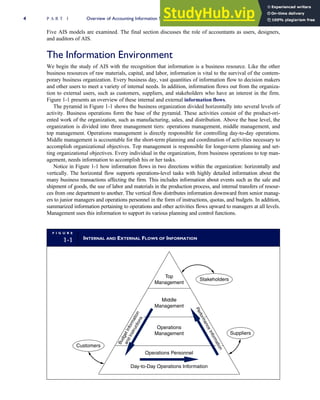
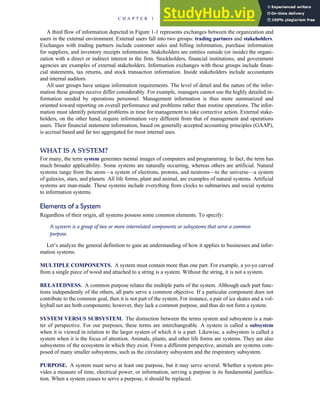
Figure 1-1 presents an overview of these internal and external information flows.
The pyramid in Figure 1-1 shows the business organization divided horizontally into several levels of
activity. Business operations form the base of the pyramid. These activities consist of the product-ori-
ented work of the organization, such as manufacturing, sales, and distribution. Above the base level, the
organization is divided into three management tiers: operations management, middle management, and
top management. Operations management is directly responsible for controlling day-to-day operations.
Middle management is accountable for the short-term planning and coordination of activities necessary to
accomplish organizational objectives. Top management is responsible for longer-term planning and set-
ting organizational objectives. Every individual in the organization, from business operations to top man-
agement, needs information to accomplish his or her tasks.
Notice in Figure 1-1 how information flows in two directions within the organization: horizontally and
vertically. The horizontal flow supports operations-level tasks with highly detailed information about the
many business transactions affecting the firm. This includes information about events such as the sale and
shipment of goods, the use of labor and materials in the production process, and internal transfers of resour-
ces from one department to another. The vertical flow distributes information downward from senior manag-
ers to junior managers and operations personnel in the form of instructions, quotas, and budgets. In addition,
summarized information pertaining to operations and other activities flows upward to managers at all levels.
Management uses this information to support its various planning and control functions.
F I G U R E
1-1 INTERNAL AND EXTERNAL FLOWS OF INFORMATION
Top
Management
Operations Personnel
Customers
Day-to-Day Operations Information
Stakeholders
Suppliers
Operations
Management
Middle
Management
B
u
d
g
e
t
I
n
f
o
r
m
a
t
i
o
n
a
n
d
I
n
s
t
r
u
c
t
i
o
n
s
P
e
r
f
o
r
m
a
n
c
e
I
n
f
o
r
m
a
t
i
o
n
4 P A R T I Overview of Accounting Information Systems
A third flow of information depicted in Figure 1-1 represents exchanges between the organization and
users in the external environment. External users fall into two groups: trading partners and stakeholders.
Exchanges with trading partners include customer sales and billing information, purchase information
for suppliers, and inventory receipts information. Stakeholders are entities outside (or inside) the organi-
zation with a direct or indirect interest in the firm. Stockholders, financial institutions, and government
agencies are examples of external stakeholders. Information exchanges with these groups include finan-
cial statements, tax returns, and stock transaction information. Inside stakeholders include accountants
and internal auditors.
All user groups have unique information requirements. The level of detail and the nature of the infor-
mation these groups receive differ considerably. For example, managers cannot use the highly detailed in-
formation needed by operations personnel. Management information is thus more summarized and
oriented toward reporting on overall performance and problems rather than routine operations. The infor-
mation must identify potential problems in time for management to take corrective action. External stake-
holders, on the other hand, require information very different from that of management and operations
users. Their financial statement information, based on generally accepted accounting principles (GAAP),
is accrual based and far too aggregated for most internal uses.
WHAT IS A SYSTEM?
For many, the term system generates mental images of computers and programming. In fact, the term has
much broader applicability. Some systems are naturally occurring, whereas others are artificial. Natural
systems range from the atom—a system of electrons, protons, and neutrons—to the universe—a system
of galaxies, stars, and planets. All life forms, plant and animal, are examples of natural systems. Artificial
systems are man-made. These systems include everything from clocks to submarines and social systems
to information systems.
Elements of a System
Regardless of their origin, all systems possess some common elements. To specify:
A system is a group of two or more interrelated components or subsystems that serve a common
purpose.
Let’s analyze the general definition to gain an understanding of how it applies to businesses and infor-
mation systems.
MULTIPLE COMPONENTS. A system must contain more than one part. For example, a yo-yo carved
from a single piece of wood and attached to a string is a system. Without the string, it is not a system.
RELATEDNESS. A common purpose relates the multiple parts of the system. Although each part func-
tions independently of the others, all parts serve a common objective. If a particular component does not
contribute to the common goal, then it is not part of the system. For instance, a pair of ice skates and a vol-
leyball net are both components; however, they lack a common purpose, and thus do not form a system.
SYSTEM VERSUS SUBSYSTEM. The distinction between the terms system and subsystem is a mat-
ter of perspective. For our purposes, these terms are interchangeable. A system is called a subsystem
when it is viewed in relation to the larger system of which it is a part. Likewise, a subsystem is called a
system when it is the focus of attention. Animals, plants, and other life forms are systems. They are also
subsystems of the ecosystem in which they exist. From a different perspective, animals are systems com-
posed of many smaller subsystems, such as the circulatory subsystem and the respiratory subsystem.
PURPOSE. A system must serve at least one purpose, but it may serve several. Whether a system pro-
vides a measure of time, electrical power, or information, serving a purpose is its fundamental justifica-
tion. When a system ceases to serve a purpose, it should be replaced.
C H A P T E R 1 The Information System: An Accountant’s Perspective 5
An Example of an Artificial System
An automobile is an example of an artificial system that is familiar to most of us and that satisfies the def-
inition of a system provided previously. To simplify matters, let’s assume that the automobile system
serves only one purpose: providing conveyance. To do so requires the harmonious interaction of hun-
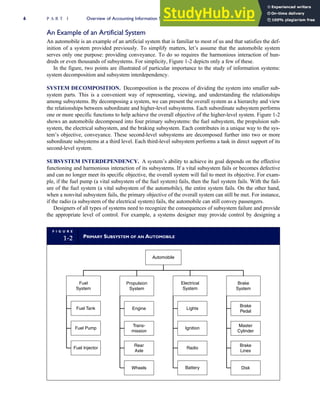
dreds or even thousands of subsystems. For simplicity, Figure 1-2 depicts only a few of these.
In the figure, two points are illustrated of particular importance to the study of information systems:
system decomposition and subsystem interdependency.
SYSTEM DECOMPOSITION. Decomposition is the process of dividing the system into smaller sub-
system parts. This is a convenient way of representing, viewing, and understanding the relationships
among subsystems. By decomposing a system, we can present the overall system as a hierarchy and view
the relationships between subordinate and higher-level subsystems. Each subordinate subsystem performs
one or more specific functions to help achieve the overall objective of the higher-level system. Figure 1-2
shows an automobile decomposed into four primary subsystems: the fuel subsystem, the propulsion sub-
system, the electrical subsystem, and the braking subsystem. Each contributes in a unique way to the sys-
tem’s objective, conveyance. These second-level subsystems are decomposed further into two or more
subordinate subsystems at a third level. Each third-level subsystem performs a task in direct support of its
second-level system.
SUBSYSTEM INTERDEPENDENCY. A system’s ability to achieve its goal depends on the effective
functioning and harmonious interaction of its subsystems. If a vital subsystem fails or becomes defective
and can no longer meet its specific objective, the overall system will fail to meet its objective. For exam-
ple, if the fuel pump (a vital subsystem of the fuel system) fails, then the fuel system fails. With the fail-
ure of the fuel system (a vital subsystem of the automobile), the entire system fails. On the other hand,
when a nonvital subsystem fails, the primary objective of the overall system can still be met. For instance,
if the radio (a subsystem of the electrical system) fails, the automobile can still convey passengers.
Designers of all types of systems need to recognize the consequences of subsystem failure and provide
the appropriate level of control. For example, a systems designer may provide control by designing a
F I G U R E
1-2 PRIMARY SUBSYSTEM OF AN AUTOMOBILE
Propulsion
System
Electrical
System
Brake
System
Fuel
System
Fuel Tank
Fuel Pump
Fuel Injector
Engine
Trans-
mission
Rear
Axle
Wheels
Lights
Ignition
Radio
Battery
Brake
Lines
Disk
Brake
Pedal
Automobile
Master
Cylinder
6 P A R T I Overview of Accounting Information Systems
backup (redundant) subsystem that comes into play when the primary subsystem fails. Control should be
provided on a cost-benefit basis. It is neither economical nor necessary to back up every subsystem.
Backup is essential, however, when excessive negative consequences result from a subsystem failure.
Hence, virtually every modern automobile has a backup braking system, whereas very few have backup
stereo systems.
Like automobile designers, information system designers need to identify critical subsystems, antici-
pate the risk of their failure, and design cost-effective control procedures to mitigate that risk. As we shall
see in subsequent chapters, accountants feature prominently in this activity.
AN INFORMATION SYSTEMS FRAMEWORK
The information system is the set of formal procedures by which data are collected, processed into infor-
mation, and distributed to users.
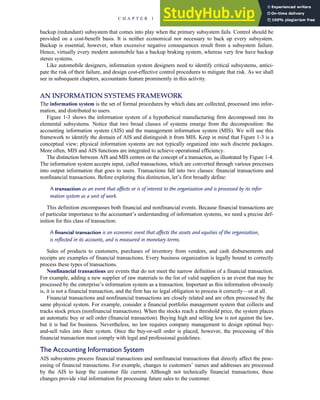
Figure 1-3 shows the information system of a hypothetical manufacturing firm decomposed into its
elemental subsystems. Notice that two broad classes of systems emerge from the decomposition: the
accounting information system (AIS) and the management information system (MIS). We will use this
framework to identify the domain of AIS and distinguish it from MIS. Keep in mind that Figure 1-3 is a
conceptual view; physical information systems are not typically organized into such discrete packages.
More often, MIS and AIS functions are integrated to achieve operational efficiency.
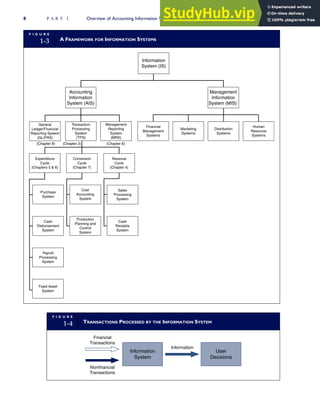
The distinction between AIS and MIS centers on the concept of a transaction, as illustrated by Figure 1-4.
The information system accepts input, called transactions, which are converted through various processes
into output information that goes to users. Transactions fall into two classes: financial transactions and
nonfinancial transactions. Before exploring this distinction, let’s first broadly define:
A transaction as an event that affects or is of interest to the organization and is processed by its infor-
mation system as a unit of work.
This definition encompasses both financial and nonfinancial events. Because financial transactions are
of particular importance to the accountant’s understanding of information systems, we need a precise def-
inition for this class of transaction:
A financial transaction is an economic event that affects the assets and equities of the organization,
is reflected in its accounts, and is measured in monetary terms.
Sales of products to customers, purchases of inventory from vendors, and cash disbursements and
receipts are examples of financial transactions. Every business organization is legally bound to correctly
process these types of transactions.
Nonfinancial transactions are events that do not meet the narrow definition of a financial transaction.
For example, adding a new supplier of raw materials to the list of valid suppliers is an event that may be
processed by the enterprise’s information system as a transaction. Important as this information obviously
is, it is not a financial transaction, and the firm has no legal obligation to process it correctly—or at all.
Financial transactions and nonfinancial transactions are closely related and are often processed by the
same physical system. For example, consider a financial portfolio management system that collects and
tracks stock prices (nonfinancial transactions). When the stocks reach a threshold price, the system places
an automatic buy or sell order (financial transaction). Buying high and selling low is not against the law,
but it is bad for business. Nevertheless, no law requires company management to design optimal buy-
and-sell rules into their system. Once the buy-or-sell order is placed, however, the processing of this
financial transaction must comply with legal and professional guidelines.
The Accounting Information System
AIS subsystems process financial transactions and nonfinancial transactions that directly affect the proc-
essing of financial transactions. For example, changes to customers’ names and addresses are processed
by the AIS to keep the customer file current. Although not technically financial transactions, these
changes provide vital information for processing future sales to the customer.
C H A P T E R 1 The Information System: An Accountant’s Perspective 7
F I G U R E
1-3 A FRAMEWORK FOR INFORMATION SYSTEMS
Management
Information
System (MIS)
Accounting
Information
System (AIS)
Information
System (IS)
Transaction
Processing
System
(TPS)
(Chapter 8) (Chapter 2)
Financial
Management
Systems
Marketing
Systems
Human
Resource
Systems
Distribution
Systems
Conversion
Cycle
(Chapter 7)
Revenue
Cycle
(Chapter 4)
Purchase
System
Cost
Accounting
System
Sales
Processing
System
Production
Planning and
Control
System
Cash
Receipts
System
General
Ledger/Financial
Reporting System
(GL/FRS)
Expenditure
Cycle
(Chapters 5 & 6)
Cash
Disbursement
System
Payroll
Processing
System
Management
Reporting
System
(MRS)
(Chapter 8)
Fixed Asset
System
F I G U R E
1-4 TRANSACTIONS PROCESSED BY THE INFORMATION SYSTEM
Financial
Transactions
Nonfinancial
Transactions
Information
Information
System
User
Decisions
8 P A R T I Overview of Accounting Information Systems
The AIS is composed of three major subsystems: (1) the transaction processing system (TPS), which
supports daily business operations with numerous reports, documents, and messages for users throughout
the organization; (2) the general ledger/financial reporting system (GL/FRS), which produces the tradi-
tional financial statements, such as the income statement, balance sheet, statement of cash flows, tax
returns, and other reports required by law; and (3) the management reporting system (MRS), which pro-
vides internal management with special-purpose financial reports and information needed for decision
making such as budgets, variance reports, and responsibility reports. We examine each of these subsys-
tems later in this chapter.
The Management Information System
Management often requires information that goes beyond the capability of AIS. As organizations grow in
size and complexity, specialized functional areas emerge, requiring additional information for production
planning and control, sales forecasting, inventory warehouse planning, market research, and so on. The man-
agement information system (MIS) processes nonfinancial transactions that are not normally processed by
traditional AIS. Table 1-1 gives examples of typical MIS applications related to functional areas of a firm.
Why Is It Important to Distinguish between AIS and MIS?
SOX legislation requires that management design and implement internal controls over the entire finan-
cial reporting process. This includes the financial reporting system, the general ledger system, and the
transaction processing systems that supply the data for financial reporting. SOX further requires that man-
agement certify these controls and that the external auditors express an opinion on control effectiveness.
Because of the highly integrative nature of modern information systems, management and auditors need
a conceptual view of the information system that distinguishes key processes and areas of risk and legal
responsibility from the other (nonlegally binding) aspects of the system. Without such a model, critical
management and audit responsibilities under SOX may not be met.
AIS SUBSYSTEMS
We devote separate chapters to an in-depth study of each AIS subsystem depicted in Figure 1-3. At this
point, we briefly outline the role of each subsystem.
T A B L E
1-1 EXAMPLES OF MIS APPLICATIONS IN FUNCTIONAL AREAS
Function Examples of MIS Applications
Finance Portfolio management systems
Capital budgeting systems
Marketing Market analysis
New product development
Product analysis
Distribution Warehouse organization and scheduling
Delivery scheduling
Vehicle loading and allocation models
Personnel Human resource management systems
n Job skill tracking system
n Employee benefits system
C H A P T E R 1 The Information System: An Accountant’s Perspective 9
Transaction Processing System
The TPS is central to the overall function of the information system by converting economic events into
financial transactions, recording financial transactions in the accounting records (journals and ledgers),
and distributing essential financial information to operations personnel to support their daily operations.
The TPS deals with business events that occur frequently. In a given day, a firm may process thou-
sands of transactions. To deal efficiently with such volume, similar types of transactions are grouped to-
gether into transaction cycles. The TPS consists of three transaction cycles: the revenue cycle, the
expenditure cycle, and the conversion cycle. Each cycle captures and processes different types of finan-
cial transactions. Chapter 2 provides an overview of transaction processing. Chapters 4, 5, 6, and 7 exam-
ine in detail the revenue, expenditure, and conversion cycles.
General Ledger/Financial Reporting Systems
The general ledger system (GLS) and the financial reporting system (FRS) are two closely related subsys-
tems. However, because of their operational interdependency, they are generally viewed as a single integrated
system—the GL/FRS. The bulk of the input to the GL portion of the system comes from the transaction
cycles. Summaries of transaction cycle activity are processed by the GLS to update the general ledger control
accounts. Other, less frequent, events such as stock transactions, mergers, and lawsuit settlements, for which
there may be no formal processing cycle in place, also enter the GLS through alternate sources.
The FRS measures and reports the status of financial resources and the changes in those resources.
The FRS communicates this information primarily to external users. This type of reporting is called non-
discretionary because the organization has few or no choices in the information it provides. Much of this
information consists of traditional financial statements, tax returns, and other legal documents.
Management Reporting System
The MRS provides the internal financial information needed to manage a business. Managers must deal
immediately with many day-to-day business problems, as well as plan and control their operations. Man-
agers require different information for the various kinds of decisions they must make. Typical reports pro-
duced by the MRS include budgets, variance reports, cost-volume-profit analyses, and reports using
current (rather than historical) cost data. This type of reporting is called discretionary reporting because
the organization can choose what information to report and how to present it.
A GENERAL MODEL FOR AIS
Figure 1-5 presents the general model for viewing AIS applications. This is a general model because it
describes all information systems, regardless of their technological architecture. The elements of the gen-
eral model are end users, data sources, data collection, data processing, database management, informa-
tion generation, and feedback.
End Users
End users fall into two general groups: external and internal. External users include creditors, stockhold-
ers, potential investors, regulatory agencies, tax authorities, suppliers, and customers. Institutional users
such as banks, the SEC, and the Internal Revenue Service (IRS) receive information in the form of finan-
cial statements, tax returns, and other reports that the firm has a legal obligation to produce. Trading part-
ners (customers and suppliers) receive transaction-oriented information, including purchase orders,
billing statements, and shipping documents.
Internal users include management at every level of the organization, as well as operations personnel.
In contrast to external reporting, the organization has a great deal of latitude in the way it meets the needs
of internal users. Although there are some well-accepted conventions and practices, internal reporting is
governed primarily by what gets the job done. System designers, including accountants, must balance the
desires of internal users against legal and economic concerns such as adequate control and security,
proper accountability, and the cost of providing alternative forms of information. Thus, internal reporting
poses a less structured and generally more difficult challenge than external reporting.
10 P A R T I Overview of Accounting Information Systems
DATA VERSUS INFORMATION. Before discussing the data sources portion of Figure 1-5, we must
make an important distinction between the terms data and information. Data are facts, which may or may
not be processed (edited, summarized, or refined) and have no direct effect on the user. By contrast,
information causes the user to take an action that he or she otherwise could not, or would not, have taken.
Information is often defined simply as processed data. This is an inadequate definition. Information is
determined by the effect it has on the user, not by its physical form. For example, a purchasing agent
receives a daily report listing raw material inventory items that are at low levels. This report causes the
agent to place orders for more inventory. The facts in this report have information content for the purchas-
ing agent. However, this same report in the hands of the personnel manager is a mere collection of facts,
or data, causing no action and having no information content.
We can see from this example that one person’s information is another person’s data. Thus, informa-
tion is not just a set of processed facts arranged in a formal report. Information allows users to take action
to resolve conflicts, reduce uncertainty, and make decisions. We should note that action does not neces-
sarily mean a physical act. For instance, a purchasing agent who receives a report showing that inventory
levels are adequate will respond by ordering nothing. The agent’s action to do nothing is a conscious de-
cision, triggered by information and different from doing nothing because of being uninformed.
The distinction between data and information has pervasive implications for the study of information
systems. If output from the information system fails to cause users to act, the system serves no purpose
and has failed in its primary objective.
Data Sources
Data sources are financial transactions that enter the information system from both internal and external
sources. External financial transactions are the most common source of data for most organizations. These
are economic exchanges with other business entities and individuals outside the firm. Examples include the
sale of goods and services, the purchase of inventory, the receipt of cash, and the disbursement of cash
(including payroll). Internal financial transactions involve the exchange or movement of resources within
the organization. Examples include the movement of raw materials into work-in-process (WIP), the
F I G U R E
1-5 GENERAL MODEL FOR ACCOUNTING INFORMATION SYSTEM
The External Environment
The Information
System
The Business Organization
External
Sources of
Data
External
End Users
Internal
Sources
of Data
Internal
End Users
Database
Management
Data
Collection
Data
Processing
Information
Generation
Feedback
Feedback
C H A P T E R 1 The Information System: An Accountant’s Perspective 11
application of labor and overhead to WIP, the transfer of WIP into finished goods inventory, and the depre-
ciation of plant and equipment.
Data Collection
Data collection is the first operational stage in the information system. The objective is to ensure that
event data entering the system are valid, complete, and free from material errors. In many respects, this is
the most important stage in the system. Should transaction errors pass through data collection undetected,
the system may process the errors and generate erroneous and unreliable output. This, in turn, could lead
to incorrect actions and poor decisions by the users.
Two rules govern the design of data collection procedures: relevance and efficiency. The information
system should capture only relevant data. A fundamental task of the system designer is to determine what
is and what is not relevant. He or she does so by analyzing the user’s needs. Only data that ultimately
contribute to information (as defined previously) are relevant. The data collection stage should be
designed to filter irrelevant facts from the system.
Efficient data collection procedures are designed to collect data only once. These data can then be
made available to multiple users. Capturing the same data more than once leads to data redundancy and
inconsistency. Information systems have limited collection, processing, and data storage capacity. Data
redundancy overloads facilities and reduces the overall efficiency of the system. Inconsistency among
redundant data elements can result in inappropriate actions and bad decisions.
Data Processing
Once collected, data usually require processing to produce information. Tasks in the data processing
stage range from simple to complex. Examples include mathematical algorithms (such as linear program-
ming models) used for production scheduling applications, statistical techniques for sales forecasting, and
posting and summarizing procedures used for accounting applications.
Database Management
The organization’s database is its physical repository for financial and nonfinancial data. We use the term
database in the generic sense. It can be a filing cabinet or a computer disk. Regardless of the database’s
physical form, we can represent its contents in a logical hierarchy. The levels in the data hierarchy—
attribute, record, and file—are illustrated in Figure 1-6.
DATA ATTRIBUTE. The data attribute is the most elemental piece of potentially useful data in the
database. An attribute is a logical and relevant characteristic of an entity about which the firm captures
data. The attributes shown in Figure 1-6 are logical because they all relate sensibly to a common entity—
accounts receivable (AR). Each attribute is also relevant because it contributes to the information content
of the entire set. As proof of this, the absence of any single relevant attribute diminishes or destroys the
information content of the set. The addition of irrelevant or illogical data would not enhance the informa-
tion content of the set.
RECORD. A record is a complete set of attributes for a single occurrence within an entity class. For
example, a particular customer’s name, address, and account balance is one occurrence (or record) within
the AR class. To find a particular record within the database, we must be able to identify it uniquely.
Therefore, every record in the database must be unique in at least one attribute.1
This unique identifier at-
tribute is the primary key. Because no natural attribute (such as customer name) can guarantee unique-
ness, we typically assign artificial keys to records. The key for the AR records in Figure 1-6 is the
customer account number. This is the only unique identifier in this record class. The other attributes pos-
sess values that may also exist in other records. For instance, multiple customers may have the same
name, sales amounts, credit limits, and balances. Using any one of these as a key to find a record in a
1 When we get into more advanced topics, we will see how a combination of nonunique attributes can be used as a unique
identifier.
12 P A R T I Overview of Accounting Information Systems
large database would be a difficult task. These nonunique attributes are, however, often used as secondary
keys for categorizing data. For example, the account balance attribute can be used to prepare a list of cus-
tomers with balances greater than $10,000.
FILES. A file is a complete set of records of an identical class. For example, all the AR records of
the organization constitute the AR file. Similarly, files are constructed for other classes of records
such as inventory, accounts payable, and payroll. The organization’s database is the entire collection
of such files.
DATABASE MANAGEMENT TASKS. Database management involves three fundamental tasks:
storage, retrieval, and deletion. The storage task assigns keys to new records and stores them in their
proper location in the database. Retrieval is the task of locating and extracting an existing record from the
database for processing. After processing is complete, the storage task restores the updated record to its
place in the database. Deletion is the task of permanently removing obsolete or redundant records from
the database.
Information Generation
Information generation is the process of compiling, arranging, formatting, and presenting information to
users. Information can be an operational document such as a sales order, a structured report, or a message
on a computer screen. Regardless of physical form, useful information has the following characteristics:
relevance, timeliness, accuracy, completeness, and summarization.
RELEVANCE. The contents of a report or document must serve a purpose. This could be to support
a manager’s decision or a clerk’s task. We have established that only data relevant to a user’s action
have information content. Therefore, the information system should present only relevant data in its
reports. Reports containing irrelevancies waste resources and may be counterproductive to the user.
Irrelevancies detract attention from the true message of the report and may result in incorrect deci-
sions or actions.
F I G U R E
1-6 THE DATA HIERARCHY
Attributes of Accounts Receivable
Customer Account Number (Key)
Accounts
Receivable
File
All Accounts Receivable Records
Attributes, Records, and Files
Customer Address
Current Balance of Account
Customer Credit Limit
Customer Name
Accounts
Receivable
Record
Accounts
Receivable
Record
1
2
3
n
C H A P T E R 1 The Information System: An Accountant’s Perspective 13
TIMELINESS. The age of information is a critical factor in determining its usefulness. Information
must be no older than the time of the action it supports. For example, if a manager makes decisions daily
to purchase inventory from a supplier based on an inventory status report, then the information in the
report should be no more than a day old.
ACCURACY. Information must be free from material errors. However, materiality is a difficult concept
to quantify. It has no absolute value; it is a problem-specific concept. This means that, in some cases, in-
formation must be perfectly accurate. In other instances, the level of accuracy may be lower. Material
error exists when the amount of inaccuracy in information causes the user to make poor decisions or to
fail to make necessary decisions. We sometimes must sacrifice absolute accuracy to obtain timely infor-
mation. Often, perfect information is not available within the user’s decision time frame. Therefore, in
providing information, system designers seek a balance between information that is as accurate as possi-
ble, yet timely enough to be useful.
COMPLETENESS. No piece of information essential to a decision or task should be missing. For exam-
ple, a report should provide all necessary calculations and present its message clearly and unambiguously.
SUMMARIZATION. Information should be aggregated in accordance with the user’s needs. Lower-
level managers tend to need information that is highly detailed. As information flows upward through the
organization to top management, it becomes more summarized. We shall look more closely at the effects
that organizational structure and managerial level have on information reporting later in this chapter.
Feedback
Feedback is a form of output that is sent back to the system as a source of data. Feedback may be internal
or external and is used to initiate or alter a process. For example, an inventory status report signals the
inventory control clerk that items of inventory have fallen to, or below, their minimum allowable levels.
Internal feedback from this information will initiate the inventory ordering process to replenish the inven-
tories. Similarly, external feedback about the level of uncollected customer accounts can be used to adjust
the organization’s credit-granting policies.
Information System Objectives
Each organization must tailor its information system to the needs of its users. Therefore, specific informa-
tion system objectives may differ from firm to firm. Three fundamental objectives are, however, common
to all systems:
1. To support the stewardship function of management. Stewardship refers to management’s responsi-
bility to properly manage the resources of the firm. The information system provides information
about resource utilization to external users via traditional financial statements and other mandated
reports. Internally, management receives stewardship information from various responsibility
reports.
2. To support management decision making. The information system supplies managers with the infor-
mation they need to carry out their decision-making responsibilities.
3. To support the firm’s day-to-day operations. The information system provides information to opera-
tions personnel to assist them in the efficient and effective discharge of their daily tasks.
ACQUISITION OF INFORMATION SYSTEMS
We conclude this section with a brief discussion of how organizations obtain information systems. Usu-
ally, they do so in two ways: (1) they develop customized systems from scratch through in-house systems
development activities, and (2) they purchase preprogrammed commercial systems from software ven-
dors. Larger organizations with unique and frequently changing needs engage in in-house development.
The formal process by which this is accomplished is called the system development life cycle. Smaller
14 P A R T I Overview of Accounting Information Systems
companies and larger firms that have standardized information needs are the primary market for commer-
cial software. Three basic types of commercial software are turnkey systems, backbone systems, and ven-
dor-supported systems.
Turnkey systems are completely finished and tested systems that are ready for implementation. Typi-
cally, they are general-purpose systems or systems customized to a specific industry. In either case, the
end user must have standard business practices that permit the use of canned or off-the-shelf systems.
The better turnkey systems have built-in software options that allow the user to customize input, output,
and processing through menu choices. However, configuring the systems to meet user needs can be a
formidable task.2
Backbone systems consist of a basic system structure on which to build. The primary processing logic
is preprogrammed, and the vendor then designs the user interfaces to suit the client’s unique needs. A
backbone system is a compromise between a custom system and a turnkey system. This approach can
produce satisfactory results, but customizing the system is costly.
Vendor-supported systems are custom (or customized) systems that client organizations purchase
commercially rather than develop in-house. Under this approach, the software vendor designs, imple-
ments, and maintains the system for its client. This is a popular option with health care and legal services
organizations that have complex systems requirements but are not of sufficient magnitude to justify
retaining an in-house systems development staff. Indeed, this has become a popular option for many
organizations that traditionally have relied on in-house development but have chosen to outsource these
activities. In recent years, public accounting firms have expanded their involvement in the vendor-
supported market.
Organizational Structure
The structure of an organization reflects the distribution of responsibility, authority, and accountability
throughout the organization. These flows are illustrated in Figure 1-7. Firms achieve their overall objectives
by establishing measurable financial goals for their operational units. For example, budget information flows
downward. This is the mechanism by which senior management conveys to their subordinates the standards
against which they will be measured for the coming period. The results of the subordinates’ actions, in the
form of performance information, flow upward to senior management. Understanding the distribution pat-
tern of responsibility, authority, and accountability is essential for assessing user information needs.
BUSINESS SEGMENTS
Business organizations consist of functional units or segments. Firms organize into segments to promote
internal efficiencies through the specialization of labor and cost-effective resource allocations. Managers
within a segment can focus their attention on narrow areas of responsibility to achieve higher levels of
operating efficiency. Three of the most common approaches include segmentation by:
1. Geographic Location. Many organizations have operations dispersed across the country and around
the world. They do this to gain access to resources, markets, or lines of distribution. A convenient
way to manage such operations is to organize the management of the firm around each geographic
segment as a quasi-autonomous entity.
2. Product Line. Companies that produce highly diversified products often organize around product lines,
creating separate divisions for each. Product segmentation allows the organization to devote special-
ized management, labor, and resources to segments separately, almost as if they were separate firms.
3. Business Function. Functional segmentation divides the organization into areas of specialized
responsibility based on tasks. The functional areas are determined according to the flow of primary
resources through the firm. Examples of business function segments are marketing, production,
finance, and accounting.
2 Enterprise resource planning (ERP) systems such as Oracle and SAP are examples of this approach to systems implementation.
ERP systems are discussed later in this chapter. SAP and Oracle are discussed in more detail in Chapter 11.
C H A P T E R 1 The Information System: An Accountant’s Perspective 15
Some firms use more than one method of segmentation. For instance, an international conglomerate
may segment its operations first geographically, then by product within each geographic region, and then
functionally within each product segment.
FUNCTIONAL SEGMENTATION
Segmentation by business function is the most common method of organizing. To illustrate it, we will
assume a manufacturing firm that uses these resources: materials, labor, financial capital, and informa-
tion. Table 1-2 shows the relationship between functional segments and these resources.
The titles of functions and even the functions themselves will vary greatly among organizations,
depending on their size and line of business. A public utility may have little in the way of a marketing
function compared with an automobile manufacturer. A service organization may have no formal produc-
tion function and little in the way of inventory to manage. One firm may call its labor resource personnel,
whereas another uses the term human resources. Keeping in mind these variations, we will briefly discuss
the functional areas of the hypothetical firm shown in Figure 1-8. Because of their special importance to
F I G U R E
1-7
THE FLOWS OF RESPONSIBILITY, AUTHORITY, AND ACCOUNTABILITY THROUGH THE
ORGANIZATION
President
Vice President
Marketing
Vice President
Production
Vice President
Finance
Vice President
Computer Services
Manager
Plant 1
Manager
Plant 2
Manager
Plant 3
Manager
Unit 1
Manager
Unit 2
Manager
Unit 3
Responsibility
and Authority
Accountability
T A B L E
1-2 FUNCTIONS FROM RESOURCES
Resource Business Function
Materials Inventory management
Production
Marketing
Distribution
Labor Personnel
Financial Capital Finance
Information Accounting
Information technology
16 P A R T I Overview of Accounting Information Systems
the study of information systems, the accounting and information technology (IT) functions are given
separate and more detailed treatment.
Materials Management
The objective of materials management is to plan and control the materials inventory of the company. A
manufacturing firm must have sufficient inventories on hand to meet its production needs and yet avoid
excessive inventory levels. Every dollar invested in inventory is a dollar that is not earning a return. Fur-
thermore, idle inventory can become obsolete, lost, or stolen. Ideally, a firm would coordinate inventory
arrivals from suppliers such that they move directly into the production process. As a practical matter,
however, most organizations maintain safety stocks to carry them through the lead time between placing
the order for inventory and its arrival. We see from Figure 1-8 that materials management has three sub-
functions:
1. Purchasing is responsible for ordering inventory from vendors when inventory levels fall to their
reorder points. The nature of this task varies among organizations. In some cases, purchasing is no
more than sending a purchase order to a designated vendor. In other cases, this task involves solicit-
ing bids from a number of competing vendors. The nature of the business and the type of inventory
determine the extent of the purchasing function.
2. Receiving is the task of accepting the inventory previously ordered by purchasing. Receiving activ-
ities include counting and checking the physical condition of these items. This is an organization’s
first, and perhaps only, opportunity to detect incomplete deliveries and damaged merchandise before
they move into the production process.
3. Stores takes physical custody of the inventory received and releases these resources into the produc-
tion process as needed.
Production
Production activities occur in the conversion cycle in which raw materials, labor, and plant assets are used
to create finished products. The specific activities are determined by the nature of the products being
manufactured. In general they fall into two broad classes: (1) primary manufacturing activities and
(2) production support activities. Primary manufacturing activities shape and assemble raw materials into
finished products. Production support activities ensure that primary manufacturing activities operate
efficiently and effectively. These include, but are not limited to, the following types of activities:
Production planning involves scheduling the flow of materials, labor, and machinery to efficiently
meet production needs. This requires information about the status of sales orders, raw materials inven-
tory, finished goods inventory, and machine and labor availability.
Quality control monitors the manufacturing process at various points to ensure that the finished
products meet the firm’s quality standards. Effective quality control detects problems early to facilitate
corrective action. Failure to do so may result in excessive waste of materials and labor.
Maintenance keeps the firm’s machinery and other manufacturing facilities in running order.
The manufacturing process relies on its plant and equipment and cannot tolerate breakdowns
during peak production periods. Therefore, the key to maintenance is prevention—the scheduled
removal of equipment from operations for cleaning, servicing, and repairs. Many manufacturers
have elaborate preventive maintenance programs. To plan and coordinate these activities, maintenance
engineers need extensive information about the history of equipment usage and future scheduled
production.
Marketing
The marketplace needs to know about, and have access to, a firm’s products. The marketing function
deals with the strategic problems of product promotion, advertising, and market research. On an opera-
tional level, marketing performs such daily activities as sales order entry.
C H A P T E R 1 The Information System: An Accountant’s Perspective 17
F I G U R E
1-8 FUNCTIONAL AREAS OF A FIRM
Business
Organization
Materials
Management
Production
Manufacturing Promotion
Marketing Distribution Personnel Finance Accounting IT Services
Purchasing
Receiving
Stores
Support Advertising
Market
Research
Sales
Warehousing
Shipping
Recruiting
Training
Benefits
Counseling
Portfolio
Management
Treasury
Credit
Cash
Disbursement
Cash
Receipts
Inventory
Control
Cost
Accounting
Payroll
Accounts
Payable
Accounts
Receivable
Billing
Fixed
Assets
General
Ledger
Data
Processing
Systems
Development
and
Maintenance
Database
Administration
18
P
A
R
T
I
Overview
of
Accounting
Information
Systems
Distribution
Distribution is the activity of getting the product to the customer after the sale. This is a critical step.
Much can go wrong before the customer takes possession of the product. Excessive lags between the tak-
ing and filling of orders, incorrect shipments, or damaged merchandise can result in customer dissatisfac-
tion and lost sales. Ultimately, success depends on filling orders accurately in the warehouse, packaging
goods correctly, and shipping them quickly to the customer.
Personnel
Competent and reliable employees are a valuable resource to a business. The objective of the personnel
function is to effectively manage this resource. A well-developed personnel function includes recruiting,
training, continuing education, counseling, evaluating, labor relations, and compensation administration.
Finance
The finance function manages the financial resources of the firm through banking and treasury activities,
portfolio management, credit evaluation, cash disbursements, and cash receipts. Because of the cyclical na-
ture of business, many firms swing between positions of excess funds and cash deficits. In response to these
cash flow patterns, financial planners seek lucrative investments in stocks and other assets and low-cost lines
of credit from banks. The finance function also administers the daily flow of cash in and out of the firm.
THE ACCOUNTING FUNCTION
The accounting function manages the financial information resource of the firm. In this regard, it plays
two important roles in transaction processing. First, accounting captures and records the financial effects
of the firm’s transactions. These include events such as the movement of raw materials from the ware-
house into production, shipments of the finished products to customers, cash flows into the firm and
deposits in the bank, the acquisition of inventory, and the discharge of financial obligations.
Second, the accounting function distributes transaction information to operations personnel to coordinate
many of their key tasks. Accounting activities that contribute directly to business operations include inven-
tory control, cost accounting, payroll, accounts payable, accounts receivable, billing, fixed asset accounting,
and the general ledger. We deal with each of these specifically in later chapters. For the moment, however,
we need to maintain a broad view of accounting to understand its functional role in the organization.
The Value of Information
The value of information to a user is determined by its reliability. We saw earlier that the purpose of in-
formation is to lead the user to a desired action. For this to happen, information must possess certain
attributes—relevance, accuracy, completeness, summarization, and timeliness. When these attributes are
consistently present, information has reliability and provides value to the user. Unreliable information has
no value. At best, it is a waste of resources; at worst, it can lead to dysfunctional decisions. Consider the
following example:
A marketing manager signed a contract with a customer to supply a large quantity of product by a
certain deadline. He made this decision based on information about finished goods inventory levels.
However, because of faulty record keeping, the information was incorrect. The actual inventory levels
of the product were insufficient to meet the order, and the necessary quantities could not be manufac-
tured by the deadline. Failure to comply with the terms of the contract may result in litigation.
This poor sales decision was a result of flawed information. Effective decisions require information
that has a high degree of reliability.
Accounting Independence
Information reliability rests heavily on the concept of accounting independence. Simply stated, account-
ing activities must be separate and independent of the functional areas that maintain custody of physical
C H A P T E R 1 The Information System: An Accountant’s Perspective 19
resources. For example, accounting monitors and records the movement of raw materials into production
and the sale of finished goods to customers. Accounting authorizes purchases of raw materials and the
disbursement of cash payments to vendors and employees. Accounting supports these functions with in-
formation but does not actively participate in the physical activities.
THE INFORMATION TECHNOLOGY FUNCTION
Returning to Figure 1-8, the final area to be discussed is the IT function. Like accounting, the IT function
is associated with the information resource. Its activities can be organized in a number of different ways.
One extreme structure is the centralized data processing approach; at the other extreme is the distributed
data processing approach. Most organizational structures fall somewhere between these extremes and
embody elements of both.
Centralized Data Processing
Under the centralized data processing model, all data processing is performed by one or more large com-
puters housed at a central site that serve users throughout the organization. Figure 1-9 illustrates this
approach in which IT activities are consolidated and managed as a shared organization resource. End
users compete for these resources on the basis of need. The IT function is usually treated as a cost center
whose operating costs are charged back to the end users. Figure 1-10 shows the IT areas of operation in
more detail. These include database administration, data processing, and systems development and main-
tenance. The key functions of each of these areas are described next.
DATABASE ADMINISTRATION. Centrally organized companies maintain their data resources in a
central location that is shared by all end users. In this shared data arrangement, a special independent
group—database administration—headed by the database administrator is responsible for the security and
integrity of the database. We explore the database concept and the role of the database administrator in
Chapter 9.
F I G U R E
1-9 CENTRALIZED DATA PROCESSING APPROACH
IT Services
Finance
Marketing
Production
Distribution
Accounting
Data
Information
Cost Chargeback
20 P A R T I Overview of Accounting Information Systems
DATA PROCESSING. The data processing group manages the computer resources used to perform the
day-to-day processing of transactions. It may consist of the following functions: data control, data conver-
sion, computer operations, and the data library.
Data control groups have all but disappeared from modern organizations. Traditionally, this function was
responsible for receiving batches of transaction documents for processing from end users and then distribut-
ing computer output (documents and reports) back to the users. Today this function is usually automated
and distributed back to the end users. Some organizations with older legacy systems, however, may still use
a data control group as a liaison between the end user and data processing. The data conversion function
transcribes transaction data from source (paper) documents to digital media (tape or disk) suitable for com-
puter processing by the central computer, which is managed by the computer operations group. Accounting
applications are usually run according to a strict schedule that is controlled by the central computer.
The data library is a room often adjacent to the computer center that provides safe storage for the off-
line data files, such as magnetic tapes and removable disk packs. A data librarian who is responsible for
the receipt, storage, retrieval, and custody of data files controls access to the library. The librarian issues
tapes to computer operators and takes custody of files when processing is completed. The move to real-
time processing and direct access files (discussed in Chapter 2) has reduced or eliminated the role of the
data librarian in most organizations.
SYSTEMS DEVELOPMENT AND MAINTENANCE. The information needs of users are met by
two related functions: systems development and systems maintenance. The former group is responsible
for analyzing user needs and for designing new systems to satisfy those needs. The participants in system
development include systems professionals, end users, and stakeholders.
Systems professionals include systems analysts, database designers, and programmers who design
and build the system. Systems professionals gather facts about the user’s problem, analyze the facts,
and formulate a solution. The product of their efforts is a new information system.
End users are those for whom the system is built. They are the managers who receive reports from
the system and the operations personnel who work directly with the system as part of their daily
responsibilities.
F I G U R E
1-10 ORGANIZATION OF IT FUNCTION IN A CENTRALIZED SYSTEM
Business
Organization
Marketing
Computer
Services
Production Finance
Systems
Development
Database
Administration
Data
Processing
New Systems
Development
Systems
Maintenance
Data
Control
Data
Conversion
Computer
Operations
Data
Library
C H A P T E R 1 The Information System: An Accountant’s Perspective 21
Stakeholders are individuals inside or outside the firm who have an interest in the system but are not
end users. They include management, internal auditors, and consultants who oversee systems
development.
Once a new system has been designed and implemented, the systems maintenance group assumes
responsibility for keeping it current with user needs. Over the course of the system’s life (often several
years), between 80 and 90 percent of its total cost will be attributable to maintenance activities.
Distributed Data Processing
An alternative to the centralized model is the concept of distributed data processing (DDP). The topic of
DDP is quite broad, touching on such related topics as end-user computing, commercial software, net-
working, and office automation. Simply stated, DDP involves reorganizing the IT function into small in-
formation processing units (IPUs) that are distributed to end users and placed under their control. IPUs
may be distributed according to business function, geographic location, or both. Any or all of the IT activ-
ities represented in Figure 1-10 may be distributed. Figure 1-11 shows a possible new organizational
structure following the distribution of all data processing tasks to the end-user areas.
Notice that the central IT function has been eliminated from the organization structure. Individual
operational areas now perform this role. In recent years, DDP has become an economic and operational
feasibility that has revolutionized business operations. However, DDP is a mixed bag of advantages and
disadvantages.
DISADVANTAGES OF DDP. We should bear in mind that the disadvantages of DDP might also be
described as the advantages of a centralized approach. The discussion focuses on important issues that
carry control implications that accountants should recognize. The loss of control is one of the most seri-
ous disadvantages of DDP. Other potential problems include the inefficient use of resources, the destruc-
tion of audit trails, inadequate segregation of duties, an increased potential for programming errors and
systems failures, and the lack of standards. Specific problems are examined in the following section.
F I G U R E
1-11 ORGANIZATIONAL STRUCTURE FOR A DISTRIBUTED PROCESSING SYSTEM
Business
Organization
Production
Administration
Marketing Finance
T
reasurer Controller
Manager
Plant X
Manager
PlantY
Information
Processing
Unit (IPU)
Information
Processing
Unit (IPU)
Information
Processing
Unit (IPU)
Information
Processing
Unit (IPU)
Information
Processing
Unit (IPU)
Information
Processing
Unit (IPU)
22 P A R T I Overview of Accounting Information Systems
Mismanagement of organization-wide resources. Some argue that when organization-wide
resources exceed a threshold amount, say 5 percent of the total operations budget, they should be con-
trolled and monitored centrally. Information processing services (such as computer operations, pro-
gramming, data conversion, and database management) represent a significant expenditure for many
organizations. Those opposed to DDP argue that distributing responsibility for these resources will
inevitably lead to their mismanagement and suboptimal utilization.
Hardware and software incompatibility. Distributing the responsibility for hardware and software
purchases to user management can result in uncoordinated and poorly conceived decisions. Working inde-
pendently, decision makers may settle on dissimilar and incompatible operating systems, technology plat-
forms, spreadsheet programs, word processors, and database packages. Such hardware and software
incompatibilities can degrade and disrupt communications between organizational units.
Redundant tasks. Autonomous systems development activities distributed throughout the firm can result
in each user area reinventing the wheel. For example, application programs created by one user, which could
be used with little or no change by others, will be redesigned from scratch rather than shared. Likewise,
data common to many users may be recreated for each IPU, resulting in a high level of data redundancy.
Consolidating incompatible activities. The distribution of the IT function to individual user areas
results in the creation of many very small units that may not permit the necessary separation of incom-
patible functions. For example, within a single IPU, the same person may program applications, per-
form program maintenance, enter transaction data into the computer, and operate the computer
equipment. This situation represents a fundamental violation of internal control.
Hiring qualified professionals. End-user managers may lack the knowledge to evaluate the techni-
cal credentials and relevant experience of candidates applying for a position as a computer professional.
Also, if the organizational unit into which a new employee is entering is small, the opportunity for per-
sonal growth, continuing education, and promotion may be limited. For these reasons, IPU managers
sometimes experience difficulty attracting highly qualified personnel, which increases the risk of pro-
gramming errors and systems failures.
Lack of standards. Because of the distribution of responsibility in the DDP environment, standards
for developing and documenting systems, choosing programming languages, acquiring hardware and soft-
ware, and evaluating performance may be unevenly applied or nonexistent. Opponents of DDP argue
that the risks associated with the design and operation of a data processing system are made tolerable
only if such standards are consistently applied. This requires that standards be imposed centrally.
ADVANTAGES OF DDP. The most commonly cited advantages of DDP are related to cost savings,
increased user satisfaction, and improved operational efficiency. Specific issues are discussed in the
following section.
Cost reductions. In the past, achieving economies of scale was the principal justification for the cen-
tralized approach. The economics of data processing favored large, expensive, powerful computers. The
wide variety of needs that such centralized systems had to satisfy called for computers that were highly
generalized and employed complex operating systems.
Powerful yet inexpensive small-scale computer systems, which can cost-effectively perform specialized
functions, have changed the economics of data processing dramatically. In addition, the unit cost of data
storage, which was once the justification for consolidating data in a central location, is no longer the prime
consideration. Moreover, the move to DDP can reduce costs in two other areas: (1) data can be entered
and edited at the IPU, thus eliminating the centralized tasks of data conversion and data control; and
(2) application complexity can be reduced, which in turn reduces development and maintenance costs.
C H A P T E R 1 The Information System: An Accountant’s Perspective 23
Improved cost control responsibility. Managers assume the responsibility for the financial success
of their operations. This requires that they be properly empowered with the authority to make decisions
about resources that influence their overall success. Therefore, if information-processing capability is
critical to the success of a business operation, then should management not be given control over these
resources? This argument counters the argument presented earlier favoring the centralization of organi-
zation-wide resources. Proponents of DDP argue that the benefits from improved management atti-
tudes outweigh the additional costs incurred from distributing these resources.
Improved user satisfaction. Perhaps the most often cited benefit of DDP is improved user satisfac-
tion. This derives from three areas of need that too often go unsatisfied in the centralized approach:
(1) as previously stated, users desire to control the resources that influence their profitability; (2) users
want systems professionals (analysts, programmers, and computer operators) who are responsive to
their specific situation; and (3) users want to become more actively involved in developing and imple-
menting their own systems. Proponents of DDP argue that providing more customized support—
feasible only in a distributed environment—has direct benefits for user morale and productivity.
Backup. The final argument in favor of DDP is the ability to back up computing facilities to protect
against potential disasters such as fires, floods, sabotage, and earthquakes. One solution is to build
excess capacity into each IPU. If a disaster destroys a single site, its transactions can be processed by
the other IPUs. This requires close coordination between decision makers to ensure that they do not
implement incompatible hardware and software at their sites.
The Need for Careful Analysis
DDP carries a certain leading-edge prestige value that, during an analysis of its pros and cons, may over-
whelm important considerations of economic benefit and operational feasibility. Some organizations have
made the move to DDP without fully considering whether the distributed organizational structure will
better achieve their business objectives. Some DDP initiatives have proven ineffective, and even counter-
productive, because decision makers saw in these systems virtues that were more symbolic than real.
Before taking such an aggressive step, decision makers should assess the true merits of DDP for their or-
ganization. Accountants have an opportunity and an obligation to play an important role in this analysis.
The Evolution of Information System Models
Over the past 50 years, a number of different approaches or models have represented AIS. Each new
model evolved because of the shortcomings and limitations of its predecessor. An interesting feature
in this evolution is that the newest technique does not immediately replace older models. Thus, at any
point in time, various generations of systems exist across different organizations and may even coexist
within a single enterprise. The modern auditor needs to be familiar with the operational features of all AIS
approaches that he or she is likely to encounter. This book deals extensively with five such models: manual
processes, flat-file systems, the database approach, the REA (resources, events, and agents) model, and
ERP (enterprise resource planning) systems. Each of these is briefly outlined in the following section.
THE MANUAL PROCESS MODEL
The manual process model is the oldest and most traditional form of accounting systems. Manual
systems constitute the physical events, resources, and personnel that characterize many business processes.
This includes such tasks as order-taking, warehousing materials, manufacturing goods for sale, shipping
goods to customers, and placing orders with vendors. Traditionally, this model also includes the physical task
of record keeping. Often, manual record keeping is used to teach the principles of accounting to business stu-
dents. However, this approach is simply a training aid. Manual records are never used in practice today.
Nevertheless, there is merit in studying the manual process model before mastering computer-based
systems. First, learning manual systems helps establish an important link between the AIS course and other
24 P A R T I Overview of Accounting Information Systems
accounting courses. The AIS course is often the only accounting course in which students see where data
originate, how they are collected, and how and where information is used to support day-to-day operations.
By examining information flows, key tasks, and the use of traditional accounting records in transaction
processing, the students’ bookkeeping focus is transformed into a business processes perspective.
Second, the logic of a business process is more easily understood when it is not shrouded by technology.
The information needed to trigger and support events such as selling, warehousing, and shipping is funda-
mental and independent of the technology that underlies the information system. For example, a shipping
notice informing the billing process that a product has been shipped serves this purpose whether it is pro-
duced and processed manually or digitally. Once students understand what tasks need to be performed, they
are better equipped to explore different and better ways of performing these tasks through technology.
Finally, manual procedures facilitate understanding internal control activities, including segregation of
functions, supervision, independent verification, audit trails, and access controls. Because human nature
lies at the heart of many internal control issues, we should not overlook the importance of this aspect of
the information system.
THE FLAT-FILE MODEL
The flat-file approach is most often associated with so-called legacy systems. These are large mainframe
systems that were implemented in the late 1960s through the 1980s. Organizations today still use these
systems extensively. Eventually, modern database management systems will replace them, but in the
meantime accountants must continue to deal with legacy system technologies.
The flat-file model describes an environment in which individual data files are not related to other
files. End users in this environment own their data files rather than share them with other users. Thus,
stand-alone applications rather than integrated systems perform data processing.
When multiple users need the same data for different purposes, they must obtain separate data sets
structured to their specific needs. Figure 1-12 illustrates how customer sales data might be presented to
three different users in a durable goods retailing organization. The accounting function needs customer
sales data organized by account number and structured to show outstanding balances. This is used for
customer billing, AR maintenance, and financial statement preparation. Marketing needs customer sales
history data organized by demographic keys. They use this for targeting new product promotions and for
selling product upgrades. The product services group needs customer sales data organized by products
and structured to show scheduled service dates. Such information is used for making after-sales contacts
with customers to schedule preventive maintenance and to solicit sales of service agreements.
The data redundancy demonstrated in this example contributes to three significant problems in the
flat-file environment: data storage, data updating, and currency of information. These and other prob-
lems associated with flat files are discussed in the following sections.
Data Storage
An efficient information system captures and stores data only once and makes this single source available
to all users who need it. In the flat-file environment, this is not possible. To meet the private data needs of
users, organizations must incur the costs of both multiple collection and multiple storage procedures.
Some commonly used data may be duplicated dozens, hundreds, or even thousands of times.
Data Updating
Organizations have a great deal of data stored in files that require periodic updating to reflect changes.
For example, a change to a customer’s name or address must be reflected in the appropriate master files.
When users keep separate files, all changes must be made separately for each user. This adds significantly
to the task and the cost of data management.
Currency of Information
In contrast to the problem of performing multiple updates is the problem of failing to update all the user
files affected by a change in status. If update information is not properly disseminated, the change will
not be reflected in some users’ data, resulting in decisions based on outdated information.
C H A P T E R 1 The Information System: An Accountant’s Perspective 25
Task-Data Dependency
Another problem with the flat-file approach is the user’s inability to obtain additional information as his
or her needs change. This problem is called task-data dependency. The user’s information set is con-
strained by the data that he or she possesses and controls. Users act independently rather than as members
of a user community. In such an environment, it is very difficult to establish a mechanism for the formal
sharing of data. Therefore, new information needs tend to be satisfied by procuring new data files.
This takes time, inhibits performance, adds to data redundancy, and drives data management costs
even higher.
F I G U R E
1-12 FLAT-FILE MODEL
Customer Data
(Current Accounts
Receivable)

Sales Invoices
Cash Receipts
Customer Data
(Historic/Demographic
Orientation)
Sales Invoices
Product Services
Schedule
Customer Data
(Historic/Product
Orientation)
Billing/Accounts
Receivable System
Product Promotion
System
Service Scheduling
System
Accounting
Marketing
Product Services
User-Owned Data Sets
Stand-Alone Application
User
26 P A R T I Overview of Accounting Information Systems
Flat Files Limit Data Integration
The flat-file approach is a single-view model. Files are structured, formatted, and arranged to suit the spe-
cific needs of the owner or primary user of the data. Such structuring, however, may exclude data attri-
butes that are useful to other users, thus preventing successful integration of data across the organization.
For example, because the accounting function is the primary user of accounting data, these data are often
captured, formatted, and stored to accommodate financial reporting and generally accepted accounting
principles. This structure, however, may be useless to the organization’s other (nonaccounting) users of
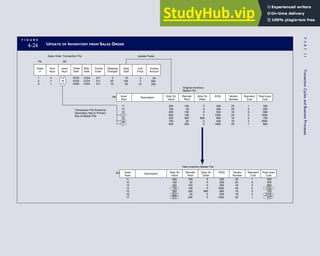
accounting data (GAAP), such as the marketing, finance, production, and engineering functions. These
users are presented with three options: (1) do not use accounting data to support decisions; (2) manipulate
and massage the existing data structure to suit their unique needs; or (3) obtain additional private sets of
the data and incur the costs and operational problems associated with data redundancy.
In spite of these inherent limitations, many large organizations still use flat files for their general ledger
and other financial systems. Most members of the data processing community assumed that the end of
the century would see the end of legacy systems. Instead, corporate America invested billions of dollars
making these systems year-2000 (Y2K) compliant. Legacy systems continue to exist because they add
value for their users, and they will not be replaced until they cease to add value. Students who may have
to work with these systems in practice should be aware of their key features.
THE DATABASE MODEL
An organization can overcome the problems associated with flat files by implementing the database
model to data management. Figure 1-13 illustrates how this approach centralizes the organization’s data
into a common database that is shared by other users. With the organization’s data in a central location,
all users have access to the data they need to achieve their respective objectives. Access to the data
resource is controlled by a database management system (DBMS). The DBMS is a special software sys-
tem that is programmed to know which data elements each user is authorized to access. The user’s pro-
gram sends requests for data to the DBMS, which validates and authorizes access to the database
in accordance with the user’s level of authority. If the user requests data that he or she is not authorized
to access, the request is denied. Clearly, the organization’s procedures for assigning user authority are
an important control issue for auditors to consider.
The most striking difference between the database model and the flat-file model is the pooling of data into
a common database that all organizational users share. With access to the full domain of entity data, changes
F I G U R E
1-13 DATABASE MODEL
Customer Data
Sales Invoices
Cash Receipts
Product Service
Schedule
Other Entity Data
Customer Sales
(Historic/
Product
Orientation)
D
B
M
S
Customer Sales
(Current
Accounts
Receivable)
Customer Sales
(Historic/
Demographic
Orientation)
Accounting
Marketing
Product Services
Shared Database
Integration
Software
User User View
C H A P T E R 1 The Information System: An Accountant’s Perspective 27
in user information needs can be satisfied without obtaining additional private data sets. Users are constrained
only by the limitations of the data available to the entity and the legitimacy of their need to access it. Through
data sharing, the following traditional problems associated with the flat-file approach may be overcome:
Elimination of data redundancy. Each data element is stored only once, thereby eliminating data
redundancy and reducing data collection and storage costs. For example, customer data exist only once,
but is shared by accounting, marketing, and product services users. To accomplish this, the data are
stored in a generic format that supports multiple users.
Single update. Because each data element exists in only one place, it requires only a single update
procedure. This reduces the time and cost of keeping the database current.
Current values. A single change to a database attribute is automatically made available to all users
of the attribute. For example, a customer address change is immediately reflected in the marketing
and product services views when the billing clerk enters it.
Flat-file and early database systems are called traditional systems. Within this context, the term tradi-
tional means that the organization’s information systems applications (its programs) function indepen-
dently of each other rather than as an integrated whole. Early database management systems were designed
to interface directly with existing flat-file programs. Thus, when an organization replaced its flat files with a
database, it did not have to spend millions of dollars rewriting its existing programs. Indeed, early database
applications performed essentially the same independent functions as their flat-file counterparts.
Another factor that limited integration was the structured database models of the era. These models
were inflexible and did not permit the degree of data sharing that is found in modern database systems.
Whereas some degree of integration was achieved with this type of database, the primary and immediate
advantage to the organization was the reduction in data redundancy.
True integration, however, would not be possible until the arrival of the relational database model.
This flexible database approach permits the design of integrated systems applications capable of support-
ing the information needs of multiple users from a common set of integrated database tables. We should
note, however, that the relational database model merely permits integration to occur; integration is not
guaranteed. Poor systems design can occur under any model. In fact, most organizations today that
employ a relational database run applications that are traditional in design and do not make full use of
relational technology. The two remaining models to be discussed (REA and ERP) employ relational data-
base technology more effectively.
THE REA MODEL
REA is an accounting framework for modeling an organization’s critical resources, events, and agents
(REA) and the relationships between them. Once specified, both accounting and nonaccounting data
about these phenomena can be identified, captured, and stored in a relational database. From this reposi-
tory, user views can be constructed that meet the needs of all users in the organization. The availability of
multiple views allows flexible use of transaction data and permits the development of AIS that promote,
rather than inhibit, integration.
The REA model was proposed in 1982 as a theoretical model for accounting.3
Advances in database
technology have focused renewed attention on REA as a practical alternative to the classic accounting
framework. The following summarizes the key elements of the REA models.
Resources
Economic resources are the assets of the organization. They are defined as objects that are both scarce and
under the control of the enterprise. This definition departs from the traditional model because it does not
include AR. An account receivable is an artifact record used simply to store and transmit data. Because it is
3 W. E. McCarthy, ‘‘The REA Accounting Model: A Generalized Framework for Accounting Systems in a Shared Data Environ-
ment.’’ The Accounting Review (July 1982): 554–57.
28 P A R T I Overview of Accounting Information Systems
not an essential element of the system, it does not need to be included in the database. Instead, AR values
are derived from the difference between sales to customers and the cash received in payment of sales.
Events
Economic events are phenomena that affect changes in resources. They can result from activities such as
production, exchange, consumption, and distribution. Economic events are the critical information elements
of the accounting system and should be captured in a highly detailed form to provide a rich database.
Agents
Economic agents are individuals and departments that participate in an economic event. They are parties
both inside and outside the organization with discretionary power to use or dispose of economic resources.
Examples of agents include sales clerks, production workers, shipping clerks, customers, and vendors.
The REA model requires that accounting phenomena be characterized in a manner consistent with the
development of multiple user views. Business data must not be preformatted or artificially constrained
and should reflect all relevant aspects of the underlying economic events. As such, REA procedures and
databases are structured around events rather than accounting artifacts such as journals, ledgers, charts of
accounts, and double-entry accounting. Under the REA model, business organizations prepare financial
statements directly from the event database. The following sales and cash receipts events for a hypotheti-
cal retailer can be used to illustrate the inherent differences between classic and REA accounting:
Sept. 1: Sold 5 units of product X 21 @ $30 per unit and 10 units of product Y33 @ $20 per unit to
customer Smith (Total sale ¼ $350). The unit cost of the inventory is $16 and $12, respectively (Total
CGS ¼ $200).
Sept. 30: Received $200 cash from customer Smith on account, check number 451.
In flat-file or non-REA database systems, the two events would be recorded in a set of classic accounts
like those shown in Figure 1-14. This involves summarizing the events to accommodate the account
structure. However, the details of the transactions are not captured under this approach.
An REA accounting system would capture these transactions in a series of relational database tables
that emphasize events rather than accounts. This is illustrated in Figure 1-15. Each table deals with a
F I G U R E
1-14 CLASSIC ACCOUNTING RECORDS IN A NON-REA SYSTEM
Accounts Receivable File
Customer
Number
Acct
Number
Acct
Number
Customer
Name Debit
Debit
Credit
Credit
Credit
Balance
23456 Smith 350 200 150
Cost of Goods Sold File
5734
4975
270
350
Sales File
C H A P T E R 1 The Information System: An Accountant’s Perspective 29
separate aspect of the transaction. Data pertaining to the customer, the invoice, specific items sold, and so
on can thus be captured for multiple uses and users. The tables of the database are linked via common
attributes called primary keys (PK) and embedded foreign keys (FK) that permit integration. In contrast,
the files in the traditional system are independent of each other and thus cannot accommodate such
detailed data gathering. As a result, traditional systems must summarize event data at the loss of poten-
tially important facts.
Traditional accounting records including journals, ledgers, and charts of accounts do not exist as phys-
ical files or tables under the REA model. For financial reporting purposes, views or images of traditional
accounting records are constructed from the event tables. For example, the amount of Smith’s account re-
ceivable balance is derived from [total sales (Quant sold * Sale price) less cash received (Amount) ¼ 350 
200 ¼ 150]. If necessary or desired, journal entries and general ledger amounts can also be derived from
these event tables. For example, the Cost-of-Goods-Sold control account balance is (Quant sold * Unit
cost) summed for all transactions for the period.
F I G U R E
1-15 EVENT DATABASE IN AN REA SYSTEM
CUSTOMER Table
INVOICE Table
LINE ITEM Table
PRODUCT Table
CASH REC Table
Amount
Sale
Price
Unit
Cost QOH
Description
Product
Num
Trans
Num
Product
Num
Invoice
Num
Invoice
Num
Invoice
Date
Ship
Date Terms Carrier
Cust
Num
Quant
Sold
5
10
Cust
Num
Check
Num
Check
Date
Date
Posted
(PK)
(PK) (FK)
(PK)
(PK)
(PK)
(FK)
(FK)
Something or other
98765
98765
X21
Something else
Y33
X21
98765 9/01/09 9/03/09 Net 30 UPS 23456
23456 Smith 125 Elm St., City 610-555-1234 $5,000 12 12/9/89
Y33
Reorder
Point
50
60
200
159
9/30/09
9/28/09
451
23456
77654
$22
$16
$30
$20
$200
Cust
Num Name Address Tel Num
Credit
Limit
Billing
Date Anniver
30 P A R T I Overview of Accounting Information Systems
REA is a conceptual model, not a physical system. Many of its tenets, however, are found within
advanced database systems. The most notable application of REA philosophy is seen in the proliferation
of ERP systems, which are discussed in the following section.
ENTERPRISE RESOURCE PLANNING SYSTEMS
Enterprise resource planning (ERP) is an information system model that enables an organization to
automate and integrate its key business processes. ERP breaks down traditional functional barriers by
facilitating data sharing, information flows, and the introduction of common business practices among all
organizational users. The implementation of an ERP system can be a massive undertaking that can span
several years. Because of the complexity and size of ERPs, few organizations are willing or able to com-
mit the necessary financial and physical resources and incur the risk of developing an ERP system in-
house. Hence, virtually all ERPs are commercial products. The recognized leaders in the market are SAP,
Oracle, J.D. Edwards  Co., and PeopleSoft Inc.
ERP packages are sold to client organizations in modules that support standard processes. Some com-
mon ERP modules include:
Asset Management
Financial Accounting
Human Resources
Industry-Specific Solutions
Plant Maintenance
Production Planning
Quality Management
Sales and Distribution
Inventory Management
One of the problems with standardized modules is that they may not always meet the organization’s
exact needs. For example, a textile manufacturer in India implemented an ERP package only to discover
that extensive, unexpected, and expensive modifications had to be made to the system. The ERP would
not allow the user to assign two different prices to the same bolt of cloth. The manufacturer charged one
price for domestic consumption, but another (four times higher) for exported products. That particular
ERP system, however, provided no way to assign two prices to the same item while maintaining an accu-
rate inventory count.
Organizations that hope to successfully implement an ERP will need to modify their business proc-
esses to suit the ERP, modify the ERP to suit their business, or, more likely, modify both. Often, addi-
tional software applications need to be connected to the ERP to handle unique business functions,
particularly industry-specific tasks. These applications, often called bolt-ons, are not always designed to
communicate with ERP packages. The process of creating a harmonious whole can be quite complex and
sometimes fails, resulting in significant losses to the organization. ERP packages are enormously expen-
sive, but the savings in efficiencies should be significant. Organization management should exercise great
care in deciding which, if any, ERP is best for them.
The evolution of information systems models outlined in this section provides a framework for much
of the material contained in this book. Chapters 2 through 8 deal with business processes, security, fraud,
controls, and a variety of other issues related to traditional (manual, flat-file, and early database) systems.
Chapters 9 through 12 examine advanced database systems, the REA model, ERP, and other emerging
technologies.
The Role of the Accountant
The final section of this chapter deals with the accountant’s relationship to the information system.
Accountants are primarily involved in three ways: as system users, designers, and auditors.
C H A P T E R 1 The Information System: An Accountant’s Perspective 31
ACCOUNTANTS AS USERS
In most organizations, the accounting function is the single largest user of IT. All systems that process fi-
nancial transactions impact the accounting function in some way. As end users, accountants must provide
a clear picture of their needs to the professionals who design their systems. For example, the accountant
must specify accounting rules and techniques to be used, internal control requirements, and special algo-
rithms such as depreciation models. The accountant’s participation in systems development should be
active rather than passive. The principal cause of design errors that result in system failure is the absence
of user involvement.
ACCOUNTANTS AS SYSTEM DESIGNERS
An appreciation of the accountant’s responsibility for system design requires a historic perspective that
predates the computer as a business information tool. Traditionally, accountants have been responsible for
key aspects of the information system, including assessing the information needs of users, defining the
content and format of output reports, specifying sources of data, selecting the appropriate accounting rules,
and determining the controls necessary to preserve the integrity and efficiency of the information system.
These traditional systems were physical, observable, and unambiguous. The procedures for processing
information were manual, and the medium for transmitting and storing data was paper. With the arrival of
the computer, computer programs replaced manual procedures, and paper records were stored digitally.
The role accountants would play in this new era became the subject of much controversy. Lacking com-
puter skills, accountants were generally uncertain about their status and unwilling to explore this emerg-
ing technology.
Many accountants relinquished their traditional responsibilities to the new generation of computer pro-
fessionals who were emerging in their organizations. Computer programmers, often with no accounting or
business training, assumed full responsibility for the design of AIS. As a result, many systems violated
accounting principles and lacked necessary controls. Large system failures and computer frauds marked
this period in accounting history. By the mid-1970s, in response to these problems, the accounting profes-
sion began to reassess the accountant’s professional and legal responsibilities for computer-based systems.
Today, we recognize that the responsibility for systems design is divided between accountants and IT
professionals as follows: the accounting function is responsible for the conceptual system, and the IT
function is responsible for the physical system. To illustrate the distinction between conceptual and physi-
cal systems, consider the following example:
The credit department of a retail business requires information about delinquent accounts from the
AR department. This information supports decisions made by the credit manager regarding the credit-
worthiness of customers.
The design of the conceptual system involves specifying the criteria for identifying delinquent custom-
ers and the information that needs to be reported. The accountant determines the nature of the information
required, its sources, its destination, and the accounting rules that need to be applied. The physical system
is the medium and method for capturing and presenting the information. The computer professionals deter-
mine the most economical and effective technology for accomplishing the task. Hence, systems design
should be a collaborative effort. Because of the uniqueness of each system and the susceptibility of sys-
tems to serious error and even fraud, the accountant’s involvement in systems design should be pervasive.
In later chapters, we shall see that the active participation of accountants is critical to the system’s success.
ACCOUNTANTS AS SYSTEM AUDITORS
Auditing is a form of independent attestation performed by an expert—the auditor—who expresses an
opinion about the fairness of a company’s financial statements. Public confidence in the reliability of
internally produced financial statements rests directly on their being validated by an independent expert
auditor. This service is often referred to as the attest function. Auditors form their opinions based on a
systematic process that will be explained in Chapter 15.
32 P A R T I Overview of Accounting Information Systems
Both internal and external auditors conduct audits. External auditing is often called independent audit-
ing because certified public accounting (CPA) firms that are independent of the client organization’s
management perform them. External auditors represent the interests of third-party stakeholders in the or-
ganization, such as stockholders, creditors, and government agencies.
External Auditing
Historically, the external accountant’s responsibility as a systems auditor was limited to the attest func-
tion described previously. In recent years this role has been expanded by the broader concept of assur-
ance. The Big Four public accounting firms have now renamed their traditional audit functions assurance
services.
ASSURANCE. Assurance services are professional services, including the attest function, that are
designed to improve the quality of information, both financial and nonfinancial, used by decision makers.
For example, a client may contract assurance services to obtain an opinion as to the quality or marketabil-
ity of a product. Alternatively, a client may need information about the efficiency of a production process
or the effectiveness of their network security system. A gray area of overlap exists between assurance and
consulting services, which auditors must avoid. They were once allowed to provide consulting services to
audit clients. This is now prohibited under SOX legislation. These issues are discussed in later chapters.
IT AUDITING. IT auditing is usually performed as part of a broader financial audit. The organizational
unit responsible for conducting IT audits may fall under the assurance services group or be independent.
Typically they carry a name such as IT Risk Management, Information Systems Risk Management, or
Global Risk Management. The IT auditor attests to the effectiveness of a client’s IT controls to establish
their degree of compliance with prescribed standards. Because many of the modern organization’s inter-
nal controls are computerized, the IT audit may be a large portion of the overall audit. We examine IT
controls, risks, and auditing issues in Chapters 15, 16, and 17.
Internal Auditing
Internal auditing is an appraisal function housed within the organization. Internal auditors perform a
wide range of activities on behalf of the organization, including conducting financial statement audits,
examining an operation’s compliance with organizational policies, reviewing the organization’s com-
pliance with legal obligations, evaluating operational efficiency, detecting and pursuing fraud within
the firm, and conducting IT audits. As you can see, the tasks that external and internal auditors perform
are similar. The feature that most clearly distinguishes the two groups is their respective constituen-
cies. External auditors represent third-party outsiders, whereas internal auditors represent the interests
of management.
Summary
The first section of this chapter introduced basic systems con-
cepts and presented a framework for distinguishing between
accounting information systems and management information
systems. This distinction is related to the types of transactions
these systems process. AIS applications process financial trans-
actions, and MIS applications process nonfinancial transactions.
The section then presented a general model for accounting in-
formation systems. The model is composed of four major tasks
that exist in all AIS applications: data collection, data process-
ing, database management, and information generation.
The second section examined the relationship between
organizational structure and the information system. It
focused on functional segmentation as the predominant
method of structuring a business and examined the functions
of a typical manufacturing firm. The section presented two
general methods of organizing the IT function: the centralized
approach and the distributed approach.
The third section reviewed the evolution of AIS models.
Each new model evolved because of the shortcomings and
limitations of its predecessor. As new approaches evolved,
however, the predecessor or legacy systems often remained
in service. Thus, at any point in time, various generations of
systems coexist across different organizations and even within
a single enterprise. Five AIS models were examined.
C H A P T E R 1 The Information System: An Accountant’s Perspective 33
The final section of this chapter examined three roles of
accountants as (1) users of AIS, (2) designers of AIS, and (3)
auditors of AIS. In most organizations, the accounting function
is the single largest user of the AIS. The IT function is respon-
sible for designing the physical system, and the accounting
function is responsible for specifying the conceptual system.
Auditing is an independent attestation performed by the
auditor, who expresses an opinion about the fairness of a
company’s financial statements. Both external and internal
auditors conduct IT audits. The IT auditor attests to the
effectiveness of a client’s IT controls to establish their degree
of compliance with prescribed standards.
Key Terms
accounting information systems (AIS) (3)
agents (29)
assurance services (33)
attest function (32)
auditing (32)
auditor (33)
backbone systems (15)
centralized data processing (20)
conceptual system (32)
currency of information (25)
data (11)
data collection (12)
data processing (12)
data sources (11)
data storage (25)
data updating (25)
database (12)
database management (13)
database management system (DBMS) (27)
database model (27)
database tables (28)
distributed data processing (DDP) (22)
end users (10)
enterprise resource planning (ERP) (31)
events (29)
feedback (14)
financial transaction (7)
flat-file model (25)
general ledger/financial reporting system (GL/FRS) (9)
general model for viewing AIS applications (10)
independence (19)
information (11)
information flows (4)
information generation (13)
information system (7)
internal auditing (33)
IT auditing (33)
legacy systems (25)
management information system (MIS) (9)
management reporting system (MRS) (9)
nonfinancial transactions (7)
physical system (32)
REA (28)
relational database model (28)
reliability (19)
resources (28)
segments (15)
stakeholders (5)
subsystem (5)
system (5)
system development life cycle (14)
task-data dependency (26)
trading partners (5)
traditional systems (28)
transaction (7)
transaction processing system (TPS) (9)
turnkey systems (15)
vendor-supported systems (15)
Review Questions
1. What are the four levels of activity in the pyramid
representing the business organization? Distin-
guish between horizontal and vertical flows of
information.
2. Distinguish between natural and artificial systems.
3. What are the elements of a system?
4. What is system decomposition and subsystem
interdependency? How are they related?
5. What is the relationship among data, information,
and an information system?
6. Distinguish between AIS and MIS.
7. What are the three cycles of transaction process-
ing systems?
8. What is discretionary reporting?
9. What are the characteristics of good or useful
information?
34 P A R T I Overview of Accounting Information Systems
10. What rules govern data collection?
11. What are the levels of data hierarchy?
12. What are the three fundamental tasks of database
management?
13. What is feedback and how is it useful in an infor-
mation system?
14. What are the fundamental objectives of all infor-
mation systems?
15. What does stewardship mean and what is its role
in an information system?
16. Distinguish between responsibility, authority, and
accountability. Which flow upward and which flow
downward?
17. Distinguish between turnkey, backbone, and
vendor-supported systems.
18. List each of the functional areas and their sub-
functions.
19. What are the roles of internal and external auditors?
20. What is the role of a database administrator?
21. Name the three most common ways to segment
an organization.
22. What is the role of the accounting function in an
organization?
23. Distinguish between the centralized and distrib-
uted approaches to organizing the IT function.
24. What is the role of the data control group?
25. What is distributed data processing?
26. What are the advantages and disadvantages of
distributed data processing?
27. What types of tasks become redundant in a
distributed data processing system?
28. What is a flat-file system?
29. What are the three general problems associated
with data redundancy?
30. Define the key elements of the REA model.
31. What is an ERP system?
32. What three roles are played by accountants with
respect to the information system?
33. Define the term attest function.
34. Define the term assurance.
35. What is IT auditing?
36. Distinguish between conceptual and physical
systems.
Discussion Questions
1. Discuss the differences between internal and
external users of information and their needs and
demands on an information system. Historically,
which type of user has the firm catered to most?
2. Comment on the level of detail necessary for
operations management, middle management, and
stockholders.
3. Distinguish between financial and nonfinancial
transactions. Give three examples of each.
4. Why have re-engineering efforts been made to
integrate AIS and MIS?
5. Do you think transaction processing systems differ
significantly between service and manufacturing
industries? Are they equally important to both
sectors?
6. Discuss the difference between the financial
reporting system and general ledger system.
7. Examine Figure 1-5 and discuss where and how
problems can arise that can cause the resulting
information to be bad or ineffective.
8. Discuss how the elements of efficiency, effective-
ness, and flexibility are crucial to the design of an
information system.
9. Discuss what is meant by the statement, ‘‘The
accounting system is a conceptual flow of informa-
tion that represents the physical flows of person-
nel, raw materials, machinery, and cash through
the organization.’’
10. Discuss the importance of accounting indepen-
dence in accounting information systems. Give an
example of where this concept is important (use
an example other than inventory control).
11. Discuss why it is crucial that internal auditors
report solely to the uppermost level of manage-
ment (either to the chief executive officer or the
audit committee of the board of directors) and an-
swer to no other group.
12. Contrast centralized data processing with distrib-
uted data processing. How do the roles of systems
professionals and end users change? What do you
think the trend is today?
C H A P T E R 1 The Information System: An Accountant’s Perspective 35
13. Discuss how conceptual and physical systems dif-
fer and which functions are responsible for each of
these systems.
14. If accountants are viewed as providers of informa-
tion, then why are they consulted as system users
in the systems development process?
15. Do you agree with the statement, ‘‘The term IT
auditor should be considered obsolete because it
implies a distinction between regular auditors and
auditors who examine computerized AIS’’? Why
or why not?
16. What are the primary reasons for segmenting
organizations?
17. Why is it important to organizationally separate
the accounting function from other functions of
the organization?
18. What is the most likely system acquisition method—
in-house, turnkey, backbone, or vendor-supported—
for each of the following situations?
 A plumbing supply company with 12 employees
that sells standard products to wholesale
customers in a local community needs a system
to manage its affairs.
 A major oil company with diverse holdings,
complex oil leases, and esoteric accounting
practices needs a system that can coordinate its
many enterprises.
 A municipal government needs a system that
complies with standard government accounting
practices but can be integrated with other exist-
ing systems.
19. The REA model is based on the premise that
‘‘business data must not be preformatted or artifi-
cially constrained and must reflect all relevant
aspects of the underlying economic events.’’ What
does this mean and how is it applied?
20. ERP systems are composed of a highly integrated
set of standardized modules. Discuss the
advantages and potential disadvantages of this
approach.
Multiple-Choice Questions
1. Which of the following is NOT a financial
transaction?
a. purchase of products
b. cash receipts
c. update valid vendor file
d. sale of inventory
2. The following are subsystems of the Accounting
Information System, EXCEPT
a. Transaction Processing System.
b. Human Resources System.
c. General Ledger/Financial Reporting System.
d. Management Reporting System.
3. Which of the following is NOT a purpose of the
Transaction Processing System?
a. managing and reporting on the status of finan-
cial investments
b. converting economic events into financial
transactions
c. distributing essential information to operations
personnel to support their daily operations
d. recording financial transactions in the account-
ing records
4. The objectives of the data collection activity of
the general model for Accounting Information Sys-
tems are to collect data that are
a. relevant and redundant.
b. efficient and objective.
c. efficient and redundant.
d. efficient and relevant.
5. Which of the following is NOT a characteristic of
effective information?
a. relevance
b. accuracy
c. summarization
d. precision
6. Which of the following is NOT a database man-
agement task?
a. retrieval
b. storage
c. summarization
d. deletion
36 P A R T I Overview of Accounting Information Systems
7. When viewed from the highest to most elemental
level, the data hierarchy is
a. attribute, record, file.
b. record, attribute, key.
c. file, record, attribute.
d. file, record, key.
e. key, record, file.
8. Which is NOT an accountant’s primary role in in-
formation systems?
a. system user
b. system auditor
c. system designer
d. system programmer
9. Which of the following is NOT an objective of all
information systems?
a. support for the stewardship function of
management
b. support for management decision making
c. support for the day-to-day operations of the firm
d. all of the above are objectives
10. Which of the following best describes the activities
of the materials management function?
a. purchasing, receiving, and inventory control
b. receiving, sales, distribution, and purchasing
c. receiving, storage, purchasing, and accounts
payable
d. purchasing, receiving, and storage
e. purchasing, storage, and distribution
11. Which of the following best describes the activities
of the production function?
a. maintenance, inventory control, and produc-
tion planning
b. production planning, quality control, manufac-
turing, and cost accounting
c. quality control, production planning, manufac-
turing, and payroll
d. maintenance, production planning, storage, and
quality control
e. manufacturing, quality control, and maintenance
12. Which of the following best describes the activities
of the accounting function?
a. inventory control, accounts payable, fixed
assets, and payroll
b. fixed assets, accounts payable, cash disburse-
ments, and cost accounting
c. purchasing, cash receipts, accounts payable,
cash disbursements, and payroll
d. inventory control, cash receipts, accounts
payable, cash disbursements, and payroll
e. inventory control, cost accounting,
accounts payable, cash disbursements, and
payroll
13. Which statement best describes the issue of dis-
tributed data processing (DDP)?
a. The centralized and DDP approaches are
mutually exclusive; an organization must
choose one approach or the other.
b. The philosophy and objective of the organiza-
tion’s management will determine the extent of
DDP in the firm.
c. In a minimum DDP arrangement, only data
input and output are distributed, leaving the
tasks of data control, data conversion, database
management, and data processing to be cen-
trally managed.
d. The greatest disadvantage of a totally distrib-
uted environment is that the distributed infor-
mation processing unit locations are unable to
communicate and coordinate their activities.
e. Although hardware (such as computers,
database storage, and input/output terminals)
can be effectively distributed, the systems
development and maintenance tasks must
remain centralized for better control and
efficiency.
14. Which of the following is a disadvantage of distrib-
uted data processing?
a. End-user involvement in systems operation is
decreased.
b. Disruptions due to mainframe failures are
increased.
c. The potential for hardware and software
incompatibility across the organization is
increased.
d. The time between project request and comple-
tion is increased.
e. All of the above are disadvantages.
C H A P T E R 1 The Information System: An Accountant’s Perspective 37
Problems
1. USERS OF INFORMATION
Classify the following users of information as either:
I—internal user
T—external user: trading partner
S—external user: stakeholder
a. Internal Revenue Service
b. Inventory control manager
c. Board of directors
d. Customers
e. Lending institutions
f. Securities and Exchange Commission
g. Stockholders
h. Chief executive officer
i. Suppliers
j. Bondholders
2. SUBSYSTEMS
Use the human body system to illustrate the concepts
of system decomposition and subsystem interdepen-
dency. Draw a hierarchical chart similar to the one in
Figure 1-2 and discuss the interdependencies.
3. ACCOUNTING INFORMATION
SYSTEM MODEL
Examine the diagram below and determine what essen-
tial mechanism is missing. Once you have identified the
missing element, discuss its importance
Database
Management
Data
Collection
Data
Processing
Information
Generation
4. ACCOUNTING INFORMATION
SYSTEM  MANAGEMENT
INFORMATION SYSTEM FEATURES
List some AIS and MIS information from which salespeo-
ple may benefit. Clearly indicate whether the information
item would be an output of a traditional AIS or MIS system.
Finally, discuss the benefits of integrating this information.
5. INFORMATION SYSTEM
CATEGORIZATION
Classify the following items as either:
TPS—transaction processing system
FRS—financial reporting system
MRS—management reporting system
a. Variance reports
b. Sales order capture
c. Balance sheet
d. Budgets
e. Purchase order preparation
f. Tax returns
g. Sales summary by product line
h. Cash disbursements preparation
i. Annual report preparation
j. Invoice preparation
k. Cost-volume-profit analysis
6. FLAT-FILE VERSUS DATABASE
MODEL
Outline the traditional problems associated with the flat-
file model that are resolved by the database model.
7. ORGANIZATION FUNCTIONS
Based on Figure 1-8, draw a diagram of functional
segments for an oil company that has the following
operations:
a. A head office in New York City responsible for
international and national marketing, acquisition of
leases and contracts, and corporate reporting.
b. Two autonomous regional facilities in Tulsa, Okla-
homa, and New Orleans, Louisiana. These facilities
are responsible for oil exploration, drilling, refining,
storage, and the distribution of petroleum products
to corporate service stations throughout the country
and abroad.
8. ORGANIZATION FUNCTIONS
Based on Figure 1-8, draw a diagram of functional seg-
ments for a manufacturer of diversified products. The
general characteristics of the firm are as follows:
a. The organization produces three unrelated products:
lawn and garden furniture for sale in home im-
provement centers and department stores; plastic
38 P A R T I Overview of Accounting Information Systems
packaging products for the electronics and medical
supply industries; and paper products (for example,
plates, cups, and napkins) for the fast food industry.
b. Although the manufacturing facilities are located
within a single complex, none of the three products
shares the same suppliers, customers, or physical
production lines.
c. The organization’s functional activities include
design, production, distribution, marketing, finance,
human resources, and accounting.
9. FUNCTIONAL SEGMENTATION
The current organization structure of Blue Sky Company,
a manufacturer of small sailboats, is presented below.
Required
a. What operational problems (for example, ineffi-
ciency, errors, fraud) do you think Blue Sky could
experience because of this structure?
b. Draw a new diagram reflecting an improved struc-
ture that solves the problems you identified. If nec-
essary, you may add up to two new positions.
Financial
Manager
Product
Sales
Credit
Approval
Customer
Billing
Cash
Receipts
Accounts
Receivable
Cash
Disbursements
Accounts
Payable
Sales
Manager
Production
Foreman
Inventory
Management
Inventory
Warehouse
Purchasing
Inventory
Control
Assembly
Cost
Accounting
Timekeeping
Payroll
Processing
VP
Marketing
VP
Production
President
10. COMMUNICATIONS
Before the mid-1970s, systems programmers and busi-
nesspeople (including accountants) did not communi-
cate well with one another. The programmers were
criticized for using too much jargon, and the business-
people were criticized for not adequately expressing
their needs. Efforts have been made to overcome this
communication gap, but room for improvement still
exists. What problems do you think resulted from this
communication gap? What do you think you can do to
help close the gap even more when you enter the
workforce?
11. CHARACTERISTICS OF USEFUL
INFORMATION
All records in a file must be uniquely identifiable in at
least one attribute, which is its primary key. Drawing on
your general knowledge of accounting, identify the pri-
mary key for the following types of accounting records.
To illustrate, the first record is done for you.
Record Type Primary Key
Accounts Receivable Customer Number
Accounts Payable
Inventory
Customer Sales Orders
Purchase Orders to vendors
Cash Receipts (checks) from
customers
Cash Disbursements (checks)
to vendors
Employee Payroll Earnings
records
12. DATA ATTRIBUTES
Drawing from your basic accounting knowledge, list
the relevant data attributes that constitute the record
types below. Identify which attribute is the primary key
for the record.
Accounts Payable record
Inventory record
Customer Sales Orders record
Purchase Orders to vendors
Cash Receipts (checks) from customers
Employee Payroll Earnings records
13. DISTRIBUTED DATA PROCESSING
Explain why an organization would choose to install a
distributed instead of a centralized computer environment.
C H A P T E R 1 The Information System: An Accountant’s Perspective 39
This page intentionally left blank
chapter
2
Introduction to
Transaction Processing
C
hapter 1 introduced the transaction processing
system (TPS) as an activity consisting of three
major subsystems called cycles: the revenue
cycle, the expenditure cycle, and the conversion cycle. Even
though each cycle performs different specific tasks and
supports different objectives, they share common character-
istics. For example, all three TPS cycles capture financial
transactions, record the effects of transactions in accounting
records, and provide information about transactions to users
in support of their day-to-day activities. In addition, transac-
tion cycles produce much of the raw data from which
management reports and financial statements are derived.
Because of their financial impact on the firm, transaction
cycles command much of the accountant’s professional
attention.
The purpose of this chapter is to present some prelimi-
nary topics that are common to all three transaction process-
ing cycles. In subsequent chapters, we will draw heavily
from this material as we examine the individual subsystems
of each cycle in detail. This chapter is organized into five
major sections. The first is an overview of transaction proc-
essing. This section defines the broad objective of the three
transaction cycles and specifies the roles of their individual
subsystems. The second section describes the relationship
among accounting records in forming an audit trail in both
manual and computer-based systems. The third section
examines documentation techniques used to represent sys-
tems. This section presents several documentation tech-
niques for manual and computer-based systems. The fourth
section addresses computer-based systems. It reviews the
fundamental features of batch and real-time technologies
and their implication for transaction processing. The final
section examines data coding schemes and their role in
transaction processing.
■
■ Learning Objectives
After studying this chapter, you should:
■ Understand the broad objectives of
transaction cycles.
■ Recognize the types of transactions
processed by each of the three trans-
action cycles.
■ Know the basic accounting records
used in transaction processing sys-
tems.
■ Understand the relationship between
traditional accounting records and
their magnetic equivalents in com-
puter-based systems.
■ Be familiar with the documentation
techniques used for representing
manual and computer-based sys-
tems.
■ Understand the differences between
batch and real-time processing and
the impact of these technologies on
transaction processing.
■ Be familiar with data coding
schemes used in accounting infor-
mation systems.
An Overview of Transaction Processing
TPS applications process financial transactions. A financial transaction was defined in Chapter 1 as
An economic event that affects the assets and equities of the firm, is reflected in its accounts, and is
measured in monetary terms.
The most common financial transactions are economic exchanges with external parties. These include
the sale of goods or services, the purchase of inventory, the discharge of financial obligations, and the
receipt of cash on account from customers. Financial transactions also include certain internal events such
as the depreciation of fixed assets; the application of labor, raw materials, and overhead to the production
process; and the transfer of inventory from one department to another.
Financial transactions are common business events that occur regularly. For instance, thousands of
transactions of a particular type (sales to customers) may occur daily. To deal efficiently with such vol-
ume, business firms group similar types of transactions into transaction cycles.
TRANSACTION CYCLES
Three transaction cycles process most of the firm’s economic activity: the expenditure cycle, the conver-
sion cycle, and the revenue cycle. These cycles exist in all types of businesses—both profit-seeking and
not-for-profit types. For instance, every business (1) incurs expenditures in exchange for resources (ex-
penditure cycle), (2) provides value added through its products or services (conversion cycle), and (3)
receives revenue from outside sources (revenue cycle). Figure 2-1 shows the relationship of these cycles
and the resource flows between them.
F I G U R E
2-1 RELATIONSHIP BETWEEN TRANSACTION CYCLES
Expenditure Cycle Conversion Cycle Revenue Cycle
Cash
Subsystems
Purchasing/Accounts Payable
Cash Disbursements
Payroll
Fixed Assets
Subsystems
Production Planning and Control
Cost Accounting
Subsystems
Sales Order Processing
Cash Receipts
Labor
Physical Plant
Materials
Finished Goods
Customers
Cash
Cash
Finished
Goods
42 P A R T I Overview of Accounting Information Systems
The Expenditure Cycle
Business activities begin with the acquisition of materials, property, and labor in exchange for cash—the
expenditure cycle. Figure 2-1 shows the flow of cash from the organization to the various providers of
these resources. Most expenditure transactions are based on a credit relationship between the trading par-
ties. The actual disbursement of cash takes place at some point after the receipt of the goods or services.
Days or even weeks may pass between these two events. Thus, from a systems perspective, this transac-
tion has two parts: a physical component (the acquisition of the goods) and a financial component (the
cash disbursement to the supplier). A separate subsystem of the cycle processes each component. The
major subsystems of the expenditure cycle are outlined here. Because of the extent of this body of mate-
rial, two chapters are devoted to the expenditure cycle. Purchases/AP and cash disbursements systems are
the topics of Chapter 5. Payroll and fixed asset systems are examined in Chapter 6.
Purchases/accounts payable system. This system recognizes the need to acquire physical inventory
(such as raw materials) and places an order with the vendor. When the goods are received, the pur-
chases system records the event by increasing inventory and establishing an account payable to be paid
at a later date.
Cash disbursements system. When the obligation created in the purchases system is due, the cash
disbursements system authorizes the payment, disburses the funds to the vendor, and records the
transaction by reducing the cash and accounts payable accounts.
Payroll system. The payroll system collects labor usage data for each employee, computes the payroll,
and disburses paychecks to the employees. Conceptually, payroll is a special-case purchases and cash
disbursements system. Because of accounting complexities associated with payroll, most firms have a
separate system for payroll processing.
Fixed asset system. A firm’s fixed asset system processes transactions pertaining to the acquisition,
maintenance, and disposal of its fixed assets. These are relatively permanent items that collectively of-
ten represent the organization’s largest financial investment. Examples of fixed assets include land,
buildings, furniture, machinery, and motor vehicles.
The Conversion Cycle
The conversion cycle is composed of two major subsystems: the production system and the cost account-
ing system. The production system involves the planning, scheduling, and control of the physical product
through the manufacturing process. This includes determining raw material requirements, authorizing the
work to be performed and the release of raw materials into production, and directing the movement of
the work-in-process through its various stages of manufacturing. The cost accounting system monitors
the flow of cost information related to production. Information this system produces is used for inventory
valuation, budgeting, cost control, performance reporting, and management decisions, such as make-
or-buy decisions. We examine the basic features of these systems in Chapter 7.
Manufacturing firms convert raw materials into finished products through formal conversion cycle
operations. The conversion cycle is not usually formal and observable in service and retailing establish-
ments. Nevertheless, these firms still engage in conversion cycle activities that culminate in the develop-
ment of a salable product or service. These activities include the readying of products and services for
market and the allocation of resources such as depreciation, building amortization, and prepaid expenses
to the proper accounting period. However, unlike manufacturing firms, merchandising companies do not
process these activities through formal conversion cycle subsystems.
The Revenue Cycle
Firms sell their finished goods to customers through the revenue cycle, which involves processing cash
sales, credit sales, and the receipt of cash following a credit sale. Revenue cycle transactions also have a
C H A P T E R 2 Introduction to Transaction Processing 43
physical and a financial component, which are processed separately. The primary subsystems of the reve-
nue cycle, which are the topics of Chapter 4, are briefly outlined below.
Sales order processing. The majority of business sales are made on credit and involve tasks such as
preparing sales orders, granting credit, shipping products (or rendering of a service) to the customer,
billing customers, and recording the transaction in the accounts (accounts receivable, inventory,
expenses, and sales).
Cash receipts. For credit sales, some period of time (days or weeks) passes between the point of sale
and the receipt of cash. Cash receipts processing includes collecting cash, depositing cash in the bank,
and recording these events in the accounts (accounts receivable and cash).
Accounting Records
MANUAL SYSTEMS
This section describes the purpose of each type of accounting record used in transaction cycles. We
begin with traditional records used in manual systems (documents, journals, and ledgers) and then exam-
ine their magnetic counterparts in computer-based systems.
Documents
A document provides evidence of an economic event and may be used to initiate transaction processing.
Some documents are a result of transaction processing. In this section, we discuss three types of docu-
ments: source documents, product documents, and turnaround documents.
SOURCE DOCUMENTS. Economic events result in some documents being created at the beginning
(the source) of the transaction. These are called source documents. Source documents are used to capture
and formalize transaction data that the transaction cycle needs for processing. Figure 2-2 shows the crea-
tion of a source document.
The economic event (the sale) causes the sales clerk to prepare a multipart sales order, which is formal
evidence that a sale occurred. Copies of this source document enter the sales system and are used to
F I G U R E
2-2 CREATION OF A SOURCE DOCUMENT
Data
Collection
Customer's
Order
Sales
System
Source
Document
Sales Order
2
3
1
44 P A R T I Overview of Accounting Information Systems
convey information to various functions, such as billing, shipping, and AR. The information in the sales
order triggers specific activities in each of these departments.
PRODUCT DOCUMENTS. Product documents are the result of transaction processing rather than the
triggering mechanism for the process. For example, a payroll check to an employee is a product document
of the payroll system. Figure 2-3 extends the example in Figure 2-2 to illustrate that the customer’s bill is
a product document of the sales system. We will study many other examples of product documents in
later chapters.
TURNAROUND DOCUMENTS. Turnaround documents are product documents of one system that
become source documents for another system. This is illustrated in Figure 2-4. The customer receives a per-
forated two-part bill or statement. The top portion is the actual bill, and the bottom portion is the remittance
advice. Customers remove the remittance advice and return it to the company along with their payment
(typically a check). A turnaround document contains important information about a customer’s account to
help the cash receipts system process the payment. One of the problems designers of cash receipts systems
face is matching customer payments to the correct customer accounts. Providing this needed information as
a product of the sales system ensures accuracy when the cash receipts system processes it.
Journals
A journal is a record of a chronological entry. At some point in the transaction process, when all relevant
facts about the transaction are known, the event is recorded in a journal in chronological order. Docu-
ments are the primary source of data for journals. Figure 2-5 shows a sales order being recorded in the
sales journal (see the following discussion on special journals). Each transaction requires a separate jour-
nal entry, reflecting the accounts affected and the amounts to be debited and credited. There is often a
time lag between initiating a transaction and recording it in the accounts. The journal holds a complete
record of transactions and thus provides a means for posting to accounts. There are two primary types of
journals: special journals and general journals.
F I G U R E
2-3 A PRODUCT DOCUMENT
Customer's
Order
Customer
Data
Collection
Sales
System
Source
Document
Sales Order
2
3
1
Bill
Remittance Advice
Product
Document
C H A P T E R 2 Introduction to Transaction Processing 45
SPECIAL JOURNALS. Special journals are used to record specific classes of transactions that occur in
high volume. Such transactions can be grouped together in a special journal and processed more effi-
ciently than a general journal permits. Figure 2-6 shows a special journal for recording sales transactions.
As you can see, the sales journal provides a specialized format for recording only sales transactions.
At the end of the processing period (month, week, or day), a clerk posts the amounts in the columns to
the ledger accounts indicated (see the discussion of ledgers in this chapter). For example, the total sales
will be posted to account number 401. Most organizations use several other special journals, including
the cash receipts journal, cash disbursements journal, purchases journal, and the payroll journal.
F I G U R E
2-4 A TURNAROUND DOCUMENT
Cash
Receipts
System
Customer
Data
Collection
Sales
System
Source
Document
Sales Order
2
3
1
Bill
Remittance Advice
1
1
Check
Remittance Advice
Customer's
Order
F I G U R E
2-5 SALES ORDER RECORDED IN SALES JOURNAL
Customer's
Order
Sales
Journal
Economic Event Capture Event Record Event
Sales
Order
1
46 P A R T I Overview of Accounting Information Systems
REGISTER. The term register is often used to denote certain types of special journals. For example,
the payroll journal is often called the payroll register. We also use the term register, however, to denote a
log. For example, a receiving register is a log of all receipts of raw materials or merchandise ordered from
vendors. Similarly, a shipping register is a log that records all shipments to customers.
GENERAL JOURNALS. Firms use the general journal to record nonrecurring, infrequent, and dissimi-
lar transactions. For example, we usually record periodic depreciation and closing entries in the general
journal. Figure 2-7 shows one page from a general journal. Note that the columns are nonspecific, allow-
ing any type of transaction to be recorded. The entries are recorded chronologically.
As a practical matter, most organizations have replaced their general journal with a journal voucher system.
A journal voucher is actually a special source document that contains a single journal entry specifying the gen-
eral ledger accounts that are affected. Journal vouchers are used to record summaries of routine transactions,
nonroutine transactions, adjusting entries, and closing entries. The total of journal vouchers processed is equiva-
lent to the general journal. Subsequent chapters discuss the use of this technique in transaction processing.
Ledgers
A ledger is a book of accounts that reflects the financial effects of the firm’s transactions after they are
posted from the various journals. Whereas journals show the chronological effect of business activity,
ledgers show activity by account type. A ledger indicates the increases, decreases, and current balance of
each account. Organizations use this information to prepare financial statements, support daily operations,
and prepare internal reports. Figure 2-8 shows the flow of financial information from the source docu-
ments to the journal and into the ledgers.
There are two basic types of ledgers: (1) general ledgers, which contain the firm’s account information
in the form of highly summarized control accounts, and (2) subsidiary ledgers, which contain the details
of the individual accounts that constitute a particular control account.1
F I G U R E
2-6 SALES JOURNAL
Customer
Date Invoice
Num.
Acct.
Num.
Post
Debit
Acct . Rec. #102
Credit
Sales #401
Sept. 1
15
Oct. 3
10
Hewitt Co.
Acme Drilling
Buell Corp.
Check Ltd.
4523 1120
8821 1298
22987 1030
66734 1110
3300
6825
4000
8500
3300
6825
4000
8500
1 Not all control accounts in the general ledger have corresponding subsidiary accounts. Accounts such as sales and cash typically
have no supporting details in the form of a subsidiary ledger.
C H A P T E R 2 Introduction to Transaction Processing 47
GENERAL LEDGERS. The general ledger (GL) summarizes the activity for each of the organization’s
accounts. The general ledger department updates these records from journal vouchers prepared from spe-
cial journals and other sources located throughout the organization. The general ledger presented in Fig-
ure 2-9 shows the beginning balances, the changes, and the ending balances as of a particular date for
several different accounts.
The general ledger provides a single value for each control account, such as accounts payable,
accounts receivable, and inventory. This highly summarized information is sufficient for financial
F I G U R E
2-7 GENERAL JOURNAL
0
0
GENERAL JOURNAL PAGE
DATE DESCRIPTION
POST.
REF.
DEBIT CREDIT
Sept. 1, 2009 Depreciation Expense 520 5 0 0
0
210 5 0 0 0
Accumulated Depreciation
Insurance Expense
Sept. 2, 2009
Sept. 3, 2009 Cash
Capital Stock
Prepaid Insurance
525
180
1 2 0 0
1 2 0 0
1 0 0
1 0 0
101 1
1
1
2
3
4
5
6
7
8
9
10
11
12
1
2
3
4
5
6
7
8
9
10
11
12
310
F I G U R E
2-8 FLOW OF INFORMATION FROM THE ECONOMIC EVENT TO THE GENERAL LEDGER
Customer's
Order
Sales
Order
Sales
Journal
General
Ledger
Accounts Receivable
Subsidiary
Ledger
Periodically Reconcile Subsidiary
Ledger to General Ledger
Post
Journal
Entry Post
48 P A R T I Overview of Accounting Information Systems
reporting, but it is not useful for supporting daily business operations. For example, for financial reporting
purposes, the firm’s total accounts receivable value must be presented as a single figure in the balance
sheet. This value is obtained from the accounts receivable control account in the general ledger. To
actually collect the cash this asset represents, however, the firm must have certain detailed information
about the customers that this summary figure does not provide. It must know which customers owe
money, how much each customer owes, when the customer last made payment, when the next payment is
due, and so on. The accounts receivable subsidiary ledger contains these essential details.
F I G U R E
2-9 GENERAL LEDGER
DATE ITEM
POST.
REF.
DEBIT
ACCOUNT NO. 101
DEBIT CREDIT
CREDIT
BALANCE
3 3 0 0
S1
10
Sept. 3 3 0 0
6 8 2 5
S1
15 1 0 1 2 5
4 0 0 0
S1
3
Oct. 1 4 1 2 5
CD1
10 8
2 0 0 1 1 3 2 5
Cash
DATE ITEM
POST.
REF.
DEBIT
ACCOUNT NO. 102
DEBIT CREDIT
CREDIT
BALANCE
1 4 0 0
S1
1
Sept. 1 4 0 0
2 6 0 5
S1
8 4 0 0 5
CR1
15 6
1 5 0 2 3 5 5
Accounts Receivable
Accounts Payable
DATE ITEM
POST.
REF.
DEBIT
ACCOUNT NO. 201
DEBIT CREDIT
CREDIT
BALANCE
P1
1
Sept. 2 5
0 0 0 2 0 5 0 0
2 8 0 0
CD1
10 1 7 7 0 0
C H A P T E R 2 Introduction to Transaction Processing 49
SUBSIDIARY LEDGERS. Subsidiary ledgers are kept in various accounting departments of the firm,
including inventory, accounts payable, payroll, and accounts receivable. This separation provides better
control and support of operations. Figure 2-10 illustrates that the total of account balances in a subsidi-
ary ledger should equal the balance in the corresponding general ledger control account. Thus, in addi-
tion to providing financial statement information, the general ledger is a mechanism for verifying the
overall accuracy of accounting data that separate accounting departments have processed. Any event
incorrectly recorded in a journal or subsidiary ledger will cause an out-of-balance condition that should
be detected during the general ledger update. By periodically reconciling summary balances from sub-
sidiary accounts, journals, and control accounts, the completeness and accuracy of transaction process-
ing can be formally assessed.
THE AUDIT TRAIL
The accounting records described previously provide an audit trail for tracing transactions from source
documents to the financial statements. Of the many purposes of the audit trail, most important to accoun-
tants is the year-end audit. Although the study of financial auditing falls outside the scope of this text, the
following thumbnail sketch of the audit process will demonstrate the importance of the audit trail.
The external auditor periodically evaluates the financial statements of publicly held business organiza-
tions on behalf of its stockholders and other interested parties. The auditor’s responsibility involves, in
part, the review of selected accounts and transactions to determine their validity, accuracy, and complete-
ness. Let’s assume an auditor wishes to verify the accuracy of a client’s AR as published in its annual fi-
nancial statements. The auditor can trace the AR figure on the balance sheet to the general ledger AR
control account. This balance can then be reconciled with the total for the accounts receivable subsidiary
ledger. Rather than examining every transaction that affected the AR account, the auditor will use a sam-
pling technique to examine a representative subset of transactions. Following this approach, the auditor
can select a number of accounts from the AR subsidiary ledger and trace these back to the sales journal.
From the sales journal, the auditor can identify the specific source documents that initiated the transac-
tions and pull them from the files to verify their validity and accuracy.
The audit of AR often includes a procedure called confirmation. This involves contacting selected
customers to determine if the transactions recorded in the accounts actually took place and that cus-
tomers agree with the recorded balance. Information contained in source documents and subsidiary
accounts enables the auditor to identify and locate customers chosen for confirmation. The results from
F I G U R E
2-9 GENERAL LEDGER (continued)
DATE ITEM
POST.
REF.
DEBIT
ACCOUNT NO. 502
DEBIT CREDIT
CREDIT
BALANCE
0 5 0 0
2
P1
1
Sept. 2 0 5 0 0
Purchases
50 P A R T I Overview of Accounting Information Systems
reconciling the AR subsidiary ledger with the control account and from confirming customers’
accounts help the auditor form an opinion about the accuracy of accounts receivable as reported on the
balance sheet. The auditor performs similar tests on all of the client firm’s major accounts and transac-
tions to arrive at an overall opinion about the fair presentation of the financial statement. The audit
trail plays an important role in this process.
COMPUTER-BASED SYSTEMS
Types of Files
Audit trails in computer-based systems are less observable than in traditional manual systems, but they
still exist. Accounting records in computer-based systems are represented by four different types of mag-
netic files: master files, transaction files, reference files, and archive files. Figure 2-11 illustrates the rela-
tionship of these files in forming an audit trail.
MASTER FILE. A master file generally contains account data. The general ledger and subsidiary ledg-
ers are examples of master files. Data values in master files are updated from transactions.
F I G U R E
2-10 RELATIONSHIP BETWEEN THE SUBSIDIARY LEDGER AND THE GENERAL LEDGER
Accounts Receivable
Subsidiary Ledger
General Ledger
Hobbs Johnson
Smith
Ray Howard
Total AR =
14,205,800
XXXX.XX XXXX.XX
XXXX.XX
XXXX.XX XXXX.XX
Cash
9,845,260
Accounts Receivable
14,205,800
Inventory
126,389,538
C H A P T E R 2 Introduction to Transaction Processing 51
TRANSACTION FILE. A transaction file is a temporary file of transaction records used to change
or update data in a master file. Sales orders, inventory receipts, and cash receipts are examples of transac-
tion files.
REFERENCE FILE. A reference file stores data that are used as standards for processing transactions.
For example, the payroll program may refer to a tax table to calculate the proper amount of withholding
taxes for payroll transactions. Other reference files include price lists used for preparing customer in-
voices, lists of authorized suppliers, employee rosters, and customer credit files for approving credit sales.
The reference file in Figure 2-11 is a credit file.
ARCHIVE FILE. An archive file contains records of past transactions that are retained for future refer-
ence. These transactions form an important part of the audit trail. Archive files include journals, prior-
period payroll information, lists of former employees, records of accounts written off, and prior-period
ledgers.
F I G U R E
2-11 ACCOUNTING RECORDS IN A COMPUTER-BASED SYSTEM
4
2
3
General Ledger
Control Accounts
Accounts Receivable
Inventory
Cost of Goods
Sold
Sales
Balance
Sheet
AR XXX
Sales
Orders
Reference File
Archive File
Source
Document
Transaction
File
Sales
Orders
Keying
Audit Trail
1
Journal
Error File
AR Subsidiary
Inventory
Subsidiary
Master Files
Credit File
Update
Program
52 P A R T I Overview of Accounting Information Systems
The Digital Audit Trail
Let’s walk through the system represented in Figure 2-11 to illustrate how computer files provide an audit
trail. We begin with the capture of the economic event. In this example, sales are recorded manually on
source documents, just as in the manual system. The next step in this process is to convert the source
documents to digital form. This is done in the data-input stage, when the transactions are edited and a
transaction file of sales orders is produced. Some computer systems do not use physical source docu-
ments. Instead, transactions are captured directly on digital media.
The next step is to update the various master file subsidiary and control accounts that the transaction
affects. During the update procedure, additional editing of transactions takes place. Some transactions
may prove to be in error or invalid for such reasons as incorrect account numbers, insufficient quantities
on hand, or customer credit problems. In this example, the system determines the available credit for each
customer from the credit file before processing the sale. Any records that are rejected for credit problems
are transferred to the error file. The remaining good records are used to update the master files. Only these
transactions are added to the archive file that serves as the sales journal. By copying the valid transactions
to the journal, the original transaction file is not needed for audit trail purposes. This file can now be
erased (scratched) in preparation for the next batch of sales orders.
Like the paper trail, this digital audit trail allows transaction tracing. Again, an auditor attempting to
evaluate the accuracy of the AR figure published in the balance sheet could do so via the following steps,
which are identified in Figure 2-11.
1. Compare the accounts receivable balance in the balance sheet with the master file AR control account
balance.
2. Reconcile the AR control figure with the AR subsidiary account total.
3. Select a sample of update entries made to accounts in the AR subsidiary ledger and trace these to
transactions in the sales journal (archive file).
4. From these journal entries, identify specific source documents that can be pulled from their files and
verified. If necessary, the auditor can confirm the accuracy and propriety of these source documents
by contacting the customers in question.
Documentation Techniques
The old saying that a picture is worth a thousand words is very applicable when it comes to documenting
systems. A written description of a system can be wordy and difficult to follow. Experience has shown
that a visual image can convey vital system information more effectively and efficiently than words.
Accountants use system documentation routinely, as both systems designers and auditors, The ability to
document systems in graphic form is thus an important skill for accountants to master. Five basic docu-
mentation techniques are introduced in this section: data flow diagrams, entity relationship diagrams, sys-
tem flowcharts, program flowcharts, and record layout diagrams.
DATA FLOW DIAGRAMS AND ENTITY RELATIONSHIP DIAGRAMS
Two commonly used systems design and documentation techniques are the entity relationship diagram
and the data flow diagram. This section introduces the principal features of these techniques, illustrates
their use, and shows how they are related.
Data Flow Diagrams
The data flow diagram (DFD) uses symbols to represent the entities, processes, data flows, and data
stores that pertain to a system. Figure 2-12 presents the symbol set most commonly used. DFDs are used
to represent systems at different levels of detail from very general to highly detailed. In Chapter 14, we
will study the construction of multilevel DFDs. At this point, a single-level DFD is sufficient to demon-
strate its use as a documentation tool. We see an example of this in Figure 2-13.
Entities in a DFD are external objects at the boundary of the system being modeled. They represent
sources of and destinations for data. Entities may be other interacting systems or functions, or they may
C H A P T E R 2 Introduction to Transaction Processing 53
be external to the organization. Entities should always be labeled as nouns on a DFD, such as customer
or supplier. Data stores represent the accounting records used in each process, and labeled arrows repre-
sent the data flows between processes, data stores, and entities.
Processes in the DFD should be labeled with a descriptive verb such as Ship Goods, Update Records,
or Receive Customer Order. Process objects should not be represented as nouns like Warehouse, AR
Dept., or Sales Dept. The labeled arrows connecting the process objects represent flows of data such as
Sales Order, Invoice, or Shipping Notice. Each data flow label should be unique—the same label should
not be attached to two different flow lines in the same DFD. When data flow into a process and out again
(to another process), they have, in some way, been changed. This is true even if the data have not been
physically altered. For example, consider the Approve Sales process in Figure 2-13, where Sales Order is
examined for completeness before being processed further. It flows into the process as Sales Order and
out of it as Approved Sales Order.
Systems analysts use DFDs extensively to represent the logical elements of the system. This technique
does not, however, depict the physical system. In other words, DFDs show what logical tasks are being
done, but not how they are done or who (or what) is performing them. For example, the DFD does not
show whether the sales approval process is separated physically from the billing process in compliance
with internal control objectives.
Entity Relationship Diagrams
An entity relationship (ER) diagram is a documentation technique used to represent the relationship
between entities. Entities are physical resources (automobiles, cash, or inventory), events (ordering
F I G U R E
2-12 DATA FLOW DIAGRAM SYMBOL SET
Process
Description
Data Store
Name
N
Entity
Name
Symbol Description
Input source or output
destination of data
A process that is triggered or
supported by data
A store of data such as a
transaction file, a master file,
or a reference file
Direction of data flow
54 P A R T I Overview of Accounting Information Systems
inventory, receiving cash, shipping goods), and agents (salesperson, customer, or vendor) about which
the organization wishes to capture data. One common use for ER diagrams is to model an organization’s
database, which we examine in detail in Chapter 9.
Figure 2-14 shows the symbol set used in an ER diagram. The square symbol represents entities in the
system. The labeled connecting line represents the nature of the relationship between two entities. The
degree of the relationship, called cardinality, is the numeric mapping between entity instances. A rela-
tionship can be one-to-one (1:1), one-to-many (1:M), or many-to-many (M:M).2
If we think of entities in
the ER diagram as files of records, cardinality is the maximum number of records in one file that are
related to a single record in the other file and vice versa.
Cardinality reflects normal business rules as well as organizational policy. For instance, the 1:1 cardi-
nality in the first example in Figure 2-14 suggests that each salesperson in the organization is assigned
one automobile. If instead the organization’s policy were to assign a single automobile to one or more
salespersons who share it, this policy would be reflected by a 1:M relationship. Similarly, the M:M
F I G U R E
2-13 DATA FLOW DIAGRAM OF SALES ORDER PROCESSING SYSTEM
Bill
Customer
Prepare
Accounts
Receivable
Customer Carrier
Sales Order
Customer
AR Records
Credit
Records
Approve
Sales
Ship
Goods
Sales Order
Approved
Sales
Order
Stock Release
Customer Bill Shipping Notice
Posting Data
Packing Slip
Shipping
Log
2 We will study variants of these three basic cardinalities in Chapter 9 when we examine data modeling in greater detail. At that time
a more precise documentation technique for representing cardinality called crow’s foot notation will be introduced.
C H A P T E R 2 Introduction to Transaction Processing 55
relationship between vendor and inventory in Figure 2-14 implies that the organization buys the same
type of products from one or more vendors. A company policy to buy particular items from a single ven-
dor would be reflected by a 1:M cardinality.
System designers identify entities and prepare a model of them, similar to the one presented in Figure
2-15. This data model is the blueprint for what ultimately will become the physical database. The data
model presented in our example is not, however, sufficiently refined to be the plan for a workable data-
base. Constructing a realistic data model is an advanced topic that involves understanding and applying
techniques and rules that are beyond the scope of this chapter. We revisit this topic in Chapter 9, where it
will be treated in sufficient detail to model and design a practical database.
Relationship between ER Diagrams and Data Flow Diagrams
DFDs and ER diagrams depict different aspects of the same system, but they are related and can be recon-
ciled. A DFD is a model of system processes, and the ER diagram models the data used in or affected by
F I G U R E
2-14 ENTITY RELATIONSHIP DIAGRAM SYMBOLS
Assigned
Places
Supply
Company
Car
Inventory
Sales-
person
Customer
Vendor
1
1
M M
M
1
Sales
Order
F I G U R E
2-15 DATA MODEL
Assigned
Places
Shipping
Log
Sales
Order
Credit
Record
1
1 M
1
Customer
AR Record
M
1
56 P A R T I Overview of Accounting Information Systems
the system. The two diagrams are related through data; each data store in the DFD represents a corre-
sponding data entity in the ER diagram. Figure 2-15 presents the ER diagram for the DFD in Figure 2-13.
SYSTEM FLOWCHARTS
A system flowchart is the graphical representation of the physical relationships among key elements of a
system. These elements may include organizational departments, manual activities, computer programs,
hard-copy accounting records (documents, journals, ledgers, and files), and digital records (reference
files, transaction files, archive files, and master files).3
System flowcharts also describe the type of com-
puter media being employed in the system, such as magnetic tape, magnetic disks, and terminals.
The flowcharting examples in the following sections illustrate techniques for representing both manual
and computer-based accounting processes. We begin by documenting manual procedures. We will add
computer elements to the system later.
Flowcharting Manual Activities
To demonstrate the flowcharting of manual activities, let’s assume that an auditor needs to flowchart a
sales order system to evaluate its internal controls and procedures. The auditor will begin by interviewing
individuals involved in the sales order process to determine what they do. This information will be cap-
tured in a set of written facts similar to those below. Keep in mind that the purpose here is to demonstrate
flowcharting. Thus, for clarity, the system facts are intentionally simplistic.
1. A clerk in the sales department receives a hard-copy customer order by mail and manually prepares
four hard copies of a sales order.
2. The clerk sends Copy 1 of the sales order to the credit department for approval. The other three cop-
ies and the original customer order are filed temporarily, pending credit approval.
3. The credit department clerk validates the customer’s order against hard-copy credit records kept in
the credit department. The clerk signs Copy 1 to signify approval and returns it to the sales clerk.
4. When the sales clerk receives credit approval, he or she files Copy 1 and the customer order in the
department. The clerk sends Copy 2 to the warehouse and Copies 3 and 4 to the shipping department.
5. The warehouse clerk picks the products from the shelves, records the transfer in the hard-copy stock
records, and sends the products and Copy 2 to the shipping department.
6. The shipping department receives Copy 2 and the goods from the warehouse, attaches Copy 2 as a
packing slip, and ships the goods to the customer. Finally, the clerk files Copies 3 and 4 in the ship-
ping department.
Based on these facts, the auditor can create a flowchart of this partial system. It is important to note
that flowcharting is as much an art form as it is a technical skill, giving the flowchart author a great deal
of license. Nevertheless, the primary objective should be to provide an unambiguous description of the
system. With this in mind, certain rules and conventions need to be observed:
1. The flowchart should be labeled to clearly identify the system that it represents.
2. The correct symbols should be used to represent the various entities in the system.
3. All symbols on the flowchart should be labeled.
4. Lines should have arrowheads to clearly show the process flow and sequence of events.
5. If complex processes need additional explanation for clarity, a text description should be included on
the flowchart or in an attached document referenced by the flowchart.
3 This terminology is a slight departure from the accounting convention that I have followed in earlier editions of this text in which a
distinction is drawn between document flowcharts and system flowcharts. The term document flowchart was coined at a time
when systems that exclusively employed manual recording and posting activities, and paper (hard copy) documents, journals, and
ledgers were commonplace. Today, few functional systems fall into this category; even basic modern accounting systems
incorporate both manual and computer operations. Apart from being obsolete, I have found that the term document flowchart can
be misleading for students attempting to master flowcharting. Therefore, in this text we will use the term system flowchart or
simply flowchart for representing the physical accounting system, whether it is manual, computer-based, or has elements of both.
C H A P T E R 2 Introduction to Transaction Processing 57
LAY OUT THE PHYSICAL AREAS OF ACTIVITY. Remember that a flowchart reflects the physi-
cal system, which is represented as vertical columns of events and actions separated by lines of demarca-
tion. Generally, each of these areas of activity is a separate column with a heading. From the written
system facts, we see that there are four distinct areas of activity: sales department, credit department,
warehouse, and shipping department. The first step in preparing the flowchart is to lay out these areas of
activity and label each of them. This step is illustrated in Figure 2-16.
TRANSCRIBE THE WRITTEN FACTS INTO VISUAL FORMAT. At this point we are ready to
start visually representing the system facts. The symbols used for this purpose will be selected from the
set presented in Figure 2-17. We begin with the first stated fact:
1. A clerk in the sales department receives a hard-copy customer order by mail and manually prepares
four hard copies of a sales order.
Figure 2-18 illustrates how this fact could be represented. The customer is the source of the order, but
is not part of the system. The oval object is typically used to convey a data source or destination that is
separate from the system being flowcharted. The document symbol entering the sales department signifies
F I G U R E
2-16 FLOWCHART SHOWING AREAS OF ACTIVITY
Sales Department Credit Department Warehouse Shipping Department
58 P A R T I Overview of Accounting Information Systems
F I G U R E
2-17 SYMBOL SET FOR REPRESENTING MANUAL PROCEDURES
Terminal showing source
or destination of documents
and reports
Source document or report
Manual operation
File for storing source
documents and
reports
Accounting records
(journals, registers,
logs, ledgers)
Calculated batch total
On-page connector
Off-page
connector
Document flowline
Description of process or
comments
F I G U R E
2-18 FLOWCHART SHOWING STATED FACT 1 TRANSLATED INTO VISUAL SYMBOLS
Sales Department Credit Department Warehouse Shipping Department
Customer
Prepare
Sales
Order
Sales
Order 4
Sales
Order 3
Sales
Order 2
Sales
Order 1
Customer
Order
C H A P T E R 2 Introduction to Transaction Processing 59
the hard-copy customer order and is labeled accordingly. The bucket-shaped symbol represents a manual
process. In this case, the clerk in the sales department prepares four copies of the sales order. Notice that
the clerk’s task, not the clerk, is depicted. The arrows between the objects show the direction of flow and
the sequence of events.
By transcribing each fact in this way, we systematically construct a flowchart. See how the second and
third facts restated below add to the flowchart in Figure 2-19.
2. The clerk sends Copy 1 of the sales order to the credit department for approval. The other three copies
and the original customer order are filed temporarily, pending credit approval.
3. The credit department clerk validates the customer’s order against hard-copy credit records kept in
the credit department. The clerk signs Copy 1 to signify approval and returns it to the sales clerk.
Two new symbols are introduced in this figure. First, the upside-down triangle symbol represents the
temporary file mentioned in Fact 2. This is a physical file of paper documents such as a drawer in a filing
cabinet or desk. Such files are typically arranged according to a specified order. To signify the filing sys-
tem used, the file symbol will usually contain an ‘‘N’’ for numeric (invoice number), ‘‘C’’ for chronologi-
cal (date), or ‘‘A’’ for alphabetic order (customer name). Secondly, the parallelogram shape represents the
credit records mentioned in Fact 3. This symbol is used to depict many types of hard-copy accounting
records, such as journals, subsidiary ledgers, general ledgers, and shipping logs.
F I G U R E
2-19
FLOWCHART SHOWING STATED FACTS 1, 2, AND 3 TRANSLATED INTO VISUAL SYMBOLS
Sales Department Credit Department Warehouse Shipping Department
Customer
Prepare
Sales
Order
Customer
Order
Sales
Order 4
Sales
Order 3
Sales
Order 2
Sales
Order 1
Signed Sales
Order 1
N
Check
Credit
Signed Sales
Order 1
Customer
Order
Sales
Order 1
Credit
Records
60 P A R T I Overview of Accounting Information Systems
Having laid these foundations, let’s now complete the flowchart by depicting the remaining facts.
4. When the sales clerk receives credit approval, he or she files Copy 1 and the customer order in the
department. The clerk sends Copy 2 to the warehouse and Copies 3 and 4 to the shipping department.
5. The warehouse clerk picks the products from the shelves, records the transfer in the hard-copy stock
records, and sends the products and Copy 2 to the shipping department.
6. The shipping department receives Copy 2 and the goods from the warehouse, attaches Copy 2 as a
packing slip, and ships the goods to the customer. Finally, the clerk files Copies 3 and 4 in the ship-
ping department.
The completed flowchart is presented in Figure 2-20. Notice the circular symbol labeled ‘‘A.’’ This is
an on-page connector used to replace flow lines that otherwise would cause excessive clutter on the page.
In this instance, the connector replaces the lines that signify the movement of Copies 3 and 4 from the
sales department to the shipping department. Lines should be used whenever possible to promote clarity.
Restricted use of connectors, however, can improve the readability of the flowchart.
F I G U R E
2-20 FLOWCHART SHOWING ALL STATED FACTS TRANSLATED INTO VISUAL SYMBOLS
Sales Department Credit Department Warehouse Shipping Department
Customer
Prepare
Sales
Order
Customer
Order
Sales
Order 4
Sales
Order 3
Sales
Order 2
Distribute
SO and
File
Sales
Order 3
Sales
Order 2
Sales
Order 4
Customer
Order
N
Sales
Order 1
Signed Sales
Order 1
N
Check
Credit
A
Sales
Order 2
Pick
Goods
Stock
Records
Sales
Order 2
Sales
Order 4
Pick
Goods
Sales
Order 4
Sales
Order 2
N
Customer
Sales
Order 3
A
Signed Sales
Order 1
Customer
Order
Signed Sales
Order 1
Sales
Order 1
Credit
Records
Sales
Order 3
C H A P T E R 2 Introduction to Transaction Processing 61
Notice also that the physical products or goods mentioned in Facts 4 and 5 are not shown on the flow-
chart. The document (Copy 2) that accompanies and controls the goods, however, is shown. Typically, a
system flowchart shows only the flow of documents, not physical assets.
Finally, for visual clarity, system flowcharts show the processing of a single transaction only. You
should keep in mind, however, that transactions usually pass through manual procedures in batches
(groups). Before exploring documentation techniques further, we need to examine some important issues
related to batch processing.
Batch Processing
Batch processing permits the efficient management of a large volume of transactions. A batch is a group
of similar transactions (such as sales orders) that are accumulated over time and then processed together.
Batch processing offers two general advantages. First, organizations improve operational efficiency by
grouping together large numbers of transactions into batches and processing them as a unit of work rather
than processing each event separately.
Second, batch processing provides control over the transaction process. The accuracy of the process is
established by periodically reconciling the batch against the control figure. For example, assume that the
total value of a batch of sales orders is $100,000. This number is recorded when the batch is first
assembled and then recalculated at various points during its processing. If an error occurs during process-
ing (for example, a sales order is lost), then the recalculated batch total will not equal the original batch
total and the problem will be detected.
Both of these advantages have implications for designing batch systems. The first is that economies are
derived by making transaction batches large as possible. The average transaction cost is thus reduced when
the processing fixed cost associated with the batch is allocated across a large number of transactions.
The second implication is that finding an error in a very large batch may prove difficult. When a batch
is small, error identification is much easier. In designing a batch system, the accountant should seek a bal-
ance between the economic advantage of large batches and the troubleshooting advantage of small
batches. There is no magic number for the size of a batch. This decision is based on a number of opera-
tional, business, and economic factors. Among these are the volume of transactions, the competitiveness
of the industry, the normal frequency of errors, the financial implications of an undetected error, and the
costs of processing. Depending on these factors, a system might be designed to process many small
batches throughout the day or an entire day’s activity as a single batch.
Flowcharting Computer Processes
We now examine flowcharting techniques to represent a system that employs both manual and computer
processes. The symbol set used to construct this system flowchart will come from both Figure 2-17 and
Figure 2-21. Again, our example is based on a sales order system with the following facts:
1. A clerk in the sales department receives a customer order by mail and enters the information into a
computer terminal that is networked to a centralized computer program in the computer operations
department. The original customer order is filed in the sales department.
Facts 2, 3, and 4 relate to activities that occur in the computer operations department.
2. A computer program edits the transactions, checks the customers’ credit by referencing a credit his-
tory file, and produces a transaction file of sales orders.
3. The sales order transaction file is then processed by an update program that posts the transactions
to corresponding records in AR and inventory files.
4. Finally, the update program produces three hard copies of the sales order. Copy 1 is sent to the
warehouse, and Copies 2 and 3 are sent to the shipping department.
5. On receipt of Copy 1, the warehouse clerk picks the products from the shelves. Using Copy 1 and the ware-
house personal computer (PC), the clerk records the inventory transfer in the digital stock records that are
kept on the PC. Next, the clerk sends the physical inventory and Copy 1 to the shipping department.
6. The shipping department receives Copy 1 and the goods from the warehouse. The clerk reconciles
the goods with Copies 1, 2, and 3 and attaches Copy 1 as a packing slip. Next, the clerk ships the
goods (with Copy 1 attached) to the customer. Finally, the clerk records the shipment in the hard-
copy shipping log and files Copies 2 and 3 in the shipping department.
62 P A R T I Overview of Accounting Information Systems
LAY OUT THE PHYSICAL AREAS OF ACTIVITY. The flowcharting process begins by creating a
template that depicts the areas of activity similar to the one shown in Figure 2-16. The only differences in
this case are that this system has a computer operations department but does not have a credit department.
TRANSCRIBE THE WRITTEN FACTS INTO VISUAL FORMAT. As with the manual system
example, the next step is to systematically transcribe the written facts into visual objects. Figure 2-22
illustrates how Facts 1, 2, and 3 translate visually.
The customer, customer order, and file symbols in this flowchart are the same as in the previous exam-
ple. The sales clerk’s activity, however, is now automated, and the manual process symbol has been
replaced with a computer terminal symbol. Also, because this is a data-input operation, the arrowhead on
the flowchart line points in the direction of the edit and credit check program. If the terminal was also
used to receive output (the facts do not specify such an operation), arrowheads would be on both ends of
the line.
Recall that the emphasis in flowcharting is on the physical system. For example, the terminal used by
the sales clerk to enter customer orders is physically located in the sales department, but the programs that
process the transactions and the files that it uses and updates are stored in a separate computer operations
department.
Notice how the flow line points from the credit history file to the edit program. This indicates that the
file is read (referenced) but not changed (updated) by the program. In contrast, the interactions between
the update program and the AR and inventory files are in the opposite direction. The relevant records in
these files have been changed to reflect the transactions. The logic of a file update is explained later in the
chapter.
Let’s now translate the remaining facts into visual symbols. Fact 4 states that the update program pro-
duces three hard-copy documents in the computer operations department, which are then distributed to
the warehouse and shipping departments. The translation of this fact is illustrated in Figure 2-23.
Fact 5 states that the warehouse clerk updates the stock records on the department PC and then sends
the physical inventory and Copy 1 to the shipping department. Notice on Figure 2-23 how this computer
activity is represented. The warehouse PC is a stand-alone computer system that is not networked into the
computer operations department like the terminal in the sales department. The PC, the stock record update
program, and the stock records themselves are all physically located in the warehouse. As with manual
procedures, when documenting computer operations the flowchart author must accurately represent the
physical arrangement of the system components. As we will see in later chapters, the physical arrange-
ment of system components (both manual and computer) often plays an important role in the auditor’s
assessment of internal control.
F I G U R E
2-21 SYMBOL SET FOR REPRESENTING COMPUTER PROCESSES
Hard copy (source
documents and output)
Computer process
(program run)
Direct access storage
device (disk pack)
Magnetic tape (sequential
storage device)
Terminal input/
output device
Process flow
Real-time (online)
connection
Video display
device
C H A P T E R 2 Introduction to Transaction Processing 63
Finally, Fact 6 describes how the shipping department clerk reconciles the goods with the supporting
documents, sends the goods and the packing slip to the customer, updates the shipping log, and files two
copies of the sales order. This is entirely a manual operation, as evidenced by the symbols in Figure 2-23.
Note that the shipping log uses the same symbol that is used for representing journals and ledgers.
PROGRAM FLOWCHARTS
The system flowchart in Figure 2-23 shows the relationship between computer programs, the files they
use, and the outputs they produce. This high level of documentation, however, does not provide the
operational details that are sometimes needed. For example, an auditor wishing to assess the correctness
of the edit program’s logic cannot do so from the system flowchart. This requires a program flowchart.
The symbol set used for program flowcharts is presented in Figure 2-24.
Every program represented in a system flowchart should have a supporting program flowchart that
describes its logic. Figure 2-25 presents the logic of the edit program shown in Figure 2-26. A separate
F I G U R E
2-22
FLOWCHART SHOWING THE TRANSLATION OF FACTS 1, 2, AND 3 INTO VISUAL SYMBOLS
Sales Department Computer Operations Department Warehouse Shipping Department
Customer
Input Order
Credit History
File
Edit and
Credit
Check
Sales
Orders
Update
Program
AR File
Inventory
Customer
Order
Customer
Order
64 P A R T I Overview of Accounting Information Systems
symbol represents each step of the program’s logic, and each symbol represents one or more lines of com-
puter program code. The connector lines between the symbols establish the logical order of execution.
Tracing the flowchart downward from the start symbol, we see that the program performs the following
logical steps in the order listed:
1. The program retrieves a single record from the unedited transaction file and stores it in memory.
2. The first logical test is to see if the program has reached the end-of-file (EOF) condition for the transac-
tion file. Most file structures use a special record or marker to indicate an EOF condition. When EOF is
reached, the edit program will terminate and the next program in the system (in this case, the update
program) will be executed. As long as there is a record in the unedited transaction file, the result of the
EOF test will be ‘‘no’’ and process control is passed to the next logical step in the edit program.
3. Processing involves a series of tests to identify certain clerical and logical errors. Each test, repre-
sented by a decision symbol, evaluates the presence or absence of a condition. For example, an edit
test could be to detect the presence of alphabetic data in a field that should contain only numeric data.
We examine specific edit and validation tests in Chapter 17.
F I G U R E
2-23 FLOWCHART SHOWING ALL FACTS TRANSLATED INTO VISUAL SYMBOLS
Sales Department Computer Operations Department Warehouse Shipping Department
Customer
N
Pick
Goods
Sales
Order 1
Sales
Order 3
Shipping
Log
Sales
Order 2
Sales
Order 1
N
Customer
A
Input Order
Credit History
File
Edit and
Credit
Check
Sales
Orders
Update
Program
AR File
Invento
Stock Records
ry
Sales
Order 1
A
Sales
Order 3
Sales
Order 2
Customer
Order
Customer
Order
Update Stock
Records
Sales
Order 1
Sales
Order 1
Sales
Order 3
Sales
Order 2
Ship
Goods
C H A P T E R 2 Introduction to Transaction Processing 65
4. Error-free records are sent to the edited transaction file.
5. Records containing errors are sent to the error file.
6. The program loops back to Step 1, and the process is repeated until the EOF condition is reached.
F I G U R E
2-24 PROGRAM FLOWCHART SYMBOLS
Terminal start or
end operation
Input/output operation
(read and write records)
Logical process
Decision
Flow of logical
process
F I G U R E
2-25 PROGRAM FLOWCHART FOR EDIT PROGRAM
Start
Read
Record
EOF
Error
Error
Error
Yes
Yes
Yes
Yes
Yes
No
No
No
No
No
Bad
Record
Write to
Error File
Write to
Edited File
Mark Record
Bad
Stop
Mark Record
Bad
Mark Record
Bad
66 P A R T I Overview of Accounting Information Systems
Accountants sometimes use program flowcharts to verify the correctness of program logic. They com-
pare flowcharts to the actual program code to determine whether the program is actually doing what the
documentation describes. Program flowcharts provide essential details for conducting information tech-
nology audits, which we examine in Chapters 15, 16, and 17.
RECORD LAYOUT DIAGRAMS
Record layout diagrams are used to reveal the internal structure of the records that constitute a file or
database table. The layout diagram usually shows the name, data type, and length of each attribute (or
field) in the record. Detailed data structure information is needed for such tasks as identifying certain
types of system failures, analyzing error reports, and designing tests of computer logic for debugging and
auditing purposes. A simpler form of record layout, shown in Figure 2-27, suits our purposes best. This
type of layout shows the content of a record. Each data attribute and key field is shown in terms of its
name and relative location.
Computer-Based Accounting Systems
The final section in this chapter examines alternative computer-based transaction processing models.
Computer-based accounting systems fall into two broad classes: batch systems and real-time systems. A
number of alternative configurations exist within each of these classes. Systems designers base their
F I G U R E
2-26 SYSTEM FLOWCHART
Sales
Orders
Update
Errors
Master
Files
EDIT
Report
Program
Docs
Reports
Unedited
Transactions
Edited
Transactions
Edited
Transactions
C H A P T E R 2 Introduction to Transaction Processing 67
configuration choices on a variety of considerations. Table 2-1 summarizes some of the distinguishing
characteristics of batch and real-time processing that feature prominently in these decisions.
DIFFERENCES BETWEEN BATCH AND REAL-TIME SYSTEMS
Information Time Frame
Batch systems assemble transactions into groups for processing. Under this approach, there is always a
time lag between the point at which an economic event occurs and the point at which it is reflected in the
firm’s accounts. The amount of lag depends on the frequency of batch processing. Time lags can range
from minutes to weeks. Payroll processing is an example of a typical batch system. The economic
events—the application of employee labor—occur continuously throughout the pay period. At the end of
the period, the paychecks for all employees are prepared together as a batch.
Real-time systems process transactions individually at the moment the event occurs. Because records
are not grouped into batches, there are no time lags between occurrence and recording. An example of
real-time processing is an airline reservations system, which processes requests for services from one
traveler at a time while he or she waits.
Resources
Generally, batch systems demand fewer organizational resources (such as programming costs, computer
time, and user training) than real-time systems. For example, batch systems can use sequential files stored
on magnetic tape. Real-time systems use direct access files that require more expensive storage devices,
such as magnetic disks. In practice, however, these cost differentials are disappearing. As a result, busi-
ness organizations typically use magnetic disks for both batch and real-time processing.
The most significant resource differentials are in the areas of systems development (programming)
and computer operations. As batch systems are generally simpler than their real-time counterparts, they
F I G U R E
2-27 RECORD LAYOUT DIAGRAM FOR CUSTOMER FILE
Customer File
Key
Customer
Number
Customer
Name
Street
Address
City State Zip Code Credit Limit
T A B L E
2-1
CHARACTERISTIC DIFFERENCES BETWEEN BATCH AND REAL-TIME PROCESSING
Data Processing Methods
Distinguishing Feature Batch Real-Time
Information time frame Lag exists between time when the economic event
occurs and when it is recorded.
Processing takes place when the economic event
occurs.
Resources Generally, fewer resources (e.g., hardware,
programming, training) are required.
More resources are required than for batch
processing.
Operational efficiency Certain records are processed after the event to
avoid operational delays.
All records pertaining to the event are processed
immediately.
68 P A R T I Overview of Accounting Information Systems
tend to have shorter development periods and are easier for programmers to maintain. On the other hand,
as much as 50 percent of the total programming costs for real-time systems are incurred in designing the
user interfaces. Real-time systems must be friendly, forgiving, and easy to work with. Pop-up menus,
online tutorials, and special help features require additional programming and add greatly to the cost of
the system.
Finally, real-time systems require dedicated processing capacity. Real-time systems must deal with
transactions as they occur. Some types of systems must be available 24 hours a day whether they are
being used or not. The computer capacity dedicated to such systems cannot be used for other purposes.
Thus, implementing a real-time system may require either the purchase of a dedicated computer or an
investment in additional computer capacity. In contrast, batch systems use computer capacity only when
the program is being run. When the batch job completes processing, the freed capacity can be reallocated
to other applications.
Operational Efficiency
Real-time processing in systems that handle large volumes of transactions each day can create operational
inefficiencies. A single transaction may affect several different accounts. Some of these accounts, how-
ever, may not need to be updated in real time. In fact, the task of doing so takes time that, when multi-
plied by hundreds or thousands of transactions, can cause significant processing delays. Batch processing
of noncritical accounts, however, improves operational efficiency by eliminating unnecessary activities at
critical points in the process. This is illustrated with an example later in the chapter.
Efficiency Versus Effectiveness
In selecting a data processing mode, the designer must consider the trade-off between efficiency and effec-
tiveness. For example, users of an airline reservations system cannot wait until 100 passengers (an efficient
batch size) assemble in the travel agent’s office before their transactions are processed. When immediate
access to current information is critical to the user’s needs, real-time processing is the logical choice. When
time lags in information have no detrimental effects on the user’s performance and operational efficiencies
can be achieved by processing data in batches, batch processing is probably the superior choice.
ALTERNATIVE DATA PROCESSING APPROACHES
Legacy Systems Versus Modern Systems
Not all modern organizations use entirely modern information systems. Some firms employ legacy
systems for certain aspects of their data processing. When legacy systems are used to process financially
significant transactions, auditors need to know how to evaluate and test them. We saw in Chapter 1 that
legacy systems tend to have the following distinguishing features: they are mainframe-based applications;
they tend to be batch oriented; early legacy systems use flat files for data storage, but hierarchical and
network databases are often associated with later-era legacy systems. These highly structured and inflexi-
ble storage systems promote a single-user environment that discourages information integration within
business organizations.
Modern systems tend to be client-server (network)–based and process transactions in real time. Although
this is the trend in most organizations, please note that many modern systems are mainframe-based and use
batch processing. Unlike their predecessors, modern systems store transactions and master files in relational
database tables. A major advantage of database storage is the degree of process integration and data sharing
that can be achieved.
Although legacy system configurations no longer constitute the defining features of accounting infor-
mation systems (AIS), they are still of marginal importance to accountants. Therefore, for those who seek
further understanding of legacy system issues, detailed material on transaction processing techniques
using flat-file structures is provided in Section B of the Appendix to this chapter.
The remainder of the chapter focuses on modern system technologies used for processing accounting
transactions. Some systems employ a combination of batch and real-time processing, while others are
C H A P T E R 2 Introduction to Transaction Processing 69
purely real-time systems. In several chapters that follow, we will examine how these approaches are con-
figured to support specific functions such as sales order processing, purchasing, and payroll.
Updating Master Files from Transactions
Whether batch or real-time processing is being used, updating a master file record involves changing the
value of one or more of its variable fields to reflect the effects of a transaction. Figure 2-28 presents
record structures for a sales order transaction file and two associated master files, AR and inventory. The
primary key (PK)—the unique identifier—for the inventory file is INVENTORY NUMBER. The pri-
mary key for AR is ACCOUNT NUMBER. Notice that the record structure for the sales order file con-
tains a primary key (SALES ORDER NUMBER) and two secondary key (SK) fields, ACCOUNT
NUMBER and INVENTORY NUMBER. These secondary keys are used for locating the corresponding
records in the master files. To simplify the example, we assume that each sale is for a single item of in-
ventory. Chapter 9 examines database structures in detail wherein we study the database complexities
associated with more realistic business transactions.
The update procedure in this example involves the following steps:
1. A sales order record is read by the system.
2. ACCOUNT NUMBER is used to search the AR master file and retrieve the corresponding AR record.
3. The AR update procedure calculates the new customer balance by adding the value stored in the
INVOICE AMOUNT field of the sales order record to the CURRENT BALANCE field value in the
AR master record.
4. Next, INVENTORY NUMBER is used to search for the corresponding record in the inventory mas-
ter file.
5. The inventory update program reduces inventory levels by deducting the QUANTITY SOLD value
in a transaction record from the QUANTITY ON HAND field value in the inventory record.
6. A new sales order record is read, and the process is repeated.
F I G U R E
2-28 RECORD STRUCTURES FOR SALES, INVENTORY, AND ACCOUNTS RECEIVABLE FILES
(PK) Record Structure for AR Master File
Account
Number
Address
Current
Balance
Credit
Limit
Last
Payment
Date
Billing
Date
Record Structure for Inventory Master File
(PK)
Inventory
Number
Quantity
on Hand
Reorder
Point
EOQ
Vendor
Number
Standard
Cost
Total
Cost
Name
Description
(SK)
Record Structure for
Sales Orders Transaction File
Inventory
Number
Quantity
Sold
Unit
Price
Invoice
Amount
(SK)
(PK)
Sales
Order
Number
Account
Number
70 P A R T I Overview of Accounting Information Systems
Database Backup Procedures
Each record in a database file is assigned a unique disk location or address (see Section A of the chapter
Appendix) that is determined by its primary key value. Because only a single valid location exists for
each record, updating the record must occur in place. Figure 2-29 shows this technique.
In this example, an AR record with a $100 current balance is being updated by a $50 sale transaction.
The master file record is permanently stored at a disk address designated Location A. The update program
reads both the transaction record and the master file record into memory. The receivable is updated to
reflect the new current balance of $150 and then returned to Location A. The original current balance,
value of $100, is destroyed when replaced by the new value of $150. This technique is called destructive
update.
The destructive update approach leaves no backup copy of the original master file. Only the current
value is available to the user. To preserve adequate accounting records in case the current master becomes
damaged or corrupted, separate backup procedures, such as those shown in Figure 2-30, must be imple-
mented.
Prior to each batch update or periodically (for example, every 15 minutes), the master file being
updated is copied to create a backup version of the original file. Should the current master be
destroyed after the update process, reconstruction is possible in two stages. First, a special recovery
program uses the backup file to create a pre-update version of the master file. Second, the file
update process is repeated using the previous batch of transactions to restore the master to its current
condition. Because of the potential risk to accounting records, accountants are naturally concerned
about the adequacy of all backup procedures. In Chapter 15 we examine many issues related to
file backup.
BATCH PROCESSING USING REAL-TIME DATA COLLECTION
A popular data processing approach, particularly for large operations, is to electronically capture
transaction data at the source as they occur. By distributing data input capability to users, certain
transaction errors can be prevented or detected and corrected at their source. The result is a transac-
tion file that is free from most of the errors that plague older legacy systems. The transaction file
is later processed in batch mode to achieve operational efficiency. Figure 2-31 illustrates this
F I G U R E
2-29 DESTRUCTIVE UPDATE APPROACH
Transaction File
Read $50
Read $100
Write $150
Record Location A
AR
Master File
Sale = $50
Current Bal = $100
Update Program
$100 + $50 = $150
C H A P T E R 2 Introduction to Transaction Processing 71
approach with a simplified sales order system such as that used in a department store. Key steps in
the process are:
 The sales department clerk captures customer sales data pertaining to the item(s) being purchased
and the customer’s account.
 The system then checks the customer’s credit limit from data in the customer record (account
receivable subsidiary file) and updates his or her account balance to reflect the amount of the
sale.
 Next the system updates the quantity-on-hand field in the inventory record (inventory subsidiary
file) to reflect the reduction in inventory. This provides up-to-date information to other clerks as
to inventory availability.
 A record of the sale is then added to the sales order file (transaction file), which is processed in
batch mode at the end of the business day. This batch process records each transaction in the sales
journal and updates the affected general ledger accounts.
You may be wondering at this point why the sales journal and general ledger accounts are being pro-
cessed in batch mode. Why not update them in real time along with the subsidiary accounts? The answer
is to achieve operational efficiency. We now examine what that means.
Let’s assume that the organization using the sales order system configuration illustrated in Figure 2-31
is large and capable of serving hundreds of customers concurrently. Also assume that 500 sales terminals
are distributed throughout its many large departments.
Each customer sale affects the following six accounting records:
 Customer account receivable (Subsidiary—unique)
 Inventory item (Subsidiary—almost unique)
 Inventory control (GL—common)
 Account receivable control (GL—common)
 Sales (GL—common)
 Cost of good sold (GL—common)
To maintain the integrity of accounting data, once a record has been accessed for processing, it is
locked by the system and made unavailable to other users until its processing is complete. Using the
affected records noted here as an example, consider the implications that this data-locking rule has on the
users of the system.
When processing a customer account receivable subsidiary record, the rule has no implications for
other users of the system. Each user accesses only his or her unique record. For example, accessing John
F I G U R E
2-30 BACKUP AND RECOVERY PROCEDURES FOR DATABASE FILES
Backup
Master
Backup
Program
Master
Transaction
Update
Program
Recovery
Program
72 P A R T I Overview of Accounting Information Systems
Smith’s account does not prevent Mary Jones from accessing her account. Updating the inventory subsid-
iary record is almost unique. Because it is possible that both Mary Jones and John Smith are independ-
ently purchasing the same item at the same time, Mary Jones may be kept waiting a few seconds until
John Smith’s transaction releases the lock on the inventory account. This will be a relatively rare event,
and any such conflicts will be of little inconvenience to customers. As a general rule, therefore, master
F I G U R E
2-31 BATCH PROCESSING WITH REAL-TIME DATA COLLECTION
Customer AR Sub Inventory
Sub
Sales
Orders
Data Input
and Edit
Program
General Ledger
Accounts
Sales
Journal
Sales
Order
Data Input
Terminal
Invoice
User
Documents
Batch Process
Real-Time
Process
Customer
Update
and Report
Program
Sales Department Computer Operations Other Departments
C H A P T E R 2 Introduction to Transaction Processing 73
file records that are unique to a transaction such as customer accounts and individual inventory records
can be updated in real time without causing operational delays.
Updating the records in the general ledger is a different matter. All general ledger accounts previously
listed need to be updated by every sales transaction. If the processing of John Smith’s transaction begins
before that of Mary Jones, then she must wait until all six records have been updated before her transac-
tion can proceed. However, the 20- or 30-second delay brought about by this conflict will probably not
inconvenience Mary Jones. This problem becomes manifest as transaction volumes increase. A 20-second
delay in each of 500 customer transactions would create operational inefficiency on a chaotic level.
Each of the 500 customers must wait until the person ahead of him or her in the queue has completed
processing their transaction. The last person in the queue will experience a delay of 500  20 seconds ¼
23
=4 hours.
REAL-TIME PROCESSING
Real-time systems process the entire transaction as it occurs. For example, a sales order processed by the
system in Figure 2-32 can be captured, filled, and shipped the same day. Such a system has many poten-
tial benefits, including improved productivity, reduced inventory, increased inventory turnover, decreased
lags in customer billing, and enhanced customer satisfaction. Because transaction information is transmit-
ted electronically, physical source documents can be eliminated or greatly reduced.
Real-time processing is well suited to systems that process lower transaction volumes and those that do
not share common records. These systems make extensive use of local area network and wide area net-
work technology. Terminals at distributed sites throughout the organization are used for receiving, process-
ing, and sending information about current transactions. These must be linked in a network arrangement
so users can communicate. The operational characteristics of networks are examined in Chapter 12.
Data Coding Schemes
Within the context of transaction processing, data coding involves creating simple numeric or alpha-
betic codes to represent complex economic phenomena that facilitate efficient data processing. In
Figure 2-28, for example, we saw how the secondary keys of transaction file records are linked to the
primary keys of master file records. The secondary and primary keys in the example are instances
of data coding. In this section we explore several data coding schemes and examples of their applica-
tion in AIS. To emphasize the importance of data codes, we first consider a hypothetical system that
does not use them.
A SYSTEM WITHOUT CODES
Firms process large volumes of transactions that are similar in their basic attributes. For instance, a firm’s
AR file may contain accounts for several different customers with the same name and similar addresses.
To process transactions accurately against the correct accounts, the firm must be able to distinguish one
John Smith from another. This task becomes particularly difficult as the number of similar attributes and
items in the class increase.
Consider the most elemental item that a machine shop wholesaler firm might carry in its inventory—a
machine nut. Assume that the total inventory of nuts has only three distinguishing attributes: size, mate-
rial, and thread type. As a result, this entire class of inventory must be distinguished on the basis of these
three features, as follows:
1. The size attribute ranges from 1
=4 inch to 13
=
4 inches in diameter in increments of 1
=
64 of an inch, giving
96 nut sizes.
2. For each size subclass, four materials are available: brass, copper, mild steel, and case-hardened
steel.
3. Each of these size and material subclasses come in three different threads: fine, standard, and coarse.
74 P A R T I Overview of Accounting Information Systems
F I G U R E
2-32 REAL-TIME PROCESSING OF SALES ORDERS
BOL BOL
Customer Sales Computer Operations
Real-Time Process
Bill Customer
Warehouse Shipping
Ship Goods to Customer
Reconcile Goods
with Packing Slip.
Prepare Bill of
Lading
Terminal
Printer
Packing
Slip
Customer
Order
Invoice
Stock
Release
Credit and
Inventory
Check
Credit File Inventory
Closed Sales
Orders
Open Sales
Orders
Packing
Slip
Packing
Slip
Terminal
Printer
Data Input
Terminal
Terminal
Printer
Subsidiary
and Control
Accounts
C
H
A
P
T
E
R
2
Introduction
to
Transaction
Processing
75
Under these assumptions, this class of inventory could contain 1,152 separate items (96  4  3). The
identification of a single item in this class thus requires a description featuring these distinguishing attributes.
To illustrate, consider the following journal entry to record the receipt of $1,000 worth of half-inch, case-
hardened steel nuts with standard threads supplied by Industrial Parts Manufacturer of Cleveland, Ohio.
DR CR
Inventory—nut, ½ inch, case-hardened steel,
standard thread 1,000
AP—Industrial Parts Manufacturer,
Cleveland, Ohio 1,000
This uncoded entry takes a great deal of recording space, is time-consuming to record, and is obvi-
ously prone to many types of errors. The negative effects of this approach may be seen in many parts of
the organization:
1. Sales staff. Properly identifying the items sold requires the transcription of large amounts of detail
onto source documents. Apart from the time and effort involved, this tends to promote clerical errors
and incorrect shipments.
2. Warehouse personnel. Locating and picking goods for shipment are impeded and shipping errors will
likely result.
3. Accounting personnel. Postings to ledger accounts will require searching through the subsidiary files
using lengthy descriptions as the key. This will be painfully slow, and postings to the wrong accounts
will be common.
A SYSTEM WITH CODES
These problems are solved, or at least greatly reduced, by using codes to represent each item in the inven-
tory and supplier accounts. Let’s assume the inventory item in our previous example had been assigned
the numeric code 896, and the supplier in the AP account is given the code number 321. The coded ver-
sion of the previous journal entry can now be greatly simplified:
ACCOUNT DR CR
896 1,000
321 1,000
This is not to suggest that detailed information about the inventory and the supplier is of no interest to
the organization. Obviously it is! These facts will be kept in reference files and used for such purposes as
the preparation of parts lists, catalogs, bills of material, and mailing information. The inclusion of such
details, however, would clutter the task of transaction processing and could prove dysfunctional, as this
simple example illustrates. Other uses of data coding in AIS are to:
1. Concisely represent large amounts of complex information that would otherwise be unmanageable.
2. Provide a means of accountability over the completeness of the transactions processed.
3. Identify unique transactions and accounts within a file.
4. Support the audit function by providing an effective audit trail.
The following discussion examines some of the more commonly used coding techniques and explores
their respective advantages and disadvantages.
NUMERIC AND ALPHABETIC CODING SCHEMES
Sequential Codes
As the name implies, sequential codes represent items in some sequential order (ascending or descending). A
common application of numeric sequential codes is the prenumbering of source documents. At printing, each
hard-copy document is given a unique sequential code number. This number becomes the transaction number
that allows the system to track each transaction processed and to identify any lost or out-of-sequence docu-
ments. Digital documents are similarly assigned a sequential number by the computer when they are created.
76 P A R T I Overview of Accounting Information Systems
ADVANTAGES. Sequential coding supports the reconciliation of a batch of transactions, such as sales
orders, at the end of processing. If the transaction processing system detects any gaps in the sequence
of transaction numbers, it alerts management to the possibility of a missing or misplaced transaction.
By tracing the transaction number back through the stages in the process, management can eventually
determine the cause and effect of the error. Without sequentially numbered documents, problems of this
sort are difficult to detect and resolve.
DISADVANTAGES. Sequential codes carry no information content beyond their order in the sequence.
For instance, a sequential code assigned to a raw material inventory item tells us nothing about the attri-
butes of the item (type, size, material, warehouse location, and so on). Also, sequential coding schemes
are difficult to change. Inserting a new item at some midpoint requires renumbering the subsequent items
in the class accordingly. In applications where record types must be grouped together logically and where
additions and deletions occur regularly, this coding scheme is inappropriate.
Block Codes
A numeric block code is a variation on sequential coding that partly remedies the disadvantages just
described. This approach can be used to represent whole classes of items by restricting each class to a
specific range within the coding scheme. A common application of block coding is the construction of a
chart of accounts.
A well-designed and comprehensive chart of accounts is the basis for the general ledger and is thus
critical to a firm’s financial and management reporting systems. The more extensive the chart of accounts,
the more precisely a firm can classify its transactions and the greater the range of information it can pro-
vide to internal and external users. Figure 2-33 presents an example of accounts using block codes.
Notice that each account type is represented by a unique range of codes or blocks. Thus, balance sheet and
income statement account classifications and subclassifications can be depicted. In this example, each of the
accountsconsistsofathree-digitcode.Thefirstdigitistheblockingdigitandrepresentstheaccountclassification;
forexample,currentassets,liabilities,oroperatingexpense.Theotherdigitsinthecodearesequentiallyassigned.
ADVANTAGES. Block coding allows for the insertion of new codes within a block without having to
reorganize the entire coding structure. For example, if advertising expense is account number 626, the
F I G U R E
2-33 CHART OF ACCOUNTS
Account Ranges:
100 Current Assets
200 Fixed Assets
300 Liabilities
400 Owner's Equity
500 Revenue
600 Operating Expense
700 Cost of Sales
Chart of Accounts
Current Assets
110 Petty Cash
120 Cash in Bank
130 Accounts Receivable
140 Inventory
150 Supplies
Fixed Assets
210 Land
220 Buildings
230 Plant and Equipment
Liabilities
310 Accounts Payable
320 Notes Payable
Owner's Equity
410 Capital Stock
420 Retained Earnings
Sequential Code
Blocking Code
C H A P T E R 2 Introduction to Transaction Processing 77
first digit indicates that this account is an operating expense. As new types of expense items are incurred
and have to be specifically accounted for, they may be added sequentially within the 600 account classifi-
cation. This three-digit code accommodates 100 individual items (X00 through X99) within each block.
Obviously, the more digits in the code range, the more items that can be represented.
DISADVANTAGES. As with the sequential codes, the information content of the block code is not
readily apparent. For instance, account number 626 means nothing until matched against the chart of
accounts, which identifies it as advertising expense.
Group Codes
Numeric group codes are used to represent complex items or events involving two or more pieces of
related data. The code consists of zones or fields that possess specific meaning. For example, a depart-
ment store chain might code sales order transactions from its branch stores as follows:
Store Number Dept. Number Item Number Salesperson
04 09 476214 99
ADVANTAGES. Group codes have a number of advantages over sequential and block codes.
1. They facilitate the representation of large amounts of diverse data.
2. They allow complex data structures to be represented in a hierarchical form that is logical and more
easily remembered by humans.
3. They permit detailed analysis and reporting both within an item class and across different classes of
items.
Using the previous example to illustrate, Store Number 04 could represent the Hamilton Mall store in
Allentown; Dept. Number 09 represents the sporting goods department; Item Number 476214 is a hockey
stick; and Salesperson 99 is Jon Innes. With this level of information, a corporate manager could measure
profitability by store, compare the performance of similar departments across all stores, track the move-
ment of specific inventory items, and evaluate sales performance by employees within and between stores.
DISADVANTAGES. Ironically, the primary disadvantage of group coding results from its success as a
classification tool. Because group codes can effectively present diverse information, they tend to be over-
used. Unrelated data may be linked simply because it can be done. This can lead to unnecessarily com-
plex group codes that cannot be easily interpreted. Finally, overuse can increase storage costs, promote
clerical errors, and increase processing time and effort.
Alphabetic Codes
Alphabetic codes are used for many of the same purposes as numeric codes. Alphabetic characters may
be assigned sequentially (in alphabetic order) or may be used in block and group coding techniques.
ADVANTAGES. The capacity to represent large numbers of items is increased dramatically through the
use of pure alphabetic codes or alphabetic characters embedded within numeric codes (alphanumeric
codes). The earlier example of a chart of accounts using a three-digit code with a single blocking digit
limits data representation to only 10 blocks of accounts—0 through 9. Using alphabetic characters for
blocking, however, increases the number of possible blocks to 26—A through Z. Furthermore, whereas
the two-digit sequential portion of that code has the capacity of only 100 items (102
), a two-position
alphabetic code can represent 676 items (262
). Thus, by using alphabetic codes in the same three-digit
coding space, we see a geometric increase in the potential for data representation
(10 blocks  100 items each) ¼ 1,000 items
to
(26 blocks  676 items each) ¼ 17,576 items
78 P A R T I Overview of Accounting Information Systems
DISADVANTAGES. The primary drawbacks with alphabetic coding are (1) as with numeric codes,
there is difficulty rationalizing the meaning of codes that have been sequentially assigned, and (2) users
tend to have difficulty sorting records that are coded alphabetically.
Mnemonic Codes
Mnemonic codes are alphabetic characters in the form of acronyms and other combinations that convey
meaning. For example, a student enrolling in college courses may enter the following course codes on the
registration form:
Course Type Course Number
Acctg 101
Psyc 110
Mgt 270
Mktg 300
This combination of mnemonic and numeric codes conveys a good deal of information about these
courses; with a little analysis, we can deduce that Acctg is accounting, Psyc is psychology, Mgt is
management, and Mktg is marketing. The sequential number portion of the code indicates the level of
each course. Another example of the use of mnemonic codes is assigning state codes in mailing
addresses:
Code Meaning
NY New York
CA California
OK Oklahoma
ADVANTAGES. The mnemonic coding scheme does not require the user to memorize meaning; the
code itself conveys a high degree of information about the item that is being represented.
DISADVANTAGES. Although mnemonic codes are useful for representing classes of items, they have
limited ability to represent items within a class. For example, the entire class of accounts receivable could
be represented by the mnemonic code AR, but we would quickly exhaust meaningful combinations of
alphabetic characters if we attempted to represent the individual accounts that make up this class. These
accounts would be represented better by sequential, block, or group coding techniques.
Summary
This chapter divided the treatment of transaction processing
systems into five major sections. The first section provided
an overview of transaction processing, showing its vital role
as an information provider for financial reporting, internal
management reporting, and the support of day-to-day opera-
tions. To deal efficiently with large volumes of financial trans-
actions, business organizations group together transactions
of similar types into transaction cycles. Three transaction
cycles account for most of a firm’s economic activity: the
revenue cycle, the expenditure cycle, and the conversion
cycle. The second section described the relationship among
accounting records in both manual and computer-based sys-
tems. We saw how both hard-copy and digital documents
form an audit trail. The third section of the chapter pre-
sented an overview of documentation techniques used to
describe the key features of systems. Accountants must be
proficient in using documentation tools to perform their
professional duties. Five types of documentation are com-
monly used for this purpose: data flow diagrams, entity rela-
tionship diagrams, system flowcharts, program flowcharts,
and record layout diagrams. The fourth section presented
two computer-based transaction processing systems: (1)
batch processing using real-time data collection and (2) real-
time processing. The section also examined the operational
efficiency issues associated with each configuration. Finally,
we examined data coding schemes and their role in transac-
tion processing and AIS as a means of coordinating and man-
aging a firm’s transactions. In examining the major types of
numeric and alphabetic coding schemes, we saw how each
has certain advantages and disadvantages.
C H A P T E R 2 Introduction to Transaction Processing 79
Appendix
Section A: Secondary Storage
A
computer’s secondary storage includes devices used to store and retrieve system software, appli-
cation software, and data on magnetic or optical media, such as magnetic tape, hard or floppy
disks, and CD-ROMs.
Magnetic Tape
Most modern magnetic tape systems use reels that are similar to a VCR tape. A tape drive is used to re-
cord bits of data onto magnetic tape by winding the tape from one reel to the other and passing it across a
read/write head. The tape drive reads and writes blocks of data at a time. Each block is separated by an
interblock gap, which instructs the tape drive to stop reading or writing the data until another block is
requested. Figure 2-34 shows records blocked together on a magnetic tape.
A byte of data (representing a character, digit, or special symbol) is recorded on the tape across its
width. (One byte equals eight binary digits, or bits. A bit is the smallest possible unit of electronic information,
with a value of either 0 or 1.) A logical sequence of characters makes a field, and several fields make a record.
Although seldom used for data processing these days, magnetic tape still offers some important
advantages as a secondary storage medium. For example, large amounts of data can be stored on mag-
netic tape at a relatively low cost, and magnetic tape is reusable. The primary disadvantage is that tapes
record data sequentially, making data retrieval slower than direct access storage media. Modern tape sys-
tems alleviate this problem by using a form of indexing, in which a separate lookup table provides the
physical tape location for a given data block or by marking blocks with a tape mark that can be detected
while winding the tape at high speed.
Historically, tape has offered cost advantages over disk storage to make it a viable solution for data
backup. Rapid improvement in disk storage density, however, combined with sluggish innovation in tape
storage technologies, is eroding the market share of tape storage devices.
Magnetic Disks
The data stored on magnetic disks (hard disks or floppy disks) are considered nonvolatile. The data will
reside in a certain location on the magnetic surface until they are replaced with different data or erased.
Data can be recorded to magnetic disks using either of the access methods described earlier.
To get the disk ready to receive data, its surface must be formatted. An operating system utility pro-
gram formats the disk by dividing it into circular tracks and wedge-shaped sectors, which cut across the
tracks. The number of bytes that can be stored at a particular track and sector determines the disk’s density.
Disks are known as direct access storage devices because a piece of data can be accessed directly
on the disk. Database management systems and application software work with the operating system to
determine the location of the required data.
A disk has a rotating magnetic surface and a read/write head. The read/write head is on an access
arm that moves back and forth over the magnetic surface. The time that elapses from the request made of
the operating system for a piece of data to when it is read into the computer is called access time. The
access time of a particular hard disk is a function of several factors: (1) the seek time—how fast the read/
write head moves into position over a particular track, (2) the switching time—the time needed to activate
the read/write head, (3) the rotational delay time—the time it takes to rotate the disk area under the read/
write head, and (4) the data transfer time—the time it takes for the data to be transferred from the disk
track to primary storage. Most microcomputer hard disks have an access time of 5 to 60 milliseconds.
The file allocation table is an area on the disk that keeps track of the name of each file, the number
of bytes in the file, the date and time it was created, the type of file, and its location (address) on the disk.
A file may be stored in only one place on the disk, or it may be spread across several locations. In the lat-
ter case, the read/write head of the disk must skip among various addresses to read the entire file into the
primary memory.
We have used the term address several times to represent a disk storage location. Let’s now exam-
ine the elements of a disk address.
DISK ADDRESS
As we have seen, the surface of a disk is divided into magnetized tracks that form concentric circles of
data. The floppy disk for a microcomputer may have 40 or 80 tracks on a surface, while the surface of a
mainframe disk could contain several hundred tracks. These tracks are logically divided into smaller
blocks or record locations where data records reside. Each location is unique and has an address—a
numeric value. Depending on the disk’s size and density, hundreds or thousands of records may be stored
on a single track. Figure 2-35 shows data storage on a disk. For illustration purposes, the physical size of
the records is greatly exaggerated.
The concept of an address applies to all types of magnetic disks, including individual floppy disks
and hard disks used in microcomputers and the larger mainframe disk packs. A difference lies in the way
the disks are physically arranged. Mainframe disks are often stacked on top of one another in a disk-pack
arrangement that resembles a stack of phonograph records. Figure 2-36 illustrates this technique. The
disks are mounted to a central spindle that rotates at over 3,500 revolutions per minute. Each disk surface
is provided with a separate read/write head that is used for storing and retrieving data.
DATA STORAGE ON A DISK PACK
Every disk in a disk pack has two surfaces with the same number of tracks on each surface. Figure 2-36
shows that Track 100 exists on the top and bottom surfaces of each disk in the disk pack. Therefore, this
F I G U R E
2-34 RECORDS BLOCKED ON A MAGNETIC TAPE
R
ec
or
d
2
Rec
ord
3
R
e
c
o
rd
1
R
e
c
o
r
d
1
0
0
I
B
G
Interblock Gaps (IBG)
Blocks of Records
C H A P T E R 2 Introduction to Transaction Processing 81
disk pack containing 11 disks has 22 occurrences of Track 100. To protect the data from exposure to
damage, the very top and bottom surfaces of the disk pack are not used, yielding 20 data storage surfaces
for Track 100.
When viewed collectively, the same track on each surface in the disk pack is called a cylinder. There-
fore, in our example, Cylinder 100 contains 20 tracks of data. However, the cylinders on a microcomputer’s
floppy disk or hard disk contain only two tracks because these disks have only two surfaces.
LOCATING A RECORD BASED ON ITS ADDRESS
A disk address consists of three components: the cylinder number, the surface number, and the record (or
block) number. To find a record, the system must know the numeric value for each of these components.
For example, if a record’s address is Cylinder 105, Surface 15, and Record Block 157, the record in ques-
tion could be directly accessed as follows: First, the disk-pack control device moves the read/write heads
into position above Track 105 on each surface (Cylinder 105). Next, it activates the read/write head for Sur-
face 15. Finally, as Record Block 157 passes under the active read/write head, it is either read or written.
The key task in direct access storage and retrieval is ascertaining the record’s address. This may be
determined from tables or calculations based on its primary key. Several direct access techniques are
examined in Chapter 9.
F I G U R E
2-35 HOW DATA ARE STORED ON A DISK
Record #2
Record #1
R
e
c
o
r
d
#
3
Record
#100
R
e
c
o
r
d
#
2
0
0
Track
Record (or block)
number
82 P A R T I Overview of Accounting Information Systems
Optical Disks
Optical disks are growing in popularity. The advantage of optical disks is that they can store very large
amounts of data. A compact disc, one type of optical disk, is as portable as a floppy disk but can store
more than 600 MB of data. There are several types of optical disk storage systems, including CD-ROM,
WORM, and erasable optical disks.
A CD-ROM (compact disc read-only memory) is a secondary storage device that contains data or
programs imprinted by the manufacturer. However, the user cannot write to (alter) the data on the CD
because it is a read-only device. The WORM (write-once, read-many) disk is a secondary storage device
that allows the user to write to the disk one time. An erasable optical disk allows the user to store and
modify data on the disk many times.
Section B: Legacy Systems
A
defining feature of legacy systems is their use of flat files for data storage. The following section
presents a review of data structures and the flat-file processing techniques that evolved from
them. It then examines data processing methods that employ these flat-file structures. The sec-
tion concludes with a detailed explanation of the program logic underlying flat-file update procedures.
Data Structures
Data structures constitute the physical and logical arrangement of data in files and databases. Under-
standing how data are organized and accessed is central to understanding transaction processing. Data
F I G U R E
2-36 A HARD DISK PACK
400 Cylinders
000 399
Track 100
11 Disks
20 Tracks
(Cylinder 100)
Access Mechanism
10 Access Arms
20 Read/Write Heads
C H A P T E R 2 Introduction to Transaction Processing 83
structures have two fundamental components: organization and access method. Organization refers to the
way records are physically arranged on the secondary storage device (for example, a disk). This may be
either sequential or random. The records in sequential files are stored in contiguous locations that occupy
a specified area of disk space. Records in random files are stored without regard for their physical relation-
ship to other records of the same file. In fact, random files may have records distributed throughout a disk.
The access method is the technique used to locate records and to navigate through the database or file.
No single structure is best for all processing tasks, and selecting a structure involves a trade-off
between desirable features. The file operation requirements that influence the selection of the data struc-
ture are listed in Table 2-2.
In the following section, we examine several data structures that are used in flat-file systems. Recall
from Chapter 1 that the flat-file model describes an environment in which individual data files are not
integrated with other files. End users in this environment own their data files rather than share them with
other users. Data processing is thus performed by stand-alone applications rather than integrated systems.
The flat-file approach is a single-view model that characterizes legacy systems in which data files are
structured, formatted, and arranged to suit the specific needs of the owner or primary user of the system.
Such structuring, however, may omit or corrupt data attributes that are essential to other users, thus pre-
venting successful integration of systems across the organization.
SEQUENTIAL STRUCTURE
Figure 2-37 illustrates the sequential structure, which is typically called the sequential access
method. Under this arrangement, for example, the record with key value 1875 is placed in the physical
storage space immediately following the record with key value 1874. Thus, all records in the file lie
in contiguous storage spaces in a specified sequence (ascending or descending) arranged by their
primary key.
Sequential files are simple and easy to process. The application starts at the beginning of the file
and processes each record in sequence. Of the file processing operations in Table 2-2, this approach is ef-
ficient for Operations 4 and 5, which are, respectively, reading an entire file and finding the next record
in the file. Also, when a large portion of the file (perhaps 20 percent or more) is to be processed in one
operation, the sequential structure is efficient for record updating (Operation 3 in Table 2-2). Sequential
files are not efficient when the user is interested in locating only one or a few records on a file. A simple
analogy can be made with an audiocassette. If you want to listen to only the tenth song on the tape, you
must fast-forward to the point at which you think the song is located and then press the play button. Some
searching is usually required to find the beginning of the song. However, if you are interested in hearing
all the songs on the tape, you can simply play it from the beginning. An example of a sequential file
application is payroll processing, whereby 100 percent of the employee records on the payroll file are
processed each payroll period. Magnetic tape is a cheap, effective, and commonly used storage medium
for sequential files. Sequential files may also be stored on magnetic disks.
The sequential access method does not permit accessing a record directly. Applications that require
direct access operations need a different data structure. The techniques described next address this need.
T A B L E
2-2 TYPICAL FILE PROCESSING OPERATIONS
1. Retrieve a record from the file based on its primary key value.
2. Insert a record into a file.
3. Update a record in the file.
4. Read a complete file of records.
5. Find the next record in a file.
6. Scan a file for records with common secondary keys.
7. Delete a record from a file.
84 P A R T I Overview of Accounting Information Systems
DIRECT ACCESS STRUCTURES
Direct access structures store data at a unique location, known as an address, on a hard disk or floppy
disk. The disk address is a numeric value that represents the cylinder, surface, and block location on the
disk.4
The operating system uses this address to store and retrieve the data record. Using our music anal-
ogy again, the direct access approach is similar to the way songs are stored on a compact disc. If the lis-
tener chooses, he or she can select a specific song directly without searching through all the other songs.
An important part of the direct access approach is in determining the disk address, which is based
on the record’s primary key. Bank account numbers, social security numbers, credit card numbers, and
license plate numbers are examples of primary keys that are translated into addresses to store and retrieve
data by different business applications. The following techniques are examples of data structures that
have direct access capability.
INDEXED STRUCTURE
An indexed structure is so named because, in addition to the actual data file, there exists a separate index that
is itself a file of record addresses. This index contains the numeric value of the physical disk storage location
(cylinder, surface, and record block) for each record in the associated data file. The data file itself may be
organized either sequentially or randomly. Figure 2-38 presents an example of an indexed random file.
Records in an indexed random file are dispersed throughout a disk without regard for their physical
proximity to other related records. In fact, records belonging to the same file may reside on different
disks. A record’s physical location is unimportant as long as the operating system software can find it
when needed. Searching the index for the desired key value, reading the corresponding storage location
(address), and then moving the disk read/write head to the address location accomplish this. When a new
record is added to the file, the data management software selects a vacant disk location, stores the record,
and adds the new address to the index.
The physical organization of the index itself may be either sequential (by key value) or random.
Random indexes are easier to maintain, in terms of adding records, because new key records are simply
added to the end of the index without regard to their sequence. Indexes in sequential order are more diffi-
cult to maintain because new record keys must be inserted between existing keys. One advantage of a se-
quential index is that it can be searched rapidly. Because of its logical arrangement, algorithms can be
F I G U R E
2-37 SEQUENTIAL STORAGE AND ACCESS METHOD
Records Are Read Sequentially
Key
1874
Other Data
Key
1875
Other Data
Key
1876
Other Data
Keys Are in Sequence
(in this case, ascending order)
4 For further explanation about disk addresses, see Section A of the Appendix to this chapter.
C H A P T E R 2 Introduction to Transaction Processing 85
used to speed the search through the index to find a key value. This becomes particularly important for
large data files with associated large indexes.
The principal advantage of indexed random files is in operations involving the processing of
individual records (Operations 1, 2, 3, and 6 in Table 2-2). Another advantage is their efficient use of
disk storage. Records may be placed wherever there is space without concern for maintaining contigu-
ous storage locations. However, random files are not efficient structures for operations that involve
processing a large portion of a file. A great deal of access time may be required to access an entire
file of records that are randomly dispersed throughout the storage device. Sequential files are more ef-
ficient for this purpose.
VIRTUAL STORAGE ACCESS METHOD STRUCTURE
The virtual storage access method (VSAM) structure is used for very large files that require routine
batch processing and a moderate degree of individual record processing. For instance, the customer file
of a public utility company will be processed in batch mode for billing purposes and directly accessed in
response to individual customer queries. Because of its sequential organization, the VSAM structure can
be searched sequentially for efficient batch processing. Figure 2-39 illustrates how VSAM uses indexes
to allow direct access processing.
The VSAM structure is used for files that often occupy several cylinders of contiguous storage on a
disk. To find a specific record location, the VSAM file uses a number of indexes that describe in summa-
rized form the contents of each cylinder. For example, in Figure 2-39, we are searching for a record with
the key value 2546. The access method goes first to the overall file index, which contains only the highest
key value for each cylinder in the file, and determines that Record 2546 is somewhere on Cylinder 99. A
quick scan of the surface index for Cylinder 99 reveals that the record is on Surface 3 of Cylinder 99.
F I G U R E
2-38 INDEXED RANDOM FILE STRUCTURE
Key Value Record
Address
1876
1956
2219
5521
1124
1872
2130
Cylinder, surface,
record #
Physical Disk Storage Device
1876
2219
2130
1956
1124
Index
97, 14, 128
102, 03, 200
06, 10, 501
125, 02, 16
200, 12, 350
04, 06, 87
86 P A R T I Overview of Accounting Information Systems
VSAM indexes do not provide an exact physical address for a single record. However, they identify the
disk track on which the record in question resides. The last step is to search the identified track sequen-
tially to find the record with key value 2546.
The VSAM structure is moderately effective for Operations 1 and 3 in Table 2-2. Because VSAM
must read multiple indexes and search the track sequentially, the average access time for a single record
is slower than that of the indexed sequential or indexed random structures. Direct access speed is sacri-
ficed to achieve very efficient performance in Operations 4, 5, and 6.
The greatest disadvantage with the VSAM structure is that it does not perform record insertion
operations (Operation 2) efficiently. Because the VSAM file is organized sequentially, inserting a new re-
cord into the file requires the physical relocation of all the records located beyond the point of insertion.
The indexes that describe this physical arrangement must, therefore, also be updated with each insertion.
This is extremely time-consuming and disruptive. One method of dealing with this problem is to
store new records in an overflow area that is physically separate from the other data records in the file.
Figure 2-40 shows how this is done.
A VSAM file has three physical components: the indexes, the prime data storage area, and the over-
flow area. Rather than inserting a new record directly into the prime area, the data management software
places it in a randomly selected location in the overflow area. It then records the address of the location in
a special field (called a pointer) in the prime area. Later, when searching for the record, the indexes direct
the access method to the track location on which the record should reside. The pointer at that location
reveals the record’s actual location in the overflow area. Thus, accessing a record may involve searching
the indexes, searching the track in the prime data area, and finally searching the overflow area. This slows
data access time for both direct access and batch processing.
F I G U R E
2-39 VIRTUAL STORAGE ACCESS METHOD (VSAM) USED FOR DIRECT ACCESS
Search Track 99
on Surface 3 of
Cylinder 99
sequentially. We
do not have the
specific address
of Record (key) 2546.
VSAM—Virtual Storage Access Method
Looking for Key 2546
Cylinder Index Surface Index
Cylinder 99
Key
Range
Cyl
Num
Key
Range
Surface
Num
1100
2200
3300
4400
9999
97
98
99
100
120
2300
2400
2500
2600
0
1
2
3
4
2700
C H A P T E R 2 Introduction to Transaction Processing 87
Periodically, the VSAM file must be reorganized by integrating the overflow records into the prime
area and then reconstructing the indexes. This involves time, cost, and disruption to operations. There-
fore, when a file is highly volatile (records are added or deleted frequently), the maintenance burden asso-
ciated with the VSAM approach tends to render it impractical. However, for large, stable files that need
both direct access and batch processing, the VSAM structure is a popular option.
HASHING STRUCTURE
A hashing structure employs an algorithm that converts the primary key of a record directly into a stor-
age address. Hashing eliminates the need for a separate index. By calculating the address, rather than
reading it from an index, records can be retrieved more quickly. Figure 2-41 illustrates the hashing
approach.
This example assumes an inventory file with 100,000 inventory items. The algorithm divides the
inventory number (the primary key) into a prime number. Recall that a prime number is one that can be
divided only by itself and 1 without leaving a residual value. Thus, the calculation will always produce a
value that can be translated into a storage location. Hence, the residual 6.27215705 becomes Cylinder
272, Surface 15, and Record 705. The hashing structure uses a random file organization because the pro-
cess of calculating residuals and converting them into storage locations produces widely dispersed record
addresses.
The principal advantage of hashing is access speed. Calculating a record’s address is faster than
searching for it through an index. This structure is suited to applications that require rapid access to indi-
vidual records in performing Operations 1, 2, 3, and 6 in Table 2-2.
F I G U R E
2-40 INSERTING A RECORD INTO A VIRTUAL STORAGE ACCESS METHOD FILE
Key 241
Overflow
Area
Key 237
Key 223
Key 226
Key 231
Key 235
Key 240
Key 224
Key 228
Key 233
Key 238
Key 225
Key 229
Key 234
Key 239
Key 269 Key 270
Insert New Record with Key Value = 237
Index
Prime
Area
88 P A R T I Overview of Accounting Information Systems
The hashing structure has two significant disadvantages. First, this technique does not use storage
space efficiently. The storage location chosen for a record is a mathematical function of its primary key
value. The algorithm will never select some disk locations because they do not correspond to legitimate
key values. As much as one-third of the disk pack may be wasted.
The second disadvantage is the reverse of the first. Different record keys may generate the same
(or similar) residual, which translates into the same address. This is called a collision because two records
cannot be stored at the same location. One solution to this problem is to randomly select a location for
the second record and place a pointer to it from the first (the calculated) location. The dark arrow in
Figure 2-41 represents this technique.
The collision problem slows access to records. Locating a record displaced in this manner involves
first calculating its theoretical address, searching that location, and then determining the actual address
from the pointer contained in the record at that location. This has an additional implication for Operation
7 in Table 2-2—deleting a record from a file. If the first record is deleted from the file, the pointer to the
second (collision) record will also be deleted and the address of the second record will be lost. This can
be dealt with in two ways: (1) After deleting the first record, the collision record can be physically relo-
cated to its calculated address, which is now vacant, or (2) the first record is marked deleted but is left in
place to preserve the pointer to the collision record.
POINTER STRUCTURE
Figure 2-42 presents the pointer structure, which in this example is used to create a linked-list file. This
approach stores in a field of one record the address (pointer) of a related record. The pointers provide
F I G U R E
2-41 HASHING TECHNIQUE WITH POINTER TO RELOCATE THE COLLISION RECORD
Record with Same Hashed
Address as 15943
Relocated Record
C
o
l
l
i
s
i
o
n
P
o
i
n
t
e
r
Key Value Being Sought
= 15943
Hashing
Technique
Prime #/Key
= 99997/15943 = 6.27215705
Residual Translates to:
Cylinder 272
Surface 15
Record # 705
15943
C H A P T E R 2 Introduction to Transaction Processing 89
connections between the records. In this example, Record 124 points to the location of Record 125;
Record 125 points to 126; and so on. As each record is processed, the computer program reads the pointer
field to locate the next one. The last record in the list contains an EOF marker. The records in this type of
file are spread over the entire disk without concern for their physical proximity with other related records.
Pointers used in this way make efficient use of disk space and are efficient structures for applications that
involve Operations 4, 5, and 6 in Table 2-2.
Types of Pointers
Figure 2-43 shows three types of pointers: physical address, relative address, and logical key pointers. A
physical address pointer contains the actual disk storage location (cylinder, surface, and record number)
that the disk controller needs. This physical address allows the system to access the record directly with-
out obtaining further information. This method has the advantage of speed, because it does not need to be
manipulated further to determine a record’s location. However, it also has two disadvantages: First, if the
related record is moved from one disk location to another, the pointer must be changed. This is a problem
when disks are periodically reorganized or copied. Second, the physical pointers bear no logical relation-
ship to the records they identify. If a pointer is lost or destroyed and cannot be recovered, the record it
references is also lost.
F I G U R E
2-42 A LINKED-LIST FILE
Data
Data
Data
Data
Data
124
128
126
127
125
First Record in the List
Pointer to Record 125 Last Record in the List
E
O
F
90 P A R T I Overview of Accounting Information Systems
A relative address pointer contains the relative position of a record in the file. For example, the
pointer could specify the 135th record in the file. This must be further manipulated to convert it to the
actual physical address. The conversion software calculates this by using the physical address of the begin-
ning of the file, the length of each record in the file, and the relative address of the record being sought.
A logical key pointer contains the primary key of the related record. This key value is then con-
verted into the record’s physical address by a hashing algorithm.
Batch Processing Using Sequential Files
The most basic computer-processing configuration is batch mode using sequential file structures. Figure
2-44 illustrates this method.
Each program in a batch system is called a run. In this example, there is an edit run, an AR file
update run, an inventory file update run, and two intermediate sort runs. The entire file or batch of records
is processed through each run before it moves to the next run. When the last run finishes processing the
batch, the session terminates.
A prominent feature of this system is the use of sequential files, which are simple to create and
maintain. Although sequential files are still used by organizations for backup purposes, their presence in
data processing is declining. This file structure is effective for managing large files, such as those used by
federal and state agencies that have a high activity ratio. The activity ratio of a file is defined as the per-
centage of records on the file that are processed each time the file is accessed. For example, a federal pay-
roll file has an activity ratio of 1:1. Each time the payroll file is accessed (payday), all the records on it
are processed because everyone gets a paycheck.
F I G U R E
2-43 TYPES OF POINTERS
Record 1
Physical Address Pointer
Relative Address Pointer
Conversion
Routine
Logical Key Pointer
Key
9631
Hashing
Algorithm
Physical Address
First record
•
•
•
Record 135
Last Record
Sequential
File
•
•
Pointer to 135th
Record in the File
135
Next Record
Record
9631
CYL
Surface
Record
121
05
750
C H A P T E R 2 Introduction to Transaction Processing 91
The sequential files in the system shown in Figure 2-44 are represented in the flowchart as tapes,
but remember that disks are also a common medium for sequential files. The operational description that
follows applies equally to both types of media.
KEYSTROKE
The first step in this process is keystroke. In this example, clerks transcribe source documents (sales
orders) to magnetic tape for processing later. The transaction file created in this step contains data about
customer sales. These data are used to update the appropriate customer and inventory records. As an in-
ternal control measure, the keystroke clerks calculate control totals for the batch based on the total sales
amount and total number of inventory items sold. The system uses this information to maintain the integ-
rity of the process. After every processing run, control totals are recalculated and compared to the previ-
ously calculated value. Thus, if a record is incompletely processed, lost, or processed more than once, the
batch totals calculated after the run will not equal the beginning batch totals. Once the system detects an
out-of-balance condition, it sends error reports to users and data control personnel.
F I G U R E
2-44 BATCH SYSTEM USING SEQUENTIAL FILES
Sales
Orders Keying
AR
Inven-
tory
Correct
Errors and
Resubmit
Edited
Trans-
action
Unedited
Transaction
Errors
Edit
Run
Transaction
Transaction
AR
Inven-
tory
Transaction
Transaction
Old Master
(parent)
New Master
(child)
Old Master
(parent)
New Master
(child)
Sort
Run
Update
Run
Update
Run
Sort
Run
92 P A R T I Overview of Accounting Information Systems
EDIT RUN
At a predetermined time each day, the data processing department executes this batch system. The edit
program is the first to be run. This program identifies clerical errors in the batch and automatically
removes these records from the transaction file. Error records go to a separate error file, where an author-
ized person corrects and resubmits them for processing with the next day’s batch. The edit program recal-
culates the batch total to reflect changes due to the removal of error records. The resulting clean
transaction file then moves to the next program in the system.
SORT RUNS
Before updating a sequential master file, the transaction file must be sorted and placed in the same
sequence as the master file. Figure 2-45 presents record structures for the sales order transaction file and
two associated master files, AR and inventory.
Notice that the record structure for the sales order file contains a primary key (PK)—a unique iden-
tifier—and two secondary key (SK) fields, ACCOUNT NUMBER and INVENTORY NUMBER.
ACCOUNT NUMBER is used to identify the customer account to be updated in the AR master file. IN-
VENTORY NUMBER is the key for locating the inventory record to be updated in the inventory master
file. To simplify the example, we assume that each sale is for a single item of inventory. Because the AR
update run comes first in the sequence, the sales order file must first be sorted by ACCOUNT NUMBER
and then sorted by INVENTORY NUMBER to update inventory.
UPDATE RUNS
Updating a master file record involves changing the value of one or more of its variable fields to reflect
the effects of a transaction. The system in our example performs two separate update procedures. The AR
update program recalculates customer balances by adding the value stored in the INVOICE AMOUNT
field of a transaction record to the CURRENT BALANCE field value in the associated AR record. The
F I G U R E
2-45 RECORD STRUCTURES FOR SALES, INVENTORY, AND ACCOUNTS RECEIVABLE FILES
(PK) Record Structure for AR Master File
Account
Number
Address
Current
Balance
Credit
Limit
Last
Payment
Date
Billing
Date
Record Structure for Inventory Master File
(PK)
Inventory
Number
Quantity
on Hand
Reorder
Point
EOQ
Vendor
Number
Standard
Cost
Total
Cost
Name
Description
(SK)
Record Structure for
Sales Orders Transaction File
Inventory
Number
Quantity
Sold
Unit
Price
Invoice
Amount
(SK)
(PK)
Sales
Order
Number
Account
Number
C H A P T E R 2 Introduction to Transaction Processing 93
inventory update program reduces inventory levels by deducting the QUANTITY SOLD value of a trans-
action record from the QUANTITY ON HAND field value of the associated inventory record.
SEQUENTIAL FILE BACKUP PROCEDURES
An important characteristic of the sequential file update process is that it produces a new physical master
file. The new file contains all of the records from the original file, including those that were updated by
transactions and those that were not updated. The original master continues to exist. This feature provides
an automatic backup capability called the grandparent–parent–child approach. The parent is the original
master file, and the child is the newly created (updated) file. With the next batch of transactions, the child
becomes the parent, the original parent becomes the grandparent (the backup), and a new child is created.
Should the current master file (the child) become lost, damaged, or corrupted by erroneous data, a new
child can be created from the original parent and the corresponding transaction file.
Batch Processing Using Direct Access Files
Changing the file structures from sequential to direct access greatly simplifies the system. Figure 2-46
shows a system that is functionally equivalent to the one presented in Figure 2-44 but has been redesigned
to use direct access files. Notice the use of disk symbols to represent direct access storage device media.
The shift to direct access files causes two noteworthy changes to this system. The first is the elimi-
nation of the sort programs. A disadvantage of sequential file updating is the need to sort the transaction
file before each update run. Sorting consumes a good deal of computer time and is error-prone when very
F I G U R E
2-46 BATCH PROCESSING USING DIRECT ACCESS FILES
Sales
Orders
Sales
Orders
Accounts
Receivable
Errors
Inventory
General
Ledger
Edit
Update
Billing and
Reporting
Program
Unedited
Transactions
Edited
Transactions
Management
Reports
Bills
Sales
Orders
94 P A R T I Overview of Accounting Information Systems
large files are involved. Using direct access files eliminates the need to sort transactions into a predeter-
mined sequence.
The second change is the elimination of automatic file backup in this system. Direct access update
does not produce a new physical master as a by-product of the process. Instead, changes to field values
are made to the original physical file. Providing file backup requires separate procedures.
DIRECT ACCESS FILE UPDATE AND BACKUP PROCEDURES
Each record in a direct access file is assigned a unique disk location or address that is determined by its
key value. Because only a single valid location exists for each record, updating the record must occur in
place of a destructive update approach similar to that for database tables. See Figure 2-29 and the associ-
ated discussion in the chapter for details.
Direct access file backup issues are also similar to modern database systems. Because the destruc-
tive update approach leaves no backup copy of the original master file, only the current value is available
to the user. If the current master becomes damaged or corrupted in some way, no backup version exists
from which to reconstruct the file. To preserve adequate accounting records, special backup procedures
need to be implemented like those illustrated in Figure 2-30.
General Logic for File Update
SEQUENTIAL FILE UPDATE
The logic of a sequential file update procedure is based on the following assumptions and conditions:
1. The transaction (T) file contains fewer records than the master (M) file. An organization may
have thousands of customers listed in its customer (AR) file, but only a small percentage of
these customers actually purchased goods during the period represented by the current batch of
transactions.
2. More than one transaction record may correspond to a given master file record. For example, a
department store sells its RCA 27-inch TV to several customers during a 1-day special offer. All of
these transactions are separate records in the batch and must be processed against the same inventory
master file record.
3. Both transaction file and master file must be in the same sequential order. For purposes of illustra-
tion, we will assume this to be ascending order.
4. The master file is presumed to be correct. Therefore, any sequencing irregularities are presumed to
be errors in the transaction file and will cause the update process to terminate abnormally.
With these assumptions in mind, let’s walk through the update logic presented in Figure 2-47. This
logic is divided into three sections: start-up, update loop, and end procedures.
Start-Up
The process begins by reading the first transaction (T) and the first master (M) record from their respective
files in the computer’s memory. The T and M records in memory are designated as the current records.
Update Loop
The first step in the update loop is to compare the key fields of both records. One of three possible condi-
tions will exist: T ¼ M, T  M, or T  M.
T ¼ M. When the key of T is equal to that of M, the transaction record matches the master record. Hav-
ing found the correct master, the program updates the master from the transaction. The update program
then reads another T record and compares the keys. If they are equal, the master is updated again. This
continues until the key values change; recall that under Assumption 2, there may be many Ts for any M
record.
C H A P T E R 2 Introduction to Transaction Processing 95
T  M. The normal change in the key value relationship is for T to become greater than M. This is so
because both T and M are sorted in ascending order (Assumption 3). The T  M relation signifies that
processing on the current master record is complete. The updated master (currently stored in computer
memory) is then written to a new master file—the child—and a new M record is read from the original
(parent) file.
Because the transaction file represents a subset of the master (Assumption 1), there normally will
be gaps between the key values of the transaction records. Figure 2-48 illustrates this with sample transac-
tions and corresponding master file records. Notice the gap between Key 1 and Key 4 in the transaction
file. When Key 4 is read into memory, the condition T  M exists until Master Record 4 is read. Before
this, Master Records 2 and 3 are read into memory and then immediately written to the new master with-
out modification.
T  M. The T  M key relationship signifies an error condition. The key of the current T record should
only be smaller than that of the current M record if a T record is out of sequence (Assumption 4). For an
F I G U R E
2-47 PROGRAM FLOWCHART OF SEQUENTIAL FILE UPDATE LOGIC
Start
Stop
Read
T
Read
T
Read
M
Read
M
EOF
Compare
keys
Write
updated
M to new
master
Error
procedure
Update
M in
memory
Start-up
(parent)
(child)
(parent)
(child)
(parent)
TM T=M
TM
no
yes
Update
Loop
End
Procedures
(child)
yes no
Read
M
Write
updated
M to new
master
Stop Write
to new
master
EOF
96 P A R T I Overview of Accounting Information Systems
illustration, refer to Figure 2-48. Notice that the record with Key Value 10 in the transaction file is out of
sequence. This goes undetected until the next T record (Key 7) is read. At this point, the computer’s
memory contains M Record 10 (M10), and the previous M records (M6 through M9) have been read and
then written, unchanged, to the new master. Reading Record T7 produces the condition T  M. It is now
impossible to update Records M7 and M9 from their corresponding T records. The sequential file update
process can only move forward through the files. Skipped records cannot be recovered and updated out
of sequence. Because of this, the update process will be incomplete, and the data processing department
must execute special error procedures to remedy the problem.
End Procedures
When the last T record is read and processed, the update loop procedure is complete. This is signaled by
a special EOF record in the transaction file. At this point, one of two possible conditions will exist:
1. The M record in memory is the last record on the M file, or
2. There are still unprocessed records on the M file.
F I G U R E
2-48 SAMPLE TRANSACTIONS AND MASTER FILE RECORDS
Transaction
File
(T)
Records
Master
File
(M)
Records Order of
Processing
7
2
3
4
5
6
8
9
10
Updated
Updated
Updated
(Key) (Key)
Not
Processed
1 Data
1 Data
4
10
7
9
Order of
Processing
C H A P T E R 2 Introduction to Transaction Processing 97
Assuming the second condition is true, the remaining records on the M file must be copied to the
new master file. Some file structures indicate EOF with a record containing high key values (that is, the
key field is filled with 9s) to force a permanent T  M condition, in which case all remaining M records
will be read and copied to the new file. Other structures use a special EOF marker. The logic in this exam-
ple assumes the latter approach. When the EOF condition is reached for the master and all the M records
are copied, the update procedure is terminated.
DIRECT ACCESS FILE UPDATE
Figure 2-49 presents the general logic for updating direct access files. The two sample files of data pro-
vided will be used to illustrate this process. Notice that this logic is simpler than that used for sequential
files. There are three reasons for this. First, because record sequencing is irrelevant, the logic does not
need to consider the relationship between the T and M key values. Consequently, the update program
does not need to deal explicitly with the problem of multiple T records for a given M record. Second,
unprocessed master records are not copied to a new master file. Third, complex procedures for searching
the master file and retrieving the desired M record are performed by the computer’s operating system
rather than by the update program.
The transaction file in Figure 2-49 is read from top to bottom. Each record is processed as it is
encountered and without regard for its key sequence. First, T9 is read into memory. The operating system
then searches for and retrieves the corresponding record (M9) from the master file. The current record is
updated in memory and immediately written back to its original location on the master file. Records T2,
T5, and T3 are all processed in the same manner. Finally, the second T9 transaction is processed just as
the first, resulting in M9 being updated twice.
F I G U R E
2-49 LOGIC FOR DIRECT ACCESS FILE UPDATE
Start
Read T
record
EOF
Stop
Search M file
and read
selected
record
Update M in
memory
Write
updated
value to M
Updated
Order of
Processing
Transaction
File
(T)
Records
Master
File
(M)
Records
Updated
Updated
Updated
(Key)
(Key)
9
2
5
3
9
1
2
3
4
5
6
7
8
9
10
Data Data
98 P A R T I Overview of Accounting Information Systems
Key Terms
access method (84)
accounting record (44)
alphabetic codes (78)
alphanumeric codes (78)
archive file (52)
audit trail (50)
batch (62)
batch systems (68)
block code (77)
cardinality (55)
chart of accounts (77)
conversion cycle (43)
data flow diagram (DFD) (53)
data model (56)
data structures (83)
direct access files (94)
direct access structures (85)
entities (54)
entity relationship (ER) diagram (54)
expenditure cycle (43)
flat-file approach (84)
group codes (78)
hashing structure (88)
indexed random file (85)
indexed structure (85)
journal (45)
ledger (47)
logical key pointer (91)
master file (51)
mnemonic codes (79)
organization (84)
physical address pointer (90)
pointer structure (89)
product documents (45)
program flowchart (64)
real-time systems (68)
record layout diagrams (67)
reference file (52)
register (47)
relative address pointer (91)
revenue cycle (43)
run (91)
sequential access method (84)
sequential codes (76)
sequential files (84)
sequential structure (84)
source documents (44)
system flowchart (57)
transaction file (52)
turnaround documents (45)
virtual storage access method (VSAM) (86)
Review Questions
1. What three transaction cycles exist in all busi-
nesses?
2. Name the major subsystems of the expenditure
cycle.
3. Identify and distinguish between the physical and
financial components of the expenditure cycle.
4. Name the major subsystems of the conversion
cycle.
5. Name the major subsystems of the revenue cycle.
6. Name the three types of documents.
7. Name the two types of journals.
8. Distinguish between a general journal and journal
vouchers.
9. Name the two types of ledgers.
10. What is an audit trail?
11. What is the confirmation process?
12. Computer-based systems employ four types of
files. Name them.
13. Give an example of a record that might comprise
each of the four file types found in a computer-
based system.
14. What is the purpose of a digital audit trail?
15. Give an example of how cardinality relates to busi-
ness policy.
16. Distinguish between entity relationship diagrams,
data flow diagrams, and system flowcharts.
17. What is meant by cardinality in entity relationship
diagrams?
18. For what purpose are entity relationship diagrams
used?
19. What is an entity?
20. Distinguish between batch and real-time
processing.
C H A P T E R 2 Introduction to Transaction Processing 99
21. Distinguish between the sequential file and data-
base approaches to data backup.
22. Is a data flow diagram an effective documentation
technique for identifying who or what performs a
particular task? Explain.
23. Is a flowchart an effective documentation tech-
nique for identifying who or what performs a par-
ticular task? Explain.
24. How may batch processing be used to improve
operational efficiency?
25. Why might an auditor use a program flowchart?
26. How are system flowcharts and program flow-
charts related?
27. What are the distinguishing features of a legacy
system?
28. What are the two data processing approaches
used in modern systems?
29. How is backup of database files accomplished?
30. What information is provided by a record layout
diagram?
31. In one sentence, what does updating a master file
record involve?
32. Comment on the following statement: ‘‘Legacy
systems always use flat-file structures.’’
33. Explain the technique known as destructive
update.
34. What factor influences the decision to
employ real-time data collection with batch
updating rather that purely real-time processing?
Explain.
35. What are the advantages of real-time data proc-
essing?
36. What are the advantages of real-time data collec-
tion?
37. What are some of the more common uses of data
codes in accounting information systems?
38. Compare and contrast the relative advantages and
disadvantages of sequential, block, group, alpha-
betic, and mnemonic codes.
Discussion Questions
1. Discuss the flow of cash through the transaction
cycles. Include in your discussion the relevant sub-
systems and any time lags that may occur.
2. Explain whether the cost accounting system pri-
marily supports internal or external reporting.
3. Discuss the role of the conversion cycle for ser-
vice and retailing entities.
4. Can a turnaround document contain information
that is subsequently used as a source document?
Why or why not?
5. Would the writing down of obsolete inventory be
recorded in a special journal or the general jour-
nal? Why?
6. Are both registers and special journals necessary?
7. Discuss the relationship between the balance in
the accounts payable general ledger control
account and what is found in the accounts payable
subsidiary ledger.
8. What role does the audit trail play in the task of
confirmation?
9. Explain how the magnetic audit trail functions.
10. Are large batch sizes preferable to small batch
sizes? Explain.
11. Discuss why an understanding of legacy system
technologies is of some importance to auditors.
12. If an organization processes large numbers of
transactions that use common data records, what
type of system would work best (all else being
equal)?
13. If an organization processes transactions that have
independent (unique) data needs, what type of sys-
tem would work best (all else being equal)?
14. Explain how a hashing structure works and why
it’s quicker than using an index. Give an example.
If it’s so much faster, why isn’t it used exclusively?
15. Describe a specific accounting application that could
make use of a virtual storage access method file.
16. Explain the following three types of pointers: phys-
ical address pointer, relative address pointer, and
logical key pointer.
17. Should an auditor wishing to assess the adequacy
of separation of functions examine a data flow dia-
gram or a system flowchart? Why?
18. Discuss some of the problems associated with
general ledger systems that do not have data cod-
ing schemes.
100 P A R T I Overview of Accounting Information Systems
19. For each of the following items, indicate whether a
sequential, block, group, alphabetic, or mnemonic
code would be most appropriate (you may list
multiple methods; give an example and explain
why each method is appropriate):
a. state codes
b. check number
c. chart of accounts
d. inventory item number
e. -bin number (inventory warehouse location)
f. sales order number
g. vendor code
h. invoice number
i. customer number
Multiple-Choice Questions
1. Which statement is NOT true?
a. Business activities begin with the acquisition of
materials, property, and labor in exchange for
cash.
b. The conversion cycle includes the task of
determining raw materials requirements.
c. Manufacturing firms have a conversion cycle
but retail firms do not.
d. A payroll check is an example of a product
document of the payroll system.
e. A journal voucher is actually a special source
document.
2. A documentation tool that depicts the physical
flow of information relating to a particular transac-
tion through an organization is a
a. system flowchart.
b. program flowchart.
c. decision table.
d. work distribution analysis.
e. systems survey.
3. Sequential file processing will not permit
a. data to be edited on a separate computer
run.
b. the use of a database structure.
c. data to be edited in an offline mode.
d. batch processing to be initiated from a
terminal.
e. data to be edited on a real-time basis.
4. The production subsystem of the conversion cycle
includes all of the following EXCEPT
a. determining raw materials requirements.
b. make or buy decisions on component parts.
c. release of raw materials into production.
d. scheduling the goods to be produced.
5. Which of the following files is a temporary file?
a. transaction file
b. master file
c. reference file
d. none of the above
6. A documentation tool used to represent the logi-
cal elements of a system is a(n)
a. programming flowchart.
b. entity relationship diagram.
c. system flowchart.
d. data flow diagram.
7. Which of the following is NOT an advantage of
real-time processing files over batch processing?
a. shorter transaction processing time
b. reduction of inventory stocks
c. improved customer service
d. all are advantages
8. Which statement is NOT correct?
a. Legacy systems may process financially signifi-
cant transactions.
b. Some legacy systems use database technology.
c. Mainframes are exclusive to legacy systems,
while modern systems use only the client-
server model.
d. All the above are true.
9. Which statement is NOT correct?
a. Indexed random files are dispersed throughout
the storage device without regard for physical
proximity with related records.
b. Indexed random files use disk storage space
efficiently.
c. Indexed random files are efficient when
processing a large portion of a file at one
time.
C H A P T E R 2 Introduction to Transaction Processing 101
d. Indexed random files are easy to maintain in
terms of adding records.
10. Which statement is NOT correct? The indexed
sequential access method
a. is used for very large files that need both direct
access and batch processing.
b. may use an overflow area for records.
c. provides an exact physical address for each
record.
d. is appropriate for files that require few inser-
tions or deletions.
11. Which statement is true about a hashing structure?
a. The same address could be calculated for two
records.
b. Storage space is used efficiently.
c. Records cannot be accessed rapidly.
d. A separate index is required.
12. In a hashing structure
a. two records can be stored at the same address.
b. pointers are used to indicate the location of all
records.
c. pointers are used to indicate location of a record
with the same address as another record.
d. all locations on the disk are used for record
storage.
13. An advantage of a physical address pointer is that
a. it points directly to the actual disk storage loca-
tion.
b. it is easily recovered if it is inadvertently lost.
c. it remains unchanged when disks are reorga-
nized.
d. all of the above are advantages of the physical
address pointer.
14. Which of the following is NOT true of a turn-
around document?
a. They may reduce the number of errors made
by external parties.
b. They are commonly used by utility companies
(gas, power, water).
c. They are documents used by internal parties only.
d. They are both input and output documents.
15. Which of the following is NOT a true statement?
a. Transactions are recorded on source docu-
ments and are posted to journals.
b. Transactions are recorded in journals and are
posted to ledgers.
c. Infrequent transactions are recorded in the
general journal.
d. Frequent transactions are recorded in special
journals.
16. Which of the following is true of the relationship
between subsidiary ledgers and general ledger
accounts?
a. The two contain different and unrelated
data.
b. All general ledger accounts have subsidiaries.
c. The relationship between the two provides an
audit trail from the financial statements to the
source documents.
d. The total of subsidiary ledger accounts usually
exceeds the total in the related general ledger
account.
17. Real-time systems might be appropriate for all of
the following EXCEPT
a. airline reservations.
b. payroll.
c. point-of-sale transactions.
d. air traffic control systems.
e. all of these applications typically utilize real-
time processing.
18. is the system flowchart symbol for:
a. on-page connector.
b. off-page connector.
c. home base.
d. manual operation.
e. document.
19. A chart of accounts would best be coded using
a(n) ______________ coding scheme.
a. alphabetic
b. mnemonic
c. block
d. sequential
20. Which of the following statements is NOT true?
a. Sorting records that are coded alphabetically
tends to be more difficult for users than sorting
numeric sequences.
b. Mnemonic coding requires the user to memo-
rize codes.
c. Sequential codes carry no information content
beyond their order in the sequence.
d. Mnemonic codes are limited in their ability to
represent items within a class.
102 P A R T I Overview of Accounting Information Systems
21. A coding scheme in the form of acronyms and
other combinations that convey meaning is a(n)
a. sequential code.
b. block code.
c. alphabetic code.
d. mnemonic code.
Problems
1. TRANSACTION CYCLE
IDENTIFICATION
Categorize each of the following activities into the ex-
penditure, conversion, or revenue cycles, and identify
the applicable subsystem.
a. preparing the weekly payroll for manufacturing per-
sonnel
b. releasing raw materials for use in the manufacturing
cycle
c. recording the receipt of payment for goods sold
d. recording the order placed by a customer
e. ordering raw materials
f. determining the amount of raw materials to order
2. TYPES OF FILES
For each of the following records, indicate the appropri-
ate related file structure: master file, transaction file, ref-
erence file, or archive file.
a. customer ledgers
b. purchase orders
c. list of authorized vendors
d. records related to prior pay periods
e. vendor ledgers
f. hours each employee has worked during the current
pay period
g. tax tables
h. sales orders that have been processed and recorded
3. SYSTEM FLOWCHART
Figure 2-4 illustrates how a customer order is trans-
formed into a source document, a product document, and
a turnaround document. Develop a similar flowchart for
the process of paying hourly employees. Assume time
sheets are used and the payroll department must total the
hours. Each hour worked by any employee must be
charged to some account (a cost center). Each week, the
manager of each cost center receives a report listing the
employee’s name and the number of hours charged to
this center. The manager is required to verify that this in-
formation is correct by signing the form and noting any
discrepancies, then sending this form back to the payroll
department. Any discrepancies noted must be corrected
by the payroll department.
4. ENTITY RELATIONSHIP
DIAGRAM
Shown here is a partial entity relationship diagram of a
purchase system. Describe the business rules repre-
sented by the cardinalities in the diagram.
5. ENTITY RELATIONSHIP
DIAGRAM
Refer to the entity relationship diagram in Problem 4.
Modify the diagram to deal with payments of merchan-
dise purchased. Explain the business rules represented
by the cardinalities in the diagram. (You may wish to
refer to Chapter 5.)
PROBLEM 4: ENTITY RELATIONSHIP DIAGRAM
Supplier
Inventory
Receiving
Report
Purchase
Order
M
M
M
M
M
1 1
1
1
1
Is Associated with
Contains
Updates
C H A P T E R 2 Introduction to Transaction Processing 103
6. ENTITY RELATIONSHIP
DIAGRAM
Prepare an entity relationship diagram, in good form,
for the expenditure cycle, which consists of both pur-
chasing and cash disbursements. Describe the business
rules represented by the cardinalities in the diagrams.
(You may wish to refer to Chapter 4.)
7. SYSTEM FLOWCHART
Using the diagram for Problem 7, answer the following
questions:
 What do Symbols 1 and 2 represent?
 What does the operation involving Symbols 3
and 4 depict?
 What does the operation involving Symbols 4
and 5 depict?
 What does the operation involving Symbols 6,
8, and 9 depict?
8. SYSTEM FLOWCHART
Analyze the system flowchart in Problem 8, and
describe in detail the processes that are occurring.
9. SYSTEM FLOWCHARTS AND
PROGRAM FLOWCHART
From the diagram in Problem 8, identify three types of
errors that may cause a payroll record to be placed in
the error file. Use a program flowchart to illustrate the
edit program.
PROBLEM 7: SYSTEM FLOWCHART
Symbol 2
Symbol 6
Symbol
9
Symbol 1
Symbol 3 Symbol 4 Symbol 5
Symbol 6
Symbol 7 Symbol 10
Symbol
8
PROBLEM 8: SYSTEM FLOWCHART
Time
Sheets
Payroll
Data
1
2
...
n
Errors
Employee
Master File
Cost Center
Master File
Enter
Data
Enter
Corrections
Edited
Transactions
Employee
Master File
Cost Center
Master File
Paychecks
Reports
Edited
Transactions
Update
Edit
Report
Program
104 P A R T I Overview of Accounting Information Systems
10. DATA FLOW DIAGRAM
Data flow diagrams employ four different symbols.
What are these symbols, and what does each symbol
represent?
11. TRANSACTION CYCLE
RELATIONSHIP
Refer to Figure 2-1, which provides a generic look at
relationships between transaction cycles. Modify this
figure to reflect the transaction cycles you might find at
a dentist’s office.
12. SYSTEM DOCUMENTATION—
EXPENDITURE CYCLE (MANUAL
PROCEDURES)
The following describes the expenditure cycle manual
procedures for a hypothetical company.
The inventory control clerk examines the inventory
records for items that must be replenished and prepares a
two-part purchase requisition. Copy 1 of the requisition
is sent to the purchasing department, and Copy 2 is filed.
Upon receipt of the requisition, the purchasing clerk
selects a supplier from the valid vendor file (reference
file) and prepares a three-part purchase order. Copy 1 is
sent to the supplier, Copy 2 is sent to the accounts pay-
able department where it is filed temporarily, and Copy
3 is filed in the purchases department.
A few days after the supplier ships the order, the
goods arrive at the receiving department. They are
inspected, and the receiving clerk prepares a three-part
receiving report describing the number and quality of
the items received. Copy 1 of the receiving report
accompanies the goods to the stores, where they are
secured. Copy 2 is sent to inventory control, where the
clerk posts it to the inventory records and files the docu-
ment. Copy 3 is sent to the accounts payable depart-
ment, where it is filed with the purchase order.
A day or two later, the accounts payable clerk receives
the supplier’s invoice (bill) for the items shipped. The
clerk pulls the purchase order and receiving report from
the temporary file and compares the quantity ordered,
quantity received, and the price charged. After reconcil-
ing the three documents, the clerk enters the purchase in
the purchases journal and posts the amount owed to the
accounts payable subsidiary account.
On the payment due date, the accounts payable clerk
posts to the accounts payable subsidiary account to
remove the liability and prepares a voucher authorizing
payment to the vendor. The voucher is then sent to the
cash disbursements clerk. Upon receipt of the voucher,
the cash disbursements clerk prepares a check and sends
it to the supplier. The clerk records the check in the
check register and files a copy of the check in the
department filing cabinet.
Required
Prepare a data flow diagram and a system flowchart of
the expenditure cycle procedures previously described.
13. RECORD STRUCTURES FOR
RECEIPT OF ITEMS ORDERED
Refer to Figure 2-28 and the discussion about updating
master files from transaction files. The discussion
presents the record structures for a sales transaction.
Prepare a diagram (similar to Figure 2-28) that presents
the record structure for the receipt (Receiving Report)
of inventory items ordered. Presume a purchase order
file exists and will be updated through information col-
lected via a receiving report. Further, presume the pur-
chase was made on account.
14. SYSTEM DOCUMENTATION—
PAYROLL
The following describes the payroll procedures for a hy-
pothetical company.
Every Thursday, the timekeeping clerk sends em-
ployee time cards to the payroll department for process-
ing. Based on the hours worked reflected on the time
cards, the employee pay rate and withholding informa-
tion in the employee file, and the tax rate reference file,
the payroll clerk calculates gross pay, withholdings, and
net pay for each employee. The clerk then manually pre-
pares paychecks for each employee, files hard copies of
the paychecks in the payroll department, and posts the
earnings to the hard-copy employee records. Finally, the
clerk manually prepares a payroll summary and sends it
and the paychecks to the cash disbursements department.
The cash disbursements clerk reconciles the payroll
summary with the paychecks and manually records the
transaction in the hard-copy cash disbursements journal.
The clerk then files the payroll summary and sends the
paychecks to the treasurer for signing.
The signed checks are then sent to the paymaster, who
distributes them to the employees on Friday morning.
Required
Prepare a data flow diagram and a system flowchart of
the payroll procedures previously described.
C H A P T E R 2 Introduction to Transaction Processing 105
15. SYSTEM DOCUMENTATION—
PAYROLL
Required
Assuming the payroll system described in Problem 14
uses database files and computer processing procedures,
prepare a data flow diagram, an entity relationship dia-
gram, and a systems flowchart.
16. SYSTEM DOCUMENTATION—
REVENUE CYCLE MANUAL AND
COMPUTER PROCESSES
The following describes the revenue cycle procedures
for a hypothetical company.
The sales department clerk receives hard-copy cus-
tomer orders and manually prepares a six-part hard-
copy sales order. Copies of the sales order are distrib-
uted to various departments as follows: Copies 1, 2, and
3 go to the shipping department, and Copies 4, 5, and 6
are sent to the billing department where they are tempo-
rarily filed by the billing clerk.
Upon receipt of the sales order copies, the shipping
clerk picks the goods from the warehouse shelves and
ships them to the customer. The clerk sends Copy 1 of
the sales order along with the goods to the customer.
Copy 2 is sent to the billing department, and Copy 3 is
filed in the shipping department.
When the billing clerk receives Copy 2 from the
warehouse, she pulls the other copies from the tempo-
rary file and completes the documents by adding prices,
taxes, and freight charges. Then, using the department
PC, the billing clerk records the sale in the digital Sales
Journal, sends Copy 4 (customer bill) to the customer,
and sends Copies 5 and 6 to the AR and inventory con-
trol departments, respectively.
Upon receipt of the documents from the billing clerk,
the accounts receivable and inventory control clerks
post the transactions to the AR Subsidiary and Inven-
tory Subsidiary ledgers, respectively, using their depart-
ment PCs. Each clerk then files the respective sales
order copies in the department.
On the payment due date, the customer sends a
check for the full amount and a copy of the bill (the
remittance advice) to the company. These documents
are received by the mailroom clerk who distributes them
as follows:
1. The check goes to the cash receipts clerk, who
manually records it in the hard-copy cash receipts
journal and prepares two deposit slips. One deposit
slip and the check are sent to the bank; the other de-
posit slip is filed in the cash receipts department.
2. The remittance advice is sent to the AR clerk, who
posts to the digital subsidiary accounts and then
files the document.
Required
Prepare a data flow diagram and a system flowchart of
the revenue cycle procedures previously described.
17. SYSTEM DOCUMENTATION—
EXPENDITURE CYCLE (MANUAL
AND COMPUTER PROCEDURES)
The following describes the expenditure cycle for a hy-
pothetical company.
The company has a centralized computer system
with terminals located in various departments. The ter-
minals are networked to a computer application, and
digital accounting records are hosted on a server in the
data processing department.
Each day, the computer in the data processing center
scans the inventory records looking for items that must
be replenished. For each item below its reorder point,
the system creates a digital purchase order and prints
two hard copies. A technician in the data center sends
the purchase orders to the purchasing department clerk.
Upon receipt of the purchase orders, the purchasing
clerk reviews and signs them. He sends Copy 1 to the
supplier and files Copy 2 in the purchases department.
A few days later, the supplier ships the order and the
goods arrive at the receiving department. The receiving
clerk reviews the digital purchase order from his termi-
nal, inspects the goods, creates a digital Receiving
Report record, and prints two hard copies of the receiv-
ing report. The system automatically updates the inven-
tory records to reflect the receipt of goods. The clerk
sends Copy 1 of the receiving report with the goods to
the stores, where they are secured. Copy 2 is filed in the
receiving department.
A day or two later, the accounts payable clerk receives
a hard-copy supplier’s invoice (bill) for the items shipped.
The clerk accesses the digital receiving report and pur-
chase order from her terminal. She then reconciles these
documents with the supplier’s invoice. If all aspects of the
order reconcile, the clerk records the purchase in the digi-
tal purchases journal and posts the amount owed to the
accounts payable subsidiary account from her terminal.
Each day, the computer application in the data proc-
essing department automatically scans the accounts pay-
able subsidiary file for items that are due for payment
and prints a two-part check. The system closes out the
106 P A R T I Overview of Accounting Information Systems
accounts payable record and creates a record in the digi-
tal cash disbursements journal. A data processing clerk
then sends the check to the Cash Disbursement depart-
ment where it is approved, signed, and distributed to the
supplier. The check copy is filed in the Cash Disburse-
ments department.
Required
Prepare a data flow diagram and a system flowchart of
the expenditure cycle procedures previously described.
18. CODING SCHEME
Devise a coding scheme using block and sequential
codes for the following chart of accounts for Jensen
Camera Distributors.
Cash
Accounts Receivable
Office Supplies Inventory
Prepaid Insurance
Inventory
Investments in Marketable Securities
Delivery Truck
Accumulated Depreciation—Delivery Truck
Equipment
Accumulated Depreciation—Equipment
Furniture and Fixtures
Accumulated Depreciation—Furniture and Fixtures
Building
Accumulated Depreciation—Building
Land
Accounts Payable
Wages Payable
Taxes Payable
Notes Payable
Bonds Payable
Common Stock
Paid-In Capital in Excess of Par
Treasury Stock
Retained Earnings
Sales
Sales Returns and Allowances
Dividend Income
Cost of Goods Sold
Wages Expense
Utility Expense
Office Supplies Expense
Insurance Expense
Depreciation Expense
Advertising Expense
Fuel Expense
Interest Expense
19. CODING SCHEME
Devise a coding scheme for the warehouse layout
shown in Problem 19. Be sure to use an appropriate
coding scheme that allows the inventory to be located
efficiently from the picking list.
PROBLEM 19: CODING SCHEME
WAREHOUSE LA
YOUT
Three warehouse locations—Warehouses 1, 2, and 3
Each warehouse is organized by aisles.
Aisle A
Aisle B
Aisle C
Aisle D
Aisle E
(continued)
C H A P T E R 2 Introduction to Transaction Processing 107
Legacy Systems Problems
20. ACCESS METHODS
For each of the following file processing operations,
indicate whether a sequential file, indexed random file,
virtual storage access method, hashing, or pointer struc-
ture would work best. You may choose as many as you
wish for each step. Also indicate which would perform
the least optimally.
a. Retrieve a record from the file based on its primary
key value.
b. Update a record in the file.
c. Read a complete file of records.
d. Find the next record in a file.
e. Insert a record into a file.
f. Delete a record from a file.
g. Scan a file for records with secondary keys.
21. FILE ORGANIZATION
For the following situations, indicate the most appropri-
ate type of file organization. Explain your choice.
a. A local utility company has 80,000 residential cus-
tomers and 10,000 commercial customers. The
monthly billings are staggered throughout the month
and, as a result, the cash receipts are fairly uniform
throughout the month. For 99 percent of all
accounts, one check per month is received. These
receipts are recorded in a batch file, and the cus-
tomer account records are updated biweekly. In a
typical month, customer inquiries are received at the
rate of about 20 per day.
b. A national credit card agency has 12 million
customer accounts. On average, 30 million pur-
chases and 700,000 receipts of payments are pro-
cessed per day. Additionally, the customer support
hotline provides information to approximately
150,000 credit card holders and 30,000 merchants
per day.
c. An airline reservations system assumes that the
traveler knows the departing city. From that
point, fares and flight times are examined based
on the destination. When a flight is identified as
being acceptable to the traveler, the availability is
checked and, if necessary, a seat is reserved. The
volume of transactions exceeds one-half million
per day.
d. A library system stocks over 2 million books and
has 30,000 patrons. Each patron is allowed to check
out five books. On average, there are 1.3 copies of
each title in the library. Over 3,000 books are
checked out each day, with approximately the same
amount being returned daily. The checked-out books
are posted immediately, as well as any returns of
overdue books by patrons who wish to pay their
fines.
PROBLEM 19: CODING SCHEME (continued)
WAREHOUSE LAYOUT
Each aisle is separated into a right and left side, with 7 shelves of goods and 17 partitions, with
each storage area called a “bin.”
7
6
5
4
3
2
1 1 2 3 4 5 6 7 8 9 10 11 12 13 14 15 16 17
108 P A R T I Overview of Accounting Information Systems
22. BACKUP AND RECOVERY
PROCEDURES FOR DATABASE FILES
Figure 2-30 provides a backup and recovery system for
files that are updated using a destructive update approach.
Now think about a specific situation that might use this
approach. A company creates its sales order transaction
file in batches. Once a day, a sales clerk compiles a trans-
action file by entering data from the previous day’s sales
orders to the transaction file. When these transactions
have all been entered and the transaction file passes edit-
ing, the transaction file is used to destructively update
both the sales and the accounts receivable master files.
Each of these master files is then backed up to a magnetic
tape. The magnetic tapes are stored (offline) in a remote
location. Now consider what might happen if, in the mid-
dle of an update of the sales master file, lightning hit the
company’s building, resulting in a power failure that
caused the computer to corrupt both the transaction file
and the master files.
a. Which, if any, files contain noncorrupted
data (transaction file, accounts receivable
master file, sales master file, or backup master
files)?
b. Will a clerk have to re-enter any data? If so, what
data will have to be re-entered?
c. What steps will the company have to take to obtain
noncorrupted master files that contain the previous
day’s sales data?
23. HASHING ALGORITHM
The systems programmer uses a hashing algorithm to
determine storage addresses. The hashing structure is
9,997/key. The resulting number is then used to locate
the record. The first two digits after the decimal point
represent the cylinder number, while the second two
digits represent the surface number. The fifth, sixth, and
seventh digits after the decimal point represent the
record number. This algorithm results in a unique
address 99 percent of the time. What happens the re-
mainder of the time when the results of the algorithm
are not unique? Explain in detail the storage process
when key value 3 is processed first, key value 2307 at a
later date, and shortly thereafter key value 39.
24. UPDATE PROCESS
Examine the diagram for Problem 24, which contains
the processing order for a transaction file and a master
file for a sequential file update process. Indicate the
order in which the transactions are processed. Indicate
which master file records are updated and which are
read and written, unchanged, into the new master file.
Also illustrate the relationship between the transaction
file and the master file, that is, T ¼ M, T  M, and T 
M, in your answer. How would the update change if a
direct access file is used instead?
PROBLEM 24: CODING SCHEME
Transaction
File
Records
Master
File
Records
Order of
Processing
7
2
3
4
5
6
8
9
10
(Key) (Key)
1 Data
Data
Order of
Processing
11
12
13
14
15
16
17
18
19
20
1
6
8
10
13
11
15
17
9
C H A P T E R 2 Introduction to Transaction Processing 109
This page intentionally left blank
chapter
3
Ethics, Fraud, and
Internal Control
T
his chapter examines three closely related areas of
concern, which are specifically addressed by the
Sarbanes-Oxley Act (SOX) and are important to
accountants and management. These are ethics, fraud, and
internal control. We begin the chapter by surveying ethical
issues that highlight the organization’s conflicting responsi-
bilities to its employees, shareholders, customers, and the
general public. Organization managers have an ethical
responsibility to seek a balance between the risks and bene-
fits to these constituents that result from their decisions.
Management and accountants must recognize the new
implications of information technologies for such historic
issues as working conditions, the right to privacy, and the
potential for fraud. The section concludes with a review of
the code of ethics requirements that SOX mandates.
The second section is devoted to the subject of fraud and
its implications for accountants. Although the term fraud is
very familiar in today’s financial press, it is not always clear
what constitutes fraud. In this section, we discuss the nature
and meaning of fraud, differentiate between employee fraud
and management fraud, explain fraud-motivating forces,
review some common fraud techniques, and outline the key
elements of the reform framework that SOX legislates to
remedy these problems.
The final section in the chapter examines the subject of
internal control. Both managers and accountants should be
concerned about the adequacy of the organization’s internal
control structure as a means of deterring fraud and prevent-
ing errors. In this section, internal control issues are first
presented on a conceptual level. We then discuss internal
control within the context of the Statement on Auditing
Standards no. 78/ Committee of Sponsoring Organizations
of the Treadway Commission (SAS 78/COSO) framework
recommended for SOX compliance.
■
■ Learning Objectives
After studying this chapter, you should:
■ Understand the broad issues
pertaining to business ethics.
■ Have a basic understanding of ethi-
cal issues related to the use of infor-
mation technology.
■ Be able to distinguish between man-
agement fraud and employee fraud.
■ Be familiar with common types of
fraud schemes.
■ Be familiar with the key features of
SAS 78/COSO internal control
framework.
■ Understand the objectives and appli-
cation of physical controls.
Ethical Issues in Business
Ethical standards are derived from societal mores and deep-rooted personal beliefs about issues of right
and wrong that are not universally agreed upon. It is quite possible for two individuals, both of whom
consider themselves to be acting ethically, to be on opposite sides of an issue. Often, we confuse ethical
issues with legal issues. When the Honorable Gentleman from the state of——, who is charged with ethi-
cal misconduct, stands before Congress and proclaims that he is ‘‘guilty of no wrongdoing,’’ is he really
saying that he did not break the law?
We have been inundated with scandals in the stock market, stories of computer crimes and viruses,
and almost obscene charges of impropriety and illegalities by corporate executives. Using covert compen-
sation schemes, Enron’s Chief Financial Officer (CFO) Andy Fastow managed to improve his personal
wealth by approximately $40 million. Similarly, Dennis Kozowski of Tyco, Richard Scrushy of Health-
South, and Bernie Ebbers of WorldCom all became wealthy beyond imagination while driving their com-
panies into the ground. Indeed, during the period from early 1999 to May 2002, the executives of 25
companies extracted $25 billion worth of special compensation, stock options, and private loans from
their organizations while their companies’ stock plummeted 75 percent or more.1
A thorough treatment of ethics issues is impossible within this chapter section. Instead, the objective
of this section is to heighten the reader’s awareness of ethical concerns relating to business, information
systems, and computer technology.
BUSINESS ETHICS
Ethics pertains to the principles of conduct that individuals use in making choices and guiding their
behavior in situations that involve the concepts of right and wrong. More specifically, business ethics
involves finding the answers to two questions: (1) How do managers decide what is right in conducting
their business? and (2) Once managers have recognized what is right, how do they achieve it?
Ethical issues in business can be divided into four areas: equity, rights, honesty, and the exercise of
corporate power. Table 3-1 identifies some of the business practices and decisions in each of these areas
that have ethical implications.
Making Ethical Decisions
Business organizations have conflicting responsibilities to their employees, shareholders, customers, and
the public. Every major decision has consequences that potentially harm or benefit these constituents. For
example, implementing a new computer information system within an organization may cause some
employees to lose their jobs, while those who remain enjoy the benefit of improved working conditions.
Seeking a balance between these consequences is the managers’ ethical responsibility. The following
ethical principles provide some guidance in the discharge of this responsibility.2
PROPORTIONALITY. The benefit from a decision must outweigh the risks. Furthermore, there must
be no alternative decision that provides the same or greater benefit with less risk.
Justice. The benefits of the decision should be distributed fairly to those who share the risks. Those
who do not benefit should not carry the burden of risk.
Minimize risk. Even if judged acceptable by the principles, the decision should be implemented so as
to minimize all of the risks and avoid any unnecessary risks.
COMPUTER ETHICS
The use of information technology in business has had a major impact on society and thus raises significant
ethical issues regarding computer crime, working conditions, privacy, and more. Computer ethics is ‘‘the
1 Robert Prentice, Student Guide to the Sarbanes-Oxley Act, Thomson Publishing, 2005, p. 23.
2 M. McFarland, ‘‘Ethics and the Safety of Computer System,’’ Computer (February 1991).
112 P A R T I Overview of Accounting Information Systems
analysis of the nature and social impact of computer technology and the corresponding formulation and jus-
tification of policies for the ethical use of such technology.… [This includes] concerns about software as
well as hardware and concerns about networks connecting computers as well as computers themselves.’’3
One researcher has defined three levels of computer ethics: pop, para, and theoretical.4
Pop computer
ethics is simply the exposure to stories and reports found in the popular media regarding the good or bad ram-
ifications of computer technology. Society at large needs to be aware of such things as computer viruses and
computer systems designed to aid handicapped persons. Para computer ethics involves taking a real interest
in computer ethics cases and acquiring some level of skill and knowledge in the field. All systems professio-
nals need to reach this level of competency so they can do their jobs effectively. Students of accounting infor-
mation systems should also achieve this level of ethical understanding. The third level, theoretical computer
ethics, is of interest to multidisciplinary researchers who apply the theories of philosophy, sociology, and psy-
chology to computer science with the goal of bringing some new understanding to the field.
A New Problem or Just a New Twist on an Old Problem?
Some argue that all pertinent ethical issues have already been examined in some other domain. For exam-
ple, the issue of property rights has been explored and has resulted in copyright, trade secret, and patent
laws. Although computer programs are a new type of asset, many believe that these programs should be
T A B L E
3-1 ETHICAL ISSUES IN BUSINESS
Equity Executive Salaries
Comparable Worth
Product Pricing
Rights Corporate Due Process
Employee Health Screening
Employee Privacy
Sexual Harassment
Diversity
Equal Employment Opportunity
Whistle-Blowing
Honesty Employee and Management Conflicts of Interest
Security of Organization Data and Records
Misleading Advertising
Questionable Business Practices in Foreign Countries
Accurate Reporting of Shareholder Interests
Exercise of Corporate Power Political Action Committees
Workplace Safety
Product Safety
Environmental Issues
Divestment of Interests
Corporate Political Contributions
Downsizing and Plant Closures
Source: The Conference Board, ‘‘Defining Corporate Ethics,’’ in P. Madsen and J. Shafritz, Essentials of Business Ethics (New York:
Meridian, 1990): 18.
3 J. H. Moor, ‘‘What Is Computer Ethics?’’ Metaphilosophy 16 (1985): 266–75.
4 T. W. Bynum, ‘‘Human Values and the Computer Science Curriculum’’ (Working paper for the National Conference on
Computing and Values, August 1991).
C H A P T E R 3 Ethics, Fraud, and Internal Control 113
considered no differently from other forms of property. A fundamental question arising from such debate
is whether computers present new ethical problems or just create new twists on old problems. Where the
latter is the case, we need only to understand the generic values that are at stake and the principles that
should then apply.5
However, a large contingent vociferously disagree with the premise that computers
are no different from other technology. For example, many reject the notion of intellectual property being
the same as real property. There is, as yet, no consensus on this matter.
Several issues of concern for students of accounting information systems are discussed in the follow-
ing section. This list is not exhaustive, and a full discussion of each of the issues is beyond the scope of
this chapter. Instead, the issues are briefly defined, and several trigger questions are provided. Hopefully,
these questions will provoke thought and discussion in the classroom.
Privacy
People desire to be in full control of what and how much information about themselves is available to
others, and to whom it is available. This is the issue of privacy. The creation and maintenance of huge,
shared databases make it necessary to protect people from the potential misuse of data. This raises the
issue of ownership in the personal information industry.6
Should the privacy of individuals be protected
through policies and systems? What information about oneself does the individual own? Should firms that
are unrelated to individuals buy and sell information about these individuals without their permission?
Security (Accuracy and Confidentiality)
Computer security is an attempt to avoid such undesirable events as a loss of confidentiality or data integ-
rity. Security systems attempt to prevent fraud and other misuse of computer systems; they act to protect
and further the legitimate interests of the system’s constituencies. The ethical issues involving security
arise from the emergence of shared, computerized databases that have the potential to cause irreparable
harm to individuals by disseminating inaccurate information to authorized users, such as through incor-
rect credit reporting.7
There is a similar danger in disseminating accurate information to persons unau-
thorized to receive it. However, increasing security can actually cause other problems. For example,
security can be used both to protect personal property and to undermine freedom of access to data, which
may have an injurious effect on some individuals. Which is the more important goal? Automated moni-
toring can be used to detect intruders or other misuse, yet it can also be used to spy on legitimate users,
thus diminishing their privacy. Where is the line to be drawn? What is an appropriate use and level of se-
curity? Which is most important: security, accuracy, or confidentiality?
Ownership of Property
Laws designed to preserve real property rights have been extended to cover what is referred to as intellec-
tual property, that is, software. The question here becomes what an individual (or organization) can own.
Ideas? Media? Source code? Object code? A related question is whether owners and users should be con-
strained in their use or access. Copyright laws have been invoked in an attempt to protect those who
develop software from having it copied. Unquestionably, the hundreds of thousands of program
development hours should be protected from piracy. However, many believe the copyright laws can cause
more harm than good. For example, should the look and feel of a software package be granted copyright
protection? Some argue that this flies in the face of the original intent of the law. Whereas the purpose of
copyrights is to promote the progress of science and the useful arts, allowing a user interface the protec-
tion of copyright may do just the opposite. The best interest of computer users is served when industry
standards emerge; copyright laws work against this. Part of the problem lies in the uniqueness of
5 G. Johnson, ‘‘A Framework for Thinking about Computer Ethics,’’ in J. Robinette and R. Barquin (eds.), Computers and Ethics: A
Sourcebook for Discussions (Brooklyn: Polytechnic Press, 1989): 26–31.
6 W. Ware, ‘‘Contemporary Privacy Issues’’ (Working paper for the National Conference on Computing and Human Values,
August 1991).
7 K. C. Laudon, ‘‘Data Quality and Due Process in Large Interorganizational Record Systems,’’ Communications of the ACM
(1986): 4–11.
114 P A R T I Overview of Accounting Information Systems
software, its ease of dissemination, and the possibility of exact replication. Does software fit with the cur-
rent categories and conventions regarding ownership?
Equity in Access
Some barriers to access are intrinsic to the technology of information systems, but some are avoidable
through careful system design. Several factors, some of which are not unique to information systems, can
limit access to computing technology. The economic status of the individual or the affluence of an organi-
zation will determine the ability to obtain information technology. Culture also limits access, for example,
when documentation is prepared in only one language or is poorly translated. Safety features, or the lack
thereof, have limited access to pregnant women, for example. How can hardware and software be
designed with consideration for differences in physical and cognitive skills? What is the cost of providing
equity in access? For what groups of society should equity in access become a priority?
Environmental Issues
Computers with high-speed printers allow for the production of printed documents faster than ever
before. It is probably easier just to print a document than to consider whether it should be printed and
how many copies really need to be made. It may be more efficient or more comforting to have a hard
copy in addition to the electronic version. However, paper comes from trees, a precious natural resource,
and ends up in landfills if not properly recycled. Should organizations limit nonessential hard copies?
Can nonessential be defined? Who can and should define it? Should proper recycling be required? How
can it be enforced?
Artificial Intelligence
A new set of social and ethical issues has arisen out of the popularity of expert systems. Because of the
way these systems have been marketed—that is, as decision makers or replacements for experts—some
people rely on them significantly. Therefore, both knowledge engineers (those who write the programs)
and domain experts (those who provide the knowledge about the task being automated) must be con-
cerned about their responsibility for faulty decisions, incomplete or inaccurate knowledge bases, and the
role given to computers in the decision-making process.8
Further, because expert systems attempt to clone
a manager’s decision-making style, an individual’s prejudices may implicitly or explicitly be included in
the knowledge base. Some of the questions that need to be explored are: Who is responsible for the com-
pleteness and appropriateness of the knowledge base? Who is responsible for a decision made by an
expert system that causes harm when implemented? Who owns the expertise once it is coded into a
knowledge base?
Unemployment and Displacement
Many jobs have been and are being changed as a result of the availability of computer technology. People
unable or unprepared to change are displaced. Should employers be responsible for retraining workers
who are displaced as a result of the computerization of their functions?
Misuse of Computers
Computers can be misused in many ways. Copying proprietary software, using a company’s computer
for personal benefit, and snooping through other people’s files are just a few obvious examples.9
Although copying proprietary software (except to make a personal backup copy) is clearly illegal, it is
commonly done. Why do people think that it is not necessary to obey this law? Are there any good argu-
ments for trying to change this law? What harm is done to the software developer when people make
unauthorized copies? A computer is not an item that deteriorates with use, so is there any harm to the
employer if it is used for an employee’s personal benefit? Does it matter if the computer is used during
8 R. Dejoie, G. Fowler, and D. Paradice (eds.), Ethical Issues in Information Systems (Boston: Boyd  Fraser, 1991).
9 K. A. Forcht, ‘‘Assessing the Ethic Standards and Policies in Computer-Based Environments,’’ in R. Dejoie, G. Fowler, and
D. Paradice (eds.), Ethical Issues in Information Systems (Boston: Boyd  Fraser, 1991).
C H A P T E R 3 Ethics, Fraud, and Internal Control 115
company time or outside of work hours? Is there a difference if some profit-making activity takes place
rather than, for example, using the computer to write a personal letter? Does it make a difference if a
profit-making activity takes place during or outside working hours? Is it okay to look through paper files
that clearly belong to someone else? Is there any difference between paper files and computer files?
SARBANES-OXLEY ACT AND ETHICAL ISSUES
Public outcry surrounding ethical misconduct and fraudulent acts by executives of Enron, Global Cross-
ing, Tyco, Adelphia, WorldCom, and others spurred Congress into passing the American Competitive-
ness and Corporate Accountability Act of 2002. This wide-sweeping legislation, more commonly known
as the Sarbanes-Oxley Act (SOX), is the most significant securities law since the Securities and
Exchange Commission (SEC) Acts of 1933 and 1934. SOX has many provisions designed to deal with
specific problems relating to capital markets, corporate governance, and the auditing profession. Several
of these are discussed later in the chapter. At this point, we are concerned primarily with Section 406 of
the act, which pertains to ethical issues.
Section 406—Code of Ethics for Senior Financial Officers
Section 406 of SOX requires public companies to disclose to the SEC whether they have adopted a code
of ethics that applies to the organization’s chief executive officer (CEO), CFO, controller, or persons per-
forming similar functions. If the company has not adopted such a code, it must explain why. A public
company may disclose its code of ethics in several ways: (1) included as an exhibit to its annual report,
(2) as a posting to its Web site, or (3) by agreeing to provide copies of the code upon request.
Whereas Section 406 applies specifically to executive and financial officers of a company, a com-
pany’s code of ethics should apply equally to all employees. Top management’s attitude toward ethics
sets the tone for business practice, but it is also the responsibility of lower-level managers and nonmanag-
ers to uphold a firm’s ethical standards. Ethical violations can occur throughout an organization from the
boardroom to the receiving dock. Methods must therefore be developed for including all management
and employees in the firm’s ethics schema. The SEC has ruled that compliance with Section 406 necessi-
tates a written code of ethics that addresses the following ethical issues.
CONFLICTS OF INTEREST. The company’s code of ethics should outline procedures for dealing
with actual or apparent conflicts of interest between personal and professional relationships. Note that the
issue here is in dealing with conflicts of interest, not prohibiting them. Whereas avoidance is the best pol-
icy, sometimes conflicts are unavoidable. Thus, one’s handling and full disclosure of the matter become
the ethical concern. Managers and employees alike should be made aware of the firm’s code of ethics, be
given decision models, and participate in training programs that explore conflict of interest issues.
FULL AND FAIR DISCLOSURES. This provision states that the organization should provide full, fair,
accurate, timely, and understandable disclosures in the documents, reports, and financial statements that it
submits to the SEC and to the public. Overly complex and misleading accounting techniques were used to
camouflage questionable activities that lie at the heart of many recent financial scandals. The objective of
this rule is to ensure that future disclosures are candid, open, truthful, and void of such deceptions.
LEGAL COMPLIANCE. Codes of ethics should require employees to follow applicable governmental
laws, rules, and regulations. As stated previously, we must not confuse ethical issues with legal issues.
Nevertheless, doing the right thing requires sensitivity to laws, rules, regulations, and societal expecta-
tions. To accomplish this, organizations must provide employees with training and guidance.
INTERNAL REPORTING OF CODE VIOLATIONS. The code of ethics must provide a mechanism
to permit prompt internal reporting of ethics violations. This provision is similar in nature to Sections 301
and 806, which were designed to encourage and protect whistle-blowers. Employee ethics hotlines are
emerging as the mechanism for dealing with these related requirements. Because SOX requires this function
to be confidential, many companies are outsourcing their employee hotline service to independent vendors.
116 P A R T I Overview of Accounting Information Systems
ACCOUNTABILITY. An effective ethics program must take appropriate action when code violations
occur. This will include various disciplinary measures, including dismissal. Employees must see an em-
ployee hotline as credible, or they will not use it. Section 301 directs the organization’s audit committee to
establish procedures for receiving, retaining, and treating such complaints about accounting procedures and
internal control violations. Audit committees will also play an important role in the oversight of ethics
enforcement activities.
Fraud and Accountants
Perhaps no major aspect of the independent auditor’s role has caused more controversy than their respon-
sibility for detecting fraud during an audit. In recent years, the structure of the U.S. financial reporting
system has become the object of scrutiny. The SEC, the courts, and the public, along with Congress, have
focused on business failures and questionable practices by the management of corporations that engage in
alleged fraud. The question often asked is, ‘‘Where were the auditors?’’
The passage of SOX has had a tremendous impact on the external auditor’s responsibilities for fraud
detection during a financial audit. It requires the auditor to test controls specifically intended to prevent or
detect fraud likely to result in a material misstatement of the financial statements. The current authorita-
tive guidelines on fraud detection are presented in Statement on Auditing Standards (SAS) No. 99, Con-
sideration of Fraud in a Financial Statement Audit. The objective of SAS 99 is to seamlessly blend the
auditor’s consideration of fraud into all phases of the audit process. In addition, SAS 99 requires the audi-
tor to perform new steps such as a brainstorming during audit planning to assess the potential risk of ma-
terial misstatement of the financial statements from fraud schemes.
DEFINITIONS OF FRAUD
Although fraud is a familiar term in today’s financial press, its meaning is not always clear. For example,
in cases of bankruptcies and business failures, alleged fraud is often the result of poor management deci-
sions or adverse business conditions. Under such circumstances, it becomes necessary to clearly define
and understand the nature and meaning of fraud.
Fraud denotes a false representation of a material fact made by one party to another party with the
intent to deceive and induce the other party to justifiably rely on the fact to his or her detriment. Accord-
ing to common law, a fraudulent act must meet the following five conditions:
1. False representation. There must be a false statement or a nondisclosure.
2. Material fact. A fact must be a substantial factor in inducing someone to act.
3. Intent. There must be the intent to deceive or the knowledge that one’s statement is false.
4. Justifiable reliance. The misrepresentation must have been a substantial factor on which the injured
party relied.
5. Injury or loss. The deception must have caused injury or loss to the victim of the fraud.
Fraud in the business environment has a more specialized meaning. It is an intentional deception, mis-
appropriation of a company’s assets, or manipulation of its financial data to the advantage of the perpetra-
tor. In accounting literature, fraud is also commonly known as white-collar crime, defalcation,
embezzlement, and irregularities. Auditors encounter fraud at two levels: employee fraud and manage-
ment fraud. Because each form of fraud has different implications for auditors, we need to distinguish
between the two.
Employee fraud, or fraud by nonmanagement employees, is generally designed to directly convert
cash or other assets to the employee’s personal benefit. Typically, the employee circumvents the com-
pany’s internal control system for personal gain. If a company has an effective system of internal control,
defalcations or embezzlements can usually be prevented or detected.
Employee fraud usually involves three steps: (1) stealing something of value (an asset), (2) converting
the asset to a usable form (cash), and (3) concealing the crime to avoid detection. The third step is often
C H A P T E R 3 Ethics, Fraud, and Internal Control 117
the most difficult. It may be relatively easy for a storeroom clerk to steal inventories from the employer’s
warehouse, but altering the inventory records to hide the theft is more of a challenge.
Management fraud is more insidious than employee fraud because it often escapes detection until the
organization has suffered irreparable damage or loss. Management fraud usually does not involve the
direct theft of assets. Top management may engage in fraudulent activities to drive up the market price of
the company’s stock. This may be done to meet investor expectations or to take advantage of stock
options that have been loaded into the manager’s compensation package. The Commission on Auditors’
Responsibilities calls this performance fraud, which often involves deceptive practices to inflate earnings
or to forestall the recognition of either insolvency or a decline in earnings. Lower-level management fraud
typically involves materially misstating financial data and internal reports to gain additional compensa-
tion, to garner a promotion, or to escape the penalty for poor performance. Management fraud typically
contains three special characteristics:10
1. The fraud is perpetrated at levels of management above the one to which internal control structures
generally relate.
2. The fraud frequently involves using the financial statements to create an illusion that an entity is
healthier and more prosperous than, in fact, it is.
3. If the fraud involves misappropriation of assets, it frequently is shrouded in a maze of complex busi-
ness transactions, often involving related third parties.
The preceding characteristics of management fraud suggest that management can often perpetrate
irregularities by overriding an otherwise effective internal control structure that would prevent similar
irregularities by lower-level employees.
THE FRAUD TRIANGLE
The fraud triangle consists of three factors that contribute to or are associated with management and
employee fraud. These are (1) situational pressure, which includes personal or job-related stresses that
could coerce an individual to act dishonestly; (2) opportunity, which involves direct access to assets
and/or access to information that controls assets, and; (3) ethics, which pertains to one’s character and
degree of moral opposition to acts of dishonesty. Figure 3-1 graphically depicts the interplay among
these three forces. The figure suggests that an individual with a high level of personal ethics, who is
confronted by low pressure and limited opportunity to commit fraud, is more likely to behave honestly
than one with weaker personal ethics, who is under high pressure and exposed to greater fraud
opportunities.
Research by forensic experts and academics has shown that the auditor’s evaluation of fraud is
enhanced when the fraud triangle factors are considered. Obviously, matters of ethics and personal stress
do not lend themselves to easy observation and analysis. To provide insight into these factors, auditors of-
ten use a red-flag checklist consisting of the following types of questions:11
 Do key executives have unusually high personal debt?
 Do key executives appear to be living beyond their means?
 Do key executives engage in habitual gambling?
 Do key executives appear to abuse alcohol or drugs?
 Do any of the key executives appear to lack personal codes of ethics?
 Are economic conditions unfavorable within the company’s industry?
 Does the company use several different banks, none of which sees the company’s entire financial
picture?
10 R. Grinaker, ‘‘Discussant’s Response to a Look at the Record on Auditor Detection of Management Fraud,’’ Proceedings of the
1980 Touche Ross University of Kansas Symposium on Auditing Problems (Kansas City: University of Kansas, 1980).
11 Ibid.
118 P A R T I Overview of Accounting Information Systems
Do any key executives have close associations with suppliers?
 Is the company experiencing a rapid turnover of key employees, either through resignation or
termination?
 Do one or two individuals dominate the company?
A review of some of these questions shows that contemporary auditors may need to use professional
investigative agencies to run confidential background checks on key managers of existing and prospec-
tive client firms.
FINANCIAL LOSSES FROM FRAUD
A research study published by the Association of Certified Fraud Examiners (ACFE) in 2008 estimates
losses from fraud and abuse to be 7 percent of annual revenues. This translates to approximately $994 bil-
lion in fraud losses for 2008. The actual cost of fraud is, however, difficult to quantify for a number of
reasons: (1) not all fraud is detected; (2) of that detected, not all is reported; (3) in many fraud cases,
incomplete information is gathered; (4) information is not properly distributed to management or law
enforcement authorities; and (5) too often, business organizations decide to take no civil or criminal
action against the perpetrator(s) of fraud. In addition to the direct economic loss to the organization, indi-
rect costs including reduced productivity, the cost of legal action, increased unemployment, and business
disruption due to investigation of the fraud need to be considered.
Of the 959 occupational fraud cases examined in the ACFE study, the median loss from fraud was
$175,000, while 25 percent of the organizations experienced losses of $1 million or more. The distribu-
tion of dollar losses is presented in Table 3-2.
F I G U R E
3-1 FRAUD TRIANGLE
No Fraud
Fraud
Pressure Opportunity
Ethics Ethics
Opportunity
Pressure
C H A P T E R 3 Ethics, Fraud, and Internal Control 119
THE PERPETRATORS OF FRAUDS
The ACFE study examined a number of factors that profile the perpetrators of the frauds, including posi-
tion within the organization, collusion with others, gender, age, and education. The median financial loss
was calculated for each factor. The results of the study are summarized in Tables 3-3 through 3-7.12
T A B L E
3-2 DISTRIBUTION OF LOSSES
Amount of Loss ($) Percent of Frauds
1–999 1.9
1,000–9,999 7.0
10,000–49,999 16.8
50,000–99,999 11.2
100,000–499,999 28.2
500,000–999,999 9.6
1,000,000 and up 25.3
Source: Report to the Nation on Occupational Fraud  Abuse (Austin, TX: Association of Certified Fraud Examiners, 2008): 9.
T A B L E
3-3 LOSSES FROM FRAUD BY POSITION
Position Percent of Frauds Loss ($)
Owner/Executive 23 834,000
Manager 37 150,000
Employee 40 70,000
T A B L E
3-4 LOSSES FROM FRAUD BY COLLUSION
Perpetrators Loss ($)
Two or more (36%) 500,000
One (64%) 115,500
T A B L E
3-5 LOSSES FROM FRAUD BY GENDER
Gender Loss ($)
Male (59%) 250,000
Female (41%) 110,000
12 Report to the Nation on Occupational Fraud  Abuse (Austin, TX: Association of Certified Fraud Examiners, 2008): 48–57.
120 P A R T I Overview of Accounting Information Systems
Fraud Losses by Position within the Organization
Table 3-3 shows that 40 percent of the reported fraud cases were committed by nonmanagerial employ-
ees, 37 percent by managers, and 23 percent by executives or owners. Although the reported number of
frauds perpetrated by employees is higher than that of managers and almost twice that of executives, the
average losses per category are inversely related.
Fraud Losses and the Collusion Effect
Collusion among employees in the commission of a fraud is difficult to both prevent and detect. This is
particularly true when the collusion is between managers and their subordinate employees. Management
plays a key role in the internal control structure of an organization. They are relied upon to prevent and
detect fraud among their subordinates. When they participate in fraud with the employees over whom
they are supposed to provide oversight, the organization’s control structure is weakened, or completely
circumvented, and the company becomes more vulnerable to losses.
Table 3-4 compares the median losses from frauds committed by individuals acting alone (regardless
of position) and frauds involving collusion. This includes both internal collusion and schemes in which
an employee or manager colludes with an outsider such as a vendor or a customer. Although frauds
involving collusion are less common (36 percent of cases), the median loss is $500,000 as compared to
$115,500 for frauds perpetrated by individuals working alone.
Fraud Losses by Gender
Table 3-5 shows that the median fraud loss per case caused by males ($250,000) was more than twice that
caused by females ($110,000).
Fraud Losses by Age
Table 3-6 indicates that perpetrators younger than 26 years of age caused median losses of $25,000, while
those perpetrated by individuals 60 and older were approximately 20 times larger.
Fraud Losses by Education
Table 3-7 shows the median loss from frauds relative to the perpetrator’s education level. Frauds commit-
ted by high school graduates averaged only $100,000, whereas those with bachelor’s degrees averaged
T A B L E
3-6 LOSSES FROM FRAUD BY AGE
Age Range Loss ($)
26 25,000
26–30 50,000
31–35 113,000
36–40 145,000
41–50 250,000
51–60 500,000
60 435,000
T A B L E
3-7 LOSSES FROM FRAUD BY EDUCATIONAL LEVEL
Education Level Loss ($)
High School 100,000
College 210,000
Postgraduate 550,000
C H A P T E R 3 Ethics, Fraud, and Internal Control 121
$210,000. Perpetrators with advanced degrees were responsible for frauds with a median loss of
$550,000.
Conclusions to Be Drawn
Although the ACFE fraud study results are interesting, they appear to provide little in the way of anti-
fraud decision-making criteria. Upon closer examination, however, a common thread appears. Notwith-
standing the importance of personal ethics and situational pressures in inducing one to commit fraud,
opportunity is the factor that actually facilitates the act. Opportunity was defined previously as access to
assets and/or the information that controls assets. No matter how intensely driven by situational pressure
one may become, even the most unethical individual cannot perpetrate a fraud if no opportunity to do so
exists. Indeed, the opportunity factor explains much of the financial loss differential in each of the demo-
graphic categories presented in the ACFE study:
 Position. Individuals in the highest positions within an organization are beyond the internal control
structure and have the greatest access to company funds and assets.
 Gender. Women are not fundamentally more honest than men, but men occupy high corporate posi-
tions in greater numbers than women. This affords men greater access to assets.
 Age. Older employees tend to occupy higher-ranking positions and therefore generally have greater
access to company assets.
 Education. Generally, those with more education occupy higher positions in their organizations and
therefore have greater access to company funds and other assets.
 Collusion. One reason for segregating occupational duties is to deny potential perpetrators the
opportunity they need to commit fraud. When individuals in critical positions collude, they create
opportunities to control or gain access to assets that otherwise would not exist.
FRAUD SCHEMES
Fraud schemes can be classified in a number of different ways. For purposes of discussion, this section
presents the ACFE classification format. Three broad categories of fraud schemes are defined: fraudulent
statements, corruption, and asset misappropriation.13
Fraudulent Statements
Fraudulent statements are associated with management fraud. Whereas all fraud involves some form of fi-
nancial misstatement, to meet the definition under this class of fraud scheme the statement itself must bring
direct or indirect financial benefit to the perpetrator. In other words, the statement is not simply a vehicle
for obscuring or covering a fraudulent act. For example, misstating the cash account balance to cover the
theft of cash is not financial statement fraud. On the other hand, understating liabilities to present a more
favorable financial picture of the organization to drive up stock prices does fall under this classification.
Table 3-8 shows that whereas fraudulent statements account for only 10 percent of the fraud cases cov-
ered in the ACFE fraud study, the median loss from this type of fraud scheme is significantly higher than
losses from corruption and asset misappropriation.
T A B L E
3-8 LOSSES FROM FRAUD BY SCHEME TYPE
Scheme Type Percent of Frauds* Loss ($)
Fraudulent statements 10 2,000,000
Corruption 27 375,000
Asset misappropriation 89 150,000
*The sum of the percentages exceeds 100 because some of the reported frauds in the ACFE study involved more than one type of fraud
scheme.
13 Report to the Nation on Occupational Fraud  Abuse. (Austin, TX: Association of Certified Fraud Examiners, 2008): 7.
122 P A R T I Overview of Accounting Information Systems
Appalling as this type of fraud loss appears on paper, these numbers fail to reflect the human suffering
that parallels them in the real world. How does one measure the impact on stockholders as they watch
their life savings and retirement funds evaporate after news of the fraud breaks? The underlying problems that
permit and aid these frauds are found in the boardroom, not the mail room. In this section, we examine
some prominent corporate governance failures and the legislation to remedy them.
THE UNDERLYING PROBLEMS. The series of events symbolized by the Enron, WorldCom, and
Adelphia debacles caused many to question whether our existing federal securities laws were adequate to
ensure full and fair financial disclosures by public companies. The following underlying problems are at
the root of this concern.
1. Lack of Auditor Independence. Auditing firms that are also engaged by their clients to perform non-
accounting activities such as actuarial services, internal audit outsourcing services, and consulting,
lack independence. The firms are essentially auditing their own work. The risk is that as auditors they
will not bring to management’s attention detected problems that may adversely affect their consulting
fees. For example, Enron’s auditors—Arthur Andersen—were also their internal auditors and their
management consultants.
2. Lack of Director Independence. Many boards of directors are composed of individuals who are not in-
dependent. Examples of lack of independence are directors who have a personal relationship by ser-
ving on the boards of other directors’ companies; have a business trading relationship as key customers
or suppliers of the company; have a financial relationship as primary stockholders or have received
personal loans from the company; or have an operational relationship as employees of the company.
A notorious example of corporate inbreeding is Adelphia Communications, a telecommunications
company. Founded in 1952, it went public in 1986 and grew rapidly through a series of acquisitions.
It became the sixth largest cable provider in the United States before an accounting scandal came to
light. The founding family (John Rigas, CEO and chairman of the board; Timothy Rigas, CFO, Chief
Administrative Officer, and chairman of the audit committee; Michael Rigas, Vice President for oper-
ation; and J.P. Rigas, Vice President for strategic planning) perpetrated the fraud. Between 1998 and
May 2002, the Rigas family successfully disguised transactions, distorted the company’s financial
picture, and engaged in embezzlement that resulted in a loss of more than $60 billion to shareholders.
Whereas it is neither practical nor wise to establish a board of directors that is totally void of self-
interest, popular wisdom suggests that a healthier board of directors is one in which the majority of
directors are independent outsiders, with the integrity and the qualifications to understand the com-
pany and objectively plan its course.
3. Questionable Executive Compensation Schemes. A Thomson Financial survey revealed the strong
belief that executives have abused stock-based compensation.14
The consensus is that fewer stock
options should be offered than currently is the practice. Excessive use of short-term stock options to
compensate directors and executives may result in short-term thinking and strategies aimed at driving
up stock prices at the expense of the firm’s long-term health. In extreme cases, financial statement
misrepresentation has been the vehicle to achieve the stock price needed to exercise the option.
As a case in point, Enron’s management was a firm believer in the use of stock options. Nearly ev-
ery employee had some type of arrangement by which he or she could purchase shares at a discount
or were granted options based on future share prices. At Enron’s headquarters in Houston, televisions
were installed in the elevators so employees could track Enron’s (and their own portfolio’s) success.
Before the firm’s collapse, Enron executives added millions of dollars to their personal fortunes by
exercising stock options.
4. Inappropriate Accounting Practices. The use of inappropriate accounting techniques is a characteristic
common to many financial statement fraud schemes. Enron made elaborate use of special-purpose enti-
ties to hide liabilities through off-balance-sheet accounting. Special-purpose entities are legal, but their
application in this case was clearly intended to deceive the market. Enron also employed income-inflat-
ing techniques. For example, when the company sold a contract to provide natural gas for a period of
two years, they would recognize all the future revenue in the period when the contract was sold.
14 H. Stock, ‘‘Institutions Prize Good Governance: Once Bitten, Twice Shy, Investors Seek Oversight and Transparency.’’ Investor
Relations Business (November 4, 2002).
C H A P T E R 3 Ethics, Fraud, and Internal Control 123
WorldCom was another culprit of the improper accounting practices. In April 2001, WorldCom
management decided to transfer transmission line costs from current expense accounts to capital
accounts. This allowed them to defer some operating expenses and report higher earnings. Also,
through acquisitions, they seized the opportunity to raise earnings. WorldCom reduced the book
value of hard assets of MCI by $3.4 billion and increased goodwill by the same amount. Had the
assets been left at book value, they would have been charged against earnings over four years. Good-
will, on the other hand, was amortized over a much longer period. In June 2002, the company
declared a $3.8 billion overstatement of profits because of falsely recorded expenses over the previ-
ous five quarters. The size of this fraud increased to $9 billion over the following months as addi-
tional evidence of improper accounting came to light.
SARBANES-OXLEY ACT AND FRAUD. To address plummeting institutional and individual inves-
tor confidence triggered in part by business failures and accounting restatements, Congress enacted SOX
into law in July 2002. This landmark legislation was written to deal with problems related to capital mar-
kets, corporate governance, and the auditing profession and has fundamentally changed the way public
companies do business and how the accounting profession performs its attest function. Some SOX rules
became effective almost immediately, and others were phased in over time. In the short time since it was
enacted, however, SOX is now largely implemented.
The act establishes a framework to modernize and reform the oversight and regulation of public com-
pany auditing. Its principal reforms pertain to (1) the creation of an accounting oversight board, (2) audi-
tor independence, (3) corporate governance and responsibility, (4) disclosure requirements, and (5)
penalties for fraud and other violations. These provisions are discussed in the following section.
1. Accounting Oversight Board. SOX created a Public Company Accounting Oversight Board
(PCAOB). The PCAOB is empowered to set auditing, quality control, and ethics standards; to
inspect registered accounting firms; to conduct investigations; and to take disciplinary actions.
2. Auditor Independence. The act addresses auditor independence by creating more separation between
a firm’s attestation and nonauditing activities. This is intended to specify categories of services that a
public accounting firm cannot perform for its client. These include the following nine functions:
a. Bookkeeping or other services related to the accounting records or financial statements
b. Financial information systems design and implementation
c. Appraisal or valuation services, fairness opinions, or contribution-in-kind reports
d. Actuarial services
e. Internal audit outsourcing services
f. Management functions or human resources
g. Broker or dealer, investment adviser, or investment banking services
h. Legal services and expert services unrelated to the audit
i. Any other service that the PCAOB determines is impermissible
Whereas SOX prohibits auditors from providing these services to their audit clients, they are not pro-
hibited from performing such services for nonaudit clients or privately held companies.
3. Corporate Governance and Responsibility. The act requires all audit committee members to be inde-
pendent and requires the audit committee to hire and oversee the external auditors. This provision is
consistent with many investors who consider the board composition to be a critical investment factor.
For example, a Thomson Financial survey revealed that most institutional investors want corporate
boards to be composed of at least 75 percent independent directors.15
Two other significant provisions of the act relating to corporate governance are (1) public compa-
nies are prohibited from making loans to executive officers and directors, and (2) the act requires
attorneys to report evidence of a material violation of securities laws or breaches of fiduciary duty to
the CEO, CFO, or the PCAOB.
4. Issuer and Management Disclosure. SOX imposes new corporate disclosure requirements, including:
a. Public companies must report all off-balance-sheet transactions.
15 Ibid.
124 P A R T I Overview of Accounting Information Systems
b. Annual reports filed with the SEC must include a statement by management asserting that it
is responsible for creating and maintaining adequate internal controls and asserting to the
effectiveness of those controls.
c. Officers must certify that the company’s accounts ‘‘fairly present’’ the firm’s financial condition
and results of operations.
d. Knowingly filing a false certification is a criminal offense.
5. Fraud and Criminal Penalties. SOX imposes a range of new criminal penalties for fraud and other
wrongful acts. In particular, the act creates new federal crimes relating to the destruction of docu-
ments or audit work papers, securities fraud, tampering with documents to be used in an official pro-
ceeding, and actions against whistle-blowers.
Corruption
Corruption involves an executive, manager, or employee of the organization in collusion with an out-
sider. The ACFE study identifies four principal types of corruption: bribery, illegal gratuities, conflicts of
interest, and economic extortion. Corruption accounts for about 10 percent of occupational fraud cases.
BRIBERY. Bribery involves giving, offering, soliciting, or receiving things of value to influence an of-
ficial in the performance of his or her lawful duties. Officials may be employed by government (or regula-
tory) agencies or by private organizations. Bribery defrauds the entity (business organization or
government agency) of the right to honest and loyal services from those employed by it. For example, the
manager of a meat-packing company offers a U.S. health inspector a cash payment. In return, the inspec-
tor suppresses his report of health violations discovered during a routine inspection of the meat-packing
facilities. In this situation, the victims are those who rely on the inspector’s honest reporting. The loss is
salary paid to the inspector for work not performed and any damages that result from failure to perform.
ILLEGAL GRATUITIES. An illegal gratuity involves giving, receiving, offering, or soliciting some-
thing of value because of an official act that has been taken. This is similar to a bribe, but the transaction
occurs after the fact. For example, the plant manager in a large corporation uses his influence to ensure
that a request for proposals is written in such a way that only one contractor will be able to submit a satis-
factory bid. As a result, the favored contractor’s proposal is accepted at a noncompetitive price. In return,
the contractor secretly makes a financial payment to the plant manager. The victims in this case are those
who expect a competitive procurement process. The loss is the excess costs the company incurs because
of the noncompetitive pricing of the construction.
CONFLICTS OF INTEREST. Every employer should expect that his or her employees will conduct
their duties in a way that serves the interests of the employer. A conflict of interest occurs when an em-
ployee acts on behalf of a third party during the discharge of his or her duties or has self-interest in the ac-
tivity being performed. When the employee’s conflict of interest is unknown to the employer and results
in financial loss, then fraud has occurred. The preceding examples of bribery and illegal gratuities also
constitute conflicts of interest. This type of fraud can exist, however, when bribery and illegal payments
are not present, but the employee has an interest in the outcome of the economic event. For example, a
purchasing agent for a building contractor is also part owner in a plumbing supply company. The agent
has sole discretion in selecting vendors for the plumbing supplies needed for buildings under contract.
The agent directs a disproportionate number of purchase orders to his company, which charges above-
market prices for its products. The agent’s financial interest in the supplier is unknown to his employer.
ECONOMIC EXTORTION. Economic extortion is the use (or threat) of force (including economic
sanctions) by an individual or organization to obtain something of value. The item of value could be a fi-
nancial or economic asset, information, or cooperation to obtain a favorable decision on some matter
under review. For example, a contract procurement agent for a state government threatens to blacklist a
highway contractor if he does not make a financial payment to the agent. If the contractor fails to cooper-
ate, the blacklisting will effectively eliminate him from consideration for future work. Faced with a threat
of economic loss, the contractor makes the payment.
C H A P T E R 3 Ethics, Fraud, and Internal Control 125
Asset Misappropriation
The most common fraud schemes involve some form of asset misappropriation in which assets are either
directly or indirectly diverted to the perpetrator’s benefit. Ninety percent of the frauds included in the
ACFE study fall in this general category. Certain assets are, however, more susceptible than others to
misappropriation. Transactions involving cash, checking accounts, inventory, supplies, equipment, and
information are the most vulnerable to abuse. Table 3-9 shows the percent of occurrence and the medium
value of fraud losses in eight subcategories of asset misappropriation. The following sections provide def-
initions and examples of the fraud schemes listed in the table.
Skimming
Skimming involves stealing cash from an organization before it is recorded on the organization’s books
and records. One example of skimming is an employee who accepts payment from a customer but does
not record the sale. Another example is mail room fraud in which an employee opening the mail steals a
customer’s check and destroys the associated remittance advice. By destroying the remittance advice, no
evidence of the cash receipt exists. This type of fraud may continue for several weeks or months until
detected. Ultimately the fraud will be detected when the customer complains that his account has not been
credited. By that time, however, the mail room employee will have left the organization and moved on.
Cash Larceny
Cash larceny involves schemes in which cash receipts are stolen from an organization after they have
been recorded in the organization’s books and records. An example of this is lapping, in which the cash
receipts clerk first steals and cashes a check from Customer A. To conceal the accounting imbalance
caused by the loss of the asset, Customer A’s account is not credited. Later (the next billing period), the
employee uses a check received from Customer B and applies it to Customer A’s account. Funds received
in the next period from Customer C are then applied to the account of Customer B, and so on.
Employees involved in this sort of fraud often rationalize that they are simply borrowing the cash and
plan to repay it at some future date. This kind of accounting cover-up must continue indefinitely or until
the employee returns the funds. Lapping is usually detected when the employee leaves the organization
or becomes sick and must take time off from work. Unless the fraud is perpetuated, the last customer to
have funds diverted from his or her account will be billed again, and the lapping technique will be
detected. Employers can deter lapping by periodically rotating employees into different jobs and forcing
them to take scheduled vacations.
Billing Schemes
Billing schemes, also known as vendor fraud, are perpetrated by employees who causes their employer
to issue a payment to a false supplier or vendor by submitting invoices for fictitious goods or services,
T A B L E
3-9 LOSSES FROM ASSET MISAPPROPRIATION SCHEMES
Scheme Type Percent of Frauds* Loss ($)
Skimming 17 80,000
Cash Larceny 10 75,000
Billing 24 100,000
Check Tampering 15 138,000
Payroll 9 49,000
Expense Reimbursement 13 25,000
Theft of Cash 15 50,000
Non-Cash Misappropriations 16 100,000
*The percentages exceed 100 percent because some fraud cases in the ACFE study involved multiple schemes from more than one
category.
126 P A R T I Overview of Accounting Information Systems
inflated invoices, or invoices for personal purchases. Three examples of billing scheme are presented
here.
A shell company fraud first requires that the perpetrator establish a false supplier on the books of the
victim company. The fraudster then manufactures false purchase orders, receiving reports, and invoices in
the name of the vendor and submits them to the accounting system, which creates the allusion of a legiti-
mate transaction. Based on these documents, the system will set up an account payable and ultimately issue
a check to the false supplier (the fraudster). This sort of fraud may continue for years before it is detected.
A pass through fraud is similar to the shell company fraud with the exception that a transaction
actually takes place. Again, the perpetrator creates a false vendor and issues purchase orders to it for in-
ventory or supplies. The false vendor then purchases the needed inventory from a legitimate vendor. The
false vendor charges the victim company a much higher than market price for the items, but pays only the
market price to the legitimate vendor. The difference is the profit that the perpetrator pockets.
A pay-and-return scheme is a third form of vendor fraud. This typically involves a clerk with check-
writing authority who pays a vendor twice for the same products (inventory or supplies) received. The
vendor, recognizing that its customer made a double payment, issues a reimbursement to the victim com-
pany, which the clerk intercepts and cashes.
Check Tampering
Check tampering involves forging or changing in some material way a check that the organization has
written to a legitimate payee. One example of this is an employee who steals an outgoing check to a ven-
dor, forges the payee’s signature, and cashes the check. A variation on this is an employee who steals
blank checks from the victim company makes them out to himself or an accomplice.
Payroll Fraud
Payroll fraud is the distribution of fraudulent paychecks to existent and/or nonexistent employees. For
example, a supervisor keeps an employee on the payroll who has left the organization. Each week, the
supervisor continues to submit time cards to the payroll department as if the employee were still working
for the victim organization. The fraud works best in organizations in which the supervisor is responsible
for distributing paychecks to employees. The supervisor may intercept the paycheck, forge the former
employee’s signature, and cash it. Another example of payroll fraud is to inflate the hours worked on an
employee time card so that he or she will receive a larger than deserved paycheck. This type of fraud of-
ten involves collusion with the supervisor or timekeeper.
Expense Reimbursements
Expense reimbursement frauds are schemes in which an employee makes a claim for reimbursement of
fictitious or inflated business expenses. For example, a company salesperson files false expense reports,
claiming meals, lodging, and travel that never occurred.
Thefts of Cash
Thefts of cash are schemes that involve the direct theft of cash on hand in the organization. An example
of this is an employee who makes false entries on a cash register, such as voiding a sale, to conceal the
fraudulent removal of cash. Another example is a bank employee who steals cash from the vault.
Non-Cash Misappropriations
Non-cash fraud schemes involve the theft or misuse of the victim organization’s non-cash assets. One
example of this is a warehouse clerk who steals inventory from a warehouse or storeroom. Another exam-
ple is a customer services clerk who sells confidential customer information to a third party.
Computer Fraud
Because computers lie at the heart of modern accounting information systems, the topic of computer
fraud is of importance to auditors. Although the fundamental structure of fraud is unchanged by com-
puters—fraudulent statements, corruption, and asset misappropriation—computers do add complexity
C H A P T E R 3 Ethics, Fraud, and Internal Control 127
to the fraud picture. To fully appreciate these complexities requires an awareness of technology and
internal control issues that are discussed in subsequent chapters. Computer fraud is therefore deferred to
Chapter 15, wherein we examine a number of related topics.
Internal Control Concepts and Techniques
With a backdrop of ethics and fraud in place, let’s now examine internal control concepts and techniques
for dealing with these problems. The internal control system comprises policies, practices, and proce-
dures employed by the organization to achieve four broad objectives:
1. To safeguard assets of the firm.
2. To ensure the accuracy and reliability of accounting records and information.
3. To promote efficiency in the firm’s operations.
4. To measure compliance with management’s prescribed policies and procedures.16
Modifying Assumptions
Inherent in these control objectives are four modifying assumptions that guide designers and auditors of
internal controls.17
MANAGEMENT RESPONSIBILITY. This concept holds that the establishment and maintenance
of a system of internal control is a management responsibility. This point is made eminent in SOX
legislation.
REASONABLE ASSURANCE. The internal control system should provide reasonable assurance
that the four broad objectives of internal control are met in a cost-effective manner. This means that no
system of internal control is perfect and the cost of achieving improved control should not outweigh its
benefits.
METHODS OF DATA PROCESSING. Internal controls should achieve the four broad objectives
regardless of the data processing method used. The control techniques used to achieve these objectives
will, however, vary with different types of technology.
LIMITATIONS. Every system of internal control has limitations on its effectiveness. These include (1)
the possibility of error—no system is perfect, (2) circumvention—personnel may circumvent the system
through collusion or other means, (3) management override—management is in a position to override
control procedures by personally distorting transactions or by directing a subordinate to do so, and (4)
changing conditions—conditions may change over time so that existing controls may become ineffectual.
Exposures and Risk
Figure 3-2 portrays the internal control system as a shield that protects the firm’s assets from numerous
undesirable events that bombard the organization. These include attempts at unauthorized access to the
firm’s assets (including information); fraud perpetrated by persons both inside and outside the firm; errors
due to employee incompetence, faulty computer programs, and corrupted input data; and mischievous
acts, such as unauthorized access by computer hackers and threats from computer viruses that destroy
programs and databases.
16 American Institute of Certified Public Accountants, AICPA Professional Standards, vol. 1. AU Sec. 320.30–35 (New York:
AICPA, 1987).
17 American Institute of Certified Public Accountants, Committee on Auditing Procedure, Internal Control—Elements of a
Coordinated System and Its Importance to Management and the Independent Public Accountant, Statement on Auditing
Standards No. 1, Sec. 320 (New York: AICPA, 1973).
128 P A R T I Overview of Accounting Information Systems
The absence or weakness of a control is called an exposure. Exposures, which are illustrated as holes
in the control shield in Figure 3-2, increase the firm’s risk to financial loss or injury from undesirable
events. A weakness in internal control may expose the firm to one or more of the following types of
risks:
1. Destruction of assets (both physical assets and information).
2. Theft of assets.
3. Corruption of information or the information system.
4. Disruption of the information system.
F I G U R E
3-2 INTERNAL CONTROL SHIELD
Assets
I N T E R N A L C O N T R O L
Exposure
Undesirable Events
Access
Fraud
Errors
Mischief
C H A P T E R 3 Ethics, Fraud, and Internal Control 129
The Preventive–Detective–Corrective Internal Control Model
Figure 3-3 illustrates that the internal control shield is composed of three levels of control: preventive
controls, detective controls, and corrective controls. This is the preventive–detective–corrective (PDC)
control model.
PREVENTIVE CONTROLS. Prevention is the first line of defense in the control structure. Preventive
controls are passive techniques designed to reduce the frequency of occurrence of undesirable events.
Preventive controls force compliance with prescribed or desired actions and thus screen out aberrant
events. When designing internal control systems, an ounce of prevention is most certainly worth a pound
of cure. Preventing errors and fraud is far more cost-effective than detecting and correcting problems after
they occur. The vast majority of undesirable events can be blocked at this first level. For example, a well-
designed source document is an example of a preventive control. The logical layout of the document into
zones that contain specific data, such as customer name, address, items sold, and quantity, forces the clerk
to enter the necessary data. The source documents can therefore prevent necessary data from being omit-
ted. However, not all problems can be anticipated and prevented. Some will elude the most comprehen-
sive network of preventive controls.
DETECTIVE CONTROLS. Detective controls form the second line of defense. These are devices,
techniques, and procedures designed to identify and expose undesirable events that elude preventive
controls. Detective controls reveal specific types of errors by comparing actual occurrences to pre-established
standards. When the detective control identifies a departure from standard, it sounds an alarm to attract
F I G U R E
3-3 PREVENTIVE, DETECTIVE, AND CORRECTIVE CONTROLS
Undesirable Events
Levels
of
Control
Corrective
Preventive Preventive Preventive Preventive
Corrective Corrective
Detective Detective Detective
130 P A R T I Overview of Accounting Information Systems
attention to the problem. For example, assume a clerk entered the following data on a customer sales
order:
Quantity Price Total
10 $10 $1,000
Before processing this transaction and posting to the accounts, a detective control should recalculate
the total value using the price and quantity. Thus, the error in total price would be detected.
CORRECTIVE CONTROLS. Corrective controls are actions taken to reverse the effects of errors
detected in the previous step. There is an important distinction between detective controls and corrective
controls. Detective controls identify anomalies and draw attention to them; corrective controls actually
fix the problem. For any detected error, however, there may be more than one feasible corrective action,
but the best course of action may not always be obvious. For example, in viewing the error above, your
first inclination may have been to change the total value from $1,000 to $100 to correct the problem. This
presumes that the quantity and price values on the document are correct; they may not be. At this point,
we cannot determine the real cause of the problem; we know only that one exists.
Linking a corrective action to a detected error, as an automatic response, may result in an incorrect
action that causes a worse problem than the original error. For this reason, error correction should be
viewed as a separate control step that should be taken cautiously.
The PDC control model is conceptually pleasing but offers little practical guidance for designing spe-
cific controls. For this, we need a more precise framework. The current authoritative document for speci-
fying internal control objectives and techniques is Statement on Auditing Standards (SAS) No. 78,18
which is based on the COSO framework. We discuss the key elements of these documents in the follow-
ing section.
Sarbanes-Oxley and Internal Control
Sarbanes-Oxley legislation requires management of public companies to implement an adequate system
of internal controls over their financial reporting process. This includes controls over transaction process-
ing systems that feed data to the financial reporting systems. Management’s responsibilities for this are
codified in Sections 302 and 404 of SOX. Section 302 requires that corporate management (including the
CEO) certify their organization’s internal controls on a quarterly and annual basis. In addition, Section
404 requires the management of public companies to assess the effectiveness of their organization’s inter-
nal controls. This entails providing an annual report addressing the following points: (1) a statement of
management’s responsibility for establishing and maintaining adequate internal control; (2) an assessment
of the effectiveness of the company’s internal controls over financial reporting; (3) a statement that the
organization’s external auditors have issued an attestation report on management’s assessment of the
company’s internal controls; (4) an explicit written conclusion as to the effectiveness of internal control
over financial reporting19
; and (5) a statement identifying the framework used in their assessment of inter-
nal controls.
Regarding the control framework to be used, both the PCAOB and the SEC have endorsed the frame-
work put forward by the Committee of Sponsoring Organizations of the Treadway Commission
(COSO). Further, they require that any other framework used should encompass all of COSO’s general
themes.20
The COSO framework was the basis for SAS 78, but was designed as a management tool rather
than an audit tool. SAS 78, on the other hand, was developed for auditors and describes the complex rela-
tionship between the firm’s internal controls, the auditor’s assessment of risk, and the planning of audit
18 American Institute of Certified Public Accountants, SAS No. 78—Consideration of Internal Control in a Financial Statement
Audit: An Amendment to SAS No. 55 (New York: AICPA, 1995).
19 Management may not conclude that internal controls are effective if one or more material weaknesses exist. In addition,
management must disclose all material weaknesses that exist as of the end of the most recent fiscal year.
20 A popular competing control framework is Control Objectives for Information and related Technology (COBIT¤) published by
the IT Governance Institute (ITGI). This framework maps into COSO’s general themes.
C H A P T E R 3 Ethics, Fraud, and Internal Control 131
procedures. Apart from their audience orientation, the two frameworks are essentially the same and inter-
changeable for SOX compliance purposes. The key elements of the SAS 78/COSO framework are pre-
sented in the following section.
SAS 78/COSO INTERNAL CONTROL FRAMEWORK
The SAS 78/COSO framework consists of five components: the control environment, risk assessment, in-
formation and communication, monitoring, and control activities.
The Control Environment
The control environment is the foundation for the other four control components. The control environ-
ment sets the tone for the organization and influences the control awareness of its management and
employees. Important elements of the control environment are:
 The integrity and ethical values of management.
 The structure of the organization.
 The participation of the organization’s board of directors and the audit committee, if one exists.
 Management’s philosophy and operating style.
 The procedures for delegating responsibility and authority.
 Management’s methods for assessing performance.
 External influences, such as examinations by regulatory agencies.
 The organization’s policies and practices for managing its human resources.
SAS 78/COSO requires that auditors obtain sufficient knowledge to assess the attitude and awareness
of the organization’s management, board of directors, and owners regarding internal control. The follow-
ing paragraphs provide examples of techniques that may be used to obtain an understanding of the control
environment.
1. Auditors should assess the integrity of the organization’s management and may use investigative
agencies to report on the backgrounds of key managers. Some of the ‘‘Big Four’’ public accounting
firms employ former FBI agents whose primary responsibility is to perform background checks on
existing and prospective clients. If cause for serious reservations comes to light about the integrity of
the client, the auditor should withdraw from the audit. The reputation and integrity of the company’s
managers are critical factors in determining the auditability of the organization. Auditors cannot func-
tion properly in an environment in which client management is deemed unethical and corrupt.
2. Auditors should be aware of conditions that would predispose the management of an organization to
commit fraud. Some of the obvious conditions may be lack of sufficient working capital, adverse
industry conditions, bad credit ratings, and the existence of extremely restrictive conditions in bank
or indenture agreements. If auditors encounter any such conditions, their examination should give
due consideration to the possibility of fraudulent financial reporting. Appropriate measures should be
taken, and every attempt should be made to uncover any fraud.
3. Auditors should understand a client’s business and industry and should be aware of conditions pecu-
liar to the industry that may affect the audit. Auditors should read industry-related literature and fa-
miliarize themselves with the risks that are inherent in the business.
4. The board of directors should adopt, as a minimum, the provisions of SOX. In addition, the following
guidelines represent established best practices.
 Separate CEO and chairman. The roles of CEO and board chairman should be separate. Executive
sessions give directors the opportunity to discuss issues without management present, and an inde-
pendent chairman is important in facilitating such discussions.
 Set ethical standards. The board of directors should establish a code of ethical standards from
which management and staff will take direction. At a minimum, a code of ethics should address
such issues as outside employment conflicts, acceptance of gifts that could be construed as bribery,
falsification of financial and/or performance data, conflicts of interest, political contributions,
132 P A R T I Overview of Accounting Information Systems
confidentiality of company and customer data, honesty in dealing with internal and external audi-
tors, and membership on external boards of directors.
 Establish an independent audit committee. The audit committee is responsible for selecting and
engaging an independent auditor, for ensuring that an annual audit is conducted, for reviewing
the audit report, and for ensuring that deficiencies are addressed. Large organizations with
complex accounting practices may need to create audit subcommittees that specialize in specific
activities.
 Compensation committees. The compensation committee should not be a rubber stamp for man-
agement. Excessive use of short-term stock options to compensate directors and executives may
result in decisions that influence stock prices at the expense of the firm’s long-term health. Com-
pensation schemes should be carefully evaluated to ensure that they create the desired incentives.
 Nominating committees. The board nominations committee should have a plan to maintain a fully
staffed board of directors with capable people as it moves forward for the next several years. The
committee must recognize the need for independent directors and have criteria for determining in-
dependence. For example, under its newly implemented governance standards, General Electric
(GE) considers directors independent if the sales to, and purchases from, GE total less than 1 per-
cent of the revenue of the companies for which they serve as executives. Similar standards apply
to charitable contributions from GE to any organization on which a GE director serves as officer or
director. In addition, the company has set a goal that two-thirds of the board will be independent
nonemployees.21
 Access to outside professionals. All committees of the board should have access to attorneys and con-
sultants other than the corporation’s normal counsel and consultants. Under the provisions of SOX,
the audit committee of an SEC reporting company is entitled to such representation independently.
Risk Assessment
Organizations must perform a risk assessment to identify, analyze, and manage risks relevant to financial
reporting. Risks can arise or change from circumstances such as:
 Changes in the operating environment that impose new or changed competitive pressures on the firm.
 New personnel who have a different or inadequate understanding of internal control.
 New or reengineered information systems that affect transaction processing.
 Significant and rapid growth that strains existing internal controls.
 The implementation of new technology into the production process or information system that impacts
transaction processing.
 The introduction of new product lines or activities with which the organization has little experience.
 Organizational restructuring resulting in the reduction and/or reallocation of personnel such that
business operations and transaction processing are affected.
 Entering into foreign markets that may impact operations (that is, the risks associated with foreign cur-
rency transactions).
 Adoption of a new accounting principle that impacts the preparation of financial statements.
SAS 78/COSO requires that auditors obtain sufficient knowledge of the organization’s risk assessment
procedures to understand how management identifies, prioritizes, and manages the risks related to financial
reporting.
Information and Communication
The accounting information system consists of the records and methods used to initiate, identify, analyze,
classify, and record the organization’s transactions and to account for the related assets and liabilities.
21 Rachel E. Silverman, ‘‘GE Makes Changes in Board Policy,’’ The Wall Street Journal (November 8, 2002).
C H A P T E R 3 Ethics, Fraud, and Internal Control 133
The quality of information the accounting information system generates impacts management’s ability to
take actions and make decisions in connection with the organization’s operations and to prepare reliable
financial statements. An effective accounting information system will:
 Identify and record all valid financial transactions.
 Provide timely information about transactions in sufficient detail to permit proper classification and
financial reporting.
 Accurately measure the financial value of transactions so their effects can be recorded in financial
statements.
 Accurately record transactions in the time period in which they occurred.
SAS 78/COSO requires that auditors obtain sufficient knowledge of the organization’s information
system to understand:
 The classes of transactions that are material to the financial statements and how those transactions are
initiated.
 The accounting records and accounts that are used in the processing of material transactions.
 The transaction processing steps involved from the initiation of a transaction to its inclusion in the
financial statements.
 The financial reporting process used to prepare financial statements, disclosures, and accounting
estimates.
Monitoring
Management must determine that internal controls are functioning as intended. Monitoring is the process
by which the quality of internal control design and operation can be assessed. This may be accomplished
by separate procedures or by ongoing activities.
An organization’s internal auditors may monitor the entity’s activities in separate procedures. They
gather evidence of control adequacy by testing controls and then communicate control strengths and
weaknesses to management. As part of this process, internal auditors make specific recommendations for
improvements to controls.
Ongoing monitoring may be achieved by integrating special computer modules into the information
system that capture key data and/or permit tests of controls to be conducted as part of routine operations.
Embedded modules thus allow management and auditors to maintain constant surveillance over the func-
tioning of internal controls. In Chapter 17, we examine a number of embedded module techniques.
Another technique for achieving ongoing monitoring is the judicious use of management reports.
Timely reports allow managers in functional areas such as sales, purchasing, production, and cash dis-
bursements to oversee and control their operations. By summarizing activities, highlighting trends, and
identifying exceptions from normal performance, well-designed management reports provide evidence of
internal control function or malfunction. In Chapter 8, we review the management reporting system and
examine the characteristics of effective management reports.
Control Activities
Control activities are the policies and procedures used to ensure that appropriate actions are taken to deal
with the organization’s identified risks. Control activities can be grouped into two distinct categories: in-
formation technology (IT) controls and physical controls.
IT CONTROLS. IT controls relate specifically to the computer environment. They fall into two broad
groups: general controls and application controls. General controls pertain to entity-wide concerns such
as controls over the data center, organization databases, systems development, and program maintenance.
Application controls ensure the integrity of specific systems such as sales order processing, accounts
payable, and payroll applications. Chapters 15, 16, and 17 are devoted to this extensive body of material.
In the several chapters that follow, however, we shall see how physical control concepts apply in specific
systems.
134 P A R T I Overview of Accounting Information Systems
PHYSICAL CONTROLS. This class of controls relates primarily to the human activities employed in
accounting systems. These activities may be purely manual, such as the physical custody of assets, or they
may involve the physical use of computers to record transactions or update accounts. Physical controls do
not relate to the computer logic that actually performs accounting tasks. Rather, they relate to the human
activities that trigger and utilize the results of those tasks. In other words, physical controls focus on peo-
ple, but are not restricted to an environment in which clerks update paper accounts with pen and ink. Virtu-
ally all systems, regardless of their sophistication, employ human activities that need to be controlled.
Our discussion will address the issues pertaining to six categories of physical control activities: trans-
action authorization, segregation of duties, supervision, accounting records, access control, and indepen-
dent verification.
TRANSACTION AUTHORIZATION. The purpose of transaction authorization is to ensure that all
material transactions processed by the information system are valid and in accordance with management’s
objectives. Authorizations may be general or specific. General authority is granted to operations person-
nel to perform day-to-day operations. An example of general authorization is the procedure to authorize
the purchase of inventories from a designated vendor only when inventory levels fall to their predeter-
mined reorder points. This is called a programmed procedure (not necessarily in the computer sense of
the word) in which the decision rules are specified in advance, and no additional approvals are required.
On the other hand, specific authorizations deal with case-by-case decisions associated with nonroutine
transactions. An example of this is the decision to extend a particular customer’s credit limit beyond the
normal amount. Specific authority is usually a management responsibility.
SEGREGATION OF DUTIES. One of the most important control activities is the segregation of em-
ployee duties to minimize incompatible functions. Segregation of duties can take many forms, depending
on the specific duties to be controlled. However, the following three objectives provide general guidelines
applicable to most organizations. These objectives are illustrated in Figure 3-4.
Objective 1. The segregation of duties should be such that the authorization for a transaction is sepa-
rate from the processing of the transaction. For example, the purchasing department should not initiate
purchases until the inventory control department gives authorization. This separation of tasks is a con-
trol to prevent individuals from purchasing unnecessary inventory.
F I G U R E
3-4 SEGREGATION OF DUTIES OBJECTIVES
Control Objective 1
Control Objective 2
Control Objective 3
Authorization
Journals
Processing
Authorization Custody Recording
TRANSACTION
Subsidiary
Ledgers
General
Ledger
C H A P T E R 3 Ethics, Fraud, and Internal Control 135
Objective 2. Responsibility for the custody of assets should be separate from the record-keeping
responsibility. For example, the department that has physical custody of finished goods inventory (the
warehouse) should not keep the official inventory records. Accounting for finished goods inventory is
performed by inventory control, an accounting function. When a single individual or department has
responsibility for both asset custody and record keeping, the potential for fraud exists. Assets can be
stolen or lost and the accounting records falsified to hide the event.
Objective 3. The organization should be structured so that a successful fraud requires collusion
between two or more individuals with incompatible responsibilities. For example, no individual should
have sufficient access to accounting records to perpetrate a fraud. Thus, journals, subsidiary ledgers,
and the general ledger are maintained separately. For most people, the thought of approaching another
employee with the proposal to collude in a fraud presents an insurmountable psychological barrier. The
fear of rejection and subsequent disciplinary action discourages solicitations of this sort. However, when
employees with incompatible responsibilities work together daily in close quarters, the resulting famili-
arity tends to erode this barrier. For this reason, the segregation of incompatible tasks should be physi-
cal as well as organizational. Indeed, concern about personal familiarity on the job is the justification
for establishing rules prohibiting nepotism.
SUPERVISION. Implementing adequate segregation of duties requires that a firm employ a sufficiently
large number of employees. Achieving adequate segregation of duties often presents difficulties for small
organizations. Obviously, it is impossible to separate five incompatible tasks among three employees.
Therefore, in small organizations or in functional areas that lack sufficient personnel, management must
compensate for the absence of segregation controls with close supervision. For this reason, supervision is
often called a compensating control.
An underlying assumption of supervision control is that the firm employs competent and trustworthy
personnel. Obviously, no company could function for long on the alternative assumption that its employ-
ees are incompetent and dishonest. The competent and trustworthy employee assumption promotes super-
visory efficiency. Firms can thus establish a managerial span of control whereby a single manager
supervises several employees. In manual systems, maintaining a span of control tends to be straightfor-
ward because both manager and employees are at the same physical location.
ACCOUNTING RECORDS. The accounting records of an organization consist of source documents,
journals, and ledgers. These records capture the economic essence of transactions and provide an audit
trail of economic events. The audit trail enables the auditor to trace any transaction through all phases of
its processing from the initiation of the event to the financial statements. Organizations must maintain
audit trails for two reasons. First, this information is needed for conducting day-to-day operations. The
audit trail helps employees respond to customer inquiries by showing the current status of transactions in
process. Second, the audit trail plays an essential role in the financial audit of the firm. It enables external
(and internal) auditors to verify selected transactions by tracing them from the financial statements to the
ledger accounts, to the journals, to the source documents, and back to their original source. For reasons of
both practical expedience and legal obligation, business organizations must maintain sufficient account-
ing records to preserve their audit trails.
ACCESS CONTROL. The purpose of access controls is to ensure that only authorized personnel have
access to the firm’s assets. Unauthorized access exposes assets to misappropriation, damage, and theft.
Therefore, access controls play an important role in safeguarding assets. Access to assets can be direct or
indirect. Physical security devices, such as locks, safes, fences, and electronic and infrared alarm systems,
control against direct access. Indirect access to assets is achieved by gaining access to the records and
documents that control the use, ownership, and disposition of the asset. For example, an individual with
access to all the relevant accounting records can destroy the audit trail that describes a particular sales
transaction. Thus, by removing the records of the transaction, including the accounts receivable balance,
the sale may never be billed and the firm will never receive payment for the items sold. The access
136 P A R T I Overview of Accounting Information Systems
controls needed to protect accounting records will depend on the technological characteristics of the
accounting system. Indirect access control is accomplished by controlling the use of documents and
records and by segregating the duties of those who must access and process these records.
INDEPENDENT VERIFICATION. Verification procedures are independent checks of the account-
ing system to identify errors and misrepresentations. Verification differs from supervision because it takes
place after the fact, by an individual who is not directly involved with the transaction or task being veri-
fied. Supervision takes place while the activity is being performed, by a supervisor with direct responsi-
bility for the task. Through independent verification procedures, management can assess (1) the
performance of individuals, (2) the integrity of the transaction processing system, and (3) the correctness
of data contained in accounting records. Examples of independent verifications include:
 Reconciling batch totals at points during transaction processing.
 Comparing physical assets with accounting records.
 Reconciling subsidiary accounts with control accounts.
 Reviewing management reports (both computer and manually generated) that summarize business
activity.
The timing of verification depends on the technology employed in the accounting system and the task
under review. Verifications may occur several times an hour or several times a day. In some cases, a veri-
fication may occur daily, weekly, monthly, or annually.
Summary
This chapter began by examining ethical issues that societies
have pondered for centuries. It is increasingly apparent that
good ethics is a necessary condition for the long-term profit-
ability of a business. This requires that ethical issues be under-
stood at all levels of the firm, from top management to line
workers. In this section, we identified several ethical issues of
direct concern to accountants and managers. SOX legislation
has directly addressed these issues.
The next section examined fraud and its relationship to
auditing. Fraud falls into two general categories: employee
fraud and management fraud. Employee fraud is generally
designed to convert cash or other assets directly to the
employee’s personal benefit. Typically, the employee circum-
vents the company’s internal control structure for personal
gain. However, if a company has an effective system of internal
control, defalcations or embezzlements can usually be pre-
vented or detected. Management fraud typically involves the
material misstatement of financial data and reports to attain
additional compensation or promotion or to escape the pen-
alty for poor performance. Managers that perpetrate fraud
often do so by overriding the internal control structure. The
underlying problems that permit and aid these frauds are fre-
quently associated with inadequate corporate governance. In
this section we examined some prominent corporate gover-
nance failures and outlined the key elements of SOX, which
was legislated to remedy them. Finally, several well-docu-
mented fraud techniques were reviewed.
The third section examined the subject of internal control.
The adequacy of the internal control structure is an issue of
great importance to both management and accountants. Inter-
nal control was examined first using the PDC control model
that classifies controls as preventive, detective, and corrective.
Next, the SAS 78/COSO framework recommended for
compliance with SOX was examined. This consists of five lev-
els: control environment, risk assessment, information and
communication, monitoring, and control activities. In this sec-
tion, we focused on physical control activities including trans-
action authorization, segregation of duties, supervision,
adequate accounting records, access control, and independent
verification.
Key Terms
access controls (136)
accounting records (136)
application controls (134)
billing schemes (126)
bribery (125)
business ethics (112)
cash larceny (126)
check tampering (127)
C H A P T E R 3 Ethics, Fraud, and Internal Control 137
Committee of Sponsoring Organizations of the Treadway
Commission (COSO) (131)
computer ethics (112)
computer fraud (127)
conflict of interest (125)
control activities (134)
control environment (132)
corrective controls (131)
corruption (125)
detective controls (130)
economic extortion (125)
employee fraud (117)
ethical responsibility (112)
ethics (112)
expense reimbursement fraud (127)
exposure (129)
fraud (117)
fraud triangle (118)
fraudulent statements (122)
general controls (134)
illegal gratuity (125)
internal control system (128)
lapping (126)
mail room fraud (126)
management fraud (118)
management responsibility (128)
monitoring (134)
non-cash fraud (127)
ownership (114)
pass through fraud (127)
pay-and-return (127)
payroll fraud (127)
preventive controls (130)
privacy (114)
Public Company Accounting Oversight Board (PCAOB) (124)
reasonable assurance (128)
risk assessment (133)
Sarbanes-Oxley Act (SOX) (116)
shell company (127)
skimming (126)
security (114)
segregation of duties (135)
Statement on Auditing Standards (SAS) No. 78 (131)
Statement on Auditing Standards (SAS) No. 99, Consideration
of Fraud in a Financial Statement Audit (117)
supervision (136)
thefts of cash (127)
transaction authorization (135)
vendor fraud (126)
verification procedures (137)
Review Questions
1. What is ethics?
2. What is business ethics?
3. What are the four areas of ethical business
issues?
4. What are the main issues to be addressed in a
business code of ethics required by the Securities
and Exchange Commission?
5. What are three ethical principles that may provide
some guidance for ethical responsibility?
6. What is computer ethics?
7. How do the three levels of computer ethics—pop,
para, and theoretical—differ?
8. Are computer ethical issues new problems or just
a new twist on old problems?
9. What are the computer ethical issues regarding
privacy?
10. What are the computer ethical issues regarding
security?
11. What are the computer ethical issues regarding
ownership of property?
12. What are the computer ethical issues regarding
equity in access?
13. What are the computer ethical issues regarding
the environment?
14. What are the computer ethical issues regarding
artificial intelligence?
15. What are the computer ethical issues regarding
unemployment and displacement?
16. What are the computer ethical issues regarding
misuse of computers?
17. What is the objective of Statement on Auditing
Standards No. 99?
18. What are the five conditions that constitute fraud
under common law?
19. Name the three fraud-motivating forces.
20. What is employee fraud?
21. What is management fraud?
22. What three forces constitute the triangle of fraud?
23. How can external auditors attempt to uncover
motivations for committing fraud?
138 P A R T I Overview of Accounting Information Systems
24. What is lapping?
25. What is collusion?
26. What is bribery?
27. What is economic extortion?
28. What is conflict of interest?
29. Define check tampering.
30. What is billing (or vendor) fraud?
31. Define cash larceny.
32. What is skimming?
33. What are the four broad objectives of internal
control?
34. What are the four modifying assumptions that guide
designers and auditors of internal control systems?
35. Give an example of a preventive control.
36. Give an example of a detective control.
37. Give an example of a corrective control.
38. What are management’s responsibilities under
Sections 302 and 404?
39. What are the five internal control components
described in the SAS 78/COSO framework?
40. What are the six broad classes of physical control
activities defined by SAS 78/COSO?
Discussion Questions
1. Distinguish between ethical issues and legal issues.
2. Some argue against corporate involvement in
socially responsible behavior because the costs
incurred by such behavior place the organization
at a disadvantage in a competitive market. Discuss
the merits and flaws of this argument.
3. Although top management’s attitude toward ethics
sets the tone for business practice, sometimes
it is the role of lower-level managers to uphold a
firm’s ethical standards. John, an operations-level
manager, discovers that the company is illegally
dumping toxic materials and is in violation of envi-
ronmental regulations. John’s immediate super-
visor is involved in the dumping. What action
should John take?
4. When a company has a strong internal control
structure, stockholders can expect the elimination
of fraud. Comment on the soundness of this state-
ment.
5. Distinguish between employee fraud and manage-
ment fraud.
6. The estimates of losses annually resulting from
computer fraud vary widely. Why do you
think obtaining a good estimate of this figure is
difficult?
7. How has the Sarbanes-Oxley Act had a significant
impact on corporate governance?
8. Discuss the concept of exposure and explain why
firms may tolerate some exposure.
9. If detective controls signal error flags, why
shouldn’t these types of controls automatically
make a correction in the identified error? Why
are corrective controls necessary?
10. Discuss the nonaccounting services that external
auditors are no longer permitted to render to
audit clients.
11. Discuss whether a firm with fewer employees than
there are incompatible tasks should rely more
heavily on general authority than specific authority.
12. An organization’s internal audit department is usu-
ally considered an effective control mechanism for
evaluating the organization’s internal control
structure. The Birch Company’s internal auditing
function reports directly to the controller. Com-
ment on the effectiveness of this organizational
structure.
13. According to SAS 78/COSO, the proper segrega-
tion of functions is an effective internal control
procedure. Comment on the exposure (if any)
caused by combining the tasks of paycheck prepa-
ration and distribution to employees.
14. Explain the five conditions necessary for an act to
be considered fraudulent.
15. Distinguish between exposure and risk.
16. Explain the characteristics of management fraud.
17. The text identifies a number of personal traits of
managers and other employees that might help
uncover fraudulent activity. Discuss three.
18. Give two examples of employee fraud, and explain
how the thefts might occur.
19. Discuss the fraud schemes of bribery, illegal gratu-
ities, and economic extortion.
20. Distinguish between skimming and cash larceny.
21. Distinguish between a shell company fraud and
pass through fraud.
C H A P T E R 3 Ethics, Fraud, and Internal Control 139
22. Why are the computer ethics issues of privacy, se-
curity, and property ownership of interest to
accountants?
23. A profile of fraud perpetrators prepared by the
Association of Certified Fraud Examiners revealed
that adult males with advanced degrees commit a
disproportionate amount of fraud. Explain these
findings.
24. Explain why collusion between employees and
management in the commission of a fraud is diffi-
cult to both prevent and detect.
25. Because all fraud involves some form of financial
misstatement, how is fraudulent statement fraud
different?
26. Explain the problems associated with lack of audi-
tor independence.
27. Explain the problems associated with lack of direc-
tor independence.
28. Explain the problems associated with questionable
executive compensation schemes.
29. Explain the problems associated with inappropri-
ate accounting practices.
30. Explain the purpose of the Public Company
Accounting Oversight Board.
31. Why is an independent audit committee important
to a company?
32. What are the key points of the ‘‘Issuer and
Management Disclosure’’ of the Sarbanes-
Oxley Act?
33. In this age of high technology and computer-based
information systems, why are accountants con-
cerned about physical (human) controls?
Multiple-Choice Questions
1. Management can expect various benefits to follow
from implementing a system of strong internal
control. Which of the following benefits is least
likely to occur?
a. reduction of cost of an external audit
b. prevention of employee collusion to commit
fraud
c. availability of reliable data for decision-making
purposes
d. some assurance of compliance with the Foreign
Corrupt Practices Act of 1977
e. some assurance that important documents and
records are protected
2. Which of the following situations is NOT a segre-
gation of duties violation?
a. The treasurer has the authority to sign checks
but gives the signature block to the assistant
treasurer to run the check-signing machine.
b. The warehouse clerk, who has custodial
responsibility over inventory in the warehouse,
selects the vendor and authorizes purchases
when inventories are low.
c. The sales manager has the responsibility to
approve credit and the authority to write off
accounts.
d. The department time clerk is given the undis-
tributed payroll checks to mail to absent
employees.
e. The accounting clerk who shares the record-
keeping responsibility for the accounts receiva-
ble subsidiary ledger performs the monthly rec-
onciliation of the subsidiary ledger and the
control account.
3. The underlying assumption of reasonable assur-
ance regarding implementation of internal control
means that
a. auditor is reasonably assured that fraud has not
occurred in the period.
b. auditors are reasonably assured that employee
carelessness can weaken an internal control
structure.
c. implementation of the control procedure
should not have a significant adverse effect on
efficiency or profitability.
d. management assertions about control effective-
ness should provide auditors with reasonable
assurance.
e. a control applies reasonably well to all forms of
computer technology.
4. To conceal the theft of cash receipts from custom-
ers in payment of their accounts, which of the fol-
lowing journal entries should the bookkeeper
make?
DR CR
a. Miscellaneous Expense Cash
b. Petty Cash Cash
140 P A R T I Overview of Accounting Information Systems
c. Cash Accounts Receivable
d. Sales Returns Accounts Receivable
e. None of the above
5. Which of the following controls would best pre-
vent the lapping of accounts receivable?
a. Segregate duties so that the clerk responsible
for recording in the accounts receivable subsid-
iary ledger has no access to the general ledger.
b. Request that customers review their monthly
statements and report any unrecorded cash
payments.
c. Require customers to send payments directly
to the company’s bank.
d. Request that customers make checks payable
to the company.
6. Providing timely information about transactions in
sufficient detail to permit proper classification and
financial reporting is an example of
a. the control environment.
b. risk assessment.
c. information and communication.
d. monitoring.
7. Ensuring that all material transactions processed
by the information system are valid and in
accordance with management’s objectives is an
example of
a. transaction authorization.
b. supervision.
c. accounting records.
d. independent verification.
8. Which of the following is often called a compen-
sating control?
a. transaction authorization
b. supervision
c. accounting records
d. independent verification
9. Which of the following is NOT an element of the
fraud triangle?
a. ethics
b. justifiable reliance
c. situational pressure
d. opportunity
10. The fraud scheme that is similar to the ‘‘borrowing
from Peter to pay Paul’’ scheme is
a. expense account fraud.
b. bribery.
c. lapping.
d. transaction fraud.
Problems
1. FRAUD SCHEME
A purchasing agent for a home improvement center is
also part owner in a wholesale lumber company. The
agent has sole discretion in selecting vendors for the
lumber sold through the center. The agent directs a dis-
proportionate number of purchase orders to his com-
pany, which charges above-market prices for its
products. The agent’s financial interest in the supplier is
unknown to his employer.
Required
What type of fraud is this and what controls can be
implemented to prevent or detect the fraud?
2. FRAUD SCHEME
A procurement agent for a large metropolitan building
authority threatens to blacklist a building contractor if
he does not make a financial payment to the agent. If
the contractor does not cooperate, the contractor will be
denied future work. Faced with a threat of economic
loss, the contractor makes the payment.
Required
What type of fraud is this and what controls can be
implemented to prevent or detect the fraud?
3. MAIL ROOM FRAUD AND
INTERNAL CONTROL
Sarat Sethi, a professional criminal, took a job as a mail
room clerk at Benson  Abernathy and Company, a
large department store. The mail room was an extremely
hectic work environment consisting of a supervisor and
45 clerks. The clerks were responsible for handling pro-
motional mailings, catalogs, and interoffice mail, as
C H A P T E R 3 Ethics, Fraud, and Internal Control 141
well as receiving and distributing a wide range of out-
side correspondence to various internal departments.
One of Sethi’s jobs was to open cash receipts envelopes
from customers making payments on their credit card
balances. He separated the remittance advices (the bills)
and the checks into two piles. He then sent remittance
advices to the accounts receivable department, where
the customer accounts were updated to reflect the pay-
ment. He sent the checks to the cash receipts depart-
ment, where they were recorded in the cash journal and
then deposited in the bank. Batch totals of cash received
and accounts receivable updated were reconciled each
night to ensure that everything was accounted for.
Nevertheless, over a one-month period Sethi managed
to steal $100,000 in customer payments and then left
the state without warning.
The fraud occurred as follows: Because the name of
the company was rather long, some people had adopted
the habit of making out checks simply to Benson. Sethi
had a false identification prepared in the name of John
Benson. Whenever he came across a check made out to
Benson, he would steal it along with the remittance
advice. Sometimes people would even leave the payee
section on the check blank. He also stole these checks.
He would then modify the checks to make them payable
to J. Benson and cash them. Because the accounts re-
ceivable department received no remittance advice, the
end-of-day reconciliation with cash received disclosed
no discrepancies.
Required
a. This seems like a foolproof scheme. Why did Sethi
limit himself to only one month’s activity before
leaving town?
b. What controls could Benson  Abernathy
implement to prevent this from happening
again?
4. SEGREGATION OF DUTIES
Explain why each of the following combinations of
tasks should or should not be separated to achieve
adequate internal control.
a. Approval of bad debt write-offs and the reconcilia-
tion of the accounts receivable subsidiary ledger and
the general ledger control account.
b. Distribution of payroll checks to employees and ap-
proval of employee time cards.
c. Posting of amounts from both the cash receipts and
the cash disbursements journals to the general
ledger.
d. Writing checks to vendors and posting to the cash
account.
e. Recording cash receipts in the journal and preparing
the bank reconciliation.
5. EXPENSE ACCOUNT FRAUD
While auditing the financial statements of Petty Corpo-
ration, the certified public accounting firm of Trueblue
and Smith discovered that its client’s legal expense
account was abnormally high. Further investigation of
the records indicated the following:
 Since the beginning of the year, several
disbursements totaling $15,000 had been
made to the law firm of Swindle, Fox, and Kreip.
 Swindle, Fox, and Kreip were not Petty Corpora-
tion’s attorneys.
 A review of the canceled checks showed that they
had been written and approved by Mary Boghas, the
cash disbursements clerk.
 Boghas’s other duties included performing the end-
of-month bank reconciliation.
 Subsequent investigation revealed that Swindle, Fox,
and Kreip are representing Mary Boghas in an unre-
lated embezzlement case in which she is the defen-
dant. The checks had been written in payment of her
personal legal fees.
Required
a. What control procedures could Petty Corporation
have employed to prevent this unauthorized
use of cash? Classify each control procedure in
accordance with the SAS 78/COSO framework
(authorization, segregation of functions, supervision,
and so on).
b. Comment on the ethical issues in this case.
6. TOLLBOOTH FRAUD
Collectors at Tollbooths A and B (see figure on next
page) have colluded to perpetrate a fraud. Each day,
Tollbooth Collector B provides A with a number of toll
142 P A R T I Overview of Accounting Information Systems
tickets prestamped from Tollbooth B. The price of the
toll from Point B to Point A is 35 cents. The fraud
works as follows:
D
C
B
E
F
A
G
Toll
Entrances
North
T
u
r
n
p
i
k
e
Toll 35¢
Toll $1 Toll $2
Toll $3
Toll $4
Toll $5 South
Drivers entering the turnpike at distant points south
of Point B will pay tolls up to $5. When these drivers
leave the turnpike at Point A, they pay the full amount
of the toll printed on their tickets. However, the toll-
booth collector replaces the tickets collected from the
drivers with the 35-cent tickets provided by Collector
B, thus making it appear that the drivers entered the
turnpike at Point B. The difference between the 35-
cent tickets submitted as a record of the cash receipts
and the actual amounts paid by the drivers is pocketed
by Tollbooth Collector A and shared with B at the end
of the day. Using this technique, Collectors A and B
have stolen more than $20,000 in unrecorded tolls this
year.
Required
What control procedures could be implemented to pre-
vent or detect this fraud? Classify the control proce-
dures in accordance with SAS/COSO 78.
7. FACTORS OF FRAUD
Research has shown that situational pressures and oppor-
tunity are factors that contribute to fraudulent behavior.
Required
a. Identify two situational pressures in a public com-
pany that would increase the likelihood of fraud.
b. Identify three opportunity situations that would
increase the likelihood of fraud.
8. CMA 1289 3–4
Evaluation of Internal Control
Oakdale, Inc., is a subsidiary of Solomon Publishing
and specializes in the publication and distribution of ref-
erence books. Oakdale’s sales for the past year
exceeded $18 million, and the company employed an
average of 65 employees. Solomon periodically sends a
member of the internal audit department to audit the
operations of each of its subsidiaries, and Katherine
Ford, Oakdale’s treasurer, is currently working with
Ralph Johnson of Solomon’s internal audit staff. John-
son has just completed a review of Oakdale’s invest-
ment cycle and prepared the following report.
General
Throughout the year, Oakdale has made both short-term
and long-term investments in securities; all securities are
registered in the company’s name. According to Oak-
dale’s bylaws, its board of directors must approve long-
term investment activity, whereas either the president or
the treasurer may approve short-term investment activity.
Transactions
The treasurer made all purchases and sales of short-term
securities. The board approved the long-term security
purchases, whereas the president approved the long-
term security sale. Because the treasurer is listed with
the broker as the company’s contact, this individual
received all revenue from these investments (dividends
and interest) and then forwarded the checks to account-
ing for processing.
Documentation
The treasurer maintains purchase and sale authoriza-
tions, along with the broker’s advices. The certificates
for all long-term investments are kept in a safe deposit
box at the local bank; only the president of Oakdale has
access to this box. An inventory of this box was made,
and all certificates were accounted for. Certificates for
short-term investments are kept in a locked metal box in
the accounting office. Other documents, such as long-
term contracts and legal agreements, are also kept in this
box. The president, the treasurer, and the accounting
manager have the three keys to the box. The accounting
manager’s key is available to all accounting personnel
should they require documents kept in this box. Docu-
mentation for two of the current short-term investments
could not be located in this box; the accounting
C H A P T E R 3 Ethics, Fraud, and Internal Control 143
manager explained that some of the investments are for
such short periods of time that the broker does not
always provide formal documentation.
Accounting Records
The accounting department records deposits of checks
for interest and dividends earned on investments, but
these checks could not be traced to the cash receipts
journal, which is maintained by the individual who nor-
mally opens, stamps, and logs incoming checks. These
amounts are journalized monthly in an account for
investment revenue. The treasurer authorizes checks
drawn for investment purchases. Both the treasurer and
the president must sign checks in excess of $15,000.
When securities are sold, the broker deposits the pro-
ceeds directly in Oakdale’s bank account by an elec-
tronic funds transfer.
Each month, the accounting manager and the trea-
surer prepare the journal entries required to adjust the
short-term investment account. There was insufficient
backup documentation attached to the journal entries
reviewed to trace all transactions; however, the balance
in the account at the end of last month closely approxi-
mates the amount shown on the statement received
from the broker. The amount in the long-term invest-
ment account is correct, and the transactions can
be clearly traced through the documentation attached
to the journal entries. There are no attempts made
to adjust either account to the lower of aggregate cost
or market.
Required
To achieve Solomon Publishing’s objective of sound in-
ternal control, the company believes the following four
controls are basic for an effective system of accounting
control:
 Authorization of transactions
 Complete and accurate record keeping
 Access control
 Independent verification
a. Describe the purpose of each of the four controls
listed here.
b. Identify an area in Oakdale’s investment proce-
dures that violates each of the four controls listed
here.
c. For each of the violations identified, describe how
Oakdale can correct each weakness.
9. FINANCIAL AID FRAUD
Harold Jones, the financial aid officer at a small uni-
versity, manages all aspects of the financial aid
program. Jones receives requests for aid from stu-
dents, determines whether the students meet the aid
criteria, authorizes aid payments, notifies the appli-
cants that their request has been either approved or
denied, writes the financial aid checks on the account
he controls, and requires that the students come to his
office to receive the checks in person. For years,
Jones has used his position of authority to perpetrate
the following fraud.
Jones encourages students who clearly will not qual-
ify to apply for financial aid. Although the students do
not expect aid, they apply on the off chance that it will
be awarded. Jones modifies the financial information in
the students’ applications so that it falls within the
established guidelines for aid. He then approves aid and
writes aid checks payable to the students. The students,
however, are informed that aid was denied. Because the
students expect no aid, the checks in Jones’s office are
never collected. Jones forges the students’ signatures
and cashes the checks.
Required
Identify the internal control procedures (classified per
SAS 78/COSO) that could prevent or detect this fraud.
10. KICKBACK FRAUD
The kickback is a form of fraud often associated with
purchasing. Most organizations expect their purchasing
agents to select the vendor that provides the best prod-
ucts at the lowest price. To influence the purchasing
agent in his or her decision, vendors may grant the
agent financial favors (cash, presents, football tickets,
and so on). This activity can result in orders being
placed with vendors that supply inferior products or
charge excessive prices.
Required
Describe the controls that an organization can employ
to deal with kickbacks. Classify each control as preven-
tive, detective, or corrective.
11. EVALUATION OF CONTROLS
Gaurav Mirchandaniis is the warehouse manager for a
large office supply wholesaler. Mirchandaniis receives
two copies of the customer sales order from the sales
department. He picks the goods from the shelves and
sends them and one copy of the sales order to the
shipping department. He then files the second copy in
a temporary file. At the end of the day, Mirchandaniis
retrieves the sales orders from the temporary file and
updates the inventory subsidiary ledger from a
144 P A R T I Overview of Accounting Information Systems
terminal in his office. At that time, he identifies items
that have fallen to low levels, selects a supplier, and
prepares three copies of a purchase order. One copy is
sent to the supplier, one is sent to the accounts pay-
able clerk, and one is filed in the warehouse. When
the goods arrive from the supplier, Mirchandaniis
reviews the attached packing slip, counts and inspects
the goods, places them on the shelves, and updates
the inventory ledger to reflect the receipt. He then pre-
pares a receiving report and sends it to the accounts
payable department.
Required
a. Prepare a systems flowchart of the procedures previ-
ously described.
b. Identify any control problems in the system.
c. What sorts of fraud are possible in this system?
12. EVALUATION OF CONTROLS
Matt Demko is the loading dock supervisor for a dry
cement packaging company. His work crew is composed
of unskilled workers who load large transport trucks with
bags of cement, gravel, and sand. The work is hard, and
the employee turnover rate is high. Employees record
their attendance on separate time cards. Demko autho-
rizes payroll payments each week by signing the time
cards and submitting them to the payroll department.
Payroll then prepares the paychecks and gives them to
Demko, who distributes them to his work crew.
Required
a. Prepare a systems flowchart of the procedures
described here.
b. Identify any control problems in the system.
c. What sorts of fraud are possible in this system?
Internal Control Cases
1. Bern Fly Rod Company
Bern Fly Rod Company is a small manufacturer of high-
quality graphite fly-fishing rods. It sells its products to
fly-fishing shops throughout the United States and Can-
ada. Bern began as a small company with four salespeo-
ple, all family members of the owner. Because of the
high popularity and recent growth of fly-fishing, Bern
now employs a seasonal, nonfamily, sales force of 16.
The salespeople travel around the country giving fly-
casting demonstrations of their new models to fly-fishing
shops. When the fishing season ends in October, the tem-
porary salespeople are laid off until the following spring.
Once the salesperson takes an order, it is sent directly
to the cash disbursement department, where commis-
sion is calculated and promptly paid. Sales staff com-
pensation is tied directly to their sales (orders taken)
figures. The order is then sent to the billing department,
where the sale is recorded, and finally to the shipping
department for delivery to the customer. Sales staff are
also compensated for travel expenses. Each week they
submit a hard-copy spreadsheet of expenses incurred to
the cash disbursements clerk. The clerk immediately
writes a check to the salesperson for the amount indi-
cated in the spreadsheet.
Bern’s financial statements for the December year-
end reflect an unprecedented jump in sales for the
month of October (35 percent higher than the same pe-
riod in the previous year). On the other hand, the state-
ments show a high rate of product returns in the months
of November and December, which virtually offset the
jump in sales. Furthermore, travel expenses for the
period ending October 31 were disproportionately high
compared with previous months.
Required
Analyze Bern’s situation and assess any potential inter-
nal control issues and exposures. Discuss some preven-
tive measures this firm may wish to implement.
2. Breezy Company
(This case was prepared by Elizabeth Morris, Lehigh
University)
Breezy Company of Bethlehem, Pennsylvania, is a
small wholesale distributor of heating and cooling fans.
The company deals with retailing firms that buy small to
medium quantities of fans. The president, Chuck Breezy,
was very pleased with the marked increase in sales over
the past couple of years. Recently, however, the accoun-
tant informed Chuck that although net income has
increased, the percentage of uncollectibles has tripled.
Because of the small size of the business, Chuck fears he
may not be able to sustain these increased losses in the
future. He asked his accountant to analyze the situation.
Background
In 1998, the sales manager, John Breezy, moved to Alaska,
and Chuck hired a young college graduate to fill the posi-
tion. The company had always been a family business and,
therefore, measurements of individual performance had
never been a large consideration. The sales levels had been
relatively constant because John had been content to sell to
certain customers with whom he had been dealing for
years. Chuck was leery about hiring outside the family for
C H A P T E R 3 Ethics, Fraud, and Internal Control 145
this position. To try to keep sales levels up, he established a
reward incentive based on net sales. The new sales man-
ager, Bob Sellmore, was eager to set his career in motion
and decided he would attempt to increase the sales levels.
To do this, he recruited new customers while keeping the
old clientele. After one year, Bob had proved himself to
Chuck, who decided to introduce an advertising program
to further increase sales. This brought in orders from a
number of new customers, many of whom Breezy had
never done business with before. The influx of orders
excited Chuck so much that he instructed Jane Breezy, the
finance manager, to raise the initial credit level for new cus-
tomers. This induced some customers to purchase more.
Existing System
The accountant prepared a comparative income state-
ment to show changes in revenues and expenses over
the last three years, shown in Exhibit A. Currently, Bob
is receiving a commission of 2 percent of net sales.
Breezy Company uses credit terms of net 30 days. At
the end of previous years, bad debt expense amounted
to approximately 2 percent of net sales.
As the finance manager, Jane performs credit checks.
In previous years, Jane had been familiar with most clients
and approved credit on the basis of past behavior. When
dealing with new customers, Jane usually approved a low
credit amount and increased it after the customer exhibited
reliability. With the large increase in sales, Chuck thought
that the current policy was restricting a further rise in sales
levels. He decided to increase credit limits to eliminate this
restriction. This policy, combined with the new advertis-
ing program, should attract many new customers.
Future
The new level of sales impresses Chuck and he wishes
to expand, but he also wants to keep uncollectibles to a
minimum. He believes the amount of uncollectibles
should remain relatively constant as a percentage of
sales. Chuck is thinking of expanding his production
line, but wants to see uncollectibles drop and sales sta-
bilize before he proceeds with this plan.
Required
Analyze the weaknesses in internal control and suggest
improvements.
3. Whodunit?
(This case was prepared by Karen Collins, Lehigh
University)
The following facts relate to an actual embezzlement case.
Someone stole more than $40,000 from a small com-
pany in less than two months. Your job is to study the
following facts, try to figure out who was responsible
for the theft, how it was perpetrated, and (most impor-
tant) suggest ways to prevent something like this from
happening again.
Facts
Location of company: a small town on the eastern shore
of Maryland. Type of company: crabmeat processor,
selling crabmeat to restaurants located in Maryland.
Characters in the story (names are fictitious):
 John Smith, president and stockholder (husband of
Susan).
 Susan Smith, vice president and stockholder (wife of
John).
 Tommy Smith, shipping manager (son of John and
Susan).
 Debbie Jones, office worker. She began working
part-time for the company six months before the theft.
(At that time, she was a high school senior and was
allowed to work afternoons through a school intern-
ship program.) Upon graduation from high school
(several weeks before the theft was discovered), she
began working full-time. Although she is not a mem-
ber of the family, the Smiths have been close friends
with Debbie’s parents for more than 10 years.
Accounting Records
All accounting records are maintained on a microcom-
puter. The software being used consists of the following
modules:
1. A general ledger system, which keeps track of
all balances in the general ledger accounts and
produces a trial balance at the end of each month.
EXHIBIT A
BREEZY COMPANY
COMPARATIVE INCOME STATEMENT
FOR YEARS 2005, 2006, 2007
2005 2006 2007
Revenues:
Net sales $ 350,000 $ 500,000 $ 600,000
Other revenue 60,000 60,000 62,000
Total revenue 410,000 560,000 662,000
Expenses:
Cost of goods sold 140,000 200,000 240,000
Bad debt expense 7,000 20,000 36,000
Salaries expense 200,000 210,000 225,000
Selling expense 5,000 15,000 20,000
Advertising expense 0 0 10,000
Other expenses 20,000 30,000 35,000
Total expenses 372,000 475,000 566,000
Net income $ 38,000 $ 85,000 $ 96,000
146 P A R T I Overview of Accounting Information Systems
2. A purchases program, which keeps track of pur-
chases and maintains detailed records of accounts
payable.
3. An accounts receivable program, which keeps track
of sales and collections on account and maintains
individual detailed balances of accounts receivable.
4. A payroll program.
The modules are not integrated (that is, data are not
transferred automatically between modules). At the end
of the accounting period, summary information gener-
ated by the purchases, accounts receivable, and payroll
programs must be entered into the general ledger pro-
gram to update the accounts affected by these programs.
Sales
The crabmeat processing industry in this particular town
was unusual in that selling prices for crabmeat were set
at the beginning of the year and remained unchanged for
the entire year. The company’s customers, all restaurants
located within 100 miles of the plant, ordered the same
quantity of crabmeat each week. Because prices for the
crabmeat remained the same all year and the quantity or-
dered was always the same, the weekly invoice to each
customer was always for the same dollar amount.
Manual sales invoices were produced when orders
were taken, although these manual invoices were not pre-
numbered. One copy of the manual invoice was attached
to the order shipped to the customer. The other copy was
used to enter the sales information into the computer.
When the customer received the order, the customer
would send a check to the company for the amount of
the invoice. Monthly bills were not sent to customers
unless the customer was behind in payments (that is,
did not make a payment for the invoiced amount each
week).
Note: The industry was unique in another way: many
of the companies paid their workers with cash each
week (rather than by check). Therefore, it was not un-
usual for companies to request large sums of cash from
the local banks.
When Trouble Was Spotted
Shortly after the May 30 trial balance was run, Susan
began analyzing the balances in the various accounts.
The balance in the cash account agreed with the cash
balance she obtained from a reconciliation of the com-
pany’s bank account.
However, the balance in the accounts receivable con-
trol account in the general ledger did not agree with the
total of the accounts receivable subsidiary ledger (which
shows a detail of the balances owed by each customer).
The difference was not very large, but the balances
should be in 100 percent agreement.
At this point, Susan hired a fraud auditor to help her
locate the problem. In reviewing the computerized
accounts receivable subsidiary ledger, the auditor
noticed the following:
1. The summary totals from this report were not the
totals that were entered into the general ledger
program at month-end. Different amounts had
been entered. No one could explain why this had
happened.
2. Some sheets in the computer listing had been
ripped apart at the bottom. (In other words, the list-
ing of the individual accounts receivable balances
was not a continuous list but had been split at sev-
eral points.)
3. When an adding machine tape of the individual
account balances was run, the individual balances
did not add up to the total at the bottom of the report.
Susan concluded that the accounts receivable program
was not running properly. The auditor’s recommendation
was that an effort be made to find out why the accounts
receivable control account and the summary totals per
the accounts receivable subsidiary ledger were not in
agreement and why there were problems with the
accounts receivable listing. Because the accounts receiva-
ble subsidiary and accounts receivable control account in
the general ledger had been in agreement at the end of
April, the effort should begin with the April ending bal-
ances for each customer by manually updating all of the
accounts. The manually adjusted May 30 balances
should then be compared with the computer-generated
balances and any differences investigated.
After doing this, Susan and John found several dif-
ferences. The largest difference was the following:
Although they found the manual sales invoice for Sale
2, Susan and John concluded (based on the computer
records) that Sale 2 did not take place. The auditor was
not sure and recommended that they call this customer
and ask him the following:
1. Did he receive this order?
2. Did he receive an invoice for it?
3. Did he pay for the order?
4. If so, did he have a copy of his canceled check?
Although John thought that this would be a waste of time,
he called the customer. He received an affirmative answer
to all of his questions. In addition, he found that the cus-
tomer’s check was stamped on the back with an address
stamp giving only the company’s name and city rather than
the usual ‘‘for deposit only’’ company stamp. When ques-
tioned, Debbie said that she sometimes used this stamp.
Right after this question, Debbie, who was sitting
nearby at the computer, called Susan to the computer
C H A P T E R 3 Ethics, Fraud, and Internal Control 147
and showed her the customer’s account. She said that
the payment for $5,000 was in fact recorded in the cus-
tomer’s account. The payments were listed on the com-
puter screen like this:
Amount Date of Payment
$5,000 May 3
$5,000 May 17
$5,000 May 23
$5,000 May 10
The auditor questioned the order of the payments—why
was a check supposedly received on May 10 entered in
the computer after checks received on May 17 and 23?
About 30 seconds later, the computer malfunctioned
and the accounts receivable file was lost. Every effort to
retrieve the file gave the message ‘‘file not found.’’
About five minutes later, Debbie presented Susan
with a copy of a bank deposit ticket dated May 10 with
several checks listed on it, including the check that the
customer said had been sent to the company. The de-
posit ticket, however, was not stamped by the bank
(which would have verified that the deposit had been
received by the bank) and did not add up to the total at
the bottom of the ticket (it was off by 20 cents).
At this point, being very suspicious, the auditor
gathered all of the documents he could and left the
company to work on the problem at home, away from
any potential suspects. He received a call from Susan
about four hours later saying that she felt much better.
She and Debbie had gone to RadioShack (the maker
of their computer program) and RadioShack had con-
firmed Susan’s conclusion that the computer program
was malfunctioning. She and Debbie were planning to
work all weekend reentering transactions into the
computer. She said that everything looked fine and
not to waste more time and expense working on the
problem.
The auditor felt differently. How do you feel?
Performance of Key Functions by Individual(s)
John, president
Susan, vice president
Tommy, son and shipping manager
Debbie, office worker
Individual(s) Performing Task
Most of the Time Sometimes
1. Receiving order from customers John All others
2. Overseeing production of crabmeat John or Tommy —
3. Handling shipping Tommy John
4. Billing customers (entering sales into accounts receivable program) Debbie Susan
5. Opening mail John All others
6. Preparing bank deposit tickets and making bank deposits Susan or Debbie All others
7. Recording receipt of cash and checks (entering collections of
accounts receivable into accounts receivable program) Debbie Susan
8. Preparing checks (payroll checks and payments of accounts payable) Susan or Debbie —
9. Signing checks John —
10. Preparing bank reconciliations John —
11. Preparing daily sales reports showing sales by type of product Susan —
12. Summarizing daily sales reports to obtain monthly sales report by type
of product Susan or Debbie
—
13. Running summaries of AR program, AP program, and payroll program
at month-end and inputting summaries into GL program Susan or Debbie
—
14. Analyzing trial balance at month-end and analyzing open balances in
accounts receivable and accounts payable Susan
—
148 P A R T I Overview of Accounting Information Systems
Required
a. If you were asked to help this company, could you
conclude from the evidence presented that embezzle-
ment took place? What would you do next?
b. Who do you think was the embezzler?
c. How was the embezzlement accomplished?
d. What improvements would you recommend in
internal control to prevent this from happening
again? In answering this question, try to identify at
least one suggestion from each of the six classes of
internal control activities discussed in this chapter
(in the Control Activities section): transaction au-
thorization, segregation of duties, supervision,
accounting records, access control, and independent
verification.
e. Would the fact that the records were maintained
on a microcomputer aid in this embezzlement
scheme?
CUSTOMER ACCOUNT PER
MANUAL RECONSTRUCTION
Dr. Cr.
Sale 1 5,000 Pmt. #1 5,000
Sale 2 5,000 Pmt. #2 5,000
Sale 3 5,000 Pmt. #3 5,000
Sale 4 5,000
Ending Balance 5,000
CUSTOMER ACCOUNT PER
MANUAL RECONSTRUCTION
Dr. Cr.
Sale 1 5,000 Pmt. #1 5,000
Sale 2 5,000 Pmt. #2 5,000
Sale 3 5,000 Pmt. #3 5,000
Ending balance 0
C H A P T E R 3 Ethics, Fraud, and Internal Control 149
This page intentionally left blank
part
II
Transaction Cycles
and Business
Processes
Chapter 4 The Revenue Cycle 153
Chapter 5 The Expenditure Cycle
Part I: Purchases and
Cash Disbursements
Procedures 217
Chapter 6 The Expenditure Cycle
Part II: Payroll
Processing and
Fixed Asset
Procedures 265
Chapter 7 The Conversion Cycle
305
Chapter 8 Financial Reporting and
Management Reporting
Systems 349
151
This page intentionally left blank
chapter
4
The Revenue Cycle
E
conomic enterprises, both for-profit and not-for-
profit, generate revenues through business processes
that constitute their revenue cycle. In its simplest
form, the revenue cycle is the direct exchange of finished
goods or services for cash in a single transaction between a
seller and a buyer. More complex revenue cycles process
sales on credit. Many days or weeks may pass between the
point of sale and the subsequent receipt of cash. This time
lag splits the revenue transaction into two phases: (1) the
physical phase, involving the transfer of assets or services
from the seller to the buyer; and (2) the financial phase,
involving the receipt of cash by the seller in payment of the
account receivable. As a matter of processing convenience,
most firms treat each phase as a separate transaction. Hence,
the revenue cycle actually consists of two major subsys-
tems: (1) the sales order processing subsystem and (2) the
cash receipts subsystem.
This chapter is organized into two main sections. The
first section presents the conceptual revenue cycle system. It
provides an overview of key activities and the logical tasks,
sources and uses of information, and movement of account-
ing information through the organization. The section con-
cludes with a review of internal control issues. The second
section presents the physical system. A manual system is
first used to reinforce key concepts previously presented.
Next, it explores large-scale computer-based systems. The
focus is on alternative technologies used to achieve various
levels of organizational change from simple automation to
reengineering the work flow. The section concludes with a
review of personal computer (PC)-based systems and con-
trol issues pertaining to end-user computing.
■
■ Learning Objectives
After studying this chapter, you should:
■ Understand the fundamental tasks
performed in the revenue cycle,
regardless of the technology in
place.
■ Be able to identify the functional
departments involved in revenue
cycle activities and trace the flow
of revenue transactions through the
organization.
■ Be able to specify the documents,
journals, and accounts that provide
audit trails, promote the mainte-
nance of historical records, support
internal decision making, and sus-
tain financial reporting.
■ Understand the risks associated with
the revenue cycle and recognize the
controls that reduce those risks.
■ Be aware of the operational and
control implications of technology
used to automate and reengineer the
revenue cycle.
The Conceptual System
OVERVIEW OF REVENUE CYCLE ACTIVITIES
In this section we examine the revenue cycle conceptually. Using data flow diagrams (DFDs) as a guide,
we will trace the sequence of activities through three processes that constitute the revenue cycle for most
retail, wholesale, and manufacturing organizations. These are sales order procedures, sales return proce-
dures, and cash receipts procedures. Service companies such as hospitals, insurance companies, and banks
would use different industry-specific methods.
This discussion is intended to be technology-neutral. In other words, the tasks described may be per-
formed manually or by computer. At this point our focus is on what (conceptually) needs to be done, not
how (physically) it is accomplished. At various stages in the processes we will examine specific docu-
ments, journals, and ledgers as they are encountered. Again, this review is technology-neutral. These
documents and files may be physical (hard copy) or digital (computer-generated). In the next section, we
examine examples of physical systems.
Sales Order Procedures
Sales order procedures include the tasks involved in receiving and processing a customer order, filling
the order and shipping products to the customer, billing the customer at the proper time, and correctly
accounting for the transaction. The relationships between these tasks are presented with the DFD in
Figure 4-1 and described in the following section.
RECEIVE ORDER. The sales process begins with the receipt of a customer order indicating the type and
quantity of merchandise desired. At this point, the customer order is not in a standard format and may or
may not be a physical document. Orders may arrive by mail, by telephone, or from a field representative
who visited the customer. When the customer is also a business entity, the order is often a copy of the cus-
tomer’s purchase order. A purchase order is an expenditure cycle document, which is discussed in Chapter 5.
Because the customer order is not in the standard format that the seller’s order processing system needs,
the first task is to transcribe it into a formal sales order, an example of which is presented in Figure 4-2.
The sales order captures vital information such as the customer’s name, address, and account number;
the name, number, and description of the items sold; and the quantities and unit prices of each item sold.
At this point, financial information such as taxes, discounts, and freight charges may or may not be
included. After creating the sales order, a copy of it is placed in the customer open order file for future
reference. The task of filling an order and getting the product to the customer may take days or even
weeks. During this period, customers may contact their suppliers to check the status of their orders. The
customer record in the open order file is updated each time the status of the order changes such as credit
approval, on back-order, and shipment. The open order file thus enables customer service employees to
respond promptly and accurately to customer questions.
CHECK CREDIT. Before processing the order further, the customer’s creditworthiness needs to be estab-
lished. The circumstances of the sale will determine the nature and degree of the credit check. For example,
new customers may undergo a full financial investigation to establish a line of credit. Once a credit limit is
set, however, credit checking on subsequent sales may be limited to ensuring that the customer has a history
of paying his or her bills and that the current sale does not exceed the pre-established limit.
The credit approval process is an authorization control and should be performed as a function separate
from the sales activity. In our conceptual system, the receive-order task sends the sales order (credit
copy) to the check-credit task for approval. The returned approved sales order then triggers the continua-
tion of the sales process by releasing sales order information simultaneously to various tasks. Several
documents mentioned in the following sections, such as the stock release, packing slip, shipping notice,
and sales invoice, are simply special-purpose copies of the sales order and are not illustrated separately.
PICK GOODS. The receive order activity forwards the stock release document (also called the picking
ticket) to the pick goods function, in the warehouse. This document identifies the items of inventory that
154 P A R T I I Transaction Cycles and Business Processes
F I G U R E
4-1 DFD OF SALES ORDER PROCESSING SYSTEM
Customer
Receive
Order
Check
Credit
Pick
Goods
Ship
Goods
Bill
Customer
Update
Account
Receivable
Records
Update
Inventory
Records
Post to
General
Ledger
Customer Order Sales Order
(Credit Copy)
Approved
Sales Order
Stock
Release
Verified
Stock
Release
Packing
Slip
and
Bill of
Lading
Shipping Notice
Sales Invoice
AR
Summary
Journal
Voucher
Reviewed
Stock Release
Sales Journal voucher
Sales
Order
(Ledger
Copy)
Sales
Order
(invoice
copy)
Packing Slip and
Shipping Notice
Credit
Records
Credit Approval
Stock
Records
Product
and
Quantity
Sales Journal
Sales
Details
Inventory
Subsidiary Ledger
Product
and
Quantity Sold
AR Subsidiary
Ledger
Total
Amount Due
Shipping Log
Shipping
Details
General
Ledger Records
JV Posting
Details
Open Order
File
Received
Date,
Approved
Date
Shipped
Date,
Back-
order
Status
Back-Order
File
Insufficient
Quantity
S.O. Pending
File
S.O.
Invoice Copy
Journal Voucher
File (General Journal)
Approved
Journal Vouchers
C
H
A
P
T
E
R
4
The
Revenue
Cycle
155
must be located and picked from the warehouse shelves. It also provides formal authorization for ware-
house personnel to release the specified items. After picking the stock, the order is verified for accuracy
and the goods and verified stock release document are sent to the ship goods task. If inventory levels are
insufficient to fill the order, a warehouse employee adjusts the verified stock release to reflect the amount
actually going to the customer. The employee then prepares a back-order record, which stays on file until
the inventories arrive from the supplier (not shown in Figure 4-1). Back-ordered items are shipped before
new sales are processed.
Finally, the warehouse employee adjusts the stock records to reflect the reduction in inventory. These
stock records are not the formal accounting records for controlling inventory assets. They are used for
warehouse management purposes only. Assigning asset custody and accounting record-keeping responsi-
bility to the warehouse clerk would violate a key principle of internal control. The inventory control func-
tion, discussed later, maintains the formal accounting inventory records.
F I G U R E
4-2 SALES ORDER
CREDIT SALE INVOICE
MONTEREY PENINSULA CO-OP
527 River Road
Chicago, IL 60612
(312) 555-0407
INVOICE DATE
PREPARED BY
CREDIT TERMS
SOLD TO
FIRM NAME
ATTENTION OF
ADDRESS
CITY
STATE ZIP
INVOICE NUMBER
SHIPMENT DATE
SHIPPED VIA
B.O.L. NO.
CUSTOMER PURCHASE ORDER
NUMBER
DATE
SIGNED BY
QUANTITY
ORDERED
PRODUCT
NUMBER DESCRIPTION
QUANTITY
SHIPPED
UNIT
PRICE TOTAL
TOTAL SALE
CUSTOMER
ACCT. NO.
VERIFICATION
156 P A R T I I Transaction Cycles and Business Processes
SHIP GOODS. Before the arrival of the goods and the verified stock release document, the shipping
department receives the packing slip and shipping notice from the receive order function. The packing
slip will ultimately travel with the goods to the customer to describe the contents of the order. The ship-
ping notice will later be forwarded to the billing function as evidence that the customer’s order was filled
and shipped. This document conveys pertinent new facts such as the date of shipment, the items and
quantities actually shipped, the name of the carrier, and freight charges. In some systems, the shipping
notice is a separate document prepared within the shipping function.
Upon receiving the goods from the warehouse, the shipping clerk reconciles the physical items with
the stock release, the packing slip, and the shipping notice to verify that the order is correct. The ship
goods function thus serves as an important independent verification control point and is the last opportu-
nity to detect errors before shipment. The shipping clerk packages the goods, attaches the packing slip,
completes the shipping notice, and prepares a bill of lading. The bill of lading, as shown in Figure 4-3, is
a formal contract between the seller and the shipping company (carrier) to transport the goods to the cus-
tomer. This document establishes legal ownership and responsibility for assets in transit. Once the goods
are transferred to the carrier, the shipping clerk records the shipment in the shipping log, forwards the
shipping notice and the stock release to the bill-customer function as proof of shipment, and updates the
customer’s open order file.
BILL CUSTOMER. The shipment of goods marks the completion of the economic event and the point
at which the customer should be billed. Billing before shipment encourages inaccurate record keeping
and inefficient operations. When the customer order is originally prepared, some details such as inventory
availability, prices, and shipping charges may not be known with certainty. In the case of back-orders, for
example, suppliers do not typically bill customers for out-of-stock items. Billing for goods not shipped
causes confusion, damages relations with customers, and requires additional work to make adjustments to
the accounting records.
To prevent such problems, the billing function awaits notification from shipping before it bills. Figure 4-1
shows that upon credit approval, the bill-customer function receives the sales order (invoice copy) from the
receive order task. This document is placed in an S.O. pending file until receipt of the shipping notice, which
describes the products that were actually shipped to the customer. Upon arrival, the items shipped are recon-
ciled with those ordered and unit prices, taxes, and freight charges are added to the invoice copy of the sales
order. The completed sales invoice is the customer’s bill, which formally depicts the charges to the customer.
In addition, the billing function performs the following record keeping–related tasks:
 Records the sale in the sales journal.
 Forwards the ledger copy of the sales order to the update accounts receivable task.
 Sends the stock release document to the update inventory records task.
The sales journal is a special journal used for recording completed sales transactions. The details of sales
invoices are entered in the journal individually. At the end of the period, these entries are summarized into a
sales journal voucher, which is sent to the general ledger task for posting to the following accounts:
DR CR
Accounts Receivable—Control XXXX.XX
Sales XXXX.XX
Figure 4-4 illustrates a journal voucher. Each journal voucher represents a general journal entry and
indicates the general ledger accounts affected. Summaries of transactions, adjusting entries, and closing
entries are all entered into the general ledger via this method. When properly approved, journal vouchers
are an effective control against unauthorized entries to the general ledger. The journal voucher system
eliminates the need for a formal general journal, which is replaced by a journal voucher file.
UPDATE INVENTORY RECORDS. The inventory control function updates inventory subsidiary
ledger accounts from information contained in the stock release document. In a perpetual inventory
system, every inventory item has its own record in the ledger containing, at a minimum, the data depicted
C H A P T E R 4 The Revenue Cycle 157
F I G U R E
4-3 BILL OF LADING
Signature below signifies that the goods
described above are in apparent good
order, except as noted. Shipper hereby
certifies that he is familiar with all the bill
of lading terms and agrees with them.
IF WITHOUT RECOURSE:
The carrier shall not make delivery of
this shipment without payment of freight
(Signature of Consignor)
The agreed or declared value of the
property is hereby specifically stated by
the shipper to be not exceeding:
$ per
FREIGHT CHARGES
Check appropriate box:
[ ] Freight prepaid
[ ] Collect
[ ] Bill to shipper
CARRIER
Monterey Peninsula Co-op
PER DATE
SHIPPER
PER
TOTAL CHARGES $
No.
Shipping
Units
Kind of packaging,
description of articles,
special marks and exceptions Weight Rate Charges
(Name of Carrier)
TO:
Consignee
Street
City/State
Zip Code
Monterey Peninsula Co-Op
527 River Road
Chicago, IL 60612
(312) 555-0407
(This bill of lading is to be signed
by the shipper and agent of the
carrier issuing same.)
CONSIGNEE
Route: Vehicle
Shipper No.
Carrier No.
Date
Document No.
158 P A R T I I Transaction Cycles and Business Processes
in Figure 4-5. Each stock release document reduces the quantity on hand of one or more inventory
accounts. Periodically, the financial value of the total reduction in inventory is summarized in a journal
voucher and sent to the general ledger function for posting to the following accounts:
DR CR
Cost of Goods Sold XXX.XX
Inventory—Control XXX.XX
UPDATE ACCOUNTS RECEIVABLE. Customer records in the accounts receivable (AR) subsidi-
ary ledger are updated from information the sales order (ledger copy) provides. Every customer has an
account record in the AR subsidiary ledger containing, at minimum, the following data: customer name;
customer address; current balance; available credit; transaction dates; invoice numbers; and credits for
payments, returns, and allowances. Figure 4-6 presents an example of an AR subsidiary ledger record.
F I G U R E
4-4 JOURNAL VOUCHER
Journal Voucher
Number: JV6-03
Date: 10/7/2009
Account Name
Amount
Explanation: to record total credit sales for 10/7/2009
Account
Number
Approved by: Posted by:
DR. CR.
20100
50200
Accounts Receivable
Sales
5,000
5,000
JRM MJJ
F I G U R E
4-5 INVENTORY SUBSIDIARY LEDGER
Perpetual Inventory Record – Item # 86329
Item
Description Date
Units
Received
Units
Sold
Qnty On
Hand
Reorder
Point EOQ
Qnty On
Order
Purch
Order #
Vendor
Number
Standard
Cost
Total Inven.
Cost
9/15
9/18
9/20
9/27
10/1
10/7 1,000
50
300
100
300
100
950
650
550
250
150
1,150
200
200
1,000
1,000
–
1,000
–
–
87310
–
851
2
2
1,900
1,300
1,100
500
300
2,300
3 Pulley

C H A P T E R 4 The Revenue Cycle 159
Periodically, the individual account balances are summarized in a report that is sent to the general
ledger. The purpose for this is discussed next.
POST TO GENERAL LEDGER. By the close of the transaction processing period, the general ledger
function has received journal vouchers from the billing and inventory control tasks and an account sum-
mary from the AR function. This information set serves two purposes. First, the general ledger uses the
journal vouchers to post to the following control accounts:
DR CR
Accounts Receivable Control XXXX.XX
Cost of Goods Sold XXX.XX
Inventory Control XXX.XX
Sales XXXX.XX
Because general ledger accounts are used to prepare financial statements, they contain only summary
figures (no supporting detail) and require only summary posting information. Second, this information
supports an important independent verification control. The AR summary, which the AR function inde-
pendently provides, is used to verify the accuracy of the journal vouchers from billing. The AR summary
figures should equal the total debits to AR reflected in the journal vouchers for the transaction period. By
reconciling these figures, the general ledger function can detect many types of errors. We examine this
point more fully in a later section dealing with revenue cycle controls.
SALES RETURN PROCEDURES
An organization can expect that a certain percentage of its sales will be returned. This occurs for a number
of reasons, some of which may be:
 The company shipped the customer the wrong merchandise.
 The goods were defective.
 The product was damaged in shipment.
 The buyer refused delivery because the seller shipped the goods too late or they were delayed in transit.
When a return is necessary, the buyer requests credit for the unwanted products. This involves revers-
ing the previous transaction in the sales order procedure. Using the DFD in Figure 4-7, let’s now review
the procedures for approving and processing returned items.
F I G U R E
4-6 ACCOUNTS RECEIVABLE SUBSIDIARY LEDGER
Date Explanation
Invoice
Number
Payment
(CR)
Sale
(DR)
3 Pulley
(300 Units)
9/27
10/7
92131 600.00
600.00
Account
Balance
600.00
0.00
Name: Howard Supply
Address: 121 Maple St.

Account Number 1435
Winona, NY 18017
Credit
Limit
Available
Credit
1000.00 400.00
1000.00
160 P A R T I I Transaction Cycles and Business Processes
F I G U R E
4-7 DFD OF SALES RETURN PROCEDURES
Customer
Prepare
Return Slip
Prepare
Credit
Memo
Update
Sales
Journal
Update AR
Records
Update
Inventory
Records
Update
General
Ledger
Sales Journal
AR Subsidiary
Ledger
Inventory
Subsidiary Ledger
General Ledger
Records
Packing Slip
Return Slip
Copy 1
Restock
Goods
Return
Slip Copy 2 Approved
Credit
Memo
Sales Return Journal Voucher
Inventory Journal
Voucher
AR Summary
Approved
Credit Memo
Approved
Credit
Memo
Credit
Data
Product
Quantity
Replaced
Sales
Contra Entry
Posting Data
Stock Records
Product
Quantity
Replaced
Approve
Credit
Memo
Credit
Memo
Approved
Credit
Memo
Journal Voucher
File
Approved
Journal Vouchers
C
H
A
P
T
E
R
4
The
Revenue
Cycle
161
PREPARE RETURN SLIP. When items are returned, the receiving department employee counts,
inspects, and prepares a return slip describing the items. The goods, along with a copy of the return slip,
go to the warehouse to be restocked. The employee then sends the second copy of the return slip to the
sales function to prepare a credit memo.
PREPARE CREDIT MEMO. Upon receipt of the return slip, the sales employee prepares a credit
memo. This document is the authorization for the customer to receive credit for the merchandise returned.
Note that the credit memo illustrated in Figure 4-8 is similar in appearance to a sales order. Some systems
may actually use a copy of the sales order marked credit memo.
In cases in which specific authorization is required (that is, the amount of the return or circumstances
surrounding the return exceed the sales employee’s general authority to approve), the credit memo goes to
the credit manager for approval. However, if the clerk has sufficient general authority to approve the return,
the credit memo is sent directly to the billing function, where the customer sales transaction is reversed.
APPROVE CREDIT MEMO. The credit manager evaluates the circumstances of the return and makes
a judgment to grant (or disapprove) credit. The manager then returns the approved credit memo to the
sales department.
F I G U R E
4-8 CREDIT MEMO
Credit Memo
Monterey Peninsula Co-Op
527 River Road
Chicago, IL 60612
(312) 555-0407
Customer
Invoice #
Received from
Address
City
State Zip
Reason for Return
Product
Number
Description
Quantity
Returned
Unit
Price
Total
Approved By: Total
Credit
162 P A R T I I Transaction Cycles and Business Processes
UPDATE SALES JOURNAL. Upon receipt of the approved credit memo, the transaction is recorded
in the sales journal as a contra entry. The credit memo is then forwarded to the inventory control function
for posting. At the end of the period, total sales returns are summarized in a journal voucher and sent to
the general ledger department.
UPDATE INVENTORY AND AR RECORDS. The inventory control function adjusts the inventory
records and forwards the credit memo to accounts receivable, where the customer’s account is also
adjusted. Periodically, inventory control sends a journal voucher summarizing the total value of inventory
returns to the general ledger update task. Similarly, accounts receivable submits an AR account summary
to the general ledger function.
UPDATE GENERAL LEDGER. Upon receipt of the journal voucher and account summary informa-
tion, the general ledger function reconciles the figures and posts to the following control accounts:
DR CR
Inventory—Control XXX.XX
Sales Returns and Allowances XXXX.XX
Cost of Goods Sold XXX.XX
Accounts Receivable—Control XXXX.XX
CASH RECEIPTS PROCEDURES
The sales order procedure described a credit transaction that resulted in the establishment of an account
receivable. Payment on the account is due at some future date, which the terms of trade determine. Cash
receipts procedures apply to this future event. They involve receiving and securing the cash; depositing
the cash in the bank; matching the payment with the customer and adjusting the correct account; and
properly accounting for and reconciling the financial details of the transaction. The DFD in Figure 4-9
shows the relationship between these tasks. They are described in detail in the following section.
OPEN MAIL AND PREPARE REMITTANCE ADVICE. A mail room employee opens envelopes
containing customers’ payments and remittance advices. Remittance advices (see Figure 4-10) contain in-
formation needed to service individual customers’ accounts. This includes payment date, account number,
amount paid, and customer check number. Only the portion above the perforated line is the remittance
advice, which the customer removes and returns with the payment. In some systems, the lower portion of
the document is a customer statement that the billing department sends out periodically. In other cases, this
could be the original customer invoice, which was described in the sales order procedures.
The remittance advice is a form of a turnaround document, as described in Chapter 2. Its importance is
most apparent in firms that process large volumes of cash receipts daily. For example, processing a check
from John Smith with no supporting details would require a time-consuming and costly search through
perhaps thousands of records to find the correct John Smith. This task is greatly simplified when the cus-
tomer provides necessary account number and posting information. Because of the possibility of tran-
scription errors and omissions, however, sellers do not rely on their customers to provide this information
directly on their checks. Errors are avoided and operational efficiency is greatly improved when using
remittance advices.
Mail room personnel route the checks and remittance advices to an administrative clerk who endorses
the checks ‘‘For Deposit Only’’ and reconciles the amount on each remittance advice with the correspond-
ing check. The clerk then records each check on a form called a remittance list (or cash prelist), where all
cash received is logged. In this example, the clerk prepares three copies of the remittance list. The original
copy is sent with the checks to the record and deposit checks function. The second copy goes with the
remittance advices to the update AR function. The third goes to a reconciliation task.
RECORD AND DEPOSIT CHECKS. A cash receipts employee verifies the accuracy and complete-
ness of the checks against the prelist. Any checks possibly lost or misdirected between the mail room and
C H A P T E R 4 The Revenue Cycle 163
F I G U R E
4-9 DFD OF CASH RECEIPTS PROCEDURE
Reconcile
Cash
Receipts
and Deposits
Customer
Bank
Check and
Remittance Advice
Remittance Advice and
Remittance List
Check and
Remittance
List
AR Summary
Cash receipts Journal
Voucher
Payment
Amount Received
Remittance
List
Copy
Cash Receipts
Journal
Remittance
List
Returned
Deposit
Slips
Check and Deposit Slip
Cancelled
Check
General Ledger
Records
Posting
Data
Journal Voucher
File
Approved Journal
Vouchers
Journal Voucher
File
Approved
Journal
Vouchers
AR Subsidiary
Ledger
Open
Mail,
Prepare
Remittance
Advice
Update
AR
Records
Record
and
Deposit
Checks
Update
General
Ledger
164
P
A
R
T
I
I
Transaction
Cycles
and
Business
Processes
F I G U R E
4-10 REMITTANCE ADVICE
Send To: Page: 1
Remittance Advice:
Customer No. Amount Pd. Check No.
To:
John Smith
R.D. #2, Box 312
Prunedale, CA 09278–5704
Due Date Customer No. Amount Due
Invoice Number Description Amount Due
Previous Bal.
Payments
Sales
Late Fees
Tax
Ending Bal.
Monterey Peninsula Co-Op
527 River Road
Chicago, IL 60612
(312) 555-0407
Please return the upper portion with your payment — Thank You
Date
Thank you for giving Monterey Peninsula the opportunity to serve you
10/4/09 811901 125.00 2002
10/10/09 811901 125.00
9/28/09 6112115 Cleaning Supplies 125.00
Date
300.00
125.00
125.00
300.00
—
—
C H A P T E R 4 The Revenue Cycle 165
this function are thus identified. After reconciling the prelist to the checks, the employee records the
check in the cash receipts journal. All cash receipts transactions, including cash sales, miscellaneous
cash receipts, and cash received on account, are recorded in the cash receipts journal. Figure 4-11 illus-
trates this with an example of each type of transaction. Notice that each check received from a customer
is listed as a separate line item.
Next, the clerk prepares a bank deposit slip showing the amount of the day’s receipts and forwards this
along with the checks to the bank. Upon deposit of the funds, the bank teller validates the deposit slip
and returns it to the company for reconciliation. At the end of the day, the cash receipts employee summa-
rizes the journal entries and sends the following journal voucher entry to the general ledger function.
DR CR
Cash XXXX.XX
Accounts Receivable Control XXXX.XX
UPDATE ACCOUNTS RECEIVABLE. The remittance advices are used to post to the customers’
accounts in the AR subsidiary ledger. Periodically, the changes in account balances are summarized and
forwarded to the general ledger function.
UPDATE GENERAL LEDGER. Upon receipt of the journal voucher and the account summary, the
general ledger function reconciles the figures, posts to the cash and AR control accounts, and files the
journal voucher.
RECONCILE CASH RECEIPTS AND DEPOSITS. Periodically (weekly or monthly), a clerk from
the controller’s office (or an employee not involved with the cash receipts procedures) reconciles cash
receipts by comparing the following documents: (1) a copy of the prelist, (2) deposit slips received from
the bank, and (3) related journal vouchers.
REVENUE CYCLE CONTROLS
Chapter 3 defined six classes of internal control activities that guide us in designing and evaluating trans-
action processing controls. They are transaction authorization, segregation of duties, supervision,
accounting records, access control, and independent verification. Table 4-1 summarizes these control
activities as they apply in the revenue cycle.
F I G U R E
4-11 CASH RECEIPTS JOURNAL
Check
#
Date Account Post
Ref
Cash
Acct. # 101
(Debit)
Sales Discounts
Acct. # 430
(Debit)
Accounts
Receivable
Acct. # 102
Sales
Acct. # 401
Credit
Sundry
Accounts
Debit (Credit)
9/3
9/5
9/9
301 2150
6712
3491
14,000
2,970
1,000
30 3,000
1,000
14,000
Capital Stock
Ogment Supply
Marvin Co.
Cash Receipts Journal
166 P A R T I I Transaction Cycles and Business Processes
Transaction Authorization
The objective of transaction authorization is to ensure that only valid transactions are processed. In the
following sections, we see how this objective applies in each of the three systems.
CREDIT CHECK. Credit checking of prospective customers is a credit department function. This
department ensures the proper application of the firm’s credit policies. The principal concern is the credit-
worthiness of the customer. In making this judgment, the credit department may employ various tech-
niques and tests. The complexity of credit procedures will vary depending on the organization,
its relationship with the customer, and the materiality of the transaction. Credit approval for first-time
customers may take time. Credit decisions that fall within a sales employee’s general authority (such as
verifying that the current transaction does not exceed the customer’s credit limit) may be dealt with
very quickly. Whatever level of test is deemed necessary by company policy, the transaction should not
proceed further until credit is approved.
RETURN POLICY. Because credit approval is generally a credit department function, that depart-
ment authorizes the processing of sales returns as well. An approval determination is based on the na-
ture of the sale and the circumstances of the return. The concepts of specific and general authority
also influence this activity. Most organizations have specific rules for granting cash refunds and cred-
its to customers based on the materiality of the transaction. As materiality increases, credit approval
becomes more formal.
REMITTANCE LIST (CASH PRELIST). The cash prelist provides a means for verifying that cus-
tomer checks and remittance advices match in amount. The presence of an extra remittance advice in the
AR department or the absence of a customer’s check in the cash receipts department would be detected
when the batch is reconciled with the prelist. Thus, the prelist authorizes the posting of a remittance
advice to a customer’s account.
T A B L E
4-1 SUMMARY OF REVENUE CYCLE CONTROLS TABLE
Control Activity Sales Processing Cash Receipts
Transactions authorization Credit check
Return policy
Remittance list (cash prelist)
Segregation of duties Credit is separate from processing;
inventory control is separate from
warehouse; AR subsidiary ledger is
separate from general ledger
Cash receipts are separate from AR and cash
account; AR subsidiary ledger is separate from
the general ledger (GL)
Supervision Mail room
Accounting records Sales orders, sales journals, AR
subsidiary ledger, AR control (general
ledger), inventory subsidiary ledger,
inventory control, sales account (GL)
Remittance advices, checks, remittance list,
cash receipts journal, AR subsidiary ledger, AR
control account, cash account
Access Physical access to inventory; access to
accounting records above
Physical access to cash; access to accounting
records above
Independent verification Shipping department, billing department,
general ledger
Cash receipts, general ledger, bank
reconciliation
C H A P T E R 4 The Revenue Cycle 167
Segregation of Duties
Segregating duties ensures that no single individual or department processes a transaction in its entirety.
The number of employees and the volume of transactions being processed influence how to accomplish
the segregation. Recall from Chapter 3 that three rules guide systems designers in this task:
1. Transaction authorization should be separate from transaction processing.
Within the revenue cycle, the credit department is segregated from the rest of the process, so formal
authorization of a transaction is an independent event. The importance of this separation is clear when
one considers the potential conflict in objectives between the individual salesperson and the organization.
Often, compensation for sales staff is based on their individual sales performance. In such cases, sales
staff have an incentive to maximize sales volume and thus may not adequately consider the creditworthi-
ness of prospective customers. By acting in an independent capacity, the credit department may objec-
tively detect risky customers and disallow poor and irresponsible sales decisions.
2. Asset custody should be separate from the task of asset record keeping.
The physical assets at risk in the revenue cycle are inventory and cash, hence the need to separate asset
custody from record keeping. The inventory warehouse has physical custody of inventory assets, but in-
ventory control (an accounting function) maintains records of inventory levels. To combine these tasks
would open the door to fraud and material errors. A person with combined responsibility could steal or
lose inventory and adjust the inventory records to conceal the event.
Similarly, the cash receipts department takes custody of the cash asset, while updating AR records is
an accounts receivable (accounting function) responsibility. The cash receipts department typically
reports to the treasurer, who has responsibility for financial assets. Accounting functions report to the
controller. Normally these two general areas of responsibility are performed independently.
3. The organization should be structured so that the perpetration of a fraud requires collusion between
two or more individuals.
The record-keeping tasks need to be carefully separated. Specifically, the subsidiary ledgers (AR and
inventory), the journals (sales and cash receipts), and the general ledger should be separately maintained.
An individual with total record-keeping responsibility, in collusion with someone with asset custody, is
in a position to perpetrate fraud. By separating these tasks, collusion must involve more people, which
increases the risk of detection and therefore is less likely to occur.
Supervision
Some firms have too few employees to achieve an adequate separation of functions. These firms must
rely on supervision as a form of compensating control. By closely supervising employees who perform
potentially incompatible functions, a firm can compensate for this exposure.
Supervision can also provide control in systems that are properly segregated. For example, the mail
room is a point of risk in most cash receipts systems. The individual who opens the mail has access both to
cash (the asset) and to the remittance advice (the record of the transaction). A dishonest employee may use
this opportunity to steal the check, cash it, and destroy the remittance advice, thus leaving no evidence of
the transaction. Ultimately, this sort of fraud will come to light when the customer complains after being
billed again for the same item and produces the canceled check to prove that payment was made. By the
time the firm gets to the bottom of this problem, however, the perpetrator may have committed the crime
many times and left the organization. Detecting crimes after the fact accomplishes little; prevention is the
best solution. The deterrent effect of supervision can provide an effective preventive control.
Accounting Records
Chapter 2 described how a firm’s source documents, journals, and ledgers form an audit trail that allows
independent auditors to trace transactions through various stages of processing. This control is also an
168 P A R T I I Transaction Cycles and Business Processes
important operational feature of well-designed accounting systems. Sometimes transactions get lost in the
system. By following the audit trail, management can discover where an error occurred. Several specific
control techniques contribute to the audit trail.
PRENUMBERED DOCUMENTS. Prenumbered documents (sales orders, shipping notices, remit-
tance advices, and so on) are sequentially numbered by the printer and allow every transaction to be iden-
tified uniquely. This permits the isolation and tracking of a single event (among many thousands)
through the accounting system. Without a unique tag, one transaction looks very much like another. Veri-
fying financial data and tracing transactions would be difficult or even impossible without prenumbered
source documents.
SPECIAL JOURNALS. By grouping similar transactions together into special journals, the system pro-
vides a concise record of an entire class of events. For this purpose, revenue cycle systems use the sales
journal and the cash receipts journal.
SUBSIDIARY LEDGERS. Two subsidiary ledgers are used for capturing transaction event details in
the revenue cycle: the inventory and AR subsidiary ledgers. The sale of products reduces quantities on
hand in the inventory subsidiary records and increases the customers’ balances in the AR subsidiary
records. The receipt of cash reduces customers’ balances in the AR subsidiary records. These subsidiary
records provide links back to journal entries and to the source documents that captured the events.
GENERAL LEDGERS. The general ledger control accounts are the basis for financial statement prepara-
tion. Revenue cycle transactions affect the following general ledger accounts: sales, inventory, cost of goods
sold, AR, and cash. Journal vouchers that summarize activity captured in journals and subsidiary ledgers
flow into the general ledger to update these accounts. Thus we have a complete audit trail from the financial
statements to the source documents via the general ledger, subsidiary ledgers, and special journals.
FILES. The revenue cycle employs several temporary and permanent files that contribute to the audit
trail. The following are typical examples:
 Open sales order file shows the status of customer orders.
 Shipping log specifies orders shipped during the period.
 Credit records file provides customer credit data.
 Sales order pending file contains open orders not yet shipped or billed.
 Back-order file contains customer orders for out-of-stock items.
 Journal voucher file is a compilation of all journal vouchers posted to the general ledger.
Access Controls
Access controls prevent and detect unauthorized and illegal access to the firm’s assets. The physical
assets at risk in the revenue cycle are inventories and cash. Limiting access to these items includes:
 Warehouse security, such as fences, alarms, and guards.
 Depositing cash daily in the bank.
 Using a safe or night deposit box for cash.
 Locking cash drawers and safes in the cash receipts department.
Information is also an important asset at risk. Access control over information involves restricting
access to documents that control physical assets including source documents, journals, and ledgers. An
individual with unrestricted access to records can effectively manipulate the physical assets of the firm.
The following are examples of access risks in the revenue cycle:
1. An individual with access to the AR subsidiary ledger could remove his or her account (or someone
else’s) from the books. With no record of the account, the firm would not send the customer monthly
statements.
C H A P T E R 4 The Revenue Cycle 169
2. Access to sales order documents may permit an unauthorized individual to trigger the shipment
of a product.
3. An individual with access to both cash and the general ledger cash account could remove cash
from the firm and adjust the cash account to cover the act.
Independent Verification
The objective of independent verification is to verify the accuracy and completeness of tasks that other
functions in the process perform. To be effective, independent verifications must occur at key points in
the process where errors can be detected quickly and corrected. Independent verification controls in the
revenue cycle exist at the following points:
1. The shipping function verifies that the goods sent from the warehouse are correct in type and
quantity. Before the goods are sent to the customer, the stock release document and the packing slip
are reconciled.
2. The billing function reconciles the original sales order with the shipping notice to ensure that custom-
ers are billed for only the quantities shipped.
3. Prior to posting to control accounts, the general ledger function reconciles journal vouchers and
summary reports prepared independently in different function areas. The billing function summarizes
the sales journal, inventory control summarizes changes in the inventory subsidiary ledger, the cash
receipts function summarizes the cash receipts journal, and accounts receivable summarizes the
AR subsidiary ledger.
Discrepancies between the numbers supplied by these various sources will signal errors that need to be
resolved before posting to the general ledger can take place. For example, the general ledger function
would detect a sales transaction that had been entered in the sales journal but not posted to the customer’s
account in the AR subsidiary ledger. The journal voucher from billing, summarizing total credit sales,
would not equal the total increases posted to the AR subsidiary ledger. The specific customer account
causing the out-of-balance condition would not be determinable at this point, but the error would be
noted. Finding it may require examining all the transactions processed during the period. Depending on
the technology in place, this could be a tedious task.
Physical Systems
In this section we examine the physical system. This begins with a review of manual procedures and then
moves on to deal with several forms of computer-based systems. The inclusion of manual systems in this
age of computer technology is controversial. We do so for three reasons. First, manual systems serve as a
visual training aid to promote a better understanding of key concepts. Manual (document) flowcharts
depict information as the flow of physical documents. Their source, routing, destination, and sequence of
events are visually discernable from the flowchart. In computer-based systems, flows of digital docu-
ments are not easily represented on flowcharts and may be difficult for novice accounting information
systems students to follow.
Second, manual system flowcharts reinforce the importance of segregation of duties through clearly
defined departmental boundaries. In computer-based systems, these segregations are often accomplished
through computer programming techniques and password controls that cannot be represented visually on
a flowchart. Indeed, a single box (program icon) on a system flowchart may consolidate tasks of many
different organizational units.
Finally, manual systems are a fundamental component of the framework for viewing technology inno-
vations. The shortcomings and failings of current generation technology become the design imperative
for the next. The first generation of computer technology emerged out of the manual environment. An
argument can be made that understanding what used to be state of the art improves one’s understanding
of what led us to where we are now.
For these reasons, some instructors prefer to teach manual systems before moving on to computer
applications. Others favor moving directly to computer-based systems. This section has been organized
170 P A R T I I Transaction Cycles and Business Processes
to accommodate both teaching styles. Following is a review of manual systems. You may, however, with-
out loss of technical content, bypass this material and go directly to computer-based accounting systems
located on page 177.
Manual Systems
The purpose of this section is to support the system concepts presented in the previous section with mod-
els depicting people, organizational units, and physical documents and files. This section should help you
envision the segregation of duties and independent verifications, which are essential to effective internal
control regardless of the technology in place. In addition, we highlight inefficiencies intrinsic to manual
systems, which gave rise to modern systems using improved technologies.
SALES ORDER PROCESSING
The system flowchart in Figure 4-12 shows the procedures and the documents typical to a manual sales
order system. In manual systems, maintaining physical files of source documents is critical to the audit
trail. As we walk through the flowchart, notice that in each department, after completion of the assigned
task, one or more documents are filed as evidence that the task was completed.
Sales Department
The sales process begins with a customer contacting the sales department by telephone, mail, or in per-
son. The sales department records the essential details on a sales order. This information will later trigger
many tasks, but for the moment is filed pending credit approval.
Credit Department Approval
To provide independence to the credit authorization process, the credit department is organizationally
and physically segregated from the sales department. When credit is approved, the sales department clerk
pulls the various copies of the sales orders from the pending file and releases them to the billing, ware-
house, and shipping departments. The customer order and credit approval are then placed in the open
order file.
Warehouse Procedures
The next step is to ship the merchandise, which should be done as soon after credit approval as possible.
The warehouse clerk receives the stock release copy of the sales order and uses this to locate the inven-
tory. The inventory and stock release are then sent to the shipping department. Finally, the warehouse
clerk records the inventory reduction in the stock records.
The Shipping Department
The shipping clerk reconciles the products received from the warehouse with the shipping notice copy of
the sales order received earlier. As discussed previously, this reconciliation is an important control point,
which ensures that the firm sends the correct products and quantities to the customer. When the order is
correct, a bill of lading is prepared, and the products are packaged and shipped via common carrier to the
customer. The clerk then enters the transaction into the shipping log and sends the shipping notice and
stock release to the billing department.
The Billing Department
The shipping notice is proof that the product has been shipped and is the trigger document that initiates
the billing process. Upon receipt of the shipping notice and stock release, the billing clerk compiles the
relevant facts about the transaction (product prices, handling charges, freight, taxes, and discount terms)
and bills the customer. The billing clerk then enters the transaction into the sales journal and distributes
documents to the AR and inventory control departments. Periodically, the clerk summarizes all transac-
tions into a journal voucher and sends this to the general ledger department.
C H A P T E R 4 The Revenue Cycle 171
F I G U R E
4-12 MANUAL SALES ORDER PROCESSING SYSTEMS
Customer
Order
Prepare
Sales
Order
Credit
Copy
(Approved)
Credit
Copy
Check
Credit
Customer
Order
Credit
Copy
(Approved)
File
Customer
General
Ledger
File Copy
Invoice
Ledger
Copy
Reconcile,
Add Prices,
and Bill
Customer
Shipping
Notice
File Copy
Inventory
Control
Invoice
Customer
Ledger
Copy
Accts Rec
Sales
Journal
Journal
Voucher
Shipping
Notice
Stock
Release
Stock
Release
File Copy
Pick
Goods
Stock
Records
Stock
Release
File
Copy
File Copy
Shipping
Notice
Packing
Slip
Stock
Release
Reconcile,
Prepare Bill of
Lading and
Complete
Shipping
Notice
File
File
File
Shipping
Log
Packing
Slip
Bill of
Lading
Bill of
Lading
Customer Open
Order File
e
s
u
o
h
e
r
a
W
g
n
i
l
l
i
B
t
i
d
e
r
C
s
e
l
a
S Shipping
Carrier
Shipping
Notice
File
Pending
Credit
Approved
File
Stock
Release
Invoice
File
Copy
Shipping
Notice
Packing
Slip
File Copy
Ledger
Copy
File Copy
Customer
Copy
Stock
Release
Stock
Release
File Copy
172
P
A
R
T
I
I
Transaction
Cycles
and
Business
Processes
F I G U R E
4-12 (continued)
Update
Inventory
File
Inventory
Sub Ledger
File
AR Sub
Ledger
Billing Inventory Control Accounts Receivable General Ledger
Stock
Release
Ledger
Copy
Journal
Voucher
Stock
Release
Stock
Release
Journal
Voucher
Ledger
Copy
Ledger
Copy
AR
Summary
Journal
Voucher
Journal
Voucher
AR
Summary
Update
AR
Records
Update General
Ledger from Journal
Vouchers and
Reconcile
General
Ledger
AR
Summary
Journal
Voucher
Journal
Voucher
Journal
Voucher
File
C
H
A
P
T
E
R
4
The
Revenue
Cycle
173
Accounts Receivable, Inventory Control, and General Ledger Departments
Upon receipt of sales documents from the billing department, the AR and inventory control clerks
update their respective subsidiary ledgers. Periodically they prepare journal vouchers and account summa-
ries, which they send to the general ledger department for reconciliation and posting to the control accounts.
SALES RETURN PROCEDURES
Figure 4-13 illustrates the procedures and documents used for processing sales returns.
Receiving Department
The sales return process begins in the receiving department, where personnel receive, count, inspect for
damage, and send returned products to the warehouse. The receiving clerk prepares a return slip, which is
forwarded to the sales department for processing.
Sales Department
Upon receipt of the return slip, the clerk prepares a credit memo. Depending on the materiality and circum-
stance of the return, company policy will dictate whether credit department approval (not shown) is required.
Processing the Credit Memo
The objective of the sales return system is to reverse the effects of the original sales transaction. Billing
records a contra entry into sales return, and allowance journal inventory control debits the inventory
records to reflect the return of goods. The AR clerk credits the customer account. All departments periodi-
cally prepare journal vouchers and account summaries, which are then sent to the general ledger for rec-
onciliation and posting to the control accounts.
CASH RECEIPTS PROCEDURES
Figure 4-14 presents a system flowchart depicting the cash receipts procedures.
Mail Room
Customer payments and remittance advices arrive at the mail room, where the envelopes are opened. The
checks are sent to the cashier in the cash receipts department, and the remittance advices are sent to the
AR department.
Cash Receipts
The cashier records the checks in the cash receipts journal and promptly sends them to the bank, accom-
panied by two copies of the deposit slip. Periodically, the employee prepares a journal voucher and sends
it to the general ledger department.
Accounts Receivable
The AR department uses the remittance advices to reduce the customers’ account balances consistent with
the amount paid. The AR clerk prepares a summary of changes in account balances, which is sent to the
general ledger department.
General Ledger Department
Upon receipt of the journal voucher and account summary from cash receipts and AR, respectively, the
general ledger clerk reconciles the information and posts to the control accounts.
Controller’s Office
Because cash is a liquid asset and subject to misappropriation, additional controls are necessary. In this
case, someone from the controller’s office periodically performs a bank reconciliation by comparing de-
posit slips returned from the bank, account summaries used to post to the accounts, and journal vouchers.
174 P A R T I I Transaction Cycles and Business Processes
F I G U R E
4-13 SALES RETURNS PROCEDURES
Journal
Voucher
File
Receiving Sales Billing
Customer Return
Slip
Credit
Memo
Prepare
Return
Slip
File
Prepare
Credit
Memo
Update
Journal
Credit
Memo
Sales
Returns 
Allowances
Credit
Memo
Update
Inventory
Records
Credit
Memo
Journal
Voucher
Accounts Receivable
Credit
Memo
Update
AR
Credit
Memo
File
AR
Summary
Inventory Control General Ledger
AR
Summary
Journal
Voucher
Journal
Voucher
File
Credit
Memo
Return
Slip
Inventory
Sub Ledger
AR Sub
Ledger
General
Ledger
Update
General
Ledger
Journal
Voucher
Warehouse
AR
Summary
Journal
Voucher
Journal
Voucher
C
H
A
P
T
E
R
4
The
Revenue
Cycle
175
F I G U R E
4-14 FLOWCHART OF CASH RECEIPTS SYSTEM
Customer
Check
Check
Remittance
Advice
Reconcile
Checks with
the RA and
Prepare
Remittance List
Remittance List
Remittance
Advice
Remittance List
File
AR Sub
Ledger
Account
Summary
Journal
Voucher
Update
General
Ledger
General
Ledger
Account
Summary
Journal
Voucher
File
Remittance
Advice
Journal
Voucher
Remittance
List
Deposit
Slip
Bank
Reconcile Deposit
Slip from Bank with
Batch Totals from
Accounts Receivable
and Cash Receipts and
Remittance List
Bank
Cash Receipts
Journal
Process
Cash
Receipt
Check
Remittance
List
Deposit Slip
Mail Room Cash Receipts Accounts Receivable General Ledger Controller
File
Account
Summary
Account
Summary
Remittance
Advice
Journal
Voucher
Deposit Slip
Deposit
Slip
Update
AR Sub
Ledger
Remittance
List
Remittance
List
Remittance
List
Remittance
List
Check
176
P
A
R
T
I
I
Transaction
Cycles
and
Business
Processes
Concluding Remarks
We conclude our discussion of manual systems with two points of observation. First, notice how manual
systems generate a great deal of hard-copy (paper) documents. Physical documents need to be purchased,
prepared, transported, and stored. Hence, these documents and their associated tasks add considerably to
the cost of system operation. As we shall see in the next section, their elimination or reduction is a pri-
mary objective of computer-based systems design.
Second, for purposes of internal control, many functions such as the billing, AR, inventory control,
cash receipts, and the general ledger are located in physically separate departments. These are labor-intensive
and thus error-prone activities that add greatly to the cost of system operation. When we examine com-
puter-based systems, you should note that computer programs, which are much cheaper and far less prone
to error, perform these clerical tasks. The various departments may still exist in computer-based systems,
but their tasks are refocused on financial analysis and dealing with exception-based problems that emerge
rather than routine transaction processing.
Computer-Based Accounting Systems
We can view technological innovation in AIS as a continuum with automation at one end and reengineer-
ing at the other. Automation involves using technology to improve the efficiency and effectiveness of
a task. Too often, however, the automated system simply replicates the traditional (manual) process that
it replaces. Reengineering, on the other hand, involves radically rethinking the business process and
the work flow. The objective of reengineering is to improve operational performance and reduce costs
by identifying and eliminating non–value-added tasks. This involves replacing traditional procedures
with procedures that are innovative and often very different from those that previously existed.
In this section we review automation and reengineering techniques applied to both sales order process-
ing and cash receipts systems. We also review the key features of point-of-sale (POS) systems. Next, we
examine electronic data interchange (EDI) and the Internet as alternative techniques for reengineering the
revenue cycle. Finally, we look at some issues related to PC-based accounting systems.
AUTOMATING SALES ORDER PROCESSING
WITH BATCH TECHNOLOGY
The file structures used to illustrate the following automated system are presented in Figure 4-15. The rela-
tionship between key data in the transaction files and master files that it updates is represented with arrows.
Notice also that the sales order file has three key fields—SALES ORDER NUMBER, ACCOUNT NUM-
BER, and INVENTORY NUMBER. SALES ORDER NUMBER is the primary key (PK) because it is the
F I G U R E
4-15 FILE STRUCTURES FOR SALES, INVENTORY, AND ACCOUNTS RECEIVABLE FILES
Inventory
Number Description
Reorder
Point
Quantity
On Order
EOQ Vendor
Number
Standard
Cost
Total
Inventory
Cost
Account
Number
Address
Last
Payment
Date
Billing
Date
Sales
Order
Number
Account
Number
Inventory
Number
Unit
Price
Invoice
Amount
PK
PK
PK SK SK
Inventory Master File
AR Subsidiary Master File
Sales Order Transaction File
Quantity
On Hand
Order
Date
Ship
Date
Carrier
Code
Shipping
Charges
Quantity
Sold
Current
Balance
Credit
Limit
C H A P T E R 4 The Revenue Cycle 177
only field that uniquely identifies each record in the file. This is the preprinted number on the physical source
document that is transcribed during the keystroke operation. In systems that do not use physical source docu-
ments, the system automatically assigns this unique number. The PK is critical in preserving the audit trail. It
provides the link between digital records stored on a computer disk and the physical source documents.
ACCOUNT NUMBER and INVENTORY NUMBER are both secondary keys (SK) as neither of
these keys uniquely identifies sales order records. For instance, there may be more than one sales order
for a particular customer. Similarly, the same inventory item type may be sold to more than one customer.
Hence, the values for these keys are not unique. Their purpose is to locate the corresponding records in
the AR subsidiary and inventory master files.
A simplifying assumption in this hypothetical system is that each sales order record is for a single item
of inventory. This one-to-one relationship is unrealistic because in reality one sales order could include
many different inventory items. In Chapter 9, we will examine more complex file structures that permit
the representation of one-to-many (1:M) and many-to-many (M:M) relationships that are frequently found
in business transactions. At this point, however, avoiding this complicating factor will facilitate under-
standing of both automated and reengineered systems.
Figure 4-16 illustrates an automated sales order system that employs batch processing.1
The greatest
impact from this low-end technology is seen in billing, inventory control, accounts receivable, and gen-
eral ledger. These previously manual bookkeeping tasks have been automated. The two principal advan-
tages of this are cost savings and error reduction. By automating accounting tasks, a firm can reduce its
clerical staff and its exposure to many forms of errors. Other clerical and operational tasks including sales
order taking, credit checking, warehousing, and shipping are performed manually in this system. The
tasks presented in Figure 4-16 are described in the following sections.
Sales Department
The sales process begins with a customer contacting the sales department and placing an order. The sales
clerk records the essential details and prepares multiple copies of a sales order, which are held pending
credit approval.
Credit Department Approval
When credit is approved, the sales department releases copies of the sales order to the billing, warehouse,
and shipping departments. The customer order and credit approval are then placed in the open order file.
Warehouse Procedures
Next the warehouse clerk receives the stock release copy of the sales order and uses this to pick the
goods. The inventory and stock release are then sent to the shipping department.
The Shipping Department
The shipping clerk reconciles the products received from the warehouse with the shipping notice. Assum-
ing no discrepancies exist, a bill of lading is prepared, and the products are packaged and shipped via
common carrier to the customer. The clerk then sends the shipping notice to the computer department.
KEYSTROKE
The automated element of the system begins with the arrival of batches of shipping notices from the shipping
department. These documents are verified copies of the sales orders that contain information about the cus-
tomer and the items shipped. The keystroke clerk converts the hard-copy shipping notices to digital form to
produce a transaction file of sales orders. This is a continuous process. Several times throughout the day, the
keystroke clerk transcribes batches of shipping notices. The resulting transaction file will thus contain many
separate batches of records. For each batch stored on the file, batch control totals are automatically calculated.2
1 A variant on this system, which uses sequential flat files, is discussed in this chapter’s Appendix.
2 Batch controls are designed to manage the flow of large numbers of records through the system. They consist of summary figures
pertaining to the number of records in the batch, total dollar amount of the batch, and a hash total of a nonfinancial field. See
Chapter 17 for a detailed discussion.
178 P A R T I I Transaction Cycles and Business Processes
F I G U R E
4-16 BATCH SALES ORDER SYSTEM
Packing Slip
Customer
Customer
Order
Check
Credit
Shipping
Notice
Keystroke
Edit Run
Customer
Invoice
Customer
Stock
Release
Shipping
Notice
Stock
Release
File Copy
Stock
Release
Sales Order
File
Edited SO
Files
Inventory
File
AR
File
GL
File
Sales Credit Computer Department Warehouse Shipping
Credit
Copy
Credit
Copy
Prepares
Sales
Order
Copy
Customer
Copy
Credit Copy
Stock Rel
File
BOL
BOL
Packing
Slip
Carrier
Pick Goods
and Send
to Shipping
Customer
Order
Shipping Notice
File Copy
File Copy
Shipping
Notice
Packing Slip
Stock
Release
Sales
Journal
Direct
Access
Update
Reconcile Goods
and Documents,
Sign Shipping
Notice, and
Prepare BOL
File
BOL
Management
Reports
Management
C
H
A
P
T
E
R
4
The
Revenue
Cycle
179
EDIT RUN
Periodically, the sales order system is executed. Depending on transaction volume and the need for current
information, this could be a single end-of-day task or performed several times per day. The system is com-
posed of a series of program runs. The edit program first validates all transaction records in the batch by
performing clerical and logical tests on the data. Typical tests include field checks, limit tests, range tests,
and price-times-quantity extensions.3
Recall from Chapter 2 that detected errors are removed from the batch
and copied to a separate error file (not shown in Figure 4-16), which are later corrected and resubmitted for
processing with the next day’s business. The edit program recalculates the batch control totals to reflect any
changes due to the removal of error records. The edited sales order file is then passed to the file update run.
UPDATE PROCEDURES
Figure 4-17 illustrates the direct access update process using sample data. Starting at the top of the edited
sales order file, the update program posts the first transaction to the corresponding inventory and AR sub-
sidiary records using the secondary keys (INVENTORY NUMBER and ACCOUNT NUMBER) to
locate the records directly. This transaction is then recorded in the journal, and the program moves to the
next transaction record and repeats the process. This continues until all records in the transaction file have
been posted. The general ledger accounts are typically updated after each batch. When the program
reaches the end of the transaction file, it terminates.
This system generates a number of management reports, including sales summaries, inventory status
reports, transaction listings, journal voucher listings, and budget and performance reports. Quality man-
agement reports play a key role in helping management monitor operations to ensure that controls are in
place and functioning properly. In Chapter 8, we examine management information needs and manage-
ment reporting techniques in detail.
REENGINEERING SALES ORDER PROCESSING
WITH REAL-TIME TECHNOLOGY
Figure 4-18 illustrates a real-time sales order system. Interactive computer terminals replace many of the
manual procedures and physical documents of the previous system. This interactive system provides real-
time input and output with batch updating of only some master files.
TRANSACTION PROCESSING PROCEDURES
Sales Procedures
Under real-time processing, sales clerks receiving orders from customers process each transaction sepa-
rately as it is received. Using a computer terminal connected to a sales order system, the clerk performs
the following tasks in real-time mode:
1. The system accesses the inventory subsidiary file and checks the availability of the inventory. It then
performs a credit check by retrieving the customer credit data in the customer’s (AR) file. This file con-
tains information such as the customer’s credit limit, current balance, date of last payment, and current
credit status. Based on programmed criteria, the customer’s request for credit is approved or denied.
2. If credit is approved, the system updates the customer’s current balance to reflect the sale and reduces
inventory by the quantities of items sold to present an accurate and current picture of inventory on
hand and available for sale.
3. The system automatically transmits a digital stock release document to the warehouse, a digital ship-
ping notice to the shipping department, and records the sale in the open sales order file. The structure
of this file includes a CLOSED field that contains either the value N or Y to indicate the status of the
order. Closed records (those containing the value Y) have been shipped, so the customer can now be
billed. This field is used later to identify closed records to the batch procedure. The default value in
this field when the record is created is N. It is changed to Y when the goods are shipped to the
3 Chapter 17 provides a complete discussion of computer application controls.
180 P A R T I I Transaction Cycles and Business Processes
F I G U R E
4-17 DIRECT ACCESS UPDATE OF AR AND INVENTORY FILES CONCURRENTLY
Order
#
Inven
Num
Qnty
Sold
Unit
Price
Invoice
Amount
Inven
Num
Units
Received
Units
Sold
Qnty on
Hand
Reorder
Point
Qnty on
Order
EOQ Vendor
Number
Standard
Cost
Total Inven
Cost
300
100
200
790
250
600
825
0
0
0
0
800
0
0
500
200
500
1000
800
500
1000
11
12
13
14
15
16
17
1
2
3
10
100
25
2
5
10
20
500
250
25
25
18
25
18
18
25
PK SK
PK
Sales Order Transaction File
Master file records are accessed directly
and updated in place. This process does
not create a new master file.
Inventory Master File
4
7
1
PK
Accounts Receivable Master
Acct
Num
1
2
3
4
5
6
7
Address
123 Elm St., City
35 Main S.
510 Barclay Dr. Beth.
26 Taylo Rd. Alltn.
4 High St., Naz.
850 1st, Beth.
78 Market Alltn.
Current
Balance
600
600
1000
120
800
700
650
Credit
Limit
1000
1500
1500
2000
1000
2000
2000
Last Payment
Date
12/8/07
12/12/07
12/5/07
12/16/07
12/9/07
12/7/07
12/17/07
Billing
Date
Acct
Num
SK
1
1
1
8
1
8
15
14
16
17
1
2
3
2
3
4
1
300
400
600
1590
750
2400
825
100
20
150
100
300
60
200
C
H
A
P
T
E
R
4
The
Revenue
Cycle
181
customer. The sales clerk can determine the status of an order in response to customer inquiries by
viewing the records.
Warehouse Procedures
The warehouse clerk’s terminal immediately produces a hard-copy printout of the electronically transmit-
ted stock release document. The clerk then picks the goods and sends them, along with a copy of the
stock release document, to the shipping department.
Shipping Department
A shipping clerk reconciles the goods, the stock release document, and the hard-copy packing slip pro-
duced on the terminal. The clerk then selects a carrier and prepares the goods for shipment. From the ter-
minal, the clerk transmits a shipping notice containing shipping date and freight charges. The system
updates the open sales order record in real time and places a Y value in the CLOSED field, thus closing
the sales order.
GENERAL LEDGER UPDATE PROCEDURES
At the end of the day, the batch update program searches the open sales order file for records marked
closed and updates the following general ledger accounts: Inventory—Control, Sales, AR—Control, and
Cost of Goods Sold. The inventory subsidiary and AR subsidiary records were updated previously during
the real-time procedures. Recall from Chapter 2 that batch updating of general ledger records is done to
achieve operational efficiency in high-volume transaction processing systems. An alternative approach is
F I G U R E
4-18 REAL-TIME SALES ORDER SYSTEM
Terminal/
Printer
Packing Slip
PS
BOL
Bill of
Lading
Batch
Process
Real-Time Process
Customer Computer Operations Warehouse Shipping
Terminal/
Printer
Stock
Release
Sales Order
System
GL Update and
Billing System
Open Sales
Orders
Inventory
Subsidiary
Customer
Data
Closed Sales
Orders
(Journal)
GL Control
Accounts
Sales
Invoice
Common
Carrier
Customer
Order
Enter Sales
Order
Reconcile Goods
with Packing Slip
and Prepare Bill
of Lading
Record
Shipment
Stock Release
File
Management
Reports
Management
182 P A R T I I Transaction Cycles and Business Processes
to update the general ledger accounts in real time, if doing so poses no significant operational delays.
Finally, the batch program prepares and mails customer bills and transfers the closed sales records to the
closed sales order file (sales journal).
ADVANTAGES OF REAL-TIME PROCESSING
Reengineering the sales order processes to include real-time technology can significantly reduce operat-
ing costs while increasing revenues. The following advantages make this approach an attractive option
for many organizations:
1. Real-time processing greatly shortens the cash cycle of the firm. Lags inherent in batch systems can
cause delays of several days between taking an order and billing the customer. A real-time system
with remote terminals reduces or eliminates these lags. An order received in the morning may be
shipped by early afternoon, thus permitting same-day billing of the customer.
2. Real-time processing can give the firm a competitive advantage in the marketplace. By maintaining
current inventory information, sales staff can determine immediately whether the inventories are on
hand. This enhances the firm’s ability to maximize customer satisfaction, which translates into
increased sales. In contrast, batch systems do not provide salespeople with current information. As a
result, a portion of the order must sometimes be back-ordered, causing uncertainty for the customer.
3. Manual procedures tend to produce clerical errors, such as incorrect account numbers, invalid inven-
tory numbers, and price–quantity extension miscalculations. These errors may go undetected in batch
systems until the source documents reach data processing, by which time the damage may have al-
ready been done. For example, the firm may find that it has shipped goods to the wrong address,
shipped the wrong goods, or promised goods to a customer at the wrong price. Real-time editing per-
mits the identification of many kinds of errors as they occur and greatly improves the efficiency and
the effectiveness of operations.
4. Finally, real-time processing reduces the amount of paper documents in a system. Hard-copy docu-
ments are expensive to produce and clutter the system. The permanent storage of these documents
can become a financial and operational burden. Documents in digital form are efficient, effective,
and adequate for audit trail purposes.
AUTOMATED CASH RECEIPTS PROCEDURES
Cash receipts procedures are natural batch systems. Unlike sales transactions, which tend to occur contin-
uously throughout the day, cash receipts are discrete events. Checks and remittance advices arrive from
the postal service in batches. Likewise, the deposit of cash receipts in the bank usually happens as a single
event at the end of the business day. The cash receipts system in Figure 4-19 uses technology that auto-
mates manual procedures. The following discussion outlines the main points of this system.
Mail Room
The mail room clerk separates the checks and remittance advices and prepares a remittance list. These
checks and a copy of the remittance list are sent to the cash receipts department. The remittance advices
and a copy of the remittance list are sent to the AR department.
Cash Receipts Department
The cash receipts clerk reconciles the checks and the remittance list and prepares the deposit slips. Via
terminal, the clerk creates a journal voucher record of total cash received. The clerk files the remittance
list and one copy of the deposit slip. At the end of the day, the clerk deposits the cash in the bank.
Accounts Receivable Department
The AR clerk receives and reconciles the remittance advices and remittance list. Via terminal, the clerk
creates the cash receipts transaction file based on the individual remittance advices. The clerk then files
the remittance advices and the remittance list.
C H A P T E R 4 The Revenue Cycle 183
F I G U R E
4-19 AUTOMATED CASH RECEIPTS SYSTEM
Data Processing
Mail Room Cash Receipts Accounts Receivable Controller Office
Bank
Clerk Reconciles Deposit Slip
from Bank and Cash Receipts
Cash Rec
Trans File
Journal
Vouchers
Accounts
Receivable
Gen Ledger
Accounts
Master File
Update Run
Cash Rec
Journal
A B
Review
File
Update AR
Ledger
Remittance List
Remittance
Advice
Transaction
Listing of AR
Update
Deposit
Slip
Remittance
List
Transaction
Listing of AR
Update
Remittance List
Remittance
Advice
File Bank
Check
Remittance
List
Check
Remittance
List
A
Terminal
B
Terminal
Deposit Slip
Deposit Slip
Deposit
Slip
Record
Cash
Receipt
Customer
Reconciles
Checks with
the RA and
Prepares
Remittance List
Check
Remittance
Advice
Remittance List
Remittance List
Remittance
List
Check
Remittance
Advice
Data Entry
Program
Management
Reports
Management
184
P
A
R
T
I
I
Transaction
Cycles
and
Business
Processes
Data Processing Department
At the end of the day, the batch program reconciles the journal voucher with the transaction file of cash
receipts and updates the AR subsidiary and the general ledger control accounts (AR—Control and Cash).
This process employs the direct access method described earlier. Finally, the system produces a transaction
listing that the AR clerk will reconcile against the remittance list.
REENGINEERED CASH RECEIPTS PROCEDURES
The task of opening envelopes and comparing remittance advices against customer checks is labor-inten-
sive, costly, and creates a control risk. Some organizations have reengineered their mail room procedures
to effectively reduce the risk and the cost.
The mail room clerk places batches of unopened envelopes into a machine that automatically opens
them and separates their contents into remittance advices and checks. Because the remittance advice con-
tains the address of the payee, the customer will need to place it at the front of the envelope so it can be
displayed through the window. When the envelope is opened, the machine knows that the first document
in the envelope is the remittance advice. The second is, therefore, the check. The process is performed
internally and, once the envelopes are opened, mail room staff cannot access their contents.
The system uses special transaction validation software that employs artificial intelligence capable of
reading handwriting. The system scans the remittance advices and the checks to verify that the dollar
amounts on each are equal and that the checks are signed. Any items that are inconsistent or that the vali-
dation system cannot interpret are rejected and processed separately by hand. The system prepares a com-
puter-readable file of cash receipts, which is then posted to the appropriate customer and general ledger
accounts. Batches of checks are sent to the cash receipts department for deposit in the bank. Transaction
listings are sent to management in the AR, cash receipts, and general ledger departments for review and
audit purposes.
Organizations with sufficient transaction volume to justify the investment in hardware and software
have the advantages of improved control and reduced operating costs. The system works best when a
high degree of consistency between remittance advices and customer checks exists. Partial payments,
multiple payments (a single check covering multiple invoices), and clerical errors on customer checks
complicate the process and may cause rejections that require separate processing.
POINT-OF-SALE (POS) SYSTEMS
The revenue cycle systems that we have examined so far are used by organizations that extend credit to
their customers. Obviously, this assumption is not valid for all types of business enterprises. For example,
grocery stores do not usually function in this way. Such businesses exchange goods directly for cash in a
transaction that is consummated at the point of sale.
POS systems like the one shown in Figure 4-20 are used extensively in grocery stores, department
stores, and other types of retail organizations. In this example, only cash, checks, and bank credit card
sales are valid. The organization maintains no customer accounts receivable. Inventory is kept on the
store’s shelves, not in a separate warehouse. The customers personally pick the items they wish to buy
and carry them to the checkout location, where the transaction begins.
DAILY PROCEDURES
First, the checkout clerk scans the universal product code (UPC) label on the items being purchased with
a laser light scanner. The scanner, which is the primary input device of the POS system, may be handheld
or mounted on the checkout table. The POS system is connected online to the inventory file from which
it retrieves product price data and displays this on the clerk’s terminal. The inventory quantity on hand
is reduced in real time to reflect the items sold. As items fall to minimum levels, they are automatically
reordered.
C H A P T E R 4 The Revenue Cycle 185
When all the UPCs are scanned, the system automatically calculates taxes, discounts, and the total for
the transaction. In the case of credit card transactions, the sales clerk obtains transaction approval from
the credit card issuer via an online connection. When the approval is returned, the clerk prepares a credit
card voucher for the amount of the sale, which the customer signs. The clerk gives the customer one copy
of the voucher and secures a second copy in the cash drawer of the register. For cash sales, the customer
renders cash for the full amount of the sale, which the clerk secures in the cash drawer.
The clerk enters the transaction into the POS system via the register’s keypad, and a record of the sale
is added to the sales journal in real time. The record contains the following key data: date, time, terminal
number, total amount of sale, cash or credit card sale, cost of items sold, sales tax, and discounts taken.
The sale is also recorded on a two-part paper tape. One copy is given to the customer as a receipt; the
other is secured internally within the register and the clerk cannot access it. This internal tape is later used
to close out the register when the clerk’s shift is over.
At the end of the clerk’s shift, a supervisor unlocks the register and retrieves the internal tape. The cash
drawer is removed and replaced with a new cash drawer containing a known amount of start-up cash
F I G U R E
4-20 POINT-OF-SALE SYSTEM
Reconciliation
Form
Credit
Approval
Credit Card
Voucher
Register
Inventory
Sales
Journal
Record Cash
Receipts
Batch
Update
Cash
Receipts
Journal
General
Ledger
Journal
Vouchers
File
Employee
Bank
T
a
p
e
Cash
Credit Card
Voucher
Receipt
Credit Card
Cash
Credit Card
Voucher T
a
p
e
Cash
Deposit
Slip T
a
p
e
Reconciliation
Form
Deposit
Slip T
a
p
e
Reconciliation
Form
Enter
Cash
Receipts
Deposit
Slip
Deposit
Slip
Reconcile Cash
with Register Tape
and Prepare
Deposit Slip
A
A
Update
Inventory
and Record
Sale
186 P A R T I I Transaction Cycles and Business Processes
(float) for the next clerk. The supervisor and the clerk whose shift has ended take the cash drawer to the
cash room (treasury), where the contents are reconciled against the internal tape. The cash drawer should
contain cash and credit card vouchers equal to the amount recorded on the tape.
Often, small discrepancies will exist because of errors in making change for customers. Organizational
policy will specify how cash discrepancies are handled. Some organizations require sales clerks to cover
all cash shortages via payroll deductions. Other organizations establish a materiality threshold. Cash
shortages within the threshold are recorded but not deducted from the employee’s pay. Excess shortages,
however, should be reviewed for possible disciplinary action.
When the contents of the cash drawer have been reconciled, the cash receipts clerk prepares a cash rec-
onciliation form and gives one copy to the sales clerk as a receipt for cash remitted and records cash
received and cash short/over in the cash receipts journal. The clerk files the credit card vouchers and
secures the cash in the safe for deposit in the bank at the end of the day.
END-OF-DAY PROCEDURES
At the end of the day, the cash receipts clerk prepares a three-part deposit slip for the total amount of the
cash received. One copy is filed and the other two accompany the cash to the bank. Because cash is
involved, armed guards are often used to escort the funds to the bank repository.
Finally, a batch program summarizes the sales and cash receipts journals, prepares a journal voucher,
and posts to the general ledger accounts as follows:
DR CR
Cash XXXX.XX
Cash Over/Short XX.XX
Accounts Receivable (credit card) XXX.XX
Cost of Goods Sold XXX.XX
Sales XXXX.XX
Inventory XXX.XX
The accounting entry in the table may vary among businesses. Some companies will treat credit
card sales as cash. Others will maintain an AR until the credit card issuer transfers the funds into their
account.
REENGINEERING USING EDI
Doing Business via EDI
Many organizations have reengineered their sales order process through electronic data interchange
(EDI). EDI technology was devised to expedite routine transactions between manufacturers and whole-
salers and between wholesalers and retailers. The customer’s computer is connected directly to the sell-
er’s computer via telephone lines. When the customer’s computer detects the need to order inventory, it
automatically transmits an order to the seller. The seller’s system receives the order and processes it auto-
matically. This system requires little or no human involvement.
EDI is more than just a technology. It represents a business arrangement between the buyer and seller
in which they agree, in advance, to the terms of their relationship. For example, they agree to the selling
price, the quantities to be sold, guaranteed delivery times, payment terms, and methods of handling dis-
putes. These terms are specified in a trading partner agreement and are legally binding. Once the agree-
ment is in place, no individual in either the buying or selling company actually authorizes or approves a
particular EDI transaction. In its purest form, the exchange is completely automated.
EDI poses unique control problems for an organization. One problem is ensuring that, in the absence
of explicit authorization, only valid transactions are processed. Another risk is that a trading partner, or
someone masquerading as a trading partner, will access the firm’s accounting records in a way that is
unauthorized by the trading partner agreement. Chapter 12 presents the key features of EDI and its impli-
cations for business. EDI control issues are discussed in Chapter 16.
C H A P T E R 4 The Revenue Cycle 187
REENGINEERING USING THE INTERNET
Doing Business on the Internet
Thousands of organizations worldwide are establishing home pages on the Internet to promote their prod-
ucts and solicit sales. By entering the seller’s home page address into the Internet communication pro-
gram from a PC, a potential customer can access the seller’s product list, scan the product line, and place
an order. Typically, Internet sales are credit card transactions. The customer’s order and credit card infor-
mation are attached to the seller’s e-mail file.
An employee reviews the order, verifies credit, and enters the transaction into the seller’s system for
processing in the normal way. Because of the need to review the e-mail file before processing, the turn-
around time for processing Internet sales is sometimes longer than for telephone orders. Research is cur-
rently under way to develop intelligent agents (software programs) that review and validate Internet
orders automatically as they are received.
Unlike EDI, which is an exclusive business arrangement between trading partners, the Internet con-
nects an organization to the thousands of potential business partners with whom it has no formal agree-
ment. In addition to unprecedented business opportunities, risks for both the seller and the buyer
accompany this technology. Connecting to the Internet exposes the organization to threats from computer
hackers, viruses, and transaction fraud. Many organizations take these threats seriously and implement
controls including password techniques, message encryption, and firewalls to minimize their risk. The
technology of networks is discussed in the appendix to Chapter 12. In Chapter 16, we examine techniques
for controlling these technologies.
CONTROL CONSIDERATIONS FOR COMPUTER-BASED SYSTEMS
The remainder of this section looks at the relationship between internal controls under alternative process-
ing technologies. The purpose of this discussion is to identify the nature of new exposures and gain some
insight into their ramifications. Solutions to many of these problems are beyond the scope of discussion
at this point. Chapters 15, 16, and 17 present these general control issues as well as management and
auditor responsibilities under Sarbanes-Oxley legislation.
Authorization
Transaction authorization in real-time processing systems is an automated task. Management and
accountants should be concerned about the correctness of the computer-programmed decision rules and
the quality of the data used in this decision.
In POS systems, the authorization process involves validating credit card charges and establishing that
the customer is the valid user of the card. After receiving online approval from the credit card company,
the clerk should match the customer’s signature on the sales voucher with the one on the credit card.
Segregation of Duties
Tasks that would need to be segregated in manual systems are often consolidated within computer programs.
For example, a computer application may perform such seemingly incompatible tasks as inventory control,
AR updating, billing, and general ledger posting. In such situations, management and auditor concerns are
focused on the integrity of the computer programs that perform these tasks. They should seek answers to such
questions as: Is the logic of the computer program correct? Has anyone tampered with the application since it
was last tested? Have changes been made to the program that could have caused an undisclosed error?
Answers to the questions lie, in part, in the quality of the general controls over segregation of duties
related to the design, maintenance, and operation of computer programs. Programmers who write the
original computer programs should not also be responsible for making program changes. Both of these
functions should also be separate from the daily task of operating the system.
Supervision
In an earlier discussion, we examined the importance of supervision over cash-handling procedures in the
mail room. The individual who opens the mail has access both to cash (the asset) and to the remittance
advice (the record of the transaction). A dishonest employee has an opportunity to steal the check and
188 P A R T I I Transaction Cycles and Business Processes
destroy the remittance advice. This risk exists in both manual systems and computer-based systems where
manual mail room procedures are in place.
In a POS system, where both inventory and cash are at risk, supervision is particularly important. Cus-
tomers have direct access to inventory in the POS system, and the crime of shoplifting is of great concern
to management. Surveillance cameras and shop floor security personnel can reduce the risk. These tech-
niques are also used to observe sales clerks handling cash receipts from customers. In addition, the cash
register’s internal tape is a form of supervision. The tape contains a record of all sales transactions pro-
cessed at the register. Only the clerk’s supervisor should have access to the tape, which is used at the end
of the shift to balance the cash drawer.
Access Control
In computerized systems, digital accounting records are vulnerable to unauthorized and undetected
access. This may take the form of an attempt at fraud, an act of malice by a disgruntled employee, or an
honest accident. Additional exposures exist in real-time systems, which often maintain accounting
records entirely in digital form. Without physical source documents for backup, the destruction of com-
puter files can leave a firm with inadequate accounting records. To preserve the integrity of accounting
records, Sarbanes-Oxley legislation requires organization management to implement controls that restrict
unauthorized access. Also at risk are the computer programs that make programmed decisions, manipu-
late accounting records, and permit access to assets. In the absence of proper access controls over pro-
grams, a firm can suffer devastating losses from fraud and errors. Thus, current laws require management
to implement such controls.
Because POS systems involve cash transactions, the organization must restrict access to cash assets.
One method is to assign each sales clerk to a separate cash register for an entire shift. When the clerk
leaves the register to take a break, the cash drawer should be locked to prevent unauthorized access. This
can be accomplished with a physical lock and key or by password. At the end of the clerk’s shift, he or
she should remove the cash drawer and immediately deposit the funds in the cash room. When clerks
need to share registers, responsibility for asset custody is split among them and accountability is reduced.
Inventory in the POS system must also be protected from unauthorized access and theft. Both physical
restraints and electronic devices are used to achieve this. For example, steel cables are often used in cloth-
ing stores to secure expensive leather coats to the clothing rack. Locked showcases are used to display
jewelry and costly electronic equipment. Magnetic tags are attached to merchandise, which will sound an
alarm when removed from the store.
Accounting Records
DIGITAL JOURNALS AND LEDGERS. Digital journals and master files are the basis for financial
reporting and many internal decisions. Accountants should be skeptical about accepting, on face value,
the accuracy of computer-produced hard-copy printouts of digital records. The reliability of hard-copy
documents for auditing rests directly on the quality of the controls that protect them from unauthorized
manipulation. The accountant should, therefore, be concerned about the quality of controls over the pro-
grams that update, manipulate, and produce reports from these files.
FILE BACKUP. The physical loss, destruction, or corruption of digital accounting records is a serious
concern. The data processing department should perform separate file-backup procedures (discussed in
Chapter 2). Typically these are behind-the-scenes activities that may not appear on the system flowchart.
The accountant should verify that such procedures are, in fact, performed for all subsidiary and general
ledger files. Although backup requires significant time and computer resources, it is essential in pre-
serving the integrity of accounting records.
Independent Verification
The consolidation of many accounting tasks under one computer program removes some of the traditional
independent verification control from the system. Independent verification is restored somewhat by
C H A P T E R 4 The Revenue Cycle 189
performing batch control balancing after each run and by producing management reports and summaries
for end users to review.
PC-Based Accounting Systems
The software market offers hundreds of PC-based accounting systems. In contrast to mainframe and cli-
ent-server systems that are frequently custom-designed to meet the specific user requirements, PC appli-
cations tend to be general-purpose systems that serve a wide range of needs. This strategy allows
software vendors to mass-produce low-cost and error-free standard products. Not surprisingly, PC
accounting systems are popular with smaller firms, which use them to automate and replace manual sys-
tems and thus become more efficient and competitive. PC systems have also made inroads with larger
companies that have decentralized operations.
Most PC systems are modular in design. Typical business modules include sales order processing and
accounts receivable, purchases and accounts payable, cash receipts, cash disbursements, general ledger
and financial reporting, inventory control, and payroll. Their modular design provides users with some
degree of flexibility in tailoring systems to their specific needs. Many vendors target their products to the
unique needs of specific industries, such as health care, transportation, and food services. By doing so,
these firms forgo the advantages of flexibility to achieve a market niche. The modular design technique is
illustrated in Figure 4-21.
The central control program provides the user interface to the system. From this control point, the user
makes menu selections to invoke application modules as needed. By selecting the sales module, for
instance, the user can enter customer orders in real time. At the end of the day, in batch mode, the user
can enter cash receipts, purchases, and payroll transactions.
Commercial systems usually have fully integrated modules. This means that data transfers between
modules occur automatically. For example, an integrated system will ensure that all transactions captured
by the various modules have been balanced and posted to subsidiary and general ledger accounts before
the general ledger module produces the financial reports.
PC CONTROL ISSUES
PC accounting systems create unique control problems for accountants. The risks arise from inherent
weaknesses in the PC environment, as discussed in the following paragraphs.
F I G U R E
4-21 PC ACCOUNTING SYSTEM MODULES
General
Ledger
Module
Inventory
Control
Module
Payroll
Module
Cash
Disbursements
Module
Purchases and
Accounts Payable
Module
Cash
Receipts
Module
Sales
Order
Module
Menu-Driven
Control Program
190 P A R T I I Transaction Cycles and Business Processes
Segregation of Duties
PC systems tend to have inadequate segregation of duties. A single employee may be responsible for
entering all transaction data, including sales orders, cash receipts, invoices, and disbursements. In a man-
ual system, this degree of authority would be similar to assigning accounts receivable, accounts payable,
cash receipts, and cash disbursements responsibilities to the same person. The exposure is compounded
when the individual is also responsible for programming or tailoring the application he or she runs.
Often little can be done in small companies to avoid such conflicts of duties. Controlling the PC envi-
ronment requires a high degree of supervision, adequate management reports (such as detailed listings of
all transactions), and frequent independent verification. For example, the supervisor should reconcile
daily transaction details with the affected subsidiary and control accounts.
Access Control
PC systems generally provide inadequate control over access to data files. Although some applications
achieve modest security through password control to files, accessing data files directly via the operating
system can often circumvent this control. Solutions for dealing with the problem include data encryption,
disk locks, and physical security devices.
Accounting Records
Data losses that threaten accounting records and audit trails plague the PC environment. Computer disk
failure is the primary cause of data loss. When this happens, recovery of data stored on the disk may be
impossible. Formal procedures for creating backup copies of data files and programs can reduce this
threat considerably. In the mainframe environment, backup is provided automatically. Backup of PC data
files relies on a conscious action by the users, who too often fail to appreciate its importance.
Summary
This chapter examined conceptually the revenue cycle of a
typical merchandising firm and focused on the following areas:
(1) the functional areas and the flow of transaction informa-
tion that triggers key tasks; (2) the documents, journals, and
accounts that support audit trails, decision making, and finan-
cial reporting; and (3) the exposure to risks in the revenue
cycle and the control techniques that reduce them.
The chapter examined the operational and control implica-
tions of different degrees of technology. First, we examined
the manual system depicting people, organizational units, and
physical documents and files. The purpose of this was to help
the reader envision the segregation of duties and independent
verifications, which are essential to effective internal control
regardless of the technology in place. In the process, we high-
lighted inefficiencies intrinsic to manual systems, which gave
rise to modern systems using improved technologies and
techniques.
Next we examined automated data processing techniques.
Even though these systems improve record-keeping efficiency
and effectiveness, they do little to advance an organization’s
business strategy. We then examined reengineered systems.
This involves rethinking traditional business approaches to
achieve competitive advantage by improving operational effec-
tiveness. We then turned to control issues in the digital envi-
ronment and found that computer processing consolidates
many tasks, thus removing some traditional segregation of
duties. The integrity of the computer programs that now per-
form these tasks becomes a matter of great concern to the
organization. Similarly, organization management must control
access to digital accounting files and ensure that adequate
backup procedures are in place.
Finally, the chapter dealt with the subject of PC accounting
systems. The modular design of these systems allows users to
tailor the system to their specific needs. This feature has
resulted in a tremendous growth in end-user computing that
is changing the way many organizations do business. The PC
environment poses some unique exposures that accountants
must recognize. Three of the most serious exposures are
(1) the lack of properly segregated duties, (2) PC-operating
systems that do not have the sophistication of mainframes
and expose data to unauthorized access, and (3) computer
failures and inadequate backup procedures that rely too
heavily on human intervention and thus threaten the security
of accounting records.
C H A P T E R 4 The Revenue Cycle 191
Appendix
Batch Processing Using Sequential
Files
F
igure 4-22 illustrates a legacy sales order system that uses batch processing and sequential files.
Because this system uses the sequential file structure for its accounting records, either tapes or
disks may be employed as the physical storage medium. For day-to-day operations, however, tapes
are inefficient because someone must mount them on a tape drive and then dismount the tape when the
job ends. This approach is labor-intensive and expensive. The constant decline in the per-unit cost of disk
storage in recent years has destroyed the economic advantage of using tapes. Typically, an organization
using sequential files will now employ disk storage devices. The operational features of sequential files
are the same for both tape and disk media, but the disk storage devices can be left online for ease of
access, requiring no human intervention. Today, tapes are used primarily as backup devices and for stor-
ing archive data. For these purposes, they are an efficient and effective storage medium.
The computer processing phases of a batch system with sequential files was discussed in detail in
the Appendix to Chapter 2. The main points of that discussion are briefly reviewed in the following
paragraphs.
Keystroke
The process begins with the arrival of batches of shipping notices from the shipping department. These
documents are copies of the sales orders that contain accurate information about the number of units
shipped and information about the carrier. The keystroke clerk converts the shipping notices to magnetic
media to produce a transaction file of sales orders. This is a continuous process. Several times throughout
the day, the keystroke clerk receives and converts batches of shipping notices. The resulting transaction
file will thus contain many separate batches of sales orders. Batch control totals are calculated for each
batch on the file.
Edit Run
Periodically, the batch sales order system is executed. In our example, we will assume that this occurs at
the end of each business day. The edit program is the first run in the batch process. This program vali-
dates transactions by testing each record for the existence of clerical or logical errors. Typical tests
include field checks, limit tests, range tests, and (price  quantity) extensions. Recall from Chapter 2 that
detected errors are removed from the batch and copied to a separate error file. Later, these are corrected
by an authorized person and resubmitted for processing with the next day’s business. The edit program
recalculates the batch control totals to reflect changes due to the removal of error records. The clean trans-
action file is then passed to the next run in the process.
192 P A R T I I Transaction Cycles and Business Processes
F I G U R E
4-22 BATCH PROCESSING WITH SEQUENTIAL FILES
Customer
Receive Customer
Order and Prepare
Sales Order
Sales Warehouse
Credit
Credit Copy
Stock Release
Packing Slip
Customer Copy
Shipping
Notice
File
Copy
Credit
Copy
Check
Credit
Customer
Order
Credit
Copy
Shipping
Notice
Stock
Release
Stock
Release
Shipping
Notice
Packing Slip
File Copy
Shipping
Notice
BOL
File Copy
Stock
Release
Packing
Slip
BOL
BOL
Carrier
Shipping
Pick Goods
and Send
to Shipping
Customer
Order
Reconcile Documents
and Goods, Sign
Shipping Notice, and
Prepare BOL
Stock
Release
Data Processing
Keystroke
Customer
New
AR
File
New
Inventory
File
End of Day BATCH
Process
Sort Sales Order
File by Customer
Account Number
Customer's
Invoice
Old
Inventory
File
Sort Run
Sort Journal
Vouchers
Edit
Sort
Program
AR Update
and Billing
Program
File
File
Sorted
SO File
Sales
Order
File
Edited
File
Sorted
SO
File
Sales
Orders
Journal
Voucher
New
GL
File
Old
GL
File
Sales
Journal
Sorted
Journal
Vouchers
Old
AR
File
Master File
Update
Program
Errors
A
A
Management
Reports
Management
General
Ledger
Update
C
H
A
P
T
E
R
4
The
Revenue
Cycle
193
Sort Run
At this point, the sales order file is in no useful sequence. Remember from an earlier discussion that a
transaction file must be placed in the same sequence as the master file it is updating. The first sort run in
this system rearranges the sales order file by order of the secondary key—ACCOUNT NUMBER.
AR Update and Billing Run
The AR update program posts to AR by sequentially matching the ACCOUNT NUMBER key in each
sales order record with the corresponding record in the AR subsidiary master file. This procedure creates
a new AR subsidiary master file that incorporates all the changes to customer accounts that the transaction
records affect. The process leaves the original AR subsidiary master file complete and unchanged. This
automatic backup feature is an advantage of sequential file processing. Figure 4-23 illustrates this method
with some sample records.
Each sales transaction record processed is added to the sales journal file. At the end of the run, these
are summarized and an entry is made to the journal voucher file to reflect total sales and total increases
to AR.
To spread the billing task evenly over the month, some firms employ cycle billing to bill their custom-
ers. The update program searches the billing date field in the AR subsidiary master file for those custom-
ers to be billed on a certain day of the month and prepares statements for the selected accounts. The
statements are then mailed to the customer.
Sort and Inventory Update Runs
The procedures for the second sort and inventory update runs are similar to those previously described.
The sort program sorts the sales order file on the secondary key—INVENTORY NUMBER. The inven-
tory update program reduces the QUANTITY ON HAND field in the affected inventory records by the
QUANTITY SOLD field in each sales order record. A new inventory master file is created in the process.
Figure 4-24 illustrates the process.
In addition, the program compares values of the QUANTITY ON HAND and the REORDER POINT
fields to identify inventory items that need to be replenished. This information is sent to the purchasing
department. Finally, a journal voucher is prepared to reflect cost of goods sold and the reduction in inventory.
General Ledger Update Run
Under the sequential file approach, the general ledger master file is not updated after each batch of trans-
actions. To do so would result in the re-creation of the entire general ledger every time a batch of transac-
tions (such as sales orders, cash receipts, purchases, cash disbursements, and so on) is processed. Firms
using sequential files typically employ separate end-of-day procedures to update the general ledger
accounts. This technique is depicted in Figure 4-22.
At the end of the day, the general ledger system accesses the journal voucher file. This file contains
journal vouchers reflecting all of the day’s transactions that the organization processed. The journal
vouchers are sorted by general ledger account number and posted to general ledger in a single run, and a
new general ledger is created.
The end-of-day procedures will also generate a number of management reports. These may include
sales summaries, inventory status reports, transaction listings, journal voucher listings, and budget and
performance reports. Quality management reports play a key role in helping management monitor opera-
tions to ensure that controls are in place and functioning properly. In Chapter 8, we examine management
information needs and management reporting techniques.
194 P A R T I I Transaction Cycles and Business Processes
F I G U R E
4-23 UPDATE OF ACCOUNTS RECEIVABLE FROM SALES ORDERS
PK
Order #
3
1
2
SK
Acct
Num
1
4
7
Inven
Num
17
14
16
Qnty
Sold
25
10
100
Unit
Price
10
2
5
Invoice
Amount
250
20
500
Original Account Receivable Master File
ACCT
NUM
1
2
3
4
5
6
7
Address
123 Elm St., City
35 Main S.
510 Barclay Dr. Beth.
26 Taylo Rd. Alltn.
4 High St., Naz.
850 1st, Beth
78 Market Alltn.
Current
Balance
350
600
1000
100
800
700
150
Credit
Limit
1000
1500
1500
2000
1000
2000
2000
Last Payment
Date
12/8/07
12/12/07
12/5/07
12/16/07
12/9/07
12/7/07
12/17/07
Billing
Date
1
1
1
8
1
8
15
ACCT
NUM
1
2
3
4
5
6
7
Address
123 Elm St., City
35 Main S.
510 Barclay Dr. Beth.
26 Taylo Rd. Alltn.
4 High St., Naz.
850 1st, Beth.
78 Market Alltn.
Current
Balance
600
600
1000
120
800
700
650
Credit
Limit
1000
1500
1500
2000
1000
2000
2000
Last Payment
Date
12/8/07
12/12/07
12/5/07
12/16/07
12/9/07
12/7/07
12/17/07
Billing
Date
1
1
1
8
1
8
15
PK
New Account Receivable Master File
Update Fields
Transaction File Sorted by
Secondary Key to Primary Key of
Master File.
Sales Order Transaction File
Order
Date
Ship
Date
Carrier
Code
Shipping
Charges
12/22
12/22
12/22
12/24
12/24
12/24
011
011
011
10
5
20
C
H
A
P
T
E
R
4
The
Revenue
Cycle
195
F I G U R E
4-24 UPDATE OF INVENTORY FROM SALES ORDER
Order
#
Acct
Num
Inven
Num
Qnty
Sold
Unit
Price
Invoice
Amount
Inven
Num
Description Qnty On
Hand
Reorder
Point
Qnty On
Order
EOQ Vendor
Number
Standard
Cost
Total Inven
Cost
Inven
Num
Description Qnty On
Hand
Reorder
Point
Qnty On
Order
EOQ Vendor
Number
Standard
Cost
Total Inven
Cost
300
100
200
800
250
700
850
100
20
150
100
300
60
200
0
0
0
0
800
0
0
500
200
500
1000
800
500
1000
25
25
18
25
18
18
25
300
100
200
790
250
600
825
100
20
150
100
300
50
200
0
0
0
0
800
0
0
500
200
500
1000
800
500
1000
11
12
13
14
15
16
17
1
2
3
4
7
1
14
16
17
10
100
25
2
5
10
20
500
250
25
25
18
25
18
18
25
PK SK
PK
PK
Sales Order Transaction File Update Fields
Original Inventory
Master File
Transaction File Sorted by
Secondary Key to Primary
Key of Master File
New Inventory Master File
11
12
13
14
15
16
17
Order
Date
Ship
Date
Carrier
Code
Shipping
Charges
5
20
10
011
011
011
12/24
12/24
12/24
12/22
12/22
12/22
1
2
3
2
3
4
1
300
200
600
1600
750
2800
850
1
2
3
2
3
4
1
300
200
600
1580
750
2400
825
196
P
A
R
T
I
I
Transaction
Cycles
and
Business
Processes
Key Terms
accounts receivable (AR) subsidiary ledger (159)
approved credit memo (162)
approved sales order (154)
automation (177)
back-order (156)
back-order file (169)
batch control totals (192)
bill of lading (157)
cash receipts journal (166)
closed sales order file (183)
controller (168)
credit authorization (171)
credit memo (162)
credit records file (169)
customer open order file (154)
customer order (154)
cycle billing (194)
deposit slip (166)
electronic data interchange (EDI) (187)
inventory subsidiary ledger (157)
journal voucher (157)
journal voucher file (157)
ledger copy (159)
open sales order file (169)
packing slip (157)
point-of-sale (POS) systems (177)
prenumbered documents (169)
reengineering (177)
remittance advice (163)
remittance list (163)
return slip (162)
sales invoice (157)
sales journal (157)
sales journal voucher (157)
sales order (154)
sales order (credit copy) (154)
sales order (invoice copy) (157)
shipping notice (157)
shipping log (169)
S.O. pending file (157)
stock records (156)
stock release (154)
universal product code (UPC) (185)
verified stock release (156)
Review Questions
1. What document initiates the sales process?
2. Distinguish between a packing slip, a shipping
notice, and a bill of lading.
3. What function does the receiving department
serve in the revenue cycle?
4. The general ledger clerk receives summary data
from which departments? What form of summary
data?
5. What are three authorization controls?
6. What are the three rules that ensure that no single
employee or department processes a transaction
in its entirety?
7. At which points in the revenue cycle are inde-
pendent verification controls necessary?
8. What is automation and why is it used?
9. What is the objective of reengineering?
10. Distinguish between an edit run, a sort run, and an
update run.
11. What are the key features of a POS system?
12. How is the primary key critical in preserving the
audit trail?
13. What are the advantages of real-time
processing?
14. Why does billing receive a copy of the sales order
when the order is approved but does not bill until
the goods are shipped?
15. Why was EDI devised?
16. What types of unique control problems are cre-
ated by the use of PC accounting systems?
17. In a manual system, after which event in the sales
process should the customer be billed?
18. What is a bill of lading?
19. What document initiates the billing process?
20. Where in the cash receipts process does supervi-
sion play an important role?
C H A P T E R 4 The Revenue Cycle 197
Discussion Questions
1. Why do firms have separate departments for
warehousing and shipping? What about warehous-
ing and inventory control? Doesn’t this just create
more paperwork?
2. Distinguish between the sales order, billing, and
AR departments. Why can’t the sales order or AR
departments prepare the bills?
3. Explain the purpose of having mail room
procedures.
4. In a manual accounting system, what advantage
does the journal voucher system have over the
traditional general journal system?
5. How could an employee embezzle funds by issuing
an unauthorized sales credit memo if the appropri-
ate segregation of duties and authorization con-
trols were not in place?
6. What task can the AR department engage in to
verify that all customers’ checks have been appro-
priately deposited and recorded?
7. Why is access control over revenue cycle docu-
ments just as important as the physical control
devices over cash and inventory?
8. How can reengineering of the sales order proc-
essing subsystem be accomplished using the
Internet?
9. What financial statement misrepresentations may
result from an inconsistently applied credit policy?
Be specific.
10. Give three examples of access control in a POS
system.
11. Discuss the trade-off in choosing to update the
general ledger accounts in real time.
12. Discuss how the nature of the necessary internal
control features is affected by switching from a
manual system to (1) a large-scale computer-based
accounting system or (2) a PC-based accounting
system.
13. Under what circumstances will automated mail
room procedures provide the most benefit? The
least benefit?
14. What makes POS systems different from revenue
cycles of manufacturing firms?
15. Is a POS system that uses bar coding and a laser
light scanner foolproof against inaccurate updates?
Discuss.
16. How is EDI more than technology? What unique
control problems may it pose?
17. Discuss the key segregation of duties related to
computer programs that process accounting
transactions.
Multiple-Choice Questions
1. Which document is NOT prepared by the sales
department?
a. packing slip
b. shipping notice
c. bill of lading
d. stock release
2. Which document triggers the update of the inven-
tory subsidiary ledger?
a. bill of lading
b. stock release
c. sales order
d. shipping notice
3. Which function should the billing department
NOT perform?
a. record the sales in the sales journal
b. send the ledger copy of the sales order to
accounts receivable
c. send the stock release document and the ship-
ping notice to the billing department as proof
of shipment
d. send the stock release document to inventory
control
198 P A R T I I Transaction Cycles and Business Processes
4. When will a credit check approval most likely
require specific authorization by the credit
department?
a. when verifying that the current transaction
does not exceed the customer’s credit
limit
b. when verifying that the current transaction is
with a valid customer
c. when a valid customer places a materially large
order
d. when a valid customer returns goods
5. Which type of control is considered a compensat-
ing control?
a. segregation of duties
b. access control
c. supervision
d. accounting records
6. Which of the following is NOT an independent
verification control?
a. The shipping department verifies that the goods
sent from the warehouse are correct in type
and quantity.
b. General ledger clerks reconcile journal vouch-
ers that were independently prepared in vari-
ous departments.
c. The use of prenumbered sales orders.
d. The billing department reconciles the shipping
notice with the sales invoice to ensure that cus-
tomers are billed for only the quantities
shipped.
7. Which function or department below records the
decrease in inventory due to a sale?
a. warehouse
b. sales department
c. billing department
d. inventory control
8. Which situation indicates a weak internal control
structure?
a. the AR clerk authorizes the write off of bad
debts
b. the record-keeping clerk maintains both AR
and AP subsidiary ledgers
c. the inventory control clerk authorizes inven-
tory purchases
d. the AR clerk prepares customer statements ev-
ery month
9. The bill of lading is prepared by the
a. sales clerk.
b. warehouse clerk.
c. shipping clerk.
d. billing clerk.
10. Which of following functions should be segregated?
a. opening the mail and recording cash receipts in
the journal
b. authorizing credit and determining reorder
quantities
c. shipping goods and preparing the bill of lading
d. providing information on inventory levels and
reconciling the bank statement
Problems
1. SYSTEMS DESCRIPTION
Describe the procedures, documents, and departments
involved when insufficient inventory is available to fill
a customer’s approved order.
2. BATCH PROCESSING
Refer to Figure 4-22 and explain where the journal
vouchers come from and which accounts in the general
ledger are affected in the end-of-day batch process.
3. FLOWCHART ANALYSIS
Use the flowchart for Problem 3 to answer these questions:
a. What accounting document is represented by
symbol A?
b. What is an appropriate name for the department la-
beled B?
c. What would be an appropriate description for proc-
ess C?
d. What is the location represented by symbol D?
e. What accounting record is represented by
symbol E?
f. What is an appropriate name for the department
labeled H?
g. What device is represented by symbol F?
h. What device is represented by symbol G?
i. What accounting record is represented by
symbol G?
C H A P T E R 4 The Revenue Cycle 199
PROBLEM 3: SYSTEM FLOWCHART ANALYSIS
Checks
Remittance
Advice
Customer
Separate
Checks and
Remittance
Advices
Remittance
Advice
Checks
A
Mail Room B
C
D
1
1
E
Checks
Remittance
Advice
F
G
H
200
P
A
R
T
I
I
Transaction
Cycles
and
Business
Processes
4. SEGREGATION OF FUNCTIONS
Which, if any, of the following situations represent
improper segregation of functions?
a. The billing department prepares the customers’
invoices, and the accounts receivable department
posts to the customers’ accounts.
b. The sales department approves sales credit memos
as the result of product returns, and subsequent
adjustments to the customer accounts are performed
by the accounts receivable department.
c. The shipping department ships goods that have been
retrieved from stock by warehouse personnel.
d. The general accounting department posts to the gen-
eral ledger accounts after receiving journal vouchers
that are prepared by the billing department.
5. CMA 688 5–2
Internal Controls
Jem Clothes, Inc., is a 25-store chain concentrated in the
northeastern United States that sells ready-to-wear
clothes for young men and women. Each store has a full-
time manager and an assistant manager, both of whom
are paid a salary. The cashiers and sales personnel are
typically young people working part-time who are paid
an hourly wage plus a commission based on sales vol-
ume. The accompanying flowchart for Problem 5 depicts
the flow of a sales transaction through the organization
of a typical store. The company uses unsophisticated
cash registers with four-part sales invoices to record each
transaction. These sales invoices are used regardless of
the payment type (cash, check, or bank card).
On the sales floor, the salesperson manually records
his or her employee number and the transaction
(clothes, class, description, quantity, and unit price),
totals the sales invoice, calculates the discount when
appropriate, calculates the sales tax, and prepares the
grand total. The salesperson then gives the sales invoice
to the cashier, retaining one copy in the sales book.
The cashier reviews the invoice and inputs the sale.
The cash register mechanically validates the invoice,
automatically assigning a consecutive number to the
transaction. The cashier is also responsible for getting
credit approval on charge sales and approving sales paid
by check. The cashier gives one copy of the invoice to
the customer and retains the second copy as a store copy
and the third for a bank card, if a deposit is needed.
Returns are handled in exactly the reverse manner, with
the cashier issuing a return slip.
At the end of each day, the cashier sequentially
orders the sales invoices and takes cash register totals
for cash, bank card, and check sales, and cash and bank
card returns. These totals are reconciled by the assistant
manager to the cash register tapes, the total of the
consecutively numbered sales invoices, and the return
slips. The assistant manager prepares a daily reconcilia-
tion report for the store manager’s review.
The manager reviews cash, check, and bank card sales
and then prepares the daily bank deposit (bank card sales
invoices are included in the deposit). The manager makes
the deposit at the bank and files the validated deposit slip.
The cash register tapes, sales invoices, and return slips
are forwarded daily to the central data processing depart-
ment at corporate headquarters for processing. The data
processing department returns a weekly sales and com-
mission activity report to the manager for review.
Required
a. Identify six strengths in the Jem Clothes system for
controlling sales transactions.
b. For each strength identified, explain what problem(s)
Jem Clothes has avoided by incorporating the strength
in the system for controlling sales transactions.
Use the following format in preparing your answer.
1. Strength
2. Problem(s) Avoided
6. INTERNAL CONTROL
EVALUATION
Identify the control weaknesses depicted in the flow-
chart for Problem 6.
7. STEWARDSHIP
Identify which department has stewardship over the fol-
lowing journals, ledgers, and files.
a. Customer open order file
b. Sales journal
c. Journal voucher file
d. Cash receipts journal
e. Inventory subsidiary ledger
f. Accounts receivable subsidiary ledger
g. Sales history file
h. Shipping report file
i. Credit memo file
j. Sales order file
k. Closed sales order file
8. CONTROL WEAKNESSES
For the past 11 years, Elaine Wright has been an em-
ployee of the Star-Bright Electrical Supply store. Elaine
is a very diligent employee who rarely calls in sick and
staggers her vacation days throughout the year so that
no one else gets bogged down with her tasks for more
C H A P T E R 4 The Revenue Cycle 201
PROBLEM 5: INTERNAL CONTROLS
2
3
2
Sales
Invoice
3
1
Sales
Invoice
4
Retained
in
Sales
Book
Assign
Consecutive
Number
Payment
Tape
Validated
Invoice
(Customer)
Validated
Invoice
(Store)
Approve
Sale
and
Process
Salesperson
2
1
Prepare
Sales
Invoice
From
Customer
Total
Cash Receipts
1
Return Slip
Cash
Check
Cash
Check
Return Slip
Invoice 2
2
1
Tape
Sales
Invoice
Cash
Check
Sales
Invoice
Reconcile
and
Prepare
Report
Prepare
Deposit
Reconciliation
Report
3
3
Review
File
D
Process
Sales and
Comission
Activity
Report
From Bank
File
D
To Bank
To
Customer
Cashier Assistant Manager Manager Corporate
Headquarters
Sequentially
Ordered
Invoices
Validated
Invoice
(Bank Card)
Validated
Deposit
Slip
Reconciliation
Report
3
Deposit
Slip
202
P
A
R
T
I
I
Transaction
Cycles
and
Business
Processes
PROBLEM 6: INTERNAL CONTROL EVALUATION
Customer Sales Department Billing Accounts Receivable Warehouse General Ledger
Customer
Order
Customer
Order
Adds Prices
and Bills
Customer
SO
Ledger
Copy
SO
Invoice
Copy
SO
Ledger
Copy
Customer
Sales Clerk
Prepares Various
Sales Order (SO)
Copies and
Posts to Journal
SO Invoice
Copy
SO Ledger
Copy
SO GL
Copy
SO Stock
Copy
A B
Sales
Journal
Remit
Advice
Check
C
SO
Ledger
Copy
Remit
Advice
Check
C
Updates
AR and
Journal
AR Sub
Ledger
Cash Rec
Journal
Check
Bank
B A
Picks and
Ships Goods,
Updates
Ledger
SO Stock
Copy
Carrier
SO
Stock
Copy
Updates
AR and
Journal
SO GL
Copy
General
Ledger
Inventory
Sub Ledger
C
H
A
P
T
E
R
4
The
Revenue
Cycle
203
than one day. Star-Bright is a small store that employs
only four people other than the owner. The owner
and one of the employees help customers with their
electrical needs. One of the employees handles all
receiving, stocking, and shipping of merchandise.
Another employee handles the purchasing, payroll, gen-
eral ledger, inventory, and AP functions. Elaine handles
all of the point-of-sale cash receipts and prepares the
daily deposits for the business. Furthermore, Elaine
opens the mail and deposits all cash receipts (about 30
percent of the total daily cash receipts). Elaine also
keeps the AR records and bills the customers who pur-
chase on credit.
Required
Point out any control weaknesses you see in the sce-
nario. List some recommendations to remedy any weak-
nesses you have found working under the constraint
that no additional employees can be hired.
9. INTERNAL CONTROL
Iris Plant owns and operates three floral shops in Mag-
nolia, Texas. The accounting functions are performed
manually. Each of the shops has a manager who over-
sees the cash receipts and purchasing functions for the
shop. A clerk at the central shop pays all the bills and
also prepares payroll checks and maintains the general
journal. Iris is seriously considering switching to a com-
puterized system. With so many information system
packages on the market, Iris is overwhelmed.
Required
Advise Iris as to which business modules you think her
organization could find beneficial. Discuss advantages,
disadvantages, and internal control issues.
10. INTERNAL CONTROL
You are investing your money and opening a fast-food
Mexican restaurant that accepts only cash for payments.
You plan on periodically issuing coupons through the
mail and in local newspapers. You are particularly inter-
ested in access controls over inventory and cash.
Required
Design a carefully controlled system and draw a system
flowchart to represent it. Identify and discuss the key
control issues.
11. SYSTEM CONFIGURATION
The computer processing portion of a sales order system
is represented by the flowchart for Problem 11. Answer
the following questions.
a. What type of data processing system is this?
Explain, and be specific.
b. The auditor suggests that this system can be greatly
simplified by changing to direct access files. Explain
the major operational changes that would occur in
the system if this were done.
c. The auditor warns of control implications from this
change that must be considered. Explain the nature
of the control implications.
d. Sketch a flowchart (the computerized portion only)
of the proposed new system. Use correct symbols
and label the diagram.
12. SYSTEM CONFIGURATION
The flowchart for Problem 12 represents the computer
processing portion of a sales order system. Answer the
following questions.
a. What type of data processing system is this?
Explain, and be specific.
b. The marketing manager suggests that this system
can be greatly improved by processing all files in
real time. Explain the major operational changes that
would occur in the system if this were done.
c. The auditor warns of operational efficiency implica-
tions from this change that must be considered.
Explain the nature of these implications.
d. Sketch a flowchart of the proposed new system.
Use correct symbols and label the diagram.
Internal Control Cases
1. Smith’s Market (Small Business Pos
Accounting System)
In 1989 Robert Smith opened a small fruit and vegeta-
ble market in Bethlehem, Pennsylvania. Originally
Smith sold only produce grown on his family farm and
orchard. As the market’s popularity grew, however, he
added bread, canned goods, fresh meats, and a limited
supply of frozen goods. Today Smith’s Market is a full
range farmers’ market with a strong local customer
base. Indeed, the market’s reputation for low prices and
high quality draws customers from other Pennsylvania
cities and even from the neighboring state of New
Jersey. Currently Smith’s Market has 40 employees.
These include sales staff, shelf stockers, farm laborers,
204 P A R T I I Transaction Cycles and Business Processes
PROBLEM 11: SYSTEM CONFIGURATION
Keystroke
Sales Order
File
Edit
Edited File
Sort
Program
Sorted
File
Sales Order
AR File
New AR
File
Sort Run
Inventory
New Inventory
File
Master File
Update
Program
Batch
Totals
Sort
Run
New GL File
Gen Ledger
Update
Batch
Totals
Batch Totals
Batch Totals
Batch Totals
Batch Totals
Customer
Customer's
Invoice
End of Day
Process
Shipping
Notice
General
Ledger
Accts
Sort Sales Order
File by Customer
Account Number
Sorted
Batch
Totals
Sorted
SO
File
AR Update and
Billing Program
C H A P T E R 4 The Revenue Cycle 205
shift supervisors, and clerical staff. Recently Smith
has noticed a decline in profits and sales, while his pur-
chases of products for resale have continued to rise.
Although the company does not prepare audited finan-
cial statements, Robert Smith has commissioned your
public accounting firm to assess his company’s sales
procedures and controls. Smith’s Market revenue cycle
procedures are described in the following paragraphs:
Customers push their shopping carts to the checkout
register where a clerk processes the sale. The market has
four registers, but they are not dedicated to specific sales
clerks because the clerks play many roles in the day-to-
day operations. In addition to checking out customers,
sales clerks will stock shelves, unload delivery trucks, or
perform other tasks as demand in various areas rises and
falls throughout the day. This fluid work demand makes
the assignment of clerks to specific registers impractical.
At the beginning of the shift, the shift supervisor col-
lects four cash register drawers from the treasury clerk
in an office in the back of the market. The drawers con-
tain $100 each in small bills (known as float) to enable
the clerks to make change. The supervisor signs a log
indicating that he has taken custody of the float and
places the drawers into the respective cash registers.
Sales to customers are for cash, check, or credit card
only. Credit card sales are performed in the usual way.
The clerk swipes the card and obtains online approval
from the card issuer at the time of sale. The customer
then signs the credit card voucher, which the clerk
places in a special compartment of the cash register
drawer. The customer receives a receipt for the purchase
and a copy of the credit card voucher.
For payments by check, the clerk requires the cus-
tomer to present a valid driver’s license. The license
number is added to the check and the check is matched
against a ‘‘black’’ list of customers who have previously
passed bad checks. If the customer is not on the list, the
check is accepted for payment and placed in the cash
register drawer. The clerk then gives the customer a
receipt.
The majority of sales are for cash. The clerk receives
the cash from the customer, makes change, and issues a
receipt for the purchase.
At the end of the shift the supervisor returns the cash
register drawers containing the cash, checks, and credit
cards receipts to the treasury clerk and signs a log that
he has handed in the cash drawers. The clerk later
counts the cash and credit card sales. Using a standalone
PC he records the total sales amounts in the sales jour-
nal and the general Ledger Sales and Cash accounts.
The Treasury clerk then prepares a deposit slip and
delivers the cash, checks, and credit card vouchers to
PROBLEM 12: SYSTEM CONFIGURATION
Credit Check
and
File Update
Customer
Customer
Customer
Records
Sales
Journal
General
Ledger
Marketing
Computer Operations
Sales Department
Sales
Terminal
Inventory
Sales
Orders
File Update
and
Report System
Invoice
Sales
Summary
Marketing
Dept.
Sales
Order
206 P A R T I I Transaction Cycles and Business Processes
the local branch of the bank two blocks away from the
market.
Required
a. Create a data flow diagram of the current system.
b. Create a system flowchart of the existing system.
c. Analyze the internal control weaknesses in the
system. Model your response according to the
six categories of physical control activities
specified in SAS 78/COSO.
2. Spice Is Right Imports (Stand-Alone
PC-Based Accounting System)
Spice Is Right was established in 1990 in Boston where
they began importing exotic spices and cooking sauces
from India and China. They distribute these specialty
foods to ethnic food shops, cafes, and restaurants across
the country. In addition to their Boston headquarters
and warehouse, the company has a distribution center in
Elizabeth, New Jersey. Spice Is Right currently employs
over 100 people, has dozens of suppliers, and trades in
hundreds of ethnic and exotic foods from all over the
world.
Recently Spice Is Right has been receiving com-
plaints from customers and suppliers about billing, ship-
ping, and payment errors. Management believes that
these complaints stem, in part, from an antiquated com-
puter system. Spice’s current information system
includes manual procedures supported by independent
(non-networked) PCs in each department, which cannot
communicate with each other. Document flow between
the departments is entirely in hard-copy form. The fol-
lowing is a description of their revenue cycle at the Bos-
ton headquarters office.
Sales Procedures
Spice Is Right’s revenue cycle begins when a customer
places an order with a sales representative by phone or
fax. A sales department employee enters the customer
order into a standard sales order format using a word
processor installed on a PC to produces six documents:
three copies of sales orders, a stock release, a shipping
notice, and a packing slip. The accounting department
receives a copy of the sales order, the warehouse
receives the stock release and a copy of the sales order,
and the shipping department receives a shipping notice
and packing slip. The sales clerk files a copy of the
sales order in the department.
Upon receipt of the sales order, the accounting
department clerk manually prepares an invoice and
sends it to the customer. Using data from the sales order
the clerk then enters the sale in the department PC and
records the sale in the sales journal and in the AR sub-
sidiary ledger. At the end of the day the clerk prepares a
hard-copy sales journal voucher, which is sent to the
general ledger department.
The warehouse receives a copy of the sales order and
stock release. A warehouse employee picks the product
and sends it to the shipping department along with the
stock release. A warehouse clerk updates the inventory
records on the warehouse PC and files the sales order in
the warehouse. At the end of the day the clerk prepares
a hard copy AR account summary and sends it to the
general ledger department.
The shipping department receives a shipping notice
and packing slip from the sales department. The ship-
ping notice is filed. Upon receipt of the stock release,
the shipping clerk prepares the two copies of a bill of
lading using a word processor. The bills of lading and
the packing slip are sent with the product to the carrier.
The clerk then files the stock release in the department.
The general ledger clerk posts the journal voucher and
inventory summary to the general ledger, which is stored
on the department PC, the clerk then files these docu-
ments in the general ledger department.
Cash Receipts Procedure
The mail room has five employees who open and sort
all mail. Each employee has two bins, one for remit-
tance advices and one for checks. Before separating the
two documents and putting them in their respective
bins, the clerks reconcile the amounts on the checks and
remittance advices.
The remittance advices are sent to the accounting
department where a clerk records each remittance
advice on a remittance list. The remittance list is then
sent to the cash receipts department. Using the remit-
tance advices, the accounting clerk updates the cus-
tomer accounts receivable on the department PC and
files the advice in the department. At the end of the day
the clerk prepares an account summery on the PC. A
hard copy of the summary is sent to the general ledger
department.
The mail room clerk sends the checks to the cash
receipts department, where a clerk endorses each
check with the words ‘‘For Deposit Only.’’ Next the clerk
reconciles the checks with the remittance list and records
the cash receipts in the cash receipts journal on the
department PC. Finally, the clerk prepares a deposit slip
and sends it and the checks to the bank.
The general ledger posts the accounts receivable
summary to general ledger and files it in the general
ledger department.
C H A P T E R 4 The Revenue Cycle 207
Required
a. Create a data flow diagram of the current system.
b. Create a system flowchart of the existing system.
c. Identify the internal control weaknesses in the system.
Use the six categories of physical control activities
specified in SAS 78/COSO for your analysis.
d. Prepare a system flowchart of a redesigned com-
puter-based system that resolves the control weak-
nesses that you identified. Explain your solution.
3. ABE Plumbing, Inc. (Centralized Small
Business Accounting System)
ABE Plumbing, Inc., opened its doors in 1979 as a
wholesale supplier of plumbing equipment, tools, and
parts to hardware stores, home-improvement centers,
and professional plumbers in the Allentown-Bethlehem-
Easton metropolitan area. Over the years they have
expanded their operations to serve customers across the
nation and now employ over 200 people as technical
representatives, buyers, warehouse workers, and sales
and office staff. Most recently ABE has experienced
fierce competition from the large online discount stores
such as Harbor Freight and Northern Supply. In addi-
tion, the company is suffering from operational ineffi-
ciencies related to its archaic information system.
ABE’s revenue cycle procedures are described in the
following paragraphs.
Revenue Cycle
ABE’s sales department consists of 17 full-time and
part-time employees. They receive orders via traditional
mail, e-mail, telephone, and the occasional walk-in.
Because ABE is a wholesaler, the vast majority of its
business is conducted on a credit basis. The process
begins in the sales department, where the sales clerk
enters the customer’s order into the centralized com-
puter sales order system. The computer and file server
are housed in ABE’s small data processing department.
If the customer has done business with ABE in the
past his or her data are already on file. If the customer is
a first-time buyer, however, the clerk creates a new
record in the customer file. The system then creates a
record of the transaction in the open sales order file.
When the order is entered, an electronic copy of it is
sent to the customer’s e-mail address as confirmation.
A clerk in the warehouse department periodically
reviews the open sales order file from a terminal and
prints two copies of a stock release document for each
new sale, which he uses to pick the items sold from the
shelves. The warehouse clerk sends one copy of the
stock release to the sales department and the second
copy, along with the goods, to the shipping department.
The warehouse clerk then updates the inventory subsidi-
ary file to reflect the items and quantities shipped. Upon
receipt of the stock release document, the sales clerk
accesses the open sales order file from a terminal, closes
the sales order, and files the stock release document in
the sales department. The sales order system automati-
cally posts these transactions to the sales, inventory
control, and cost-of-goods sold accounts in the general
ledger file.
Upon receipt of the goods and the stock release, the
shipping department clerk prepares the goods for ship-
ment to the customer. The clerk prepares three copies of
the bill of lading. Two of these go with the goods to the
carrier and the third, along with the stock release docu-
ment, is filed in the shipping department.
The billing department clerk reviews the closed sales
orders from a terminal and prepares two copies of the
sales invoice. One copy is mailed to the customer and the
other is filed in the billing department. The clerk then cre-
ates a new record in the account receivable subsidiary file.
The sales order system automatically updates the account
receivable control account in the general ledger file.
ABE has hired your public accounting firm to review
its sales order procedures for internal control compli-
ance and to make recommendations for changes.
Required
a. Create a data flow diagram of the current system.
b. Create a system flowchart of the existing system.
c. Analyze the internal control weaknesses in the sys-
tem. Model your response according to the six catego-
ries of physical control activities specified in the
SAS 78/COSO control model.
d. Prepare a system flowchart of a redesigned com-
puter-based system that resolves the control weak-
nesses that you identified. Explain your solution.
4. Walker Books, Inc. (Manual System with
Minimal PC Support)
(Prepared by Matt Wisser, Lehigh University)
Walker Books, Inc., is the fastest-growing book dis-
tributor in the United States. Established in 1981 in Palo
Alto, California, Walker Books was originally a side
project of founder and current president Curtis Walker,
who at the time was employed by a local law firm.
Because reading was much more than just a hobby of
his, he decided to use some of his savings to buy an aban-
doned restaurant and convert it into a neighborhood
208 P A R T I I Transaction Cycles and Business Processes
bookstore, mainly selling used books that were donated
and obtained from flea markets. When the doors first
opened, Walker’s wife, Lauren, was the only employee
during the week and Curtis worked weekends. At the
end of the first fiscal year, Walker Books had grossed
$20,000 in sales.
As the years passed, Curtis Walker quit the law
firm and began concentrating fully on his bookstore.
More employees were hired, more books were traded
in, and more sales were attained each year that
passed. During the mid-1990s, however, Walker was
faced with two problems: many large, upscale book-
stores were being built in the area, and the use of the
Internet for finding and ordering books was becoming
cheaper and more popular for current customers. In
1995, Walker’s sales started to decline. Deciding to
take a risk because of the newfound competition, he
closed his doors to the neighborhood, invested more
money to expand the current property, and trans-
formed his company from simply selling used books
to being a distributor of new books. His business
model was to obtain books from publishers at a dis-
count, store them in his warehouse, and resell them to
large bookstore chains.
Walker Books, Inc., has rapidly become one of the
largest book distributors in the country. Although they
are still at their original location in Palo Alto, Califor-
nia, they distribute books to all 50 states and because of
that, the company now sees gross sales of about
$105,000,000 per year. When Mr. Walker is asked
about his fondest memory, he always responds that he
will never forget how the little bookstore, with two
employees, has expanded to now have more than 145
employees.
Under his current business model, all of Walker’s cus-
tomers are large-chain bookstores who themselves see
many millions of dollars in revenue per year. Some of
these customers, however, are now experiencing problems
with Walker Books that threaten their business relation-
ship. Such problems as books being ordered but not sent,
poor inventory management by Walker causing stock-
outs, and the inability of Walker to provide legitimate
documentation of transactions have become common.
One potential source of these problems rests with
Walker’s antiquated accounting system, which is a com-
bination of manual procedures supported by stand-alone
PC work stations. These computers are not networked
and cannot share data between departments. All interde-
partmental communication takes place through hard-
copy documents.
You have been hired as an independent expert to
express an opinion on the appropriateness of Walker
Books’ business processes and internal controls. The
revenue cycle is described below:
Revenue Cycle
Sales Order Processing System
The sales order process begins when a customer calls in
his or her order to an experienced sales representative,
who then manually transcribes the necessary customer
information, ISBN, and quantity and type of books
requested onto a formal customer order document.
Because of recent problems the company has been hav-
ing with uncollectable accounts, Walker Books has set
up a computer terminal in the department for the sales
representative to check the customer’s credit with an
online credit bureau. If the credit rating falls below the
sales representative’s expectations, the transaction is
disallowed; if the sales representative concludes, how-
ever, that the credit rating is acceptable, he proceeds to
manually prepare five hard copies of the sales order.
Once prepared, one copy of the sales order is sent
over to the warehouse to be used as the stock release.
Another copy of the sales order, the shipping notice, is
sent to the shipping department. Two of the copies
(invoice and ledger copies) are sent to the billing depart-
ment, and the final copy of the sales order is stapled
to the corresponding customer order, which is then filed
in the sales department. Once the documents are sent
to their designated locations, the sales representative
manually updates the hard-copy sales journal to record
the transaction. At the end of the day the sales represen-
tative manually prepares a hard-copy journal voucher
and sends it to the general ledger department.
When the warehouse clerk receives the stock release
copy, he reviews the document for clerical accuracy. He
then manually records the appropriate decrease in inven-
tory in the hard-copy inventory subsidiary records that
are maintained in the warehouse. Once recorded, he
picks the goods and sends them and the stock release
document to the shipping department. At the end of day,
the warehouse clerk prepares a hard-copy account sum-
mary that he sends to the general ledger department.
The shipping clerk receives the shipping notice from
the sales department and the stock release and goods
from the warehouse. The clerk reconciles the documents
with the books being shipped and, if all is correct, the
clerk creates a digital bill of lading record using the
shipping department PC. The computer automatically
prints out a hard copy packing slip and bill of lading,
which accompany the goods to the carrier. The shipping
notice is then sent to the billing department and the
stock release is filed in the shipping department.
C H A P T E R 4 The Revenue Cycle 209
The billing department clerk receives the customer
invoice and ledger copy of the sales order from the sales
department and the shipping notice from the shipping
department. The billing clerk then adds prices and other
charges to the invoice, which she sends to the customer.
The clerk files the shipping notice in the department
and sends the ledger copy to the accounts receivable
department.
The clerk in the AR department receives ledger copy
of the sales order and uses it to manually update the
hard-copy AR subsidiary ledger. The clerk then files
the ledger copy in the department. At the end of day,
the AR clerk prepares an account summary and sends it
to the general ledger department.
Upon the receipt of the journal vouchers and the
AR summary, the general ledger department clerk rec-
onciles the documents and updates the appropriate
control accounts in the digital general ledger via his
computer terminal. The documents are then filed in the
department.
Cash Receipts System
The cash receipts process begins in the mail room,
which is staffed with many employees who have the
responsibility of receiving and opening both routine
mail (catalogs, advertisements) and mail containing cus-
tomer payments. Each mail clerk opens the envelope
and separates the check and remittance advice. The
clerk reconciles the two and then manually adds each
receipt to a common remittance list. When all customer
payments have been so processed, the finished remit-
tance lists and the associated checks are sent to the cash
receipts department. The remittance advices are sent to
the accounts receivable department.
The cash receipts clerk receives the checks and the
remittance list, which he reconciles. At that time he
endorses each check ‘‘For Deposit Only’’ and manually
records it in the hard-copy cash receipts journal. He
then sends the signed checks and remittance list to the
accounts receivable department. At the end of day
the clerk manually prepares a journal voucher summa-
rizing the cash receipts and sends it to the general ledger
department.
The AR clerk receives the remittance advices, the
checks, and the remittance list. He reconciles them and
manually posts the amounts received to the customer
accounts in the hard-copy AR subsidiary ledger. The
clerk files the remittance advices and the remittance list
in the department. He next prepares a deposit slip and
sends it, along with the checks, to the bank. Finally, the
clerk manually prepares a hard-copy account summary,
which he sends to the general ledger department.
The general ledger department receives the account
summary and the journal voucher from the AR depart-
ment and cash receipts, respectively. The clerk reviews
the two documents and updates the control accounts in
the digital general ledger via the department PC.
Finally, the clerk files the account summary and journal
voucher in the department.
Required
a. Create a data flow diagram of the current system.
b. Create a system flowchart of the existing system.
c. Analyze the internal control weaknesses in the sys-
tem. Model your response according to the six cate-
gories of physical control activities specified in SAS
78/COSO.
d. Prepare a system flowchart of a redesigned com-
puter-based system that resolves the control weak-
nesses you identified. Explain your solution.
5. AV Safety, Inc. (Manual and Stand-
Alone Computer Processing)
(Prepared by Adam Johnson and Aneesh Varma, Lehigh
University)
AV Safety, Inc., is a growing company specializing in
the sales of safety equipment to commercial entities. It
currently employs 200 full-time employees, all of whom
work out of their headquarters in San Diego, California.
During the summer, the company expands to include
about 10 summer interns who are delegated smaller jobs
and other errands. AV currently competes with Office
Safety, Inc., and X-Safe, who lead the industry. Suppli-
ers for AV include Halotron Extinguishers, Kadelite,
and Exit Signs, Inc. AV attempts to maintain inven-
tory levels sufficient to service two weeks of sales. This
level has shown to avoid stock-outs, and the excess in-
ventory is held in a warehouse in a suburb of San
Diego.
AV has a legacy accounting system that employs a
combination of manual procedures supported by stand-
alone PCs in the various departments. Recently they
have experienced business inefficiencies that have been
linked to their antiquated accounting system. You have
been retained by AV management to review their pro-
cedures for compliance with the Sarbanes-Oxley Act
and to provide recommendations for improvement. The
AV expenditure cycle is presented in the following
paragraphs.
Revenue Cycle
AV Safety, Inc., has one sales department at its head-
quarters in San Diego. Sales representatives visit current
and potential clients in sales districts and all customer
210 P A R T I I Transaction Cycles and Business Processes
orders go through a sales representative. The orders are
faxed, mailed, or delivered in person to the sales depart-
ment by the representative at the end of each day.
In the sales department a sales clerk receives the
orders and manually prepares a three-part hard-copy
sales order. The clerk sends one sales order copy to the
billing department, the stock release copy to the ware-
house, and the packing slip copy to the shipping depart-
ment. The original customer order is filed in the sales
department.
Upon receipt of the sales order, the billing clerk
records the sale in the digital sales journal using the
department PC. The clerk then prints a hard-copy
invoice, which is sent to the customer. Next, the clerk
sends the sales order to the accounts receivable depart-
ment for further processing. At the end of the day the
clerk prints a hard-copy sales journal voucher from the
PC and sends it to the general ledger.
The warehousing clerk uses the stock release copy to
pick the goods from the shelves and then updates the
digital inventory subsidiary ledger using the warehouse
PC. Next the clerk sends the good and the stock release
to the shipping department. At the end of the business
day the clerk prints an inventory summary from the PC
and sends it to the general ledger department.
The shipping clerk reconciles the packing slip
sent from the sales department with the stock release
and goods received from the warehouse. If all is correct,
the clerk manually prepares a hard copy bill of lading.
He then attaches the packing slip and bill of lading to
the goods, which go to the carrier for delivery to the
customer. Finally, the clerk files the stock release in the
department.
The accounts receivable clerk receives the sales
order from the billing department and uses it to update
the digital AR subledger from the department PC. The
sales order is then filed in the department. At the end of
the day the clerk prints an AR summary from the PC
and sends it to the general ledger department.
Customer payments come into the mail room where
mail clerks open the envelopes and send the checks and
remittance advices to the accounts payable department.
The accounts receivable clerk reconciles the remittance
advice with the check and updates the customer’s account
in the digital accounts receivable subsidiary ledger. The
clerk then files the remittance advices in the department
and sends the checks to the cash receipts department. As
previously mentioned, at the end of the day the accounts
receivable clerk prints a hard-copy accounts receivable
summary from the department PC and sends it to the gen-
eral ledger department.
The cash receipt clerk receives the checks and
records the payments in the digital cash receipts journal.
The clerk then manually prepares a hard-copy deposit
slip and sends the checks and deposit slip to the bank.
At the end of the day the clerk prints a cash receipt jour-
nal voucher from the department PC and sends it to the
general ledger department.
The general ledger clerk receives the sales journal
voucher, cash receipts journal voucher, the accounts re-
ceivable summary, and the inventory summary. The
clerk reconciles these documents and posts to the appro-
priate control accounts in the digital general ledger from
the department PC. Finally, the general ledger clerk files
the summaries and journal vouchers in the department.
Required
a. Create a data flow diagram of the current system.
b. Create a system flowchart of the existing system.
c. Identify the internal control weaknesses in the sys-
tem. Model your response according to the six cate-
gories of physical control activities specified in SAS
78/COSO.
d. Prepare a system flowchart of a redesigned com-
puter-based system that resolves the control weak-
nesses you identified. Explain your solution.
6. Premier Sports Memorabilia
(Networks Computer System with Manual
Procedures)
(Prepared by Chris Polchinski, Lehigh University)
Premier Sports Memorabilia is a medium-sized, rapidly
growing online and catalogue-based retailer centered in
Brooklyn, New York. The company was founded in
1990 and specializes in providing its customers with
authentic yet affordable sports memorabilia from their
favorite players and teams, past and present. Tradition-
ally the company’s customers were located in the north-
east region of the United States. Recently, however,
Premier launched a successful ad campaign to expand
its customer base. This has increased sales, which has in
turn placed a strain on the organization’s operational
resources. The company currently employs 205
employees who are spread out among its three ware-
houses and two offices in the tri-state area.
The firm purchases from a large number of manufac-
turers and memorabilia dealers around the country and
is always looking for additional contacts that have new
or rare items to offer.
The company has a computer network installed,
which, until recently, has served it well. The firm is now,
however, experiencing operational inefficiencies and
accounting errors. Your firm has been hired to evaluate
Premier’s business processes and internal controls. The
revenue cycle is described in the following paragraphs.
C H A P T E R 4 The Revenue Cycle 211
Revenue Cycle Procedures
Premier’s revenue process is initiated when a customer
places an order either online, by mail, or through a tele-
phone representative. The order is then manually
entered into the computer system for mail or telephone
orders, while online orders are automatically entered
upon arrival. When the customer order is entered, the
system automatically performs an online credit check. If
credit is approved, the sales process continues. If credit
is denied, the process ends and the customer is notified
of the automatic rejection.
For approved order, the clerk manually prepares four
hard copies of each sales order. One copy is entered into
the terminal in the sales department and filed. The
approved sale is automatically posted to the digital sales
journal. A second copy is sent to the billing department,
where it is further processed. A third copy is sent to
the warehouse. A final copy is sent to the customer as
a receipt stating that the order has been received and
processed.
At the warehouse, the sales order is used as a stock
release, authorizing a warehouse clerk to physically
pick the requested items from the shelves. The clerk
then manually prepares a bill of lading and packing slip,
which accompany the goods to the carrier. The ware-
house clerk then accesses the computer terminal and
creates a digital shipping notice for the billing depart-
ment. Finally, the clerk files the stock release hard copy
in the warehouse.
From a terminal, the billing department clerk recon-
ciles the hard-copy sales order and the digital shipping
notice and prints two hard copies of an invoice. One
copy is sent to the customer as a bill and the other is
sent to the accounts receivable department. The clerk
then files the sales order copy in the department.
Upon receipt of the hard-copy invoice, the accounts
receivable clerk creates a digital record in the accounts
receivable subsidiary ledger from his terminal. The
clerk then files the invoice copy in the department.
Customer payments and remittance advices come
into the mail room. A clerk separates the documents
and sends the remittance advice to accounts receivable
and the checks to the cash receipts department.
Upon receipt of the remittance advice, the accounts
receivable clerk accesses the customer’s account in the
accounts receivable subsidiary ledger from a terminal
and adjusts the balance accordingly. The clerk files the
remittance advices in the department.
The cash receipts clerk receives the checks and posts
them to the cash receipts journal from her terminal. The
clerk then manually prepares a hard-copy deposit slip
and sends it with the cash to the bank.
Finally, at the end of each day the system prepares
batch totals of all sales and cash receipts transactions
and posts them automatically to the control accounts in
the digital general ledger.
Required
a. Create a data flow diagram of the current system.
b. Create a system flowchart of the existing system.
c. Analyze the internal control weaknesses in the sys-
tem. Model your response according to the six cate-
gories of physical control activities specified in SAS
78/COSO.
d. Prepare a system flowchart of a redesigned com-
puter-based system that resolves the control weak-
nesses you identified. Explain your solution.
7. Bait ’n Reel Superstore
(Combination Networked
Computers and Manual System)
(Prepared by Matt Wisser, Lehigh University)
Bait ’n Reel was established in 1983 by Jamie Roberts,
an avid fisherman and environmentalist. Growing up in
Pennsylvania’s Pocono Mountains region, Roberts was
lucky enough to have a large lake right down the road,
where he found himself fishing throughout the year.
Unfortunately, he had to drive more than 15 miles to
purchase his fishing supplies, such as lines, hooks, and
bait, among other things. Throughout his early adult-
hood, Roberts frequently overheard other fishermen
vocalizing their displeasure at not having a local fishing
store to serve their needs. Because of this, Roberts
vowed to himself that he would open his own store if he
could ever save up enough money.
By 1983, he had sufficient funds and the opportunity
arose when a local grocery store went up for sale. He
purchased the building and converted it into the ‘‘Bait
’n Reel’’ fishing store. His early business involved cash-
only transactions with local fishermen. By the mid-
1990s, however, the building expanded into a superstore
that sold a wide range of sporting products and camping
gear. People from all over the county shopped at Bait ’n
Reel as Roberts increased his advertising efforts,
emphasizing his ability to provide excellent service and
the wide range of products. Roberts moved away from a
cash-only business and began offering store credit cards
to consumers and became a regional wholesaler to many
smaller sporting goods stores.
With the help of a friend, Roberts also installed a
computer network. Although these computers did help
to automate the company’s business processes and
facilitated the sharing of data between departments,
212 P A R T I I Transaction Cycles and Business Processes
much interdepartmental communication continued to be
via hard-copy documents.
Revenue increased sharply during the four years after
the implementation of the computer system. In spite of
this, Roberts had some questions about the quality of
processes, as many of the subsidiary accounts did not
match the general ledger control accounts. This didn’t
prove to be a material problem, however, until recently
when the computers began listing supplies on hand that
were not actually on the shelves. This created problems
as customers became frustrated by stock-outs. Roberts
knew something was wrong, but he couldn’t put his fin-
ger on it.
You have been hired by Roberts to evaluate Bait ’n
Reel’s processes and internal controls and make recom-
mendations for improvement. Bait ’n Reel’s revenue
cycle relating to the credit-based wholesale portion of
the business is described in the following paragraphs.
Revenue Cycle
Sales Order Processing Procedures
Wholesale customer orders are mailed or faxed to the
sales department. When the order is received the sales
clerk checks the customer’s creditworthiness from a
computer terminal. After the customer’s credit is veri-
fied, the clerk then keys in the sales orders into his com-
puter terminal. A digital copy of the order is distributed
to the warehouse and the shipping department terminals
for further processing. The computer system automati-
cally records the sale in the sales journal. Finally, the
clerk files the hard copy of the customer order in the
sales department.
Prompted by receipt of the digital sales order, the
warehouse manager prints out two copies of it: the stock
release and a shipping notice. Using the stock release
copy, the warehouse clerk picks the selected goods from
the shelves. The goods, accompanied by both docu-
ments, are sent to the shipping department. The man-
ager then updates the inventory subsidiary ledger and
the general ledger from his computer terminal.
Once the shipping clerk receives the goods, the stock
release, and the shipping notice, he matches them to the
corresponding digital sales order from his terminal.
Assuming everything matches, he prints out three hard
copies of the bill of lading and a packing slip. Two of
the bill of lading copies and the packing slip are sent,
along with the goods, to the carrier. The stock release
copy and the shipping notice are sent to the accounts re-
ceivable department. The third bill of lading copy is
filed in the shipping department.
When the accounts receivable clerk receives the
stock release and shipping notice he manually creates a
hard-copy invoice, which is immediately mailed to the
customer. After mailing the invoice, the clerk goes to
his terminal and updates the accounts receivable subsid-
iary ledger and general ledger from the information on
the stock release. After the records are updated, the
clerk files the stock release and shipping notice in the
accounts receivable department.
Cash Receipts Procedures
Customer payments come directly to the general mail
room along with other mail items. The mail clerk sorts
through the mail, opens the customer payment enve-
lope, removes the customer’s check and remittance
advice, and reconciles the two documents. To control
the checks and remittance advices the clerk manually
prepares two hard copies of a remittance list. He sends
one copy to the accounts receivable department along
with the corresponding remittance advices. The other
copy of the remittance list accompanies the checks to
the cash receipts department.
Once the checks and remittance list arrive in the cash
receipts department, the treasurer reconciles the docu-
ments, signs the check, and manually prepares three
hard copies of the deposit slip. He then updates the cash
receipts journal and the general ledger on his computer
terminal. Next the treasurer sends checks and two cop-
ies of the deposit slip are sent to the bank. Finally, he
files the third copy of the deposit slip and the remittance
in the department.
When the accounts receivable clerk receives the
remittance list and remittance advices from the mail
room, he reconciles the two documents. Then, from his
terminal, he updates the accounts receivable subsidiary
ledger and the general ledger. Finally, the two docu-
ments are filed in the department.
Required
a. Create a data flow diagram of the current system.
b. Create a system flowchart of the existing system.
c. Analyze the internal control weaknesses in the sys-
tem. Model your response according to the six cate-
gories of physical control activities specified in SAS
78/COSO.
d. Prepare a system flowchart of a redesigned com-
puter-based system that resolves the control weak-
nesses you identified. Explain your solution.
8. Green Mountain Coffee Roasters, Inc.
(Manual Procedures and Stand-Alone PCs)
(Prepared by Ronica Sharma, Lehigh University)
Green Mountain Coffee Roasters, Inc., was founded in
1981 and began as a small cafe in Waitsfield, Vermont,
roasting and serving premium coffee on the premises.
C H A P T E R 4 The Revenue Cycle 213
Green Mountain blends and distributes coffee to a variety
of customers, including cafes, delis, and restaurants, and
currently has about 6,700 customer accounts reaching
states across the nation. As the company has grown, sev-
eral beverages have been added to their product line,
including signature blends, light and heavy roasts, decaf-
feinated coffee and teas, and herbal teas. Green Mountain
Coffee Roasters, Inc., has been publicly traded since 1993.
Green Mountain Coffee has a warehouse and manu-
facturing plant located in Wilton, Vermont, where it
presently employees 250 full-time and part-time work-
ers. The company receives its beans in bulk from a
select group of distributors located across the world,
with their largest supplier being Columbia Beans Co.
Green Mountain Coffee also sells accessories that com-
plement their products, including mugs, thermoses, and
coffee containers that they purchase from their supplier,
Coffee Lovers, Inc. In addition, Green Mountain pur-
chases paper products such as coffee bags, coffee cups,
and stirrers, which they distribute to their customers.
Green Mountain’s accounting system consists of
manual procedures supported by stand-alone PCs
located in various departments. Because these com-
puters are not networked they cannot share data digi-
tally, and all interdepartmental communication is
through hard-copy documents.
Green Mountain is a new audit client for your CPA
firm and as manager on the assignment you are examin-
ing their internal controls. The revenue cycle is
described in the following paragraphs.
Sales Order System
The sales process begins when a customer sends a cus-
tomer order to the sales clerk who does a credit check by
manually reviewing the hard-copy customer sales history
records. From the approved customer order, the sales
clerk then manually prepares several hard copies of a
sales order. These include a customer copy, a stock
release, two file copies, a packing slip, an invoice, and a
ledger copy. The invoice, ledger copy, and a file copy are
sent to the billing department. The second file copy and
the stock release are sent to Sara in the warehouse. The
packing slip is sent to the shipping department. The clerk
files the approved customer order in the department.
The billing department clerk reviews the source docu-
ments that she received from sales and adds prices to the
invoice. Using the department PC, the clerk then enters
the billing information into the computer to record the
sale in the sales journal. The invoice is mailed to the cus-
tomer, the ledger copy is sent to the accounts receivable
clerk in the accounting department, and the file copy is
filed in the billing department. At the end of the day a
journal voucher is printed from the PC and sent to Vic,
the general ledger clerk.
Sara in the warehouse uses the stock release and file
copies to pick the goods from the shelf. She files the file
copy in the warehouse. Guided by the information on
the stock release copy, she then updates the digital in-
ventory subsidiary ledger from the warehouse PC. Next,
she sends the stock release copy, along with the goods,
to the shipping department. At the end of the day, Sara
prepares a journal voucher from the PC and sends it to
the general ledger clerk.
The shipping clerk reconciles the stock release copy
with the packing slip from sales. The clerk then manually
prepares a hard-copy bill of lading and records the ship-
ment into the hard-copy shipping log. The bill of lading,
packing slip, and goods are sent to the carrier and the
stock release copy is filed in the shipping department.
In the accounting department, relevant information
taken from the ledger copy (sent from billing) is entered
into the computer to update the accounts receivable
records. A summary (end of day) is sent to Vic. The ledger
copy is then filed in the accounting department. Vic recon-
ciles the accounts receivable summary with the journal
vouchers and then updates the digital general ledger from
the department PC. All documents are then filed.
Cash Receipts System
The mail room clerk receives the checks and remittance
advices from the customer. He reconciles the checks
with the remittance advices and prepares two copies of
a remittance list. The checks and a remittance list are
then sent to John, in the accounts receivable department.
John uses a PC to process the cash receipts, update the
cash receipts journal, and prepare a journal voucher and
three deposit slips. The journal voucher is sent to Vic,
the general ledger clerk. The checks and two deposit
slips are sent to the bank to be deposited into Green
Mountain Coffee’s account. The third deposit slip and
the remittance list are filed. The second remittance list
and the remittance advices are sent to Mary, another
accounts receivable clerk who, using the same PC,
updates the accounts receivable subsidiary ledger and
prepares an account summary, which is sent to Vic. The
remittance list and the remittance advice are then filed.
Vic uses the journal voucher and the account summary
to update the general ledger. These two documents are
then filed.
Required
a. Create a data flow diagram of the current system.
b. Create a system flowchart of the existing system.
c. Analyze the internal control weaknesses in the sys-
tem. Model your response according to the six
214 P A R T I I Transaction Cycles and Business Processes
categories of physical control activities specified in
SAS 78/COSO.
d. Prepare a system flowchart of a redesigned com-
puter-based system that resolves the control weak-
nesses you identified. Explain your solution.
9. USA Cycle Company (Comprehensive
Case, Sales, Sales Returns, Cash
Receipts—Manual Procedures and
Stand-Alone PCs)
(Prepared by Byung Hee Pottenger, Lehigh University)
USA Cycle Company is one of the fastest-growing
bicycle distributors in the United States, with headquar-
ters in Chicago, Illinois. Their primary business is dis-
tribution of bicycles assembled in China, but they also
have a smaller, custom-order business for which they
build bicycles from parts purchased from various sup-
pliers. Their product line includes mountain, road, and
comfort bikes as well as a juvenile line with up to 24-
inch frames. They also distribute BMX bicycles as well
as tricycles and trailer bikes. In addition, they distribute
various bicycle accessories such as helmets, clothing,
lights, and spare parts for all of the models they carry.
Established in 1985, the company’s first warehouses
were in Illinois and Wisconsin and supplied retail bicycle
outlets primarily in the Midwest. One year ago, USA
Cycle Company expanded, adding two additional facili-
ties in Sacramento, California, and Redmond, Washing-
ton, to meet the growing demand for their bicycles. They
now also sell customized bicycles direct to retailers
through the Internet as well as by conventional means.
The company’s expansion to the West Coast was
coupled with a planned increase in reliance on suppliers
in China. Even though this resulted in decreased costs,
some problems regarding inventory levels arose because
of unexpected delays in shipping, primarily attributable
to miscommunication and shipping conditions. Because
the company does not want to carry excess inventory,
they are sometimes forced to seek local suppliers at an
increased cost.
Initially, USA Cycle Company was a family-owned
business. In need of capital, however, the company
went public when they added the two facilities on the
West Coast. The number of employees rose from 100 to
200 during the expansion.
USA Cycle Company uses limited computer technol-
ogy to process business transactions and record account-
ing data. Each of its facilities is similarly configured:
The various departments in the facility employ manual
procedures that are supported by non-networked PCs.
Because this type of configuration does not permit
departments to share data digitally, most interdepart-
mental communication is accomplished via hard-copy
documents.
Since the expansion, USA Cycle has been plagued
by inefficiency and accounting errors. You have been
hired to evaluate their processes and internal controls
for compliance with the Sarbanes-Oxley Act. The reve-
nue cycle of one of its facilities is described in the fol-
lowing paragraphs.
Description of Sales Order Procedures
The USA Cycle Company sales order process begins
when a sales representative takes an order from the cus-
tomer over the phone or fax (for established customers)
and prepares the customer order. The sales clerk uses a
PCs to input the customer order into one of two different
data files, either the custom-design order file or the regu-
lar order file. The system manager in the sales depart-
ment periodically checks the Web server for orders that
come in through the Internet and prints these orders for
the sales clerk to enter as sales orders.
At the end of the day, the sales clerk updates the cus-
tomer file from the regular sales order file and the custom-
design sales order file and prints three copies of the sales
orders, including a factory order for each custom-design
order. The clerk forwards the sales orders to the ware-
house, where goods are retrieved from inventory and
shipped to the customer. The clerk also sends the factory
orders for custom-design bicycles to the factory for as-
sembly. One copy of the sales order is filed in the open
customer order file for use in answering customer
inquires. The last copy of the sales order is sent to the bill-
ing department for preparation of the sales invoice.
Once the warehouse receives a sales order, a ware-
house worker retrieves the goods and accesses the ware-
house department PC to update the inventory subsidiary
ledger using an inventory-management application pro-
gram. Another worker packs the goods and prepares two
copies of the bill of lading as well as a packing slip. The
packing slip is attached to the shipping container, and the
two copies of the bill of lading are sent to the shipping
company along with the goods. The worker also prepares
a shipping notice that is sent to the billing department
along with a bill of lading, sales order, and a factory
order (if the goods were for a custom-designed bicycle).
When the factory receives a factory order for a cus-
tom-designed bicycle from the sales department, a fac-
tory worker prepares a material-release form and sends
it to the warehouse for the materials. After the worker
assembles the product according to the order specifica-
tions, the factory order and the finished product are sent
to the warehouse, where the shipping documents are
C H A P T E R 4 The Revenue Cycle 215
prepared, and the goods are shipped to the customer in
the same way as other sales orders.
After receiving the sales order from the sales depart-
ment, the billing/accounts receivable department clerk
files it in a temporary file until the shipping notice, the
bill of lading, and the sales order or factory order have
arrived from the warehouse. Once the shipping notice
and other documents have arrived, the clerk reviews
these documents along with the sales order from the
temporary file and prepares two copies of the sales
invoice using the billing/accounts receivable department
PC, which automatically records the sale in the sales
journal and updates the accounts receivable subsidiary
ledger and the general ledger. One copy of the sales
invoice is mailed to the customer and the other is for-
warded to the sales department, which closes the open
customer order file. After closing the open customer
order file, all documents in the file are sent to the bill-
ing/accounts receivable department. These documents
are then filed in the accounts receivable pending file
along with other documents the billing/accounts receiv-
able department receives to await customer payment.
Description of Sales Return Procedures
When goods are returned to the receiving department,
the receiving clerk counts and inspects the returned
goods and then prepares two returned-goods slips. Fol-
lowing this, the manager in the receiving department
evaluates the circumstances of the return and decides
whether to grant credit and stamps the slips accordingly.
Afterward, the goods are sent to the warehouse with
one of the stamped return slips.
In the warehouse, a warehouse employee enters the
information on the warehouse department PC, which
updates the inventory subsidiary ledger records. The
second stamped slip is sent to the billing/accounts re-
ceivable department, where the sales journal, accounts
receivable subsidiary ledger, and general ledger are
automatically updated by crediting the customer
account. Both return slips are filed by billing/accounts
receivable in the returned goods file for future business
evaluation.
Description of Cash Receipts Procedures
All of USA Cycle’s mail arrives in the mail room in the
cash receipts department. A cash receipts clerk in the
mail room opens all the mail, separates the checks and
remittance advices, and endorses all the checks ‘‘For
Deposit Only.’’ Afterward, the clerk records each check
on a remittance list and sends one copy of the remit-
tance list to the billing/accounts receivable department
along with the remittance advices. Then the clerk pre-
pares a bank deposit slip and updates the cash receipts
journal on the cash receipts department’s PC. Later that
day, the cash receipts manager deposits the checks in
the bank. In the billing/accounts receivable department,
a clerk updates customer accounts on the department’s
PC with the information from the remittance advices,
which automatically updates the accounts receivable
subsidiary and general ledger control accounts. The bill-
ing/accounts receivable clerk also closes the accounts
receivable pending file for invoices that have been paid
in full. Finally, the clerk files all source documents
along with the remittance list and remittance advices in
the sales history file.
Required
a. Create a data flow diagram of the current system.
b. Create a system flowchart of the existing system.
c. Analyze the internal control weaknesses in the
system. Model your response according to the six
categories of physical control activities specified in
SAS 78/COSO.
d. Prepare a system flowchart of a redesigned
computer-based system that resolves the control
weaknesses you identified. Explain your solution.
216 P A R T I I Transaction Cycles and Business Processes
chapter
5
The Expenditure Cycle
Part I: Purchases and Cash
Disbursements Procedures
T
he objective of the expenditure cycle is to convert
the organization’s cash into the physical materials
and the human resources it needs to conduct busi-
ness. In this chapter we concentrate on systems and proce-
dures for acquiring raw materials and finished goods from
suppliers. We examine payroll and fixed asset systems in
the next chapter.
Most business entities operate on a credit basis and do
not pay for resources until after acquiring them. The time
lag between these events splits the procurement process into
two phases: (1) the physical phase, involving the acquisition
of the resource, and (2) the financial phase, involving the
disbursement of cash. As a practical matter, these are treated
as independent transactions that are processed through sepa-
rate subsystems.
This chapter examines the principal features of the two
major subsystems that constitute the expenditure cycle:
(1) the purchases processing subsystem and (2) the cash dis-
bursements subsystem. The chapter is organized into two
main sections. The first section provides an overview of the
conceptual system, including the logical tasks, the key enti-
ties, the sources and uses of information, and the flow of
key documents through an organization. The second section
deals with the physical system. We first use a manual sys-
tem to reinforce the reader’s understanding of key concepts.
We then examine several computer-based systems, focusing
on the operational and control implications of alternative
data processing methods.
■
■ Learning Objectives
After studying this chapter, you should:
■ Recognize the fundamental tasks
that constitute the purchases and
cash disbursements process.
■ Be able to identify the functional
areas involved in purchases and cash
disbursements activities and trace
the flow of these transactions
through the organization.
■ Be able to specify the documents,
journals, and accounts that provide
audit trails, promote the mainte-
nance of historical records, and sup-
port internal decision making and
financial reporting.
■ Understand the exposures associ-
ated with purchases and cash dis-
bursements activities and recognize
the controls that reduce these risks.
■ Be aware of the operational features
and the control implications of tech-
nology used in purchases and cash
disbursements systems.
The Conceptual System
OVERVIEW OF PURCHASES AND CASH DISBURSEMENTS ACTIVITIES
In this section we examine the expenditure cycle conceptually. Using data flow diagrams (DFDs) as a
guide, we will trace the sequence of activities through two of the processes that constitute the expenditure
cycle for most retail, wholesale, and manufacturing organizations. These are purchases processing and
cash disbursements procedures. Payroll and fixed asset systems, which also support the expenditure
cycle, are covered in Chapter 6.
As in the previous chapter, the conceptual system discussion is intended to be technology-neutral. The
tasks described in this section may be performed manually or by computer. At this point our focus is on
what (conceptually) needs to be done, not how (physically) it is accomplished. At various stages in the
processes, we will examine specific documents, journals, and ledgers as they are encountered. Again, this
review is technology-neutral. These documents and files may be physical (hard copy) or digital (computer
generated). Later in the chapter, we examine examples of physical systems.
Purchases Processing Procedures
Purchases procedures include the tasks involved in identifying inventory needs, placing the order, receiv-
ing the inventory, and recognizing the liability. The relationships between these tasks are presented with
the DFD in Figure 5-1. In general, these procedures apply to both manufacturing and retailing firms. A
major difference between the two business types lies in the way purchases are authorized. Manufacturing
firms purchase raw materials for production, and their purchasing decisions are authorized by the produc-
tion planning and control function. These procedures are described in Chapter 7. Merchandising firms
purchase finished goods for resale. The inventory control function provides the purchase authorization
for this type of firm.
MONITOR INVENTORY RECORDS. Firms deplete their inventories by transferring raw materials
into the production process (the conversion cycle) and by selling finished goods to customers (revenue
cycle. Our illustration assumes the latter case, in which inventory control monitors and records finished
goods inventory levels. When inventories drop to a predetermined reorder point, a purchase requisition
is prepared and sent to the prepare purchase order function to initiate the purchase process. Figure 5-2
presents an example of a purchase requisition.
Although procedures will vary from firm to firm, typically a separate purchase requisition will be pre-
pared for each inventory item as the need is recognized. This can result in multiple purchase requisitions
for a given vendor. These purchase requisitions need to be combined into a single purchase order (dis-
cussed next), which is then sent to the vendor. In this type of system, each purchase order will be associ-
ated with one or more purchase requisitions.
PREPARE PURCHASE ORDER. The prepare purchase order function receives the purchase requisi-
tions, which are sorted by vendor if necessary. Next, a purchase order (PO) is prepared for each vendor,
as illustrated in Figure 5-3. A copy of the PO is sent to the vendor. In addition, a copy is sent to the set up
accounts payable (AP) function for filing temporarily in the AP pending file, and a blind copy is sent to
the receive goods function, where it is held until the inventories arrive. The last copy is filed in the open/
closed purchase order file.
To make the purchasing process efficient, the inventory control function will supply much of the rou-
tine ordering information that the purchasing department needs directly from the inventory and valid ven-
dor files. This information includes the name and address of the primary supplier, the economic order
quantity1
of the item, and the standard or expected unit cost of the item. This allows the purchasing
department to devote its efforts to meeting scarce, expensive, or unusual inventory needs. To obtain the
best prices and terms on special items, the purchasing department may need to prepare detailed product
specifications and request bids from competing vendors. Dealing with routine purchases as efficiently as
1 The economic order quantity model and other inventory models are covered in Chapter 7.
218 P A R T I I Transaction Cycles and Business Processes
F I G U R E
5-1 DFD FOR PURCHASE SYSTEM
PO,
Rec
Report,
Invoice
PO, Rec
Report
Stores
Supplier
Purchase
Requisition
Monitor
Inventory
Records
Prepare
Purchase
Order
Open/Closed
PO File
Purchase
Order
Purchase
Order 4
(Blind
Copy)
Bill of
Lading,
Packing
Slip
Receive
Goods
Rec
Report
Copy
5
Update
Inventory
Records
Receiving
Report
Quantity
Received
Inventory Sub
Ledger
Supplier
Amount
Due, Due Date
Name,
Address, Terms
Valid Vendor File
Inventory
Subsidiary Ledger
Inventory
Levels
PO Copy
4
Receiving
Report File
Rec Report
Copy 2
Set up
Account
Payable
Receiving Report Copy 4
Receiving Report Copy 3
Purchases
Journal
Purchase
Detail
Purchase Order Copy 2
Invoice
AP Pending File
PO, Rec Report
Post to
General
Ledger
Journal Voucher
Open AP File
(Voucher Payable)
AP Sub Ledger
(Voucher Register)
Inventory Summary
Journal
Voucher File
General Ledger
Approved
Journal
Voucher
J V Posting
Detail
C
H
A
P
T
E
R
5
The
Expenditure
Cycle
Part
I:
Purchases
and
Cash
Disbursements
Procedures
219
F I G U R E
5-2 PURCHASE REQUISITION
Hampshire Supply Co.
Purchase Requisition
No. 89631
Suggested Vendor
1620 North Main St.
Bethlehem PA 18017
Date Prepared Date Needed
Part No. Quantity Description Unit Price Extended Price
Total
Amount
Prepared
By:
Approved
By:
Vendor
Account
Jones and Harper Co.
8/15/2009 9/1/2009
86329 Engine Block Core Plug $1.10 $220
THJ
RBJ $220.00 4001
200
F I G U R E
5-3 PURCHASE ORDER
Hampshire Supply Co.
Purchase Order
No. 23591
To : Jones and Harper Co.
1620 North Main St.
Bethlehem PA 18017
Please show the
above number on all
shipping documents
and invoices.
Date
Ordered
Date
Needed
Purchasing
Agent
Terms
Vendor
Number
4001 8/15/09 9/1/09 J. Buell 2/10, n/30
Purchase
Req. No.
Part No. Quantity Description Unit Price Extended Price
89631
89834
89851
86329
20671
45218
200
100
10
Engine Block Core Plug
Brake Shoes
Spring Compressors
$220.00
950.00
330.00
$ 1.10
9.50
33.00
Prepared
By :
Approved
By :
Total
Amount
BKG RMS $1,500.00
220 P A R T I I Transaction Cycles and Business Processes
good control permits is desirable in all organizations. The valid vendor file contributes to both control
and efficiency by listing only those vendors approved to do business with the organization. This reference
helps to reduce certain vendor fraud schemes discussed in Chapter 3.
RECEIVE GOODS. Most firms encounter a time lag (sometimes a significant one) between placing the
order and receiving the inventory. During this time, the copies of the PO reside in temporary files in various
departments. Note that no economic event has yet occurred. At this point, the firm has received no inventories
and incurred no financial obligation. Hence, there is no basis for making a formal entry into any accounting
record. However, firms often make memo entries of pending inventory receipts and associated obligations.
The next event in the expenditure cycle is the receipt of the inventory. Goods arriving from the vendor
are reconciled with the blind copy of the PO. The blind copy, illustrated in Figure 5-4, contains no quan-
tity or price information about the products being received. The purpose of the blind copy is to force the
receiving clerk to count and inspect inventories prior to completing the receiving report. At times, receiv-
ing docks are very busy and receiving staff are under pressure to unload the delivery trucks and sign the
bills of lading so the truck drivers can go on their way. If receiving clerks are only provided quantity in-
formation, they may be tempted to accept deliveries on the basis of this information alone, rather than
verify the quantity and condition of the goods. Shipments that are short or contain damaged or incorrect
items must be detected before the firm accepts and places the goods in inventory. The blind copy is an
important device in reducing this exposure.
Upon completion of the physical count and inspection, the receiving clerk prepares a receiving report
stating the quantity and condition of the inventories. Figure 5-5 contains an example of a receiving report.
One copy of the receiving report accompanies the physical inventories to either the raw materials store-
room or finished goods warehouse for safekeeping. Another copy is filed in the open/closed PO file to
close out the PO. A third copy of the receiving report is sent to the AP department, where it is filed in the
AP pending file. A fourth copy of the receiving report is sent to inventory control for updating the inven-
tory records. Finally, a copy of the receiving report is placed in the receiving report file.
F I G U R E
5-4 BLIND COPY PURCHASE ORDER
Hampshire Supply Co.
Purchase Order
No. 23591
To : Jones and Harper Co.
1620 North Main St.
Bethlehem PA 18017
Please show the
above number on all
shipping documents
and invoices.
Date
Ordered
Date
Needed
Purchasing
Agent
Terms
Vendor
Number
4001 8/15/09 9/1/09 J. Buell 2/10, n/30
Purchase
Req. No.
Part No. Quantity Description Unit Price Extended Price
89631
89834
89851
86329
20671
45218
Engine Block Core Plug
Brake Shoes
Spring Compressors
Prepared
By :
Approved
By :
Total
Amount
BKG RMS
C H A P T E R 5 The Expenditure Cycle Part I: Purchases and Cash Disbursements Procedures 221
UPDATE INVENTORY RECORDS. Depending on the inventory valuation method in place, the in-
ventory control procedures may vary somewhat among firms. Organizations that use a standard cost sys-
tem carry their inventories at a predetermined standard value regardless of the price actually paid to the
vendor. Figure 5-6 presents a copy of a standard cost inventory ledger.
Posting to a standard cost inventory ledger requires only information about the quantities received. Because
the receiving report contains quantity information, it serves this purpose. Updating an actual cost inventory
ledger requires additional financial information, such as a copy of the supplier’s invoice when it arrives.
F I G U R E
5-5 RECEIVING REPORT
Hampshire Supply Co.
Receiving Report
No. 62311
Vendor Vendor
Shipped Via :
Jones and Harper Co.
Purchase Order No. 23591 Date Received 9/1/09
Part No. Quantity Description Condition
86329
20671
45218
200
100
10
Engine Block Core Plug
Brake Shoes
Spring Compressors
Good
Good
Ear on one unit bent
Received By: Inspected By: Delivered To:
RTS LEW DYT
F I G U R E
5-6 INVENTORY SUBSIDIARY LEDGER USING STANDARD COST
HAMPSHIRE MACHINE CO.
Perpetual Inventory Record—Item #86329
Qnty T
otal
Item Units Units on Reorder Qnty on Vendor Standard Inven.
Description Received Sold Hand Point Order EOC Number Cost Cost
Engine Block Core
Plug 200 200 30 200 4001 1.10 220
30 170 187
20 150 165
222 P A R T I I Transaction Cycles and Business Processes
SET UP ACCOUNTS PAYABLE. During the course of this transaction, the set up AP function has
received and temporarily filed copies of the PO and receiving report. The organization has received
inventories from the vendor and has incurred (realized) an obligation to pay for the goods.
At this point in the process, however, the firm has not received the supplier’s invoice2
containing the
financial information needed to record the transaction. The firm will thus defer recording (recognizing)
the liability until the invoice arrives. This common situation creates a slight lag (a few days) in the record-
ing process, during which time the firm’s liabilities are technically understated. As a practical matter, this
misstatement is a problem only at period-end when the firm prepares financial statements. To close the
books, the accountant will need to estimate the value of the obligation until the invoice arrives. If the esti-
mate is materially incorrect, an adjusting entry must be made to correct the error. Because the receipt of
the invoice typically triggers AP procedures, accountants need to be aware that unrecorded liabilities may
exist at period-end closing.
When the invoice arrives, the AP clerk reconciles the financial information with the receiving report
and PO in the pending file. This is called a three-way match, which verifies that what was ordered was
received and is fairly priced. Once the reconciliation is complete, the transaction is recorded in the pur-
chases journal and posted to the supplier’s account in the AP subsidiary ledger. Figure 5-7 shows the
relationship between these accounting records.
Recall that the inventory valuation method will determine how inventory control will have recorded
the receipt of inventories. If the firm is using the actual cost method, the AP clerk would send a copy of
the supplier’s invoice to inventory control. If standard costing is used, this step is not necessary.
After recording the liability, the AP clerk transfers all source documents (PO, receiving report, and
invoice) to the open AP file. Typically, this file is organized by payment due date and scanned daily to
ensure that debts are paid on the last possible date without missing due dates and losing discounts. We
examine cash disbursements procedures later in this section. Finally, the AP clerk summarizes the entries
in the purchases journal for the period (or batch) and prepares a journal voucher for the general ledger
function (see Figure 5-7). Assuming the organization uses the perpetual inventory method, the journal
entry will be:
DR CR
Inventory—Control 6,800.00
Accounts Payable—Control 6,800.00
If the periodic inventory method is used, the entry will be:
DR CR
Purchases 6,800.00
Accounts Payable—Control 6,800.00
Vouchers Payable System
Rather than using the AP procedures described in the previous section, many firms use a vouchers pay-
able system. Under this system, the AP department uses cash disbursement vouchers and maintains a
voucher register. After the AP clerk performs the three-way match, he or she prepares a cash disburse-
ment voucher to approve payment. Vouchers provide improved control over cash disbursements and
allow firms to consolidate several payments to the same supplier on a single voucher, thus reducing the
number of checks written. Figure 5-8 shows an example of a voucher.
Each voucher is recorded in the voucher register, as illustrated in Figure 5-9. The voucher register
reflects the AP liability of the firm. The sum of the unpaid vouchers in the register (those with no check
numbers and paid dates) is the firm’s total AP balance. The AP clerk files the cash disbursement voucher,
along with supporting source documents, in the vouchers payable file. This file is equivalent to the open
AP file discussed earlier and also is organized by due date. The DFD in Figure 5-1 illustrates both liabil-
ity recognition methods.
2 Note that the supplier’s invoice in the buyer’s expenditure cycle is the sales invoice of the supplier’s revenue cycle.
C H A P T E R 5 The Expenditure Cycle Part I: Purchases and Cash Disbursements Procedures 223
POST TO GENERAL LEDGER. The general ledger function receives a journal voucher from the AP
department and an account summary from inventory control. The general ledger function posts from the
journal voucher to the inventory and AP control accounts and reconciles the inventory control account
and the inventory subsidiary summary. The approved journal vouchers are then posted to the journal
voucher file. With this step, the purchases phase of the expenditure cycle is completed.
F I G U R E
5-7
RELATIONSHIP BETWEEN PURCHASE JOURNAL, AP SUBSIDIARY LEDGER, AND JOURNAL VOUCHER
Date Invoice
Number
Inven Control
Acct # 150
Post
Ref
AP Control
(# 400)
9/4
9/5
9/6
9/7
9/8
2484
4117
2671
9982
2690
1,500.00
3,600.00
1,000.00
200.00
500.00
6,800.00
Hampshire Supply Co.
Accounts Payable Subsidiary Ledger
Vendor
Debit
AP Sub
Acct #
4001
4002
4001
4005
4001
Date
1,500.00
3,600.00
1,000.00
200.00
500.00
6,800.00
Jones and Harper Co.
Ozment Supply
Jones and Harper Co.
Superior Machine
Jones and Harper Co.
Transaction DEBIT CREDIT BALANCE
9/4
9/6
9/8
9/12
Credit Purchases
Credit Purchase
Credit Purchase
Cash Payment 3,000.00
1,500.00
1,000.00
500.00
1,500.00
2,500.00
3,000.00
0
Date Transaction DEBIT CREDIT BALANCE
9/5 Credit Purchase 3,600.00 3,600.00
4002 -- Ozment Supply
4001 -- Jones and Harper
Journal Voucher
Inventory
Control
Acct Pay
Control
6,800.00
DR. CR.
6,800.00
Purchases
Returns # 500
General Ledger
Hampshire Supply Co.
Purchases Journal
Credit
224 P A R T I I Transaction Cycles and Business Processes
THE CASH DISBURSEMENTS SYSTEMS
The cash disbursements system processes the payment of obligations created in the purchases system.
The principal objective of this system is to ensure that only valid creditors receive payment and that
amounts paid are timely and correct. If the system makes payments early, the firm forgoes interest income
that it could have earned on the funds. If obligations are paid late, however, the firm will lose purchase
discounts or may damage its credit standing. Figure 5-10 presents a DFD conceptually depicting the in-
formation flows and key tasks of the cash disbursements system.
F I G U R E
5-8 CASH DISBURSEMENT VOUCHER
9/4/09
2484 $1,500
2671 9/6/09 $1,000
2690 9/8/09 $525 $25
$1,500
$1,000
$500
RJK JAN
$3,000 4001
Hampshire Supply Co.
Cash Disbursement Voucher
No. 1870
Date__________
Disburse Check to:
Prepared
By:
Approved
By:
Total
Amount
Account
Debited
Invoice
Number
Invoice
Amount
Discount
Amount
Invoice
Date
Net
Amount
9/12/09
Jones and Harper Co.
1620 North Main St.
Bethlehem Pa. 18017
F I G U R E
5-9 VOUCHER REGISTER
Hampshire Supply Co.
Voucher Register
Date Voucher
No.
Paid
Check
No.
Date
Voucher
Payable
(Credit)
Merchandise Debit Supplies Debit
Selling
Expense
Debit
Fixed
Assets
Debit
Administrative
Expense Debit
Misc. Debits
Acct. No. Amount
9/12/09 1870 104 9/14 3,000 3,000
3,600
500
9/13/09 1871 3,600
9/14/09 1872 105 9/15 500
C H A P T E R 5 The Expenditure Cycle Part I: Purchases and Cash Disbursements Procedures 225
F I G U R E
5-10 DFD FOR CASH DISBURSEMENTS SYSTEM
Supplier
Payment
Detail
Journal
Voucher File
General Ledger
Check Register
Prepare
Cash
Disbursement
Post to
General
Ledger
Identify
Liabilities
Due
Open AP File
(Voucher Payable)
Update
AP
Record
AP Sub Ledger
(Voucher Register)
Closer Voucher
File
Check
Voucher Packet
Due Date,
Amount Due
Check Copy
Journal Voucher
AP
Summary
J V
Posting Detail
Approved
Journal Voucher
Voucher Packet,
Check Copy
Check Number,
Payment Date
226
P
A
R
T
I
I
Transaction
Cycles
and
Business
Processes
IDENTIFY LIABILITIES DUE. The cash disbursements process begins in the AP department by
identifying items that have come due. Each day, the AP function reviews the open AP file (or vouchers
payable file) for such items and sends payment approval in the form of a voucher packet (the voucher
and/or supporting documents) to the cash disbursements department.
PREPARE CASH DISBURSEMENT. The cash disbursements clerk receives the voucher packet and
reviews the documents for completeness and clerical accuracy. For each disbursement, the clerk prepares
a check and records the check number, dollar amount, voucher number, and other pertinent data in the
check register, which is also called the cash disbursements journal. Figure 5-11 shows an example of a
check register.
Depending on the organization’s materiality threshold, the check may require additional approval by
the cash disbursements department manager or treasurer (not shown in Figure 5-10). The negotiable por-
tion of the check is mailed to the supplier, and a copy of it is attached to the voucher packet as proof of
payment. The clerk marks the documents in the voucher packets paid and returns them to the AP clerk.
Finally, the cash disbursements clerk summarizes the entries made to the check register and sends a jour-
nal voucher with the following journal entry to the general ledger department:
DR CR
Accounts Payable XXXX.XX
Cash XXXX.XX
UPDATE AP RECORD. Upon receipt of the voucher packet, the AP clerk removes the liability by deb-
iting the AP subsidiary account or by recording the check number and payment date in the voucher regis-
ter. The voucher packet is filed in the closed voucher file, and an account summary is prepared and sent
to the general ledger function.
POST TO GENERAL LEDGER. The general ledger function receives the journal voucher from cash
disbursements and the account summary from AP. The voucher shows the total reductions in the firm’s
obligations and cash account as a result of payments to suppliers. These numbers are reconciled with the
AP summary, and the AP control and cash accounts in the general ledger are updated accordingly. The
approved journal voucher is then filed. This concludes the cash disbursements procedures.
F I G U R E
5-11 CASH DISBURSEMENTS JOURNAL (CHECK REGISTER)
Cash Disbursements Journal
Date Check
No.
Description
Credit
Cash
Purch.
Disc.
GL / Subsidiary
Account Debited
Vouch Pay
401
Freight-in
516
Op Expen
509
Other Posted
9/4/09
9/4/09
9/12/09
9/14/09
101
102
103
104
Martin Motors
Pen Power
Acme Auto
Jones and Harper
500
100
500
3,000
Auto
Utility
Purchases
3,000
100
500
500
Posted
Voucher
No.
1867
1868
1869
1870
C H A P T E R 5 The Expenditure Cycle Part I: Purchases and Cash Disbursements Procedures 227
EXPENDITURE CYCLE CONTROLS
This section describes the primary internal controls in the expenditure cycle according to the control
procedures specified in Statement on Auditing Standards No. 78. The main points are summarized in
Table 5-1.
Transaction Authorization
PURCHASES SUBSYSTEM. The inventory control function continually monitors inventory levels. As
inventory levels drop to their predetermined reorder points, inventory control formally authorizes replen-
ishment with a purchase requisition.
Formalizing the authorization process promotes efficient inventory management and ensures the legiti-
macy of purchases transactions. Without this step, purchasing agents could purchase inventories at their
own discretion, being in a position both to authorize and to process the purchase transactions. Unautho-
rized purchasing can result in excessive inventory levels for some items, while others go out of stock. Ei-
ther situation is potentially damaging to the firm. Excessive inventories tie up the organization’s cash
reserves, and stock-outs cause lost sales and manufacturing delays.
CASH DISBURSEMENTS SUBSYSTEM. The AP function authorizes cash disbursements via the
cash disbursement voucher. To provide effective control over the flow of cash from the firm, the cash dis-
bursements function should not write checks without this explicit authorization. A cash disbursements
journal (check register) containing the voucher number authorizing each check (see Figure 5-11) provides
an audit trail for verifying the authenticity of each check written.
Segregation of Duties
SEGREGATION OF INVENTORY CONTROL FROM THE WAREHOUSE. Within the pur-
chases subsystem, the primary physical asset is inventory. Inventory control keeps the detailed records of
the asset, while the warehouse has custody. At any point, an auditor should be able to reconcile inventory
records to the physical inventory.
T A B L E
5-1 SUMMARY OF EXPENDITURE CYCLE CONTROLS
Control Activity Purchases Processing System Cash Disbursements System
Transactions authorization Inventory control. AP authorizes payment.
Segregation of duties Inventory control separate from
purchasing and inventory custody. AP
subsidiary ledger separate from the
general ledger.
Separate AP subsidiary ledger, cash
disbursements, and general ledger
functions.
Supervision Receiving area.
Accounting records AP subsidiary ledger, general ledger,
purchases requisition file, purchase
order file, receiving report file.
Voucher payable file, AP subsidiary
ledger, cash disbursements journal,
general ledger cash accounts.
Access Security of physical assets. Limit access
to the accounting records above.
Proper security over cash. Limit access
to the accounting records above.
Independent verification AP reconciles source documents before
liability is recorded. General ledger
reconciles overall accuracy of process.
Final review by cash disbursements.
Overall reconciliation by general ledger.
Periodic bank reconciliation by
controller.
228 P A R T I I Transaction Cycles and Business Processes
SEGREGATION OF THE GENERAL LEDGER AND ACCOUNTS PAYABLE FROM CASH
DISBURSEMENTS. The asset subject to exposure in the cash disbursements subsystem is cash. The
records controlling this asset are the AP subsidiary ledger and the cash account in the general ledger. An
individual with the combined responsibilities of writing checks, posting to the cash account, and main-
taining AP could perpetrate fraud against the firm. For instance, an individual with such access could
withdraw cash and then adjust the cash account accordingly to hide the transaction. Also, he or she could
establish fraudulent AP (to an associate in a nonexistent vendor company) and then write checks to dis-
charge the phony obligations. By segregating these functions, we greatly reduce this type of exposure.
Supervision
In the expenditure cycle, the receiving department is the area that most benefits from supervision. Large quan-
tities of valuable assets flow through this area on their way to the warehouse. Close supervision here reduces
the chances of two types of exposure: (1) failure to properly inspect the assets and (2) the theft of assets.
INSPECTION OF ASSETS. When goods arrive from the supplier, receiving clerks must inspect items
for proper quantities and condition (damage, spoilage, and so on). For this reason, the receiving clerk
receives a blind copy of the original PO from purchasing. A blind PO has all the relevant information
about the goods being received except for the quantities and prices. To obtain quantities information,
which is needed for the receiving report, the receiving personnel are forced to physically count and
inspect the goods. If receiving clerks were provided with quantity information via an open PO, they may
be tempted to transfer this information to the receiving report without performing a physical count.
Inspecting and counting the items received protect the firm from incomplete orders and damaged
goods. Supervision is critical at this point to ensure that the clerks properly carry out these important
duties. A packing slip containing quantity information that could be used to circumvent the inspection
process often accompanies incoming goods. A supervisor should take custody of the packing slip while
receiving clerks count and inspect the goods.
THEFT OF ASSETS. Receiving departments are sometimes hectic and cluttered during busy periods.
In this environment, incoming inventories are exposed to theft until they are securely placed in the ware-
house. Improper inspection procedures coupled with inadequate supervision can create a situation that is
conducive to the theft of inventories in transit.
Accounting Records
The control objective of accounting records is to maintain an audit trail adequate for tracing a transaction
from its source document to the financial statements. The expenditure cycle employs the following
accounting records: AP subsidiary ledger, voucher register, check register, and general ledger. The audi-
tor’s concern in the expenditure cycle is that obligations may be materially understated on financial state-
ments because of unrecorded transactions. This is a normal occurrence at year-end closing simply
because some supplier invoices do not arrive in time to record the liabilities. This also happens, however,
as an attempt to intentionally misstate financial information. Hence, in addition to the routine accounting
records, expenditure cycle systems must be designed to provide supporting information, such as the pur-
chase requisition file, the PO file, and the receiving report file. By reviewing these peripheral files, audi-
tors may obtain evidence of inventory purchases that have not been recorded as liabilities.
Access Controls
DIRECT ACCESS. In the expenditure cycle, a firm must control access to physical assets such as cash
and inventory. These control concerns are essentially the same as in the revenue cycle. Direct access con-
trols include locks, alarms, and restricted access to areas that contain inventories and cash.
INDIRECT ACCESS. A firm must limit access to documents that control its physical assets. For exam-
ple, an individual with access to purchase requisitions, purchase orders, and receiving reports has the
ingredients to construct a fraudulent purchase transaction. With the proper supporting documents, a fraud-
ulent transaction can be made to look legitimate to the system and could be paid.
C H A P T E R 5 The Expenditure Cycle Part I: Purchases and Cash Disbursements Procedures 229
Independent Verification
INDEPENDENT VERIFICATION BY ACCOUNTS PAYABLE. The AP function plays a vital role
in the verification of the work others in this system have done. Copies of key source documents flow into
this department for review and comparison. Each document contains unique facts about the purchase trans-
action, which the AP clerk must reconcile before the firm recognizes an obligation. These include:
1. The PO, which shows that the purchasing agent ordered only the needed inventories from a valid
vendor.3
This document should reconcile with the purchase requisition.
2. The receiving report, which is evidence of the physical receipt of the goods, their condition, and the
quantities received. The reconciliation of this document with the PO signifies that the organization
has a legitimate obligation.
3. The supplier’s invoice, which provides the financial information needed to record the obligation as
an account payable. The AP clerk verifies that the prices on the invoice are reasonable compared
with the expected prices on the PO.
INDEPENDENT VERIFICATION BY THE GENERAL LEDGER DEPARTMENT. The general
ledger function provides an important independent verification in the system. It receives journal vouchers
and summary reports from inventory control, AP, and cash disbursements. From these sources, the gen-
eral ledger function verifies that the total obligations recorded equal the total inventories received and that
the total reductions in AP equal the total disbursements of cash.
Physical Systems
In this section we examine the physical system. This begins with a review of manual procedures and then
moves on to deal with several forms of computer-based systems. As mentioned in the previous chapter,
manual systems are covered here as a visual training aid to promote a better understanding of the concepts
presented in the previous section. From this point, therefore, the reader may continue with the review of
manual systems or, without loss of technical content, bypass this material and go directly to computer-
based purchases and cash disbursements applications located on page 234.
A MANUAL SYSTEM
The purpose of this section is to support the conceptual treatment of systems presented in the previous
section. This should help you envision the relationships between organizational units, the segregation of
duties, and the information flows essential to operations and effective internal control. In addition, we
will highlight inefficiencies intrinsic to manual systems, which gave rise to improved technologies and
techniques used by modern systems. The following discussion is based on Figure 5-12, which presents a
flowchart of a manual purchases system.
Inventory Control
When inventories drop to a predetermined reorder point, the clerk prepares a purchase requisition. One
copy of the requisition is sent to the purchasing department, and one copy is placed in the open purchase
requisition file. Note that to provide proper authorization control, the inventory control department is seg-
regated from the purchasing department, which executes the transaction.
Purchasing Department
The purchasing department receives the purchase requisitions, sorts them by vendor, and prepares a mul-
tipart PO for each vendor. Two copies of the PO are sent to the vendor. One copy of the PO is sent to
3 Firms often establish a list of valid vendors with whom they do regular business. Purchasing agents must acquire inventories only
from valid vendors. This technique deters certain types of fraud, such as an agent buying from suppliers with whom he or she has a
relationship (a relative or friend) or buying at excessive prices from vendors in exchange for a kickback or bribe.
230 P A R T I I Transaction Cycles and Business Processes
F I G U R E
5-12 MANUAL PURCHASE SYSTEM
A
B
C
D
A
B
C
D
C
Vendor Purchasing Department Inventory Control Receiving Accounts Payable General Ledger
Packing
Slip
Invoice
Receiving
Report
Prepare
Purchase
Order
Purchase
Requisition
Inventory
Ledger
PR
PO
Receiving
Report
Update
Records
Inventory
Ledger
Summary
PR
PO
RR
PO Blind
Copy
Packing
Slip
Prepare
Receiving
Report
PO
Packing
Slip
Stores
RR
Receiving
Report
Invoice
PO
Receiving
Report
Voucher
Register
Invoice
(Copy)
Purchases
Journal
Journal
Voucher
PO
Receiving
Report
Invoice
Journal
Voucher
Summary
General
Ledger
Post and
Reconcile
Summary
Journal
Voucher
PO
PO
Review
Records
Cash
Disbursement
Voucher
Post
Liability
Purchase
Requisition
PO
PO
PO
PO
PO
PR
RR
RR
RR
Accounts Payable
Sub Ledger
AP
Pending File
PO
Voucher Pay
or Open AP
File
File
File
File
File
Open
PO
Reconcile
and File
Purchase
Requisition
Purchase
Order
Closed
PO
Purchase
Report
Receiving
Report
Purchase
Requisition
C
H
A
P
T
E
R
5
The
Expenditure
Cycle
Part
I:
Purchases
and
Cash
Disbursements
Procedures
231
inventory control, where the clerk files it with the open purchase requisition. One copy of the PO is sent
to AP for filing in the AP pending file. One copy (the blind copy) is sent to the receiving department,
where it is filed until the inventories arrive. The clerk files the last copy along with the purchase requisi-
tion in the open PO file.
Receiving
Goods arriving from the vendor are reconciled with the blind copy of the PO. Upon completion of the
physical count and inspection, the receiving clerk prepares a multipart receiving report stating the quan-
tity and condition of the inventories. One copy of the receiving report accompanies the physical invento-
ries to the storeroom. Another copy is sent to the purchasing department, where the purchasing clerk
reconciles it with the open PO. The clerk closes the open PO by filing the purchase requisition, the PO,
and the receiving report in the closed PO file.
A third copy of the receiving report is sent to inventory control where (assuming a standard cost sys-
tem) the inventory subsidiary ledger is updated. A fourth copy of the receiving report is sent to the AP
department, where it is filed in the AP pending file. The final copy of the receiving report is filed in the
receiving department.
AP Department
When the invoice arrives, the AP clerk reconciles the financial information with the documents in the
pending file, records the transaction in the purchases journal, and posts it to the supplier’s account in the
AP subsidiary ledger (voucher register). After recording the liability, the AP clerk transfers the source
documents (PO, receiving report, and invoice) to the open vouchers payable (APOK) file.
General Ledger Department
The general ledger department receives a journal voucher from the AP department and an account sum-
mary from inventory control. The general ledger clerk reconciles these and posts to the inventory and AP
control accounts. With this step, the purchases phase of the expenditure cycle is completed.
THE CASH DISBURSEMENTS SYSTEMS
A detailed system flowchart of a manual cash disbursements system is presented in Figure 5-13. The
tasks performed in each of the key processes are discussed in the following section.
AP Department
Each day, the AP clerk reviews the open vouchers payable (AP) file for items due and sends the vouchers
and supporting documents to the cash disbursements department.
Cash Disbursements Department
The cash disbursements clerk receives the voucher packets and reviews the documents for completeness
and clerical accuracy. For each disbursement, the clerk prepares a three-part check and records the check
number, dollar amount, voucher number, and other pertinent data in the check register.
The check, along with the supporting documents, goes to the cash disbursements department manager,
or treasurer, for his or her signature. The negotiable portion of the check is mailed to the supplier. The
clerk returns the voucher packet and check copy to the AP department and files one copy of the check.
Finally, the clerk summarizes the entries made to the check register and sends a journal voucher to the
general ledger department.
AP Department
Upon receipt of the voucher packet, the AP clerk removes the liability by recording the check number in
the voucher register and filing the voucher packet in the closed voucher file. Finally, the clerk sends an
AP summary to the general ledger department.
232 P A R T I I Transaction Cycles and Business Processes
General Ledger Department
Based on the journal voucher from cash disbursements and the account summary from AP, the general
ledger clerk posts to the general ledger control accounts and files the documents. This concludes the cash
disbursements procedures.
Concluding Remarks
We conclude our discussion of manual systems with two points of observation. First, notice how manual
expenditure cycle systems generate a great deal of paper documentation. Buying, preparing, transporting,
and filing physical documents add considerably to the cost of system operation. As we shall see in the
next section, their elimination or reduction is a primary objective of computer-based systems design.
Second, for purposes of internal control, many functions such as the inventory control, purchasing,
AP, cash disbursements, and the general ledger are located in physically separate departments. These
labor-intensive activities also add greatly to the cost of system operation. In computer-based systems,
computer programs perform these clerical tasks, which is much cheaper and far less prone to error.
Although the classic department structure may still exist in computer-based environments, personnel
responsibilities are refocused. Rather than being involved in day-to-day transaction processing, these
departments are now involved with financial analysis and exception-based problem solving. As a result,
these departments are smaller and more efficient than their manual system counterpart.
F I G U R E
5-13 CASH DISBURSEMENTS SYSTEM
Supplier
Cash Disb.
Voucher
Purchase
Order
Receiving
Report
Invoice
Cash Disb.
Voucher
Cash Disb.
Voucher
Voucher
Register
Cash Disb.
Voucher
Cash Disb.
Voucher
Close
Voucher
and File
Closed
Voucher
File
Check
(Copy)
Post to GL
from Journal
Voucher and
Reconcile GL
to Summary
Check
1
2
3
Check
Sign
Checks
Prepare
Checks
Check
Register
Journal
Voucher
Summary Journal
Voucher
General
Ledger
Summary
Journal
Voucher
A
Accounts Payable Cash Disbursements General Ledger
Check
(Copy)
PO
RR
Invoice
PO
RR
Invoice
CD
Voucher
Open
Voucher
File
PO
RR
Invoice
PO
RR
Invoice
Check
(Copy)
File
File
PO
RR
Invoice
Search Open
Voucher File for
Items Due
Summary
A
C H A P T E R 5 The Expenditure Cycle Part I: Purchases and Cash Disbursements Procedures 233
Computer-Based Purchases and Cash
Disbursements Applications
Now that we have covered the fundamental operational tasks and controls that constitute the expenditure
cycle, let’s examine the role of computers. In Chapter 4 we presented a technology continuum with auto-
mation at the low end and reengineering at the high end. Recall that automation involves using technol-
ogy to improve the efficiency and effectiveness of a task, while the objective of reengineering is to
eliminate nonvalue–added tasks. Reengineering involves replacing traditional procedures with innovative
procedures that are often very different from those previously in place. In this section we see how both
automation and reengineering techniques apply in purchases and cash disbursement systems.
AUTOMATING PURCHASES PROCEDURES USING
BATCH PROCESSING TECHNOLOGY
The automated batch system presented in Figure 5-14 has many manual procedures similar to those pre-
sented in Figure 5-12. The principal difference is that accounting (bookkeeping) tasks are now automated.
The following section describes the sequence of events as they occur in this system.
Data Processing Department: Step 1
The purchasing process begins in the data processing department, where the inventory control function is
performed. When inventories are reduced by sales to customers or usage in production, the system deter-
mines if the affected items in the inventory subsidiary file have fallen to their reorder points.4
If so, a re-
cord is created in the open purchase requisition file. Each record in the requisition file defines a separate
inventory item to be replenished. The record contains the inventory item number, a description of the
item, the quantity to be ordered, the standard unit price, and the vendor number of the primary supplier.
The information needed to create the requisition record is selected from the inventory subsidiary record,
which is then flagged ‘‘On Order’’ to prevent the item from being ordered again before the current order
arrives. Figure 5-15 shows the record structures for the files used in this system.
At the end of the day, the system sorts the open purchase requisition file by vendor number and con-
solidates multiple items from the same vendor onto a single requisition. Next, vendor mailing information
is retrieved from the valid vendor file to produce hard copy purchase requisition documents, which go to
the purchasing department.
Purchasing Department
Upon receipt of the purchase requisition, the purchasing department prepares a multipart PO. Copies are
sent to the vendor, AP, receiving, data processing, and the purchasing department’s file.
The system in Figure 5-14 employs manual procedures as a control over the ordering process. A com-
puter program identifies inventory requirements and prepares traditional purchase requisitions, but the
purchasing agent reviews the requisitions before placing the order. Some firms do this to reduce the
risk of placing unnecessary orders with vendors because of a computer error. Such manual interven-
tion, however, does create a bottleneck and delays the ordering process. If sufficient computer controls
are in place to prevent or detect purchasing errors, then more efficient ordering procedures can be
implemented.
Before continuing with our example, we need to discuss alternative approaches for authorizing and
ordering inventories. Figure 5-16 illustrates three common methods.
In alternative one, the system takes the procedures shown in Figure 5-14 one step further. This system
automatically prepares the PO documents and sends them to the purchasing department for review and
4 This may be batch or real time, depending on the revenue and conversion cycle systems that interface with the expenditure cycle.
The raw materials and finished goods inventory files link these three transaction cycles together. The design of one system
influences the others. For example, if sales processing (revenue cycle) reduces inventories in real time, the system will naturally
identify inventory requirements in real time also. This is true even if the purchases system is batch oriented.
234 P A R T I I Transaction Cycles and Business Processes
F I G U R E
5-14 BATCH PURCHASES SYSTEM
Vendor
Vendor
Stores
Sales Procedures
Update Inventory and
Identify Items at their
reorder points. This
program creates an open
purchase requisition file.
Sort by Vendor
and Prepare
Purchase
Requisitions
Open Purchase
Requisition File
Close Out
Open PO
Voucher
(Batch)
Voucher
File
Open
AP File
PR
PO
RR
Invoice
Voucher
Receiving
Report
Purchase
Order
Voucher
Vendor
Supplier
Invoice
Match Invoice with
AP Pending File
and Prepare Cash
Disbursement
Voucher
Open Voucher File
Step 1
Step 2
Step 3
Step 4
Purchases Receiving Accounts Payable
Purchase
Requisition
Purchase
Order
Purchase
Order
Packing
Slip
Inventory
Sub File
Update
Program
Open
PO File
Closed
Requisition File
GL Batch
Totals
Record
Voucher
in Register
Vendor
File
Voucher
Register
GL Batch
Totals
Open
PO File
Update
Inventory
Inventory
Sub Ledger
Updated
Inventory
Closed
PO File
Receiving
Report File
Receiving
Report File
Accounts Pay
Pending File
Purchase
Order
Purchase
Requisition
Receiving
Report
Purchase
Order
(Batch)
Receiving
Report
Receiving
Report
Receiving
Report
Vendor File
Open Purchase
Requisition File
Enter PO
Update
Program
Prepare
PO
PO
PO
PO
PO
Prepare
RR
RR
RR
Enter Rec
Report
Enter
Voucher
B
A
D
E
A
D
E
E
B
File
Data Processing Purchases System
PR
continued
C
H
A
P
T
E
R
5
The
Expenditure
Cycle
Part
I:
Purchases
and
Cash
Disbursements
Procedures
235
F I G U R E
5-14 BATCH PURCHASES SYSTEM (Continued)
Voucher
Register
Check
Register
Closed
AP File
GL Batch
Totals
Transaction
Listing
Check
Copy
Copy
Search Voucher File
for Items Due. Write
Checks, Record in
Check Register
End-of-Day Procedures: General Ledger Update
Batch Totals
Inventory
Open AP
Closed AP
Cash
Disbursements
Update GL from
Batch Totals
Updated
Closed Voucher File
Check
Voucher
Invoice
RR
PO
PR
Voucher
Invoice
RR
PO
PR Check
Copy
Match Check with
Support Documents
in Open Voucher File
Check
Copy
Copy
A
Match
Transaction
Listing
Transaction
Listing
Check
Copy
Copy
Sign
Checks
Check
File
Vendor
A
(Cash Disbursements
Journal)
General
Ledger
Accounts Payable Cash Disbursements
Data Processing Cash Disbursements System
Open
Voucher
File
236
P
A
R
T
I
I
Transaction
Cycles
and
Business
Processes
signing. The purchasing agent then mails the approved POs to the vendors and distributes copies to other
internal users.
Alternative two expedites the ordering process by distributing the POs directly to the vendors and in-
ternal users, thus bypassing the purchasing department completely. Instead, the system produces a trans-
action list of items ordered for the purchasing agent’s review.
Alternative three represents a reengineering technology called electronic data interchange. The
concept was introduced in Chapter 4 to illustrate its application to the revenue cycle. This method
produces no physical POs. Instead, the computer systems of both the buying and selling companies
are connected via a dedicated telecommunications link. The buyer and seller are parties to a trading
partner arrangement in which the entire ordering process is automated and unimpeded by human
intervention.
In each of the three alternatives, the tasks of authorizing and ordering are integrated within the com-
puter system. Because physical purchase requisitions have no purpose in such a system, they are not pro-
duced. Digital requisition records, however, would still exist to provide an audit trail.
F I G U R E
5-15 RECORD STRUCTURES FOR EXPENDITURE CYCLE FILES
Inven
Num
Description Qnty on
Hand
EOQ Vendor
Number
Standard
Cost
Total Inven.
Cost
Pur Req
Number
Inven
Num
Qnty on
Order
Vendor
Number
Unit
Standard
Cost
Open (and Closed)
Purchase Requisition File
Inventory Master File
Vendor
Number
Address Terms of
Trade
Date of
Last Order
Vendor File
PO
Num
Pur Req
Number
Inven
Num
Qnty On
Order
Vendor
Number
Address
Standard
Cost
Expected
Invoice
Amount
Rec
Flag
Open (and Closed)
Purchase Order File
Voucher
Number
Check
Num
Invoice
Num
Acct
Cr
Acct
DR
Open
Date
Close
Date
Voucher Register (Open AP File)
Invoice
Amount
Reorder
Point
Lead
Time
Vendor
Number
Due
Date
Rec Rpt
Number
PO
Num
Carrier
Code
Condition
Code
Date
Received
A value in this field is a flag to prevent the system from ordering the item a second time. When inventories are received,
the flag is removed by changing this value to zero.
Rec Report File
Qnty On
Order
C H A P T E R 5 The Expenditure Cycle Part I: Purchases and Cash Disbursements Procedures 237
F I G U R E
5-16 ALTERNATIVE INVENTORY ORDERING PROCEDURES
Purchases
Acct Pay Copy
Blind Copy
File Copy
Purchase
Order
Acct Pay Copy
Blind Copy
File Copy
Purchase
Order
Review
and
Distribute
Vendor
Open Purchase
Order File
Purchase
Requisition File
Prepare
Purchase
Orders Vendor File
Acct Pay Copy
Blind Copy
File Copy
Purchase
Order
Blind Copy Acct Pay Copy
Data Processing Department Receiving Accounts Payable
Purchases
Open Purchase
Order File
Purchase
Requisition File
Prepare
Purchase
Orders Vendor File
Acct Pay Copy
Blind Copy
Purchase Order
Transaction
List
Blind Copy Acct Pay Copy
Data Processing Department Receiving Accounts Payable
ALTERNATIVE ONE
Transaction
List
Review
and
File
Transaction
List
Vendor
ALTERNATIVE TWO
Open Purchase
Order File
Purchase
Requisition File
Prepare
Purchase
Orders Vendor File
Vendor
Data Processing Department
Electronic Transfer of Purchase Order
Direct to Vendor's Computer System
ALTERNATIVE THREE
File
File
238 P A R T I I Transaction Cycles and Business Processes
Data Processing Department: Step 2
As explained in Figure 5-14, a copy of the PO is sent to data processing and used to create a record in the
open PO file. The associated requisitions are then transferred from the open purchase requisition file to
the closed purchase requisition file.
Receiving Department
When the goods arrive from vendors, the receiving clerk prepares a receiving report and sends copies to
the stores (with the goods), purchasing, AP, and data processing.
Data Processing Department: Step 3
The data processing department creates the receiving report file from data provided by the receiving
report documents. Then a batch program updates the inventory subsidiary file from the receiving report
file. The program removes the ‘‘On Order’’ flag from the updated inventory records and calculates batch
totals of inventory receipts, which will later be used in the general ledger update procedure. Finally, the
associated records in the open PO file are transferred to the closed PO file.
Accounts Payable
When the AP clerk receives the supplier’s invoice, he or she reconciles it with the supporting documents
that were previously placed in the AP pending file. The clerk then prepares a voucher, files it in the open
voucher file, and sends a copy of the voucher to data processing.
Data Processing Department: Step 4
The voucher file is created from the voucher documents. A batch program validates the voucher records
against the valid vendor file and adds them to the voucher register (open AP subsidiary file). Finally,
batch totals are prepared for subsequent posting to the AP control account in the general ledger.
CASH DISBURSEMENTS PROCEDURES
Data Processing Department
Each day, the system scans the DUE DATE field of the voucher register (see Figure 5-15) for items due.
Checks are printed for these items, and each check is recorded in the check register (cash disbursements
journal). The check number is recorded in the voucher register to close the voucher and transfer the items
to the closed AP file. The checks, along with a transaction listing, are sent to the cash disbursements
department. Finally, batch totals of closed AP and cash disbursements are prepared for the general ledger
update procedure.
At the end of the day, batch totals of open (unpaid) and closed (paid) AP, inventory increases, and
cash disbursements are posted to the AP control, inventory control, and cash accounts in the general
ledger. The totals of closed AP and cash disbursements should balance.
Cash Disbursements Department
The cash disbursements clerk reconciles the checks with the transaction listing and submits the negotiable
portion of the checks to management for signing. The checks are then mailed to the suppliers. One copy
of each check is sent to AP, and the other copy is filed in cash disbursements, along with the transaction
listing.
Accounts Payable Department
Upon receipt of the check copies, the AP clerk matches them with open vouchers and transfers these now
closed items to the closed voucher file. This concludes the expenditure cycle process.
C H A P T E R 5 The Expenditure Cycle Part I: Purchases and Cash Disbursements Procedures 239
REENGINEERING THE PURCHASES/CASH DISBURSEMENTS SYSTEM
The automated system described in the previous section simply replicates many of the procedures in a
manual system. In particular, the AP task of reconciling supporting documents with supplier invoices is
labor-intensive and costly. The following example shows how reengineering this activity can produce
considerable savings.
The Ford Motor Company employed more than 500 clerks in its North American AP department.
Analysis of the function showed that a large part of the clerks’ time was devoted to reconciling discrepan-
cies among supplier invoices, receiving reports, and POs. The first step in solving the problem was to
change the business environment. Ford initiated trading partner agreements with suppliers in which they
agreed in advance to terms of trade such as price, quantities to be shipped, discounts, and lead times. With
these sources of discrepancy eliminated, Ford reengineered the work flow to take advantage of the new
environment. The flowchart in Figure 5-17 depicts the key features of a reengineered system.
Data Processing
The following tasks are performed automatically.
1. The inventory file is searched for items that have fallen to their reorder points.
2. A record is entered in the purchase requisition file for each item to be replenished.
3. Requisitions are consolidated according to vendor number.
F I G U R E
5-17 REENGINEERED PURCHASES/CASH DISBURSEMENTS SYSTEM
Scan Inventory
and Prepare
Purchase Orders
Vendor
Purchasing
Vendor
File
File
Purchase
Orders
Transaction
Listing
Purch.Req.
File
Open PO
File
Inventory
File
GL
Control
Receiving
Report File
Transaction
Listing
Packing
Slip
Receiving
Report
Goods
Arrive
Transaction
Listing
Checks
Valid
Vendors
Open AP
File
Cash
Disbursements
Inventory
GL Control
Accts
Closed AP
File
Check
Register
Data Processing Receiving Accounts Payable
Prepare
Rec Report
Print Report
Update Inventory File
and Flag Items Received
in the Open PO File.
Update GL File.
Transfer the Closed PO
to the Open AP file.
ABatch Program at
the End of the Day
Selects AP Due, Writes
Checks, and Records
These in Register
240 P A R T I I Transaction Cycles and Business Processes
4. Vendor mailing information is retrieved from the valid vendor file.
5. Purchase orders are prepared and added to the open PO file.
6. A transaction listing of POs is sent to the purchasing department for review.
Receiving Department
When the goods arrive, the receiving clerk accesses the open PO file in real time by entering the PO num-
ber taken from the packing slip. The receiving screen, illustrated in Figure 5-18, then prompts the clerk to
enter the quantities received for each item on the PO.
Data Processing
The following tasks are performed automatically by the system.
1. Quantities of items received are matched against the open PO record, and a Y value is placed in a
logical field to indicate the receipt of inventories.
2. A record is added to the receiving report file.
3. The inventory subsidiary records are updated to reflect the receipt of the inventory items.
4. The general ledger inventory control account is updated.
5. The record is removed from the open PO file and added to the open AP file, and a due date for pay-
ment is established.
Each day, the DUE DATE fields of the AP records are scanned for items due to be paid. The following
procedures are performed for the selected items.
1. Checks are automatically printed, signed, and distributed to the mail room for mailing to vendors.
EDI vendors receive payment by electronic funds transfer (EFT). EFT is discussed in the appendix to
Chapter 12.
2. The payments are recorded in the check register file.
3. Items paid are transferred from the open AP file to the closed AP file.
4. The general ledger AP and cash accounts are updated.
5. Reports detailing these transactions are transmitted via terminal to the AP and cash disbursements
departments for management review and filing.
Because the financial information about purchases is known in advance from the trading partner agree-
ment, the vendor’s invoice provides no critical information that cannot be derived from the receiving
F I G U R E
5-18 RECEIVING SCREEN
DATE: 12/15/09 CLERK ID
ITEM # QTY RECVD
45-709
Displays after Qty Recvd
has been entered
Discrepancy
MANUAL ENTRY =
55 5
QTY ORDER
MD
PURCH. ORDER # 567
50
C H A P T E R 5 The Expenditure Cycle Part I: Purchases and Cash Disbursements Procedures 241
report. By eliminating this source of potential discrepancy, Ford was able to eliminate the task of recon-
ciling vendor invoices with the supporting documents for the majority of purchase transactions. As a
result of its reengineering effort, Ford was able to reduce its AP staff from 500 to 125.
CONTROL IMPLICATIONS
The general control issues raised in Chapter 4 pertain also to the expenditure cycle and are not revisited
here. A full treatment of this material is provided in Chapters 15 through 17. In the following section we
examine only the issues specific to the expenditure cycle by focusing on the differences between an auto-
mated and a reengineered system.
The Automated System
IMPROVED INVENTORY CONTROL. The greatest advantage of the automated system over its
manual counterpart is improved ability to manage inventory needs. Inventory requirements are detected
as they arise and are processed automatically. As a result, the risks of accumulating excessive inventory
or of running out of stock are reduced. With this advantage, however, comes a control concern. Authori-
zation rules governing purchase transactions are embedded within a computer program. Program errors
or flawed inventory models can cause firms to find themselves suddenly inundated with inventories or
desperately short of stock. Therefore, monitoring automated decisions is extremely important. A well-
controlled system should provide management with adequate summary reports about inventory pur-
chases, inventory turnover, spoilage, and slow-moving items.
BETTER CASH MANAGEMENT. The automated system promotes effective cash management by
scanning the voucher file daily for items due, thus avoiding early payments and missed due dates. In addi-
tion, by writing checks automatically, the firm reduces labor cost, saves processing time, and promotes
accuracy.
To control against unauthorized payments, all additions to the voucher file should be validated by
comparing the vendor number on the voucher against the valid vendor file. If the vendor number is not
on file, the record should be diverted to an error file for management review.
In this system, a manager in the cash disbursements department physically signs the checks, thus pro-
viding control over the disbursement of cash. Many computer systems, however, automate check signing,
which is more efficient when check volume is high. This, naturally, injects risk into the process. To offset
this exposure, firms set a materiality threshold for check writing. Checks in amounts below the threshold
are signed automatically, while those above the threshold are signed by an authorized manager or the
treasurer.
TIME LAG. A lag exists between the arrival of goods in the receiving department and recording inven-
tory receipts in the inventory file. Depending on the type of sales order system in place, this lag may neg-
atively affect the sales process. When sales clerks do not know the current status of inventory, sales may
be lost.
PURCHASING BOTTLENECK. In this automated system, the purchasing department is directly
involved in all purchase decisions. For many firms this creates additional work, which extends the time lag
in the ordering process. A vast number of routine purchases could be automated, thus freeing purchasing
agents from routine work such as preparing POs and mailing them to the vendors. Attention can then be
focused on problem areas (such as special items or those in short supply), and the purchasing staff can be
reduced.
EXCESSIVE PAPER DOCUMENTS. The automated system is laden with paper documents. All opera-
tions departments create documents, which are sent to data processing, and which data processing must then
convert to magnetic media. Paper documents add costs because they must be purchased, stored, prepared,
handled by internal mail carriers, and converted by data processing personnel. Organizations with high vol-
umes of transactions benefit considerably from reducing or eliminating paper documents in their systems.
242 P A R T I I Transaction Cycles and Business Processes
The Reengineered System
The reengineered system addresses many of the operational weaknesses associated with the automated
system. Specifically, the improvements in this system are that (1) it uses real-time procedures and direct
access files to shorten the lag time in record keeping, (2) it eliminates routine clerical procedures by dis-
tributing terminals to user areas, and (3) it achieves a significant reduction in paper documents by using
digital communications between departments and by digitally storing records. These operational improve-
ments, however, have the following control implications.
SEGREGATION OF DUTIES. This system removes the physical separation between authorization
and transaction processing. Here, computer programs authorize and process POs as well as authorize and
issue checks to vendors. To compensate for this exposure, the system provides management with detailed
transaction listings and summary reports. These documents describe the automated actions taken by the
system and allow management to spot errors and any unusual events that warrant investigation.
ACCOUNTING RECORDS AND ACCESS CONTROLS. Advanced systems maintain accounting
records on digital storage media, with little or no hard-copy backup. Sarbanes-Oxley legislation requires
organization management to implement adequate control security measures to protect accounting records
from unauthorized access and destruction.
Summary
The chapter examined procurement procedures involving the
acquisition of raw materials and finished goods. Because most
organizations conduct these activities on a credit basis, the in-
formation system needs to be designed to properly recognize
and record obligations as they arise and to discharge them
when they come due. Two expenditure cycle subsystems ac-
complish these tasks: the purchases system and the cash dis-
bursements system. This chapter focused on the following
areas:
1. The processes of each subsystem and the flow of infor-
mation between them.
2. The documents, journals, and accounts needed to pro-
vide audit trails, maintain historical records, and support
internal decision making and financial reporting.
3. The areas of exposure and the control techniques that
reduce these risks.
The chapter examined the impact of technology on items
1, 2, and 3 in the preceding list. From this perspective, we saw
that automated systems use computers to replicate traditional
manual tasks. Reengineered systems, however, involve and
require new and innovative ways of dealing with traditional
problems. Any technological solution carries control implica-
tions. Computers remove a fundamental separation of func-
tions between authorizing and processing transactions. Also at
risk is the integrity of accounting records. To control these
risks, systems must be designed to provide users with docu-
ments and reports that permit independent verification and
support audit trail needs.
Key Terms
actual cost inventory ledgers (222)
AP pending file (221)
AP subsidiary ledger (223)
blind copy (221)
cash disbursement vouchers (223)
cash disbursements journal (227)
check register (227)
closed AP file (239)
closed purchase order (PO) file (218)
closed voucher file (227)
inventory subsidiary file (234)
open AP file (223)
open purchase order (PO) file (218)
open purchase requisition file (230)
open vouchers payable (AP) file (232)
purchase order (218)
purchase requisition (218)
receiving report (221)
receiving report file (221)
standard cost system (222)
supplier’s invoice (223)
valid vendor (218)
C H A P T E R 5 The Expenditure Cycle Part I: Purchases and Cash Disbursements Procedures 243
valid vendor file (234)
vendor’s invoice (241)
voucher packet (227)
voucher register (223)
vouchers payable file (223)
vouchers payable system (223)
Review Questions
1. Differentiate between a purchase requisition and a
purchase order.
2. What purpose does a purchasing department
serve?
3. Distinguish between an accounts payable file and a
vouchers payable file.
4. What are the three logical steps of the cash dis-
bursements system?
5. What general ledger journal entries does the pur-
chases system trigger? From which departments
do these journal entries arise?
6. What two types of exposures can close supervi-
sion of the receiving department reduce?
7. How can a manual purchases cash disbursements
system be reengineered to reduce discrepancies,
be more accurate, and reduce processing costs?
8. What steps of independent verification does the
general ledger department perform?
9. What is (are) the purpose(s) of maintaining a valid
vendor file?
10. How do computerized purchasing systems help to
reduce the risk of purchasing bottlenecks?
11. What is the purpose of the blind copy of a pur-
chase order?
12. Give one advantage of using a vouchers payable
system.
Discussion Questions
1. What three documents must accompany the pay-
ment of an invoice? Discuss where these three
documents originate and the resulting control
implications.
2. Are any time lags in recording economic events
typically experienced in cash disbursements sys-
tems? If so, what are they? Discuss the accounting
profession’s view on this matter as it pertains to fi-
nancial reporting.
3. Discuss the importance of supervision controls in
the receiving department and the reasons behind
blind fields on the receiving report, such as quan-
tity and price.
4. Why do the inventory control and general ledger
departments seem to disappear in computer-based
purchasing systems (Figure 5-14)? Are these func-
tions no longer important enough to have their
own departments?
5. How does the procedure for determining inventory
requirements differ between a basic batch-process-
ing system and batch processing with real-time data
input of sales and receipts of inventory? What about
for the procedures the receiving department uses?
6. What advantages are achieved in choosing
a. a basic batch computer system over a manual
system?
b. a batch system with real-time data input over a
basic batch system?
7. Discuss the major control implications of batch
systems with real-time data input. What compen-
sating procedures are available?
8. Discuss some specific examples in which informa-
tion systems can reduce time lags and how the
firm is positively affected by such time lags.
9. You are conducting an end-of-year audit. Assume
that the terms of trade between a buyer and a
seller are free on board (FOB) destination. What
document provides evidence that a liability exists
and may be unrecorded?
10. Describe a three-way match.
244 P A R T I I Transaction Cycles and Business Processes
Multiple-Choice Questions
1. Which document helps to ensure that the receiv-
ing clerks actually count the number of goods
received?
a. packing list
b. blind copy of purchase order
c. shipping notice
d. invoice
2. When the goods are received and the receiving
report has been prepared, which ledger may be
updated?
a. standard cost inventory ledger
b. inventory subsidiary ledger
c. general ledger
d. accounts payable subsidiary ledger
3. Which statement is NOT correct for an
expenditure system with proper internal
controls?
a. Cash disbursements maintain the check
register.
b. Accounts payable maintains the accounts pay-
able subsidiary ledger.
c. Accounts payable is responsible for paying
invoices.
d. Accounts payable is responsible for authoriz-
ing invoices.
4. Which duties should be segregated?
a. matching purchase requisitions, receiving
reports, and invoices and authorizing
payment
b. authorizing payment and maintaining the check
register
c. writing checks and maintaining the check
register
d. authorizing payment and maintaining the
accounts payable subsidiary ledger
5. Which documents would an auditor most
likely choose to examine closely to ascertain
that all expenditures incurred during the
accounting period have been recorded as
a liability?
a. invoices
b. purchase orders
c. purchase requisitions
d. receiving reports
6. Which task must still require human intervention
in an automated purchases/cash disbursements
system?
a. determination of inventory requirements
b. preparation of a purchase order
c. preparation of a receiving report
d. preparation of a check register
7. Which one of the following departments does not
have a copy of the purchase order?
a. the purchasing department
b. the receiving department
c. accounts payable
d. general ledger
8. Which document typically triggers the process of
recording a liability?
a. purchase requisition
b. purchase order
c. receiving report
d. supplier’s invoice
9. Which of the following tasks should the cash dis-
bursement clerk NOT perform?
a. review the supporting documents for com-
pleteness and accuracy
b. prepare checks
c. approve the liability
d. mark the supporting documents paid
10. Which of the following is true?
a. The cash disbursement function is part of
accounts payable.
b. Cash disbursements is an independent
accounting function.
c. Cash disbursements is a treasury function.
d. The cash disbursement function is part of the
general ledger department.
C H A P T E R 5 The Expenditure Cycle Part I: Purchases and Cash Disbursements Procedures 245
Problems
1. UNRECORDED LIABILITIES
You are auditing the financial statements of a New York
City company that buys a product from a manufacturer
in Los Angeles. The buyer closes its books on June 30.
Assume the following details:
Terms of trade FOB shipping point
June 10, buyer sends purchase order to seller
June 15, seller ships goods
July 5, buyer receives goods
July 10, buyer receives seller’s invoice
Required
a. Could this transaction have resulted in an
unrecorded liability in the buyer’s financial
statements?
b. If yes, what documents provide audit trail evidence
of the liability?
c. On what date did the buyer realize the liability?
d. On what date did the buyer recognize the liability?
New assumption:
Terms of trade free on board destination
e. Could this transaction have resulted in an
unrecorded liability in the buyer’s financial
statements?
f. If yes, what documents provide audit trail evidence
of the liability?
g. On what date did the buyer realize the liability?
h. On what date did the buyer recognize the liability?
2. INVENTORY ORDERING
ALTERNATIVES
Refer to Figure 5-16 in the text, which illustrates three
alternative methods of ordering inventory.
Required
a. Distinguish between a purchase requisition and a
purchase order.
b. Discuss the primary advantage of alternative two
over alternative one. Be specific.
c. Under what circumstances can you envision man-
agement using alternative one rather than alterna-
tive two?
3. DOCUMENT PREPARATION
Create the appropriate documents (purchase requisition,
purchase order, receiving report, inventory record, and
disbursement voucher), and prepare any journal entries
needed to process the following business events for
Jethro’s Boot  Western Wear Manufacturing Com-
pany (this is a manual system).
a. On October 28, 2005, the inventory subsidiary
ledger for Item 2278, metal pins, indicates that the
quantity on hand is 4,000 units (valued at $76), the
reorder point is 4,750, and units are on order. The
economic order quantity is 6,000 units. The sup-
plier is Jed’s Metal Supply Company (vendor num-
ber 83682). The customer number is 584446. The
current price per unit is $0.02. Inventory records
are kept at cost. The goods should be delivered to
Inventory Storage Room 2.
b. On November 8, the goods were received (the
scales indicated that 4,737 units were received).
c. On November 12, an invoice (number 9886) was
received for the above units, which included freight
of $6. The terms were 1/10, net 30. Jethro’s likes to
keep funds available for use as long as possible
without missing any discounts.
4. FLOWCHART ANALYSIS
Examine the diagram for Problem 4 and indicate any
incorrect initiation and/or transfer of documentation.
What problems could this cause?
5. ACCOUNTING RECORDS
AND FILES
Indicate which department—accounts payable, cash dis-
bursements, data processing, purchasing, inventory, or
receiving—has ownership over the following files and
registers:
a. open purchase order file
b. purchase requisition file
c. open purchase requisition file
d. closed purchase requisition file
e. inventory
f. closed purchase order file
g. valid vendor file
246 P A R T I I Transaction Cycles and Business Processes
PROBLEM 4: FLOWCHART ANALYSIS
Purchase
Requisition
3
2
1
Purchase
Order
Packing
Slip
Invoice Receiving
Report
Purchase
Order
Inventory
Ledger
Receiving
Report
Inventory
Ledger
Journal
Voucher
Stores
Receiving
Report
RR
Packing
Slip
Packing
Slip
PO
PO
Invoice
Receiving
Report
PO
Purchase
Requisition
Purchase
Requisition
PO
Receiving
Report
Voucher
Register
PO
Receiving
Report
Purchase
Requisition
PR
PO
Journal
Voucher
Journal
Voucher
General
Ledger
Journal
Voucher
General Ledger
Accounts Payable Cash Disbursements
Receiving
Inventory Control
Vendor Purchases
Clerk
Compare
Packing Slip
with PO and
Prepare RR
Prepare
Purchase
Requisition
and PO
Update Inventory
Ledgers
File and Prepare
Journal Voucher
Record Liability in
Voucher Register and
Prepare Journal Voucher
Update
General
Ledger
3
2
1
3
2
1
Journal
Voucher
Journal
Voucher
A
B
E
C
PR
PO
RR
C
D
A
3
2
1
E
B
D
Cash Disb
Voucher
Invoice
C
H
A
P
T
E
R
5
The
Expenditure
Cycle
Part
I:
Purchases
and
Cash
Disbursements
Procedures
247
h. voucher register
i. open vouchers payable file
j. receiving report file
k. closed voucher file
l. check register (cash disbursements journal)
6. SOURCE DOCUMENTS
IDENTIFICATION
Explain, in detail, the process by which the information
is obtained and the source of information for each of the
fields in the expenditure cycle files. (See Figure 5-15
for a complete listing of files and fields.)
7. DATA PROCESSING
Explain how the processing procedures would differ, if
at all, for the transactions listed in Problem 6 if a com-
puter-based system with
a. a basic batch-processing system were implemented.
b. a batch-processing system with real-time data input
were used.
8. INTERNAL CONTROL
Using the flowchart for Problem 8 of a purchases sys-
tem, identify six major control weaknesses in the sys-
tem. Discuss and classify each weakness in accordance
with SAS 78/COSO.
9. PURCHASE DISCOUNTS LOST
Estimate the amount of money accounts payable and
cash disbursements departments could save if a basic
batch-processing system were implemented. Assume
that the clerical workers cost the firm $12 per hour, that
13,000 vouchers are prepared, and that 5,000 checks are
written per year. Assume that total cash disbursements
to vendors amount to $5 million per year. Because of
sloppy bookkeeping, the current system takes advantage
of only about 25 percent of the discounts vendors offer
for timely payments. The average discount is 2 percent
if payment is made within 10 days. Payments are cur-
rently made on the 15th day after the invoice is
received. Make your own assumptions (and state them)
regarding how long specific tasks will take. Also dis-
cuss any intangible benefits of the system. (Don’t worry
about excessive paper documentation costs.)
PROBLEM 8: INTERNAL CONTROL
Purchasing
Prepares Three
Copies of PO
3
2
Goods Arrive
from Vendor
with Packing Slip
AP Ledger
Invoice
Check
Invoice
Invoice
A
A
1
2
Vendor Purchases Inventory Control Receiving Accounts Payable Cash Disbursments General Ledger
Check
1
2
Purchase
Order
Purchase
Order
Purchase
Order
1 3
Inventory
Ledger
Receiving
Report
Packing
Slip
Cash
Disbursement
Voucher
Check
Copy
Check
Copy
Check
Copy
Cash
Disbursement
Voucher
Cash
Disbursement
Voucher
General
Ledger
Purchase
Order
3
248 P A R T I I Transaction Cycles and Business Processes
10. DATA PROCESSING OUTPUT
Using the information provided in Problem 9, discuss all
transaction listings and summary reports that would be
necessary for a batch system with real-time input of data.
11. INTERNAL CONTROL
The following is a description of manufacturing com-
pany’s purchasing procedures. All computers in the com-
pany are networked to a centralized accounting system so
that each terminal has full access to a common database.
The inventory control clerk periodically checks in-
ventory levels from a computer terminal to identify
items that need to be ordered. Once the clerk feels in-
ventory is too low, he chooses a supplier and creates a
purchase order from the terminal by adding a record to
the purchase order file. The clerk prints a hard copy of
the purchase order and mails it to the vendor. An elec-
tronic notification is also sent to accounts payable and
receiving, giving the clerks of each department access
to the purchase order from their respective terminals.
When the raw materials arrive at the unloading dock,
a receiving clerk prints a copy of the purchase order
from his terminal and reconciles it to the packing slip.
The clerk then creates a receiving report on a computer
system. An electronic notification is sent to accounts
payable and inventory control, giving the respective
clerks access to the receiving report. The inventory con-
trol clerk then updates the inventory records.
When the accounts payable clerk receives a hard-
copy invoice from the vendor, she reconciles the
invoice with the digital purchase order and receiving
report and prepares a paper cash disbursements voucher.
The cash disbursements voucher and invoice are placed
in the open accounts payable file in a filing cabinet until
the due date. The clerk also updates the accounts pay-
able subsidiary ledger and records the liability amount in
the purchase journal from the department computer ter-
minal. The accounts payable clerk periodically reviews
the cash disbursement file for items due and, when they
are identified, prepares a check for the amount due.
Finally, using the department terminal, the clerk removes
the liability from the accounts payable subsidiary file and
posts the disbursement to the cash account.
Required
a. Create a system flowchart of the system.
b. Analyze the internal control weaknesses in the sys-
tem. Model your response according to the six cate-
gories of physical control activities specified in
SAS 78/COSO.
12. ACCOUNTING DOCUMENTS
Required
Answer the following questions.
a. Which department is responsible for initiating the
purchase of materials?
b. What is the name of the document generated by
the department identified in (a) above?
c. Typically, multiple copies of a purchase order are
prepared. One copy should go to the vendor, and
one is retained in the purchasing department. To
achieve proper control, which other departments
should receive copies of the purchase order?
d. What documents does the accounts payable clerk
review before setting up a liability?
e. Which document transfers responsibility for goods
sold to a common carrier?
Internal Control Cases
1. Smith’s Market (Small Business Cash
Sales Accounting System)
In 1989 Robert Smith opened a small fruit and vegeta-
ble market in Bethlehem, Pennsylvania. Originally
Smith sold only produce grown on his family farm
and orchard. As the market’s popularity grew, however,
he added bread, canned goods, fresh meats, and a lim-
ited supply of frozen goods. Today Smith’s Market is a
full-range farmers’ market with a strong local customer
base. Indeed, the market’s reputation for low prices and
high quality draws customers from other Pennsylvania
cities and even from the neighboring state of New
Jersey. Currently Smith’s has 40 employees. These
include sales staff, shelf stockers, farm laborers, shift
supervisors, and clerical staff. Recently Smith has
noticed a decline in profits and sales, while his pur-
chases of products for resale have continued to rise.
Although the company does not prepare audited
financial statements, Robert Smith has commissioned
your public accounting firm to assess his company’s
sales procedures and internal controls. Smith’s Market
expenditure cycle procedures are described below:
Expenditure Cycle
The expenditure cycle begins in the warehouse adjacent
to the market where Smith’s keeps their inventory of
C H A P T E R 5 The Expenditure Cycle Part I: Purchases and Cash Disbursements Procedures 249
nonperishable goods such as canned goods and paper
products. They also maintain a one-day inventory of pro-
duce and other perishable products in the warehouse
where they can quickly restock the shelves when neces-
sary. At close of business each evening the warehouse
clerk reviews the market shelves for items that need to be
replenished. The clerk restocks the shelves and adjusts
the digital stock records accordingly from the warehouse
PC. At this time the clerk takes note of what needs to be
reordered from the suppliers and prints purchase orders
from the PC. Depending upon the nature of the product
and urgency of the need, the clerk either mails the pur-
chase order to the supplier or orders by phone. Phone
orders are followed up by faxing the purchase order to
the supplier.
When the goods arrive from the vendor the ware-
house clerk reviews the packing slip, restocks the ware-
house shelves, and updates the stock records from the
PC. At the end of the day the clerk prepares a hard-copy
purchases summary from the PC and sends it to the
treasury clerk for posting to general ledger.
The vendor’s invoice is sent to the accounting clerk.
She examines it for correctness and files it in a tempo-
rary file until it is due to be paid. The clerk reviews the
temporary file daily looking for invoices to be paid.
Using the accounting department PC, the clerk prints a
check and records it in the digital check register. She
then files the invoice and mails the check to the supplier.
At the end of the day she prints a hard-copy journal
voucher from the PC, which summarizes the day’s cash
disbursements, and sends it to the treasury clerk for post-
ing to the general ledger.
Using the department PC, the treasury clerk posts the
journal voucher and purchases summary information to
the appropriate general ledger accounts.
Required
a. Create a data flow diagram of the current system.
b. Create a system flowchart of the current system.
c. Analyze the internal control weaknesses in the
system. Model your response according to the six
categories of physical control activities specified in
SAS 78/COSO.
2. Spice Is Right Imports (Stand-Alone PC-
Based Accounting System)
Spice Is Right was established in 1990 in Boston where
they began importing exotic spices and cooking sauces
from India and China. They distribute these specialty
foods to ethnic food shops, cafes, and restaurants across
the country. In addition to their Boston headquarters
and warehouse, the company has a distribution center in
Elizabeth, New Jersey. Spice Is Right currently employs
over 100 people, has dozens of suppliers, and trades in
hundreds of ethnic and exotic foods from all over the
world.
Recently, Spice Is Right has been receiving com-
plaints from customers and suppliers about billing, ship-
ping, and payment errors. Management believes that
these complaints stem, in part, from an antiquated com-
puter system. Spice’s current information system
includes manual procedures supported by independent
(non-networked) PC in each department, which cannot
communicate with each other. Document flows between
the departments is entirely in hard-copy form. The fol-
lowing is a description of their expenditure cycle at the
Boston headquarters office.
Purchasing Process
The purchasing agent monitors the inventory levels
by reviewing the inventory subsidiary ledger from
his department computer. He decides which items need
to be replenished and selects a supplier. He then enters
this information into the computer terminal to create
a digital purchase order. The computer terminal gener-
ates three hard copies of the purchase order. The pur-
chasing agent sends one copy to the supplier, one copy
to the accounts payable department where it is filed
temporarily, and files the third copy in the purchasing
department.
When the goods are received, the receiving depart-
ment inspects and verifies them using the packing slip,
which is attached to the goods. The receiving clerk
manually prepares two hard copies of a receiving report.
One copy accompanies the goods to the warehouse for
storage. The receiving clerk sends the second copy to
the purchasing agent who uses it to update the inventory
subsidiary ledger and to close the open purchase order.
The purchase agent then files the receiving report in the
department.
Accounts Payable and Cash
Disbursements Procedures
The accounts payable clerk receives the supplier’s
invoice and reconciles it with the purchase order in the
temporary file. From her computer terminal the clerk
records the purchase in the purchases journal and
records the liability by creating a cash disbursement
voucher. The clerk then updates the inventory control
and accounts payable control accounts in the general
ledger. The purchases order and invoice are then filed
in the department.
250 P A R T I I Transaction Cycles and Business Processes
Each day, the clerk visually searches the cash dis-
bursements voucher file from her terminal for open
invoices that are due to be paid. From her computer ter-
minal, the clerk prepares the check and records it in the
check register. The negotiable portion of the check is
mailed to the vendor, and a check copy is filed. The clerk
then closes the voucher register and updates the accounts
payable control and cash accounts in the general ledger.
Required
a. Create a data flow diagram of the current system.
b. Create a system flowchart of the existing system.
c. Analyze the internal control weaknesses in the
system. Model your response according to the six
categories of physical control activities specified in
SAS 78/COSO.
d. Prepare a system flowchart of a redesigned computer-
based system that resolves the control weaknesses
you identified. Explain your solution.
3. ABE Plumbing, Inc. (Centralized Small
Business Accounting System)
ABE Plumbing, Inc., opened its doors in 1979 as a
wholesale supplier of plumbing equipment, tools, and
parts to hardware stores, home-improvement centers,
and professional plumbers in the Allentown-Bethlehem-
Easton metropolitan area. Over the years they have
expanded their operations to serve customer across the
nation and now employ over 200 people as technical
representatives, buyers, warehouse workers, and sales
and office staff. Most recently ABE has experienced
fierce competition from the large online discount stores
such as Harbor Freight and Northern Supply. In
addition the company is suffering from operational inef-
ficiencies related to its archaic information system.
ABE’s expenditure cycle procedures are described in
the following paragraphs.
Expenditure Cycle
ABE uses a centralized accounting system for managing
inventory purchases and recording transactions. The
system is almost entirely paperless. Each department
has a computer terminal that is networked to the ‘‘Pur-
chases/Accounts Payable System’’ that is run from a
small data processing department. All accounting
records are maintained on centralized computer files
that are stored on a file server in the data processing
department.
Purchasing
The process begins in the purchasing department. Each
morning the purchasing agent reviews the inventory lev-
els from his department terminal and searches for items
that have fallen to their reorder points and need to be
replenished. The purchasing agent then selects the ven-
dors and creates digital purchase orders in the purchase
order file. He then prints two hard copies of each pur-
chase order and sends them to the respective vendors.
Receiving
When the items are received, the receiving department
clerk reconciles the goods with the attached packing slip
and the digital purchase order, which he accesses from
his computer terminal. The clerk then creates a digital
receiving report, stating the condition of the materials
received. The system automatically closes the purchase
order previously created by the purchasing agent. In
addition, the receiving clerk prints a hard copy of the
receiving report, which he sends with the inventory to
the warehouse where the items are stored.
Warehouse
Upon receipt of the inventory, the warehouse clerk rec-
onciles the items with the receiving report and updates
the inventory subsidiary ledger. The accounting system
automatically and immediately updates the inventory
control account in the general ledger.
Accounts Payable
Once the accounts payable clerk receives the vendor’s
invoice, she reconciles it with the purchase order and
receiving report from her terminal. The clerk then cre-
ates a digital cash disbursement voucher record and sets
a due date for payment. The system automatically
updates the AP control account in the general ledger.
Daily, the accounts payable clerk reviews the open cash
disbursement voucher records from her terminal looking
for items that need to be paid. The clerk then creates a
record for the payment in the digital check register and
closes the open cash disbursement voucher. Finally, the
clerk prints a hard copy of the check and sends it to the
vendor. The system automatically updates the accounts
payable and cash general ledger accounts.
Required
a. Create a data flow diagram of the current system.
b. Create a system flowchart of the existing system.
c. Identify the internal control weaknesses in the
system. Model your response according to the six
categories of physical control activities specified in
SAS 78/COSO.
d. Prepare a system flowchart of a redesigned computer-
based system that resolves the control weaknesses
you identified. Explain your solution.
C H A P T E R 5 The Expenditure Cycle Part I: Purchases and Cash Disbursements Procedures 251
4. Walker Books, Inc. (Manual System with
Minimal PC Support)
(Prepared by Matt Wisser, Lehigh University)
Walker Books, Inc., is one of the fastest-growing book
distributors in the United States. Established in 1981 in
Palo Alto, California, Walker Books was originally a
side project of founder and current president Curtis
Walker, who at the time was employed by a local law
firm. Because reading was much more than just a hobby
of his, he decided to use some of his savings to buy an
abandoned restaurant and convert it into a neighbor-
hood bookstore, mainly selling used books that were
donated and obtained from flea markets. When the
doors first opened, Walker’s wife, Lauren, was the only
employee during the week and Curtis worked week-
ends. At the end of the first fiscal year, Walker Books
had grossed $20,000 in sales.
As the years passed, Curtis Walker quit the law
firm and began concentrating fully on his bookstore.
More employees were hired, more books were traded
in, and more sales were attained each year that passed.
During the mid-1990s, however, Walker was faced
with two problems: many large, upscale bookstores
were being built in the area, and the use of the Internet
for finding and ordering books was becoming cheaper
and more popular for current customers. In 1995,
Walker’s sales started to decline. Deciding to take a
risk because of the newfound competition, he closed
his doors to the neighborhood, invested more money
to expand the current property, and transformed his
company from simply selling used books to being a
distributor of new books. His business model was to
obtain books from publishers at a discount, store them
in his warehouse, and resell them to large bookstore
chains.
Walker Books, Inc., has rapidly become one of the
largest book distributors in the country. Although they
are still at their original location in Palo Alto, California,
they distribute books to all 50 states and because of that,
the company now sees gross sales of about $105,000,000
per year. When Mr. Walker is asked about his fondest
memory, he always responds that he will never forget
how the little bookstore, with two employees, has
expanded to now have more than 145 employees.
Under his current business model, all of Walker’s
customers are large-chain bookstores who themselves
see many millions of dollars in revenue per year. Some
of these customers, however, are now experiencing
problems with Walker Books that threaten their busi-
ness relationship. Such problems as books being or-
dered but not sent, poor inventory management by
Walker causing stock-outs, and the inability of Walker
to provide legitimate documentation of transactions
have become common.
One potential source of these problems rests with
Walker’s antiquated accounting system, which is a com-
bination of manual procedures supported by stand-alone
PC workstations. These computers are not networked
and cannot share data between departments. All interde-
partmental communication takes place through hard-
copy documents.
You have been hired as an independent expert to
express an opinion on the appropriateness of Walker
Books’ business processes and internal controls. The
expenditure cycle is described next.
Expenditure Cycle
Purchases System
The purchases process begins with the purchasing
agent, who monitors the levels of books available via a
computer terminal listing current inventory. Upon notic-
ing deficiencies in inventory levels, the agent manually
generates four hard copies of a purchase order: one is
sent to accounts payable, one is sent to the vendor, one
is sent to the receiving department, and the last is filed
within the department.
Vendors will generally ship the products within five
business days of the order. When goods arrive in the
receiving department, the corresponding packing slip
always accompanies them. The receiving department
clerk unloads the goods and then reconciles the packing
slip with the purchase order. After unloading the goods,
the clerk manually prepares three hard copies of the
receiving report. One copy goes with the goods to the
warehouse, another is sent to the purchasing depart-
ment, and the final copy is filed in the receiving depart-
ment. In the warehouse, the copy is simply filed once
the goods are stored on the shelves. In the purchasing
department, the clerk receives this copy of the receiving
report and files it with the purchase order.
When the accounts payable department receives the
purchase order, it is temporarily filed until the respec-
tive invoice arrives from the vendor. Upon receipt of
the invoice, the accounts payable clerk removes the pur-
chase order from the temporary file and reconciles the
two documents. The clerk then manually records the
liability in the hard copy accounts payable subsidiary
ledger. Finally, the clerk files the purchase order and
invoice in the open accounts payable file in the depart-
ment. At the end of the day, the clerk prepares a hard-
copy journal voucher and sends it to the general ledger
department.
Once the general ledger department receives the
journal voucher, the clerk examines it for any obvious
252 P A R T I I Transaction Cycles and Business Processes
errors and then enters the relevant data into the depart-
ment PC to update the appropriate digital general ledger
accounts.
Cash Disbursements System
The accounts payable clerk periodically reviews the
open accounts payable file for liabilities that are due. To
maximize returns on invested cash yet still take advan-
tage of vendor discounts, the clerk will pull the invoice
two days before its applicable due date. Upon finding
an open accounts payable file in need of payment, the
clerk manually prepares a check for the amount due as
per the invoice. The hard copy accounts payable ledger
is also updated by the accounts payable clerk. The
check number, dollar amount, and other pertinent data
are manually recorded in the hard-copy check register.
The check is then sent to the cash disbursements depart-
ment. Finally, the invoice is discarded as it no longer
has any relevant information that hasn’t already been
recorded elsewhere.
When the cash disbursements clerk receives the
unsigned check, she examines it to ensure that no one
has tampered with any of the information and that no
errors have been made. Because she is familiar with all
of the vendors with whom Walker deals, she can iden-
tify any false vendors or any payment amounts that
seem excessive. Assuming everything appears in order,
she signs the check using a signature block that displays
the name of the assistant treasurer, Tyler Matthews.
Only Matthews’ signature can validate a vendor check.
The cash disbursements clerk then photocopies the
check for audit trail purposes.
Once the check is signed, it is sent directly to the sup-
plier. The photocopy of the check is marked as paid and
then filed in the cash disbursements department. The
clerk then creates a journal voucher, which is sent to the
general ledger department. Once the general ledger
department receives the journal voucher, the clerk exam-
ines it for any obvious errors and then enters the relevant
data into the department PC to update the appropriate
digital general ledger accounts.
Required
a. Create a data flow diagram of the current system.
b. Create a system flowchart of the existing system.
c. Analyze the internal control weaknesses in the
system. Model your response according to the
six categories of physical control activities specified
in SAS 78/COSO.
d. Prepare a system flowchart of a redesigned computer-
based system that resolves the control weaknesses
you identified. Explain your solution.
5. AV Safety, Inc. (Manual and Stand-
Alone Computer Processing)
(Prepared by Adam Johnson and Aneesh Varma,
Lehigh University)
AV Safety, Inc., is a growing company specializing in
the sales of safety equipment to commercial entities.
It currently employs 200 full-time employees all of
whom work out of their headquarters in San Diego,
California. During the summer, the company expands
to include about 10 summer interns who are delegated
smaller jobs and other errands. AV currently com-
petes with Office Safety, Inc., and X-Safe, who lead
the industry. Suppliers for AV include Halotron Extin-
guishers, Kadelite, and Exit Signs, Inc. AV attempts to
maintain inventory levels sufficient to service two weeks
of sales. This level has shown to avoid stock-outs, and
the excess inventory is held in a warehouse in a suburb
of San Diego.
AV has a legacy accounting system that employs a
combination of manual procedures supported by stand-
alone PC in the various departments. Recently they
have experienced business inefficiencies that have been
linked to their antiquated accounting system. You have
been retained by AV management to review their pro-
cedures for compliance with the Sarbanes-Oxley Act
and to provide recommendations for improvement. The
AV expenditure cycle is presented in the following
paragraphs.
Expenditure Cycle
The company purchases safety devices such as fire
extinguishers, exit signs, and sensors from many differ-
ent suppliers. When the quantity on hand of a particular
product falls to a low level, the warehouse clerk selects
a vendor and manually prepares three hard copies of a
purchase order. The clerk sends one copy of the pur-
chase order to the vendor, one copy to the general
ledger department, and the third to the receiving depart-
ment to be used to verify the goods when they arrive.
When the goods arrive from the vendor, they first go to
the receiving department. The receiving clerk matches
the packing slip in the shipment to the purchase order
that the warehouse clerk had previously sent. After
comparing the quantities and products on the packing
slip to those specified on the purchase order, the receiv-
ing clerk signs the purchase order and sends it to the
accounting department. The receiving clerk then man-
ually prepares a hard-copy receiving report, which he
sends with the goods to the warehouse. From his depart-
ment PC, the warehouse clerk uses the receiving report
to update the inventory subsidiary ledger to reflect the
receipt of the goods.
C H A P T E R 5 The Expenditure Cycle Part I: Purchases and Cash Disbursements Procedures 253
Subsequently, the accounting department’s accounts
payable clerk receives the supplier’s invoice, which she
matches and reconciles to the previously received purchase
order from the receiving clerk. From her department
PC the accounts payable clerk then updates the digital
accounts payable subsidiary ledger to reflect the new liabil-
ity and records the event in the digital purchases journal.
Cash Disbursements Procedures
The accounts payable clerk in the accounting department
reviews the liabilities that are due by searching the
accounts payable subsidiary ledger from the department
PC. The clerk then prints out a hard-copy cash disburse-
ment voucher for each item due for payment. The clerk
then sends cash disbursements voucher to the cash dis-
bursements department for payment. At the end of the
day the clerk prints a hard-copy accounts payable sum-
mary from the department PC and sends it to the general
ledger department.
From his department PC, the cash disbursement clerk
uses the cash disbursement voucher to record the pay-
ment in the digital check register and then prints a
three-part check. The clerk signs the negotiable portion
of the check and sends it to the vendor. One check copy
is filed in the department and the clerk sends the second
check copy, along with the original cash disbursement
voucher, to the accounting department accounts payable
clerk. At the end of the day the clerk prints a hard-copy
summary of the check register and sends it to the gen-
eral ledger department.
From the accounting department PC, the accounts
payable clerk uses the check copy and cash disburse-
ment voucher to record the payment in the digital check
register and to close out the liability in the digital
accounts payable subsidiary ledger. The clerk then files
the hard-copy cash disbursement voucher and check
copy in the department.
From the department PC, the general ledger clerk posts
the summaries received from the accounting and cash dis-
bursement departments to the appropriate general ledger
accounts. The clerk files the hard copy summaries in the
general ledger department.
Required
a. Create a data flow diagram of the current system.
b. Create a system flowchart of the existing system.
c. Analyze the internal control weaknesses in the
system. Model your response according to the six
categories of physical control activities specified in
SAS 78/COSO.
d. Prepare a system flowchart of a redesigned computer-
based system that resolves the control weaknesses
you identified. Explain your solution.
6. Premier Sports Memorabilia (Networks
Computer System with Manual
Procedures)
(Prepared by Chris Polchinski, Lehigh University)
Premier Sports Memorabilia is a medium-sized, rapidly
growing online and catalogue-based retailer centered in
Brooklyn, New York. The company was founded in
1990 and specializes in providing its customers with
authentic yet affordable sports memorabilia from their
favorite players and teams, past and present. Tradition-
ally the company’s customers were located in the north-
east region of the United States. Recently, however,
Premier launched a successful ad campaign to expand
its customer base. This has increased sales, which
has in turn placed a strain on the organization’s opera-
tional resources. The company currently employs 205
employees who are spread out among its three ware-
houses and two offices in the tri-state area.
The firm purchases from a large number of manufac-
turers and memorabilia dealers around the country and
is always looking for additional contacts who have new
or rare items to offer.
The company has a computer network installed, which,
until recently, has served it well. The firm is now, how-
ever, experiencing operational inefficiencies and account-
ing errors. Your firm has been hired to evaluate Premier’s
business processes and internal controls. The expenditure
cycle is described in the following paragraphs.
Purchase System Procedures
Premier’s purchase transactions are initiated when its
inventory levels for a certain item falls below the desig-
nated reorder point. This is electronically monitored
through Premier’s inventory requisition system that is
directly linked to the inventory file. Once an item falls
below the reorder point, an open requisition record is
automatically created. A valid vendor file is used both
to retrieve stored vendor information and to check that
items are being ordered through a preapproved vendor
with which the company has done business in the past.
Digital purchase requisitions are made available to the
clerks in the inventory control department and the pur-
chasing department via the computer terminal.
When the purchasing department clerk views the dig-
ital requisition, she prepares and prints five hard copies
of the purchase order. One copy is filed in the depart-
ment. A second copy is sent to the receiving department.
A third copy is sent to the accounts payable department.
A fourth copy is sent to the inventory control depart-
ment. A final copy is sent to the vendor as placement of
the order.
254 P A R T I I Transaction Cycles and Business Processes
Upon receiving the purchase order, the inventory con-
trol clerk uses a terminal to access the open requisition
file and closes the record. In addition, the program auto-
matically creates a digital pending open purchase record.
Shortly after receiving the purchase order, the vendor
will send out both the goods and a packing slip to Pre-
mier’s receiving department. After the receiving clerk
has both the purchase order and the packing slip, he
physically inspects the condition of the goods and
checks that both the type and quantity received are cor-
rect. Upon completion of the inspection, the clerk man-
ually creates three hard copies of a receiving report.
One copy is filed in the department. The second copy is
sent to accounts payable for reconciliation. The third
copy is sent to the inventory control department.
When the inventory control department obtains the
receiving report, the clerk uses the purchase update pro-
gram to access the pending open purchase record and
closes it out. In addition, the clerk updates the inventory
file by posting the amounts received to the various in-
ventory records affected.
When the accounts payable department clerk
receives the invoice from the supplier, he matches it to
the supporting purchase order and receiving report
received from the purchasing and receiving depart-
ments, respectively. The clerk manually reconciles all
three documents and prepares an accounts payable
record from the department terminal.
Finally, at the end of each day, the inventory control
department and the accounts payable department create a
hard-copy inventory summary and accounts payable jour-
nal voucher, respectively, reflecting the effects of all of the
day’s transactions. These documents are sent to the general
ledger department, where they are reconciled and posted to
their specific control accounts within the general ledger file.
Required
a. Create a data flow diagram of the current system.
b. Create a system flowchart of the existing system.
c. Analyze the internal control weaknesses in the
system. Model your response according to the six
categories of physical control activities specified in
SAS 78/COSO.
d. Prepare a system flowchart of a redesigned computer-
based system that resolves the control weaknesses
you identified. Explain your solution.
7. Bait ’n Reel Superstore (Combination
Networked Computers and Manual
System)
(Prepared by Matt Wisser, Lehigh University)
Bait ’n Reel was established in 1983 by Jamie Roberts,
an avid fisherman and environmentalist. Growing up in
Pennsylvania’s Pocono Mountains region, Roberts was
lucky enough to have a large lake right down the road,
where he found himself fishing throughout the year.
Unfortunately, he had to drive more than 15 miles to
purchase his fishing supplies, such as lines, hooks, and
bait, among other things. Throughout his early adult-
hood, Jamie frequently overheard other fishermen
vocalizing their displeasure at not having a local fishing
store to serve their needs. Because of this, Roberts
vowed to himself that he would open his own store if he
could ever save up enough money.
By 1983, he had sufficient funds and the opportunity
arose when a local grocery store went up for sale. He
purchased the building and converted it into the ‘‘Bait ’n
Reel’’ fishing store. His early business involved cash-
only transactions with local fishermen. By the mid-
1990s, however, the building expanded into a superstore
that sold a wide range of sporting products and camping
gear. People from all over the county shopped at Bait ’n
Reel as Roberts increased his advertising efforts, empha-
sizing his ability to provide excellent service and the
wide range of products. Roberts moved away from a
cash-only business and began offering store credit cards
to consumers and became a regional wholesaler to many
smaller sporting goods stores.
With the help of a friend, Roberts also installed a
computer network. Even though these computers did
help to automate the company’s business processes and
facilitated the sharing of data between departments,
much interdepartmental communication continued to be
via hard-copy documents.
Revenue increased sharply during the four years after
the implementation of the computer system. In spite of
this, Roberts had some questions about the quality of pro-
cesses, as many of the subsidiary accounts did not match
the general ledger control accounts. This didn’t prove to
be a material problem, however, until recently when the
computers began listing supplies on hand that were not
actually on the shelves. This created problems as custom-
ers became frustrated by stock-outs. Roberts knew some-
thing was wrong, but he couldn’t put his finger on it.
You have been hired by Roberts to evaluate Bait ’n
Reel’s processes and internal controls and make recom-
mendations for improvement. Bait ’n Reel’s expendi-
ture cycle is described in the following paragraphs.
Expenditure Cycle
Purchases System
The process begins when the purchasing manager
checks the inventory subsidiary ledger on his computer
terminal each morning. When inventory is deemed to
be too low, he reviews the valid vendor file, also from
C H A P T E R 5 The Expenditure Cycle Part I: Purchases and Cash Disbursements Procedures 255
his terminal, to select vendors for items to be purchased.
Once a vendor is found, he prepares an electronic ver-
sion of the purchase order, in addition to two hard cop-
ies of the purchase order. One hard copy is sent to the
vendor immediately, while the other is filed in the
department. Immediately after this event, the electronic
version of the purchase order is sent out to two termi-
nals: one in the receiving department and one in the
accounts payable department.
When the clerk in the receiving department receives
the electronic purchase order, he reads over it once to
make sure it seems correct. When the goods arrive, he
makes a detailed inspection of them and reconciles the
goods to the corresponding information contained in the
electronic purchase order. If everything looks correct,
the clerk manually prepares two hard copies of the
receiving report. One of these copies accompanies the
goods to the inventory control/storage department,
where the clerk updates the inventory subsidiary account
from his terminal; it is then filed after the goods are
placed on the shelves. The other copy of the receiving
report is sent to the accounts payable department.
Upon receipt of the receiving report, the accounts
payable clerk matches it to the respective electronic pur-
chase order on his terminal. He then updates the
accounts payable subsidiary ledger from his terminal to
reflect the transaction. The clerk temporarily files the
receiving report until the invoice arrives from the ven-
dor. Typically, vendors provide a photocopy of the orig-
inal purchase order along with the invoice so any
discrepancies can immediately be identified. When the
accounts payable clerk receives the invoice and purchase
order copy, he pulls the receiving report from the tempo-
rary file and reconciles the three documents. At this
time, the clerk updates the accounts payable control and
the inventory control accounts in the general ledger on
his terminal. The clerk the sends the invoice, receiving
report, and the purchase order copy to the cash disburse-
ments department.
Cash Disbursements System
Upon receipt of the documents from the accounts pay-
able department, the cash disbursements clerk pre-
pares a check for the invoiced amount. Once this is
completed, he updates the check register, accounts
payable subsidiary account, and the general ledger
from his terminal. The three documents, along with
the check, are then passed on to the assistant treasurer.
As an additional control, the assistant treasurer
reviews the supporting documents and makes a photo-
copy of the check for record-keeping purposes. The
treasurer then signs the check, which is immediately
sent to the vendor for payment. The invoice, purchase
order copy, receiving report, and check copy are filed
in the department.
Required
a. Create a data flow diagram of the current system.
b. Create a system flowchart of the existing system.
c. Analyze the internal control weaknesses in the
system. Model your response according to the six
categories of physical control activities specified
in SAS 78/COSO.
d. Prepare a system flowchart of a redesigned computer-
based system that resolves the control weaknesses
you identified. Explain your solution.
8. Green Mountain Coffee Roasters, Inc.
(Manual Procedures and Stand-Alone PC)
(Prepared by Ronica Sharma, Lehigh University)
Green Mountain Coffee Roasters, Inc., was founded in
1981 and began as a small cafe in Waitsfield, Vermont,
roasting and serving premium coffee on the premises.
Green Mountain blends and distributes coffee to a vari-
ety of customers, including cafes, delis, and restaurants,
and currently has about 6,700 customer accounts reach-
ing states across the nation. As the company has grown,
several beverages have been added to their product line,
including signature blends, light and heavy roasts,
decaffeinated coffee and teas, and herbal teas. Green
Mountain Coffee Roasters, Inc., has been publicly
traded since 1993.
Green Mountain Coffee has a warehouse and manu-
facturing plant located in Wilton, Vermont, where it pres-
ently employees 250 full-time and part-time workers.
The company receives its beans in bulk from a select
group of distributors located across the world, with their
largest supplier being Columbia Beans Co. Green Moun-
tain Coffee also sells accessories that complement their
products, including mugs, thermoses, and coffee contain-
ers that they purchase from their supplier, Coffee Lovers,
Inc. In addition, Green Mountain purchases paper prod-
ucts such as coffee bags, coffee cups, and stirrers, which
they distribute to their customers.
Green Mountain’s accounting system consists of
manual procedures supported by stand-alone PC located
in various departments. Because these computers are
not networked they cannot share data digitally, and all
interdepartmental communication is through hard-copy
documents.
Green Mountain is a new audit client for your CPA
firm and as manager on the assignment you are examin-
ing their internal controls. The expenditure cycle is
described in the following paragraphs.
256 P A R T I I Transaction Cycles and Business Processes
Purchases System
Green Mountain Coffee purchases beans and blends
from manufactures and then sells them to customer
stores. Sara is in charge of inventory management in the
warehouse. From her PC, she reviews the inventory
ledger to identify inventory needs. When items fall to
their pre-established reorder point, she prepares a pur-
chase requisition. She keeps a copy in her department
for use later, files one in the open purchase requisition
file, and sends a copy to accounts payable. At the end
of the day, she uses the purchase requisitions to prepare
a four-part purchase order. One copy is filed, two copies
are sent to the supplier, and one copy is sent to Fayth in
the accounts payable department. When the goods
arrive, Sara inspects and counts them and sends the
packing slip to accounts payable. Using a PC, Sara
updates the inventory subsidiary ledger and, at the end
of day, sends an account summary to Vic in the general
ledger department.
After checking that the purchase requisition and pur-
chase order exist to support the packing slip, Fayth files
the documents in the accounts payable pending file. The
supplier’s invoice is mailed directly to Fayth, who
checks it against the documents in the pending file.
Using a computer system, she updates the accounts pay-
able subsidiary ledger and records the transaction in the
purchases journal. She then files the purchase requisition,
purchase order, packing slip, and invoice in the open
accounts payable file. At the end of the day, she prepares
a journal voucher, which is sent to Vic in the general
ledger department. Using a separate computer system,
Vic updates the control accounts affected by the transac-
tions and files the summary and journal vouchers.
Cash Disbursements System Summary
Fayth reviews the open accounts payable file for items
due for payment, waiting until the last date to make a
payment and still take advantage of the discount.
From her PC, she then updates (closes) the appropriate
accounts payable subsidiary record, prints a two-part
check, and records the payment in the check register
file. At the close of day, Fayth mails the check to the
supplier, files a copy, and prepares a journal voucher,
which goes to Vic. Vic records the transaction in the
affected general ledger accounts and files the journal
voucher.
Required
a. Create a data flow diagram of the current system.
b. Create a system flowchart of the existing system.
c. Analyze the internal control weaknesses in the
system. Model your response according to the six
categories of physical control activities specified in
SAS 78/COSO.
d. Prepare a system flowchart of a redesigned computer-
based system that resolves the control weaknesses
you identified. Explain your solution.
9. USA Cycle Company (Manual
Procedures and Stand-Alone PCs
(Prepared by Kim Hancy, Lehigh University)
USA Cycle Company is one of the fastest-growing
bicycle distributors in the United States, with headquar-
ters in Chicago, Illinois. Their primary business is dis-
tribution of bicycles assembled in China, but they also
have a smaller, custom-order business for which they
build bicycles from parts purchased from various sup-
pliers. Their product line includes mountain, road, and
comfort bikes as well as a juvenile line with up to 24-
inch frames. They also distribute BMX bicycles as well
as tricycles and trailer bikes. In addition, they distribute
various bicycle accessories such as helmets, clothing,
lights, and spare parts for all of the models they carry.
Established in 1985, the company’s first warehouses
were in Illinois and Wisconsin and supplied retail bicycle
outlets primarily in the Midwest. One year ago, USA
Cycle Company expanded, adding two additional facili-
ties in Sacramento, California, and Redmond, Washing-
ton, to meet the growing demand for their bicycles. They
now also sell customized bicycles direct to retailers
through the Internet as well as by conventional means.
The company’s expansion to the West Coast was
coupled with a planned increase in reliance on suppliers
in China. Although this resulted in decreased costs,
some problems regarding inventory levels arose
because of unexpected delays in shipping, primarily at-
tributable to miscommunication and shipping condi-
tions. Because the company does not want to carry
excess inventory, they are sometimes forced to seek
local suppliers at an increased cost.
Initially, USA Cycle Company was a family-owned
business. In need of capital, however, the company
went public when they added the two facilities on the
West Coast. The number of employees rose from 100 to
200 during the expansion.
USA Cycle Company uses limited computer technol-
ogy to process business transactions and record
accounting data. Each of its facilities is similarly config-
ured: The various departments in the facility employ
manual procedures that are supported by non-networked
PC. Because this type of configuration does not permit
departments to share data digitally, most interdepart-
mental communication is accomplished via hard-copy
documents.
C H A P T E R 5 The Expenditure Cycle Part I: Purchases and Cash Disbursements Procedures 257
Since the expansion, USA Cycle has been plagued
by inefficiency, and accounting errors. You have been
hired to evaluate their processes and internal controls
for compliance with the Sarbanes-Oxley Act. The ex-
penditure cycle of one of its facilities is described in the
following paragraphs.
Description of Purchases Procedures
The purchases process begins when a clerk in the ware-
house reviews the inventory subsidiary ledger from his
PC. When inventory is needed, the clerk creates a digital
record in the purchase order file. Four copies of the pur-
chase order are printed. One copy is filed in the open pur-
chase order file, two copies are sent to the supplier, and
one copy is forwarded to the accounts payable depart-
ment and filed in the accounts payable pending file.
When the goods are received in the warehouse, the
purchase order is pulled from the open purchase order
file and a clerk inspects, counts, and reconciles the
goods to the packing slip and what was ordered. The
clerk places the goods on the warehouse shelves and
uses the computer to prepare the receiving report. The
information is saved in the digital receiving record file,
and two hard copies of the receiving report are printed.
One copy is forwarded to the accounts payable depart-
ment. The second copy, along with the purchase order
and packing slip, is used to update the digital inventory
subsidiary records from the department PC. The pur-
chase order, packing slip, and receiving report are then
filed in the closed purchase order file.
When the receiving report is received in the accounts
payable department, it is filed in the accounts payable
pending file with the purchase order. Upon receipt of
the invoice from the supplier, the accounts payable
clerk pulls the receiving report and purchase order from
the accounts payable pending file. The clerk uses these
documents to add a digital record to the purchases jour-
nal and to post the liability to the accounts payable sub-
sidiary ledger from the department PC. The accounts
payable computer system automatically updates the
appropriate accounts in the general ledger. The purchase
order, receiving report, and invoice are then filed in the
open accounts payable file.
Description of Cash Disbursements
Process
Using the open accounts payable file, in which the source
documents are arranged by payment date, a clerk in the
accounts payable department searches for accounts com-
ing due. When payments are due, the clerk removes the
purchase order, receiving report, and invoice from the file
to manually prepare the vendor check and check copy.
Using these documents, the clerk updates the digital
check register and accounts payable subsidiary ledger
from the department PC. The general ledger is automati-
cally updated by the system. The check is signed and
mailed to the supplier. The check copy along with the
purchase order, receiving report, and invoice are filed in
the closed accounts payable file.
Required
a. Create a data flow diagram of the current system.
b. Create a system flowchart of the existing system.
c. Analyze the internal control weaknesses in the
system. Model your response according to the six
categories of physical control activities specified in
SAS 78/COSO.
d. Prepare a system flowchart of a redesigned
computer-based system that resolves the control
weaknesses you identified. Explain your solution.
10. New Born Candy Company
(Comprehensive Case—Revenue and
Expenditure—Manual and Batch
Computer Processes)
(Prepared by Gaurav Mirchandani and Matthew
Demko, Lehigh University)
New Born Candy Company is the manufacturer and mar-
keter of a premier line of candies. James Born, the cur-
rent CEO of New Born Candy Company, took control of
the family-run business in the 1970s, although New Born
Candy Company has been in existence since the mid-
1930s. The company has grown to two plants on the East
Coast and 209 employees across the country.
As of the fiscal year ended 2008, New Born Candy
Company experienced gross sales of almost $100 mil-
lion. In spite of its success, the CEO and management
team are concerned about recent cost overruns and pro-
duction problems. For example, the rate of increase in
cost of goods sold has been disproportionate with growth
in sales. Additionally, they have experienced raw mate-
rial stock-outs that have occasionally shut down produc-
tion lines or prevented them from producing to capacity.
To get to the bottom of these issues James Born and
his management team have hired GMD Consulting
Group to review New Born’s business processes and
accounting system. The following describes the relevant
business cycles under review.
Revenue Cycle Description
New Born Candy Company receives orders from one of
two places: they are delivered to the mail room where
they are received and sorted, or the sales personnel receive
them directly. After the mail is received and sorted by the
258 P A R T I I Transaction Cycles and Business Processes
mail room, sales orders are passed to the sales personnel.
GMD Consulting looked further into mail room proce-
dures and operations and made some interesting findings.
Jonathan, the supervisor of the mail room, explained to
GMD Consulting that there are so many orders (due to
the rapid growth of the business and the 6,000-plus cus-
tomers) that they have trouble sorting through all of the
mail and getting it to the appropriate department. Jonathan
explained that people in the mail room have been working
considerable overtime to process the mail, but they still
frequently fall behind. In talking with Suzanne, a veteran
salesperson for New Born Candy Company, it was dis-
covered that sales orders often take several days to get
from the mail room to the sales department. She also told
GMD Consulting that during busy times, it is very diffi-
cult to process all of the daily orders.
After receiving the customer order, the sales person-
nel manually prepare several copies of a sales order and
perform a credit check. When completed, the credit
copy of the sales order is filed along with the customer
order. The billing copy of the sales order is sent to the
computer department, and the stock release, packing
slip, shipping notice, and file copy are sent to the ware-
house. The goods are picked and sent to shipping along
with the supporting documents. Shipping then recon-
ciles the file copy, shipping notice, packing slip, and
stock release with the goods. The shipping clerk signs
the shipping notice, and manually prepares three hard
copies of a bill of lading. Two copies of the bill of lad-
ing, along with a packing slip, are given to the carrier
for shipment to the customer. The file copy, stock
release copy, and a copy of the bill of lading are placed
in a shipping file. It is important to note that in examin-
ing the shipping department, it was found that they have
been receiving an increasing number of complaints
from customers. Some key documents (found on pages
260–263) shed some light on this issue.
The billing copy that was generated by the sales
department is now in the computer department. Here, via
a keystroke operation, a clerk produces a digital sales
order file. The sales order file is then processed by a batch
edit program to identify errors. After the edit run, the
batch sales application posts the sales orders to the sales
journal, accounts receivable subsidiary file, the inventory
subsidiary file, and the control accounts in the general
ledger file. The system then prepares various management
reports including sales and shipping reports. Also, the
customer invoice is printed and sent to the customer.
Expenditure Cycle Description
Twice each week, a computer program in New Born
Candy Company’s computer department reviews the dig-
ital inventory file. From this review the computer prints a
requisition list of items that need to be replenished. The
list is sent to the purchasing department and used to man-
ually prepare hard-copy purchase orders. Two purchase
orders are sent to the vendor, and one is filed in the
department along with the requisition list.
When the vendor receives the order from purchasing,
it ships the goods along with a copy of New Born’s
original purchase order and a formal packing slip to the
receiving department. There the purchase order and
packing slip are used to assist the receiving clerk in
manually preparing three hard copies of a receiving
report. The purchase order and packing slip are then
filed in the department. One copy of the receiving report
is sent to the purchasing department, where it is filed;
another copy is sent to accounts payable, where it is
filed until the vendor’s invoice arrives. The third copy
accompanies the good to the stores area.
When accounts payable receives the vendor’s invoice,
the accounts payable clerk matches it to the filed copy of
the receiving report. The clerk then manually prepares a
cash disbursement voucher to authorize payment and
files the invoice in the accounts payable department. The
disbursement voucher is sent to the computer depart-
ment, where it is used in a keystroke operation to create
an accounts payable record. Once the digital accounts
payable is created the hard-copy cash disbursement
voucher is destroyed in the computer center.
At the end of the day the accounts payable clerk pre-
pares a hard-copy journal voucher that is sent to the
computer department and used to update the general
ledger computer file. The journal voucher is filed in the
computer department.
Cash Disbursements Process
At the end of the week the cash disbursement system (a
batch computer application) scans the accounts payable
file for items that need to be paid. The system closes the
open accounts payable record and adds a new record to
the check register to record the payment. The system
then prints the check, which is sent to the vendor,
and prepares a cash disbursement report that goes to
management.
Required
a. Create data flow diagrams of the revenue and
expenditure procedures.
b. Create system flowcharts of the current revenue
and expenditure procedures.
c. Analyze the internal control and operational
weaknesses in the system.
d. Prepare system flowcharts of a redesigned system
that resolves the control and operational weaknesses
you have identified. Explain your solution.
C H A P T E R 5 The Expenditure Cycle Part I: Purchases and Cash Disbursements Procedures 259
PROBLEM 10: CASH DISBURSEMENTS REPORT FOR MONTHS MAY AND JUNE
Check
Amount
0
0
2
,
5
$
0
0
2
,
5
$
1
2
1
1
0
6
y
n
a
p
m
o
C
r
a
g
u
S
l
l
a
H
9
0
/
1
/
5
$1,020
5
7
8
,
1
$
5
7
8
,
1
$
2
5
3
0
6
s
l
a
c
i
m
e
h
C
n
w
o
r
B
9
0
/
5
1
/
5
0
0
3
,
2
$
0
0
3
,
2
$
2
2
1
4
0
6
s
b
a
L
r
i
a
l
c
n
i
S
9
0
/
6
1
/
5
5
9
9
,
1
$
5
4
3
$
$180
0
0
3
,
2
$
2
3
1
5
0
6
s
b
a
L
r
i
a
l
c
n
i
S
9
0
/
3
2
/
5
5
2
7
,
1
$
5
7
2
,
1
$
8
8
8
6
0
6
.
c
n
I
,
s
r
e
i
l
p
p
u
S
r
a
g
u
S
9
0
/
0
3
/
5
2
7
2
,
5
$
5
7
2
,
5
$
2
1
2
7
0
6
y
n
a
p
m
o
C
r
a
g
u
S
s
e
i
l
l
a
H
9
0
/
0
3
/
5
0
0
0
,
1
$
0
0
0
,
1
$
2
2
2
8
0
6
.
c
n
I
,
s
e
i
d
n
a
C
r
o
l
o
C
9
0
/
1
/
6
0
0
2
,
5
$
0
0
2
,
5
$
1
2
1
9
0
6
y
n
a
p
m
o
C
r
a
g
u
S
l
l
a
H
9
0
/
8
/
6
0
5
1
,
1
$
0
5
1
,
1
$
7
8
7
0
1
6
.
o
C

s
r
e
p
p
a
r
W
y
d
n
a
C
9
0
/
5
1
/
6
5/8/09 Ray Packaging 602 782 $1,200
Invoice Invoice Payment
Date Vendor Name No No Amount Discount
260 P A R T I I Transaction Cycles and Business Processes
PROBLEM 10: SHIPPING REPORT FOR MONTHS ENDED MAY AND JUNE
e
t
a
D
e
c
i
o
v
n
I
d
e
p
p
i
h
S
t
n
e
m
y
a
P
s
s
e
r
d
d
A
e
c
i
o
v
n
I
o
N
s
s
e
r
d
d
A
g
n
i
p
p
i
h
S
r
e
m
o
t
s
u
C
e
m
a
N
r
e
m
o
t
s
u
C
e
t
a
D
11/2/09 James McGuire 12 Maple Avenue, Englewood, NJ 07631 556 12 Maple Avenue, Englewood, NJ 07631 $850 11/2/09
11/2/09 The Hall Candy Store 72 E.4th Street, Easton, PA 18042 233 72 E.4th Street, Easton, PA 18042 $1,975 11/2/09
11/2/09 Smiles Candies  Co. 112 Packard Circle, Easton, PA 18042 428 112 Packard Circle, Easton, PA 18042 $1,290 11/12/09
11/2/09 The Candy Guy, Inc. 47 Cresent Avenue, Allentown, PA 18103 166 47 Cresent Avenue, Allentown, PA 18103 $2,895 11/2/09
11/9/09 Candies  Treats 104 W. 48th Street, New Y
ork, NY 10017 983 1694 Corporate Way, Clifton, NJ 07014 $6,800 11/9/09
11/9/09 Kathleen Hallaway 118 Cordes Street, Bedford, NH 03110 108 118 Cordes Street, Bedford, NH 03110 $925 11/9/09
11/10/09 Lehigh University 39 University Drive, Bethlehem, PA 18015 191 39 University Drive, Bethlehem, PA 18015 $11,200 11/10/09
11/10/09 Philadelphia Candy Company 100 Mulbury Street, Philadelphia, PA 19103 333 100 Mulbury Street, Philadelphia, PA 19103 $2,650 11/10/09
11/10/09 Timothy Klienman 18 Heatherspoon Way, Bethlehem, PA 18015 445 18 Heatherspoon Way, Bethlehem, PA 18015 $750 11/10/09
11/16/09 The Candy Store At the Hilton 1810 Beach Way, Boca Raton, FL 33432 972 1810 Beach Way, Boca Raton, FL 33432 $8,200 11/16/09
C
H
A
P
T
E
R
5
The
Expenditure
Cycle
Part
I:
Purchases
and
Cash
Disbursements
Procedures
261
PROBLEM 10: INVOICE
INVOICE
Sugar Suppliers, Inc.
Billing Department
181 Sugar Plant Way
Allentown, P
A 18103
T
o: New Born Candy Company Date: 8/28/09
1332 Rockaway Avenue Invoice #: 888
24th Floor
Bethlehem, PA 18015
Order Number Quantity Description Total Price
1234 1000 Lbs. Sugar Qty Code SJRT $1,275.00
T
otal Amount Due $1,275.00
Prepared by: SKM
Approved by: JAH
Please make payment immediately
. Please DO NOT SEND CASH.
Failure to pay within 30 days results in additional late charges.
For additional billing questions please contact us at 1-888-NewBorn
262 P A R T I I Transaction Cycles and Business Processes
PROBLEM 10: INVOICE
INVOICE
New Born Candy Company
Billing Department
1332 Rockaway Avenue
Bethlehem, P
A 18015
T
o: Customer Shipping Address: Invoice #: 983
Date of Invoice: 11/30/09
Candies  T
reats
1694 Corporate Way
Clifton, NJ 07014
Customer Name Customer No. Shipping Date Amount Due
Candies  T
reats 1234 11/09/09 $6,800.00
T
otal Amount Due $6,800.00
Prepared by: SKM
Approved by: JAH
Please make payment immediately
. Please DO NOT SEND CASH.
Failure to pay within 30 days results in additional late charges.
For additional billing questions please contact us at 1-888-NewBorn
C H A P T E R 5 The Expenditure Cycle Part I: Purchases and Cash Disbursements Procedures 263
This page intentionally left blank
chapter
6
The Expenditure Cycle
Part II: Payroll Processing
and Fixed Asset
Procedures
T
his chapter is divided into two major sections. The
first section begins with a conceptual overview of
the payroll process emphasizing logical tasks, key
entities, sources and uses of information, and the flow of
key documents through an organization. We illustrate these
features first with a manual system and then consider the
operational and control issues related to computer-based
alternatives. The second section examines fixed asset sys-
tems. Fixed assets are the property, plant, and equipment
used in the operation of a business. This discussion focuses
on processes pertaining to the acquisition, maintenance, and
disposal of its fixed assets. Finally, we illustrate these con-
cepts with a real-time example.
■
■ Learning Objectives
After studying this chapter, you should:
■ Recognize the fundamental tasks
that constitute the payroll and fixed
asset processes.
■ Be able to identify the functional
departments involved in payroll and
fixed asset activities and trace the
flow of these transactions through
the organization.
■ Be able to specify the documents,
journals, and accounts that provide
audit trails, promote the mainte-
nance of historical records, and sup-
port internal decision making and
financial reporting.
■ Understand the exposures associ-
ated with payroll and fixed asset
activities and recognize the controls
that reduce these risks.
■ Be aware of the operational features
and the control implications of tech-
nology used in payroll and fixed
asset systems.
The Conceptual Payroll System
Payroll processing is actually a special-case purchases system in which the organization purchases labor
rather than raw materials or finished goods for resale. The nature of payroll processing, however, creates
the need for specialized procedures, for the following reasons:
1. A firm can design general purchasing and disbursement procedures that apply to all vendors and in-
ventory items. Payroll procedures, however, differ greatly among classes of employees. For example,
different procedures are needed for hourly employees, salaried employees, piece workers, and com-
missioned employees. Also, payroll processing requires special accounting procedures for employee
deductions and withholdings for taxes that do not apply to trade accounts.
2. General expenditure activities constitute a relatively steady stream of purchasing and disbursing
transactions. Business organizations thus design purchasing systems to deal with their normal level
of activity. Payroll activities, on the other hand, are discrete events in which disbursements to
employees occur weekly, biweekly, or monthly. The task of periodically preparing large numbers of
payroll checks in addition to the normal trade account checks can overload the general purchasing
and cash disbursements system.
3. Writing checks to employees requires special controls. Combining payroll and trade transactions can
encourage payroll fraud.
Although specific payroll procedures vary among firms, Figure 6-1 presents a data flow diagram
depicting the general tasks of the payroll system in a manufacturing firm. The key points of the process
are described in the following paragraphs.
Personnel Department
The personnel department prepares and submits personnel action forms to the prepare payroll function.
These documents identify employees authorized to receive a paycheck and are used to reflect changes in
hourly pay rates, payroll deductions, and job classification. Figure 6-2 shows a personnel action form
used to advise payroll of an increase in an employee’s salary.
Production Department
Production employees prepare two types of time records: job tickets and time cards. Job tickets capture
the time that individual workers spend on each production job. Cost accounting uses these documents to
allocate direct labor charges to work-in-process (WIP) accounts. Time cards capture the time the em-
ployee is at work. These are sent to the prepare payroll function for calculating the amount of the employ-
ee’s paycheck. Figure 6-3 illustrates a job ticket, and Figure 6-4 illustrates a time card.
Each day at the beginning of the shift, employees place their time cards in a special clock that records
the time. Typically, they clock out for lunch and at the end of the shift. This time card is the formal record
of daily attendance. At the end of the week, the supervisor reviews, signs, and sends the time cards to the
payroll department.
Update WIP Account
After cost accounting allocates labor costs to the WIP accounts, the charges are summarized in a labor
distribution summary and forwarded to the general ledger function.
Prepare Payroll
The payroll department receives pay rate and withholding data from the personnel department and hours-
worked data from the production department. A clerk in payroll then performs the following tasks.
1. Prepares the payroll register (Figure 6-5) showing gross pay, deductions, overtime pay, and net pay.
2. Enters the this information into the employee payroll records (Figure 6-6).
266 P A R T I I Transaction Cycles and Business Processes
F I G U R E
6-1 DATA FLOW DIAGRAM OF PAYROLL PROCEDURES
Personnel
Department
Employee
Employee
Paychecks
Voucher
Packet
Voucher Packet,
Check Copy
Personnel
Action
Employee
Paychecks
Time
Card
Job Ticket
Hours, Rate, Job Number
Labor Distribution Summary
Hours, Rate,
Withholdings
Payroll Register
Journal Voucher
Amount, Due Date,
Check Number
Disbursement Voucher
JV Posting
Detail
Approved
Journal Voucher
Employee
Paychecks
Payroll Check
Amount,
Date
Bank
Work in
Process
General
Ledger
Journal Voucher
File
Voucher
Register
Check
Register
Employee
(Payroll) Records
Update
WIP
Account
Production
Department
Prepare
Payroll
Distribute
Paycheck
Prepare
Account
Payable
Update
General
Ledger
Prepare
Cash
Disbursement
C
H
A
P
T
E
R
6
The
Expenditure
Cycle
Part
II:
Payroll
Processing
and
Fixed
Asset
Procedures
267
F I G U R E
6-2 PERSONNEL ACTION FORM
Salary Increase Recommendation
Based on the attached appraisal form, the following recommendation is made for:
Name:
Position:
Social Security Number:
Current Salary:
Current Bonus Level:
Last Increase Date:
Next Increase Date:
Current Performance Rating:
(from attached appraisal)
Salary Increase Guidelines:
Outstanding:
Superior:
Good:
Provisional:
In view of the Current Performance and the Salary Increase Guidelines, I recommend the
following salary treatment:
Percentage Increase:
New Salary:
Effective Date:
Promotions:
In the case of a promotion, a standard 5% increase for the promotion and a prorated merit
increase (based on time since last merit increase) are appropriate. The next increase will be
considered from the date of promotion.
Other Considerations:
In some situations, it is possible to advance a salary beyond the above guidelines as an
exception, with the President's approval. Some typical situations are, but are not limited to,
equity adjustment and job reevaluation. If such is the case here, please provide justification
below:
Approvals:
Exception approval if needed:
Jane Doe
Accounting Clerk
111 – 22 – 3333
23,520.00
00%
08/22/08
08/22/09
9–12 months
12 months
12–15 months
Review again in 90 days.
6–9%
4–6%
3–4%
0%
%
Supervisor
Director of Personnel
President
$
/ /
good
4
24,460
8 22 09
N/A
J. R. Johnson
H. M. Morris
268 P A R T I I Transaction Cycles and Business Processes
3. Prepares employee paychecks (Figure 6-7).
4. Sends the paychecks to the distribute paycheck function.
5. Files the time cards, personnel action form, and copy of the payroll register (not shown).
Distribute Paycheck
A form of payroll fraud involves submitting time cards for nonexistent employees. To prevent this, many
companies use a paymaster to distribute the paychecks to employees. This individual is independent of
the payroll process—not involved in payroll authorization or preparation tasks. If a valid employee does
not claim a paycheck, the paymaster returns the check to payroll. The reason the check went unclaimed
can then be investigated.
Prepare Accounts Payable
The accounts payable (AP) clerk reviews the payroll register for correctness and prepares copies of a cash
disbursement voucher for the amount of the payroll. The clerk records the voucher in the voucher register
and submits the voucher packet (voucher and payroll register) to cash disbursements. A copy of the dis-
bursement voucher is sent to the general ledger function.
Prepare Cash Disbursement
Upon receipt of the voucher packet, the cash disbursements function prepares a single check for the entire
amount of the payroll and deposits it in the payroll imprest account. The employee paychecks are drawn
on this account, which is used only for payroll. Funds must be transferred from the general cash account
to this imprest account before the paychecks can be cashed. The clerk sends a copy of the check along
with the disbursement voucher and the payroll register to the AP department, where they are filed (not
shown). Finally, a journal voucher is prepared and sent to the general ledger function.
F I G U R E
6-3 JOB TICKET
DEPT NO.
0
1
2
3
4
5
6
7
8
9
0
1
2
3
4
5
6
7
8
9
EMPLOYEE NO.
0
1
2
3
4
5
6
7
8
9
0
1
2
3
4
5
6
7
8
9
0
1
2
3
4
5
6
7
8
9
0
1
2
3
4
5
6
7
8
9
0
1
2
3
4
5
6
7
8
9
0
1
2
3
4
5
6
7
8
9
MACH. NO. PIECES FINISHED
0
1
2
3
4
5
6
7
8
9
0
1
2
3
4
5
6
7
8
9
0
1
2
3
4
5
6
7
8
9
0
1
2
3
4
5
6
7
8
9
0
1
2
3
4
5
6
7
8
9
0
1
2
3
4
5
6
7
8
9
REORDER
0
1
2
3
4
5
6
7
8
9
0
1
2
3
4
5
6
7
8
9
0
1
2
3
4
5
6
7
8
9
OR NOT
SUPERVISOR DATE
STOP
START
STOP
START
PART NO.
JOB
TICKET
2154 14P10 Gear 5100 14 1 VRN 400
MAY 25 10.0
MAY 25 11.0
50
25 25
25
50
Donna Brown 5/30/09
C H A P T E R 6 The Expenditure Cycle Part II: Payroll Processing and Fixed Asset Procedures 269
F I G U R E
6-4 TIME CARD
In
Out
In
Out
In
Out
In
Out
In
Out
In
Out
In
Out
In
Out
In
Out
In
Out
In
Out
In
Out
In
Out
In
Out
MONDAY
SUNDAY
SATURDAY
FRIDAY
THURSDAY
WEDNESDAY
TUESDAY
FIRST WEEK
In
Out
In
Out
In
Out
In
Out
In
Out
In
Out
In
Out
In
Out
In
Out
In
Out
In
Out
In
Out
In
Out
In
Out
MONDAY
SUNDAY
SATURDAY
FRIDAY
THURSDAY
WEDNESDAY
TUESDAY
SECOND
WEEK
K14-32
Name
No. Pay End
447–32–4773 June 15, 2009
Joe Smith Signature JAM
M 8:02
SA 12:00
SA 9:08
FR 17:32
FR 12:42
FR 11:45
FR 8:14
TH 21:08
TH 16:08
TH 16:02
TH 12:02
W 17:06
W 13:04
W 12:35
W 8:15
TU 11:06
TU 8:00
M 17:05
M 13:34
M 12:40
F I G U R E
6-5 PAYROLL REGISTER
1,000.00
Payroll register for period ending 10/31/09
Checks: All
Employee(s): All
Check# 5000 Paid to Emp# CAS : CASEY, SUE
Regular
Overtime
Sick
Holiday
Vacation
Days worked 21
173.33
Rate
1,000.00
0.00
0.00
0.00
0.00
0.00
SD SDI
HL INSUR
SV SAVINGS
Fed. withholding
Addl. fed. withholding
9.00
100.00
100.00
0.00
16.25
0.00
21.77
62.00
14.50
676.48
NET PAY
173.33
Check# 5001 Paid to Emp# JON : JONES, JESSICA
Regular
Overtime
Sick
Holiday
Vacation
Days worked 21
173.33 15.00
30.00
15.00
45.00
15.00
2,599.95
0.00
0.00
0.00
0.00
0.00
SD SDI
HL INSUR
SV SAVINGS
Fed. withholding
Addl. fed. withholding
State withholding
23.40
100.00
260.00
0.00
256.24
0.00
116.98
161.20
37.70
1,644.43
NET PAY
2,599.95
Check# 5002 Paid to Emp # ROB : ROBERTS, WILLIAM
Regular
Overtime
Sick
Holiday
Vacation
Days worked 21
173.33 15.00
30.00
15.00
45.00
15.00
2,599.95
0.00
0.00
0.00
0.00
0.00
SD SDI
HL INSUR
SV SAVINGS
Fed. withholding
Addl. fed. withholding
State withholding
23.40
100.00
260.00
0.00
396.07
0.00
208.04
161.20
37.70
1,413.54
NET PAY
173.33
H
S
C HAMPSHIRE SUPPLY COMPANY
Totals
PAY Hours Gross DEDUCTIONS
Rate
PAY Hours Gross DEDUCTIONS
Totals
2,599.95
173.33
Totals
Social Security
Medicare
Social Security
Medicare
Social Security
Medicare
State withholding
C H A P T E R 6 The Expenditure Cycle Part II: Payroll Processing and Fixed Asset Procedures 271
F I G U R E
6-6 EMPLOYEE PAYROLL RECORD
HAMPSHIRE SUPPLY COMPANY
Employee pay and earnings information
Period Ending 10/31/09
Emp# : JON SS# : 682–63–0897 JESSICA JONES
Rate: 15.00/hour
Addl FITW/check: 0.00
Normal deduction(s)
Ded 1 SD
Ded 2 HL
Ded 3 SV
Ded 4
0.9000
0.0000
10.0000
0.0000
%
%
%
%
Earnings:
Regular
Overtime
Sick
Vacation
Holiday
Withholding:
FIT
SIT
Social Security
Medicare
Deductions:
SDI
HEALTH INSUR
SAVINGS
Amount
0.00
100.00
0.00
0.00
Hours Amount Hours Amount
– Quarter to date – –– Year to date ––
2,599.95
0.00
0.00
0.00
0.00
0.00
256.24
116.98
161.20
37.70
23.40
100.00
260.00
0.00
2,599.95
0.00
0.00
0.00
0.00
0.00
256.24
116.98
161.20
37.70
23.40
100.00
260.00
0.00
173.3
0.0
0.0
0.0
0.0
0.0
173.3
0.0
0.0
0.0
0.0
0.0
H
S
C
272 P A R T I I Transaction Cycles and Business Processes
F I G U R E
6-7 EMPLOYEE PAYCHECK
5001
HAMPSHIRE SUPPLY COMPANY
HOURS
REGULAR OVERTIME
F.I.C.A. FED. W/H
PERIOD ENDING
GROSS
RATE
RATE
UNITS AMOUNT
OTHER PAY
REGULAR
EARNINGS
OVERTIME
EARNINGS
TOTAL GROSS
STATE W/H
DEDUCTIONS
EMPLOYEE'S NAME AND SOC. SEC. NO.
TOTAL DEDUCTIONS
NET PAY
CONTROL
NUMBER
HAMPSHIRE SUPPLY COMPANY
406 LAKE AVE. PH. 323-555-7448
SEATTLE, CA 92801
PAY: One Thousand Six Hundred Forty-Four and 43/100 dollars
TO THE
ORDER OF
00000 0 00000 00 0
DATE
AMOUNT $*******1,644.43
JESSICA JONES
72 N. LOTUS AVE #1
SAN GABRIEL CA 91775-8321 October 31, 2009
No. 5001
STATE BANK
4000 PENNSYLVANIA AVE.
UMA CA 98210
173.33
YEAR TO DATE
F.I.C.A. FED. W/H STATE W/H OTHER
10/31/09
2,599.95
00.00
00.00
00.00
45.00
15.00
15.00
Holiday
Sick
Vacat.
$00.00
$2,599.95
R 15/Hr
OT 30/Hr
2,599.95
955.52
1,644.43
682-63-0897
161.20 256.24 116.98
161.20 256.24 116.98 SDI
HI
SAV
23.40
100.00
260.00
JONES, JESSICA
682-63-0897
HAMPSHIRE SUPPLY COMPANY
406 LAKE AVE. PH. 323-555-7448
SEATTLE, CA 92801
H
S
C
H
S
C
H
S
C
37.70
00.00
C
H
A
P
T
E
R
6
The
Expenditure
Cycle
Part
II:
Payroll
Processing
and
Fixed
Asset
Procedures
273
Update General Ledger
The general ledger function receives the labor distribution summary from cost accounting, the disburse-
ment voucher from AP, and the journal voucher from cash disbursements. With this information, the gen-
eral ledger clerk makes the following accounting entries:
From the Labor Distribution Summary
DR CR
Work-in-Process (Direct labor) XXX.XX
Factory Overhead (Indirect labor) XXX.XX
Wages Payable XXX.XX
From Disbursement Voucher
DR CR
Wages Payable XXX.XX
Cash XXX.XX
Federal Income Tax Withholdings
Payable
XXX.XX
State Income Tax Withholdings Payable XXX.XX
FICA Income Tax Withholdings Payable XXX.XX
Group Insurance Premiums Payable XXX.XX
Pension Fund Withholdings Payable XXX.XX
Union Dues Payable XXX.XX
The debits and credits from these entries must equal. If they do not, there is an error in the calculation
of either labor distribution charges or payroll. When the equality has been verified, the clerk files the
voucher and labor distribution summary.
PAYROLL CONTROLS
Transaction Authorization
A form of payroll fraud involves submitting time cards for employees who no longer work for the firm.
To prevent this, the personnel action form helps payroll keep the employee records current. This docu-
ment describes additions, deletions, and other changes to the employee file and acts as an important au-
thorization control to ensure that only the time cards of current and valid employees are processed.
Segregation of Duties
The time-keeping function and the personnel function should be separated. The personnel function pro-
vides payroll with pay rate information for authorized hourly employees. Typically, an organization will
offer a range of valid pay rates based on experience, job classification, seniority, and merit. If the produc-
tion (time-keeping) department provided this information, an employee might submit a higher rate and
perpetrate a fraud.
For purposes of operational efficiency, the payroll function performs several tasks. Some of these are
in contradiction with basic internal control objectives. For example, the payroll function has both asset
custody (employee paychecks) and record-keeping responsibility (employee payroll records). This is the
equivalent in the general purchases system of assigning AP and cash disbursement responsibility to the
same person.1
Segregating key aspects of the payroll transaction between AP and cash disbursement
functions returns control to the process. AP reviews the work done by payroll (payroll register)
and approves payment. Cash disbursements then writes the check to cover the total payroll. None of the
employee paychecks is a negotiable instrument until the payroll check is deposited into the imprest
account.
1 This opens the opportunity for the person to create a false liability to himself (or an agent), approve payment, and write the check.
274 P A R T I I Transaction Cycles and Business Processes
Supervision
Sometimes employees will clock in for another worker who is late or absent. Supervisors should observe
the time-keeping process and reconcile the time cards with actual attendance.
Accounting Records
The audit trail for payroll includes the following documents:
1. Time cards, job tickets, and disbursement vouchers.
2. Journal information, which comes from the labor distribution summary and the payroll register.
3. Subsidiary ledger accounts, which contain the employee records and various expense accounts.
4. The general ledger accounts: payroll control, cash, and the payroll clearing (imprest) account.
Access Controls
The assets associated with the payroll system are labor and cash. Both can be misappropriated through
improper access to accounting records. A dishonest individual can misrepresent the number of hours
worked on the time cards and thus embezzle cash. Similarly, control over access to all journals, ledgers,
and source documents in the payroll system is important, as it is in all expenditure cycle systems.
Independent Verification
The following are examples of independent verification controls in the payroll system:
1. Verification of time. Before sending time cards to payroll, the supervisor must verify their accuracy
and sign them.
2. Paymaster. The use of an independent paymaster to distribute checks (rather than the normal supervi-
sor) helps verify the existence of the employees. The supervisor may be party to a payroll fraud by
pretending to distribute paychecks to nonexistent employees.
3. Accounts payable. The AP clerk verifies the accuracy of the payroll register before creating a
disbursement voucher that transfers funds to the imprest account.
4. General ledger. The general ledger department provides verification of the overall process by recon-
ciling the labor distribution summary and the payroll disbursement voucher.
The Physical Payroll System
In this section we examine the physical payroll system. This begins with a very brief review of manual
procedures.2
We then move on to review examples of automated and reengineered payroll systems.
MANUAL PAYROLL SYSTEM
Figure 6-8 presents a flowchart detailing the previous procedures in the context of a manual system. The
following key tasks are discussed.
1. Payroll authorization and hours worked enter the payroll department from two different sources:
personnel and production.
2. The payroll department reconciles this information, calculates the payroll, and distributes paychecks
to the employees.
3. Cost accounting receives information regarding the time spent on each job from production. This is
used for posting to WIP account.
2 At this point you should be able to navigate the payroll document flowchart with little need for supporting narrative.
C H A P T E R 6 The Expenditure Cycle Part II: Payroll Processing and Fixed Asset Procedures 275
4. AP receives payroll summary information from the payroll department and authorizes the cash
disbursements department to deposit a single check, in the amount of the total payroll, in a bank
imprest account on which the payroll is drawn.
5. The general ledger department reconciles summary information from cost accounting and AP.
Control accounts are updated to reflect these transactions.
F I G U R E
6-8 MANUAL PAYROLL SYSTEM
A
Reconcile,
Prepare Paychecks
and Post to Employee
Records
Time
Cards
Job
Tickets
WIP
Ledger
Employee
Records
Payroll
Register
Job
Tickets
Post to
WIP
Labor Dist
Summary
Time
Cards
Personnel
Action
Personnel
Paymaster
Production Cost Accounting Payroll
Pay Reg
Personnel
Action
Time
Tickets
Employee
Paycheck
276 P A R T I I Transaction Cycles and Business Processes
Computer-Based Payroll Systems
AUTOMATING THE PAYROLL SYSTEM USING BATCH PROCESSING
Because payroll systems run periodically (weekly or monthly), they are well suited to batch processing.
Figure 6-9 shows a flowchart for such a system. The data processing department receives hard copy of
the personnel action forms, job tickets, and time cards, which it converts to digital files. Batch computer
programs perform the check writing, detailed record keeping, and general ledger functions.
F I G U R E
6-8 MANUAL PAYROLL SYSTEM (continued)
Post to Payroll
Clearing Account
and Verify Equality
of Debits
and Credits
Prepare
Voucher for
Payroll
Voucher
Voucher
Payroll
Register
Voucher
Check
Register
Voucher
General
Ledger
Voucher
Payroll
Register
B
Voucher
Payroll
Register
A
B Voucher
Labor Dist
Summary
Labor Dist
Summary
Accounts Payable Cash Disbursements General Ledger
Sign and Send
to Bank
Check
Copy
Payroll
Register
Payroll
Register
Check
Check
Reviews
Documents,
and Writes
Check for
Imprest Account
C H A P T E R 6 The Expenditure Cycle Part II: Payroll Processing and Fixed Asset Procedures 277
F I G U R E
6-9 BATCH PAYROLL SYSTEM
Job
Tickets
Time
Cards
Production
Personnel
Personnel
Action
Time
Cards
Terminal
Personnel
Action
Labor
Hours
Employee
Payroll File
Personnel
Action
Labor
Hours
Labor
Hours
Sort by
Employee
Number
Payroll
Register
Update
Employee
File
Pay
Checks
Funds
Transfer
Check
Payroll
Register
Check
Register
Voucher
File
Terminal
Job
Tickets
Job Cost
Hours
WIP
File
Prepare Payroll Register,
Funds Transfer Check, and
Journal Voucher Record.
Post to Check Register.
A
B
General
Ledger
Data Processing
Update
WIP File
Sign and Send
to Bank
Cash Disbursements
Pay
Checks
A
Pay
Checks
B
Payroll
Register
Funds
Transfer
Check
Paymaster
Personnel
Action
Voucher
File
Labor Dist
Summary
Update
General
Ledger
Compare Check with
Payroll Register.
Sign Check and
Send to Bank.
Sign and Send to
Paymaster for
Distribution
Payroll
Register
Funds
Transfer
Check
File
278
P
A
R
T
I
I
Transaction
Cycles
and
Business
Processes
Control Implications
The strengths and weaknesses of this system are similar to those in the batch system for general expendi-
tures discussed earlier. This system promotes accounting accuracy and reduces check-writing errors.
Beyond this, it does not significantly enhance operational efficiency; however, for many types of organi-
zations, this level of technology is adequate.
REENGINEERING THE PAYROLL SYSTEM
For moderate-sized and large organizations, payroll processing is often integrated within the human
resource management (HRM) system. The HRM system captures and processes a wide range of person-
nel-related data, including employee benefits, labor resource planning, employee relations, employee
skills, and personnel actions (pay rates, deductions, and so on), as well as payroll. HRM systems need to
provide real-time access to personnel files for purposes of direct inquiries and recording changes in em-
ployee status as they occur. Figure 6-10 illustrates a payroll system as part of an HRM system.
This system differs from the simple automated system in three ways: (1) the various departments
transmit transactions to data processing via terminals, (2) direct access files are used for data storage,
and (3) many processes are now performed in real time. We discuss the key operating features of this
system next.
Personnel
The personnel department makes changes to the employee file in real time via terminals. These changes
include additions of new employees, deletions of terminated employees, changes in dependents, changes
in withholding, and changes in job status (pay rate).
Cost Accounting
The cost accounting department enters job cost data (real time or daily) to create the labor usage file.
Time-Keeping
Upon receipt of the approved time cards from the supervisor at the end of the week, the time-keeping
department creates the current attendance file.
Data Processing
At the end of the work period, the following tasks are performed in a batch process:
1. Labor costs are distributed to various WIP, overhead, and expense accounts.
2. An online labor distribution summary file is created. Copies of the file are sent to the cost accounting
and general ledger departments.
3. An online payroll register is created from the attendance file and the employee file. Copies of the files
are sent to the AP and cash disbursements departments.
4. The employee records file is updated.
5. Payroll checks are prepared and signed. They are sent to the treasurer for review and reconciliation
with the payroll register. The paychecks are then distributed to the employees.3
6. The disbursement voucher file is updated and a check is prepared for the funds transfer to the
payroll imprest account. The check and a hard copy of the disbursement voucher are sent to cash
disbursements. One copy of the voucher is sent to the general ledger department, and the final copy
is sent to AP.
7. At the end of processing, the system retrieves the labor distribution summary file and the disburse-
ments voucher file and updates the general ledger file.
3 For added internal control, many companies encourage their employees to have their checks directly deposited into their bank
accounts.
C H A P T E R 6 The Expenditure Cycle Part II: Payroll Processing and Fixed Asset Procedures 279
F I G U R E
6-10 PROCEDURES PAYROLL SYSTEM WITH REAL-TIME ELEMENTS
Personnel
Cost
Accounting Time-Keeping Data Processing
Payroll
Register
Labor Dist
Summary Cost Acctg
Accts Pay
Payroll
Processing
Voucher
Funds
Transfer
Check
Paycheck
Payroll
Register
Labor Dist
Summary
Gen Ledger
Cash Disb
Gen Ledger
Accts Pay
Human
Resource
Management
Terminal
Job
Tickets
Terminal
Time
Cards
Terminal
Real-Time Processing
Labor Dist
Summary
General
Ledger
Voucher
File
Employee
File
Attendance
File
Voucher
File
Payroll
Register
Payroll
Master File
Labor
Usage File
Labor
Usage File
Batch Process
Cost
Accounting Files
Voucher
Voucher
Post to WIP Accounts
and Prepare Labor
Dist Summary
Update
General
Ledger 280
P
A
R
T
I
I
Transaction
Cycles
and
Business
Processes
Control Implications
The real-time features of the payroll system provide many of the operational benefits discussed earlier,
including reductions in paper, clerical labor, and the lag time between event occurrence and recording
them. As mentioned before, these features carry control implications. Computer-based systems must pro-
duce adequate records for independent verification and audit purposes. Also, controls must be imple-
mented to protect against unauthorized access to data files and computer programs.
The Conceptual Fixed Asset System
Fixed assets are the property, plant, and equipment used in the operation of a business. These are rela-
tively permanent items that often collectively represent the largest financial investment by the organiza-
tion. Examples of fixed assets include land, buildings, furniture, machinery, and motor vehicles. A firm’s
fixed asset system processes transactions pertaining to the acquisition, maintenance, and disposal of its
fixed assets. The specific objectives of the fixed asset system are to:
1. Process the acquisition of fixed assets as needed and in accordance with formal management ap-
proval and procedures.
2. Maintain adequate accounting records of asset acquisition, cost, description, and physical location in
the organization.
3. Maintain accurate depreciation records for depreciable assets in accordance with acceptable methods.
4. Provide management with information to help plan for future fixed asset investments.
5. Properly record the retirement and disposal of fixed assets.
The fixed asset system shares some characteristics with the expenditure cycle presented in Chapter 5,
but two important differences distinguish these systems. First, the expenditure cycle processes routine
acquisitions of raw material and finished goods inventories. The fixed asset system processes nonroutine
transactions for a wider group of users in the organization. Managers in virtually all functional areas of
the organization make capital investments in fixed assets, but these transactions occur with less regularity
than inventory acquisitions. Because fixed asset transactions are unique, they require specific manage-
ment approval and explicit authorization procedures. In contrast, organizations often automate the autho-
rization procedures for routine acquisitions of inventories.
The second difference between these systems is that organizations usually treat inventory acquisitions
as an expense of the current period, while they capitalize fixed assets that yield benefits for multiple peri-
ods. Because the productive life of a fixed asset extends beyond one year, its acquisition cost is appor-
tioned over its lifetime and depreciated in accordance with accounting conventions and statutory
requirements. Therefore, fixed asset accounting systems include cost allocation and matching procedures
that are not part of routine expenditure systems.
THE LOGIC OF A FIXED ASSET SYSTEM
Figure 6-11 presents the general logic of the fixed asset system. The process involves three categories of
tasks: asset acquisition, asset maintenance, and asset disposal.
Asset Acquisition
Asset acquisition usually begins with the departmental manager (user) recognizing the need to obtain a
new asset or replace an existing one. Authorization and approval procedures over the transaction will
depend on the asset’s value. Department managers typically have authority to approve purchases below a
certain materiality limit. Capital expenditures above the limit will require approval from the higher
management levels. This may involve a formal cost-benefit analysis and the formal solicitation of bids
from suppliers.
Once the request is approved and a supplier is selected, the fixed asset acquisition task is similar to the
expenditure cycle procedures described in Chapter 5, with two noteworthy differences. First, the
C H A P T E R 6 The Expenditure Cycle Part II: Payroll Processing and Fixed Asset Procedures 281
F I G U R E
6-11 DATA FLOW DIAGRAM FOR FIXED ASSET SYSTEM
User
Department
Purchase
Requisition
Authorization
Procedures
Accounts Payable
Sub Ledger
Cash
Disbursements
Check
Register
1
2
4
6
Purchasing
Accounts
Payable
Post
Authorize
Payment
Payment
Purchase Order
Purchase
Order
Vendor Supplier's Invoice
Packing Slip
Receiving
Report
Asset
Cost
Data
Journal Voucher
Journal Voucher
Journal Voucher
Post
General
Ledger
Receiving
3
5
Fixed Asset
Accounting
Post
Disposal Report
Asset
Changes
Asset Disposal Asset
Maintenance
General
Ledger
Process
7
User
Department
Disposal
Approval
Disposal
Process
User
Department
Disposal
Request
Authorization
8
Fixed Asset
Sub Ledger
Depreciation
Schedule
Asset Acquisition
Post
Purchase
Approval
Asset
Receiving
Report
282
P
A
R
T
I
I
Transaction
Cycles
and
Business
Processes
receiving department delivers the asset into the custody of the user/manager rather than a central store
or warehouse. Second, the fixed asset department, not inventory control, performs the record-keeping
function.
Asset Maintenance
Asset maintenance involves adjusting the fixed asset subsidiary account balances as the assets (excluding
land) depreciate over time or with usage. Common depreciation methods in use are straight line, sum-of-
the-years’ digits, double-declining balance, and units of production. The method of depreciation and the
period used should reflect, as closely as possible, the asset’s actual decline in utility to the firm. Account-
ing conventions and Internal Revenue Service rules sometimes specify the depreciation method to be
used. For example, businesses must depreciate new office buildings using the straight-line method and
use a period of at least 40 years. The depreciation of fixed assets used to manufacture products is charged
to manufacturing overhead and then allocated to WIP. Depreciation charges from assets not used in man-
ufacturing are treated as expenses in the current period.
Depreciation calculations are transactions that the fixed asset system must be designed to anticipate
internally when no external event (source document) triggers the action. An important record used to ini-
tiate this task is the depreciation schedule. A separate depreciation schedule, such as the one illustrated
in Figure 6-12, will be prepared by the system for each fixed asset in the fixed asset subsidiary ledger.
A depreciation schedule shows when and how much depreciation to record. It also shows when to stop
taking depreciation on fully depreciated assets. This information in a management report is also useful for
planning asset retirement and replacement.
Asset maintenance also involves adjusting asset accounts to reflect the cost of physical improvements
that increase the asset’s value or extend its useful life. Such enhancements, which are themselves capital
investments, are processed as new asset acquisitions.
Finally, the fixed asset system must promote accountability by keeping track of the physical location
of each asset. Unlike inventories, which are usually consolidated in secure areas, fixed assets are distrib-
uted throughout the organization and are subject to risk from theft and misappropriation. When one
department transfers custody of an asset to another department, information about the transfer should be
recorded in the fixed asset subsidiary ledger. Each subsidiary record should indicate the current location
of the asset. The ability to locate and verify the physical existence of fixed assets is an important compo-
nent of the audit trail.
Asset Disposal
When an asset has reached the end of its useful life or when management decides to dispose of it, the
asset must be removed from the fixed asset subsidiary ledger. The bottom left portion of Figure 6-11
illustrates the asset disposal process. It begins when the responsible manager issues a request to dispose
of the asset. Like any other transaction, the disposal of an asset requires proper approval. The disposal
options open to the firm are to sell, scrap, donate, or retire the asset in place. A disposal report describing
the final disposition of the asset is sent to the fixed asset accounting department to authorize its removal
from the ledger.
The Physical Fixed Asset System
COMPUTER-BASED FIXED ASSET SYSTEM
Because many of the tasks in the fixed asset system are similar in concept to the purchases system in
Chapter 5, we will dispense with a review of manual procedures. Figure 6-13 illustrates a computer-based
fixed asset system, which demonstrates real-time processing. The top portion of the flowchart presents
the fixed asset acquisition procedures, the center portion presents fixed asset maintenance procedures,
and the bottom portion presents the asset disposal procedures. To simplify the flowchart and focus on the
key features of the system, we have omitted the processing steps for AP and cash disbursements.
C H A P T E R 6 The Expenditure Cycle Part II: Payroll Processing and Fixed Asset Procedures 283
Acquisition Procedures
The process begins when the fixed asset accounting clerk receives a receiving report and a cash disburse-
ment voucher. These documents provide evidence that the firm has physically received the asset and
show its cost. From the computer terminal, a clerk creates a record of the asset in the fixed asset subsidi-
ary ledger. Figure 6-14 presents a possible record structure for this file.
F I G U R E
6-12 DEPRECIATION SCHEDULE
OZMENT’S INDUSTRIAL SUPPLY
ASSET LISTING WITH DEPRECIATION SCHEDULES
FROM 200 THROUGH 200
Code Type Description Month# Depn. exp. Acc. depn. Book value
200 OFFF
OFFICE FURNITURE
Depn. method: SYD
Life in years: 5
Date acquired 2/01/09
Date retired
Cost 5,500.00
Residual 500.00
Acc. Depn. 2,222.23
1 138.89 138.89 5,361.11
2 138.89 277.78 5,222.22
3 138.89 416.67 5,083.33
4 138.89 555.56 4,944.44
5 138.89 694.45 4,805.55
6 138.89 833.34 4,666.66
7 138.89 972.23 4,527.77
8 138.89 1,111.12 4,388.88
9 138.89 1,250.01 4,249.99
10 138.89 1,388.90 4,111.10
• • • •
• • • •
• • • •
52 27.78 4,777.80 722.20
53 27.78 4,805.58 694.42
54 27.78 4,833.36 666.64
55 27.78 4,861.14 638.86
56 27.78 4,888.92 611.08
57 27.78 4,916.70 583.30
58 27.78 4,944.48 555.52
59 27.78 4,972.26 527.74
60 27.78 5,000.04 499.96
Assets listed: 1
284 P A R T I I Transaction Cycles and Business Processes
Notice that in addition to the historic cost information, the record contains data specifying the asset’s
useful life, its salvage (residual) value, the depreciation method to be used, and the asset’s location in the
organization.
The fixed asset system automatically updates the fixed asset control account in the general ledger and
prepares journal vouchers for the general ledger department as evidence of the entry. The system also pro-
duces reports for accounting management. Figure 6-15 illustrates the fixed asset status report showing the
cost, the accumulated depreciation (if any), and residual value for each of the firm’s fixed assets.
F I G U R E
6-13 COMPUTER-BASED FIXED ASSET SYSTEM
To GL/FRS
Procedures General
Ledger
Journal
Voucher File
Fixed Asset
File
Enter New
Asset on
File
To GL/FRS
Procedures General
Ledger
Journal
Voucher File
Fixed Asset
File
Update
Depreciation
and Disposition
Depreciation
Schedule
To GL/FRS
Procedures General
Ledger
Journal
Voucher File
Fixed Asset
File
Remove
Asset from
Files
Receiving
Procedures
Accounts
Payable
Rec.
Report
Disb.
Voucher
Fixed
Asset
Report
User
Departments
Changes
FA
Depreciation
Report
Sales or Disposal
Procedures
Disposal
Report
Reports
Asset Acquisition
Procedures
Asset
Maintenance
Procedures
Asset Disposal
Procedures
Enter Asset
Transfer Data
Data Processing Department Fixed Asset Department
C H A P T E R 6 The Expenditure Cycle Part II: Payroll Processing and Fixed Asset Procedures 285
Based on the depreciation parameters contained in the fixed asset records, the system prepares a depre-
ciation schedule for each asset when its acquisition is originally recorded. The schedule is stored on com-
puter disk to permit future depreciation calculations.
Asset Maintenance
The fixed asset system uses the depreciation schedules to record end-of-period depreciation transactions
automatically. The specific tasks include (1) calculating the current period’s depreciation, (2) updating
the accumulated depreciation and book value fields in the subsidiary records, (3) posting the total amount
of depreciation to the affected general ledger accounts (depreciation expense and accumulated deprecia-
tion), and (4) recording the depreciation transaction by adding a record to the journal voucher file.
Finally, a fixed asset depreciation report, shown in Figure 6-16, is sent to the fixed asset department for
review.
Department managers must report any changes in the custody or status of assets to the fixed asset
department. From a computer terminal a clerk records such changes in the fixed asset subsidiary ledger.
Disposal Procedures
The disposal report formally authorizes the fixed asset department to remove from the ledger an asset
disposed of by the user department. When the clerk deletes the record from the fixed asset subsidiary
ledger, the system automatically (1) posts an adjusting entry to the fixed asset control account in the gen-
eral ledger, (2) records any loss or gain associated with the disposal, and (3) prepares a journal voucher.
A fixed asset status report containing details of the deletion is sent to the fixed asset department for
review.
CONTROLLING THE FIXED ASSET SYSTEM
Because of the similarities between the fixed asset system and the expenditure cycle, many of the controls
are the same and have already been discussed. Our discussion of fixed asset controls will thus focus on
three areas of principal difference between these systems: authorization, supervision, and independent
verification.
Authorization Controls
Fixed asset acquisitions should be formal and explicitly authorized. Each transaction should be initiated
by a written request from the user or department. In the case of high-value items, there should be an inde-
pendent approval process that evaluates the merits of the request on a cost-benefit basis.
Supervision Controls
Because capital assets are widely distributed throughout the organization, they are more susceptible to
theft and misappropriation than inventories that are secured in a warehouse. Therefore, management
supervision is an important element in the physical security of fixed assets. Supervisors must ensure that
F I G U R E
6-14 FIXED ASSET RECORD STRUCTURE
ASSET
ITEM ASSET LIFE/ RESIDUAL DEPR. PERIOD/ RETIRE ACCUM. BOOK
NUMBER LOCATION DESCRIP
. TYPE MONTHS COST VALUE METHOD MONTH DATE DEPN. VALUE
200 Rm. 182 Photocopier OffF 60 5,500.00 500.00 SYD 5 N/A 694.45 4,805.55
286 P A R T I I Transaction Cycles and Business Processes
fixed assets are being used in accordance with the organization’s policies and business practices. For
example, microcomputers purchased for individual employees should be secured in their proper location
and should not be removed from the premises without explicit approval. Company vehicles should be
secured in the organization’s motor pool at the end of the shift and should not be taken home for personal
use unless authorized by the appropriate supervisor.
F I G U R E
6-15 ASSET STATUS REPORT
OZMENT’S INDUSTRIAL SUPPLY
ASSET LISTING
Code Type Description
100 OFFF
COMPUTER SYSTEM
Depn. method: SL
Life in years: 5
Date acquired 1/01/09
Date retired
Cost 40,000.00
Residual 4,000.00
Acc. Depn. 10,800.00
200 OFFF
OFFICE FURNITURE
Depn. method: SL
Life in years: 5
Date acquired 2/01/09
Date retired
Cos 5,500.00
Residual 500.00
Acc. Depn. 2,222.23
300 MACH
SNOWBLOWER
Depn. method: DDB
Life in years: 5
Date acquired 2/01/09
Date retired
Cos
t
t 1,000.00
Residual 0.00
Acc. Depn. 499.96
400 MACH
TRUCK
Depn. method: SL
Life in years: 3
Date acquired 12/01/09
Date retired
Cost 2,000.00
Residual 0.00
Acc. Depn. 2,333.31
C H A P T E R 6 The Expenditure Cycle Part II: Payroll Processing and Fixed Asset Procedures 287
Independent Verification Controls
Periodically, the internal auditor should review the asset acquisition and approval procedures to determine
the reasonableness of factors used in the analysis. These include the useful life of the asset, the original fi-
nancial cost, the proposed cost savings as a result of acquiring the asset, the discount rate used, and the
capital budgeting method used in the analysis.
The internal auditor should verify the location, condition, and fair value of the organization’s fixed
assets against the fixed asset records in the subsidiary ledger. In addition, the automatic depreciation
charges calculated by the fixed asset system should be reviewed and verified for accuracy and complete-
ness. System errors that miscalculate depreciation can result in the material misstatement of operating
expenses, reported earnings, and asset values.
F I G U R E
6-16 FIXED ASSET DEPRECIATION REPORT
OZMENT’S INDUSTRIAL SUPPLY
DEPRECIATION CALCULATIONS LISTING THROUGH
6/30/07 POSTED AS BATCH #1327
Depn.
Code Method Description Expense
100 SL 5 yr COMPUTER SYSTEM 3,600.00
200 SYD 5 yr OFFICE FURNITURE 694.44
300 DDB 5 yr SNOWBLOWER 133.33
400 SL 3 yr DELIVERY TRUCK 0.00
500 SL 3 yr DELIVERY TRUCK 0.00
600 SL 3 yr TRUCK 2,333.31
Assets listed: 6 Total 6,761.08
GL summary:
615 DEPRECIATION 6,761.08
EXPENSE
151 ACCUM DEPN. 6,761.08
EQUIPMENT
Summary
The chapter began with an examination of payroll procedures.
The discussion focused on fundamental tasks; the functional
departments; and the documents, journals, and accounts that
constitute the payroll system. Common exposures and controls
that reduce risks inherent in payroll activities were explained.
In addition, we reviewed the operational features and the con-
trol implications of technology used in payroll systems.
The second section of the chapter presented the typical
features of the fixed asset system. Fixed asset accounting
involves three classes of procedures: asset acquisition, asset
maintenance, and asset disposal. We examined the files, pro-
cedures, and reports that constitute the fixed asset system.
We concluded our discussion by reviewing the principal risks
and controls in the system.
288 P A R T I I Transaction Cycles and Business Processes
Key Terms
asset acquisition (281)
asset disposal (283)
asset maintenance (283)
attendance file (279)
depreciation schedule (283)
employee file (279)
employee payroll records (266)
fixed assets (281)
human resource management (HRM) system (279)
job tickets (266)
labor distribution summary (266)
labor usage file (279)
paychecks (269)
payroll imprest account (269)
payroll register (269)
personnel action forms (266)
time cards (266)
Review Questions
1. Which document is used by cost accounting to
allocate direct labor charges to work-in-process?
2. Which department authorizes changes in em-
ployee pay rates?
3. Why should the employee’s supervisor not distrib-
ute paychecks?
4. Why should employee paychecks be drawn against
a special checking account?
5. Why should employees clocking on and off the job
be supervised?
6. What is a personnel action form?
7. What tasks does a payroll clerk perform upon
receipt of hours-worked data from the production
department?
8. What documents are included in the audit trail for
payroll?
9. What are the strengths and weaknesses of a batch
process with sequential files?
10. What are the strengths and weaknesses of a batch
system with direct access files?
11. What are the objectives of a fixed asset system?
12. How do fixed asset systems differ from purchases
systems?
13. What are three tasks of the fixed asset system?
14. What information is found on the depreciation
schedule? How can this information be verified?
15. Why is it crucial to the integrity of the financial
statements that the fixed asset department be
informed of asset improvements and disposals?
16. What is the auditor’s role with respect to the
fixed asset system?
17. Which department performs the formal record-
keeping function for fixed assets?
18. What document shows when fixed assets are fully
depreciated?
19. Who should authorize disposal of fixed assets?
20. Assets used for production are secured in a ware-
house. Who has custody of fixed assets?
Discussion Questions
1. What is the importance of the job ticket? Illustrate
the flow of this document and its information from
inception to impact on the financial statements.
2. Are any time lags in recording economic events
typically experienced in payroll systems? If so, what
are they? Discuss the accounting profession’s view
on this matter as it pertains to financial reporting.
3. What advantages are achieved in choosing a basic
batch computer system over a manual system?
What advantages are achieved in choosing a batch
system with real-time data input over a basic batch
system?
4. Discuss the major control implications of batch
systems with real-time data input. What compen-
sating procedures are available?
5. Discuss some specific examples in which informa-
tion systems can reduce time lags and how the
firm is positively affected by such time lags.
6. Discuss some service industries that may require
their workers to use job tickets.
C H A P T E R 6 The Expenditure Cycle Part II: Payroll Processing and Fixed Asset Procedures 289
7. Payroll is often used as a good example of when
batch processing by using magnetic tapes is consid-
ered appropriate. Why is payroll typically considered
a good application for this type of storage device?
8. If an asset that is not fully depreciated is sold or
disposed, but the fixed asset records are not
adjusted, what effect will this have on the financial
statements?
9. Discuss the fundamental risk and control issues
associated with fixed assets that are different from
raw materials and finished goods.
10. Describe an internal control that would prevent
an employee from removing a computer and then
reporting it as scrapped.
11. Describe an internal control that would prevent
the payment of insurance premiums on an auto-
mobile the company no longer owns.
12. Describe an internal control that would prevent
the charging of depreciation expense to the main-
tenance department for a sweeper that is now
located in and used by the engineering depart-
ment.
13. Describe an internal control that would prevent
the acquisition of office equipment that the firm
does not need.
14. What negative consequences result when fixed
asset records include assets that the firm no lon-
ger owns?
Multiple-Choice Questions
1. The document that captures the total amount of
time that individual workers spend on each pro-
duction job is called a
a. time card.
b. job ticket.
c. personnel action form.
d. labor distribution form.
2. An important reconciliation in the payroll system
is when
a. the general ledger department compares the
labor distribution summary from cost account-
ing to the disbursement voucher from accounts
payable.
b. the personnel department compares the num-
ber of employees authorized to receive a pay-
check to the number of paychecks prepared.
c. the production department compares the num-
ber of hours reported on job tickets to the
number of hours reported on time cards.
d. the payroll department compares the labor dis-
tribution summary to the hours reported on
time cards.
3. Which internal control is not an important part of
the payroll system?
a. supervisors verify the accuracy of employee
time cards
b. paychecks are distributed by an independent
paymaster
c. the accounts payable department verifies the
accuracy of the payroll register before transfer-
ring payroll funds to the general checking
account
d. the general ledger department reconciles the
labor distribution summary and the payroll dis-
bursement voucher
4. The department responsible for approving pay
rate changes is
a. payroll
b. treasurer
c. personnel
d. cash disbursements
5. Which function should distribute paychecks?
a. personnel
b. timekeeping
c. paymaster
d. payroll
6. Which transaction is not processed in the fixed
asset system?
a. purchase of building
b. repair of equipment
c. purchase of raw materials
d. sale of company van
7. Depreciation
a. is calculated by the department that uses the
fixed asset.
b. allocates the cost of the asset over its useful life.
c. is recorded weekly.
d. results in book value approximating fair market
value.
290 P A R T I I Transaction Cycles and Business Processes
8. Depreciation records include all of the following
information about fixed assets EXCEPT the
a. economic benefit of purchasing the asset.
b. cost of the asset.
c. depreciation method being used.
d. location of the asset.
9. Which control is not a part of the fixed asset
system?
a. formal analysis of the purchase request
b. review of the assumptions used in the capital
budgeting model
c. development of an economic order quantity
model
d. estimates of anticipated cost savings
10. Objectives of the fixed asset system do NOT
include
a. authorizing the acquisition of fixed assets.
b. recording depreciation expense.
c. computing gain and/or loss on the disposal of
fixed assets.
d. maintaining a record of the fair market value of
all fixed assets.
11. Which of the following is NOT a characteristic of
the fixed asset system?
a. acquisitions are routine transactions requiring
general authorization
b. retirements are reported on an authorized dis-
posal report form
c. acquisition cost is allocated over the expected
life of the asset
d. transfer of fixed assets among departments is
recorded in the fixed asset subsidiary ledger
Problems
1. PAYROLL FRAUD
John Smith worked in the stockyard of a large building
supply company. One day he unexpectedly left for
California, never to return. His foreman seized the op-
portunity to continue to submit time cards for John to
the payroll department. Each week, as part of his normal
duties, the foreman received the employee paychecks
from payroll and distributed them to the workers on his
shift. Because John was not present to collect his pay-
check, the foreman forged John’s name and cashed it.
Required
Describe two control techniques to prevent or detect this
fraud scheme.
2. PAYROLL CONTROLS
Refer to the flowchart for Problem 2.
Required
a. What risks are associated with the payroll proce-
dures depicted in the flowchart?
b. Discuss two control techniques that will reduce
or eliminate the risks.
3. PAYROLL CONTROLS
Sherman Company employs 400 production, mainte-
nance, and janitorial workers in eight separate depart-
ments. In addition to supervising operations, the
supervisors of the departments are responsible for
recruiting, hiring, and firing workers within their areas
of responsibility. The organization attracts casual labor
and experiences a 20 to 30 percent turnover rate in
employees per year.
Employees clock on and off the job each day to re-
cord their attendance on time cards. Each department
has its own clock machine located in an unattended
room away from the main production area. Each week,
the supervisors gather the time cards, review them for
accuracy, and sign and submit them to the payroll
PROBLEM 2: PAYROLL CONTROLS
Payroll
Department
Supervisor
Employee
Time
Card
Time
Card
Prepare
Paychecks
Time
Card
Paycheck
Paycheck Paycheck
Supervisor Approves
and Signs Time Cards
Supervisor Distributes
Paychecks to Employees
C H A P T E R 6 The Expenditure Cycle Part II: Payroll Processing and Fixed Asset Procedures 291
department for processing. In addition, the supervisors
submit personnel action forms to reflect newly hired
and terminated employees. From these documents, the
payroll clerk prepares payroll checks and updates the
employee records. The supervisor of the payroll depart-
ment signs the paychecks and sends them to the depart-
ment supervisors for distribution to the employees.
A payroll register is sent to accounts payable for ap-
proval. Based on this approval, the cash disbursements
clerk transfers funds into a payroll clearing account.
Required
Discuss the risks for payroll fraud in the Sherman Com-
pany payroll system. What controls would you imple-
ment to reduce the risks? Use the SAS 78/COSO
standard of control activities to organize your response.
4. INTERNAL CONTROL
Discuss any control weaknesses found in the flowchart
for Problem 4. Recommend any necessary changes.
5. HUMAN RESOURCE DATA
MANAGEMENT
In a payroll system with real-time processing of human
resource management data, control issues become very
important. List some items in this system that could be
very sensitive or controversial. Also describe what types
of data must be carefully guarded to ensure that they are
not altered. Discuss some control procedures that might
be put into place to guard against unwanted changes to
employees’ records.
6. PAYROLL FLOWCHART ANALYSIS
Discuss the risks depicted by the payroll system flow-
chart for Problem 6. Describe the internal control
improvements to the system that are needed to reduce
these risks.
7. COMPREHENSIVE FLOWCHART
ANALYSIS
Discuss the internal control weaknesses in the expendi-
ture cycle flowchart for Problem 7. Structure your an-
swer in terms of the control activities within the SAS
78/COSO control model.
8. FIXED ASSET SYSTEM
The fixed asset acquisition procedures for Turner Broth-
ers, Inc., are as follows:
Supervisors in the user departments determine their
fixed asset needs and submit bids or orders directly to
contractors, vendors, or suppliers. In the case of com-
petitive bidding, the user makes the final selection of
the vendor and negotiates the prices paid. The assets are
delivered directly to the user areas. The users inspect
and formally receive the assets. They submit the invoice
to the cash disbursements department for payment.
Required
Discuss the risks associated with this process. Describe
the controls that should be implemented to reduce these
risks.
9. FIXED ASSET SYSTEM
Holder Co. maintains a large fleet of automobiles,
trucks, and vans for their service and sales force. Super-
visors in the various departments maintain the fixed
asset records for these vehicles, including routine main-
tenance, repairs, and mileage information. This informa-
tion is periodically submitted to the fixed asset
department, which uses it to calculate depreciation on
the vehicle. To ensure a reliable fleet, the company dis-
poses of vehicles when they accumulate 80,000 miles
PROBLEM 4: INTERNAL CONTROL
Cash
Disbursements
Accounts
Payable
Payroll
Production
Personnel
Time
Cards
Payroll
Checks
Payroll
Register
Paymaster
Payroll
Checks
Employee
Records
Terminated
Employee
Forms
New
Employee
Forms
Terminated
Employee
Forms
New
Employee
Forms
Time
Cards
292 P A R T I I Transaction Cycles and Business Processes
PROBLEM 6: PAYROLL FLOWCHART ANALYSIS
Cash Disbursements
Supervisor Payroll Department Accounts Payable
Time
Cards
Funds Transfer
Check
Review
and
Prepare
Personnel
Action
Time Cards
Personnel
Action
Paychecks
Review
and
Distribute
Paychecks
Employees
Time Cards
Personnel
Action
Prepare
Paychecks
and
Update
Records
Paychecks Payroll
Register
Employee
Records
Payroll
Register
Review and
Authorize
Cash
Transfer
Payroll
Register
Cash Disb
Vouchers
Cash Disb
Voucher
Transfer
Funds to
Payroll
Clearing
Account
Bank
Cash Disb
Voucher
C
H
A
P
T
E
R
6
The
Expenditure
Cycle
Part
II:
Payroll
Processing
and
Fixed
Asset
Procedures
293
PROBLEM 7: COMPREHENSIVE FLOWCHART ANALYSIS
Cash Disbursements
Employee Supervisor Payroll Clerk
Time
Card
Check
Time
Card
Calculate Payroll,
Prepare Payroll
Summary, and
Update Payroll
Record
Payroll
Summary
Approve
and
Sign
Time
Card
Payroll
Summary
Vendor
Invoice
Check
Payroll
Records
Time
Card
Review and
Distribute
Check
A
Invoice
Approve Payroll
Summary and
Prepare Paychecks.
Determine Due
Dates for Vendor
Payments from
Invoice and Update
AP. On Due Date
Write Vendor
Checks.
Cash Disb
Journal
Accounts
Payable
Check Invoice
Check
Copy
Check
Check
Copy
B A
A Check
Check
Copy
Bank Processes Payroll
and Vendor Checks
General
Cash
Accounts
Update
Cash
Account
B Check
Check Copy
General
Ledger
Accounts
Update
General
Ledger
Invoice
General Ledger
Bank
294
P
A
R
T
I
I
Transaction
Cycles
and
Business
Processes
of service. Depending on usage, some vehicles reach
this point sooner than others. When a vehicle reaches
80,000 miles, the supervisor is authorized to use it in
trade for a new replacement vehicle or to sell it pri-
vately. Employees of the company are given the first
option to bid on the retired vehicles. Upon disposal of
the vehicle, the supervisor submits a disposal report to
the fixed asset department, which writes off the asset.
Required
Discuss the potential for abuse and fraud in this system.
Describe the controls that should be implemented to
reduce the risks.
10. FIXED ASSET FLOWCHART
ANALYSIS
Discuss the risks depicted by the fixed asset system flow-
chart for Problem 10. Describe the internal control
improvements to the system that are needed to reduce
these risks.
11. FIXED ASSET SYSTEM
The treatment of fixed asset accounting also includes
accounting for mineral reserves, such as oil and gas,
coal, gold, diamonds, and silver. These costs must be
capitalized and depleted over the estimated useful life
of the asset. The depletion method used is the units of
production method. An example of a source document
for an oil and gas exploration firm is presented in the
figure for Problem 11. The time to drill a well from start
to completion may vary from 3 to 18 months, depend-
ing on the location. Further, the costs to drill two or
more wells may be difficult to separate. For example,
the second well may be easier to drill because more is
known about the conditions of the field or reservoir,
and the second well may be drilled to help extract the
same reserves more quickly or efficiently.
Solving this problem may require additional research
beyond the readings in the chapter.
Required
a. In Figure 6-11, the source documents for the fixed
asset accounting system come from the receiving
department and the accounts payable department.
For an oil and gas firm, from where would you
expect the source documents come?
b. Assume that a second well is drilled to help extract
the reserves from the field. How would you allocate
the drilling costs?
c. The number of reserves to be extracted is an esti-
mate. These estimates are constantly being revised.
How does this affect the fixed asset department’s
job? In what way, if at all, does Figure 6-13 need to
be altered to reflect these adjustments?
d. How does the auditor verify the numbers that the
fixed asset department calculates at the end of the
period?
12. PAYROLL PROCEDURES
When employees arrive for work at Harlan Manufactur-
ing, they punch their time cards at a time clock in an
unsupervised area. Mary, the time-keeping clerk, tries
to keep track of the employees but is often distracted by
other things. Every Friday, she submits the time cards
to Marsha, the payroll clerk.
Marsha copies all time cards and files the copies in
the employees’ folders. She uses employee wage
records and tax tables to calculate the net pay for each
employee. She sends a copy of the payroll register to
the accounts payable department and files a copy in the
payroll department. She updates the employee records
with the earnings and prepares the payroll summary and
sends it to the cash disbursements department along
with the paychecks.
After receiving the payroll summary, John, an
accounts payable clerk, authorizes the cash disburse-
ments department to prepare paychecks. John then
updates the cash disbursements journal. The treasurer
signs the paychecks and gives them to the supervisors,
who distribute them to the employees. Finally, both the
accounts payable and cash disbursements departments
send a summary of transactions to the general ledger
department.
Required
a. Analyze the internal control weaknesses in the sys-
tem. Model your response according to the six cate-
gories of physical control activities specified in the
SAS 78/COSO control model.
b. Make recommendations for improving the system.
13. FIXED ASSET SYSTEM
Fittipaldi Company recently purchased a patent for a ra-
dar detection device for $8 million. This radar detection
device has been proven to detect three times better than
any existing radar detector on the market. Fittipaldi
expects four years to pass before any competitor can
devise a technology to beat its device.
Required
a. Why does the $8 million represent an asset? Should
the fixed asset department be responsible for its
accounting?
b. Where would the source documents come from?
C H A P T E R 6 The Expenditure Cycle Part II: Payroll Processing and Fixed Asset Procedures 295
PROBLEM 10: FIXED ASSET FLOWCHART ANALYSIS
General Ledger
Vendor User Department Cash Disbursements
Purchase
Order
Invoice
Check
Prepare
PO
Purchase
Order
Invoice
Make
Payment
and
Update
Journal
Voucher
Receive
Asset
and
Invoice
Invoice
Receiving
Report
Maintain
Usage
Records
Depreciation
Report
Disposal
Report
Asset
Summary
Fixed
Asset
Sub Ledger
Receiving
Report
Check Copy
Check
Journal
Voucher
Cash
Disb
Journal
Asset
Summary
Depreciation
Report
Disposal
Report
Update
GL
Accounts
General
Ledger
296
P
A
R
T
I
I
Transaction
Cycles
and
Business
Processes
c. What happens if a competitor comes out with a new
model in two years rather than four?
d. How does the auditor verify the numbers that the
fixed asset department calculated at the end of the
period? Is it the auditor’s responsibility to be aware
of external regulatory conditions that might affect
the value of the patent? For example, what if seven
more states prohibit the use of radar detectors?
Internal Control Cases
1. Holly Company—Payroll
Systems (Small Company Uses
Manual Procedures with
PC Support)
Holly Company is a small family-run manufacturer of
wooded garden furniture, sheds, and storage containers.
The company is located outside Pittsburgh, Pennsylvania,
and currently employs 185 workers. Much of the manu-
facturing work involves casual labor in the lumberyard
and sawmill. The work is hard and employees often
move on after a few months. Although the company
does not issue audited financial statements, its owner
has retained your firm to conduct a review of its internal
controls. The focus of your review at this time is the
payroll process.
PROBLEM 11: FIXED ASSET SYSTEM
WILDCAT EXPLORATION COMPANY
P
.O. Box 5478
Baton Rouge, Louisiana 56758
JOINT INTEREST BILLING
INVOICE DATE: August 23, 2009
INVOICE NO.: DNS3948
TERM: net 20 days from receipt
BILLING PERIOD: September 19–August 19, 2009
Property: Dutch North Sea—K/11
Percentage Interest: .1875
DESCRIPTION TOTAL AMOUNT PERCENTAGE DUE
Tubing $291,876.69 $ 37,851.88
Wellhead Assembly 976.25 183.05
Installation Cost 6,981.38 1,309.01
Permits 3,297.28 618.24
Site Prep  Cleanup 4,298.78 806.02
Contract Drilling 415,345.82 77,877.34
Bits 7,394.12 1,386.40
Equipment Rental 8,109.33 1,520.50
Communications 812.77 152.49
Testing and Drafting 15,980.23 2,996.29
Inspection 3,980.13 746.27
Completion Costs 1,980.11 371.27
TOTAL $761,032.89 $125,818.76
C H A P T E R 6 The Expenditure Cycle Part II: Payroll Processing and Fixed Asset Procedures 297
Payroll Processing System
Holly employees use a time clock in an unsupervised
area to record their time on the job. The time-keeping
clerk tries to monitor the process, but is often distracted
by other duties. Every Friday, the shop foremen collect
the time cards for their subordinates, review and
approve them, and deliver them to the payroll clerk.
The payroll clerk uses a stand-alone PC to record the
employee earnings in the employee records and print a
hard-copy payroll register. The payroll clerk sends one
copy of the payroll register to the accounting depart-
ment. The clerk then files the time cards and a copy of
the payroll register in the payroll department.
The accounting department clerk receives the payroll
register, reviews it for accuracy, and uses the depart-
ment computer to record the transaction by posting to
subsidiary and general ledger accounts including wages
expense, cash, and various withholding accounts. The
clerk then prints the hard-copy checks, which are writ-
ten on the general cash account. The clerk signs the
paychecks and sends them to the foremen who distrib-
ute them to the employees. Finally, the clerk files the
payroll register in the department.
Required
a. Create a data flow diagram of the payroll systems.
b. Create a system flowchart of the payroll systems.
c. Analyze the internal control weaknesses in the
system. Model your response according to the six
categories of physical control activities specified in
SAS 78/COSO.
d. Make recommendations for improving the payroll
procedures. Explain your solution.
2. Walker Books, Inc.—Payroll and Fixed
Asset Systems (Manual System with PC
Support)
(Prepared by Alex Moser, Lehigh University)
Walker Books, Inc., is currently one of the largest book
distributors in the United States. Established in 1981 in
Palo Alto, California, Walker Books was originally a
side project of founder and current president Curtis
Walker, who at the time worked for a law firm. At the
end of the first year of business, Walker Books had
grossed only $20,000 in sales. Seeing potential, however,
Curtis Walker made the decision to quit the law firm and
concentrate fully on his bookstore. As the years passed,
sales increased, more employees were hired, and the
business facilities expanded. Although still at the original
location in Palo Alto, California, the company now dis-
tributes books to each of the 50 states, has 145 employ-
ees, and sees sales approaching $105,000,000 per year.
Recently the company has experienced an unusually
high level of complaints from customers regarding
incorrect shipments, disputes with suppliers over incor-
rect inventory receipts, and the general lack of audit trail
information for reviewing transactions. You have been
hired as an independent auditor to inspect the internal
controls currently in place at Walker Books, Inc. Your
focus at this phase of the audit is on the fixed assets and
payroll procedures.
Fixed Asset and Payroll Procedures
In the various Walker Books business departments,
employees manually register their hours worked on
timesheets, which they keep at their desks until Thurs-
days, when the manager or supervisor of their depart-
ment approves them. The manager or supervisor then
forwards these timesheets to Debby, the payroll clerk,
who manually prepares checks for each employee’s
approved timesheet. She then posts to employee records
and the payroll register using a laptop computer, which
she is allowed to take home for work. A copy of the
check is made and filed in the payroll department. The
check is then mailed to the employee. Two payroll sum-
maries are then printed. One of these is sent to the
accounts payable department and the other is sent to the
general ledger department.
Users in individual departments verbally report their
fixed asset requirements to their respective managers. If
the manager approved the request, he or she manually
prepares and submits a fixed asset request form to the
purchasing department. Upon receipt of the fixed asset
request form, the purchasing department clerk manually
prepares two copies of a purchase order. One copy is
sent to the supplier, and one is filed in the purchasing
department. Finally, the purchasing department man-
ually prepares and sends a hard-copy fixed asset change
report to the fixed asset department.
The accounts payable clerk receives the payroll sum-
mary and writes a check to the imprest account for the
exact amount of the payroll. When fixed assets are
received, the receiving clerk reconciles the goods with
the packing slip and invoice and then manually prepares
a receiving report. The goods are sent to the user depart-
ment while the packing slip, invoice, and receiving
report are forwarded to the accounts payable depart-
ment. The accounts payable clerk reconciles the docu-
ments from receiving, manually writes a check to the
supplier, and manually prepares a journal voucher,
which she subsequently sends to the general ledger
department. The general ledger clerk posts journal
vouchers and payroll summaries to the digital general
ledger using the department PC.
298 P A R T I I Transaction Cycles and Business Processes
Required
a. Create a data flow diagram of the current system.
b. Create a system flowchart of the existing system.
c. Analyze the internal control weaknesses in the
system. Model your response according to the six
categories of physical control activities specified in
SAS 78/COSO control model.
d. Prepare a system flowchart of a redesigned computer-
based system that resolves the control weaknesses
you identified. Explain your solution.
3. AV Safety, Inc.—Payroll Processing
System (Manual Process)
(Prepared by Aneesh Varma, Lehigh University)
AV Safety, Inc., is a growing company specializing in
the sales of safety equipment to commercial entities. It
currently employs 200 full-time employees, all of whom
work out of their headquarters in San Diego, California.
During the summer, the company expands to include
summer interns who are delegated smaller jobs and
other errands. The AV payroll process is presented in
the following paragraphs.
AV Safety, Inc., supervisors collect and review
employee time cards, which they forward to the payroll
department. During payroll processing, individual em-
ployee wage rates are manually pulled from the person-
nel file based on the employee ID. Interns working for
AV, however, do not receive employee identification
cards and numbers because they are at the firm for only
10 weeks. In such cases, the immediate supervisor
writes the wage rate on the time cards prior to submis-
sion to the payroll department.
The payroll clerk then manually prepares the payroll
checks, updates the payroll register, and files the time
cards in the department. She sends a copy of the payroll
register to the accounts payable clerk who updates the
accounts payable ledger for wages payable. The payroll
clerk then sends a payroll summary to the general
ledger. Finally, the payroll clerk sends the paychecks to
the cash disbursement department, where they are
signed and forwarded to supervisors, who distribute
them to their respective employees.
The signed copies of the payroll checks are returned
to the payroll department, where they are matched to
the payroll register and filed locally. The cash disburse-
ments clerk prepares a list of verified recipients. She
sends one copy of the list to the accounts payable
department. The accounts payable clerk uses the list to
update the accounts payable ledger to close out the
wages payable account. The cash disbursements clerk
sends a second copy of the list of recipients to the
general ledger clerk, who reconciles it to the summary
report and posts to general ledger.
Required
a. Create a data flow diagram of the current system.
b. Create a system flowchart of the existing system.
c. Analyze the internal control weaknesses in the
system. Model your response according to the six
categories of physical control activities specified in
the SAS 78/COSO control model.
d. Prepare a flowchart of a redesigned computer-based
system that resolves the control weaknesses you
identified. Explain your solution.
4. Music Source, Inc.—Payroll and
Fixed Assets (Manual System with
Some PC Support)
(Prepared by Jeff Davis, Gen Feldman, and Denise
Nuccio, Lehigh University)
Music Source, Inc., is a manufacturer of stereo equip-
ment with six sales offices nationwide and one manu-
facturing plant in Pennsylvania. Currently, employment
is at approximately 200 employees. Music Source
focuses on the production of high-quality stereo equip-
ment for resale by retailers. Its larger competitors
include Sony, Panasonic, and Aiwa.
Payroll System
The payrolls of all six sales offices and the manufactur-
ing plant are processed centrally from the main office.
On Thursday, every two weeks, employees enter their
hours-worked data from their personally maintained
time cards into computer terminals located in each sales
office and work area. The computer system validates
the employee by checking his or her identification num-
ber against the employee history file, which is located
in the main plant IT department. This task must be com-
pleted by noon on the designated day. At the end of the
validation process, the work area (sales office or manu-
facturing) supervisor prints a personnel action form
from the validation terminal and forwards it, along with
the employee time cards, to the payroll clerk in the main
office payroll department.
Upon receipt of the time cards and personnel action
forms, the payroll clerk manually updates the employee
records and then prepares the payroll register. A
copy of the payroll register, along with the time cards,
and the personnel action form are filed in the payroll
department. A second copy of the payroll register is
sent to general ledger clerk, who posts to the general
cash account and wages expense for the full amount
C H A P T E R 6 The Expenditure Cycle Part II: Payroll Processing and Fixed Asset Procedures 299
of the payroll. Next, the payroll clerk prepares the
paychecks and sends them to the cash disbursements
department. These are signed by the cash disburse-
ments clerk, who then distributes the checks to the
employees.
Fixed Asset System
Asset acquisition begins when the user department man-
ager recognizes the need to obtain new or replace an
existing fixed asset. The manager manually prepares
two copies of a purchase requisition; one copy is filed
temporarily in the department, and one is sent to the
purchasing department. From the purchase requisition,
the purchasing department clerk manually prepares
three copies of a purchase order. One copy is sent to the
supplier, another copy is sent to the accounts payable
department, and the third copy is filed in the purchasing
department. When the asset arrives, the user department
receives it along with the packing slip. The packing slip
and goods are reconciled with the purchase requisition
on file, then the packing slip and requisition are filed
permanently in the user department.
The accounts payable clerk receives the purchase
order from the purchasing department and files it tempo-
rarily. Upon receipt of the invoice from the vendor, the
accounts payable clerk reconciles it with the purchase
order on file. Using the department PC, the accounts pay-
able clerk then sets up an account payable and records
the asset in the fixed asset inventory ledger. The clerk
then prints a cash disbursements voucher and sends it to
the cash disbursements department. At the end of the
day, the clerk prints account summaries for accounts pay-
able and fixed asset inventory, which she sends to the
general ledger department. The purchase order and
invoice are permanently filed in the department.
The cash disbursements clerk receives the cash dis-
bursements voucher from accounts payable and man-
ually prepares a check, which he sends to the vendor.
The clerk then manually records the check in the check
register. At the end of the day, the clerk sends a hard-
copy journal voucher to the general ledger department.
When an asset has reached the end of its useful life,
the user department manager prepares a disposal report
and sends it to the accounts payable clerk, who adjusts
fixed asset inventory record. The general ledger depart-
ment clerk reconciles the journal voucher, the accounts
payable summary, and the inventory summary that it
has received from accounts payable and cash disburse-
ments. These figures are then posted to the general
ledger, and the account summaries and journal vouchers
are filed in the documents.
Required
a. Create a data flow diagram of the current system.
b. Create a system flowchart of the existing system.
c. Analyze the internal control weaknesses in the
system. Model your response according to the six
categories of physical control activities specified in
SAS 78/COSO.
d. Prepare a system flowchart of a redesigned computer-
based system that resolves the control weaknesses
that you identified. Explain your solution.
5. Green Mountain Coffee Roasters,
Inc.—Payroll and Fixed Asset
Systems (Manual and Stand-Alone PC
Procedures)
(Prepared by Christina Brown, Lehigh University)
Green Mountain Coffee Roasters, Inc., was founded in
1981 and began as a small cafe in Waitsfield, Vermont,
roasting and serving premium coffee on the premises.
Green Mountain Coffee has a warehouse and manufac-
turing plant located in Wilton, Vermont, where it pres-
ently employees 250 full-time and part-time workers.
Your firm has been hired to review Green Mountain’s
internal controls over its payroll and fixed asset
procedures.
Payroll System
In the Green Mountain production departments, each
worker records the number of hours he or she has worked
each day by clocking in and out on a time card machine.
The supervisor, Toni Holland, oversees this process and
each week sends the hard-copy time cards to the payroll
department. Using a stand-alone PC, the payroll depart-
ment clerk enters time card data and prepares hard-copy
paychecks. This process automatically updates the digital
employee payroll records. The clerk files the time cards
in the payroll department and sends the employee pay-
checks to Toni to review and distribute to the employees.
The payroll clerk also prepares three copies of a payroll
register. Copies one and two are sent to accounts payable
and the general ledger departments, respectively. The
clerk files copy three in the payroll department. Upon
receipt of the payroll register, the accounts payable clerk
manually prepares a check for the entire payroll, which
she deposits in the payroll imprest account at the bank. A
copy of the check is filed in the department along with
the payroll register. Using the payroll register and the
department PC, the general ledger department clerk posts
to the appropriate general ledger control accounts. The
clerk then files the payroll register.
300 P A R T I I Transaction Cycles and Business Processes
Fixed Asset System
Asset acquisition begins in the user department when
the manager recognizes the need to obtain a new or
replace an existing fixed asset. The user manually pre-
pares two copies of a purchase requisition, filing one
copy in the user department and sending one copy to
the purchasing department. The purchasing department
uses the purchase requisition to prepare three copies of
a purchase order. One copy of the purchase order is sent
to the supplier, one is sent to the accounts payable
department, and the last copy is filed in purchasing with
the purchase requisition.
The accounts payable clerk receives the purchase
order from purchasing, the asset invoice from the ven-
dor, and a packing slip from the receiving dock after the
assets arrive. The accounts payable clerk reconciles the
purchase order with the packing slip and invoice. Then,
using a department PC, the clerk posts a liability to the
accounts payable subsidiary ledger and records the asset
in the fixed asset inventory subsidiary ledger. The pur-
chase order and packing slip are filed in the accounts
payable department. Next, the clerk prepares a cash
disbursement voucher, which she sends along with the
invoice to the cash disbursement clerk. At the end of
the day, the clerk prints hard-copy summaries of the
accounts payable and fixed asset inventory ledgers,
which she sends to the general ledger department.
Upon receipt of the cash disbursements voucher and
invoice, the cash disbursements clerk, using the depart-
ment PC, prepares a check and posts the relevant data to
the check register. The clerk then prints a hard copy of
the check and sends it to vendor. The cash disburse-
ments voucher and invoice are then sent to the general
ledger department.
User department managers handle the asset mainte-
nance and disposal. They calculate depreciation and
approve asset disposal for retired assets. Related to
these actions, the managers prepare depreciation and
asset disposal reports, which they send to the accounts
payable clerk, who updates the appropriate fixed asset
inventory accounts. Finally, the general ledger depart-
ment clerk receives and reconciles the vendor invoices,
cash disbursement vouchers, and account summaries.
Using the department PC, the clerk posts to the respec-
tive general ledger accounts and files the documents in
the department.
Required
a. Create a data flow diagram of the current system.
b. Create a system flowchart of the existing system.
c. Analyze the internal control weaknesses in the
system. Model your response according to the six
categories of physical control activities specified in
the SAS 78/COSO control model.
d. Prepare a system flowchart of a redesigned com-
puter-based system that resolves the control weak-
nesses that you identified. Explain your solution.
6. Orbits—Comprehensive Case (Manual
and Stand-Alone PC System Includes Pur-
chases, Payroll, Fixed Assets, and Sales
Order Processing)
(Prepared by Jaime Hesser, William Levien, and Rachel
Sapir, Lehigh University)
In 1997, J. D. Orbits opened a cell phone accessory man-
ufacturing plant named Orbits. Although the company
began its operations at the local level with only 40
employees, 3 vendors, and 5 main customers, it experi-
enced rapid success. By 2001, gross sales tripled and the
enterprise expanded its customer, vendor, and employee
base, and it now serves all major cell phone manufac-
turers. Currently, Orbits employs more than 120 individu-
als, including executives, directors, sales representatives,
office personnel, and production workers.
Customers: Orbits sells to the outlet stores of distrib-
utors such as Verizon, MCI, Cingular, and ATT cellu-
lar phones in the tri-state area.
Materials and Suppliers: Manufacturing hands-free
cell phone devices requires a number of different mate-
rials, none of which is made in-house. Most parts are
purchased from 25 vendors. The more complex compo-
nents used in the manufacturing process are purchased
through contracts with vendors. Raw materials are pur-
chased from vendors according to price without a for-
mal contract.
Accounting System
Orbits accounting system is comprised of manual proce-
dures that are supported by stand-alone PC (not net-
worked) in several departments. Key elements of the
sales order processing, purchasing, fixed assets, and pay-
roll systems are described in the following paragraphs.
Purchases System
The process begins in the purchasing and inventory con-
trol department. Using the department PC, a clerk moni-
tors the inventory levels in the digital inventory ledger.
When the inventory on hand falls below the reorder
point, the clerk prints two copies of a purchase requisi-
tion. The clerk sends one copy to the accounts payable
department, where the accounts payable clerk files it in
the accounts payable pending file. The clerk hands the
C H A P T E R 6 The Expenditure Cycle Part II: Payroll Processing and Fixed Asset Procedures 301
second copy of the requisition to his coworker (the pur-
chasing clerk) in the department, who manually pre-
pares a four-part purchase order. The purchasing clerk
sends one copy of the purchase order to the accounts
payable department (where it is filed in the accounts
payable pending file) and two copies to the vendor. The
clerk sends the final purchase order copy, along with
the original purchase requisition, to another coworker in
the department (the inventory control clerk) who, using
the department PC, updates the inventory ledger to re-
cord the inventory increase. The inventory control clerk
then files the requisition and purchase order in the
department.
When the products arrive, the receiving department
clerk inspects, counts, and reconciles them to the pack-
ing slip. The clerk then prepares three copies of a
receiving report, which contains quantities, prices, and
freight charges transcribed from the packing slip. One
copy of the receiving report is sent with the inventory to
the storeroom. Another copy is sent to the accounts pay-
able department, where it is filed in the accounts pay-
able pending file. The final copy is filed in the receiving
department.
Once the accounts payable clerk receives the pur-
chase requisition, purchase order, and receiving report,
she accesses the department PC, records the liability in
the purchases journal, and posts it to the supplier’s
account in the accounts payable subsidiary ledger. The
clerk then transfers the hard-copy purchase requisition,
purchase order, and receiving report to the open
accounts payable file. The accounts payable clerk then
prints a journal voucher from the PC summarizing the
transactions in the purchases journal for the period and
sends it to general ledger department. The general
ledger clerk receives the hard-copy journal voucher and
the invoice from the vendor. The clerk then uses the
department PC to post to the inventory and accounts
payable control accounts.
Cash Disbursements Process
Periodically the accounts payable clerk reviews the
hard-copy documents in the open accounts payable file
and identifies items to be paid. The clerk accesses the
department PC, prints a hard-copy cash disbursements
voucher, and sends it to the cash disbursements depart-
ment. The clerk then removes the liability from the digi-
tal accounts payable subsidiary ledger. Finally, the clerk
files the hard-copy documents in the closed accounts
payable file.
Upon receipt of the cash disbursements voucher, the
cash disbursements clerk accesses the department PC,
prints a vendor check, and records the check in the digi-
tal check register. Next, the clerk sends the check to the
vendor and sends the hard-copy cash disbursement
voucher to the general ledger department. The general
ledger clerk receives the cash disbursement voucher and
posts to the general ledger cash and accounts payable
accounts, using the department PC. Finally, the general
ledger clerk files the voucher in the department.
Payroll System
Production
Each week the production department supervisor sub-
mits employee time cards to the payroll department for
processing. The supervisor also sends the job tickets to
the cost accounting department, which uses them to
allocate labor and manufacturing overhead costs to the
work-in-process account.
Payroll
The payroll department clerk receives the time cards
and uses the department PC to update the employee
payroll records. The clerk also prints the employee pay-
checks and a payroll register. A copy of the payroll
register is sent to the accounts payable department, and
the paychecks are signed and sent to the supervisors for
distribution to the employees. A copy of the payroll
register and the time cards are filed in the department.
Accounts Payable
The accounts payable department uses the payroll regis-
ter to manually prepare two copies of a cash disburse-
ments voucher. One copy of the voucher and the
payroll register are sent to the cash disbursements
department. The second copy of the voucher is sent to
the general ledger department.
Cash Disbursements
The cash disbursements department uses the payroll
register and the cash disbursements voucher to man-
ually prepare a check for the total payroll. The payroll
check is signed and sent to the bank for deposit into the
payroll imprest account. The voucher, the payroll check
copy, and payroll register are filed in the department.
General Ledger
The general ledger uses the cash disbursements voucher
to update digital general ledger payroll account from the
department PC. The voucher is then filed in the
department.
302 P A R T I I Transaction Cycles and Business Processes
Fixed Asset System
Purchasing
At Orbits, the purchasing department is responsible for
ordering fixed assets for user departments based on a
user-generated purchase requisition. When the purchas-
ing department clerk receives the purchase requisition
from the user department, she creates a purchase order
and sends it to the vendor. The purchase requisition is
filed in the purchasing department.
When the asset shipped, the vendor sends the invoice
to the accounts payable department and delivers the
asset directly to the user department, where it is recon-
ciled to the packing slip and placed into service. The
user then sends the packing slip to the fixed asset
department.
Accounts Payable
Upon receipt of the invoice from the vendor, the
accounts payable clerk accesses the department PC,
determines a due date for payment, records the liabil-
ity in the accounts payable subsidiary ledger, and files
the invoice in the open accounts payable file.
Periodically, the clerk reviews the open accounts
payable file for items to be paid. When an accounts
payable is due, the clerk accesses the department PC,
prints a hard-copy cash disbursements voucher, and
sends it to the cash disbursements department. The
clerk then removes the liability from the digital
accounts payable subsidiary ledger. Finally, the clerk
files the hard-copy invoice in the closed accounts pay-
able file.
Cash Disbursement
Upon receipt of the cash disbursement voucher, the cash
disbursements clerk accesses the department PC, prints
a vendor check, and records the check in the digital
check register. Next, the clerk sends the check to the
vendor and sends the hard-copy cash disbursement
voucher to the general ledger department.
Fixed Asset Department
When the fixed asset department clerk receives the
packing slip from the user department, he accesses the
department computer and records the asset in the fixed
asset subsidiary ledger. Periodically, the clerk prepares
an account summary that he sends to the general ledger.
NOTE: The fixed asset department has additional pro-
cedures to manage the maintenance and disposal of
fixed assets. These procedures are not part of this
assignment.
General Ledger Department
The general ledger clerk receives the cash disbursement
voucher and from the cash disbursements department
and the account summary from the fixed assets depart-
ment. The general ledger clerk then accesses the depart-
ment PC and posts to the cash, accounts payable
control, and fixed asset control accounts. Finally, the
general ledger clerk files the voucher and account sum-
mary in the department.
Sales Order System
The sales department receives customer orders via fax,
mail, and e-mail. A sales clerk using the sales depart-
ment PC records the orders in the sales order file and
prints a stock release, invoice, ledger copy, and packing
slip. These documents are distributed as follows:
 The invoice and ledger copy are sent to billing, where
the clerk records the sale in the digital sales journal
from the department computer. The clerk then sends
the invoice to the customer and the ledger copy to the
accounts receivable department.
 The stock release is sent to the warehouse, where the
goods are picked and the warehouse clerk updates the
stock records from the department PC. The clerk then
sends the stock release and the goods to the shipping
department.
 The packing slip is sent to the shipping department,
where it is reconciled to the stock release. The ship-
ping clerk then manually prepares a bill of lading and
records the shipment in the shipping log. The clerk
sends the bill of lading, the product, and packing slip
to the carrier. The stock release is sent to the purchas-
ing and inventory control department, where it is
used to update the inventory subsidiary ledger. The
inventory control clerk then files the stock release
and prepares an account summary, which is sent to
the general ledger department.
The accounts receivable clerk receives a ledger copy
document. The clerk then accesses the department PC
to update the accounts receivable subsidiary ledger. The
clerk then files the ledger copy and prepares an account
summary, which she sends to the general ledger depart-
ment.
Cash Receipts System
The mail room receives envelopes containing customer
checks and remittance advices. The checks are sent to
the cash receipts department, and the remittance advices
are sent to the accounts receivable department. The cash
C H A P T E R 6 The Expenditure Cycle Part II: Payroll Processing and Fixed Asset Procedures 303
receipts department records the cash receipts in the cash
receipts journal. The clerk then prepares a bank deposit
slip and sends the checks and two copies of the
deposit slip to the bank. Periodically, the bank returns a
deposit slip to the cash receipts department, where it is
reconciled with the cash account. The accounts receiva-
ble department reviews the remittance advices and
updates the accounts receivable subsidiary ledger. The
clerk files the remittance advice and prepares an account
summary, which she sends to the general ledger.
General Ledger Department
The general ledger clerk receives account summaries
from the accounts receivable and the purchasing and in-
ventory control departments. The general ledger clerk
accesses the department PC and posts to the inventory
control, AR control, and cash accounts. Finally, the
general ledger clerk files the account summaries in the
department.
Required
Your public accounting firm has been retained to docu-
ment Orbits’ accounting system and review its internal
controls. Your task is to:
a. Create a separate data flow diagram for each major
subsystem described here (purchase, payroll, fixed
assets, and sales orders).
b. Create a separate system flowchart for each major
subsystem.
c. Analyze the internal control weaknesses of each
major subsystem. Model your response according to
the six categories of physical control activities
specified in the SAS 78/COSO control model.
304 P A R T I I Transaction Cycles and Business Processes
chapter
7
The Conversion Cycle
A
company’s conversion cycle transforms (converts)
input resources, such as raw materials, labor, and
overhead, into finished products or services for
sale. The conversion cycle exists conceptually in all organiza-
tions, including those in service and retail industries. It is most
formal and apparent, however, in manufacturing firms, which
is the focus of this chapter. We begin with a review of the tra-
ditional batch production model, which consists of four basic
processes: (1) plan and control production, (2) perform pro-
duction operations, (3) maintain inventory control, and (4)
perform cost accounting. The discussion focuses on the activ-
ities, documents, and controls pertaining to these traditional
processes. The chapter then examines manufacturing tech-
niques and technologies in world-class companies. Many
firms pursuing world-class status follow a philosophy of lean
manufacturing. This approach evolved from the Toyota
Production System (TPS). The goal of lean manufacturing is
to improve efficiency and effectiveness in product design,
supplier interaction, factory operations, employee manage-
ment, and customer relations. Key to successful lean manu-
facturing is achieving manufacturing flexibility, which
involves the physical organization of production facilities
and the employment of automated technologies, including
computer numerical controlled (CNC) machines, computer-
integrated manufacturing (CIM), automated storage and re-
trieval systems (AS/RS), robotics, computer-aided design
(CAD), and computer-aided manufacturing (CAM).
The chapter then examines problems associated with apply-
ing standard cost accounting techniques in a highly automated
environment. The key features of two alternative accounting
models are discussed: (1) activity-based costing (ABC) and
(2) value stream accounting. The chapter concludes with a dis-
cussion of the information systems commonly associated with
lean manufacturing and world-class companies. Materials
requirements planning (MRP) systems are used to determine
how much raw materials are required to fulfill production
orders. Manufacturing resources planning (MRP II) evolved
from MRP to integrate additional functionality into the manu-
facturing process, including sales, marketing, and accounting.
Enterprise resource planning (ERP) systems take MRP II a
step further by integrating all aspects of the business into a set
of core applications that use a common database.
■
■ Learning Objectives
After studying this chapter, you should:
■ Understand the basic elements and
procedures encompassing a tradi-
tional production process.
■ Understand the data flows and pro-
cedures in a traditional cost
accounting system.
■ Be familiar with the accounting
controls found in a traditional
environment.
■ Understand the principles, operating
features, and technologies that char-
acterize lean manufacturing.
■ Understand the shortcomings of tra-
ditional accounting methods in a
world-class environment.
■ Be familiar with the key features of
activity-based costing and value
stream accounting.
■ Be familiar with the information sys-
tems commonly associated with lean
manufacturing and world-class
companies.
The Traditional Manufacturing Environment
The conversion cycle consists of both physical and information activities related to manufacturing prod-
ucts for sale. The context-level data flow diagram (DFD) in Figure 7-1 illustrates the central role of the
conversion cycle and its interactions with other business cycles. Production is triggered by customer
orders from the revenue cycle and/or by sales forecasts from marketing. These inputs are used to set a
production target and prepare a production plan, which drives production activities. Purchase requisitions
for the raw materials needed to meet production objectives are sent to the purchases procedures (expendi-
ture cycle), which prepares purchase orders for vendors. Labor used in production is transmitted to the
payroll system (expenditure cycle) for payroll processing. Manufacturing costs associated with intermedi-
ate work-in-process and finished goods (FG) are sent to the general ledger (GL) and financial reporting
system.
Depending on the type of product being manufactured, a company will employ one of the following
production methods:
1. Continuous processing creates a homogeneous product through a continuous series of standard pro-
cedures. Cement and petrochemicals are produced by this manufacturing method. Typically, under
this approach firms attempt to maintain finished-goods inventory at levels needed to meet expected
sales demand. The sales forecast in conjunction with information on current inventory levels triggers
this process.
2. Make-to-order processing involves the fabrication of discrete products in accordance with customer
specifications. This process is initiated by sales orders rather than depleted inventory levels.
3. Batch processing produces discrete groups (batches) of product. Each item in the batch is similar and
requires the same raw materials and operations. To justify the cost of setting up and retooling for
F I G U R E
7-1 CONVERSION CYCLE IN RELATION TO OTHER CYCLES
Revenue Cycle
Expenditure
Cycle
Purchase Requisitions
Marketing
System
Conversion
Cycle
Sales
Forecast
Sales Orders
Labor Usage
General Ledger
and Financial
Reporting System
Work
In
Process
Finished
Goods
306 P A R T I I Transaction Cycles and Business Processes
each batch run, the number of items in the batch tends to be large. This is the most common method
of production and is used to manufacture products such as automobiles, household appliances,
canned goods, automotive tires, and textbooks. The discussion in this chapter is based on a batch
processing environment.
BATCH PROCESSING SYSTEM
The DFD in Figure 7-2 provides a conceptual overview of the batch processing system, which consists of
four basic processes: plan and control production, perform production operations, maintain inventory
control, and perform cost accounting. As in previous chapters, the conceptual system discussion is
intended to be technology-neutral. The tasks described in this section may be performed manually or by
computer. The figure also depicts the primary information flows (documents) that integrate these activ-
ities and link them to other cycles and systems. Again, system documents are technology-neutral and
may be hard copy or digital. We begin our study of batch processing with a review of the purpose and
content of these documents.
Documents in the Batch Processing System
A manufacturing process such as that shown in Figure 7-2 could be triggered by either individual sales
orders from the revenue cycle or by a sales forecast the marketing system provides. For discussion pur-
poses, we will assume the latter. The sales forecast shows the expected demand for a firm’s FG for a
given period. For some firms, marketing may produce a forecast of annual demand by product. For firms
with seasonal swings in sales, the forecast will be for a shorter period (quarterly or monthly) that can be
revised in accordance with economic conditions.
 The production schedule is the formal plan and authorization to begin production. This document
describes the specific products to be made, the quantities to be produced in each batch, and the manu-
facturing timetable for starting and completing production. Figure 7-3 contains an example of a pro-
duction schedule.
 The bill of materials (BOM), an example of which is illustrated in Figure 7-4, specifies the types and
quantities of the raw material (RM) and subassemblies used in producing a single unit of finished prod-
uct. The RM requirements for an entire batch are determined by multiplying the BOM by the number
of items in the batch.
 A route sheet, illustrated in Figure 7-5, shows the production path that a particular batch of product
follows during manufacturing. It is similar conceptually to a BOM. Whereas the BOM specifies mate-
rial requirements, the route sheet specifies the sequence of operations (machining or assembly) and the
standard time allocated to each task.
 The work order (or production order) draws from BOMs and route sheets to specify the materials and
production (machining, assembly, and so on) for each batch. These, together with move tickets
(described next), initiate the manufacturing process in the production departments. Figure 7-6 presents
a work order.
 A move ticket, shown in Figure 7-7, records work done in each work center and authorizes the move-
ment of the job or batch from one work center to the next.
 A materials requisition authorizes the storekeeper to release materials (and subassemblies) to individu-
als or work centers in the production process. This document usually specifies only standard quantities.
Materials needed in excess of standard amounts require separate requisitions that may be identified ex-
plicitly as excess materials requisitions. This allows for closer control over the production process by
highlighting excess material usage. In some cases, less than the standard amount of material is used in
production. When this happens, the work centers return the unused materials to the storeroom accompa-
nied by a materials return ticket. Figure 7-8 presents a format that could serve all three purposes.
Batch Production Activities
The flowchart in Figure 7-9 provides a physical view of the batch processing system. The flowchart illus-
trates the organization functions involved, the tasks performed in each function, and the documents that
C H A P T E R 7 The Conversion Cycle 307
F I G U R E
7-2 DFD OF BATCH PRODUCTION PROCESS
Sales Order
System
(Revenue
Cycle)
Purchase
System
(Expenditure
Cycle)
Cost Standards
HR and Payroll
System
(Expenditure
Cycle)
Plan and
Control
Production
Perform
Production
Operations
Maintain
Inventory
Control
Perform
Cost
Accounting
Inventory
Level
Work In Process
Sales Orders
Marketing
System
Sales
Forecast
Purchase Requisition
Production Schedule, Work Order,
Move Ticket, Materials Requisition
Payroll Time
Card
Purchase
Requisition
Materials
Requisition,
Completed
Work
Order
Job Time Cards, Move Tickets
Materials Requisition
Bill of Materials
OH,
labor, material
RM Inventory
Labor, materials,
OH allocation
Usage
Levels
FG Inventory
Production
Level
General Ledger
System
Journal
Voucher
Journal
Voucher
Work
Order
Route Sheet
BOM
RS
308
P
A
R
T
I
I
Transaction
Cycles
and
Business
Processes
F I G U R E
7-3 PRODUCTION SCHEDULE
ABC COMPANY PRODUCTION SCHEDULE JAN 2009
OPER #1 OPER #2 OPER #3
Batch Qnty
Num Units Start Complete Start Complete Start Complete
1237 800 1/2/09 1/5/09 1/8/09 1/23/09
1567 560 1/3/09 1/8/09 1/9/09 1/15/09 1/16/09 1/18/09
1679 450 1/2/09 1/5/09 1/8/09 1/10/09
4567 650 1/5/09 1/10/09 1/11/09 1/15/09 1/16/09 1/23/09
5673 1000 • • • • • •
• • • • • • • •
• • • • • • • •
F I G U R E
7-4 BILL OF MATERIALS
BILL OF MATERIALS
PRODUCT NORMAL BATCH
ENGINE TR6 QNTY
2500 CC 100
Material Quantity
Item Num Description Reg/Unit Product
28746 Crank shaft
387564 Main bearing set 4
735402 Piston 6
663554 Connecting rods 6
8847665 Rod bearing set 6
663345 Core plug 2 6
663546 Core plug 1 1/2 4
1
C H A P T E R 7 The Conversion Cycle 309
F I G U R E
7-6 WORK ORDER
WORK ORDER #5681
PART NAME: Drawing #
ENGINE CRANK SHAFT CS-87622
MATERIAL:
CRANK CASTING
Work Actual Unit Units Insp
Center Operation Description Set Up Proc Proc Compltd Scrap #
184 21 Draw castings from stores — 2.2 2.5 100 0
186 23 Turn journals and main
bearings per specs 2.3 14.9 16.00 99 1
156 01 Balance crank 4.0 21.5 32.00 99 0
• • • • • • • • •
• • • • • • • • •
Standard Hrs
F I G U R E
7-5 ROUTE SHEET
ROUTE SHEET
PRODUCT
ENGINE TR6
2500 CC
Work
Center Operation Description Set Up Process
101 1a Mill block and fit studs .6 1.6
153 4a Clean block and fit crank .3 1.5
154 1 Fit pistons and bearings .1 .7
340 2 Fit water pump, fuel .1 1.4
pump, oil pump, and
cylinder head
Standard
Time/Unit
310 P A R T I I Transaction Cycles and Business Processes
trigger or result from each task. To emphasize the physical flows in the process, documents are repre-
sented in Figure 7-9 as hard copy. Many organizations today, however, make this data transfer digitally
via computerized systems that use data entry screens or capture data by scanning bar code tags. In this
section, we examine three of the four conversion cycle processes depicted by the DFD in Figure 7-2. Cost
accounting procedures are discussed later.
PRODUCTION PLANNING AND CONTROL. We first examine the production planning and con-
trol function. This consists of two main activities: (1) specifying materials and operations requirements
and (2) production scheduling.
MATERIALS AND OPERATIONS REQUIREMENTS. The RM requirement for a batch of any
given product is the difference between what is needed and what is available in the RM inventory. This
information comes from analysis of inventory on hand, the sales forecast, engineering specifications
F I G U R E
7-7 MOVE TICKET
MOVE TICKET
Batch Num: 1292
Units: 100
Move To: Work Center 153
Operation: 4a
Start Date: 1/8/09
Finish Date: 1/10/09
Qnty Received: 100
Received By:___________________________________
F I G U R E
7-8 MATERIALS REQUISITION, EXCESS MATERIALS REQUISITION, AND MATERIALS RETURN TICKET
MATERIALS REQUISITION/RETURNS
Issued To: _____________________________ Work Order Number_________________
Date: _____________________________
Material Quantity Unit Extended
Item # Description Issued Cost Cost
Authorized By: __________________________________
Received By: __________________________________
Cost Accounting: __________________________________
C H A P T E R 7 The Conversion Cycle 311
(if any), and the BOM. A product of this activity is the creation of purchase requisitions for additional
RMs. Procedures for preparing purchase orders and acquiring inventories are the same as those described
in Chapter 5. The operations requirements for the batch involve the assembly and/or manufacturing activ-
ities that will be applied to the product. This is determined by assessing route sheet specifications.
PRODUCTION SCHEDULING. The second activity of the planning and control function is produc-
tion scheduling. The master schedule for a production run coordinates the production of many different
batches. The schedule is influenced by time constraints, batch size, and specifications derived from
BOMs and route sheets. The scheduling task also produces work orders, move tickets, and materials
requisitions for each batch in the production run. A copy of each work order is sent to cost accounting to
set up a new work-in-process (WIP) account for the batch. The work orders, move tickets, and materials
F I G U R E
7-9 BATCH PRODUCTION PROCESS
Assess
Inventory
Requirements
Marketing
BOM
Route
Sheet
Inventory
Status
Engineering
Specs
Purchasing
Route
Sheet
BOM
Prepare
Production
Control
Documents Production
Schedule
Purchase
Req
Engineering
Job Time
Tickets
Payroll
Time
Card
Move
Tickets
Cost Acctg
Payroll
Material Req
Excess Mat'l
Mat'l Returns
Production
Schedule
Work
Order
Work
Order
PG Warehouse
Production
Schedule
Work Order
Open
Work
Orders
Sales
Forecast
A
Cost Acctg
BOM
RS
Production
Scheduling
C
B
C
Close Out
Open Work
Order File
Materials and
Operations
Requirements
Production Planning and Control Work Centers
Initiate Production
Activities upon Receipt
of Control Documents,
Prepare Timekeeping
Documents, and Distribute
Documents to Users
Open
Work
Orders
Move
Tickets
Material
Req
312 P A R T I I Transaction Cycles and Business Processes
requisitions enter the production process and flow through the various work centers in accordance with
the route sheet. To simplify the flowchart in Figure 7-9, only one work center is shown.
WORK CENTERS AND STOREKEEPING. The actual production operations begin when workers
obtain raw materials from storekeeping in exchange for materials requisitions. These materials, as well as
the machining and the labor required to manufacture the product, are applied in compliance with the work
order. When the task is complete at a particular work center, the supervisor or other authorized person
signs the move ticket, which authorizes the batch to proceed to the next work center. To evidence that a
stage of production has been completed, a copy of the move ticket is sent back to production planning
and control to update the open work order file. Upon receipt of the last move ticket, the open work order
file is closed. The finished product along with a copy of the work order is sent to the finished goods (FG)
F I G U R E
7-9 BATCH PRODUCTION PROCESS (continued)
Excess Mat'l
Material Returns
Material Req
Review
Records
Excess Mat'l
Mat'l Returns
Material
Req
Material Req
Excess Mat'l
Mat'l Returns
Materials
Inventory
Records
Inventory
Status
Excess Mat'l
Material Returns
Material Req
Update
Inventory
Records
Materials
Inventory
Records
Journal
Voucher
General Ledger
A
Purchase
Requisition
Mat'l Returns
Excess Mat'l
Mat'l Req
Finished
Goods
Inventory
Cost Acctg
Journal
Voucher
B
Update
Inventory
Records
Issue Raw Materials
to Work Centers
in Exchange
for Material
Requisitions
Storekeeping Inventory Control
File
Work Order
C H A P T E R 7 The Conversion Cycle 313
warehouse. Also, a copy of the work order is sent to inventory control to update the FG inventory
records.
Work centers also fulfill an important role in recording labor time costs. This task is handled by work
center supervisors who, at the end of each workweek, send employee time cards and job tickets to the
payroll and cost accounting departments, respectively.
INVENTORY CONTROL. The inventory control function consists of three main activities. First, it
provides production planning and control with status reports on finished goods and raw materials inven-
tory. Second, the inventory control function is continually involved in updating the raw material inven-
tory records from materials requisitions, excess materials requisitions, and materials return tickets.
Finally, upon receipt of the work order from the last work center, inventory control records the completed
production by updating the finished goods inventory records.
An objective of inventory control is to minimize total inventory cost while ensuring that adequate
inventories exist to meet current demand. Inventory models used to achieve this objective help answer
two fundamental questions:
1. When should inventory be purchased?
2. How much inventory should be purchased?
A commonly used inventory model is the economic order quantity (EOQ) model. This model, how-
ever, is based on simplifying assumptions that may not reflect the economic reality. These assumptions are:
1. Demand for the product is constant and known with certainty.
2. The lead time—the time between placing an order for inventory and its arrival—is known and constant.
3. All inventories in the order arrive at the same time.
4. The total cost per year of placing orders is a variable that decreases as the quantities ordered increase.
Ordering costs include the cost of preparing documentation, contacting vendors, processing inven-
tory receipts, maintaining vendor accounts, and writing checks.
5. The total cost per year of holding inventories (carrying costs) is a variable that increases as the quan-
tities ordered increase. These costs include the opportunity cost of invested funds, storage costs,
property taxes, and insurance.
6. There are no quantity discounts. Therefore, the total purchase price of inventory for the year is constant.
The objective of the EOQ model is to reduce total inventory costs. The significant parameters in
this model are the carrying costs and the ordering costs. Figure 7-10 illustrates the relationship
between these costs and order quantity. As the quantity ordered increases, the number of ordering
events decreases, causing the total annual cost of ordering to decrease. As the quantity ordered
increases, however, average inventory on hand increases, causing the total annual inventory carrying
cost to increase. Because the total purchase price of inventory is constant (Assumption 6), we mini-
mize total inventory costs by minimizing the total carrying cost and total ordering costs. The com-
bined total cost curve is minimized at the intersection of the ordering-cost curve and the carrying-cost
curve. This is the EOQ.
The following equation is used to determine the EOQ:
Q ¼
ffiffiffiffiffiffiffiffiffi
2DS
H
r
where: Q ¼ economic order quantity
D ¼ annual demand in units
S ¼ the fixed cost of placing each order
H ¼ the holding or carrying cost per unit per year
To illustrate the use of this model, consider the following example:
A company has an annual demand of 2,000 units, a per-unit order cost of $12, and a carrying cost per
unit of 40 cents. Using these values, we calculate the EOQ as follows:
314 P A R T I I Transaction Cycles and Business Processes
Q ¼
ffiffiffiffiffiffiffiffiffi
2DS
H
r
Q ¼
ffiffiffiffiffiffiffiffiffiffiffiffiffiffiffiffiffiffiffiffiffiffiffiffiffiffi
2ð2;000Þð12Þ
0:40
r
Q ¼
ffiffiffiffiffiffiffiffiffiffiffiffiffiffiffiffi
120;000
p
Q ¼
ffiffiffiffiffiffiffiffi
346
p
Now that we know how much to purchase, let’s consider the second question: When do we purchase?
The reorder point (ROP) is usually expressed as follows:
ROP ¼ I 3 d
where: I ¼ lead time
d ¼ daily demand (total demand/number of working days)
In simple models, both I and d are assumed to be known with certainty and are constant. For example, if:
d ¼ 5 units, and
I ¼ 8 days, then
ROP ¼ 40 units.
The assumptions of the EOQ model produce the saw-toothed inventory usage pattern illustrated in
Figure 7-11. Values for Q and ROP are calculated separately for each type of inventory item. Each time
inventory is reduced by sales or used in production, its new quantity on hand (QOH) is compared to its
ROP. When QOH = ROP, an order is placed for the amount of Q. In our example, when inventory drops
to 40 units, the firm orders 346 units.
If the parameters d and I are stable, the organization should receive the ordered inventories just as the
quantity on hand reaches zero. If either or both parameters are subject to variation, however, then
F I G U R E
7-10 THE RELATIONSHIP OF TOTAL INVENTORY COST AND ORDER QUANTITY
Minimum
Inventory
Cost
Total Setup (Order) Cost Curve
Total Holding Cost Curve
Optimal
Order
Quantity
Order Quantity
Total Combined
Cost Curve
Annual Cost
C H A P T E R 7 The Conversion Cycle 315
additional inventories called safety stock must be added to the reorder point to avoid unanticipated stock-
out events. Figure 7-12 shows an additional 10 units of safety stock to carry the firm through a lead time
that could vary from 8 to 10 days. The new reorder point is 50 units. Stock-outs result in either lost sales
or back-orders. A back-order is a customer order that cannot be filled because of a stock-out and will
remain unfilled until the supplier receives replenishment stock.
When an organization’s inventory usage and delivery patterns depart significantly from the assump-
tions of the EOQ model, more sophisticated models such as the back-order quantity model and the pro-
duction order quantity model may be used. However, a discussion of these models is beyond the scope of
this text.
F I G U R E
7-12 THE USE OF SAFETY STOCK TO PREVENT STOCK-OUTS
Units of
Inventory
ROP = 50
Time
Lead time
varies from
8 to 10 days
Safety Stock
d = 5 units
per day
10
0
Q
=
346
units
F I G U R E
7-11 INVENTORY USAGE
Inventory
Cycle
Inventory
Level
ROP
Q
Lead Time
Time (days)
Daily Demand
316 P A R T I I Transaction Cycles and Business Processes
Cost Accounting Activities
Cost accounting activities of the conversion cycle record the financial effects of the physical events that
are occurring in the production process. Figure 7-13 represents typical cost accounting information tasks
and data flows. The cost accounting process for a given production run begins when the production plan-
ning and control department sends a copy of the original work order to the cost accounting department.
This marks the beginning of the production event by causing a new record to be added to the WIP file,
which is the subsidiary ledger for the WIP control account in the general ledger.
As materials and labor are added throughout the production process, documents reflecting these events
flow to the cost accounting department. Inventory control sends copies of materials requisitions, excess
materials requisitions, and materials returns. The various work centers send job tickets and completed
move tickets. These documents, along with standards provided by the standard cost file, enable cost
accounting to update the affected WIP accounts with the standard charges for direct labor, material, and
manufacturing overhead (MOH). Deviations from standard usage are recorded to produce material usage,
direct labor, and manufacturing overhead variances.
The receipt of the last move ticket for a particular batch signals the completion of the production pro-
cess and the transfer of products from WIP to the FG inventory. At this point cost accounting closes the
WIP account. Periodically, summary information regarding charges (debits) to WIP, reductions (credits)
to WIP, and variances are recorded on journal vouchers and sent to the GL department for posting to the
control accounts.
F I G U R E
7-13 COST ACCOUNTING PROCEDURES
Move Tickets
Production
Planning
Work
Centers
Inventory
Control
Management
Reporting System
Work
Order
WIP
File
Journal
Voucher
Standard
Cost File
Update
GL
Journal
Voucher
Initiate
WIP
Record
Work
Order
Update
WIP and
Calculate
Variances
Journal
Voucher
Inventory
Control
Journal
Voucher
General
Ledger
Job
Tickets
Mat'l
Requisitions
Excess
Mat'l
Mat'l
Returns
Move
Tickets
Mat'l
Returns
Job Tickets
Mat'l
Requisitions
Excess
Mat'l
Journal
Voucher
General Ledger
Labor
Variances
Mat'l
Variances
MOH
Variances
File
Cost Accounting
File
Journal
Voucher
Journal
Voucher
C H A P T E R 7 The Conversion Cycle 317
CONTROLS IN THE TRADITIONAL ENVIRONMENT
Recall from previous chapters the six general classes of internal control activities: transaction authoriza-
tion, segregation of duties, supervision, access control, accounting records, and independent verification.
Specific controls as they apply to the conversion cycle are summarized in Table 7-1 and further explained
in the following section.
Transaction Authorization
The following describes the transaction authorization procedure in the conversion cycle.
1. In the traditional manufacturing environment, production planning and control authorize the produc-
tion activity via a formal work order. This document reflects production requirements, which are the
difference between the expected demand for products (based on the sales forecast) and the FG inven-
tory on hand.
2. Move tickets signed by the supervisor in each work center authorize activities for each batch and for
the movement of products through the various work centers.
3. Materials requisitions and excess materials requisitions authorize the storekeeper to release materials
to the work centers.
Segregation of Duties
One objective of this control procedure is to separate the tasks of transaction authorization and transaction
processing. As a result, the production planning and control department is organizationally segregated
from the work centers.
Another control objective is to segregate record keeping from asset custody. The following separations
apply:
1. Inventory control maintains accounting records for RM and FG inventories. This activity is kept sep-
arate from the materials storeroom and from the FG warehouse functions, which have custody of
these assets.
2. Similarly, the cost accounting function accounts for WIP and should be separate from the work cen-
ters in the production process.
T A B L E
7-1 SUMMARY OF CONVERSION CYCLE CONTROLS
Control Class Control Points in the System
Transaction authorization Work orders, move tickets, and materials requisitions.
Segregation of duties 1. Inventory control separate from RM and FG inventory custody.
2. Cost accounting separate from work centers.
3. GL separate from other accounting functions.
Supervision Supervisors oversee usage of RM and timekeeping.
Access Limit physical access to FG, RM stocks, and production processes.
Use formal procedures and documents to release materials into production.
Accounting records Work orders, cost sheets, move tickets, job tickets, materials requisitions,
WIP records, FG inventory file.
Independent verification Cost accounting function reconciles all cost of production.
GL reconciles overall system.
318 P A R T I I Transaction Cycles and Business Processes
Finally, to maintain the independence of the GL function as a verification step, the GL department
must be separate from departments keeping subsidiary accounts. Therefore, the GL department is organi-
zationally segregated from inventory control and cost accounting.
Supervision
The following supervision procedures apply to the conversion cycle:
1. The supervisors in the work centers oversee the usage of RM in the production process. This helps
to ensure that all materials released from stores are used in production and that waste is minimized.
Employee time cards and job tickets must also be checked for accuracy.
2. Supervisors also observe and review timekeeping activities. This promotes accurate employee time
cards and job tickets.
Access Control
The conversion cycle allows both direct and indirect access to assets.
DIRECT ACCESS TO ASSETS. The nature of the physical product and the production process influ-
ences the type of access controls needed.
1. Firms often limit access to sensitive areas, such as storerooms, production work centers, and FG
warehouses. Control methods used include identification badges, security guards, observation
devices, and various electronic sensors and alarms.
2. The use of standard costs provides a type of access control. By specifying the quantities of material
and labor authorized for each product, the firm limits unauthorized access to those resources. To
obtain excess quantities requires special authorization and formal documentation.
INDIRECT ACCESS TO ASSETS. Assets, such as cash and inventories, can be manipulated through
access to the source documents that control them. In the conversion cycle, critical documents include
materials requisitions, excess materials requisitions, and employee time cards. A method of control that
also supports an audit trail is the use of prenumbered documents.
Accounting Records
As we have seen in preceding chapters, the objective of this control technique is to establish an audit trail
for each transaction. In the conversion cycle this is accomplished through the use of work orders, cost
sheets, move tickets, job tickets, materials requisitions, the WIP file, and the FG inventory file. By pre-
numbering source documents and referencing these in the WIP records, a company can trace every item
of FG inventory back through the production process to its source. This is essential in detecting errors in
production and record keeping, locating batches lost in production, and performing periodic audits.
Independent Verification
Verification steps in the conversion cycle are performed as follows:
1. Cost accounting reconciles the materials and labor usage taken from materials requisitions and job
tickets with the prescribed standards. Cost accounting personnel may then identify departures from
prescribed standards, which are formally reported as variances. In the traditional manufacturing envi-
ronment, calculated variances are an important source of data for the management reporting system.
2. The GL department also fulfills an important verification function by checking the total movement of
products from WIP to FG. This is done by reconciling journal vouchers from cost accounting and
summaries of the inventory subsidiary ledger from inventory control.
3. Finally, internal and external auditors periodically verify the RM and FG inventories on hand through
a physical count. They compare actual quantities against the inventory records and make adjustments
to the records when necessary.
C H A P T E R 7 The Conversion Cycle 319
World-Class Companies and Lean Manufacturing
The traditional conversion cycle described in the previous section represents how many manufacturing
firms operate today. Over the past three decades, however, rapid swings in consumer demands, shorter
product life cycles, and global competition have radically changed the rules of the marketplace. In an
attempt to cope with these changes, manufacturers have begun to conduct business in a dramatically dif-
ferent way. The term world-class defines this modern era of business. The pursuit of world-class status is
a journey without destination because it requires continuous innovation and continuous improvement. A
recent survey of corporate executives revealed that 80 percent claim to be pursuing principles that will
lead their companies to world-class status. Skeptics argue, however, that as few as 10 or 20 percent of
these firms are truly on the right path.
WHAT IS A WORLD-CLASS COMPANY?
The following features characterize the world-class company:
 World-class companies must maintain strategic agility and be able to turn on a dime. Top management
must be intimately aware of customer needs and not become rigid and resistant to paradigm change.
 World-class companies motivate and treat employees like appreciating assets. To activate the talents of
everyone, decisions are pushed to the lowest level in the organization. The result is a flat and respon-
sive organizational structure.
 A world-class company profitably meets the needs of its customers. Its goal is not simply to satisfy
customers, but to positively delight them. This is not something that can be done once and then forgot-
ten. With competitors aggressively seeking new ways to increase market share, a world-class firm must
continue to delight its customers.
 The philosophy of customer satisfaction permeates the world-class firm. All of its activities, from the
acquisition of raw materials to selling the finished product, form a chain of customers. Each activity is
dedicated to serving its customer, which is the next activity in the process. The final paying customer
is the last in the chain.
 Finally, manufacturing firms that achieve world-class status do so by following a philosophy of lean
manufacturing. This involves doing more with less, eliminating waste, and reducing production cycle
time.
The following section reviews the principles of lean manufacturing. The remainder of the chapter
examines the techniques, technologies, accounting procedures, and information systems that enable it.
PRINCIPLES OF LEAN MANUFACTURING
Lean manufacturing evolved from the Toyota Production System (TPS), which is based on the just-in-
time (JIT) production model. This manufacturing approach is in direct opposition to traditional manufac-
turing, which is typified by high inventory levels, large production lot sizes, process inefficiencies, and
waste. The goal of lean production is improved efficiency and effectiveness in every area, including prod-
uct design, supplier interaction, factory operations, employee management, and customer relations. Lean
involves getting the right products to the right place, at the right time, in the right quantity while minimiz-
ing waste and remaining flexible. Success depends, in great part, on employees understanding and
embracing lean manufacturing principles. Indeed, the cultural aspects of this philosophy are as important
as the machines and methodologies it employs. The following principles characterize lean manufacturing.
PULL PROCESSING. As the name implies, pull processing involves pulling products from the con-
sumer end (demand), rather than pushing them from the production end (supply). Under the lean
approach, inventories arrive in small quantities from vendors several times per day, just in time to go
into production. They are pulled into production as capacity downstream becomes available. Unlike the
traditional push process, this approach avoids the creation of batches of semifinished inventories at
bottlenecks.
320 P A R T I I Transaction Cycles and Business Processes
PERFECT QUALITY. Success of the pull processing model requires zero defects in RM, WIP,
and FG inventory. Poor quality is very expensive to a firm. Consider the cost of scrap, reworking, sched-
uling delays, and extra inventories to compensate for defective parts, warranty claims, and field service.
In the traditional manufacturing environment, these costs can represent between 25 and 35 percent of total
product cost. Also, quality is a basis on which world-class manufacturers compete. Quality has ceased to
be a trade-off against price. Consumers demand quality and seek the lowest-priced quality product.
WASTE MINIMIZATION. All activities that do not add value and maximize the use of scarce re-
sources must be eliminated. Waste involves financial, human, inventory, and fixed assets. The following
are examples of waste in traditional environments, which lean manufacturing seeks to minimize.
 Overproduction of products, which includes making more than needed and/or producing earlier than
needed.
 Transportation of products farther than is minimally necessary.
 Bottlenecks of products waiting to move to the next production step.
 Idle workers waiting for work to do as production bottlenecks clear.
 Inefficient motion of workers who must walk more than necessary in the completion of their assigned
tasks.
 Islands of technology created by stand-alone processes that are not linked to upstream or downstream
processes.
 Production defects that require unnecessary effort to inspect and/or correct.
 Safety hazards that cause injuries and lost work hours and associated expenses.
INVENTORY REDUCTION. The hallmark of lean manufacturing firms is their success in inventory
reduction. Such firms often experience annual inventory turnovers of 100 times per year. While other
firms carry weeks and even months of inventories, lean firms have only a few days or sometimes even a
few hours of inventory on hand. The three common problems outlined below explain why inventory
reduction is important.
1. Inventories cost money. They are an investment in materials, labor, and overhead that cannot be real-
ized until sold. Inventories also contain hidden costs. They must be transported throughout the factory.
They must be handled, stored, and counted. In addition, inventories lose value through obsolescence.
2. Inventories camouflage production problems. Bottlenecks and capacity imbalances in the manufac-
turing process cause WIP inventory to build up at the choke points. Inventories also build up when
customer orders and production are out of sync.
3. Willingness to maintain inventories can precipitate overproduction. Because of setup cost constraints,
firms tend to overproduce inventories in large batches to absorb the allocated costs and create the image
of improved efficiency. The true cost of this dysfunctional activity is hidden in the excess inventories.
PRODUCTION FLEXIBILITY. Long machine setup procedures cause delays in production and
encourage overproduction. Lean companies strive to reduce setup time to a minimum, which allows them
to produce a greater diversity of products quickly, without sacrificing efficiency at lower volumes of
production.
ESTABLISHED SUPPLIER RELATIONS. A lean manufacturing firm must have established and co-
operative relationships with vendors. Late deliveries, defective raw materials, or incorrect orders will shut
down production immediately because this production model allows no inventory reserves to draw upon.
TEAM ATTITUDE. Lean manufacturing relies heavily on the team attitude of all employees involved
in the process. This includes those in purchasing, receiving, manufacturing, shipping—everyone. Each
employee must be vigilant of problems that threaten the continuous flow operation of the production line.
C H A P T E R 7 The Conversion Cycle 321
Lean requires a constant state of quality control along with the authority to take immediate action. When
Toyota first introduced TPS, its production employees had the authority to shut down the line when
defects were discovered. In the early days, the line was often shut down to bring attention to a problem.
Whether caused by a defective part from a vendor or a faulty machine in a cell, the problem was properly
addressed so that it did not recur. After an adjustment period, the process stabilized.
Techniques and Technologies That Promote
Lean Manufacturing
Modern consumers want quality products, they want them quickly, and they want variety of choice.
This demand profile imposes a fundamental conflict for traditional manufacturers, whose structured
and inflexible orientation renders them ineffective in this environment. In contrast, lean companies
meet the challenges of modern consumerism by achieving manufacturing flexibility. This section
examines techniques and technologies that lean manufacturing firms employ to achieve manufacturing
flexibility.
PHYSICAL REORGANIZATION OF THE PRODUCTION FACILITIES
Traditional manufacturing facilities tend to evolve in piecemeal fashion over years into snakelike sequen-
ces of activities. Products move back and forth across shop floors, and upstairs and downstairs through
different departments. Figure 7-14 shows a traditional factory layout. The inefficiencies inherent in this
layout add handling costs, conversion time, and even inventories to the manufacturing process. Further-
more, because production activities are usually organized along functional lines, this structure tends to
create parochialism among employees, promoting an us-versus-them mentality, which is contrary to a
team attitude.
A much simplified facility, which supports flexible manufacturing, is presented in Figure 7-15. The
flexible production system is organized into a smooth-flowing stream of activities. Computer-controlled
machines, robots, and manual tasks that comprise the stream are grouped together physically into factory
units called cells. This arrangement shortens the physical distances between the activities, which reduces
setup and processing time, handling costs, and inventories flowing through the facility.
F I G U R E
7-14 THE TRADITIONAL FACTORY LAYOUT
Grinding
Milling
Machines
Lathes
Receiving
Adminis-
trative
Offices
Shipping
Testing
and
Quality
Control
Subassembly
Painting
Welding
Sheet
Metal
Stamping
Store-
room
Drill
Presses
Final Assembly
322 P A R T I I Transaction Cycles and Business Processes
AUTOMATION OF THE MANUFACTURING PROCESS
Automation is at the heart of the lean manufacturing philosophy. By replacing labor with automation, a
firm can reduce waste, improve efficiency, increase quality, and improve flexibility. The deployment of
automation, however, varies considerably among manufacturing firms. Figure 7-16 portrays automation
as a continuum with the traditional manufacturing model at one end and the fully CIM model at the other.
Traditional Manufacturing
The traditional manufacturing environment consists of a range of different types of machines, each con-
trolled by a single operator. Because these machines require a great deal of setup time, the cost of setup
must be absorbed by large production runs. The machines and their operators are organized into func-
tional departments, such as milling, grinding, and welding. The WIP follows a circuitous route through
the different operations across the factory floor.
F I G U R E
7-16 THE AUTOMATION CONTINUUM
Progression of automation toward world-class status
Islands of
Technology
Traditional
Computer
Integrated
Manufacturing
F I G U R E
7-15 FLEXIBLE PRODUCTION SYSTEM
Sheet
Metal
Cell
Testing
Welding
Cell
Machining
Cell #1
Finish
Machining
Cell
Administrative Offices
Receiving
Shipping Final Assembly
Subassembly
C H A P T E R 7 The Conversion Cycle 323
Islands of Technology
Islands of technology describes an environment in which modern automation exists in the form of islands
that stand alone within the traditional setting. The islands employ computer numerical controlled (CNC)
machines that can perform multiple operations with little human involvement. CNC machines contain
computer programs for all the parts that are manufactured by the machine. Under a CNC configuration,
humans still set up the machines. A particularly important benefit of CNC technology is, however, that
little setup time (and cost) is needed to change from one operation to another.
Computer-Integrated Manufacturing
Computer-integrated manufacturing (CIM) is a completely automated environment with the objective
of eliminating non–value-added activities. A CIM facility makes use of group technology cells composed
of various types of CNC machines to produce an entire part from start to finish in one location. In addi-
tion to CNC machines, the process employs automated storage and retrieval systems and robotics. CIM
supports flexible manufacturing by allowing faster development of high-quality products, shorter produc-
tion cycles, reduced production costs, and faster delivery times. Figure 7-17 depicts a CIM environment
and shows the relationship between various technologies employed.
AUTOMATED STORAGE AND RETRIEVAL SYSTEMS (AS/RS). Many firms have increased
productivity and profitability by replacing traditional forklifts and their human operators with automated
storage and retrieval systems (AS/RS). AS/RS are computer-controlled conveyor systems that carry raw
materials from stores to the shop floor and finished products to the warehouse. The operational advan-
tages of AS/RS technology over manual systems include reduced errors, improved inventory control, and
lower storage costs.
ROBOTICS. Manufacturing robots are programmed to perform specific actions over and over with a
high degree of precision and are widely used in factories to perform jobs such as welding and riveting.
They are also useful in hazardous environments or for performing dangerous and monotonous tasks that
are prone to causing accidents.
F I G U R E
7-17 COMPUTER-INTEGRATED MANUFACTURING SYSTEM
Warehouse
Stores
Warehouse
Stores
CNC AS/RS
Raw
Materials
Human
Labor
AS/RS
Finished
Goods
AS/RS
Multiple
CNC
Raw
Materials
Robotics AS/RS
Finished
Goods
Design
Database
CAD
Software
CAM
Software
Engineering
Design Phase Execution Phase
Manufacturing Work Centers
Work
Station
CELL
324 P A R T I I Transaction Cycles and Business Processes
COMPUTER-AIDED DESIGN (CAD). Engineers use computer-aided design (CAD) to design better
products faster. CAD systems increase engineers’ productivity, improve accuracy by automating repeti-
tive design tasks, and allow firms to be more responsive to market demands. Product design has been rev-
olutionized through CAD technology, which was first applied to the aerospace industry in the early
1960s.
CAD technology greatly shortens the time frame between initial and final design. This allows firms to
adjust their production quickly to changes in market demand. It also allows them to respond to customer
requests for unique products. The CAD systems often have an interface to the external communication
network to allow a manufacturer to share its product design specifications with its vendors and customers.
This communications link also allows the manufacturer to receive product design specifications electroni-
cally from its customers and suppliers for its review. Advanced CAD systems can design both product
and process simultaneously. Thus, aided by CAD, management can evaluate the technical feasibility of
the product and determine its ‘‘manufacturability.’’
COMPUTER-AIDED MANUFACTURING (CAM). Computer-aided manufacturing (CAM) is the
use of computers to assist the manufacturing process. CAM focuses on the shop floor and the control of
the physical manufacturing process. The output of the CAD system (see Figure 7-17) is fed to the CAM
system. The CAD design is thus converted by CAM into a sequence of processes such as drilling, turning,
or milling by CNC machines. The CAM system monitors and controls the production process and routing
of products through the cell. Benefits from deploying a CAM technology include improved process pro-
ductivity, improved cost and time estimates, improved process monitoring, improved process quality,
decreased setup times, and reduced labor costs.
Value Stream Mapping
The activities that constitute a firm’s production process are either essential or they are not. Essential activ-
ities add value; nonessential activities do not, and should be eliminated. A company’s value stream includes
all the steps in the process that are essential to producing a product. These are the steps for which the cus-
tomer is willing to pay. For example, balancing the wheels of each car off the production line is essential
because the customer demands a car that rides smoothly and is willing to pay the price of the balancing.
Companies pursuing lean manufacturing often use a tool called a value stream map (VSM) to graphi-
cally represent their business processes to identify aspects of it that are wasteful and should be removed.
A VSM identifies all of the actions required to complete processing on a product (batch or single item),
along with key information about each action item. Specific information will vary according to the process
under review, but may include total hours worked, overtime hours, cycle time to complete a task, and error
rates. Figure 7-18 presents a VSM of a production process from the point at which an order is received to
the point of shipping the product to the customer. Under each processing step, the VSM itemizes the
amount of overtime, staffing, work shifts, process uptime, and task error rate. The VSM shows the total
time required for each processing step and the time required between steps. It also identifies the types of
time spent between steps such as the outbound batching time, transit time, and inbound queue time.
The VSM in Figure 7-18 reveals that considerable production time is wasted between processing steps.
In particular, the transit time of raw materials from the warehouse to the production cell contributes sig-
nificantly to the overall cycle time. Also, the shipping function appears to be inefficient and wasteful,
with a 16 percent overtime rate and a 7 percent error rate. To reduce total cycle time, perhaps the distance
between the warehouse and production cell should be shortened. The shipping function’s overtime rate
may be due to a bottleneck situation. The high error rate may actually be due to errors in the upstream
order-taking function that are passed to downstream functions.
Some commercial VSM tools produce both a current-state map and a future-state map depicting a
leaner process with most of the waste removed. From this future map, action steps can be identified to
eliminate the non–value-added activities within the process. The future-state VSM thus is the basis of a
lean implementation plan. VSM works best in highly focused, high-volume processes in which real bene-
fit is derived from reducing repetitive processes by even small amounts of time. This technique is less
effective at eliminating waste in low-volume processes in which the employees are frequently switched
between multiple tasks.
C H A P T E R 7 The Conversion Cycle 325
Accounting in a Lean Manufacturing Environment
The lean manufacturing environment carries profound implications for accounting. Traditional informa-
tion produced under conventional accounting techniques does not adequately support the needs of lean
companies. They require new accounting methods and new information that:
1. Shows what matters to its customers (such as quality and service).
2. Identifies profitable products.
3. Identifies profitable customers.
4. Identifies opportunities for improvement in operations and products.
5. Encourages the adoption of value-added activities and processes within the organization and identi-
fies those that do not add value.
6. Efficiently supports multiple users with both financial and nonfinancial information.
In this section, we examine the nature of the accounting changes under way. The discussion reviews
the problems associated with standard cost accounting and outlines two alternative approaches: (1) activ-
ity-based costing and (2) value stream accounting.
WHAT’S WRONG WITH TRADITIONAL
ACCOUNTING INFORMATION?
Traditional standard costing techniques emphasize financial performance rather than manufacturing per-
formance. The techniques and conventions used in traditional manufacturing do not support the
F I G U R E
7-18 VALUE STREAM MAP
OT = 0%
FTE = Varies
Shifts = 1
Uptime = Varies
Errors = 5%
OBT = .5 hrs
FTE = Full-Time Equivalent
IQT = Inbound Queue Time
OBT = Outbound Batch Time
OT = Overtime
TT = Transit Time
5 min 20 min 4 hrs 2 hrs
8 hrs
24 hrs
6 hrs
TT = 0 hrs
IQT = 5.5 hrs
OT = 10%
FTE = 5.2
Shifts = 1
Uptime = 80%
Errors = 5%
OT = 0%
FTE = 2.5
Shifts = 2
Uptime = 50%
Errors = 1%
OT = 16%
FTE = 4.0
Shifts = 1
Uptime = 85%
Errors = 7%
OBT = 2 hrs
TT = 21 hrs
IQT = 1 hr
OBT = 4 hrs
TT = .1 hrs
IQT = 3.9 hrs
Receive
Order
Pick
RM from
Warehouse
Produce
Product
Ship
Product
326 P A R T I I Transaction Cycles and Business Processes
objectives of lean manufacturing firms. The following are the most commonly cited deficiencies of stand-
ard accounting systems.
INACCURATE COST ALLOCATIONS. An assumption of standard costing is that all overheads need
to be allocated to the product and that these overheads directly relate to the amount of labor required to
make the product. A consequence of automation is the restructuring of manufacturing cost patterns. Figure
7-19 shows the changing relationship between direct labor, direct materials, and overhead cost under differ-
ent levels of automation. In the traditional manufacturing environment, direct labor is a much larger compo-
nent of total manufacturing costs than in the CIM environment. Overhead, on the other hand, is a far more
significant element of cost under automated manufacturing. Applying standard costing leads to product cost
distortions in a lean environment, causing some products to appear to cost more and others to appear to cost
less than they actually do. Poor decisions regarding pricing, valuation, and profitability may result.
PROMOTES NONLEAN BEHAVIOR. Standard costing motivates nonlean behavior in operations.
The primary performance measurements used in standard costing are personal efficiency of production
workers, the effective utilization of manufacturing facilities, and the degree of overhead absorbed by pro-
duction. In addition, standard costing conceals waste within the overhead allocations and is difficult to
detect. To improve their personal performance measures, management and operations employees are
inclined to produce large batches of products and build inventory. This built-in motivation is in conflict
with lean manufacturing.
TIME LAG. Standard cost data for management reporting are historic in nature. Data lag behind the
actual manufacturing activities on the assumption that control can be applied after the fact to correct
errors. In a lean setting, however, shop floor managers need immediate information about abnormal
F I G U R E
7-19 CHANGES IN COST STRUCTURE BETWEEN DIFFERENT MANUFACTURING ENVIRONMENTS
CIM
Islands of Technology
Traditional
Direct
Labor
Materials
Overhead
Production
Cost
Structure
Other
Technology
Engineering
Inventory Carrying Cost
C H A P T E R 7 The Conversion Cycle 327
deviations. They must know in real time about a machine breakdown or a robot out of control. After-the-
fact information is too late to be useful.
FINANCIAL ORIENTATION. Accounting data use dollars as a standard unit of measure for compar-
ing disparate items being evaluated. Decisions pertaining to the functionality of a product or process,
improving product quality, and shortening delivery time, however, are not necessarily well served by
financial information produced through standard cost techniques. Indeed, attempts to force such data into
a common financial measure may distort the problem and promote bad decisions.
ACTIVITY-BASED COSTING (ABC)
Many lean manufacturing companies have sought solutions to these problems through an accounting model
called activity-based costing (ABC). ABC is a method of allocating costs to products and services to facili-
tate better planning and control. It accomplishes this by assigning cost to activities based on their use of
resources and assigning cost to cost objects based on their use of activities. These terms are defined below:
Activities describe the work performed in a firm. Preparing a purchase order, readying a product
for shipping, or operating a lathe are examples of activities.
Cost objects are the reasons for performing activities. These include products, services, vendors, and
customers. For example, the task of preparing a sales order (the activity) is performed because a cus-
tomer (the cost object) wishes to place an order.
The underlying assumptions of ABC contrast sharply with standard cost accounting assumptions. Tra-
ditional accounting assumes that products cause costs. ABC assumes that activities cause costs, and prod-
ucts (and other cost objects) create a demand for activities.
The first step in implementing the ABC approach is to determine the cost of the activity. The activity
cost is then assigned to the relevant cost object by means of an activity driver. This factor measures the
activity consumption by the cost object. For example, if drilling holes in a steel plate is the activity, the
number of holes is the activity driver.
Traditional accounting systems often use only one activity driver. For instance, overhead costs, col-
lected into a single cost pool, are allocated to products on the basis of direct labor hours. A company
using ABC may have dozens of activity cost pools, each with a unique activity driver. Figure 7-20 illus-
trates the allocation of overhead costs to products under ABC.
Advantages of ABC
ABC allows managers to assign costs to activities and products more accurately than standard costing
permits. Some advantages that this offers are:
 More accurate costing of products/services, customers, and distribution channels.
 Identifying the most and least profitable products and customers.
 Accurately tracking costs of activities and processes.
 Equipping managers with cost intelligence to drive continuous improvements.
 Facilitating better marketing mix.
 Identifying waste and non–value-added activities.
Disadvantages of ABC
ABC has been criticized for being too time-consuming and complicated for practical applications over a
sustained period. The task of identifying activity costs and cost drivers can be a significant undertaking
that is not completed once and then forgotten. As products and processes change, so do the associated ac-
tivity costs and drivers. Unless significant resources are committed to maintaining the accuracy of activity
costs and the appropriateness of drivers, cost assignments become inaccurate. Critics charge that rather
than promoting continuous improvement, ABC creates complex bureaucracies within organizations that
are in conflict with the lean manufacturing philosophies of process simplification and waste elimination.
328 P A R T I I Transaction Cycles and Business Processes
VALUE STREAM ACCOUNTING
The complexities of ABC have caused many firms to abandon this method in favor of a simpler account-
ing model called value stream accounting. Value stream accounting captures costs by value stream rather
than by department or activity, as illustrated in Figure 7-21.
Notice that value streams cut across functional and departmental lines to include costs related to mar-
keting, selling expenses, product design, engineering, materials purchasing, distribution, and more. An
essential aspect in implementing value stream accounting is defining the product family. Most organiza-
tions produce more than one product, but these often fall into natural families of products. Product fami-
lies share common processes from the point of placing the order to shipping the finished goods to the
customer. Figure 7-22 illustrates how multiple products may be grouped into product families.
Value stream accounting includes all the costs associated with the product family, but makes no distinc-
tion between direct costs and indirect costs. Raw material costs are calculated based on how much material
has been purchased for the value stream, rather than tracking the input of the raw material to specific prod-
ucts. Thus, the total value stream material cost is the sum of everything purchased for the period. This sim-
plified (lean) accounting approach works because RM and WIP inventories on hand are low, representing
perhaps only one or two days of stock. This approach would not work well in a traditional manufacturing
environment in which several months of inventory may carry over from period to period.
Labor costs of employees who work in the value stream are included whether they design, make, or
simply transport the product from cell to cell. Labor costs are not allocated to individual products in the
traditional way (time spent on a particular task). Instead, the sum of the wages and direct benefits paid to
F I G U R E
7-20 ALLOCATION OF OVERHEAD COSTS TO PRODUCTS UNDER ABC
Quality
Assurance
Costs
Material
Handling
Costs
Order
Costs
Setup
Costs
Machine
Costs
Materials
Costs
Direct
Labor
Costs
Direct
Labor
Hours
Number
of
Materials
Used
Machine
Hours
Setup
Hours
Number
of Orders
Placed
Number
of
Loads
Inspection
Hours
Product Flow
Total
Manufacturing
Costs
Activity
Cost
Pools
Activity
Cost
Drivers
Source: Adapted from P. B. Turney, Common Cents: The ABC Breakthrough (Hillsboro, OR: Cost Technology, 1991), 96.
C H A P T E R 7 The Conversion Cycle 329
all individuals working in the value stream is charged to the stream. Support labor such as maintenance
of machines, production planning, and selling are also included. Wherever possible, therefore, each em-
ployee should be assigned to a single value stream, rather than having their time split among several dif-
ferent streams.
Typically, the only allocated cost in the value stream is a charge per square foot for the value stream
production facility. This allocation would include the cost of rent and building maintenance. The logic
behind this is to promote efficiency by encouraging value stream team members to minimize the space
used to operate the value stream. General overhead costs incurred outside the value stream, which cannot
F I G U R E
7-22 GROUPING PRODUCTS BY FAMILIES
Process
Product
Product
Family
Machine Labor Labor Labor Labor
Pipe
Bending
Welding
Unit
Assembly
Packing
and
Shipping
QRM 180 V
QRM 192 V
RKX 45 F
RKX 95 XF
RKX 65 AF
LOC 67 Y
A X
X
X
X
X
X
X
X
X
X
X
X
X
X
X
X
X
X
X
X
X
X
X
X
X
A
B
B
B
C
F I G U R E
7-21 COST ASSIGNMENT TO VALUE STREAM
Value Stream Product Family A
Production
Labor
Production
Materials
Distribution Expenses
Support
Labor
Facilities Rent 
Maintenance
Product
Design
Cell
Machines
Value Stream Product Family B
Production
Labor
Production
Materials
Cell
Machines
Warehousing
Product
Planning
Manufacturing Shipping
Sales
Marketing and
Selling Expenses
330 P A R T I I Transaction Cycles and Business Processes
be controlled by the value stream team, are not attached to the product family. Thus, no attempt is made
to fully absorb facilities costs. Although corporate overhead costs must be accounted for, they are not
allocated to value streams.
Information Systems That Support
Lean Manufacturing
In this section we discuss the information systems commonly associated with lean manufacturing and
world-class companies. It begins with a review of materials requirements planning (MRP). As the name
implies, MRP systems are limited in focus and geared toward determining how much raw materials are
required to fulfill production orders. We then review manufacturing resources planning (MRP II).
These systems evolved from MRP to integrate additional functionality into the manufacturing process,
including sales, marketing, and accounting. Finally, we examine some key features of enterprise
resource planning (ERP) systems. ERP takes MRP II a step further by integrating all business functions
into a core set of applications that use a common database.
MATERIALS REQUIREMENT PLANNING (MRP)
MRP is an automated production planning and control system used to support inventory management. Its
operational objectives are to:
 Ensure that adequate raw materials are available to the production process.
 Maintain the lowest possible level of inventory on hand.
 Produce production and purchasing schedules and other information needed to control production.
Figure 7-23 illustrates the key features of an MRP system. Depending on the manufacturing process in
place, inputs to the MRP system will include sales, sales forecasts, FG inventory on hand, RM inventory
on hand, and the bill of materials. MRP is a calculation method geared toward determining how much of
which raw materials are required and when they should be ordered to fill a production order. By compar-
ing FG inventory on hand with the needed levels (based on the sales forecast), MRP calculates the total
production requirements and the individual batch lot sizes needed. From this, the BOM is exploded to
produce a list of raw materials needed for production, which is compared to the raw materials on hand.
The difference is the amount that will be ordered from vendors. The primary outputs from the MRP sys-
tem are RM purchase requisitions that are sent to the purchases system. In addition, the system output
may include production schedules, management reports, and day-to-day production documents such as
work orders and move tickets.
MANUFACTURING RESOURCE PLANNING (MRP II)
MRP II is an extension of MRP that has evolved beyond the confines of inventory management. It is both a
system and a philosophy for coordinating a wide range of manufacturing activities. MRP II integrates prod-
uct manufacturing, product engineering, sales order processing, customer billing, human resources, and
related accounting functions. Figure 7-24 shows the functional integration under an MRP II environment.
The MRP II system will produce a BOM for the product, fit the production of the product into the
master production schedule, produce a rough-cut capacity plan based on machine and labor availability,
design a final capacity plan for the factory, and manage the RM and FG inventories. In addition, MRP II
will produce a materials requirements plan that will schedule the delivery of the raw materials on a JIT
basis. The ordering of raw material must be coordinated with the manufacturing process to avoid waste
(early arrival) while ensuring that stock-out situations do not disrupt the production processes. Manufac-
turing firms can realize considerable benefits from a highly integrated MRP II system. Among these are
the following:
 Improved customer service
 Reduced inventory investment
C H A P T E R 7 The Conversion Cycle 331
Increased productivity
 Improved cash flow
 Assistance in achieving long-term strategic goals
 Help in managing change (for example, new product development or specialized product development
for customers or by vendors)
 Flexibility in the production process
F I G U R E
7-23 OVERVIEW OF MRP SYSTEM
Materials
Requirements
Planning
System
Production
Planning
System
Production
Schedule
Performance
Reports
Exceptions
Work
Orders
Materials
Requisition
Purchases System
Management
RM Storekeeper
Work Centers
RM
Inventory
Production
Schedule BOM
Sales
Orders
FG
Inventory
Sales
Forecast
RM
Requirements
332 P A R T I I Transaction Cycles and Business Processes
ENTERPRISE RESOURCE PLANNING (ERP) SYSTEMS
In recent years MRP II has evolved into large suites of software called ERP systems. ERP integrates
departments and functions across a company into one system of integrated applications that is con-
nected to a single common database. This enables various departments to share information and com-
municate with each other. An ERP system is composed of function-specific modules that reflect
industry best practices. Designed to interact with the other modules (for example, accounts receivable,
accounts payable, purchasing, and so on), these commercial packages support the information needs
of the entire organization, not just the manufacturing functions. An ERP can calculate resource
requirements, schedule production, manage changes to product configurations, allow for future planned
changes in products, and monitor shop floor production. In addition, the ERP provides order entry,
cash receipts, procurement, and cash disbursement functions along with full financial and managerial
reporting capability.
A lean manufacturing company will have an ERP system that is capable of external communica-
tions with its customers and suppliers through electronic data interchange (EDI). The EDI communi-
cations link (via Internet or direct connection) will allow the firm to electronically receive sales
orders and cash receipts from customers, send invoices to customers, send purchase orders to
F I G U R E
7-24
THE INTEGRATION OF MANUFACTURING AND FINANCIAL SYSTEMS WITHIN THE MRP II
ENVIRONMENT
Sales
Orders
Management
Reporting
System
Purchases
System
Payroll
System
Billing
System
Performance
Information
Sales Order
Processing
System
Completed
Work Orders
Raw Materials
Requirements
Employee Time
Information
RM and FG
Inventory
Inventory
Control
System
Cost
Accounting
System
Manufacturing
Resources
Planning II (MRP II)
System
Completed
Move Tickets
C H A P T E R 7 The Conversion Cycle 333
vendors, receive invoices from vendors and pay them,
as well as send and receive shipping documents. EDI
is a central element of many electronic commerce
systems. We will revisit this important topic in Chap-
ter 12.
Similarities in functionality between ERP and MRP
II systems are quite apparent. Some argue that very little
real functional difference exists between the two con-
cepts. Indeed, the similarities are most noticeable when
comparing top-end MRP II systems with low-end ERP
packages. A primary distinction, however, is that the
ERP has evolved beyond the manufacturing market-
place to become the system of choice among nonmanu-
facturing firms as well. On the other hand, cynics argue
that changing the label from MRP II to ERP enabled
software vendors to sell MRP II packages to nonmanu-
facturing companies.
The market for ERP systems was for many years
limited by high cost and complexity to only the largest
companies and was dominated by a few software ven-
dors such as SAP, J.D. Edwards, Oracle, and People-
Soft. In recent years this market has expanded
tremendously with the entry of many small vendors tar-
geting small and mid-sized customers with less expen-
sive and more easily implemented ERP systems. The
importance of the ERP phenomenon warrants separate
treatment that goes beyond the scope of this chapter. In
Chapter 11, therefore, we will examine ERP systems
and related topics, including supply chain management
(SCM) and data warehousing.
Summary
This chapter examined the conversion cycle, whereby a com-
pany transforms input resources (that is, materials, labor, and
capital) into marketable products and services. The principal
aim was to highlight the changing manufacturing environment
of the contemporary business world and to show how it calls
for a shift away from traditional forms of business organization
and activities toward a world-class way of doing business. We
saw how companies that are attempting to achieve world-class
status must pursue a lean manufacturing philosophy.
Key to successful lean manufacturing is achieving manufac-
turing flexibility, which involves the physical organization of
production facilities and the employment of automated tech-
nologies. We also saw that achieving lean manufacturing
requires significant departures from traditional standard cost-
ing techniques. In response to deficiencies in traditional
accounting methods, lean manufacturing companies have
adopted alternative accounting models including activity-based
costing and value stream accounting. The chapter concluded
with a discussion of three information systems commonly
associated with lean manufacturing: (1) materials requirements
planning (MRP), (2) manufacturing resources planning (MRP II),
and enterprise resource planning (ERP).
Key Terms
activities (328)
activity driver (328)
activity-based costing (ABC) (328)
automated storage and retrieval systems (AS/RS) (324)
bill of materials (BOM) (307)
computer-aided design (CAD) (325)
computer-aided manufacturing (CAM) (325)
computer-integrated manufacturing (CIM) (324)
computer numerical controlled (CNC) (324)
cost objects (328)
economic order quantity (EOQ) model (314)
electronic data interchange (EDI) (333)
enterprise resource planning (ERP) (331)
islands of technology (324)
just-in-time (JIT) (320)
lean manufacturing (320)
manufacturing flexibility (322)
manufacturing resources planning (MRP II) (331)
materials requirements planning (MRP) (330)
materials requisition (307)
move ticket (307)
product family (329)
production schedule (307)
pull processing (320)
reorder point (ROP) (315)
robotics (305)
route sheet (307)
safety stock (316)
storekeeping (313)
Toyota Production System (TPS) (320)
value stream (325)
value stream accounting (329)
value stream map (VSM) (325)
work order (307)
world-class company (320)
334 P A R T I I Transaction Cycles and Business Processes
Review Questions
1. Define the conversion cycle.
2. What activities are involved in the batch process-
ing system?
3. Distinguish between continuous, batch, and made-
to-order processing.
4. What documents trigger and support batch proc-
essing systems?
5. What are the primary determinants for both
materials and operations requirements?
6. What are the objectives of inventory control in
the production process?
7. What document triggers the beginning of the cost
accounting process for a given production run?
8. What documents are needed for cost accounting
clerks to update the work-in-process accounts
with standard charges?
9. What types of management reports are prepared
by the cost accounting system?
10. What document signals the completion of the pro-
duction process?
11. What functions should be separated to segregate
record keeping from asset custody?
12. Give an example for each of the following control
activities in the conversion cycle: transaction au-
thorization, segregation of duties, and access.
13. Distinguish between computer-aided design and
computer-aided manufacturing.
14. What is meant by the statement, ‘‘Inventories
camouflage production problems and can cause
overproduction’’? What is wrong with overpro-
duction if you already own the raw material?
15. What are the primary goals of lean manufacturing?
16. Distinguish between activities and cost objects in
activity-based costing.
17. Differentiate between essential and nonessential
activities.
18. What is meant by the term islands of technology?
19. Define computer-integrated manufacturing.
20. Define the term value stream.
Discussion Questions
1. Discuss the importance to the cost accounting
department of the move ticket.
2. How realistic are the assumptions of the economic
order quantity model? Discuss each assumption
individually.
3. Explain why the economic order quantity is the
intersection of the ordering-cost curve and the
carrying-cost curve.
4. Supervisors in the work centers oversee the usage
of raw material in production; explain why the
work centers do not keep the records of the
work-in-process.
5. Explain how prenumbered documents help to
provide indirect access control over assets.
6. What role does the general ledger department
play in the conversion cycle?
7. Describe the characteristic of a world-class
company.
8. How does automation help achieve manufacturing
flexibility?
9. Identify three areas where the consumer directly
uses computer-aided design software applications
to aid in designing the product.
10. How can poor quality be expensive to the firm,
especially if low-cost raw materials are used to
reduce cost of goods sold and raise net income?
11. Discuss how an emphasis on financial performance
of cost centers, as measured by traditional cost
accounting information, may lead to inefficient and
ineffective production output.
12. How can activity-based costing be used to switch
the management of business activities from a cus-
todial task to a continuous improvement activity?
13. How are cost structures fundamentally different
between the traditional and computer-integrated
manufacturing environments?
C H A P T E R 7 The Conversion Cycle 335
14. How can a firm control against excessive quanti-
ties of raw materials being used in the manufactur-
ing process?
15. What is a value stream map?
16. Discuss the advantages of activity-based costing.
17. Discuss the disadvantages of activity-based costing.
18. Explain why traditional cost allocation methods
fail in a computer-integrated manufacturing
environment.
19. Explain the concept of a product family and its
relationship to value stream accounting.
20. Explain the relationship between MRP II and ERP.
Multiple-Choice Questions
1. Which of the following is not an advantageous rea-
son to reduce inventories?
a. Inventories provide a competitive advantage.
b. Inventories can invite overproduction.
c. Inventories are expensive to maintain.
d. Inventories may conceal problems.
e. All of these are good reasons to reduce
inventories.
2. The fundamental EOQ model
a. provides for fluctuating lead times during reor-
der cycles.
b. is relatively insensitive to errors in demand,
procurement costs, and carrying costs.
c. focuses on the trade-off between production
costs and carrying costs.
d. is stochastic in nature.
e. is best used in conjunction with a periodic in-
ventory system.
3. Refer to the equation for the EOQ in the text.
Car Country, a local Ford dealer, sells 1,280
small SUVs each year. Keeping a car on the lot
costs Car Country $200 per month, so the com-
pany prefers to order as few SUVs as is economi-
cally feasible. However, each time an order is
placed, the company incurs total costs of $300.
Of this $300, $240 is fixed and $60 is variable.
Determine the company’s economic order
quantity.
a. 8
b. 16
c. 18
d. 56
e. 62
Questions 4 through 6 are based on the diagram
below, which represents the EOQ model.
F
D
A
E
B
C
4. Which line segment represents the reorder lead
time?
a. AB
b. AE
c. AF
d. BC
e. AC
5. Which line segment identifies the quantity of safety
stock maintained?
a. AB
b. AE
c. AC
d. BC
e. EF
6. Which line segment represents the length of
time to consume the total quantity of materials
ordered?
a. DE
b. BC
c. AC
d. AE
e. AD
336 P A R T I I Transaction Cycles and Business Processes
7. Which of the following is NOT a principle of lean
manufacturing?
a. Products are pushed from the production end
to the customer.
b. All activities that do not add value and maximize
the use of scarce resources must be eliminated.
c. Achieve high inventory turnover rate.
d. A lean manufacturing firm must have established
and cooperative relationships with vendors.
e. All of the above are lean manufacturing
principles.
8. All of the following are problems with traditional
accounting information EXCEPT:
a. Managers in a JIT setting require immediate
information.
b. The measurement principle tends to ignore
standards other than money.
c. Variance analysis may yield insignificant values.
d. The overhead component in a manufacturing
company is usually very large.
e. All of these are problems associated with
traditional accounting information.
9. Which of the following is NOT a problem
associated with standard cost accounting?
a. Standard costing motivates management to
produce large batches of products and build
inventory.
b. Applying standard costing leads to product
cost distortions in a lean environment.
c. Standard costing data are associated with
excessive time lags that reduce its usefulness.
d. The financial orientation of standard costing
may promote bad decisions.
e. All of the above are problems with standard
costing.
10. Which one of the following statements is true?
a. ERP evolved directly from MRP.
b. ERP evolved into MRP and MRP evolved into
MRP II.
c. MRP II evolved from MRP and MRP II evolved
into ERP.
d. None of the above is true.
Problems
1. DOCUMENT FLOWCHART
Diagram the sequence in which the following source
documents are prepared.
a. bill of materials
b. work order
c. sales forecast
d. materials requisition
e. move ticket
f. production schedule
g. route sheet
2. ECONOMIC ORDER QUANTITY
Out Camping is a manufacturer of supplies and has sev-
eral divisions, one of which is the tent division that pro-
duces the deluxe tent Away From Home. Fourteen
thousand of these tents are made each year. This model
of tent incorporates two zipping doors in each model.
Zippers for these doors are purchased from Zippy Zip-
pers. Out Camping began this year with 500 zippers in
inventory, but is now adopting an economic order quan-
tity approach to inventory. A review of last year’s
records reveals the following information concerning
each order placed with Zippy Zippers: variable labor—
$12; variable supplies—$1; fixed computer costs—$4;
fixed office expenses—$2; fixed mailing expenses—
$2; and fixed supplies—$1. No differences are expected
this year. Last year, the cost of carrying one zipper in
inventory for the entire year was $1, but Out Camping
has recently negotiated a new lease on its warehouse,
and the cost of carrying each zipper is now expected to
increase by 25 cents. Out Camping also found that it
took 7 days from the time an order was sent to Zippy
until the zippers were received.
Required
a. Compute economic order quantity.
b. Compute reorder point. Presume Out Camping has
a desire to reduce its ending inventory to one-half
of this year’s beginning amount and that the
company produces the Away From Home model
140 days each year.
3. WORLD-CLASS COMPANIES
Visit your school’s library (either in person or online)
and perform a search on the keywords ‘‘world-class
companies’’ and ‘‘manufacturing.’’ Find five companies
C H A P T E R 7 The Conversion Cycle 337
that claim to be world-class manufacturing companies
and state the innovation(s) these companies have under-
taken to become world-class.
4. INTERNAL CONTROL
Examine the flowchart for Problem 4 and determine
any control threats. Specifically discuss the control
problems, the possible dangers, and any corrective pro-
cedures you would recommend.
5. DESIGN AND DOCUMENT
MANUFACTURING PROCESSES
Design and document with a system flowchart a com-
puter-based manufacturing process that possesses the
information flows of the manual systems depicted in
Figures 7-9 and 7-13. Assume that the manufacturing
process is triggered by a monthly sales forecast, which
it receives periodically from the marketing department
in digital form. Further assume that all functional areas
(work centers, storekeeping, inventory control, and so
on) employ terminals that are networked to a centralized
data processing function. Your system design should
minimize hard-copy documents.
6. ZERO DEFECTS PROCESS
Playthings, a toy manufacturer specializing in toys
for toddlers, is considering switching to a JIT manu-
facturing process. The CEO has been talking with the
production consultants, who tell her that a new philos-
ophy must be embraced: If a defective part of an out-
of-control process is detected, no more units should be
made until the process is corrected. The consultants
estimate that the production process may occasionally
be shut down anywhere from 30 minutes to 7 hours.
Discuss the advantages and disadvantages of such a
system.
7. ACTIVITY DRIVERS
Cut It Up, Inc., is a manufacturer of wooden cutting
boards that are sold through a chain of kitchen stores.
For years, the company has allocated overhead based
on total machine hours. A recent assessment of over-
head costs has shown that these costs are now in excess
of 40 percent of the company’s total costs. As an
attempt to better control overhead, Cut It Up is adopting
an activity-based costing system. Each cutting board
goes through the following processes:
PROBLEM 4: INTERNAL CONTROL
Production
Planning Work Centers Inventory Control Cost Accounting System
Work Order
Journal
Voucher
Move Ticket
Job Ticket
Material
Requisitions
Excess
Material
Material
Returns
Work Order
Materials
Inventory
Records
Labor
Variance
Materials
Variance
General Ledger
Mgmt Reports
Manufacturing
Overhead
Variance
Update
Prepare
Prepare
338 P A R T I I Transaction Cycles and Business Processes
a. Cutting—Boards are selected from inventory and
are cut to the required width and length. Imperfec-
tions in boards (such as knots or cracks) are identi-
fied and removed.
b. Assembly—Cut wooden pieces are laid out on clamps,
a layer of glue is applied to each piece, and the glued
pieces are clamped together until the glue sets.
c. Shaping—Once the glue has set, the boards are sent
to the shaping process, where they are cut into
unique shapes.
d. Sanding—After being shaped, the cutting boards
must be sanded smooth.
e. Finishing—Sanded cutting boards receive a coat of
mineral oil to help preserve the wood.
f. Packing—Finished cutting boards are placed in
boxes of 12. The boxes are sealed, addressed, and
sent to one of the kitchen stores.
Required
What do you suppose are components of overhead for
this company? Determine a logical cost driver for each
process.
8. LEAN MANUFACTURING
PRINCIPLES
Write an essay outlining the key principles of lean
manufacturing.
Internal Control Cases
1. Nautilus Water Pumps, Inc.—
Internal Controls Assessment
(Prepared by Scott Pasquale and Kyle Smith, Lehigh
University)
Nautilus Water Pumps, Inc., manufactures automotive
water pumps. Since 1988 it has supplied the Big Three
(Ford Motor Company, General Motors, and Chrysler)
North American auto manufacturers. Nautilus has
recently broken into the American-made Japanese car
market. The company now supplies Toyota, Nissan,
and Honda with automotive water pumps for their as-
sembly operations in North America.
Conversion Cycle
At the start of the year each automobile manufacturer
provides Nautilus with an order that is based on budg-
eted sales predictions. However, this order is guaranteed
for only the first month; after that each automobile man-
ufacturer can revise orders on a monthly basis. Nauti-
lus’s current system requires orders for raw material to
be placed with suppliers on a quarterly basis. Although
the order provides a general idea of what is to be
expected, orders from the automobile manufacturers can
increase or decrease dramatically after the initial month.
Under the current batch production process in the
conversion cycle, the auto manufacturer sends the blan-
ket order to the Materials and Operations Requirements
Department. In this phase production documents (bills
of materials, route sheets) are created and combined
with inventory status reports from inventory control and
the required engineering specifications from the engi-
neering department to create a purchase requisition.
Currently, the production-scheduling phase falls under
the responsibility of the work center. At the work cen-
ter, the supervisor in charge prepares work orders, move
tickets, and materials requisitions. These documents are
sent to the cost accounting department and are also used
to create an open work order file. The work center also
retains copies of these documents so they can be used
to initiate production activities. Under the current sys-
tem, once production is initiated, any excess material
is immediately scrapped. The work center also pre-
pares the necessary timekeeping documents (payroll
time card and job tickets) and sends this information to
the cost accounting department as well. Upon comple-
tion of the production cycle, the production schedule
and move tickets are used to close the open work order
file, while one copy of the work order is sent to the fin-
ished goods warehouse and another is sent to inventory
control.
At the start of the production phase, a copy of the
materials requisition is sent to storekeeping so that the
necessary raw materials can be issued to the work cen-
ter. A copy of the materials requisition is kept on file in
storekeeping.
Inventory control is involved in the batch production
process throughout the entire operation. It releases the
inventory status document to production, planning, and
control so that materials and operations requirements
can be determined. A copy of the materials requisition
document is received from storekeeping so that inven-
tory files can be updated. Once files are updated, the
materials requisition is sent to cost accounting, while the
updated files are also used to prepare a journal voucher
that is sent to the general ledger department. A copy of
the materials requisition, purchase requisition, and work
order documents are kept on file in inventory control.
C H A P T E R 7 The Conversion Cycle 339
Once the cost accounting department has received all
the necessary information from the other departments,
the work-in-process file is updated. All work center
documents (move tickets, job tickets, materials requisi-
tions, excess materials, and materials returns), along
with a copy of the work order, are filed in the cost
accounting department. At the end of the phase, the cost
accounting department prepares a journal voucher and
sends it to the general ledger department. This journal
voucher, along with the one sent by inventory control, is
used to update the general ledger. Both journal vouchers
are kept on file in the general ledger department.
Required
a. Create a data flow diagram of the current system.
b. Create a system flowchart of the existing system.
c. Analyze the internal control weaknesses in the sys-
tem. Model your response according to the six cate-
gories of physical control activities specified in the
SAS 78/COSO control model.
d. Prepare a system flowchart of a redesigned com-
puter-based system that resolves the control weak-
nesses you identified. Explain your solution.
2. SAGA Fly Fishing, Inc.—Internal
Controls Assessment
SAGA Fly Fishing, Inc., is a manufacturer of high-
quality fly-fishing equipment that includes rods, reels,
fly lines, nets, drift boats, waders, and other equip-
ment. It also produces low-end and moderately priced
spinning rods and saltwater fishing equipment, which
it sells under a different brand name to protect the
high-quality image associated with its fly-fishing divi-
sion. Its home office/fly-fishing production plant is
located near Manchester, New Hampshire. The spin-
ning and saltwater manufacturing plants are in upstate
New York. In total, SAGA employs 1,500 workers.
SAGA distributes its products worldwide through
three distribution centers. Sales are currently $200 mil-
lion per year and growing.
Although equipped with up-to-date production and
shop floor machinery, SAGA’s Manchester plant’s in-
ventory management, production planning, and control
procedures employ little computer technology.
The process begins in the storekeeping department,
where Mr. Holt controls the inventory and maintains the
inventory records. He checks daily on the inventory
control files to assess the raw material inventory needs
and sends an inventory status report to production plan-
ning and control.
The production planning and control department is led
by Mr. Brackenbury. Once the inventory status report is
received, as well as the sales forecasts from marketing,
Mr. Brackenbury takes a copy of the bill of materials and
route sheet and assesses the inventory requirements. If
the inventory amounts are adequate, Mr. Brackenbury
prepares a production schedule, work order, move tickets,
and materials requisitions, which he sends to the work
centers. Mr. Brackenbury then sends a purchase requisi-
tion to the purchasing and storekeeping departments.
Mr. Brackenbury also heads the various work cen-
ters, and the supervisors of the different work centers
report to him. These supervisors, upon receipt of the
aforementioned documents, send the materials requisi-
tions to the storekeeping department, and Mr. Holt
sends the necessary materials to the work center. He
then files a copy of the materials requisition and updates
the raw material inventory ledger. At the end of each
day, he sends a copy of the materials requisitions to the
cost accounting department. He also sends a journal
voucher for the use of materials and a journal voucher
for finished goods to the general ledger department.
In the work centers, the managers of each center col-
lect the employees’ time cards and send them to cost
accounting, along with a copy to payroll. They also
send the job and move tickets, which outline the various
costs that have been incurred, to cost accounting.
Ms. Kay, who heads the cost accounting department,
collects all of the data, determines the overall cost,
compares it to the standard costs, and determines the
variances. Only the total variances are compared; the in-
formation is then used to evaluate managers and super-
visors of the various departments. Ms. Kay updates the
work-in-process files and finished goods inventory files.
She then creates a journal voucher and sends it to the
general ledger department.
In the general ledger department, the information
from the journal vouchers is entered in the general
ledger computer program, where the files are updated.
The journal vouchers are filed.
Required
a. Create a data flow diagram of the current system.
b. Create a system flowchart of the existing system.
c. Analyze the internal control weaknesses in the sys-
tem. Model your response according to the six cate-
gories of physical control activities specified in the
SAS 78/COSO control model.
d. Prepare a system flowchart of a redesigned com-
puter-based system that resolves the control weak-
nesses you identified. Explain your solution.
340 P A R T I I Transaction Cycles and Business Processes
3. General Manufacturing Inc.—
Internal Controls Assessment
The production process at General Manufacturing Inc.
involves the planning, scheduling, and controlling of
the physical products through the manufacturing pro-
cess. General’s manufacturing process begins in the pro-
duction planning and control department, where June
determines the materials and operations requirements
and combines information from various departments to
assess inventory requirements needed to produce a
product. Marketing provides the sales forecast, engi-
neering provides the engineering specifications, and the
storeroom provides the raw material inventory status.
June reviews this information to prepare a purchase req-
uisition document, which she sends to purchasing. June
then reviews the bill of materials and route sheets and
prepares the following documents: work orders, move
tickets, and materials requisitions. Three copies of each
document are prepared. One copy of the work order,
move ticket, and materials requisitions document is sent
to cost accounting. The remaining two copies are sent to
Mike, the supervisor in the work center.
Once Mike receives the production control documents,
he initiates the production process. Mike sends a copy of
the materials requisitions to the inventory storeroom in
exchange for necessary raw material. When additional
raw material is needed for a job in process, they are
obtained by calling Steve, the storeroom clerk. Materials
in excess of those needed for production are kept in the
work center and used in the future. When the job passes
through all production stages and is complete, Mike
sends the finished product to the finished goods ware-
house. He files one copy each of the work order, move
ticket, and materials requisition and sends the remaining
copies of the work order and move ticket to the cost
accounting department. One of Mike’s duties is to review
the job tickets and the employee timecards, which are
sent to cost accounting and payroll, respectively.
Steve, in the inventory storeroom, accepts materials
requisitions from the work center employees and
releases the raw material to the work centers. Steve files
a copy of the materials requisitions and updates the raw
material inventory records. At the end of the day he cre-
ates a journal voucher that is sent to Ronica in the cost
accounting department.
Ronica receives the following documents: work
orders, move tickets, and materials requisitions from the
production planning department; job tickets, work
orders, and move tickets from the work center; and jour-
nal vouchers from the inventory storeroom. Ronica uses
these to initiate a work-in-process account and to update
the work-in-process as work progresses, to calculate
variances, and to update the general ledger accounts.
Ronica files all documents in the department.
Required
a. Create a data flow diagram of the current system.
b. Create a system flowchart of the existing system.
c. Analyze the internal control weaknesses in the sys-
tem. Model your response according to the six cate-
gories of physical control activities specified in the
SAS 78/COSO control model.
d. Prepare a system flowchart of a redesigned com-
puter-based system that resolves the control weak-
nesses you identified. Explain your solution.
4. Bumper Cars, Ltd.—Inventory
Management and Control
(Prepared by Julie Fisch and Melinda Bowman, Lehigh
University)
In 1983, Mr. Amusement created Bumper Cars, Ltd., a
company whose main concern was the manufacture and
repair of the exterior shells of bumper cars used in
amusement parks. Although the company functioned on
a small scale for a few years, it has recently expanded to
some new areas, including larger-scale amusement parks
like Coney Island. Despite the recent increase in busi-
ness, Bumper Cars still operates as a small company
with limited technology invested in computer systems.
Many departments run totally manual systems. Because
of the expansion, however, Mr. Amusement has taken a
serious look at the setup of his company and determined
that some problems exist. The most pressing problem is
in the area of inventory management and control.
Inventory Control Department
At Bumper Cars, raw material is stored in a warehouse
until it is transferred to the production department for
manufacturing. The inventory control department,
which consists of three workers employed under the in-
ventory manager, Ms. Coaster, works with the inventory
at the raw material stage. Each worker’s responsibilities
involve periodic inventory counts, along with the day-
to-day jobs of storing and transferring inventory. Each
day, when the workers transfer the inventory to work-
in-process, they also attempt to keep track of the levels
of inventory to inform the purchasing department to
reorder if the stock of materials becomes too low. How-
ever, in their attempt to achieve efficient and speedy
transfers of raw material to manufacturing, the workers
find it difficult and inconvenient to constantly check for
low levels of inventory. As a result, the inventory fre-
quently runs out before the workers reorder, which
causes a gap in raw material needed for production.
C H A P T E R 7 The Conversion Cycle 341
Production Department
The production department receives the goods from in-
ventory control and then puts them into production.
Recently, Mr. Ferris, the production manager, com-
plained to the president about the inconvenience caused
by the lack of raw material at crucial periods of produc-
tion. As he stated at an important managerial meeting:
‘‘Each week, we have a certain number of orders
that must be filled, along with an indeterminable
and changing number of repair requests. When
we receive these orders, we immediately start
work in order to fill our quotas on time. Lately,
however, my workers have been handicapped by
the fact that the raw material is not available to
put into production at the times we need it. Dur-
ing these lags, production stops, workers become
idle, and back-orders pile up. Although we inform
the inventory control and purchases departments
of the problem right away, it still takes time for
them to order and get the inventory to the ware-
house. Then, it takes even more time for them to
get the inventory to us in production. As a result,
when we finally receive the necessary materials,
my workers are forced to work overtime and at an
unreasonable rate to meet demand. This up-and-
down method of working is bad for general mo-
rale in my department. My workers tend to
become lazy, expecting a lag to occur. Also,
requests for repairs become nearly impossible to
fulfill because we never know if the materials
needed to fix the problem will be available. Usu-
ally we fall so far behind on regular production
during these lags that we must concentrate all our
efforts just to meet daily demand. As a result, our
repair business has dropped steadily over the
past year. I feel that these production lags are
extremely detrimental to our expanding business,
and we should immediately work on finding a
solution.’’
Possible Solutions
As a result of Mr. Ferris’s complaints, Bumper Cars
realized that some changes must be made. Basically, the
company determined that both the inventory control
and production departments needed reorganization at a
reasonable cost. Another managerial meeting of all the
department heads took place specifically to discuss this
problem. Each manager came to the meeting with his or
her own ideas for a possible solution. Mr. Flume, the
controller, aggressively suggested that a new company-
wide computer system be installed. This system would
solve the inventory control problems by keeping up-to-
date records of the inventory available at any given
time. At the same time, the system could be set up to
reduce paperwork in the accounting and finance depart-
ments. In addition, this computer could link all the
departments and thus alleviate communication break-
downs. Finally, the computer could be linked to the
company from which Bumper Cars ordered its inven-
tory, so that as soon as materials became low, it could
immediately reorder before a problem developed.
At this point in the meeting, the president, Mr.
Amusement, jumped up and exclaimed:
‘‘Wait a minute! This system would solve our
problems. But as you all know, we are not a large
company. The cost of implementing a company-
wide computer system would be excessive. We
would have to consider research, installation,
maintenance, and repair costs involved in develop-
ing a complex system such as this one. When you
take everything into consideration, I’m not sure if
the costs would greatly exceed the benefits. Let’s
search for some other less costly, but still efficient,
solutions.’’
Mr. Ferris, the production manager, then offered a
second possible solution. After agreeing that a computer
system might be too expensive, he went on to suggest:
‘‘My main problem is meeting demand after a
backlog has occurred: another possible solution
might be to hire temporary workers to help allevi-
ate the overload problem. These workers would
not cost much because they would not receive
benefits. Yet they would help solve the immediate
problem. They would then be trained for produc-
tion, so if people leave the production department,
it would be easy to find replacements. As a result,
production could continue with a minimum of
problems and lags.’’
The managers discussed Mr. Ferris’s suggestion for
a few minutes. Then Ms. Coaster, the inventory control
manager, stood up and offered a third solution for the
inventory problems. She explained:
‘‘Although Mr. Ferris’s plan might work, I feel
that the real root of the problem lies in my
department rather than in the area of production.
It seems that the problem is that my employees
342 P A R T I I Transaction Cycles and Business Processes
have too many tasks to perform all at once.
Therefore, what we really need are more employ-
ees in the inventory control department to contin-
ually check and recheck inventory levels. Then my
other employees could concentrate solely on the
transfer of raw material to production. By this
separation of tasks, I feel we could efficiently solve
our inventory problems. Also, the cost of hiring a
few more people would not be excessive.’’
By the end of the meeting, management still had not
made a decision. They had identified the need to reor-
ganize, but they could not decide which approach
would be the best for the company.
Required
Using the information about Bumper Cars, Ltd., along
with your knowledge, either agree or disagree with the
various solutions that the company’s employees sug-
gest. Discuss what you feel is the best solution for the
company’s inventory problem.
5. Blades R Us—Comprehensive Case
(Prepared by Edward P. Kiernan and Abigail Olken,
Lehigh University)
Blades R Us is a growing manufacturing firm that pro-
duces high-pressure turbine blades. The company sup-
plies these to airline companies as replacement parts for
use in large commercial jet engines. The high-pressure
turbine is the segment of the engine that undergoes the
most stress and heat. This requires that these parts be
replaced frequently, so Blades R Us operates a rela-
tively large firm with constant demand for its products.
It operates out of Philadelphia, Pennsylvania, with a
workforce of approximately 1,000 employees. Its an-
nual output is based on demand, yet at full capacity, it
has the ability to produce 100,000 blades a year. The
company’s largest suppliers are casting houses, which
take a rough shape of the final product to very demand-
ing specifications given by Blades. Blades R Us then
does the final detail work to bring it to Federal Aviation
Administration regulations.
The general business environment of Blades R Us is
one in which it sees expansion in its future. This is
because of the recent boom in the commercial airline
industry. In addition, with the recent attention to airline
safety and the discovery of bogus parts used in engines,
the airlines will be doing better checks and needing to
replace parts more frequently to ensure safety.
Blades R Us has been around for some time, and
therefore has no computer-operated accounting systems.
Some of the problems the company faces include
(1) lack of inventory control; (2) keeping track of items
in production or production that was completed in 1
day; (3) a need for trends and tracking of the largest
customers so that future demand might be more accu-
rate; (4) supervisory issues dealing with theft of parts,
near substandard parts, and hiding of scrap; and (5)
large inventories on hand of both finished goods and
raw material.
Procurement Procedures
The company reviewed the records associated with the
raw material inventory files. Mr. Sampson, the inven-
tory manager, was in charge of this procedure. Once he
finished his manual review of the inventory, he issued
two purchase requisitions. He kept one of the purchase
requisitions in the inventory department, filing it in a
cabinet. He sent the second purchase requisition to the
purchasing department.
Ms. Connolly in the purchasing department took the
requisition and completed a purchase order in triplicate.
One copy was sent to the supplier, the second was filed
in the purchases department filing cabinet, and the third
was sent back to Mr. Sampson in the inventory depart-
ment. Mr. Sampson used this purchase order to update
his inventory records so he knew exactly how much in-
ventory was on hand at all times. Once the inventory
was updated, the purchase order was put in the filing
cabinet in the inventory department with the original
purchase requisition.
The supplier received the purchase order and sent the
requested blades, including a packing slip with the ship-
ment. At the same time shipment was made, the supplier
also sent an invoice to the accounts payable department.
In receiving, Mr. Hiro simply used the packing slip
that was included with the goods to make three copies
of the receiving report. The first copy was sent to the
purchasing department, where it was filed. The second
copy was sent to accounts payable, and Mr. Hiro filed
the third copy in the filing cabinet.
The accounts payable department filed the receiving
report until the invoice from the supplier arrived. Then
Mr. Maldonado checked both the receiving report and
invoice to make sure everything sent was actually
received. Mr. Maldonado then handed off the docu-
ments to Mr. Bailey so that he could do the appropriate
posting and filing of the checked documents. Mr. Bailey
posted the changes to the voucher register and purchases
journal, sending a journal voucher to the general ledger
department after the purchases journal was updated. Mr.
Bailey then put the receiving report and invoice in the
appropriate file. Also in accounts payable, Mr. Dresden
scanned the records to see when it was time to write
C H A P T E R 7 The Conversion Cycle 343
checks to the different vendors. Whenever a due date
arrived, Mr. Dresden would write a check in two copies.
The first copy was filed in the cabinet, and the other
was sent to the appropriate vendor. Then Mr. Dresden
updated the accounts payable subsidiary ledger and sent
an account summary to the general ledger department.
The general ledger department was a tight ship.
Mr. Callahan received the account summary and journal
voucher and then posted the necessary changes to the
general ledger. After posting, the documents were filed
in the general ledger department.
Conversion Cycle Procedures
The conversion cycle at Blades R Us begins with the
production planning and control department receiving
the inventory levels from the finished goods warehouse.
If the number of a given part in the finished goods ware-
house is below the set minimum, then production for
the part is to be run. The production planning and con-
trol department gathers the bill of materials and the
route sheet for that part and makes up the production
schedule and work orders. A copy of the work order,
route sheet, bill of materials, and production schedule is
filed at the production planning and control department.
A copy of the production schedule, work order, and bill
of materials is sent to the work centers.
Once the work centers receive the paperwork from
the production planning and control department, produc-
tion is initiated. The work order is sent to the finished
goods warehouse, and the production schedule and route
sheet are filed. Time cards are filled out and given to the
payroll department. Materials requisition forms are filled
out to attain the necessary materials—one is filed and
the other is sent to the inventory control department.
When inventory control receives the materials requi-
sition, they send the desired material to the work center,
update the inventory records, and then file the material
requisition. The inventory control department makes the
decision to buy raw material based on a predetermined
minimum of parts in inventory and a set order number.
The inventory records are periodically reviewed, and
when the number of a part in inventory falls below the
set minimum, a purchase requisition is completed. One
copy is sent to the purchasing department and the other
is filed. The purchasing department sends inventory
control a purchase order, which it then uses to update its
inventory records. The purchase order is then filed.
Blades R Us has made the decision to try to become
a world-class company. It realizes that it will have to
make many fundamental changes to achieve this goal.
One of the first steps that they have decided to take is to
implement a MRP system. They feel this will help them
to keep better track of their inventories, work-in-process,
and customer demands and trends. They also realize that
there are many weaknesses in the other pieces of their
conversion cycles, and they would like to take steps in
improving those as well.
Required
a. Create a data flow diagram of the current system.
b. Create a system flowchart of the existing system.
c. Analyze the internal control weaknesses in the sys-
tem. Model your response according to the six cate-
gories of physical control activities specified in the
SAS 78/COSO control model.
d. Prepare a system flowchart of a redesigned com-
puter-based system that resolves the control weak-
nesses you identified. Explain your solution.
6. Automotive Component Corporation—
Activity-Based Costing Case
(Prepared by Trey Johnston, Lehigh University)
Automotive Component Corporation (ACC) began in
1979 as a small machine shop supplying the Big Three
automakers. The business is now a $2 billion compo-
nent manufacturing firm. During the three decades from
1979 to 2009, ACC expanded from a common machine
shop to a modern manufacturing operation with CNC
machines, automatic guided vehicles (AGVs), and a
world-class quality program. Consequently, ACC’s
direct-labor cost component has decreased significantly
since 1979 from 46 percent to 11 percent. ACC’s cur-
rent cost structure is as follows:
Manufacturing overhead 43.6%
Materials 27.1%
Selling and administrative expenses 17.8%
Labor 11.5%
Despite efforts to expand, revenues leveled off and
margins declined in the late 1980s and early 1990s.
ACC began to question its investment in the latest flexi-
ble equipment and even considered scrapping some.
Bill Brown, ACC’s controller, explains:
‘‘At ACC, we have made a concerted effort to
keep up with current technology. We invested in
CNC machines to reduce setup time and setup
labor and to improve quality. Although we accom-
plished these objectives, they did not translate to
our bottom line. Another investment we made
was in AGVs. Our opinion at the time was that
the reduction in labor and increased accuracy of
the AGVs combined with the CNC machines
344 P A R T I I Transaction Cycles and Business Processes
would allow us to be competitive on the increasing
number of small-volume orders. We have achieved
success in this area, but once again, we have not
been able to show a financial benefit from these
programs. Recently, there has been talk of scrap-
ping the newer equipment and returning to our
manufacturing practices of the early eighties. I just
don’t believe this could be the right answer but, as
our margins continue to dwindle, it becomes
harder and harder to defend my position.’’
With these sentiments in mind, Bill decided to study
the current costing system at ACC in detail. He had
attended a seminar recently that discussed some of the
problems that arise in traditional cost accounting sys-
tems. Bill felt that some of the issues discussed in the
meeting directly applied to ACC’s situation.
The speaker mentioned that activity-based costing
(ABC) was a tool that corporations could use to better
identify their true product costs. He also mentioned that
better strategic decisions could be made based on the in-
formation provided from the activity-based reports. Bill
decided to form an ABC team to look at the prospect of
implementing ABC at ACC. The team consisted of two
other members: Sally Summers, a product engineer with
a finance background, and Jim Schmidt, an industrial
engineer with an MBA.
Sally had some feelings about the current state of
ACC:
‘‘ACC is a very customer-focused company. When
the automakers demanded small-volume orders,
we did what we could to change our manufactur-
ing processes. The problem is that no one realized
that it takes just as long for the engineering
department to design a ten-component part and
process for a small-volume order as it does for a
ten-component, large-volume order. Our engineer-
ing departments cannot handle this kind of work-
load much longer. On top of this, we hear rumors
about layoffs in the not-too-distant future.’’
Jim felt similarly:
‘‘Sally is correct. As an industrial engineer, I get
involved in certain aspects of production that are
simply not volume dependent. For example, I
oversee first-run inspections. We run a predeter-
mined number of parts before each full run to
ensure the process is under control. Most of
the inspections we perform on the automobile
components are looking for burrs, which can
severely affect fit or function downstream in our
assembly process. Many times, we can inspect
sample part runs right on the line. The real con-
sumption of resources comes from running a sam-
ple batch, not by inspecting each part.’’
To begin its study, the team obtained a cost report
from the plant’s cost accountant. A summary of the
product costs is as follows:
Product Costs
Product
101 102 103
Material $5.46 $4.37 $3.09
Direct labor 1.43 1.55 1.80
Overhead
(labor-hour
basis)
5.44 5.89 6.85
Total $12.33 $11.81 $11.74
ACC has been determining product costs basically the
same way it did in 1979. Raw material cost is determined
by multiplying the number of components by the stan-
dard raw material price. Direct labor cost is determined
by multiplying the standard labor hours per unit by the
standard labor rate per hour. Manufacturing overhead is
allocated to product based on direct labor content.
The team then applied the traditional 20 percent
markup to the three products. This represents the target
price that ACC tries to achieve on its products. They
then compared the target price to the market price. ACC
was achieving its 20 percent target gross margin on
Product 101, but not on Products 102 or 103, as illus-
trated in the following table.
Product Costs
Product
101 102 103
Traditional cost $12.33 $11.81 $11.74
Target selling
price
14.79 14.17 14.08
Target gross
margin
20% 20% 20%
Market price $14.79 $14.05 $13.61
Actual gross
margin
20% 20% 20%
Bill was concerned; he remembered the conference
he had attended. The speaker had mentioned examples
of firms headed in a downward spiral because of a
C H A P T E R 7 The Conversion Cycle 345
CASE 6: FIGURE 2
Receiving
(101, 102,  103)
Drill
Presses
(101) Grinding
(101  102)
Storeroom
(101, 102,  103)
Shipping
(101, 102,  103)
Intermediate
Inspection
(101  102)
Final
Inspection
(101, 102,  103)
Grinding
(103)
Drill
Presses
(102  103)
CNC
(101, 102,  103)
Final
Assembly
(101, 102,  103)
CASE 6: FIGURE 1
First-Stage Resource Drivers
Second-Stage Cost Drivers
DLH
175.84/DLH
PRODUCTS
Activity Cost
Pool
Resource
Category MOH
$377,618
Engineering
$72,050
Machine
$103,883
Inspection
$58,871
Material Handling
$65,252
Setup
$27,377
Shipping
$50,148
19.08% 27.51% 15.59% 17.28% 7.25% 13.28%
346 P A R T I I Transaction Cycles and Business Processes
faulty cost system. Bill asked the team, ‘‘Is ACC begin-
ning to show signs of a faulty cost system?’’
Next, the team looked at the manufacturing overhead
breakdown (Case 6, Fig. 1). The current cost accounting
system allocated 100 percent of this overhead to product
based on labor dollars. The team felt ACC could do a
better job of tracing costs to products based on transac-
tion volume. Jim explains:
‘‘The manufacturing overhead really consists of
the six cost pools shown in Figure 1. Each of these
activity cost pools should be traced individually to
products based on the proportion of transactions
they consume, not the amount of direct labor they
consume.’’
The team conducted the following interviews to
determine the specific transactions ACC should use to
trace costs from activities to products.
John ‘‘Bull’’ Adams, the supervisor in charge of ma-
terial movement, provided the floor layout shown in
Figure 2 for Case 6 and commented on his department’s
workload:
‘‘Since ACC began accepting small-volume orders,
we have had our hands full. Each time we design a
new part, a new program must be written. Addition-
ally, it seems the new small-volume parts we are pro-
ducing are much more complex than the large-
volume parts we produced just a few years ago. This
translates into more moves per run. Consequently,
we wind up performing AGV maintenance much
more frequently. Sometimes I wish we would get rid
of those AGVs; our old system of forklifts and opera-
tors was much less resistant to change.’’
Sara Nightingale, the most experienced jobsetter at
ACC, spoke about the current status of setups:
‘‘The changeover crew has changed drastically
recently. Our team has shifted from mostly
mechanically skilled maintenance people to a
team of highly trained programmers and mechani-
cally skilled people. This shift has greatly reduced
our head count. Yet the majority of our work is
still spent on setup labor time.’’
CASE 6: FIGURE 3
Basic Product Information
101 102 103 Total
Production
Quantity 10,000 units 20,000 units 30,000 units 60,000 units
10 runs 4 runs 3 runs 17 runs
Runs
Shipments
Quantity 10,000 units 20,000 units 30,000 units 60,000 units
Shipments 20 shipments 4 shipments 3 shipments 27 shipments
Manufacturing cost
Raw material
Components 16 components 9 components 6 components
Cost per component $0.34 per component $0.49 per component $0.52 per component
Labor usage*
Setup labor 15.93 hours per run 63.68 hours per run 90.15 hours per run 684 hours
Run labor 0.05 hours per part 0.04 hours per part 0.03 hours per part 2,148 hours
Machine usage** 0.03 hours per part 0.02 hours per part 0.02 hours per part 1,297 hours
Other overhead
Engineering $72,050
Inspection 58,871
Material handling 65,252
Material moves 500 feet per run 350 feet per run 250 feet per run
Shipping $50,148
*Labor = $40 per hour; including fringe benefits
**Machine cost = $80 per hour
C H A P T E R 7 The Conversion Cycle 347
Phil Johnson, the shipping supervisor, told the team
what he felt drove the activity of the shipping department:
‘‘The volume of work we have at the shipping
department is completely dependent on the num-
ber of trucks we load. Recently, we have been fill-
ing more trucks per day with less volume. Our
workload has increased, not decreased. We still
have to deal with all of the paperwork and admin-
istrative hassles for each shipment. Also, the
smaller trucks they use these days are side-
loaders, and our loading docks are not set up to
handle these trucks. Therefore, it takes us a while
to coordinate our docks.’’
Once the interviews were complete, the team went to
the systems department to request basic product infor-
mation on the three products ACC manufactured. The
information is shown in Figure 3 for Case 6.
Required
The team has conducted all of the required interviews and
collected all of the necessary information in order to pro-
ceed with its activity-based costing (ABC) pilot study.
a. The first three steps in an activity-based cost
implementation are to define the resource catego-
ries, activity centers, and first-stage resource driv-
ers. These steps have already been completed at
ACC, and the results are displayed in Figure 1 for
Case 6. Using the information from the case, per-
form the next step for the implementation team and
determine the second-stage cost drivers ACC
should use in its ABC system. Support your
choices with discussion.
b. Using the second-stage cost drivers identified in part
(a), compute the new product costs for Products 101,
102, and 103.
c. Modify Figure 2 for Case 6 and include the cost driv-
ers identified in part (a).
d. Compare the product costs computed under the cur-
rent cost accounting system to the product costs
computed under the activity-based system.
e. Explain the differences in product cost.
f. Given the new information provided by the
ABC system, recommend a strategy ACC
should pursue to regain its margins, and
comment on specific improvements that
would reduce ACC’s overhead burden in
the long run.
348 P A R T I I Transaction Cycles and Business Processes
chapter
8
Financial Reporting and
Management Reporting
Systems
T
he chapter begins with a review of the objectives,
operational features, and control issues of two
related systems: the general ledger system (GLS)
and the financial reporting system (FRS). The chapter illus-
trates the central role of the GLS as a hub system that is con-
nected to transaction processing systems through formal
information flows. Transaction cycles process individual
events that are recorded in special journals and subsidiary
accounts. Journal vouchers and account summaries of these
transactions flow into the GLS, which provides input to the
FRS. The financial reporting process is presented as a multi-
step activity that begins with the capture of the transaction
and concludes with the preparation of financial statements.
Significant changes to the traditional financial report proc-
ess, in the form of XBRL (extendable business reporting
language), are imminent. This chapter outlines the key fea-
tures of XBRL and its implications for accountants. Finally,
the management reporting system (MRS) is examined. The
MRS is distinguishable from the FRS in one key respect: fi-
nancial reporting is mandatory and management reporting is
discretionary. Management reporting information is needed
for planning and controlling business activities. Organiza-
tion management implements MRS applications at their dis-
cretion, based on internal user needs. This chapter examines
the factors that drive the design of such applications.
■
■ Learning Objectives
After studying this chapter, you should:
■ Understand the operational features
of the general ledger system (GLS),
financial reporting system (FRS),
and management reporting system
(MRS).
■ Be able to identify the principal
operational controls governing the
GLS and FRS.
■ Understand the factors that influ-
ence the design of the MRS.
■ Understand the elements of a
responsibility accounting system.
■ Be familiar with the financial report-
ing issues surrounding XBRL
The General Ledger System
Figure 8-1 characterizes the general ledger system (GLS) as a hub connected to the other systems of the
firm through spokes of information flows. Transaction cycles process individual events that are recorded
in special journals and subsidiary accounts. Summaries of these transactions flow into the GLS and
become sources of input for the management reporting system (MRS) and financial reporting system
(FRS). The bulk of the flows into the GLS comes from the transaction processing subsystems. Note, how-
ever, that information also flows from the FRS as feedback into the GLS. We shall explore this point
more thoroughly later. In this section we review key elements of the GLS.
THE JOURNAL VOUCHER
The source of input to the general ledger is the journal voucher, which is illustrated in Figure 8-2. A jour-
nal voucher, which can be used to represent summaries of similar transactions or a single unique transac-
tion, identifies the financial amounts and affected general ledger (GL) accounts. Routine transactions,
adjusting entries, and closing entries are all entered into the GL via journal vouchers. Because a responsi-
ble manager must approve journal vouchers, they offer a degree of control against unauthorized GL
entries.
THE GLS DATABASE
The GLS database includes a variety of files. Whereas these will vary from firm to firm, the following
examples are representative.
F I G U R E
8-1 RELATIONSHIP OF GLS TO OTHER INFORMATION SUBSYSTEMS
Management
Reporting
System
Cash
Receipts
Sales
Financial
Reporting
System
Inventory
Control
Cost
Accounting
Payroll
Cash
Disbursements
Accounts
Payable
Billings
General
Ledger
System
(GLS)
350 P A R T I I Transaction Cycles and Business Processes
The general ledger master file is the principal file in the GLS database. This file is based on the orga-
nization’s published chart of accounts. Each record in the GL master is either a separate GL account
(for example, sales) or the control account (such as AR—control) for a corresponding subsidiary ledger
in the transaction processing system. Figure 8-3 illustrates the structure of a typical GL master file.
The FRS draws upon the GL master to produce the firm’s financial statements. The MRS also uses this
file to support internal information reporting.
The general ledger history file has the same format as the GL master. Its primary purpose is to pro-
vide historical financial data for comparative financial reports.
The journal voucher file is the total collection of the journal vouchers processed in the current pe-
riod. This file provides a record of all general ledger transactions and replaces the traditional general
journal.
The journal voucher history file contains journal vouchers for past periods. This historical informa-
tion supports management’s stewardship responsibility to account for resource utilization. Both the cur-
rent and historical journal voucher files are important links in the firm’s audit trail.
The responsibility center file contains the revenues, expenditures, and other resource utilization
data for each responsibility center in the organization. The MRS draws upon these data for input in
the preparation of responsibility reports for management.
F I G U R E
8-3 RECORD LAYOUT FOR A GENERAL LEDGER MASTER FILE
Account
Number
Account
Description
Acct Class
A = Asset
L = Liab
R = Rev
E = Expense
OE = Equity
Normal
Balance
D = Debit
C = Credit
Beginning
Balance
Total
Debits
This
Period
Total
Credits
This
Period
Current
Balance
F I G U R E
8-2 JOURNAL VOUCHER RECORD LAYOUT FOR A GENERAL LEDGER MASTER FILE
Journal Voucher Number: JV6 - 03
Date: __________
Acct
Num
Account Name
130
502
Accts Rec.
Sales
Explanation: To Record Total Credit Sales for 6/26/09.
Approved By: Posted By:
Amount
DR. CR.
$5,500
$5,500
6/26/09
C H A P T E R 8 Financial Reporting and Management Reporting Systems 351
Finally, the budget master file contains budgeted amounts for revenues, expenditures, and other
resources for responsibility centers. These data, in conjunction with the responsibility center file, are
the basis for responsibility accounting, which is discussed later in the chapter.
GLS PROCEDURES
As we have seen in previous chapters, certain aspects of GLS update procedures are performed as either a
separate operation or integrated within transaction processing systems. Our focus in the next section is on
the interrelationship between the GLS and financial reporting. This involves additional updates in the form
of reversing, adjusting, and closing entries. Let’s now turn our attention to the financial reporting system.
The Financial Reporting System
The law dictates management’s responsibility for providing stewardship information to external parties.
This reporting obligation is met via the FRS. Much of the information provided takes the form of standard
financial statements, tax returns, and documents required by regulatory agencies such as the Securities
and Exchange Commission (SEC).
The primary recipients of financial statement information are external users, such as stockholders,
creditors, and government agencies. Generally speaking, outside users of information are interested in the
performance of the organization as a whole. Therefore, they require information that allows them to
observe trends in performance over time and to make comparisons between different organizations. Given
the nature of these needs, financial reporting information must be prepared and presented by all organiza-
tions in a manner that is generally accepted and understood by external users.
SOPHISTICATED USERS WITH HOMOGENEOUS INFORMATION
NEEDS
Because the community of external users is vast and their individual information needs may vary, finan-
cial statements are targeted at a general audience. They are prepared on the proposition that the audience
comprises sophisticated users with relatively homogeneous information needs. In other words, it is
assumed that users of financial reports understand the conventions and accounting principles that are
applied and that the statements have information content that is useful.
FINANCIAL REPORTING PROCEDURES
Financial reporting is the final step in the overall accounting process that begins in the transaction cycles.
Figure 8-4 presents the FRS in relation to the other information subsystems. The steps illustrated and
numbered in the figure are discussed briefly in the following section.
The process begins with a clean slate at the start of a new fiscal year. Only the balance sheet (perma-
nent) accounts are carried forward from the previous year. From this point, the following steps occur:
1. Capture the transaction. Within each transaction cycle, transactions are recorded in the appropriate
transaction file.
2. Record in special journal. Each transaction is entered into the journal. Recall that frequently occur-
ring classes of transactions, such as sales, are captured in special journals. Those that occur infre-
quently are recorded in the general journal or directly on a journal voucher.
3. Post to subsidiary ledger. The details of each transaction are posted to the affected subsidiary accounts.
4. Post to general ledger. Periodically, journal vouchers, summarizing the entries made to the special
journals and subsidiary ledgers, are prepared and posted to the GL accounts. The frequency of
updates to the GL will be determined by the degree of system integration.
5. Prepare the unadjusted trial balance. At the end of the accounting period, the ending balance of each
account in the GL is placed in a worksheet and evaluated in total for debit–credit equality.
6. Make adjusting entries. Adjusting entries are made to the worksheet to correct errors and to reflect
unrecorded transactions during the period, such as depreciation.
352 P A R T I I Transaction Cycles and Business Processes
F I G U R E
8-4 FINANCIAL REPORTING PROCESS
Obtain Account
Balances for
Worksheet
Worksheet
Trial
Balance
Journal
Voucher
Adjusted
Trial Bal
Financial
Statements
Journal
Voucher
Post-
Closing
TB
Post
General
Ledger
Journal
Voucher
Post General
Ledger
Journal
Voucher
Post General
Ledger
Stakeholders
Journal
Voucher
Economic
Event
Transactions
Post
Journals,
Ledgers
TPS, Daily Procedures GLS, Periodic (Hourly, Daily, Etc.) FRS, End of Period
Journal
Voucher
Prepare
Trial
Balance
Analyze Account
Balances,
Prepare Adjusting
Entries and
Adjusted Trial
Balance
Prepare
Closing
Entries and
Post to GL
Prepare Post-
Closing Trial
Balance
Prepare
Financial
Statements
JV File
Capture
Transaction
Prepare
Journal
Voucher
1
2
4
7
9
8
6
5
11
10
3
Journal
Voucher
C
H
A
P
T
E
R
8
Financial
Reporting
and
Management
Reporting
Systems
353
7. Journalize and post adjusting entries. Journal vouchers for the adjusting entries are prepared and
posted to the appropriate accounts in the GL.
8. Prepare the adjusted trial balance. From the adjusted balances, a trial balance is prepared that
contains all the entries that should be reflected in the financial statements.
9. Prepare the financial statements. The balance sheet, income statement, and statement of cash flows
are prepared using the adjusted trial balance.
10. Journalize and post the closing entries. Journal vouchers are prepared for entries that close out the
income statement (temporary) accounts and transfer the income or loss to retained earnings. Finally,
these entries are posted to the GL.
11. Prepare the post-closing trial balance. A trial balance worksheet containing only the balance sheet
accounts may now be prepared to indicate the balances being carried forward to the next accounting
period.
The periodic nature of financial reporting in most organizations establishes it as a batch process,
as illustrated in Figure 8-4. This often is the case for larger organizations with multiple streams of
revenue and expense transactions that need to be reconciled before being posted to the GL. Many
organizations, however, have moved to real-time GL updates and FRSs that produce financial state-
ments on short notice. Figure 8-5 presents an FRS using a combination of batch and real-time com-
puter technology.
F I G U R E
8-5 GL/FRS USING DATABASE TECHNOLOGY
Sales
System
Cash Rec
System
Purchases
System
Other
TPS
Update
GL
Update GL and Prepare
Adjusted Trial Balance,
Financial Statements,
and Post-Closing Trial
Balance
Prepare Adjusting
and Closing Entries
Daily TPS applications create batch
totals of transactions on disk. At the
end of the run, these are updated
against the GL master (and other
GLS files) and recorded to the journal
voucher file.
GL Master
GL History
GL Master Other Files
JV Trans
File
Daily Procedures GL Update and
Period-End Financial Reporting
Adjusted
Trial
Bal
Financial
Statements
Post-
Closing
TB
Summary
Reports
Review
Summary
Reports
Data Processing Department
Financial
Reporting Group
General
Ledger Dept.
File
JV Trans
File
354 P A R T I I Transaction Cycles and Business Processes
XBRL—Reengineering Financial Reporting
Online reporting of financial data has become a competitive necessity for publicly traded organizations.
Currently, most organizations accomplish this by placing their financial statements and other financial
reports on their respective Web sites as HTML (Hyper Text Markup Language1
) documents. These docu-
ments can then be downloaded by users such as the SEC, financial analysts, and other interested parties.
The HTML reports, however, cannot be conveniently processed through IT automation. Performing any
analysis on the data contained in the reports requires them to be manually entered into the user’s informa-
tion system.
The solution to this problem is eXtensible Business Reporting Language (XBRL), which is the Inter-
net standard specifically designed for business reporting and information exchange. The objective of
XBRL is to facilitate the publication, exchange, and processing of financial and business information.
XBRL is a derivative of another Internet standard called XML (eXtensible Markup Language).
XML
XML is a metalanguage for describing markup languages. The term extensible means that any markup
language can be created using XML. This includes the creation of markup languages capable of storing
data in relational form in which tags (or formatting commands) are mapped to data values. Thus, XML
can be used to model the data structure of an organization’s internal database.
The examples illustrated in Figure 8-6 serve to distinguish HTML from XML using a bookstore order
formatted in both languages. Although essentially the same information is contained in both examples
and they look similar in structure, important differences exist between them. Although both examples use
tags (words that are bracketed by the symbols  and ) and attributes such as Doe, John, the way in which
these tags and attributes are used differs. In the HTML example, the tags have predefined meaning that
describes how the attributes will be presented in a document. The book order in this example can only be
viewed visually (similar to a FAX) and must be manually entered into the bookstore’s order entry system
for processing. In the case of the XML order, the tags are customized to the user, and the user’s
application can read and interpret the tagged data. Thus, the bookstore order prepared in XML presents
F I G U R E
8-6 COMPARISON OF HTML AND XML DOCUMENTS
ORDERTYPEBook Order/ORDERTYPE
TITLEUnderstanding XML/TITLE
AUTHORDoe, John/AUTHOR
QUANTITY1/QUANTITY
PRICE9.95/PRICE
SHIPPINGStandard UPS /SHIPPING
H1Book Order/H1
BOLDUnderstanding XML/BOLD
H2Doe, John/H2
ITALIC1/ITALIC
BOLD9.95/BOLD
H2Standard UPS /H2
Partial HTML Book Order
Partial XML Book Order
End-user computer
cannot process HTML
and can only display
the format.
End-user computer can
recognize XML and
process accordingly,
relieving some of the
burden currently placed
on web servers.
1 HTML is discussed in more detail in Chapter 12.
C H A P T E R 8 Financial Reporting and Management Reporting Systems 355
order attributes in a relational form that can be automatically imported into a bookseller’s internal
database.
XBRL
Recognizing the potential benefits of XML, the AICPA encouraged research into the creation of an
accounting-specific markup language. XBRL is a XML-based language that was designed to provide the
financial community with a standardized method for preparing, publishing, and automatically exchanging
financial information, including financial statements of publicly held companies. XBRL is typically used
for reporting aggregated financial data, but can also be applied to communicating information pertaining
to individual transactions. Figure 8-7 presents an overview of the XBRL reporting process, the key ele-
ments of which are discussed in the following sections.
The first step in the process is to select a XBRL taxonomy. Taxonomies are classification schemes
that are compliant with XBRL specifications to accomplish a specific information exchange or reporting
objective such as filing with the SEC. In essence, the XBRL taxonomy specifies the data to be included
in an exchange or report. The XBRL Standards Committee has created several taxonomies for widespread
use. The illustrations in Figures 8-8 through 8-11 are based on XBRL Taxonomy for Financial Reporting
for Commercial and Industrial Companies, referred to as CI taxonomy.2
F I G U R E
8-7 OVERVIEW OF XBRL REPORTING PROCESS
XBRL Taxonomy
Information-Reporting Organization
Taxonomy
Mapper
Reporting
Organization’s
Financial
Database with
Embedded Tags
XBRL Instance
Document
(Financial Report)
Reporting
Organizations
Web Site
Reporting
Organization’s
Financial
Database
Information-Using Organization
Download
Financial Report
to User’s System
Analyze Financial
Information
2 This illustration is based on an example prepared by Charles Hoffman, member of the XBRL Steering Committee Specification
Working Group, with assistance from Neal Hannon, XBRL Steering Committee Education co-chair.
356 P A R T I I Transaction Cycles and Business Processes
F
I
G
U
R
E
8-8
I
NTERNAL
C
ORPORATE
D
ATABASE
C H A P T E R 8 Financial Reporting and Management Reporting Systems 357
F
I
G
U
R
E
8-9
GL
TO
T
AXONOMY
M
APPER
358 P A R T I I Transaction Cycles and Business Processes
F
I
G
U
R
E
8-10
D
ATABASE
S
TRUCTURE
WITH
XBRL
T
AG
C H A P T E R 8 Financial Reporting and Management Reporting Systems 359
F
I
G
U
R
E
8-11
XBRL
I
NSTANCE
D
OCUMENT
360 P A R T I I Transaction Cycles and Business Processes
The next step is to cross-reference each account in the reporting organization’s general ledger to an
appropriate XBRL taxonomy element (tag). Figure 8-8 presents part of a hypothetical company’s internal
database.3
This snapshot shows various GL accounts and their values. Currently, these data are organized
and labeled according to the reporting company’s internal needs and conventions. To make the data use-
ful to outsiders and comparable with other firms, they need to be organized, labeled, and reported in a
manner that all XBRL users generally accept. This involves mapping the organization’s internal data to
XBRL taxonomy elements.
The mapping process is accomplished using a simple tool such as Taxonomy Mapper, pictured in
Figure 8-9.4
Note how the XBRL tag labeled Cash, Cash Equivalents, and Short Term Investments is
mapped to the database account labeled Cash in Bank–Canada.
Once the mapping process is complete, each database record will contain a stored tag as depicted by
the Taxonomy Element field in Figure 8-10.
Data mapping needs to be done only once, but the embedded tags are used whenever the data are
placed in XBRL format for dissemination to outsiders. This allows business entities to provide expanded
financial information frequently and instantaneously to interested parties. Furthermore, companies that
use native-XBRL database technology5
internally as their primary information storage platform can fur-
ther speed up the process of reporting. Users of such financial data (for example, investors and analysts)
can readily import XBRL documents into internal databases and analysis tools to greatly facilitate their
decision-making processes.
From this new database structure, computer programs that recognize and interpret the tags associated
with the data attributes can generate XBRL instance documents (the actual financial reports). Figure 8-11
presents an example of an instance document.6
The XBRL instance document can now be published and made available to users. The document can
be placed on an intranet server for internal use; it can be placed on a private extranet for limited dissemi-
nation to customers or trading partners; or it can be placed on the Internet for public dissemination. In its
current state, the instance document is computer-readable for analysis and processing. To make it more
human-readable, HTML layout rules can be provided in a separate style sheet that Web browsers use to
present the XBRL information in a visually appealing manner.
THE CURRENT STATE OF XBRL REPORTING
All members of the financial-reporting community should be aware of XBRL as it is an important infor-
mation exchange technology. In the near future, XBRL will likely be the primary vehicle for delivering
business reports to investors and regulators. Recent progress toward that end has been substantial both in
the United States and internationally. Some of these developments are summarized here:
 Since October 2005, U.S. banking regulators have required quarterly ‘‘Call Reports’’ to be filed in
XBRL. This requirement impacts more than 8,000 banks.
 In April 2005, the SEC began a voluntary financial reporting program that allows registrants to
supplement their required filings with exhibits using XBRL.
 In September 2006, the SEC announced its new electronic reporting system to receive XBRL filings.
The new system is called IDEA, short for Interactive Data Electronic Application.
 In May 2008, the SEC issued rules requiring large publicly held companies to adopt XBRL by
December 15 to meet financial reporting requirements.
 Comparable developments to encourage or require XBRL have taken place internationally. Since early
2003, the Tokyo Stock Exchange has accepted XBRL information. In 2007, the Canadian Securities
3 http://www.xbrlsolutions.com.
4 Ibid.
5 As opposed to the use of standard databases such as Oracle or Sybase.
6 http://www.xbrlsolutions.com.
C H A P T E R 8 Financial Reporting and Management Reporting Systems 361
Administrators (CSA) established a voluntary program to help the Canadian marketplace gain prac-
tical knowledge in preparing, filing, and using XBRL information. Regulators in China, Spain, The
Netherlands, and the United Kingdom are requiring certain companies to use XBRL.
In addition, the use of XBRL will facilitate fulfillment of legal requirements stipulated in the
Sarbanes-Oxley Act, which was passed in response to widespread concern and skepticism about finan-
cial-reporting standards. In particular, XBRL can play a role in facilitating earlier reporting of financial
statements required under SOX legislation.
Controlling the FRS
Sarbanes-Oxley legislation requires that management design and implement controls over the financial
reporting process. This includes the transaction processing systems that feed data into the FRS. In previ-
ous chapters we studied control techniques necessary for the various transaction systems. Here we will
examine only the controls that relate to the FRS. The potential risks to the FRS include:
1. A defective audit trail.
2. Unauthorized access to the general ledger.
3. GL accounts that are out of balance with subsidiary accounts.
4. Incorrect GL account balances because of unauthorized or incorrect journal vouchers.
If not controlled, these risks may result in misstated financial statements and other reports, thus mis-
leading users of this information. The potential consequences are litigation, significant financial loss for
the firm, and sanctions specified by SOX legislation.
SAS 78/COSO CONTROL ISSUES
This discussion of FRS physical controls will follow the SAS 78/COSO framework, which by now is
familiar to you.
Transaction Authorization
The journal voucher is the document that authorizes an entry to the general ledger. Journal vouchers have
numerous sources, such as the cash receipts processing, sales order processing, and the financial reporting
group. It is vital to the integrity of the accounting records that the journal vouchers be properly authorized
by a responsible manager at the source department.
Segregation of Duties
In previous chapters, we have seen how the general ledger provides verification control for the accounting
process. To do so, the task of updating the general ledger must be separate from all accounting and asset
custody responsibility within the organization. Therefore, individuals with access authority to GL
accounts should not:
1. Have record-keeping responsibility for special journals or subsidiary ledgers.
2. Prepare journal vouchers.
3. Have custody of physical assets.
Notice that in Figure 8-5 transactions are authorized, processed, and posted directly to the general
ledger. To compensate for this potential risk, the system should provide end users and GL departments
with detailed listings of journal voucher and account activity reports. These documents advise users of
the automated actions taken by the system so that errors and unusual events, which warrant investigation,
can be identified.
362 P A R T I I Transaction Cycles and Business Processes
Access Controls
Unauthorized access to the GL accounts can result in errors, fraud, and misrepresentations in financial
statements. SOX legislation explicitly addresses this area of risk by requiring organizations to implement
controls that limit database access to authorized individuals only. A number of IT general controls
designed to serve this purpose are presented in Chapter 16.
Accounting Records
The audit trail is a record of the path that a transaction takes through the input, processing, and output
phases of transaction processing. This involves a network of documents, journals, and ledgers designed to
ensure that a transaction can be accurately traced through the system from initiation to final disposition.
An audit trail facilitates error prevention and correction when the data files are conveniently and logi-
cally organized. Also, the general ledger and other files that constitute the audit trail should be detailed
and rich enough to (1) provide the ability to answer inquiries, for example, from customers or vendors;
(2) be able to reconstruct files if they are completely or partially destroyed; (3) provide historical data
required by auditors; (4) fulfill government regulations; and (5) provide a means for preventing, detect-
ing, and correcting errors.
Independent Verification
In previous chapters we have portrayed the general ledger function as an independent verification step
within the accounting information system. The FRS produces two operational reports—journal voucher
listing and the GL change report—that provide proof of the accuracy of this process. The journal
voucher listing provides relevant details about each journal voucher posted to the GL. The general ledger
change report presents the effects of journal voucher postings to the GL accounts. Figures 8-12 and 8-13
present examples of these reports.
F I G U R E
8-12 JOURNAL VOUCHER LISTING
6/26/09 JV6 - 01
JV6 - 02
JV6 - 03
JV - 12
Inventory usage
Cash disbursements
10100
20100
10600
10900
20100
50200
30300
17100
90310
10100
109,000
505,000
410,000
102,100
505,000
410,000
102,100
6,230,000
Journal Voucher Listing
Date
JV
Num Description
Account
Number Debit Credit
50,000
44,000
15,000
Cash receipts
Credit sales
6/26/09
6/26/09
6/26/09
6,230,000
C H A P T E R 8 Financial Reporting and Management Reporting Systems 363
INTERNAL CONTROL IMPLICATIONS OF XBRL
Although the potential benefits of XBRL and associated Web technologies have been extensively
researched, less attention has been given to the potential control implications of using XBRL. There are
three areas of specific concern, which are discussed here.
TAXONOMY CREATION. Taxonomy may be generated incorrectly, which results in an incorrect
mapping between data and taxonomy elements that could result in material misrepresentation of financial
data. Controls must be designed and put in place to ensure the correct generation of XBRL taxonomies.
TAXONOMY MAPPING ERROR. The process of mapping the internal database accounts to the tax-
onomy tags needs to be controlled. Correctly generated XBRL tags may be incorrectly assigned to
internal database accounts resulting in material misrepresentation of financial data.
VALIDATION OF INSTANCE DOCUMENTS. As noted, once the mapping is complete and tags
have been stored in the internal database, XBRL instance documents (reports) can be generated. Inde-
pendent verification procedures need to be established to validate the instance documents to ensure that
appropriate taxonomy and tags have been applied before posting to a Web server.
F I G U R E
8-13 GENERAL LEDGER CHANGE REPORT
6/26/09 10100
20100
90310
17100
Cash disburs.
Inven. usage
JV6 - 01
JV6 - 12
JV6 - 01
JV6 - 02
JV6 - 12
JV6 - 03
1,902,300
2,505,600
1,600,500
General Ledger Change Report
Date Acct Description Balance
Cash receipts
Cash receipts
Credit sales
6/26/09
6/26/09
JV
Ref
109,000
505,000
102,100
50,000
410,000
Debits Credits
102,100
455,000
102,100
410,000
2,960,600
805,600
2,010,500
Net
Change
New
Balance
1,909,200
6/26/09 703,500
6,900
Control Totals:
Previous Balance
Total Net Change
Current Balance
23,789,300
6,230,000
30,019,300
Credits
23,789,300
6,230,000
30,019,300
Debits
364 P A R T I I Transaction Cycles and Business Processes
The Management Reporting System
Management reporting is often called discretionary reporting because it is not mandated, as is financial
reporting. One could take issue with the term discretionary, however, and argue that an effective manage-
ment reporting system (MRS) is mandated by SOX legislation, which requires that all public companies
monitor and report on the effectiveness of internal controls over financial reporting. Indeed, management
reporting has long been recognized as a critical element of an organization’s internal control structure.
An MRS that directs management’s attention to problems on a timely basis promotes effective manage-
ment and thus supports the organization’s business objectives.
Factors That Influence the MRS
Designing an effective MRS requires an understanding of the information that managers need to deal with
the problems they face. This section examines several topics that provide insight into factors that influ-
ence management information needs. These are management principles; management function, level, and
decision type; problem structure; types of management reports; responsibility accounting; and behavioral
considerations.
MANAGEMENT PRINCIPLES
Management principles provide insight into management information needs. The principles that most
directly influence the MRS are formalization of tasks, responsibility and authority, span of control, and
management by exception.
Formalization of Tasks
The formalization of tasks principle suggests that management should structure the firm around the tasks
it performs rather than around individuals with unique skills. Under this principle, organizational areas
are subdivided into tasks that represent full-time job positions. Each position must have clearly defined
limits of responsibility.
The purpose of formalization of tasks is to avoid an organizational structure in which the organiza-
tion’s performance, stability, and continued existence depend on specific individuals. The organizational
chart in Figure 8-14 shows some typical job positions in a manufacturing firm.
Although a firm’s most valuable resource is its employees, it does not own the resource. Sooner or
later, key individuals leave and take their skills with them. By formalizing tasks, the firm can more easily
recruit individuals to fill standard positions left open by those who leave. In addition, the formalization of
tasks promotes internal control. With employee responsibilities formalized and clearly specified, manage-
ment can construct an organization that avoids assigning incompatible tasks to an individual.
IMPLICATIONS FOR THE MRS. Formalizing the tasks of the firm allows formal specification of the
information needed to support the tasks. Thus, when a personnel change occurs, the information the new
employee will need is essentially the same as for his or her predecessor. The information system must
focus on the task, not the individual performing the task. Otherwise, information requirements would
need to be r
Accounting Information Systems SEVENTH EDITION.pdf

Accounting Information Systems SEVENTH EDITION.pdf

  • 2.
    Accounting Information Systems SEVENTH EDITION JAMES A.HALL Peter E. Bennett Chair in Business and Economics Lehigh University http://avaxhome.ws/blogs/ChrisRedfield
  • 3.
    Accounting Information Systems, SeventhEdition James A. Hall VP/Editorial Director: Jack W. Calhoun Editor-in-Chief: Rob Dewey Sr. Acquisitions Editor: Matt Filimonov Editorial Assistant: Lauren Athmer Developmental Editor: Maggie Kubale Marketing Manager: Natalie King Marketing Coordinator: Heather McAuliffe Associate Content Project Manager: Jana Lewis Manager of Technology, Editorial: Matt McKinney Media Editor: Bryan England Sr. Manufacturing Buyer: Doug Wilke Production Technology Analyst: Starratt Alexander Production House: Cadmus Communications Printer: Edwards Brothers Art Director: Stacy Jenkins-Shirley Marketing Communications Manager: Libby Shipp Permissions Acquisition Manager: Roberta Broyer Cover Designer: Itzhack Shelomi Cover Image: iStock Photo Printed in the United States of America 1 2 3 4 5 13 12 11 10 09 ª 2011, 2008 Cengage Learning ALL RIGHTS RESERVED. No part of this work covered by the copy- right herein may be reproduced, transmitted, stored or used in any form or by any means graphic, electronic, or mechanical, including but not limited to photocopying, recording, scanning, digitizing, taping, Web distribution, information networks, or information storage and retrieval systems, except as permitted under Section 107 or 108 of the 1976 United States Copyright Act, without the prior written permission of the publisher. For more information about our products, contact us at: Cengage Learning Academic Resource Center, 1-800-423-0563 For permission to use material from this text or product, submit a request online at http://www.cengage.com/permissions. South-Western Cengage Learning, a part of Cengage Learning. Cengage, the Star logo, and South-Western are trademarks used herein under license. Library of Congress Control Number: 2009938064 ISBN-13: 978-1-4390-7857-0 ISBN-10: 1-4390-7857-2 Cengage Learning 5191 Natorp Boulevard Mason, OH 45040 USA
  • 4.
    Brief Contents Preface xvii PartI Overview of Accounting Information Systems 1 Chapter 1 The Information System: An Accountant’s Perspective 3 Chapter 2 Introduction to Transaction Processing 41 Chapter 3 Ethics, Fraud, and Internal Control 111 Part II Transaction Cycles and Business Processes 151 Chapter 4 The Revenue Cycle 153 Chapter 5 The Expenditure Cycle Part I: Purchases and Cash Disbursements Procedures 217 Chapter 6 The Expenditure Cycle Part II: Payroll Processing and Fixed Asset Procedures 265 Chapter 7 The Conversion Cycle 305 Chapter 8 Financial Reporting and Management Reporting Systems 349 Part III Advanced Technologies in Accounting Information 395 Chapter 9 Database Management Systems 397 Chapter 10 The REA Approach to Database Modeling 459 Chapter 11 Enterprise Resource Planning Systems 489 Chapter 12 Electronic Commerce Systems 523 iii
  • 5.
    Part IV SystemsDevelopment Activities 571 Chapter 13 Managing the Systems Development Life Cycle 573 Chapter 14 Construct, Deliver, and Maintain Systems Project 605 Part V Computer Controls and Auditing 663 Chapter 15 IT Controls Part I: Sarbanes-Oxley and IT Governance 665 Chapter 16 IT Controls Part II: Security and Access 703 Chapter 17 IT Controls Part III: Systems Development, Program Changes, and Application Controls 737 Glossary 773 Index 791 iv Brief Contents
  • 6.
    Contents Preface xvii Acknowledgments xxvi Dedicationxxvii Part I Overview of Accounting Information Systems 1 Chapter 1 The Information System: An Accountant’s Perspective 3 THE INFORMATION ENVIRONMENT 4 What Is a System? 5 An Information Systems Framework 7 AIS Subsystems 9 A General Model for AIS 10 Acquisition of Information Systems 14 ORGANIZATIONAL STRUCTURE 15 Business Segments 15 Functional Segmentation 16 The Accounting Function 19 The Information Technology Function 20 THE EVOLUTION OF INFORMATION SYSTEM MODELS 24 The Manual Process Model 24 The Flat-File Model 25 The Database Model 27 The REA Model 28 Enterprise Resource Planning Systems 31 THE ROLE OF THE ACCOUNTANT 31 Accountants as Users 32 Accountants as System Designers 32 Accountants as System Auditors 32 SUMMARY 33 Chapter 2 Introduction to Transaction Processing 41 AN OVERVIEW OF TRANSACTION PROCESSING 42 Transaction Cycles 42 ACCOUNTING RECORDS 44 Manual Systems 44 The Audit Trail 50 v
  • 7.
    Computer-Based Systems 51 DOCUMENTATIONTECHNIQUES 53 Data Flow Diagrams and Entity Relationship Diagrams 53 System Flowcharts 57 Program Flowcharts 64 Record Layout Diagrams 67 COMPUTER-BASED ACCOUNTING SYSTEMS 67 Differences between Batch and Real-Time Systems 68 Alternative Data Processing Approaches 69 Batch Processing Using Real-Time Data Collection 71 Real-Time Processing 74 DATA CODING SCHEMES 74 A System without Codes 74 A System with Codes 76 Numeric and Alphabetic Coding Schemes 76 SUMMARY 79 APPENDIX 80 Chapter 3 Ethics, Fraud, and Internal Control 111 ETHICAL ISSUES IN BUSINESS 112 Business Ethics 112 Computer Ethics 112 Sarbanes-Oxley Act and Ethical Issues 116 FRAUD AND ACCOUNTANTS 117 Definitions of Fraud 117 The Fraud Triangle 118 Financial Losses from Fraud 119 The Perpetrators of Frauds 120 Fraud Schemes 122 INTERNAL CONTROL CONCEPTS AND TECHNIQUES 128 SAS 78/COSO Internal Control Framework 132 SUMMARY 137 Part II Transaction Cycles and Business Processes 151 Chapter 4 The Revenue Cycle 153 THE CONCEPTUAL SYSTEM 154 Overview of Revenue Cycle Activities 154 Sales Return Procedures 160 Cash Receipts Procedures 163 vi Contents
  • 8.
    Revenue Cycle Controls166 PHYSICAL SYSTEMS 170 MANUAL SYSTEMS 171 Sales Order Processing 171 Sales Return Procedures 174 Cash Receipts Procedures 174 COMPUTER-BASED ACCOUNTING SYSTEMS 177 Automating Sales Order Processing with Batch Technology 177 Keystroke 178 Edit Run 180 Update Procedures 180 Reengineering Sales Order Processing with Real-Time Technology 180 Transaction Processing Procedures 180 General Ledger Update Procedures 182 Advantages of Real-Time Processing 183 Automated Cash Receipts Procedures 183 Reengineered Cash Receipts Procedures 185 Point-of-Sale (POS) Systems 185 Daily Procedures 185 End-of-Day Procedures 187 Reengineering Using EDI 187 Reengineering Using the Internet 188 Control Considerations for Computer-Based Systems 188 PC-BASED ACCOUNTING SYSTEMS 190 PC Control Issues 190 SUMMARY 191 APPENDIX 192 Chapter 5 The Expenditure Cycle Part I: Purchases and Cash Disbursements Procedures 217 THE CONCEPTUAL SYSTEM 218 Overview of Purchases and Cash Disbursements Activities 218 The Cash Disbursements Systems 225 Expenditure Cycle Controls 228 PHYSICAL SYSTEMS 230 A Manual System 230 The Cash Disbursements Systems 232 COMPUTER-BASED PURCHASES AND CASH DISBURSEMENTS APPLICATIONS 234 Automating Purchases Procedures Using Batch Processing Technology 234 Contents vii
  • 9.
    Cash Disbursements Procedures239 Reengineering the Purchases/Cash Disbursements System 240 Control Implications 242 SUMMARY 243 Chapter 6 The Expenditure Cycle Part II: Payroll Processing and Fixed Asset Procedures 265 THE CONCEPTUAL PAYROLL SYSTEM 266 Payroll Controls 274 THE PHYSICAL PAYROLL SYSTEM 275 Manual Payroll System 275 COMPUTER-BASED PAYROLL SYSTEMS 277 Automating the Payroll System Using Batch Processing 277 Reengineering the Payroll System 279 THE CONCEPTUAL FIXED ASSET SYSTEM 281 The Logic of a Fixed Asset System 281 THE PHYSICAL FIXED ASSET SYSTEM 283 Computer-Based Fixed Asset System 283 Controlling the Fixed Asset System 286 SUMMARY 288 Chapter 7 The Conversion Cycle 305 THE TRADITIONAL MANUFACTURING ENVIRONMENT 306 Batch Processing System 307 Controls in the Traditional Environment 318 WORLD-CLASS COMPANIES AND LEAN MANUFACTURING 320 What Is a World-Class Company? 320 Principles of Lean Manufacturing 320 TECHNIQUES AND TECHNOLOGIES THAT PROMOTE LEAN MANUFACTURING 322 Physical Reorganization of the Production Facilities 322 Automation of the Manufacturing Process 323 ACCOUNTING IN A LEAN MANUFACTURING ENVIRONMENT 326 What’s Wrong with Traditional Accounting Information? 326 Activity-Based Costing (ABC) 328 Value Stream Accounting 329 INFORMATION SYSTEMS THAT SUPPORT LEAN MANUFACTURING 331 Materials Requirement Planning (MRP) 331 viii Contents
  • 10.
    Manufacturing Resource Planning(MRP II) 331 Enterprise Resource Planning (ERP) Systems 333 SUMMARY 334 Chapter 8 Financial Reporting and Management Reporting Systems 349 THE GENERAL LEDGER SYSTEM 349 The Journal Voucher 350 The GLS Database 350 GLS Procedures 352 THE FINANCIAL REPORTING SYSTEM 352 Sophisticated Users with Homogeneous Information Needs 352 Financial Reporting Procedures 352 XBRL—REENGINEERING FINANCIAL REPORTING 355 XML 355 XBRL 356 The Current State of XBRL Reporting 361 CONTROLLING THE FRS 362 SAS 78/COSO Control Issues 362 Internal Control Implications of XBRL 364 THE MANAGEMENT REPORTING SYSTEM 365 FACTORS THAT INFLUENCE THE MRS 365 Management Principles 365 Management Function, Level, and Decision Type 368 Problem Structure 370 Types of Management Reports 371 Responsibility Accounting 374 Behavioral Considerations 378 SUMMARY 380 Part III Advanced Technologies in Accounting Information 395 Chapter 9 Database Management Systems 397 OVERVIEW OF THE FLAT-FILE VERSUS DATABASE APPROACH 398 Data Storage 398 Data Updating 398 Currency of Information 399 Task-Data Dependency 399 The Database Approach 399 Flat-File Problems Solved 400 Contents ix
  • 11.
    Controlling Access tothe Database 400 The Database Management System 400 Three Conceptual Models 401 ELEMENTS OF THE DATABASE ENVIRONMENT 401 Users 401 Database Management System 401 Database Administrator 404 The Physical Database 407 THE RELATIONAL DATABASE MODEL 407 Relational Database Concepts 408 Anomalies, Structural Dependencies, and Data Normalization 412 DESIGNING RELATIONAL DATABASES 419 Identify Entities 419 Construct a Data Model Showing Entity Associations 421 Add Primary Keys and Attributes to the Model 422 Normalize Data Model and Add Foreign Keys 422 Construct the Physical Database 423 Prepare the User Views 424 Global View Integration 427 DATABASES IN A DISTRIBUTED ENVIRONMENT 427 Centralized Databases 428 Distributed Databases 429 SUMMARY 433 APPENDIX 433 Chapter 10 The REA Approach to Database Modeling 459 THE REA APPROACH 460 The REA Model 460 DEVELOPING AN REA MODEL 462 Differences between ER and REA Diagrams 463 View Modeling: Creating an Individual REA Diagram 463 VIEW INTEGRATION: CREATING AN ENTERPRISE-WIDE REA MODEL 470 Step 1. Consolidate the Individual Models 470 Step 2. Define Primary Keys, Foreign Keys, and Attributes 475 Step 3. Construct Physical Database and Produce User Views 477 REA and Value Chain Analysis 481 REA Compromises in Practice 482 SUMMARY 482 x Contents
  • 12.
    Chapter 11 EnterpriseResource Planning Systems 489 WHAT IS AN ERP? 490 ERP Core Applications 491 Online Analytical Processing 492 ERP SYSTEM CONFIGURATIONS 492 Server Configurations 492 OLTP Versus OLAP Servers 493 Database Configuration 496 Bolt-on Software 496 DATA WAREHOUSING 497 Modeling Data for the Data Warehouse 497 Extracting Data from Operational Databases 498 Cleansing Extracted Data 498 Transforming Data into the Warehouse Model 500 Loading the Data into the Data Warehouse Database 501 Decisions Supported by the Data Warehouse 501 Supporting Supply Chain Decisions from the Data Warehouse 502 RISKS ASSOCIATED WITH ERP IMPLEMENTATION 503 Big Bang Versus Phased-in Implementation 503 Opposition to Changes in the Business’s Culture 504 Choosing the Wrong ERP 504 Choosing the Wrong Consultant 505 High Cost and Cost Overruns 506 Disruptions to Operations 507 IMPLICATIONS FOR INTERNAL CONTROL AND AUDITING 507 Transaction Authorization 507 Segregation of Duties 508 Supervision 508 Accounting Records 508 Independent Verification 508 Access Controls 509 Internal Control Issues Related to ERP Roles 509 Contingency Planning 511 SUMMARY 512 APPENDIX 512 Chapter 12 Electronic Commerce Systems 523 INTRAORGANIZATIONAL NETWORKS AND EDI 524 INTERNET COMMERCE 524 Internet Technologies 524 Contents xi
  • 13.
    Protocols 527 Internet Protocols528 Benefits from Internet Commerce 530 RISKS ASSOCIATED WITH ELECTRONIC COMMERCE 532 Intranet Risks 532 Internet Risks 533 Risks to Consumers 533 SECURITY, ASSURANCE, AND TRUST 539 Encryption 539 Digital Authentication 540 Firewalls 542 Seals of Assurance 542 IMPLICATIONS FOR THE ACCOUNTING PROFESSION 543 Privacy Violation 543 Continuous Auditing 544 Electronic Audit Trails 545 Confidentiality of Data 545 Authentication 545 Nonrepudiation 545 Data Integrity 545 Access Controls 545 A Changing Legal Environment 546 SUMMARY 546 APPENDIX 546 Part IV Systems Development Activities 571 Chapter 13 Managing the Systems Development Life Cycle 573 THE SYSTEMS DEVELOPMENT LIFE CYCLE 574 Participants in Systems Development 575 SYSTEMS STRATEGY 576 ASSESS STRATEGIC INFORMATION NEEDS 576 Strategic Business Needs 576 Legacy Systems 577 User Feedback 577 DEVELOP A STRATEGIC SYSTEMS PLAN 580 CREATE AN ACTION PLAN 580 The Learning and Growth Perspective 581 The Internal Business Process Perspective 582 xii Contents
  • 14.
    The Customer Perspective582 The Financial Perspective 582 Balanced Scorecard Applied to IT Projects 582 PROJECT INITIATION 583 SYSTEMS ANALYSIS 583 The Survey Step 583 The Analysis Step 586 CONCEPTUALIZATION OF ALTERNATIVE DESIGNS 587 How Much Design Detail Is Needed? 587 SYSTEMS EVALUATION AND SELECTION 589 Perform a Detailed Feasibility Study 589 Perform Cost-Benefit Analysis 590 Prepare Systems Selection Report 595 Announcing the New System Project 596 User Feedback 597 THE ACCOUNTANT’S ROLE IN MANAGING THE SDLC 597 How Are Accountants Involved with SDLC? 597 The Accountant’s Role in Systems Strategy 598 The Accountant’s Role in Conceptual Design 598 The Accountant’s Role in Systems Selection 598 SUMMARY 598 Chapter 14 Construct, Deliver, and Maintain Systems Project 605 IN-HOUSE SYSTEMS DEVELOPMENT 606 Tools for Improving Systems Development 606 CONSTRUCT THE SYSTEM 610 The Structured Design Approach 610 The Object-Oriented Design Approach 610 System Design 615 Data Modeling, Conceptual Views, and Normalized Tables 615 Design Physical User Views 615 Design the System Process 622 Design System Controls 625 Perform a System Design Walk-Through 625 Program Application Software 626 Software Testing 627 DELIVER THE SYSTEM 628 Testing the Entire System 628 Documenting the System 628 Converting the Databases 630 Converting to the New System 630 Contents xiii
  • 15.
    Postimplementation Review 631 TheRole of Accountants 633 COMMERCIAL PACKAGES 633 TRENDS IN COMMERCIAL PACKAGES 633 Advantages of Commercial Packages 635 Disadvantages of Commercial Packages 635 CHOOSING A PACKAGE 635 MAINTENANCE AND SUPPORT 639 User Support 639 Knowledge Management and Group Memory 639 SUMMARY 640 APPENDIX 640 Part V Computer Controls and Auditing 663 Chapter 15 IT Controls Part I: Sarbanes-Oxley and IT Governance 665 OVERVIEW OF SOX SECTIONS 302 AND 404 666 Relationship between IT Controls and Financial Reporting 666 Audit Implications of Sections 302 and 404 667 IT GOVERNANCE CONTROLS 671 ORGANIZATIONAL STRUCTURE CONTROLS 671 Segregation of Duties within the Centralized Firm 672 The Distributed Model 674 Creating a Corporate IT Function 675 Audit Objectives Relating to Organizational Structure 676 Audit Procedures Relating to Organizational Structure 676 COMPUTER CENTER SECURITY AND CONTROLS 677 Computer Center Controls 677 DISASTER RECOVERY PLANNING 679 Providing Second-Site Backup 680 Identifying Critical Applications 681 Performing Backup and Off-Site Storage Procedures 681 Creating a Disaster Recovery Team 682 Testing the DRP 683 Audit Objective: Assessing Disaster Recovery Planning 683 Audit Procedures for Assessing Disaster Recovery Planning 683 OUTSOURCING THE IT FUNCTION 683 Risks Inherent to IT Outsourcing 684 Audit Implications of IT Outsourcing 685 SUMMARY 687 APPENDIX 687 xiv Contents
  • 16.
    Chapter 16 ITControls Part II: Security and Access 703 CONTROLLING THE OPERATING SYSTEM 704 Operating System Objectives 704 Operating System Security 704 Threats to Operating System Integrity 705 Operating System Controls and Test of Controls 705 CONTROLLING DATABASE MANAGEMENT SYSTEMS 710 Access Controls 710 Backup Controls 712 CONTROLLING NETWORKS 713 Controlling Risks from Subversive Threats 713 Controlling Risks from Equipment Failure 721 ELECTRONIC DATA INTERCHANGE (EDI) CONTROLS 722 Transaction Authorization and Validation 723 Access Control 724 EDI Audit Trail 724 SUMMARY 726 APPENDIX 726 Chapter 17 IT Controls Part III: Systems Development, Program Changes, and Application Controls 737 SYSTEMS DEVELOPMENT CONTROLS 738 Controlling Systems Development Activities 738 Controlling Program Change Activities 740 Source Program Library Controls 740 The Worst-Case Situation: No Controls 741 A Controlled SPL Environment 741 APPLICATION CONTROLS 745 Input Controls 745 Processing Controls 747 Output Controls 750 TESTING COMPUTER APPLICATION CONTROLS 752 Black Box Approach 753 White Box Approach 753 White Box Testing Techniques 756 The Integrated Test Facility 759 Parallel Simulation 760 SUBSTANTIVE TESTING TECHNIQUES 761 The Embedded Audit Module 761 Generalized Audit Software 763 SUMMARY 766 Contents xv
  • 17.
  • 18.
    Preface Welcome to theSeventh Edition T he seventh edition of Accounting Information Systems includes a full range of new and revised homework assignments and up-to-date content changes, as well as several reorganized chapters. All of these changes add up to more stu- dent and instructor enhancements than ever before. As this preface makes clear, we have made these changes to keep students and instructors as current as possible on issues such as business processes, systems development methods, IT governance and strategy, security, internal controls, and relevant aspects of Sarbanes-Oxley legislation. Focus and Flexibility in Designing Your AIS Course Among accounting courses, accounting information systems (AIS) courses tend to be the least standardized. Often the objectives, background, and orientation of the instruc- tor, rather than adherence to a standard body of knowledge, determines the direction the AIS course takes. Therefore, we have designed this text for maximum flexibility: • This textbook covers a full range of AIS topics to provide instructors with flexibil- ity in setting the direction and intensity of their courses. • At the same time, for those who desire a structured model, the first nine chapters of the text, along with the chapters on electronic commerce and computer controls, provide what has proven to be a successful template for developing an AIS course. • Earlier editions of this book have been used successfully in introductory, advanced, and graduate-level AIS courses. • The topics in this book are presented from the perspective of the managers’ and accountants’ AIS-related responsibilities under the Sarbanes-Oxley Act. • Although this book was written primarily to meet the needs of accounting majors about to enter the modern business world, we have also developed it to be an effec- tive text for general business and industrial engineering students who seek a thorough understanding of AIS and internal control issues as part of their professional education. Key Features CONCEPTUAL FRAMEWORK This book employs a conceptual framework to emphasize the professional and legal responsibility of accountants, auditors, and management for the design, operation, and control of AIS applications. This responsibility pertains to business events that are nar- rowly defined as financial transactions. Systems that process nonfinancial transactions are not subject to the standards of internal control under Sarbanes-Oxley legislation. Supporting the information needs of all users in a modern organization, however, requires systems that integrate both accounting and nonaccounting functions. While xvii
  • 19.
    providing the organizationwith unquestioned benefit, a potential consequence of such integration is a loss of control due to the blurring of the lines that traditionally separate AIS from non-AIS functions. The conceptual framework presented in this book dis- tinguishes AIS applications that are legally subject to specific internal control standards. EVOLUTIONARY APPROACH Over the years, accounting information systems have been represented by a number of different approaches or models. Each new model evolved because of the shortcomings and limitations of its predecessor. An interesting feature in this evolution is that older models are not immediately replaced by the newest technique. Thus, at any point in time, various generations of legacy systems exist across different organizations and of- ten coexist within a single enterprise. Modern accountants need to be familiar with the operational characteristics of all AIS approaches that they are likely to encounter. Therefore, this book presents the salient aspects of five models that relate to both legacy and state-of-the-art systems: 1. manual processes 2. flat-file systems 3. the database approach 4. the resources, events, and agents (REA) model 5. enterprise resource planning (ERP) systems EMPHASIS ON INTERNAL CONTROLS The book presents a conceptual model for internal control based on Statement on Auditing Standards no. 78 (SAS 78) and the Committee of Sponsoring Organizations of the Treadway Commission (COSO) frameworks. This SAS 78/COSO model is used to discuss control issues for both manual processes and computer-based information systems (CBIS). Three chapters (Chapters 15, 16 and 17) are devoted to the control of CBIS. Special emphasis is given to the following areas: • computer operating systems • database management systems • electronic data interchange (EDI) • electronic commerce systems • ERP systems • systems development and program change processes • the organization of the computer function • the security of data processing centers • verifying computer application integrity EXPOSURE TO SYSTEMS DESIGN AND DOCUMENTATION TOOLS This book examines various approaches and methodologies used in systems analysis and design, including: • structured design • object-oriented design • computer-aided software engineering (CASE) • prototyping xviii Preface
  • 20.
    In conjunction withthese general approaches, professional systems analysts and pro- grammers use a number of documentation techniques to specify the key features of sys- tems. The modern auditor works closely with systems professionals during IT audits and must learn to communicate in their language. The book deals extensively with documentation techniques such as data flow diagrams (DFDs) and entity relation- ship diagrams (ERDs), as well as system and program flowcharts. It contains numerous systems design and documentation cases and assignments intended to develop students’ competency with these tools. Significant Changes in the Seventh Edition Chapter 2, ‘‘Introduction to Transaction Processing’’ This chapter has been updated to include a discussion of data coding schemes and their role in transaction processing and AIS as a means of coordinating and managing a firm’s transactions. The chapter presents the advantages and disadvantages of the major types of numeric and alphabetic coding schemes. In the sixth edition, this material was included in Chapter 8; it was moved in this edition because of its relevance as an ele- ment of transaction processing. Chapter 3, ‘‘Ethic, Fraud, and Internal Control’’ This chapter has been revised to include the most recent research results published by the Association of Certified Fraud Examiners (ACFE). The ACFE study provides esti- mates of losses due to fraud, categorizes fraud by various factors, and creates a profile of fraud perpetrators. In addition, the chapter presents an expanded discussion of com- mon fraud schemes. Chapter 4, ‘‘The Revenue Cycle’’; Chapter 5 ‘‘The Expenditure Cycle Part I: Purchases and Cash Disbursements Procedures’’; Chapter 6, ‘‘The Expenditure Cycle Part II: Payroll Processing and Fixed Asset Procedures’’ The end-of-chapter material for these chapters has been significantly revised. This entailed revising all the end-of-chapter internal control cases and creating several new ones, In particular, great attention was given to internal control case solutions to ensure consistency in appearance and an accurate reflection of the cases in the text. In the sev- enth edition, all case solution flowcharts are numerically coded and cross-referenced to text that explains the internal control issues. This approach, which has been classroom tested, facilitates effective presentation of internal control case materials. Chapter 8, ‘‘Financial Reporting and Management Reporting Systems’’ This chapter has been revised to include a discussion of the expanding role of XBRL (Extendable Business Reporting Language). The chapter outlines the technological fea- tures of XBRL and points to the advantages it offers organizations for which online reporting of financial data has become a competitive necessity. It also presents a num- ber of internal control and audit implications that accountants should recognize. Chapter 11, ‘‘Enterprise Resource Planning Systems’’ A significant change to this chapter has been the addition of a SAP internal control case, available online to all schools that are members of the SAP University Alliance Program. This case teaches students how to navigate the SAP system and allows them to process revenue, expenditure, and conversion cycle transactions for a hypothetical company that manufactures and sells classic sports car parts and accessories. Important aspects of the case are its focuses on internal controls and on the establishment of roles in a SAP environment. Preface xix
  • 21.
    Chapter 15, ‘‘ITControls Part I: Sarbanes-Oxley and IT Governance’’ A major new section in this chapter deals with IT outsourcing. It examines the motiva- tions and theories underlying outsourcing decisions and speaks to a number of risk issues that auditors need to understand. The chapter has also been expanded to include a discus- sion of several computer fraud techniques. Computer fraud loss estimates vary greatly among researchers. Uncertainty exists, in part, because computer fraud is itself not well defined. All agree, however, that computer fraud is a rapidly growing phenomenon. Organization and Content PART I: OVERVIEW OF ACCOUNTING INFORMATION SYSTEMS Chapter 1, ‘‘The Information System: An Accountant’s Perspective’’ Chapter 1 places the subject of accounting information systems in perspective for accountants. It is divided into four major sections, each dealing with a different aspect of information systems. • The first section explores the information environment of the firm. It introduces ba- sic systems concepts, identifies the types of information used in business, describes the flow of information through an enterprise, and presents a framework for viewing accounting information systems in relation to other information systems compo- nents. • The second section deals with the impact of organizational structure on AIS. The centralized and distributed models are used to illustrate extreme cases. • The third section reviews the evolution of information systems models. Accounting information systems are represented by a number of different approaches or models. Five dominant models are examined: manual processes; flat-file systems; the data- base approach; the resources, events, agents (REA) model; and enterprise resource planning (ERP) systems. • The final section discusses the role of accountants as users, designers, and auditors of AIS. The nature of the responsibilities shared by accountants and computer pro- fessionals for developing AIS applications are examined. Chapter 2, ‘‘Introduction to Transaction Processing’’ Chapter 2 divides the treatment of transaction processing systems into five major sec- tions. • The first section provides an overview of transaction processing, showing its vital role as an information provider for financial reporting, internal management report- ing, and the support of day-to-day operations. Three transaction cycles account for most of a firm’s economic activity: the revenue cycle, the expenditure cycle, and the conversion cycle. • The second section describes the relationship among accounting records in both manual and computer-based systems. • The third section of the chapter presents an overview of documentation techniques used to describe the key features of systems. Five types of documentation are com- monly used: data flow diagrams, entity relationship diagrams, system flowcharts, program flowcharts, and record layout diagrams. • The fourth section presents two computer-based transaction processing systems— batch processing using real-time data collection and real-time processing—and the operational efficiency issues associated with each. • The final section examines data coding schemes, their role in transaction processing and AIS as a means of coordinating and managing a firm’s transactions, and the xx Preface
  • 22.
    advantages and disadvantagesof the major types of numeric and alphabetic coding schemes. Chapter 3, ‘‘Ethics, Fraud, and Internal Control’’ Chapter 3 deals with the related topics of ethics, fraud, and internal control. • The chapter first examines ethical issues related to business and specifically to computer systems. The questions raised are intended to stimulate class discussions. • Next, the chapter addresses fraud. There is perhaps no area of greater controversy for accountants than their responsibility to detect fraud. Part of the problem stems from confusion about what constitutes fraud. This section distinguishes between management fraud and employee fraud. The chapter presents techniques for identi- fying unethical and dishonest management and for assessing the risk of management fraud. Employee fraud can be prevented and detected by a system of internal con- trols. The section discusses several fraud techniques that have been perpetrated in both manual and computer-based environments. The results of a research study con- ducted by the Association of Certified Fraud Examiners as well as the provisions of the Sarbanes-Oxley Act are presented. • The final section of the chapter describes the internal control structure and control activities specified in SAS 78/COSO. The control concepts discussed in this chapter are applied to specific applications in chapters that follow. PART II: TRANSACTION CYCLES AND BUSINESS PROCESSES Chapter 4, ‘‘The Revenue Cycle’’; Chapter 5, ‘‘The Expenditure Cycle Part I: Purchases and Cash Disbursements Procedures’’; and Chapter 6, ‘‘The Expenditure Cycle Part II: Processing and Fixed Asset Procedures’’ The approach taken in all three chapters is similar. First, the business cycle is reviewed conceptually using data flow diagrams to present key features and control points of each major subsystem. At this point the reader has the choice of either continuing within the context of a manual environment or moving directly to computer-based examples. Each system is examined under two alternative technological approaches: • Each system is first examined under automation. Automation preserves basic func- tionality by replacing manual processes with computer programs. • Next, each system is reengineered to incorporate real-time technology. Reengineer- ing involves radically rethinking the business process and the work flow. The objec- tive of reengineering is to improve operational performance and reduce costs by identifying and eliminating non–value-added tasks. Under each technology, the effects on operational efficiency and internal controls are examined. This approach provides the student with a solid understanding of the business tasks in each cycle and an awareness of how different technologies influence changes in the operation and control of the systems. Chapter 7, ‘‘The Conversion Cycle’’ Manufacturing systems represent a dynamic aspect of AIS. Chapter 7 discusses the technologies and techniques used in support of two alternative manufacturing environ- ments: traditional mass production (batch) processing and lean manufacturing. These environments are driven by information technologies such as materials requirements planning (MRP), manufacturing resources planning (MRP II), and enterprise resource planning (ERP). The chapter addresses the shortcomings of the traditional cost account- ing model as it compares to two alternative models: activity-based costing (ABC) and value stream accounting. Preface xxi
  • 23.
    Chapter 8, ‘‘FinancialReporting and Management Reporting Systems’’ Chapter 8 examines an organization’s nondiscretionary and discretionary reporting systems. • First, it focuses on the general ledger system (GLS) and on the files that constitute a GLS database. • Next, it examines how financial statement information is provided to both external and internal users through a multistep reporting process. The emerging technology of XBRL is changing traditional financial reporting for many organizations. The key features of XBRL and the internal control implications of this technology are considered. • The chapter then looks at discretionary reporting systems that constitute the Man- agement Reporting System (MRS). Discretionary reporting is not subject to the pro- fessional guidelines and legal statutes that govern nondiscretionary financial reporting. Rather, it is driven by several factors, including management principles; management function, level, and decision type; problem structure; responsibility accounting; and behavioral considerations. The impact of each factor on the design of the management reporting system is investigated. PART III: ADVANCED TECHNOLOGIES IN ACCOUNTING INFORMATION Chapter 9, ‘‘Database Management Systems’’ Chapter 9 addresses the design and management of an organization’s data resources. • The first section demonstrates how problems associated with traditional flat-file sys- tems are resolved under the database approach. • The second section describes in detail the functions and relationships among four primary elements of the database environment: the users, the database management system (DBMS), the database administrator (DBA), and the physical database. • The third section is devoted to an in-depth explanation of the characteristics of the relational database model. A number of database design topics are covered, includ- ing data modeling, deriving relational tables from ER diagrams, the creation of user views, and data normalization techniques. • The chapter concludes with a discussion of distributed database issues. It examines three possible database configurations in a distributed environment: centralized, partitioned, and replicated databases. Chapter 10, ‘‘The REA Approach to Database Modeling’’ Chapter 10 presents the resources, events, and agents REA model as a means of speci- fying and designing accounting information systems that serve the needs of all users within an organization. The chapter is composed of five major sections. • The chapter begins by defining the key elements of REA. The basic model employs a unique form of ER diagram called an REA diagram. The diagram consists of three entity types (resources, events, and agents) and a set of associations linking them. • Next the rules for developing an REA diagram are explained and illustrated in detail. An important aspect of the model is the concept of economic duality, which specifies that each economic event must be mirrored by an associated economic event in the opposite direction. • The chapter illustrates the development of an REA database for a hypothetical firm following a multistep process called view modeling. The result of this process is an REA diagram for a single organizational function. xxii Preface
  • 24.
    • The chapter’sfourth section explains how multiple REA diagrams (revenue cycle, purchases, cash disbursements, and payroll) are integrated into a global or enterprisewide model. The enterprise model is then implemented into a relational database structure, and user views are constructed. • The chapter concludes with a discussion of how REA modeling can improve com- petitive advantage by allowing management to focus on the value-added activities of their operations. Chapter 11, ‘‘Enterprise Resource Planning Systems’’ Chapter 11 presents a number of issues related to the implementation of enterprise resource planning (ERP) systems. It is composed of five major sections and an appendix. • The first section outlines the key features of a generic ERP system by comparing the function and data storage techniques of a traditional flat-file or database system to that of an ERP. • The second section describes various ERP configurations related to servers, data- bases, and bolt-on software. • Data warehousing is the topic of the third section. A data warehouse is a rela- tional or multidimensional database that supports online analytical processing (OLAP). Issues discussed include data modeling, data extraction from opera- tional databases, data cleansing, data transformation, and loading data into the warehouse. • The fourth section examines risks associated with ERP implementation. These include ‘‘big bang’’ issues, opposition to change within the organization, choosing the wrong ERP model, choosing the wrong consultant, cost overrun issues, and dis- ruptions to operations. • The fifth section reviews several control and auditing issues related to ERPs. The discussion follows the SAS 78/COSO framework. • The chapter appendix provides a review of the leading ERP software products, including SAP, Oracle E-Business Suite, Oracle | PeopleSoft, JD Edwards, EnterpriseOne, SoftBrands, MAS 500, and Microsoft Dynamics. Chapter 12, ‘‘Electronic Commerce Systems’’ Driven by the Internet revolution, electronic commerce is dramatically expanding and undergoing radical changes. Although electronic commerce has brought enormous opportunities for consumers and businesses, its effective implementation and control present urgent challenges to organizations’ management teams and accountants. To evaluate the potential exposures and risks in this environment properly, the modern accountant must be familiar with the technologies and techniques that underlie elec- tronic commerce. Chapter 12 and its associated appendix deal with several aspects of electronic commerce. • The body of the chapter examines Internet commerce including business-to- consumer and business-to-business relationships. It presents the risks associated with electronic commerce and reviews security and assurance techniques to reduce risk and promote trust. • The chapter concludes with a discussion of how Internet commerce impacts the accounting and auditing profession. • The internal usage of networks to support distributed data processing and traditional business-to-business transactions conducted via EDI systems are presented in the appendix. Preface xxiii
  • 25.
    PART IV: SYSTEMSDEVELOPMENT ACTIVITIES Chapter 13, ‘‘Managing the Systems Development Life Cycle,’’ and Chapter 14, ‘‘Construct, Deliver, and Maintain Systems Projects’’ The chapters in Part IV examine the accountant’s role in the systems development process. • Chapter 13 begins with an overview to the systems development life cycle (SDLC). This multistage process guides organization management through the development and/or purchase of information systems. • Next, Chapter 13 presents the key issues pertaining to developing a systems strat- egy, including its relationship to the strategic business plan, the current legacy situa- tion, and feedback from the user community. The chapter provides a methodology for assessing the feasibility of proposed projects and for selecting individual projects to go forward for construction and delivery to their users. • The chapter concludes by reviewing the role of accountants in managing the SDLC. • Chapter 14 covers the many activities associated with in-house development, which fall conceptually into two categories: (1) constructing the system and (2) delivering the system. Through these activities, systems selected in the project initiation phase (discussed in Chapter 13) are designed in detail and implemented. This involves cre- ating input screen formats, output report layouts, database structures, and application logic. Finally, the completed system is tested, documented, and rolled out to the user. • Chapter 14 then examines the increasingly important option of using commercial software packages. Conceptually, the commercial software approach also consists of construct and delivery activities. In this section we examine the pros, cons, and issues involved in selecting off-the-shelf systems. • Chapter 14 also addresses the important activities associated with systems mainte- nance and the associated risks that are important to managers, accountants, and auditors. Several comprehensive cases designed as team-based systems development projects are available online at www.cengage.com/accounting/hall. These cases have been used effectively by groups of three or four students working as a design team. Each case has sufficient details to allow analysis of user needs, preparation of a conceptual solution, and the development of a detailed design, including user views (input and output), processes, and databases. PART V: COMPUTER CONTROLS AND AUDITING Chapter 15, ‘‘IT Controls Part I: Sarbanes-Oxley and IT Governance’’ Chapter 15 provides an overview of management and auditor responsibilities under Sections 302 and 404 of the Sarbanes-Oxley Act (SOX). The design, implementation, and assessment of internal control over the financial reporting process form the central theme for this chapter and the two chapters that follow. This treatment of internal con- trol complies with SAS 78 and the Committee of Sponsoring Organizations of the Treadway Commission (COSO) control framework. Under the SAS 78/COSO model, IT controls are divided into application controls and general controls. Chapter 15 presents risks, controls, and tests of controls related to IT governance, including organ- izing the IT function, controlling computer center operations, designing an adequate disaster recovery plan, and IT outsourcing. Chapter 16, ‘‘IT Controls Part II: Security and Access’’ xxiv Preface
  • 26.
    Chapter 16 continuesthe treatment of IT controls as described by the SAS 78/COSO control framework. The focus of the chapter is on SOX compliance regarding the secu- rity and control of operating systems, database management systems, and communica- tion networks. This chapter examines the risks, controls, audit objectives, and tests of controls that may be performed to satisfy either compliance or attest responsibilities. Chapter 17, ‘‘IT Controls Part III: Systems Development, Program Changes, and Application Controls’’ Chapter 17 concludes the examination of IT controls as outlined in the SAS 78/COSO control framework. The chapter focuses on SOX compliance regarding systems devel- opment, program changes, and applications controls. It examines the risks, controls, audit objectives, and tests of controls that may be performed to satisfy compliance or attest responsibilities. The chapter examines five computer-assisted audit tools and techniques (CAATT) for testing application controls: • the test data method • base case system evaluation • tracing • integrated test facility • parallel simulation It also reviews two substantive testing techniques: embedded audit modules and generalized audit software. SUPPLEMENTS Product Website Additional teaching and learning resources, including access to additional internal con- trol and systems development cases, are available by download from the book’s web- site at http://academic.cengage.com. PowerPoint¤ Slides The PowerPoint¤ slides, prepared and completely updated by Patrick Wheeler of the University of Missouri, provide colorful lecture outlines of each chapter of the text, incorporating text graphics and flowcharts where needed. The PowerPoint¤ presenta- tion is available for download from the text website. Test Bank The Test Bank, available in Word and written and updated by the text author, contains true/false, multiple-choice, short answer, and essay questions. The files are available for download from the text website. Solutions Manual The Solutions Manual, written by the author, contains solutions to all end-of-chapter problems and cases. Adopting instructors may download the Solutions Manual under password protection at the Instructor’s Resource page of the book’s website. Preface xxv
  • 27.
    Acknowledgments I want to thankthe Institute of Internal Auditors, Inc., and the Institute of Certified Management Accountants, for permission to use problem materials from past examinations. I would also like to thank Dave Hinrichs, my colleague at Lehigh University, for his careful work on the text and the verification of the Solutions Manual for this edition. I am grateful to the following people for reviewing the book in recent editions and for providing helpful comments: Beth Brilliant Kean University Kevin E. Dow Kent State University H.P. Garsombke University of Nebraska, Omaha Alan Levitan University of Louisville Sakthi Mahenthiran Butler University Jeff L. Payne University of Kentucky Sarah Brown Southern Arkansas University H. Sam Riner University of North Alabama David M. Cannon Grand Valley State University Helen M. Savage Youngstown State University James Holmes University of Kentucky Jerry D. Siebel University of South Florida Frank Ilett Boise State University Richard M. Sokolowski Teikyo Post University Andrew D. Luzi California State University, Fullerton Patrick Wheeler University of Missouri, Columbia Srini Ragothaman University of South Dakota James A. Hall Lehigh University xxvi
  • 28.
    Dedication T o my wifeEileen, and my children Elizabeth and Katie xxvii
  • 29.
  • 30.
    part I Overview of Accounting Information Systems Chapter1 The Information System: An Accountant’s Perspective 3 Chapter 2 Introduction to Transaction Processing 41 Chapter 3 Ethics, Fraud, and Internal Control 111 1
  • 31.
  • 32.
    chapter 1 The Information System: AnAccountant’s Perspective U nlike many other accounting subjects, such as intermediate accounting, accounting information systems (AIS) lacks a well-defined body of knowl- edge. Much controversy exists among college faculty as to what should and should not be covered in the AIS course. To some extent, however, the controversy is being resolved through recent legislation. The Sarbanes-Oxley Act (SOX) of 2002 established new corporate governance regulations and standards for public companies registered with the Securities and Exchange Commission (SEC). This wide- sweeping legislation impacts public companies, their man- agement, and their auditors. Of particular importance to AIS students is the impact of SOX on internal control standards and related auditing procedures. Whereas SOX does not define the entire content of the AIS course, it does identify critical areas of study that need to be included for account- ants. These topics and more are covered in several chapters of this text. The purpose of this chapter is to place the subject of AIS in perspective for accountants. Toward this end, the chapter is divided into four major sections, each dealing with a different aspect of information systems. The first section explores the information environment of the firm. It intro- duces basic systems concepts, identifies the types of infor- mation used in business, and describes the flows of information through an organization. This section also presents a framework for viewing AIS in relation to other information systems components. The second section of the chapter deals with the impact of organizational structure on AIS. Here we examine the business organization as a system of functional areas. The accounting function plays an impor- tant role as the purveyor of financial information for the rest of the organization. The third section reviews the evolution of information systems. Over the years, AIS has been repre- sented by a number of different approaches or models. ■ ■ Learning Objectives After studying this chapter, you should: ■ Understand the primary infor- mation flows within the business environment. ■ Understand the difference between accounting information systems and management information systems. ■ Understand the difference between a financial transaction and a non- financial transaction. ■ Know the principal features of the general model for information systems. ■ Be familiar with the functional areas of a business and their principal activities. ■ Understand the stages in the evolu- tion of information systems. ■ Understand the relationship between external auditing, internal auditing, and information technology auditing.
  • 33.
    Five AIS modelsare examined. The final section discusses the role of accountants as users, designers, and auditors of AIS. The Information Environment We begin the study of AIS with the recognition that information is a business resource. Like the other business resources of raw materials, capital, and labor, information is vital to the survival of the contem- porary business organization. Every business day, vast quantities of information flow to decision makers and other users to meet a variety of internal needs. In addition, information flows out from the organiza- tion to external users, such as customers, suppliers, and stakeholders who have an interest in the firm. Figure 1-1 presents an overview of these internal and external information flows. The pyramid in Figure 1-1 shows the business organization divided horizontally into several levels of activity. Business operations form the base of the pyramid. These activities consist of the product-ori- ented work of the organization, such as manufacturing, sales, and distribution. Above the base level, the organization is divided into three management tiers: operations management, middle management, and top management. Operations management is directly responsible for controlling day-to-day operations. Middle management is accountable for the short-term planning and coordination of activities necessary to accomplish organizational objectives. Top management is responsible for longer-term planning and set- ting organizational objectives. Every individual in the organization, from business operations to top man- agement, needs information to accomplish his or her tasks. Notice in Figure 1-1 how information flows in two directions within the organization: horizontally and vertically. The horizontal flow supports operations-level tasks with highly detailed information about the many business transactions affecting the firm. This includes information about events such as the sale and shipment of goods, the use of labor and materials in the production process, and internal transfers of resour- ces from one department to another. The vertical flow distributes information downward from senior manag- ers to junior managers and operations personnel in the form of instructions, quotas, and budgets. In addition, summarized information pertaining to operations and other activities flows upward to managers at all levels. Management uses this information to support its various planning and control functions. F I G U R E 1-1 INTERNAL AND EXTERNAL FLOWS OF INFORMATION Top Management Operations Personnel Customers Day-to-Day Operations Information Stakeholders Suppliers Operations Management Middle Management B u d g e t I n f o r m a t i o n a n d I n s t r u c t i o n s P e r f o r m a n c e I n f o r m a t i o n 4 P A R T I Overview of Accounting Information Systems
  • 34.
    A third flowof information depicted in Figure 1-1 represents exchanges between the organization and users in the external environment. External users fall into two groups: trading partners and stakeholders. Exchanges with trading partners include customer sales and billing information, purchase information for suppliers, and inventory receipts information. Stakeholders are entities outside (or inside) the organi- zation with a direct or indirect interest in the firm. Stockholders, financial institutions, and government agencies are examples of external stakeholders. Information exchanges with these groups include finan- cial statements, tax returns, and stock transaction information. Inside stakeholders include accountants and internal auditors. All user groups have unique information requirements. The level of detail and the nature of the infor- mation these groups receive differ considerably. For example, managers cannot use the highly detailed in- formation needed by operations personnel. Management information is thus more summarized and oriented toward reporting on overall performance and problems rather than routine operations. The infor- mation must identify potential problems in time for management to take corrective action. External stake- holders, on the other hand, require information very different from that of management and operations users. Their financial statement information, based on generally accepted accounting principles (GAAP), is accrual based and far too aggregated for most internal uses. WHAT IS A SYSTEM? For many, the term system generates mental images of computers and programming. In fact, the term has much broader applicability. Some systems are naturally occurring, whereas others are artificial. Natural systems range from the atom—a system of electrons, protons, and neutrons—to the universe—a system of galaxies, stars, and planets. All life forms, plant and animal, are examples of natural systems. Artificial systems are man-made. These systems include everything from clocks to submarines and social systems to information systems. Elements of a System Regardless of their origin, all systems possess some common elements. To specify: A system is a group of two or more interrelated components or subsystems that serve a common purpose. Let’s analyze the general definition to gain an understanding of how it applies to businesses and infor- mation systems. MULTIPLE COMPONENTS. A system must contain more than one part. For example, a yo-yo carved from a single piece of wood and attached to a string is a system. Without the string, it is not a system. RELATEDNESS. A common purpose relates the multiple parts of the system. Although each part func- tions independently of the others, all parts serve a common objective. If a particular component does not contribute to the common goal, then it is not part of the system. For instance, a pair of ice skates and a vol- leyball net are both components; however, they lack a common purpose, and thus do not form a system. SYSTEM VERSUS SUBSYSTEM. The distinction between the terms system and subsystem is a mat- ter of perspective. For our purposes, these terms are interchangeable. A system is called a subsystem when it is viewed in relation to the larger system of which it is a part. Likewise, a subsystem is called a system when it is the focus of attention. Animals, plants, and other life forms are systems. They are also subsystems of the ecosystem in which they exist. From a different perspective, animals are systems com- posed of many smaller subsystems, such as the circulatory subsystem and the respiratory subsystem. PURPOSE. A system must serve at least one purpose, but it may serve several. Whether a system pro- vides a measure of time, electrical power, or information, serving a purpose is its fundamental justifica- tion. When a system ceases to serve a purpose, it should be replaced. C H A P T E R 1 The Information System: An Accountant’s Perspective 5
  • 35.
    An Example ofan Artificial System An automobile is an example of an artificial system that is familiar to most of us and that satisfies the def- inition of a system provided previously. To simplify matters, let’s assume that the automobile system serves only one purpose: providing conveyance. To do so requires the harmonious interaction of hun- dreds or even thousands of subsystems. For simplicity, Figure 1-2 depicts only a few of these. In the figure, two points are illustrated of particular importance to the study of information systems: system decomposition and subsystem interdependency. SYSTEM DECOMPOSITION. Decomposition is the process of dividing the system into smaller sub- system parts. This is a convenient way of representing, viewing, and understanding the relationships among subsystems. By decomposing a system, we can present the overall system as a hierarchy and view the relationships between subordinate and higher-level subsystems. Each subordinate subsystem performs one or more specific functions to help achieve the overall objective of the higher-level system. Figure 1-2 shows an automobile decomposed into four primary subsystems: the fuel subsystem, the propulsion sub- system, the electrical subsystem, and the braking subsystem. Each contributes in a unique way to the sys- tem’s objective, conveyance. These second-level subsystems are decomposed further into two or more subordinate subsystems at a third level. Each third-level subsystem performs a task in direct support of its second-level system. SUBSYSTEM INTERDEPENDENCY. A system’s ability to achieve its goal depends on the effective functioning and harmonious interaction of its subsystems. If a vital subsystem fails or becomes defective and can no longer meet its specific objective, the overall system will fail to meet its objective. For exam- ple, if the fuel pump (a vital subsystem of the fuel system) fails, then the fuel system fails. With the fail- ure of the fuel system (a vital subsystem of the automobile), the entire system fails. On the other hand, when a nonvital subsystem fails, the primary objective of the overall system can still be met. For instance, if the radio (a subsystem of the electrical system) fails, the automobile can still convey passengers. Designers of all types of systems need to recognize the consequences of subsystem failure and provide the appropriate level of control. For example, a systems designer may provide control by designing a F I G U R E 1-2 PRIMARY SUBSYSTEM OF AN AUTOMOBILE Propulsion System Electrical System Brake System Fuel System Fuel Tank Fuel Pump Fuel Injector Engine Trans- mission Rear Axle Wheels Lights Ignition Radio Battery Brake Lines Disk Brake Pedal Automobile Master Cylinder 6 P A R T I Overview of Accounting Information Systems
  • 36.
    backup (redundant) subsystemthat comes into play when the primary subsystem fails. Control should be provided on a cost-benefit basis. It is neither economical nor necessary to back up every subsystem. Backup is essential, however, when excessive negative consequences result from a subsystem failure. Hence, virtually every modern automobile has a backup braking system, whereas very few have backup stereo systems. Like automobile designers, information system designers need to identify critical subsystems, antici- pate the risk of their failure, and design cost-effective control procedures to mitigate that risk. As we shall see in subsequent chapters, accountants feature prominently in this activity. AN INFORMATION SYSTEMS FRAMEWORK The information system is the set of formal procedures by which data are collected, processed into infor- mation, and distributed to users. Figure 1-3 shows the information system of a hypothetical manufacturing firm decomposed into its elemental subsystems. Notice that two broad classes of systems emerge from the decomposition: the accounting information system (AIS) and the management information system (MIS). We will use this framework to identify the domain of AIS and distinguish it from MIS. Keep in mind that Figure 1-3 is a conceptual view; physical information systems are not typically organized into such discrete packages. More often, MIS and AIS functions are integrated to achieve operational efficiency. The distinction between AIS and MIS centers on the concept of a transaction, as illustrated by Figure 1-4. The information system accepts input, called transactions, which are converted through various processes into output information that goes to users. Transactions fall into two classes: financial transactions and nonfinancial transactions. Before exploring this distinction, let’s first broadly define: A transaction as an event that affects or is of interest to the organization and is processed by its infor- mation system as a unit of work. This definition encompasses both financial and nonfinancial events. Because financial transactions are of particular importance to the accountant’s understanding of information systems, we need a precise def- inition for this class of transaction: A financial transaction is an economic event that affects the assets and equities of the organization, is reflected in its accounts, and is measured in monetary terms. Sales of products to customers, purchases of inventory from vendors, and cash disbursements and receipts are examples of financial transactions. Every business organization is legally bound to correctly process these types of transactions. Nonfinancial transactions are events that do not meet the narrow definition of a financial transaction. For example, adding a new supplier of raw materials to the list of valid suppliers is an event that may be processed by the enterprise’s information system as a transaction. Important as this information obviously is, it is not a financial transaction, and the firm has no legal obligation to process it correctly—or at all. Financial transactions and nonfinancial transactions are closely related and are often processed by the same physical system. For example, consider a financial portfolio management system that collects and tracks stock prices (nonfinancial transactions). When the stocks reach a threshold price, the system places an automatic buy or sell order (financial transaction). Buying high and selling low is not against the law, but it is bad for business. Nevertheless, no law requires company management to design optimal buy- and-sell rules into their system. Once the buy-or-sell order is placed, however, the processing of this financial transaction must comply with legal and professional guidelines. The Accounting Information System AIS subsystems process financial transactions and nonfinancial transactions that directly affect the proc- essing of financial transactions. For example, changes to customers’ names and addresses are processed by the AIS to keep the customer file current. Although not technically financial transactions, these changes provide vital information for processing future sales to the customer. C H A P T E R 1 The Information System: An Accountant’s Perspective 7
  • 37.
    F I GU R E 1-3 A FRAMEWORK FOR INFORMATION SYSTEMS Management Information System (MIS) Accounting Information System (AIS) Information System (IS) Transaction Processing System (TPS) (Chapter 8) (Chapter 2) Financial Management Systems Marketing Systems Human Resource Systems Distribution Systems Conversion Cycle (Chapter 7) Revenue Cycle (Chapter 4) Purchase System Cost Accounting System Sales Processing System Production Planning and Control System Cash Receipts System General Ledger/Financial Reporting System (GL/FRS) Expenditure Cycle (Chapters 5 & 6) Cash Disbursement System Payroll Processing System Management Reporting System (MRS) (Chapter 8) Fixed Asset System F I G U R E 1-4 TRANSACTIONS PROCESSED BY THE INFORMATION SYSTEM Financial Transactions Nonfinancial Transactions Information Information System User Decisions 8 P A R T I Overview of Accounting Information Systems
  • 38.
    The AIS iscomposed of three major subsystems: (1) the transaction processing system (TPS), which supports daily business operations with numerous reports, documents, and messages for users throughout the organization; (2) the general ledger/financial reporting system (GL/FRS), which produces the tradi- tional financial statements, such as the income statement, balance sheet, statement of cash flows, tax returns, and other reports required by law; and (3) the management reporting system (MRS), which pro- vides internal management with special-purpose financial reports and information needed for decision making such as budgets, variance reports, and responsibility reports. We examine each of these subsys- tems later in this chapter. The Management Information System Management often requires information that goes beyond the capability of AIS. As organizations grow in size and complexity, specialized functional areas emerge, requiring additional information for production planning and control, sales forecasting, inventory warehouse planning, market research, and so on. The man- agement information system (MIS) processes nonfinancial transactions that are not normally processed by traditional AIS. Table 1-1 gives examples of typical MIS applications related to functional areas of a firm. Why Is It Important to Distinguish between AIS and MIS? SOX legislation requires that management design and implement internal controls over the entire finan- cial reporting process. This includes the financial reporting system, the general ledger system, and the transaction processing systems that supply the data for financial reporting. SOX further requires that man- agement certify these controls and that the external auditors express an opinion on control effectiveness. Because of the highly integrative nature of modern information systems, management and auditors need a conceptual view of the information system that distinguishes key processes and areas of risk and legal responsibility from the other (nonlegally binding) aspects of the system. Without such a model, critical management and audit responsibilities under SOX may not be met. AIS SUBSYSTEMS We devote separate chapters to an in-depth study of each AIS subsystem depicted in Figure 1-3. At this point, we briefly outline the role of each subsystem. T A B L E 1-1 EXAMPLES OF MIS APPLICATIONS IN FUNCTIONAL AREAS Function Examples of MIS Applications Finance Portfolio management systems Capital budgeting systems Marketing Market analysis New product development Product analysis Distribution Warehouse organization and scheduling Delivery scheduling Vehicle loading and allocation models Personnel Human resource management systems n Job skill tracking system n Employee benefits system C H A P T E R 1 The Information System: An Accountant’s Perspective 9
  • 39.
    Transaction Processing System TheTPS is central to the overall function of the information system by converting economic events into financial transactions, recording financial transactions in the accounting records (journals and ledgers), and distributing essential financial information to operations personnel to support their daily operations. The TPS deals with business events that occur frequently. In a given day, a firm may process thou- sands of transactions. To deal efficiently with such volume, similar types of transactions are grouped to- gether into transaction cycles. The TPS consists of three transaction cycles: the revenue cycle, the expenditure cycle, and the conversion cycle. Each cycle captures and processes different types of finan- cial transactions. Chapter 2 provides an overview of transaction processing. Chapters 4, 5, 6, and 7 exam- ine in detail the revenue, expenditure, and conversion cycles. General Ledger/Financial Reporting Systems The general ledger system (GLS) and the financial reporting system (FRS) are two closely related subsys- tems. However, because of their operational interdependency, they are generally viewed as a single integrated system—the GL/FRS. The bulk of the input to the GL portion of the system comes from the transaction cycles. Summaries of transaction cycle activity are processed by the GLS to update the general ledger control accounts. Other, less frequent, events such as stock transactions, mergers, and lawsuit settlements, for which there may be no formal processing cycle in place, also enter the GLS through alternate sources. The FRS measures and reports the status of financial resources and the changes in those resources. The FRS communicates this information primarily to external users. This type of reporting is called non- discretionary because the organization has few or no choices in the information it provides. Much of this information consists of traditional financial statements, tax returns, and other legal documents. Management Reporting System The MRS provides the internal financial information needed to manage a business. Managers must deal immediately with many day-to-day business problems, as well as plan and control their operations. Man- agers require different information for the various kinds of decisions they must make. Typical reports pro- duced by the MRS include budgets, variance reports, cost-volume-profit analyses, and reports using current (rather than historical) cost data. This type of reporting is called discretionary reporting because the organization can choose what information to report and how to present it. A GENERAL MODEL FOR AIS Figure 1-5 presents the general model for viewing AIS applications. This is a general model because it describes all information systems, regardless of their technological architecture. The elements of the gen- eral model are end users, data sources, data collection, data processing, database management, informa- tion generation, and feedback. End Users End users fall into two general groups: external and internal. External users include creditors, stockhold- ers, potential investors, regulatory agencies, tax authorities, suppliers, and customers. Institutional users such as banks, the SEC, and the Internal Revenue Service (IRS) receive information in the form of finan- cial statements, tax returns, and other reports that the firm has a legal obligation to produce. Trading part- ners (customers and suppliers) receive transaction-oriented information, including purchase orders, billing statements, and shipping documents. Internal users include management at every level of the organization, as well as operations personnel. In contrast to external reporting, the organization has a great deal of latitude in the way it meets the needs of internal users. Although there are some well-accepted conventions and practices, internal reporting is governed primarily by what gets the job done. System designers, including accountants, must balance the desires of internal users against legal and economic concerns such as adequate control and security, proper accountability, and the cost of providing alternative forms of information. Thus, internal reporting poses a less structured and generally more difficult challenge than external reporting. 10 P A R T I Overview of Accounting Information Systems
  • 40.
    DATA VERSUS INFORMATION.Before discussing the data sources portion of Figure 1-5, we must make an important distinction between the terms data and information. Data are facts, which may or may not be processed (edited, summarized, or refined) and have no direct effect on the user. By contrast, information causes the user to take an action that he or she otherwise could not, or would not, have taken. Information is often defined simply as processed data. This is an inadequate definition. Information is determined by the effect it has on the user, not by its physical form. For example, a purchasing agent receives a daily report listing raw material inventory items that are at low levels. This report causes the agent to place orders for more inventory. The facts in this report have information content for the purchas- ing agent. However, this same report in the hands of the personnel manager is a mere collection of facts, or data, causing no action and having no information content. We can see from this example that one person’s information is another person’s data. Thus, informa- tion is not just a set of processed facts arranged in a formal report. Information allows users to take action to resolve conflicts, reduce uncertainty, and make decisions. We should note that action does not neces- sarily mean a physical act. For instance, a purchasing agent who receives a report showing that inventory levels are adequate will respond by ordering nothing. The agent’s action to do nothing is a conscious de- cision, triggered by information and different from doing nothing because of being uninformed. The distinction between data and information has pervasive implications for the study of information systems. If output from the information system fails to cause users to act, the system serves no purpose and has failed in its primary objective. Data Sources Data sources are financial transactions that enter the information system from both internal and external sources. External financial transactions are the most common source of data for most organizations. These are economic exchanges with other business entities and individuals outside the firm. Examples include the sale of goods and services, the purchase of inventory, the receipt of cash, and the disbursement of cash (including payroll). Internal financial transactions involve the exchange or movement of resources within the organization. Examples include the movement of raw materials into work-in-process (WIP), the F I G U R E 1-5 GENERAL MODEL FOR ACCOUNTING INFORMATION SYSTEM The External Environment The Information System The Business Organization External Sources of Data External End Users Internal Sources of Data Internal End Users Database Management Data Collection Data Processing Information Generation Feedback Feedback C H A P T E R 1 The Information System: An Accountant’s Perspective 11
  • 41.
    application of laborand overhead to WIP, the transfer of WIP into finished goods inventory, and the depre- ciation of plant and equipment. Data Collection Data collection is the first operational stage in the information system. The objective is to ensure that event data entering the system are valid, complete, and free from material errors. In many respects, this is the most important stage in the system. Should transaction errors pass through data collection undetected, the system may process the errors and generate erroneous and unreliable output. This, in turn, could lead to incorrect actions and poor decisions by the users. Two rules govern the design of data collection procedures: relevance and efficiency. The information system should capture only relevant data. A fundamental task of the system designer is to determine what is and what is not relevant. He or she does so by analyzing the user’s needs. Only data that ultimately contribute to information (as defined previously) are relevant. The data collection stage should be designed to filter irrelevant facts from the system. Efficient data collection procedures are designed to collect data only once. These data can then be made available to multiple users. Capturing the same data more than once leads to data redundancy and inconsistency. Information systems have limited collection, processing, and data storage capacity. Data redundancy overloads facilities and reduces the overall efficiency of the system. Inconsistency among redundant data elements can result in inappropriate actions and bad decisions. Data Processing Once collected, data usually require processing to produce information. Tasks in the data processing stage range from simple to complex. Examples include mathematical algorithms (such as linear program- ming models) used for production scheduling applications, statistical techniques for sales forecasting, and posting and summarizing procedures used for accounting applications. Database Management The organization’s database is its physical repository for financial and nonfinancial data. We use the term database in the generic sense. It can be a filing cabinet or a computer disk. Regardless of the database’s physical form, we can represent its contents in a logical hierarchy. The levels in the data hierarchy— attribute, record, and file—are illustrated in Figure 1-6. DATA ATTRIBUTE. The data attribute is the most elemental piece of potentially useful data in the database. An attribute is a logical and relevant characteristic of an entity about which the firm captures data. The attributes shown in Figure 1-6 are logical because they all relate sensibly to a common entity— accounts receivable (AR). Each attribute is also relevant because it contributes to the information content of the entire set. As proof of this, the absence of any single relevant attribute diminishes or destroys the information content of the set. The addition of irrelevant or illogical data would not enhance the informa- tion content of the set. RECORD. A record is a complete set of attributes for a single occurrence within an entity class. For example, a particular customer’s name, address, and account balance is one occurrence (or record) within the AR class. To find a particular record within the database, we must be able to identify it uniquely. Therefore, every record in the database must be unique in at least one attribute.1 This unique identifier at- tribute is the primary key. Because no natural attribute (such as customer name) can guarantee unique- ness, we typically assign artificial keys to records. The key for the AR records in Figure 1-6 is the customer account number. This is the only unique identifier in this record class. The other attributes pos- sess values that may also exist in other records. For instance, multiple customers may have the same name, sales amounts, credit limits, and balances. Using any one of these as a key to find a record in a 1 When we get into more advanced topics, we will see how a combination of nonunique attributes can be used as a unique identifier. 12 P A R T I Overview of Accounting Information Systems
  • 42.
    large database wouldbe a difficult task. These nonunique attributes are, however, often used as secondary keys for categorizing data. For example, the account balance attribute can be used to prepare a list of cus- tomers with balances greater than $10,000. FILES. A file is a complete set of records of an identical class. For example, all the AR records of the organization constitute the AR file. Similarly, files are constructed for other classes of records such as inventory, accounts payable, and payroll. The organization’s database is the entire collection of such files. DATABASE MANAGEMENT TASKS. Database management involves three fundamental tasks: storage, retrieval, and deletion. The storage task assigns keys to new records and stores them in their proper location in the database. Retrieval is the task of locating and extracting an existing record from the database for processing. After processing is complete, the storage task restores the updated record to its place in the database. Deletion is the task of permanently removing obsolete or redundant records from the database. Information Generation Information generation is the process of compiling, arranging, formatting, and presenting information to users. Information can be an operational document such as a sales order, a structured report, or a message on a computer screen. Regardless of physical form, useful information has the following characteristics: relevance, timeliness, accuracy, completeness, and summarization. RELEVANCE. The contents of a report or document must serve a purpose. This could be to support a manager’s decision or a clerk’s task. We have established that only data relevant to a user’s action have information content. Therefore, the information system should present only relevant data in its reports. Reports containing irrelevancies waste resources and may be counterproductive to the user. Irrelevancies detract attention from the true message of the report and may result in incorrect deci- sions or actions. F I G U R E 1-6 THE DATA HIERARCHY Attributes of Accounts Receivable Customer Account Number (Key) Accounts Receivable File All Accounts Receivable Records Attributes, Records, and Files Customer Address Current Balance of Account Customer Credit Limit Customer Name Accounts Receivable Record Accounts Receivable Record 1 2 3 n C H A P T E R 1 The Information System: An Accountant’s Perspective 13
  • 43.
    TIMELINESS. The ageof information is a critical factor in determining its usefulness. Information must be no older than the time of the action it supports. For example, if a manager makes decisions daily to purchase inventory from a supplier based on an inventory status report, then the information in the report should be no more than a day old. ACCURACY. Information must be free from material errors. However, materiality is a difficult concept to quantify. It has no absolute value; it is a problem-specific concept. This means that, in some cases, in- formation must be perfectly accurate. In other instances, the level of accuracy may be lower. Material error exists when the amount of inaccuracy in information causes the user to make poor decisions or to fail to make necessary decisions. We sometimes must sacrifice absolute accuracy to obtain timely infor- mation. Often, perfect information is not available within the user’s decision time frame. Therefore, in providing information, system designers seek a balance between information that is as accurate as possi- ble, yet timely enough to be useful. COMPLETENESS. No piece of information essential to a decision or task should be missing. For exam- ple, a report should provide all necessary calculations and present its message clearly and unambiguously. SUMMARIZATION. Information should be aggregated in accordance with the user’s needs. Lower- level managers tend to need information that is highly detailed. As information flows upward through the organization to top management, it becomes more summarized. We shall look more closely at the effects that organizational structure and managerial level have on information reporting later in this chapter. Feedback Feedback is a form of output that is sent back to the system as a source of data. Feedback may be internal or external and is used to initiate or alter a process. For example, an inventory status report signals the inventory control clerk that items of inventory have fallen to, or below, their minimum allowable levels. Internal feedback from this information will initiate the inventory ordering process to replenish the inven- tories. Similarly, external feedback about the level of uncollected customer accounts can be used to adjust the organization’s credit-granting policies. Information System Objectives Each organization must tailor its information system to the needs of its users. Therefore, specific informa- tion system objectives may differ from firm to firm. Three fundamental objectives are, however, common to all systems: 1. To support the stewardship function of management. Stewardship refers to management’s responsi- bility to properly manage the resources of the firm. The information system provides information about resource utilization to external users via traditional financial statements and other mandated reports. Internally, management receives stewardship information from various responsibility reports. 2. To support management decision making. The information system supplies managers with the infor- mation they need to carry out their decision-making responsibilities. 3. To support the firm’s day-to-day operations. The information system provides information to opera- tions personnel to assist them in the efficient and effective discharge of their daily tasks. ACQUISITION OF INFORMATION SYSTEMS We conclude this section with a brief discussion of how organizations obtain information systems. Usu- ally, they do so in two ways: (1) they develop customized systems from scratch through in-house systems development activities, and (2) they purchase preprogrammed commercial systems from software ven- dors. Larger organizations with unique and frequently changing needs engage in in-house development. The formal process by which this is accomplished is called the system development life cycle. Smaller 14 P A R T I Overview of Accounting Information Systems
  • 44.
    companies and largerfirms that have standardized information needs are the primary market for commer- cial software. Three basic types of commercial software are turnkey systems, backbone systems, and ven- dor-supported systems. Turnkey systems are completely finished and tested systems that are ready for implementation. Typi- cally, they are general-purpose systems or systems customized to a specific industry. In either case, the end user must have standard business practices that permit the use of canned or off-the-shelf systems. The better turnkey systems have built-in software options that allow the user to customize input, output, and processing through menu choices. However, configuring the systems to meet user needs can be a formidable task.2 Backbone systems consist of a basic system structure on which to build. The primary processing logic is preprogrammed, and the vendor then designs the user interfaces to suit the client’s unique needs. A backbone system is a compromise between a custom system and a turnkey system. This approach can produce satisfactory results, but customizing the system is costly. Vendor-supported systems are custom (or customized) systems that client organizations purchase commercially rather than develop in-house. Under this approach, the software vendor designs, imple- ments, and maintains the system for its client. This is a popular option with health care and legal services organizations that have complex systems requirements but are not of sufficient magnitude to justify retaining an in-house systems development staff. Indeed, this has become a popular option for many organizations that traditionally have relied on in-house development but have chosen to outsource these activities. In recent years, public accounting firms have expanded their involvement in the vendor- supported market. Organizational Structure The structure of an organization reflects the distribution of responsibility, authority, and accountability throughout the organization. These flows are illustrated in Figure 1-7. Firms achieve their overall objectives by establishing measurable financial goals for their operational units. For example, budget information flows downward. This is the mechanism by which senior management conveys to their subordinates the standards against which they will be measured for the coming period. The results of the subordinates’ actions, in the form of performance information, flow upward to senior management. Understanding the distribution pat- tern of responsibility, authority, and accountability is essential for assessing user information needs. BUSINESS SEGMENTS Business organizations consist of functional units or segments. Firms organize into segments to promote internal efficiencies through the specialization of labor and cost-effective resource allocations. Managers within a segment can focus their attention on narrow areas of responsibility to achieve higher levels of operating efficiency. Three of the most common approaches include segmentation by: 1. Geographic Location. Many organizations have operations dispersed across the country and around the world. They do this to gain access to resources, markets, or lines of distribution. A convenient way to manage such operations is to organize the management of the firm around each geographic segment as a quasi-autonomous entity. 2. Product Line. Companies that produce highly diversified products often organize around product lines, creating separate divisions for each. Product segmentation allows the organization to devote special- ized management, labor, and resources to segments separately, almost as if they were separate firms. 3. Business Function. Functional segmentation divides the organization into areas of specialized responsibility based on tasks. The functional areas are determined according to the flow of primary resources through the firm. Examples of business function segments are marketing, production, finance, and accounting. 2 Enterprise resource planning (ERP) systems such as Oracle and SAP are examples of this approach to systems implementation. ERP systems are discussed later in this chapter. SAP and Oracle are discussed in more detail in Chapter 11. C H A P T E R 1 The Information System: An Accountant’s Perspective 15
  • 45.
    Some firms usemore than one method of segmentation. For instance, an international conglomerate may segment its operations first geographically, then by product within each geographic region, and then functionally within each product segment. FUNCTIONAL SEGMENTATION Segmentation by business function is the most common method of organizing. To illustrate it, we will assume a manufacturing firm that uses these resources: materials, labor, financial capital, and informa- tion. Table 1-2 shows the relationship between functional segments and these resources. The titles of functions and even the functions themselves will vary greatly among organizations, depending on their size and line of business. A public utility may have little in the way of a marketing function compared with an automobile manufacturer. A service organization may have no formal produc- tion function and little in the way of inventory to manage. One firm may call its labor resource personnel, whereas another uses the term human resources. Keeping in mind these variations, we will briefly discuss the functional areas of the hypothetical firm shown in Figure 1-8. Because of their special importance to F I G U R E 1-7 THE FLOWS OF RESPONSIBILITY, AUTHORITY, AND ACCOUNTABILITY THROUGH THE ORGANIZATION President Vice President Marketing Vice President Production Vice President Finance Vice President Computer Services Manager Plant 1 Manager Plant 2 Manager Plant 3 Manager Unit 1 Manager Unit 2 Manager Unit 3 Responsibility and Authority Accountability T A B L E 1-2 FUNCTIONS FROM RESOURCES Resource Business Function Materials Inventory management Production Marketing Distribution Labor Personnel Financial Capital Finance Information Accounting Information technology 16 P A R T I Overview of Accounting Information Systems
  • 46.
    the study ofinformation systems, the accounting and information technology (IT) functions are given separate and more detailed treatment. Materials Management The objective of materials management is to plan and control the materials inventory of the company. A manufacturing firm must have sufficient inventories on hand to meet its production needs and yet avoid excessive inventory levels. Every dollar invested in inventory is a dollar that is not earning a return. Fur- thermore, idle inventory can become obsolete, lost, or stolen. Ideally, a firm would coordinate inventory arrivals from suppliers such that they move directly into the production process. As a practical matter, however, most organizations maintain safety stocks to carry them through the lead time between placing the order for inventory and its arrival. We see from Figure 1-8 that materials management has three sub- functions: 1. Purchasing is responsible for ordering inventory from vendors when inventory levels fall to their reorder points. The nature of this task varies among organizations. In some cases, purchasing is no more than sending a purchase order to a designated vendor. In other cases, this task involves solicit- ing bids from a number of competing vendors. The nature of the business and the type of inventory determine the extent of the purchasing function. 2. Receiving is the task of accepting the inventory previously ordered by purchasing. Receiving activ- ities include counting and checking the physical condition of these items. This is an organization’s first, and perhaps only, opportunity to detect incomplete deliveries and damaged merchandise before they move into the production process. 3. Stores takes physical custody of the inventory received and releases these resources into the produc- tion process as needed. Production Production activities occur in the conversion cycle in which raw materials, labor, and plant assets are used to create finished products. The specific activities are determined by the nature of the products being manufactured. In general they fall into two broad classes: (1) primary manufacturing activities and (2) production support activities. Primary manufacturing activities shape and assemble raw materials into finished products. Production support activities ensure that primary manufacturing activities operate efficiently and effectively. These include, but are not limited to, the following types of activities: Production planning involves scheduling the flow of materials, labor, and machinery to efficiently meet production needs. This requires information about the status of sales orders, raw materials inven- tory, finished goods inventory, and machine and labor availability. Quality control monitors the manufacturing process at various points to ensure that the finished products meet the firm’s quality standards. Effective quality control detects problems early to facilitate corrective action. Failure to do so may result in excessive waste of materials and labor. Maintenance keeps the firm’s machinery and other manufacturing facilities in running order. The manufacturing process relies on its plant and equipment and cannot tolerate breakdowns during peak production periods. Therefore, the key to maintenance is prevention—the scheduled removal of equipment from operations for cleaning, servicing, and repairs. Many manufacturers have elaborate preventive maintenance programs. To plan and coordinate these activities, maintenance engineers need extensive information about the history of equipment usage and future scheduled production. Marketing The marketplace needs to know about, and have access to, a firm’s products. The marketing function deals with the strategic problems of product promotion, advertising, and market research. On an opera- tional level, marketing performs such daily activities as sales order entry. C H A P T E R 1 The Information System: An Accountant’s Perspective 17
  • 47.
    F I GU R E 1-8 FUNCTIONAL AREAS OF A FIRM Business Organization Materials Management Production Manufacturing Promotion Marketing Distribution Personnel Finance Accounting IT Services Purchasing Receiving Stores Support Advertising Market Research Sales Warehousing Shipping Recruiting Training Benefits Counseling Portfolio Management Treasury Credit Cash Disbursement Cash Receipts Inventory Control Cost Accounting Payroll Accounts Payable Accounts Receivable Billing Fixed Assets General Ledger Data Processing Systems Development and Maintenance Database Administration 18 P A R T I Overview of Accounting Information Systems
  • 48.
    Distribution Distribution is theactivity of getting the product to the customer after the sale. This is a critical step. Much can go wrong before the customer takes possession of the product. Excessive lags between the tak- ing and filling of orders, incorrect shipments, or damaged merchandise can result in customer dissatisfac- tion and lost sales. Ultimately, success depends on filling orders accurately in the warehouse, packaging goods correctly, and shipping them quickly to the customer. Personnel Competent and reliable employees are a valuable resource to a business. The objective of the personnel function is to effectively manage this resource. A well-developed personnel function includes recruiting, training, continuing education, counseling, evaluating, labor relations, and compensation administration. Finance The finance function manages the financial resources of the firm through banking and treasury activities, portfolio management, credit evaluation, cash disbursements, and cash receipts. Because of the cyclical na- ture of business, many firms swing between positions of excess funds and cash deficits. In response to these cash flow patterns, financial planners seek lucrative investments in stocks and other assets and low-cost lines of credit from banks. The finance function also administers the daily flow of cash in and out of the firm. THE ACCOUNTING FUNCTION The accounting function manages the financial information resource of the firm. In this regard, it plays two important roles in transaction processing. First, accounting captures and records the financial effects of the firm’s transactions. These include events such as the movement of raw materials from the ware- house into production, shipments of the finished products to customers, cash flows into the firm and deposits in the bank, the acquisition of inventory, and the discharge of financial obligations. Second, the accounting function distributes transaction information to operations personnel to coordinate many of their key tasks. Accounting activities that contribute directly to business operations include inven- tory control, cost accounting, payroll, accounts payable, accounts receivable, billing, fixed asset accounting, and the general ledger. We deal with each of these specifically in later chapters. For the moment, however, we need to maintain a broad view of accounting to understand its functional role in the organization. The Value of Information The value of information to a user is determined by its reliability. We saw earlier that the purpose of in- formation is to lead the user to a desired action. For this to happen, information must possess certain attributes—relevance, accuracy, completeness, summarization, and timeliness. When these attributes are consistently present, information has reliability and provides value to the user. Unreliable information has no value. At best, it is a waste of resources; at worst, it can lead to dysfunctional decisions. Consider the following example: A marketing manager signed a contract with a customer to supply a large quantity of product by a certain deadline. He made this decision based on information about finished goods inventory levels. However, because of faulty record keeping, the information was incorrect. The actual inventory levels of the product were insufficient to meet the order, and the necessary quantities could not be manufac- tured by the deadline. Failure to comply with the terms of the contract may result in litigation. This poor sales decision was a result of flawed information. Effective decisions require information that has a high degree of reliability. Accounting Independence Information reliability rests heavily on the concept of accounting independence. Simply stated, account- ing activities must be separate and independent of the functional areas that maintain custody of physical C H A P T E R 1 The Information System: An Accountant’s Perspective 19
  • 49.
    resources. For example,accounting monitors and records the movement of raw materials into production and the sale of finished goods to customers. Accounting authorizes purchases of raw materials and the disbursement of cash payments to vendors and employees. Accounting supports these functions with in- formation but does not actively participate in the physical activities. THE INFORMATION TECHNOLOGY FUNCTION Returning to Figure 1-8, the final area to be discussed is the IT function. Like accounting, the IT function is associated with the information resource. Its activities can be organized in a number of different ways. One extreme structure is the centralized data processing approach; at the other extreme is the distributed data processing approach. Most organizational structures fall somewhere between these extremes and embody elements of both. Centralized Data Processing Under the centralized data processing model, all data processing is performed by one or more large com- puters housed at a central site that serve users throughout the organization. Figure 1-9 illustrates this approach in which IT activities are consolidated and managed as a shared organization resource. End users compete for these resources on the basis of need. The IT function is usually treated as a cost center whose operating costs are charged back to the end users. Figure 1-10 shows the IT areas of operation in more detail. These include database administration, data processing, and systems development and main- tenance. The key functions of each of these areas are described next. DATABASE ADMINISTRATION. Centrally organized companies maintain their data resources in a central location that is shared by all end users. In this shared data arrangement, a special independent group—database administration—headed by the database administrator is responsible for the security and integrity of the database. We explore the database concept and the role of the database administrator in Chapter 9. F I G U R E 1-9 CENTRALIZED DATA PROCESSING APPROACH IT Services Finance Marketing Production Distribution Accounting Data Information Cost Chargeback 20 P A R T I Overview of Accounting Information Systems
  • 50.
    DATA PROCESSING. Thedata processing group manages the computer resources used to perform the day-to-day processing of transactions. It may consist of the following functions: data control, data conver- sion, computer operations, and the data library. Data control groups have all but disappeared from modern organizations. Traditionally, this function was responsible for receiving batches of transaction documents for processing from end users and then distribut- ing computer output (documents and reports) back to the users. Today this function is usually automated and distributed back to the end users. Some organizations with older legacy systems, however, may still use a data control group as a liaison between the end user and data processing. The data conversion function transcribes transaction data from source (paper) documents to digital media (tape or disk) suitable for com- puter processing by the central computer, which is managed by the computer operations group. Accounting applications are usually run according to a strict schedule that is controlled by the central computer. The data library is a room often adjacent to the computer center that provides safe storage for the off- line data files, such as magnetic tapes and removable disk packs. A data librarian who is responsible for the receipt, storage, retrieval, and custody of data files controls access to the library. The librarian issues tapes to computer operators and takes custody of files when processing is completed. The move to real- time processing and direct access files (discussed in Chapter 2) has reduced or eliminated the role of the data librarian in most organizations. SYSTEMS DEVELOPMENT AND MAINTENANCE. The information needs of users are met by two related functions: systems development and systems maintenance. The former group is responsible for analyzing user needs and for designing new systems to satisfy those needs. The participants in system development include systems professionals, end users, and stakeholders. Systems professionals include systems analysts, database designers, and programmers who design and build the system. Systems professionals gather facts about the user’s problem, analyze the facts, and formulate a solution. The product of their efforts is a new information system. End users are those for whom the system is built. They are the managers who receive reports from the system and the operations personnel who work directly with the system as part of their daily responsibilities. F I G U R E 1-10 ORGANIZATION OF IT FUNCTION IN A CENTRALIZED SYSTEM Business Organization Marketing Computer Services Production Finance Systems Development Database Administration Data Processing New Systems Development Systems Maintenance Data Control Data Conversion Computer Operations Data Library C H A P T E R 1 The Information System: An Accountant’s Perspective 21
  • 51.
    Stakeholders are individualsinside or outside the firm who have an interest in the system but are not end users. They include management, internal auditors, and consultants who oversee systems development. Once a new system has been designed and implemented, the systems maintenance group assumes responsibility for keeping it current with user needs. Over the course of the system’s life (often several years), between 80 and 90 percent of its total cost will be attributable to maintenance activities. Distributed Data Processing An alternative to the centralized model is the concept of distributed data processing (DDP). The topic of DDP is quite broad, touching on such related topics as end-user computing, commercial software, net- working, and office automation. Simply stated, DDP involves reorganizing the IT function into small in- formation processing units (IPUs) that are distributed to end users and placed under their control. IPUs may be distributed according to business function, geographic location, or both. Any or all of the IT activ- ities represented in Figure 1-10 may be distributed. Figure 1-11 shows a possible new organizational structure following the distribution of all data processing tasks to the end-user areas. Notice that the central IT function has been eliminated from the organization structure. Individual operational areas now perform this role. In recent years, DDP has become an economic and operational feasibility that has revolutionized business operations. However, DDP is a mixed bag of advantages and disadvantages. DISADVANTAGES OF DDP. We should bear in mind that the disadvantages of DDP might also be described as the advantages of a centralized approach. The discussion focuses on important issues that carry control implications that accountants should recognize. The loss of control is one of the most seri- ous disadvantages of DDP. Other potential problems include the inefficient use of resources, the destruc- tion of audit trails, inadequate segregation of duties, an increased potential for programming errors and systems failures, and the lack of standards. Specific problems are examined in the following section. F I G U R E 1-11 ORGANIZATIONAL STRUCTURE FOR A DISTRIBUTED PROCESSING SYSTEM Business Organization Production Administration Marketing Finance T reasurer Controller Manager Plant X Manager PlantY Information Processing Unit (IPU) Information Processing Unit (IPU) Information Processing Unit (IPU) Information Processing Unit (IPU) Information Processing Unit (IPU) Information Processing Unit (IPU) 22 P A R T I Overview of Accounting Information Systems
  • 52.
    Mismanagement of organization-wideresources. Some argue that when organization-wide resources exceed a threshold amount, say 5 percent of the total operations budget, they should be con- trolled and monitored centrally. Information processing services (such as computer operations, pro- gramming, data conversion, and database management) represent a significant expenditure for many organizations. Those opposed to DDP argue that distributing responsibility for these resources will inevitably lead to their mismanagement and suboptimal utilization. Hardware and software incompatibility. Distributing the responsibility for hardware and software purchases to user management can result in uncoordinated and poorly conceived decisions. Working inde- pendently, decision makers may settle on dissimilar and incompatible operating systems, technology plat- forms, spreadsheet programs, word processors, and database packages. Such hardware and software incompatibilities can degrade and disrupt communications between organizational units. Redundant tasks. Autonomous systems development activities distributed throughout the firm can result in each user area reinventing the wheel. For example, application programs created by one user, which could be used with little or no change by others, will be redesigned from scratch rather than shared. Likewise, data common to many users may be recreated for each IPU, resulting in a high level of data redundancy. Consolidating incompatible activities. The distribution of the IT function to individual user areas results in the creation of many very small units that may not permit the necessary separation of incom- patible functions. For example, within a single IPU, the same person may program applications, per- form program maintenance, enter transaction data into the computer, and operate the computer equipment. This situation represents a fundamental violation of internal control. Hiring qualified professionals. End-user managers may lack the knowledge to evaluate the techni- cal credentials and relevant experience of candidates applying for a position as a computer professional. Also, if the organizational unit into which a new employee is entering is small, the opportunity for per- sonal growth, continuing education, and promotion may be limited. For these reasons, IPU managers sometimes experience difficulty attracting highly qualified personnel, which increases the risk of pro- gramming errors and systems failures. Lack of standards. Because of the distribution of responsibility in the DDP environment, standards for developing and documenting systems, choosing programming languages, acquiring hardware and soft- ware, and evaluating performance may be unevenly applied or nonexistent. Opponents of DDP argue that the risks associated with the design and operation of a data processing system are made tolerable only if such standards are consistently applied. This requires that standards be imposed centrally. ADVANTAGES OF DDP. The most commonly cited advantages of DDP are related to cost savings, increased user satisfaction, and improved operational efficiency. Specific issues are discussed in the following section. Cost reductions. In the past, achieving economies of scale was the principal justification for the cen- tralized approach. The economics of data processing favored large, expensive, powerful computers. The wide variety of needs that such centralized systems had to satisfy called for computers that were highly generalized and employed complex operating systems. Powerful yet inexpensive small-scale computer systems, which can cost-effectively perform specialized functions, have changed the economics of data processing dramatically. In addition, the unit cost of data storage, which was once the justification for consolidating data in a central location, is no longer the prime consideration. Moreover, the move to DDP can reduce costs in two other areas: (1) data can be entered and edited at the IPU, thus eliminating the centralized tasks of data conversion and data control; and (2) application complexity can be reduced, which in turn reduces development and maintenance costs. C H A P T E R 1 The Information System: An Accountant’s Perspective 23
  • 53.
    Improved cost controlresponsibility. Managers assume the responsibility for the financial success of their operations. This requires that they be properly empowered with the authority to make decisions about resources that influence their overall success. Therefore, if information-processing capability is critical to the success of a business operation, then should management not be given control over these resources? This argument counters the argument presented earlier favoring the centralization of organi- zation-wide resources. Proponents of DDP argue that the benefits from improved management atti- tudes outweigh the additional costs incurred from distributing these resources. Improved user satisfaction. Perhaps the most often cited benefit of DDP is improved user satisfac- tion. This derives from three areas of need that too often go unsatisfied in the centralized approach: (1) as previously stated, users desire to control the resources that influence their profitability; (2) users want systems professionals (analysts, programmers, and computer operators) who are responsive to their specific situation; and (3) users want to become more actively involved in developing and imple- menting their own systems. Proponents of DDP argue that providing more customized support— feasible only in a distributed environment—has direct benefits for user morale and productivity. Backup. The final argument in favor of DDP is the ability to back up computing facilities to protect against potential disasters such as fires, floods, sabotage, and earthquakes. One solution is to build excess capacity into each IPU. If a disaster destroys a single site, its transactions can be processed by the other IPUs. This requires close coordination between decision makers to ensure that they do not implement incompatible hardware and software at their sites. The Need for Careful Analysis DDP carries a certain leading-edge prestige value that, during an analysis of its pros and cons, may over- whelm important considerations of economic benefit and operational feasibility. Some organizations have made the move to DDP without fully considering whether the distributed organizational structure will better achieve their business objectives. Some DDP initiatives have proven ineffective, and even counter- productive, because decision makers saw in these systems virtues that were more symbolic than real. Before taking such an aggressive step, decision makers should assess the true merits of DDP for their or- ganization. Accountants have an opportunity and an obligation to play an important role in this analysis. The Evolution of Information System Models Over the past 50 years, a number of different approaches or models have represented AIS. Each new model evolved because of the shortcomings and limitations of its predecessor. An interesting feature in this evolution is that the newest technique does not immediately replace older models. Thus, at any point in time, various generations of systems exist across different organizations and may even coexist within a single enterprise. The modern auditor needs to be familiar with the operational features of all AIS approaches that he or she is likely to encounter. This book deals extensively with five such models: manual processes, flat-file systems, the database approach, the REA (resources, events, and agents) model, and ERP (enterprise resource planning) systems. Each of these is briefly outlined in the following section. THE MANUAL PROCESS MODEL The manual process model is the oldest and most traditional form of accounting systems. Manual systems constitute the physical events, resources, and personnel that characterize many business processes. This includes such tasks as order-taking, warehousing materials, manufacturing goods for sale, shipping goods to customers, and placing orders with vendors. Traditionally, this model also includes the physical task of record keeping. Often, manual record keeping is used to teach the principles of accounting to business stu- dents. However, this approach is simply a training aid. Manual records are never used in practice today. Nevertheless, there is merit in studying the manual process model before mastering computer-based systems. First, learning manual systems helps establish an important link between the AIS course and other 24 P A R T I Overview of Accounting Information Systems
  • 54.
    accounting courses. TheAIS course is often the only accounting course in which students see where data originate, how they are collected, and how and where information is used to support day-to-day operations. By examining information flows, key tasks, and the use of traditional accounting records in transaction processing, the students’ bookkeeping focus is transformed into a business processes perspective. Second, the logic of a business process is more easily understood when it is not shrouded by technology. The information needed to trigger and support events such as selling, warehousing, and shipping is funda- mental and independent of the technology that underlies the information system. For example, a shipping notice informing the billing process that a product has been shipped serves this purpose whether it is pro- duced and processed manually or digitally. Once students understand what tasks need to be performed, they are better equipped to explore different and better ways of performing these tasks through technology. Finally, manual procedures facilitate understanding internal control activities, including segregation of functions, supervision, independent verification, audit trails, and access controls. Because human nature lies at the heart of many internal control issues, we should not overlook the importance of this aspect of the information system. THE FLAT-FILE MODEL The flat-file approach is most often associated with so-called legacy systems. These are large mainframe systems that were implemented in the late 1960s through the 1980s. Organizations today still use these systems extensively. Eventually, modern database management systems will replace them, but in the meantime accountants must continue to deal with legacy system technologies. The flat-file model describes an environment in which individual data files are not related to other files. End users in this environment own their data files rather than share them with other users. Thus, stand-alone applications rather than integrated systems perform data processing. When multiple users need the same data for different purposes, they must obtain separate data sets structured to their specific needs. Figure 1-12 illustrates how customer sales data might be presented to three different users in a durable goods retailing organization. The accounting function needs customer sales data organized by account number and structured to show outstanding balances. This is used for customer billing, AR maintenance, and financial statement preparation. Marketing needs customer sales history data organized by demographic keys. They use this for targeting new product promotions and for selling product upgrades. The product services group needs customer sales data organized by products and structured to show scheduled service dates. Such information is used for making after-sales contacts with customers to schedule preventive maintenance and to solicit sales of service agreements. The data redundancy demonstrated in this example contributes to three significant problems in the flat-file environment: data storage, data updating, and currency of information. These and other prob- lems associated with flat files are discussed in the following sections. Data Storage An efficient information system captures and stores data only once and makes this single source available to all users who need it. In the flat-file environment, this is not possible. To meet the private data needs of users, organizations must incur the costs of both multiple collection and multiple storage procedures. Some commonly used data may be duplicated dozens, hundreds, or even thousands of times. Data Updating Organizations have a great deal of data stored in files that require periodic updating to reflect changes. For example, a change to a customer’s name or address must be reflected in the appropriate master files. When users keep separate files, all changes must be made separately for each user. This adds significantly to the task and the cost of data management. Currency of Information In contrast to the problem of performing multiple updates is the problem of failing to update all the user files affected by a change in status. If update information is not properly disseminated, the change will not be reflected in some users’ data, resulting in decisions based on outdated information. C H A P T E R 1 The Information System: An Accountant’s Perspective 25
  • 55.
    Task-Data Dependency Another problemwith the flat-file approach is the user’s inability to obtain additional information as his or her needs change. This problem is called task-data dependency. The user’s information set is con- strained by the data that he or she possesses and controls. Users act independently rather than as members of a user community. In such an environment, it is very difficult to establish a mechanism for the formal sharing of data. Therefore, new information needs tend to be satisfied by procuring new data files. This takes time, inhibits performance, adds to data redundancy, and drives data management costs even higher. F I G U R E 1-12 FLAT-FILE MODEL Customer Data (Current Accounts Receivable) Sales Invoices Cash Receipts Customer Data (Historic/Demographic Orientation) Sales Invoices Product Services Schedule Customer Data (Historic/Product Orientation) Billing/Accounts Receivable System Product Promotion System Service Scheduling System Accounting Marketing Product Services User-Owned Data Sets Stand-Alone Application User 26 P A R T I Overview of Accounting Information Systems
  • 56.
    Flat Files LimitData Integration The flat-file approach is a single-view model. Files are structured, formatted, and arranged to suit the spe- cific needs of the owner or primary user of the data. Such structuring, however, may exclude data attri- butes that are useful to other users, thus preventing successful integration of data across the organization. For example, because the accounting function is the primary user of accounting data, these data are often captured, formatted, and stored to accommodate financial reporting and generally accepted accounting principles. This structure, however, may be useless to the organization’s other (nonaccounting) users of accounting data (GAAP), such as the marketing, finance, production, and engineering functions. These users are presented with three options: (1) do not use accounting data to support decisions; (2) manipulate and massage the existing data structure to suit their unique needs; or (3) obtain additional private sets of the data and incur the costs and operational problems associated with data redundancy. In spite of these inherent limitations, many large organizations still use flat files for their general ledger and other financial systems. Most members of the data processing community assumed that the end of the century would see the end of legacy systems. Instead, corporate America invested billions of dollars making these systems year-2000 (Y2K) compliant. Legacy systems continue to exist because they add value for their users, and they will not be replaced until they cease to add value. Students who may have to work with these systems in practice should be aware of their key features. THE DATABASE MODEL An organization can overcome the problems associated with flat files by implementing the database model to data management. Figure 1-13 illustrates how this approach centralizes the organization’s data into a common database that is shared by other users. With the organization’s data in a central location, all users have access to the data they need to achieve their respective objectives. Access to the data resource is controlled by a database management system (DBMS). The DBMS is a special software sys- tem that is programmed to know which data elements each user is authorized to access. The user’s pro- gram sends requests for data to the DBMS, which validates and authorizes access to the database in accordance with the user’s level of authority. If the user requests data that he or she is not authorized to access, the request is denied. Clearly, the organization’s procedures for assigning user authority are an important control issue for auditors to consider. The most striking difference between the database model and the flat-file model is the pooling of data into a common database that all organizational users share. With access to the full domain of entity data, changes F I G U R E 1-13 DATABASE MODEL Customer Data Sales Invoices Cash Receipts Product Service Schedule Other Entity Data Customer Sales (Historic/ Product Orientation) D B M S Customer Sales (Current Accounts Receivable) Customer Sales (Historic/ Demographic Orientation) Accounting Marketing Product Services Shared Database Integration Software User User View C H A P T E R 1 The Information System: An Accountant’s Perspective 27
  • 57.
    in user informationneeds can be satisfied without obtaining additional private data sets. Users are constrained only by the limitations of the data available to the entity and the legitimacy of their need to access it. Through data sharing, the following traditional problems associated with the flat-file approach may be overcome: Elimination of data redundancy. Each data element is stored only once, thereby eliminating data redundancy and reducing data collection and storage costs. For example, customer data exist only once, but is shared by accounting, marketing, and product services users. To accomplish this, the data are stored in a generic format that supports multiple users. Single update. Because each data element exists in only one place, it requires only a single update procedure. This reduces the time and cost of keeping the database current. Current values. A single change to a database attribute is automatically made available to all users of the attribute. For example, a customer address change is immediately reflected in the marketing and product services views when the billing clerk enters it. Flat-file and early database systems are called traditional systems. Within this context, the term tradi- tional means that the organization’s information systems applications (its programs) function indepen- dently of each other rather than as an integrated whole. Early database management systems were designed to interface directly with existing flat-file programs. Thus, when an organization replaced its flat files with a database, it did not have to spend millions of dollars rewriting its existing programs. Indeed, early database applications performed essentially the same independent functions as their flat-file counterparts. Another factor that limited integration was the structured database models of the era. These models were inflexible and did not permit the degree of data sharing that is found in modern database systems. Whereas some degree of integration was achieved with this type of database, the primary and immediate advantage to the organization was the reduction in data redundancy. True integration, however, would not be possible until the arrival of the relational database model. This flexible database approach permits the design of integrated systems applications capable of support- ing the information needs of multiple users from a common set of integrated database tables. We should note, however, that the relational database model merely permits integration to occur; integration is not guaranteed. Poor systems design can occur under any model. In fact, most organizations today that employ a relational database run applications that are traditional in design and do not make full use of relational technology. The two remaining models to be discussed (REA and ERP) employ relational data- base technology more effectively. THE REA MODEL REA is an accounting framework for modeling an organization’s critical resources, events, and agents (REA) and the relationships between them. Once specified, both accounting and nonaccounting data about these phenomena can be identified, captured, and stored in a relational database. From this reposi- tory, user views can be constructed that meet the needs of all users in the organization. The availability of multiple views allows flexible use of transaction data and permits the development of AIS that promote, rather than inhibit, integration. The REA model was proposed in 1982 as a theoretical model for accounting.3 Advances in database technology have focused renewed attention on REA as a practical alternative to the classic accounting framework. The following summarizes the key elements of the REA models. Resources Economic resources are the assets of the organization. They are defined as objects that are both scarce and under the control of the enterprise. This definition departs from the traditional model because it does not include AR. An account receivable is an artifact record used simply to store and transmit data. Because it is 3 W. E. McCarthy, ‘‘The REA Accounting Model: A Generalized Framework for Accounting Systems in a Shared Data Environ- ment.’’ The Accounting Review (July 1982): 554–57. 28 P A R T I Overview of Accounting Information Systems
  • 58.
    not an essentialelement of the system, it does not need to be included in the database. Instead, AR values are derived from the difference between sales to customers and the cash received in payment of sales. Events Economic events are phenomena that affect changes in resources. They can result from activities such as production, exchange, consumption, and distribution. Economic events are the critical information elements of the accounting system and should be captured in a highly detailed form to provide a rich database. Agents Economic agents are individuals and departments that participate in an economic event. They are parties both inside and outside the organization with discretionary power to use or dispose of economic resources. Examples of agents include sales clerks, production workers, shipping clerks, customers, and vendors. The REA model requires that accounting phenomena be characterized in a manner consistent with the development of multiple user views. Business data must not be preformatted or artificially constrained and should reflect all relevant aspects of the underlying economic events. As such, REA procedures and databases are structured around events rather than accounting artifacts such as journals, ledgers, charts of accounts, and double-entry accounting. Under the REA model, business organizations prepare financial statements directly from the event database. The following sales and cash receipts events for a hypotheti- cal retailer can be used to illustrate the inherent differences between classic and REA accounting: Sept. 1: Sold 5 units of product X 21 @ $30 per unit and 10 units of product Y33 @ $20 per unit to customer Smith (Total sale ¼ $350). The unit cost of the inventory is $16 and $12, respectively (Total CGS ¼ $200). Sept. 30: Received $200 cash from customer Smith on account, check number 451. In flat-file or non-REA database systems, the two events would be recorded in a set of classic accounts like those shown in Figure 1-14. This involves summarizing the events to accommodate the account structure. However, the details of the transactions are not captured under this approach. An REA accounting system would capture these transactions in a series of relational database tables that emphasize events rather than accounts. This is illustrated in Figure 1-15. Each table deals with a F I G U R E 1-14 CLASSIC ACCOUNTING RECORDS IN A NON-REA SYSTEM Accounts Receivable File Customer Number Acct Number Acct Number Customer Name Debit Debit Credit Credit Credit Balance 23456 Smith 350 200 150 Cost of Goods Sold File 5734 4975 270 350 Sales File C H A P T E R 1 The Information System: An Accountant’s Perspective 29
  • 59.
    separate aspect ofthe transaction. Data pertaining to the customer, the invoice, specific items sold, and so on can thus be captured for multiple uses and users. The tables of the database are linked via common attributes called primary keys (PK) and embedded foreign keys (FK) that permit integration. In contrast, the files in the traditional system are independent of each other and thus cannot accommodate such detailed data gathering. As a result, traditional systems must summarize event data at the loss of poten- tially important facts. Traditional accounting records including journals, ledgers, and charts of accounts do not exist as phys- ical files or tables under the REA model. For financial reporting purposes, views or images of traditional accounting records are constructed from the event tables. For example, the amount of Smith’s account re- ceivable balance is derived from [total sales (Quant sold * Sale price) less cash received (Amount) ¼ 350 200 ¼ 150]. If necessary or desired, journal entries and general ledger amounts can also be derived from these event tables. For example, the Cost-of-Goods-Sold control account balance is (Quant sold * Unit cost) summed for all transactions for the period. F I G U R E 1-15 EVENT DATABASE IN AN REA SYSTEM CUSTOMER Table INVOICE Table LINE ITEM Table PRODUCT Table CASH REC Table Amount Sale Price Unit Cost QOH Description Product Num Trans Num Product Num Invoice Num Invoice Num Invoice Date Ship Date Terms Carrier Cust Num Quant Sold 5 10 Cust Num Check Num Check Date Date Posted (PK) (PK) (FK) (PK) (PK) (PK) (FK) (FK) Something or other 98765 98765 X21 Something else Y33 X21 98765 9/01/09 9/03/09 Net 30 UPS 23456 23456 Smith 125 Elm St., City 610-555-1234 $5,000 12 12/9/89 Y33 Reorder Point 50 60 200 159 9/30/09 9/28/09 451 23456 77654 $22 $16 $30 $20 $200 Cust Num Name Address Tel Num Credit Limit Billing Date Anniver 30 P A R T I Overview of Accounting Information Systems
  • 60.
    REA is aconceptual model, not a physical system. Many of its tenets, however, are found within advanced database systems. The most notable application of REA philosophy is seen in the proliferation of ERP systems, which are discussed in the following section. ENTERPRISE RESOURCE PLANNING SYSTEMS Enterprise resource planning (ERP) is an information system model that enables an organization to automate and integrate its key business processes. ERP breaks down traditional functional barriers by facilitating data sharing, information flows, and the introduction of common business practices among all organizational users. The implementation of an ERP system can be a massive undertaking that can span several years. Because of the complexity and size of ERPs, few organizations are willing or able to com- mit the necessary financial and physical resources and incur the risk of developing an ERP system in- house. Hence, virtually all ERPs are commercial products. The recognized leaders in the market are SAP, Oracle, J.D. Edwards Co., and PeopleSoft Inc. ERP packages are sold to client organizations in modules that support standard processes. Some com- mon ERP modules include: Asset Management Financial Accounting Human Resources Industry-Specific Solutions Plant Maintenance Production Planning Quality Management Sales and Distribution Inventory Management One of the problems with standardized modules is that they may not always meet the organization’s exact needs. For example, a textile manufacturer in India implemented an ERP package only to discover that extensive, unexpected, and expensive modifications had to be made to the system. The ERP would not allow the user to assign two different prices to the same bolt of cloth. The manufacturer charged one price for domestic consumption, but another (four times higher) for exported products. That particular ERP system, however, provided no way to assign two prices to the same item while maintaining an accu- rate inventory count. Organizations that hope to successfully implement an ERP will need to modify their business proc- esses to suit the ERP, modify the ERP to suit their business, or, more likely, modify both. Often, addi- tional software applications need to be connected to the ERP to handle unique business functions, particularly industry-specific tasks. These applications, often called bolt-ons, are not always designed to communicate with ERP packages. The process of creating a harmonious whole can be quite complex and sometimes fails, resulting in significant losses to the organization. ERP packages are enormously expen- sive, but the savings in efficiencies should be significant. Organization management should exercise great care in deciding which, if any, ERP is best for them. The evolution of information systems models outlined in this section provides a framework for much of the material contained in this book. Chapters 2 through 8 deal with business processes, security, fraud, controls, and a variety of other issues related to traditional (manual, flat-file, and early database) systems. Chapters 9 through 12 examine advanced database systems, the REA model, ERP, and other emerging technologies. The Role of the Accountant The final section of this chapter deals with the accountant’s relationship to the information system. Accountants are primarily involved in three ways: as system users, designers, and auditors. C H A P T E R 1 The Information System: An Accountant’s Perspective 31
  • 61.
    ACCOUNTANTS AS USERS Inmost organizations, the accounting function is the single largest user of IT. All systems that process fi- nancial transactions impact the accounting function in some way. As end users, accountants must provide a clear picture of their needs to the professionals who design their systems. For example, the accountant must specify accounting rules and techniques to be used, internal control requirements, and special algo- rithms such as depreciation models. The accountant’s participation in systems development should be active rather than passive. The principal cause of design errors that result in system failure is the absence of user involvement. ACCOUNTANTS AS SYSTEM DESIGNERS An appreciation of the accountant’s responsibility for system design requires a historic perspective that predates the computer as a business information tool. Traditionally, accountants have been responsible for key aspects of the information system, including assessing the information needs of users, defining the content and format of output reports, specifying sources of data, selecting the appropriate accounting rules, and determining the controls necessary to preserve the integrity and efficiency of the information system. These traditional systems were physical, observable, and unambiguous. The procedures for processing information were manual, and the medium for transmitting and storing data was paper. With the arrival of the computer, computer programs replaced manual procedures, and paper records were stored digitally. The role accountants would play in this new era became the subject of much controversy. Lacking com- puter skills, accountants were generally uncertain about their status and unwilling to explore this emerg- ing technology. Many accountants relinquished their traditional responsibilities to the new generation of computer pro- fessionals who were emerging in their organizations. Computer programmers, often with no accounting or business training, assumed full responsibility for the design of AIS. As a result, many systems violated accounting principles and lacked necessary controls. Large system failures and computer frauds marked this period in accounting history. By the mid-1970s, in response to these problems, the accounting profes- sion began to reassess the accountant’s professional and legal responsibilities for computer-based systems. Today, we recognize that the responsibility for systems design is divided between accountants and IT professionals as follows: the accounting function is responsible for the conceptual system, and the IT function is responsible for the physical system. To illustrate the distinction between conceptual and physi- cal systems, consider the following example: The credit department of a retail business requires information about delinquent accounts from the AR department. This information supports decisions made by the credit manager regarding the credit- worthiness of customers. The design of the conceptual system involves specifying the criteria for identifying delinquent custom- ers and the information that needs to be reported. The accountant determines the nature of the information required, its sources, its destination, and the accounting rules that need to be applied. The physical system is the medium and method for capturing and presenting the information. The computer professionals deter- mine the most economical and effective technology for accomplishing the task. Hence, systems design should be a collaborative effort. Because of the uniqueness of each system and the susceptibility of sys- tems to serious error and even fraud, the accountant’s involvement in systems design should be pervasive. In later chapters, we shall see that the active participation of accountants is critical to the system’s success. ACCOUNTANTS AS SYSTEM AUDITORS Auditing is a form of independent attestation performed by an expert—the auditor—who expresses an opinion about the fairness of a company’s financial statements. Public confidence in the reliability of internally produced financial statements rests directly on their being validated by an independent expert auditor. This service is often referred to as the attest function. Auditors form their opinions based on a systematic process that will be explained in Chapter 15. 32 P A R T I Overview of Accounting Information Systems
  • 62.
    Both internal andexternal auditors conduct audits. External auditing is often called independent audit- ing because certified public accounting (CPA) firms that are independent of the client organization’s management perform them. External auditors represent the interests of third-party stakeholders in the or- ganization, such as stockholders, creditors, and government agencies. External Auditing Historically, the external accountant’s responsibility as a systems auditor was limited to the attest func- tion described previously. In recent years this role has been expanded by the broader concept of assur- ance. The Big Four public accounting firms have now renamed their traditional audit functions assurance services. ASSURANCE. Assurance services are professional services, including the attest function, that are designed to improve the quality of information, both financial and nonfinancial, used by decision makers. For example, a client may contract assurance services to obtain an opinion as to the quality or marketabil- ity of a product. Alternatively, a client may need information about the efficiency of a production process or the effectiveness of their network security system. A gray area of overlap exists between assurance and consulting services, which auditors must avoid. They were once allowed to provide consulting services to audit clients. This is now prohibited under SOX legislation. These issues are discussed in later chapters. IT AUDITING. IT auditing is usually performed as part of a broader financial audit. The organizational unit responsible for conducting IT audits may fall under the assurance services group or be independent. Typically they carry a name such as IT Risk Management, Information Systems Risk Management, or Global Risk Management. The IT auditor attests to the effectiveness of a client’s IT controls to establish their degree of compliance with prescribed standards. Because many of the modern organization’s inter- nal controls are computerized, the IT audit may be a large portion of the overall audit. We examine IT controls, risks, and auditing issues in Chapters 15, 16, and 17. Internal Auditing Internal auditing is an appraisal function housed within the organization. Internal auditors perform a wide range of activities on behalf of the organization, including conducting financial statement audits, examining an operation’s compliance with organizational policies, reviewing the organization’s com- pliance with legal obligations, evaluating operational efficiency, detecting and pursuing fraud within the firm, and conducting IT audits. As you can see, the tasks that external and internal auditors perform are similar. The feature that most clearly distinguishes the two groups is their respective constituen- cies. External auditors represent third-party outsiders, whereas internal auditors represent the interests of management. Summary The first section of this chapter introduced basic systems con- cepts and presented a framework for distinguishing between accounting information systems and management information systems. This distinction is related to the types of transactions these systems process. AIS applications process financial trans- actions, and MIS applications process nonfinancial transactions. The section then presented a general model for accounting in- formation systems. The model is composed of four major tasks that exist in all AIS applications: data collection, data process- ing, database management, and information generation. The second section examined the relationship between organizational structure and the information system. It focused on functional segmentation as the predominant method of structuring a business and examined the functions of a typical manufacturing firm. The section presented two general methods of organizing the IT function: the centralized approach and the distributed approach. The third section reviewed the evolution of AIS models. Each new model evolved because of the shortcomings and limitations of its predecessor. As new approaches evolved, however, the predecessor or legacy systems often remained in service. Thus, at any point in time, various generations of systems coexist across different organizations and even within a single enterprise. Five AIS models were examined. C H A P T E R 1 The Information System: An Accountant’s Perspective 33
  • 63.
    The final sectionof this chapter examined three roles of accountants as (1) users of AIS, (2) designers of AIS, and (3) auditors of AIS. In most organizations, the accounting function is the single largest user of the AIS. The IT function is respon- sible for designing the physical system, and the accounting function is responsible for specifying the conceptual system. Auditing is an independent attestation performed by the auditor, who expresses an opinion about the fairness of a company’s financial statements. Both external and internal auditors conduct IT audits. The IT auditor attests to the effectiveness of a client’s IT controls to establish their degree of compliance with prescribed standards. Key Terms accounting information systems (AIS) (3) agents (29) assurance services (33) attest function (32) auditing (32) auditor (33) backbone systems (15) centralized data processing (20) conceptual system (32) currency of information (25) data (11) data collection (12) data processing (12) data sources (11) data storage (25) data updating (25) database (12) database management (13) database management system (DBMS) (27) database model (27) database tables (28) distributed data processing (DDP) (22) end users (10) enterprise resource planning (ERP) (31) events (29) feedback (14) financial transaction (7) flat-file model (25) general ledger/financial reporting system (GL/FRS) (9) general model for viewing AIS applications (10) independence (19) information (11) information flows (4) information generation (13) information system (7) internal auditing (33) IT auditing (33) legacy systems (25) management information system (MIS) (9) management reporting system (MRS) (9) nonfinancial transactions (7) physical system (32) REA (28) relational database model (28) reliability (19) resources (28) segments (15) stakeholders (5) subsystem (5) system (5) system development life cycle (14) task-data dependency (26) trading partners (5) traditional systems (28) transaction (7) transaction processing system (TPS) (9) turnkey systems (15) vendor-supported systems (15) Review Questions 1. What are the four levels of activity in the pyramid representing the business organization? Distin- guish between horizontal and vertical flows of information. 2. Distinguish between natural and artificial systems. 3. What are the elements of a system? 4. What is system decomposition and subsystem interdependency? How are they related? 5. What is the relationship among data, information, and an information system? 6. Distinguish between AIS and MIS. 7. What are the three cycles of transaction process- ing systems? 8. What is discretionary reporting? 9. What are the characteristics of good or useful information? 34 P A R T I Overview of Accounting Information Systems
  • 64.
    10. What rulesgovern data collection? 11. What are the levels of data hierarchy? 12. What are the three fundamental tasks of database management? 13. What is feedback and how is it useful in an infor- mation system? 14. What are the fundamental objectives of all infor- mation systems? 15. What does stewardship mean and what is its role in an information system? 16. Distinguish between responsibility, authority, and accountability. Which flow upward and which flow downward? 17. Distinguish between turnkey, backbone, and vendor-supported systems. 18. List each of the functional areas and their sub- functions. 19. What are the roles of internal and external auditors? 20. What is the role of a database administrator? 21. Name the three most common ways to segment an organization. 22. What is the role of the accounting function in an organization? 23. Distinguish between the centralized and distrib- uted approaches to organizing the IT function. 24. What is the role of the data control group? 25. What is distributed data processing? 26. What are the advantages and disadvantages of distributed data processing? 27. What types of tasks become redundant in a distributed data processing system? 28. What is a flat-file system? 29. What are the three general problems associated with data redundancy? 30. Define the key elements of the REA model. 31. What is an ERP system? 32. What three roles are played by accountants with respect to the information system? 33. Define the term attest function. 34. Define the term assurance. 35. What is IT auditing? 36. Distinguish between conceptual and physical systems. Discussion Questions 1. Discuss the differences between internal and external users of information and their needs and demands on an information system. Historically, which type of user has the firm catered to most? 2. Comment on the level of detail necessary for operations management, middle management, and stockholders. 3. Distinguish between financial and nonfinancial transactions. Give three examples of each. 4. Why have re-engineering efforts been made to integrate AIS and MIS? 5. Do you think transaction processing systems differ significantly between service and manufacturing industries? Are they equally important to both sectors? 6. Discuss the difference between the financial reporting system and general ledger system. 7. Examine Figure 1-5 and discuss where and how problems can arise that can cause the resulting information to be bad or ineffective. 8. Discuss how the elements of efficiency, effective- ness, and flexibility are crucial to the design of an information system. 9. Discuss what is meant by the statement, ‘‘The accounting system is a conceptual flow of informa- tion that represents the physical flows of person- nel, raw materials, machinery, and cash through the organization.’’ 10. Discuss the importance of accounting indepen- dence in accounting information systems. Give an example of where this concept is important (use an example other than inventory control). 11. Discuss why it is crucial that internal auditors report solely to the uppermost level of manage- ment (either to the chief executive officer or the audit committee of the board of directors) and an- swer to no other group. 12. Contrast centralized data processing with distrib- uted data processing. How do the roles of systems professionals and end users change? What do you think the trend is today? C H A P T E R 1 The Information System: An Accountant’s Perspective 35
  • 65.
    13. Discuss howconceptual and physical systems dif- fer and which functions are responsible for each of these systems. 14. If accountants are viewed as providers of informa- tion, then why are they consulted as system users in the systems development process? 15. Do you agree with the statement, ‘‘The term IT auditor should be considered obsolete because it implies a distinction between regular auditors and auditors who examine computerized AIS’’? Why or why not? 16. What are the primary reasons for segmenting organizations? 17. Why is it important to organizationally separate the accounting function from other functions of the organization? 18. What is the most likely system acquisition method— in-house, turnkey, backbone, or vendor-supported— for each of the following situations? A plumbing supply company with 12 employees that sells standard products to wholesale customers in a local community needs a system to manage its affairs. A major oil company with diverse holdings, complex oil leases, and esoteric accounting practices needs a system that can coordinate its many enterprises. A municipal government needs a system that complies with standard government accounting practices but can be integrated with other exist- ing systems. 19. The REA model is based on the premise that ‘‘business data must not be preformatted or artifi- cially constrained and must reflect all relevant aspects of the underlying economic events.’’ What does this mean and how is it applied? 20. ERP systems are composed of a highly integrated set of standardized modules. Discuss the advantages and potential disadvantages of this approach. Multiple-Choice Questions 1. Which of the following is NOT a financial transaction? a. purchase of products b. cash receipts c. update valid vendor file d. sale of inventory 2. The following are subsystems of the Accounting Information System, EXCEPT a. Transaction Processing System. b. Human Resources System. c. General Ledger/Financial Reporting System. d. Management Reporting System. 3. Which of the following is NOT a purpose of the Transaction Processing System? a. managing and reporting on the status of finan- cial investments b. converting economic events into financial transactions c. distributing essential information to operations personnel to support their daily operations d. recording financial transactions in the account- ing records 4. The objectives of the data collection activity of the general model for Accounting Information Sys- tems are to collect data that are a. relevant and redundant. b. efficient and objective. c. efficient and redundant. d. efficient and relevant. 5. Which of the following is NOT a characteristic of effective information? a. relevance b. accuracy c. summarization d. precision 6. Which of the following is NOT a database man- agement task? a. retrieval b. storage c. summarization d. deletion 36 P A R T I Overview of Accounting Information Systems
  • 66.
    7. When viewedfrom the highest to most elemental level, the data hierarchy is a. attribute, record, file. b. record, attribute, key. c. file, record, attribute. d. file, record, key. e. key, record, file. 8. Which is NOT an accountant’s primary role in in- formation systems? a. system user b. system auditor c. system designer d. system programmer 9. Which of the following is NOT an objective of all information systems? a. support for the stewardship function of management b. support for management decision making c. support for the day-to-day operations of the firm d. all of the above are objectives 10. Which of the following best describes the activities of the materials management function? a. purchasing, receiving, and inventory control b. receiving, sales, distribution, and purchasing c. receiving, storage, purchasing, and accounts payable d. purchasing, receiving, and storage e. purchasing, storage, and distribution 11. Which of the following best describes the activities of the production function? a. maintenance, inventory control, and produc- tion planning b. production planning, quality control, manufac- turing, and cost accounting c. quality control, production planning, manufac- turing, and payroll d. maintenance, production planning, storage, and quality control e. manufacturing, quality control, and maintenance 12. Which of the following best describes the activities of the accounting function? a. inventory control, accounts payable, fixed assets, and payroll b. fixed assets, accounts payable, cash disburse- ments, and cost accounting c. purchasing, cash receipts, accounts payable, cash disbursements, and payroll d. inventory control, cash receipts, accounts payable, cash disbursements, and payroll e. inventory control, cost accounting, accounts payable, cash disbursements, and payroll 13. Which statement best describes the issue of dis- tributed data processing (DDP)? a. The centralized and DDP approaches are mutually exclusive; an organization must choose one approach or the other. b. The philosophy and objective of the organiza- tion’s management will determine the extent of DDP in the firm. c. In a minimum DDP arrangement, only data input and output are distributed, leaving the tasks of data control, data conversion, database management, and data processing to be cen- trally managed. d. The greatest disadvantage of a totally distrib- uted environment is that the distributed infor- mation processing unit locations are unable to communicate and coordinate their activities. e. Although hardware (such as computers, database storage, and input/output terminals) can be effectively distributed, the systems development and maintenance tasks must remain centralized for better control and efficiency. 14. Which of the following is a disadvantage of distrib- uted data processing? a. End-user involvement in systems operation is decreased. b. Disruptions due to mainframe failures are increased. c. The potential for hardware and software incompatibility across the organization is increased. d. The time between project request and comple- tion is increased. e. All of the above are disadvantages. C H A P T E R 1 The Information System: An Accountant’s Perspective 37
  • 67.
    Problems 1. USERS OFINFORMATION Classify the following users of information as either: I—internal user T—external user: trading partner S—external user: stakeholder a. Internal Revenue Service b. Inventory control manager c. Board of directors d. Customers e. Lending institutions f. Securities and Exchange Commission g. Stockholders h. Chief executive officer i. Suppliers j. Bondholders 2. SUBSYSTEMS Use the human body system to illustrate the concepts of system decomposition and subsystem interdepen- dency. Draw a hierarchical chart similar to the one in Figure 1-2 and discuss the interdependencies. 3. ACCOUNTING INFORMATION SYSTEM MODEL Examine the diagram below and determine what essen- tial mechanism is missing. Once you have identified the missing element, discuss its importance Database Management Data Collection Data Processing Information Generation 4. ACCOUNTING INFORMATION SYSTEM MANAGEMENT INFORMATION SYSTEM FEATURES List some AIS and MIS information from which salespeo- ple may benefit. Clearly indicate whether the information item would be an output of a traditional AIS or MIS system. Finally, discuss the benefits of integrating this information. 5. INFORMATION SYSTEM CATEGORIZATION Classify the following items as either: TPS—transaction processing system FRS—financial reporting system MRS—management reporting system a. Variance reports b. Sales order capture c. Balance sheet d. Budgets e. Purchase order preparation f. Tax returns g. Sales summary by product line h. Cash disbursements preparation i. Annual report preparation j. Invoice preparation k. Cost-volume-profit analysis 6. FLAT-FILE VERSUS DATABASE MODEL Outline the traditional problems associated with the flat- file model that are resolved by the database model. 7. ORGANIZATION FUNCTIONS Based on Figure 1-8, draw a diagram of functional segments for an oil company that has the following operations: a. A head office in New York City responsible for international and national marketing, acquisition of leases and contracts, and corporate reporting. b. Two autonomous regional facilities in Tulsa, Okla- homa, and New Orleans, Louisiana. These facilities are responsible for oil exploration, drilling, refining, storage, and the distribution of petroleum products to corporate service stations throughout the country and abroad. 8. ORGANIZATION FUNCTIONS Based on Figure 1-8, draw a diagram of functional seg- ments for a manufacturer of diversified products. The general characteristics of the firm are as follows: a. The organization produces three unrelated products: lawn and garden furniture for sale in home im- provement centers and department stores; plastic 38 P A R T I Overview of Accounting Information Systems
  • 68.
    packaging products forthe electronics and medical supply industries; and paper products (for example, plates, cups, and napkins) for the fast food industry. b. Although the manufacturing facilities are located within a single complex, none of the three products shares the same suppliers, customers, or physical production lines. c. The organization’s functional activities include design, production, distribution, marketing, finance, human resources, and accounting. 9. FUNCTIONAL SEGMENTATION The current organization structure of Blue Sky Company, a manufacturer of small sailboats, is presented below. Required a. What operational problems (for example, ineffi- ciency, errors, fraud) do you think Blue Sky could experience because of this structure? b. Draw a new diagram reflecting an improved struc- ture that solves the problems you identified. If nec- essary, you may add up to two new positions. Financial Manager Product Sales Credit Approval Customer Billing Cash Receipts Accounts Receivable Cash Disbursements Accounts Payable Sales Manager Production Foreman Inventory Management Inventory Warehouse Purchasing Inventory Control Assembly Cost Accounting Timekeeping Payroll Processing VP Marketing VP Production President 10. COMMUNICATIONS Before the mid-1970s, systems programmers and busi- nesspeople (including accountants) did not communi- cate well with one another. The programmers were criticized for using too much jargon, and the business- people were criticized for not adequately expressing their needs. Efforts have been made to overcome this communication gap, but room for improvement still exists. What problems do you think resulted from this communication gap? What do you think you can do to help close the gap even more when you enter the workforce? 11. CHARACTERISTICS OF USEFUL INFORMATION All records in a file must be uniquely identifiable in at least one attribute, which is its primary key. Drawing on your general knowledge of accounting, identify the pri- mary key for the following types of accounting records. To illustrate, the first record is done for you. Record Type Primary Key Accounts Receivable Customer Number Accounts Payable Inventory Customer Sales Orders Purchase Orders to vendors Cash Receipts (checks) from customers Cash Disbursements (checks) to vendors Employee Payroll Earnings records 12. DATA ATTRIBUTES Drawing from your basic accounting knowledge, list the relevant data attributes that constitute the record types below. Identify which attribute is the primary key for the record. Accounts Payable record Inventory record Customer Sales Orders record Purchase Orders to vendors Cash Receipts (checks) from customers Employee Payroll Earnings records 13. DISTRIBUTED DATA PROCESSING Explain why an organization would choose to install a distributed instead of a centralized computer environment. C H A P T E R 1 The Information System: An Accountant’s Perspective 39
  • 69.
  • 70.
    chapter 2 Introduction to Transaction Processing C hapter1 introduced the transaction processing system (TPS) as an activity consisting of three major subsystems called cycles: the revenue cycle, the expenditure cycle, and the conversion cycle. Even though each cycle performs different specific tasks and supports different objectives, they share common character- istics. For example, all three TPS cycles capture financial transactions, record the effects of transactions in accounting records, and provide information about transactions to users in support of their day-to-day activities. In addition, transac- tion cycles produce much of the raw data from which management reports and financial statements are derived. Because of their financial impact on the firm, transaction cycles command much of the accountant’s professional attention. The purpose of this chapter is to present some prelimi- nary topics that are common to all three transaction process- ing cycles. In subsequent chapters, we will draw heavily from this material as we examine the individual subsystems of each cycle in detail. This chapter is organized into five major sections. The first is an overview of transaction proc- essing. This section defines the broad objective of the three transaction cycles and specifies the roles of their individual subsystems. The second section describes the relationship among accounting records in forming an audit trail in both manual and computer-based systems. The third section examines documentation techniques used to represent sys- tems. This section presents several documentation tech- niques for manual and computer-based systems. The fourth section addresses computer-based systems. It reviews the fundamental features of batch and real-time technologies and their implication for transaction processing. The final section examines data coding schemes and their role in transaction processing. ■ ■ Learning Objectives After studying this chapter, you should: ■ Understand the broad objectives of transaction cycles. ■ Recognize the types of transactions processed by each of the three trans- action cycles. ■ Know the basic accounting records used in transaction processing sys- tems. ■ Understand the relationship between traditional accounting records and their magnetic equivalents in com- puter-based systems. ■ Be familiar with the documentation techniques used for representing manual and computer-based sys- tems. ■ Understand the differences between batch and real-time processing and the impact of these technologies on transaction processing. ■ Be familiar with data coding schemes used in accounting infor- mation systems.
  • 71.
    An Overview ofTransaction Processing TPS applications process financial transactions. A financial transaction was defined in Chapter 1 as An economic event that affects the assets and equities of the firm, is reflected in its accounts, and is measured in monetary terms. The most common financial transactions are economic exchanges with external parties. These include the sale of goods or services, the purchase of inventory, the discharge of financial obligations, and the receipt of cash on account from customers. Financial transactions also include certain internal events such as the depreciation of fixed assets; the application of labor, raw materials, and overhead to the production process; and the transfer of inventory from one department to another. Financial transactions are common business events that occur regularly. For instance, thousands of transactions of a particular type (sales to customers) may occur daily. To deal efficiently with such vol- ume, business firms group similar types of transactions into transaction cycles. TRANSACTION CYCLES Three transaction cycles process most of the firm’s economic activity: the expenditure cycle, the conver- sion cycle, and the revenue cycle. These cycles exist in all types of businesses—both profit-seeking and not-for-profit types. For instance, every business (1) incurs expenditures in exchange for resources (ex- penditure cycle), (2) provides value added through its products or services (conversion cycle), and (3) receives revenue from outside sources (revenue cycle). Figure 2-1 shows the relationship of these cycles and the resource flows between them. F I G U R E 2-1 RELATIONSHIP BETWEEN TRANSACTION CYCLES Expenditure Cycle Conversion Cycle Revenue Cycle Cash Subsystems Purchasing/Accounts Payable Cash Disbursements Payroll Fixed Assets Subsystems Production Planning and Control Cost Accounting Subsystems Sales Order Processing Cash Receipts Labor Physical Plant Materials Finished Goods Customers Cash Cash Finished Goods 42 P A R T I Overview of Accounting Information Systems
  • 72.
    The Expenditure Cycle Businessactivities begin with the acquisition of materials, property, and labor in exchange for cash—the expenditure cycle. Figure 2-1 shows the flow of cash from the organization to the various providers of these resources. Most expenditure transactions are based on a credit relationship between the trading par- ties. The actual disbursement of cash takes place at some point after the receipt of the goods or services. Days or even weeks may pass between these two events. Thus, from a systems perspective, this transac- tion has two parts: a physical component (the acquisition of the goods) and a financial component (the cash disbursement to the supplier). A separate subsystem of the cycle processes each component. The major subsystems of the expenditure cycle are outlined here. Because of the extent of this body of mate- rial, two chapters are devoted to the expenditure cycle. Purchases/AP and cash disbursements systems are the topics of Chapter 5. Payroll and fixed asset systems are examined in Chapter 6. Purchases/accounts payable system. This system recognizes the need to acquire physical inventory (such as raw materials) and places an order with the vendor. When the goods are received, the pur- chases system records the event by increasing inventory and establishing an account payable to be paid at a later date. Cash disbursements system. When the obligation created in the purchases system is due, the cash disbursements system authorizes the payment, disburses the funds to the vendor, and records the transaction by reducing the cash and accounts payable accounts. Payroll system. The payroll system collects labor usage data for each employee, computes the payroll, and disburses paychecks to the employees. Conceptually, payroll is a special-case purchases and cash disbursements system. Because of accounting complexities associated with payroll, most firms have a separate system for payroll processing. Fixed asset system. A firm’s fixed asset system processes transactions pertaining to the acquisition, maintenance, and disposal of its fixed assets. These are relatively permanent items that collectively of- ten represent the organization’s largest financial investment. Examples of fixed assets include land, buildings, furniture, machinery, and motor vehicles. The Conversion Cycle The conversion cycle is composed of two major subsystems: the production system and the cost account- ing system. The production system involves the planning, scheduling, and control of the physical product through the manufacturing process. This includes determining raw material requirements, authorizing the work to be performed and the release of raw materials into production, and directing the movement of the work-in-process through its various stages of manufacturing. The cost accounting system monitors the flow of cost information related to production. Information this system produces is used for inventory valuation, budgeting, cost control, performance reporting, and management decisions, such as make- or-buy decisions. We examine the basic features of these systems in Chapter 7. Manufacturing firms convert raw materials into finished products through formal conversion cycle operations. The conversion cycle is not usually formal and observable in service and retailing establish- ments. Nevertheless, these firms still engage in conversion cycle activities that culminate in the develop- ment of a salable product or service. These activities include the readying of products and services for market and the allocation of resources such as depreciation, building amortization, and prepaid expenses to the proper accounting period. However, unlike manufacturing firms, merchandising companies do not process these activities through formal conversion cycle subsystems. The Revenue Cycle Firms sell their finished goods to customers through the revenue cycle, which involves processing cash sales, credit sales, and the receipt of cash following a credit sale. Revenue cycle transactions also have a C H A P T E R 2 Introduction to Transaction Processing 43
  • 73.
    physical and afinancial component, which are processed separately. The primary subsystems of the reve- nue cycle, which are the topics of Chapter 4, are briefly outlined below. Sales order processing. The majority of business sales are made on credit and involve tasks such as preparing sales orders, granting credit, shipping products (or rendering of a service) to the customer, billing customers, and recording the transaction in the accounts (accounts receivable, inventory, expenses, and sales). Cash receipts. For credit sales, some period of time (days or weeks) passes between the point of sale and the receipt of cash. Cash receipts processing includes collecting cash, depositing cash in the bank, and recording these events in the accounts (accounts receivable and cash). Accounting Records MANUAL SYSTEMS This section describes the purpose of each type of accounting record used in transaction cycles. We begin with traditional records used in manual systems (documents, journals, and ledgers) and then exam- ine their magnetic counterparts in computer-based systems. Documents A document provides evidence of an economic event and may be used to initiate transaction processing. Some documents are a result of transaction processing. In this section, we discuss three types of docu- ments: source documents, product documents, and turnaround documents. SOURCE DOCUMENTS. Economic events result in some documents being created at the beginning (the source) of the transaction. These are called source documents. Source documents are used to capture and formalize transaction data that the transaction cycle needs for processing. Figure 2-2 shows the crea- tion of a source document. The economic event (the sale) causes the sales clerk to prepare a multipart sales order, which is formal evidence that a sale occurred. Copies of this source document enter the sales system and are used to F I G U R E 2-2 CREATION OF A SOURCE DOCUMENT Data Collection Customer's Order Sales System Source Document Sales Order 2 3 1 44 P A R T I Overview of Accounting Information Systems
  • 74.
    convey information tovarious functions, such as billing, shipping, and AR. The information in the sales order triggers specific activities in each of these departments. PRODUCT DOCUMENTS. Product documents are the result of transaction processing rather than the triggering mechanism for the process. For example, a payroll check to an employee is a product document of the payroll system. Figure 2-3 extends the example in Figure 2-2 to illustrate that the customer’s bill is a product document of the sales system. We will study many other examples of product documents in later chapters. TURNAROUND DOCUMENTS. Turnaround documents are product documents of one system that become source documents for another system. This is illustrated in Figure 2-4. The customer receives a per- forated two-part bill or statement. The top portion is the actual bill, and the bottom portion is the remittance advice. Customers remove the remittance advice and return it to the company along with their payment (typically a check). A turnaround document contains important information about a customer’s account to help the cash receipts system process the payment. One of the problems designers of cash receipts systems face is matching customer payments to the correct customer accounts. Providing this needed information as a product of the sales system ensures accuracy when the cash receipts system processes it. Journals A journal is a record of a chronological entry. At some point in the transaction process, when all relevant facts about the transaction are known, the event is recorded in a journal in chronological order. Docu- ments are the primary source of data for journals. Figure 2-5 shows a sales order being recorded in the sales journal (see the following discussion on special journals). Each transaction requires a separate jour- nal entry, reflecting the accounts affected and the amounts to be debited and credited. There is often a time lag between initiating a transaction and recording it in the accounts. The journal holds a complete record of transactions and thus provides a means for posting to accounts. There are two primary types of journals: special journals and general journals. F I G U R E 2-3 A PRODUCT DOCUMENT Customer's Order Customer Data Collection Sales System Source Document Sales Order 2 3 1 Bill Remittance Advice Product Document C H A P T E R 2 Introduction to Transaction Processing 45
  • 75.
    SPECIAL JOURNALS. Specialjournals are used to record specific classes of transactions that occur in high volume. Such transactions can be grouped together in a special journal and processed more effi- ciently than a general journal permits. Figure 2-6 shows a special journal for recording sales transactions. As you can see, the sales journal provides a specialized format for recording only sales transactions. At the end of the processing period (month, week, or day), a clerk posts the amounts in the columns to the ledger accounts indicated (see the discussion of ledgers in this chapter). For example, the total sales will be posted to account number 401. Most organizations use several other special journals, including the cash receipts journal, cash disbursements journal, purchases journal, and the payroll journal. F I G U R E 2-4 A TURNAROUND DOCUMENT Cash Receipts System Customer Data Collection Sales System Source Document Sales Order 2 3 1 Bill Remittance Advice 1 1 Check Remittance Advice Customer's Order F I G U R E 2-5 SALES ORDER RECORDED IN SALES JOURNAL Customer's Order Sales Journal Economic Event Capture Event Record Event Sales Order 1 46 P A R T I Overview of Accounting Information Systems
  • 76.
    REGISTER. The termregister is often used to denote certain types of special journals. For example, the payroll journal is often called the payroll register. We also use the term register, however, to denote a log. For example, a receiving register is a log of all receipts of raw materials or merchandise ordered from vendors. Similarly, a shipping register is a log that records all shipments to customers. GENERAL JOURNALS. Firms use the general journal to record nonrecurring, infrequent, and dissimi- lar transactions. For example, we usually record periodic depreciation and closing entries in the general journal. Figure 2-7 shows one page from a general journal. Note that the columns are nonspecific, allow- ing any type of transaction to be recorded. The entries are recorded chronologically. As a practical matter, most organizations have replaced their general journal with a journal voucher system. A journal voucher is actually a special source document that contains a single journal entry specifying the gen- eral ledger accounts that are affected. Journal vouchers are used to record summaries of routine transactions, nonroutine transactions, adjusting entries, and closing entries. The total of journal vouchers processed is equiva- lent to the general journal. Subsequent chapters discuss the use of this technique in transaction processing. Ledgers A ledger is a book of accounts that reflects the financial effects of the firm’s transactions after they are posted from the various journals. Whereas journals show the chronological effect of business activity, ledgers show activity by account type. A ledger indicates the increases, decreases, and current balance of each account. Organizations use this information to prepare financial statements, support daily operations, and prepare internal reports. Figure 2-8 shows the flow of financial information from the source docu- ments to the journal and into the ledgers. There are two basic types of ledgers: (1) general ledgers, which contain the firm’s account information in the form of highly summarized control accounts, and (2) subsidiary ledgers, which contain the details of the individual accounts that constitute a particular control account.1 F I G U R E 2-6 SALES JOURNAL Customer Date Invoice Num. Acct. Num. Post Debit Acct . Rec. #102 Credit Sales #401 Sept. 1 15 Oct. 3 10 Hewitt Co. Acme Drilling Buell Corp. Check Ltd. 4523 1120 8821 1298 22987 1030 66734 1110 3300 6825 4000 8500 3300 6825 4000 8500 1 Not all control accounts in the general ledger have corresponding subsidiary accounts. Accounts such as sales and cash typically have no supporting details in the form of a subsidiary ledger. C H A P T E R 2 Introduction to Transaction Processing 47
  • 77.
    GENERAL LEDGERS. Thegeneral ledger (GL) summarizes the activity for each of the organization’s accounts. The general ledger department updates these records from journal vouchers prepared from spe- cial journals and other sources located throughout the organization. The general ledger presented in Fig- ure 2-9 shows the beginning balances, the changes, and the ending balances as of a particular date for several different accounts. The general ledger provides a single value for each control account, such as accounts payable, accounts receivable, and inventory. This highly summarized information is sufficient for financial F I G U R E 2-7 GENERAL JOURNAL 0 0 GENERAL JOURNAL PAGE DATE DESCRIPTION POST. REF. DEBIT CREDIT Sept. 1, 2009 Depreciation Expense 520 5 0 0 0 210 5 0 0 0 Accumulated Depreciation Insurance Expense Sept. 2, 2009 Sept. 3, 2009 Cash Capital Stock Prepaid Insurance 525 180 1 2 0 0 1 2 0 0 1 0 0 1 0 0 101 1 1 1 2 3 4 5 6 7 8 9 10 11 12 1 2 3 4 5 6 7 8 9 10 11 12 310 F I G U R E 2-8 FLOW OF INFORMATION FROM THE ECONOMIC EVENT TO THE GENERAL LEDGER Customer's Order Sales Order Sales Journal General Ledger Accounts Receivable Subsidiary Ledger Periodically Reconcile Subsidiary Ledger to General Ledger Post Journal Entry Post 48 P A R T I Overview of Accounting Information Systems
  • 78.
    reporting, but itis not useful for supporting daily business operations. For example, for financial reporting purposes, the firm’s total accounts receivable value must be presented as a single figure in the balance sheet. This value is obtained from the accounts receivable control account in the general ledger. To actually collect the cash this asset represents, however, the firm must have certain detailed information about the customers that this summary figure does not provide. It must know which customers owe money, how much each customer owes, when the customer last made payment, when the next payment is due, and so on. The accounts receivable subsidiary ledger contains these essential details. F I G U R E 2-9 GENERAL LEDGER DATE ITEM POST. REF. DEBIT ACCOUNT NO. 101 DEBIT CREDIT CREDIT BALANCE 3 3 0 0 S1 10 Sept. 3 3 0 0 6 8 2 5 S1 15 1 0 1 2 5 4 0 0 0 S1 3 Oct. 1 4 1 2 5 CD1 10 8 2 0 0 1 1 3 2 5 Cash DATE ITEM POST. REF. DEBIT ACCOUNT NO. 102 DEBIT CREDIT CREDIT BALANCE 1 4 0 0 S1 1 Sept. 1 4 0 0 2 6 0 5 S1 8 4 0 0 5 CR1 15 6 1 5 0 2 3 5 5 Accounts Receivable Accounts Payable DATE ITEM POST. REF. DEBIT ACCOUNT NO. 201 DEBIT CREDIT CREDIT BALANCE P1 1 Sept. 2 5 0 0 0 2 0 5 0 0 2 8 0 0 CD1 10 1 7 7 0 0 C H A P T E R 2 Introduction to Transaction Processing 49
  • 79.
    SUBSIDIARY LEDGERS. Subsidiaryledgers are kept in various accounting departments of the firm, including inventory, accounts payable, payroll, and accounts receivable. This separation provides better control and support of operations. Figure 2-10 illustrates that the total of account balances in a subsidi- ary ledger should equal the balance in the corresponding general ledger control account. Thus, in addi- tion to providing financial statement information, the general ledger is a mechanism for verifying the overall accuracy of accounting data that separate accounting departments have processed. Any event incorrectly recorded in a journal or subsidiary ledger will cause an out-of-balance condition that should be detected during the general ledger update. By periodically reconciling summary balances from sub- sidiary accounts, journals, and control accounts, the completeness and accuracy of transaction process- ing can be formally assessed. THE AUDIT TRAIL The accounting records described previously provide an audit trail for tracing transactions from source documents to the financial statements. Of the many purposes of the audit trail, most important to accoun- tants is the year-end audit. Although the study of financial auditing falls outside the scope of this text, the following thumbnail sketch of the audit process will demonstrate the importance of the audit trail. The external auditor periodically evaluates the financial statements of publicly held business organiza- tions on behalf of its stockholders and other interested parties. The auditor’s responsibility involves, in part, the review of selected accounts and transactions to determine their validity, accuracy, and complete- ness. Let’s assume an auditor wishes to verify the accuracy of a client’s AR as published in its annual fi- nancial statements. The auditor can trace the AR figure on the balance sheet to the general ledger AR control account. This balance can then be reconciled with the total for the accounts receivable subsidiary ledger. Rather than examining every transaction that affected the AR account, the auditor will use a sam- pling technique to examine a representative subset of transactions. Following this approach, the auditor can select a number of accounts from the AR subsidiary ledger and trace these back to the sales journal. From the sales journal, the auditor can identify the specific source documents that initiated the transac- tions and pull them from the files to verify their validity and accuracy. The audit of AR often includes a procedure called confirmation. This involves contacting selected customers to determine if the transactions recorded in the accounts actually took place and that cus- tomers agree with the recorded balance. Information contained in source documents and subsidiary accounts enables the auditor to identify and locate customers chosen for confirmation. The results from F I G U R E 2-9 GENERAL LEDGER (continued) DATE ITEM POST. REF. DEBIT ACCOUNT NO. 502 DEBIT CREDIT CREDIT BALANCE 0 5 0 0 2 P1 1 Sept. 2 0 5 0 0 Purchases 50 P A R T I Overview of Accounting Information Systems
  • 80.
    reconciling the ARsubsidiary ledger with the control account and from confirming customers’ accounts help the auditor form an opinion about the accuracy of accounts receivable as reported on the balance sheet. The auditor performs similar tests on all of the client firm’s major accounts and transac- tions to arrive at an overall opinion about the fair presentation of the financial statement. The audit trail plays an important role in this process. COMPUTER-BASED SYSTEMS Types of Files Audit trails in computer-based systems are less observable than in traditional manual systems, but they still exist. Accounting records in computer-based systems are represented by four different types of mag- netic files: master files, transaction files, reference files, and archive files. Figure 2-11 illustrates the rela- tionship of these files in forming an audit trail. MASTER FILE. A master file generally contains account data. The general ledger and subsidiary ledg- ers are examples of master files. Data values in master files are updated from transactions. F I G U R E 2-10 RELATIONSHIP BETWEEN THE SUBSIDIARY LEDGER AND THE GENERAL LEDGER Accounts Receivable Subsidiary Ledger General Ledger Hobbs Johnson Smith Ray Howard Total AR = 14,205,800 XXXX.XX XXXX.XX XXXX.XX XXXX.XX XXXX.XX Cash 9,845,260 Accounts Receivable 14,205,800 Inventory 126,389,538 C H A P T E R 2 Introduction to Transaction Processing 51
  • 81.
    TRANSACTION FILE. Atransaction file is a temporary file of transaction records used to change or update data in a master file. Sales orders, inventory receipts, and cash receipts are examples of transac- tion files. REFERENCE FILE. A reference file stores data that are used as standards for processing transactions. For example, the payroll program may refer to a tax table to calculate the proper amount of withholding taxes for payroll transactions. Other reference files include price lists used for preparing customer in- voices, lists of authorized suppliers, employee rosters, and customer credit files for approving credit sales. The reference file in Figure 2-11 is a credit file. ARCHIVE FILE. An archive file contains records of past transactions that are retained for future refer- ence. These transactions form an important part of the audit trail. Archive files include journals, prior- period payroll information, lists of former employees, records of accounts written off, and prior-period ledgers. F I G U R E 2-11 ACCOUNTING RECORDS IN A COMPUTER-BASED SYSTEM 4 2 3 General Ledger Control Accounts Accounts Receivable Inventory Cost of Goods Sold Sales Balance Sheet AR XXX Sales Orders Reference File Archive File Source Document Transaction File Sales Orders Keying Audit Trail 1 Journal Error File AR Subsidiary Inventory Subsidiary Master Files Credit File Update Program 52 P A R T I Overview of Accounting Information Systems
  • 82.
    The Digital AuditTrail Let’s walk through the system represented in Figure 2-11 to illustrate how computer files provide an audit trail. We begin with the capture of the economic event. In this example, sales are recorded manually on source documents, just as in the manual system. The next step in this process is to convert the source documents to digital form. This is done in the data-input stage, when the transactions are edited and a transaction file of sales orders is produced. Some computer systems do not use physical source docu- ments. Instead, transactions are captured directly on digital media. The next step is to update the various master file subsidiary and control accounts that the transaction affects. During the update procedure, additional editing of transactions takes place. Some transactions may prove to be in error or invalid for such reasons as incorrect account numbers, insufficient quantities on hand, or customer credit problems. In this example, the system determines the available credit for each customer from the credit file before processing the sale. Any records that are rejected for credit problems are transferred to the error file. The remaining good records are used to update the master files. Only these transactions are added to the archive file that serves as the sales journal. By copying the valid transactions to the journal, the original transaction file is not needed for audit trail purposes. This file can now be erased (scratched) in preparation for the next batch of sales orders. Like the paper trail, this digital audit trail allows transaction tracing. Again, an auditor attempting to evaluate the accuracy of the AR figure published in the balance sheet could do so via the following steps, which are identified in Figure 2-11. 1. Compare the accounts receivable balance in the balance sheet with the master file AR control account balance. 2. Reconcile the AR control figure with the AR subsidiary account total. 3. Select a sample of update entries made to accounts in the AR subsidiary ledger and trace these to transactions in the sales journal (archive file). 4. From these journal entries, identify specific source documents that can be pulled from their files and verified. If necessary, the auditor can confirm the accuracy and propriety of these source documents by contacting the customers in question. Documentation Techniques The old saying that a picture is worth a thousand words is very applicable when it comes to documenting systems. A written description of a system can be wordy and difficult to follow. Experience has shown that a visual image can convey vital system information more effectively and efficiently than words. Accountants use system documentation routinely, as both systems designers and auditors, The ability to document systems in graphic form is thus an important skill for accountants to master. Five basic docu- mentation techniques are introduced in this section: data flow diagrams, entity relationship diagrams, sys- tem flowcharts, program flowcharts, and record layout diagrams. DATA FLOW DIAGRAMS AND ENTITY RELATIONSHIP DIAGRAMS Two commonly used systems design and documentation techniques are the entity relationship diagram and the data flow diagram. This section introduces the principal features of these techniques, illustrates their use, and shows how they are related. Data Flow Diagrams The data flow diagram (DFD) uses symbols to represent the entities, processes, data flows, and data stores that pertain to a system. Figure 2-12 presents the symbol set most commonly used. DFDs are used to represent systems at different levels of detail from very general to highly detailed. In Chapter 14, we will study the construction of multilevel DFDs. At this point, a single-level DFD is sufficient to demon- strate its use as a documentation tool. We see an example of this in Figure 2-13. Entities in a DFD are external objects at the boundary of the system being modeled. They represent sources of and destinations for data. Entities may be other interacting systems or functions, or they may C H A P T E R 2 Introduction to Transaction Processing 53
  • 83.
    be external tothe organization. Entities should always be labeled as nouns on a DFD, such as customer or supplier. Data stores represent the accounting records used in each process, and labeled arrows repre- sent the data flows between processes, data stores, and entities. Processes in the DFD should be labeled with a descriptive verb such as Ship Goods, Update Records, or Receive Customer Order. Process objects should not be represented as nouns like Warehouse, AR Dept., or Sales Dept. The labeled arrows connecting the process objects represent flows of data such as Sales Order, Invoice, or Shipping Notice. Each data flow label should be unique—the same label should not be attached to two different flow lines in the same DFD. When data flow into a process and out again (to another process), they have, in some way, been changed. This is true even if the data have not been physically altered. For example, consider the Approve Sales process in Figure 2-13, where Sales Order is examined for completeness before being processed further. It flows into the process as Sales Order and out of it as Approved Sales Order. Systems analysts use DFDs extensively to represent the logical elements of the system. This technique does not, however, depict the physical system. In other words, DFDs show what logical tasks are being done, but not how they are done or who (or what) is performing them. For example, the DFD does not show whether the sales approval process is separated physically from the billing process in compliance with internal control objectives. Entity Relationship Diagrams An entity relationship (ER) diagram is a documentation technique used to represent the relationship between entities. Entities are physical resources (automobiles, cash, or inventory), events (ordering F I G U R E 2-12 DATA FLOW DIAGRAM SYMBOL SET Process Description Data Store Name N Entity Name Symbol Description Input source or output destination of data A process that is triggered or supported by data A store of data such as a transaction file, a master file, or a reference file Direction of data flow 54 P A R T I Overview of Accounting Information Systems
  • 84.
    inventory, receiving cash,shipping goods), and agents (salesperson, customer, or vendor) about which the organization wishes to capture data. One common use for ER diagrams is to model an organization’s database, which we examine in detail in Chapter 9. Figure 2-14 shows the symbol set used in an ER diagram. The square symbol represents entities in the system. The labeled connecting line represents the nature of the relationship between two entities. The degree of the relationship, called cardinality, is the numeric mapping between entity instances. A rela- tionship can be one-to-one (1:1), one-to-many (1:M), or many-to-many (M:M).2 If we think of entities in the ER diagram as files of records, cardinality is the maximum number of records in one file that are related to a single record in the other file and vice versa. Cardinality reflects normal business rules as well as organizational policy. For instance, the 1:1 cardi- nality in the first example in Figure 2-14 suggests that each salesperson in the organization is assigned one automobile. If instead the organization’s policy were to assign a single automobile to one or more salespersons who share it, this policy would be reflected by a 1:M relationship. Similarly, the M:M F I G U R E 2-13 DATA FLOW DIAGRAM OF SALES ORDER PROCESSING SYSTEM Bill Customer Prepare Accounts Receivable Customer Carrier Sales Order Customer AR Records Credit Records Approve Sales Ship Goods Sales Order Approved Sales Order Stock Release Customer Bill Shipping Notice Posting Data Packing Slip Shipping Log 2 We will study variants of these three basic cardinalities in Chapter 9 when we examine data modeling in greater detail. At that time a more precise documentation technique for representing cardinality called crow’s foot notation will be introduced. C H A P T E R 2 Introduction to Transaction Processing 55
  • 85.
    relationship between vendorand inventory in Figure 2-14 implies that the organization buys the same type of products from one or more vendors. A company policy to buy particular items from a single ven- dor would be reflected by a 1:M cardinality. System designers identify entities and prepare a model of them, similar to the one presented in Figure 2-15. This data model is the blueprint for what ultimately will become the physical database. The data model presented in our example is not, however, sufficiently refined to be the plan for a workable data- base. Constructing a realistic data model is an advanced topic that involves understanding and applying techniques and rules that are beyond the scope of this chapter. We revisit this topic in Chapter 9, where it will be treated in sufficient detail to model and design a practical database. Relationship between ER Diagrams and Data Flow Diagrams DFDs and ER diagrams depict different aspects of the same system, but they are related and can be recon- ciled. A DFD is a model of system processes, and the ER diagram models the data used in or affected by F I G U R E 2-14 ENTITY RELATIONSHIP DIAGRAM SYMBOLS Assigned Places Supply Company Car Inventory Sales- person Customer Vendor 1 1 M M M 1 Sales Order F I G U R E 2-15 DATA MODEL Assigned Places Shipping Log Sales Order Credit Record 1 1 M 1 Customer AR Record M 1 56 P A R T I Overview of Accounting Information Systems
  • 86.
    the system. Thetwo diagrams are related through data; each data store in the DFD represents a corre- sponding data entity in the ER diagram. Figure 2-15 presents the ER diagram for the DFD in Figure 2-13. SYSTEM FLOWCHARTS A system flowchart is the graphical representation of the physical relationships among key elements of a system. These elements may include organizational departments, manual activities, computer programs, hard-copy accounting records (documents, journals, ledgers, and files), and digital records (reference files, transaction files, archive files, and master files).3 System flowcharts also describe the type of com- puter media being employed in the system, such as magnetic tape, magnetic disks, and terminals. The flowcharting examples in the following sections illustrate techniques for representing both manual and computer-based accounting processes. We begin by documenting manual procedures. We will add computer elements to the system later. Flowcharting Manual Activities To demonstrate the flowcharting of manual activities, let’s assume that an auditor needs to flowchart a sales order system to evaluate its internal controls and procedures. The auditor will begin by interviewing individuals involved in the sales order process to determine what they do. This information will be cap- tured in a set of written facts similar to those below. Keep in mind that the purpose here is to demonstrate flowcharting. Thus, for clarity, the system facts are intentionally simplistic. 1. A clerk in the sales department receives a hard-copy customer order by mail and manually prepares four hard copies of a sales order. 2. The clerk sends Copy 1 of the sales order to the credit department for approval. The other three cop- ies and the original customer order are filed temporarily, pending credit approval. 3. The credit department clerk validates the customer’s order against hard-copy credit records kept in the credit department. The clerk signs Copy 1 to signify approval and returns it to the sales clerk. 4. When the sales clerk receives credit approval, he or she files Copy 1 and the customer order in the department. The clerk sends Copy 2 to the warehouse and Copies 3 and 4 to the shipping department. 5. The warehouse clerk picks the products from the shelves, records the transfer in the hard-copy stock records, and sends the products and Copy 2 to the shipping department. 6. The shipping department receives Copy 2 and the goods from the warehouse, attaches Copy 2 as a packing slip, and ships the goods to the customer. Finally, the clerk files Copies 3 and 4 in the ship- ping department. Based on these facts, the auditor can create a flowchart of this partial system. It is important to note that flowcharting is as much an art form as it is a technical skill, giving the flowchart author a great deal of license. Nevertheless, the primary objective should be to provide an unambiguous description of the system. With this in mind, certain rules and conventions need to be observed: 1. The flowchart should be labeled to clearly identify the system that it represents. 2. The correct symbols should be used to represent the various entities in the system. 3. All symbols on the flowchart should be labeled. 4. Lines should have arrowheads to clearly show the process flow and sequence of events. 5. If complex processes need additional explanation for clarity, a text description should be included on the flowchart or in an attached document referenced by the flowchart. 3 This terminology is a slight departure from the accounting convention that I have followed in earlier editions of this text in which a distinction is drawn between document flowcharts and system flowcharts. The term document flowchart was coined at a time when systems that exclusively employed manual recording and posting activities, and paper (hard copy) documents, journals, and ledgers were commonplace. Today, few functional systems fall into this category; even basic modern accounting systems incorporate both manual and computer operations. Apart from being obsolete, I have found that the term document flowchart can be misleading for students attempting to master flowcharting. Therefore, in this text we will use the term system flowchart or simply flowchart for representing the physical accounting system, whether it is manual, computer-based, or has elements of both. C H A P T E R 2 Introduction to Transaction Processing 57
  • 87.
    LAY OUT THEPHYSICAL AREAS OF ACTIVITY. Remember that a flowchart reflects the physi- cal system, which is represented as vertical columns of events and actions separated by lines of demarca- tion. Generally, each of these areas of activity is a separate column with a heading. From the written system facts, we see that there are four distinct areas of activity: sales department, credit department, warehouse, and shipping department. The first step in preparing the flowchart is to lay out these areas of activity and label each of them. This step is illustrated in Figure 2-16. TRANSCRIBE THE WRITTEN FACTS INTO VISUAL FORMAT. At this point we are ready to start visually representing the system facts. The symbols used for this purpose will be selected from the set presented in Figure 2-17. We begin with the first stated fact: 1. A clerk in the sales department receives a hard-copy customer order by mail and manually prepares four hard copies of a sales order. Figure 2-18 illustrates how this fact could be represented. The customer is the source of the order, but is not part of the system. The oval object is typically used to convey a data source or destination that is separate from the system being flowcharted. The document symbol entering the sales department signifies F I G U R E 2-16 FLOWCHART SHOWING AREAS OF ACTIVITY Sales Department Credit Department Warehouse Shipping Department 58 P A R T I Overview of Accounting Information Systems
  • 88.
    F I GU R E 2-17 SYMBOL SET FOR REPRESENTING MANUAL PROCEDURES Terminal showing source or destination of documents and reports Source document or report Manual operation File for storing source documents and reports Accounting records (journals, registers, logs, ledgers) Calculated batch total On-page connector Off-page connector Document flowline Description of process or comments F I G U R E 2-18 FLOWCHART SHOWING STATED FACT 1 TRANSLATED INTO VISUAL SYMBOLS Sales Department Credit Department Warehouse Shipping Department Customer Prepare Sales Order Sales Order 4 Sales Order 3 Sales Order 2 Sales Order 1 Customer Order C H A P T E R 2 Introduction to Transaction Processing 59
  • 89.
    the hard-copy customerorder and is labeled accordingly. The bucket-shaped symbol represents a manual process. In this case, the clerk in the sales department prepares four copies of the sales order. Notice that the clerk’s task, not the clerk, is depicted. The arrows between the objects show the direction of flow and the sequence of events. By transcribing each fact in this way, we systematically construct a flowchart. See how the second and third facts restated below add to the flowchart in Figure 2-19. 2. The clerk sends Copy 1 of the sales order to the credit department for approval. The other three copies and the original customer order are filed temporarily, pending credit approval. 3. The credit department clerk validates the customer’s order against hard-copy credit records kept in the credit department. The clerk signs Copy 1 to signify approval and returns it to the sales clerk. Two new symbols are introduced in this figure. First, the upside-down triangle symbol represents the temporary file mentioned in Fact 2. This is a physical file of paper documents such as a drawer in a filing cabinet or desk. Such files are typically arranged according to a specified order. To signify the filing sys- tem used, the file symbol will usually contain an ‘‘N’’ for numeric (invoice number), ‘‘C’’ for chronologi- cal (date), or ‘‘A’’ for alphabetic order (customer name). Secondly, the parallelogram shape represents the credit records mentioned in Fact 3. This symbol is used to depict many types of hard-copy accounting records, such as journals, subsidiary ledgers, general ledgers, and shipping logs. F I G U R E 2-19 FLOWCHART SHOWING STATED FACTS 1, 2, AND 3 TRANSLATED INTO VISUAL SYMBOLS Sales Department Credit Department Warehouse Shipping Department Customer Prepare Sales Order Customer Order Sales Order 4 Sales Order 3 Sales Order 2 Sales Order 1 Signed Sales Order 1 N Check Credit Signed Sales Order 1 Customer Order Sales Order 1 Credit Records 60 P A R T I Overview of Accounting Information Systems
  • 90.
    Having laid thesefoundations, let’s now complete the flowchart by depicting the remaining facts. 4. When the sales clerk receives credit approval, he or she files Copy 1 and the customer order in the department. The clerk sends Copy 2 to the warehouse and Copies 3 and 4 to the shipping department. 5. The warehouse clerk picks the products from the shelves, records the transfer in the hard-copy stock records, and sends the products and Copy 2 to the shipping department. 6. The shipping department receives Copy 2 and the goods from the warehouse, attaches Copy 2 as a packing slip, and ships the goods to the customer. Finally, the clerk files Copies 3 and 4 in the ship- ping department. The completed flowchart is presented in Figure 2-20. Notice the circular symbol labeled ‘‘A.’’ This is an on-page connector used to replace flow lines that otherwise would cause excessive clutter on the page. In this instance, the connector replaces the lines that signify the movement of Copies 3 and 4 from the sales department to the shipping department. Lines should be used whenever possible to promote clarity. Restricted use of connectors, however, can improve the readability of the flowchart. F I G U R E 2-20 FLOWCHART SHOWING ALL STATED FACTS TRANSLATED INTO VISUAL SYMBOLS Sales Department Credit Department Warehouse Shipping Department Customer Prepare Sales Order Customer Order Sales Order 4 Sales Order 3 Sales Order 2 Distribute SO and File Sales Order 3 Sales Order 2 Sales Order 4 Customer Order N Sales Order 1 Signed Sales Order 1 N Check Credit A Sales Order 2 Pick Goods Stock Records Sales Order 2 Sales Order 4 Pick Goods Sales Order 4 Sales Order 2 N Customer Sales Order 3 A Signed Sales Order 1 Customer Order Signed Sales Order 1 Sales Order 1 Credit Records Sales Order 3 C H A P T E R 2 Introduction to Transaction Processing 61
  • 91.
    Notice also thatthe physical products or goods mentioned in Facts 4 and 5 are not shown on the flow- chart. The document (Copy 2) that accompanies and controls the goods, however, is shown. Typically, a system flowchart shows only the flow of documents, not physical assets. Finally, for visual clarity, system flowcharts show the processing of a single transaction only. You should keep in mind, however, that transactions usually pass through manual procedures in batches (groups). Before exploring documentation techniques further, we need to examine some important issues related to batch processing. Batch Processing Batch processing permits the efficient management of a large volume of transactions. A batch is a group of similar transactions (such as sales orders) that are accumulated over time and then processed together. Batch processing offers two general advantages. First, organizations improve operational efficiency by grouping together large numbers of transactions into batches and processing them as a unit of work rather than processing each event separately. Second, batch processing provides control over the transaction process. The accuracy of the process is established by periodically reconciling the batch against the control figure. For example, assume that the total value of a batch of sales orders is $100,000. This number is recorded when the batch is first assembled and then recalculated at various points during its processing. If an error occurs during process- ing (for example, a sales order is lost), then the recalculated batch total will not equal the original batch total and the problem will be detected. Both of these advantages have implications for designing batch systems. The first is that economies are derived by making transaction batches large as possible. The average transaction cost is thus reduced when the processing fixed cost associated with the batch is allocated across a large number of transactions. The second implication is that finding an error in a very large batch may prove difficult. When a batch is small, error identification is much easier. In designing a batch system, the accountant should seek a bal- ance between the economic advantage of large batches and the troubleshooting advantage of small batches. There is no magic number for the size of a batch. This decision is based on a number of opera- tional, business, and economic factors. Among these are the volume of transactions, the competitiveness of the industry, the normal frequency of errors, the financial implications of an undetected error, and the costs of processing. Depending on these factors, a system might be designed to process many small batches throughout the day or an entire day’s activity as a single batch. Flowcharting Computer Processes We now examine flowcharting techniques to represent a system that employs both manual and computer processes. The symbol set used to construct this system flowchart will come from both Figure 2-17 and Figure 2-21. Again, our example is based on a sales order system with the following facts: 1. A clerk in the sales department receives a customer order by mail and enters the information into a computer terminal that is networked to a centralized computer program in the computer operations department. The original customer order is filed in the sales department. Facts 2, 3, and 4 relate to activities that occur in the computer operations department. 2. A computer program edits the transactions, checks the customers’ credit by referencing a credit his- tory file, and produces a transaction file of sales orders. 3. The sales order transaction file is then processed by an update program that posts the transactions to corresponding records in AR and inventory files. 4. Finally, the update program produces three hard copies of the sales order. Copy 1 is sent to the warehouse, and Copies 2 and 3 are sent to the shipping department. 5. On receipt of Copy 1, the warehouse clerk picks the products from the shelves. Using Copy 1 and the ware- house personal computer (PC), the clerk records the inventory transfer in the digital stock records that are kept on the PC. Next, the clerk sends the physical inventory and Copy 1 to the shipping department. 6. The shipping department receives Copy 1 and the goods from the warehouse. The clerk reconciles the goods with Copies 1, 2, and 3 and attaches Copy 1 as a packing slip. Next, the clerk ships the goods (with Copy 1 attached) to the customer. Finally, the clerk records the shipment in the hard- copy shipping log and files Copies 2 and 3 in the shipping department. 62 P A R T I Overview of Accounting Information Systems
  • 92.
    LAY OUT THEPHYSICAL AREAS OF ACTIVITY. The flowcharting process begins by creating a template that depicts the areas of activity similar to the one shown in Figure 2-16. The only differences in this case are that this system has a computer operations department but does not have a credit department. TRANSCRIBE THE WRITTEN FACTS INTO VISUAL FORMAT. As with the manual system example, the next step is to systematically transcribe the written facts into visual objects. Figure 2-22 illustrates how Facts 1, 2, and 3 translate visually. The customer, customer order, and file symbols in this flowchart are the same as in the previous exam- ple. The sales clerk’s activity, however, is now automated, and the manual process symbol has been replaced with a computer terminal symbol. Also, because this is a data-input operation, the arrowhead on the flowchart line points in the direction of the edit and credit check program. If the terminal was also used to receive output (the facts do not specify such an operation), arrowheads would be on both ends of the line. Recall that the emphasis in flowcharting is on the physical system. For example, the terminal used by the sales clerk to enter customer orders is physically located in the sales department, but the programs that process the transactions and the files that it uses and updates are stored in a separate computer operations department. Notice how the flow line points from the credit history file to the edit program. This indicates that the file is read (referenced) but not changed (updated) by the program. In contrast, the interactions between the update program and the AR and inventory files are in the opposite direction. The relevant records in these files have been changed to reflect the transactions. The logic of a file update is explained later in the chapter. Let’s now translate the remaining facts into visual symbols. Fact 4 states that the update program pro- duces three hard-copy documents in the computer operations department, which are then distributed to the warehouse and shipping departments. The translation of this fact is illustrated in Figure 2-23. Fact 5 states that the warehouse clerk updates the stock records on the department PC and then sends the physical inventory and Copy 1 to the shipping department. Notice on Figure 2-23 how this computer activity is represented. The warehouse PC is a stand-alone computer system that is not networked into the computer operations department like the terminal in the sales department. The PC, the stock record update program, and the stock records themselves are all physically located in the warehouse. As with manual procedures, when documenting computer operations the flowchart author must accurately represent the physical arrangement of the system components. As we will see in later chapters, the physical arrange- ment of system components (both manual and computer) often plays an important role in the auditor’s assessment of internal control. F I G U R E 2-21 SYMBOL SET FOR REPRESENTING COMPUTER PROCESSES Hard copy (source documents and output) Computer process (program run) Direct access storage device (disk pack) Magnetic tape (sequential storage device) Terminal input/ output device Process flow Real-time (online) connection Video display device C H A P T E R 2 Introduction to Transaction Processing 63
  • 93.
    Finally, Fact 6describes how the shipping department clerk reconciles the goods with the supporting documents, sends the goods and the packing slip to the customer, updates the shipping log, and files two copies of the sales order. This is entirely a manual operation, as evidenced by the symbols in Figure 2-23. Note that the shipping log uses the same symbol that is used for representing journals and ledgers. PROGRAM FLOWCHARTS The system flowchart in Figure 2-23 shows the relationship between computer programs, the files they use, and the outputs they produce. This high level of documentation, however, does not provide the operational details that are sometimes needed. For example, an auditor wishing to assess the correctness of the edit program’s logic cannot do so from the system flowchart. This requires a program flowchart. The symbol set used for program flowcharts is presented in Figure 2-24. Every program represented in a system flowchart should have a supporting program flowchart that describes its logic. Figure 2-25 presents the logic of the edit program shown in Figure 2-26. A separate F I G U R E 2-22 FLOWCHART SHOWING THE TRANSLATION OF FACTS 1, 2, AND 3 INTO VISUAL SYMBOLS Sales Department Computer Operations Department Warehouse Shipping Department Customer Input Order Credit History File Edit and Credit Check Sales Orders Update Program AR File Inventory Customer Order Customer Order 64 P A R T I Overview of Accounting Information Systems
  • 94.
    symbol represents eachstep of the program’s logic, and each symbol represents one or more lines of com- puter program code. The connector lines between the symbols establish the logical order of execution. Tracing the flowchart downward from the start symbol, we see that the program performs the following logical steps in the order listed: 1. The program retrieves a single record from the unedited transaction file and stores it in memory. 2. The first logical test is to see if the program has reached the end-of-file (EOF) condition for the transac- tion file. Most file structures use a special record or marker to indicate an EOF condition. When EOF is reached, the edit program will terminate and the next program in the system (in this case, the update program) will be executed. As long as there is a record in the unedited transaction file, the result of the EOF test will be ‘‘no’’ and process control is passed to the next logical step in the edit program. 3. Processing involves a series of tests to identify certain clerical and logical errors. Each test, repre- sented by a decision symbol, evaluates the presence or absence of a condition. For example, an edit test could be to detect the presence of alphabetic data in a field that should contain only numeric data. We examine specific edit and validation tests in Chapter 17. F I G U R E 2-23 FLOWCHART SHOWING ALL FACTS TRANSLATED INTO VISUAL SYMBOLS Sales Department Computer Operations Department Warehouse Shipping Department Customer N Pick Goods Sales Order 1 Sales Order 3 Shipping Log Sales Order 2 Sales Order 1 N Customer A Input Order Credit History File Edit and Credit Check Sales Orders Update Program AR File Invento Stock Records ry Sales Order 1 A Sales Order 3 Sales Order 2 Customer Order Customer Order Update Stock Records Sales Order 1 Sales Order 1 Sales Order 3 Sales Order 2 Ship Goods C H A P T E R 2 Introduction to Transaction Processing 65
  • 95.
    4. Error-free recordsare sent to the edited transaction file. 5. Records containing errors are sent to the error file. 6. The program loops back to Step 1, and the process is repeated until the EOF condition is reached. F I G U R E 2-24 PROGRAM FLOWCHART SYMBOLS Terminal start or end operation Input/output operation (read and write records) Logical process Decision Flow of logical process F I G U R E 2-25 PROGRAM FLOWCHART FOR EDIT PROGRAM Start Read Record EOF Error Error Error Yes Yes Yes Yes Yes No No No No No Bad Record Write to Error File Write to Edited File Mark Record Bad Stop Mark Record Bad Mark Record Bad 66 P A R T I Overview of Accounting Information Systems
  • 96.
    Accountants sometimes useprogram flowcharts to verify the correctness of program logic. They com- pare flowcharts to the actual program code to determine whether the program is actually doing what the documentation describes. Program flowcharts provide essential details for conducting information tech- nology audits, which we examine in Chapters 15, 16, and 17. RECORD LAYOUT DIAGRAMS Record layout diagrams are used to reveal the internal structure of the records that constitute a file or database table. The layout diagram usually shows the name, data type, and length of each attribute (or field) in the record. Detailed data structure information is needed for such tasks as identifying certain types of system failures, analyzing error reports, and designing tests of computer logic for debugging and auditing purposes. A simpler form of record layout, shown in Figure 2-27, suits our purposes best. This type of layout shows the content of a record. Each data attribute and key field is shown in terms of its name and relative location. Computer-Based Accounting Systems The final section in this chapter examines alternative computer-based transaction processing models. Computer-based accounting systems fall into two broad classes: batch systems and real-time systems. A number of alternative configurations exist within each of these classes. Systems designers base their F I G U R E 2-26 SYSTEM FLOWCHART Sales Orders Update Errors Master Files EDIT Report Program Docs Reports Unedited Transactions Edited Transactions Edited Transactions C H A P T E R 2 Introduction to Transaction Processing 67
  • 97.
    configuration choices ona variety of considerations. Table 2-1 summarizes some of the distinguishing characteristics of batch and real-time processing that feature prominently in these decisions. DIFFERENCES BETWEEN BATCH AND REAL-TIME SYSTEMS Information Time Frame Batch systems assemble transactions into groups for processing. Under this approach, there is always a time lag between the point at which an economic event occurs and the point at which it is reflected in the firm’s accounts. The amount of lag depends on the frequency of batch processing. Time lags can range from minutes to weeks. Payroll processing is an example of a typical batch system. The economic events—the application of employee labor—occur continuously throughout the pay period. At the end of the period, the paychecks for all employees are prepared together as a batch. Real-time systems process transactions individually at the moment the event occurs. Because records are not grouped into batches, there are no time lags between occurrence and recording. An example of real-time processing is an airline reservations system, which processes requests for services from one traveler at a time while he or she waits. Resources Generally, batch systems demand fewer organizational resources (such as programming costs, computer time, and user training) than real-time systems. For example, batch systems can use sequential files stored on magnetic tape. Real-time systems use direct access files that require more expensive storage devices, such as magnetic disks. In practice, however, these cost differentials are disappearing. As a result, busi- ness organizations typically use magnetic disks for both batch and real-time processing. The most significant resource differentials are in the areas of systems development (programming) and computer operations. As batch systems are generally simpler than their real-time counterparts, they F I G U R E 2-27 RECORD LAYOUT DIAGRAM FOR CUSTOMER FILE Customer File Key Customer Number Customer Name Street Address City State Zip Code Credit Limit T A B L E 2-1 CHARACTERISTIC DIFFERENCES BETWEEN BATCH AND REAL-TIME PROCESSING Data Processing Methods Distinguishing Feature Batch Real-Time Information time frame Lag exists between time when the economic event occurs and when it is recorded. Processing takes place when the economic event occurs. Resources Generally, fewer resources (e.g., hardware, programming, training) are required. More resources are required than for batch processing. Operational efficiency Certain records are processed after the event to avoid operational delays. All records pertaining to the event are processed immediately. 68 P A R T I Overview of Accounting Information Systems
  • 98.
    tend to haveshorter development periods and are easier for programmers to maintain. On the other hand, as much as 50 percent of the total programming costs for real-time systems are incurred in designing the user interfaces. Real-time systems must be friendly, forgiving, and easy to work with. Pop-up menus, online tutorials, and special help features require additional programming and add greatly to the cost of the system. Finally, real-time systems require dedicated processing capacity. Real-time systems must deal with transactions as they occur. Some types of systems must be available 24 hours a day whether they are being used or not. The computer capacity dedicated to such systems cannot be used for other purposes. Thus, implementing a real-time system may require either the purchase of a dedicated computer or an investment in additional computer capacity. In contrast, batch systems use computer capacity only when the program is being run. When the batch job completes processing, the freed capacity can be reallocated to other applications. Operational Efficiency Real-time processing in systems that handle large volumes of transactions each day can create operational inefficiencies. A single transaction may affect several different accounts. Some of these accounts, how- ever, may not need to be updated in real time. In fact, the task of doing so takes time that, when multi- plied by hundreds or thousands of transactions, can cause significant processing delays. Batch processing of noncritical accounts, however, improves operational efficiency by eliminating unnecessary activities at critical points in the process. This is illustrated with an example later in the chapter. Efficiency Versus Effectiveness In selecting a data processing mode, the designer must consider the trade-off between efficiency and effec- tiveness. For example, users of an airline reservations system cannot wait until 100 passengers (an efficient batch size) assemble in the travel agent’s office before their transactions are processed. When immediate access to current information is critical to the user’s needs, real-time processing is the logical choice. When time lags in information have no detrimental effects on the user’s performance and operational efficiencies can be achieved by processing data in batches, batch processing is probably the superior choice. ALTERNATIVE DATA PROCESSING APPROACHES Legacy Systems Versus Modern Systems Not all modern organizations use entirely modern information systems. Some firms employ legacy systems for certain aspects of their data processing. When legacy systems are used to process financially significant transactions, auditors need to know how to evaluate and test them. We saw in Chapter 1 that legacy systems tend to have the following distinguishing features: they are mainframe-based applications; they tend to be batch oriented; early legacy systems use flat files for data storage, but hierarchical and network databases are often associated with later-era legacy systems. These highly structured and inflexi- ble storage systems promote a single-user environment that discourages information integration within business organizations. Modern systems tend to be client-server (network)–based and process transactions in real time. Although this is the trend in most organizations, please note that many modern systems are mainframe-based and use batch processing. Unlike their predecessors, modern systems store transactions and master files in relational database tables. A major advantage of database storage is the degree of process integration and data sharing that can be achieved. Although legacy system configurations no longer constitute the defining features of accounting infor- mation systems (AIS), they are still of marginal importance to accountants. Therefore, for those who seek further understanding of legacy system issues, detailed material on transaction processing techniques using flat-file structures is provided in Section B of the Appendix to this chapter. The remainder of the chapter focuses on modern system technologies used for processing accounting transactions. Some systems employ a combination of batch and real-time processing, while others are C H A P T E R 2 Introduction to Transaction Processing 69
  • 99.
    purely real-time systems.In several chapters that follow, we will examine how these approaches are con- figured to support specific functions such as sales order processing, purchasing, and payroll. Updating Master Files from Transactions Whether batch or real-time processing is being used, updating a master file record involves changing the value of one or more of its variable fields to reflect the effects of a transaction. Figure 2-28 presents record structures for a sales order transaction file and two associated master files, AR and inventory. The primary key (PK)—the unique identifier—for the inventory file is INVENTORY NUMBER. The pri- mary key for AR is ACCOUNT NUMBER. Notice that the record structure for the sales order file con- tains a primary key (SALES ORDER NUMBER) and two secondary key (SK) fields, ACCOUNT NUMBER and INVENTORY NUMBER. These secondary keys are used for locating the corresponding records in the master files. To simplify the example, we assume that each sale is for a single item of in- ventory. Chapter 9 examines database structures in detail wherein we study the database complexities associated with more realistic business transactions. The update procedure in this example involves the following steps: 1. A sales order record is read by the system. 2. ACCOUNT NUMBER is used to search the AR master file and retrieve the corresponding AR record. 3. The AR update procedure calculates the new customer balance by adding the value stored in the INVOICE AMOUNT field of the sales order record to the CURRENT BALANCE field value in the AR master record. 4. Next, INVENTORY NUMBER is used to search for the corresponding record in the inventory mas- ter file. 5. The inventory update program reduces inventory levels by deducting the QUANTITY SOLD value in a transaction record from the QUANTITY ON HAND field value in the inventory record. 6. A new sales order record is read, and the process is repeated. F I G U R E 2-28 RECORD STRUCTURES FOR SALES, INVENTORY, AND ACCOUNTS RECEIVABLE FILES (PK) Record Structure for AR Master File Account Number Address Current Balance Credit Limit Last Payment Date Billing Date Record Structure for Inventory Master File (PK) Inventory Number Quantity on Hand Reorder Point EOQ Vendor Number Standard Cost Total Cost Name Description (SK) Record Structure for Sales Orders Transaction File Inventory Number Quantity Sold Unit Price Invoice Amount (SK) (PK) Sales Order Number Account Number 70 P A R T I Overview of Accounting Information Systems
  • 100.
    Database Backup Procedures Eachrecord in a database file is assigned a unique disk location or address (see Section A of the chapter Appendix) that is determined by its primary key value. Because only a single valid location exists for each record, updating the record must occur in place. Figure 2-29 shows this technique. In this example, an AR record with a $100 current balance is being updated by a $50 sale transaction. The master file record is permanently stored at a disk address designated Location A. The update program reads both the transaction record and the master file record into memory. The receivable is updated to reflect the new current balance of $150 and then returned to Location A. The original current balance, value of $100, is destroyed when replaced by the new value of $150. This technique is called destructive update. The destructive update approach leaves no backup copy of the original master file. Only the current value is available to the user. To preserve adequate accounting records in case the current master becomes damaged or corrupted, separate backup procedures, such as those shown in Figure 2-30, must be imple- mented. Prior to each batch update or periodically (for example, every 15 minutes), the master file being updated is copied to create a backup version of the original file. Should the current master be destroyed after the update process, reconstruction is possible in two stages. First, a special recovery program uses the backup file to create a pre-update version of the master file. Second, the file update process is repeated using the previous batch of transactions to restore the master to its current condition. Because of the potential risk to accounting records, accountants are naturally concerned about the adequacy of all backup procedures. In Chapter 15 we examine many issues related to file backup. BATCH PROCESSING USING REAL-TIME DATA COLLECTION A popular data processing approach, particularly for large operations, is to electronically capture transaction data at the source as they occur. By distributing data input capability to users, certain transaction errors can be prevented or detected and corrected at their source. The result is a transac- tion file that is free from most of the errors that plague older legacy systems. The transaction file is later processed in batch mode to achieve operational efficiency. Figure 2-31 illustrates this F I G U R E 2-29 DESTRUCTIVE UPDATE APPROACH Transaction File Read $50 Read $100 Write $150 Record Location A AR Master File Sale = $50 Current Bal = $100 Update Program $100 + $50 = $150 C H A P T E R 2 Introduction to Transaction Processing 71
  • 101.
    approach with asimplified sales order system such as that used in a department store. Key steps in the process are: The sales department clerk captures customer sales data pertaining to the item(s) being purchased and the customer’s account. The system then checks the customer’s credit limit from data in the customer record (account receivable subsidiary file) and updates his or her account balance to reflect the amount of the sale. Next the system updates the quantity-on-hand field in the inventory record (inventory subsidiary file) to reflect the reduction in inventory. This provides up-to-date information to other clerks as to inventory availability. A record of the sale is then added to the sales order file (transaction file), which is processed in batch mode at the end of the business day. This batch process records each transaction in the sales journal and updates the affected general ledger accounts. You may be wondering at this point why the sales journal and general ledger accounts are being pro- cessed in batch mode. Why not update them in real time along with the subsidiary accounts? The answer is to achieve operational efficiency. We now examine what that means. Let’s assume that the organization using the sales order system configuration illustrated in Figure 2-31 is large and capable of serving hundreds of customers concurrently. Also assume that 500 sales terminals are distributed throughout its many large departments. Each customer sale affects the following six accounting records: Customer account receivable (Subsidiary—unique) Inventory item (Subsidiary—almost unique) Inventory control (GL—common) Account receivable control (GL—common) Sales (GL—common) Cost of good sold (GL—common) To maintain the integrity of accounting data, once a record has been accessed for processing, it is locked by the system and made unavailable to other users until its processing is complete. Using the affected records noted here as an example, consider the implications that this data-locking rule has on the users of the system. When processing a customer account receivable subsidiary record, the rule has no implications for other users of the system. Each user accesses only his or her unique record. For example, accessing John F I G U R E 2-30 BACKUP AND RECOVERY PROCEDURES FOR DATABASE FILES Backup Master Backup Program Master Transaction Update Program Recovery Program 72 P A R T I Overview of Accounting Information Systems
  • 102.
    Smith’s account doesnot prevent Mary Jones from accessing her account. Updating the inventory subsid- iary record is almost unique. Because it is possible that both Mary Jones and John Smith are independ- ently purchasing the same item at the same time, Mary Jones may be kept waiting a few seconds until John Smith’s transaction releases the lock on the inventory account. This will be a relatively rare event, and any such conflicts will be of little inconvenience to customers. As a general rule, therefore, master F I G U R E 2-31 BATCH PROCESSING WITH REAL-TIME DATA COLLECTION Customer AR Sub Inventory Sub Sales Orders Data Input and Edit Program General Ledger Accounts Sales Journal Sales Order Data Input Terminal Invoice User Documents Batch Process Real-Time Process Customer Update and Report Program Sales Department Computer Operations Other Departments C H A P T E R 2 Introduction to Transaction Processing 73
  • 103.
    file records thatare unique to a transaction such as customer accounts and individual inventory records can be updated in real time without causing operational delays. Updating the records in the general ledger is a different matter. All general ledger accounts previously listed need to be updated by every sales transaction. If the processing of John Smith’s transaction begins before that of Mary Jones, then she must wait until all six records have been updated before her transac- tion can proceed. However, the 20- or 30-second delay brought about by this conflict will probably not inconvenience Mary Jones. This problem becomes manifest as transaction volumes increase. A 20-second delay in each of 500 customer transactions would create operational inefficiency on a chaotic level. Each of the 500 customers must wait until the person ahead of him or her in the queue has completed processing their transaction. The last person in the queue will experience a delay of 500 20 seconds ¼ 23 =4 hours. REAL-TIME PROCESSING Real-time systems process the entire transaction as it occurs. For example, a sales order processed by the system in Figure 2-32 can be captured, filled, and shipped the same day. Such a system has many poten- tial benefits, including improved productivity, reduced inventory, increased inventory turnover, decreased lags in customer billing, and enhanced customer satisfaction. Because transaction information is transmit- ted electronically, physical source documents can be eliminated or greatly reduced. Real-time processing is well suited to systems that process lower transaction volumes and those that do not share common records. These systems make extensive use of local area network and wide area net- work technology. Terminals at distributed sites throughout the organization are used for receiving, process- ing, and sending information about current transactions. These must be linked in a network arrangement so users can communicate. The operational characteristics of networks are examined in Chapter 12. Data Coding Schemes Within the context of transaction processing, data coding involves creating simple numeric or alpha- betic codes to represent complex economic phenomena that facilitate efficient data processing. In Figure 2-28, for example, we saw how the secondary keys of transaction file records are linked to the primary keys of master file records. The secondary and primary keys in the example are instances of data coding. In this section we explore several data coding schemes and examples of their applica- tion in AIS. To emphasize the importance of data codes, we first consider a hypothetical system that does not use them. A SYSTEM WITHOUT CODES Firms process large volumes of transactions that are similar in their basic attributes. For instance, a firm’s AR file may contain accounts for several different customers with the same name and similar addresses. To process transactions accurately against the correct accounts, the firm must be able to distinguish one John Smith from another. This task becomes particularly difficult as the number of similar attributes and items in the class increase. Consider the most elemental item that a machine shop wholesaler firm might carry in its inventory—a machine nut. Assume that the total inventory of nuts has only three distinguishing attributes: size, mate- rial, and thread type. As a result, this entire class of inventory must be distinguished on the basis of these three features, as follows: 1. The size attribute ranges from 1 =4 inch to 13 = 4 inches in diameter in increments of 1 = 64 of an inch, giving 96 nut sizes. 2. For each size subclass, four materials are available: brass, copper, mild steel, and case-hardened steel. 3. Each of these size and material subclasses come in three different threads: fine, standard, and coarse. 74 P A R T I Overview of Accounting Information Systems
  • 104.
    F I GU R E 2-32 REAL-TIME PROCESSING OF SALES ORDERS BOL BOL Customer Sales Computer Operations Real-Time Process Bill Customer Warehouse Shipping Ship Goods to Customer Reconcile Goods with Packing Slip. Prepare Bill of Lading Terminal Printer Packing Slip Customer Order Invoice Stock Release Credit and Inventory Check Credit File Inventory Closed Sales Orders Open Sales Orders Packing Slip Packing Slip Terminal Printer Data Input Terminal Terminal Printer Subsidiary and Control Accounts C H A P T E R 2 Introduction to Transaction Processing 75
  • 105.
    Under these assumptions,this class of inventory could contain 1,152 separate items (96 4 3). The identification of a single item in this class thus requires a description featuring these distinguishing attributes. To illustrate, consider the following journal entry to record the receipt of $1,000 worth of half-inch, case- hardened steel nuts with standard threads supplied by Industrial Parts Manufacturer of Cleveland, Ohio. DR CR Inventory—nut, ½ inch, case-hardened steel, standard thread 1,000 AP—Industrial Parts Manufacturer, Cleveland, Ohio 1,000 This uncoded entry takes a great deal of recording space, is time-consuming to record, and is obvi- ously prone to many types of errors. The negative effects of this approach may be seen in many parts of the organization: 1. Sales staff. Properly identifying the items sold requires the transcription of large amounts of detail onto source documents. Apart from the time and effort involved, this tends to promote clerical errors and incorrect shipments. 2. Warehouse personnel. Locating and picking goods for shipment are impeded and shipping errors will likely result. 3. Accounting personnel. Postings to ledger accounts will require searching through the subsidiary files using lengthy descriptions as the key. This will be painfully slow, and postings to the wrong accounts will be common. A SYSTEM WITH CODES These problems are solved, or at least greatly reduced, by using codes to represent each item in the inven- tory and supplier accounts. Let’s assume the inventory item in our previous example had been assigned the numeric code 896, and the supplier in the AP account is given the code number 321. The coded ver- sion of the previous journal entry can now be greatly simplified: ACCOUNT DR CR 896 1,000 321 1,000 This is not to suggest that detailed information about the inventory and the supplier is of no interest to the organization. Obviously it is! These facts will be kept in reference files and used for such purposes as the preparation of parts lists, catalogs, bills of material, and mailing information. The inclusion of such details, however, would clutter the task of transaction processing and could prove dysfunctional, as this simple example illustrates. Other uses of data coding in AIS are to: 1. Concisely represent large amounts of complex information that would otherwise be unmanageable. 2. Provide a means of accountability over the completeness of the transactions processed. 3. Identify unique transactions and accounts within a file. 4. Support the audit function by providing an effective audit trail. The following discussion examines some of the more commonly used coding techniques and explores their respective advantages and disadvantages. NUMERIC AND ALPHABETIC CODING SCHEMES Sequential Codes As the name implies, sequential codes represent items in some sequential order (ascending or descending). A common application of numeric sequential codes is the prenumbering of source documents. At printing, each hard-copy document is given a unique sequential code number. This number becomes the transaction number that allows the system to track each transaction processed and to identify any lost or out-of-sequence docu- ments. Digital documents are similarly assigned a sequential number by the computer when they are created. 76 P A R T I Overview of Accounting Information Systems
  • 106.
    ADVANTAGES. Sequential codingsupports the reconciliation of a batch of transactions, such as sales orders, at the end of processing. If the transaction processing system detects any gaps in the sequence of transaction numbers, it alerts management to the possibility of a missing or misplaced transaction. By tracing the transaction number back through the stages in the process, management can eventually determine the cause and effect of the error. Without sequentially numbered documents, problems of this sort are difficult to detect and resolve. DISADVANTAGES. Sequential codes carry no information content beyond their order in the sequence. For instance, a sequential code assigned to a raw material inventory item tells us nothing about the attri- butes of the item (type, size, material, warehouse location, and so on). Also, sequential coding schemes are difficult to change. Inserting a new item at some midpoint requires renumbering the subsequent items in the class accordingly. In applications where record types must be grouped together logically and where additions and deletions occur regularly, this coding scheme is inappropriate. Block Codes A numeric block code is a variation on sequential coding that partly remedies the disadvantages just described. This approach can be used to represent whole classes of items by restricting each class to a specific range within the coding scheme. A common application of block coding is the construction of a chart of accounts. A well-designed and comprehensive chart of accounts is the basis for the general ledger and is thus critical to a firm’s financial and management reporting systems. The more extensive the chart of accounts, the more precisely a firm can classify its transactions and the greater the range of information it can pro- vide to internal and external users. Figure 2-33 presents an example of accounts using block codes. Notice that each account type is represented by a unique range of codes or blocks. Thus, balance sheet and income statement account classifications and subclassifications can be depicted. In this example, each of the accountsconsistsofathree-digitcode.Thefirstdigitistheblockingdigitandrepresentstheaccountclassification; forexample,currentassets,liabilities,oroperatingexpense.Theotherdigitsinthecodearesequentiallyassigned. ADVANTAGES. Block coding allows for the insertion of new codes within a block without having to reorganize the entire coding structure. For example, if advertising expense is account number 626, the F I G U R E 2-33 CHART OF ACCOUNTS Account Ranges: 100 Current Assets 200 Fixed Assets 300 Liabilities 400 Owner's Equity 500 Revenue 600 Operating Expense 700 Cost of Sales Chart of Accounts Current Assets 110 Petty Cash 120 Cash in Bank 130 Accounts Receivable 140 Inventory 150 Supplies Fixed Assets 210 Land 220 Buildings 230 Plant and Equipment Liabilities 310 Accounts Payable 320 Notes Payable Owner's Equity 410 Capital Stock 420 Retained Earnings Sequential Code Blocking Code C H A P T E R 2 Introduction to Transaction Processing 77
  • 107.
    first digit indicatesthat this account is an operating expense. As new types of expense items are incurred and have to be specifically accounted for, they may be added sequentially within the 600 account classifi- cation. This three-digit code accommodates 100 individual items (X00 through X99) within each block. Obviously, the more digits in the code range, the more items that can be represented. DISADVANTAGES. As with the sequential codes, the information content of the block code is not readily apparent. For instance, account number 626 means nothing until matched against the chart of accounts, which identifies it as advertising expense. Group Codes Numeric group codes are used to represent complex items or events involving two or more pieces of related data. The code consists of zones or fields that possess specific meaning. For example, a depart- ment store chain might code sales order transactions from its branch stores as follows: Store Number Dept. Number Item Number Salesperson 04 09 476214 99 ADVANTAGES. Group codes have a number of advantages over sequential and block codes. 1. They facilitate the representation of large amounts of diverse data. 2. They allow complex data structures to be represented in a hierarchical form that is logical and more easily remembered by humans. 3. They permit detailed analysis and reporting both within an item class and across different classes of items. Using the previous example to illustrate, Store Number 04 could represent the Hamilton Mall store in Allentown; Dept. Number 09 represents the sporting goods department; Item Number 476214 is a hockey stick; and Salesperson 99 is Jon Innes. With this level of information, a corporate manager could measure profitability by store, compare the performance of similar departments across all stores, track the move- ment of specific inventory items, and evaluate sales performance by employees within and between stores. DISADVANTAGES. Ironically, the primary disadvantage of group coding results from its success as a classification tool. Because group codes can effectively present diverse information, they tend to be over- used. Unrelated data may be linked simply because it can be done. This can lead to unnecessarily com- plex group codes that cannot be easily interpreted. Finally, overuse can increase storage costs, promote clerical errors, and increase processing time and effort. Alphabetic Codes Alphabetic codes are used for many of the same purposes as numeric codes. Alphabetic characters may be assigned sequentially (in alphabetic order) or may be used in block and group coding techniques. ADVANTAGES. The capacity to represent large numbers of items is increased dramatically through the use of pure alphabetic codes or alphabetic characters embedded within numeric codes (alphanumeric codes). The earlier example of a chart of accounts using a three-digit code with a single blocking digit limits data representation to only 10 blocks of accounts—0 through 9. Using alphabetic characters for blocking, however, increases the number of possible blocks to 26—A through Z. Furthermore, whereas the two-digit sequential portion of that code has the capacity of only 100 items (102 ), a two-position alphabetic code can represent 676 items (262 ). Thus, by using alphabetic codes in the same three-digit coding space, we see a geometric increase in the potential for data representation (10 blocks 100 items each) ¼ 1,000 items to (26 blocks 676 items each) ¼ 17,576 items 78 P A R T I Overview of Accounting Information Systems
  • 108.
    DISADVANTAGES. The primarydrawbacks with alphabetic coding are (1) as with numeric codes, there is difficulty rationalizing the meaning of codes that have been sequentially assigned, and (2) users tend to have difficulty sorting records that are coded alphabetically. Mnemonic Codes Mnemonic codes are alphabetic characters in the form of acronyms and other combinations that convey meaning. For example, a student enrolling in college courses may enter the following course codes on the registration form: Course Type Course Number Acctg 101 Psyc 110 Mgt 270 Mktg 300 This combination of mnemonic and numeric codes conveys a good deal of information about these courses; with a little analysis, we can deduce that Acctg is accounting, Psyc is psychology, Mgt is management, and Mktg is marketing. The sequential number portion of the code indicates the level of each course. Another example of the use of mnemonic codes is assigning state codes in mailing addresses: Code Meaning NY New York CA California OK Oklahoma ADVANTAGES. The mnemonic coding scheme does not require the user to memorize meaning; the code itself conveys a high degree of information about the item that is being represented. DISADVANTAGES. Although mnemonic codes are useful for representing classes of items, they have limited ability to represent items within a class. For example, the entire class of accounts receivable could be represented by the mnemonic code AR, but we would quickly exhaust meaningful combinations of alphabetic characters if we attempted to represent the individual accounts that make up this class. These accounts would be represented better by sequential, block, or group coding techniques. Summary This chapter divided the treatment of transaction processing systems into five major sections. The first section provided an overview of transaction processing, showing its vital role as an information provider for financial reporting, internal management reporting, and the support of day-to-day opera- tions. To deal efficiently with large volumes of financial trans- actions, business organizations group together transactions of similar types into transaction cycles. Three transaction cycles account for most of a firm’s economic activity: the revenue cycle, the expenditure cycle, and the conversion cycle. The second section described the relationship among accounting records in both manual and computer-based sys- tems. We saw how both hard-copy and digital documents form an audit trail. The third section of the chapter pre- sented an overview of documentation techniques used to describe the key features of systems. Accountants must be proficient in using documentation tools to perform their professional duties. Five types of documentation are com- monly used for this purpose: data flow diagrams, entity rela- tionship diagrams, system flowcharts, program flowcharts, and record layout diagrams. The fourth section presented two computer-based transaction processing systems: (1) batch processing using real-time data collection and (2) real- time processing. The section also examined the operational efficiency issues associated with each configuration. Finally, we examined data coding schemes and their role in transac- tion processing and AIS as a means of coordinating and man- aging a firm’s transactions. In examining the major types of numeric and alphabetic coding schemes, we saw how each has certain advantages and disadvantages. C H A P T E R 2 Introduction to Transaction Processing 79
  • 109.
    Appendix Section A: SecondaryStorage A computer’s secondary storage includes devices used to store and retrieve system software, appli- cation software, and data on magnetic or optical media, such as magnetic tape, hard or floppy disks, and CD-ROMs. Magnetic Tape Most modern magnetic tape systems use reels that are similar to a VCR tape. A tape drive is used to re- cord bits of data onto magnetic tape by winding the tape from one reel to the other and passing it across a read/write head. The tape drive reads and writes blocks of data at a time. Each block is separated by an interblock gap, which instructs the tape drive to stop reading or writing the data until another block is requested. Figure 2-34 shows records blocked together on a magnetic tape. A byte of data (representing a character, digit, or special symbol) is recorded on the tape across its width. (One byte equals eight binary digits, or bits. A bit is the smallest possible unit of electronic information, with a value of either 0 or 1.) A logical sequence of characters makes a field, and several fields make a record. Although seldom used for data processing these days, magnetic tape still offers some important advantages as a secondary storage medium. For example, large amounts of data can be stored on mag- netic tape at a relatively low cost, and magnetic tape is reusable. The primary disadvantage is that tapes record data sequentially, making data retrieval slower than direct access storage media. Modern tape sys- tems alleviate this problem by using a form of indexing, in which a separate lookup table provides the physical tape location for a given data block or by marking blocks with a tape mark that can be detected while winding the tape at high speed. Historically, tape has offered cost advantages over disk storage to make it a viable solution for data backup. Rapid improvement in disk storage density, however, combined with sluggish innovation in tape storage technologies, is eroding the market share of tape storage devices. Magnetic Disks The data stored on magnetic disks (hard disks or floppy disks) are considered nonvolatile. The data will reside in a certain location on the magnetic surface until they are replaced with different data or erased. Data can be recorded to magnetic disks using either of the access methods described earlier. To get the disk ready to receive data, its surface must be formatted. An operating system utility pro- gram formats the disk by dividing it into circular tracks and wedge-shaped sectors, which cut across the tracks. The number of bytes that can be stored at a particular track and sector determines the disk’s density. Disks are known as direct access storage devices because a piece of data can be accessed directly on the disk. Database management systems and application software work with the operating system to determine the location of the required data. A disk has a rotating magnetic surface and a read/write head. The read/write head is on an access arm that moves back and forth over the magnetic surface. The time that elapses from the request made of
  • 110.
    the operating systemfor a piece of data to when it is read into the computer is called access time. The access time of a particular hard disk is a function of several factors: (1) the seek time—how fast the read/ write head moves into position over a particular track, (2) the switching time—the time needed to activate the read/write head, (3) the rotational delay time—the time it takes to rotate the disk area under the read/ write head, and (4) the data transfer time—the time it takes for the data to be transferred from the disk track to primary storage. Most microcomputer hard disks have an access time of 5 to 60 milliseconds. The file allocation table is an area on the disk that keeps track of the name of each file, the number of bytes in the file, the date and time it was created, the type of file, and its location (address) on the disk. A file may be stored in only one place on the disk, or it may be spread across several locations. In the lat- ter case, the read/write head of the disk must skip among various addresses to read the entire file into the primary memory. We have used the term address several times to represent a disk storage location. Let’s now exam- ine the elements of a disk address. DISK ADDRESS As we have seen, the surface of a disk is divided into magnetized tracks that form concentric circles of data. The floppy disk for a microcomputer may have 40 or 80 tracks on a surface, while the surface of a mainframe disk could contain several hundred tracks. These tracks are logically divided into smaller blocks or record locations where data records reside. Each location is unique and has an address—a numeric value. Depending on the disk’s size and density, hundreds or thousands of records may be stored on a single track. Figure 2-35 shows data storage on a disk. For illustration purposes, the physical size of the records is greatly exaggerated. The concept of an address applies to all types of magnetic disks, including individual floppy disks and hard disks used in microcomputers and the larger mainframe disk packs. A difference lies in the way the disks are physically arranged. Mainframe disks are often stacked on top of one another in a disk-pack arrangement that resembles a stack of phonograph records. Figure 2-36 illustrates this technique. The disks are mounted to a central spindle that rotates at over 3,500 revolutions per minute. Each disk surface is provided with a separate read/write head that is used for storing and retrieving data. DATA STORAGE ON A DISK PACK Every disk in a disk pack has two surfaces with the same number of tracks on each surface. Figure 2-36 shows that Track 100 exists on the top and bottom surfaces of each disk in the disk pack. Therefore, this F I G U R E 2-34 RECORDS BLOCKED ON A MAGNETIC TAPE R ec or d 2 Rec ord 3 R e c o rd 1 R e c o r d 1 0 0 I B G Interblock Gaps (IBG) Blocks of Records C H A P T E R 2 Introduction to Transaction Processing 81
  • 111.
    disk pack containing11 disks has 22 occurrences of Track 100. To protect the data from exposure to damage, the very top and bottom surfaces of the disk pack are not used, yielding 20 data storage surfaces for Track 100. When viewed collectively, the same track on each surface in the disk pack is called a cylinder. There- fore, in our example, Cylinder 100 contains 20 tracks of data. However, the cylinders on a microcomputer’s floppy disk or hard disk contain only two tracks because these disks have only two surfaces. LOCATING A RECORD BASED ON ITS ADDRESS A disk address consists of three components: the cylinder number, the surface number, and the record (or block) number. To find a record, the system must know the numeric value for each of these components. For example, if a record’s address is Cylinder 105, Surface 15, and Record Block 157, the record in ques- tion could be directly accessed as follows: First, the disk-pack control device moves the read/write heads into position above Track 105 on each surface (Cylinder 105). Next, it activates the read/write head for Sur- face 15. Finally, as Record Block 157 passes under the active read/write head, it is either read or written. The key task in direct access storage and retrieval is ascertaining the record’s address. This may be determined from tables or calculations based on its primary key. Several direct access techniques are examined in Chapter 9. F I G U R E 2-35 HOW DATA ARE STORED ON A DISK Record #2 Record #1 R e c o r d # 3 Record #100 R e c o r d # 2 0 0 Track Record (or block) number 82 P A R T I Overview of Accounting Information Systems
  • 112.
    Optical Disks Optical disksare growing in popularity. The advantage of optical disks is that they can store very large amounts of data. A compact disc, one type of optical disk, is as portable as a floppy disk but can store more than 600 MB of data. There are several types of optical disk storage systems, including CD-ROM, WORM, and erasable optical disks. A CD-ROM (compact disc read-only memory) is a secondary storage device that contains data or programs imprinted by the manufacturer. However, the user cannot write to (alter) the data on the CD because it is a read-only device. The WORM (write-once, read-many) disk is a secondary storage device that allows the user to write to the disk one time. An erasable optical disk allows the user to store and modify data on the disk many times. Section B: Legacy Systems A defining feature of legacy systems is their use of flat files for data storage. The following section presents a review of data structures and the flat-file processing techniques that evolved from them. It then examines data processing methods that employ these flat-file structures. The sec- tion concludes with a detailed explanation of the program logic underlying flat-file update procedures. Data Structures Data structures constitute the physical and logical arrangement of data in files and databases. Under- standing how data are organized and accessed is central to understanding transaction processing. Data F I G U R E 2-36 A HARD DISK PACK 400 Cylinders 000 399 Track 100 11 Disks 20 Tracks (Cylinder 100) Access Mechanism 10 Access Arms 20 Read/Write Heads C H A P T E R 2 Introduction to Transaction Processing 83
  • 113.
    structures have twofundamental components: organization and access method. Organization refers to the way records are physically arranged on the secondary storage device (for example, a disk). This may be either sequential or random. The records in sequential files are stored in contiguous locations that occupy a specified area of disk space. Records in random files are stored without regard for their physical relation- ship to other records of the same file. In fact, random files may have records distributed throughout a disk. The access method is the technique used to locate records and to navigate through the database or file. No single structure is best for all processing tasks, and selecting a structure involves a trade-off between desirable features. The file operation requirements that influence the selection of the data struc- ture are listed in Table 2-2. In the following section, we examine several data structures that are used in flat-file systems. Recall from Chapter 1 that the flat-file model describes an environment in which individual data files are not integrated with other files. End users in this environment own their data files rather than share them with other users. Data processing is thus performed by stand-alone applications rather than integrated systems. The flat-file approach is a single-view model that characterizes legacy systems in which data files are structured, formatted, and arranged to suit the specific needs of the owner or primary user of the system. Such structuring, however, may omit or corrupt data attributes that are essential to other users, thus pre- venting successful integration of systems across the organization. SEQUENTIAL STRUCTURE Figure 2-37 illustrates the sequential structure, which is typically called the sequential access method. Under this arrangement, for example, the record with key value 1875 is placed in the physical storage space immediately following the record with key value 1874. Thus, all records in the file lie in contiguous storage spaces in a specified sequence (ascending or descending) arranged by their primary key. Sequential files are simple and easy to process. The application starts at the beginning of the file and processes each record in sequence. Of the file processing operations in Table 2-2, this approach is ef- ficient for Operations 4 and 5, which are, respectively, reading an entire file and finding the next record in the file. Also, when a large portion of the file (perhaps 20 percent or more) is to be processed in one operation, the sequential structure is efficient for record updating (Operation 3 in Table 2-2). Sequential files are not efficient when the user is interested in locating only one or a few records on a file. A simple analogy can be made with an audiocassette. If you want to listen to only the tenth song on the tape, you must fast-forward to the point at which you think the song is located and then press the play button. Some searching is usually required to find the beginning of the song. However, if you are interested in hearing all the songs on the tape, you can simply play it from the beginning. An example of a sequential file application is payroll processing, whereby 100 percent of the employee records on the payroll file are processed each payroll period. Magnetic tape is a cheap, effective, and commonly used storage medium for sequential files. Sequential files may also be stored on magnetic disks. The sequential access method does not permit accessing a record directly. Applications that require direct access operations need a different data structure. The techniques described next address this need. T A B L E 2-2 TYPICAL FILE PROCESSING OPERATIONS 1. Retrieve a record from the file based on its primary key value. 2. Insert a record into a file. 3. Update a record in the file. 4. Read a complete file of records. 5. Find the next record in a file. 6. Scan a file for records with common secondary keys. 7. Delete a record from a file. 84 P A R T I Overview of Accounting Information Systems
  • 114.
    DIRECT ACCESS STRUCTURES Directaccess structures store data at a unique location, known as an address, on a hard disk or floppy disk. The disk address is a numeric value that represents the cylinder, surface, and block location on the disk.4 The operating system uses this address to store and retrieve the data record. Using our music anal- ogy again, the direct access approach is similar to the way songs are stored on a compact disc. If the lis- tener chooses, he or she can select a specific song directly without searching through all the other songs. An important part of the direct access approach is in determining the disk address, which is based on the record’s primary key. Bank account numbers, social security numbers, credit card numbers, and license plate numbers are examples of primary keys that are translated into addresses to store and retrieve data by different business applications. The following techniques are examples of data structures that have direct access capability. INDEXED STRUCTURE An indexed structure is so named because, in addition to the actual data file, there exists a separate index that is itself a file of record addresses. This index contains the numeric value of the physical disk storage location (cylinder, surface, and record block) for each record in the associated data file. The data file itself may be organized either sequentially or randomly. Figure 2-38 presents an example of an indexed random file. Records in an indexed random file are dispersed throughout a disk without regard for their physical proximity to other related records. In fact, records belonging to the same file may reside on different disks. A record’s physical location is unimportant as long as the operating system software can find it when needed. Searching the index for the desired key value, reading the corresponding storage location (address), and then moving the disk read/write head to the address location accomplish this. When a new record is added to the file, the data management software selects a vacant disk location, stores the record, and adds the new address to the index. The physical organization of the index itself may be either sequential (by key value) or random. Random indexes are easier to maintain, in terms of adding records, because new key records are simply added to the end of the index without regard to their sequence. Indexes in sequential order are more diffi- cult to maintain because new record keys must be inserted between existing keys. One advantage of a se- quential index is that it can be searched rapidly. Because of its logical arrangement, algorithms can be F I G U R E 2-37 SEQUENTIAL STORAGE AND ACCESS METHOD Records Are Read Sequentially Key 1874 Other Data Key 1875 Other Data Key 1876 Other Data Keys Are in Sequence (in this case, ascending order) 4 For further explanation about disk addresses, see Section A of the Appendix to this chapter. C H A P T E R 2 Introduction to Transaction Processing 85
  • 115.
    used to speedthe search through the index to find a key value. This becomes particularly important for large data files with associated large indexes. The principal advantage of indexed random files is in operations involving the processing of individual records (Operations 1, 2, 3, and 6 in Table 2-2). Another advantage is their efficient use of disk storage. Records may be placed wherever there is space without concern for maintaining contigu- ous storage locations. However, random files are not efficient structures for operations that involve processing a large portion of a file. A great deal of access time may be required to access an entire file of records that are randomly dispersed throughout the storage device. Sequential files are more ef- ficient for this purpose. VIRTUAL STORAGE ACCESS METHOD STRUCTURE The virtual storage access method (VSAM) structure is used for very large files that require routine batch processing and a moderate degree of individual record processing. For instance, the customer file of a public utility company will be processed in batch mode for billing purposes and directly accessed in response to individual customer queries. Because of its sequential organization, the VSAM structure can be searched sequentially for efficient batch processing. Figure 2-39 illustrates how VSAM uses indexes to allow direct access processing. The VSAM structure is used for files that often occupy several cylinders of contiguous storage on a disk. To find a specific record location, the VSAM file uses a number of indexes that describe in summa- rized form the contents of each cylinder. For example, in Figure 2-39, we are searching for a record with the key value 2546. The access method goes first to the overall file index, which contains only the highest key value for each cylinder in the file, and determines that Record 2546 is somewhere on Cylinder 99. A quick scan of the surface index for Cylinder 99 reveals that the record is on Surface 3 of Cylinder 99. F I G U R E 2-38 INDEXED RANDOM FILE STRUCTURE Key Value Record Address 1876 1956 2219 5521 1124 1872 2130 Cylinder, surface, record # Physical Disk Storage Device 1876 2219 2130 1956 1124 Index 97, 14, 128 102, 03, 200 06, 10, 501 125, 02, 16 200, 12, 350 04, 06, 87 86 P A R T I Overview of Accounting Information Systems
  • 116.
    VSAM indexes donot provide an exact physical address for a single record. However, they identify the disk track on which the record in question resides. The last step is to search the identified track sequen- tially to find the record with key value 2546. The VSAM structure is moderately effective for Operations 1 and 3 in Table 2-2. Because VSAM must read multiple indexes and search the track sequentially, the average access time for a single record is slower than that of the indexed sequential or indexed random structures. Direct access speed is sacri- ficed to achieve very efficient performance in Operations 4, 5, and 6. The greatest disadvantage with the VSAM structure is that it does not perform record insertion operations (Operation 2) efficiently. Because the VSAM file is organized sequentially, inserting a new re- cord into the file requires the physical relocation of all the records located beyond the point of insertion. The indexes that describe this physical arrangement must, therefore, also be updated with each insertion. This is extremely time-consuming and disruptive. One method of dealing with this problem is to store new records in an overflow area that is physically separate from the other data records in the file. Figure 2-40 shows how this is done. A VSAM file has three physical components: the indexes, the prime data storage area, and the over- flow area. Rather than inserting a new record directly into the prime area, the data management software places it in a randomly selected location in the overflow area. It then records the address of the location in a special field (called a pointer) in the prime area. Later, when searching for the record, the indexes direct the access method to the track location on which the record should reside. The pointer at that location reveals the record’s actual location in the overflow area. Thus, accessing a record may involve searching the indexes, searching the track in the prime data area, and finally searching the overflow area. This slows data access time for both direct access and batch processing. F I G U R E 2-39 VIRTUAL STORAGE ACCESS METHOD (VSAM) USED FOR DIRECT ACCESS Search Track 99 on Surface 3 of Cylinder 99 sequentially. We do not have the specific address of Record (key) 2546. VSAM—Virtual Storage Access Method Looking for Key 2546 Cylinder Index Surface Index Cylinder 99 Key Range Cyl Num Key Range Surface Num 1100 2200 3300 4400 9999 97 98 99 100 120 2300 2400 2500 2600 0 1 2 3 4 2700 C H A P T E R 2 Introduction to Transaction Processing 87
  • 117.
    Periodically, the VSAMfile must be reorganized by integrating the overflow records into the prime area and then reconstructing the indexes. This involves time, cost, and disruption to operations. There- fore, when a file is highly volatile (records are added or deleted frequently), the maintenance burden asso- ciated with the VSAM approach tends to render it impractical. However, for large, stable files that need both direct access and batch processing, the VSAM structure is a popular option. HASHING STRUCTURE A hashing structure employs an algorithm that converts the primary key of a record directly into a stor- age address. Hashing eliminates the need for a separate index. By calculating the address, rather than reading it from an index, records can be retrieved more quickly. Figure 2-41 illustrates the hashing approach. This example assumes an inventory file with 100,000 inventory items. The algorithm divides the inventory number (the primary key) into a prime number. Recall that a prime number is one that can be divided only by itself and 1 without leaving a residual value. Thus, the calculation will always produce a value that can be translated into a storage location. Hence, the residual 6.27215705 becomes Cylinder 272, Surface 15, and Record 705. The hashing structure uses a random file organization because the pro- cess of calculating residuals and converting them into storage locations produces widely dispersed record addresses. The principal advantage of hashing is access speed. Calculating a record’s address is faster than searching for it through an index. This structure is suited to applications that require rapid access to indi- vidual records in performing Operations 1, 2, 3, and 6 in Table 2-2. F I G U R E 2-40 INSERTING A RECORD INTO A VIRTUAL STORAGE ACCESS METHOD FILE Key 241 Overflow Area Key 237 Key 223 Key 226 Key 231 Key 235 Key 240 Key 224 Key 228 Key 233 Key 238 Key 225 Key 229 Key 234 Key 239 Key 269 Key 270 Insert New Record with Key Value = 237 Index Prime Area 88 P A R T I Overview of Accounting Information Systems
  • 118.
    The hashing structurehas two significant disadvantages. First, this technique does not use storage space efficiently. The storage location chosen for a record is a mathematical function of its primary key value. The algorithm will never select some disk locations because they do not correspond to legitimate key values. As much as one-third of the disk pack may be wasted. The second disadvantage is the reverse of the first. Different record keys may generate the same (or similar) residual, which translates into the same address. This is called a collision because two records cannot be stored at the same location. One solution to this problem is to randomly select a location for the second record and place a pointer to it from the first (the calculated) location. The dark arrow in Figure 2-41 represents this technique. The collision problem slows access to records. Locating a record displaced in this manner involves first calculating its theoretical address, searching that location, and then determining the actual address from the pointer contained in the record at that location. This has an additional implication for Operation 7 in Table 2-2—deleting a record from a file. If the first record is deleted from the file, the pointer to the second (collision) record will also be deleted and the address of the second record will be lost. This can be dealt with in two ways: (1) After deleting the first record, the collision record can be physically relo- cated to its calculated address, which is now vacant, or (2) the first record is marked deleted but is left in place to preserve the pointer to the collision record. POINTER STRUCTURE Figure 2-42 presents the pointer structure, which in this example is used to create a linked-list file. This approach stores in a field of one record the address (pointer) of a related record. The pointers provide F I G U R E 2-41 HASHING TECHNIQUE WITH POINTER TO RELOCATE THE COLLISION RECORD Record with Same Hashed Address as 15943 Relocated Record C o l l i s i o n P o i n t e r Key Value Being Sought = 15943 Hashing Technique Prime #/Key = 99997/15943 = 6.27215705 Residual Translates to: Cylinder 272 Surface 15 Record # 705 15943 C H A P T E R 2 Introduction to Transaction Processing 89
  • 119.
    connections between therecords. In this example, Record 124 points to the location of Record 125; Record 125 points to 126; and so on. As each record is processed, the computer program reads the pointer field to locate the next one. The last record in the list contains an EOF marker. The records in this type of file are spread over the entire disk without concern for their physical proximity with other related records. Pointers used in this way make efficient use of disk space and are efficient structures for applications that involve Operations 4, 5, and 6 in Table 2-2. Types of Pointers Figure 2-43 shows three types of pointers: physical address, relative address, and logical key pointers. A physical address pointer contains the actual disk storage location (cylinder, surface, and record number) that the disk controller needs. This physical address allows the system to access the record directly with- out obtaining further information. This method has the advantage of speed, because it does not need to be manipulated further to determine a record’s location. However, it also has two disadvantages: First, if the related record is moved from one disk location to another, the pointer must be changed. This is a problem when disks are periodically reorganized or copied. Second, the physical pointers bear no logical relation- ship to the records they identify. If a pointer is lost or destroyed and cannot be recovered, the record it references is also lost. F I G U R E 2-42 A LINKED-LIST FILE Data Data Data Data Data 124 128 126 127 125 First Record in the List Pointer to Record 125 Last Record in the List E O F 90 P A R T I Overview of Accounting Information Systems
  • 120.
    A relative addresspointer contains the relative position of a record in the file. For example, the pointer could specify the 135th record in the file. This must be further manipulated to convert it to the actual physical address. The conversion software calculates this by using the physical address of the begin- ning of the file, the length of each record in the file, and the relative address of the record being sought. A logical key pointer contains the primary key of the related record. This key value is then con- verted into the record’s physical address by a hashing algorithm. Batch Processing Using Sequential Files The most basic computer-processing configuration is batch mode using sequential file structures. Figure 2-44 illustrates this method. Each program in a batch system is called a run. In this example, there is an edit run, an AR file update run, an inventory file update run, and two intermediate sort runs. The entire file or batch of records is processed through each run before it moves to the next run. When the last run finishes processing the batch, the session terminates. A prominent feature of this system is the use of sequential files, which are simple to create and maintain. Although sequential files are still used by organizations for backup purposes, their presence in data processing is declining. This file structure is effective for managing large files, such as those used by federal and state agencies that have a high activity ratio. The activity ratio of a file is defined as the per- centage of records on the file that are processed each time the file is accessed. For example, a federal pay- roll file has an activity ratio of 1:1. Each time the payroll file is accessed (payday), all the records on it are processed because everyone gets a paycheck. F I G U R E 2-43 TYPES OF POINTERS Record 1 Physical Address Pointer Relative Address Pointer Conversion Routine Logical Key Pointer Key 9631 Hashing Algorithm Physical Address First record • • • Record 135 Last Record Sequential File • • Pointer to 135th Record in the File 135 Next Record Record 9631 CYL Surface Record 121 05 750 C H A P T E R 2 Introduction to Transaction Processing 91
  • 121.
    The sequential filesin the system shown in Figure 2-44 are represented in the flowchart as tapes, but remember that disks are also a common medium for sequential files. The operational description that follows applies equally to both types of media. KEYSTROKE The first step in this process is keystroke. In this example, clerks transcribe source documents (sales orders) to magnetic tape for processing later. The transaction file created in this step contains data about customer sales. These data are used to update the appropriate customer and inventory records. As an in- ternal control measure, the keystroke clerks calculate control totals for the batch based on the total sales amount and total number of inventory items sold. The system uses this information to maintain the integ- rity of the process. After every processing run, control totals are recalculated and compared to the previ- ously calculated value. Thus, if a record is incompletely processed, lost, or processed more than once, the batch totals calculated after the run will not equal the beginning batch totals. Once the system detects an out-of-balance condition, it sends error reports to users and data control personnel. F I G U R E 2-44 BATCH SYSTEM USING SEQUENTIAL FILES Sales Orders Keying AR Inven- tory Correct Errors and Resubmit Edited Trans- action Unedited Transaction Errors Edit Run Transaction Transaction AR Inven- tory Transaction Transaction Old Master (parent) New Master (child) Old Master (parent) New Master (child) Sort Run Update Run Update Run Sort Run 92 P A R T I Overview of Accounting Information Systems
  • 122.
    EDIT RUN At apredetermined time each day, the data processing department executes this batch system. The edit program is the first to be run. This program identifies clerical errors in the batch and automatically removes these records from the transaction file. Error records go to a separate error file, where an author- ized person corrects and resubmits them for processing with the next day’s batch. The edit program recal- culates the batch total to reflect changes due to the removal of error records. The resulting clean transaction file then moves to the next program in the system. SORT RUNS Before updating a sequential master file, the transaction file must be sorted and placed in the same sequence as the master file. Figure 2-45 presents record structures for the sales order transaction file and two associated master files, AR and inventory. Notice that the record structure for the sales order file contains a primary key (PK)—a unique iden- tifier—and two secondary key (SK) fields, ACCOUNT NUMBER and INVENTORY NUMBER. ACCOUNT NUMBER is used to identify the customer account to be updated in the AR master file. IN- VENTORY NUMBER is the key for locating the inventory record to be updated in the inventory master file. To simplify the example, we assume that each sale is for a single item of inventory. Because the AR update run comes first in the sequence, the sales order file must first be sorted by ACCOUNT NUMBER and then sorted by INVENTORY NUMBER to update inventory. UPDATE RUNS Updating a master file record involves changing the value of one or more of its variable fields to reflect the effects of a transaction. The system in our example performs two separate update procedures. The AR update program recalculates customer balances by adding the value stored in the INVOICE AMOUNT field of a transaction record to the CURRENT BALANCE field value in the associated AR record. The F I G U R E 2-45 RECORD STRUCTURES FOR SALES, INVENTORY, AND ACCOUNTS RECEIVABLE FILES (PK) Record Structure for AR Master File Account Number Address Current Balance Credit Limit Last Payment Date Billing Date Record Structure for Inventory Master File (PK) Inventory Number Quantity on Hand Reorder Point EOQ Vendor Number Standard Cost Total Cost Name Description (SK) Record Structure for Sales Orders Transaction File Inventory Number Quantity Sold Unit Price Invoice Amount (SK) (PK) Sales Order Number Account Number C H A P T E R 2 Introduction to Transaction Processing 93
  • 123.
    inventory update programreduces inventory levels by deducting the QUANTITY SOLD value of a trans- action record from the QUANTITY ON HAND field value of the associated inventory record. SEQUENTIAL FILE BACKUP PROCEDURES An important characteristic of the sequential file update process is that it produces a new physical master file. The new file contains all of the records from the original file, including those that were updated by transactions and those that were not updated. The original master continues to exist. This feature provides an automatic backup capability called the grandparent–parent–child approach. The parent is the original master file, and the child is the newly created (updated) file. With the next batch of transactions, the child becomes the parent, the original parent becomes the grandparent (the backup), and a new child is created. Should the current master file (the child) become lost, damaged, or corrupted by erroneous data, a new child can be created from the original parent and the corresponding transaction file. Batch Processing Using Direct Access Files Changing the file structures from sequential to direct access greatly simplifies the system. Figure 2-46 shows a system that is functionally equivalent to the one presented in Figure 2-44 but has been redesigned to use direct access files. Notice the use of disk symbols to represent direct access storage device media. The shift to direct access files causes two noteworthy changes to this system. The first is the elimi- nation of the sort programs. A disadvantage of sequential file updating is the need to sort the transaction file before each update run. Sorting consumes a good deal of computer time and is error-prone when very F I G U R E 2-46 BATCH PROCESSING USING DIRECT ACCESS FILES Sales Orders Sales Orders Accounts Receivable Errors Inventory General Ledger Edit Update Billing and Reporting Program Unedited Transactions Edited Transactions Management Reports Bills Sales Orders 94 P A R T I Overview of Accounting Information Systems
  • 124.
    large files areinvolved. Using direct access files eliminates the need to sort transactions into a predeter- mined sequence. The second change is the elimination of automatic file backup in this system. Direct access update does not produce a new physical master as a by-product of the process. Instead, changes to field values are made to the original physical file. Providing file backup requires separate procedures. DIRECT ACCESS FILE UPDATE AND BACKUP PROCEDURES Each record in a direct access file is assigned a unique disk location or address that is determined by its key value. Because only a single valid location exists for each record, updating the record must occur in place of a destructive update approach similar to that for database tables. See Figure 2-29 and the associ- ated discussion in the chapter for details. Direct access file backup issues are also similar to modern database systems. Because the destruc- tive update approach leaves no backup copy of the original master file, only the current value is available to the user. If the current master becomes damaged or corrupted in some way, no backup version exists from which to reconstruct the file. To preserve adequate accounting records, special backup procedures need to be implemented like those illustrated in Figure 2-30. General Logic for File Update SEQUENTIAL FILE UPDATE The logic of a sequential file update procedure is based on the following assumptions and conditions: 1. The transaction (T) file contains fewer records than the master (M) file. An organization may have thousands of customers listed in its customer (AR) file, but only a small percentage of these customers actually purchased goods during the period represented by the current batch of transactions. 2. More than one transaction record may correspond to a given master file record. For example, a department store sells its RCA 27-inch TV to several customers during a 1-day special offer. All of these transactions are separate records in the batch and must be processed against the same inventory master file record. 3. Both transaction file and master file must be in the same sequential order. For purposes of illustra- tion, we will assume this to be ascending order. 4. The master file is presumed to be correct. Therefore, any sequencing irregularities are presumed to be errors in the transaction file and will cause the update process to terminate abnormally. With these assumptions in mind, let’s walk through the update logic presented in Figure 2-47. This logic is divided into three sections: start-up, update loop, and end procedures. Start-Up The process begins by reading the first transaction (T) and the first master (M) record from their respective files in the computer’s memory. The T and M records in memory are designated as the current records. Update Loop The first step in the update loop is to compare the key fields of both records. One of three possible condi- tions will exist: T ¼ M, T M, or T M. T ¼ M. When the key of T is equal to that of M, the transaction record matches the master record. Hav- ing found the correct master, the program updates the master from the transaction. The update program then reads another T record and compares the keys. If they are equal, the master is updated again. This continues until the key values change; recall that under Assumption 2, there may be many Ts for any M record. C H A P T E R 2 Introduction to Transaction Processing 95
  • 125.
    T M.The normal change in the key value relationship is for T to become greater than M. This is so because both T and M are sorted in ascending order (Assumption 3). The T M relation signifies that processing on the current master record is complete. The updated master (currently stored in computer memory) is then written to a new master file—the child—and a new M record is read from the original (parent) file. Because the transaction file represents a subset of the master (Assumption 1), there normally will be gaps between the key values of the transaction records. Figure 2-48 illustrates this with sample transac- tions and corresponding master file records. Notice the gap between Key 1 and Key 4 in the transaction file. When Key 4 is read into memory, the condition T M exists until Master Record 4 is read. Before this, Master Records 2 and 3 are read into memory and then immediately written to the new master with- out modification. T M. The T M key relationship signifies an error condition. The key of the current T record should only be smaller than that of the current M record if a T record is out of sequence (Assumption 4). For an F I G U R E 2-47 PROGRAM FLOWCHART OF SEQUENTIAL FILE UPDATE LOGIC Start Stop Read T Read T Read M Read M EOF Compare keys Write updated M to new master Error procedure Update M in memory Start-up (parent) (child) (parent) (child) (parent) TM T=M TM no yes Update Loop End Procedures (child) yes no Read M Write updated M to new master Stop Write to new master EOF 96 P A R T I Overview of Accounting Information Systems
  • 126.
    illustration, refer toFigure 2-48. Notice that the record with Key Value 10 in the transaction file is out of sequence. This goes undetected until the next T record (Key 7) is read. At this point, the computer’s memory contains M Record 10 (M10), and the previous M records (M6 through M9) have been read and then written, unchanged, to the new master. Reading Record T7 produces the condition T M. It is now impossible to update Records M7 and M9 from their corresponding T records. The sequential file update process can only move forward through the files. Skipped records cannot be recovered and updated out of sequence. Because of this, the update process will be incomplete, and the data processing department must execute special error procedures to remedy the problem. End Procedures When the last T record is read and processed, the update loop procedure is complete. This is signaled by a special EOF record in the transaction file. At this point, one of two possible conditions will exist: 1. The M record in memory is the last record on the M file, or 2. There are still unprocessed records on the M file. F I G U R E 2-48 SAMPLE TRANSACTIONS AND MASTER FILE RECORDS Transaction File (T) Records Master File (M) Records Order of Processing 7 2 3 4 5 6 8 9 10 Updated Updated Updated (Key) (Key) Not Processed 1 Data 1 Data 4 10 7 9 Order of Processing C H A P T E R 2 Introduction to Transaction Processing 97
  • 127.
    Assuming the secondcondition is true, the remaining records on the M file must be copied to the new master file. Some file structures indicate EOF with a record containing high key values (that is, the key field is filled with 9s) to force a permanent T M condition, in which case all remaining M records will be read and copied to the new file. Other structures use a special EOF marker. The logic in this exam- ple assumes the latter approach. When the EOF condition is reached for the master and all the M records are copied, the update procedure is terminated. DIRECT ACCESS FILE UPDATE Figure 2-49 presents the general logic for updating direct access files. The two sample files of data pro- vided will be used to illustrate this process. Notice that this logic is simpler than that used for sequential files. There are three reasons for this. First, because record sequencing is irrelevant, the logic does not need to consider the relationship between the T and M key values. Consequently, the update program does not need to deal explicitly with the problem of multiple T records for a given M record. Second, unprocessed master records are not copied to a new master file. Third, complex procedures for searching the master file and retrieving the desired M record are performed by the computer’s operating system rather than by the update program. The transaction file in Figure 2-49 is read from top to bottom. Each record is processed as it is encountered and without regard for its key sequence. First, T9 is read into memory. The operating system then searches for and retrieves the corresponding record (M9) from the master file. The current record is updated in memory and immediately written back to its original location on the master file. Records T2, T5, and T3 are all processed in the same manner. Finally, the second T9 transaction is processed just as the first, resulting in M9 being updated twice. F I G U R E 2-49 LOGIC FOR DIRECT ACCESS FILE UPDATE Start Read T record EOF Stop Search M file and read selected record Update M in memory Write updated value to M Updated Order of Processing Transaction File (T) Records Master File (M) Records Updated Updated Updated (Key) (Key) 9 2 5 3 9 1 2 3 4 5 6 7 8 9 10 Data Data 98 P A R T I Overview of Accounting Information Systems
  • 128.
    Key Terms access method(84) accounting record (44) alphabetic codes (78) alphanumeric codes (78) archive file (52) audit trail (50) batch (62) batch systems (68) block code (77) cardinality (55) chart of accounts (77) conversion cycle (43) data flow diagram (DFD) (53) data model (56) data structures (83) direct access files (94) direct access structures (85) entities (54) entity relationship (ER) diagram (54) expenditure cycle (43) flat-file approach (84) group codes (78) hashing structure (88) indexed random file (85) indexed structure (85) journal (45) ledger (47) logical key pointer (91) master file (51) mnemonic codes (79) organization (84) physical address pointer (90) pointer structure (89) product documents (45) program flowchart (64) real-time systems (68) record layout diagrams (67) reference file (52) register (47) relative address pointer (91) revenue cycle (43) run (91) sequential access method (84) sequential codes (76) sequential files (84) sequential structure (84) source documents (44) system flowchart (57) transaction file (52) turnaround documents (45) virtual storage access method (VSAM) (86) Review Questions 1. What three transaction cycles exist in all busi- nesses? 2. Name the major subsystems of the expenditure cycle. 3. Identify and distinguish between the physical and financial components of the expenditure cycle. 4. Name the major subsystems of the conversion cycle. 5. Name the major subsystems of the revenue cycle. 6. Name the three types of documents. 7. Name the two types of journals. 8. Distinguish between a general journal and journal vouchers. 9. Name the two types of ledgers. 10. What is an audit trail? 11. What is the confirmation process? 12. Computer-based systems employ four types of files. Name them. 13. Give an example of a record that might comprise each of the four file types found in a computer- based system. 14. What is the purpose of a digital audit trail? 15. Give an example of how cardinality relates to busi- ness policy. 16. Distinguish between entity relationship diagrams, data flow diagrams, and system flowcharts. 17. What is meant by cardinality in entity relationship diagrams? 18. For what purpose are entity relationship diagrams used? 19. What is an entity? 20. Distinguish between batch and real-time processing. C H A P T E R 2 Introduction to Transaction Processing 99
  • 129.
    21. Distinguish betweenthe sequential file and data- base approaches to data backup. 22. Is a data flow diagram an effective documentation technique for identifying who or what performs a particular task? Explain. 23. Is a flowchart an effective documentation tech- nique for identifying who or what performs a par- ticular task? Explain. 24. How may batch processing be used to improve operational efficiency? 25. Why might an auditor use a program flowchart? 26. How are system flowcharts and program flow- charts related? 27. What are the distinguishing features of a legacy system? 28. What are the two data processing approaches used in modern systems? 29. How is backup of database files accomplished? 30. What information is provided by a record layout diagram? 31. In one sentence, what does updating a master file record involve? 32. Comment on the following statement: ‘‘Legacy systems always use flat-file structures.’’ 33. Explain the technique known as destructive update. 34. What factor influences the decision to employ real-time data collection with batch updating rather that purely real-time processing? Explain. 35. What are the advantages of real-time data proc- essing? 36. What are the advantages of real-time data collec- tion? 37. What are some of the more common uses of data codes in accounting information systems? 38. Compare and contrast the relative advantages and disadvantages of sequential, block, group, alpha- betic, and mnemonic codes. Discussion Questions 1. Discuss the flow of cash through the transaction cycles. Include in your discussion the relevant sub- systems and any time lags that may occur. 2. Explain whether the cost accounting system pri- marily supports internal or external reporting. 3. Discuss the role of the conversion cycle for ser- vice and retailing entities. 4. Can a turnaround document contain information that is subsequently used as a source document? Why or why not? 5. Would the writing down of obsolete inventory be recorded in a special journal or the general jour- nal? Why? 6. Are both registers and special journals necessary? 7. Discuss the relationship between the balance in the accounts payable general ledger control account and what is found in the accounts payable subsidiary ledger. 8. What role does the audit trail play in the task of confirmation? 9. Explain how the magnetic audit trail functions. 10. Are large batch sizes preferable to small batch sizes? Explain. 11. Discuss why an understanding of legacy system technologies is of some importance to auditors. 12. If an organization processes large numbers of transactions that use common data records, what type of system would work best (all else being equal)? 13. If an organization processes transactions that have independent (unique) data needs, what type of sys- tem would work best (all else being equal)? 14. Explain how a hashing structure works and why it’s quicker than using an index. Give an example. If it’s so much faster, why isn’t it used exclusively? 15. Describe a specific accounting application that could make use of a virtual storage access method file. 16. Explain the following three types of pointers: phys- ical address pointer, relative address pointer, and logical key pointer. 17. Should an auditor wishing to assess the adequacy of separation of functions examine a data flow dia- gram or a system flowchart? Why? 18. Discuss some of the problems associated with general ledger systems that do not have data cod- ing schemes. 100 P A R T I Overview of Accounting Information Systems
  • 130.
    19. For eachof the following items, indicate whether a sequential, block, group, alphabetic, or mnemonic code would be most appropriate (you may list multiple methods; give an example and explain why each method is appropriate): a. state codes b. check number c. chart of accounts d. inventory item number e. -bin number (inventory warehouse location) f. sales order number g. vendor code h. invoice number i. customer number Multiple-Choice Questions 1. Which statement is NOT true? a. Business activities begin with the acquisition of materials, property, and labor in exchange for cash. b. The conversion cycle includes the task of determining raw materials requirements. c. Manufacturing firms have a conversion cycle but retail firms do not. d. A payroll check is an example of a product document of the payroll system. e. A journal voucher is actually a special source document. 2. A documentation tool that depicts the physical flow of information relating to a particular transac- tion through an organization is a a. system flowchart. b. program flowchart. c. decision table. d. work distribution analysis. e. systems survey. 3. Sequential file processing will not permit a. data to be edited on a separate computer run. b. the use of a database structure. c. data to be edited in an offline mode. d. batch processing to be initiated from a terminal. e. data to be edited on a real-time basis. 4. The production subsystem of the conversion cycle includes all of the following EXCEPT a. determining raw materials requirements. b. make or buy decisions on component parts. c. release of raw materials into production. d. scheduling the goods to be produced. 5. Which of the following files is a temporary file? a. transaction file b. master file c. reference file d. none of the above 6. A documentation tool used to represent the logi- cal elements of a system is a(n) a. programming flowchart. b. entity relationship diagram. c. system flowchart. d. data flow diagram. 7. Which of the following is NOT an advantage of real-time processing files over batch processing? a. shorter transaction processing time b. reduction of inventory stocks c. improved customer service d. all are advantages 8. Which statement is NOT correct? a. Legacy systems may process financially signifi- cant transactions. b. Some legacy systems use database technology. c. Mainframes are exclusive to legacy systems, while modern systems use only the client- server model. d. All the above are true. 9. Which statement is NOT correct? a. Indexed random files are dispersed throughout the storage device without regard for physical proximity with related records. b. Indexed random files use disk storage space efficiently. c. Indexed random files are efficient when processing a large portion of a file at one time. C H A P T E R 2 Introduction to Transaction Processing 101
  • 131.
    d. Indexed randomfiles are easy to maintain in terms of adding records. 10. Which statement is NOT correct? The indexed sequential access method a. is used for very large files that need both direct access and batch processing. b. may use an overflow area for records. c. provides an exact physical address for each record. d. is appropriate for files that require few inser- tions or deletions. 11. Which statement is true about a hashing structure? a. The same address could be calculated for two records. b. Storage space is used efficiently. c. Records cannot be accessed rapidly. d. A separate index is required. 12. In a hashing structure a. two records can be stored at the same address. b. pointers are used to indicate the location of all records. c. pointers are used to indicate location of a record with the same address as another record. d. all locations on the disk are used for record storage. 13. An advantage of a physical address pointer is that a. it points directly to the actual disk storage loca- tion. b. it is easily recovered if it is inadvertently lost. c. it remains unchanged when disks are reorga- nized. d. all of the above are advantages of the physical address pointer. 14. Which of the following is NOT true of a turn- around document? a. They may reduce the number of errors made by external parties. b. They are commonly used by utility companies (gas, power, water). c. They are documents used by internal parties only. d. They are both input and output documents. 15. Which of the following is NOT a true statement? a. Transactions are recorded on source docu- ments and are posted to journals. b. Transactions are recorded in journals and are posted to ledgers. c. Infrequent transactions are recorded in the general journal. d. Frequent transactions are recorded in special journals. 16. Which of the following is true of the relationship between subsidiary ledgers and general ledger accounts? a. The two contain different and unrelated data. b. All general ledger accounts have subsidiaries. c. The relationship between the two provides an audit trail from the financial statements to the source documents. d. The total of subsidiary ledger accounts usually exceeds the total in the related general ledger account. 17. Real-time systems might be appropriate for all of the following EXCEPT a. airline reservations. b. payroll. c. point-of-sale transactions. d. air traffic control systems. e. all of these applications typically utilize real- time processing. 18. is the system flowchart symbol for: a. on-page connector. b. off-page connector. c. home base. d. manual operation. e. document. 19. A chart of accounts would best be coded using a(n) ______________ coding scheme. a. alphabetic b. mnemonic c. block d. sequential 20. Which of the following statements is NOT true? a. Sorting records that are coded alphabetically tends to be more difficult for users than sorting numeric sequences. b. Mnemonic coding requires the user to memo- rize codes. c. Sequential codes carry no information content beyond their order in the sequence. d. Mnemonic codes are limited in their ability to represent items within a class. 102 P A R T I Overview of Accounting Information Systems
  • 132.
    21. A codingscheme in the form of acronyms and other combinations that convey meaning is a(n) a. sequential code. b. block code. c. alphabetic code. d. mnemonic code. Problems 1. TRANSACTION CYCLE IDENTIFICATION Categorize each of the following activities into the ex- penditure, conversion, or revenue cycles, and identify the applicable subsystem. a. preparing the weekly payroll for manufacturing per- sonnel b. releasing raw materials for use in the manufacturing cycle c. recording the receipt of payment for goods sold d. recording the order placed by a customer e. ordering raw materials f. determining the amount of raw materials to order 2. TYPES OF FILES For each of the following records, indicate the appropri- ate related file structure: master file, transaction file, ref- erence file, or archive file. a. customer ledgers b. purchase orders c. list of authorized vendors d. records related to prior pay periods e. vendor ledgers f. hours each employee has worked during the current pay period g. tax tables h. sales orders that have been processed and recorded 3. SYSTEM FLOWCHART Figure 2-4 illustrates how a customer order is trans- formed into a source document, a product document, and a turnaround document. Develop a similar flowchart for the process of paying hourly employees. Assume time sheets are used and the payroll department must total the hours. Each hour worked by any employee must be charged to some account (a cost center). Each week, the manager of each cost center receives a report listing the employee’s name and the number of hours charged to this center. The manager is required to verify that this in- formation is correct by signing the form and noting any discrepancies, then sending this form back to the payroll department. Any discrepancies noted must be corrected by the payroll department. 4. ENTITY RELATIONSHIP DIAGRAM Shown here is a partial entity relationship diagram of a purchase system. Describe the business rules repre- sented by the cardinalities in the diagram. 5. ENTITY RELATIONSHIP DIAGRAM Refer to the entity relationship diagram in Problem 4. Modify the diagram to deal with payments of merchan- dise purchased. Explain the business rules represented by the cardinalities in the diagram. (You may wish to refer to Chapter 5.) PROBLEM 4: ENTITY RELATIONSHIP DIAGRAM Supplier Inventory Receiving Report Purchase Order M M M M M 1 1 1 1 1 Is Associated with Contains Updates C H A P T E R 2 Introduction to Transaction Processing 103
  • 133.
    6. ENTITY RELATIONSHIP DIAGRAM Preparean entity relationship diagram, in good form, for the expenditure cycle, which consists of both pur- chasing and cash disbursements. Describe the business rules represented by the cardinalities in the diagrams. (You may wish to refer to Chapter 4.) 7. SYSTEM FLOWCHART Using the diagram for Problem 7, answer the following questions: What do Symbols 1 and 2 represent? What does the operation involving Symbols 3 and 4 depict? What does the operation involving Symbols 4 and 5 depict? What does the operation involving Symbols 6, 8, and 9 depict? 8. SYSTEM FLOWCHART Analyze the system flowchart in Problem 8, and describe in detail the processes that are occurring. 9. SYSTEM FLOWCHARTS AND PROGRAM FLOWCHART From the diagram in Problem 8, identify three types of errors that may cause a payroll record to be placed in the error file. Use a program flowchart to illustrate the edit program. PROBLEM 7: SYSTEM FLOWCHART Symbol 2 Symbol 6 Symbol 9 Symbol 1 Symbol 3 Symbol 4 Symbol 5 Symbol 6 Symbol 7 Symbol 10 Symbol 8 PROBLEM 8: SYSTEM FLOWCHART Time Sheets Payroll Data 1 2 ... n Errors Employee Master File Cost Center Master File Enter Data Enter Corrections Edited Transactions Employee Master File Cost Center Master File Paychecks Reports Edited Transactions Update Edit Report Program 104 P A R T I Overview of Accounting Information Systems
  • 134.
    10. DATA FLOWDIAGRAM Data flow diagrams employ four different symbols. What are these symbols, and what does each symbol represent? 11. TRANSACTION CYCLE RELATIONSHIP Refer to Figure 2-1, which provides a generic look at relationships between transaction cycles. Modify this figure to reflect the transaction cycles you might find at a dentist’s office. 12. SYSTEM DOCUMENTATION— EXPENDITURE CYCLE (MANUAL PROCEDURES) The following describes the expenditure cycle manual procedures for a hypothetical company. The inventory control clerk examines the inventory records for items that must be replenished and prepares a two-part purchase requisition. Copy 1 of the requisition is sent to the purchasing department, and Copy 2 is filed. Upon receipt of the requisition, the purchasing clerk selects a supplier from the valid vendor file (reference file) and prepares a three-part purchase order. Copy 1 is sent to the supplier, Copy 2 is sent to the accounts pay- able department where it is filed temporarily, and Copy 3 is filed in the purchases department. A few days after the supplier ships the order, the goods arrive at the receiving department. They are inspected, and the receiving clerk prepares a three-part receiving report describing the number and quality of the items received. Copy 1 of the receiving report accompanies the goods to the stores, where they are secured. Copy 2 is sent to inventory control, where the clerk posts it to the inventory records and files the docu- ment. Copy 3 is sent to the accounts payable depart- ment, where it is filed with the purchase order. A day or two later, the accounts payable clerk receives the supplier’s invoice (bill) for the items shipped. The clerk pulls the purchase order and receiving report from the temporary file and compares the quantity ordered, quantity received, and the price charged. After reconcil- ing the three documents, the clerk enters the purchase in the purchases journal and posts the amount owed to the accounts payable subsidiary account. On the payment due date, the accounts payable clerk posts to the accounts payable subsidiary account to remove the liability and prepares a voucher authorizing payment to the vendor. The voucher is then sent to the cash disbursements clerk. Upon receipt of the voucher, the cash disbursements clerk prepares a check and sends it to the supplier. The clerk records the check in the check register and files a copy of the check in the department filing cabinet. Required Prepare a data flow diagram and a system flowchart of the expenditure cycle procedures previously described. 13. RECORD STRUCTURES FOR RECEIPT OF ITEMS ORDERED Refer to Figure 2-28 and the discussion about updating master files from transaction files. The discussion presents the record structures for a sales transaction. Prepare a diagram (similar to Figure 2-28) that presents the record structure for the receipt (Receiving Report) of inventory items ordered. Presume a purchase order file exists and will be updated through information col- lected via a receiving report. Further, presume the pur- chase was made on account. 14. SYSTEM DOCUMENTATION— PAYROLL The following describes the payroll procedures for a hy- pothetical company. Every Thursday, the timekeeping clerk sends em- ployee time cards to the payroll department for process- ing. Based on the hours worked reflected on the time cards, the employee pay rate and withholding informa- tion in the employee file, and the tax rate reference file, the payroll clerk calculates gross pay, withholdings, and net pay for each employee. The clerk then manually pre- pares paychecks for each employee, files hard copies of the paychecks in the payroll department, and posts the earnings to the hard-copy employee records. Finally, the clerk manually prepares a payroll summary and sends it and the paychecks to the cash disbursements department. The cash disbursements clerk reconciles the payroll summary with the paychecks and manually records the transaction in the hard-copy cash disbursements journal. The clerk then files the payroll summary and sends the paychecks to the treasurer for signing. The signed checks are then sent to the paymaster, who distributes them to the employees on Friday morning. Required Prepare a data flow diagram and a system flowchart of the payroll procedures previously described. C H A P T E R 2 Introduction to Transaction Processing 105
  • 135.
    15. SYSTEM DOCUMENTATION— PAYROLL Required Assumingthe payroll system described in Problem 14 uses database files and computer processing procedures, prepare a data flow diagram, an entity relationship dia- gram, and a systems flowchart. 16. SYSTEM DOCUMENTATION— REVENUE CYCLE MANUAL AND COMPUTER PROCESSES The following describes the revenue cycle procedures for a hypothetical company. The sales department clerk receives hard-copy cus- tomer orders and manually prepares a six-part hard- copy sales order. Copies of the sales order are distrib- uted to various departments as follows: Copies 1, 2, and 3 go to the shipping department, and Copies 4, 5, and 6 are sent to the billing department where they are tempo- rarily filed by the billing clerk. Upon receipt of the sales order copies, the shipping clerk picks the goods from the warehouse shelves and ships them to the customer. The clerk sends Copy 1 of the sales order along with the goods to the customer. Copy 2 is sent to the billing department, and Copy 3 is filed in the shipping department. When the billing clerk receives Copy 2 from the warehouse, she pulls the other copies from the tempo- rary file and completes the documents by adding prices, taxes, and freight charges. Then, using the department PC, the billing clerk records the sale in the digital Sales Journal, sends Copy 4 (customer bill) to the customer, and sends Copies 5 and 6 to the AR and inventory con- trol departments, respectively. Upon receipt of the documents from the billing clerk, the accounts receivable and inventory control clerks post the transactions to the AR Subsidiary and Inven- tory Subsidiary ledgers, respectively, using their depart- ment PCs. Each clerk then files the respective sales order copies in the department. On the payment due date, the customer sends a check for the full amount and a copy of the bill (the remittance advice) to the company. These documents are received by the mailroom clerk who distributes them as follows: 1. The check goes to the cash receipts clerk, who manually records it in the hard-copy cash receipts journal and prepares two deposit slips. One deposit slip and the check are sent to the bank; the other de- posit slip is filed in the cash receipts department. 2. The remittance advice is sent to the AR clerk, who posts to the digital subsidiary accounts and then files the document. Required Prepare a data flow diagram and a system flowchart of the revenue cycle procedures previously described. 17. SYSTEM DOCUMENTATION— EXPENDITURE CYCLE (MANUAL AND COMPUTER PROCEDURES) The following describes the expenditure cycle for a hy- pothetical company. The company has a centralized computer system with terminals located in various departments. The ter- minals are networked to a computer application, and digital accounting records are hosted on a server in the data processing department. Each day, the computer in the data processing center scans the inventory records looking for items that must be replenished. For each item below its reorder point, the system creates a digital purchase order and prints two hard copies. A technician in the data center sends the purchase orders to the purchasing department clerk. Upon receipt of the purchase orders, the purchasing clerk reviews and signs them. He sends Copy 1 to the supplier and files Copy 2 in the purchases department. A few days later, the supplier ships the order and the goods arrive at the receiving department. The receiving clerk reviews the digital purchase order from his termi- nal, inspects the goods, creates a digital Receiving Report record, and prints two hard copies of the receiv- ing report. The system automatically updates the inven- tory records to reflect the receipt of goods. The clerk sends Copy 1 of the receiving report with the goods to the stores, where they are secured. Copy 2 is filed in the receiving department. A day or two later, the accounts payable clerk receives a hard-copy supplier’s invoice (bill) for the items shipped. The clerk accesses the digital receiving report and pur- chase order from her terminal. She then reconciles these documents with the supplier’s invoice. If all aspects of the order reconcile, the clerk records the purchase in the digi- tal purchases journal and posts the amount owed to the accounts payable subsidiary account from her terminal. Each day, the computer application in the data proc- essing department automatically scans the accounts pay- able subsidiary file for items that are due for payment and prints a two-part check. The system closes out the 106 P A R T I Overview of Accounting Information Systems
  • 136.
    accounts payable recordand creates a record in the digi- tal cash disbursements journal. A data processing clerk then sends the check to the Cash Disbursement depart- ment where it is approved, signed, and distributed to the supplier. The check copy is filed in the Cash Disburse- ments department. Required Prepare a data flow diagram and a system flowchart of the expenditure cycle procedures previously described. 18. CODING SCHEME Devise a coding scheme using block and sequential codes for the following chart of accounts for Jensen Camera Distributors. Cash Accounts Receivable Office Supplies Inventory Prepaid Insurance Inventory Investments in Marketable Securities Delivery Truck Accumulated Depreciation—Delivery Truck Equipment Accumulated Depreciation—Equipment Furniture and Fixtures Accumulated Depreciation—Furniture and Fixtures Building Accumulated Depreciation—Building Land Accounts Payable Wages Payable Taxes Payable Notes Payable Bonds Payable Common Stock Paid-In Capital in Excess of Par Treasury Stock Retained Earnings Sales Sales Returns and Allowances Dividend Income Cost of Goods Sold Wages Expense Utility Expense Office Supplies Expense Insurance Expense Depreciation Expense Advertising Expense Fuel Expense Interest Expense 19. CODING SCHEME Devise a coding scheme for the warehouse layout shown in Problem 19. Be sure to use an appropriate coding scheme that allows the inventory to be located efficiently from the picking list. PROBLEM 19: CODING SCHEME WAREHOUSE LA YOUT Three warehouse locations—Warehouses 1, 2, and 3 Each warehouse is organized by aisles. Aisle A Aisle B Aisle C Aisle D Aisle E (continued) C H A P T E R 2 Introduction to Transaction Processing 107
  • 137.
    Legacy Systems Problems 20.ACCESS METHODS For each of the following file processing operations, indicate whether a sequential file, indexed random file, virtual storage access method, hashing, or pointer struc- ture would work best. You may choose as many as you wish for each step. Also indicate which would perform the least optimally. a. Retrieve a record from the file based on its primary key value. b. Update a record in the file. c. Read a complete file of records. d. Find the next record in a file. e. Insert a record into a file. f. Delete a record from a file. g. Scan a file for records with secondary keys. 21. FILE ORGANIZATION For the following situations, indicate the most appropri- ate type of file organization. Explain your choice. a. A local utility company has 80,000 residential cus- tomers and 10,000 commercial customers. The monthly billings are staggered throughout the month and, as a result, the cash receipts are fairly uniform throughout the month. For 99 percent of all accounts, one check per month is received. These receipts are recorded in a batch file, and the cus- tomer account records are updated biweekly. In a typical month, customer inquiries are received at the rate of about 20 per day. b. A national credit card agency has 12 million customer accounts. On average, 30 million pur- chases and 700,000 receipts of payments are pro- cessed per day. Additionally, the customer support hotline provides information to approximately 150,000 credit card holders and 30,000 merchants per day. c. An airline reservations system assumes that the traveler knows the departing city. From that point, fares and flight times are examined based on the destination. When a flight is identified as being acceptable to the traveler, the availability is checked and, if necessary, a seat is reserved. The volume of transactions exceeds one-half million per day. d. A library system stocks over 2 million books and has 30,000 patrons. Each patron is allowed to check out five books. On average, there are 1.3 copies of each title in the library. Over 3,000 books are checked out each day, with approximately the same amount being returned daily. The checked-out books are posted immediately, as well as any returns of overdue books by patrons who wish to pay their fines. PROBLEM 19: CODING SCHEME (continued) WAREHOUSE LAYOUT Each aisle is separated into a right and left side, with 7 shelves of goods and 17 partitions, with each storage area called a “bin.” 7 6 5 4 3 2 1 1 2 3 4 5 6 7 8 9 10 11 12 13 14 15 16 17 108 P A R T I Overview of Accounting Information Systems
  • 138.
    22. BACKUP ANDRECOVERY PROCEDURES FOR DATABASE FILES Figure 2-30 provides a backup and recovery system for files that are updated using a destructive update approach. Now think about a specific situation that might use this approach. A company creates its sales order transaction file in batches. Once a day, a sales clerk compiles a trans- action file by entering data from the previous day’s sales orders to the transaction file. When these transactions have all been entered and the transaction file passes edit- ing, the transaction file is used to destructively update both the sales and the accounts receivable master files. Each of these master files is then backed up to a magnetic tape. The magnetic tapes are stored (offline) in a remote location. Now consider what might happen if, in the mid- dle of an update of the sales master file, lightning hit the company’s building, resulting in a power failure that caused the computer to corrupt both the transaction file and the master files. a. Which, if any, files contain noncorrupted data (transaction file, accounts receivable master file, sales master file, or backup master files)? b. Will a clerk have to re-enter any data? If so, what data will have to be re-entered? c. What steps will the company have to take to obtain noncorrupted master files that contain the previous day’s sales data? 23. HASHING ALGORITHM The systems programmer uses a hashing algorithm to determine storage addresses. The hashing structure is 9,997/key. The resulting number is then used to locate the record. The first two digits after the decimal point represent the cylinder number, while the second two digits represent the surface number. The fifth, sixth, and seventh digits after the decimal point represent the record number. This algorithm results in a unique address 99 percent of the time. What happens the re- mainder of the time when the results of the algorithm are not unique? Explain in detail the storage process when key value 3 is processed first, key value 2307 at a later date, and shortly thereafter key value 39. 24. UPDATE PROCESS Examine the diagram for Problem 24, which contains the processing order for a transaction file and a master file for a sequential file update process. Indicate the order in which the transactions are processed. Indicate which master file records are updated and which are read and written, unchanged, into the new master file. Also illustrate the relationship between the transaction file and the master file, that is, T ¼ M, T M, and T M, in your answer. How would the update change if a direct access file is used instead? PROBLEM 24: CODING SCHEME Transaction File Records Master File Records Order of Processing 7 2 3 4 5 6 8 9 10 (Key) (Key) 1 Data Data Order of Processing 11 12 13 14 15 16 17 18 19 20 1 6 8 10 13 11 15 17 9 C H A P T E R 2 Introduction to Transaction Processing 109
  • 139.
  • 140.
    chapter 3 Ethics, Fraud, and InternalControl T his chapter examines three closely related areas of concern, which are specifically addressed by the Sarbanes-Oxley Act (SOX) and are important to accountants and management. These are ethics, fraud, and internal control. We begin the chapter by surveying ethical issues that highlight the organization’s conflicting responsi- bilities to its employees, shareholders, customers, and the general public. Organization managers have an ethical responsibility to seek a balance between the risks and bene- fits to these constituents that result from their decisions. Management and accountants must recognize the new implications of information technologies for such historic issues as working conditions, the right to privacy, and the potential for fraud. The section concludes with a review of the code of ethics requirements that SOX mandates. The second section is devoted to the subject of fraud and its implications for accountants. Although the term fraud is very familiar in today’s financial press, it is not always clear what constitutes fraud. In this section, we discuss the nature and meaning of fraud, differentiate between employee fraud and management fraud, explain fraud-motivating forces, review some common fraud techniques, and outline the key elements of the reform framework that SOX legislates to remedy these problems. The final section in the chapter examines the subject of internal control. Both managers and accountants should be concerned about the adequacy of the organization’s internal control structure as a means of deterring fraud and prevent- ing errors. In this section, internal control issues are first presented on a conceptual level. We then discuss internal control within the context of the Statement on Auditing Standards no. 78/ Committee of Sponsoring Organizations of the Treadway Commission (SAS 78/COSO) framework recommended for SOX compliance. ■ ■ Learning Objectives After studying this chapter, you should: ■ Understand the broad issues pertaining to business ethics. ■ Have a basic understanding of ethi- cal issues related to the use of infor- mation technology. ■ Be able to distinguish between man- agement fraud and employee fraud. ■ Be familiar with common types of fraud schemes. ■ Be familiar with the key features of SAS 78/COSO internal control framework. ■ Understand the objectives and appli- cation of physical controls.
  • 141.
    Ethical Issues inBusiness Ethical standards are derived from societal mores and deep-rooted personal beliefs about issues of right and wrong that are not universally agreed upon. It is quite possible for two individuals, both of whom consider themselves to be acting ethically, to be on opposite sides of an issue. Often, we confuse ethical issues with legal issues. When the Honorable Gentleman from the state of——, who is charged with ethi- cal misconduct, stands before Congress and proclaims that he is ‘‘guilty of no wrongdoing,’’ is he really saying that he did not break the law? We have been inundated with scandals in the stock market, stories of computer crimes and viruses, and almost obscene charges of impropriety and illegalities by corporate executives. Using covert compen- sation schemes, Enron’s Chief Financial Officer (CFO) Andy Fastow managed to improve his personal wealth by approximately $40 million. Similarly, Dennis Kozowski of Tyco, Richard Scrushy of Health- South, and Bernie Ebbers of WorldCom all became wealthy beyond imagination while driving their com- panies into the ground. Indeed, during the period from early 1999 to May 2002, the executives of 25 companies extracted $25 billion worth of special compensation, stock options, and private loans from their organizations while their companies’ stock plummeted 75 percent or more.1 A thorough treatment of ethics issues is impossible within this chapter section. Instead, the objective of this section is to heighten the reader’s awareness of ethical concerns relating to business, information systems, and computer technology. BUSINESS ETHICS Ethics pertains to the principles of conduct that individuals use in making choices and guiding their behavior in situations that involve the concepts of right and wrong. More specifically, business ethics involves finding the answers to two questions: (1) How do managers decide what is right in conducting their business? and (2) Once managers have recognized what is right, how do they achieve it? Ethical issues in business can be divided into four areas: equity, rights, honesty, and the exercise of corporate power. Table 3-1 identifies some of the business practices and decisions in each of these areas that have ethical implications. Making Ethical Decisions Business organizations have conflicting responsibilities to their employees, shareholders, customers, and the public. Every major decision has consequences that potentially harm or benefit these constituents. For example, implementing a new computer information system within an organization may cause some employees to lose their jobs, while those who remain enjoy the benefit of improved working conditions. Seeking a balance between these consequences is the managers’ ethical responsibility. The following ethical principles provide some guidance in the discharge of this responsibility.2 PROPORTIONALITY. The benefit from a decision must outweigh the risks. Furthermore, there must be no alternative decision that provides the same or greater benefit with less risk. Justice. The benefits of the decision should be distributed fairly to those who share the risks. Those who do not benefit should not carry the burden of risk. Minimize risk. Even if judged acceptable by the principles, the decision should be implemented so as to minimize all of the risks and avoid any unnecessary risks. COMPUTER ETHICS The use of information technology in business has had a major impact on society and thus raises significant ethical issues regarding computer crime, working conditions, privacy, and more. Computer ethics is ‘‘the 1 Robert Prentice, Student Guide to the Sarbanes-Oxley Act, Thomson Publishing, 2005, p. 23. 2 M. McFarland, ‘‘Ethics and the Safety of Computer System,’’ Computer (February 1991). 112 P A R T I Overview of Accounting Information Systems
  • 142.
    analysis of thenature and social impact of computer technology and the corresponding formulation and jus- tification of policies for the ethical use of such technology.… [This includes] concerns about software as well as hardware and concerns about networks connecting computers as well as computers themselves.’’3 One researcher has defined three levels of computer ethics: pop, para, and theoretical.4 Pop computer ethics is simply the exposure to stories and reports found in the popular media regarding the good or bad ram- ifications of computer technology. Society at large needs to be aware of such things as computer viruses and computer systems designed to aid handicapped persons. Para computer ethics involves taking a real interest in computer ethics cases and acquiring some level of skill and knowledge in the field. All systems professio- nals need to reach this level of competency so they can do their jobs effectively. Students of accounting infor- mation systems should also achieve this level of ethical understanding. The third level, theoretical computer ethics, is of interest to multidisciplinary researchers who apply the theories of philosophy, sociology, and psy- chology to computer science with the goal of bringing some new understanding to the field. A New Problem or Just a New Twist on an Old Problem? Some argue that all pertinent ethical issues have already been examined in some other domain. For exam- ple, the issue of property rights has been explored and has resulted in copyright, trade secret, and patent laws. Although computer programs are a new type of asset, many believe that these programs should be T A B L E 3-1 ETHICAL ISSUES IN BUSINESS Equity Executive Salaries Comparable Worth Product Pricing Rights Corporate Due Process Employee Health Screening Employee Privacy Sexual Harassment Diversity Equal Employment Opportunity Whistle-Blowing Honesty Employee and Management Conflicts of Interest Security of Organization Data and Records Misleading Advertising Questionable Business Practices in Foreign Countries Accurate Reporting of Shareholder Interests Exercise of Corporate Power Political Action Committees Workplace Safety Product Safety Environmental Issues Divestment of Interests Corporate Political Contributions Downsizing and Plant Closures Source: The Conference Board, ‘‘Defining Corporate Ethics,’’ in P. Madsen and J. Shafritz, Essentials of Business Ethics (New York: Meridian, 1990): 18. 3 J. H. Moor, ‘‘What Is Computer Ethics?’’ Metaphilosophy 16 (1985): 266–75. 4 T. W. Bynum, ‘‘Human Values and the Computer Science Curriculum’’ (Working paper for the National Conference on Computing and Values, August 1991). C H A P T E R 3 Ethics, Fraud, and Internal Control 113
  • 143.
    considered no differentlyfrom other forms of property. A fundamental question arising from such debate is whether computers present new ethical problems or just create new twists on old problems. Where the latter is the case, we need only to understand the generic values that are at stake and the principles that should then apply.5 However, a large contingent vociferously disagree with the premise that computers are no different from other technology. For example, many reject the notion of intellectual property being the same as real property. There is, as yet, no consensus on this matter. Several issues of concern for students of accounting information systems are discussed in the follow- ing section. This list is not exhaustive, and a full discussion of each of the issues is beyond the scope of this chapter. Instead, the issues are briefly defined, and several trigger questions are provided. Hopefully, these questions will provoke thought and discussion in the classroom. Privacy People desire to be in full control of what and how much information about themselves is available to others, and to whom it is available. This is the issue of privacy. The creation and maintenance of huge, shared databases make it necessary to protect people from the potential misuse of data. This raises the issue of ownership in the personal information industry.6 Should the privacy of individuals be protected through policies and systems? What information about oneself does the individual own? Should firms that are unrelated to individuals buy and sell information about these individuals without their permission? Security (Accuracy and Confidentiality) Computer security is an attempt to avoid such undesirable events as a loss of confidentiality or data integ- rity. Security systems attempt to prevent fraud and other misuse of computer systems; they act to protect and further the legitimate interests of the system’s constituencies. The ethical issues involving security arise from the emergence of shared, computerized databases that have the potential to cause irreparable harm to individuals by disseminating inaccurate information to authorized users, such as through incor- rect credit reporting.7 There is a similar danger in disseminating accurate information to persons unau- thorized to receive it. However, increasing security can actually cause other problems. For example, security can be used both to protect personal property and to undermine freedom of access to data, which may have an injurious effect on some individuals. Which is the more important goal? Automated moni- toring can be used to detect intruders or other misuse, yet it can also be used to spy on legitimate users, thus diminishing their privacy. Where is the line to be drawn? What is an appropriate use and level of se- curity? Which is most important: security, accuracy, or confidentiality? Ownership of Property Laws designed to preserve real property rights have been extended to cover what is referred to as intellec- tual property, that is, software. The question here becomes what an individual (or organization) can own. Ideas? Media? Source code? Object code? A related question is whether owners and users should be con- strained in their use or access. Copyright laws have been invoked in an attempt to protect those who develop software from having it copied. Unquestionably, the hundreds of thousands of program development hours should be protected from piracy. However, many believe the copyright laws can cause more harm than good. For example, should the look and feel of a software package be granted copyright protection? Some argue that this flies in the face of the original intent of the law. Whereas the purpose of copyrights is to promote the progress of science and the useful arts, allowing a user interface the protec- tion of copyright may do just the opposite. The best interest of computer users is served when industry standards emerge; copyright laws work against this. Part of the problem lies in the uniqueness of 5 G. Johnson, ‘‘A Framework for Thinking about Computer Ethics,’’ in J. Robinette and R. Barquin (eds.), Computers and Ethics: A Sourcebook for Discussions (Brooklyn: Polytechnic Press, 1989): 26–31. 6 W. Ware, ‘‘Contemporary Privacy Issues’’ (Working paper for the National Conference on Computing and Human Values, August 1991). 7 K. C. Laudon, ‘‘Data Quality and Due Process in Large Interorganizational Record Systems,’’ Communications of the ACM (1986): 4–11. 114 P A R T I Overview of Accounting Information Systems
  • 144.
    software, its easeof dissemination, and the possibility of exact replication. Does software fit with the cur- rent categories and conventions regarding ownership? Equity in Access Some barriers to access are intrinsic to the technology of information systems, but some are avoidable through careful system design. Several factors, some of which are not unique to information systems, can limit access to computing technology. The economic status of the individual or the affluence of an organi- zation will determine the ability to obtain information technology. Culture also limits access, for example, when documentation is prepared in only one language or is poorly translated. Safety features, or the lack thereof, have limited access to pregnant women, for example. How can hardware and software be designed with consideration for differences in physical and cognitive skills? What is the cost of providing equity in access? For what groups of society should equity in access become a priority? Environmental Issues Computers with high-speed printers allow for the production of printed documents faster than ever before. It is probably easier just to print a document than to consider whether it should be printed and how many copies really need to be made. It may be more efficient or more comforting to have a hard copy in addition to the electronic version. However, paper comes from trees, a precious natural resource, and ends up in landfills if not properly recycled. Should organizations limit nonessential hard copies? Can nonessential be defined? Who can and should define it? Should proper recycling be required? How can it be enforced? Artificial Intelligence A new set of social and ethical issues has arisen out of the popularity of expert systems. Because of the way these systems have been marketed—that is, as decision makers or replacements for experts—some people rely on them significantly. Therefore, both knowledge engineers (those who write the programs) and domain experts (those who provide the knowledge about the task being automated) must be con- cerned about their responsibility for faulty decisions, incomplete or inaccurate knowledge bases, and the role given to computers in the decision-making process.8 Further, because expert systems attempt to clone a manager’s decision-making style, an individual’s prejudices may implicitly or explicitly be included in the knowledge base. Some of the questions that need to be explored are: Who is responsible for the com- pleteness and appropriateness of the knowledge base? Who is responsible for a decision made by an expert system that causes harm when implemented? Who owns the expertise once it is coded into a knowledge base? Unemployment and Displacement Many jobs have been and are being changed as a result of the availability of computer technology. People unable or unprepared to change are displaced. Should employers be responsible for retraining workers who are displaced as a result of the computerization of their functions? Misuse of Computers Computers can be misused in many ways. Copying proprietary software, using a company’s computer for personal benefit, and snooping through other people’s files are just a few obvious examples.9 Although copying proprietary software (except to make a personal backup copy) is clearly illegal, it is commonly done. Why do people think that it is not necessary to obey this law? Are there any good argu- ments for trying to change this law? What harm is done to the software developer when people make unauthorized copies? A computer is not an item that deteriorates with use, so is there any harm to the employer if it is used for an employee’s personal benefit? Does it matter if the computer is used during 8 R. Dejoie, G. Fowler, and D. Paradice (eds.), Ethical Issues in Information Systems (Boston: Boyd Fraser, 1991). 9 K. A. Forcht, ‘‘Assessing the Ethic Standards and Policies in Computer-Based Environments,’’ in R. Dejoie, G. Fowler, and D. Paradice (eds.), Ethical Issues in Information Systems (Boston: Boyd Fraser, 1991). C H A P T E R 3 Ethics, Fraud, and Internal Control 115
  • 145.
    company time oroutside of work hours? Is there a difference if some profit-making activity takes place rather than, for example, using the computer to write a personal letter? Does it make a difference if a profit-making activity takes place during or outside working hours? Is it okay to look through paper files that clearly belong to someone else? Is there any difference between paper files and computer files? SARBANES-OXLEY ACT AND ETHICAL ISSUES Public outcry surrounding ethical misconduct and fraudulent acts by executives of Enron, Global Cross- ing, Tyco, Adelphia, WorldCom, and others spurred Congress into passing the American Competitive- ness and Corporate Accountability Act of 2002. This wide-sweeping legislation, more commonly known as the Sarbanes-Oxley Act (SOX), is the most significant securities law since the Securities and Exchange Commission (SEC) Acts of 1933 and 1934. SOX has many provisions designed to deal with specific problems relating to capital markets, corporate governance, and the auditing profession. Several of these are discussed later in the chapter. At this point, we are concerned primarily with Section 406 of the act, which pertains to ethical issues. Section 406—Code of Ethics for Senior Financial Officers Section 406 of SOX requires public companies to disclose to the SEC whether they have adopted a code of ethics that applies to the organization’s chief executive officer (CEO), CFO, controller, or persons per- forming similar functions. If the company has not adopted such a code, it must explain why. A public company may disclose its code of ethics in several ways: (1) included as an exhibit to its annual report, (2) as a posting to its Web site, or (3) by agreeing to provide copies of the code upon request. Whereas Section 406 applies specifically to executive and financial officers of a company, a com- pany’s code of ethics should apply equally to all employees. Top management’s attitude toward ethics sets the tone for business practice, but it is also the responsibility of lower-level managers and nonmanag- ers to uphold a firm’s ethical standards. Ethical violations can occur throughout an organization from the boardroom to the receiving dock. Methods must therefore be developed for including all management and employees in the firm’s ethics schema. The SEC has ruled that compliance with Section 406 necessi- tates a written code of ethics that addresses the following ethical issues. CONFLICTS OF INTEREST. The company’s code of ethics should outline procedures for dealing with actual or apparent conflicts of interest between personal and professional relationships. Note that the issue here is in dealing with conflicts of interest, not prohibiting them. Whereas avoidance is the best pol- icy, sometimes conflicts are unavoidable. Thus, one’s handling and full disclosure of the matter become the ethical concern. Managers and employees alike should be made aware of the firm’s code of ethics, be given decision models, and participate in training programs that explore conflict of interest issues. FULL AND FAIR DISCLOSURES. This provision states that the organization should provide full, fair, accurate, timely, and understandable disclosures in the documents, reports, and financial statements that it submits to the SEC and to the public. Overly complex and misleading accounting techniques were used to camouflage questionable activities that lie at the heart of many recent financial scandals. The objective of this rule is to ensure that future disclosures are candid, open, truthful, and void of such deceptions. LEGAL COMPLIANCE. Codes of ethics should require employees to follow applicable governmental laws, rules, and regulations. As stated previously, we must not confuse ethical issues with legal issues. Nevertheless, doing the right thing requires sensitivity to laws, rules, regulations, and societal expecta- tions. To accomplish this, organizations must provide employees with training and guidance. INTERNAL REPORTING OF CODE VIOLATIONS. The code of ethics must provide a mechanism to permit prompt internal reporting of ethics violations. This provision is similar in nature to Sections 301 and 806, which were designed to encourage and protect whistle-blowers. Employee ethics hotlines are emerging as the mechanism for dealing with these related requirements. Because SOX requires this function to be confidential, many companies are outsourcing their employee hotline service to independent vendors. 116 P A R T I Overview of Accounting Information Systems
  • 146.
    ACCOUNTABILITY. An effectiveethics program must take appropriate action when code violations occur. This will include various disciplinary measures, including dismissal. Employees must see an em- ployee hotline as credible, or they will not use it. Section 301 directs the organization’s audit committee to establish procedures for receiving, retaining, and treating such complaints about accounting procedures and internal control violations. Audit committees will also play an important role in the oversight of ethics enforcement activities. Fraud and Accountants Perhaps no major aspect of the independent auditor’s role has caused more controversy than their respon- sibility for detecting fraud during an audit. In recent years, the structure of the U.S. financial reporting system has become the object of scrutiny. The SEC, the courts, and the public, along with Congress, have focused on business failures and questionable practices by the management of corporations that engage in alleged fraud. The question often asked is, ‘‘Where were the auditors?’’ The passage of SOX has had a tremendous impact on the external auditor’s responsibilities for fraud detection during a financial audit. It requires the auditor to test controls specifically intended to prevent or detect fraud likely to result in a material misstatement of the financial statements. The current authorita- tive guidelines on fraud detection are presented in Statement on Auditing Standards (SAS) No. 99, Con- sideration of Fraud in a Financial Statement Audit. The objective of SAS 99 is to seamlessly blend the auditor’s consideration of fraud into all phases of the audit process. In addition, SAS 99 requires the audi- tor to perform new steps such as a brainstorming during audit planning to assess the potential risk of ma- terial misstatement of the financial statements from fraud schemes. DEFINITIONS OF FRAUD Although fraud is a familiar term in today’s financial press, its meaning is not always clear. For example, in cases of bankruptcies and business failures, alleged fraud is often the result of poor management deci- sions or adverse business conditions. Under such circumstances, it becomes necessary to clearly define and understand the nature and meaning of fraud. Fraud denotes a false representation of a material fact made by one party to another party with the intent to deceive and induce the other party to justifiably rely on the fact to his or her detriment. Accord- ing to common law, a fraudulent act must meet the following five conditions: 1. False representation. There must be a false statement or a nondisclosure. 2. Material fact. A fact must be a substantial factor in inducing someone to act. 3. Intent. There must be the intent to deceive or the knowledge that one’s statement is false. 4. Justifiable reliance. The misrepresentation must have been a substantial factor on which the injured party relied. 5. Injury or loss. The deception must have caused injury or loss to the victim of the fraud. Fraud in the business environment has a more specialized meaning. It is an intentional deception, mis- appropriation of a company’s assets, or manipulation of its financial data to the advantage of the perpetra- tor. In accounting literature, fraud is also commonly known as white-collar crime, defalcation, embezzlement, and irregularities. Auditors encounter fraud at two levels: employee fraud and manage- ment fraud. Because each form of fraud has different implications for auditors, we need to distinguish between the two. Employee fraud, or fraud by nonmanagement employees, is generally designed to directly convert cash or other assets to the employee’s personal benefit. Typically, the employee circumvents the com- pany’s internal control system for personal gain. If a company has an effective system of internal control, defalcations or embezzlements can usually be prevented or detected. Employee fraud usually involves three steps: (1) stealing something of value (an asset), (2) converting the asset to a usable form (cash), and (3) concealing the crime to avoid detection. The third step is often C H A P T E R 3 Ethics, Fraud, and Internal Control 117
  • 147.
    the most difficult.It may be relatively easy for a storeroom clerk to steal inventories from the employer’s warehouse, but altering the inventory records to hide the theft is more of a challenge. Management fraud is more insidious than employee fraud because it often escapes detection until the organization has suffered irreparable damage or loss. Management fraud usually does not involve the direct theft of assets. Top management may engage in fraudulent activities to drive up the market price of the company’s stock. This may be done to meet investor expectations or to take advantage of stock options that have been loaded into the manager’s compensation package. The Commission on Auditors’ Responsibilities calls this performance fraud, which often involves deceptive practices to inflate earnings or to forestall the recognition of either insolvency or a decline in earnings. Lower-level management fraud typically involves materially misstating financial data and internal reports to gain additional compensa- tion, to garner a promotion, or to escape the penalty for poor performance. Management fraud typically contains three special characteristics:10 1. The fraud is perpetrated at levels of management above the one to which internal control structures generally relate. 2. The fraud frequently involves using the financial statements to create an illusion that an entity is healthier and more prosperous than, in fact, it is. 3. If the fraud involves misappropriation of assets, it frequently is shrouded in a maze of complex busi- ness transactions, often involving related third parties. The preceding characteristics of management fraud suggest that management can often perpetrate irregularities by overriding an otherwise effective internal control structure that would prevent similar irregularities by lower-level employees. THE FRAUD TRIANGLE The fraud triangle consists of three factors that contribute to or are associated with management and employee fraud. These are (1) situational pressure, which includes personal or job-related stresses that could coerce an individual to act dishonestly; (2) opportunity, which involves direct access to assets and/or access to information that controls assets, and; (3) ethics, which pertains to one’s character and degree of moral opposition to acts of dishonesty. Figure 3-1 graphically depicts the interplay among these three forces. The figure suggests that an individual with a high level of personal ethics, who is confronted by low pressure and limited opportunity to commit fraud, is more likely to behave honestly than one with weaker personal ethics, who is under high pressure and exposed to greater fraud opportunities. Research by forensic experts and academics has shown that the auditor’s evaluation of fraud is enhanced when the fraud triangle factors are considered. Obviously, matters of ethics and personal stress do not lend themselves to easy observation and analysis. To provide insight into these factors, auditors of- ten use a red-flag checklist consisting of the following types of questions:11 Do key executives have unusually high personal debt? Do key executives appear to be living beyond their means? Do key executives engage in habitual gambling? Do key executives appear to abuse alcohol or drugs? Do any of the key executives appear to lack personal codes of ethics? Are economic conditions unfavorable within the company’s industry? Does the company use several different banks, none of which sees the company’s entire financial picture? 10 R. Grinaker, ‘‘Discussant’s Response to a Look at the Record on Auditor Detection of Management Fraud,’’ Proceedings of the 1980 Touche Ross University of Kansas Symposium on Auditing Problems (Kansas City: University of Kansas, 1980). 11 Ibid. 118 P A R T I Overview of Accounting Information Systems
  • 148.
    Do any keyexecutives have close associations with suppliers? Is the company experiencing a rapid turnover of key employees, either through resignation or termination? Do one or two individuals dominate the company? A review of some of these questions shows that contemporary auditors may need to use professional investigative agencies to run confidential background checks on key managers of existing and prospec- tive client firms. FINANCIAL LOSSES FROM FRAUD A research study published by the Association of Certified Fraud Examiners (ACFE) in 2008 estimates losses from fraud and abuse to be 7 percent of annual revenues. This translates to approximately $994 bil- lion in fraud losses for 2008. The actual cost of fraud is, however, difficult to quantify for a number of reasons: (1) not all fraud is detected; (2) of that detected, not all is reported; (3) in many fraud cases, incomplete information is gathered; (4) information is not properly distributed to management or law enforcement authorities; and (5) too often, business organizations decide to take no civil or criminal action against the perpetrator(s) of fraud. In addition to the direct economic loss to the organization, indi- rect costs including reduced productivity, the cost of legal action, increased unemployment, and business disruption due to investigation of the fraud need to be considered. Of the 959 occupational fraud cases examined in the ACFE study, the median loss from fraud was $175,000, while 25 percent of the organizations experienced losses of $1 million or more. The distribu- tion of dollar losses is presented in Table 3-2. F I G U R E 3-1 FRAUD TRIANGLE No Fraud Fraud Pressure Opportunity Ethics Ethics Opportunity Pressure C H A P T E R 3 Ethics, Fraud, and Internal Control 119
  • 149.
    THE PERPETRATORS OFFRAUDS The ACFE study examined a number of factors that profile the perpetrators of the frauds, including posi- tion within the organization, collusion with others, gender, age, and education. The median financial loss was calculated for each factor. The results of the study are summarized in Tables 3-3 through 3-7.12 T A B L E 3-2 DISTRIBUTION OF LOSSES Amount of Loss ($) Percent of Frauds 1–999 1.9 1,000–9,999 7.0 10,000–49,999 16.8 50,000–99,999 11.2 100,000–499,999 28.2 500,000–999,999 9.6 1,000,000 and up 25.3 Source: Report to the Nation on Occupational Fraud Abuse (Austin, TX: Association of Certified Fraud Examiners, 2008): 9. T A B L E 3-3 LOSSES FROM FRAUD BY POSITION Position Percent of Frauds Loss ($) Owner/Executive 23 834,000 Manager 37 150,000 Employee 40 70,000 T A B L E 3-4 LOSSES FROM FRAUD BY COLLUSION Perpetrators Loss ($) Two or more (36%) 500,000 One (64%) 115,500 T A B L E 3-5 LOSSES FROM FRAUD BY GENDER Gender Loss ($) Male (59%) 250,000 Female (41%) 110,000 12 Report to the Nation on Occupational Fraud Abuse (Austin, TX: Association of Certified Fraud Examiners, 2008): 48–57. 120 P A R T I Overview of Accounting Information Systems
  • 150.
    Fraud Losses byPosition within the Organization Table 3-3 shows that 40 percent of the reported fraud cases were committed by nonmanagerial employ- ees, 37 percent by managers, and 23 percent by executives or owners. Although the reported number of frauds perpetrated by employees is higher than that of managers and almost twice that of executives, the average losses per category are inversely related. Fraud Losses and the Collusion Effect Collusion among employees in the commission of a fraud is difficult to both prevent and detect. This is particularly true when the collusion is between managers and their subordinate employees. Management plays a key role in the internal control structure of an organization. They are relied upon to prevent and detect fraud among their subordinates. When they participate in fraud with the employees over whom they are supposed to provide oversight, the organization’s control structure is weakened, or completely circumvented, and the company becomes more vulnerable to losses. Table 3-4 compares the median losses from frauds committed by individuals acting alone (regardless of position) and frauds involving collusion. This includes both internal collusion and schemes in which an employee or manager colludes with an outsider such as a vendor or a customer. Although frauds involving collusion are less common (36 percent of cases), the median loss is $500,000 as compared to $115,500 for frauds perpetrated by individuals working alone. Fraud Losses by Gender Table 3-5 shows that the median fraud loss per case caused by males ($250,000) was more than twice that caused by females ($110,000). Fraud Losses by Age Table 3-6 indicates that perpetrators younger than 26 years of age caused median losses of $25,000, while those perpetrated by individuals 60 and older were approximately 20 times larger. Fraud Losses by Education Table 3-7 shows the median loss from frauds relative to the perpetrator’s education level. Frauds commit- ted by high school graduates averaged only $100,000, whereas those with bachelor’s degrees averaged T A B L E 3-6 LOSSES FROM FRAUD BY AGE Age Range Loss ($) 26 25,000 26–30 50,000 31–35 113,000 36–40 145,000 41–50 250,000 51–60 500,000 60 435,000 T A B L E 3-7 LOSSES FROM FRAUD BY EDUCATIONAL LEVEL Education Level Loss ($) High School 100,000 College 210,000 Postgraduate 550,000 C H A P T E R 3 Ethics, Fraud, and Internal Control 121
  • 151.
    $210,000. Perpetrators withadvanced degrees were responsible for frauds with a median loss of $550,000. Conclusions to Be Drawn Although the ACFE fraud study results are interesting, they appear to provide little in the way of anti- fraud decision-making criteria. Upon closer examination, however, a common thread appears. Notwith- standing the importance of personal ethics and situational pressures in inducing one to commit fraud, opportunity is the factor that actually facilitates the act. Opportunity was defined previously as access to assets and/or the information that controls assets. No matter how intensely driven by situational pressure one may become, even the most unethical individual cannot perpetrate a fraud if no opportunity to do so exists. Indeed, the opportunity factor explains much of the financial loss differential in each of the demo- graphic categories presented in the ACFE study: Position. Individuals in the highest positions within an organization are beyond the internal control structure and have the greatest access to company funds and assets. Gender. Women are not fundamentally more honest than men, but men occupy high corporate posi- tions in greater numbers than women. This affords men greater access to assets. Age. Older employees tend to occupy higher-ranking positions and therefore generally have greater access to company assets. Education. Generally, those with more education occupy higher positions in their organizations and therefore have greater access to company funds and other assets. Collusion. One reason for segregating occupational duties is to deny potential perpetrators the opportunity they need to commit fraud. When individuals in critical positions collude, they create opportunities to control or gain access to assets that otherwise would not exist. FRAUD SCHEMES Fraud schemes can be classified in a number of different ways. For purposes of discussion, this section presents the ACFE classification format. Three broad categories of fraud schemes are defined: fraudulent statements, corruption, and asset misappropriation.13 Fraudulent Statements Fraudulent statements are associated with management fraud. Whereas all fraud involves some form of fi- nancial misstatement, to meet the definition under this class of fraud scheme the statement itself must bring direct or indirect financial benefit to the perpetrator. In other words, the statement is not simply a vehicle for obscuring or covering a fraudulent act. For example, misstating the cash account balance to cover the theft of cash is not financial statement fraud. On the other hand, understating liabilities to present a more favorable financial picture of the organization to drive up stock prices does fall under this classification. Table 3-8 shows that whereas fraudulent statements account for only 10 percent of the fraud cases cov- ered in the ACFE fraud study, the median loss from this type of fraud scheme is significantly higher than losses from corruption and asset misappropriation. T A B L E 3-8 LOSSES FROM FRAUD BY SCHEME TYPE Scheme Type Percent of Frauds* Loss ($) Fraudulent statements 10 2,000,000 Corruption 27 375,000 Asset misappropriation 89 150,000 *The sum of the percentages exceeds 100 because some of the reported frauds in the ACFE study involved more than one type of fraud scheme. 13 Report to the Nation on Occupational Fraud Abuse. (Austin, TX: Association of Certified Fraud Examiners, 2008): 7. 122 P A R T I Overview of Accounting Information Systems
  • 152.
    Appalling as thistype of fraud loss appears on paper, these numbers fail to reflect the human suffering that parallels them in the real world. How does one measure the impact on stockholders as they watch their life savings and retirement funds evaporate after news of the fraud breaks? The underlying problems that permit and aid these frauds are found in the boardroom, not the mail room. In this section, we examine some prominent corporate governance failures and the legislation to remedy them. THE UNDERLYING PROBLEMS. The series of events symbolized by the Enron, WorldCom, and Adelphia debacles caused many to question whether our existing federal securities laws were adequate to ensure full and fair financial disclosures by public companies. The following underlying problems are at the root of this concern. 1. Lack of Auditor Independence. Auditing firms that are also engaged by their clients to perform non- accounting activities such as actuarial services, internal audit outsourcing services, and consulting, lack independence. The firms are essentially auditing their own work. The risk is that as auditors they will not bring to management’s attention detected problems that may adversely affect their consulting fees. For example, Enron’s auditors—Arthur Andersen—were also their internal auditors and their management consultants. 2. Lack of Director Independence. Many boards of directors are composed of individuals who are not in- dependent. Examples of lack of independence are directors who have a personal relationship by ser- ving on the boards of other directors’ companies; have a business trading relationship as key customers or suppliers of the company; have a financial relationship as primary stockholders or have received personal loans from the company; or have an operational relationship as employees of the company. A notorious example of corporate inbreeding is Adelphia Communications, a telecommunications company. Founded in 1952, it went public in 1986 and grew rapidly through a series of acquisitions. It became the sixth largest cable provider in the United States before an accounting scandal came to light. The founding family (John Rigas, CEO and chairman of the board; Timothy Rigas, CFO, Chief Administrative Officer, and chairman of the audit committee; Michael Rigas, Vice President for oper- ation; and J.P. Rigas, Vice President for strategic planning) perpetrated the fraud. Between 1998 and May 2002, the Rigas family successfully disguised transactions, distorted the company’s financial picture, and engaged in embezzlement that resulted in a loss of more than $60 billion to shareholders. Whereas it is neither practical nor wise to establish a board of directors that is totally void of self- interest, popular wisdom suggests that a healthier board of directors is one in which the majority of directors are independent outsiders, with the integrity and the qualifications to understand the com- pany and objectively plan its course. 3. Questionable Executive Compensation Schemes. A Thomson Financial survey revealed the strong belief that executives have abused stock-based compensation.14 The consensus is that fewer stock options should be offered than currently is the practice. Excessive use of short-term stock options to compensate directors and executives may result in short-term thinking and strategies aimed at driving up stock prices at the expense of the firm’s long-term health. In extreme cases, financial statement misrepresentation has been the vehicle to achieve the stock price needed to exercise the option. As a case in point, Enron’s management was a firm believer in the use of stock options. Nearly ev- ery employee had some type of arrangement by which he or she could purchase shares at a discount or were granted options based on future share prices. At Enron’s headquarters in Houston, televisions were installed in the elevators so employees could track Enron’s (and their own portfolio’s) success. Before the firm’s collapse, Enron executives added millions of dollars to their personal fortunes by exercising stock options. 4. Inappropriate Accounting Practices. The use of inappropriate accounting techniques is a characteristic common to many financial statement fraud schemes. Enron made elaborate use of special-purpose enti- ties to hide liabilities through off-balance-sheet accounting. Special-purpose entities are legal, but their application in this case was clearly intended to deceive the market. Enron also employed income-inflat- ing techniques. For example, when the company sold a contract to provide natural gas for a period of two years, they would recognize all the future revenue in the period when the contract was sold. 14 H. Stock, ‘‘Institutions Prize Good Governance: Once Bitten, Twice Shy, Investors Seek Oversight and Transparency.’’ Investor Relations Business (November 4, 2002). C H A P T E R 3 Ethics, Fraud, and Internal Control 123
  • 153.
    WorldCom was anotherculprit of the improper accounting practices. In April 2001, WorldCom management decided to transfer transmission line costs from current expense accounts to capital accounts. This allowed them to defer some operating expenses and report higher earnings. Also, through acquisitions, they seized the opportunity to raise earnings. WorldCom reduced the book value of hard assets of MCI by $3.4 billion and increased goodwill by the same amount. Had the assets been left at book value, they would have been charged against earnings over four years. Good- will, on the other hand, was amortized over a much longer period. In June 2002, the company declared a $3.8 billion overstatement of profits because of falsely recorded expenses over the previ- ous five quarters. The size of this fraud increased to $9 billion over the following months as addi- tional evidence of improper accounting came to light. SARBANES-OXLEY ACT AND FRAUD. To address plummeting institutional and individual inves- tor confidence triggered in part by business failures and accounting restatements, Congress enacted SOX into law in July 2002. This landmark legislation was written to deal with problems related to capital mar- kets, corporate governance, and the auditing profession and has fundamentally changed the way public companies do business and how the accounting profession performs its attest function. Some SOX rules became effective almost immediately, and others were phased in over time. In the short time since it was enacted, however, SOX is now largely implemented. The act establishes a framework to modernize and reform the oversight and regulation of public com- pany auditing. Its principal reforms pertain to (1) the creation of an accounting oversight board, (2) audi- tor independence, (3) corporate governance and responsibility, (4) disclosure requirements, and (5) penalties for fraud and other violations. These provisions are discussed in the following section. 1. Accounting Oversight Board. SOX created a Public Company Accounting Oversight Board (PCAOB). The PCAOB is empowered to set auditing, quality control, and ethics standards; to inspect registered accounting firms; to conduct investigations; and to take disciplinary actions. 2. Auditor Independence. The act addresses auditor independence by creating more separation between a firm’s attestation and nonauditing activities. This is intended to specify categories of services that a public accounting firm cannot perform for its client. These include the following nine functions: a. Bookkeeping or other services related to the accounting records or financial statements b. Financial information systems design and implementation c. Appraisal or valuation services, fairness opinions, or contribution-in-kind reports d. Actuarial services e. Internal audit outsourcing services f. Management functions or human resources g. Broker or dealer, investment adviser, or investment banking services h. Legal services and expert services unrelated to the audit i. Any other service that the PCAOB determines is impermissible Whereas SOX prohibits auditors from providing these services to their audit clients, they are not pro- hibited from performing such services for nonaudit clients or privately held companies. 3. Corporate Governance and Responsibility. The act requires all audit committee members to be inde- pendent and requires the audit committee to hire and oversee the external auditors. This provision is consistent with many investors who consider the board composition to be a critical investment factor. For example, a Thomson Financial survey revealed that most institutional investors want corporate boards to be composed of at least 75 percent independent directors.15 Two other significant provisions of the act relating to corporate governance are (1) public compa- nies are prohibited from making loans to executive officers and directors, and (2) the act requires attorneys to report evidence of a material violation of securities laws or breaches of fiduciary duty to the CEO, CFO, or the PCAOB. 4. Issuer and Management Disclosure. SOX imposes new corporate disclosure requirements, including: a. Public companies must report all off-balance-sheet transactions. 15 Ibid. 124 P A R T I Overview of Accounting Information Systems
  • 154.
    b. Annual reportsfiled with the SEC must include a statement by management asserting that it is responsible for creating and maintaining adequate internal controls and asserting to the effectiveness of those controls. c. Officers must certify that the company’s accounts ‘‘fairly present’’ the firm’s financial condition and results of operations. d. Knowingly filing a false certification is a criminal offense. 5. Fraud and Criminal Penalties. SOX imposes a range of new criminal penalties for fraud and other wrongful acts. In particular, the act creates new federal crimes relating to the destruction of docu- ments or audit work papers, securities fraud, tampering with documents to be used in an official pro- ceeding, and actions against whistle-blowers. Corruption Corruption involves an executive, manager, or employee of the organization in collusion with an out- sider. The ACFE study identifies four principal types of corruption: bribery, illegal gratuities, conflicts of interest, and economic extortion. Corruption accounts for about 10 percent of occupational fraud cases. BRIBERY. Bribery involves giving, offering, soliciting, or receiving things of value to influence an of- ficial in the performance of his or her lawful duties. Officials may be employed by government (or regula- tory) agencies or by private organizations. Bribery defrauds the entity (business organization or government agency) of the right to honest and loyal services from those employed by it. For example, the manager of a meat-packing company offers a U.S. health inspector a cash payment. In return, the inspec- tor suppresses his report of health violations discovered during a routine inspection of the meat-packing facilities. In this situation, the victims are those who rely on the inspector’s honest reporting. The loss is salary paid to the inspector for work not performed and any damages that result from failure to perform. ILLEGAL GRATUITIES. An illegal gratuity involves giving, receiving, offering, or soliciting some- thing of value because of an official act that has been taken. This is similar to a bribe, but the transaction occurs after the fact. For example, the plant manager in a large corporation uses his influence to ensure that a request for proposals is written in such a way that only one contractor will be able to submit a satis- factory bid. As a result, the favored contractor’s proposal is accepted at a noncompetitive price. In return, the contractor secretly makes a financial payment to the plant manager. The victims in this case are those who expect a competitive procurement process. The loss is the excess costs the company incurs because of the noncompetitive pricing of the construction. CONFLICTS OF INTEREST. Every employer should expect that his or her employees will conduct their duties in a way that serves the interests of the employer. A conflict of interest occurs when an em- ployee acts on behalf of a third party during the discharge of his or her duties or has self-interest in the ac- tivity being performed. When the employee’s conflict of interest is unknown to the employer and results in financial loss, then fraud has occurred. The preceding examples of bribery and illegal gratuities also constitute conflicts of interest. This type of fraud can exist, however, when bribery and illegal payments are not present, but the employee has an interest in the outcome of the economic event. For example, a purchasing agent for a building contractor is also part owner in a plumbing supply company. The agent has sole discretion in selecting vendors for the plumbing supplies needed for buildings under contract. The agent directs a disproportionate number of purchase orders to his company, which charges above- market prices for its products. The agent’s financial interest in the supplier is unknown to his employer. ECONOMIC EXTORTION. Economic extortion is the use (or threat) of force (including economic sanctions) by an individual or organization to obtain something of value. The item of value could be a fi- nancial or economic asset, information, or cooperation to obtain a favorable decision on some matter under review. For example, a contract procurement agent for a state government threatens to blacklist a highway contractor if he does not make a financial payment to the agent. If the contractor fails to cooper- ate, the blacklisting will effectively eliminate him from consideration for future work. Faced with a threat of economic loss, the contractor makes the payment. C H A P T E R 3 Ethics, Fraud, and Internal Control 125
  • 155.
    Asset Misappropriation The mostcommon fraud schemes involve some form of asset misappropriation in which assets are either directly or indirectly diverted to the perpetrator’s benefit. Ninety percent of the frauds included in the ACFE study fall in this general category. Certain assets are, however, more susceptible than others to misappropriation. Transactions involving cash, checking accounts, inventory, supplies, equipment, and information are the most vulnerable to abuse. Table 3-9 shows the percent of occurrence and the medium value of fraud losses in eight subcategories of asset misappropriation. The following sections provide def- initions and examples of the fraud schemes listed in the table. Skimming Skimming involves stealing cash from an organization before it is recorded on the organization’s books and records. One example of skimming is an employee who accepts payment from a customer but does not record the sale. Another example is mail room fraud in which an employee opening the mail steals a customer’s check and destroys the associated remittance advice. By destroying the remittance advice, no evidence of the cash receipt exists. This type of fraud may continue for several weeks or months until detected. Ultimately the fraud will be detected when the customer complains that his account has not been credited. By that time, however, the mail room employee will have left the organization and moved on. Cash Larceny Cash larceny involves schemes in which cash receipts are stolen from an organization after they have been recorded in the organization’s books and records. An example of this is lapping, in which the cash receipts clerk first steals and cashes a check from Customer A. To conceal the accounting imbalance caused by the loss of the asset, Customer A’s account is not credited. Later (the next billing period), the employee uses a check received from Customer B and applies it to Customer A’s account. Funds received in the next period from Customer C are then applied to the account of Customer B, and so on. Employees involved in this sort of fraud often rationalize that they are simply borrowing the cash and plan to repay it at some future date. This kind of accounting cover-up must continue indefinitely or until the employee returns the funds. Lapping is usually detected when the employee leaves the organization or becomes sick and must take time off from work. Unless the fraud is perpetuated, the last customer to have funds diverted from his or her account will be billed again, and the lapping technique will be detected. Employers can deter lapping by periodically rotating employees into different jobs and forcing them to take scheduled vacations. Billing Schemes Billing schemes, also known as vendor fraud, are perpetrated by employees who causes their employer to issue a payment to a false supplier or vendor by submitting invoices for fictitious goods or services, T A B L E 3-9 LOSSES FROM ASSET MISAPPROPRIATION SCHEMES Scheme Type Percent of Frauds* Loss ($) Skimming 17 80,000 Cash Larceny 10 75,000 Billing 24 100,000 Check Tampering 15 138,000 Payroll 9 49,000 Expense Reimbursement 13 25,000 Theft of Cash 15 50,000 Non-Cash Misappropriations 16 100,000 *The percentages exceed 100 percent because some fraud cases in the ACFE study involved multiple schemes from more than one category. 126 P A R T I Overview of Accounting Information Systems
  • 156.
    inflated invoices, orinvoices for personal purchases. Three examples of billing scheme are presented here. A shell company fraud first requires that the perpetrator establish a false supplier on the books of the victim company. The fraudster then manufactures false purchase orders, receiving reports, and invoices in the name of the vendor and submits them to the accounting system, which creates the allusion of a legiti- mate transaction. Based on these documents, the system will set up an account payable and ultimately issue a check to the false supplier (the fraudster). This sort of fraud may continue for years before it is detected. A pass through fraud is similar to the shell company fraud with the exception that a transaction actually takes place. Again, the perpetrator creates a false vendor and issues purchase orders to it for in- ventory or supplies. The false vendor then purchases the needed inventory from a legitimate vendor. The false vendor charges the victim company a much higher than market price for the items, but pays only the market price to the legitimate vendor. The difference is the profit that the perpetrator pockets. A pay-and-return scheme is a third form of vendor fraud. This typically involves a clerk with check- writing authority who pays a vendor twice for the same products (inventory or supplies) received. The vendor, recognizing that its customer made a double payment, issues a reimbursement to the victim com- pany, which the clerk intercepts and cashes. Check Tampering Check tampering involves forging or changing in some material way a check that the organization has written to a legitimate payee. One example of this is an employee who steals an outgoing check to a ven- dor, forges the payee’s signature, and cashes the check. A variation on this is an employee who steals blank checks from the victim company makes them out to himself or an accomplice. Payroll Fraud Payroll fraud is the distribution of fraudulent paychecks to existent and/or nonexistent employees. For example, a supervisor keeps an employee on the payroll who has left the organization. Each week, the supervisor continues to submit time cards to the payroll department as if the employee were still working for the victim organization. The fraud works best in organizations in which the supervisor is responsible for distributing paychecks to employees. The supervisor may intercept the paycheck, forge the former employee’s signature, and cash it. Another example of payroll fraud is to inflate the hours worked on an employee time card so that he or she will receive a larger than deserved paycheck. This type of fraud of- ten involves collusion with the supervisor or timekeeper. Expense Reimbursements Expense reimbursement frauds are schemes in which an employee makes a claim for reimbursement of fictitious or inflated business expenses. For example, a company salesperson files false expense reports, claiming meals, lodging, and travel that never occurred. Thefts of Cash Thefts of cash are schemes that involve the direct theft of cash on hand in the organization. An example of this is an employee who makes false entries on a cash register, such as voiding a sale, to conceal the fraudulent removal of cash. Another example is a bank employee who steals cash from the vault. Non-Cash Misappropriations Non-cash fraud schemes involve the theft or misuse of the victim organization’s non-cash assets. One example of this is a warehouse clerk who steals inventory from a warehouse or storeroom. Another exam- ple is a customer services clerk who sells confidential customer information to a third party. Computer Fraud Because computers lie at the heart of modern accounting information systems, the topic of computer fraud is of importance to auditors. Although the fundamental structure of fraud is unchanged by com- puters—fraudulent statements, corruption, and asset misappropriation—computers do add complexity C H A P T E R 3 Ethics, Fraud, and Internal Control 127
  • 157.
    to the fraudpicture. To fully appreciate these complexities requires an awareness of technology and internal control issues that are discussed in subsequent chapters. Computer fraud is therefore deferred to Chapter 15, wherein we examine a number of related topics. Internal Control Concepts and Techniques With a backdrop of ethics and fraud in place, let’s now examine internal control concepts and techniques for dealing with these problems. The internal control system comprises policies, practices, and proce- dures employed by the organization to achieve four broad objectives: 1. To safeguard assets of the firm. 2. To ensure the accuracy and reliability of accounting records and information. 3. To promote efficiency in the firm’s operations. 4. To measure compliance with management’s prescribed policies and procedures.16 Modifying Assumptions Inherent in these control objectives are four modifying assumptions that guide designers and auditors of internal controls.17 MANAGEMENT RESPONSIBILITY. This concept holds that the establishment and maintenance of a system of internal control is a management responsibility. This point is made eminent in SOX legislation. REASONABLE ASSURANCE. The internal control system should provide reasonable assurance that the four broad objectives of internal control are met in a cost-effective manner. This means that no system of internal control is perfect and the cost of achieving improved control should not outweigh its benefits. METHODS OF DATA PROCESSING. Internal controls should achieve the four broad objectives regardless of the data processing method used. The control techniques used to achieve these objectives will, however, vary with different types of technology. LIMITATIONS. Every system of internal control has limitations on its effectiveness. These include (1) the possibility of error—no system is perfect, (2) circumvention—personnel may circumvent the system through collusion or other means, (3) management override—management is in a position to override control procedures by personally distorting transactions or by directing a subordinate to do so, and (4) changing conditions—conditions may change over time so that existing controls may become ineffectual. Exposures and Risk Figure 3-2 portrays the internal control system as a shield that protects the firm’s assets from numerous undesirable events that bombard the organization. These include attempts at unauthorized access to the firm’s assets (including information); fraud perpetrated by persons both inside and outside the firm; errors due to employee incompetence, faulty computer programs, and corrupted input data; and mischievous acts, such as unauthorized access by computer hackers and threats from computer viruses that destroy programs and databases. 16 American Institute of Certified Public Accountants, AICPA Professional Standards, vol. 1. AU Sec. 320.30–35 (New York: AICPA, 1987). 17 American Institute of Certified Public Accountants, Committee on Auditing Procedure, Internal Control—Elements of a Coordinated System and Its Importance to Management and the Independent Public Accountant, Statement on Auditing Standards No. 1, Sec. 320 (New York: AICPA, 1973). 128 P A R T I Overview of Accounting Information Systems
  • 158.
    The absence orweakness of a control is called an exposure. Exposures, which are illustrated as holes in the control shield in Figure 3-2, increase the firm’s risk to financial loss or injury from undesirable events. A weakness in internal control may expose the firm to one or more of the following types of risks: 1. Destruction of assets (both physical assets and information). 2. Theft of assets. 3. Corruption of information or the information system. 4. Disruption of the information system. F I G U R E 3-2 INTERNAL CONTROL SHIELD Assets I N T E R N A L C O N T R O L Exposure Undesirable Events Access Fraud Errors Mischief C H A P T E R 3 Ethics, Fraud, and Internal Control 129
  • 159.
    The Preventive–Detective–Corrective InternalControl Model Figure 3-3 illustrates that the internal control shield is composed of three levels of control: preventive controls, detective controls, and corrective controls. This is the preventive–detective–corrective (PDC) control model. PREVENTIVE CONTROLS. Prevention is the first line of defense in the control structure. Preventive controls are passive techniques designed to reduce the frequency of occurrence of undesirable events. Preventive controls force compliance with prescribed or desired actions and thus screen out aberrant events. When designing internal control systems, an ounce of prevention is most certainly worth a pound of cure. Preventing errors and fraud is far more cost-effective than detecting and correcting problems after they occur. The vast majority of undesirable events can be blocked at this first level. For example, a well- designed source document is an example of a preventive control. The logical layout of the document into zones that contain specific data, such as customer name, address, items sold, and quantity, forces the clerk to enter the necessary data. The source documents can therefore prevent necessary data from being omit- ted. However, not all problems can be anticipated and prevented. Some will elude the most comprehen- sive network of preventive controls. DETECTIVE CONTROLS. Detective controls form the second line of defense. These are devices, techniques, and procedures designed to identify and expose undesirable events that elude preventive controls. Detective controls reveal specific types of errors by comparing actual occurrences to pre-established standards. When the detective control identifies a departure from standard, it sounds an alarm to attract F I G U R E 3-3 PREVENTIVE, DETECTIVE, AND CORRECTIVE CONTROLS Undesirable Events Levels of Control Corrective Preventive Preventive Preventive Preventive Corrective Corrective Detective Detective Detective 130 P A R T I Overview of Accounting Information Systems
  • 160.
    attention to theproblem. For example, assume a clerk entered the following data on a customer sales order: Quantity Price Total 10 $10 $1,000 Before processing this transaction and posting to the accounts, a detective control should recalculate the total value using the price and quantity. Thus, the error in total price would be detected. CORRECTIVE CONTROLS. Corrective controls are actions taken to reverse the effects of errors detected in the previous step. There is an important distinction between detective controls and corrective controls. Detective controls identify anomalies and draw attention to them; corrective controls actually fix the problem. For any detected error, however, there may be more than one feasible corrective action, but the best course of action may not always be obvious. For example, in viewing the error above, your first inclination may have been to change the total value from $1,000 to $100 to correct the problem. This presumes that the quantity and price values on the document are correct; they may not be. At this point, we cannot determine the real cause of the problem; we know only that one exists. Linking a corrective action to a detected error, as an automatic response, may result in an incorrect action that causes a worse problem than the original error. For this reason, error correction should be viewed as a separate control step that should be taken cautiously. The PDC control model is conceptually pleasing but offers little practical guidance for designing spe- cific controls. For this, we need a more precise framework. The current authoritative document for speci- fying internal control objectives and techniques is Statement on Auditing Standards (SAS) No. 78,18 which is based on the COSO framework. We discuss the key elements of these documents in the follow- ing section. Sarbanes-Oxley and Internal Control Sarbanes-Oxley legislation requires management of public companies to implement an adequate system of internal controls over their financial reporting process. This includes controls over transaction process- ing systems that feed data to the financial reporting systems. Management’s responsibilities for this are codified in Sections 302 and 404 of SOX. Section 302 requires that corporate management (including the CEO) certify their organization’s internal controls on a quarterly and annual basis. In addition, Section 404 requires the management of public companies to assess the effectiveness of their organization’s inter- nal controls. This entails providing an annual report addressing the following points: (1) a statement of management’s responsibility for establishing and maintaining adequate internal control; (2) an assessment of the effectiveness of the company’s internal controls over financial reporting; (3) a statement that the organization’s external auditors have issued an attestation report on management’s assessment of the company’s internal controls; (4) an explicit written conclusion as to the effectiveness of internal control over financial reporting19 ; and (5) a statement identifying the framework used in their assessment of inter- nal controls. Regarding the control framework to be used, both the PCAOB and the SEC have endorsed the frame- work put forward by the Committee of Sponsoring Organizations of the Treadway Commission (COSO). Further, they require that any other framework used should encompass all of COSO’s general themes.20 The COSO framework was the basis for SAS 78, but was designed as a management tool rather than an audit tool. SAS 78, on the other hand, was developed for auditors and describes the complex rela- tionship between the firm’s internal controls, the auditor’s assessment of risk, and the planning of audit 18 American Institute of Certified Public Accountants, SAS No. 78—Consideration of Internal Control in a Financial Statement Audit: An Amendment to SAS No. 55 (New York: AICPA, 1995). 19 Management may not conclude that internal controls are effective if one or more material weaknesses exist. In addition, management must disclose all material weaknesses that exist as of the end of the most recent fiscal year. 20 A popular competing control framework is Control Objectives for Information and related Technology (COBIT¤) published by the IT Governance Institute (ITGI). This framework maps into COSO’s general themes. C H A P T E R 3 Ethics, Fraud, and Internal Control 131
  • 161.
    procedures. Apart fromtheir audience orientation, the two frameworks are essentially the same and inter- changeable for SOX compliance purposes. The key elements of the SAS 78/COSO framework are pre- sented in the following section. SAS 78/COSO INTERNAL CONTROL FRAMEWORK The SAS 78/COSO framework consists of five components: the control environment, risk assessment, in- formation and communication, monitoring, and control activities. The Control Environment The control environment is the foundation for the other four control components. The control environ- ment sets the tone for the organization and influences the control awareness of its management and employees. Important elements of the control environment are: The integrity and ethical values of management. The structure of the organization. The participation of the organization’s board of directors and the audit committee, if one exists. Management’s philosophy and operating style. The procedures for delegating responsibility and authority. Management’s methods for assessing performance. External influences, such as examinations by regulatory agencies. The organization’s policies and practices for managing its human resources. SAS 78/COSO requires that auditors obtain sufficient knowledge to assess the attitude and awareness of the organization’s management, board of directors, and owners regarding internal control. The follow- ing paragraphs provide examples of techniques that may be used to obtain an understanding of the control environment. 1. Auditors should assess the integrity of the organization’s management and may use investigative agencies to report on the backgrounds of key managers. Some of the ‘‘Big Four’’ public accounting firms employ former FBI agents whose primary responsibility is to perform background checks on existing and prospective clients. If cause for serious reservations comes to light about the integrity of the client, the auditor should withdraw from the audit. The reputation and integrity of the company’s managers are critical factors in determining the auditability of the organization. Auditors cannot func- tion properly in an environment in which client management is deemed unethical and corrupt. 2. Auditors should be aware of conditions that would predispose the management of an organization to commit fraud. Some of the obvious conditions may be lack of sufficient working capital, adverse industry conditions, bad credit ratings, and the existence of extremely restrictive conditions in bank or indenture agreements. If auditors encounter any such conditions, their examination should give due consideration to the possibility of fraudulent financial reporting. Appropriate measures should be taken, and every attempt should be made to uncover any fraud. 3. Auditors should understand a client’s business and industry and should be aware of conditions pecu- liar to the industry that may affect the audit. Auditors should read industry-related literature and fa- miliarize themselves with the risks that are inherent in the business. 4. The board of directors should adopt, as a minimum, the provisions of SOX. In addition, the following guidelines represent established best practices. Separate CEO and chairman. The roles of CEO and board chairman should be separate. Executive sessions give directors the opportunity to discuss issues without management present, and an inde- pendent chairman is important in facilitating such discussions. Set ethical standards. The board of directors should establish a code of ethical standards from which management and staff will take direction. At a minimum, a code of ethics should address such issues as outside employment conflicts, acceptance of gifts that could be construed as bribery, falsification of financial and/or performance data, conflicts of interest, political contributions, 132 P A R T I Overview of Accounting Information Systems
  • 162.
    confidentiality of companyand customer data, honesty in dealing with internal and external audi- tors, and membership on external boards of directors. Establish an independent audit committee. The audit committee is responsible for selecting and engaging an independent auditor, for ensuring that an annual audit is conducted, for reviewing the audit report, and for ensuring that deficiencies are addressed. Large organizations with complex accounting practices may need to create audit subcommittees that specialize in specific activities. Compensation committees. The compensation committee should not be a rubber stamp for man- agement. Excessive use of short-term stock options to compensate directors and executives may result in decisions that influence stock prices at the expense of the firm’s long-term health. Com- pensation schemes should be carefully evaluated to ensure that they create the desired incentives. Nominating committees. The board nominations committee should have a plan to maintain a fully staffed board of directors with capable people as it moves forward for the next several years. The committee must recognize the need for independent directors and have criteria for determining in- dependence. For example, under its newly implemented governance standards, General Electric (GE) considers directors independent if the sales to, and purchases from, GE total less than 1 per- cent of the revenue of the companies for which they serve as executives. Similar standards apply to charitable contributions from GE to any organization on which a GE director serves as officer or director. In addition, the company has set a goal that two-thirds of the board will be independent nonemployees.21 Access to outside professionals. All committees of the board should have access to attorneys and con- sultants other than the corporation’s normal counsel and consultants. Under the provisions of SOX, the audit committee of an SEC reporting company is entitled to such representation independently. Risk Assessment Organizations must perform a risk assessment to identify, analyze, and manage risks relevant to financial reporting. Risks can arise or change from circumstances such as: Changes in the operating environment that impose new or changed competitive pressures on the firm. New personnel who have a different or inadequate understanding of internal control. New or reengineered information systems that affect transaction processing. Significant and rapid growth that strains existing internal controls. The implementation of new technology into the production process or information system that impacts transaction processing. The introduction of new product lines or activities with which the organization has little experience. Organizational restructuring resulting in the reduction and/or reallocation of personnel such that business operations and transaction processing are affected. Entering into foreign markets that may impact operations (that is, the risks associated with foreign cur- rency transactions). Adoption of a new accounting principle that impacts the preparation of financial statements. SAS 78/COSO requires that auditors obtain sufficient knowledge of the organization’s risk assessment procedures to understand how management identifies, prioritizes, and manages the risks related to financial reporting. Information and Communication The accounting information system consists of the records and methods used to initiate, identify, analyze, classify, and record the organization’s transactions and to account for the related assets and liabilities. 21 Rachel E. Silverman, ‘‘GE Makes Changes in Board Policy,’’ The Wall Street Journal (November 8, 2002). C H A P T E R 3 Ethics, Fraud, and Internal Control 133
  • 163.
    The quality ofinformation the accounting information system generates impacts management’s ability to take actions and make decisions in connection with the organization’s operations and to prepare reliable financial statements. An effective accounting information system will: Identify and record all valid financial transactions. Provide timely information about transactions in sufficient detail to permit proper classification and financial reporting. Accurately measure the financial value of transactions so their effects can be recorded in financial statements. Accurately record transactions in the time period in which they occurred. SAS 78/COSO requires that auditors obtain sufficient knowledge of the organization’s information system to understand: The classes of transactions that are material to the financial statements and how those transactions are initiated. The accounting records and accounts that are used in the processing of material transactions. The transaction processing steps involved from the initiation of a transaction to its inclusion in the financial statements. The financial reporting process used to prepare financial statements, disclosures, and accounting estimates. Monitoring Management must determine that internal controls are functioning as intended. Monitoring is the process by which the quality of internal control design and operation can be assessed. This may be accomplished by separate procedures or by ongoing activities. An organization’s internal auditors may monitor the entity’s activities in separate procedures. They gather evidence of control adequacy by testing controls and then communicate control strengths and weaknesses to management. As part of this process, internal auditors make specific recommendations for improvements to controls. Ongoing monitoring may be achieved by integrating special computer modules into the information system that capture key data and/or permit tests of controls to be conducted as part of routine operations. Embedded modules thus allow management and auditors to maintain constant surveillance over the func- tioning of internal controls. In Chapter 17, we examine a number of embedded module techniques. Another technique for achieving ongoing monitoring is the judicious use of management reports. Timely reports allow managers in functional areas such as sales, purchasing, production, and cash dis- bursements to oversee and control their operations. By summarizing activities, highlighting trends, and identifying exceptions from normal performance, well-designed management reports provide evidence of internal control function or malfunction. In Chapter 8, we review the management reporting system and examine the characteristics of effective management reports. Control Activities Control activities are the policies and procedures used to ensure that appropriate actions are taken to deal with the organization’s identified risks. Control activities can be grouped into two distinct categories: in- formation technology (IT) controls and physical controls. IT CONTROLS. IT controls relate specifically to the computer environment. They fall into two broad groups: general controls and application controls. General controls pertain to entity-wide concerns such as controls over the data center, organization databases, systems development, and program maintenance. Application controls ensure the integrity of specific systems such as sales order processing, accounts payable, and payroll applications. Chapters 15, 16, and 17 are devoted to this extensive body of material. In the several chapters that follow, however, we shall see how physical control concepts apply in specific systems. 134 P A R T I Overview of Accounting Information Systems
  • 164.
    PHYSICAL CONTROLS. Thisclass of controls relates primarily to the human activities employed in accounting systems. These activities may be purely manual, such as the physical custody of assets, or they may involve the physical use of computers to record transactions or update accounts. Physical controls do not relate to the computer logic that actually performs accounting tasks. Rather, they relate to the human activities that trigger and utilize the results of those tasks. In other words, physical controls focus on peo- ple, but are not restricted to an environment in which clerks update paper accounts with pen and ink. Virtu- ally all systems, regardless of their sophistication, employ human activities that need to be controlled. Our discussion will address the issues pertaining to six categories of physical control activities: trans- action authorization, segregation of duties, supervision, accounting records, access control, and indepen- dent verification. TRANSACTION AUTHORIZATION. The purpose of transaction authorization is to ensure that all material transactions processed by the information system are valid and in accordance with management’s objectives. Authorizations may be general or specific. General authority is granted to operations person- nel to perform day-to-day operations. An example of general authorization is the procedure to authorize the purchase of inventories from a designated vendor only when inventory levels fall to their predeter- mined reorder points. This is called a programmed procedure (not necessarily in the computer sense of the word) in which the decision rules are specified in advance, and no additional approvals are required. On the other hand, specific authorizations deal with case-by-case decisions associated with nonroutine transactions. An example of this is the decision to extend a particular customer’s credit limit beyond the normal amount. Specific authority is usually a management responsibility. SEGREGATION OF DUTIES. One of the most important control activities is the segregation of em- ployee duties to minimize incompatible functions. Segregation of duties can take many forms, depending on the specific duties to be controlled. However, the following three objectives provide general guidelines applicable to most organizations. These objectives are illustrated in Figure 3-4. Objective 1. The segregation of duties should be such that the authorization for a transaction is sepa- rate from the processing of the transaction. For example, the purchasing department should not initiate purchases until the inventory control department gives authorization. This separation of tasks is a con- trol to prevent individuals from purchasing unnecessary inventory. F I G U R E 3-4 SEGREGATION OF DUTIES OBJECTIVES Control Objective 1 Control Objective 2 Control Objective 3 Authorization Journals Processing Authorization Custody Recording TRANSACTION Subsidiary Ledgers General Ledger C H A P T E R 3 Ethics, Fraud, and Internal Control 135
  • 165.
    Objective 2. Responsibilityfor the custody of assets should be separate from the record-keeping responsibility. For example, the department that has physical custody of finished goods inventory (the warehouse) should not keep the official inventory records. Accounting for finished goods inventory is performed by inventory control, an accounting function. When a single individual or department has responsibility for both asset custody and record keeping, the potential for fraud exists. Assets can be stolen or lost and the accounting records falsified to hide the event. Objective 3. The organization should be structured so that a successful fraud requires collusion between two or more individuals with incompatible responsibilities. For example, no individual should have sufficient access to accounting records to perpetrate a fraud. Thus, journals, subsidiary ledgers, and the general ledger are maintained separately. For most people, the thought of approaching another employee with the proposal to collude in a fraud presents an insurmountable psychological barrier. The fear of rejection and subsequent disciplinary action discourages solicitations of this sort. However, when employees with incompatible responsibilities work together daily in close quarters, the resulting famili- arity tends to erode this barrier. For this reason, the segregation of incompatible tasks should be physi- cal as well as organizational. Indeed, concern about personal familiarity on the job is the justification for establishing rules prohibiting nepotism. SUPERVISION. Implementing adequate segregation of duties requires that a firm employ a sufficiently large number of employees. Achieving adequate segregation of duties often presents difficulties for small organizations. Obviously, it is impossible to separate five incompatible tasks among three employees. Therefore, in small organizations or in functional areas that lack sufficient personnel, management must compensate for the absence of segregation controls with close supervision. For this reason, supervision is often called a compensating control. An underlying assumption of supervision control is that the firm employs competent and trustworthy personnel. Obviously, no company could function for long on the alternative assumption that its employ- ees are incompetent and dishonest. The competent and trustworthy employee assumption promotes super- visory efficiency. Firms can thus establish a managerial span of control whereby a single manager supervises several employees. In manual systems, maintaining a span of control tends to be straightfor- ward because both manager and employees are at the same physical location. ACCOUNTING RECORDS. The accounting records of an organization consist of source documents, journals, and ledgers. These records capture the economic essence of transactions and provide an audit trail of economic events. The audit trail enables the auditor to trace any transaction through all phases of its processing from the initiation of the event to the financial statements. Organizations must maintain audit trails for two reasons. First, this information is needed for conducting day-to-day operations. The audit trail helps employees respond to customer inquiries by showing the current status of transactions in process. Second, the audit trail plays an essential role in the financial audit of the firm. It enables external (and internal) auditors to verify selected transactions by tracing them from the financial statements to the ledger accounts, to the journals, to the source documents, and back to their original source. For reasons of both practical expedience and legal obligation, business organizations must maintain sufficient account- ing records to preserve their audit trails. ACCESS CONTROL. The purpose of access controls is to ensure that only authorized personnel have access to the firm’s assets. Unauthorized access exposes assets to misappropriation, damage, and theft. Therefore, access controls play an important role in safeguarding assets. Access to assets can be direct or indirect. Physical security devices, such as locks, safes, fences, and electronic and infrared alarm systems, control against direct access. Indirect access to assets is achieved by gaining access to the records and documents that control the use, ownership, and disposition of the asset. For example, an individual with access to all the relevant accounting records can destroy the audit trail that describes a particular sales transaction. Thus, by removing the records of the transaction, including the accounts receivable balance, the sale may never be billed and the firm will never receive payment for the items sold. The access 136 P A R T I Overview of Accounting Information Systems
  • 166.
    controls needed toprotect accounting records will depend on the technological characteristics of the accounting system. Indirect access control is accomplished by controlling the use of documents and records and by segregating the duties of those who must access and process these records. INDEPENDENT VERIFICATION. Verification procedures are independent checks of the account- ing system to identify errors and misrepresentations. Verification differs from supervision because it takes place after the fact, by an individual who is not directly involved with the transaction or task being veri- fied. Supervision takes place while the activity is being performed, by a supervisor with direct responsi- bility for the task. Through independent verification procedures, management can assess (1) the performance of individuals, (2) the integrity of the transaction processing system, and (3) the correctness of data contained in accounting records. Examples of independent verifications include: Reconciling batch totals at points during transaction processing. Comparing physical assets with accounting records. Reconciling subsidiary accounts with control accounts. Reviewing management reports (both computer and manually generated) that summarize business activity. The timing of verification depends on the technology employed in the accounting system and the task under review. Verifications may occur several times an hour or several times a day. In some cases, a veri- fication may occur daily, weekly, monthly, or annually. Summary This chapter began by examining ethical issues that societies have pondered for centuries. It is increasingly apparent that good ethics is a necessary condition for the long-term profit- ability of a business. This requires that ethical issues be under- stood at all levels of the firm, from top management to line workers. In this section, we identified several ethical issues of direct concern to accountants and managers. SOX legislation has directly addressed these issues. The next section examined fraud and its relationship to auditing. Fraud falls into two general categories: employee fraud and management fraud. Employee fraud is generally designed to convert cash or other assets directly to the employee’s personal benefit. Typically, the employee circum- vents the company’s internal control structure for personal gain. However, if a company has an effective system of internal control, defalcations or embezzlements can usually be pre- vented or detected. Management fraud typically involves the material misstatement of financial data and reports to attain additional compensation or promotion or to escape the pen- alty for poor performance. Managers that perpetrate fraud often do so by overriding the internal control structure. The underlying problems that permit and aid these frauds are fre- quently associated with inadequate corporate governance. In this section we examined some prominent corporate gover- nance failures and outlined the key elements of SOX, which was legislated to remedy them. Finally, several well-docu- mented fraud techniques were reviewed. The third section examined the subject of internal control. The adequacy of the internal control structure is an issue of great importance to both management and accountants. Inter- nal control was examined first using the PDC control model that classifies controls as preventive, detective, and corrective. Next, the SAS 78/COSO framework recommended for compliance with SOX was examined. This consists of five lev- els: control environment, risk assessment, information and communication, monitoring, and control activities. In this sec- tion, we focused on physical control activities including trans- action authorization, segregation of duties, supervision, adequate accounting records, access control, and independent verification. Key Terms access controls (136) accounting records (136) application controls (134) billing schemes (126) bribery (125) business ethics (112) cash larceny (126) check tampering (127) C H A P T E R 3 Ethics, Fraud, and Internal Control 137
  • 167.
    Committee of SponsoringOrganizations of the Treadway Commission (COSO) (131) computer ethics (112) computer fraud (127) conflict of interest (125) control activities (134) control environment (132) corrective controls (131) corruption (125) detective controls (130) economic extortion (125) employee fraud (117) ethical responsibility (112) ethics (112) expense reimbursement fraud (127) exposure (129) fraud (117) fraud triangle (118) fraudulent statements (122) general controls (134) illegal gratuity (125) internal control system (128) lapping (126) mail room fraud (126) management fraud (118) management responsibility (128) monitoring (134) non-cash fraud (127) ownership (114) pass through fraud (127) pay-and-return (127) payroll fraud (127) preventive controls (130) privacy (114) Public Company Accounting Oversight Board (PCAOB) (124) reasonable assurance (128) risk assessment (133) Sarbanes-Oxley Act (SOX) (116) shell company (127) skimming (126) security (114) segregation of duties (135) Statement on Auditing Standards (SAS) No. 78 (131) Statement on Auditing Standards (SAS) No. 99, Consideration of Fraud in a Financial Statement Audit (117) supervision (136) thefts of cash (127) transaction authorization (135) vendor fraud (126) verification procedures (137) Review Questions 1. What is ethics? 2. What is business ethics? 3. What are the four areas of ethical business issues? 4. What are the main issues to be addressed in a business code of ethics required by the Securities and Exchange Commission? 5. What are three ethical principles that may provide some guidance for ethical responsibility? 6. What is computer ethics? 7. How do the three levels of computer ethics—pop, para, and theoretical—differ? 8. Are computer ethical issues new problems or just a new twist on old problems? 9. What are the computer ethical issues regarding privacy? 10. What are the computer ethical issues regarding security? 11. What are the computer ethical issues regarding ownership of property? 12. What are the computer ethical issues regarding equity in access? 13. What are the computer ethical issues regarding the environment? 14. What are the computer ethical issues regarding artificial intelligence? 15. What are the computer ethical issues regarding unemployment and displacement? 16. What are the computer ethical issues regarding misuse of computers? 17. What is the objective of Statement on Auditing Standards No. 99? 18. What are the five conditions that constitute fraud under common law? 19. Name the three fraud-motivating forces. 20. What is employee fraud? 21. What is management fraud? 22. What three forces constitute the triangle of fraud? 23. How can external auditors attempt to uncover motivations for committing fraud? 138 P A R T I Overview of Accounting Information Systems
  • 168.
    24. What islapping? 25. What is collusion? 26. What is bribery? 27. What is economic extortion? 28. What is conflict of interest? 29. Define check tampering. 30. What is billing (or vendor) fraud? 31. Define cash larceny. 32. What is skimming? 33. What are the four broad objectives of internal control? 34. What are the four modifying assumptions that guide designers and auditors of internal control systems? 35. Give an example of a preventive control. 36. Give an example of a detective control. 37. Give an example of a corrective control. 38. What are management’s responsibilities under Sections 302 and 404? 39. What are the five internal control components described in the SAS 78/COSO framework? 40. What are the six broad classes of physical control activities defined by SAS 78/COSO? Discussion Questions 1. Distinguish between ethical issues and legal issues. 2. Some argue against corporate involvement in socially responsible behavior because the costs incurred by such behavior place the organization at a disadvantage in a competitive market. Discuss the merits and flaws of this argument. 3. Although top management’s attitude toward ethics sets the tone for business practice, sometimes it is the role of lower-level managers to uphold a firm’s ethical standards. John, an operations-level manager, discovers that the company is illegally dumping toxic materials and is in violation of envi- ronmental regulations. John’s immediate super- visor is involved in the dumping. What action should John take? 4. When a company has a strong internal control structure, stockholders can expect the elimination of fraud. Comment on the soundness of this state- ment. 5. Distinguish between employee fraud and manage- ment fraud. 6. The estimates of losses annually resulting from computer fraud vary widely. Why do you think obtaining a good estimate of this figure is difficult? 7. How has the Sarbanes-Oxley Act had a significant impact on corporate governance? 8. Discuss the concept of exposure and explain why firms may tolerate some exposure. 9. If detective controls signal error flags, why shouldn’t these types of controls automatically make a correction in the identified error? Why are corrective controls necessary? 10. Discuss the nonaccounting services that external auditors are no longer permitted to render to audit clients. 11. Discuss whether a firm with fewer employees than there are incompatible tasks should rely more heavily on general authority than specific authority. 12. An organization’s internal audit department is usu- ally considered an effective control mechanism for evaluating the organization’s internal control structure. The Birch Company’s internal auditing function reports directly to the controller. Com- ment on the effectiveness of this organizational structure. 13. According to SAS 78/COSO, the proper segrega- tion of functions is an effective internal control procedure. Comment on the exposure (if any) caused by combining the tasks of paycheck prepa- ration and distribution to employees. 14. Explain the five conditions necessary for an act to be considered fraudulent. 15. Distinguish between exposure and risk. 16. Explain the characteristics of management fraud. 17. The text identifies a number of personal traits of managers and other employees that might help uncover fraudulent activity. Discuss three. 18. Give two examples of employee fraud, and explain how the thefts might occur. 19. Discuss the fraud schemes of bribery, illegal gratu- ities, and economic extortion. 20. Distinguish between skimming and cash larceny. 21. Distinguish between a shell company fraud and pass through fraud. C H A P T E R 3 Ethics, Fraud, and Internal Control 139
  • 169.
    22. Why arethe computer ethics issues of privacy, se- curity, and property ownership of interest to accountants? 23. A profile of fraud perpetrators prepared by the Association of Certified Fraud Examiners revealed that adult males with advanced degrees commit a disproportionate amount of fraud. Explain these findings. 24. Explain why collusion between employees and management in the commission of a fraud is diffi- cult to both prevent and detect. 25. Because all fraud involves some form of financial misstatement, how is fraudulent statement fraud different? 26. Explain the problems associated with lack of audi- tor independence. 27. Explain the problems associated with lack of direc- tor independence. 28. Explain the problems associated with questionable executive compensation schemes. 29. Explain the problems associated with inappropri- ate accounting practices. 30. Explain the purpose of the Public Company Accounting Oversight Board. 31. Why is an independent audit committee important to a company? 32. What are the key points of the ‘‘Issuer and Management Disclosure’’ of the Sarbanes- Oxley Act? 33. In this age of high technology and computer-based information systems, why are accountants con- cerned about physical (human) controls? Multiple-Choice Questions 1. Management can expect various benefits to follow from implementing a system of strong internal control. Which of the following benefits is least likely to occur? a. reduction of cost of an external audit b. prevention of employee collusion to commit fraud c. availability of reliable data for decision-making purposes d. some assurance of compliance with the Foreign Corrupt Practices Act of 1977 e. some assurance that important documents and records are protected 2. Which of the following situations is NOT a segre- gation of duties violation? a. The treasurer has the authority to sign checks but gives the signature block to the assistant treasurer to run the check-signing machine. b. The warehouse clerk, who has custodial responsibility over inventory in the warehouse, selects the vendor and authorizes purchases when inventories are low. c. The sales manager has the responsibility to approve credit and the authority to write off accounts. d. The department time clerk is given the undis- tributed payroll checks to mail to absent employees. e. The accounting clerk who shares the record- keeping responsibility for the accounts receiva- ble subsidiary ledger performs the monthly rec- onciliation of the subsidiary ledger and the control account. 3. The underlying assumption of reasonable assur- ance regarding implementation of internal control means that a. auditor is reasonably assured that fraud has not occurred in the period. b. auditors are reasonably assured that employee carelessness can weaken an internal control structure. c. implementation of the control procedure should not have a significant adverse effect on efficiency or profitability. d. management assertions about control effective- ness should provide auditors with reasonable assurance. e. a control applies reasonably well to all forms of computer technology. 4. To conceal the theft of cash receipts from custom- ers in payment of their accounts, which of the fol- lowing journal entries should the bookkeeper make? DR CR a. Miscellaneous Expense Cash b. Petty Cash Cash 140 P A R T I Overview of Accounting Information Systems
  • 170.
    c. Cash AccountsReceivable d. Sales Returns Accounts Receivable e. None of the above 5. Which of the following controls would best pre- vent the lapping of accounts receivable? a. Segregate duties so that the clerk responsible for recording in the accounts receivable subsid- iary ledger has no access to the general ledger. b. Request that customers review their monthly statements and report any unrecorded cash payments. c. Require customers to send payments directly to the company’s bank. d. Request that customers make checks payable to the company. 6. Providing timely information about transactions in sufficient detail to permit proper classification and financial reporting is an example of a. the control environment. b. risk assessment. c. information and communication. d. monitoring. 7. Ensuring that all material transactions processed by the information system are valid and in accordance with management’s objectives is an example of a. transaction authorization. b. supervision. c. accounting records. d. independent verification. 8. Which of the following is often called a compen- sating control? a. transaction authorization b. supervision c. accounting records d. independent verification 9. Which of the following is NOT an element of the fraud triangle? a. ethics b. justifiable reliance c. situational pressure d. opportunity 10. The fraud scheme that is similar to the ‘‘borrowing from Peter to pay Paul’’ scheme is a. expense account fraud. b. bribery. c. lapping. d. transaction fraud. Problems 1. FRAUD SCHEME A purchasing agent for a home improvement center is also part owner in a wholesale lumber company. The agent has sole discretion in selecting vendors for the lumber sold through the center. The agent directs a dis- proportionate number of purchase orders to his com- pany, which charges above-market prices for its products. The agent’s financial interest in the supplier is unknown to his employer. Required What type of fraud is this and what controls can be implemented to prevent or detect the fraud? 2. FRAUD SCHEME A procurement agent for a large metropolitan building authority threatens to blacklist a building contractor if he does not make a financial payment to the agent. If the contractor does not cooperate, the contractor will be denied future work. Faced with a threat of economic loss, the contractor makes the payment. Required What type of fraud is this and what controls can be implemented to prevent or detect the fraud? 3. MAIL ROOM FRAUD AND INTERNAL CONTROL Sarat Sethi, a professional criminal, took a job as a mail room clerk at Benson Abernathy and Company, a large department store. The mail room was an extremely hectic work environment consisting of a supervisor and 45 clerks. The clerks were responsible for handling pro- motional mailings, catalogs, and interoffice mail, as C H A P T E R 3 Ethics, Fraud, and Internal Control 141
  • 171.
    well as receivingand distributing a wide range of out- side correspondence to various internal departments. One of Sethi’s jobs was to open cash receipts envelopes from customers making payments on their credit card balances. He separated the remittance advices (the bills) and the checks into two piles. He then sent remittance advices to the accounts receivable department, where the customer accounts were updated to reflect the pay- ment. He sent the checks to the cash receipts depart- ment, where they were recorded in the cash journal and then deposited in the bank. Batch totals of cash received and accounts receivable updated were reconciled each night to ensure that everything was accounted for. Nevertheless, over a one-month period Sethi managed to steal $100,000 in customer payments and then left the state without warning. The fraud occurred as follows: Because the name of the company was rather long, some people had adopted the habit of making out checks simply to Benson. Sethi had a false identification prepared in the name of John Benson. Whenever he came across a check made out to Benson, he would steal it along with the remittance advice. Sometimes people would even leave the payee section on the check blank. He also stole these checks. He would then modify the checks to make them payable to J. Benson and cash them. Because the accounts re- ceivable department received no remittance advice, the end-of-day reconciliation with cash received disclosed no discrepancies. Required a. This seems like a foolproof scheme. Why did Sethi limit himself to only one month’s activity before leaving town? b. What controls could Benson Abernathy implement to prevent this from happening again? 4. SEGREGATION OF DUTIES Explain why each of the following combinations of tasks should or should not be separated to achieve adequate internal control. a. Approval of bad debt write-offs and the reconcilia- tion of the accounts receivable subsidiary ledger and the general ledger control account. b. Distribution of payroll checks to employees and ap- proval of employee time cards. c. Posting of amounts from both the cash receipts and the cash disbursements journals to the general ledger. d. Writing checks to vendors and posting to the cash account. e. Recording cash receipts in the journal and preparing the bank reconciliation. 5. EXPENSE ACCOUNT FRAUD While auditing the financial statements of Petty Corpo- ration, the certified public accounting firm of Trueblue and Smith discovered that its client’s legal expense account was abnormally high. Further investigation of the records indicated the following: Since the beginning of the year, several disbursements totaling $15,000 had been made to the law firm of Swindle, Fox, and Kreip. Swindle, Fox, and Kreip were not Petty Corpora- tion’s attorneys. A review of the canceled checks showed that they had been written and approved by Mary Boghas, the cash disbursements clerk. Boghas’s other duties included performing the end- of-month bank reconciliation. Subsequent investigation revealed that Swindle, Fox, and Kreip are representing Mary Boghas in an unre- lated embezzlement case in which she is the defen- dant. The checks had been written in payment of her personal legal fees. Required a. What control procedures could Petty Corporation have employed to prevent this unauthorized use of cash? Classify each control procedure in accordance with the SAS 78/COSO framework (authorization, segregation of functions, supervision, and so on). b. Comment on the ethical issues in this case. 6. TOLLBOOTH FRAUD Collectors at Tollbooths A and B (see figure on next page) have colluded to perpetrate a fraud. Each day, Tollbooth Collector B provides A with a number of toll 142 P A R T I Overview of Accounting Information Systems
  • 172.
    tickets prestamped fromTollbooth B. The price of the toll from Point B to Point A is 35 cents. The fraud works as follows: D C B E F A G Toll Entrances North T u r n p i k e Toll 35¢ Toll $1 Toll $2 Toll $3 Toll $4 Toll $5 South Drivers entering the turnpike at distant points south of Point B will pay tolls up to $5. When these drivers leave the turnpike at Point A, they pay the full amount of the toll printed on their tickets. However, the toll- booth collector replaces the tickets collected from the drivers with the 35-cent tickets provided by Collector B, thus making it appear that the drivers entered the turnpike at Point B. The difference between the 35- cent tickets submitted as a record of the cash receipts and the actual amounts paid by the drivers is pocketed by Tollbooth Collector A and shared with B at the end of the day. Using this technique, Collectors A and B have stolen more than $20,000 in unrecorded tolls this year. Required What control procedures could be implemented to pre- vent or detect this fraud? Classify the control proce- dures in accordance with SAS/COSO 78. 7. FACTORS OF FRAUD Research has shown that situational pressures and oppor- tunity are factors that contribute to fraudulent behavior. Required a. Identify two situational pressures in a public com- pany that would increase the likelihood of fraud. b. Identify three opportunity situations that would increase the likelihood of fraud. 8. CMA 1289 3–4 Evaluation of Internal Control Oakdale, Inc., is a subsidiary of Solomon Publishing and specializes in the publication and distribution of ref- erence books. Oakdale’s sales for the past year exceeded $18 million, and the company employed an average of 65 employees. Solomon periodically sends a member of the internal audit department to audit the operations of each of its subsidiaries, and Katherine Ford, Oakdale’s treasurer, is currently working with Ralph Johnson of Solomon’s internal audit staff. John- son has just completed a review of Oakdale’s invest- ment cycle and prepared the following report. General Throughout the year, Oakdale has made both short-term and long-term investments in securities; all securities are registered in the company’s name. According to Oak- dale’s bylaws, its board of directors must approve long- term investment activity, whereas either the president or the treasurer may approve short-term investment activity. Transactions The treasurer made all purchases and sales of short-term securities. The board approved the long-term security purchases, whereas the president approved the long- term security sale. Because the treasurer is listed with the broker as the company’s contact, this individual received all revenue from these investments (dividends and interest) and then forwarded the checks to account- ing for processing. Documentation The treasurer maintains purchase and sale authoriza- tions, along with the broker’s advices. The certificates for all long-term investments are kept in a safe deposit box at the local bank; only the president of Oakdale has access to this box. An inventory of this box was made, and all certificates were accounted for. Certificates for short-term investments are kept in a locked metal box in the accounting office. Other documents, such as long- term contracts and legal agreements, are also kept in this box. The president, the treasurer, and the accounting manager have the three keys to the box. The accounting manager’s key is available to all accounting personnel should they require documents kept in this box. Docu- mentation for two of the current short-term investments could not be located in this box; the accounting C H A P T E R 3 Ethics, Fraud, and Internal Control 143
  • 173.
    manager explained thatsome of the investments are for such short periods of time that the broker does not always provide formal documentation. Accounting Records The accounting department records deposits of checks for interest and dividends earned on investments, but these checks could not be traced to the cash receipts journal, which is maintained by the individual who nor- mally opens, stamps, and logs incoming checks. These amounts are journalized monthly in an account for investment revenue. The treasurer authorizes checks drawn for investment purchases. Both the treasurer and the president must sign checks in excess of $15,000. When securities are sold, the broker deposits the pro- ceeds directly in Oakdale’s bank account by an elec- tronic funds transfer. Each month, the accounting manager and the trea- surer prepare the journal entries required to adjust the short-term investment account. There was insufficient backup documentation attached to the journal entries reviewed to trace all transactions; however, the balance in the account at the end of last month closely approxi- mates the amount shown on the statement received from the broker. The amount in the long-term invest- ment account is correct, and the transactions can be clearly traced through the documentation attached to the journal entries. There are no attempts made to adjust either account to the lower of aggregate cost or market. Required To achieve Solomon Publishing’s objective of sound in- ternal control, the company believes the following four controls are basic for an effective system of accounting control: Authorization of transactions Complete and accurate record keeping Access control Independent verification a. Describe the purpose of each of the four controls listed here. b. Identify an area in Oakdale’s investment proce- dures that violates each of the four controls listed here. c. For each of the violations identified, describe how Oakdale can correct each weakness. 9. FINANCIAL AID FRAUD Harold Jones, the financial aid officer at a small uni- versity, manages all aspects of the financial aid program. Jones receives requests for aid from stu- dents, determines whether the students meet the aid criteria, authorizes aid payments, notifies the appli- cants that their request has been either approved or denied, writes the financial aid checks on the account he controls, and requires that the students come to his office to receive the checks in person. For years, Jones has used his position of authority to perpetrate the following fraud. Jones encourages students who clearly will not qual- ify to apply for financial aid. Although the students do not expect aid, they apply on the off chance that it will be awarded. Jones modifies the financial information in the students’ applications so that it falls within the established guidelines for aid. He then approves aid and writes aid checks payable to the students. The students, however, are informed that aid was denied. Because the students expect no aid, the checks in Jones’s office are never collected. Jones forges the students’ signatures and cashes the checks. Required Identify the internal control procedures (classified per SAS 78/COSO) that could prevent or detect this fraud. 10. KICKBACK FRAUD The kickback is a form of fraud often associated with purchasing. Most organizations expect their purchasing agents to select the vendor that provides the best prod- ucts at the lowest price. To influence the purchasing agent in his or her decision, vendors may grant the agent financial favors (cash, presents, football tickets, and so on). This activity can result in orders being placed with vendors that supply inferior products or charge excessive prices. Required Describe the controls that an organization can employ to deal with kickbacks. Classify each control as preven- tive, detective, or corrective. 11. EVALUATION OF CONTROLS Gaurav Mirchandaniis is the warehouse manager for a large office supply wholesaler. Mirchandaniis receives two copies of the customer sales order from the sales department. He picks the goods from the shelves and sends them and one copy of the sales order to the shipping department. He then files the second copy in a temporary file. At the end of the day, Mirchandaniis retrieves the sales orders from the temporary file and updates the inventory subsidiary ledger from a 144 P A R T I Overview of Accounting Information Systems
  • 174.
    terminal in hisoffice. At that time, he identifies items that have fallen to low levels, selects a supplier, and prepares three copies of a purchase order. One copy is sent to the supplier, one is sent to the accounts pay- able clerk, and one is filed in the warehouse. When the goods arrive from the supplier, Mirchandaniis reviews the attached packing slip, counts and inspects the goods, places them on the shelves, and updates the inventory ledger to reflect the receipt. He then pre- pares a receiving report and sends it to the accounts payable department. Required a. Prepare a systems flowchart of the procedures previ- ously described. b. Identify any control problems in the system. c. What sorts of fraud are possible in this system? 12. EVALUATION OF CONTROLS Matt Demko is the loading dock supervisor for a dry cement packaging company. His work crew is composed of unskilled workers who load large transport trucks with bags of cement, gravel, and sand. The work is hard, and the employee turnover rate is high. Employees record their attendance on separate time cards. Demko autho- rizes payroll payments each week by signing the time cards and submitting them to the payroll department. Payroll then prepares the paychecks and gives them to Demko, who distributes them to his work crew. Required a. Prepare a systems flowchart of the procedures described here. b. Identify any control problems in the system. c. What sorts of fraud are possible in this system? Internal Control Cases 1. Bern Fly Rod Company Bern Fly Rod Company is a small manufacturer of high- quality graphite fly-fishing rods. It sells its products to fly-fishing shops throughout the United States and Can- ada. Bern began as a small company with four salespeo- ple, all family members of the owner. Because of the high popularity and recent growth of fly-fishing, Bern now employs a seasonal, nonfamily, sales force of 16. The salespeople travel around the country giving fly- casting demonstrations of their new models to fly-fishing shops. When the fishing season ends in October, the tem- porary salespeople are laid off until the following spring. Once the salesperson takes an order, it is sent directly to the cash disbursement department, where commis- sion is calculated and promptly paid. Sales staff com- pensation is tied directly to their sales (orders taken) figures. The order is then sent to the billing department, where the sale is recorded, and finally to the shipping department for delivery to the customer. Sales staff are also compensated for travel expenses. Each week they submit a hard-copy spreadsheet of expenses incurred to the cash disbursements clerk. The clerk immediately writes a check to the salesperson for the amount indi- cated in the spreadsheet. Bern’s financial statements for the December year- end reflect an unprecedented jump in sales for the month of October (35 percent higher than the same pe- riod in the previous year). On the other hand, the state- ments show a high rate of product returns in the months of November and December, which virtually offset the jump in sales. Furthermore, travel expenses for the period ending October 31 were disproportionately high compared with previous months. Required Analyze Bern’s situation and assess any potential inter- nal control issues and exposures. Discuss some preven- tive measures this firm may wish to implement. 2. Breezy Company (This case was prepared by Elizabeth Morris, Lehigh University) Breezy Company of Bethlehem, Pennsylvania, is a small wholesale distributor of heating and cooling fans. The company deals with retailing firms that buy small to medium quantities of fans. The president, Chuck Breezy, was very pleased with the marked increase in sales over the past couple of years. Recently, however, the accoun- tant informed Chuck that although net income has increased, the percentage of uncollectibles has tripled. Because of the small size of the business, Chuck fears he may not be able to sustain these increased losses in the future. He asked his accountant to analyze the situation. Background In 1998, the sales manager, John Breezy, moved to Alaska, and Chuck hired a young college graduate to fill the posi- tion. The company had always been a family business and, therefore, measurements of individual performance had never been a large consideration. The sales levels had been relatively constant because John had been content to sell to certain customers with whom he had been dealing for years. Chuck was leery about hiring outside the family for C H A P T E R 3 Ethics, Fraud, and Internal Control 145
  • 175.
    this position. Totry to keep sales levels up, he established a reward incentive based on net sales. The new sales man- ager, Bob Sellmore, was eager to set his career in motion and decided he would attempt to increase the sales levels. To do this, he recruited new customers while keeping the old clientele. After one year, Bob had proved himself to Chuck, who decided to introduce an advertising program to further increase sales. This brought in orders from a number of new customers, many of whom Breezy had never done business with before. The influx of orders excited Chuck so much that he instructed Jane Breezy, the finance manager, to raise the initial credit level for new cus- tomers. This induced some customers to purchase more. Existing System The accountant prepared a comparative income state- ment to show changes in revenues and expenses over the last three years, shown in Exhibit A. Currently, Bob is receiving a commission of 2 percent of net sales. Breezy Company uses credit terms of net 30 days. At the end of previous years, bad debt expense amounted to approximately 2 percent of net sales. As the finance manager, Jane performs credit checks. In previous years, Jane had been familiar with most clients and approved credit on the basis of past behavior. When dealing with new customers, Jane usually approved a low credit amount and increased it after the customer exhibited reliability. With the large increase in sales, Chuck thought that the current policy was restricting a further rise in sales levels. He decided to increase credit limits to eliminate this restriction. This policy, combined with the new advertis- ing program, should attract many new customers. Future The new level of sales impresses Chuck and he wishes to expand, but he also wants to keep uncollectibles to a minimum. He believes the amount of uncollectibles should remain relatively constant as a percentage of sales. Chuck is thinking of expanding his production line, but wants to see uncollectibles drop and sales sta- bilize before he proceeds with this plan. Required Analyze the weaknesses in internal control and suggest improvements. 3. Whodunit? (This case was prepared by Karen Collins, Lehigh University) The following facts relate to an actual embezzlement case. Someone stole more than $40,000 from a small com- pany in less than two months. Your job is to study the following facts, try to figure out who was responsible for the theft, how it was perpetrated, and (most impor- tant) suggest ways to prevent something like this from happening again. Facts Location of company: a small town on the eastern shore of Maryland. Type of company: crabmeat processor, selling crabmeat to restaurants located in Maryland. Characters in the story (names are fictitious): John Smith, president and stockholder (husband of Susan). Susan Smith, vice president and stockholder (wife of John). Tommy Smith, shipping manager (son of John and Susan). Debbie Jones, office worker. She began working part-time for the company six months before the theft. (At that time, she was a high school senior and was allowed to work afternoons through a school intern- ship program.) Upon graduation from high school (several weeks before the theft was discovered), she began working full-time. Although she is not a mem- ber of the family, the Smiths have been close friends with Debbie’s parents for more than 10 years. Accounting Records All accounting records are maintained on a microcom- puter. The software being used consists of the following modules: 1. A general ledger system, which keeps track of all balances in the general ledger accounts and produces a trial balance at the end of each month. EXHIBIT A BREEZY COMPANY COMPARATIVE INCOME STATEMENT FOR YEARS 2005, 2006, 2007 2005 2006 2007 Revenues: Net sales $ 350,000 $ 500,000 $ 600,000 Other revenue 60,000 60,000 62,000 Total revenue 410,000 560,000 662,000 Expenses: Cost of goods sold 140,000 200,000 240,000 Bad debt expense 7,000 20,000 36,000 Salaries expense 200,000 210,000 225,000 Selling expense 5,000 15,000 20,000 Advertising expense 0 0 10,000 Other expenses 20,000 30,000 35,000 Total expenses 372,000 475,000 566,000 Net income $ 38,000 $ 85,000 $ 96,000 146 P A R T I Overview of Accounting Information Systems
  • 176.
    2. A purchasesprogram, which keeps track of pur- chases and maintains detailed records of accounts payable. 3. An accounts receivable program, which keeps track of sales and collections on account and maintains individual detailed balances of accounts receivable. 4. A payroll program. The modules are not integrated (that is, data are not transferred automatically between modules). At the end of the accounting period, summary information gener- ated by the purchases, accounts receivable, and payroll programs must be entered into the general ledger pro- gram to update the accounts affected by these programs. Sales The crabmeat processing industry in this particular town was unusual in that selling prices for crabmeat were set at the beginning of the year and remained unchanged for the entire year. The company’s customers, all restaurants located within 100 miles of the plant, ordered the same quantity of crabmeat each week. Because prices for the crabmeat remained the same all year and the quantity or- dered was always the same, the weekly invoice to each customer was always for the same dollar amount. Manual sales invoices were produced when orders were taken, although these manual invoices were not pre- numbered. One copy of the manual invoice was attached to the order shipped to the customer. The other copy was used to enter the sales information into the computer. When the customer received the order, the customer would send a check to the company for the amount of the invoice. Monthly bills were not sent to customers unless the customer was behind in payments (that is, did not make a payment for the invoiced amount each week). Note: The industry was unique in another way: many of the companies paid their workers with cash each week (rather than by check). Therefore, it was not un- usual for companies to request large sums of cash from the local banks. When Trouble Was Spotted Shortly after the May 30 trial balance was run, Susan began analyzing the balances in the various accounts. The balance in the cash account agreed with the cash balance she obtained from a reconciliation of the com- pany’s bank account. However, the balance in the accounts receivable con- trol account in the general ledger did not agree with the total of the accounts receivable subsidiary ledger (which shows a detail of the balances owed by each customer). The difference was not very large, but the balances should be in 100 percent agreement. At this point, Susan hired a fraud auditor to help her locate the problem. In reviewing the computerized accounts receivable subsidiary ledger, the auditor noticed the following: 1. The summary totals from this report were not the totals that were entered into the general ledger program at month-end. Different amounts had been entered. No one could explain why this had happened. 2. Some sheets in the computer listing had been ripped apart at the bottom. (In other words, the list- ing of the individual accounts receivable balances was not a continuous list but had been split at sev- eral points.) 3. When an adding machine tape of the individual account balances was run, the individual balances did not add up to the total at the bottom of the report. Susan concluded that the accounts receivable program was not running properly. The auditor’s recommendation was that an effort be made to find out why the accounts receivable control account and the summary totals per the accounts receivable subsidiary ledger were not in agreement and why there were problems with the accounts receivable listing. Because the accounts receiva- ble subsidiary and accounts receivable control account in the general ledger had been in agreement at the end of April, the effort should begin with the April ending bal- ances for each customer by manually updating all of the accounts. The manually adjusted May 30 balances should then be compared with the computer-generated balances and any differences investigated. After doing this, Susan and John found several dif- ferences. The largest difference was the following: Although they found the manual sales invoice for Sale 2, Susan and John concluded (based on the computer records) that Sale 2 did not take place. The auditor was not sure and recommended that they call this customer and ask him the following: 1. Did he receive this order? 2. Did he receive an invoice for it? 3. Did he pay for the order? 4. If so, did he have a copy of his canceled check? Although John thought that this would be a waste of time, he called the customer. He received an affirmative answer to all of his questions. In addition, he found that the cus- tomer’s check was stamped on the back with an address stamp giving only the company’s name and city rather than the usual ‘‘for deposit only’’ company stamp. When ques- tioned, Debbie said that she sometimes used this stamp. Right after this question, Debbie, who was sitting nearby at the computer, called Susan to the computer C H A P T E R 3 Ethics, Fraud, and Internal Control 147
  • 177.
    and showed herthe customer’s account. She said that the payment for $5,000 was in fact recorded in the cus- tomer’s account. The payments were listed on the com- puter screen like this: Amount Date of Payment $5,000 May 3 $5,000 May 17 $5,000 May 23 $5,000 May 10 The auditor questioned the order of the payments—why was a check supposedly received on May 10 entered in the computer after checks received on May 17 and 23? About 30 seconds later, the computer malfunctioned and the accounts receivable file was lost. Every effort to retrieve the file gave the message ‘‘file not found.’’ About five minutes later, Debbie presented Susan with a copy of a bank deposit ticket dated May 10 with several checks listed on it, including the check that the customer said had been sent to the company. The de- posit ticket, however, was not stamped by the bank (which would have verified that the deposit had been received by the bank) and did not add up to the total at the bottom of the ticket (it was off by 20 cents). At this point, being very suspicious, the auditor gathered all of the documents he could and left the company to work on the problem at home, away from any potential suspects. He received a call from Susan about four hours later saying that she felt much better. She and Debbie had gone to RadioShack (the maker of their computer program) and RadioShack had con- firmed Susan’s conclusion that the computer program was malfunctioning. She and Debbie were planning to work all weekend reentering transactions into the computer. She said that everything looked fine and not to waste more time and expense working on the problem. The auditor felt differently. How do you feel? Performance of Key Functions by Individual(s) John, president Susan, vice president Tommy, son and shipping manager Debbie, office worker Individual(s) Performing Task Most of the Time Sometimes 1. Receiving order from customers John All others 2. Overseeing production of crabmeat John or Tommy — 3. Handling shipping Tommy John 4. Billing customers (entering sales into accounts receivable program) Debbie Susan 5. Opening mail John All others 6. Preparing bank deposit tickets and making bank deposits Susan or Debbie All others 7. Recording receipt of cash and checks (entering collections of accounts receivable into accounts receivable program) Debbie Susan 8. Preparing checks (payroll checks and payments of accounts payable) Susan or Debbie — 9. Signing checks John — 10. Preparing bank reconciliations John — 11. Preparing daily sales reports showing sales by type of product Susan — 12. Summarizing daily sales reports to obtain monthly sales report by type of product Susan or Debbie — 13. Running summaries of AR program, AP program, and payroll program at month-end and inputting summaries into GL program Susan or Debbie — 14. Analyzing trial balance at month-end and analyzing open balances in accounts receivable and accounts payable Susan — 148 P A R T I Overview of Accounting Information Systems
  • 178.
    Required a. If youwere asked to help this company, could you conclude from the evidence presented that embezzle- ment took place? What would you do next? b. Who do you think was the embezzler? c. How was the embezzlement accomplished? d. What improvements would you recommend in internal control to prevent this from happening again? In answering this question, try to identify at least one suggestion from each of the six classes of internal control activities discussed in this chapter (in the Control Activities section): transaction au- thorization, segregation of duties, supervision, accounting records, access control, and independent verification. e. Would the fact that the records were maintained on a microcomputer aid in this embezzlement scheme? CUSTOMER ACCOUNT PER MANUAL RECONSTRUCTION Dr. Cr. Sale 1 5,000 Pmt. #1 5,000 Sale 2 5,000 Pmt. #2 5,000 Sale 3 5,000 Pmt. #3 5,000 Sale 4 5,000 Ending Balance 5,000 CUSTOMER ACCOUNT PER MANUAL RECONSTRUCTION Dr. Cr. Sale 1 5,000 Pmt. #1 5,000 Sale 2 5,000 Pmt. #2 5,000 Sale 3 5,000 Pmt. #3 5,000 Ending balance 0 C H A P T E R 3 Ethics, Fraud, and Internal Control 149
  • 179.
  • 180.
    part II Transaction Cycles and Business Processes Chapter4 The Revenue Cycle 153 Chapter 5 The Expenditure Cycle Part I: Purchases and Cash Disbursements Procedures 217 Chapter 6 The Expenditure Cycle Part II: Payroll Processing and Fixed Asset Procedures 265 Chapter 7 The Conversion Cycle 305 Chapter 8 Financial Reporting and Management Reporting Systems 349 151
  • 181.
  • 182.
    chapter 4 The Revenue Cycle E conomicenterprises, both for-profit and not-for- profit, generate revenues through business processes that constitute their revenue cycle. In its simplest form, the revenue cycle is the direct exchange of finished goods or services for cash in a single transaction between a seller and a buyer. More complex revenue cycles process sales on credit. Many days or weeks may pass between the point of sale and the subsequent receipt of cash. This time lag splits the revenue transaction into two phases: (1) the physical phase, involving the transfer of assets or services from the seller to the buyer; and (2) the financial phase, involving the receipt of cash by the seller in payment of the account receivable. As a matter of processing convenience, most firms treat each phase as a separate transaction. Hence, the revenue cycle actually consists of two major subsys- tems: (1) the sales order processing subsystem and (2) the cash receipts subsystem. This chapter is organized into two main sections. The first section presents the conceptual revenue cycle system. It provides an overview of key activities and the logical tasks, sources and uses of information, and movement of account- ing information through the organization. The section con- cludes with a review of internal control issues. The second section presents the physical system. A manual system is first used to reinforce key concepts previously presented. Next, it explores large-scale computer-based systems. The focus is on alternative technologies used to achieve various levels of organizational change from simple automation to reengineering the work flow. The section concludes with a review of personal computer (PC)-based systems and con- trol issues pertaining to end-user computing. ■ ■ Learning Objectives After studying this chapter, you should: ■ Understand the fundamental tasks performed in the revenue cycle, regardless of the technology in place. ■ Be able to identify the functional departments involved in revenue cycle activities and trace the flow of revenue transactions through the organization. ■ Be able to specify the documents, journals, and accounts that provide audit trails, promote the mainte- nance of historical records, support internal decision making, and sus- tain financial reporting. ■ Understand the risks associated with the revenue cycle and recognize the controls that reduce those risks. ■ Be aware of the operational and control implications of technology used to automate and reengineer the revenue cycle.
  • 183.
    The Conceptual System OVERVIEWOF REVENUE CYCLE ACTIVITIES In this section we examine the revenue cycle conceptually. Using data flow diagrams (DFDs) as a guide, we will trace the sequence of activities through three processes that constitute the revenue cycle for most retail, wholesale, and manufacturing organizations. These are sales order procedures, sales return proce- dures, and cash receipts procedures. Service companies such as hospitals, insurance companies, and banks would use different industry-specific methods. This discussion is intended to be technology-neutral. In other words, the tasks described may be per- formed manually or by computer. At this point our focus is on what (conceptually) needs to be done, not how (physically) it is accomplished. At various stages in the processes we will examine specific docu- ments, journals, and ledgers as they are encountered. Again, this review is technology-neutral. These documents and files may be physical (hard copy) or digital (computer-generated). In the next section, we examine examples of physical systems. Sales Order Procedures Sales order procedures include the tasks involved in receiving and processing a customer order, filling the order and shipping products to the customer, billing the customer at the proper time, and correctly accounting for the transaction. The relationships between these tasks are presented with the DFD in Figure 4-1 and described in the following section. RECEIVE ORDER. The sales process begins with the receipt of a customer order indicating the type and quantity of merchandise desired. At this point, the customer order is not in a standard format and may or may not be a physical document. Orders may arrive by mail, by telephone, or from a field representative who visited the customer. When the customer is also a business entity, the order is often a copy of the cus- tomer’s purchase order. A purchase order is an expenditure cycle document, which is discussed in Chapter 5. Because the customer order is not in the standard format that the seller’s order processing system needs, the first task is to transcribe it into a formal sales order, an example of which is presented in Figure 4-2. The sales order captures vital information such as the customer’s name, address, and account number; the name, number, and description of the items sold; and the quantities and unit prices of each item sold. At this point, financial information such as taxes, discounts, and freight charges may or may not be included. After creating the sales order, a copy of it is placed in the customer open order file for future reference. The task of filling an order and getting the product to the customer may take days or even weeks. During this period, customers may contact their suppliers to check the status of their orders. The customer record in the open order file is updated each time the status of the order changes such as credit approval, on back-order, and shipment. The open order file thus enables customer service employees to respond promptly and accurately to customer questions. CHECK CREDIT. Before processing the order further, the customer’s creditworthiness needs to be estab- lished. The circumstances of the sale will determine the nature and degree of the credit check. For example, new customers may undergo a full financial investigation to establish a line of credit. Once a credit limit is set, however, credit checking on subsequent sales may be limited to ensuring that the customer has a history of paying his or her bills and that the current sale does not exceed the pre-established limit. The credit approval process is an authorization control and should be performed as a function separate from the sales activity. In our conceptual system, the receive-order task sends the sales order (credit copy) to the check-credit task for approval. The returned approved sales order then triggers the continua- tion of the sales process by releasing sales order information simultaneously to various tasks. Several documents mentioned in the following sections, such as the stock release, packing slip, shipping notice, and sales invoice, are simply special-purpose copies of the sales order and are not illustrated separately. PICK GOODS. The receive order activity forwards the stock release document (also called the picking ticket) to the pick goods function, in the warehouse. This document identifies the items of inventory that 154 P A R T I I Transaction Cycles and Business Processes
  • 184.
    F I GU R E 4-1 DFD OF SALES ORDER PROCESSING SYSTEM Customer Receive Order Check Credit Pick Goods Ship Goods Bill Customer Update Account Receivable Records Update Inventory Records Post to General Ledger Customer Order Sales Order (Credit Copy) Approved Sales Order Stock Release Verified Stock Release Packing Slip and Bill of Lading Shipping Notice Sales Invoice AR Summary Journal Voucher Reviewed Stock Release Sales Journal voucher Sales Order (Ledger Copy) Sales Order (invoice copy) Packing Slip and Shipping Notice Credit Records Credit Approval Stock Records Product and Quantity Sales Journal Sales Details Inventory Subsidiary Ledger Product and Quantity Sold AR Subsidiary Ledger Total Amount Due Shipping Log Shipping Details General Ledger Records JV Posting Details Open Order File Received Date, Approved Date Shipped Date, Back- order Status Back-Order File Insufficient Quantity S.O. Pending File S.O. Invoice Copy Journal Voucher File (General Journal) Approved Journal Vouchers C H A P T E R 4 The Revenue Cycle 155
  • 185.
    must be locatedand picked from the warehouse shelves. It also provides formal authorization for ware- house personnel to release the specified items. After picking the stock, the order is verified for accuracy and the goods and verified stock release document are sent to the ship goods task. If inventory levels are insufficient to fill the order, a warehouse employee adjusts the verified stock release to reflect the amount actually going to the customer. The employee then prepares a back-order record, which stays on file until the inventories arrive from the supplier (not shown in Figure 4-1). Back-ordered items are shipped before new sales are processed. Finally, the warehouse employee adjusts the stock records to reflect the reduction in inventory. These stock records are not the formal accounting records for controlling inventory assets. They are used for warehouse management purposes only. Assigning asset custody and accounting record-keeping responsi- bility to the warehouse clerk would violate a key principle of internal control. The inventory control func- tion, discussed later, maintains the formal accounting inventory records. F I G U R E 4-2 SALES ORDER CREDIT SALE INVOICE MONTEREY PENINSULA CO-OP 527 River Road Chicago, IL 60612 (312) 555-0407 INVOICE DATE PREPARED BY CREDIT TERMS SOLD TO FIRM NAME ATTENTION OF ADDRESS CITY STATE ZIP INVOICE NUMBER SHIPMENT DATE SHIPPED VIA B.O.L. NO. CUSTOMER PURCHASE ORDER NUMBER DATE SIGNED BY QUANTITY ORDERED PRODUCT NUMBER DESCRIPTION QUANTITY SHIPPED UNIT PRICE TOTAL TOTAL SALE CUSTOMER ACCT. NO. VERIFICATION 156 P A R T I I Transaction Cycles and Business Processes
  • 186.
    SHIP GOODS. Beforethe arrival of the goods and the verified stock release document, the shipping department receives the packing slip and shipping notice from the receive order function. The packing slip will ultimately travel with the goods to the customer to describe the contents of the order. The ship- ping notice will later be forwarded to the billing function as evidence that the customer’s order was filled and shipped. This document conveys pertinent new facts such as the date of shipment, the items and quantities actually shipped, the name of the carrier, and freight charges. In some systems, the shipping notice is a separate document prepared within the shipping function. Upon receiving the goods from the warehouse, the shipping clerk reconciles the physical items with the stock release, the packing slip, and the shipping notice to verify that the order is correct. The ship goods function thus serves as an important independent verification control point and is the last opportu- nity to detect errors before shipment. The shipping clerk packages the goods, attaches the packing slip, completes the shipping notice, and prepares a bill of lading. The bill of lading, as shown in Figure 4-3, is a formal contract between the seller and the shipping company (carrier) to transport the goods to the cus- tomer. This document establishes legal ownership and responsibility for assets in transit. Once the goods are transferred to the carrier, the shipping clerk records the shipment in the shipping log, forwards the shipping notice and the stock release to the bill-customer function as proof of shipment, and updates the customer’s open order file. BILL CUSTOMER. The shipment of goods marks the completion of the economic event and the point at which the customer should be billed. Billing before shipment encourages inaccurate record keeping and inefficient operations. When the customer order is originally prepared, some details such as inventory availability, prices, and shipping charges may not be known with certainty. In the case of back-orders, for example, suppliers do not typically bill customers for out-of-stock items. Billing for goods not shipped causes confusion, damages relations with customers, and requires additional work to make adjustments to the accounting records. To prevent such problems, the billing function awaits notification from shipping before it bills. Figure 4-1 shows that upon credit approval, the bill-customer function receives the sales order (invoice copy) from the receive order task. This document is placed in an S.O. pending file until receipt of the shipping notice, which describes the products that were actually shipped to the customer. Upon arrival, the items shipped are recon- ciled with those ordered and unit prices, taxes, and freight charges are added to the invoice copy of the sales order. The completed sales invoice is the customer’s bill, which formally depicts the charges to the customer. In addition, the billing function performs the following record keeping–related tasks: Records the sale in the sales journal. Forwards the ledger copy of the sales order to the update accounts receivable task. Sends the stock release document to the update inventory records task. The sales journal is a special journal used for recording completed sales transactions. The details of sales invoices are entered in the journal individually. At the end of the period, these entries are summarized into a sales journal voucher, which is sent to the general ledger task for posting to the following accounts: DR CR Accounts Receivable—Control XXXX.XX Sales XXXX.XX Figure 4-4 illustrates a journal voucher. Each journal voucher represents a general journal entry and indicates the general ledger accounts affected. Summaries of transactions, adjusting entries, and closing entries are all entered into the general ledger via this method. When properly approved, journal vouchers are an effective control against unauthorized entries to the general ledger. The journal voucher system eliminates the need for a formal general journal, which is replaced by a journal voucher file. UPDATE INVENTORY RECORDS. The inventory control function updates inventory subsidiary ledger accounts from information contained in the stock release document. In a perpetual inventory system, every inventory item has its own record in the ledger containing, at a minimum, the data depicted C H A P T E R 4 The Revenue Cycle 157
  • 187.
    F I GU R E 4-3 BILL OF LADING Signature below signifies that the goods described above are in apparent good order, except as noted. Shipper hereby certifies that he is familiar with all the bill of lading terms and agrees with them. IF WITHOUT RECOURSE: The carrier shall not make delivery of this shipment without payment of freight (Signature of Consignor) The agreed or declared value of the property is hereby specifically stated by the shipper to be not exceeding: $ per FREIGHT CHARGES Check appropriate box: [ ] Freight prepaid [ ] Collect [ ] Bill to shipper CARRIER Monterey Peninsula Co-op PER DATE SHIPPER PER TOTAL CHARGES $ No. Shipping Units Kind of packaging, description of articles, special marks and exceptions Weight Rate Charges (Name of Carrier) TO: Consignee Street City/State Zip Code Monterey Peninsula Co-Op 527 River Road Chicago, IL 60612 (312) 555-0407 (This bill of lading is to be signed by the shipper and agent of the carrier issuing same.) CONSIGNEE Route: Vehicle Shipper No. Carrier No. Date Document No. 158 P A R T I I Transaction Cycles and Business Processes
  • 188.
    in Figure 4-5.Each stock release document reduces the quantity on hand of one or more inventory accounts. Periodically, the financial value of the total reduction in inventory is summarized in a journal voucher and sent to the general ledger function for posting to the following accounts: DR CR Cost of Goods Sold XXX.XX Inventory—Control XXX.XX UPDATE ACCOUNTS RECEIVABLE. Customer records in the accounts receivable (AR) subsidi- ary ledger are updated from information the sales order (ledger copy) provides. Every customer has an account record in the AR subsidiary ledger containing, at minimum, the following data: customer name; customer address; current balance; available credit; transaction dates; invoice numbers; and credits for payments, returns, and allowances. Figure 4-6 presents an example of an AR subsidiary ledger record. F I G U R E 4-4 JOURNAL VOUCHER Journal Voucher Number: JV6-03 Date: 10/7/2009 Account Name Amount Explanation: to record total credit sales for 10/7/2009 Account Number Approved by: Posted by: DR. CR. 20100 50200 Accounts Receivable Sales 5,000 5,000 JRM MJJ F I G U R E 4-5 INVENTORY SUBSIDIARY LEDGER Perpetual Inventory Record – Item # 86329 Item Description Date Units Received Units Sold Qnty On Hand Reorder Point EOQ Qnty On Order Purch Order # Vendor Number Standard Cost Total Inven. Cost 9/15 9/18 9/20 9/27 10/1 10/7 1,000 50 300 100 300 100 950 650 550 250 150 1,150 200 200 1,000 1,000 – 1,000 – – 87310 – 851 2 2 1,900 1,300 1,100 500 300 2,300 3 Pulley C H A P T E R 4 The Revenue Cycle 159
  • 189.
    Periodically, the individualaccount balances are summarized in a report that is sent to the general ledger. The purpose for this is discussed next. POST TO GENERAL LEDGER. By the close of the transaction processing period, the general ledger function has received journal vouchers from the billing and inventory control tasks and an account sum- mary from the AR function. This information set serves two purposes. First, the general ledger uses the journal vouchers to post to the following control accounts: DR CR Accounts Receivable Control XXXX.XX Cost of Goods Sold XXX.XX Inventory Control XXX.XX Sales XXXX.XX Because general ledger accounts are used to prepare financial statements, they contain only summary figures (no supporting detail) and require only summary posting information. Second, this information supports an important independent verification control. The AR summary, which the AR function inde- pendently provides, is used to verify the accuracy of the journal vouchers from billing. The AR summary figures should equal the total debits to AR reflected in the journal vouchers for the transaction period. By reconciling these figures, the general ledger function can detect many types of errors. We examine this point more fully in a later section dealing with revenue cycle controls. SALES RETURN PROCEDURES An organization can expect that a certain percentage of its sales will be returned. This occurs for a number of reasons, some of which may be: The company shipped the customer the wrong merchandise. The goods were defective. The product was damaged in shipment. The buyer refused delivery because the seller shipped the goods too late or they were delayed in transit. When a return is necessary, the buyer requests credit for the unwanted products. This involves revers- ing the previous transaction in the sales order procedure. Using the DFD in Figure 4-7, let’s now review the procedures for approving and processing returned items. F I G U R E 4-6 ACCOUNTS RECEIVABLE SUBSIDIARY LEDGER Date Explanation Invoice Number Payment (CR) Sale (DR) 3 Pulley (300 Units) 9/27 10/7 92131 600.00 600.00 Account Balance 600.00 0.00 Name: Howard Supply Address: 121 Maple St. Account Number 1435 Winona, NY 18017 Credit Limit Available Credit 1000.00 400.00 1000.00 160 P A R T I I Transaction Cycles and Business Processes
  • 190.
    F I GU R E 4-7 DFD OF SALES RETURN PROCEDURES Customer Prepare Return Slip Prepare Credit Memo Update Sales Journal Update AR Records Update Inventory Records Update General Ledger Sales Journal AR Subsidiary Ledger Inventory Subsidiary Ledger General Ledger Records Packing Slip Return Slip Copy 1 Restock Goods Return Slip Copy 2 Approved Credit Memo Sales Return Journal Voucher Inventory Journal Voucher AR Summary Approved Credit Memo Approved Credit Memo Credit Data Product Quantity Replaced Sales Contra Entry Posting Data Stock Records Product Quantity Replaced Approve Credit Memo Credit Memo Approved Credit Memo Journal Voucher File Approved Journal Vouchers C H A P T E R 4 The Revenue Cycle 161
  • 191.
    PREPARE RETURN SLIP.When items are returned, the receiving department employee counts, inspects, and prepares a return slip describing the items. The goods, along with a copy of the return slip, go to the warehouse to be restocked. The employee then sends the second copy of the return slip to the sales function to prepare a credit memo. PREPARE CREDIT MEMO. Upon receipt of the return slip, the sales employee prepares a credit memo. This document is the authorization for the customer to receive credit for the merchandise returned. Note that the credit memo illustrated in Figure 4-8 is similar in appearance to a sales order. Some systems may actually use a copy of the sales order marked credit memo. In cases in which specific authorization is required (that is, the amount of the return or circumstances surrounding the return exceed the sales employee’s general authority to approve), the credit memo goes to the credit manager for approval. However, if the clerk has sufficient general authority to approve the return, the credit memo is sent directly to the billing function, where the customer sales transaction is reversed. APPROVE CREDIT MEMO. The credit manager evaluates the circumstances of the return and makes a judgment to grant (or disapprove) credit. The manager then returns the approved credit memo to the sales department. F I G U R E 4-8 CREDIT MEMO Credit Memo Monterey Peninsula Co-Op 527 River Road Chicago, IL 60612 (312) 555-0407 Customer Invoice # Received from Address City State Zip Reason for Return Product Number Description Quantity Returned Unit Price Total Approved By: Total Credit 162 P A R T I I Transaction Cycles and Business Processes
  • 192.
    UPDATE SALES JOURNAL.Upon receipt of the approved credit memo, the transaction is recorded in the sales journal as a contra entry. The credit memo is then forwarded to the inventory control function for posting. At the end of the period, total sales returns are summarized in a journal voucher and sent to the general ledger department. UPDATE INVENTORY AND AR RECORDS. The inventory control function adjusts the inventory records and forwards the credit memo to accounts receivable, where the customer’s account is also adjusted. Periodically, inventory control sends a journal voucher summarizing the total value of inventory returns to the general ledger update task. Similarly, accounts receivable submits an AR account summary to the general ledger function. UPDATE GENERAL LEDGER. Upon receipt of the journal voucher and account summary informa- tion, the general ledger function reconciles the figures and posts to the following control accounts: DR CR Inventory—Control XXX.XX Sales Returns and Allowances XXXX.XX Cost of Goods Sold XXX.XX Accounts Receivable—Control XXXX.XX CASH RECEIPTS PROCEDURES The sales order procedure described a credit transaction that resulted in the establishment of an account receivable. Payment on the account is due at some future date, which the terms of trade determine. Cash receipts procedures apply to this future event. They involve receiving and securing the cash; depositing the cash in the bank; matching the payment with the customer and adjusting the correct account; and properly accounting for and reconciling the financial details of the transaction. The DFD in Figure 4-9 shows the relationship between these tasks. They are described in detail in the following section. OPEN MAIL AND PREPARE REMITTANCE ADVICE. A mail room employee opens envelopes containing customers’ payments and remittance advices. Remittance advices (see Figure 4-10) contain in- formation needed to service individual customers’ accounts. This includes payment date, account number, amount paid, and customer check number. Only the portion above the perforated line is the remittance advice, which the customer removes and returns with the payment. In some systems, the lower portion of the document is a customer statement that the billing department sends out periodically. In other cases, this could be the original customer invoice, which was described in the sales order procedures. The remittance advice is a form of a turnaround document, as described in Chapter 2. Its importance is most apparent in firms that process large volumes of cash receipts daily. For example, processing a check from John Smith with no supporting details would require a time-consuming and costly search through perhaps thousands of records to find the correct John Smith. This task is greatly simplified when the cus- tomer provides necessary account number and posting information. Because of the possibility of tran- scription errors and omissions, however, sellers do not rely on their customers to provide this information directly on their checks. Errors are avoided and operational efficiency is greatly improved when using remittance advices. Mail room personnel route the checks and remittance advices to an administrative clerk who endorses the checks ‘‘For Deposit Only’’ and reconciles the amount on each remittance advice with the correspond- ing check. The clerk then records each check on a form called a remittance list (or cash prelist), where all cash received is logged. In this example, the clerk prepares three copies of the remittance list. The original copy is sent with the checks to the record and deposit checks function. The second copy goes with the remittance advices to the update AR function. The third goes to a reconciliation task. RECORD AND DEPOSIT CHECKS. A cash receipts employee verifies the accuracy and complete- ness of the checks against the prelist. Any checks possibly lost or misdirected between the mail room and C H A P T E R 4 The Revenue Cycle 163
  • 193.
    F I GU R E 4-9 DFD OF CASH RECEIPTS PROCEDURE Reconcile Cash Receipts and Deposits Customer Bank Check and Remittance Advice Remittance Advice and Remittance List Check and Remittance List AR Summary Cash receipts Journal Voucher Payment Amount Received Remittance List Copy Cash Receipts Journal Remittance List Returned Deposit Slips Check and Deposit Slip Cancelled Check General Ledger Records Posting Data Journal Voucher File Approved Journal Vouchers Journal Voucher File Approved Journal Vouchers AR Subsidiary Ledger Open Mail, Prepare Remittance Advice Update AR Records Record and Deposit Checks Update General Ledger 164 P A R T I I Transaction Cycles and Business Processes
  • 194.
    F I GU R E 4-10 REMITTANCE ADVICE Send To: Page: 1 Remittance Advice: Customer No. Amount Pd. Check No. To: John Smith R.D. #2, Box 312 Prunedale, CA 09278–5704 Due Date Customer No. Amount Due Invoice Number Description Amount Due Previous Bal. Payments Sales Late Fees Tax Ending Bal. Monterey Peninsula Co-Op 527 River Road Chicago, IL 60612 (312) 555-0407 Please return the upper portion with your payment — Thank You Date Thank you for giving Monterey Peninsula the opportunity to serve you 10/4/09 811901 125.00 2002 10/10/09 811901 125.00 9/28/09 6112115 Cleaning Supplies 125.00 Date 300.00 125.00 125.00 300.00 — — C H A P T E R 4 The Revenue Cycle 165
  • 195.
    this function arethus identified. After reconciling the prelist to the checks, the employee records the check in the cash receipts journal. All cash receipts transactions, including cash sales, miscellaneous cash receipts, and cash received on account, are recorded in the cash receipts journal. Figure 4-11 illus- trates this with an example of each type of transaction. Notice that each check received from a customer is listed as a separate line item. Next, the clerk prepares a bank deposit slip showing the amount of the day’s receipts and forwards this along with the checks to the bank. Upon deposit of the funds, the bank teller validates the deposit slip and returns it to the company for reconciliation. At the end of the day, the cash receipts employee summa- rizes the journal entries and sends the following journal voucher entry to the general ledger function. DR CR Cash XXXX.XX Accounts Receivable Control XXXX.XX UPDATE ACCOUNTS RECEIVABLE. The remittance advices are used to post to the customers’ accounts in the AR subsidiary ledger. Periodically, the changes in account balances are summarized and forwarded to the general ledger function. UPDATE GENERAL LEDGER. Upon receipt of the journal voucher and the account summary, the general ledger function reconciles the figures, posts to the cash and AR control accounts, and files the journal voucher. RECONCILE CASH RECEIPTS AND DEPOSITS. Periodically (weekly or monthly), a clerk from the controller’s office (or an employee not involved with the cash receipts procedures) reconciles cash receipts by comparing the following documents: (1) a copy of the prelist, (2) deposit slips received from the bank, and (3) related journal vouchers. REVENUE CYCLE CONTROLS Chapter 3 defined six classes of internal control activities that guide us in designing and evaluating trans- action processing controls. They are transaction authorization, segregation of duties, supervision, accounting records, access control, and independent verification. Table 4-1 summarizes these control activities as they apply in the revenue cycle. F I G U R E 4-11 CASH RECEIPTS JOURNAL Check # Date Account Post Ref Cash Acct. # 101 (Debit) Sales Discounts Acct. # 430 (Debit) Accounts Receivable Acct. # 102 Sales Acct. # 401 Credit Sundry Accounts Debit (Credit) 9/3 9/5 9/9 301 2150 6712 3491 14,000 2,970 1,000 30 3,000 1,000 14,000 Capital Stock Ogment Supply Marvin Co. Cash Receipts Journal 166 P A R T I I Transaction Cycles and Business Processes
  • 196.
    Transaction Authorization The objectiveof transaction authorization is to ensure that only valid transactions are processed. In the following sections, we see how this objective applies in each of the three systems. CREDIT CHECK. Credit checking of prospective customers is a credit department function. This department ensures the proper application of the firm’s credit policies. The principal concern is the credit- worthiness of the customer. In making this judgment, the credit department may employ various tech- niques and tests. The complexity of credit procedures will vary depending on the organization, its relationship with the customer, and the materiality of the transaction. Credit approval for first-time customers may take time. Credit decisions that fall within a sales employee’s general authority (such as verifying that the current transaction does not exceed the customer’s credit limit) may be dealt with very quickly. Whatever level of test is deemed necessary by company policy, the transaction should not proceed further until credit is approved. RETURN POLICY. Because credit approval is generally a credit department function, that depart- ment authorizes the processing of sales returns as well. An approval determination is based on the na- ture of the sale and the circumstances of the return. The concepts of specific and general authority also influence this activity. Most organizations have specific rules for granting cash refunds and cred- its to customers based on the materiality of the transaction. As materiality increases, credit approval becomes more formal. REMITTANCE LIST (CASH PRELIST). The cash prelist provides a means for verifying that cus- tomer checks and remittance advices match in amount. The presence of an extra remittance advice in the AR department or the absence of a customer’s check in the cash receipts department would be detected when the batch is reconciled with the prelist. Thus, the prelist authorizes the posting of a remittance advice to a customer’s account. T A B L E 4-1 SUMMARY OF REVENUE CYCLE CONTROLS TABLE Control Activity Sales Processing Cash Receipts Transactions authorization Credit check Return policy Remittance list (cash prelist) Segregation of duties Credit is separate from processing; inventory control is separate from warehouse; AR subsidiary ledger is separate from general ledger Cash receipts are separate from AR and cash account; AR subsidiary ledger is separate from the general ledger (GL) Supervision Mail room Accounting records Sales orders, sales journals, AR subsidiary ledger, AR control (general ledger), inventory subsidiary ledger, inventory control, sales account (GL) Remittance advices, checks, remittance list, cash receipts journal, AR subsidiary ledger, AR control account, cash account Access Physical access to inventory; access to accounting records above Physical access to cash; access to accounting records above Independent verification Shipping department, billing department, general ledger Cash receipts, general ledger, bank reconciliation C H A P T E R 4 The Revenue Cycle 167
  • 197.
    Segregation of Duties Segregatingduties ensures that no single individual or department processes a transaction in its entirety. The number of employees and the volume of transactions being processed influence how to accomplish the segregation. Recall from Chapter 3 that three rules guide systems designers in this task: 1. Transaction authorization should be separate from transaction processing. Within the revenue cycle, the credit department is segregated from the rest of the process, so formal authorization of a transaction is an independent event. The importance of this separation is clear when one considers the potential conflict in objectives between the individual salesperson and the organization. Often, compensation for sales staff is based on their individual sales performance. In such cases, sales staff have an incentive to maximize sales volume and thus may not adequately consider the creditworthi- ness of prospective customers. By acting in an independent capacity, the credit department may objec- tively detect risky customers and disallow poor and irresponsible sales decisions. 2. Asset custody should be separate from the task of asset record keeping. The physical assets at risk in the revenue cycle are inventory and cash, hence the need to separate asset custody from record keeping. The inventory warehouse has physical custody of inventory assets, but in- ventory control (an accounting function) maintains records of inventory levels. To combine these tasks would open the door to fraud and material errors. A person with combined responsibility could steal or lose inventory and adjust the inventory records to conceal the event. Similarly, the cash receipts department takes custody of the cash asset, while updating AR records is an accounts receivable (accounting function) responsibility. The cash receipts department typically reports to the treasurer, who has responsibility for financial assets. Accounting functions report to the controller. Normally these two general areas of responsibility are performed independently. 3. The organization should be structured so that the perpetration of a fraud requires collusion between two or more individuals. The record-keeping tasks need to be carefully separated. Specifically, the subsidiary ledgers (AR and inventory), the journals (sales and cash receipts), and the general ledger should be separately maintained. An individual with total record-keeping responsibility, in collusion with someone with asset custody, is in a position to perpetrate fraud. By separating these tasks, collusion must involve more people, which increases the risk of detection and therefore is less likely to occur. Supervision Some firms have too few employees to achieve an adequate separation of functions. These firms must rely on supervision as a form of compensating control. By closely supervising employees who perform potentially incompatible functions, a firm can compensate for this exposure. Supervision can also provide control in systems that are properly segregated. For example, the mail room is a point of risk in most cash receipts systems. The individual who opens the mail has access both to cash (the asset) and to the remittance advice (the record of the transaction). A dishonest employee may use this opportunity to steal the check, cash it, and destroy the remittance advice, thus leaving no evidence of the transaction. Ultimately, this sort of fraud will come to light when the customer complains after being billed again for the same item and produces the canceled check to prove that payment was made. By the time the firm gets to the bottom of this problem, however, the perpetrator may have committed the crime many times and left the organization. Detecting crimes after the fact accomplishes little; prevention is the best solution. The deterrent effect of supervision can provide an effective preventive control. Accounting Records Chapter 2 described how a firm’s source documents, journals, and ledgers form an audit trail that allows independent auditors to trace transactions through various stages of processing. This control is also an 168 P A R T I I Transaction Cycles and Business Processes
  • 198.
    important operational featureof well-designed accounting systems. Sometimes transactions get lost in the system. By following the audit trail, management can discover where an error occurred. Several specific control techniques contribute to the audit trail. PRENUMBERED DOCUMENTS. Prenumbered documents (sales orders, shipping notices, remit- tance advices, and so on) are sequentially numbered by the printer and allow every transaction to be iden- tified uniquely. This permits the isolation and tracking of a single event (among many thousands) through the accounting system. Without a unique tag, one transaction looks very much like another. Veri- fying financial data and tracing transactions would be difficult or even impossible without prenumbered source documents. SPECIAL JOURNALS. By grouping similar transactions together into special journals, the system pro- vides a concise record of an entire class of events. For this purpose, revenue cycle systems use the sales journal and the cash receipts journal. SUBSIDIARY LEDGERS. Two subsidiary ledgers are used for capturing transaction event details in the revenue cycle: the inventory and AR subsidiary ledgers. The sale of products reduces quantities on hand in the inventory subsidiary records and increases the customers’ balances in the AR subsidiary records. The receipt of cash reduces customers’ balances in the AR subsidiary records. These subsidiary records provide links back to journal entries and to the source documents that captured the events. GENERAL LEDGERS. The general ledger control accounts are the basis for financial statement prepara- tion. Revenue cycle transactions affect the following general ledger accounts: sales, inventory, cost of goods sold, AR, and cash. Journal vouchers that summarize activity captured in journals and subsidiary ledgers flow into the general ledger to update these accounts. Thus we have a complete audit trail from the financial statements to the source documents via the general ledger, subsidiary ledgers, and special journals. FILES. The revenue cycle employs several temporary and permanent files that contribute to the audit trail. The following are typical examples: Open sales order file shows the status of customer orders. Shipping log specifies orders shipped during the period. Credit records file provides customer credit data. Sales order pending file contains open orders not yet shipped or billed. Back-order file contains customer orders for out-of-stock items. Journal voucher file is a compilation of all journal vouchers posted to the general ledger. Access Controls Access controls prevent and detect unauthorized and illegal access to the firm’s assets. The physical assets at risk in the revenue cycle are inventories and cash. Limiting access to these items includes: Warehouse security, such as fences, alarms, and guards. Depositing cash daily in the bank. Using a safe or night deposit box for cash. Locking cash drawers and safes in the cash receipts department. Information is also an important asset at risk. Access control over information involves restricting access to documents that control physical assets including source documents, journals, and ledgers. An individual with unrestricted access to records can effectively manipulate the physical assets of the firm. The following are examples of access risks in the revenue cycle: 1. An individual with access to the AR subsidiary ledger could remove his or her account (or someone else’s) from the books. With no record of the account, the firm would not send the customer monthly statements. C H A P T E R 4 The Revenue Cycle 169
  • 199.
    2. Access tosales order documents may permit an unauthorized individual to trigger the shipment of a product. 3. An individual with access to both cash and the general ledger cash account could remove cash from the firm and adjust the cash account to cover the act. Independent Verification The objective of independent verification is to verify the accuracy and completeness of tasks that other functions in the process perform. To be effective, independent verifications must occur at key points in the process where errors can be detected quickly and corrected. Independent verification controls in the revenue cycle exist at the following points: 1. The shipping function verifies that the goods sent from the warehouse are correct in type and quantity. Before the goods are sent to the customer, the stock release document and the packing slip are reconciled. 2. The billing function reconciles the original sales order with the shipping notice to ensure that custom- ers are billed for only the quantities shipped. 3. Prior to posting to control accounts, the general ledger function reconciles journal vouchers and summary reports prepared independently in different function areas. The billing function summarizes the sales journal, inventory control summarizes changes in the inventory subsidiary ledger, the cash receipts function summarizes the cash receipts journal, and accounts receivable summarizes the AR subsidiary ledger. Discrepancies between the numbers supplied by these various sources will signal errors that need to be resolved before posting to the general ledger can take place. For example, the general ledger function would detect a sales transaction that had been entered in the sales journal but not posted to the customer’s account in the AR subsidiary ledger. The journal voucher from billing, summarizing total credit sales, would not equal the total increases posted to the AR subsidiary ledger. The specific customer account causing the out-of-balance condition would not be determinable at this point, but the error would be noted. Finding it may require examining all the transactions processed during the period. Depending on the technology in place, this could be a tedious task. Physical Systems In this section we examine the physical system. This begins with a review of manual procedures and then moves on to deal with several forms of computer-based systems. The inclusion of manual systems in this age of computer technology is controversial. We do so for three reasons. First, manual systems serve as a visual training aid to promote a better understanding of key concepts. Manual (document) flowcharts depict information as the flow of physical documents. Their source, routing, destination, and sequence of events are visually discernable from the flowchart. In computer-based systems, flows of digital docu- ments are not easily represented on flowcharts and may be difficult for novice accounting information systems students to follow. Second, manual system flowcharts reinforce the importance of segregation of duties through clearly defined departmental boundaries. In computer-based systems, these segregations are often accomplished through computer programming techniques and password controls that cannot be represented visually on a flowchart. Indeed, a single box (program icon) on a system flowchart may consolidate tasks of many different organizational units. Finally, manual systems are a fundamental component of the framework for viewing technology inno- vations. The shortcomings and failings of current generation technology become the design imperative for the next. The first generation of computer technology emerged out of the manual environment. An argument can be made that understanding what used to be state of the art improves one’s understanding of what led us to where we are now. For these reasons, some instructors prefer to teach manual systems before moving on to computer applications. Others favor moving directly to computer-based systems. This section has been organized 170 P A R T I I Transaction Cycles and Business Processes
  • 200.
    to accommodate bothteaching styles. Following is a review of manual systems. You may, however, with- out loss of technical content, bypass this material and go directly to computer-based accounting systems located on page 177. Manual Systems The purpose of this section is to support the system concepts presented in the previous section with mod- els depicting people, organizational units, and physical documents and files. This section should help you envision the segregation of duties and independent verifications, which are essential to effective internal control regardless of the technology in place. In addition, we highlight inefficiencies intrinsic to manual systems, which gave rise to modern systems using improved technologies. SALES ORDER PROCESSING The system flowchart in Figure 4-12 shows the procedures and the documents typical to a manual sales order system. In manual systems, maintaining physical files of source documents is critical to the audit trail. As we walk through the flowchart, notice that in each department, after completion of the assigned task, one or more documents are filed as evidence that the task was completed. Sales Department The sales process begins with a customer contacting the sales department by telephone, mail, or in per- son. The sales department records the essential details on a sales order. This information will later trigger many tasks, but for the moment is filed pending credit approval. Credit Department Approval To provide independence to the credit authorization process, the credit department is organizationally and physically segregated from the sales department. When credit is approved, the sales department clerk pulls the various copies of the sales orders from the pending file and releases them to the billing, ware- house, and shipping departments. The customer order and credit approval are then placed in the open order file. Warehouse Procedures The next step is to ship the merchandise, which should be done as soon after credit approval as possible. The warehouse clerk receives the stock release copy of the sales order and uses this to locate the inven- tory. The inventory and stock release are then sent to the shipping department. Finally, the warehouse clerk records the inventory reduction in the stock records. The Shipping Department The shipping clerk reconciles the products received from the warehouse with the shipping notice copy of the sales order received earlier. As discussed previously, this reconciliation is an important control point, which ensures that the firm sends the correct products and quantities to the customer. When the order is correct, a bill of lading is prepared, and the products are packaged and shipped via common carrier to the customer. The clerk then enters the transaction into the shipping log and sends the shipping notice and stock release to the billing department. The Billing Department The shipping notice is proof that the product has been shipped and is the trigger document that initiates the billing process. Upon receipt of the shipping notice and stock release, the billing clerk compiles the relevant facts about the transaction (product prices, handling charges, freight, taxes, and discount terms) and bills the customer. The billing clerk then enters the transaction into the sales journal and distributes documents to the AR and inventory control departments. Periodically, the clerk summarizes all transac- tions into a journal voucher and sends this to the general ledger department. C H A P T E R 4 The Revenue Cycle 171
  • 201.
    F I GU R E 4-12 MANUAL SALES ORDER PROCESSING SYSTEMS Customer Order Prepare Sales Order Credit Copy (Approved) Credit Copy Check Credit Customer Order Credit Copy (Approved) File Customer General Ledger File Copy Invoice Ledger Copy Reconcile, Add Prices, and Bill Customer Shipping Notice File Copy Inventory Control Invoice Customer Ledger Copy Accts Rec Sales Journal Journal Voucher Shipping Notice Stock Release Stock Release File Copy Pick Goods Stock Records Stock Release File Copy File Copy Shipping Notice Packing Slip Stock Release Reconcile, Prepare Bill of Lading and Complete Shipping Notice File File File Shipping Log Packing Slip Bill of Lading Bill of Lading Customer Open Order File e s u o h e r a W g n i l l i B t i d e r C s e l a S Shipping Carrier Shipping Notice File Pending Credit Approved File Stock Release Invoice File Copy Shipping Notice Packing Slip File Copy Ledger Copy File Copy Customer Copy Stock Release Stock Release File Copy 172 P A R T I I Transaction Cycles and Business Processes
  • 202.
    F I GU R E 4-12 (continued) Update Inventory File Inventory Sub Ledger File AR Sub Ledger Billing Inventory Control Accounts Receivable General Ledger Stock Release Ledger Copy Journal Voucher Stock Release Stock Release Journal Voucher Ledger Copy Ledger Copy AR Summary Journal Voucher Journal Voucher AR Summary Update AR Records Update General Ledger from Journal Vouchers and Reconcile General Ledger AR Summary Journal Voucher Journal Voucher Journal Voucher File C H A P T E R 4 The Revenue Cycle 173
  • 203.
    Accounts Receivable, InventoryControl, and General Ledger Departments Upon receipt of sales documents from the billing department, the AR and inventory control clerks update their respective subsidiary ledgers. Periodically they prepare journal vouchers and account summa- ries, which they send to the general ledger department for reconciliation and posting to the control accounts. SALES RETURN PROCEDURES Figure 4-13 illustrates the procedures and documents used for processing sales returns. Receiving Department The sales return process begins in the receiving department, where personnel receive, count, inspect for damage, and send returned products to the warehouse. The receiving clerk prepares a return slip, which is forwarded to the sales department for processing. Sales Department Upon receipt of the return slip, the clerk prepares a credit memo. Depending on the materiality and circum- stance of the return, company policy will dictate whether credit department approval (not shown) is required. Processing the Credit Memo The objective of the sales return system is to reverse the effects of the original sales transaction. Billing records a contra entry into sales return, and allowance journal inventory control debits the inventory records to reflect the return of goods. The AR clerk credits the customer account. All departments periodi- cally prepare journal vouchers and account summaries, which are then sent to the general ledger for rec- onciliation and posting to the control accounts. CASH RECEIPTS PROCEDURES Figure 4-14 presents a system flowchart depicting the cash receipts procedures. Mail Room Customer payments and remittance advices arrive at the mail room, where the envelopes are opened. The checks are sent to the cashier in the cash receipts department, and the remittance advices are sent to the AR department. Cash Receipts The cashier records the checks in the cash receipts journal and promptly sends them to the bank, accom- panied by two copies of the deposit slip. Periodically, the employee prepares a journal voucher and sends it to the general ledger department. Accounts Receivable The AR department uses the remittance advices to reduce the customers’ account balances consistent with the amount paid. The AR clerk prepares a summary of changes in account balances, which is sent to the general ledger department. General Ledger Department Upon receipt of the journal voucher and account summary from cash receipts and AR, respectively, the general ledger clerk reconciles the information and posts to the control accounts. Controller’s Office Because cash is a liquid asset and subject to misappropriation, additional controls are necessary. In this case, someone from the controller’s office periodically performs a bank reconciliation by comparing de- posit slips returned from the bank, account summaries used to post to the accounts, and journal vouchers. 174 P A R T I I Transaction Cycles and Business Processes
  • 204.
    F I GU R E 4-13 SALES RETURNS PROCEDURES Journal Voucher File Receiving Sales Billing Customer Return Slip Credit Memo Prepare Return Slip File Prepare Credit Memo Update Journal Credit Memo Sales Returns Allowances Credit Memo Update Inventory Records Credit Memo Journal Voucher Accounts Receivable Credit Memo Update AR Credit Memo File AR Summary Inventory Control General Ledger AR Summary Journal Voucher Journal Voucher File Credit Memo Return Slip Inventory Sub Ledger AR Sub Ledger General Ledger Update General Ledger Journal Voucher Warehouse AR Summary Journal Voucher Journal Voucher C H A P T E R 4 The Revenue Cycle 175
  • 205.
    F I GU R E 4-14 FLOWCHART OF CASH RECEIPTS SYSTEM Customer Check Check Remittance Advice Reconcile Checks with the RA and Prepare Remittance List Remittance List Remittance Advice Remittance List File AR Sub Ledger Account Summary Journal Voucher Update General Ledger General Ledger Account Summary Journal Voucher File Remittance Advice Journal Voucher Remittance List Deposit Slip Bank Reconcile Deposit Slip from Bank with Batch Totals from Accounts Receivable and Cash Receipts and Remittance List Bank Cash Receipts Journal Process Cash Receipt Check Remittance List Deposit Slip Mail Room Cash Receipts Accounts Receivable General Ledger Controller File Account Summary Account Summary Remittance Advice Journal Voucher Deposit Slip Deposit Slip Update AR Sub Ledger Remittance List Remittance List Remittance List Remittance List Check 176 P A R T I I Transaction Cycles and Business Processes
  • 206.
    Concluding Remarks We concludeour discussion of manual systems with two points of observation. First, notice how manual systems generate a great deal of hard-copy (paper) documents. Physical documents need to be purchased, prepared, transported, and stored. Hence, these documents and their associated tasks add considerably to the cost of system operation. As we shall see in the next section, their elimination or reduction is a pri- mary objective of computer-based systems design. Second, for purposes of internal control, many functions such as the billing, AR, inventory control, cash receipts, and the general ledger are located in physically separate departments. These are labor-intensive and thus error-prone activities that add greatly to the cost of system operation. When we examine com- puter-based systems, you should note that computer programs, which are much cheaper and far less prone to error, perform these clerical tasks. The various departments may still exist in computer-based systems, but their tasks are refocused on financial analysis and dealing with exception-based problems that emerge rather than routine transaction processing. Computer-Based Accounting Systems We can view technological innovation in AIS as a continuum with automation at one end and reengineer- ing at the other. Automation involves using technology to improve the efficiency and effectiveness of a task. Too often, however, the automated system simply replicates the traditional (manual) process that it replaces. Reengineering, on the other hand, involves radically rethinking the business process and the work flow. The objective of reengineering is to improve operational performance and reduce costs by identifying and eliminating non–value-added tasks. This involves replacing traditional procedures with procedures that are innovative and often very different from those that previously existed. In this section we review automation and reengineering techniques applied to both sales order process- ing and cash receipts systems. We also review the key features of point-of-sale (POS) systems. Next, we examine electronic data interchange (EDI) and the Internet as alternative techniques for reengineering the revenue cycle. Finally, we look at some issues related to PC-based accounting systems. AUTOMATING SALES ORDER PROCESSING WITH BATCH TECHNOLOGY The file structures used to illustrate the following automated system are presented in Figure 4-15. The rela- tionship between key data in the transaction files and master files that it updates is represented with arrows. Notice also that the sales order file has three key fields—SALES ORDER NUMBER, ACCOUNT NUM- BER, and INVENTORY NUMBER. SALES ORDER NUMBER is the primary key (PK) because it is the F I G U R E 4-15 FILE STRUCTURES FOR SALES, INVENTORY, AND ACCOUNTS RECEIVABLE FILES Inventory Number Description Reorder Point Quantity On Order EOQ Vendor Number Standard Cost Total Inventory Cost Account Number Address Last Payment Date Billing Date Sales Order Number Account Number Inventory Number Unit Price Invoice Amount PK PK PK SK SK Inventory Master File AR Subsidiary Master File Sales Order Transaction File Quantity On Hand Order Date Ship Date Carrier Code Shipping Charges Quantity Sold Current Balance Credit Limit C H A P T E R 4 The Revenue Cycle 177
  • 207.
    only field thatuniquely identifies each record in the file. This is the preprinted number on the physical source document that is transcribed during the keystroke operation. In systems that do not use physical source docu- ments, the system automatically assigns this unique number. The PK is critical in preserving the audit trail. It provides the link between digital records stored on a computer disk and the physical source documents. ACCOUNT NUMBER and INVENTORY NUMBER are both secondary keys (SK) as neither of these keys uniquely identifies sales order records. For instance, there may be more than one sales order for a particular customer. Similarly, the same inventory item type may be sold to more than one customer. Hence, the values for these keys are not unique. Their purpose is to locate the corresponding records in the AR subsidiary and inventory master files. A simplifying assumption in this hypothetical system is that each sales order record is for a single item of inventory. This one-to-one relationship is unrealistic because in reality one sales order could include many different inventory items. In Chapter 9, we will examine more complex file structures that permit the representation of one-to-many (1:M) and many-to-many (M:M) relationships that are frequently found in business transactions. At this point, however, avoiding this complicating factor will facilitate under- standing of both automated and reengineered systems. Figure 4-16 illustrates an automated sales order system that employs batch processing.1 The greatest impact from this low-end technology is seen in billing, inventory control, accounts receivable, and gen- eral ledger. These previously manual bookkeeping tasks have been automated. The two principal advan- tages of this are cost savings and error reduction. By automating accounting tasks, a firm can reduce its clerical staff and its exposure to many forms of errors. Other clerical and operational tasks including sales order taking, credit checking, warehousing, and shipping are performed manually in this system. The tasks presented in Figure 4-16 are described in the following sections. Sales Department The sales process begins with a customer contacting the sales department and placing an order. The sales clerk records the essential details and prepares multiple copies of a sales order, which are held pending credit approval. Credit Department Approval When credit is approved, the sales department releases copies of the sales order to the billing, warehouse, and shipping departments. The customer order and credit approval are then placed in the open order file. Warehouse Procedures Next the warehouse clerk receives the stock release copy of the sales order and uses this to pick the goods. The inventory and stock release are then sent to the shipping department. The Shipping Department The shipping clerk reconciles the products received from the warehouse with the shipping notice. Assum- ing no discrepancies exist, a bill of lading is prepared, and the products are packaged and shipped via common carrier to the customer. The clerk then sends the shipping notice to the computer department. KEYSTROKE The automated element of the system begins with the arrival of batches of shipping notices from the shipping department. These documents are verified copies of the sales orders that contain information about the cus- tomer and the items shipped. The keystroke clerk converts the hard-copy shipping notices to digital form to produce a transaction file of sales orders. This is a continuous process. Several times throughout the day, the keystroke clerk transcribes batches of shipping notices. The resulting transaction file will thus contain many separate batches of records. For each batch stored on the file, batch control totals are automatically calculated.2 1 A variant on this system, which uses sequential flat files, is discussed in this chapter’s Appendix. 2 Batch controls are designed to manage the flow of large numbers of records through the system. They consist of summary figures pertaining to the number of records in the batch, total dollar amount of the batch, and a hash total of a nonfinancial field. See Chapter 17 for a detailed discussion. 178 P A R T I I Transaction Cycles and Business Processes
  • 208.
    F I GU R E 4-16 BATCH SALES ORDER SYSTEM Packing Slip Customer Customer Order Check Credit Shipping Notice Keystroke Edit Run Customer Invoice Customer Stock Release Shipping Notice Stock Release File Copy Stock Release Sales Order File Edited SO Files Inventory File AR File GL File Sales Credit Computer Department Warehouse Shipping Credit Copy Credit Copy Prepares Sales Order Copy Customer Copy Credit Copy Stock Rel File BOL BOL Packing Slip Carrier Pick Goods and Send to Shipping Customer Order Shipping Notice File Copy File Copy Shipping Notice Packing Slip Stock Release Sales Journal Direct Access Update Reconcile Goods and Documents, Sign Shipping Notice, and Prepare BOL File BOL Management Reports Management C H A P T E R 4 The Revenue Cycle 179
  • 209.
    EDIT RUN Periodically, thesales order system is executed. Depending on transaction volume and the need for current information, this could be a single end-of-day task or performed several times per day. The system is com- posed of a series of program runs. The edit program first validates all transaction records in the batch by performing clerical and logical tests on the data. Typical tests include field checks, limit tests, range tests, and price-times-quantity extensions.3 Recall from Chapter 2 that detected errors are removed from the batch and copied to a separate error file (not shown in Figure 4-16), which are later corrected and resubmitted for processing with the next day’s business. The edit program recalculates the batch control totals to reflect any changes due to the removal of error records. The edited sales order file is then passed to the file update run. UPDATE PROCEDURES Figure 4-17 illustrates the direct access update process using sample data. Starting at the top of the edited sales order file, the update program posts the first transaction to the corresponding inventory and AR sub- sidiary records using the secondary keys (INVENTORY NUMBER and ACCOUNT NUMBER) to locate the records directly. This transaction is then recorded in the journal, and the program moves to the next transaction record and repeats the process. This continues until all records in the transaction file have been posted. The general ledger accounts are typically updated after each batch. When the program reaches the end of the transaction file, it terminates. This system generates a number of management reports, including sales summaries, inventory status reports, transaction listings, journal voucher listings, and budget and performance reports. Quality man- agement reports play a key role in helping management monitor operations to ensure that controls are in place and functioning properly. In Chapter 8, we examine management information needs and manage- ment reporting techniques in detail. REENGINEERING SALES ORDER PROCESSING WITH REAL-TIME TECHNOLOGY Figure 4-18 illustrates a real-time sales order system. Interactive computer terminals replace many of the manual procedures and physical documents of the previous system. This interactive system provides real- time input and output with batch updating of only some master files. TRANSACTION PROCESSING PROCEDURES Sales Procedures Under real-time processing, sales clerks receiving orders from customers process each transaction sepa- rately as it is received. Using a computer terminal connected to a sales order system, the clerk performs the following tasks in real-time mode: 1. The system accesses the inventory subsidiary file and checks the availability of the inventory. It then performs a credit check by retrieving the customer credit data in the customer’s (AR) file. This file con- tains information such as the customer’s credit limit, current balance, date of last payment, and current credit status. Based on programmed criteria, the customer’s request for credit is approved or denied. 2. If credit is approved, the system updates the customer’s current balance to reflect the sale and reduces inventory by the quantities of items sold to present an accurate and current picture of inventory on hand and available for sale. 3. The system automatically transmits a digital stock release document to the warehouse, a digital ship- ping notice to the shipping department, and records the sale in the open sales order file. The structure of this file includes a CLOSED field that contains either the value N or Y to indicate the status of the order. Closed records (those containing the value Y) have been shipped, so the customer can now be billed. This field is used later to identify closed records to the batch procedure. The default value in this field when the record is created is N. It is changed to Y when the goods are shipped to the 3 Chapter 17 provides a complete discussion of computer application controls. 180 P A R T I I Transaction Cycles and Business Processes
  • 210.
    F I GU R E 4-17 DIRECT ACCESS UPDATE OF AR AND INVENTORY FILES CONCURRENTLY Order # Inven Num Qnty Sold Unit Price Invoice Amount Inven Num Units Received Units Sold Qnty on Hand Reorder Point Qnty on Order EOQ Vendor Number Standard Cost Total Inven Cost 300 100 200 790 250 600 825 0 0 0 0 800 0 0 500 200 500 1000 800 500 1000 11 12 13 14 15 16 17 1 2 3 10 100 25 2 5 10 20 500 250 25 25 18 25 18 18 25 PK SK PK Sales Order Transaction File Master file records are accessed directly and updated in place. This process does not create a new master file. Inventory Master File 4 7 1 PK Accounts Receivable Master Acct Num 1 2 3 4 5 6 7 Address 123 Elm St., City 35 Main S. 510 Barclay Dr. Beth. 26 Taylo Rd. Alltn. 4 High St., Naz. 850 1st, Beth. 78 Market Alltn. Current Balance 600 600 1000 120 800 700 650 Credit Limit 1000 1500 1500 2000 1000 2000 2000 Last Payment Date 12/8/07 12/12/07 12/5/07 12/16/07 12/9/07 12/7/07 12/17/07 Billing Date Acct Num SK 1 1 1 8 1 8 15 14 16 17 1 2 3 2 3 4 1 300 400 600 1590 750 2400 825 100 20 150 100 300 60 200 C H A P T E R 4 The Revenue Cycle 181
  • 211.
    customer. The salesclerk can determine the status of an order in response to customer inquiries by viewing the records. Warehouse Procedures The warehouse clerk’s terminal immediately produces a hard-copy printout of the electronically transmit- ted stock release document. The clerk then picks the goods and sends them, along with a copy of the stock release document, to the shipping department. Shipping Department A shipping clerk reconciles the goods, the stock release document, and the hard-copy packing slip pro- duced on the terminal. The clerk then selects a carrier and prepares the goods for shipment. From the ter- minal, the clerk transmits a shipping notice containing shipping date and freight charges. The system updates the open sales order record in real time and places a Y value in the CLOSED field, thus closing the sales order. GENERAL LEDGER UPDATE PROCEDURES At the end of the day, the batch update program searches the open sales order file for records marked closed and updates the following general ledger accounts: Inventory—Control, Sales, AR—Control, and Cost of Goods Sold. The inventory subsidiary and AR subsidiary records were updated previously during the real-time procedures. Recall from Chapter 2 that batch updating of general ledger records is done to achieve operational efficiency in high-volume transaction processing systems. An alternative approach is F I G U R E 4-18 REAL-TIME SALES ORDER SYSTEM Terminal/ Printer Packing Slip PS BOL Bill of Lading Batch Process Real-Time Process Customer Computer Operations Warehouse Shipping Terminal/ Printer Stock Release Sales Order System GL Update and Billing System Open Sales Orders Inventory Subsidiary Customer Data Closed Sales Orders (Journal) GL Control Accounts Sales Invoice Common Carrier Customer Order Enter Sales Order Reconcile Goods with Packing Slip and Prepare Bill of Lading Record Shipment Stock Release File Management Reports Management 182 P A R T I I Transaction Cycles and Business Processes
  • 212.
    to update thegeneral ledger accounts in real time, if doing so poses no significant operational delays. Finally, the batch program prepares and mails customer bills and transfers the closed sales records to the closed sales order file (sales journal). ADVANTAGES OF REAL-TIME PROCESSING Reengineering the sales order processes to include real-time technology can significantly reduce operat- ing costs while increasing revenues. The following advantages make this approach an attractive option for many organizations: 1. Real-time processing greatly shortens the cash cycle of the firm. Lags inherent in batch systems can cause delays of several days between taking an order and billing the customer. A real-time system with remote terminals reduces or eliminates these lags. An order received in the morning may be shipped by early afternoon, thus permitting same-day billing of the customer. 2. Real-time processing can give the firm a competitive advantage in the marketplace. By maintaining current inventory information, sales staff can determine immediately whether the inventories are on hand. This enhances the firm’s ability to maximize customer satisfaction, which translates into increased sales. In contrast, batch systems do not provide salespeople with current information. As a result, a portion of the order must sometimes be back-ordered, causing uncertainty for the customer. 3. Manual procedures tend to produce clerical errors, such as incorrect account numbers, invalid inven- tory numbers, and price–quantity extension miscalculations. These errors may go undetected in batch systems until the source documents reach data processing, by which time the damage may have al- ready been done. For example, the firm may find that it has shipped goods to the wrong address, shipped the wrong goods, or promised goods to a customer at the wrong price. Real-time editing per- mits the identification of many kinds of errors as they occur and greatly improves the efficiency and the effectiveness of operations. 4. Finally, real-time processing reduces the amount of paper documents in a system. Hard-copy docu- ments are expensive to produce and clutter the system. The permanent storage of these documents can become a financial and operational burden. Documents in digital form are efficient, effective, and adequate for audit trail purposes. AUTOMATED CASH RECEIPTS PROCEDURES Cash receipts procedures are natural batch systems. Unlike sales transactions, which tend to occur contin- uously throughout the day, cash receipts are discrete events. Checks and remittance advices arrive from the postal service in batches. Likewise, the deposit of cash receipts in the bank usually happens as a single event at the end of the business day. The cash receipts system in Figure 4-19 uses technology that auto- mates manual procedures. The following discussion outlines the main points of this system. Mail Room The mail room clerk separates the checks and remittance advices and prepares a remittance list. These checks and a copy of the remittance list are sent to the cash receipts department. The remittance advices and a copy of the remittance list are sent to the AR department. Cash Receipts Department The cash receipts clerk reconciles the checks and the remittance list and prepares the deposit slips. Via terminal, the clerk creates a journal voucher record of total cash received. The clerk files the remittance list and one copy of the deposit slip. At the end of the day, the clerk deposits the cash in the bank. Accounts Receivable Department The AR clerk receives and reconciles the remittance advices and remittance list. Via terminal, the clerk creates the cash receipts transaction file based on the individual remittance advices. The clerk then files the remittance advices and the remittance list. C H A P T E R 4 The Revenue Cycle 183
  • 213.
    F I GU R E 4-19 AUTOMATED CASH RECEIPTS SYSTEM Data Processing Mail Room Cash Receipts Accounts Receivable Controller Office Bank Clerk Reconciles Deposit Slip from Bank and Cash Receipts Cash Rec Trans File Journal Vouchers Accounts Receivable Gen Ledger Accounts Master File Update Run Cash Rec Journal A B Review File Update AR Ledger Remittance List Remittance Advice Transaction Listing of AR Update Deposit Slip Remittance List Transaction Listing of AR Update Remittance List Remittance Advice File Bank Check Remittance List Check Remittance List A Terminal B Terminal Deposit Slip Deposit Slip Deposit Slip Record Cash Receipt Customer Reconciles Checks with the RA and Prepares Remittance List Check Remittance Advice Remittance List Remittance List Remittance List Check Remittance Advice Data Entry Program Management Reports Management 184 P A R T I I Transaction Cycles and Business Processes
  • 214.
    Data Processing Department Atthe end of the day, the batch program reconciles the journal voucher with the transaction file of cash receipts and updates the AR subsidiary and the general ledger control accounts (AR—Control and Cash). This process employs the direct access method described earlier. Finally, the system produces a transaction listing that the AR clerk will reconcile against the remittance list. REENGINEERED CASH RECEIPTS PROCEDURES The task of opening envelopes and comparing remittance advices against customer checks is labor-inten- sive, costly, and creates a control risk. Some organizations have reengineered their mail room procedures to effectively reduce the risk and the cost. The mail room clerk places batches of unopened envelopes into a machine that automatically opens them and separates their contents into remittance advices and checks. Because the remittance advice con- tains the address of the payee, the customer will need to place it at the front of the envelope so it can be displayed through the window. When the envelope is opened, the machine knows that the first document in the envelope is the remittance advice. The second is, therefore, the check. The process is performed internally and, once the envelopes are opened, mail room staff cannot access their contents. The system uses special transaction validation software that employs artificial intelligence capable of reading handwriting. The system scans the remittance advices and the checks to verify that the dollar amounts on each are equal and that the checks are signed. Any items that are inconsistent or that the vali- dation system cannot interpret are rejected and processed separately by hand. The system prepares a com- puter-readable file of cash receipts, which is then posted to the appropriate customer and general ledger accounts. Batches of checks are sent to the cash receipts department for deposit in the bank. Transaction listings are sent to management in the AR, cash receipts, and general ledger departments for review and audit purposes. Organizations with sufficient transaction volume to justify the investment in hardware and software have the advantages of improved control and reduced operating costs. The system works best when a high degree of consistency between remittance advices and customer checks exists. Partial payments, multiple payments (a single check covering multiple invoices), and clerical errors on customer checks complicate the process and may cause rejections that require separate processing. POINT-OF-SALE (POS) SYSTEMS The revenue cycle systems that we have examined so far are used by organizations that extend credit to their customers. Obviously, this assumption is not valid for all types of business enterprises. For example, grocery stores do not usually function in this way. Such businesses exchange goods directly for cash in a transaction that is consummated at the point of sale. POS systems like the one shown in Figure 4-20 are used extensively in grocery stores, department stores, and other types of retail organizations. In this example, only cash, checks, and bank credit card sales are valid. The organization maintains no customer accounts receivable. Inventory is kept on the store’s shelves, not in a separate warehouse. The customers personally pick the items they wish to buy and carry them to the checkout location, where the transaction begins. DAILY PROCEDURES First, the checkout clerk scans the universal product code (UPC) label on the items being purchased with a laser light scanner. The scanner, which is the primary input device of the POS system, may be handheld or mounted on the checkout table. The POS system is connected online to the inventory file from which it retrieves product price data and displays this on the clerk’s terminal. The inventory quantity on hand is reduced in real time to reflect the items sold. As items fall to minimum levels, they are automatically reordered. C H A P T E R 4 The Revenue Cycle 185
  • 215.
    When all theUPCs are scanned, the system automatically calculates taxes, discounts, and the total for the transaction. In the case of credit card transactions, the sales clerk obtains transaction approval from the credit card issuer via an online connection. When the approval is returned, the clerk prepares a credit card voucher for the amount of the sale, which the customer signs. The clerk gives the customer one copy of the voucher and secures a second copy in the cash drawer of the register. For cash sales, the customer renders cash for the full amount of the sale, which the clerk secures in the cash drawer. The clerk enters the transaction into the POS system via the register’s keypad, and a record of the sale is added to the sales journal in real time. The record contains the following key data: date, time, terminal number, total amount of sale, cash or credit card sale, cost of items sold, sales tax, and discounts taken. The sale is also recorded on a two-part paper tape. One copy is given to the customer as a receipt; the other is secured internally within the register and the clerk cannot access it. This internal tape is later used to close out the register when the clerk’s shift is over. At the end of the clerk’s shift, a supervisor unlocks the register and retrieves the internal tape. The cash drawer is removed and replaced with a new cash drawer containing a known amount of start-up cash F I G U R E 4-20 POINT-OF-SALE SYSTEM Reconciliation Form Credit Approval Credit Card Voucher Register Inventory Sales Journal Record Cash Receipts Batch Update Cash Receipts Journal General Ledger Journal Vouchers File Employee Bank T a p e Cash Credit Card Voucher Receipt Credit Card Cash Credit Card Voucher T a p e Cash Deposit Slip T a p e Reconciliation Form Deposit Slip T a p e Reconciliation Form Enter Cash Receipts Deposit Slip Deposit Slip Reconcile Cash with Register Tape and Prepare Deposit Slip A A Update Inventory and Record Sale 186 P A R T I I Transaction Cycles and Business Processes
  • 216.
    (float) for thenext clerk. The supervisor and the clerk whose shift has ended take the cash drawer to the cash room (treasury), where the contents are reconciled against the internal tape. The cash drawer should contain cash and credit card vouchers equal to the amount recorded on the tape. Often, small discrepancies will exist because of errors in making change for customers. Organizational policy will specify how cash discrepancies are handled. Some organizations require sales clerks to cover all cash shortages via payroll deductions. Other organizations establish a materiality threshold. Cash shortages within the threshold are recorded but not deducted from the employee’s pay. Excess shortages, however, should be reviewed for possible disciplinary action. When the contents of the cash drawer have been reconciled, the cash receipts clerk prepares a cash rec- onciliation form and gives one copy to the sales clerk as a receipt for cash remitted and records cash received and cash short/over in the cash receipts journal. The clerk files the credit card vouchers and secures the cash in the safe for deposit in the bank at the end of the day. END-OF-DAY PROCEDURES At the end of the day, the cash receipts clerk prepares a three-part deposit slip for the total amount of the cash received. One copy is filed and the other two accompany the cash to the bank. Because cash is involved, armed guards are often used to escort the funds to the bank repository. Finally, a batch program summarizes the sales and cash receipts journals, prepares a journal voucher, and posts to the general ledger accounts as follows: DR CR Cash XXXX.XX Cash Over/Short XX.XX Accounts Receivable (credit card) XXX.XX Cost of Goods Sold XXX.XX Sales XXXX.XX Inventory XXX.XX The accounting entry in the table may vary among businesses. Some companies will treat credit card sales as cash. Others will maintain an AR until the credit card issuer transfers the funds into their account. REENGINEERING USING EDI Doing Business via EDI Many organizations have reengineered their sales order process through electronic data interchange (EDI). EDI technology was devised to expedite routine transactions between manufacturers and whole- salers and between wholesalers and retailers. The customer’s computer is connected directly to the sell- er’s computer via telephone lines. When the customer’s computer detects the need to order inventory, it automatically transmits an order to the seller. The seller’s system receives the order and processes it auto- matically. This system requires little or no human involvement. EDI is more than just a technology. It represents a business arrangement between the buyer and seller in which they agree, in advance, to the terms of their relationship. For example, they agree to the selling price, the quantities to be sold, guaranteed delivery times, payment terms, and methods of handling dis- putes. These terms are specified in a trading partner agreement and are legally binding. Once the agree- ment is in place, no individual in either the buying or selling company actually authorizes or approves a particular EDI transaction. In its purest form, the exchange is completely automated. EDI poses unique control problems for an organization. One problem is ensuring that, in the absence of explicit authorization, only valid transactions are processed. Another risk is that a trading partner, or someone masquerading as a trading partner, will access the firm’s accounting records in a way that is unauthorized by the trading partner agreement. Chapter 12 presents the key features of EDI and its impli- cations for business. EDI control issues are discussed in Chapter 16. C H A P T E R 4 The Revenue Cycle 187
  • 217.
    REENGINEERING USING THEINTERNET Doing Business on the Internet Thousands of organizations worldwide are establishing home pages on the Internet to promote their prod- ucts and solicit sales. By entering the seller’s home page address into the Internet communication pro- gram from a PC, a potential customer can access the seller’s product list, scan the product line, and place an order. Typically, Internet sales are credit card transactions. The customer’s order and credit card infor- mation are attached to the seller’s e-mail file. An employee reviews the order, verifies credit, and enters the transaction into the seller’s system for processing in the normal way. Because of the need to review the e-mail file before processing, the turn- around time for processing Internet sales is sometimes longer than for telephone orders. Research is cur- rently under way to develop intelligent agents (software programs) that review and validate Internet orders automatically as they are received. Unlike EDI, which is an exclusive business arrangement between trading partners, the Internet con- nects an organization to the thousands of potential business partners with whom it has no formal agree- ment. In addition to unprecedented business opportunities, risks for both the seller and the buyer accompany this technology. Connecting to the Internet exposes the organization to threats from computer hackers, viruses, and transaction fraud. Many organizations take these threats seriously and implement controls including password techniques, message encryption, and firewalls to minimize their risk. The technology of networks is discussed in the appendix to Chapter 12. In Chapter 16, we examine techniques for controlling these technologies. CONTROL CONSIDERATIONS FOR COMPUTER-BASED SYSTEMS The remainder of this section looks at the relationship between internal controls under alternative process- ing technologies. The purpose of this discussion is to identify the nature of new exposures and gain some insight into their ramifications. Solutions to many of these problems are beyond the scope of discussion at this point. Chapters 15, 16, and 17 present these general control issues as well as management and auditor responsibilities under Sarbanes-Oxley legislation. Authorization Transaction authorization in real-time processing systems is an automated task. Management and accountants should be concerned about the correctness of the computer-programmed decision rules and the quality of the data used in this decision. In POS systems, the authorization process involves validating credit card charges and establishing that the customer is the valid user of the card. After receiving online approval from the credit card company, the clerk should match the customer’s signature on the sales voucher with the one on the credit card. Segregation of Duties Tasks that would need to be segregated in manual systems are often consolidated within computer programs. For example, a computer application may perform such seemingly incompatible tasks as inventory control, AR updating, billing, and general ledger posting. In such situations, management and auditor concerns are focused on the integrity of the computer programs that perform these tasks. They should seek answers to such questions as: Is the logic of the computer program correct? Has anyone tampered with the application since it was last tested? Have changes been made to the program that could have caused an undisclosed error? Answers to the questions lie, in part, in the quality of the general controls over segregation of duties related to the design, maintenance, and operation of computer programs. Programmers who write the original computer programs should not also be responsible for making program changes. Both of these functions should also be separate from the daily task of operating the system. Supervision In an earlier discussion, we examined the importance of supervision over cash-handling procedures in the mail room. The individual who opens the mail has access both to cash (the asset) and to the remittance advice (the record of the transaction). A dishonest employee has an opportunity to steal the check and 188 P A R T I I Transaction Cycles and Business Processes
  • 218.
    destroy the remittanceadvice. This risk exists in both manual systems and computer-based systems where manual mail room procedures are in place. In a POS system, where both inventory and cash are at risk, supervision is particularly important. Cus- tomers have direct access to inventory in the POS system, and the crime of shoplifting is of great concern to management. Surveillance cameras and shop floor security personnel can reduce the risk. These tech- niques are also used to observe sales clerks handling cash receipts from customers. In addition, the cash register’s internal tape is a form of supervision. The tape contains a record of all sales transactions pro- cessed at the register. Only the clerk’s supervisor should have access to the tape, which is used at the end of the shift to balance the cash drawer. Access Control In computerized systems, digital accounting records are vulnerable to unauthorized and undetected access. This may take the form of an attempt at fraud, an act of malice by a disgruntled employee, or an honest accident. Additional exposures exist in real-time systems, which often maintain accounting records entirely in digital form. Without physical source documents for backup, the destruction of com- puter files can leave a firm with inadequate accounting records. To preserve the integrity of accounting records, Sarbanes-Oxley legislation requires organization management to implement controls that restrict unauthorized access. Also at risk are the computer programs that make programmed decisions, manipu- late accounting records, and permit access to assets. In the absence of proper access controls over pro- grams, a firm can suffer devastating losses from fraud and errors. Thus, current laws require management to implement such controls. Because POS systems involve cash transactions, the organization must restrict access to cash assets. One method is to assign each sales clerk to a separate cash register for an entire shift. When the clerk leaves the register to take a break, the cash drawer should be locked to prevent unauthorized access. This can be accomplished with a physical lock and key or by password. At the end of the clerk’s shift, he or she should remove the cash drawer and immediately deposit the funds in the cash room. When clerks need to share registers, responsibility for asset custody is split among them and accountability is reduced. Inventory in the POS system must also be protected from unauthorized access and theft. Both physical restraints and electronic devices are used to achieve this. For example, steel cables are often used in cloth- ing stores to secure expensive leather coats to the clothing rack. Locked showcases are used to display jewelry and costly electronic equipment. Magnetic tags are attached to merchandise, which will sound an alarm when removed from the store. Accounting Records DIGITAL JOURNALS AND LEDGERS. Digital journals and master files are the basis for financial reporting and many internal decisions. Accountants should be skeptical about accepting, on face value, the accuracy of computer-produced hard-copy printouts of digital records. The reliability of hard-copy documents for auditing rests directly on the quality of the controls that protect them from unauthorized manipulation. The accountant should, therefore, be concerned about the quality of controls over the pro- grams that update, manipulate, and produce reports from these files. FILE BACKUP. The physical loss, destruction, or corruption of digital accounting records is a serious concern. The data processing department should perform separate file-backup procedures (discussed in Chapter 2). Typically these are behind-the-scenes activities that may not appear on the system flowchart. The accountant should verify that such procedures are, in fact, performed for all subsidiary and general ledger files. Although backup requires significant time and computer resources, it is essential in pre- serving the integrity of accounting records. Independent Verification The consolidation of many accounting tasks under one computer program removes some of the traditional independent verification control from the system. Independent verification is restored somewhat by C H A P T E R 4 The Revenue Cycle 189
  • 219.
    performing batch controlbalancing after each run and by producing management reports and summaries for end users to review. PC-Based Accounting Systems The software market offers hundreds of PC-based accounting systems. In contrast to mainframe and cli- ent-server systems that are frequently custom-designed to meet the specific user requirements, PC appli- cations tend to be general-purpose systems that serve a wide range of needs. This strategy allows software vendors to mass-produce low-cost and error-free standard products. Not surprisingly, PC accounting systems are popular with smaller firms, which use them to automate and replace manual sys- tems and thus become more efficient and competitive. PC systems have also made inroads with larger companies that have decentralized operations. Most PC systems are modular in design. Typical business modules include sales order processing and accounts receivable, purchases and accounts payable, cash receipts, cash disbursements, general ledger and financial reporting, inventory control, and payroll. Their modular design provides users with some degree of flexibility in tailoring systems to their specific needs. Many vendors target their products to the unique needs of specific industries, such as health care, transportation, and food services. By doing so, these firms forgo the advantages of flexibility to achieve a market niche. The modular design technique is illustrated in Figure 4-21. The central control program provides the user interface to the system. From this control point, the user makes menu selections to invoke application modules as needed. By selecting the sales module, for instance, the user can enter customer orders in real time. At the end of the day, in batch mode, the user can enter cash receipts, purchases, and payroll transactions. Commercial systems usually have fully integrated modules. This means that data transfers between modules occur automatically. For example, an integrated system will ensure that all transactions captured by the various modules have been balanced and posted to subsidiary and general ledger accounts before the general ledger module produces the financial reports. PC CONTROL ISSUES PC accounting systems create unique control problems for accountants. The risks arise from inherent weaknesses in the PC environment, as discussed in the following paragraphs. F I G U R E 4-21 PC ACCOUNTING SYSTEM MODULES General Ledger Module Inventory Control Module Payroll Module Cash Disbursements Module Purchases and Accounts Payable Module Cash Receipts Module Sales Order Module Menu-Driven Control Program 190 P A R T I I Transaction Cycles and Business Processes
  • 220.
    Segregation of Duties PCsystems tend to have inadequate segregation of duties. A single employee may be responsible for entering all transaction data, including sales orders, cash receipts, invoices, and disbursements. In a man- ual system, this degree of authority would be similar to assigning accounts receivable, accounts payable, cash receipts, and cash disbursements responsibilities to the same person. The exposure is compounded when the individual is also responsible for programming or tailoring the application he or she runs. Often little can be done in small companies to avoid such conflicts of duties. Controlling the PC envi- ronment requires a high degree of supervision, adequate management reports (such as detailed listings of all transactions), and frequent independent verification. For example, the supervisor should reconcile daily transaction details with the affected subsidiary and control accounts. Access Control PC systems generally provide inadequate control over access to data files. Although some applications achieve modest security through password control to files, accessing data files directly via the operating system can often circumvent this control. Solutions for dealing with the problem include data encryption, disk locks, and physical security devices. Accounting Records Data losses that threaten accounting records and audit trails plague the PC environment. Computer disk failure is the primary cause of data loss. When this happens, recovery of data stored on the disk may be impossible. Formal procedures for creating backup copies of data files and programs can reduce this threat considerably. In the mainframe environment, backup is provided automatically. Backup of PC data files relies on a conscious action by the users, who too often fail to appreciate its importance. Summary This chapter examined conceptually the revenue cycle of a typical merchandising firm and focused on the following areas: (1) the functional areas and the flow of transaction informa- tion that triggers key tasks; (2) the documents, journals, and accounts that support audit trails, decision making, and finan- cial reporting; and (3) the exposure to risks in the revenue cycle and the control techniques that reduce them. The chapter examined the operational and control implica- tions of different degrees of technology. First, we examined the manual system depicting people, organizational units, and physical documents and files. The purpose of this was to help the reader envision the segregation of duties and independent verifications, which are essential to effective internal control regardless of the technology in place. In the process, we high- lighted inefficiencies intrinsic to manual systems, which gave rise to modern systems using improved technologies and techniques. Next we examined automated data processing techniques. Even though these systems improve record-keeping efficiency and effectiveness, they do little to advance an organization’s business strategy. We then examined reengineered systems. This involves rethinking traditional business approaches to achieve competitive advantage by improving operational effec- tiveness. We then turned to control issues in the digital envi- ronment and found that computer processing consolidates many tasks, thus removing some traditional segregation of duties. The integrity of the computer programs that now per- form these tasks becomes a matter of great concern to the organization. Similarly, organization management must control access to digital accounting files and ensure that adequate backup procedures are in place. Finally, the chapter dealt with the subject of PC accounting systems. The modular design of these systems allows users to tailor the system to their specific needs. This feature has resulted in a tremendous growth in end-user computing that is changing the way many organizations do business. The PC environment poses some unique exposures that accountants must recognize. Three of the most serious exposures are (1) the lack of properly segregated duties, (2) PC-operating systems that do not have the sophistication of mainframes and expose data to unauthorized access, and (3) computer failures and inadequate backup procedures that rely too heavily on human intervention and thus threaten the security of accounting records. C H A P T E R 4 The Revenue Cycle 191
  • 221.
    Appendix Batch Processing UsingSequential Files F igure 4-22 illustrates a legacy sales order system that uses batch processing and sequential files. Because this system uses the sequential file structure for its accounting records, either tapes or disks may be employed as the physical storage medium. For day-to-day operations, however, tapes are inefficient because someone must mount them on a tape drive and then dismount the tape when the job ends. This approach is labor-intensive and expensive. The constant decline in the per-unit cost of disk storage in recent years has destroyed the economic advantage of using tapes. Typically, an organization using sequential files will now employ disk storage devices. The operational features of sequential files are the same for both tape and disk media, but the disk storage devices can be left online for ease of access, requiring no human intervention. Today, tapes are used primarily as backup devices and for stor- ing archive data. For these purposes, they are an efficient and effective storage medium. The computer processing phases of a batch system with sequential files was discussed in detail in the Appendix to Chapter 2. The main points of that discussion are briefly reviewed in the following paragraphs. Keystroke The process begins with the arrival of batches of shipping notices from the shipping department. These documents are copies of the sales orders that contain accurate information about the number of units shipped and information about the carrier. The keystroke clerk converts the shipping notices to magnetic media to produce a transaction file of sales orders. This is a continuous process. Several times throughout the day, the keystroke clerk receives and converts batches of shipping notices. The resulting transaction file will thus contain many separate batches of sales orders. Batch control totals are calculated for each batch on the file. Edit Run Periodically, the batch sales order system is executed. In our example, we will assume that this occurs at the end of each business day. The edit program is the first run in the batch process. This program vali- dates transactions by testing each record for the existence of clerical or logical errors. Typical tests include field checks, limit tests, range tests, and (price quantity) extensions. Recall from Chapter 2 that detected errors are removed from the batch and copied to a separate error file. Later, these are corrected by an authorized person and resubmitted for processing with the next day’s business. The edit program recalculates the batch control totals to reflect changes due to the removal of error records. The clean trans- action file is then passed to the next run in the process. 192 P A R T I I Transaction Cycles and Business Processes
  • 222.
    F I GU R E 4-22 BATCH PROCESSING WITH SEQUENTIAL FILES Customer Receive Customer Order and Prepare Sales Order Sales Warehouse Credit Credit Copy Stock Release Packing Slip Customer Copy Shipping Notice File Copy Credit Copy Check Credit Customer Order Credit Copy Shipping Notice Stock Release Stock Release Shipping Notice Packing Slip File Copy Shipping Notice BOL File Copy Stock Release Packing Slip BOL BOL Carrier Shipping Pick Goods and Send to Shipping Customer Order Reconcile Documents and Goods, Sign Shipping Notice, and Prepare BOL Stock Release Data Processing Keystroke Customer New AR File New Inventory File End of Day BATCH Process Sort Sales Order File by Customer Account Number Customer's Invoice Old Inventory File Sort Run Sort Journal Vouchers Edit Sort Program AR Update and Billing Program File File Sorted SO File Sales Order File Edited File Sorted SO File Sales Orders Journal Voucher New GL File Old GL File Sales Journal Sorted Journal Vouchers Old AR File Master File Update Program Errors A A Management Reports Management General Ledger Update C H A P T E R 4 The Revenue Cycle 193
  • 223.
    Sort Run At thispoint, the sales order file is in no useful sequence. Remember from an earlier discussion that a transaction file must be placed in the same sequence as the master file it is updating. The first sort run in this system rearranges the sales order file by order of the secondary key—ACCOUNT NUMBER. AR Update and Billing Run The AR update program posts to AR by sequentially matching the ACCOUNT NUMBER key in each sales order record with the corresponding record in the AR subsidiary master file. This procedure creates a new AR subsidiary master file that incorporates all the changes to customer accounts that the transaction records affect. The process leaves the original AR subsidiary master file complete and unchanged. This automatic backup feature is an advantage of sequential file processing. Figure 4-23 illustrates this method with some sample records. Each sales transaction record processed is added to the sales journal file. At the end of the run, these are summarized and an entry is made to the journal voucher file to reflect total sales and total increases to AR. To spread the billing task evenly over the month, some firms employ cycle billing to bill their custom- ers. The update program searches the billing date field in the AR subsidiary master file for those custom- ers to be billed on a certain day of the month and prepares statements for the selected accounts. The statements are then mailed to the customer. Sort and Inventory Update Runs The procedures for the second sort and inventory update runs are similar to those previously described. The sort program sorts the sales order file on the secondary key—INVENTORY NUMBER. The inven- tory update program reduces the QUANTITY ON HAND field in the affected inventory records by the QUANTITY SOLD field in each sales order record. A new inventory master file is created in the process. Figure 4-24 illustrates the process. In addition, the program compares values of the QUANTITY ON HAND and the REORDER POINT fields to identify inventory items that need to be replenished. This information is sent to the purchasing department. Finally, a journal voucher is prepared to reflect cost of goods sold and the reduction in inventory. General Ledger Update Run Under the sequential file approach, the general ledger master file is not updated after each batch of trans- actions. To do so would result in the re-creation of the entire general ledger every time a batch of transac- tions (such as sales orders, cash receipts, purchases, cash disbursements, and so on) is processed. Firms using sequential files typically employ separate end-of-day procedures to update the general ledger accounts. This technique is depicted in Figure 4-22. At the end of the day, the general ledger system accesses the journal voucher file. This file contains journal vouchers reflecting all of the day’s transactions that the organization processed. The journal vouchers are sorted by general ledger account number and posted to general ledger in a single run, and a new general ledger is created. The end-of-day procedures will also generate a number of management reports. These may include sales summaries, inventory status reports, transaction listings, journal voucher listings, and budget and performance reports. Quality management reports play a key role in helping management monitor opera- tions to ensure that controls are in place and functioning properly. In Chapter 8, we examine management information needs and management reporting techniques. 194 P A R T I I Transaction Cycles and Business Processes
  • 224.
    F I GU R E 4-23 UPDATE OF ACCOUNTS RECEIVABLE FROM SALES ORDERS PK Order # 3 1 2 SK Acct Num 1 4 7 Inven Num 17 14 16 Qnty Sold 25 10 100 Unit Price 10 2 5 Invoice Amount 250 20 500 Original Account Receivable Master File ACCT NUM 1 2 3 4 5 6 7 Address 123 Elm St., City 35 Main S. 510 Barclay Dr. Beth. 26 Taylo Rd. Alltn. 4 High St., Naz. 850 1st, Beth 78 Market Alltn. Current Balance 350 600 1000 100 800 700 150 Credit Limit 1000 1500 1500 2000 1000 2000 2000 Last Payment Date 12/8/07 12/12/07 12/5/07 12/16/07 12/9/07 12/7/07 12/17/07 Billing Date 1 1 1 8 1 8 15 ACCT NUM 1 2 3 4 5 6 7 Address 123 Elm St., City 35 Main S. 510 Barclay Dr. Beth. 26 Taylo Rd. Alltn. 4 High St., Naz. 850 1st, Beth. 78 Market Alltn. Current Balance 600 600 1000 120 800 700 650 Credit Limit 1000 1500 1500 2000 1000 2000 2000 Last Payment Date 12/8/07 12/12/07 12/5/07 12/16/07 12/9/07 12/7/07 12/17/07 Billing Date 1 1 1 8 1 8 15 PK New Account Receivable Master File Update Fields Transaction File Sorted by Secondary Key to Primary Key of Master File. Sales Order Transaction File Order Date Ship Date Carrier Code Shipping Charges 12/22 12/22 12/22 12/24 12/24 12/24 011 011 011 10 5 20 C H A P T E R 4 The Revenue Cycle 195
  • 225.
    F I GU R E 4-24 UPDATE OF INVENTORY FROM SALES ORDER Order # Acct Num Inven Num Qnty Sold Unit Price Invoice Amount Inven Num Description Qnty On Hand Reorder Point Qnty On Order EOQ Vendor Number Standard Cost Total Inven Cost Inven Num Description Qnty On Hand Reorder Point Qnty On Order EOQ Vendor Number Standard Cost Total Inven Cost 300 100 200 800 250 700 850 100 20 150 100 300 60 200 0 0 0 0 800 0 0 500 200 500 1000 800 500 1000 25 25 18 25 18 18 25 300 100 200 790 250 600 825 100 20 150 100 300 50 200 0 0 0 0 800 0 0 500 200 500 1000 800 500 1000 11 12 13 14 15 16 17 1 2 3 4 7 1 14 16 17 10 100 25 2 5 10 20 500 250 25 25 18 25 18 18 25 PK SK PK PK Sales Order Transaction File Update Fields Original Inventory Master File Transaction File Sorted by Secondary Key to Primary Key of Master File New Inventory Master File 11 12 13 14 15 16 17 Order Date Ship Date Carrier Code Shipping Charges 5 20 10 011 011 011 12/24 12/24 12/24 12/22 12/22 12/22 1 2 3 2 3 4 1 300 200 600 1600 750 2800 850 1 2 3 2 3 4 1 300 200 600 1580 750 2400 825 196 P A R T I I Transaction Cycles and Business Processes
  • 226.
    Key Terms accounts receivable(AR) subsidiary ledger (159) approved credit memo (162) approved sales order (154) automation (177) back-order (156) back-order file (169) batch control totals (192) bill of lading (157) cash receipts journal (166) closed sales order file (183) controller (168) credit authorization (171) credit memo (162) credit records file (169) customer open order file (154) customer order (154) cycle billing (194) deposit slip (166) electronic data interchange (EDI) (187) inventory subsidiary ledger (157) journal voucher (157) journal voucher file (157) ledger copy (159) open sales order file (169) packing slip (157) point-of-sale (POS) systems (177) prenumbered documents (169) reengineering (177) remittance advice (163) remittance list (163) return slip (162) sales invoice (157) sales journal (157) sales journal voucher (157) sales order (154) sales order (credit copy) (154) sales order (invoice copy) (157) shipping notice (157) shipping log (169) S.O. pending file (157) stock records (156) stock release (154) universal product code (UPC) (185) verified stock release (156) Review Questions 1. What document initiates the sales process? 2. Distinguish between a packing slip, a shipping notice, and a bill of lading. 3. What function does the receiving department serve in the revenue cycle? 4. The general ledger clerk receives summary data from which departments? What form of summary data? 5. What are three authorization controls? 6. What are the three rules that ensure that no single employee or department processes a transaction in its entirety? 7. At which points in the revenue cycle are inde- pendent verification controls necessary? 8. What is automation and why is it used? 9. What is the objective of reengineering? 10. Distinguish between an edit run, a sort run, and an update run. 11. What are the key features of a POS system? 12. How is the primary key critical in preserving the audit trail? 13. What are the advantages of real-time processing? 14. Why does billing receive a copy of the sales order when the order is approved but does not bill until the goods are shipped? 15. Why was EDI devised? 16. What types of unique control problems are cre- ated by the use of PC accounting systems? 17. In a manual system, after which event in the sales process should the customer be billed? 18. What is a bill of lading? 19. What document initiates the billing process? 20. Where in the cash receipts process does supervi- sion play an important role? C H A P T E R 4 The Revenue Cycle 197
  • 227.
    Discussion Questions 1. Whydo firms have separate departments for warehousing and shipping? What about warehous- ing and inventory control? Doesn’t this just create more paperwork? 2. Distinguish between the sales order, billing, and AR departments. Why can’t the sales order or AR departments prepare the bills? 3. Explain the purpose of having mail room procedures. 4. In a manual accounting system, what advantage does the journal voucher system have over the traditional general journal system? 5. How could an employee embezzle funds by issuing an unauthorized sales credit memo if the appropri- ate segregation of duties and authorization con- trols were not in place? 6. What task can the AR department engage in to verify that all customers’ checks have been appro- priately deposited and recorded? 7. Why is access control over revenue cycle docu- ments just as important as the physical control devices over cash and inventory? 8. How can reengineering of the sales order proc- essing subsystem be accomplished using the Internet? 9. What financial statement misrepresentations may result from an inconsistently applied credit policy? Be specific. 10. Give three examples of access control in a POS system. 11. Discuss the trade-off in choosing to update the general ledger accounts in real time. 12. Discuss how the nature of the necessary internal control features is affected by switching from a manual system to (1) a large-scale computer-based accounting system or (2) a PC-based accounting system. 13. Under what circumstances will automated mail room procedures provide the most benefit? The least benefit? 14. What makes POS systems different from revenue cycles of manufacturing firms? 15. Is a POS system that uses bar coding and a laser light scanner foolproof against inaccurate updates? Discuss. 16. How is EDI more than technology? What unique control problems may it pose? 17. Discuss the key segregation of duties related to computer programs that process accounting transactions. Multiple-Choice Questions 1. Which document is NOT prepared by the sales department? a. packing slip b. shipping notice c. bill of lading d. stock release 2. Which document triggers the update of the inven- tory subsidiary ledger? a. bill of lading b. stock release c. sales order d. shipping notice 3. Which function should the billing department NOT perform? a. record the sales in the sales journal b. send the ledger copy of the sales order to accounts receivable c. send the stock release document and the ship- ping notice to the billing department as proof of shipment d. send the stock release document to inventory control 198 P A R T I I Transaction Cycles and Business Processes
  • 228.
    4. When willa credit check approval most likely require specific authorization by the credit department? a. when verifying that the current transaction does not exceed the customer’s credit limit b. when verifying that the current transaction is with a valid customer c. when a valid customer places a materially large order d. when a valid customer returns goods 5. Which type of control is considered a compensat- ing control? a. segregation of duties b. access control c. supervision d. accounting records 6. Which of the following is NOT an independent verification control? a. The shipping department verifies that the goods sent from the warehouse are correct in type and quantity. b. General ledger clerks reconcile journal vouch- ers that were independently prepared in vari- ous departments. c. The use of prenumbered sales orders. d. The billing department reconciles the shipping notice with the sales invoice to ensure that cus- tomers are billed for only the quantities shipped. 7. Which function or department below records the decrease in inventory due to a sale? a. warehouse b. sales department c. billing department d. inventory control 8. Which situation indicates a weak internal control structure? a. the AR clerk authorizes the write off of bad debts b. the record-keeping clerk maintains both AR and AP subsidiary ledgers c. the inventory control clerk authorizes inven- tory purchases d. the AR clerk prepares customer statements ev- ery month 9. The bill of lading is prepared by the a. sales clerk. b. warehouse clerk. c. shipping clerk. d. billing clerk. 10. Which of following functions should be segregated? a. opening the mail and recording cash receipts in the journal b. authorizing credit and determining reorder quantities c. shipping goods and preparing the bill of lading d. providing information on inventory levels and reconciling the bank statement Problems 1. SYSTEMS DESCRIPTION Describe the procedures, documents, and departments involved when insufficient inventory is available to fill a customer’s approved order. 2. BATCH PROCESSING Refer to Figure 4-22 and explain where the journal vouchers come from and which accounts in the general ledger are affected in the end-of-day batch process. 3. FLOWCHART ANALYSIS Use the flowchart for Problem 3 to answer these questions: a. What accounting document is represented by symbol A? b. What is an appropriate name for the department la- beled B? c. What would be an appropriate description for proc- ess C? d. What is the location represented by symbol D? e. What accounting record is represented by symbol E? f. What is an appropriate name for the department labeled H? g. What device is represented by symbol F? h. What device is represented by symbol G? i. What accounting record is represented by symbol G? C H A P T E R 4 The Revenue Cycle 199
  • 229.
    PROBLEM 3: SYSTEMFLOWCHART ANALYSIS Checks Remittance Advice Customer Separate Checks and Remittance Advices Remittance Advice Checks A Mail Room B C D 1 1 E Checks Remittance Advice F G H 200 P A R T I I Transaction Cycles and Business Processes
  • 230.
    4. SEGREGATION OFFUNCTIONS Which, if any, of the following situations represent improper segregation of functions? a. The billing department prepares the customers’ invoices, and the accounts receivable department posts to the customers’ accounts. b. The sales department approves sales credit memos as the result of product returns, and subsequent adjustments to the customer accounts are performed by the accounts receivable department. c. The shipping department ships goods that have been retrieved from stock by warehouse personnel. d. The general accounting department posts to the gen- eral ledger accounts after receiving journal vouchers that are prepared by the billing department. 5. CMA 688 5–2 Internal Controls Jem Clothes, Inc., is a 25-store chain concentrated in the northeastern United States that sells ready-to-wear clothes for young men and women. Each store has a full- time manager and an assistant manager, both of whom are paid a salary. The cashiers and sales personnel are typically young people working part-time who are paid an hourly wage plus a commission based on sales vol- ume. The accompanying flowchart for Problem 5 depicts the flow of a sales transaction through the organization of a typical store. The company uses unsophisticated cash registers with four-part sales invoices to record each transaction. These sales invoices are used regardless of the payment type (cash, check, or bank card). On the sales floor, the salesperson manually records his or her employee number and the transaction (clothes, class, description, quantity, and unit price), totals the sales invoice, calculates the discount when appropriate, calculates the sales tax, and prepares the grand total. The salesperson then gives the sales invoice to the cashier, retaining one copy in the sales book. The cashier reviews the invoice and inputs the sale. The cash register mechanically validates the invoice, automatically assigning a consecutive number to the transaction. The cashier is also responsible for getting credit approval on charge sales and approving sales paid by check. The cashier gives one copy of the invoice to the customer and retains the second copy as a store copy and the third for a bank card, if a deposit is needed. Returns are handled in exactly the reverse manner, with the cashier issuing a return slip. At the end of each day, the cashier sequentially orders the sales invoices and takes cash register totals for cash, bank card, and check sales, and cash and bank card returns. These totals are reconciled by the assistant manager to the cash register tapes, the total of the consecutively numbered sales invoices, and the return slips. The assistant manager prepares a daily reconcilia- tion report for the store manager’s review. The manager reviews cash, check, and bank card sales and then prepares the daily bank deposit (bank card sales invoices are included in the deposit). The manager makes the deposit at the bank and files the validated deposit slip. The cash register tapes, sales invoices, and return slips are forwarded daily to the central data processing depart- ment at corporate headquarters for processing. The data processing department returns a weekly sales and com- mission activity report to the manager for review. Required a. Identify six strengths in the Jem Clothes system for controlling sales transactions. b. For each strength identified, explain what problem(s) Jem Clothes has avoided by incorporating the strength in the system for controlling sales transactions. Use the following format in preparing your answer. 1. Strength 2. Problem(s) Avoided 6. INTERNAL CONTROL EVALUATION Identify the control weaknesses depicted in the flow- chart for Problem 6. 7. STEWARDSHIP Identify which department has stewardship over the fol- lowing journals, ledgers, and files. a. Customer open order file b. Sales journal c. Journal voucher file d. Cash receipts journal e. Inventory subsidiary ledger f. Accounts receivable subsidiary ledger g. Sales history file h. Shipping report file i. Credit memo file j. Sales order file k. Closed sales order file 8. CONTROL WEAKNESSES For the past 11 years, Elaine Wright has been an em- ployee of the Star-Bright Electrical Supply store. Elaine is a very diligent employee who rarely calls in sick and staggers her vacation days throughout the year so that no one else gets bogged down with her tasks for more C H A P T E R 4 The Revenue Cycle 201
  • 231.
    PROBLEM 5: INTERNALCONTROLS 2 3 2 Sales Invoice 3 1 Sales Invoice 4 Retained in Sales Book Assign Consecutive Number Payment Tape Validated Invoice (Customer) Validated Invoice (Store) Approve Sale and Process Salesperson 2 1 Prepare Sales Invoice From Customer Total Cash Receipts 1 Return Slip Cash Check Cash Check Return Slip Invoice 2 2 1 Tape Sales Invoice Cash Check Sales Invoice Reconcile and Prepare Report Prepare Deposit Reconciliation Report 3 3 Review File D Process Sales and Comission Activity Report From Bank File D To Bank To Customer Cashier Assistant Manager Manager Corporate Headquarters Sequentially Ordered Invoices Validated Invoice (Bank Card) Validated Deposit Slip Reconciliation Report 3 Deposit Slip 202 P A R T I I Transaction Cycles and Business Processes
  • 232.
    PROBLEM 6: INTERNALCONTROL EVALUATION Customer Sales Department Billing Accounts Receivable Warehouse General Ledger Customer Order Customer Order Adds Prices and Bills Customer SO Ledger Copy SO Invoice Copy SO Ledger Copy Customer Sales Clerk Prepares Various Sales Order (SO) Copies and Posts to Journal SO Invoice Copy SO Ledger Copy SO GL Copy SO Stock Copy A B Sales Journal Remit Advice Check C SO Ledger Copy Remit Advice Check C Updates AR and Journal AR Sub Ledger Cash Rec Journal Check Bank B A Picks and Ships Goods, Updates Ledger SO Stock Copy Carrier SO Stock Copy Updates AR and Journal SO GL Copy General Ledger Inventory Sub Ledger C H A P T E R 4 The Revenue Cycle 203
  • 233.
    than one day.Star-Bright is a small store that employs only four people other than the owner. The owner and one of the employees help customers with their electrical needs. One of the employees handles all receiving, stocking, and shipping of merchandise. Another employee handles the purchasing, payroll, gen- eral ledger, inventory, and AP functions. Elaine handles all of the point-of-sale cash receipts and prepares the daily deposits for the business. Furthermore, Elaine opens the mail and deposits all cash receipts (about 30 percent of the total daily cash receipts). Elaine also keeps the AR records and bills the customers who pur- chase on credit. Required Point out any control weaknesses you see in the sce- nario. List some recommendations to remedy any weak- nesses you have found working under the constraint that no additional employees can be hired. 9. INTERNAL CONTROL Iris Plant owns and operates three floral shops in Mag- nolia, Texas. The accounting functions are performed manually. Each of the shops has a manager who over- sees the cash receipts and purchasing functions for the shop. A clerk at the central shop pays all the bills and also prepares payroll checks and maintains the general journal. Iris is seriously considering switching to a com- puterized system. With so many information system packages on the market, Iris is overwhelmed. Required Advise Iris as to which business modules you think her organization could find beneficial. Discuss advantages, disadvantages, and internal control issues. 10. INTERNAL CONTROL You are investing your money and opening a fast-food Mexican restaurant that accepts only cash for payments. You plan on periodically issuing coupons through the mail and in local newspapers. You are particularly inter- ested in access controls over inventory and cash. Required Design a carefully controlled system and draw a system flowchart to represent it. Identify and discuss the key control issues. 11. SYSTEM CONFIGURATION The computer processing portion of a sales order system is represented by the flowchart for Problem 11. Answer the following questions. a. What type of data processing system is this? Explain, and be specific. b. The auditor suggests that this system can be greatly simplified by changing to direct access files. Explain the major operational changes that would occur in the system if this were done. c. The auditor warns of control implications from this change that must be considered. Explain the nature of the control implications. d. Sketch a flowchart (the computerized portion only) of the proposed new system. Use correct symbols and label the diagram. 12. SYSTEM CONFIGURATION The flowchart for Problem 12 represents the computer processing portion of a sales order system. Answer the following questions. a. What type of data processing system is this? Explain, and be specific. b. The marketing manager suggests that this system can be greatly improved by processing all files in real time. Explain the major operational changes that would occur in the system if this were done. c. The auditor warns of operational efficiency implica- tions from this change that must be considered. Explain the nature of these implications. d. Sketch a flowchart of the proposed new system. Use correct symbols and label the diagram. Internal Control Cases 1. Smith’s Market (Small Business Pos Accounting System) In 1989 Robert Smith opened a small fruit and vegeta- ble market in Bethlehem, Pennsylvania. Originally Smith sold only produce grown on his family farm and orchard. As the market’s popularity grew, however, he added bread, canned goods, fresh meats, and a limited supply of frozen goods. Today Smith’s Market is a full range farmers’ market with a strong local customer base. Indeed, the market’s reputation for low prices and high quality draws customers from other Pennsylvania cities and even from the neighboring state of New Jersey. Currently Smith’s Market has 40 employees. These include sales staff, shelf stockers, farm laborers, 204 P A R T I I Transaction Cycles and Business Processes
  • 234.
    PROBLEM 11: SYSTEMCONFIGURATION Keystroke Sales Order File Edit Edited File Sort Program Sorted File Sales Order AR File New AR File Sort Run Inventory New Inventory File Master File Update Program Batch Totals Sort Run New GL File Gen Ledger Update Batch Totals Batch Totals Batch Totals Batch Totals Batch Totals Customer Customer's Invoice End of Day Process Shipping Notice General Ledger Accts Sort Sales Order File by Customer Account Number Sorted Batch Totals Sorted SO File AR Update and Billing Program C H A P T E R 4 The Revenue Cycle 205
  • 235.
    shift supervisors, andclerical staff. Recently Smith has noticed a decline in profits and sales, while his pur- chases of products for resale have continued to rise. Although the company does not prepare audited finan- cial statements, Robert Smith has commissioned your public accounting firm to assess his company’s sales procedures and controls. Smith’s Market revenue cycle procedures are described in the following paragraphs: Customers push their shopping carts to the checkout register where a clerk processes the sale. The market has four registers, but they are not dedicated to specific sales clerks because the clerks play many roles in the day-to- day operations. In addition to checking out customers, sales clerks will stock shelves, unload delivery trucks, or perform other tasks as demand in various areas rises and falls throughout the day. This fluid work demand makes the assignment of clerks to specific registers impractical. At the beginning of the shift, the shift supervisor col- lects four cash register drawers from the treasury clerk in an office in the back of the market. The drawers con- tain $100 each in small bills (known as float) to enable the clerks to make change. The supervisor signs a log indicating that he has taken custody of the float and places the drawers into the respective cash registers. Sales to customers are for cash, check, or credit card only. Credit card sales are performed in the usual way. The clerk swipes the card and obtains online approval from the card issuer at the time of sale. The customer then signs the credit card voucher, which the clerk places in a special compartment of the cash register drawer. The customer receives a receipt for the purchase and a copy of the credit card voucher. For payments by check, the clerk requires the cus- tomer to present a valid driver’s license. The license number is added to the check and the check is matched against a ‘‘black’’ list of customers who have previously passed bad checks. If the customer is not on the list, the check is accepted for payment and placed in the cash register drawer. The clerk then gives the customer a receipt. The majority of sales are for cash. The clerk receives the cash from the customer, makes change, and issues a receipt for the purchase. At the end of the shift the supervisor returns the cash register drawers containing the cash, checks, and credit cards receipts to the treasury clerk and signs a log that he has handed in the cash drawers. The clerk later counts the cash and credit card sales. Using a standalone PC he records the total sales amounts in the sales jour- nal and the general Ledger Sales and Cash accounts. The Treasury clerk then prepares a deposit slip and delivers the cash, checks, and credit card vouchers to PROBLEM 12: SYSTEM CONFIGURATION Credit Check and File Update Customer Customer Customer Records Sales Journal General Ledger Marketing Computer Operations Sales Department Sales Terminal Inventory Sales Orders File Update and Report System Invoice Sales Summary Marketing Dept. Sales Order 206 P A R T I I Transaction Cycles and Business Processes
  • 236.
    the local branchof the bank two blocks away from the market. Required a. Create a data flow diagram of the current system. b. Create a system flowchart of the existing system. c. Analyze the internal control weaknesses in the system. Model your response according to the six categories of physical control activities specified in SAS 78/COSO. 2. Spice Is Right Imports (Stand-Alone PC-Based Accounting System) Spice Is Right was established in 1990 in Boston where they began importing exotic spices and cooking sauces from India and China. They distribute these specialty foods to ethnic food shops, cafes, and restaurants across the country. In addition to their Boston headquarters and warehouse, the company has a distribution center in Elizabeth, New Jersey. Spice Is Right currently employs over 100 people, has dozens of suppliers, and trades in hundreds of ethnic and exotic foods from all over the world. Recently Spice Is Right has been receiving com- plaints from customers and suppliers about billing, ship- ping, and payment errors. Management believes that these complaints stem, in part, from an antiquated com- puter system. Spice’s current information system includes manual procedures supported by independent (non-networked) PCs in each department, which cannot communicate with each other. Document flow between the departments is entirely in hard-copy form. The fol- lowing is a description of their revenue cycle at the Bos- ton headquarters office. Sales Procedures Spice Is Right’s revenue cycle begins when a customer places an order with a sales representative by phone or fax. A sales department employee enters the customer order into a standard sales order format using a word processor installed on a PC to produces six documents: three copies of sales orders, a stock release, a shipping notice, and a packing slip. The accounting department receives a copy of the sales order, the warehouse receives the stock release and a copy of the sales order, and the shipping department receives a shipping notice and packing slip. The sales clerk files a copy of the sales order in the department. Upon receipt of the sales order, the accounting department clerk manually prepares an invoice and sends it to the customer. Using data from the sales order the clerk then enters the sale in the department PC and records the sale in the sales journal and in the AR sub- sidiary ledger. At the end of the day the clerk prepares a hard-copy sales journal voucher, which is sent to the general ledger department. The warehouse receives a copy of the sales order and stock release. A warehouse employee picks the product and sends it to the shipping department along with the stock release. A warehouse clerk updates the inventory records on the warehouse PC and files the sales order in the warehouse. At the end of the day the clerk prepares a hard copy AR account summary and sends it to the general ledger department. The shipping department receives a shipping notice and packing slip from the sales department. The ship- ping notice is filed. Upon receipt of the stock release, the shipping clerk prepares the two copies of a bill of lading using a word processor. The bills of lading and the packing slip are sent with the product to the carrier. The clerk then files the stock release in the department. The general ledger clerk posts the journal voucher and inventory summary to the general ledger, which is stored on the department PC, the clerk then files these docu- ments in the general ledger department. Cash Receipts Procedure The mail room has five employees who open and sort all mail. Each employee has two bins, one for remit- tance advices and one for checks. Before separating the two documents and putting them in their respective bins, the clerks reconcile the amounts on the checks and remittance advices. The remittance advices are sent to the accounting department where a clerk records each remittance advice on a remittance list. The remittance list is then sent to the cash receipts department. Using the remit- tance advices, the accounting clerk updates the cus- tomer accounts receivable on the department PC and files the advice in the department. At the end of the day the clerk prepares an account summery on the PC. A hard copy of the summary is sent to the general ledger department. The mail room clerk sends the checks to the cash receipts department, where a clerk endorses each check with the words ‘‘For Deposit Only.’’ Next the clerk reconciles the checks with the remittance list and records the cash receipts in the cash receipts journal on the department PC. Finally, the clerk prepares a deposit slip and sends it and the checks to the bank. The general ledger posts the accounts receivable summary to general ledger and files it in the general ledger department. C H A P T E R 4 The Revenue Cycle 207
  • 237.
    Required a. Create adata flow diagram of the current system. b. Create a system flowchart of the existing system. c. Identify the internal control weaknesses in the system. Use the six categories of physical control activities specified in SAS 78/COSO for your analysis. d. Prepare a system flowchart of a redesigned com- puter-based system that resolves the control weak- nesses that you identified. Explain your solution. 3. ABE Plumbing, Inc. (Centralized Small Business Accounting System) ABE Plumbing, Inc., opened its doors in 1979 as a wholesale supplier of plumbing equipment, tools, and parts to hardware stores, home-improvement centers, and professional plumbers in the Allentown-Bethlehem- Easton metropolitan area. Over the years they have expanded their operations to serve customers across the nation and now employ over 200 people as technical representatives, buyers, warehouse workers, and sales and office staff. Most recently ABE has experienced fierce competition from the large online discount stores such as Harbor Freight and Northern Supply. In addi- tion, the company is suffering from operational ineffi- ciencies related to its archaic information system. ABE’s revenue cycle procedures are described in the following paragraphs. Revenue Cycle ABE’s sales department consists of 17 full-time and part-time employees. They receive orders via traditional mail, e-mail, telephone, and the occasional walk-in. Because ABE is a wholesaler, the vast majority of its business is conducted on a credit basis. The process begins in the sales department, where the sales clerk enters the customer’s order into the centralized com- puter sales order system. The computer and file server are housed in ABE’s small data processing department. If the customer has done business with ABE in the past his or her data are already on file. If the customer is a first-time buyer, however, the clerk creates a new record in the customer file. The system then creates a record of the transaction in the open sales order file. When the order is entered, an electronic copy of it is sent to the customer’s e-mail address as confirmation. A clerk in the warehouse department periodically reviews the open sales order file from a terminal and prints two copies of a stock release document for each new sale, which he uses to pick the items sold from the shelves. The warehouse clerk sends one copy of the stock release to the sales department and the second copy, along with the goods, to the shipping department. The warehouse clerk then updates the inventory subsidi- ary file to reflect the items and quantities shipped. Upon receipt of the stock release document, the sales clerk accesses the open sales order file from a terminal, closes the sales order, and files the stock release document in the sales department. The sales order system automati- cally posts these transactions to the sales, inventory control, and cost-of-goods sold accounts in the general ledger file. Upon receipt of the goods and the stock release, the shipping department clerk prepares the goods for ship- ment to the customer. The clerk prepares three copies of the bill of lading. Two of these go with the goods to the carrier and the third, along with the stock release docu- ment, is filed in the shipping department. The billing department clerk reviews the closed sales orders from a terminal and prepares two copies of the sales invoice. One copy is mailed to the customer and the other is filed in the billing department. The clerk then cre- ates a new record in the account receivable subsidiary file. The sales order system automatically updates the account receivable control account in the general ledger file. ABE has hired your public accounting firm to review its sales order procedures for internal control compli- ance and to make recommendations for changes. Required a. Create a data flow diagram of the current system. b. Create a system flowchart of the existing system. c. Analyze the internal control weaknesses in the sys- tem. Model your response according to the six catego- ries of physical control activities specified in the SAS 78/COSO control model. d. Prepare a system flowchart of a redesigned com- puter-based system that resolves the control weak- nesses that you identified. Explain your solution. 4. Walker Books, Inc. (Manual System with Minimal PC Support) (Prepared by Matt Wisser, Lehigh University) Walker Books, Inc., is the fastest-growing book dis- tributor in the United States. Established in 1981 in Palo Alto, California, Walker Books was originally a side project of founder and current president Curtis Walker, who at the time was employed by a local law firm. Because reading was much more than just a hobby of his, he decided to use some of his savings to buy an aban- doned restaurant and convert it into a neighborhood 208 P A R T I I Transaction Cycles and Business Processes
  • 238.
    bookstore, mainly sellingused books that were donated and obtained from flea markets. When the doors first opened, Walker’s wife, Lauren, was the only employee during the week and Curtis worked weekends. At the end of the first fiscal year, Walker Books had grossed $20,000 in sales. As the years passed, Curtis Walker quit the law firm and began concentrating fully on his bookstore. More employees were hired, more books were traded in, and more sales were attained each year that passed. During the mid-1990s, however, Walker was faced with two problems: many large, upscale book- stores were being built in the area, and the use of the Internet for finding and ordering books was becoming cheaper and more popular for current customers. In 1995, Walker’s sales started to decline. Deciding to take a risk because of the newfound competition, he closed his doors to the neighborhood, invested more money to expand the current property, and trans- formed his company from simply selling used books to being a distributor of new books. His business model was to obtain books from publishers at a dis- count, store them in his warehouse, and resell them to large bookstore chains. Walker Books, Inc., has rapidly become one of the largest book distributors in the country. Although they are still at their original location in Palo Alto, Califor- nia, they distribute books to all 50 states and because of that, the company now sees gross sales of about $105,000,000 per year. When Mr. Walker is asked about his fondest memory, he always responds that he will never forget how the little bookstore, with two employees, has expanded to now have more than 145 employees. Under his current business model, all of Walker’s cus- tomers are large-chain bookstores who themselves see many millions of dollars in revenue per year. Some of these customers, however, are now experiencing problems with Walker Books that threaten their business relation- ship. Such problems as books being ordered but not sent, poor inventory management by Walker causing stock- outs, and the inability of Walker to provide legitimate documentation of transactions have become common. One potential source of these problems rests with Walker’s antiquated accounting system, which is a com- bination of manual procedures supported by stand-alone PC work stations. These computers are not networked and cannot share data between departments. All interde- partmental communication takes place through hard- copy documents. You have been hired as an independent expert to express an opinion on the appropriateness of Walker Books’ business processes and internal controls. The revenue cycle is described below: Revenue Cycle Sales Order Processing System The sales order process begins when a customer calls in his or her order to an experienced sales representative, who then manually transcribes the necessary customer information, ISBN, and quantity and type of books requested onto a formal customer order document. Because of recent problems the company has been hav- ing with uncollectable accounts, Walker Books has set up a computer terminal in the department for the sales representative to check the customer’s credit with an online credit bureau. If the credit rating falls below the sales representative’s expectations, the transaction is disallowed; if the sales representative concludes, how- ever, that the credit rating is acceptable, he proceeds to manually prepare five hard copies of the sales order. Once prepared, one copy of the sales order is sent over to the warehouse to be used as the stock release. Another copy of the sales order, the shipping notice, is sent to the shipping department. Two of the copies (invoice and ledger copies) are sent to the billing depart- ment, and the final copy of the sales order is stapled to the corresponding customer order, which is then filed in the sales department. Once the documents are sent to their designated locations, the sales representative manually updates the hard-copy sales journal to record the transaction. At the end of the day the sales represen- tative manually prepares a hard-copy journal voucher and sends it to the general ledger department. When the warehouse clerk receives the stock release copy, he reviews the document for clerical accuracy. He then manually records the appropriate decrease in inven- tory in the hard-copy inventory subsidiary records that are maintained in the warehouse. Once recorded, he picks the goods and sends them and the stock release document to the shipping department. At the end of day, the warehouse clerk prepares a hard-copy account sum- mary that he sends to the general ledger department. The shipping clerk receives the shipping notice from the sales department and the stock release and goods from the warehouse. The clerk reconciles the documents with the books being shipped and, if all is correct, the clerk creates a digital bill of lading record using the shipping department PC. The computer automatically prints out a hard copy packing slip and bill of lading, which accompany the goods to the carrier. The shipping notice is then sent to the billing department and the stock release is filed in the shipping department. C H A P T E R 4 The Revenue Cycle 209
  • 239.
    The billing departmentclerk receives the customer invoice and ledger copy of the sales order from the sales department and the shipping notice from the shipping department. The billing clerk then adds prices and other charges to the invoice, which she sends to the customer. The clerk files the shipping notice in the department and sends the ledger copy to the accounts receivable department. The clerk in the AR department receives ledger copy of the sales order and uses it to manually update the hard-copy AR subsidiary ledger. The clerk then files the ledger copy in the department. At the end of day, the AR clerk prepares an account summary and sends it to the general ledger department. Upon the receipt of the journal vouchers and the AR summary, the general ledger department clerk rec- onciles the documents and updates the appropriate control accounts in the digital general ledger via his computer terminal. The documents are then filed in the department. Cash Receipts System The cash receipts process begins in the mail room, which is staffed with many employees who have the responsibility of receiving and opening both routine mail (catalogs, advertisements) and mail containing cus- tomer payments. Each mail clerk opens the envelope and separates the check and remittance advice. The clerk reconciles the two and then manually adds each receipt to a common remittance list. When all customer payments have been so processed, the finished remit- tance lists and the associated checks are sent to the cash receipts department. The remittance advices are sent to the accounts receivable department. The cash receipts clerk receives the checks and the remittance list, which he reconciles. At that time he endorses each check ‘‘For Deposit Only’’ and manually records it in the hard-copy cash receipts journal. He then sends the signed checks and remittance list to the accounts receivable department. At the end of day the clerk manually prepares a journal voucher summa- rizing the cash receipts and sends it to the general ledger department. The AR clerk receives the remittance advices, the checks, and the remittance list. He reconciles them and manually posts the amounts received to the customer accounts in the hard-copy AR subsidiary ledger. The clerk files the remittance advices and the remittance list in the department. He next prepares a deposit slip and sends it, along with the checks, to the bank. Finally, the clerk manually prepares a hard-copy account summary, which he sends to the general ledger department. The general ledger department receives the account summary and the journal voucher from the AR depart- ment and cash receipts, respectively. The clerk reviews the two documents and updates the control accounts in the digital general ledger via the department PC. Finally, the clerk files the account summary and journal voucher in the department. Required a. Create a data flow diagram of the current system. b. Create a system flowchart of the existing system. c. Analyze the internal control weaknesses in the sys- tem. Model your response according to the six cate- gories of physical control activities specified in SAS 78/COSO. d. Prepare a system flowchart of a redesigned com- puter-based system that resolves the control weak- nesses you identified. Explain your solution. 5. AV Safety, Inc. (Manual and Stand- Alone Computer Processing) (Prepared by Adam Johnson and Aneesh Varma, Lehigh University) AV Safety, Inc., is a growing company specializing in the sales of safety equipment to commercial entities. It currently employs 200 full-time employees, all of whom work out of their headquarters in San Diego, California. During the summer, the company expands to include about 10 summer interns who are delegated smaller jobs and other errands. AV currently competes with Office Safety, Inc., and X-Safe, who lead the industry. Suppli- ers for AV include Halotron Extinguishers, Kadelite, and Exit Signs, Inc. AV attempts to maintain inven- tory levels sufficient to service two weeks of sales. This level has shown to avoid stock-outs, and the excess in- ventory is held in a warehouse in a suburb of San Diego. AV has a legacy accounting system that employs a combination of manual procedures supported by stand- alone PCs in the various departments. Recently they have experienced business inefficiencies that have been linked to their antiquated accounting system. You have been retained by AV management to review their pro- cedures for compliance with the Sarbanes-Oxley Act and to provide recommendations for improvement. The AV expenditure cycle is presented in the following paragraphs. Revenue Cycle AV Safety, Inc., has one sales department at its head- quarters in San Diego. Sales representatives visit current and potential clients in sales districts and all customer 210 P A R T I I Transaction Cycles and Business Processes
  • 240.
    orders go througha sales representative. The orders are faxed, mailed, or delivered in person to the sales depart- ment by the representative at the end of each day. In the sales department a sales clerk receives the orders and manually prepares a three-part hard-copy sales order. The clerk sends one sales order copy to the billing department, the stock release copy to the ware- house, and the packing slip copy to the shipping depart- ment. The original customer order is filed in the sales department. Upon receipt of the sales order, the billing clerk records the sale in the digital sales journal using the department PC. The clerk then prints a hard-copy invoice, which is sent to the customer. Next, the clerk sends the sales order to the accounts receivable depart- ment for further processing. At the end of the day the clerk prints a hard-copy sales journal voucher from the PC and sends it to the general ledger. The warehousing clerk uses the stock release copy to pick the goods from the shelves and then updates the digital inventory subsidiary ledger using the warehouse PC. Next the clerk sends the good and the stock release to the shipping department. At the end of the business day the clerk prints an inventory summary from the PC and sends it to the general ledger department. The shipping clerk reconciles the packing slip sent from the sales department with the stock release and goods received from the warehouse. If all is correct, the clerk manually prepares a hard copy bill of lading. He then attaches the packing slip and bill of lading to the goods, which go to the carrier for delivery to the customer. Finally, the clerk files the stock release in the department. The accounts receivable clerk receives the sales order from the billing department and uses it to update the digital AR subledger from the department PC. The sales order is then filed in the department. At the end of the day the clerk prints an AR summary from the PC and sends it to the general ledger department. Customer payments come into the mail room where mail clerks open the envelopes and send the checks and remittance advices to the accounts payable department. The accounts receivable clerk reconciles the remittance advice with the check and updates the customer’s account in the digital accounts receivable subsidiary ledger. The clerk then files the remittance advices in the department and sends the checks to the cash receipts department. As previously mentioned, at the end of the day the accounts receivable clerk prints a hard-copy accounts receivable summary from the department PC and sends it to the gen- eral ledger department. The cash receipt clerk receives the checks and records the payments in the digital cash receipts journal. The clerk then manually prepares a hard-copy deposit slip and sends the checks and deposit slip to the bank. At the end of the day the clerk prints a cash receipt jour- nal voucher from the department PC and sends it to the general ledger department. The general ledger clerk receives the sales journal voucher, cash receipts journal voucher, the accounts re- ceivable summary, and the inventory summary. The clerk reconciles these documents and posts to the appro- priate control accounts in the digital general ledger from the department PC. Finally, the general ledger clerk files the summaries and journal vouchers in the department. Required a. Create a data flow diagram of the current system. b. Create a system flowchart of the existing system. c. Identify the internal control weaknesses in the sys- tem. Model your response according to the six cate- gories of physical control activities specified in SAS 78/COSO. d. Prepare a system flowchart of a redesigned com- puter-based system that resolves the control weak- nesses you identified. Explain your solution. 6. Premier Sports Memorabilia (Networks Computer System with Manual Procedures) (Prepared by Chris Polchinski, Lehigh University) Premier Sports Memorabilia is a medium-sized, rapidly growing online and catalogue-based retailer centered in Brooklyn, New York. The company was founded in 1990 and specializes in providing its customers with authentic yet affordable sports memorabilia from their favorite players and teams, past and present. Tradition- ally the company’s customers were located in the north- east region of the United States. Recently, however, Premier launched a successful ad campaign to expand its customer base. This has increased sales, which has in turn placed a strain on the organization’s operational resources. The company currently employs 205 employees who are spread out among its three ware- houses and two offices in the tri-state area. The firm purchases from a large number of manufac- turers and memorabilia dealers around the country and is always looking for additional contacts that have new or rare items to offer. The company has a computer network installed, which, until recently, has served it well. The firm is now, however, experiencing operational inefficiencies and accounting errors. Your firm has been hired to evaluate Premier’s business processes and internal controls. The revenue cycle is described in the following paragraphs. C H A P T E R 4 The Revenue Cycle 211
  • 241.
    Revenue Cycle Procedures Premier’srevenue process is initiated when a customer places an order either online, by mail, or through a tele- phone representative. The order is then manually entered into the computer system for mail or telephone orders, while online orders are automatically entered upon arrival. When the customer order is entered, the system automatically performs an online credit check. If credit is approved, the sales process continues. If credit is denied, the process ends and the customer is notified of the automatic rejection. For approved order, the clerk manually prepares four hard copies of each sales order. One copy is entered into the terminal in the sales department and filed. The approved sale is automatically posted to the digital sales journal. A second copy is sent to the billing department, where it is further processed. A third copy is sent to the warehouse. A final copy is sent to the customer as a receipt stating that the order has been received and processed. At the warehouse, the sales order is used as a stock release, authorizing a warehouse clerk to physically pick the requested items from the shelves. The clerk then manually prepares a bill of lading and packing slip, which accompany the goods to the carrier. The ware- house clerk then accesses the computer terminal and creates a digital shipping notice for the billing depart- ment. Finally, the clerk files the stock release hard copy in the warehouse. From a terminal, the billing department clerk recon- ciles the hard-copy sales order and the digital shipping notice and prints two hard copies of an invoice. One copy is sent to the customer as a bill and the other is sent to the accounts receivable department. The clerk then files the sales order copy in the department. Upon receipt of the hard-copy invoice, the accounts receivable clerk creates a digital record in the accounts receivable subsidiary ledger from his terminal. The clerk then files the invoice copy in the department. Customer payments and remittance advices come into the mail room. A clerk separates the documents and sends the remittance advice to accounts receivable and the checks to the cash receipts department. Upon receipt of the remittance advice, the accounts receivable clerk accesses the customer’s account in the accounts receivable subsidiary ledger from a terminal and adjusts the balance accordingly. The clerk files the remittance advices in the department. The cash receipts clerk receives the checks and posts them to the cash receipts journal from her terminal. The clerk then manually prepares a hard-copy deposit slip and sends it with the cash to the bank. Finally, at the end of each day the system prepares batch totals of all sales and cash receipts transactions and posts them automatically to the control accounts in the digital general ledger. Required a. Create a data flow diagram of the current system. b. Create a system flowchart of the existing system. c. Analyze the internal control weaknesses in the sys- tem. Model your response according to the six cate- gories of physical control activities specified in SAS 78/COSO. d. Prepare a system flowchart of a redesigned com- puter-based system that resolves the control weak- nesses you identified. Explain your solution. 7. Bait ’n Reel Superstore (Combination Networked Computers and Manual System) (Prepared by Matt Wisser, Lehigh University) Bait ’n Reel was established in 1983 by Jamie Roberts, an avid fisherman and environmentalist. Growing up in Pennsylvania’s Pocono Mountains region, Roberts was lucky enough to have a large lake right down the road, where he found himself fishing throughout the year. Unfortunately, he had to drive more than 15 miles to purchase his fishing supplies, such as lines, hooks, and bait, among other things. Throughout his early adult- hood, Roberts frequently overheard other fishermen vocalizing their displeasure at not having a local fishing store to serve their needs. Because of this, Roberts vowed to himself that he would open his own store if he could ever save up enough money. By 1983, he had sufficient funds and the opportunity arose when a local grocery store went up for sale. He purchased the building and converted it into the ‘‘Bait ’n Reel’’ fishing store. His early business involved cash- only transactions with local fishermen. By the mid- 1990s, however, the building expanded into a superstore that sold a wide range of sporting products and camping gear. People from all over the county shopped at Bait ’n Reel as Roberts increased his advertising efforts, emphasizing his ability to provide excellent service and the wide range of products. Roberts moved away from a cash-only business and began offering store credit cards to consumers and became a regional wholesaler to many smaller sporting goods stores. With the help of a friend, Roberts also installed a computer network. Although these computers did help to automate the company’s business processes and facilitated the sharing of data between departments, 212 P A R T I I Transaction Cycles and Business Processes
  • 242.
    much interdepartmental communicationcontinued to be via hard-copy documents. Revenue increased sharply during the four years after the implementation of the computer system. In spite of this, Roberts had some questions about the quality of processes, as many of the subsidiary accounts did not match the general ledger control accounts. This didn’t prove to be a material problem, however, until recently when the computers began listing supplies on hand that were not actually on the shelves. This created problems as customers became frustrated by stock-outs. Roberts knew something was wrong, but he couldn’t put his fin- ger on it. You have been hired by Roberts to evaluate Bait ’n Reel’s processes and internal controls and make recom- mendations for improvement. Bait ’n Reel’s revenue cycle relating to the credit-based wholesale portion of the business is described in the following paragraphs. Revenue Cycle Sales Order Processing Procedures Wholesale customer orders are mailed or faxed to the sales department. When the order is received the sales clerk checks the customer’s creditworthiness from a computer terminal. After the customer’s credit is veri- fied, the clerk then keys in the sales orders into his com- puter terminal. A digital copy of the order is distributed to the warehouse and the shipping department terminals for further processing. The computer system automati- cally records the sale in the sales journal. Finally, the clerk files the hard copy of the customer order in the sales department. Prompted by receipt of the digital sales order, the warehouse manager prints out two copies of it: the stock release and a shipping notice. Using the stock release copy, the warehouse clerk picks the selected goods from the shelves. The goods, accompanied by both docu- ments, are sent to the shipping department. The man- ager then updates the inventory subsidiary ledger and the general ledger from his computer terminal. Once the shipping clerk receives the goods, the stock release, and the shipping notice, he matches them to the corresponding digital sales order from his terminal. Assuming everything matches, he prints out three hard copies of the bill of lading and a packing slip. Two of the bill of lading copies and the packing slip are sent, along with the goods, to the carrier. The stock release copy and the shipping notice are sent to the accounts re- ceivable department. The third bill of lading copy is filed in the shipping department. When the accounts receivable clerk receives the stock release and shipping notice he manually creates a hard-copy invoice, which is immediately mailed to the customer. After mailing the invoice, the clerk goes to his terminal and updates the accounts receivable subsid- iary ledger and general ledger from the information on the stock release. After the records are updated, the clerk files the stock release and shipping notice in the accounts receivable department. Cash Receipts Procedures Customer payments come directly to the general mail room along with other mail items. The mail clerk sorts through the mail, opens the customer payment enve- lope, removes the customer’s check and remittance advice, and reconciles the two documents. To control the checks and remittance advices the clerk manually prepares two hard copies of a remittance list. He sends one copy to the accounts receivable department along with the corresponding remittance advices. The other copy of the remittance list accompanies the checks to the cash receipts department. Once the checks and remittance list arrive in the cash receipts department, the treasurer reconciles the docu- ments, signs the check, and manually prepares three hard copies of the deposit slip. He then updates the cash receipts journal and the general ledger on his computer terminal. Next the treasurer sends checks and two cop- ies of the deposit slip are sent to the bank. Finally, he files the third copy of the deposit slip and the remittance in the department. When the accounts receivable clerk receives the remittance list and remittance advices from the mail room, he reconciles the two documents. Then, from his terminal, he updates the accounts receivable subsidiary ledger and the general ledger. Finally, the two docu- ments are filed in the department. Required a. Create a data flow diagram of the current system. b. Create a system flowchart of the existing system. c. Analyze the internal control weaknesses in the sys- tem. Model your response according to the six cate- gories of physical control activities specified in SAS 78/COSO. d. Prepare a system flowchart of a redesigned com- puter-based system that resolves the control weak- nesses you identified. Explain your solution. 8. Green Mountain Coffee Roasters, Inc. (Manual Procedures and Stand-Alone PCs) (Prepared by Ronica Sharma, Lehigh University) Green Mountain Coffee Roasters, Inc., was founded in 1981 and began as a small cafe in Waitsfield, Vermont, roasting and serving premium coffee on the premises. C H A P T E R 4 The Revenue Cycle 213
  • 243.
    Green Mountain blendsand distributes coffee to a variety of customers, including cafes, delis, and restaurants, and currently has about 6,700 customer accounts reaching states across the nation. As the company has grown, sev- eral beverages have been added to their product line, including signature blends, light and heavy roasts, decaf- feinated coffee and teas, and herbal teas. Green Mountain Coffee Roasters, Inc., has been publicly traded since 1993. Green Mountain Coffee has a warehouse and manu- facturing plant located in Wilton, Vermont, where it presently employees 250 full-time and part-time work- ers. The company receives its beans in bulk from a select group of distributors located across the world, with their largest supplier being Columbia Beans Co. Green Mountain Coffee also sells accessories that com- plement their products, including mugs, thermoses, and coffee containers that they purchase from their supplier, Coffee Lovers, Inc. In addition, Green Mountain pur- chases paper products such as coffee bags, coffee cups, and stirrers, which they distribute to their customers. Green Mountain’s accounting system consists of manual procedures supported by stand-alone PCs located in various departments. Because these com- puters are not networked they cannot share data digi- tally, and all interdepartmental communication is through hard-copy documents. Green Mountain is a new audit client for your CPA firm and as manager on the assignment you are examin- ing their internal controls. The revenue cycle is described in the following paragraphs. Sales Order System The sales process begins when a customer sends a cus- tomer order to the sales clerk who does a credit check by manually reviewing the hard-copy customer sales history records. From the approved customer order, the sales clerk then manually prepares several hard copies of a sales order. These include a customer copy, a stock release, two file copies, a packing slip, an invoice, and a ledger copy. The invoice, ledger copy, and a file copy are sent to the billing department. The second file copy and the stock release are sent to Sara in the warehouse. The packing slip is sent to the shipping department. The clerk files the approved customer order in the department. The billing department clerk reviews the source docu- ments that she received from sales and adds prices to the invoice. Using the department PC, the clerk then enters the billing information into the computer to record the sale in the sales journal. The invoice is mailed to the cus- tomer, the ledger copy is sent to the accounts receivable clerk in the accounting department, and the file copy is filed in the billing department. At the end of the day a journal voucher is printed from the PC and sent to Vic, the general ledger clerk. Sara in the warehouse uses the stock release and file copies to pick the goods from the shelf. She files the file copy in the warehouse. Guided by the information on the stock release copy, she then updates the digital in- ventory subsidiary ledger from the warehouse PC. Next, she sends the stock release copy, along with the goods, to the shipping department. At the end of the day, Sara prepares a journal voucher from the PC and sends it to the general ledger clerk. The shipping clerk reconciles the stock release copy with the packing slip from sales. The clerk then manually prepares a hard-copy bill of lading and records the ship- ment into the hard-copy shipping log. The bill of lading, packing slip, and goods are sent to the carrier and the stock release copy is filed in the shipping department. In the accounting department, relevant information taken from the ledger copy (sent from billing) is entered into the computer to update the accounts receivable records. A summary (end of day) is sent to Vic. The ledger copy is then filed in the accounting department. Vic recon- ciles the accounts receivable summary with the journal vouchers and then updates the digital general ledger from the department PC. All documents are then filed. Cash Receipts System The mail room clerk receives the checks and remittance advices from the customer. He reconciles the checks with the remittance advices and prepares two copies of a remittance list. The checks and a remittance list are then sent to John, in the accounts receivable department. John uses a PC to process the cash receipts, update the cash receipts journal, and prepare a journal voucher and three deposit slips. The journal voucher is sent to Vic, the general ledger clerk. The checks and two deposit slips are sent to the bank to be deposited into Green Mountain Coffee’s account. The third deposit slip and the remittance list are filed. The second remittance list and the remittance advices are sent to Mary, another accounts receivable clerk who, using the same PC, updates the accounts receivable subsidiary ledger and prepares an account summary, which is sent to Vic. The remittance list and the remittance advice are then filed. Vic uses the journal voucher and the account summary to update the general ledger. These two documents are then filed. Required a. Create a data flow diagram of the current system. b. Create a system flowchart of the existing system. c. Analyze the internal control weaknesses in the sys- tem. Model your response according to the six 214 P A R T I I Transaction Cycles and Business Processes
  • 244.
    categories of physicalcontrol activities specified in SAS 78/COSO. d. Prepare a system flowchart of a redesigned com- puter-based system that resolves the control weak- nesses you identified. Explain your solution. 9. USA Cycle Company (Comprehensive Case, Sales, Sales Returns, Cash Receipts—Manual Procedures and Stand-Alone PCs) (Prepared by Byung Hee Pottenger, Lehigh University) USA Cycle Company is one of the fastest-growing bicycle distributors in the United States, with headquar- ters in Chicago, Illinois. Their primary business is dis- tribution of bicycles assembled in China, but they also have a smaller, custom-order business for which they build bicycles from parts purchased from various sup- pliers. Their product line includes mountain, road, and comfort bikes as well as a juvenile line with up to 24- inch frames. They also distribute BMX bicycles as well as tricycles and trailer bikes. In addition, they distribute various bicycle accessories such as helmets, clothing, lights, and spare parts for all of the models they carry. Established in 1985, the company’s first warehouses were in Illinois and Wisconsin and supplied retail bicycle outlets primarily in the Midwest. One year ago, USA Cycle Company expanded, adding two additional facili- ties in Sacramento, California, and Redmond, Washing- ton, to meet the growing demand for their bicycles. They now also sell customized bicycles direct to retailers through the Internet as well as by conventional means. The company’s expansion to the West Coast was coupled with a planned increase in reliance on suppliers in China. Even though this resulted in decreased costs, some problems regarding inventory levels arose because of unexpected delays in shipping, primarily attributable to miscommunication and shipping conditions. Because the company does not want to carry excess inventory, they are sometimes forced to seek local suppliers at an increased cost. Initially, USA Cycle Company was a family-owned business. In need of capital, however, the company went public when they added the two facilities on the West Coast. The number of employees rose from 100 to 200 during the expansion. USA Cycle Company uses limited computer technol- ogy to process business transactions and record account- ing data. Each of its facilities is similarly configured: The various departments in the facility employ manual procedures that are supported by non-networked PCs. Because this type of configuration does not permit departments to share data digitally, most interdepart- mental communication is accomplished via hard-copy documents. Since the expansion, USA Cycle has been plagued by inefficiency and accounting errors. You have been hired to evaluate their processes and internal controls for compliance with the Sarbanes-Oxley Act. The reve- nue cycle of one of its facilities is described in the fol- lowing paragraphs. Description of Sales Order Procedures The USA Cycle Company sales order process begins when a sales representative takes an order from the cus- tomer over the phone or fax (for established customers) and prepares the customer order. The sales clerk uses a PCs to input the customer order into one of two different data files, either the custom-design order file or the regu- lar order file. The system manager in the sales depart- ment periodically checks the Web server for orders that come in through the Internet and prints these orders for the sales clerk to enter as sales orders. At the end of the day, the sales clerk updates the cus- tomer file from the regular sales order file and the custom- design sales order file and prints three copies of the sales orders, including a factory order for each custom-design order. The clerk forwards the sales orders to the ware- house, where goods are retrieved from inventory and shipped to the customer. The clerk also sends the factory orders for custom-design bicycles to the factory for as- sembly. One copy of the sales order is filed in the open customer order file for use in answering customer inquires. The last copy of the sales order is sent to the bill- ing department for preparation of the sales invoice. Once the warehouse receives a sales order, a ware- house worker retrieves the goods and accesses the ware- house department PC to update the inventory subsidiary ledger using an inventory-management application pro- gram. Another worker packs the goods and prepares two copies of the bill of lading as well as a packing slip. The packing slip is attached to the shipping container, and the two copies of the bill of lading are sent to the shipping company along with the goods. The worker also prepares a shipping notice that is sent to the billing department along with a bill of lading, sales order, and a factory order (if the goods were for a custom-designed bicycle). When the factory receives a factory order for a cus- tom-designed bicycle from the sales department, a fac- tory worker prepares a material-release form and sends it to the warehouse for the materials. After the worker assembles the product according to the order specifica- tions, the factory order and the finished product are sent to the warehouse, where the shipping documents are C H A P T E R 4 The Revenue Cycle 215
  • 245.
    prepared, and thegoods are shipped to the customer in the same way as other sales orders. After receiving the sales order from the sales depart- ment, the billing/accounts receivable department clerk files it in a temporary file until the shipping notice, the bill of lading, and the sales order or factory order have arrived from the warehouse. Once the shipping notice and other documents have arrived, the clerk reviews these documents along with the sales order from the temporary file and prepares two copies of the sales invoice using the billing/accounts receivable department PC, which automatically records the sale in the sales journal and updates the accounts receivable subsidiary ledger and the general ledger. One copy of the sales invoice is mailed to the customer and the other is for- warded to the sales department, which closes the open customer order file. After closing the open customer order file, all documents in the file are sent to the bill- ing/accounts receivable department. These documents are then filed in the accounts receivable pending file along with other documents the billing/accounts receiv- able department receives to await customer payment. Description of Sales Return Procedures When goods are returned to the receiving department, the receiving clerk counts and inspects the returned goods and then prepares two returned-goods slips. Fol- lowing this, the manager in the receiving department evaluates the circumstances of the return and decides whether to grant credit and stamps the slips accordingly. Afterward, the goods are sent to the warehouse with one of the stamped return slips. In the warehouse, a warehouse employee enters the information on the warehouse department PC, which updates the inventory subsidiary ledger records. The second stamped slip is sent to the billing/accounts re- ceivable department, where the sales journal, accounts receivable subsidiary ledger, and general ledger are automatically updated by crediting the customer account. Both return slips are filed by billing/accounts receivable in the returned goods file for future business evaluation. Description of Cash Receipts Procedures All of USA Cycle’s mail arrives in the mail room in the cash receipts department. A cash receipts clerk in the mail room opens all the mail, separates the checks and remittance advices, and endorses all the checks ‘‘For Deposit Only.’’ Afterward, the clerk records each check on a remittance list and sends one copy of the remit- tance list to the billing/accounts receivable department along with the remittance advices. Then the clerk pre- pares a bank deposit slip and updates the cash receipts journal on the cash receipts department’s PC. Later that day, the cash receipts manager deposits the checks in the bank. In the billing/accounts receivable department, a clerk updates customer accounts on the department’s PC with the information from the remittance advices, which automatically updates the accounts receivable subsidiary and general ledger control accounts. The bill- ing/accounts receivable clerk also closes the accounts receivable pending file for invoices that have been paid in full. Finally, the clerk files all source documents along with the remittance list and remittance advices in the sales history file. Required a. Create a data flow diagram of the current system. b. Create a system flowchart of the existing system. c. Analyze the internal control weaknesses in the system. Model your response according to the six categories of physical control activities specified in SAS 78/COSO. d. Prepare a system flowchart of a redesigned computer-based system that resolves the control weaknesses you identified. Explain your solution. 216 P A R T I I Transaction Cycles and Business Processes
  • 246.
    chapter 5 The Expenditure Cycle PartI: Purchases and Cash Disbursements Procedures T he objective of the expenditure cycle is to convert the organization’s cash into the physical materials and the human resources it needs to conduct busi- ness. In this chapter we concentrate on systems and proce- dures for acquiring raw materials and finished goods from suppliers. We examine payroll and fixed asset systems in the next chapter. Most business entities operate on a credit basis and do not pay for resources until after acquiring them. The time lag between these events splits the procurement process into two phases: (1) the physical phase, involving the acquisition of the resource, and (2) the financial phase, involving the disbursement of cash. As a practical matter, these are treated as independent transactions that are processed through sepa- rate subsystems. This chapter examines the principal features of the two major subsystems that constitute the expenditure cycle: (1) the purchases processing subsystem and (2) the cash dis- bursements subsystem. The chapter is organized into two main sections. The first section provides an overview of the conceptual system, including the logical tasks, the key enti- ties, the sources and uses of information, and the flow of key documents through an organization. The second section deals with the physical system. We first use a manual sys- tem to reinforce the reader’s understanding of key concepts. We then examine several computer-based systems, focusing on the operational and control implications of alternative data processing methods. ■ ■ Learning Objectives After studying this chapter, you should: ■ Recognize the fundamental tasks that constitute the purchases and cash disbursements process. ■ Be able to identify the functional areas involved in purchases and cash disbursements activities and trace the flow of these transactions through the organization. ■ Be able to specify the documents, journals, and accounts that provide audit trails, promote the mainte- nance of historical records, and sup- port internal decision making and financial reporting. ■ Understand the exposures associ- ated with purchases and cash dis- bursements activities and recognize the controls that reduce these risks. ■ Be aware of the operational features and the control implications of tech- nology used in purchases and cash disbursements systems.
  • 247.
    The Conceptual System OVERVIEWOF PURCHASES AND CASH DISBURSEMENTS ACTIVITIES In this section we examine the expenditure cycle conceptually. Using data flow diagrams (DFDs) as a guide, we will trace the sequence of activities through two of the processes that constitute the expenditure cycle for most retail, wholesale, and manufacturing organizations. These are purchases processing and cash disbursements procedures. Payroll and fixed asset systems, which also support the expenditure cycle, are covered in Chapter 6. As in the previous chapter, the conceptual system discussion is intended to be technology-neutral. The tasks described in this section may be performed manually or by computer. At this point our focus is on what (conceptually) needs to be done, not how (physically) it is accomplished. At various stages in the processes, we will examine specific documents, journals, and ledgers as they are encountered. Again, this review is technology-neutral. These documents and files may be physical (hard copy) or digital (computer generated). Later in the chapter, we examine examples of physical systems. Purchases Processing Procedures Purchases procedures include the tasks involved in identifying inventory needs, placing the order, receiv- ing the inventory, and recognizing the liability. The relationships between these tasks are presented with the DFD in Figure 5-1. In general, these procedures apply to both manufacturing and retailing firms. A major difference between the two business types lies in the way purchases are authorized. Manufacturing firms purchase raw materials for production, and their purchasing decisions are authorized by the produc- tion planning and control function. These procedures are described in Chapter 7. Merchandising firms purchase finished goods for resale. The inventory control function provides the purchase authorization for this type of firm. MONITOR INVENTORY RECORDS. Firms deplete their inventories by transferring raw materials into the production process (the conversion cycle) and by selling finished goods to customers (revenue cycle. Our illustration assumes the latter case, in which inventory control monitors and records finished goods inventory levels. When inventories drop to a predetermined reorder point, a purchase requisition is prepared and sent to the prepare purchase order function to initiate the purchase process. Figure 5-2 presents an example of a purchase requisition. Although procedures will vary from firm to firm, typically a separate purchase requisition will be pre- pared for each inventory item as the need is recognized. This can result in multiple purchase requisitions for a given vendor. These purchase requisitions need to be combined into a single purchase order (dis- cussed next), which is then sent to the vendor. In this type of system, each purchase order will be associ- ated with one or more purchase requisitions. PREPARE PURCHASE ORDER. The prepare purchase order function receives the purchase requisi- tions, which are sorted by vendor if necessary. Next, a purchase order (PO) is prepared for each vendor, as illustrated in Figure 5-3. A copy of the PO is sent to the vendor. In addition, a copy is sent to the set up accounts payable (AP) function for filing temporarily in the AP pending file, and a blind copy is sent to the receive goods function, where it is held until the inventories arrive. The last copy is filed in the open/ closed purchase order file. To make the purchasing process efficient, the inventory control function will supply much of the rou- tine ordering information that the purchasing department needs directly from the inventory and valid ven- dor files. This information includes the name and address of the primary supplier, the economic order quantity1 of the item, and the standard or expected unit cost of the item. This allows the purchasing department to devote its efforts to meeting scarce, expensive, or unusual inventory needs. To obtain the best prices and terms on special items, the purchasing department may need to prepare detailed product specifications and request bids from competing vendors. Dealing with routine purchases as efficiently as 1 The economic order quantity model and other inventory models are covered in Chapter 7. 218 P A R T I I Transaction Cycles and Business Processes
  • 248.
    F I GU R E 5-1 DFD FOR PURCHASE SYSTEM PO, Rec Report, Invoice PO, Rec Report Stores Supplier Purchase Requisition Monitor Inventory Records Prepare Purchase Order Open/Closed PO File Purchase Order Purchase Order 4 (Blind Copy) Bill of Lading, Packing Slip Receive Goods Rec Report Copy 5 Update Inventory Records Receiving Report Quantity Received Inventory Sub Ledger Supplier Amount Due, Due Date Name, Address, Terms Valid Vendor File Inventory Subsidiary Ledger Inventory Levels PO Copy 4 Receiving Report File Rec Report Copy 2 Set up Account Payable Receiving Report Copy 4 Receiving Report Copy 3 Purchases Journal Purchase Detail Purchase Order Copy 2 Invoice AP Pending File PO, Rec Report Post to General Ledger Journal Voucher Open AP File (Voucher Payable) AP Sub Ledger (Voucher Register) Inventory Summary Journal Voucher File General Ledger Approved Journal Voucher J V Posting Detail C H A P T E R 5 The Expenditure Cycle Part I: Purchases and Cash Disbursements Procedures 219
  • 249.
    F I GU R E 5-2 PURCHASE REQUISITION Hampshire Supply Co. Purchase Requisition No. 89631 Suggested Vendor 1620 North Main St. Bethlehem PA 18017 Date Prepared Date Needed Part No. Quantity Description Unit Price Extended Price Total Amount Prepared By: Approved By: Vendor Account Jones and Harper Co. 8/15/2009 9/1/2009 86329 Engine Block Core Plug $1.10 $220 THJ RBJ $220.00 4001 200 F I G U R E 5-3 PURCHASE ORDER Hampshire Supply Co. Purchase Order No. 23591 To : Jones and Harper Co. 1620 North Main St. Bethlehem PA 18017 Please show the above number on all shipping documents and invoices. Date Ordered Date Needed Purchasing Agent Terms Vendor Number 4001 8/15/09 9/1/09 J. Buell 2/10, n/30 Purchase Req. No. Part No. Quantity Description Unit Price Extended Price 89631 89834 89851 86329 20671 45218 200 100 10 Engine Block Core Plug Brake Shoes Spring Compressors $220.00 950.00 330.00 $ 1.10 9.50 33.00 Prepared By : Approved By : Total Amount BKG RMS $1,500.00 220 P A R T I I Transaction Cycles and Business Processes
  • 250.
    good control permitsis desirable in all organizations. The valid vendor file contributes to both control and efficiency by listing only those vendors approved to do business with the organization. This reference helps to reduce certain vendor fraud schemes discussed in Chapter 3. RECEIVE GOODS. Most firms encounter a time lag (sometimes a significant one) between placing the order and receiving the inventory. During this time, the copies of the PO reside in temporary files in various departments. Note that no economic event has yet occurred. At this point, the firm has received no inventories and incurred no financial obligation. Hence, there is no basis for making a formal entry into any accounting record. However, firms often make memo entries of pending inventory receipts and associated obligations. The next event in the expenditure cycle is the receipt of the inventory. Goods arriving from the vendor are reconciled with the blind copy of the PO. The blind copy, illustrated in Figure 5-4, contains no quan- tity or price information about the products being received. The purpose of the blind copy is to force the receiving clerk to count and inspect inventories prior to completing the receiving report. At times, receiv- ing docks are very busy and receiving staff are under pressure to unload the delivery trucks and sign the bills of lading so the truck drivers can go on their way. If receiving clerks are only provided quantity in- formation, they may be tempted to accept deliveries on the basis of this information alone, rather than verify the quantity and condition of the goods. Shipments that are short or contain damaged or incorrect items must be detected before the firm accepts and places the goods in inventory. The blind copy is an important device in reducing this exposure. Upon completion of the physical count and inspection, the receiving clerk prepares a receiving report stating the quantity and condition of the inventories. Figure 5-5 contains an example of a receiving report. One copy of the receiving report accompanies the physical inventories to either the raw materials store- room or finished goods warehouse for safekeeping. Another copy is filed in the open/closed PO file to close out the PO. A third copy of the receiving report is sent to the AP department, where it is filed in the AP pending file. A fourth copy of the receiving report is sent to inventory control for updating the inven- tory records. Finally, a copy of the receiving report is placed in the receiving report file. F I G U R E 5-4 BLIND COPY PURCHASE ORDER Hampshire Supply Co. Purchase Order No. 23591 To : Jones and Harper Co. 1620 North Main St. Bethlehem PA 18017 Please show the above number on all shipping documents and invoices. Date Ordered Date Needed Purchasing Agent Terms Vendor Number 4001 8/15/09 9/1/09 J. Buell 2/10, n/30 Purchase Req. No. Part No. Quantity Description Unit Price Extended Price 89631 89834 89851 86329 20671 45218 Engine Block Core Plug Brake Shoes Spring Compressors Prepared By : Approved By : Total Amount BKG RMS C H A P T E R 5 The Expenditure Cycle Part I: Purchases and Cash Disbursements Procedures 221
  • 251.
    UPDATE INVENTORY RECORDS.Depending on the inventory valuation method in place, the in- ventory control procedures may vary somewhat among firms. Organizations that use a standard cost sys- tem carry their inventories at a predetermined standard value regardless of the price actually paid to the vendor. Figure 5-6 presents a copy of a standard cost inventory ledger. Posting to a standard cost inventory ledger requires only information about the quantities received. Because the receiving report contains quantity information, it serves this purpose. Updating an actual cost inventory ledger requires additional financial information, such as a copy of the supplier’s invoice when it arrives. F I G U R E 5-5 RECEIVING REPORT Hampshire Supply Co. Receiving Report No. 62311 Vendor Vendor Shipped Via : Jones and Harper Co. Purchase Order No. 23591 Date Received 9/1/09 Part No. Quantity Description Condition 86329 20671 45218 200 100 10 Engine Block Core Plug Brake Shoes Spring Compressors Good Good Ear on one unit bent Received By: Inspected By: Delivered To: RTS LEW DYT F I G U R E 5-6 INVENTORY SUBSIDIARY LEDGER USING STANDARD COST HAMPSHIRE MACHINE CO. Perpetual Inventory Record—Item #86329 Qnty T otal Item Units Units on Reorder Qnty on Vendor Standard Inven. Description Received Sold Hand Point Order EOC Number Cost Cost Engine Block Core Plug 200 200 30 200 4001 1.10 220 30 170 187 20 150 165 222 P A R T I I Transaction Cycles and Business Processes
  • 252.
    SET UP ACCOUNTSPAYABLE. During the course of this transaction, the set up AP function has received and temporarily filed copies of the PO and receiving report. The organization has received inventories from the vendor and has incurred (realized) an obligation to pay for the goods. At this point in the process, however, the firm has not received the supplier’s invoice2 containing the financial information needed to record the transaction. The firm will thus defer recording (recognizing) the liability until the invoice arrives. This common situation creates a slight lag (a few days) in the record- ing process, during which time the firm’s liabilities are technically understated. As a practical matter, this misstatement is a problem only at period-end when the firm prepares financial statements. To close the books, the accountant will need to estimate the value of the obligation until the invoice arrives. If the esti- mate is materially incorrect, an adjusting entry must be made to correct the error. Because the receipt of the invoice typically triggers AP procedures, accountants need to be aware that unrecorded liabilities may exist at period-end closing. When the invoice arrives, the AP clerk reconciles the financial information with the receiving report and PO in the pending file. This is called a three-way match, which verifies that what was ordered was received and is fairly priced. Once the reconciliation is complete, the transaction is recorded in the pur- chases journal and posted to the supplier’s account in the AP subsidiary ledger. Figure 5-7 shows the relationship between these accounting records. Recall that the inventory valuation method will determine how inventory control will have recorded the receipt of inventories. If the firm is using the actual cost method, the AP clerk would send a copy of the supplier’s invoice to inventory control. If standard costing is used, this step is not necessary. After recording the liability, the AP clerk transfers all source documents (PO, receiving report, and invoice) to the open AP file. Typically, this file is organized by payment due date and scanned daily to ensure that debts are paid on the last possible date without missing due dates and losing discounts. We examine cash disbursements procedures later in this section. Finally, the AP clerk summarizes the entries in the purchases journal for the period (or batch) and prepares a journal voucher for the general ledger function (see Figure 5-7). Assuming the organization uses the perpetual inventory method, the journal entry will be: DR CR Inventory—Control 6,800.00 Accounts Payable—Control 6,800.00 If the periodic inventory method is used, the entry will be: DR CR Purchases 6,800.00 Accounts Payable—Control 6,800.00 Vouchers Payable System Rather than using the AP procedures described in the previous section, many firms use a vouchers pay- able system. Under this system, the AP department uses cash disbursement vouchers and maintains a voucher register. After the AP clerk performs the three-way match, he or she prepares a cash disburse- ment voucher to approve payment. Vouchers provide improved control over cash disbursements and allow firms to consolidate several payments to the same supplier on a single voucher, thus reducing the number of checks written. Figure 5-8 shows an example of a voucher. Each voucher is recorded in the voucher register, as illustrated in Figure 5-9. The voucher register reflects the AP liability of the firm. The sum of the unpaid vouchers in the register (those with no check numbers and paid dates) is the firm’s total AP balance. The AP clerk files the cash disbursement voucher, along with supporting source documents, in the vouchers payable file. This file is equivalent to the open AP file discussed earlier and also is organized by due date. The DFD in Figure 5-1 illustrates both liabil- ity recognition methods. 2 Note that the supplier’s invoice in the buyer’s expenditure cycle is the sales invoice of the supplier’s revenue cycle. C H A P T E R 5 The Expenditure Cycle Part I: Purchases and Cash Disbursements Procedures 223
  • 253.
    POST TO GENERALLEDGER. The general ledger function receives a journal voucher from the AP department and an account summary from inventory control. The general ledger function posts from the journal voucher to the inventory and AP control accounts and reconciles the inventory control account and the inventory subsidiary summary. The approved journal vouchers are then posted to the journal voucher file. With this step, the purchases phase of the expenditure cycle is completed. F I G U R E 5-7 RELATIONSHIP BETWEEN PURCHASE JOURNAL, AP SUBSIDIARY LEDGER, AND JOURNAL VOUCHER Date Invoice Number Inven Control Acct # 150 Post Ref AP Control (# 400) 9/4 9/5 9/6 9/7 9/8 2484 4117 2671 9982 2690 1,500.00 3,600.00 1,000.00 200.00 500.00 6,800.00 Hampshire Supply Co. Accounts Payable Subsidiary Ledger Vendor Debit AP Sub Acct # 4001 4002 4001 4005 4001 Date 1,500.00 3,600.00 1,000.00 200.00 500.00 6,800.00 Jones and Harper Co. Ozment Supply Jones and Harper Co. Superior Machine Jones and Harper Co. Transaction DEBIT CREDIT BALANCE 9/4 9/6 9/8 9/12 Credit Purchases Credit Purchase Credit Purchase Cash Payment 3,000.00 1,500.00 1,000.00 500.00 1,500.00 2,500.00 3,000.00 0 Date Transaction DEBIT CREDIT BALANCE 9/5 Credit Purchase 3,600.00 3,600.00 4002 -- Ozment Supply 4001 -- Jones and Harper Journal Voucher Inventory Control Acct Pay Control 6,800.00 DR. CR. 6,800.00 Purchases Returns # 500 General Ledger Hampshire Supply Co. Purchases Journal Credit 224 P A R T I I Transaction Cycles and Business Processes
  • 254.
    THE CASH DISBURSEMENTSSYSTEMS The cash disbursements system processes the payment of obligations created in the purchases system. The principal objective of this system is to ensure that only valid creditors receive payment and that amounts paid are timely and correct. If the system makes payments early, the firm forgoes interest income that it could have earned on the funds. If obligations are paid late, however, the firm will lose purchase discounts or may damage its credit standing. Figure 5-10 presents a DFD conceptually depicting the in- formation flows and key tasks of the cash disbursements system. F I G U R E 5-8 CASH DISBURSEMENT VOUCHER 9/4/09 2484 $1,500 2671 9/6/09 $1,000 2690 9/8/09 $525 $25 $1,500 $1,000 $500 RJK JAN $3,000 4001 Hampshire Supply Co. Cash Disbursement Voucher No. 1870 Date__________ Disburse Check to: Prepared By: Approved By: Total Amount Account Debited Invoice Number Invoice Amount Discount Amount Invoice Date Net Amount 9/12/09 Jones and Harper Co. 1620 North Main St. Bethlehem Pa. 18017 F I G U R E 5-9 VOUCHER REGISTER Hampshire Supply Co. Voucher Register Date Voucher No. Paid Check No. Date Voucher Payable (Credit) Merchandise Debit Supplies Debit Selling Expense Debit Fixed Assets Debit Administrative Expense Debit Misc. Debits Acct. No. Amount 9/12/09 1870 104 9/14 3,000 3,000 3,600 500 9/13/09 1871 3,600 9/14/09 1872 105 9/15 500 C H A P T E R 5 The Expenditure Cycle Part I: Purchases and Cash Disbursements Procedures 225
  • 255.
    F I GU R E 5-10 DFD FOR CASH DISBURSEMENTS SYSTEM Supplier Payment Detail Journal Voucher File General Ledger Check Register Prepare Cash Disbursement Post to General Ledger Identify Liabilities Due Open AP File (Voucher Payable) Update AP Record AP Sub Ledger (Voucher Register) Closer Voucher File Check Voucher Packet Due Date, Amount Due Check Copy Journal Voucher AP Summary J V Posting Detail Approved Journal Voucher Voucher Packet, Check Copy Check Number, Payment Date 226 P A R T I I Transaction Cycles and Business Processes
  • 256.
    IDENTIFY LIABILITIES DUE.The cash disbursements process begins in the AP department by identifying items that have come due. Each day, the AP function reviews the open AP file (or vouchers payable file) for such items and sends payment approval in the form of a voucher packet (the voucher and/or supporting documents) to the cash disbursements department. PREPARE CASH DISBURSEMENT. The cash disbursements clerk receives the voucher packet and reviews the documents for completeness and clerical accuracy. For each disbursement, the clerk prepares a check and records the check number, dollar amount, voucher number, and other pertinent data in the check register, which is also called the cash disbursements journal. Figure 5-11 shows an example of a check register. Depending on the organization’s materiality threshold, the check may require additional approval by the cash disbursements department manager or treasurer (not shown in Figure 5-10). The negotiable por- tion of the check is mailed to the supplier, and a copy of it is attached to the voucher packet as proof of payment. The clerk marks the documents in the voucher packets paid and returns them to the AP clerk. Finally, the cash disbursements clerk summarizes the entries made to the check register and sends a jour- nal voucher with the following journal entry to the general ledger department: DR CR Accounts Payable XXXX.XX Cash XXXX.XX UPDATE AP RECORD. Upon receipt of the voucher packet, the AP clerk removes the liability by deb- iting the AP subsidiary account or by recording the check number and payment date in the voucher regis- ter. The voucher packet is filed in the closed voucher file, and an account summary is prepared and sent to the general ledger function. POST TO GENERAL LEDGER. The general ledger function receives the journal voucher from cash disbursements and the account summary from AP. The voucher shows the total reductions in the firm’s obligations and cash account as a result of payments to suppliers. These numbers are reconciled with the AP summary, and the AP control and cash accounts in the general ledger are updated accordingly. The approved journal voucher is then filed. This concludes the cash disbursements procedures. F I G U R E 5-11 CASH DISBURSEMENTS JOURNAL (CHECK REGISTER) Cash Disbursements Journal Date Check No. Description Credit Cash Purch. Disc. GL / Subsidiary Account Debited Vouch Pay 401 Freight-in 516 Op Expen 509 Other Posted 9/4/09 9/4/09 9/12/09 9/14/09 101 102 103 104 Martin Motors Pen Power Acme Auto Jones and Harper 500 100 500 3,000 Auto Utility Purchases 3,000 100 500 500 Posted Voucher No. 1867 1868 1869 1870 C H A P T E R 5 The Expenditure Cycle Part I: Purchases and Cash Disbursements Procedures 227
  • 257.
    EXPENDITURE CYCLE CONTROLS Thissection describes the primary internal controls in the expenditure cycle according to the control procedures specified in Statement on Auditing Standards No. 78. The main points are summarized in Table 5-1. Transaction Authorization PURCHASES SUBSYSTEM. The inventory control function continually monitors inventory levels. As inventory levels drop to their predetermined reorder points, inventory control formally authorizes replen- ishment with a purchase requisition. Formalizing the authorization process promotes efficient inventory management and ensures the legiti- macy of purchases transactions. Without this step, purchasing agents could purchase inventories at their own discretion, being in a position both to authorize and to process the purchase transactions. Unautho- rized purchasing can result in excessive inventory levels for some items, while others go out of stock. Ei- ther situation is potentially damaging to the firm. Excessive inventories tie up the organization’s cash reserves, and stock-outs cause lost sales and manufacturing delays. CASH DISBURSEMENTS SUBSYSTEM. The AP function authorizes cash disbursements via the cash disbursement voucher. To provide effective control over the flow of cash from the firm, the cash dis- bursements function should not write checks without this explicit authorization. A cash disbursements journal (check register) containing the voucher number authorizing each check (see Figure 5-11) provides an audit trail for verifying the authenticity of each check written. Segregation of Duties SEGREGATION OF INVENTORY CONTROL FROM THE WAREHOUSE. Within the pur- chases subsystem, the primary physical asset is inventory. Inventory control keeps the detailed records of the asset, while the warehouse has custody. At any point, an auditor should be able to reconcile inventory records to the physical inventory. T A B L E 5-1 SUMMARY OF EXPENDITURE CYCLE CONTROLS Control Activity Purchases Processing System Cash Disbursements System Transactions authorization Inventory control. AP authorizes payment. Segregation of duties Inventory control separate from purchasing and inventory custody. AP subsidiary ledger separate from the general ledger. Separate AP subsidiary ledger, cash disbursements, and general ledger functions. Supervision Receiving area. Accounting records AP subsidiary ledger, general ledger, purchases requisition file, purchase order file, receiving report file. Voucher payable file, AP subsidiary ledger, cash disbursements journal, general ledger cash accounts. Access Security of physical assets. Limit access to the accounting records above. Proper security over cash. Limit access to the accounting records above. Independent verification AP reconciles source documents before liability is recorded. General ledger reconciles overall accuracy of process. Final review by cash disbursements. Overall reconciliation by general ledger. Periodic bank reconciliation by controller. 228 P A R T I I Transaction Cycles and Business Processes
  • 258.
    SEGREGATION OF THEGENERAL LEDGER AND ACCOUNTS PAYABLE FROM CASH DISBURSEMENTS. The asset subject to exposure in the cash disbursements subsystem is cash. The records controlling this asset are the AP subsidiary ledger and the cash account in the general ledger. An individual with the combined responsibilities of writing checks, posting to the cash account, and main- taining AP could perpetrate fraud against the firm. For instance, an individual with such access could withdraw cash and then adjust the cash account accordingly to hide the transaction. Also, he or she could establish fraudulent AP (to an associate in a nonexistent vendor company) and then write checks to dis- charge the phony obligations. By segregating these functions, we greatly reduce this type of exposure. Supervision In the expenditure cycle, the receiving department is the area that most benefits from supervision. Large quan- tities of valuable assets flow through this area on their way to the warehouse. Close supervision here reduces the chances of two types of exposure: (1) failure to properly inspect the assets and (2) the theft of assets. INSPECTION OF ASSETS. When goods arrive from the supplier, receiving clerks must inspect items for proper quantities and condition (damage, spoilage, and so on). For this reason, the receiving clerk receives a blind copy of the original PO from purchasing. A blind PO has all the relevant information about the goods being received except for the quantities and prices. To obtain quantities information, which is needed for the receiving report, the receiving personnel are forced to physically count and inspect the goods. If receiving clerks were provided with quantity information via an open PO, they may be tempted to transfer this information to the receiving report without performing a physical count. Inspecting and counting the items received protect the firm from incomplete orders and damaged goods. Supervision is critical at this point to ensure that the clerks properly carry out these important duties. A packing slip containing quantity information that could be used to circumvent the inspection process often accompanies incoming goods. A supervisor should take custody of the packing slip while receiving clerks count and inspect the goods. THEFT OF ASSETS. Receiving departments are sometimes hectic and cluttered during busy periods. In this environment, incoming inventories are exposed to theft until they are securely placed in the ware- house. Improper inspection procedures coupled with inadequate supervision can create a situation that is conducive to the theft of inventories in transit. Accounting Records The control objective of accounting records is to maintain an audit trail adequate for tracing a transaction from its source document to the financial statements. The expenditure cycle employs the following accounting records: AP subsidiary ledger, voucher register, check register, and general ledger. The audi- tor’s concern in the expenditure cycle is that obligations may be materially understated on financial state- ments because of unrecorded transactions. This is a normal occurrence at year-end closing simply because some supplier invoices do not arrive in time to record the liabilities. This also happens, however, as an attempt to intentionally misstate financial information. Hence, in addition to the routine accounting records, expenditure cycle systems must be designed to provide supporting information, such as the pur- chase requisition file, the PO file, and the receiving report file. By reviewing these peripheral files, audi- tors may obtain evidence of inventory purchases that have not been recorded as liabilities. Access Controls DIRECT ACCESS. In the expenditure cycle, a firm must control access to physical assets such as cash and inventory. These control concerns are essentially the same as in the revenue cycle. Direct access con- trols include locks, alarms, and restricted access to areas that contain inventories and cash. INDIRECT ACCESS. A firm must limit access to documents that control its physical assets. For exam- ple, an individual with access to purchase requisitions, purchase orders, and receiving reports has the ingredients to construct a fraudulent purchase transaction. With the proper supporting documents, a fraud- ulent transaction can be made to look legitimate to the system and could be paid. C H A P T E R 5 The Expenditure Cycle Part I: Purchases and Cash Disbursements Procedures 229
  • 259.
    Independent Verification INDEPENDENT VERIFICATIONBY ACCOUNTS PAYABLE. The AP function plays a vital role in the verification of the work others in this system have done. Copies of key source documents flow into this department for review and comparison. Each document contains unique facts about the purchase trans- action, which the AP clerk must reconcile before the firm recognizes an obligation. These include: 1. The PO, which shows that the purchasing agent ordered only the needed inventories from a valid vendor.3 This document should reconcile with the purchase requisition. 2. The receiving report, which is evidence of the physical receipt of the goods, their condition, and the quantities received. The reconciliation of this document with the PO signifies that the organization has a legitimate obligation. 3. The supplier’s invoice, which provides the financial information needed to record the obligation as an account payable. The AP clerk verifies that the prices on the invoice are reasonable compared with the expected prices on the PO. INDEPENDENT VERIFICATION BY THE GENERAL LEDGER DEPARTMENT. The general ledger function provides an important independent verification in the system. It receives journal vouchers and summary reports from inventory control, AP, and cash disbursements. From these sources, the gen- eral ledger function verifies that the total obligations recorded equal the total inventories received and that the total reductions in AP equal the total disbursements of cash. Physical Systems In this section we examine the physical system. This begins with a review of manual procedures and then moves on to deal with several forms of computer-based systems. As mentioned in the previous chapter, manual systems are covered here as a visual training aid to promote a better understanding of the concepts presented in the previous section. From this point, therefore, the reader may continue with the review of manual systems or, without loss of technical content, bypass this material and go directly to computer- based purchases and cash disbursements applications located on page 234. A MANUAL SYSTEM The purpose of this section is to support the conceptual treatment of systems presented in the previous section. This should help you envision the relationships between organizational units, the segregation of duties, and the information flows essential to operations and effective internal control. In addition, we will highlight inefficiencies intrinsic to manual systems, which gave rise to improved technologies and techniques used by modern systems. The following discussion is based on Figure 5-12, which presents a flowchart of a manual purchases system. Inventory Control When inventories drop to a predetermined reorder point, the clerk prepares a purchase requisition. One copy of the requisition is sent to the purchasing department, and one copy is placed in the open purchase requisition file. Note that to provide proper authorization control, the inventory control department is seg- regated from the purchasing department, which executes the transaction. Purchasing Department The purchasing department receives the purchase requisitions, sorts them by vendor, and prepares a mul- tipart PO for each vendor. Two copies of the PO are sent to the vendor. One copy of the PO is sent to 3 Firms often establish a list of valid vendors with whom they do regular business. Purchasing agents must acquire inventories only from valid vendors. This technique deters certain types of fraud, such as an agent buying from suppliers with whom he or she has a relationship (a relative or friend) or buying at excessive prices from vendors in exchange for a kickback or bribe. 230 P A R T I I Transaction Cycles and Business Processes
  • 260.
    F I GU R E 5-12 MANUAL PURCHASE SYSTEM A B C D A B C D C Vendor Purchasing Department Inventory Control Receiving Accounts Payable General Ledger Packing Slip Invoice Receiving Report Prepare Purchase Order Purchase Requisition Inventory Ledger PR PO Receiving Report Update Records Inventory Ledger Summary PR PO RR PO Blind Copy Packing Slip Prepare Receiving Report PO Packing Slip Stores RR Receiving Report Invoice PO Receiving Report Voucher Register Invoice (Copy) Purchases Journal Journal Voucher PO Receiving Report Invoice Journal Voucher Summary General Ledger Post and Reconcile Summary Journal Voucher PO PO Review Records Cash Disbursement Voucher Post Liability Purchase Requisition PO PO PO PO PO PR RR RR RR Accounts Payable Sub Ledger AP Pending File PO Voucher Pay or Open AP File File File File File Open PO Reconcile and File Purchase Requisition Purchase Order Closed PO Purchase Report Receiving Report Purchase Requisition C H A P T E R 5 The Expenditure Cycle Part I: Purchases and Cash Disbursements Procedures 231
  • 261.
    inventory control, wherethe clerk files it with the open purchase requisition. One copy of the PO is sent to AP for filing in the AP pending file. One copy (the blind copy) is sent to the receiving department, where it is filed until the inventories arrive. The clerk files the last copy along with the purchase requisi- tion in the open PO file. Receiving Goods arriving from the vendor are reconciled with the blind copy of the PO. Upon completion of the physical count and inspection, the receiving clerk prepares a multipart receiving report stating the quan- tity and condition of the inventories. One copy of the receiving report accompanies the physical invento- ries to the storeroom. Another copy is sent to the purchasing department, where the purchasing clerk reconciles it with the open PO. The clerk closes the open PO by filing the purchase requisition, the PO, and the receiving report in the closed PO file. A third copy of the receiving report is sent to inventory control where (assuming a standard cost sys- tem) the inventory subsidiary ledger is updated. A fourth copy of the receiving report is sent to the AP department, where it is filed in the AP pending file. The final copy of the receiving report is filed in the receiving department. AP Department When the invoice arrives, the AP clerk reconciles the financial information with the documents in the pending file, records the transaction in the purchases journal, and posts it to the supplier’s account in the AP subsidiary ledger (voucher register). After recording the liability, the AP clerk transfers the source documents (PO, receiving report, and invoice) to the open vouchers payable (APOK) file. General Ledger Department The general ledger department receives a journal voucher from the AP department and an account sum- mary from inventory control. The general ledger clerk reconciles these and posts to the inventory and AP control accounts. With this step, the purchases phase of the expenditure cycle is completed. THE CASH DISBURSEMENTS SYSTEMS A detailed system flowchart of a manual cash disbursements system is presented in Figure 5-13. The tasks performed in each of the key processes are discussed in the following section. AP Department Each day, the AP clerk reviews the open vouchers payable (AP) file for items due and sends the vouchers and supporting documents to the cash disbursements department. Cash Disbursements Department The cash disbursements clerk receives the voucher packets and reviews the documents for completeness and clerical accuracy. For each disbursement, the clerk prepares a three-part check and records the check number, dollar amount, voucher number, and other pertinent data in the check register. The check, along with the supporting documents, goes to the cash disbursements department manager, or treasurer, for his or her signature. The negotiable portion of the check is mailed to the supplier. The clerk returns the voucher packet and check copy to the AP department and files one copy of the check. Finally, the clerk summarizes the entries made to the check register and sends a journal voucher to the general ledger department. AP Department Upon receipt of the voucher packet, the AP clerk removes the liability by recording the check number in the voucher register and filing the voucher packet in the closed voucher file. Finally, the clerk sends an AP summary to the general ledger department. 232 P A R T I I Transaction Cycles and Business Processes
  • 262.
    General Ledger Department Basedon the journal voucher from cash disbursements and the account summary from AP, the general ledger clerk posts to the general ledger control accounts and files the documents. This concludes the cash disbursements procedures. Concluding Remarks We conclude our discussion of manual systems with two points of observation. First, notice how manual expenditure cycle systems generate a great deal of paper documentation. Buying, preparing, transporting, and filing physical documents add considerably to the cost of system operation. As we shall see in the next section, their elimination or reduction is a primary objective of computer-based systems design. Second, for purposes of internal control, many functions such as the inventory control, purchasing, AP, cash disbursements, and the general ledger are located in physically separate departments. These labor-intensive activities also add greatly to the cost of system operation. In computer-based systems, computer programs perform these clerical tasks, which is much cheaper and far less prone to error. Although the classic department structure may still exist in computer-based environments, personnel responsibilities are refocused. Rather than being involved in day-to-day transaction processing, these departments are now involved with financial analysis and exception-based problem solving. As a result, these departments are smaller and more efficient than their manual system counterpart. F I G U R E 5-13 CASH DISBURSEMENTS SYSTEM Supplier Cash Disb. Voucher Purchase Order Receiving Report Invoice Cash Disb. Voucher Cash Disb. Voucher Voucher Register Cash Disb. Voucher Cash Disb. Voucher Close Voucher and File Closed Voucher File Check (Copy) Post to GL from Journal Voucher and Reconcile GL to Summary Check 1 2 3 Check Sign Checks Prepare Checks Check Register Journal Voucher Summary Journal Voucher General Ledger Summary Journal Voucher A Accounts Payable Cash Disbursements General Ledger Check (Copy) PO RR Invoice PO RR Invoice CD Voucher Open Voucher File PO RR Invoice PO RR Invoice Check (Copy) File File PO RR Invoice Search Open Voucher File for Items Due Summary A C H A P T E R 5 The Expenditure Cycle Part I: Purchases and Cash Disbursements Procedures 233
  • 263.
    Computer-Based Purchases andCash Disbursements Applications Now that we have covered the fundamental operational tasks and controls that constitute the expenditure cycle, let’s examine the role of computers. In Chapter 4 we presented a technology continuum with auto- mation at the low end and reengineering at the high end. Recall that automation involves using technol- ogy to improve the efficiency and effectiveness of a task, while the objective of reengineering is to eliminate nonvalue–added tasks. Reengineering involves replacing traditional procedures with innovative procedures that are often very different from those previously in place. In this section we see how both automation and reengineering techniques apply in purchases and cash disbursement systems. AUTOMATING PURCHASES PROCEDURES USING BATCH PROCESSING TECHNOLOGY The automated batch system presented in Figure 5-14 has many manual procedures similar to those pre- sented in Figure 5-12. The principal difference is that accounting (bookkeeping) tasks are now automated. The following section describes the sequence of events as they occur in this system. Data Processing Department: Step 1 The purchasing process begins in the data processing department, where the inventory control function is performed. When inventories are reduced by sales to customers or usage in production, the system deter- mines if the affected items in the inventory subsidiary file have fallen to their reorder points.4 If so, a re- cord is created in the open purchase requisition file. Each record in the requisition file defines a separate inventory item to be replenished. The record contains the inventory item number, a description of the item, the quantity to be ordered, the standard unit price, and the vendor number of the primary supplier. The information needed to create the requisition record is selected from the inventory subsidiary record, which is then flagged ‘‘On Order’’ to prevent the item from being ordered again before the current order arrives. Figure 5-15 shows the record structures for the files used in this system. At the end of the day, the system sorts the open purchase requisition file by vendor number and con- solidates multiple items from the same vendor onto a single requisition. Next, vendor mailing information is retrieved from the valid vendor file to produce hard copy purchase requisition documents, which go to the purchasing department. Purchasing Department Upon receipt of the purchase requisition, the purchasing department prepares a multipart PO. Copies are sent to the vendor, AP, receiving, data processing, and the purchasing department’s file. The system in Figure 5-14 employs manual procedures as a control over the ordering process. A com- puter program identifies inventory requirements and prepares traditional purchase requisitions, but the purchasing agent reviews the requisitions before placing the order. Some firms do this to reduce the risk of placing unnecessary orders with vendors because of a computer error. Such manual interven- tion, however, does create a bottleneck and delays the ordering process. If sufficient computer controls are in place to prevent or detect purchasing errors, then more efficient ordering procedures can be implemented. Before continuing with our example, we need to discuss alternative approaches for authorizing and ordering inventories. Figure 5-16 illustrates three common methods. In alternative one, the system takes the procedures shown in Figure 5-14 one step further. This system automatically prepares the PO documents and sends them to the purchasing department for review and 4 This may be batch or real time, depending on the revenue and conversion cycle systems that interface with the expenditure cycle. The raw materials and finished goods inventory files link these three transaction cycles together. The design of one system influences the others. For example, if sales processing (revenue cycle) reduces inventories in real time, the system will naturally identify inventory requirements in real time also. This is true even if the purchases system is batch oriented. 234 P A R T I I Transaction Cycles and Business Processes
  • 264.
    F I GU R E 5-14 BATCH PURCHASES SYSTEM Vendor Vendor Stores Sales Procedures Update Inventory and Identify Items at their reorder points. This program creates an open purchase requisition file. Sort by Vendor and Prepare Purchase Requisitions Open Purchase Requisition File Close Out Open PO Voucher (Batch) Voucher File Open AP File PR PO RR Invoice Voucher Receiving Report Purchase Order Voucher Vendor Supplier Invoice Match Invoice with AP Pending File and Prepare Cash Disbursement Voucher Open Voucher File Step 1 Step 2 Step 3 Step 4 Purchases Receiving Accounts Payable Purchase Requisition Purchase Order Purchase Order Packing Slip Inventory Sub File Update Program Open PO File Closed Requisition File GL Batch Totals Record Voucher in Register Vendor File Voucher Register GL Batch Totals Open PO File Update Inventory Inventory Sub Ledger Updated Inventory Closed PO File Receiving Report File Receiving Report File Accounts Pay Pending File Purchase Order Purchase Requisition Receiving Report Purchase Order (Batch) Receiving Report Receiving Report Receiving Report Vendor File Open Purchase Requisition File Enter PO Update Program Prepare PO PO PO PO PO Prepare RR RR RR Enter Rec Report Enter Voucher B A D E A D E E B File Data Processing Purchases System PR continued C H A P T E R 5 The Expenditure Cycle Part I: Purchases and Cash Disbursements Procedures 235
  • 265.
    F I GU R E 5-14 BATCH PURCHASES SYSTEM (Continued) Voucher Register Check Register Closed AP File GL Batch Totals Transaction Listing Check Copy Copy Search Voucher File for Items Due. Write Checks, Record in Check Register End-of-Day Procedures: General Ledger Update Batch Totals Inventory Open AP Closed AP Cash Disbursements Update GL from Batch Totals Updated Closed Voucher File Check Voucher Invoice RR PO PR Voucher Invoice RR PO PR Check Copy Match Check with Support Documents in Open Voucher File Check Copy Copy A Match Transaction Listing Transaction Listing Check Copy Copy Sign Checks Check File Vendor A (Cash Disbursements Journal) General Ledger Accounts Payable Cash Disbursements Data Processing Cash Disbursements System Open Voucher File 236 P A R T I I Transaction Cycles and Business Processes
  • 266.
    signing. The purchasingagent then mails the approved POs to the vendors and distributes copies to other internal users. Alternative two expedites the ordering process by distributing the POs directly to the vendors and in- ternal users, thus bypassing the purchasing department completely. Instead, the system produces a trans- action list of items ordered for the purchasing agent’s review. Alternative three represents a reengineering technology called electronic data interchange. The concept was introduced in Chapter 4 to illustrate its application to the revenue cycle. This method produces no physical POs. Instead, the computer systems of both the buying and selling companies are connected via a dedicated telecommunications link. The buyer and seller are parties to a trading partner arrangement in which the entire ordering process is automated and unimpeded by human intervention. In each of the three alternatives, the tasks of authorizing and ordering are integrated within the com- puter system. Because physical purchase requisitions have no purpose in such a system, they are not pro- duced. Digital requisition records, however, would still exist to provide an audit trail. F I G U R E 5-15 RECORD STRUCTURES FOR EXPENDITURE CYCLE FILES Inven Num Description Qnty on Hand EOQ Vendor Number Standard Cost Total Inven. Cost Pur Req Number Inven Num Qnty on Order Vendor Number Unit Standard Cost Open (and Closed) Purchase Requisition File Inventory Master File Vendor Number Address Terms of Trade Date of Last Order Vendor File PO Num Pur Req Number Inven Num Qnty On Order Vendor Number Address Standard Cost Expected Invoice Amount Rec Flag Open (and Closed) Purchase Order File Voucher Number Check Num Invoice Num Acct Cr Acct DR Open Date Close Date Voucher Register (Open AP File) Invoice Amount Reorder Point Lead Time Vendor Number Due Date Rec Rpt Number PO Num Carrier Code Condition Code Date Received A value in this field is a flag to prevent the system from ordering the item a second time. When inventories are received, the flag is removed by changing this value to zero. Rec Report File Qnty On Order C H A P T E R 5 The Expenditure Cycle Part I: Purchases and Cash Disbursements Procedures 237
  • 267.
    F I GU R E 5-16 ALTERNATIVE INVENTORY ORDERING PROCEDURES Purchases Acct Pay Copy Blind Copy File Copy Purchase Order Acct Pay Copy Blind Copy File Copy Purchase Order Review and Distribute Vendor Open Purchase Order File Purchase Requisition File Prepare Purchase Orders Vendor File Acct Pay Copy Blind Copy File Copy Purchase Order Blind Copy Acct Pay Copy Data Processing Department Receiving Accounts Payable Purchases Open Purchase Order File Purchase Requisition File Prepare Purchase Orders Vendor File Acct Pay Copy Blind Copy Purchase Order Transaction List Blind Copy Acct Pay Copy Data Processing Department Receiving Accounts Payable ALTERNATIVE ONE Transaction List Review and File Transaction List Vendor ALTERNATIVE TWO Open Purchase Order File Purchase Requisition File Prepare Purchase Orders Vendor File Vendor Data Processing Department Electronic Transfer of Purchase Order Direct to Vendor's Computer System ALTERNATIVE THREE File File 238 P A R T I I Transaction Cycles and Business Processes
  • 268.
    Data Processing Department:Step 2 As explained in Figure 5-14, a copy of the PO is sent to data processing and used to create a record in the open PO file. The associated requisitions are then transferred from the open purchase requisition file to the closed purchase requisition file. Receiving Department When the goods arrive from vendors, the receiving clerk prepares a receiving report and sends copies to the stores (with the goods), purchasing, AP, and data processing. Data Processing Department: Step 3 The data processing department creates the receiving report file from data provided by the receiving report documents. Then a batch program updates the inventory subsidiary file from the receiving report file. The program removes the ‘‘On Order’’ flag from the updated inventory records and calculates batch totals of inventory receipts, which will later be used in the general ledger update procedure. Finally, the associated records in the open PO file are transferred to the closed PO file. Accounts Payable When the AP clerk receives the supplier’s invoice, he or she reconciles it with the supporting documents that were previously placed in the AP pending file. The clerk then prepares a voucher, files it in the open voucher file, and sends a copy of the voucher to data processing. Data Processing Department: Step 4 The voucher file is created from the voucher documents. A batch program validates the voucher records against the valid vendor file and adds them to the voucher register (open AP subsidiary file). Finally, batch totals are prepared for subsequent posting to the AP control account in the general ledger. CASH DISBURSEMENTS PROCEDURES Data Processing Department Each day, the system scans the DUE DATE field of the voucher register (see Figure 5-15) for items due. Checks are printed for these items, and each check is recorded in the check register (cash disbursements journal). The check number is recorded in the voucher register to close the voucher and transfer the items to the closed AP file. The checks, along with a transaction listing, are sent to the cash disbursements department. Finally, batch totals of closed AP and cash disbursements are prepared for the general ledger update procedure. At the end of the day, batch totals of open (unpaid) and closed (paid) AP, inventory increases, and cash disbursements are posted to the AP control, inventory control, and cash accounts in the general ledger. The totals of closed AP and cash disbursements should balance. Cash Disbursements Department The cash disbursements clerk reconciles the checks with the transaction listing and submits the negotiable portion of the checks to management for signing. The checks are then mailed to the suppliers. One copy of each check is sent to AP, and the other copy is filed in cash disbursements, along with the transaction listing. Accounts Payable Department Upon receipt of the check copies, the AP clerk matches them with open vouchers and transfers these now closed items to the closed voucher file. This concludes the expenditure cycle process. C H A P T E R 5 The Expenditure Cycle Part I: Purchases and Cash Disbursements Procedures 239
  • 269.
    REENGINEERING THE PURCHASES/CASHDISBURSEMENTS SYSTEM The automated system described in the previous section simply replicates many of the procedures in a manual system. In particular, the AP task of reconciling supporting documents with supplier invoices is labor-intensive and costly. The following example shows how reengineering this activity can produce considerable savings. The Ford Motor Company employed more than 500 clerks in its North American AP department. Analysis of the function showed that a large part of the clerks’ time was devoted to reconciling discrepan- cies among supplier invoices, receiving reports, and POs. The first step in solving the problem was to change the business environment. Ford initiated trading partner agreements with suppliers in which they agreed in advance to terms of trade such as price, quantities to be shipped, discounts, and lead times. With these sources of discrepancy eliminated, Ford reengineered the work flow to take advantage of the new environment. The flowchart in Figure 5-17 depicts the key features of a reengineered system. Data Processing The following tasks are performed automatically. 1. The inventory file is searched for items that have fallen to their reorder points. 2. A record is entered in the purchase requisition file for each item to be replenished. 3. Requisitions are consolidated according to vendor number. F I G U R E 5-17 REENGINEERED PURCHASES/CASH DISBURSEMENTS SYSTEM Scan Inventory and Prepare Purchase Orders Vendor Purchasing Vendor File File Purchase Orders Transaction Listing Purch.Req. File Open PO File Inventory File GL Control Receiving Report File Transaction Listing Packing Slip Receiving Report Goods Arrive Transaction Listing Checks Valid Vendors Open AP File Cash Disbursements Inventory GL Control Accts Closed AP File Check Register Data Processing Receiving Accounts Payable Prepare Rec Report Print Report Update Inventory File and Flag Items Received in the Open PO File. Update GL File. Transfer the Closed PO to the Open AP file. ABatch Program at the End of the Day Selects AP Due, Writes Checks, and Records These in Register 240 P A R T I I Transaction Cycles and Business Processes
  • 270.
    4. Vendor mailinginformation is retrieved from the valid vendor file. 5. Purchase orders are prepared and added to the open PO file. 6. A transaction listing of POs is sent to the purchasing department for review. Receiving Department When the goods arrive, the receiving clerk accesses the open PO file in real time by entering the PO num- ber taken from the packing slip. The receiving screen, illustrated in Figure 5-18, then prompts the clerk to enter the quantities received for each item on the PO. Data Processing The following tasks are performed automatically by the system. 1. Quantities of items received are matched against the open PO record, and a Y value is placed in a logical field to indicate the receipt of inventories. 2. A record is added to the receiving report file. 3. The inventory subsidiary records are updated to reflect the receipt of the inventory items. 4. The general ledger inventory control account is updated. 5. The record is removed from the open PO file and added to the open AP file, and a due date for pay- ment is established. Each day, the DUE DATE fields of the AP records are scanned for items due to be paid. The following procedures are performed for the selected items. 1. Checks are automatically printed, signed, and distributed to the mail room for mailing to vendors. EDI vendors receive payment by electronic funds transfer (EFT). EFT is discussed in the appendix to Chapter 12. 2. The payments are recorded in the check register file. 3. Items paid are transferred from the open AP file to the closed AP file. 4. The general ledger AP and cash accounts are updated. 5. Reports detailing these transactions are transmitted via terminal to the AP and cash disbursements departments for management review and filing. Because the financial information about purchases is known in advance from the trading partner agree- ment, the vendor’s invoice provides no critical information that cannot be derived from the receiving F I G U R E 5-18 RECEIVING SCREEN DATE: 12/15/09 CLERK ID ITEM # QTY RECVD 45-709 Displays after Qty Recvd has been entered Discrepancy MANUAL ENTRY = 55 5 QTY ORDER MD PURCH. ORDER # 567 50 C H A P T E R 5 The Expenditure Cycle Part I: Purchases and Cash Disbursements Procedures 241
  • 271.
    report. By eliminatingthis source of potential discrepancy, Ford was able to eliminate the task of recon- ciling vendor invoices with the supporting documents for the majority of purchase transactions. As a result of its reengineering effort, Ford was able to reduce its AP staff from 500 to 125. CONTROL IMPLICATIONS The general control issues raised in Chapter 4 pertain also to the expenditure cycle and are not revisited here. A full treatment of this material is provided in Chapters 15 through 17. In the following section we examine only the issues specific to the expenditure cycle by focusing on the differences between an auto- mated and a reengineered system. The Automated System IMPROVED INVENTORY CONTROL. The greatest advantage of the automated system over its manual counterpart is improved ability to manage inventory needs. Inventory requirements are detected as they arise and are processed automatically. As a result, the risks of accumulating excessive inventory or of running out of stock are reduced. With this advantage, however, comes a control concern. Authori- zation rules governing purchase transactions are embedded within a computer program. Program errors or flawed inventory models can cause firms to find themselves suddenly inundated with inventories or desperately short of stock. Therefore, monitoring automated decisions is extremely important. A well- controlled system should provide management with adequate summary reports about inventory pur- chases, inventory turnover, spoilage, and slow-moving items. BETTER CASH MANAGEMENT. The automated system promotes effective cash management by scanning the voucher file daily for items due, thus avoiding early payments and missed due dates. In addi- tion, by writing checks automatically, the firm reduces labor cost, saves processing time, and promotes accuracy. To control against unauthorized payments, all additions to the voucher file should be validated by comparing the vendor number on the voucher against the valid vendor file. If the vendor number is not on file, the record should be diverted to an error file for management review. In this system, a manager in the cash disbursements department physically signs the checks, thus pro- viding control over the disbursement of cash. Many computer systems, however, automate check signing, which is more efficient when check volume is high. This, naturally, injects risk into the process. To offset this exposure, firms set a materiality threshold for check writing. Checks in amounts below the threshold are signed automatically, while those above the threshold are signed by an authorized manager or the treasurer. TIME LAG. A lag exists between the arrival of goods in the receiving department and recording inven- tory receipts in the inventory file. Depending on the type of sales order system in place, this lag may neg- atively affect the sales process. When sales clerks do not know the current status of inventory, sales may be lost. PURCHASING BOTTLENECK. In this automated system, the purchasing department is directly involved in all purchase decisions. For many firms this creates additional work, which extends the time lag in the ordering process. A vast number of routine purchases could be automated, thus freeing purchasing agents from routine work such as preparing POs and mailing them to the vendors. Attention can then be focused on problem areas (such as special items or those in short supply), and the purchasing staff can be reduced. EXCESSIVE PAPER DOCUMENTS. The automated system is laden with paper documents. All opera- tions departments create documents, which are sent to data processing, and which data processing must then convert to magnetic media. Paper documents add costs because they must be purchased, stored, prepared, handled by internal mail carriers, and converted by data processing personnel. Organizations with high vol- umes of transactions benefit considerably from reducing or eliminating paper documents in their systems. 242 P A R T I I Transaction Cycles and Business Processes
  • 272.
    The Reengineered System Thereengineered system addresses many of the operational weaknesses associated with the automated system. Specifically, the improvements in this system are that (1) it uses real-time procedures and direct access files to shorten the lag time in record keeping, (2) it eliminates routine clerical procedures by dis- tributing terminals to user areas, and (3) it achieves a significant reduction in paper documents by using digital communications between departments and by digitally storing records. These operational improve- ments, however, have the following control implications. SEGREGATION OF DUTIES. This system removes the physical separation between authorization and transaction processing. Here, computer programs authorize and process POs as well as authorize and issue checks to vendors. To compensate for this exposure, the system provides management with detailed transaction listings and summary reports. These documents describe the automated actions taken by the system and allow management to spot errors and any unusual events that warrant investigation. ACCOUNTING RECORDS AND ACCESS CONTROLS. Advanced systems maintain accounting records on digital storage media, with little or no hard-copy backup. Sarbanes-Oxley legislation requires organization management to implement adequate control security measures to protect accounting records from unauthorized access and destruction. Summary The chapter examined procurement procedures involving the acquisition of raw materials and finished goods. Because most organizations conduct these activities on a credit basis, the in- formation system needs to be designed to properly recognize and record obligations as they arise and to discharge them when they come due. Two expenditure cycle subsystems ac- complish these tasks: the purchases system and the cash dis- bursements system. This chapter focused on the following areas: 1. The processes of each subsystem and the flow of infor- mation between them. 2. The documents, journals, and accounts needed to pro- vide audit trails, maintain historical records, and support internal decision making and financial reporting. 3. The areas of exposure and the control techniques that reduce these risks. The chapter examined the impact of technology on items 1, 2, and 3 in the preceding list. From this perspective, we saw that automated systems use computers to replicate traditional manual tasks. Reengineered systems, however, involve and require new and innovative ways of dealing with traditional problems. Any technological solution carries control implica- tions. Computers remove a fundamental separation of func- tions between authorizing and processing transactions. Also at risk is the integrity of accounting records. To control these risks, systems must be designed to provide users with docu- ments and reports that permit independent verification and support audit trail needs. Key Terms actual cost inventory ledgers (222) AP pending file (221) AP subsidiary ledger (223) blind copy (221) cash disbursement vouchers (223) cash disbursements journal (227) check register (227) closed AP file (239) closed purchase order (PO) file (218) closed voucher file (227) inventory subsidiary file (234) open AP file (223) open purchase order (PO) file (218) open purchase requisition file (230) open vouchers payable (AP) file (232) purchase order (218) purchase requisition (218) receiving report (221) receiving report file (221) standard cost system (222) supplier’s invoice (223) valid vendor (218) C H A P T E R 5 The Expenditure Cycle Part I: Purchases and Cash Disbursements Procedures 243
  • 273.
    valid vendor file(234) vendor’s invoice (241) voucher packet (227) voucher register (223) vouchers payable file (223) vouchers payable system (223) Review Questions 1. Differentiate between a purchase requisition and a purchase order. 2. What purpose does a purchasing department serve? 3. Distinguish between an accounts payable file and a vouchers payable file. 4. What are the three logical steps of the cash dis- bursements system? 5. What general ledger journal entries does the pur- chases system trigger? From which departments do these journal entries arise? 6. What two types of exposures can close supervi- sion of the receiving department reduce? 7. How can a manual purchases cash disbursements system be reengineered to reduce discrepancies, be more accurate, and reduce processing costs? 8. What steps of independent verification does the general ledger department perform? 9. What is (are) the purpose(s) of maintaining a valid vendor file? 10. How do computerized purchasing systems help to reduce the risk of purchasing bottlenecks? 11. What is the purpose of the blind copy of a pur- chase order? 12. Give one advantage of using a vouchers payable system. Discussion Questions 1. What three documents must accompany the pay- ment of an invoice? Discuss where these three documents originate and the resulting control implications. 2. Are any time lags in recording economic events typically experienced in cash disbursements sys- tems? If so, what are they? Discuss the accounting profession’s view on this matter as it pertains to fi- nancial reporting. 3. Discuss the importance of supervision controls in the receiving department and the reasons behind blind fields on the receiving report, such as quan- tity and price. 4. Why do the inventory control and general ledger departments seem to disappear in computer-based purchasing systems (Figure 5-14)? Are these func- tions no longer important enough to have their own departments? 5. How does the procedure for determining inventory requirements differ between a basic batch-process- ing system and batch processing with real-time data input of sales and receipts of inventory? What about for the procedures the receiving department uses? 6. What advantages are achieved in choosing a. a basic batch computer system over a manual system? b. a batch system with real-time data input over a basic batch system? 7. Discuss the major control implications of batch systems with real-time data input. What compen- sating procedures are available? 8. Discuss some specific examples in which informa- tion systems can reduce time lags and how the firm is positively affected by such time lags. 9. You are conducting an end-of-year audit. Assume that the terms of trade between a buyer and a seller are free on board (FOB) destination. What document provides evidence that a liability exists and may be unrecorded? 10. Describe a three-way match. 244 P A R T I I Transaction Cycles and Business Processes
  • 274.
    Multiple-Choice Questions 1. Whichdocument helps to ensure that the receiv- ing clerks actually count the number of goods received? a. packing list b. blind copy of purchase order c. shipping notice d. invoice 2. When the goods are received and the receiving report has been prepared, which ledger may be updated? a. standard cost inventory ledger b. inventory subsidiary ledger c. general ledger d. accounts payable subsidiary ledger 3. Which statement is NOT correct for an expenditure system with proper internal controls? a. Cash disbursements maintain the check register. b. Accounts payable maintains the accounts pay- able subsidiary ledger. c. Accounts payable is responsible for paying invoices. d. Accounts payable is responsible for authoriz- ing invoices. 4. Which duties should be segregated? a. matching purchase requisitions, receiving reports, and invoices and authorizing payment b. authorizing payment and maintaining the check register c. writing checks and maintaining the check register d. authorizing payment and maintaining the accounts payable subsidiary ledger 5. Which documents would an auditor most likely choose to examine closely to ascertain that all expenditures incurred during the accounting period have been recorded as a liability? a. invoices b. purchase orders c. purchase requisitions d. receiving reports 6. Which task must still require human intervention in an automated purchases/cash disbursements system? a. determination of inventory requirements b. preparation of a purchase order c. preparation of a receiving report d. preparation of a check register 7. Which one of the following departments does not have a copy of the purchase order? a. the purchasing department b. the receiving department c. accounts payable d. general ledger 8. Which document typically triggers the process of recording a liability? a. purchase requisition b. purchase order c. receiving report d. supplier’s invoice 9. Which of the following tasks should the cash dis- bursement clerk NOT perform? a. review the supporting documents for com- pleteness and accuracy b. prepare checks c. approve the liability d. mark the supporting documents paid 10. Which of the following is true? a. The cash disbursement function is part of accounts payable. b. Cash disbursements is an independent accounting function. c. Cash disbursements is a treasury function. d. The cash disbursement function is part of the general ledger department. C H A P T E R 5 The Expenditure Cycle Part I: Purchases and Cash Disbursements Procedures 245
  • 275.
    Problems 1. UNRECORDED LIABILITIES Youare auditing the financial statements of a New York City company that buys a product from a manufacturer in Los Angeles. The buyer closes its books on June 30. Assume the following details: Terms of trade FOB shipping point June 10, buyer sends purchase order to seller June 15, seller ships goods July 5, buyer receives goods July 10, buyer receives seller’s invoice Required a. Could this transaction have resulted in an unrecorded liability in the buyer’s financial statements? b. If yes, what documents provide audit trail evidence of the liability? c. On what date did the buyer realize the liability? d. On what date did the buyer recognize the liability? New assumption: Terms of trade free on board destination e. Could this transaction have resulted in an unrecorded liability in the buyer’s financial statements? f. If yes, what documents provide audit trail evidence of the liability? g. On what date did the buyer realize the liability? h. On what date did the buyer recognize the liability? 2. INVENTORY ORDERING ALTERNATIVES Refer to Figure 5-16 in the text, which illustrates three alternative methods of ordering inventory. Required a. Distinguish between a purchase requisition and a purchase order. b. Discuss the primary advantage of alternative two over alternative one. Be specific. c. Under what circumstances can you envision man- agement using alternative one rather than alterna- tive two? 3. DOCUMENT PREPARATION Create the appropriate documents (purchase requisition, purchase order, receiving report, inventory record, and disbursement voucher), and prepare any journal entries needed to process the following business events for Jethro’s Boot Western Wear Manufacturing Com- pany (this is a manual system). a. On October 28, 2005, the inventory subsidiary ledger for Item 2278, metal pins, indicates that the quantity on hand is 4,000 units (valued at $76), the reorder point is 4,750, and units are on order. The economic order quantity is 6,000 units. The sup- plier is Jed’s Metal Supply Company (vendor num- ber 83682). The customer number is 584446. The current price per unit is $0.02. Inventory records are kept at cost. The goods should be delivered to Inventory Storage Room 2. b. On November 8, the goods were received (the scales indicated that 4,737 units were received). c. On November 12, an invoice (number 9886) was received for the above units, which included freight of $6. The terms were 1/10, net 30. Jethro’s likes to keep funds available for use as long as possible without missing any discounts. 4. FLOWCHART ANALYSIS Examine the diagram for Problem 4 and indicate any incorrect initiation and/or transfer of documentation. What problems could this cause? 5. ACCOUNTING RECORDS AND FILES Indicate which department—accounts payable, cash dis- bursements, data processing, purchasing, inventory, or receiving—has ownership over the following files and registers: a. open purchase order file b. purchase requisition file c. open purchase requisition file d. closed purchase requisition file e. inventory f. closed purchase order file g. valid vendor file 246 P A R T I I Transaction Cycles and Business Processes
  • 276.
    PROBLEM 4: FLOWCHARTANALYSIS Purchase Requisition 3 2 1 Purchase Order Packing Slip Invoice Receiving Report Purchase Order Inventory Ledger Receiving Report Inventory Ledger Journal Voucher Stores Receiving Report RR Packing Slip Packing Slip PO PO Invoice Receiving Report PO Purchase Requisition Purchase Requisition PO Receiving Report Voucher Register PO Receiving Report Purchase Requisition PR PO Journal Voucher Journal Voucher General Ledger Journal Voucher General Ledger Accounts Payable Cash Disbursements Receiving Inventory Control Vendor Purchases Clerk Compare Packing Slip with PO and Prepare RR Prepare Purchase Requisition and PO Update Inventory Ledgers File and Prepare Journal Voucher Record Liability in Voucher Register and Prepare Journal Voucher Update General Ledger 3 2 1 3 2 1 Journal Voucher Journal Voucher A B E C PR PO RR C D A 3 2 1 E B D Cash Disb Voucher Invoice C H A P T E R 5 The Expenditure Cycle Part I: Purchases and Cash Disbursements Procedures 247
  • 277.
    h. voucher register i.open vouchers payable file j. receiving report file k. closed voucher file l. check register (cash disbursements journal) 6. SOURCE DOCUMENTS IDENTIFICATION Explain, in detail, the process by which the information is obtained and the source of information for each of the fields in the expenditure cycle files. (See Figure 5-15 for a complete listing of files and fields.) 7. DATA PROCESSING Explain how the processing procedures would differ, if at all, for the transactions listed in Problem 6 if a com- puter-based system with a. a basic batch-processing system were implemented. b. a batch-processing system with real-time data input were used. 8. INTERNAL CONTROL Using the flowchart for Problem 8 of a purchases sys- tem, identify six major control weaknesses in the sys- tem. Discuss and classify each weakness in accordance with SAS 78/COSO. 9. PURCHASE DISCOUNTS LOST Estimate the amount of money accounts payable and cash disbursements departments could save if a basic batch-processing system were implemented. Assume that the clerical workers cost the firm $12 per hour, that 13,000 vouchers are prepared, and that 5,000 checks are written per year. Assume that total cash disbursements to vendors amount to $5 million per year. Because of sloppy bookkeeping, the current system takes advantage of only about 25 percent of the discounts vendors offer for timely payments. The average discount is 2 percent if payment is made within 10 days. Payments are cur- rently made on the 15th day after the invoice is received. Make your own assumptions (and state them) regarding how long specific tasks will take. Also dis- cuss any intangible benefits of the system. (Don’t worry about excessive paper documentation costs.) PROBLEM 8: INTERNAL CONTROL Purchasing Prepares Three Copies of PO 3 2 Goods Arrive from Vendor with Packing Slip AP Ledger Invoice Check Invoice Invoice A A 1 2 Vendor Purchases Inventory Control Receiving Accounts Payable Cash Disbursments General Ledger Check 1 2 Purchase Order Purchase Order Purchase Order 1 3 Inventory Ledger Receiving Report Packing Slip Cash Disbursement Voucher Check Copy Check Copy Check Copy Cash Disbursement Voucher Cash Disbursement Voucher General Ledger Purchase Order 3 248 P A R T I I Transaction Cycles and Business Processes
  • 278.
    10. DATA PROCESSINGOUTPUT Using the information provided in Problem 9, discuss all transaction listings and summary reports that would be necessary for a batch system with real-time input of data. 11. INTERNAL CONTROL The following is a description of manufacturing com- pany’s purchasing procedures. All computers in the com- pany are networked to a centralized accounting system so that each terminal has full access to a common database. The inventory control clerk periodically checks in- ventory levels from a computer terminal to identify items that need to be ordered. Once the clerk feels in- ventory is too low, he chooses a supplier and creates a purchase order from the terminal by adding a record to the purchase order file. The clerk prints a hard copy of the purchase order and mails it to the vendor. An elec- tronic notification is also sent to accounts payable and receiving, giving the clerks of each department access to the purchase order from their respective terminals. When the raw materials arrive at the unloading dock, a receiving clerk prints a copy of the purchase order from his terminal and reconciles it to the packing slip. The clerk then creates a receiving report on a computer system. An electronic notification is sent to accounts payable and inventory control, giving the respective clerks access to the receiving report. The inventory con- trol clerk then updates the inventory records. When the accounts payable clerk receives a hard- copy invoice from the vendor, she reconciles the invoice with the digital purchase order and receiving report and prepares a paper cash disbursements voucher. The cash disbursements voucher and invoice are placed in the open accounts payable file in a filing cabinet until the due date. The clerk also updates the accounts pay- able subsidiary ledger and records the liability amount in the purchase journal from the department computer ter- minal. The accounts payable clerk periodically reviews the cash disbursement file for items due and, when they are identified, prepares a check for the amount due. Finally, using the department terminal, the clerk removes the liability from the accounts payable subsidiary file and posts the disbursement to the cash account. Required a. Create a system flowchart of the system. b. Analyze the internal control weaknesses in the sys- tem. Model your response according to the six cate- gories of physical control activities specified in SAS 78/COSO. 12. ACCOUNTING DOCUMENTS Required Answer the following questions. a. Which department is responsible for initiating the purchase of materials? b. What is the name of the document generated by the department identified in (a) above? c. Typically, multiple copies of a purchase order are prepared. One copy should go to the vendor, and one is retained in the purchasing department. To achieve proper control, which other departments should receive copies of the purchase order? d. What documents does the accounts payable clerk review before setting up a liability? e. Which document transfers responsibility for goods sold to a common carrier? Internal Control Cases 1. Smith’s Market (Small Business Cash Sales Accounting System) In 1989 Robert Smith opened a small fruit and vegeta- ble market in Bethlehem, Pennsylvania. Originally Smith sold only produce grown on his family farm and orchard. As the market’s popularity grew, however, he added bread, canned goods, fresh meats, and a lim- ited supply of frozen goods. Today Smith’s Market is a full-range farmers’ market with a strong local customer base. Indeed, the market’s reputation for low prices and high quality draws customers from other Pennsylvania cities and even from the neighboring state of New Jersey. Currently Smith’s has 40 employees. These include sales staff, shelf stockers, farm laborers, shift supervisors, and clerical staff. Recently Smith has noticed a decline in profits and sales, while his pur- chases of products for resale have continued to rise. Although the company does not prepare audited financial statements, Robert Smith has commissioned your public accounting firm to assess his company’s sales procedures and internal controls. Smith’s Market expenditure cycle procedures are described below: Expenditure Cycle The expenditure cycle begins in the warehouse adjacent to the market where Smith’s keeps their inventory of C H A P T E R 5 The Expenditure Cycle Part I: Purchases and Cash Disbursements Procedures 249
  • 279.
    nonperishable goods suchas canned goods and paper products. They also maintain a one-day inventory of pro- duce and other perishable products in the warehouse where they can quickly restock the shelves when neces- sary. At close of business each evening the warehouse clerk reviews the market shelves for items that need to be replenished. The clerk restocks the shelves and adjusts the digital stock records accordingly from the warehouse PC. At this time the clerk takes note of what needs to be reordered from the suppliers and prints purchase orders from the PC. Depending upon the nature of the product and urgency of the need, the clerk either mails the pur- chase order to the supplier or orders by phone. Phone orders are followed up by faxing the purchase order to the supplier. When the goods arrive from the vendor the ware- house clerk reviews the packing slip, restocks the ware- house shelves, and updates the stock records from the PC. At the end of the day the clerk prepares a hard-copy purchases summary from the PC and sends it to the treasury clerk for posting to general ledger. The vendor’s invoice is sent to the accounting clerk. She examines it for correctness and files it in a tempo- rary file until it is due to be paid. The clerk reviews the temporary file daily looking for invoices to be paid. Using the accounting department PC, the clerk prints a check and records it in the digital check register. She then files the invoice and mails the check to the supplier. At the end of the day she prints a hard-copy journal voucher from the PC, which summarizes the day’s cash disbursements, and sends it to the treasury clerk for post- ing to the general ledger. Using the department PC, the treasury clerk posts the journal voucher and purchases summary information to the appropriate general ledger accounts. Required a. Create a data flow diagram of the current system. b. Create a system flowchart of the current system. c. Analyze the internal control weaknesses in the system. Model your response according to the six categories of physical control activities specified in SAS 78/COSO. 2. Spice Is Right Imports (Stand-Alone PC- Based Accounting System) Spice Is Right was established in 1990 in Boston where they began importing exotic spices and cooking sauces from India and China. They distribute these specialty foods to ethnic food shops, cafes, and restaurants across the country. In addition to their Boston headquarters and warehouse, the company has a distribution center in Elizabeth, New Jersey. Spice Is Right currently employs over 100 people, has dozens of suppliers, and trades in hundreds of ethnic and exotic foods from all over the world. Recently, Spice Is Right has been receiving com- plaints from customers and suppliers about billing, ship- ping, and payment errors. Management believes that these complaints stem, in part, from an antiquated com- puter system. Spice’s current information system includes manual procedures supported by independent (non-networked) PC in each department, which cannot communicate with each other. Document flows between the departments is entirely in hard-copy form. The fol- lowing is a description of their expenditure cycle at the Boston headquarters office. Purchasing Process The purchasing agent monitors the inventory levels by reviewing the inventory subsidiary ledger from his department computer. He decides which items need to be replenished and selects a supplier. He then enters this information into the computer terminal to create a digital purchase order. The computer terminal gener- ates three hard copies of the purchase order. The pur- chasing agent sends one copy to the supplier, one copy to the accounts payable department where it is filed temporarily, and files the third copy in the purchasing department. When the goods are received, the receiving depart- ment inspects and verifies them using the packing slip, which is attached to the goods. The receiving clerk manually prepares two hard copies of a receiving report. One copy accompanies the goods to the warehouse for storage. The receiving clerk sends the second copy to the purchasing agent who uses it to update the inventory subsidiary ledger and to close the open purchase order. The purchase agent then files the receiving report in the department. Accounts Payable and Cash Disbursements Procedures The accounts payable clerk receives the supplier’s invoice and reconciles it with the purchase order in the temporary file. From her computer terminal the clerk records the purchase in the purchases journal and records the liability by creating a cash disbursement voucher. The clerk then updates the inventory control and accounts payable control accounts in the general ledger. The purchases order and invoice are then filed in the department. 250 P A R T I I Transaction Cycles and Business Processes
  • 280.
    Each day, theclerk visually searches the cash dis- bursements voucher file from her terminal for open invoices that are due to be paid. From her computer ter- minal, the clerk prepares the check and records it in the check register. The negotiable portion of the check is mailed to the vendor, and a check copy is filed. The clerk then closes the voucher register and updates the accounts payable control and cash accounts in the general ledger. Required a. Create a data flow diagram of the current system. b. Create a system flowchart of the existing system. c. Analyze the internal control weaknesses in the system. Model your response according to the six categories of physical control activities specified in SAS 78/COSO. d. Prepare a system flowchart of a redesigned computer- based system that resolves the control weaknesses you identified. Explain your solution. 3. ABE Plumbing, Inc. (Centralized Small Business Accounting System) ABE Plumbing, Inc., opened its doors in 1979 as a wholesale supplier of plumbing equipment, tools, and parts to hardware stores, home-improvement centers, and professional plumbers in the Allentown-Bethlehem- Easton metropolitan area. Over the years they have expanded their operations to serve customer across the nation and now employ over 200 people as technical representatives, buyers, warehouse workers, and sales and office staff. Most recently ABE has experienced fierce competition from the large online discount stores such as Harbor Freight and Northern Supply. In addition the company is suffering from operational inef- ficiencies related to its archaic information system. ABE’s expenditure cycle procedures are described in the following paragraphs. Expenditure Cycle ABE uses a centralized accounting system for managing inventory purchases and recording transactions. The system is almost entirely paperless. Each department has a computer terminal that is networked to the ‘‘Pur- chases/Accounts Payable System’’ that is run from a small data processing department. All accounting records are maintained on centralized computer files that are stored on a file server in the data processing department. Purchasing The process begins in the purchasing department. Each morning the purchasing agent reviews the inventory lev- els from his department terminal and searches for items that have fallen to their reorder points and need to be replenished. The purchasing agent then selects the ven- dors and creates digital purchase orders in the purchase order file. He then prints two hard copies of each pur- chase order and sends them to the respective vendors. Receiving When the items are received, the receiving department clerk reconciles the goods with the attached packing slip and the digital purchase order, which he accesses from his computer terminal. The clerk then creates a digital receiving report, stating the condition of the materials received. The system automatically closes the purchase order previously created by the purchasing agent. In addition, the receiving clerk prints a hard copy of the receiving report, which he sends with the inventory to the warehouse where the items are stored. Warehouse Upon receipt of the inventory, the warehouse clerk rec- onciles the items with the receiving report and updates the inventory subsidiary ledger. The accounting system automatically and immediately updates the inventory control account in the general ledger. Accounts Payable Once the accounts payable clerk receives the vendor’s invoice, she reconciles it with the purchase order and receiving report from her terminal. The clerk then cre- ates a digital cash disbursement voucher record and sets a due date for payment. The system automatically updates the AP control account in the general ledger. Daily, the accounts payable clerk reviews the open cash disbursement voucher records from her terminal looking for items that need to be paid. The clerk then creates a record for the payment in the digital check register and closes the open cash disbursement voucher. Finally, the clerk prints a hard copy of the check and sends it to the vendor. The system automatically updates the accounts payable and cash general ledger accounts. Required a. Create a data flow diagram of the current system. b. Create a system flowchart of the existing system. c. Identify the internal control weaknesses in the system. Model your response according to the six categories of physical control activities specified in SAS 78/COSO. d. Prepare a system flowchart of a redesigned computer- based system that resolves the control weaknesses you identified. Explain your solution. C H A P T E R 5 The Expenditure Cycle Part I: Purchases and Cash Disbursements Procedures 251
  • 281.
    4. Walker Books,Inc. (Manual System with Minimal PC Support) (Prepared by Matt Wisser, Lehigh University) Walker Books, Inc., is one of the fastest-growing book distributors in the United States. Established in 1981 in Palo Alto, California, Walker Books was originally a side project of founder and current president Curtis Walker, who at the time was employed by a local law firm. Because reading was much more than just a hobby of his, he decided to use some of his savings to buy an abandoned restaurant and convert it into a neighbor- hood bookstore, mainly selling used books that were donated and obtained from flea markets. When the doors first opened, Walker’s wife, Lauren, was the only employee during the week and Curtis worked week- ends. At the end of the first fiscal year, Walker Books had grossed $20,000 in sales. As the years passed, Curtis Walker quit the law firm and began concentrating fully on his bookstore. More employees were hired, more books were traded in, and more sales were attained each year that passed. During the mid-1990s, however, Walker was faced with two problems: many large, upscale bookstores were being built in the area, and the use of the Internet for finding and ordering books was becoming cheaper and more popular for current customers. In 1995, Walker’s sales started to decline. Deciding to take a risk because of the newfound competition, he closed his doors to the neighborhood, invested more money to expand the current property, and transformed his company from simply selling used books to being a distributor of new books. His business model was to obtain books from publishers at a discount, store them in his warehouse, and resell them to large bookstore chains. Walker Books, Inc., has rapidly become one of the largest book distributors in the country. Although they are still at their original location in Palo Alto, California, they distribute books to all 50 states and because of that, the company now sees gross sales of about $105,000,000 per year. When Mr. Walker is asked about his fondest memory, he always responds that he will never forget how the little bookstore, with two employees, has expanded to now have more than 145 employees. Under his current business model, all of Walker’s customers are large-chain bookstores who themselves see many millions of dollars in revenue per year. Some of these customers, however, are now experiencing problems with Walker Books that threaten their busi- ness relationship. Such problems as books being or- dered but not sent, poor inventory management by Walker causing stock-outs, and the inability of Walker to provide legitimate documentation of transactions have become common. One potential source of these problems rests with Walker’s antiquated accounting system, which is a com- bination of manual procedures supported by stand-alone PC workstations. These computers are not networked and cannot share data between departments. All interde- partmental communication takes place through hard- copy documents. You have been hired as an independent expert to express an opinion on the appropriateness of Walker Books’ business processes and internal controls. The expenditure cycle is described next. Expenditure Cycle Purchases System The purchases process begins with the purchasing agent, who monitors the levels of books available via a computer terminal listing current inventory. Upon notic- ing deficiencies in inventory levels, the agent manually generates four hard copies of a purchase order: one is sent to accounts payable, one is sent to the vendor, one is sent to the receiving department, and the last is filed within the department. Vendors will generally ship the products within five business days of the order. When goods arrive in the receiving department, the corresponding packing slip always accompanies them. The receiving department clerk unloads the goods and then reconciles the packing slip with the purchase order. After unloading the goods, the clerk manually prepares three hard copies of the receiving report. One copy goes with the goods to the warehouse, another is sent to the purchasing depart- ment, and the final copy is filed in the receiving depart- ment. In the warehouse, the copy is simply filed once the goods are stored on the shelves. In the purchasing department, the clerk receives this copy of the receiving report and files it with the purchase order. When the accounts payable department receives the purchase order, it is temporarily filed until the respec- tive invoice arrives from the vendor. Upon receipt of the invoice, the accounts payable clerk removes the pur- chase order from the temporary file and reconciles the two documents. The clerk then manually records the liability in the hard copy accounts payable subsidiary ledger. Finally, the clerk files the purchase order and invoice in the open accounts payable file in the depart- ment. At the end of the day, the clerk prepares a hard- copy journal voucher and sends it to the general ledger department. Once the general ledger department receives the journal voucher, the clerk examines it for any obvious 252 P A R T I I Transaction Cycles and Business Processes
  • 282.
    errors and thenenters the relevant data into the depart- ment PC to update the appropriate digital general ledger accounts. Cash Disbursements System The accounts payable clerk periodically reviews the open accounts payable file for liabilities that are due. To maximize returns on invested cash yet still take advan- tage of vendor discounts, the clerk will pull the invoice two days before its applicable due date. Upon finding an open accounts payable file in need of payment, the clerk manually prepares a check for the amount due as per the invoice. The hard copy accounts payable ledger is also updated by the accounts payable clerk. The check number, dollar amount, and other pertinent data are manually recorded in the hard-copy check register. The check is then sent to the cash disbursements depart- ment. Finally, the invoice is discarded as it no longer has any relevant information that hasn’t already been recorded elsewhere. When the cash disbursements clerk receives the unsigned check, she examines it to ensure that no one has tampered with any of the information and that no errors have been made. Because she is familiar with all of the vendors with whom Walker deals, she can iden- tify any false vendors or any payment amounts that seem excessive. Assuming everything appears in order, she signs the check using a signature block that displays the name of the assistant treasurer, Tyler Matthews. Only Matthews’ signature can validate a vendor check. The cash disbursements clerk then photocopies the check for audit trail purposes. Once the check is signed, it is sent directly to the sup- plier. The photocopy of the check is marked as paid and then filed in the cash disbursements department. The clerk then creates a journal voucher, which is sent to the general ledger department. Once the general ledger department receives the journal voucher, the clerk exam- ines it for any obvious errors and then enters the relevant data into the department PC to update the appropriate digital general ledger accounts. Required a. Create a data flow diagram of the current system. b. Create a system flowchart of the existing system. c. Analyze the internal control weaknesses in the system. Model your response according to the six categories of physical control activities specified in SAS 78/COSO. d. Prepare a system flowchart of a redesigned computer- based system that resolves the control weaknesses you identified. Explain your solution. 5. AV Safety, Inc. (Manual and Stand- Alone Computer Processing) (Prepared by Adam Johnson and Aneesh Varma, Lehigh University) AV Safety, Inc., is a growing company specializing in the sales of safety equipment to commercial entities. It currently employs 200 full-time employees all of whom work out of their headquarters in San Diego, California. During the summer, the company expands to include about 10 summer interns who are delegated smaller jobs and other errands. AV currently com- petes with Office Safety, Inc., and X-Safe, who lead the industry. Suppliers for AV include Halotron Extin- guishers, Kadelite, and Exit Signs, Inc. AV attempts to maintain inventory levels sufficient to service two weeks of sales. This level has shown to avoid stock-outs, and the excess inventory is held in a warehouse in a suburb of San Diego. AV has a legacy accounting system that employs a combination of manual procedures supported by stand- alone PC in the various departments. Recently they have experienced business inefficiencies that have been linked to their antiquated accounting system. You have been retained by AV management to review their pro- cedures for compliance with the Sarbanes-Oxley Act and to provide recommendations for improvement. The AV expenditure cycle is presented in the following paragraphs. Expenditure Cycle The company purchases safety devices such as fire extinguishers, exit signs, and sensors from many differ- ent suppliers. When the quantity on hand of a particular product falls to a low level, the warehouse clerk selects a vendor and manually prepares three hard copies of a purchase order. The clerk sends one copy of the pur- chase order to the vendor, one copy to the general ledger department, and the third to the receiving depart- ment to be used to verify the goods when they arrive. When the goods arrive from the vendor, they first go to the receiving department. The receiving clerk matches the packing slip in the shipment to the purchase order that the warehouse clerk had previously sent. After comparing the quantities and products on the packing slip to those specified on the purchase order, the receiv- ing clerk signs the purchase order and sends it to the accounting department. The receiving clerk then man- ually prepares a hard-copy receiving report, which he sends with the goods to the warehouse. From his depart- ment PC, the warehouse clerk uses the receiving report to update the inventory subsidiary ledger to reflect the receipt of the goods. C H A P T E R 5 The Expenditure Cycle Part I: Purchases and Cash Disbursements Procedures 253
  • 283.
    Subsequently, the accountingdepartment’s accounts payable clerk receives the supplier’s invoice, which she matches and reconciles to the previously received purchase order from the receiving clerk. From her department PC the accounts payable clerk then updates the digital accounts payable subsidiary ledger to reflect the new liabil- ity and records the event in the digital purchases journal. Cash Disbursements Procedures The accounts payable clerk in the accounting department reviews the liabilities that are due by searching the accounts payable subsidiary ledger from the department PC. The clerk then prints out a hard-copy cash disburse- ment voucher for each item due for payment. The clerk then sends cash disbursements voucher to the cash dis- bursements department for payment. At the end of the day the clerk prints a hard-copy accounts payable sum- mary from the department PC and sends it to the general ledger department. From his department PC, the cash disbursement clerk uses the cash disbursement voucher to record the pay- ment in the digital check register and then prints a three-part check. The clerk signs the negotiable portion of the check and sends it to the vendor. One check copy is filed in the department and the clerk sends the second check copy, along with the original cash disbursement voucher, to the accounting department accounts payable clerk. At the end of the day the clerk prints a hard-copy summary of the check register and sends it to the gen- eral ledger department. From the accounting department PC, the accounts payable clerk uses the check copy and cash disburse- ment voucher to record the payment in the digital check register and to close out the liability in the digital accounts payable subsidiary ledger. The clerk then files the hard-copy cash disbursement voucher and check copy in the department. From the department PC, the general ledger clerk posts the summaries received from the accounting and cash dis- bursement departments to the appropriate general ledger accounts. The clerk files the hard copy summaries in the general ledger department. Required a. Create a data flow diagram of the current system. b. Create a system flowchart of the existing system. c. Analyze the internal control weaknesses in the system. Model your response according to the six categories of physical control activities specified in SAS 78/COSO. d. Prepare a system flowchart of a redesigned computer- based system that resolves the control weaknesses you identified. Explain your solution. 6. Premier Sports Memorabilia (Networks Computer System with Manual Procedures) (Prepared by Chris Polchinski, Lehigh University) Premier Sports Memorabilia is a medium-sized, rapidly growing online and catalogue-based retailer centered in Brooklyn, New York. The company was founded in 1990 and specializes in providing its customers with authentic yet affordable sports memorabilia from their favorite players and teams, past and present. Tradition- ally the company’s customers were located in the north- east region of the United States. Recently, however, Premier launched a successful ad campaign to expand its customer base. This has increased sales, which has in turn placed a strain on the organization’s opera- tional resources. The company currently employs 205 employees who are spread out among its three ware- houses and two offices in the tri-state area. The firm purchases from a large number of manufac- turers and memorabilia dealers around the country and is always looking for additional contacts who have new or rare items to offer. The company has a computer network installed, which, until recently, has served it well. The firm is now, how- ever, experiencing operational inefficiencies and account- ing errors. Your firm has been hired to evaluate Premier’s business processes and internal controls. The expenditure cycle is described in the following paragraphs. Purchase System Procedures Premier’s purchase transactions are initiated when its inventory levels for a certain item falls below the desig- nated reorder point. This is electronically monitored through Premier’s inventory requisition system that is directly linked to the inventory file. Once an item falls below the reorder point, an open requisition record is automatically created. A valid vendor file is used both to retrieve stored vendor information and to check that items are being ordered through a preapproved vendor with which the company has done business in the past. Digital purchase requisitions are made available to the clerks in the inventory control department and the pur- chasing department via the computer terminal. When the purchasing department clerk views the dig- ital requisition, she prepares and prints five hard copies of the purchase order. One copy is filed in the depart- ment. A second copy is sent to the receiving department. A third copy is sent to the accounts payable department. A fourth copy is sent to the inventory control depart- ment. A final copy is sent to the vendor as placement of the order. 254 P A R T I I Transaction Cycles and Business Processes
  • 284.
    Upon receiving thepurchase order, the inventory con- trol clerk uses a terminal to access the open requisition file and closes the record. In addition, the program auto- matically creates a digital pending open purchase record. Shortly after receiving the purchase order, the vendor will send out both the goods and a packing slip to Pre- mier’s receiving department. After the receiving clerk has both the purchase order and the packing slip, he physically inspects the condition of the goods and checks that both the type and quantity received are cor- rect. Upon completion of the inspection, the clerk man- ually creates three hard copies of a receiving report. One copy is filed in the department. The second copy is sent to accounts payable for reconciliation. The third copy is sent to the inventory control department. When the inventory control department obtains the receiving report, the clerk uses the purchase update pro- gram to access the pending open purchase record and closes it out. In addition, the clerk updates the inventory file by posting the amounts received to the various in- ventory records affected. When the accounts payable department clerk receives the invoice from the supplier, he matches it to the supporting purchase order and receiving report received from the purchasing and receiving depart- ments, respectively. The clerk manually reconciles all three documents and prepares an accounts payable record from the department terminal. Finally, at the end of each day, the inventory control department and the accounts payable department create a hard-copy inventory summary and accounts payable jour- nal voucher, respectively, reflecting the effects of all of the day’s transactions. These documents are sent to the general ledger department, where they are reconciled and posted to their specific control accounts within the general ledger file. Required a. Create a data flow diagram of the current system. b. Create a system flowchart of the existing system. c. Analyze the internal control weaknesses in the system. Model your response according to the six categories of physical control activities specified in SAS 78/COSO. d. Prepare a system flowchart of a redesigned computer- based system that resolves the control weaknesses you identified. Explain your solution. 7. Bait ’n Reel Superstore (Combination Networked Computers and Manual System) (Prepared by Matt Wisser, Lehigh University) Bait ’n Reel was established in 1983 by Jamie Roberts, an avid fisherman and environmentalist. Growing up in Pennsylvania’s Pocono Mountains region, Roberts was lucky enough to have a large lake right down the road, where he found himself fishing throughout the year. Unfortunately, he had to drive more than 15 miles to purchase his fishing supplies, such as lines, hooks, and bait, among other things. Throughout his early adult- hood, Jamie frequently overheard other fishermen vocalizing their displeasure at not having a local fishing store to serve their needs. Because of this, Roberts vowed to himself that he would open his own store if he could ever save up enough money. By 1983, he had sufficient funds and the opportunity arose when a local grocery store went up for sale. He purchased the building and converted it into the ‘‘Bait ’n Reel’’ fishing store. His early business involved cash- only transactions with local fishermen. By the mid- 1990s, however, the building expanded into a superstore that sold a wide range of sporting products and camping gear. People from all over the county shopped at Bait ’n Reel as Roberts increased his advertising efforts, empha- sizing his ability to provide excellent service and the wide range of products. Roberts moved away from a cash-only business and began offering store credit cards to consumers and became a regional wholesaler to many smaller sporting goods stores. With the help of a friend, Roberts also installed a computer network. Even though these computers did help to automate the company’s business processes and facilitated the sharing of data between departments, much interdepartmental communication continued to be via hard-copy documents. Revenue increased sharply during the four years after the implementation of the computer system. In spite of this, Roberts had some questions about the quality of pro- cesses, as many of the subsidiary accounts did not match the general ledger control accounts. This didn’t prove to be a material problem, however, until recently when the computers began listing supplies on hand that were not actually on the shelves. This created problems as custom- ers became frustrated by stock-outs. Roberts knew some- thing was wrong, but he couldn’t put his finger on it. You have been hired by Roberts to evaluate Bait ’n Reel’s processes and internal controls and make recom- mendations for improvement. Bait ’n Reel’s expendi- ture cycle is described in the following paragraphs. Expenditure Cycle Purchases System The process begins when the purchasing manager checks the inventory subsidiary ledger on his computer terminal each morning. When inventory is deemed to be too low, he reviews the valid vendor file, also from C H A P T E R 5 The Expenditure Cycle Part I: Purchases and Cash Disbursements Procedures 255
  • 285.
    his terminal, toselect vendors for items to be purchased. Once a vendor is found, he prepares an electronic ver- sion of the purchase order, in addition to two hard cop- ies of the purchase order. One hard copy is sent to the vendor immediately, while the other is filed in the department. Immediately after this event, the electronic version of the purchase order is sent out to two termi- nals: one in the receiving department and one in the accounts payable department. When the clerk in the receiving department receives the electronic purchase order, he reads over it once to make sure it seems correct. When the goods arrive, he makes a detailed inspection of them and reconciles the goods to the corresponding information contained in the electronic purchase order. If everything looks correct, the clerk manually prepares two hard copies of the receiving report. One of these copies accompanies the goods to the inventory control/storage department, where the clerk updates the inventory subsidiary account from his terminal; it is then filed after the goods are placed on the shelves. The other copy of the receiving report is sent to the accounts payable department. Upon receipt of the receiving report, the accounts payable clerk matches it to the respective electronic pur- chase order on his terminal. He then updates the accounts payable subsidiary ledger from his terminal to reflect the transaction. The clerk temporarily files the receiving report until the invoice arrives from the ven- dor. Typically, vendors provide a photocopy of the orig- inal purchase order along with the invoice so any discrepancies can immediately be identified. When the accounts payable clerk receives the invoice and purchase order copy, he pulls the receiving report from the tempo- rary file and reconciles the three documents. At this time, the clerk updates the accounts payable control and the inventory control accounts in the general ledger on his terminal. The clerk the sends the invoice, receiving report, and the purchase order copy to the cash disburse- ments department. Cash Disbursements System Upon receipt of the documents from the accounts pay- able department, the cash disbursements clerk pre- pares a check for the invoiced amount. Once this is completed, he updates the check register, accounts payable subsidiary account, and the general ledger from his terminal. The three documents, along with the check, are then passed on to the assistant treasurer. As an additional control, the assistant treasurer reviews the supporting documents and makes a photo- copy of the check for record-keeping purposes. The treasurer then signs the check, which is immediately sent to the vendor for payment. The invoice, purchase order copy, receiving report, and check copy are filed in the department. Required a. Create a data flow diagram of the current system. b. Create a system flowchart of the existing system. c. Analyze the internal control weaknesses in the system. Model your response according to the six categories of physical control activities specified in SAS 78/COSO. d. Prepare a system flowchart of a redesigned computer- based system that resolves the control weaknesses you identified. Explain your solution. 8. Green Mountain Coffee Roasters, Inc. (Manual Procedures and Stand-Alone PC) (Prepared by Ronica Sharma, Lehigh University) Green Mountain Coffee Roasters, Inc., was founded in 1981 and began as a small cafe in Waitsfield, Vermont, roasting and serving premium coffee on the premises. Green Mountain blends and distributes coffee to a vari- ety of customers, including cafes, delis, and restaurants, and currently has about 6,700 customer accounts reach- ing states across the nation. As the company has grown, several beverages have been added to their product line, including signature blends, light and heavy roasts, decaffeinated coffee and teas, and herbal teas. Green Mountain Coffee Roasters, Inc., has been publicly traded since 1993. Green Mountain Coffee has a warehouse and manu- facturing plant located in Wilton, Vermont, where it pres- ently employees 250 full-time and part-time workers. The company receives its beans in bulk from a select group of distributors located across the world, with their largest supplier being Columbia Beans Co. Green Moun- tain Coffee also sells accessories that complement their products, including mugs, thermoses, and coffee contain- ers that they purchase from their supplier, Coffee Lovers, Inc. In addition, Green Mountain purchases paper prod- ucts such as coffee bags, coffee cups, and stirrers, which they distribute to their customers. Green Mountain’s accounting system consists of manual procedures supported by stand-alone PC located in various departments. Because these computers are not networked they cannot share data digitally, and all interdepartmental communication is through hard-copy documents. Green Mountain is a new audit client for your CPA firm and as manager on the assignment you are examin- ing their internal controls. The expenditure cycle is described in the following paragraphs. 256 P A R T I I Transaction Cycles and Business Processes
  • 286.
    Purchases System Green MountainCoffee purchases beans and blends from manufactures and then sells them to customer stores. Sara is in charge of inventory management in the warehouse. From her PC, she reviews the inventory ledger to identify inventory needs. When items fall to their pre-established reorder point, she prepares a pur- chase requisition. She keeps a copy in her department for use later, files one in the open purchase requisition file, and sends a copy to accounts payable. At the end of the day, she uses the purchase requisitions to prepare a four-part purchase order. One copy is filed, two copies are sent to the supplier, and one copy is sent to Fayth in the accounts payable department. When the goods arrive, Sara inspects and counts them and sends the packing slip to accounts payable. Using a PC, Sara updates the inventory subsidiary ledger and, at the end of day, sends an account summary to Vic in the general ledger department. After checking that the purchase requisition and pur- chase order exist to support the packing slip, Fayth files the documents in the accounts payable pending file. The supplier’s invoice is mailed directly to Fayth, who checks it against the documents in the pending file. Using a computer system, she updates the accounts pay- able subsidiary ledger and records the transaction in the purchases journal. She then files the purchase requisition, purchase order, packing slip, and invoice in the open accounts payable file. At the end of the day, she prepares a journal voucher, which is sent to Vic in the general ledger department. Using a separate computer system, Vic updates the control accounts affected by the transac- tions and files the summary and journal vouchers. Cash Disbursements System Summary Fayth reviews the open accounts payable file for items due for payment, waiting until the last date to make a payment and still take advantage of the discount. From her PC, she then updates (closes) the appropriate accounts payable subsidiary record, prints a two-part check, and records the payment in the check register file. At the close of day, Fayth mails the check to the supplier, files a copy, and prepares a journal voucher, which goes to Vic. Vic records the transaction in the affected general ledger accounts and files the journal voucher. Required a. Create a data flow diagram of the current system. b. Create a system flowchart of the existing system. c. Analyze the internal control weaknesses in the system. Model your response according to the six categories of physical control activities specified in SAS 78/COSO. d. Prepare a system flowchart of a redesigned computer- based system that resolves the control weaknesses you identified. Explain your solution. 9. USA Cycle Company (Manual Procedures and Stand-Alone PCs (Prepared by Kim Hancy, Lehigh University) USA Cycle Company is one of the fastest-growing bicycle distributors in the United States, with headquar- ters in Chicago, Illinois. Their primary business is dis- tribution of bicycles assembled in China, but they also have a smaller, custom-order business for which they build bicycles from parts purchased from various sup- pliers. Their product line includes mountain, road, and comfort bikes as well as a juvenile line with up to 24- inch frames. They also distribute BMX bicycles as well as tricycles and trailer bikes. In addition, they distribute various bicycle accessories such as helmets, clothing, lights, and spare parts for all of the models they carry. Established in 1985, the company’s first warehouses were in Illinois and Wisconsin and supplied retail bicycle outlets primarily in the Midwest. One year ago, USA Cycle Company expanded, adding two additional facili- ties in Sacramento, California, and Redmond, Washing- ton, to meet the growing demand for their bicycles. They now also sell customized bicycles direct to retailers through the Internet as well as by conventional means. The company’s expansion to the West Coast was coupled with a planned increase in reliance on suppliers in China. Although this resulted in decreased costs, some problems regarding inventory levels arose because of unexpected delays in shipping, primarily at- tributable to miscommunication and shipping condi- tions. Because the company does not want to carry excess inventory, they are sometimes forced to seek local suppliers at an increased cost. Initially, USA Cycle Company was a family-owned business. In need of capital, however, the company went public when they added the two facilities on the West Coast. The number of employees rose from 100 to 200 during the expansion. USA Cycle Company uses limited computer technol- ogy to process business transactions and record accounting data. Each of its facilities is similarly config- ured: The various departments in the facility employ manual procedures that are supported by non-networked PC. Because this type of configuration does not permit departments to share data digitally, most interdepart- mental communication is accomplished via hard-copy documents. C H A P T E R 5 The Expenditure Cycle Part I: Purchases and Cash Disbursements Procedures 257
  • 287.
    Since the expansion,USA Cycle has been plagued by inefficiency, and accounting errors. You have been hired to evaluate their processes and internal controls for compliance with the Sarbanes-Oxley Act. The ex- penditure cycle of one of its facilities is described in the following paragraphs. Description of Purchases Procedures The purchases process begins when a clerk in the ware- house reviews the inventory subsidiary ledger from his PC. When inventory is needed, the clerk creates a digital record in the purchase order file. Four copies of the pur- chase order are printed. One copy is filed in the open pur- chase order file, two copies are sent to the supplier, and one copy is forwarded to the accounts payable depart- ment and filed in the accounts payable pending file. When the goods are received in the warehouse, the purchase order is pulled from the open purchase order file and a clerk inspects, counts, and reconciles the goods to the packing slip and what was ordered. The clerk places the goods on the warehouse shelves and uses the computer to prepare the receiving report. The information is saved in the digital receiving record file, and two hard copies of the receiving report are printed. One copy is forwarded to the accounts payable depart- ment. The second copy, along with the purchase order and packing slip, is used to update the digital inventory subsidiary records from the department PC. The pur- chase order, packing slip, and receiving report are then filed in the closed purchase order file. When the receiving report is received in the accounts payable department, it is filed in the accounts payable pending file with the purchase order. Upon receipt of the invoice from the supplier, the accounts payable clerk pulls the receiving report and purchase order from the accounts payable pending file. The clerk uses these documents to add a digital record to the purchases jour- nal and to post the liability to the accounts payable sub- sidiary ledger from the department PC. The accounts payable computer system automatically updates the appropriate accounts in the general ledger. The purchase order, receiving report, and invoice are then filed in the open accounts payable file. Description of Cash Disbursements Process Using the open accounts payable file, in which the source documents are arranged by payment date, a clerk in the accounts payable department searches for accounts com- ing due. When payments are due, the clerk removes the purchase order, receiving report, and invoice from the file to manually prepare the vendor check and check copy. Using these documents, the clerk updates the digital check register and accounts payable subsidiary ledger from the department PC. The general ledger is automati- cally updated by the system. The check is signed and mailed to the supplier. The check copy along with the purchase order, receiving report, and invoice are filed in the closed accounts payable file. Required a. Create a data flow diagram of the current system. b. Create a system flowchart of the existing system. c. Analyze the internal control weaknesses in the system. Model your response according to the six categories of physical control activities specified in SAS 78/COSO. d. Prepare a system flowchart of a redesigned computer-based system that resolves the control weaknesses you identified. Explain your solution. 10. New Born Candy Company (Comprehensive Case—Revenue and Expenditure—Manual and Batch Computer Processes) (Prepared by Gaurav Mirchandani and Matthew Demko, Lehigh University) New Born Candy Company is the manufacturer and mar- keter of a premier line of candies. James Born, the cur- rent CEO of New Born Candy Company, took control of the family-run business in the 1970s, although New Born Candy Company has been in existence since the mid- 1930s. The company has grown to two plants on the East Coast and 209 employees across the country. As of the fiscal year ended 2008, New Born Candy Company experienced gross sales of almost $100 mil- lion. In spite of its success, the CEO and management team are concerned about recent cost overruns and pro- duction problems. For example, the rate of increase in cost of goods sold has been disproportionate with growth in sales. Additionally, they have experienced raw mate- rial stock-outs that have occasionally shut down produc- tion lines or prevented them from producing to capacity. To get to the bottom of these issues James Born and his management team have hired GMD Consulting Group to review New Born’s business processes and accounting system. The following describes the relevant business cycles under review. Revenue Cycle Description New Born Candy Company receives orders from one of two places: they are delivered to the mail room where they are received and sorted, or the sales personnel receive them directly. After the mail is received and sorted by the 258 P A R T I I Transaction Cycles and Business Processes
  • 288.
    mail room, salesorders are passed to the sales personnel. GMD Consulting looked further into mail room proce- dures and operations and made some interesting findings. Jonathan, the supervisor of the mail room, explained to GMD Consulting that there are so many orders (due to the rapid growth of the business and the 6,000-plus cus- tomers) that they have trouble sorting through all of the mail and getting it to the appropriate department. Jonathan explained that people in the mail room have been working considerable overtime to process the mail, but they still frequently fall behind. In talking with Suzanne, a veteran salesperson for New Born Candy Company, it was dis- covered that sales orders often take several days to get from the mail room to the sales department. She also told GMD Consulting that during busy times, it is very diffi- cult to process all of the daily orders. After receiving the customer order, the sales person- nel manually prepare several copies of a sales order and perform a credit check. When completed, the credit copy of the sales order is filed along with the customer order. The billing copy of the sales order is sent to the computer department, and the stock release, packing slip, shipping notice, and file copy are sent to the ware- house. The goods are picked and sent to shipping along with the supporting documents. Shipping then recon- ciles the file copy, shipping notice, packing slip, and stock release with the goods. The shipping clerk signs the shipping notice, and manually prepares three hard copies of a bill of lading. Two copies of the bill of lad- ing, along with a packing slip, are given to the carrier for shipment to the customer. The file copy, stock release copy, and a copy of the bill of lading are placed in a shipping file. It is important to note that in examin- ing the shipping department, it was found that they have been receiving an increasing number of complaints from customers. Some key documents (found on pages 260–263) shed some light on this issue. The billing copy that was generated by the sales department is now in the computer department. Here, via a keystroke operation, a clerk produces a digital sales order file. The sales order file is then processed by a batch edit program to identify errors. After the edit run, the batch sales application posts the sales orders to the sales journal, accounts receivable subsidiary file, the inventory subsidiary file, and the control accounts in the general ledger file. The system then prepares various management reports including sales and shipping reports. Also, the customer invoice is printed and sent to the customer. Expenditure Cycle Description Twice each week, a computer program in New Born Candy Company’s computer department reviews the dig- ital inventory file. From this review the computer prints a requisition list of items that need to be replenished. The list is sent to the purchasing department and used to man- ually prepare hard-copy purchase orders. Two purchase orders are sent to the vendor, and one is filed in the department along with the requisition list. When the vendor receives the order from purchasing, it ships the goods along with a copy of New Born’s original purchase order and a formal packing slip to the receiving department. There the purchase order and packing slip are used to assist the receiving clerk in manually preparing three hard copies of a receiving report. The purchase order and packing slip are then filed in the department. One copy of the receiving report is sent to the purchasing department, where it is filed; another copy is sent to accounts payable, where it is filed until the vendor’s invoice arrives. The third copy accompanies the good to the stores area. When accounts payable receives the vendor’s invoice, the accounts payable clerk matches it to the filed copy of the receiving report. The clerk then manually prepares a cash disbursement voucher to authorize payment and files the invoice in the accounts payable department. The disbursement voucher is sent to the computer depart- ment, where it is used in a keystroke operation to create an accounts payable record. Once the digital accounts payable is created the hard-copy cash disbursement voucher is destroyed in the computer center. At the end of the day the accounts payable clerk pre- pares a hard-copy journal voucher that is sent to the computer department and used to update the general ledger computer file. The journal voucher is filed in the computer department. Cash Disbursements Process At the end of the week the cash disbursement system (a batch computer application) scans the accounts payable file for items that need to be paid. The system closes the open accounts payable record and adds a new record to the check register to record the payment. The system then prints the check, which is sent to the vendor, and prepares a cash disbursement report that goes to management. Required a. Create data flow diagrams of the revenue and expenditure procedures. b. Create system flowcharts of the current revenue and expenditure procedures. c. Analyze the internal control and operational weaknesses in the system. d. Prepare system flowcharts of a redesigned system that resolves the control and operational weaknesses you have identified. Explain your solution. C H A P T E R 5 The Expenditure Cycle Part I: Purchases and Cash Disbursements Procedures 259
  • 289.
    PROBLEM 10: CASHDISBURSEMENTS REPORT FOR MONTHS MAY AND JUNE Check Amount 0 0 2 , 5 $ 0 0 2 , 5 $ 1 2 1 1 0 6 y n a p m o C r a g u S l l a H 9 0 / 1 / 5 $1,020 5 7 8 , 1 $ 5 7 8 , 1 $ 2 5 3 0 6 s l a c i m e h C n w o r B 9 0 / 5 1 / 5 0 0 3 , 2 $ 0 0 3 , 2 $ 2 2 1 4 0 6 s b a L r i a l c n i S 9 0 / 6 1 / 5 5 9 9 , 1 $ 5 4 3 $ $180 0 0 3 , 2 $ 2 3 1 5 0 6 s b a L r i a l c n i S 9 0 / 3 2 / 5 5 2 7 , 1 $ 5 7 2 , 1 $ 8 8 8 6 0 6 . c n I , s r e i l p p u S r a g u S 9 0 / 0 3 / 5 2 7 2 , 5 $ 5 7 2 , 5 $ 2 1 2 7 0 6 y n a p m o C r a g u S s e i l l a H 9 0 / 0 3 / 5 0 0 0 , 1 $ 0 0 0 , 1 $ 2 2 2 8 0 6 . c n I , s e i d n a C r o l o C 9 0 / 1 / 6 0 0 2 , 5 $ 0 0 2 , 5 $ 1 2 1 9 0 6 y n a p m o C r a g u S l l a H 9 0 / 8 / 6 0 5 1 , 1 $ 0 5 1 , 1 $ 7 8 7 0 1 6 . o C s r e p p a r W y d n a C 9 0 / 5 1 / 6 5/8/09 Ray Packaging 602 782 $1,200 Invoice Invoice Payment Date Vendor Name No No Amount Discount 260 P A R T I I Transaction Cycles and Business Processes
  • 290.
    PROBLEM 10: SHIPPINGREPORT FOR MONTHS ENDED MAY AND JUNE e t a D e c i o v n I d e p p i h S t n e m y a P s s e r d d A e c i o v n I o N s s e r d d A g n i p p i h S r e m o t s u C e m a N r e m o t s u C e t a D 11/2/09 James McGuire 12 Maple Avenue, Englewood, NJ 07631 556 12 Maple Avenue, Englewood, NJ 07631 $850 11/2/09 11/2/09 The Hall Candy Store 72 E.4th Street, Easton, PA 18042 233 72 E.4th Street, Easton, PA 18042 $1,975 11/2/09 11/2/09 Smiles Candies Co. 112 Packard Circle, Easton, PA 18042 428 112 Packard Circle, Easton, PA 18042 $1,290 11/12/09 11/2/09 The Candy Guy, Inc. 47 Cresent Avenue, Allentown, PA 18103 166 47 Cresent Avenue, Allentown, PA 18103 $2,895 11/2/09 11/9/09 Candies Treats 104 W. 48th Street, New Y ork, NY 10017 983 1694 Corporate Way, Clifton, NJ 07014 $6,800 11/9/09 11/9/09 Kathleen Hallaway 118 Cordes Street, Bedford, NH 03110 108 118 Cordes Street, Bedford, NH 03110 $925 11/9/09 11/10/09 Lehigh University 39 University Drive, Bethlehem, PA 18015 191 39 University Drive, Bethlehem, PA 18015 $11,200 11/10/09 11/10/09 Philadelphia Candy Company 100 Mulbury Street, Philadelphia, PA 19103 333 100 Mulbury Street, Philadelphia, PA 19103 $2,650 11/10/09 11/10/09 Timothy Klienman 18 Heatherspoon Way, Bethlehem, PA 18015 445 18 Heatherspoon Way, Bethlehem, PA 18015 $750 11/10/09 11/16/09 The Candy Store At the Hilton 1810 Beach Way, Boca Raton, FL 33432 972 1810 Beach Way, Boca Raton, FL 33432 $8,200 11/16/09 C H A P T E R 5 The Expenditure Cycle Part I: Purchases and Cash Disbursements Procedures 261
  • 291.
    PROBLEM 10: INVOICE INVOICE SugarSuppliers, Inc. Billing Department 181 Sugar Plant Way Allentown, P A 18103 T o: New Born Candy Company Date: 8/28/09 1332 Rockaway Avenue Invoice #: 888 24th Floor Bethlehem, PA 18015 Order Number Quantity Description Total Price 1234 1000 Lbs. Sugar Qty Code SJRT $1,275.00 T otal Amount Due $1,275.00 Prepared by: SKM Approved by: JAH Please make payment immediately . Please DO NOT SEND CASH. Failure to pay within 30 days results in additional late charges. For additional billing questions please contact us at 1-888-NewBorn 262 P A R T I I Transaction Cycles and Business Processes
  • 292.
    PROBLEM 10: INVOICE INVOICE NewBorn Candy Company Billing Department 1332 Rockaway Avenue Bethlehem, P A 18015 T o: Customer Shipping Address: Invoice #: 983 Date of Invoice: 11/30/09 Candies T reats 1694 Corporate Way Clifton, NJ 07014 Customer Name Customer No. Shipping Date Amount Due Candies T reats 1234 11/09/09 $6,800.00 T otal Amount Due $6,800.00 Prepared by: SKM Approved by: JAH Please make payment immediately . Please DO NOT SEND CASH. Failure to pay within 30 days results in additional late charges. For additional billing questions please contact us at 1-888-NewBorn C H A P T E R 5 The Expenditure Cycle Part I: Purchases and Cash Disbursements Procedures 263
  • 293.
  • 294.
    chapter 6 The Expenditure Cycle PartII: Payroll Processing and Fixed Asset Procedures T his chapter is divided into two major sections. The first section begins with a conceptual overview of the payroll process emphasizing logical tasks, key entities, sources and uses of information, and the flow of key documents through an organization. We illustrate these features first with a manual system and then consider the operational and control issues related to computer-based alternatives. The second section examines fixed asset sys- tems. Fixed assets are the property, plant, and equipment used in the operation of a business. This discussion focuses on processes pertaining to the acquisition, maintenance, and disposal of its fixed assets. Finally, we illustrate these con- cepts with a real-time example. ■ ■ Learning Objectives After studying this chapter, you should: ■ Recognize the fundamental tasks that constitute the payroll and fixed asset processes. ■ Be able to identify the functional departments involved in payroll and fixed asset activities and trace the flow of these transactions through the organization. ■ Be able to specify the documents, journals, and accounts that provide audit trails, promote the mainte- nance of historical records, and sup- port internal decision making and financial reporting. ■ Understand the exposures associ- ated with payroll and fixed asset activities and recognize the controls that reduce these risks. ■ Be aware of the operational features and the control implications of tech- nology used in payroll and fixed asset systems.
  • 295.
    The Conceptual PayrollSystem Payroll processing is actually a special-case purchases system in which the organization purchases labor rather than raw materials or finished goods for resale. The nature of payroll processing, however, creates the need for specialized procedures, for the following reasons: 1. A firm can design general purchasing and disbursement procedures that apply to all vendors and in- ventory items. Payroll procedures, however, differ greatly among classes of employees. For example, different procedures are needed for hourly employees, salaried employees, piece workers, and com- missioned employees. Also, payroll processing requires special accounting procedures for employee deductions and withholdings for taxes that do not apply to trade accounts. 2. General expenditure activities constitute a relatively steady stream of purchasing and disbursing transactions. Business organizations thus design purchasing systems to deal with their normal level of activity. Payroll activities, on the other hand, are discrete events in which disbursements to employees occur weekly, biweekly, or monthly. The task of periodically preparing large numbers of payroll checks in addition to the normal trade account checks can overload the general purchasing and cash disbursements system. 3. Writing checks to employees requires special controls. Combining payroll and trade transactions can encourage payroll fraud. Although specific payroll procedures vary among firms, Figure 6-1 presents a data flow diagram depicting the general tasks of the payroll system in a manufacturing firm. The key points of the process are described in the following paragraphs. Personnel Department The personnel department prepares and submits personnel action forms to the prepare payroll function. These documents identify employees authorized to receive a paycheck and are used to reflect changes in hourly pay rates, payroll deductions, and job classification. Figure 6-2 shows a personnel action form used to advise payroll of an increase in an employee’s salary. Production Department Production employees prepare two types of time records: job tickets and time cards. Job tickets capture the time that individual workers spend on each production job. Cost accounting uses these documents to allocate direct labor charges to work-in-process (WIP) accounts. Time cards capture the time the em- ployee is at work. These are sent to the prepare payroll function for calculating the amount of the employ- ee’s paycheck. Figure 6-3 illustrates a job ticket, and Figure 6-4 illustrates a time card. Each day at the beginning of the shift, employees place their time cards in a special clock that records the time. Typically, they clock out for lunch and at the end of the shift. This time card is the formal record of daily attendance. At the end of the week, the supervisor reviews, signs, and sends the time cards to the payroll department. Update WIP Account After cost accounting allocates labor costs to the WIP accounts, the charges are summarized in a labor distribution summary and forwarded to the general ledger function. Prepare Payroll The payroll department receives pay rate and withholding data from the personnel department and hours- worked data from the production department. A clerk in payroll then performs the following tasks. 1. Prepares the payroll register (Figure 6-5) showing gross pay, deductions, overtime pay, and net pay. 2. Enters the this information into the employee payroll records (Figure 6-6). 266 P A R T I I Transaction Cycles and Business Processes
  • 296.
    F I GU R E 6-1 DATA FLOW DIAGRAM OF PAYROLL PROCEDURES Personnel Department Employee Employee Paychecks Voucher Packet Voucher Packet, Check Copy Personnel Action Employee Paychecks Time Card Job Ticket Hours, Rate, Job Number Labor Distribution Summary Hours, Rate, Withholdings Payroll Register Journal Voucher Amount, Due Date, Check Number Disbursement Voucher JV Posting Detail Approved Journal Voucher Employee Paychecks Payroll Check Amount, Date Bank Work in Process General Ledger Journal Voucher File Voucher Register Check Register Employee (Payroll) Records Update WIP Account Production Department Prepare Payroll Distribute Paycheck Prepare Account Payable Update General Ledger Prepare Cash Disbursement C H A P T E R 6 The Expenditure Cycle Part II: Payroll Processing and Fixed Asset Procedures 267
  • 297.
    F I GU R E 6-2 PERSONNEL ACTION FORM Salary Increase Recommendation Based on the attached appraisal form, the following recommendation is made for: Name: Position: Social Security Number: Current Salary: Current Bonus Level: Last Increase Date: Next Increase Date: Current Performance Rating: (from attached appraisal) Salary Increase Guidelines: Outstanding: Superior: Good: Provisional: In view of the Current Performance and the Salary Increase Guidelines, I recommend the following salary treatment: Percentage Increase: New Salary: Effective Date: Promotions: In the case of a promotion, a standard 5% increase for the promotion and a prorated merit increase (based on time since last merit increase) are appropriate. The next increase will be considered from the date of promotion. Other Considerations: In some situations, it is possible to advance a salary beyond the above guidelines as an exception, with the President's approval. Some typical situations are, but are not limited to, equity adjustment and job reevaluation. If such is the case here, please provide justification below: Approvals: Exception approval if needed: Jane Doe Accounting Clerk 111 – 22 – 3333 23,520.00 00% 08/22/08 08/22/09 9–12 months 12 months 12–15 months Review again in 90 days. 6–9% 4–6% 3–4% 0% % Supervisor Director of Personnel President $ / / good 4 24,460 8 22 09 N/A J. R. Johnson H. M. Morris 268 P A R T I I Transaction Cycles and Business Processes
  • 298.
    3. Prepares employeepaychecks (Figure 6-7). 4. Sends the paychecks to the distribute paycheck function. 5. Files the time cards, personnel action form, and copy of the payroll register (not shown). Distribute Paycheck A form of payroll fraud involves submitting time cards for nonexistent employees. To prevent this, many companies use a paymaster to distribute the paychecks to employees. This individual is independent of the payroll process—not involved in payroll authorization or preparation tasks. If a valid employee does not claim a paycheck, the paymaster returns the check to payroll. The reason the check went unclaimed can then be investigated. Prepare Accounts Payable The accounts payable (AP) clerk reviews the payroll register for correctness and prepares copies of a cash disbursement voucher for the amount of the payroll. The clerk records the voucher in the voucher register and submits the voucher packet (voucher and payroll register) to cash disbursements. A copy of the dis- bursement voucher is sent to the general ledger function. Prepare Cash Disbursement Upon receipt of the voucher packet, the cash disbursements function prepares a single check for the entire amount of the payroll and deposits it in the payroll imprest account. The employee paychecks are drawn on this account, which is used only for payroll. Funds must be transferred from the general cash account to this imprest account before the paychecks can be cashed. The clerk sends a copy of the check along with the disbursement voucher and the payroll register to the AP department, where they are filed (not shown). Finally, a journal voucher is prepared and sent to the general ledger function. F I G U R E 6-3 JOB TICKET DEPT NO. 0 1 2 3 4 5 6 7 8 9 0 1 2 3 4 5 6 7 8 9 EMPLOYEE NO. 0 1 2 3 4 5 6 7 8 9 0 1 2 3 4 5 6 7 8 9 0 1 2 3 4 5 6 7 8 9 0 1 2 3 4 5 6 7 8 9 0 1 2 3 4 5 6 7 8 9 0 1 2 3 4 5 6 7 8 9 MACH. NO. PIECES FINISHED 0 1 2 3 4 5 6 7 8 9 0 1 2 3 4 5 6 7 8 9 0 1 2 3 4 5 6 7 8 9 0 1 2 3 4 5 6 7 8 9 0 1 2 3 4 5 6 7 8 9 0 1 2 3 4 5 6 7 8 9 REORDER 0 1 2 3 4 5 6 7 8 9 0 1 2 3 4 5 6 7 8 9 0 1 2 3 4 5 6 7 8 9 OR NOT SUPERVISOR DATE STOP START STOP START PART NO. JOB TICKET 2154 14P10 Gear 5100 14 1 VRN 400 MAY 25 10.0 MAY 25 11.0 50 25 25 25 50 Donna Brown 5/30/09 C H A P T E R 6 The Expenditure Cycle Part II: Payroll Processing and Fixed Asset Procedures 269
  • 299.
    F I GU R E 6-4 TIME CARD In Out In Out In Out In Out In Out In Out In Out In Out In Out In Out In Out In Out In Out In Out MONDAY SUNDAY SATURDAY FRIDAY THURSDAY WEDNESDAY TUESDAY FIRST WEEK In Out In Out In Out In Out In Out In Out In Out In Out In Out In Out In Out In Out In Out In Out MONDAY SUNDAY SATURDAY FRIDAY THURSDAY WEDNESDAY TUESDAY SECOND WEEK K14-32 Name No. Pay End 447–32–4773 June 15, 2009 Joe Smith Signature JAM M 8:02 SA 12:00 SA 9:08 FR 17:32 FR 12:42 FR 11:45 FR 8:14 TH 21:08 TH 16:08 TH 16:02 TH 12:02 W 17:06 W 13:04 W 12:35 W 8:15 TU 11:06 TU 8:00 M 17:05 M 13:34 M 12:40
  • 300.
    F I GU R E 6-5 PAYROLL REGISTER 1,000.00 Payroll register for period ending 10/31/09 Checks: All Employee(s): All Check# 5000 Paid to Emp# CAS : CASEY, SUE Regular Overtime Sick Holiday Vacation Days worked 21 173.33 Rate 1,000.00 0.00 0.00 0.00 0.00 0.00 SD SDI HL INSUR SV SAVINGS Fed. withholding Addl. fed. withholding 9.00 100.00 100.00 0.00 16.25 0.00 21.77 62.00 14.50 676.48 NET PAY 173.33 Check# 5001 Paid to Emp# JON : JONES, JESSICA Regular Overtime Sick Holiday Vacation Days worked 21 173.33 15.00 30.00 15.00 45.00 15.00 2,599.95 0.00 0.00 0.00 0.00 0.00 SD SDI HL INSUR SV SAVINGS Fed. withholding Addl. fed. withholding State withholding 23.40 100.00 260.00 0.00 256.24 0.00 116.98 161.20 37.70 1,644.43 NET PAY 2,599.95 Check# 5002 Paid to Emp # ROB : ROBERTS, WILLIAM Regular Overtime Sick Holiday Vacation Days worked 21 173.33 15.00 30.00 15.00 45.00 15.00 2,599.95 0.00 0.00 0.00 0.00 0.00 SD SDI HL INSUR SV SAVINGS Fed. withholding Addl. fed. withholding State withholding 23.40 100.00 260.00 0.00 396.07 0.00 208.04 161.20 37.70 1,413.54 NET PAY 173.33 H S C HAMPSHIRE SUPPLY COMPANY Totals PAY Hours Gross DEDUCTIONS Rate PAY Hours Gross DEDUCTIONS Totals 2,599.95 173.33 Totals Social Security Medicare Social Security Medicare Social Security Medicare State withholding C H A P T E R 6 The Expenditure Cycle Part II: Payroll Processing and Fixed Asset Procedures 271
  • 301.
    F I GU R E 6-6 EMPLOYEE PAYROLL RECORD HAMPSHIRE SUPPLY COMPANY Employee pay and earnings information Period Ending 10/31/09 Emp# : JON SS# : 682–63–0897 JESSICA JONES Rate: 15.00/hour Addl FITW/check: 0.00 Normal deduction(s) Ded 1 SD Ded 2 HL Ded 3 SV Ded 4 0.9000 0.0000 10.0000 0.0000 % % % % Earnings: Regular Overtime Sick Vacation Holiday Withholding: FIT SIT Social Security Medicare Deductions: SDI HEALTH INSUR SAVINGS Amount 0.00 100.00 0.00 0.00 Hours Amount Hours Amount – Quarter to date – –– Year to date –– 2,599.95 0.00 0.00 0.00 0.00 0.00 256.24 116.98 161.20 37.70 23.40 100.00 260.00 0.00 2,599.95 0.00 0.00 0.00 0.00 0.00 256.24 116.98 161.20 37.70 23.40 100.00 260.00 0.00 173.3 0.0 0.0 0.0 0.0 0.0 173.3 0.0 0.0 0.0 0.0 0.0 H S C 272 P A R T I I Transaction Cycles and Business Processes
  • 302.
    F I GU R E 6-7 EMPLOYEE PAYCHECK 5001 HAMPSHIRE SUPPLY COMPANY HOURS REGULAR OVERTIME F.I.C.A. FED. W/H PERIOD ENDING GROSS RATE RATE UNITS AMOUNT OTHER PAY REGULAR EARNINGS OVERTIME EARNINGS TOTAL GROSS STATE W/H DEDUCTIONS EMPLOYEE'S NAME AND SOC. SEC. NO. TOTAL DEDUCTIONS NET PAY CONTROL NUMBER HAMPSHIRE SUPPLY COMPANY 406 LAKE AVE. PH. 323-555-7448 SEATTLE, CA 92801 PAY: One Thousand Six Hundred Forty-Four and 43/100 dollars TO THE ORDER OF 00000 0 00000 00 0 DATE AMOUNT $*******1,644.43 JESSICA JONES 72 N. LOTUS AVE #1 SAN GABRIEL CA 91775-8321 October 31, 2009 No. 5001 STATE BANK 4000 PENNSYLVANIA AVE. UMA CA 98210 173.33 YEAR TO DATE F.I.C.A. FED. W/H STATE W/H OTHER 10/31/09 2,599.95 00.00 00.00 00.00 45.00 15.00 15.00 Holiday Sick Vacat. $00.00 $2,599.95 R 15/Hr OT 30/Hr 2,599.95 955.52 1,644.43 682-63-0897 161.20 256.24 116.98 161.20 256.24 116.98 SDI HI SAV 23.40 100.00 260.00 JONES, JESSICA 682-63-0897 HAMPSHIRE SUPPLY COMPANY 406 LAKE AVE. PH. 323-555-7448 SEATTLE, CA 92801 H S C H S C H S C 37.70 00.00 C H A P T E R 6 The Expenditure Cycle Part II: Payroll Processing and Fixed Asset Procedures 273
  • 303.
    Update General Ledger Thegeneral ledger function receives the labor distribution summary from cost accounting, the disburse- ment voucher from AP, and the journal voucher from cash disbursements. With this information, the gen- eral ledger clerk makes the following accounting entries: From the Labor Distribution Summary DR CR Work-in-Process (Direct labor) XXX.XX Factory Overhead (Indirect labor) XXX.XX Wages Payable XXX.XX From Disbursement Voucher DR CR Wages Payable XXX.XX Cash XXX.XX Federal Income Tax Withholdings Payable XXX.XX State Income Tax Withholdings Payable XXX.XX FICA Income Tax Withholdings Payable XXX.XX Group Insurance Premiums Payable XXX.XX Pension Fund Withholdings Payable XXX.XX Union Dues Payable XXX.XX The debits and credits from these entries must equal. If they do not, there is an error in the calculation of either labor distribution charges or payroll. When the equality has been verified, the clerk files the voucher and labor distribution summary. PAYROLL CONTROLS Transaction Authorization A form of payroll fraud involves submitting time cards for employees who no longer work for the firm. To prevent this, the personnel action form helps payroll keep the employee records current. This docu- ment describes additions, deletions, and other changes to the employee file and acts as an important au- thorization control to ensure that only the time cards of current and valid employees are processed. Segregation of Duties The time-keeping function and the personnel function should be separated. The personnel function pro- vides payroll with pay rate information for authorized hourly employees. Typically, an organization will offer a range of valid pay rates based on experience, job classification, seniority, and merit. If the produc- tion (time-keeping) department provided this information, an employee might submit a higher rate and perpetrate a fraud. For purposes of operational efficiency, the payroll function performs several tasks. Some of these are in contradiction with basic internal control objectives. For example, the payroll function has both asset custody (employee paychecks) and record-keeping responsibility (employee payroll records). This is the equivalent in the general purchases system of assigning AP and cash disbursement responsibility to the same person.1 Segregating key aspects of the payroll transaction between AP and cash disbursement functions returns control to the process. AP reviews the work done by payroll (payroll register) and approves payment. Cash disbursements then writes the check to cover the total payroll. None of the employee paychecks is a negotiable instrument until the payroll check is deposited into the imprest account. 1 This opens the opportunity for the person to create a false liability to himself (or an agent), approve payment, and write the check. 274 P A R T I I Transaction Cycles and Business Processes
  • 304.
    Supervision Sometimes employees willclock in for another worker who is late or absent. Supervisors should observe the time-keeping process and reconcile the time cards with actual attendance. Accounting Records The audit trail for payroll includes the following documents: 1. Time cards, job tickets, and disbursement vouchers. 2. Journal information, which comes from the labor distribution summary and the payroll register. 3. Subsidiary ledger accounts, which contain the employee records and various expense accounts. 4. The general ledger accounts: payroll control, cash, and the payroll clearing (imprest) account. Access Controls The assets associated with the payroll system are labor and cash. Both can be misappropriated through improper access to accounting records. A dishonest individual can misrepresent the number of hours worked on the time cards and thus embezzle cash. Similarly, control over access to all journals, ledgers, and source documents in the payroll system is important, as it is in all expenditure cycle systems. Independent Verification The following are examples of independent verification controls in the payroll system: 1. Verification of time. Before sending time cards to payroll, the supervisor must verify their accuracy and sign them. 2. Paymaster. The use of an independent paymaster to distribute checks (rather than the normal supervi- sor) helps verify the existence of the employees. The supervisor may be party to a payroll fraud by pretending to distribute paychecks to nonexistent employees. 3. Accounts payable. The AP clerk verifies the accuracy of the payroll register before creating a disbursement voucher that transfers funds to the imprest account. 4. General ledger. The general ledger department provides verification of the overall process by recon- ciling the labor distribution summary and the payroll disbursement voucher. The Physical Payroll System In this section we examine the physical payroll system. This begins with a very brief review of manual procedures.2 We then move on to review examples of automated and reengineered payroll systems. MANUAL PAYROLL SYSTEM Figure 6-8 presents a flowchart detailing the previous procedures in the context of a manual system. The following key tasks are discussed. 1. Payroll authorization and hours worked enter the payroll department from two different sources: personnel and production. 2. The payroll department reconciles this information, calculates the payroll, and distributes paychecks to the employees. 3. Cost accounting receives information regarding the time spent on each job from production. This is used for posting to WIP account. 2 At this point you should be able to navigate the payroll document flowchart with little need for supporting narrative. C H A P T E R 6 The Expenditure Cycle Part II: Payroll Processing and Fixed Asset Procedures 275
  • 305.
    4. AP receivespayroll summary information from the payroll department and authorizes the cash disbursements department to deposit a single check, in the amount of the total payroll, in a bank imprest account on which the payroll is drawn. 5. The general ledger department reconciles summary information from cost accounting and AP. Control accounts are updated to reflect these transactions. F I G U R E 6-8 MANUAL PAYROLL SYSTEM A Reconcile, Prepare Paychecks and Post to Employee Records Time Cards Job Tickets WIP Ledger Employee Records Payroll Register Job Tickets Post to WIP Labor Dist Summary Time Cards Personnel Action Personnel Paymaster Production Cost Accounting Payroll Pay Reg Personnel Action Time Tickets Employee Paycheck 276 P A R T I I Transaction Cycles and Business Processes
  • 306.
    Computer-Based Payroll Systems AUTOMATINGTHE PAYROLL SYSTEM USING BATCH PROCESSING Because payroll systems run periodically (weekly or monthly), they are well suited to batch processing. Figure 6-9 shows a flowchart for such a system. The data processing department receives hard copy of the personnel action forms, job tickets, and time cards, which it converts to digital files. Batch computer programs perform the check writing, detailed record keeping, and general ledger functions. F I G U R E 6-8 MANUAL PAYROLL SYSTEM (continued) Post to Payroll Clearing Account and Verify Equality of Debits and Credits Prepare Voucher for Payroll Voucher Voucher Payroll Register Voucher Check Register Voucher General Ledger Voucher Payroll Register B Voucher Payroll Register A B Voucher Labor Dist Summary Labor Dist Summary Accounts Payable Cash Disbursements General Ledger Sign and Send to Bank Check Copy Payroll Register Payroll Register Check Check Reviews Documents, and Writes Check for Imprest Account C H A P T E R 6 The Expenditure Cycle Part II: Payroll Processing and Fixed Asset Procedures 277
  • 307.
    F I GU R E 6-9 BATCH PAYROLL SYSTEM Job Tickets Time Cards Production Personnel Personnel Action Time Cards Terminal Personnel Action Labor Hours Employee Payroll File Personnel Action Labor Hours Labor Hours Sort by Employee Number Payroll Register Update Employee File Pay Checks Funds Transfer Check Payroll Register Check Register Voucher File Terminal Job Tickets Job Cost Hours WIP File Prepare Payroll Register, Funds Transfer Check, and Journal Voucher Record. Post to Check Register. A B General Ledger Data Processing Update WIP File Sign and Send to Bank Cash Disbursements Pay Checks A Pay Checks B Payroll Register Funds Transfer Check Paymaster Personnel Action Voucher File Labor Dist Summary Update General Ledger Compare Check with Payroll Register. Sign Check and Send to Bank. Sign and Send to Paymaster for Distribution Payroll Register Funds Transfer Check File 278 P A R T I I Transaction Cycles and Business Processes
  • 308.
    Control Implications The strengthsand weaknesses of this system are similar to those in the batch system for general expendi- tures discussed earlier. This system promotes accounting accuracy and reduces check-writing errors. Beyond this, it does not significantly enhance operational efficiency; however, for many types of organi- zations, this level of technology is adequate. REENGINEERING THE PAYROLL SYSTEM For moderate-sized and large organizations, payroll processing is often integrated within the human resource management (HRM) system. The HRM system captures and processes a wide range of person- nel-related data, including employee benefits, labor resource planning, employee relations, employee skills, and personnel actions (pay rates, deductions, and so on), as well as payroll. HRM systems need to provide real-time access to personnel files for purposes of direct inquiries and recording changes in em- ployee status as they occur. Figure 6-10 illustrates a payroll system as part of an HRM system. This system differs from the simple automated system in three ways: (1) the various departments transmit transactions to data processing via terminals, (2) direct access files are used for data storage, and (3) many processes are now performed in real time. We discuss the key operating features of this system next. Personnel The personnel department makes changes to the employee file in real time via terminals. These changes include additions of new employees, deletions of terminated employees, changes in dependents, changes in withholding, and changes in job status (pay rate). Cost Accounting The cost accounting department enters job cost data (real time or daily) to create the labor usage file. Time-Keeping Upon receipt of the approved time cards from the supervisor at the end of the week, the time-keeping department creates the current attendance file. Data Processing At the end of the work period, the following tasks are performed in a batch process: 1. Labor costs are distributed to various WIP, overhead, and expense accounts. 2. An online labor distribution summary file is created. Copies of the file are sent to the cost accounting and general ledger departments. 3. An online payroll register is created from the attendance file and the employee file. Copies of the files are sent to the AP and cash disbursements departments. 4. The employee records file is updated. 5. Payroll checks are prepared and signed. They are sent to the treasurer for review and reconciliation with the payroll register. The paychecks are then distributed to the employees.3 6. The disbursement voucher file is updated and a check is prepared for the funds transfer to the payroll imprest account. The check and a hard copy of the disbursement voucher are sent to cash disbursements. One copy of the voucher is sent to the general ledger department, and the final copy is sent to AP. 7. At the end of processing, the system retrieves the labor distribution summary file and the disburse- ments voucher file and updates the general ledger file. 3 For added internal control, many companies encourage their employees to have their checks directly deposited into their bank accounts. C H A P T E R 6 The Expenditure Cycle Part II: Payroll Processing and Fixed Asset Procedures 279
  • 309.
    F I GU R E 6-10 PROCEDURES PAYROLL SYSTEM WITH REAL-TIME ELEMENTS Personnel Cost Accounting Time-Keeping Data Processing Payroll Register Labor Dist Summary Cost Acctg Accts Pay Payroll Processing Voucher Funds Transfer Check Paycheck Payroll Register Labor Dist Summary Gen Ledger Cash Disb Gen Ledger Accts Pay Human Resource Management Terminal Job Tickets Terminal Time Cards Terminal Real-Time Processing Labor Dist Summary General Ledger Voucher File Employee File Attendance File Voucher File Payroll Register Payroll Master File Labor Usage File Labor Usage File Batch Process Cost Accounting Files Voucher Voucher Post to WIP Accounts and Prepare Labor Dist Summary Update General Ledger 280 P A R T I I Transaction Cycles and Business Processes
  • 310.
    Control Implications The real-timefeatures of the payroll system provide many of the operational benefits discussed earlier, including reductions in paper, clerical labor, and the lag time between event occurrence and recording them. As mentioned before, these features carry control implications. Computer-based systems must pro- duce adequate records for independent verification and audit purposes. Also, controls must be imple- mented to protect against unauthorized access to data files and computer programs. The Conceptual Fixed Asset System Fixed assets are the property, plant, and equipment used in the operation of a business. These are rela- tively permanent items that often collectively represent the largest financial investment by the organiza- tion. Examples of fixed assets include land, buildings, furniture, machinery, and motor vehicles. A firm’s fixed asset system processes transactions pertaining to the acquisition, maintenance, and disposal of its fixed assets. The specific objectives of the fixed asset system are to: 1. Process the acquisition of fixed assets as needed and in accordance with formal management ap- proval and procedures. 2. Maintain adequate accounting records of asset acquisition, cost, description, and physical location in the organization. 3. Maintain accurate depreciation records for depreciable assets in accordance with acceptable methods. 4. Provide management with information to help plan for future fixed asset investments. 5. Properly record the retirement and disposal of fixed assets. The fixed asset system shares some characteristics with the expenditure cycle presented in Chapter 5, but two important differences distinguish these systems. First, the expenditure cycle processes routine acquisitions of raw material and finished goods inventories. The fixed asset system processes nonroutine transactions for a wider group of users in the organization. Managers in virtually all functional areas of the organization make capital investments in fixed assets, but these transactions occur with less regularity than inventory acquisitions. Because fixed asset transactions are unique, they require specific manage- ment approval and explicit authorization procedures. In contrast, organizations often automate the autho- rization procedures for routine acquisitions of inventories. The second difference between these systems is that organizations usually treat inventory acquisitions as an expense of the current period, while they capitalize fixed assets that yield benefits for multiple peri- ods. Because the productive life of a fixed asset extends beyond one year, its acquisition cost is appor- tioned over its lifetime and depreciated in accordance with accounting conventions and statutory requirements. Therefore, fixed asset accounting systems include cost allocation and matching procedures that are not part of routine expenditure systems. THE LOGIC OF A FIXED ASSET SYSTEM Figure 6-11 presents the general logic of the fixed asset system. The process involves three categories of tasks: asset acquisition, asset maintenance, and asset disposal. Asset Acquisition Asset acquisition usually begins with the departmental manager (user) recognizing the need to obtain a new asset or replace an existing one. Authorization and approval procedures over the transaction will depend on the asset’s value. Department managers typically have authority to approve purchases below a certain materiality limit. Capital expenditures above the limit will require approval from the higher management levels. This may involve a formal cost-benefit analysis and the formal solicitation of bids from suppliers. Once the request is approved and a supplier is selected, the fixed asset acquisition task is similar to the expenditure cycle procedures described in Chapter 5, with two noteworthy differences. First, the C H A P T E R 6 The Expenditure Cycle Part II: Payroll Processing and Fixed Asset Procedures 281
  • 311.
    F I GU R E 6-11 DATA FLOW DIAGRAM FOR FIXED ASSET SYSTEM User Department Purchase Requisition Authorization Procedures Accounts Payable Sub Ledger Cash Disbursements Check Register 1 2 4 6 Purchasing Accounts Payable Post Authorize Payment Payment Purchase Order Purchase Order Vendor Supplier's Invoice Packing Slip Receiving Report Asset Cost Data Journal Voucher Journal Voucher Journal Voucher Post General Ledger Receiving 3 5 Fixed Asset Accounting Post Disposal Report Asset Changes Asset Disposal Asset Maintenance General Ledger Process 7 User Department Disposal Approval Disposal Process User Department Disposal Request Authorization 8 Fixed Asset Sub Ledger Depreciation Schedule Asset Acquisition Post Purchase Approval Asset Receiving Report 282 P A R T I I Transaction Cycles and Business Processes
  • 312.
    receiving department deliversthe asset into the custody of the user/manager rather than a central store or warehouse. Second, the fixed asset department, not inventory control, performs the record-keeping function. Asset Maintenance Asset maintenance involves adjusting the fixed asset subsidiary account balances as the assets (excluding land) depreciate over time or with usage. Common depreciation methods in use are straight line, sum-of- the-years’ digits, double-declining balance, and units of production. The method of depreciation and the period used should reflect, as closely as possible, the asset’s actual decline in utility to the firm. Account- ing conventions and Internal Revenue Service rules sometimes specify the depreciation method to be used. For example, businesses must depreciate new office buildings using the straight-line method and use a period of at least 40 years. The depreciation of fixed assets used to manufacture products is charged to manufacturing overhead and then allocated to WIP. Depreciation charges from assets not used in man- ufacturing are treated as expenses in the current period. Depreciation calculations are transactions that the fixed asset system must be designed to anticipate internally when no external event (source document) triggers the action. An important record used to ini- tiate this task is the depreciation schedule. A separate depreciation schedule, such as the one illustrated in Figure 6-12, will be prepared by the system for each fixed asset in the fixed asset subsidiary ledger. A depreciation schedule shows when and how much depreciation to record. It also shows when to stop taking depreciation on fully depreciated assets. This information in a management report is also useful for planning asset retirement and replacement. Asset maintenance also involves adjusting asset accounts to reflect the cost of physical improvements that increase the asset’s value or extend its useful life. Such enhancements, which are themselves capital investments, are processed as new asset acquisitions. Finally, the fixed asset system must promote accountability by keeping track of the physical location of each asset. Unlike inventories, which are usually consolidated in secure areas, fixed assets are distrib- uted throughout the organization and are subject to risk from theft and misappropriation. When one department transfers custody of an asset to another department, information about the transfer should be recorded in the fixed asset subsidiary ledger. Each subsidiary record should indicate the current location of the asset. The ability to locate and verify the physical existence of fixed assets is an important compo- nent of the audit trail. Asset Disposal When an asset has reached the end of its useful life or when management decides to dispose of it, the asset must be removed from the fixed asset subsidiary ledger. The bottom left portion of Figure 6-11 illustrates the asset disposal process. It begins when the responsible manager issues a request to dispose of the asset. Like any other transaction, the disposal of an asset requires proper approval. The disposal options open to the firm are to sell, scrap, donate, or retire the asset in place. A disposal report describing the final disposition of the asset is sent to the fixed asset accounting department to authorize its removal from the ledger. The Physical Fixed Asset System COMPUTER-BASED FIXED ASSET SYSTEM Because many of the tasks in the fixed asset system are similar in concept to the purchases system in Chapter 5, we will dispense with a review of manual procedures. Figure 6-13 illustrates a computer-based fixed asset system, which demonstrates real-time processing. The top portion of the flowchart presents the fixed asset acquisition procedures, the center portion presents fixed asset maintenance procedures, and the bottom portion presents the asset disposal procedures. To simplify the flowchart and focus on the key features of the system, we have omitted the processing steps for AP and cash disbursements. C H A P T E R 6 The Expenditure Cycle Part II: Payroll Processing and Fixed Asset Procedures 283
  • 313.
    Acquisition Procedures The processbegins when the fixed asset accounting clerk receives a receiving report and a cash disburse- ment voucher. These documents provide evidence that the firm has physically received the asset and show its cost. From the computer terminal, a clerk creates a record of the asset in the fixed asset subsidi- ary ledger. Figure 6-14 presents a possible record structure for this file. F I G U R E 6-12 DEPRECIATION SCHEDULE OZMENT’S INDUSTRIAL SUPPLY ASSET LISTING WITH DEPRECIATION SCHEDULES FROM 200 THROUGH 200 Code Type Description Month# Depn. exp. Acc. depn. Book value 200 OFFF OFFICE FURNITURE Depn. method: SYD Life in years: 5 Date acquired 2/01/09 Date retired Cost 5,500.00 Residual 500.00 Acc. Depn. 2,222.23 1 138.89 138.89 5,361.11 2 138.89 277.78 5,222.22 3 138.89 416.67 5,083.33 4 138.89 555.56 4,944.44 5 138.89 694.45 4,805.55 6 138.89 833.34 4,666.66 7 138.89 972.23 4,527.77 8 138.89 1,111.12 4,388.88 9 138.89 1,250.01 4,249.99 10 138.89 1,388.90 4,111.10 • • • • • • • • • • • • 52 27.78 4,777.80 722.20 53 27.78 4,805.58 694.42 54 27.78 4,833.36 666.64 55 27.78 4,861.14 638.86 56 27.78 4,888.92 611.08 57 27.78 4,916.70 583.30 58 27.78 4,944.48 555.52 59 27.78 4,972.26 527.74 60 27.78 5,000.04 499.96 Assets listed: 1 284 P A R T I I Transaction Cycles and Business Processes
  • 314.
    Notice that inaddition to the historic cost information, the record contains data specifying the asset’s useful life, its salvage (residual) value, the depreciation method to be used, and the asset’s location in the organization. The fixed asset system automatically updates the fixed asset control account in the general ledger and prepares journal vouchers for the general ledger department as evidence of the entry. The system also pro- duces reports for accounting management. Figure 6-15 illustrates the fixed asset status report showing the cost, the accumulated depreciation (if any), and residual value for each of the firm’s fixed assets. F I G U R E 6-13 COMPUTER-BASED FIXED ASSET SYSTEM To GL/FRS Procedures General Ledger Journal Voucher File Fixed Asset File Enter New Asset on File To GL/FRS Procedures General Ledger Journal Voucher File Fixed Asset File Update Depreciation and Disposition Depreciation Schedule To GL/FRS Procedures General Ledger Journal Voucher File Fixed Asset File Remove Asset from Files Receiving Procedures Accounts Payable Rec. Report Disb. Voucher Fixed Asset Report User Departments Changes FA Depreciation Report Sales or Disposal Procedures Disposal Report Reports Asset Acquisition Procedures Asset Maintenance Procedures Asset Disposal Procedures Enter Asset Transfer Data Data Processing Department Fixed Asset Department C H A P T E R 6 The Expenditure Cycle Part II: Payroll Processing and Fixed Asset Procedures 285
  • 315.
    Based on thedepreciation parameters contained in the fixed asset records, the system prepares a depre- ciation schedule for each asset when its acquisition is originally recorded. The schedule is stored on com- puter disk to permit future depreciation calculations. Asset Maintenance The fixed asset system uses the depreciation schedules to record end-of-period depreciation transactions automatically. The specific tasks include (1) calculating the current period’s depreciation, (2) updating the accumulated depreciation and book value fields in the subsidiary records, (3) posting the total amount of depreciation to the affected general ledger accounts (depreciation expense and accumulated deprecia- tion), and (4) recording the depreciation transaction by adding a record to the journal voucher file. Finally, a fixed asset depreciation report, shown in Figure 6-16, is sent to the fixed asset department for review. Department managers must report any changes in the custody or status of assets to the fixed asset department. From a computer terminal a clerk records such changes in the fixed asset subsidiary ledger. Disposal Procedures The disposal report formally authorizes the fixed asset department to remove from the ledger an asset disposed of by the user department. When the clerk deletes the record from the fixed asset subsidiary ledger, the system automatically (1) posts an adjusting entry to the fixed asset control account in the gen- eral ledger, (2) records any loss or gain associated with the disposal, and (3) prepares a journal voucher. A fixed asset status report containing details of the deletion is sent to the fixed asset department for review. CONTROLLING THE FIXED ASSET SYSTEM Because of the similarities between the fixed asset system and the expenditure cycle, many of the controls are the same and have already been discussed. Our discussion of fixed asset controls will thus focus on three areas of principal difference between these systems: authorization, supervision, and independent verification. Authorization Controls Fixed asset acquisitions should be formal and explicitly authorized. Each transaction should be initiated by a written request from the user or department. In the case of high-value items, there should be an inde- pendent approval process that evaluates the merits of the request on a cost-benefit basis. Supervision Controls Because capital assets are widely distributed throughout the organization, they are more susceptible to theft and misappropriation than inventories that are secured in a warehouse. Therefore, management supervision is an important element in the physical security of fixed assets. Supervisors must ensure that F I G U R E 6-14 FIXED ASSET RECORD STRUCTURE ASSET ITEM ASSET LIFE/ RESIDUAL DEPR. PERIOD/ RETIRE ACCUM. BOOK NUMBER LOCATION DESCRIP . TYPE MONTHS COST VALUE METHOD MONTH DATE DEPN. VALUE 200 Rm. 182 Photocopier OffF 60 5,500.00 500.00 SYD 5 N/A 694.45 4,805.55 286 P A R T I I Transaction Cycles and Business Processes
  • 316.
    fixed assets arebeing used in accordance with the organization’s policies and business practices. For example, microcomputers purchased for individual employees should be secured in their proper location and should not be removed from the premises without explicit approval. Company vehicles should be secured in the organization’s motor pool at the end of the shift and should not be taken home for personal use unless authorized by the appropriate supervisor. F I G U R E 6-15 ASSET STATUS REPORT OZMENT’S INDUSTRIAL SUPPLY ASSET LISTING Code Type Description 100 OFFF COMPUTER SYSTEM Depn. method: SL Life in years: 5 Date acquired 1/01/09 Date retired Cost 40,000.00 Residual 4,000.00 Acc. Depn. 10,800.00 200 OFFF OFFICE FURNITURE Depn. method: SL Life in years: 5 Date acquired 2/01/09 Date retired Cos 5,500.00 Residual 500.00 Acc. Depn. 2,222.23 300 MACH SNOWBLOWER Depn. method: DDB Life in years: 5 Date acquired 2/01/09 Date retired Cos t t 1,000.00 Residual 0.00 Acc. Depn. 499.96 400 MACH TRUCK Depn. method: SL Life in years: 3 Date acquired 12/01/09 Date retired Cost 2,000.00 Residual 0.00 Acc. Depn. 2,333.31 C H A P T E R 6 The Expenditure Cycle Part II: Payroll Processing and Fixed Asset Procedures 287
  • 317.
    Independent Verification Controls Periodically,the internal auditor should review the asset acquisition and approval procedures to determine the reasonableness of factors used in the analysis. These include the useful life of the asset, the original fi- nancial cost, the proposed cost savings as a result of acquiring the asset, the discount rate used, and the capital budgeting method used in the analysis. The internal auditor should verify the location, condition, and fair value of the organization’s fixed assets against the fixed asset records in the subsidiary ledger. In addition, the automatic depreciation charges calculated by the fixed asset system should be reviewed and verified for accuracy and complete- ness. System errors that miscalculate depreciation can result in the material misstatement of operating expenses, reported earnings, and asset values. F I G U R E 6-16 FIXED ASSET DEPRECIATION REPORT OZMENT’S INDUSTRIAL SUPPLY DEPRECIATION CALCULATIONS LISTING THROUGH 6/30/07 POSTED AS BATCH #1327 Depn. Code Method Description Expense 100 SL 5 yr COMPUTER SYSTEM 3,600.00 200 SYD 5 yr OFFICE FURNITURE 694.44 300 DDB 5 yr SNOWBLOWER 133.33 400 SL 3 yr DELIVERY TRUCK 0.00 500 SL 3 yr DELIVERY TRUCK 0.00 600 SL 3 yr TRUCK 2,333.31 Assets listed: 6 Total 6,761.08 GL summary: 615 DEPRECIATION 6,761.08 EXPENSE 151 ACCUM DEPN. 6,761.08 EQUIPMENT Summary The chapter began with an examination of payroll procedures. The discussion focused on fundamental tasks; the functional departments; and the documents, journals, and accounts that constitute the payroll system. Common exposures and controls that reduce risks inherent in payroll activities were explained. In addition, we reviewed the operational features and the con- trol implications of technology used in payroll systems. The second section of the chapter presented the typical features of the fixed asset system. Fixed asset accounting involves three classes of procedures: asset acquisition, asset maintenance, and asset disposal. We examined the files, pro- cedures, and reports that constitute the fixed asset system. We concluded our discussion by reviewing the principal risks and controls in the system. 288 P A R T I I Transaction Cycles and Business Processes
  • 318.
    Key Terms asset acquisition(281) asset disposal (283) asset maintenance (283) attendance file (279) depreciation schedule (283) employee file (279) employee payroll records (266) fixed assets (281) human resource management (HRM) system (279) job tickets (266) labor distribution summary (266) labor usage file (279) paychecks (269) payroll imprest account (269) payroll register (269) personnel action forms (266) time cards (266) Review Questions 1. Which document is used by cost accounting to allocate direct labor charges to work-in-process? 2. Which department authorizes changes in em- ployee pay rates? 3. Why should the employee’s supervisor not distrib- ute paychecks? 4. Why should employee paychecks be drawn against a special checking account? 5. Why should employees clocking on and off the job be supervised? 6. What is a personnel action form? 7. What tasks does a payroll clerk perform upon receipt of hours-worked data from the production department? 8. What documents are included in the audit trail for payroll? 9. What are the strengths and weaknesses of a batch process with sequential files? 10. What are the strengths and weaknesses of a batch system with direct access files? 11. What are the objectives of a fixed asset system? 12. How do fixed asset systems differ from purchases systems? 13. What are three tasks of the fixed asset system? 14. What information is found on the depreciation schedule? How can this information be verified? 15. Why is it crucial to the integrity of the financial statements that the fixed asset department be informed of asset improvements and disposals? 16. What is the auditor’s role with respect to the fixed asset system? 17. Which department performs the formal record- keeping function for fixed assets? 18. What document shows when fixed assets are fully depreciated? 19. Who should authorize disposal of fixed assets? 20. Assets used for production are secured in a ware- house. Who has custody of fixed assets? Discussion Questions 1. What is the importance of the job ticket? Illustrate the flow of this document and its information from inception to impact on the financial statements. 2. Are any time lags in recording economic events typically experienced in payroll systems? If so, what are they? Discuss the accounting profession’s view on this matter as it pertains to financial reporting. 3. What advantages are achieved in choosing a basic batch computer system over a manual system? What advantages are achieved in choosing a batch system with real-time data input over a basic batch system? 4. Discuss the major control implications of batch systems with real-time data input. What compen- sating procedures are available? 5. Discuss some specific examples in which informa- tion systems can reduce time lags and how the firm is positively affected by such time lags. 6. Discuss some service industries that may require their workers to use job tickets. C H A P T E R 6 The Expenditure Cycle Part II: Payroll Processing and Fixed Asset Procedures 289
  • 319.
    7. Payroll isoften used as a good example of when batch processing by using magnetic tapes is consid- ered appropriate. Why is payroll typically considered a good application for this type of storage device? 8. If an asset that is not fully depreciated is sold or disposed, but the fixed asset records are not adjusted, what effect will this have on the financial statements? 9. Discuss the fundamental risk and control issues associated with fixed assets that are different from raw materials and finished goods. 10. Describe an internal control that would prevent an employee from removing a computer and then reporting it as scrapped. 11. Describe an internal control that would prevent the payment of insurance premiums on an auto- mobile the company no longer owns. 12. Describe an internal control that would prevent the charging of depreciation expense to the main- tenance department for a sweeper that is now located in and used by the engineering depart- ment. 13. Describe an internal control that would prevent the acquisition of office equipment that the firm does not need. 14. What negative consequences result when fixed asset records include assets that the firm no lon- ger owns? Multiple-Choice Questions 1. The document that captures the total amount of time that individual workers spend on each pro- duction job is called a a. time card. b. job ticket. c. personnel action form. d. labor distribution form. 2. An important reconciliation in the payroll system is when a. the general ledger department compares the labor distribution summary from cost account- ing to the disbursement voucher from accounts payable. b. the personnel department compares the num- ber of employees authorized to receive a pay- check to the number of paychecks prepared. c. the production department compares the num- ber of hours reported on job tickets to the number of hours reported on time cards. d. the payroll department compares the labor dis- tribution summary to the hours reported on time cards. 3. Which internal control is not an important part of the payroll system? a. supervisors verify the accuracy of employee time cards b. paychecks are distributed by an independent paymaster c. the accounts payable department verifies the accuracy of the payroll register before transfer- ring payroll funds to the general checking account d. the general ledger department reconciles the labor distribution summary and the payroll dis- bursement voucher 4. The department responsible for approving pay rate changes is a. payroll b. treasurer c. personnel d. cash disbursements 5. Which function should distribute paychecks? a. personnel b. timekeeping c. paymaster d. payroll 6. Which transaction is not processed in the fixed asset system? a. purchase of building b. repair of equipment c. purchase of raw materials d. sale of company van 7. Depreciation a. is calculated by the department that uses the fixed asset. b. allocates the cost of the asset over its useful life. c. is recorded weekly. d. results in book value approximating fair market value. 290 P A R T I I Transaction Cycles and Business Processes
  • 320.
    8. Depreciation recordsinclude all of the following information about fixed assets EXCEPT the a. economic benefit of purchasing the asset. b. cost of the asset. c. depreciation method being used. d. location of the asset. 9. Which control is not a part of the fixed asset system? a. formal analysis of the purchase request b. review of the assumptions used in the capital budgeting model c. development of an economic order quantity model d. estimates of anticipated cost savings 10. Objectives of the fixed asset system do NOT include a. authorizing the acquisition of fixed assets. b. recording depreciation expense. c. computing gain and/or loss on the disposal of fixed assets. d. maintaining a record of the fair market value of all fixed assets. 11. Which of the following is NOT a characteristic of the fixed asset system? a. acquisitions are routine transactions requiring general authorization b. retirements are reported on an authorized dis- posal report form c. acquisition cost is allocated over the expected life of the asset d. transfer of fixed assets among departments is recorded in the fixed asset subsidiary ledger Problems 1. PAYROLL FRAUD John Smith worked in the stockyard of a large building supply company. One day he unexpectedly left for California, never to return. His foreman seized the op- portunity to continue to submit time cards for John to the payroll department. Each week, as part of his normal duties, the foreman received the employee paychecks from payroll and distributed them to the workers on his shift. Because John was not present to collect his pay- check, the foreman forged John’s name and cashed it. Required Describe two control techniques to prevent or detect this fraud scheme. 2. PAYROLL CONTROLS Refer to the flowchart for Problem 2. Required a. What risks are associated with the payroll proce- dures depicted in the flowchart? b. Discuss two control techniques that will reduce or eliminate the risks. 3. PAYROLL CONTROLS Sherman Company employs 400 production, mainte- nance, and janitorial workers in eight separate depart- ments. In addition to supervising operations, the supervisors of the departments are responsible for recruiting, hiring, and firing workers within their areas of responsibility. The organization attracts casual labor and experiences a 20 to 30 percent turnover rate in employees per year. Employees clock on and off the job each day to re- cord their attendance on time cards. Each department has its own clock machine located in an unattended room away from the main production area. Each week, the supervisors gather the time cards, review them for accuracy, and sign and submit them to the payroll PROBLEM 2: PAYROLL CONTROLS Payroll Department Supervisor Employee Time Card Time Card Prepare Paychecks Time Card Paycheck Paycheck Paycheck Supervisor Approves and Signs Time Cards Supervisor Distributes Paychecks to Employees C H A P T E R 6 The Expenditure Cycle Part II: Payroll Processing and Fixed Asset Procedures 291
  • 321.
    department for processing.In addition, the supervisors submit personnel action forms to reflect newly hired and terminated employees. From these documents, the payroll clerk prepares payroll checks and updates the employee records. The supervisor of the payroll depart- ment signs the paychecks and sends them to the depart- ment supervisors for distribution to the employees. A payroll register is sent to accounts payable for ap- proval. Based on this approval, the cash disbursements clerk transfers funds into a payroll clearing account. Required Discuss the risks for payroll fraud in the Sherman Com- pany payroll system. What controls would you imple- ment to reduce the risks? Use the SAS 78/COSO standard of control activities to organize your response. 4. INTERNAL CONTROL Discuss any control weaknesses found in the flowchart for Problem 4. Recommend any necessary changes. 5. HUMAN RESOURCE DATA MANAGEMENT In a payroll system with real-time processing of human resource management data, control issues become very important. List some items in this system that could be very sensitive or controversial. Also describe what types of data must be carefully guarded to ensure that they are not altered. Discuss some control procedures that might be put into place to guard against unwanted changes to employees’ records. 6. PAYROLL FLOWCHART ANALYSIS Discuss the risks depicted by the payroll system flow- chart for Problem 6. Describe the internal control improvements to the system that are needed to reduce these risks. 7. COMPREHENSIVE FLOWCHART ANALYSIS Discuss the internal control weaknesses in the expendi- ture cycle flowchart for Problem 7. Structure your an- swer in terms of the control activities within the SAS 78/COSO control model. 8. FIXED ASSET SYSTEM The fixed asset acquisition procedures for Turner Broth- ers, Inc., are as follows: Supervisors in the user departments determine their fixed asset needs and submit bids or orders directly to contractors, vendors, or suppliers. In the case of com- petitive bidding, the user makes the final selection of the vendor and negotiates the prices paid. The assets are delivered directly to the user areas. The users inspect and formally receive the assets. They submit the invoice to the cash disbursements department for payment. Required Discuss the risks associated with this process. Describe the controls that should be implemented to reduce these risks. 9. FIXED ASSET SYSTEM Holder Co. maintains a large fleet of automobiles, trucks, and vans for their service and sales force. Super- visors in the various departments maintain the fixed asset records for these vehicles, including routine main- tenance, repairs, and mileage information. This informa- tion is periodically submitted to the fixed asset department, which uses it to calculate depreciation on the vehicle. To ensure a reliable fleet, the company dis- poses of vehicles when they accumulate 80,000 miles PROBLEM 4: INTERNAL CONTROL Cash Disbursements Accounts Payable Payroll Production Personnel Time Cards Payroll Checks Payroll Register Paymaster Payroll Checks Employee Records Terminated Employee Forms New Employee Forms Terminated Employee Forms New Employee Forms Time Cards 292 P A R T I I Transaction Cycles and Business Processes
  • 322.
    PROBLEM 6: PAYROLLFLOWCHART ANALYSIS Cash Disbursements Supervisor Payroll Department Accounts Payable Time Cards Funds Transfer Check Review and Prepare Personnel Action Time Cards Personnel Action Paychecks Review and Distribute Paychecks Employees Time Cards Personnel Action Prepare Paychecks and Update Records Paychecks Payroll Register Employee Records Payroll Register Review and Authorize Cash Transfer Payroll Register Cash Disb Vouchers Cash Disb Voucher Transfer Funds to Payroll Clearing Account Bank Cash Disb Voucher C H A P T E R 6 The Expenditure Cycle Part II: Payroll Processing and Fixed Asset Procedures 293
  • 323.
    PROBLEM 7: COMPREHENSIVEFLOWCHART ANALYSIS Cash Disbursements Employee Supervisor Payroll Clerk Time Card Check Time Card Calculate Payroll, Prepare Payroll Summary, and Update Payroll Record Payroll Summary Approve and Sign Time Card Payroll Summary Vendor Invoice Check Payroll Records Time Card Review and Distribute Check A Invoice Approve Payroll Summary and Prepare Paychecks. Determine Due Dates for Vendor Payments from Invoice and Update AP. On Due Date Write Vendor Checks. Cash Disb Journal Accounts Payable Check Invoice Check Copy Check Check Copy B A A Check Check Copy Bank Processes Payroll and Vendor Checks General Cash Accounts Update Cash Account B Check Check Copy General Ledger Accounts Update General Ledger Invoice General Ledger Bank 294 P A R T I I Transaction Cycles and Business Processes
  • 324.
    of service. Dependingon usage, some vehicles reach this point sooner than others. When a vehicle reaches 80,000 miles, the supervisor is authorized to use it in trade for a new replacement vehicle or to sell it pri- vately. Employees of the company are given the first option to bid on the retired vehicles. Upon disposal of the vehicle, the supervisor submits a disposal report to the fixed asset department, which writes off the asset. Required Discuss the potential for abuse and fraud in this system. Describe the controls that should be implemented to reduce the risks. 10. FIXED ASSET FLOWCHART ANALYSIS Discuss the risks depicted by the fixed asset system flow- chart for Problem 10. Describe the internal control improvements to the system that are needed to reduce these risks. 11. FIXED ASSET SYSTEM The treatment of fixed asset accounting also includes accounting for mineral reserves, such as oil and gas, coal, gold, diamonds, and silver. These costs must be capitalized and depleted over the estimated useful life of the asset. The depletion method used is the units of production method. An example of a source document for an oil and gas exploration firm is presented in the figure for Problem 11. The time to drill a well from start to completion may vary from 3 to 18 months, depend- ing on the location. Further, the costs to drill two or more wells may be difficult to separate. For example, the second well may be easier to drill because more is known about the conditions of the field or reservoir, and the second well may be drilled to help extract the same reserves more quickly or efficiently. Solving this problem may require additional research beyond the readings in the chapter. Required a. In Figure 6-11, the source documents for the fixed asset accounting system come from the receiving department and the accounts payable department. For an oil and gas firm, from where would you expect the source documents come? b. Assume that a second well is drilled to help extract the reserves from the field. How would you allocate the drilling costs? c. The number of reserves to be extracted is an esti- mate. These estimates are constantly being revised. How does this affect the fixed asset department’s job? In what way, if at all, does Figure 6-13 need to be altered to reflect these adjustments? d. How does the auditor verify the numbers that the fixed asset department calculates at the end of the period? 12. PAYROLL PROCEDURES When employees arrive for work at Harlan Manufactur- ing, they punch their time cards at a time clock in an unsupervised area. Mary, the time-keeping clerk, tries to keep track of the employees but is often distracted by other things. Every Friday, she submits the time cards to Marsha, the payroll clerk. Marsha copies all time cards and files the copies in the employees’ folders. She uses employee wage records and tax tables to calculate the net pay for each employee. She sends a copy of the payroll register to the accounts payable department and files a copy in the payroll department. She updates the employee records with the earnings and prepares the payroll summary and sends it to the cash disbursements department along with the paychecks. After receiving the payroll summary, John, an accounts payable clerk, authorizes the cash disburse- ments department to prepare paychecks. John then updates the cash disbursements journal. The treasurer signs the paychecks and gives them to the supervisors, who distribute them to the employees. Finally, both the accounts payable and cash disbursements departments send a summary of transactions to the general ledger department. Required a. Analyze the internal control weaknesses in the sys- tem. Model your response according to the six cate- gories of physical control activities specified in the SAS 78/COSO control model. b. Make recommendations for improving the system. 13. FIXED ASSET SYSTEM Fittipaldi Company recently purchased a patent for a ra- dar detection device for $8 million. This radar detection device has been proven to detect three times better than any existing radar detector on the market. Fittipaldi expects four years to pass before any competitor can devise a technology to beat its device. Required a. Why does the $8 million represent an asset? Should the fixed asset department be responsible for its accounting? b. Where would the source documents come from? C H A P T E R 6 The Expenditure Cycle Part II: Payroll Processing and Fixed Asset Procedures 295
  • 325.
    PROBLEM 10: FIXEDASSET FLOWCHART ANALYSIS General Ledger Vendor User Department Cash Disbursements Purchase Order Invoice Check Prepare PO Purchase Order Invoice Make Payment and Update Journal Voucher Receive Asset and Invoice Invoice Receiving Report Maintain Usage Records Depreciation Report Disposal Report Asset Summary Fixed Asset Sub Ledger Receiving Report Check Copy Check Journal Voucher Cash Disb Journal Asset Summary Depreciation Report Disposal Report Update GL Accounts General Ledger 296 P A R T I I Transaction Cycles and Business Processes
  • 326.
    c. What happensif a competitor comes out with a new model in two years rather than four? d. How does the auditor verify the numbers that the fixed asset department calculated at the end of the period? Is it the auditor’s responsibility to be aware of external regulatory conditions that might affect the value of the patent? For example, what if seven more states prohibit the use of radar detectors? Internal Control Cases 1. Holly Company—Payroll Systems (Small Company Uses Manual Procedures with PC Support) Holly Company is a small family-run manufacturer of wooded garden furniture, sheds, and storage containers. The company is located outside Pittsburgh, Pennsylvania, and currently employs 185 workers. Much of the manu- facturing work involves casual labor in the lumberyard and sawmill. The work is hard and employees often move on after a few months. Although the company does not issue audited financial statements, its owner has retained your firm to conduct a review of its internal controls. The focus of your review at this time is the payroll process. PROBLEM 11: FIXED ASSET SYSTEM WILDCAT EXPLORATION COMPANY P .O. Box 5478 Baton Rouge, Louisiana 56758 JOINT INTEREST BILLING INVOICE DATE: August 23, 2009 INVOICE NO.: DNS3948 TERM: net 20 days from receipt BILLING PERIOD: September 19–August 19, 2009 Property: Dutch North Sea—K/11 Percentage Interest: .1875 DESCRIPTION TOTAL AMOUNT PERCENTAGE DUE Tubing $291,876.69 $ 37,851.88 Wellhead Assembly 976.25 183.05 Installation Cost 6,981.38 1,309.01 Permits 3,297.28 618.24 Site Prep Cleanup 4,298.78 806.02 Contract Drilling 415,345.82 77,877.34 Bits 7,394.12 1,386.40 Equipment Rental 8,109.33 1,520.50 Communications 812.77 152.49 Testing and Drafting 15,980.23 2,996.29 Inspection 3,980.13 746.27 Completion Costs 1,980.11 371.27 TOTAL $761,032.89 $125,818.76 C H A P T E R 6 The Expenditure Cycle Part II: Payroll Processing and Fixed Asset Procedures 297
  • 327.
    Payroll Processing System Hollyemployees use a time clock in an unsupervised area to record their time on the job. The time-keeping clerk tries to monitor the process, but is often distracted by other duties. Every Friday, the shop foremen collect the time cards for their subordinates, review and approve them, and deliver them to the payroll clerk. The payroll clerk uses a stand-alone PC to record the employee earnings in the employee records and print a hard-copy payroll register. The payroll clerk sends one copy of the payroll register to the accounting depart- ment. The clerk then files the time cards and a copy of the payroll register in the payroll department. The accounting department clerk receives the payroll register, reviews it for accuracy, and uses the depart- ment computer to record the transaction by posting to subsidiary and general ledger accounts including wages expense, cash, and various withholding accounts. The clerk then prints the hard-copy checks, which are writ- ten on the general cash account. The clerk signs the paychecks and sends them to the foremen who distrib- ute them to the employees. Finally, the clerk files the payroll register in the department. Required a. Create a data flow diagram of the payroll systems. b. Create a system flowchart of the payroll systems. c. Analyze the internal control weaknesses in the system. Model your response according to the six categories of physical control activities specified in SAS 78/COSO. d. Make recommendations for improving the payroll procedures. Explain your solution. 2. Walker Books, Inc.—Payroll and Fixed Asset Systems (Manual System with PC Support) (Prepared by Alex Moser, Lehigh University) Walker Books, Inc., is currently one of the largest book distributors in the United States. Established in 1981 in Palo Alto, California, Walker Books was originally a side project of founder and current president Curtis Walker, who at the time worked for a law firm. At the end of the first year of business, Walker Books had grossed only $20,000 in sales. Seeing potential, however, Curtis Walker made the decision to quit the law firm and concentrate fully on his bookstore. As the years passed, sales increased, more employees were hired, and the business facilities expanded. Although still at the original location in Palo Alto, California, the company now dis- tributes books to each of the 50 states, has 145 employ- ees, and sees sales approaching $105,000,000 per year. Recently the company has experienced an unusually high level of complaints from customers regarding incorrect shipments, disputes with suppliers over incor- rect inventory receipts, and the general lack of audit trail information for reviewing transactions. You have been hired as an independent auditor to inspect the internal controls currently in place at Walker Books, Inc. Your focus at this phase of the audit is on the fixed assets and payroll procedures. Fixed Asset and Payroll Procedures In the various Walker Books business departments, employees manually register their hours worked on timesheets, which they keep at their desks until Thurs- days, when the manager or supervisor of their depart- ment approves them. The manager or supervisor then forwards these timesheets to Debby, the payroll clerk, who manually prepares checks for each employee’s approved timesheet. She then posts to employee records and the payroll register using a laptop computer, which she is allowed to take home for work. A copy of the check is made and filed in the payroll department. The check is then mailed to the employee. Two payroll sum- maries are then printed. One of these is sent to the accounts payable department and the other is sent to the general ledger department. Users in individual departments verbally report their fixed asset requirements to their respective managers. If the manager approved the request, he or she manually prepares and submits a fixed asset request form to the purchasing department. Upon receipt of the fixed asset request form, the purchasing department clerk manually prepares two copies of a purchase order. One copy is sent to the supplier, and one is filed in the purchasing department. Finally, the purchasing department man- ually prepares and sends a hard-copy fixed asset change report to the fixed asset department. The accounts payable clerk receives the payroll sum- mary and writes a check to the imprest account for the exact amount of the payroll. When fixed assets are received, the receiving clerk reconciles the goods with the packing slip and invoice and then manually prepares a receiving report. The goods are sent to the user depart- ment while the packing slip, invoice, and receiving report are forwarded to the accounts payable depart- ment. The accounts payable clerk reconciles the docu- ments from receiving, manually writes a check to the supplier, and manually prepares a journal voucher, which she subsequently sends to the general ledger department. The general ledger clerk posts journal vouchers and payroll summaries to the digital general ledger using the department PC. 298 P A R T I I Transaction Cycles and Business Processes
  • 328.
    Required a. Create adata flow diagram of the current system. b. Create a system flowchart of the existing system. c. Analyze the internal control weaknesses in the system. Model your response according to the six categories of physical control activities specified in SAS 78/COSO control model. d. Prepare a system flowchart of a redesigned computer- based system that resolves the control weaknesses you identified. Explain your solution. 3. AV Safety, Inc.—Payroll Processing System (Manual Process) (Prepared by Aneesh Varma, Lehigh University) AV Safety, Inc., is a growing company specializing in the sales of safety equipment to commercial entities. It currently employs 200 full-time employees, all of whom work out of their headquarters in San Diego, California. During the summer, the company expands to include summer interns who are delegated smaller jobs and other errands. The AV payroll process is presented in the following paragraphs. AV Safety, Inc., supervisors collect and review employee time cards, which they forward to the payroll department. During payroll processing, individual em- ployee wage rates are manually pulled from the person- nel file based on the employee ID. Interns working for AV, however, do not receive employee identification cards and numbers because they are at the firm for only 10 weeks. In such cases, the immediate supervisor writes the wage rate on the time cards prior to submis- sion to the payroll department. The payroll clerk then manually prepares the payroll checks, updates the payroll register, and files the time cards in the department. She sends a copy of the payroll register to the accounts payable clerk who updates the accounts payable ledger for wages payable. The payroll clerk then sends a payroll summary to the general ledger. Finally, the payroll clerk sends the paychecks to the cash disbursement department, where they are signed and forwarded to supervisors, who distribute them to their respective employees. The signed copies of the payroll checks are returned to the payroll department, where they are matched to the payroll register and filed locally. The cash disburse- ments clerk prepares a list of verified recipients. She sends one copy of the list to the accounts payable department. The accounts payable clerk uses the list to update the accounts payable ledger to close out the wages payable account. The cash disbursements clerk sends a second copy of the list of recipients to the general ledger clerk, who reconciles it to the summary report and posts to general ledger. Required a. Create a data flow diagram of the current system. b. Create a system flowchart of the existing system. c. Analyze the internal control weaknesses in the system. Model your response according to the six categories of physical control activities specified in the SAS 78/COSO control model. d. Prepare a flowchart of a redesigned computer-based system that resolves the control weaknesses you identified. Explain your solution. 4. Music Source, Inc.—Payroll and Fixed Assets (Manual System with Some PC Support) (Prepared by Jeff Davis, Gen Feldman, and Denise Nuccio, Lehigh University) Music Source, Inc., is a manufacturer of stereo equip- ment with six sales offices nationwide and one manu- facturing plant in Pennsylvania. Currently, employment is at approximately 200 employees. Music Source focuses on the production of high-quality stereo equip- ment for resale by retailers. Its larger competitors include Sony, Panasonic, and Aiwa. Payroll System The payrolls of all six sales offices and the manufactur- ing plant are processed centrally from the main office. On Thursday, every two weeks, employees enter their hours-worked data from their personally maintained time cards into computer terminals located in each sales office and work area. The computer system validates the employee by checking his or her identification num- ber against the employee history file, which is located in the main plant IT department. This task must be com- pleted by noon on the designated day. At the end of the validation process, the work area (sales office or manu- facturing) supervisor prints a personnel action form from the validation terminal and forwards it, along with the employee time cards, to the payroll clerk in the main office payroll department. Upon receipt of the time cards and personnel action forms, the payroll clerk manually updates the employee records and then prepares the payroll register. A copy of the payroll register, along with the time cards, and the personnel action form are filed in the payroll department. A second copy of the payroll register is sent to general ledger clerk, who posts to the general cash account and wages expense for the full amount C H A P T E R 6 The Expenditure Cycle Part II: Payroll Processing and Fixed Asset Procedures 299
  • 329.
    of the payroll.Next, the payroll clerk prepares the paychecks and sends them to the cash disbursements department. These are signed by the cash disburse- ments clerk, who then distributes the checks to the employees. Fixed Asset System Asset acquisition begins when the user department man- ager recognizes the need to obtain new or replace an existing fixed asset. The manager manually prepares two copies of a purchase requisition; one copy is filed temporarily in the department, and one is sent to the purchasing department. From the purchase requisition, the purchasing department clerk manually prepares three copies of a purchase order. One copy is sent to the supplier, another copy is sent to the accounts payable department, and the third copy is filed in the purchasing department. When the asset arrives, the user department receives it along with the packing slip. The packing slip and goods are reconciled with the purchase requisition on file, then the packing slip and requisition are filed permanently in the user department. The accounts payable clerk receives the purchase order from the purchasing department and files it tempo- rarily. Upon receipt of the invoice from the vendor, the accounts payable clerk reconciles it with the purchase order on file. Using the department PC, the accounts pay- able clerk then sets up an account payable and records the asset in the fixed asset inventory ledger. The clerk then prints a cash disbursements voucher and sends it to the cash disbursements department. At the end of the day, the clerk prints account summaries for accounts pay- able and fixed asset inventory, which she sends to the general ledger department. The purchase order and invoice are permanently filed in the department. The cash disbursements clerk receives the cash dis- bursements voucher from accounts payable and man- ually prepares a check, which he sends to the vendor. The clerk then manually records the check in the check register. At the end of the day, the clerk sends a hard- copy journal voucher to the general ledger department. When an asset has reached the end of its useful life, the user department manager prepares a disposal report and sends it to the accounts payable clerk, who adjusts fixed asset inventory record. The general ledger depart- ment clerk reconciles the journal voucher, the accounts payable summary, and the inventory summary that it has received from accounts payable and cash disburse- ments. These figures are then posted to the general ledger, and the account summaries and journal vouchers are filed in the documents. Required a. Create a data flow diagram of the current system. b. Create a system flowchart of the existing system. c. Analyze the internal control weaknesses in the system. Model your response according to the six categories of physical control activities specified in SAS 78/COSO. d. Prepare a system flowchart of a redesigned computer- based system that resolves the control weaknesses that you identified. Explain your solution. 5. Green Mountain Coffee Roasters, Inc.—Payroll and Fixed Asset Systems (Manual and Stand-Alone PC Procedures) (Prepared by Christina Brown, Lehigh University) Green Mountain Coffee Roasters, Inc., was founded in 1981 and began as a small cafe in Waitsfield, Vermont, roasting and serving premium coffee on the premises. Green Mountain Coffee has a warehouse and manufac- turing plant located in Wilton, Vermont, where it pres- ently employees 250 full-time and part-time workers. Your firm has been hired to review Green Mountain’s internal controls over its payroll and fixed asset procedures. Payroll System In the Green Mountain production departments, each worker records the number of hours he or she has worked each day by clocking in and out on a time card machine. The supervisor, Toni Holland, oversees this process and each week sends the hard-copy time cards to the payroll department. Using a stand-alone PC, the payroll depart- ment clerk enters time card data and prepares hard-copy paychecks. This process automatically updates the digital employee payroll records. The clerk files the time cards in the payroll department and sends the employee pay- checks to Toni to review and distribute to the employees. The payroll clerk also prepares three copies of a payroll register. Copies one and two are sent to accounts payable and the general ledger departments, respectively. The clerk files copy three in the payroll department. Upon receipt of the payroll register, the accounts payable clerk manually prepares a check for the entire payroll, which she deposits in the payroll imprest account at the bank. A copy of the check is filed in the department along with the payroll register. Using the payroll register and the department PC, the general ledger department clerk posts to the appropriate general ledger control accounts. The clerk then files the payroll register. 300 P A R T I I Transaction Cycles and Business Processes
  • 330.
    Fixed Asset System Assetacquisition begins in the user department when the manager recognizes the need to obtain a new or replace an existing fixed asset. The user manually pre- pares two copies of a purchase requisition, filing one copy in the user department and sending one copy to the purchasing department. The purchasing department uses the purchase requisition to prepare three copies of a purchase order. One copy of the purchase order is sent to the supplier, one is sent to the accounts payable department, and the last copy is filed in purchasing with the purchase requisition. The accounts payable clerk receives the purchase order from purchasing, the asset invoice from the ven- dor, and a packing slip from the receiving dock after the assets arrive. The accounts payable clerk reconciles the purchase order with the packing slip and invoice. Then, using a department PC, the clerk posts a liability to the accounts payable subsidiary ledger and records the asset in the fixed asset inventory subsidiary ledger. The pur- chase order and packing slip are filed in the accounts payable department. Next, the clerk prepares a cash disbursement voucher, which she sends along with the invoice to the cash disbursement clerk. At the end of the day, the clerk prints hard-copy summaries of the accounts payable and fixed asset inventory ledgers, which she sends to the general ledger department. Upon receipt of the cash disbursements voucher and invoice, the cash disbursements clerk, using the depart- ment PC, prepares a check and posts the relevant data to the check register. The clerk then prints a hard copy of the check and sends it to vendor. The cash disburse- ments voucher and invoice are then sent to the general ledger department. User department managers handle the asset mainte- nance and disposal. They calculate depreciation and approve asset disposal for retired assets. Related to these actions, the managers prepare depreciation and asset disposal reports, which they send to the accounts payable clerk, who updates the appropriate fixed asset inventory accounts. Finally, the general ledger depart- ment clerk receives and reconciles the vendor invoices, cash disbursement vouchers, and account summaries. Using the department PC, the clerk posts to the respec- tive general ledger accounts and files the documents in the department. Required a. Create a data flow diagram of the current system. b. Create a system flowchart of the existing system. c. Analyze the internal control weaknesses in the system. Model your response according to the six categories of physical control activities specified in the SAS 78/COSO control model. d. Prepare a system flowchart of a redesigned com- puter-based system that resolves the control weak- nesses that you identified. Explain your solution. 6. Orbits—Comprehensive Case (Manual and Stand-Alone PC System Includes Pur- chases, Payroll, Fixed Assets, and Sales Order Processing) (Prepared by Jaime Hesser, William Levien, and Rachel Sapir, Lehigh University) In 1997, J. D. Orbits opened a cell phone accessory man- ufacturing plant named Orbits. Although the company began its operations at the local level with only 40 employees, 3 vendors, and 5 main customers, it experi- enced rapid success. By 2001, gross sales tripled and the enterprise expanded its customer, vendor, and employee base, and it now serves all major cell phone manufac- turers. Currently, Orbits employs more than 120 individu- als, including executives, directors, sales representatives, office personnel, and production workers. Customers: Orbits sells to the outlet stores of distrib- utors such as Verizon, MCI, Cingular, and ATT cellu- lar phones in the tri-state area. Materials and Suppliers: Manufacturing hands-free cell phone devices requires a number of different mate- rials, none of which is made in-house. Most parts are purchased from 25 vendors. The more complex compo- nents used in the manufacturing process are purchased through contracts with vendors. Raw materials are pur- chased from vendors according to price without a for- mal contract. Accounting System Orbits accounting system is comprised of manual proce- dures that are supported by stand-alone PC (not net- worked) in several departments. Key elements of the sales order processing, purchasing, fixed assets, and pay- roll systems are described in the following paragraphs. Purchases System The process begins in the purchasing and inventory con- trol department. Using the department PC, a clerk moni- tors the inventory levels in the digital inventory ledger. When the inventory on hand falls below the reorder point, the clerk prints two copies of a purchase requisi- tion. The clerk sends one copy to the accounts payable department, where the accounts payable clerk files it in the accounts payable pending file. The clerk hands the C H A P T E R 6 The Expenditure Cycle Part II: Payroll Processing and Fixed Asset Procedures 301
  • 331.
    second copy ofthe requisition to his coworker (the pur- chasing clerk) in the department, who manually pre- pares a four-part purchase order. The purchasing clerk sends one copy of the purchase order to the accounts payable department (where it is filed in the accounts payable pending file) and two copies to the vendor. The clerk sends the final purchase order copy, along with the original purchase requisition, to another coworker in the department (the inventory control clerk) who, using the department PC, updates the inventory ledger to re- cord the inventory increase. The inventory control clerk then files the requisition and purchase order in the department. When the products arrive, the receiving department clerk inspects, counts, and reconciles them to the pack- ing slip. The clerk then prepares three copies of a receiving report, which contains quantities, prices, and freight charges transcribed from the packing slip. One copy of the receiving report is sent with the inventory to the storeroom. Another copy is sent to the accounts pay- able department, where it is filed in the accounts pay- able pending file. The final copy is filed in the receiving department. Once the accounts payable clerk receives the pur- chase requisition, purchase order, and receiving report, she accesses the department PC, records the liability in the purchases journal, and posts it to the supplier’s account in the accounts payable subsidiary ledger. The clerk then transfers the hard-copy purchase requisition, purchase order, and receiving report to the open accounts payable file. The accounts payable clerk then prints a journal voucher from the PC summarizing the transactions in the purchases journal for the period and sends it to general ledger department. The general ledger clerk receives the hard-copy journal voucher and the invoice from the vendor. The clerk then uses the department PC to post to the inventory and accounts payable control accounts. Cash Disbursements Process Periodically the accounts payable clerk reviews the hard-copy documents in the open accounts payable file and identifies items to be paid. The clerk accesses the department PC, prints a hard-copy cash disbursements voucher, and sends it to the cash disbursements depart- ment. The clerk then removes the liability from the digi- tal accounts payable subsidiary ledger. Finally, the clerk files the hard-copy documents in the closed accounts payable file. Upon receipt of the cash disbursements voucher, the cash disbursements clerk accesses the department PC, prints a vendor check, and records the check in the digi- tal check register. Next, the clerk sends the check to the vendor and sends the hard-copy cash disbursement voucher to the general ledger department. The general ledger clerk receives the cash disbursement voucher and posts to the general ledger cash and accounts payable accounts, using the department PC. Finally, the general ledger clerk files the voucher in the department. Payroll System Production Each week the production department supervisor sub- mits employee time cards to the payroll department for processing. The supervisor also sends the job tickets to the cost accounting department, which uses them to allocate labor and manufacturing overhead costs to the work-in-process account. Payroll The payroll department clerk receives the time cards and uses the department PC to update the employee payroll records. The clerk also prints the employee pay- checks and a payroll register. A copy of the payroll register is sent to the accounts payable department, and the paychecks are signed and sent to the supervisors for distribution to the employees. A copy of the payroll register and the time cards are filed in the department. Accounts Payable The accounts payable department uses the payroll regis- ter to manually prepare two copies of a cash disburse- ments voucher. One copy of the voucher and the payroll register are sent to the cash disbursements department. The second copy of the voucher is sent to the general ledger department. Cash Disbursements The cash disbursements department uses the payroll register and the cash disbursements voucher to man- ually prepare a check for the total payroll. The payroll check is signed and sent to the bank for deposit into the payroll imprest account. The voucher, the payroll check copy, and payroll register are filed in the department. General Ledger The general ledger uses the cash disbursements voucher to update digital general ledger payroll account from the department PC. The voucher is then filed in the department. 302 P A R T I I Transaction Cycles and Business Processes
  • 332.
    Fixed Asset System Purchasing AtOrbits, the purchasing department is responsible for ordering fixed assets for user departments based on a user-generated purchase requisition. When the purchas- ing department clerk receives the purchase requisition from the user department, she creates a purchase order and sends it to the vendor. The purchase requisition is filed in the purchasing department. When the asset shipped, the vendor sends the invoice to the accounts payable department and delivers the asset directly to the user department, where it is recon- ciled to the packing slip and placed into service. The user then sends the packing slip to the fixed asset department. Accounts Payable Upon receipt of the invoice from the vendor, the accounts payable clerk accesses the department PC, determines a due date for payment, records the liabil- ity in the accounts payable subsidiary ledger, and files the invoice in the open accounts payable file. Periodically, the clerk reviews the open accounts payable file for items to be paid. When an accounts payable is due, the clerk accesses the department PC, prints a hard-copy cash disbursements voucher, and sends it to the cash disbursements department. The clerk then removes the liability from the digital accounts payable subsidiary ledger. Finally, the clerk files the hard-copy invoice in the closed accounts pay- able file. Cash Disbursement Upon receipt of the cash disbursement voucher, the cash disbursements clerk accesses the department PC, prints a vendor check, and records the check in the digital check register. Next, the clerk sends the check to the vendor and sends the hard-copy cash disbursement voucher to the general ledger department. Fixed Asset Department When the fixed asset department clerk receives the packing slip from the user department, he accesses the department computer and records the asset in the fixed asset subsidiary ledger. Periodically, the clerk prepares an account summary that he sends to the general ledger. NOTE: The fixed asset department has additional pro- cedures to manage the maintenance and disposal of fixed assets. These procedures are not part of this assignment. General Ledger Department The general ledger clerk receives the cash disbursement voucher and from the cash disbursements department and the account summary from the fixed assets depart- ment. The general ledger clerk then accesses the depart- ment PC and posts to the cash, accounts payable control, and fixed asset control accounts. Finally, the general ledger clerk files the voucher and account sum- mary in the department. Sales Order System The sales department receives customer orders via fax, mail, and e-mail. A sales clerk using the sales depart- ment PC records the orders in the sales order file and prints a stock release, invoice, ledger copy, and packing slip. These documents are distributed as follows: The invoice and ledger copy are sent to billing, where the clerk records the sale in the digital sales journal from the department computer. The clerk then sends the invoice to the customer and the ledger copy to the accounts receivable department. The stock release is sent to the warehouse, where the goods are picked and the warehouse clerk updates the stock records from the department PC. The clerk then sends the stock release and the goods to the shipping department. The packing slip is sent to the shipping department, where it is reconciled to the stock release. The ship- ping clerk then manually prepares a bill of lading and records the shipment in the shipping log. The clerk sends the bill of lading, the product, and packing slip to the carrier. The stock release is sent to the purchas- ing and inventory control department, where it is used to update the inventory subsidiary ledger. The inventory control clerk then files the stock release and prepares an account summary, which is sent to the general ledger department. The accounts receivable clerk receives a ledger copy document. The clerk then accesses the department PC to update the accounts receivable subsidiary ledger. The clerk then files the ledger copy and prepares an account summary, which she sends to the general ledger depart- ment. Cash Receipts System The mail room receives envelopes containing customer checks and remittance advices. The checks are sent to the cash receipts department, and the remittance advices are sent to the accounts receivable department. The cash C H A P T E R 6 The Expenditure Cycle Part II: Payroll Processing and Fixed Asset Procedures 303
  • 333.
    receipts department recordsthe cash receipts in the cash receipts journal. The clerk then prepares a bank deposit slip and sends the checks and two copies of the deposit slip to the bank. Periodically, the bank returns a deposit slip to the cash receipts department, where it is reconciled with the cash account. The accounts receiva- ble department reviews the remittance advices and updates the accounts receivable subsidiary ledger. The clerk files the remittance advice and prepares an account summary, which she sends to the general ledger. General Ledger Department The general ledger clerk receives account summaries from the accounts receivable and the purchasing and in- ventory control departments. The general ledger clerk accesses the department PC and posts to the inventory control, AR control, and cash accounts. Finally, the general ledger clerk files the account summaries in the department. Required Your public accounting firm has been retained to docu- ment Orbits’ accounting system and review its internal controls. Your task is to: a. Create a separate data flow diagram for each major subsystem described here (purchase, payroll, fixed assets, and sales orders). b. Create a separate system flowchart for each major subsystem. c. Analyze the internal control weaknesses of each major subsystem. Model your response according to the six categories of physical control activities specified in the SAS 78/COSO control model. 304 P A R T I I Transaction Cycles and Business Processes
  • 334.
    chapter 7 The Conversion Cycle A company’sconversion cycle transforms (converts) input resources, such as raw materials, labor, and overhead, into finished products or services for sale. The conversion cycle exists conceptually in all organiza- tions, including those in service and retail industries. It is most formal and apparent, however, in manufacturing firms, which is the focus of this chapter. We begin with a review of the tra- ditional batch production model, which consists of four basic processes: (1) plan and control production, (2) perform pro- duction operations, (3) maintain inventory control, and (4) perform cost accounting. The discussion focuses on the activ- ities, documents, and controls pertaining to these traditional processes. The chapter then examines manufacturing tech- niques and technologies in world-class companies. Many firms pursuing world-class status follow a philosophy of lean manufacturing. This approach evolved from the Toyota Production System (TPS). The goal of lean manufacturing is to improve efficiency and effectiveness in product design, supplier interaction, factory operations, employee manage- ment, and customer relations. Key to successful lean manu- facturing is achieving manufacturing flexibility, which involves the physical organization of production facilities and the employment of automated technologies, including computer numerical controlled (CNC) machines, computer- integrated manufacturing (CIM), automated storage and re- trieval systems (AS/RS), robotics, computer-aided design (CAD), and computer-aided manufacturing (CAM). The chapter then examines problems associated with apply- ing standard cost accounting techniques in a highly automated environment. The key features of two alternative accounting models are discussed: (1) activity-based costing (ABC) and (2) value stream accounting. The chapter concludes with a dis- cussion of the information systems commonly associated with lean manufacturing and world-class companies. Materials requirements planning (MRP) systems are used to determine how much raw materials are required to fulfill production orders. Manufacturing resources planning (MRP II) evolved from MRP to integrate additional functionality into the manu- facturing process, including sales, marketing, and accounting. Enterprise resource planning (ERP) systems take MRP II a step further by integrating all aspects of the business into a set of core applications that use a common database. ■ ■ Learning Objectives After studying this chapter, you should: ■ Understand the basic elements and procedures encompassing a tradi- tional production process. ■ Understand the data flows and pro- cedures in a traditional cost accounting system. ■ Be familiar with the accounting controls found in a traditional environment. ■ Understand the principles, operating features, and technologies that char- acterize lean manufacturing. ■ Understand the shortcomings of tra- ditional accounting methods in a world-class environment. ■ Be familiar with the key features of activity-based costing and value stream accounting. ■ Be familiar with the information sys- tems commonly associated with lean manufacturing and world-class companies.
  • 335.
    The Traditional ManufacturingEnvironment The conversion cycle consists of both physical and information activities related to manufacturing prod- ucts for sale. The context-level data flow diagram (DFD) in Figure 7-1 illustrates the central role of the conversion cycle and its interactions with other business cycles. Production is triggered by customer orders from the revenue cycle and/or by sales forecasts from marketing. These inputs are used to set a production target and prepare a production plan, which drives production activities. Purchase requisitions for the raw materials needed to meet production objectives are sent to the purchases procedures (expendi- ture cycle), which prepares purchase orders for vendors. Labor used in production is transmitted to the payroll system (expenditure cycle) for payroll processing. Manufacturing costs associated with intermedi- ate work-in-process and finished goods (FG) are sent to the general ledger (GL) and financial reporting system. Depending on the type of product being manufactured, a company will employ one of the following production methods: 1. Continuous processing creates a homogeneous product through a continuous series of standard pro- cedures. Cement and petrochemicals are produced by this manufacturing method. Typically, under this approach firms attempt to maintain finished-goods inventory at levels needed to meet expected sales demand. The sales forecast in conjunction with information on current inventory levels triggers this process. 2. Make-to-order processing involves the fabrication of discrete products in accordance with customer specifications. This process is initiated by sales orders rather than depleted inventory levels. 3. Batch processing produces discrete groups (batches) of product. Each item in the batch is similar and requires the same raw materials and operations. To justify the cost of setting up and retooling for F I G U R E 7-1 CONVERSION CYCLE IN RELATION TO OTHER CYCLES Revenue Cycle Expenditure Cycle Purchase Requisitions Marketing System Conversion Cycle Sales Forecast Sales Orders Labor Usage General Ledger and Financial Reporting System Work In Process Finished Goods 306 P A R T I I Transaction Cycles and Business Processes
  • 336.
    each batch run,the number of items in the batch tends to be large. This is the most common method of production and is used to manufacture products such as automobiles, household appliances, canned goods, automotive tires, and textbooks. The discussion in this chapter is based on a batch processing environment. BATCH PROCESSING SYSTEM The DFD in Figure 7-2 provides a conceptual overview of the batch processing system, which consists of four basic processes: plan and control production, perform production operations, maintain inventory control, and perform cost accounting. As in previous chapters, the conceptual system discussion is intended to be technology-neutral. The tasks described in this section may be performed manually or by computer. The figure also depicts the primary information flows (documents) that integrate these activ- ities and link them to other cycles and systems. Again, system documents are technology-neutral and may be hard copy or digital. We begin our study of batch processing with a review of the purpose and content of these documents. Documents in the Batch Processing System A manufacturing process such as that shown in Figure 7-2 could be triggered by either individual sales orders from the revenue cycle or by a sales forecast the marketing system provides. For discussion pur- poses, we will assume the latter. The sales forecast shows the expected demand for a firm’s FG for a given period. For some firms, marketing may produce a forecast of annual demand by product. For firms with seasonal swings in sales, the forecast will be for a shorter period (quarterly or monthly) that can be revised in accordance with economic conditions. The production schedule is the formal plan and authorization to begin production. This document describes the specific products to be made, the quantities to be produced in each batch, and the manu- facturing timetable for starting and completing production. Figure 7-3 contains an example of a pro- duction schedule. The bill of materials (BOM), an example of which is illustrated in Figure 7-4, specifies the types and quantities of the raw material (RM) and subassemblies used in producing a single unit of finished prod- uct. The RM requirements for an entire batch are determined by multiplying the BOM by the number of items in the batch. A route sheet, illustrated in Figure 7-5, shows the production path that a particular batch of product follows during manufacturing. It is similar conceptually to a BOM. Whereas the BOM specifies mate- rial requirements, the route sheet specifies the sequence of operations (machining or assembly) and the standard time allocated to each task. The work order (or production order) draws from BOMs and route sheets to specify the materials and production (machining, assembly, and so on) for each batch. These, together with move tickets (described next), initiate the manufacturing process in the production departments. Figure 7-6 presents a work order. A move ticket, shown in Figure 7-7, records work done in each work center and authorizes the move- ment of the job or batch from one work center to the next. A materials requisition authorizes the storekeeper to release materials (and subassemblies) to individu- als or work centers in the production process. This document usually specifies only standard quantities. Materials needed in excess of standard amounts require separate requisitions that may be identified ex- plicitly as excess materials requisitions. This allows for closer control over the production process by highlighting excess material usage. In some cases, less than the standard amount of material is used in production. When this happens, the work centers return the unused materials to the storeroom accompa- nied by a materials return ticket. Figure 7-8 presents a format that could serve all three purposes. Batch Production Activities The flowchart in Figure 7-9 provides a physical view of the batch processing system. The flowchart illus- trates the organization functions involved, the tasks performed in each function, and the documents that C H A P T E R 7 The Conversion Cycle 307
  • 337.
    F I GU R E 7-2 DFD OF BATCH PRODUCTION PROCESS Sales Order System (Revenue Cycle) Purchase System (Expenditure Cycle) Cost Standards HR and Payroll System (Expenditure Cycle) Plan and Control Production Perform Production Operations Maintain Inventory Control Perform Cost Accounting Inventory Level Work In Process Sales Orders Marketing System Sales Forecast Purchase Requisition Production Schedule, Work Order, Move Ticket, Materials Requisition Payroll Time Card Purchase Requisition Materials Requisition, Completed Work Order Job Time Cards, Move Tickets Materials Requisition Bill of Materials OH, labor, material RM Inventory Labor, materials, OH allocation Usage Levels FG Inventory Production Level General Ledger System Journal Voucher Journal Voucher Work Order Route Sheet BOM RS 308 P A R T I I Transaction Cycles and Business Processes
  • 338.
    F I GU R E 7-3 PRODUCTION SCHEDULE ABC COMPANY PRODUCTION SCHEDULE JAN 2009 OPER #1 OPER #2 OPER #3 Batch Qnty Num Units Start Complete Start Complete Start Complete 1237 800 1/2/09 1/5/09 1/8/09 1/23/09 1567 560 1/3/09 1/8/09 1/9/09 1/15/09 1/16/09 1/18/09 1679 450 1/2/09 1/5/09 1/8/09 1/10/09 4567 650 1/5/09 1/10/09 1/11/09 1/15/09 1/16/09 1/23/09 5673 1000 • • • • • • • • • • • • • • • • • • • • • • F I G U R E 7-4 BILL OF MATERIALS BILL OF MATERIALS PRODUCT NORMAL BATCH ENGINE TR6 QNTY 2500 CC 100 Material Quantity Item Num Description Reg/Unit Product 28746 Crank shaft 387564 Main bearing set 4 735402 Piston 6 663554 Connecting rods 6 8847665 Rod bearing set 6 663345 Core plug 2 6 663546 Core plug 1 1/2 4 1 C H A P T E R 7 The Conversion Cycle 309
  • 339.
    F I GU R E 7-6 WORK ORDER WORK ORDER #5681 PART NAME: Drawing # ENGINE CRANK SHAFT CS-87622 MATERIAL: CRANK CASTING Work Actual Unit Units Insp Center Operation Description Set Up Proc Proc Compltd Scrap # 184 21 Draw castings from stores — 2.2 2.5 100 0 186 23 Turn journals and main bearings per specs 2.3 14.9 16.00 99 1 156 01 Balance crank 4.0 21.5 32.00 99 0 • • • • • • • • • • • • • • • • • • Standard Hrs F I G U R E 7-5 ROUTE SHEET ROUTE SHEET PRODUCT ENGINE TR6 2500 CC Work Center Operation Description Set Up Process 101 1a Mill block and fit studs .6 1.6 153 4a Clean block and fit crank .3 1.5 154 1 Fit pistons and bearings .1 .7 340 2 Fit water pump, fuel .1 1.4 pump, oil pump, and cylinder head Standard Time/Unit 310 P A R T I I Transaction Cycles and Business Processes
  • 340.
    trigger or resultfrom each task. To emphasize the physical flows in the process, documents are repre- sented in Figure 7-9 as hard copy. Many organizations today, however, make this data transfer digitally via computerized systems that use data entry screens or capture data by scanning bar code tags. In this section, we examine three of the four conversion cycle processes depicted by the DFD in Figure 7-2. Cost accounting procedures are discussed later. PRODUCTION PLANNING AND CONTROL. We first examine the production planning and con- trol function. This consists of two main activities: (1) specifying materials and operations requirements and (2) production scheduling. MATERIALS AND OPERATIONS REQUIREMENTS. The RM requirement for a batch of any given product is the difference between what is needed and what is available in the RM inventory. This information comes from analysis of inventory on hand, the sales forecast, engineering specifications F I G U R E 7-7 MOVE TICKET MOVE TICKET Batch Num: 1292 Units: 100 Move To: Work Center 153 Operation: 4a Start Date: 1/8/09 Finish Date: 1/10/09 Qnty Received: 100 Received By:___________________________________ F I G U R E 7-8 MATERIALS REQUISITION, EXCESS MATERIALS REQUISITION, AND MATERIALS RETURN TICKET MATERIALS REQUISITION/RETURNS Issued To: _____________________________ Work Order Number_________________ Date: _____________________________ Material Quantity Unit Extended Item # Description Issued Cost Cost Authorized By: __________________________________ Received By: __________________________________ Cost Accounting: __________________________________ C H A P T E R 7 The Conversion Cycle 311
  • 341.
    (if any), andthe BOM. A product of this activity is the creation of purchase requisitions for additional RMs. Procedures for preparing purchase orders and acquiring inventories are the same as those described in Chapter 5. The operations requirements for the batch involve the assembly and/or manufacturing activ- ities that will be applied to the product. This is determined by assessing route sheet specifications. PRODUCTION SCHEDULING. The second activity of the planning and control function is produc- tion scheduling. The master schedule for a production run coordinates the production of many different batches. The schedule is influenced by time constraints, batch size, and specifications derived from BOMs and route sheets. The scheduling task also produces work orders, move tickets, and materials requisitions for each batch in the production run. A copy of each work order is sent to cost accounting to set up a new work-in-process (WIP) account for the batch. The work orders, move tickets, and materials F I G U R E 7-9 BATCH PRODUCTION PROCESS Assess Inventory Requirements Marketing BOM Route Sheet Inventory Status Engineering Specs Purchasing Route Sheet BOM Prepare Production Control Documents Production Schedule Purchase Req Engineering Job Time Tickets Payroll Time Card Move Tickets Cost Acctg Payroll Material Req Excess Mat'l Mat'l Returns Production Schedule Work Order Work Order PG Warehouse Production Schedule Work Order Open Work Orders Sales Forecast A Cost Acctg BOM RS Production Scheduling C B C Close Out Open Work Order File Materials and Operations Requirements Production Planning and Control Work Centers Initiate Production Activities upon Receipt of Control Documents, Prepare Timekeeping Documents, and Distribute Documents to Users Open Work Orders Move Tickets Material Req 312 P A R T I I Transaction Cycles and Business Processes
  • 342.
    requisitions enter theproduction process and flow through the various work centers in accordance with the route sheet. To simplify the flowchart in Figure 7-9, only one work center is shown. WORK CENTERS AND STOREKEEPING. The actual production operations begin when workers obtain raw materials from storekeeping in exchange for materials requisitions. These materials, as well as the machining and the labor required to manufacture the product, are applied in compliance with the work order. When the task is complete at a particular work center, the supervisor or other authorized person signs the move ticket, which authorizes the batch to proceed to the next work center. To evidence that a stage of production has been completed, a copy of the move ticket is sent back to production planning and control to update the open work order file. Upon receipt of the last move ticket, the open work order file is closed. The finished product along with a copy of the work order is sent to the finished goods (FG) F I G U R E 7-9 BATCH PRODUCTION PROCESS (continued) Excess Mat'l Material Returns Material Req Review Records Excess Mat'l Mat'l Returns Material Req Material Req Excess Mat'l Mat'l Returns Materials Inventory Records Inventory Status Excess Mat'l Material Returns Material Req Update Inventory Records Materials Inventory Records Journal Voucher General Ledger A Purchase Requisition Mat'l Returns Excess Mat'l Mat'l Req Finished Goods Inventory Cost Acctg Journal Voucher B Update Inventory Records Issue Raw Materials to Work Centers in Exchange for Material Requisitions Storekeeping Inventory Control File Work Order C H A P T E R 7 The Conversion Cycle 313
  • 343.
    warehouse. Also, acopy of the work order is sent to inventory control to update the FG inventory records. Work centers also fulfill an important role in recording labor time costs. This task is handled by work center supervisors who, at the end of each workweek, send employee time cards and job tickets to the payroll and cost accounting departments, respectively. INVENTORY CONTROL. The inventory control function consists of three main activities. First, it provides production planning and control with status reports on finished goods and raw materials inven- tory. Second, the inventory control function is continually involved in updating the raw material inven- tory records from materials requisitions, excess materials requisitions, and materials return tickets. Finally, upon receipt of the work order from the last work center, inventory control records the completed production by updating the finished goods inventory records. An objective of inventory control is to minimize total inventory cost while ensuring that adequate inventories exist to meet current demand. Inventory models used to achieve this objective help answer two fundamental questions: 1. When should inventory be purchased? 2. How much inventory should be purchased? A commonly used inventory model is the economic order quantity (EOQ) model. This model, how- ever, is based on simplifying assumptions that may not reflect the economic reality. These assumptions are: 1. Demand for the product is constant and known with certainty. 2. The lead time—the time between placing an order for inventory and its arrival—is known and constant. 3. All inventories in the order arrive at the same time. 4. The total cost per year of placing orders is a variable that decreases as the quantities ordered increase. Ordering costs include the cost of preparing documentation, contacting vendors, processing inven- tory receipts, maintaining vendor accounts, and writing checks. 5. The total cost per year of holding inventories (carrying costs) is a variable that increases as the quan- tities ordered increase. These costs include the opportunity cost of invested funds, storage costs, property taxes, and insurance. 6. There are no quantity discounts. Therefore, the total purchase price of inventory for the year is constant. The objective of the EOQ model is to reduce total inventory costs. The significant parameters in this model are the carrying costs and the ordering costs. Figure 7-10 illustrates the relationship between these costs and order quantity. As the quantity ordered increases, the number of ordering events decreases, causing the total annual cost of ordering to decrease. As the quantity ordered increases, however, average inventory on hand increases, causing the total annual inventory carrying cost to increase. Because the total purchase price of inventory is constant (Assumption 6), we mini- mize total inventory costs by minimizing the total carrying cost and total ordering costs. The com- bined total cost curve is minimized at the intersection of the ordering-cost curve and the carrying-cost curve. This is the EOQ. The following equation is used to determine the EOQ: Q ¼ ffiffiffiffiffiffiffiffiffi 2DS H r where: Q ¼ economic order quantity D ¼ annual demand in units S ¼ the fixed cost of placing each order H ¼ the holding or carrying cost per unit per year To illustrate the use of this model, consider the following example: A company has an annual demand of 2,000 units, a per-unit order cost of $12, and a carrying cost per unit of 40 cents. Using these values, we calculate the EOQ as follows: 314 P A R T I I Transaction Cycles and Business Processes
  • 344.
    Q ¼ ffiffiffiffiffiffiffiffiffi 2DS H r Q ¼ ffiffiffiffiffiffiffiffiffiffiffiffiffiffiffiffiffiffiffiffiffiffiffiffiffiffi 2ð2;000Þð12Þ 0:40 r Q¼ ffiffiffiffiffiffiffiffiffiffiffiffiffiffiffiffi 120;000 p Q ¼ ffiffiffiffiffiffiffiffi 346 p Now that we know how much to purchase, let’s consider the second question: When do we purchase? The reorder point (ROP) is usually expressed as follows: ROP ¼ I 3 d where: I ¼ lead time d ¼ daily demand (total demand/number of working days) In simple models, both I and d are assumed to be known with certainty and are constant. For example, if: d ¼ 5 units, and I ¼ 8 days, then ROP ¼ 40 units. The assumptions of the EOQ model produce the saw-toothed inventory usage pattern illustrated in Figure 7-11. Values for Q and ROP are calculated separately for each type of inventory item. Each time inventory is reduced by sales or used in production, its new quantity on hand (QOH) is compared to its ROP. When QOH = ROP, an order is placed for the amount of Q. In our example, when inventory drops to 40 units, the firm orders 346 units. If the parameters d and I are stable, the organization should receive the ordered inventories just as the quantity on hand reaches zero. If either or both parameters are subject to variation, however, then F I G U R E 7-10 THE RELATIONSHIP OF TOTAL INVENTORY COST AND ORDER QUANTITY Minimum Inventory Cost Total Setup (Order) Cost Curve Total Holding Cost Curve Optimal Order Quantity Order Quantity Total Combined Cost Curve Annual Cost C H A P T E R 7 The Conversion Cycle 315
  • 345.
    additional inventories calledsafety stock must be added to the reorder point to avoid unanticipated stock- out events. Figure 7-12 shows an additional 10 units of safety stock to carry the firm through a lead time that could vary from 8 to 10 days. The new reorder point is 50 units. Stock-outs result in either lost sales or back-orders. A back-order is a customer order that cannot be filled because of a stock-out and will remain unfilled until the supplier receives replenishment stock. When an organization’s inventory usage and delivery patterns depart significantly from the assump- tions of the EOQ model, more sophisticated models such as the back-order quantity model and the pro- duction order quantity model may be used. However, a discussion of these models is beyond the scope of this text. F I G U R E 7-12 THE USE OF SAFETY STOCK TO PREVENT STOCK-OUTS Units of Inventory ROP = 50 Time Lead time varies from 8 to 10 days Safety Stock d = 5 units per day 10 0 Q = 346 units F I G U R E 7-11 INVENTORY USAGE Inventory Cycle Inventory Level ROP Q Lead Time Time (days) Daily Demand 316 P A R T I I Transaction Cycles and Business Processes
  • 346.
    Cost Accounting Activities Costaccounting activities of the conversion cycle record the financial effects of the physical events that are occurring in the production process. Figure 7-13 represents typical cost accounting information tasks and data flows. The cost accounting process for a given production run begins when the production plan- ning and control department sends a copy of the original work order to the cost accounting department. This marks the beginning of the production event by causing a new record to be added to the WIP file, which is the subsidiary ledger for the WIP control account in the general ledger. As materials and labor are added throughout the production process, documents reflecting these events flow to the cost accounting department. Inventory control sends copies of materials requisitions, excess materials requisitions, and materials returns. The various work centers send job tickets and completed move tickets. These documents, along with standards provided by the standard cost file, enable cost accounting to update the affected WIP accounts with the standard charges for direct labor, material, and manufacturing overhead (MOH). Deviations from standard usage are recorded to produce material usage, direct labor, and manufacturing overhead variances. The receipt of the last move ticket for a particular batch signals the completion of the production pro- cess and the transfer of products from WIP to the FG inventory. At this point cost accounting closes the WIP account. Periodically, summary information regarding charges (debits) to WIP, reductions (credits) to WIP, and variances are recorded on journal vouchers and sent to the GL department for posting to the control accounts. F I G U R E 7-13 COST ACCOUNTING PROCEDURES Move Tickets Production Planning Work Centers Inventory Control Management Reporting System Work Order WIP File Journal Voucher Standard Cost File Update GL Journal Voucher Initiate WIP Record Work Order Update WIP and Calculate Variances Journal Voucher Inventory Control Journal Voucher General Ledger Job Tickets Mat'l Requisitions Excess Mat'l Mat'l Returns Move Tickets Mat'l Returns Job Tickets Mat'l Requisitions Excess Mat'l Journal Voucher General Ledger Labor Variances Mat'l Variances MOH Variances File Cost Accounting File Journal Voucher Journal Voucher C H A P T E R 7 The Conversion Cycle 317
  • 347.
    CONTROLS IN THETRADITIONAL ENVIRONMENT Recall from previous chapters the six general classes of internal control activities: transaction authoriza- tion, segregation of duties, supervision, access control, accounting records, and independent verification. Specific controls as they apply to the conversion cycle are summarized in Table 7-1 and further explained in the following section. Transaction Authorization The following describes the transaction authorization procedure in the conversion cycle. 1. In the traditional manufacturing environment, production planning and control authorize the produc- tion activity via a formal work order. This document reflects production requirements, which are the difference between the expected demand for products (based on the sales forecast) and the FG inven- tory on hand. 2. Move tickets signed by the supervisor in each work center authorize activities for each batch and for the movement of products through the various work centers. 3. Materials requisitions and excess materials requisitions authorize the storekeeper to release materials to the work centers. Segregation of Duties One objective of this control procedure is to separate the tasks of transaction authorization and transaction processing. As a result, the production planning and control department is organizationally segregated from the work centers. Another control objective is to segregate record keeping from asset custody. The following separations apply: 1. Inventory control maintains accounting records for RM and FG inventories. This activity is kept sep- arate from the materials storeroom and from the FG warehouse functions, which have custody of these assets. 2. Similarly, the cost accounting function accounts for WIP and should be separate from the work cen- ters in the production process. T A B L E 7-1 SUMMARY OF CONVERSION CYCLE CONTROLS Control Class Control Points in the System Transaction authorization Work orders, move tickets, and materials requisitions. Segregation of duties 1. Inventory control separate from RM and FG inventory custody. 2. Cost accounting separate from work centers. 3. GL separate from other accounting functions. Supervision Supervisors oversee usage of RM and timekeeping. Access Limit physical access to FG, RM stocks, and production processes. Use formal procedures and documents to release materials into production. Accounting records Work orders, cost sheets, move tickets, job tickets, materials requisitions, WIP records, FG inventory file. Independent verification Cost accounting function reconciles all cost of production. GL reconciles overall system. 318 P A R T I I Transaction Cycles and Business Processes
  • 348.
    Finally, to maintainthe independence of the GL function as a verification step, the GL department must be separate from departments keeping subsidiary accounts. Therefore, the GL department is organi- zationally segregated from inventory control and cost accounting. Supervision The following supervision procedures apply to the conversion cycle: 1. The supervisors in the work centers oversee the usage of RM in the production process. This helps to ensure that all materials released from stores are used in production and that waste is minimized. Employee time cards and job tickets must also be checked for accuracy. 2. Supervisors also observe and review timekeeping activities. This promotes accurate employee time cards and job tickets. Access Control The conversion cycle allows both direct and indirect access to assets. DIRECT ACCESS TO ASSETS. The nature of the physical product and the production process influ- ences the type of access controls needed. 1. Firms often limit access to sensitive areas, such as storerooms, production work centers, and FG warehouses. Control methods used include identification badges, security guards, observation devices, and various electronic sensors and alarms. 2. The use of standard costs provides a type of access control. By specifying the quantities of material and labor authorized for each product, the firm limits unauthorized access to those resources. To obtain excess quantities requires special authorization and formal documentation. INDIRECT ACCESS TO ASSETS. Assets, such as cash and inventories, can be manipulated through access to the source documents that control them. In the conversion cycle, critical documents include materials requisitions, excess materials requisitions, and employee time cards. A method of control that also supports an audit trail is the use of prenumbered documents. Accounting Records As we have seen in preceding chapters, the objective of this control technique is to establish an audit trail for each transaction. In the conversion cycle this is accomplished through the use of work orders, cost sheets, move tickets, job tickets, materials requisitions, the WIP file, and the FG inventory file. By pre- numbering source documents and referencing these in the WIP records, a company can trace every item of FG inventory back through the production process to its source. This is essential in detecting errors in production and record keeping, locating batches lost in production, and performing periodic audits. Independent Verification Verification steps in the conversion cycle are performed as follows: 1. Cost accounting reconciles the materials and labor usage taken from materials requisitions and job tickets with the prescribed standards. Cost accounting personnel may then identify departures from prescribed standards, which are formally reported as variances. In the traditional manufacturing envi- ronment, calculated variances are an important source of data for the management reporting system. 2. The GL department also fulfills an important verification function by checking the total movement of products from WIP to FG. This is done by reconciling journal vouchers from cost accounting and summaries of the inventory subsidiary ledger from inventory control. 3. Finally, internal and external auditors periodically verify the RM and FG inventories on hand through a physical count. They compare actual quantities against the inventory records and make adjustments to the records when necessary. C H A P T E R 7 The Conversion Cycle 319
  • 349.
    World-Class Companies andLean Manufacturing The traditional conversion cycle described in the previous section represents how many manufacturing firms operate today. Over the past three decades, however, rapid swings in consumer demands, shorter product life cycles, and global competition have radically changed the rules of the marketplace. In an attempt to cope with these changes, manufacturers have begun to conduct business in a dramatically dif- ferent way. The term world-class defines this modern era of business. The pursuit of world-class status is a journey without destination because it requires continuous innovation and continuous improvement. A recent survey of corporate executives revealed that 80 percent claim to be pursuing principles that will lead their companies to world-class status. Skeptics argue, however, that as few as 10 or 20 percent of these firms are truly on the right path. WHAT IS A WORLD-CLASS COMPANY? The following features characterize the world-class company: World-class companies must maintain strategic agility and be able to turn on a dime. Top management must be intimately aware of customer needs and not become rigid and resistant to paradigm change. World-class companies motivate and treat employees like appreciating assets. To activate the talents of everyone, decisions are pushed to the lowest level in the organization. The result is a flat and respon- sive organizational structure. A world-class company profitably meets the needs of its customers. Its goal is not simply to satisfy customers, but to positively delight them. This is not something that can be done once and then forgot- ten. With competitors aggressively seeking new ways to increase market share, a world-class firm must continue to delight its customers. The philosophy of customer satisfaction permeates the world-class firm. All of its activities, from the acquisition of raw materials to selling the finished product, form a chain of customers. Each activity is dedicated to serving its customer, which is the next activity in the process. The final paying customer is the last in the chain. Finally, manufacturing firms that achieve world-class status do so by following a philosophy of lean manufacturing. This involves doing more with less, eliminating waste, and reducing production cycle time. The following section reviews the principles of lean manufacturing. The remainder of the chapter examines the techniques, technologies, accounting procedures, and information systems that enable it. PRINCIPLES OF LEAN MANUFACTURING Lean manufacturing evolved from the Toyota Production System (TPS), which is based on the just-in- time (JIT) production model. This manufacturing approach is in direct opposition to traditional manufac- turing, which is typified by high inventory levels, large production lot sizes, process inefficiencies, and waste. The goal of lean production is improved efficiency and effectiveness in every area, including prod- uct design, supplier interaction, factory operations, employee management, and customer relations. Lean involves getting the right products to the right place, at the right time, in the right quantity while minimiz- ing waste and remaining flexible. Success depends, in great part, on employees understanding and embracing lean manufacturing principles. Indeed, the cultural aspects of this philosophy are as important as the machines and methodologies it employs. The following principles characterize lean manufacturing. PULL PROCESSING. As the name implies, pull processing involves pulling products from the con- sumer end (demand), rather than pushing them from the production end (supply). Under the lean approach, inventories arrive in small quantities from vendors several times per day, just in time to go into production. They are pulled into production as capacity downstream becomes available. Unlike the traditional push process, this approach avoids the creation of batches of semifinished inventories at bottlenecks. 320 P A R T I I Transaction Cycles and Business Processes
  • 350.
    PERFECT QUALITY. Successof the pull processing model requires zero defects in RM, WIP, and FG inventory. Poor quality is very expensive to a firm. Consider the cost of scrap, reworking, sched- uling delays, and extra inventories to compensate for defective parts, warranty claims, and field service. In the traditional manufacturing environment, these costs can represent between 25 and 35 percent of total product cost. Also, quality is a basis on which world-class manufacturers compete. Quality has ceased to be a trade-off against price. Consumers demand quality and seek the lowest-priced quality product. WASTE MINIMIZATION. All activities that do not add value and maximize the use of scarce re- sources must be eliminated. Waste involves financial, human, inventory, and fixed assets. The following are examples of waste in traditional environments, which lean manufacturing seeks to minimize. Overproduction of products, which includes making more than needed and/or producing earlier than needed. Transportation of products farther than is minimally necessary. Bottlenecks of products waiting to move to the next production step. Idle workers waiting for work to do as production bottlenecks clear. Inefficient motion of workers who must walk more than necessary in the completion of their assigned tasks. Islands of technology created by stand-alone processes that are not linked to upstream or downstream processes. Production defects that require unnecessary effort to inspect and/or correct. Safety hazards that cause injuries and lost work hours and associated expenses. INVENTORY REDUCTION. The hallmark of lean manufacturing firms is their success in inventory reduction. Such firms often experience annual inventory turnovers of 100 times per year. While other firms carry weeks and even months of inventories, lean firms have only a few days or sometimes even a few hours of inventory on hand. The three common problems outlined below explain why inventory reduction is important. 1. Inventories cost money. They are an investment in materials, labor, and overhead that cannot be real- ized until sold. Inventories also contain hidden costs. They must be transported throughout the factory. They must be handled, stored, and counted. In addition, inventories lose value through obsolescence. 2. Inventories camouflage production problems. Bottlenecks and capacity imbalances in the manufac- turing process cause WIP inventory to build up at the choke points. Inventories also build up when customer orders and production are out of sync. 3. Willingness to maintain inventories can precipitate overproduction. Because of setup cost constraints, firms tend to overproduce inventories in large batches to absorb the allocated costs and create the image of improved efficiency. The true cost of this dysfunctional activity is hidden in the excess inventories. PRODUCTION FLEXIBILITY. Long machine setup procedures cause delays in production and encourage overproduction. Lean companies strive to reduce setup time to a minimum, which allows them to produce a greater diversity of products quickly, without sacrificing efficiency at lower volumes of production. ESTABLISHED SUPPLIER RELATIONS. A lean manufacturing firm must have established and co- operative relationships with vendors. Late deliveries, defective raw materials, or incorrect orders will shut down production immediately because this production model allows no inventory reserves to draw upon. TEAM ATTITUDE. Lean manufacturing relies heavily on the team attitude of all employees involved in the process. This includes those in purchasing, receiving, manufacturing, shipping—everyone. Each employee must be vigilant of problems that threaten the continuous flow operation of the production line. C H A P T E R 7 The Conversion Cycle 321
  • 351.
    Lean requires aconstant state of quality control along with the authority to take immediate action. When Toyota first introduced TPS, its production employees had the authority to shut down the line when defects were discovered. In the early days, the line was often shut down to bring attention to a problem. Whether caused by a defective part from a vendor or a faulty machine in a cell, the problem was properly addressed so that it did not recur. After an adjustment period, the process stabilized. Techniques and Technologies That Promote Lean Manufacturing Modern consumers want quality products, they want them quickly, and they want variety of choice. This demand profile imposes a fundamental conflict for traditional manufacturers, whose structured and inflexible orientation renders them ineffective in this environment. In contrast, lean companies meet the challenges of modern consumerism by achieving manufacturing flexibility. This section examines techniques and technologies that lean manufacturing firms employ to achieve manufacturing flexibility. PHYSICAL REORGANIZATION OF THE PRODUCTION FACILITIES Traditional manufacturing facilities tend to evolve in piecemeal fashion over years into snakelike sequen- ces of activities. Products move back and forth across shop floors, and upstairs and downstairs through different departments. Figure 7-14 shows a traditional factory layout. The inefficiencies inherent in this layout add handling costs, conversion time, and even inventories to the manufacturing process. Further- more, because production activities are usually organized along functional lines, this structure tends to create parochialism among employees, promoting an us-versus-them mentality, which is contrary to a team attitude. A much simplified facility, which supports flexible manufacturing, is presented in Figure 7-15. The flexible production system is organized into a smooth-flowing stream of activities. Computer-controlled machines, robots, and manual tasks that comprise the stream are grouped together physically into factory units called cells. This arrangement shortens the physical distances between the activities, which reduces setup and processing time, handling costs, and inventories flowing through the facility. F I G U R E 7-14 THE TRADITIONAL FACTORY LAYOUT Grinding Milling Machines Lathes Receiving Adminis- trative Offices Shipping Testing and Quality Control Subassembly Painting Welding Sheet Metal Stamping Store- room Drill Presses Final Assembly 322 P A R T I I Transaction Cycles and Business Processes
  • 352.
    AUTOMATION OF THEMANUFACTURING PROCESS Automation is at the heart of the lean manufacturing philosophy. By replacing labor with automation, a firm can reduce waste, improve efficiency, increase quality, and improve flexibility. The deployment of automation, however, varies considerably among manufacturing firms. Figure 7-16 portrays automation as a continuum with the traditional manufacturing model at one end and the fully CIM model at the other. Traditional Manufacturing The traditional manufacturing environment consists of a range of different types of machines, each con- trolled by a single operator. Because these machines require a great deal of setup time, the cost of setup must be absorbed by large production runs. The machines and their operators are organized into func- tional departments, such as milling, grinding, and welding. The WIP follows a circuitous route through the different operations across the factory floor. F I G U R E 7-16 THE AUTOMATION CONTINUUM Progression of automation toward world-class status Islands of Technology Traditional Computer Integrated Manufacturing F I G U R E 7-15 FLEXIBLE PRODUCTION SYSTEM Sheet Metal Cell Testing Welding Cell Machining Cell #1 Finish Machining Cell Administrative Offices Receiving Shipping Final Assembly Subassembly C H A P T E R 7 The Conversion Cycle 323
  • 353.
    Islands of Technology Islandsof technology describes an environment in which modern automation exists in the form of islands that stand alone within the traditional setting. The islands employ computer numerical controlled (CNC) machines that can perform multiple operations with little human involvement. CNC machines contain computer programs for all the parts that are manufactured by the machine. Under a CNC configuration, humans still set up the machines. A particularly important benefit of CNC technology is, however, that little setup time (and cost) is needed to change from one operation to another. Computer-Integrated Manufacturing Computer-integrated manufacturing (CIM) is a completely automated environment with the objective of eliminating non–value-added activities. A CIM facility makes use of group technology cells composed of various types of CNC machines to produce an entire part from start to finish in one location. In addi- tion to CNC machines, the process employs automated storage and retrieval systems and robotics. CIM supports flexible manufacturing by allowing faster development of high-quality products, shorter produc- tion cycles, reduced production costs, and faster delivery times. Figure 7-17 depicts a CIM environment and shows the relationship between various technologies employed. AUTOMATED STORAGE AND RETRIEVAL SYSTEMS (AS/RS). Many firms have increased productivity and profitability by replacing traditional forklifts and their human operators with automated storage and retrieval systems (AS/RS). AS/RS are computer-controlled conveyor systems that carry raw materials from stores to the shop floor and finished products to the warehouse. The operational advan- tages of AS/RS technology over manual systems include reduced errors, improved inventory control, and lower storage costs. ROBOTICS. Manufacturing robots are programmed to perform specific actions over and over with a high degree of precision and are widely used in factories to perform jobs such as welding and riveting. They are also useful in hazardous environments or for performing dangerous and monotonous tasks that are prone to causing accidents. F I G U R E 7-17 COMPUTER-INTEGRATED MANUFACTURING SYSTEM Warehouse Stores Warehouse Stores CNC AS/RS Raw Materials Human Labor AS/RS Finished Goods AS/RS Multiple CNC Raw Materials Robotics AS/RS Finished Goods Design Database CAD Software CAM Software Engineering Design Phase Execution Phase Manufacturing Work Centers Work Station CELL 324 P A R T I I Transaction Cycles and Business Processes
  • 354.
    COMPUTER-AIDED DESIGN (CAD).Engineers use computer-aided design (CAD) to design better products faster. CAD systems increase engineers’ productivity, improve accuracy by automating repeti- tive design tasks, and allow firms to be more responsive to market demands. Product design has been rev- olutionized through CAD technology, which was first applied to the aerospace industry in the early 1960s. CAD technology greatly shortens the time frame between initial and final design. This allows firms to adjust their production quickly to changes in market demand. It also allows them to respond to customer requests for unique products. The CAD systems often have an interface to the external communication network to allow a manufacturer to share its product design specifications with its vendors and customers. This communications link also allows the manufacturer to receive product design specifications electroni- cally from its customers and suppliers for its review. Advanced CAD systems can design both product and process simultaneously. Thus, aided by CAD, management can evaluate the technical feasibility of the product and determine its ‘‘manufacturability.’’ COMPUTER-AIDED MANUFACTURING (CAM). Computer-aided manufacturing (CAM) is the use of computers to assist the manufacturing process. CAM focuses on the shop floor and the control of the physical manufacturing process. The output of the CAD system (see Figure 7-17) is fed to the CAM system. The CAD design is thus converted by CAM into a sequence of processes such as drilling, turning, or milling by CNC machines. The CAM system monitors and controls the production process and routing of products through the cell. Benefits from deploying a CAM technology include improved process pro- ductivity, improved cost and time estimates, improved process monitoring, improved process quality, decreased setup times, and reduced labor costs. Value Stream Mapping The activities that constitute a firm’s production process are either essential or they are not. Essential activ- ities add value; nonessential activities do not, and should be eliminated. A company’s value stream includes all the steps in the process that are essential to producing a product. These are the steps for which the cus- tomer is willing to pay. For example, balancing the wheels of each car off the production line is essential because the customer demands a car that rides smoothly and is willing to pay the price of the balancing. Companies pursuing lean manufacturing often use a tool called a value stream map (VSM) to graphi- cally represent their business processes to identify aspects of it that are wasteful and should be removed. A VSM identifies all of the actions required to complete processing on a product (batch or single item), along with key information about each action item. Specific information will vary according to the process under review, but may include total hours worked, overtime hours, cycle time to complete a task, and error rates. Figure 7-18 presents a VSM of a production process from the point at which an order is received to the point of shipping the product to the customer. Under each processing step, the VSM itemizes the amount of overtime, staffing, work shifts, process uptime, and task error rate. The VSM shows the total time required for each processing step and the time required between steps. It also identifies the types of time spent between steps such as the outbound batching time, transit time, and inbound queue time. The VSM in Figure 7-18 reveals that considerable production time is wasted between processing steps. In particular, the transit time of raw materials from the warehouse to the production cell contributes sig- nificantly to the overall cycle time. Also, the shipping function appears to be inefficient and wasteful, with a 16 percent overtime rate and a 7 percent error rate. To reduce total cycle time, perhaps the distance between the warehouse and production cell should be shortened. The shipping function’s overtime rate may be due to a bottleneck situation. The high error rate may actually be due to errors in the upstream order-taking function that are passed to downstream functions. Some commercial VSM tools produce both a current-state map and a future-state map depicting a leaner process with most of the waste removed. From this future map, action steps can be identified to eliminate the non–value-added activities within the process. The future-state VSM thus is the basis of a lean implementation plan. VSM works best in highly focused, high-volume processes in which real bene- fit is derived from reducing repetitive processes by even small amounts of time. This technique is less effective at eliminating waste in low-volume processes in which the employees are frequently switched between multiple tasks. C H A P T E R 7 The Conversion Cycle 325
  • 355.
    Accounting in aLean Manufacturing Environment The lean manufacturing environment carries profound implications for accounting. Traditional informa- tion produced under conventional accounting techniques does not adequately support the needs of lean companies. They require new accounting methods and new information that: 1. Shows what matters to its customers (such as quality and service). 2. Identifies profitable products. 3. Identifies profitable customers. 4. Identifies opportunities for improvement in operations and products. 5. Encourages the adoption of value-added activities and processes within the organization and identi- fies those that do not add value. 6. Efficiently supports multiple users with both financial and nonfinancial information. In this section, we examine the nature of the accounting changes under way. The discussion reviews the problems associated with standard cost accounting and outlines two alternative approaches: (1) activ- ity-based costing and (2) value stream accounting. WHAT’S WRONG WITH TRADITIONAL ACCOUNTING INFORMATION? Traditional standard costing techniques emphasize financial performance rather than manufacturing per- formance. The techniques and conventions used in traditional manufacturing do not support the F I G U R E 7-18 VALUE STREAM MAP OT = 0% FTE = Varies Shifts = 1 Uptime = Varies Errors = 5% OBT = .5 hrs FTE = Full-Time Equivalent IQT = Inbound Queue Time OBT = Outbound Batch Time OT = Overtime TT = Transit Time 5 min 20 min 4 hrs 2 hrs 8 hrs 24 hrs 6 hrs TT = 0 hrs IQT = 5.5 hrs OT = 10% FTE = 5.2 Shifts = 1 Uptime = 80% Errors = 5% OT = 0% FTE = 2.5 Shifts = 2 Uptime = 50% Errors = 1% OT = 16% FTE = 4.0 Shifts = 1 Uptime = 85% Errors = 7% OBT = 2 hrs TT = 21 hrs IQT = 1 hr OBT = 4 hrs TT = .1 hrs IQT = 3.9 hrs Receive Order Pick RM from Warehouse Produce Product Ship Product 326 P A R T I I Transaction Cycles and Business Processes
  • 356.
    objectives of leanmanufacturing firms. The following are the most commonly cited deficiencies of stand- ard accounting systems. INACCURATE COST ALLOCATIONS. An assumption of standard costing is that all overheads need to be allocated to the product and that these overheads directly relate to the amount of labor required to make the product. A consequence of automation is the restructuring of manufacturing cost patterns. Figure 7-19 shows the changing relationship between direct labor, direct materials, and overhead cost under differ- ent levels of automation. In the traditional manufacturing environment, direct labor is a much larger compo- nent of total manufacturing costs than in the CIM environment. Overhead, on the other hand, is a far more significant element of cost under automated manufacturing. Applying standard costing leads to product cost distortions in a lean environment, causing some products to appear to cost more and others to appear to cost less than they actually do. Poor decisions regarding pricing, valuation, and profitability may result. PROMOTES NONLEAN BEHAVIOR. Standard costing motivates nonlean behavior in operations. The primary performance measurements used in standard costing are personal efficiency of production workers, the effective utilization of manufacturing facilities, and the degree of overhead absorbed by pro- duction. In addition, standard costing conceals waste within the overhead allocations and is difficult to detect. To improve their personal performance measures, management and operations employees are inclined to produce large batches of products and build inventory. This built-in motivation is in conflict with lean manufacturing. TIME LAG. Standard cost data for management reporting are historic in nature. Data lag behind the actual manufacturing activities on the assumption that control can be applied after the fact to correct errors. In a lean setting, however, shop floor managers need immediate information about abnormal F I G U R E 7-19 CHANGES IN COST STRUCTURE BETWEEN DIFFERENT MANUFACTURING ENVIRONMENTS CIM Islands of Technology Traditional Direct Labor Materials Overhead Production Cost Structure Other Technology Engineering Inventory Carrying Cost C H A P T E R 7 The Conversion Cycle 327
  • 357.
    deviations. They mustknow in real time about a machine breakdown or a robot out of control. After-the- fact information is too late to be useful. FINANCIAL ORIENTATION. Accounting data use dollars as a standard unit of measure for compar- ing disparate items being evaluated. Decisions pertaining to the functionality of a product or process, improving product quality, and shortening delivery time, however, are not necessarily well served by financial information produced through standard cost techniques. Indeed, attempts to force such data into a common financial measure may distort the problem and promote bad decisions. ACTIVITY-BASED COSTING (ABC) Many lean manufacturing companies have sought solutions to these problems through an accounting model called activity-based costing (ABC). ABC is a method of allocating costs to products and services to facili- tate better planning and control. It accomplishes this by assigning cost to activities based on their use of resources and assigning cost to cost objects based on their use of activities. These terms are defined below: Activities describe the work performed in a firm. Preparing a purchase order, readying a product for shipping, or operating a lathe are examples of activities. Cost objects are the reasons for performing activities. These include products, services, vendors, and customers. For example, the task of preparing a sales order (the activity) is performed because a cus- tomer (the cost object) wishes to place an order. The underlying assumptions of ABC contrast sharply with standard cost accounting assumptions. Tra- ditional accounting assumes that products cause costs. ABC assumes that activities cause costs, and prod- ucts (and other cost objects) create a demand for activities. The first step in implementing the ABC approach is to determine the cost of the activity. The activity cost is then assigned to the relevant cost object by means of an activity driver. This factor measures the activity consumption by the cost object. For example, if drilling holes in a steel plate is the activity, the number of holes is the activity driver. Traditional accounting systems often use only one activity driver. For instance, overhead costs, col- lected into a single cost pool, are allocated to products on the basis of direct labor hours. A company using ABC may have dozens of activity cost pools, each with a unique activity driver. Figure 7-20 illus- trates the allocation of overhead costs to products under ABC. Advantages of ABC ABC allows managers to assign costs to activities and products more accurately than standard costing permits. Some advantages that this offers are: More accurate costing of products/services, customers, and distribution channels. Identifying the most and least profitable products and customers. Accurately tracking costs of activities and processes. Equipping managers with cost intelligence to drive continuous improvements. Facilitating better marketing mix. Identifying waste and non–value-added activities. Disadvantages of ABC ABC has been criticized for being too time-consuming and complicated for practical applications over a sustained period. The task of identifying activity costs and cost drivers can be a significant undertaking that is not completed once and then forgotten. As products and processes change, so do the associated ac- tivity costs and drivers. Unless significant resources are committed to maintaining the accuracy of activity costs and the appropriateness of drivers, cost assignments become inaccurate. Critics charge that rather than promoting continuous improvement, ABC creates complex bureaucracies within organizations that are in conflict with the lean manufacturing philosophies of process simplification and waste elimination. 328 P A R T I I Transaction Cycles and Business Processes
  • 358.
    VALUE STREAM ACCOUNTING Thecomplexities of ABC have caused many firms to abandon this method in favor of a simpler account- ing model called value stream accounting. Value stream accounting captures costs by value stream rather than by department or activity, as illustrated in Figure 7-21. Notice that value streams cut across functional and departmental lines to include costs related to mar- keting, selling expenses, product design, engineering, materials purchasing, distribution, and more. An essential aspect in implementing value stream accounting is defining the product family. Most organiza- tions produce more than one product, but these often fall into natural families of products. Product fami- lies share common processes from the point of placing the order to shipping the finished goods to the customer. Figure 7-22 illustrates how multiple products may be grouped into product families. Value stream accounting includes all the costs associated with the product family, but makes no distinc- tion between direct costs and indirect costs. Raw material costs are calculated based on how much material has been purchased for the value stream, rather than tracking the input of the raw material to specific prod- ucts. Thus, the total value stream material cost is the sum of everything purchased for the period. This sim- plified (lean) accounting approach works because RM and WIP inventories on hand are low, representing perhaps only one or two days of stock. This approach would not work well in a traditional manufacturing environment in which several months of inventory may carry over from period to period. Labor costs of employees who work in the value stream are included whether they design, make, or simply transport the product from cell to cell. Labor costs are not allocated to individual products in the traditional way (time spent on a particular task). Instead, the sum of the wages and direct benefits paid to F I G U R E 7-20 ALLOCATION OF OVERHEAD COSTS TO PRODUCTS UNDER ABC Quality Assurance Costs Material Handling Costs Order Costs Setup Costs Machine Costs Materials Costs Direct Labor Costs Direct Labor Hours Number of Materials Used Machine Hours Setup Hours Number of Orders Placed Number of Loads Inspection Hours Product Flow Total Manufacturing Costs Activity Cost Pools Activity Cost Drivers Source: Adapted from P. B. Turney, Common Cents: The ABC Breakthrough (Hillsboro, OR: Cost Technology, 1991), 96. C H A P T E R 7 The Conversion Cycle 329
  • 359.
    all individuals workingin the value stream is charged to the stream. Support labor such as maintenance of machines, production planning, and selling are also included. Wherever possible, therefore, each em- ployee should be assigned to a single value stream, rather than having their time split among several dif- ferent streams. Typically, the only allocated cost in the value stream is a charge per square foot for the value stream production facility. This allocation would include the cost of rent and building maintenance. The logic behind this is to promote efficiency by encouraging value stream team members to minimize the space used to operate the value stream. General overhead costs incurred outside the value stream, which cannot F I G U R E 7-22 GROUPING PRODUCTS BY FAMILIES Process Product Product Family Machine Labor Labor Labor Labor Pipe Bending Welding Unit Assembly Packing and Shipping QRM 180 V QRM 192 V RKX 45 F RKX 95 XF RKX 65 AF LOC 67 Y A X X X X X X X X X X X X X X X X X X X X X X X X X A B B B C F I G U R E 7-21 COST ASSIGNMENT TO VALUE STREAM Value Stream Product Family A Production Labor Production Materials Distribution Expenses Support Labor Facilities Rent Maintenance Product Design Cell Machines Value Stream Product Family B Production Labor Production Materials Cell Machines Warehousing Product Planning Manufacturing Shipping Sales Marketing and Selling Expenses 330 P A R T I I Transaction Cycles and Business Processes
  • 360.
    be controlled bythe value stream team, are not attached to the product family. Thus, no attempt is made to fully absorb facilities costs. Although corporate overhead costs must be accounted for, they are not allocated to value streams. Information Systems That Support Lean Manufacturing In this section we discuss the information systems commonly associated with lean manufacturing and world-class companies. It begins with a review of materials requirements planning (MRP). As the name implies, MRP systems are limited in focus and geared toward determining how much raw materials are required to fulfill production orders. We then review manufacturing resources planning (MRP II). These systems evolved from MRP to integrate additional functionality into the manufacturing process, including sales, marketing, and accounting. Finally, we examine some key features of enterprise resource planning (ERP) systems. ERP takes MRP II a step further by integrating all business functions into a core set of applications that use a common database. MATERIALS REQUIREMENT PLANNING (MRP) MRP is an automated production planning and control system used to support inventory management. Its operational objectives are to: Ensure that adequate raw materials are available to the production process. Maintain the lowest possible level of inventory on hand. Produce production and purchasing schedules and other information needed to control production. Figure 7-23 illustrates the key features of an MRP system. Depending on the manufacturing process in place, inputs to the MRP system will include sales, sales forecasts, FG inventory on hand, RM inventory on hand, and the bill of materials. MRP is a calculation method geared toward determining how much of which raw materials are required and when they should be ordered to fill a production order. By compar- ing FG inventory on hand with the needed levels (based on the sales forecast), MRP calculates the total production requirements and the individual batch lot sizes needed. From this, the BOM is exploded to produce a list of raw materials needed for production, which is compared to the raw materials on hand. The difference is the amount that will be ordered from vendors. The primary outputs from the MRP sys- tem are RM purchase requisitions that are sent to the purchases system. In addition, the system output may include production schedules, management reports, and day-to-day production documents such as work orders and move tickets. MANUFACTURING RESOURCE PLANNING (MRP II) MRP II is an extension of MRP that has evolved beyond the confines of inventory management. It is both a system and a philosophy for coordinating a wide range of manufacturing activities. MRP II integrates prod- uct manufacturing, product engineering, sales order processing, customer billing, human resources, and related accounting functions. Figure 7-24 shows the functional integration under an MRP II environment. The MRP II system will produce a BOM for the product, fit the production of the product into the master production schedule, produce a rough-cut capacity plan based on machine and labor availability, design a final capacity plan for the factory, and manage the RM and FG inventories. In addition, MRP II will produce a materials requirements plan that will schedule the delivery of the raw materials on a JIT basis. The ordering of raw material must be coordinated with the manufacturing process to avoid waste (early arrival) while ensuring that stock-out situations do not disrupt the production processes. Manufac- turing firms can realize considerable benefits from a highly integrated MRP II system. Among these are the following: Improved customer service Reduced inventory investment C H A P T E R 7 The Conversion Cycle 331
  • 361.
    Increased productivity Improvedcash flow Assistance in achieving long-term strategic goals Help in managing change (for example, new product development or specialized product development for customers or by vendors) Flexibility in the production process F I G U R E 7-23 OVERVIEW OF MRP SYSTEM Materials Requirements Planning System Production Planning System Production Schedule Performance Reports Exceptions Work Orders Materials Requisition Purchases System Management RM Storekeeper Work Centers RM Inventory Production Schedule BOM Sales Orders FG Inventory Sales Forecast RM Requirements 332 P A R T I I Transaction Cycles and Business Processes
  • 362.
    ENTERPRISE RESOURCE PLANNING(ERP) SYSTEMS In recent years MRP II has evolved into large suites of software called ERP systems. ERP integrates departments and functions across a company into one system of integrated applications that is con- nected to a single common database. This enables various departments to share information and com- municate with each other. An ERP system is composed of function-specific modules that reflect industry best practices. Designed to interact with the other modules (for example, accounts receivable, accounts payable, purchasing, and so on), these commercial packages support the information needs of the entire organization, not just the manufacturing functions. An ERP can calculate resource requirements, schedule production, manage changes to product configurations, allow for future planned changes in products, and monitor shop floor production. In addition, the ERP provides order entry, cash receipts, procurement, and cash disbursement functions along with full financial and managerial reporting capability. A lean manufacturing company will have an ERP system that is capable of external communica- tions with its customers and suppliers through electronic data interchange (EDI). The EDI communi- cations link (via Internet or direct connection) will allow the firm to electronically receive sales orders and cash receipts from customers, send invoices to customers, send purchase orders to F I G U R E 7-24 THE INTEGRATION OF MANUFACTURING AND FINANCIAL SYSTEMS WITHIN THE MRP II ENVIRONMENT Sales Orders Management Reporting System Purchases System Payroll System Billing System Performance Information Sales Order Processing System Completed Work Orders Raw Materials Requirements Employee Time Information RM and FG Inventory Inventory Control System Cost Accounting System Manufacturing Resources Planning II (MRP II) System Completed Move Tickets C H A P T E R 7 The Conversion Cycle 333
  • 363.
    vendors, receive invoicesfrom vendors and pay them, as well as send and receive shipping documents. EDI is a central element of many electronic commerce systems. We will revisit this important topic in Chap- ter 12. Similarities in functionality between ERP and MRP II systems are quite apparent. Some argue that very little real functional difference exists between the two con- cepts. Indeed, the similarities are most noticeable when comparing top-end MRP II systems with low-end ERP packages. A primary distinction, however, is that the ERP has evolved beyond the manufacturing market- place to become the system of choice among nonmanu- facturing firms as well. On the other hand, cynics argue that changing the label from MRP II to ERP enabled software vendors to sell MRP II packages to nonmanu- facturing companies. The market for ERP systems was for many years limited by high cost and complexity to only the largest companies and was dominated by a few software ven- dors such as SAP, J.D. Edwards, Oracle, and People- Soft. In recent years this market has expanded tremendously with the entry of many small vendors tar- geting small and mid-sized customers with less expen- sive and more easily implemented ERP systems. The importance of the ERP phenomenon warrants separate treatment that goes beyond the scope of this chapter. In Chapter 11, therefore, we will examine ERP systems and related topics, including supply chain management (SCM) and data warehousing. Summary This chapter examined the conversion cycle, whereby a com- pany transforms input resources (that is, materials, labor, and capital) into marketable products and services. The principal aim was to highlight the changing manufacturing environment of the contemporary business world and to show how it calls for a shift away from traditional forms of business organization and activities toward a world-class way of doing business. We saw how companies that are attempting to achieve world-class status must pursue a lean manufacturing philosophy. Key to successful lean manufacturing is achieving manufac- turing flexibility, which involves the physical organization of production facilities and the employment of automated tech- nologies. We also saw that achieving lean manufacturing requires significant departures from traditional standard cost- ing techniques. In response to deficiencies in traditional accounting methods, lean manufacturing companies have adopted alternative accounting models including activity-based costing and value stream accounting. The chapter concluded with a discussion of three information systems commonly associated with lean manufacturing: (1) materials requirements planning (MRP), (2) manufacturing resources planning (MRP II), and enterprise resource planning (ERP). Key Terms activities (328) activity driver (328) activity-based costing (ABC) (328) automated storage and retrieval systems (AS/RS) (324) bill of materials (BOM) (307) computer-aided design (CAD) (325) computer-aided manufacturing (CAM) (325) computer-integrated manufacturing (CIM) (324) computer numerical controlled (CNC) (324) cost objects (328) economic order quantity (EOQ) model (314) electronic data interchange (EDI) (333) enterprise resource planning (ERP) (331) islands of technology (324) just-in-time (JIT) (320) lean manufacturing (320) manufacturing flexibility (322) manufacturing resources planning (MRP II) (331) materials requirements planning (MRP) (330) materials requisition (307) move ticket (307) product family (329) production schedule (307) pull processing (320) reorder point (ROP) (315) robotics (305) route sheet (307) safety stock (316) storekeeping (313) Toyota Production System (TPS) (320) value stream (325) value stream accounting (329) value stream map (VSM) (325) work order (307) world-class company (320) 334 P A R T I I Transaction Cycles and Business Processes
  • 364.
    Review Questions 1. Definethe conversion cycle. 2. What activities are involved in the batch process- ing system? 3. Distinguish between continuous, batch, and made- to-order processing. 4. What documents trigger and support batch proc- essing systems? 5. What are the primary determinants for both materials and operations requirements? 6. What are the objectives of inventory control in the production process? 7. What document triggers the beginning of the cost accounting process for a given production run? 8. What documents are needed for cost accounting clerks to update the work-in-process accounts with standard charges? 9. What types of management reports are prepared by the cost accounting system? 10. What document signals the completion of the pro- duction process? 11. What functions should be separated to segregate record keeping from asset custody? 12. Give an example for each of the following control activities in the conversion cycle: transaction au- thorization, segregation of duties, and access. 13. Distinguish between computer-aided design and computer-aided manufacturing. 14. What is meant by the statement, ‘‘Inventories camouflage production problems and can cause overproduction’’? What is wrong with overpro- duction if you already own the raw material? 15. What are the primary goals of lean manufacturing? 16. Distinguish between activities and cost objects in activity-based costing. 17. Differentiate between essential and nonessential activities. 18. What is meant by the term islands of technology? 19. Define computer-integrated manufacturing. 20. Define the term value stream. Discussion Questions 1. Discuss the importance to the cost accounting department of the move ticket. 2. How realistic are the assumptions of the economic order quantity model? Discuss each assumption individually. 3. Explain why the economic order quantity is the intersection of the ordering-cost curve and the carrying-cost curve. 4. Supervisors in the work centers oversee the usage of raw material in production; explain why the work centers do not keep the records of the work-in-process. 5. Explain how prenumbered documents help to provide indirect access control over assets. 6. What role does the general ledger department play in the conversion cycle? 7. Describe the characteristic of a world-class company. 8. How does automation help achieve manufacturing flexibility? 9. Identify three areas where the consumer directly uses computer-aided design software applications to aid in designing the product. 10. How can poor quality be expensive to the firm, especially if low-cost raw materials are used to reduce cost of goods sold and raise net income? 11. Discuss how an emphasis on financial performance of cost centers, as measured by traditional cost accounting information, may lead to inefficient and ineffective production output. 12. How can activity-based costing be used to switch the management of business activities from a cus- todial task to a continuous improvement activity? 13. How are cost structures fundamentally different between the traditional and computer-integrated manufacturing environments? C H A P T E R 7 The Conversion Cycle 335
  • 365.
    14. How cana firm control against excessive quanti- ties of raw materials being used in the manufactur- ing process? 15. What is a value stream map? 16. Discuss the advantages of activity-based costing. 17. Discuss the disadvantages of activity-based costing. 18. Explain why traditional cost allocation methods fail in a computer-integrated manufacturing environment. 19. Explain the concept of a product family and its relationship to value stream accounting. 20. Explain the relationship between MRP II and ERP. Multiple-Choice Questions 1. Which of the following is not an advantageous rea- son to reduce inventories? a. Inventories provide a competitive advantage. b. Inventories can invite overproduction. c. Inventories are expensive to maintain. d. Inventories may conceal problems. e. All of these are good reasons to reduce inventories. 2. The fundamental EOQ model a. provides for fluctuating lead times during reor- der cycles. b. is relatively insensitive to errors in demand, procurement costs, and carrying costs. c. focuses on the trade-off between production costs and carrying costs. d. is stochastic in nature. e. is best used in conjunction with a periodic in- ventory system. 3. Refer to the equation for the EOQ in the text. Car Country, a local Ford dealer, sells 1,280 small SUVs each year. Keeping a car on the lot costs Car Country $200 per month, so the com- pany prefers to order as few SUVs as is economi- cally feasible. However, each time an order is placed, the company incurs total costs of $300. Of this $300, $240 is fixed and $60 is variable. Determine the company’s economic order quantity. a. 8 b. 16 c. 18 d. 56 e. 62 Questions 4 through 6 are based on the diagram below, which represents the EOQ model. F D A E B C 4. Which line segment represents the reorder lead time? a. AB b. AE c. AF d. BC e. AC 5. Which line segment identifies the quantity of safety stock maintained? a. AB b. AE c. AC d. BC e. EF 6. Which line segment represents the length of time to consume the total quantity of materials ordered? a. DE b. BC c. AC d. AE e. AD 336 P A R T I I Transaction Cycles and Business Processes
  • 366.
    7. Which ofthe following is NOT a principle of lean manufacturing? a. Products are pushed from the production end to the customer. b. All activities that do not add value and maximize the use of scarce resources must be eliminated. c. Achieve high inventory turnover rate. d. A lean manufacturing firm must have established and cooperative relationships with vendors. e. All of the above are lean manufacturing principles. 8. All of the following are problems with traditional accounting information EXCEPT: a. Managers in a JIT setting require immediate information. b. The measurement principle tends to ignore standards other than money. c. Variance analysis may yield insignificant values. d. The overhead component in a manufacturing company is usually very large. e. All of these are problems associated with traditional accounting information. 9. Which of the following is NOT a problem associated with standard cost accounting? a. Standard costing motivates management to produce large batches of products and build inventory. b. Applying standard costing leads to product cost distortions in a lean environment. c. Standard costing data are associated with excessive time lags that reduce its usefulness. d. The financial orientation of standard costing may promote bad decisions. e. All of the above are problems with standard costing. 10. Which one of the following statements is true? a. ERP evolved directly from MRP. b. ERP evolved into MRP and MRP evolved into MRP II. c. MRP II evolved from MRP and MRP II evolved into ERP. d. None of the above is true. Problems 1. DOCUMENT FLOWCHART Diagram the sequence in which the following source documents are prepared. a. bill of materials b. work order c. sales forecast d. materials requisition e. move ticket f. production schedule g. route sheet 2. ECONOMIC ORDER QUANTITY Out Camping is a manufacturer of supplies and has sev- eral divisions, one of which is the tent division that pro- duces the deluxe tent Away From Home. Fourteen thousand of these tents are made each year. This model of tent incorporates two zipping doors in each model. Zippers for these doors are purchased from Zippy Zip- pers. Out Camping began this year with 500 zippers in inventory, but is now adopting an economic order quan- tity approach to inventory. A review of last year’s records reveals the following information concerning each order placed with Zippy Zippers: variable labor— $12; variable supplies—$1; fixed computer costs—$4; fixed office expenses—$2; fixed mailing expenses— $2; and fixed supplies—$1. No differences are expected this year. Last year, the cost of carrying one zipper in inventory for the entire year was $1, but Out Camping has recently negotiated a new lease on its warehouse, and the cost of carrying each zipper is now expected to increase by 25 cents. Out Camping also found that it took 7 days from the time an order was sent to Zippy until the zippers were received. Required a. Compute economic order quantity. b. Compute reorder point. Presume Out Camping has a desire to reduce its ending inventory to one-half of this year’s beginning amount and that the company produces the Away From Home model 140 days each year. 3. WORLD-CLASS COMPANIES Visit your school’s library (either in person or online) and perform a search on the keywords ‘‘world-class companies’’ and ‘‘manufacturing.’’ Find five companies C H A P T E R 7 The Conversion Cycle 337
  • 367.
    that claim tobe world-class manufacturing companies and state the innovation(s) these companies have under- taken to become world-class. 4. INTERNAL CONTROL Examine the flowchart for Problem 4 and determine any control threats. Specifically discuss the control problems, the possible dangers, and any corrective pro- cedures you would recommend. 5. DESIGN AND DOCUMENT MANUFACTURING PROCESSES Design and document with a system flowchart a com- puter-based manufacturing process that possesses the information flows of the manual systems depicted in Figures 7-9 and 7-13. Assume that the manufacturing process is triggered by a monthly sales forecast, which it receives periodically from the marketing department in digital form. Further assume that all functional areas (work centers, storekeeping, inventory control, and so on) employ terminals that are networked to a centralized data processing function. Your system design should minimize hard-copy documents. 6. ZERO DEFECTS PROCESS Playthings, a toy manufacturer specializing in toys for toddlers, is considering switching to a JIT manu- facturing process. The CEO has been talking with the production consultants, who tell her that a new philos- ophy must be embraced: If a defective part of an out- of-control process is detected, no more units should be made until the process is corrected. The consultants estimate that the production process may occasionally be shut down anywhere from 30 minutes to 7 hours. Discuss the advantages and disadvantages of such a system. 7. ACTIVITY DRIVERS Cut It Up, Inc., is a manufacturer of wooden cutting boards that are sold through a chain of kitchen stores. For years, the company has allocated overhead based on total machine hours. A recent assessment of over- head costs has shown that these costs are now in excess of 40 percent of the company’s total costs. As an attempt to better control overhead, Cut It Up is adopting an activity-based costing system. Each cutting board goes through the following processes: PROBLEM 4: INTERNAL CONTROL Production Planning Work Centers Inventory Control Cost Accounting System Work Order Journal Voucher Move Ticket Job Ticket Material Requisitions Excess Material Material Returns Work Order Materials Inventory Records Labor Variance Materials Variance General Ledger Mgmt Reports Manufacturing Overhead Variance Update Prepare Prepare 338 P A R T I I Transaction Cycles and Business Processes
  • 368.
    a. Cutting—Boards areselected from inventory and are cut to the required width and length. Imperfec- tions in boards (such as knots or cracks) are identi- fied and removed. b. Assembly—Cut wooden pieces are laid out on clamps, a layer of glue is applied to each piece, and the glued pieces are clamped together until the glue sets. c. Shaping—Once the glue has set, the boards are sent to the shaping process, where they are cut into unique shapes. d. Sanding—After being shaped, the cutting boards must be sanded smooth. e. Finishing—Sanded cutting boards receive a coat of mineral oil to help preserve the wood. f. Packing—Finished cutting boards are placed in boxes of 12. The boxes are sealed, addressed, and sent to one of the kitchen stores. Required What do you suppose are components of overhead for this company? Determine a logical cost driver for each process. 8. LEAN MANUFACTURING PRINCIPLES Write an essay outlining the key principles of lean manufacturing. Internal Control Cases 1. Nautilus Water Pumps, Inc.— Internal Controls Assessment (Prepared by Scott Pasquale and Kyle Smith, Lehigh University) Nautilus Water Pumps, Inc., manufactures automotive water pumps. Since 1988 it has supplied the Big Three (Ford Motor Company, General Motors, and Chrysler) North American auto manufacturers. Nautilus has recently broken into the American-made Japanese car market. The company now supplies Toyota, Nissan, and Honda with automotive water pumps for their as- sembly operations in North America. Conversion Cycle At the start of the year each automobile manufacturer provides Nautilus with an order that is based on budg- eted sales predictions. However, this order is guaranteed for only the first month; after that each automobile man- ufacturer can revise orders on a monthly basis. Nauti- lus’s current system requires orders for raw material to be placed with suppliers on a quarterly basis. Although the order provides a general idea of what is to be expected, orders from the automobile manufacturers can increase or decrease dramatically after the initial month. Under the current batch production process in the conversion cycle, the auto manufacturer sends the blan- ket order to the Materials and Operations Requirements Department. In this phase production documents (bills of materials, route sheets) are created and combined with inventory status reports from inventory control and the required engineering specifications from the engi- neering department to create a purchase requisition. Currently, the production-scheduling phase falls under the responsibility of the work center. At the work cen- ter, the supervisor in charge prepares work orders, move tickets, and materials requisitions. These documents are sent to the cost accounting department and are also used to create an open work order file. The work center also retains copies of these documents so they can be used to initiate production activities. Under the current sys- tem, once production is initiated, any excess material is immediately scrapped. The work center also pre- pares the necessary timekeeping documents (payroll time card and job tickets) and sends this information to the cost accounting department as well. Upon comple- tion of the production cycle, the production schedule and move tickets are used to close the open work order file, while one copy of the work order is sent to the fin- ished goods warehouse and another is sent to inventory control. At the start of the production phase, a copy of the materials requisition is sent to storekeeping so that the necessary raw materials can be issued to the work cen- ter. A copy of the materials requisition is kept on file in storekeeping. Inventory control is involved in the batch production process throughout the entire operation. It releases the inventory status document to production, planning, and control so that materials and operations requirements can be determined. A copy of the materials requisition document is received from storekeeping so that inven- tory files can be updated. Once files are updated, the materials requisition is sent to cost accounting, while the updated files are also used to prepare a journal voucher that is sent to the general ledger department. A copy of the materials requisition, purchase requisition, and work order documents are kept on file in inventory control. C H A P T E R 7 The Conversion Cycle 339
  • 369.
    Once the costaccounting department has received all the necessary information from the other departments, the work-in-process file is updated. All work center documents (move tickets, job tickets, materials requisi- tions, excess materials, and materials returns), along with a copy of the work order, are filed in the cost accounting department. At the end of the phase, the cost accounting department prepares a journal voucher and sends it to the general ledger department. This journal voucher, along with the one sent by inventory control, is used to update the general ledger. Both journal vouchers are kept on file in the general ledger department. Required a. Create a data flow diagram of the current system. b. Create a system flowchart of the existing system. c. Analyze the internal control weaknesses in the sys- tem. Model your response according to the six cate- gories of physical control activities specified in the SAS 78/COSO control model. d. Prepare a system flowchart of a redesigned com- puter-based system that resolves the control weak- nesses you identified. Explain your solution. 2. SAGA Fly Fishing, Inc.—Internal Controls Assessment SAGA Fly Fishing, Inc., is a manufacturer of high- quality fly-fishing equipment that includes rods, reels, fly lines, nets, drift boats, waders, and other equip- ment. It also produces low-end and moderately priced spinning rods and saltwater fishing equipment, which it sells under a different brand name to protect the high-quality image associated with its fly-fishing divi- sion. Its home office/fly-fishing production plant is located near Manchester, New Hampshire. The spin- ning and saltwater manufacturing plants are in upstate New York. In total, SAGA employs 1,500 workers. SAGA distributes its products worldwide through three distribution centers. Sales are currently $200 mil- lion per year and growing. Although equipped with up-to-date production and shop floor machinery, SAGA’s Manchester plant’s in- ventory management, production planning, and control procedures employ little computer technology. The process begins in the storekeeping department, where Mr. Holt controls the inventory and maintains the inventory records. He checks daily on the inventory control files to assess the raw material inventory needs and sends an inventory status report to production plan- ning and control. The production planning and control department is led by Mr. Brackenbury. Once the inventory status report is received, as well as the sales forecasts from marketing, Mr. Brackenbury takes a copy of the bill of materials and route sheet and assesses the inventory requirements. If the inventory amounts are adequate, Mr. Brackenbury prepares a production schedule, work order, move tickets, and materials requisitions, which he sends to the work centers. Mr. Brackenbury then sends a purchase requisi- tion to the purchasing and storekeeping departments. Mr. Brackenbury also heads the various work cen- ters, and the supervisors of the different work centers report to him. These supervisors, upon receipt of the aforementioned documents, send the materials requisi- tions to the storekeeping department, and Mr. Holt sends the necessary materials to the work center. He then files a copy of the materials requisition and updates the raw material inventory ledger. At the end of each day, he sends a copy of the materials requisitions to the cost accounting department. He also sends a journal voucher for the use of materials and a journal voucher for finished goods to the general ledger department. In the work centers, the managers of each center col- lect the employees’ time cards and send them to cost accounting, along with a copy to payroll. They also send the job and move tickets, which outline the various costs that have been incurred, to cost accounting. Ms. Kay, who heads the cost accounting department, collects all of the data, determines the overall cost, compares it to the standard costs, and determines the variances. Only the total variances are compared; the in- formation is then used to evaluate managers and super- visors of the various departments. Ms. Kay updates the work-in-process files and finished goods inventory files. She then creates a journal voucher and sends it to the general ledger department. In the general ledger department, the information from the journal vouchers is entered in the general ledger computer program, where the files are updated. The journal vouchers are filed. Required a. Create a data flow diagram of the current system. b. Create a system flowchart of the existing system. c. Analyze the internal control weaknesses in the sys- tem. Model your response according to the six cate- gories of physical control activities specified in the SAS 78/COSO control model. d. Prepare a system flowchart of a redesigned com- puter-based system that resolves the control weak- nesses you identified. Explain your solution. 340 P A R T I I Transaction Cycles and Business Processes
  • 370.
    3. General ManufacturingInc.— Internal Controls Assessment The production process at General Manufacturing Inc. involves the planning, scheduling, and controlling of the physical products through the manufacturing pro- cess. General’s manufacturing process begins in the pro- duction planning and control department, where June determines the materials and operations requirements and combines information from various departments to assess inventory requirements needed to produce a product. Marketing provides the sales forecast, engi- neering provides the engineering specifications, and the storeroom provides the raw material inventory status. June reviews this information to prepare a purchase req- uisition document, which she sends to purchasing. June then reviews the bill of materials and route sheets and prepares the following documents: work orders, move tickets, and materials requisitions. Three copies of each document are prepared. One copy of the work order, move ticket, and materials requisitions document is sent to cost accounting. The remaining two copies are sent to Mike, the supervisor in the work center. Once Mike receives the production control documents, he initiates the production process. Mike sends a copy of the materials requisitions to the inventory storeroom in exchange for necessary raw material. When additional raw material is needed for a job in process, they are obtained by calling Steve, the storeroom clerk. Materials in excess of those needed for production are kept in the work center and used in the future. When the job passes through all production stages and is complete, Mike sends the finished product to the finished goods ware- house. He files one copy each of the work order, move ticket, and materials requisition and sends the remaining copies of the work order and move ticket to the cost accounting department. One of Mike’s duties is to review the job tickets and the employee timecards, which are sent to cost accounting and payroll, respectively. Steve, in the inventory storeroom, accepts materials requisitions from the work center employees and releases the raw material to the work centers. Steve files a copy of the materials requisitions and updates the raw material inventory records. At the end of the day he cre- ates a journal voucher that is sent to Ronica in the cost accounting department. Ronica receives the following documents: work orders, move tickets, and materials requisitions from the production planning department; job tickets, work orders, and move tickets from the work center; and jour- nal vouchers from the inventory storeroom. Ronica uses these to initiate a work-in-process account and to update the work-in-process as work progresses, to calculate variances, and to update the general ledger accounts. Ronica files all documents in the department. Required a. Create a data flow diagram of the current system. b. Create a system flowchart of the existing system. c. Analyze the internal control weaknesses in the sys- tem. Model your response according to the six cate- gories of physical control activities specified in the SAS 78/COSO control model. d. Prepare a system flowchart of a redesigned com- puter-based system that resolves the control weak- nesses you identified. Explain your solution. 4. Bumper Cars, Ltd.—Inventory Management and Control (Prepared by Julie Fisch and Melinda Bowman, Lehigh University) In 1983, Mr. Amusement created Bumper Cars, Ltd., a company whose main concern was the manufacture and repair of the exterior shells of bumper cars used in amusement parks. Although the company functioned on a small scale for a few years, it has recently expanded to some new areas, including larger-scale amusement parks like Coney Island. Despite the recent increase in busi- ness, Bumper Cars still operates as a small company with limited technology invested in computer systems. Many departments run totally manual systems. Because of the expansion, however, Mr. Amusement has taken a serious look at the setup of his company and determined that some problems exist. The most pressing problem is in the area of inventory management and control. Inventory Control Department At Bumper Cars, raw material is stored in a warehouse until it is transferred to the production department for manufacturing. The inventory control department, which consists of three workers employed under the in- ventory manager, Ms. Coaster, works with the inventory at the raw material stage. Each worker’s responsibilities involve periodic inventory counts, along with the day- to-day jobs of storing and transferring inventory. Each day, when the workers transfer the inventory to work- in-process, they also attempt to keep track of the levels of inventory to inform the purchasing department to reorder if the stock of materials becomes too low. How- ever, in their attempt to achieve efficient and speedy transfers of raw material to manufacturing, the workers find it difficult and inconvenient to constantly check for low levels of inventory. As a result, the inventory fre- quently runs out before the workers reorder, which causes a gap in raw material needed for production. C H A P T E R 7 The Conversion Cycle 341
  • 371.
    Production Department The productiondepartment receives the goods from in- ventory control and then puts them into production. Recently, Mr. Ferris, the production manager, com- plained to the president about the inconvenience caused by the lack of raw material at crucial periods of produc- tion. As he stated at an important managerial meeting: ‘‘Each week, we have a certain number of orders that must be filled, along with an indeterminable and changing number of repair requests. When we receive these orders, we immediately start work in order to fill our quotas on time. Lately, however, my workers have been handicapped by the fact that the raw material is not available to put into production at the times we need it. Dur- ing these lags, production stops, workers become idle, and back-orders pile up. Although we inform the inventory control and purchases departments of the problem right away, it still takes time for them to order and get the inventory to the ware- house. Then, it takes even more time for them to get the inventory to us in production. As a result, when we finally receive the necessary materials, my workers are forced to work overtime and at an unreasonable rate to meet demand. This up-and- down method of working is bad for general mo- rale in my department. My workers tend to become lazy, expecting a lag to occur. Also, requests for repairs become nearly impossible to fulfill because we never know if the materials needed to fix the problem will be available. Usu- ally we fall so far behind on regular production during these lags that we must concentrate all our efforts just to meet daily demand. As a result, our repair business has dropped steadily over the past year. I feel that these production lags are extremely detrimental to our expanding business, and we should immediately work on finding a solution.’’ Possible Solutions As a result of Mr. Ferris’s complaints, Bumper Cars realized that some changes must be made. Basically, the company determined that both the inventory control and production departments needed reorganization at a reasonable cost. Another managerial meeting of all the department heads took place specifically to discuss this problem. Each manager came to the meeting with his or her own ideas for a possible solution. Mr. Flume, the controller, aggressively suggested that a new company- wide computer system be installed. This system would solve the inventory control problems by keeping up-to- date records of the inventory available at any given time. At the same time, the system could be set up to reduce paperwork in the accounting and finance depart- ments. In addition, this computer could link all the departments and thus alleviate communication break- downs. Finally, the computer could be linked to the company from which Bumper Cars ordered its inven- tory, so that as soon as materials became low, it could immediately reorder before a problem developed. At this point in the meeting, the president, Mr. Amusement, jumped up and exclaimed: ‘‘Wait a minute! This system would solve our problems. But as you all know, we are not a large company. The cost of implementing a company- wide computer system would be excessive. We would have to consider research, installation, maintenance, and repair costs involved in develop- ing a complex system such as this one. When you take everything into consideration, I’m not sure if the costs would greatly exceed the benefits. Let’s search for some other less costly, but still efficient, solutions.’’ Mr. Ferris, the production manager, then offered a second possible solution. After agreeing that a computer system might be too expensive, he went on to suggest: ‘‘My main problem is meeting demand after a backlog has occurred: another possible solution might be to hire temporary workers to help allevi- ate the overload problem. These workers would not cost much because they would not receive benefits. Yet they would help solve the immediate problem. They would then be trained for produc- tion, so if people leave the production department, it would be easy to find replacements. As a result, production could continue with a minimum of problems and lags.’’ The managers discussed Mr. Ferris’s suggestion for a few minutes. Then Ms. Coaster, the inventory control manager, stood up and offered a third solution for the inventory problems. She explained: ‘‘Although Mr. Ferris’s plan might work, I feel that the real root of the problem lies in my department rather than in the area of production. It seems that the problem is that my employees 342 P A R T I I Transaction Cycles and Business Processes
  • 372.
    have too manytasks to perform all at once. Therefore, what we really need are more employ- ees in the inventory control department to contin- ually check and recheck inventory levels. Then my other employees could concentrate solely on the transfer of raw material to production. By this separation of tasks, I feel we could efficiently solve our inventory problems. Also, the cost of hiring a few more people would not be excessive.’’ By the end of the meeting, management still had not made a decision. They had identified the need to reor- ganize, but they could not decide which approach would be the best for the company. Required Using the information about Bumper Cars, Ltd., along with your knowledge, either agree or disagree with the various solutions that the company’s employees sug- gest. Discuss what you feel is the best solution for the company’s inventory problem. 5. Blades R Us—Comprehensive Case (Prepared by Edward P. Kiernan and Abigail Olken, Lehigh University) Blades R Us is a growing manufacturing firm that pro- duces high-pressure turbine blades. The company sup- plies these to airline companies as replacement parts for use in large commercial jet engines. The high-pressure turbine is the segment of the engine that undergoes the most stress and heat. This requires that these parts be replaced frequently, so Blades R Us operates a rela- tively large firm with constant demand for its products. It operates out of Philadelphia, Pennsylvania, with a workforce of approximately 1,000 employees. Its an- nual output is based on demand, yet at full capacity, it has the ability to produce 100,000 blades a year. The company’s largest suppliers are casting houses, which take a rough shape of the final product to very demand- ing specifications given by Blades. Blades R Us then does the final detail work to bring it to Federal Aviation Administration regulations. The general business environment of Blades R Us is one in which it sees expansion in its future. This is because of the recent boom in the commercial airline industry. In addition, with the recent attention to airline safety and the discovery of bogus parts used in engines, the airlines will be doing better checks and needing to replace parts more frequently to ensure safety. Blades R Us has been around for some time, and therefore has no computer-operated accounting systems. Some of the problems the company faces include (1) lack of inventory control; (2) keeping track of items in production or production that was completed in 1 day; (3) a need for trends and tracking of the largest customers so that future demand might be more accu- rate; (4) supervisory issues dealing with theft of parts, near substandard parts, and hiding of scrap; and (5) large inventories on hand of both finished goods and raw material. Procurement Procedures The company reviewed the records associated with the raw material inventory files. Mr. Sampson, the inven- tory manager, was in charge of this procedure. Once he finished his manual review of the inventory, he issued two purchase requisitions. He kept one of the purchase requisitions in the inventory department, filing it in a cabinet. He sent the second purchase requisition to the purchasing department. Ms. Connolly in the purchasing department took the requisition and completed a purchase order in triplicate. One copy was sent to the supplier, the second was filed in the purchases department filing cabinet, and the third was sent back to Mr. Sampson in the inventory depart- ment. Mr. Sampson used this purchase order to update his inventory records so he knew exactly how much in- ventory was on hand at all times. Once the inventory was updated, the purchase order was put in the filing cabinet in the inventory department with the original purchase requisition. The supplier received the purchase order and sent the requested blades, including a packing slip with the ship- ment. At the same time shipment was made, the supplier also sent an invoice to the accounts payable department. In receiving, Mr. Hiro simply used the packing slip that was included with the goods to make three copies of the receiving report. The first copy was sent to the purchasing department, where it was filed. The second copy was sent to accounts payable, and Mr. Hiro filed the third copy in the filing cabinet. The accounts payable department filed the receiving report until the invoice from the supplier arrived. Then Mr. Maldonado checked both the receiving report and invoice to make sure everything sent was actually received. Mr. Maldonado then handed off the docu- ments to Mr. Bailey so that he could do the appropriate posting and filing of the checked documents. Mr. Bailey posted the changes to the voucher register and purchases journal, sending a journal voucher to the general ledger department after the purchases journal was updated. Mr. Bailey then put the receiving report and invoice in the appropriate file. Also in accounts payable, Mr. Dresden scanned the records to see when it was time to write C H A P T E R 7 The Conversion Cycle 343
  • 373.
    checks to thedifferent vendors. Whenever a due date arrived, Mr. Dresden would write a check in two copies. The first copy was filed in the cabinet, and the other was sent to the appropriate vendor. Then Mr. Dresden updated the accounts payable subsidiary ledger and sent an account summary to the general ledger department. The general ledger department was a tight ship. Mr. Callahan received the account summary and journal voucher and then posted the necessary changes to the general ledger. After posting, the documents were filed in the general ledger department. Conversion Cycle Procedures The conversion cycle at Blades R Us begins with the production planning and control department receiving the inventory levels from the finished goods warehouse. If the number of a given part in the finished goods ware- house is below the set minimum, then production for the part is to be run. The production planning and con- trol department gathers the bill of materials and the route sheet for that part and makes up the production schedule and work orders. A copy of the work order, route sheet, bill of materials, and production schedule is filed at the production planning and control department. A copy of the production schedule, work order, and bill of materials is sent to the work centers. Once the work centers receive the paperwork from the production planning and control department, produc- tion is initiated. The work order is sent to the finished goods warehouse, and the production schedule and route sheet are filed. Time cards are filled out and given to the payroll department. Materials requisition forms are filled out to attain the necessary materials—one is filed and the other is sent to the inventory control department. When inventory control receives the materials requi- sition, they send the desired material to the work center, update the inventory records, and then file the material requisition. The inventory control department makes the decision to buy raw material based on a predetermined minimum of parts in inventory and a set order number. The inventory records are periodically reviewed, and when the number of a part in inventory falls below the set minimum, a purchase requisition is completed. One copy is sent to the purchasing department and the other is filed. The purchasing department sends inventory control a purchase order, which it then uses to update its inventory records. The purchase order is then filed. Blades R Us has made the decision to try to become a world-class company. It realizes that it will have to make many fundamental changes to achieve this goal. One of the first steps that they have decided to take is to implement a MRP system. They feel this will help them to keep better track of their inventories, work-in-process, and customer demands and trends. They also realize that there are many weaknesses in the other pieces of their conversion cycles, and they would like to take steps in improving those as well. Required a. Create a data flow diagram of the current system. b. Create a system flowchart of the existing system. c. Analyze the internal control weaknesses in the sys- tem. Model your response according to the six cate- gories of physical control activities specified in the SAS 78/COSO control model. d. Prepare a system flowchart of a redesigned com- puter-based system that resolves the control weak- nesses you identified. Explain your solution. 6. Automotive Component Corporation— Activity-Based Costing Case (Prepared by Trey Johnston, Lehigh University) Automotive Component Corporation (ACC) began in 1979 as a small machine shop supplying the Big Three automakers. The business is now a $2 billion compo- nent manufacturing firm. During the three decades from 1979 to 2009, ACC expanded from a common machine shop to a modern manufacturing operation with CNC machines, automatic guided vehicles (AGVs), and a world-class quality program. Consequently, ACC’s direct-labor cost component has decreased significantly since 1979 from 46 percent to 11 percent. ACC’s cur- rent cost structure is as follows: Manufacturing overhead 43.6% Materials 27.1% Selling and administrative expenses 17.8% Labor 11.5% Despite efforts to expand, revenues leveled off and margins declined in the late 1980s and early 1990s. ACC began to question its investment in the latest flexi- ble equipment and even considered scrapping some. Bill Brown, ACC’s controller, explains: ‘‘At ACC, we have made a concerted effort to keep up with current technology. We invested in CNC machines to reduce setup time and setup labor and to improve quality. Although we accom- plished these objectives, they did not translate to our bottom line. Another investment we made was in AGVs. Our opinion at the time was that the reduction in labor and increased accuracy of the AGVs combined with the CNC machines 344 P A R T I I Transaction Cycles and Business Processes
  • 374.
    would allow usto be competitive on the increasing number of small-volume orders. We have achieved success in this area, but once again, we have not been able to show a financial benefit from these programs. Recently, there has been talk of scrap- ping the newer equipment and returning to our manufacturing practices of the early eighties. I just don’t believe this could be the right answer but, as our margins continue to dwindle, it becomes harder and harder to defend my position.’’ With these sentiments in mind, Bill decided to study the current costing system at ACC in detail. He had attended a seminar recently that discussed some of the problems that arise in traditional cost accounting sys- tems. Bill felt that some of the issues discussed in the meeting directly applied to ACC’s situation. The speaker mentioned that activity-based costing (ABC) was a tool that corporations could use to better identify their true product costs. He also mentioned that better strategic decisions could be made based on the in- formation provided from the activity-based reports. Bill decided to form an ABC team to look at the prospect of implementing ABC at ACC. The team consisted of two other members: Sally Summers, a product engineer with a finance background, and Jim Schmidt, an industrial engineer with an MBA. Sally had some feelings about the current state of ACC: ‘‘ACC is a very customer-focused company. When the automakers demanded small-volume orders, we did what we could to change our manufactur- ing processes. The problem is that no one realized that it takes just as long for the engineering department to design a ten-component part and process for a small-volume order as it does for a ten-component, large-volume order. Our engineer- ing departments cannot handle this kind of work- load much longer. On top of this, we hear rumors about layoffs in the not-too-distant future.’’ Jim felt similarly: ‘‘Sally is correct. As an industrial engineer, I get involved in certain aspects of production that are simply not volume dependent. For example, I oversee first-run inspections. We run a predeter- mined number of parts before each full run to ensure the process is under control. Most of the inspections we perform on the automobile components are looking for burrs, which can severely affect fit or function downstream in our assembly process. Many times, we can inspect sample part runs right on the line. The real con- sumption of resources comes from running a sam- ple batch, not by inspecting each part.’’ To begin its study, the team obtained a cost report from the plant’s cost accountant. A summary of the product costs is as follows: Product Costs Product 101 102 103 Material $5.46 $4.37 $3.09 Direct labor 1.43 1.55 1.80 Overhead (labor-hour basis) 5.44 5.89 6.85 Total $12.33 $11.81 $11.74 ACC has been determining product costs basically the same way it did in 1979. Raw material cost is determined by multiplying the number of components by the stan- dard raw material price. Direct labor cost is determined by multiplying the standard labor hours per unit by the standard labor rate per hour. Manufacturing overhead is allocated to product based on direct labor content. The team then applied the traditional 20 percent markup to the three products. This represents the target price that ACC tries to achieve on its products. They then compared the target price to the market price. ACC was achieving its 20 percent target gross margin on Product 101, but not on Products 102 or 103, as illus- trated in the following table. Product Costs Product 101 102 103 Traditional cost $12.33 $11.81 $11.74 Target selling price 14.79 14.17 14.08 Target gross margin 20% 20% 20% Market price $14.79 $14.05 $13.61 Actual gross margin 20% 20% 20% Bill was concerned; he remembered the conference he had attended. The speaker had mentioned examples of firms headed in a downward spiral because of a C H A P T E R 7 The Conversion Cycle 345
  • 375.
    CASE 6: FIGURE2 Receiving (101, 102, 103) Drill Presses (101) Grinding (101 102) Storeroom (101, 102, 103) Shipping (101, 102, 103) Intermediate Inspection (101 102) Final Inspection (101, 102, 103) Grinding (103) Drill Presses (102 103) CNC (101, 102, 103) Final Assembly (101, 102, 103) CASE 6: FIGURE 1 First-Stage Resource Drivers Second-Stage Cost Drivers DLH 175.84/DLH PRODUCTS Activity Cost Pool Resource Category MOH $377,618 Engineering $72,050 Machine $103,883 Inspection $58,871 Material Handling $65,252 Setup $27,377 Shipping $50,148 19.08% 27.51% 15.59% 17.28% 7.25% 13.28% 346 P A R T I I Transaction Cycles and Business Processes
  • 376.
    faulty cost system.Bill asked the team, ‘‘Is ACC begin- ning to show signs of a faulty cost system?’’ Next, the team looked at the manufacturing overhead breakdown (Case 6, Fig. 1). The current cost accounting system allocated 100 percent of this overhead to product based on labor dollars. The team felt ACC could do a better job of tracing costs to products based on transac- tion volume. Jim explains: ‘‘The manufacturing overhead really consists of the six cost pools shown in Figure 1. Each of these activity cost pools should be traced individually to products based on the proportion of transactions they consume, not the amount of direct labor they consume.’’ The team conducted the following interviews to determine the specific transactions ACC should use to trace costs from activities to products. John ‘‘Bull’’ Adams, the supervisor in charge of ma- terial movement, provided the floor layout shown in Figure 2 for Case 6 and commented on his department’s workload: ‘‘Since ACC began accepting small-volume orders, we have had our hands full. Each time we design a new part, a new program must be written. Addition- ally, it seems the new small-volume parts we are pro- ducing are much more complex than the large- volume parts we produced just a few years ago. This translates into more moves per run. Consequently, we wind up performing AGV maintenance much more frequently. Sometimes I wish we would get rid of those AGVs; our old system of forklifts and opera- tors was much less resistant to change.’’ Sara Nightingale, the most experienced jobsetter at ACC, spoke about the current status of setups: ‘‘The changeover crew has changed drastically recently. Our team has shifted from mostly mechanically skilled maintenance people to a team of highly trained programmers and mechani- cally skilled people. This shift has greatly reduced our head count. Yet the majority of our work is still spent on setup labor time.’’ CASE 6: FIGURE 3 Basic Product Information 101 102 103 Total Production Quantity 10,000 units 20,000 units 30,000 units 60,000 units 10 runs 4 runs 3 runs 17 runs Runs Shipments Quantity 10,000 units 20,000 units 30,000 units 60,000 units Shipments 20 shipments 4 shipments 3 shipments 27 shipments Manufacturing cost Raw material Components 16 components 9 components 6 components Cost per component $0.34 per component $0.49 per component $0.52 per component Labor usage* Setup labor 15.93 hours per run 63.68 hours per run 90.15 hours per run 684 hours Run labor 0.05 hours per part 0.04 hours per part 0.03 hours per part 2,148 hours Machine usage** 0.03 hours per part 0.02 hours per part 0.02 hours per part 1,297 hours Other overhead Engineering $72,050 Inspection 58,871 Material handling 65,252 Material moves 500 feet per run 350 feet per run 250 feet per run Shipping $50,148 *Labor = $40 per hour; including fringe benefits **Machine cost = $80 per hour C H A P T E R 7 The Conversion Cycle 347
  • 377.
    Phil Johnson, theshipping supervisor, told the team what he felt drove the activity of the shipping department: ‘‘The volume of work we have at the shipping department is completely dependent on the num- ber of trucks we load. Recently, we have been fill- ing more trucks per day with less volume. Our workload has increased, not decreased. We still have to deal with all of the paperwork and admin- istrative hassles for each shipment. Also, the smaller trucks they use these days are side- loaders, and our loading docks are not set up to handle these trucks. Therefore, it takes us a while to coordinate our docks.’’ Once the interviews were complete, the team went to the systems department to request basic product infor- mation on the three products ACC manufactured. The information is shown in Figure 3 for Case 6. Required The team has conducted all of the required interviews and collected all of the necessary information in order to pro- ceed with its activity-based costing (ABC) pilot study. a. The first three steps in an activity-based cost implementation are to define the resource catego- ries, activity centers, and first-stage resource driv- ers. These steps have already been completed at ACC, and the results are displayed in Figure 1 for Case 6. Using the information from the case, per- form the next step for the implementation team and determine the second-stage cost drivers ACC should use in its ABC system. Support your choices with discussion. b. Using the second-stage cost drivers identified in part (a), compute the new product costs for Products 101, 102, and 103. c. Modify Figure 2 for Case 6 and include the cost driv- ers identified in part (a). d. Compare the product costs computed under the cur- rent cost accounting system to the product costs computed under the activity-based system. e. Explain the differences in product cost. f. Given the new information provided by the ABC system, recommend a strategy ACC should pursue to regain its margins, and comment on specific improvements that would reduce ACC’s overhead burden in the long run. 348 P A R T I I Transaction Cycles and Business Processes
  • 378.
    chapter 8 Financial Reporting and ManagementReporting Systems T he chapter begins with a review of the objectives, operational features, and control issues of two related systems: the general ledger system (GLS) and the financial reporting system (FRS). The chapter illus- trates the central role of the GLS as a hub system that is con- nected to transaction processing systems through formal information flows. Transaction cycles process individual events that are recorded in special journals and subsidiary accounts. Journal vouchers and account summaries of these transactions flow into the GLS, which provides input to the FRS. The financial reporting process is presented as a multi- step activity that begins with the capture of the transaction and concludes with the preparation of financial statements. Significant changes to the traditional financial report proc- ess, in the form of XBRL (extendable business reporting language), are imminent. This chapter outlines the key fea- tures of XBRL and its implications for accountants. Finally, the management reporting system (MRS) is examined. The MRS is distinguishable from the FRS in one key respect: fi- nancial reporting is mandatory and management reporting is discretionary. Management reporting information is needed for planning and controlling business activities. Organiza- tion management implements MRS applications at their dis- cretion, based on internal user needs. This chapter examines the factors that drive the design of such applications. ■ ■ Learning Objectives After studying this chapter, you should: ■ Understand the operational features of the general ledger system (GLS), financial reporting system (FRS), and management reporting system (MRS). ■ Be able to identify the principal operational controls governing the GLS and FRS. ■ Understand the factors that influ- ence the design of the MRS. ■ Understand the elements of a responsibility accounting system. ■ Be familiar with the financial report- ing issues surrounding XBRL
  • 379.
    The General LedgerSystem Figure 8-1 characterizes the general ledger system (GLS) as a hub connected to the other systems of the firm through spokes of information flows. Transaction cycles process individual events that are recorded in special journals and subsidiary accounts. Summaries of these transactions flow into the GLS and become sources of input for the management reporting system (MRS) and financial reporting system (FRS). The bulk of the flows into the GLS comes from the transaction processing subsystems. Note, how- ever, that information also flows from the FRS as feedback into the GLS. We shall explore this point more thoroughly later. In this section we review key elements of the GLS. THE JOURNAL VOUCHER The source of input to the general ledger is the journal voucher, which is illustrated in Figure 8-2. A jour- nal voucher, which can be used to represent summaries of similar transactions or a single unique transac- tion, identifies the financial amounts and affected general ledger (GL) accounts. Routine transactions, adjusting entries, and closing entries are all entered into the GL via journal vouchers. Because a responsi- ble manager must approve journal vouchers, they offer a degree of control against unauthorized GL entries. THE GLS DATABASE The GLS database includes a variety of files. Whereas these will vary from firm to firm, the following examples are representative. F I G U R E 8-1 RELATIONSHIP OF GLS TO OTHER INFORMATION SUBSYSTEMS Management Reporting System Cash Receipts Sales Financial Reporting System Inventory Control Cost Accounting Payroll Cash Disbursements Accounts Payable Billings General Ledger System (GLS) 350 P A R T I I Transaction Cycles and Business Processes
  • 380.
    The general ledgermaster file is the principal file in the GLS database. This file is based on the orga- nization’s published chart of accounts. Each record in the GL master is either a separate GL account (for example, sales) or the control account (such as AR—control) for a corresponding subsidiary ledger in the transaction processing system. Figure 8-3 illustrates the structure of a typical GL master file. The FRS draws upon the GL master to produce the firm’s financial statements. The MRS also uses this file to support internal information reporting. The general ledger history file has the same format as the GL master. Its primary purpose is to pro- vide historical financial data for comparative financial reports. The journal voucher file is the total collection of the journal vouchers processed in the current pe- riod. This file provides a record of all general ledger transactions and replaces the traditional general journal. The journal voucher history file contains journal vouchers for past periods. This historical informa- tion supports management’s stewardship responsibility to account for resource utilization. Both the cur- rent and historical journal voucher files are important links in the firm’s audit trail. The responsibility center file contains the revenues, expenditures, and other resource utilization data for each responsibility center in the organization. The MRS draws upon these data for input in the preparation of responsibility reports for management. F I G U R E 8-3 RECORD LAYOUT FOR A GENERAL LEDGER MASTER FILE Account Number Account Description Acct Class A = Asset L = Liab R = Rev E = Expense OE = Equity Normal Balance D = Debit C = Credit Beginning Balance Total Debits This Period Total Credits This Period Current Balance F I G U R E 8-2 JOURNAL VOUCHER RECORD LAYOUT FOR A GENERAL LEDGER MASTER FILE Journal Voucher Number: JV6 - 03 Date: __________ Acct Num Account Name 130 502 Accts Rec. Sales Explanation: To Record Total Credit Sales for 6/26/09. Approved By: Posted By: Amount DR. CR. $5,500 $5,500 6/26/09 C H A P T E R 8 Financial Reporting and Management Reporting Systems 351
  • 381.
    Finally, the budgetmaster file contains budgeted amounts for revenues, expenditures, and other resources for responsibility centers. These data, in conjunction with the responsibility center file, are the basis for responsibility accounting, which is discussed later in the chapter. GLS PROCEDURES As we have seen in previous chapters, certain aspects of GLS update procedures are performed as either a separate operation or integrated within transaction processing systems. Our focus in the next section is on the interrelationship between the GLS and financial reporting. This involves additional updates in the form of reversing, adjusting, and closing entries. Let’s now turn our attention to the financial reporting system. The Financial Reporting System The law dictates management’s responsibility for providing stewardship information to external parties. This reporting obligation is met via the FRS. Much of the information provided takes the form of standard financial statements, tax returns, and documents required by regulatory agencies such as the Securities and Exchange Commission (SEC). The primary recipients of financial statement information are external users, such as stockholders, creditors, and government agencies. Generally speaking, outside users of information are interested in the performance of the organization as a whole. Therefore, they require information that allows them to observe trends in performance over time and to make comparisons between different organizations. Given the nature of these needs, financial reporting information must be prepared and presented by all organiza- tions in a manner that is generally accepted and understood by external users. SOPHISTICATED USERS WITH HOMOGENEOUS INFORMATION NEEDS Because the community of external users is vast and their individual information needs may vary, finan- cial statements are targeted at a general audience. They are prepared on the proposition that the audience comprises sophisticated users with relatively homogeneous information needs. In other words, it is assumed that users of financial reports understand the conventions and accounting principles that are applied and that the statements have information content that is useful. FINANCIAL REPORTING PROCEDURES Financial reporting is the final step in the overall accounting process that begins in the transaction cycles. Figure 8-4 presents the FRS in relation to the other information subsystems. The steps illustrated and numbered in the figure are discussed briefly in the following section. The process begins with a clean slate at the start of a new fiscal year. Only the balance sheet (perma- nent) accounts are carried forward from the previous year. From this point, the following steps occur: 1. Capture the transaction. Within each transaction cycle, transactions are recorded in the appropriate transaction file. 2. Record in special journal. Each transaction is entered into the journal. Recall that frequently occur- ring classes of transactions, such as sales, are captured in special journals. Those that occur infre- quently are recorded in the general journal or directly on a journal voucher. 3. Post to subsidiary ledger. The details of each transaction are posted to the affected subsidiary accounts. 4. Post to general ledger. Periodically, journal vouchers, summarizing the entries made to the special journals and subsidiary ledgers, are prepared and posted to the GL accounts. The frequency of updates to the GL will be determined by the degree of system integration. 5. Prepare the unadjusted trial balance. At the end of the accounting period, the ending balance of each account in the GL is placed in a worksheet and evaluated in total for debit–credit equality. 6. Make adjusting entries. Adjusting entries are made to the worksheet to correct errors and to reflect unrecorded transactions during the period, such as depreciation. 352 P A R T I I Transaction Cycles and Business Processes
  • 382.
    F I GU R E 8-4 FINANCIAL REPORTING PROCESS Obtain Account Balances for Worksheet Worksheet Trial Balance Journal Voucher Adjusted Trial Bal Financial Statements Journal Voucher Post- Closing TB Post General Ledger Journal Voucher Post General Ledger Journal Voucher Post General Ledger Stakeholders Journal Voucher Economic Event Transactions Post Journals, Ledgers TPS, Daily Procedures GLS, Periodic (Hourly, Daily, Etc.) FRS, End of Period Journal Voucher Prepare Trial Balance Analyze Account Balances, Prepare Adjusting Entries and Adjusted Trial Balance Prepare Closing Entries and Post to GL Prepare Post- Closing Trial Balance Prepare Financial Statements JV File Capture Transaction Prepare Journal Voucher 1 2 4 7 9 8 6 5 11 10 3 Journal Voucher C H A P T E R 8 Financial Reporting and Management Reporting Systems 353
  • 383.
    7. Journalize andpost adjusting entries. Journal vouchers for the adjusting entries are prepared and posted to the appropriate accounts in the GL. 8. Prepare the adjusted trial balance. From the adjusted balances, a trial balance is prepared that contains all the entries that should be reflected in the financial statements. 9. Prepare the financial statements. The balance sheet, income statement, and statement of cash flows are prepared using the adjusted trial balance. 10. Journalize and post the closing entries. Journal vouchers are prepared for entries that close out the income statement (temporary) accounts and transfer the income or loss to retained earnings. Finally, these entries are posted to the GL. 11. Prepare the post-closing trial balance. A trial balance worksheet containing only the balance sheet accounts may now be prepared to indicate the balances being carried forward to the next accounting period. The periodic nature of financial reporting in most organizations establishes it as a batch process, as illustrated in Figure 8-4. This often is the case for larger organizations with multiple streams of revenue and expense transactions that need to be reconciled before being posted to the GL. Many organizations, however, have moved to real-time GL updates and FRSs that produce financial state- ments on short notice. Figure 8-5 presents an FRS using a combination of batch and real-time com- puter technology. F I G U R E 8-5 GL/FRS USING DATABASE TECHNOLOGY Sales System Cash Rec System Purchases System Other TPS Update GL Update GL and Prepare Adjusted Trial Balance, Financial Statements, and Post-Closing Trial Balance Prepare Adjusting and Closing Entries Daily TPS applications create batch totals of transactions on disk. At the end of the run, these are updated against the GL master (and other GLS files) and recorded to the journal voucher file. GL Master GL History GL Master Other Files JV Trans File Daily Procedures GL Update and Period-End Financial Reporting Adjusted Trial Bal Financial Statements Post- Closing TB Summary Reports Review Summary Reports Data Processing Department Financial Reporting Group General Ledger Dept. File JV Trans File 354 P A R T I I Transaction Cycles and Business Processes
  • 384.
    XBRL—Reengineering Financial Reporting Onlinereporting of financial data has become a competitive necessity for publicly traded organizations. Currently, most organizations accomplish this by placing their financial statements and other financial reports on their respective Web sites as HTML (Hyper Text Markup Language1 ) documents. These docu- ments can then be downloaded by users such as the SEC, financial analysts, and other interested parties. The HTML reports, however, cannot be conveniently processed through IT automation. Performing any analysis on the data contained in the reports requires them to be manually entered into the user’s informa- tion system. The solution to this problem is eXtensible Business Reporting Language (XBRL), which is the Inter- net standard specifically designed for business reporting and information exchange. The objective of XBRL is to facilitate the publication, exchange, and processing of financial and business information. XBRL is a derivative of another Internet standard called XML (eXtensible Markup Language). XML XML is a metalanguage for describing markup languages. The term extensible means that any markup language can be created using XML. This includes the creation of markup languages capable of storing data in relational form in which tags (or formatting commands) are mapped to data values. Thus, XML can be used to model the data structure of an organization’s internal database. The examples illustrated in Figure 8-6 serve to distinguish HTML from XML using a bookstore order formatted in both languages. Although essentially the same information is contained in both examples and they look similar in structure, important differences exist between them. Although both examples use tags (words that are bracketed by the symbols and ) and attributes such as Doe, John, the way in which these tags and attributes are used differs. In the HTML example, the tags have predefined meaning that describes how the attributes will be presented in a document. The book order in this example can only be viewed visually (similar to a FAX) and must be manually entered into the bookstore’s order entry system for processing. In the case of the XML order, the tags are customized to the user, and the user’s application can read and interpret the tagged data. Thus, the bookstore order prepared in XML presents F I G U R E 8-6 COMPARISON OF HTML AND XML DOCUMENTS ORDERTYPEBook Order/ORDERTYPE TITLEUnderstanding XML/TITLE AUTHORDoe, John/AUTHOR QUANTITY1/QUANTITY PRICE9.95/PRICE SHIPPINGStandard UPS /SHIPPING H1Book Order/H1 BOLDUnderstanding XML/BOLD H2Doe, John/H2 ITALIC1/ITALIC BOLD9.95/BOLD H2Standard UPS /H2 Partial HTML Book Order Partial XML Book Order End-user computer cannot process HTML and can only display the format. End-user computer can recognize XML and process accordingly, relieving some of the burden currently placed on web servers. 1 HTML is discussed in more detail in Chapter 12. C H A P T E R 8 Financial Reporting and Management Reporting Systems 355
  • 385.
    order attributes ina relational form that can be automatically imported into a bookseller’s internal database. XBRL Recognizing the potential benefits of XML, the AICPA encouraged research into the creation of an accounting-specific markup language. XBRL is a XML-based language that was designed to provide the financial community with a standardized method for preparing, publishing, and automatically exchanging financial information, including financial statements of publicly held companies. XBRL is typically used for reporting aggregated financial data, but can also be applied to communicating information pertaining to individual transactions. Figure 8-7 presents an overview of the XBRL reporting process, the key ele- ments of which are discussed in the following sections. The first step in the process is to select a XBRL taxonomy. Taxonomies are classification schemes that are compliant with XBRL specifications to accomplish a specific information exchange or reporting objective such as filing with the SEC. In essence, the XBRL taxonomy specifies the data to be included in an exchange or report. The XBRL Standards Committee has created several taxonomies for widespread use. The illustrations in Figures 8-8 through 8-11 are based on XBRL Taxonomy for Financial Reporting for Commercial and Industrial Companies, referred to as CI taxonomy.2 F I G U R E 8-7 OVERVIEW OF XBRL REPORTING PROCESS XBRL Taxonomy Information-Reporting Organization Taxonomy Mapper Reporting Organization’s Financial Database with Embedded Tags XBRL Instance Document (Financial Report) Reporting Organizations Web Site Reporting Organization’s Financial Database Information-Using Organization Download Financial Report to User’s System Analyze Financial Information 2 This illustration is based on an example prepared by Charles Hoffman, member of the XBRL Steering Committee Specification Working Group, with assistance from Neal Hannon, XBRL Steering Committee Education co-chair. 356 P A R T I I Transaction Cycles and Business Processes
  • 386.
    F I G U R E 8-8 I NTERNAL C ORPORATE D ATABASE C H AP T E R 8 Financial Reporting and Management Reporting Systems 357
  • 387.
    F I G U R E 8-9 GL TO T AXONOMY M APPER 358 P AR T I I Transaction Cycles and Business Processes
  • 388.
    F I G U R E 8-10 D ATABASE S TRUCTURE WITH XBRL T AG C H AP T E R 8 Financial Reporting and Management Reporting Systems 359
  • 389.
    F I G U R E 8-11 XBRL I NSTANCE D OCUMENT 360 P AR T I I Transaction Cycles and Business Processes
  • 390.
    The next stepis to cross-reference each account in the reporting organization’s general ledger to an appropriate XBRL taxonomy element (tag). Figure 8-8 presents part of a hypothetical company’s internal database.3 This snapshot shows various GL accounts and their values. Currently, these data are organized and labeled according to the reporting company’s internal needs and conventions. To make the data use- ful to outsiders and comparable with other firms, they need to be organized, labeled, and reported in a manner that all XBRL users generally accept. This involves mapping the organization’s internal data to XBRL taxonomy elements. The mapping process is accomplished using a simple tool such as Taxonomy Mapper, pictured in Figure 8-9.4 Note how the XBRL tag labeled Cash, Cash Equivalents, and Short Term Investments is mapped to the database account labeled Cash in Bank–Canada. Once the mapping process is complete, each database record will contain a stored tag as depicted by the Taxonomy Element field in Figure 8-10. Data mapping needs to be done only once, but the embedded tags are used whenever the data are placed in XBRL format for dissemination to outsiders. This allows business entities to provide expanded financial information frequently and instantaneously to interested parties. Furthermore, companies that use native-XBRL database technology5 internally as their primary information storage platform can fur- ther speed up the process of reporting. Users of such financial data (for example, investors and analysts) can readily import XBRL documents into internal databases and analysis tools to greatly facilitate their decision-making processes. From this new database structure, computer programs that recognize and interpret the tags associated with the data attributes can generate XBRL instance documents (the actual financial reports). Figure 8-11 presents an example of an instance document.6 The XBRL instance document can now be published and made available to users. The document can be placed on an intranet server for internal use; it can be placed on a private extranet for limited dissemi- nation to customers or trading partners; or it can be placed on the Internet for public dissemination. In its current state, the instance document is computer-readable for analysis and processing. To make it more human-readable, HTML layout rules can be provided in a separate style sheet that Web browsers use to present the XBRL information in a visually appealing manner. THE CURRENT STATE OF XBRL REPORTING All members of the financial-reporting community should be aware of XBRL as it is an important infor- mation exchange technology. In the near future, XBRL will likely be the primary vehicle for delivering business reports to investors and regulators. Recent progress toward that end has been substantial both in the United States and internationally. Some of these developments are summarized here: Since October 2005, U.S. banking regulators have required quarterly ‘‘Call Reports’’ to be filed in XBRL. This requirement impacts more than 8,000 banks. In April 2005, the SEC began a voluntary financial reporting program that allows registrants to supplement their required filings with exhibits using XBRL. In September 2006, the SEC announced its new electronic reporting system to receive XBRL filings. The new system is called IDEA, short for Interactive Data Electronic Application. In May 2008, the SEC issued rules requiring large publicly held companies to adopt XBRL by December 15 to meet financial reporting requirements. Comparable developments to encourage or require XBRL have taken place internationally. Since early 2003, the Tokyo Stock Exchange has accepted XBRL information. In 2007, the Canadian Securities 3 http://www.xbrlsolutions.com. 4 Ibid. 5 As opposed to the use of standard databases such as Oracle or Sybase. 6 http://www.xbrlsolutions.com. C H A P T E R 8 Financial Reporting and Management Reporting Systems 361
  • 391.
    Administrators (CSA) establisheda voluntary program to help the Canadian marketplace gain prac- tical knowledge in preparing, filing, and using XBRL information. Regulators in China, Spain, The Netherlands, and the United Kingdom are requiring certain companies to use XBRL. In addition, the use of XBRL will facilitate fulfillment of legal requirements stipulated in the Sarbanes-Oxley Act, which was passed in response to widespread concern and skepticism about finan- cial-reporting standards. In particular, XBRL can play a role in facilitating earlier reporting of financial statements required under SOX legislation. Controlling the FRS Sarbanes-Oxley legislation requires that management design and implement controls over the financial reporting process. This includes the transaction processing systems that feed data into the FRS. In previ- ous chapters we studied control techniques necessary for the various transaction systems. Here we will examine only the controls that relate to the FRS. The potential risks to the FRS include: 1. A defective audit trail. 2. Unauthorized access to the general ledger. 3. GL accounts that are out of balance with subsidiary accounts. 4. Incorrect GL account balances because of unauthorized or incorrect journal vouchers. If not controlled, these risks may result in misstated financial statements and other reports, thus mis- leading users of this information. The potential consequences are litigation, significant financial loss for the firm, and sanctions specified by SOX legislation. SAS 78/COSO CONTROL ISSUES This discussion of FRS physical controls will follow the SAS 78/COSO framework, which by now is familiar to you. Transaction Authorization The journal voucher is the document that authorizes an entry to the general ledger. Journal vouchers have numerous sources, such as the cash receipts processing, sales order processing, and the financial reporting group. It is vital to the integrity of the accounting records that the journal vouchers be properly authorized by a responsible manager at the source department. Segregation of Duties In previous chapters, we have seen how the general ledger provides verification control for the accounting process. To do so, the task of updating the general ledger must be separate from all accounting and asset custody responsibility within the organization. Therefore, individuals with access authority to GL accounts should not: 1. Have record-keeping responsibility for special journals or subsidiary ledgers. 2. Prepare journal vouchers. 3. Have custody of physical assets. Notice that in Figure 8-5 transactions are authorized, processed, and posted directly to the general ledger. To compensate for this potential risk, the system should provide end users and GL departments with detailed listings of journal voucher and account activity reports. These documents advise users of the automated actions taken by the system so that errors and unusual events, which warrant investigation, can be identified. 362 P A R T I I Transaction Cycles and Business Processes
  • 392.
    Access Controls Unauthorized accessto the GL accounts can result in errors, fraud, and misrepresentations in financial statements. SOX legislation explicitly addresses this area of risk by requiring organizations to implement controls that limit database access to authorized individuals only. A number of IT general controls designed to serve this purpose are presented in Chapter 16. Accounting Records The audit trail is a record of the path that a transaction takes through the input, processing, and output phases of transaction processing. This involves a network of documents, journals, and ledgers designed to ensure that a transaction can be accurately traced through the system from initiation to final disposition. An audit trail facilitates error prevention and correction when the data files are conveniently and logi- cally organized. Also, the general ledger and other files that constitute the audit trail should be detailed and rich enough to (1) provide the ability to answer inquiries, for example, from customers or vendors; (2) be able to reconstruct files if they are completely or partially destroyed; (3) provide historical data required by auditors; (4) fulfill government regulations; and (5) provide a means for preventing, detect- ing, and correcting errors. Independent Verification In previous chapters we have portrayed the general ledger function as an independent verification step within the accounting information system. The FRS produces two operational reports—journal voucher listing and the GL change report—that provide proof of the accuracy of this process. The journal voucher listing provides relevant details about each journal voucher posted to the GL. The general ledger change report presents the effects of journal voucher postings to the GL accounts. Figures 8-12 and 8-13 present examples of these reports. F I G U R E 8-12 JOURNAL VOUCHER LISTING 6/26/09 JV6 - 01 JV6 - 02 JV6 - 03 JV - 12 Inventory usage Cash disbursements 10100 20100 10600 10900 20100 50200 30300 17100 90310 10100 109,000 505,000 410,000 102,100 505,000 410,000 102,100 6,230,000 Journal Voucher Listing Date JV Num Description Account Number Debit Credit 50,000 44,000 15,000 Cash receipts Credit sales 6/26/09 6/26/09 6/26/09 6,230,000 C H A P T E R 8 Financial Reporting and Management Reporting Systems 363
  • 393.
    INTERNAL CONTROL IMPLICATIONSOF XBRL Although the potential benefits of XBRL and associated Web technologies have been extensively researched, less attention has been given to the potential control implications of using XBRL. There are three areas of specific concern, which are discussed here. TAXONOMY CREATION. Taxonomy may be generated incorrectly, which results in an incorrect mapping between data and taxonomy elements that could result in material misrepresentation of financial data. Controls must be designed and put in place to ensure the correct generation of XBRL taxonomies. TAXONOMY MAPPING ERROR. The process of mapping the internal database accounts to the tax- onomy tags needs to be controlled. Correctly generated XBRL tags may be incorrectly assigned to internal database accounts resulting in material misrepresentation of financial data. VALIDATION OF INSTANCE DOCUMENTS. As noted, once the mapping is complete and tags have been stored in the internal database, XBRL instance documents (reports) can be generated. Inde- pendent verification procedures need to be established to validate the instance documents to ensure that appropriate taxonomy and tags have been applied before posting to a Web server. F I G U R E 8-13 GENERAL LEDGER CHANGE REPORT 6/26/09 10100 20100 90310 17100 Cash disburs. Inven. usage JV6 - 01 JV6 - 12 JV6 - 01 JV6 - 02 JV6 - 12 JV6 - 03 1,902,300 2,505,600 1,600,500 General Ledger Change Report Date Acct Description Balance Cash receipts Cash receipts Credit sales 6/26/09 6/26/09 JV Ref 109,000 505,000 102,100 50,000 410,000 Debits Credits 102,100 455,000 102,100 410,000 2,960,600 805,600 2,010,500 Net Change New Balance 1,909,200 6/26/09 703,500 6,900 Control Totals: Previous Balance Total Net Change Current Balance 23,789,300 6,230,000 30,019,300 Credits 23,789,300 6,230,000 30,019,300 Debits 364 P A R T I I Transaction Cycles and Business Processes
  • 394.
    The Management ReportingSystem Management reporting is often called discretionary reporting because it is not mandated, as is financial reporting. One could take issue with the term discretionary, however, and argue that an effective manage- ment reporting system (MRS) is mandated by SOX legislation, which requires that all public companies monitor and report on the effectiveness of internal controls over financial reporting. Indeed, management reporting has long been recognized as a critical element of an organization’s internal control structure. An MRS that directs management’s attention to problems on a timely basis promotes effective manage- ment and thus supports the organization’s business objectives. Factors That Influence the MRS Designing an effective MRS requires an understanding of the information that managers need to deal with the problems they face. This section examines several topics that provide insight into factors that influ- ence management information needs. These are management principles; management function, level, and decision type; problem structure; types of management reports; responsibility accounting; and behavioral considerations. MANAGEMENT PRINCIPLES Management principles provide insight into management information needs. The principles that most directly influence the MRS are formalization of tasks, responsibility and authority, span of control, and management by exception. Formalization of Tasks The formalization of tasks principle suggests that management should structure the firm around the tasks it performs rather than around individuals with unique skills. Under this principle, organizational areas are subdivided into tasks that represent full-time job positions. Each position must have clearly defined limits of responsibility. The purpose of formalization of tasks is to avoid an organizational structure in which the organiza- tion’s performance, stability, and continued existence depend on specific individuals. The organizational chart in Figure 8-14 shows some typical job positions in a manufacturing firm. Although a firm’s most valuable resource is its employees, it does not own the resource. Sooner or later, key individuals leave and take their skills with them. By formalizing tasks, the firm can more easily recruit individuals to fill standard positions left open by those who leave. In addition, the formalization of tasks promotes internal control. With employee responsibilities formalized and clearly specified, manage- ment can construct an organization that avoids assigning incompatible tasks to an individual. IMPLICATIONS FOR THE MRS. Formalizing the tasks of the firm allows formal specification of the information needed to support the tasks. Thus, when a personnel change occurs, the information the new employee will need is essentially the same as for his or her predecessor. The information system must focus on the task, not the individual performing the task. Otherwise, information requirements would need to be r