Hall, Accounting Information Systems, 7e
©2011 Cengage Learning. All Rights Reserved. May not be scanned, copied or duplicated, or posted to a publicly accessible website, in whole or in part.
Accounting Information Systems, 7e
James A. Hall
Chapter 1
The Information System:
An Accountant’s Perspective
Hall, Accounting Information Systems, 7e
©2011 Cengage Learning. All Rights Reserved. May not be scanned, copied or duplicated, or posted to a publicly accessible website, in whole or in part.
Objectives for Chapter 1
 Understand the primary information flows within the
business environment.
 Understand the difference between accounting
information systems and management information
systems.
 Understand the difference between Financial
transactions and non-financial transactions.
 Know the general model for information systems.
 Be familiar with the functional areas of a business.
 Understand the stages in the evolution of information
systems.
 Understand the relationship between the three roles of
accountants in an information system.
2
Hall, Accounting Information Systems, 7e
©2011 Cengage Learning. All Rights Reserved. May not be scanned, copied or duplicated, or posted to a publicly accessible website, in whole or in part.
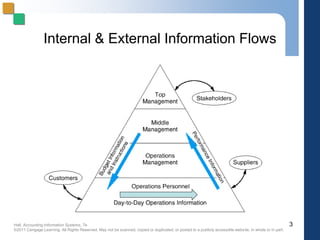
Internal & External Information Flows
3
Hall, Accounting Information Systems, 7e
©2011 Cengage Learning. All Rights Reserved. May not be scanned, copied or duplicated, or posted to a publicly accessible website, in whole or in part.
Internal Information Flows
 Horizontal flows of information used primarily
at the operations level to capture transaction
and operations data
 Vertical flows of information
 downward flows — instructions, quotas, and
budgets
 upward flows — aggregated transaction and
operations data
4
Hall, Accounting Information Systems, 7e
©2011 Cengage Learning. All Rights Reserved. May not be scanned, copied or duplicated, or posted to a publicly accessible website, in whole or in part.
Information Requirements
 Each user group has unique information
requirements.
 The higher the level of the organization, the
greater the need for more aggregated
information and less need for detail.
5
Hall, Accounting Information Systems, 7e
©2011 Cengage Learning. All Rights Reserved. May not be scanned, copied or duplicated, or posted to a publicly accessible website, in whole or in part.
Information in Business
 Information is a business
resource that:
 needs to be appropriately
managed
 is vital to the survival of
contemporary businesses
6
Hall, Accounting Information Systems, 7e
©2011 Cengage Learning. All Rights Reserved. May not be scanned, copied or duplicated, or posted to a publicly accessible website, in whole or in part.
What is a System?
 A group of interrelated multiple components or
subsystems that serve a common purpose
 System or subsystem?
 A system is called a subsystem when it is viewed as
a component of a larger system.
 A subsystem is considered a system when it is the
focus of attention.
7
Hall, Accounting Information Systems, 7e
©2011 Cengage Learning. All Rights Reserved. May not be scanned, copied or duplicated, or posted to a publicly accessible website, in whole or in part.
System Decomposition versus System
Interdependency
 System Decomposition
 the process of dividing the system into smaller
subsystem parts
 System Interdependency
 distinct parts are not self-contained
 they are reliant upon the functioning of the other parts
of the system
 all distinct parts must be functioning or the system will
fail
8
Hall, Accounting Information Systems, 7e
©2011 Cengage Learning. All Rights Reserved. May not be scanned, copied or duplicated, or posted to a publicly accessible website, in whole or in part.
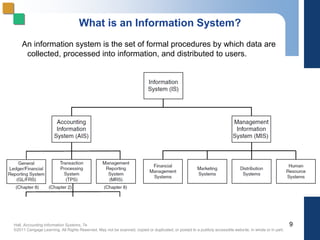
What is an Information System?
An information system is the set of formal procedures by which data are
collected, processed into information, and distributed to users.
9
Hall, Accounting Information Systems, 7e
©2011 Cengage Learning. All Rights Reserved. May not be scanned, copied or duplicated, or posted to a publicly accessible website, in whole or in part.
Transactions
 A transaction is a business event.
 Financial transactions
 economic events that affect the assets and
equities of the organization
 e.g., purchase of an airline ticket
 Nonfinancial transactions
 all other events processed by the organization’s
information system
 e.g., an airline reservation — no commitment by
the customer
10
Hall, Accounting Information Systems, 7e
©2011 Cengage Learning. All Rights Reserved. May not be scanned, copied or duplicated, or posted to a publicly accessible website, in whole or in part.
What is an Accounting Information
System?
 Accounting is an information system.
 It identifies, collects, processes, and
communicates economic information about
a firm using a wide variety of technologies.
 It captures and records the financial effects
of the firm’s transactions.
 It distributes transaction information to
operations personnel to coordinate many
key tasks.
11
Hall, Accounting Information Systems, 7e
©2011 Cengage Learning. All Rights Reserved. May not be scanned, copied or duplicated, or posted to a publicly accessible website, in whole or in part.
AIS Subsystems
 Transaction processing system (TPS)
 supports daily business operations
 General Ledger/ Financial Reporting
System (GL/FRS)
 produces financial statements and reports
 Management Reporting System (MRS)
 produces special-purpose reports for internal use
12
Hall, Accounting Information Systems, 7e
©2011 Cengage Learning. All Rights Reserved. May not be scanned, copied or duplicated, or posted to a publicly accessible website, in whole or in part.
AIS versus MIS
 Accounting Information Systems (AIS)
process
 financial transactions; e.g., sale of goods
 nonfinancial transactions that directly affect the
processing of financial transactions; e.g., addition of
newly approved vendors
 Management Information Systems (MIS)
process
 nonfinancial transactions that are not normally
processed by traditional AIS; e.g., tracking customer
complaints
13
Hall, Accounting Information Systems, 7e
©2011 Cengage Learning. All Rights Reserved. May not be scanned, copied or duplicated, or posted to a publicly accessible website, in whole or in part.
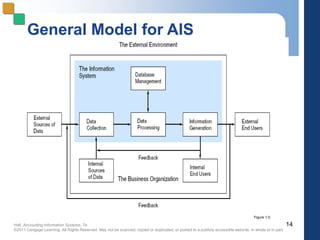
General Model for AIS
14
Figure 1-5
Hall, Accounting Information Systems, 7e
©2011 Cengage Learning. All Rights Reserved. May not be scanned, copied or duplicated, or posted to a publicly accessible website, in whole or in part.
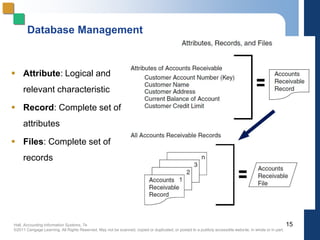
Database Management
 Attribute: Logical and
relevant characteristic
 Record: Complete set of
attributes
 Files: Complete set of
records
15
Hall, Accounting Information Systems, 7e
©2011 Cengage Learning. All Rights Reserved. May not be scanned, copied or duplicated, or posted to a publicly accessible website, in whole or in part.
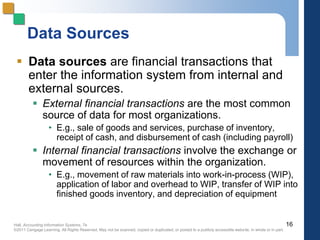
Data Sources
 Data sources are financial transactions that
enter the information system from internal and
external sources.
 External financial transactions are the most common
source of data for most organizations.
• E.g., sale of goods and services, purchase of inventory,
receipt of cash, and disbursement of cash (including payroll)
 Internal financial transactions involve the exchange or
movement of resources within the organization.
• E.g., movement of raw materials into work-in-process (WIP),
application of labor and overhead to WIP, transfer of WIP into
finished goods inventory, and depreciation of equipment
16
Hall, Accounting Information Systems, 7e
©2011 Cengage Learning. All Rights Reserved. May not be scanned, copied or duplicated, or posted to a publicly accessible website, in whole or in part.
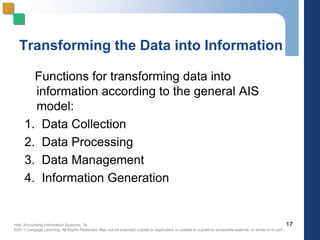
Transforming the Data into Information
Functions for transforming data into
information according to the general AIS
model:
1. Data Collection
2. Data Processing
3. Data Management
4. Information Generation
17
Hall, Accounting Information Systems, 7e
©2011 Cengage Learning. All Rights Reserved. May not be scanned, copied or duplicated, or posted to a publicly accessible website, in whole or in part.
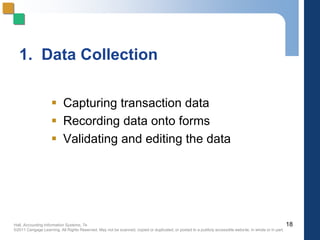
1. Data Collection
 Capturing transaction data
 Recording data onto forms
 Validating and editing the data
18
Hall, Accounting Information Systems, 7e
©2011 Cengage Learning. All Rights Reserved. May not be scanned, copied or duplicated, or posted to a publicly accessible website, in whole or in part.
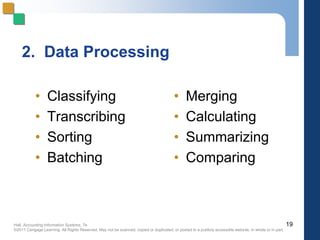
2. Data Processing
• Classifying
• Transcribing
• Sorting
• Batching
19
• Merging
• Calculating
• Summarizing
• Comparing
Hall, Accounting Information Systems, 7e
©2011 Cengage Learning. All Rights Reserved. May not be scanned, copied or duplicated, or posted to a publicly accessible website, in whole or in part.
3. Data Management
 Storing
 Retrieving
 Deleting
20
Hall, Accounting Information Systems, 7e
©2011 Cengage Learning. All Rights Reserved. May not be scanned, copied or duplicated, or posted to a publicly accessible website, in whole or in part.
4. Information Generation
 Compiling
 Arranging
 Formatting
 Presenting
21
Hall, Accounting Information Systems, 7e
©2011 Cengage Learning. All Rights Reserved. May not be scanned, copied or duplicated, or posted to a publicly accessible website, in whole or in part.
Characteristics of Useful
Information
 Regardless of physical form or technology,
useful information has the following
characteristics:
 Relevance: serves a purpose
 Timeliness: no older than the time period of the
action it supports
 Accuracy: free from material errors
 Completeness: all information essential to a decision
or task is present
 Summarization: aggregated in accordance with the
user’s needs
22
Hall, Accounting Information Systems, 7e
©2011 Cengage Learning. All Rights Reserved. May not be scanned, copied or duplicated, or posted to a publicly accessible website, in whole or in part.
Information System Objectives
in a Business Context
 The goal of an information system is
to support
 the stewardship function of
management
 management decision making
 the firm’s day-to-day operations
23
Hall, Accounting Information Systems, 7e
©2011 Cengage Learning. All Rights Reserved. May not be scanned, copied or duplicated, or posted to a publicly accessible website, in whole or in part.
Organizational Structure
 The structure of an organization helps to allocate
 responsibility
 authority
 accountability
 Segmenting by business function is a very
common method of organizing.
24
Hall, Accounting Information Systems, 7e
©2011 Cengage Learning. All Rights Reserved. May not be scanned, copied or duplicated, or posted to a publicly accessible website, in whole or in part.
Functional Areas
 Inventory/Materials Management
 purchasing, receiving and stores
 Production
 production planning, quality control, and
maintenance
 Marketing
 Distribution
 Personnel
 Finance
 Accounting
 Computer Services
25
Hall, Accounting Information Systems, 7e
©2011 Cengage Learning. All Rights Reserved. May not be scanned, copied or duplicated, or posted to a publicly accessible website, in whole or in part.
Accounting Independence
 Information reliability requires accounting
independence.
 Accounting activities must be separate and
independent of the functional areas maintaining
resources.
 Accounting supports these functions with
information but does not actively participate.
 Decisions makers in these functions require that
such vital information be supplied by an
independent source to ensure its integrity.
26
Hall, Accounting Information Systems, 7e
©2011 Cengage Learning. All Rights Reserved. May not be scanned, copied or duplicated, or posted to a publicly accessible website, in whole or in part.
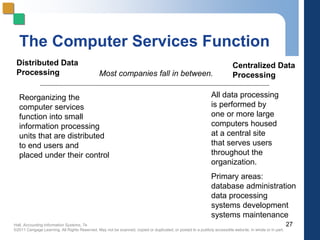
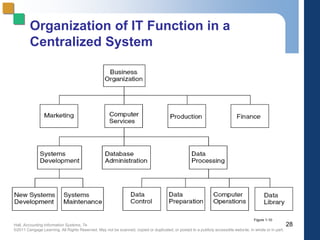
The Computer Services Function
27
Centralized Data
Processing
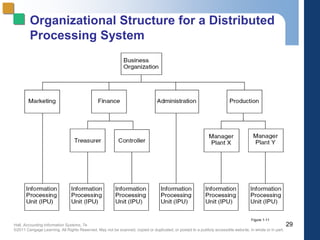
Distributed Data
Processing Most companies fall in between.
All data processing
is performed by
one or more large
computers housed
at a central site
that serves users
throughout the
organization.
Primary areas:
database administration
data processing
systems development
systems maintenance
Reorganizing the
computer services
function into small
information processing
units that are distributed
to end users and
placed under their control
Hall, Accounting Information Systems, 7e
©2011 Cengage Learning. All Rights Reserved. May not be scanned, copied or duplicated, or posted to a publicly accessible website, in whole or in part.
Organization of IT Function in a
Centralized System
28
Figure 1-10
Hall, Accounting Information Systems, 7e
©2011 Cengage Learning. All Rights Reserved. May not be scanned, copied or duplicated, or posted to a publicly accessible website, in whole or in part.
Organizational Structure for a Distributed
Processing System
29
Figure 1-11
Hall, Accounting Information Systems, 7e
©2011 Cengage Learning. All Rights Reserved. May not be scanned, copied or duplicated, or posted to a publicly accessible website, in whole or in part.
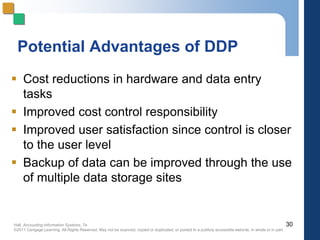
Potential Advantages of DDP
 Cost reductions in hardware and data entry
tasks
 Improved cost control responsibility
 Improved user satisfaction since control is closer
to the user level
 Backup of data can be improved through the use
of multiple data storage sites
30
Hall, Accounting Information Systems, 7e
©2011 Cengage Learning. All Rights Reserved. May not be scanned, copied or duplicated, or posted to a publicly accessible website, in whole or in part.
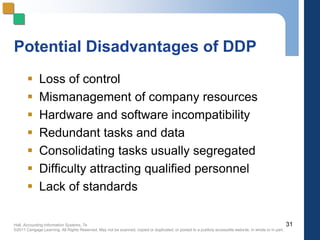
Potential Disadvantages of DDP
 Loss of control
 Mismanagement of company resources
 Hardware and software incompatibility
 Redundant tasks and data
 Consolidating tasks usually segregated
 Difficulty attracting qualified personnel
 Lack of standards
31
Hall, Accounting Information Systems, 7e
©2011 Cengage Learning. All Rights Reserved. May not be scanned, copied or duplicated, or posted to a publicly accessible website, in whole or in part.
Manual Process Model
 Transaction processing, information processing,
and accounting are physically performed by
people, usually using paper documents.
 Useful to study because:
 helps link AIS courses to other accounting courses
 often easier to understand business processes when
not shrouded in technology
 facilitates understanding internal controls
32
Hall, Accounting Information Systems, 7e
©2011 Cengage Learning. All Rights Reserved. May not be scanned, copied or duplicated, or posted to a publicly accessible website, in whole or in part.
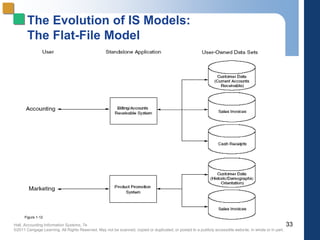
The Evolution of IS Models:
The Flat-File Model
33
Figure 1-12
Hall, Accounting Information Systems, 7e
©2011 Cengage Learning. All Rights Reserved. May not be scanned, copied or duplicated, or posted to a publicly accessible website, in whole or in part.
Data Redundancy Problems
 Data Storage - excessive storage costs of
paper documents and/or magnetic form
 Data Updating - changes or additions
must be performed multiple times
 Currency of Information - potential
problem of failing to update all affected
files
 Task-Data Dependency - user’s inability
to obtain additional information as needs
change
 Data Integration - separate files are
difficult to integrate across multiple users
34
Hall, Accounting Information Systems, 7e
©2011 Cengage Learning. All Rights Reserved. May not be scanned, copied or duplicated, or posted to a publicly accessible website, in whole or in part.
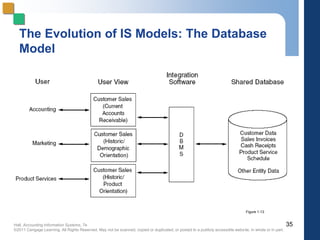
The Evolution of IS Models: The Database
Model
35
Figure 1-13
Hall, Accounting Information Systems, 7e
©2011 Cengage Learning. All Rights Reserved. May not be scanned, copied or duplicated, or posted to a publicly accessible website, in whole or in part.
34
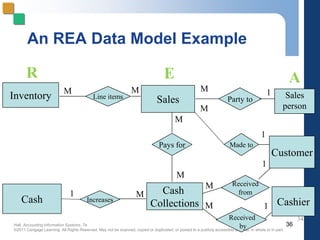
An REA Data Model Example
36
Inventory Line items
Sales Party to Sales
person
Pays for
Cash
Collections
Increases
Cash
Made to
Customer
Cashier
Received
from
Received
by
M
1
M
M
M
M
M
M
M
M
1
1
1
1
R E A
Hall, Accounting Information Systems, 7e
©2011 Cengage Learning. All Rights Reserved. May not be scanned, copied or duplicated, or posted to a publicly accessible website, in whole or in part.
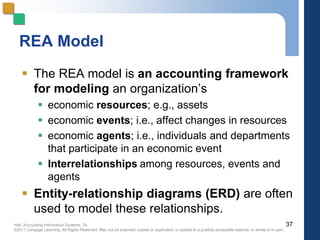
REA Model
 The REA model is an accounting framework
for modeling an organization’s
 economic resources; e.g., assets
 economic events; i.e., affect changes in resources
 economic agents; i.e., individuals and departments
that participate in an economic event
 Interrelationships among resources, events and
agents
 Entity-relationship diagrams (ERD) are often
used to model these relationships.
37
Hall, Accounting Information Systems, 7e
©2011 Cengage Learning. All Rights Reserved. May not be scanned, copied or duplicated, or posted to a publicly accessible website, in whole or in part.
Accountants as Information System
Users
 Accountants must be able to clearly convey their
needs to the systems professionals who design
the system.
 The accountant should actively participate
in systems development projects to ensure
appropriate systems design.
38
Hall, Accounting Information Systems, 7e
©2011 Cengage Learning. All Rights Reserved. May not be scanned, copied or duplicated, or posted to a publicly accessible website, in whole or in part.
Accountants as System Designers
 The accounting function is responsible for the
conceptual system, while the computer
function is responsible for the physical system.
 The conceptual system determines the nature
of the information required, its sources, its
destination, and the accounting rules that must
be applied.
39
Hall, Accounting Information Systems, 7e
©2011 Cengage Learning. All Rights Reserved. May not be scanned, copied or duplicated, or posted to a publicly accessible website, in whole or in part.
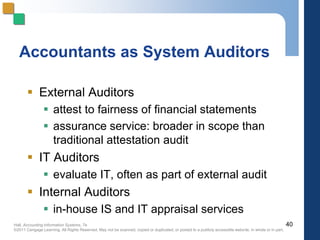
Accountants as System Auditors
 External Auditors
 attest to fairness of financial statements
 assurance service: broader in scope than
traditional attestation audit
 IT Auditors
 evaluate IT, often as part of external audit
 Internal Auditors
 in-house IS and IT appraisal services
40

Ch-01 accounting information system .pptx

  • 1.
    Hall, Accounting InformationSystems, 7e ©2011 Cengage Learning. All Rights Reserved. May not be scanned, copied or duplicated, or posted to a publicly accessible website, in whole or in part. Accounting Information Systems, 7e James A. Hall Chapter 1 The Information System: An Accountant’s Perspective
  • 2.
    Hall, Accounting InformationSystems, 7e ©2011 Cengage Learning. All Rights Reserved. May not be scanned, copied or duplicated, or posted to a publicly accessible website, in whole or in part. Objectives for Chapter 1  Understand the primary information flows within the business environment.  Understand the difference between accounting information systems and management information systems.  Understand the difference between Financial transactions and non-financial transactions.  Know the general model for information systems.  Be familiar with the functional areas of a business.  Understand the stages in the evolution of information systems.  Understand the relationship between the three roles of accountants in an information system. 2
  • 3.
    Hall, Accounting InformationSystems, 7e ©2011 Cengage Learning. All Rights Reserved. May not be scanned, copied or duplicated, or posted to a publicly accessible website, in whole or in part. Internal & External Information Flows 3
  • 4.
    Hall, Accounting InformationSystems, 7e ©2011 Cengage Learning. All Rights Reserved. May not be scanned, copied or duplicated, or posted to a publicly accessible website, in whole or in part. Internal Information Flows  Horizontal flows of information used primarily at the operations level to capture transaction and operations data  Vertical flows of information  downward flows — instructions, quotas, and budgets  upward flows — aggregated transaction and operations data 4
  • 5.
    Hall, Accounting InformationSystems, 7e ©2011 Cengage Learning. All Rights Reserved. May not be scanned, copied or duplicated, or posted to a publicly accessible website, in whole or in part. Information Requirements  Each user group has unique information requirements.  The higher the level of the organization, the greater the need for more aggregated information and less need for detail. 5
  • 6.
    Hall, Accounting InformationSystems, 7e ©2011 Cengage Learning. All Rights Reserved. May not be scanned, copied or duplicated, or posted to a publicly accessible website, in whole or in part. Information in Business  Information is a business resource that:  needs to be appropriately managed  is vital to the survival of contemporary businesses 6
  • 7.
    Hall, Accounting InformationSystems, 7e ©2011 Cengage Learning. All Rights Reserved. May not be scanned, copied or duplicated, or posted to a publicly accessible website, in whole or in part. What is a System?  A group of interrelated multiple components or subsystems that serve a common purpose  System or subsystem?  A system is called a subsystem when it is viewed as a component of a larger system.  A subsystem is considered a system when it is the focus of attention. 7
  • 8.
    Hall, Accounting InformationSystems, 7e ©2011 Cengage Learning. All Rights Reserved. May not be scanned, copied or duplicated, or posted to a publicly accessible website, in whole or in part. System Decomposition versus System Interdependency  System Decomposition  the process of dividing the system into smaller subsystem parts  System Interdependency  distinct parts are not self-contained  they are reliant upon the functioning of the other parts of the system  all distinct parts must be functioning or the system will fail 8
  • 9.
    Hall, Accounting InformationSystems, 7e ©2011 Cengage Learning. All Rights Reserved. May not be scanned, copied or duplicated, or posted to a publicly accessible website, in whole or in part. What is an Information System? An information system is the set of formal procedures by which data are collected, processed into information, and distributed to users. 9
  • 10.
    Hall, Accounting InformationSystems, 7e ©2011 Cengage Learning. All Rights Reserved. May not be scanned, copied or duplicated, or posted to a publicly accessible website, in whole or in part. Transactions  A transaction is a business event.  Financial transactions  economic events that affect the assets and equities of the organization  e.g., purchase of an airline ticket  Nonfinancial transactions  all other events processed by the organization’s information system  e.g., an airline reservation — no commitment by the customer 10
  • 11.
    Hall, Accounting InformationSystems, 7e ©2011 Cengage Learning. All Rights Reserved. May not be scanned, copied or duplicated, or posted to a publicly accessible website, in whole or in part. What is an Accounting Information System?  Accounting is an information system.  It identifies, collects, processes, and communicates economic information about a firm using a wide variety of technologies.  It captures and records the financial effects of the firm’s transactions.  It distributes transaction information to operations personnel to coordinate many key tasks. 11
  • 12.
    Hall, Accounting InformationSystems, 7e ©2011 Cengage Learning. All Rights Reserved. May not be scanned, copied or duplicated, or posted to a publicly accessible website, in whole or in part. AIS Subsystems  Transaction processing system (TPS)  supports daily business operations  General Ledger/ Financial Reporting System (GL/FRS)  produces financial statements and reports  Management Reporting System (MRS)  produces special-purpose reports for internal use 12
  • 13.
    Hall, Accounting InformationSystems, 7e ©2011 Cengage Learning. All Rights Reserved. May not be scanned, copied or duplicated, or posted to a publicly accessible website, in whole or in part. AIS versus MIS  Accounting Information Systems (AIS) process  financial transactions; e.g., sale of goods  nonfinancial transactions that directly affect the processing of financial transactions; e.g., addition of newly approved vendors  Management Information Systems (MIS) process  nonfinancial transactions that are not normally processed by traditional AIS; e.g., tracking customer complaints 13
  • 14.
    Hall, Accounting InformationSystems, 7e ©2011 Cengage Learning. All Rights Reserved. May not be scanned, copied or duplicated, or posted to a publicly accessible website, in whole or in part. General Model for AIS 14 Figure 1-5
  • 15.
    Hall, Accounting InformationSystems, 7e ©2011 Cengage Learning. All Rights Reserved. May not be scanned, copied or duplicated, or posted to a publicly accessible website, in whole or in part. Database Management  Attribute: Logical and relevant characteristic  Record: Complete set of attributes  Files: Complete set of records 15
  • 16.
    Hall, Accounting InformationSystems, 7e ©2011 Cengage Learning. All Rights Reserved. May not be scanned, copied or duplicated, or posted to a publicly accessible website, in whole or in part. Data Sources  Data sources are financial transactions that enter the information system from internal and external sources.  External financial transactions are the most common source of data for most organizations. • E.g., sale of goods and services, purchase of inventory, receipt of cash, and disbursement of cash (including payroll)  Internal financial transactions involve the exchange or movement of resources within the organization. • E.g., movement of raw materials into work-in-process (WIP), application of labor and overhead to WIP, transfer of WIP into finished goods inventory, and depreciation of equipment 16
  • 17.
    Hall, Accounting InformationSystems, 7e ©2011 Cengage Learning. All Rights Reserved. May not be scanned, copied or duplicated, or posted to a publicly accessible website, in whole or in part. Transforming the Data into Information Functions for transforming data into information according to the general AIS model: 1. Data Collection 2. Data Processing 3. Data Management 4. Information Generation 17
  • 18.
    Hall, Accounting InformationSystems, 7e ©2011 Cengage Learning. All Rights Reserved. May not be scanned, copied or duplicated, or posted to a publicly accessible website, in whole or in part. 1. Data Collection  Capturing transaction data  Recording data onto forms  Validating and editing the data 18
  • 19.
    Hall, Accounting InformationSystems, 7e ©2011 Cengage Learning. All Rights Reserved. May not be scanned, copied or duplicated, or posted to a publicly accessible website, in whole or in part. 2. Data Processing • Classifying • Transcribing • Sorting • Batching 19 • Merging • Calculating • Summarizing • Comparing
  • 20.
    Hall, Accounting InformationSystems, 7e ©2011 Cengage Learning. All Rights Reserved. May not be scanned, copied or duplicated, or posted to a publicly accessible website, in whole or in part. 3. Data Management  Storing  Retrieving  Deleting 20
  • 21.
    Hall, Accounting InformationSystems, 7e ©2011 Cengage Learning. All Rights Reserved. May not be scanned, copied or duplicated, or posted to a publicly accessible website, in whole or in part. 4. Information Generation  Compiling  Arranging  Formatting  Presenting 21
  • 22.
    Hall, Accounting InformationSystems, 7e ©2011 Cengage Learning. All Rights Reserved. May not be scanned, copied or duplicated, or posted to a publicly accessible website, in whole or in part. Characteristics of Useful Information  Regardless of physical form or technology, useful information has the following characteristics:  Relevance: serves a purpose  Timeliness: no older than the time period of the action it supports  Accuracy: free from material errors  Completeness: all information essential to a decision or task is present  Summarization: aggregated in accordance with the user’s needs 22
  • 23.
    Hall, Accounting InformationSystems, 7e ©2011 Cengage Learning. All Rights Reserved. May not be scanned, copied or duplicated, or posted to a publicly accessible website, in whole or in part. Information System Objectives in a Business Context  The goal of an information system is to support  the stewardship function of management  management decision making  the firm’s day-to-day operations 23
  • 24.
    Hall, Accounting InformationSystems, 7e ©2011 Cengage Learning. All Rights Reserved. May not be scanned, copied or duplicated, or posted to a publicly accessible website, in whole or in part. Organizational Structure  The structure of an organization helps to allocate  responsibility  authority  accountability  Segmenting by business function is a very common method of organizing. 24
  • 25.
    Hall, Accounting InformationSystems, 7e ©2011 Cengage Learning. All Rights Reserved. May not be scanned, copied or duplicated, or posted to a publicly accessible website, in whole or in part. Functional Areas  Inventory/Materials Management  purchasing, receiving and stores  Production  production planning, quality control, and maintenance  Marketing  Distribution  Personnel  Finance  Accounting  Computer Services 25
  • 26.
    Hall, Accounting InformationSystems, 7e ©2011 Cengage Learning. All Rights Reserved. May not be scanned, copied or duplicated, or posted to a publicly accessible website, in whole or in part. Accounting Independence  Information reliability requires accounting independence.  Accounting activities must be separate and independent of the functional areas maintaining resources.  Accounting supports these functions with information but does not actively participate.  Decisions makers in these functions require that such vital information be supplied by an independent source to ensure its integrity. 26
  • 27.
    Hall, Accounting InformationSystems, 7e ©2011 Cengage Learning. All Rights Reserved. May not be scanned, copied or duplicated, or posted to a publicly accessible website, in whole or in part. The Computer Services Function 27 Centralized Data Processing Distributed Data Processing Most companies fall in between. All data processing is performed by one or more large computers housed at a central site that serves users throughout the organization. Primary areas: database administration data processing systems development systems maintenance Reorganizing the computer services function into small information processing units that are distributed to end users and placed under their control
  • 28.
    Hall, Accounting InformationSystems, 7e ©2011 Cengage Learning. All Rights Reserved. May not be scanned, copied or duplicated, or posted to a publicly accessible website, in whole or in part. Organization of IT Function in a Centralized System 28 Figure 1-10
  • 29.
    Hall, Accounting InformationSystems, 7e ©2011 Cengage Learning. All Rights Reserved. May not be scanned, copied or duplicated, or posted to a publicly accessible website, in whole or in part. Organizational Structure for a Distributed Processing System 29 Figure 1-11
  • 30.
    Hall, Accounting InformationSystems, 7e ©2011 Cengage Learning. All Rights Reserved. May not be scanned, copied or duplicated, or posted to a publicly accessible website, in whole or in part. Potential Advantages of DDP  Cost reductions in hardware and data entry tasks  Improved cost control responsibility  Improved user satisfaction since control is closer to the user level  Backup of data can be improved through the use of multiple data storage sites 30
  • 31.
    Hall, Accounting InformationSystems, 7e ©2011 Cengage Learning. All Rights Reserved. May not be scanned, copied or duplicated, or posted to a publicly accessible website, in whole or in part. Potential Disadvantages of DDP  Loss of control  Mismanagement of company resources  Hardware and software incompatibility  Redundant tasks and data  Consolidating tasks usually segregated  Difficulty attracting qualified personnel  Lack of standards 31
  • 32.
    Hall, Accounting InformationSystems, 7e ©2011 Cengage Learning. All Rights Reserved. May not be scanned, copied or duplicated, or posted to a publicly accessible website, in whole or in part. Manual Process Model  Transaction processing, information processing, and accounting are physically performed by people, usually using paper documents.  Useful to study because:  helps link AIS courses to other accounting courses  often easier to understand business processes when not shrouded in technology  facilitates understanding internal controls 32
  • 33.
    Hall, Accounting InformationSystems, 7e ©2011 Cengage Learning. All Rights Reserved. May not be scanned, copied or duplicated, or posted to a publicly accessible website, in whole or in part. The Evolution of IS Models: The Flat-File Model 33 Figure 1-12
  • 34.
    Hall, Accounting InformationSystems, 7e ©2011 Cengage Learning. All Rights Reserved. May not be scanned, copied or duplicated, or posted to a publicly accessible website, in whole or in part. Data Redundancy Problems  Data Storage - excessive storage costs of paper documents and/or magnetic form  Data Updating - changes or additions must be performed multiple times  Currency of Information - potential problem of failing to update all affected files  Task-Data Dependency - user’s inability to obtain additional information as needs change  Data Integration - separate files are difficult to integrate across multiple users 34
  • 35.
    Hall, Accounting InformationSystems, 7e ©2011 Cengage Learning. All Rights Reserved. May not be scanned, copied or duplicated, or posted to a publicly accessible website, in whole or in part. The Evolution of IS Models: The Database Model 35 Figure 1-13
  • 36.
    Hall, Accounting InformationSystems, 7e ©2011 Cengage Learning. All Rights Reserved. May not be scanned, copied or duplicated, or posted to a publicly accessible website, in whole or in part. 34 An REA Data Model Example 36 Inventory Line items Sales Party to Sales person Pays for Cash Collections Increases Cash Made to Customer Cashier Received from Received by M 1 M M M M M M M M 1 1 1 1 R E A
  • 37.
    Hall, Accounting InformationSystems, 7e ©2011 Cengage Learning. All Rights Reserved. May not be scanned, copied or duplicated, or posted to a publicly accessible website, in whole or in part. REA Model  The REA model is an accounting framework for modeling an organization’s  economic resources; e.g., assets  economic events; i.e., affect changes in resources  economic agents; i.e., individuals and departments that participate in an economic event  Interrelationships among resources, events and agents  Entity-relationship diagrams (ERD) are often used to model these relationships. 37
  • 38.
    Hall, Accounting InformationSystems, 7e ©2011 Cengage Learning. All Rights Reserved. May not be scanned, copied or duplicated, or posted to a publicly accessible website, in whole or in part. Accountants as Information System Users  Accountants must be able to clearly convey their needs to the systems professionals who design the system.  The accountant should actively participate in systems development projects to ensure appropriate systems design. 38
  • 39.
    Hall, Accounting InformationSystems, 7e ©2011 Cengage Learning. All Rights Reserved. May not be scanned, copied or duplicated, or posted to a publicly accessible website, in whole or in part. Accountants as System Designers  The accounting function is responsible for the conceptual system, while the computer function is responsible for the physical system.  The conceptual system determines the nature of the information required, its sources, its destination, and the accounting rules that must be applied. 39
  • 40.
    Hall, Accounting InformationSystems, 7e ©2011 Cengage Learning. All Rights Reserved. May not be scanned, copied or duplicated, or posted to a publicly accessible website, in whole or in part. Accountants as System Auditors  External Auditors  attest to fairness of financial statements  assurance service: broader in scope than traditional attestation audit  IT Auditors  evaluate IT, often as part of external audit  Internal Auditors  in-house IS and IT appraisal services 40