Introduction to EPIDATA
Define Data/creating Questionnaire template
Add/Revise Checks - at Entry of Data
Document data file
Export Data
Introduction to EpiData
By:Zelalem Mehari(M.Sc. in Biostatistics)
Bahir Dar University
College of Medicine and Health Sciences
November 29, 2019, Bahir Dar, Ethiopia
1 / 35
Introduction to EPIDATA
Define Data/creating Questionnaire template
Add/Revise Checks - at Entry of Data
Document data file
Export Data
Outlines
1 Introduction to EPIDATA
1 Define Data/creating Questionnaire template
1 Add/Revise Checks - at Entry of Data
1 Document data file
1 Export Data
2 / 35
Introduction to EPIDATA
Define Data/creating Questionnaire template
Add/Revise Checks - at Entry of Data
Document data file
Export Data
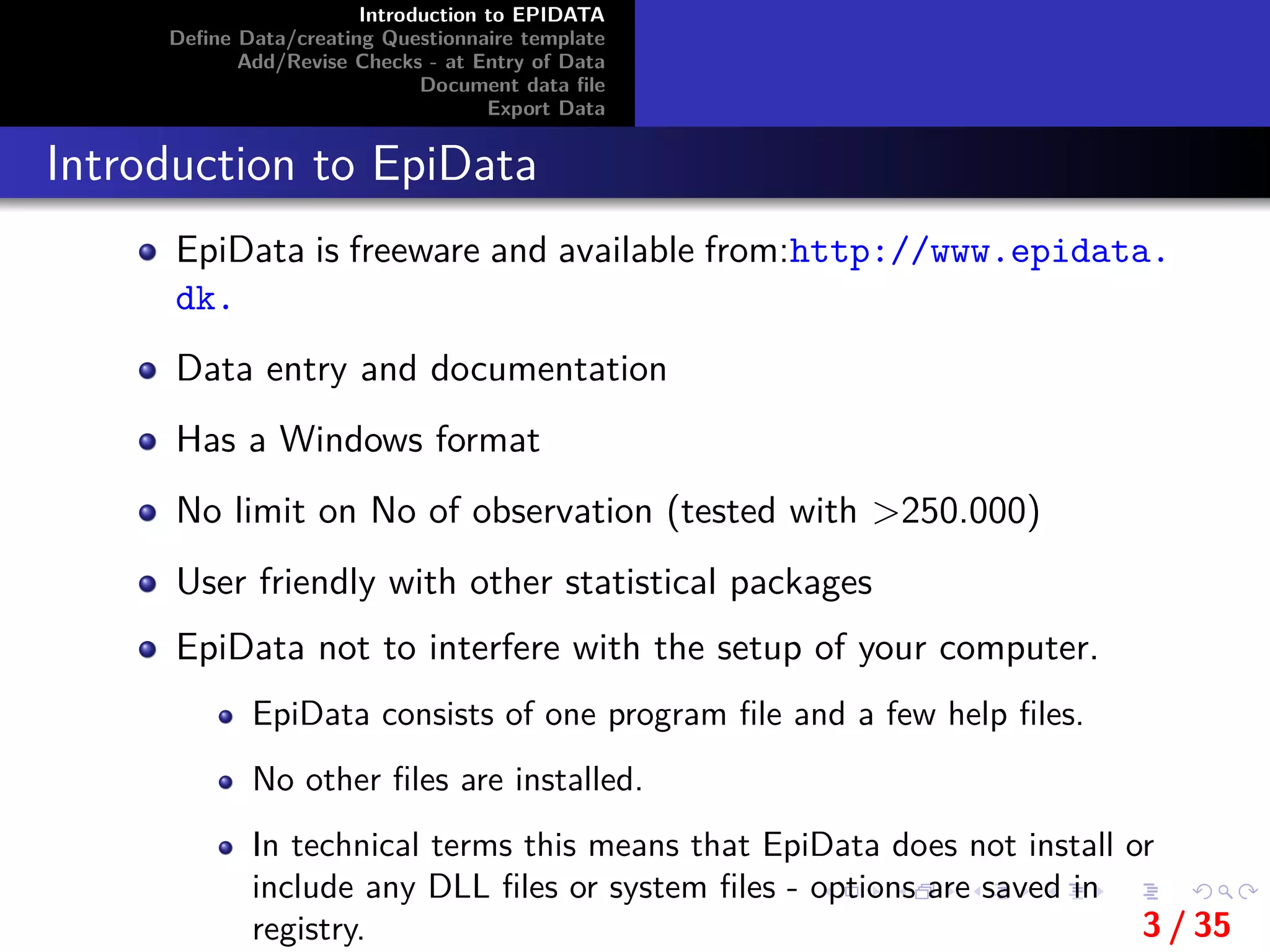
Introduction to EpiData
EpiData is freeware and available from:http://www.epidata.
dk.
Data entry and documentation
Has a Windows format
No limit on No of observation (tested with >250.000)
User friendly with other statistical packages
EpiData not to interfere with the setup of your computer.
EpiData consists of one program file and a few help files.
No other files are installed.
In technical terms this means that EpiData does not install or
include any DLL files or system files - options are saved in
registry. 3 / 35
Introduction to EPIDATA
Define Data/creating Questionnaire template
Add/Revise Checks - at Entry of Data
Document data file
Export Data
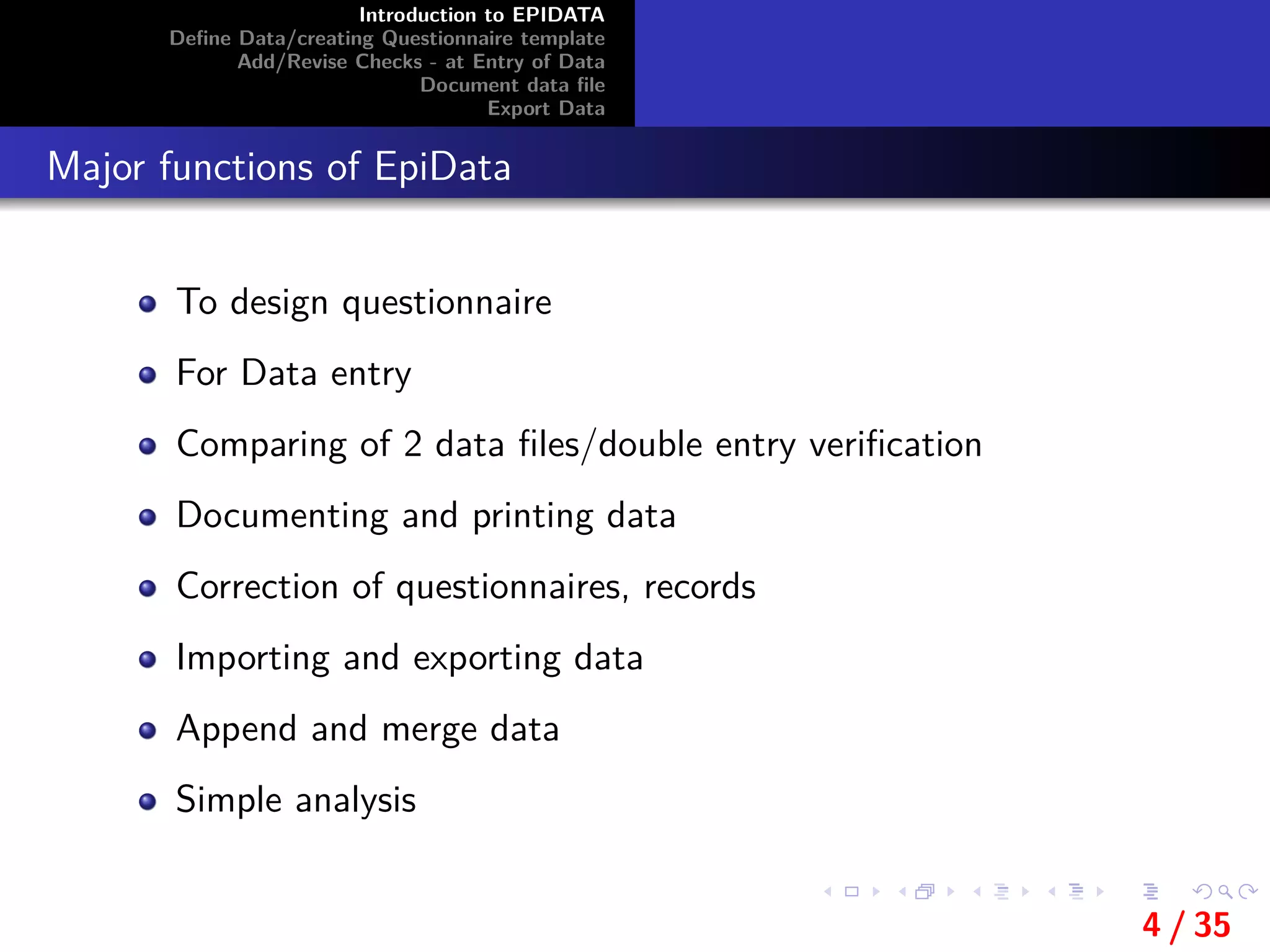
Major functions of EpiData
To design questionnaire
For Data entry
Comparing of 2 data files/double entry verification
Documenting and printing data
Correction of questionnaires, records
Importing and exporting data
Append and merge data
Simple analysis
4 / 35
Introduction to EPIDATA
Define Data/creating Questionnaire template
Add/Revise Checks - at Entry of Data
Document data file
Export Data
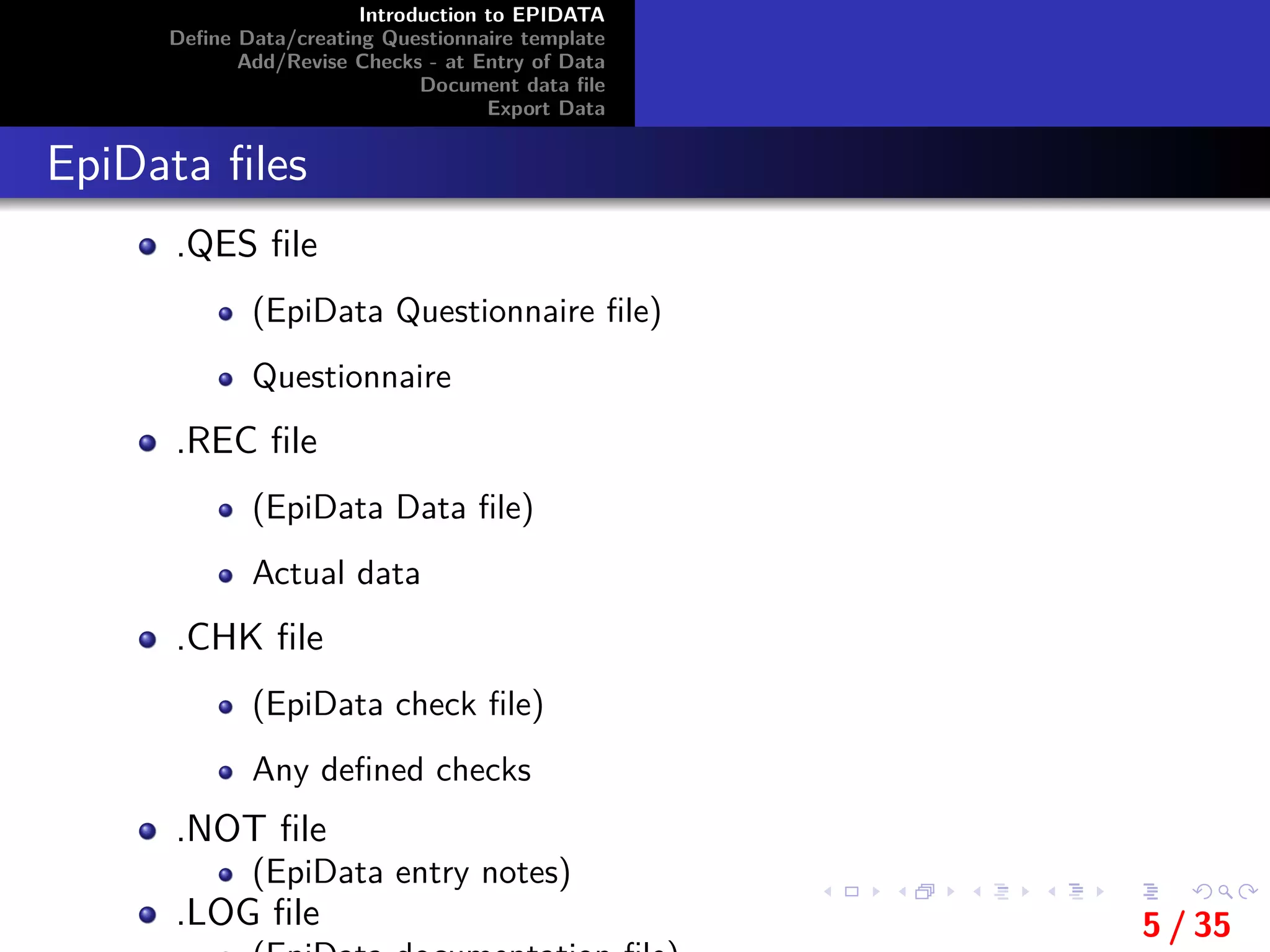
EpiData files
.QES file
(EpiData Questionnaire file)
Questionnaire
.REC file
(EpiData Data file)
Actual data
.CHK file
(EpiData check file)
Any defined checks
.NOT file
(EpiData entry notes)
.LOG file 5 / 35
Introduction to EPIDATA
Define Data/creating Questionnaire template
Add/Revise Checks - at Entry of Data
Document data file
Export Data
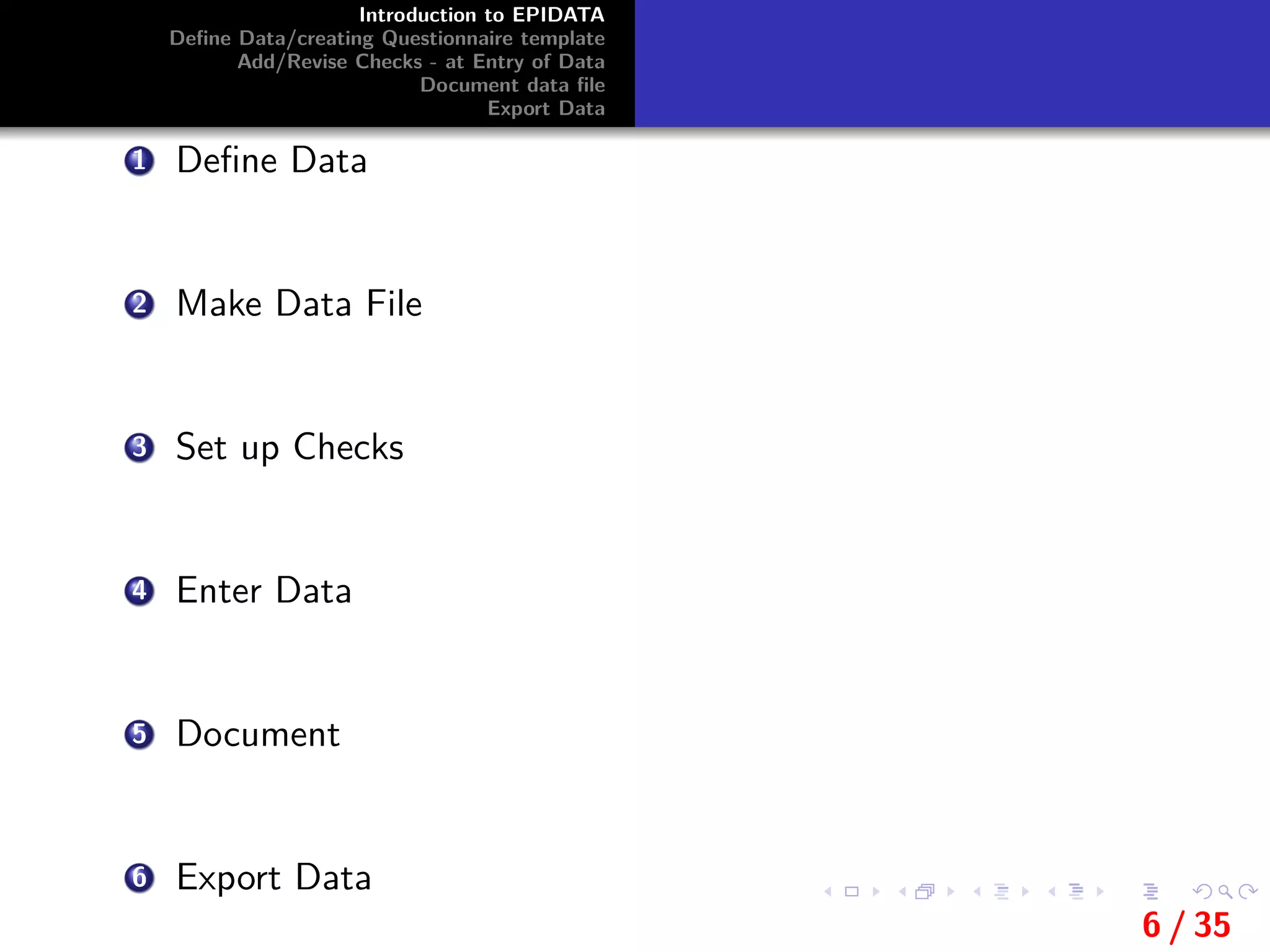
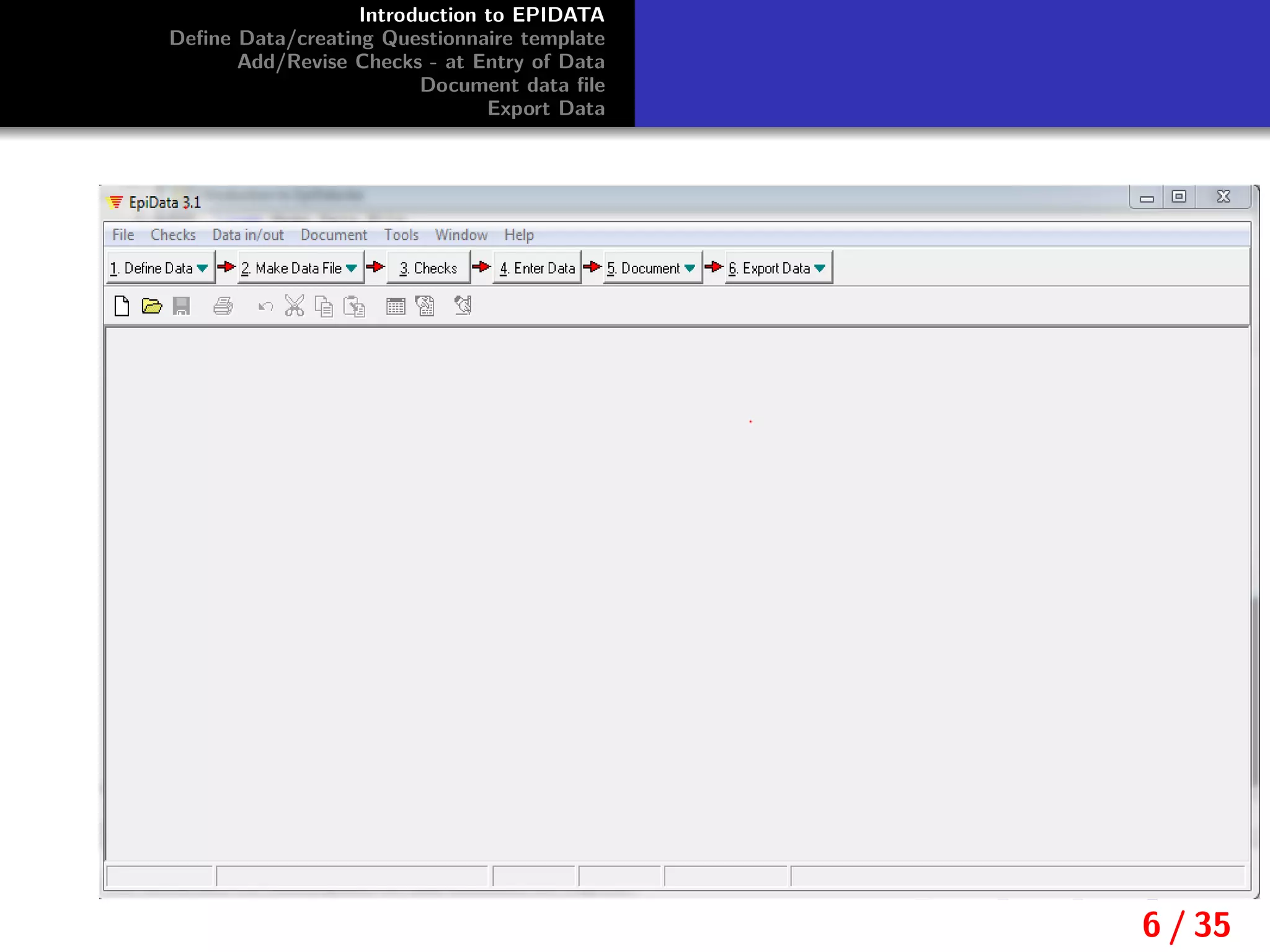
1 Define Data
2 Make Data File
3 Set up Checks
4 Enter Data
5 Document
6 Export Data
6 / 35
Introduction to EPIDATA
Define Data/creating Questionnaire template
Add/Revise Checks - at Entry of Data
Document data file
Export Data
6 / 35
Introduction to EPIDATA
Define Data/creating Questionnaire template
Add/Revise Checks - at Entry of Data
Document data file
Export Data
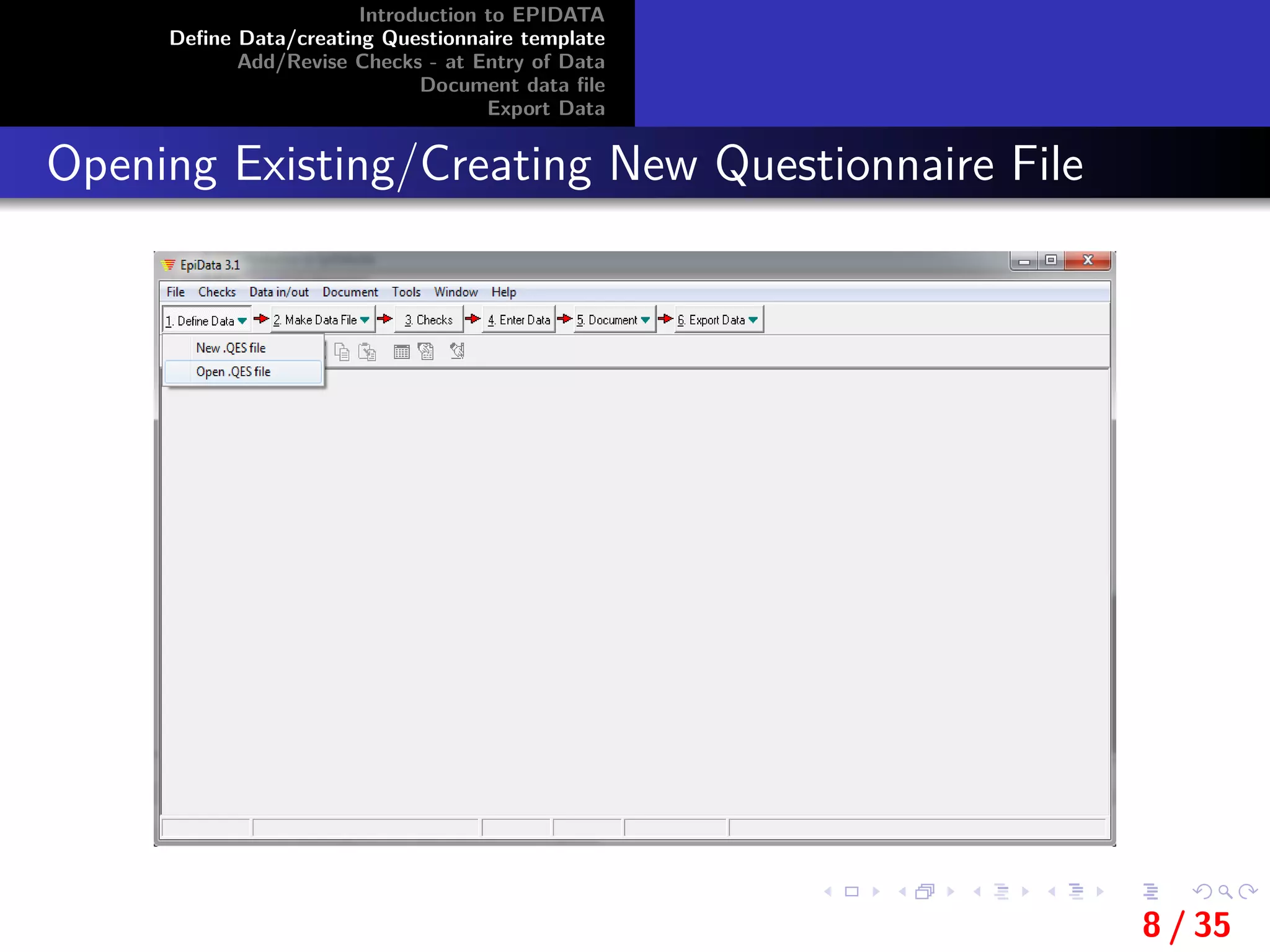
Opening Existing/Creating New Questionnaire File
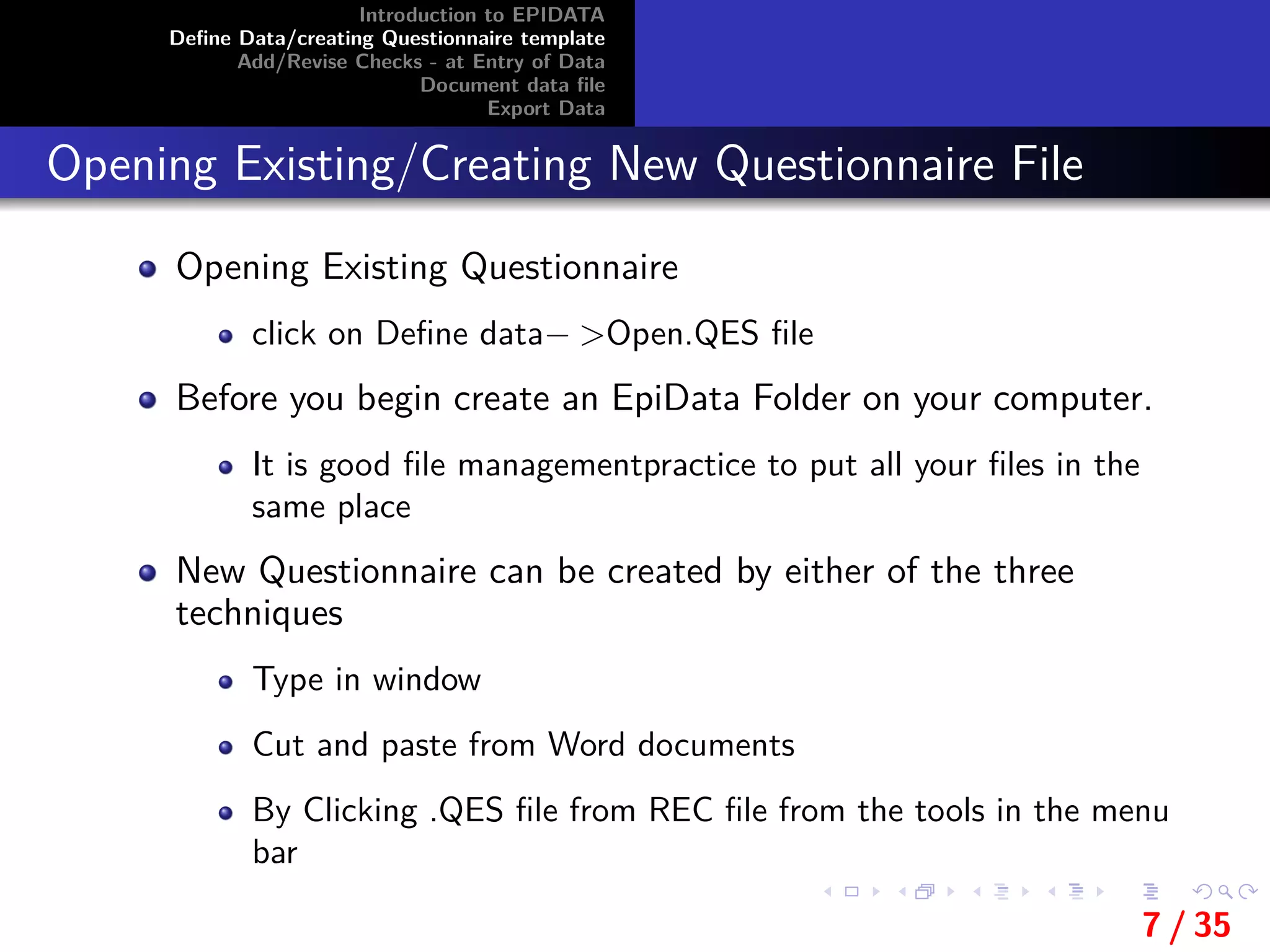
Opening Existing Questionnaire
click on Define data− >Open.QES file
Before you begin create an EpiData Folder on your computer.
It is good file managementpractice to put all your files in the
same place
New Questionnaire can be created by either of the three
techniques
Type in window
Cut and paste from Word documents
By Clicking .QES file from REC file from the tools in the menu
bar
7 / 35
Introduction to EPIDATA
Define Data/creating Questionnaire template
Add/Revise Checks - at Entry of Data
Document data file
Export Data
Opening Existing/Creating New Questionnaire File
8 / 35
Introduction to EPIDATA
Define Data/creating Questionnaire template
Add/Revise Checks - at Entry of Data
Document data file
Export Data
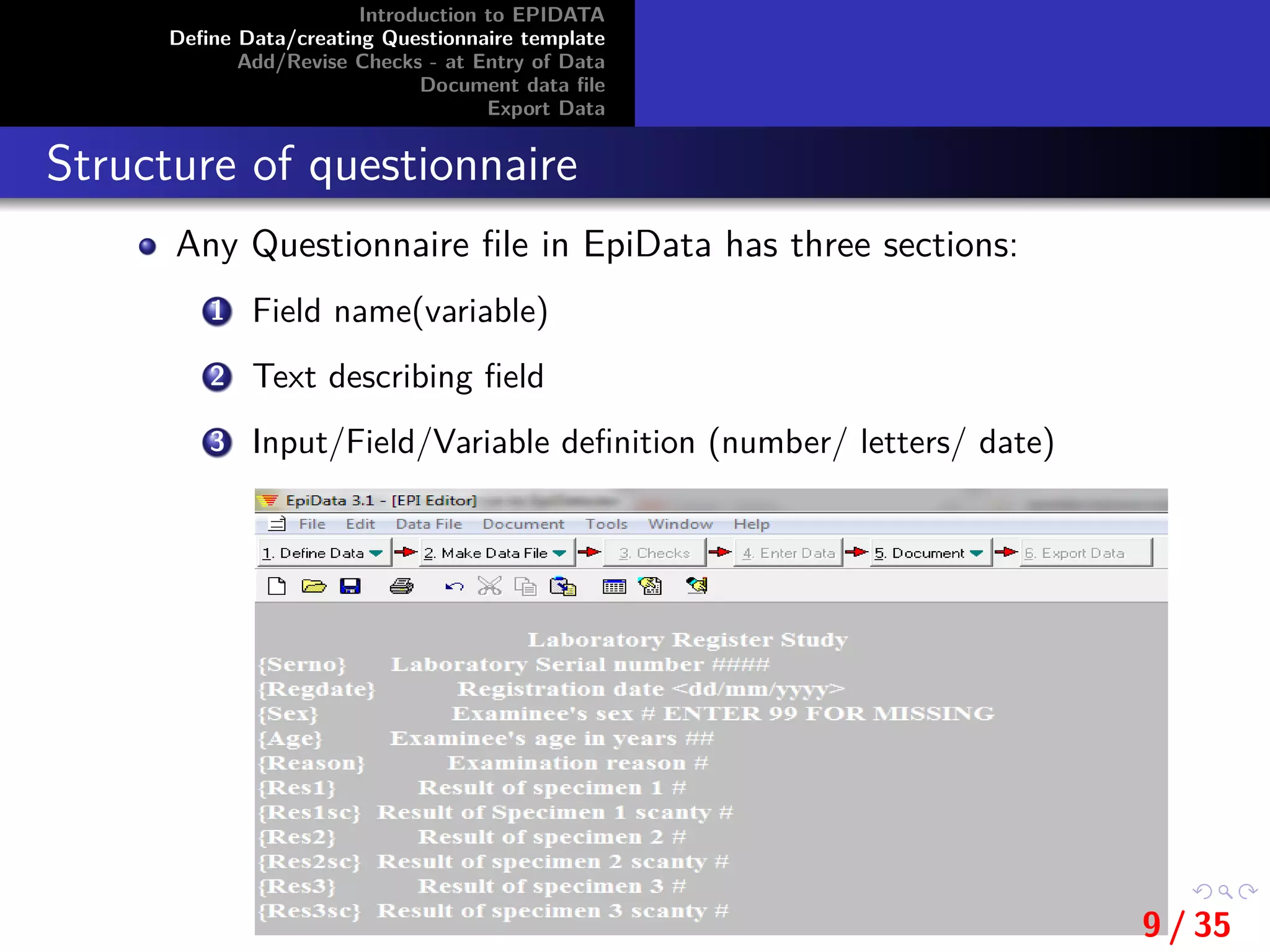
Structure of questionnaire
Any Questionnaire file in EpiData has three sections:
1 Field name(variable)
2 Text describing field
3 Input/Field/Variable definition (number/ letters/ date)
9 / 35
Introduction to EPIDATA
Define Data/creating Questionnaire template
Add/Revise Checks - at Entry of Data
Document data file
Export Data
Field name(variable)
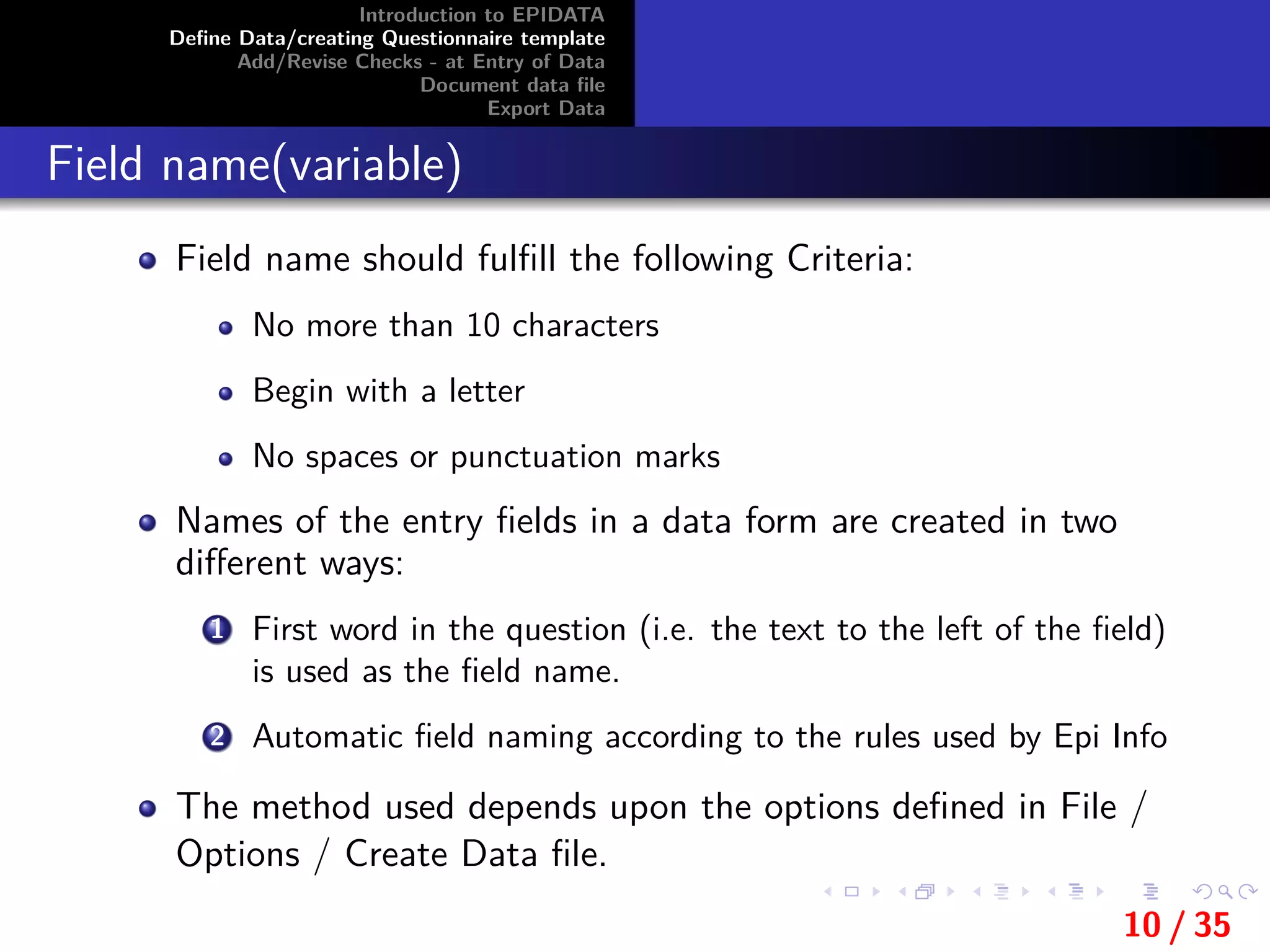
Field name should fulfill the following Criteria:
No more than 10 characters
Begin with a letter
No spaces or punctuation marks
Names of the entry fields in a data form are created in two
different ways:
1 First word in the question (i.e. the text to the left of the field)
is used as the field name.
2 Automatic field naming according to the rules used by Epi Info
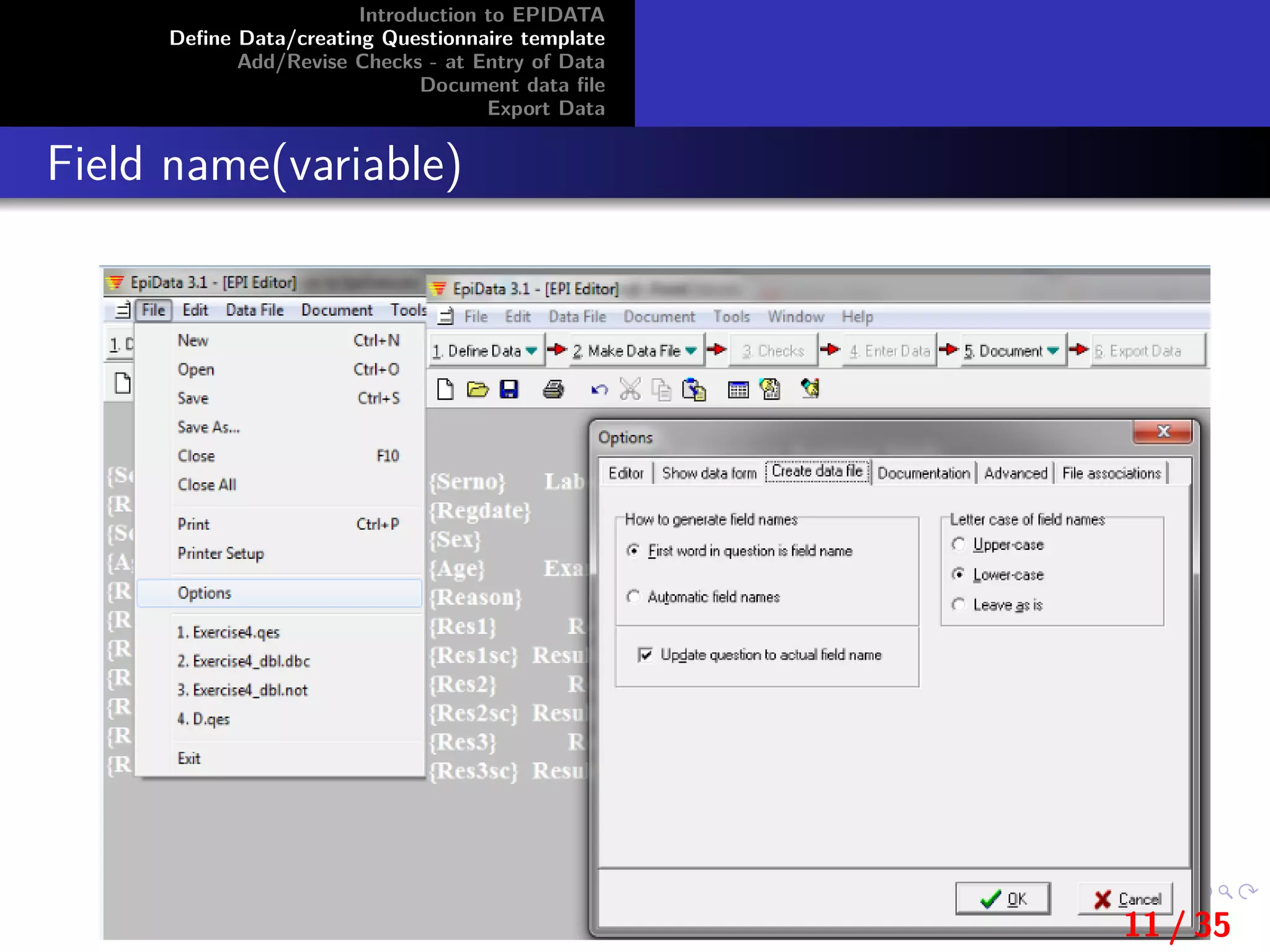
The method used depends upon the options defined in File /
Options / Create Data file.
10 / 35
Introduction to EPIDATA
Define Data/creating Questionnaire template
Add/Revise Checks - at Entry of Data
Document data file
Export Data
Field name(variable)
11 / 35
Introduction to EPIDATA
Define Data/creating Questionnaire template
Add/Revise Checks - at Entry of Data
Document data file
Export Data
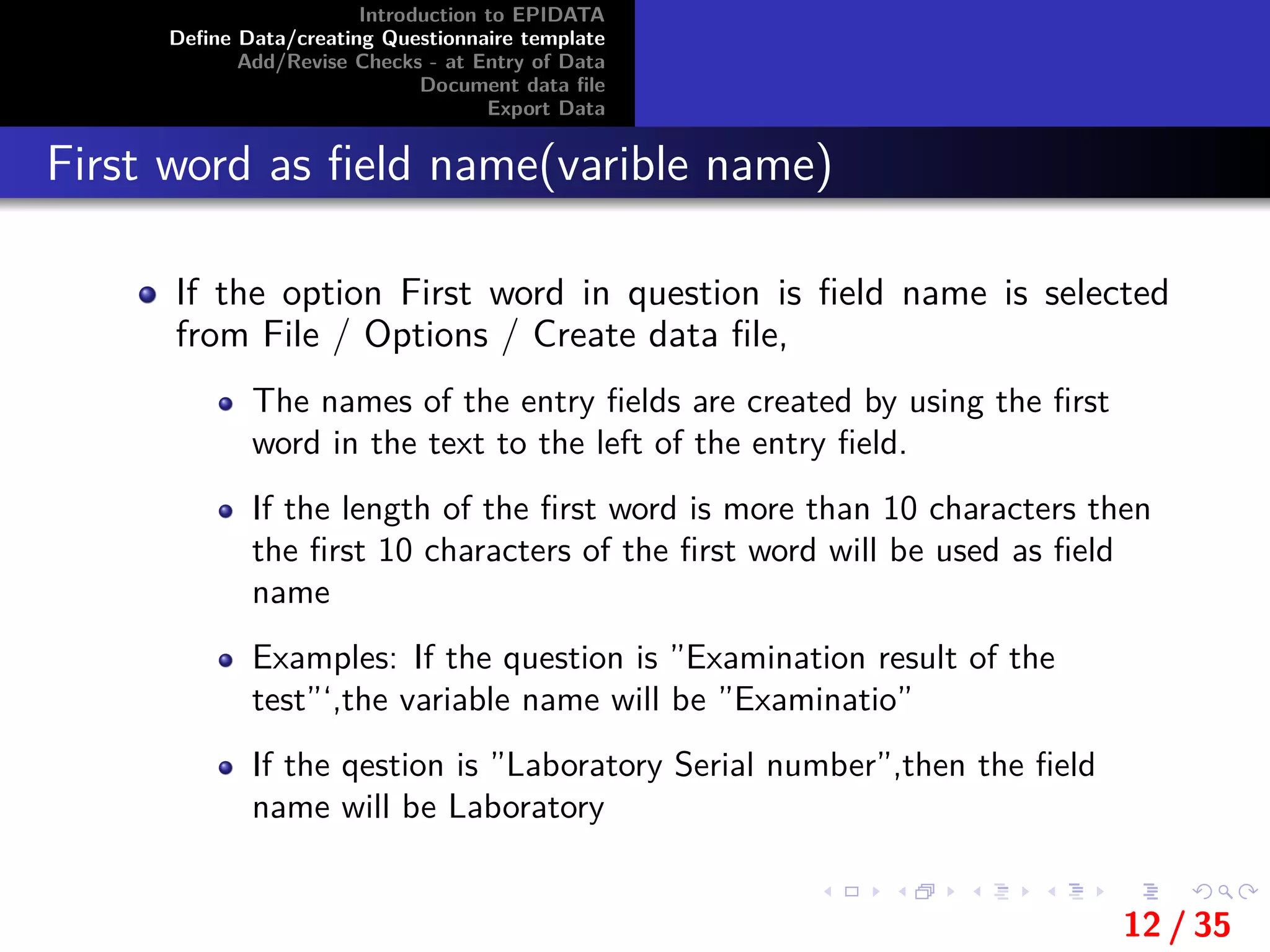
First word as field name(varible name)
If the option First word in question is field name is selected
from File / Options / Create data file,
The names of the entry fields are created by using the first
word in the text to the left of the entry field.
If the length of the first word is more than 10 characters then
the first 10 characters of the first word will be used as field
name
Examples: If the question is ”Examination result of the
test”‘,the variable name will be ”Examinatio”
If the qestion is ”Laboratory Serial number”,then the field
name will be Laboratory
12 / 35
Introduction to EPIDATA
Define Data/creating Questionnaire template
Add/Revise Checks - at Entry of Data
Document data file
Export Data
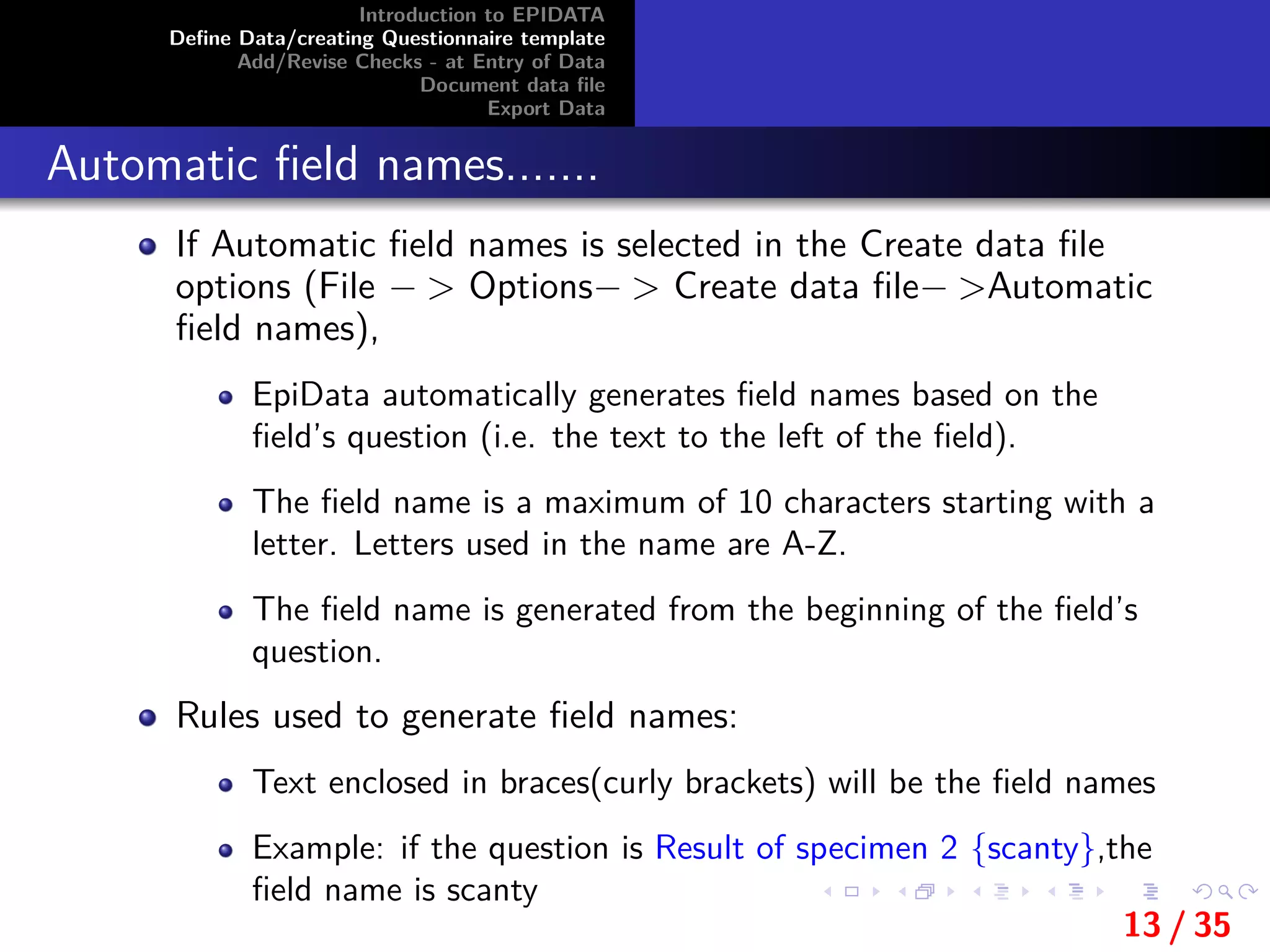
Automatic field names.......
If Automatic field names is selected in the Create data file
options (File − > Options− > Create data file− >Automatic
field names),
EpiData automatically generates field names based on the
field’s question (i.e. the text to the left of the field).
The field name is a maximum of 10 characters starting with a
letter. Letters used in the name are A-Z.
The field name is generated from the beginning of the field’s
question.
Rules used to generate field names:
Text enclosed in braces(curly brackets) will be the field names
Example: if the question is Result of specimen 2 {scanty},the
field name is scanty
13 / 35
Introduction to EPIDATA
Define Data/creating Questionnaire template
Add/Revise Checks - at Entry of Data
Document data file
Export Data
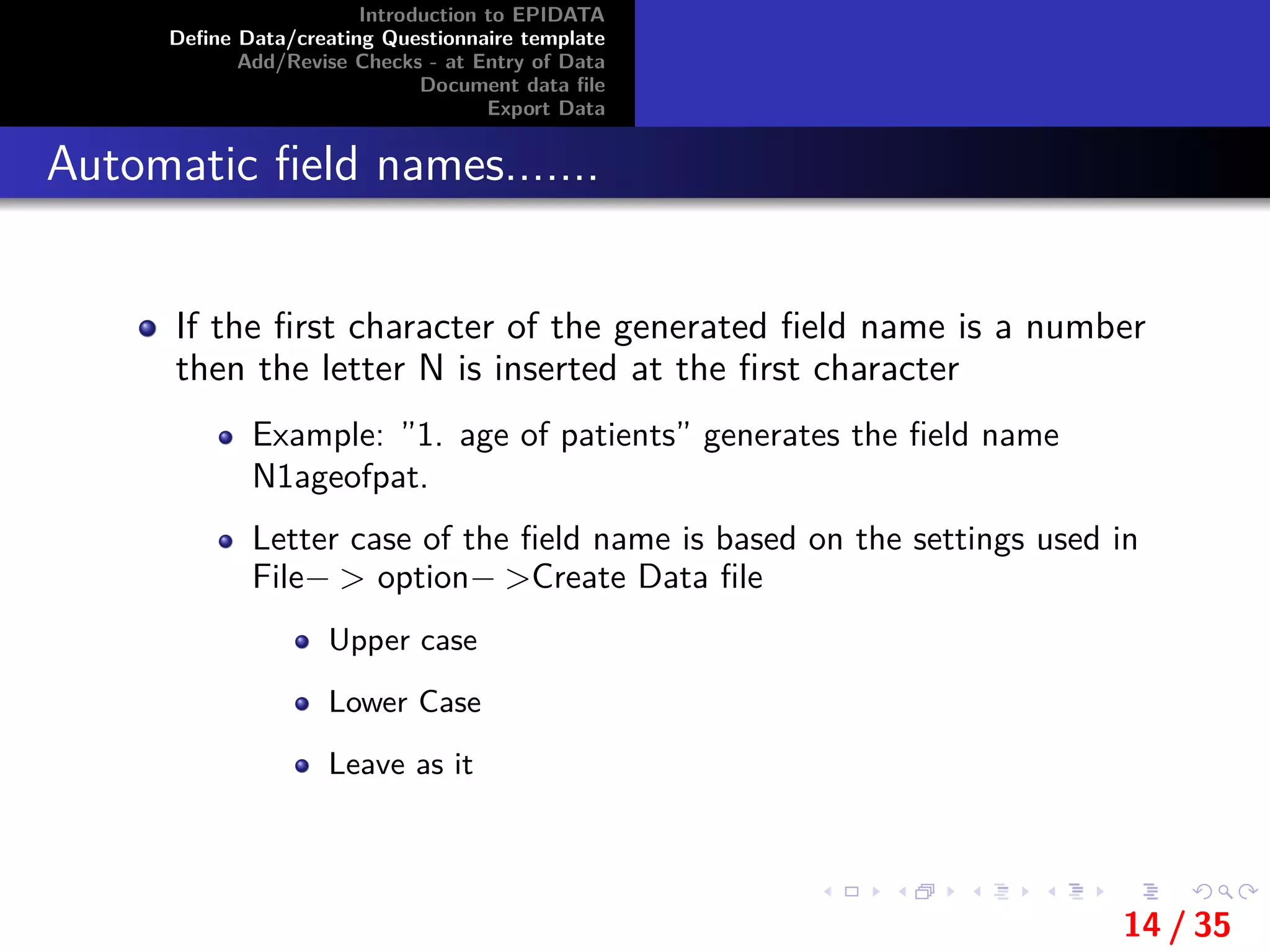
Automatic field names.......
If the first character of the generated field name is a number
then the letter N is inserted at the first character
Example: ”1. age of patients” generates the field name
N1ageofpat.
Letter case of the field name is based on the settings used in
File− > option− >Create Data file
Upper case
Lower Case
Leave as it
14 / 35
Introduction to EPIDATA
Define Data/creating Questionnaire template
Add/Revise Checks - at Entry of Data
Document data file
Export Data
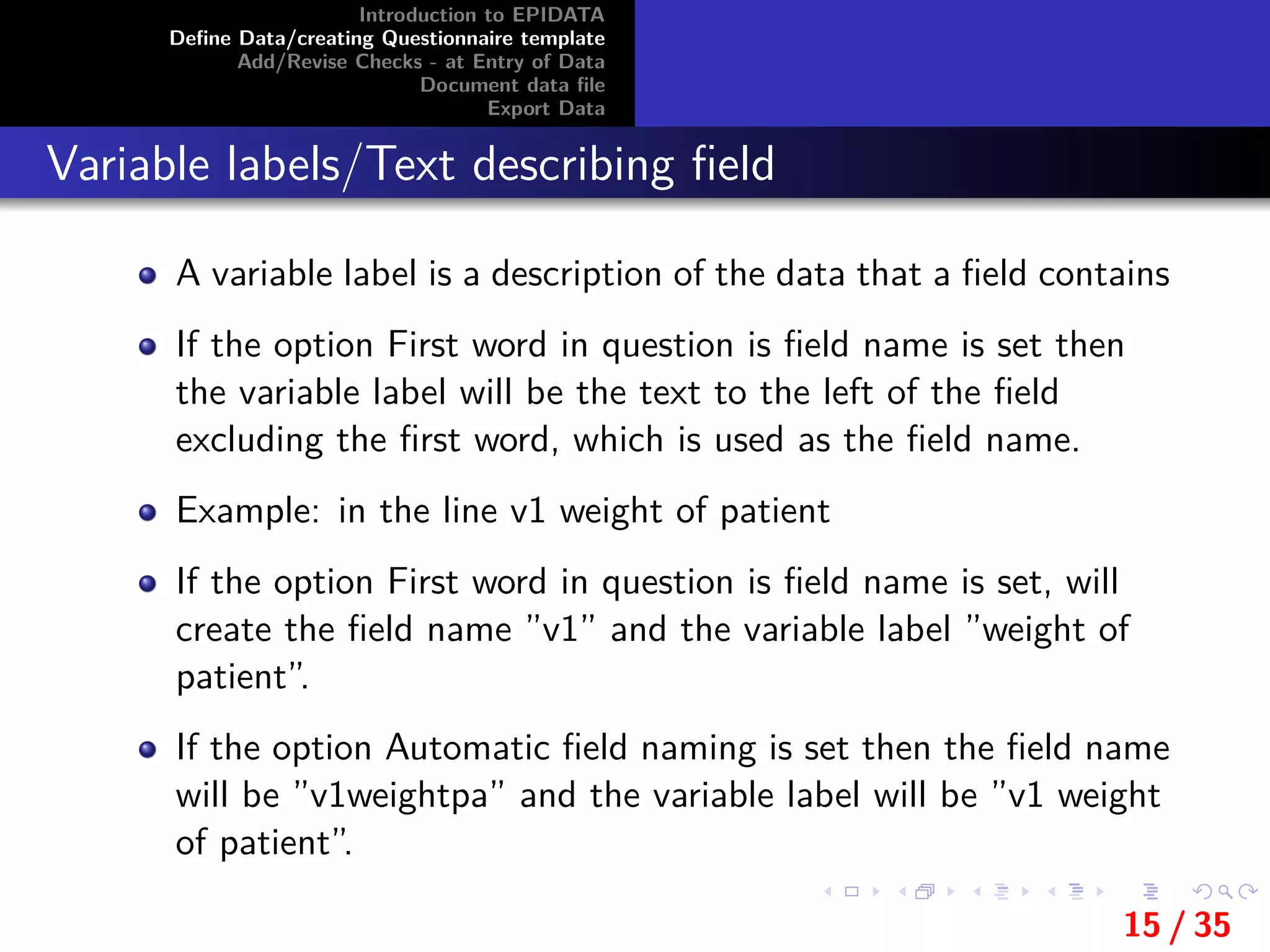
Variable labels/Text describing field
A variable label is a description of the data that a field contains
If the option First word in question is field name is set then
the variable label will be the text to the left of the field
excluding the first word, which is used as the field name.
Example: in the line v1 weight of patient
If the option First word in question is field name is set, will
create the field name ”v1” and the variable label ”weight of
patient”.
If the option Automatic field naming is set then the field name
will be ”v1weightpa” and the variable label will be ”v1 weight
of patient”.
15 / 35
Introduction to EPIDATA
Define Data/creating Questionnaire template
Add/Revise Checks - at Entry of Data
Document data file
Export Data
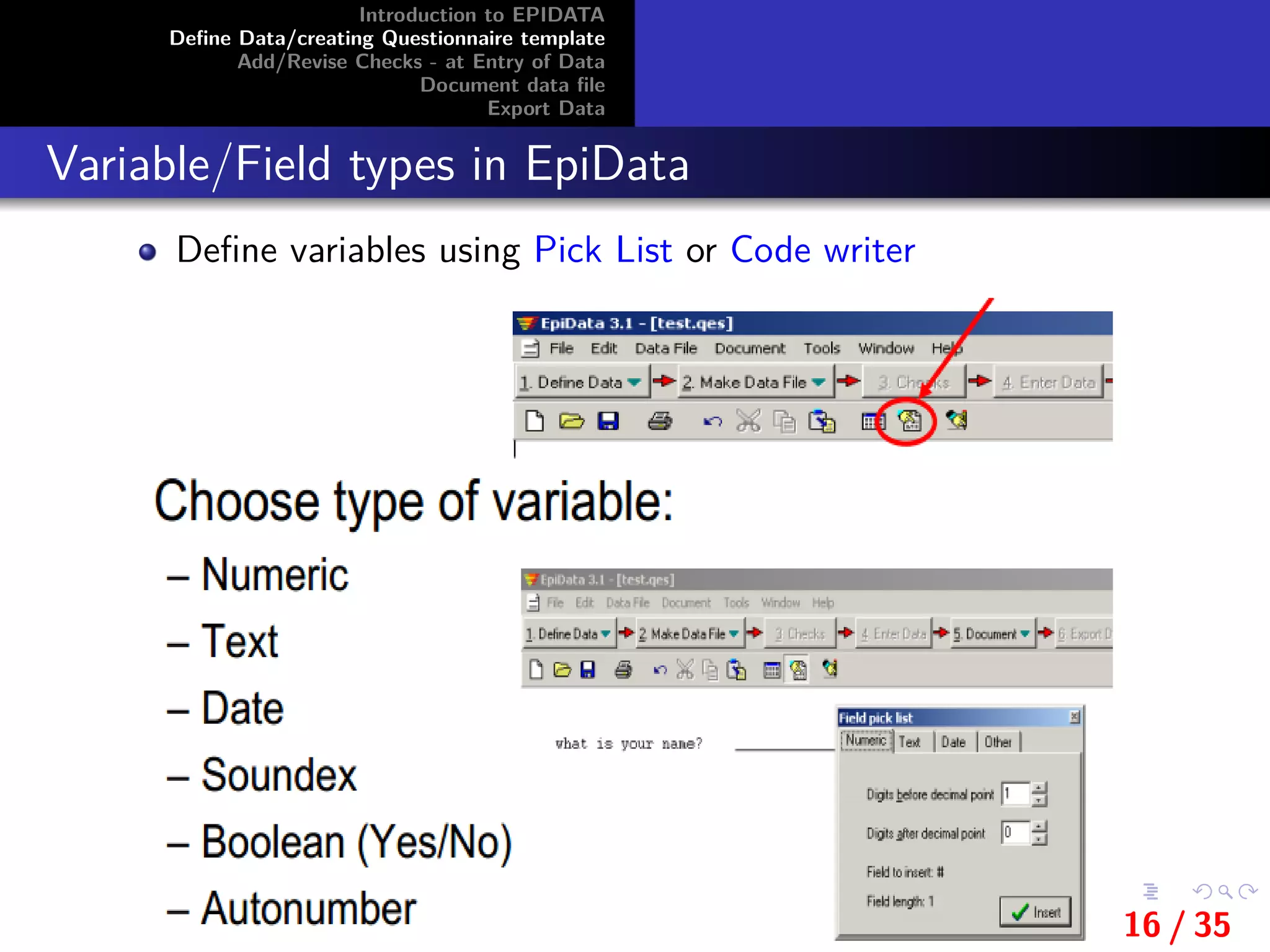
Variable/Field types in EpiData
Define variables using Pick List or Code writer
16 / 35
Introduction to EPIDATA
Define Data/creating Questionnaire template
Add/Revise Checks - at Entry of Data
Document data file
Export Data
Text variables
Variables of information of text and/or numbers
Holding information (e.g. names, addresses)
UPPER CASE
Can only hold upper case (capital) letters
Lower case variable automatically converted into upper case
text (ex: Female converted to FEMALE)
No mathematical operations
Length (How many characters)
Encrypted fields-special type of text fields by < >
The number of underscore characters defines the length of the
field.
17 / 35
Introduction to EPIDATA
Define Data/creating Questionnaire template
Add/Revise Checks - at Entry of Data
Document data file
Export Data
Numeric variables
Are variables of Numerical information
Hold integers (whole numbers) or numbers with a decimal
point.Maximum field length is 14 characters.
Length (digits, decimals after the comma)
Example ### , ###.### , ######## , ##.####
Numeric fields accept entry of numbers, the minus sign and
decimal points
Periods (.) as well as commas (,) are accepted as decimal
points in both the .QES file and during data entry.
Only one decimal point is accepted in a field.
This means that commas cannot be used as thousand
separators
18 / 35
Introduction to EPIDATA
Define Data/creating Questionnaire template
Add/Revise Checks - at Entry of Data
Document data file
Export Data
Boolean Variables(yes/no fields)
Are logical or YES/NO variables
Variables with only two possible answers: Yes or No
<Y >
Boolean fields accept only Y, N, 1, 0 and space as legal entries
An entry of 1 is converted to Y.
An entry of 0 is converted to N.
Boolean fields have a length of one.
This means that a field code of <Y> in the .QES file will
create an error
This means that a field code of <Y > in the .QES file will
create an error
19 / 35
Introduction to EPIDATA
Define Data/creating Questionnaire template
Add/Revise Checks - at Entry of Data
Document data file
Export Data
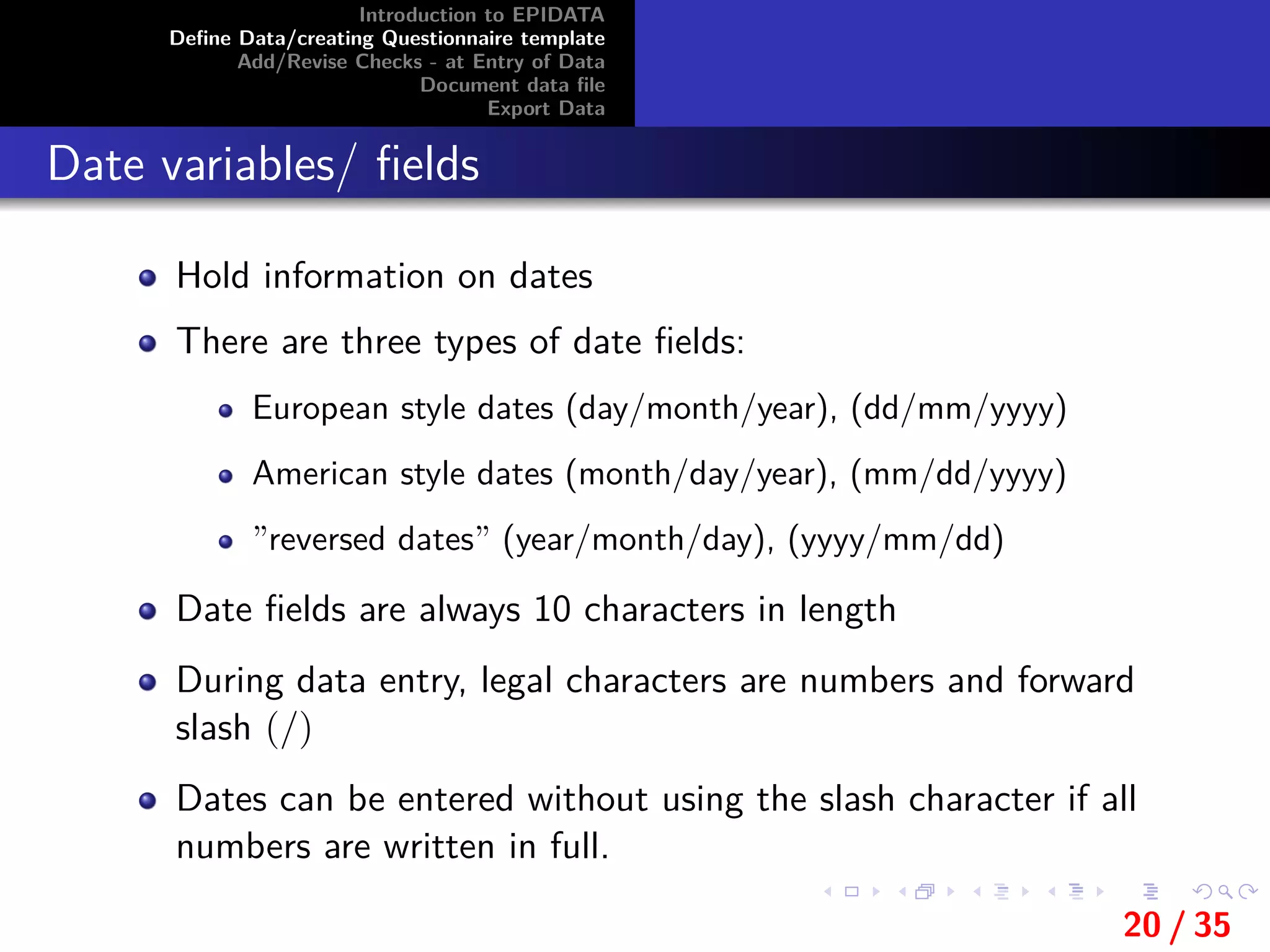
Date variables/ fields
Hold information on dates
There are three types of date fields:
European style dates (day/month/year), (dd/mm/yyyy)
American style dates (month/day/year), (mm/dd/yyyy)
”reversed dates” (year/month/day), (yyyy/mm/dd)
Date fields are always 10 characters in length
During data entry, legal characters are numbers and forward
slash (/)
Dates can be entered without using the slash character if all
numbers are written in full.
20 / 35
Introduction to EPIDATA
Define Data/creating Questionnaire template
Add/Revise Checks - at Entry of Data
Document data file
Export Data
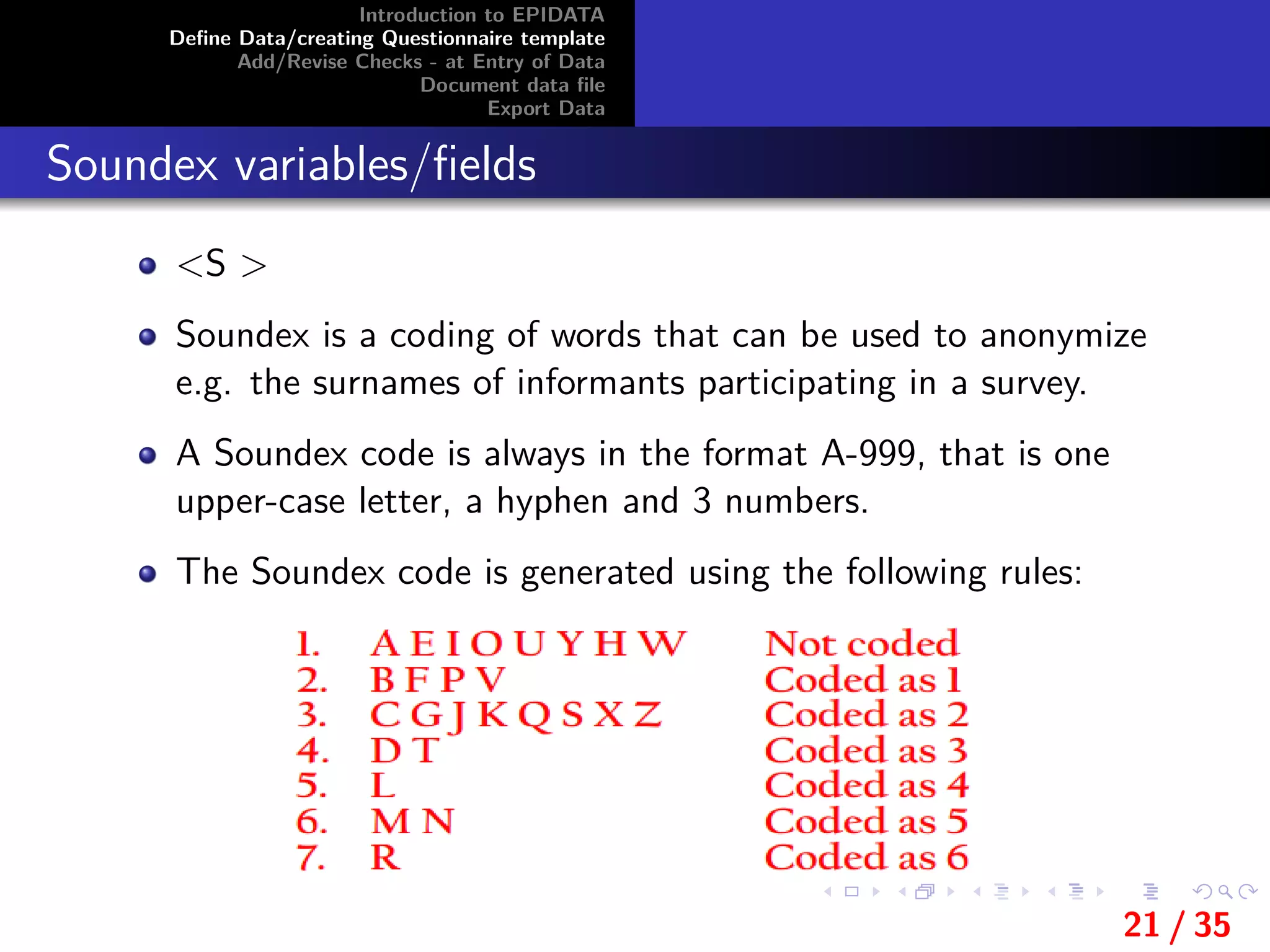
Soundex variables/fields
<S >
Soundex is a coding of words that can be used to anonymize
e.g. the surnames of informants participating in a survey.
A Soundex code is always in the format A-999, that is one
upper-case letter, a hyphen and 3 numbers.
The Soundex code is generated using the following rules:
21 / 35
Introduction to EPIDATA
Define Data/creating Questionnaire template
Add/Revise Checks - at Entry of Data
Document data file
Export Data
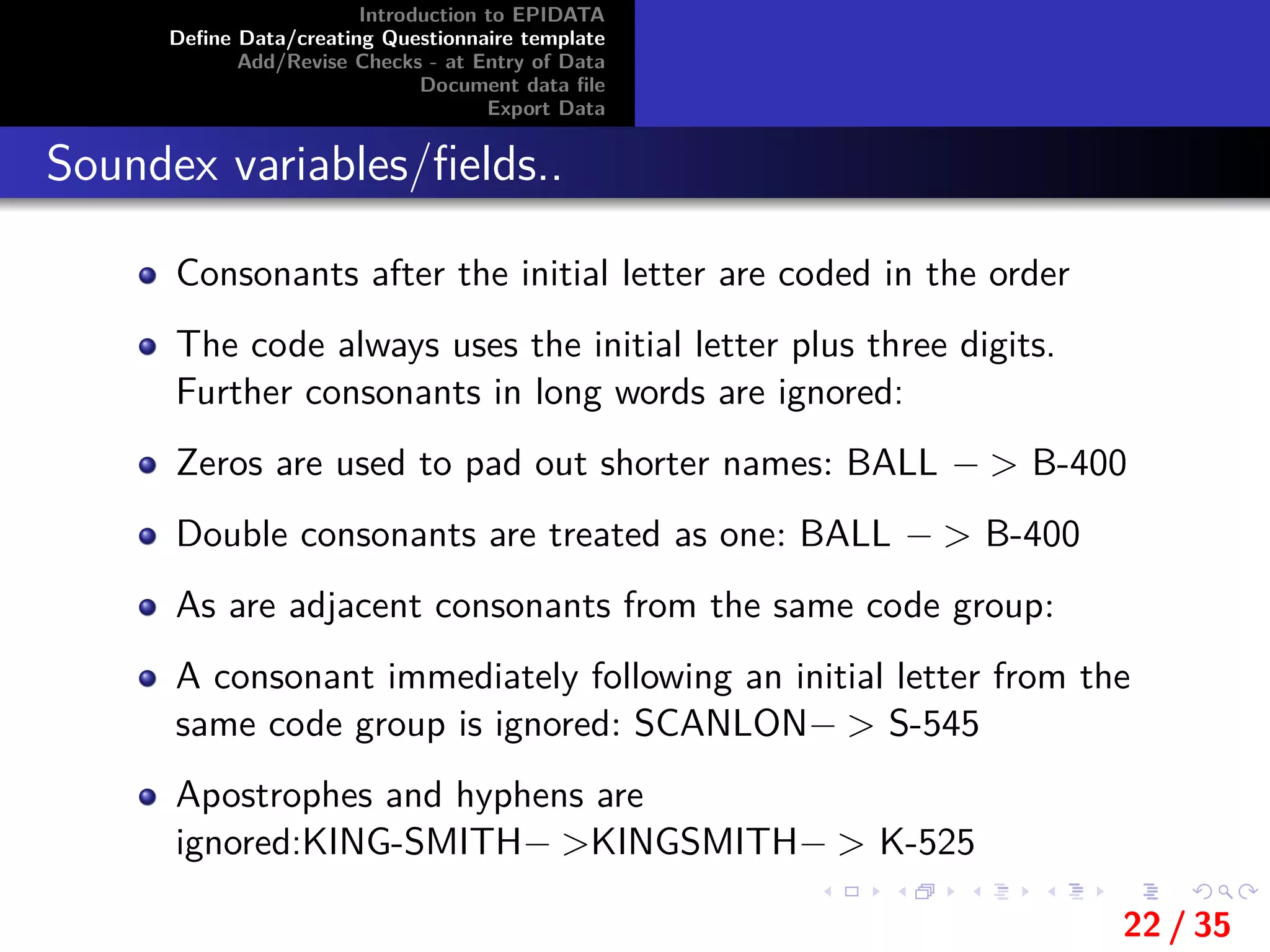
Soundex variables/fields..
Consonants after the initial letter are coded in the order
The code always uses the initial letter plus three digits.
Further consonants in long words are ignored:
Zeros are used to pad out shorter names: BALL − > B-400
Double consonants are treated as one: BALL − > B-400
As are adjacent consonants from the same code group:
A consonant immediately following an initial letter from the
same code group is ignored: SCANLON− > S-545
Apostrophes and hyphens are
ignored:KING-SMITH− >KINGSMITH− > K-525
22 / 35
Introduction to EPIDATA
Define Data/creating Questionnaire template
Add/Revise Checks - at Entry of Data
Document data file
Export Data
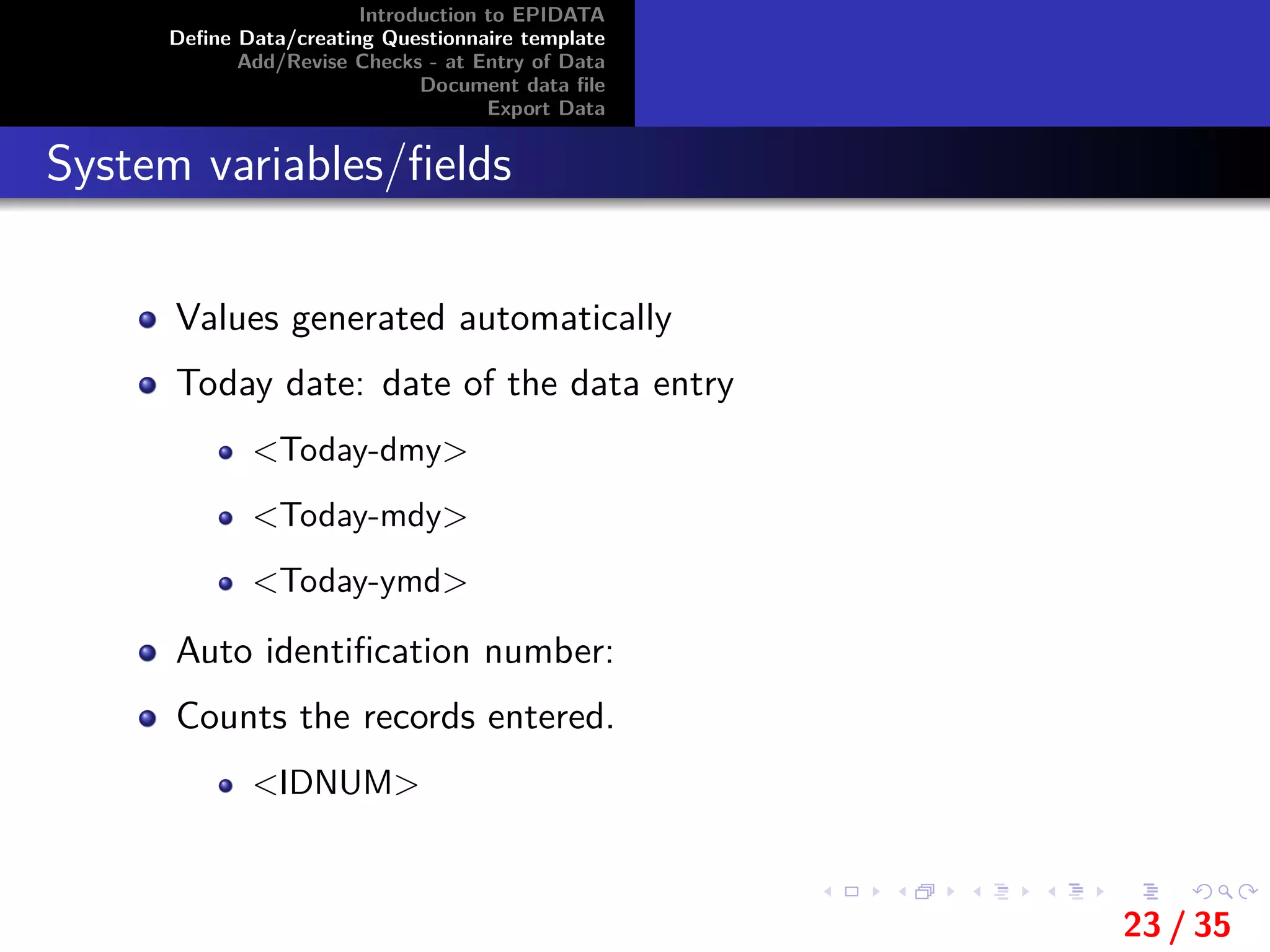
System variables/fields
Values generated automatically
Today date: date of the data entry
<Today-dmy>
<Today-mdy>
<Today-ymd>
Auto identification number:
Counts the records entered.
<IDNUM>
23 / 35
Introduction to EPIDATA
Define Data/creating Questionnaire template
Add/Revise Checks - at Entry of Data
Document data file
Export Data
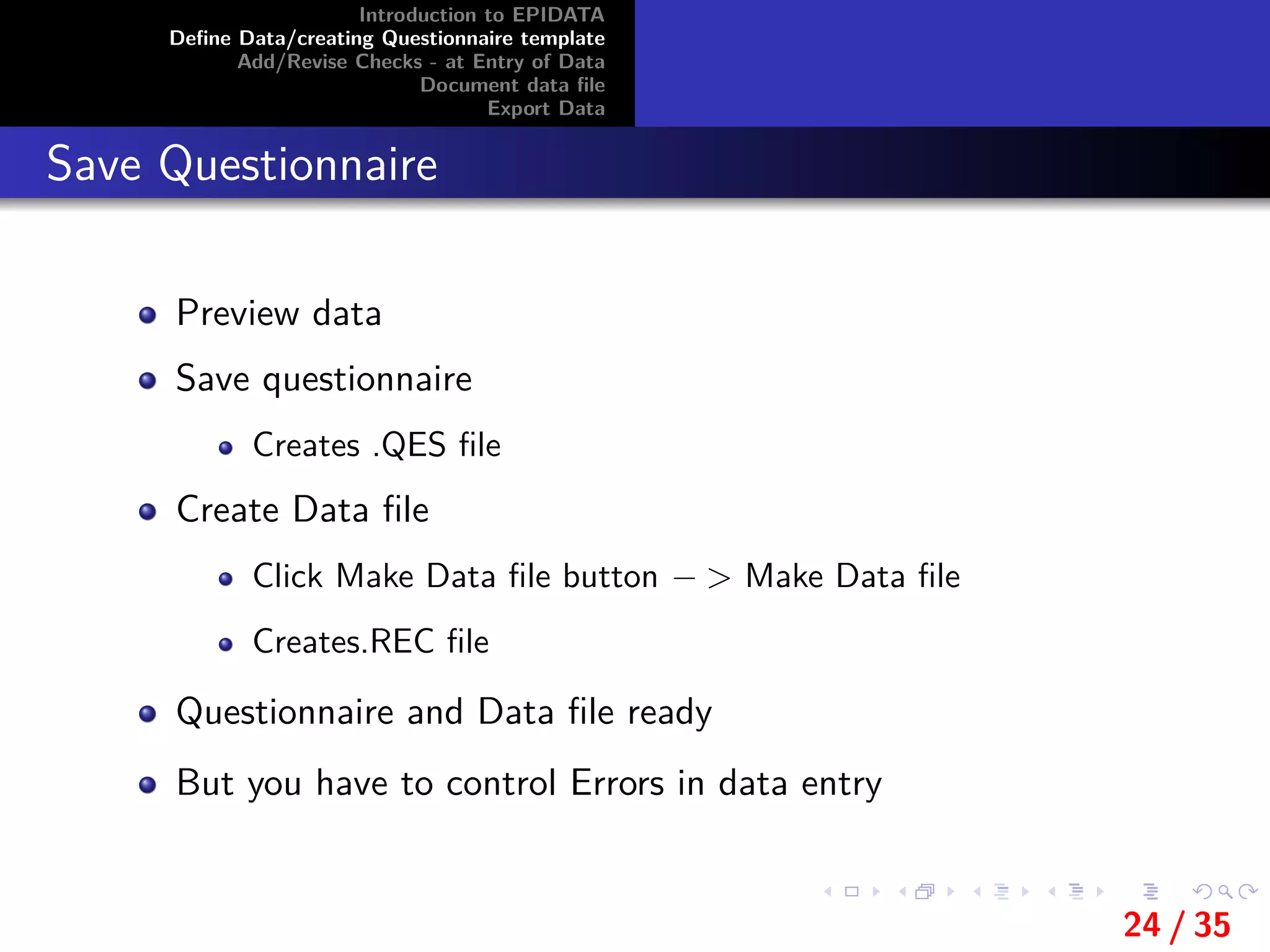
Save Questionnaire
Preview data
Save questionnaire
Creates .QES file
Create Data file
Click Make Data file button − > Make Data file
Creates.REC file
Questionnaire and Data file ready
But you have to control Errors in data entry
24 / 35
Introduction to EPIDATA
Define Data/creating Questionnaire template
Add/Revise Checks - at Entry of Data
Document data file
Export Data
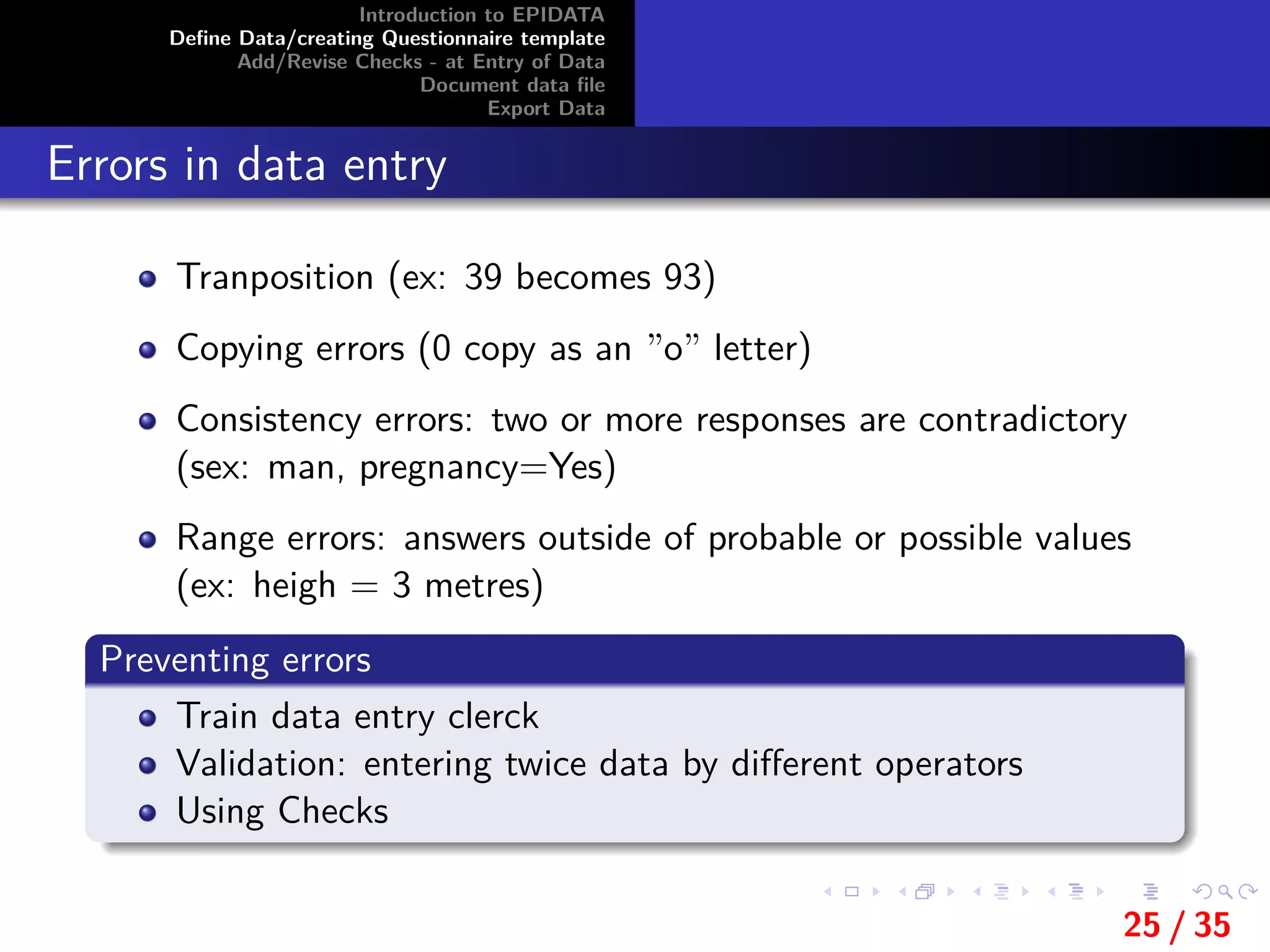
Errors in data entry
Tranposition (ex: 39 becomes 93)
Copying errors (0 copy as an ”o” letter)
Consistency errors: two or more responses are contradictory
(sex: man, pregnancy=Yes)
Range errors: answers outside of probable or possible values
(ex: heigh = 3 metres)
Preventing errors
Train data entry clerck
Validation: entering twice data by different operators
Using Checks
25 / 35
Introduction to EPIDATA
Define Data/creating Questionnaire template
Add/Revise Checks - at Entry of Data
Document data file
Export Data
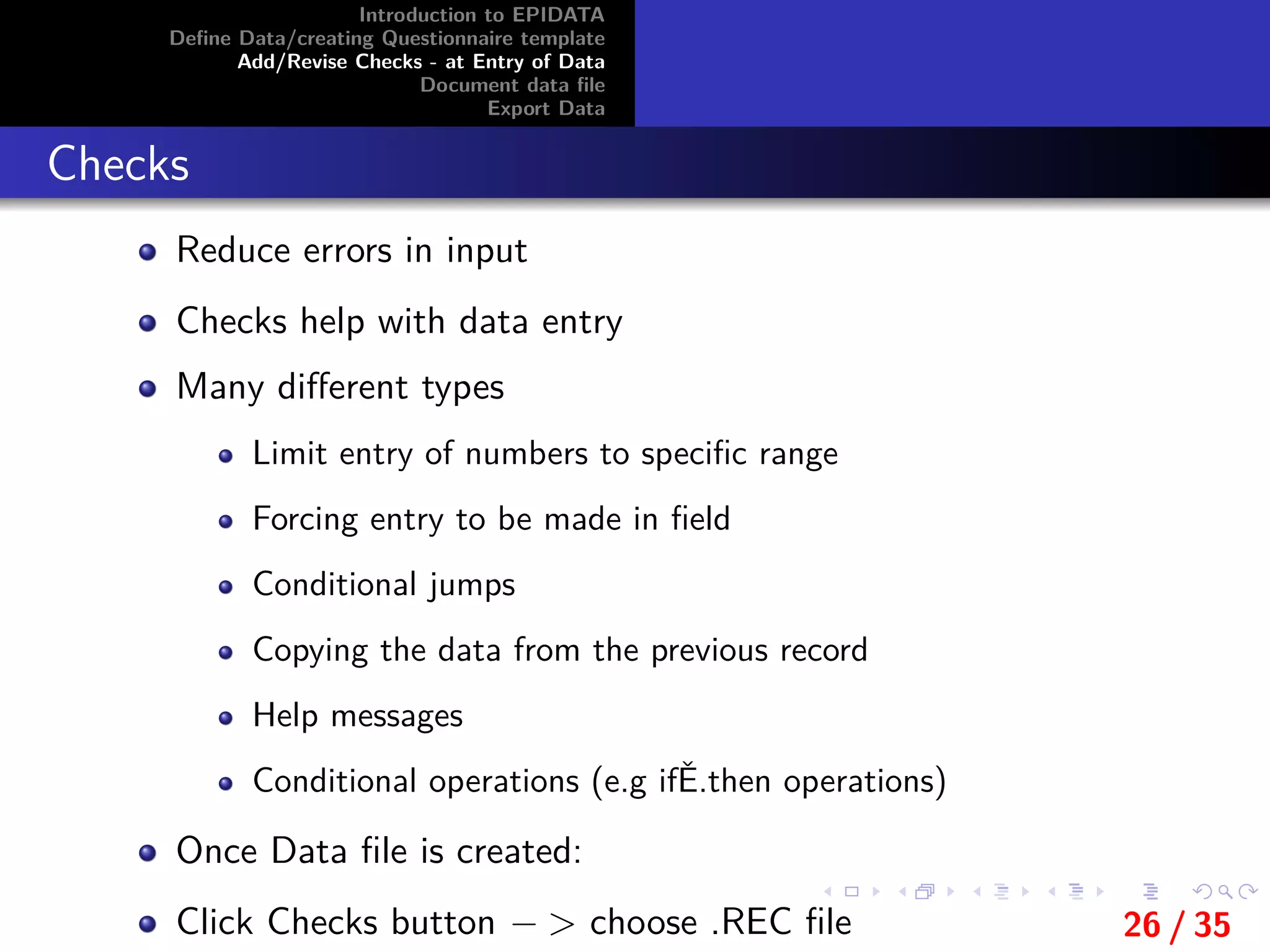
Checks
Reduce errors in input
Checks help with data entry
Many different types
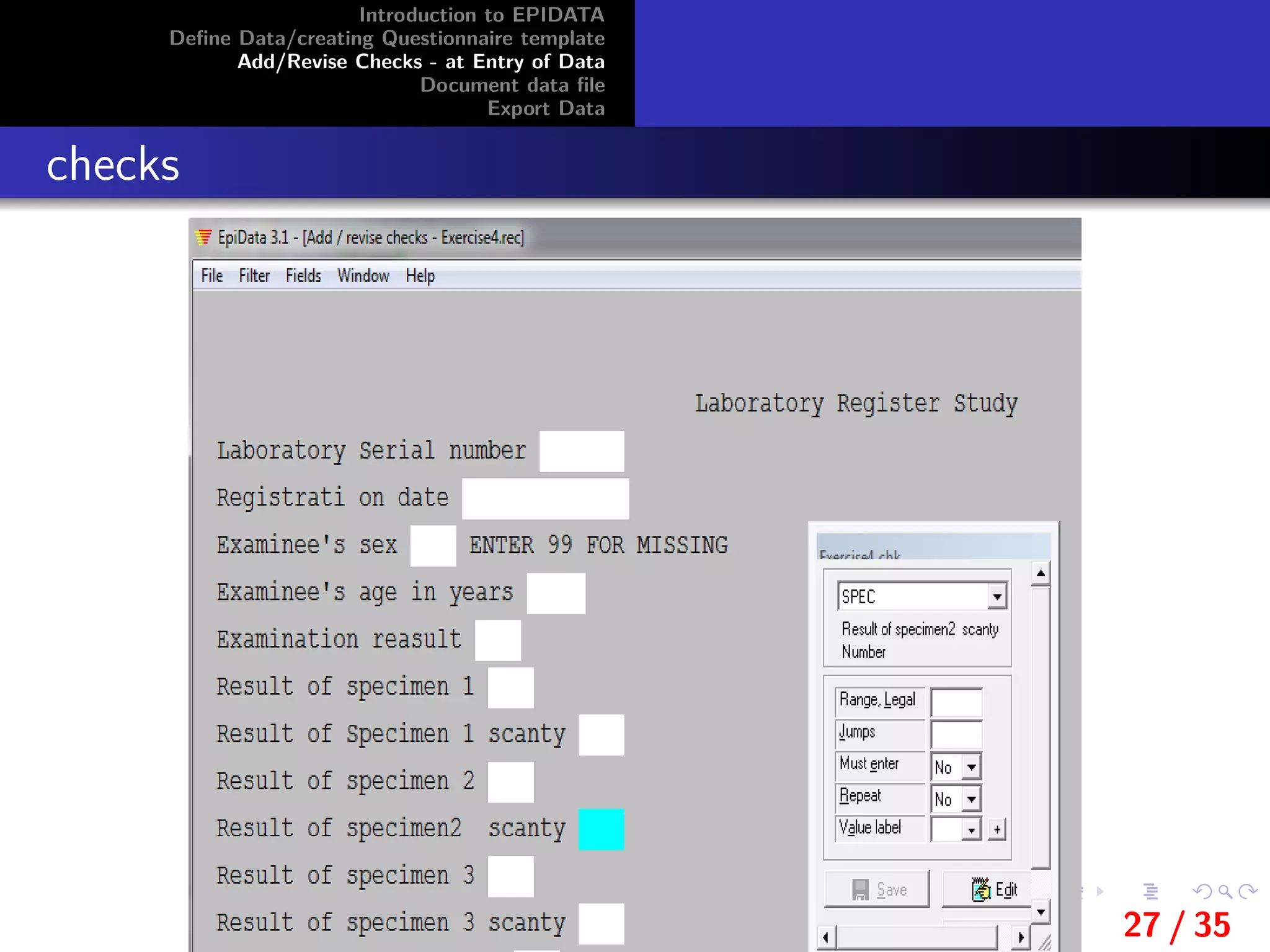
Limit entry of numbers to specific range
Forcing entry to be made in field
Conditional jumps
Copying the data from the previous record
Help messages
Conditional operations (e.g ifĚ.then operations)
Once Data file is created:
Click Checks button − > choose .REC file 26 / 35
Introduction to EPIDATA
Define Data/creating Questionnaire template
Add/Revise Checks - at Entry of Data
Document data file
Export Data
checks
27 / 35
Introduction to EPIDATA
Define Data/creating Questionnaire template
Add/Revise Checks - at Entry of Data
Document data file
Export Data
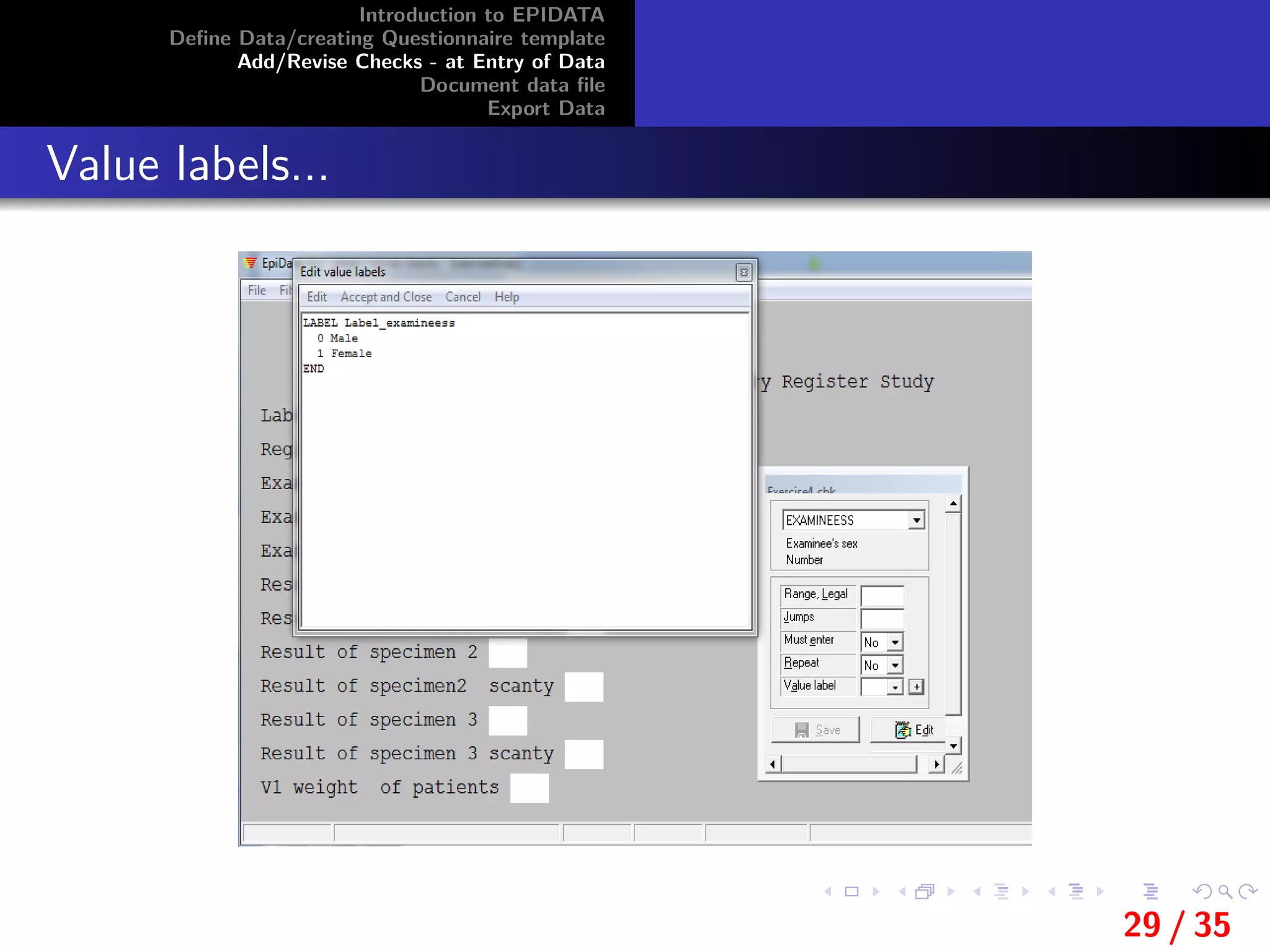
Value labels
Value labels are a set of values combined with text itemsthat
explain the meaning of each value.
For example: A field is created to enter information on the sex
of the informants’.
a value of 0 in the field means that the informant is male and
that a value of 1 means the informant is female.
The value labels in this example would be:
0 Male
1 Female
If a value label is defined then a ’translation table’ can be
shown during data entry if the user presses [F9]or the [+] key
on the numeric keypad).
28 / 35
Introduction to EPIDATA
Define Data/creating Questionnaire template
Add/Revise Checks - at Entry of Data
Document data file
Export Data
Value labels...
29 / 35
Introduction to EPIDATA
Define Data/creating Questionnaire template
Add/Revise Checks - at Entry of Data
Document data file
Export Data
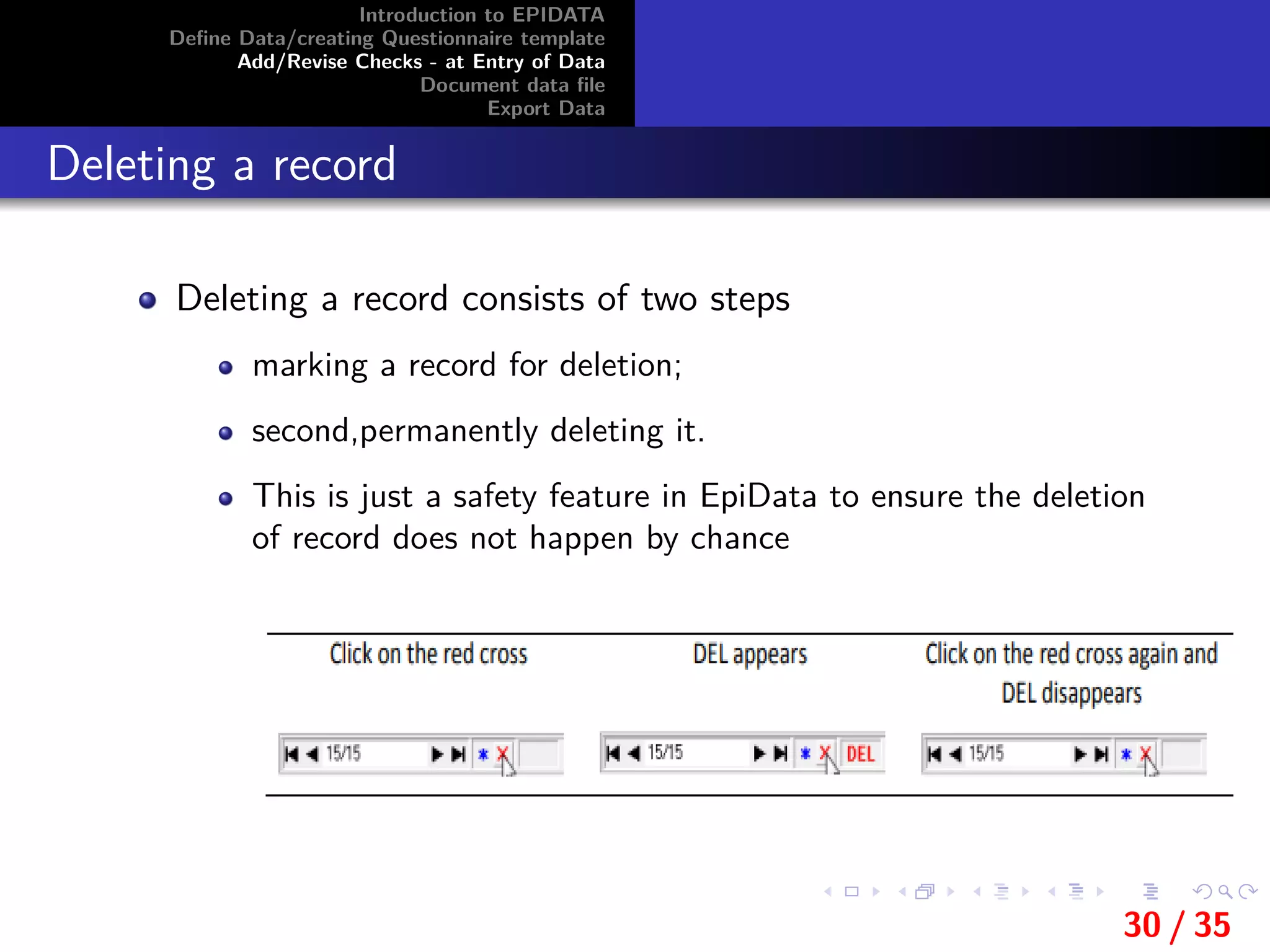
Deleting a record
Deleting a record consists of two steps
marking a record for deletion;
second,permanently deleting it.
This is just a safety feature in EpiData to ensure the deletion
of record does not happen by chance
30 / 35
Introduction to EPIDATA
Define Data/creating Questionnaire template
Add/Revise Checks - at Entry of Data
Document data file
Export Data
31 / 35
Introduction to EPIDATA
Define Data/creating Questionnaire template
Add/Revise Checks - at Entry of Data
Document data file
Export Data
Document data file
File Structure
Data entry notes (.NOT file)
Use to write comments during data entry eg: difficult to read
handwriting etc
View Data
List Data
Codebook
Basic descriptive statistics on all variables
32 / 35
Introduction to EPIDATA
Define Data/creating Questionnaire template
Add/Revise Checks - at Entry of Data
Document data file
Export Data
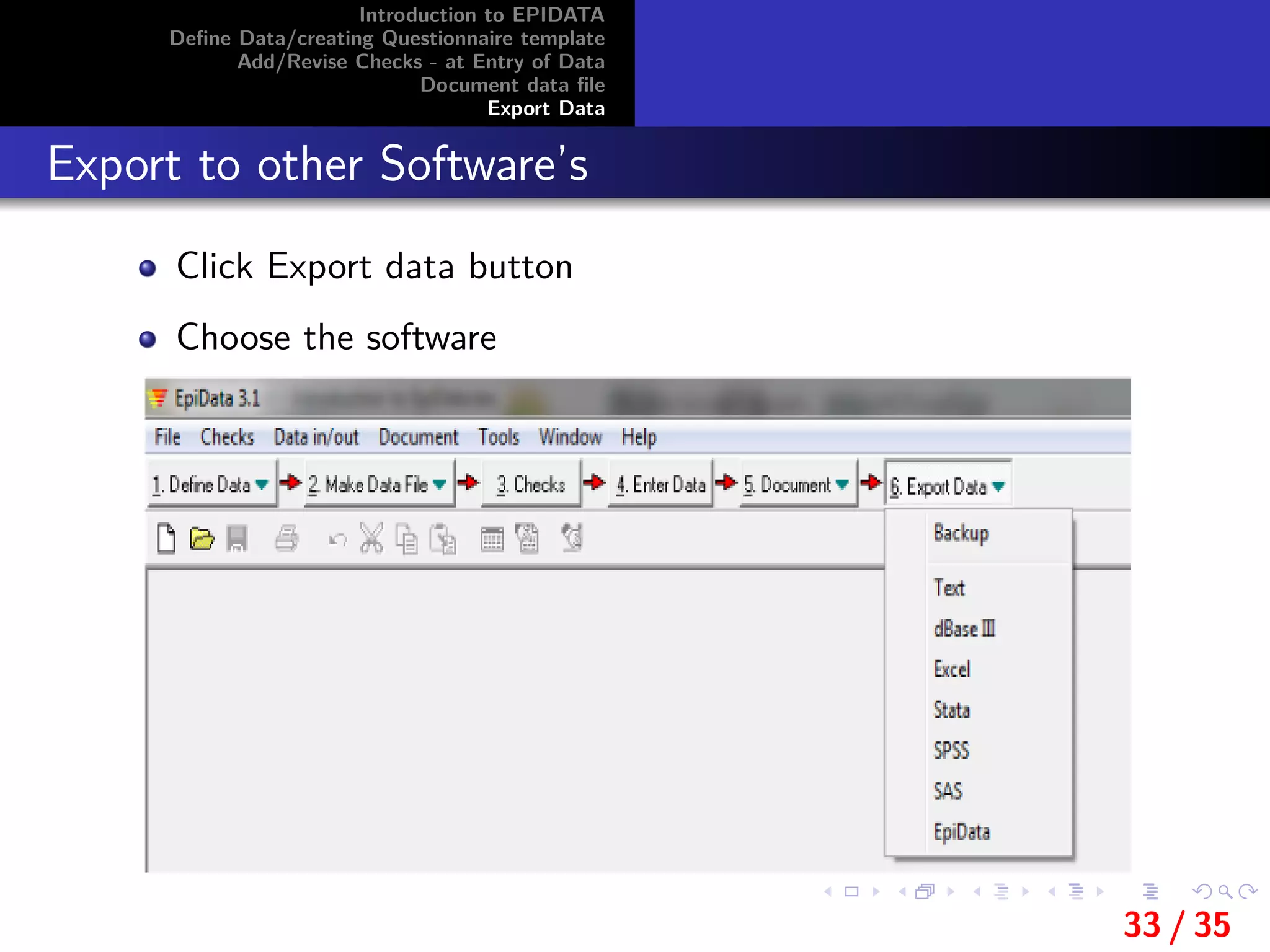
Export to other Software’s
Click Export data button
Choose the software
33 / 35
Introduction to EPIDATA
Define Data/creating Questionnaire template
Add/Revise Checks - at Entry of Data
Document data file
Export Data
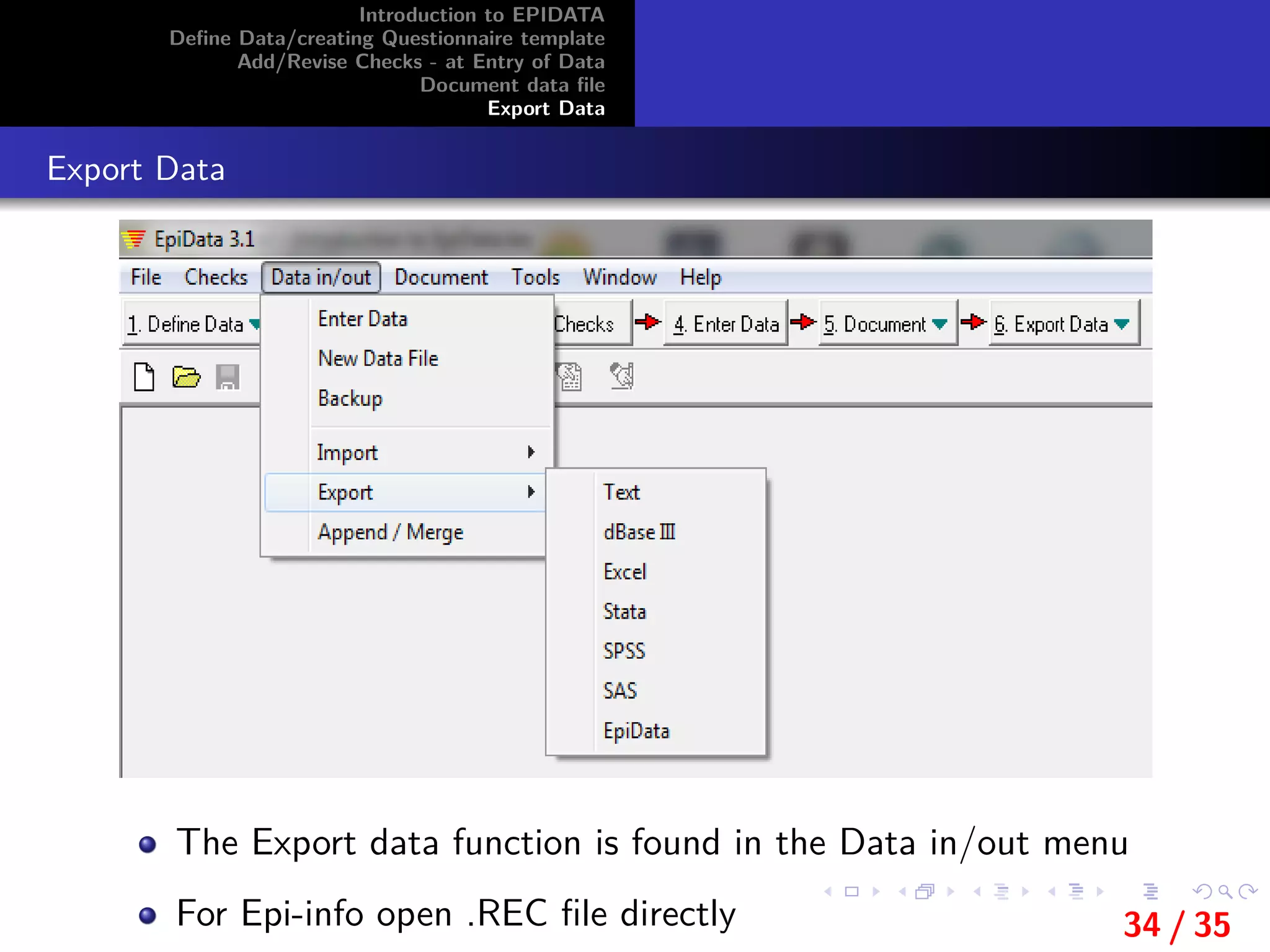
Export Data
The Export data function is found in the Data in/out menu
For Epi-info open .REC file directly 34 / 35
Introduction to EPIDATA
Define Data/creating Questionnaire template
Add/Revise Checks - at Entry of Data
Document data file
Export Data
THANK YOU!
35 / 35

Introduction to epi data

  • 1.
    Introduction to EPIDATA DefineData/creating Questionnaire template Add/Revise Checks - at Entry of Data Document data file Export Data Introduction to EpiData By:Zelalem Mehari(M.Sc. in Biostatistics) Bahir Dar University College of Medicine and Health Sciences November 29, 2019, Bahir Dar, Ethiopia 1 / 35
  • 2.
    Introduction to EPIDATA DefineData/creating Questionnaire template Add/Revise Checks - at Entry of Data Document data file Export Data Outlines 1 Introduction to EPIDATA 1 Define Data/creating Questionnaire template 1 Add/Revise Checks - at Entry of Data 1 Document data file 1 Export Data 2 / 35
  • 3.
    Introduction to EPIDATA DefineData/creating Questionnaire template Add/Revise Checks - at Entry of Data Document data file Export Data Introduction to EpiData EpiData is freeware and available from:http://www.epidata. dk. Data entry and documentation Has a Windows format No limit on No of observation (tested with >250.000) User friendly with other statistical packages EpiData not to interfere with the setup of your computer. EpiData consists of one program file and a few help files. No other files are installed. In technical terms this means that EpiData does not install or include any DLL files or system files - options are saved in registry. 3 / 35
  • 4.
    Introduction to EPIDATA DefineData/creating Questionnaire template Add/Revise Checks - at Entry of Data Document data file Export Data Major functions of EpiData To design questionnaire For Data entry Comparing of 2 data files/double entry verification Documenting and printing data Correction of questionnaires, records Importing and exporting data Append and merge data Simple analysis 4 / 35
  • 5.
    Introduction to EPIDATA DefineData/creating Questionnaire template Add/Revise Checks - at Entry of Data Document data file Export Data EpiData files .QES file (EpiData Questionnaire file) Questionnaire .REC file (EpiData Data file) Actual data .CHK file (EpiData check file) Any defined checks .NOT file (EpiData entry notes) .LOG file 5 / 35
  • 6.
    Introduction to EPIDATA DefineData/creating Questionnaire template Add/Revise Checks - at Entry of Data Document data file Export Data 1 Define Data 2 Make Data File 3 Set up Checks 4 Enter Data 5 Document 6 Export Data 6 / 35
  • 7.
    Introduction to EPIDATA DefineData/creating Questionnaire template Add/Revise Checks - at Entry of Data Document data file Export Data 6 / 35
  • 8.
    Introduction to EPIDATA DefineData/creating Questionnaire template Add/Revise Checks - at Entry of Data Document data file Export Data Opening Existing/Creating New Questionnaire File Opening Existing Questionnaire click on Define data− >Open.QES file Before you begin create an EpiData Folder on your computer. It is good file managementpractice to put all your files in the same place New Questionnaire can be created by either of the three techniques Type in window Cut and paste from Word documents By Clicking .QES file from REC file from the tools in the menu bar 7 / 35
  • 9.
    Introduction to EPIDATA DefineData/creating Questionnaire template Add/Revise Checks - at Entry of Data Document data file Export Data Opening Existing/Creating New Questionnaire File 8 / 35
  • 10.
    Introduction to EPIDATA DefineData/creating Questionnaire template Add/Revise Checks - at Entry of Data Document data file Export Data Structure of questionnaire Any Questionnaire file in EpiData has three sections: 1 Field name(variable) 2 Text describing field 3 Input/Field/Variable definition (number/ letters/ date) 9 / 35
  • 11.
    Introduction to EPIDATA DefineData/creating Questionnaire template Add/Revise Checks - at Entry of Data Document data file Export Data Field name(variable) Field name should fulfill the following Criteria: No more than 10 characters Begin with a letter No spaces or punctuation marks Names of the entry fields in a data form are created in two different ways: 1 First word in the question (i.e. the text to the left of the field) is used as the field name. 2 Automatic field naming according to the rules used by Epi Info The method used depends upon the options defined in File / Options / Create Data file. 10 / 35
  • 12.
    Introduction to EPIDATA DefineData/creating Questionnaire template Add/Revise Checks - at Entry of Data Document data file Export Data Field name(variable) 11 / 35
  • 13.
    Introduction to EPIDATA DefineData/creating Questionnaire template Add/Revise Checks - at Entry of Data Document data file Export Data First word as field name(varible name) If the option First word in question is field name is selected from File / Options / Create data file, The names of the entry fields are created by using the first word in the text to the left of the entry field. If the length of the first word is more than 10 characters then the first 10 characters of the first word will be used as field name Examples: If the question is ”Examination result of the test”‘,the variable name will be ”Examinatio” If the qestion is ”Laboratory Serial number”,then the field name will be Laboratory 12 / 35
  • 14.
    Introduction to EPIDATA DefineData/creating Questionnaire template Add/Revise Checks - at Entry of Data Document data file Export Data Automatic field names....... If Automatic field names is selected in the Create data file options (File − > Options− > Create data file− >Automatic field names), EpiData automatically generates field names based on the field’s question (i.e. the text to the left of the field). The field name is a maximum of 10 characters starting with a letter. Letters used in the name are A-Z. The field name is generated from the beginning of the field’s question. Rules used to generate field names: Text enclosed in braces(curly brackets) will be the field names Example: if the question is Result of specimen 2 {scanty},the field name is scanty 13 / 35
  • 15.
    Introduction to EPIDATA DefineData/creating Questionnaire template Add/Revise Checks - at Entry of Data Document data file Export Data Automatic field names....... If the first character of the generated field name is a number then the letter N is inserted at the first character Example: ”1. age of patients” generates the field name N1ageofpat. Letter case of the field name is based on the settings used in File− > option− >Create Data file Upper case Lower Case Leave as it 14 / 35
  • 16.
    Introduction to EPIDATA DefineData/creating Questionnaire template Add/Revise Checks - at Entry of Data Document data file Export Data Variable labels/Text describing field A variable label is a description of the data that a field contains If the option First word in question is field name is set then the variable label will be the text to the left of the field excluding the first word, which is used as the field name. Example: in the line v1 weight of patient If the option First word in question is field name is set, will create the field name ”v1” and the variable label ”weight of patient”. If the option Automatic field naming is set then the field name will be ”v1weightpa” and the variable label will be ”v1 weight of patient”. 15 / 35
  • 17.
    Introduction to EPIDATA DefineData/creating Questionnaire template Add/Revise Checks - at Entry of Data Document data file Export Data Variable/Field types in EpiData Define variables using Pick List or Code writer 16 / 35
  • 18.
    Introduction to EPIDATA DefineData/creating Questionnaire template Add/Revise Checks - at Entry of Data Document data file Export Data Text variables Variables of information of text and/or numbers Holding information (e.g. names, addresses) UPPER CASE Can only hold upper case (capital) letters Lower case variable automatically converted into upper case text (ex: Female converted to FEMALE) No mathematical operations Length (How many characters) Encrypted fields-special type of text fields by < > The number of underscore characters defines the length of the field. 17 / 35
  • 19.
    Introduction to EPIDATA DefineData/creating Questionnaire template Add/Revise Checks - at Entry of Data Document data file Export Data Numeric variables Are variables of Numerical information Hold integers (whole numbers) or numbers with a decimal point.Maximum field length is 14 characters. Length (digits, decimals after the comma) Example ### , ###.### , ######## , ##.#### Numeric fields accept entry of numbers, the minus sign and decimal points Periods (.) as well as commas (,) are accepted as decimal points in both the .QES file and during data entry. Only one decimal point is accepted in a field. This means that commas cannot be used as thousand separators 18 / 35
  • 20.
    Introduction to EPIDATA DefineData/creating Questionnaire template Add/Revise Checks - at Entry of Data Document data file Export Data Boolean Variables(yes/no fields) Are logical or YES/NO variables Variables with only two possible answers: Yes or No <Y > Boolean fields accept only Y, N, 1, 0 and space as legal entries An entry of 1 is converted to Y. An entry of 0 is converted to N. Boolean fields have a length of one. This means that a field code of <Y> in the .QES file will create an error This means that a field code of <Y > in the .QES file will create an error 19 / 35
  • 21.
    Introduction to EPIDATA DefineData/creating Questionnaire template Add/Revise Checks - at Entry of Data Document data file Export Data Date variables/ fields Hold information on dates There are three types of date fields: European style dates (day/month/year), (dd/mm/yyyy) American style dates (month/day/year), (mm/dd/yyyy) ”reversed dates” (year/month/day), (yyyy/mm/dd) Date fields are always 10 characters in length During data entry, legal characters are numbers and forward slash (/) Dates can be entered without using the slash character if all numbers are written in full. 20 / 35
  • 22.
    Introduction to EPIDATA DefineData/creating Questionnaire template Add/Revise Checks - at Entry of Data Document data file Export Data Soundex variables/fields <S > Soundex is a coding of words that can be used to anonymize e.g. the surnames of informants participating in a survey. A Soundex code is always in the format A-999, that is one upper-case letter, a hyphen and 3 numbers. The Soundex code is generated using the following rules: 21 / 35
  • 23.
    Introduction to EPIDATA DefineData/creating Questionnaire template Add/Revise Checks - at Entry of Data Document data file Export Data Soundex variables/fields.. Consonants after the initial letter are coded in the order The code always uses the initial letter plus three digits. Further consonants in long words are ignored: Zeros are used to pad out shorter names: BALL − > B-400 Double consonants are treated as one: BALL − > B-400 As are adjacent consonants from the same code group: A consonant immediately following an initial letter from the same code group is ignored: SCANLON− > S-545 Apostrophes and hyphens are ignored:KING-SMITH− >KINGSMITH− > K-525 22 / 35
  • 24.
    Introduction to EPIDATA DefineData/creating Questionnaire template Add/Revise Checks - at Entry of Data Document data file Export Data System variables/fields Values generated automatically Today date: date of the data entry <Today-dmy> <Today-mdy> <Today-ymd> Auto identification number: Counts the records entered. <IDNUM> 23 / 35
  • 25.
    Introduction to EPIDATA DefineData/creating Questionnaire template Add/Revise Checks - at Entry of Data Document data file Export Data Save Questionnaire Preview data Save questionnaire Creates .QES file Create Data file Click Make Data file button − > Make Data file Creates.REC file Questionnaire and Data file ready But you have to control Errors in data entry 24 / 35
  • 26.
    Introduction to EPIDATA DefineData/creating Questionnaire template Add/Revise Checks - at Entry of Data Document data file Export Data Errors in data entry Tranposition (ex: 39 becomes 93) Copying errors (0 copy as an ”o” letter) Consistency errors: two or more responses are contradictory (sex: man, pregnancy=Yes) Range errors: answers outside of probable or possible values (ex: heigh = 3 metres) Preventing errors Train data entry clerck Validation: entering twice data by different operators Using Checks 25 / 35
  • 27.
    Introduction to EPIDATA DefineData/creating Questionnaire template Add/Revise Checks - at Entry of Data Document data file Export Data Checks Reduce errors in input Checks help with data entry Many different types Limit entry of numbers to specific range Forcing entry to be made in field Conditional jumps Copying the data from the previous record Help messages Conditional operations (e.g ifĚ.then operations) Once Data file is created: Click Checks button − > choose .REC file 26 / 35
  • 28.
    Introduction to EPIDATA DefineData/creating Questionnaire template Add/Revise Checks - at Entry of Data Document data file Export Data checks 27 / 35
  • 29.
    Introduction to EPIDATA DefineData/creating Questionnaire template Add/Revise Checks - at Entry of Data Document data file Export Data Value labels Value labels are a set of values combined with text itemsthat explain the meaning of each value. For example: A field is created to enter information on the sex of the informants’. a value of 0 in the field means that the informant is male and that a value of 1 means the informant is female. The value labels in this example would be: 0 Male 1 Female If a value label is defined then a ’translation table’ can be shown during data entry if the user presses [F9]or the [+] key on the numeric keypad). 28 / 35
  • 30.
    Introduction to EPIDATA DefineData/creating Questionnaire template Add/Revise Checks - at Entry of Data Document data file Export Data Value labels... 29 / 35
  • 31.
    Introduction to EPIDATA DefineData/creating Questionnaire template Add/Revise Checks - at Entry of Data Document data file Export Data Deleting a record Deleting a record consists of two steps marking a record for deletion; second,permanently deleting it. This is just a safety feature in EpiData to ensure the deletion of record does not happen by chance 30 / 35
  • 32.
    Introduction to EPIDATA DefineData/creating Questionnaire template Add/Revise Checks - at Entry of Data Document data file Export Data 31 / 35
  • 33.
    Introduction to EPIDATA DefineData/creating Questionnaire template Add/Revise Checks - at Entry of Data Document data file Export Data Document data file File Structure Data entry notes (.NOT file) Use to write comments during data entry eg: difficult to read handwriting etc View Data List Data Codebook Basic descriptive statistics on all variables 32 / 35
  • 34.
    Introduction to EPIDATA DefineData/creating Questionnaire template Add/Revise Checks - at Entry of Data Document data file Export Data Export to other Software’s Click Export data button Choose the software 33 / 35
  • 35.
    Introduction to EPIDATA DefineData/creating Questionnaire template Add/Revise Checks - at Entry of Data Document data file Export Data Export Data The Export data function is found in the Data in/out menu For Epi-info open .REC file directly 34 / 35
  • 36.
    Introduction to EPIDATA DefineData/creating Questionnaire template Add/Revise Checks - at Entry of Data Document data file Export Data THANK YOU! 35 / 35