1
C++ Programming: From Problem Analysis to Program Design, Eighth Edition
Chapter 8
Arrays and Strings
2
Objectives (1 of 3)
• In this chapter, you will:
• Learn the reasons for arrays
• Explore how to declare and manipulate data into arrays
• Understand the meaning of ‘‘array index out of bounds’’
• Learn how to declare and initialize arrays
• Become familiar with the restrictions on array processing
© 2018 Cengage Learning. All Rights Reserved. May not be copied, scanned, or duplicated, in whole or in part, except for use as permitted in a license distributed with a certain product or service
or otherwise on a password-protected website for classroom
3
Objectives (2 of 3)
• Discover how to pass an array as a parameter to a function
• Learn how to search an array
• Learn how to sort an array
• Become aware of auto declarations
• Learn about range-based for loops
• Learn about C-strings
© 2018 Cengage Learning. All Rights Reserved. May not be copied, scanned, or duplicated, in whole or in part, except for use as permitted in a license distributed with a certain product or service
or otherwise on a password-protected website for classroom
4
Objectives (3 of 3)
• Examine the use of string functions to process C-strings
• Discover how to input data into—and output data from—a C-string
• Learn about parallel arrays
• Discover how to manipulate data in a two-dimensional array
• Learn about multidimensional arrays
© 2018 Cengage Learning. All Rights Reserved. May not be copied, scanned, or duplicated, in whole or in part, except for use as permitted in a license distributed with a certain product or service
or otherwise on a password-protected website for classroom
5
Introduction
• Simple data type: variables of these types can store only one value at a time
• Structured data type: a data type in which each data item is a collection of
other data items
© 2018 Cengage Learning. All Rights Reserved. May not be copied, scanned, or duplicated, in whole or in part, except for use as permitted in a license distributed with a certain product or service
or otherwise on a password-protected website for classroom
6
Arrays
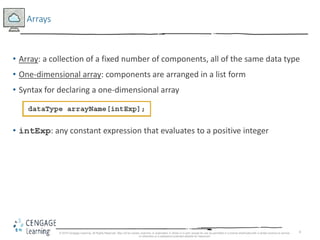
• Array: a collection of a fixed number of components, all of the same data type
• One-dimensional array: components are arranged in a list form
• Syntax for declaring a one-dimensional array
• intExp: any constant expression that evaluates to a positive integer
© 2018 Cengage Learning. All Rights Reserved. May not be copied, scanned, or duplicated, in whole or in part, except for use as permitted in a license distributed with a certain product or service
or otherwise on a password-protected website for classroom
7
Accessing Array Components (1 of 3)
• General syntax
• indexExp: called the index
• An expression with a nonnegative integer value
• Value of the index is the position of the item in the array
• []: array subscripting operator
• Array index always starts at 0
© 2018 Cengage Learning. All Rights Reserved. May not be copied, scanned, or duplicated, in whole or in part, except for use as permitted in a license distributed with a certain product or service
or otherwise on a password-protected website for classroom
8
Accessing Array Components (2 of 3)
This statement declares an array of 10 components:
int list[10];
FIGURE 8-3 Array list
list[5] = 34;
stores 34 in list[5], the sixth component of the array list
FIGURE 8-4 Array list after execution of the statement list[5]= 34;
© 2018 Cengage Learning. All Rights Reserved. May not be copied, scanned, or duplicated, in whole or in part, except for use as permitted in a license distributed with a certain product or service
or otherwise on a password-protected website for classroom
9
Accessing Array Components (3 of 3)
list[3] = 10;
list[6] = 35;
list[5] = list[3] + list[6];
FIGURE 8-5 Array list after execution of the statements list[3]= 10;, list[6]= 35;,
and list[5] = list[3] + list[6];
© 2018 Cengage Learning. All Rights Reserved. May not be copied, scanned, or duplicated, in whole or in part, except for use as permitted in a license distributed with a certain product or service
or otherwise on a password-protected website for classroom
10
Processing One-Dimensional Arrays (1 of 3)
• Basic operations on a one-dimensional array include:
• Initializing
• Inputting data
• Outputting data stored in an array
• Finding the largest and/or smallest element
• Each operation requires ability to step through elements of the array
• Easily accomplished using a loop
© 2018 Cengage Learning. All Rights Reserved. May not be copied, scanned, or duplicated, in whole or in part, except for use as permitted in a license distributed with a certain product or service
or otherwise on a password-protected website for classroom
11
Processing One-Dimensional Arrays (2 of 3)
• Given the declaration:
int list[100]; //array of size 100
int i;
• Use a for loop to access array elements:
for (i = 0; i < 100; i++) //Line 1
cin >> list[i]; //Line 2
© 2018 Cengage Learning. All Rights Reserved. May not be copied, scanned, or duplicated, in whole or in part, except for use as permitted in a license distributed with a certain product or service
or otherwise on a password-protected website for classroom
12
Processing One-Dimensional Arrays (3 of 3)
• Refer to Example 8-3 in the text, which shows how loops are used to process
arrays
• Initializing an array
• Reading data into an array
• Printing an array
• Finding the sum and average of an array
• Finding the largest element in an array
© 2018 Cengage Learning. All Rights Reserved. May not be copied, scanned, or duplicated, in whole or in part, except for use as permitted in a license distributed with a certain product or service
or otherwise on a password-protected website for classroom
13
Array Index Out of Bounds
• The index of an array is in bounds if the index is between 0 and
ARRAY_SIZE - 1
• Otherwise, the index is out of bounds
• In C++, there is no guard against indices that are out of bounds
• This check is solely the programmer’s responsibility
© 2018 Cengage Learning. All Rights Reserved. May not be copied, scanned, or duplicated, in whole or in part, except for use as permitted in a license distributed with a certain product or service
or otherwise on a password-protected website for classroom
14
Array Initialization During Declaration
• Arrays can be initialized during declaration
– Values are placed between curly braces
• Example 1
double sales[5] = {12.25, 32.50, 16.90, 23, 45.68}
• Example 2: the array size is determined by the number of initial values in the
braces if the array is declared without size specified
double sales[] = {12.25, 32.50, 16.90, 23, 45.68}
© 2018 Cengage Learning. All Rights Reserved. May not be copied, scanned, or duplicated, in whole or in part, except for use as permitted in a license distributed with a certain product or service
or otherwise on a password-protected website for classroom
15
Partial Initialization of Arrays During Declaration
• The statement:
int list[10] = {0};
– Declares an array of 10 components and initializes all of them to zero
• The statement (an example of partial initialization of an array during
declaration):
int list[10] = {8, 5, 12};
– Declares an array of 10 components and initializes list[0] to 8, list[1] to 5,
list[2] to 12
– All other components are initialized to 0
© 2018 Cengage Learning. All Rights Reserved. May not be copied, scanned, or duplicated, in whole or in part, except for use as permitted in a license distributed with a certain product or service
or otherwise on a password-protected website for classroom
16
Some Restrictions on Array Processing
• Aggregate operation: any operation that manipulates the entire array as a
single unit
• Not allowed on arrays in C++
• Example
int myList[5] = {0, 4, 8, 12, 16}; //Line 1
int yourList[5]; //Line 2
yourList = myList; //illegal
• Solution
for (int index = 0; index < 5; index++)
yourList[index] = myList[index];
© 2018 Cengage Learning. All Rights Reserved. May not be copied, scanned, or duplicated, in whole or in part, except for use as permitted in a license distributed with a certain product or service
or otherwise on a password-protected website for classroom
17
Arrays as Parameters to Functions
• Arrays are passed by reference only
• Do not use symbol & when declaring an array as a formal parameter
• The size of the array is usually omitted in the array parameter
• If provided, it is ignored by the compiler
• The following example illustrates a function header, which includes an array
parameter and a parameter specifying the number of elements in the array:
void initialize(int list[], int listSize)
© 2018 Cengage Learning. All Rights Reserved. May not be copied, scanned, or duplicated, in whole or in part, except for use as permitted in a license distributed with a certain product or service
or otherwise on a password-protected website for classroom
18
Constant Arrays as Formal Parameters
• Can prevent a function from changing the actual parameter when passed by
reference
• Use const in the declaration of the formal parameter
• Example
void example(int x[], const int y[], int sizeX, int sizeY)
© 2018 Cengage Learning. All Rights Reserved. May not be copied, scanned, or duplicated, in whole or in part, except for use as permitted in a license distributed with a certain product or service
or otherwise on a password-protected website for classroom
19
Base Address of an Array and Array in Computer Memory
• The base address of an array is the address (memory location) of the first array
component
• If list is a one-dimensional array, its base address is the address of list[0]
• When an array is passed as a parameter, the base address of the actual array is
passed to the formal parameter
© 2018 Cengage Learning. All Rights Reserved. May not be copied, scanned, or duplicated, in whole or in part, except for use as permitted in a license distributed with a certain product or service
or otherwise on a password-protected website for classroom
20
Functions Cannot Return a Value of the Type Array
• C++ does not allow functions to return a value of type array
• Refer to Example 8-6 in the text
• Functions sumArray and indexLargestElement
© 2018 Cengage Learning. All Rights Reserved. May not be copied, scanned, or duplicated, in whole or in part, except for use as permitted in a license distributed with a certain product or service
or otherwise on a password-protected website for classroom
21
Integral Data Type and Array Indices
• C++ allows any integral type to be used as an array index
• Improves code readability
• The following code illustrates improved readability:
enum paintType {GREEN, RED, BLUE, BROWN, WHITE, ORANGE,
YELLOW};
double paintSale[7];
paintType paint;
for (paint = GREEN; paint <= YELLOW;
paint = static_cast<paintType>(paint + 1))
paintSale[paint] = 0.0;
paintSale[RED] = paintSale[RED] + 75.69;
© 2018 Cengage Learning. All Rights Reserved. May not be copied, scanned, or duplicated, in whole or in part, except for use as permitted in a license distributed with a certain product or service
or otherwise on a password-protected website for classroom
22
Other Ways to Declare Arrays
• Example 1
const int NO_OF_STUDENTS = 20;
int testScores[NO_OF_STUDENTS];
• Example 2
const int SIZE = 50; //Line 1
typedef double list[SIZE]; //Line 2
list yourList; //Line 3
list myList; //Line 4
© 2018 Cengage Learning. All Rights Reserved. May not be copied, scanned, or duplicated, in whole or in part, except for use as permitted in a license distributed with a certain product or service
or otherwise on a password-protected website for classroom
23
Searching an Array for a Specific Item
• Sequential search (or linear search)
• Searching a list for a given item, starting from the first array element
• Compare each element in the array with value that is being searched
• Continue the search until item is found or no more data is left in the list
© 2018 Cengage Learning. All Rights Reserved. May not be copied, scanned, or duplicated, in whole or in part, except for use as permitted in a license distributed with a certain product or service
or otherwise on a password-protected website for classroom
24
Sorting
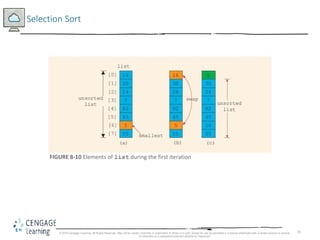
• Selection sort: rearrange the list by selecting an element and moving it to its
proper position
• Steps for a selection sort:
• Find the smallest element in the unsorted portion of the list
• Move it to the top of the unsorted portion by swapping with the element currently
there
• Start again with the rest of the list
© 2018 Cengage Learning. All Rights Reserved. May not be copied, scanned, or duplicated, in whole or in part, except for use as permitted in a license distributed with a certain product or service
or otherwise on a password-protected website for classroom
25
Selection Sort
FIGURE 8-10 Elements of list during the first iteration
© 2018 Cengage Learning. All Rights Reserved. May not be copied, scanned, or duplicated, in whole or in part, except for use as permitted in a license distributed with a certain product or service
or otherwise on a password-protected website for classroom
26
Auto Declaration and Range-Based for Loops
• C++11 allows auto declaration of variables
– Data type does not need to be specified
auto num = 15;
The type of num will be int
• Range-based for loop
double list[25];
double sum;
sum = 0;
for (double num : list) // read as “for each num in list”
sum = sum + num;
© 2018 Cengage Learning. All Rights Reserved. May not be copied, scanned, or duplicated, in whole or in part, except for use as permitted in a license distributed with a certain product or service
or otherwise on a password-protected website for classroom
27
C-Strings (Character Arrays) (1 of 3)
• A character array is an array whose components are of type char
• C-strings are null-terminated ('0') character arrays
• Examples
• 'A' is the character A
• "A" is the C-string A
• Note: "A" represents two characters, 'A' and '0'
© 2018 Cengage Learning. All Rights Reserved. May not be copied, scanned, or duplicated, in whole or in part, except for use as permitted in a license distributed with a certain product or service
or otherwise on a password-protected website for classroom
28
C-Strings (Character Arrays) (2 of 3)
• This is an example of a C-string declaration:
char name[16];
• Since C-strings are null terminated and name has 16 components, the largest
string it can store has 15 characters
• If you store a string whose length is less than the array size, the last
components are unused
© 2018 Cengage Learning. All Rights Reserved. May not be copied, scanned, or duplicated, in whole or in part, except for use as permitted in a license distributed with a certain product or service
or otherwise on a password-protected website for classroom
29
C-Strings (Character Arrays) (3 of 3)
• The size of an array can be omitted if the array is initialized during declaration
char name[] = "John";
– Declares an array of length 5 and stores the C-string "John" in the array
• Useful string manipulation functions include:
– strcpy
– strncpy
– strcmp
– strlen
© 2018 Cengage Learning. All Rights Reserved. May not be copied, scanned, or duplicated, in whole or in part, except for use as permitted in a license distributed with a certain product or service
or otherwise on a password-protected website for classroom
30
String Comparison
• C-strings are compared character by character using the collating sequence of
the system
• Use the function strcmp
• If using the ASCII character set:
• "Air" < "Boat"
• "Air" < "An"
• "Bill" < "Billy"
• "Hello" < "hello"
© 2018 Cengage Learning. All Rights Reserved. May not be copied, scanned, or duplicated, in whole or in part, except for use as permitted in a license distributed with a certain product or service
or otherwise on a password-protected website for classroom
31
Reading and Writing Strings
• Most rules for arrays also apply to C-strings (which are character arrays)
• Aggregate operations, such as assignment and comparison, are not allowed on
arrays
• C++ does allow aggregate operations for the input and output of C-strings
© 2018 Cengage Learning. All Rights Reserved. May not be copied, scanned, or duplicated, in whole or in part, except for use as permitted in a license distributed with a certain product or service
or otherwise on a password-protected website for classroom
32
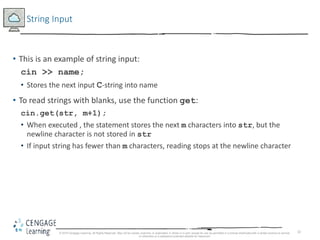
String Input
• This is an example of string input:
cin >> name;
• Stores the next input C-string into name
• To read strings with blanks, use the function get:
cin.get(str, m+1);
• When executed , the statement stores the next m characters into str, but the
newline character is not stored in str
• If input string has fewer than m characters, reading stops at the newline character
© 2018 Cengage Learning. All Rights Reserved. May not be copied, scanned, or duplicated, in whole or in part, except for use as permitted in a license distributed with a certain product or service
or otherwise on a password-protected website for classroom
33
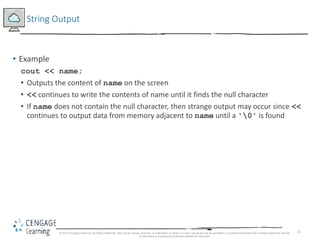
String Output
• Example
cout << name;
• Outputs the content of name on the screen
• << continues to write the contents of name until it finds the null character
• If name does not contain the null character, then strange output may occur since <<
continues to output data from memory adjacent to name until a '0' is found
© 2018 Cengage Learning. All Rights Reserved. May not be copied, scanned, or duplicated, in whole or in part, except for use as permitted in a license distributed with a certain product or service
or otherwise on a password-protected website for classroom
34
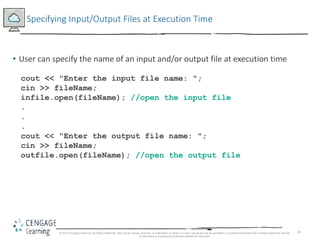
Specifying Input/Output Files at Execution Time
• User can specify the name of an input and/or output file at execution time
cout << "Enter the input file name: ";
cin >> fileName;
infile.open(fileName); //open the input file
.
.
.
cout << "Enter the output file name: ";
cin >> fileName;
outfile.open(fileName); //open the output file
© 2018 Cengage Learning. All Rights Reserved. May not be copied, scanned, or duplicated, in whole or in part, except for use as permitted in a license distributed with a certain product or service
or otherwise on a password-protected website for classroom
35
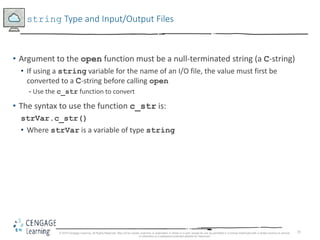
string Type and Input/Output Files
• Argument to the open function must be a null-terminated string (a C-string)
• If using a string variable for the name of an I/O file, the value must first be
converted to a C-string before calling open
- Use the c_str function to convert
• The syntax to use the function c_str is:
strVar.c_str()
• Where strVar is a variable of type string
© 2018 Cengage Learning. All Rights Reserved. May not be copied, scanned, or duplicated, in whole or in part, except for use as permitted in a license distributed with a certain product or service
or otherwise on a password-protected website for classroom
36
Parallel Arrays
• Two (or more) arrays are called parallel if their corresponding components hold
related information
• The following example illustrates two parallel arrays:
int studentId[50];
char courseGrade[50];
With the following sample data to enter into the arrays:
studentId courseGrade
23456 A
86723 B
22356 C
92733 B
11892 D
.
.
.
© 2018 Cengage Learning. All Rights Reserved. May not be copied, scanned, or duplicated, in whole or in part, except for use as permitted in a license distributed with a certain product or service
or otherwise on a password-protected website for classroom
37
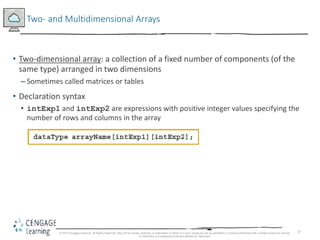
Two- and Multidimensional Arrays
• Two-dimensional array: a collection of a fixed number of components (of the
same type) arranged in two dimensions
– Sometimes called matrices or tables
• Declaration syntax
• intExp1 and intExp2 are expressions with positive integer values specifying the
number of rows and columns in the array
© 2018 Cengage Learning. All Rights Reserved. May not be copied, scanned, or duplicated, in whole or in part, except for use as permitted in a license distributed with a certain product or service
or otherwise on a password-protected website for classroom
38
Accessing Array Components (1 of 2)
• Syntax to access a component in a two-dimensional array
• Where indexExp1 and indexExp2 are expressions with positive integer values,
and specify the row and column position
• Example: sales[5][3] = 25.75;
© 2018 Cengage Learning. All Rights Reserved. May not be copied, scanned, or duplicated, in whole or in part, except for use as permitted in a license distributed with a certain product or service
or otherwise on a password-protected website for classroom
39
Accessing Array Components (2 of 2)
FIGURE 8-14 sales[5][3]
© 2018 Cengage Learning. All Rights Reserved. May not be copied, scanned, or duplicated, in whole or in part, except for use as permitted in a license distributed with a certain product or service
or otherwise on a password-protected website for classroom
40
Two-Dimensional Array Initialization During Declaration
• Two-dimensional arrays can be initialized when they are declared
• Elements of each row are enclosed within braces and separated by commas
• All rows are enclosed within braces
• For number arrays, unspecified elements are set to 0
• An example of two-dimensional array initialization is shown below:
int board[4][3] = {{2, 3, 1},
{15, 25, 13},
{20, 4, 7},
{11, 18, 14}};
© 2018 Cengage Learning. All Rights Reserved. May not be copied, scanned, or duplicated, in whole or in part, except for use as permitted in a license distributed with a certain product or service
or otherwise on a password-protected website for classroom
41
Two-Dimensional Arrays and Enumeration Types
• Enumeration types can be used for array indices
const int NUMBER_OF_ROWS = 6;
const int NUMBER_OF_COLUMNS = 5;
enum carType {GM, FORD, TOYOTA, BMW, NISSAN, VOLVO};
enum colorType {RED, BROWN, BLACK, WHITE, GRAY};
int inStock[NUMBER_OF_ROWS][NUMBER_OF_COLUMNS];
© 2018 Cengage Learning. All Rights Reserved. May not be copied, scanned, or duplicated, in whole or in part, except for use as permitted in a license distributed with a certain product or service
or otherwise on a password-protected website for classroom
42
Processing Two-Dimensional Arrays
• Ways to process a two-dimensional array:
• Process a single element
• Process the entire array
• Process a single row at a time, called row processing
• Process a single column at a time, called column processing
• Each row and each column of a two-dimensional array is a one-dimensional
array
• To process, use algorithms similar to processing one-dimensional arrays
© 2018 Cengage Learning. All Rights Reserved. May not be copied, scanned, or duplicated, in whole or in part, except for use as permitted in a license distributed with a certain product or service
or otherwise on a password-protected website for classroom
43
Initialization
• An example initializing row number 4 (fifth row) to 0:
row = 4;
for (col = 0; col < NUMBER_OF_COLUMNS; col++)
matrix[row][col] = 0;
• An example initializing the entire matrix to 0
for (row = 0; row < NUMBER_OF_ROWS; row++)
for (col = 0; col < NUMBER_OF_COLUMNS; col++)
matrix[row][col] = 0;
© 2018 Cengage Learning. All Rights Reserved. May not be copied, scanned, or duplicated, in whole or in part, except for use as permitted in a license distributed with a certain product or service
or otherwise on a password-protected website for classroom
44
Print
• Use a nested loop to output the components of a two dimensional array
for (row = 0; row < NUMBER_OF_ROWS; row++)
for (col = 0; col < NUMBER_OF_COLUMNS; col++)
cout << setw(5) << matrix[row][col] << " ";
cout << endl;
© 2018 Cengage Learning. All Rights Reserved. May not be copied, scanned, or duplicated, in whole or in part, except for use as permitted in a license distributed with a certain product or service
or otherwise on a password-protected website for classroom
45
Input
• An example of adding input to row number 4 (fifth row):
row = 4;
for (col = 0; col < NUMBER_OF_COLUMNS; col++)
cin >> matrix[row][col];
• An example of adding input to each component of matrix:
for (row = 0; row < NUMBER_OF_ROWS; row++)
for (col = 0; col < NUMBER_OF_COLUMNS; col++)
cin >> matrix[row][col];
© 2018 Cengage Learning. All Rights Reserved. May not be copied, scanned, or duplicated, in whole or in part, except for use as permitted in a license distributed with a certain product or service
or otherwise on a password-protected website for classroom
46
Sum by Row
• The following example shows how to find the sum of row number 4:
sum = 0;
row = 4;
for (col = 0; col < NUMBER_OF_COLUMNS; col++)
sum = sum + matrix[row][col];
© 2018 Cengage Learning. All Rights Reserved. May not be copied, scanned, or duplicated, in whole or in part, except for use as permitted in a license distributed with a certain product or service
or otherwise on a password-protected website for classroom
47
Sum by Column
• The following example illustrates finding the sum of each individual column:
//Sum of each individual row
for (row = 0; row < NUMBER_OF_ROWS; row++)
{
sum = 0;
for (col = 0; col < NUMBER_OF_COLUMNS; col++)
sum = sum + matrix[row][col];
cout << "Sum of row " << row + 1 << " = " << sum << endl;
}
© 2018 Cengage Learning. All Rights Reserved. May not be copied, scanned, or duplicated, in whole or in part, except for use as permitted in a license distributed with a certain product or service
or otherwise on a password-protected website for classroom
48
Largest Element in Each Row and Each Column
• The following example finds the largest element in each row:
//Largest element in each row
for (row = 0; row < NUMBER_OF_ROWS; row++)
{
largest = matrix[row][0]; //Assume the first element
//of the row is the largest.
for (col = 1; col < NUMBER_OF_COLUMNS; col++)
if (matrix[row][col] > largest)
largest = matrix[row][col];
cout << "The largest element in row " << row + 1
<< " = " << largest << endl;
}
© 2018 Cengage Learning. All Rights Reserved. May not be copied, scanned, or duplicated, in whole or in part, except for use as permitted in a license distributed with a certain product or service
or otherwise on a password-protected website for classroom
49
Passing Two-Dimensional Arrays as Parameters to Functions
• Two-dimensional arrays are passed by reference as parameters to a function
• The base address is passed to the formal parameter
• Two-dimensional arrays are stored in row order form
• When declaring a two-dimensional array as a formal parameter, you can omit
the size of the first dimension, but not the second
© 2018 Cengage Learning. All Rights Reserved. May not be copied, scanned, or duplicated, in whole or in part, except for use as permitted in a license distributed with a certain product or service
or otherwise on a password-protected website for classroom
50
Arrays of Strings
• Strings in C++ can be manipulated using either the data type string or
character arrays (C-strings)
© 2018 Cengage Learning. All Rights Reserved. May not be copied, scanned, or duplicated, in whole or in part, except for use as permitted in a license distributed with a certain product or service
or otherwise on a password-protected website for classroom
51
Arrays of Strings and the string Type
• The example below declares an array of 100 components of type string:
string list[100];
• Basic operations, such as assignment, comparison, and input/output, can be
performed on values of the string type
• The data in list can be processed just like any one-dimensional array
© 2018 Cengage Learning. All Rights Reserved. May not be copied, scanned, or duplicated, in whole or in part, except for use as permitted in a license distributed with a certain product or service
or otherwise on a password-protected website for classroom
52
Arrays of Strings and C-Strings (Character Arrays)
strcpy(list[1], "Snow White");
FIGURE 8-20 Array list, showing list[1]
© 2018 Cengage Learning. All Rights Reserved. May not be copied, scanned, or duplicated, in whole or in part, except for use as permitted in a license distributed with a certain product or service
or otherwise on a password-protected website for classroom
53
Another Way to Declare a Two-Dimensional Array
• Can use typedef to define a two-dimensional array data type:
const int NUMBER_OF_ROWS = 20;
const int NUMBER_OF_COLUMNS = 10;
typedef int tableType[NUMBER_OF_ROWS][NUMBER_OF_COLUMNS];
• This statement declares an array of 20 rows and 10 columns:
tableType matrix;
© 2018 Cengage Learning. All Rights Reserved. May not be copied, scanned, or duplicated, in whole or in part, except for use as permitted in a license distributed with a certain product or service
or otherwise on a password-protected website for classroom
54
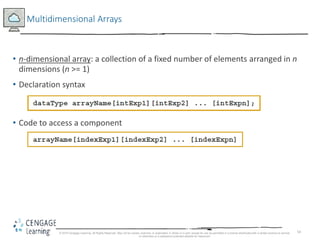
Multidimensional Arrays
• n-dimensional array: a collection of a fixed number of elements arranged in n
dimensions (n >= 1)
• Declaration syntax
• Code to access a component
© 2018 Cengage Learning. All Rights Reserved. May not be copied, scanned, or duplicated, in whole or in part, except for use as permitted in a license distributed with a certain product or service
or otherwise on a password-protected website for classroom
55
Quick Review (1 of 4)
• An array is a structured data type with a fixed number of components of the
same type
• Components are accessed using their relative positions in the array
• Elements of a one-dimensional array are arranged in the form of a list
• An array index can be any expression that evaluates to a nonnegative integer
• Must always be less than the size of the array
© 2018 Cengage Learning. All Rights Reserved. May not be copied, scanned, or duplicated, in whole or in part, except for use as permitted in a license distributed with a certain product or service
or otherwise on a password-protected website for classroom
56
Quick Review (2 of 4)
• The base address of an array is the address of the first array component
• When passing an array as an actual parameter, use only its name
• Passed by reference only
• A function cannot return an array type value
• Individual array components can be passed as parameters to functions
© 2018 Cengage Learning. All Rights Reserved. May not be copied, scanned, or duplicated, in whole or in part, except for use as permitted in a license distributed with a certain product or service
or otherwise on a password-protected website for classroom
57
Quick Review (3 of 4)
• In C++, C-strings are null terminated and are stored in character arrays
• Commonly used C-string manipulation functions include: strcpy, strncpy,
strcmp, strncmp, and strlen
• Parallel arrays hold related information
• In a two-dimensional array, the elements are arranged in a table form
© 2018 Cengage Learning. All Rights Reserved. May not be copied, scanned, or duplicated, in whole or in part, except for use as permitted in a license distributed with a certain product or service
or otherwise on a password-protected website for classroom
58
Quick Review (4 of 4)
• To access an element of a two-dimensional array, you need a pair of indices:
one for row position, one for column position
• In row processing, a two-dimensional array is processed one row at a time
• In column processing, a two-dimensional array is processed one column at a
time
© 2018 Cengage Learning. All Rights Reserved. May not be copied, scanned, or duplicated, in whole or in part, except for use as permitted in a license distributed with a certain product or service
or otherwise on a password-protected website for classroom

9781337102087 ppt ch08

  • 1.
    1 C++ Programming: FromProblem Analysis to Program Design, Eighth Edition Chapter 8 Arrays and Strings
  • 2.
    2 Objectives (1 of3) • In this chapter, you will: • Learn the reasons for arrays • Explore how to declare and manipulate data into arrays • Understand the meaning of ‘‘array index out of bounds’’ • Learn how to declare and initialize arrays • Become familiar with the restrictions on array processing © 2018 Cengage Learning. All Rights Reserved. May not be copied, scanned, or duplicated, in whole or in part, except for use as permitted in a license distributed with a certain product or service or otherwise on a password-protected website for classroom
  • 3.
    3 Objectives (2 of3) • Discover how to pass an array as a parameter to a function • Learn how to search an array • Learn how to sort an array • Become aware of auto declarations • Learn about range-based for loops • Learn about C-strings © 2018 Cengage Learning. All Rights Reserved. May not be copied, scanned, or duplicated, in whole or in part, except for use as permitted in a license distributed with a certain product or service or otherwise on a password-protected website for classroom
  • 4.
    4 Objectives (3 of3) • Examine the use of string functions to process C-strings • Discover how to input data into—and output data from—a C-string • Learn about parallel arrays • Discover how to manipulate data in a two-dimensional array • Learn about multidimensional arrays © 2018 Cengage Learning. All Rights Reserved. May not be copied, scanned, or duplicated, in whole or in part, except for use as permitted in a license distributed with a certain product or service or otherwise on a password-protected website for classroom
  • 5.
    5 Introduction • Simple datatype: variables of these types can store only one value at a time • Structured data type: a data type in which each data item is a collection of other data items © 2018 Cengage Learning. All Rights Reserved. May not be copied, scanned, or duplicated, in whole or in part, except for use as permitted in a license distributed with a certain product or service or otherwise on a password-protected website for classroom
  • 6.
    6 Arrays • Array: acollection of a fixed number of components, all of the same data type • One-dimensional array: components are arranged in a list form • Syntax for declaring a one-dimensional array • intExp: any constant expression that evaluates to a positive integer © 2018 Cengage Learning. All Rights Reserved. May not be copied, scanned, or duplicated, in whole or in part, except for use as permitted in a license distributed with a certain product or service or otherwise on a password-protected website for classroom
  • 7.
    7 Accessing Array Components(1 of 3) • General syntax • indexExp: called the index • An expression with a nonnegative integer value • Value of the index is the position of the item in the array • []: array subscripting operator • Array index always starts at 0 © 2018 Cengage Learning. All Rights Reserved. May not be copied, scanned, or duplicated, in whole or in part, except for use as permitted in a license distributed with a certain product or service or otherwise on a password-protected website for classroom
  • 8.
    8 Accessing Array Components(2 of 3) This statement declares an array of 10 components: int list[10]; FIGURE 8-3 Array list list[5] = 34; stores 34 in list[5], the sixth component of the array list FIGURE 8-4 Array list after execution of the statement list[5]= 34; © 2018 Cengage Learning. All Rights Reserved. May not be copied, scanned, or duplicated, in whole or in part, except for use as permitted in a license distributed with a certain product or service or otherwise on a password-protected website for classroom
  • 9.
    9 Accessing Array Components(3 of 3) list[3] = 10; list[6] = 35; list[5] = list[3] + list[6]; FIGURE 8-5 Array list after execution of the statements list[3]= 10;, list[6]= 35;, and list[5] = list[3] + list[6]; © 2018 Cengage Learning. All Rights Reserved. May not be copied, scanned, or duplicated, in whole or in part, except for use as permitted in a license distributed with a certain product or service or otherwise on a password-protected website for classroom
  • 10.
    10 Processing One-Dimensional Arrays(1 of 3) • Basic operations on a one-dimensional array include: • Initializing • Inputting data • Outputting data stored in an array • Finding the largest and/or smallest element • Each operation requires ability to step through elements of the array • Easily accomplished using a loop © 2018 Cengage Learning. All Rights Reserved. May not be copied, scanned, or duplicated, in whole or in part, except for use as permitted in a license distributed with a certain product or service or otherwise on a password-protected website for classroom
  • 11.
    11 Processing One-Dimensional Arrays(2 of 3) • Given the declaration: int list[100]; //array of size 100 int i; • Use a for loop to access array elements: for (i = 0; i < 100; i++) //Line 1 cin >> list[i]; //Line 2 © 2018 Cengage Learning. All Rights Reserved. May not be copied, scanned, or duplicated, in whole or in part, except for use as permitted in a license distributed with a certain product or service or otherwise on a password-protected website for classroom
  • 12.
    12 Processing One-Dimensional Arrays(3 of 3) • Refer to Example 8-3 in the text, which shows how loops are used to process arrays • Initializing an array • Reading data into an array • Printing an array • Finding the sum and average of an array • Finding the largest element in an array © 2018 Cengage Learning. All Rights Reserved. May not be copied, scanned, or duplicated, in whole or in part, except for use as permitted in a license distributed with a certain product or service or otherwise on a password-protected website for classroom
  • 13.
    13 Array Index Outof Bounds • The index of an array is in bounds if the index is between 0 and ARRAY_SIZE - 1 • Otherwise, the index is out of bounds • In C++, there is no guard against indices that are out of bounds • This check is solely the programmer’s responsibility © 2018 Cengage Learning. All Rights Reserved. May not be copied, scanned, or duplicated, in whole or in part, except for use as permitted in a license distributed with a certain product or service or otherwise on a password-protected website for classroom
  • 14.
    14 Array Initialization DuringDeclaration • Arrays can be initialized during declaration – Values are placed between curly braces • Example 1 double sales[5] = {12.25, 32.50, 16.90, 23, 45.68} • Example 2: the array size is determined by the number of initial values in the braces if the array is declared without size specified double sales[] = {12.25, 32.50, 16.90, 23, 45.68} © 2018 Cengage Learning. All Rights Reserved. May not be copied, scanned, or duplicated, in whole or in part, except for use as permitted in a license distributed with a certain product or service or otherwise on a password-protected website for classroom
  • 15.
    15 Partial Initialization ofArrays During Declaration • The statement: int list[10] = {0}; – Declares an array of 10 components and initializes all of them to zero • The statement (an example of partial initialization of an array during declaration): int list[10] = {8, 5, 12}; – Declares an array of 10 components and initializes list[0] to 8, list[1] to 5, list[2] to 12 – All other components are initialized to 0 © 2018 Cengage Learning. All Rights Reserved. May not be copied, scanned, or duplicated, in whole or in part, except for use as permitted in a license distributed with a certain product or service or otherwise on a password-protected website for classroom
  • 16.
    16 Some Restrictions onArray Processing • Aggregate operation: any operation that manipulates the entire array as a single unit • Not allowed on arrays in C++ • Example int myList[5] = {0, 4, 8, 12, 16}; //Line 1 int yourList[5]; //Line 2 yourList = myList; //illegal • Solution for (int index = 0; index < 5; index++) yourList[index] = myList[index]; © 2018 Cengage Learning. All Rights Reserved. May not be copied, scanned, or duplicated, in whole or in part, except for use as permitted in a license distributed with a certain product or service or otherwise on a password-protected website for classroom
  • 17.
    17 Arrays as Parametersto Functions • Arrays are passed by reference only • Do not use symbol & when declaring an array as a formal parameter • The size of the array is usually omitted in the array parameter • If provided, it is ignored by the compiler • The following example illustrates a function header, which includes an array parameter and a parameter specifying the number of elements in the array: void initialize(int list[], int listSize) © 2018 Cengage Learning. All Rights Reserved. May not be copied, scanned, or duplicated, in whole or in part, except for use as permitted in a license distributed with a certain product or service or otherwise on a password-protected website for classroom
  • 18.
    18 Constant Arrays asFormal Parameters • Can prevent a function from changing the actual parameter when passed by reference • Use const in the declaration of the formal parameter • Example void example(int x[], const int y[], int sizeX, int sizeY) © 2018 Cengage Learning. All Rights Reserved. May not be copied, scanned, or duplicated, in whole or in part, except for use as permitted in a license distributed with a certain product or service or otherwise on a password-protected website for classroom
  • 19.
    19 Base Address ofan Array and Array in Computer Memory • The base address of an array is the address (memory location) of the first array component • If list is a one-dimensional array, its base address is the address of list[0] • When an array is passed as a parameter, the base address of the actual array is passed to the formal parameter © 2018 Cengage Learning. All Rights Reserved. May not be copied, scanned, or duplicated, in whole or in part, except for use as permitted in a license distributed with a certain product or service or otherwise on a password-protected website for classroom
  • 20.
    20 Functions Cannot Returna Value of the Type Array • C++ does not allow functions to return a value of type array • Refer to Example 8-6 in the text • Functions sumArray and indexLargestElement © 2018 Cengage Learning. All Rights Reserved. May not be copied, scanned, or duplicated, in whole or in part, except for use as permitted in a license distributed with a certain product or service or otherwise on a password-protected website for classroom
  • 21.
    21 Integral Data Typeand Array Indices • C++ allows any integral type to be used as an array index • Improves code readability • The following code illustrates improved readability: enum paintType {GREEN, RED, BLUE, BROWN, WHITE, ORANGE, YELLOW}; double paintSale[7]; paintType paint; for (paint = GREEN; paint <= YELLOW; paint = static_cast<paintType>(paint + 1)) paintSale[paint] = 0.0; paintSale[RED] = paintSale[RED] + 75.69; © 2018 Cengage Learning. All Rights Reserved. May not be copied, scanned, or duplicated, in whole or in part, except for use as permitted in a license distributed with a certain product or service or otherwise on a password-protected website for classroom
  • 22.
    22 Other Ways toDeclare Arrays • Example 1 const int NO_OF_STUDENTS = 20; int testScores[NO_OF_STUDENTS]; • Example 2 const int SIZE = 50; //Line 1 typedef double list[SIZE]; //Line 2 list yourList; //Line 3 list myList; //Line 4 © 2018 Cengage Learning. All Rights Reserved. May not be copied, scanned, or duplicated, in whole or in part, except for use as permitted in a license distributed with a certain product or service or otherwise on a password-protected website for classroom
  • 23.
    23 Searching an Arrayfor a Specific Item • Sequential search (or linear search) • Searching a list for a given item, starting from the first array element • Compare each element in the array with value that is being searched • Continue the search until item is found or no more data is left in the list © 2018 Cengage Learning. All Rights Reserved. May not be copied, scanned, or duplicated, in whole or in part, except for use as permitted in a license distributed with a certain product or service or otherwise on a password-protected website for classroom
  • 24.
    24 Sorting • Selection sort:rearrange the list by selecting an element and moving it to its proper position • Steps for a selection sort: • Find the smallest element in the unsorted portion of the list • Move it to the top of the unsorted portion by swapping with the element currently there • Start again with the rest of the list © 2018 Cengage Learning. All Rights Reserved. May not be copied, scanned, or duplicated, in whole or in part, except for use as permitted in a license distributed with a certain product or service or otherwise on a password-protected website for classroom
  • 25.
    25 Selection Sort FIGURE 8-10Elements of list during the first iteration © 2018 Cengage Learning. All Rights Reserved. May not be copied, scanned, or duplicated, in whole or in part, except for use as permitted in a license distributed with a certain product or service or otherwise on a password-protected website for classroom
  • 26.
    26 Auto Declaration andRange-Based for Loops • C++11 allows auto declaration of variables – Data type does not need to be specified auto num = 15; The type of num will be int • Range-based for loop double list[25]; double sum; sum = 0; for (double num : list) // read as “for each num in list” sum = sum + num; © 2018 Cengage Learning. All Rights Reserved. May not be copied, scanned, or duplicated, in whole or in part, except for use as permitted in a license distributed with a certain product or service or otherwise on a password-protected website for classroom
  • 27.
    27 C-Strings (Character Arrays)(1 of 3) • A character array is an array whose components are of type char • C-strings are null-terminated ('0') character arrays • Examples • 'A' is the character A • "A" is the C-string A • Note: "A" represents two characters, 'A' and '0' © 2018 Cengage Learning. All Rights Reserved. May not be copied, scanned, or duplicated, in whole or in part, except for use as permitted in a license distributed with a certain product or service or otherwise on a password-protected website for classroom
  • 28.
    28 C-Strings (Character Arrays)(2 of 3) • This is an example of a C-string declaration: char name[16]; • Since C-strings are null terminated and name has 16 components, the largest string it can store has 15 characters • If you store a string whose length is less than the array size, the last components are unused © 2018 Cengage Learning. All Rights Reserved. May not be copied, scanned, or duplicated, in whole or in part, except for use as permitted in a license distributed with a certain product or service or otherwise on a password-protected website for classroom
  • 29.
    29 C-Strings (Character Arrays)(3 of 3) • The size of an array can be omitted if the array is initialized during declaration char name[] = "John"; – Declares an array of length 5 and stores the C-string "John" in the array • Useful string manipulation functions include: – strcpy – strncpy – strcmp – strlen © 2018 Cengage Learning. All Rights Reserved. May not be copied, scanned, or duplicated, in whole or in part, except for use as permitted in a license distributed with a certain product or service or otherwise on a password-protected website for classroom
  • 30.
    30 String Comparison • C-stringsare compared character by character using the collating sequence of the system • Use the function strcmp • If using the ASCII character set: • "Air" < "Boat" • "Air" < "An" • "Bill" < "Billy" • "Hello" < "hello" © 2018 Cengage Learning. All Rights Reserved. May not be copied, scanned, or duplicated, in whole or in part, except for use as permitted in a license distributed with a certain product or service or otherwise on a password-protected website for classroom
  • 31.
    31 Reading and WritingStrings • Most rules for arrays also apply to C-strings (which are character arrays) • Aggregate operations, such as assignment and comparison, are not allowed on arrays • C++ does allow aggregate operations for the input and output of C-strings © 2018 Cengage Learning. All Rights Reserved. May not be copied, scanned, or duplicated, in whole or in part, except for use as permitted in a license distributed with a certain product or service or otherwise on a password-protected website for classroom
  • 32.
    32 String Input • Thisis an example of string input: cin >> name; • Stores the next input C-string into name • To read strings with blanks, use the function get: cin.get(str, m+1); • When executed , the statement stores the next m characters into str, but the newline character is not stored in str • If input string has fewer than m characters, reading stops at the newline character © 2018 Cengage Learning. All Rights Reserved. May not be copied, scanned, or duplicated, in whole or in part, except for use as permitted in a license distributed with a certain product or service or otherwise on a password-protected website for classroom
  • 33.
    33 String Output • Example cout<< name; • Outputs the content of name on the screen • << continues to write the contents of name until it finds the null character • If name does not contain the null character, then strange output may occur since << continues to output data from memory adjacent to name until a '0' is found © 2018 Cengage Learning. All Rights Reserved. May not be copied, scanned, or duplicated, in whole or in part, except for use as permitted in a license distributed with a certain product or service or otherwise on a password-protected website for classroom
  • 34.
    34 Specifying Input/Output Filesat Execution Time • User can specify the name of an input and/or output file at execution time cout << "Enter the input file name: "; cin >> fileName; infile.open(fileName); //open the input file . . . cout << "Enter the output file name: "; cin >> fileName; outfile.open(fileName); //open the output file © 2018 Cengage Learning. All Rights Reserved. May not be copied, scanned, or duplicated, in whole or in part, except for use as permitted in a license distributed with a certain product or service or otherwise on a password-protected website for classroom
  • 35.
    35 string Type andInput/Output Files • Argument to the open function must be a null-terminated string (a C-string) • If using a string variable for the name of an I/O file, the value must first be converted to a C-string before calling open - Use the c_str function to convert • The syntax to use the function c_str is: strVar.c_str() • Where strVar is a variable of type string © 2018 Cengage Learning. All Rights Reserved. May not be copied, scanned, or duplicated, in whole or in part, except for use as permitted in a license distributed with a certain product or service or otherwise on a password-protected website for classroom
  • 36.
    36 Parallel Arrays • Two(or more) arrays are called parallel if their corresponding components hold related information • The following example illustrates two parallel arrays: int studentId[50]; char courseGrade[50]; With the following sample data to enter into the arrays: studentId courseGrade 23456 A 86723 B 22356 C 92733 B 11892 D . . . © 2018 Cengage Learning. All Rights Reserved. May not be copied, scanned, or duplicated, in whole or in part, except for use as permitted in a license distributed with a certain product or service or otherwise on a password-protected website for classroom
  • 37.
    37 Two- and MultidimensionalArrays • Two-dimensional array: a collection of a fixed number of components (of the same type) arranged in two dimensions – Sometimes called matrices or tables • Declaration syntax • intExp1 and intExp2 are expressions with positive integer values specifying the number of rows and columns in the array © 2018 Cengage Learning. All Rights Reserved. May not be copied, scanned, or duplicated, in whole or in part, except for use as permitted in a license distributed with a certain product or service or otherwise on a password-protected website for classroom
  • 38.
    38 Accessing Array Components(1 of 2) • Syntax to access a component in a two-dimensional array • Where indexExp1 and indexExp2 are expressions with positive integer values, and specify the row and column position • Example: sales[5][3] = 25.75; © 2018 Cengage Learning. All Rights Reserved. May not be copied, scanned, or duplicated, in whole or in part, except for use as permitted in a license distributed with a certain product or service or otherwise on a password-protected website for classroom
  • 39.
    39 Accessing Array Components(2 of 2) FIGURE 8-14 sales[5][3] © 2018 Cengage Learning. All Rights Reserved. May not be copied, scanned, or duplicated, in whole or in part, except for use as permitted in a license distributed with a certain product or service or otherwise on a password-protected website for classroom
  • 40.
    40 Two-Dimensional Array InitializationDuring Declaration • Two-dimensional arrays can be initialized when they are declared • Elements of each row are enclosed within braces and separated by commas • All rows are enclosed within braces • For number arrays, unspecified elements are set to 0 • An example of two-dimensional array initialization is shown below: int board[4][3] = {{2, 3, 1}, {15, 25, 13}, {20, 4, 7}, {11, 18, 14}}; © 2018 Cengage Learning. All Rights Reserved. May not be copied, scanned, or duplicated, in whole or in part, except for use as permitted in a license distributed with a certain product or service or otherwise on a password-protected website for classroom
  • 41.
    41 Two-Dimensional Arrays andEnumeration Types • Enumeration types can be used for array indices const int NUMBER_OF_ROWS = 6; const int NUMBER_OF_COLUMNS = 5; enum carType {GM, FORD, TOYOTA, BMW, NISSAN, VOLVO}; enum colorType {RED, BROWN, BLACK, WHITE, GRAY}; int inStock[NUMBER_OF_ROWS][NUMBER_OF_COLUMNS]; © 2018 Cengage Learning. All Rights Reserved. May not be copied, scanned, or duplicated, in whole or in part, except for use as permitted in a license distributed with a certain product or service or otherwise on a password-protected website for classroom
  • 42.
    42 Processing Two-Dimensional Arrays •Ways to process a two-dimensional array: • Process a single element • Process the entire array • Process a single row at a time, called row processing • Process a single column at a time, called column processing • Each row and each column of a two-dimensional array is a one-dimensional array • To process, use algorithms similar to processing one-dimensional arrays © 2018 Cengage Learning. All Rights Reserved. May not be copied, scanned, or duplicated, in whole or in part, except for use as permitted in a license distributed with a certain product or service or otherwise on a password-protected website for classroom
  • 43.
    43 Initialization • An exampleinitializing row number 4 (fifth row) to 0: row = 4; for (col = 0; col < NUMBER_OF_COLUMNS; col++) matrix[row][col] = 0; • An example initializing the entire matrix to 0 for (row = 0; row < NUMBER_OF_ROWS; row++) for (col = 0; col < NUMBER_OF_COLUMNS; col++) matrix[row][col] = 0; © 2018 Cengage Learning. All Rights Reserved. May not be copied, scanned, or duplicated, in whole or in part, except for use as permitted in a license distributed with a certain product or service or otherwise on a password-protected website for classroom
  • 44.
    44 Print • Use anested loop to output the components of a two dimensional array for (row = 0; row < NUMBER_OF_ROWS; row++) for (col = 0; col < NUMBER_OF_COLUMNS; col++) cout << setw(5) << matrix[row][col] << " "; cout << endl; © 2018 Cengage Learning. All Rights Reserved. May not be copied, scanned, or duplicated, in whole or in part, except for use as permitted in a license distributed with a certain product or service or otherwise on a password-protected website for classroom
  • 45.
    45 Input • An exampleof adding input to row number 4 (fifth row): row = 4; for (col = 0; col < NUMBER_OF_COLUMNS; col++) cin >> matrix[row][col]; • An example of adding input to each component of matrix: for (row = 0; row < NUMBER_OF_ROWS; row++) for (col = 0; col < NUMBER_OF_COLUMNS; col++) cin >> matrix[row][col]; © 2018 Cengage Learning. All Rights Reserved. May not be copied, scanned, or duplicated, in whole or in part, except for use as permitted in a license distributed with a certain product or service or otherwise on a password-protected website for classroom
  • 46.
    46 Sum by Row •The following example shows how to find the sum of row number 4: sum = 0; row = 4; for (col = 0; col < NUMBER_OF_COLUMNS; col++) sum = sum + matrix[row][col]; © 2018 Cengage Learning. All Rights Reserved. May not be copied, scanned, or duplicated, in whole or in part, except for use as permitted in a license distributed with a certain product or service or otherwise on a password-protected website for classroom
  • 47.
    47 Sum by Column •The following example illustrates finding the sum of each individual column: //Sum of each individual row for (row = 0; row < NUMBER_OF_ROWS; row++) { sum = 0; for (col = 0; col < NUMBER_OF_COLUMNS; col++) sum = sum + matrix[row][col]; cout << "Sum of row " << row + 1 << " = " << sum << endl; } © 2018 Cengage Learning. All Rights Reserved. May not be copied, scanned, or duplicated, in whole or in part, except for use as permitted in a license distributed with a certain product or service or otherwise on a password-protected website for classroom
  • 48.
    48 Largest Element inEach Row and Each Column • The following example finds the largest element in each row: //Largest element in each row for (row = 0; row < NUMBER_OF_ROWS; row++) { largest = matrix[row][0]; //Assume the first element //of the row is the largest. for (col = 1; col < NUMBER_OF_COLUMNS; col++) if (matrix[row][col] > largest) largest = matrix[row][col]; cout << "The largest element in row " << row + 1 << " = " << largest << endl; } © 2018 Cengage Learning. All Rights Reserved. May not be copied, scanned, or duplicated, in whole or in part, except for use as permitted in a license distributed with a certain product or service or otherwise on a password-protected website for classroom
  • 49.
    49 Passing Two-Dimensional Arraysas Parameters to Functions • Two-dimensional arrays are passed by reference as parameters to a function • The base address is passed to the formal parameter • Two-dimensional arrays are stored in row order form • When declaring a two-dimensional array as a formal parameter, you can omit the size of the first dimension, but not the second © 2018 Cengage Learning. All Rights Reserved. May not be copied, scanned, or duplicated, in whole or in part, except for use as permitted in a license distributed with a certain product or service or otherwise on a password-protected website for classroom
  • 50.
    50 Arrays of Strings •Strings in C++ can be manipulated using either the data type string or character arrays (C-strings) © 2018 Cengage Learning. All Rights Reserved. May not be copied, scanned, or duplicated, in whole or in part, except for use as permitted in a license distributed with a certain product or service or otherwise on a password-protected website for classroom
  • 51.
    51 Arrays of Stringsand the string Type • The example below declares an array of 100 components of type string: string list[100]; • Basic operations, such as assignment, comparison, and input/output, can be performed on values of the string type • The data in list can be processed just like any one-dimensional array © 2018 Cengage Learning. All Rights Reserved. May not be copied, scanned, or duplicated, in whole or in part, except for use as permitted in a license distributed with a certain product or service or otherwise on a password-protected website for classroom
  • 52.
    52 Arrays of Stringsand C-Strings (Character Arrays) strcpy(list[1], "Snow White"); FIGURE 8-20 Array list, showing list[1] © 2018 Cengage Learning. All Rights Reserved. May not be copied, scanned, or duplicated, in whole or in part, except for use as permitted in a license distributed with a certain product or service or otherwise on a password-protected website for classroom
  • 53.
    53 Another Way toDeclare a Two-Dimensional Array • Can use typedef to define a two-dimensional array data type: const int NUMBER_OF_ROWS = 20; const int NUMBER_OF_COLUMNS = 10; typedef int tableType[NUMBER_OF_ROWS][NUMBER_OF_COLUMNS]; • This statement declares an array of 20 rows and 10 columns: tableType matrix; © 2018 Cengage Learning. All Rights Reserved. May not be copied, scanned, or duplicated, in whole or in part, except for use as permitted in a license distributed with a certain product or service or otherwise on a password-protected website for classroom
  • 54.
    54 Multidimensional Arrays • n-dimensionalarray: a collection of a fixed number of elements arranged in n dimensions (n >= 1) • Declaration syntax • Code to access a component © 2018 Cengage Learning. All Rights Reserved. May not be copied, scanned, or duplicated, in whole or in part, except for use as permitted in a license distributed with a certain product or service or otherwise on a password-protected website for classroom
  • 55.
    55 Quick Review (1of 4) • An array is a structured data type with a fixed number of components of the same type • Components are accessed using their relative positions in the array • Elements of a one-dimensional array are arranged in the form of a list • An array index can be any expression that evaluates to a nonnegative integer • Must always be less than the size of the array © 2018 Cengage Learning. All Rights Reserved. May not be copied, scanned, or duplicated, in whole or in part, except for use as permitted in a license distributed with a certain product or service or otherwise on a password-protected website for classroom
  • 56.
    56 Quick Review (2of 4) • The base address of an array is the address of the first array component • When passing an array as an actual parameter, use only its name • Passed by reference only • A function cannot return an array type value • Individual array components can be passed as parameters to functions © 2018 Cengage Learning. All Rights Reserved. May not be copied, scanned, or duplicated, in whole or in part, except for use as permitted in a license distributed with a certain product or service or otherwise on a password-protected website for classroom
  • 57.
    57 Quick Review (3of 4) • In C++, C-strings are null terminated and are stored in character arrays • Commonly used C-string manipulation functions include: strcpy, strncpy, strcmp, strncmp, and strlen • Parallel arrays hold related information • In a two-dimensional array, the elements are arranged in a table form © 2018 Cengage Learning. All Rights Reserved. May not be copied, scanned, or duplicated, in whole or in part, except for use as permitted in a license distributed with a certain product or service or otherwise on a password-protected website for classroom
  • 58.
    58 Quick Review (4of 4) • To access an element of a two-dimensional array, you need a pair of indices: one for row position, one for column position • In row processing, a two-dimensional array is processed one row at a time • In column processing, a two-dimensional array is processed one column at a time © 2018 Cengage Learning. All Rights Reserved. May not be copied, scanned, or duplicated, in whole or in part, except for use as permitted in a license distributed with a certain product or service or otherwise on a password-protected website for classroom