.Net classes and Objects
Recap
2
1. Complex data types : DataTables
2. Collections
3. RegEx Builder
4. Invoke Method
5. Invoke Code
Agenda
3
DataTables (1)
What?
• Is the type of variable that can store data as a simple spreadsheet with rows and columns, so that each
piece of data can be identified based on their unique column and row coordinates.
• It is representation of a single database table which has collection of rows and columns. In other words,
Collection of rows and columns is known as DataTable.
How can be created?
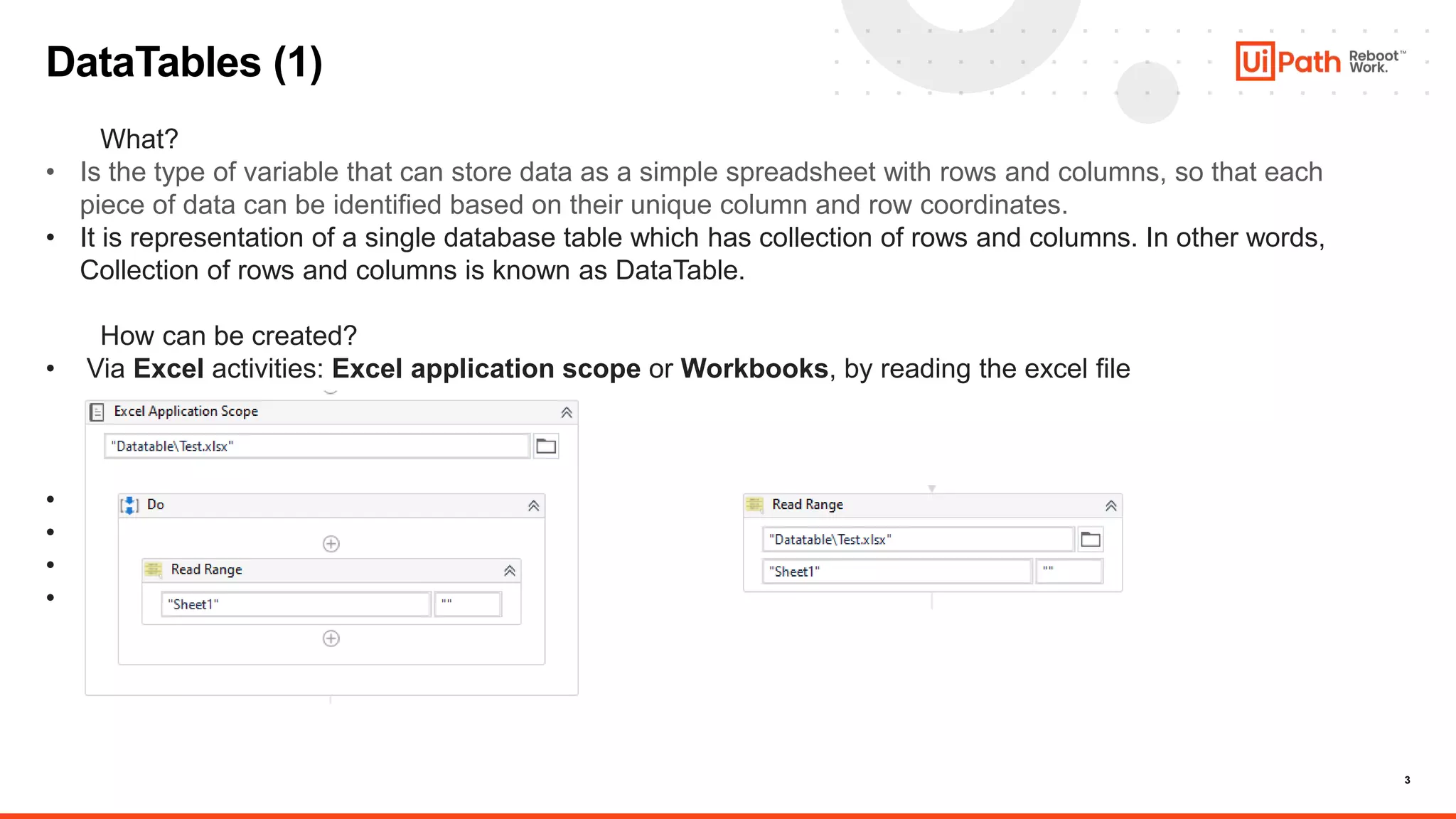
• Via Excel activities: Excel application scope or Workbooks, by reading the excel file
• Via Read CSV activity
• Via Build Data Table activity
• Via Data Scraping feature
• Via code
4
DataTables (2)
• Via Read CSV activity
• Via Build Data Table activity
• Via Data Scraping feature
• Via code
5
Excel Activities (3)
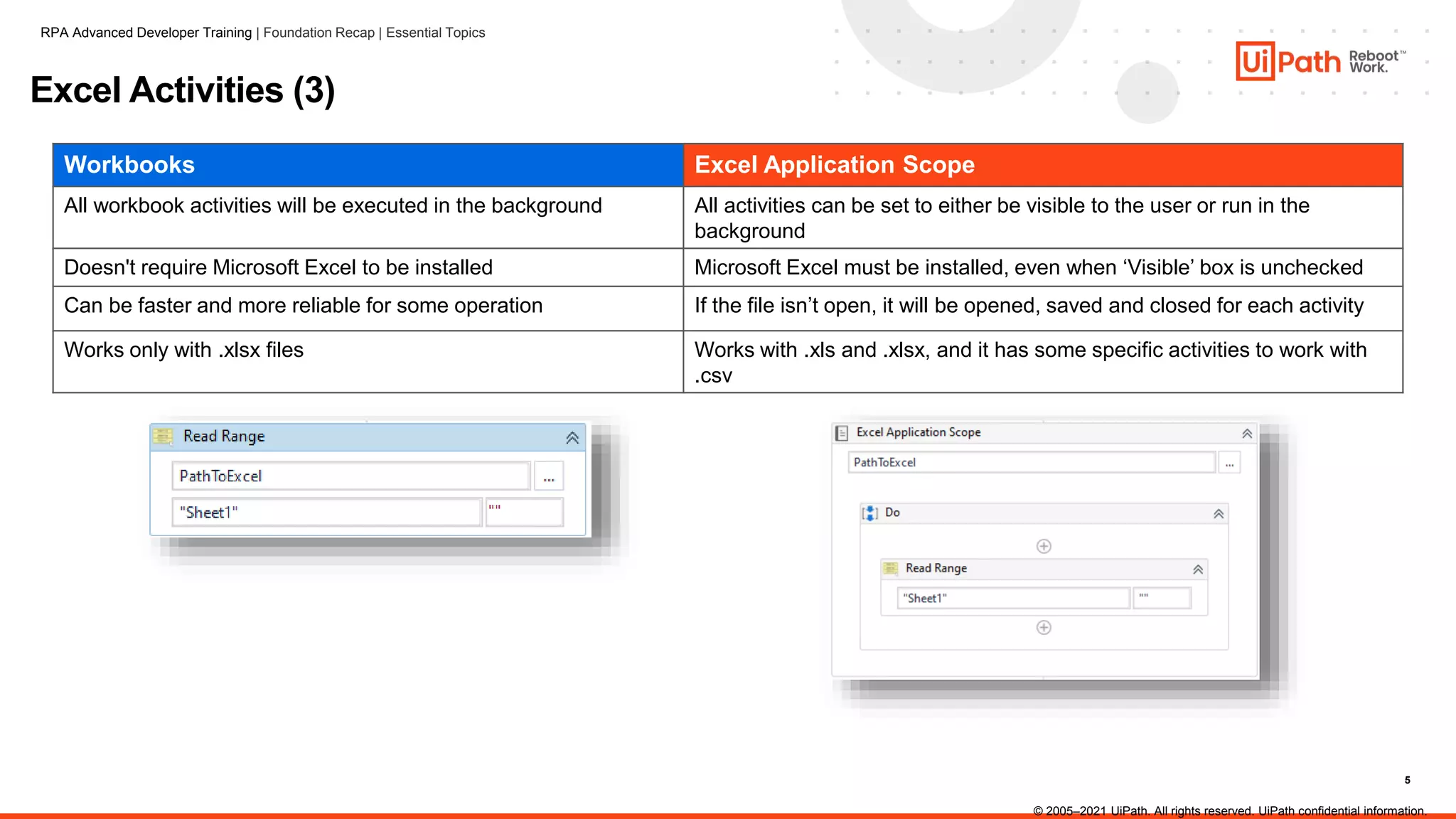
Workbooks Excel Application Scope
All workbook activities will be executed in the background All activities can be set to either be visible to the user or run in the
background
Doesn't require Microsoft Excel to be installed Microsoft Excel must be installed, even when ‘Visible’ box is unchecked
Can be faster and more reliable for some operation If the file isn’t open, it will be opened, saved and closed for each activity
Works only with .xlsx files Works with .xls and .xlsx, and it has some specific activities to work with
.csv
RPA Advanced Developer Training | Foundation Recap | Essential Topics
© 2005–2021 UiPath. All rights reserved. UiPath confidential information.
6
DataTables (4)
RPA Advanced Developer Training | Foundation Recap | Essential Topics
© 2005–2021 UiPath. All rights reserved. UiPath confidential information.
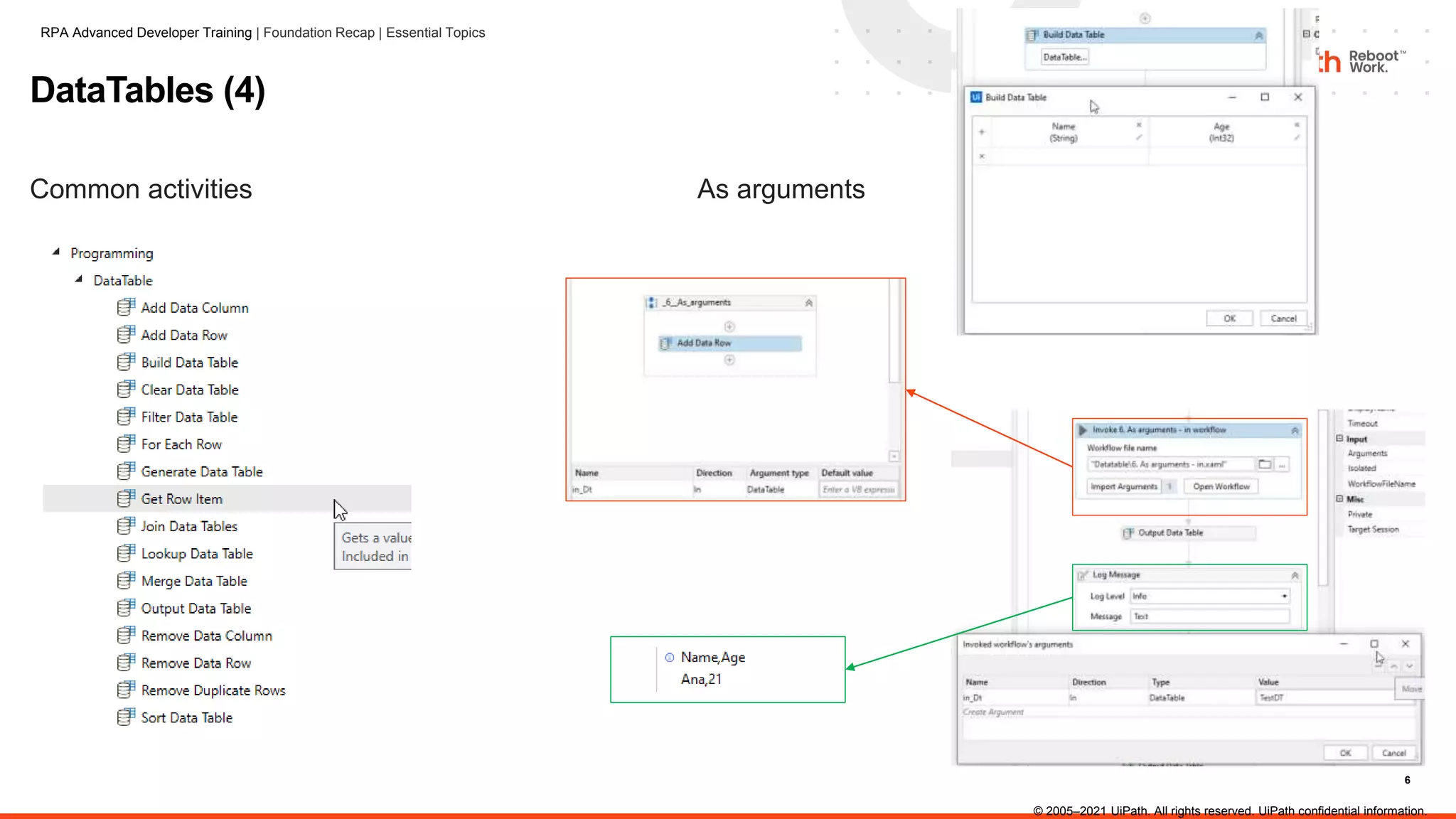
Common activities As arguments
7
DataTables (5)
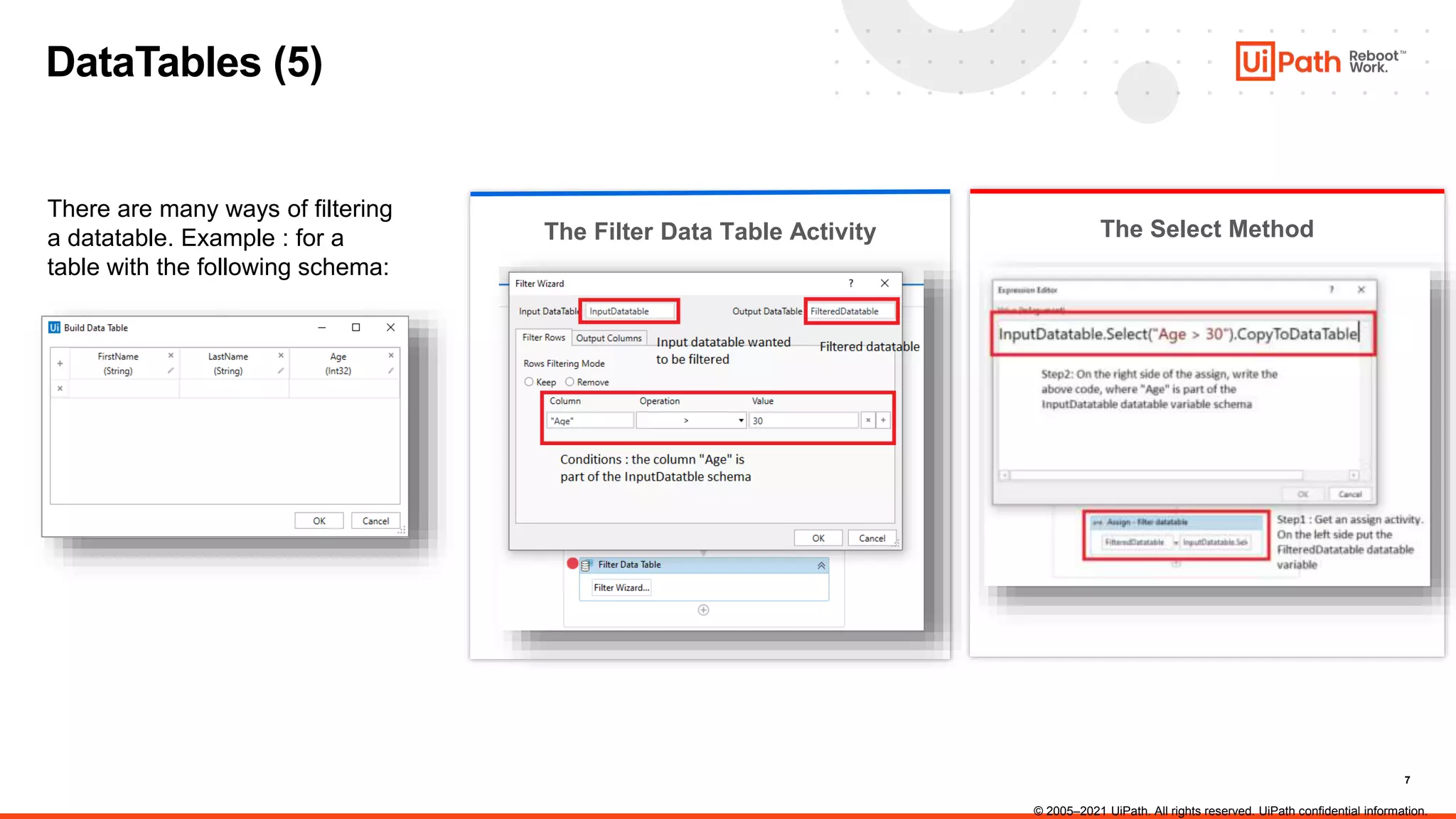
The Select Method
There are many ways of filtering
a datatable. Example : for a
table with the following schema:
The Filter Data Table Activity
© 2005–2021 UiPath. All rights reserved. UiPath confidential information.
8
Arrays
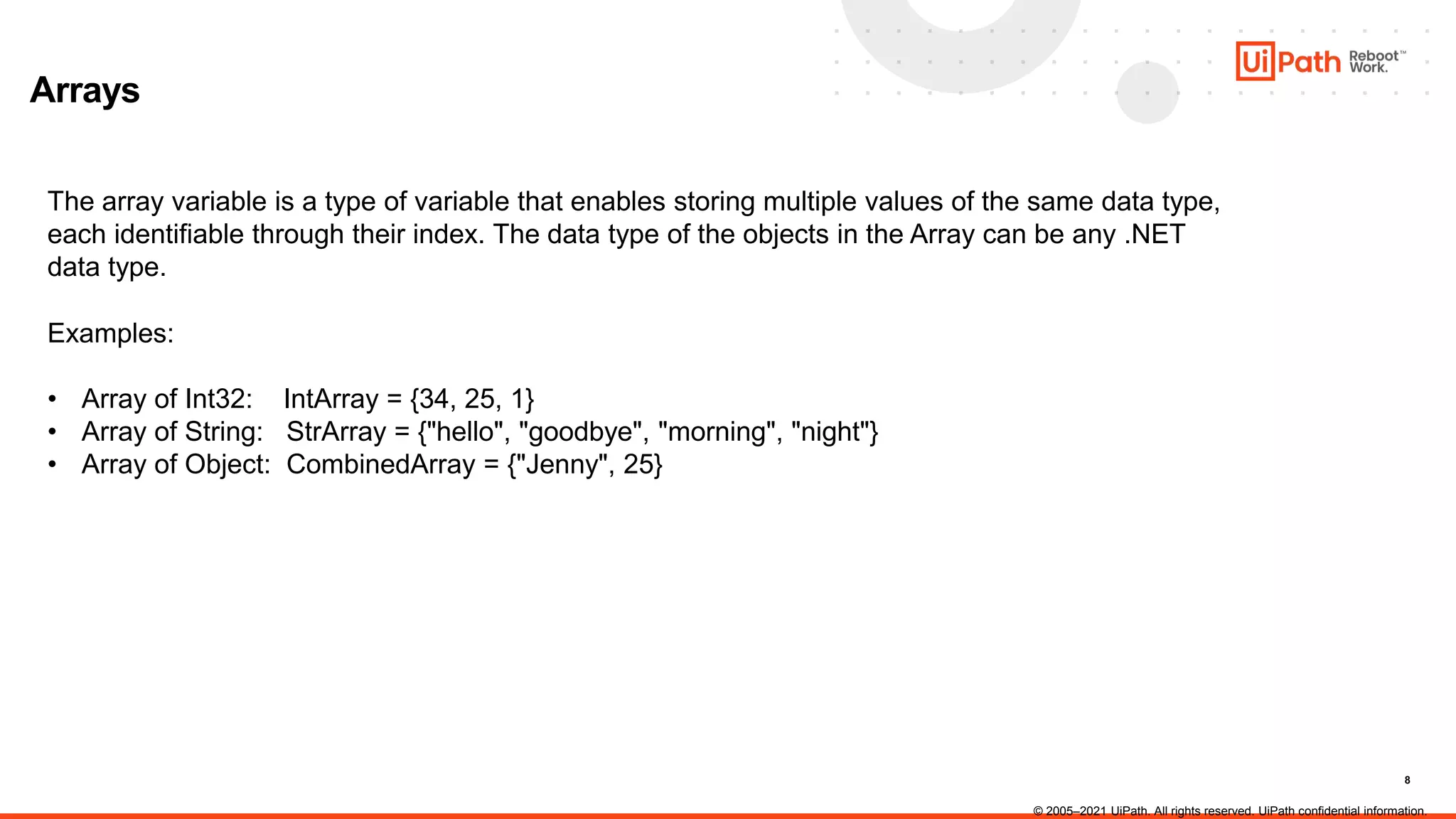
The array variable is a type of variable that enables storing multiple values of the same data type,
each identifiable through their index. The data type of the objects in the Array can be any .NET
data type.
Examples:
• Array of Int32: IntArray = {34, 25, 1}
• Array of String: StrArray = {"hello", "goodbye", "morning", "night"}
• Array of Object: CombinedArray = {"Jenny", 25}
© 2005–2021 UiPath. All rights reserved. UiPath confidential information.
9
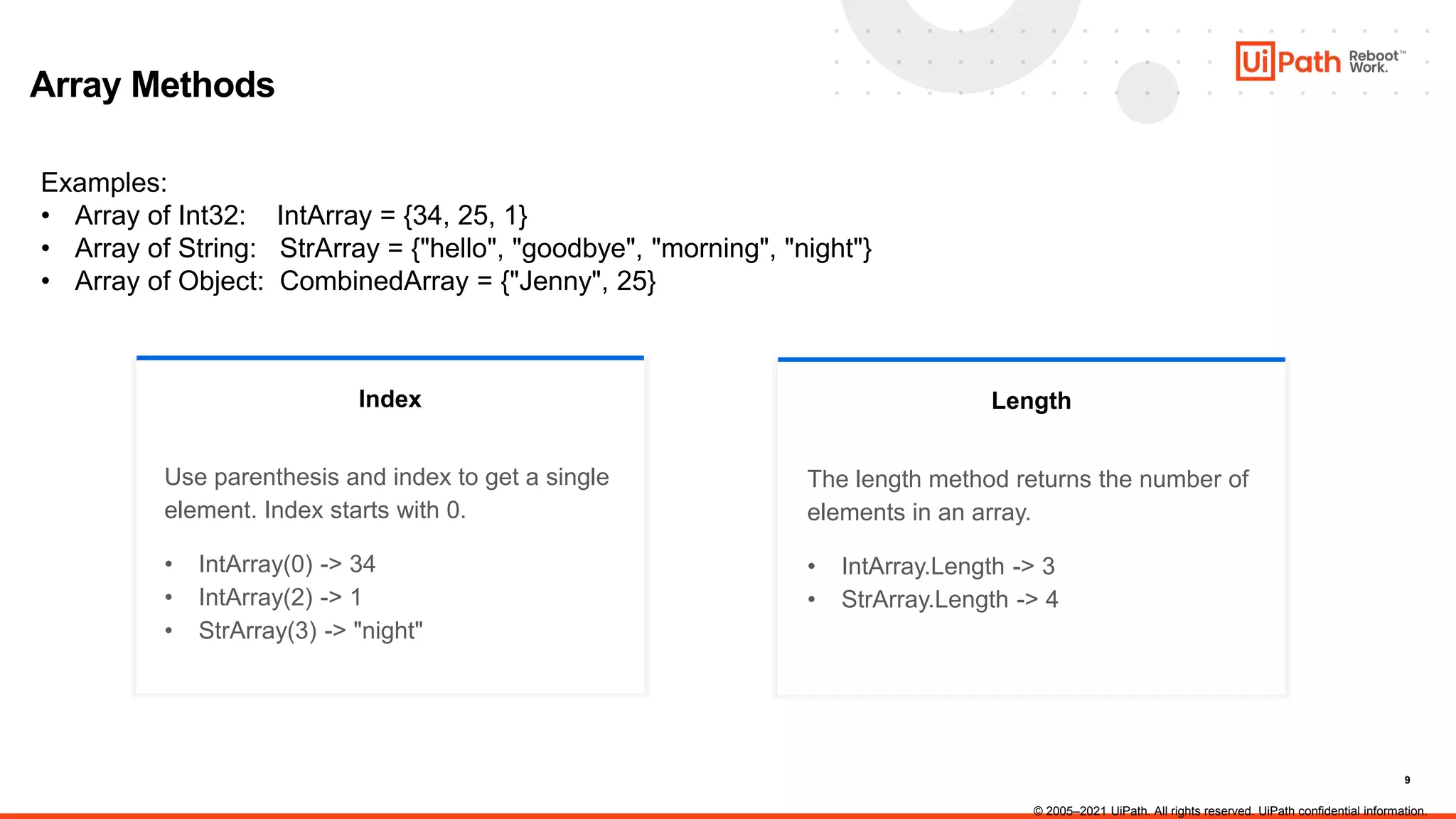
Index
Array Methods
Examples:
• Array of Int32: IntArray = {34, 25, 1}
• Array of String: StrArray = {"hello", "goodbye", "morning", "night"}
• Array of Object: CombinedArray = {"Jenny", 25}
Use parenthesis and index to get a single
element. Index starts with 0.
• IntArray(0) -> 34
• IntArray(2) -> 1
• StrArray(3) -> "night"
Length
The length method returns the number of
elements in an array.
• IntArray.Length -> 3
• StrArray.Length -> 4
© 2005–2021 UiPath. All rights reserved. UiPath confidential information.
10
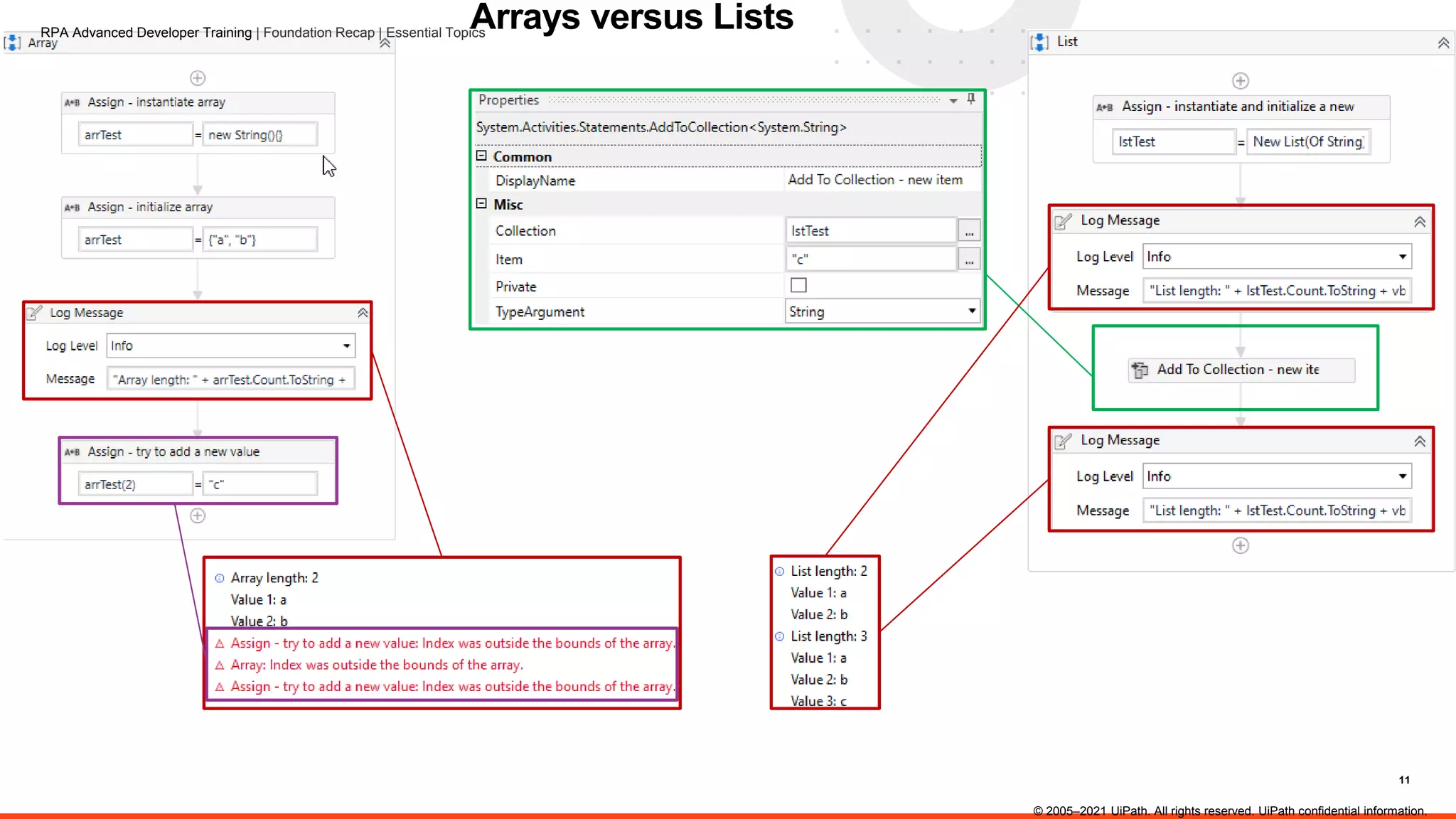
Arrays versus Lists
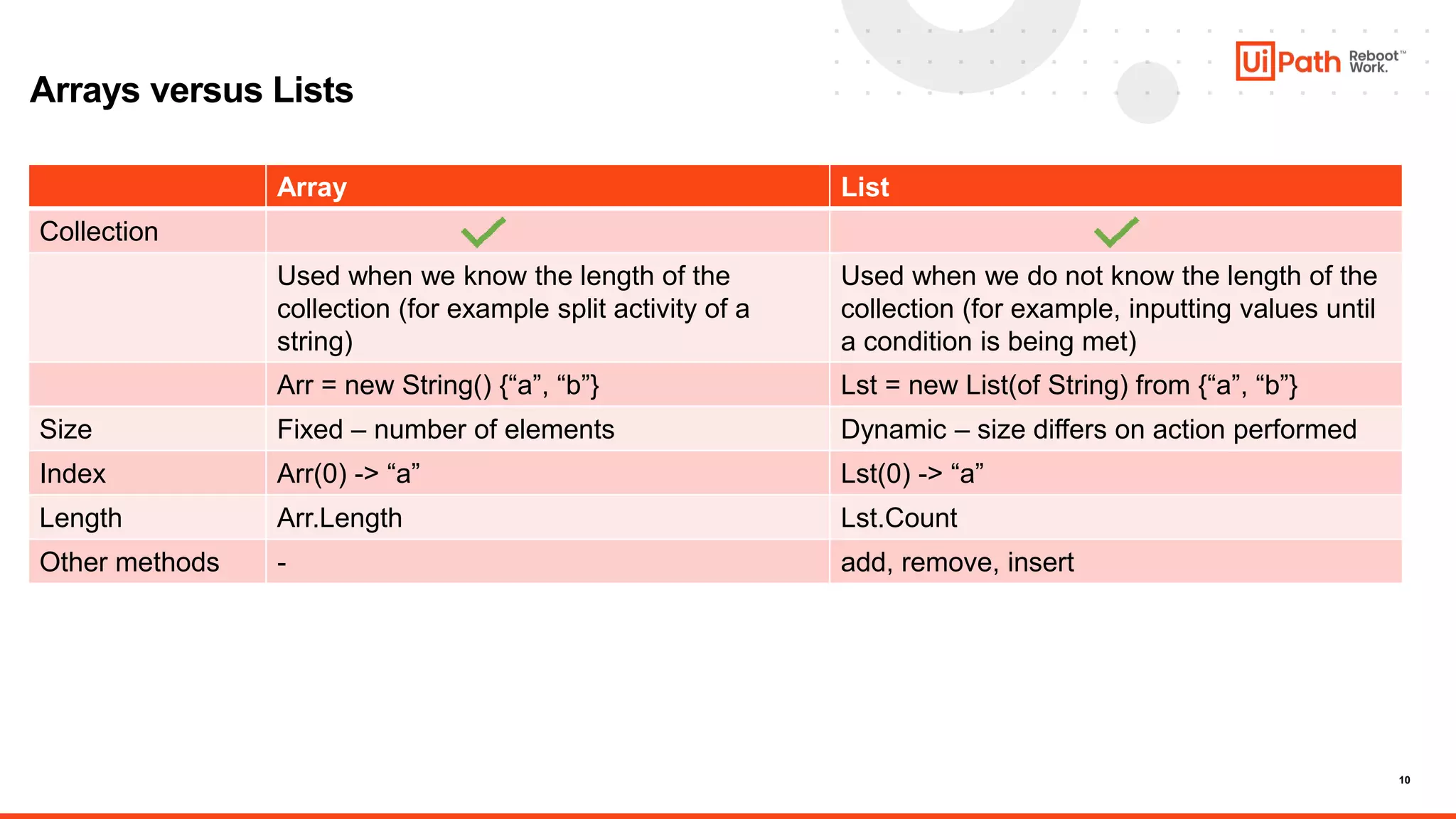
Array List
Collection
Used when we know the length of the
collection (for example split activity of a
string)
Used when we do not know the length of the
collection (for example, inputting values until
a condition is being met)
Arr = new String() {“a”, “b”} Lst = new List(of String) from {“a”, “b”}
Size Fixed – number of elements Dynamic – size differs on action performed
Index Arr(0) -> “a” Lst(0) -> “a”
Length Arr.Length Lst.Count
Other methods - add, remove, insert
11
Arrays versus Lists
© 2005–2021 UiPath. All rights reserved. UiPath confidential information.
RPA Advanced Developer Training | Foundation Recap | Essential Topics
12
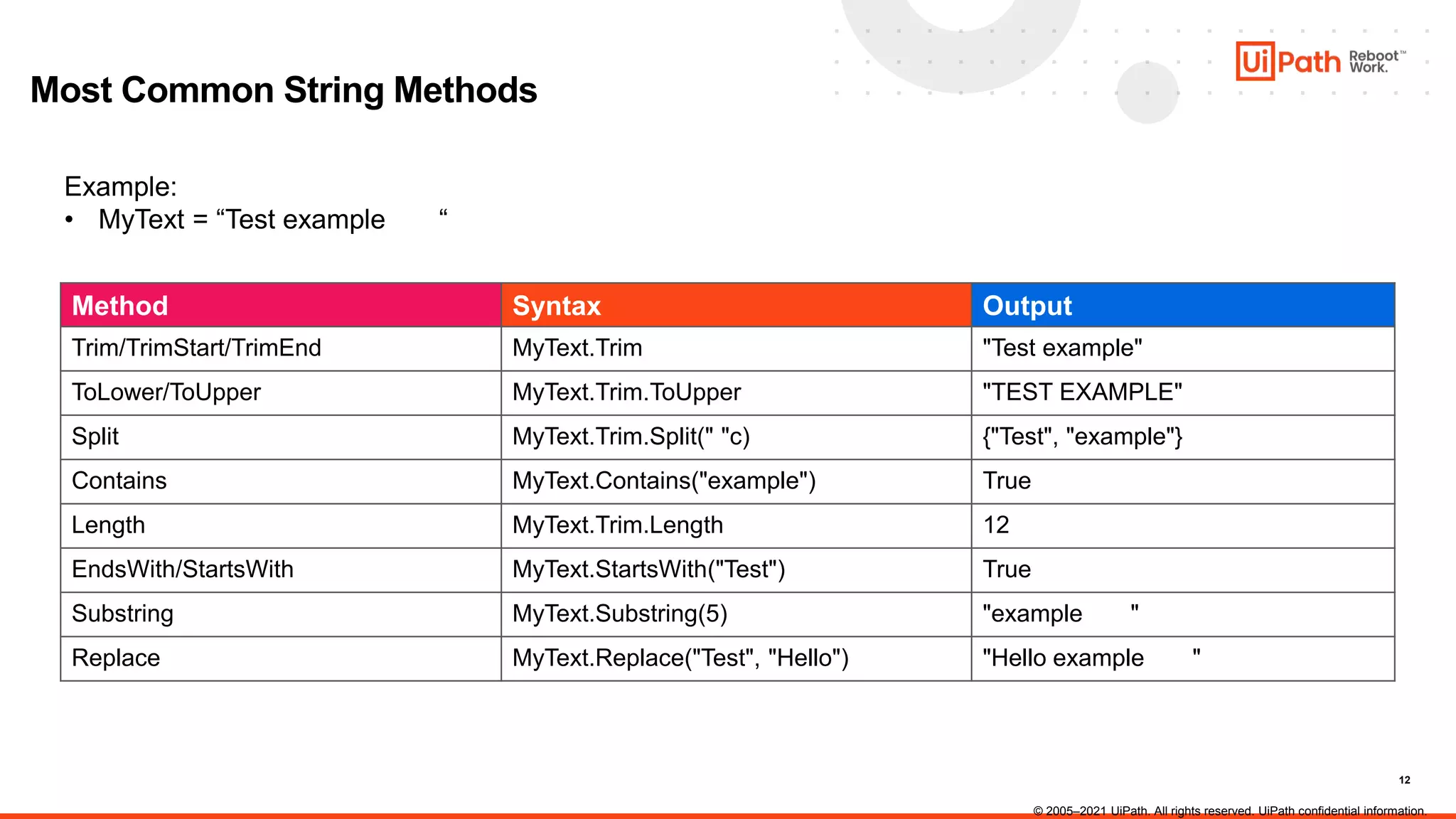
Most Common String Methods
Example:
• MyText = “Test example “
Method Syntax Output
Trim/TrimStart/TrimEnd MyText.Trim "Test example"
ToLower/ToUpper MyText.Trim.ToUpper "TEST EXAMPLE"
Split MyText.Trim.Split(" "c) {"Test", "example"}
Contains MyText.Contains("example") True
Length MyText.Trim.Length 12
EndsWith/StartsWith MyText.StartsWith("Test") True
Substring MyText.Substring(5) "example "
Replace MyText.Replace("Test", "Hello") "Hello example "
© 2005–2021 UiPath. All rights reserved. UiPath confidential information.
13
String Methods - Conversions
Variable Value Method Syntax Conversion type Output
MyVar = 3 ToString MyVar.ToString Int32 to String “3”
MyVar = “3” Cint Cint(MyVar) String to Int32 3
MyVar = "33.4" CDbl CDbl(MyVar) String to Double 33.4
MyVar = "6/10/2020
11:41:21"
CDate CDate(MyVar) String to Date 6/10/2020 11:41:21
MyVar = True ToString MyVar.ToString Boolean to String "True"
MyVar={"Hello","you"} String.Join String.Join(",", MyVar) String[] to String "Hello,you"
MyVar = new List(of
String) from {"Hello",
"there"}
String.Join String.Join(" ", MyVar) List<String> to String "Hello there"
© 2005–2021 UiPath. All rights reserved. UiPath confidential information.
14
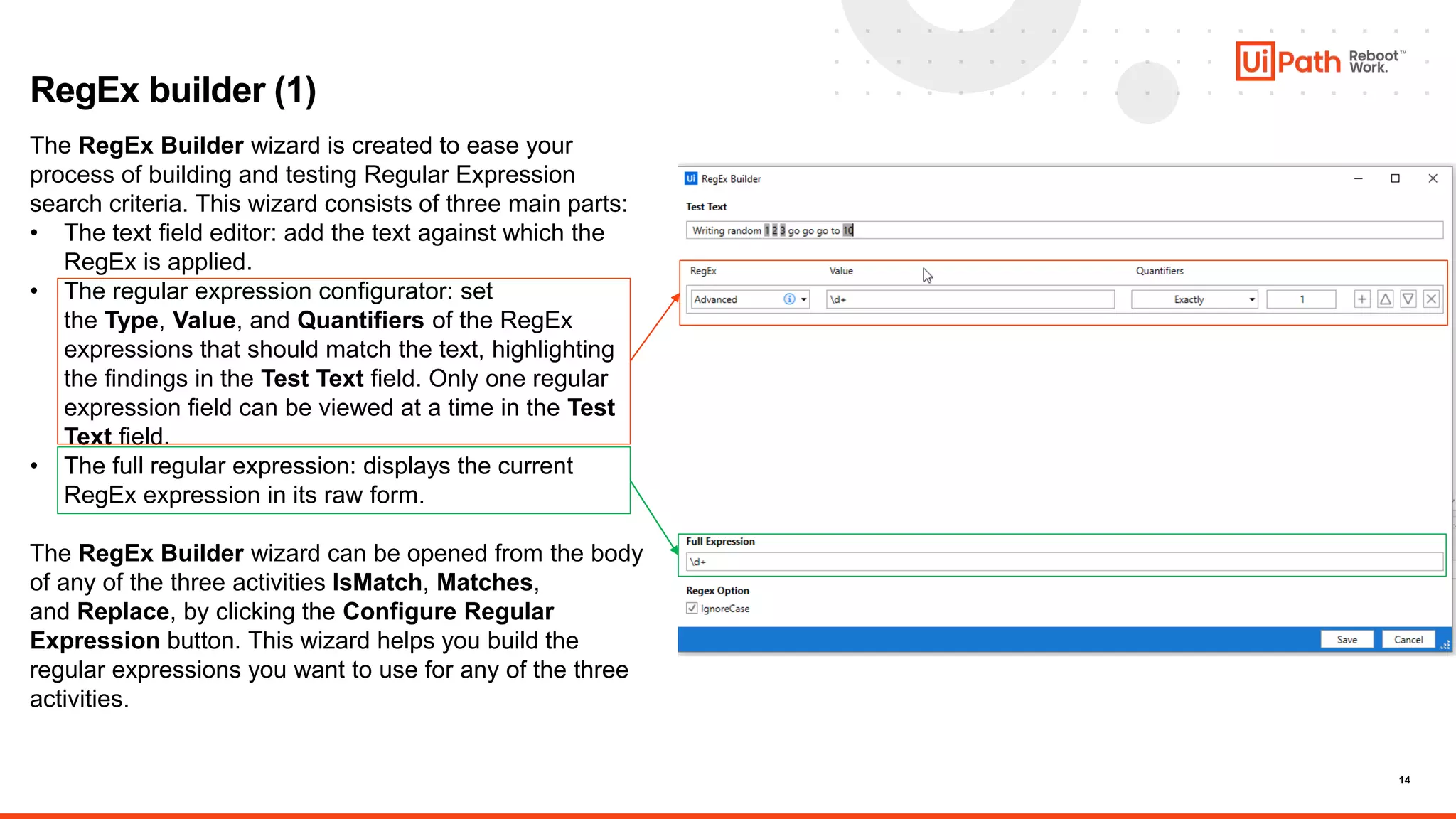
RegEx builder (1)
The RegEx Builder wizard is created to ease your
process of building and testing Regular Expression
search criteria. This wizard consists of three main parts:
• The text field editor: add the text against which the
RegEx is applied.
• The regular expression configurator: set
the Type, Value, and Quantifiers of the RegEx
expressions that should match the text, highlighting
the findings in the Test Text field. Only one regular
expression field can be viewed at a time in the Test
Text field.
• The full regular expression: displays the current
RegEx expression in its raw form.
The RegEx Builder wizard can be opened from the body
of any of the three activities IsMatch, Matches,
and Replace, by clicking the Configure Regular
Expression button. This wizard helps you build the
regular expressions you want to use for any of the three
activities.
15
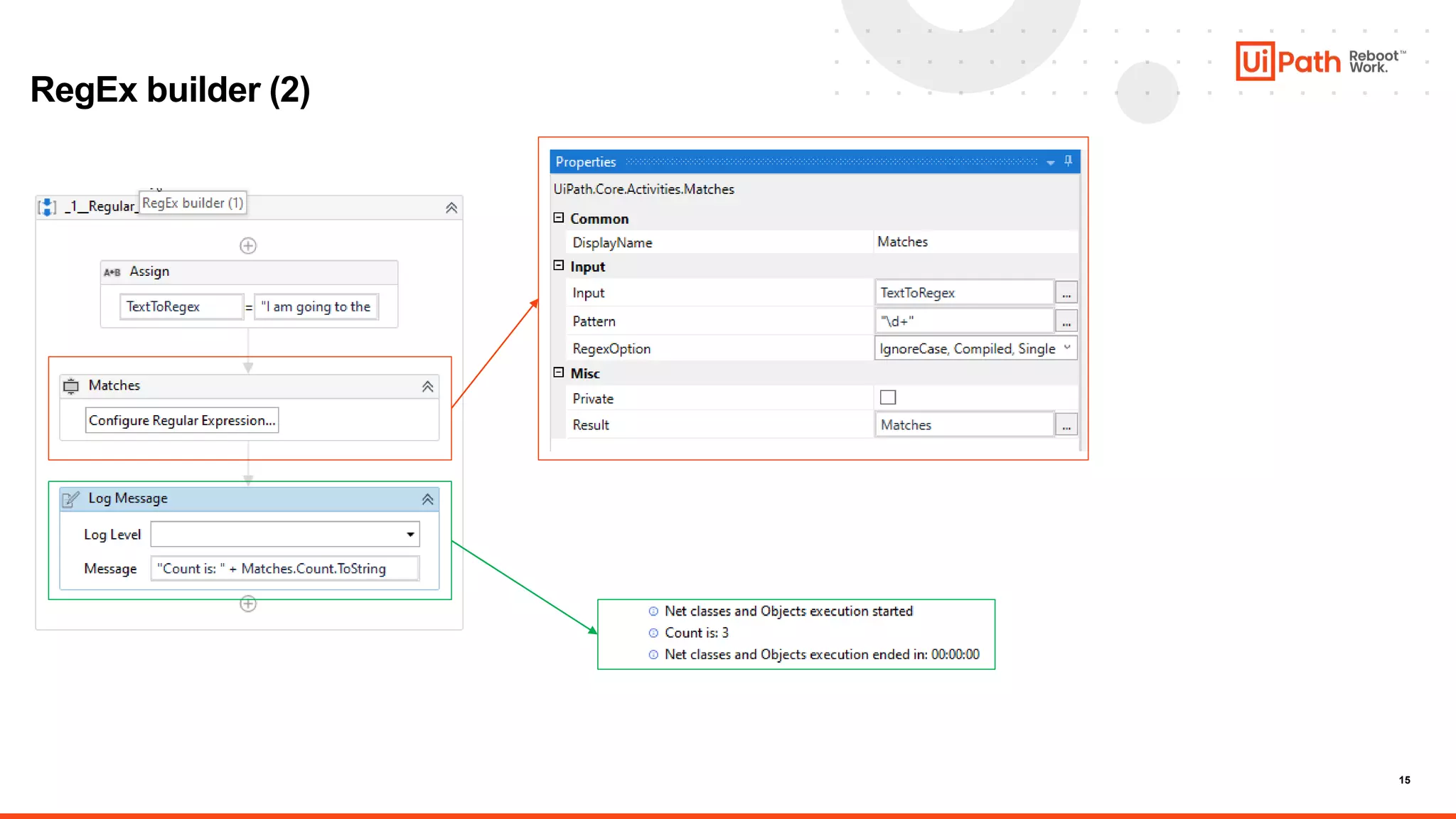
RegEx builder (2)
16
Introduction to Invoke Method Activity
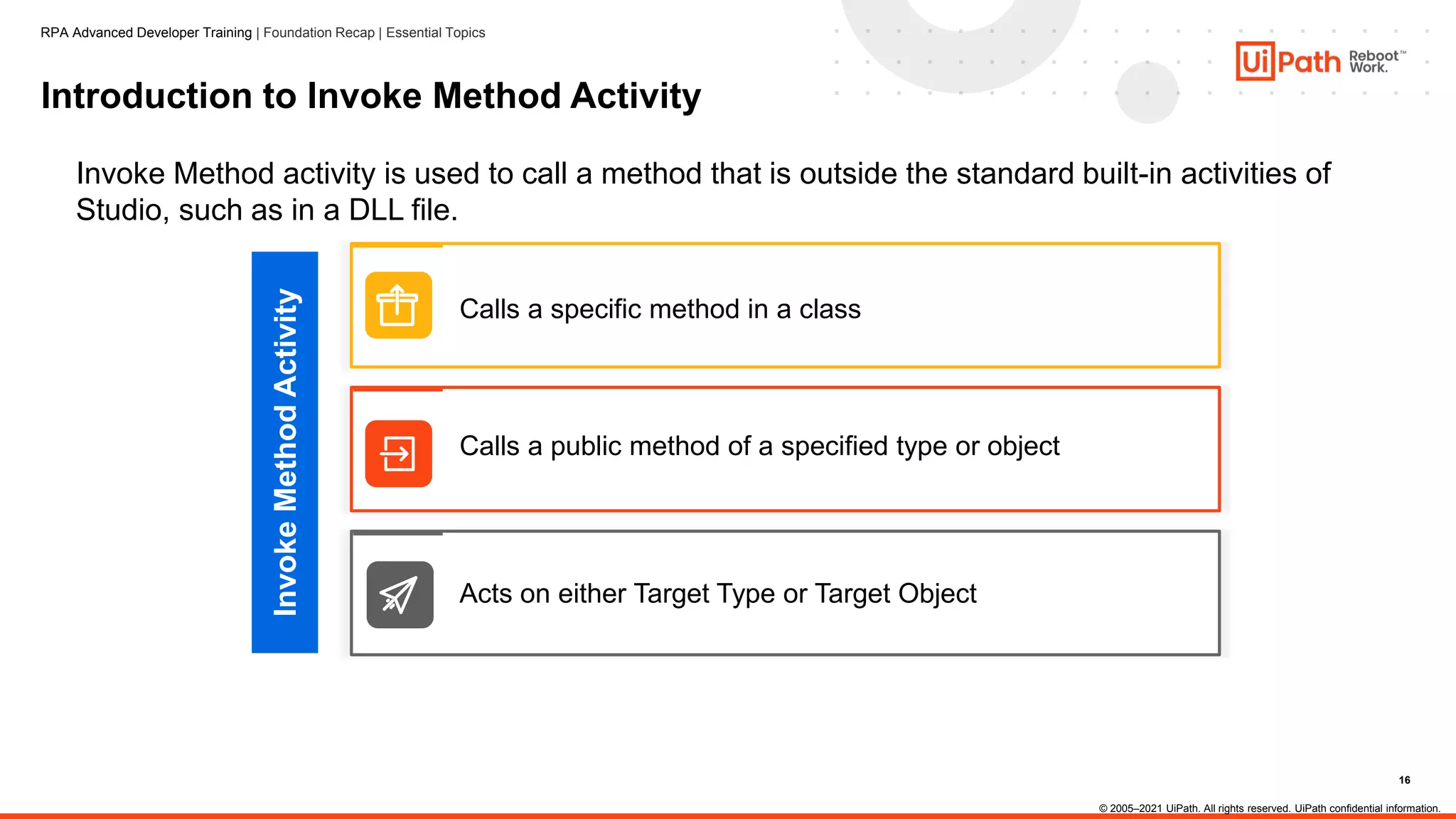
Invoke Method activity is used to call a method that is outside the standard built-in activities of
Studio, such as in a DLL file.
Calls a specific method in a class
Calls a public method of a specified type or object
Acts on either Target Type or Target Object
Invoke
Method
Activity
© 2005–2021 UiPath. All rights reserved. UiPath confidential information.
RPA Advanced Developer Training | Foundation Recap | Essential Topics
17
Properties of Invoke Method Activity
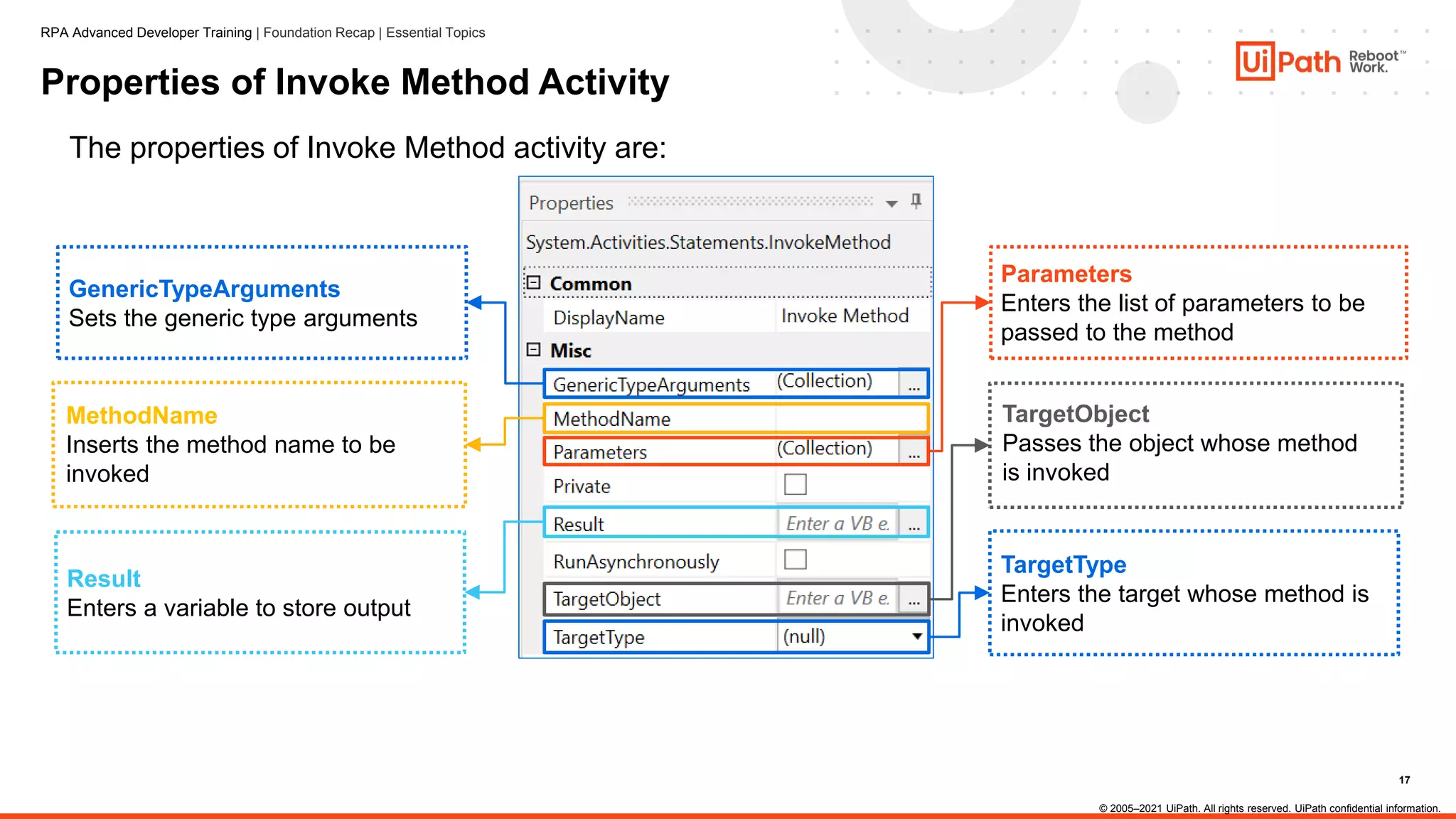
The properties of Invoke Method activity are:
GenericTypeArguments
Sets the generic type arguments
Parameters
Enters the list of parameters to be
passed to the method
MethodName
Inserts the method name to be
invoked
Result
Enters a variable to store output
TargetType
Enters the target whose method is
invoked
TargetObject
Passes the object whose method
is invoked
© 2005–2021 UiPath. All rights reserved. UiPath confidential information.
RPA Advanced Developer Training | Foundation Recap | Essential Topics
18
Types of Methods in Invoke Method Activity
Invoke Method activity can be used with the following methods:
Non-Static Method
• The object (from which the
method is derived) needs to be
defined
• TargetObject is used
Static Method
• Used for a class defined as static
• No need to define the object
• TargetType is used
© 2005–2021 UiPath. All rights reserved. UiPath confidential information.
RPA Advanced Developer Training | Foundation Recap | Essential Topics
19
Invoke Method
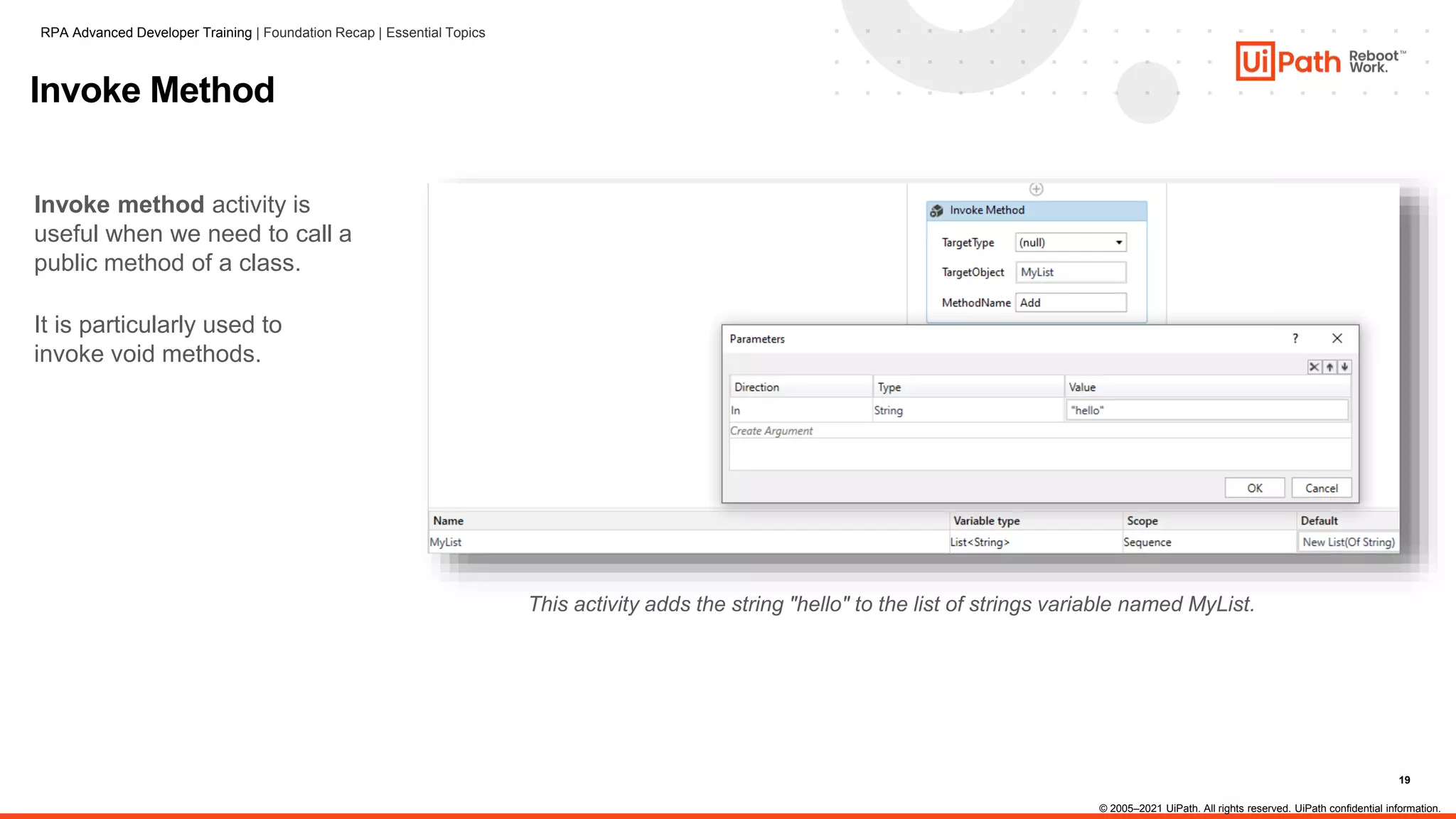
Invoke method activity is
useful when we need to call a
public method of a class.
It is particularly used to
invoke void methods.
This activity adds the string "hello" to the list of strings variable named MyList.
RPA Advanced Developer Training | Foundation Recap | Essential Topics
© 2005–2021 UiPath. All rights reserved. UiPath confidential information.
20
Configure Invoke Method Activity for DLL Files
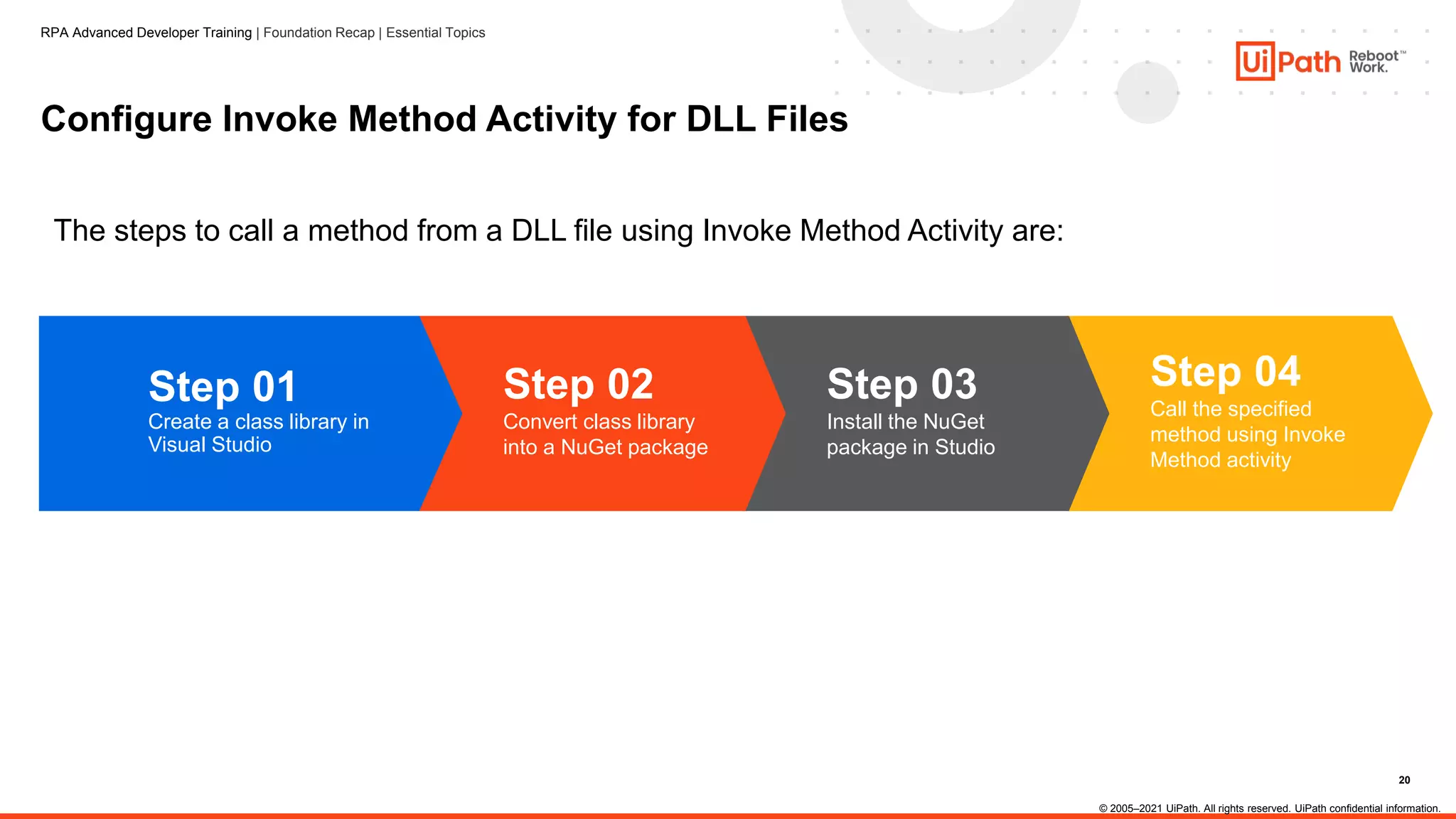
The steps to call a method from a DLL file using Invoke Method Activity are:
Step 04
Call the specified
method using Invoke
Method activity
Step 03
Install the NuGet
package in Studio
Step 02
Convert class library
into a NuGet package
Step 01
Create a class library in
Visual Studio
© 2005–2021 UiPath. All rights reserved. UiPath confidential information.
RPA Advanced Developer Training | Foundation Recap | Essential Topics
21
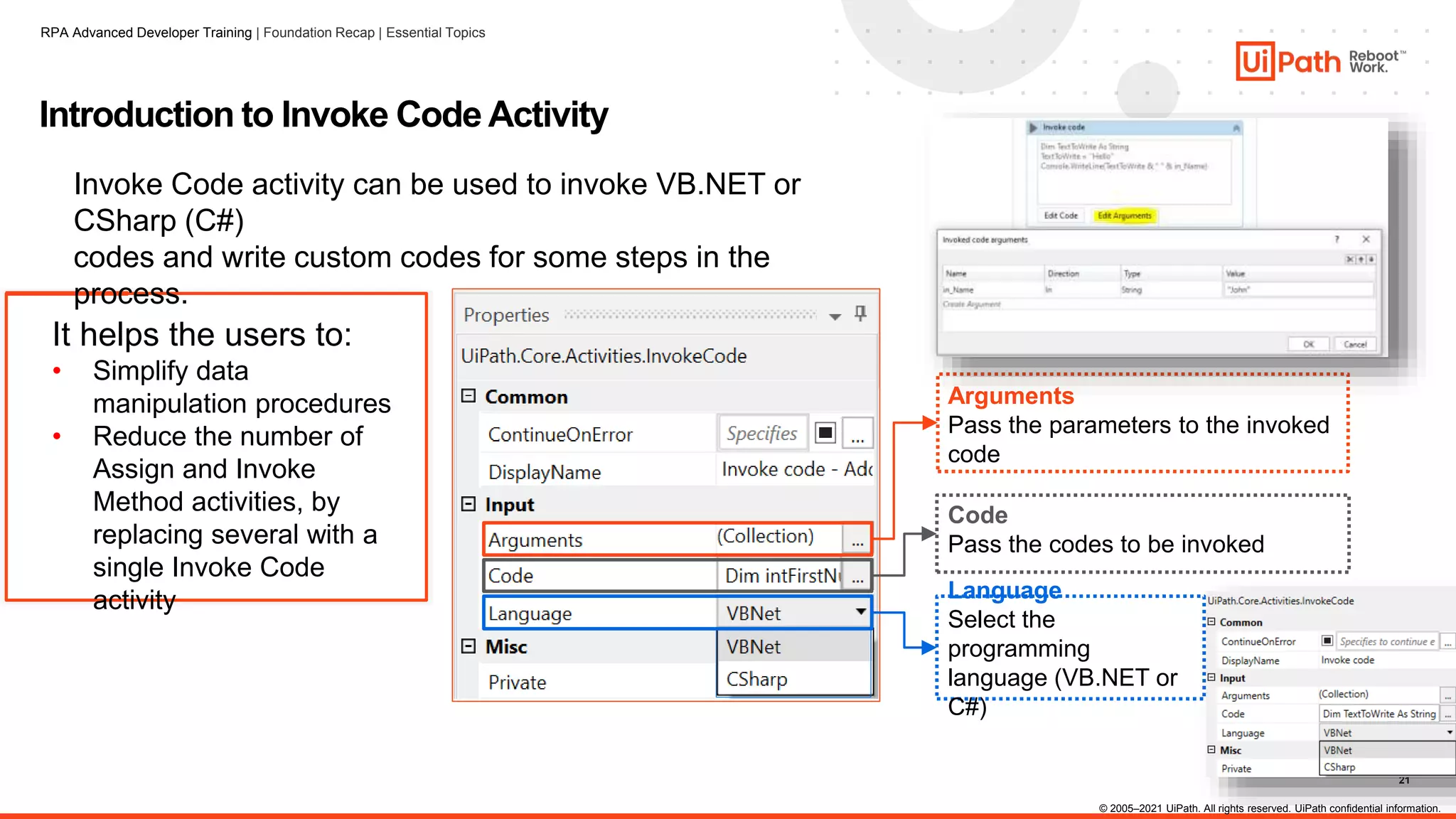
It helps the users to:
• Simplify data
manipulation procedures
• Reduce the number of
Assign and Invoke
Method activities, by
replacing several with a
single Invoke Code
activity
Introduction to Invoke Code Activity
Invoke Code activity can be used to invoke VB.NET or
CSharp (C#)
codes and write custom codes for some steps in the
process.
Arguments
Pass the parameters to the invoked
code
Language
Select the
programming
language (VB.NET or
C#)
Code
Pass the codes to be invoked
© 2005–2021 UiPath. All rights reserved. UiPath confidential information.
RPA Advanced Developer Training | Foundation Recap | Essential Topics
22
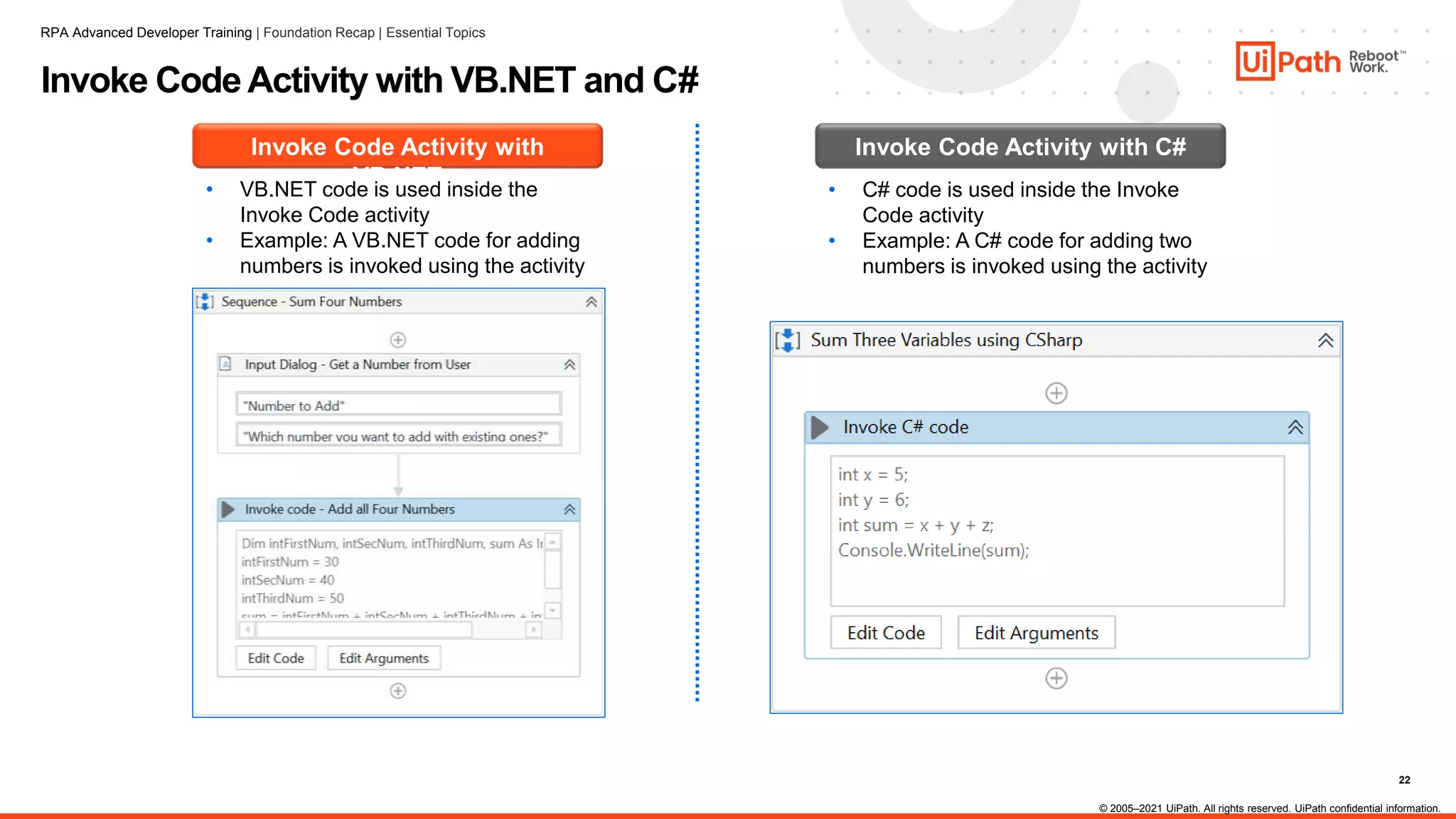
Invoke Code Activity with VB.NET and C#
Invoke Code Activity with
VB.NET
• VB.NET code is used inside the
Invoke Code activity
• Example: A VB.NET code for adding
numbers is invoked using the activity
Invoke Code Activity with C#
• C# code is used inside the Invoke
Code activity
• Example: A C# code for adding two
numbers is invoked using the activity
RPA Advanced Developer Training | Foundation Recap | Essential Topics
© 2005–2021 UiPath. All rights reserved. UiPath confidential information.
23
Trainer name
Thank you
trainer.name@uipath.com

Certification preparation - Net classses and functions.pptx

  • 1.
    .Net classes andObjects Recap
  • 2.
    2 1. Complex datatypes : DataTables 2. Collections 3. RegEx Builder 4. Invoke Method 5. Invoke Code Agenda
  • 3.
    3 DataTables (1) What? • Isthe type of variable that can store data as a simple spreadsheet with rows and columns, so that each piece of data can be identified based on their unique column and row coordinates. • It is representation of a single database table which has collection of rows and columns. In other words, Collection of rows and columns is known as DataTable. How can be created? • Via Excel activities: Excel application scope or Workbooks, by reading the excel file • Via Read CSV activity • Via Build Data Table activity • Via Data Scraping feature • Via code
  • 4.
    4 DataTables (2) • ViaRead CSV activity • Via Build Data Table activity • Via Data Scraping feature • Via code
  • 5.
    5 Excel Activities (3) WorkbooksExcel Application Scope All workbook activities will be executed in the background All activities can be set to either be visible to the user or run in the background Doesn't require Microsoft Excel to be installed Microsoft Excel must be installed, even when ‘Visible’ box is unchecked Can be faster and more reliable for some operation If the file isn’t open, it will be opened, saved and closed for each activity Works only with .xlsx files Works with .xls and .xlsx, and it has some specific activities to work with .csv RPA Advanced Developer Training | Foundation Recap | Essential Topics © 2005–2021 UiPath. All rights reserved. UiPath confidential information.
  • 6.
    6 DataTables (4) RPA AdvancedDeveloper Training | Foundation Recap | Essential Topics © 2005–2021 UiPath. All rights reserved. UiPath confidential information. Common activities As arguments
  • 7.
    7 DataTables (5) The SelectMethod There are many ways of filtering a datatable. Example : for a table with the following schema: The Filter Data Table Activity © 2005–2021 UiPath. All rights reserved. UiPath confidential information.
  • 8.
    8 Arrays The array variableis a type of variable that enables storing multiple values of the same data type, each identifiable through their index. The data type of the objects in the Array can be any .NET data type. Examples: • Array of Int32: IntArray = {34, 25, 1} • Array of String: StrArray = {"hello", "goodbye", "morning", "night"} • Array of Object: CombinedArray = {"Jenny", 25} © 2005–2021 UiPath. All rights reserved. UiPath confidential information.
  • 9.
    9 Index Array Methods Examples: • Arrayof Int32: IntArray = {34, 25, 1} • Array of String: StrArray = {"hello", "goodbye", "morning", "night"} • Array of Object: CombinedArray = {"Jenny", 25} Use parenthesis and index to get a single element. Index starts with 0. • IntArray(0) -> 34 • IntArray(2) -> 1 • StrArray(3) -> "night" Length The length method returns the number of elements in an array. • IntArray.Length -> 3 • StrArray.Length -> 4 © 2005–2021 UiPath. All rights reserved. UiPath confidential information.
  • 10.
    10 Arrays versus Lists ArrayList Collection Used when we know the length of the collection (for example split activity of a string) Used when we do not know the length of the collection (for example, inputting values until a condition is being met) Arr = new String() {“a”, “b”} Lst = new List(of String) from {“a”, “b”} Size Fixed – number of elements Dynamic – size differs on action performed Index Arr(0) -> “a” Lst(0) -> “a” Length Arr.Length Lst.Count Other methods - add, remove, insert
  • 11.
    11 Arrays versus Lists ©2005–2021 UiPath. All rights reserved. UiPath confidential information. RPA Advanced Developer Training | Foundation Recap | Essential Topics
  • 12.
    12 Most Common StringMethods Example: • MyText = “Test example “ Method Syntax Output Trim/TrimStart/TrimEnd MyText.Trim "Test example" ToLower/ToUpper MyText.Trim.ToUpper "TEST EXAMPLE" Split MyText.Trim.Split(" "c) {"Test", "example"} Contains MyText.Contains("example") True Length MyText.Trim.Length 12 EndsWith/StartsWith MyText.StartsWith("Test") True Substring MyText.Substring(5) "example " Replace MyText.Replace("Test", "Hello") "Hello example " © 2005–2021 UiPath. All rights reserved. UiPath confidential information.
  • 13.
    13 String Methods -Conversions Variable Value Method Syntax Conversion type Output MyVar = 3 ToString MyVar.ToString Int32 to String “3” MyVar = “3” Cint Cint(MyVar) String to Int32 3 MyVar = "33.4" CDbl CDbl(MyVar) String to Double 33.4 MyVar = "6/10/2020 11:41:21" CDate CDate(MyVar) String to Date 6/10/2020 11:41:21 MyVar = True ToString MyVar.ToString Boolean to String "True" MyVar={"Hello","you"} String.Join String.Join(",", MyVar) String[] to String "Hello,you" MyVar = new List(of String) from {"Hello", "there"} String.Join String.Join(" ", MyVar) List<String> to String "Hello there" © 2005–2021 UiPath. All rights reserved. UiPath confidential information.
  • 14.
    14 RegEx builder (1) TheRegEx Builder wizard is created to ease your process of building and testing Regular Expression search criteria. This wizard consists of three main parts: • The text field editor: add the text against which the RegEx is applied. • The regular expression configurator: set the Type, Value, and Quantifiers of the RegEx expressions that should match the text, highlighting the findings in the Test Text field. Only one regular expression field can be viewed at a time in the Test Text field. • The full regular expression: displays the current RegEx expression in its raw form. The RegEx Builder wizard can be opened from the body of any of the three activities IsMatch, Matches, and Replace, by clicking the Configure Regular Expression button. This wizard helps you build the regular expressions you want to use for any of the three activities.
  • 15.
  • 16.
    16 Introduction to InvokeMethod Activity Invoke Method activity is used to call a method that is outside the standard built-in activities of Studio, such as in a DLL file. Calls a specific method in a class Calls a public method of a specified type or object Acts on either Target Type or Target Object Invoke Method Activity © 2005–2021 UiPath. All rights reserved. UiPath confidential information. RPA Advanced Developer Training | Foundation Recap | Essential Topics
  • 17.
    17 Properties of InvokeMethod Activity The properties of Invoke Method activity are: GenericTypeArguments Sets the generic type arguments Parameters Enters the list of parameters to be passed to the method MethodName Inserts the method name to be invoked Result Enters a variable to store output TargetType Enters the target whose method is invoked TargetObject Passes the object whose method is invoked © 2005–2021 UiPath. All rights reserved. UiPath confidential information. RPA Advanced Developer Training | Foundation Recap | Essential Topics
  • 18.
    18 Types of Methodsin Invoke Method Activity Invoke Method activity can be used with the following methods: Non-Static Method • The object (from which the method is derived) needs to be defined • TargetObject is used Static Method • Used for a class defined as static • No need to define the object • TargetType is used © 2005–2021 UiPath. All rights reserved. UiPath confidential information. RPA Advanced Developer Training | Foundation Recap | Essential Topics
  • 19.
    19 Invoke Method Invoke methodactivity is useful when we need to call a public method of a class. It is particularly used to invoke void methods. This activity adds the string "hello" to the list of strings variable named MyList. RPA Advanced Developer Training | Foundation Recap | Essential Topics © 2005–2021 UiPath. All rights reserved. UiPath confidential information.
  • 20.
    20 Configure Invoke MethodActivity for DLL Files The steps to call a method from a DLL file using Invoke Method Activity are: Step 04 Call the specified method using Invoke Method activity Step 03 Install the NuGet package in Studio Step 02 Convert class library into a NuGet package Step 01 Create a class library in Visual Studio © 2005–2021 UiPath. All rights reserved. UiPath confidential information. RPA Advanced Developer Training | Foundation Recap | Essential Topics
  • 21.
    21 It helps theusers to: • Simplify data manipulation procedures • Reduce the number of Assign and Invoke Method activities, by replacing several with a single Invoke Code activity Introduction to Invoke Code Activity Invoke Code activity can be used to invoke VB.NET or CSharp (C#) codes and write custom codes for some steps in the process. Arguments Pass the parameters to the invoked code Language Select the programming language (VB.NET or C#) Code Pass the codes to be invoked © 2005–2021 UiPath. All rights reserved. UiPath confidential information. RPA Advanced Developer Training | Foundation Recap | Essential Topics
  • 22.
    22 Invoke Code Activitywith VB.NET and C# Invoke Code Activity with VB.NET • VB.NET code is used inside the Invoke Code activity • Example: A VB.NET code for adding numbers is invoked using the activity Invoke Code Activity with C# • C# code is used inside the Invoke Code activity • Example: A C# code for adding two numbers is invoked using the activity RPA Advanced Developer Training | Foundation Recap | Essential Topics © 2005–2021 UiPath. All rights reserved. UiPath confidential information.
  • 23.

Editor's Notes

  • #6 The basic differences between Workbook and Excel are: All workbook activities are executed in the background. Whereas, in Excel, all activities can be set to either be visible to the user or run in the background. Working with workbooks doesn't require Microsoft Excel to be installed. On the other hand, working with Excel requires Microsoft Excel to be installed. If the file isn't open, it will be opened, saved and closed for each activity. A workbook works only for .xlsx files and Excel works with .xls and .xlsx, and it has some specific activities for working with .csv. Workbooks can be faster and more reliable for some operations. The Excel Application Scope activity opens an Excel workbook and provides scope for Excel Activities. When the execution of this activity ends, the specified workbook and the Excel application are closed. The activities for read and write operations are: Read Activities: Read Cell: This activity reads the contents of a given cell and stores as String. Read Cell Formula: This activity reads the formula from a given cell and stores it as a string. Read Column: This activity reads a column starting with a cell inputted by the user and stores it as an IEnumerable<Object> variable. Read Range: This activity reads a specified range and stores it in a DataTable. If 'Use filter' is checked in the Read Range activity under 'Excel Application Scope', it will read only the filtered data. This option does not exist for the Read Range activity under 'Workbook'. Read Row: This activity reads a row starting with a cell inputted by the user and stores it as an IEnumerable<Object> variable. Write Activities: Write Cell: This activity writes a value into a specified cell. If the cell contains data, the activity will overwrite it. If the sheet specified doesn't exist, it will be created. Write Range: This activity writes the data from a DataTable variable in a spreadsheet, starting with the cell indicated in the StartingCell field. If the starting cell isn't specified, the data is written starting from the A1 cell. If the sheet does not exist, a new one is created with the SheetName value. All cells within the specified range are overwritten.
  • #14 CDate recognizes date formats according to the locale setting of your system. The correct order of day, month, and year may not be determined if it is provided in a format other than one of the recognized date settings. In addition, a long date format is not recognized if it also contains the day-of-the-week string.
  • #17 Invoke Method activity is used to call a method that is outside the standard built-in activities of Studio, such as in a DLL (Dynamic Link Library) file. It is used to call a specific method in a class. The activity calls a public method of a specified type or object. It acts on either Target Type or Target Object.
  • #18 The properties of Invoke Method activity are: GenericTypeArguments: Sets the generic type arguments. MethodName: Inserts the method name to be invoked. Result: Enters a variable to store the output. Parameters: Enters the list of parameters to be passed to the method. TargetObject: Passes the object whose method is invoked. TargetType: Enters the target whose method is invoked.
  • #19 Invoke Method activity can be configured through one of the following methods: Static Method: Used for a class defined as static. There is no need to define the object. Thus, the Static method can be called directly. (TargetObject field in the Invoke Method activity is left empty). Target type is used. (Example: MyClassLibrary.Static) Non-Static (Instance) Method: The object (from which the method is derived) needs to be defined. Target Object is used. (Example: MyClassLibrary.NonStatic)
  • #21 The steps to call a method from a DLL file using Invoke Method Activity are: Create a class library in Visual Studio. Convert class library into a NuGet package. Install the NuGet package in Studio. Call the specified method using the Invoke Method activity.
  • #22 Invoke Code activity is used to invoke VB.NET and CSharp (C#) codes. It helps the user to write custom codes as required within steps in a process, simplify data manipulation procedures, and reduce the number of Assign and Invoke Method activities, by replacing several with a single Invoke Code activity. Properties: Arguments: The parameters that can be passed to the code to be invoked. Code: The code that is to be invoked. This field supports only strings and String variables. Language: The drop-down menu that specifies the language in which the invoked code is written. The available options are VB.Net and CSharp. Refer https://docs.uipath.com/activities/docs/invoke-code for more details on Invoke Code activity.
  • #23 Invoke Code Activity with VB.NET: VB.NET code is used inside the Invoke Code activity. Example: The Input Dialog activity takes a number from the user as an input. A VB.NET code for adding the number with three predefined numbers is invoked using the activity. Invoke Code Activity with C#: C# code is used inside the Invoke Code activity. Example: A C# code for adding two numbers is invoked using the activity. Invoke Code activity contains the following buttons: Edit Code button is used to input VB.NET or C# codes to be executed. Edit Arguments button is used to pass input arguments to the code. Refer https://docs.uipath.com/activities/docs/invoke-code for more details on Invoke Code activity.