1
One Dimensional Arrays
2
Arrays
Arrays are Structured Data Types
They have a means of accessing
individual components
Values can be retrieved from and stored
in the structure
scores : 85 79 92 57 68 80scores : 85 79 92 57 68 80
0 1 2 3 4 5
cout << scores[2];
scores[0] = 100;
cout << scores[2];
scores[0] = 100;
3
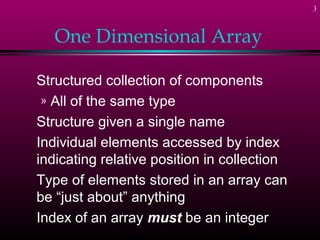
One Dimensional Array
Structured collection of components
» All of the same type
Structure given a single name
Individual elements accessed by index
indicating relative position in collection
Type of elements stored in an array can
be “just about” anything
Index of an array must be an integer
4
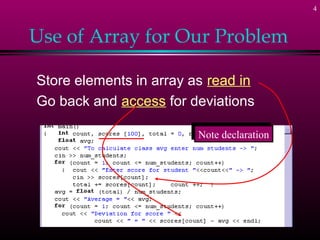
Use of Array for Our Problem
Store elements in array as read in
Go back and access for deviations
Note declarationNote declaration
5
Declaring Arrays
Syntax:
Data_type Array_name [constant];
Note declaration from our example
Tells how many elements set asideTells how many elements set aside
6
Declaring Arrays
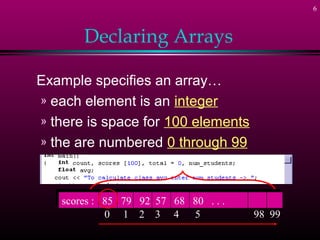
Example specifies an array…
» each element is an integer
» there is space for 100 elements
» the are numbered 0 through 99
scores : 85 79 92 57 68 80 . . .scores : 85 79 92 57 68 80 . . .
0 1 2 3 4 5 98 99
7
Accessing Individual
Components
Use the name of the array
Followed by an integer expression
inside the square brackets [ ]
scores : 85 79 92 57 68 80 . . .scores : 85 79 92 57 68 80 . . .
0 1 2 3 4 5 98 99
max = scores[0];
for (x = 0; x < 100; x++)
if (scores[x] > max)
max = scores[x];
max = scores[0];
for (x = 0; x < 100; x++)
if (scores[x] > max)
max = scores[x];
Index can be:
- constant
- variable
- expression
MUST be an integer
Index can be:
- constant
- variable
- expression
MUST be an integer
8
Out of Bounds Index
What happens if …
C++ does NOT check for index out of
range
Possible to walk off into “far reaches” of
memory -- clobbers ...
» other variable locations
» .exe code
» the operating system (??)
float f_list [50];
f_list [100] = 123.456;
float f_list [50];
f_list [100] = 123.456;
9
Initializing Arrays in
Declarations
Possible to declare the size & initialize
Possible to omit size at declaration
» Compiler figures out size of array
int results [5] = {14, 6, 23, 8, 12 }int results [5] = {14, 6, 23, 8, 12 }
float prices [ ] = { 2.41, 85.06, 19.95, 3.91 }float prices [ ] = { 2.41, 85.06, 19.95, 3.91 }
10
Aggregate Operations
Defn => an operation on the data
structure as a whole
» as opposed to operation on a SINGLE
element within the structure
Example
» would be nice to read in a WHOLE
array
11
Lack of Aggregate Operations
Would be nice but . . .
C++ does NOT have . . .
Assignment operator for whole array
Arithmetic operations for whole array
(think matrix)
Comparisons for arrays (not even = =)
Return of an array type by a function
12
How to Accomplish
Aggregate Operations?
Most such tasks (assignment, read,
write) can be performed some other way
» CS II course will write “classes” to
provide these functions
Otherwise
» these operations must be performed
by the programmer
» element by element in a loop
13
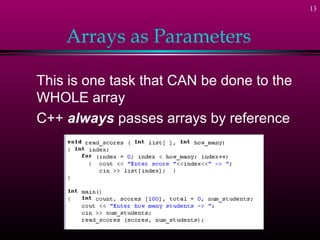
Arrays as Parameters
This is one task that CAN be done to the
WHOLE array
C++ always passes arrays by reference
14
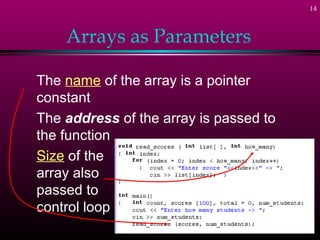
Arrays as Parameters
The name of the array is a pointer
constant
The address of the array is passed to
the function
Size of the
array also
passed to
control loop
15
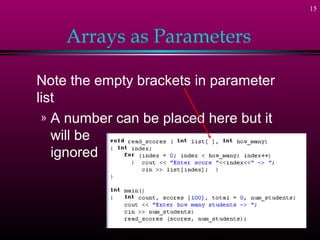
Arrays as Parameters
Note the empty brackets in parameter
list
» A number can be placed here but it
will be
ignored
16
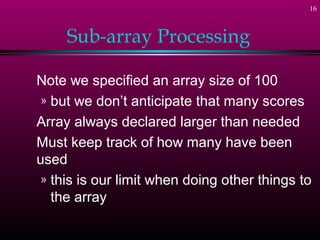
Sub-array Processing
Note we specified an array size of 100
» but we don’t anticipate that many scores
Array always declared larger than needed
Must keep track of how many have been
used
» this is our limit when doing other things to
the array
17
C-Strings or Character Arrays
We have learned that the elements of
an array can be just about anything
Consider an array whose elements are
all characters
» Called a C-String
» Has a collection of special routines
» Treated differently for I/O than other
types of arrays
18
Declaration of C-Strings
Similar to declaration of any array
char name[30];
// no initialization
char title [20] = "Le Grande Fromage";
// initialized at declaration
// with a string
char chList [10] = {'a', 'b', 'c', 'd'};
// initialized with list of char
// values

One dimensional 2

  • 1.
  • 2.
    2 Arrays Arrays are StructuredData Types They have a means of accessing individual components Values can be retrieved from and stored in the structure scores : 85 79 92 57 68 80scores : 85 79 92 57 68 80 0 1 2 3 4 5 cout << scores[2]; scores[0] = 100; cout << scores[2]; scores[0] = 100;
  • 3.
    3 One Dimensional Array Structuredcollection of components » All of the same type Structure given a single name Individual elements accessed by index indicating relative position in collection Type of elements stored in an array can be “just about” anything Index of an array must be an integer
  • 4.
    4 Use of Arrayfor Our Problem Store elements in array as read in Go back and access for deviations Note declarationNote declaration
  • 5.
    5 Declaring Arrays Syntax: Data_type Array_name[constant]; Note declaration from our example Tells how many elements set asideTells how many elements set aside
  • 6.
    6 Declaring Arrays Example specifiesan array… » each element is an integer » there is space for 100 elements » the are numbered 0 through 99 scores : 85 79 92 57 68 80 . . .scores : 85 79 92 57 68 80 . . . 0 1 2 3 4 5 98 99
  • 7.
    7 Accessing Individual Components Use thename of the array Followed by an integer expression inside the square brackets [ ] scores : 85 79 92 57 68 80 . . .scores : 85 79 92 57 68 80 . . . 0 1 2 3 4 5 98 99 max = scores[0]; for (x = 0; x < 100; x++) if (scores[x] > max) max = scores[x]; max = scores[0]; for (x = 0; x < 100; x++) if (scores[x] > max) max = scores[x]; Index can be: - constant - variable - expression MUST be an integer Index can be: - constant - variable - expression MUST be an integer
  • 8.
    8 Out of BoundsIndex What happens if … C++ does NOT check for index out of range Possible to walk off into “far reaches” of memory -- clobbers ... » other variable locations » .exe code » the operating system (??) float f_list [50]; f_list [100] = 123.456; float f_list [50]; f_list [100] = 123.456;
  • 9.
    9 Initializing Arrays in Declarations Possibleto declare the size & initialize Possible to omit size at declaration » Compiler figures out size of array int results [5] = {14, 6, 23, 8, 12 }int results [5] = {14, 6, 23, 8, 12 } float prices [ ] = { 2.41, 85.06, 19.95, 3.91 }float prices [ ] = { 2.41, 85.06, 19.95, 3.91 }
  • 10.
    10 Aggregate Operations Defn =>an operation on the data structure as a whole » as opposed to operation on a SINGLE element within the structure Example » would be nice to read in a WHOLE array
  • 11.
    11 Lack of AggregateOperations Would be nice but . . . C++ does NOT have . . . Assignment operator for whole array Arithmetic operations for whole array (think matrix) Comparisons for arrays (not even = =) Return of an array type by a function
  • 12.
    12 How to Accomplish AggregateOperations? Most such tasks (assignment, read, write) can be performed some other way » CS II course will write “classes” to provide these functions Otherwise » these operations must be performed by the programmer » element by element in a loop
  • 13.
    13 Arrays as Parameters Thisis one task that CAN be done to the WHOLE array C++ always passes arrays by reference
  • 14.
    14 Arrays as Parameters Thename of the array is a pointer constant The address of the array is passed to the function Size of the array also passed to control loop
  • 15.
    15 Arrays as Parameters Notethe empty brackets in parameter list » A number can be placed here but it will be ignored
  • 16.
    16 Sub-array Processing Note wespecified an array size of 100 » but we don’t anticipate that many scores Array always declared larger than needed Must keep track of how many have been used » this is our limit when doing other things to the array
  • 17.
    17 C-Strings or CharacterArrays We have learned that the elements of an array can be just about anything Consider an array whose elements are all characters » Called a C-String » Has a collection of special routines » Treated differently for I/O than other types of arrays
  • 18.
    18 Declaration of C-Strings Similarto declaration of any array char name[30]; // no initialization char title [20] = "Le Grande Fromage"; // initialized at declaration // with a string char chList [10] = {'a', 'b', 'c', 'd'}; // initialized with list of char // values