Objectives
2
In thischapter, you will:
Learn about arrays
Declare and manipulate data into arrays
Learn about “array index out of bounds”
Learn about the restrictions on array processing
Search and sort an array
3.
Objectives (cont’d.)
3
Inthis chapter, you will (cont’d.):
Learn about parallel arrays
Manipulate data in a two-dimensional array
Learn about multidimensional arrays
4.
Introduction
4
Simple datatype: variables of these types can
store only one value at a time
Structured data type: a data type in which each
data item is a collection of other data items
5.
Arrays
5
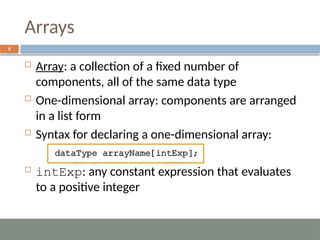
Array: acollection of a fixed number of
components, all of the same data type
One-dimensional array: components are arranged
in a list form
Syntax for declaring a one-dimensional array:
intExp: any constant expression that evaluates
to a positive integer
6.
Accessing Array Components
6
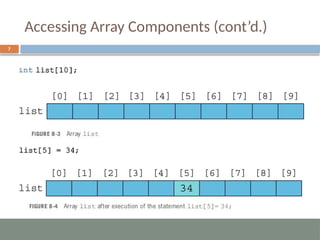
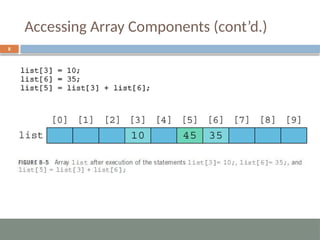
General syntax:
indexExp: called the index
An expression with a nonnegative integer value
Value of the index is the position of the item in the
array
[]: array subscripting operator
Array index always starts at 0
Processing One-Dimensional Arrays
9
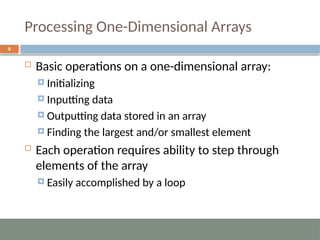
Basic operations on a one-dimensional array:
Initializing
Inputting data
Outputting data stored in an array
Finding the largest and/or smallest element
Each operation requires ability to step through
elements of the array
Easily accomplished by a loop
10.
Processing One-Dimensional Arrays(cont’d.)
10
Given the declaration:
int list[100]; //array of size 100
int i
;
Use a for loop to access array elements:
for (i = 0; i < 100; i++)
//Line 1
cin >> list[i];
//Line 2
11.
Array Index Outof Bounds
11
Index of an array is in bounds if the index is >=0
and <= ARRAY_SIZE-1
Otherwise, the index is out of bounds
In C++, there is no guard against indices that are
out of bounds
12.
Array Initialization DuringDeclaration
12
Arrays can be initialized during declaration
Values are placed between curly braces
Size determined by the number of initial values in the
braces
Example:
double sales[] = {12.25, 32.50, 16.90,
23, 45.68}
;
13.
Partial Initialization ofArrays During Declaration
13
The statement:
int list[10] = {0}
;
Declares an array of 10 components and initializes all
of them to zero
The statement:
int list[10] = {8, 5, 12}
;
Declares an array of 10 components and initializes
list[0] to 8, list[1] to 5, list[2] to 12
All other components are initialized to 0
14.
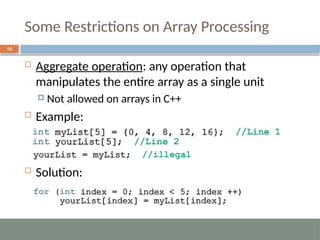
Some Restrictions onArray Processing
14
Aggregate operation: any operation that
manipulates the entire array as a single unit
Not allowed on arrays in C++
Example:
Solution:
Searching an Arrayfor a Specific Item
16
Sequential search (or linear search):
Searching a list for a given item, starting from the first
array element
Compare each element in the array with value being
searched for
Continue the search until item is found or no more
data is left in the list
17.
Sequential Search
17
int list[10];
intsearchItem =5, loc =0;
bool found = false;
//Read the array
while (loc < 10 && !found)
if (list[loc] == searchItem)
found = true;
else
loc++;
if (found)
cout << searchItem << “ is existed at location: ” << loc;
else
cout << searchItem << “ is not existed;
18.
Selection Sort
18
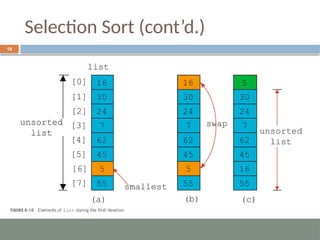
Selectionsort: rearrange the list by selecting an
element and moving it to its proper position
Steps:
A. Find the smallest element in the unsorted portion of
the list
B. Move it to the top of the unsorted portion by
swapping with the element currently there
C. Start again with the rest of the list
Selection Sort (cont’d.)
20
constint length = 10;
int list[length], smallestIndex, location, temp;
//read list
for (int index = 0; index < length - 1; index++)
{
//Step A
smallestIndex = index;
for (location = index + 1; location < length; location++)
if (list[location] < list[smallestIndex])
smallestIndex = location;
//Step B
temp = list[smallestIndex];
list[smallestIndex] = list[index];
list[index] = temp;
}
21.
Character Arrays
Characterarray: an array whose components are
of type char
Example:
'A' is the character A
21
22.
Character Arrays (cont’d.)
Example:
char name[16];
Since C-strings are null terminated and name has
16 components, the largest string it can store has
15 characters
If you store a string whose length is less than the
array size, the last components are unused
22
23.
Character Arrays (cont’d.)
Size of an array can be omitted if the array is
initialized during declaration
Example:
char name[] = "John";
Declares an array of length 5 and stores the C-string
"John" in it
23
24.
Parallel Arrays
24
Two(or more) arrays are called parallel if their
corresponding components hold related
information
Example:
int studentId[50]
;
char courseGrade[50]
;
25.
Two- and MultidimensionalArrays
25
Two-dimensional array: collection of a fixed
number of components (of the same type)
arranged in two dimensions
Sometimes called matrices or tables
Declaration syntax:
intExp1 and intExp2 are expressions with positive
integer values specifying the number of rows and
columns in the array
26.
Accessing Array Components
26
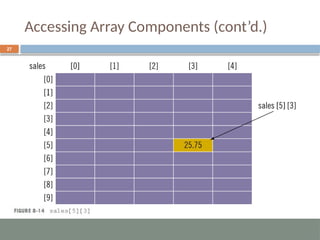
Accessing components in a two-dimensional array:
Where indexExp1 and indexExp2 are expressions
with positive integer values, and specify the row and
column position
Example:
sales[5][3] = 25.75;
Two-Dimensional Array InitializationDuring
Declaration
28
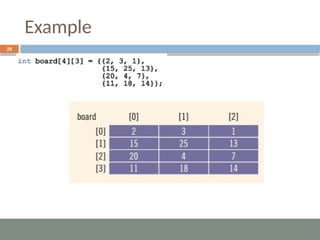
Two-dimensional arrays can be initialized when
they are declared:
Elements of each row are enclosed within braces and
separated by commas
All rows are enclosed within braces
For number arrays, unspecified elements are set to 0
Processing Two-Dimensional Arrays
30
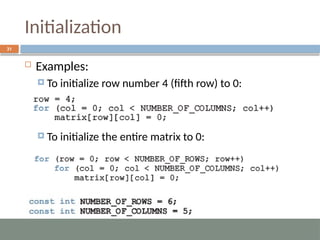
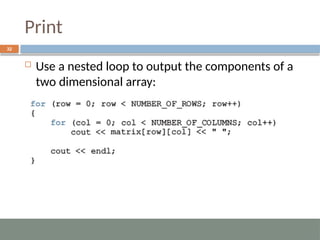
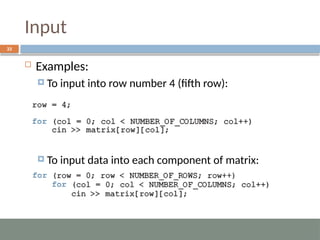
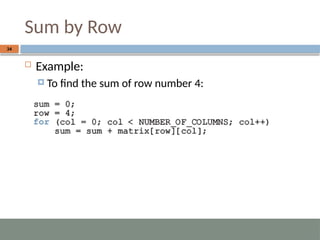
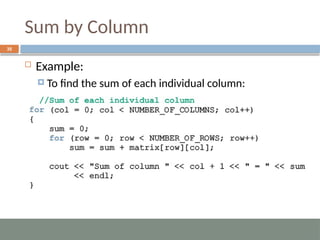
Ways to process a two-dimensional array:
Process entire array
Row processing: process a single row at a time
Column processing: process a single column at a time
Each row and each column of a two-dimensional
array is a one-dimensional array
To process, use algorithms similar to processing one-
dimensional arrays
Largest Element inEach Row
36
• Example:
– To find the largest element in each row:
int matrix[noOfRows][NUMBER_OF_COLUMNS];
int largest;
//Largest element in each row
for (int row = 0; row < noOfRows; row++)
{
largest = matrix[row][0]; //Assume that the first element is the largest.
for (int col = 1; col < NUMBER_OF_COLUMNS; col++)
if (largest < matrix[row][col])
largest = matrix[row][col];
cout << "The largest element of row " << (row + 1) << " = " << largest <<
endl;
}
37.
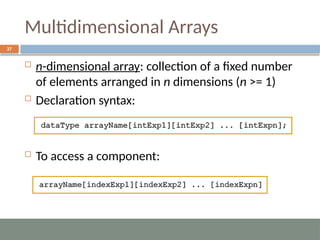
Multidimensional Arrays
37
n-dimensionalarray: collection of a fixed number
of elements arranged in n dimensions (n >= 1)
Declaration syntax:
To access a component:
38.
Summary
38
Array: structureddata type with a fixed number of
components of the same type
Components are accessed using their relative
positions in the array
Elements of a one-dimensional array are arranged
in the form of a list
An array index can be any expression that
evaluates to a nonnegative integer
Must always be less than the size of the array
39.
Summary (cont’d.)
39
Parallelarrays are used to hold related information
In a two-dimensional array, the elements are
arranged in a table form
40.
Summary (cont’d.)
40
Toaccess an element of a two-dimensional array,
you need a pair of indices:
One for row position, one for column position
In row processing, a two-dimensional array is
processed one row at a time
In column processing, a two-dimensional array is
processed one column at a time

![Accessing Array Components
6
General syntax:
indexExp: called the index
An expression with a nonnegative integer value
Value of the index is the position of the item in the
array
[]: array subscripting operator
Array index always starts at 0](https://image.slidesharecdn.com/6-arraysweek8-11-251215091603-d787a34f/85/6-Arrays-Week-8-11-pptx-for-computer-science-6-320.jpg)
![Processing One-Dimensional Arrays (cont’d.)
10
Given the declaration:
int list[100]; //array of size 100
int i
;
Use a for loop to access array elements:
for (i = 0; i < 100; i++)
//Line 1
cin >> list[i];
//Line 2](https://image.slidesharecdn.com/6-arraysweek8-11-251215091603-d787a34f/85/6-Arrays-Week-8-11-pptx-for-computer-science-10-320.jpg)
![Array Initialization During Declaration
12
Arrays can be initialized during declaration
Values are placed between curly braces
Size determined by the number of initial values in the
braces
Example:
double sales[] = {12.25, 32.50, 16.90,
23, 45.68}
;](https://image.slidesharecdn.com/6-arraysweek8-11-251215091603-d787a34f/85/6-Arrays-Week-8-11-pptx-for-computer-science-12-320.jpg)
![Partial Initialization of Arrays During Declaration
13
The statement:
int list[10] = {0}
;
Declares an array of 10 components and initializes all
of them to zero
The statement:
int list[10] = {8, 5, 12}
;
Declares an array of 10 components and initializes
list[0] to 8, list[1] to 5, list[2] to 12
All other components are initialized to 0](https://image.slidesharecdn.com/6-arraysweek8-11-251215091603-d787a34f/85/6-Arrays-Week-8-11-pptx-for-computer-science-13-320.jpg)
![Sequential Search
17
int list[10];
int searchItem =5, loc =0;
bool found = false;
//Read the array
while (loc < 10 && !found)
if (list[loc] == searchItem)
found = true;
else
loc++;
if (found)
cout << searchItem << “ is existed at location: ” << loc;
else
cout << searchItem << “ is not existed;](https://image.slidesharecdn.com/6-arraysweek8-11-251215091603-d787a34f/85/6-Arrays-Week-8-11-pptx-for-computer-science-17-320.jpg)
![Selection Sort (cont’d.)
20
const int length = 10;
int list[length], smallestIndex, location, temp;
//read list
for (int index = 0; index < length - 1; index++)
{
//Step A
smallestIndex = index;
for (location = index + 1; location < length; location++)
if (list[location] < list[smallestIndex])
smallestIndex = location;
//Step B
temp = list[smallestIndex];
list[smallestIndex] = list[index];
list[index] = temp;
}](https://image.slidesharecdn.com/6-arraysweek8-11-251215091603-d787a34f/85/6-Arrays-Week-8-11-pptx-for-computer-science-20-320.jpg)
![Character Arrays (cont’d.)
Example:
char name[16];
Since C-strings are null terminated and name has
16 components, the largest string it can store has
15 characters
If you store a string whose length is less than the
array size, the last components are unused
22](https://image.slidesharecdn.com/6-arraysweek8-11-251215091603-d787a34f/85/6-Arrays-Week-8-11-pptx-for-computer-science-22-320.jpg)
![Character Arrays (cont’d.)
Size of an array can be omitted if the array is
initialized during declaration
Example:
char name[] = "John";
Declares an array of length 5 and stores the C-string
"John" in it
23](https://image.slidesharecdn.com/6-arraysweek8-11-251215091603-d787a34f/85/6-Arrays-Week-8-11-pptx-for-computer-science-23-320.jpg)
![Parallel Arrays
24
Two (or more) arrays are called parallel if their
corresponding components hold related
information
Example:
int studentId[50]
;
char courseGrade[50]
;](https://image.slidesharecdn.com/6-arraysweek8-11-251215091603-d787a34f/85/6-Arrays-Week-8-11-pptx-for-computer-science-24-320.jpg)
![Accessing Array Components
26
Accessing components in a two-dimensional array:
Where indexExp1 and indexExp2 are expressions
with positive integer values, and specify the row and
column position
Example:
sales[5][3] = 25.75;](https://image.slidesharecdn.com/6-arraysweek8-11-251215091603-d787a34f/85/6-Arrays-Week-8-11-pptx-for-computer-science-26-320.jpg)
![Largest Element in Each Row
36
• Example:
– To find the largest element in each row:
int matrix[noOfRows][NUMBER_OF_COLUMNS];
int largest;
//Largest element in each row
for (int row = 0; row < noOfRows; row++)
{
largest = matrix[row][0]; //Assume that the first element is the largest.
for (int col = 1; col < NUMBER_OF_COLUMNS; col++)
if (largest < matrix[row][col])
largest = matrix[row][col];
cout << "The largest element of row " << (row + 1) << " = " << largest <<
endl;
}](https://image.slidesharecdn.com/6-arraysweek8-11-251215091603-d787a34f/85/6-Arrays-Week-8-11-pptx-for-computer-science-36-320.jpg)