Chapter 8
Manipulating MySQL
Databases with PHP
PHP Programming with MySQL
2nd
Edition
2PHP Programming with MySQL, 2nd Edition
Objectives
In this chapter, you will:
• Connect to MySQL from PHP
• Work with MySQL databases using PHP
• Create, modify, and delete MySQL tables with
PHP
• Use PHP to manipulate MySQL records
• Use PHP to retrieve database records
3PHP Programming with MySQL, 2nd Edition
Connecting to MySQL with PHP
• PHP has the ability to access and manipulate
any database that is ODBC compliant
• PHP includes functionality that allows you to
work directly with different types of databases,
without going through ODBC
• PHP supports SQLite, database abstraction
layer functions, and PEAR DB
4PHP Programming with MySQL, 2nd Edition
Determining which MySQL
Package to Use
• The mysqli (MySQL Improved) package
became available with PHP 5 and is designed to
work with MySQL version 4.1.3 and later
• Earlier versions must use the mysql package
• The mysqli package is the object-oriented
equivalent of the mysql package
5PHP Programming with MySQL, 2nd Edition
Opening and Closing a MySQL
Connection
• Open a connection to a MySQL database server
with the mysql_connect() function
• The mysql_connect() function returns a
positive integer if it connects to the database
successfully or FALSE if it does not
• Assign the return value from the
mysql_connect() function to a variable that
you can use to access the database in your
script
6PHP Programming with MySQL, 2nd Edition
Opening and Closing a MySQL
Connection (continued)
• The syntax for the mysql_connect()
function is:
$connection = mysql_connect("host" [,
"user", "password"]);
• The host argument specifies the host name
where your MySQL database server is installed
• The user and password arguments specify a
MySQL account name and password
7PHP Programming with MySQL, 2nd Edition
Opening and Closing a MySQL
Connection (continued)
• The database connection is assigned to the
$DBConnect variable
$DBConnect = mysql_connect("localhost",
"dongosselin ", "rosebud");
•
Close a database connection using the
mysql_close() function
mysql_close($DBConnect);
8PHP Programming with MySQL, 2nd Edition
Opening and Closing a MySQL
Connection (continued)
9PHP Programming with MySQL, 2nd Edition
Opening and Closing a MySQL
Connection (continued)
Figure 8-1 MySQLInfo.php in a Web browser
10PHP Programming with MySQL, 2nd Edition
Reporting MySQL Errors
• Reasons for not connecting to a database server
include:
– The database server is not running
– Insufficient privileges to access the data source
– Invalid username and/or password
Reporting MySQL Errors
(continued)
• The mysql_errno() function returns the error
code from the last attempted MySQL function
call or 0 if no error occurred
• The mysql_errno() and mysql_error()
functions return the results of the previous
mysql*() function
11PHP Programming with MySQL, 2nd Edition
12PHP Programming with MySQL, 2nd Edition
Suppressing Errors with the Error
Control Operator
• By default, functions in the mysql package
display errors and warnings as they occur
• Use the error control operator (@) to suppress
error messages
• The error control operator can be prepended to
any expression although it is commonly used
with expressions
Creating a Database
• Use the mysql_create_db() function to
create a new database
• The basic syntax for the mysql_create_db()
is:
$result = mysql_create_db( "dbname" [,
connection]);
• The mysql_create_db() returns a Boolean
TRUE if successful or FALSE if there was an
error
13PHP Programming with MySQL, 2nd Edition
Creating a Database (continued)
Figure 8-2 Error message when the mysql_create_db()
function is unavailable because of insufficient privileges
14PHP Programming with MySQL, 2nd Edition
15PHP Programming with MySQL, 2nd Edition
Selecting a Database
• The syntax for the mysql_select_db()
function is:
mysql_select_db(database [,
connection]);
• The function returns a value of TRUE if it
successfully selects a database or FALSE if it
does not
• For security purposes, you may choose to use
an include file to connect to the MySQL server
and select a database
Deleting a Database
• To delete a database, use the
mysql_drop_db() function.
• The format for the mysql_drop_db() function
is:
$Result = mysql_drop_db("dbname" [,
connection]);
• The function returns a value of TRUE if it
successfully drops a database or FALSE if it
does not
16PHP Programming with MySQL, 2nd Edition
17PHP Programming with MySQL, 2nd Edition
Executing SQL Statements
• Use the mysql_query() function to send SQL
statements to MySQL
• The syntax for the mysql_query() function is:
mysql_query(query [, connection]);
• The mysql_query() function returns one of
three values:
– For SQL statements that do not return results
(CREATE DATABASE and CREATE TABLE
statements) it returns a value of TRUE if the
statement executes successfully
18PHP Programming with MySQL, 2nd Edition
Executing SQL Statements
(continued)
– For SQL statements that return results (SELECT
and SHOW statements) the mysql_query()
function returns a result pointer that represents
the query results
• A result pointer is a special type of variable that
refers to the currently selected row in a resultset
– The mysql_query() function returns a value of
FALSE for any SQL statements that fail,
regardless of whether they return results
Creating and Deleting Tables
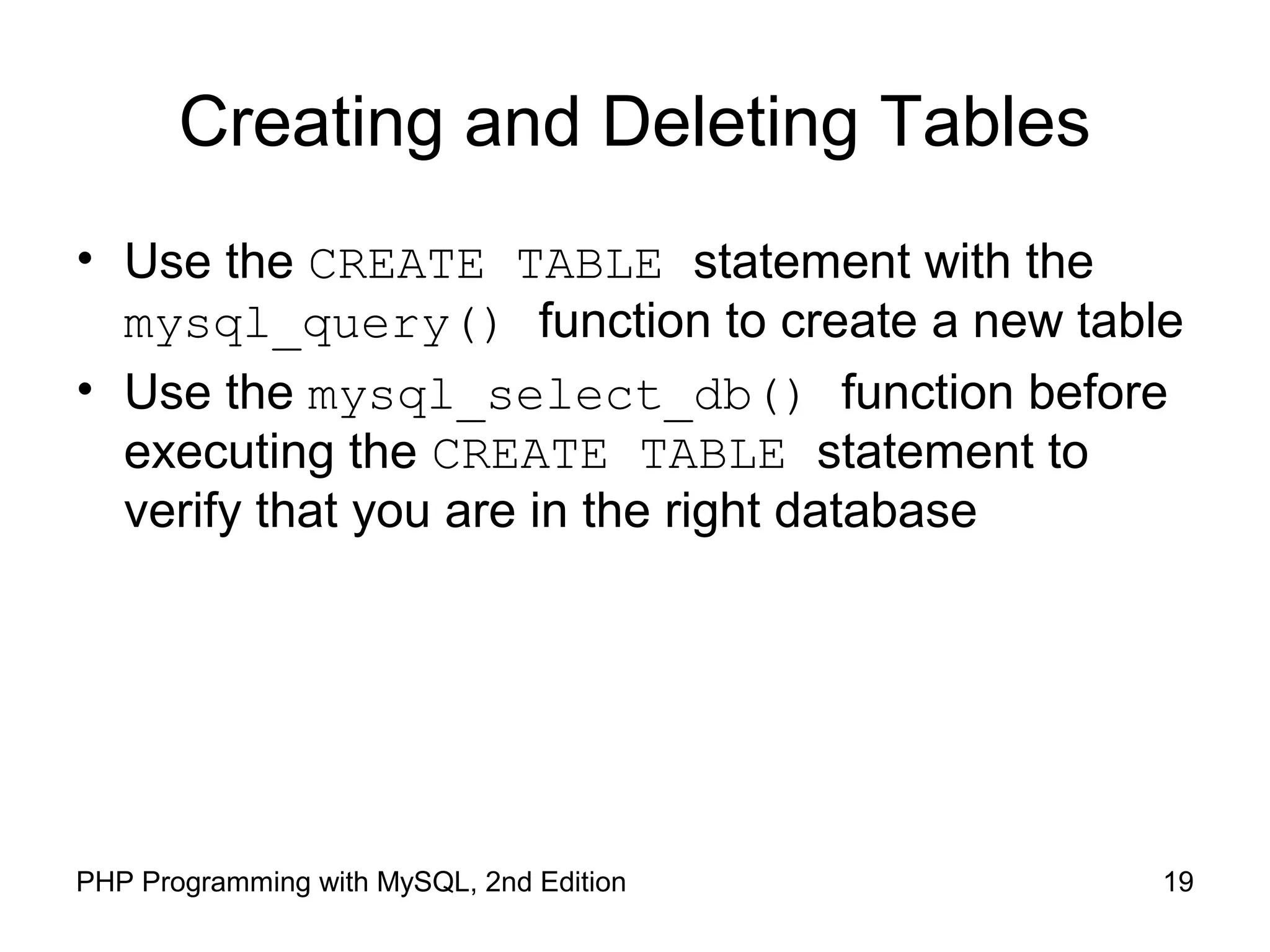
• Use the CREATE TABLE statement with the
mysql_query() function to create a new table
• Use the mysql_select_db() function before
executing the CREATE TABLE statement to
verify that you are in the right database
19PHP Programming with MySQL, 2nd Edition
Creating and Deleting Tables
(continued)
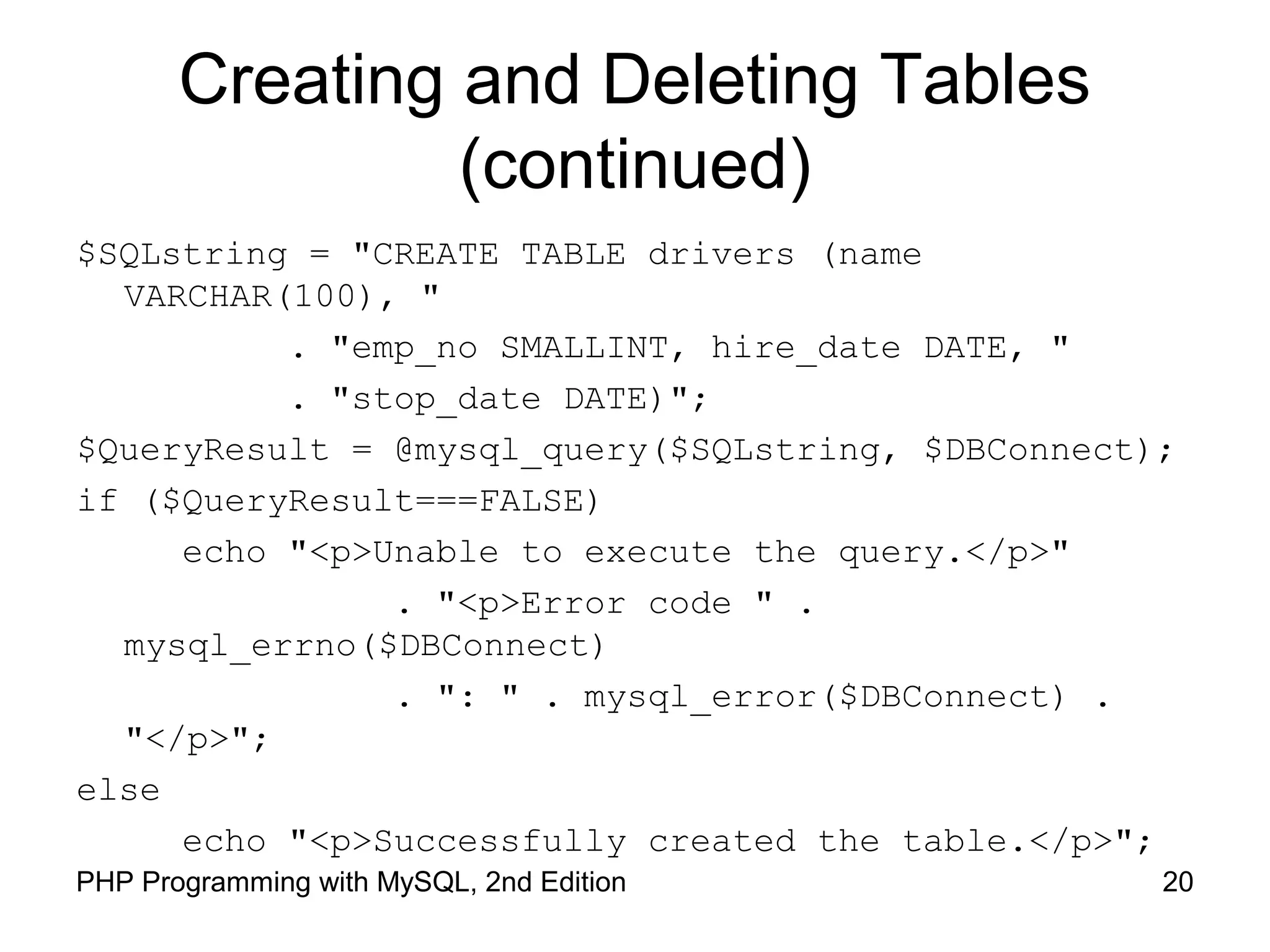
$SQLstring = "CREATE TABLE drivers (name
VARCHAR(100), "
. "emp_no SMALLINT, hire_date DATE, "
. "stop_date DATE)";
$QueryResult = @mysql_query($SQLstring, $DBConnect);
if ($QueryResult===FALSE)
echo "<p>Unable to execute the query.</p>"
. "<p>Error code " .
mysql_errno($DBConnect)
. ": " . mysql_error($DBConnect) .
"</p>";
else
echo "<p>Successfully created the table.</p>";
20PHP Programming with MySQL, 2nd Edition
Creating and Deleting Tables
(continued)
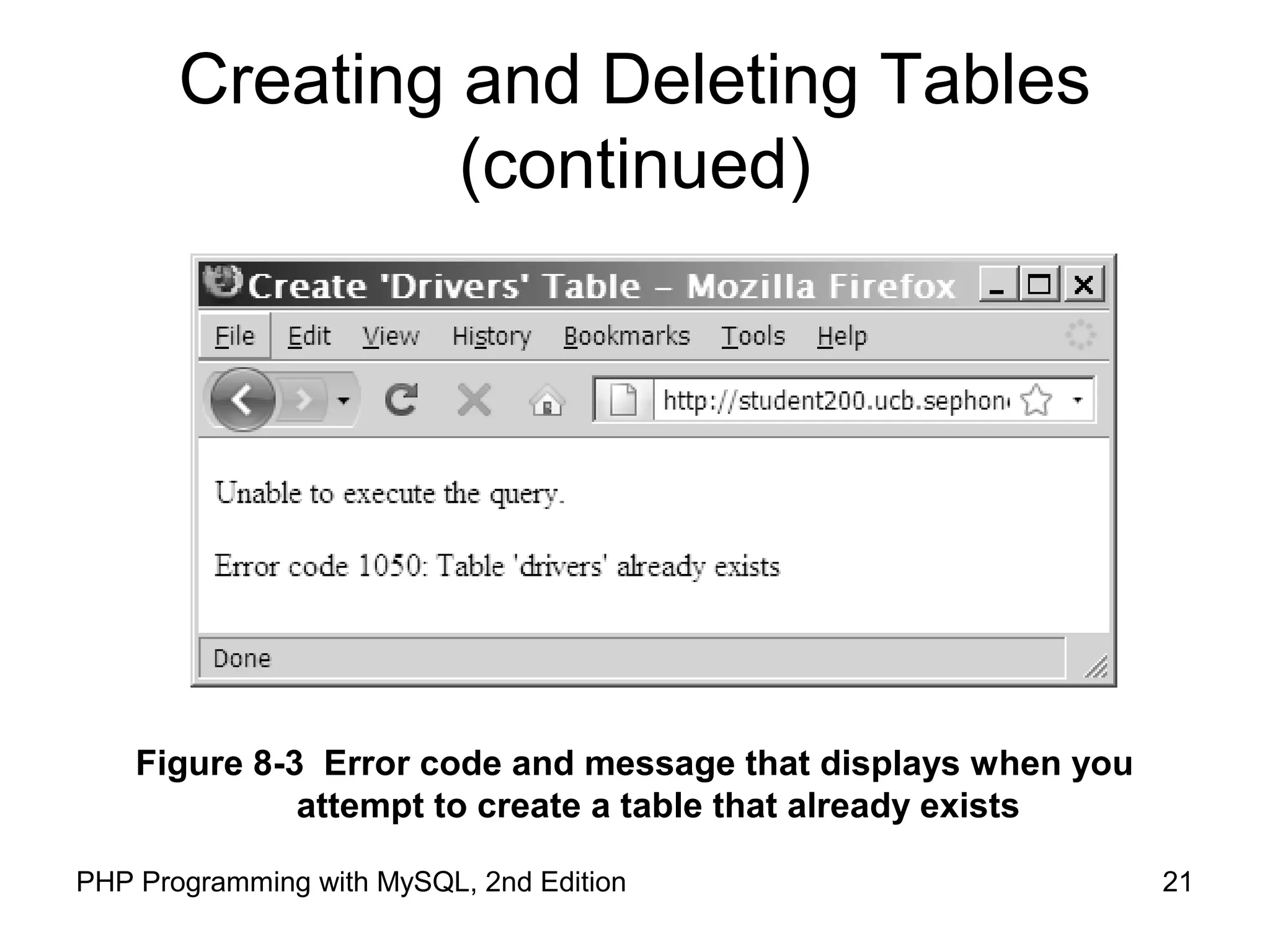
Figure 8-3 Error code and message that displays when you
attempt to create a table that already exists
21PHP Programming with MySQL, 2nd Edition
22PHP Programming with MySQL, 2nd Edition
Creating and Deleting Tables
(continued)
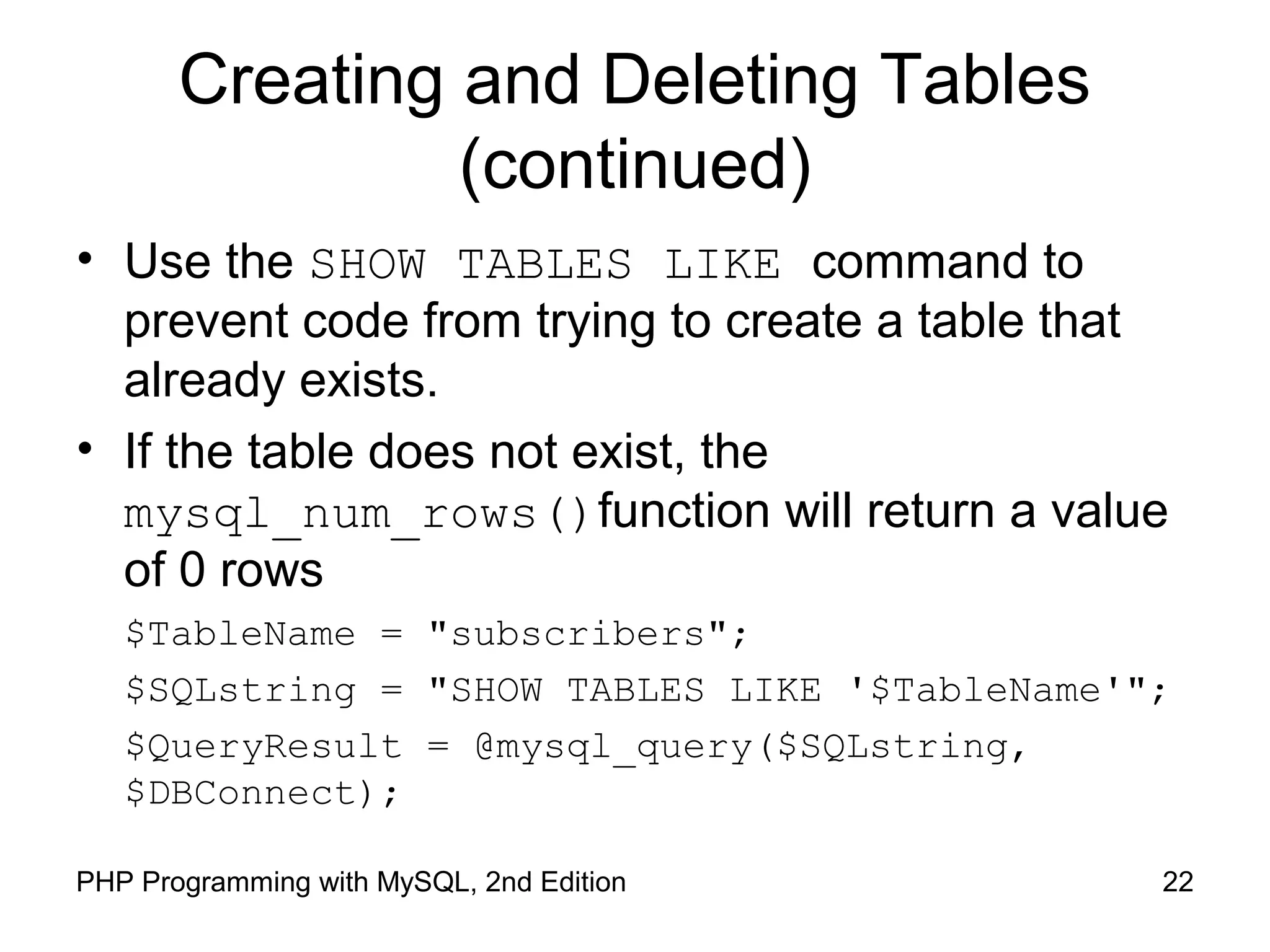
• Use the SHOW TABLES LIKE command to
prevent code from trying to create a table that
already exists.
• If the table does not exist, the
mysql_num_rows()function will return a value
of 0 rows
$TableName = "subscribers";
$SQLstring = "SHOW TABLES LIKE '$TableName'";
$QueryResult = @mysql_query($SQLstring,
$DBConnect);
Creating and Deleting Tables
(continued)
• To identify a field as a primary key in MySQL,
include the PRIMARY KEY keywords when you
define a field with the CREATE TABLE
statement
• The AUTO_INCREMENT keyword is often used
with a primary key to generate a unique ID for
each new row in a table
• The NOT NULL keywords are often used with
primary keys to require that a field include a
value
23PHP Programming with MySQL, 2nd Edition
Creating and Deleting Tables
(continued)
• To delete a table, use the DROP TABLE
statement with the mysql_query() function
24PHP Programming with MySQL, 2nd Edition
Adding, Deleting, and Updating
Records
• To add records to a table, use the INSERT and
VALUES keywords with the mysql_query()
function
• To add multiple records to a database, use the
LOAD DATA statement with the name of the
local text file containing the records you want to
add
• To update records in a table, use the UPDATE
statement
25PHP Programming with MySQL, 2nd Edition
Adding, Deleting, and Updating
Records (continued)
• The UPDATE keyword specifies the name of the
table to update
• The SET keyword specifies the value to assign
to the fields in the records that match the
condition in the WHERE clause
• To delete records in a table, use the DELETE
statement with the mysql_query() function
• Omit the WHERE clause to delete all records in a
table
26PHP Programming with MySQL, 2nd Edition
27PHP Programming with MySQL, 2nd Edition
Retrieving Records into an
Indexed Array
• The mysql_fetch_row() function returns the
fields in the current row of a resultset into an
indexed array and moves the result pointer to
the next row
echo "<table width='100%‘ border='1'>";
echo "<tr><th>Make</th><th>Model</th>
<th>Price</th><th>Quantity</th></tr>";
$Row = mysql_fetch_row($QueryResult);
do {
echo "<tr><td>{$Row[0]}</td>";
echo "<td>{$Row[1]}</td>";
echo "<td align='right'>{$Row[2]}</td>";
echo "<td align='right'>{$Row[3]}</td></tr>";
$Row = mysql_fetch_row($QueryResult);
} while ($Row);
28PHP Programming with MySQL, 2nd Edition
Using the mysql_affected_rows()
Function
• With queries that return results (SELECT
queries), use the mysql_num_rows() function
to find the number of records returned from the
query
• With queries that modify tables but do not return
results (INSERT, UPDATE, and DELETE queries),
use the mysql_affected_rows() function to
determine the number of affected rows
29PHP Programming with MySQL, 2nd Edition
Using the mysql_affected_rows()
Function (continued)
$SQLstring = "UPDATE company_cars SET mileage=50112.3
WHERE license='AK-1234'";
$QueryResult = @mysql_query($SQLstring, $DBConnect);
if ($QueryResult === FALSE)
echo "<p>Unable to execute the query.</p>"
. "<p>Error code " . mysql_errno($DBConnect)
. ": " . mysql_error($DBConnect) . "</p>";
else
echo "<p>Successfully updated "
. mysql_affected_rows($DBConnect) . "
record(s).</p>";
30PHP Programming with MySQL, 2nd Edition
Using the mysql_affected_rows()
Function (continued)
Figure 8-5 Output of mysql_affected_rows() function
for an UPDATE query
31PHP Programming with MySQL, 2nd Edition
Using the mysql_info() Function
• For queries that add or update records, or alter
a table’s structure, use the mysql_info()
function to return information about the query
• The mysql_info() function returns the
number of operations for various types of
actions, depending on the type of query
• The mysql_info() function returns information
about the last query that was executed on the
database connection
32PHP Programming with MySQL, 2nd Edition
Using the mysql_info() Function
(continued)
• The mysql_info() function returns information
about queries that match one of the following
formats:
– INSERT INTO...SELECT...
– INSERT INTO...VALUES (...),(...),(...)
– LOAD DATA INFILE ...
– ALTER TABLE ...
– UPDATE
• For any queries that do not match one of these
formats, the mysql_info() function returns an
empty string
33PHP Programming with MySQL, 2nd Edition
Using the mysql_info() Function
(continued)
$SQLstring = "INSERT INTO company_cars " .
" (license, model_year, make, model, mileage) " .
" VALUES " .
" ('CPQ-894', 2011, 'Honda', 'Insight', 49.2), " .
" ('CPQ-895', 2011, 'Honda', 'Insight', 17.9), " .
" ('CPQ-896', 2011, 'Honda', 'Insight', 22.6)";
$QueryResult = @mysql_query($SQLstring, $DBConnect);
if ($QueryResult === FALSE)
echo "<p>Unable to execute the query.</p>"
. "<p>Error code " . mysql_errno($DBConnect)
. ": " . mysql_error($DBConnect) . "</p>";
else {
echo "<p>Successfully added the record.</p>";
echo "<p>" . mysql_info($DBConnect) . "</p>";
}
34PHP Programming with MySQL, 2nd Edition
Using the mysql_info() Function
(continued)
Figure 8-6 Output of mysql_info() function for an
INSERT query that adds multiple records
35PHP Programming with MySQL, 2nd Edition
Using the mysql_info() Function
(continued)
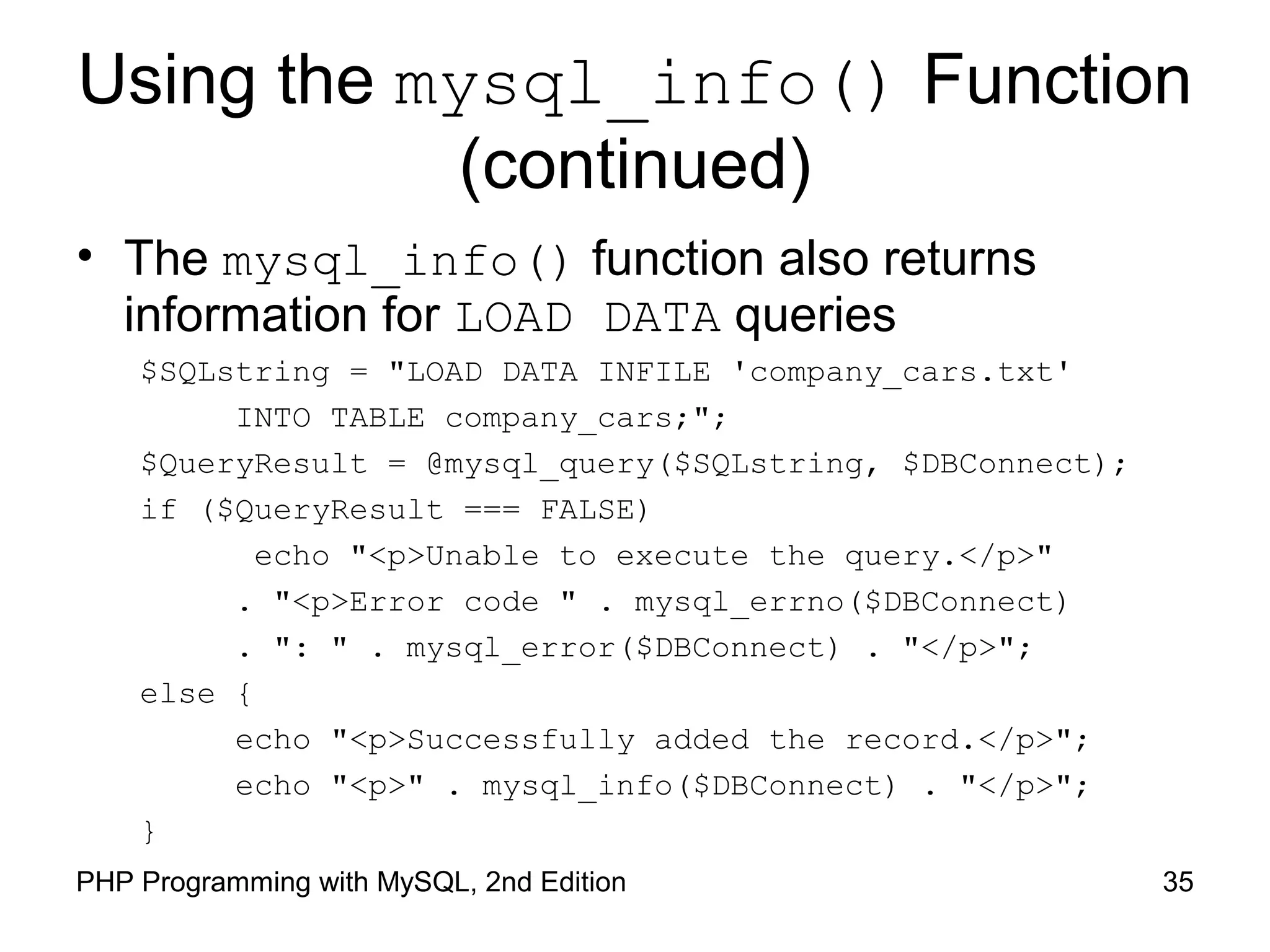
• The mysql_info() function also returns
information for LOAD DATA queries
$SQLstring = "LOAD DATA INFILE 'company_cars.txt'
INTO TABLE company_cars;";
$QueryResult = @mysql_query($SQLstring, $DBConnect);
if ($QueryResult === FALSE)
echo "<p>Unable to execute the query.</p>"
. "<p>Error code " . mysql_errno($DBConnect)
. ": " . mysql_error($DBConnect) . "</p>";
else {
echo "<p>Successfully added the record.</p>";
echo "<p>" . mysql_info($DBConnect) . "</p>";
}
36PHP Programming with MySQL, 2nd Edition
Using the mysql_info() Function
(continued)
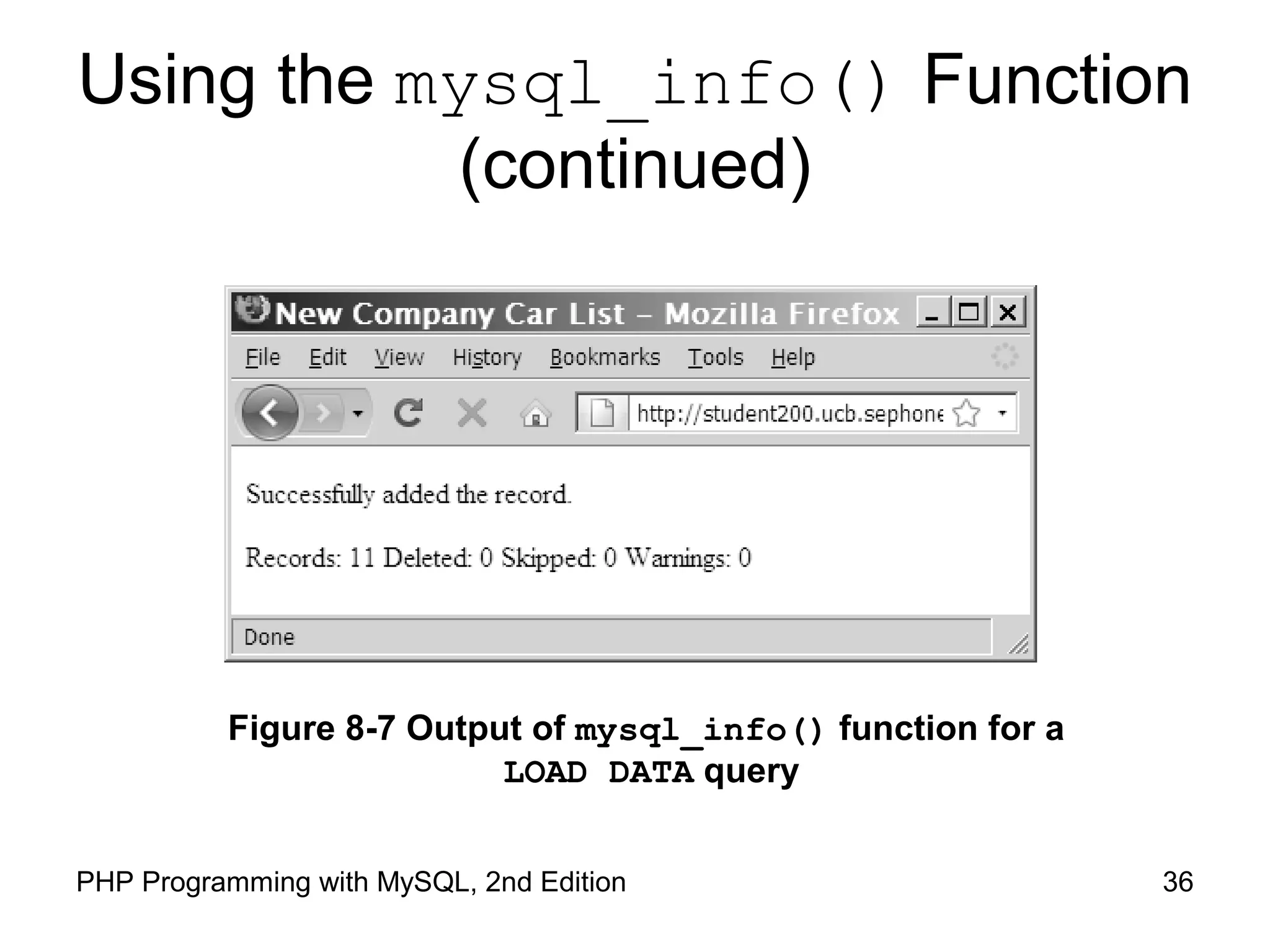
Figure 8-7 Output of mysql_info() function for a
LOAD DATA query
Working with Query Results
37PHP Programming with MySQL, 2nd Edition
Retrieving Records into an Indexed
Array
• The mysql_fetch_row() function returns the
fields in the current row of a result set into an
indexed array and moves the result pointer to
the next row
38PHP Programming with MySQL, 2nd Edition
Retrieving Records into an Indexed
Array
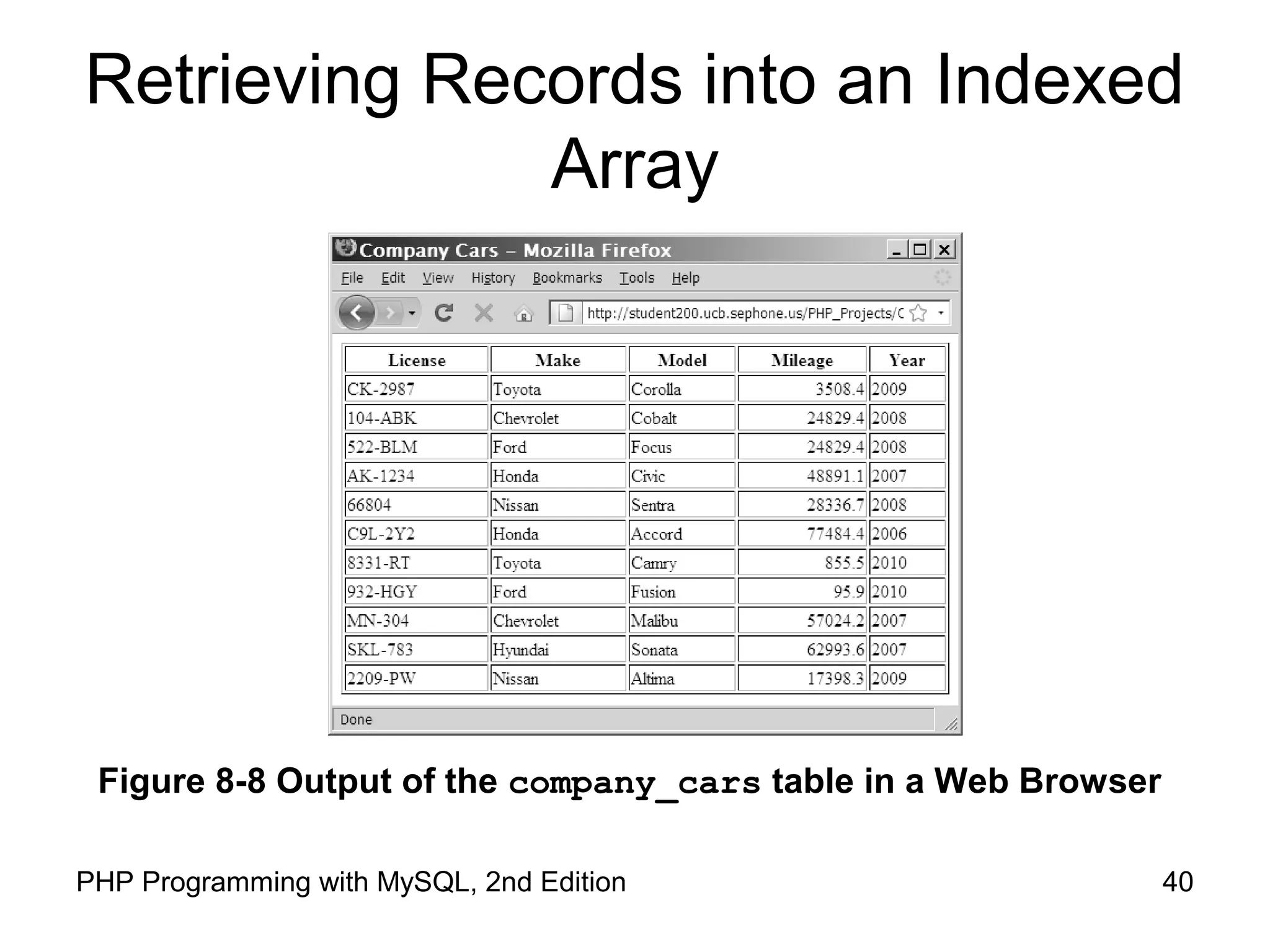
$SQLstring = "SELECT * FROM company_cars";
$QueryResult = @mysql_query($SQLstring, $DBConnect);
echo "<table width='100%' border='1'>n";
echo "<tr><th>License</th><th>Make</th><th>Model</th>
<th>Mileage</th><th>Year</th></tr>n";
while (($Row = mysql_fetch_row($QueryResult)) !== FALSE) {
echo "<tr><td>{$Row[0]}</td>";
echo "<td>{$Row[1]}</td>";
echo "<td>{$Row[2]}</td>";
echo "<td align='right'>{$Row[3]}</td>";
echo "<td>{$Row[4]}</td></tr>n";
}
echo "</table>n";
39PHP Programming with MySQL, 2nd Edition
Retrieving Records into an Indexed
Array
40PHP Programming with MySQL, 2nd Edition
Figure 8-8 Output of the company_cars table in a Web Browser
41PHP Programming with MySQL, 2nd Edition
Retrieving Records into an
Associative Array
• The mysql_fetch_assoc() function returns
the fields in the current row of a resultset into an
associative array and moves the result pointer to
the next row
• The difference between
mysql_fetch_assoc() and
mysql_fetch_row() is that instead of
returning the fields into an indexed array, the
mysql_fetch_assoc() function returns the
fields into an associate array and uses each field
name as the array key
42PHP Programming with MySQL, 2nd Edition
Closing Query Results
• When you are finished working with query
results retrieved with the mysql_query()
function, use the mysql_free_result()
function to close the resultset
• To close the resultset, pass to the
mysql_free_result() function the
variable containing the result pointer from the
mysql_query() function
43PHP Programming with MySQL, 2nd Edition
Accessing Query Result
Information
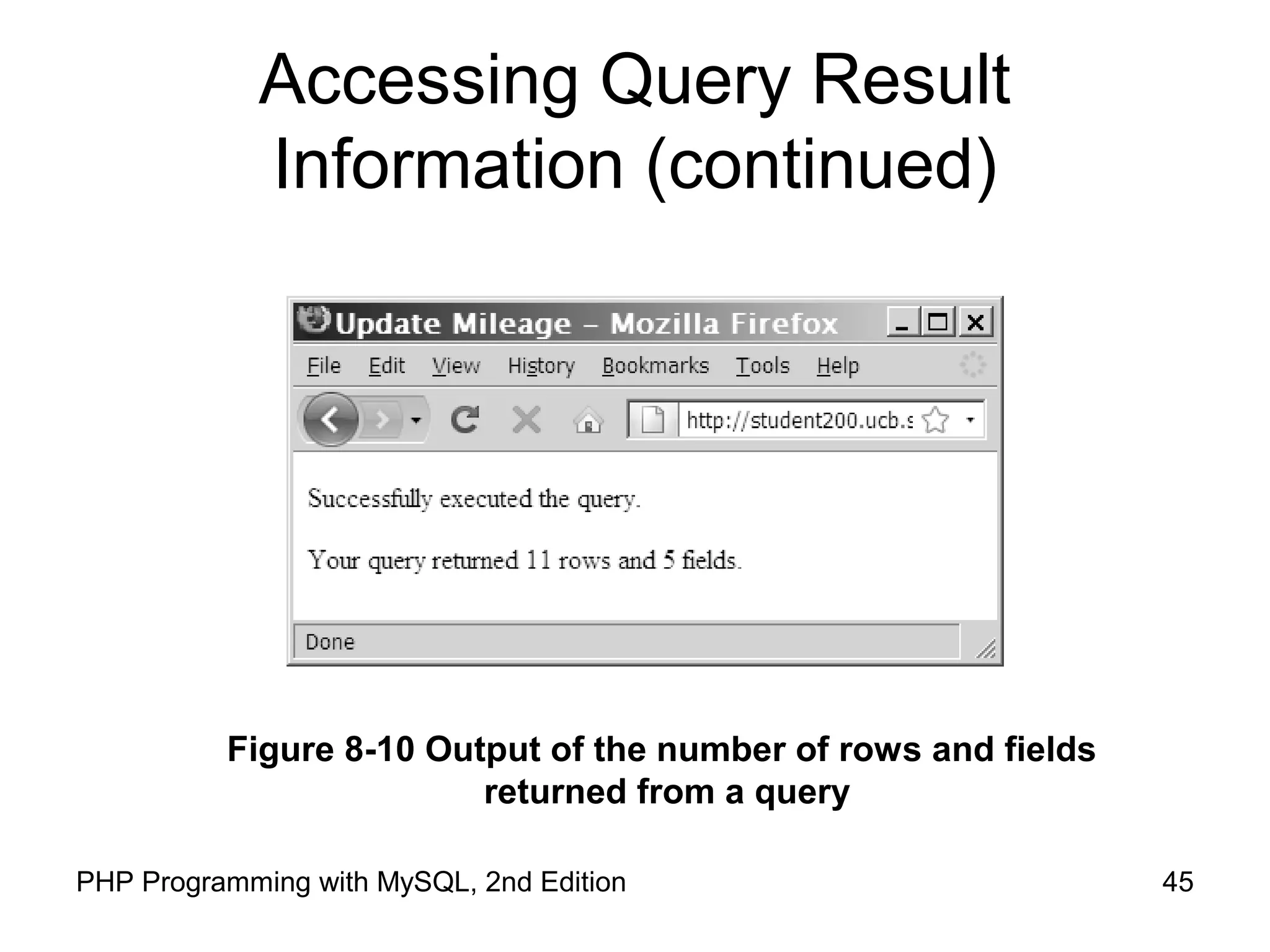
• The mysql_num_rows() function returns the
number of rows in a query result
• The mysql_num_fields() function returns the
number of fields in a query result
• Both functions accept a database connection
variable as an argument
44PHP Programming with MySQL, 2nd Edition
Accessing Query Result
Information (continued)
$SQLstring = "SELECT * FROM company_cars";
$QueryResult = @mysql_query($SQLstring, $DBConnect);
if ($QueryResult === FALSE)
echo "<p>Unable to execute the query.</p>"
. "<p>Error code " . mysql_errno($DBConnect)
. ": " . mysql_error($DBConnect) . "</p>";
else
echo "<p>Successfully executed the query.</p>";
$NumRows = mysql_num_rows($QueryResult);
$NumFields = mysql_num_fields($QueryResult);
if ($NumRows != 0 && $NumFields != 0)
echo "<p>Your query returned " .
mysql_num_rows($QueryResult) . " rows and "
. mysql_num_fields($QueryResult) . " fields.</p>";
else
echo "<p>Your query returned no results.</p>";
mysql_close($DBConnect);
45PHP Programming with MySQL, 2nd Edition
Accessing Query Result
Information (continued)
Figure 8-10 Output of the number of rows and fields
returned from a query
46PHP Programming with MySQL, 2nd Edition
Summary
• The mysql_connect() function opens a
connection to a MySQL database server
• The mysql_close() function closes a
database connection
• The mysql_errno() function returns the error
code from the last attempted MySQL function
call or zero if no error occurred
47PHP Programming with MySQL, 2nd Edition
Summary (continued)
• The mysql_error() function returns the error
message from the last attempted MySQL
function call or an empty string if no error
occurred
• The error control operator (@) suppresses
error messages
• You use the mysql_create_db() function to
create a new database
• The mysql_select_db() function selects a
database
48PHP Programming with MySQL, 2nd Edition
Summary (continued)
• You use the mysql_drop_db() function to
delete a database
• The mysql_query() function sends SQL
statements to MySQL
• A result pointer is a special type of variable that
refers to the currently selected row in a resultset
• You use the CREATE TABLE statement with the
mysql_query() function to create a table
49PHP Programming with MySQL, 2nd Edition
Summary (continued)
• The PRIMARY KEY clause indicates a field or
fields that will be used as a referential index for
the table
• The AUTO_INCREMENT clause creates a field
that is automatically updated with the next
sequential value for that column
• The NOT NULL clause creates a field that must
contain data
• You use the DROP TABLE statement with the
mysql_query() function to delete a table
50PHP Programming with MySQL, 2nd Edition
Summary (continued)
• You use the LOAD DATA statement and the
mysql_query() function with a local text file
to add multiple records to a database
• You use the UPDATE statement with the
mysql_query() function to update records in
a table
• You use the DELETE statement with the
mysql_query() function to delete records from
a table
51PHP Programming with MySQL, 2nd Edition
Summary (continued)
• The mysql_info() function returns the
number of operations for various types of
actions, depending on the type of query.
• The mysql_fetch_row() function returns the
fields in the current row of a resultset into an
indexed array and moves the result pointer to
the next row.
52PHP Programming with MySQL, 2nd Edition
Summary (continued)
• The mysql_fetch_assoc() function returns
the fields in the current row of a resultset into an
associative array and moves the result pointer to
the next row
• The mysql_free_result() function closes a
resultset
53PHP Programming with MySQL, 2nd Edition
Summary (continued)
• The mysql_num_rows() function returns the
number of rows in a query result, and the
mysql_num_fields() function returns the
number of fields in a query result
• With queries that return results, such as SELECT
queries, you can use the mysql_num_rows()
function to find the number of records returned
from the query

9780538745840 ppt ch08

  • 1.
    Chapter 8 Manipulating MySQL Databaseswith PHP PHP Programming with MySQL 2nd Edition
  • 2.
    2PHP Programming withMySQL, 2nd Edition Objectives In this chapter, you will: • Connect to MySQL from PHP • Work with MySQL databases using PHP • Create, modify, and delete MySQL tables with PHP • Use PHP to manipulate MySQL records • Use PHP to retrieve database records
  • 3.
    3PHP Programming withMySQL, 2nd Edition Connecting to MySQL with PHP • PHP has the ability to access and manipulate any database that is ODBC compliant • PHP includes functionality that allows you to work directly with different types of databases, without going through ODBC • PHP supports SQLite, database abstraction layer functions, and PEAR DB
  • 4.
    4PHP Programming withMySQL, 2nd Edition Determining which MySQL Package to Use • The mysqli (MySQL Improved) package became available with PHP 5 and is designed to work with MySQL version 4.1.3 and later • Earlier versions must use the mysql package • The mysqli package is the object-oriented equivalent of the mysql package
  • 5.
    5PHP Programming withMySQL, 2nd Edition Opening and Closing a MySQL Connection • Open a connection to a MySQL database server with the mysql_connect() function • The mysql_connect() function returns a positive integer if it connects to the database successfully or FALSE if it does not • Assign the return value from the mysql_connect() function to a variable that you can use to access the database in your script
  • 6.
    6PHP Programming withMySQL, 2nd Edition Opening and Closing a MySQL Connection (continued) • The syntax for the mysql_connect() function is: $connection = mysql_connect("host" [, "user", "password"]); • The host argument specifies the host name where your MySQL database server is installed • The user and password arguments specify a MySQL account name and password
  • 7.
    7PHP Programming withMySQL, 2nd Edition Opening and Closing a MySQL Connection (continued) • The database connection is assigned to the $DBConnect variable $DBConnect = mysql_connect("localhost", "dongosselin ", "rosebud"); • Close a database connection using the mysql_close() function mysql_close($DBConnect);
  • 8.
    8PHP Programming withMySQL, 2nd Edition Opening and Closing a MySQL Connection (continued)
  • 9.
    9PHP Programming withMySQL, 2nd Edition Opening and Closing a MySQL Connection (continued) Figure 8-1 MySQLInfo.php in a Web browser
  • 10.
    10PHP Programming withMySQL, 2nd Edition Reporting MySQL Errors • Reasons for not connecting to a database server include: – The database server is not running – Insufficient privileges to access the data source – Invalid username and/or password
  • 11.
    Reporting MySQL Errors (continued) •The mysql_errno() function returns the error code from the last attempted MySQL function call or 0 if no error occurred • The mysql_errno() and mysql_error() functions return the results of the previous mysql*() function 11PHP Programming with MySQL, 2nd Edition
  • 12.
    12PHP Programming withMySQL, 2nd Edition Suppressing Errors with the Error Control Operator • By default, functions in the mysql package display errors and warnings as they occur • Use the error control operator (@) to suppress error messages • The error control operator can be prepended to any expression although it is commonly used with expressions
  • 13.
    Creating a Database •Use the mysql_create_db() function to create a new database • The basic syntax for the mysql_create_db() is: $result = mysql_create_db( "dbname" [, connection]); • The mysql_create_db() returns a Boolean TRUE if successful or FALSE if there was an error 13PHP Programming with MySQL, 2nd Edition
  • 14.
    Creating a Database(continued) Figure 8-2 Error message when the mysql_create_db() function is unavailable because of insufficient privileges 14PHP Programming with MySQL, 2nd Edition
  • 15.
    15PHP Programming withMySQL, 2nd Edition Selecting a Database • The syntax for the mysql_select_db() function is: mysql_select_db(database [, connection]); • The function returns a value of TRUE if it successfully selects a database or FALSE if it does not • For security purposes, you may choose to use an include file to connect to the MySQL server and select a database
  • 16.
    Deleting a Database •To delete a database, use the mysql_drop_db() function. • The format for the mysql_drop_db() function is: $Result = mysql_drop_db("dbname" [, connection]); • The function returns a value of TRUE if it successfully drops a database or FALSE if it does not 16PHP Programming with MySQL, 2nd Edition
  • 17.
    17PHP Programming withMySQL, 2nd Edition Executing SQL Statements • Use the mysql_query() function to send SQL statements to MySQL • The syntax for the mysql_query() function is: mysql_query(query [, connection]); • The mysql_query() function returns one of three values: – For SQL statements that do not return results (CREATE DATABASE and CREATE TABLE statements) it returns a value of TRUE if the statement executes successfully
  • 18.
    18PHP Programming withMySQL, 2nd Edition Executing SQL Statements (continued) – For SQL statements that return results (SELECT and SHOW statements) the mysql_query() function returns a result pointer that represents the query results • A result pointer is a special type of variable that refers to the currently selected row in a resultset – The mysql_query() function returns a value of FALSE for any SQL statements that fail, regardless of whether they return results
  • 19.
    Creating and DeletingTables • Use the CREATE TABLE statement with the mysql_query() function to create a new table • Use the mysql_select_db() function before executing the CREATE TABLE statement to verify that you are in the right database 19PHP Programming with MySQL, 2nd Edition
  • 20.
    Creating and DeletingTables (continued) $SQLstring = "CREATE TABLE drivers (name VARCHAR(100), " . "emp_no SMALLINT, hire_date DATE, " . "stop_date DATE)"; $QueryResult = @mysql_query($SQLstring, $DBConnect); if ($QueryResult===FALSE) echo "<p>Unable to execute the query.</p>" . "<p>Error code " . mysql_errno($DBConnect) . ": " . mysql_error($DBConnect) . "</p>"; else echo "<p>Successfully created the table.</p>"; 20PHP Programming with MySQL, 2nd Edition
  • 21.
    Creating and DeletingTables (continued) Figure 8-3 Error code and message that displays when you attempt to create a table that already exists 21PHP Programming with MySQL, 2nd Edition
  • 22.
    22PHP Programming withMySQL, 2nd Edition Creating and Deleting Tables (continued) • Use the SHOW TABLES LIKE command to prevent code from trying to create a table that already exists. • If the table does not exist, the mysql_num_rows()function will return a value of 0 rows $TableName = "subscribers"; $SQLstring = "SHOW TABLES LIKE '$TableName'"; $QueryResult = @mysql_query($SQLstring, $DBConnect);
  • 23.
    Creating and DeletingTables (continued) • To identify a field as a primary key in MySQL, include the PRIMARY KEY keywords when you define a field with the CREATE TABLE statement • The AUTO_INCREMENT keyword is often used with a primary key to generate a unique ID for each new row in a table • The NOT NULL keywords are often used with primary keys to require that a field include a value 23PHP Programming with MySQL, 2nd Edition
  • 24.
    Creating and DeletingTables (continued) • To delete a table, use the DROP TABLE statement with the mysql_query() function 24PHP Programming with MySQL, 2nd Edition
  • 25.
    Adding, Deleting, andUpdating Records • To add records to a table, use the INSERT and VALUES keywords with the mysql_query() function • To add multiple records to a database, use the LOAD DATA statement with the name of the local text file containing the records you want to add • To update records in a table, use the UPDATE statement 25PHP Programming with MySQL, 2nd Edition
  • 26.
    Adding, Deleting, andUpdating Records (continued) • The UPDATE keyword specifies the name of the table to update • The SET keyword specifies the value to assign to the fields in the records that match the condition in the WHERE clause • To delete records in a table, use the DELETE statement with the mysql_query() function • Omit the WHERE clause to delete all records in a table 26PHP Programming with MySQL, 2nd Edition
  • 27.
    27PHP Programming withMySQL, 2nd Edition Retrieving Records into an Indexed Array • The mysql_fetch_row() function returns the fields in the current row of a resultset into an indexed array and moves the result pointer to the next row echo "<table width='100%‘ border='1'>"; echo "<tr><th>Make</th><th>Model</th> <th>Price</th><th>Quantity</th></tr>"; $Row = mysql_fetch_row($QueryResult); do { echo "<tr><td>{$Row[0]}</td>"; echo "<td>{$Row[1]}</td>"; echo "<td align='right'>{$Row[2]}</td>"; echo "<td align='right'>{$Row[3]}</td></tr>"; $Row = mysql_fetch_row($QueryResult); } while ($Row);
  • 28.
    28PHP Programming withMySQL, 2nd Edition Using the mysql_affected_rows() Function • With queries that return results (SELECT queries), use the mysql_num_rows() function to find the number of records returned from the query • With queries that modify tables but do not return results (INSERT, UPDATE, and DELETE queries), use the mysql_affected_rows() function to determine the number of affected rows
  • 29.
    29PHP Programming withMySQL, 2nd Edition Using the mysql_affected_rows() Function (continued) $SQLstring = "UPDATE company_cars SET mileage=50112.3 WHERE license='AK-1234'"; $QueryResult = @mysql_query($SQLstring, $DBConnect); if ($QueryResult === FALSE) echo "<p>Unable to execute the query.</p>" . "<p>Error code " . mysql_errno($DBConnect) . ": " . mysql_error($DBConnect) . "</p>"; else echo "<p>Successfully updated " . mysql_affected_rows($DBConnect) . " record(s).</p>";
  • 30.
    30PHP Programming withMySQL, 2nd Edition Using the mysql_affected_rows() Function (continued) Figure 8-5 Output of mysql_affected_rows() function for an UPDATE query
  • 31.
    31PHP Programming withMySQL, 2nd Edition Using the mysql_info() Function • For queries that add or update records, or alter a table’s structure, use the mysql_info() function to return information about the query • The mysql_info() function returns the number of operations for various types of actions, depending on the type of query • The mysql_info() function returns information about the last query that was executed on the database connection
  • 32.
    32PHP Programming withMySQL, 2nd Edition Using the mysql_info() Function (continued) • The mysql_info() function returns information about queries that match one of the following formats: – INSERT INTO...SELECT... – INSERT INTO...VALUES (...),(...),(...) – LOAD DATA INFILE ... – ALTER TABLE ... – UPDATE • For any queries that do not match one of these formats, the mysql_info() function returns an empty string
  • 33.
    33PHP Programming withMySQL, 2nd Edition Using the mysql_info() Function (continued) $SQLstring = "INSERT INTO company_cars " . " (license, model_year, make, model, mileage) " . " VALUES " . " ('CPQ-894', 2011, 'Honda', 'Insight', 49.2), " . " ('CPQ-895', 2011, 'Honda', 'Insight', 17.9), " . " ('CPQ-896', 2011, 'Honda', 'Insight', 22.6)"; $QueryResult = @mysql_query($SQLstring, $DBConnect); if ($QueryResult === FALSE) echo "<p>Unable to execute the query.</p>" . "<p>Error code " . mysql_errno($DBConnect) . ": " . mysql_error($DBConnect) . "</p>"; else { echo "<p>Successfully added the record.</p>"; echo "<p>" . mysql_info($DBConnect) . "</p>"; }
  • 34.
    34PHP Programming withMySQL, 2nd Edition Using the mysql_info() Function (continued) Figure 8-6 Output of mysql_info() function for an INSERT query that adds multiple records
  • 35.
    35PHP Programming withMySQL, 2nd Edition Using the mysql_info() Function (continued) • The mysql_info() function also returns information for LOAD DATA queries $SQLstring = "LOAD DATA INFILE 'company_cars.txt' INTO TABLE company_cars;"; $QueryResult = @mysql_query($SQLstring, $DBConnect); if ($QueryResult === FALSE) echo "<p>Unable to execute the query.</p>" . "<p>Error code " . mysql_errno($DBConnect) . ": " . mysql_error($DBConnect) . "</p>"; else { echo "<p>Successfully added the record.</p>"; echo "<p>" . mysql_info($DBConnect) . "</p>"; }
  • 36.
    36PHP Programming withMySQL, 2nd Edition Using the mysql_info() Function (continued) Figure 8-7 Output of mysql_info() function for a LOAD DATA query
  • 37.
    Working with QueryResults 37PHP Programming with MySQL, 2nd Edition
  • 38.
    Retrieving Records intoan Indexed Array • The mysql_fetch_row() function returns the fields in the current row of a result set into an indexed array and moves the result pointer to the next row 38PHP Programming with MySQL, 2nd Edition
  • 39.
    Retrieving Records intoan Indexed Array $SQLstring = "SELECT * FROM company_cars"; $QueryResult = @mysql_query($SQLstring, $DBConnect); echo "<table width='100%' border='1'>n"; echo "<tr><th>License</th><th>Make</th><th>Model</th> <th>Mileage</th><th>Year</th></tr>n"; while (($Row = mysql_fetch_row($QueryResult)) !== FALSE) { echo "<tr><td>{$Row[0]}</td>"; echo "<td>{$Row[1]}</td>"; echo "<td>{$Row[2]}</td>"; echo "<td align='right'>{$Row[3]}</td>"; echo "<td>{$Row[4]}</td></tr>n"; } echo "</table>n"; 39PHP Programming with MySQL, 2nd Edition
  • 40.
    Retrieving Records intoan Indexed Array 40PHP Programming with MySQL, 2nd Edition Figure 8-8 Output of the company_cars table in a Web Browser
  • 41.
    41PHP Programming withMySQL, 2nd Edition Retrieving Records into an Associative Array • The mysql_fetch_assoc() function returns the fields in the current row of a resultset into an associative array and moves the result pointer to the next row • The difference between mysql_fetch_assoc() and mysql_fetch_row() is that instead of returning the fields into an indexed array, the mysql_fetch_assoc() function returns the fields into an associate array and uses each field name as the array key
  • 42.
    42PHP Programming withMySQL, 2nd Edition Closing Query Results • When you are finished working with query results retrieved with the mysql_query() function, use the mysql_free_result() function to close the resultset • To close the resultset, pass to the mysql_free_result() function the variable containing the result pointer from the mysql_query() function
  • 43.
    43PHP Programming withMySQL, 2nd Edition Accessing Query Result Information • The mysql_num_rows() function returns the number of rows in a query result • The mysql_num_fields() function returns the number of fields in a query result • Both functions accept a database connection variable as an argument
  • 44.
    44PHP Programming withMySQL, 2nd Edition Accessing Query Result Information (continued) $SQLstring = "SELECT * FROM company_cars"; $QueryResult = @mysql_query($SQLstring, $DBConnect); if ($QueryResult === FALSE) echo "<p>Unable to execute the query.</p>" . "<p>Error code " . mysql_errno($DBConnect) . ": " . mysql_error($DBConnect) . "</p>"; else echo "<p>Successfully executed the query.</p>"; $NumRows = mysql_num_rows($QueryResult); $NumFields = mysql_num_fields($QueryResult); if ($NumRows != 0 && $NumFields != 0) echo "<p>Your query returned " . mysql_num_rows($QueryResult) . " rows and " . mysql_num_fields($QueryResult) . " fields.</p>"; else echo "<p>Your query returned no results.</p>"; mysql_close($DBConnect);
  • 45.
    45PHP Programming withMySQL, 2nd Edition Accessing Query Result Information (continued) Figure 8-10 Output of the number of rows and fields returned from a query
  • 46.
    46PHP Programming withMySQL, 2nd Edition Summary • The mysql_connect() function opens a connection to a MySQL database server • The mysql_close() function closes a database connection • The mysql_errno() function returns the error code from the last attempted MySQL function call or zero if no error occurred
  • 47.
    47PHP Programming withMySQL, 2nd Edition Summary (continued) • The mysql_error() function returns the error message from the last attempted MySQL function call or an empty string if no error occurred • The error control operator (@) suppresses error messages • You use the mysql_create_db() function to create a new database • The mysql_select_db() function selects a database
  • 48.
    48PHP Programming withMySQL, 2nd Edition Summary (continued) • You use the mysql_drop_db() function to delete a database • The mysql_query() function sends SQL statements to MySQL • A result pointer is a special type of variable that refers to the currently selected row in a resultset • You use the CREATE TABLE statement with the mysql_query() function to create a table
  • 49.
    49PHP Programming withMySQL, 2nd Edition Summary (continued) • The PRIMARY KEY clause indicates a field or fields that will be used as a referential index for the table • The AUTO_INCREMENT clause creates a field that is automatically updated with the next sequential value for that column • The NOT NULL clause creates a field that must contain data • You use the DROP TABLE statement with the mysql_query() function to delete a table
  • 50.
    50PHP Programming withMySQL, 2nd Edition Summary (continued) • You use the LOAD DATA statement and the mysql_query() function with a local text file to add multiple records to a database • You use the UPDATE statement with the mysql_query() function to update records in a table • You use the DELETE statement with the mysql_query() function to delete records from a table
  • 51.
    51PHP Programming withMySQL, 2nd Edition Summary (continued) • The mysql_info() function returns the number of operations for various types of actions, depending on the type of query. • The mysql_fetch_row() function returns the fields in the current row of a resultset into an indexed array and moves the result pointer to the next row.
  • 52.
    52PHP Programming withMySQL, 2nd Edition Summary (continued) • The mysql_fetch_assoc() function returns the fields in the current row of a resultset into an associative array and moves the result pointer to the next row • The mysql_free_result() function closes a resultset
  • 53.
    53PHP Programming withMySQL, 2nd Edition Summary (continued) • The mysql_num_rows() function returns the number of rows in a query result, and the mysql_num_fields() function returns the number of fields in a query result • With queries that return results, such as SELECT queries, you can use the mysql_num_rows() function to find the number of records returned from the query