Lambdas & Streams Laboratory 
Stuart Marks 
Simon Ritter 
Angela Caicedo 
Oracle Corp. 
Copyright © 2014, Oracle and/or its affiliates. All rights reserved.
Lambdas and Functions 
Copyright © 2012, Oracle and/or its affiliates. 3 All rights reserved. 
Library Review
Lambda Expressions 
 Lambda expression is an anonymous function 
 Think of it like a method 
– But not associated with a class 
 Can be used wherever you would use an anonymous inner class 
– Single abstract method type 
 Syntax 
– ([optional-parameters]) -> body 
 Types can be inferred (parameters and return type) 
Copyright © 2012, Oracle and/or its affiliates. 4 All rights reserved.
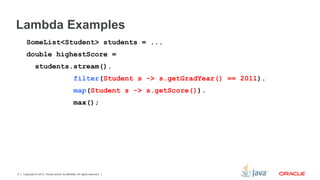
Lambda Examples 
SomeList<Student> students = ... 
double highestScore = 
students.stream(). 
filter(Student s -> s.getGradYear() == 2011). 
map(Student s -> s.getScore()). 
max(); 
Copyright © 2012, Oracle and/or its affiliates. 5 All rights reserved.
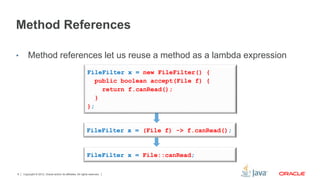
Method References 
• Method references let us reuse a method as a lambda expression 
FileFilter x = new FileFilter() { 
public boolean accept(File f) { 
FileFilter x = (File f) -> f.canRead(); 
FileFilter x = File::canRead; 
Copyright © 2012, Oracle and/or its affiliates. 6 All rights reserved. 
return f.canRead(); 
} 
};
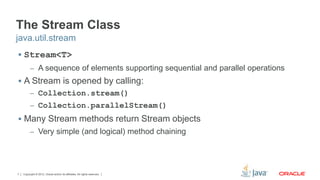
The Stream Class 
java.util.stream 
 Stream<T> 
– A sequence of elements supporting sequential and parallel operations 
 A Stream is opened by calling: 
– Collection.stream() 
– Collection.parallelStream() 
 Many Stream methods return Stream objects 
– Very simple (and logical) method chaining 
Copyright © 2012, Oracle and/or its affiliates. 7 All rights reserved.
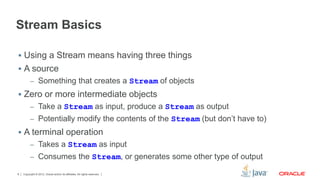
Stream Basics 
 Using a Stream means having three things 
 A source 
– Something that creates a Stream of objects 
 Zero or more intermediate objects 
– Take a Stream as input, produce a Stream as output 
– Potentially modify the contents of the Stream (but don’t have to) 
 A terminal operation 
– Takes a Stream as input 
– Consumes the Stream, or generates some other type of output 
Copyright © 2012, Oracle and/or its affiliates. 8 All rights reserved.
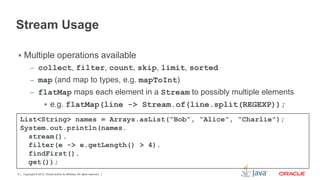
Stream Usage 
 Multiple operations available 
– collect, filter, count, skip, limit, sorted 
– map (and map to types, e.g. mapToInt) 
– flatMap maps each element in a Stream to possibly multiple elements 
 e.g. flatMap(line -> Stream.of(line.split(REGEXP)); 
List<String> names = Arrays.asList(“Bob”, “Alice”, “Charlie”); 
System.out.println(names. 
stream(). 
filter(e -> e.getLength() > 4). 
findFirst(). 
get()); 
Copyright © 2012, Oracle and/or its affiliates. 9 All rights reserved.
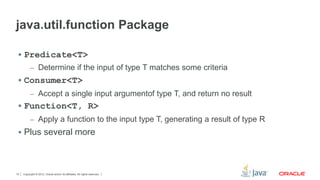
java.util.function Package 
 Predicate<T> 
– Determine if the input of type T matches some criteria 
 Consumer<T> 
– Accept a single input argumentof type T, and return no result 
 Function<T, R> 
– Apply a function to the input type T, generating a result of type R 
 Plus several more 
Copyright © 2012, Oracle and/or its affiliates. 10 All rights reserved.
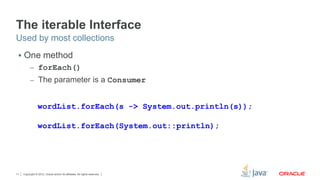
The iterable Interface 
Used by most collections 
 One method 
– forEach() 
– The parameter is a Consumer 
wordList.forEach(s -> System.out.println(s)); 
wordList.forEach(System.out::println); 
Copyright © 2012, Oracle and/or its affiliates. 11 All rights reserved.
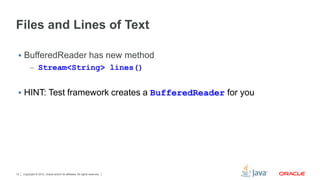
Files and Lines of Text 
 BufferedReader has new method 
– Stream<String> lines() 
 HINT: Test framework creates a BufferedReader for you 
Copyright © 2012, Oracle and/or its affiliates. 12 All rights reserved.
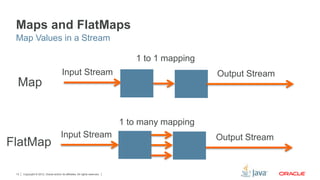
Maps and FlatMaps 
Map Values in a Stream 
Map 
FlatMap 
Input Stream 
Input Stream 
Copyright © 2012, Oracle and/or its affiliates. 13 All rights reserved. 
1 to 1 mapping 
1 to many mapping 
Output Stream 
Output Stream
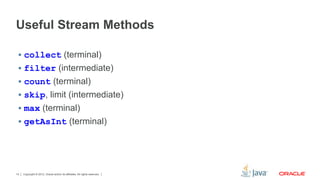
Useful Stream Methods 
 collect (terminal) 
 filter (intermediate) 
 count (terminal) 
 skip, limit (intermediate) 
 max (terminal) 
 getAsInt (terminal) 
Copyright © 2012, Oracle and/or its affiliates. 14 All rights reserved.
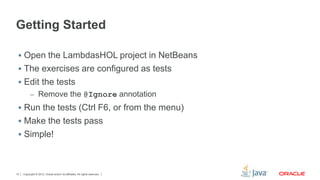
Getting Started 
 Open the LambdasHOL project in NetBeans 
 The exercises are configured as tests 
 Edit the tests 
– Remove the @Ignore annotation 
 Run the tests (Ctrl F6, or from the menu) 
 Make the tests pass 
 Simple! 
Copyright © 2012, Oracle and/or its affiliates. 15 All rights reserved.
Copyright © 2012, Oracle and/or its affiliates. 16 All rights reserved. 
Let’s Go!
Copyright © 2012, Oracle and/or its affiliates. 17 All rights reserved.

Lambdas And Streams Hands On Lab, JavaOne 2014

  • 2.
    Lambdas & StreamsLaboratory Stuart Marks Simon Ritter Angela Caicedo Oracle Corp. Copyright © 2014, Oracle and/or its affiliates. All rights reserved.
  • 3.
    Lambdas and Functions Copyright © 2012, Oracle and/or its affiliates. 3 All rights reserved. Library Review
  • 4.
    Lambda Expressions Lambda expression is an anonymous function  Think of it like a method – But not associated with a class  Can be used wherever you would use an anonymous inner class – Single abstract method type  Syntax – ([optional-parameters]) -> body  Types can be inferred (parameters and return type) Copyright © 2012, Oracle and/or its affiliates. 4 All rights reserved.
  • 5.
    Lambda Examples SomeList<Student>students = ... double highestScore = students.stream(). filter(Student s -> s.getGradYear() == 2011). map(Student s -> s.getScore()). max(); Copyright © 2012, Oracle and/or its affiliates. 5 All rights reserved.
  • 6.
    Method References •Method references let us reuse a method as a lambda expression FileFilter x = new FileFilter() { public boolean accept(File f) { FileFilter x = (File f) -> f.canRead(); FileFilter x = File::canRead; Copyright © 2012, Oracle and/or its affiliates. 6 All rights reserved. return f.canRead(); } };
  • 7.
    The Stream Class java.util.stream  Stream<T> – A sequence of elements supporting sequential and parallel operations  A Stream is opened by calling: – Collection.stream() – Collection.parallelStream()  Many Stream methods return Stream objects – Very simple (and logical) method chaining Copyright © 2012, Oracle and/or its affiliates. 7 All rights reserved.
  • 8.
    Stream Basics Using a Stream means having three things  A source – Something that creates a Stream of objects  Zero or more intermediate objects – Take a Stream as input, produce a Stream as output – Potentially modify the contents of the Stream (but don’t have to)  A terminal operation – Takes a Stream as input – Consumes the Stream, or generates some other type of output Copyright © 2012, Oracle and/or its affiliates. 8 All rights reserved.
  • 9.
    Stream Usage Multiple operations available – collect, filter, count, skip, limit, sorted – map (and map to types, e.g. mapToInt) – flatMap maps each element in a Stream to possibly multiple elements  e.g. flatMap(line -> Stream.of(line.split(REGEXP)); List<String> names = Arrays.asList(“Bob”, “Alice”, “Charlie”); System.out.println(names. stream(). filter(e -> e.getLength() > 4). findFirst(). get()); Copyright © 2012, Oracle and/or its affiliates. 9 All rights reserved.
  • 10.
    java.util.function Package Predicate<T> – Determine if the input of type T matches some criteria  Consumer<T> – Accept a single input argumentof type T, and return no result  Function<T, R> – Apply a function to the input type T, generating a result of type R  Plus several more Copyright © 2012, Oracle and/or its affiliates. 10 All rights reserved.
  • 11.
    The iterable Interface Used by most collections  One method – forEach() – The parameter is a Consumer wordList.forEach(s -> System.out.println(s)); wordList.forEach(System.out::println); Copyright © 2012, Oracle and/or its affiliates. 11 All rights reserved.
  • 12.
    Files and Linesof Text  BufferedReader has new method – Stream<String> lines()  HINT: Test framework creates a BufferedReader for you Copyright © 2012, Oracle and/or its affiliates. 12 All rights reserved.
  • 13.
    Maps and FlatMaps Map Values in a Stream Map FlatMap Input Stream Input Stream Copyright © 2012, Oracle and/or its affiliates. 13 All rights reserved. 1 to 1 mapping 1 to many mapping Output Stream Output Stream
  • 14.
    Useful Stream Methods  collect (terminal)  filter (intermediate)  count (terminal)  skip, limit (intermediate)  max (terminal)  getAsInt (terminal) Copyright © 2012, Oracle and/or its affiliates. 14 All rights reserved.
  • 15.
    Getting Started Open the LambdasHOL project in NetBeans  The exercises are configured as tests  Edit the tests – Remove the @Ignore annotation  Run the tests (Ctrl F6, or from the menu)  Make the tests pass  Simple! Copyright © 2012, Oracle and/or its affiliates. 15 All rights reserved.
  • 16.
    Copyright © 2012,Oracle and/or its affiliates. 16 All rights reserved. Let’s Go!
  • 17.
    Copyright © 2012,Oracle and/or its affiliates. 17 All rights reserved.