7 QC’s
and
New QC’s Tools S U J A G . G . G O W D A
B H A R A T H . H . J
H E M A N T H V
A D I T Y A
S U J A Y R A J A R A M N A I K
Sujay. G. Gowda | Bharath. H. J |
Hemanth. V
| Aditya | Sujay Rajaram Naik
Under the guidance : Prof.
Venkatesha
Presented by
Project and Operations
Management
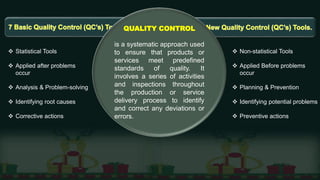
QUALITY CONTROL
is a systematic approach used
to ensure that products or
services meet predefined
standards of quality. It
involves a series of activities
and inspections throughout
the production or service
delivery process to identify
and correct any deviations or
errors.
 Statistical Tools
 Applied after problems
occur
 Analysis & Problem-solving
 Identifying root causes
 Corrective actions
 Non-statistical Tools
 Applied Before problems
occur
 Planning & Prevention
 Identifying potential problems
 Preventive actions
Basic 7 Quality Control Tools (QC’s)
Check sheet
Control chart
Histogram:
Pareto chart
Scatter diagram
Stratification
Ishikawa diagram
New 7 Quality Control Tools (QC’s)
Affinity Diagram
Relationship Diagram
Tree Diagram
Matrix Diagram
PDPC
Activity Network
Diagram
Prioritization Matrix
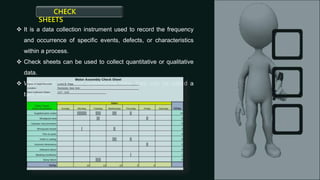
 It is a data collection instrument used to record the frequency
and occurrence of specific events, defects, or characteristics
within a process.
 Check sheets can be used to collect quantitative or qualitative
data.
 When used to collect quantitative data, they can be called a
tally sheet.
CHECK
SHEETS
Control Chart
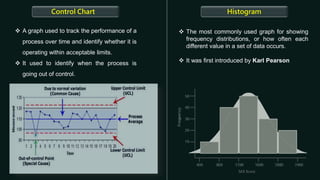
 A graph used to track the performance of a
process over time and identify whether it is
operating within acceptable limits.
 It used to identify when the process is
going out of control.
Histogram
 The most commonly used graph for showing
frequency distributions, or how often each
different value in a set of data occurs.
 It was first introduced by Karl Pearson
Pareto Chart
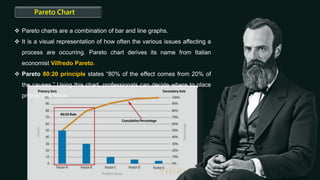
 Pareto charts are a combination of bar and line graphs.
 It is a visual representation of how often the various issues affecting a
process are occurring. Pareto chart derives its name from Italian
economist Vilfredo Pareto.
 Pareto 80:20 principle states “80% of the effect comes from 20% of
the causes.” Using this chart, professionals can decide where to place
priority and focus
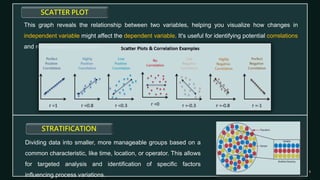
SCATTER PLOT
This graph reveals the relationship between two variables, helping you visualize how changes in
independent variable might affect the dependent variable. It's useful for identifying potential correlations
and root causes of problems.
STRATIFICATION
Dividing data into smaller, more manageable groups based on a
common characteristic, like time, location, or operator. This allows
for targeted analysis and identification of specific factors
influencing process variations.
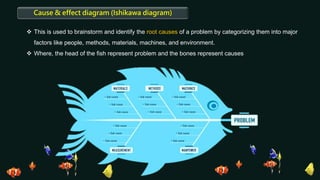
Cause & effect diagram (Ishikawa diagram)
 This is used to brainstorm and identify the root causes of a problem by categorizing them into major
factors like people, methods, materials, machines, and environment.
 Where, the head of the fish represent problem and the bones represent causes
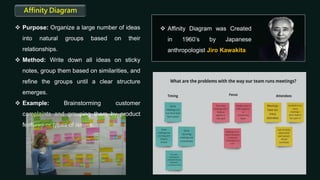
Affinity Diagram
 Purpose: Organize a large number of ideas
into natural groups based on their
relationships.
 Method: Write down all ideas on sticky
notes, group them based on similarities, and
refine the groups until a clear structure
emerges.
 Example: Brainstorming customer
complaints and grouping them by product
features or types of issues.
 Affinity Diagram was Created
in 1960’s by Japanese
anthropologist Jiro Kawakita
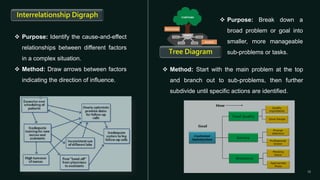
 Purpose: Identify the cause-and-effect
relationships between different factors
in a complex situation.
 Method: Draw arrows between factors
indicating the direction of influence.
Interrelationship Digraph
 Method: Start with the main problem at the top
and branch out to sub-problems, then further
subdivide until specific actions are identified.
 Purpose: Break down a
broad problem or goal into
smaller, more manageable
sub-problems or tasks.
Tree Diagram
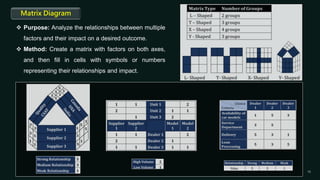
Matrix Diagram
 Purpose: Analyze the relationships between multiple
factors and their impact on a desired outcome.
 Method: Create a matrix with factors on both axes,
and then fill in cells with symbols or numbers
representing their relationships and impact.
Process Decision Program Chart PDPC
 This tool is a version of the tree diagram that is
designed to identify all that might go wrong in a plan
under development .
 In other words, it is used for forecasting the failures
that may happen while the implementation of the
project
 With the help of this tool, we can revise our project
steps that might go wrong.
Activity Network Diagram / Arrow Diagram
 Purpose: Plan and schedule tasks for a
project, considering their dependencies and
durations.
 We can optimize the tasks and process of our
project with the help of this tool.
 Diagram is broadly used in PERT and CPM.
 Method: Represent tasks as nodes and their
relationships as arrows, indicating the order
and duration of each task.
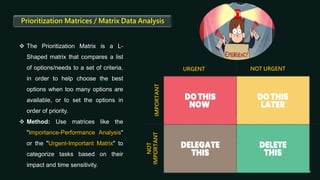
 The Prioritization Matrix is a L-
Shaped matrix that compares a list
of options/needs to a set of criteria,
in order to help choose the best
options when too many options are
available, or to set the options in
order of priority.
 Method: Use matrices like the
"Importance-Performance Analysis"
or the "Urgent-Important Matrix" to
categorize tasks based on their
impact and time sensitivity.
Prioritization Matrices / Matrix Data Analysis
URGENT NOT URGENT
IMPORTANT
NOT
IMPORTANT
7 Basic QC’s and 7 New QC's (Quality Control) tools.pptx

7 Basic QC’s and 7 New QC's (Quality Control) tools.pptx

  • 1.
    7 QC’s and New QC’sTools S U J A G . G . G O W D A B H A R A T H . H . J H E M A N T H V A D I T Y A S U J A Y R A J A R A M N A I K Sujay. G. Gowda | Bharath. H. J | Hemanth. V | Aditya | Sujay Rajaram Naik Under the guidance : Prof. Venkatesha Presented by Project and Operations Management
  • 2.
    QUALITY CONTROL is asystematic approach used to ensure that products or services meet predefined standards of quality. It involves a series of activities and inspections throughout the production or service delivery process to identify and correct any deviations or errors.  Statistical Tools  Applied after problems occur  Analysis & Problem-solving  Identifying root causes  Corrective actions  Non-statistical Tools  Applied Before problems occur  Planning & Prevention  Identifying potential problems  Preventive actions
  • 3.
    Basic 7 QualityControl Tools (QC’s) Check sheet Control chart Histogram: Pareto chart Scatter diagram Stratification Ishikawa diagram New 7 Quality Control Tools (QC’s) Affinity Diagram Relationship Diagram Tree Diagram Matrix Diagram PDPC Activity Network Diagram Prioritization Matrix
  • 5.
     It isa data collection instrument used to record the frequency and occurrence of specific events, defects, or characteristics within a process.  Check sheets can be used to collect quantitative or qualitative data.  When used to collect quantitative data, they can be called a tally sheet. CHECK SHEETS
  • 6.
    Control Chart  Agraph used to track the performance of a process over time and identify whether it is operating within acceptable limits.  It used to identify when the process is going out of control. Histogram  The most commonly used graph for showing frequency distributions, or how often each different value in a set of data occurs.  It was first introduced by Karl Pearson
  • 7.
    Pareto Chart  Paretocharts are a combination of bar and line graphs.  It is a visual representation of how often the various issues affecting a process are occurring. Pareto chart derives its name from Italian economist Vilfredo Pareto.  Pareto 80:20 principle states “80% of the effect comes from 20% of the causes.” Using this chart, professionals can decide where to place priority and focus
  • 8.
    SCATTER PLOT This graphreveals the relationship between two variables, helping you visualize how changes in independent variable might affect the dependent variable. It's useful for identifying potential correlations and root causes of problems. STRATIFICATION Dividing data into smaller, more manageable groups based on a common characteristic, like time, location, or operator. This allows for targeted analysis and identification of specific factors influencing process variations.
  • 9.
    Cause & effectdiagram (Ishikawa diagram)  This is used to brainstorm and identify the root causes of a problem by categorizing them into major factors like people, methods, materials, machines, and environment.  Where, the head of the fish represent problem and the bones represent causes
  • 11.
    Affinity Diagram  Purpose:Organize a large number of ideas into natural groups based on their relationships.  Method: Write down all ideas on sticky notes, group them based on similarities, and refine the groups until a clear structure emerges.  Example: Brainstorming customer complaints and grouping them by product features or types of issues.  Affinity Diagram was Created in 1960’s by Japanese anthropologist Jiro Kawakita
  • 12.
     Purpose: Identifythe cause-and-effect relationships between different factors in a complex situation.  Method: Draw arrows between factors indicating the direction of influence. Interrelationship Digraph  Method: Start with the main problem at the top and branch out to sub-problems, then further subdivide until specific actions are identified.  Purpose: Break down a broad problem or goal into smaller, more manageable sub-problems or tasks. Tree Diagram
  • 13.
    Matrix Diagram  Purpose:Analyze the relationships between multiple factors and their impact on a desired outcome.  Method: Create a matrix with factors on both axes, and then fill in cells with symbols or numbers representing their relationships and impact.
  • 14.
    Process Decision ProgramChart PDPC  This tool is a version of the tree diagram that is designed to identify all that might go wrong in a plan under development .  In other words, it is used for forecasting the failures that may happen while the implementation of the project  With the help of this tool, we can revise our project steps that might go wrong. Activity Network Diagram / Arrow Diagram  Purpose: Plan and schedule tasks for a project, considering their dependencies and durations.  We can optimize the tasks and process of our project with the help of this tool.  Diagram is broadly used in PERT and CPM.  Method: Represent tasks as nodes and their relationships as arrows, indicating the order and duration of each task.
  • 15.
     The PrioritizationMatrix is a L- Shaped matrix that compares a list of options/needs to a set of criteria, in order to help choose the best options when too many options are available, or to set the options in order of priority.  Method: Use matrices like the "Importance-Performance Analysis" or the "Urgent-Important Matrix" to categorize tasks based on their impact and time sensitivity. Prioritization Matrices / Matrix Data Analysis URGENT NOT URGENT IMPORTANT NOT IMPORTANT