Production Reflection
Allan Godin
Process T-Shirt
Process T-Shirt 2
Process T-Shirt 1&2
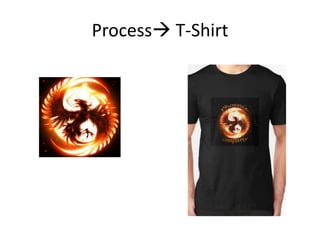
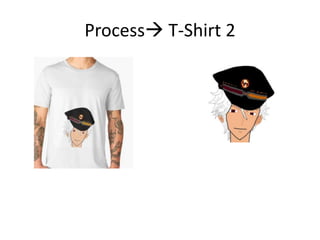
• The process for my T-shirts took a few different steps to
complete but a lot less from my trailer. Firstly, I began by think
of two ideas in my head then finding images online that would
help create what I had imagined. Additionally, I looked at
different fonts to make a quicker process when creating the
full image in Photoshop.
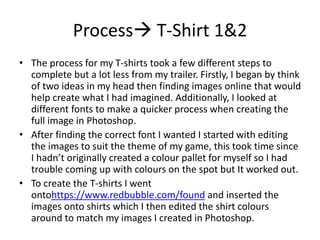
• After finding the correct font I wanted I started with editing
the images to suit the theme of my game, this took time since
I hadn’t originally created a colour pallet for myself so I had
trouble coming up with colours on the spot but It worked out.
• To create the T-shirts I went
ontohttps://www.redbubble.com/found and inserted the
images onto shirts which I then edited the shirt colours
around to match my images I created in Photoshop.
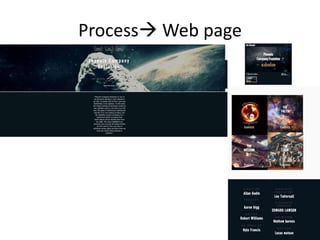
Process Web page
Process Webpage
• To begin I started by researching different game websites
online to get a general understanding of how the layouts
would match to the pictures with all the different fonts and
videos included. Additionally, I looked back on my own past
ideas to see if I could try to merge some together to form a
large idea and make it easier to work off of.
• Furthermore, I went through images of my game to find what
would best work together and make a large image of of that
• To create the website I went onto https://www.wix.com/,
since I had a multitude of techniques I could create my
website with and I had used it in the past so it already new
the way I like to setup a webpage and where I would want
everything to go.
Process Trailer
Process Trailer
• Firstly, before I started work on the computer I used a note pad to come up
with a base to build my trailer on and so I would also have something to look
back on when creating the trailer. This gave me confidence for when doing
putting the trailer together since, I knew that I could simply follow my
template I created. Furthermore, I recorded multiple versions of me saying the
lines to figure out which voice would work well with the theme I was using.
• When it came to finding clips I had a rough time finding them. Before looking
in the template I had a description of a clips I had to find them through that. I
was able to find three clips and created a rough trailer without the missing
two clips. With no site having anything to do with my description of the clip I
went to recorded my own clip using games I owned. With the complete 5 clips
I went into Photoshop to create text for my speech in case it was difficult to
understand at parts.
• With the full image side of the trailer done I went into YouTube and scanned
through ten different songs until I found a song that worked well with the
trailers flow between slow and fast pace. At parts I would sync the music to
gun fire and get the quite part of the music at the same points as my voice.
Finally I created a opening image for the name of my game, and a ending clip
for the console it would be played on.
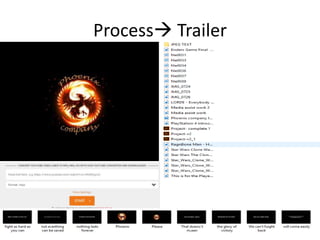
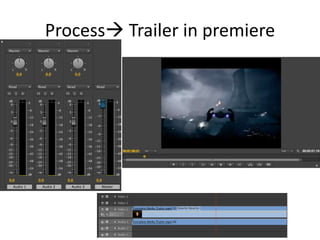
Process Trailer in premiere
• The above slide shows examples of how I used premiere to
make my trailer. The audio mixer on the left was used to make
sure every bit of sound was heard to the perfect amount and
to make sure everything flowed perfectly together without
any sudden sound changes.
• The picture on the right shows the video in the replay where I
could go through making sure all the video clips matched and
there wasn’t any out of place audio to the clip. Additionally, I
used the slow motion to check if there were any parts without
a clip and extend the clip to fill the black space.
• Finally, the bottom photo is an example of how the premiere
bar would have looked when completing the trailer. The
actual trailer would have had multiple layers of videos and
audio.

6. production reflection (1)

  • 1.
  • 2.
  • 3.
  • 4.
    Process T-Shirt 1&2 •The process for my T-shirts took a few different steps to complete but a lot less from my trailer. Firstly, I began by think of two ideas in my head then finding images online that would help create what I had imagined. Additionally, I looked at different fonts to make a quicker process when creating the full image in Photoshop. • After finding the correct font I wanted I started with editing the images to suit the theme of my game, this took time since I hadn’t originally created a colour pallet for myself so I had trouble coming up with colours on the spot but It worked out. • To create the T-shirts I went ontohttps://www.redbubble.com/found and inserted the images onto shirts which I then edited the shirt colours around to match my images I created in Photoshop.
  • 5.
  • 6.
    Process Webpage • Tobegin I started by researching different game websites online to get a general understanding of how the layouts would match to the pictures with all the different fonts and videos included. Additionally, I looked back on my own past ideas to see if I could try to merge some together to form a large idea and make it easier to work off of. • Furthermore, I went through images of my game to find what would best work together and make a large image of of that • To create the website I went onto https://www.wix.com/, since I had a multitude of techniques I could create my website with and I had used it in the past so it already new the way I like to setup a webpage and where I would want everything to go.
  • 7.
  • 8.
    Process Trailer • Firstly,before I started work on the computer I used a note pad to come up with a base to build my trailer on and so I would also have something to look back on when creating the trailer. This gave me confidence for when doing putting the trailer together since, I knew that I could simply follow my template I created. Furthermore, I recorded multiple versions of me saying the lines to figure out which voice would work well with the theme I was using. • When it came to finding clips I had a rough time finding them. Before looking in the template I had a description of a clips I had to find them through that. I was able to find three clips and created a rough trailer without the missing two clips. With no site having anything to do with my description of the clip I went to recorded my own clip using games I owned. With the complete 5 clips I went into Photoshop to create text for my speech in case it was difficult to understand at parts. • With the full image side of the trailer done I went into YouTube and scanned through ten different songs until I found a song that worked well with the trailers flow between slow and fast pace. At parts I would sync the music to gun fire and get the quite part of the music at the same points as my voice. Finally I created a opening image for the name of my game, and a ending clip for the console it would be played on.
  • 9.
  • 10.
    Process Trailer inpremiere • The above slide shows examples of how I used premiere to make my trailer. The audio mixer on the left was used to make sure every bit of sound was heard to the perfect amount and to make sure everything flowed perfectly together without any sudden sound changes. • The picture on the right shows the video in the replay where I could go through making sure all the video clips matched and there wasn’t any out of place audio to the clip. Additionally, I used the slow motion to check if there were any parts without a clip and extend the clip to fill the black space. • Finally, the bottom photo is an example of how the premiere bar would have looked when completing the trailer. The actual trailer would have had multiple layers of videos and audio.

Editor's Notes

  • #3 Discuss the tools and processes used in your production. Log your thoughts and feelings about your work.
  • #4 Discuss the tools and processes used in your production. Log your thoughts and feelings about your work.
  • #6 Discuss the tools and processes used in your production. Log your thoughts and feelings about your work.
  • #7 Discuss the tools and processes used in your production. Log your thoughts and feelings about your work.
  • #8 Discuss the tools and processes used in your production. Log your thoughts and feelings about your work.