Chapter 5 Accessing Information Resources
Learning Objectives Compare and contrast the surface Web and the deep Web. Differentiate the different types of search tools and how they work. Summarize the different methods used to access information contained in the deep Web. Explain how to develop a search question and strategy.
Learning Objectives Utilize search queries, keywords, and Boolean search operators. Utilize different search techniques. Describe how to use advanced search engine pages. Describe how to evaluate information for accuracy and validity. Explain plagiarism, intellectual property, fair use, and proper citation techniques.
Chapter Focus Information Resources on the Web Search Engines Subject Directories The Deep Web Defining a Search Question Formulating Search Queries Search Logic and Syntax Conventions Evaluating and Using Internet Resources
Information Resources on the Web Size of the Internet According to 2003 study by UC Berkeley 92,017 terabytes excluding e-mail and instant messaging Average Web page 50 kilobytes
Information Resources on the Web Surface Web The portion of the Web that search engines and subject directories can index Deep Web Searchable databases that generate dynamic Web pages, non-HTML files, sites that require passwords or registration, archives, library catalogs, and information located behind firewalls
Information Resources on the Web Review What is the difference between the deep Web and the surface Web? Which contains more information, the deep Web or the surface Web? Why do you think this is true?
Search Engines Search engines Web sites that use software tools to index the contents of the Web so that information can be located and retrieved Query Consists of one or more keywords, important or significant words likely to be found in the information sought Search hits Information relevant to the query is presented by the search engine as a series of listings
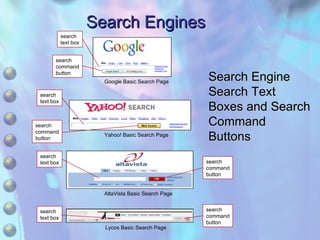
Search Engines Search Engine Search Text Boxes and Search Command Buttons search text box search command button Lycos Basic Search Page AltaVista Basic Search Page Yahoo! Basic Search Page Google Basic Search Page search text box search command button search text box search text box search command button search command button
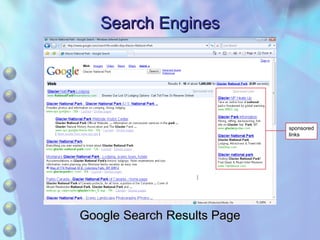
Search Engines Google Search Results Page sponsored links
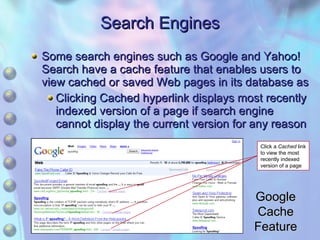
Search Engines Some search engines such as Google and Yahoo! Search have a cache feature that enables users to view cached or saved Web pages in its database as Clicking Cached hyperlink displays most recently indexed version of a page if search engine cannot display the current version for any reason Google Cache Feature Click a  Cached  link to view the most recently indexed version of a page
Search Engines Search Engine Information Gathering and Storage A search engine typically searches its own database containing information that was gathered using robotic programs known as  spiders An indexer program sorts the words contained in or related to the Web page and organizes them in a database
Search Engines Search Results Most search engines rank the hits on a results page listing the most relevant results first Almost all search engines ignore meta tag keywords when ranking pages to prevent Web page creators from manipulating page rankings A particular query entered in different search engines will almost always produce different results
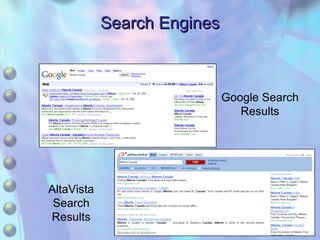
Search Engines Google Search Results AltaVista Search Results
Keywords can be difficult to find in a Web page as they may be located deep within the page or displayed throughout a document Several methods can help the user find relevant text on a Web page Search within a Web page by pressing Ctrl+F to open the Find dialog box Type the keyword in the  Find what  text box and then click the Find Next button to highlight the first instance of the keyword on the page and again to find any subsequent occurrences of the keyword Search Engines
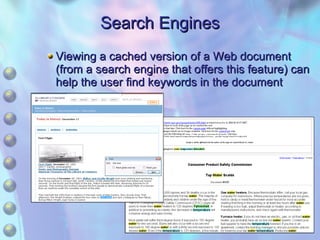
Search Engines Viewing a cached version of a Web document (from a search engine that offers this feature) can help the user find keywords in the document
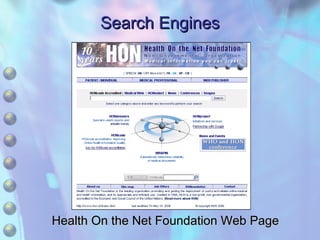
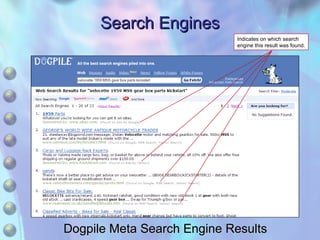
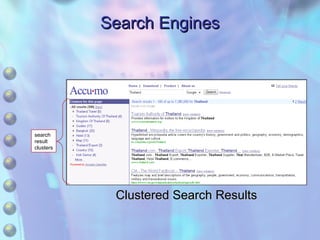
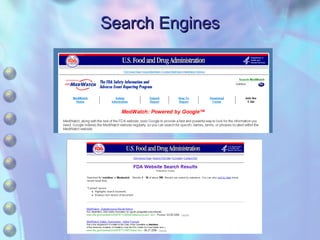
Search Engines Specialized Search Engines Subject-Specific search engines Narrows focus to a single subject or field Meta Search Engines Submits a query to more than one search engine Some cluster or group results by topic Internal Search Engines Restricts searches to the contents of the site
Search Engines Health On the Net Foundation Web Page
Search Engines Indicates on which search engine this result was found. Dogpile Meta Search Engine Results
Search Engines search result clusters Clustered Search Results
Search Engines
Search Engines Review How do search engines index information? How are page results ranked? What are clustered search results? What are meta search engines?
Subject Directories Contains links to Web sites and pages organized in hierarchically arranged subject categories Each subject directory uses its own system for subject categorization Can be difficult to know how a topic might be classified Often contain annotations written by subject experts that provide a capsule description of the information Typically index only a Web site’s home page rather than all the pages contained in the site A search tool combining a search engine and a subject diretory is known as a hybrid search engine
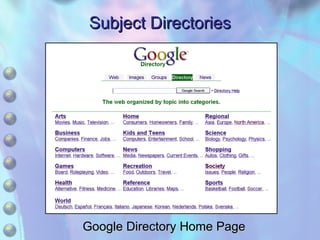
Subject Directories Google Directory Home Page
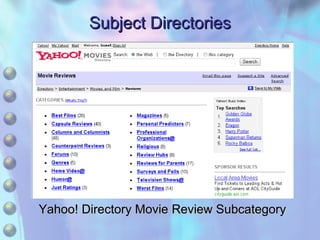
Subject Directories Yahoo! Directory Movie Review Subcategory
Subject Directories About.com Subject Expert
Subject Directories Review How do subject directories differ from search engines? What are subject experts and what do they do? What is a hybrid search engine?
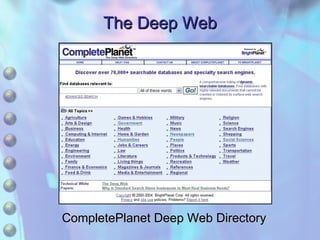
The Deep Web Contains  Web resources that lie below the surface Web  Remains hidden because it resides in searchable databases that present several obstacles to search engine spiders Often requires registration and logon Accessing the deep Web is known as drilling down Not all deep Web material is accessible
The Deep Web CompletePlanet Deep Web Directory
The Deep Web Review What prevents search engines and search directories from indexing the deep Web? What is drilling down? What kinds of deep Web information may be inaccessible?
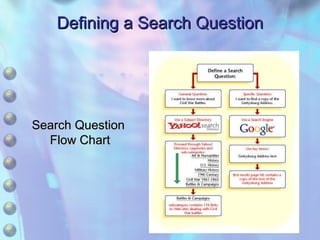
Defining a Search Question First step You should make sure to clearly define what the search question is in order to focus your search Start with a general search and then go more specific A subject directory is often the best starting point Then you can gradually narrow the focus Most subject directories include search engines that can search within the directory or the entire Web
Defining a Search Question Search Question  Flow Chart
Defining a Search Question Review What is the difference between a specific search question and a general search question? How can formulating a search question help determine the type of search tool that should be used? What is the difference between a search question and a search query?
Formulating Search Queries Syntax Conventions General rules that determine how a search engine processes keywords Keyword Queries Enable the search engine to find information relevant to the search question Most search engines ignore certain words known as stop or filter words the, in, for, to, #, &, and so on To determine what keywords to use in a search query, users should try to imagine the keywords likely to appear in an answer to the question being posed
Formulating Search Queries Phrase Queries Involves visualizing phrases likely to appear on a Web page containing the desired information Almost all search engines will search for the exact combination and order of words enclosed in paired quotation marks, called a phrase search A phrase query can be combined with a keyword search by including keywords outside of the phrase quotation marks
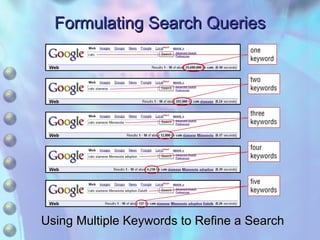
Formulating Search Queries Refining Keyword Queries Using a single keyword for a keyword query will result in too many search result hits, many of which will have nothing to do with the user’s original question Using too many keywords will reduce the number of hits, which may cause the search engine to ignore valuable information
Formulating Search Queries Using Multiple Keywords to Refine a Search
Formulating Search Queries Review What is a keyword? What are stop words? What are two different types of search queries?
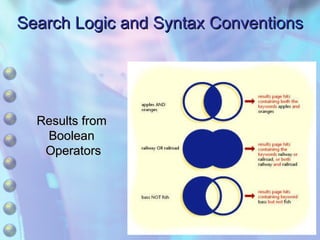
Search Logic and Syntax Conventions Boolean Logic A type of algebraic logic that employs expressions using operators Boolean expressions produce a true/false result Boolean operators AND tells search engine to return hits containing both words OR returns hits for pages containing at least one of the two words NOT excludes words from search query results Nesting can be combined to build more complex queries using more than one operator
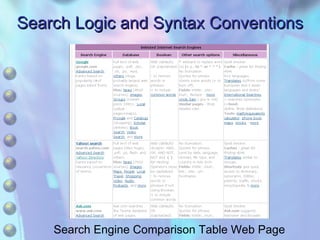
Search Logic and Syntax Conventions Search Engine Comparison Table Web Page
Search Logic and Syntax Conventions Results from  Boolean  Operators
Search Logic and Syntax Conventions Syntax Conventions Paired parentheses Indicates a phrase Plus sign (+) Used before a stop word to ensure it is not ignored Minus sign (–) Used before a word to exclude Boolean operators  Should be capitalized so they will not be mistaken for stop words
Search Logic and Syntax Conventions Case Sensitivity Major search engines ignore capitalization Stemming Refers to the ability of some search engines to search for root words or partial form of keywords as well as the keywords themselves
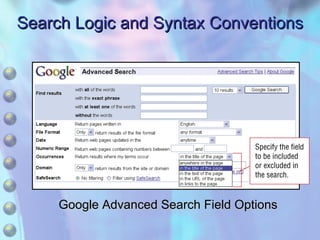
Search Logic and Syntax Conventions Advanced Search Options Word Filter Search Options Enables the user to include or exclude words to create complex searches Field Search Options Allows user to specify the fields that will be searched in a query
Search Logic and Syntax Conventions Advanced Search Options Media and File Format Search Options Allows users to specify media type or file format Domain/Site Restriction Options Enables users to restrict a search to a top-level domain or exclude a domain or site from a search
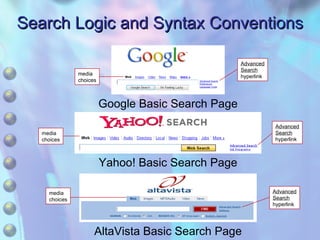
Search Logic and Syntax Conventions media choices Google Basic Search Page Yahoo! Basic Search Page AltaVista Basic Search Page media choices media choices Advanced Search hyperlink Advanced Search hyperlink Advanced Search hyperlink
Search Logic and Syntax Conventions Google Advanced Search Field Options
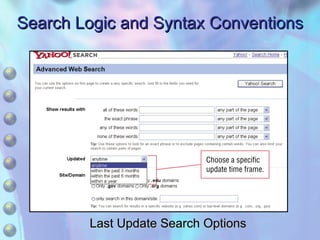
Search Logic and Syntax Conventions Advanced Search Options Date Search Options Enables user to specify when document was last updated Language Options Enables user to tap foreign language resources Numeric Range Allows user to specify a number range Offensive Content Blocking Allows user to specify a level of protection against offensive content
Search Logic and Syntax Conventions Last Update Search Options
Search Logic and Syntax Conventions Review What are the common Boolean search operators and how do they work? What does nesting Boolean operators do? What are some common advanced search engine features?
Evaluating and Using Internet Resources Evaluating Internet Resources The unique nature of the Web requires the use of additional evaluation techniques specific to this new form of communication Plagiarism Involves representing someone else’s words, writing, or findings as your own, and is a form of theft
Evaluating and Using Internet Resources Intellectual Property Refers to creative ideas and expressions afforded specific legal protection Includes copyrights and trademarks Proper Citation The citation methods used for material found on the Internet differ from those used for traditional print material
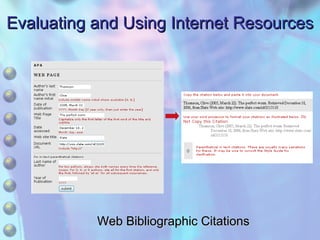
Evaluating and Using Internet Resources Web Bibliographic Citations
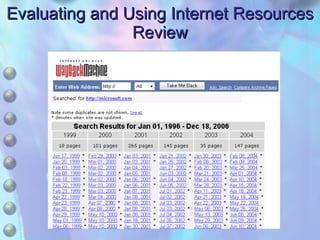
Evaluating and Using Internet Resources Review The Wayback Machine Wayback Machine Web site contains database of Web pages going back to 1996 Can be used to help find information when a dead link is encountered In addition to locating missing pages, it can track the evolution of a Web page or site Web site owners can request sites or pages not be made available
Evaluating and Using Internet Resources Review
Evaluating and Using Internet Resources Review What are some of the methods that can be used to evaluate information found on the Internet? What is plagiarism? How does fair use relate to copyrighted material?

5 Accessing Information Resources

  • 1.
    Chapter 5 AccessingInformation Resources
  • 2.
    Learning Objectives Compareand contrast the surface Web and the deep Web. Differentiate the different types of search tools and how they work. Summarize the different methods used to access information contained in the deep Web. Explain how to develop a search question and strategy.
  • 3.
    Learning Objectives Utilizesearch queries, keywords, and Boolean search operators. Utilize different search techniques. Describe how to use advanced search engine pages. Describe how to evaluate information for accuracy and validity. Explain plagiarism, intellectual property, fair use, and proper citation techniques.
  • 4.
    Chapter Focus InformationResources on the Web Search Engines Subject Directories The Deep Web Defining a Search Question Formulating Search Queries Search Logic and Syntax Conventions Evaluating and Using Internet Resources
  • 5.
    Information Resources onthe Web Size of the Internet According to 2003 study by UC Berkeley 92,017 terabytes excluding e-mail and instant messaging Average Web page 50 kilobytes
  • 6.
    Information Resources onthe Web Surface Web The portion of the Web that search engines and subject directories can index Deep Web Searchable databases that generate dynamic Web pages, non-HTML files, sites that require passwords or registration, archives, library catalogs, and information located behind firewalls
  • 7.
    Information Resources onthe Web Review What is the difference between the deep Web and the surface Web? Which contains more information, the deep Web or the surface Web? Why do you think this is true?
  • 8.
    Search Engines Searchengines Web sites that use software tools to index the contents of the Web so that information can be located and retrieved Query Consists of one or more keywords, important or significant words likely to be found in the information sought Search hits Information relevant to the query is presented by the search engine as a series of listings
  • 9.
    Search Engines SearchEngine Search Text Boxes and Search Command Buttons search text box search command button Lycos Basic Search Page AltaVista Basic Search Page Yahoo! Basic Search Page Google Basic Search Page search text box search command button search text box search text box search command button search command button
  • 10.
    Search Engines GoogleSearch Results Page sponsored links
  • 11.
    Search Engines Somesearch engines such as Google and Yahoo! Search have a cache feature that enables users to view cached or saved Web pages in its database as Clicking Cached hyperlink displays most recently indexed version of a page if search engine cannot display the current version for any reason Google Cache Feature Click a Cached link to view the most recently indexed version of a page
  • 12.
    Search Engines SearchEngine Information Gathering and Storage A search engine typically searches its own database containing information that was gathered using robotic programs known as spiders An indexer program sorts the words contained in or related to the Web page and organizes them in a database
  • 13.
    Search Engines SearchResults Most search engines rank the hits on a results page listing the most relevant results first Almost all search engines ignore meta tag keywords when ranking pages to prevent Web page creators from manipulating page rankings A particular query entered in different search engines will almost always produce different results
  • 14.
    Search Engines GoogleSearch Results AltaVista Search Results
  • 15.
    Keywords can bedifficult to find in a Web page as they may be located deep within the page or displayed throughout a document Several methods can help the user find relevant text on a Web page Search within a Web page by pressing Ctrl+F to open the Find dialog box Type the keyword in the Find what text box and then click the Find Next button to highlight the first instance of the keyword on the page and again to find any subsequent occurrences of the keyword Search Engines
  • 16.
    Search Engines Viewinga cached version of a Web document (from a search engine that offers this feature) can help the user find keywords in the document
  • 17.
    Search Engines SpecializedSearch Engines Subject-Specific search engines Narrows focus to a single subject or field Meta Search Engines Submits a query to more than one search engine Some cluster or group results by topic Internal Search Engines Restricts searches to the contents of the site
  • 18.
    Search Engines HealthOn the Net Foundation Web Page
  • 19.
    Search Engines Indicateson which search engine this result was found. Dogpile Meta Search Engine Results
  • 20.
    Search Engines searchresult clusters Clustered Search Results
  • 21.
  • 22.
    Search Engines ReviewHow do search engines index information? How are page results ranked? What are clustered search results? What are meta search engines?
  • 23.
    Subject Directories Containslinks to Web sites and pages organized in hierarchically arranged subject categories Each subject directory uses its own system for subject categorization Can be difficult to know how a topic might be classified Often contain annotations written by subject experts that provide a capsule description of the information Typically index only a Web site’s home page rather than all the pages contained in the site A search tool combining a search engine and a subject diretory is known as a hybrid search engine
  • 24.
    Subject Directories GoogleDirectory Home Page
  • 25.
    Subject Directories Yahoo!Directory Movie Review Subcategory
  • 26.
  • 27.
    Subject Directories ReviewHow do subject directories differ from search engines? What are subject experts and what do they do? What is a hybrid search engine?
  • 28.
    The Deep WebContains Web resources that lie below the surface Web Remains hidden because it resides in searchable databases that present several obstacles to search engine spiders Often requires registration and logon Accessing the deep Web is known as drilling down Not all deep Web material is accessible
  • 29.
    The Deep WebCompletePlanet Deep Web Directory
  • 30.
    The Deep WebReview What prevents search engines and search directories from indexing the deep Web? What is drilling down? What kinds of deep Web information may be inaccessible?
  • 31.
    Defining a SearchQuestion First step You should make sure to clearly define what the search question is in order to focus your search Start with a general search and then go more specific A subject directory is often the best starting point Then you can gradually narrow the focus Most subject directories include search engines that can search within the directory or the entire Web
  • 32.
    Defining a SearchQuestion Search Question Flow Chart
  • 33.
    Defining a SearchQuestion Review What is the difference between a specific search question and a general search question? How can formulating a search question help determine the type of search tool that should be used? What is the difference between a search question and a search query?
  • 34.
    Formulating Search QueriesSyntax Conventions General rules that determine how a search engine processes keywords Keyword Queries Enable the search engine to find information relevant to the search question Most search engines ignore certain words known as stop or filter words the, in, for, to, #, &, and so on To determine what keywords to use in a search query, users should try to imagine the keywords likely to appear in an answer to the question being posed
  • 35.
    Formulating Search QueriesPhrase Queries Involves visualizing phrases likely to appear on a Web page containing the desired information Almost all search engines will search for the exact combination and order of words enclosed in paired quotation marks, called a phrase search A phrase query can be combined with a keyword search by including keywords outside of the phrase quotation marks
  • 36.
    Formulating Search QueriesRefining Keyword Queries Using a single keyword for a keyword query will result in too many search result hits, many of which will have nothing to do with the user’s original question Using too many keywords will reduce the number of hits, which may cause the search engine to ignore valuable information
  • 37.
    Formulating Search QueriesUsing Multiple Keywords to Refine a Search
  • 38.
    Formulating Search QueriesReview What is a keyword? What are stop words? What are two different types of search queries?
  • 39.
    Search Logic andSyntax Conventions Boolean Logic A type of algebraic logic that employs expressions using operators Boolean expressions produce a true/false result Boolean operators AND tells search engine to return hits containing both words OR returns hits for pages containing at least one of the two words NOT excludes words from search query results Nesting can be combined to build more complex queries using more than one operator
  • 40.
    Search Logic andSyntax Conventions Search Engine Comparison Table Web Page
  • 41.
    Search Logic andSyntax Conventions Results from Boolean Operators
  • 42.
    Search Logic andSyntax Conventions Syntax Conventions Paired parentheses Indicates a phrase Plus sign (+) Used before a stop word to ensure it is not ignored Minus sign (–) Used before a word to exclude Boolean operators Should be capitalized so they will not be mistaken for stop words
  • 43.
    Search Logic andSyntax Conventions Case Sensitivity Major search engines ignore capitalization Stemming Refers to the ability of some search engines to search for root words or partial form of keywords as well as the keywords themselves
  • 44.
    Search Logic andSyntax Conventions Advanced Search Options Word Filter Search Options Enables the user to include or exclude words to create complex searches Field Search Options Allows user to specify the fields that will be searched in a query
  • 45.
    Search Logic andSyntax Conventions Advanced Search Options Media and File Format Search Options Allows users to specify media type or file format Domain/Site Restriction Options Enables users to restrict a search to a top-level domain or exclude a domain or site from a search
  • 46.
    Search Logic andSyntax Conventions media choices Google Basic Search Page Yahoo! Basic Search Page AltaVista Basic Search Page media choices media choices Advanced Search hyperlink Advanced Search hyperlink Advanced Search hyperlink
  • 47.
    Search Logic andSyntax Conventions Google Advanced Search Field Options
  • 48.
    Search Logic andSyntax Conventions Advanced Search Options Date Search Options Enables user to specify when document was last updated Language Options Enables user to tap foreign language resources Numeric Range Allows user to specify a number range Offensive Content Blocking Allows user to specify a level of protection against offensive content
  • 49.
    Search Logic andSyntax Conventions Last Update Search Options
  • 50.
    Search Logic andSyntax Conventions Review What are the common Boolean search operators and how do they work? What does nesting Boolean operators do? What are some common advanced search engine features?
  • 51.
    Evaluating and UsingInternet Resources Evaluating Internet Resources The unique nature of the Web requires the use of additional evaluation techniques specific to this new form of communication Plagiarism Involves representing someone else’s words, writing, or findings as your own, and is a form of theft
  • 52.
    Evaluating and UsingInternet Resources Intellectual Property Refers to creative ideas and expressions afforded specific legal protection Includes copyrights and trademarks Proper Citation The citation methods used for material found on the Internet differ from those used for traditional print material
  • 53.
    Evaluating and UsingInternet Resources Web Bibliographic Citations
  • 54.
    Evaluating and UsingInternet Resources Review The Wayback Machine Wayback Machine Web site contains database of Web pages going back to 1996 Can be used to help find information when a dead link is encountered In addition to locating missing pages, it can track the evolution of a Web page or site Web site owners can request sites or pages not be made available
  • 55.
    Evaluating and UsingInternet Resources Review
  • 56.
    Evaluating and UsingInternet Resources Review What are some of the methods that can be used to evaluate information found on the Internet? What is plagiarism? How does fair use relate to copyrighted material?