Chapter 9 Asynchronous Communications
Learning Objectives Define the role and function of asynchronous communication. Explain how electronic mailing lists work. Identify the rules for good mailing list and forum behavior. Explain the function of newsgroups. Demonstrate how to configure Windows Mail for use with newsgroups.
Learning Objectives Differentiate between Usenet newsgroups and Web-based newsgroups. Define weblogs (blogs) and maintain a weblog. Explain how wikis work and create and edit wiki pages.
Chapter Focus Electronic Mailing Lists Newsgroups Web-based Forums Weblogs (Blogs) Wikis
Electronic Mailing Lists Also known as e-mail discussion lists or groups E-mail based, topic-focused discussion environments Posts E-mail messages sent to a mailing list Reading options available in most mailing lists Posts can arrive as individual e-mail messages Posts can arrive in a digest form sent as one message Posts can be viewed via a Web page
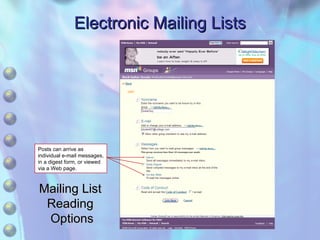
Electronic Mailing Lists Mailing List  Reading  Options Posts can arrive as individual e-mail messages, in a digest form, or viewed via a Web page.
Electronic Mailing Lists Thread A series of posts on the same subject Subscribing and unsubscribing Traditional method is to send a command such as HELP or SUBSCRIBE in the subject or body or an e-mail message Confirmation or welcome message will usually be sent Mailing commands are not case sensitive Except for passwords
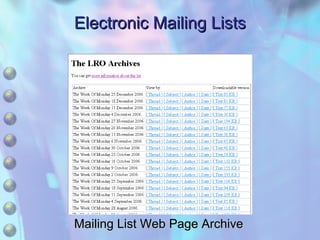
Electronic Mailing Lists Mailing List Web Page Archive
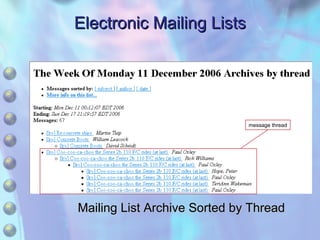
Electronic Mailing Lists Mailing List Archive Sorted by Thread message thread
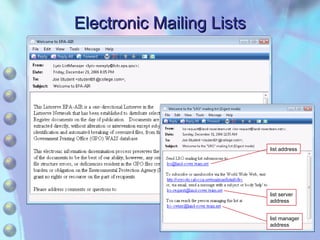
Electronic Mailing Lists List server address Address that commands should be sent to List address E-mail address that posts are sent to for distribution to other list members List manager or administrator address Open mailing list Anyone can subscribe Closed mailing list Restricted, such as a university alumni list
Electronic Mailing Lists list address list server address list manager address
Electronic Mailing Lists Moderated and unmoderated lists Moderated lists have a list moderator who reviews the posts to a mailing list before they are forwarded to other members Moderating is time-consuming Most lists are unmoderated List owner or administrator may step in if a problem is known
Electronic Mailing Lists Basic Communication Rules Violating expected behavior may result in other list members flaming the offender Flame An abusive e-mail message or post Violating list rules in a moderated list can result in warnings or even blacklisting Lurking Reading mailing list posts without actively participating
Electronic Mailing Lists Basic Communication Rules Keep posts related to the mailing list topic Do not top-post Do not post in HTML Trim replies Use appropriate subject headers Do not post attachments, advertising material, or spam Keep signatures short Do not write directly to any list members unless requested Respect copyright rules
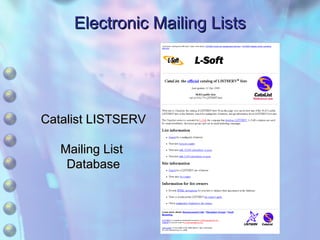
Electronic Mailing Lists Catalist LISTSERV  Mailing List  Database
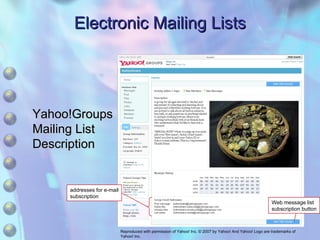
Electronic Mailing Lists Yahoo!Groups  Mailing List  Description Web message list subscription button addresses for e-mail subscription Reproduced with permission of Yahoo! Inc. © 2007 by Yahoo! And Yahoo! Logo are trademarks of Yahoo! Inc.
Electronic Mailing Lists Finding Mailing Lists A number of Web sites and databases catalog mailing lists L-Soft maintains searchable database called the Catalist ( www.lsoft.com/catalist.html ) for mailing lists created using LISTSERV Yahoo! Groups offers comprehensive mailing list descriptions that allow users to learn more about particular mailing lists they are interested in
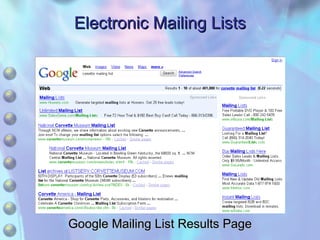
Electronic Mailing Lists Finding Mailing Lists Mailing lists with Web-based access often offer additional features such as the ability to post photos and links, create polls, and so on Users also can find a mailing list using a search engine Typing a query containing the desired mailing list subject or topic followed by the key terms  mailing list  will often turn up search results for mailing lists related to the topic
Electronic Mailing Lists Google Mailing List Results Page
Electronic Mailing Lists Review What are the different methods that can be used to read mailing list posts? What is the difference between moderated and unmoderated lists? How can you find mailing lists?
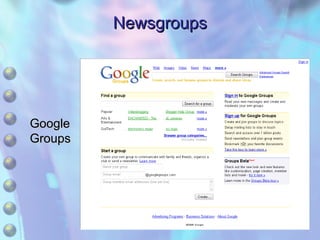
Newsgroups Also known as Internet discussion groups or forums Function like electronic bulletin boards that allow users to post and read messages Predate the Internet Have their origin in a network of electronic bulletin boards known as Usenet Today most newsgroups operate through the Internet through newsreader programs or via a Web page interface Example - Google Groups Web site Many e-mail clients include a built-in newsreader
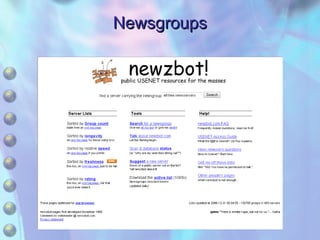
Newsgroups Newsgroups are handled by special servers known as news servers Publicly accessible news servers, such as newzbot!, provide an alternative for those without ISP news server service Newsgroups are an example of a distributed database The contents of the database are stored on a number of different servers in different locations Contents of a newsgroup file, known as a newsfeed, is  replicated news servers around the world using the Network News Transfer Protocol (NNTP)
Newsgroups Subscription process is as simple as selecting a newsgroup name and then clicking a subscribe button Like mailing lists A user contribution is called a post Series of posts under the same topic is a thread Newsgroups can be moderated or unmoderated
Newsgroups Usenet newsgroup names are structured as hierarchies There are currently eight major top-level hierarchies referred to as the Big Eight Alt (alternative) newsgroups were created to handle nonmainstream topics that were too controversial for the Big Eight
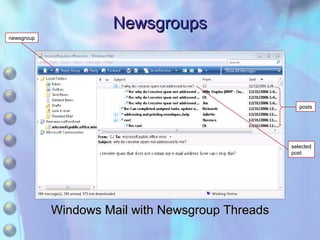
Newsgroups Windows Mail with Newsgroup Threads selected post newsgroup posts
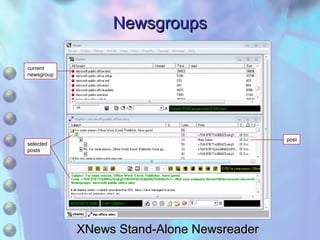
Newsgroups XNews Stand-Alone Newsreader post selected posts current newsgroup
Newsgroups
Newsgroups Google  Groups
Newsgroups Review What are two methods that can be used to read newsgroups? What does the Big Eight refer to? What protocol do most news servers use?
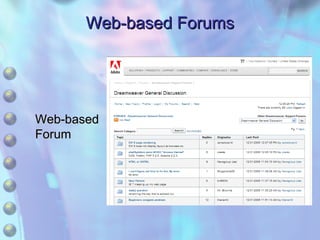
Web-based Forums Also known as bulletin boards or message boards Similar to newsgroups in function, but the technology behind them is different Forum data is handled in a single server location Offered by many commercial Web sites to draw customers
Web-based Forums Web-based  Forum
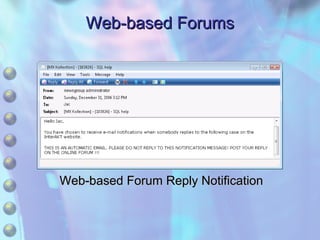
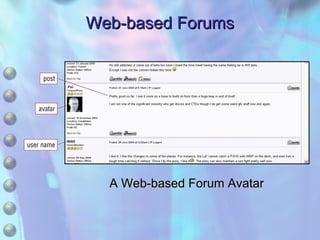
Web-based Forums Offer a number of features unavailable through newsgroups The ability to enable e-mail notification The ability to use graphical emoticons The ability to use an avatar Graphical representation of a forum Disadvantages Single server nature makes Web-based forum more vulnerable to disruption Can be harder to locate because they are contained in different Web sites rather than grouped together like newsgroups
Web-based Forums Web-based Forum Reply Notification
Web-based Forums A Web-based Forum Avatar
Web-based Forums Review How do Web-based forums differ from newsgroups? What are some advantages and disadvantages of Web-based forums as compared to newsgroups? What is an avatar?
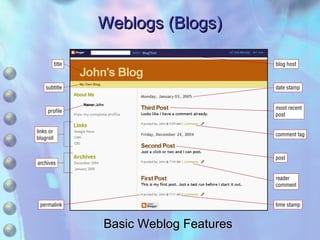
Weblogs (Blogs) Also referred to as weblogs or blogs A form of personal journal or diary in Web page format Weblog entries are referred to as posts Posts made by a blog writer known as a blogger Permalink A unique URL, featured by each post, that can be used to display an entry Blogrolls Contained in most weblogs, a set of hyperlinks that link to other blogs or Web sites
Weblogs (Blogs) Basic Weblog Features
Weblogs (Blogs) Easiest method to create a blog Use a weblog service that provides ready-made blog templates as well as hosting Can be free with a charge for upgraded services Can also use stand-alone weblog software User installs software on local computer, but must find a host server for the blog content Requires more knowledge but gives more options for customization
Weblogs (Blogs) Most weblogs include comment and/or TrackBack features that make them a form of asynchronous communication Two-way communication between weblogs and readers allows the creation of blogging communities Interconnected blogging communities are sometimes referred to as the blogosphere
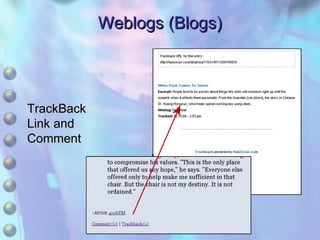
Weblogs (Blogs) TrackBack feature Notifies a weblog owner that another blogger has made a reference or comment to a post on the owner’s weblog TrackBack uses an Internet utility known as ping to create a link to the original blog Many weblogs as well as other Web sites now feature RSS feeds (Really Simple Syndication), an XML format for automatically notifying people of Web site updates
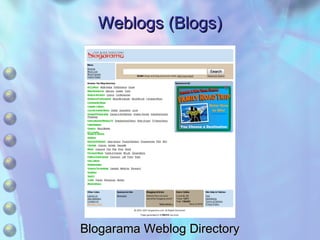
Weblogs (Blogs) Finding weblogs Weblog directories such as blogarama.com offer an easy way to find weblogs A search query in a search engine with search terms related to the type of weblog you are looking for with the words  blog  or  weblog  will often turn up weblogs
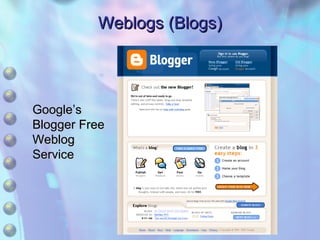
Weblogs (Blogs) Google’s  Blogger Free  Weblog  Service
Weblogs (Blogs) TrackBack  Link and  Comment
Weblogs (Blogs) Blogarama Weblog Directory
Weblogs (Blogs) Review What is the blogosphere? What is TrackBack, and how is it used? How can you find a weblog?
Wikis A type of Web site that allows asynchronous document collaboration enabling people to work together on documents regardless of their location Core wiki features User editability Automatic linking using the wiki naming convention of two or more capitalized words run together Ability to create pages without HTML
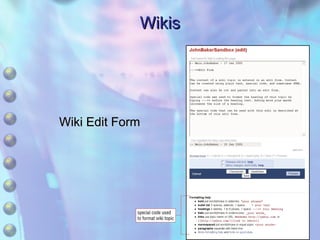
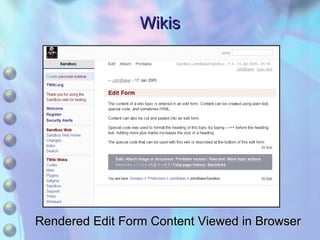
Wikis Users create or edit wiki source text using an edit form Wikiengine automatically renders user-entered text into text that can be viewed using a browser during the saving process Content entries can include Plain text Special wiki code Sometimes HTML
Wikis Wiki Edit Form
Wikis Rendered Edit Form Content Viewed in Browser
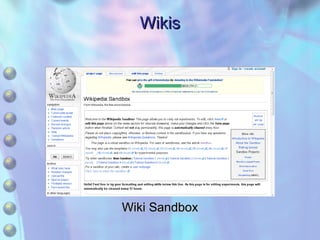
Wikis Hyperlinks known as WikiWords provide the main navigational method for wikis One of the key features of wikis is the ease with which links and new pages can be created When a topic is saved, wiki software automatically recognizes a WikiWord as a defined link pattern and creates a dangling link Most wikis have a sandbox which is an area that newcomers can use to experiment with creating and editing wiki pages
Wikis Wiki Sandbox
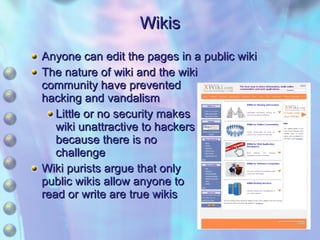
Wikis Anyone can edit the pages in a public wiki The nature of wiki and the wiki community have prevented hacking and vandalism Little or no security makes wiki unattractive to hackers because there is no challenge Wiki purists argue that only public wikis allow anyone to read or write are true wikis
Wikis Review How do the pages in a wiki differ from the pages in an ordinary Web site? What is a WikiWord? What is a wiki sandbox?

Chapter 9 Asynchronous Communication

  • 1.
    Chapter 9 AsynchronousCommunications
  • 2.
    Learning Objectives Definethe role and function of asynchronous communication. Explain how electronic mailing lists work. Identify the rules for good mailing list and forum behavior. Explain the function of newsgroups. Demonstrate how to configure Windows Mail for use with newsgroups.
  • 3.
    Learning Objectives Differentiatebetween Usenet newsgroups and Web-based newsgroups. Define weblogs (blogs) and maintain a weblog. Explain how wikis work and create and edit wiki pages.
  • 4.
    Chapter Focus ElectronicMailing Lists Newsgroups Web-based Forums Weblogs (Blogs) Wikis
  • 5.
    Electronic Mailing ListsAlso known as e-mail discussion lists or groups E-mail based, topic-focused discussion environments Posts E-mail messages sent to a mailing list Reading options available in most mailing lists Posts can arrive as individual e-mail messages Posts can arrive in a digest form sent as one message Posts can be viewed via a Web page
  • 6.
    Electronic Mailing ListsMailing List Reading Options Posts can arrive as individual e-mail messages, in a digest form, or viewed via a Web page.
  • 7.
    Electronic Mailing ListsThread A series of posts on the same subject Subscribing and unsubscribing Traditional method is to send a command such as HELP or SUBSCRIBE in the subject or body or an e-mail message Confirmation or welcome message will usually be sent Mailing commands are not case sensitive Except for passwords
  • 8.
    Electronic Mailing ListsMailing List Web Page Archive
  • 9.
    Electronic Mailing ListsMailing List Archive Sorted by Thread message thread
  • 10.
    Electronic Mailing ListsList server address Address that commands should be sent to List address E-mail address that posts are sent to for distribution to other list members List manager or administrator address Open mailing list Anyone can subscribe Closed mailing list Restricted, such as a university alumni list
  • 11.
    Electronic Mailing Listslist address list server address list manager address
  • 12.
    Electronic Mailing ListsModerated and unmoderated lists Moderated lists have a list moderator who reviews the posts to a mailing list before they are forwarded to other members Moderating is time-consuming Most lists are unmoderated List owner or administrator may step in if a problem is known
  • 13.
    Electronic Mailing ListsBasic Communication Rules Violating expected behavior may result in other list members flaming the offender Flame An abusive e-mail message or post Violating list rules in a moderated list can result in warnings or even blacklisting Lurking Reading mailing list posts without actively participating
  • 14.
    Electronic Mailing ListsBasic Communication Rules Keep posts related to the mailing list topic Do not top-post Do not post in HTML Trim replies Use appropriate subject headers Do not post attachments, advertising material, or spam Keep signatures short Do not write directly to any list members unless requested Respect copyright rules
  • 15.
    Electronic Mailing ListsCatalist LISTSERV Mailing List Database
  • 16.
    Electronic Mailing ListsYahoo!Groups Mailing List Description Web message list subscription button addresses for e-mail subscription Reproduced with permission of Yahoo! Inc. © 2007 by Yahoo! And Yahoo! Logo are trademarks of Yahoo! Inc.
  • 17.
    Electronic Mailing ListsFinding Mailing Lists A number of Web sites and databases catalog mailing lists L-Soft maintains searchable database called the Catalist ( www.lsoft.com/catalist.html ) for mailing lists created using LISTSERV Yahoo! Groups offers comprehensive mailing list descriptions that allow users to learn more about particular mailing lists they are interested in
  • 18.
    Electronic Mailing ListsFinding Mailing Lists Mailing lists with Web-based access often offer additional features such as the ability to post photos and links, create polls, and so on Users also can find a mailing list using a search engine Typing a query containing the desired mailing list subject or topic followed by the key terms mailing list will often turn up search results for mailing lists related to the topic
  • 19.
    Electronic Mailing ListsGoogle Mailing List Results Page
  • 20.
    Electronic Mailing ListsReview What are the different methods that can be used to read mailing list posts? What is the difference between moderated and unmoderated lists? How can you find mailing lists?
  • 21.
    Newsgroups Also knownas Internet discussion groups or forums Function like electronic bulletin boards that allow users to post and read messages Predate the Internet Have their origin in a network of electronic bulletin boards known as Usenet Today most newsgroups operate through the Internet through newsreader programs or via a Web page interface Example - Google Groups Web site Many e-mail clients include a built-in newsreader
  • 22.
    Newsgroups Newsgroups arehandled by special servers known as news servers Publicly accessible news servers, such as newzbot!, provide an alternative for those without ISP news server service Newsgroups are an example of a distributed database The contents of the database are stored on a number of different servers in different locations Contents of a newsgroup file, known as a newsfeed, is replicated news servers around the world using the Network News Transfer Protocol (NNTP)
  • 23.
    Newsgroups Subscription processis as simple as selecting a newsgroup name and then clicking a subscribe button Like mailing lists A user contribution is called a post Series of posts under the same topic is a thread Newsgroups can be moderated or unmoderated
  • 24.
    Newsgroups Usenet newsgroupnames are structured as hierarchies There are currently eight major top-level hierarchies referred to as the Big Eight Alt (alternative) newsgroups were created to handle nonmainstream topics that were too controversial for the Big Eight
  • 25.
    Newsgroups Windows Mailwith Newsgroup Threads selected post newsgroup posts
  • 26.
    Newsgroups XNews Stand-AloneNewsreader post selected posts current newsgroup
  • 27.
  • 28.
  • 29.
    Newsgroups Review Whatare two methods that can be used to read newsgroups? What does the Big Eight refer to? What protocol do most news servers use?
  • 30.
    Web-based Forums Alsoknown as bulletin boards or message boards Similar to newsgroups in function, but the technology behind them is different Forum data is handled in a single server location Offered by many commercial Web sites to draw customers
  • 31.
  • 32.
    Web-based Forums Offera number of features unavailable through newsgroups The ability to enable e-mail notification The ability to use graphical emoticons The ability to use an avatar Graphical representation of a forum Disadvantages Single server nature makes Web-based forum more vulnerable to disruption Can be harder to locate because they are contained in different Web sites rather than grouped together like newsgroups
  • 33.
    Web-based Forums Web-basedForum Reply Notification
  • 34.
    Web-based Forums AWeb-based Forum Avatar
  • 35.
    Web-based Forums ReviewHow do Web-based forums differ from newsgroups? What are some advantages and disadvantages of Web-based forums as compared to newsgroups? What is an avatar?
  • 36.
    Weblogs (Blogs) Alsoreferred to as weblogs or blogs A form of personal journal or diary in Web page format Weblog entries are referred to as posts Posts made by a blog writer known as a blogger Permalink A unique URL, featured by each post, that can be used to display an entry Blogrolls Contained in most weblogs, a set of hyperlinks that link to other blogs or Web sites
  • 37.
    Weblogs (Blogs) BasicWeblog Features
  • 38.
    Weblogs (Blogs) Easiestmethod to create a blog Use a weblog service that provides ready-made blog templates as well as hosting Can be free with a charge for upgraded services Can also use stand-alone weblog software User installs software on local computer, but must find a host server for the blog content Requires more knowledge but gives more options for customization
  • 39.
    Weblogs (Blogs) Mostweblogs include comment and/or TrackBack features that make them a form of asynchronous communication Two-way communication between weblogs and readers allows the creation of blogging communities Interconnected blogging communities are sometimes referred to as the blogosphere
  • 40.
    Weblogs (Blogs) TrackBackfeature Notifies a weblog owner that another blogger has made a reference or comment to a post on the owner’s weblog TrackBack uses an Internet utility known as ping to create a link to the original blog Many weblogs as well as other Web sites now feature RSS feeds (Really Simple Syndication), an XML format for automatically notifying people of Web site updates
  • 41.
    Weblogs (Blogs) Findingweblogs Weblog directories such as blogarama.com offer an easy way to find weblogs A search query in a search engine with search terms related to the type of weblog you are looking for with the words blog or weblog will often turn up weblogs
  • 42.
    Weblogs (Blogs) Google’s Blogger Free Weblog Service
  • 43.
    Weblogs (Blogs) TrackBack Link and Comment
  • 44.
    Weblogs (Blogs) BlogaramaWeblog Directory
  • 45.
    Weblogs (Blogs) ReviewWhat is the blogosphere? What is TrackBack, and how is it used? How can you find a weblog?
  • 46.
    Wikis A typeof Web site that allows asynchronous document collaboration enabling people to work together on documents regardless of their location Core wiki features User editability Automatic linking using the wiki naming convention of two or more capitalized words run together Ability to create pages without HTML
  • 47.
    Wikis Users createor edit wiki source text using an edit form Wikiengine automatically renders user-entered text into text that can be viewed using a browser during the saving process Content entries can include Plain text Special wiki code Sometimes HTML
  • 48.
  • 49.
    Wikis Rendered EditForm Content Viewed in Browser
  • 50.
    Wikis Hyperlinks knownas WikiWords provide the main navigational method for wikis One of the key features of wikis is the ease with which links and new pages can be created When a topic is saved, wiki software automatically recognizes a WikiWord as a defined link pattern and creates a dangling link Most wikis have a sandbox which is an area that newcomers can use to experiment with creating and editing wiki pages
  • 51.
  • 52.
    Wikis Anyone canedit the pages in a public wiki The nature of wiki and the wiki community have prevented hacking and vandalism Little or no security makes wiki unattractive to hackers because there is no challenge Wiki purists argue that only public wikis allow anyone to read or write are true wikis
  • 53.
    Wikis Review Howdo the pages in a wiki differ from the pages in an ordinary Web site? What is a WikiWord? What is a wiki sandbox?