Chapter 10 Synchronous Communications
Learning Objectives Define the role and function of synchronous communication. Demonstrate how Internet Relay Chat (IRC) works. Explain how instant messaging (IM) clients work and identify different IM features.
Learning Objectives Explain video conferencing. Explain how to use Windows Live Messenger for video chat. Describe Voice over Internet Protocol (VoIP) and use a VoIP program to place computer-to-computer phone calls.
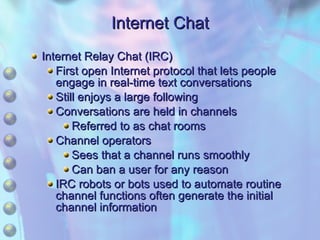
Chapter Focus Internet Chat Instant Messaging Vista Remote Assistance Video Conferencing Voice over Internet Protocol (VoIP)
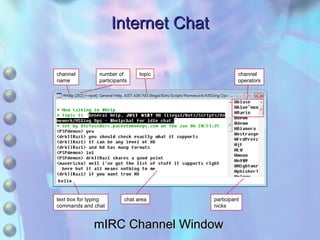
Internet Chat Internet Relay Chat (IRC) First open Internet protocol that lets people engage in real-time text conversations Still enjoys a large following Conversations are held in channels Referred to as chat rooms Channel operators Sees that a channel runs smoothly Can ban a user for any reason IRC robots or bots used to automate routine channel functions often generate the initial channel information
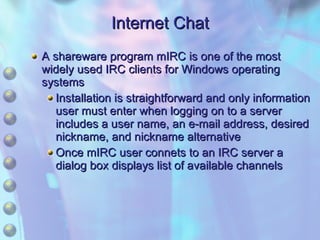
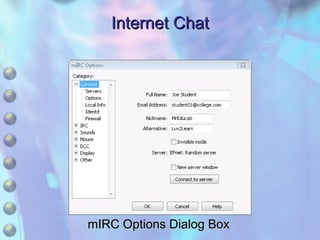
Internet Chat A shareware program mIRC is one of the most widely used IRC clients for Windows operating systems Installation is straightforward and only information user must enter when logging on to a server includes a user name, an e-mail address, desired nickname, and nickname alternative Once mIRC user connets to an IRC server a dialog box displays list of available channels
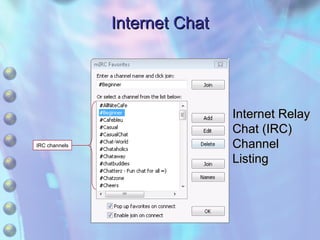
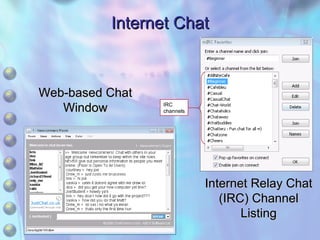
Internet Chat IRC channels Internet Relay Chat (IRC) Channel Listing
Internet Chat mIRC Options Dialog Box
Internet Chat mIRC Channel Window channel name number of participants topic channel operators text box for typing commands and chat chat area participant nicks
Internet Chat Web-based Chat Allows users to access some IRC networks and other private networks via a Web browser to engage in text-based chat, and sometimes voice and video chat No special software to install A user can open only one channel at a time IRC clients can keep multiple channels open at the same time
Internet Chat Internet Relay Chat (IRC) Channel Listing Web-based Chat Window IRC channels
Internet Chat Review How does Internet Relay Chat (IRC) work? Can people connected to different IRC networks carry on conversations? What is a channel operator?
Instant Messaging Resembles IRC in that it uses a client program connected to a server network to enable real-time text conversations Focus of IRC Group conversations Focus of Instant Messaging (IM) One-on-one private conversations ICQ and America Online First to offer IM Now have competition with the largest competitors being Windows Live Messenger and Yahoo! Messenger
Instant Messaging Most IM clients can be downloaded as freeware Windows XP came with a pre-installed instant messaging client called Windows Messenger but Windows Vista does not include a messaging client Microsoft offers the new Windows Live Messenger as a free download for XP and Vista users which is meant to replace Windows Messenger on XP To be able to start conversations, IM users create contact lists of friends and acquaintances with whom they wish to correspond Most IM clients feature a command that can be used to invite friends to install the client and register with the service to carry on conversations
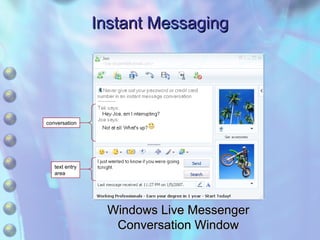
Instant Messaging Windows Live Messenger Conversation Window conversation text entry area
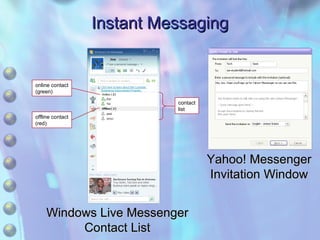
Instant Messaging Windows Live Messenger Contact List online contact (green) contact list offline contact (red) Yahoo! Messenger Invitation Window
Instant Messaging Most enable a user to ignore messages from anyone he or she wishes to avoid Drawback A number of incompatible protocols are in use Most IM clients feature graphical emoticons user can insert into any  message to make emotion behind a text communication clearer
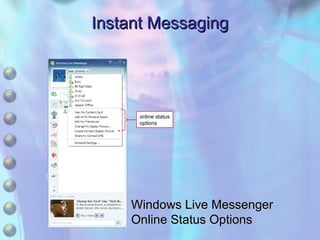
Instant Messaging online status options Windows Live Messenger Online Status Options
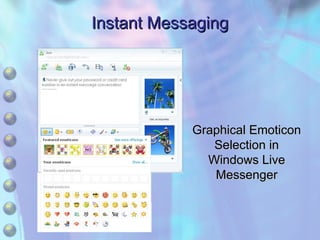
Instant Messaging Graphical Emoticon Selection in Windows Live Messenger
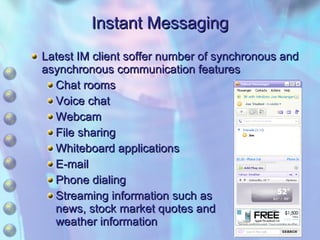
Instant Messaging Latest IM client soffer number of synchronous and asynchronous communication features Chat rooms Voice chat Webcam File sharing Whiteboard applications E-mail Phone dialing Streaming information such as news, stock market quotes and weather information
Instant Messaging Business Applications Companies save money by using IM instead of phone calls Advantage to traditional telephone help Customer can print a transcript of conversation Instant Messages are the target of viruses
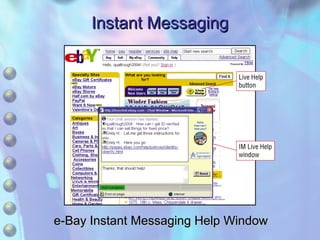
Instant Messaging e-Bay Instant Messaging Help Window
Instant Messaging Review How does instant messaging work? What precautions should you take when using IM? What are some of the other features that IM clients offer besides text-based conversation?
Vista Remote Assistance Windows Vista provides feature called Remote Assistance Allows one user to give permission to another user to take control of his or her computer via a network or Internet connection Computer user needing help is referred to as the novice  User providing help is referred to as the expert Person taking control can directly analyze and repair any problems as if he or she were sitting in front of the remote  User must make sure that the Vista firewall is configured to allow Remote Assistance
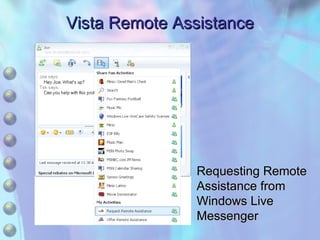
Vista Remote Assistance Requesting Remote Assistance from Windows Live Messenger
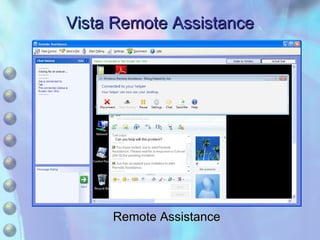
Vista Remote Assistance Remote Assistance
Vista Remote Assistance Review What is a situation where you might ask for Remote Assistance? What benefits does Remote Assistance offer over more traditional methods of support, like the telephone?
Video Conferencing Sometimes referred to as teleconferencing Employs audio and video technologies to allow two or more people to engage in a real-time conversation All parties can see each other ISDN phone lines are necessary for traditional video conferencing Billed on a costly per-minute basis
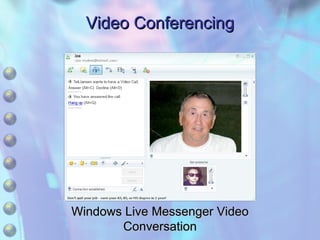
Video Conferencing Windows Live Messenger Video Conversation
Video Conferencing Internet Protocol (IP) video conferencing Advantages over ISDN Permits Web collaboration through a single Internet connection Low cost compared to high connection costs for dedicated video conference lines Can work over dial-up connections But low bandwidth causes poor audio and video Most computers sold today come equipped with sound and video cards, so the only hardware outlay is purchase of a webcam and a headset consisting of earphones and built-in microphone
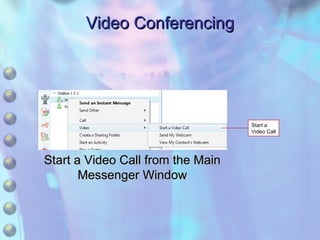
Video Conferencing Many video conferencing packages are targeted to commercial users Home and small business users can choose one of a number of free video conferencing options Windows Live Messenger Yahoo! Messenger Usually referred to as video conversation or chat In Windows Live Messenger, a video conference can be initiated from the main Messenger window by right-clicking an online contact and choosing Video> Start a Video Call
Video Conferencing Start a Video Call Start a Video Call from the Main Messenger Window
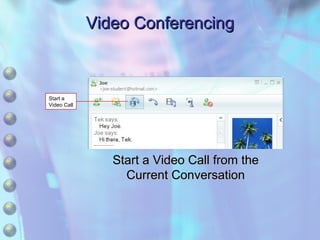
Video Conferencing Start a Video Call Start a Video Call from the Current Conversation
Video Conferencing If you are already in a conversation with a contact, click the Start or Stop a Video Call button on the toolbar The Video Call feature enables audio as well, so participants can engage in a normal conversation while viewing each other
Video Conferencing Review What is needed in order to have a desktop video conference? What advantages does IP video conferencing have over ISDN video conferencing?
Voice over Internet Protocol (VoIP) Also called IP telephony Involves the transmission of voice telephone calls over the Internet Analog audio signals used by ordinary telephone lines are converted into digital signals that can travel across the Internet before being switched back into analog signals at the receiving end
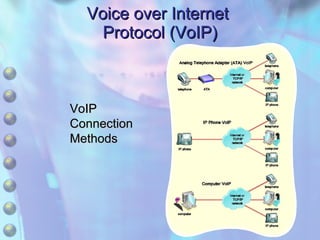
Voice over Internet  Protocol (VoIP) VoIP Connection  Methods
Voice over Internet Protocol (VoIP) Sound quality, echoing, and frequent drop-outs has improved to point of superior sound quality compared to regular telephone service Cheaper than regular phone calls handled by traditional telephone service providers Normal telephones can be used for VoIP calls by connecting them to an analog telephone adaptor (ATA) that converts analog signals to digital signals
Voice over Internet Protocol (VoIP) VoIP service providers like Vonage, AT&T, and others usually charge a flat rate for calls within the United States and Canada, and very competitive per-minute rates for calls to other countries If an ATA adaptor is connected to a computer that is connected to the Internet, no special software is required because the adaptor communicates directly with a VoIP server
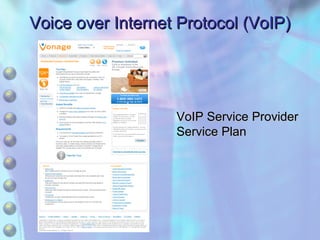
Voice over Internet Protocol (VoIP) VoIP Service Provider Service Plan
Voice over Internet Protocol (VoIP) IP phones, sometimes called hardphones, contain ATA hardware and plug directly into an Internet connection If an IP phone is plugged into a computer that is connected to the Internet, no special software is required as the IP phone communicates directly with a VoIP server
Voice over Internet Protocol (VoIP) Computer-to-computer VoIP connections use software to make calls from one computer to another computer, from a computer to a regular telephone, or to an IP phone Computers used for VoIP need a full-duplex sound card so users can talk and hear at the same time Computer-to-computer VoIP users can speak and hear using a microphone and speakers or a headset
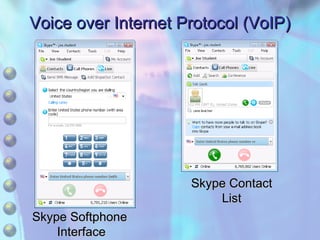
Voice over Internet Protocol (VoIP) Computer-to-computer VoIP software features a softphone, a screen-based GUI interface that emulates a telephone or telephone features  Skype, available as freeware, is one of the most popular computer VoIP programs in current use Can be used to make computer-to-computer VoIP calls anywhere in the world free of charge
Voice over Internet Protocol (VoIP) Skype Softphone  Interface Skype Contact List
Voice over Internet Protocol (VoIP) Review What is VoIP, and how does it work? What are the different methods that can be used to make VoIP telephone calls? What is a softphone?

Chapter 10 Synchronous Communication

  • 1.
    Chapter 10 SynchronousCommunications
  • 2.
    Learning Objectives Definethe role and function of synchronous communication. Demonstrate how Internet Relay Chat (IRC) works. Explain how instant messaging (IM) clients work and identify different IM features.
  • 3.
    Learning Objectives Explainvideo conferencing. Explain how to use Windows Live Messenger for video chat. Describe Voice over Internet Protocol (VoIP) and use a VoIP program to place computer-to-computer phone calls.
  • 4.
    Chapter Focus InternetChat Instant Messaging Vista Remote Assistance Video Conferencing Voice over Internet Protocol (VoIP)
  • 5.
    Internet Chat InternetRelay Chat (IRC) First open Internet protocol that lets people engage in real-time text conversations Still enjoys a large following Conversations are held in channels Referred to as chat rooms Channel operators Sees that a channel runs smoothly Can ban a user for any reason IRC robots or bots used to automate routine channel functions often generate the initial channel information
  • 6.
    Internet Chat Ashareware program mIRC is one of the most widely used IRC clients for Windows operating systems Installation is straightforward and only information user must enter when logging on to a server includes a user name, an e-mail address, desired nickname, and nickname alternative Once mIRC user connets to an IRC server a dialog box displays list of available channels
  • 7.
    Internet Chat IRCchannels Internet Relay Chat (IRC) Channel Listing
  • 8.
    Internet Chat mIRCOptions Dialog Box
  • 9.
    Internet Chat mIRCChannel Window channel name number of participants topic channel operators text box for typing commands and chat chat area participant nicks
  • 10.
    Internet Chat Web-basedChat Allows users to access some IRC networks and other private networks via a Web browser to engage in text-based chat, and sometimes voice and video chat No special software to install A user can open only one channel at a time IRC clients can keep multiple channels open at the same time
  • 11.
    Internet Chat InternetRelay Chat (IRC) Channel Listing Web-based Chat Window IRC channels
  • 12.
    Internet Chat ReviewHow does Internet Relay Chat (IRC) work? Can people connected to different IRC networks carry on conversations? What is a channel operator?
  • 13.
    Instant Messaging ResemblesIRC in that it uses a client program connected to a server network to enable real-time text conversations Focus of IRC Group conversations Focus of Instant Messaging (IM) One-on-one private conversations ICQ and America Online First to offer IM Now have competition with the largest competitors being Windows Live Messenger and Yahoo! Messenger
  • 14.
    Instant Messaging MostIM clients can be downloaded as freeware Windows XP came with a pre-installed instant messaging client called Windows Messenger but Windows Vista does not include a messaging client Microsoft offers the new Windows Live Messenger as a free download for XP and Vista users which is meant to replace Windows Messenger on XP To be able to start conversations, IM users create contact lists of friends and acquaintances with whom they wish to correspond Most IM clients feature a command that can be used to invite friends to install the client and register with the service to carry on conversations
  • 15.
    Instant Messaging WindowsLive Messenger Conversation Window conversation text entry area
  • 16.
    Instant Messaging WindowsLive Messenger Contact List online contact (green) contact list offline contact (red) Yahoo! Messenger Invitation Window
  • 17.
    Instant Messaging Mostenable a user to ignore messages from anyone he or she wishes to avoid Drawback A number of incompatible protocols are in use Most IM clients feature graphical emoticons user can insert into any message to make emotion behind a text communication clearer
  • 18.
    Instant Messaging onlinestatus options Windows Live Messenger Online Status Options
  • 19.
    Instant Messaging GraphicalEmoticon Selection in Windows Live Messenger
  • 20.
    Instant Messaging LatestIM client soffer number of synchronous and asynchronous communication features Chat rooms Voice chat Webcam File sharing Whiteboard applications E-mail Phone dialing Streaming information such as news, stock market quotes and weather information
  • 21.
    Instant Messaging BusinessApplications Companies save money by using IM instead of phone calls Advantage to traditional telephone help Customer can print a transcript of conversation Instant Messages are the target of viruses
  • 22.
    Instant Messaging e-BayInstant Messaging Help Window
  • 23.
    Instant Messaging ReviewHow does instant messaging work? What precautions should you take when using IM? What are some of the other features that IM clients offer besides text-based conversation?
  • 24.
    Vista Remote AssistanceWindows Vista provides feature called Remote Assistance Allows one user to give permission to another user to take control of his or her computer via a network or Internet connection Computer user needing help is referred to as the novice User providing help is referred to as the expert Person taking control can directly analyze and repair any problems as if he or she were sitting in front of the remote User must make sure that the Vista firewall is configured to allow Remote Assistance
  • 25.
    Vista Remote AssistanceRequesting Remote Assistance from Windows Live Messenger
  • 26.
    Vista Remote AssistanceRemote Assistance
  • 27.
    Vista Remote AssistanceReview What is a situation where you might ask for Remote Assistance? What benefits does Remote Assistance offer over more traditional methods of support, like the telephone?
  • 28.
    Video Conferencing Sometimesreferred to as teleconferencing Employs audio and video technologies to allow two or more people to engage in a real-time conversation All parties can see each other ISDN phone lines are necessary for traditional video conferencing Billed on a costly per-minute basis
  • 29.
    Video Conferencing WindowsLive Messenger Video Conversation
  • 30.
    Video Conferencing InternetProtocol (IP) video conferencing Advantages over ISDN Permits Web collaboration through a single Internet connection Low cost compared to high connection costs for dedicated video conference lines Can work over dial-up connections But low bandwidth causes poor audio and video Most computers sold today come equipped with sound and video cards, so the only hardware outlay is purchase of a webcam and a headset consisting of earphones and built-in microphone
  • 31.
    Video Conferencing Manyvideo conferencing packages are targeted to commercial users Home and small business users can choose one of a number of free video conferencing options Windows Live Messenger Yahoo! Messenger Usually referred to as video conversation or chat In Windows Live Messenger, a video conference can be initiated from the main Messenger window by right-clicking an online contact and choosing Video> Start a Video Call
  • 32.
    Video Conferencing Starta Video Call Start a Video Call from the Main Messenger Window
  • 33.
    Video Conferencing Starta Video Call Start a Video Call from the Current Conversation
  • 34.
    Video Conferencing Ifyou are already in a conversation with a contact, click the Start or Stop a Video Call button on the toolbar The Video Call feature enables audio as well, so participants can engage in a normal conversation while viewing each other
  • 35.
    Video Conferencing ReviewWhat is needed in order to have a desktop video conference? What advantages does IP video conferencing have over ISDN video conferencing?
  • 36.
    Voice over InternetProtocol (VoIP) Also called IP telephony Involves the transmission of voice telephone calls over the Internet Analog audio signals used by ordinary telephone lines are converted into digital signals that can travel across the Internet before being switched back into analog signals at the receiving end
  • 37.
    Voice over Internet Protocol (VoIP) VoIP Connection Methods
  • 38.
    Voice over InternetProtocol (VoIP) Sound quality, echoing, and frequent drop-outs has improved to point of superior sound quality compared to regular telephone service Cheaper than regular phone calls handled by traditional telephone service providers Normal telephones can be used for VoIP calls by connecting them to an analog telephone adaptor (ATA) that converts analog signals to digital signals
  • 39.
    Voice over InternetProtocol (VoIP) VoIP service providers like Vonage, AT&T, and others usually charge a flat rate for calls within the United States and Canada, and very competitive per-minute rates for calls to other countries If an ATA adaptor is connected to a computer that is connected to the Internet, no special software is required because the adaptor communicates directly with a VoIP server
  • 40.
    Voice over InternetProtocol (VoIP) VoIP Service Provider Service Plan
  • 41.
    Voice over InternetProtocol (VoIP) IP phones, sometimes called hardphones, contain ATA hardware and plug directly into an Internet connection If an IP phone is plugged into a computer that is connected to the Internet, no special software is required as the IP phone communicates directly with a VoIP server
  • 42.
    Voice over InternetProtocol (VoIP) Computer-to-computer VoIP connections use software to make calls from one computer to another computer, from a computer to a regular telephone, or to an IP phone Computers used for VoIP need a full-duplex sound card so users can talk and hear at the same time Computer-to-computer VoIP users can speak and hear using a microphone and speakers or a headset
  • 43.
    Voice over InternetProtocol (VoIP) Computer-to-computer VoIP software features a softphone, a screen-based GUI interface that emulates a telephone or telephone features Skype, available as freeware, is one of the most popular computer VoIP programs in current use Can be used to make computer-to-computer VoIP calls anywhere in the world free of charge
  • 44.
    Voice over InternetProtocol (VoIP) Skype Softphone Interface Skype Contact List
  • 45.
    Voice over InternetProtocol (VoIP) Review What is VoIP, and how does it work? What are the different methods that can be used to make VoIP telephone calls? What is a softphone?