August 6, 2009 1
CONTROL STATEMENTS
August 6, 2009 2
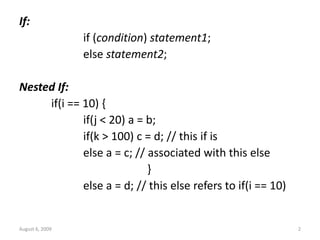
If:
if (condition) statement1;
else statement2;
Nested If:
if(i == 10) {
if(j < 20) a = b;
if(k > 100) c = d; // this if is
else a = c; // associated with this else
}
else a = d; // this else refers to if(i == 10)
August 6, 2009 3
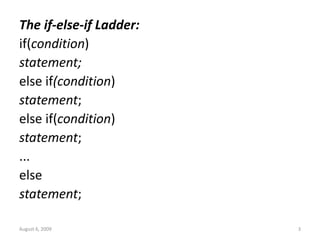
The if-else-if Ladder:
if(condition)
statement;
else if(condition)
statement;
else if(condition)
statement;
...
else
statement;
August 6, 2009 4
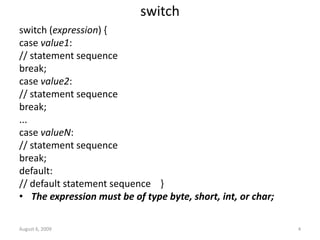
switch
switch (expression) {
case value1:
// statement sequence
break;
case value2:
// statement sequence
break;
...
case valueN:
// statement sequence
break;
default:
// default statement sequence }
• The expression must be of type byte, short, int, or char;
August 6, 2009 5
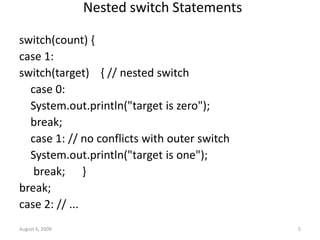
Nested switch Statements
switch(count) {
case 1:
switch(target) { // nested switch
case 0:
System.out.println("target is zero");
break;
case 1: // no conflicts with outer switch
System.out.println("target is one");
break; }
break;
case 2: // ...
August 6, 2009 6
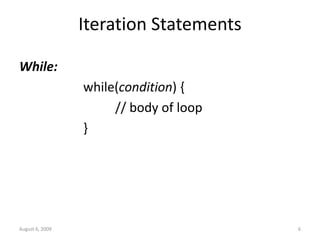
Iteration Statements
While:
while(condition) {
// body of loop
}
August 6, 2009 7
class NoBody {
public static void main(String args[]) {
int i, j;
i = 100;
j = 200;
// find midpoint between i and j
while(++i < --j) ; // no body in this loop
System.out.println("Midpoint is " + i);
}
}
August 6, 2009 8
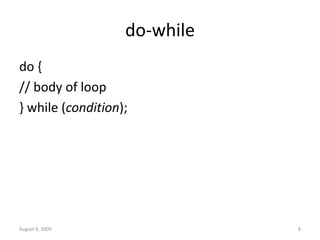
do-while
do {
// body of loop
} while (condition);
August 6, 2009 9
// Using a do-while to process a menu selection
class Menu {
public static void main(String args[])
throws java.io.IOException {
//char choice;
do {
System.out.println("Help on:");
System.out.println(" 1. if");
System.out.println(" 2. switch");
System.out.println(" 3. while");
System.out.println(" 4. do-while");
System.out.println(" 5. forn");
System.out.println("Choose one:");
int choice=sc.nextInt();
} while( choice<=5);
System.out.println("n");
August 6, 2009 10
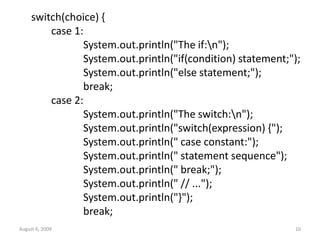
switch(choice) {
case 1:
System.out.println("The if:n");
System.out.println("if(condition) statement;");
System.out.println("else statement;");
break;
case 2:
System.out.println("The switch:n");
System.out.println("switch(expression) {");
System.out.println(" case constant:");
System.out.println(" statement sequence");
System.out.println(" break;");
System.out.println(" // ...");
System.out.println("}");
break;
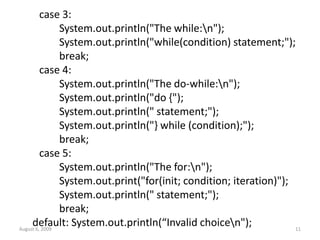
case 3:
System.out.println("The while:n");
System.out.println("while(condition) statement;");
break;
case 4:
System.out.println("The do-while:n");
System.out.println("do {");
System.out.println(" statement;");
System.out.println("} while (condition);");
break;
case 5:
System.out.println("The for:n");
System.out.print("for(init; condition; iteration)");
System.out.println(" statement;");
break;
default: System.out.println(“Invalid choicen");
August 6, 2009 11
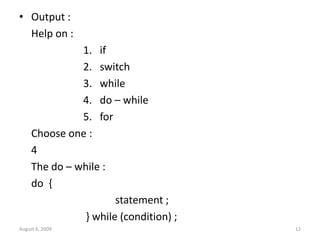
• Output :
Help on :
1. if
2. switch
3. while
4. do – while
5. for
Choose one :
4
The do – while :
do {
statement ;
} while (condition) ;
August 6, 2009 12
August 6, 2009 13
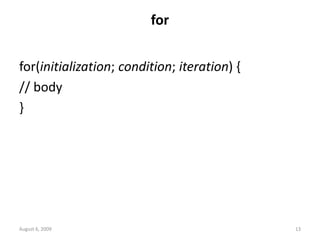
for
for(initialization; condition; iteration) {
// body
}
August 6, 2009 14
class Comma {
public static void main(String args[]) {
int a, b;
for(a=1, b=4; a<b; a++, b--) {
System.out.println("a = " + a);
System.out.println("b = " + b);
}
}
}
August 6, 2009 15
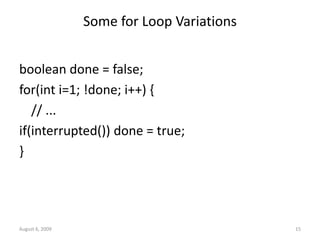
Some for Loop Variations
boolean done = false;
for(int i=1; !done; i++) {
// ...
if(interrupted()) done = true;
}
August 6, 2009 16
// Parts of the for loop can be empty.
class ForVar {
public static void main(String args[]) {
int i;
boolean done = false;
i = 0;
for( ; !done; ) {
System.out.println("i is " + i);
if(i == 10) done = true;
i++;
}
}
}
August 6, 2009 17
for( ; ; ) {
// ...
}
• This loop will run forever, because there is no
condition under which it will terminate
• Nested Loops - concept
The For-Each version of the for loop:
• It is designed to cycle through a collection of
objects, such as an array, in strictly sequential
fashion, from start to finish.
• Advantage is no new keyword is required and no
preexisting code is broken.
• Syntax
for(type itr-var : collection)
stmt-block
August 6, 2009 18
The For-Each version of the for loop:
• The loop repeats until all elements in the
collection have been obtained.
int nums[ ] ={1,2,3,4,5,6,7,8,9,10} ;
int sum=0;
for(int i=0; i<10;i++)
sum += nums[i] ;
=>
for ( int x : nums) sum += x ;
August 6, 2009 19
August 6, 2009 20
Jump Statements
Using break to Exit a Loop:
class BreakLoop {
public static void main(String args[]) {
for(int i=0; i<100; i++) {
if(i == 10) break; // terminate loop if i is 10
System.out.println("i: " + i);
}
System.out.println("Loop complete.");
}
}
August 6, 2009 21
• More than one break statement may appear
in a loop
• Too many break statements have the
tendency to de-structure your code
• The break that terminates a switch statement
affects only that switch statement and not any
enclosing loops
August 6, 2009 22
Using break as a Form of Goto
• Java defines an expanded form of the break
statement
• By using this form of break, you can break out
of one or more blocks of code
• The general form of the labeled break
statement is :
break label;
August 6, 2009 23
• A label is any valid Java identifier followed by
a colon
• You can use a labeled break statement to exit
from a set of nested blocks
• You cannot use break to transfer control to a
block of code that does not enclose the break
statement
August 6, 2009 24
class Break {
public static void main(String args[]) {
boolean t = true;
first: {
second: {
third: {
System.out.println("Before the break.");
if(t) break second; // break out of second block
System.out.println("This won't execute");
}
System.out.println("This won't execute");
}
System.out.println("This is after second block.");
}
}
}
August 6, 2009 25
//using break within nested loops
class BreakLoop4 {
public static void main(String args[]) {
outer: for(int i=0; i<3; i++) {
System.out.print("Pass " + i + ": ");
for(int j=0; j<100; j++) {
if(j == 10) break outer; // exit both loops
System.out.print(j + " ");
}
System.out.println("This will not print");
}
System.out.println("Loops complete.");
}
}
August 6, 2009 26
// This program contains an error.
class BreakErr {
public static void main(String args[]) {
one: for(int i=0; i<3; i++) {
System.out.print("Pass " + i + ": ");
}
for(int j=0; j<100; j++) {
if(j == 10) break one; // WRONG
System.out.print(j + " ");
}
}
}
August 6, 2009 27
Using continue
class Continue {
public static void main(String args[]) {
for(int i=0; i<10; i++) {
System.out.print(i + " ");
if (i%2 == 0) continue;
System.out.println("");
}
}
}
August 6, 2009 28
• As with the break statement, continue may specify a
label to describe which enclosing loop to continue
class ContinueLabel {
public static void main(String args[]) {
outer: for (int i=0; i<10; i++) {
for(int j=0; j<10; j++) {
if(j > i) {
System.out.println();
continue outer; } //end if
System.out.print(" " + (i * j));
} /*end inner for*/
} //end outer for
System.out.println();
} /*end main*/ }
August 6, 2009 29
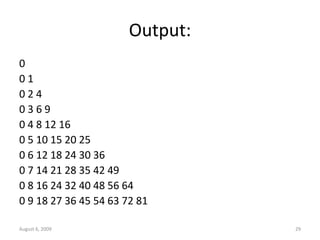
Output:
0
0 1
0 2 4
0 3 6 9
0 4 8 12 16
0 5 10 15 20 25
0 6 12 18 24 30 36
0 7 14 21 28 35 42 49
0 8 16 24 32 40 48 56 64
0 9 18 27 36 45 54 63 72 81
August 6, 2009 30
return
• Used to explicitly return from a method
• The return statement immediately terminates the
method in which it is executed
class Return {
public static void main(String args[]) {
boolean t = true;
System.out.println("Before the return.");
if(t==true) return; // return to caller
System.out.println("This won't execute.");
}
}
August 6, 2009 31
return causes execution to return to the Java
run-time system, since it is the run-time
system that calls main( )

4.CONTROL STATEMENTS_MB.ppt .

  • 1.
    August 6, 20091 CONTROL STATEMENTS
  • 2.
    August 6, 20092 If: if (condition) statement1; else statement2; Nested If: if(i == 10) { if(j < 20) a = b; if(k > 100) c = d; // this if is else a = c; // associated with this else } else a = d; // this else refers to if(i == 10)
  • 3.
    August 6, 20093 The if-else-if Ladder: if(condition) statement; else if(condition) statement; else if(condition) statement; ... else statement;
  • 4.
    August 6, 20094 switch switch (expression) { case value1: // statement sequence break; case value2: // statement sequence break; ... case valueN: // statement sequence break; default: // default statement sequence } • The expression must be of type byte, short, int, or char;
  • 5.
    August 6, 20095 Nested switch Statements switch(count) { case 1: switch(target) { // nested switch case 0: System.out.println("target is zero"); break; case 1: // no conflicts with outer switch System.out.println("target is one"); break; } break; case 2: // ...
  • 6.
    August 6, 20096 Iteration Statements While: while(condition) { // body of loop }
  • 7.
    August 6, 20097 class NoBody { public static void main(String args[]) { int i, j; i = 100; j = 200; // find midpoint between i and j while(++i < --j) ; // no body in this loop System.out.println("Midpoint is " + i); } }
  • 8.
    August 6, 20098 do-while do { // body of loop } while (condition);
  • 9.
    August 6, 20099 // Using a do-while to process a menu selection class Menu { public static void main(String args[]) throws java.io.IOException { //char choice; do { System.out.println("Help on:"); System.out.println(" 1. if"); System.out.println(" 2. switch"); System.out.println(" 3. while"); System.out.println(" 4. do-while"); System.out.println(" 5. forn"); System.out.println("Choose one:"); int choice=sc.nextInt(); } while( choice<=5); System.out.println("n");
  • 10.
    August 6, 200910 switch(choice) { case 1: System.out.println("The if:n"); System.out.println("if(condition) statement;"); System.out.println("else statement;"); break; case 2: System.out.println("The switch:n"); System.out.println("switch(expression) {"); System.out.println(" case constant:"); System.out.println(" statement sequence"); System.out.println(" break;"); System.out.println(" // ..."); System.out.println("}"); break;
  • 11.
    case 3: System.out.println("The while:n"); System.out.println("while(condition)statement;"); break; case 4: System.out.println("The do-while:n"); System.out.println("do {"); System.out.println(" statement;"); System.out.println("} while (condition);"); break; case 5: System.out.println("The for:n"); System.out.print("for(init; condition; iteration)"); System.out.println(" statement;"); break; default: System.out.println(“Invalid choicen"); August 6, 2009 11
  • 12.
    • Output : Helpon : 1. if 2. switch 3. while 4. do – while 5. for Choose one : 4 The do – while : do { statement ; } while (condition) ; August 6, 2009 12
  • 13.
    August 6, 200913 for for(initialization; condition; iteration) { // body }
  • 14.
    August 6, 200914 class Comma { public static void main(String args[]) { int a, b; for(a=1, b=4; a<b; a++, b--) { System.out.println("a = " + a); System.out.println("b = " + b); } } }
  • 15.
    August 6, 200915 Some for Loop Variations boolean done = false; for(int i=1; !done; i++) { // ... if(interrupted()) done = true; }
  • 16.
    August 6, 200916 // Parts of the for loop can be empty. class ForVar { public static void main(String args[]) { int i; boolean done = false; i = 0; for( ; !done; ) { System.out.println("i is " + i); if(i == 10) done = true; i++; } } }
  • 17.
    August 6, 200917 for( ; ; ) { // ... } • This loop will run forever, because there is no condition under which it will terminate • Nested Loops - concept
  • 18.
    The For-Each versionof the for loop: • It is designed to cycle through a collection of objects, such as an array, in strictly sequential fashion, from start to finish. • Advantage is no new keyword is required and no preexisting code is broken. • Syntax for(type itr-var : collection) stmt-block August 6, 2009 18
  • 19.
    The For-Each versionof the for loop: • The loop repeats until all elements in the collection have been obtained. int nums[ ] ={1,2,3,4,5,6,7,8,9,10} ; int sum=0; for(int i=0; i<10;i++) sum += nums[i] ; => for ( int x : nums) sum += x ; August 6, 2009 19
  • 20.
    August 6, 200920 Jump Statements Using break to Exit a Loop: class BreakLoop { public static void main(String args[]) { for(int i=0; i<100; i++) { if(i == 10) break; // terminate loop if i is 10 System.out.println("i: " + i); } System.out.println("Loop complete."); } }
  • 21.
    August 6, 200921 • More than one break statement may appear in a loop • Too many break statements have the tendency to de-structure your code • The break that terminates a switch statement affects only that switch statement and not any enclosing loops
  • 22.
    August 6, 200922 Using break as a Form of Goto • Java defines an expanded form of the break statement • By using this form of break, you can break out of one or more blocks of code • The general form of the labeled break statement is : break label;
  • 23.
    August 6, 200923 • A label is any valid Java identifier followed by a colon • You can use a labeled break statement to exit from a set of nested blocks • You cannot use break to transfer control to a block of code that does not enclose the break statement
  • 24.
    August 6, 200924 class Break { public static void main(String args[]) { boolean t = true; first: { second: { third: { System.out.println("Before the break."); if(t) break second; // break out of second block System.out.println("This won't execute"); } System.out.println("This won't execute"); } System.out.println("This is after second block."); } } }
  • 25.
    August 6, 200925 //using break within nested loops class BreakLoop4 { public static void main(String args[]) { outer: for(int i=0; i<3; i++) { System.out.print("Pass " + i + ": "); for(int j=0; j<100; j++) { if(j == 10) break outer; // exit both loops System.out.print(j + " "); } System.out.println("This will not print"); } System.out.println("Loops complete."); } }
  • 26.
    August 6, 200926 // This program contains an error. class BreakErr { public static void main(String args[]) { one: for(int i=0; i<3; i++) { System.out.print("Pass " + i + ": "); } for(int j=0; j<100; j++) { if(j == 10) break one; // WRONG System.out.print(j + " "); } } }
  • 27.
    August 6, 200927 Using continue class Continue { public static void main(String args[]) { for(int i=0; i<10; i++) { System.out.print(i + " "); if (i%2 == 0) continue; System.out.println(""); } } }
  • 28.
    August 6, 200928 • As with the break statement, continue may specify a label to describe which enclosing loop to continue class ContinueLabel { public static void main(String args[]) { outer: for (int i=0; i<10; i++) { for(int j=0; j<10; j++) { if(j > i) { System.out.println(); continue outer; } //end if System.out.print(" " + (i * j)); } /*end inner for*/ } //end outer for System.out.println(); } /*end main*/ }
  • 29.
    August 6, 200929 Output: 0 0 1 0 2 4 0 3 6 9 0 4 8 12 16 0 5 10 15 20 25 0 6 12 18 24 30 36 0 7 14 21 28 35 42 49 0 8 16 24 32 40 48 56 64 0 9 18 27 36 45 54 63 72 81
  • 30.
    August 6, 200930 return • Used to explicitly return from a method • The return statement immediately terminates the method in which it is executed class Return { public static void main(String args[]) { boolean t = true; System.out.println("Before the return."); if(t==true) return; // return to caller System.out.println("This won't execute."); } }
  • 31.
    August 6, 200931 return causes execution to return to the Java run-time system, since it is the run-time system that calls main( )

Editor's Notes

  • #8 Output :150
  • #15 A=1 B=4 A=2 B=3
  • #17 1 to 10 is printed
  • #21 Prints from 0 to 9
  • #25 Before the break This is after second block
  • #26 Pass 0: 0 1 2 3 4 5 6 7 8 9 Loops complete
  • #27 Error: undefined label one We cannot break to any label which is not defined for an enclosing block
  • #28 0 1 2 3 4 5 6 7 8 9
  • #29 0 0 1 0 2 4 0 3 6 9
  • #31 Output: Before the return