2
Control Statements
Generally,the statements inside source programs are
executed from top to bottom, in the order that they appear.
Control flow statements, however, alter the flow of
execution and provide better control to the programmer on
the flow of execution.
In Java control statements are categorized into 3 groups:
1. Selection or Decision Making Statements : allow the program
to choose different parts of the execution based on the outcome
of an expression
2. Iteration Statements(Looping Statement): enable program
execution to repeat one or more statements
3. Jump Statements(Branching Statement): enable your
program to execute in a non-linear fashion
3.
3
Selection Statements
Thesestatements allow us to control the flow of program execution
based on condition.
Java supports 2 selection statements:
if statements
switch statements
If statement:
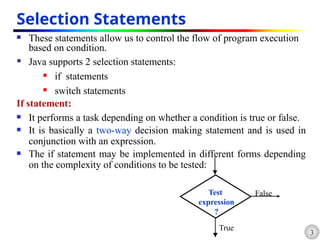
It performs a task depending on whether a condition is true or false.
It is basically a two-way decision making statement and is used in
conjunction with an expression.
The if statement may be implemented in different forms depending
on the complexity of conditions to be tested:
Test
expression
?
True
False
4.
4
1. Simple ifStatement
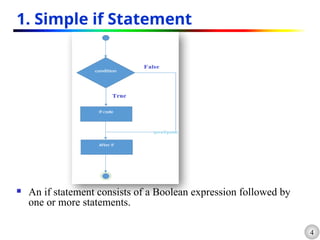
An if statement consists of a Boolean expression followed by
one or more statements.
5.
5
The syntaxof an if statement is:
if (expression)
{
statement-block;
}
rest_of_program;
• If expression is true, statement-block is executed
and then rest_of_program.
• If expression is false, statement-block will be
skipped & the execution will jump to the rest_of_program
public class IFSample {
public static void main(String[] args) {
int mark=95;
if (mark >90)
System.out.println("You got grade A");
}
}
7
2. if …else Statement
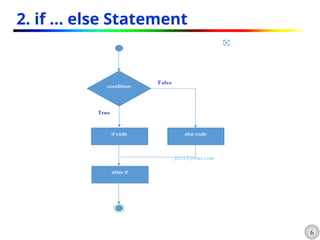
The syntax of an if…else statement is:
if (expression)
{
True-block statement(s);
}
else
{
False-block statement(s);
}
rest_of_program;
If expression is true, True-block statement is executed and
followed by rest_of_program block.
If expression is false, False-block Statement is executed followed
by rest_of_program block.
public class IFElseStatement {
public static void
main(String[] args) {
int number=13;
if(number%2==0){
System.out.println("even
number");
}else{
System.out.println("odd
number");
} } }
8.
8
3. if …else if (else if Ladder) Statement
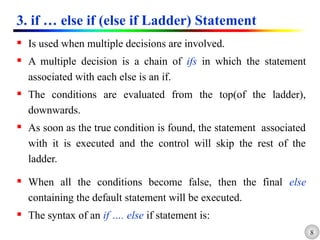
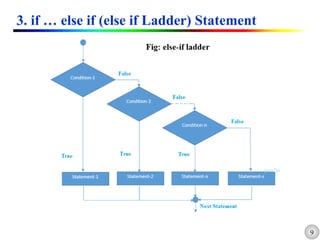
Is used when multiple decisions are involved.
A multiple decision is a chain of ifs in which the statement
associated with each else is an if.
The conditions are evaluated from the top(of the ladder),
downwards.
As soon as the true condition is found, the statement associated
with it is executed and the control will skip the rest of the
ladder.
When all the conditions become false, then the final else
containing the default statement will be executed.
The syntax of an if …. else if statement is:
if (expression 1)
{
statement(s)-1;
}
elseif (expression 2)
{
statement(s)-2;
}
...
else if (expression n)
{
statement(s)-n;
}
else
default-statement;
rest_of_program;
public class
IfElseIfLeaderExample {
public static void main(String
args[]){
int number=-13;
if(number>0){
System.out.println("POSITIVE");
}else if(number<0){
System.out.println("NEGATIVE");
}else{
System.out.println("ZERO");
}
}
11.
11
4. Nested if… else Statement
if (expression 1)
{
statement(s)-1;
if (expression 1.1)
{
True-block Statement 1.1
}
else
{
False-block Statement 1.1
}
}
else if (expression 2)
{
statement(s)-2;
}
...
else if (expression n)
{
statement(s)-n;
}
else
default-statement;
rest_of_program;
}
Nested if statement
12.
12
4. Nested if… else Statement
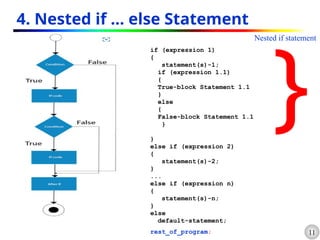
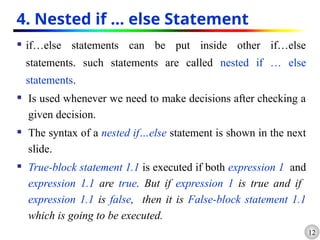
if…else statements can be put inside other if…else
statements. such statements are called nested if … else
statements.
Is used whenever we need to make decisions after checking a
given decision.
The syntax of a nested if…else statement is shown in the next
slide.
True-block statement 1.1 is executed if both expression 1 and
expression 1.1 are true. But if expression 1 is true and if
expression 1.1 is false, then it is False-block statement 1.1
which is going to be executed.
13.
public class NestedIfExample{
public static void main(String[]
args) {
int age=20;
int weight=80;
if(age>=18){
if(weight>50){
System.out.println("You
are eligible to donate blood");
}
}
}
}
//
Java Program to demonstrate the use of Nested If Statement.
15
Switch statement
Wecan design a program with multiple alternatives using if statements to
control the selection.
But the complexity of such programs increases dramatically when the
number alternatives increases.
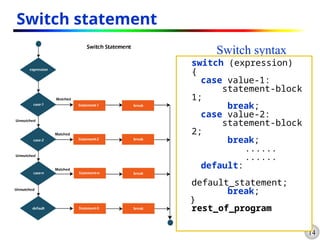
Java has a multi-way decision statement called switch statement.
Duplicate case values are not allowed.
The default statement is optional.
The break statement is used inside the switch to terminate a statement
sequence.
The break statement is optional. If omitted, execution will continue on into
the next case.
16.
16
Contd…
There isno need to put braces around the statement blocks of a switch
statement but it is important to note that case labels end with a colon
(:).
When the switch is executed, the value of the expression is
successfully compared against the values value-1, value-2, ….
If a case is found whose value matches with the value of the
expression, then the block of the statement(s) that follows the case are
executed; otherwise the default-statement will be executed.
The break statement at the end of each block signals the end of a
particular case and causes an exit from the switch statement.
17.
17
Switch Sample demo
publicclass SwitchStatementExample {
public static void main(String[]args){
int day=2;
switch(day)
{
case 1:
System.out.println("Monday");
break;
case 2:
System.out.println("Tuesday");
break;
case 3:
System.out.println("Wednesday");
break;
case 4:
System.out.println("Thursday");
break;
default:
System.out.println("it is out of
listed.");
break;
} } }
18.
18
Exercise Assignment 1:
1.Find out Errors in the following program and discuss ways for
correction.
a) //Errors.java
public Class Errors{
public void main(String [] args){
int i, j = 32768;
short s = j;
double m = 5.3f, n = 2.1f;
float x = 5.3, y = 2.1;
byte z = 128;
System.out.println("x % y = "+x % y);
boolean b = 1 ;
if (b) System.out.println(“b is true”);
else System.out.println(“b is false”);
}
}
19.
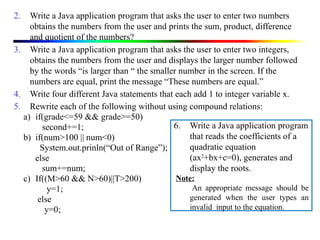
2. Write aJava application program that asks the user to enter two numbers
obtains the numbers from the user and prints the sum, product, difference
and quotient of the numbers?
3. Write a Java application program that asks the user to enter two integers,
obtains the numbers from the user and displays the larger number followed
by the words “is larger than “ the smaller number in the screen. If the
numbers are equal, print the message “These numbers are equal.”
4. Write four different Java statements that each add 1 to integer variable x.
5. Rewrite each of the following without using compound relations:
a) if(grade<=59 && grade>=50)
second+=1;
b) if(num>100 || num<0)
System.out.prinln(“Out of Range”);
else
sum+=num;
c) If((M>60 && N>60)||T>200)
y=1;
else
y=0;
6. Write a Java application program
that reads the coefficients of a
quadratic equation
(ax2
+bx+c=0), generates and
display the roots.
Note:
An appropriate message should be
generated when the user types an
invalid input to the equation.
20.
20
Iterative/Loop Statements
Theprocess of repeatedly executing a block of statements is
known as looping.
A loop allows you to execute a statement or block of
statements repeatedly until a termination condition is met.
The statements in the block may be executed any number of
times, from zero to infinite number.
If a loop continues forever, it is called an infinite loop.
A program loop consists of two statements:
Body of the loop.
Control statements.
A looping process, in general, would include the four steps:
1. Setting and initialization of a counter .
2. Execution of the statements in the loop.
3. Test for a specified condition for execution of the loop.
4. Increment/Decrement the counter.
21.
21
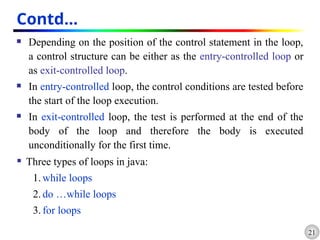
Contd…
Depending onthe position of the control statement in the loop,
a control structure can be either as the entry-controlled loop or
as exit-controlled loop.
In entry-controlled loop, the control conditions are tested before
the start of the loop execution.
In exit-controlled loop, the test is performed at the end of the
body of the loop and therefore the body is executed
unconditionally for the first time.
Three types of loops in java:
1. while loops
2. do …while loops
3. for loops
22.
22
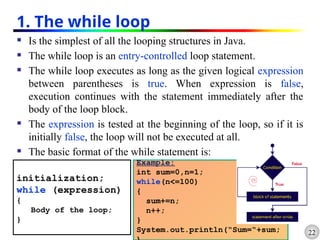
1. The whileloop
Is the simplest of all the looping structures in Java.
The while loop is an entry-controlled loop statement.
The while loop executes as long as the given logical expression
between parentheses is true. When expression is false,
execution continues with the statement immediately after the
body of the loop block.
The expression is tested at the beginning of the loop, so if it is
initially false, the loop will not be executed at all.
The basic format of the while statement is:
initialization;
while (expression)
{
Body of the loop;
}
Example:
int sum=0,n=1;
while(n<=100)
{
sum+=n;
n++;
}
System.out.println(“Sum=“+sum;
23.
23
Contd…
The bodyof the loop may have one or more statements.
The braces are needed only if the body contains two or more
statements. However it is a good practice to use braces even if
the body has only one statement.
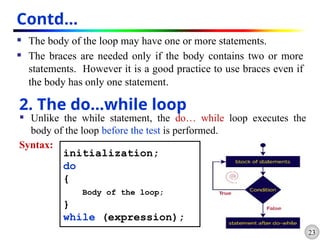
2. The do…while loop
Unlike the while statement, the do… while loop executes the
body of the loop before the test is performed.
Syntax:
initialization;
do
{
Body of the loop;
}
while (expression);
24.
24
Contd…
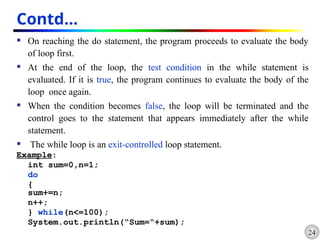
On reachingthe do statement, the program proceeds to evaluate the body
of loop first.
At the end of the loop, the test condition in the while statement is
evaluated. If it is true, the program continues to evaluate the body of the
loop once again.
When the condition becomes false, the loop will be terminated and the
control goes to the statement that appears immediately after the while
statement.
The while loop is an exit-controlled loop statement.
Example:
int sum=0,n=1;
do
{
sum+=n;
n++;
} while(n<=100);
System.out.println(“Sum=“+sum);
25.
25
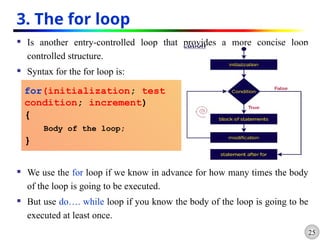
3. The forloop
Is another entry-controlled loop that provides a more concise loop
controlled structure.
Syntax for the for loop is:
We use the for loop if we know in advance for how many times the body
of the loop is going to be executed.
But use do…. while loop if you know the body of the loop is going to be
executed at least once.
for(initialization; test
condition; increment)
{
Body of the loop;
}
26.
26
Contd…
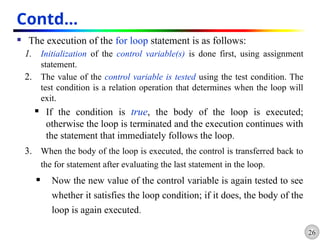
The executionof the for loop statement is as follows:
1. Initialization of the control variable(s) is done first, using assignment
statement.
2. The value of the control variable is tested using the test condition. The
test condition is a relation operation that determines when the loop will
exit.
If the condition is true, the body of the loop is executed;
otherwise the loop is terminated and the execution continues with
the statement that immediately follows the loop.
3. When the body of the loop is executed, the control is transferred back to
the for statement after evaluating the last statement in the loop.
Now the new value of the control variable is again tested to see
whether it satisfies the loop condition; if it does, the body of the
loop is again executed.
27.
27
Contd…
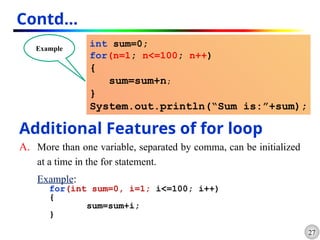
int sum=0;
for(n=1; n<=100;n++)
{
sum=sum+n;
}
System.out.println(“Sum is:”+sum);
Example
Additional Features of for loop
A. More than one variable, separated by comma, can be initialized
at a time in the for statement.
Example:
for(int sum=0, i=1; i<=100; i++)
{
sum=sum+i;
}
28.
28
Contd…
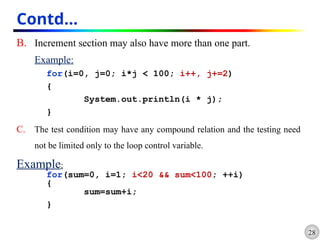
B. Increment sectionmay also have more than one part.
Example:
for(i=0, j=0; i*j < 100; i++, j+=2)
{
System.out.println(i * j);
}
C. The test condition may have any compound relation and the testing need
not be limited only to the loop control variable.
Example:
for(sum=0, i=1; i<20 && sum<100; ++i)
{
sum=sum+i;
}
29.
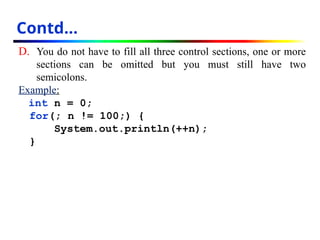
D. You donot have to fill all three control sections, one or more
sections can be omitted but you must still have two
semicolons.
Example:
int n = 0;
for(; n != 100;) {
System.out.println(++n);
}
Contd…
30.
30
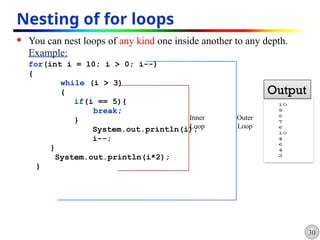
Nesting of forloops
You can nest loops of any kind one inside another to any depth.
Example:
for(int i = 10; i > 0; i--)
{
while (i > 3)
{
if(i == 5){
break;
}
System.out.println(i);
i--;
}
System.out.println(i*2);
}
Inner
Loop
Outer
Loop
Output
31.
31
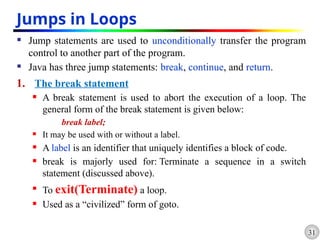
Jumps in Loops
Jump statements are used to unconditionally transfer the program
control to another part of the program.
Java has three jump statements: break, continue, and return.
1. The break statement
A break statement is used to abort the execution of a loop. The
general form of the break statement is given below:
break label;
It may be used with or without a label.
A label is an identifier that uniquely identifies a block of code.
break is majorly used for: Terminate a sequence in a switch
statement (discussed above).
To exit(Terminate) a loop.
Used as a “civilized” form of goto.
32.
32
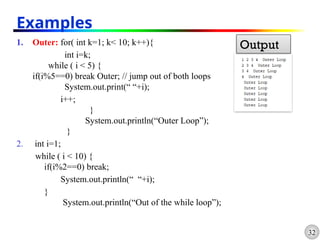
1. Outer: for(int k=1; k< 10; k++){
int i=k;
while ( i < 5) {
if(i%5==0) break Outer; // jump out of both loops
System.out.print(“ “+i);
i++;
}
System.out.println(“Outer Loop”);
}
2. int i=1;
while ( i < 10) {
if(i%2==0) break;
System.out.println(“ “+i);
}
System.out.println(“Out of the while loop”);
Examples
Output
33.
33
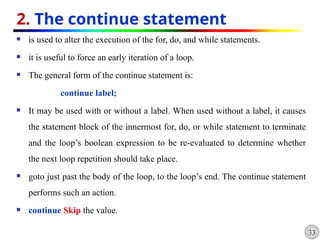
2. The continuestatement
is used to alter the execution of the for, do, and while statements.
it is useful to force an early iteration of a loop.
The general form of the continue statement is:
continue label;
It may be used with or without a label. When used without a label, it causes
the statement block of the innermost for, do, or while statement to terminate
and the loop’s boolean expression to be re-evaluated to determine whether
the next loop repetition should take place.
goto just past the body of the loop, to the loop’s end. The continue statement
performs such an action.
continue Skip the value.
34.
34
Contd…
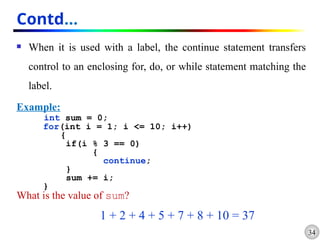
When itis used with a label, the continue statement transfers
control to an enclosing for, do, or while statement matching the
label.
Example:
int sum = 0;
for(int i = 1; i <= 10; i++)
{
if(i % 3 == 0)
{
continue;
}
sum += i;
}
What is the value of sum?
1 + 2 + 4 + 5 + 7 + 8 + 10 = 37
35.
35
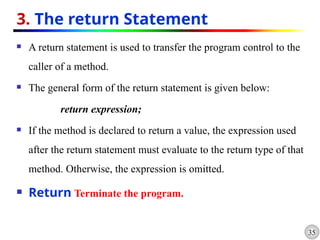
3. The returnStatement
A return statement is used to transfer the program control to the
caller of a method.
The general form of the return statement is given below:
return expression;
If the method is declared to return a value, the expression used
after the return statement must evaluate to the return type of that
method. Otherwise, the expression is omitted.
Return Terminate the program.
36.
36
Contd…
//Use of Continueand break Statements
class ContinueBreak
{
public static void main(String [ ]args)
{
Loop1: for(int i=1; i<100; i++)
{
System.out.println(" ");
if (i>=8) break;
for (int j=1; j<100; j++)
{
System.out.print("*");
if (j==i) break;
}
}
System.out.print("Termination by BREAK");
}
}
*
**
***
****
*****
******
*******
Termination by BREAK
Output
37.
37
Exercise 2
1. Whatdo the following program print?
public class Mystery3{
public static void main(String args[]){
int row = 10, column;
while(row >= 1){
column = 1;
while(column <= 10){
System.out.print(row % 2 == 1 ? “<” : “>”);
++column;
}
--row;
System.out.println();
}
}
}
38.
38
Contd…
2. Write aJava application program that asks the user to enter an integer
number from the keyboard and computes the sum of the digits of the
number. [ Hint: if the user types 4567as input , then the output will be 22 ]
3. Given a number, write a program using while loop to reverse the digits of
the number. [ Hint: Use Modulus Operator to extract the last digit and the integer division by
10 to get the n-1 digit number from the n digit]
4. Using a two-dimensional array, write codes that could print the following
outputs?
a )
$ $ $ $ $
$ $ $ $
$ $ $
$ $
$
b) 1
1 2
1 2 3
1 2 3 4
1 2 3 4 5
c) 5
4 5 4
3 4 5 4 3
2 3 4 5 4 3 2
1 2 3 4 5 4 3 2 1
d) 1 2 3 4 5 4 3 2 1
1 2 3 4 3 2 1
1 2 3 2 1
1 2 1
1
E )
1 1 1 1 1
1 1 1 1
1 1 1
1 1
1
F) 5
5 4
5 4 3
5 4 3 3
5 4 3 2 1
39.
39
Arrays
An arrayis a group of contiguous or related data items that share a
common name.
is a container object that holds a fixed number of values of a single
type.
Unlike C++ in Java arrays are created dynamically.
An array can hold only one type of data!
Example:
int[] can hold only integers
char[] can hold only characters
A particular values in an array is indicated by writing a number
called index number or subscript in brackets after the array name.
Example:
salary[10] represents salary of the 10th
employee.
40.
40
Contd…
The lengthof an array is established when the array is created.
After creation, its length is fixed.
Each item in an array is called an element, and each element is
accessed by its numerical index.
Array indexing starts from 0 and ends at n-1, where n is the size
of the array.
primes[0]
index values
primes[1] primes[2] primes[3] primes[4] primes[9]
41.
41
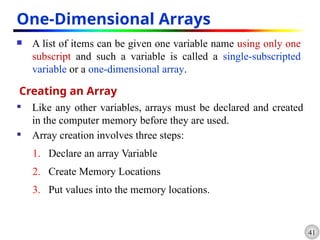
One-Dimensional Arrays
Alist of items can be given one variable name using only one
subscript and such a variable is called a single-subscripted
variable or a one-dimensional array.
Creating an Array
Like any other variables, arrays must be declared and created
in the computer memory before they are used.
Array creation involves three steps:
1. Declare an array Variable
2. Create Memory Locations
3. Put values into the memory locations.
42.
42
1. Declaration ofArrays
Arrays in java can be declared in two ways:
i. type arrayname [ ];
ii. type[ ]arrayname;
Example:
int number[];
float slaray[];
float[] marks;
when creating an array, each element of the array receives a
default value zero (for numeric types) ,false for boolean and
null for references (any non primitive types).
43.
43
2. Creation ofArrays
After declaring an array, we need to create it in the memory.
Because an array is an object, you create it by using the new
keyword as follows:
arrayname =new type[ size];
Example:
number=new int[5];
marks= new float[7];
It is also possible to combine the above to steps , declaration and
creation, into on statement as follows:
type arrayname =new type[ size];
Example: int num[ ] = new int[10];
44.
44
3. Initialization ofArrays
Each element of an array needs to be assigned a value; this
process is known as initialization.
Initialization of an array is done using the array subscripts as
follows:
arrayname [subscript] = Value;
Example:
number [0]=23;
number[2]=40;
Unlike C, java protects arrays from overruns and underruns.
Trying to access an array beyond its boundaries will generate an
error.
45.
45
Contd.
Java generatesan ArrayIndexOutOfBoundsException when
there is underrun or overrun.
The Java interpreter checks array indices to ensure that they are
valid during execution.
Arrays can also be initialized automatically in the same way as
the ordinary variables when they are declared, as shown below:
type arrayname [] = {list of Values};
Example:
int number[]= {35,40,23,67,49};
46.
46
Contd.
It isalso possible to assign an array object to another array object.
Example:
int array1[]= {35,40,23,67,49};
int array2[];
array2= array1;
Array Length
In Java, all arrays store the allocated size in a variable named
length.
We can access the length of the array array1using array1.length.
Example:
int size = array1.length;
47.
//sorting of alist of Numbers
class Sorting
{
public static void main(String [ ]args)
{
int num[ ]= {55, 40, 80, 12, 65, 77};
int size = num.length;
System.out.print(“Given List: “);
for (int i=0; i<size; i++)
{
System.out.print(" " + num[ i ] );
}
System.out.print("n");
//Sorting Begins
for (int i=0; i<size; i++)
{
for (int j=i+1; j<size; j++)
{
if (num[i] < num [j])
{
//Interchange Values
int temp = num[i];
num [i] = num [j];
num [j] = temp;
} } }
System.out.print("SORTED LIST" );
for (int i=0; i<size; i++)
{
System.out.print(" " + num [i]);
}
System.out.println(" ");
} }
48.
48
Two-Dimensional Arrays
A2-dimensional array can be thought of as a grid (or matrix)
of values.
Each element of the 2-D array is accessed by providing two
indexes: a row index and a column index
A 2-D array is actually just an array of arrays.
A multidimensional array with the same number of columns in
every row can be created with an array creation expression:
Example:
int myarray[][]= int [3][4];
49.
49
Contd…
Like theone-dimensional arrays, two-dimensional arrays may be
initialized by following their declaration with a list of initial
values enclosed in braces. For example,
int myarray[2][3]= {0,0,0,1,1,1};
or
int myarray[][]= {{0,0,0},{1,1,1}};
We can refer to a value stored in a two-dimensional array by using
indexes for both the column and row of the corresponding
element. For Example,
int value = myarray[1][2];
50.
50
Contd…
//Application of two-dimensionalArray
class MulTable{
final static int ROWS=12;
final static int COLUMNS=12;
public static void main(String [ ]args) {
int pro [ ] [ ]= new int [ROWS][COLUMNS];
int i=0,j=0;
System.out.print("MULTIPLICATION TABLE");
System.out.println(" ");
for (i=1; i<ROWS; i++)
{
for (j=1; j<COLUMNS; j++)
{
pro [i][j]= i * j;
System.out.print(" "+ pro [i][j]);
}
System.out.println(" " );
}
}
}
51.
51
Variable Size Arrays
Java treats multidimensional array as “array of arrays”.
It is possible to declare a two-dimensional array as follows:
int x[][]= new int[3][];
x[0] = new int[2];
x[1] = new int[4];
x[2] = new int[3];
This statement creates a two-dimensional array having different
length for each row as shown below:
X[0]
X[1]
X[2]
x[0][1]
x[2][2]
x[1][3]
52.
52
Strings
Strings representa sequence of characters.
The easiest way to represent a sequence of characters in Java is by
using a character:
char ch[ ]= new char[4];
ch[0] = ‘D’;
ch[1] = ‘a’;
ch[2] = ‘t;
ch[3] = ‘a;
This is equivalent to String ch=“Hello”;
Character arrays have the advantage of being able to query their
length.
But they are not good enough to support the range of operations
we may like to perform on strings.
53.
53
Contd…
In Java,strings are class objects and are implemented using two
classes:
String class
StringBuffer
Once a String object is created it cannot be changed. Strings are
Immutable.
To get changeable strings use the StringBuffer class.
A Java string is an instantiated object of the String class.
Java strings are more reliable and predictable than C++ strings.
A java string is not a character array and is not NULL terminated.
54.
54
Contd…
In Java,strings are declared and created as follows:
String stringName;
stringName= new String(“String”);
Example:
String firstName;
firstName = new String(“Jhon”);
The above two statements can be combined as follows:
String firstName= new String(“Jhon”);
The length() method returns the length of a string.
Example: firstName.length(); //returns 4
55.
55
String Arrays
Itis possible to create and use arrays that contain strings as
follows:
String arrayname[] = new String[size];
Example:
String item[]= new String[3];
item[0]= “Orange”;
item[1]= “Banana”;
item[2]= “Apple”;
It is also possible to assign a string array object to another string
array object.
56.
56
String Methods
1. Thelength(); method returns the length of the string.
Eg: System.out.println(“Hello”.length()); // prints 5
The + operator is used to concatenate two or more strings.
Eg: String myname = “Harry”
String str = “My name is” + myname+ “.”;
2. The charAt(); method returns the character at the specified
index.
Syntax : public char charAt(int index)
Ex: char ch;
ch = “abc”.charAt(1); // ch = “b”
57.
57
Contd…
3. The equals();method returns ‘true’ if two strings are equal.
Syntax : public boolean equals(Object anObject)
Ex: String str1=“Hello”,str2=“hello”;
(str1.equals(str2))? System.out.println(“Equal”); : System.out.println(“Not
Equal”); // prints Not Equal
4. The equalsIgnoreCase(); method returns ‘true’ if two strings
are equal, ignoring case consideration.
Syntax : public boolean equalsIgnoreCase(String str)
Ex: String str1=“Hello”,str2=“hello”;
if (str1.equalsIgnoreCase(str2))
System.out.println(“Equal”);
System.out.println(“Not Equal”); // prints Equal as an output
58.
58
Contd…
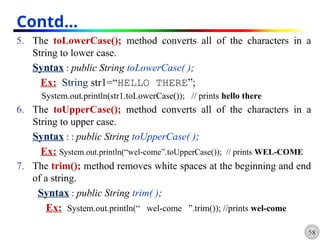
5. The toLowerCase();method converts all of the characters in a
String to lower case.
Syntax : public String toLowerCase( );
Ex: String str1=“HELLO THERE”;
System.out.println(str1.toLowerCase()); // prints hello there
6. The toUpperCase(); method converts all of the characters in a
String to upper case.
Syntax : : public String toUpperCase( );
Ex: System.out.println(“wel-come”.toUpperCase()); // prints WEL-COME
7. The trim(); method removes white spaces at the beginning and end
of a string.
Syntax : public String trim( );
Ex: System.out.println(“ wel-come ”.trim()); //prints wel-come
59.
59
Contd…
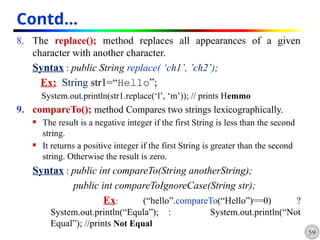
8. The replace();method replaces all appearances of a given
character with another character.
Syntax : public String replace( ‘ch1’, ’ch2’);
Ex: String str1=“Hello”;
System.out.println(str1.replace(‘l’, ‘m’)); // prints Hemmo
9. compareTo(); method Compares two strings lexicographically.
The result is a negative integer if the first String is less than the second
string.
It returns a positive integer if the first String is greater than the second
string. Otherwise the result is zero.
Syntax : public int compareTo(String anotherString);
public int compareToIgnoreCase(String str);
Ex: (“hello”.compareTo(“Hello”)==0) ?
System.out.println(“Equla”); : System.out.println(“Not
Equal”); //prints Not Equal
60.
60
Contd…
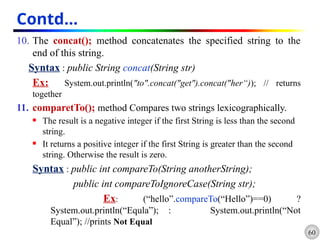
10. The concat();method concatenates the specified string to the
end of this string.
Syntax : public String concat(String str)
Ex: System.out.println("to".concat("get").concat("her“)); // returns
together
11. comparetTo(); method Compares two strings lexicographically.
The result is a negative integer if the first String is less than the second
string.
It returns a positive integer if the first String is greater than the second
string. Otherwise the result is zero.
Syntax : public int compareTo(String anotherString);
public int compareToIgnoreCase(String str);
Ex: (“hello”.compareTo(“Hello”)==0) ?
System.out.println(“Equla”); : System.out.println(“Not
Equal”); //prints Not Equal
61.
61
Contd…
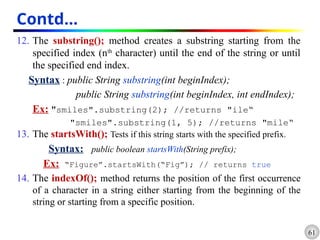
12. The substring();method creates a substring starting from the
specified index (nth
character) until the end of the string or until
the specified end index.
Syntax : public String substring(int beginIndex);
public String substring(int beginIndex, int endIndex);
Ex: "smiles".substring(2); //returns "ile“
"smiles".substring(1, 5); //returns "mile“
13. The startsWith(); Tests if this string starts with the specified prefix.
Syntax: public boolean startsWith(String prefix);
Ex: “Figure”.startsWith(“Fig”); // returns true
14. The indexOf(); method returns the position of the first occurrence
of a character in a string either starting from the beginning of the
string or starting from a specific position.
62.
62
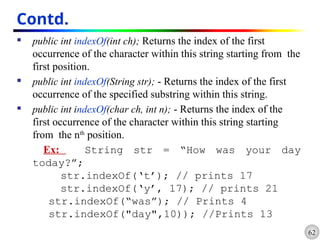
Contd.
public intindexOf(int ch); Returns the index of the first
occurrence of the character within this string starting from the
first position.
public int indexOf(String str); - Returns the index of the first
occurrence of the specified substring within this string.
public int indexOf(char ch, int n); - Returns the index of the
first occurrence of the character within this string starting
from the nth
position.
Ex: String str = “How was your day
today?”;
str.indexOf(‘t’); // prints 17
str.indexOf(‘y’, 17); // prints 21
str.indexOf(“was”); // Prints 4
str.indexOf("day",10)); //Prints 13
63.
63
Contd…
15. The lastIndexOf();method Searches for the last occurrence of a
character or substring.
The methods are similar to indexOf() method.
16. valueOf(); creates a string object if the parameter or converts the
parameter value to string representation if the parameter is a variable.
Syntax: public String valueOf(variable);
public String valueOf(variable);
Ex: char x[]={'H','e', 'l', 'l','o'};
System.out.println(String.valueOf(x));//prints Hello
System.out.println(String.valueOf(48.958)); // prints 48.958
17. endsWith(); Tests if this string ends with the specified suffix.
Syntax: public boolean endsWith(String suffix);
Ex: “Figure”.endsWith(“re”); // true
64.
64
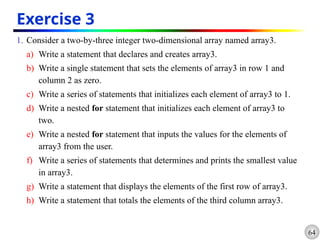
Exercise 3
1. Considera two-by-three integer two-dimensional array named array3.
a) Write a statement that declares and creates array3.
b) Write a single statement that sets the elements of array3 in row 1 and
column 2 as zero.
c) Write a series of statements that initializes each element of array3 to 1.
d) Write a nested for statement that initializes each element of array3 to
two.
e) Write a nested for statement that inputs the values for the elements of
array3 from the user.
f) Write a series of statements that determines and prints the smallest value
in array3.
g) Write a statement that displays the elements of the first row of array3.
h) Write a statement that totals the elements of the third column array3.
65.
65
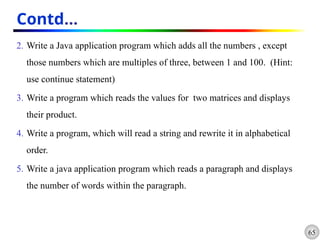
Contd…
2. Write aJava application program which adds all the numbers , except
those numbers which are multiples of three, between 1 and 100. (Hint:
use continue statement)
3. Write a program which reads the values for two matrices and displays
their product.
4. Write a program, which will read a string and rewrite it in alphabetical
order.
5. Write a java application program which reads a paragraph and displays
the number of words within the paragraph.

![5
The syntax of an if statement is:
if (expression)
{
statement-block;
}
rest_of_program;
• If expression is true, statement-block is executed
and then rest_of_program.
• If expression is false, statement-block will be
skipped & the execution will jump to the rest_of_program
public class IFSample {
public static void main(String[] args) {
int mark=95;
if (mark >90)
System.out.println("You got grade A");
}
}](https://image.slidesharecdn.com/chapter-9virusesininfectedsystem-251113134141-69102455/85/Chapter-9-viruses-in-infected-system-pptx-5-320.jpg)
![7
2. if … else Statement
The syntax of an if…else statement is:
if (expression)
{
True-block statement(s);
}
else
{
False-block statement(s);
}
rest_of_program;
If expression is true, True-block statement is executed and
followed by rest_of_program block.
If expression is false, False-block Statement is executed followed
by rest_of_program block.
public class IFElseStatement {
public static void
main(String[] args) {
int number=13;
if(number%2==0){
System.out.println("even
number");
}else{
System.out.println("odd
number");
} } }](https://image.slidesharecdn.com/chapter-9virusesininfectedsystem-251113134141-69102455/85/Chapter-9-viruses-in-infected-system-pptx-7-320.jpg)
![if (expression 1)
{
statement(s)-1;
}
else if (expression 2)
{
statement(s)-2;
}
...
else if (expression n)
{
statement(s)-n;
}
else
default-statement;
rest_of_program;
public class
IfElseIfLeaderExample {
public static void main(String
args[]){
int number=-13;
if(number>0){
System.out.println("POSITIVE");
}else if(number<0){
System.out.println("NEGATIVE");
}else{
System.out.println("ZERO");
}
}](https://image.slidesharecdn.com/chapter-9virusesininfectedsystem-251113134141-69102455/85/Chapter-9-viruses-in-infected-system-pptx-10-320.jpg)
![public class NestedIfExample {
public static void main(String[]
args) {
int age=20;
int weight=80;
if(age>=18){
if(weight>50){
System.out.println("You
are eligible to donate blood");
}
}
}
}
//
Java Program to demonstrate the use of Nested If Statement.](https://image.slidesharecdn.com/chapter-9virusesininfectedsystem-251113134141-69102455/85/Chapter-9-viruses-in-infected-system-pptx-13-320.jpg)
![17
Switch Sample demo
public class SwitchStatementExample {
public static void main(String[]args){
int day=2;
switch(day)
{
case 1:
System.out.println("Monday");
break;
case 2:
System.out.println("Tuesday");
break;
case 3:
System.out.println("Wednesday");
break;
case 4:
System.out.println("Thursday");
break;
default:
System.out.println("it is out of
listed.");
break;
} } }](https://image.slidesharecdn.com/chapter-9virusesininfectedsystem-251113134141-69102455/85/Chapter-9-viruses-in-infected-system-pptx-17-320.jpg)
![18
Exercise Assignment 1:
1. Find out Errors in the following program and discuss ways for
correction.
a) //Errors.java
public Class Errors{
public void main(String [] args){
int i, j = 32768;
short s = j;
double m = 5.3f, n = 2.1f;
float x = 5.3, y = 2.1;
byte z = 128;
System.out.println("x % y = "+x % y);
boolean b = 1 ;
if (b) System.out.println(“b is true”);
else System.out.println(“b is false”);
}
}](https://image.slidesharecdn.com/chapter-9virusesininfectedsystem-251113134141-69102455/85/Chapter-9-viruses-in-infected-system-pptx-18-320.jpg)
![36
Contd…
//Use of Continue and break Statements
class ContinueBreak
{
public static void main(String [ ]args)
{
Loop1: for(int i=1; i<100; i++)
{
System.out.println(" ");
if (i>=8) break;
for (int j=1; j<100; j++)
{
System.out.print("*");
if (j==i) break;
}
}
System.out.print("Termination by BREAK");
}
}
*
**
***
****
*****
******
*******
Termination by BREAK
Output](https://image.slidesharecdn.com/chapter-9virusesininfectedsystem-251113134141-69102455/85/Chapter-9-viruses-in-infected-system-pptx-36-320.jpg)
![37
Exercise 2
1. What do the following program print?
public class Mystery3{
public static void main(String args[]){
int row = 10, column;
while(row >= 1){
column = 1;
while(column <= 10){
System.out.print(row % 2 == 1 ? “<” : “>”);
++column;
}
--row;
System.out.println();
}
}
}](https://image.slidesharecdn.com/chapter-9virusesininfectedsystem-251113134141-69102455/85/Chapter-9-viruses-in-infected-system-pptx-37-320.jpg)
![38
Contd…
2. Write a Java application program that asks the user to enter an integer
number from the keyboard and computes the sum of the digits of the
number. [ Hint: if the user types 4567as input , then the output will be 22 ]
3. Given a number, write a program using while loop to reverse the digits of
the number. [ Hint: Use Modulus Operator to extract the last digit and the integer division by
10 to get the n-1 digit number from the n digit]
4. Using a two-dimensional array, write codes that could print the following
outputs?
a )
$ $ $ $ $
$ $ $ $
$ $ $
$ $
$
b) 1
1 2
1 2 3
1 2 3 4
1 2 3 4 5
c) 5
4 5 4
3 4 5 4 3
2 3 4 5 4 3 2
1 2 3 4 5 4 3 2 1
d) 1 2 3 4 5 4 3 2 1
1 2 3 4 3 2 1
1 2 3 2 1
1 2 1
1
E )
1 1 1 1 1
1 1 1 1
1 1 1
1 1
1
F) 5
5 4
5 4 3
5 4 3 3
5 4 3 2 1](https://image.slidesharecdn.com/chapter-9virusesininfectedsystem-251113134141-69102455/85/Chapter-9-viruses-in-infected-system-pptx-38-320.jpg)
![39
Arrays
An array is a group of contiguous or related data items that share a
common name.
is a container object that holds a fixed number of values of a single
type.
Unlike C++ in Java arrays are created dynamically.
An array can hold only one type of data!
Example:
int[] can hold only integers
char[] can hold only characters
A particular values in an array is indicated by writing a number
called index number or subscript in brackets after the array name.
Example:
salary[10] represents salary of the 10th
employee.](https://image.slidesharecdn.com/chapter-9virusesininfectedsystem-251113134141-69102455/85/Chapter-9-viruses-in-infected-system-pptx-39-320.jpg)
![40
Contd…
The length of an array is established when the array is created.
After creation, its length is fixed.
Each item in an array is called an element, and each element is
accessed by its numerical index.
Array indexing starts from 0 and ends at n-1, where n is the size
of the array.
primes[0]
index values
primes[1] primes[2] primes[3] primes[4] primes[9]](https://image.slidesharecdn.com/chapter-9virusesininfectedsystem-251113134141-69102455/85/Chapter-9-viruses-in-infected-system-pptx-40-320.jpg)
![42
1. Declaration of Arrays
Arrays in java can be declared in two ways:
i. type arrayname [ ];
ii. type[ ]arrayname;
Example:
int number[];
float slaray[];
float[] marks;
when creating an array, each element of the array receives a
default value zero (for numeric types) ,false for boolean and
null for references (any non primitive types).](https://image.slidesharecdn.com/chapter-9virusesininfectedsystem-251113134141-69102455/85/Chapter-9-viruses-in-infected-system-pptx-42-320.jpg)
![43
2. Creation of Arrays
After declaring an array, we need to create it in the memory.
Because an array is an object, you create it by using the new
keyword as follows:
arrayname =new type[ size];
Example:
number=new int[5];
marks= new float[7];
It is also possible to combine the above to steps , declaration and
creation, into on statement as follows:
type arrayname =new type[ size];
Example: int num[ ] = new int[10];](https://image.slidesharecdn.com/chapter-9virusesininfectedsystem-251113134141-69102455/85/Chapter-9-viruses-in-infected-system-pptx-43-320.jpg)
![44
3. Initialization of Arrays
Each element of an array needs to be assigned a value; this
process is known as initialization.
Initialization of an array is done using the array subscripts as
follows:
arrayname [subscript] = Value;
Example:
number [0]=23;
number[2]=40;
Unlike C, java protects arrays from overruns and underruns.
Trying to access an array beyond its boundaries will generate an
error.](https://image.slidesharecdn.com/chapter-9virusesininfectedsystem-251113134141-69102455/85/Chapter-9-viruses-in-infected-system-pptx-44-320.jpg)
![45
Contd.
Java generates an ArrayIndexOutOfBoundsException when
there is underrun or overrun.
The Java interpreter checks array indices to ensure that they are
valid during execution.
Arrays can also be initialized automatically in the same way as
the ordinary variables when they are declared, as shown below:
type arrayname [] = {list of Values};
Example:
int number[]= {35,40,23,67,49};](https://image.slidesharecdn.com/chapter-9virusesininfectedsystem-251113134141-69102455/85/Chapter-9-viruses-in-infected-system-pptx-45-320.jpg)
![46
Contd.
It is also possible to assign an array object to another array object.
Example:
int array1[]= {35,40,23,67,49};
int array2[];
array2= array1;
Array Length
In Java, all arrays store the allocated size in a variable named
length.
We can access the length of the array array1using array1.length.
Example:
int size = array1.length;](https://image.slidesharecdn.com/chapter-9virusesininfectedsystem-251113134141-69102455/85/Chapter-9-viruses-in-infected-system-pptx-46-320.jpg)
![//sorting of a list of Numbers
class Sorting
{
public static void main(String [ ]args)
{
int num[ ]= {55, 40, 80, 12, 65, 77};
int size = num.length;
System.out.print(“Given List: “);
for (int i=0; i<size; i++)
{
System.out.print(" " + num[ i ] );
}
System.out.print("n");
//Sorting Begins
for (int i=0; i<size; i++)
{
for (int j=i+1; j<size; j++)
{
if (num[i] < num [j])
{
//Interchange Values
int temp = num[i];
num [i] = num [j];
num [j] = temp;
} } }
System.out.print("SORTED LIST" );
for (int i=0; i<size; i++)
{
System.out.print(" " + num [i]);
}
System.out.println(" ");
} }](https://image.slidesharecdn.com/chapter-9virusesininfectedsystem-251113134141-69102455/85/Chapter-9-viruses-in-infected-system-pptx-47-320.jpg)
![48
Two-Dimensional Arrays
A 2-dimensional array can be thought of as a grid (or matrix)
of values.
Each element of the 2-D array is accessed by providing two
indexes: a row index and a column index
A 2-D array is actually just an array of arrays.
A multidimensional array with the same number of columns in
every row can be created with an array creation expression:
Example:
int myarray[][]= int [3][4];](https://image.slidesharecdn.com/chapter-9virusesininfectedsystem-251113134141-69102455/85/Chapter-9-viruses-in-infected-system-pptx-48-320.jpg)
![49
Contd…
Like the one-dimensional arrays, two-dimensional arrays may be
initialized by following their declaration with a list of initial
values enclosed in braces. For example,
int myarray[2][3]= {0,0,0,1,1,1};
or
int myarray[][]= {{0,0,0},{1,1,1}};
We can refer to a value stored in a two-dimensional array by using
indexes for both the column and row of the corresponding
element. For Example,
int value = myarray[1][2];](https://image.slidesharecdn.com/chapter-9virusesininfectedsystem-251113134141-69102455/85/Chapter-9-viruses-in-infected-system-pptx-49-320.jpg)
![50
Contd…
//Application of two-dimensional Array
class MulTable{
final static int ROWS=12;
final static int COLUMNS=12;
public static void main(String [ ]args) {
int pro [ ] [ ]= new int [ROWS][COLUMNS];
int i=0,j=0;
System.out.print("MULTIPLICATION TABLE");
System.out.println(" ");
for (i=1; i<ROWS; i++)
{
for (j=1; j<COLUMNS; j++)
{
pro [i][j]= i * j;
System.out.print(" "+ pro [i][j]);
}
System.out.println(" " );
}
}
}](https://image.slidesharecdn.com/chapter-9virusesininfectedsystem-251113134141-69102455/85/Chapter-9-viruses-in-infected-system-pptx-50-320.jpg)
![51
Variable Size Arrays
Java treats multidimensional array as “array of arrays”.
It is possible to declare a two-dimensional array as follows:
int x[][]= new int[3][];
x[0] = new int[2];
x[1] = new int[4];
x[2] = new int[3];
This statement creates a two-dimensional array having different
length for each row as shown below:
X[0]
X[1]
X[2]
x[0][1]
x[2][2]
x[1][3]](https://image.slidesharecdn.com/chapter-9virusesininfectedsystem-251113134141-69102455/85/Chapter-9-viruses-in-infected-system-pptx-51-320.jpg)
![52
Strings
Strings represent a sequence of characters.
The easiest way to represent a sequence of characters in Java is by
using a character:
char ch[ ]= new char[4];
ch[0] = ‘D’;
ch[1] = ‘a’;
ch[2] = ‘t;
ch[3] = ‘a;
This is equivalent to String ch=“Hello”;
Character arrays have the advantage of being able to query their
length.
But they are not good enough to support the range of operations
we may like to perform on strings.](https://image.slidesharecdn.com/chapter-9virusesininfectedsystem-251113134141-69102455/85/Chapter-9-viruses-in-infected-system-pptx-52-320.jpg)
![55
String Arrays
It is possible to create and use arrays that contain strings as
follows:
String arrayname[] = new String[size];
Example:
String item[]= new String[3];
item[0]= “Orange”;
item[1]= “Banana”;
item[2]= “Apple”;
It is also possible to assign a string array object to another string
array object.](https://image.slidesharecdn.com/chapter-9virusesininfectedsystem-251113134141-69102455/85/Chapter-9-viruses-in-infected-system-pptx-55-320.jpg)
![63
Contd…
15. The lastIndexOf(); method Searches for the last occurrence of a
character or substring.
The methods are similar to indexOf() method.
16. valueOf(); creates a string object if the parameter or converts the
parameter value to string representation if the parameter is a variable.
Syntax: public String valueOf(variable);
public String valueOf(variable);
Ex: char x[]={'H','e', 'l', 'l','o'};
System.out.println(String.valueOf(x));//prints Hello
System.out.println(String.valueOf(48.958)); // prints 48.958
17. endsWith(); Tests if this string ends with the specified suffix.
Syntax: public boolean endsWith(String suffix);
Ex: “Figure”.endsWith(“re”); // true](https://image.slidesharecdn.com/chapter-9virusesininfectedsystem-251113134141-69102455/85/Chapter-9-viruses-in-infected-system-pptx-63-320.jpg)