Java Programming
Manish Kumar
(manish87it@gmail.com)
Lecture- 5
Contents
 Introduction to Control Statement
 Types of Control Statement
 Jump Statement
 Loop in java
 Types of Loop
Control statement
 A statement that determines whether the other statements will be executed or not.
 It controls the flow of a program.
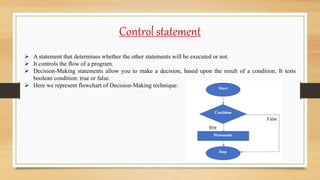
 Decision-Making statements allow you to make a decision, based upon the result of a condition. It tests
boolean condition: true or false.
 Here we represent flowchart of Decision-Making technique:
Types of control statement
There are following types of java selection statements in java:
1. If statement
2. If-Else statement
3. If-Else-If statement
4. Nested If statement
5. Switch statement
6. Jump statement
If Statement
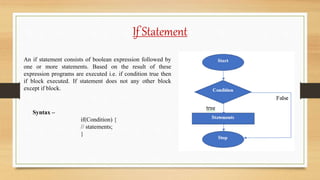
An if statement consists of boolean expression followed by
one or more statements. Based on the result of these
expression programs are executed i.e. if condition true then
if block executed. If statement does not any other block
except if block.
Syntax –
if(Condition) {
// statements;
}
If statement
public class If_Example {
public static void main(String args[]) {
int x = 10;
if(x < 20) {
System.out.println(“x is less than 20.”);
}
}
}
Output – x is less than 20.
If_Example.java
If-else Statement
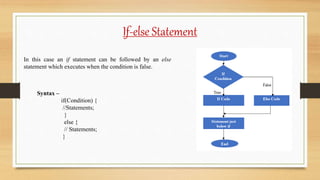
In this case an if statement can be followed by an else
statement which executes when the condition is false.
Syntax –
if(Condition) {
//Statements;
}
else {
// Statements;
}
If-else statement
public class IfElseExample {
public static void main(String args[]) {
int x = 10;
if(x % 2 ==0) {
System.out.println(“x is even number.”);
}
else {
System.out.println(“x is odd number.”);
}
}
}
Output – x is even number.
IfElseExample.java
If-else-if Statement
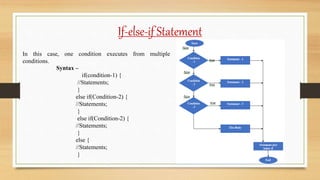
In this case, one condition executes from multiple
conditions.
Syntax –
if(condition-1) {
//Statements;
}
else if(Condition-2) {
//Statements;
}
else if(Condition-2) {
//Statements;
}
else {
//Statements;
}
If-else-if statement
public class IfElseIfLadder {
public static void main(String args[]) {
int marks = 75;
if(marks < 33) {
System.out.println(“Fail.”);
}
else if(marks >=33 && marks <45){
System.out.println(“Thired.”);
}
else if(marks >=45 && marks <60){
System.out.println(“Second.”);
}
else if(marks >=60 && marks <75){
System.out.println(“First.”);
}
IfElseIfExample.java
else if(marks >=75 && marks <100){
System.out.println(“Excellent.”);
}
else {
System.out.println(“Invalid !”);
}
}
}
Output - Excellent.
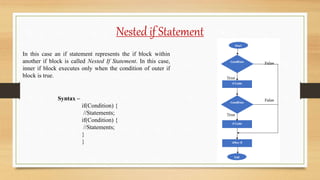
Nested if Statement
In this case an if statement represents the if block within
another if block is called Nested If Statement. In this case,
inner if block executes only when the condition of outer if
block is true.
Syntax –
if(Condition) {
//Statements;
if(Condition) {
//Statements;
}
}
Nested if statement
public class NestedIf {
public static void main(String args[]) {
int marks = 75;
int age=21
if(age>= 21) {
if(marks >=75){
System.out.println(“Elligible.”);
}
}
}
}
Output - Elligible.
NestedIfExample.java
Switch Statement
Switch statement is work just like if-else-if ladder i.e. executes one statement from multiple conditions. There
are following important points about switch statement:
There can be one or n number of cases for switch expression.
The value of cases must be switch expression type and the case value must be literal or constant.
The case value must be unique.
The java switch expression must be of byte, short, int, long (with its Wrapper type), enums and string.
Each case statement can have a break statement which is optional.
The case value can have a default label which is optional.
Switch Statement
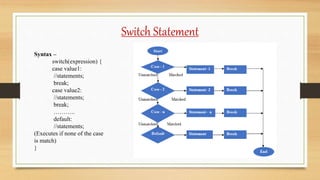
Syntax –
switch(expression) {
case value1:
//statements;
break;
case value2:
//statements;
break;
………..
default:
//statements;
(Executes if none of the case
is match)
}
Switch statement
public class SwitchExample1 {
public static void main(String args []) {
int num = 2;
switch(num) {
case 1: System.out.println(“Case-1”); break;
case 2: System.out.println(“Case-2”); break;
case 3: System.out.println(“Case-3”); break;
default: System.out.println(“Invalid”);
}
}
}
Output – Case-2
SwitchExample1.java
public class SwitchExample2 {
public static void main(String args []) {
char ch = ‘e’;
switch(ch) {
case ‘a’: System.out.println(“Vowel”); break;
case ‘A’: System.out.println(“Vowel”); break;
case ‘e’: System.out.println(“Vowel”); break;
case ‘E’: System.out.println(“Vowel”); break;
case ‘i’: System.out.println(“Vowel”); break;
case ‘I’: System.out.println(“Vowel”); break;
case ‘o’: System.out.println(“Vowel”); break;
case ‘O’: System.out.println(“Vowel”); break;
case ‘u’: System.out.println(“Vowel”); break;
case ‘U’: System.out.println(“Vowel”); break;
default: System.out.println(“Consonant”);
} } }
Output – VowelSwitchExample2.java
jump Statement
There are three types of Jump Statement in java:
1. Break Statement
2. Continue Statement
3. Return Statement
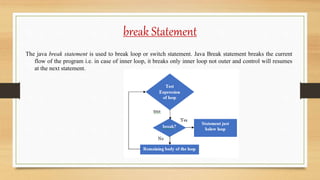
break Statement
The java break statement is used to break loop or switch statement. Java Break statement breaks the current
flow of the program i.e. in case of inner loop, it breaks only inner loop not outer and control will resumes
at the next statement.
Break statement
// Break to exit a loop
class BreakLoopDemo
{
public static void main(String args[])
{
for (int i = 0; i < 10; i++)
{
if (i == 5)
break;
System.out.println("i: " + i);
}
System.out.println("Loop complete.");
}
}
BreakLoopDemo.java
Output –
i: 0
i: 1
i: 2
i: 3
i: 4
Loop complete.
break Statement
Java Break statement with Labeled
For loop:
Java does not have goto statement as
java uses label. We can use break
statement with a label. This feature of
break statement introduced since
JDK1.5.
// with label inside an inner loop to break outer loop
public class BreakExample3 {
public static void main(String[] args) {
aa: // Name of label
for(int i=1;i<=3;i++){
bb: // Name of label
for(int j=1;j<=3;j++){
if(i==2&&j==2){
break aa;
}
System.out.println(i+" "+j);
}
}
}
}
Output –
11
1 2
1 3
2 1
continue Statement
The continue statement is used in loop control structure when you need to jump to the next iteration of the
loop immediately. The Java continue statement is used to continue the loop. It continues the current flow
of the program and skips the remaining code at the specified condition. In case of an inner loop, it
continues the inner loop only.
continue statement
// Continue Statement
public class ContinueExample {
public static void main(String[] args) {
//for loop
for(int i=1;i<=10;i++){
if(i==5){
continue;//it will skip the rest statement
}
System.out.println(i);
}
}
}
ContinueExample.java
Output –
1
2
3
4
6
7
8
9
10
As you can see in the above output, 5 is not printed on the console. It is
because the loop is continued when it reaches to 5.
continue Statement
Java Continue statement with Labeled
For loop:
We can use continue statement with a
label. This feature is introduced since
JDK 1.5. So, we can continue any loop
in java now whether it is outer or inner
loop.
// ContinueExample3.java
public class ContinueExample3 {
public static void main(String[] args) {
aa:
for(int i=1;i<=3;i++){
bb:
for(int j=1;j<=3;j++){
if(i==2&&j==2){
continue aa;
}
System.out.println(i+" "+j);
}
}
}
}
Output –
1 1
1 2
1 3
2 1
3 1
3 2
3 3
Return Statement
The return statement is used to explicitly return from a method. That is, it causes a program control to transfer
back to the caller of the method.
// Java program to illustrate using return
class ReturnStatement {
int add() {
int result = 10+20;
return result;
}
public static void main(String args[]) {
Abc a = new Abc();
int x = a.add();
System.out.println(x);
}}
Output –
30
Loops in java
In programming, loops are used to execute instruction again & again (i.e. repeatedly) when some condition
become true.
There are three types of loops in java:
•for loop
•while loop
•do-while loop
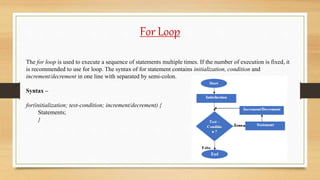
For Loop
The for loop is used to execute a sequence of statements multiple times. If the number of execution is fixed, it
is recommended to use for loop. The syntax of for statement contains initialization, condition and
increment/decrement in one line with separated by semi-colon.
Syntax –
for(initialization; test-condition; increment/decrement) {
Statements;
}
For Loop
ForLoopExample.java
public class ForLoopExample {
public static void main(String args[]) {
for(int i = 1; i<=5; i++) {
System.out.println(i);
}
}
}
Output –
1
2
3
4
5
For Loop
Nested For Loop
A for loop inside another for loop is called nested for loop. In nested for loop, inner loop executes completely
whenever outer loop executes.
Syntax - for(initialization; condition; increment/decrement) {
for(initialization; condition; increment/decrement) {
Statements; }
}
For Loop
NestedForLoopExample.java
public class NestedForLoopExample {
public static void main(String args[]) {
for(int i = 1; i<=2; i++) {
for(int j = 1; j<=2; j++) { // Inner loop
System.out.println(i+” “+j);
}
}
}
}
Output –
1 1
1 2
2 1
2 2
For Loop
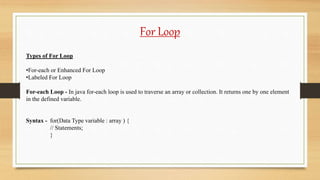
Types of For Loop
•For-each or Enhanced For Loop
•Labeled For Loop
For-each Loop - In java for-each loop is used to traverse an array or collection. It returns one by one element
in the defined variable.
Syntax - for(Data Type variable : array ) {
// Statements;
}
For Loop
ForEachLoopExample.java
public class ForEachLoopExample {
public static void main(String args[]) {
int arr[]={12,23,44,56,78};
for(int i:arr){
System.out.println(i);
}
}
}
Output –
12
23
44
56
78
For Loop
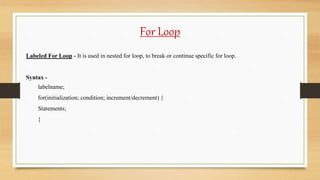
Labeled For Loop - It is used in nested for loop, to break or continue specific for loop.
Syntax -
labelname;
for(initialization; condition; increment/decrement) {
Statements;
}
For Loop
LabeledForLoopExample.java
public class LabeledForLoopExample {
public static void main(String args[]) {
first:
for(int i=1;i<=3;i++) {
second:
for(int j=1;j<=3;j++) {
if(i==2 && j==2) {
break first;
}
System.out.println(i+" "+j);
}
}
}
}
Output –
1 1
1 2
1 3
2 1
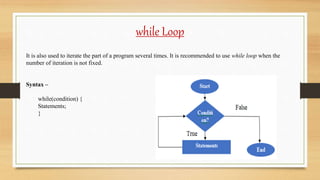
while Loop
It is also used to iterate the part of a program several times. It is recommended to use while loop when the
number of iteration is not fixed.
Syntax –
while(condition) {
Statements;
}
while Loop
// While_Example.java
public class While_Example {
public static void main(String args[]) {
int i=10;
while(i < 21) {
System.out.println(i);
i++;
}
}
}
Output –
10
11
12
13
14
15
16
17
18
19
20
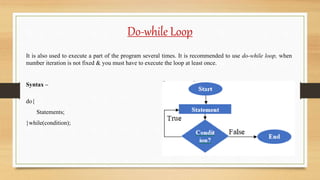
Do-while Loop
It is also used to execute a part of the program several times. It is recommended to use do-while loop, when
number iteration is not fixed & you must have to execute the loop at least once.
Syntax –
do{
Statements;
}while(condition);
Do-while Loop
// Do_While_Example.java
public class Do_While_Example {
public static void main(String args[]) {
int i=10;
do {
System.out.println(i);
i++;
}while(i<15);
}
}
Output –
10
11
12
13
14
Lecture - 5 Control Statement

Lecture - 5 Control Statement

  • 1.
  • 2.
    Contents  Introduction toControl Statement  Types of Control Statement  Jump Statement  Loop in java  Types of Loop
  • 3.
    Control statement  Astatement that determines whether the other statements will be executed or not.  It controls the flow of a program.  Decision-Making statements allow you to make a decision, based upon the result of a condition. It tests boolean condition: true or false.  Here we represent flowchart of Decision-Making technique:
  • 4.
    Types of controlstatement There are following types of java selection statements in java: 1. If statement 2. If-Else statement 3. If-Else-If statement 4. Nested If statement 5. Switch statement 6. Jump statement
  • 5.
    If Statement An ifstatement consists of boolean expression followed by one or more statements. Based on the result of these expression programs are executed i.e. if condition true then if block executed. If statement does not any other block except if block. Syntax – if(Condition) { // statements; }
  • 6.
    If statement public classIf_Example { public static void main(String args[]) { int x = 10; if(x < 20) { System.out.println(“x is less than 20.”); } } } Output – x is less than 20. If_Example.java
  • 7.
    If-else Statement In thiscase an if statement can be followed by an else statement which executes when the condition is false. Syntax – if(Condition) { //Statements; } else { // Statements; }
  • 8.
    If-else statement public classIfElseExample { public static void main(String args[]) { int x = 10; if(x % 2 ==0) { System.out.println(“x is even number.”); } else { System.out.println(“x is odd number.”); } } } Output – x is even number. IfElseExample.java
  • 9.
    If-else-if Statement In thiscase, one condition executes from multiple conditions. Syntax – if(condition-1) { //Statements; } else if(Condition-2) { //Statements; } else if(Condition-2) { //Statements; } else { //Statements; }
  • 10.
    If-else-if statement public classIfElseIfLadder { public static void main(String args[]) { int marks = 75; if(marks < 33) { System.out.println(“Fail.”); } else if(marks >=33 && marks <45){ System.out.println(“Thired.”); } else if(marks >=45 && marks <60){ System.out.println(“Second.”); } else if(marks >=60 && marks <75){ System.out.println(“First.”); } IfElseIfExample.java else if(marks >=75 && marks <100){ System.out.println(“Excellent.”); } else { System.out.println(“Invalid !”); } } } Output - Excellent.
  • 11.
    Nested if Statement Inthis case an if statement represents the if block within another if block is called Nested If Statement. In this case, inner if block executes only when the condition of outer if block is true. Syntax – if(Condition) { //Statements; if(Condition) { //Statements; } }
  • 12.
    Nested if statement publicclass NestedIf { public static void main(String args[]) { int marks = 75; int age=21 if(age>= 21) { if(marks >=75){ System.out.println(“Elligible.”); } } } } Output - Elligible. NestedIfExample.java
  • 13.
    Switch Statement Switch statementis work just like if-else-if ladder i.e. executes one statement from multiple conditions. There are following important points about switch statement: There can be one or n number of cases for switch expression. The value of cases must be switch expression type and the case value must be literal or constant. The case value must be unique. The java switch expression must be of byte, short, int, long (with its Wrapper type), enums and string. Each case statement can have a break statement which is optional. The case value can have a default label which is optional.
  • 14.
    Switch Statement Syntax – switch(expression){ case value1: //statements; break; case value2: //statements; break; ……….. default: //statements; (Executes if none of the case is match) }
  • 15.
    Switch statement public classSwitchExample1 { public static void main(String args []) { int num = 2; switch(num) { case 1: System.out.println(“Case-1”); break; case 2: System.out.println(“Case-2”); break; case 3: System.out.println(“Case-3”); break; default: System.out.println(“Invalid”); } } } Output – Case-2 SwitchExample1.java public class SwitchExample2 { public static void main(String args []) { char ch = ‘e’; switch(ch) { case ‘a’: System.out.println(“Vowel”); break; case ‘A’: System.out.println(“Vowel”); break; case ‘e’: System.out.println(“Vowel”); break; case ‘E’: System.out.println(“Vowel”); break; case ‘i’: System.out.println(“Vowel”); break; case ‘I’: System.out.println(“Vowel”); break; case ‘o’: System.out.println(“Vowel”); break; case ‘O’: System.out.println(“Vowel”); break; case ‘u’: System.out.println(“Vowel”); break; case ‘U’: System.out.println(“Vowel”); break; default: System.out.println(“Consonant”); } } } Output – VowelSwitchExample2.java
  • 16.
    jump Statement There arethree types of Jump Statement in java: 1. Break Statement 2. Continue Statement 3. Return Statement
  • 17.
    break Statement The javabreak statement is used to break loop or switch statement. Java Break statement breaks the current flow of the program i.e. in case of inner loop, it breaks only inner loop not outer and control will resumes at the next statement.
  • 18.
    Break statement // Breakto exit a loop class BreakLoopDemo { public static void main(String args[]) { for (int i = 0; i < 10; i++) { if (i == 5) break; System.out.println("i: " + i); } System.out.println("Loop complete."); } } BreakLoopDemo.java Output – i: 0 i: 1 i: 2 i: 3 i: 4 Loop complete.
  • 19.
    break Statement Java Breakstatement with Labeled For loop: Java does not have goto statement as java uses label. We can use break statement with a label. This feature of break statement introduced since JDK1.5. // with label inside an inner loop to break outer loop public class BreakExample3 { public static void main(String[] args) { aa: // Name of label for(int i=1;i<=3;i++){ bb: // Name of label for(int j=1;j<=3;j++){ if(i==2&&j==2){ break aa; } System.out.println(i+" "+j); } } } } Output – 11 1 2 1 3 2 1
  • 20.
    continue Statement The continuestatement is used in loop control structure when you need to jump to the next iteration of the loop immediately. The Java continue statement is used to continue the loop. It continues the current flow of the program and skips the remaining code at the specified condition. In case of an inner loop, it continues the inner loop only.
  • 21.
    continue statement // ContinueStatement public class ContinueExample { public static void main(String[] args) { //for loop for(int i=1;i<=10;i++){ if(i==5){ continue;//it will skip the rest statement } System.out.println(i); } } } ContinueExample.java Output – 1 2 3 4 6 7 8 9 10 As you can see in the above output, 5 is not printed on the console. It is because the loop is continued when it reaches to 5.
  • 22.
    continue Statement Java Continuestatement with Labeled For loop: We can use continue statement with a label. This feature is introduced since JDK 1.5. So, we can continue any loop in java now whether it is outer or inner loop. // ContinueExample3.java public class ContinueExample3 { public static void main(String[] args) { aa: for(int i=1;i<=3;i++){ bb: for(int j=1;j<=3;j++){ if(i==2&&j==2){ continue aa; } System.out.println(i+" "+j); } } } } Output – 1 1 1 2 1 3 2 1 3 1 3 2 3 3
  • 23.
    Return Statement The returnstatement is used to explicitly return from a method. That is, it causes a program control to transfer back to the caller of the method. // Java program to illustrate using return class ReturnStatement { int add() { int result = 10+20; return result; } public static void main(String args[]) { Abc a = new Abc(); int x = a.add(); System.out.println(x); }} Output – 30
  • 24.
    Loops in java Inprogramming, loops are used to execute instruction again & again (i.e. repeatedly) when some condition become true. There are three types of loops in java: •for loop •while loop •do-while loop
  • 25.
    For Loop The forloop is used to execute a sequence of statements multiple times. If the number of execution is fixed, it is recommended to use for loop. The syntax of for statement contains initialization, condition and increment/decrement in one line with separated by semi-colon. Syntax – for(initialization; test-condition; increment/decrement) { Statements; }
  • 26.
    For Loop ForLoopExample.java public classForLoopExample { public static void main(String args[]) { for(int i = 1; i<=5; i++) { System.out.println(i); } } } Output – 1 2 3 4 5
  • 27.
    For Loop Nested ForLoop A for loop inside another for loop is called nested for loop. In nested for loop, inner loop executes completely whenever outer loop executes. Syntax - for(initialization; condition; increment/decrement) { for(initialization; condition; increment/decrement) { Statements; } }
  • 28.
    For Loop NestedForLoopExample.java public classNestedForLoopExample { public static void main(String args[]) { for(int i = 1; i<=2; i++) { for(int j = 1; j<=2; j++) { // Inner loop System.out.println(i+” “+j); } } } } Output – 1 1 1 2 2 1 2 2
  • 29.
    For Loop Types ofFor Loop •For-each or Enhanced For Loop •Labeled For Loop For-each Loop - In java for-each loop is used to traverse an array or collection. It returns one by one element in the defined variable. Syntax - for(Data Type variable : array ) { // Statements; }
  • 30.
    For Loop ForEachLoopExample.java public classForEachLoopExample { public static void main(String args[]) { int arr[]={12,23,44,56,78}; for(int i:arr){ System.out.println(i); } } } Output – 12 23 44 56 78
  • 31.
    For Loop Labeled ForLoop - It is used in nested for loop, to break or continue specific for loop. Syntax - labelname; for(initialization; condition; increment/decrement) { Statements; }
  • 32.
    For Loop LabeledForLoopExample.java public classLabeledForLoopExample { public static void main(String args[]) { first: for(int i=1;i<=3;i++) { second: for(int j=1;j<=3;j++) { if(i==2 && j==2) { break first; } System.out.println(i+" "+j); } } } } Output – 1 1 1 2 1 3 2 1
  • 33.
    while Loop It isalso used to iterate the part of a program several times. It is recommended to use while loop when the number of iteration is not fixed. Syntax – while(condition) { Statements; }
  • 34.
    while Loop // While_Example.java publicclass While_Example { public static void main(String args[]) { int i=10; while(i < 21) { System.out.println(i); i++; } } } Output – 10 11 12 13 14 15 16 17 18 19 20
  • 35.
    Do-while Loop It isalso used to execute a part of the program several times. It is recommended to use do-while loop, when number iteration is not fixed & you must have to execute the loop at least once. Syntax – do{ Statements; }while(condition);
  • 36.
    Do-while Loop // Do_While_Example.java publicclass Do_While_Example { public static void main(String args[]) { int i=10; do { System.out.println(i); i++; }while(i<15); } } Output – 10 11 12 13 14