Topics
• Loops
• Whileloop
• Do/While Loop
• For loop
• Nested Loops
• Break and continue in loops
3.
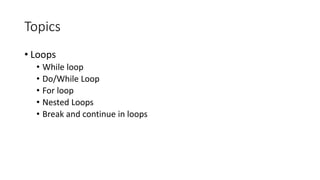
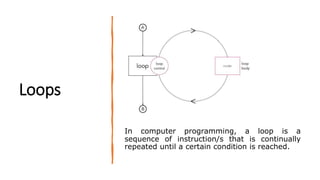
Loops
In computer programming,a loop is a
sequence of instruction/s that is continually
repeated until a certain condition is reached.
4.
While Loop
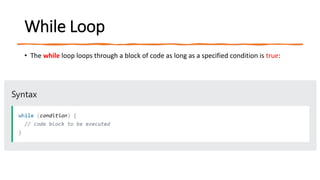
• Thewhile loop loops through a block of code as long as a specified condition is true:
5.
Example
class Main {
publicstatic void main(String[] args) {
int i = 0;
while (i < 5) {
System.out.println(i);
i++;
}
}
}
In this example, the
code in the loop
will run, over and
over again, as long
as a variable (i) is
less than 5:
Note: if you forget
this variable , the
loop will never end!
6.
Do/While Loop
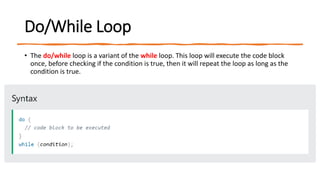
• Thedo/while loop is a variant of the while loop. This loop will execute the code block
once, before checking if the condition is true, then it will repeat the loop as long as the
condition is true.
7.
Example
class Main {
publicstatic void main(String[] args) {
int i = 0;
do {
System.out.println(i);
i++;
} while (i < 5);
}
}
This example uses a do/while
loop. The loop will always be
executed at least once, even
if the condition is false,
because the code block is
executed before the condition
is tested:
8.
For Loop
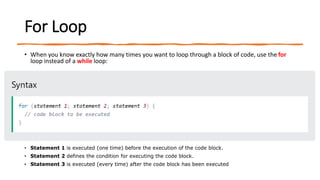
• Whenyou know exactly how many times you want to loop through a block of code, use the for
loop instead of a while loop:
• Statement 1 is executed (one time) before the execution of the code block.
• Statement 2 defines the condition for executing the code block.
• Statement 3 is executed (every time) after the code block has been executed
9.
For Loop
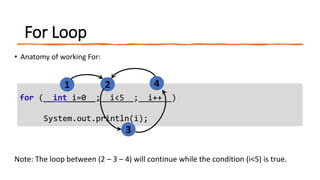
• Anatomyof working For:
Note: The loop between (2 – 3 – 4) will continue while the condition (i<5) is true.
for ( int i=0 ; i<5 ; i++ )
System.out.println(i);
1 2
3
4
10.
Example
class Main {
publicstatic void main(String[] args) {
for (int i = 0; i < 5; i++) {
System.out.println(i);
}
}
}
• Statement 1 sets a variable before the loop
starts (int i = 0).
• Statement 2 defines the condition for the
loop to run (i must be less than 5). If the
condition is true, the loop will start over
again, if it is false, the loop will end.
• Statement 3 increases a value (i++) each
time the code block in the loop has been
executed.
11.
Example
class Main {
publicstatic void main(String[] args) {
for (int i = 0; i <= 10; i = i + 2) {
System.out.println(i);
}
}
}
12.
Example
class Program
{
public staticvoid main(String []args)
{
for (int i = 0; i <= 5; i++)
System.out.println(i);
System.out.println("Good Bye");
}
}
13.
Example
class Program
{
public staticvoid main(String []args)
{
for (int i = 5; i >= 0; i--){
System.out.println(i);
}
System.out.println("Good Bye");
}
}
14.
Example
class Main{
public staticvoid main(String []args)
{
for (int i = 0; i <= 5; i++)
System.out.print(i+", ");
System.out.println("Good Bye");
}
}
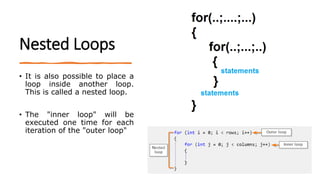
Nested Loops
• Itis also possible to place a
loop inside another loop.
This is called a nested loop.
• The "inner loop" will be
executed one time for each
iteration of the "outer loop"
17.
Example
class Main {
publicstatic void main(String[] args) {
// Outer loop.
for (int i = 1; i <= 2; i++) {
System.out.println("Outer: " + i); // Executes 2 times
// Inner loop
for (int j = 1; j <= 3; j++) {
System.out.println(" Inner: " + j); // Executes 6 times (2 * 3)
}
}
}
}
18.
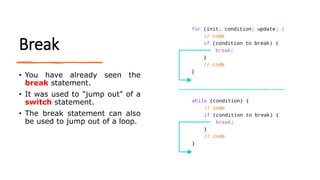
Break
• You havealready seen the
break statement.
• It was used to "jump out" of a
switch statement.
• The break statement can also
be used to jump out of a loop.
19.
example (break infor Loop)
class Main {
public static void main(String[] args) {
for (int i = 0; i < 10; i++) {
if (i == 4) {
break;
}
System.out.println(i);
}
}
}
20.
example (break inWhile Loop)
class Main {
public static void main(String[] args) {
int i = 0;
while (i < 10) {
System.out.println(i);
i++;
if (i == 4) {
break;
}
}
}
}
21.
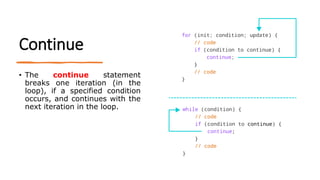
Continue
• The continuestatement
breaks one iteration (in the
loop), if a specified condition
occurs, and continues with the
next iteration in the loop.
22.
Example (continue infor Loop)
class Main {
public static void main(String[] args) {
for (int i = 0; i < 10; i++) {
if (i == 4) {
continue;
}
System.out.println(i);
}
}
}
23.
Example (continue inWhile Loop)
class Main {
public static void main(String[] args) {
int i = 0;
while (i < 10) {
if (i == 4) {
i++;
continue;
}
System.out.println(i);
i++;
}
}
}
![Example
class Main {
public static void main(String[] args) {
int i = 0;
while (i < 5) {
System.out.println(i);
i++;
}
}
}
In this example, the
code in the loop
will run, over and
over again, as long
as a variable (i) is
less than 5:
Note: if you forget
this variable , the
loop will never end!](https://image.slidesharecdn.com/chapter4-250616190015-8d195e97/85/how-to-write-loops-in-java-explained-vividly-5-320.jpg)
![Example
class Main {
public static void main(String[] args) {
int i = 0;
do {
System.out.println(i);
i++;
} while (i < 5);
}
}
This example uses a do/while
loop. The loop will always be
executed at least once, even
if the condition is false,
because the code block is
executed before the condition
is tested:](https://image.slidesharecdn.com/chapter4-250616190015-8d195e97/85/how-to-write-loops-in-java-explained-vividly-7-320.jpg)
![Example
class Main {
public static void main(String[] args) {
for (int i = 0; i < 5; i++) {
System.out.println(i);
}
}
}
• Statement 1 sets a variable before the loop
starts (int i = 0).
• Statement 2 defines the condition for the
loop to run (i must be less than 5). If the
condition is true, the loop will start over
again, if it is false, the loop will end.
• Statement 3 increases a value (i++) each
time the code block in the loop has been
executed.](https://image.slidesharecdn.com/chapter4-250616190015-8d195e97/85/how-to-write-loops-in-java-explained-vividly-10-320.jpg)
![Example
class Main {
public static void main(String[] args) {
for (int i = 0; i <= 10; i = i + 2) {
System.out.println(i);
}
}
}](https://image.slidesharecdn.com/chapter4-250616190015-8d195e97/85/how-to-write-loops-in-java-explained-vividly-11-320.jpg)
![Example
class Program
{
public static void main(String []args)
{
for (int i = 0; i <= 5; i++)
System.out.println(i);
System.out.println("Good Bye");
}
}](https://image.slidesharecdn.com/chapter4-250616190015-8d195e97/85/how-to-write-loops-in-java-explained-vividly-12-320.jpg)
![Example
class Program
{
public static void main(String []args)
{
for (int i = 5; i >= 0; i--){
System.out.println(i);
}
System.out.println("Good Bye");
}
}](https://image.slidesharecdn.com/chapter4-250616190015-8d195e97/85/how-to-write-loops-in-java-explained-vividly-13-320.jpg)
![Example
class Main{
public static void main(String []args)
{
for (int i = 0; i <= 5; i++)
System.out.print(i+", ");
System.out.println("Good Bye");
}
}](https://image.slidesharecdn.com/chapter4-250616190015-8d195e97/85/how-to-write-loops-in-java-explained-vividly-14-320.jpg)
![Example
class Main{
public static void main(String []args)
{
for (int i = 0; i < 4; i++)
{
System.out.println("**********");
}
}
}](https://image.slidesharecdn.com/chapter4-250616190015-8d195e97/85/how-to-write-loops-in-java-explained-vividly-15-320.jpg)
![Example
class Main {
public static void main(String[] args) {
// Outer loop.
for (int i = 1; i <= 2; i++) {
System.out.println("Outer: " + i); // Executes 2 times
// Inner loop
for (int j = 1; j <= 3; j++) {
System.out.println(" Inner: " + j); // Executes 6 times (2 * 3)
}
}
}
}](https://image.slidesharecdn.com/chapter4-250616190015-8d195e97/85/how-to-write-loops-in-java-explained-vividly-17-320.jpg)
![example (break in for Loop)
class Main {
public static void main(String[] args) {
for (int i = 0; i < 10; i++) {
if (i == 4) {
break;
}
System.out.println(i);
}
}
}](https://image.slidesharecdn.com/chapter4-250616190015-8d195e97/85/how-to-write-loops-in-java-explained-vividly-19-320.jpg)
![example (break in While Loop)
class Main {
public static void main(String[] args) {
int i = 0;
while (i < 10) {
System.out.println(i);
i++;
if (i == 4) {
break;
}
}
}
}](https://image.slidesharecdn.com/chapter4-250616190015-8d195e97/85/how-to-write-loops-in-java-explained-vividly-20-320.jpg)
![Example (continue in for Loop)
class Main {
public static void main(String[] args) {
for (int i = 0; i < 10; i++) {
if (i == 4) {
continue;
}
System.out.println(i);
}
}
}](https://image.slidesharecdn.com/chapter4-250616190015-8d195e97/85/how-to-write-loops-in-java-explained-vividly-22-320.jpg)
![Example (continue in While Loop)
class Main {
public static void main(String[] args) {
int i = 0;
while (i < 10) {
if (i == 4) {
i++;
continue;
}
System.out.println(i);
i++;
}
}
}](https://image.slidesharecdn.com/chapter4-250616190015-8d195e97/85/how-to-write-loops-in-java-explained-vividly-23-320.jpg)



![Getting Started with Apache Spark: Big Data Made Simple [Free Meetup]](https://cdn.slidesharecdn.com/ss_thumbnails/apachesparkgettingstarted-260203175547-8361bcc3-thumbnail.jpg?width=640&height=640&fit=bounds)
