Ayesha Sani
Lecturer GIS
GCUF
 Statements inside your source files are generally executed
from top to bottom, in the order that they appear.
 Control flow statements, however, break up the flow of
execution by employing decision making, looping, and
branching, enabling your program to conditionally execute
particular blocks of code.
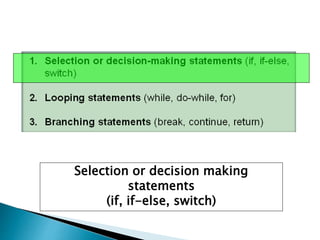
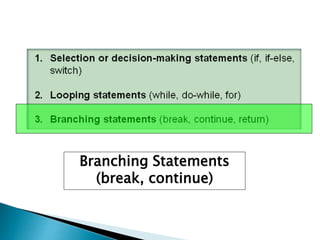
1. Selection or decision-making statements (if, if-else,
switch)
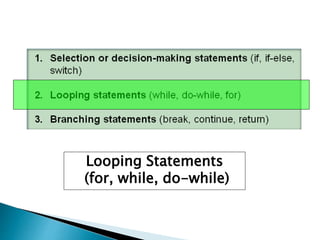
2. Looping statements (while, do-while, for)
3. Branching statements (break, continue, return)
Introduction – Control
Statements
Selection or decision making
statements
(if, if-else, switch)
The if statement
executes a block of code
only if the specified
expression is true.
If the value is false, then
the if block is skipped
and execution continues
with the rest of the
program.
Selection or decision-making statements
(if-then, if-then-else, switch)
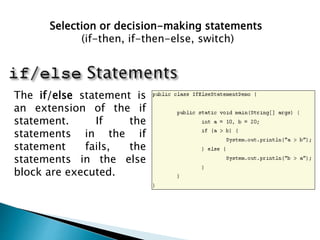
The if/else statement is
an extension of the if
statement. If the
statements in the if
statement fails, the
statements in the else
block are executed.
Selection or decision-making statements
(if-then, if-then-else, switch)
More Examples of
“if” and “if-else”
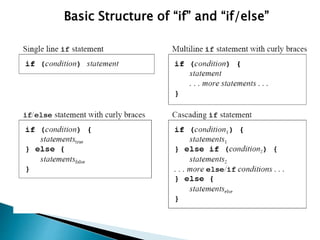
Basic Structure of “if” and “if/else”
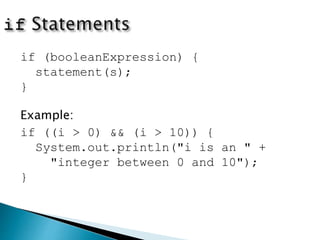
if (booleanExpression) {
statement(s);
}
Example:
if ((i > 0) && (i > 10)) {
System.out.println("i is an " +
"integer between 0 and 10");
}
class IfElseDemo {
public static void main(String[] args) {
int testscore = 76;
char grade;
if (testscore >= 90) {
grade = 'A';
}
else if (testscore >= 80) {
grade = 'B';
}
else if (testscore >= 70) {
grade = 'C';
}
else if (testscore >= 60) {
grade = 'D';
}
else {
grade = 'F';
}
System.out.println("Grade = " + grade);
}
}
class IfElseDemo {
public static void main(String[] args) {
int testscore = 76;
char grade;
if (testscore >= 90) {
grade = 'A';
}
if (testscore >= 80) {
grade = 'B';
}
if (testscore >= 70) {
grade = 'C';
}
if (testscore >= 60) {
grade = 'D';
}
else {
grade = 'F';
}
System.out.println("Grade = " + grade);
}
}
Adding a semicolon at the end of an if clause is a
common mistake.
if (radius >= 0);
{
area = radius*radius*PI;
System.out.println(
"The area for the circle of radius " +
radius + " is " + area);
}
This mistake is hard to find, because it is not a
compilation error or a runtime error, it is a logic error.
This error often occurs when you use the next-line
block style.
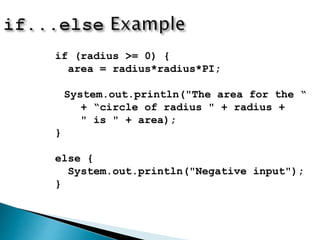
Wrong
if (radius >= 0) {
area = radius*radius*PI;
System.out.println("The area for the “
+ “circle of radius " + radius +
" is " + area);
}
else {
System.out.println("Negative input");
}
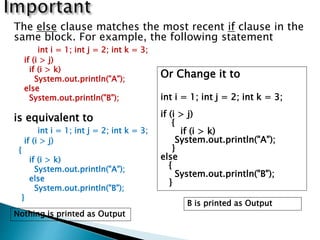
The else clause matches the most recent if clause in the
same block. For example, the following statement
int i = 1; int j = 2; int k = 3;
if (i > j)
if (i > k)
System.out.println("A");
else
System.out.println("B");
is equivalent to
int i = 1; int j = 2; int k = 3;
if (i > j)
{
if (i > k)
System.out.println("A");
else
System.out.println("B");
}
Or Change it to
int i = 1; int j = 2; int k = 3;
if (i > j)
{
if (i > k)
System.out.println("A");
}
else
{
System.out.println("B");
}
Nothing is printed as Output
B is printed as Output
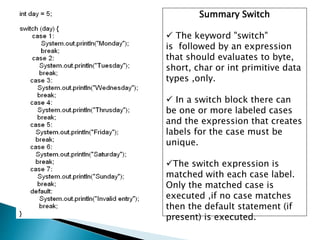
Summary Switch
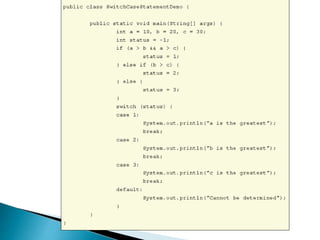
 The keyword "switch"
is followed by an expression
that should evaluates to byte,
short, char or int primitive data
types ,only.
 In a switch block there can
be one or more labeled cases
and the expression that creates
labels for the case must be
unique.
The switch expression is
matched with each case label.
Only the matched case is
executed ,if no case matches
then the default statement (if
present) is executed.
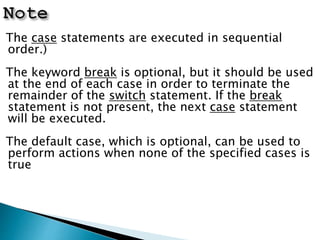
The case statements are executed in sequential
order.)
The keyword break is optional, but it should be used
at the end of each case in order to terminate the
remainder of the switch statement. If the break
statement is not present, the next case statement
will be executed.
The default case, which is optional, can be used to
perform actions when none of the specified cases is
true
Looping Statements
(for, while, do-while)
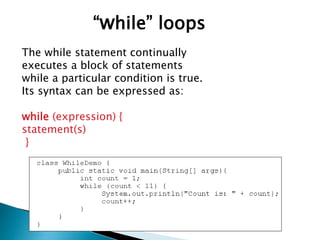
The while statement continually
executes a block of statements
while a particular condition is true.
Its syntax can be expressed as:
while (expression) {
statement(s)
}
“while” loops
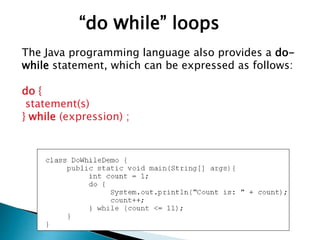
The Java programming language also provides a do-
while statement, which can be expressed as follows:
do {
statement(s)
} while (expression) ;
“do while” loops
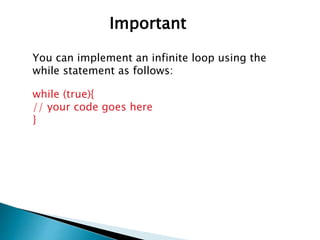
Important
You can implement an infinite loop using the
while statement as follows:
while (true){
// your code goes here
}
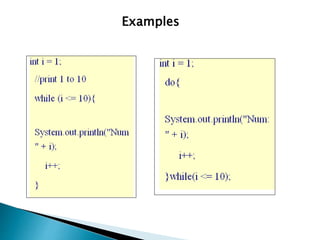
Examples
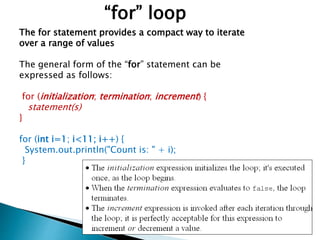
“for” loop
The for statement provides a compact way to iterate
over a range of values
The general form of the “for” statement can be
expressed as follows:
for (initialization; termination; increment) {
statement(s)
}
for (int i=1; i<11; i++) {
System.out.println("Count is: " + i);
}
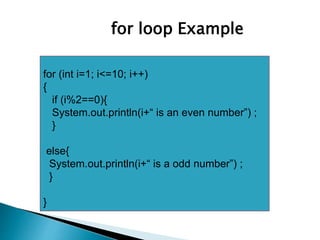
for loop Example
for (int i=1; i<=10; i++)
{
if (i%2==0){
System.out.println(i+“ is an even number”) ;
}
else{
System.out.println(i+“ is a odd number”) ;
}
}
Branching Statements
(break, continue)
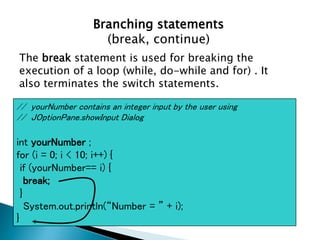
Branching statements
(break, continue)
The break statement is used for breaking the
execution of a loop (while, do-while and for) . It
also terminates the switch statements.
// yourNumber contains an integer input by the user using
// JOptionPane.showInput Dialog
int yourNumber ;
for (i = 0; i < 10; i++) {
if (yourNumber== i) {
break;
}
System.out.println(“Number = ” + i);
}
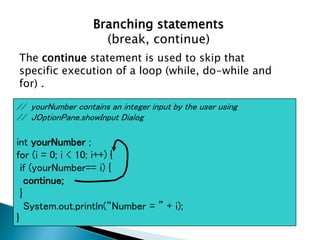
Branching statements
(break, continue)
The continue statement is used to skip that
specific execution of a loop (while, do-while and
for) .
// yourNumber contains an integer input by the user using
// JOptionPane.showInput Dialog
int yourNumber ;
for (i = 0; i < 10; i++) {
if (yourNumber== i) {
continue;
}
System.out.println(“Number = ” + i);
}
 Statements inside your source files are generally executed
from top to bottom, in the order that they appear.
 Control flow statements, however, break up the flow of
execution by employing decision making, looping, and
branching, enabling your program to conditionally execute
particular blocks of code.
1. Selection or decision-making statements (if, if-else,
switch)
2. looping statements (for, while, do-while)
3. branching statements (break, continue, return)
Summary – Control Statements
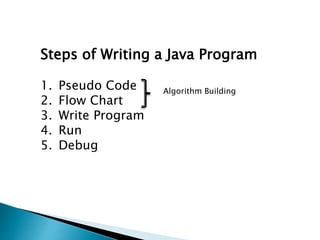
Steps of Writing a Java Program
1. Pseudo Code
2. Flow Chart
3. Write Program
4. Run
5. Debug
Algorithm Building
 Write a program that takes an integer input
from user and print the table of that
number upto 10. (Print the table only if the
input number is between 3 and 20) [Note:
Use for loop]
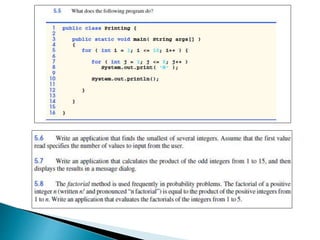
 Write a program that calculates the product
of the odd integers from 1 to 15, then
displays the results in a message dialog
[Note: Use for loop]
Exercise 1
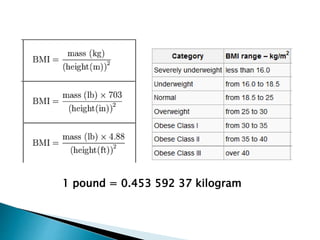
 Body Mass Index Program
 Print 1 2 3 4 5 4 3 2 1 using a single for
loop
 Change the Cricket program so that all the
input is done in a single loop
 Mobile Bill Calculation Software
Exercise 2
1 pound = 0.453 592 37 kilogram
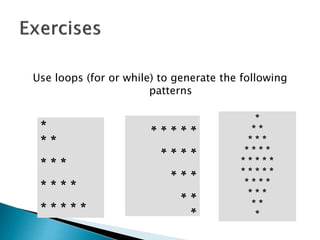
Use loops (for or while) to generate the following
patterns
*
* *
* * *
* * * *
* * * * *
*
**
***
****
***** *
* *
* * *
* * * *
* * * * *
* * * * *
* * * *
* * *
* *
*
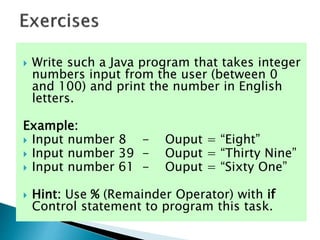
 Write such a Java program that takes integer
numbers input from the user (between 0
and 100) and print the number in English
letters.
Example:
 Input number 8 - Ouput = “Eight”
 Input number 39 - Ouput = “Thirty Nine”
 Input number 61 - Ouput = “Sixty One”
 Hint: Use % (Remainder Operator) with if
Control statement to program this task.

control statements

  • 1.
  • 2.
     Statements insideyour source files are generally executed from top to bottom, in the order that they appear.  Control flow statements, however, break up the flow of execution by employing decision making, looping, and branching, enabling your program to conditionally execute particular blocks of code. 1. Selection or decision-making statements (if, if-else, switch) 2. Looping statements (while, do-while, for) 3. Branching statements (break, continue, return) Introduction – Control Statements
  • 3.
    Selection or decisionmaking statements (if, if-else, switch)
  • 4.
    The if statement executesa block of code only if the specified expression is true. If the value is false, then the if block is skipped and execution continues with the rest of the program. Selection or decision-making statements (if-then, if-then-else, switch)
  • 5.
    The if/else statementis an extension of the if statement. If the statements in the if statement fails, the statements in the else block are executed. Selection or decision-making statements (if-then, if-then-else, switch)
  • 6.
    More Examples of “if”and “if-else”
  • 7.
    Basic Structure of“if” and “if/else”
  • 8.
    if (booleanExpression) { statement(s); } Example: if((i > 0) && (i > 10)) { System.out.println("i is an " + "integer between 0 and 10"); }
  • 10.
    class IfElseDemo { publicstatic void main(String[] args) { int testscore = 76; char grade; if (testscore >= 90) { grade = 'A'; } else if (testscore >= 80) { grade = 'B'; } else if (testscore >= 70) { grade = 'C'; } else if (testscore >= 60) { grade = 'D'; } else { grade = 'F'; } System.out.println("Grade = " + grade); } } class IfElseDemo { public static void main(String[] args) { int testscore = 76; char grade; if (testscore >= 90) { grade = 'A'; } if (testscore >= 80) { grade = 'B'; } if (testscore >= 70) { grade = 'C'; } if (testscore >= 60) { grade = 'D'; } else { grade = 'F'; } System.out.println("Grade = " + grade); } }
  • 11.
    Adding a semicolonat the end of an if clause is a common mistake. if (radius >= 0); { area = radius*radius*PI; System.out.println( "The area for the circle of radius " + radius + " is " + area); } This mistake is hard to find, because it is not a compilation error or a runtime error, it is a logic error. This error often occurs when you use the next-line block style. Wrong
  • 12.
    if (radius >=0) { area = radius*radius*PI; System.out.println("The area for the “ + “circle of radius " + radius + " is " + area); } else { System.out.println("Negative input"); }
  • 13.
    The else clausematches the most recent if clause in the same block. For example, the following statement int i = 1; int j = 2; int k = 3; if (i > j) if (i > k) System.out.println("A"); else System.out.println("B"); is equivalent to int i = 1; int j = 2; int k = 3; if (i > j) { if (i > k) System.out.println("A"); else System.out.println("B"); } Or Change it to int i = 1; int j = 2; int k = 3; if (i > j) { if (i > k) System.out.println("A"); } else { System.out.println("B"); } Nothing is printed as Output B is printed as Output
  • 15.
    Summary Switch  Thekeyword "switch" is followed by an expression that should evaluates to byte, short, char or int primitive data types ,only.  In a switch block there can be one or more labeled cases and the expression that creates labels for the case must be unique. The switch expression is matched with each case label. Only the matched case is executed ,if no case matches then the default statement (if present) is executed.
  • 16.
    The case statementsare executed in sequential order.) The keyword break is optional, but it should be used at the end of each case in order to terminate the remainder of the switch statement. If the break statement is not present, the next case statement will be executed. The default case, which is optional, can be used to perform actions when none of the specified cases is true
  • 18.
  • 19.
    The while statementcontinually executes a block of statements while a particular condition is true. Its syntax can be expressed as: while (expression) { statement(s) } “while” loops
  • 20.
    The Java programminglanguage also provides a do- while statement, which can be expressed as follows: do { statement(s) } while (expression) ; “do while” loops
  • 21.
    Important You can implementan infinite loop using the while statement as follows: while (true){ // your code goes here }
  • 22.
  • 23.
    “for” loop The forstatement provides a compact way to iterate over a range of values The general form of the “for” statement can be expressed as follows: for (initialization; termination; increment) { statement(s) } for (int i=1; i<11; i++) { System.out.println("Count is: " + i); }
  • 24.
    for loop Example for(int i=1; i<=10; i++) { if (i%2==0){ System.out.println(i+“ is an even number”) ; } else{ System.out.println(i+“ is a odd number”) ; } }
  • 25.
  • 26.
    Branching statements (break, continue) Thebreak statement is used for breaking the execution of a loop (while, do-while and for) . It also terminates the switch statements. // yourNumber contains an integer input by the user using // JOptionPane.showInput Dialog int yourNumber ; for (i = 0; i < 10; i++) { if (yourNumber== i) { break; } System.out.println(“Number = ” + i); }
  • 27.
    Branching statements (break, continue) Thecontinue statement is used to skip that specific execution of a loop (while, do-while and for) . // yourNumber contains an integer input by the user using // JOptionPane.showInput Dialog int yourNumber ; for (i = 0; i < 10; i++) { if (yourNumber== i) { continue; } System.out.println(“Number = ” + i); }
  • 28.
     Statements insideyour source files are generally executed from top to bottom, in the order that they appear.  Control flow statements, however, break up the flow of execution by employing decision making, looping, and branching, enabling your program to conditionally execute particular blocks of code. 1. Selection or decision-making statements (if, if-else, switch) 2. looping statements (for, while, do-while) 3. branching statements (break, continue, return) Summary – Control Statements
  • 29.
    Steps of Writinga Java Program 1. Pseudo Code 2. Flow Chart 3. Write Program 4. Run 5. Debug Algorithm Building
  • 31.
     Write aprogram that takes an integer input from user and print the table of that number upto 10. (Print the table only if the input number is between 3 and 20) [Note: Use for loop]  Write a program that calculates the product of the odd integers from 1 to 15, then displays the results in a message dialog [Note: Use for loop] Exercise 1
  • 32.
     Body MassIndex Program  Print 1 2 3 4 5 4 3 2 1 using a single for loop  Change the Cricket program so that all the input is done in a single loop  Mobile Bill Calculation Software Exercise 2
  • 33.
    1 pound =0.453 592 37 kilogram
  • 36.
    Use loops (foror while) to generate the following patterns * * * * * * * * * * * * * * * * ** *** **** ***** * * * * * * * * * * * * * * * * * * * * * * * * * * * * * *
  • 38.
     Write sucha Java program that takes integer numbers input from the user (between 0 and 100) and print the number in English letters. Example:  Input number 8 - Ouput = “Eight”  Input number 39 - Ouput = “Thirty Nine”  Input number 61 - Ouput = “Sixty One”  Hint: Use % (Remainder Operator) with if Control statement to program this task.