07/22/25
07/22/25 1
1
MUTIMEDIA TECHNOLOGIES
Teacher:
Razia Nisar Noorani
07/22/25
07/22/25 2
2
LECTURE 1
Introduction, History, Terminologies and
Applications
07/22/25
07/22/25 3
3
Ỗ Animation
Ỗ Sound
Ỗ Graphics
Ỗ Text
Ỗ Video
Ỗ Photography
First consider what constitutes media. Some examples of media
are:
Introduction to Multimedia
07/22/25
07/22/25 4
4
 Hardware
Hardware
 Software
Software
 Storage
Storage
 Bandwidth
Bandwidth
 Devices
Devices
 Formats and compressions
Formats and compressions
Technologies
07/22/25
07/22/25 5
5
Multimedia involves the combination of two or more media types to
effectively create a sequence of events that will communicate an idea
usually with both sound and visual support. Typically, multimedia
productions are developed and controlled by computer.
Introduction to Multimedia
The enabling force behind multimedia is
digital technology. Multimedia today
represents the convergence of digital
control and digital media - the PC as the
digital control system and the digital media
being today's most advanced forms of
audio and video storage and transmission.
07/22/25
07/22/25 6
6
 Multimedia = "Multiple" + "media"
Multimedia = "Multiple" + "media"
combination of
combination of text
text,
, image
image,
, computer graphics
computer graphics,
,
animation
animation,
, sound
sound, and
, and video.
video.
Inveractive
Inveractive Multimedia - allow user to control
Multimedia - allow user to control
each media
each media
 Multimedia
Multimedia is the field concerned with the computer-
is the field concerned with the computer-
controlled integration of text, graphics, drawings, still
and moving images (Video), animation, audio, and any
other media where every type of information can be
represented, stored, transmitted and processed
digitally.
digitally.
Introduction to Multimedia
07/22/25
07/22/25 7
7
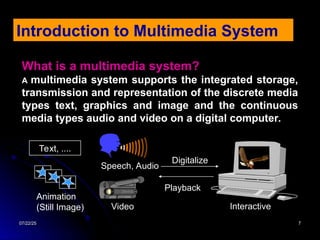
What is a multimedia system?
A multimedia system supports the integrated storage,
transmission and representation of the discrete media
types text, graphics and image and the continuous
media types audio and video on a digital computer.
Introduction to Multimedia System
Text, ....
Speech, Audio
Video
Animation
(Still Image)
Digitalize
Interactive
Playback
07/22/25
07/22/25 8
8
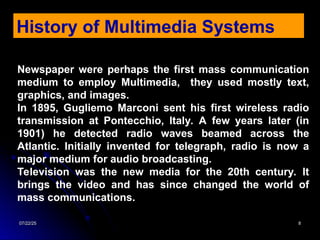
Newspaper were perhaps the first mass communication
medium to employ Multimedia, they used mostly text,
graphics, and images.
In 1895, Gugliemo Marconi sent his first wireless radio
transmission at Pontecchio, Italy. A few years later (in
1901) he detected radio waves beamed across the
Atlantic. Initially invented for telegraph, radio is now a
major medium for audio broadcasting.
Television was the new media for the 20th century. It
brings the video and has since changed the world of
mass communications.
History of Multimedia Systems
07/22/25
07/22/25 10
10
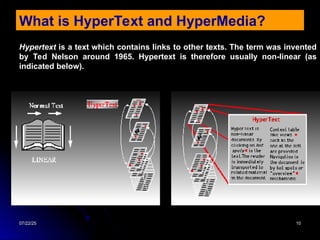
What is HyperText and HyperMedia?
Hypertext is a text which contains links to other texts. The term was invented
by Ted Nelson around 1965. Hypertext is therefore usually non-linear (as
indicated below).
07/22/25
07/22/25 11
11
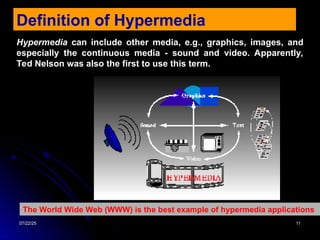
Definition of Hypermedia
Hypermedia can include other media, e.g., graphics, images, and
especially the continuous media - sound and video. Apparently,
Ted Nelson was also the first to use this term.
The World Wide Web (WWW) is the best example of hypermedia applications
07/22/25
07/22/25 12
12
Characteristics of a Multimedia System
Ỗ Multimedia systems must be computer controlled.
Ỗ Multimedia systems are integrated.
Ỗ The information they handle must be represented digitally.
Ỗ The interface to the final presentation of media is usually
interactive
A Multimedia system has four basic characteristics:
07/22/25
07/22/25 13
13
Challenges for Multimedia Systems
Multimedia systems may have to render a variety of media at the
same instant -- a distinction from normal applications. There is a
temporal relationship between many forms of media (e.g. Video
and Audio)
Sequencing within the media :
Playing frames in correct order/time frame in video
Synchronization
inter-media scheduling (e.g. Video and Audio). Lip synchronization
is clearly important for humans to watch playback of video and
audio and even animation and audio.
There 2 are forms of problems here
07/22/25
07/22/25 14
14
The key issues multimedia systems
Ỗ Data has to represented digitally so many initial source of data needs
to be digitise -- translated from analog source to digital representation.
They will involve scanning (graphics, still images), sampling
(audio/video) although digital cameras now exist for direct scene to
digital capture of images and video.
Ỗ The data is large several Mb easily for audio and video – therefore
storage, transfer (bandwidth) and processing overheads are high. Data
compression techniques very common.
Ỗ How to represent and store temporal information?
Ỗ How to strictly maintain the temporal relationships on play back/retrieval?
Ỗ What process are involved in the above?
07/22/25
07/22/25 15
15
Desirable Features for a Multimedia System
Given the above challenges the following feature a desirable (if not a
prerequisite) for a Multimedia System:
Very High Processing Power
Needed to deal with large data processing and real time delivery of
media. Special hardware commonplace.
Multimedia Capable File System
Needed to deliver real-time media -- e.g. Video/Audio Streaming.
Special Hardware/Software needed e.g RAID technology.
Data Representations/File Formats that support multimedia
Data representations/file formats should be easy to handle yet allow for
compression/decompression in real-time.
07/22/25
07/22/25 16
16
Efficient and High I/O
Input and output to the file subsystem needs to be efficient and fast. Needs
to allow for real-time recording as well as playback of data. e.g. Direct to Disk
recording systems.
Special Operating System
To allow access to file system and process data efficiently and quickly.
Needs to support direct transfers to disk, real-time scheduling, fast interrupt
processing, I/O streaming etc.
Storage and Memory
Large storage units (of the order of 50 -100 Gb or more) and large memory
(50 -100 Mb or more). Large Caches also required and frequently of Level 2
and 3 hierarchy for efficient management.
Network Support
Client-server systems common as distributed systems common.
Software Tools
User friendly tools needed to handle media, design and develop applications,
deliver media.
07/22/25
07/22/25 17
17
Components of a Multimedia System
Capture devices
Video Camera, Video Recorder, Audio Microphone, Keyboards, mice, graphics
tablets, 3D input devices, tactile sensors, VR devices. Digitising/Sampling
Hardware
Storage Devices
Hard disks, CD-ROMs, Jaz/Zip drives, DVD, etc
Communication Networks
Ethernet, Token Ring, FDDI, ATM, Intranets, Internets.
Computer Systems
Multimedia Desktop machines, Workstations, MPEG/VIDEO/DSP Hardware
Display Devices
CD-quality speakers, HDTV,SVGA, Hi-Resolution monitors, Color printers etc.
07/22/25
07/22/25 18
18
Applications
Ỗ World Wide Web
Ỗ Hypermedia courseware
Ỗ Video conferencing
Ỗ Video-on-demand
Ỗ Interactive TV
Ỗ Groupware
Ỗ Home shopping
Ỗ Games
Ỗ Virtual reality
Ỗ Digital video editing and production systems
Ỗ Multimedia Database systems
07/22/25
07/22/25 19
19
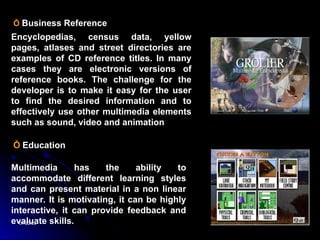
Ỗ Business Reference
Encyclopedias, census data, yellow
pages, atlases and street directories are
examples of CD reference titles. In many
cases they are electronic versions of
reference books. The challenge for the
developer is to make it easy for the user
to find the desired information and to
effectively use other multimedia elements
such as sound, video and animation
Ỗ Education
Multimedia has the ability to
accommodate different learning styles
and can present material in a non linear
manner. It is motivating, it can be highly
interactive, it can provide feedback and
evaluate skills.
07/22/25
07/22/25 20
20
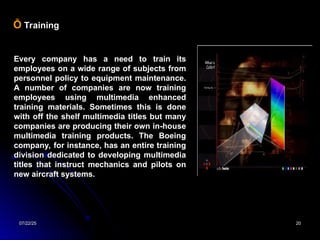
Ỗ Training
Every company has a need to train its
employees on a wide range of subjects from
personnel policy to equipment maintenance.
A number of companies are now training
employees using multimedia enhanced
training materials. Sometimes this is done
with off the shelf multimedia titles but many
companies are producing their own in-house
multimedia training products. The Boeing
company, for instance, has an entire training
division dedicated to developing multimedia
titles that instruct mechanics and pilots on
new aircraft systems.
07/22/25
07/22/25 21
21
Ỗ Entertainment
Drawing the line between education and
entertainment in multimedia can be
almost impossible, hence the term
'edutainment'. Multimedia can make
learning entertaining.
But multimedia also has a purely
entertainment side. Anything that's
possible in sound and images is
possible on a multimedia CD.
07/22/25
07/22/25 22
22
Ỗ Business
As businesses have the need to
communicate with the outside world,
multimedia processes offer a wide variety
of options for business presentations,
marketing and sales. Multimedia can be
used at trade shows or to produce
electronic catalogues. The marketing of
new products can be greatly enhanced by
using multimedia, these products can be
marketed in a manner that will provide
more detailed and stimulating information
than printed media.
Auto manufacturers like Nissan provide
interactive test drives of new vehicles on
the web or on CD. Macromedia now
present their annual report, vision
statement and product overview in print,
on the Internet, and in CD ROM form.
07/22/25
07/22/25 23
23
Ỗ Presentations
Thousands of multimedia presentations are made in the
business world every day. Company CEOs give their
annual report to a meeting of stockholders. Sales reps
pitch their product line to a group of potential customers.
A conference keynote speaker tells an audience about
industry trends. From an electronic slide show to an
interactive video display multimedia can enhance a
presentation.
Multimedia provides the presenter with the tools to attract
and focus the audience's attention, reinforce key concepts
and enliven the presentation.
The following software programs progress from basic
presentation to complete authoring capabilities:
Microsoft PowerPoint
Adobe Premiere
Macromedia Director
Macromedia Authorware
Asymmetrix ToolBook
07/22/25
07/22/25 24
24
Ỗ Interactive Games
Multimedia means interaction, and to
many interactive entertainment means
games. Game developers were the
pioneers in the use of multimedia and still
provide the most innovative and
interactive applications of multimedia.
In order to attract, engage, captivate and
challenge the user multimedia provides
the fast action, vivid colours, 3D
animations and elaborate sound effects
that are essential to entertainment. It can
also provide the rewards, recognition and
sense of accomplishment that are often
part of entertainment titles.
Many games have moved from the physical (hand/eye coordination) to the
mental (solving the mystery, overcoming evil, outwitting the opponent). Myst
is just one of many such very successful multimedia games. It effectively uses
exploration as a way for the player to experience the mysteries of the island.
07/22/25
07/22/25 25
25
Questions?

lecture-1_introudcution to multimedia communication.ppt

  • 1.
  • 2.
    07/22/25 07/22/25 2 2 LECTURE 1 Introduction,History, Terminologies and Applications
  • 3.
    07/22/25 07/22/25 3 3 Ỗ Animation ỖSound Ỗ Graphics Ỗ Text Ỗ Video Ỗ Photography First consider what constitutes media. Some examples of media are: Introduction to Multimedia
  • 4.
    07/22/25 07/22/25 4 4  Hardware Hardware Software Software  Storage Storage  Bandwidth Bandwidth  Devices Devices  Formats and compressions Formats and compressions Technologies
  • 5.
    07/22/25 07/22/25 5 5 Multimedia involvesthe combination of two or more media types to effectively create a sequence of events that will communicate an idea usually with both sound and visual support. Typically, multimedia productions are developed and controlled by computer. Introduction to Multimedia The enabling force behind multimedia is digital technology. Multimedia today represents the convergence of digital control and digital media - the PC as the digital control system and the digital media being today's most advanced forms of audio and video storage and transmission.
  • 6.
    07/22/25 07/22/25 6 6  Multimedia= "Multiple" + "media" Multimedia = "Multiple" + "media" combination of combination of text text, , image image, , computer graphics computer graphics, , animation animation, , sound sound, and , and video. video. Inveractive Inveractive Multimedia - allow user to control Multimedia - allow user to control each media each media  Multimedia Multimedia is the field concerned with the computer- is the field concerned with the computer- controlled integration of text, graphics, drawings, still controlled integration of text, graphics, drawings, still and moving images (Video), animation, audio, and any and moving images (Video), animation, audio, and any other media where every type of information can be other media where every type of information can be represented, stored, transmitted and processed represented, stored, transmitted and processed digitally. digitally. Introduction to Multimedia
  • 7.
    07/22/25 07/22/25 7 7 What isa multimedia system? A multimedia system supports the integrated storage, transmission and representation of the discrete media types text, graphics and image and the continuous media types audio and video on a digital computer. Introduction to Multimedia System Text, .... Speech, Audio Video Animation (Still Image) Digitalize Interactive Playback
  • 8.
    07/22/25 07/22/25 8 8 Newspaper wereperhaps the first mass communication medium to employ Multimedia, they used mostly text, graphics, and images. In 1895, Gugliemo Marconi sent his first wireless radio transmission at Pontecchio, Italy. A few years later (in 1901) he detected radio waves beamed across the Atlantic. Initially invented for telegraph, radio is now a major medium for audio broadcasting. Television was the new media for the 20th century. It brings the video and has since changed the world of mass communications. History of Multimedia Systems
  • 9.
    07/22/25 07/22/25 10 10 What isHyperText and HyperMedia? Hypertext is a text which contains links to other texts. The term was invented by Ted Nelson around 1965. Hypertext is therefore usually non-linear (as indicated below).
  • 10.
    07/22/25 07/22/25 11 11 Definition ofHypermedia Hypermedia can include other media, e.g., graphics, images, and especially the continuous media - sound and video. Apparently, Ted Nelson was also the first to use this term. The World Wide Web (WWW) is the best example of hypermedia applications
  • 11.
    07/22/25 07/22/25 12 12 Characteristics ofa Multimedia System Ỗ Multimedia systems must be computer controlled. Ỗ Multimedia systems are integrated. Ỗ The information they handle must be represented digitally. Ỗ The interface to the final presentation of media is usually interactive A Multimedia system has four basic characteristics:
  • 12.
    07/22/25 07/22/25 13 13 Challenges forMultimedia Systems Multimedia systems may have to render a variety of media at the same instant -- a distinction from normal applications. There is a temporal relationship between many forms of media (e.g. Video and Audio) Sequencing within the media : Playing frames in correct order/time frame in video Synchronization inter-media scheduling (e.g. Video and Audio). Lip synchronization is clearly important for humans to watch playback of video and audio and even animation and audio. There 2 are forms of problems here
  • 13.
    07/22/25 07/22/25 14 14 The keyissues multimedia systems Ỗ Data has to represented digitally so many initial source of data needs to be digitise -- translated from analog source to digital representation. They will involve scanning (graphics, still images), sampling (audio/video) although digital cameras now exist for direct scene to digital capture of images and video. Ỗ The data is large several Mb easily for audio and video – therefore storage, transfer (bandwidth) and processing overheads are high. Data compression techniques very common. Ỗ How to represent and store temporal information? Ỗ How to strictly maintain the temporal relationships on play back/retrieval? Ỗ What process are involved in the above?
  • 14.
    07/22/25 07/22/25 15 15 Desirable Featuresfor a Multimedia System Given the above challenges the following feature a desirable (if not a prerequisite) for a Multimedia System: Very High Processing Power Needed to deal with large data processing and real time delivery of media. Special hardware commonplace. Multimedia Capable File System Needed to deliver real-time media -- e.g. Video/Audio Streaming. Special Hardware/Software needed e.g RAID technology. Data Representations/File Formats that support multimedia Data representations/file formats should be easy to handle yet allow for compression/decompression in real-time.
  • 15.
    07/22/25 07/22/25 16 16 Efficient andHigh I/O Input and output to the file subsystem needs to be efficient and fast. Needs to allow for real-time recording as well as playback of data. e.g. Direct to Disk recording systems. Special Operating System To allow access to file system and process data efficiently and quickly. Needs to support direct transfers to disk, real-time scheduling, fast interrupt processing, I/O streaming etc. Storage and Memory Large storage units (of the order of 50 -100 Gb or more) and large memory (50 -100 Mb or more). Large Caches also required and frequently of Level 2 and 3 hierarchy for efficient management. Network Support Client-server systems common as distributed systems common. Software Tools User friendly tools needed to handle media, design and develop applications, deliver media.
  • 16.
    07/22/25 07/22/25 17 17 Components ofa Multimedia System Capture devices Video Camera, Video Recorder, Audio Microphone, Keyboards, mice, graphics tablets, 3D input devices, tactile sensors, VR devices. Digitising/Sampling Hardware Storage Devices Hard disks, CD-ROMs, Jaz/Zip drives, DVD, etc Communication Networks Ethernet, Token Ring, FDDI, ATM, Intranets, Internets. Computer Systems Multimedia Desktop machines, Workstations, MPEG/VIDEO/DSP Hardware Display Devices CD-quality speakers, HDTV,SVGA, Hi-Resolution monitors, Color printers etc.
  • 17.
    07/22/25 07/22/25 18 18 Applications Ỗ WorldWide Web Ỗ Hypermedia courseware Ỗ Video conferencing Ỗ Video-on-demand Ỗ Interactive TV Ỗ Groupware Ỗ Home shopping Ỗ Games Ỗ Virtual reality Ỗ Digital video editing and production systems Ỗ Multimedia Database systems
  • 18.
    07/22/25 07/22/25 19 19 Ỗ BusinessReference Encyclopedias, census data, yellow pages, atlases and street directories are examples of CD reference titles. In many cases they are electronic versions of reference books. The challenge for the developer is to make it easy for the user to find the desired information and to effectively use other multimedia elements such as sound, video and animation Ỗ Education Multimedia has the ability to accommodate different learning styles and can present material in a non linear manner. It is motivating, it can be highly interactive, it can provide feedback and evaluate skills.
  • 19.
    07/22/25 07/22/25 20 20 Ỗ Training Everycompany has a need to train its employees on a wide range of subjects from personnel policy to equipment maintenance. A number of companies are now training employees using multimedia enhanced training materials. Sometimes this is done with off the shelf multimedia titles but many companies are producing their own in-house multimedia training products. The Boeing company, for instance, has an entire training division dedicated to developing multimedia titles that instruct mechanics and pilots on new aircraft systems.
  • 20.
    07/22/25 07/22/25 21 21 Ỗ Entertainment Drawingthe line between education and entertainment in multimedia can be almost impossible, hence the term 'edutainment'. Multimedia can make learning entertaining. But multimedia also has a purely entertainment side. Anything that's possible in sound and images is possible on a multimedia CD.
  • 21.
    07/22/25 07/22/25 22 22 Ỗ Business Asbusinesses have the need to communicate with the outside world, multimedia processes offer a wide variety of options for business presentations, marketing and sales. Multimedia can be used at trade shows or to produce electronic catalogues. The marketing of new products can be greatly enhanced by using multimedia, these products can be marketed in a manner that will provide more detailed and stimulating information than printed media. Auto manufacturers like Nissan provide interactive test drives of new vehicles on the web or on CD. Macromedia now present their annual report, vision statement and product overview in print, on the Internet, and in CD ROM form.
  • 22.
    07/22/25 07/22/25 23 23 Ỗ Presentations Thousandsof multimedia presentations are made in the business world every day. Company CEOs give their annual report to a meeting of stockholders. Sales reps pitch their product line to a group of potential customers. A conference keynote speaker tells an audience about industry trends. From an electronic slide show to an interactive video display multimedia can enhance a presentation. Multimedia provides the presenter with the tools to attract and focus the audience's attention, reinforce key concepts and enliven the presentation. The following software programs progress from basic presentation to complete authoring capabilities: Microsoft PowerPoint Adobe Premiere Macromedia Director Macromedia Authorware Asymmetrix ToolBook
  • 23.
    07/22/25 07/22/25 24 24 Ỗ InteractiveGames Multimedia means interaction, and to many interactive entertainment means games. Game developers were the pioneers in the use of multimedia and still provide the most innovative and interactive applications of multimedia. In order to attract, engage, captivate and challenge the user multimedia provides the fast action, vivid colours, 3D animations and elaborate sound effects that are essential to entertainment. It can also provide the rewards, recognition and sense of accomplishment that are often part of entertainment titles. Many games have moved from the physical (hand/eye coordination) to the mental (solving the mystery, overcoming evil, outwitting the opponent). Myst is just one of many such very successful multimedia games. It effectively uses exploration as a way for the player to experience the mysteries of the island.
  • 24.