Storage Management

  •   Multiple partition allocation


                                      1
HOME     PREVIOUS TOPIC NEXT
PREVIOUS QUESTION PAPERS FOR OS
CPP TUTORIALS


                                  2
Recap


In the last class, you have learnt:

ď‚§ Single partition allocation

ď‚§ Hard ware support for relocation and limit

  register


                                               3
Objectives


  On completion of this class, you will be able to
  know

ď‚§ Multiple partition allocation

ď‚§ Allocation of memory


                                                     4
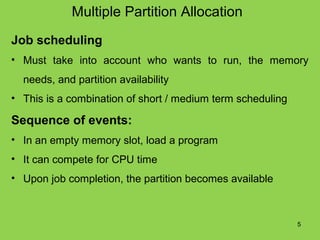
Multiple Partition Allocation
Job scheduling
• Must take into account who wants to run, the memory
  needs, and partition availability
• This is a combination of short / medium term scheduling

Sequence of events:
• In an empty memory slot, load a program
• It can compete for CPU time
• Upon job completion, the partition becomes available


                                                            5
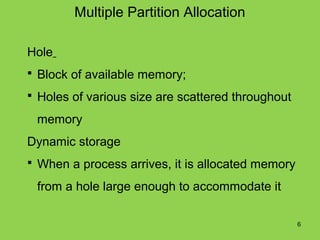
Multiple Partition Allocation

Hole
ď‚§ Block of available memory;

ď‚§ Holes of various size are scattered throughout

 memory
Dynamic storage
ď‚§ When a process arrives, it is allocated memory

 from a hole large enough to accommodate it

                                                   6
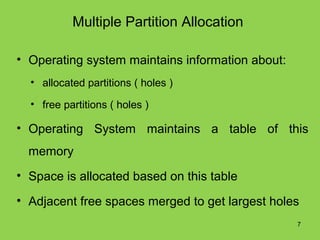
Multiple Partition Allocation

• Operating system maintains information about:
  • allocated partitions ( holes )

  • free partitions ( holes )

• Operating System maintains a table of this
  memory
• Space is allocated based on this table

• Adjacent free spaces merged to get largest holes
                                                  7
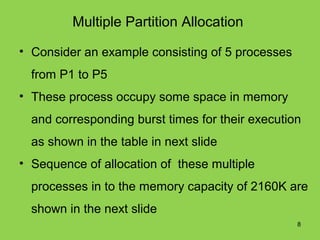
Multiple Partition Allocation

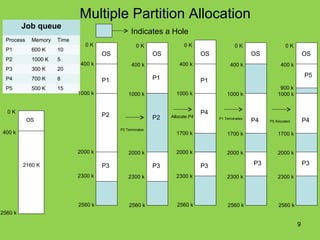
• Consider an example consisting of 5 processes
  from P1 to P5
• These process occupy some space in memory
  and corresponding burst times for their execution
  as shown in the table in next slide
• Sequence of allocation of these multiple
  processes in to the memory capacity of 2160K are
  shown in the next slide
                                                  8
Multiple Partition Allocation
         Job queue
                                                Indicates a Hole
  Process    Memory   Time
                               0K                  0K                 0K                   0K                    0K
  P1         600 K    10
                                      OS                   OS                 OS                   OS                      OS
  P2         1000 K   5
                              400 k              400 k              400 k                400 k                400 k
  P3         300 K    20
                                                           P1                                                              P5
  P4         700 K    8               P1                                      P1
  P5         500 K    15                                                                                     900 k
                             1000 k            1000 k             1000 k               1000 k               1000 k


  0K
                                      P2                                      P4
            OS                                             P2   Allocate P4        P1 Terminates
                                                                                                   P4   P5 Allocated       P4
                                           P2 Terminates
400 k                                                             1700 k               1700 k               1700 k


                             2000 k            2000 k             2000 k               2000 k               2000 k

         2160 K                       P3                   P3                 P3                   P3                      P3

                             2300 k            2300 k             2300 k               2300 k               2300 k


                             2560 k            2560 k             2560 k               2560 k                2560 k
2560 k

                                                                                                                       9
Memory Allocation
How to allocate memory to a new process?
ď‚§   First fit
     - Allocate the first hole that's big enough
     –Search can start at the beginning
     –Creates average size holes
ď‚§ Best fit

      -Allocate smallest hole that's big enough

     –Must search entire list, unless ordered by size
     –Produces the smallest leftover hole which cannot be
     used                                               10
Memory Allocation

• Worst fit
   – Allocate largest hole
   – Must search the entire list, unless sorted by size
   – Gets rid of large holes making it difficult to run large
     programs
• First-fit and best-fit better than worst-fit in terms
  of speed and storage utilization


                                                           11
Summary
 In this class, you have learnt
ď‚§ Multiple Partition Allocation
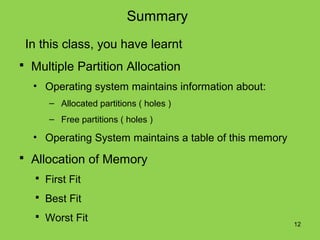
  • Operating system maintains information about:
      – Allocated partitions ( holes )
      – Free partitions ( holes )

  • Operating System maintains a table of this memory
ď‚§ Allocation of Memory
   ď‚§ First Fit

   ď‚§ Best Fit

   ď‚§ Worst Fit
                                                        12
Frequently Asked Questions

1. Explain about Multiple Partition Allocation

2. Explain how to allocate memory to a new
   process


                                                 13
Quiz

1. Allocate the first hole that's big enough

 a) First fit

 b) Best fit

 c) Worst fit

 d) None


                                               14
Quiz

2. Allocate smallest hole that's big enough

   a) First fit

  b) Best fit

  c) Worst fit

  d) None


                                              15
Quiz
3. Allocate largest hole

a) First fit

b) Best fit

c) Worst fit

d) None


                             16
Other subject materials

•   Web designing
•   Micro processors
•   C++ tutorials
•   java

home
Quiz

4. Block of available memory
a) Hole
b) Byte
c) Word
d) None


                               18

35. multiplepartitionallocation

  • 1.
    Storage Management • Multiple partition allocation 1
  • 2.
    HOME PREVIOUS TOPIC NEXT PREVIOUS QUESTION PAPERS FOR OS CPP TUTORIALS 2
  • 3.
    Recap In the lastclass, you have learnt: ď‚§ Single partition allocation ď‚§ Hard ware support for relocation and limit register 3
  • 4.
    Objectives Oncompletion of this class, you will be able to know ď‚§ Multiple partition allocation ď‚§ Allocation of memory 4
  • 5.
    Multiple Partition Allocation Jobscheduling • Must take into account who wants to run, the memory needs, and partition availability • This is a combination of short / medium term scheduling Sequence of events: • In an empty memory slot, load a program • It can compete for CPU time • Upon job completion, the partition becomes available 5
  • 6.
    Multiple Partition Allocation Hole ď‚§Block of available memory; ď‚§ Holes of various size are scattered throughout memory Dynamic storage ď‚§ When a process arrives, it is allocated memory from a hole large enough to accommodate it 6
  • 7.
    Multiple Partition Allocation •Operating system maintains information about: • allocated partitions ( holes ) • free partitions ( holes ) • Operating System maintains a table of this memory • Space is allocated based on this table • Adjacent free spaces merged to get largest holes 7
  • 8.
    Multiple Partition Allocation •Consider an example consisting of 5 processes from P1 to P5 • These process occupy some space in memory and corresponding burst times for their execution as shown in the table in next slide • Sequence of allocation of these multiple processes in to the memory capacity of 2160K are shown in the next slide 8
  • 9.
    Multiple Partition Allocation Job queue Indicates a Hole Process Memory Time 0K 0K 0K 0K 0K P1 600 K 10 OS OS OS OS OS P2 1000 K 5 400 k 400 k 400 k 400 k 400 k P3 300 K 20 P1 P5 P4 700 K 8 P1 P1 P5 500 K 15 900 k 1000 k 1000 k 1000 k 1000 k 1000 k 0K P2 P4 OS P2 Allocate P4 P1 Terminates P4 P5 Allocated P4 P2 Terminates 400 k 1700 k 1700 k 1700 k 2000 k 2000 k 2000 k 2000 k 2000 k 2160 K P3 P3 P3 P3 P3 2300 k 2300 k 2300 k 2300 k 2300 k 2560 k 2560 k 2560 k 2560 k 2560 k 2560 k 9
  • 10.
    Memory Allocation How toallocate memory to a new process?  First fit - Allocate the first hole that's big enough –Search can start at the beginning –Creates average size holes  Best fit -Allocate smallest hole that's big enough –Must search entire list, unless ordered by size –Produces the smallest leftover hole which cannot be used 10
  • 11.
    Memory Allocation • Worstfit – Allocate largest hole – Must search the entire list, unless sorted by size – Gets rid of large holes making it difficult to run large programs • First-fit and best-fit better than worst-fit in terms of speed and storage utilization 11
  • 12.
    Summary In thisclass, you have learnt  Multiple Partition Allocation • Operating system maintains information about: – Allocated partitions ( holes ) – Free partitions ( holes ) • Operating System maintains a table of this memory  Allocation of Memory  First Fit  Best Fit  Worst Fit 12
  • 13.
    Frequently Asked Questions 1.Explain about Multiple Partition Allocation 2. Explain how to allocate memory to a new process 13
  • 14.
    Quiz 1. Allocate thefirst hole that's big enough a) First fit b) Best fit c) Worst fit d) None 14
  • 15.
    Quiz 2. Allocate smallesthole that's big enough a) First fit b) Best fit c) Worst fit d) None 15
  • 16.
    Quiz 3. Allocate largesthole a) First fit b) Best fit c) Worst fit d) None 16
  • 17.
    Other subject materials • Web designing • Micro processors • C++ tutorials • java home
  • 18.
    Quiz 4. Block ofavailable memory a) Hole b) Byte c) Word d) None 18