CMPT 300 Operating System
I
Chapter 4
Memory Management
2
Why Memory Management?
 Why money management?
 Not enough money. Same thing for memory
 Parkinson’s law: programs expand to fill the
memory available to hold them
 “640KB memory are enough for everyone” – Bill Gates
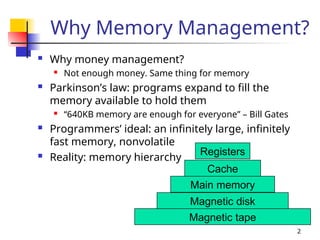
 Programmers’ ideal: an infinitely large, infinitely
fast memory, nonvolatile
 Reality: memory hierarchy
Magnetic tape
Magnetic disk
Main memory
Cache
Registers
3
What Is Memory Management?
 Memory manager: the part of the OS
managing the memory hierarchy

Keep track of memory parts in use/not in use
 Allocate/de-allocate memory to processes
 Manage swapping between main memory and
disk
 Basic memory management: every program
is put and run in main memory as whole
 Swapping & paging: move processes back
and forth between main memory and disk
4
Outline
 Basic memory management
 Swapping
 Virtual memory
 Page replacement algorithms
 Modeling page replacement algorithms
 Design issues for paging systems
 Implementation issues
 Segmentation
5
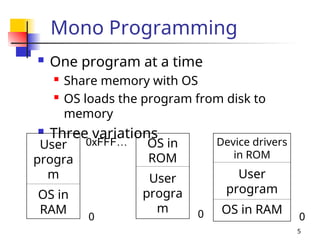
Mono Programming
 One program at a time
 Share memory with OS
 OS loads the program from disk to
memory
 Three variations
User
progra
m
OS in
RAM
0
0xFFF… OS in
ROM
User
progra
m 0
Device drivers
in ROM
User
program
OS in RAM
0
6
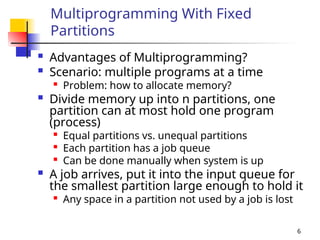
Multiprogramming With Fixed
Partitions
 Advantages of Multiprogramming?
 Scenario: multiple programs at a time

Problem: how to allocate memory?
 Divide memory up into n partitions, one
partition can at most hold one program
(process)

Equal partitions vs. unequal partitions

Each partition has a job queue

Can be done manually when system is up
 A job arrives, put it into the input queue for
the smallest partition large enough to hold it

Any space in a partition not used by a job is lost
7
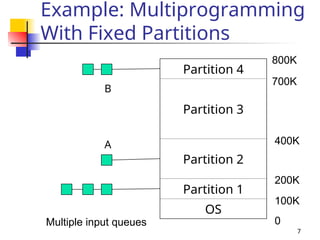
Example: Multiprogramming
With Fixed Partitions
Partition 4
Partition 3
Partition 2
Partition 1
OS
0
100K
200K
400K
700K
800K
Multiple input queues
A
B
8
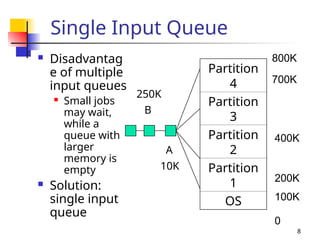
Single Input Queue
 Disadvantag
e of multiple
input queues
 Small jobs
may wait,
while a
queue with
larger
memory is
empty
 Solution:
single input
queue
Partition
4
Partition
3
Partition
2
Partition
1
OS
0
100K
200K
400K
700K
800K
A
B
10K
250K
9
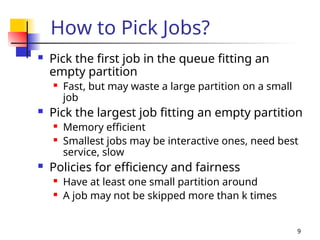
How to Pick Jobs?
 Pick the first job in the queue fitting an
empty partition
 Fast, but may waste a large partition on a small
job
 Pick the largest job fitting an empty partition
 Memory efficient
 Smallest jobs may be interactive ones, need best
service, slow
 Policies for efficiency and fairness
 Have at least one small partition around
 A job may not be skipped more than k times
10
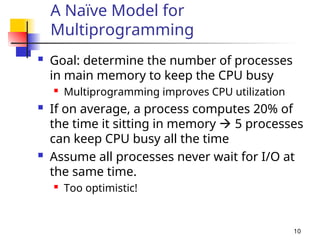
A Naïve Model for
Multiprogramming
 Goal: determine the number of processes
in main memory to keep the CPU busy
 Multiprogramming improves CPU utilization
 If on average, a process computes 20% of
the time it sitting in memory  5 processes
can keep CPU busy all the time
 Assume all processes never wait for I/O at
the same time.
 Too optimistic!
11
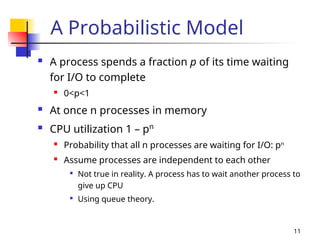
A Probabilistic Model
 A process spends a fraction p of its time waiting
for I/O to complete
 0<p<1
 At once n processes in memory
 CPU utilization 1 – pn
 Probability that all n processes are waiting for I/O: pn
 Assume processes are independent to each other

Not true in reality. A process has to wait another process to
give up CPU

Using queue theory.
12
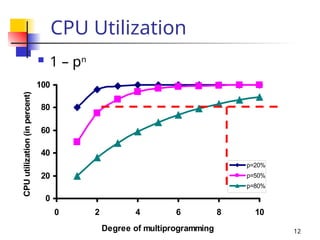
CPU Utilization
 1 – pn
0
20
40
60
80
100
0 2 4 6 8 10
Degree of multiprogramming
CPU
utilization
(in
percent)
p=20%
p=50%
p=80%
13
Memory Management for
Multiprogramming
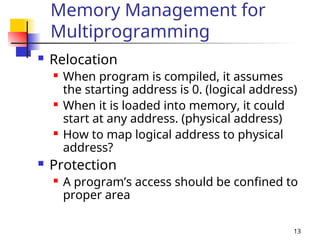
 Relocation
 When program is compiled, it assumes
the starting address is 0. (logical address)
 When it is loaded into memory, it could
start at any address. (physical address)
 How to map logical address to physical
address?
 Protection
 A program’s access should be confined to
proper area
14
Relocation & Protection
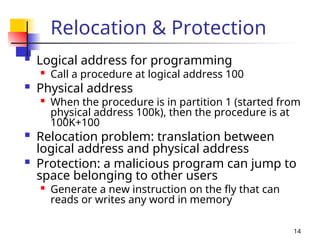
 Logical address for programming

Call a procedure at logical address 100
 Physical address
 When the procedure is in partition 1 (started from
physical address 100k), then the procedure is at
100K+100
 Relocation problem: translation between
logical address and physical address
 Protection: a malicious program can jump to
space belonging to other users

Generate a new instruction on the fly that can
reads or writes any word in memory
15
Relocation/Protection Using
Registers
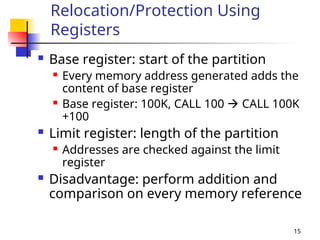
 Base register: start of the partition
 Every memory address generated adds the
content of base register
 Base register: 100K, CALL 100  CALL 100K
+100
 Limit register: length of the partition
 Addresses are checked against the limit
register
 Disadvantage: perform addition and
comparison on every memory reference
16
Outline
 Basic memory management
 Swapping
 Virtual memory
 Page replacement algorithms
 Modeling page replacement algorithms
 Design issues for paging systems
 Implementation issues
 Segmentation
17
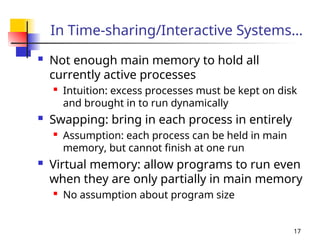
In Time-sharing/Interactive Systems…
 Not enough main memory to hold all
currently active processes

Intuition: excess processes must be kept on disk
and brought in to run dynamically
 Swapping: bring in each process in entirely
 Assumption: each process can be held in main
memory, but cannot finish at one run
 Virtual memory: allow programs to run even
when they are only partially in main memory

No assumption about program size
18
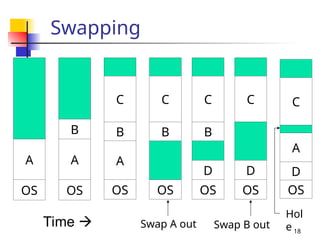
Swapping
B
A
OS
A
OS
C
B
A
OS
C
B
OS
C
B
D
OS
C
D
OS
C
A
D
OS
Time  Swap A out Swap B out
Hol
e
19
Swapping V.S. Fixed
Partitions
 The number, location and size of partitions
vary dynamically in swapping
 Flexibility, improve memory utilization
 Complicate allocating, de-allocating and
keeping track of memory
 Memory compaction: combine “holes” in
memory into a big one
 More efficient in allocation
 Require a lot of CPU time
 Rarely used in real systems
20
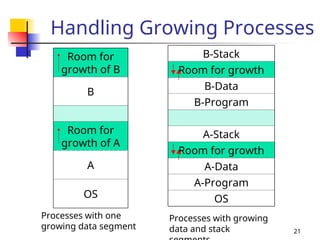
Enlarge Memory for a Process
 Fixed size process: easy
 Growing process
 Expand to the adjacent hole, if there is a
hole
 Otherwise, wait or swap some processes
out to create a large enough hole
 If swap area on the disk is full, wait or be
killed
 Allocate extra space whenever a
process is swapped in or move
21
Handling Growing Processes
Room for
growth of B
B
Room for
growth of A
A
OS
B-Stack
Room for growth
B-Data
B-Program
A-Stack
Room for growth
A-Data
A-Program
OS
Processes with one
growing data segment
Processes with growing
data and stack
22
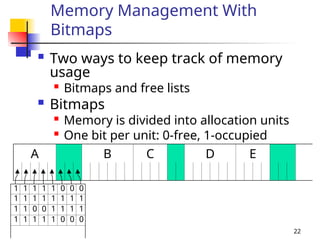
Memory Management With
Bitmaps
 Two ways to keep track of memory
usage

Bitmaps and free lists
 Bitmaps
 Memory is divided into allocation units

One bit per unit: 0-free, 1-occupied
A B C D E
1 1 1 1 1 0 0 0
1 1 1 1 1 1 1 1
1 1 0 0 1 1 1 1
1 1 1 1 1 0 0 0
23
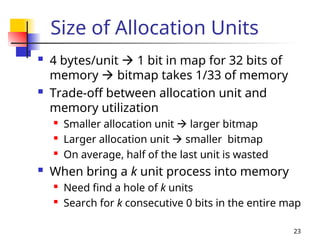
Size of Allocation Units
 4 bytes/unit  1 bit in map for 32 bits of
memory  bitmap takes 1/33 of memory
 Trade-off between allocation unit and
memory utilization
 Smaller allocation unit  larger bitmap
 Larger allocation unit  smaller bitmap
 On average, half of the last unit is wasted
 When bring a k unit process into memory

Need find a hole of k units
 Search for k consecutive 0 bits in the entire map
24
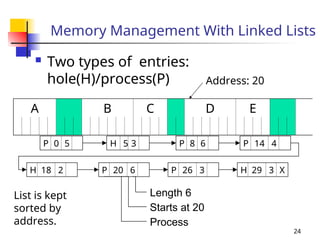
Memory Management With Linked Lists
 Two types of entries:
hole(H)/process(P)
A B C D E
P 0 5 H 5 3 P 8 6 P 14 4
H 18 2 P 20 6 P 26 3 H 29 3 X
Length 6
Starts at 20
Process
Address: 20
List is kept
sorted by
address.
25
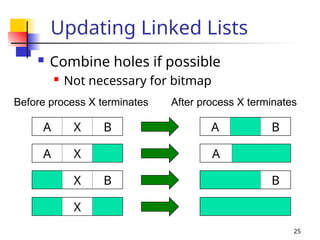
Updating Linked Lists
 Combine holes if possible
 Not necessary for bitmap
A X B
Before process X terminates After process X terminates
A B
A X A
X B B
X
26
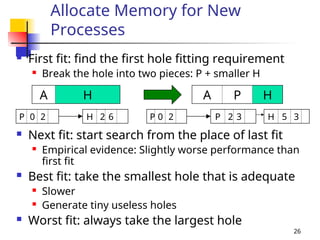
Allocate Memory for New
Processes
 First fit: find the first hole fitting requirement
 Break the hole into two pieces: P + smaller H
 Next fit: start search from the place of last fit
 Empirical evidence: Slightly worse performance than
first fit
 Best fit: take the smallest hole that is adequate
 Slower
 Generate tiny useless holes
 Worst fit: always take the largest hole
A P H
A H
P 0 2 H 2 6 P 0 2 P 2 3 H 5 3
27
Using Distinct Lists
 Distinct lists for processes and holes
 List of holes can be sorted on size

Best fit becomes faster
 Problem: how to free a process?

Merging holes is very costly
 Quick fit: grouping holes based on size
 Different lists for different sizes
 E.g., List 1 for 4KB holes, List 2 for 8KB holes.

How about a 5KB hole?
 Speed up the searching
 Merging holes is still costly
28
Outline
 Basic memory management
 Swapping
 Virtual memory
 Page replacement algorithms
 Modeling page replacement algorithms
 Design issues for paging systems
 Implementation issues
 Segmentation
29
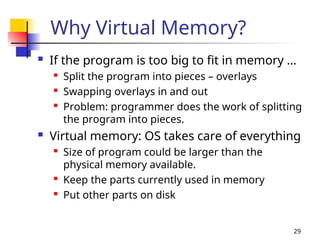
Why Virtual Memory?
 If the program is too big to fit in memory …

Split the program into pieces – overlays

Swapping overlays in and out

Problem: programmer does the work of splitting
the program into pieces.
 Virtual memory: OS takes care of everything

Size of program could be larger than the
physical memory available.

Keep the parts currently used in memory

Put other parts on disk
30
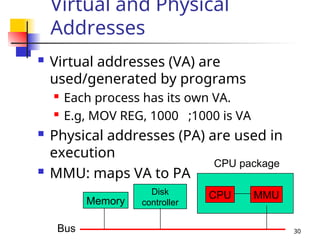
Virtual and Physical
Addresses
 Virtual addresses (VA) are
used/generated by programs
 Each process has its own VA.
 E.g, MOV REG, 1000 ;1000 is VA
 Physical addresses (PA) are used in
execution
 MMU: maps VA to PA
Bus
Memory
Disk
controller
CPU package
CPU MMU
31
Paging
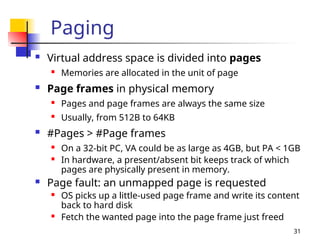
 Virtual address space is divided into pages
 Memories are allocated in the unit of page
 Page frames in physical memory
 Pages and page frames are always the same size
 Usually, from 512B to 64KB
 #Pages > #Page frames
 On a 32-bit PC, VA could be as large as 4GB, but PA < 1GB
 In hardware, a present/absent bit keeps track of which
pages are physically present in memory.
 Page fault: an unmapped page is requested
 OS picks up a little-used page frame and write its content
back to hard disk
 Fetch the wanted page into the page frame just freed
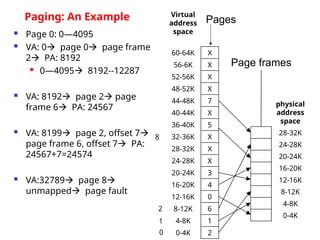
 Page 0: 0—4095
 VA: 0 page 0 page frame
2 PA: 8192
 0—4095 8192--12287
 VA: 8192 page 2 page
frame 6 PA: 24567
 VA: 8199 page 2, offset 7
page frame 6, offset 7 PA:
24567+7=24574
 VA:32789 page 8
unmapped page fault
Virtual
address
space
60-64K X
56-6K X
52-56K X
48-52K X
44-48K 7
40-44K X
36-40K 5
32-36K X
28-32K X
24-28K X
20-24K 3
16-20K 4
12-16K 0
8-12K 6
4-8K 1
0-4K 2
physical
address
space
28-32K
24-28K
20-24K
16-20K
12-16K
8-12K
4-8K
0-4K
Pages
Page frames
Paging: An Example
0
1
2
8
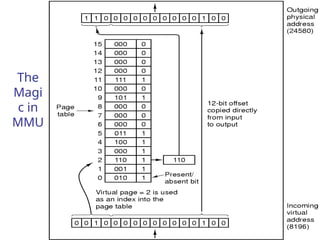
The
Magi
c in
MMU
34
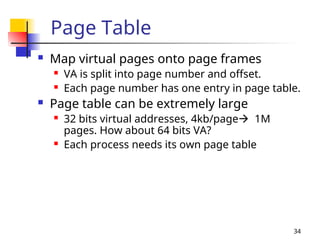
Page Table
 Map virtual pages onto page frames
 VA is split into page number and offset.
 Each page number has one entry in page table.
 Page table can be extremely large
 32 bits virtual addresses, 4kb/page 1M
pages. How about 64 bits VA?
 Each process needs its own page table
35
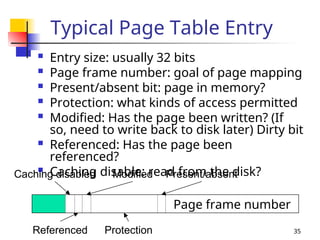
Typical Page Table Entry
 Entry size: usually 32 bits
 Page frame number: goal of page mapping
 Present/absent bit: page in memory?
 Protection: what kinds of access permitted
 Modified: Has the page been written? (If
so, need to write back to disk later) Dirty bit
 Referenced: Has the page been
referenced?
 Caching disable: read from the disk?
Page frame number
Present/absent
Caching disabled Modified
Referenced Protection
36
Fast Mapping
 Virtual to physical mapping must be
fast
 several page table references/instruction
 Unacceptable to store the entire page
table in main memory
 Have to seek for hardware solutions
37
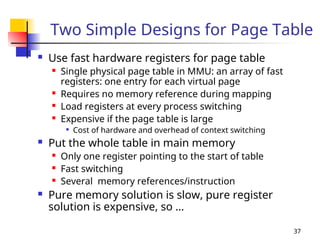
Two Simple Designs for Page Table
 Use fast hardware registers for page table
 Single physical page table in MMU: an array of fast
registers: one entry for each virtual page
 Requires no memory reference during mapping
 Load registers at every process switching
 Expensive if the page table is large

Cost of hardware and overhead of context switching
 Put the whole table in main memory
 Only one register pointing to the start of table
 Fast switching
 Several memory references/instruction
 Pure memory solution is slow, pure register
solution is expensive, so …
38
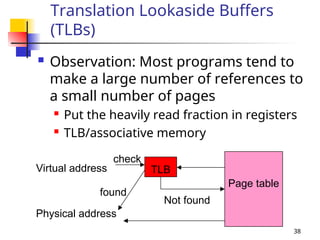
Translation Lookaside Buffers
(TLBs)
 Observation: Most programs tend to
make a large number of references to
a small number of pages
 Put the heavily read fraction in registers
 TLB/associative memory
TLB
Virtual address
check
found
Page table
Not found
Physical address
39
Outline
 Basic memory management
 Swapping
 Virtual memory
 Page replacement algorithms
 Modeling page replacement algorithms
 Design issues for paging systems
 Implementation issues
 Segmentation
40
Page Replacement
 When a page fault occurs, and all page
frames are full

Choose one page to remove, if modified (called
dirty page), update its disk copy

Better choose an unmodified page

Better choose a rarely used page
 Many similar problems in computer systems

Memory cache page replacement

Web page cache replacement in web server
 Revisit: page table entry
41
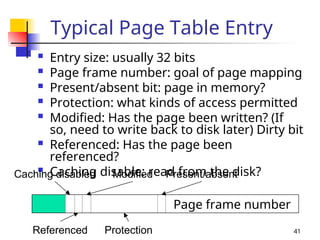
Typical Page Table Entry
 Entry size: usually 32 bits
 Page frame number: goal of page mapping
 Present/absent bit: page in memory?
 Protection: what kinds of access permitted
 Modified: Has the page been written? (If
so, need to write back to disk later) Dirty bit
 Referenced: Has the page been
referenced?
 Caching disable: read from the disk?
Page frame number
Present/absent
Caching disabled Modified
Referenced Protection
42
Optimal Algorithm
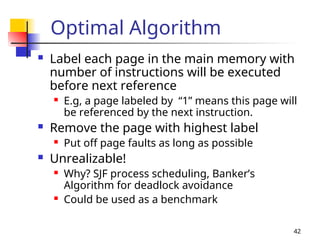
 Label each page in the main memory with
number of instructions will be executed
before next reference
 E.g, a page labeled by “1” means this page will
be referenced by the next instruction.
 Remove the page with highest label
 Put off page faults as long as possible
 Unrealizable!
 Why? SJF process scheduling, Banker’s
Algorithm for deadlock avoidance
 Could be used as a benchmark
43
Remove Not Recently Used
Pages
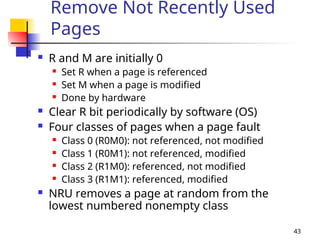
 R and M are initially 0
 Set R when a page is referenced
 Set M when a page is modified
 Done by hardware
 Clear R bit periodically by software (OS)
 Four classes of pages when a page fault
 Class 0 (R0M0): not referenced, not modified
 Class 1 (R0M1): not referenced, modified
 Class 2 (R1M0): referenced, not modified
 Class 3 (R1M1): referenced, modified
 NRU removes a page at random from the
lowest numbered nonempty class

OPERATING SYSTEM IMPORTANT NOTES_UNIT-4.ppt

  • 1.
    CMPT 300 OperatingSystem I Chapter 4 Memory Management
  • 2.
    2 Why Memory Management? Why money management?  Not enough money. Same thing for memory  Parkinson’s law: programs expand to fill the memory available to hold them  “640KB memory are enough for everyone” – Bill Gates  Programmers’ ideal: an infinitely large, infinitely fast memory, nonvolatile  Reality: memory hierarchy Magnetic tape Magnetic disk Main memory Cache Registers
  • 3.
    3 What Is MemoryManagement?  Memory manager: the part of the OS managing the memory hierarchy  Keep track of memory parts in use/not in use  Allocate/de-allocate memory to processes  Manage swapping between main memory and disk  Basic memory management: every program is put and run in main memory as whole  Swapping & paging: move processes back and forth between main memory and disk
  • 4.
    4 Outline  Basic memorymanagement  Swapping  Virtual memory  Page replacement algorithms  Modeling page replacement algorithms  Design issues for paging systems  Implementation issues  Segmentation
  • 5.
    5 Mono Programming  Oneprogram at a time  Share memory with OS  OS loads the program from disk to memory  Three variations User progra m OS in RAM 0 0xFFF… OS in ROM User progra m 0 Device drivers in ROM User program OS in RAM 0
  • 6.
    6 Multiprogramming With Fixed Partitions Advantages of Multiprogramming?  Scenario: multiple programs at a time  Problem: how to allocate memory?  Divide memory up into n partitions, one partition can at most hold one program (process)  Equal partitions vs. unequal partitions  Each partition has a job queue  Can be done manually when system is up  A job arrives, put it into the input queue for the smallest partition large enough to hold it  Any space in a partition not used by a job is lost
  • 7.
    7 Example: Multiprogramming With FixedPartitions Partition 4 Partition 3 Partition 2 Partition 1 OS 0 100K 200K 400K 700K 800K Multiple input queues A B
  • 8.
    8 Single Input Queue Disadvantag e of multiple input queues  Small jobs may wait, while a queue with larger memory is empty  Solution: single input queue Partition 4 Partition 3 Partition 2 Partition 1 OS 0 100K 200K 400K 700K 800K A B 10K 250K
  • 9.
    9 How to PickJobs?  Pick the first job in the queue fitting an empty partition  Fast, but may waste a large partition on a small job  Pick the largest job fitting an empty partition  Memory efficient  Smallest jobs may be interactive ones, need best service, slow  Policies for efficiency and fairness  Have at least one small partition around  A job may not be skipped more than k times
  • 10.
    10 A Naïve Modelfor Multiprogramming  Goal: determine the number of processes in main memory to keep the CPU busy  Multiprogramming improves CPU utilization  If on average, a process computes 20% of the time it sitting in memory  5 processes can keep CPU busy all the time  Assume all processes never wait for I/O at the same time.  Too optimistic!
  • 11.
    11 A Probabilistic Model A process spends a fraction p of its time waiting for I/O to complete  0<p<1  At once n processes in memory  CPU utilization 1 – pn  Probability that all n processes are waiting for I/O: pn  Assume processes are independent to each other  Not true in reality. A process has to wait another process to give up CPU  Using queue theory.
  • 12.
    12 CPU Utilization  1– pn 0 20 40 60 80 100 0 2 4 6 8 10 Degree of multiprogramming CPU utilization (in percent) p=20% p=50% p=80%
  • 13.
    13 Memory Management for Multiprogramming Relocation  When program is compiled, it assumes the starting address is 0. (logical address)  When it is loaded into memory, it could start at any address. (physical address)  How to map logical address to physical address?  Protection  A program’s access should be confined to proper area
  • 14.
    14 Relocation & Protection Logical address for programming  Call a procedure at logical address 100  Physical address  When the procedure is in partition 1 (started from physical address 100k), then the procedure is at 100K+100  Relocation problem: translation between logical address and physical address  Protection: a malicious program can jump to space belonging to other users  Generate a new instruction on the fly that can reads or writes any word in memory
  • 15.
    15 Relocation/Protection Using Registers  Baseregister: start of the partition  Every memory address generated adds the content of base register  Base register: 100K, CALL 100  CALL 100K +100  Limit register: length of the partition  Addresses are checked against the limit register  Disadvantage: perform addition and comparison on every memory reference
  • 16.
    16 Outline  Basic memorymanagement  Swapping  Virtual memory  Page replacement algorithms  Modeling page replacement algorithms  Design issues for paging systems  Implementation issues  Segmentation
  • 17.
    17 In Time-sharing/Interactive Systems… Not enough main memory to hold all currently active processes  Intuition: excess processes must be kept on disk and brought in to run dynamically  Swapping: bring in each process in entirely  Assumption: each process can be held in main memory, but cannot finish at one run  Virtual memory: allow programs to run even when they are only partially in main memory  No assumption about program size
  • 18.
  • 19.
    19 Swapping V.S. Fixed Partitions The number, location and size of partitions vary dynamically in swapping  Flexibility, improve memory utilization  Complicate allocating, de-allocating and keeping track of memory  Memory compaction: combine “holes” in memory into a big one  More efficient in allocation  Require a lot of CPU time  Rarely used in real systems
  • 20.
    20 Enlarge Memory fora Process  Fixed size process: easy  Growing process  Expand to the adjacent hole, if there is a hole  Otherwise, wait or swap some processes out to create a large enough hole  If swap area on the disk is full, wait or be killed  Allocate extra space whenever a process is swapped in or move
  • 21.
    21 Handling Growing Processes Roomfor growth of B B Room for growth of A A OS B-Stack Room for growth B-Data B-Program A-Stack Room for growth A-Data A-Program OS Processes with one growing data segment Processes with growing data and stack
  • 22.
    22 Memory Management With Bitmaps Two ways to keep track of memory usage  Bitmaps and free lists  Bitmaps  Memory is divided into allocation units  One bit per unit: 0-free, 1-occupied A B C D E 1 1 1 1 1 0 0 0 1 1 1 1 1 1 1 1 1 1 0 0 1 1 1 1 1 1 1 1 1 0 0 0
  • 23.
    23 Size of AllocationUnits  4 bytes/unit  1 bit in map for 32 bits of memory  bitmap takes 1/33 of memory  Trade-off between allocation unit and memory utilization  Smaller allocation unit  larger bitmap  Larger allocation unit  smaller bitmap  On average, half of the last unit is wasted  When bring a k unit process into memory  Need find a hole of k units  Search for k consecutive 0 bits in the entire map
  • 24.
    24 Memory Management WithLinked Lists  Two types of entries: hole(H)/process(P) A B C D E P 0 5 H 5 3 P 8 6 P 14 4 H 18 2 P 20 6 P 26 3 H 29 3 X Length 6 Starts at 20 Process Address: 20 List is kept sorted by address.
  • 25.
    25 Updating Linked Lists Combine holes if possible  Not necessary for bitmap A X B Before process X terminates After process X terminates A B A X A X B B X
  • 26.
    26 Allocate Memory forNew Processes  First fit: find the first hole fitting requirement  Break the hole into two pieces: P + smaller H  Next fit: start search from the place of last fit  Empirical evidence: Slightly worse performance than first fit  Best fit: take the smallest hole that is adequate  Slower  Generate tiny useless holes  Worst fit: always take the largest hole A P H A H P 0 2 H 2 6 P 0 2 P 2 3 H 5 3
  • 27.
    27 Using Distinct Lists Distinct lists for processes and holes  List of holes can be sorted on size  Best fit becomes faster  Problem: how to free a process?  Merging holes is very costly  Quick fit: grouping holes based on size  Different lists for different sizes  E.g., List 1 for 4KB holes, List 2 for 8KB holes.  How about a 5KB hole?  Speed up the searching  Merging holes is still costly
  • 28.
    28 Outline  Basic memorymanagement  Swapping  Virtual memory  Page replacement algorithms  Modeling page replacement algorithms  Design issues for paging systems  Implementation issues  Segmentation
  • 29.
    29 Why Virtual Memory? If the program is too big to fit in memory …  Split the program into pieces – overlays  Swapping overlays in and out  Problem: programmer does the work of splitting the program into pieces.  Virtual memory: OS takes care of everything  Size of program could be larger than the physical memory available.  Keep the parts currently used in memory  Put other parts on disk
  • 30.
    30 Virtual and Physical Addresses Virtual addresses (VA) are used/generated by programs  Each process has its own VA.  E.g, MOV REG, 1000 ;1000 is VA  Physical addresses (PA) are used in execution  MMU: maps VA to PA Bus Memory Disk controller CPU package CPU MMU
  • 31.
    31 Paging  Virtual addressspace is divided into pages  Memories are allocated in the unit of page  Page frames in physical memory  Pages and page frames are always the same size  Usually, from 512B to 64KB  #Pages > #Page frames  On a 32-bit PC, VA could be as large as 4GB, but PA < 1GB  In hardware, a present/absent bit keeps track of which pages are physically present in memory.  Page fault: an unmapped page is requested  OS picks up a little-used page frame and write its content back to hard disk  Fetch the wanted page into the page frame just freed
  • 32.
     Page 0:0—4095  VA: 0 page 0 page frame 2 PA: 8192  0—4095 8192--12287  VA: 8192 page 2 page frame 6 PA: 24567  VA: 8199 page 2, offset 7 page frame 6, offset 7 PA: 24567+7=24574  VA:32789 page 8 unmapped page fault Virtual address space 60-64K X 56-6K X 52-56K X 48-52K X 44-48K 7 40-44K X 36-40K 5 32-36K X 28-32K X 24-28K X 20-24K 3 16-20K 4 12-16K 0 8-12K 6 4-8K 1 0-4K 2 physical address space 28-32K 24-28K 20-24K 16-20K 12-16K 8-12K 4-8K 0-4K Pages Page frames Paging: An Example 0 1 2 8
  • 33.
  • 34.
    34 Page Table  Mapvirtual pages onto page frames  VA is split into page number and offset.  Each page number has one entry in page table.  Page table can be extremely large  32 bits virtual addresses, 4kb/page 1M pages. How about 64 bits VA?  Each process needs its own page table
  • 35.
    35 Typical Page TableEntry  Entry size: usually 32 bits  Page frame number: goal of page mapping  Present/absent bit: page in memory?  Protection: what kinds of access permitted  Modified: Has the page been written? (If so, need to write back to disk later) Dirty bit  Referenced: Has the page been referenced?  Caching disable: read from the disk? Page frame number Present/absent Caching disabled Modified Referenced Protection
  • 36.
    36 Fast Mapping  Virtualto physical mapping must be fast  several page table references/instruction  Unacceptable to store the entire page table in main memory  Have to seek for hardware solutions
  • 37.
    37 Two Simple Designsfor Page Table  Use fast hardware registers for page table  Single physical page table in MMU: an array of fast registers: one entry for each virtual page  Requires no memory reference during mapping  Load registers at every process switching  Expensive if the page table is large  Cost of hardware and overhead of context switching  Put the whole table in main memory  Only one register pointing to the start of table  Fast switching  Several memory references/instruction  Pure memory solution is slow, pure register solution is expensive, so …
  • 38.
    38 Translation Lookaside Buffers (TLBs) Observation: Most programs tend to make a large number of references to a small number of pages  Put the heavily read fraction in registers  TLB/associative memory TLB Virtual address check found Page table Not found Physical address
  • 39.
    39 Outline  Basic memorymanagement  Swapping  Virtual memory  Page replacement algorithms  Modeling page replacement algorithms  Design issues for paging systems  Implementation issues  Segmentation
  • 40.
    40 Page Replacement  Whena page fault occurs, and all page frames are full  Choose one page to remove, if modified (called dirty page), update its disk copy  Better choose an unmodified page  Better choose a rarely used page  Many similar problems in computer systems  Memory cache page replacement  Web page cache replacement in web server  Revisit: page table entry
  • 41.
    41 Typical Page TableEntry  Entry size: usually 32 bits  Page frame number: goal of page mapping  Present/absent bit: page in memory?  Protection: what kinds of access permitted  Modified: Has the page been written? (If so, need to write back to disk later) Dirty bit  Referenced: Has the page been referenced?  Caching disable: read from the disk? Page frame number Present/absent Caching disabled Modified Referenced Protection
  • 42.
    42 Optimal Algorithm  Labeleach page in the main memory with number of instructions will be executed before next reference  E.g, a page labeled by “1” means this page will be referenced by the next instruction.  Remove the page with highest label  Put off page faults as long as possible  Unrealizable!  Why? SJF process scheduling, Banker’s Algorithm for deadlock avoidance  Could be used as a benchmark
  • 43.
    43 Remove Not RecentlyUsed Pages  R and M are initially 0  Set R when a page is referenced  Set M when a page is modified  Done by hardware  Clear R bit periodically by software (OS)  Four classes of pages when a page fault  Class 0 (R0M0): not referenced, not modified  Class 1 (R0M1): not referenced, modified  Class 2 (R1M0): referenced, not modified  Class 3 (R1M1): referenced, modified  NRU removes a page at random from the lowest numbered nonempty class

Editor's Notes

  • #2 If main memory is large to hold everything, the arguments in this chapter become obsolete.
  • #5 Three variations: choices depend on system design considerations. OS at the bottom of memory in RAM Formerly used on mainframes and minicomputers, rarely used any more. OS in ROM at the top of memory Used on some palmtop computers and embedded systems Device drivers at the top of memory in a ROM and the rest of the system in RAM down below Used by early personal computers (MS-DOS) the portion of the system in ROM is called BIOS
  • #6 Here, we assume that a program always fit in a memory partition.
  • #9 A trade-off between space and time efficiency
  • #12 When 80% I/O wait, if we want CPU utilization >= 80%, at least 7 processes.
  • #23 Size of allocation units: a few words ~ several kilobytes
  • #26 Next fit keeps track of where it is whenever it finds a suitable hole. The next time it is called to find a hole, it starts searching the list from the place where it left off last time. It does not always start from the beginning.
  • #30 Virtual addresses go to MMU. About the figure CPU sends virtual addresses to the MMU The MMU sends physical addresses to the memory
  • #33 An address  4-bit page number + 12 bit offset 24 = 16 pages 212 = 4096 bytes/page Page table: yielding the number of the page frame corresponding to a virtual page Replace the virtual page number by the physical page frame number
  • #43 R bit can be cleared every clock interrupt Advantage of NRU Easy to understand, moderately efficient to implement, not optimal but adequate