Android Development
Training for Beginners
SAMPLE PROJECT INSTRUCTIONS: MARK-8!


             By: Joemarie Comeros Amparo
SAVE   CANCEL
Screen 1 :
          Displays both image and its information.
A link that passes and opens SCREEN 2. Changes
from screen 2 must be captured and updates the
displayed information for whatever changes from
screen 2.


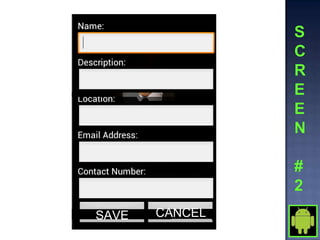
Screen 2 :
           Accepts input from user that corresponds
the information from SCREEN 1. All fields must be
correctly filled , if not user must be informed.
Saving changes will end activity and pass data to
screen 1. Cancelling activity will simply closes the
screen and displays previous screen.
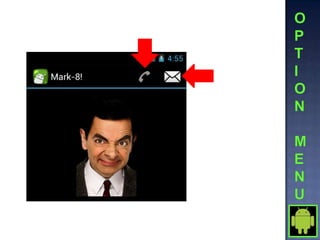
Option Menu :

 Create an XML menu file that contains 3 items : Call, SMS
and Exit
 Override onCreateOptionsMenu inside the activity:
  @Override
  public boolean onCreateOptionsMenu (Menu menu) {
        MenuInflater inflater = getMenuInflater();
        inflater.inflate(R.menu.image_details_menu, menu);
   return true;
  }
 Handle selected item :
  @Override
  public boolean onOptionsItemSelected (MenuItem item) {
         switch(item.getItemId())
         {
         case R.id.call:
                        callContact();
                         break;
          }
     return true;
   }
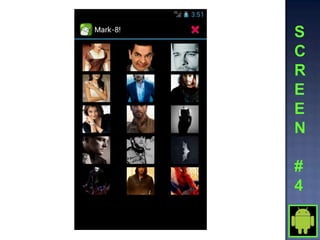
 SMS option opens SCREEN #3 as dialog.
 Create an XML menu file that declare GridView alone.
 Create new class that:
  - extend BaseAdapter
  - accepts context as parameter
  - initialies an array of integer for image resources
  - return image as object for image getter
  - returns View :
   @Override
   public View getView(int position, View convertView, ViewGroup
              parent) {
   ImageView imageView = new ImageView(mContext);
   imageView.setImageResource(mThumbIds[position]);
   imageView.setScaleType(ImageView.ScaleType.CENTER_CROP);
   imageView.setLayoutParams(new GridView.LayoutParams(100, 100));
   return imageView;
   }
 Open new activity when item is selected.
 Exit as Option menu
Joemarie Comeros Amparo
               about.me/joemarieamparo
      Skype/Ymail/Gmail : joemarieamparo
     Facebook: joemarieamparo@yahoo.com

Android Development Training for Beginners - Activity

  • 1.
    Android Development Training forBeginners SAMPLE PROJECT INSTRUCTIONS: MARK-8! By: Joemarie Comeros Amparo
  • 3.
    SAVE CANCEL
  • 4.
    Screen 1 : Displays both image and its information. A link that passes and opens SCREEN 2. Changes from screen 2 must be captured and updates the displayed information for whatever changes from screen 2. Screen 2 : Accepts input from user that corresponds the information from SCREEN 1. All fields must be correctly filled , if not user must be informed. Saving changes will end activity and pass data to screen 1. Cancelling activity will simply closes the screen and displays previous screen.
  • 7.
    Option Menu : Create an XML menu file that contains 3 items : Call, SMS and Exit  Override onCreateOptionsMenu inside the activity: @Override public boolean onCreateOptionsMenu (Menu menu) { MenuInflater inflater = getMenuInflater(); inflater.inflate(R.menu.image_details_menu, menu); return true; }  Handle selected item : @Override public boolean onOptionsItemSelected (MenuItem item) { switch(item.getItemId()) { case R.id.call: callContact(); break; } return true; }  SMS option opens SCREEN #3 as dialog.
  • 9.
     Create anXML menu file that declare GridView alone.  Create new class that: - extend BaseAdapter - accepts context as parameter - initialies an array of integer for image resources - return image as object for image getter - returns View : @Override public View getView(int position, View convertView, ViewGroup parent) { ImageView imageView = new ImageView(mContext); imageView.setImageResource(mThumbIds[position]); imageView.setScaleType(ImageView.ScaleType.CENTER_CROP); imageView.setLayoutParams(new GridView.LayoutParams(100, 100)); return imageView; }  Open new activity when item is selected.  Exit as Option menu
  • 10.
    Joemarie Comeros Amparo about.me/joemarieamparo Skype/Ymail/Gmail : joemarieamparo Facebook: joemarieamparo@yahoo.com