What are notifications ?
• The name itself implies their functionality. They are a way
of alerting a user about an event that he needs to be
informed about or even take some action on getting that
information.
• Notification on Android can be done in any of the
following ways
Alert Dialogue
Progress Bar
Date Picker
Time Picker
Alert Dialogue
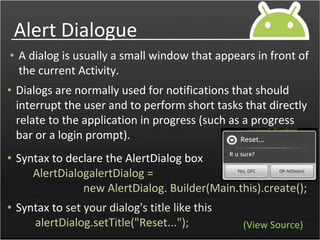
• A dialog is usually a small window that appears in front of
the current Activity.
• Dialogs are normally used for notifications that should
interrupt the user and to perform short tasks that directly
relate to the application in progress (such as a progress
bar or a login prompt).
• Syntax to declare the AlertDialog box
AlertDialogalertDialog =
new AlertDialog. Builder(Main.this).create();
• Syntax to set your dialog's title like this
alertDialog.setTitle("Reset..."); (View Source)
Types Alert Dialogue
(View Source)
Progress Dialog
• This Progress Dialog can display a progress animation in
the form of a spinning wheel, for a task with progress
that's undefined, or a progress bar, for a task that has a
defined progression.
• Syntax to declare the AlertDialog box
ProgressDialog dialog =
ProgressDialog.show(MyActivity.this, "", "Loading. Please
wait...", true);
(View Source)
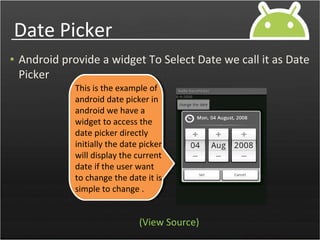
Date Picker
• Android provide a widget To Select Date we call it as Date
Picker
This is the example of
android date picker in
android we have a
widget to access the
date picker directly
initially the date picker
will display the current
date if the user want
to change the date it is
simple to change .
(View Source)
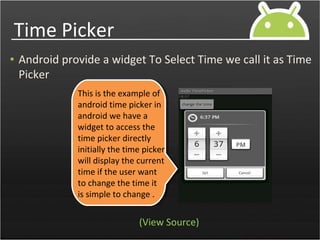
Time Picker
• Android provide a widget To Select Time we call it as Time
Picker
This is the example of
android time picker in
android we have a
widget to access the
time picker directly
initially the time picker
will display the current
time if the user want
to change the time it
is simple to change .
(View Source)

android dilaogs

  • 2.
    What are notifications? • The name itself implies their functionality. They are a way of alerting a user about an event that he needs to be informed about or even take some action on getting that information. • Notification on Android can be done in any of the following ways Alert Dialogue Progress Bar Date Picker Time Picker
  • 3.
    Alert Dialogue • Adialog is usually a small window that appears in front of the current Activity. • Dialogs are normally used for notifications that should interrupt the user and to perform short tasks that directly relate to the application in progress (such as a progress bar or a login prompt). • Syntax to declare the AlertDialog box AlertDialogalertDialog = new AlertDialog. Builder(Main.this).create(); • Syntax to set your dialog's title like this alertDialog.setTitle("Reset..."); (View Source)
  • 4.
  • 5.
    Progress Dialog • ThisProgress Dialog can display a progress animation in the form of a spinning wheel, for a task with progress that's undefined, or a progress bar, for a task that has a defined progression. • Syntax to declare the AlertDialog box ProgressDialog dialog = ProgressDialog.show(MyActivity.this, "", "Loading. Please wait...", true); (View Source)
  • 6.
    Date Picker • Androidprovide a widget To Select Date we call it as Date Picker This is the example of android date picker in android we have a widget to access the date picker directly initially the date picker will display the current date if the user want to change the date it is simple to change . (View Source)
  • 7.
    Time Picker • Androidprovide a widget To Select Time we call it as Time Picker This is the example of android time picker in android we have a widget to access the time picker directly initially the time picker will display the current time if the user want to change the time it is simple to change . (View Source)