Content Providers
Content providers store and retrieve data and make
it accessible to all applications. They're the only way
to share data across applications; there's no
common storage area that all Android packages can
access.
Android ships with a number of content providers for
common data types (audio, video, images, personal
contact information, and so on). You can see some
of them listed in the android.provider package.
making your own data
public
If you want to make your own data public, you have
two options: You can create your own content
provider (a ContentProvider subclass) or you can
add the data to an existing provider
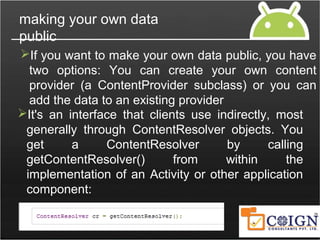
It's an interface that clients use indirectly, most
generally through ContentResolver objects. You
get a ContentResolver by calling
getContentResolver() from within the
implementation of an Activity or other application
component:
URIs
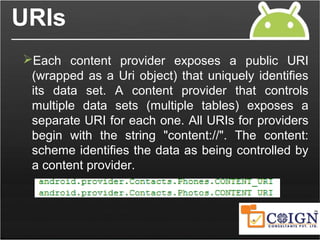
Each content provider exposes a public URI
(wrapped as a Uri object) that uniquely identifies
its data set. A content provider that controls
multiple data sets (multiple tables) exposes a
separate URI for each one. All URIs for providers
begin with the string "content://". The content:
scheme identifies the data as being controlled by
a content provider.
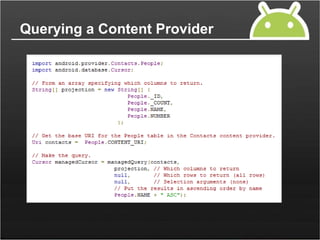
Querying a Content Provider
Modifying Data
Data kept by a content provider can be modified by:
 Adding new records
 Adding new values to existing records
 Batch updating existing records
 Deleting records
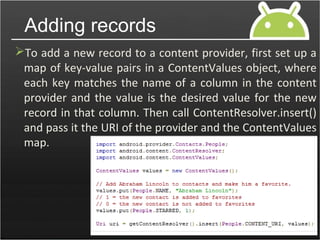
To add a new record to a content provider, first set up a
map of key-value pairs in a ContentValues object, where
each key matches the name of a column in the content
provider and the value is the desired value for the new
record in that column. Then call ContentResolver.insert()
and pass it the URI of the provider and the ContentValues
map.
Adding records
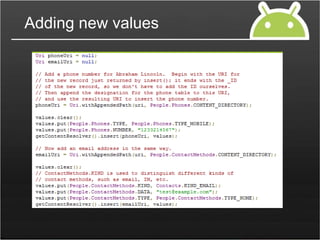
Adding new values
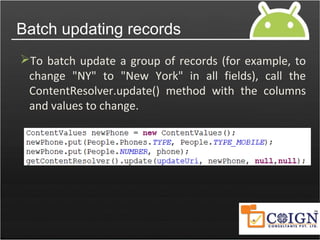
Batch updating records
To batch update a group of records (for example, to
change "NY" to "New York" in all fields), call the
ContentResolver.update() method with the columns
and values to change.
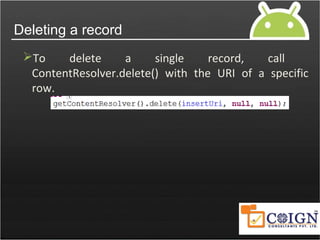
Deleting a record
To delete a single record, call
ContentResolver.delete() with the URI of a specific
row.
Set up a system for storing the data. Most content
providers store their data using Android's file storage
methods or SQLite databases, but you can store
your data any way you want. Android provides the
SQLiteOpenHelper class to help you create a
database and SQLiteDatabase to manage it.
Creating a Content Provider
To create a content provider, you must:
Extend the ContentProvider class to provide
access to the data
Declare the content provider in the manifest file
for your application (AndroidManifest.xml).
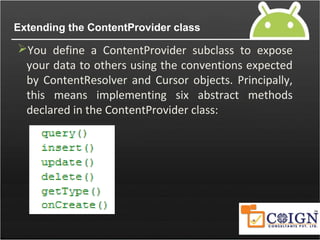
Extending the ContentProvider class
You define a ContentProvider subclass to expose
your data to others using the conventions expected
by ContentResolver and Cursor objects. Principally,
this means implementing six abstract methods
declared in the ContentProvider class:
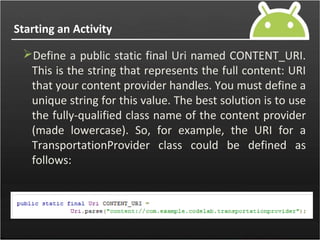
Starting an Activity
Define a public static final Uri named CONTENT_URI.
This is the string that represents the full content: URI
that your content provider handles. You must define a
unique string for this value. The best solution is to use
the fully-qualified class name of the content provider
(made lowercase). So, for example, the URI for a
TransportationProvider class could be defined as
follows:
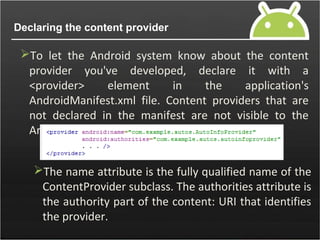
Declaring the content provider
To let the Android system know about the content
provider you've developed, declare it with a
<provider> element in the application's
AndroidManifest.xml file. Content providers that are
not declared in the manifest are not visible to the
Android system
The name attribute is the fully qualified name of the
ContentProvider subclass. The authorities attribute is
the authority part of the content: URI that identifies
the provider.
android content providers

android content providers

  • 2.
    Content Providers Content providersstore and retrieve data and make it accessible to all applications. They're the only way to share data across applications; there's no common storage area that all Android packages can access. Android ships with a number of content providers for common data types (audio, video, images, personal contact information, and so on). You can see some of them listed in the android.provider package.
  • 3.
    making your owndata public If you want to make your own data public, you have two options: You can create your own content provider (a ContentProvider subclass) or you can add the data to an existing provider It's an interface that clients use indirectly, most generally through ContentResolver objects. You get a ContentResolver by calling getContentResolver() from within the implementation of an Activity or other application component:
  • 4.
    URIs Each content providerexposes a public URI (wrapped as a Uri object) that uniquely identifies its data set. A content provider that controls multiple data sets (multiple tables) exposes a separate URI for each one. All URIs for providers begin with the string "content://". The content: scheme identifies the data as being controlled by a content provider.
  • 5.
  • 6.
    Modifying Data Data keptby a content provider can be modified by:  Adding new records  Adding new values to existing records  Batch updating existing records  Deleting records
  • 7.
    To add anew record to a content provider, first set up a map of key-value pairs in a ContentValues object, where each key matches the name of a column in the content provider and the value is the desired value for the new record in that column. Then call ContentResolver.insert() and pass it the URI of the provider and the ContentValues map. Adding records
  • 8.
  • 9.
    Batch updating records Tobatch update a group of records (for example, to change "NY" to "New York" in all fields), call the ContentResolver.update() method with the columns and values to change.
  • 10.
    Deleting a record Todelete a single record, call ContentResolver.delete() with the URI of a specific row.
  • 11.
    Set up asystem for storing the data. Most content providers store their data using Android's file storage methods or SQLite databases, but you can store your data any way you want. Android provides the SQLiteOpenHelper class to help you create a database and SQLiteDatabase to manage it. Creating a Content Provider To create a content provider, you must: Extend the ContentProvider class to provide access to the data Declare the content provider in the manifest file for your application (AndroidManifest.xml).
  • 12.
    Extending the ContentProviderclass You define a ContentProvider subclass to expose your data to others using the conventions expected by ContentResolver and Cursor objects. Principally, this means implementing six abstract methods declared in the ContentProvider class:
  • 13.
    Starting an Activity Definea public static final Uri named CONTENT_URI. This is the string that represents the full content: URI that your content provider handles. You must define a unique string for this value. The best solution is to use the fully-qualified class name of the content provider (made lowercase). So, for example, the URI for a TransportationProvider class could be defined as follows:
  • 14.
    Declaring the contentprovider To let the Android system know about the content provider you've developed, declare it with a <provider> element in the application's AndroidManifest.xml file. Content providers that are not declared in the manifest are not visible to the Android system The name attribute is the fully qualified name of the ContentProvider subclass. The authorities attribute is the authority part of the content: URI that identifies the provider.