Content Provider In
Android
Presented By:
Priti Telmore
Contents:
o Objective
o Introduction
o Built-in Content provider
o Content resolver
o URI
o Cursor
o Project of Birthday Saver
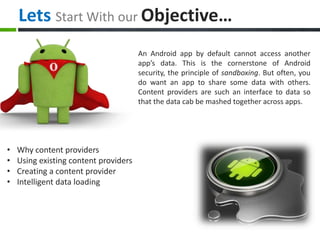
Lets Start With our Objective…
An Android app by default cannot access another
app’s data. This is the cornerstone of Android
security, the principle of sandboxing. But often, you
do want an app to share some data with others.
Content providers are such an interface to data so
that the data cab be mashed together across apps.
• Why content providers
• Using existing content providers
• Creating a content provider
• Intelligent data loading
Introduction:
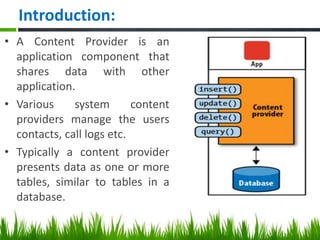
• A Content Provider is an
application component that
shares data with other
application.
• Various system content
providers manage the users
contacts, call logs etc.
• Typically a content provider
presents data as one or more
tables, similar to tables in a
database.
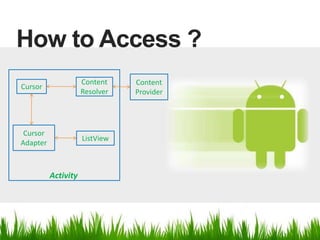
How to Access ?
Content
Provider
Cursor
Content
Resolver
Cursor
Adapter
ListView
Activity
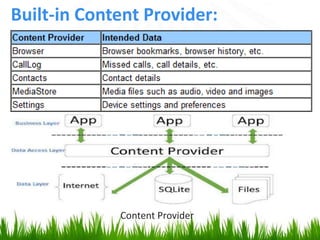
Built-in Content Provider:
Content Provider
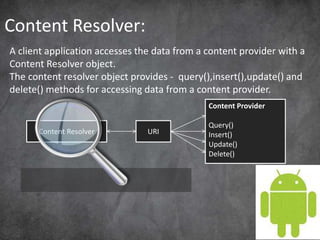
Content Resolver:
A client application accesses the data from a content provider with a
Content Resolver object.
The content resolver object provides - query(),insert(),update() and
delete() methods for accessing data from a content provider.
Content Resolver URI
Content Provider
Query()
Insert()
Update()
Delete()
URI:
• Uniform Resource
Identifier.
• A Content URI is a URI
that identifies data in
a provider.
• When you call a client
method to access a
table in a provider,
the content URI for
the table is one of the
arguments.
content://com.example.provider/articles
Scheme Authority Path
1. content://browser/bookmarks
2. content://contacts/people
3. content://contacts/people/3
4. content://media/internal/images
CURSOR:
Cursor is an interface that provides random read-write access to the
result of a database query from a content provider.
A cursor is a collection of rows, Random means (you can move forward
and backwards)
All field access methods are based on column number. You have to
convert column name to a column number first
You can also find size / traverse result set easily.
Cursor cur;
for( cur.moveToFirst();
!cur.isAfterLast();
cur.moveToNext()) {
}
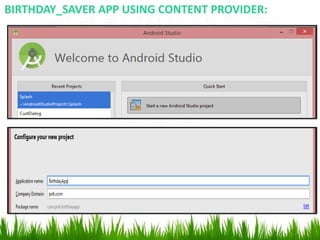
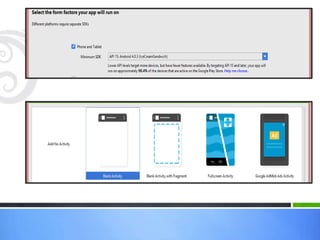
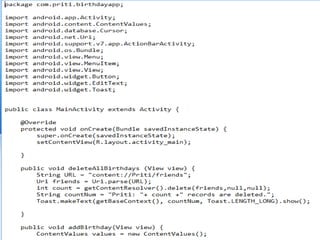
BIRTHDAY_SAVER APP USING CONTENT PROVIDER:
activity_main.xml :This is the layout of project
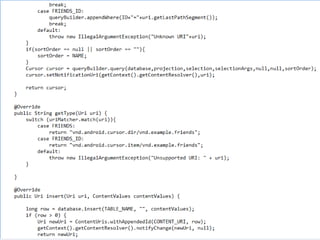
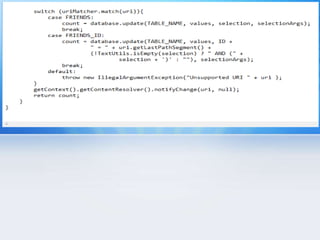
Birthday.java :This is the java class for content provider and database
Output: 1. First insert the data
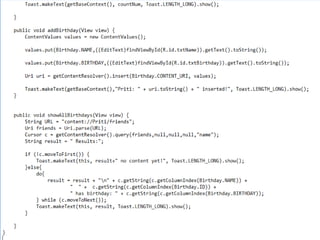
Output: 2. Then press ‘Add a new Birthday’ button it will toast the
no of data inserted.
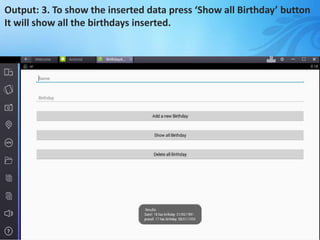
Output: 3. To show the inserted data press ‘Show all Birthday’ button
It will show all the birthdays inserted.
Output: 4. By pressing ‘Delete all Birthday’ button All the records
will be deleted and shown by toasting.
THANK YOU

Content provider in_android

  • 1.
  • 2.
    Contents: o Objective o Introduction oBuilt-in Content provider o Content resolver o URI o Cursor o Project of Birthday Saver
  • 3.
    Lets Start Withour Objective… An Android app by default cannot access another app’s data. This is the cornerstone of Android security, the principle of sandboxing. But often, you do want an app to share some data with others. Content providers are such an interface to data so that the data cab be mashed together across apps. • Why content providers • Using existing content providers • Creating a content provider • Intelligent data loading
  • 4.
    Introduction: • A ContentProvider is an application component that shares data with other application. • Various system content providers manage the users contacts, call logs etc. • Typically a content provider presents data as one or more tables, similar to tables in a database.
  • 5.
    How to Access? Content Provider Cursor Content Resolver Cursor Adapter ListView Activity
  • 6.
  • 7.
    Content Resolver: A clientapplication accesses the data from a content provider with a Content Resolver object. The content resolver object provides - query(),insert(),update() and delete() methods for accessing data from a content provider. Content Resolver URI Content Provider Query() Insert() Update() Delete()
  • 8.
    URI: • Uniform Resource Identifier. •A Content URI is a URI that identifies data in a provider. • When you call a client method to access a table in a provider, the content URI for the table is one of the arguments. content://com.example.provider/articles Scheme Authority Path 1. content://browser/bookmarks 2. content://contacts/people 3. content://contacts/people/3 4. content://media/internal/images
  • 9.
    CURSOR: Cursor is aninterface that provides random read-write access to the result of a database query from a content provider. A cursor is a collection of rows, Random means (you can move forward and backwards) All field access methods are based on column number. You have to convert column name to a column number first You can also find size / traverse result set easily. Cursor cur; for( cur.moveToFirst(); !cur.isAfterLast(); cur.moveToNext()) { }
  • 10.
    BIRTHDAY_SAVER APP USINGCONTENT PROVIDER:
  • 13.
    activity_main.xml :This isthe layout of project
  • 15.
    Birthday.java :This isthe java class for content provider and database
  • 23.
    Output: 1. Firstinsert the data
  • 24.
    Output: 2. Thenpress ‘Add a new Birthday’ button it will toast the no of data inserted.
  • 25.
    Output: 3. Toshow the inserted data press ‘Show all Birthday’ button It will show all the birthdays inserted.
  • 26.
    Output: 4. Bypressing ‘Delete all Birthday’ button All the records will be deleted and shown by toasting.
  • 27.