







#antoinegirbal


Understanding Storage for
performance and data
safety
Antoine Girbal
Solutions Architect, 10gen
Why pop the hood?
• Understanding data safety

• Estimating RAM / disk requirements

• Optimizing performance
Storage Layout
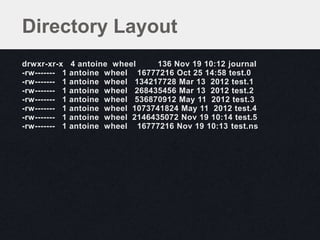
Directory Layout
drwxr-xr-x     4 antoine wheel     136 Nov 19 10:12 journal
-rw------- 1   antoine wheel 16777216 Oct 25 14:58 test.0
-rw------- 1   antoine wheel 134217728 Mar 13 2012 test.1
-rw------- 1   antoine wheel 268435456 Mar 13 2012 test.2
-rw------- 1   antoine wheel 536870912 May 11 2012 test.3
-rw------- 1   antoine wheel 1073741824 May 11 2012 test.4
-rw------- 1   antoine wheel 2146435072 Nov 19 10:14 test.5
-rw------- 1   antoine wheel 16777216 Nov 19 10:13 test.ns
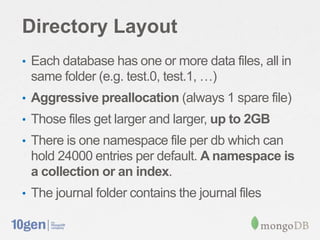
Directory Layout
• Each database has one or more data files, all in
 same folder (e.g. test.0, test.1, …)
• Aggressive preallocation (always 1 spare file)
• Those files get larger and larger, up to 2GB
• There is one namespace file per db which can
 hold 24000 entries per default. A namespace is
 a collection or an index.
• The journal folder contains the journal files
Tuning with options
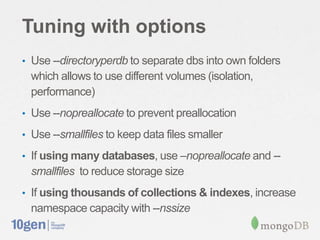
• Use --directoryperdb to separate dbs into own folders
  which allows to use different volumes (isolation,
  performance)
• Use --nopreallocate to prevent preallocation

• Use --smallfiles to keep data files smaller

• If using many databases, use –nopreallocate and --
  smallfiles to reduce storage size
• If using thousands of collections & indexes, increase
  namespace capacity with --nssize
Internal Structure
Internal File Format
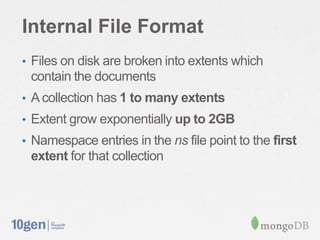
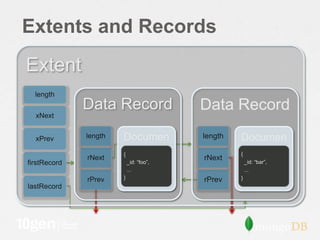
• Files on disk are broken into extents which
 contain the documents
• A collection has 1 to many extents
• Extent grow exponentially up to 2GB
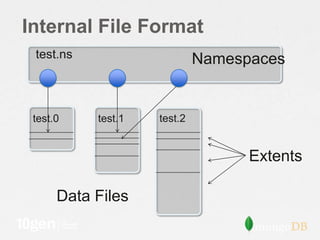
• Namespace entries in the ns file point to the first
 extent for that collection
Internal File Format
 test.ns                     Namespaces


 test.0    test.1   test.2


                                   Extents

      Data Files
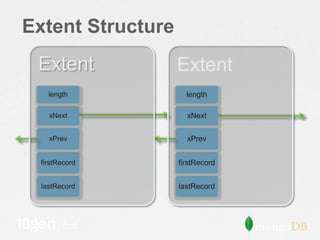
Extent Structure
 Extent            Extent
    length           length

    xNext            xNext


    xPrev            xPrev


 firstRecord       firstRecord


  lastRecord       lastRecord
Extents and Records
Extent
  length
              Data Record                Data Record
  xNext


  xPrev       length   Documen           length   Documen
                       {
                          t                       {
                                                     t
              rNext
                           _id: “foo”,
                                         rNext        _id: “bar”,
firstRecord
                           ...                        ...
                       }                          }
              rPrev                      rPrev
lastRecord
What about indices?
Indexes
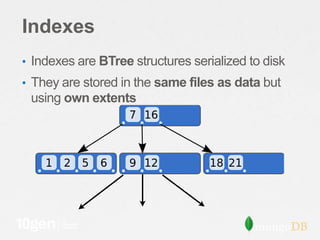
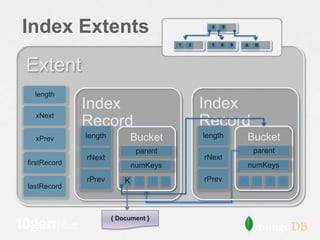
• Indexes are BTree structures serialized to disk
• They are stored in the same files as data but
 using own extents
Index Extents                                      4   9


                                         1   3     5   6   8   A   B


Extent
  length
              Index                              Index
  xNext
              Record                             Record
  xPrev       length           Bucket            length        Bucket
                                parent                             parent
              rNext                              rNext
firstRecord                    numKeys                         numKeys
              rPrev        K                     rPrev
lastRecord


                       { Document }
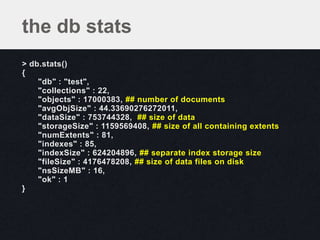
the db stats
> db.stats()
{
    "db" : "test",
    "collections" : 22,
    "objects" : 17000383, ## number of documents
    "avgObjSize" : 44.33690276272011,
    "dataSize" : 753744328, ## size of data
    "storageSize" : 1159569408, ## size of all containing extents
    "numExtents" : 81,
    "indexes" : 85,
    "indexSize" : 624204896, ## separate index storage size
    "fileSize" : 4176478208, ## size of data files on disk
    "nsSizeMB" : 16,
    "ok" : 1
}
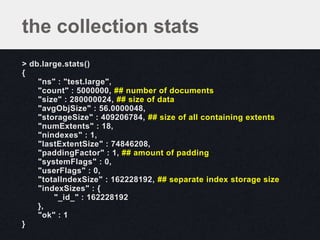
the collection stats
> db.large.stats()
{
    "ns" : "test.large",
    "count" : 5000000, ## number of documents
    "size" : 280000024, ## size of data
    "avgObjSize" : 56.0000048,
    "storageSize" : 409206784, ## size of all containing extents
    "numExtents" : 18,
    "nindexes" : 1,
    "lastExtentSize" : 74846208,
    "paddingFactor" : 1, ## amount of padding
    "systemFlags" : 0,
    "userFlags" : 0,
    "totalIndexSize" : 162228192, ## separate index storage size
    "indexSizes" : {
        "_id_" : 162228192
    },
    "ok" : 1
}
What’s memory
mapping?
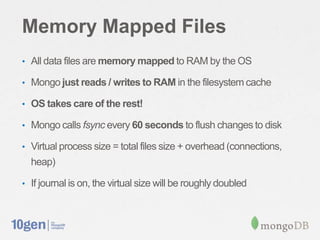
Memory Mapped Files
• All data files are memory mapped to RAM by the OS

• Mongo just reads / writes to RAM in the filesystem cache

• OS takes care of the rest!

• Mongo calls fsync every 60 seconds to flush changes to disk

• Virtual process size = total files size + overhead (connections,
  heap)

• If journal is on, the virtual size will be roughly doubled
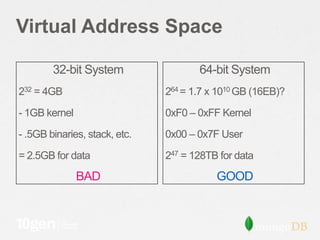
Virtual Address Space

        32-bit System                 64-bit System
232 = 4GB                      264 = 1.7 x 1010 GB (16EB)?

- 1GB kernel                   0xF0 – 0xFF Kernel

- .5GB binaries, stack, etc.   0x00 – 0x7F User

= 2.5GB for data               247 = 128TB for data
               BAD                        GOOD
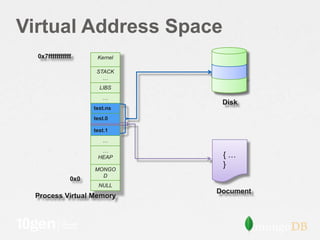
Virtual Address Space
  0x7fffffffffff      Kernel

                      STACK
                        …
                       LIBS
                        …
                                Disk
                     test.ns
                     test.0

                     test.1
                        …
                       …
                      HEAP      {…
                                }
                     MONGO
                       D
               0x0
                      NULL
                               Document
 Process Virtual Memory
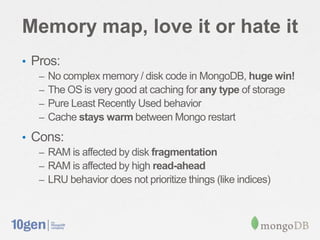
Memory map, love it or hate it
• Pros:
   –   No complex memory / disk code in MongoDB, huge win!
   –   The OS is very good at caching for any type of storage
   –   Pure Least Recently Used behavior
   –   Cache stays warm between Mongo restart
• Cons:
   – RAM is affected by disk fragmentation
   – RAM is affected by high read-ahead
   – LRU behavior does not prioritize things (like indices)
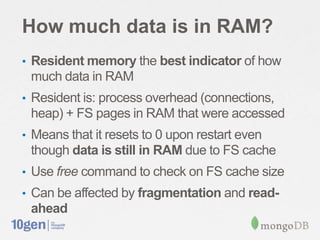
How much data is in RAM?
• Resident memory the best indicator of how
 much data in RAM
• Resident is: process overhead (connections,
 heap) + FS pages in RAM that were accessed
• Means that it resets to 0 upon restart even
 though data is still in RAM due to FS cache
• Use free command to check on FS cache size
• Can be affected by fragmentation and read-
 ahead
Journaling
The problem
• A single insert/update involves writing to many
 places (the record, indexes, ns details..)
• What if the electricity goes out? Corruption…
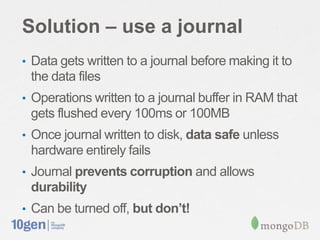
Solution – use a journal
• Data gets written to a journal before making it to
 the data files
• Operations written to a journal buffer in RAM that
 gets flushed every 100ms or 100MB
• Once journal written to disk, data safe unless
 hardware entirely fails
• Journal prevents corruption and allows
 durability
• Can be turned off, but don’t!
Journal Format
JHeader             • Section contains single group
JSectHeader [LSN      commit
3]                  • Applied all-or-nothing
      DurOp
      DurOp                        Set database context
                   Op_DbContext
                                   for subsequent
      DurOp        length          operations
JSectFooter        offset
                   fileNo
JSectHeader [LSN
                   data[length]
7]
                   length
      DurOp                        Write
                   offset
      DurOp        fileNo          Operation
                   data[length]
      DurOp        length
JSectFooter        offset
                   fileNo
…                  data[length]
Can I lose data on hard
crash?
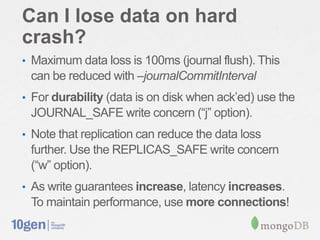
• Maximum data loss is 100ms (journal flush). This
 can be reduced with –journalCommitInterval
• For durability (data is on disk when ack’ed) use the
 JOURNAL_SAFE write concern (“j” option).
• Note that replication can reduce the data loss
 further. Use the REPLICAS_SAFE write concern
 (“w” option).
• As write guarantees increase, latency increases.
 To maintain performance, use more connections!
What is cost of journal?
• On read-heavy systems, no impact
• Write performance is reduced by 5-30%
• If using separate drive for journal, as low as 3%
• For apps that are write-heavy (1000+ writes per
 server) there can be slowdown due to mix of
 journal and data flushes. Use a separate drive!
Fragmentation
Fragmentation
• Files can get fragmented over time if remove()
 and update() are issued.
• It gets worse if documents have varied sizes
• Fragmentation wastes disk space and RAM
• Also makes writes scattered and slower
• Fragmentation can be checked by comparing
 size to storageSize in the collection’s stats.
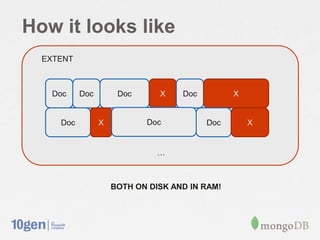
How it looks like
  EXTENT


   Doc     Doc        Doc      X    Doc         X


     Doc         X          Doc           Doc       X


                               …


                     BOTH ON DISK AND IN RAM!
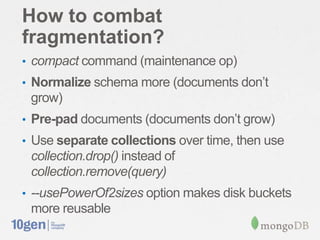
How to combat
fragmentation?
• compact command (maintenance op)
• Normalize schema more (documents don’t
 grow)
• Pre-pad documents (documents don’t grow)
• Use separate collections over time, then use
 collection.drop() instead of
 collection.remove(query)
• --usePowerOf2sizes option makes disk buckets
 more reusable
Conclusion
• Understand disk layout and footprint
• See how much data is actually in RAM
• Memory mapping is cool
• Answer how much data is ok to lose
• Check on fragmentation and avoid it
#antoinegirbal


Questions?
Antoine Girbal
Solutions Architect, 10gen

Webinar: Understanding Storage for Performance and Data Safety

  • 1.
    #antoinegirbal Understanding Storage for performanceand data safety Antoine Girbal Solutions Architect, 10gen
  • 2.
    Why pop thehood? • Understanding data safety • Estimating RAM / disk requirements • Optimizing performance
  • 3.
  • 4.
    Directory Layout drwxr-xr-x 4 antoine wheel 136 Nov 19 10:12 journal -rw------- 1 antoine wheel 16777216 Oct 25 14:58 test.0 -rw------- 1 antoine wheel 134217728 Mar 13 2012 test.1 -rw------- 1 antoine wheel 268435456 Mar 13 2012 test.2 -rw------- 1 antoine wheel 536870912 May 11 2012 test.3 -rw------- 1 antoine wheel 1073741824 May 11 2012 test.4 -rw------- 1 antoine wheel 2146435072 Nov 19 10:14 test.5 -rw------- 1 antoine wheel 16777216 Nov 19 10:13 test.ns
  • 5.
    Directory Layout • Eachdatabase has one or more data files, all in same folder (e.g. test.0, test.1, …) • Aggressive preallocation (always 1 spare file) • Those files get larger and larger, up to 2GB • There is one namespace file per db which can hold 24000 entries per default. A namespace is a collection or an index. • The journal folder contains the journal files
  • 6.
    Tuning with options •Use --directoryperdb to separate dbs into own folders which allows to use different volumes (isolation, performance) • Use --nopreallocate to prevent preallocation • Use --smallfiles to keep data files smaller • If using many databases, use –nopreallocate and -- smallfiles to reduce storage size • If using thousands of collections & indexes, increase namespace capacity with --nssize
  • 7.
  • 8.
    Internal File Format •Files on disk are broken into extents which contain the documents • A collection has 1 to many extents • Extent grow exponentially up to 2GB • Namespace entries in the ns file point to the first extent for that collection
  • 9.
    Internal File Format test.ns Namespaces test.0 test.1 test.2 Extents Data Files
  • 10.
    Extent Structure Extent Extent length length xNext xNext xPrev xPrev firstRecord firstRecord lastRecord lastRecord
  • 11.
    Extents and Records Extent length Data Record Data Record xNext xPrev length Documen length Documen { t { t rNext _id: “foo”, rNext _id: “bar”, firstRecord ... ... } } rPrev rPrev lastRecord
  • 12.
  • 13.
    Indexes • Indexes areBTree structures serialized to disk • They are stored in the same files as data but using own extents
  • 14.
    Index Extents 4 9 1 3 5 6 8 A B Extent length Index Index xNext Record Record xPrev length Bucket length Bucket parent parent rNext rNext firstRecord numKeys numKeys rPrev K rPrev lastRecord { Document }
  • 15.
    the db stats >db.stats() { "db" : "test", "collections" : 22, "objects" : 17000383, ## number of documents "avgObjSize" : 44.33690276272011, "dataSize" : 753744328, ## size of data "storageSize" : 1159569408, ## size of all containing extents "numExtents" : 81, "indexes" : 85, "indexSize" : 624204896, ## separate index storage size "fileSize" : 4176478208, ## size of data files on disk "nsSizeMB" : 16, "ok" : 1 }
  • 16.
    the collection stats >db.large.stats() { "ns" : "test.large", "count" : 5000000, ## number of documents "size" : 280000024, ## size of data "avgObjSize" : 56.0000048, "storageSize" : 409206784, ## size of all containing extents "numExtents" : 18, "nindexes" : 1, "lastExtentSize" : 74846208, "paddingFactor" : 1, ## amount of padding "systemFlags" : 0, "userFlags" : 0, "totalIndexSize" : 162228192, ## separate index storage size "indexSizes" : { "_id_" : 162228192 }, "ok" : 1 }
  • 17.
  • 18.
    Memory Mapped Files •All data files are memory mapped to RAM by the OS • Mongo just reads / writes to RAM in the filesystem cache • OS takes care of the rest! • Mongo calls fsync every 60 seconds to flush changes to disk • Virtual process size = total files size + overhead (connections, heap) • If journal is on, the virtual size will be roughly doubled
  • 19.
    Virtual Address Space 32-bit System 64-bit System 232 = 4GB 264 = 1.7 x 1010 GB (16EB)? - 1GB kernel 0xF0 – 0xFF Kernel - .5GB binaries, stack, etc. 0x00 – 0x7F User = 2.5GB for data 247 = 128TB for data BAD GOOD
  • 20.
    Virtual Address Space 0x7fffffffffff Kernel STACK … LIBS … Disk test.ns test.0 test.1 … … HEAP {… } MONGO D 0x0 NULL Document Process Virtual Memory
  • 21.
    Memory map, loveit or hate it • Pros: – No complex memory / disk code in MongoDB, huge win! – The OS is very good at caching for any type of storage – Pure Least Recently Used behavior – Cache stays warm between Mongo restart • Cons: – RAM is affected by disk fragmentation – RAM is affected by high read-ahead – LRU behavior does not prioritize things (like indices)
  • 22.
    How much datais in RAM? • Resident memory the best indicator of how much data in RAM • Resident is: process overhead (connections, heap) + FS pages in RAM that were accessed • Means that it resets to 0 upon restart even though data is still in RAM due to FS cache • Use free command to check on FS cache size • Can be affected by fragmentation and read- ahead
  • 23.
  • 24.
    The problem • Asingle insert/update involves writing to many places (the record, indexes, ns details..) • What if the electricity goes out? Corruption…
  • 25.
    Solution – usea journal • Data gets written to a journal before making it to the data files • Operations written to a journal buffer in RAM that gets flushed every 100ms or 100MB • Once journal written to disk, data safe unless hardware entirely fails • Journal prevents corruption and allows durability • Can be turned off, but don’t!
  • 26.
    Journal Format JHeader • Section contains single group JSectHeader [LSN commit 3] • Applied all-or-nothing DurOp DurOp Set database context Op_DbContext for subsequent DurOp length operations JSectFooter offset fileNo JSectHeader [LSN data[length] 7] length DurOp Write offset DurOp fileNo Operation data[length] DurOp length JSectFooter offset fileNo … data[length]
  • 27.
    Can I losedata on hard crash? • Maximum data loss is 100ms (journal flush). This can be reduced with –journalCommitInterval • For durability (data is on disk when ack’ed) use the JOURNAL_SAFE write concern (“j” option). • Note that replication can reduce the data loss further. Use the REPLICAS_SAFE write concern (“w” option). • As write guarantees increase, latency increases. To maintain performance, use more connections!
  • 28.
    What is costof journal? • On read-heavy systems, no impact • Write performance is reduced by 5-30% • If using separate drive for journal, as low as 3% • For apps that are write-heavy (1000+ writes per server) there can be slowdown due to mix of journal and data flushes. Use a separate drive!
  • 29.
  • 30.
    Fragmentation • Files canget fragmented over time if remove() and update() are issued. • It gets worse if documents have varied sizes • Fragmentation wastes disk space and RAM • Also makes writes scattered and slower • Fragmentation can be checked by comparing size to storageSize in the collection’s stats.
  • 31.
    How it lookslike EXTENT Doc Doc Doc X Doc X Doc X Doc Doc X … BOTH ON DISK AND IN RAM!
  • 32.
    How to combat fragmentation? •compact command (maintenance op) • Normalize schema more (documents don’t grow) • Pre-pad documents (documents don’t grow) • Use separate collections over time, then use collection.drop() instead of collection.remove(query) • --usePowerOf2sizes option makes disk buckets more reusable
  • 33.
    Conclusion • Understand disklayout and footprint • See how much data is actually in RAM • Memory mapping is cool • Answer how much data is ok to lose • Check on fragmentation and avoid it
  • 34.

Editor's Notes

  • #10 We’ll cover how data is laid out in more detail later, but at a very high level this is what’s contained in each data file.Extents are allocated within files as needed until space inside the file is fully consumed by extents, then another file is allocated.As more and more data is inserted into a collection, the size of the allocated extents grows exponentially up to 2GB.If you’re writing to many small collections, extents will be interleaved within a single database file, but as the collection grows, eventually a single 2GB file will be devoted to data for that single collection.
  • #11 A contiguous region of a file that is allocated to a specific namespace (namespace being either an index or a collection). Extents are allocated within files as needed until space inside the file is fully consumed by extents, then another file is allocated.The extents within a namespace are chained to each other with the xNext and xPrev record pointers.Important to note that a file can have extents of different namespaces interleaved. Extents will be sized progressively larger from 4k up to 2GB.Extent is comprised of records, and these are chained together with a doubly linked list referenced from the extent. So if you were to do a table scan such as db.foo.find() we would first lookup the first extent from the ns details, and from that access the firstRecord and traverse the list of records until the query was satisfied.
  • #12 Imagine your data laid out in these (possibly) sparse extents like a backbone, with linked lists of data records hanging off of each of themGo over table scan logic. $natural  (sort({$natural:-1})When executing a find() with no parameters, the database returns objects in forward natural order. To do a TABLE SCAN, you would start at the first extent indicated in the NamespaceDetails and then traverse the records within.
  • #15 Variable length keys, fixed size bucketConstraints: 1k per index key limit; 8k bucket sizeKeyNodes (sorted and point to DataRecord and a KeyNode with offset) KeyObjects (unsorted and variable length)Keys names are not stored in the index – i.e., if you index spec was on CityName and EmailAddress, we won’t store the keyName, but we would store that key value as a document with zero length key.As of 2.0 in the v1 indexes we remove the extra overhead of keeping the document structure and store just the keys themselvesB-tree uses standard split/merge.Unless we detect a monotonically increasing key value, in this case we’ll do a 90/10 split. So in the case that you are inserting timestamp data or an ObjectID, your buckets will stay more optimally filled. This also has the affect that if you are only interested in things that happened recently, the old stuff will fall out of memory and won’t need to be-paged in.
  • #20 64-BIT:Note that you may think with 64 bits of addressable memory, you might think you have most of that for data files, but in fact you’re only allowed to address 48 bits of memory and the top bit is reserved for kernel memoryThis leaves about 128TB for your data (per process)How many plan to store > 128TB on a single server?Remember, this is just per-process, if you had a sharded system of 100 dbs, you could spread 128TB to each server
  • #21 Can use pmap to view this layout on linux.So here I have a single document located on disk and show how it’s mapped into memory.Let’s look at how we go about actually accessing this document once it’s loaded into memory
  • #25 Without journaling, the approach is quite straightforward, there is a one-to-one mapping of data files to memory and when either the OS or an explicit fsync happens, your data is now safe on disk.With journaling we do some tricks.Write ahead log, that is, we write the data to the journal before we update the data itself.Each file is mapped twice, once to a private view which is marked copy-on-write, and once to the shared view – shared in the context that the disk has access to this memory.Every time we do a write, we keep a list of the region of memory that was written to.Batches into group commits, compresses and appends in a group commit to disk by appending to a special journal fileOnce that data has been written to disk, we then do a remapping phase which copies the changes into the shared view, at which point those changes can then be synced to disk.Once that data is synced to disk then it’s safe (barring hardware failure). If there is a failure before the shared/storage view is written to disk, we simply need to apply all the changes in order to the data files since the last time it was synced and we get back to a consistent view of the data
  • #27 *** Journal is Compressed using snappy to reduce the write volumeLSN (Last Sequence Number) is written to disk as a way to provide a marker to which section of the journal was last flushed to