Deployment
  Bernie Hackett
bernie@10gen.com
Agenda

• Sizing Hardware (Memory / CPU / IO)
• Operating Systems / Filesystem
• Installing / Upgrading
• Durability
• Security
• Backup
• Performance / Logging / Monitoring
• EC2
So you’re ready to deploy !
Some points to consider...
Sizing Hardware
Sizing Hardware: Memory
• Working set should be as much in memory as possible
   • Your whole data set doesn’t have to be
• Memory Mapped files
   • Maps files on filesystem to Virtual Memory
      • Not Physical RAM
   • Page Faults - not in memory - from disk - expensive
• Indexes part of the regular DB files

• Consider Warm Starting your Database
Sizing Hardware: CPU
• MongoDB uses multiple cores
   • Generally, faster CPUs are better
   • For working-set queries, CPU usage is minimal

• Aggregation, full “table” scans (collection scans)
    • Make heavy use of CPU / Disk
    • Instead of counting / computing:
        • precompute / preaggregate / store results
• Map Reduce
    • Currently Single threaded
        • Can be run in parallel across shards.
    • This restriction may be eliminated, investigating options
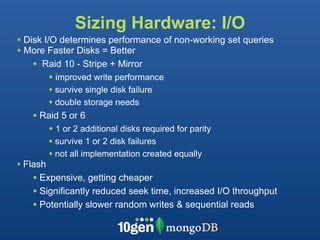
Sizing Hardware: I/O
• Disk I/O determines performance of non-working set queries
• More Faster Disks = Better
    • Raid 10 - Stripe + Mirror
         • improved write performance
          • survive single disk failure
          • double storage needs
   • Raid 5 or 6
      • 1 or 2 additional disks required for parity
          • survive 1 or 2 disk failures
          • not all implementation created equally
• Flash
   • Expensive, getting cheaper
   • Significantly reduced seek time, increased I/O throughput
   • Potentially slower random writes & sequential reads
OS / Filesystem
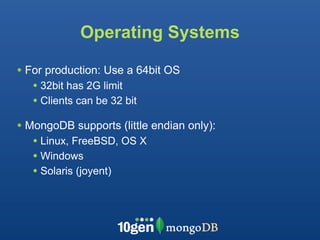
Operating Systems

• For production: Use a 64bit OS
   • 32bit has 2G limit
   • Clients can be 32 bit
• MongoDB supports (little endian only):
   • Linux, FreeBSD, OS X

   • Windows
   • Solaris (joyent)
Filesystem
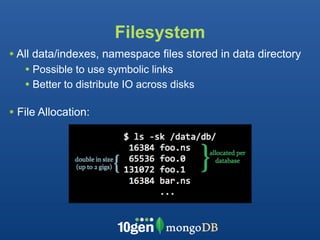
• All data/indexes, namespace files stored in data directory
   • Possible to use symbolic links
   • Better to distribute IO across disks

• File Allocation:
Filesystem Continued


• MongoDB is filesystem-neutral:
  • ext3, ext4, XFS are most used in Linux
  • ext4 / XFS preferred (posix_fallocate())
      • Improved performance for file allocation
  • Support NTFS, HFS(+), etc.
Installing / Upgrading
MongoDB Version Policy


• Production: run even numbers
   • 1.4.x, 1.6.x, 1.8.x
• Development
   • 1.5.x, 1.7.x

• Critical bugs are back ported to even versions
Installing MongoDB

• Installing from Source
    • Requires Scons, C++ compiler, Boost libraries, SpiderMonkey,
    PCRE(++)

• Installing from Binaries (easiest)
    • http://downloads.mongodb.org/_os_/_version_

• Upgrading database
    • Install new version of MongoDB
    • Stop previous version
    • Start new version
Security
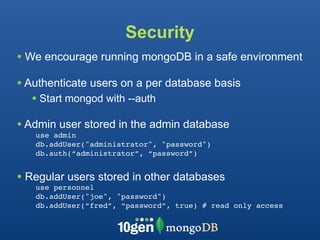
• We encourage running mongoDB in a safe environment
• Authenticate users on a per database basis
  • Start mongod with --auth
• Admin user stored in the admin database
   use admin
   db.addUser("administrator", "password")
   db.auth(“administrator”, “password”)


• Regular users stored in other databases
   use personnel
   db.addUser("joe", "password")
   db.addUser(“fred”, “password”, true) # read only access
Durability


What failures do you need to recover from?

  • Loss of a single database node?

  • Loss of a group of nodes?
Solution: Replica Sets

• One primary node
• One to six secondary nodes
• Automatic failover on primary failure
   • Secondaries elect a new primary

• Write confirmation is configurable (W=n)
Durability - Primary only


• Write acknowledged
 when in memory on
 replica set primary only
Durability - Primary + Secondary
• W=2
• Write acknowledged when
  in memory on primary +
  secondary
• Will survive failure of a
  single node
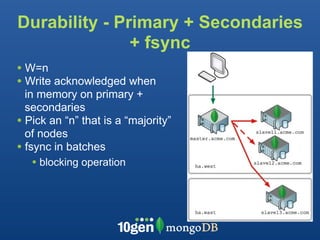
Durability - Primary + Secondaries
               + fsync
• W=n
• Write acknowledged when
  in memory on primary +
  secondaries
• Pick an “n” that is a “majority”
  of nodes
• fsync in batches
   • blocking operation
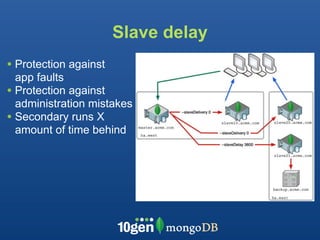
Slave delay
• Protection against
  app faults
• Protection against
  administration mistakes
• Secondary runs X
  amount of time behind
Backup
Backup
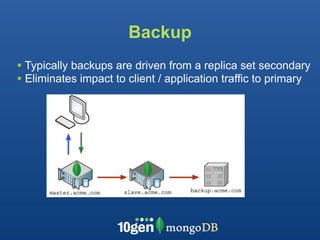
• Typically backups are driven from a replica set secondary
• Eliminates impact to client / application traffic to primary
Backup


• Two main Strategies
   • mongodump / mongorestore
   • Filesystem backup / snapshot
      • fsync + lock
Backup - mongodump

• Compact, binary object dump
• Each consistent object is written
• Not necessarily consistent from start to finish
   • Unless you lock database:
      • db.runCommand({fsync:1,lock:1}
• --oplog dumps oplog from start to finish

• mongorestore to restore database
   • Database does not have to be up to restore
   • --oplogReplay
Filesystem Backup

• MUST
   • fsync - flushes buffers to disk
   • lock - blocks writes
      db.runCommand({fsync:1,lock:1})

• Use file-system / LVM / storage snapshot
• unlock
   db.$cmd.sys.unlock.findOne();
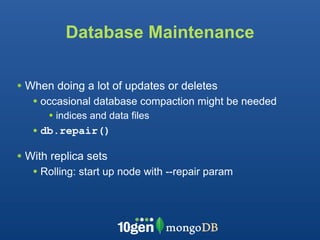
Database Maintenance

• When doing a lot of updates or deletes
   • occasional database compaction might be needed
      • indices and data files
   • db.repair()
• With replica sets
   • Rolling: start up node with --repair param
Monitoring
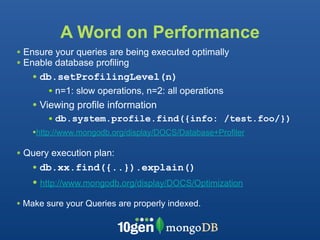
A Word on Performance
• Ensure your queries are being executed optimally
• Enable database profiling
   • db.setProfilingLevel(n)
       • n=1: slow operations, n=2: all operations
   • Viewing profile information
       • db.system.profile.find({info: /test.foo/})
   •http://www.mongodb.org/display/DOCS/Database+Profiler

• Query execution plan:
   • db.xx.find({..}).explain()
   • http://www.mongodb.org/display/DOCS/Optimization
• Make sure your Queries are properly indexed.
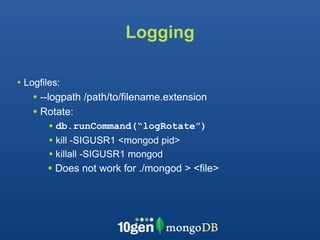
Logging

• Logfiles:
    • --logpath /path/to/filename.extension
    • Rotate:
        • db.runCommand(“logRotate”)
        • kill -SIGUSR1 <mongod pid>
        • killall -SIGUSR1 mongod
       • Does not work for ./mongod > <file>
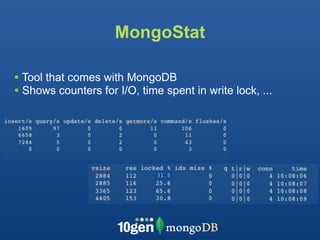
MongoStat

• Tool that comes with MongoDB
• Shows counters for I/O, time spent in write lock, ...


                              31.5
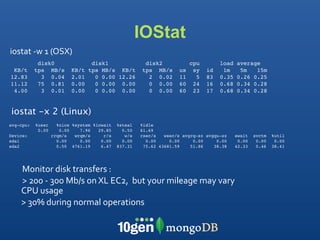
IOStat
iostat
‐w
1
(OSX)
            disk0                 disk1                disk2             cpu        load   average
 KB/t      tps MB/s       KB/t   tps MB/s KB/t        tps MB/s      us    sy   id    1m     5m   15m
12.83        3 0.04       2.01     0 0.00 12.26         2 0.02      11     5   83   0.35   0.26 0.25
11.12       75 0.81       0.00     0 0.00 0.00          0 0.00      60    24   16   0.68   0.34 0.28
 4.00        3 0.01       0.00     0 0.00 0.00          0 0.00      60    23   17   0.68   0.34 0.28


iostat -x 2 (Linux)
avg-cpu:   %user     %nice %system %iowait   %steal   %idle
            0.00      0.00    7.96   29.85     0.50   61.69
Device:            rrqm/s   wrqm/s     r/s      w/s   rsec/s   wsec/s avgrq-sz avgqu-sz    await   svctm   %util
sda1                 0.00     0.00    0.00     0.00     0.00     0.00     0.00     0.00     0.00    0.00    0.00
sda2                 0.50 4761.19     6.47   837.31    75.62 43681.59    51.86    38.38    42.33    0.46   38.41


    Monitor
disk
transfers
:

    >
200
‐
300
Mb/s
on
XL
EC2,

but
your
mileage
may
vary
    CPU
usage
    >
30%
during
normal
operations

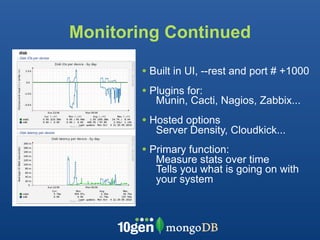
Monitoring Continued

        • Built in UI, --rest and port # +1000
        • Plugins for:
           Munin, Cacti, Nagios, Zabbix...
        • Hosted options
           Server Density, Cloudkick...
        • Primary function:
           Measure stats over time
           Tells you what is going on with
           your system
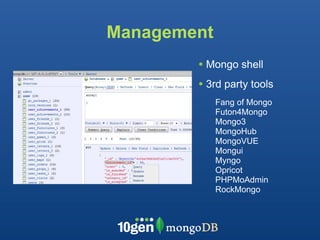
Management
        • Mongo shell
        • 3rd party tools
             Fang of Mongo
             Futon4Mongo
             Mongo3
             MongoHub
             MongoVUE
             Mongui
             Myngo
             Opricot
             PHPMoAdmin
             RockMongo
EC2 Notes


• Default instance storage is EXT3
   • For best performance, reformat to EXT4 / XFS
   • Use recent version of EXT4

• Use Striping (using MDADM or LVM) to distribute I/O
   •This is a good thing
EC2 with EBS

• EBS can experience spikes in latency
  • 400-600mS
  • This is a bad thing

• EBS snapshots can be used for backups
   • Careful - EBS can disappear

• S3 can be used for longer term backups
download at mongodb.org

                        We’re Hiring !
                        bernie@10gen.com

        conferences,
appearances,
and
meetups
                  http://www.10gen.com/events


   Facebook


Twitter


LinkedIn
http://bit.ly/mongoO
        @mongodb     http://linkd.in/joinmongo

Deployment Strategies (Mongo Austin)

  • 1.
    Deployment BernieHackett bernie@10gen.com
  • 2.
    Agenda • Sizing Hardware(Memory / CPU / IO) • Operating Systems / Filesystem • Installing / Upgrading • Durability • Security • Backup • Performance / Logging / Monitoring • EC2
  • 3.
    So you’re readyto deploy !
  • 4.
    Some points toconsider...
  • 5.
  • 6.
    Sizing Hardware: Memory •Working set should be as much in memory as possible • Your whole data set doesn’t have to be • Memory Mapped files • Maps files on filesystem to Virtual Memory • Not Physical RAM • Page Faults - not in memory - from disk - expensive • Indexes part of the regular DB files • Consider Warm Starting your Database
  • 7.
    Sizing Hardware: CPU •MongoDB uses multiple cores • Generally, faster CPUs are better • For working-set queries, CPU usage is minimal • Aggregation, full “table” scans (collection scans) • Make heavy use of CPU / Disk • Instead of counting / computing: • precompute / preaggregate / store results • Map Reduce • Currently Single threaded • Can be run in parallel across shards. • This restriction may be eliminated, investigating options
  • 8.
    Sizing Hardware: I/O •Disk I/O determines performance of non-working set queries • More Faster Disks = Better • Raid 10 - Stripe + Mirror • improved write performance • survive single disk failure • double storage needs • Raid 5 or 6 • 1 or 2 additional disks required for parity • survive 1 or 2 disk failures • not all implementation created equally • Flash • Expensive, getting cheaper • Significantly reduced seek time, increased I/O throughput • Potentially slower random writes & sequential reads
  • 9.
  • 10.
    Operating Systems • Forproduction: Use a 64bit OS • 32bit has 2G limit • Clients can be 32 bit • MongoDB supports (little endian only): • Linux, FreeBSD, OS X • Windows • Solaris (joyent)
  • 11.
    Filesystem • All data/indexes,namespace files stored in data directory • Possible to use symbolic links • Better to distribute IO across disks • File Allocation:
  • 12.
    Filesystem Continued • MongoDBis filesystem-neutral: • ext3, ext4, XFS are most used in Linux • ext4 / XFS preferred (posix_fallocate()) • Improved performance for file allocation • Support NTFS, HFS(+), etc.
  • 13.
  • 14.
    MongoDB Version Policy •Production: run even numbers • 1.4.x, 1.6.x, 1.8.x • Development • 1.5.x, 1.7.x • Critical bugs are back ported to even versions
  • 15.
    Installing MongoDB • Installingfrom Source • Requires Scons, C++ compiler, Boost libraries, SpiderMonkey, PCRE(++) • Installing from Binaries (easiest) • http://downloads.mongodb.org/_os_/_version_ • Upgrading database • Install new version of MongoDB • Stop previous version • Start new version
  • 16.
    Security • We encouragerunning mongoDB in a safe environment • Authenticate users on a per database basis • Start mongod with --auth • Admin user stored in the admin database use admin db.addUser("administrator", "password") db.auth(“administrator”, “password”) • Regular users stored in other databases use personnel db.addUser("joe", "password") db.addUser(“fred”, “password”, true) # read only access
  • 17.
    Durability What failures doyou need to recover from? • Loss of a single database node? • Loss of a group of nodes?
  • 18.
    Solution: Replica Sets •One primary node • One to six secondary nodes • Automatic failover on primary failure • Secondaries elect a new primary • Write confirmation is configurable (W=n)
  • 19.
    Durability - Primaryonly • Write acknowledged when in memory on replica set primary only
  • 20.
    Durability - Primary+ Secondary • W=2 • Write acknowledged when in memory on primary + secondary • Will survive failure of a single node
  • 21.
    Durability - Primary+ Secondaries + fsync • W=n • Write acknowledged when in memory on primary + secondaries • Pick an “n” that is a “majority” of nodes • fsync in batches • blocking operation
  • 22.
    Slave delay • Protectionagainst app faults • Protection against administration mistakes • Secondary runs X amount of time behind
  • 23.
  • 24.
    Backup • Typically backupsare driven from a replica set secondary • Eliminates impact to client / application traffic to primary
  • 25.
    Backup • Two mainStrategies • mongodump / mongorestore • Filesystem backup / snapshot • fsync + lock
  • 26.
    Backup - mongodump •Compact, binary object dump • Each consistent object is written • Not necessarily consistent from start to finish • Unless you lock database: • db.runCommand({fsync:1,lock:1} • --oplog dumps oplog from start to finish • mongorestore to restore database • Database does not have to be up to restore • --oplogReplay
  • 27.
    Filesystem Backup • MUST • fsync - flushes buffers to disk • lock - blocks writes db.runCommand({fsync:1,lock:1}) • Use file-system / LVM / storage snapshot • unlock db.$cmd.sys.unlock.findOne();
  • 28.
    Database Maintenance • Whendoing a lot of updates or deletes • occasional database compaction might be needed • indices and data files • db.repair() • With replica sets • Rolling: start up node with --repair param
  • 29.
  • 30.
    A Word onPerformance • Ensure your queries are being executed optimally • Enable database profiling • db.setProfilingLevel(n) • n=1: slow operations, n=2: all operations • Viewing profile information • db.system.profile.find({info: /test.foo/}) •http://www.mongodb.org/display/DOCS/Database+Profiler • Query execution plan: • db.xx.find({..}).explain() • http://www.mongodb.org/display/DOCS/Optimization • Make sure your Queries are properly indexed.
  • 31.
    Logging • Logfiles: • --logpath /path/to/filename.extension • Rotate: • db.runCommand(“logRotate”) • kill -SIGUSR1 <mongod pid> • killall -SIGUSR1 mongod • Does not work for ./mongod > <file>
  • 32.
    MongoStat • Tool thatcomes with MongoDB • Shows counters for I/O, time spent in write lock, ... 31.5
  • 33.
    IOStat iostat
‐w
1
(OSX) disk0 disk1 disk2 cpu load average KB/t tps MB/s KB/t tps MB/s KB/t tps MB/s us sy id 1m 5m 15m 12.83 3 0.04 2.01 0 0.00 12.26 2 0.02 11 5 83 0.35 0.26 0.25 11.12 75 0.81 0.00 0 0.00 0.00 0 0.00 60 24 16 0.68 0.34 0.28 4.00 3 0.01 0.00 0 0.00 0.00 0 0.00 60 23 17 0.68 0.34 0.28 iostat -x 2 (Linux) avg-cpu: %user %nice %system %iowait %steal %idle 0.00 0.00 7.96 29.85 0.50 61.69 Device: rrqm/s wrqm/s r/s w/s rsec/s wsec/s avgrq-sz avgqu-sz await svctm %util sda1 0.00 0.00 0.00 0.00 0.00 0.00 0.00 0.00 0.00 0.00 0.00 sda2 0.50 4761.19 6.47 837.31 75.62 43681.59 51.86 38.38 42.33 0.46 38.41 Monitor
disk
transfers
:
 >
200
‐
300
Mb/s
on
XL
EC2,

but
your
mileage
may
vary CPU
usage >
30%
during
normal
operations

  • 34.
    Monitoring Continued • Built in UI, --rest and port # +1000 • Plugins for: Munin, Cacti, Nagios, Zabbix... • Hosted options Server Density, Cloudkick... • Primary function: Measure stats over time Tells you what is going on with your system
  • 35.
    Management • Mongo shell • 3rd party tools Fang of Mongo Futon4Mongo Mongo3 MongoHub MongoVUE Mongui Myngo Opricot PHPMoAdmin RockMongo
  • 36.
    EC2 Notes • Defaultinstance storage is EXT3 • For best performance, reformat to EXT4 / XFS • Use recent version of EXT4 • Use Striping (using MDADM or LVM) to distribute I/O •This is a good thing
  • 37.
    EC2 with EBS •EBS can experience spikes in latency • 400-600mS • This is a bad thing • EBS snapshots can be used for backups • Careful - EBS can disappear • S3 can be used for longer term backups
  • 38.
    download at mongodb.org We’re Hiring ! bernie@10gen.com conferences,
appearances,
and
meetups http://www.10gen.com/events Facebook


Twitter


LinkedIn http://bit.ly/mongoO
 @mongodb http://linkd.in/joinmongo