#fosdem


How does Mongo store my
data?
Christian Amor Kvalheim
Engineering Team lead, 10gen, @christkv
Who Am I
• Engineering lead at 10gen

• Work on the MongoDB Node.js driver

• @christkv

• christkv@10gen.com


                        Journaling and Storage
Why Pop the Hood?
• Understanding data safety

• Estimating RAM / disk requirements

• Optimizing performance


                        Journaling and Storage
Storage Layout
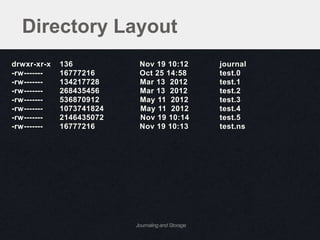
Directory Layout
drwxr-xr-x   136           Nov 19 10:12            journal
-rw-------   16777216      Oct 25 14:58            test.0
-rw-------   134217728     Mar 13 2012             test.1
-rw-------   268435456     Mar 13 2012             test.2
-rw-------   536870912     May 11 2012             test.3
-rw-------   1073741824    May 11 2012             test.4
-rw-------   2146435072    Nov 19 10:14            test.5
-rw-------   16777216      Nov 19 10:13            test.ns


                          Journaling and Storage
Directory Layout
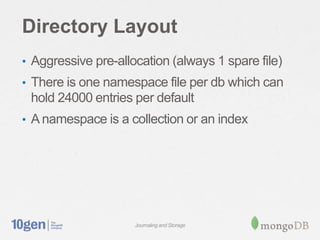
• Aggressive pre-allocation (always 1 spare file)
• There is one namespace file per db which can
 hold 24000 entries per default
• A namespace is a collection or an index


                     Journaling and Storage
Tuning with Options
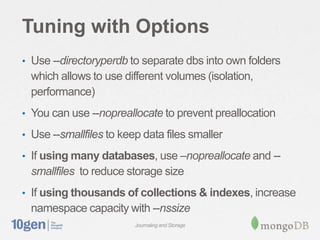
• Use --directoryperdb to separate dbs into own folders
  which allows to use different volumes (isolation,
  performance)
• You can use --nopreallocate to prevent preallocation

• Use --smallfiles to keep data files smaller

• If using many databases, use –nopreallocate and --
  smallfiles to reduce storage size
• If using thousands of collections & indexes, increase
  namespace capacity with --nssize
                         Journaling and Storage
Internal Structure
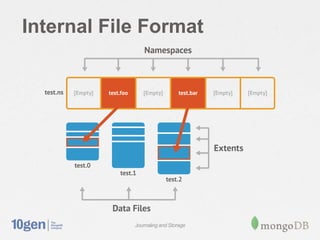
Internal File Format


            Journaling and Storage
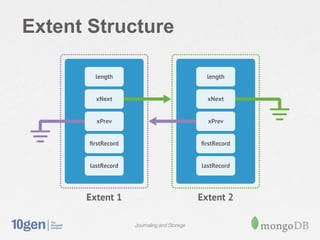
Extent Structure


           Journaling and Storage
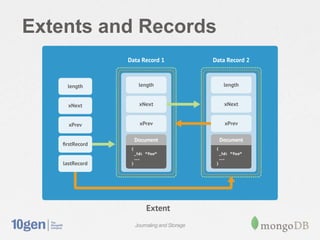
Extents and Records


           Journaling and Storage
To Sum Up: Internal File
Format
• Files on disk are broken into extents which
 contain the documents
• A collection has 1 to many extents
• Extent grow exponentially up to 2GB
• Namespace entries in the ns file point to the first
 extent for that collection


                     Journaling and Storage
What About Indexes?
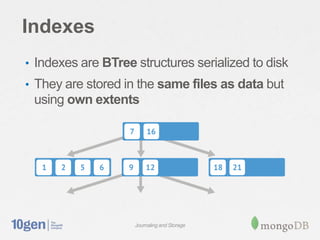
Indexes
• Indexes are BTree structures serialized to disk
• They are stored in the same files as data but
 using own extents


                    Journaling and Storage
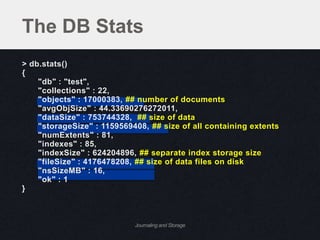
The DB Stats
> db.stats()
{
    "db" : "test",
    "collections" : 22,
    "objects" : 17000383, ## number of documents
    "avgObjSize" : 44.33690276272011,
    "dataSize" : 753744328, ## size of data
    "storageSize" : 1159569408, ## size of all containing extents
    "numExtents" : 81,
    "indexes" : 85,
    "indexSize" : 624204896, ## separate index storage size
    "fileSize" : 4176478208, ## size of data files on disk
    "nsSizeMB" : 16,
    "ok" : 1
}


                            Journaling and Storage
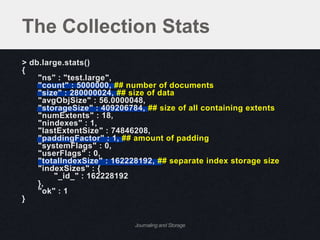
The Collection Stats
> db.large.stats()
{
    "ns" : "test.large",
    "count" : 5000000, ## number of documents
    "size" : 280000024, ## size of data
    "avgObjSize" : 56.0000048,
    "storageSize" : 409206784, ## size of all containing extents
    "numExtents" : 18,
    "nindexes" : 1,
    "lastExtentSize" : 74846208,
    "paddingFactor" : 1, ## amount of padding
    "systemFlags" : 0,
    "userFlags" : 0,
    "totalIndexSize" : 162228192, ## separate index storage size
    "indexSizes" : {
        "_id_" : 162228192
    },
    "ok" : 1
}


                            Journaling and Storage
What’s Memory
Mapping?
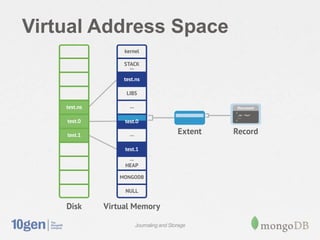
Memory Mapped Files
• All data files are memory mapped to Virtual
 Memory by the OS
• MongoDB just reads / writes to RAM in the
 filesystem cache
• OS takes care of the rest!

• Virtual process size = total files size + overhead
 (connections, heap)
• If journal is on, the virtual size will be roughly
 doubled
                         Journaling and Storage
Virtual Address Space


           Journaling and Storage
Memory Map, Love It or Hate
It
• Pros:
   –   No complex memory / disk code in MongoDB, huge win!
   –   The OS is very good at caching for any type of storage
   –   Least Recently Used behavior
   –   Cache stays warm across MongoDB restarts
• Cons:
   – RAM usage is affected by disk fragmentation
   – RAM usage is affected by high read-ahead
   – LRU behavior does not prioritize things (like indexes)


                          Journaling and Storage
How Much Data is in RAM?
• Resident memory the best indicator of how
 much data in RAM
• Resident is: process overhead
 (connections, heap) + FS pages in RAM that
 were accessed
• Means that it resets to 0 upon restart even
 though data is still in RAM due to FS cache
• Use free command to check on FS cache size
• Can be affected by fragmentation and read-
 ahead               Journaling and Storage
Journaling
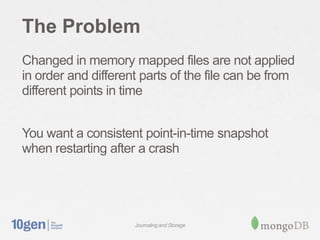
The Problem
Changed in memory mapped files are not applied
in order and different parts of the file can be from
different points in time


You want a consistent point-in-time snapshot
when restarting after a crash


                     Journaling and Storage
corruptio
n
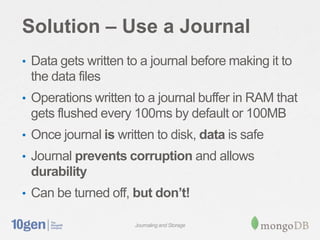
Solution – Use a Journal
• Data gets written to a journal before making it to
 the data files
• Operations written to a journal buffer in RAM that
 gets flushed every 100ms by default or 100MB
• Once journal is written to disk, data is safe
• Journal prevents corruption and allows
 durability
• Can be turned off, but don’t!

                     Journaling and Storage
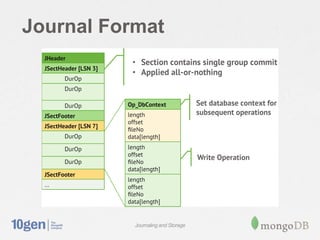
Journal Format


           Journaling and Storage
Can I Lose Data on a Hard
Crash?
• Maximum data loss is 100ms (journal flush). This
 can be reduced with –journalCommitInterval
• For durability (data is on disk when ack’ed) use the
 JOURNAL_SAFE write concern (“j” option).
• Note that replication can reduce the data loss
 further. Use the REPLICAS_SAFE write concern
 (“w” option).
• As write guarantees increase, latency increases.
 To maintain performance, use more connections!
                      Journaling and Storage
What is the Cost of a
Journal?
• On read-heavy systems, no impact
• Write performance is reduced by 5-30%
• If using separate drive for journal, as low as 3%
• For apps that are write-heavy (1000+ writes per
 server) there can be slowdown due to mix of
 journal and data flushes. Use a separate drive!


                     Journaling and Storage
Fragmentation
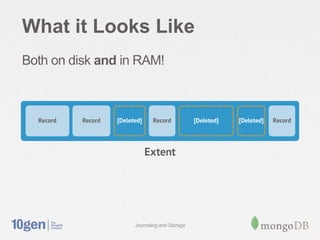
What it Looks Like
Both on disk and in RAM!


                   Journaling and Storage
Fragmentation
• Files can get fragmented over time if remove()
 and update() are issued.
• It gets worse if documents have varied sizes
• Fragmentation wastes disk space and RAM
• Also makes writes scattered and slower
• Fragmentation can be checked by comparing
 size to storageSize in the collection’s stats.


                     Journaling and Storage
How to Combat
Fragmentation
• compact command (maintenance op)
• Normalize schema more (documents don’t
 grow)
• Pre-pad documents (documents don’t grow)
• Use separate collections over time, then use
 collection.drop() instead of
 collection.remove(query)
• --usePowerOf2sizes option makes disk buckets
 more reusable
                     Journaling and Storage
In Review
In Review
• Understand disk layout and footprint
• See how much data is actually in RAM
• Memory mapping is cool
• Answer how much data is ok to lose
• Check on fragmentation and avoid it
• https://github.com/10gen-labs/storage-viz


                    Journaling and Storage
#fosdem


Questions?
Christian Amor Kvalheim
Engineering Team lead, 10gen, @christkv

Storage talk

  • 1.
    #fosdem How does Mongostore my data? Christian Amor Kvalheim Engineering Team lead, 10gen, @christkv
  • 2.
    Who Am I •Engineering lead at 10gen • Work on the MongoDB Node.js driver • @christkv • christkv@10gen.com Journaling and Storage
  • 3.
    Why Pop theHood? • Understanding data safety • Estimating RAM / disk requirements • Optimizing performance Journaling and Storage
  • 4.
  • 5.
    Directory Layout drwxr-xr-x 136 Nov 19 10:12 journal -rw------- 16777216 Oct 25 14:58 test.0 -rw------- 134217728 Mar 13 2012 test.1 -rw------- 268435456 Mar 13 2012 test.2 -rw------- 536870912 May 11 2012 test.3 -rw------- 1073741824 May 11 2012 test.4 -rw------- 2146435072 Nov 19 10:14 test.5 -rw------- 16777216 Nov 19 10:13 test.ns Journaling and Storage
  • 6.
    Directory Layout • Aggressivepre-allocation (always 1 spare file) • There is one namespace file per db which can hold 24000 entries per default • A namespace is a collection or an index Journaling and Storage
  • 7.
    Tuning with Options •Use --directoryperdb to separate dbs into own folders which allows to use different volumes (isolation, performance) • You can use --nopreallocate to prevent preallocation • Use --smallfiles to keep data files smaller • If using many databases, use –nopreallocate and -- smallfiles to reduce storage size • If using thousands of collections & indexes, increase namespace capacity with --nssize Journaling and Storage
  • 8.
  • 9.
    Internal File Format Journaling and Storage
  • 10.
    Extent Structure Journaling and Storage
  • 11.
    Extents and Records Journaling and Storage
  • 12.
    To Sum Up:Internal File Format • Files on disk are broken into extents which contain the documents • A collection has 1 to many extents • Extent grow exponentially up to 2GB • Namespace entries in the ns file point to the first extent for that collection Journaling and Storage
  • 13.
  • 14.
    Indexes • Indexes areBTree structures serialized to disk • They are stored in the same files as data but using own extents Journaling and Storage
  • 15.
    The DB Stats >db.stats() { "db" : "test", "collections" : 22, "objects" : 17000383, ## number of documents "avgObjSize" : 44.33690276272011, "dataSize" : 753744328, ## size of data "storageSize" : 1159569408, ## size of all containing extents "numExtents" : 81, "indexes" : 85, "indexSize" : 624204896, ## separate index storage size "fileSize" : 4176478208, ## size of data files on disk "nsSizeMB" : 16, "ok" : 1 } Journaling and Storage
  • 16.
    The Collection Stats >db.large.stats() { "ns" : "test.large", "count" : 5000000, ## number of documents "size" : 280000024, ## size of data "avgObjSize" : 56.0000048, "storageSize" : 409206784, ## size of all containing extents "numExtents" : 18, "nindexes" : 1, "lastExtentSize" : 74846208, "paddingFactor" : 1, ## amount of padding "systemFlags" : 0, "userFlags" : 0, "totalIndexSize" : 162228192, ## separate index storage size "indexSizes" : { "_id_" : 162228192 }, "ok" : 1 } Journaling and Storage
  • 17.
  • 18.
    Memory Mapped Files •All data files are memory mapped to Virtual Memory by the OS • MongoDB just reads / writes to RAM in the filesystem cache • OS takes care of the rest! • Virtual process size = total files size + overhead (connections, heap) • If journal is on, the virtual size will be roughly doubled Journaling and Storage
  • 19.
    Virtual Address Space Journaling and Storage
  • 20.
    Memory Map, LoveIt or Hate It • Pros: – No complex memory / disk code in MongoDB, huge win! – The OS is very good at caching for any type of storage – Least Recently Used behavior – Cache stays warm across MongoDB restarts • Cons: – RAM usage is affected by disk fragmentation – RAM usage is affected by high read-ahead – LRU behavior does not prioritize things (like indexes) Journaling and Storage
  • 21.
    How Much Datais in RAM? • Resident memory the best indicator of how much data in RAM • Resident is: process overhead (connections, heap) + FS pages in RAM that were accessed • Means that it resets to 0 upon restart even though data is still in RAM due to FS cache • Use free command to check on FS cache size • Can be affected by fragmentation and read- ahead Journaling and Storage
  • 22.
  • 23.
    The Problem Changed inmemory mapped files are not applied in order and different parts of the file can be from different points in time You want a consistent point-in-time snapshot when restarting after a crash Journaling and Storage
  • 25.
  • 26.
    Solution – Usea Journal • Data gets written to a journal before making it to the data files • Operations written to a journal buffer in RAM that gets flushed every 100ms by default or 100MB • Once journal is written to disk, data is safe • Journal prevents corruption and allows durability • Can be turned off, but don’t! Journaling and Storage
  • 27.
    Journal Format Journaling and Storage
  • 28.
    Can I LoseData on a Hard Crash? • Maximum data loss is 100ms (journal flush). This can be reduced with –journalCommitInterval • For durability (data is on disk when ack’ed) use the JOURNAL_SAFE write concern (“j” option). • Note that replication can reduce the data loss further. Use the REPLICAS_SAFE write concern (“w” option). • As write guarantees increase, latency increases. To maintain performance, use more connections! Journaling and Storage
  • 29.
    What is theCost of a Journal? • On read-heavy systems, no impact • Write performance is reduced by 5-30% • If using separate drive for journal, as low as 3% • For apps that are write-heavy (1000+ writes per server) there can be slowdown due to mix of journal and data flushes. Use a separate drive! Journaling and Storage
  • 30.
  • 31.
    What it LooksLike Both on disk and in RAM! Journaling and Storage
  • 32.
    Fragmentation • Files canget fragmented over time if remove() and update() are issued. • It gets worse if documents have varied sizes • Fragmentation wastes disk space and RAM • Also makes writes scattered and slower • Fragmentation can be checked by comparing size to storageSize in the collection’s stats. Journaling and Storage
  • 33.
    How to Combat Fragmentation •compact command (maintenance op) • Normalize schema more (documents don’t grow) • Pre-pad documents (documents don’t grow) • Use separate collections over time, then use collection.drop() instead of collection.remove(query) • --usePowerOf2sizes option makes disk buckets more reusable Journaling and Storage
  • 34.
  • 35.
    In Review • Understanddisk layout and footprint • See how much data is actually in RAM • Memory mapping is cool • Answer how much data is ok to lose • Check on fragmentation and avoid it • https://github.com/10gen-labs/storage-viz Journaling and Storage
  • 36.

Editor's Notes

  • #6 Just need colum 1 4 last covert to mb- Each database has one or more data files, all in same folder (e.g. test.0, test.1, …)Those files get larger and larger, up to 2GBThe journal folder contains the journal files
  • #10 We’ll cover how data is laid out in more detail later, but at a very high level this is what’s contained in each data file.Extents are allocated within files as needed until space inside the file is fully consumed by extents, then another file is allocated.As more and more data is inserted into a collection, the size of the allocated extents grows exponentially up to 2GB.If you’re writing to many small collections, extents will be interleaved within a single database file, but as the collection grows, eventually a single 2GB file will be devoted to data for that single collection.
  • #12 Imagine your data laid out in these (possibly) sparse extents like a backbone, with linked lists of data records hanging off of each of themGo over table scan logic. $natural  (sort({$natural:-1})When executing a find() with no parameters, the database returns objects in forward natural order. To do a TABLE SCAN, you would start at the first extent indicated in the NamespaceDetails and then traverse the records within.
  • #16 Highlight the important parts
  • #17 Highlight the important parts
  • #20 Can use pmap to view this layout on linux.So here I have a single document located on disk and show how it’s mapped into memory.Let’s look at how we go about actually accessing this document once it’s loaded into memory
  • #21 Break into 2 slides
  • #24 Without journaling, the approach is quite straightforward, there is a one-to-one mapping of data files to memory and when either the OS or an explicit fsync happens, your data is now safe on disk.With journaling we do some tricks.Write ahead log, that is, we write the data to the journal before we update the data itself.Each file is mapped twice, once to a private view which is marked copy-on-write, and once to the shared view – shared in the context that the disk has access to this memory.Every time we do a write, we keep a list of the region of memory that was written to.Batches into group commits, compresses and appends in a group commit to disk by appending to a special journal fileOnce that data has been written to disk, we then do a remapping phase which copies the changes into the shared view, at which point those changes can then be synced to disk.Once that data is synced to disk then it’s safe (barring hardware failure). If there is a failure before the shared/storage view is written to disk, we simply need to apply all the changes in order to the data files since the last time it was synced and we get back to a consistent view of the data
  • #28 *** Journal is Compressed using snappy to reduce the write volumeLSN (Last Sequence Number) is written to disk as a way to provide a marker to which section of the journal was last flushed to