












High Performance,
Scalable MongoDB
in a Bare Metal Cloud
Harold Hannon, Sr. Software Architect
100kservers
24kcustomers
23million domains
13 data centers
16 network POPs
20Gb fiber interconnects
Global Footprint
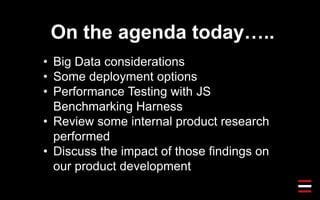
On the agenda today…..
• Big Data considerations
• Some deployment options
• Performance Testing with JS
Benchmarking Harness
• Review some internal product research
performed
• Discuss the impact of those findings on
our product development
“Build me a Big Data
Solution”
Product Use Case
• MongoDB deployed for customers on purchase
• Complex configurations including sharding and
replication
• Configurable via Portal interface
• Performance tuned to 3 „t-shirt size‟
deployments
Big Data Requirements
• High Performance
• Reliable, Predictable Performance
• Rapidly Scalable
• Easy to Deploy
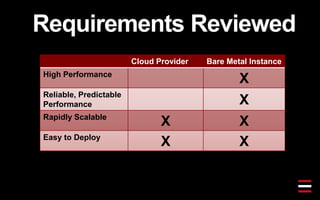
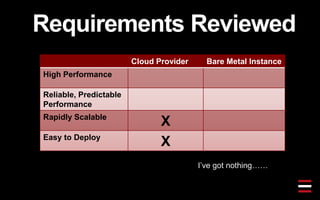
Requirements Reviewed
Cloud Provider Bare Metal Instance
High Performance
Reliable, Predictable
Performance
Rapidly Scalable
X
Easy to Deploy
X
I’ve got nothing……
The “Marc-O-Meter”
I’M NOT
HAPPY 
Marc… Angry
Thinking about Big Data
The 3 V’s
Physical Deployment
Public Cloud
Public Cloud
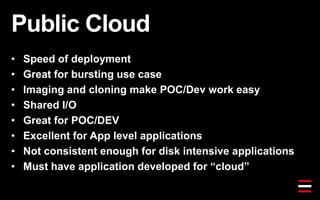
• Speed of deployment
• Great for bursting use case
• Imaging and cloning make POC/Dev work easy
• Shared I/O
• Great for POC/DEV
• Excellent for App level applications
• Not consistent enough for disk intensive applications
• Must have application developed for “cloud”
Physical Servers
Bare Metal
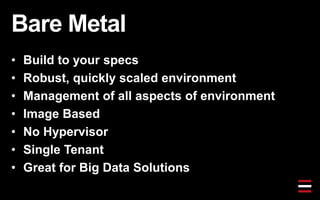
• Build to your specs
• Robust, quickly scaled environment
• Management of all aspects of environment
• Image Based
• No Hypervisor
• Single Tenant
• Great for Big Data Solutions
The Proof is in the Pudding
Beware The “Best Case Test Case”
1 8 5 8 1 7 . 6
1 9 0 5 2 5 . 4
1 8 7 8 8 2 . 2
1 9 1 1 0 1 . 8
1 8 4 4 0 8 . 8
1 8 8 1 3 5 . 4
1 8 7 0 8 0 . 6
1 8 6 3 4 3 . 4
1 9 1 8 9 9 . 6
1 8 7 7 3 6 . 6
1 8 8 9 7 8 . 8
1 8 7 4 4 0
1 8 6 9 5 0 . 4
1 8 7 6 2 3
1 8 7 7 8 3 . 8
1 8 7 7 7 5 . 8
1 9 2 8 0 6 . 8
1 8 6 6 4 3 . 2

Do It Yourself
• Data Set Sizing
• Document/Object Sizes
• Platform
• Controlled client or AFAIC
• Concurrency
• Local or Remote Client
• Read/Write Tests
JS Benchmarking Harness
• Data Set Sizing
• Document/Object Sizes
• Platform
• Controlled client or AFAIC
• Concurrency
• Local or Remote Client
• Read/Write Tests
db.foo.drop();
db.foo.insert( { _id : 1 } )
ops = [{op: "findOne", ns: "test.foo", query: {_id: 1}},
{op: "update", ns: "test.foo", query: {_id: 1}, update: {$inc: {x: 1}}}]
for ( var x = 1; x <= 128; x *= 2) {
res = benchRun( {
parallel : x ,
seconds : 5 ,
ops : ops
} );
print( "threads: " + x + "t queries/sec: " + res.query );
}
Quick Example
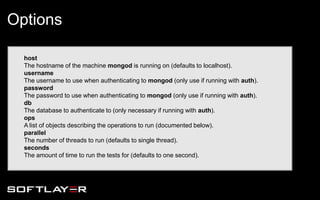
host
The hostname of the machine mongod is running on (defaults to localhost).
username
The username to use when authenticating to mongod (only use if running with auth).
password
The password to use when authenticating to mongod (only use if running with auth).
db
The database to authenticate to (only necessary if running with auth).
ops
A list of objects describing the operations to run (documented below).
parallel
The number of threads to run (defaults to single thread).
seconds
The amount of time to run the tests for (defaults to one second).
Options
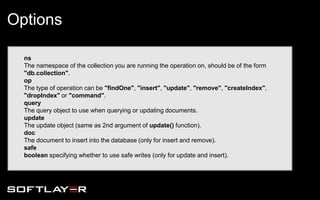
ns
The namespace of the collection you are running the operation on, should be of the form
"db.collection".
op
The type of operation can be "findOne", "insert", "update", "remove", "createIndex",
"dropIndex" or "command".
query
The query object to use when querying or updating documents.
update
The update object (same as 2nd argument of update() function).
doc
The document to insert into the database (only for insert and remove).
safe
boolean specifying whether to use safe writes (only for update and insert).
Options
{ "#RAND_INT" : [ min , max , <multiplier> ] }
[ 0 , 10 , 4 ] would produce random numbers between 0 and 10 and then multiply by 4.
{ "#RAND_STRING" : [ length ] }
[ 3 ] would produce a string of 3 random characters.
var complexDoc3 = { info: "#RAND_STRING": [30] } }
var complexDoc3 = { info: { inner_field: { "#RAND_STRING": [30] } } }
Dynamic Values
Lots of them here:
https://github.com/mongodb/mongo/tree/master/jstests
Example Scripts
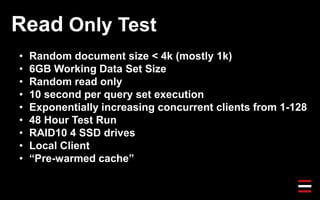
Read Only Test
• Random document size < 4k (mostly 1k)
• 6GB Working Data Set Size
• Random read only
• 10 second per query set execution
• Exponentially increasing concurrent clients from 1-128
• 48 Hour Test Run
• RAID10 4 SSD drives
• Local Client
• “Pre-warmed cache”
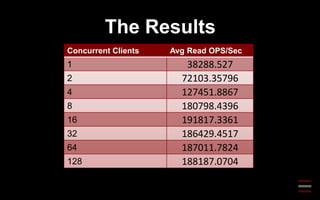
The Results
Concurrent Clients Avg Read OPS/Sec
1 38288.527
2 72103.35796
4 127451.8867
8 180798.4396
16 191817.3361
32 186429.4517
64 187011.7824
128 188187.0704
Some Tougher Tests
• Small MongoDB Bare Metal Cloud vs Public
Cloud Instance
• Medium MongoDB Bare Metal Cloud vs
Public Cloud Instance
• SSD and 15K SAS
• Large MongoDB Bare Metal Cloud vs Public
Cloud Instance
• SSD and 15K SAS
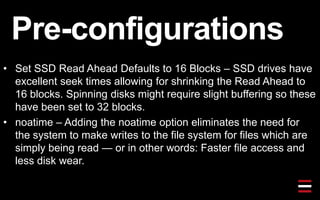
Pre-configurations
• Set SSD Read Ahead Defaults to 16 Blocks – SSD drives have
excellent seek times allowing for shrinking the Read Ahead to
16 blocks. Spinning disks might require slight buffering so these
have been set to 32 blocks.
• noatime – Adding the noatime option eliminates the need for
the system to make writes to the file system for files which are
simply being read — or in other words: Faster file access and
less disk wear.
• Turn NUMA Off in BIOS – Linux, NUMA and MongoDB
tend not to work well together. If you are running
MongoDB on NUMA hardware, we recommend turning it
off (running with an interleave memory policy). If you
don’t, problems will manifest in strange ways like
massive slow downs for periods of time or high system
CPU time.
• Set ulimit – We have set the ulimit to 64000 for open files
and 32000 for user processes to prevent failures due to a
loss of available file handles or user processes.
Use ext4 – We have selected ext4 over ext3. We found ext3
to be very slow in allocating files (or removing them).
Additionally, access within large files is poor with ext3.
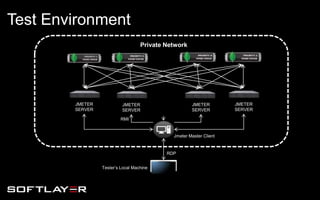
Private Network
JMETER
SERVER
JMETER
SERVER
JMETER
SERVER
JMETER
SERVER
RMI
Jmeter Master Client
RDP
Tester’s Local Machine
Test Environment
var ops = [];
while (low_rand < high_id) {
if(readTest){
ops.push({
op : "findOne",
ns : "test.foo",
query : {
incrementing_id : {
"#RAND_INT" : [ low_rand, low_rand + RAND_STEP ]
}
}
});
}
if(updateTest){
ops.push({ op: "update", ns: "test.foo",
query: { incrementing_id: { "#RAND_INT" : [0,high_id]}},
update: { $inc: { counter: 1 }},
safe: true });
}
low_rand += RAND_STEP;
}
function printLine(tokens, columns, width) {
line = "";
column_width = width / columns;
for (var i=0;i<tokens.length;i++) {
line += tokens[i];
// token_width = tokens[token].toString().length;
// pad = column_width - token_width;
// while (pad--) {
if(i != tokens.length-1)
line += " , ";
// }
}
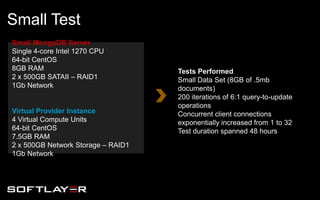
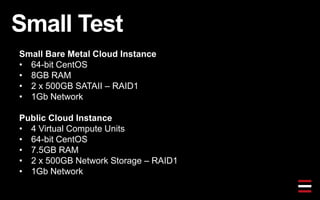
Small Test
Small MongoDB Server
Single 4-core Intel 1270 CPU
64-bit CentOS
8GB RAM
2 x 500GB SATAII – RAID1
1Gb Network
Virtual Provider Instance
4 Virtual Compute Units
64-bit CentOS
7.5GB RAM
2 x 500GB Network Storage – RAID1
1Gb Network
Tests Performed
Small Data Set (8GB of .5mb
documents)
200 iterations of 6:1 query-to-update
operations
Concurrent client connections
exponentially increased from 1 to 32
Test duration spanned 48 hours
Small Test
Small Bare Metal Cloud Instance
• 64-bit CentOS
• 8GB RAM
• 2 x 500GB SATAII – RAID1
• 1Gb Network
Public Cloud Instance
• 4 Virtual Compute Units
• 64-bit CentOS
• 7.5GB RAM
• 2 x 500GB Network Storage – RAID1
• 1Gb Network
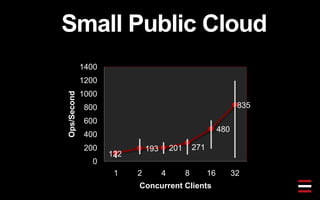
Small Public Cloud
122
193 201 271
480
835
0
200
400
600
800
1000
1200
1400
1 2 4 8 16 32
Ops/Second
Concurrent Clients
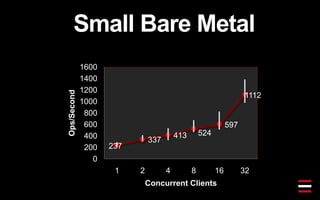
Small Bare Metal
237
337
413 524
597
1112
0
200
400
600
800
1000
1200
1400
1600
1 2 4 8 16 32
Ops/Second
Concurrent Clients
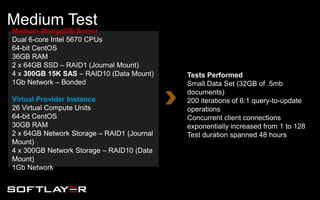
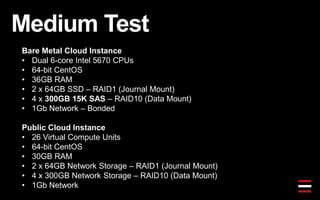
Medium Test
Medium MongoDB Server
Dual 6-core Intel 5670 CPUs
64-bit CentOS
36GB RAM
2 x 64GB SSD – RAID1 (Journal Mount)
4 x 300GB 15K SAS – RAID10 (Data Mount)
1Gb Network – Bonded
Virtual Provider Instance
26 Virtual Compute Units
64-bit CentOS
30GB RAM
2 x 64GB Network Storage – RAID1 (Journal
Mount)
4 x 300GB Network Storage – RAID10 (Data
Mount)
1Gb Network
Tests Performed
Small Data Set (32GB of .5mb
documents)
200 iterations of 6:1 query-to-update
operations
Concurrent client connections
exponentially increased from 1 to 128
Test duration spanned 48 hours
Medium Test
Bare Metal Cloud Instance
• Dual 6-core Intel 5670 CPUs
• 64-bit CentOS
• 36GB RAM
• 2 x 64GB SSD – RAID1 (Journal Mount)
• 4 x 300GB 15K SAS – RAID10 (Data Mount)
• 1Gb Network – Bonded
Public Cloud Instance
• 26 Virtual Compute Units
• 64-bit CentOS
• 30GB RAM
• 2 x 64GB Network Storage – RAID1 (Journal Mount)
• 4 x 300GB Network Storage – RAID10 (Data Mount)
• 1Gb Network
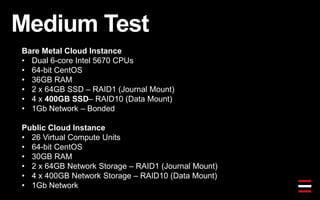
Medium Test
Bare Metal Cloud Instance
• Dual 6-core Intel 5670 CPUs
• 64-bit CentOS
• 36GB RAM
• 2 x 64GB SSD – RAID1 (Journal Mount)
• 4 x 400GB SSD– RAID10 (Data Mount)
• 1Gb Network – Bonded
Public Cloud Instance
• 26 Virtual Compute Units
• 64-bit CentOS
• 30GB RAM
• 2 x 64GB Network Storage – RAID1 (Journal Mount)
• 4 x 400GB Network Storage – RAID10 (Data Mount)
• 1Gb Network
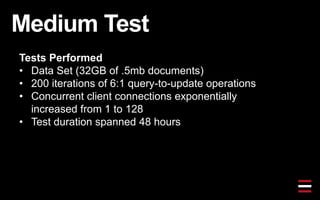
Medium Test
Tests Performed
• Data Set (32GB of .5mb documents)
• 200 iterations of 6:1 query-to-update operations
• Concurrent client connections exponentially
increased from 1 to 128
• Test duration spanned 48 hours
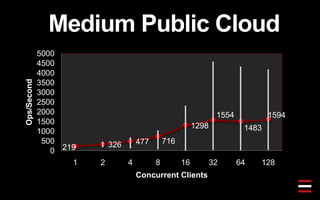
Medium Public Cloud
219 326 477 716
1298
1554
1483
1594
0
500
1000
1500
2000
2500
3000
3500
4000
4500
5000
1 2 4 8 16 32 64 128
Ops/Second
Concurrent Clients
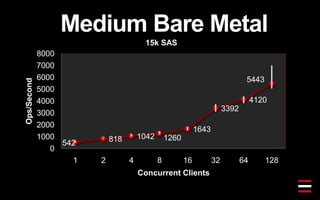
Medium Bare Metal
15k SAS
542 818 1042 1260
1643
3392
4120
5443
0
1000
2000
3000
4000
5000
6000
7000
8000
1 2 4 8 16 32 64 128
Ops/Second
Concurrent Clients
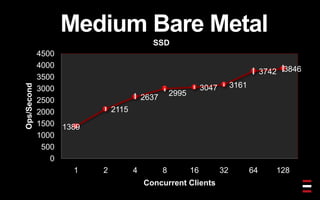
Medium Bare Metal
SSD
1389
2115
2637
2995
3047 3161
3742 3846
0
500
1000
1500
2000
2500
3000
3500
4000
4500
1 2 4 8 16 32 64 128
Ops/Second
Concurrent Clients
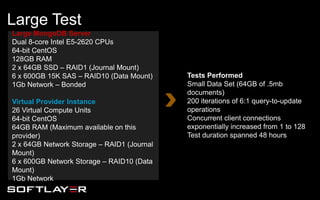
Large Test
Large MongoDB Server
Dual 8-core Intel E5-2620 CPUs
64-bit CentOS
128GB RAM
2 x 64GB SSD – RAID1 (Journal Mount)
6 x 600GB 15K SAS – RAID10 (Data Mount)
1Gb Network – Bonded
Virtual Provider Instance
26 Virtual Compute Units
64-bit CentOS
64GB RAM (Maximum available on this
provider)
2 x 64GB Network Storage – RAID1 (Journal
Mount)
6 x 600GB Network Storage – RAID10 (Data
Mount)
1Gb Network
Tests Performed
Small Data Set (64GB of .5mb
documents)
200 iterations of 6:1 query-to-update
operations
Concurrent client connections
exponentially increased from 1 to 128
Test duration spanned 48 hours
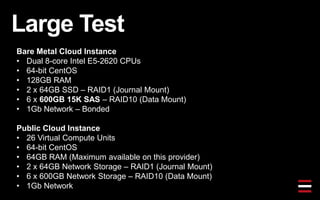
Large Test
Bare Metal Cloud Instance
• Dual 8-core Intel E5-2620 CPUs
• 64-bit CentOS
• 128GB RAM
• 2 x 64GB SSD – RAID1 (Journal Mount)
• 6 x 600GB 15K SAS – RAID10 (Data Mount)
• 1Gb Network – Bonded
Public Cloud Instance
• 26 Virtual Compute Units
• 64-bit CentOS
• 64GB RAM (Maximum available on this provider)
• 2 x 64GB Network Storage – RAID1 (Journal Mount)
• 6 x 600GB Network Storage – RAID10 (Data Mount)
• 1Gb Network
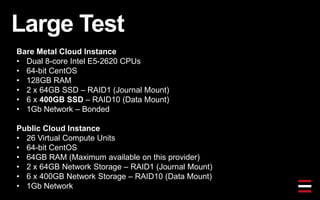
Large Test
Bare Metal Cloud Instance
• Dual 8-core Intel E5-2620 CPUs
• 64-bit CentOS
• 128GB RAM
• 2 x 64GB SSD – RAID1 (Journal Mount)
• 6 x 400GB SSD – RAID10 (Data Mount)
• 1Gb Network – Bonded
Public Cloud Instance
• 26 Virtual Compute Units
• 64-bit CentOS
• 64GB RAM (Maximum available on this provider)
• 2 x 64GB Network Storage – RAID1 (Journal Mount)
• 6 x 400GB Network Storage – RAID10 (Data Mount)
• 1Gb Network
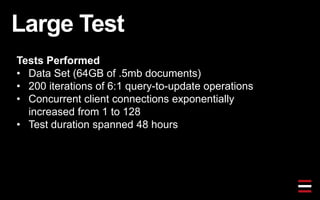
Large Test
Tests Performed
• Data Set (64GB of .5mb documents)
• 200 iterations of 6:1 query-to-update operations
• Concurrent client connections exponentially
increased from 1 to 128
• Test duration spanned 48 hours
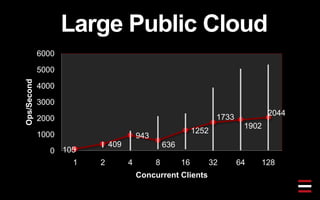
Large Public Cloud
105
409
943
636
1252
1733
1902
2044
0
1000
2000
3000
4000
5000
6000
1 2 4 8 16 32 64 128
Ops/Second
Concurrent Clients
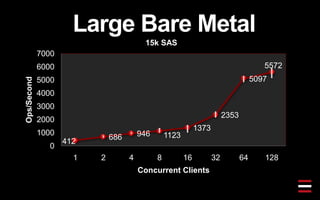
Large Bare Metal
15k SAS
412
686 946 1123
1373
2353
5097
5572
0
1000
2000
3000
4000
5000
6000
7000
1 2 4 8 16 32 64 128
Ops/Second
Concurrent Clients
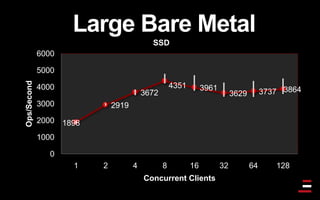
Large Bare Metal
SSD
1898
2919
3672
4351 3961
3629 3737 3864
0
1000
2000
3000
4000
5000
6000
1 2 4 8 16 32 64 128
Ops/Second
Concurrent Clients
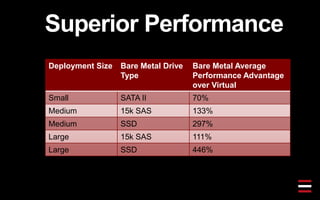
Superior Performance
Deployment Size Bare Metal Drive
Type
Bare Metal Average
Performance Advantage
over Virtual
Small SATA II 70%
Medium 15k SAS 133%
Medium SSD 297%
Large 15k SAS 111%
Large SSD 446%
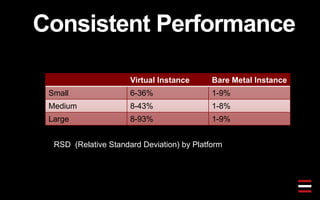
Consistent Performance
Virtual Instance Bare Metal Instance
Small 6-36% 1-9%
Medium 8-43% 1-8%
Large 8-93% 1-9%
RSD (Relative Standard Deviation) by Platform
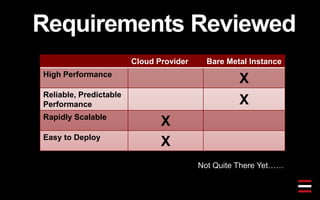
Requirements Reviewed
Cloud Provider Bare Metal Instance
High Performance
X
Reliable, Predictable
Performance X
Rapidly Scalable
X
Easy to Deploy
X
Not Quite There Yet……
The “Marc-O-Meter”
NOT SURE IF
WANT
The Dream
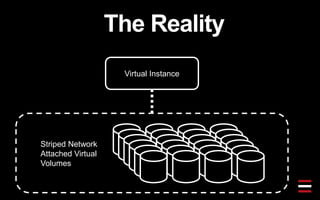
The Reality
Virtual Instance
Striped Network
Attached Virtual
Volumes
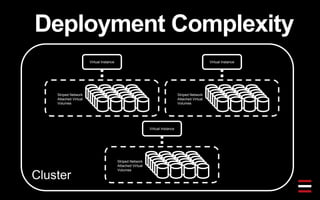
Cluster
Deployment Complexity
Virtual Instance
Striped Network
Attached Virtual
Volumes
Virtual Instance
Striped Network
Attached Virtual
Volumes
Virtual Instance
Striped Network
Attached Virtual
Volumes
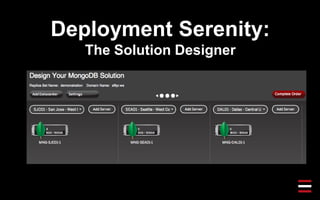
Deployment Serenity:
The Solution Designer
MongoDB Solutions
• Preconfigured
• Performance Tuned
• Bare Metal Single Tenant
• Complex Environment Configurations
Requirements Reviewed
Cloud Provider Bare Metal Instance
High Performance
X
Reliable, Predictable
Performance X
Rapidly Scalable
X X
Easy to Deploy
X X
The “Marc-O-Meter”
B+ FOR
EFFORT
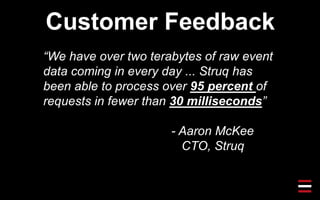
Customer Feedback
“We have over two terabytes of raw event
data coming in every day ... Struq has
been able to process over 95 percent of
requests in fewer than 30 milliseconds”
- Aaron McKee
CTO, Struq
The “Marc-O-Meter”
WIN!!
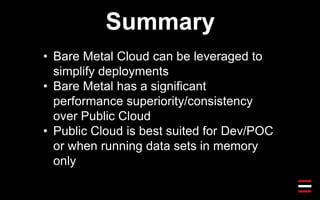
Summary
• Bare Metal Cloud can be leveraged to
simplify deployments
• Bare Metal has a significant
performance superiority/consistency
over Public Cloud
• Public Cloud is best suited for Dev/POC
or when running data sets in memory
only
More information:
www.softlayer.com
blog@ http://sftlyr.com/bdperf

High Performance, Scalable MongoDB in a Bare Metal Cloud

  • 1.
    High Performance, Scalable MongoDB ina Bare Metal Cloud Harold Hannon, Sr. Software Architect
  • 2.
  • 3.
    13 data centers 16network POPs 20Gb fiber interconnects Global Footprint
  • 4.
    On the agendatoday….. • Big Data considerations • Some deployment options • Performance Testing with JS Benchmarking Harness • Review some internal product research performed • Discuss the impact of those findings on our product development
  • 5.
    “Build me aBig Data Solution”
  • 6.
    Product Use Case •MongoDB deployed for customers on purchase • Complex configurations including sharding and replication • Configurable via Portal interface • Performance tuned to 3 „t-shirt size‟ deployments
  • 7.
    Big Data Requirements •High Performance • Reliable, Predictable Performance • Rapidly Scalable • Easy to Deploy
  • 8.
    Requirements Reviewed Cloud ProviderBare Metal Instance High Performance Reliable, Predictable Performance Rapidly Scalable X Easy to Deploy X I’ve got nothing……
  • 9.
  • 10.
  • 11.
  • 12.
  • 13.
  • 15.
  • 16.
    Public Cloud • Speedof deployment • Great for bursting use case • Imaging and cloning make POC/Dev work easy • Shared I/O • Great for POC/DEV • Excellent for App level applications • Not consistent enough for disk intensive applications • Must have application developed for “cloud”
  • 17.
  • 18.
    Bare Metal • Buildto your specs • Robust, quickly scaled environment • Management of all aspects of environment • Image Based • No Hypervisor • Single Tenant • Great for Big Data Solutions
  • 19.
    The Proof isin the Pudding
  • 20.
    Beware The “BestCase Test Case” 1 8 5 8 1 7 . 6 1 9 0 5 2 5 . 4 1 8 7 8 8 2 . 2 1 9 1 1 0 1 . 8 1 8 4 4 0 8 . 8 1 8 8 1 3 5 . 4 1 8 7 0 8 0 . 6 1 8 6 3 4 3 . 4 1 9 1 8 9 9 . 6 1 8 7 7 3 6 . 6 1 8 8 9 7 8 . 8 1 8 7 4 4 0 1 8 6 9 5 0 . 4 1 8 7 6 2 3 1 8 7 7 8 3 . 8 1 8 7 7 7 5 . 8 1 9 2 8 0 6 . 8 1 8 6 6 4 3 . 2 
  • 21.
    Do It Yourself •Data Set Sizing • Document/Object Sizes • Platform • Controlled client or AFAIC • Concurrency • Local or Remote Client • Read/Write Tests
  • 22.
    JS Benchmarking Harness •Data Set Sizing • Document/Object Sizes • Platform • Controlled client or AFAIC • Concurrency • Local or Remote Client • Read/Write Tests
  • 23.
    db.foo.drop(); db.foo.insert( { _id: 1 } ) ops = [{op: "findOne", ns: "test.foo", query: {_id: 1}}, {op: "update", ns: "test.foo", query: {_id: 1}, update: {$inc: {x: 1}}}] for ( var x = 1; x <= 128; x *= 2) { res = benchRun( { parallel : x , seconds : 5 , ops : ops } ); print( "threads: " + x + "t queries/sec: " + res.query ); } Quick Example
  • 24.
    host The hostname ofthe machine mongod is running on (defaults to localhost). username The username to use when authenticating to mongod (only use if running with auth). password The password to use when authenticating to mongod (only use if running with auth). db The database to authenticate to (only necessary if running with auth). ops A list of objects describing the operations to run (documented below). parallel The number of threads to run (defaults to single thread). seconds The amount of time to run the tests for (defaults to one second). Options
  • 25.
    ns The namespace ofthe collection you are running the operation on, should be of the form "db.collection". op The type of operation can be "findOne", "insert", "update", "remove", "createIndex", "dropIndex" or "command". query The query object to use when querying or updating documents. update The update object (same as 2nd argument of update() function). doc The document to insert into the database (only for insert and remove). safe boolean specifying whether to use safe writes (only for update and insert). Options
  • 26.
    { "#RAND_INT" :[ min , max , <multiplier> ] } [ 0 , 10 , 4 ] would produce random numbers between 0 and 10 and then multiply by 4. { "#RAND_STRING" : [ length ] } [ 3 ] would produce a string of 3 random characters. var complexDoc3 = { info: "#RAND_STRING": [30] } } var complexDoc3 = { info: { inner_field: { "#RAND_STRING": [30] } } } Dynamic Values
  • 27.
    Lots of themhere: https://github.com/mongodb/mongo/tree/master/jstests Example Scripts
  • 28.
    Read Only Test •Random document size < 4k (mostly 1k) • 6GB Working Data Set Size • Random read only • 10 second per query set execution • Exponentially increasing concurrent clients from 1-128 • 48 Hour Test Run • RAID10 4 SSD drives • Local Client • “Pre-warmed cache”
  • 29.
    The Results Concurrent ClientsAvg Read OPS/Sec 1 38288.527 2 72103.35796 4 127451.8867 8 180798.4396 16 191817.3361 32 186429.4517 64 187011.7824 128 188187.0704
  • 30.
    Some Tougher Tests •Small MongoDB Bare Metal Cloud vs Public Cloud Instance • Medium MongoDB Bare Metal Cloud vs Public Cloud Instance • SSD and 15K SAS • Large MongoDB Bare Metal Cloud vs Public Cloud Instance • SSD and 15K SAS
  • 31.
    Pre-configurations • Set SSDRead Ahead Defaults to 16 Blocks – SSD drives have excellent seek times allowing for shrinking the Read Ahead to 16 blocks. Spinning disks might require slight buffering so these have been set to 32 blocks. • noatime – Adding the noatime option eliminates the need for the system to make writes to the file system for files which are simply being read — or in other words: Faster file access and less disk wear.
  • 32.
    • Turn NUMAOff in BIOS – Linux, NUMA and MongoDB tend not to work well together. If you are running MongoDB on NUMA hardware, we recommend turning it off (running with an interleave memory policy). If you don’t, problems will manifest in strange ways like massive slow downs for periods of time or high system CPU time. • Set ulimit – We have set the ulimit to 64000 for open files and 32000 for user processes to prevent failures due to a loss of available file handles or user processes.
  • 33.
    Use ext4 –We have selected ext4 over ext3. We found ext3 to be very slow in allocating files (or removing them). Additionally, access within large files is poor with ext3.
  • 34.
  • 35.
    var ops =[]; while (low_rand < high_id) { if(readTest){ ops.push({ op : "findOne", ns : "test.foo", query : { incrementing_id : { "#RAND_INT" : [ low_rand, low_rand + RAND_STEP ] } } }); } if(updateTest){ ops.push({ op: "update", ns: "test.foo", query: { incrementing_id: { "#RAND_INT" : [0,high_id]}}, update: { $inc: { counter: 1 }}, safe: true }); } low_rand += RAND_STEP; } function printLine(tokens, columns, width) { line = ""; column_width = width / columns; for (var i=0;i<tokens.length;i++) { line += tokens[i]; // token_width = tokens[token].toString().length; // pad = column_width - token_width; // while (pad--) { if(i != tokens.length-1) line += " , "; // } }
  • 36.
    Small Test Small MongoDBServer Single 4-core Intel 1270 CPU 64-bit CentOS 8GB RAM 2 x 500GB SATAII – RAID1 1Gb Network Virtual Provider Instance 4 Virtual Compute Units 64-bit CentOS 7.5GB RAM 2 x 500GB Network Storage – RAID1 1Gb Network Tests Performed Small Data Set (8GB of .5mb documents) 200 iterations of 6:1 query-to-update operations Concurrent client connections exponentially increased from 1 to 32 Test duration spanned 48 hours
  • 37.
    Small Test Small BareMetal Cloud Instance • 64-bit CentOS • 8GB RAM • 2 x 500GB SATAII – RAID1 • 1Gb Network Public Cloud Instance • 4 Virtual Compute Units • 64-bit CentOS • 7.5GB RAM • 2 x 500GB Network Storage – RAID1 • 1Gb Network
  • 38.
    Small Public Cloud 122 193201 271 480 835 0 200 400 600 800 1000 1200 1400 1 2 4 8 16 32 Ops/Second Concurrent Clients
  • 39.
    Small Bare Metal 237 337 413524 597 1112 0 200 400 600 800 1000 1200 1400 1600 1 2 4 8 16 32 Ops/Second Concurrent Clients
  • 40.
    Medium Test Medium MongoDBServer Dual 6-core Intel 5670 CPUs 64-bit CentOS 36GB RAM 2 x 64GB SSD – RAID1 (Journal Mount) 4 x 300GB 15K SAS – RAID10 (Data Mount) 1Gb Network – Bonded Virtual Provider Instance 26 Virtual Compute Units 64-bit CentOS 30GB RAM 2 x 64GB Network Storage – RAID1 (Journal Mount) 4 x 300GB Network Storage – RAID10 (Data Mount) 1Gb Network Tests Performed Small Data Set (32GB of .5mb documents) 200 iterations of 6:1 query-to-update operations Concurrent client connections exponentially increased from 1 to 128 Test duration spanned 48 hours
  • 41.
    Medium Test Bare MetalCloud Instance • Dual 6-core Intel 5670 CPUs • 64-bit CentOS • 36GB RAM • 2 x 64GB SSD – RAID1 (Journal Mount) • 4 x 300GB 15K SAS – RAID10 (Data Mount) • 1Gb Network – Bonded Public Cloud Instance • 26 Virtual Compute Units • 64-bit CentOS • 30GB RAM • 2 x 64GB Network Storage – RAID1 (Journal Mount) • 4 x 300GB Network Storage – RAID10 (Data Mount) • 1Gb Network
  • 42.
    Medium Test Bare MetalCloud Instance • Dual 6-core Intel 5670 CPUs • 64-bit CentOS • 36GB RAM • 2 x 64GB SSD – RAID1 (Journal Mount) • 4 x 400GB SSD– RAID10 (Data Mount) • 1Gb Network – Bonded Public Cloud Instance • 26 Virtual Compute Units • 64-bit CentOS • 30GB RAM • 2 x 64GB Network Storage – RAID1 (Journal Mount) • 4 x 400GB Network Storage – RAID10 (Data Mount) • 1Gb Network
  • 43.
    Medium Test Tests Performed •Data Set (32GB of .5mb documents) • 200 iterations of 6:1 query-to-update operations • Concurrent client connections exponentially increased from 1 to 128 • Test duration spanned 48 hours
  • 44.
    Medium Public Cloud 219326 477 716 1298 1554 1483 1594 0 500 1000 1500 2000 2500 3000 3500 4000 4500 5000 1 2 4 8 16 32 64 128 Ops/Second Concurrent Clients
  • 45.
    Medium Bare Metal 15kSAS 542 818 1042 1260 1643 3392 4120 5443 0 1000 2000 3000 4000 5000 6000 7000 8000 1 2 4 8 16 32 64 128 Ops/Second Concurrent Clients
  • 46.
    Medium Bare Metal SSD 1389 2115 2637 2995 30473161 3742 3846 0 500 1000 1500 2000 2500 3000 3500 4000 4500 1 2 4 8 16 32 64 128 Ops/Second Concurrent Clients
  • 47.
    Large Test Large MongoDBServer Dual 8-core Intel E5-2620 CPUs 64-bit CentOS 128GB RAM 2 x 64GB SSD – RAID1 (Journal Mount) 6 x 600GB 15K SAS – RAID10 (Data Mount) 1Gb Network – Bonded Virtual Provider Instance 26 Virtual Compute Units 64-bit CentOS 64GB RAM (Maximum available on this provider) 2 x 64GB Network Storage – RAID1 (Journal Mount) 6 x 600GB Network Storage – RAID10 (Data Mount) 1Gb Network Tests Performed Small Data Set (64GB of .5mb documents) 200 iterations of 6:1 query-to-update operations Concurrent client connections exponentially increased from 1 to 128 Test duration spanned 48 hours
  • 48.
    Large Test Bare MetalCloud Instance • Dual 8-core Intel E5-2620 CPUs • 64-bit CentOS • 128GB RAM • 2 x 64GB SSD – RAID1 (Journal Mount) • 6 x 600GB 15K SAS – RAID10 (Data Mount) • 1Gb Network – Bonded Public Cloud Instance • 26 Virtual Compute Units • 64-bit CentOS • 64GB RAM (Maximum available on this provider) • 2 x 64GB Network Storage – RAID1 (Journal Mount) • 6 x 600GB Network Storage – RAID10 (Data Mount) • 1Gb Network
  • 49.
    Large Test Bare MetalCloud Instance • Dual 8-core Intel E5-2620 CPUs • 64-bit CentOS • 128GB RAM • 2 x 64GB SSD – RAID1 (Journal Mount) • 6 x 400GB SSD – RAID10 (Data Mount) • 1Gb Network – Bonded Public Cloud Instance • 26 Virtual Compute Units • 64-bit CentOS • 64GB RAM (Maximum available on this provider) • 2 x 64GB Network Storage – RAID1 (Journal Mount) • 6 x 400GB Network Storage – RAID10 (Data Mount) • 1Gb Network
  • 50.
    Large Test Tests Performed •Data Set (64GB of .5mb documents) • 200 iterations of 6:1 query-to-update operations • Concurrent client connections exponentially increased from 1 to 128 • Test duration spanned 48 hours
  • 51.
  • 52.
    Large Bare Metal 15kSAS 412 686 946 1123 1373 2353 5097 5572 0 1000 2000 3000 4000 5000 6000 7000 1 2 4 8 16 32 64 128 Ops/Second Concurrent Clients
  • 53.
    Large Bare Metal SSD 1898 2919 3672 43513961 3629 3737 3864 0 1000 2000 3000 4000 5000 6000 1 2 4 8 16 32 64 128 Ops/Second Concurrent Clients
  • 54.
    Superior Performance Deployment SizeBare Metal Drive Type Bare Metal Average Performance Advantage over Virtual Small SATA II 70% Medium 15k SAS 133% Medium SSD 297% Large 15k SAS 111% Large SSD 446%
  • 55.
    Consistent Performance Virtual InstanceBare Metal Instance Small 6-36% 1-9% Medium 8-43% 1-8% Large 8-93% 1-9% RSD (Relative Standard Deviation) by Platform
  • 56.
    Requirements Reviewed Cloud ProviderBare Metal Instance High Performance X Reliable, Predictable Performance X Rapidly Scalable X Easy to Deploy X Not Quite There Yet……
  • 57.
  • 58.
  • 59.
    The Reality Virtual Instance StripedNetwork Attached Virtual Volumes
  • 60.
    Cluster Deployment Complexity Virtual Instance StripedNetwork Attached Virtual Volumes Virtual Instance Striped Network Attached Virtual Volumes Virtual Instance Striped Network Attached Virtual Volumes
  • 61.
  • 62.
    MongoDB Solutions • Preconfigured •Performance Tuned • Bare Metal Single Tenant • Complex Environment Configurations
  • 63.
    Requirements Reviewed Cloud ProviderBare Metal Instance High Performance X Reliable, Predictable Performance X Rapidly Scalable X X Easy to Deploy X X
  • 64.
  • 65.
    Customer Feedback “We haveover two terabytes of raw event data coming in every day ... Struq has been able to process over 95 percent of requests in fewer than 30 milliseconds” - Aaron McKee CTO, Struq
  • 66.
  • 67.
    Summary • Bare MetalCloud can be leveraged to simplify deployments • Bare Metal has a significant performance superiority/consistency over Public Cloud • Public Cloud is best suited for Dev/POC or when running data sets in memory only
  • 68.

Editor's Notes

  • #2 I am HH work for Softlayer for about 6-7 years now, Work in product innovation as a Sr Software ArchitectPart of what we do is R&amp;D for new product solutions for Softlayer which gives me the opportunity to get exposure to a lot of exciting new technologies and solutionsOne thing I’ve been working with lately has been Big Data solutions specifically Big DataToday we are talking about Big Data Cloud SubscriptionSome of how we put it togetherSome considerations for deployment and how we arrived at the model we didSome metrics/info on performanceSome helpful hints
  • #3 Softlayer?
  • #6 This is about a narrative of building a deployable big data solution for our customers
  • #9 We still need to solve the deployment issue public cloud still was winning on ease and speed
  • #10 This is about a narrative of building a deployable big data solution for our customers
  • #11 This is about a narrative of building a deployable big data solution for our customers
  • #12 Before we started building the solution thinking about big data
  • #13 So here is our one and only obligatory analyst slide I promiseThink in terms of the 3 V’s Gartner definedThere are lots of 4th V’s (Value, Veracity, etc.) But really these apply to all data right? These 3 are at the coreAlso for our discussion today we are mostly going to be focused on Volume and Velocity (Variety is a given for us)These are important to consider when we start talking about how we want to deploy our solutionHow much and How fast is our data going to come at us?
  • #14 Those 3 V’s have a lot of impact on our decision for how to physically deployPublic Cloud and Single Tenant dedicated are 2 options (there is SAS but not really the focus today)Both have their strengths and weaknesses
  • #15 Like to focus on Public Cloud Vs Bare Metal for deploying Big Data SolutionsBoth have distinct impact on the requirements we had
  • #16 Typically fast to setup up frontGreat for entry level, POC, Testing, Small applications where maybe things like Velocity aren’t as importantCan be great for auto-scaling needs in bursty use casesAt first these deployments look very affordableBut we are usually talking about shared network attached resourcesWith shared I/O comes widely varied performance that I am convinced is based upon the direction of the wind in some casesPersonal tests have shown that standard deviation swings are as large (30% or higher)You are going to here me talk a lot today about RSD relative standard deviation when we get to some actual performance testing numbersMost platforms use network attached storageI DO NOT USE NETWORK ATTACHED STORAGE BACKED VIRTUAL INSTANCES for disk intensive applications Big DataFor everyone that hit the snooze button on my presentation this is probably the most important take away I can give youSo I will repeat that because it is very importantWe found that most customers wanting I/O intensive applications like Big Data that have an absolute requirement for virtual instances do better with local disk for obvious reasonsNo network hop to data = better performance so we push our customers implementing heavy disk I/O solutions Big Data to our Local Disc Virtual Instances when they have a hard requirement Multi Tenant Public CloudThat’s not our best solution but when they just can’t leave a virtual instance at least local disk helps alleviate some of the shared resource pain for these sorts of applications
  • #18 So lets look at a different strategy for deployingWe have seen a growing number of customers coming to us wanting single tenant solution for high disk I/O data storage solutions like Big Data applicationsWe consider our platform to be a complete portfolio of Cloud Offerings including Single Tenant Options beyond our multi tenant public cloud offeringsWe do have multi tenant with local disk, but we believe our Bare Metal Cloud offering is far better suited for Big Data solutions than any otherAll the advantages of the Cloud without the pain pointsEasy automated provisioningConsistent high performanceBecause you have noShared I/ONetwork DiskWildly Varied deviated performanceYou get Consistent Solid performance every time because our single tenant offerings are backed by BARE METALStress consistent
  • #20 This is caramel mango macadamia nut pudding by the way and it is deliciousSo I can talk all I want about how theoretically sharing resources and network hops impact high storage I/O deploymentsBut if you are like me, then if you are looking to really understand something then you need to test itWe were building a product, so we looked into the different deployments and how they shaped up
  • #21 Numbers with no context are not very useful
  • #29 This is the ACTUAL test for that crazy number from before. Notice it has been heavily designed to produce a falsely high number. Not very useful.
  • #30 These were the results
  • #39 The numbers are average read operations per second with writes occurring as well. The vertical white lines represent variance in that data. This slide and the other public cloud ones show that the variance in the data is HUGE. This means the platform is unstable under load and cannot give you a reliable predictable deployment
  • #55 Numbers speak for themselvesYou take the overall average consistent performance + the consistencyCoupled with the ease of deployment
  • #56 Numbers speak for themselvesYou take the overall average consistent performance + the consistencyCoupled with the ease of deployment
  • #57 We still need to solve the deployment issue public cloud still was winning on ease and speed
  • #58 This is about a narrative of building a deployable big data solution for our customers
  • #59 When we talk about a public cloud deployment everyone has this dream of just right clicking and “adding new” and everything is perfect
  • #60 Although at first things seem simple scaling on multi tenant (especially with NAS) gets trickyIn this case this is a SINGLE instance of a Mongo Node (This is one node, most deployments are going to have 3 or more of these)In order to achieve desired performance you have to raid network volumes and attach them to virtual instancesThis still doesn’t solve shared I/O deviation issues it just smears them so they may not spike as drastically
  • #61 It gets even crazier when you do highly available deploymentsStriped volumes (sometimes up to 10) attachedSo you can see that as you scale on a NAS Virtual environment You start to see when you look at this picture that your simple Virtualized environment has suddenly started to get very complexIf you are an engineer that believes in keeping things simple to avoid issues, this sort of thing keeps you up at nightBoth complexity and cost can start to spiral beyond what you may have anticipated
  • #62 The goal is to capture the ease of virtual deploymentConfigure complex cluster environmentsAllow for rapid deployment
  • #64 Now we’ve solved the deployment issues marrying the ease of public cloud with the performance
  • #65 This is about a narrative of building a deployable big data solution for our customers
  • #66 Highlight the 95% as further evidence of our extreme superiority in consistent performance.
  • #67 This is about a narrative of building a deployable big data solution for our customers
  • #69 Thank you for your time, I hope you found this helpful QuestionsBlog