TROUBLESHOOTING IN DVD PLAYERS
CONTENTS
 What is a DVD Player?
 Parts of DVD Player.
 Working of DVD Player.
 Faults in DVD Player.
 What is Troubleshooting?
 Need of Troubleshooting.
 Where is it used?
 Troubleshooting in DVD players.
WHAT IS A DVD PLAYER?
 Digital versatile disc or Digital video disc
commonly known as DVD is used for digital
optical disc storage
 A DVD player is a device that plays discs
produced under both the DVD-Video and DVD-
Audio technical standards, two different and
incompatible standards.
 DVD players are connected to a television to
watch the DVD content, which could be a movie, a
recorded TV show, or other content.
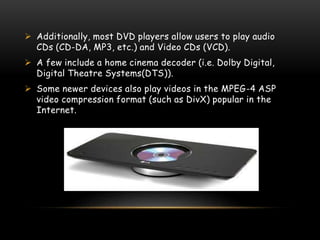
 Additionally, most DVD players allow users to play audio
CDs (CD-DA, MP3, etc.) and Video CDs (VCD).
 A few include a home cinema decoder (i.e. Dolby Digital,
Digital Theatre Systems(DTS)).
 Some newer devices also play videos in the MPEG-4 ASP
video compression format (such as DivX) popular in the
Internet.
PARTS OF DVD PLAYER
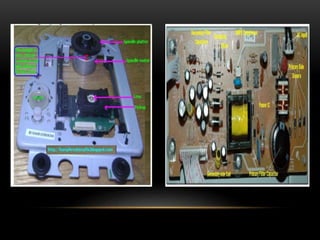
 Optical system:
The optical system mainly consists of the laser beam, lenses,
prism, photo-detectors and also mirrors. The output of this
mechanism will be the input for the disc-drive. The laser beam
will be a red laser diode which works at a wavelength of 600
nanometres.
 Disc drive mechanism:
The disc drive mechanism consists of a motor that will drive
the disc in a circular motion. The mechanism will also have a
disc feed – a loading tray that is used to accept the DVD from
the user. Thus the entire disc drive is basically a spindle that
holds the disc and a motor that is used to circle the disc.
PARTS OF DVD PLAYER
 Printed Circuit Board:
The electronic outline must be drawn on the PCB with the
correct placement of all the IC’s resistors as well as
capacitors. After the outline has been drawn, the components
must be soldered to their respective places. All the primary
components of the electronic circuit should be made out of
silicon.
WORKING OF DVD PLAYER
 The pits and bumps in the DVD are hit by the laser
from the optical mechanism of the DVD player. This
laser will be reflected differently according to the
change of pits and bumps.
 Though the laser hits a single spot, the DVD moves in
a circular motion so that the entire area is covered.
Mirrors are also used to change the spot.
 These reflected laser beams are then collected by a
light sensor (e.g.. photo-detector) which converts the
different signals into a binary code.
WORKING OF DVD PLAYER
 The optical system helps in converting the data
from the DVD into a digital code.
 The binary signal is then sent to a Digital to
Analog converter which will be setup in the PCB.
Thus the corresponding analog signal of the DVD
is obtained.
 The PCB also has amplifiers which amplify the
signal and then sends it to the graphic and audio
systems of the computer/TV. Thus, the
corresponding audio/video signal is obtained.
WORKING OF DVD PLAYER
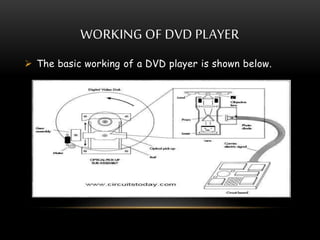
 The basic working of a DVD player is shown below.
FAULTS IN A DVD PLAYER
A DVD Player is a complex set of equipment
having mechanical, optical and electronics
components which are prone to faults.
 DTS Disabled:When a disc is designed to have
provision of ‘Digital Theatre System (DTS)’ and
the player is not able to produce it then the
player has ‘DTS disabled’ fault.
 Aspect Ratio: A DVD may have an aspect ratio
of 4:3, but with the player set for 16:9 aspect
ratio, the images appear thin and tall in display.
FAULTS IN A DVD PLAYER
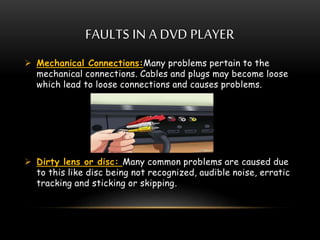
 Mechanical Connections:Many problems pertain to the
mechanical connections. Cables and plugs may become loose
which lead to loose connections and causes problems.
 Dirty lens or disc: Many common problems are caused due
to this like disc being not recognized, audible noise, erratic
tracking and sticking or skipping.
FAULTS IN A DVD PLAYER
 Geographical Conditions: Incompatibility due to
geographical locations, will not allow the DVD player to
work. TV standards of scanning, colour coding and
decoding, bandwidth etc. are different for different
countries. For e.g.- A player designed for England will
not work in France
 Another common fault is that the disc may stop
playing halfway through, which mainly happens in dual
layered DVDs. A pause of half a second is normal, but
if it stops working for more time then the DVD needs
replacement.
WHAT IS TROUBLESHOOTING?
 It means to locate the faulty component or
connection in the equipment and determining the
cause of its becoming faulty.
 Troubleshooting includes:
i. Corrective Maintenance(repair)
ii. Qualitative Maintenance(restoring)
iii. Preventive Maintenance(servicing)
NEED OF TROUBLESHOOTING
 Modern electronic devices although reliable, present
some potential problems.
 Some of the common problems can be given as follows:
i. The devices are sensitive to dust, vibrations, humidity
and transients in power supply voltage.
ii. The ICs used in the equipment are prone to
electrostatic charge and heat.
 The above mentioned problems cause the devices to
not work in proper manner.
 In order to reduce the faults in the device we need to
troubleshoot them.
 After troubleshooting, the device works in a
appropriate manner.
WHERE IS IT USED?
 Troubleshooting is almost used in every field to get a
accurate output of a device or a system.
 Few of them are listed below:
i. Public Address System
ii. Stereo Amplifiers
iii. VCR
iv. Tape Recorder
v. DVD Player
TROUBLESHOOTING IN DVD PLAYER
 DTS Disabled:To troubleshoot this fault we have to enable
the player for DTS output which is by default turned off in
the players.
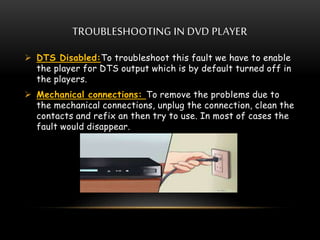
 Mechanical connections: To remove the problems due to
the mechanical connections, unplug the connection, clean the
contacts and refix an then try to use. In most of cases the
fault would disappear.
TROUBLESHOOTING IN DVD PLAYER
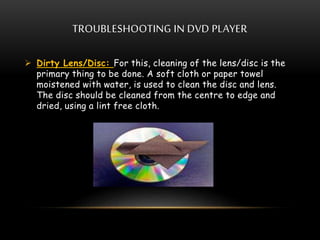
 Dirty Lens/Disc: For this, cleaning of the lens/disc is the
primary thing to be done. A soft cloth or paper towel
moistened with water, is used to clean the disc and lens.
The disc should be cleaned from the centre to edge and
dried, using a lint free cloth.
TROUBLESHOOTING IN DVD PLAYER
 Substitution method: It is the best and quickest method to
find out the player is faulty or not. First check the DVD, if
it doesn’t work properly, insert an another one . If the
another DVD works alright then DVD is faulty. If a good
DVD also does not work, then the fault is in player. Try
connecting the player to some another monitor, if it works
then monitor was not working properly and if not the player
is faulty.
REFERENCES
 Wikipedia
i. en.wikipedia.org/wiki/DVD
ii. en.wikipedia.org/wiki/DVD_player
 Audio and Video Systems by R.G Gupta
 www.circuitstoday.com/working-of-dvd-player
 www.madehow.com/Volume-4/DVD-
Player.html#ixzz3nllmeAkc
THANK YOU

Dvd

  • 1.
  • 2.
    CONTENTS  What isa DVD Player?  Parts of DVD Player.  Working of DVD Player.  Faults in DVD Player.  What is Troubleshooting?  Need of Troubleshooting.  Where is it used?  Troubleshooting in DVD players.
  • 3.
    WHAT IS ADVD PLAYER?  Digital versatile disc or Digital video disc commonly known as DVD is used for digital optical disc storage  A DVD player is a device that plays discs produced under both the DVD-Video and DVD- Audio technical standards, two different and incompatible standards.  DVD players are connected to a television to watch the DVD content, which could be a movie, a recorded TV show, or other content.
  • 4.
     Additionally, mostDVD players allow users to play audio CDs (CD-DA, MP3, etc.) and Video CDs (VCD).  A few include a home cinema decoder (i.e. Dolby Digital, Digital Theatre Systems(DTS)).  Some newer devices also play videos in the MPEG-4 ASP video compression format (such as DivX) popular in the Internet.
  • 5.
    PARTS OF DVDPLAYER  Optical system: The optical system mainly consists of the laser beam, lenses, prism, photo-detectors and also mirrors. The output of this mechanism will be the input for the disc-drive. The laser beam will be a red laser diode which works at a wavelength of 600 nanometres.  Disc drive mechanism: The disc drive mechanism consists of a motor that will drive the disc in a circular motion. The mechanism will also have a disc feed – a loading tray that is used to accept the DVD from the user. Thus the entire disc drive is basically a spindle that holds the disc and a motor that is used to circle the disc.
  • 6.
    PARTS OF DVDPLAYER  Printed Circuit Board: The electronic outline must be drawn on the PCB with the correct placement of all the IC’s resistors as well as capacitors. After the outline has been drawn, the components must be soldered to their respective places. All the primary components of the electronic circuit should be made out of silicon.
  • 8.
    WORKING OF DVDPLAYER  The pits and bumps in the DVD are hit by the laser from the optical mechanism of the DVD player. This laser will be reflected differently according to the change of pits and bumps.  Though the laser hits a single spot, the DVD moves in a circular motion so that the entire area is covered. Mirrors are also used to change the spot.  These reflected laser beams are then collected by a light sensor (e.g.. photo-detector) which converts the different signals into a binary code.
  • 9.
    WORKING OF DVDPLAYER  The optical system helps in converting the data from the DVD into a digital code.  The binary signal is then sent to a Digital to Analog converter which will be setup in the PCB. Thus the corresponding analog signal of the DVD is obtained.  The PCB also has amplifiers which amplify the signal and then sends it to the graphic and audio systems of the computer/TV. Thus, the corresponding audio/video signal is obtained.
  • 10.
    WORKING OF DVDPLAYER  The basic working of a DVD player is shown below.
  • 11.
    FAULTS IN ADVD PLAYER A DVD Player is a complex set of equipment having mechanical, optical and electronics components which are prone to faults.  DTS Disabled:When a disc is designed to have provision of ‘Digital Theatre System (DTS)’ and the player is not able to produce it then the player has ‘DTS disabled’ fault.  Aspect Ratio: A DVD may have an aspect ratio of 4:3, but with the player set for 16:9 aspect ratio, the images appear thin and tall in display.
  • 12.
    FAULTS IN ADVD PLAYER  Mechanical Connections:Many problems pertain to the mechanical connections. Cables and plugs may become loose which lead to loose connections and causes problems.  Dirty lens or disc: Many common problems are caused due to this like disc being not recognized, audible noise, erratic tracking and sticking or skipping.
  • 13.
    FAULTS IN ADVD PLAYER  Geographical Conditions: Incompatibility due to geographical locations, will not allow the DVD player to work. TV standards of scanning, colour coding and decoding, bandwidth etc. are different for different countries. For e.g.- A player designed for England will not work in France  Another common fault is that the disc may stop playing halfway through, which mainly happens in dual layered DVDs. A pause of half a second is normal, but if it stops working for more time then the DVD needs replacement.
  • 14.
    WHAT IS TROUBLESHOOTING? It means to locate the faulty component or connection in the equipment and determining the cause of its becoming faulty.  Troubleshooting includes: i. Corrective Maintenance(repair) ii. Qualitative Maintenance(restoring) iii. Preventive Maintenance(servicing)
  • 15.
    NEED OF TROUBLESHOOTING Modern electronic devices although reliable, present some potential problems.  Some of the common problems can be given as follows: i. The devices are sensitive to dust, vibrations, humidity and transients in power supply voltage. ii. The ICs used in the equipment are prone to electrostatic charge and heat.  The above mentioned problems cause the devices to not work in proper manner.  In order to reduce the faults in the device we need to troubleshoot them.  After troubleshooting, the device works in a appropriate manner.
  • 16.
    WHERE IS ITUSED?  Troubleshooting is almost used in every field to get a accurate output of a device or a system.  Few of them are listed below: i. Public Address System ii. Stereo Amplifiers iii. VCR iv. Tape Recorder v. DVD Player
  • 17.
    TROUBLESHOOTING IN DVDPLAYER  DTS Disabled:To troubleshoot this fault we have to enable the player for DTS output which is by default turned off in the players.  Mechanical connections: To remove the problems due to the mechanical connections, unplug the connection, clean the contacts and refix an then try to use. In most of cases the fault would disappear.
  • 18.
    TROUBLESHOOTING IN DVDPLAYER  Dirty Lens/Disc: For this, cleaning of the lens/disc is the primary thing to be done. A soft cloth or paper towel moistened with water, is used to clean the disc and lens. The disc should be cleaned from the centre to edge and dried, using a lint free cloth.
  • 19.
    TROUBLESHOOTING IN DVDPLAYER  Substitution method: It is the best and quickest method to find out the player is faulty or not. First check the DVD, if it doesn’t work properly, insert an another one . If the another DVD works alright then DVD is faulty. If a good DVD also does not work, then the fault is in player. Try connecting the player to some another monitor, if it works then monitor was not working properly and if not the player is faulty.
  • 20.
    REFERENCES  Wikipedia i. en.wikipedia.org/wiki/DVD ii.en.wikipedia.org/wiki/DVD_player  Audio and Video Systems by R.G Gupta  www.circuitstoday.com/working-of-dvd-player  www.madehow.com/Volume-4/DVD- Player.html#ixzz3nllmeAkc
  • 21.