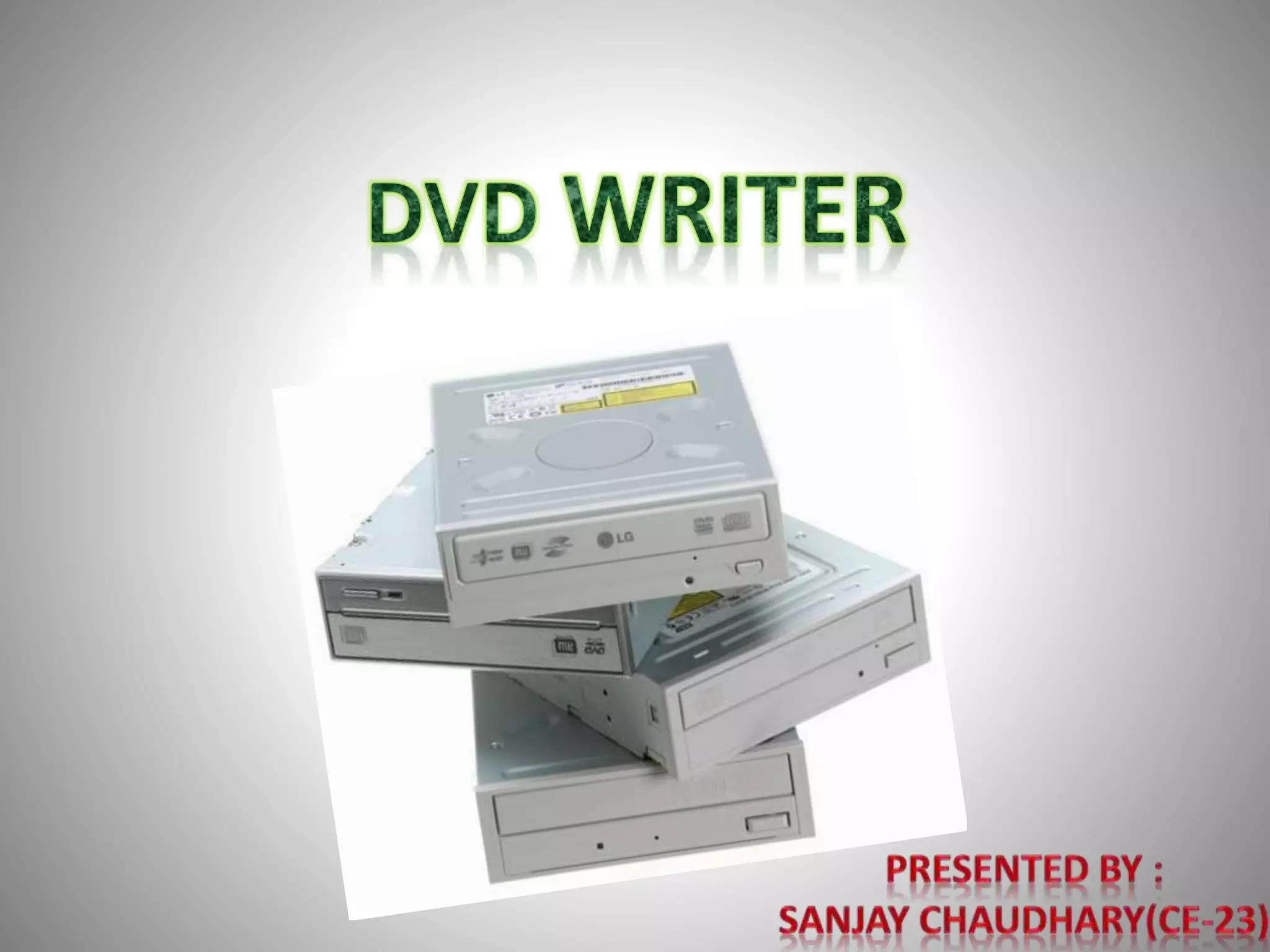
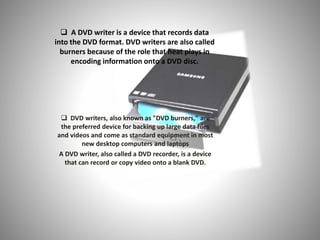

 A DVD writer is a device that records data
into the DVD format. DVD writers are also called
burners because of the role that heat plays in
encoding information onto a DVD disc.
 DVD writers, also known as "DVD burners," are
the preferred device for backing up large data files
and videos and come as standard equipment in most
new desktop computers and laptops
A DVD writer, also called a DVD recorder, is a device
that can record or copy video onto a blank DVD.
History
• DVD (Digital Versatile Disc) technology was
first introduced to consumers in the United
States in 1997, offering better quality video
and audio than VHS tapes could offer. By
2005, DVD technology effectively rendered
VHS obsolete. Electronics manufacturers soon
began selling external DVD writers and
internal DVD writers to be installed into
desktop computers in replacement of the CD-
R/RW drive.
FUNCTION
• DVD writers, like CD writers, use laser
technology to store data into the
"pits and lands" of tracks on the disc.
DVD writers, however, store a larger
amount of data than CD writers. This
is because DVDs have smaller tracks
than CDs, and contain more of them.
Features
Because DVD writers can store a
larger amount of data onto DVDs
than CD writers can store onto CDs,
DVD writers allow consumers to back
up large data files, audio, and video.
DVDs can store 4.7GB of data (two
hours of video) or 9.4 GB, depending
on whether the DVD is "dual-layer,"
while CDs are limited to storing
roughly 700MB of data/audio. DVD
writers also feature a more
sophisticated error-correction
system than do CD writers.
Laser & Optics
• The most important part is an optical path, placed in a pickup head (PUH), usually consisting
of semiconductor laser, a lens for guiding the laser beam, and photodiodes detecting the light
reflection from disc's surface.
• Initially, CD lasers with a wavelength of 780 nm were used, being within infrared range. For
DVDs, the wavelength was reduced to 650 nm (red color), and the wavelength for Blu-ray
Disc was reduced to 405 nm (violet color).
• Two main servomechanisms are used, the first one to maintain a correct distance between
lens and disc, and ensure the laser beam is focused on a small laser spot on the disc. The
second servo moves a head along the disc's radius, keeping the beam on a groove, a
continuous spiral data path.
• On read only media (ROM), during the manufacturing process the groove, made of pits, is
pressed on a flat surface, called land. Because the depth of the pits is approximately one-
quarter to one-sixth of the laser's wavelength, the reflected beam's phase is shifted in
relation to the incoming reading beam, causing mutual destructive interference and reducing
the reflected beam's intensity. This is detected by photodiodes that output electrical signals.
Loading Mechanism
• Currenty we use either a tray-loading mechanism, where the disc is
loaded onto a motorised or manually operated tray, or a slot-
loading mechanism, where the disc is slid into a slot and drawn in
by motorized rollers. Slot-loading drives have the disadvantage
that they cannot usually accept the smaller 80 mm discs or any
non-standard sizes: however, the Wii, because of backwards
compatibility with Nintendo GameCube games,and PlayStation
,video game consoles seem to have defeated this problem, for they
are able to load standard size DVDs and 80 mm discs in the same
slot-loading drive.
• A small number of drive models, mostly compact portable units,
have a top-loading mechanism where the drive lid is opened
upwards and the disc is placed directly onto the spindle.(for
example, all PlayStation One consoles, portable CD players, and
some standalone CD recorders all feature top-loading drives).
Computer Interface
• Most internal drives for personal computers, servers and workstations are
designed to fit in a standard 5.25" drive bay and connect to their host via an ATA or
SATA interface. Additionally, there may be digital and analog outputs for Red Book
audio. The outputs may be connected via a header cable to the sound card or the
motherboard. At one time, computer software resembling cd players controlled
playback of the CD. Today the information is extracted from the disc as data, to be
played back or converted to other file formats.
• External drives usually have USB or FireWire interfaces. Some portable versions for
laptop use power themselves off batteries or off their interface bus.
• Drives with SCSI interface were made, but they are less common and tend to be
more expensive, because of the cost of their interface chipsets, more complex SCSI
connectors, and small volume of sales.
• When the optical disc drive was first developed, it was not easy to add to
computer systems. Some computers such as the IBM PS/2 were standardizing on
the 3.5" floppy and 3.5" hard disk, and did not include a place for a large internal
device.
Types
• DVD writers can be external or internal and read and write
up to three standard formats: DVD-R/RW, DVD+R/RW, and
DVD-RAM. The "R" stands for "recordable," meaning that
the device supports discs that can be written only once.
The "RW" indicates that the writer supports rewriteable
discs, which can be re-written up to 1000 times. The "+"
and "-" formats are essentially the same, except they use
different methods to format rewriteable discs, with the "+"
format using the fastest method. Unless the DVD writer
indicates that it supports the "+" format, the writer will not
be able to write to "+" discs. The DVD-RAM format,
however, allows real-time drag-and-drop capability,
eliminating the need for a "burn" process to store data.
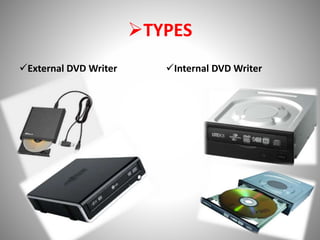
TYPES
External DVD Writer Internal DVD Writer
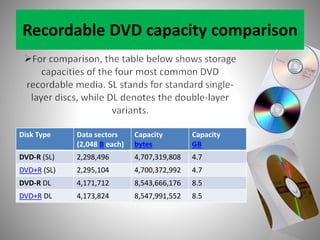
Recordable DVD capacity comparison
Disk Type Data sectors
(2,048 B each)
Capacity
bytes
Capacity
GB
DVD-R (SL) 2,298,496 4,707,319,808 4.7
DVD+R (SL) 2,295,104 4,700,372,992 4.7
DVD-R DL 4,171,712 8,543,666,176 8.5
DVD+R DL 4,173,824 8,547,991,552 8.5
Consideration
• DVD writers come in several speeds, with most
writers being 16x. When purchasing blank DVDs,
it is important to be sure that the format is
supported by the DVD writer and that the
maximum speed of the DVDs match the
maximum speed of the DVD writer. When
purchasing an external DVD writer, a Firewire
cable or a USB 2.0 cable is necessary to properly
connect the device. All DVD writers will require
software to write data, although most come with
complimentary software.
WORKING
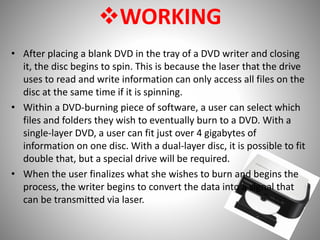
• After placing a blank DVD in the tray of a DVD writer and closing
it, the disc begins to spin. This is because the laser that the drive
uses to read and write information can only access all files on the
disc at the same time if it is spinning.
• Within a DVD-burning piece of software, a user can select which
files and folders they wish to eventually burn to a DVD. With a
single-layer DVD, a user can fit just over 4 gigabytes of
information on one disc. With a dual-layer disc, it is possible to fit
double that, but a special drive will be required.
• When the user finalizes what she wishes to burn and begins the
process, the writer begins to convert the data into a signal that
can be transmitted via laser.
WORKING
• A circular track of data is contained on every
writable layer of a DVD. Via the drive's laser, data is
transferred to each track of data until full. After all
data has been transmitted, the disc is finalized,
which means that its contents can no longer be
changed (unless it is specifically noted as a rewritable
disc, and the user is burning with a rewritable drive,
both of which require a different kind of laser). The
disc and its contents can then be read on any DVD-
ROM drive connected to a computer.
Dvd writer

Dvd writer

  • 2.
     A DVDwriter is a device that records data into the DVD format. DVD writers are also called burners because of the role that heat plays in encoding information onto a DVD disc.  DVD writers, also known as "DVD burners," are the preferred device for backing up large data files and videos and come as standard equipment in most new desktop computers and laptops A DVD writer, also called a DVD recorder, is a device that can record or copy video onto a blank DVD.
  • 3.
    History • DVD (DigitalVersatile Disc) technology was first introduced to consumers in the United States in 1997, offering better quality video and audio than VHS tapes could offer. By 2005, DVD technology effectively rendered VHS obsolete. Electronics manufacturers soon began selling external DVD writers and internal DVD writers to be installed into desktop computers in replacement of the CD- R/RW drive.
  • 4.
    FUNCTION • DVD writers,like CD writers, use laser technology to store data into the "pits and lands" of tracks on the disc. DVD writers, however, store a larger amount of data than CD writers. This is because DVDs have smaller tracks than CDs, and contain more of them.
  • 5.
    Features Because DVD writerscan store a larger amount of data onto DVDs than CD writers can store onto CDs, DVD writers allow consumers to back up large data files, audio, and video. DVDs can store 4.7GB of data (two hours of video) or 9.4 GB, depending on whether the DVD is "dual-layer," while CDs are limited to storing roughly 700MB of data/audio. DVD writers also feature a more sophisticated error-correction system than do CD writers.
  • 6.
    Laser & Optics •The most important part is an optical path, placed in a pickup head (PUH), usually consisting of semiconductor laser, a lens for guiding the laser beam, and photodiodes detecting the light reflection from disc's surface. • Initially, CD lasers with a wavelength of 780 nm were used, being within infrared range. For DVDs, the wavelength was reduced to 650 nm (red color), and the wavelength for Blu-ray Disc was reduced to 405 nm (violet color). • Two main servomechanisms are used, the first one to maintain a correct distance between lens and disc, and ensure the laser beam is focused on a small laser spot on the disc. The second servo moves a head along the disc's radius, keeping the beam on a groove, a continuous spiral data path. • On read only media (ROM), during the manufacturing process the groove, made of pits, is pressed on a flat surface, called land. Because the depth of the pits is approximately one- quarter to one-sixth of the laser's wavelength, the reflected beam's phase is shifted in relation to the incoming reading beam, causing mutual destructive interference and reducing the reflected beam's intensity. This is detected by photodiodes that output electrical signals.
  • 7.
    Loading Mechanism • Currentywe use either a tray-loading mechanism, where the disc is loaded onto a motorised or manually operated tray, or a slot- loading mechanism, where the disc is slid into a slot and drawn in by motorized rollers. Slot-loading drives have the disadvantage that they cannot usually accept the smaller 80 mm discs or any non-standard sizes: however, the Wii, because of backwards compatibility with Nintendo GameCube games,and PlayStation ,video game consoles seem to have defeated this problem, for they are able to load standard size DVDs and 80 mm discs in the same slot-loading drive. • A small number of drive models, mostly compact portable units, have a top-loading mechanism where the drive lid is opened upwards and the disc is placed directly onto the spindle.(for example, all PlayStation One consoles, portable CD players, and some standalone CD recorders all feature top-loading drives).
  • 8.
    Computer Interface • Mostinternal drives for personal computers, servers and workstations are designed to fit in a standard 5.25" drive bay and connect to their host via an ATA or SATA interface. Additionally, there may be digital and analog outputs for Red Book audio. The outputs may be connected via a header cable to the sound card or the motherboard. At one time, computer software resembling cd players controlled playback of the CD. Today the information is extracted from the disc as data, to be played back or converted to other file formats. • External drives usually have USB or FireWire interfaces. Some portable versions for laptop use power themselves off batteries or off their interface bus. • Drives with SCSI interface were made, but they are less common and tend to be more expensive, because of the cost of their interface chipsets, more complex SCSI connectors, and small volume of sales. • When the optical disc drive was first developed, it was not easy to add to computer systems. Some computers such as the IBM PS/2 were standardizing on the 3.5" floppy and 3.5" hard disk, and did not include a place for a large internal device.
  • 9.
    Types • DVD writerscan be external or internal and read and write up to three standard formats: DVD-R/RW, DVD+R/RW, and DVD-RAM. The "R" stands for "recordable," meaning that the device supports discs that can be written only once. The "RW" indicates that the writer supports rewriteable discs, which can be re-written up to 1000 times. The "+" and "-" formats are essentially the same, except they use different methods to format rewriteable discs, with the "+" format using the fastest method. Unless the DVD writer indicates that it supports the "+" format, the writer will not be able to write to "+" discs. The DVD-RAM format, however, allows real-time drag-and-drop capability, eliminating the need for a "burn" process to store data.
  • 10.
    TYPES External DVD WriterInternal DVD Writer
  • 11.
    Recordable DVD capacitycomparison Disk Type Data sectors (2,048 B each) Capacity bytes Capacity GB DVD-R (SL) 2,298,496 4,707,319,808 4.7 DVD+R (SL) 2,295,104 4,700,372,992 4.7 DVD-R DL 4,171,712 8,543,666,176 8.5 DVD+R DL 4,173,824 8,547,991,552 8.5
  • 12.
    Consideration • DVD writerscome in several speeds, with most writers being 16x. When purchasing blank DVDs, it is important to be sure that the format is supported by the DVD writer and that the maximum speed of the DVDs match the maximum speed of the DVD writer. When purchasing an external DVD writer, a Firewire cable or a USB 2.0 cable is necessary to properly connect the device. All DVD writers will require software to write data, although most come with complimentary software.
  • 13.
    WORKING • After placinga blank DVD in the tray of a DVD writer and closing it, the disc begins to spin. This is because the laser that the drive uses to read and write information can only access all files on the disc at the same time if it is spinning. • Within a DVD-burning piece of software, a user can select which files and folders they wish to eventually burn to a DVD. With a single-layer DVD, a user can fit just over 4 gigabytes of information on one disc. With a dual-layer disc, it is possible to fit double that, but a special drive will be required. • When the user finalizes what she wishes to burn and begins the process, the writer begins to convert the data into a signal that can be transmitted via laser.
  • 14.
    WORKING • A circulartrack of data is contained on every writable layer of a DVD. Via the drive's laser, data is transferred to each track of data until full. After all data has been transmitted, the disc is finalized, which means that its contents can no longer be changed (unless it is specifically noted as a rewritable disc, and the user is burning with a rewritable drive, both of which require a different kind of laser). The disc and its contents can then be read on any DVD- ROM drive connected to a computer.