Part2: Computer Systems Chapter 2: Basic Software
File Management Helps the user to keep track of data and programs Most data is stored in auxiliary storage devices, file handling plays an important role in data management
1.  File system An OS component that allows the user or  programmer to create, delete, modify, and  manipulate files and programs by name File concept and configuration in low-end computers Files simple record character strings There is no difference between data and programs Cluster – basic unit of disk space allocation, with one or more contiguous sectors Directory – list of files stored on a disk or other device. Often used to convert a file name to a physical address File Management
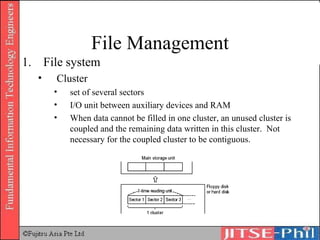
File Management File system Cluster  set of several sectors I/O unit between auxiliary devices and RAM When data cannot be filled in one cluster, an unused cluster is coupled and the remaining data written in this cluster.  Not necessary for the coupled cluster to be contiguous.
File Management File system Directory Register where the file management information is recorded and stored Hierarchical structure Root, directories (folders), sub-directories (sub-folders)
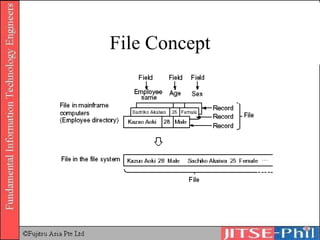
File Concept
File Management File operation Directory is automatically setup by the OS when PCs or workstations start up It is a root directory, user have access to it User has to move to target directory in order to access a directory or file Directory - Home directory : can be used by the user; user can create  and access the sub-directories and files - Current directory: directory in current use
File Management Path: the route along which to search for that file is specified. - Absolute path: path to target directory or file from the  root directory - Relative path: path to target directory or file from the  current directory Command - A request to the OS for a service (DOS command) Extension and wild cards: E.g. dir *.doc – show all files with extension DOC
File Management File operations in GUI environments
File Management Hierarchical Structure . DIR 1 DIR 2 DIR N FILE 1 FILE 2 FILE N DIR 2.1 DIR 2.N FILE 2.1 FILE 2.N
Roles in File Management Roles Maintain File Allocation Table (FAT) Chain of clusters for each directory or file Properties for each directory or file Read/Write Operations Exclusive write Multiple reads Backup Operation
Roles in File Management Roles Utilities List, copy, move, delete, and rename Backup and recovery Disk diagnose Defragmentation
Security Management Protection of a computer and its resources from unauthorised access by persons, acts, or influences and that includes many sub-functions, such as creating, deleting, and controlling security services and mechanisms
Aims of Security Management Confidentiality Against illegal access (e.g. data encryption) Integrity Against unauthorized modification (e.g. security access list) Availability Prevents the obstruction of the use by a legitimate user
Security Management OS performs security control through: Access control Permissions assigned to legitimate users, who have access to computer resources Flow control Prevents leakage of information to users that are not authorized as legitimate users Authentication Validating the user (login)
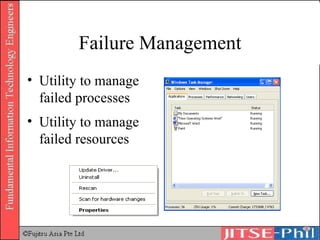
Failure Management Utility to manage failed processes Utility to manage failed resources
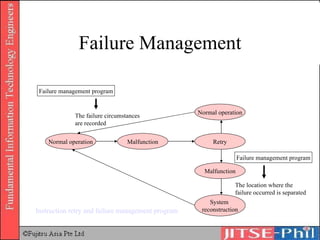
Failure Management Concerned with impact of system failure: Instruction Retry Automatically retries execution of specific instructions when failure occurs Failure Management Program Failure circumstances are recorded if computer operates normally after retry If failure occurs again after retries,  location where failure occurred is isolated Reconstruct the system
Failure Management Normal operation Retry Malfunction System  reconstruction Malfunction Normal operation Failure management program Failure management program The failure circumstances are recorded The location where the failure occurred is separated Instruction retry and failure management program
Supervisor A monitoring program functioning as the central part of OS Contains a command processor or shell, an I/O control system (IOCS), a file system, and interrupt handler routines Performs resource distribution and program control to implement TSS (Time sharing system), multi-programming, etc.
Where to Get More Information Deitel, H.M., 1990,  Operating Systems . (Second Edition). Addison Wesley.  Silberschatz, A. and Galvin, P.B., 1994,  Operating System Concepts . Addison Wesley.  Tanenbaum, A., 1995,  Distributed Operating Systems . Prentice Hall. Davis Rajkumar, 2001,  Operating Systems A systematic View  (Fifth Edition), Addison Wesley
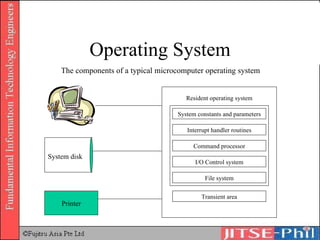
Operating System System disk Printer System constants and parameters Interrupt handler routines Command processor I/O Control system File system Transient area The components of a typical microcomputer operating system Resident operating system
OS Categories Real-time OS Single-user, single-task OS Single-user, multi-task OS Network OS Multi-user OS
Real-time OS To control machinery, scientific instruments and industrial systems Usually a "sealed box" Very little user-interface capability Manage resources such that each operation executes in precise amount of time
Single-user, Single-task OS No user differentiation Only one task can execute at anytime Example Palm OS
Single-user, Multi-task OS No user differentiation Multiple tasks can execute at anytime Example: Windows 95
Network OS User differentiation Separate software and hardware profiles Only one user can operate at anytime Resources are shared simultaneously Example: Windows 2000/XP
Multi-user OS User differentiation Separate working segment Separate software and hardware profiles Resources are shared simultaneously Example Unix
Types of OS Multiple Virtual Storage (MVS) UNIX Windows MacOS Linux
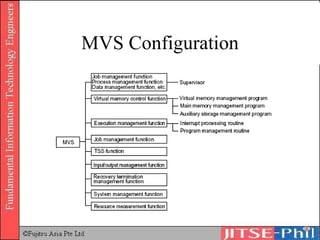
Multiple Virtual Storage (MVS) An old IBM mainframe operating system that continues to be used for some systems. The most commonly-used operating system used on IBM mainframes; other operating systems are VM and DOS/VSE. http://search390.techtarget.com/sDefinition/0,,sid10_gci212618,00.html
MVS Configuration
Multiple Virtual Storage (MVS) Characteristics: OS for high-end general-purpose computers Provides multi-user function, which enables simultaneous MVS use by multiple users Provides multi-task function, which enables simultaneous processing of multiple tasks Adopts approach of multiple address space One logical address space reaches up to 2GB Contains all file organization functions
UNIX An interactive time-sharing operating system invented in 1969 by Ken Thompson after Bell Labs left the Multics project, originally so he could play games on his scavenged PDP-7.  Dennis Ritchie, the inventor of C, is considered a co-author of the system. http://whatis.techtarget.com/definition/0,289893,sid9_gci213253,00.html
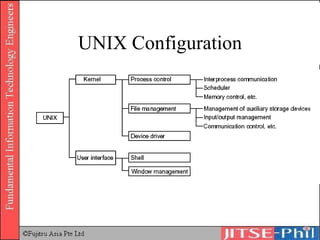
UNIX Configuration
UNIX An OS that can be used by multiple users, which each user can simultaneously perform multiple job processing Contains control program called Kernel: Controls the system resources Performs process management Shells and commands: Interprets commands input by the users and calls the kernel function Execute a program called shell script (which combines commands)
UNIX Characteristics Distributed processing is presupposed Developed assuming that would be used in workstations Provide multi-user functions Procedure called log-in: receive service; log-out: report completion Multiprocessing function (multi-programming) Communication protocol TCP/IP used to connect computers of different manufacturers Use of commands in an interactive mode Instruction rights in interactive mode – human interface e.g. X-Window Program development tools are abundant
Unix Family Tree UNICS (Uniplexed Operating and Computing System) 7 th  Edition [1978] BSD (Berkeley Software Distribution) [1969] 5 th  Edition [1973] 6 th  Edition [1976] SVR5 (System V) [1979] [1983] Sun  OS 5.x/Solaris HP  HP-UX IBM  AIX SGI  IRIX DEC  Digital UNIX (formerly OSF/1) Sun  OS 4.x DEC  Ultrix Canon  NextStep Apple  OS X
Why UNIX? Universally used for high-end number crunching applications (e.g. CAD/CAM and scientific visualisation) Preferred OS platform for running internet services such as WWW, DNS, DHCP, NetNews, Mail, etc. due to networking being in the kernel for a long time now Easy access to the core of the OS (the kernel) via C, C++, Perl, etc. Stable operating environment The availability of a network extensible window system The open system philosophy
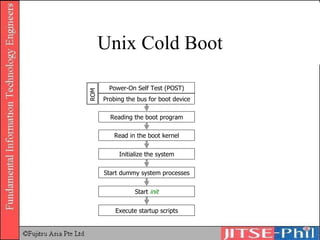
Unix Cold Boot Power-On Self Test (POST) Probing the bus for boot device ROM Reading the boot program Read in the boot kernel Initialize the system Start dummy system processes Start  init Execute startup scripts
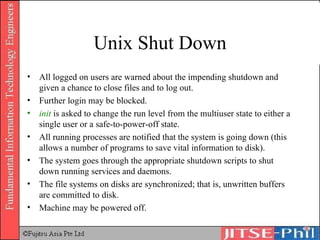
Unix Shut Down All logged on users are warned about the impending shutdown and given a chance to close files and to log out. Further login may be blocked. init  is asked to change the run level from the multiuser state to either a single user or a safe-to-power-off state. All running processes are notified that the system is going down (this allows a number of programs to save vital information to disk). The system goes through the appropriate shutdown scripts to shut down running services and daemons. The file systems on disks are synchronized; that is, unwritten buffers are committed to disk. Machine may be powered off.
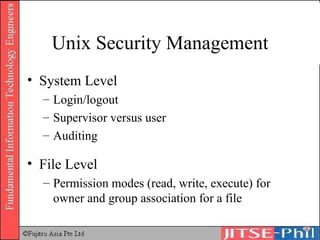
Unix Security Management System Level Login/logout Supervisor versus user Auditing File Level Permission modes (read, write, execute) for owner and group association for a file
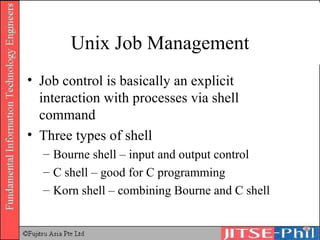
Unix Job Management Job control is basically an explicit interaction with processes via shell command Three types of shell Bourne shell – input and output control C shell – good for C programming Korn shell – combining Bourne and C shell
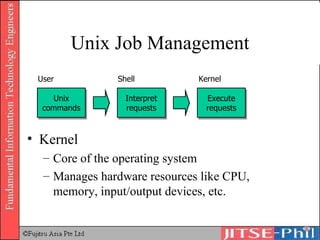
Unix Job Management Kernel Core of the operating system Manages hardware resources like CPU, memory, input/output devices, etc. Unix commands Interpret requests Execute requests User Shell Kernel
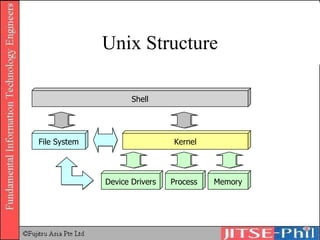
Unix Structure Shell File System Kernel Device Drivers Process Memory
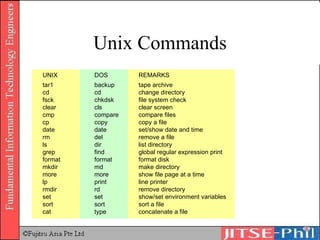
Unix Commands UNIX DOS REMARKS tar1 backup tape archive cd cd change directory fsck chkdsk file system check clear cls clear screen cmp compare compare files cp copy copy a file date date set/show date and time rm del remove a file ls dir list directory grep find global regular expression print format format format disk mkdir md make directory more more show file page at a time lp print line printer rmdir rd remove directory set set show/set environment variables sort sort sort a file cat type concatenate a file
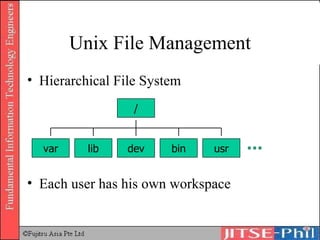
Unix File Management Hierarchical File System Each user has his own workspace / var lib dev bin usr
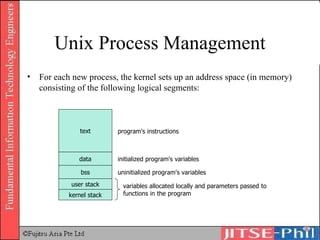
Unix Process Management For each new process, the kernel sets up an address space (in memory) consisting of the following logical segments: text data bss user stack kernel stack program's instructions initialized program's variables uninitialized program's variables variables allocated locally and parameters passed to functions in the program
Unix Process Management Mode switching Kernel-mode  – those processes carrying out kernel instructions User-mode  – those processes, created directly by the users, whose instructions are currently executing in the CPU At any given time, a process can be in user-mode, kernel-mode, sleeping, waiting on I/O, and so on
Unix Process Management The  process scheduling subsystem  within the kernel uses a time slice of typically 20ms to rotate among currently running processes. Each process is given its share of the CPU for 20ms, then left to sleep until its turn again at the CPU. This process of moving processes in and out of the CPU is called  context switching. The kernel makes the operating system appear to be  multi-tasking  (i.e. running processes concurrently) via the use of efficient context-switching.
Unix Process Management Process States Resident  – currently on the run queue Sleeping  – waiting on a pipe, completion of I/O, terminal input, memory Zombie  – a process with no swappable image but a structure in memory Stop
Unix Memory Management Virtual memory (VM) VM =  Physical RAM + Swap space (disk space) Pages The Memory is divided into manageable chunks called pages (usually 4KB or 8KB per page)
Unix Memory Management Caching When the kernel loads a page from RAM for use by the CPU, it also prefetches a number of adjacent pages and stores them in the cache. Since programs typically use sequential memory access, the next page needed by the CPU can now be supplied very rapidly from the cache.
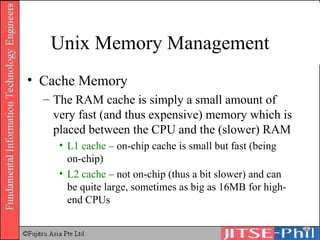
Unix Memory Management Cache Memory The RAM cache is simply a small amount of very fast (and thus expensive) memory which is placed between the CPU and the (slower) RAM L1 cache  – on-chip cache is small but fast (being on-chip) L2 cache  – not on-chip (thus a bit slower) and can be quite large, sometimes as big as 16MB for high-end CPUs
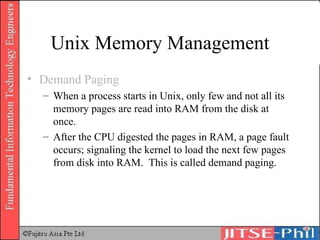
Unix Memory Management Demand Paging When a process starts in Unix, only few and not all its memory pages are read into RAM from the disk at once. After the CPU digested the pages in RAM, a page fault occurs; signaling the kernel to load the next few pages from disk into RAM.  This is called demand paging.
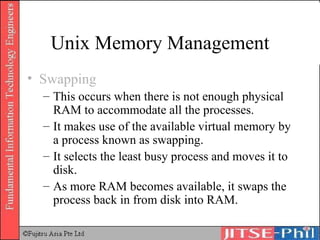
Unix Memory Management Swapping This occurs when there is not enough physical RAM to accommodate all the processes. It makes use of the available virtual memory by a process known as swapping. It selects the least busy process and moves it to disk. As more RAM becomes available, it swaps the process back in from disk into RAM.
Windows More than half of PCs around the world is Windows Windows Windows 95/98//ME Windows NT/2000/XP (http://www.microsoft.com/windowsxp/default.asp) http://www.microsoft.com/ms.htm http://www.mactech.com/macintosh-c/chap04-1.html
Win2K
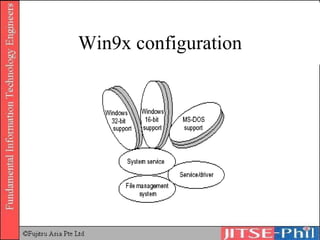
Win9x configuration
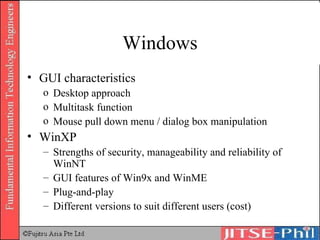
Windows GUI characteristics Desktop approach Multitask function Mouse pull down menu / dialog box manipulation WinXP Strengths of security, manageability and reliability of WinNT GUI features of Win9x and WinME Plug-and-play Different versions to suit different users (cost)
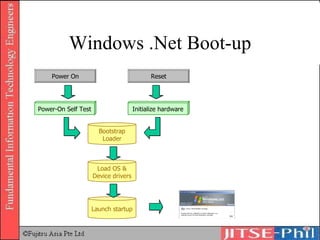
Windows .Net Boot-up Power On Bootstrap Loader Load OS & Device drivers Launch startup Power-On Self Test Reset Initialize hardware
Windows .Net Security Management System Level Login/logout Enterprise administrator, local administrator, backup operator, user User account and computer account Security policy and group policy Auditing Hibernation
Windows .Net Security Management System Level RAID 0, RAID 1, and RAID 5 File Level Permission modes Data encryption Printer Level Permission modes
Windows .Net Job Management Two interfaces Command interface Graphical interface Startup versus scheduled
Windows .Net File Management Hierarchical file system Windows explorer interface Virtual file system  Compression
Windows .Net Disk Management Enhanced check disk utility Volume shadow copies and shadow copy restore Virtual disk services Area network (SAN) participation
Windows .Net Process Management 64-bit operating system Pre-emptive and prioritized multi-tasking Symmetric multi-processing (SMP)
Windows .Net Memory Management Up to 256GB RAM Dynamic virtual memory Memory mirroring Hot-add memory support Non-uniform memory access
Windows .Net Failure Management Update service patches and hot fixes without restart Automated system recovery
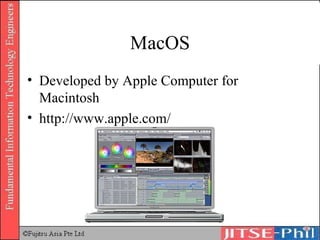
MacOS Developed by Apple Computer for Macintosh http://www.apple.com/
MacOS Almost all operations can be performed with the mouse Consistent GUI GUI elements are abundant, hence claims to be “easy” for beginners Different versions for different types of users Mac OS X Mac OS X Server Rhapsody Latest Mac OS X 10.1.1 provides improved USB, FireWire, and Networking support
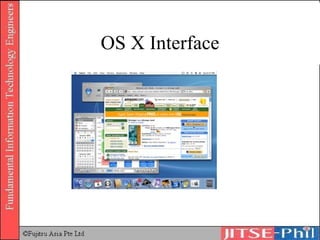
OS X Interface
OS X Features Multi-user Virtual file system Symmetric multi-processing (SMP) Basic threading packages Pre-emptive multi-tasking Virtual memory with memory protection and dynamic memory allocation
Linux UNIX-based OS launched in 1991 by Linus Torvalds The software is free: source code released to public Copyright is protected by GPL (GNU Public License)
Network OS OS used to construct LANs SNMP functions Netware Developed by Novell File sharing / printer sharing functions LAN Manager Distributed file system developed and supported by Microsoft
Middleware A class of software that helps with the translation of messages and communications between client and servers Any set of routines or functions that allow two dissimilar programs to interoperate Database Management System (DBMS) Communication Management System Software Development Support Tool Operation Management Tool Object Request Broker (ORB)
Database Management System Aimed at efficient database creation/maintenance/operation 3 main characteristics Integrity: prevents generation of data inconsistently Security: protect data secrecy by setting database access rights Failure recovery: failure and recovery plan to recover database promptly in the event that database fails
Communication  Management System Aimed at supporting computer network construction/operation 3 main characteristics Network Independence Network Flexibility: provides flexibility to devices and network mechanism; construction of network systems with high expandability is enabled Network Transparency
Software Development  Support Tool Supports computer-aided software development Aimed at achieving development labour savings and software quality improvements CASE tools Upstream CASE tools: support high-end process (e.g. analysis, design, etc) of software development Downstream CASE tools: support lower-end process (e.g. programming, testing, etc)of software development Maintenance CASE tools: support operation and maintenance of developed software Integrated CASE tools: support overall functions from upstream to maintenance CASE tools
Operation Management Tool Aimed at supporting the operation duties of system operation Characteristics Multiplicity optimization of multi-programming Allocation of system resources to reduce response time at peak periods Grasp of operating conditions of system resources Recording of a ccounting information and creation of summaries Logging of operation records
Object Request Broker It is the programming technique that acts as a "broker" between a client request for a service from a distributed object or component and the completion of that request Having ORB support in a network means a client program can request a service without having to understand where the server is in a distributed network or exactly what the interface to the server program looks like Components can find out about each other and exchange interface information as they are running An ORB uses the CORBA Interface Repository to find out how to locate and communicate with a requested component http://searchmiddleware.techtarget.com/sDefinition/0,,sid26_gci214209,00.html

16. Computer Systems Basic Software 2

  • 1.
    Part2: Computer SystemsChapter 2: Basic Software
  • 2.
    File Management Helpsthe user to keep track of data and programs Most data is stored in auxiliary storage devices, file handling plays an important role in data management
  • 3.
    1. Filesystem An OS component that allows the user or programmer to create, delete, modify, and manipulate files and programs by name File concept and configuration in low-end computers Files simple record character strings There is no difference between data and programs Cluster – basic unit of disk space allocation, with one or more contiguous sectors Directory – list of files stored on a disk or other device. Often used to convert a file name to a physical address File Management
  • 4.
    File Management Filesystem Cluster set of several sectors I/O unit between auxiliary devices and RAM When data cannot be filled in one cluster, an unused cluster is coupled and the remaining data written in this cluster. Not necessary for the coupled cluster to be contiguous.
  • 5.
    File Management Filesystem Directory Register where the file management information is recorded and stored Hierarchical structure Root, directories (folders), sub-directories (sub-folders)
  • 6.
  • 7.
    File Management Fileoperation Directory is automatically setup by the OS when PCs or workstations start up It is a root directory, user have access to it User has to move to target directory in order to access a directory or file Directory - Home directory : can be used by the user; user can create and access the sub-directories and files - Current directory: directory in current use
  • 8.
    File Management Path:the route along which to search for that file is specified. - Absolute path: path to target directory or file from the root directory - Relative path: path to target directory or file from the current directory Command - A request to the OS for a service (DOS command) Extension and wild cards: E.g. dir *.doc – show all files with extension DOC
  • 9.
    File Management Fileoperations in GUI environments
  • 10.
    File Management HierarchicalStructure . DIR 1 DIR 2 DIR N FILE 1 FILE 2 FILE N DIR 2.1 DIR 2.N FILE 2.1 FILE 2.N
  • 11.
    Roles in FileManagement Roles Maintain File Allocation Table (FAT) Chain of clusters for each directory or file Properties for each directory or file Read/Write Operations Exclusive write Multiple reads Backup Operation
  • 12.
    Roles in FileManagement Roles Utilities List, copy, move, delete, and rename Backup and recovery Disk diagnose Defragmentation
  • 13.
    Security Management Protectionof a computer and its resources from unauthorised access by persons, acts, or influences and that includes many sub-functions, such as creating, deleting, and controlling security services and mechanisms
  • 14.
    Aims of SecurityManagement Confidentiality Against illegal access (e.g. data encryption) Integrity Against unauthorized modification (e.g. security access list) Availability Prevents the obstruction of the use by a legitimate user
  • 15.
    Security Management OSperforms security control through: Access control Permissions assigned to legitimate users, who have access to computer resources Flow control Prevents leakage of information to users that are not authorized as legitimate users Authentication Validating the user (login)
  • 16.
    Failure Management Utilityto manage failed processes Utility to manage failed resources
  • 17.
    Failure Management Concernedwith impact of system failure: Instruction Retry Automatically retries execution of specific instructions when failure occurs Failure Management Program Failure circumstances are recorded if computer operates normally after retry If failure occurs again after retries, location where failure occurred is isolated Reconstruct the system
  • 18.
    Failure Management Normaloperation Retry Malfunction System reconstruction Malfunction Normal operation Failure management program Failure management program The failure circumstances are recorded The location where the failure occurred is separated Instruction retry and failure management program
  • 19.
    Supervisor A monitoringprogram functioning as the central part of OS Contains a command processor or shell, an I/O control system (IOCS), a file system, and interrupt handler routines Performs resource distribution and program control to implement TSS (Time sharing system), multi-programming, etc.
  • 20.
    Where to GetMore Information Deitel, H.M., 1990, Operating Systems . (Second Edition). Addison Wesley. Silberschatz, A. and Galvin, P.B., 1994, Operating System Concepts . Addison Wesley. Tanenbaum, A., 1995, Distributed Operating Systems . Prentice Hall. Davis Rajkumar, 2001, Operating Systems A systematic View (Fifth Edition), Addison Wesley
  • 21.
    Operating System Systemdisk Printer System constants and parameters Interrupt handler routines Command processor I/O Control system File system Transient area The components of a typical microcomputer operating system Resident operating system
  • 22.
    OS Categories Real-timeOS Single-user, single-task OS Single-user, multi-task OS Network OS Multi-user OS
  • 23.
    Real-time OS Tocontrol machinery, scientific instruments and industrial systems Usually a "sealed box" Very little user-interface capability Manage resources such that each operation executes in precise amount of time
  • 24.
    Single-user, Single-task OSNo user differentiation Only one task can execute at anytime Example Palm OS
  • 25.
    Single-user, Multi-task OSNo user differentiation Multiple tasks can execute at anytime Example: Windows 95
  • 26.
    Network OS Userdifferentiation Separate software and hardware profiles Only one user can operate at anytime Resources are shared simultaneously Example: Windows 2000/XP
  • 27.
    Multi-user OS Userdifferentiation Separate working segment Separate software and hardware profiles Resources are shared simultaneously Example Unix
  • 28.
    Types of OSMultiple Virtual Storage (MVS) UNIX Windows MacOS Linux
  • 29.
    Multiple Virtual Storage(MVS) An old IBM mainframe operating system that continues to be used for some systems. The most commonly-used operating system used on IBM mainframes; other operating systems are VM and DOS/VSE. http://search390.techtarget.com/sDefinition/0,,sid10_gci212618,00.html
  • 30.
  • 31.
    Multiple Virtual Storage(MVS) Characteristics: OS for high-end general-purpose computers Provides multi-user function, which enables simultaneous MVS use by multiple users Provides multi-task function, which enables simultaneous processing of multiple tasks Adopts approach of multiple address space One logical address space reaches up to 2GB Contains all file organization functions
  • 32.
    UNIX An interactivetime-sharing operating system invented in 1969 by Ken Thompson after Bell Labs left the Multics project, originally so he could play games on his scavenged PDP-7. Dennis Ritchie, the inventor of C, is considered a co-author of the system. http://whatis.techtarget.com/definition/0,289893,sid9_gci213253,00.html
  • 33.
  • 34.
    UNIX An OSthat can be used by multiple users, which each user can simultaneously perform multiple job processing Contains control program called Kernel: Controls the system resources Performs process management Shells and commands: Interprets commands input by the users and calls the kernel function Execute a program called shell script (which combines commands)
  • 35.
    UNIX Characteristics Distributedprocessing is presupposed Developed assuming that would be used in workstations Provide multi-user functions Procedure called log-in: receive service; log-out: report completion Multiprocessing function (multi-programming) Communication protocol TCP/IP used to connect computers of different manufacturers Use of commands in an interactive mode Instruction rights in interactive mode – human interface e.g. X-Window Program development tools are abundant
  • 36.
    Unix Family TreeUNICS (Uniplexed Operating and Computing System) 7 th Edition [1978] BSD (Berkeley Software Distribution) [1969] 5 th Edition [1973] 6 th Edition [1976] SVR5 (System V) [1979] [1983] Sun OS 5.x/Solaris HP HP-UX IBM AIX SGI IRIX DEC Digital UNIX (formerly OSF/1) Sun OS 4.x DEC Ultrix Canon NextStep Apple OS X
  • 37.
    Why UNIX? Universallyused for high-end number crunching applications (e.g. CAD/CAM and scientific visualisation) Preferred OS platform for running internet services such as WWW, DNS, DHCP, NetNews, Mail, etc. due to networking being in the kernel for a long time now Easy access to the core of the OS (the kernel) via C, C++, Perl, etc. Stable operating environment The availability of a network extensible window system The open system philosophy
  • 38.
    Unix Cold BootPower-On Self Test (POST) Probing the bus for boot device ROM Reading the boot program Read in the boot kernel Initialize the system Start dummy system processes Start init Execute startup scripts
  • 39.
    Unix Shut DownAll logged on users are warned about the impending shutdown and given a chance to close files and to log out. Further login may be blocked. init is asked to change the run level from the multiuser state to either a single user or a safe-to-power-off state. All running processes are notified that the system is going down (this allows a number of programs to save vital information to disk). The system goes through the appropriate shutdown scripts to shut down running services and daemons. The file systems on disks are synchronized; that is, unwritten buffers are committed to disk. Machine may be powered off.
  • 40.
    Unix Security ManagementSystem Level Login/logout Supervisor versus user Auditing File Level Permission modes (read, write, execute) for owner and group association for a file
  • 41.
    Unix Job ManagementJob control is basically an explicit interaction with processes via shell command Three types of shell Bourne shell – input and output control C shell – good for C programming Korn shell – combining Bourne and C shell
  • 42.
    Unix Job ManagementKernel Core of the operating system Manages hardware resources like CPU, memory, input/output devices, etc. Unix commands Interpret requests Execute requests User Shell Kernel
  • 43.
    Unix Structure ShellFile System Kernel Device Drivers Process Memory
  • 44.
    Unix Commands UNIXDOS REMARKS tar1 backup tape archive cd cd change directory fsck chkdsk file system check clear cls clear screen cmp compare compare files cp copy copy a file date date set/show date and time rm del remove a file ls dir list directory grep find global regular expression print format format format disk mkdir md make directory more more show file page at a time lp print line printer rmdir rd remove directory set set show/set environment variables sort sort sort a file cat type concatenate a file
  • 45.
    Unix File ManagementHierarchical File System Each user has his own workspace / var lib dev bin usr
  • 46.
    Unix Process ManagementFor each new process, the kernel sets up an address space (in memory) consisting of the following logical segments: text data bss user stack kernel stack program's instructions initialized program's variables uninitialized program's variables variables allocated locally and parameters passed to functions in the program
  • 47.
    Unix Process ManagementMode switching Kernel-mode – those processes carrying out kernel instructions User-mode – those processes, created directly by the users, whose instructions are currently executing in the CPU At any given time, a process can be in user-mode, kernel-mode, sleeping, waiting on I/O, and so on
  • 48.
    Unix Process ManagementThe process scheduling subsystem within the kernel uses a time slice of typically 20ms to rotate among currently running processes. Each process is given its share of the CPU for 20ms, then left to sleep until its turn again at the CPU. This process of moving processes in and out of the CPU is called context switching. The kernel makes the operating system appear to be multi-tasking (i.e. running processes concurrently) via the use of efficient context-switching.
  • 49.
    Unix Process ManagementProcess States Resident – currently on the run queue Sleeping – waiting on a pipe, completion of I/O, terminal input, memory Zombie – a process with no swappable image but a structure in memory Stop
  • 50.
    Unix Memory ManagementVirtual memory (VM) VM = Physical RAM + Swap space (disk space) Pages The Memory is divided into manageable chunks called pages (usually 4KB or 8KB per page)
  • 51.
    Unix Memory ManagementCaching When the kernel loads a page from RAM for use by the CPU, it also prefetches a number of adjacent pages and stores them in the cache. Since programs typically use sequential memory access, the next page needed by the CPU can now be supplied very rapidly from the cache.
  • 52.
    Unix Memory ManagementCache Memory The RAM cache is simply a small amount of very fast (and thus expensive) memory which is placed between the CPU and the (slower) RAM L1 cache – on-chip cache is small but fast (being on-chip) L2 cache – not on-chip (thus a bit slower) and can be quite large, sometimes as big as 16MB for high-end CPUs
  • 53.
    Unix Memory ManagementDemand Paging When a process starts in Unix, only few and not all its memory pages are read into RAM from the disk at once. After the CPU digested the pages in RAM, a page fault occurs; signaling the kernel to load the next few pages from disk into RAM. This is called demand paging.
  • 54.
    Unix Memory ManagementSwapping This occurs when there is not enough physical RAM to accommodate all the processes. It makes use of the available virtual memory by a process known as swapping. It selects the least busy process and moves it to disk. As more RAM becomes available, it swaps the process back in from disk into RAM.
  • 55.
    Windows More thanhalf of PCs around the world is Windows Windows Windows 95/98//ME Windows NT/2000/XP (http://www.microsoft.com/windowsxp/default.asp) http://www.microsoft.com/ms.htm http://www.mactech.com/macintosh-c/chap04-1.html
  • 56.
  • 57.
  • 58.
    Windows GUI characteristicsDesktop approach Multitask function Mouse pull down menu / dialog box manipulation WinXP Strengths of security, manageability and reliability of WinNT GUI features of Win9x and WinME Plug-and-play Different versions to suit different users (cost)
  • 59.
    Windows .Net Boot-upPower On Bootstrap Loader Load OS & Device drivers Launch startup Power-On Self Test Reset Initialize hardware
  • 60.
    Windows .Net SecurityManagement System Level Login/logout Enterprise administrator, local administrator, backup operator, user User account and computer account Security policy and group policy Auditing Hibernation
  • 61.
    Windows .Net SecurityManagement System Level RAID 0, RAID 1, and RAID 5 File Level Permission modes Data encryption Printer Level Permission modes
  • 62.
    Windows .Net JobManagement Two interfaces Command interface Graphical interface Startup versus scheduled
  • 63.
    Windows .Net FileManagement Hierarchical file system Windows explorer interface Virtual file system Compression
  • 64.
    Windows .Net DiskManagement Enhanced check disk utility Volume shadow copies and shadow copy restore Virtual disk services Area network (SAN) participation
  • 65.
    Windows .Net ProcessManagement 64-bit operating system Pre-emptive and prioritized multi-tasking Symmetric multi-processing (SMP)
  • 66.
    Windows .Net MemoryManagement Up to 256GB RAM Dynamic virtual memory Memory mirroring Hot-add memory support Non-uniform memory access
  • 67.
    Windows .Net FailureManagement Update service patches and hot fixes without restart Automated system recovery
  • 68.
    MacOS Developed byApple Computer for Macintosh http://www.apple.com/
  • 69.
    MacOS Almost alloperations can be performed with the mouse Consistent GUI GUI elements are abundant, hence claims to be “easy” for beginners Different versions for different types of users Mac OS X Mac OS X Server Rhapsody Latest Mac OS X 10.1.1 provides improved USB, FireWire, and Networking support
  • 70.
  • 71.
    OS X FeaturesMulti-user Virtual file system Symmetric multi-processing (SMP) Basic threading packages Pre-emptive multi-tasking Virtual memory with memory protection and dynamic memory allocation
  • 72.
    Linux UNIX-based OSlaunched in 1991 by Linus Torvalds The software is free: source code released to public Copyright is protected by GPL (GNU Public License)
  • 73.
    Network OS OSused to construct LANs SNMP functions Netware Developed by Novell File sharing / printer sharing functions LAN Manager Distributed file system developed and supported by Microsoft
  • 74.
    Middleware A classof software that helps with the translation of messages and communications between client and servers Any set of routines or functions that allow two dissimilar programs to interoperate Database Management System (DBMS) Communication Management System Software Development Support Tool Operation Management Tool Object Request Broker (ORB)
  • 75.
    Database Management SystemAimed at efficient database creation/maintenance/operation 3 main characteristics Integrity: prevents generation of data inconsistently Security: protect data secrecy by setting database access rights Failure recovery: failure and recovery plan to recover database promptly in the event that database fails
  • 76.
    Communication ManagementSystem Aimed at supporting computer network construction/operation 3 main characteristics Network Independence Network Flexibility: provides flexibility to devices and network mechanism; construction of network systems with high expandability is enabled Network Transparency
  • 77.
    Software Development Support Tool Supports computer-aided software development Aimed at achieving development labour savings and software quality improvements CASE tools Upstream CASE tools: support high-end process (e.g. analysis, design, etc) of software development Downstream CASE tools: support lower-end process (e.g. programming, testing, etc)of software development Maintenance CASE tools: support operation and maintenance of developed software Integrated CASE tools: support overall functions from upstream to maintenance CASE tools
  • 78.
    Operation Management ToolAimed at supporting the operation duties of system operation Characteristics Multiplicity optimization of multi-programming Allocation of system resources to reduce response time at peak periods Grasp of operating conditions of system resources Recording of a ccounting information and creation of summaries Logging of operation records
  • 79.
    Object Request BrokerIt is the programming technique that acts as a "broker" between a client request for a service from a distributed object or component and the completion of that request Having ORB support in a network means a client program can request a service without having to understand where the server is in a distributed network or exactly what the interface to the server program looks like Components can find out about each other and exchange interface information as they are running An ORB uses the CORBA Interface Repository to find out how to locate and communicate with a requested component http://searchmiddleware.techtarget.com/sDefinition/0,,sid26_gci214209,00.html

Editor's Notes

  • #18 Instruction Retry A function that automatically retries the execution of an instruction when a malfunction occurs Failure Management Program Records the failure circumstances, (if malfunction repeats) isolates location where failure occurred and reconstructs the system
  • #30 Refer to Text Page 109 & 110 for MVS Configuration and it’s Characteristics
  • #33 Refer to Text Page 110 & 111 for UNIX Configuration and it’s Characteristics
  • #56 Refer to Text Page 111 & 112 for Windows Configuration and it’s Characteristics
  • #73 Linux - a Unix-like operating system named for its author, Linus Torvalds. Linux was designed to provide personal computer users a free or very low-cost operating system comparable to traditional and usually more expensive UNIX systems. Although copyrights are held by various creators of Linux's components, Linux is distributed using the Free Software Foundation's copyleft stipulations that mean any copy is in turn freely available to others. Unlike Windows and other proprietary systems, Linux is publicly open and extendible by contributors. It is considered fast and reliable as both a Web server and a workstation and runs on many different kinds of hardware, including the Alpha, Amiga, Atari, IBM, Intel, PowerPC/Macintosh, SGI, and Sun Sparc platforms. Some vendors do sell collections, or distributions, of the Linux kernel, plus Linux drivers, applications, and utilities for a price. Linux is sometimes suggested as a possible publicly-developed alternative to the desktop predominance of Microsoft Windows. Although Linux is popular among users already familiar with UNIX, it remains far behind Windows in numbers of users.
  • #74 NetWare, made by Novell, is the most widely-installed network server operating system . Initially very successful in installing its products in large and small office local area networks (LANs), Novell has redesigned (or at least refeatured) NetWare to work successfully as part of larger and heterogeneous networks, including the Internet. NetWare's primary competitor is the Microsoft Windows NT operating system.