Scheduling
Beuth Hochschule

Summer Term 2014

!
Pictures (C) W. Stallings, if not stated otherwise

!
!
!
Operating Systems I PT / FF 14
Process Concept
• Classically, processes are executed programs that have ...

• Resource Ownership
• Process includes a virtual address space to hold the process image

• Operating system prevents unwanted interference between processes 

• Scheduling/Execution
• Process follows an execution path that may be interleaved with other processes

• Process has an execution state (Running, Ready, etc.) and a dispatching priority
and is scheduled and dispatched by the operating system

• Today, the unit of dispatching is referred to as a thread or lightweight process

• The unit of resource ownership remains the process or task
2
Operating Systems I PT / FF 14
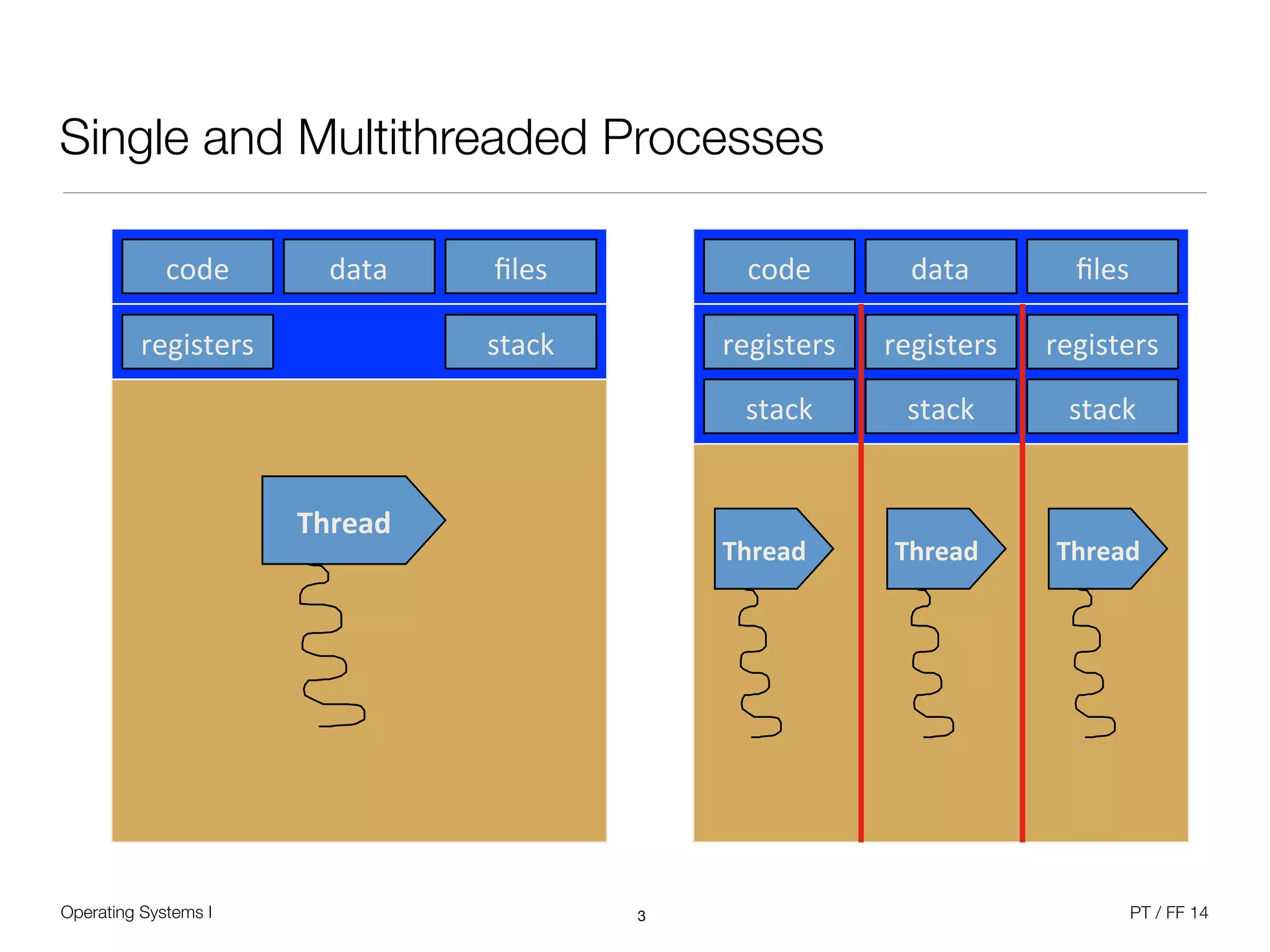
Single and Multithreaded Processes
3
code% data% files%
registers% stack%
Thread'
code% data% files%
registers%
stack%
Thread'
stack%
registers%
stack%
registers%
Thread' Thread'
Operating Systems I PT / FF 14
Scheduling
• Assign activities (processes / threads) to processor(s)

• System objectives to be considered; Response time, throughput, efficiency, ...

• Long-term scheduling: Decision to add a process to the pool of executed processes

• Example: Transition of a new process into „ready“ state; batch processing queue

• Medium-term scheduling: Decision to load process into memory for execution

• Example: Resume suspended processes from backing store

• Short-term scheduling: Decision which particular ready process will be executed

• Example: Move a process from „ready“ state into „running“ state

• I/O scheduling: Decision which process is allowed to perform device activities

• Overall goal is to minimize queuing time for all processes
4
Operating Systems I PT / FF 14
Short-Term Scheduler
• In cooperation with the dispatcher as part of the core operating system function

• Frequent fine-grained decision about what runs next, happens on:

• Clock interrupt (regular scheduling interval)

• I/O interrupts

• Operating system calls

• Signals

• Any event that blocks the currently running process / thread

• Needs decision criteria to choose the next

• User perspective vs. system perspective
5
Operating Systems I PT / FF 14
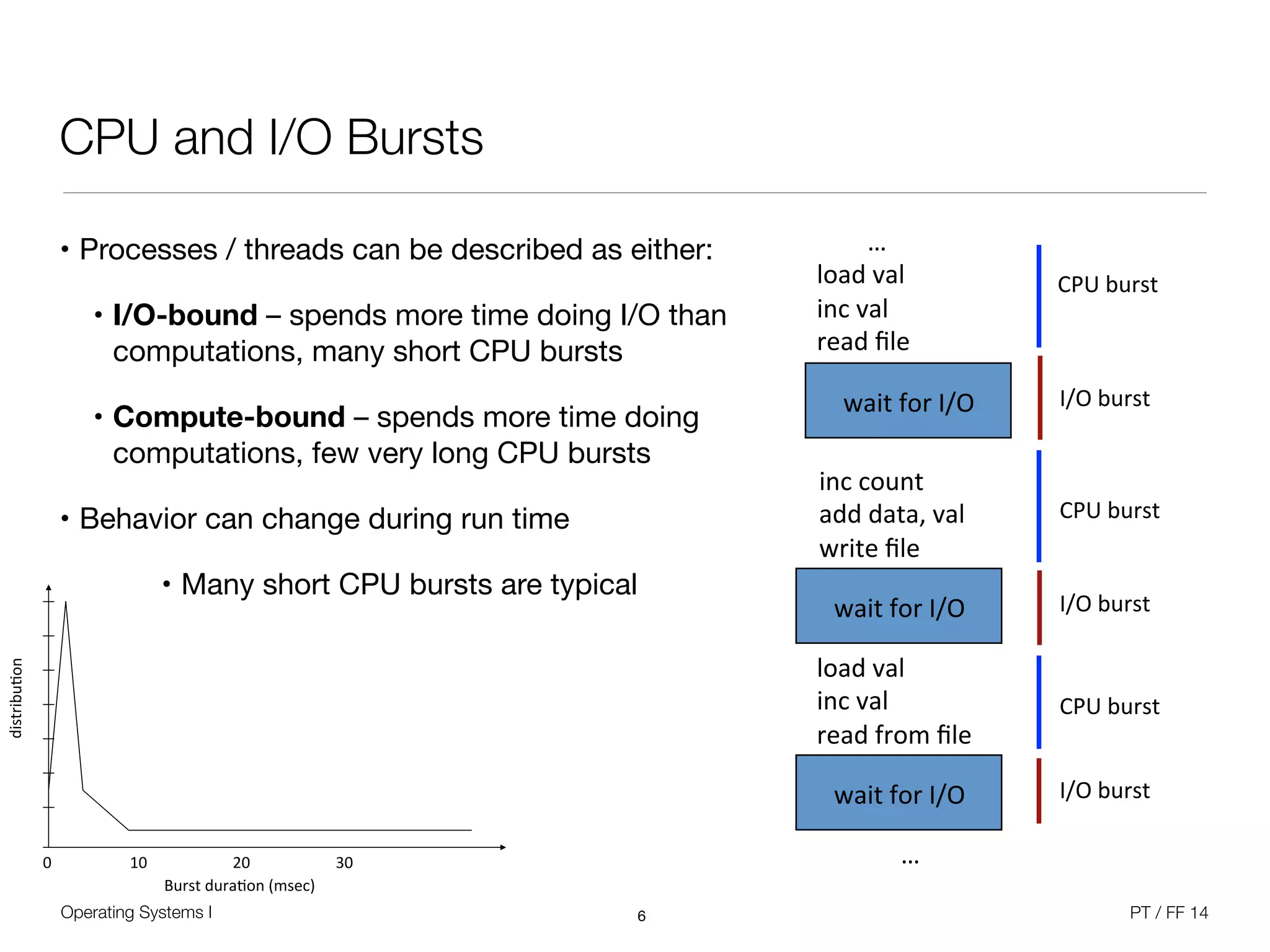
CPU and I/O Bursts
• Processes / threads can be described as either:

• I/O-bound – spends more time doing I/O than
computations, many short CPU bursts

• Compute-bound – spends more time doing
computations, few very long CPU bursts

• Behavior can change during run time

• Many short CPU bursts are typical
6
!!!!!!!!…!
load!val!
inc!val!
read!file!
wait!for!I/O!
inc!count!
add!data,!val!
write!file!
wait!for!I/O!
load!val!
inc!val!
read!from!file!
wait!for!I/O!
…!
CPU!burst!
CPU!burst!
CPU!burst!
I/O!burst!
I/O!burst!
I/O!burst!
Burst&dura)on&(msec)&
0& 10& 20& 30&
distribu)on&
Operating Systems I PT / FF 14
Short-Term Scheduler
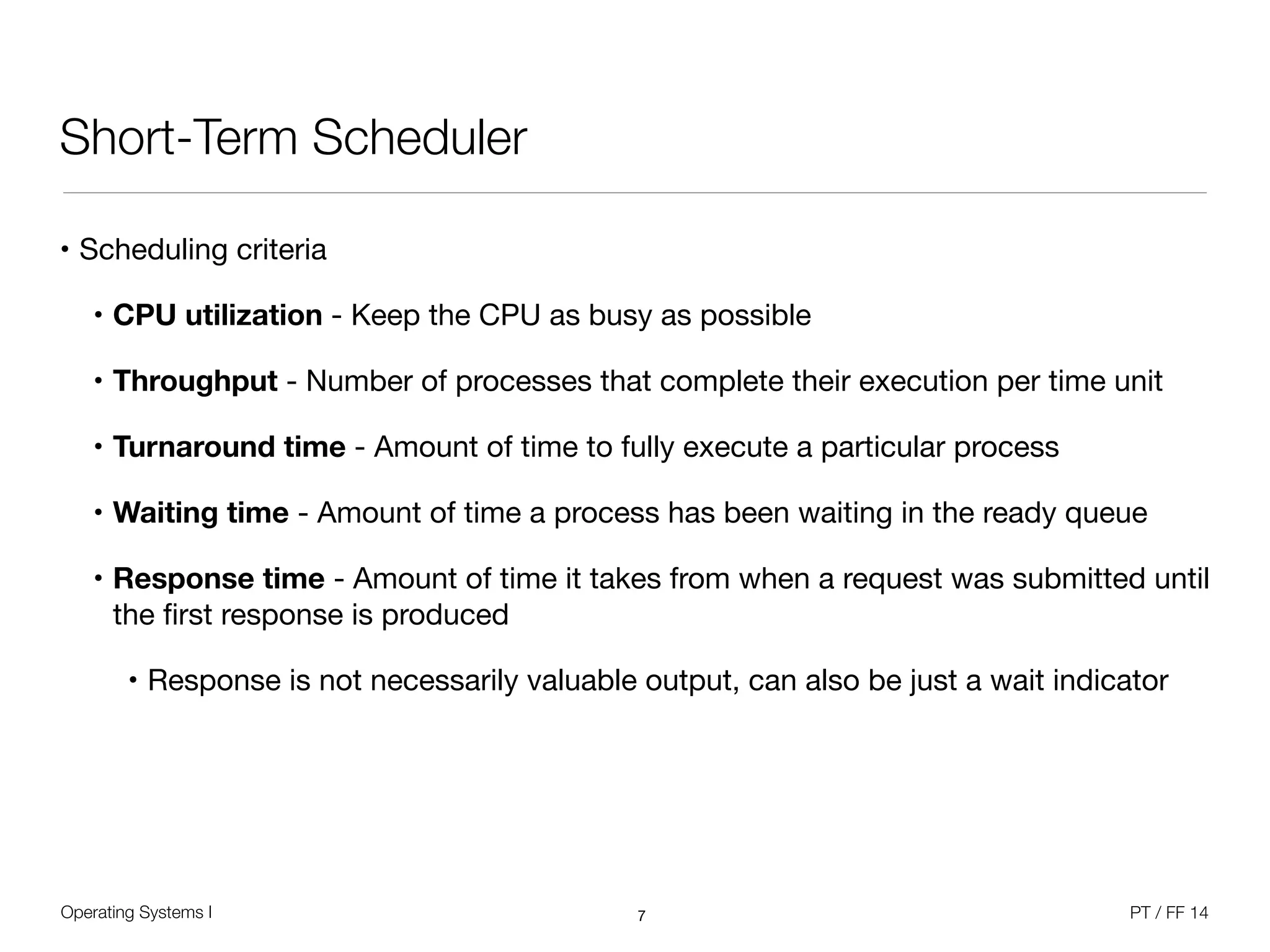
• Scheduling criteria

• CPU utilization - Keep the CPU as busy as possible

• Throughput - Number of processes that complete their execution per time unit

• Turnaround time - Amount of time to fully execute a particular process

• Waiting time - Amount of time a process has been waiting in the ready queue

• Response time - Amount of time it takes from when a request was submitted until
the first response is produced

• Response is not necessarily valuable output, can also be just a wait indicator
7
Operating Systems I PT / FF 14
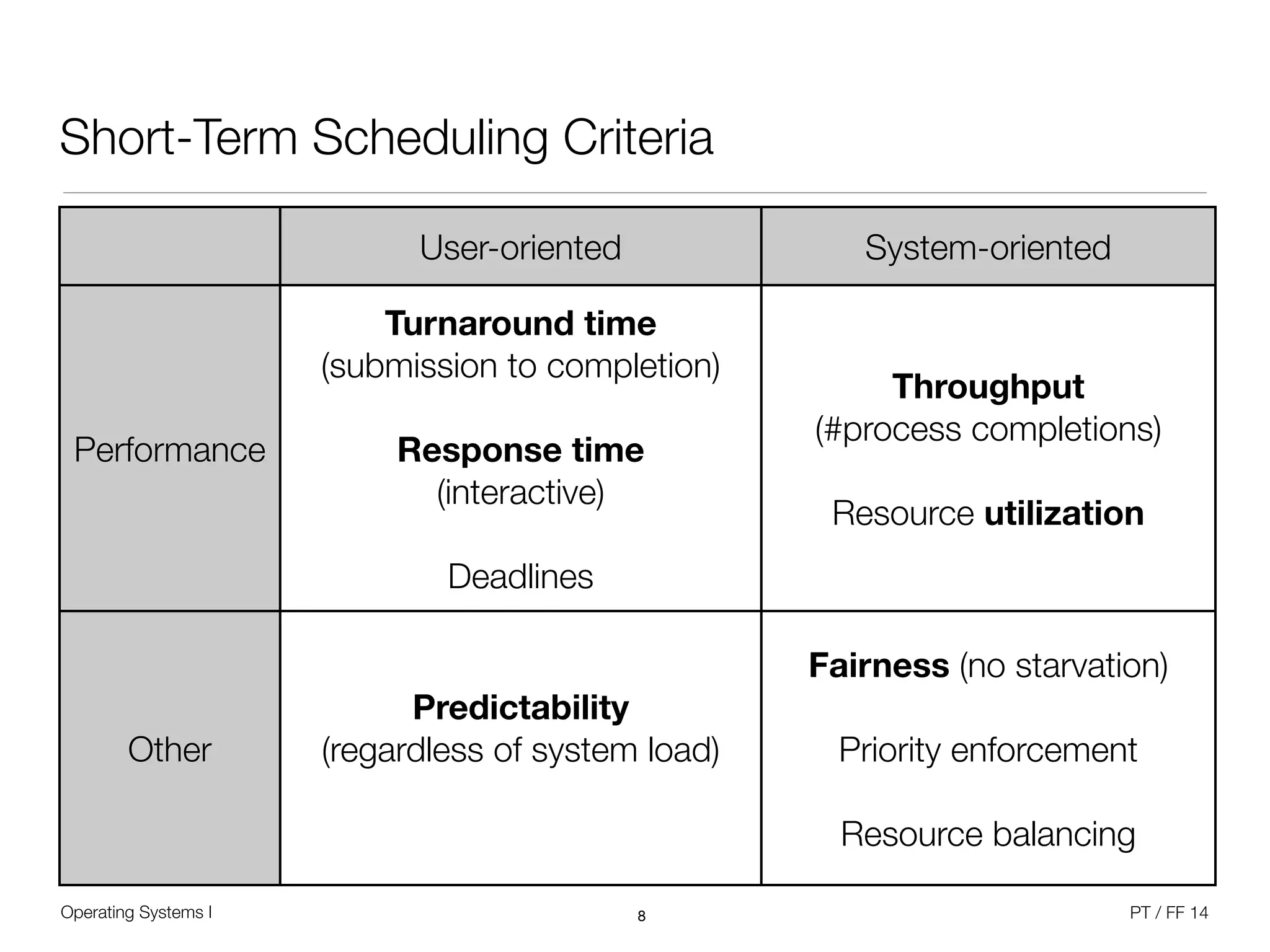
Short-Term Scheduling Criteria
8
User-oriented System-oriented
Performance
Turnaround time 

(submission to completion)


Response time 

(interactive)


Deadlines
Throughput 

(#process completions)


Resource utilization
Other
Predictability 

(regardless of system load)
Fairness (no starvation)


Priority enforcement


Resource balancing
Operating Systems I PT / FF 14
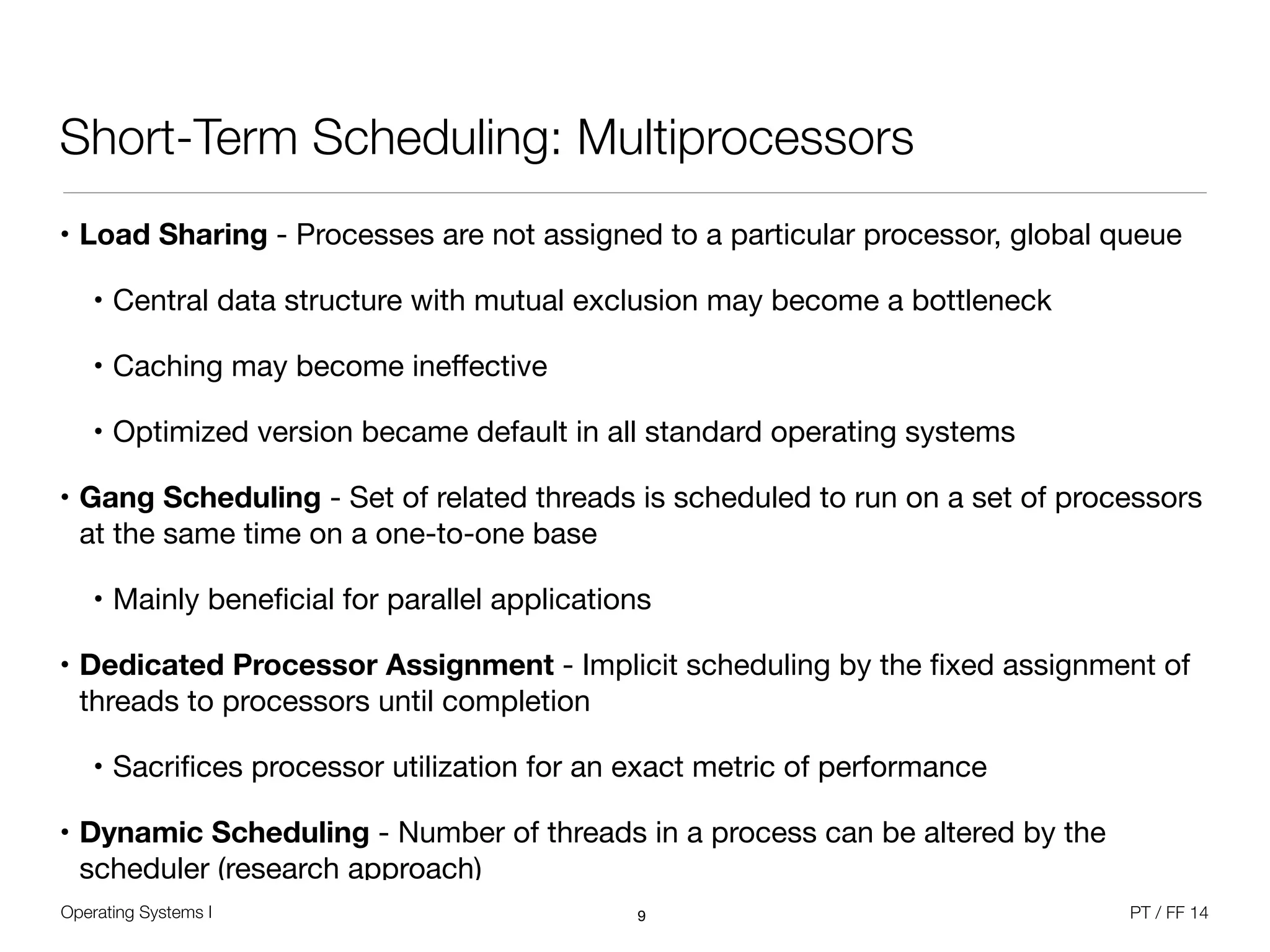
Short-Term Scheduling: Multiprocessors
• Load Sharing - Processes are not assigned to a particular processor, global queue

• Central data structure with mutual exclusion may become a bottleneck

• Caching may become ineffective

• Optimized version became default in all standard operating systems

• Gang Scheduling - Set of related threads is scheduled to run on a set of processors
at the same time on a one-to-one base

• Mainly beneficial for parallel applications

• Dedicated Processor Assignment - Implicit scheduling by the fixed assignment of
threads to processors until completion

• Sacrifices processor utilization for an exact metric of performance

• Dynamic Scheduling - Number of threads in a process can be altered by the
scheduler (research approach)
9
Operating Systems I PT / FF 14
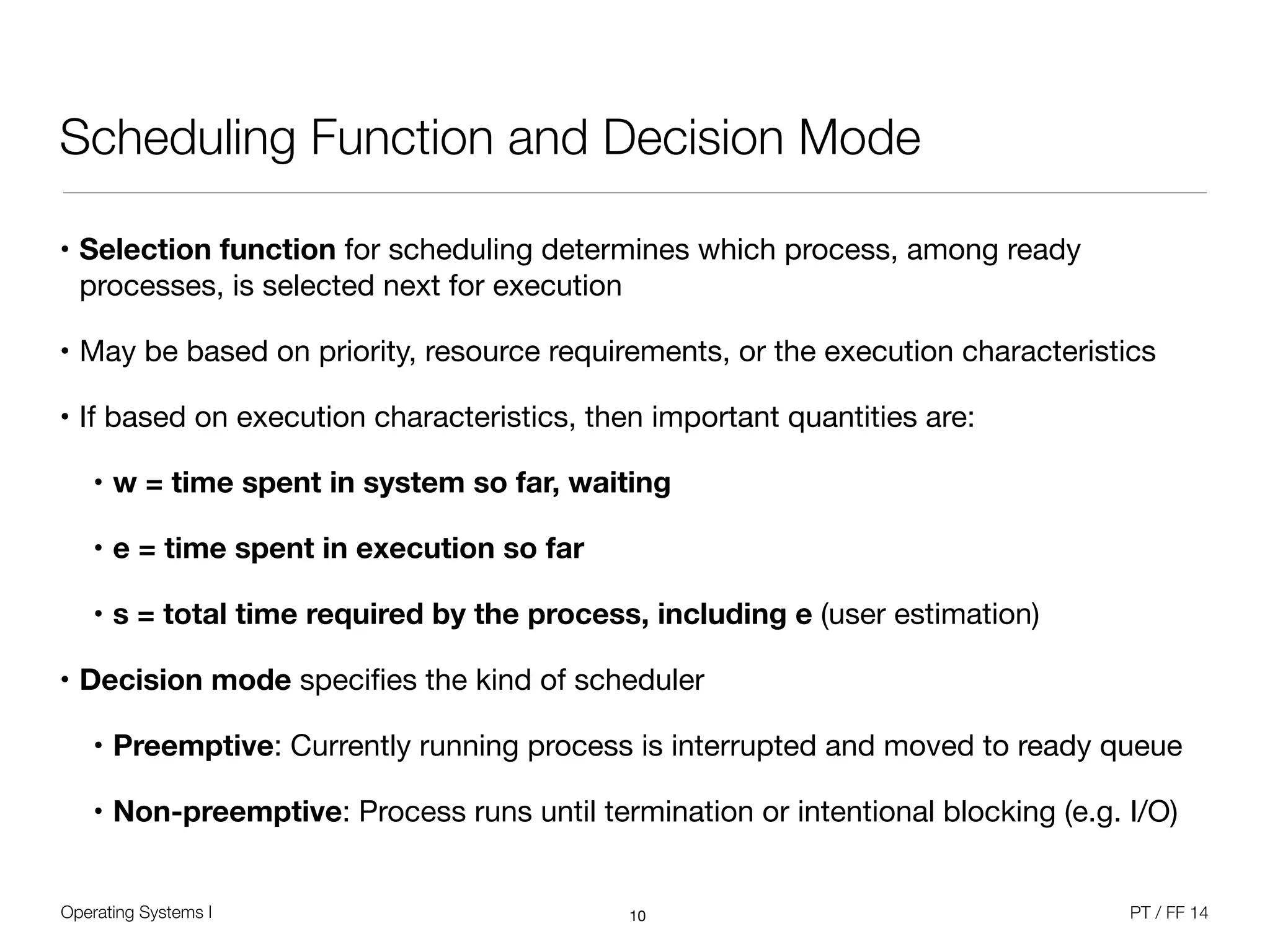
Scheduling Function and Decision Mode
• Selection function for scheduling determines which process, among ready
processes, is selected next for execution

• May be based on priority, resource requirements, or the execution characteristics

• If based on execution characteristics, then important quantities are:

• w = time spent in system so far, waiting
• e = time spent in execution so far
• s = total time required by the process, including e (user estimation)
• Decision mode specifies the kind of scheduler

• Preemptive: Currently running process is interrupted and moved to ready queue

• Non-preemptive: Process runs until termination or intentional blocking (e.g. I/O)
10
Operating Systems I PT / FF 14
Round Robin
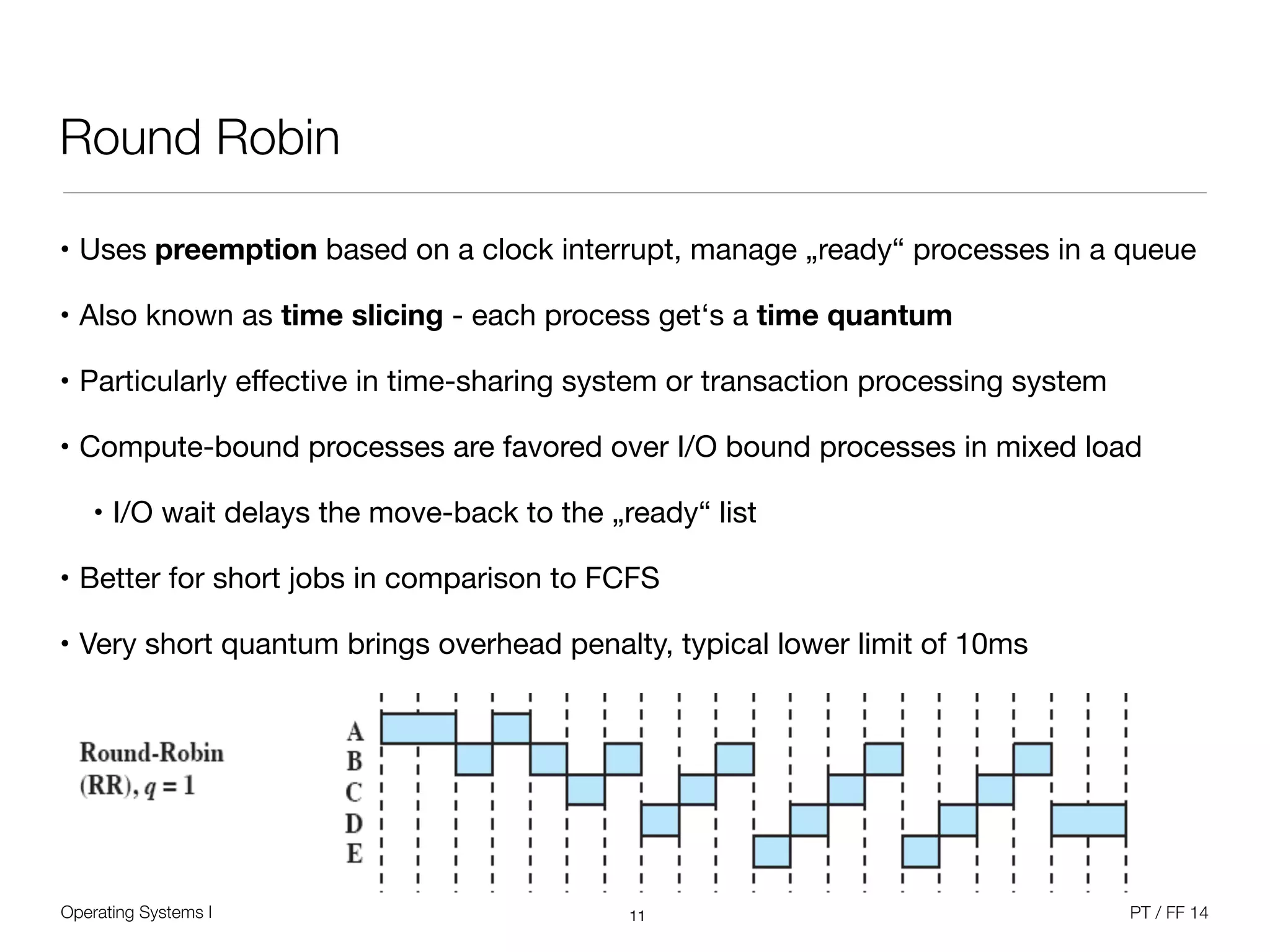
• Uses preemption based on a clock interrupt, manage „ready“ processes in a queue

• Also known as time slicing - each process get‘s a time quantum

• Particularly effective in time-sharing system or transaction processing system

• Compute-bound processes are favored over I/O bound processes in mixed load

• I/O wait delays the move-back to the „ready“ list

• Better for short jobs in comparison to FCFS

• Very short quantum brings overhead penalty, typical lower limit of 10ms
11
Operating Systems I PT / FF 14
Round Robin
12
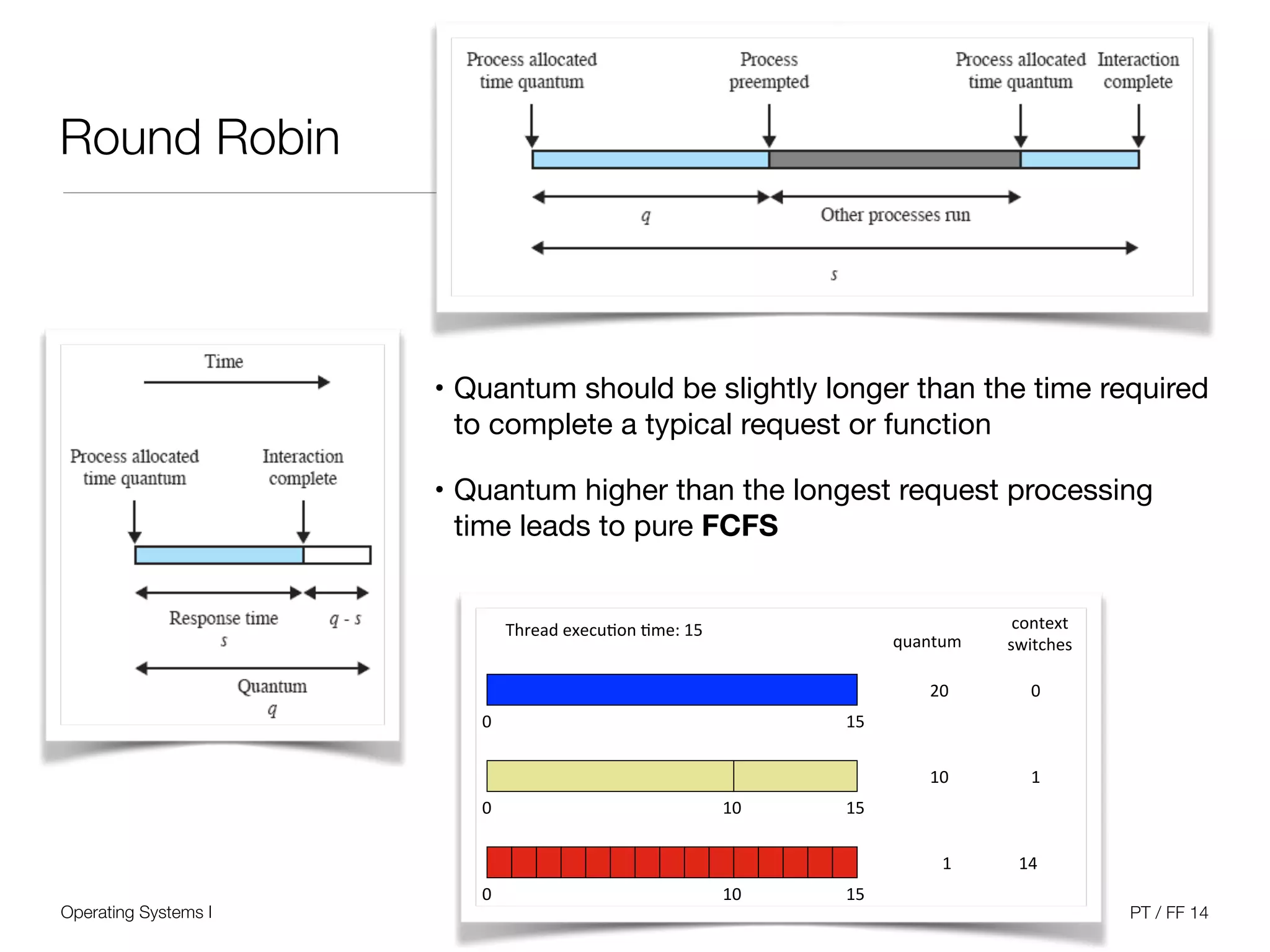
• Quantum should be slightly longer than the time required
to complete a typical request or function

• Quantum higher than the longest request processing
time leads to pure FCFS
Thread'execu+on'+me:'15'
0' 15'
15'
15'
0'
0'
10'
10'
quantum'
context'
switches'
20'
10'
1'
0'
1'
14'
Operating Systems I PT / FF 14
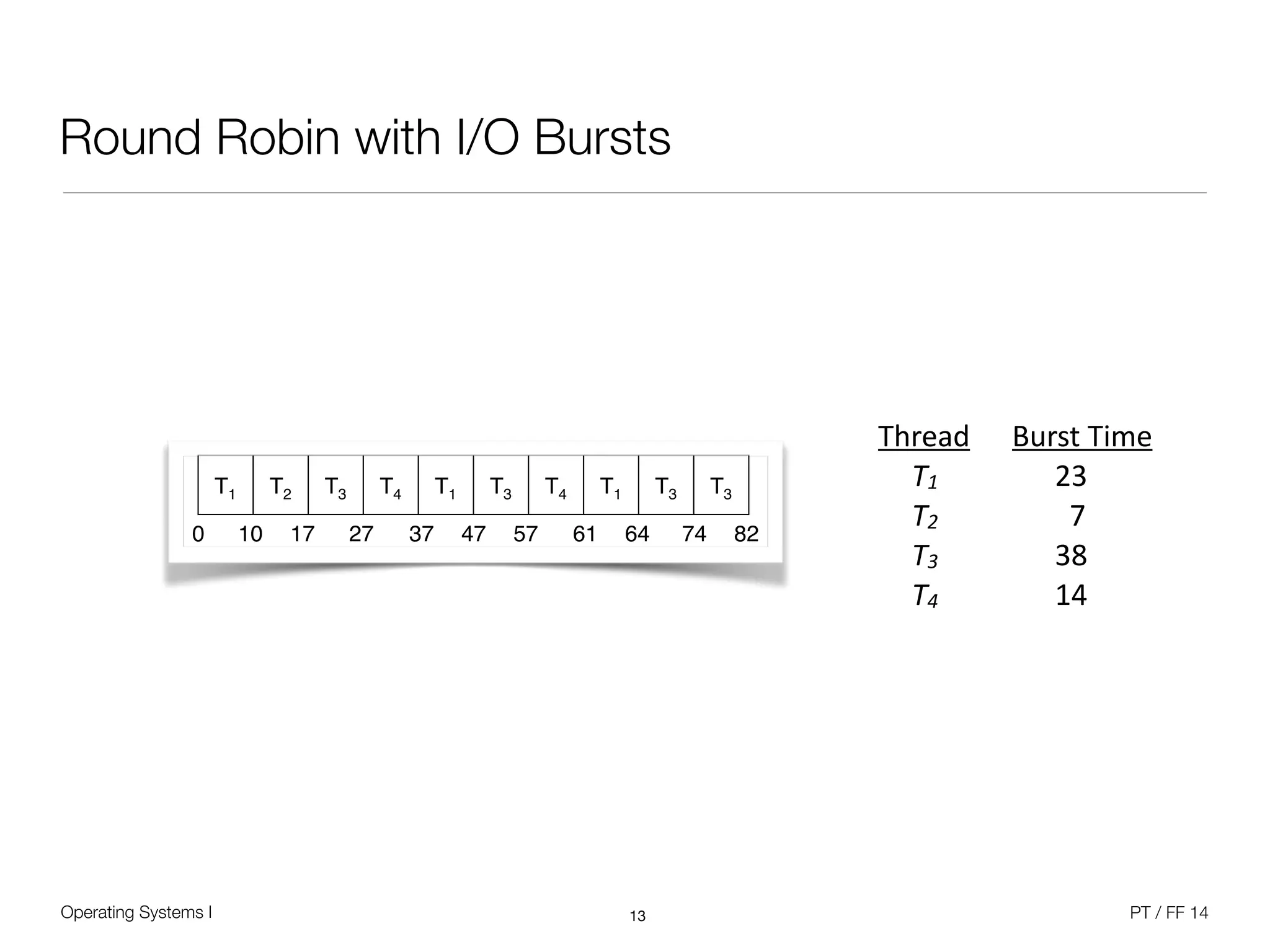
Round Robin with I/O Bursts
13
Thread	
   Burst	
  Time	
  
	
   T1	


  23	
  
	
   T2	


  7	
  
	
   T3	


  38	
  
	
   T4	


  14
T1! T2! T3! T4! T1! T3! T4! T1! T3! T3!
0! 10! 17! 27! 37! 47! 57! 61! 64! 74! 82!
Operating Systems I PT / FF 14
Multilevel Queue Scheduling
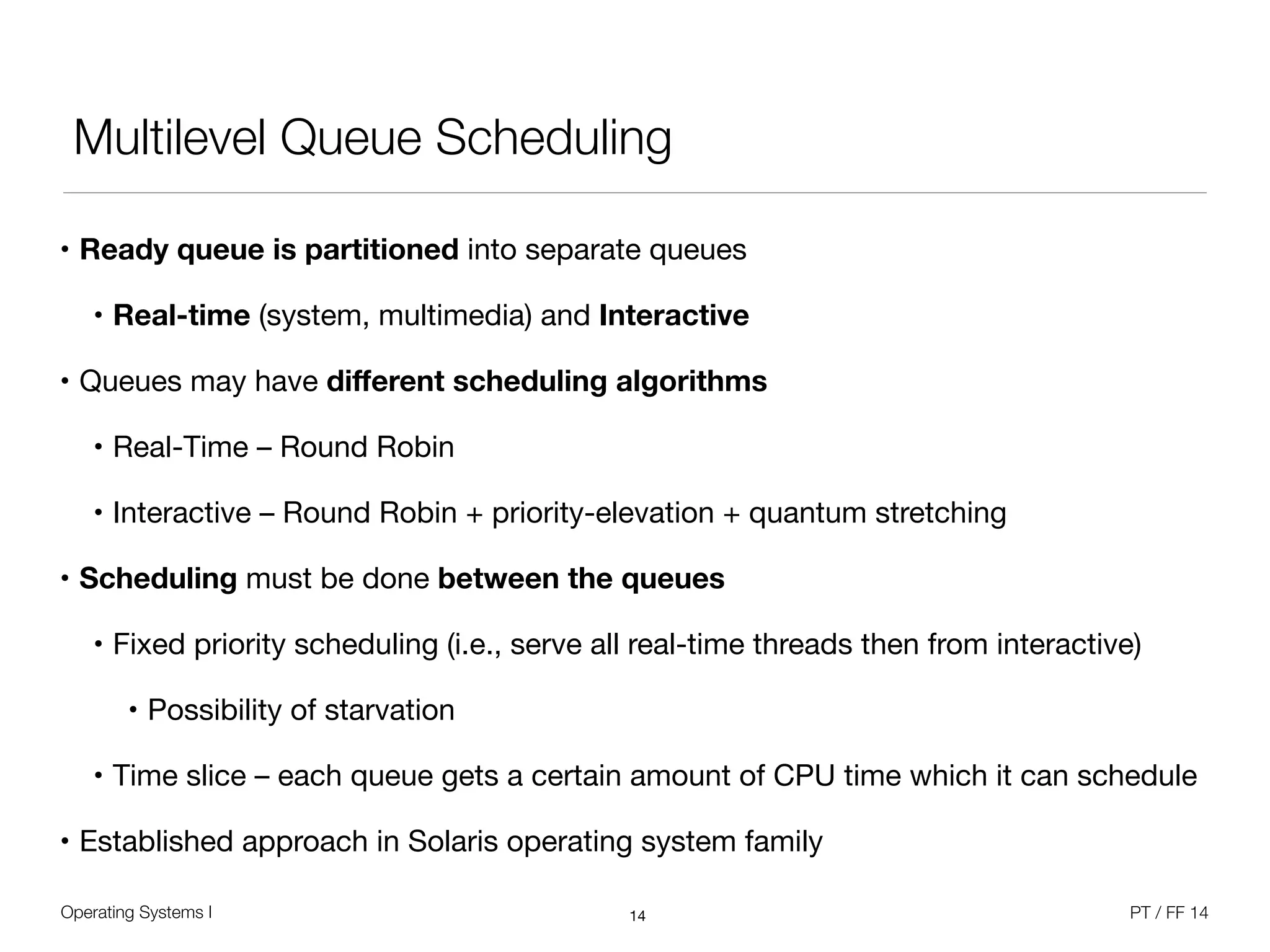
• Ready queue is partitioned into separate queues

• Real-time (system, multimedia) and Interactive

• Queues may have different scheduling algorithms
• Real-Time – Round Robin

• Interactive – Round Robin + priority-elevation + quantum stretching

• Scheduling must be done between the queues
• Fixed priority scheduling (i.e., serve all real-time threads then from interactive)

• Possibility of starvation

• Time slice – each queue gets a certain amount of CPU time which it can schedule

• Established approach in Solaris operating system family
14
Operating Systems I PT / FF 14
Example: Windows
• Windows dispatcher

• Gives control to the thread selected by the short-term scheduler
• Switching context, switching to user mode

• Jumping to the proper location in the user program to restart that program

• Windows has no mid-term or long-term scheduler

• Dispatch latency – time it takes for the dispatcher to stop one and start another

• Windows scheduling is event-driven - no central dispatcher module in the kernel

• Starvation problem

• Unix: Decreasing priority + aging
• VMS / Windows: Priority elevation
15
Operating Systems I PT / FF 14
Windows Scheduler
• Priority-driven preemptive scheduling system

• Highest-priority runnable thread always runs

• Thread runs for time amount of quantum

• No single scheduler - event-based scheduling code spread across the kernel

• Dispatcher routine triggered by the following event

• Thread becomes ready for execution

• Thread leaves running state (quantum expires, wait state)

• Thread‘s priority changes (system call / NT activity)

• Processor affinity of a running thread changes
16
Operating Systems I PT / FF 14
Windows Scheduling Principles
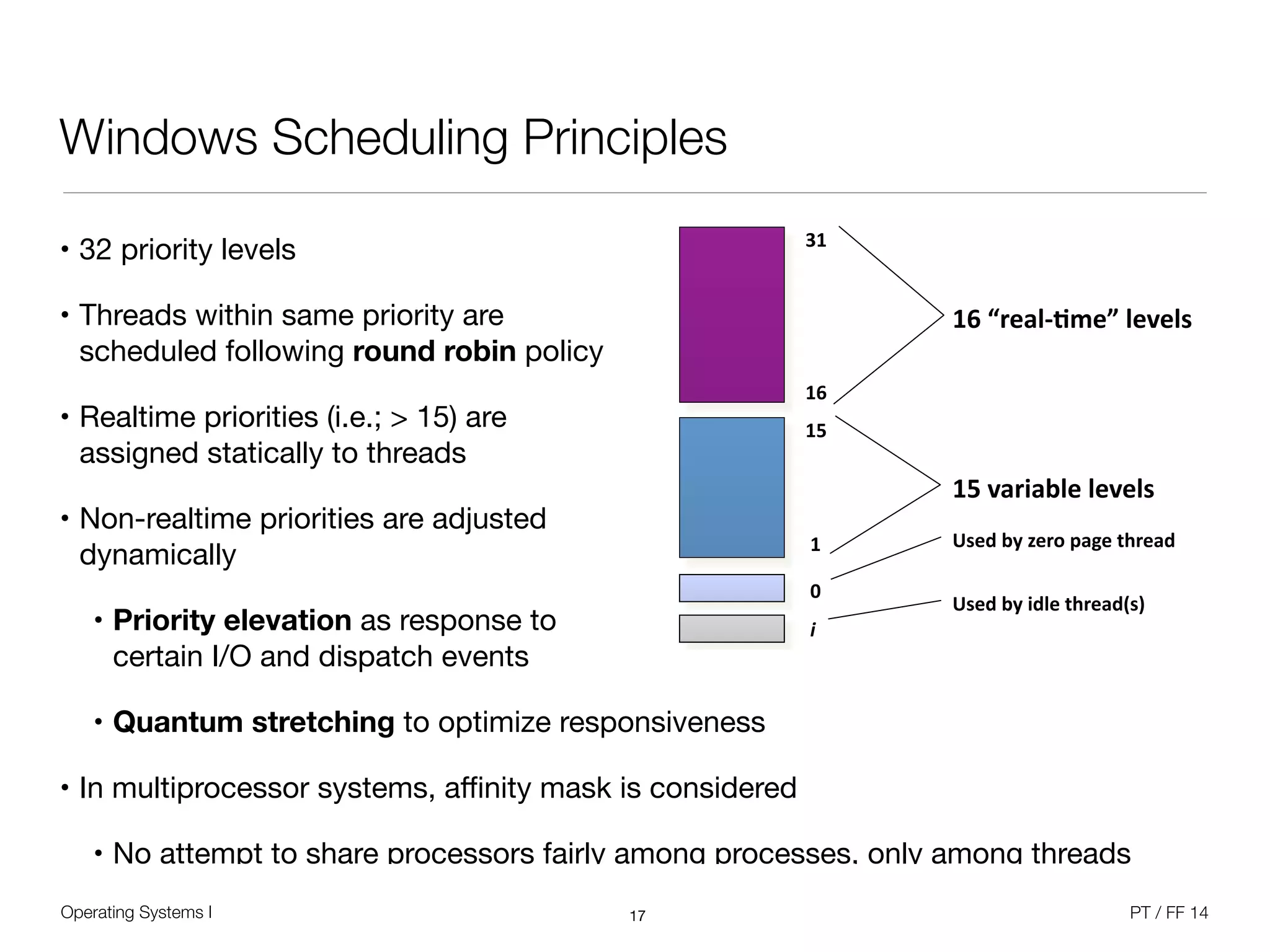
• 32 priority levels

• Threads within same priority are 

scheduled following round robin policy

• Realtime priorities (i.e.; > 15) are 

assigned statically to threads

• Non-realtime priorities are adjusted 

dynamically

• Priority elevation as response to 

certain I/O and dispatch events

• Quantum stretching to optimize responsiveness

• In multiprocessor systems, affinity mask is considered

• No attempt to share processors fairly among processes, only among threads
17
6
N-.#-0K((L6.-/$(G."%.",4(d-<-0'(
$%&'()*+,-.)/&+)0)+1&
$2&0*(3*4+)&+)0)+1&
51)6&47&8)("&9*:)&#;()*6&
51)6&47&36+)&#;()*6<1=&
>$&
$%&
&?&
&!"
$2&
&$&
Operating Systems I PT / FF 14
Multiprocessor Systems
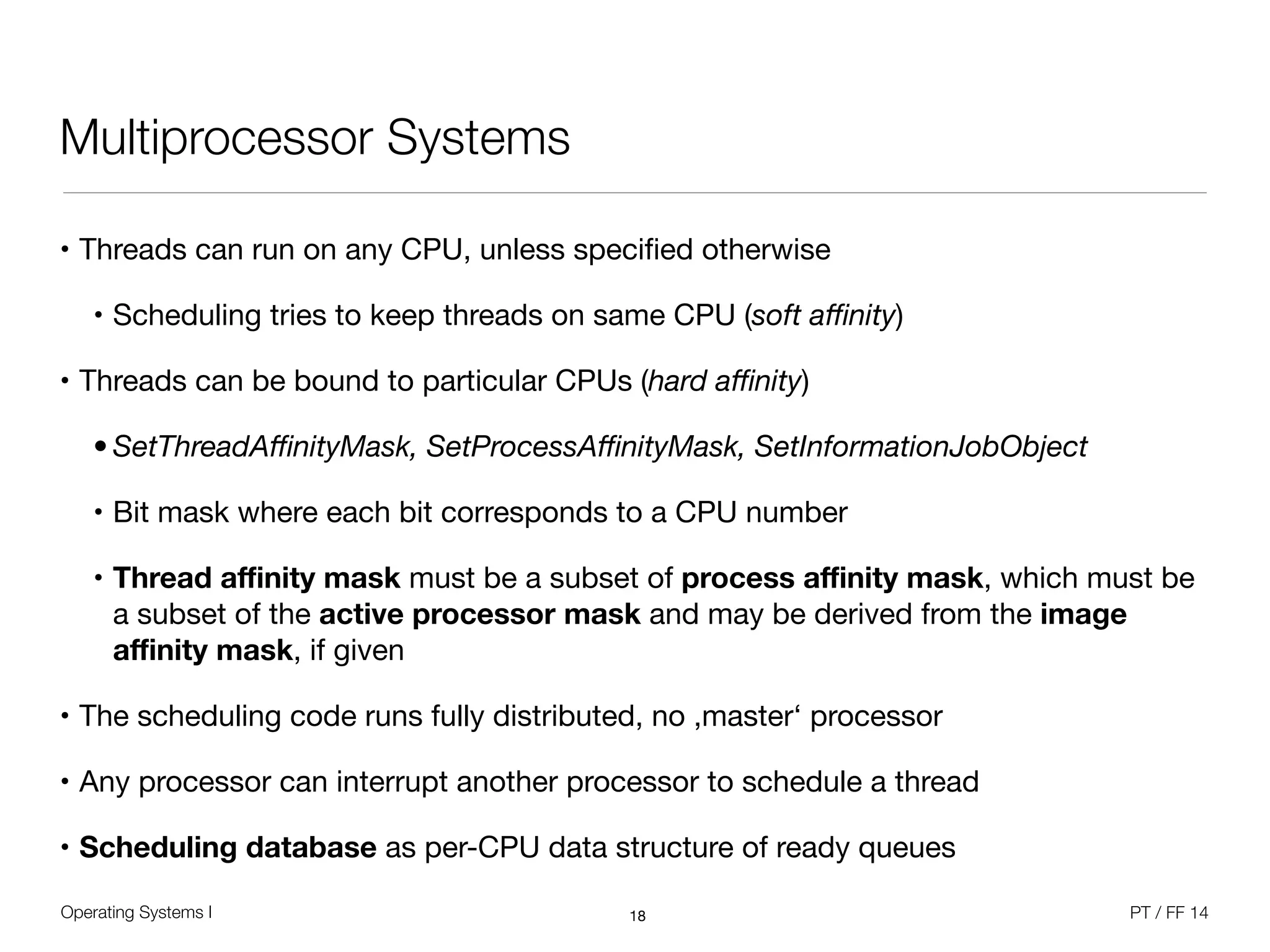
• Threads can run on any CPU, unless specified otherwise

• Scheduling tries to keep threads on same CPU (soft affinity)

• Threads can be bound to particular CPUs (hard affinity)

• SetThreadAffinityMask, SetProcessAffinityMask, SetInformationJobObject
• Bit mask where each bit corresponds to a CPU number

• Thread affinity mask must be a subset of process affinity mask, which must be
a subset of the active processor mask and may be derived from the image
affinity mask, if given
• The scheduling code runs fully distributed, no ,master‘ processor

• Any processor can interrupt another processor to schedule a thread

• Scheduling database as per-CPU data structure of ready queues
18
Operating Systems I PT / FF 14
Multiprocessor Systems
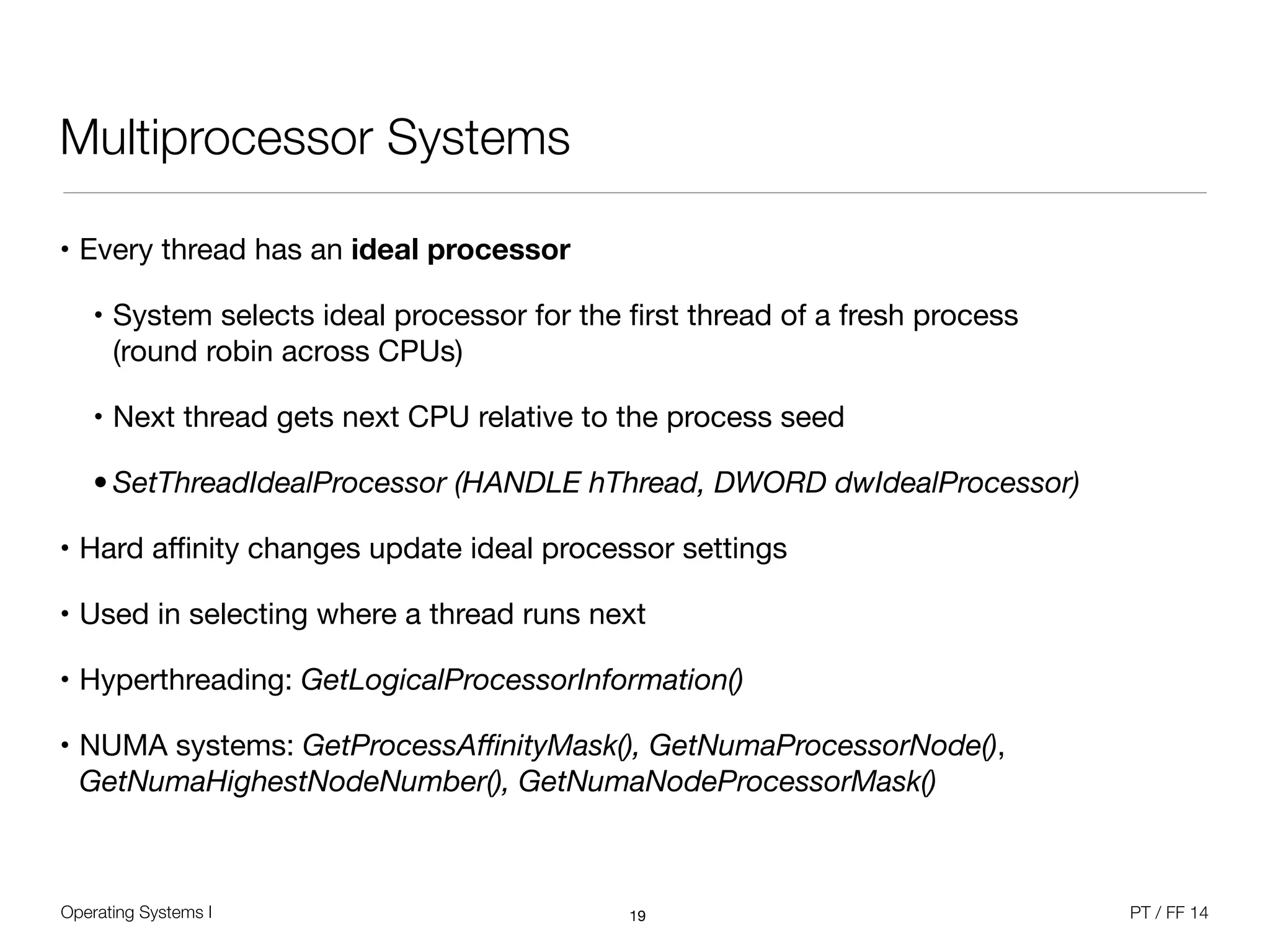
• Every thread has an ideal processor

• System selects ideal processor for the first thread of a fresh process 

(round robin across CPUs)

• Next thread gets next CPU relative to the process seed

• SetThreadIdealProcessor (HANDLE hThread, DWORD dwIdealProcessor)
• Hard affinity changes update ideal processor settings

• Used in selecting where a thread runs next

• Hyperthreading: GetLogicalProcessorInformation() 

• NUMA systems: GetProcessAffinityMask(), GetNumaProcessorNode(),
GetNumaHighestNodeNumber(), GetNumaNodeProcessorMask()
19
Operating Systems I PT / FF 14
Windows Scheduling Principles
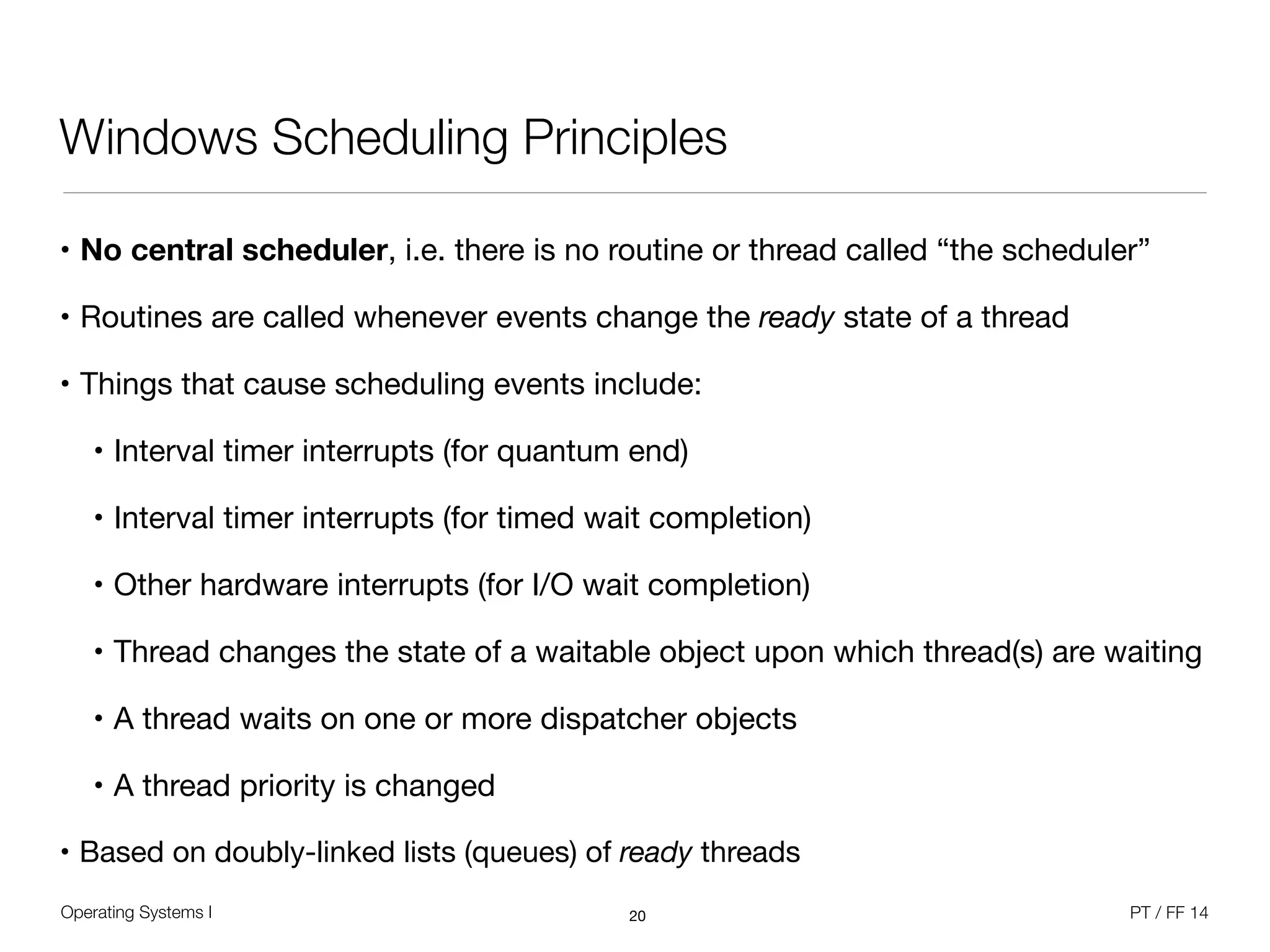
• No central scheduler, i.e. there is no routine or thread called “the scheduler”

• Routines are called whenever events change the ready state of a thread

• Things that cause scheduling events include:

• Interval timer interrupts (for quantum end)

• Interval timer interrupts (for timed wait completion)

• Other hardware interrupts (for I/O wait completion)

• Thread changes the state of a waitable object upon which thread(s) are waiting

• A thread waits on one or more dispatcher objects

• A thread priority is changed

• Based on doubly-linked lists (queues) of ready threads
20
Operating Systems I PT / FF 14
Windows Scheduling Principles
• Windows API point of view

• Processes are given a priority class upon creation 

( Idle, Normal, High, Realtime )

• Windows 2000 added “Above normal” and “Below normal”

• Threads have a relative priority within the class 

( Idle, Lowest, Below_Normal, Normal, Above_Normal, Highest, and Time_Critical )

• Different API functions to influence scheduling 

( Get/SetPriorityClass, Get/SetThreadPriority, Get/SetProcessAffinityMask,
SetThreadAffinityMask, SetThreadIdealProcessor, Suspend/ResumeThread )

• Kernel point of view
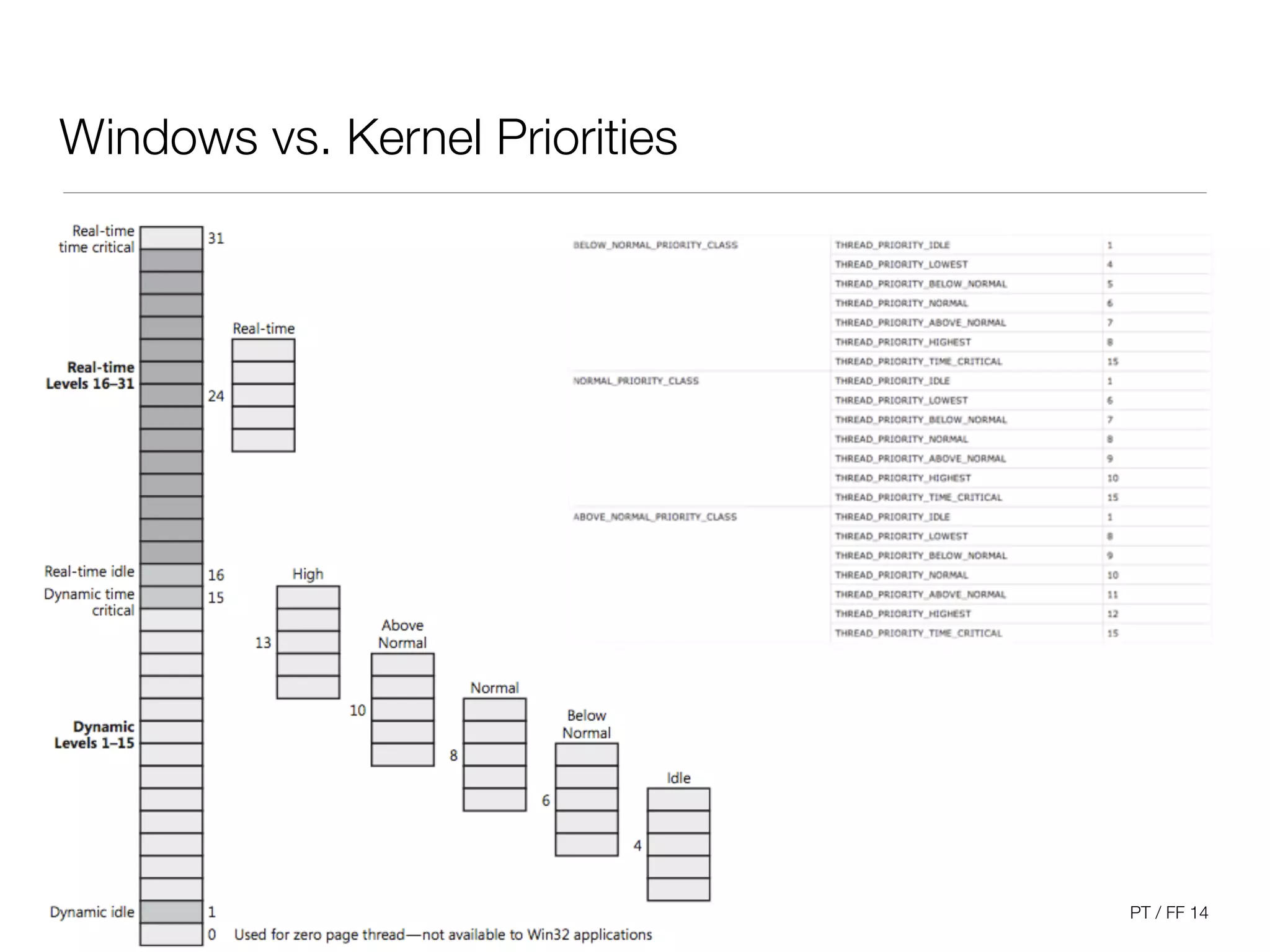
• Threads have priorities 0 through 31, scheduled accordingly

• Process priority class is not used to make scheduling decisions
21
Operating Systems I PT / FF 14
Windows vs. Kernel Priorities
22
Operating Systems I PT / FF 14
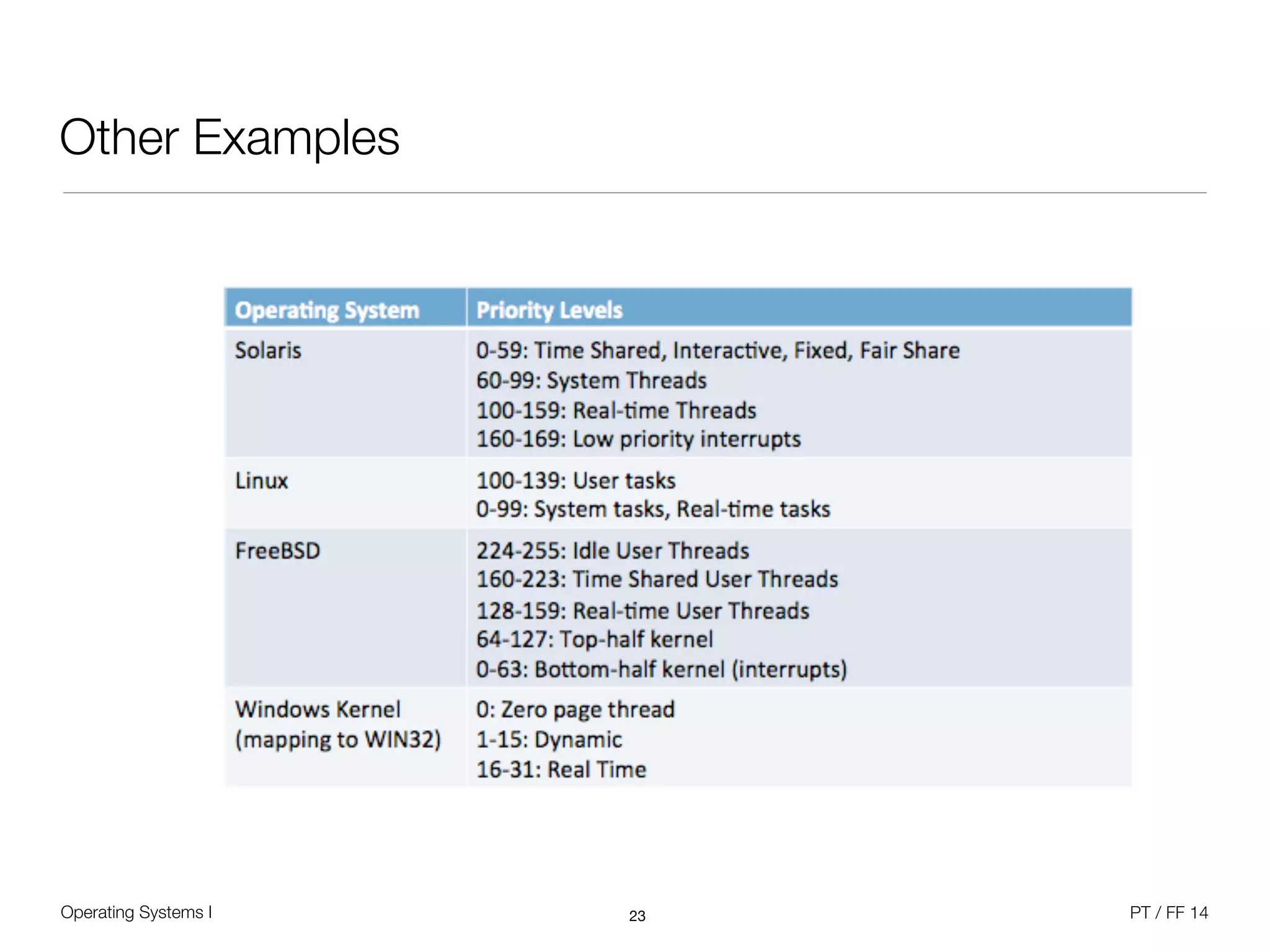
Other Examples
23
Operating Systems I PT / FF 14
Special Thread Priorities
• One idle thread per CPU

• When no threads want to run, idle thread is executed

• Appears to have priority zero, but actually runs “below” priority 0

• Provides CPU idle time accounting - unused clock ticks are charged to idle thread

• Loop:

• Calls HAL to allow for power management, processes DPC list

• Dispatches to a thread if selected

• One zero page thread per system

• Zeroes pages of memory in anticipation of “demand zero” page faults

• Runs at priority zero (lower than reachable with Windows API) in the „system“ process
24
Operating Systems I PT / FF 14
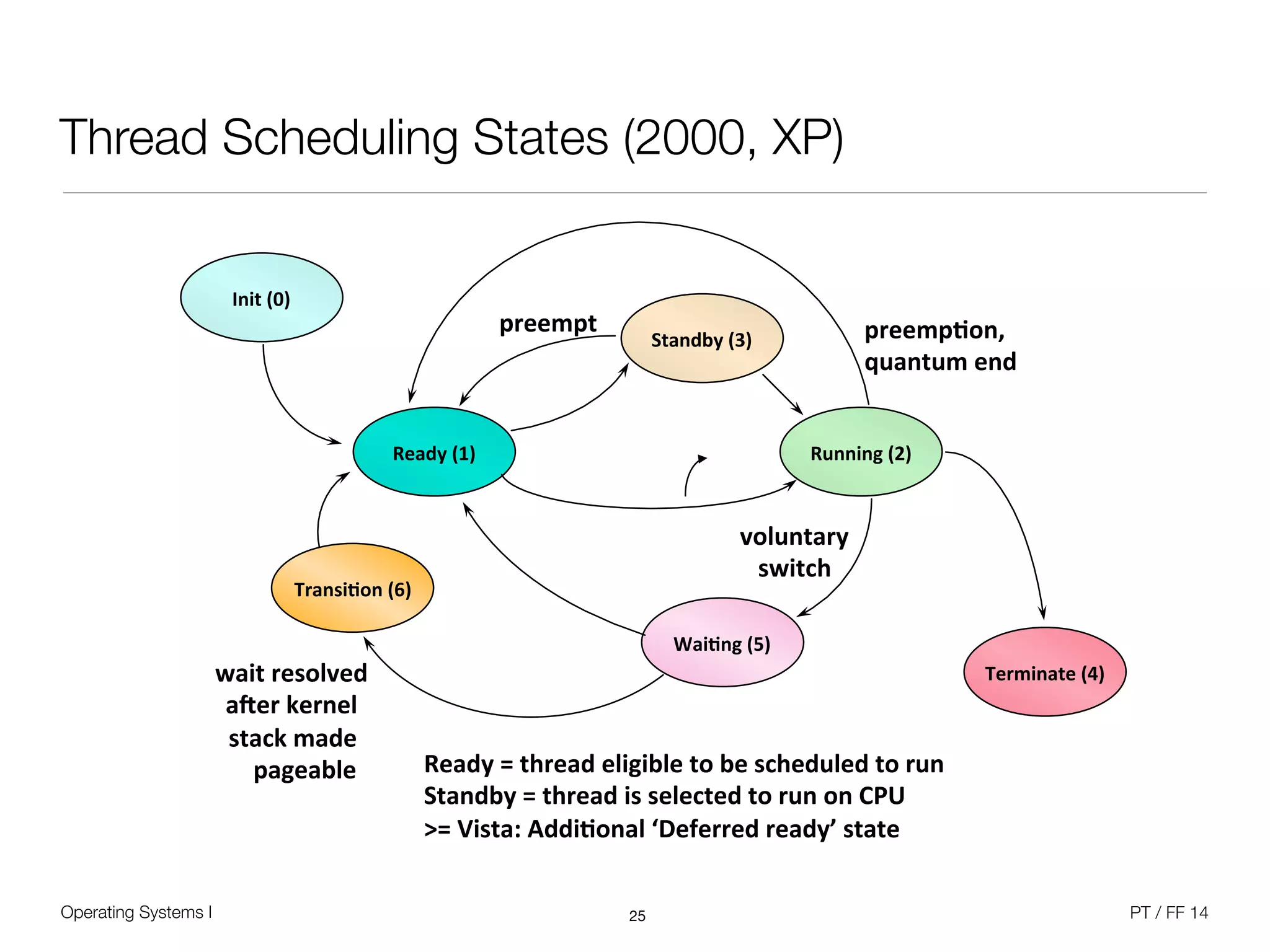
Thread Scheduling States (2000, XP)
25
Ready&(1)& Running&(2)&
Wai0ng&(5)&
Ready&=&thread&eligible&to&be&scheduled&to&run&
Standby&=&thread&is&selected&to&run&on&CPU&
>=&Vista:&Addi0onal&‘Deferred&ready’&state&
voluntary&
switch&
preemp0on,&&
quantum&end&
Init&(0)&
Terminate&(4)&
Transi0on&(6)&
wait&resolved&
aRer&kernel&
stack&made&
&&&&pageable&
Standby&(3)&
preempt&
Operating Systems I PT / FF 14
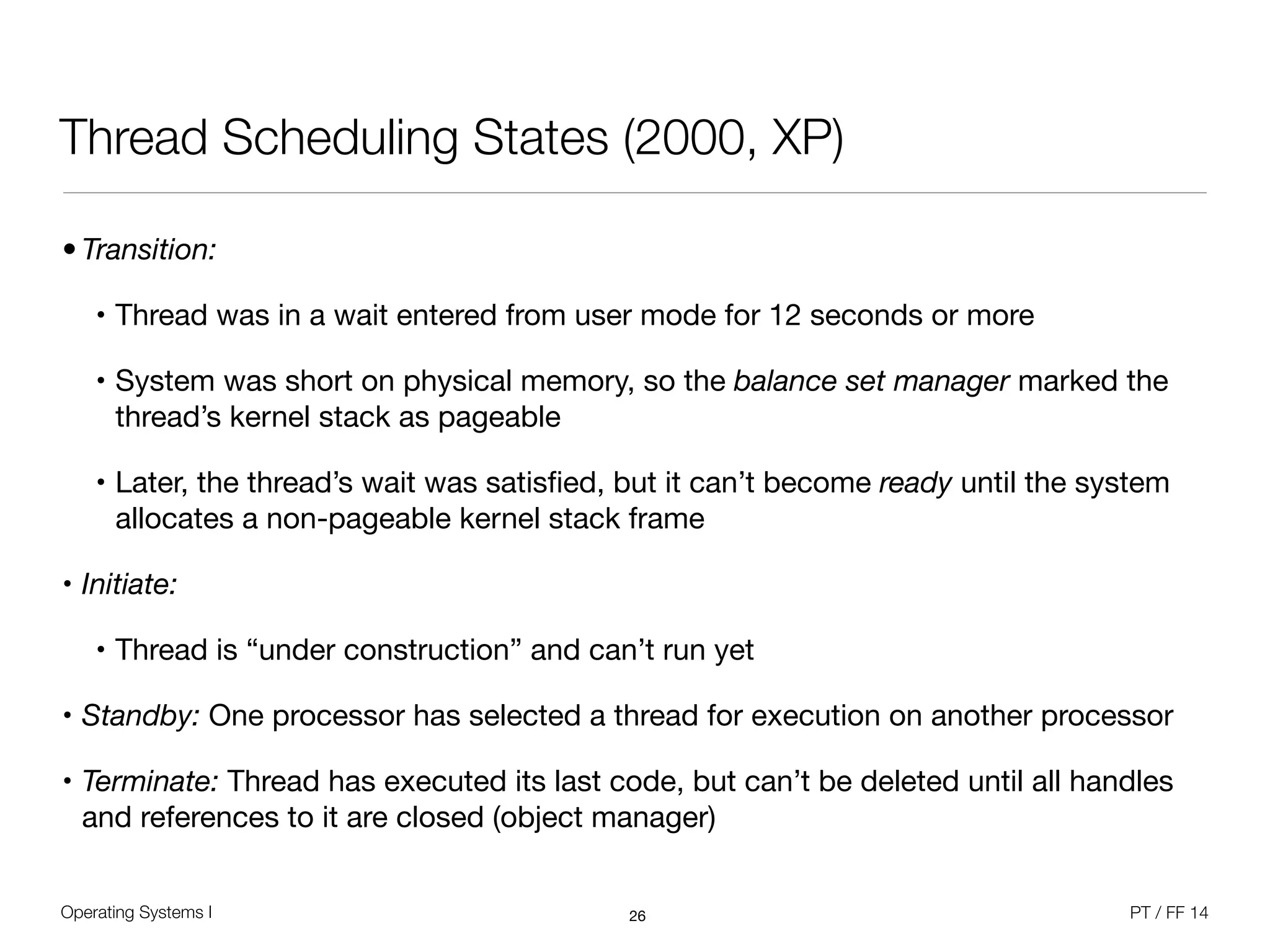
Thread Scheduling States (2000, XP)
26
• Transition:
• Thread was in a wait entered from user mode for 12 seconds or more

• System was short on physical memory, so the balance set manager marked the
thread’s kernel stack as pageable

• Later, the thread’s wait was satisfied, but it can’t become ready until the system
allocates a non-pageable kernel stack frame

• Initiate: 

• Thread is “under construction” and can’t run yet

• Standby: One processor has selected a thread for execution on another processor

• Terminate: Thread has executed its last code, but can’t be deleted until all handles
and references to it are closed (object manager)
Operating Systems I PT / FF 14
Scheduling Scenarios
• Preemption
• A thread becomes ready at a higher priority than the currently running thread

• The lower-priority running thread is preempted

• The preempted thread goes back to the head of its ready queue

• Scheduler needs to pick the lowest priority thread to preempt

• Preemption is strictly event-driven, does not wait for the next clock tick

• Threads in kernel mode may be preempted (unless they raise IRQL to >= 2)
27
Operating Systems I PT / FF 14
Priority Adjustments
• Dynamic priority adjustments are applied to threads in dynamic classes

• Disable if desired with SetThreadPriorityBoost or SetProcessPriorityBoost

• Types of priority adjustment

• I/O completion

• Wait completion on executive events or semaphores 

• When threads in the foreground process complete a wait operation

• Boost value of 2, lost after one full quantum

• Quantum decremented by 1 so that threads that get boosted after I/O
completion won't keep running and never experiencing quantum end

• GUI threads that wake up to windowing input (e.g. messages) get a boost of 2

• Added the current priority, not the base priority
28
Operating Systems I PT / FF 14
Priority Adjustments
• No automatic adjustments in real-time class (16 or above)

• Real time here really means “system won’t change the relative priorities of your
real-time threads”

• Hence, scheduling is predictable with respect to other “real-time” threads,

but not for absolute latency

• Example: Boost on I/O completion

• Specified by the device driver through IoCompleteRequest(Irp, PriorityBoost) 

• Common boost values (see NTDDK.H): 

1 - disk, CD-ROM, parallel, video ;

2 - serial, network, named pipe, mailslot ; 

6 - keyboard or mouse ;

8 - sound
29
Operating Systems I PT / FF 14
Foreground Applications
• Quantum Stretching

• The threads of a normal-priority process that owns the foreground window may
get longer quantum (Win32PrioritySeparation registry key)

• „Maximum“ - 6 ticks, „Middle“ - 4 ticks, „None“ - 2 ticks

• Does not happen on Server editions by default, depends on Windows
„performance options“; NT4 Server had 12 ticks
30
8""
Running"""Ready"
Operating Systems I PT / FF 14
Choosing a CPU for a Ready Thread
• For Windows 2000 / XP

• Check if any processors are idle that are in the thread’s hard affinity mask:

• If its ideal processor is idle, it runs there

• Else, if the previous processor it ran on is idle, it runs there

• Else if the current processor is idle, it runs there

• Else it picks the highest numbered idle processor in the thread’s affinity mask

• If no processors are idle:

• If the ideal processor is in the thread’s affinity mask, it selects that

• Else if the previous processor is in the thread’s affinity mask, it selects that

• Else it picks the highest numbered processor in the thread’s affinity mask

• Check the priority of the thread running on the processor for preemption
31
Operating Systems I PT / FF 14
Choosing a Thread for a CPU
• For Windows 2000 / XP

• System needs to choose a thread to run on a specific CPU at quantum end, 

wait state entering, affinity mask changes, or thread exit 

• Starting with the first thread in the highest priority non-empty ready queue, it
scans the queue for the first thread that:

• Has the current processor in its hard affinity mask, and

• Ran last on the current processor, or has its ideal processor equal to the current
processor, or has been in its ready queue for 3 or more clock ticks, or has a
priority >=24

• If it cannot find such a candidate, it selects the highest priority thread that can run
on the current CPU (whose hard affinity includes the current CPU)
32
Operating Systems I PT / FF 14
Scheduling Data Structures (since Server 2003)
• Threads always go into the ready queue of their ideal processor

• Instead of locking the dispatcher database to look for a candidate to run, 

per-CPU ready queue is checked first (PRCB lock)

• If a thread has been selected on the CPU, just perform the dispatching

• Otherwise scan of other CPU’s ready queues looking for a thread to run

• This scan is done OUTSIDE the dispatcher lock, just acquires PRCB lock

• Dispatcher lock still need to wait or un-wait a thread

• In sum, global dispatcher database lock is now held for a MUCH shorter time

• Idle processor selection considers NUMA and hyperthreading characteristics

• Next ideal processor is the first logical processor on the next physical processor
33
Operating Systems I PT / FF 14
New since Windows 7
• Core Parking
• Historically, CPU workload was distributed fairly evenly across logical processors,

even on low utilization

• Core Parking tries to keep the load on fewest logical processors possible,

all others can sleep; only overridden by hard affinity and thread ideal processor

• Power management code notifies scheduling code about parked cores

• Considers socket topology - newer processors put sockets into deep sleep if all
the cores are idle

• At least one CPU in each NUMA node is left unparked for fast memory access

• Core Parking is active on server and hyperthreading systems 

• Best returns on medium utilization workloads, but typical Desktop client
systems tend to run at extremes
34
Operating Systems I PT / FF 14
New since Windows 7
• Before, no quality of service for Remote Desktop (formerly called Terminal Server)

• One user could hog server’s CPU

• Remote Desktop role now automatically enables dynamic fair share scheduling

• Sessions are given weight 1-9 (default is 5), internal API can set weight

• Each session given CPU budget, charge happens at every scheduler event

• When session exceeds quota, its threads go to idle-only queue

• Scheduled only when no other session wants to run

• At end of interval, all threads made ready to run
35
Operating Systems I PT / FF 14
Unix SVR4 Scheduling
• Differentiation between different three priority classes for 160 priority levels

• Real-time processes (159-100)

• kernel-mode processes (99-60)

• time-shared processes (59-0, user mode)

• Kernel was not preemptible, so specific preemption points were defined

• Region of code where all kernel data structures are either updated and consistent,
or locked via a semaphore

• One dispatch queue per priority level, each handled in round-robin

• Each time a time-shared process used a quantum, its priority is decreased

• Each time it blocks on an event or resource, its priority is increased

• Time-shared process quantum depends on priority, fixed for real-time processes
36
Operating Systems I PT / FF 14
Linux Scheduling
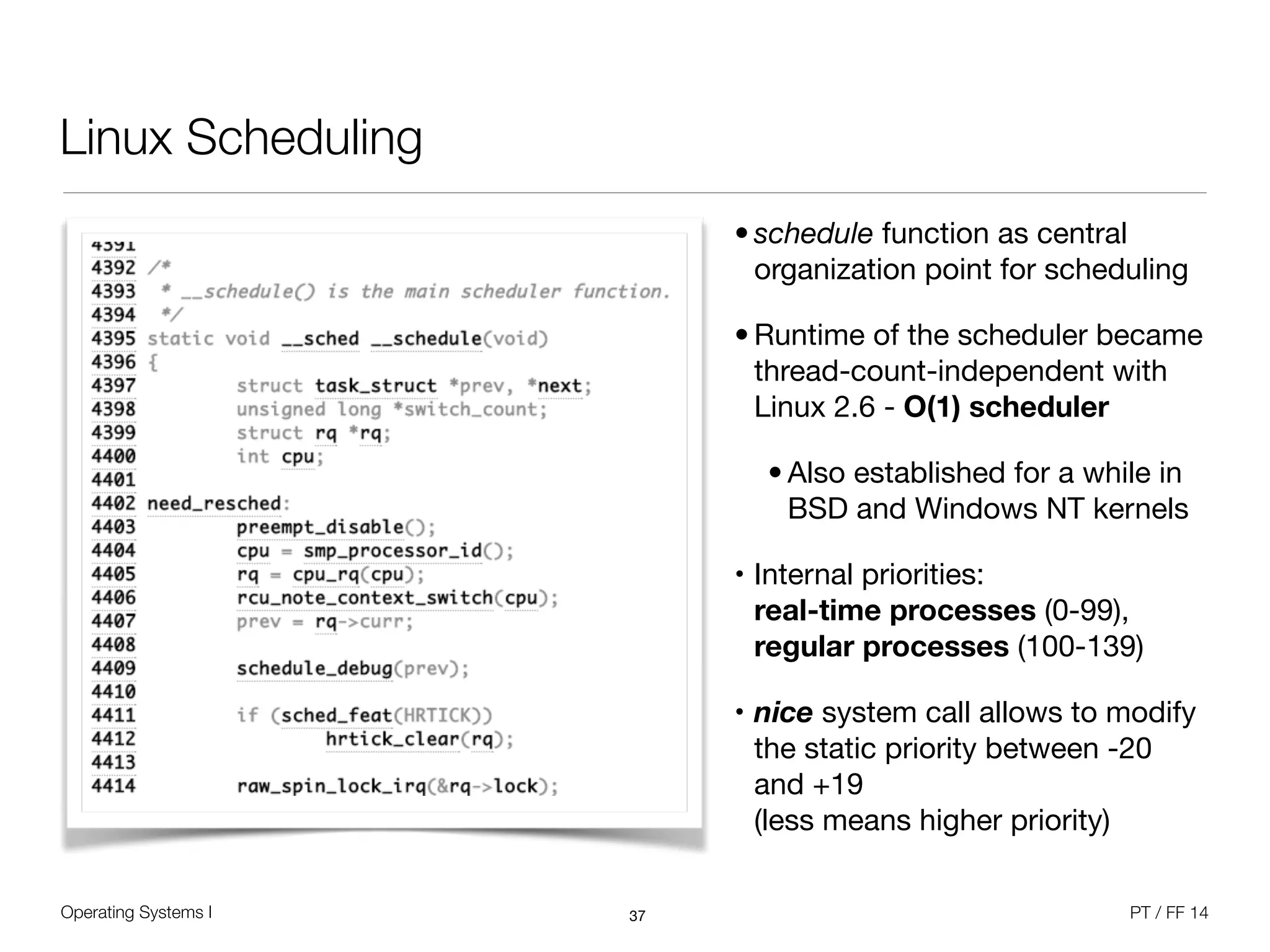
• schedule function as central
organization point for scheduling 

• Runtime of the scheduler became
thread-count-independent with
Linux 2.6 - O(1) scheduler

• Also established for a while in
BSD and Windows NT kernels

• Internal priorities: 

real-time processes (0-99),
regular processes (100-139)

• nice system call allows to modify
the static priority between -20
and +19

(less means higher priority)
37
Operating Systems I PT / FF 14
Linux Scheduling
• Each process is represented by a task_struct, which contains all scheduling-related
information

• Dynamic and static priority

• Scheduling policy - SCHED_NORMAL, SCHED_RR, SCHED_FIFO

• Real-time scheduling classes demanded for POSIX compatibility
• Round-robin real-time processes have a quantum, FIFO processes not

• Processor affinity mask

• Average sleep time of the task (high sleep time gives better priority, to support
interactive tasks in the best-possible way)

• Remaining quantum as time slice
• Tasks are scheduled independently, so threads from the same process can run on
different processors
38
Operating Systems I PT / FF 14
Linux Scheduling
• Each CPU has three queues

• active queue (still have quantum)

• expired queue (quantum over)

• migration queue (for processor migration)

• Queues are summarized in a runqueue structure

• When active queue is empty, it is swapped with the expired queue

• Periodic scheduling function (scheduler_tick) decreases the current quantum and
calls the main scheduling function if needed

• Main function takes the highest priority task from the active queue and runs it

• Calculation of the dynamic priority in the effective_prio() function
39
Operating Systems I PT / FF 14
Linux Scheduling
• Base time quantum
• Static priority determines the base time quantum, which is assigned when the
former quantum is exhausted

• With static priority < 120: (140 - static priority) * 20
• With static priority >= 120: (140 - static priority) * 5
• Base time quantum gets longer with higher priority (lower value)

• Dynamic priority
• max(100, min(static priority - bonus + 5, 139))
• Bonus is a value between 0 and 10, depends on average sleep time

• less than 5 is a penalty, more than 5 is a premium

• Average sleep time is decreasing when the process is running
40

Operating Systems 1 (10/12) - Scheduling

  • 1.
    Scheduling Beuth Hochschule Summer Term2014 ! Pictures (C) W. Stallings, if not stated otherwise ! ! !
  • 2.
    Operating Systems IPT / FF 14 Process Concept • Classically, processes are executed programs that have ... • Resource Ownership • Process includes a virtual address space to hold the process image • Operating system prevents unwanted interference between processes • Scheduling/Execution • Process follows an execution path that may be interleaved with other processes • Process has an execution state (Running, Ready, etc.) and a dispatching priority and is scheduled and dispatched by the operating system • Today, the unit of dispatching is referred to as a thread or lightweight process • The unit of resource ownership remains the process or task 2
  • 3.
    Operating Systems IPT / FF 14 Single and Multithreaded Processes 3 code% data% files% registers% stack% Thread' code% data% files% registers% stack% Thread' stack% registers% stack% registers% Thread' Thread'
  • 4.
    Operating Systems IPT / FF 14 Scheduling • Assign activities (processes / threads) to processor(s) • System objectives to be considered; Response time, throughput, efficiency, ... • Long-term scheduling: Decision to add a process to the pool of executed processes • Example: Transition of a new process into „ready“ state; batch processing queue • Medium-term scheduling: Decision to load process into memory for execution • Example: Resume suspended processes from backing store • Short-term scheduling: Decision which particular ready process will be executed • Example: Move a process from „ready“ state into „running“ state • I/O scheduling: Decision which process is allowed to perform device activities • Overall goal is to minimize queuing time for all processes 4
  • 5.
    Operating Systems IPT / FF 14 Short-Term Scheduler • In cooperation with the dispatcher as part of the core operating system function • Frequent fine-grained decision about what runs next, happens on: • Clock interrupt (regular scheduling interval) • I/O interrupts • Operating system calls • Signals • Any event that blocks the currently running process / thread • Needs decision criteria to choose the next • User perspective vs. system perspective 5
  • 6.
    Operating Systems IPT / FF 14 CPU and I/O Bursts • Processes / threads can be described as either: • I/O-bound – spends more time doing I/O than computations, many short CPU bursts • Compute-bound – spends more time doing computations, few very long CPU bursts • Behavior can change during run time • Many short CPU bursts are typical 6 !!!!!!!!…! load!val! inc!val! read!file! wait!for!I/O! inc!count! add!data,!val! write!file! wait!for!I/O! load!val! inc!val! read!from!file! wait!for!I/O! …! CPU!burst! CPU!burst! CPU!burst! I/O!burst! I/O!burst! I/O!burst! Burst&dura)on&(msec)& 0& 10& 20& 30& distribu)on&
  • 7.
    Operating Systems IPT / FF 14 Short-Term Scheduler • Scheduling criteria • CPU utilization - Keep the CPU as busy as possible • Throughput - Number of processes that complete their execution per time unit • Turnaround time - Amount of time to fully execute a particular process • Waiting time - Amount of time a process has been waiting in the ready queue • Response time - Amount of time it takes from when a request was submitted until the first response is produced • Response is not necessarily valuable output, can also be just a wait indicator 7
  • 8.
    Operating Systems IPT / FF 14 Short-Term Scheduling Criteria 8 User-oriented System-oriented Performance Turnaround time 
 (submission to completion) 
 Response time 
 (interactive) 
 Deadlines Throughput 
 (#process completions) 
 Resource utilization Other Predictability 
 (regardless of system load) Fairness (no starvation) 
 Priority enforcement 
 Resource balancing
  • 9.
    Operating Systems IPT / FF 14 Short-Term Scheduling: Multiprocessors • Load Sharing - Processes are not assigned to a particular processor, global queue • Central data structure with mutual exclusion may become a bottleneck • Caching may become ineffective • Optimized version became default in all standard operating systems • Gang Scheduling - Set of related threads is scheduled to run on a set of processors at the same time on a one-to-one base • Mainly beneficial for parallel applications • Dedicated Processor Assignment - Implicit scheduling by the fixed assignment of threads to processors until completion • Sacrifices processor utilization for an exact metric of performance • Dynamic Scheduling - Number of threads in a process can be altered by the scheduler (research approach) 9
  • 10.
    Operating Systems IPT / FF 14 Scheduling Function and Decision Mode • Selection function for scheduling determines which process, among ready processes, is selected next for execution • May be based on priority, resource requirements, or the execution characteristics • If based on execution characteristics, then important quantities are: • w = time spent in system so far, waiting • e = time spent in execution so far • s = total time required by the process, including e (user estimation) • Decision mode specifies the kind of scheduler • Preemptive: Currently running process is interrupted and moved to ready queue • Non-preemptive: Process runs until termination or intentional blocking (e.g. I/O) 10
  • 11.
    Operating Systems IPT / FF 14 Round Robin • Uses preemption based on a clock interrupt, manage „ready“ processes in a queue • Also known as time slicing - each process get‘s a time quantum • Particularly effective in time-sharing system or transaction processing system • Compute-bound processes are favored over I/O bound processes in mixed load • I/O wait delays the move-back to the „ready“ list • Better for short jobs in comparison to FCFS • Very short quantum brings overhead penalty, typical lower limit of 10ms 11
  • 12.
    Operating Systems IPT / FF 14 Round Robin 12 • Quantum should be slightly longer than the time required to complete a typical request or function • Quantum higher than the longest request processing time leads to pure FCFS Thread'execu+on'+me:'15' 0' 15' 15' 15' 0' 0' 10' 10' quantum' context' switches' 20' 10' 1' 0' 1' 14'
  • 13.
    Operating Systems IPT / FF 14 Round Robin with I/O Bursts 13 Thread   Burst  Time     T1                                      23     T2                                            7     T3                                      38     T4                                      14 T1! T2! T3! T4! T1! T3! T4! T1! T3! T3! 0! 10! 17! 27! 37! 47! 57! 61! 64! 74! 82!
  • 14.
    Operating Systems IPT / FF 14 Multilevel Queue Scheduling • Ready queue is partitioned into separate queues • Real-time (system, multimedia) and Interactive • Queues may have different scheduling algorithms • Real-Time – Round Robin • Interactive – Round Robin + priority-elevation + quantum stretching • Scheduling must be done between the queues • Fixed priority scheduling (i.e., serve all real-time threads then from interactive) • Possibility of starvation • Time slice – each queue gets a certain amount of CPU time which it can schedule • Established approach in Solaris operating system family 14
  • 15.
    Operating Systems IPT / FF 14 Example: Windows • Windows dispatcher • Gives control to the thread selected by the short-term scheduler • Switching context, switching to user mode • Jumping to the proper location in the user program to restart that program • Windows has no mid-term or long-term scheduler • Dispatch latency – time it takes for the dispatcher to stop one and start another • Windows scheduling is event-driven - no central dispatcher module in the kernel • Starvation problem • Unix: Decreasing priority + aging • VMS / Windows: Priority elevation 15
  • 16.
    Operating Systems IPT / FF 14 Windows Scheduler • Priority-driven preemptive scheduling system • Highest-priority runnable thread always runs • Thread runs for time amount of quantum • No single scheduler - event-based scheduling code spread across the kernel • Dispatcher routine triggered by the following event • Thread becomes ready for execution • Thread leaves running state (quantum expires, wait state) • Thread‘s priority changes (system call / NT activity) • Processor affinity of a running thread changes 16
  • 17.
    Operating Systems IPT / FF 14 Windows Scheduling Principles • 32 priority levels • Threads within same priority are 
 scheduled following round robin policy • Realtime priorities (i.e.; > 15) are 
 assigned statically to threads • Non-realtime priorities are adjusted 
 dynamically • Priority elevation as response to 
 certain I/O and dispatch events • Quantum stretching to optimize responsiveness • In multiprocessor systems, affinity mask is considered • No attempt to share processors fairly among processes, only among threads 17 6 N-.#-0K((L6.-/$(G."%.",4(d-<-0'( $%&'()*+,-.)/&+)0)+1& $2&0*(3*4+)&+)0)+1& 51)6&47&8)("&9*:)&#;()*6& 51)6&47&36+)&#;()*6<1=& >$& $%& &?& &!" $2& &$&
  • 18.
    Operating Systems IPT / FF 14 Multiprocessor Systems • Threads can run on any CPU, unless specified otherwise • Scheduling tries to keep threads on same CPU (soft affinity) • Threads can be bound to particular CPUs (hard affinity) • SetThreadAffinityMask, SetProcessAffinityMask, SetInformationJobObject • Bit mask where each bit corresponds to a CPU number • Thread affinity mask must be a subset of process affinity mask, which must be a subset of the active processor mask and may be derived from the image affinity mask, if given • The scheduling code runs fully distributed, no ,master‘ processor • Any processor can interrupt another processor to schedule a thread • Scheduling database as per-CPU data structure of ready queues 18
  • 19.
    Operating Systems IPT / FF 14 Multiprocessor Systems • Every thread has an ideal processor • System selects ideal processor for the first thread of a fresh process 
 (round robin across CPUs) • Next thread gets next CPU relative to the process seed • SetThreadIdealProcessor (HANDLE hThread, DWORD dwIdealProcessor) • Hard affinity changes update ideal processor settings • Used in selecting where a thread runs next • Hyperthreading: GetLogicalProcessorInformation() • NUMA systems: GetProcessAffinityMask(), GetNumaProcessorNode(), GetNumaHighestNodeNumber(), GetNumaNodeProcessorMask() 19
  • 20.
    Operating Systems IPT / FF 14 Windows Scheduling Principles • No central scheduler, i.e. there is no routine or thread called “the scheduler” • Routines are called whenever events change the ready state of a thread • Things that cause scheduling events include: • Interval timer interrupts (for quantum end) • Interval timer interrupts (for timed wait completion) • Other hardware interrupts (for I/O wait completion) • Thread changes the state of a waitable object upon which thread(s) are waiting • A thread waits on one or more dispatcher objects • A thread priority is changed • Based on doubly-linked lists (queues) of ready threads 20
  • 21.
    Operating Systems IPT / FF 14 Windows Scheduling Principles • Windows API point of view • Processes are given a priority class upon creation 
 ( Idle, Normal, High, Realtime ) • Windows 2000 added “Above normal” and “Below normal” • Threads have a relative priority within the class 
 ( Idle, Lowest, Below_Normal, Normal, Above_Normal, Highest, and Time_Critical ) • Different API functions to influence scheduling 
 ( Get/SetPriorityClass, Get/SetThreadPriority, Get/SetProcessAffinityMask, SetThreadAffinityMask, SetThreadIdealProcessor, Suspend/ResumeThread ) • Kernel point of view • Threads have priorities 0 through 31, scheduled accordingly • Process priority class is not used to make scheduling decisions 21
  • 22.
    Operating Systems IPT / FF 14 Windows vs. Kernel Priorities 22
  • 23.
    Operating Systems IPT / FF 14 Other Examples 23
  • 24.
    Operating Systems IPT / FF 14 Special Thread Priorities • One idle thread per CPU • When no threads want to run, idle thread is executed • Appears to have priority zero, but actually runs “below” priority 0 • Provides CPU idle time accounting - unused clock ticks are charged to idle thread • Loop: • Calls HAL to allow for power management, processes DPC list • Dispatches to a thread if selected • One zero page thread per system • Zeroes pages of memory in anticipation of “demand zero” page faults • Runs at priority zero (lower than reachable with Windows API) in the „system“ process 24
  • 25.
    Operating Systems IPT / FF 14 Thread Scheduling States (2000, XP) 25 Ready&(1)& Running&(2)& Wai0ng&(5)& Ready&=&thread&eligible&to&be&scheduled&to&run& Standby&=&thread&is&selected&to&run&on&CPU& >=&Vista:&Addi0onal&‘Deferred&ready’&state& voluntary& switch& preemp0on,&& quantum&end& Init&(0)& Terminate&(4)& Transi0on&(6)& wait&resolved& aRer&kernel& stack&made& &&&&pageable& Standby&(3)& preempt&
  • 26.
    Operating Systems IPT / FF 14 Thread Scheduling States (2000, XP) 26 • Transition: • Thread was in a wait entered from user mode for 12 seconds or more • System was short on physical memory, so the balance set manager marked the thread’s kernel stack as pageable • Later, the thread’s wait was satisfied, but it can’t become ready until the system allocates a non-pageable kernel stack frame • Initiate: • Thread is “under construction” and can’t run yet • Standby: One processor has selected a thread for execution on another processor • Terminate: Thread has executed its last code, but can’t be deleted until all handles and references to it are closed (object manager)
  • 27.
    Operating Systems IPT / FF 14 Scheduling Scenarios • Preemption • A thread becomes ready at a higher priority than the currently running thread • The lower-priority running thread is preempted • The preempted thread goes back to the head of its ready queue • Scheduler needs to pick the lowest priority thread to preempt • Preemption is strictly event-driven, does not wait for the next clock tick • Threads in kernel mode may be preempted (unless they raise IRQL to >= 2) 27
  • 28.
    Operating Systems IPT / FF 14 Priority Adjustments • Dynamic priority adjustments are applied to threads in dynamic classes • Disable if desired with SetThreadPriorityBoost or SetProcessPriorityBoost • Types of priority adjustment • I/O completion • Wait completion on executive events or semaphores • When threads in the foreground process complete a wait operation • Boost value of 2, lost after one full quantum • Quantum decremented by 1 so that threads that get boosted after I/O completion won't keep running and never experiencing quantum end • GUI threads that wake up to windowing input (e.g. messages) get a boost of 2 • Added the current priority, not the base priority 28
  • 29.
    Operating Systems IPT / FF 14 Priority Adjustments • No automatic adjustments in real-time class (16 or above) • Real time here really means “system won’t change the relative priorities of your real-time threads” • Hence, scheduling is predictable with respect to other “real-time” threads,
 but not for absolute latency • Example: Boost on I/O completion • Specified by the device driver through IoCompleteRequest(Irp, PriorityBoost) • Common boost values (see NTDDK.H): 
 1 - disk, CD-ROM, parallel, video ;
 2 - serial, network, named pipe, mailslot ; 
 6 - keyboard or mouse ;
 8 - sound 29
  • 30.
    Operating Systems IPT / FF 14 Foreground Applications • Quantum Stretching • The threads of a normal-priority process that owns the foreground window may get longer quantum (Win32PrioritySeparation registry key) • „Maximum“ - 6 ticks, „Middle“ - 4 ticks, „None“ - 2 ticks • Does not happen on Server editions by default, depends on Windows „performance options“; NT4 Server had 12 ticks 30 8"" Running"""Ready"
  • 31.
    Operating Systems IPT / FF 14 Choosing a CPU for a Ready Thread • For Windows 2000 / XP • Check if any processors are idle that are in the thread’s hard affinity mask: • If its ideal processor is idle, it runs there • Else, if the previous processor it ran on is idle, it runs there • Else if the current processor is idle, it runs there • Else it picks the highest numbered idle processor in the thread’s affinity mask • If no processors are idle: • If the ideal processor is in the thread’s affinity mask, it selects that • Else if the previous processor is in the thread’s affinity mask, it selects that • Else it picks the highest numbered processor in the thread’s affinity mask • Check the priority of the thread running on the processor for preemption 31
  • 32.
    Operating Systems IPT / FF 14 Choosing a Thread for a CPU • For Windows 2000 / XP • System needs to choose a thread to run on a specific CPU at quantum end, 
 wait state entering, affinity mask changes, or thread exit • Starting with the first thread in the highest priority non-empty ready queue, it scans the queue for the first thread that: • Has the current processor in its hard affinity mask, and • Ran last on the current processor, or has its ideal processor equal to the current processor, or has been in its ready queue for 3 or more clock ticks, or has a priority >=24 • If it cannot find such a candidate, it selects the highest priority thread that can run on the current CPU (whose hard affinity includes the current CPU) 32
  • 33.
    Operating Systems IPT / FF 14 Scheduling Data Structures (since Server 2003) • Threads always go into the ready queue of their ideal processor • Instead of locking the dispatcher database to look for a candidate to run, 
 per-CPU ready queue is checked first (PRCB lock) • If a thread has been selected on the CPU, just perform the dispatching • Otherwise scan of other CPU’s ready queues looking for a thread to run • This scan is done OUTSIDE the dispatcher lock, just acquires PRCB lock • Dispatcher lock still need to wait or un-wait a thread • In sum, global dispatcher database lock is now held for a MUCH shorter time • Idle processor selection considers NUMA and hyperthreading characteristics • Next ideal processor is the first logical processor on the next physical processor 33
  • 34.
    Operating Systems IPT / FF 14 New since Windows 7 • Core Parking • Historically, CPU workload was distributed fairly evenly across logical processors,
 even on low utilization • Core Parking tries to keep the load on fewest logical processors possible,
 all others can sleep; only overridden by hard affinity and thread ideal processor • Power management code notifies scheduling code about parked cores • Considers socket topology - newer processors put sockets into deep sleep if all the cores are idle • At least one CPU in each NUMA node is left unparked for fast memory access • Core Parking is active on server and hyperthreading systems • Best returns on medium utilization workloads, but typical Desktop client systems tend to run at extremes 34
  • 35.
    Operating Systems IPT / FF 14 New since Windows 7 • Before, no quality of service for Remote Desktop (formerly called Terminal Server) • One user could hog server’s CPU • Remote Desktop role now automatically enables dynamic fair share scheduling • Sessions are given weight 1-9 (default is 5), internal API can set weight • Each session given CPU budget, charge happens at every scheduler event • When session exceeds quota, its threads go to idle-only queue • Scheduled only when no other session wants to run • At end of interval, all threads made ready to run 35
  • 36.
    Operating Systems IPT / FF 14 Unix SVR4 Scheduling • Differentiation between different three priority classes for 160 priority levels • Real-time processes (159-100) • kernel-mode processes (99-60) • time-shared processes (59-0, user mode) • Kernel was not preemptible, so specific preemption points were defined • Region of code where all kernel data structures are either updated and consistent, or locked via a semaphore • One dispatch queue per priority level, each handled in round-robin • Each time a time-shared process used a quantum, its priority is decreased • Each time it blocks on an event or resource, its priority is increased • Time-shared process quantum depends on priority, fixed for real-time processes 36
  • 37.
    Operating Systems IPT / FF 14 Linux Scheduling • schedule function as central organization point for scheduling • Runtime of the scheduler became thread-count-independent with Linux 2.6 - O(1) scheduler • Also established for a while in BSD and Windows NT kernels • Internal priorities: 
 real-time processes (0-99), regular processes (100-139) • nice system call allows to modify the static priority between -20 and +19
 (less means higher priority) 37
  • 38.
    Operating Systems IPT / FF 14 Linux Scheduling • Each process is represented by a task_struct, which contains all scheduling-related information • Dynamic and static priority • Scheduling policy - SCHED_NORMAL, SCHED_RR, SCHED_FIFO • Real-time scheduling classes demanded for POSIX compatibility • Round-robin real-time processes have a quantum, FIFO processes not • Processor affinity mask • Average sleep time of the task (high sleep time gives better priority, to support interactive tasks in the best-possible way) • Remaining quantum as time slice • Tasks are scheduled independently, so threads from the same process can run on different processors 38
  • 39.
    Operating Systems IPT / FF 14 Linux Scheduling • Each CPU has three queues • active queue (still have quantum) • expired queue (quantum over) • migration queue (for processor migration) • Queues are summarized in a runqueue structure • When active queue is empty, it is swapped with the expired queue • Periodic scheduling function (scheduler_tick) decreases the current quantum and calls the main scheduling function if needed • Main function takes the highest priority task from the active queue and runs it • Calculation of the dynamic priority in the effective_prio() function 39
  • 40.
    Operating Systems IPT / FF 14 Linux Scheduling • Base time quantum • Static priority determines the base time quantum, which is assigned when the former quantum is exhausted • With static priority < 120: (140 - static priority) * 20 • With static priority >= 120: (140 - static priority) * 5 • Base time quantum gets longer with higher priority (lower value) • Dynamic priority • max(100, min(static priority - bonus + 5, 139)) • Bonus is a value between 0 and 10, depends on average sleep time • less than 5 is a penalty, more than 5 is a premium • Average sleep time is decreasing when the process is running 40