1
Operating System
Process Scheduling
(Ch 4.2, 5.1 - 5.3)
Schedulers
F Short-Term
– “Which process gets the CPU?”
– Fast, since once per 100 ms
F Long-Term (batch)
– “Which process gets the Ready Queue?”
F Medium-Term (Unix)
– “Which Ready Queue process to memory?”
– Swapping
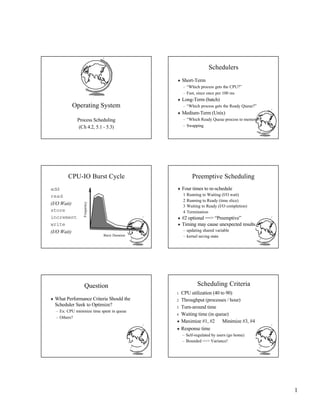
CPU-IO Burst Cycle
add
read
(I/O Wait)
store
increment
write
(I/O Wait)
Burst Duration
Frequency
Preemptive Scheduling
F Four times to re-schedule
1 Running to Waiting (I/O wait)
2 Running to Ready (time slice)
3 Waiting to Ready (I/O completion)
4 Termination
F #2 optional ==> “Preemptive”
F Timing may cause unexpected results
– updating shared variable
– kernel saving state
Question
F What Performance Criteria Should the
Scheduler Seek to Optimize?
– Ex: CPU minimize time spent in queue
– Others?
Scheduling Criteria
1 CPU utilization (40 to 90)
2 Throughput (processes / hour)
3 Turn-around time
4 Waiting time (in queue)
F Maximize #1, #2 Minimize #3, #4
F Response time
– Self-regulated by users (go home)
– Bounded ==> Variance!
2
First-Come, First-Served
Process
A
B
C
Burst Time
8
1
1
0 8 9 10
A B C
F Avg Wait Time (0 + 8 + 9) / 3 = 5.7
Gantt
Chart
Shortest Job First
0 1 2 10
A
B C
F Avg Wait Time (0 + 1 + 2) / 3 = 1
F OptimalAvg Wait
F Prediction tough … Ideas?
Process
A
B
C
Burst Time
8
1
1
Priority Scheduling
F SJF is a special case
Process
A
B
C
Burst Time
8
1
1
Priority
2
1
3
0 1 9 10
A
B C
F Avg Wait Time (0 + 1 + 9) / 3 = 3.3
Priority Scheduling Criteria?
F Internal
– open files
– memory requirements
– CPU time used - time slice expired (RR)
– process age - I/O wait completed
F External
– $
– department sponsoring work
– process importance
– super-user (root) - nice
Round Robin
F Fixed time-slice and Preemption
Process
A
B
C
Burst Time
5
3
3
B C
A B C A B C
A A
F Avg = (8 + 9 + 11) / 3 = 9.3
F FCFS? SJF?
8 9 11
Round Robin Fun
Process
A
B
C
Burst Time
10
10
10
F Turn-around time?
– q = 10
– q = 1
– q --> 0
3
More Round Robin Fun
Process
A
B
C
D
Burst Time
6
3
1
7
1 2 3 4 5 6 7
Time Quantum
Avg.
Turn-around
Time
Rule:
80% within
one quantum
Fun with Scheduling
Process
A
B
C
Burst Time
10
1
2
Priority
2
1
3
F Gantt Charts:
– FCFS
– SJF
– Priority
– RR (q=1)
F Performance:
– Throughput
– Waiting time
– Turnaround time
More Fun with Scheduling
Process
A
B
C
Arrival Time
0.0
0.4
1.0
Burst Time
8
4
1
F Turn around time:
– FCFS
– SJF
– q=1 CPU idle
– q=0.5 CPU idle
Multi-Level Queues
System
Priority 1
Priority 2
Priority 3
Interactive
Batch
F Categories of processes
F Run all in 1 first, then 2 …
F Starvation!
F Divide between queues: 70% 1, 15% 2 …
... ...
Multi-Level Feedback Queues
Queue
Priority 1
Priority 2
Priority 3
Queue
Queue
1 Quantum
2 Quanta
4 Quanta
F Time slice expensive but want interactive
F Consider process needing 100 quanta
– 1, 4, 8, 16, 32, 64 = 7 swaps!
F Favor interactive users
... ... ...
Evaluating Scheduling Algorithms
F With all these possible scheduling
algorithms, how to choose one?
– Ease of implementation
– Efficiency of implementation / low overhead
– Performance evaluation (next slide)
4
Performance Evaluation Methods
F Deterministic methods / Gantt charts
– Use more realistic workloads
F Queueing theory
– Mathematical techniques
– Uses probablistic models of jobs / CPU
utilization
F Simulation
– Probabilistic or trace-driven
Linux Process Scheduling
F Two classes of processes:
– Real-Time
– Normal
F Real-Time:
– Always run Real-Time above Normal
– Round-Robin or FIFO
– “Soft” not “Hard”
Linux Process Scheduling
F Normal: Credit-Based
– process with most credits is selected
– time-slice then lose a credit (0, then suspend)
– no runnable process (all suspended), add to
every process:
credits = credits/2 + priority
F Automatically favors I/O bound processes
Questions
F What is a PCB?
F List steps that occur during interrupt
F Explain how SJF works
F True or False:
– FCFS is optimal in terms of avg waiting time
– Most processes are CPU bound
– The shorter the time quantum, the better
F micro-shell.c?
Interrupt Handling
F Stores program counter (hardware)
F Loads new program counter (hardware)
– jump to interrupt service procedure
F Save PCB information (assembly)
F Set up new stack (assembly)
F Set “waiting” process to “ready” (C)
F Re-schedule (probably awakened process) (C)
– “dispatcher” in SOS, “schedule” in Linux
F If new process, called a context-switch
Outline
F Processes 4
– PCB 4
– Interrupt Handlers 4
F Scheduling
– Algorithms 4
– Linux
– WinNT ←
5
Windows NT Scheduling
F Basic scheduling unit is a thread
F Priority based scheduling per thread
F Preemptive operating system
F No shortest job first, no quotas
Priority Assignment
F NT kernel uses 31 priority levels
– 31 is the highest; 0 is system idle thread
– Realtimepriorities: 16 - 31
– Dynamic priorities: 1 - 15
F Users specify a priority class:
u realtime (24) , high (13), normal (8) and idle (4)
– and a relative priority:
u highest (+2), above normal (+1), normal (0), below
normal (-1), and lowest (-2)
– to establish the starting priority
F Threads also have a current priority
Quantum
F Determines how long a Thread runs once
selected
F Varies based on:
– NT Workstation or NT Server
– Intel or Alpha hardware
– Foreground/Background application threads
F How do you think it varies with each?
Dispatcher Ready List
F Keeps track of all
Ready-to-execute
threads
F Queue of threads
assigned to each level
Dispatcher
Ready List
11
10
9
8
7
Ready Threads
FindReadyThread
F Locates the highest priority thread that is
ready to execute
F Scans dispatcher ready list
F Picks front thread in highest priority
nonempty queue
F When is this like round robin?
Boosting and Decay
F Boost priority
– Event that “wakes” blocked thread
– Boosts never exceed priority 15 for dynamic
– Realtime priorities are not boosted
F Decay priority
– by one for each quantum
– decays only to starting priority (no lower)
6
Starvation Prevention
F Low priority threads may never execute
F “Anti-CPU starvation policy”
– thread that has not executed for 3 seconds
– boost priority to 15
– double quantum
F Decay is swift not gradual after this boost

Scheduling

  • 1.
    1 Operating System Process Scheduling (Ch4.2, 5.1 - 5.3) Schedulers F Short-Term – “Which process gets the CPU?” – Fast, since once per 100 ms F Long-Term (batch) – “Which process gets the Ready Queue?” F Medium-Term (Unix) – “Which Ready Queue process to memory?” – Swapping CPU-IO Burst Cycle add read (I/O Wait) store increment write (I/O Wait) Burst Duration Frequency Preemptive Scheduling F Four times to re-schedule 1 Running to Waiting (I/O wait) 2 Running to Ready (time slice) 3 Waiting to Ready (I/O completion) 4 Termination F #2 optional ==> “Preemptive” F Timing may cause unexpected results – updating shared variable – kernel saving state Question F What Performance Criteria Should the Scheduler Seek to Optimize? – Ex: CPU minimize time spent in queue – Others? Scheduling Criteria 1 CPU utilization (40 to 90) 2 Throughput (processes / hour) 3 Turn-around time 4 Waiting time (in queue) F Maximize #1, #2 Minimize #3, #4 F Response time – Self-regulated by users (go home) – Bounded ==> Variance!
  • 2.
    2 First-Come, First-Served Process A B C Burst Time 8 1 1 08 9 10 A B C F Avg Wait Time (0 + 8 + 9) / 3 = 5.7 Gantt Chart Shortest Job First 0 1 2 10 A B C F Avg Wait Time (0 + 1 + 2) / 3 = 1 F OptimalAvg Wait F Prediction tough … Ideas? Process A B C Burst Time 8 1 1 Priority Scheduling F SJF is a special case Process A B C Burst Time 8 1 1 Priority 2 1 3 0 1 9 10 A B C F Avg Wait Time (0 + 1 + 9) / 3 = 3.3 Priority Scheduling Criteria? F Internal – open files – memory requirements – CPU time used - time slice expired (RR) – process age - I/O wait completed F External – $ – department sponsoring work – process importance – super-user (root) - nice Round Robin F Fixed time-slice and Preemption Process A B C Burst Time 5 3 3 B C A B C A B C A A F Avg = (8 + 9 + 11) / 3 = 9.3 F FCFS? SJF? 8 9 11 Round Robin Fun Process A B C Burst Time 10 10 10 F Turn-around time? – q = 10 – q = 1 – q --> 0
  • 3.
    3 More Round RobinFun Process A B C D Burst Time 6 3 1 7 1 2 3 4 5 6 7 Time Quantum Avg. Turn-around Time Rule: 80% within one quantum Fun with Scheduling Process A B C Burst Time 10 1 2 Priority 2 1 3 F Gantt Charts: – FCFS – SJF – Priority – RR (q=1) F Performance: – Throughput – Waiting time – Turnaround time More Fun with Scheduling Process A B C Arrival Time 0.0 0.4 1.0 Burst Time 8 4 1 F Turn around time: – FCFS – SJF – q=1 CPU idle – q=0.5 CPU idle Multi-Level Queues System Priority 1 Priority 2 Priority 3 Interactive Batch F Categories of processes F Run all in 1 first, then 2 … F Starvation! F Divide between queues: 70% 1, 15% 2 … ... ... Multi-Level Feedback Queues Queue Priority 1 Priority 2 Priority 3 Queue Queue 1 Quantum 2 Quanta 4 Quanta F Time slice expensive but want interactive F Consider process needing 100 quanta – 1, 4, 8, 16, 32, 64 = 7 swaps! F Favor interactive users ... ... ... Evaluating Scheduling Algorithms F With all these possible scheduling algorithms, how to choose one? – Ease of implementation – Efficiency of implementation / low overhead – Performance evaluation (next slide)
  • 4.
    4 Performance Evaluation Methods FDeterministic methods / Gantt charts – Use more realistic workloads F Queueing theory – Mathematical techniques – Uses probablistic models of jobs / CPU utilization F Simulation – Probabilistic or trace-driven Linux Process Scheduling F Two classes of processes: – Real-Time – Normal F Real-Time: – Always run Real-Time above Normal – Round-Robin or FIFO – “Soft” not “Hard” Linux Process Scheduling F Normal: Credit-Based – process with most credits is selected – time-slice then lose a credit (0, then suspend) – no runnable process (all suspended), add to every process: credits = credits/2 + priority F Automatically favors I/O bound processes Questions F What is a PCB? F List steps that occur during interrupt F Explain how SJF works F True or False: – FCFS is optimal in terms of avg waiting time – Most processes are CPU bound – The shorter the time quantum, the better F micro-shell.c? Interrupt Handling F Stores program counter (hardware) F Loads new program counter (hardware) – jump to interrupt service procedure F Save PCB information (assembly) F Set up new stack (assembly) F Set “waiting” process to “ready” (C) F Re-schedule (probably awakened process) (C) – “dispatcher” in SOS, “schedule” in Linux F If new process, called a context-switch Outline F Processes 4 – PCB 4 – Interrupt Handlers 4 F Scheduling – Algorithms 4 – Linux – WinNT ←
  • 5.
    5 Windows NT Scheduling FBasic scheduling unit is a thread F Priority based scheduling per thread F Preemptive operating system F No shortest job first, no quotas Priority Assignment F NT kernel uses 31 priority levels – 31 is the highest; 0 is system idle thread – Realtimepriorities: 16 - 31 – Dynamic priorities: 1 - 15 F Users specify a priority class: u realtime (24) , high (13), normal (8) and idle (4) – and a relative priority: u highest (+2), above normal (+1), normal (0), below normal (-1), and lowest (-2) – to establish the starting priority F Threads also have a current priority Quantum F Determines how long a Thread runs once selected F Varies based on: – NT Workstation or NT Server – Intel or Alpha hardware – Foreground/Background application threads F How do you think it varies with each? Dispatcher Ready List F Keeps track of all Ready-to-execute threads F Queue of threads assigned to each level Dispatcher Ready List 11 10 9 8 7 Ready Threads FindReadyThread F Locates the highest priority thread that is ready to execute F Scans dispatcher ready list F Picks front thread in highest priority nonempty queue F When is this like round robin? Boosting and Decay F Boost priority – Event that “wakes” blocked thread – Boosts never exceed priority 15 for dynamic – Realtime priorities are not boosted F Decay priority – by one for each quantum – decays only to starting priority (no lower)
  • 6.
    6 Starvation Prevention F Lowpriority threads may never execute F “Anti-CPU starvation policy” – thread that has not executed for 3 seconds – boost priority to 15 – double quantum F Decay is swift not gradual after this boost