The Windows Scheduler Peter Shirley-Quirk
The Windows Scheduler In this presentation we will look at: What the scheduler is How it works Tips for developers
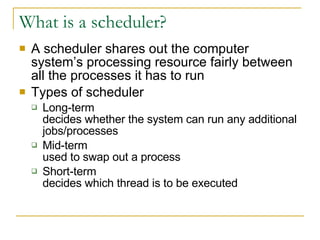
What is a scheduler?  A scheduler shares out the computer system’s processing resource fairly between all the processes it has to run Types of scheduler Long-term decides whether the system can run any additional jobs/processes Mid-term used to swap out a process Short-term decides which thread is to be executed
How does Windows Scheduler work? Scheduling algorithm Managing a queue of threads that are ready to execute  Performing context switches and allocating time slices to respond to interrupts that affect which threads are able to run  Ensuring that threads get a chance to run
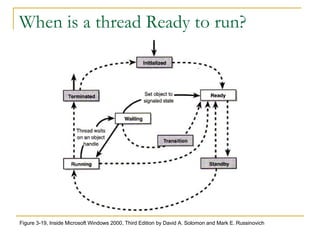
When is a thread Ready to run? Figure 3-19, Inside Microsoft Windows 2000, Third Edition by David A. Solomon and Mark E. Russinovich
Context switching (1)  Context switching happens: At the end of a time slice When a higher priority thread becomes ready  e.g. garbage collection thread starts When the currently running thread goes into a wait state  To run a thread the processor needs the full context registers stack (user and kernel)  environment
Context switching (2) To switch context the scheduler: Saves the context for the executing thread Places that thread at the end of the queue for its priority Finds the highest priority queue that contains ready threads Removes the thread at the head of the queue, loads its context, and executes it
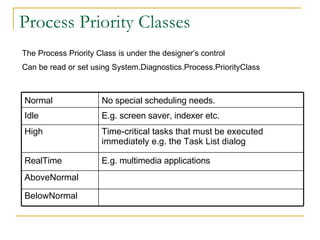
Process Priority Classes The Process Priority Class is under the designer’s control Can be read or set using System.Diagnostics.Process.PriorityClass AboveNormal Time-critical tasks that must be executed immediately e.g. the Task List dialog High BelowNormal E.g. multimedia applications RealTime E.g. screen saver, indexer etc.  Idle No special scheduling needs. Normal
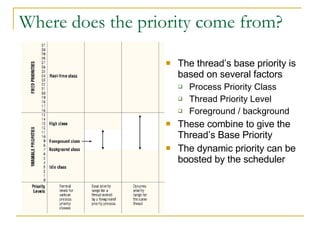
Where does the priority come from? The thread’s base priority is based on several factors Process Priority Class Thread Priority Level Foreground / background These combine to give the Thread’s Base Priority The dynamic priority can be boosted by the scheduler
When does the scheduler boost the priority? Avoiding starvation To prevent a high priority task from completely blocking a lower priority task the latter will be given a priority boost Avoiding choking CPU bound vs. IO bound – burst characteristics A CPU bound thread can choke resources from an IO bound thread – perceived as poor responsiveness from mouse or keyboard
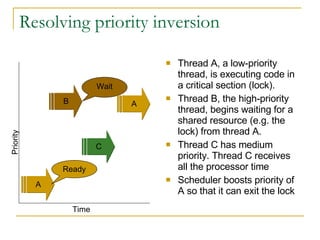
Resolving priority inversion Thread A, a low-priority thread, is executing code in a critical section (lock).  Thread B, the high-priority thread, begins waiting for a shared resource (e.g. the lock) from thread A.  Thread C has medium priority. Thread C receives all the processor time Scheduler boosts priority of A so that it can exit the lock A B C Wait Ready Time Priority A
What if there’s more than one processor? The system uses a SMP model to schedule threads on multiple processors Any thread can be assigned to any processor The system schedules threads to run concurrently You can influence the scheduler Thread Affinity Thread Ideal Processor
Multi-Processor Architecture Hyperthreading 2 virtual processors but sharing some processor resources – consider using thread affinity Intel Dual-core Sharing onboard cache – thread affinity AMD dual core Treat as independent processors The future: 4-way, 8-way Design for parallel processing
Some final thoughts Designing for concurrency Take advantage of multiple processors Aim to blend CPU and IO work Know your synchronization mechanisms Design to avoid deadlock Keep locks private and short Be aware of Garbage Collection in .NET Usually quick, occasionally quite slow
More information http://msdnwiki.microsoft.com Managing Processes Sample  System.Diagnostics namespace  Process ProcessThread System.Threading namespace  Thread

The Windows Scheduler

  • 1.
    The Windows SchedulerPeter Shirley-Quirk
  • 2.
    The Windows SchedulerIn this presentation we will look at: What the scheduler is How it works Tips for developers
  • 3.
    What is ascheduler? A scheduler shares out the computer system’s processing resource fairly between all the processes it has to run Types of scheduler Long-term decides whether the system can run any additional jobs/processes Mid-term used to swap out a process Short-term decides which thread is to be executed
  • 4.
    How does WindowsScheduler work? Scheduling algorithm Managing a queue of threads that are ready to execute Performing context switches and allocating time slices to respond to interrupts that affect which threads are able to run Ensuring that threads get a chance to run
  • 5.
    When is athread Ready to run? Figure 3-19, Inside Microsoft Windows 2000, Third Edition by David A. Solomon and Mark E. Russinovich
  • 6.
    Context switching (1) Context switching happens: At the end of a time slice When a higher priority thread becomes ready e.g. garbage collection thread starts When the currently running thread goes into a wait state To run a thread the processor needs the full context registers stack (user and kernel) environment
  • 7.
    Context switching (2)To switch context the scheduler: Saves the context for the executing thread Places that thread at the end of the queue for its priority Finds the highest priority queue that contains ready threads Removes the thread at the head of the queue, loads its context, and executes it
  • 8.
    Process Priority ClassesThe Process Priority Class is under the designer’s control Can be read or set using System.Diagnostics.Process.PriorityClass AboveNormal Time-critical tasks that must be executed immediately e.g. the Task List dialog High BelowNormal E.g. multimedia applications RealTime E.g. screen saver, indexer etc. Idle No special scheduling needs. Normal
  • 9.
    Where does thepriority come from? The thread’s base priority is based on several factors Process Priority Class Thread Priority Level Foreground / background These combine to give the Thread’s Base Priority The dynamic priority can be boosted by the scheduler
  • 10.
    When does thescheduler boost the priority? Avoiding starvation To prevent a high priority task from completely blocking a lower priority task the latter will be given a priority boost Avoiding choking CPU bound vs. IO bound – burst characteristics A CPU bound thread can choke resources from an IO bound thread – perceived as poor responsiveness from mouse or keyboard
  • 11.
    Resolving priority inversionThread A, a low-priority thread, is executing code in a critical section (lock). Thread B, the high-priority thread, begins waiting for a shared resource (e.g. the lock) from thread A. Thread C has medium priority. Thread C receives all the processor time Scheduler boosts priority of A so that it can exit the lock A B C Wait Ready Time Priority A
  • 12.
    What if there’smore than one processor? The system uses a SMP model to schedule threads on multiple processors Any thread can be assigned to any processor The system schedules threads to run concurrently You can influence the scheduler Thread Affinity Thread Ideal Processor
  • 13.
    Multi-Processor Architecture Hyperthreading2 virtual processors but sharing some processor resources – consider using thread affinity Intel Dual-core Sharing onboard cache – thread affinity AMD dual core Treat as independent processors The future: 4-way, 8-way Design for parallel processing
  • 14.
    Some final thoughtsDesigning for concurrency Take advantage of multiple processors Aim to blend CPU and IO work Know your synchronization mechanisms Design to avoid deadlock Keep locks private and short Be aware of Garbage Collection in .NET Usually quick, occasionally quite slow
  • 15.
    More information http://msdnwiki.microsoft.comManaging Processes Sample  System.Diagnostics namespace  Process ProcessThread System.Threading namespace  Thread