CHAPTER OBJECTIVES
• Tointroduce CPU scheduling, which is the basis for multiprogrammed
operating systems.
• To describe various CPU-scheduling algorithms.
• To discuss evaluation criteria for selecting a CPU-scheduling algorithm
for a particular system.
• To examine the scheduling algorithms of several operating systems.
3.
Basic Concepts
CPU schedulingis a process of allocating the CPU to a process or
thread from a pool of ready to run process or thread.
Main Goals are:
●
Maximize CPU utlization
●
Minimize response time
●
Ensure faireness and priority
●
Optimize throughput
4.
CPU – I/OBurst Cycle
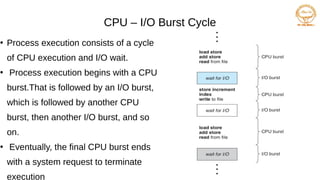
●
Process execution consists of a cycle
of CPU execution and I/O wait.
●
Process execution begins with a CPU
burst.That is followed by an I/O burst,
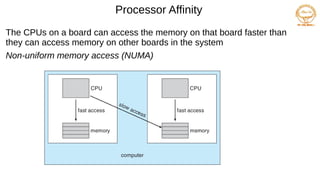
which is followed by another CPU
burst, then another I/O burst, and so
on.
●
Eventually, the final CPU burst ends
with a system request to terminate
execution
5.
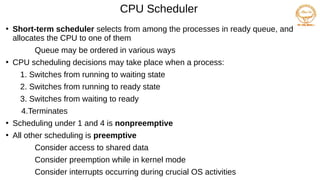
CPU Scheduler
●
Short-term schedulerselects from among the processes in ready queue, and
allocates the CPU to one of them
Queue may be ordered in various ways
●
CPU scheduling decisions may take place when a process:
1. Switches from running to waiting state
2. Switches from running to ready state
3. Switches from waiting to ready
4.Terminates
●
Scheduling under 1 and 4 is nonpreemptive
●
All other scheduling is preemptive
Consider access to shared data
Consider preemption while in kernel mode
Consider interrupts occurring during crucial OS activities
6.
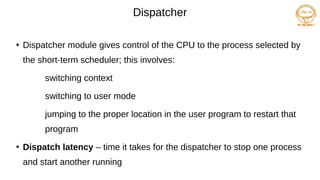
Dispatcher
●
Dispatcher module givescontrol of the CPU to the process selected by
the short-term scheduler; this involves:
switching context
switching to user mode
jumping to the proper location in the user program to restart that
program
●
Dispatch latency – time it takes for the dispatcher to stop one process
and start another running
7.
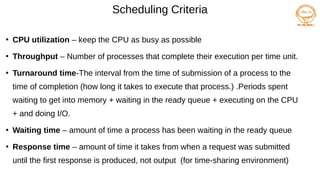
●
CPU utilization –keep the CPU as busy as possible
●
Throughput – Number of processes that complete their execution per time unit.
●
Turnaround time-The interval from the time of submission of a process to the
time of completion (how long it takes to execute that process.) .Periods spent
waiting to get into memory + waiting in the ready queue + executing on the CPU
+ and doing I/O.
●
Waiting time – amount of time a process has been waiting in the ready queue
●
Response time – amount of time it takes from when a request was submitted
until the first response is produced, not output (for time-sharing environment)
Scheduling Criteria
8.
Scheduling Algorithm OptimizationCriteria
●
Max CPU utilization
●
Max throughput
●
Min turnaround time
●
Min waiting time
●
Min response time
9.
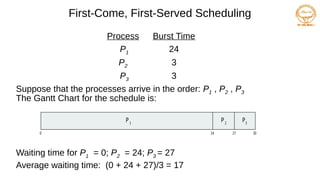
First-Come, First-Served Scheduling
ProcessBurst Time
P1 24
P2 3
P3 3
Suppose that the processes arrive in the order: P1 , P2 , P3
The Gantt Chart for the schedule is:
Waiting time for P1 = 0; P2 = 24; P3 = 27
Average waiting time: (0 + 24 + 27)/3 = 17
P P P
1 2 3
0 24 30
27
10.
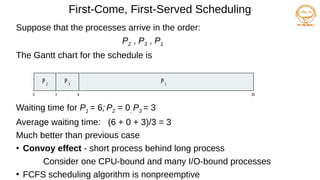
First-Come, First-Served Scheduling
Supposethat the processes arrive in the order:
P2 , P3 , P1
The Gantt chart for the schedule is
Waiting time for P1 = 6; P2 = 0; P3 = 3
Average waiting time: (6 + 0 + 3)/3 = 3
Much better than previous case
●
Convoy effect - short process behind long process
Consider one CPU-bound and many I/O-bound processes
●
FCFS scheduling algorithm is nonpreemptive
P1
0 3 6 30
P2
P3
11.
Shortest-Job-First (SJF) Scheduling
●
Associatewith each process the length of its next CPU burst
Use these lengths to schedule the process with the shortest time
●
SJF is optimal – gives minimum average waiting time for a given set of
processes
The difficulty is knowing the length of the next CPU request
Could ask the user
12.
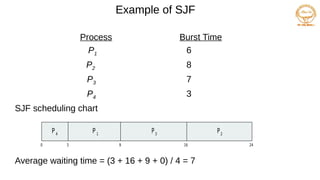
Example of SJF
ProcessArrival TimeBurst Time
P1 0.0 6
P2 2.0 8
P3 4.0 7
P4 5.0 3
SJF scheduling chart
Average waiting time = (3 + 16 + 9 + 0) / 4 = 7
P3
0 3 24
P4
P1
16
9
P2
13.
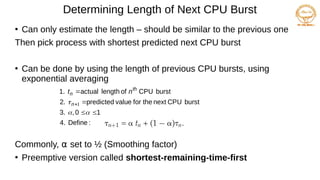
Determining Length ofNext CPU Burst
●
Can only estimate the length – should be similar to the previous one
Then pick process with shortest predicted next CPU burst
●
Can be done by using the length of previous CPU bursts, using
exponential averaging
Commonly, α set to ½ (Smoothing factor)
●
Preemptive version called shortest-remaining-time-first
:
Define
4.
1
0
,
3.
burst
CPU
next
the
for
value
predicted
2.
burst
CPU
of
length
actual
1.
1
n
th
n n
t
14.
Example of Shortest-remaining-time-first
Nowwe add the concepts of varying arrival times and preemption to the
analysis
ProcessAarri Arrival TimeTBurst Time
P1 0 8
P2 1 4
P3 2 9
P4 3 5
Preemptive SJF Gantt Chart
Average waiting time = [(10-1)+(1-1)+(17-2)+5-3)]/4 = 26/4 = 6.5 msec
P4
0 1 26
P1
P2
10
P3
P1
5 17
15.
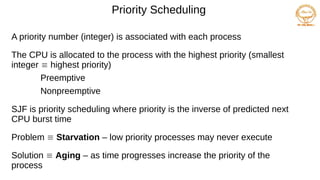
Priority Scheduling
A prioritynumber (integer) is associated with each process
The CPU is allocated to the process with the highest priority (smallest
integer highest priority)
Preemptive
Nonpreemptive
SJF is priority scheduling where priority is the inverse of predicted next
CPU burst time
Problem Starvation – low priority processes may never execute
Solution Aging – as time progresses increase the priority of the
process
16.
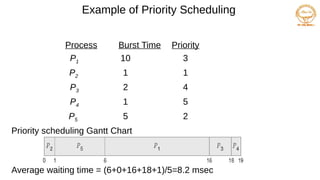
Example of PriorityScheduling
ProcessAarri Burst TimeT Priority
P1 10 3
P2 1 1
P3 2 4
P4 1 5
P5 5 2
Priority scheduling Gantt Chart
Average waiting time = (6+0+16+18+1)/5=8.2 msec
17.
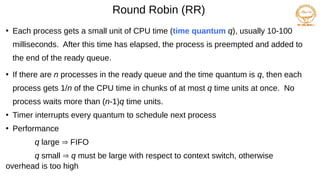
Round Robin (RR)
●
Eachprocess gets a small unit of CPU time (time quantum q), usually 10-100
milliseconds. After this time has elapsed, the process is preempted and added to
the end of the ready queue.
●
If there are n processes in the ready queue and the time quantum is q, then each
process gets 1/n of the CPU time in chunks of at most q time units at once. No
process waits more than (n-1)q time units.
●
Timer interrupts every quantum to schedule next process
●
Performance
q large FIFO
q small q must be large with respect to context switch, otherwise
overhead is too high
18.
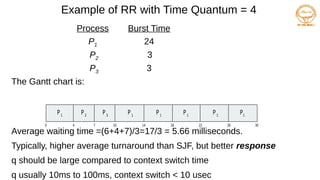
Example of RRwith Time Quantum = 4
Process Burst Time
P1 24
P2 3
P3 3
The Gantt chart is:
Average waiting time =(6+4+7)/3=17/3 = 5.66 milliseconds.
Typically, higher average turnaround than SJF, but better response
q should be large compared to context switch time
q usually 10ms to 100ms, context switch < 10 usec
P P P
1 1 1
0 18 30
26
14
4 7 10 22
P2
P3
P1
P1
P1
19.
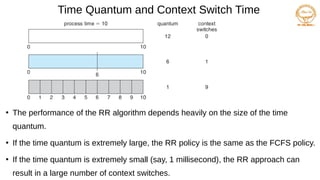
Time Quantum andContext Switch Time
●
The performance of the RR algorithm depends heavily on the size of the time
quantum.
●
If the time quantum is extremely large, the RR policy is the same as the FCFS policy.
●
If the time quantum is extremely small (say, 1 millisecond), the RR approach can
result in a large number of context switches.
20.
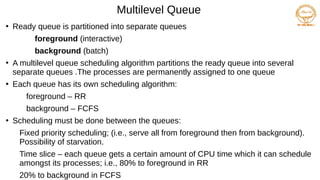
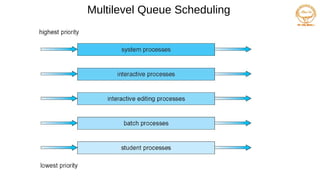
Multilevel Queue
●
Ready queueis partitioned into separate queues
foreground (interactive)
background (batch)
●
A multilevel queue scheduling algorithm partitions the ready queue into several
separate queues .The processes are permanently assigned to one queue
●
Each queue has its own scheduling algorithm:
foreground – RR
background – FCFS
●
Scheduling must be done between the queues:
Fixed priority scheduling; (i.e., serve all from foreground then from background).
Possibility of starvation.
Time slice – each queue gets a certain amount of CPU time which it can schedule
amongst its processes; i.e., 80% to foreground in RR
20% to background in FCFS
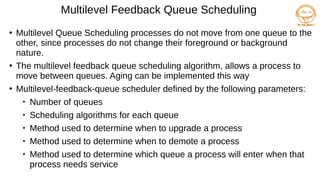
Multilevel Feedback QueueScheduling
●
Multilevel Queue Scheduling processes do not move from one queue to the
other, since processes do not change their foreground or background
nature.
●
The multilevel feedback queue scheduling algorithm, allows a process to
move between queues. Aging can be implemented this way
●
Multilevel-feedback-queue scheduler defined by the following parameters:
Number of queues
Scheduling algorithms for each queue
Method used to determine when to upgrade a process
Method used to determine when to demote a process
Method used to determine which queue a process will enter when that
process needs service
23.
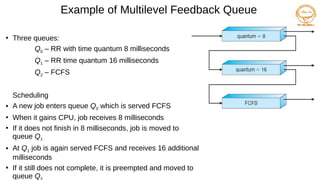
Example of MultilevelFeedback Queue
●
Three queues:
Q0 – RR with time quantum 8 milliseconds
Q1 – RR time quantum 16 milliseconds
Q2 – FCFS
Scheduling
● A new job enters queue Q0 which is served FCFS
●
When it gains CPU, job receives 8 milliseconds
●
If it does not finish in 8 milliseconds, job is moved to
queue Q1
● At Q1 job is again served FCFS and receives 16 additional
milliseconds
●
If it still does not complete, it is preempted and moved to
queue Q
24.
Thread Scheduling
●
In kernel-levelthreads—not processes—that are being scheduled by
the operating system.
●
User-level threads are managed by a thread library, and the kernel is
unaware of them.
●
Many-to-one and many-to-many models, thread library schedules user-level
threads to run on LWP
Known as process-contention scope (PCS) since scheduling competition
is within the process
Typically done via priority set by programmer
●
Kernel thread scheduled onto available CPU is system-contention scope
(SCS) – competition among all threads in system
25.
Pthread Scheduling
API allowsspecifying either PCS or SCS during thread creation
PTHREAD_SCOPE_PROCESS schedules threads using PCS scheduling
PTHREAD_SCOPE_SYSTEM schedules threads using SCS scheduling
●
In many-to-many model, the PTHREAD SCOPE PROCESS policy schedules user-
level threads onto available LWPs.
●
The PTHREAD SCOPE SYSTEM scheduling policy will create and bind an LWP for
each user-level thread on many-to-many systems
●
Can be limited by OS – Linux and Mac OS X only allow
PTHREAD_SCOPE_SYSTEM
26.
Multiple-Processor Scheduling
●
CPU schedulingmore complex when multiple CPUs are available
●
Homogeneous processors within a multiprocessor
●
Asymmetric multiprocessing – only one processor accesses the
system data structures, alleviating the need for data sharing
●
Symmetric multiprocessing (SMP) – each processor is self-
scheduling, all processes in common ready queue, or each has its own
private queue of ready processes
Currently, most common
27.
Processor Affinity
●
It refersto the association of a process or thread with specific processor or
core. This technique allows the operating system to optimize process
scheduling ,improve performance and reduce overhead.
●
Hard affinity: permanent binding of a process to a specific processor.
●
Soft affinity :preferences for a process to run on a specific processor but
not guaranteed.
28.
Processor Affinity
The CPUson a board can access the memory on that board faster than
they can access memory on other boards in the system
Non-uniform memory access (NUMA)
29.
Multiple-Processor Scheduling
●
If SMP,need to keep all CPUs loaded for efficiency
●
Load balancing attempts to keep the workload evenly distributed
across all processors in an SMP system.
●
There are two general approaches to load balancing: push migration
and pull migration
●
Push migration – periodic task checks load on each processor, and if
found - pushes task from overloaded CPU to other CPUs
●
Pull migration occurs when an idle processor pulls a waiting task from a
busy processor.
30.
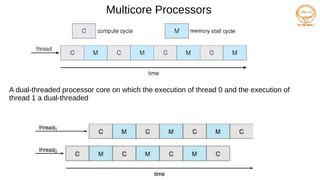
Multicore Processors
●
Multicore Processors-Recenttrend to place multiple processor cores on same
physical chip
●
Faster and consumes less power
●
Multiple threads per core also growing
Takes advantage of memory stall to make progress on another thread
while memory retrieve happens
when a processor accesses memory, it spends a significant amount of time waiting for the data
to become available. This situation, known as a memory stall
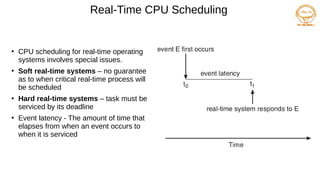
Real-Time CPU Scheduling
●
CPUscheduling for real-time operating
systems involves special issues.
●
Soft real-time systems – no guarantee
as to when critical real-time process will
be scheduled
●
Hard real-time systems – task must be
serviced by its deadline
●
Event latency - The amount of time that
elapses from when an event occurs to
when it is serviced
33.
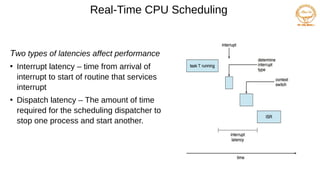
Real-Time CPU Scheduling
Twotypes of latencies affect performance
●
Interrupt latency – time from arrival of
interrupt to start of routine that services
interrupt
●
Dispatch latency – The amount of time
required for the scheduling dispatcher to
stop one process and start another.
34.
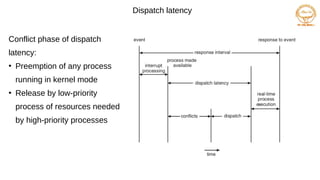
Dispatch latency
Conflict phaseof dispatch
latency:
●
Preemption of any process
running in kernel mode
●
Release by low-priority
process of resources needed
by high-priority processes
35.
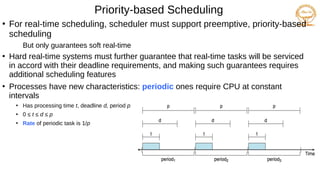
Priority-based Scheduling
●
For real-timescheduling, scheduler must support preemptive, priority-based
scheduling
But only guarantees soft real-time
●
Hard real-time systems must further guarantee that real-time tasks will be serviced
in accord with their deadline requirements, and making such guarantees requires
additional scheduling features
●
Processes have new characteristics: periodic ones require CPU at constant
intervals
●
Has processing time t, deadline d, period p
●
0 ≤ t ≤ d ≤ p
●
Rate of periodic task is 1/p
36.
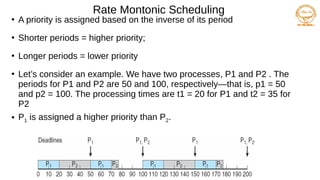
Rate Montonic Scheduling
●
Apriority is assigned based on the inverse of its period
●
Shorter periods = higher priority;
●
Longer periods = lower priority
●
Let’s consider an example. We have two processes, P1 and P2 . The
periods for P1 and P2 are 50 and 100, respectively—that is, p1 = 50
and p2 = 100. The processing times are t1 = 20 for P1 and t2 = 35 for
P2
● P1 is assigned a higher priority than P2.
37.
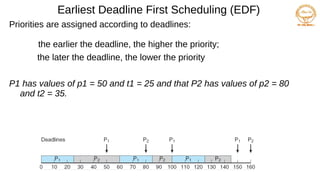
Earliest Deadline FirstScheduling (EDF)
Priorities are assigned according to deadlines:
the earlier the deadline, the higher the priority;
the later the deadline, the lower the priority
P1 has values of p1 = 50 and t1 = 25 and that P2 has values of p2 = 80
and t2 = 35.
38.
Proportional Share Scheduling
Tshares are allocated among all processes in the system
An application receives N shares where N < T
This ensures each application will receive N / T of the total processor
time
39.
POSIX Real-Time Scheduling
●
ThePOSIX.1b standard
●
API provides functions for managing real-time threads
●
Defines two scheduling classes for real-time threads:
●
SCHED_FIFO - threads are scheduled using a FCFS strategy with a FIFO
queue. There is no time-slicing for threads of equal priority
●
SCHED_RR - similar to SCHED_FIFO except time-slicing occurs for
threads of equal priority
●
Defines two functions for getting and setting scheduling policy:
● pthread_attr_getsched_policy(pthread_attr_t *attr,
int *policy)
● pthread_attr_setsched_policy(pthread_attr_t *attr,
int policy)
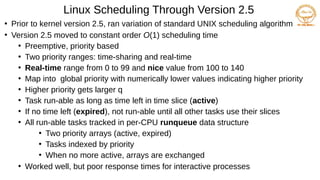
Linux Scheduling ThroughVersion 2.5
●
Prior to kernel version 2.5, ran variation of standard UNIX scheduling algorithm
●
Version 2.5 moved to constant order O(1) scheduling time
●
Preemptive, priority based
●
Two priority ranges: time-sharing and real-time
●
Real-time range from 0 to 99 and nice value from 100 to 140
●
Map into global priority with numerically lower values indicating higher priority
●
Higher priority gets larger q
●
Task run-able as long as time left in time slice (active)
●
If no time left (expired), not run-able until all other tasks use their slices
●
All run-able tasks tracked in per-CPU runqueue data structure
●
Two priority arrays (active, expired)
●
Tasks indexed by priority
●
When no more active, arrays are exchanged
●
Worked well, but poor response times for interactive processes
42.
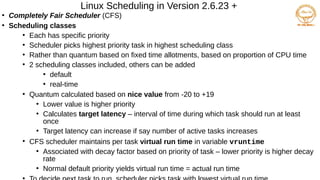
Linux Scheduling inVersion 2.6.23 +
●
Completely Fair Scheduler (CFS)
●
Scheduling classes
●
Each has specific priority
●
Scheduler picks highest priority task in highest scheduling class
●
Rather than quantum based on fixed time allotments, based on proportion of CPU time
●
2 scheduling classes included, others can be added
●
default
●
real-time
●
Quantum calculated based on nice value from -20 to +19
●
Lower value is higher priority
●
Calculates target latency – interval of time during which task should run at least
once
●
Target latency can increase if say number of active tasks increases
●
CFS scheduler maintains per task virtual run time in variable vruntime
●
Associated with decay factor based on priority of task – lower priority is higher decay
rate
●
Normal default priority yields virtual run time = actual run time
●
43.
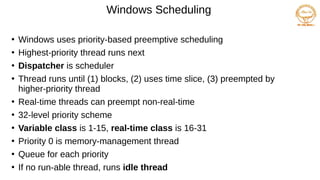
Windows Scheduling
●
Windows usespriority-based preemptive scheduling
●
Highest-priority thread runs next
●
Dispatcher is scheduler
●
Thread runs until (1) blocks, (2) uses time slice, (3) preempted by
higher-priority thread
●
Real-time threads can preempt non-real-time
●
32-level priority scheme
●
Variable class is 1-15, real-time class is 16-31
●
Priority 0 is memory-management thread
●
Queue for each priority
●
If no run-able thread, runs idle thread
44.
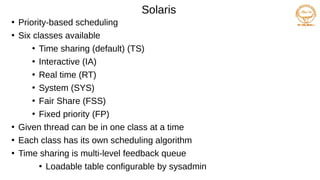
Solaris
●
Priority-based scheduling
●
Six classesavailable
●
Time sharing (default) (TS)
●
Interactive (IA)
●
Real time (RT)
●
System (SYS)
●
Fair Share (FSS)
●
Fixed priority (FP)
●
Given thread can be in one class at a time
●
Each class has its own scheduling algorithm
●
Time sharing is multi-level feedback queue
●
Loadable table configurable by sysadmin
45.
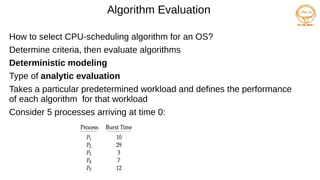
Algorithm Evaluation
How toselect CPU-scheduling algorithm for an OS?
Determine criteria, then evaluate algorithms
Deterministic modeling
Type of analytic evaluation
Takes a particular predetermined workload and defines the performance
of each algorithm for that workload
Consider 5 processes arriving at time 0:
46.
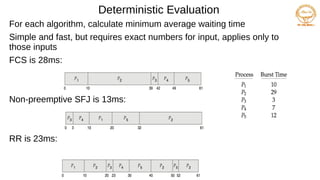
Deterministic Evaluation
For eachalgorithm, calculate minimum average waiting time
Simple and fast, but requires exact numbers for input, applies only to
those inputs
FCS is 28ms:
Non-preemptive SFJ is 13ms:
RR is 23ms:

![Example of Shortest-remaining-time-first
Now we add the concepts of varying arrival times and preemption to the
analysis
ProcessAarri Arrival TimeTBurst Time
P1 0 8
P2 1 4
P3 2 9
P4 3 5
Preemptive SJF Gantt Chart
Average waiting time = [(10-1)+(1-1)+(17-2)+5-3)]/4 = 26/4 = 6.5 msec
P4
0 1 26
P1
P2
10
P3
P1
5 17](https://image.slidesharecdn.com/cpuscheduling-250217052347-3bf67937/85/cpu-scheduling-pdfoieheoirwuojorkjp-ooooo-14-320.jpg)