1
06-Interfacing 4x4
keypad.
By : Mohamed Fawzy
Programming AVR Microcontrollers
© Mohamed F.A.B 2015
Lecture Notes:
2
o Set Your Phone To Vibration Mode.
o Ask any time.
o During labs, Feel Free To Check Any Materials or
Internet.
o Slides are self content.
o Feel Free To Share This Materials With Your Friends.
o Work Hard For Achieving Most Of This Course.
© Mohamed F.A.B 2015
3
Don't Forget !!!!
© Mohamed F.A.B 2015
Any Expert Was Once A Beginner

4
Lesson(12).
© Mohamed F.A.B 2015
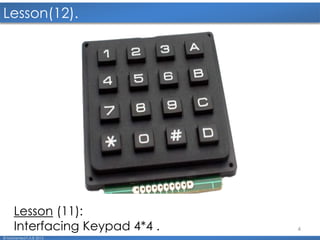
Lesson (11):
Interfacing Keypad 4*4 .
5
Lesson (11) Topics.
© Mohamed F.A.B 2015
► Why Matrix Keypad.
► Matrix Keypad Theory.
► Scanning Key pressed.
6
Why Matrix Keypad?
© Mohamed F.A.B 2015
o To reduce the microcontroller I/O pin usage, keyboards
are organized in a matrix of rows and columns.
o The CPU accesses both rows and columns through ports.
o When a key is pressed, a row and a column make a
contact; otherwise, there is no connection between
rows and columns.
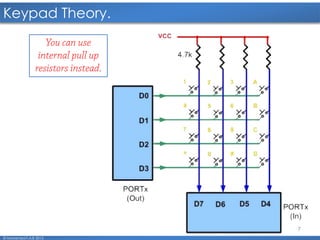
o A 4 × 4 matrix connected to two ports. The rows are
connected to an output port and the columns are
connected to an input port.
7
Keypad Theory.
© Mohamed F.A.B 2015
.
8
Scanning Key pressed.
© Mohamed F.A.B 2015
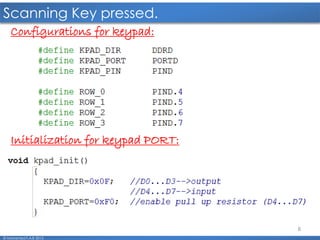
Configurations for keypad:
Initialization for keypad PORT:
9
Scanning Key pressed. Cont’
© Mohamed F.A.B 2015
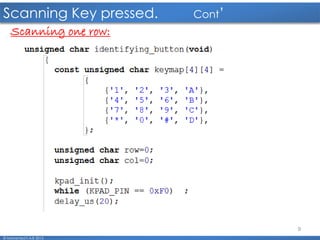
Scanning one row:
10
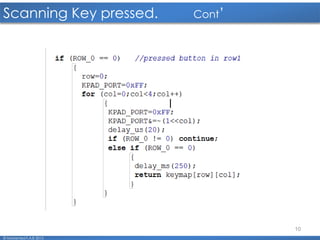
Scanning Key pressed. Cont’
© Mohamed F.A.B 2015
11
Questions:
© Mohamed F.A.B 2015
Thank You All 
12
mo7amed.fawzy33@gmail.com
01006032792
fawzy.fab@gmail.com
© Mohamed F.A.B 2015

06 Interfacing Keypad 4x4.2016

  • 1.
    1 06-Interfacing 4x4 keypad. By :Mohamed Fawzy Programming AVR Microcontrollers © Mohamed F.A.B 2015
  • 2.
    Lecture Notes: 2 o SetYour Phone To Vibration Mode. o Ask any time. o During labs, Feel Free To Check Any Materials or Internet. o Slides are self content. o Feel Free To Share This Materials With Your Friends. o Work Hard For Achieving Most Of This Course. © Mohamed F.A.B 2015
  • 3.
    3 Don't Forget !!!! ©Mohamed F.A.B 2015 Any Expert Was Once A Beginner 
  • 4.
    4 Lesson(12). © Mohamed F.A.B2015 Lesson (11): Interfacing Keypad 4*4 .
  • 5.
    5 Lesson (11) Topics. ©Mohamed F.A.B 2015 ► Why Matrix Keypad. ► Matrix Keypad Theory. ► Scanning Key pressed.
  • 6.
    6 Why Matrix Keypad? ©Mohamed F.A.B 2015 o To reduce the microcontroller I/O pin usage, keyboards are organized in a matrix of rows and columns. o The CPU accesses both rows and columns through ports. o When a key is pressed, a row and a column make a contact; otherwise, there is no connection between rows and columns. o A 4 × 4 matrix connected to two ports. The rows are connected to an output port and the columns are connected to an input port.
  • 7.
  • 8.
    8 Scanning Key pressed. ©Mohamed F.A.B 2015 Configurations for keypad: Initialization for keypad PORT:
  • 9.
    9 Scanning Key pressed.Cont’ © Mohamed F.A.B 2015 Scanning one row:
  • 10.
    10 Scanning Key pressed.Cont’ © Mohamed F.A.B 2015
  • 11.
  • 12.
    Thank You All 12 mo7amed.fawzy33@gmail.com 01006032792 fawzy.fab@gmail.com © Mohamed F.A.B 2015