8255 PROGRAMMABLE
PERIPHERAL INTERFACE (PPI)
Features:
• It is an I/O port chip used for interfacing I/O
devices with microprocessor
• It is a programmable device.
• 3 ports- Port A, Port B and Port C.
• Port C composed of two independent 4-bit ports-
PC7-4 (PC Upper) and PC3-0 (PC Lower)
• Improved dc driving capability
PA 3
PA 2
PA 1
PA 0
R D
C S
G N D
A 1
A 0
PC 7
PC 6
PC 5
PC 4
PC 0
PC 1
PC 2
PC 3
PB 0
PB 1
PB 2
PB 4
PB 5
PB 6
PB 7
W R
R ESET
D 0
D 1
D 2
D 3
D 4
D 5
D 6
D 7
V C C
PB 7
PB 6
PB 5
PB 4
PB 3
1
3
2
4
5
6
7
3
3
9
8
10
12
13
11
14
15
16
17
19
20
18
40
39
38
37
36
35
34
33
32
31
30
29
28
27
26
25
24
23
22
21
8255A
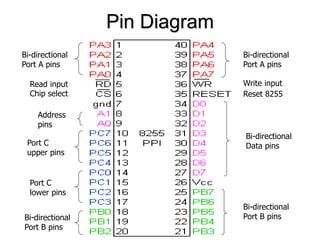
Pin diagram 8255
Pin Diagram
Bi-directional
Port A pins
Port C
lower pins
Port C
upper pins
Bi-directional
Data pins
Address
pins
Bi-directional
Port A pins
Bi-directional
Port B pins
Bi-directional
Port B pins
Chip select
Read input Write input
Reset 8255
Function of pins:
• Data bus(D0-D7):These are 8-bit bi-directional
buses, connected to 8085 data bus for
transferring data.
• CS: This is Active Low signal. When it is low,
then data is transfer from 8085.
• Read: This is Active Low signal, when it is Low
read operation will be start.
• Write: This is Active Low signal, when it is Low
Write operation will be start.
• RESET: This is used to reset the device. That
means clear control registers.
• PA0-PA7:It is the 8-bit bi-directional I/O pins
used to send the data to peripheral or
to receive the data from peripheral.
• PB0-PB7:Similar to PA
• PC0-PC7:This is also 8-bit bidirectional I/O pins.
These lines are divided into two groups.
1. PC0 to PC3(Lower Groups)
2. PC4 to PC7 (Higher groups)
These two groups working in separately using 4
data’s.
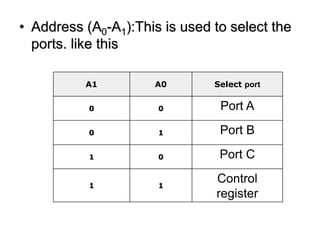
• Address (A0-A1):This is used to select the
ports. like this
A1 A0 Select port
0 0 Port A
0 1 Port B
1 0 Port C
1 1
Control
register
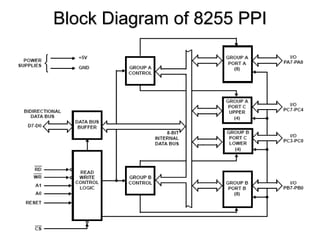
Block Diagram of 8255 PPI
Data Bus buffer:
• It is a 8-bit bidirectional Data bus.
• Used to interface between 8255 data bus
with system bus.
• The internal data bus and Outer pins D0-
D7 pins are connected in internally.
• The direction of data buffer is decided by
Read/Control Logic.
Read/Write Control Logic:
• This block get the input signals from
control bus and Address bus of CPU
• Control signal are RD and WR.
• Address signals are A0,A1,and CS.
• 8255 operation is enabled or disabled
by CS.
Group A and Group B control:
• Group A and B get the Control Signal from
CPU and send the command to the individual
control blocks.
• Group A send the control signal to port A and
Port C (Upper) PC7-PC4.
• Group B send the control signal to port B and
Port C (Lower) PC3-PC0.
• PORT A:
• This is a 8-bit buffered I/O latch.
• It can be programmed by mode 0 , mode 1,
mode 2 .
PORT B:
• This is a 8-bit buffer I/O latch.
• It can be programmed by mode 0 and
mode1.
• PORT C:
• This is a 8-bit Unlatched buffer Input and an
Output latch. splited into two parts. PCU,PCL
• programmed by bit set/reset operation.
• Can be used as 1) simple I/O 2) handshake
signals 3) status signals
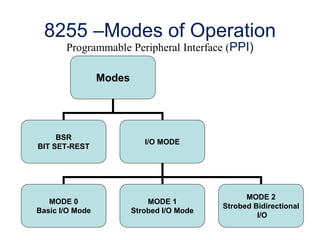
8255 –Modes of Operation
Programmable Peripheral Interface (PPI)
Modes
BSR
BIT SET-REST
I/O MODE
MODE 0
Basic I/O Mode
MODE 1
Strobed I/O Mode
MODE 2
Strobed Bidirectional
I/O
8255 operating modes
• The 8255 can work in 2 modes
that are I/O mode and BSR mode
• i/o mode is further divided in to
1. Mode 0 (Basic I/O)
2. Mode 1 (Strobe I/O)
3. Mode 2 (Bi - Conditional Bus)
There are 2 control words in 8255
Mode Definition (MD) OR I/O Control word and
Port C Bit Set / Reset (PC BSR) Control Word
I/O control word configures the ports of 8255
- as i/p or o/p in Mode 0, 1, or 2
PCBSR control word is used to set to 1 or reset to 0
any one selected bit of Port C
14
8255 operating modes
Port A can work in Mode 0, Mode 1, or Mode 2
Port B can work in Mode 0, or Mode 1
Port C can work in Mode 0 only, if at all
Port A, Port B and Port C can work in Mode 0
Port A and Port B can work in Mode 1
Only Port A can work in Mode 2
15
8255 PORTS
Operation modes:
BIT SET/RESET MODE:
• The PORT C can be Set or Reset by sending OUT
instruction to the CONTROL registers.
I/O MODES:
• MODE 0(Simple input / Output):
• In this mode , port A, port B and port C is used as
individually (Simply).
• Features:
• Outputs are latched , Inputs are buffered not
latched.
• Ports do not have Handshake or interrupt capability.
• MODE 1 :(Input/output with Hand shake)
• In this mode, input or output is transferred by
hand shaking Signals.
• Handshaking signals is used to transfer data
between whose data transfer is not same.
Computer Printer
DATA BUS
STB
ACK
Busy
• Example:
• The computer send the data to the printer
large speed compared to the printer.
• When computer send the data according to
the printer speed at the time only, printer can
accept.
• If printer is not ready to accept the data then
after sending the data bus , computer uses
another handshaking signal to tell printer that
valid data is available on the data bus.
• Each port uses three lines from port C as
handshake signals
MODE 2:bi-directional I/O data transfer:
• This mode allows bidirectional data transfer
over a single 8-bit data bus using handshake
signals.
• This feature is possible only in Group A
• Port A is working as 8-biT bidirectional.
• PC3-PC7 is used for handshaking purpose.
• The data is sent by CPU through this port ,
when the peripheral request it.
CONTROL WORD FORMATS:
• The control word for both mode is same.
• Bit D7 is used for specifying whether word
loaded in to Bit set/reset mode or Mode
definition word.
• D7=1=Mode definition mode.
• D7=0=Bit set/Reset mode.
• FOR I/O MODE:
The mode format for I/O as shown in figure
D7 D6 D5 D4 D3 D2 D1 D0
Group A
Port C Upper
1=Input
0=Output
Port B
1=Input
0=Output
Mode
selection
00=mode 0
01=mode 1
1x=mode 2
Group B
Port C Lower
1=Input
0=Output
Port B
1=Input
0=Output
Mode selection
0=mode 0
1=mode 1
Mode set
flag=1=Active
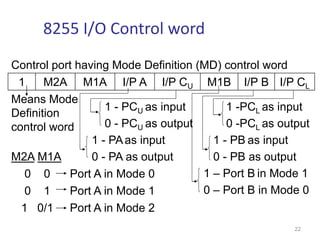
8255 I/O Control word
Control port having Mode Definition (MD) control word
1 M2A M1A I/P A I/P CU M1B I/P B I/P CL
Means Mode
Definition
control word
1 - PCU as input
0 - PCU as output
1 - PAas input
0 - PA as output
1 -PCL as input
0 -PCL as output
1 - PB as input
0 - PB as output
1 – Port B in Mode 1
0 – Port B in Mode 0
M2A M1A
0 0 Port A in Mode 0
0 1 Port A in Mode 1
1 0/1 Port A in Mode 2
22
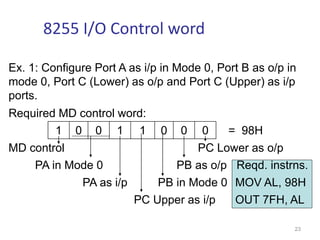
Ex. 1: Configure Port A as i/p in Mode 0, Port B as o/p in
mode 0, Port C (Lower) as o/p and Port C (Upper) as i/p
ports.
Required MD control word:
1 0 0 1 1 0 0 0 = 98H
MD control PC Lower as o/p
PA in Mode 0 PB as o/p Reqd. instrns.
PA as i/p PB in Mode 0 MOV AL, 98H
PC Upper as i/p OUT 7FH, AL
23
8255 I/O Control word
Ex. 2: Configure Port A as i/p in Mode 1, Port B as o/p in
mode 1, Port C7-8 as i/p ports. (PC5-0 are handshake lines,
some i/p lines and others o/p. So they are shown as X)
Required MD control word:
1 0 1 1 1 1 0 X = BCH or BDH
MD control PC3-0 as don’t care
PA in Mode 1 PB as o/p Reqd. Instrns.
PA as i/p PB in Mode 1 MOV AL,BCH
PC Upper(C7-8) as i/p OUT 7FH, AL
24
8255 I/O Control word
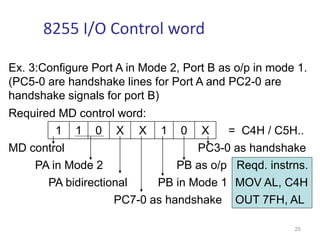
Ex. 3:Configure Port A in Mode 2, Port B as o/p in mode 1.
(PC5-0 are handshake lines for Port A and PC2-0 are
handshake signals for port B)
Required MD control word:
1 1 0 X X 1 0 X = C4H / C5H..
MD control PC3-0 as handshake
PA in Mode 2 PB as o/p Reqd. instrns.
PA bidirectional PB in Mode 1 MOV AL, C4H
PC7-0 as handshake OUT 7FH, AL
25
8255 I/O Control word
FOR BIT SET/RESET MODE:
• This is bit set/reset control word format.
X X X
Don’t care
Bit select
B0
B1
B2
D7 D6 D5 D4 D3 D2 D1 D0
0 1 2 3 4 5 6 7
0 1 0 1 0 1 0 1
0 0 1 1 0 0 1 1
0 0 0 0 1 1 1 1
BIT SET/RESET
1=SET
0=RESET
BIT SET/RESET FLAG
=0 Active
8255 PCBSR Control word
Control port having Port C Bit Set / Reset control word
0 X X X SB2 SB1 SB0 S/R*
PC bit set
/ reset
control
word
Select bit of PC
to be set / reset
1 - Set to 1
0 - Reset to 0
Don’t
cares 0 0 0 Bit 0 of Port C
0 0 1 Bit 1 of Port C
:
:
1 1 1 Bit 7 of Port C
27
8255 PCBSR Control word contd.
Ex. 2: Reset to 0 bit 6 of Port C
0 X X X 1 1 0 0 = 0CH,…
PC bit set
/ reset
control
word
Bit 6 of PC
Reset to 0
Don’t
cares Required instructions
MOV AL, 0CH
OUT 7FH, AL
28
8255 PCBSR Control word contd.
Ex. 1: Set to 1 bit 4 of Port C
0 X X X 1 0 0 1 = 09H,…
PC bit set
/ reset
control
word
Bit 4 of PC
Set to 1
Don’t
cares Required instructions
MOV AL, 09H
OUT 7FH, AL
29
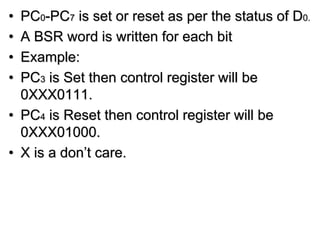
• PC0-PC7 is set or reset as per the status of D0.
• A BSR word is written for each bit
• Example:
• PC3 is Set then control register will be
0XXX0111.
• PC4 is Reset then control register will be
0XXX01000.
• X is a don’t care.

8255 presentaion.ppt

  • 1.
    8255 PROGRAMMABLE PERIPHERAL INTERFACE(PPI) Features: • It is an I/O port chip used for interfacing I/O devices with microprocessor • It is a programmable device. • 3 ports- Port A, Port B and Port C. • Port C composed of two independent 4-bit ports- PC7-4 (PC Upper) and PC3-0 (PC Lower) • Improved dc driving capability
  • 2.
    PA 3 PA 2 PA1 PA 0 R D C S G N D A 1 A 0 PC 7 PC 6 PC 5 PC 4 PC 0 PC 1 PC 2 PC 3 PB 0 PB 1 PB 2 PB 4 PB 5 PB 6 PB 7 W R R ESET D 0 D 1 D 2 D 3 D 4 D 5 D 6 D 7 V C C PB 7 PB 6 PB 5 PB 4 PB 3 1 3 2 4 5 6 7 3 3 9 8 10 12 13 11 14 15 16 17 19 20 18 40 39 38 37 36 35 34 33 32 31 30 29 28 27 26 25 24 23 22 21 8255A Pin diagram 8255
  • 3.
    Pin Diagram Bi-directional Port Apins Port C lower pins Port C upper pins Bi-directional Data pins Address pins Bi-directional Port A pins Bi-directional Port B pins Bi-directional Port B pins Chip select Read input Write input Reset 8255
  • 4.
    Function of pins: •Data bus(D0-D7):These are 8-bit bi-directional buses, connected to 8085 data bus for transferring data. • CS: This is Active Low signal. When it is low, then data is transfer from 8085. • Read: This is Active Low signal, when it is Low read operation will be start. • Write: This is Active Low signal, when it is Low Write operation will be start.
  • 5.
    • RESET: Thisis used to reset the device. That means clear control registers. • PA0-PA7:It is the 8-bit bi-directional I/O pins used to send the data to peripheral or to receive the data from peripheral. • PB0-PB7:Similar to PA • PC0-PC7:This is also 8-bit bidirectional I/O pins. These lines are divided into two groups. 1. PC0 to PC3(Lower Groups) 2. PC4 to PC7 (Higher groups) These two groups working in separately using 4 data’s.
  • 6.
    • Address (A0-A1):Thisis used to select the ports. like this A1 A0 Select port 0 0 Port A 0 1 Port B 1 0 Port C 1 1 Control register
  • 7.
  • 8.
    Data Bus buffer: •It is a 8-bit bidirectional Data bus. • Used to interface between 8255 data bus with system bus. • The internal data bus and Outer pins D0- D7 pins are connected in internally. • The direction of data buffer is decided by Read/Control Logic.
  • 9.
    Read/Write Control Logic: •This block get the input signals from control bus and Address bus of CPU • Control signal are RD and WR. • Address signals are A0,A1,and CS. • 8255 operation is enabled or disabled by CS.
  • 10.
    Group A andGroup B control: • Group A and B get the Control Signal from CPU and send the command to the individual control blocks. • Group A send the control signal to port A and Port C (Upper) PC7-PC4. • Group B send the control signal to port B and Port C (Lower) PC3-PC0. • PORT A: • This is a 8-bit buffered I/O latch. • It can be programmed by mode 0 , mode 1, mode 2 .
  • 11.
    PORT B: • Thisis a 8-bit buffer I/O latch. • It can be programmed by mode 0 and mode1. • PORT C: • This is a 8-bit Unlatched buffer Input and an Output latch. splited into two parts. PCU,PCL • programmed by bit set/reset operation. • Can be used as 1) simple I/O 2) handshake signals 3) status signals
  • 12.
    8255 –Modes ofOperation Programmable Peripheral Interface (PPI) Modes BSR BIT SET-REST I/O MODE MODE 0 Basic I/O Mode MODE 1 Strobed I/O Mode MODE 2 Strobed Bidirectional I/O
  • 13.
    8255 operating modes •The 8255 can work in 2 modes that are I/O mode and BSR mode • i/o mode is further divided in to 1. Mode 0 (Basic I/O) 2. Mode 1 (Strobe I/O) 3. Mode 2 (Bi - Conditional Bus)
  • 14.
    There are 2control words in 8255 Mode Definition (MD) OR I/O Control word and Port C Bit Set / Reset (PC BSR) Control Word I/O control word configures the ports of 8255 - as i/p or o/p in Mode 0, 1, or 2 PCBSR control word is used to set to 1 or reset to 0 any one selected bit of Port C 14 8255 operating modes
  • 15.
    Port A canwork in Mode 0, Mode 1, or Mode 2 Port B can work in Mode 0, or Mode 1 Port C can work in Mode 0 only, if at all Port A, Port B and Port C can work in Mode 0 Port A and Port B can work in Mode 1 Only Port A can work in Mode 2 15 8255 PORTS
  • 16.
    Operation modes: BIT SET/RESETMODE: • The PORT C can be Set or Reset by sending OUT instruction to the CONTROL registers. I/O MODES: • MODE 0(Simple input / Output): • In this mode , port A, port B and port C is used as individually (Simply). • Features: • Outputs are latched , Inputs are buffered not latched. • Ports do not have Handshake or interrupt capability.
  • 17.
    • MODE 1:(Input/output with Hand shake) • In this mode, input or output is transferred by hand shaking Signals. • Handshaking signals is used to transfer data between whose data transfer is not same. Computer Printer DATA BUS STB ACK Busy
  • 18.
    • Example: • Thecomputer send the data to the printer large speed compared to the printer. • When computer send the data according to the printer speed at the time only, printer can accept. • If printer is not ready to accept the data then after sending the data bus , computer uses another handshaking signal to tell printer that valid data is available on the data bus. • Each port uses three lines from port C as handshake signals
  • 19.
    MODE 2:bi-directional I/Odata transfer: • This mode allows bidirectional data transfer over a single 8-bit data bus using handshake signals. • This feature is possible only in Group A • Port A is working as 8-biT bidirectional. • PC3-PC7 is used for handshaking purpose. • The data is sent by CPU through this port , when the peripheral request it.
  • 20.
    CONTROL WORD FORMATS: •The control word for both mode is same. • Bit D7 is used for specifying whether word loaded in to Bit set/reset mode or Mode definition word. • D7=1=Mode definition mode. • D7=0=Bit set/Reset mode.
  • 21.
    • FOR I/OMODE: The mode format for I/O as shown in figure D7 D6 D5 D4 D3 D2 D1 D0 Group A Port C Upper 1=Input 0=Output Port B 1=Input 0=Output Mode selection 00=mode 0 01=mode 1 1x=mode 2 Group B Port C Lower 1=Input 0=Output Port B 1=Input 0=Output Mode selection 0=mode 0 1=mode 1 Mode set flag=1=Active
  • 22.
    8255 I/O Controlword Control port having Mode Definition (MD) control word 1 M2A M1A I/P A I/P CU M1B I/P B I/P CL Means Mode Definition control word 1 - PCU as input 0 - PCU as output 1 - PAas input 0 - PA as output 1 -PCL as input 0 -PCL as output 1 - PB as input 0 - PB as output 1 – Port B in Mode 1 0 – Port B in Mode 0 M2A M1A 0 0 Port A in Mode 0 0 1 Port A in Mode 1 1 0/1 Port A in Mode 2 22
  • 23.
    Ex. 1: ConfigurePort A as i/p in Mode 0, Port B as o/p in mode 0, Port C (Lower) as o/p and Port C (Upper) as i/p ports. Required MD control word: 1 0 0 1 1 0 0 0 = 98H MD control PC Lower as o/p PA in Mode 0 PB as o/p Reqd. instrns. PA as i/p PB in Mode 0 MOV AL, 98H PC Upper as i/p OUT 7FH, AL 23 8255 I/O Control word
  • 24.
    Ex. 2: ConfigurePort A as i/p in Mode 1, Port B as o/p in mode 1, Port C7-8 as i/p ports. (PC5-0 are handshake lines, some i/p lines and others o/p. So they are shown as X) Required MD control word: 1 0 1 1 1 1 0 X = BCH or BDH MD control PC3-0 as don’t care PA in Mode 1 PB as o/p Reqd. Instrns. PA as i/p PB in Mode 1 MOV AL,BCH PC Upper(C7-8) as i/p OUT 7FH, AL 24 8255 I/O Control word
  • 25.
    Ex. 3:Configure PortA in Mode 2, Port B as o/p in mode 1. (PC5-0 are handshake lines for Port A and PC2-0 are handshake signals for port B) Required MD control word: 1 1 0 X X 1 0 X = C4H / C5H.. MD control PC3-0 as handshake PA in Mode 2 PB as o/p Reqd. instrns. PA bidirectional PB in Mode 1 MOV AL, C4H PC7-0 as handshake OUT 7FH, AL 25 8255 I/O Control word
  • 26.
    FOR BIT SET/RESETMODE: • This is bit set/reset control word format. X X X Don’t care Bit select B0 B1 B2 D7 D6 D5 D4 D3 D2 D1 D0 0 1 2 3 4 5 6 7 0 1 0 1 0 1 0 1 0 0 1 1 0 0 1 1 0 0 0 0 1 1 1 1 BIT SET/RESET 1=SET 0=RESET BIT SET/RESET FLAG =0 Active
  • 27.
    8255 PCBSR Controlword Control port having Port C Bit Set / Reset control word 0 X X X SB2 SB1 SB0 S/R* PC bit set / reset control word Select bit of PC to be set / reset 1 - Set to 1 0 - Reset to 0 Don’t cares 0 0 0 Bit 0 of Port C 0 0 1 Bit 1 of Port C : : 1 1 1 Bit 7 of Port C 27
  • 28.
    8255 PCBSR Controlword contd. Ex. 2: Reset to 0 bit 6 of Port C 0 X X X 1 1 0 0 = 0CH,… PC bit set / reset control word Bit 6 of PC Reset to 0 Don’t cares Required instructions MOV AL, 0CH OUT 7FH, AL 28
  • 29.
    8255 PCBSR Controlword contd. Ex. 1: Set to 1 bit 4 of Port C 0 X X X 1 0 0 1 = 09H,… PC bit set / reset control word Bit 4 of PC Set to 1 Don’t cares Required instructions MOV AL, 09H OUT 7FH, AL 29
  • 30.
    • PC0-PC7 isset or reset as per the status of D0. • A BSR word is written for each bit • Example: • PC3 is Set then control register will be 0XXX0111. • PC4 is Reset then control register will be 0XXX01000. • X is a don’t care.