1
00-Let’s get started
By : Mohamed Fawzy
Programming AVR Microcontrollers
© Mohamed F.A.B 2015
Lecture Notes:
2
o Set Your Phone To Vibration Mode.
o Ask any time.
o During labs, Feel Free To Check Any Materials or
Internet.
o Slides are self content.
o Feel Free To Share This Materials With Your Friends.
o Work Hard For Achieving Most Benefits Of This Course.
© Mohamed F.A.B 2015
3
Don't Forget !!!!
© Mohamed F.A.B 2015
Any Expert Was Once A Beginner

4
Agenda.
Lesson (1):
Introduction to micro-controller World.
Lesson (2):
Quick revision for C programming.
Lesson (3):
Installing Our Working Tools.
© Mohamed F.A.B 2015
5
Lesson#1
Lesson (1):
Introduction to micro-controller World.
© Mohamed F.A.B 2015
6
Microcontroller.
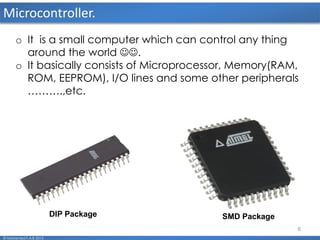
o It is a small computer which can control any thing
around the world .
o It basically consists of Microprocessor, Memory(RAM,
ROM, EEPROM), I/O lines and some other peripherals
……….,etc.
DIP Package SMD Package
© Mohamed F.A.B 2015
7
Microcontrollers Vendors.
© Mohamed F.A.B 2015
8
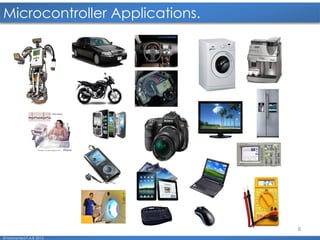
Microcontroller Applications.
© Mohamed F.A.B 2015
9
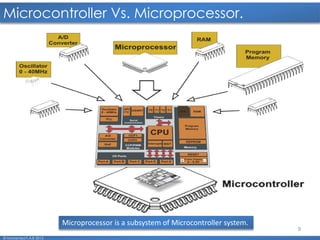
Microcontroller Vs. Microprocessor.
© Mohamed F.A.B 2015
Microprocessor is a subsystem of Microcontroller system.
10
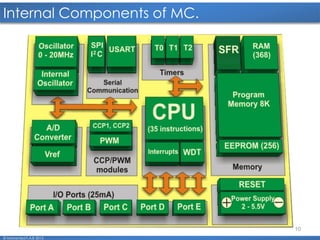
Internal Components of MC.
© Mohamed F.A.B 2015
11
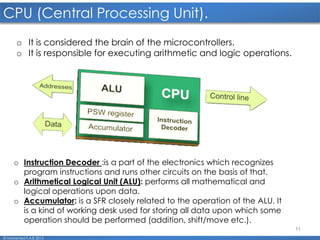
CPU (Central Processing Unit).
© Mohamed F.A.B 2015
o Instruction Decoder :is a part of the electronics which recognizes
program instructions and runs other circuits on the basis of that.
o Arithmetical Logical Unit (ALU): performs all mathematical and
logical operations upon data.
o Accumulator: is a SFR closely related to the operation of the ALU. It
is a kind of working desk used for storing all data upon which some
operation should be performed (addition, shift/move etc.).
o It is considered the brain of the microcontrollers.
o It is responsible for executing arithmetic and logic operations.
12
Memory.
© Mohamed F.A.B 2015
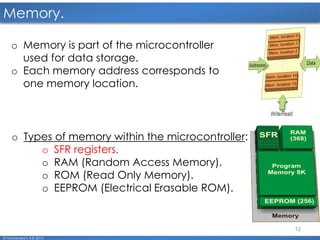
o Memory is part of the microcontroller
used for data storage.
o Each memory address corresponds to
one memory location.
o Types of memory within the microcontroller:
o SFR registers.
o RAM (Random Access Memory).
o ROM (Read Only Memory).
o EEPROM (Electrical Erasable ROM).
13
Memory. (cont'd)
© Mohamed F.A.B 2015
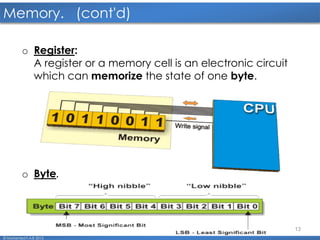
o Register:
A register or a memory cell is an electronic circuit
which can memorize the state of one byte.
o Byte.
14
SFR Registers.
© Mohamed F.A.B 2015
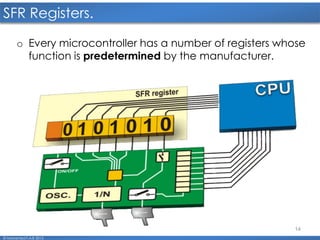
o Every microcontroller has a number of registers whose
function is predetermined by the manufacturer.
15
ROM.
© Mohamed F.A.B 2015
o ROM (Read Only Memory) is used to permanently save the
program being executed.
o There are several types of ROM:
o Masked ROM.
Program is loaded into the chip by the manufacturer. In
case of large scale manufacture, the price is very low.
Forget it...
o One Time Programmable ROM.
you can download a program into this memory, but the
process of program downloading is a “one-way ticket”
meaning that it can be done only once.
o UV Erasable Programmable ROM.
It enables the surface of the silicon chip inside to be lit by
an UV lamp, which effectively erases and program from
the ROM.
16
ROM. (cont'd)
© Mohamed F.A.B 2015
o Flash memory:
Since the contents of this memory can be written
and cleared practically an unlimited number of
times, the microcontrollers with Flash ROM are ideal
for learning, experimentation and small-scale
manufacture.
17
RAM.
© Mohamed F.A.B 2015
o It is used for temporary storing data and
intermediate results created and used during the
operation of the microcontroller.
o Once the power supply is off the contents of RAM
(Random Access Memory) is cleared.
18
EEPROM.
© Mohamed F.A.B 2015
o The contents of the EEPROM may be changed
during operation (similar to RAM), but remains
permanently saved even upon the power
supply goes off (similar to ROM).
19
Internal Architecture.
© Mohamed F.A.B 2015
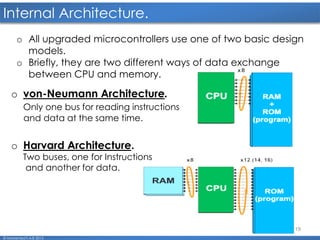
o All upgraded microcontrollers use one of two basic design
models.
o Briefly, they are two different ways of data exchange
between CPU and memory.
o von-Neumann Architecture.
Only one bus for reading instructions
and data at the same time.
o Harvard Architecture.
Two buses, one for Instructions
and another for data.
20
Input/output Ports.
© Mohamed F.A.B 2015
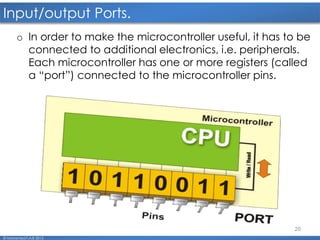
o In order to make the microcontroller useful, it has to be
connected to additional electronics, i.e. peripherals.
Each microcontroller has one or more registers (called
a “port”) connected to the microcontroller pins.
21
Programming MC.
© Mohamed F.A.B 2015
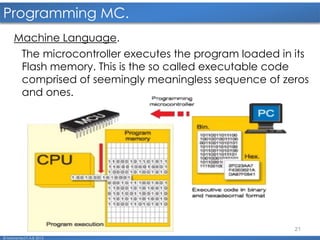
Machine Language.
The microcontroller executes the program loaded in its
Flash memory. This is the so called executable code
comprised of seemingly meaningless sequence of zeros
and ones.
22
Programming MC. cont'd
© Mohamed F.A.B 2015
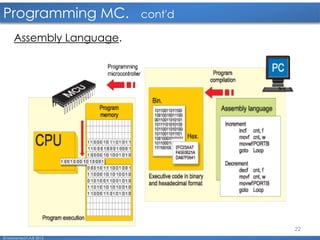
Assembly Language.
23
Programming MC. cont'd
© Mohamed F.A.B 2015
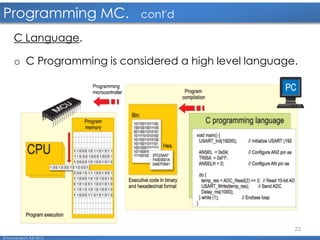
C Language.
o C Programming is considered a high level language.
24
SW Tools.
© Mohamed F.A.B 2015
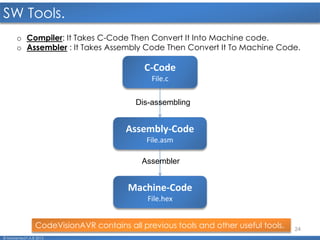
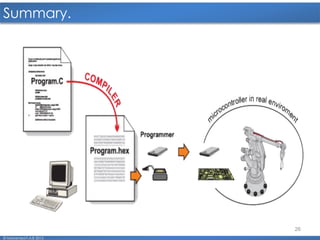
o Compiler: It Takes C-Code Then Convert It Into Machine code.
o Assembler : It Takes Assembly Code Then Convert It To Machine Code.
C-Code
File.c
Assembly-Code
File.asm
Machine-Code
File.hex
Dis-assembling
Assembler
CodeVisionAVR contains all previous tools and other useful tools.
25
HW Tools.
© Mohamed F.A.B 2015
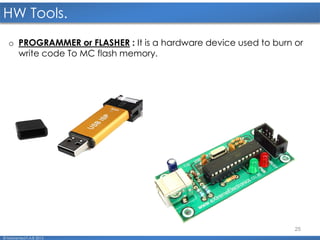
o PROGRAMMER or FLASHER : It is a hardware device used to burn or
write code To MC flash memory.
26
Summary.
© Mohamed F.A.B 2015
27
Break.
© Mohamed F.A.B 2015
28
Lesson#2
© Mohamed F.A.B 2015
Lesson (2):
Quick revision in C-Programming language.
29
C-Program Structure.
© Mohamed F.A.B 2015
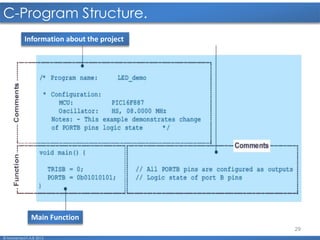
Information about the project
Main Function
30
Comments In C Programming.
© Mohamed F.A.B 2015
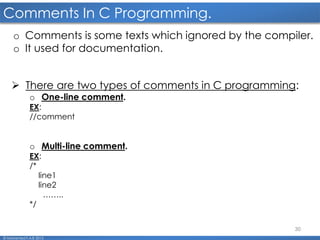
o Comments is some texts which ignored by the compiler.
o It used for documentation.
 There are two types of comments in C programming:
o One-line comment.
EX:
//comment
o Multi-line comment.
EX:
/*
line1
line2
……..
*/
31
Variables.
© Mohamed F.A.B 2015
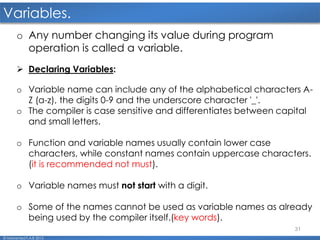
o Any number changing its value during program
operation is called a variable.
 Declaring Variables:
o Variable name can include any of the alphabetical characters A-
Z (a-z), the digits 0-9 and the underscore character '_'.
o The compiler is case sensitive and differentiates between capital
and small letters.
o Function and variable names usually contain lower case
characters, while constant names contain uppercase characters.
(it is recommended not must).
o Variable names must not start with a digit.
o Some of the names cannot be used as variable names as already
being used by the compiler itself.(key words).
32
Data-Types.
© Mohamed F.A.B 2015
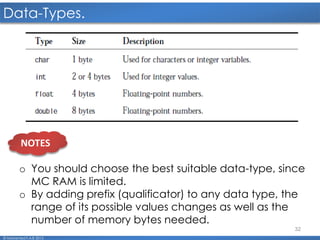
o You should choose the best suitable data-type, since
MC RAM is limited.
o By adding prefix (qualificator) to any data type, the
range of its possible values changes as well as the
number of memory bytes needed.
NOTES
33
Data type Modifiers.
© Mohamed F.A.B 2015
NOTE
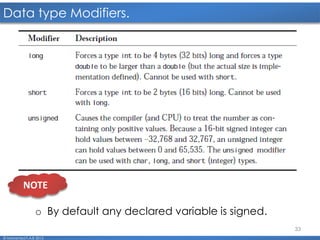
o By default any declared variable is signed.
34
Operators.
© Mohamed F.A.B 2015
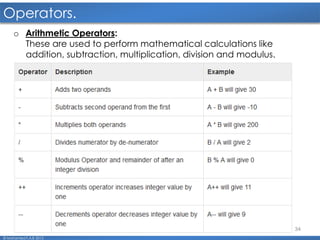
o Arithmetic Operators:
These are used to perform mathematical calculations like
addition, subtraction, multiplication, division and modulus.
35
Operators. cont’d
© Mohamed F.A.B 2015
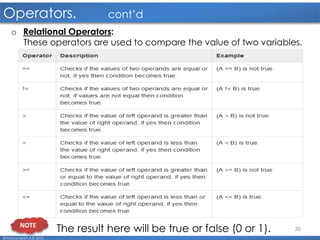
o Relational Operators:
These operators are used to compare the value of two variables.
NOTE
The result here will be true or false (0 or 1).
36
Operators. cont’d
© Mohamed F.A.B 2015
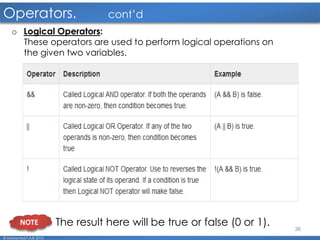
o Logical Operators:
These operators are used to perform logical operations on
the given two variables.
NOTE The result here will be true or false (0 or 1).
37
Operators. cont’d
© Mohamed F.A.B 2015
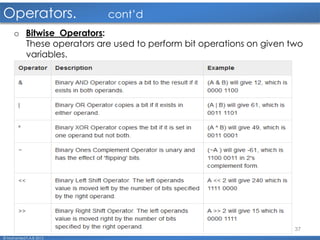
o Bitwise Operators:
These operators are used to perform bit operations on given two
variables.
38
Arrays.
© Mohamed F.A.B 2015
o Array is the simplest and most commonly used structured type.
o A variable of array type is actually an array of objects of the
same type.
o These objects represent elements of an array and are
identified by their position in array (index).
o An array consists of a contiguous region of storage exactly
large enough to hold all of its elements.
EX:
char arr_1[5];
//declare array of 5 character variables.
//here you must define array size.
int arr_2[]={1,2,3,4,5};
//declare array of 5 integer variables and give
initialization values.
//here, you don't need to define array size.
<data type> <array name> [array size] = {e1_val,e2_val,….};
39
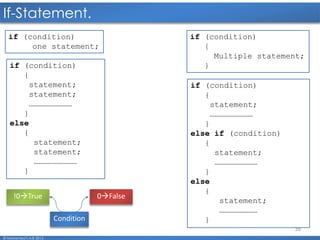
If-Statement.
© Mohamed F.A.B 2015
if (condition)
one statement;
0False!0True
Condition
if (condition)
{
Multiple statement;
}if (condition)
{
statement;
statement;
………………………
}
else
{
statement;
statement;
………………………
}
if (condition)
{
statement;
………………………
}
else if (condition)
{
statement;
………………………
}
else
{
statement;
……………………
}
40
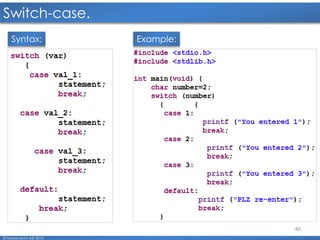
Switch-case.
© Mohamed F.A.B 2015
Example:Syntax:
41
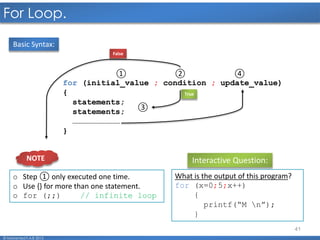
For Loop.
© Mohamed F.A.B 2015
for (initial_value ; condition ; update_value)
{
statements;
statements;
…………………………
}
③
① ② ④
True
False
Interactive Question:
What is the output of this program?
for (x=0;5;x++)
{
printf(“M n”);
}
Basic Syntax:
o Step ① only executed one time.
o Use {} for more than one statement.
o for (;;) // infinite loop
NOTE
42
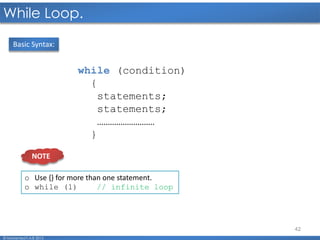
While Loop.
© Mohamed F.A.B 2015
while (condition)
{
statements;
statements;
………………………
}
Basic Syntax:
o Use {} for more than one statement.
o while (1) // infinite loop
NOTE
43
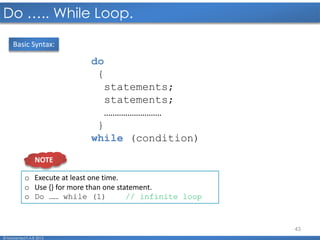
Do ….. While Loop.
© Mohamed F.A.B 2015
do
{
statements;
statements;
………………………
}
while (condition)
Basic Syntax:
o Execute at least one time.
o Use {} for more than one statement.
o Do …… while (1) // infinite loop
NOTE
44
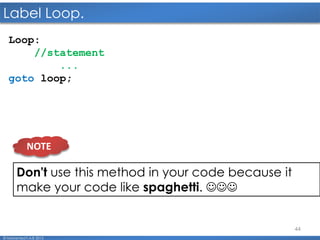
Label Loop.
© Mohamed F.A.B 2015
Loop:
//statement
...
goto loop;
Don't use this method in your code because it
make your code like spaghetti. 
NOTE
45
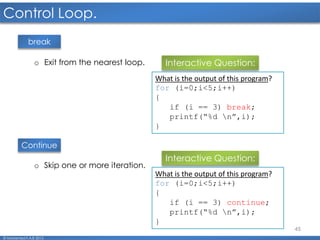
Control Loop.
© Mohamed F.A.B 2015
break
Continue
o Exit from the nearest loop. Interactive Question:
What is the output of this program?
for (i=0;i<5;i++)
{
if (i == 3) break;
printf(“%d n”,i);
}
o Skip one or more iteration.
Interactive Question:
What is the output of this program?
for (i=0;i<5;i++)
{
if (i == 3) continue;
printf(“%d n”,i);
}
46
Lesson#3
© Mohamed F.A.B 2015
Lesson (3):
Installing Our Working Tools.
47
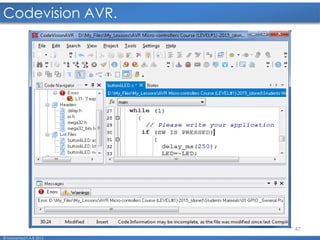
Codevision AVR.
© Mohamed F.A.B 2015
48
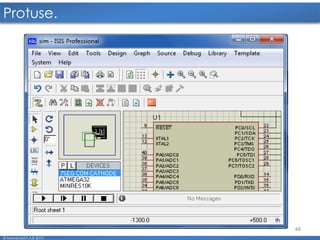
Protuse.
© Mohamed F.A.B 2015
49
Questions:
© Mohamed F.A.B 2015
Thank You All 
50
mo7amed.fawzy33@gmail.com
01006032792
fawzy.fab@gmail.com
© Mohamed F.A.B 2015

00 let us get started.2016

  • 1.
    1 00-Let’s get started By: Mohamed Fawzy Programming AVR Microcontrollers © Mohamed F.A.B 2015
  • 2.
    Lecture Notes: 2 o SetYour Phone To Vibration Mode. o Ask any time. o During labs, Feel Free To Check Any Materials or Internet. o Slides are self content. o Feel Free To Share This Materials With Your Friends. o Work Hard For Achieving Most Benefits Of This Course. © Mohamed F.A.B 2015
  • 3.
    3 Don't Forget !!!! ©Mohamed F.A.B 2015 Any Expert Was Once A Beginner 
  • 4.
    4 Agenda. Lesson (1): Introduction tomicro-controller World. Lesson (2): Quick revision for C programming. Lesson (3): Installing Our Working Tools. © Mohamed F.A.B 2015
  • 5.
    5 Lesson#1 Lesson (1): Introduction tomicro-controller World. © Mohamed F.A.B 2015
  • 6.
    6 Microcontroller. o It isa small computer which can control any thing around the world . o It basically consists of Microprocessor, Memory(RAM, ROM, EEPROM), I/O lines and some other peripherals ……….,etc. DIP Package SMD Package © Mohamed F.A.B 2015
  • 7.
  • 8.
  • 9.
    9 Microcontroller Vs. Microprocessor. ©Mohamed F.A.B 2015 Microprocessor is a subsystem of Microcontroller system.
  • 10.
    10 Internal Components ofMC. © Mohamed F.A.B 2015
  • 11.
    11 CPU (Central ProcessingUnit). © Mohamed F.A.B 2015 o Instruction Decoder :is a part of the electronics which recognizes program instructions and runs other circuits on the basis of that. o Arithmetical Logical Unit (ALU): performs all mathematical and logical operations upon data. o Accumulator: is a SFR closely related to the operation of the ALU. It is a kind of working desk used for storing all data upon which some operation should be performed (addition, shift/move etc.). o It is considered the brain of the microcontrollers. o It is responsible for executing arithmetic and logic operations.
  • 12.
    12 Memory. © Mohamed F.A.B2015 o Memory is part of the microcontroller used for data storage. o Each memory address corresponds to one memory location. o Types of memory within the microcontroller: o SFR registers. o RAM (Random Access Memory). o ROM (Read Only Memory). o EEPROM (Electrical Erasable ROM).
  • 13.
    13 Memory. (cont'd) © MohamedF.A.B 2015 o Register: A register or a memory cell is an electronic circuit which can memorize the state of one byte. o Byte.
  • 14.
    14 SFR Registers. © MohamedF.A.B 2015 o Every microcontroller has a number of registers whose function is predetermined by the manufacturer.
  • 15.
    15 ROM. © Mohamed F.A.B2015 o ROM (Read Only Memory) is used to permanently save the program being executed. o There are several types of ROM: o Masked ROM. Program is loaded into the chip by the manufacturer. In case of large scale manufacture, the price is very low. Forget it... o One Time Programmable ROM. you can download a program into this memory, but the process of program downloading is a “one-way ticket” meaning that it can be done only once. o UV Erasable Programmable ROM. It enables the surface of the silicon chip inside to be lit by an UV lamp, which effectively erases and program from the ROM.
  • 16.
    16 ROM. (cont'd) © MohamedF.A.B 2015 o Flash memory: Since the contents of this memory can be written and cleared practically an unlimited number of times, the microcontrollers with Flash ROM are ideal for learning, experimentation and small-scale manufacture.
  • 17.
    17 RAM. © Mohamed F.A.B2015 o It is used for temporary storing data and intermediate results created and used during the operation of the microcontroller. o Once the power supply is off the contents of RAM (Random Access Memory) is cleared.
  • 18.
    18 EEPROM. © Mohamed F.A.B2015 o The contents of the EEPROM may be changed during operation (similar to RAM), but remains permanently saved even upon the power supply goes off (similar to ROM).
  • 19.
    19 Internal Architecture. © MohamedF.A.B 2015 o All upgraded microcontrollers use one of two basic design models. o Briefly, they are two different ways of data exchange between CPU and memory. o von-Neumann Architecture. Only one bus for reading instructions and data at the same time. o Harvard Architecture. Two buses, one for Instructions and another for data.
  • 20.
    20 Input/output Ports. © MohamedF.A.B 2015 o In order to make the microcontroller useful, it has to be connected to additional electronics, i.e. peripherals. Each microcontroller has one or more registers (called a “port”) connected to the microcontroller pins.
  • 21.
    21 Programming MC. © MohamedF.A.B 2015 Machine Language. The microcontroller executes the program loaded in its Flash memory. This is the so called executable code comprised of seemingly meaningless sequence of zeros and ones.
  • 22.
    22 Programming MC. cont'd ©Mohamed F.A.B 2015 Assembly Language.
  • 23.
    23 Programming MC. cont'd ©Mohamed F.A.B 2015 C Language. o C Programming is considered a high level language.
  • 24.
    24 SW Tools. © MohamedF.A.B 2015 o Compiler: It Takes C-Code Then Convert It Into Machine code. o Assembler : It Takes Assembly Code Then Convert It To Machine Code. C-Code File.c Assembly-Code File.asm Machine-Code File.hex Dis-assembling Assembler CodeVisionAVR contains all previous tools and other useful tools.
  • 25.
    25 HW Tools. © MohamedF.A.B 2015 o PROGRAMMER or FLASHER : It is a hardware device used to burn or write code To MC flash memory.
  • 26.
  • 27.
  • 28.
    28 Lesson#2 © Mohamed F.A.B2015 Lesson (2): Quick revision in C-Programming language.
  • 29.
    29 C-Program Structure. © MohamedF.A.B 2015 Information about the project Main Function
  • 30.
    30 Comments In CProgramming. © Mohamed F.A.B 2015 o Comments is some texts which ignored by the compiler. o It used for documentation.  There are two types of comments in C programming: o One-line comment. EX: //comment o Multi-line comment. EX: /* line1 line2 …….. */
  • 31.
    31 Variables. © Mohamed F.A.B2015 o Any number changing its value during program operation is called a variable.  Declaring Variables: o Variable name can include any of the alphabetical characters A- Z (a-z), the digits 0-9 and the underscore character '_'. o The compiler is case sensitive and differentiates between capital and small letters. o Function and variable names usually contain lower case characters, while constant names contain uppercase characters. (it is recommended not must). o Variable names must not start with a digit. o Some of the names cannot be used as variable names as already being used by the compiler itself.(key words).
  • 32.
    32 Data-Types. © Mohamed F.A.B2015 o You should choose the best suitable data-type, since MC RAM is limited. o By adding prefix (qualificator) to any data type, the range of its possible values changes as well as the number of memory bytes needed. NOTES
  • 33.
    33 Data type Modifiers. ©Mohamed F.A.B 2015 NOTE o By default any declared variable is signed.
  • 34.
    34 Operators. © Mohamed F.A.B2015 o Arithmetic Operators: These are used to perform mathematical calculations like addition, subtraction, multiplication, division and modulus.
  • 35.
    35 Operators. cont’d © MohamedF.A.B 2015 o Relational Operators: These operators are used to compare the value of two variables. NOTE The result here will be true or false (0 or 1).
  • 36.
    36 Operators. cont’d © MohamedF.A.B 2015 o Logical Operators: These operators are used to perform logical operations on the given two variables. NOTE The result here will be true or false (0 or 1).
  • 37.
    37 Operators. cont’d © MohamedF.A.B 2015 o Bitwise Operators: These operators are used to perform bit operations on given two variables.
  • 38.
    38 Arrays. © Mohamed F.A.B2015 o Array is the simplest and most commonly used structured type. o A variable of array type is actually an array of objects of the same type. o These objects represent elements of an array and are identified by their position in array (index). o An array consists of a contiguous region of storage exactly large enough to hold all of its elements. EX: char arr_1[5]; //declare array of 5 character variables. //here you must define array size. int arr_2[]={1,2,3,4,5}; //declare array of 5 integer variables and give initialization values. //here, you don't need to define array size. <data type> <array name> [array size] = {e1_val,e2_val,….};
  • 39.
    39 If-Statement. © Mohamed F.A.B2015 if (condition) one statement; 0False!0True Condition if (condition) { Multiple statement; }if (condition) { statement; statement; ……………………… } else { statement; statement; ……………………… } if (condition) { statement; ……………………… } else if (condition) { statement; ……………………… } else { statement; …………………… }
  • 40.
  • 41.
    41 For Loop. © MohamedF.A.B 2015 for (initial_value ; condition ; update_value) { statements; statements; ………………………… } ③ ① ② ④ True False Interactive Question: What is the output of this program? for (x=0;5;x++) { printf(“M n”); } Basic Syntax: o Step ① only executed one time. o Use {} for more than one statement. o for (;;) // infinite loop NOTE
  • 42.
    42 While Loop. © MohamedF.A.B 2015 while (condition) { statements; statements; ……………………… } Basic Syntax: o Use {} for more than one statement. o while (1) // infinite loop NOTE
  • 43.
    43 Do ….. WhileLoop. © Mohamed F.A.B 2015 do { statements; statements; ……………………… } while (condition) Basic Syntax: o Execute at least one time. o Use {} for more than one statement. o Do …… while (1) // infinite loop NOTE
  • 44.
    44 Label Loop. © MohamedF.A.B 2015 Loop: //statement ... goto loop; Don't use this method in your code because it make your code like spaghetti.  NOTE
  • 45.
    45 Control Loop. © MohamedF.A.B 2015 break Continue o Exit from the nearest loop. Interactive Question: What is the output of this program? for (i=0;i<5;i++) { if (i == 3) break; printf(“%d n”,i); } o Skip one or more iteration. Interactive Question: What is the output of this program? for (i=0;i<5;i++) { if (i == 3) continue; printf(“%d n”,i); }
  • 46.
    46 Lesson#3 © Mohamed F.A.B2015 Lesson (3): Installing Our Working Tools.
  • 47.
  • 48.
  • 49.
  • 50.
    Thank You All 50 mo7amed.fawzy33@gmail.com 01006032792 fawzy.fab@gmail.com © Mohamed F.A.B 2015