KEYBOARD INTERFACING
Keyboard Design
Keyboard Design
Considerations
Considerations
 Keyboards are operated by humans and should be
designed to tolerate mischief’s:
Multiple Key press or release simultaneously
Key pressed for longer time
Fast key press and release
Combination of any of above
 Above problems can be solved by combination of
hardware and software
Contd.
Contd.
 Keyboards are essentially collection of switches. We
must consider mechanical properties of it.
 When push button key is pressed or release, metal
contact momentarily bounces before making steady
state contact referred as Key bouncing.
 While reading. bouncing of the key should not be
considered as multiple-time key press and technique to
eliminate this problem is known as key debouncing.
 Key debouncing using H/W and S/W
Keyboard Interfacing
 Keyboards are organized in a matrix of rows and
columns
◦ The CPU accesses both rows and columns
through ports.
With two 8-bit ports, an 8 x 8 matrix of keys can
be connected to a microcontroller.
When a key is pressed, a row and a column
make a contact. Otherwise, there is no
connection between rows and columns
Keyboard Interfacing (cont.)
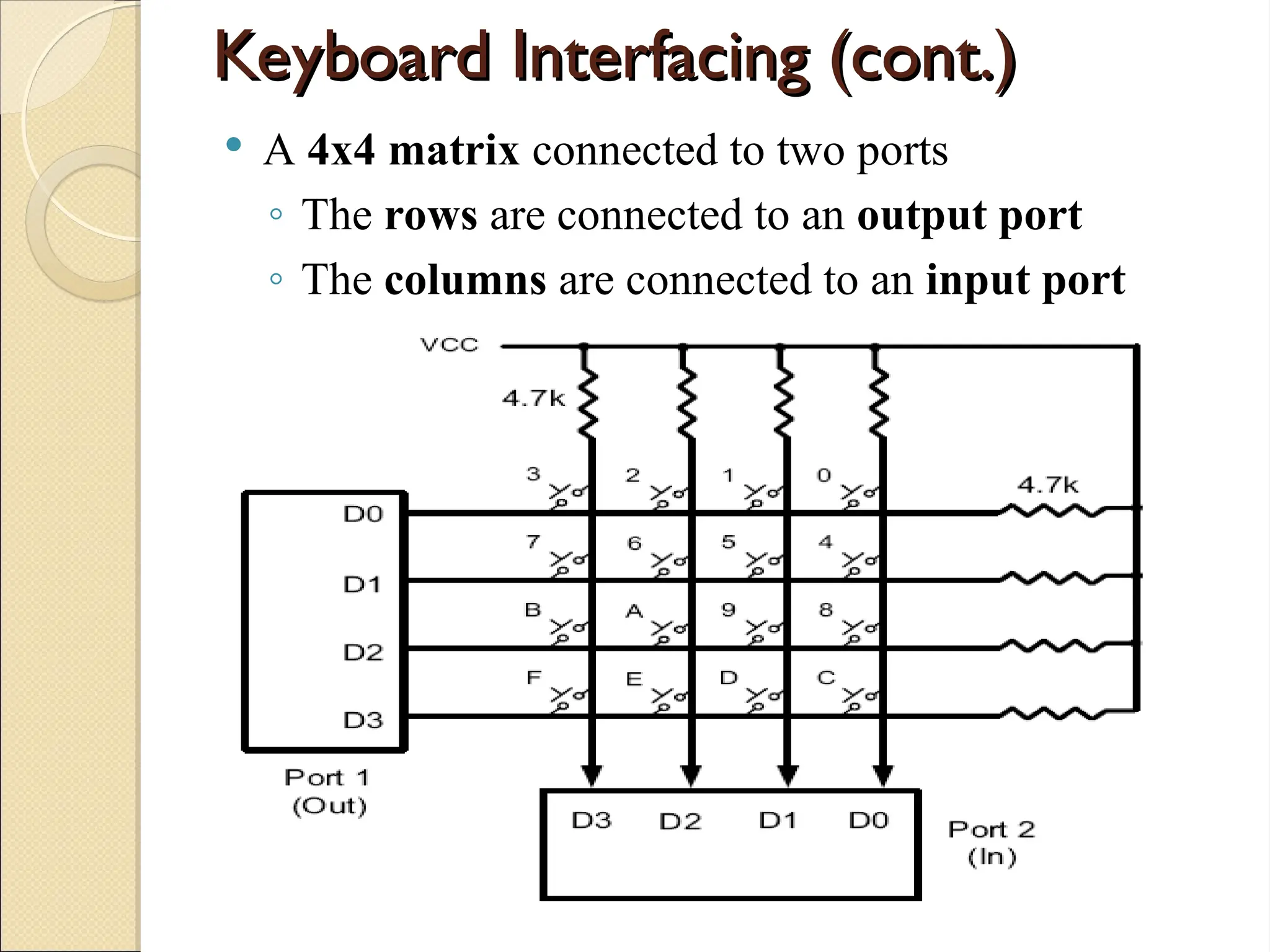
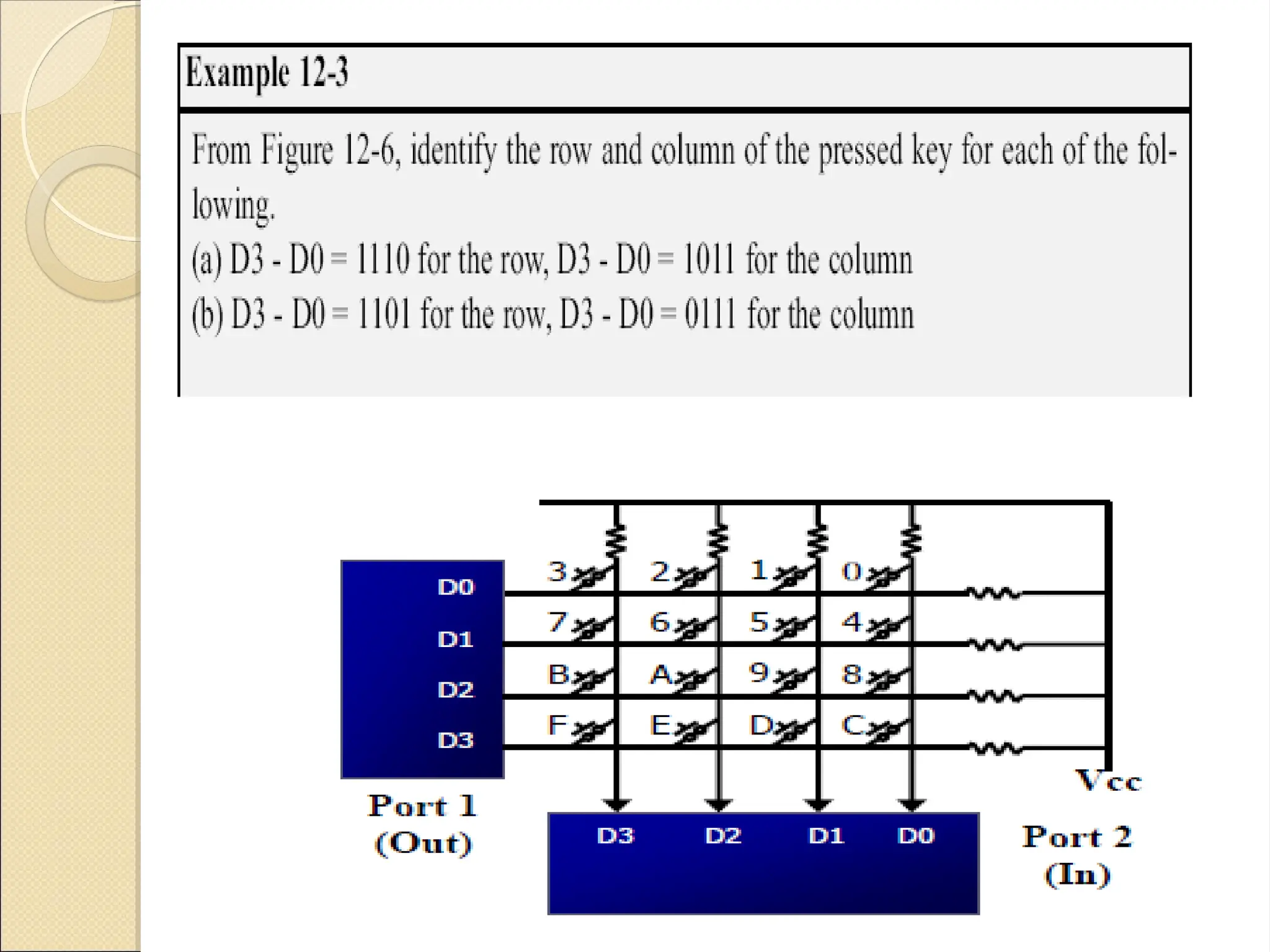
 A 4x4 matrix connected to two ports
◦ The rows are connected to an output port
◦ The columns are connected to an input port
• If no key has been pressed, reading the input port
will yield 1s for all columns Since they are all
connected to high (Vcc).
• If all the rows are grounded and a key is pressed,
one of the columns will have “0” Since the key
pressed provides the path to ground.
Function of the microcontroller to scan the keyboard
continuously to detect and identify the keypressed
Detect a pressed key
 To detect a pressed key
◦ The microcontroller grounds all rows by providing
0 to the output latch
◦ Then it reads the columns
 If the data read from columns is D3 – D0 = 1111,
no key has been pressed
 The process continues till key press is detected
 If one of the column bits has a zero, this means
that a key press has occurred
 For example, if D3 – D0 = 1101, this means that a
key in the D1 column has been pressed
Contd.
Contd.
 After detecting a key press, the microcontroller will
go through the process of identifying the key
◦ Starting with the top row, the microcontroller
grounds it by providing a low to row D0 only
 It reads the columns, if the data read is all 1s,
no key in that row is activated
 The process is moved to the next row
◦ It grounds the next row, reads the columns, and
checks for any zero
Contd.
Contd.
◦ This process continues until the row is identified
 After identification of the row in which the key has
been pressed. Program find out which column the
pressed key belongs to.
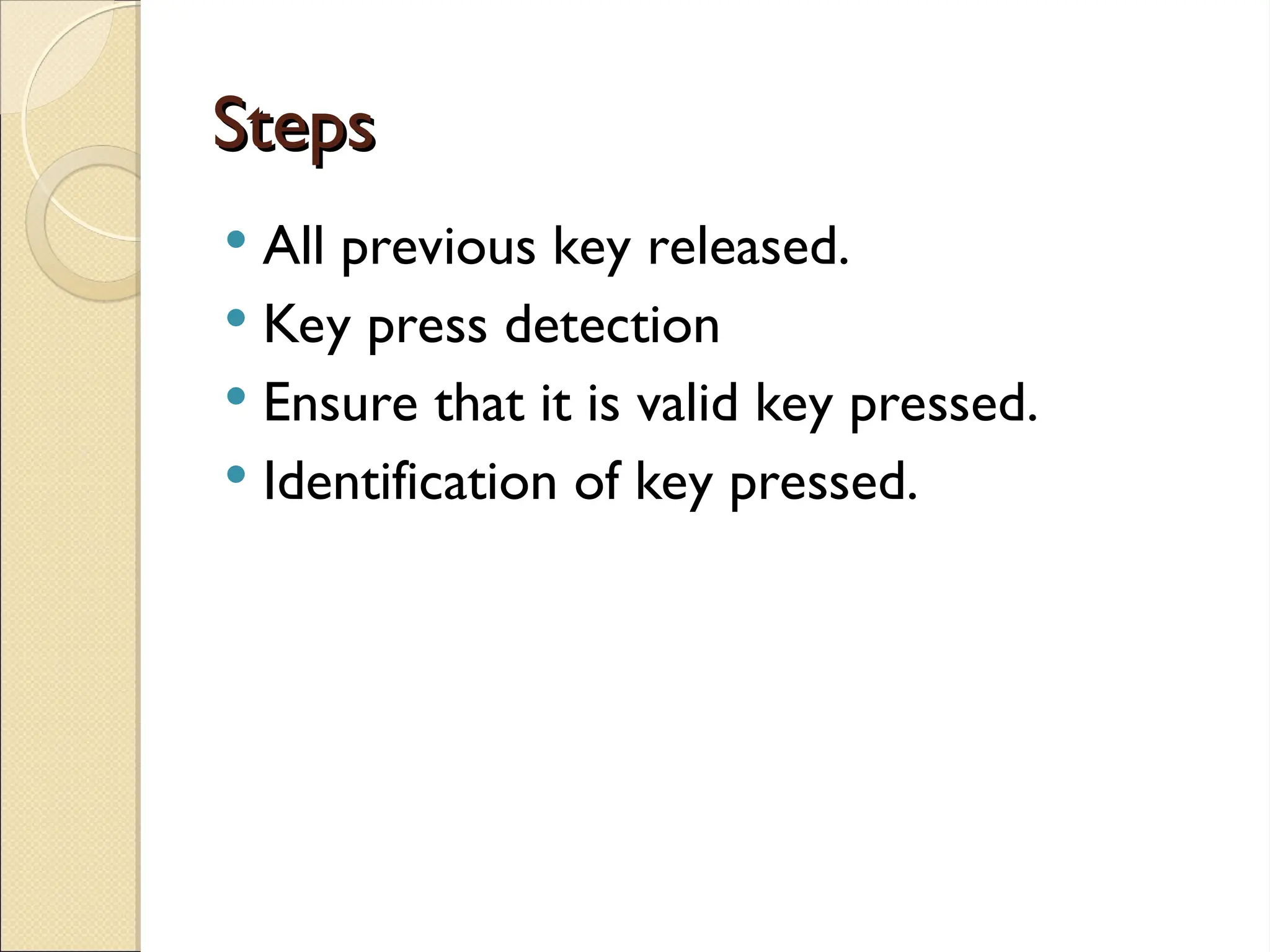
Steps
Steps
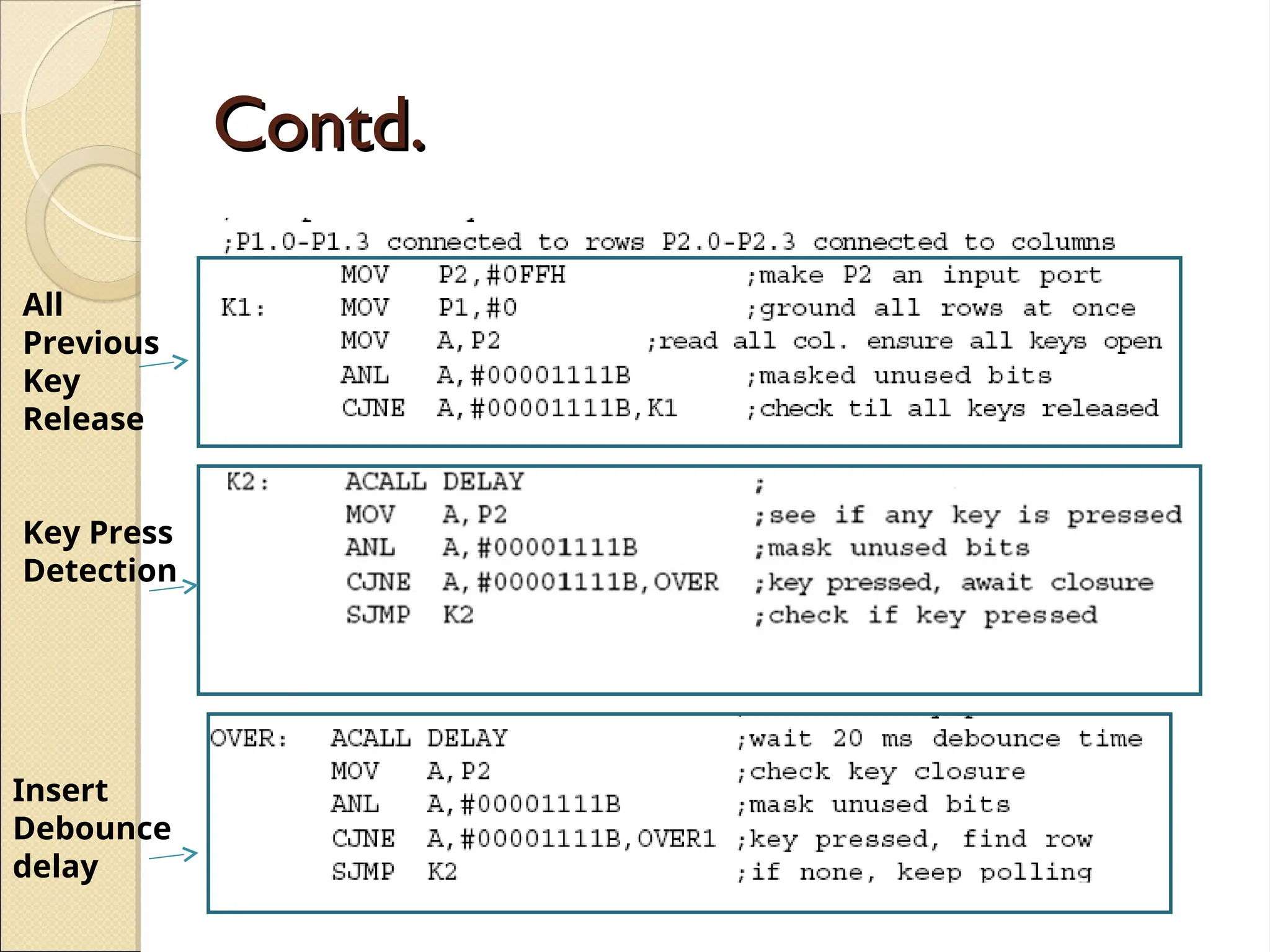
 All previous key released.
 Key press detection
 Ensure that it is valid key pressed.
 Identification of key pressed.
All Previous Key Released
• To make sure that the preceding key has been
released, 0s are output to all rows at once, and the
columns are read and checked repeatedly until all
the columns are high
 When all columns are found to be high, the
program waits for a short amount of time before
it goes to the next stage of waiting for a key to be
pressed
Key Press Detection
Key Press Detection
◦ To see if any key is pressed, the columns are
scanned over and over in an infinite loop until
one of them has a 0 on it
 After the key press detection, it waits 20 ms for
the bounce and then scans the columns again
 It ensures that the first key press detection was
not an erroneous one due a spike noise
 If after the 20-ms delay the key is still pressed,
it goes back into the loop to detect a real key
press
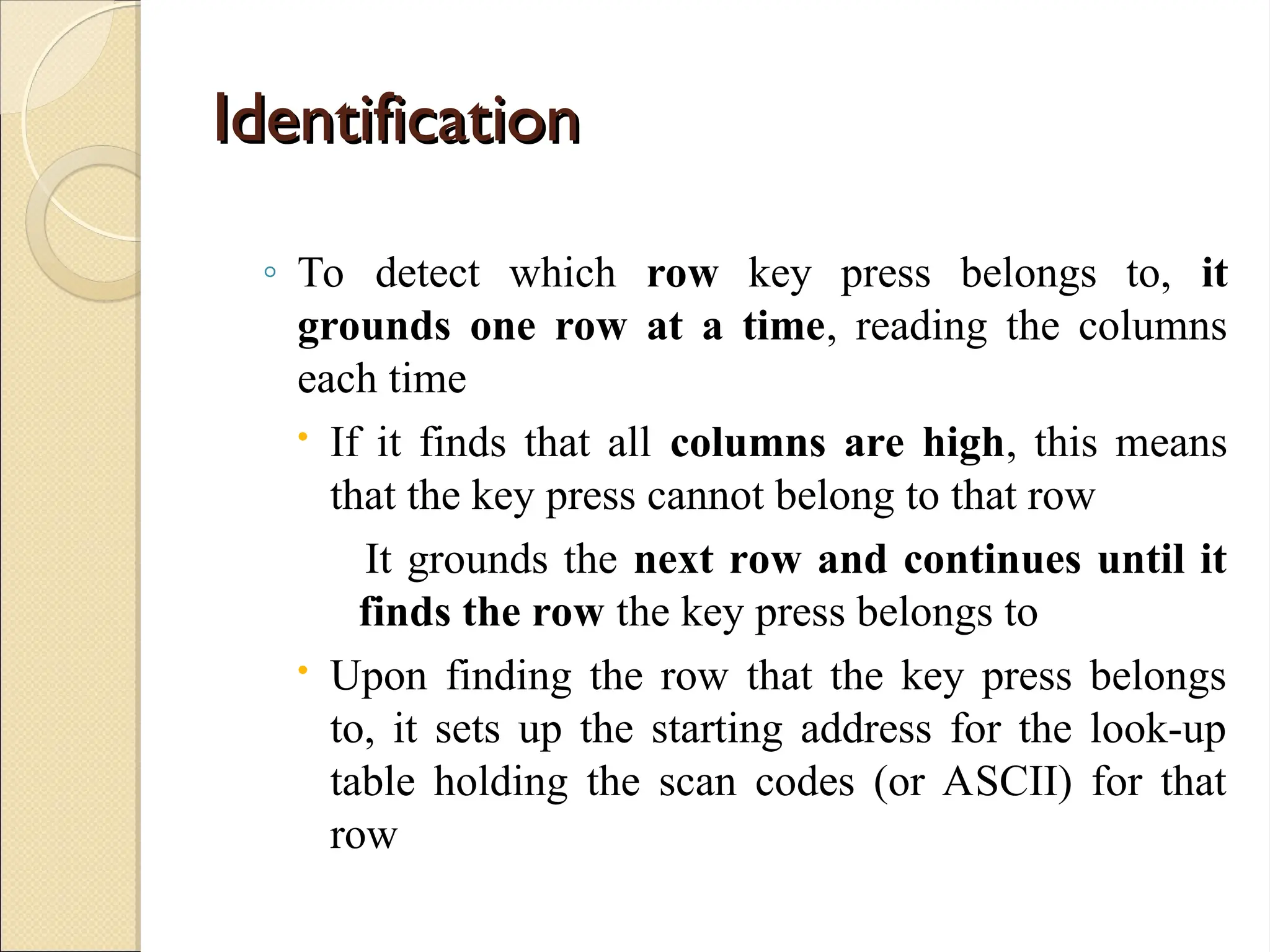
Identification
Identification
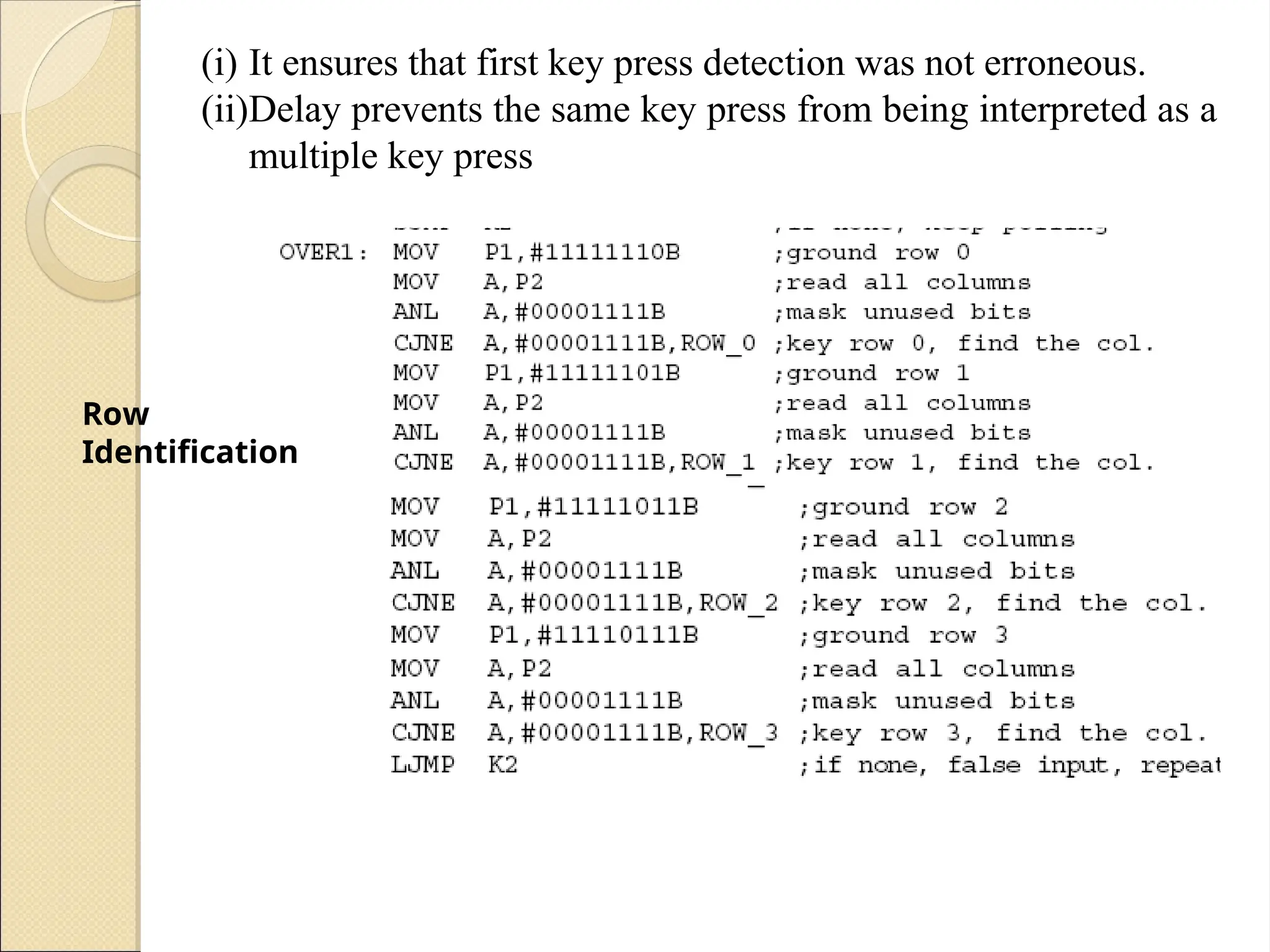
◦ To detect which row key press belongs to, it
grounds one row at a time, reading the columns
each time
 If it finds that all columns are high, this means
that the key press cannot belong to that row
It grounds the next row and continues until it
finds the row the key press belongs to
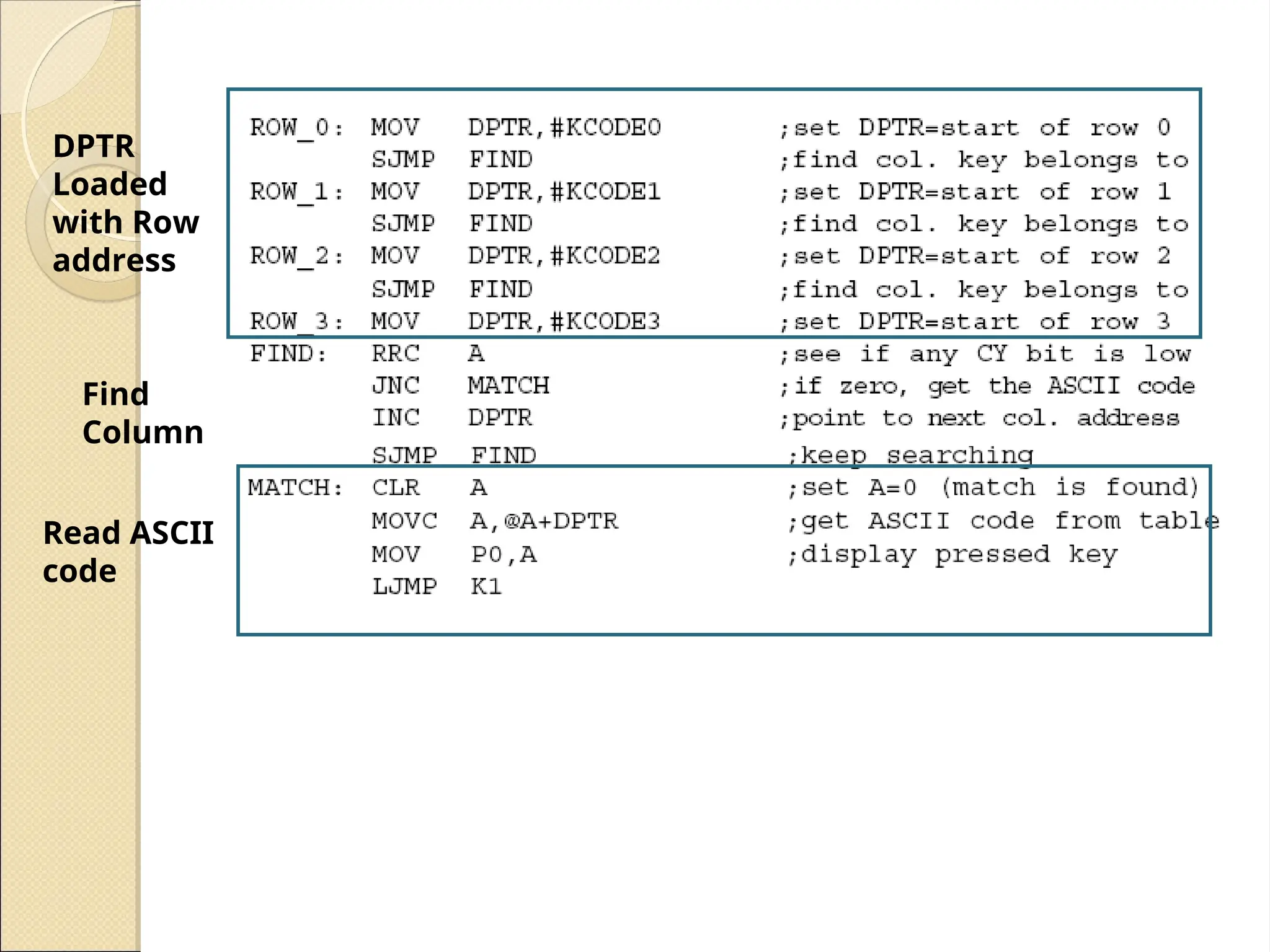
 Upon finding the row that the key press belongs
to, it sets up the starting address for the look-up
table holding the scan codes (or ASCII) for that
row
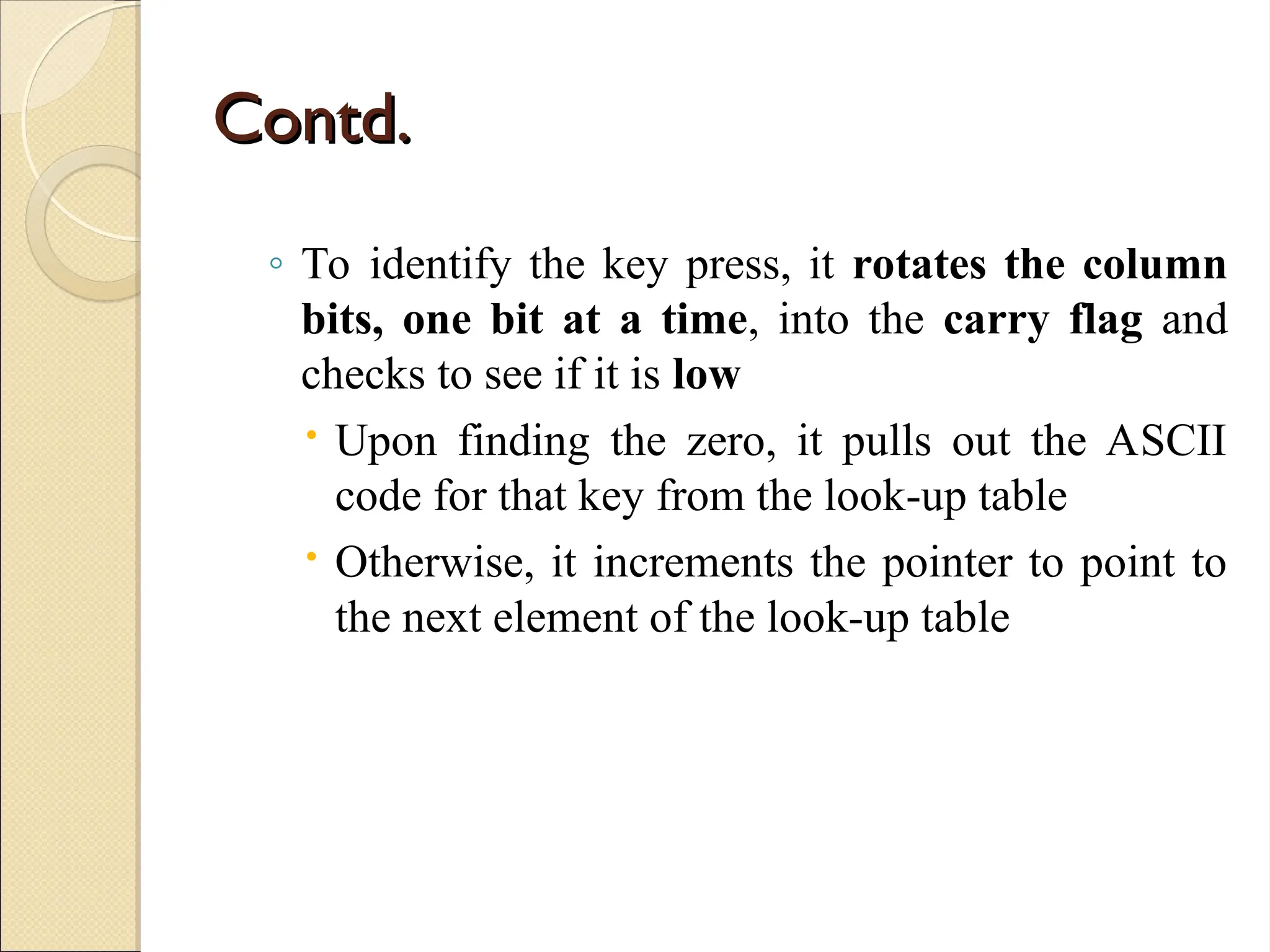
Contd.
Contd.
◦ To identify the key press, it rotates the column
bits, one bit at a time, into the carry flag and
checks to see if it is low
 Upon finding the zero, it pulls out the ASCII
code for that key from the look-up table
 Otherwise, it increments the pointer to point to
the next element of the look-up table
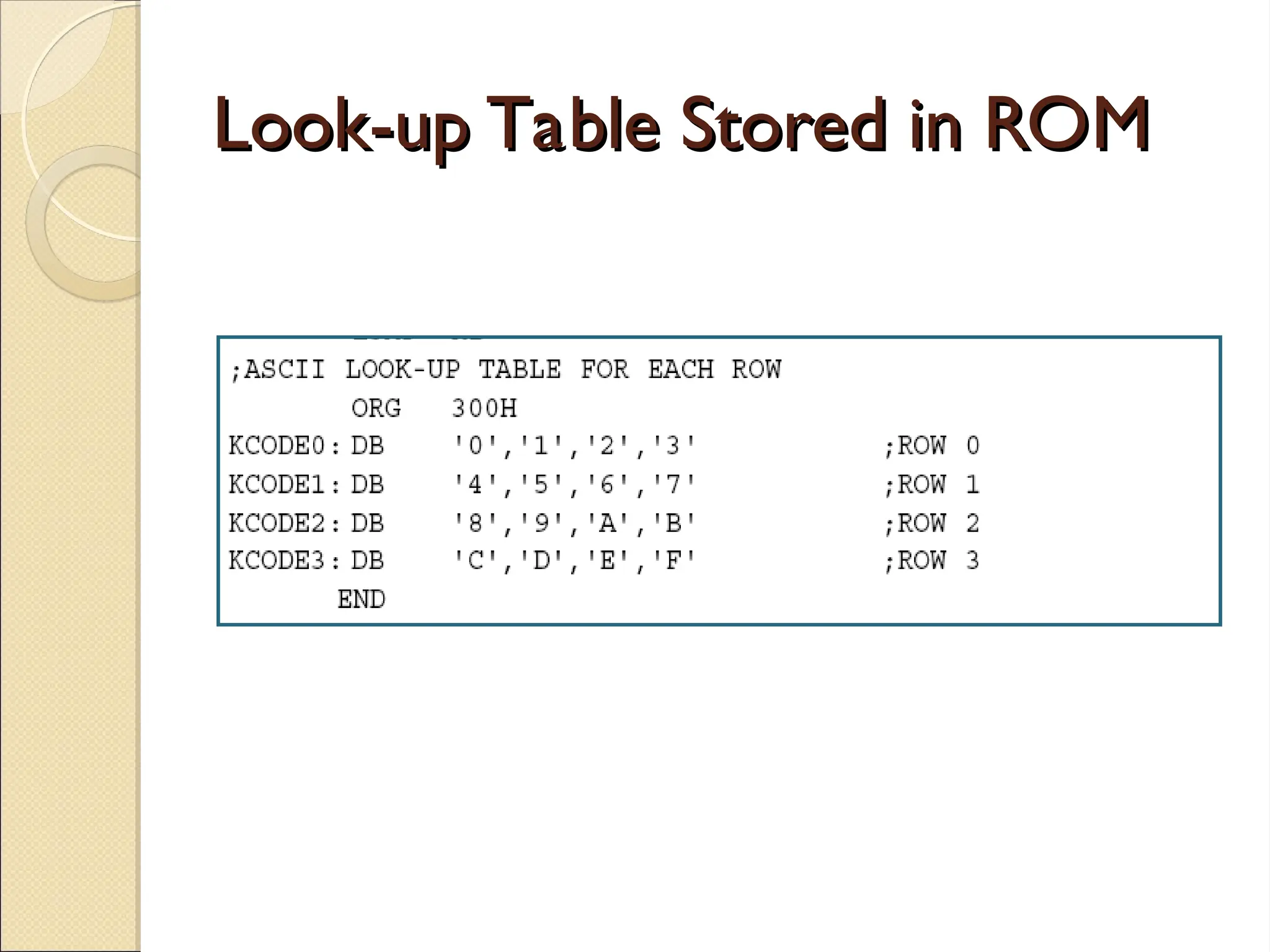
Look-up Table Stored in ROM
Contd.
Contd.
All
Previous
Key
Release
Key Press
Detection
Insert
Debounce
delay
Row
Identification
(i) It ensures that first key press detection was not erroneous.
(ii)Delay prevents the same key press from being interpreted as a
multiple key press
DPTR
Loaded
with Row
address
Find
Column
Read ASCII
code
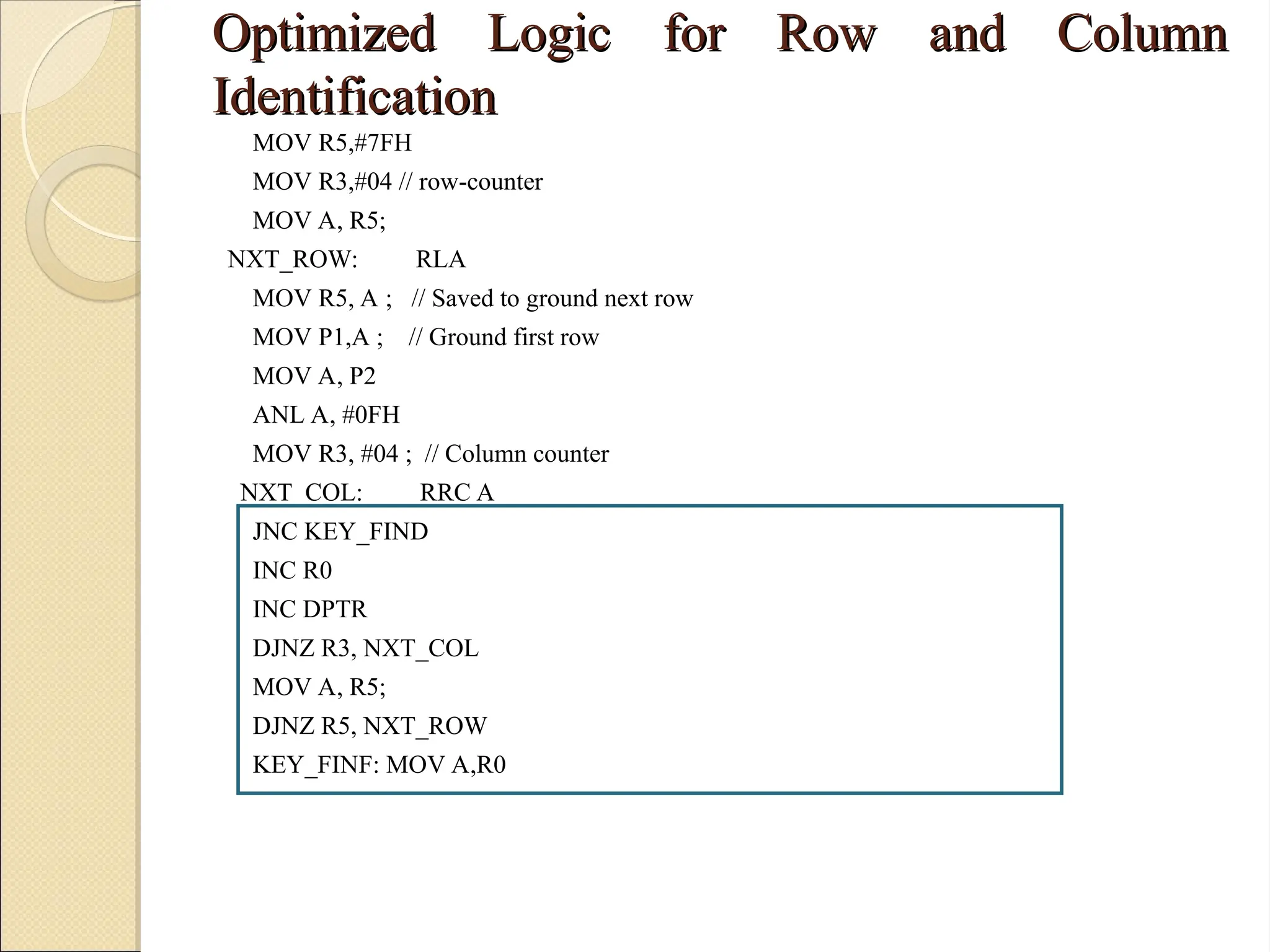
Optimized Logic for Row and Column
Identification
Identification
MOV R5,#7FH
MOV R3,#04 // row-counter
MOV A, R5;
NXT_ROW: RLA
MOV R5, A ; // Saved to ground next row
MOV P1,A ; // Ground first row
MOV A, P2
ANL A, #0FH
MOV R3, #04 ; // Column counter
NXT_COL: RRC A
JNC KEY_FIND
INC R0
INC DPTR
DJNZ R3, NXT_COL
MOV A, R5;
DJNZ R5, NXT_ROW
KEY_FINF: MOV A,R0

Keyboard interfacing for the 8051 MCA.ppt

  • 1.
  • 2.
    Keyboard Design Keyboard Design Considerations Considerations Keyboards are operated by humans and should be designed to tolerate mischief’s: Multiple Key press or release simultaneously Key pressed for longer time Fast key press and release Combination of any of above  Above problems can be solved by combination of hardware and software
  • 3.
    Contd. Contd.  Keyboards areessentially collection of switches. We must consider mechanical properties of it.  When push button key is pressed or release, metal contact momentarily bounces before making steady state contact referred as Key bouncing.  While reading. bouncing of the key should not be considered as multiple-time key press and technique to eliminate this problem is known as key debouncing.  Key debouncing using H/W and S/W
  • 4.
    Keyboard Interfacing Keyboard Interfacing Keyboards are organized in a matrix of rows and columns ◦ The CPU accesses both rows and columns through ports. With two 8-bit ports, an 8 x 8 matrix of keys can be connected to a microcontroller. When a key is pressed, a row and a column make a contact. Otherwise, there is no connection between rows and columns
  • 5.
    Keyboard Interfacing (cont.) KeyboardInterfacing (cont.)  A 4x4 matrix connected to two ports ◦ The rows are connected to an output port ◦ The columns are connected to an input port
  • 6.
    • If nokey has been pressed, reading the input port will yield 1s for all columns Since they are all connected to high (Vcc). • If all the rows are grounded and a key is pressed, one of the columns will have “0” Since the key pressed provides the path to ground. Function of the microcontroller to scan the keyboard continuously to detect and identify the keypressed
  • 7.
    Detect a pressedkey Detect a pressed key  To detect a pressed key ◦ The microcontroller grounds all rows by providing 0 to the output latch ◦ Then it reads the columns  If the data read from columns is D3 – D0 = 1111, no key has been pressed  The process continues till key press is detected  If one of the column bits has a zero, this means that a key press has occurred  For example, if D3 – D0 = 1101, this means that a key in the D1 column has been pressed
  • 8.
    Contd. Contd.  After detectinga key press, the microcontroller will go through the process of identifying the key ◦ Starting with the top row, the microcontroller grounds it by providing a low to row D0 only  It reads the columns, if the data read is all 1s, no key in that row is activated  The process is moved to the next row ◦ It grounds the next row, reads the columns, and checks for any zero
  • 9.
    Contd. Contd. ◦ This processcontinues until the row is identified  After identification of the row in which the key has been pressed. Program find out which column the pressed key belongs to.
  • 11.
    Steps Steps  All previouskey released.  Key press detection  Ensure that it is valid key pressed.  Identification of key pressed.
  • 12.
    All Previous KeyReleased All Previous Key Released • To make sure that the preceding key has been released, 0s are output to all rows at once, and the columns are read and checked repeatedly until all the columns are high  When all columns are found to be high, the program waits for a short amount of time before it goes to the next stage of waiting for a key to be pressed
  • 13.
    Key Press Detection KeyPress Detection ◦ To see if any key is pressed, the columns are scanned over and over in an infinite loop until one of them has a 0 on it  After the key press detection, it waits 20 ms for the bounce and then scans the columns again  It ensures that the first key press detection was not an erroneous one due a spike noise  If after the 20-ms delay the key is still pressed, it goes back into the loop to detect a real key press
  • 14.
    Identification Identification ◦ To detectwhich row key press belongs to, it grounds one row at a time, reading the columns each time  If it finds that all columns are high, this means that the key press cannot belong to that row It grounds the next row and continues until it finds the row the key press belongs to  Upon finding the row that the key press belongs to, it sets up the starting address for the look-up table holding the scan codes (or ASCII) for that row
  • 15.
    Contd. Contd. ◦ To identifythe key press, it rotates the column bits, one bit at a time, into the carry flag and checks to see if it is low  Upon finding the zero, it pulls out the ASCII code for that key from the look-up table  Otherwise, it increments the pointer to point to the next element of the look-up table
  • 16.
    Look-up Table Storedin ROM Look-up Table Stored in ROM
  • 17.
  • 18.
    Row Identification (i) It ensuresthat first key press detection was not erroneous. (ii)Delay prevents the same key press from being interpreted as a multiple key press
  • 19.
  • 20.
    Optimized Logic forRow and Column Optimized Logic for Row and Column Identification Identification MOV R5,#7FH MOV R3,#04 // row-counter MOV A, R5; NXT_ROW: RLA MOV R5, A ; // Saved to ground next row MOV P1,A ; // Ground first row MOV A, P2 ANL A, #0FH MOV R3, #04 ; // Column counter NXT_COL: RRC A JNC KEY_FIND INC R0 INC DPTR DJNZ R3, NXT_COL MOV A, R5; DJNZ R5, NXT_ROW KEY_FINF: MOV A,R0