Basic Standard Calculator 
(Using ATMega16 Microcontroller) 
Aim of this project is to design a calculating device capable of 
performing basic calculations (add, subtract, multiply, divide) on two 
operands. 
Project overview 
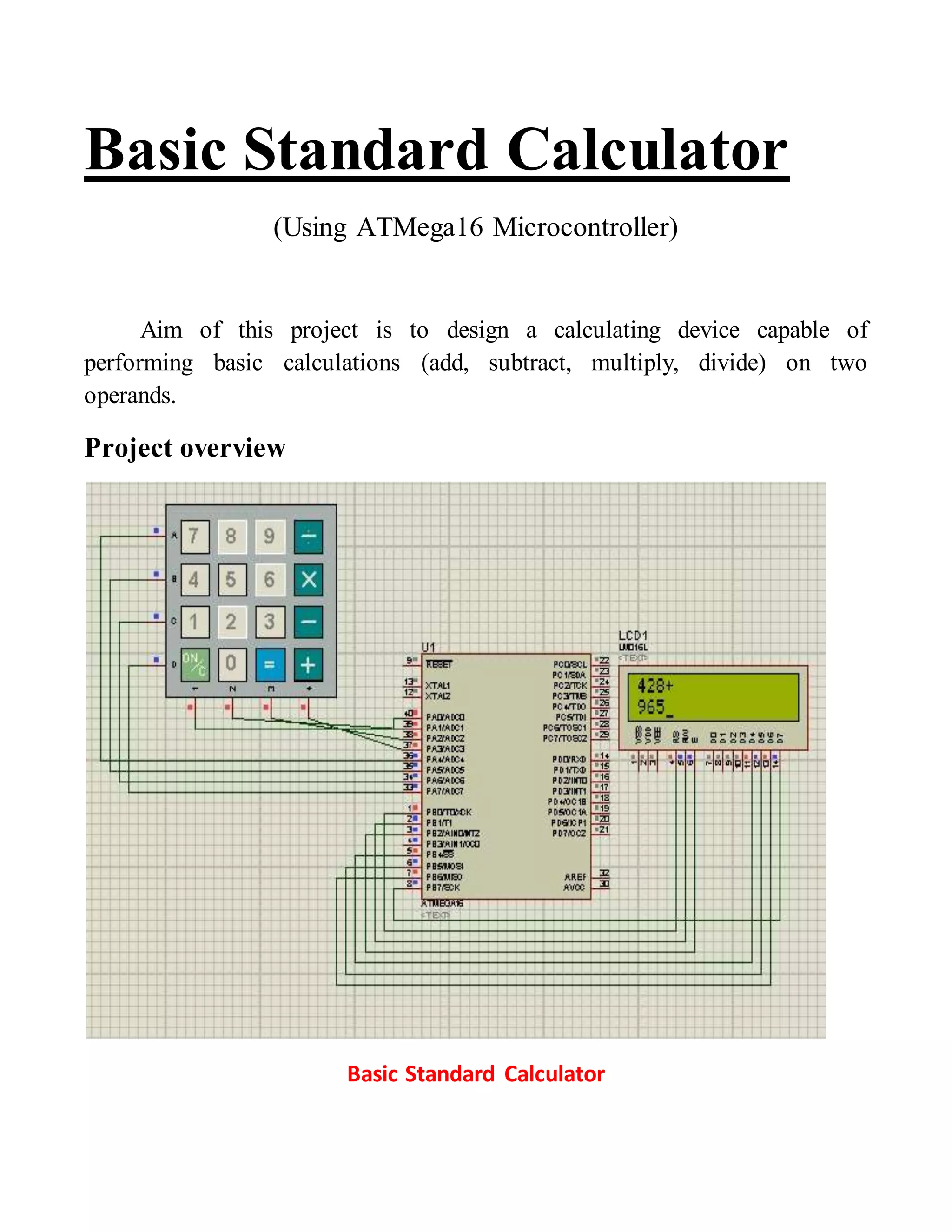
Basic Standard Calculator
Hardware components required 
1. ATMega 16 microcontroller 
2. Basic calculator keypad 
3. 2x16 LCD 
Keypad and LCD are connected with microcontroller to make an easy man-machine 
interface to make the calculator capable of performing the desired 
function. 
 ATMega16 microcontroller: This is the brain of system which is 
programmed to take input from user through keypad, perform the 
desired operation and then display the result on the provided 2x16 LCD. 
 Basic calculator keypad: This is a 4x4 (having 4 rows and 4 columns) 
keypad which is interfaced with microcontroller with its each key 
assigned a specific no. or operator defined in the program. 
 2x16 LCD: this is the liquid crystal display module capable of 
displaying 32 characters in two rows (16 in each row). Microcontroller 
displays characters on it while taking inputs from user and to display the 
result to user.
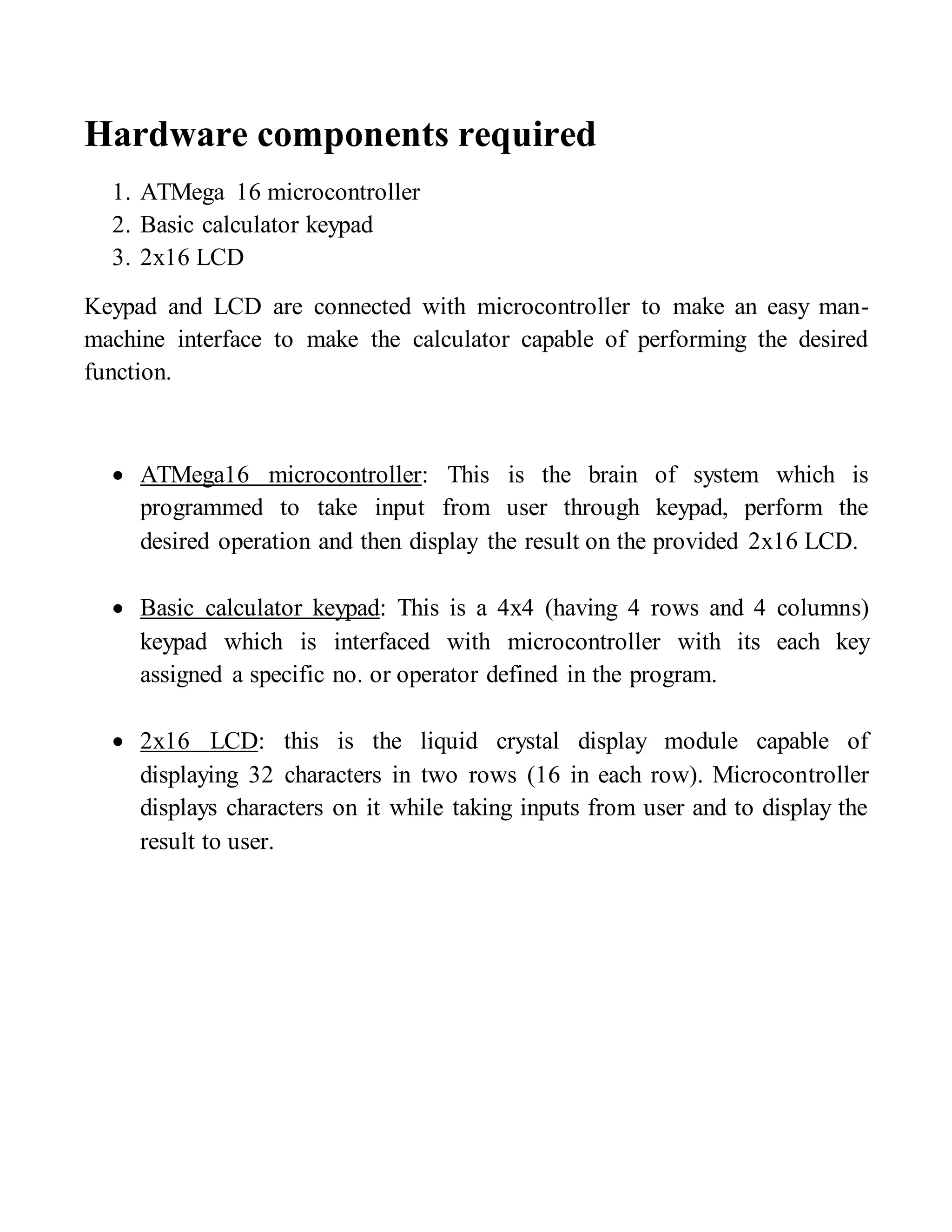
Interfacing keypad with microcontroller 
Keyboard Connections to PORTS 
With matrix keypads 16 keys can function with 8 pins (4 rows and 4 columns) 
of microcontroller’s either same or different ports as convenient.
Scanning and identifying the key pressed
Function to identify a key pressed 
//connect colum with lower nibble and rows with upper nibble 
#define key_port PORTA 
#define key_ddr DDRA 
#define key_pin PINA 
unsigned char keypad[4][4]={'7','8','9','/', 
'4','5','6','*', 
'1','2','3','-', 
'c','0','=','+'}; 
char takekey() 
{ 
unsigned char row,colum; 
char key; 
key_ddr=0xf0; 
key_port=0xff; 
do 
{ 
key_port&=0x0f; 
colum=(key_pin&0x0f); 
}while(colum!=0x0f); 
do 
{ 
do 
{ 
_delay_ms(1); 
key_port&=0x0f; 
colum=(key_pin&0x0f); 
}while(colum==0x0f); 
_delay_ms(1); 
key_port&=0x0f;
colum=(key_pin&0x0f); 
}while(colum==0x0f); 
while(1) 
{ 
key_port=0xef; 
colum=(key_pin&0x0f); 
if(colum!=0x0f) 
{ 
row=0; 
break; 
} 
key_port=0xdf; 
colum=(key_pin&0x0f); 
if(colum!=0x0f) 
{ 
row=1; 
break; 
} 
key_port=0xbf; 
colum=(key_pin&0x0f); 
if(colum!=0x0f) 
{ 
row=2; 
break; 
} 
key_port=0x7f; 
colum=(key_pin&0x0f); 
row=3; 
break; 
}
if(colum==0x0e) 
key=keypad[row][0]; 
else if(colum==0x0d) 
key=keypad[row][1]; 
else if(colum==0x0b) 
key=keypad[row][2]; 
else 
key=keypad[row][3]; 
return(key); 
} 
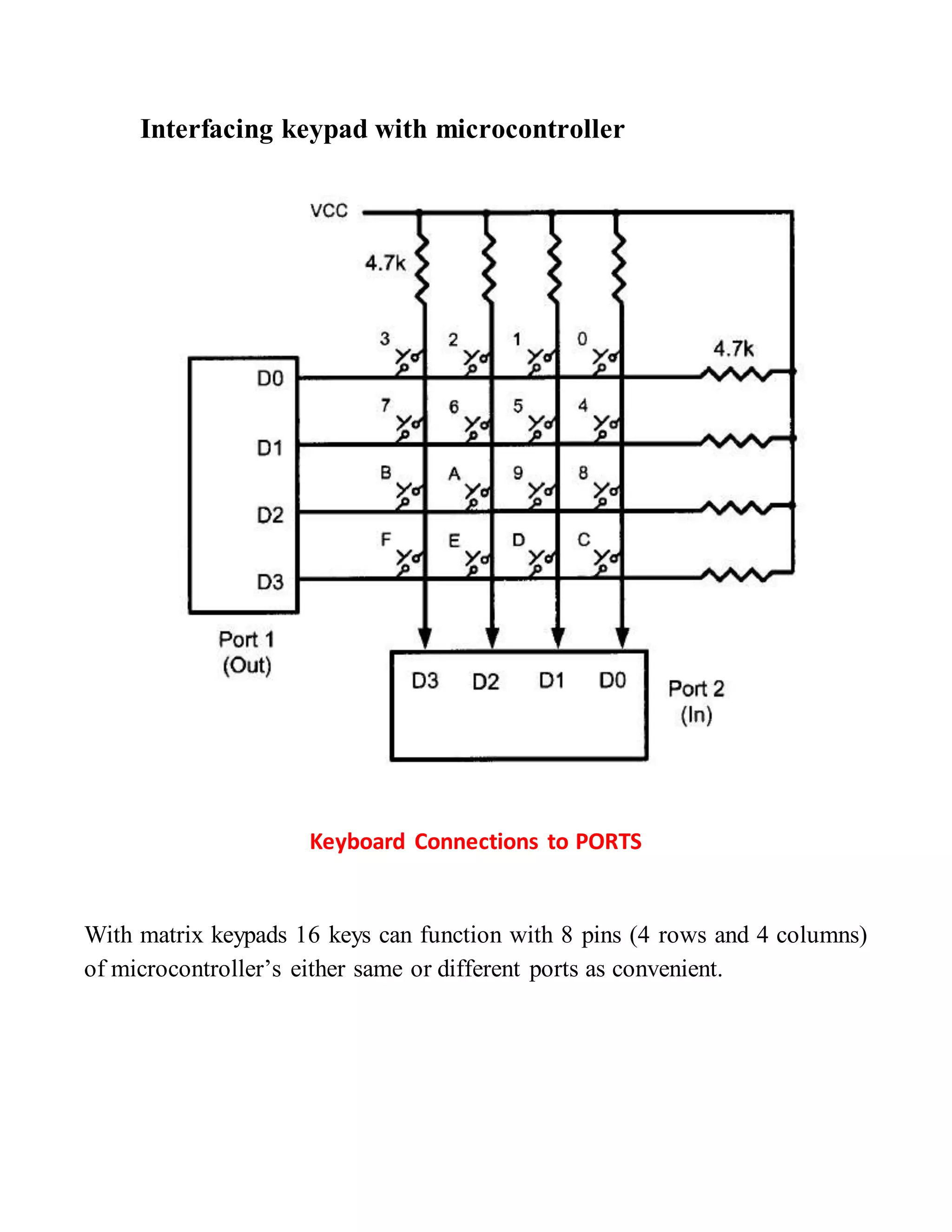
Interfacing 2x16 LCD with microcontroller (in 4 bit mode) 
LCD interfacing with atmega 16
LCD functions in accordance with above figure: 
#define en PA2 // enable signal 
#define rw PA1 // read/write signal 
#define rs PA0 // register select signal 
void lcd_cmd(unsigned char cmd) 
{ 
DDRA=0xff; 
PORTA=0; 
PORTA=cmd&0xf0; 
lcd &=~(1<<rs); 
lcd &=~(1<<rw); 
lcd |= (1<<en); 
_delay_ms(1); 
lcd &=~(1<<en); 
_delay_ms(1); 
PORTA=((cmd<<4)&0xf0); 
lcd &=~(1<<rs); 
lcd &=~(1<<rw); 
lcd |= (1<<en); 
_delay_ms(1); 
lcd &=~(1<<en); 
_delay_ms(1); 
return; 
} 
void lcd_data(unsigned char data) 
{ 
PORTA=(data&0xf0); 
lcd |=(1<<rs); 
lcd &=~(1<<rw); 
lcd |= (1<<en);
_delay_ms(1); 
lcd &=~(1<<en); 
_delay_ms(1); // delay to get things executed 
PORTA= ((data<<4)&0xf0); 
lcd |=(1<<rs); 
lcd &=~(1<<rw); 
lcd |= (1<<en); 
_delay_ms(1); 
lcd &=~(1<<en); 
return ; 
} 
void ini_lcd(void) 
{ 
_delay_ms(5); 
lcd_cmd(0x02); 
_delay_ms(1); 
lcd_cmd(0x28); 
_delay_ms(1); 
lcd_cmd(0x01); // clear LCD 
_delay_ms(1); 
lcd_cmd(0x0E); // cursor ON 
_delay_ms(1); 
lcd_cmd(0x84); 
_delay_ms(1); 
return; 
}
Calculator 
The functioning of calculator s as follows: 
i. Enter first operand 
ii. Enter operator 
iii. Enter second operand 
iv. Press result key 
Main program: 
#include<avr/io.h> 
#include<util/delay.h> 
#include"4bitlcd.h" 
#include"keypad.h" 
#define key_port PORTA 
#define key_ddr DDRA 
#define key_pin PINA 
void lcd_cmd(unsigned char cmd); 
void lcd_data(unsigned char data); 
void ini_lcd(void); 
void main() 
{ 
unsigned char ch=0,op=0; 
long o1=0,o2=0,o3=0,ch1=0; 
PORTB=0XFF; 
DDRB=0xff; 
_delay_ms(5); 
ini_lcd(); 
while(1) 
{
lcd_data('k'); 
lcd_cmd(0x01); 
_delay_ms(20); 
ch=0; 
op=0; 
ch1=0; 
o1=0; 
o2=0; 
o3=0; 
lcd_cmd(0x80); 
while((ch!='+')&(ch!='-')&(ch!='*')&(ch!='/')) //get first operand and operator 
{ 
ch=takekey(); 
ch1=ch; 
if((ch!='c')&(ch!='=')&(ch!='+')&(ch!='-')&(ch!='*')&(ch!='/')) 
{ 
lcd_data(ch); 
o1=((o1*10)+(ch1-0x30)); 
} 
else 
{ 
op=ch; 
lcd_data(ch); 
break; 
} 
} 
ch=0; 
ch1=0; 
lcd_cmd(0xc0); 
while((ch!='+')&(ch!='-')&(ch!='*')&(ch!='/')) //get second operand
{ 
ch=takekey(); 
ch1=ch; 
if((ch!='c')&(ch!='=')&(ch!='+')&(ch!='-')&(ch!='*')&(ch!='/')) 
{ 
lcd_data(ch); 
o2=((o2*10)+(ch1-0x30)); 
} 
else 
{ 
lcd_cmd(0x01); 
break; 
} 
} 
switch(op) //apply operation 
{ 
case '+': 
o3=o1+o2; 
lcd_data('a'); 
_delay_ms(5); 
break; 
case '-': 
o3=o1-o2; 
lcd_data('s'); 
_delay_ms(5); 
break; 
case '*': 
o3=o1*o2;
lcd_data('m'); 
_delay_ms(5); 
break; 
case '/': 
o3=o1/o2; 
lcd_data('d'); 
_delay_ms(5); 
break; 
default: 
lcd_cmd(0x01); 
_delay_ms(5); 
} 
lcd_cmd(0xc2); 
lcd_cmd(0x01); 
lcd_cmd(0xce); 
while(o3) //print result 
{ 
lcd_data((o3%10)+0x30); 
lcd_cmd(0x10); 
lcd_cmd(0x10); 
o3=o3/10; 
} 
ch=takekey(); 
lcd_cmd(0x01); 
_delay_ms(5); 
} 
return ; 
}

Basic standard calculator

  • 1.
    Basic Standard Calculator (Using ATMega16 Microcontroller) Aim of this project is to design a calculating device capable of performing basic calculations (add, subtract, multiply, divide) on two operands. Project overview Basic Standard Calculator
  • 2.
    Hardware components required 1. ATMega 16 microcontroller 2. Basic calculator keypad 3. 2x16 LCD Keypad and LCD are connected with microcontroller to make an easy man-machine interface to make the calculator capable of performing the desired function.  ATMega16 microcontroller: This is the brain of system which is programmed to take input from user through keypad, perform the desired operation and then display the result on the provided 2x16 LCD.  Basic calculator keypad: This is a 4x4 (having 4 rows and 4 columns) keypad which is interfaced with microcontroller with its each key assigned a specific no. or operator defined in the program.  2x16 LCD: this is the liquid crystal display module capable of displaying 32 characters in two rows (16 in each row). Microcontroller displays characters on it while taking inputs from user and to display the result to user.
  • 3.
    Interfacing keypad withmicrocontroller Keyboard Connections to PORTS With matrix keypads 16 keys can function with 8 pins (4 rows and 4 columns) of microcontroller’s either same or different ports as convenient.
  • 4.
    Scanning and identifyingthe key pressed
  • 5.
    Function to identifya key pressed //connect colum with lower nibble and rows with upper nibble #define key_port PORTA #define key_ddr DDRA #define key_pin PINA unsigned char keypad[4][4]={'7','8','9','/', '4','5','6','*', '1','2','3','-', 'c','0','=','+'}; char takekey() { unsigned char row,colum; char key; key_ddr=0xf0; key_port=0xff; do { key_port&=0x0f; colum=(key_pin&0x0f); }while(colum!=0x0f); do { do { _delay_ms(1); key_port&=0x0f; colum=(key_pin&0x0f); }while(colum==0x0f); _delay_ms(1); key_port&=0x0f;
  • 6.
    colum=(key_pin&0x0f); }while(colum==0x0f); while(1) { key_port=0xef; colum=(key_pin&0x0f); if(colum!=0x0f) { row=0; break; } key_port=0xdf; colum=(key_pin&0x0f); if(colum!=0x0f) { row=1; break; } key_port=0xbf; colum=(key_pin&0x0f); if(colum!=0x0f) { row=2; break; } key_port=0x7f; colum=(key_pin&0x0f); row=3; break; }
  • 7.
    if(colum==0x0e) key=keypad[row][0]; elseif(colum==0x0d) key=keypad[row][1]; else if(colum==0x0b) key=keypad[row][2]; else key=keypad[row][3]; return(key); } Interfacing 2x16 LCD with microcontroller (in 4 bit mode) LCD interfacing with atmega 16
  • 8.
    LCD functions inaccordance with above figure: #define en PA2 // enable signal #define rw PA1 // read/write signal #define rs PA0 // register select signal void lcd_cmd(unsigned char cmd) { DDRA=0xff; PORTA=0; PORTA=cmd&0xf0; lcd &=~(1<<rs); lcd &=~(1<<rw); lcd |= (1<<en); _delay_ms(1); lcd &=~(1<<en); _delay_ms(1); PORTA=((cmd<<4)&0xf0); lcd &=~(1<<rs); lcd &=~(1<<rw); lcd |= (1<<en); _delay_ms(1); lcd &=~(1<<en); _delay_ms(1); return; } void lcd_data(unsigned char data) { PORTA=(data&0xf0); lcd |=(1<<rs); lcd &=~(1<<rw); lcd |= (1<<en);
  • 9.
    _delay_ms(1); lcd &=~(1<<en); _delay_ms(1); // delay to get things executed PORTA= ((data<<4)&0xf0); lcd |=(1<<rs); lcd &=~(1<<rw); lcd |= (1<<en); _delay_ms(1); lcd &=~(1<<en); return ; } void ini_lcd(void) { _delay_ms(5); lcd_cmd(0x02); _delay_ms(1); lcd_cmd(0x28); _delay_ms(1); lcd_cmd(0x01); // clear LCD _delay_ms(1); lcd_cmd(0x0E); // cursor ON _delay_ms(1); lcd_cmd(0x84); _delay_ms(1); return; }
  • 10.
    Calculator The functioningof calculator s as follows: i. Enter first operand ii. Enter operator iii. Enter second operand iv. Press result key Main program: #include<avr/io.h> #include<util/delay.h> #include"4bitlcd.h" #include"keypad.h" #define key_port PORTA #define key_ddr DDRA #define key_pin PINA void lcd_cmd(unsigned char cmd); void lcd_data(unsigned char data); void ini_lcd(void); void main() { unsigned char ch=0,op=0; long o1=0,o2=0,o3=0,ch1=0; PORTB=0XFF; DDRB=0xff; _delay_ms(5); ini_lcd(); while(1) {
  • 11.
    lcd_data('k'); lcd_cmd(0x01); _delay_ms(20); ch=0; op=0; ch1=0; o1=0; o2=0; o3=0; lcd_cmd(0x80); while((ch!='+')&(ch!='-')&(ch!='*')&(ch!='/')) //get first operand and operator { ch=takekey(); ch1=ch; if((ch!='c')&(ch!='=')&(ch!='+')&(ch!='-')&(ch!='*')&(ch!='/')) { lcd_data(ch); o1=((o1*10)+(ch1-0x30)); } else { op=ch; lcd_data(ch); break; } } ch=0; ch1=0; lcd_cmd(0xc0); while((ch!='+')&(ch!='-')&(ch!='*')&(ch!='/')) //get second operand
  • 12.
    { ch=takekey(); ch1=ch; if((ch!='c')&(ch!='=')&(ch!='+')&(ch!='-')&(ch!='*')&(ch!='/')) { lcd_data(ch); o2=((o2*10)+(ch1-0x30)); } else { lcd_cmd(0x01); break; } } switch(op) //apply operation { case '+': o3=o1+o2; lcd_data('a'); _delay_ms(5); break; case '-': o3=o1-o2; lcd_data('s'); _delay_ms(5); break; case '*': o3=o1*o2;
  • 13.
    lcd_data('m'); _delay_ms(5); break; case '/': o3=o1/o2; lcd_data('d'); _delay_ms(5); break; default: lcd_cmd(0x01); _delay_ms(5); } lcd_cmd(0xc2); lcd_cmd(0x01); lcd_cmd(0xce); while(o3) //print result { lcd_data((o3%10)+0x30); lcd_cmd(0x10); lcd_cmd(0x10); o3=o3/10; } ch=takekey(); lcd_cmd(0x01); _delay_ms(5); } return ; }