© 2008 Extreme Networks, Inc. All rights reserved. ExtremeXOS Operation and Configuration, Version 12.1. Part number DOC-00919.
Configuring RIP
ExtremeXOS™ Operation and
Configuration, Version 12.1
Slide 2
Student Objectives
Upon completion of this module, you will be able to:
Describe the RIP routing protocol.
Identify the limitations of RIP version 1.
List the benefits of RIP version 2.
Interpret RIP routing table entries.
Describe the Split Horizon and Poison Reverse loop resolution protocols.
Describe the operation of triggered updates.
Configure the RIP routing protocol.
Verify the RIP configuration.
Test RIP operation.
Note: Depending on the needs of the students, the instructor may
choose to reduce or eliminate the protocol overview portion of this module.
Slide 3
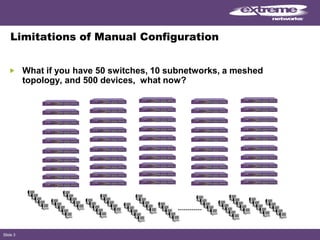
Limitations of Manual Configuration
What if you have 50 switches, 10 subnetworks, a meshed
topology, and 500 devices, what now?
Slide 4
Routing Information Protocol
A distance-vector protocol used
as an Interior Gateway Protocol.
First used in the Advanced
Research Projects Agency
Network (ARPAnet) as early as
1969.
It is primarily intended for use in
homogeneous networks of
moderate size (20-30 switches or
less).
Relatively simple to understand
and implement.
Each router creates its routing
table based on route information
exchanged between neighbors.
Supported by all Extreme
Networks switches.
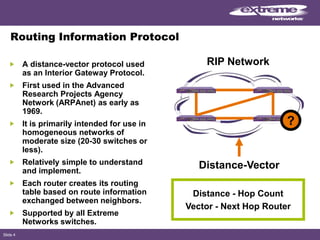
Distance-Vector
Distance - Hop Count
Vector - Next Hop Router
RIP Network
?
Slide 5
Routing Information Protocol (Continued…)
The router exchanges update
messages with each neighbor
every 30 seconds.
Stale routes are removed from the
routing table.
There are two versions of RIP.
In RIP V1, 25 routes can be
advertised in a single packet. This
limits the maximum packet size to
512 octets.
Supports 2 types of loop
resolution protocols.
• Split Horizon, Poison Reverse
Supports triggered updates.
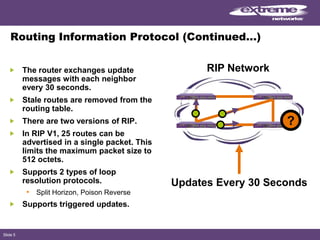
RIP Network
Updates Every 30 Seconds
?
Slide 6
Limitations of RIP Version 1
Only understands class A, B, and
C IP addresses.
Does not propagate subnetwork
mask information in its updates.
Cannot support variable length
subnetwork masks.
Uses broadcasts for update
delivery.
It is an insecure routing protocol.
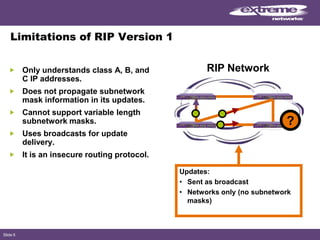
Updates:
• Sent as broadcast
• Networks only (no subnetwork
masks)
RIP Network
?
Slide 7
RIP Version 2
Fixes many of the limitations of
RIP-1.
Is a classless routing protocol.
Supports variable length
subnetwork masking.
Supports Classless Internet
Domain Routing (CIDR).
Has features to make it backward
compatible with RIP Version 1.
Supports authentication (not
supported on Extreme Switches).
• Clear text password
• MD5 – checksum (RFC 2082)
Uses multicast for update
delivery.
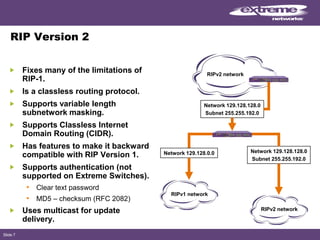
RIPv2 network
Network 129.128.128.0
Subnet 255.255.192.0
Network 129.128.128.0
Subnet 255.255.192.0
Network 129.128.0.0
RIPv1 network
RIPv2 network
Slide 8
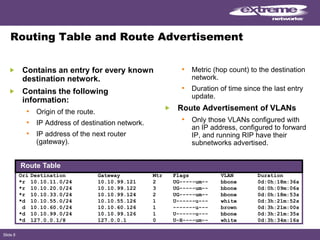
Routing Table and Route Advertisement
Contains an entry for every known
destination network.
Contains the following
information:
• Origin of the route.
• IP Address of destination network.
• IP address of the next router
(gateway).
• Metric (hop count) to the destination
network.
• Duration of time since the last entry
update.
Route Advertisement of VLANs
• Only those VLANs configured with
an IP address, configured to forward
IP, and running RIP have their
subnetworks advertised.
Ori Destination Gateway Mtr Flags VLAN Duration
*r 10.10.11.0/24 10.10.99.121 2 UG-----um-- bbone 0d:0h:18m:36s
*r 10.10.20.0/24 10.10.99.122 3 UG-----um-- bbone 0d:0h:09m:06s
*r 10.10.33.0/24 10.10.99.124 2 UG-----um-- bbone 0d:0h:18m:53s
*d 10.10.55.0/24 10.10.55.126 1 U------u--- white 0d:3h:21m:52s
d 10.10.60.0/24 10.10.60.126 1 -------u--- brown 0d:3h:21m:00s
*d 10.10.99.0/24 10.10.99.126 1 U------u--- bbone 0d:3h:21m:35s
*d 127.0.0.1/8 127.0.0.1 0 U-H----um-- white 0d:3h:34m:16s
Route Table
Slide 9
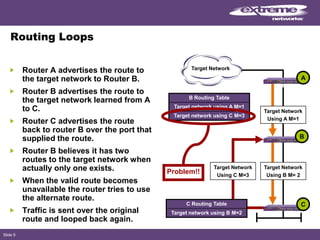
Routing Loops
Router A advertises the route to
the target network to Router B.
Router B advertises the route to
the target network learned from A
to C.
Router C advertises the route
back to router B over the port that
supplied the route.
Router B believes it has two
routes to the target network when
actually only one exists.
When the valid route becomes
unavailable the router tries to use
the alternate route.
Traffic is sent over the original
route and looped back again.
Target Network
A
C
B
Problem!!
Target Network
Using A M=1
Target Network
Using B M= 2
Target Network
Using C M=3
B Routing Table
Target network using A M=1
Target network using C M=3
C Routing Table
Target network using B M=2
Slide 10
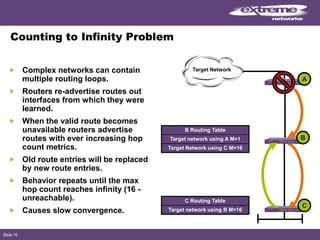
Counting to Infinity Problem
Complex networks can contain
multiple routing loops.
Routers re-advertise routes out
interfaces from which they were
learned.
When the valid route becomes
unavailable routers advertise
routes with ever increasing hop
count metrics.
Old route entries will be replaced
by new route entries.
Behavior repeats until the max
hop count reaches infinity (16 -
unreachable).
Causes slow convergence.
Target Network
C
B
C Routing Table
Target network using B M=16
B Routing Table
Target network using A M=1
Target Network using C M=16
A
Slide 11
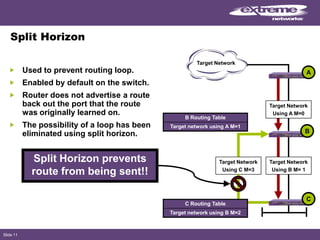
Split Horizon
Used to prevent routing loop.
Enabled by default on the switch.
Router does not advertise a route
back out the port that the route
was originally learned on.
The possibility of a loop has been
eliminated using split horizon.
Split Horizon prevents
route from being sent!!
Target Network
Target Network
Using C M=3
A
C
B
Target Network
Using A M=0
Target Network
Using B M= 1
C Routing Table
Target network using B M=2
B Routing Table
Target network using A M=1
Slide 12
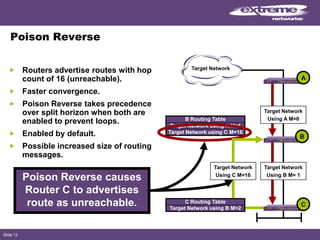
Poison Reverse
Routers advertise routes with hop
count of 16 (unreachable).
Faster convergence.
Poison Reverse takes precedence
over split horizon when both are
enabled to prevent loops.
Enabled by default.
Possible increased size of routing
messages.
Target Network
Target Network
Using C M=16
A
C
B
Target Network using C M=16
Target Network using A M=1
B Routing Table
Target Network using B M=2
C Routing Table
Target Network
Using A M=0
Target Network
Using B M= 1
Poison Reverse causes
Router C to advertises
route as unreachable.
Slide 13
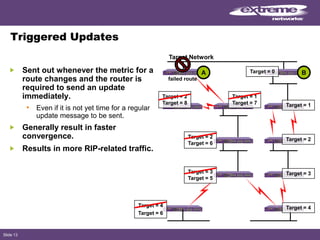
Triggered Updates
Sent out whenever the metric for a
route changes and the router is
required to send an update
immediately.
• Even if it is not yet time for a regular
update message to be sent.
Generally result in faster
convergence.
Results in more RIP-related traffic.
Target Network
BA Target = 0
Target = 1
Target = 2
Target = 4Target = 4
Target = 6
Target = 3
Target = 5
Target = 2
Target = 6
Target = 3
Target = 1
Target = 7
Target = 2
Target = 8
failed route
Slide 14
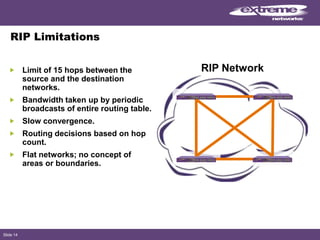
RIP Limitations
Limit of 15 hops between the
source and the destination
networks.
Bandwidth taken up by periodic
broadcasts of entire routing table.
Slow convergence.
Routing decisions based on hop
count.
Flat networks; no concept of
areas or boundaries.
RIP Network
Slide 15
RIP Configuration Steps
Create and configure VLANs.
1. Configure the VLAN with an IP address.
2. Enable IP Forwarding.
3. Enable RIP on VLANs that do RIP routing.
4. Enable RIP globally on the switch.
5. Verify RIP configuration.
Slide 16
General IP Configuration Commands
Create and configure VLANs:
• create vlan <vlan name>
• configure vlan <vlan name> add ports <portlist>
Configure VLAN with an IP address:
• configure vlan <vlan name> ipaddress <ipaddr>
{<netmask> | <mask length>}
Enable IP forwarding:
• enable ipforwarding
Slide 17
RIP Specific Configuration Commands
Enable RIP on VLANs that do RIP routing:
• configure rip add vlan [<vlan name> | all]
Enable RIP globally on the switch:
• enable rip
Disable RIP on VLANs:
• configure rip delete vlan [<vlan name> | all]
Disable RIP globally on the switch:
• disable rip
When RIP is disabled on the interface, the parameters are not reset
to their defaults.
Slide 18
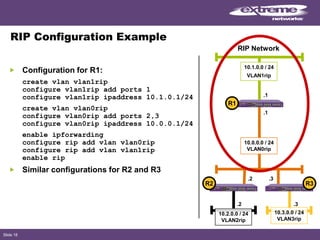
RIP Configuration Example
Configuration for R1:
create vlan vlan1rip
configure vlan1rip add ports 1
configure vlan1rip ipaddress 10.1.0.1/24
create vlan vlan0rip
configure vlan0rip add ports 2,3
configure vlan0rip ipaddress 10.0.0.1/24
enable ipforwarding
configure rip add vlan vlan0rip
configure rip add vlan vlan1rip
enable rip
Similar configurations for R2 and R3
.1
10.0.0.0 / 24
VLAN0rip
.2
.1
.3
.2
10.2.0.0 / 24
VLAN2rip
.3
10.3.0.0 / 24
VLAN3rip
R2 R3
R1
10.1.0.0 / 24
VLAN1rip
RIP Network
Slide 19
RIP Timer and Cost Configuration Commands
Configure RIP update timer:
• configure rip updatetime {<seconds>}
Configure RIP route timeout:
• configure rip routetimeout {<seconds>}
Configure RIP garbage time:
• configure rip garbagetime {<seconds>}
Configure RIP VLAN cost:
• configure rip vlan [<vlan name> | all] cost <cost>
Slide 20
Additional RIP Configuration Commands
Configure RIP receive version:
• configure rip rxmode vlan [vlan name | all]
[none | v1only | v2only | any]
Configure RIP transmit version:
• configure rip txmode vlan [vlan name | all]
[none | v1only | v2only | any]
Enable or disable specific RIP features:
• [enable | disable] rip [aggregation | export |
|originate-default | poisonreverse | splithorizon |
triggerupdates | use-ip-router-alert]
Unconfigure RIP:
• unconfigure rip {vlan <vlan name>}
Slide 21
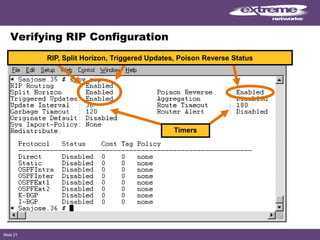
Verifying RIP Configuration
Timers
RIP, Split Horizon, Triggered Updates, Poison Reverse Status
Slide 22
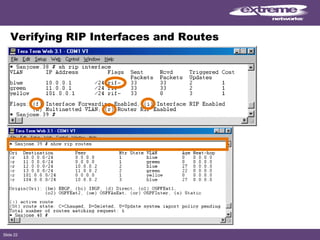
Verifying RIP Interfaces and Routes
Slide 23
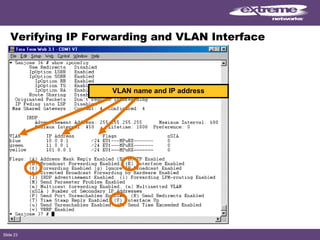
Verifying IP Forwarding and VLAN Interface
VLAN name and IP address
Slide 24
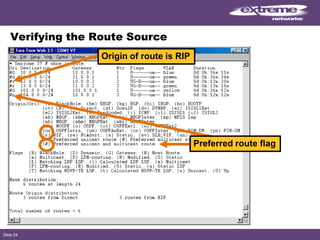
Verifying the Route Source
Preferred route flag
Origin of route is RIP
Slide 25
Summary
You should now be able to:
Describe the RIP routing protocol.
Identify the limitations of RIP version 1.
List the benefits of RIP version 2.
Interpret RIP routing table entries.
Describe the Split Horizon and Poison Reverse loop resolution
protocols.
Describe the operation of triggered updates.
Configure the RIP routing protocol.
Verify the RIP configuration.
Test RIP operation.
Slide 26
Lab
Turn to the Routing Information Protocol (RIP) Lab
in the ExtremeXOS™ Operations and Configuration - Lab Guide Rev. 12.1
and complete the hands-on portion of this module.
© 2008 Extreme Networks, Inc. All rights reserved. ExtremeXOS Operation and Configuration, Version 12.1. Part number DOC-00919.
Review Questions
© 2008 Extreme Networks, Inc. All rights reserved. ExtremeXOS Operation and Configuration, Version 12.1. Part number DOC-00919.
This presentation contains forward-looking statements that involve
risks and uncertainties, including statements regarding our
expectations as to products, trends and our performance. There can be
no assurances that any forward-looking statements will be achieved,
and actual results could differ materially from forecasts and estimates.
For factors that may affect our business and financial results please
refer to our filings with the Securities and Exchange Commission,
including, without limitation, under the captions: “Management’s
Discussion and Analysis of Financial Condition and Results of
Operations,” and “Risk Factors,” which is on file with the Securities and
Exchange Commission (http://www.sec.gov). We undertake no
obligation to update the forward-looking information in this release.
© 2008 Extreme Networks, Inc. All rights reserved. ExtremeXOS Operation and Configuration, Version 12.1. Part number DOC-00919.
The End
© 2008 Extreme Networks, Inc. All rights reserved. ExtremeXOS Operation and Configuration, Version 12.1. Part number DOC-00919.© 2008 Extreme Networks, Inc. All rights reserved. ExtremeXOS Operation and Configuration, Version 12.1. Part number DOC-00919.

RIP Routing Information Protocol Extreme Networks

  • 1.
    © 2008 ExtremeNetworks, Inc. All rights reserved. ExtremeXOS Operation and Configuration, Version 12.1. Part number DOC-00919. Configuring RIP ExtremeXOS™ Operation and Configuration, Version 12.1
  • 2.
    Slide 2 Student Objectives Uponcompletion of this module, you will be able to: Describe the RIP routing protocol. Identify the limitations of RIP version 1. List the benefits of RIP version 2. Interpret RIP routing table entries. Describe the Split Horizon and Poison Reverse loop resolution protocols. Describe the operation of triggered updates. Configure the RIP routing protocol. Verify the RIP configuration. Test RIP operation. Note: Depending on the needs of the students, the instructor may choose to reduce or eliminate the protocol overview portion of this module.
  • 3.
    Slide 3 Limitations ofManual Configuration What if you have 50 switches, 10 subnetworks, a meshed topology, and 500 devices, what now?
  • 4.
    Slide 4 Routing InformationProtocol A distance-vector protocol used as an Interior Gateway Protocol. First used in the Advanced Research Projects Agency Network (ARPAnet) as early as 1969. It is primarily intended for use in homogeneous networks of moderate size (20-30 switches or less). Relatively simple to understand and implement. Each router creates its routing table based on route information exchanged between neighbors. Supported by all Extreme Networks switches. Distance-Vector Distance - Hop Count Vector - Next Hop Router RIP Network ?
  • 5.
    Slide 5 Routing InformationProtocol (Continued…) The router exchanges update messages with each neighbor every 30 seconds. Stale routes are removed from the routing table. There are two versions of RIP. In RIP V1, 25 routes can be advertised in a single packet. This limits the maximum packet size to 512 octets. Supports 2 types of loop resolution protocols. • Split Horizon, Poison Reverse Supports triggered updates. RIP Network Updates Every 30 Seconds ?
  • 6.
    Slide 6 Limitations ofRIP Version 1 Only understands class A, B, and C IP addresses. Does not propagate subnetwork mask information in its updates. Cannot support variable length subnetwork masks. Uses broadcasts for update delivery. It is an insecure routing protocol. Updates: • Sent as broadcast • Networks only (no subnetwork masks) RIP Network ?
  • 7.
    Slide 7 RIP Version2 Fixes many of the limitations of RIP-1. Is a classless routing protocol. Supports variable length subnetwork masking. Supports Classless Internet Domain Routing (CIDR). Has features to make it backward compatible with RIP Version 1. Supports authentication (not supported on Extreme Switches). • Clear text password • MD5 – checksum (RFC 2082) Uses multicast for update delivery. RIPv2 network Network 129.128.128.0 Subnet 255.255.192.0 Network 129.128.128.0 Subnet 255.255.192.0 Network 129.128.0.0 RIPv1 network RIPv2 network
  • 8.
    Slide 8 Routing Tableand Route Advertisement Contains an entry for every known destination network. Contains the following information: • Origin of the route. • IP Address of destination network. • IP address of the next router (gateway). • Metric (hop count) to the destination network. • Duration of time since the last entry update. Route Advertisement of VLANs • Only those VLANs configured with an IP address, configured to forward IP, and running RIP have their subnetworks advertised. Ori Destination Gateway Mtr Flags VLAN Duration *r 10.10.11.0/24 10.10.99.121 2 UG-----um-- bbone 0d:0h:18m:36s *r 10.10.20.0/24 10.10.99.122 3 UG-----um-- bbone 0d:0h:09m:06s *r 10.10.33.0/24 10.10.99.124 2 UG-----um-- bbone 0d:0h:18m:53s *d 10.10.55.0/24 10.10.55.126 1 U------u--- white 0d:3h:21m:52s d 10.10.60.0/24 10.10.60.126 1 -------u--- brown 0d:3h:21m:00s *d 10.10.99.0/24 10.10.99.126 1 U------u--- bbone 0d:3h:21m:35s *d 127.0.0.1/8 127.0.0.1 0 U-H----um-- white 0d:3h:34m:16s Route Table
  • 9.
    Slide 9 Routing Loops RouterA advertises the route to the target network to Router B. Router B advertises the route to the target network learned from A to C. Router C advertises the route back to router B over the port that supplied the route. Router B believes it has two routes to the target network when actually only one exists. When the valid route becomes unavailable the router tries to use the alternate route. Traffic is sent over the original route and looped back again. Target Network A C B Problem!! Target Network Using A M=1 Target Network Using B M= 2 Target Network Using C M=3 B Routing Table Target network using A M=1 Target network using C M=3 C Routing Table Target network using B M=2
  • 10.
    Slide 10 Counting toInfinity Problem Complex networks can contain multiple routing loops. Routers re-advertise routes out interfaces from which they were learned. When the valid route becomes unavailable routers advertise routes with ever increasing hop count metrics. Old route entries will be replaced by new route entries. Behavior repeats until the max hop count reaches infinity (16 - unreachable). Causes slow convergence. Target Network C B C Routing Table Target network using B M=16 B Routing Table Target network using A M=1 Target Network using C M=16 A
  • 11.
    Slide 11 Split Horizon Usedto prevent routing loop. Enabled by default on the switch. Router does not advertise a route back out the port that the route was originally learned on. The possibility of a loop has been eliminated using split horizon. Split Horizon prevents route from being sent!! Target Network Target Network Using C M=3 A C B Target Network Using A M=0 Target Network Using B M= 1 C Routing Table Target network using B M=2 B Routing Table Target network using A M=1
  • 12.
    Slide 12 Poison Reverse Routersadvertise routes with hop count of 16 (unreachable). Faster convergence. Poison Reverse takes precedence over split horizon when both are enabled to prevent loops. Enabled by default. Possible increased size of routing messages. Target Network Target Network Using C M=16 A C B Target Network using C M=16 Target Network using A M=1 B Routing Table Target Network using B M=2 C Routing Table Target Network Using A M=0 Target Network Using B M= 1 Poison Reverse causes Router C to advertises route as unreachable.
  • 13.
    Slide 13 Triggered Updates Sentout whenever the metric for a route changes and the router is required to send an update immediately. • Even if it is not yet time for a regular update message to be sent. Generally result in faster convergence. Results in more RIP-related traffic. Target Network BA Target = 0 Target = 1 Target = 2 Target = 4Target = 4 Target = 6 Target = 3 Target = 5 Target = 2 Target = 6 Target = 3 Target = 1 Target = 7 Target = 2 Target = 8 failed route
  • 14.
    Slide 14 RIP Limitations Limitof 15 hops between the source and the destination networks. Bandwidth taken up by periodic broadcasts of entire routing table. Slow convergence. Routing decisions based on hop count. Flat networks; no concept of areas or boundaries. RIP Network
  • 15.
    Slide 15 RIP ConfigurationSteps Create and configure VLANs. 1. Configure the VLAN with an IP address. 2. Enable IP Forwarding. 3. Enable RIP on VLANs that do RIP routing. 4. Enable RIP globally on the switch. 5. Verify RIP configuration.
  • 16.
    Slide 16 General IPConfiguration Commands Create and configure VLANs: • create vlan <vlan name> • configure vlan <vlan name> add ports <portlist> Configure VLAN with an IP address: • configure vlan <vlan name> ipaddress <ipaddr> {<netmask> | <mask length>} Enable IP forwarding: • enable ipforwarding
  • 17.
    Slide 17 RIP SpecificConfiguration Commands Enable RIP on VLANs that do RIP routing: • configure rip add vlan [<vlan name> | all] Enable RIP globally on the switch: • enable rip Disable RIP on VLANs: • configure rip delete vlan [<vlan name> | all] Disable RIP globally on the switch: • disable rip When RIP is disabled on the interface, the parameters are not reset to their defaults.
  • 18.
    Slide 18 RIP ConfigurationExample Configuration for R1: create vlan vlan1rip configure vlan1rip add ports 1 configure vlan1rip ipaddress 10.1.0.1/24 create vlan vlan0rip configure vlan0rip add ports 2,3 configure vlan0rip ipaddress 10.0.0.1/24 enable ipforwarding configure rip add vlan vlan0rip configure rip add vlan vlan1rip enable rip Similar configurations for R2 and R3 .1 10.0.0.0 / 24 VLAN0rip .2 .1 .3 .2 10.2.0.0 / 24 VLAN2rip .3 10.3.0.0 / 24 VLAN3rip R2 R3 R1 10.1.0.0 / 24 VLAN1rip RIP Network
  • 19.
    Slide 19 RIP Timerand Cost Configuration Commands Configure RIP update timer: • configure rip updatetime {<seconds>} Configure RIP route timeout: • configure rip routetimeout {<seconds>} Configure RIP garbage time: • configure rip garbagetime {<seconds>} Configure RIP VLAN cost: • configure rip vlan [<vlan name> | all] cost <cost>
  • 20.
    Slide 20 Additional RIPConfiguration Commands Configure RIP receive version: • configure rip rxmode vlan [vlan name | all] [none | v1only | v2only | any] Configure RIP transmit version: • configure rip txmode vlan [vlan name | all] [none | v1only | v2only | any] Enable or disable specific RIP features: • [enable | disable] rip [aggregation | export | |originate-default | poisonreverse | splithorizon | triggerupdates | use-ip-router-alert] Unconfigure RIP: • unconfigure rip {vlan <vlan name>}
  • 21.
    Slide 21 Verifying RIPConfiguration Timers RIP, Split Horizon, Triggered Updates, Poison Reverse Status
  • 22.
    Slide 22 Verifying RIPInterfaces and Routes
  • 23.
    Slide 23 Verifying IPForwarding and VLAN Interface VLAN name and IP address
  • 24.
    Slide 24 Verifying theRoute Source Preferred route flag Origin of route is RIP
  • 25.
    Slide 25 Summary You shouldnow be able to: Describe the RIP routing protocol. Identify the limitations of RIP version 1. List the benefits of RIP version 2. Interpret RIP routing table entries. Describe the Split Horizon and Poison Reverse loop resolution protocols. Describe the operation of triggered updates. Configure the RIP routing protocol. Verify the RIP configuration. Test RIP operation.
  • 26.
    Slide 26 Lab Turn tothe Routing Information Protocol (RIP) Lab in the ExtremeXOS™ Operations and Configuration - Lab Guide Rev. 12.1 and complete the hands-on portion of this module.
  • 27.
    © 2008 ExtremeNetworks, Inc. All rights reserved. ExtremeXOS Operation and Configuration, Version 12.1. Part number DOC-00919. Review Questions
  • 28.
    © 2008 ExtremeNetworks, Inc. All rights reserved. ExtremeXOS Operation and Configuration, Version 12.1. Part number DOC-00919. This presentation contains forward-looking statements that involve risks and uncertainties, including statements regarding our expectations as to products, trends and our performance. There can be no assurances that any forward-looking statements will be achieved, and actual results could differ materially from forecasts and estimates. For factors that may affect our business and financial results please refer to our filings with the Securities and Exchange Commission, including, without limitation, under the captions: “Management’s Discussion and Analysis of Financial Condition and Results of Operations,” and “Risk Factors,” which is on file with the Securities and Exchange Commission (http://www.sec.gov). We undertake no obligation to update the forward-looking information in this release.
  • 29.
    © 2008 ExtremeNetworks, Inc. All rights reserved. ExtremeXOS Operation and Configuration, Version 12.1. Part number DOC-00919. The End © 2008 Extreme Networks, Inc. All rights reserved. ExtremeXOS Operation and Configuration, Version 12.1. Part number DOC-00919.© 2008 Extreme Networks, Inc. All rights reserved. ExtremeXOS Operation and Configuration, Version 12.1. Part number DOC-00919.