Design for Testability with
   DFT Compiler and TetraMax


          黃信融
          Hot Line: (03) 5773693 ext 885
          Hot Mail: hotline@cic.org.tw


Outline

 Day 1 – DFT Compiler             Day 2 – TetraMAX
  Basic Concepts                    TetraMAX Overview
  DFT Compiler Flow                 Design and Test Flows
  Basic DFT Techniques              STIL for DRC & ATPG
  Advanced DFT Techniques           TetraMAX Fault Classes
  Scan Path Insertion               & Fault list
  Memory Wrapper & AutoFix          Fault Simulating Functional
                                    Patterns
  Other Skill
                                    Modeling Memories
                                    Debugging Problems
                                    Something To Remember


                                                     2004.08   2
Synopsys On-Line Documentation
 Invoke Synopsys On-Line Documentation (SOLD) by
 using this command:

  %> acroread /usr/synopsys/sold/cur/top.pdf


                                                   Test Automation


                                                           2004.08   3


What is Design-for-Testability?
 Extra design effort invested in making an IC testable.
 Involves inserting or modifying logic, and adding pins.
 You can apply structured or Ad hoc DFT techniques.
 Structured:
   Insert scan-chain
   Memory BIST…
 Ad Hoc DFT:
   Avoid asynchronous logic feedbacks.
   Make flip-flops initializable.
   Avoid gates with a large number of fan-in signals.
   Provide test control for diffcult-to-control signals.


                                                           2004.08   4
Design for Testability
              Using DFT Compiler


               Basic Concepts


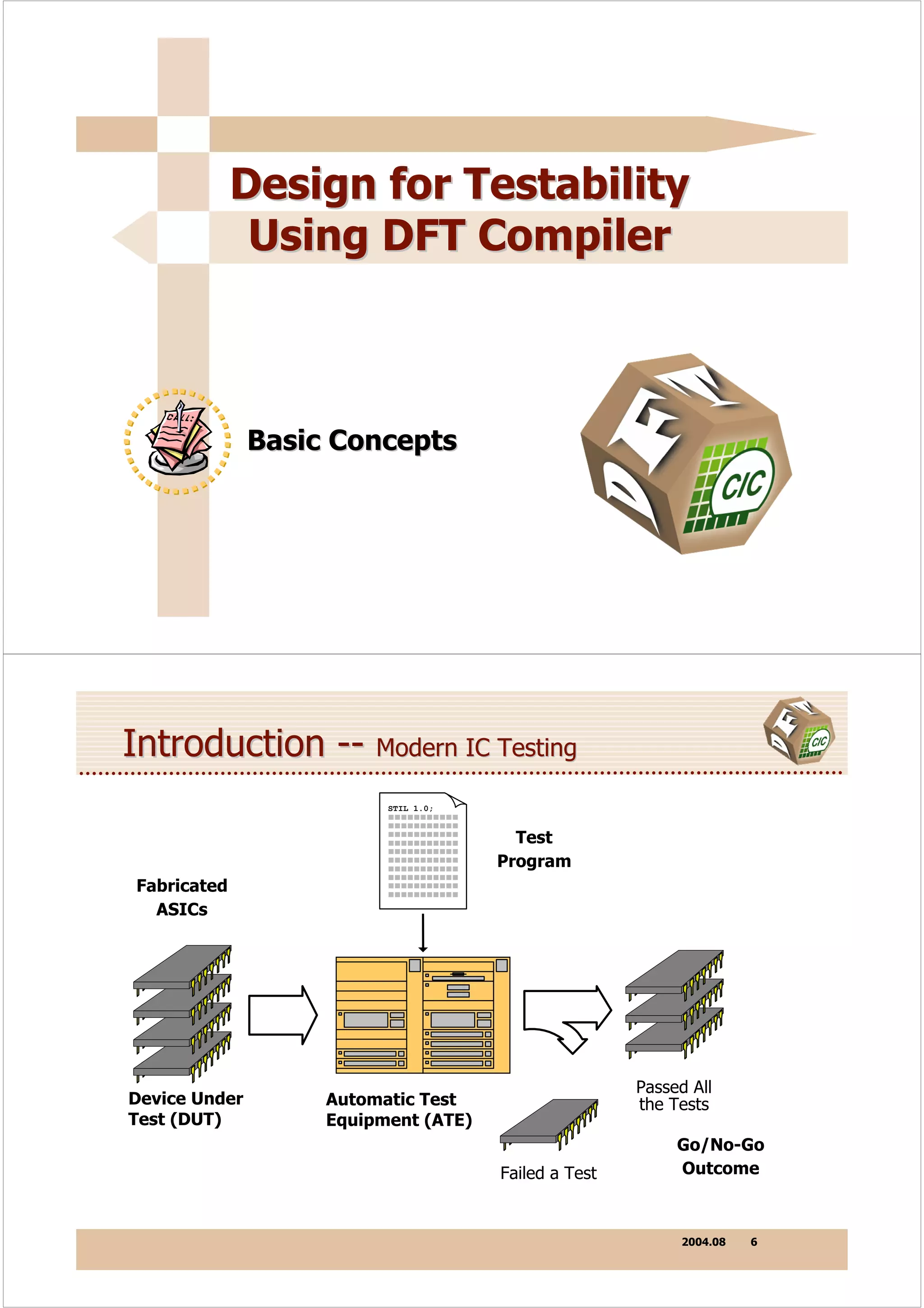
Introduction -- Modern IC Testing
                          STIL 1.0;


                                        Test
                                      Program
Fabricated
  ASICs


                                                      Passed All
Device Under        Automatic Test                    the Tests
Test (DUT)          Equipment (ATE)
                                                           Go/No-Go
                                      Failed a Test        Outcome


                                                           2004.08   6
Introduction -- Pins/Gates


                                    TTL logic allowed easy access to
                                    individual gates.


                                                         1.E+08

                                                         1.E+07


                                           Transistors
                                                                                                                Pentium
                                                         1.E+06
                                                                                                              486
      Pins / Gates << 0.001                              1.E+05
                                                                                              386
                                                                                           286
    Hard to access to a chip.                            1.E+04

                                                         1.E+03
                                                                            8080


                                                                                                                             2002
                                                                                                                      1998
                                                                         1974


                                                                                                               1994
                                                                  1970


                                                                                 1978

                                                                                        1982

                                                                                                1986

                                                                                                       1990
                                                                                               Year


                                                                                                                 2004.08            7


Introduction -- Defect Level & Fault Coverage
    Defect level (DL) is the fraction of devices that pass all
    the tests and are shipped but still contain some faults
       DL = 1-Y(1-FC)
    Defect level is measured in terms of DPM (detects per
    million), and typical requirement is less than 200 DPM i.e.
    0.02 %
                        Y = 50%     Y = 90%
      10,000
                                                         For DL = 200 DPM
  Chip
Defect 1,000                                               Y (%)                10              50              90             95       99
 Level
(DPM) 100                                                 FC(%) 99.99                          99.97          99.8           99.6       98

          10
               99.99    99.9   99     90

                 Fault Coverage

                                                                                                                 2004.08            8
Introduction -- Physical Defect


              POWER

                                                  Output
                                                  Shorted
                    Input                           to 1
                    Open

              IN                                        OUT


                    Input
                   Shorted
                     to 0

                                                       GROUND


                                                                2004.08   9


Introduction -- Stuck-At Faults

  Simple logical model is independent of technology details.
  It reduces the complexity of fault-detection algorithms.
  Applicable to any physical defect manifesting as a signal that
  is stuck at a fixed logic level.
  One stuck-at fault can model more than one kind of defect.


                             Stuck-At-1
                             (U0/A SA1)   A
                                                   U1           Y
          A                               B
                         U0          Y
          B                               Stuck-At-0
                                          (U1/Y SA0)


                                                                2004.08   10
Stuck-At Faults Example     @


                                              Fault-Free Logic
                                              Faulty Logic

   A                             1/0
   B


                                             Z

   C

   D
               0/1               Nf = 2 ( Npins + Nports )
                  Total Faults      = 2 ( 11 + 5 )
                                    = 32


                                                 2004.08   11


Stuck-At Faults Example     @@


                                              Fault-Free Logic
                                              Faulty Logic

   A                             1/0
   B


                                             Z

 0C
 0D             0/1


                                                 2004.08   12
Stuck-At Faults Example   @@@


                                             Fault-Free Logic
                                             Faulty Logic


                      0          1/0
   A

   B

                                   1/0
                                             Z

 0 C

 0 D            0/1


                                                 2004.08   13


Stuck-At Faults Example   @@@@


                                             Fault-Free Logic
                                             Faulty Logic


 1A                   0
                                 1/0
 0B        1
                                       1/0
                                             Z

 0 C

 0 D            0/1


                                                 2004.08   14
Introduction -- D Algorithm
         D Algorithm:
         1. Target a specific stuck-at fault.
         2. Drive fault site to opposite value.
         3. Propagate error to primary output.
         4. Record pattern; go to next fault.

  Generates patterns for one SA fault at a time.
  Involves decision-making at almost every step.
  Backtracking can be excessive for difficult-to-detect faults.
  Use an ATPG tool which relies on proprietary techniques to
  speed up and extend the basic D algorithm, by predicting the
  best paths, etc.

                                                       2004.08   15


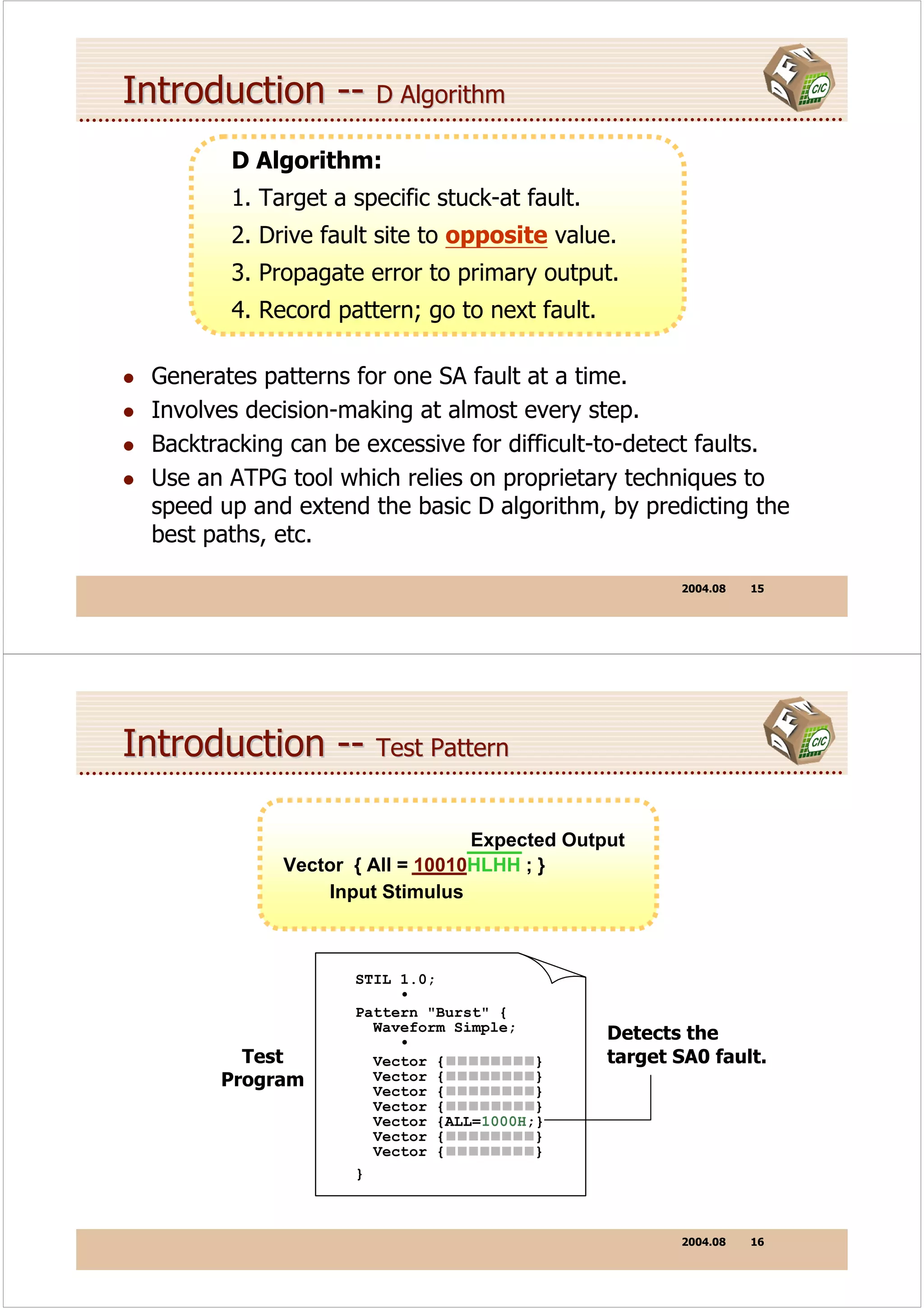
Introduction -- Test Pattern

                                  Expected Output
              Vector { All = 10010HLHH ; }
                  Input Stimulus


                     STIL 1.0;
                          •
                     Pattern "Burst" {
                       Waveform Simple;
                          •                     Detects the
          Test         Vector {          }      target SA0 fault.
        Program        Vector {
                       Vector {
                                         }
                                         }
                       Vector {          }
                       Vector {ALL=1000H;}
                       Vector {          }
                       Vector {          }
                     }


                                                       2004.08   16
Introduction -- Fault Collapsing

  A                  Z   Collapsing
                                       A                       Z


  The gate behaves the same for any input SA0, SA1 or the
  output SA0, SA1.
  The faults { A SA0, Z SA0 }, { A SA1, Z SA1 } are thus all
  equivalent.
  Only Z SA0, Z SA1 or A SA0, A SA1 need be included in the
  fault universe.
  The faults after collapsing are included in the fault universe
  called primary faults, faults after collapsing are not included
  in the fault universe called equivalent faults of primary
  faults.
                                                     2004.08   17


Introduction -- Single Stuck-At Fault Assumption
• ATPG tools assume at most one stuck-at fault is
  present on the chip under test.

• This assumption is made to simplify the analysis—
  detecting multiple faults would complicate ATPG.

• The SSF model disregards the possible presence
  of any other fault affecting the test for a target fault.

• SSF assumes no chance of another fault masking the
  target fault, making it impossible to detect.


                                                     2004.08   18
Introduction -- Undetectable Fault


    A
                        U1

    B                               1/0
                        U2                                                  Y
    C
                        U3
    D


  No pattern can be devised to detect fault U2 / Z SA0


                                                             2004.08   19


Introduction -- Fault Coverage V.S Test Coverage

                        number of detected faults
    Fault Coverage =                                      ≤1
                             total number of faults


                                           Default : 50%


                      DT + (PT * posdet_credit)
 Test Coverage =
                   all faults - (UD + (AU * au_credit))


                                                Default : 0%


                                                      Hink: See page 204
                                                             2004.08  20
Sequential Logic -- Harder to Test

  To detect a stuck-at fault in synchronous sequential logic,
  we can still use the familiar D algorithm, but it’ll take….

   • One or more clock cycles to activate the fault.

   • One or more clock cycles to propagate the fault effect.

  In general, we’ll need a sequence of patterns to detect a fault!


    clock

                                                         2004.08   21


Sequential Logic -- Example 1
  1 A         Reg

                            1/0
  0 B
              Reg

                                                           Reg          Z
  0 C         Reg

  0 D
              Reg

                                   Vector { ALL = 1000X ; }
                                   Vector { ALL = XXXXX ; }
                                   Vector { ALL = XXXXH ; }


 This takes three patterns.
 In general, detecting a stuck-at fault insequential
 logic requires a sequence of one or more test patterns.

                                                         2004.08   22
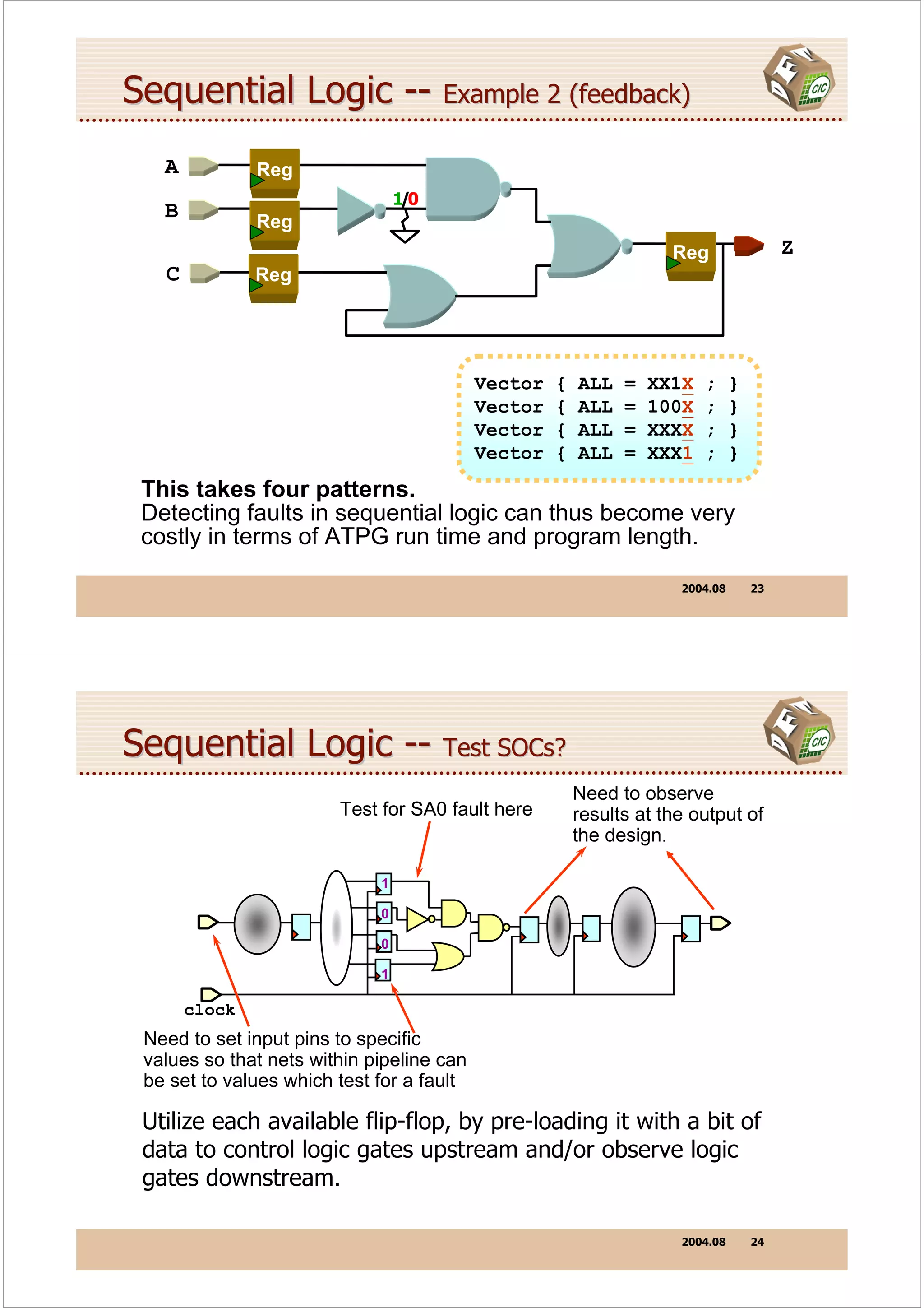
Sequential Logic -- Example 2 (feedback)
   A           Reg
                                 1/0
   B           Reg
                                                                    Reg                 Z
   C           Reg


                                           Vector   {   ALL   =   XX1X   ;     }
                                           Vector   {   ALL   =   100X   ;     }
                                           Vector   {   ALL   =   XXXX   ;     }
                                           Vector   {   ALL   =   XXX1   ;     }
 This takes four patterns.
 Detecting faults in sequential logic can thus become very
 costly in terms of ATPG run time and program length.

                                                                     2004.08       23


Sequential Logic -- Test SOCs?
                                                        Need to observe
                        Test for SA0 fault here         results at the output of
                                                        the design.

                             1

                             0

                             0

                             1

       clock
 Need to set input pins to specific
 values so that nets within pipeline can
 be set to values which test for a fault

 Utilize each available flip-flop, by pre-loading it with a bit of
 data to control logic gates upstream and/or observe logic
 gates downstream.

                                                                     2004.08       24
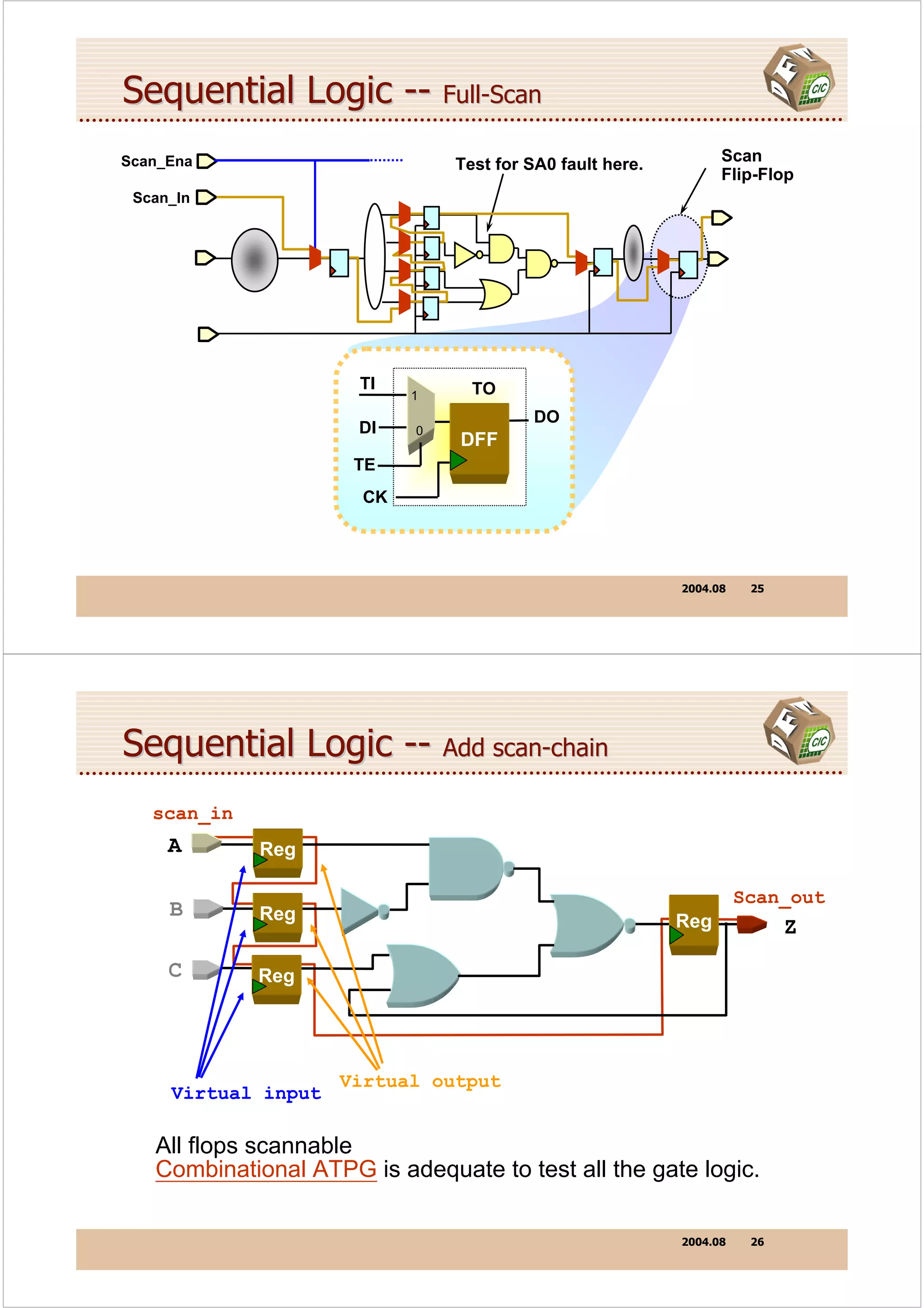
Sequential Logic -- Full-Scan
Scan_Ena                       Test for SA0 fault here.         Scan
                                                                Flip-Flop
 Scan_In


                      TI         TO
                           1
                                         DO
                      DI   0
                                DFF
                      TE
                      CK


                                                          2004.08    25


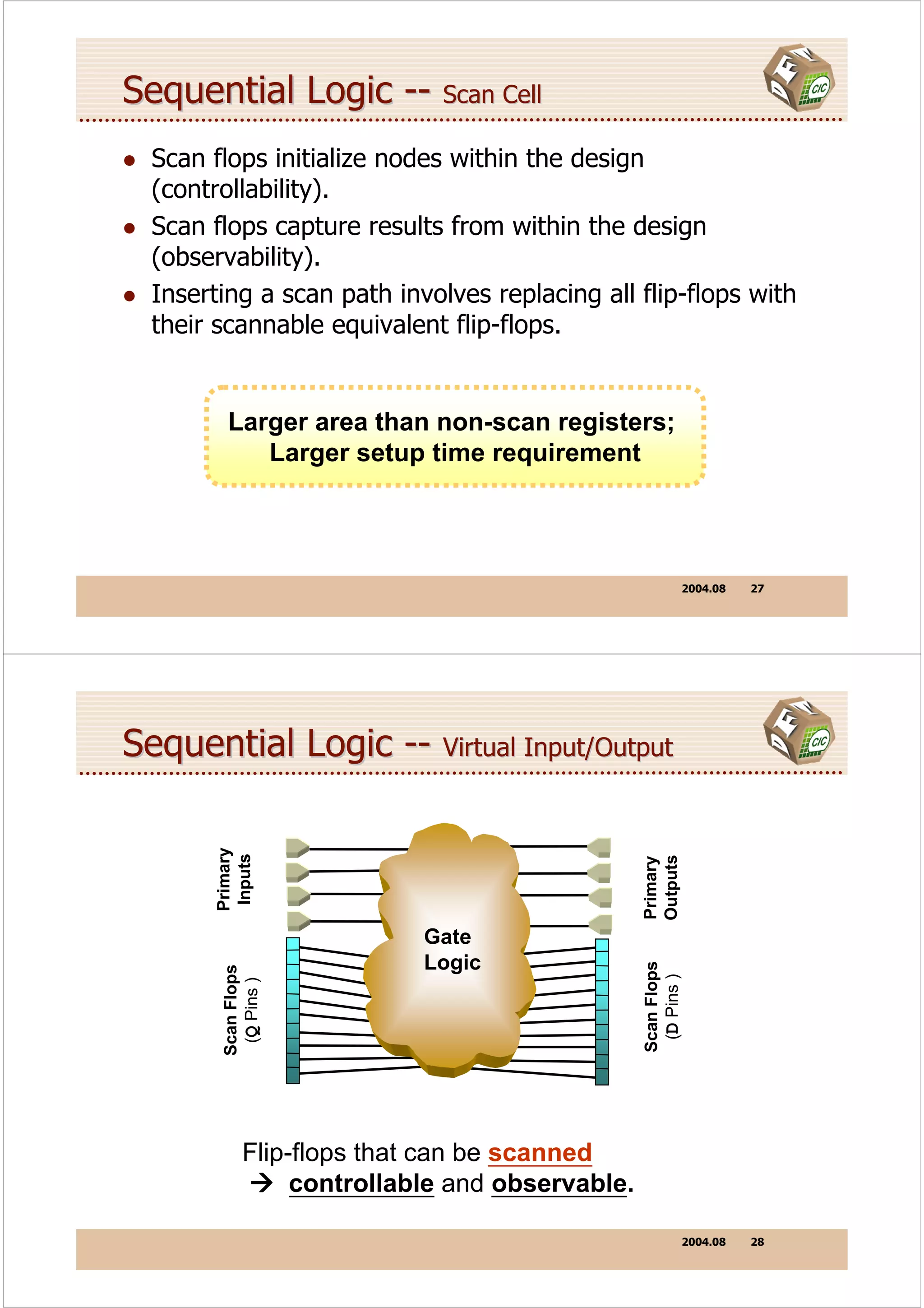
Sequential Logic -- Add scan-chain
   scan_in
     A       Reg

                                                                    Scan_out
     B       Reg                                          Reg             Z
     C       Reg


                     Virtual output
     Virtual input

   All flops scannable
   Combinational ATPG is adequate to test all the gate logic.

                                                          2004.08    26
Sequential Logic -- Scan Cell
  Scan flops initialize nodes within the design
  (controllability).
  Scan flops capture results from within the design
  (observability).
  Inserting a scan path involves replacing all flip-flops with
  their scannable equivalent flip-flops.


         Larger area than non-scan registers;
            Larger setup time requirement


                                                           2004.08   27


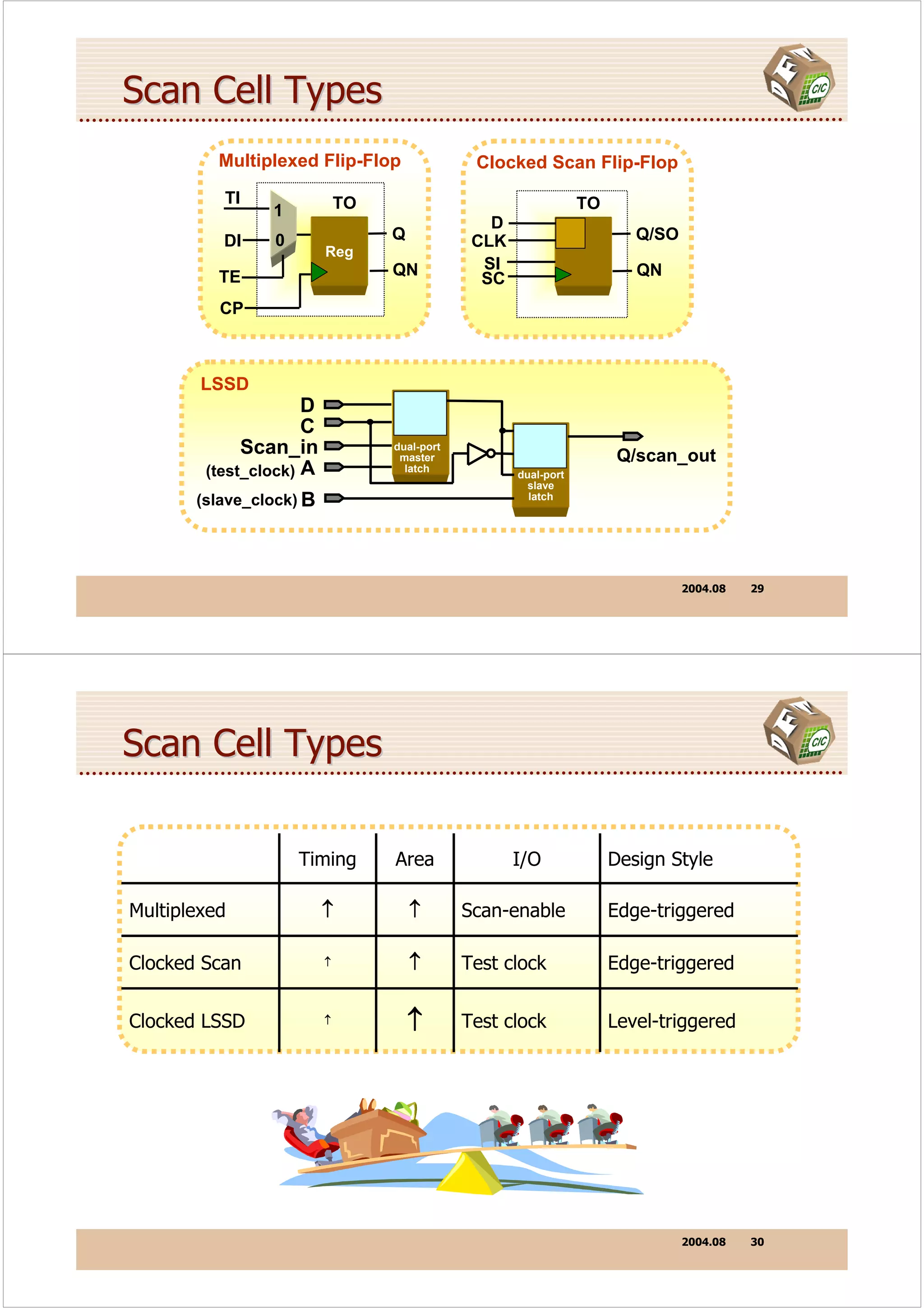
Sequential Logic -- Virtual Input/Output
       Primary
        Inputs


                                                 Outputs
                                                 Primary


                            Gate
                            Logic
                                                 Scan Flops
        Scan Flops


                                                  (D Pins )
         (Q Pins )


             Flip-flops that can be scanned
                  controllable and observable.

                                                           2004.08   28
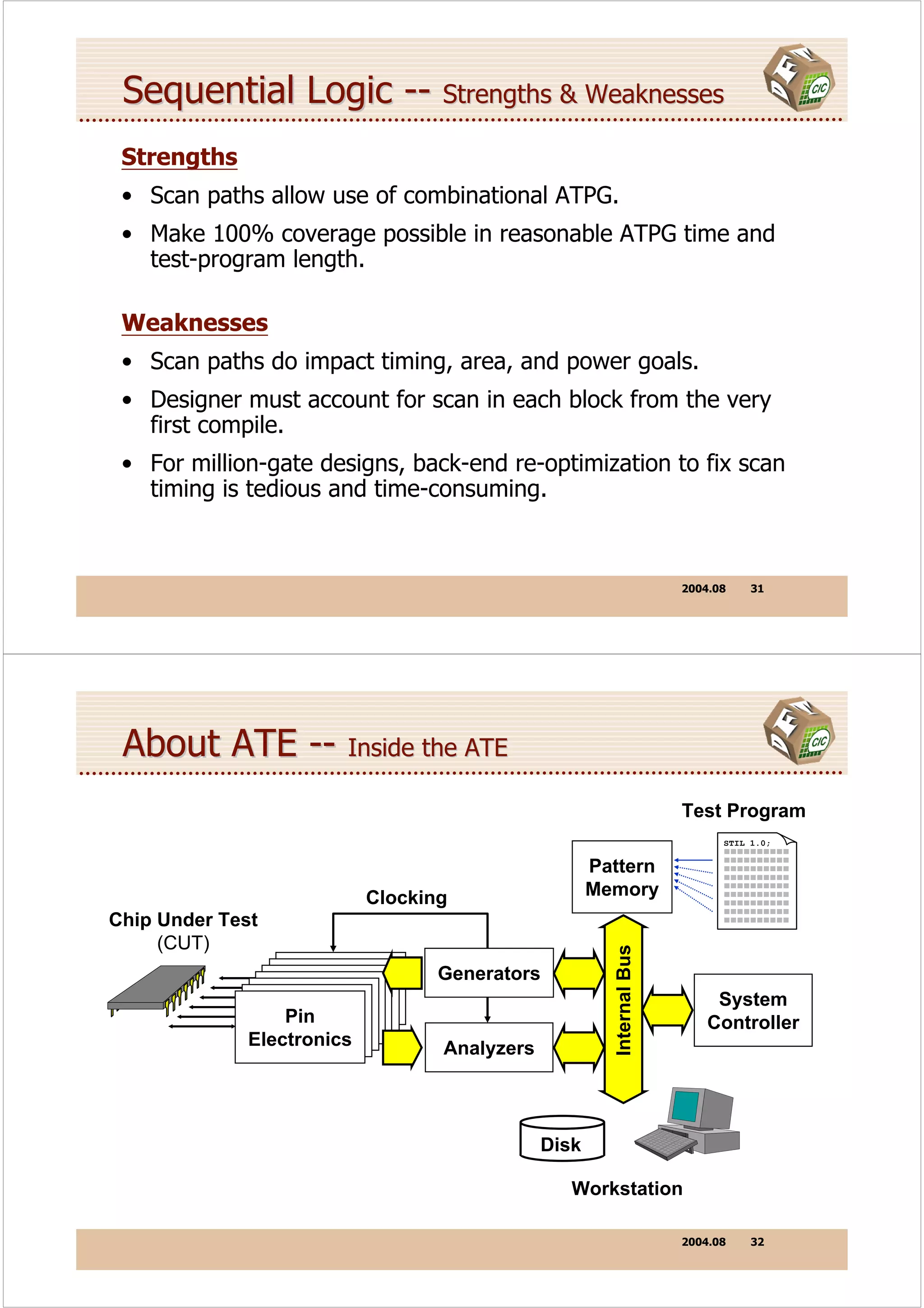
Scan Cell Types
          Multiplexed Flip-Flop                Clocked Scan Flip-Flop
          TI                 TO                                  TO
                1
                                                 D
          DI    0                 Q            CLK                       Q/SO
                         Reg
                                  QN            SI                       QN
          TE                                    SC
          CP


        LSSD
                     D
                     C
             Scan_in              dual-port
                                   master                              Q/scan_out
        (test_clock) A              latch
                                                     dual-port
                                                       slave
       (slave_clock) B                                 latch


                                                                                2004.08   29


Scan Cell Types

                    Timing        Area               I/O              Design Style

Multiplexed              ↑            ↑       Scan-enable             Edge-triggered

Clocked Scan             ↑            ↑       Test clock              Edge-triggered


Clocked LSSD             ↑
                                      ↑       Test clock              Level-triggered


                                                                                2004.08   30
Sequential Logic -- Strengths & Weaknesses
 Strengths
 • Scan paths allow use of combinational ATPG.
 • Make 100% coverage possible in reasonable ATPG time and
   test-program length.

 Weaknesses
 • Scan paths do impact timing, area, and power goals.
 • Designer must account for scan in each block from the very
   first compile.
 • For million-gate designs, back-end re-optimization to fix scan
   timing is tedious and time-consuming.


                                                                      2004.08    31


 About ATE -- Inside the ATE
                                                                      Test Program
                                                                            STIL 1.0;


                                                     Pattern
                           Clocking                  Memory
Chip Under Test
     (CUT)
                                                       Internal Bus


                        Pin       Generators
                       Pin
                      Pin
                     Pin
                   Electronics
                    Pin                                                    System
                  Electronics
                   Pin
                 Electronics
                  Pin
                Electronics
                Electronics                                               Controller
               Electronics
              Electronics         Analyzers


                                              Disk

                                                 Workstation

                                                                      2004.08    32
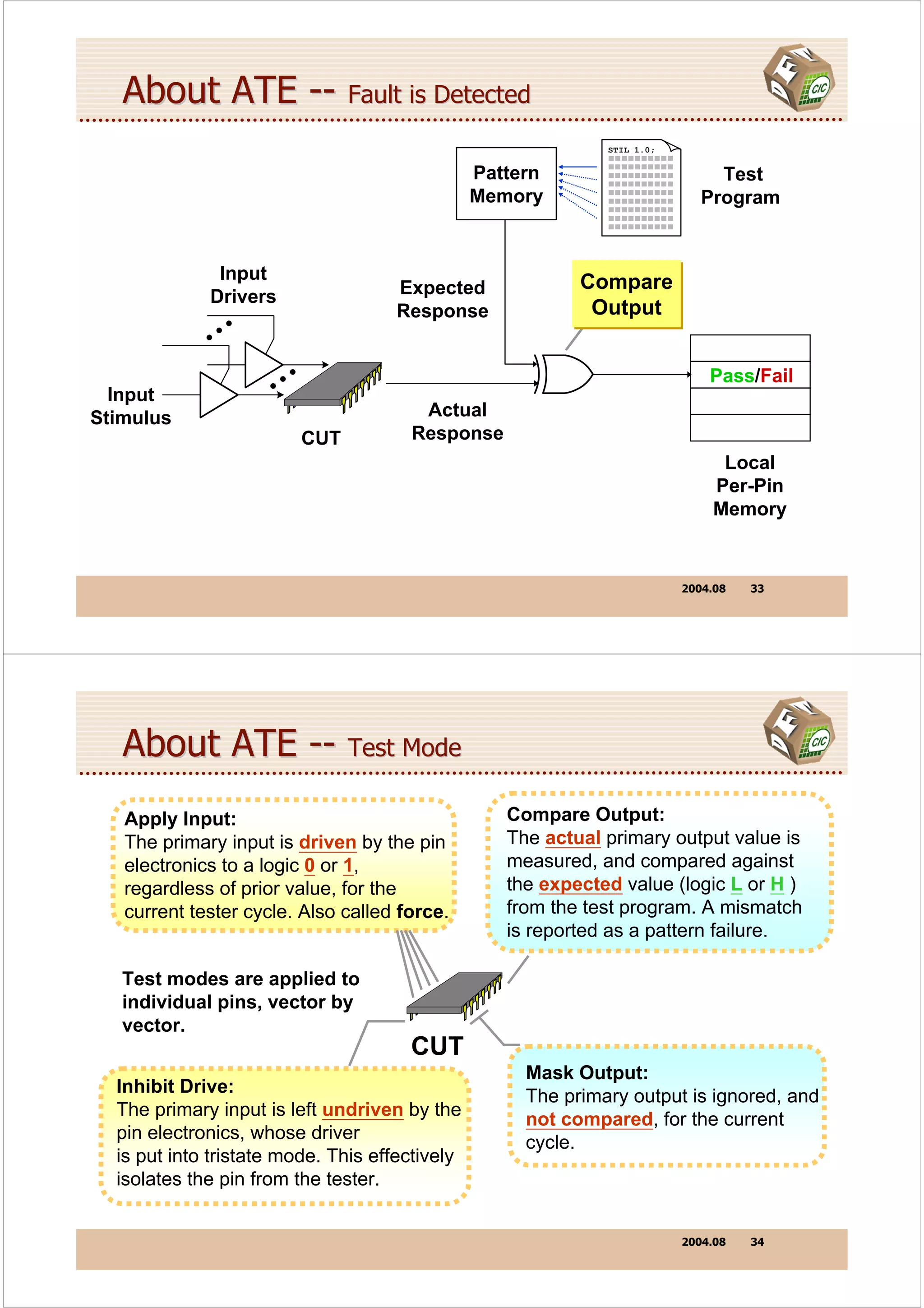
About ATE -- Fault is Detected
                                                              STIL 1.0;


                                                Pattern                        Test
                                                Memory                       Program


              Input                                        Compare
             Drivers                Expected
                                    Response                Output
                •
             ••
                          •                                                   Pass/Fail
  Input              ••
Stimulus                               Actual
                              CUT     Response
                                                                               Local
                                                                              Per-Pin
                                                                              Memory


                                                                          2004.08   33


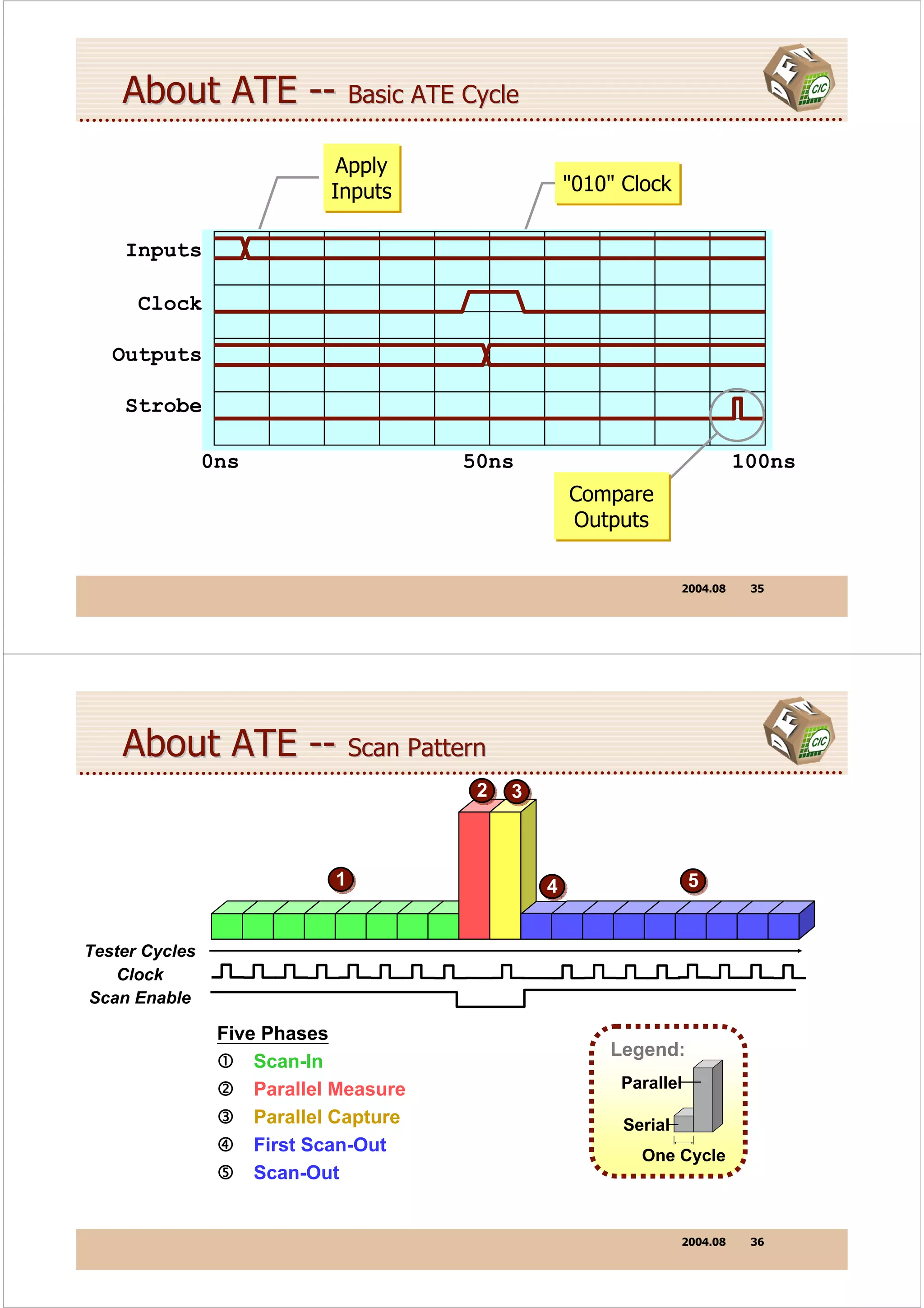
   About ATE -- Test Mode
   Apply Input:                                    Compare Output:
   The primary input is driven by the pin          The actual primary output value is
   electronics to a logic 0 or 1,                  measured, and compared against
   regardless of prior value, for the              the expected value (logic L or H )
   current tester cycle. Also called force.        from the test program. A mismatch
                                                   is reported as a pattern failure.

   Test modes are applied to
   individual pins, vector by
   vector.
                                      CUT
                                                     Mask Output:
  Inhibit Drive:                                     The primary output is ignored, and
  The primary input is left undriven by the          not compared, for the current
  pin electronics, whose driver                      cycle.
  is put into tristate mode. This effectively
  isolates the pin from the tester.


                                                                          2004.08   34
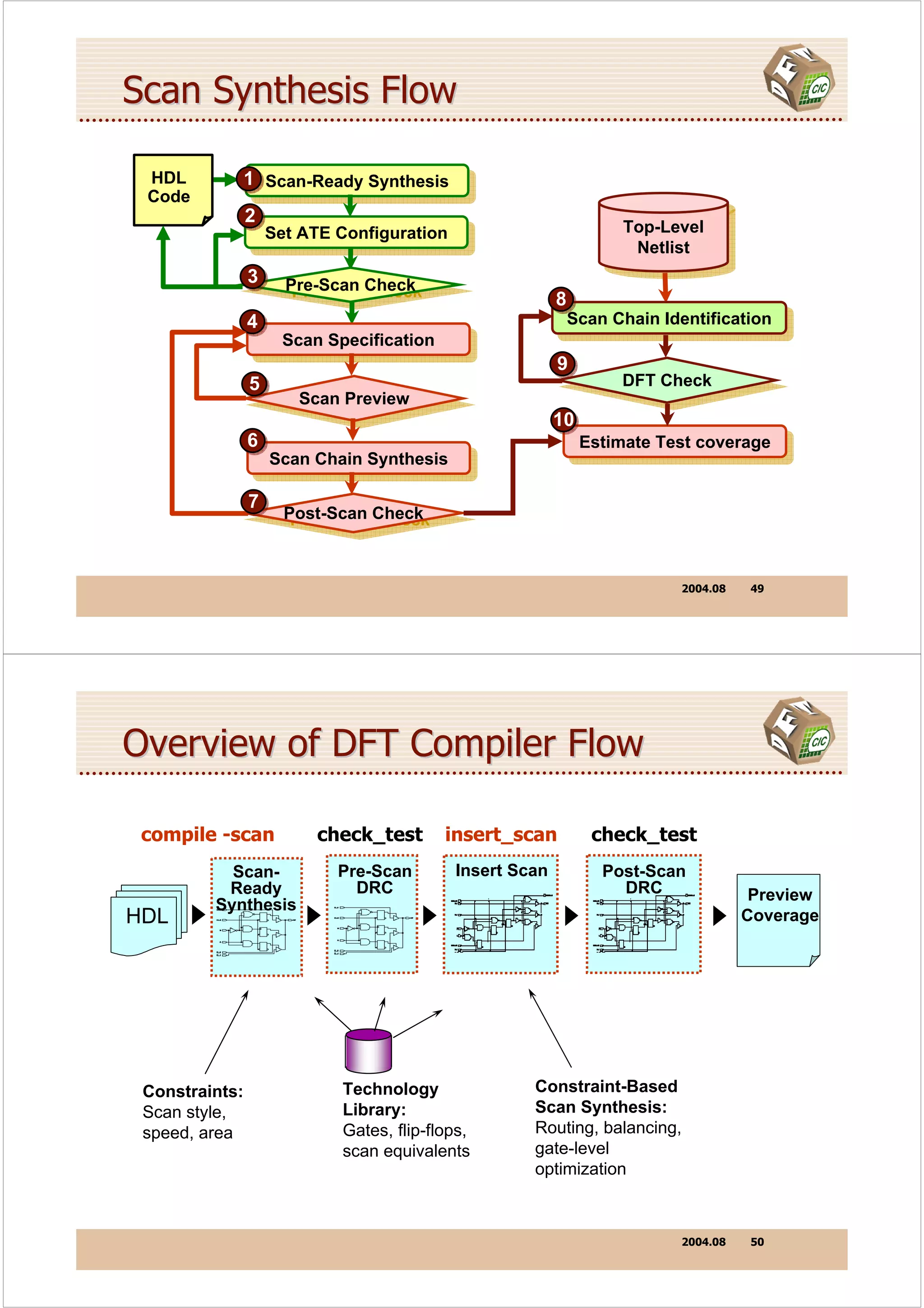
About ATE -- Basic ATE Cycle
                              Apply
                             Inputs                  "010" Clock


    Inputs

      Clock

   Outputs

    Strobe

                0ns                     50ns                                 100ns
                                                     Compare
                                                     Outputs


                                                                   2004.08    35


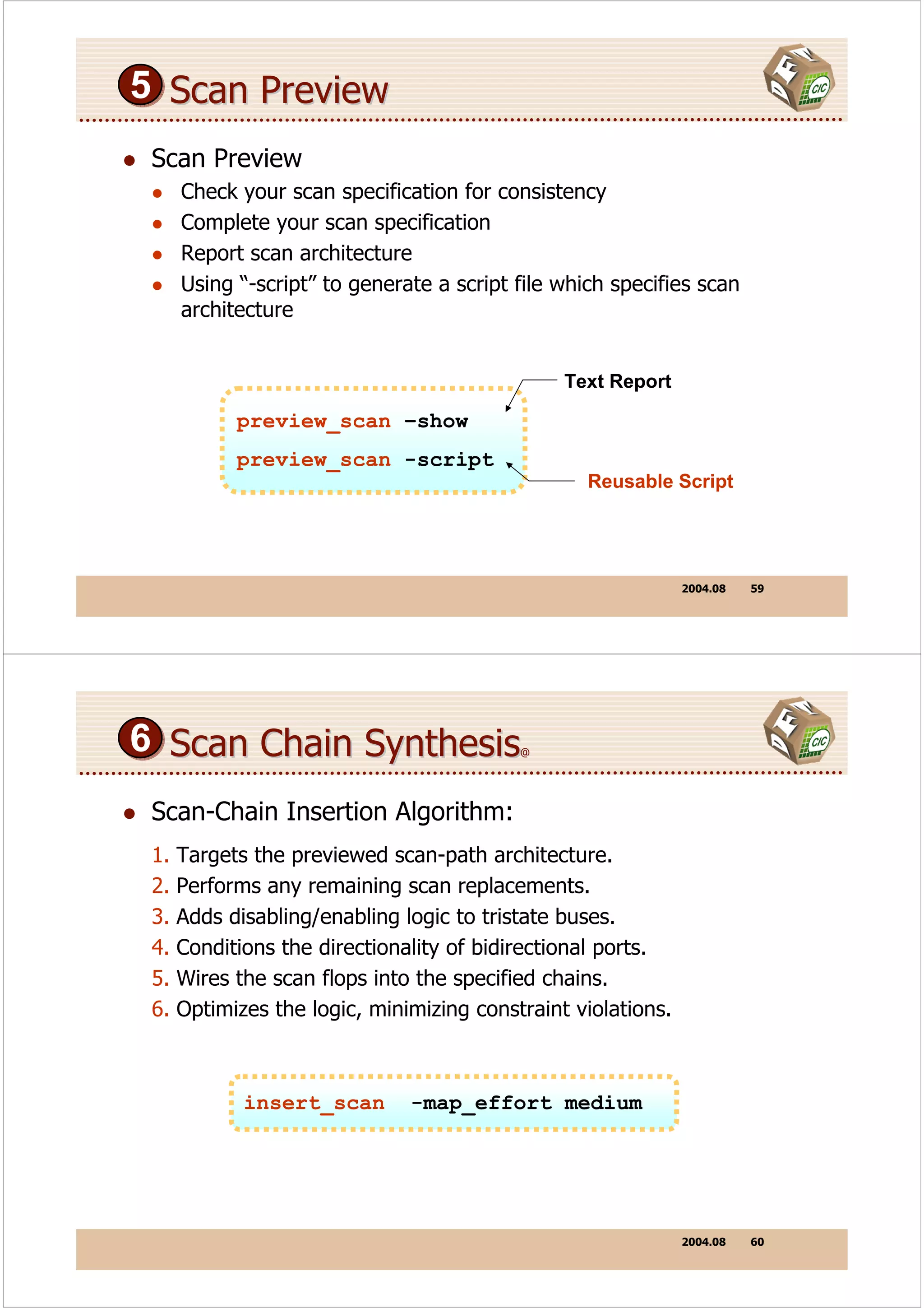
    About ATE -- Scan Pattern
                                         2   3


                             1                   4                   5


Tester Cycles
    Clock
Scan Enable

                 Five Phases
                                                         Legend:
                     Scan-In
                     Parallel Measure                     Parallel

                     Parallel Capture                     Serial
                     First Scan-Out
                                                            One Cycle
                     Scan-Out


                                                                   2004.08    36
About ATE -- Each Phase of Scan
1 Scan-In Phase:                           4 First Scan-Out:
     In each cycle, the next scan bit
     is applied serially to SI. On the          With no clock, the SO port is
     clock edge, it is shifted in to the        strobed, measuring the first
     scan chain. Meanwhile, parallel            scanned-out bit.
     outputs are masked.
                                           5 Scan-Out Phase:
2 Parallel Measure:                             In each cycle, the next captured
     PIs are applied early in the cycle.        bit is scanned out and measured
     The clock remains inactive. The
     CUT is now in a known state.               at SO.
     POs are measured late in the
     cycle.

 3 Parallel Capture:                                             2 3
     The clock is pulsed once. This
     captures virtual PO data in the
     scan chain. The CUT is left in a               1                  4         5
     don’t-care state. Captured bits
     are ready for scan out.

                                                                           2004.08   37


Scan Phase -- Scan-Shift Cycle                     @


 1
  Primary


                                                                                      Outputs
                                                                                      Primary
   Inputs


                                        Gate
                         Virtual        Logic          Virtual
                          input                        output


            SO

XXXXXXXXXX                           Q Scan D
                                       Cell
Scan out of
last pattern

                                                   101100101           (length of scan-chain)
                                     SE CLK SI

                                                                           2004.08   38
Scan Phase -- Scan-Shift Cycle              @@


 1                         Scan Bit

     SI

 Clock

     SO

Strobe

     SE
                                                  SO Port
          0ns                         50ns         Strobed             100ns


                                                             2004.08   39


 Scan Phase -- Parallel Measure Cycle                   @


 2                1                                             0
                  0                                             0
   Primary


                                                                        Outputs
                                                                        Primary
    Inputs


                  1                                             1
                  1               Gate                          0
                      Virtual     Logic       Virtual
                       input                  output


             SO

                                Q Scan D
                                  Cell


                                SE CLK SI

                                                             2004.08   40
Scan Phase -- Parallel Measure Cycle                    @@


  2                      Parallel Inputs            Clock Inactive


 Inputs

  Clock

Outputs

 Strobe

      SE                                           Parallel
                                                   Outputs
        0ns                             50ns                            100ns
                  Scanning Disabled                Strobed


                                                              2004.08   41


 Scan Phase -- Parallel Capture Cycle                @


  3
   Primary


                                                                         Outputs
                                                                         Primary
    Inputs


                                      Gate
                        Virtual       Logic    Virtual
                         input                 output
 Change state                1                 1

             SO

                                    Q Scan D
                                  1   Cell


                                   SE CLK SI

                                                              2004.08   42
Scan Phase -- Parallel Capture Cycle               @@


 3                    Inputs Maintained            Clock Active

 Inputs

  Clock

Outputs

 Strobe

      SE

                                                       No
           0ns                         50ns          Strobe                  100ns
                 Scanning Disabled

                                                              2004.08   43


 Summary of Scan Shift
     Overlapping Scan-Out of Last Pattern
       CUT is enabled for scan mode all during scan shift.
       First Scan-Out phase strobes SO in a no-clock cycle.
       Remaining scan-out bits are then strobed, one per cycle.
       Data represents virtual POs captured during last pattern.


     Scanning-In of Next Pattern
       Multiple scan chains share SE, and are loaded in concert.
       Scan bits are applied serially to the respective SI inputs.
       On each clock edge, a scan bit is shifted into each chain.


                                                              2004.08   44
Summary of Parallel Cycles
 Parallel Measure
   The CUT is in normal mode, disabled for scan.
   All scan chains previously loaded with scan data.
   Applying parallel inputs places CUT in a known state.
   After settling time, parallel outputs are measured.


 Parallel Capture
   Still in normal mode, the CUT is clocked just once.
   Virtual POs are thus captured in the scan flip-flops.
   Captured data is now ready for First Scan-Out phase.


                                                       2004.08   45


Pattern Overlap


             Pattern N

                             Pattern N+1


 Scanning out of previous pattern overlaps scanning in of
 next for all but first and last patterns in the test program.


                                                       2004.08   46
ATE-Friendly Design
 Chip Clocking:
   Clock all logic using ATE clocks wherever possible.
   Minimize usage of internally-derived clock signals.
 Chip Reset:
   Make DUT easy to reset - no complex initialization.
   Prefer a plain asynchronous reset at a primary input.
 Scan Design:
   Use a dedicated chip-wide SE input not shared with data.
   To minimize package pins, share SI and SO for each path.
   Break up a very long scan path into several shorter paths.
   Avoid timing problems by simulating entire test program.


                                                           2004.08   47


       Design-for-Testability
        Using DFT Compiler


          DFT Compiler Flow
Scan Synthesis Flow

 HDL            1 Scan-Ready Synthesis
                   Scan-Ready Synthesis
 Code
                2
                    Set ATE Configuration                            Top-Level
                                                                      Top-Level
                     Set ATE Configuration                             Netlist
                                                                        Netlist
                3     Pre-Scan Check
                       Pre-Scan Check                      8
                4                                              Scan Chain Identification
                                                                Scan Chain Identification
                      Scan Specification
                       Scan Specification
                                                           9
                5                                                    DFT Check
                                                                      DFT Check
                        Scan Preview
                         Scan Preview
                                                           10
                6                                               Estimate Test coverage
                                                                 Estimate Test coverage
                    Scan Chain Synthesis
                     Scan Chain Synthesis

                7
                      Post-Scan Check
                       Post-Scan Check


                                                                             2004.08   49


Overview of DFT Compiler Flow

 compile -scan            check_test        insert_scan           check_test
           Scan-            Pre-Scan         Insert Scan           Post-Scan
          Ready               DRC                                    DRC                Preview
         Synthesis
HDL                                                                                    Coverage


 Constraints:                Technology               Constraint-Based
 Scan style,                 Library:                 Scan Synthesis:
 speed, area                 Gates, flip-flops,       Routing, balancing,
                             scan equivalents         gate-level
                                                      optimization


                                                                             2004.08   50
Specify Default Values

 Specify this default in synopsys_dc.setup.
 set test_default_scan_style multiplexed_flip_flop
 set test_default_scan_style clocked_scan
 set test_default_scan_style lssd
                                        Your choice of style must be
                                        supported by vendor library.


                                              TI
    The scan style tells DFTC what                 1     TO
                                                                DO
    type of scan-equivalent flip-flop        DI    0
                                                        DFF
    to use in synthesizing the logic.


                                                              2004.08   51


1 Scan-Ready Synthesis
                                        HDL
                                        Code

                                               compile -scan


               technology               DFTC
                                        DFTC
                 library


                                        TI             TO
                                             1
          DI            DO                                     DO
                 DFF                    DI     0       DFF


                                                              2004.08   52
2 Set ATE Configuration                               @


  Inputs                Stable

  Bi-dir                         Input Stable
                                                         set test_default_period 100
   Clock   inactive   active         inactive            set test_default_delay 5
                                                         set test_default_bidir_delay 55
  Output                                  Stable         set test_default_strobe 40
  Strobe                                                 set test_default_strobe_width 0

  Period
                                                              Specify this default in
  Delay                                                       synopsys_dc.setup.

Bi-delay

  Stobe


                                                                             2004.08    53


    2 Set ATE Configuration                               @@ --   Create Clock

    Default Test Clock:

     period           test_default_period
     1stedge          0.45*test_default_period
     2ndedge          0.55*test_default_period


     create_test_clock –p 100 –w [list 45 55] clk_RTZ


                          0         45   55        100


                                                                             2004.08    54
3 Pre-Scan Check                            @


 Check gate-level scan design rule before scan chain
 synthesis.
 Looks at four categories of testability issues:
   Modeling problems, such as lack of a scan equivalent.
   Topological problems, like unclocked feedback loops.
   Protocol inference, such as test clocks and test holds.
   Protocol simulation, to verify proper scanning of bits.
      dc_shell> check_test
      ...basic checks...
      ...checking combinational feedback loops...
      ...inferring test protocol...
      Inferred system/test clock port CLK (45.0,55.0).
      ...simulating parallel vector...simulating serial scan-in…
      Information: The first scan-in cycle does not shift in data.(TEST-301)
      Warning: Cell U1 (FD1S) is not scan controllable. (TEST-302)
      Information: Because it clocks in an unknown value from pin TI.(TEST-512)
      Information: Because port SI is unknown. (TEST-514)
      Information: As a result, 3 other cells are not scan controllable.(TEST-502)
      Information: Test design rule checking completed. (TEST-123)


                                                                                     2004.08   55


3 Pre-Scan Check                            @@


 As we’ll see later on fixing DFT violations, it’s often
 necessary to:
   Inform DRC that this port is programmed at a fixed value by the
   ATE all during the test session.
                                                                               My core
                                                            reset


   Add a top-level input port to put the IC in “test mode.”

    set_test_hold 1 TM
    read_init_protocol
    read_test_protocol                                   TM
    check_scan or check_test


                                                                                     2004.08   56
4 Scan Specification        @


 set_scan_configuration

-methodology     -chain_count       -disable
-style           -clock_mixing      -internal_tristate
-existing_scan   -internal_clocks   -bidi_mode
                 -add_lockup        -dedicated_scan_ports
                 -replace           -hierarchical_isolation
                 -rebalance
                 -route


 set_scan_configuration -chain_count 4 
                        -clock_mixing no_mix


                                                2004.08   57


4 Scan Specification        @@


 set_scan_path
 set_scan_signal
 set_scan_element
 set_scan_segment
 set_scan_transparent


                                                2004.08   58
5 Scan Preview
 Scan Preview
      Check your scan specification for consistency
      Complete your scan specification
      Report scan architecture
      Using “-script” to generate a script file which specifies scan
      architecture


                                                Text Report

            preview_scan –show
            preview_scan -script
                                                   Reusable Script


                                                               2004.08   59


6 Scan Chain Synthesis                     @


 Scan-Chain Insertion Algorithm:
 1.   Targets the previewed scan-path architecture.
 2.   Performs any remaining scan replacements.
 3.   Adds disabling/enabling logic to tristate buses.
 4.   Conditions the directionality of bidirectional ports.
 5.   Wires the scan flops into the specified chains.
 6.   Optimizes the logic, minimizing constraint violations.


             insert_scan       -map_effort medium


                                                               2004.08   60
7 Post-Scan Check             @


 Why run check_scan again?
   Confirm there are no new DFT problems.
   Verify the scan chains synthesized operates properly.
   Create an ATPG-ready database.


                        check_scan


                                                       2004.08   61


7 Post-Scan Check             @@


                report_test -scan_path


        **********************************
        Report: test -scan_path
        Design: ADES
        **********************************
        (*) indicates change of polarity
        Complete scan chain (SI --> SO)
        containing 5 cells:
          SI            ->
          sh1_reg       ->
          sh2_reg       ->
          sh3_reg       ->
          sh4_reg       ->
          zr_reg        ->
          SO


                                                       2004.08   62
8 Scan Chain Identification                 @


 When to use?
   Import an existing scan design in non-db netlist format. (e.g.,
   EDIF, VHDL, Verilog)
   Using reset_design after scan chain synthesis. (it will remove
   the test attributes from the design)


 set_scan_configuration –existing_scan true


                                                      2004.08   63


8 Scan Chain Identification                 @@


 Example:


   set_scan_configuration -existing_scan true
   set_scan_configuration –bidi_mode input
   set_signal_type test_scan_in [list SI1 SI2]
   set_signal_type test_scan_out [list SO1 SO2]
   set_signal_type test_scan_enable SE

   check_test
   report_test -scan_path


                                                      2004.08   64
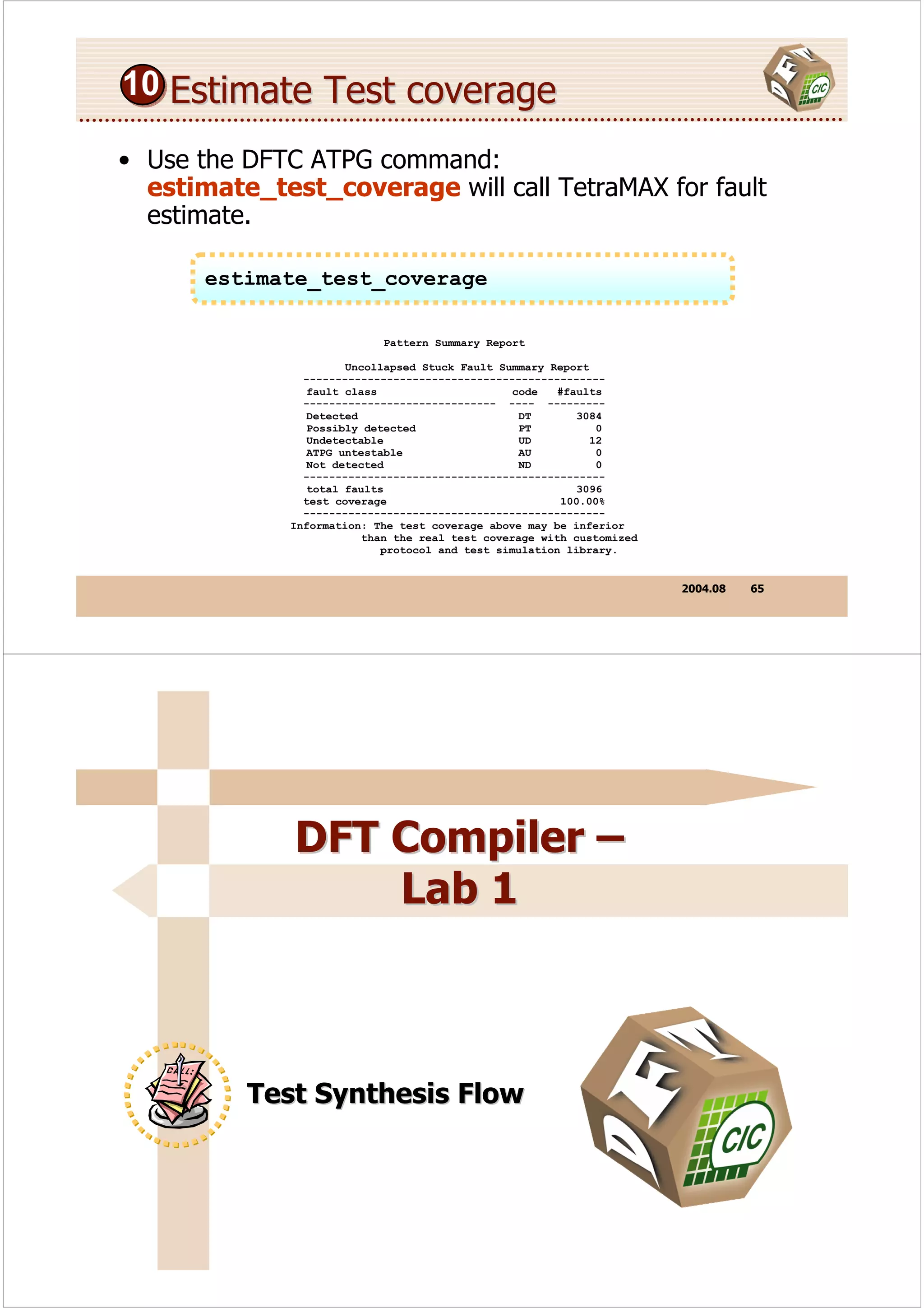
10 Estimate Test coverage

• Use the DFTC ATPG command:
  estimate_test_coverage will call TetraMAX for fault
  estimate.

       estimate_test_coverage

                            Pattern Summary Report

                       Uncollapsed Stuck Fault Summary Report
                -----------------------------------------------
                 fault class                     code   #faults
                ------------------------------ ---- ---------
                 Detected                         DT        3084
                 Possibly detected                PT           0
                 Undetectable                     UD          12
                 ATPG untestable                   AU          0
                 Not detected                     ND           0
                -----------------------------------------------
                 total faults                               3096
                test coverage                            100.00%
                -----------------------------------------------
              Information: The test coverage above may be inferior
                          than the real test coverage with customized
                             protocol and test simulation library.


                                                                        2004.08   65


              DFT Compiler –
                  Lab 1


          Test Synthesis Flow
Block-Level Example                @


Scan Ports         HIER_BLK
From HDL
            SI1             U1             U2                      SO1
            SI2                                                    SO2

             TM
             SE
          CLK1
          CLK2


    You are responsible for HIER_BLK, a subdesign on an ASIC.
    It has its own hierarchical structure, with two clock domains.
    Insert two separate scan chains, and use a test-mode port.
    Preview the fault coverage on the post-scan design.

                                                         2004.08    67


Block-Level Example                @@   TCL script

    current_design HIER_BLK
@   compile –scan
@   create_test_clock -p 200 -w [list 90 110] CLK1
@   create_test_clock -p 200 -w [list 120 130] CLK2
    set_test_hold 1 TM
@   check_test
    set_scan_configuration –chain_count 2
    set_scan_configuration –bidi_mode input
    set_scan_configuration –clock_mixing no_mix
    set_scan_signal test_scan_in –port [list si1 si2]
    set_scan_signal test_scan_enable –port SE
    set_scan_signal test_scan_out –port [list so1 so2]
    preview_scan
@   insert_scan
@   check_test
    report_test –scan_path


                                                         2004.08    68
ASIC-Level Example
  current_design ASIC

@ create_test_clock -p 200 -w [list 90 110] CLK1
@ create_test_clock -p 200 -w [list 120 130] CLK2
  set_test_hold 1 TM

@ set_scan_configuration -existing_scan true
  set_scan_configuration -bidi_mode input

@ set_signal_type test_scan_in     [list SI1 SI2]
@ set_signal_type test_scan_enable SE
@ set_signal_type test_scan_out    [list SO1 SO2]

@ check_test
  report_test -scan_path

@ estimate_test_coverage


                                                           2004.08   69


Bottom-Up Synthesis                 @


  Benefits of Bottom-Up Test Synthesis
     Complete modules to satisfy design constraints.
     Reduce scan synthesis runtime for large designs.
     prevent DFT Compiler from renaming the sub-designs of the
     CORE.
  Tips of Bottom-Up Test Synthesis
     Do NOT specify scan signals, mix clock domains.
     Switch OFF the insertion of disable logic for multiply-driven nets.


                                                           2004.08   70
Bottom-Up Synthesis                                @@


current_design A
compile –scan
check_test
set_scan_configuration –disable false
set_scan_configuration –clock_mixing no_mix                          Synthesized
                                                                       Blocks
preview_scan                                   Block 1                                       Block n
insert_scan                                          DFT Check
                                                     DFT Check           ...          DFT Check
check_test
…                                               Scan Chain Synthesis             Scan Chain Synthesis
current_design TOP
check_test                                           DFT Check                         DFT Check
                                                                                       DFT Check

set_scan_configuration –disable true
set_scan_signal test_scan_in –port [list si1 si2]                     Top-Level
                                                                        Design
set_scan_signal test_scan_enable –port SE
set_scan_signal test_scan_out –port [list so1 so2]
                                                                       Top-Level
preview_scan                                                          Scan Chain
                                                                       Synthesis
insert_scan


                                                                                  2004.08   71


              Design-for-Testability
               Using DFT Compiler


                  Prevent DFT Violations
Test Design Rule Violation Summary


    Total Violations: 12
    Topology Violation
        1 combinational feedback loop violation (TEST-117)
    Scan In Violations
        2 cells constant during scan violations (TEST-142)
    Capture Violations
        1 clock used a data violation (TEST-131)
        4 illegal path to data pin violations (TEST-478)
        4 cell does not capture violations (TEST-310)


                                                        2004.08   73


Sequential Cell Summary


        11 out of 45 sequential cells have violations
        Sequential cells with violations
            4 Cells have parallel capture violations
            2 Cells have constant values
            2 Cells have scan shift violations
            3 Cells are black box
        Sequential cells without violations
            30 cells are valid scan cells
            4 cells are transparent latches


                                                        2004.08   74
How to Fix DFT Violations                 @


 Methods of correcting DRC violations in DFTC:
 1. Edit HDL code and resynthesize design with DFT logic.
 2. Use AutoFix DFT to insert bypass or injection logic.
 3. Use ShadowLogic DFT to insert ad-hoc test points.
 Or Ignore the problem if the reduction in FC is allowable.


                                                     2004.08   75


How to Fix DFT Violations                 @@


 Add testability to the design early on, preferably in the
 synthesizable HDL code.
   Avoid uncontrollable clocking.
   Avoid uncontrollable asyn. set/reset.
   Avoid uncontrollable three-state/bidir enables.


 Use AutoFix as a workaround after HDL code-freeze, or
 for unfamiliar legacy designs.


                                                     2004.08   76
Scan Issue
 Design scenarios affecting risk-free scan include:


 1.   no clock pulse at scan flop due to gating of clock.
 2.   no clock pulse due to dividing down of the clock.
 3.   unexpected asynchronous reset asserted at flop.
 4.   hold-time problem due to short net or clock skew.

 The ATE must fully control the clock and asynchronous
 set and reset lines reaching all the scan- path flip-flops.


                                                   2004.08   77


Gated Clocks
 DRC automatically infers clock signals by
 tracing back from flip-flop clock pins to PIs.
 To fix this violation, make the AND transparent:

                set_test_hold 1 A


 If A is not a PI, add logic to inject a 1 during the
 test program, by means of a PI test-mode port.

                                   DFF
                 A
                clk


                                                   2004.08   78
Clock Generators Solution 1
 Add a bypass MUX that selects an external clock during
 test.
 Hold the TM port high. set_test_hold 1 TM

                  CLOCK_GEN

                     F1              F3     F4
      clk

                     F2                   int_clk
       TC

       TM


                                                 2004.08   79


Clock Generators Solution 2
 This solution does not require an extra I/O pad, but may
 have skew problems!


                  CLOCK_GEN

                     F1              F3     F4
      clk

                     F2                   int_clk


       TM


                                                 2004.08   80
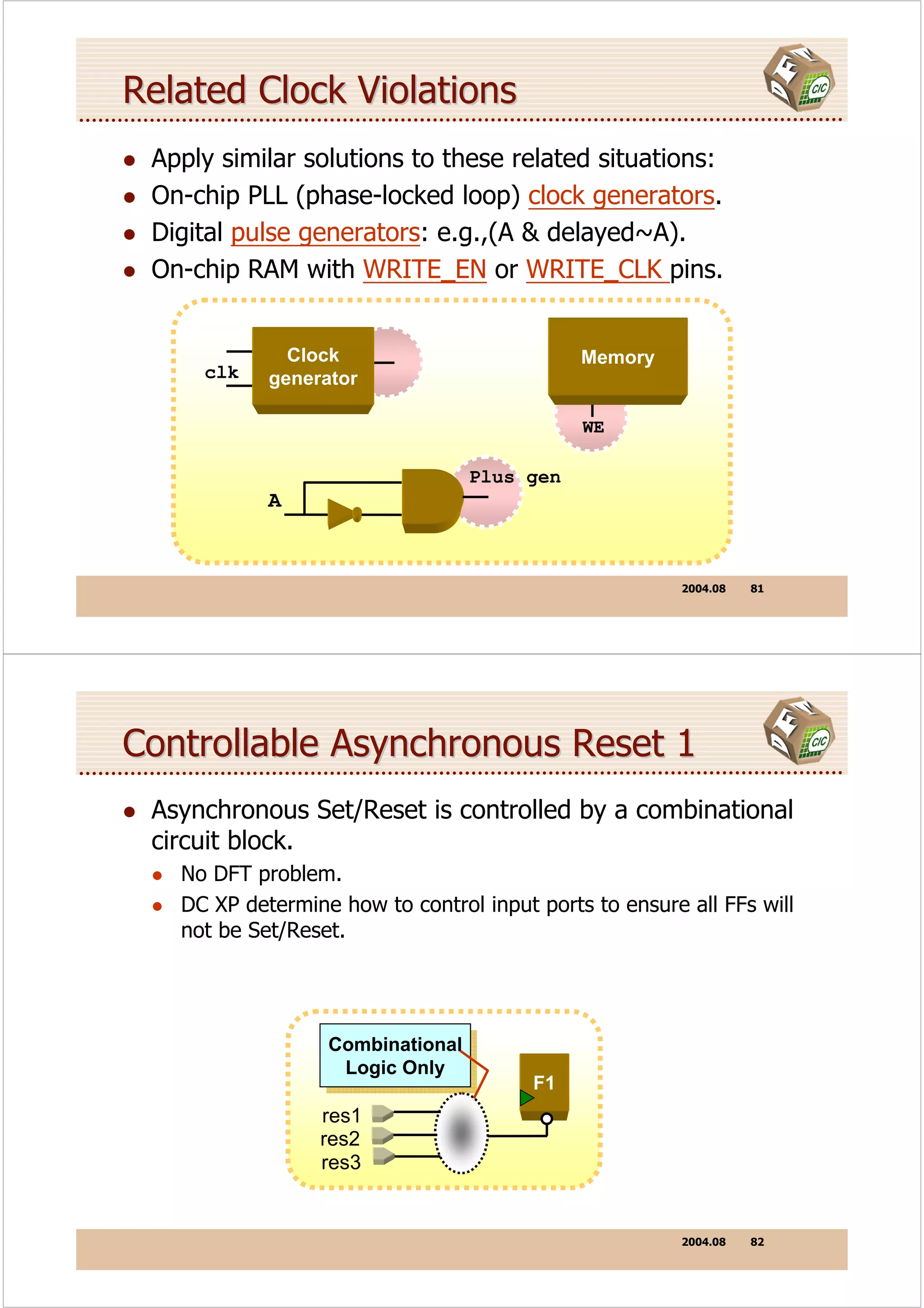
Related Clock Violations
 Apply similar solutions to these related situations:
 On-chip PLL (phase-locked loop) clock generators.
 Digital pulse generators: e.g.,(A & delayed~A).
 On-chip RAM with WRITE_EN or WRITE_CLK pins.


              Clock                          Memory
     clk    generator

                                             WE

                                  Plus gen
            A


                                                        2004.08   81


Controllable Asynchronous Reset 1
 Asynchronous Set/Reset is controlled by a combinational
 circuit block.
   No DFT problem.
   DC XP determine how to control input ports to ensure all FFs will
   not be Set/Reset.


                  Combinational
                  Combinational
                   Logic Only
                    Logic Only          F1
                 res1
                 res2
                 res3


                                                        2004.08   82
Controllable Asynchronous Reset 2
 Asynchronous Set/Reset is controlled by a sequential
 circuit block
   Add control logic to prevent FFs from Set/Reset in test mode.


        F2          F3                       F2
              0?                                                     F3
                           Auto Fix
                                                           1
                                        TM=1
  res4
                                               res4


 excludes F3 from any scan chain


                                                               2004.08    83


Controllable Asynchronous Reset 3                                @


 Asynchronous Set/Reset is controlled by a shift register
   Provide an initial test protocol to prevent FFs from Set/Reset in
   test mode.
   Try Auto-Fix


  res                                  res
                                                                          F3
         F1          F3                      F1       F2
              F2
                           Auto Fix
   CLK                 R                 CLK
                                                       TM=1


                                                               2004.08    84
Controllable Asynchronous Reset 3                 @@


 Set pin res as 1 and apply two clock pulse, then signal R
 will be 1 all the time (in test mode)
 This method does not change the circuit.


  set_test_hold 1 res
  check_test
  write_test_protocol –format stil –out dut.spf

  <EDIT dut.spf>

  read_init_protocol –f stil dut.spf
  check_test -verbose


                                                2004.08   85


Controllable Asynchronous Reset 3                 @@@


 Edit test protocol file dut.spf


          "test_setup" {
               W "_default_WFT_";
               V { "clk"=0; }
               V { “res"=1; "clk"=P; }
               V { “res"=1; "clk"=P; }
               V { “res"=1; "clk"=0; }
          }


                                                2004.08   86
Initialization Sequences         @


 No dedicated test mode primary input.
 Ex. 3-bit configuration register to generates an internal
 test mode signal if you initialize with the pattern “101”.
 During initialization the port CONF_ENABLE must be held
 '1' while the above pattern is serially applied to port
 CONF and the clock port CLK is pulsed.


                                                2004.08   87


Initialization Sequences         @@


 set_test_hold 0 CONF_ENABLE
 Check test
 write_test_protocol –f stil –o no_scan.spf


  "test_setup" {
       W "_default_WFT_";
       V { "clk"=0; “CONF_ENABLE"=0; }
       V { “CONF_ENABLE"=1; “CONF”=1; "clk"=P; }
       V { “CONF_ENABLE"=1; “CONF”=0; "clk"=P; }
       V { “CONF_ENABLE"=1; “CONF”=1; "clk"=P; }
       V { “CONF_ENABLE"=0; "clk"=0; }
    }


                                                2004.08   88
What Causes Risky Capture?
 Risky design practices for capture include:
   logic that captures on both edges of clock.
   clock also used as input to flop’s logic cone.
   asynchronous set or reset used in same way.
   hold-time issue due to unexpected clock skew.


                                                         2004.08   89


Risk-Free Capture Example

            A               Gate         Y
            B               Logic
                                             F2

                                    SE              SE
     SE         F1
    clk
                        S                         clk


 Just prior to capture, scan flop F1 loaded with bit S.
 Intent of capture is to clock in the current state bit Y.
 Bit Y must depend only on scan bit S and ports A, B.

                                                         2004.08   90
Capture-Problem

          A                                     A,B
                         Gate         Y
          B              Logic                   SE
                                          F2
                                                 clk

 SE           F1
                                 SE            Clk_b

clk
                     S                            Y
                     Clk_b                             Hold time violation


 For a logic cloud, output Y may change too soon.
      (because F1 capture a new value)
 The timing diagram shows how F2 hold-time is violated.

                                                               2004.08   91


Managing Clock-Skew Problems
 To manage this class of capture problem within DFTC:
      Use DC/PrimeTime to fix hold violations, post-layout.
      Avoid false paths that cross between clock domains.
      Allow at most one active clock per capture procedure.
      These same guidelines apply to asynchronous resets.


                                                               2004.08   92
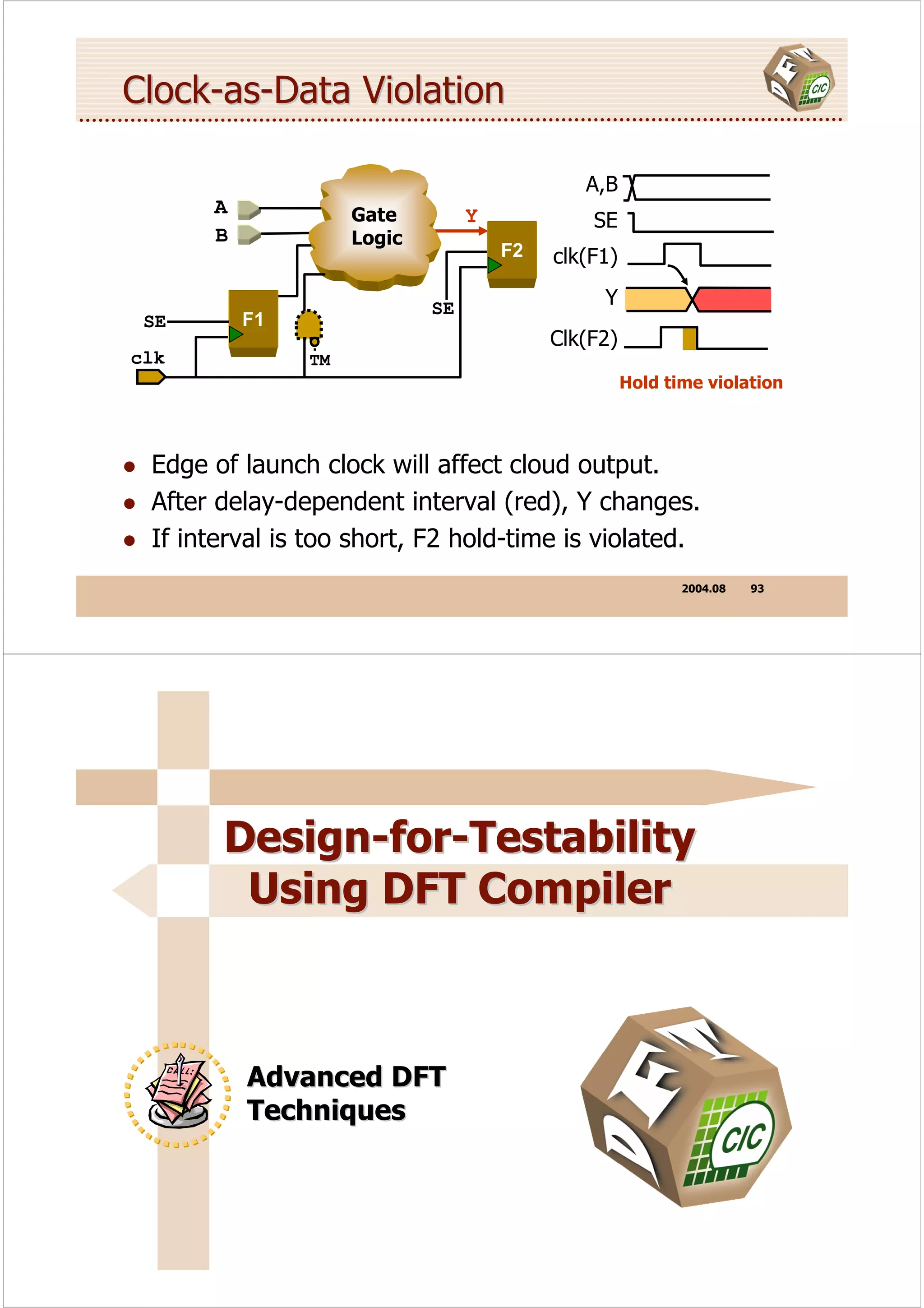
Clock-as-Data Violation

                                             A,B
      A             Gate         Y            SE
      B             Logic
                                     F2   clk(F1)

                            SE                 Y
 SE       F1
                                          Clk(F2)
clk            TM
                                                    Hold time violation


 Edge of launch clock will affect cloud output.
 After delay-dependent interval (red), Y changes.
 If interval is too short, F2 hold-time is violated.
                                                           2004.08   93


       Design-for-Testability
        Using DFT Compiler


          Advanced DFT
          Techniques
Buffering the Scan-Enable Network
  As a rule, the high-fanout scan-enable line should
  bebuffered.
  Buffering SE is critical for at-speed or transition-delay
  testing.

set_scan_signal test_scan_enable -port SE -hookup BUF/Z


  Instantiate a clock-tree buffer in the HDL description, or
  build a clock-tree for SE.
  Use set_dont_touch_network to keep DFTC from
  rebuffering.
  Route the SE tree to all major blocks.
                                                   2004.08   95


Shift Registers      @


They are no need to be replaced by Mux-FFs.

  set_scan_segment shift -access [list test_scan_in
    {dout_reg[1]/D} test_scan_out {dout_reg[7]/Q}]
    -contains [list {dout_reg[1]} {dout_reg[2]}
    {dout_reg[3]} {dout_reg[4]} {dout_reg[5]}
    {dout_reg[6]} {dout_reg[7]}]

  set_scan_element false [list {dout_reg[1]}
    {dout_reg[2]} {dout_reg[3]} {dout_reg[4]}
    {dout_reg[5]} {dout_reg[6]} {dout_reg[7]}]

  preview_scan -show segments

  insert_scan

                                                   2004.08   96
Shift Registers                @@


Before:

      SHFT_IN                                          SHFT_OUT/ SO
           SI            DFF                     DFF
                                      DFF

              CLK
              SE


 After:

          SHIFT_IN                                     SHIFT_OUT
                                DFF     DFF     DFF
                    SI
                         CLK
                SE


                                                              2004.08   97


Tristate        @


                                        Only one tristate driver can
                                        be active at a time
          1                             on a given tristate bus.


                                      Unreachable driver:
 ATPG can only detect                 Active driver which causes
 faults on an active                  bus float or bus contention
 tristate driver.                     conditionis.


                                       Fault Coverage


                                                              2004.08   98
Tristate  @@


 Internal tristate nets have testability problems on the
 enable pins and their fanin.
 Avoid internal tristate nets when feasible.


                    1       A          Z/Z


                    0   EN
                                 1/0
                                             0/Z
                    0       B
                                       0/Z


                                       Must strobe Z to detect


                                                           2004.08   99


Tristate  @@@   -- Pull-Up Resistors

 If you connect a pull-up or pull-down resistor to the
 tristate net, the ‘Z’ turns into ‘1’ or ‘0’ which allows
 detection of all faults.


                1       A             Z/Z


                0   EN
                                1/0
                                               0/1
                0       B
                                      0/Z


 Weak 1 overrides the floating output.


                                                           2004.08   100
Tristate  @@@@   -- Bus Keepers

  Connecting a bus keeper cell to the tristate net will avoid
  float conditions, because it keeps the previously active
  value.
                                        1, Z/Z
              1, 1   A

              1, 0   EN             0, 1/0       1, 0/1

              0, 0   B
                                        Z, 0/Z


    If we activate the target fault, the bus will float.
    Thus we need to initialize the bus keeper first....

                                                          2004.08   101


Tristate -- Scan Shifting       @


  DFTC can synthesize disabling logic into the enable lines
  to guarantee that exactly one driver is active during scan
  shift.

                                        SE


                          F2
                                        SE

            11001010011
                           F1


                                                          2004.08   102
Tristate -- Scan Shifting       @@


  In design TOP module:
              Determines the disabling option during
               Determines the disabling option during
              scan shift for all tristate nets that
               scan shift for all tristate nets that
              that disables all but one driver.
               that disables all but one driver.

set_scan_configuration -disable true
set_scan_configuration -internal_tri enable_one
set_scan_configuration -external_tri disable_all


              Determines the disabling option during
               Determines the disabling option during
              scan shift for all tristate nets that
               scan shift for all tristate nets that
              drive output ports of a design.
               drive output ports of a design.

                                                        2004.08   103


Bidirectional Ports         @


 11010                                Inout
         F1                                             ATE

                                              F2


  If scan data is shifted through F1, the bidirectional port
  direction changes with every scan data change.
  This would create floating or contention states at the
  bidirectional ports during scan shift.


                                                        2004.08   104
Bidirectional Ports        @@


                                    Inout
        F1                                             ATE
                SE
                                            F2
     11001010


 In TOP module:
 set_scan_configuration -disable true
 set_scan_configuration –bidi_mode input/output


                                                       2004.08   105


Local Control of Tristates and Bidi

 set_scan_tristate no_disabling -net TRI3

                        enable_one               Net name
                        disable_all


 set_scan_bidi input -port [list BIDI3 BIDI5]
                                       BIDI5


                     output         Port name
                     No_disabling


Local control overrides global configuration settings.
                                                       2004.08   106
Combinational Loops
 If check_test detects a combinational loop, it breaks the
 loop at a certain pin it selects by inserting an ‘X’.
 If the loop is logically broken by logic values, DFT
 Compiler will not break this loop again.


   set_test_hold                     X    0
                               IN1        1

                               SEL
                                                       BUF
                               IN2                                     OUT1


 You can override the pin selected by:
      set_test_isolate user_selected_pin_name

                                                                  2004.08   107


Set_test_isolate
 If a pin or a cell has an unknown value during test:
 Use set_test_isolate before you run the check_scan
 command.
                          Original Circuit

                                     U2
                          U1
                                     U3

      X                                       X
                  U2                                         U2
          U1                                      U1
                   U3                                        U3

      Set_test_isolate U1/Z                   Set_test_isolate U2/A

                                                                  2004.08   108
Latches Mixed in Flip-Flop Design
 For flip-flop based scan styles, there are scannable
 equivalents only for flip-flops, not for latches.
 Latches cannot be made scannable; they remain
 sequential elements within combinational logic.
 Latch cells will not be replaced. Otherwise, latch cells
 have no other effect on scan insertion.

              F1
                          Can’t
                         Observe                     Can’t
                                                    Control
                                                                   F3
                                         L1
                F2
      clk


                                                                        2004.08   109


Select a Latch Model
                     Black Box Latch Model
                     (Default for Combo ATPG)

                     D                              Q
                                   LD1
                     G                              QN


 Combinational Latch Model                      Sequential Latch Model
 (need set_scan_transparent)                    (Sequential ATPG only)

                           Q
  D                                             D                             Q
                           QN                                 LD
      X                                         G                             QN
  G
                                   Testable
                                   Untestable

                                                                        2004.08   110
Use Combinational Latch Model
 For full scan designs, using combinational latch model is
 recommended.
  set_scan_transparent true <object> -existing


 No design modification is required.
                                                           Q
                                  D
    Enable pin and its fan-in
     Enable pin and its fan-in        X
                                                           QN
    cones will not be testable
     cones will not be testable
                                      G

This model is valid only if the latch enable is not
connected to a test clock.
                                                 2004.08       111


              DFT Compiler –
                  Lab 2


         Bidirectional Ports
Design-for-Testability
         Using DFT Compiler


           Scan Path Insertion


Key of Scan Insertion
 Chain counts, scan ports, clock domains, …
 Minimize constraint violations:      exactly one driver is
   Disable 3 states:                    active during scan shift


        set_scan_configuration -disable true

   Set bi-directional ports:

       set_scan_configuration -bidi_mode input


 Create proper test clock         to be either input or output
 Balance scan chains                mode during scan shift

 Predict scan result by preview_scan

                                                    2004.08   114
Setting the Effort Level

                                        Medium Level (Default):
 Low Level:                             Extends remapping, if needed,
 Remaps added scan logic only.          to surrounding non-scan logic.
 Works only along critical paths.


        insert_scan         -map_effort low|medium|high


      High Level:
      Extends remapping, if needed, to surrounding non-scan logic.
      Applies sequential remapping, as needed, to flops on critical path.
      Reduces area by downsizing cells off critical path, etc.


                                                                2004.08   115


Switching Off insert_scan Optimization
 Logic optimization is a powerful feature of insert_scan.
 But sometimes you need to turn it off, to freeze an
 implementation.
 The settings below insert scan with no optimization
 whatsoever:


     set test_dont_fix_constraint_violations true
     set test_disable_find_best_scan_out true
     insert_scan -map_effort low 
                 -ignore_compile_design_rules


                                                                2004.08   116
Type of Scan Clock


      no_mix (recommend)                   mix_clocks_not_edges (ricky)
      •    Default. DC XP will             •   Allow any arbitrary
           generates one scan                  mixing of clocks but not
           chain per clock domain.             edge within a scan chain.

set_scan_configuration –clock_mixing _______

  mix_clocks (risky)                           mix_edge (recommend)
  •       Allow any arbitrary mixing           •   Allow mixing of clock
          of clocks within a scan chain.           edges within a scan chain.
  • Generate equal length                      •   Default chain count
    scan chains.                                   equals the no. of clocks.


                                                                      2004.08   117


Clocking on Both Edges


                          F1
                                                    F2               F3
Test
 clk
                      Clock
                       Gen
                                     TM


 Flip-flops use both edges of the test-clock CLK
 The check_dft algorithm sees two distinct clock domains.
 By default, DFTC inserts a separate scan path for flip-
 flop F3

                                                                      2004.08   118
An Internal Clock Domain

                F1
                                   F2           F3
Test
 clk
              Clock
               Gen            Test clock
                        TM    source pin

 Clock gating or MUXing does not by itself create a domain.
 You must apply configuration option -internal_clocks
 Then network has an optimal three test-clock domains.

  set_scan_configuration -internal_clocks true

                                                2004.08   119


Lockup Latch

  set_scan_configuration –add_lockup false


 DFT Compiler orders the FFs within a chain by clock
 domain.
 DFT Compiler inserts lockup latch between adjacent scan
 FFs if they are triggered by different clocks and the test
 clock waveforms are the same.


                                                2004.08   120
Why Add Lockup Latch ?


               F1                   F2           latch                       F3


              CLK_RTZ_1                                   CLK_RTZ_2
                                          tINV


        clk1                                       clk1
        clk2                                       clk2

                                                   Big Problem !!
                     OK!                     Rearrange clock domain or
                                                  add lockup latch

                                                                                   2004.08    121


How Lockup Latch Works ?
CK1                                                CK1


CK2                                                CK2


        F1      F2           F3                            F1    F2           F3


        CK1                  CK2                           CK1                CK2

CK1                                               CK1
  LCK                                               LCK
CK2                                               CK2


        F1      F2          latch   F3                     F1    F2          latch      F3


        CK1                         CK2                    CK1                          CK2
                     tINV                                             tINV


                                                                                   2004.08    122
Custom Scan Path                     @


           set_scan_configuration –chain_count N

    DFT Compiler will spilt longest chains into smaller chains.
    The scan chains probably will not have equal length.
                                                  “Don’t-Lengthen” Option:
                                                  Prevents later insertion from
                                                  prepending elements to path


  set_scan_path CHAIN_4 [list U1 U3 U2] -complete true


      String Name:                         Ordered List:
      Uniquely labels this path.           List of cell names: flip-flops,
      Used later to assign ports.          scan links, segments, or blocks..


                                                                         2004.08   123


 Custom Scan Path                     @@


  set_scan_path SCAN_A [list UA/dff*] -complete true
  set_scan_path SCAN_B_C [list UB UC/dff1]
  insert_scan

               HIER_BLOCK

 SCAN_A
                       dff1    dff2                     dff1      dff3

                                      UA
                                                        dff2      dff4
SCAN_B_C

                      dff1    dff2                    UB
                 UC


                                                                         2004.08   124
Custom Scan Path            @@@


  Specify the scan chain order directly.
  Modify from existing chain.


   redirect scan.scr { preview_scan –script }
   <edit scan.scr>
   include scan.scr
   preview_scan –show all


                                                           2004.08   125


Specify Scan Enable
  For scan insertion: designate scan ports.

                  Access Type:                Port List:
                  Scan-in, scan-out, etc.     SE, SI, SO


set_scan_signal test_scan_enable            -port SE 
                                            -hookup BUF/Z 
                                            -sense non_inverted
insert_scan


                      Port Properties:
                      Port name, buffer pin, polarity.


                                                           2004.08   126
Default Scan-Out Sharing
 DFT Compiler will find a FF directly driving an output
 port, and move it to the end of the scan chain.


                                             Tail Flop
                                Logic
                                Logic
       F1           F2                        F3


                                                    2004.08   127


Sharing a Scan-In Scan-Out Port
 set_scan_signal test_scan_in -port SI


       SI          Logic
                   Logic
                                        F1   F2

                 Scan path

 set_scan_signal test_scan_out -port SO


                                   Logic
                                   Logic
            F1             F2
                                                   SO
                                Scan path    SE
                                                    2004.08   128
Specify Scan Chain Signals
 For design rule checking: read in ASCII netlist.


  set_scan_configuration -existing_scan true
  set_scan_configuration -bidi_mode input
  …
  set_scan_signal test_scan_in SI –index 1
  set_scan_signal test_scan_in SO –index 1


  report_test -scan_path


            Access Type:              Port List:   Specifies an index
            Scan-in, scan-out, etc.   SE, SI, SO   positive integer

                                                          2004.08   129


Scan Chain Port

      DFT Compiler will automatically generate all
      ports needed to implement the scan chains
      if you don’t specify them.
      Each scan chain requires a separate
      scan in and scan out port.
      Scan enable signal can be shared among
      all scan chains.
      You can use existing functional pins for
      scan in and scan out ports.
      Always use a dedicated pin for scan enable.

                                                          2004.08   130
Guidelines for Scan Ports
 Include the scan enable (and also test mode) port in
 your top-level design.
   This eliminates having to adjust your top-level testbench to
   match the design port list after scan chain synthesis.

 Set design rule constraints on the scan enable port.
   This ensures that the scan enable net is being buffered during
   scan synthesis.

 Don’t specify module functional ports for scan signals if
 you use bottom-up methodology.


                                                        2004.08   131


Guidelines for Bottom-Up Methodology
 DO NOT insert 3-states disable logic in each module,
 DO it at top level.

    set_scan_configuration –disable false


 Describe the correct disable logic in your HDL code and
 always let disable set to false.
 Specify clock no_mix for each module.


                                                        2004.08   132
Remove Scan Specification
 Remove scan specifications made using
 set_scan_configuration, set_scan_path,
 set_scan_segment, and set_scan_signal
 commands:

 remove_scan_specification [-all]
 [-chain chain_name] [-configuration]
 [-segment segment_name] [-signal port_name]


 Caution!
 reset_design command removes all constraints and
 attributes from a design, not just test related constrains
 and attributes

                                                 2004.08   133


File Output
 Create Synthesized Design File

 write –hierarchy –format verilog –output ore_syn.v

  Create STIL Protocol File (SPF)

 write_test_protocol –format stil –out core.spf


                                                 2004.08   134
DFT Compiler –
        Lab 3


 Scan Insertion
 Specifics


Design-for-Testability
 Using DFT Compiler


 Memory Wrapper &
 AutoFix
AutoFix and Shadow LogicDFT                @


 By default, the AutoFix and Shadow LogicDFT utilities
 are disabled.
 To use AutoFix, you enable the utility and specify the
 scope of the design on which it will apply.
                                                  New in
                                                  2003.06
  set_dft_configuration    -autofix
  set_dft_configuration    –shadow_wrapper
  set_dft_configuration    –autofix –shadow_wrapper
  replaces:
  set_dft_configuration    –order {autofix,wrapper}


  report_test -dft
  remove_dft_configuration

                                                2004.08   137


AutoFix and Shadow LogicDFT                @@


 To use AutoFix and Shadow LogicDFT, we need to
 change our command from scan to dft.


compile -scan                    compile -scan
check_scan                       check_dft
preview_scan                     preview_dft
insert_scan                      insert_dft
report_test                      report_test -dft
set_scan_configuration           set_dft_configuration
set_scan_signal                  set_dft_signal


                                                2004.08   138
AutoFix
  Commands for specifying the behavior of AutoFix:

1.specifies the types of design        2. exclude a specified
  rule violations to fix:                 list of leaf-level cells
• uncontrollable clock inputs             or hierarchical cells
• uncontrollable asynchronous             from being fixed by
• preset/clear inputs, or both            AutoFix.

              1.set_autofix_configuration
              2.set_autofix_element
              3.set_autofix_clock

                    3. specify the clock that is connected
                       to the test points on the designated
                       parts of the design.


                                                       2004.08   139


AutoFix Script
 read_file -f verilog TOP.v
 current_design TOP
 create_test_clock -w [list 45 55] clock
 compile -scan
 set_dft_configuration -autofix
 set_dft_signal test_mode -port test_mode
 set_test_hold 1 test_mode
 set_autofix_clock CLKA UA
 set_autofix_clock CLKB UB
 set_autofix_element UC -clock false -async true
 preview_dft
 insert_dft
 check_dft


                                                       2004.08   140
Testing RAM/ROM

                       Testing RAM/ROM
            1           for internal faults


                              Applying a
            2              black-box model


            3         Inserting test points


             4     Writing functional models
                     (will discussed in TetraMAX)


                                                    2004.08   141


1 Testing RAM/ROM For Internal Faults
  The transistor-level fabric of a RAM/ROM can't be tested
  by gate-level stuck-at-fault techniques.
  Use direct pin access or memory BIST.
  Direct pin access:
    Need more extra pins
    Routing congestion
    Impact on performance
  BIST:
    Add fewer BIST logic
    Reduce routing


                                                    2004.08   142
3 Inserting Test Points
          The testability of shadow logic can be improved by
          automatic insertion of DFT control-and-observe test
          points around a black-box RAM/ROM.


scan_in                                                scan_out                 scan_in                                                              scan_out


                                                                                                                                                               Scan Registers
                                                              Scan Registers
                                            Un-controllable


                                                                                   Scan Registers
   Scan Registers

                    Un-observable


                                                                                                                                               controllable
                                                                                                    observable


                                                                                                                                     Wrapper
                                                                                                                 Wrapper
                                    Black                                                                                  Black
                                     Box                                                                                    Box


                                                                                                                                   2004.08               143


 Inserting Test Points Flow
          The commands you can use to specify shadow wrapper
          logic include the following:

                                      1.set_wrapper_element
                                      2.set_port_configuration
                                      3.remove_wrapper_element
                                      4.remove_port_configuration

   1.specifies what cell instances                                             2. identifies the read and
     in the design are to be given                                                write inputs, clock input,
     a test wrapper.                                                              and three-state outputs
                                                                                  of the shadow block that
                                                                                  is receiving the test
                                                                                  wrapper.


                                                                                                                                   2004.08               144
RAM Wrapper Example                       @


compile -scan
...
create_test_clock -w [list 45 55] ck
set_dft_configuration -shadow_wrapper
set_port_configuration -cell RAM -port "q" -read [list "OEN" 1] -clock ck
set_port_configuration -cell RAM -clock ck
set_port_configuration -cell RAM -port "a" -write [list "WEN" 0] -clock ck
set_port_configuration -cell RAM -port "d" -write [list "WEN" 0] -clock ck
set_wrapper_element RAM_0 -type shadow
preview_dft
insert_dft
compile -incr // for dangling nets (see SOLV-IT! Test-461)
check_dft
...


                                                              2004.08   145


RAM Wrapper Example                       @@


  preview_dft


  ************ Test Point Plan Report ************
  Total number of test points : 399
  Number of Autofix test points: 0
  Number of Wrapper test points: 399
  Number of test modes         : 1
  Number of test point enables : 0
  Number of data sources       : 128
  Number of data sinks         : 271
  **************************************************


 This summary shows that DFT compiler is going to add 399 scan
 flip flops to create a shadow wrapper around the RAM.


                                                              2004.08   146
Design for Testability
        Using DFT Compiler


         Other Skill


Routing Congestion Gone
 Scan path reorder in P&R tools.


  Default Scan Ordering            Placement-Based


                                             2004.08   148
Scan Path Reorder Flow                      @


A design with scan chain

                check_test
 Set protocol

                set_scan_configuration -prtool avant / cadence

 Write files

                write_layout_scan -out CPU.def
                write -f verilog -o CPU -initial.v
                write -format db -o CPU.db
 P & R Tool


                                                         2004.08   149


Scan Path Reorder Flow                      @@


                                                         2004.08   150
Scan Path Reorder Flow                    @@@


  Read prtool file from P&R tool

             set_scan_configuration -prtool avant -prfile scan.rpt

   Apply

             insert_scan
             check_test
   Write files

             write -f verilog -o CPU_reorder.v
             write_test_protocol –f stil –o cpu.spf

   TetraMAX

                                                          2004.08   151


Test Data Volume Reduction

                                                        New in
                                                       2003.06


 The cost of test is increasing with increasing complexity
 of design.
 The cost of test is directly proportional to scan data
 volume.
 TDVR provides reduction in test data volume without
 compromising test coverage.


                                                          2004.08   152
TDVR Technique
     Test data volume reduction is achieved by analyzing
     observe points in the design.
     An observe flip flop inserted at the observe point can
     observe a large number of hard-to-detect faults which
     results in a significant reduction in pattern count.
     DFTC supports both bottom-up and top-down observe
     analysis. For SoC designs, bottom up observe analysis is
     the preferred method.


                                                       2004.08   153


TDVR Flow
1
        Reading netlist

2
    Setting TDVR and scan
                             set_dft_configuration –testability
         configuration

3
     Enable observe point    set_testability_configuration 
           analysis            –method tdrv

4
      Define a Test Mode     set_dft_signal test_mode –port TM

5
         Selection and
    implementation observe    Next page
           test logic

6
     Insert observe point    insert_dft

                                                       2004.08   154
set_testability_configuration
 set_testability_configuration
  -method tdrv
  [-max_observe_point [integer] ]
  [-max_observe_logic_area [integer] ]
  [-power_saving_on <true/false> ]


 Preview scan and observe test point logic
  previev_dft –test_points all


                           Run autofix before TDVR

                                             2004.08   155


              DFT Compiler –
                  Lab 4


         Initialization Sequences
         & AutoFix
Day 1 Review


               Basic Concepts
               DFT Compiler Flow
               Basic DFT Techniques
               Advanced DFT Techniques
               Scan Path Insertion
               Inserting Scan Chains With insert_dft
               Lab1 ~ Lab4


                                          2004.08   157


     Design-for-Testability
     ATPG with TetraMAX


      TetraMAX Overview
DFT compiler to TetraMax


Write –f verilog –hierarchy                        read netlist design_dft.v
–output “design_dft.v”            design_dft.v


      DC
      DC                       Simulation                            TetraMax
                                                                      TetraMax
                                 Library    read netlist library.v


 Write_test_protocol –f stil      design.spf       run drc design.spf
 –out “design.spf”


                                                 Simulation                     Fault
                                                            ATE Vectors
                                                Testbenches                    Reports

                                                                     2004.08     159


Innovative Technology Library Support
                         TetraMAX Library Support

                  Synthesis
                   Library            Implementation


                                            ATPG

                  Simulation
                    Library

                                         Simulation


 Uses existing ASIC vendor functional simulation
 libraries (Verilog or VHDL)
                                                                     2004.08     160
Support STIL (input and output)


                               Design Tools


             STIL
         Test Protocol
         Test Patterns         ATPG Tools
          Test Timing


                                ATE Tools


                                                 2004.08   161


Other Feature
 Support RAM and ROM.
 Support IDDQ , transition pattern generation.
 Support Verilog, EDIF, and VHDL netlist input and
 pattern input/output.
 Provide static and dynamic pattern compression
 techniques.
 Provide built-in GZIP compression function for reading
 and writing (designs, libraries, protocols, patterns, and
 fault lists).


                                                 2004.08   162
TetraMax GUI


                                                 2004.08   163


Alternative ICON Look
Edit -> Environment -> GUI -> Use toolbars composed of bitmaps


                                                 2004.08   164
The GSV Tool Bar and Window


                                               2004.08   165


Command Input and Script Files
 Command input may be specified in a number of ways:
   menus, GUI buttons, or dialog boxes
   typed at the command input line
   read from command files:

    BUILD> source filename


 By default, TetraMAX aborts a script file when a
 command returns an error
 To continue executing scripts, use:
    BUILD> set_command noabort


                                               2004.08   166
Command Redirection

 > to replace a file or create the file if it does not exist.

>> to append to a file, or create if the file does not exist.

      to create a file that does not already exist,
>? if the file exists an error will be reported.


   Examples:
   report_settings > current_settings.txt
   report_clocks >> current_settings.txt


                                                      2004.08   167


Hot key
  Within the ATPG tool window the Microsoft Windows
  emulation environment exists so cut/paste is done with
  command pop-up menus (or CTRL-C and CTRL-V).
  Other Hot key can be found in GUI menu.


                                                      2004.08   168
Multi-Line Input in the GUI
 Multiple line input
 can be performed
 by bringing up the
 “clipboard” (type
 CTRL-M) and then
 pasting a range of
 command lines.

 Multiple commands may also be entered by separating
 each command by a semicolon and white space.

  BUILD> build -force; read net mylib.v; run build


                                                              2004.08   169


Command Aliases
                       read_verilog           same as read_netlist
      alias            read_edif
                       read_vhdl
                                              same as read netlist
                                              same as read netlist
                       add_set                same as add clock
                       add_reset              same as add clock
                       add_set_reset          same as add clock
                       report_alias           same as alias
                       check_test             same as run drc
                       history                same as report command -history
                       include                same as source
                       link                   same as run_build_model
                       create_test_clock      same as add clock
                       create_test_patterns   same as run atpg -auto
                       read_init_protocol     same as set drc
                       read_test_protocol     same as run drc
                       set_test_hold          same as add pi constraint
                       write_test             same as write patterns


BUILD> alias    readnet read_netlist -delete
BUILD> alias    exit   exit -force

                                                              2004.08   170
Comments
 Blank lines and “//” comments will appear in the
 transcript window.
 “#” comments will produce a blank line in the transcript
 without showing any text.
 There is no multi-line comment capability : “/* */”
 A limited set of shell commands are supported which can
 be performed directly from the command line:
   cd, pwd, ls, cat, cp, mv, rm, mkdir, clear


         These commands are implemented internally
 so they do not match exactly their UNIX equivalent commands


                                                  2004.08   171


Command History
 Lists all commands entered through a dialog, or menu,
 or typed at the command input.


                                                  2004.08   172
Log Files and Message Control
 Write log message to file:
  set message log logfile [-replace | -append]

 Turn off displaying log message to transcript:
  set message [nodisplay | display]


 Stop the comments appearing in the transcript:
  set message [-transcript_comments |
               -notranscript_comments]

 Select message level:
 set message [-level expert | standard ]

                                                  2004.08   173


Help command
BUILD> help add
   Add   Atpg Constraints       Add   Atpg Gates
   Add   CEll Constraints       Add   CLocks
   Add   Equivalent Nofaults    Add   Faults
   Add   Net Connections        Add   Nofaults
   Add   PI Constraints         Add   PI Equivalences
   Add   PO Masks


BUILD> help read netlist

  REAd NEtlist <file_name> [-Format <Edif |
  VErilog | VHdl>][-Sensitive | -INSensitive]
  [-Delete] [-Noabort] [-Verbose]


                                                  2004.08   174
MAN for command reference
 Entering “man” and a command name, a message ID,
 or a DFT rule ID or violation ID will open up the on-
 line help to the reference page for that topic.


  BUILD> man getting_started     //   a   topic
  BUILD> man add clock           //   a   command
  TEST> man report faults        //   a   command
  TEST> man z4-6                 //   a   violation
  TEST> man m69                  //   a   message ID


                                                2004.08   175


Hypertext Links to On-Line Help
 Messages in the transcript are hypertext linked to the
 on-line help manual and generally appear in an alternate
 color.
 Using Right Mouse Button will open on-line help to
 the page explaining the message.


                                                2004.08   176
Stop Process
 “Submit” button changes to “Stop” while performing
 operation. You can abort this operation by this “Stop”
 button.
 CTRL-C and CTRL-Break do the same job.


                                                2004.08   177


Accessing the User’s Guide
 From the HELP menu the
 TetraMAX User’s Guide can
 be reviewed. This invokes
 the Adobe Acrobat viewer.
 Also available are on-line
 versions of Release Notes as
 well as direct access to
 useful help topics: Getting
 Started, RAM/ROM
 examples, etc.


                                                2004.08   178
Design-for-Testability
               ATPG with TetraMAX


                 TetraMAX Baseline
                 Flow


 The TetraMAX Flow
                                                     4
                                                                   5

                BEGIN
          1                                                        Review
                        Design                Run ATPG             Result

Library
                                                               6

                                               3             Compress &
                                                            Save Patterns
                        2

                                        Run DRC


                                    DRC                  DONE
          Build Model            Procedures


                                                         2004.08   180
TetraMAX ATPG Command Modes
 BUILD mode:
   Initial mode
   Read in design, libraries, models
   Construct ATPG simulation model in preparation for DRCs
 DRC mode:
   Testability Design Rule Checks (DRCs) are performed
   Successful conclusion of DRCs sets mode to "TEST“
 TEST mode:
   ATPG, Fault Simulation, Fault Diagnosis are performed
   Test program files, simulation testbenches, etc. written out


                                                           2004.08   181


Design Rule Checks
 Checked during read netlist, run build_model:
   N rules (netlist) and B rules (build_model)
 Checked during run drc:
   S rules (scan chain or shift)
   C rules (clocks or capture)
   Z rules (internal tristate buses and bidi-directional pins)
   X rules (combinational feedback loops)
   V rules (vector statements in the SPF)
 Other rule categories:
   P rules (Path delay checks for Delay Test ATPG)


                                                           2004.08   182
1 Read Design        @


 Support Verilog, EDIF, and VHDL netlist input or mixture
 of above.
 Netlists may be either flat or hierarchical.
 Netlists may exist as a single file or multiple files.
 Netlist compression (none, or proprietary, or GZIP) is
 auto-detected.
 Duplication of module while reading netlist, it will keep
 the last module encountered.


                                                2004.08   183


1 Read Design        @@


 Use NETLIST button or read netlist command:
  BUILD > read netlist mydesign.v


 Wildcards ‘*’ and ‘?’ are support:
  BUILD > read netlist design/*/??design*.v


                                                2004.08   184
2 Build Model
    Build the top-level module in memory for ATPG
    algorithm.

read netlist *.V; read_netlist my_asic.v


             my_asic                                         in-memory image
                                   run build_model my_asic

                                                                my_asic
           nand2                                                 _DFF
               FD1
                                      top = my_asic              _XOR
                                                                 _NOR
             EO1
           NR2


                                                                2004.08   185


 Some TetraMAX Terms to Remember
    PI = Primary Input
    PO = Primary Output
    Constraint = a restriction to be honored
    when generating ATPG patterns.
    Gate ID = unique integer assigned to each distinct ATPG
    primitive in the flattened design.
    CLOCK = any signal that affects the stored state of a
    sequential device including asynchronous sets and resets
    as well as RAM write controls.


                                                                2004.08   186
ATE Tester Cycles
 At the MICRO level, each individual ATE tester cycle consists of:
 1. force PI’s
 2. measure PO’s
 3. optionally pulse a clock or asynchronous set/reset

           Force PI’s

          Measure PO’s


                Clock

                             Strobe

 Stobe timing is different from DFT compiler.
 We can set this in DFT compiler:
  test_default_strobe = 35

                                                                                2004.08   187


Typical Event Flow

                Test_setup     Load              Capture   Load/Unload Capture

                             Shift Shift Shift              Shift Shift Shift


         PI’s

 Measure PO’s

          clk

     Scan_en

        reset


                                                                                2004.08   188
Event Order in Terms of SPF Procedures
 At the MACRO level the fundamental event order is:
 1. Initialize the design (apply test_setup procedure).
 2. Force Virtual Inputs by shifting scan data using a shift clock:
    a. load_unload procedure to enable scan shifting.
    b. shift procedure applied “N” times, where N is longest chain.
    c. return to “normal” functional mode.
 3. Force Primary Inputs (PI’s).
 4. Measure Primary Outputs (PO’s).
 5. Apply a “capture” clock to capture virtual outputs.
 6. Measure Virtual Outputs by shifting out the scan data.


                                                           2004.08    189


Summary of Procedures in the SPF
   Required                             The load_unload
                                        procedure and Shift
    load_unload {…}
                                        statements are required.
    shift {…}
                                        The capture procedures
   Required but defaults                are required but have a
   inferred                             default 3 cycle
    capture                             implementation if not
    capture_XXX                         explicitly defined.
   Conditionally Required               The other procedures may
    test_setup {…}                      be required depending
    master_observe {…}                  upon the individual design
                                        and style of scan cells
    shadow_observe {…}
                                        used.


                                                           2004.08    190
Defining PI constraints
 To instruct TetraMAX to hold a port constant during
 ATPG pattern generation define a PI constraint:

  add pi constraint <held_value> <port_name>


 Constraints can also be defined in the SPF file.
 Constraints of Z can only be defined for bidirectional or
 tri-statable outputs.


                                                   2004.08   191


Review the existing constraints
 To review the existing list of constraints use:
  report pi constraints


 To review a list of input, output, bidi, or all ports use
  report primitives [- PIS | -POS | -PIOs | -PORts]


                                                   2004.08   192
Defining PI Equivalents
 When two ports should always be driven to the same or
 complimentary values by ATPG patterns you must define
 a PI (Primary Input) equivalence relationship:
      two ports to keep the same:
       add pi equiv ENA_1 ENA_2

      two ports to keep complementary (differential inputs):
       add pi equiv POS -inv NEG


 ATPG must honor this relationship when generating
 patterns but you may momentarily violate it within the
 SPF procedures you create.

                                                         2004.08   193


Defining Clocks
 Defining clocks may be done manually using:
    add clock <off_state> <port_name>...
    BUILD> add clock 0 clk1 clk2
    BUILD> add clock 1 /SLAVE_CK


 Clocks may be defined within the STIL protocol file.
 To check on the list of defined clocks defined either
 manually or by a STIL protocol file referenced by a run
 drc command use:
    report clocks


                                                         2004.08   194
Defining Asynchronous Set/Reset
 TetraMAX requires that all ports which affect the
 stored state of sequential devices be defined as
 “clocks”.
 This includes traditional clocks as well as the
 asynchronous set and reset controls of flip-flops and
 latches and the read/write controls of RAMS.


  add clock <off_state> <port_name>...
  DRC> add clock 1 RESET_B


                                                 2004.08   195


3 Perform DFT Rules Check

             run drc SPF_file

 The scan chains are checked for working order during
 shift mode.
 Clocks and asyn. Set/Reset ports are checked to see that
 they are controlled only by PIs.
 Clocks/Sets/Resets are checked for off state while
 switching from normal to scan shift and back again.
 Multi-driver nets are checked for contention.


                                                 2004.08   196
3 Analyze Rule Violations         @


                  During the DRC analysis you may get a
                  rules violations such as:

                   Error: Chain “c3” blocked at DFF
                   gate /my_asic/per/reg3 (19766)
                   after tracing 3 cells. (S1-9)


                 Use the ANALYZE button, select
                 violation S1-9, and the GSV window
                 will open to display the problem
                 graphically as a schematic segment.


                                             2004.08   197


3 Analyze Rule Violations         @@


 Tracking back you see this X state comes from the TEST
 pin.
 Was TEST pin defined as a constrained pin? Was it
 initialized in load_unload?
 Edit SPF and run DRC again.


                                             2004.08   198
Understanding GSV
                @


                     In the Graphical
                     Schematic Viewer the
                     names of pins are not
                     generally shown,
                     however they are always
                     presented in a constant
                     order from top to bottom:
                       TSD - active high Enable
                             then Data.
                       MUX - select, D0 input..
                       DFF - asyn set, reset,
                             clk, data.


                                       2004.08    199


Understanding GSV
                @@


                                  Under the SETUP
                                  button on the
                                  GSV menu is a
                                  selection for
                                  hiding buffers
                                  and inverters.
                                  Hidden logic is
                                  shown with ‘//’
                                  Hidden logic with
                                  an inversion is
                                  shown with ‘/o/’


                                       2004.08    200
Understanding GSV        @@@


 Under the SETUP button for the GSV menu is a control
 on whether to draw the schematic using ATPG primitives
 or Design (Vendor cell) level.


                                             2004.08   201


4 Generating ATPG Patterns            @


 Adjust ATPG Effort:
 Abort limit
 Capture cycles
 Learn depth
 CPU seconds/fault
 CPU seconds total
 Pattern limit
 Coverage limit
 Clock choices
 Merge effort
 Fault model


                                             2004.08   202
ATPG Effort: Abort Limit

             set atpg –abort N


 Default N is 10, reasonable range 5-1000.
 During the ATPG algorithm certain assumptions are
 made and paths sensitized in an attempt to control and
 observe fault locations. If these assumptions are proved
 false or lead to blocks then the algorithm backtracks and
 remakes the decision until it hits the “abort” limit.


                                               2004.08   203


ATPG Effort: Capture Cycles

     set atpg –capture_cycles <n>


 Suggest initial settings is 4. Range: 0-10.
 This controls the sequential ATPG algorithm’s depth and
 defaults to zero (off).
 This indicates the max. number of capture_XXX
 procedures to be applied between the scan chain load
 and unload.


                                               2004.08   204
ATPG Effort: Learn Depth

           set atpg –learn N


 Default is 0, range: 0-5.
 This controls dynamic learning that can occur during
 ATPG.
 Use of this option may result in excessive CPU time for
 high values of learn.


                                                    2004.08   205


ATPG Effort: CPU Limit

set atpg –time max_sec_per_fault [max_sec_per_run]


  Use 0 to turn off this limit.
  Use this option to limit the number of:
    CPU seconds spent on a particular fault.
    CPU seconds spent on the current “run atpg” command.


                                                    2004.08   206
ATPG Effort: Pattern Limit

             set atpg –patterns N


  Use 0 to disable this limit. Default 0.
  This option enables the ATPG process will stop when the
  specified number of patterns is achieved or fault
  detection is completed.


                                                 2004.08   207


ATPG Effort: Coverage Limit

       set atpg –coverage NN.N


 Default is 100, usable range 1.0-100.0
 This control indicates a stopping point when a certain
 test coverage is exceeded.
 The limit is checked on 32 pattern generation boundaries
 so the actual test coverage is usually slightly higher than
 requested.


                                                 2004.08   208
3 ATPG Engines


 Basic-scan:
   For full-scan logic
   Highest performance
 Fast-sequential:
   For near-full-scan designs with memories
 Full-sequential:
   For designs with DFT violations


                                                          2004.08   209


4 Generating ATPG Patterns                       @@


 Generate ATPG Patterns
   After completing DFT rules checking successfully:


               TEST > add_faults –all
               TEST > run_atpg -auto


  The transcript will indicate the progress of pattern counts, faults
  detected and remaining, and fault coverage.


                                                          2004.08   210
5 Review Results
         TEST > report_summaries
             TEST> report_summaries
              Uncollapsed Fault Summary Report
             -----------------------------------------------
             fault class                     code   #faults
             ------------------------------ ---- ---------
             Detected                         DT      83391
             Possibly detected                PT         54
             Undetectable                     UD       1085
             ATPG untestable                  AU       3742
             Not detected                     ND        136
             -----------------------------------------------
             total faults                             88408
             test coverage                            95.53%
             -----------------------------------------------
                        Pattern Summary Report
             -----------------------------------------------
             #internal patterns                         750
             -----------------------------------------------

                                                        2004.08   211


6 Pattern Compression
 TetraMAX provides two different methods for pattern
 compression:
   DYNAMIC - performed during ATPG pattern generation by using
   the merge option to the set atpg command prior to generating
   patterns.
   STATIC - performed after patterns are generated using the run
   pattern_compression command.


                                                        2004.08   212
6 Pattern Compression - DYNAMIC
                    Original                  Merged
              1    1 0 0 - -   1            1 0 0 - - 1
              2    0 0 1 1 -   1            0 0 1 1 - 1
              3    - 0 0 0 0   1
              4    1 - 0 0 0   -
              5    1 - 0 - 1   1
              6    1 1 0 1 1   1            1 1 0 1 1 1


                                                           Off
                                                            Off
                                                           Low
                                                            Low
                                                           Medium
                                                            Medium
                                                           High
                                                            High
                                                           Max Fails
                                                            Max Fails


                                                               2004.08   213


6 Pattern Compression - STATIC                                 @


                                       fault
                   1   2   3       4    5      6   7   8   9       10
          1        x               x           x
          2            x           x    x
pattern   3                x                   x   x
          4                        x                   x
          5                                        x   x   x
          6        x   x           x    x                          x


                  Pass 1. Reverse Order Compression:
                  6, 5, 4, 3 Remove Patterns 1 and 2
                  Pass 2. Random Order Compression:
                  5, 3, 6 Remove Pattern 4


                                                               2004.08   214
6 Pattern Compression - STATIC                           @@


                                   Indicates the minimum number
Indicates the number of
                                   of eliminated patterns per pass to
simulation passes to perform.
                                   continue.


                                                 stop after this
                                                 number of passes
                                                 if no improvement
                                                 is seen


            reset the AU faults to NC so that fault grading may
            possibly detect them {highly recommended}
                                                           2004.08   215


“AUTO” mode to RUN ATPG
   Add faults if none are present.
   Perform “quickie” run to
   identify AU faults. No patterns
   are stored, decision = random.
   Reset state.
   Run ATPG with high merge
   effort, store patterns.
   Run one pass of static
   compression.
   Report fault, test coverage,
   and pattern results.
   Report CPU time.

                                                           2004.08   216
6 Saving ATPG Patterns
                                     Saving patterns
                                     presents many choices:
                                          STIL, Verilog, WGL,
                                          VHDL, or proprietary
                                          Binary outputs
                                          Compression choices:
                                          none, GZIP, or
                                          proprietary
                                          Serial vs. Parallel Form
                                          (Verilog)
                                          Compaction or not (STIL)
                                          all or a selected range of
                                          patterns
                                          ATPG patterns, Chain
                                          Test Patterns, Setup, or
                                          combo’s

                                                      2004.08   217


Pattern For CIC IMS Flow              @


 Saving patterns with Verilog single-file, serial.
 Determine the order of final chip I/O.
 Edit that patterns file with text edit.
            In1   0                        7   Out1
            In2   1                        6   Out2
                          CHIP
            In3   2                        5   Out3
            In4   3                        4   Out4


              Apply                       Strobe
              Input                       Output


                      0   45   55   100

                                                      2004.08   218
Pattern For CIC IMS Flow                     @@


 Edit Pattern.v
 `timescale 1ns/10ps
 ......

 //Dump the vector for tester
 always @(posedge CLK)
  begin
   #0 $fwrite(file1,“%b%b%b%b", top.In1, top.In2, top.In3, top.In4);
  end
 always @(negedge CLK)
  begin
   #20 $fwrite(file1,“ %b%b%b%bn", top.Out1, top.Out2, top.Out3, top.Out4);
  end


1111 1010
1010 1Z00                           Use this file for IMS
XX10 ZZ10              File 1
....
                                    setup file    IC test course

                                                            2004.08   219


                       TetraMAX –
                          Lab 5


            Continue from DFT
            Compiler
Design-for-Testability
       ATPG with TetraMAX


         STIL Constructs for
         DRC and ATPG


How does TetraMAX perform DRC?
 TetraMAX learns information about your design…
   read netlist, run build_model
   It can perform the B and N rule checks
 You answer these questions for TetraMAX…
   What are your Scan Chain Pins?
   How do you enable scan for your design?
   What is the test setup sequence for your design?
   What are your clocks?
   Which clocks are used for shift and capture?
   What is your the timing for all your device pins?
   And more questions
 You provide these answers via a STIL Procedures File
 or by using TetraMAX Quick STIL commands
                                                       2004.08   222
STIL Procedure File
 Standard Test Interface Language IEEE 1450
 The STIL Procedure File (SPF) is used to provide the
 following information:
    scan chain definition
    which pins act as “clocks”
    timing definitions for pins, clocks, and measures
    constrained ports and equivalence relationships
    ‘test_setup’ macro (test setup sequence)
    ‘load_unload’ procedure (scan enable sequence)
    ‘shift’ procedure (scan shift sequence)
 The STIL file may also contain pattern data.


                                                        2004.08   223


Creating the STIL Procedure File
 At any time, a template SPF file can be created with the
 command.
  write_drc SPF_filename [-replace]


 SPF related information can be increased in TetraMAX
 by:

  add clock <off_state> <port_name>
  add pi constraint <held_value> <port_name>
  add pi equiv <port_name> [-invert] <port_name>


                                                        2004.08   224
Example: Simple STIL Procedure File

 STIL;
                               STIL header
 ScanStructures {…}            ScanStructures block
 Procedures {                  Procedures block
   load_unload {                 load_unload procedure
     V {…}                       Shift statement
     Shift {…}                 test_setup macro is optional,
   }                           but may be needed to
 }                             initialize a particular design for
                               test mode.
 MacroDefs {
   test_setup {…}                 res                  F3
 }                                         F1   F2
                                   CLK

                                                     2004.08   225


Defining Scan Chains
 Scan chains are defined in the ScanStructures block.


 ScanStructures {
    ScanChain "c1"       {   ScanIn   SDI2; ScanOut SDO2; }
    ScanChain "name2"    {   ScanIn   SDI1; ScanOut D1; }
    ScanChain "JTAG"     {   ScanIn   TDI; ScanOut TDO; }
    ScanChain "chain4"   {   ScanIn   "IRQ[4]"; ScanOut XYZ;}
 }


                              Attention:
                              uppercase/lowercase


                                                     2004.08   226
Enabling Scan Mode
 Procedures {                           There is usually one top
   "load_unload" {                      level port such as
     V {                                “SCAN_EN” which will
       // clocks & resets off           enable the shifting of
       CLOCK = 0; RESETB = 1;
                                        scan chains. The port
       // enable scan
                                        should be set
       SCAN_EN = 1;
     }
                                        appropriately inside the
     Shift {                            load_unload procedure.
       V { _si=##; _so=##;                          Test_setup   Load   Capture Load/Unload Capture


           CLOCK=P; }
                                            PI’s
     } // end shift                  Measure PO’s
                                             clk
   } // end load_unload                  Scan_en
                                           reset
 } // end procedures


                                                                               2004.08          227


Checking the Shift Statement
 The Shift statement defines how to shift the scan chains
 by one bit position.
                              “#” Means how many
                              scan input or scan
    Shift statement
                              output data vector

            Shift {
              V { _si=##; _so=##; CLOCK=P;}
            }


            Predefined labels:                      Pulse shift clock
            “_si” for scan inputs;
            “_so” for scan outputs

                                                                               2004.08          228
Repeating Strings
 When you have long strings you may use the repeat
 syntax:
      r<count> string_to_repeat<space>

      Shift {
          V { _si=########;
              _so=########; CLOCK=P;}
      }


     Shift {
         V { _si=r8 # ; _so=r8 # ; CLOCK=P;}
     }

                                            2004.08   229


load_unload Procedure

     Procedures {
       "load_unload" {
         V {CLK=0; RSTB=1; SE=1;}
         V {OE=0; bidi=ZZZZ;}
         V {bidi=1111;}
         Shift {
           V { “_si”= # ; “_so”= # ; CLK=P; }
         } // end shift
         V {bidi=ZZZZ;}
       } //end load_unload
     } // end procedures


                                            2004.08   230
Default Clock Capture Procedures
          capture_CLK {
            "forcePI":     V { "_pi"=#; }
            "measurePO":   V { "_po"=#; }
            "pulse":       V { "CLK"=P; }
          }
          capture_RESETB   {
            "forcePI":     V { "_pi"=#; }
            "measurePO":   V { "_po"=#; }
            "pulse":       V { "RESETB"=P; }
          }
          capture {
            "forcePI":     V { "_pi"=#; }
            "measurePO":   V { "_po"=#; }
          }

                                               2004.08   231


Defining PI Constraints

          capture_CLK {
  Force     F { TEST_MODE = 1; }
            V { _pi=## ; _po=###; CLK=P; }
          }
          capture_RSTB {
            F { TEST_MODE = 1; }
            V { _pi=## ; _po=###; RSTB=P; }
          }
          capture {
            F { TEST_MODE = 1; }
            V { _pi=## ; _po=###; }
          }


                                               2004.08   232
Defining PI Equivalences

 "load_unload" {
      E “CLKP” m “CLKN”;
      V { CLKP = 0; RSTB = 1; SE=1; }
      Shift {
        V { _si=#; _so=#; CLKP=P; CLKN=P; }
      }
 }
 "capture_CLKP" {
      E “CLKP” m “CLKN”;
      V { "_pi"=r12 # ; "_po"=r8 #; CLKP=P; CLKN=P; }
 }


     Means CLKP inv CLKN

                                                           2004.08   233


Controlling Test Mode
 Into ATPG test mode usually involves holding a specific
 top level port to a constant value. Defining a PI
 constraint on the port.
      Initializing the port to it’s constrained value in the ‘load_unload’
      and other procedures.
      Adding the ‘test_setup’ macro procedure to the end of the SPF file.

 MacroDefs {
   "test_setup" {
    V {TEST_MODE = 1; PLL_TEST_MODE = 0; PLL_RESETB = 1;}
    V {PLL_RESETB = 0; }
    V {PLL_RESETB = 1; }
   }
 }

                                                           2004.08   234
Design-for-Testability
       ATPG with TetraMAX


         TetraMAX Fault Classes
         & Fault list


5 Fault Categories
 During ATPG pattern generation and functional fault
 simulation TetraMAX classifies faults into one of 11 fault
 classes grouped into 5 major categories:

   DT = Detected
   PT = Possibly Detected
   UD = Undetected
   AU = ATPG Untestable
   ND = Not Detected

 TetraMAX defaults are to report summaries only the 5
 major categories.


                                                 2004.08   236
11 Fault Classes
 DT: detected                          AU: ATPG untestable
   DS: detected by simulation              AN: ATPG untestable, not
   DI: detected by implication             detected

 PT: possibly detected                 ND: not detected
   AP: ATPG untestable, possibly           NC: not controlled
   detected                                NO: not observed
   NP: not analyzed, possibly
   detected
 UD: undetectable
   UU: undetectable unused
   UT: undetectable tied
   UB: undetectable blocked
   UR: undetectable redundant


                                                            2004.08   237


DT - Detected
 DS - Detected by Simulation:
   Hard detected by a pattern which simulates to
   different, 1 or 0 observed value for the “bad” machine
   as compared to the “good” machine.
 DI - Detected by Implication:
   Certain faults that are detected from an implication
   analysis:
     pins in the scan chain data path.
     shift clock distributions to scan cells.
     set/reset distributions to scan cells.


                                                            2004.08   238
PT - Possibly Detected
 AP - Atpg Untestable Possibly Detected:
   An analysis has proven that this fault can not be detected under
   current ATPG methods {but this does not rule out non-ATPG
   methods} -or- An analysis was inconclusive or aborted.
   The bad machine simulation produces an ‘X’ while the good
   machine simulation produces 1 or 0.
   At least one pattern was generated and retained .
 NP - Not analyzed - Possible detected:
   A fault in this class indicates that it was never hard detected and
   there was at least one occurrence of a measure where the fault
   effect was at an indeterminate state.
   at least one pattern that caused the fault to be placed in this
   class will be retained.


                                                         2004.08   239


UD - Undetectable Faults
 UU - undetectable unused :
   Faults on unused outputs or unused circuitry.

 UT - undetectable tied :
   a stuck-at-0 fault on a grounded pin.

 UB - undetectable blocked :
   a fault that is blocked from observation due to tied logic.

 UR - undetectable redundant :
   a fault that has no observable effect on output (redundant logic).


                                                         2004.08   240
AU - ATPG Untestable
 AN - ATPG Untestable, not detected:
   Faults which can not be hard detected under the
   current ATPG conditions nor can they be proved to be
   redundant (UR). This can occur for a number of
   reasons:
   A constraint gets in the way
      sequential patterns would be required to detect.
      the fault can only be possibly detected.
      detection would require sensing an internal Z state
      condition.


                                                2004.08   241


ND - Not Detected
 NC - Not Controlled:
   A way in which to control the fault location to the
   value opposite the stuck-at value has not yet been
   found. The NC class is the default starting class for
   ATPG.
 NO - Not Observed:
   The fault location could be controlled but a way to
   propagate the fault effect to an observe point, either
   a scan cell or output, has not yet been found.


                                                2004.08   242
Saving Fault Lists
 Saving fault lists to a file has many choices. You can
 save all faults or just specific classes; select collapsed or
 uncollapsed lists; save with or without compression, etc.


                                                   2004.08   243


Collapsed V.S. Uncollapsed Faults
 TetraMAX processes a collapsed fault list but keeps track
 of both the collapsed and uncollapsed faults.
 Test Coverage can be reported using either collapsed or
 uncollapsed numbers (the default is uncollapsed):

  set faults -report [-collapsed | -uncollapsed]


 Fault lists can be saved to files or reported in either the
 collapsed or uncollapsed form.
  write faults filename -all [-collapsed | -uncollapsed]


                                                   2004.08   244
Adding Faults
 S-A-1 and S-A-0 fault sites can be added using:
    all locations (-all)
    specific pin pathnames
    specific instance names
    module names
  add fault <pin_path |inst_path |-module name |-all>


 Faults can also be defined by reading file.
 (Fault Interface File Format )

  read faults filename


                                                  2004.08   245


Defining Nofaults
 Fault locations can be inhibited by defining a “nofault”
 prior to adding faults
 Nofaults can be defined by:
    pin pathname
    primitive instance pathname
    hierarchical instance pathname
    module name

  add nofault /sub_block_A/adder
  add faults -all

  Nofaults can also be defined by reading file.
  read nofaults filename


                                                  2004.08   246
Fault Interface File Format
                          Sa0 DI   /CLK
                          sa1 DI   /CLK
                          sa1 DI   /RSTB
                          sa0 DS   /RSTB
                          sa1 AN   /i22/mux2/A
                          sa1 UT   /i22/reg2/lat1/SB

    equiv to UR fault     sa0 UR   /i22/mux0/MUX2_UDP_1/A
                          sa0 --   /i22/mux0/A
                          sa0 DS   /i22/reg1/MX1/D
                          sa0 --   /i22/mux1/X
                          sa0 --   /i22/mux1/MUX2_UDP_1/Q
                          sa1 DI   /i22/reg2/r/CK
                          sa0 AP   /i22/out0/EN
                          sa1 AP   /i22/out0/EN


                                                        2004.08   247


Random Fault Sampling
 Using a sample of faults rather than all possible faults
 can reduce the total runtime for large designs. You can
 create a random sample of faults using:
  TEST> add faults /my_asic/block_B
  TEST> remove faults -retain_sample 50

 EX: Retaining a 25% sample of faults in block_A and
 block_B and a 50% sample of faults in block_C.
  TEST>   add faults /my_asic/block_A
  TEST>   add faults /my_asic/block_B
  TEST>   remove faults -retain_sample 50
  TEST>   add faults /my_asic/block_C
  TEST>   remove faults -retain_sample 50

                                                        2004.08   248
100% coverage detect all defective parts?


              Stuck-at          IDDQ
                Test            Test


                        Delay
                        Test


         High Stuck-At is Not Good Enough!


                                               2004.08   249


IDDQ Fault Model


 Applicable to static CMOS designs
 IDDQ current is observable at the tester power supply
 Only a few IDDQ test strobes yield high fault coverage
 Detects defects beyond stuck-at fault scan test
                                               2004.08   250
IDDQ Test Coverage versus IDDQ Strobes
 Iddq testing is slow compared to stuck-at fault testing:
    More tester time = more mfg $$.
 Typical applications for Iddq tests only allow for 5 to 10
 strobes.
    No significant increase in test coverage beyond 10
 strobes (diminishing returns)


                                                2004.08   251


TetraMAX IDDQ ATPG
 Fault Model Selection
  TEST>   remove faults –all
  TEST>   set faults -model iddq
  TEST>   set contention nofloat | float
  TEST>   add faults –all

 Limit Number of IDDQ Patterns (Strobes)

  TEST> set atpg -patterns 20 –merge high
  TEST> run atpg


                                                2004.08   252
Why Do Delay Testing?
 20% of faults do not fail slow speed testing.
 Why Not Run Functional Vectors At Speed?
    Manual Effort to Create and Select
    Unpredictable Coverage (slow, iterative process to improve)
    Costly high-speed, high bandwidth ATE required
    Exercises many gates (but not necessarily detects timing faults)
    Has realistic power consumption which may effect timing


                                                         2004.08    253


Transition Fault Model
 Faults are associated
 with a library cell               DFF                             DFF

 Each node has a slow-
 to-rise/slow-to-fall site               launch
 Targets point defects
                                                  capture


                                          good
                                                              bad

 Choose transition fault model for ATPG by:
  TEST>set fault -model transition
  TEST> add faults -all
                                                         2004.08    254
Path Delay Testing
 Distributed Delay Defect with Path Delay Fault Model


     DFF                                             DFF


 Faults are associated with a path
 Targeted paths typically include “critical” paths
 (Static Timing Analysis using PrimeTime)
 Targets process-oriented defects

                                                 2004.08   255


Tester Clock Frequency VS Fault Model
 100 MHz – 1 GHz : Path Delay
 1-100 MHz : Transition Delay
 1 MHz : Stuck-at


                                                 2004.08   256
TetraMAX –
          Lab 6


 Getting start to the
 TetraMAX GUI


Design-for-Testability
ATPG with TetraMAX


 Controlling ATPG
ATPG Engines and Controls

                                           Basic-Scan:
                                           fast, good coverage
                                           for full-scan


  Fast-Sequential: higher coverage for near-full scan
  designs; good for shadow logic around memories,
  limited non-scan
  Full-Sequential: most powerful engine supporting
  more complex designs
                                                   2004.08   259


Basic Scan VS Fast Sequential
 Basic Scan: full scan, clocks controlled by PIs


        SI                                    SO

 Fast Sequential¡Xlimited amount of non-scan (non-scan
 flip-flops, latches, bus keepers, RAMs), clocks still must
 be controlled by PIs


         SI                                   SO
                                                   2004.08   260
Enabling Fast-Sequential ATPG
 If you have AU faults remaining after Basic Scan ATPG,
 perhaps the Fast-Sequential engine can help
 To enable fast-sequential ATPG, specify the number of
 capture_cycles:

 TEST> set atpg -capture_cycle <d>
 TEST> run atpg


                            Where d is an integer
                             Where d is an integer
                               between 2 and 10
                                between 2 and 10


                                              2004.08   261


How to Set capture_cycles
 In TEST mode, obtain the worse case setting from the
 report summaries    sequential_depths command.
 Only a few faults may have this worst case sequential
 depth; many faults might be detected with a lower
 setting:
 Start a small number such as
  set atpg capture_cycles 2

 If you have embedded memories start with
  set atpg capture_cycles 4


                                              2004.08   262
When Full Sequential Might Help You
  Clocks (ordinary clocks, resets/sets, memory writes) to
  non-scan elements not controlled from Primary Inputs.
  Sequential Detect Depth greater than 10.
  Detection requires a particular clocking sequence
  (CLK1 before CLK2 in a two-phase approach, for
  example).

  Always run the Basic Scan engine first:
    If you are going to use the ¡Vauto switch, use it only with the
    Basic Scan engine enabled


                                                          2004.08   263


Avoiding Patterns that Detect Too Few Faults
test coverage 99.25%
-----------------------------------------------
Pattern Summary Report
-----------------------------------------------
#internal patterns 453
                                          Each pattern can detect
                                           Each pattern can detect
#basic_scan patterns 205
#fast_sequential patterns 248
                                              at least 10 faults
                                               at least 10 faults
-----------------------------------------------

 reset state ; set atpg –min_det 10 ; run atpg

 test coverage 98.21%
 -----------------------------------------------
 Pattern Summary Report
 -----------------------------------------------
 #internal patterns 163
 #basic_scan patterns 101
 #fast_sequential patterns 62

                                                          2004.08   264
Design-for-Testability
       ATPG with TetraMAX


         Fault Simulating
         Functional Patterns


Fault Grading of Functional Patterns
 TetraMAX has integrated, zero-delay fault simulator.
 Can write functional patterns to supplement ATPG.
 Recommended input format is STIL;
 IEEE P1364 E-VCD format is also supported.
 Accepts BSD Compiler functional wgl vectors.
 TetraMAX has the capability to fault grade functional
 patterns.
 Functional patterns are read into the ATPG tool using the
 command:

  set_patterns external filename


                                               2004.08   266
Fault Grade then ATPG Script            @


  Read in design netlist and library.
  Build design model.
  Remove PI constraints.
  Remove PI equivalent.


          BUILD> read netlist *.v -d
          BUILD> run build topmodule
          DRC> remove PI constrain -all
          DRC> remove PI equiv -all


                                             2004.08   267


Fault Grade then ATPG Script            @@


 Set DRC nofile.
 Run DRC.
 If DRC violation has occurred and keeps us in DRC mode,
 change the severity of DRC rule down to
 warning.(*optional)


             DRC> set drc -nofile
             *DRC> set rule xxx warn
             DRC> run drc


                                             2004.08   268
Fault Grade then ATPG Script               @@@


 Set external pattern source.
 Perform and observe fault free simulation.
 Add fault list.
 Perform fault simulation.


       TEST>   set   pattern external file.v
       TEST>   run   sim -seq
       TEST>   add   faults –all
       TEST>   run   fault_sim -seq


                                                  2004.08   269


Fault Grade then ATPG Script               @@@@


 Get a summary report.
 Save the fault list that exists at the end of fault grade of
 the functional patterns.
 Return to DRC mode.
 Set internal pattern source.


  TEST> rep sum
  TEST> write faults fault.dat –all –uncollapsed
  TEST> drc –force
  DRC> set pattern internal


                                                  2004.08   270
Fault Grade then ATPG Script               @


 Run DRC file.
 Read in the fault list that existed at the end of the
 functional pattern fault grade.
 Run ATPG.


       DRC> run drc file.spf
       TEST> rem faults –all
       TEST> read faults fault.dat –retain
       TEST> run atpg -auto


                                                  2004.08   271


ATPG then Fault Grade Script
  BUILD> run build top_mod_name
  DRC> run drc atpg_related.spf
  TEST> add faults -all
  TEST> run atpg -auto
  TEST> report summaries
  TEST> write patterns pat.v -form verilog -replace
  TEST> write fault pass1.flt -all -uncollapsed –rep
  TEST> drc -force
  DRC> remove pi constrain -all
  DRC> remove clocks -all
  DRC> set drc -nofile
  DRC> test
  TEST> set pattern external b010.vin
  TEST> read faults pass1.flt -retain
  TEST> run sim -sequential
  TEST> run fault_sim -sequential

                                                  2004.08   272
Design-for-Testability
      ATPG with TetraMAX


         Modeling Memories*


RAM/ROM Modeling*
 RAMs and ROMs are modeled using a simple Verilog
 behavioral description.
 Memories may have:
    multiple read or write ports
    common or separate address bus
    common or separate data bus
    edge or level sensitive read/write controls
    one qualifier on the write control
    read off state can hold or return data to 0/1/X/Z
    asynchronous set and/or reset capability
    memory initialization files
 A ROM is created by defining a RAM without a write
 port and is required to have an initialization file.

                                                        2004.08   274
Basic Template*
                                                  The basic template for a
module MY_ATPG_RAM ( read, write, data_in,        RAM using limited syntax
       data_out, read_addr write_addr );
                                                  behavioral Verilog.
 input read, write;
 input [7:0] data_in;   // 8 bit data width       The port list may vary as
 input [3:0] read_addr;    // 16 words            we define more complicated
 input [3:0] write_addr; // 16 words              RAMS or ROMS with
 output [7:0] data_out;    // 8 bit data width
                                                  multiple ports, but the
 reg [7:0] data_out;     // output holding reg
                                                  template is essentially the
 reg [7:0] memory [0:15] ; // memory storage      same.
                                                  Note that the ATPG
 event WRITE_OP;      // event for write-thru
                                                  modeling of RAMS requires
 ...memory port definitions...
                                                  that bussed ports be used.

endmodule


                                                                  2004.08   275


Edge Sensitive Write Ports*
  always @(posedge write) begin                  Example #1: An edge
   memory[write_addr] = data_in;                 sensitive port using rising
   #0; ->WRITE_OP;
                                                 edge of ‘write’
  end

  always @(posedge write) if (CS) begin          Example #2: An edge
   memory[write_addr] = data_in;                 sensitive write port with
   #0; ->WRITE_OP;                               a qualifier pin of CS.
  end

  always @(negedge write) if (!CSB) begin
                                                 Example #3: A negative
   memory[write_addr] = data_in;                 edge sensitive with an
   #0; ->WRITE_OP;                               active low qualifier pin.
  end
                                                 Example #4: An edge
  and U1 (wen, CS, en2, !en3b);
  always @(posedge write) if (wen) begin
                                                 sensitive write port with
   memory[write_addr] = data_in;                 complex qualifier.
   #0; ->WRITE_OP;
  end

                                                                  2004.08   276
Level Sensitive Write Ports*

always @(write or write_addr or data_in)   Example #1: A level
 if (write) begin                          sensitive write port enabled
  memory[write_addr] = data_in;            by write=1. Changes on
  #0; ->WRITE_OP;                          address or data with write=1
end                                        update the memory contents.


and U1 (WEN, write, CS, en2, !en3b);       Example #2: A level
always @(WEN or write_addr or data_in)     sensitive write port with a
if (WEN) begin                             complex enable.
  memory[write_addr] = data_in;
  #0; ->WRITE_OP;
end


                                                            2004.08   277


Edge Sensitive Read Ports*

 always @(posedge read)                    Example #1: An edge
  data_out = memory[read_addr];            sensitive read port controlled
                                           by the rising edge of ‘read.

 always @(negedge read) begin
                                           Example #2: An edge
  data_out = memory[read_addr];
                                           sensitive read port controlled
 end
                                           by the falling edge of ‘read’.

 and U1 (RCLK, read, CS, !en2b);           Example #3: An edge
 always @(posedge RCLK)                    sensitive read port with a
   data_out = memory[read_addr];           complex control.


                                                            2004.08   278
Level Sensitive Read Ports*
 always @(read or read_addr or WRITE_OP)            Example #1: A level
  if (read) data_out = memory[read_addr];           sensitive read port
                                                    enabled by read=1.
 always @(read or read_addr or WRITE_OP)            Changes on address or
  if ( read ) data_out = memory[read_addr]          data or a write operation
  else data_out = 8'bzzzzzzzz;                      update the memory read
                                                    contents.
 always @(read or read_addr or WRITE_OP)
  if ( read ) data_out = memory[read_addr]
  else data_out = 8'b0;                             Examples #2-#4: A level
                                                    sensitive read port with
 always @(read or read_addr or WRITE_OP)            read port off behavior of
  if ( read ) data_out = memory[read_addr]          Z, zero, and one,
  else data_out = 8'b1111_1111;                     respectively.


                                                                 2004.08   279


RAM Modeling: Output Enables*
output [7:0] data_out;                             Example #1: A level
reg [7:0] data_out, data_reg; /* add data_reg */   sensitive read port
always @(read or read_addr or WRITE_OP)
                                                   enabled by read=1 with a
 if (read) data_reg = memory[read_addr];           separate tri-state output
                                                   enabled by OEB=0..
always @(OEB or data_reg)
 if (!OEB) data_out = data_reg;
 else data_out = 8'bZZZZZZZZ;


output [7:0] data_out;                             Examples #2: An edge
reg [7:0] data_out, data_reg; /* add data_reg */   sensitive read port with
and u1 (RCLK, read, CS);
                                                   separate tri-state output
always @(posedge RCLK)                             enabled by OEB=0.
 data_reg = memory[read_addr];

always @(OEB or data_reg)
 if (!OEB) data_out = data_reg;
 else data_out = 8'bZZZZZZZZ;

                                                                 2004.08   280
RAM Completed Example*
module ATPG_RAM (CS, OE, read, write, data_in, data_out, addr);
  input CS, OE, read, write; input read, write;                        A completed
  input [7:0] data_in;           // 8 bit data width                   example with an
  input [3:0] addr;   // 16 words
  output [7:0] data_out;         // module outputs                     edge controlled
  output [7:0] data_reg;         // RAM outputs
                                                                       write port, a
  reg [7:0] data_out; // output holding register
  reg [7:0] memory [0:15] ;      // memory storage                     level sensitive
.
  event WRITE_OP;
                                                                       read port, and a
  and u1 (REN, !read, CS);       // form read enable                   separate output
.
  and u2 (TSO, OE, CS);          // form tri-state out control
                                                                       enable.
  always @(posedge write) if (CS) begin
    memory[addr] = data_in;
    #0; ->WRITE_OP;
  end
.
  always @(REN or addr or WRITE_OP)
    if (REN) data_reg = memory[addr]
.
  always @(TSO or data_reg)
    if (TSO) data_out = data_reg;
    else data_out = 8'bzzzzzzzz;
endmodule

                                                                            2004.08   281


ROM Modeling*

 module MY_ROM ( oe, addr, data_out );
                                                          A ROM is modeled
  input oe;             // output control                 identically to a RAM
  input [3:0] addr;        // 16 words                    with these exceptions
  output [7:0] data_out;     // 8 bits per word                   it has no write ports
  reg [7:0] data_out;       // output holding reg                 it requires an
  reg [7:0] memory [0:15] ; // memory storage                     initialization file

  always @(oe or addr)
   if (!oe) data_out = memory[addr];
                                                          Here's a simple ROM
   else data_out = 8'bZZZZZZZZ;                           with a tri-state output
                                                          enable.
  initial $readmemh("rom_image.dat", memory);
 end module


                                                                            2004.08   282
RAM/ROM data files*
 0001                                         ROM models require a
 0002                                         memory initialization file
 0004
 0008
                                              and RAM models may
 0010 0020 0040 0080                          also use them.
 0100 0200 0400 0800
 1000 2000 4000 8000
 // address = 0010
                                              The format is standard
 A001 c401 e404 700a
 3816 1c2c 2e58 07b0                          Verilog and supports
 23e0 07c0 25e0 0b70                          some flexibilities in how
 363c 2c1c 7c0e b006
 8001 4002 2004 1008 8810 4421 2242 1184
                                              data can be presented.
 0908 0650 0620 0950 1088
 // skip loading next 3 addresses
 @30
 // address = 0030
 fffe fffd fffb fff7 ffef ffdf ffbf ff7f
 feff fdff fbff f7ff // end of line comment
 // underscores for readability
 ef_ff df_ff bf_ff 7f_ff


                                                                2004.08    283


                              TetraMAX –
                                 Lab 7


               RAM Modeling
Design-for-Testability
       ATPG with TetraMAX


         Debugging Problems


Defining Input Masks
 Input masks are accomplished by defining a PI
 constraint of X on an input.
  SETUP> add pi constraints X port_name

 To review existing PI masks or delete use:
  SETUP> report pi constraints
  SETUP> remove pi constraints [ port | -all ]


                                              2004.08   286
Defining Output Masks


 When you do not want to allow the ATPG algorithm to
 observe faults through a specific output port.
  SETUP> add po masks port_name

 To review existing PO masks or delete use:
  SETUP> report po masks
  SETUP> remove po masks [ port | -all ]

                                                               2004.08   287


Scan Cell Masks and Constraints


 TetraMAX supports defining constraints on what to load
 into a specific scan cell.
 By defining an ADD CELL CONSTRAINT command with a
 value of 0, 1, or X.
 OX - the scan cell will always “Observe X” regardless of the captured value.
 XX - the scan cell will always be “Loaded with X and Observed as X”.


                                                               2004.08   288
Internal Design Restrictions During ATPG
 Q: What do you do when you need to restrict internal
 points in the design to specific values?
 A: Define an ATPG Constraint.


 Q: What if the restriction is more complicated than just
 holding a single point to a constant value?
 A: Define a function using ATPG primitives and then
 reference that function name when defining the ATPG
 Constraint.


                                                          2004.08   289


ATPG Constraints
 The constraint can be defined to be:
    Constrained to 0, 1, or Z.
 The ATPG constraint can be placed on:
    A pin pathname.
    An instance output pin (specified by a numeric gate ID).
    A specific pin on every instantiation of a specific module.
    The output of a previously defined ATPG Primitive.


 DRC> add atpg constraints my_cons_3 1 /CORE/ALU/DEMU/U266/H02
 DRC> add atpg constraints my_cons_2 0 1911 -drc
 DRC> add atpg constraints my_constraint1 1 my_atpg_gate1


                                                          2004.08   290
ATPG Primitive                @


  Creates a logic function which can then be used in an
  ATPG constraint command.

                                                             Constraint it!
         ATPG           A
        primitive                            logic


  This logic function is created by:
        Designating a symbolic label for the ATPG primitive.
        Specifying inputs from internal points or other ATPG primitives.


                                                                      2004.08   291


ATPG Primitive                @@


DRC> add atpg primi FIFO_CTRL sel01 -module FIFO push pop

  Specifying one of the following logic functions:


          Output=0          Output=1                 Output=X

EQUIV     any inputs are    all inputs are           any input is X
          different         equivalent
SEL1      Other             only one input is 1      any input is X
          combination
SEL01     Other             all inputs are 0 or      any input is X
          combination       only one input is 1

                                                                      2004.08   292
ATPG Primitive Example #1              @


 In internal tri-state buses. ATPG will automatically
 generate patterns so that no contention exists, but can’t
 avoid an “all floating” condition.


                         No Contention on the bus.
                         But floating condition ?
                         I want to avoid floating !


                                                2004.08   293


ATPG Primitive Example #1              @@


 Define an ATPG Primitive which monitors the tri-state
 enable controls. Assuming all controls are active-high
 ON:
  DRC> add atpg primitive ONE_ON sel1 
        /top/moduleA/blkb/inst12/tsd/EN 
        /top/moduleA/blkb/inst33/tsd/EN 
        /top/moduleA/blkb/inst29/tsd/EN


 Then define an ATPG Constraint:
  DRC> add atpg constraint 1 ONE_ON


                                                2004.08   294
ATPG Primitive Example #2                       @


 In your design, there is a possible clock/data timing race
 unless the two input pins A, B are kept at complimentary
 values.
 In normal operating mode this is never a problem so the race
 condition did not need to been corrected, but with ATPG patterns it
 may cause a pattern simulation failure or tester failure.

 Define an ATPG Primitive and Constraint:
  DRC> add atpg primitive FIXUP_GATE 
         equiv    /core/fifo_flush/sequencer/A 
                 ~/core/fifo_flush/sequencer/B
  DRC> add atpg constraints FIXUP_FUNCTION 1 FIXUP_GATE


                                                           2004.08   295


Test Coverage Hierarchically
TEST> rep faults -all -level 4 256                  Display the block has
                                                    at least 256 faults.
                 Display 4 level hierarchy.


      #faults testcov    instance name (type)
      ------- -------    -----------------------
      88148  95.63%     /my_asic (top_module)
      86538   95.88%    /my_asic/MAIN (MAIN)
        258    2.33%    /my_asic/MAIN/NTREE_1 (NandTree)
      43666   99.58%    /my_asic/MAIN/CPU (CPU_test_1)
      25808   99.30%    /my_asic/MAIN/CPU/ARIT (ALU_test_1)
      17842   99.99%    /my_asic/MAIN/CPU/TP (TOP_test_1)
      38796   99.63%    /my_asic/MAIN/MUX (4BY8MUX_test_1)
       9644   99.74%    /my_asic/MAIN/MUX/BAM_3 (WAMBAM_test_1)
        730 100.00%     /my_asic/MAIN/MUX/WOW_1 (WOW_test_1)
      11208 100.00%     /my_asic/MAIN/MUX/AOK_1 (AOK_test_1)


                                                           2004.08   296
Fault Classes Hierarchically
TEST> report faults -class AU -level 4 256

#faults   testcov            instance name (type)
                                                             report faults in
-------   -------            -----------------------         specific classes
  22342    92.60%   /my_asic (top_module)
   2566    82.85%   /my_asic/tvif (tvif)
   2371    28.00%   /my_asic/tvif/fpga2 (fpga2)
    788     5.35%   /my_asic/tvif/fpga2/avge1 (avge)
   1583     3.28%   /my_asic/tvif/fpga2/avge2 (yavge)
   5235     0.00%   /my_asic/ramdac (ramdac)
   5223     0.00%   /my_asic/ramdac/ramdp (ramdp)
  11093    66.54%   /my_asic/video (video)
  11093    66.24%   /my_asic/video/vdp_ckey (vdp_ckey)
  11029    60.00%   /my_asic/video/vdp_ckey/vdp (vdp)
    404    96.91%   /my_asic/ge (ge)
    264    93.94%   /my_asic/ge/src_fifo (src_fifo)
    811    95.35%   /my_asic/vmi (vmi)
    810    54.29%   /my_asic/vmi/vclk_mux_v (vclk_mux_v

                                                             2004.08   297


Detailing the Cause of AU Faults
TEST> analyze faults -class AU -verbose


 Fault analysis summary: #analyzed=3293, #unexplained=60.
 1528 faults are untestable due to constrain values.
 sa1 AN I_CLOCK_GEN/I_PLL_SD/clk_4x
 . . .
 sa1 AN I_CLOCK_GEN/U17/S
 1670 faults are untestable due to constrain value blockage.
 sa0 AN I_CLOCK_GEN/U16/S0
 sa1 AN I_CLOCK_GEN/U16/S0
 . . .
 sa1 AN I_ORCA_TOP/I_RISC_CORE/I_STACK_TOP/I3_STACK_MEM/U158/S
 . . .
 130 faults are connected from TIEX.
 sa0 AN I_CLOCK_GEN/U16/S0
 sa1 AN I_CLOCK_GEN/U16/S1
 sa1 AN I_CLOCK_GEN/U16/S0


                                                             2004.08   298
AU Fault Graphically
TEST> analyze faults display -stuck 1 I_CLOCK_GEN/U17/S


  ----------------------------------------------------------------------
  Fault analysis performed for I_CLOCK_GEN/U17/S stuck at 1 (input 0 of
  MUX gate 1482).
  Current fault classification = AN (atpg_untestable-not_detected).
  ---------------------------------------------------------------------
  Connection data: to=MASTER,DSLAVE,CLOCK from=CLOCK,TIEX
  Fault site is constrained to value 1.
  Source of constrained value is gate test_mode (6).
  The gate_report data is now set to "constrain_value".


                                                             2004.08   299


 Using Run Justification
   Useful for understanding why fault locations can not be
   tested or are difficult to test.

                    1
         2


   Set (1) is vcc, then trace
   back to all input pins to
   see if there exist the
   patterns to make it.

  TEST> run justification -set /core/buf/Y 1 /core/alu/CI 0
   Successful justification: pattern values available in pattern 0.

                                                             2004.08   300
Identifying Missing Modules
                                                 You will receive a B5 violation
                                                 if you attempt to build the
                                                 design and there are missing
                                                 module definitions.
                                                 To identify all of the missing
                                                 modules for the currently
                                                 selected “top” use the
                                                 command:

BUILD> rep modules -undefined

                                        pins
module name                        tot( i/ o/ io)     inst        refs(def'd)   used
--------------------------------   ----------------   ----        -----------   ----
MUX21                                0( 0/ 0/ 0)         0        5340 (N)         0
ND2A                                 0( 0/ 0/ 0)         0        1599 (N)         0
FD1SQ                                0( 0/ 0/ 0)         0        7849 (N)         0
FD2S_SYNC                            0( 0/ 0/ 0)         0        2945 (N)         0
AN2P                                 0( 0/ 0/ 0)         0        1122 (N)         0


                                                                            2004.08    301


Creating Black Box Models                                @
                                                      No matter


  Black Box :                                                                          X
                                                                     Black             X
      the inputs don’t matter.                                                         X
                                                                      Box
      the outputs are all tied to X.                                                   X


 Set Rule B5 to warning and run build_model command.
     Undefined modules will be replaced with a black box model.

   BUILD> set rule b5 warning
   BUILD> run build

  To get a list of the modules which were black boxed.
   DRC> report violations b5


                                                                            2004.08    302
Creating Black Box Models            @@


 Synopsys recommends you explicitly define each module
 which is to be black boxed so that unintentionally
 missing modules are not black boxed.

  Set BUIld [ -Black_box <module_name> ]


  EX.
  set   build   -reset_boxes
  set   build   -black_box RAM32x8
  set   build   -black_box PLL_BLOCK
  set   build   -bl RAM32x8 -bl PLL_BLOCK


                                               2004.08   303


Creating Empty Box Modules
 An “empty box” is similar to a black box with the
 exception that its output pins are floating.

 Set build [ -empty_box <module_name> ]


 EX.
 set build -reset_boxes // clears black & empty box list
 set build -empty_box BUS_SWITCH
 set build -black RAM32x8 -empty IRQ_CORE


                                               2004.08   304
TetraMAX –
              Lab 8


      Involving bus
      contention and Z-
      states


Day 2 Review


               TetraMAX Overview
               Design and Test Flows
               STIL Constructs for DRC and ATPG
               TetraMAX Fault Classes & Fault list
               Fault Simulating Functional Patterns
               Modeling Memories*
               Debugging Problems
               Something To Remember


                                           2004.08   306
References
 DFT Compiler Test Design Rule Checking User Guide
 (Synopsys).
 DFT Compiler Scan Synthesis User Guide (Synopsys).
 TetraMAX User Guide (Synopsys).
 Training Material of DFT Compiler Workshop (Synopsys)
 Training Material of ATPG with TetraMAX Workshop
 (Synopsys)


                                            2004.08   307
DFT Design Kit
 (Synopsys)


           Lab materials


                 2004.08   1
Attention!

In these labs:

Text: means the instructions you have to key in.
Text1   Text2: means you can choose those instructions on GUI.
Icon: means instruction icons.

include file1.dc : means an instruction script. You can type “include file1.dc”
instead of key in all the instructions in that step.


Before you start:
   Login WS trainaxx (CIC)
   username: trainaxx
   password: train0xx


   % rm –rf *
   % cp –r /cad2/lab/DFT/* .

   % source –dft.cshrc


                                                                  2004.08         2
Contents

Lab1: DFT Compiler – Test Synthesis Flow ………………..………………………4

Lab2: DFT Compiler – Bidirectionals…………...............…………………………8

Lab3: DFT Compiler – Scan Insertion Specifics………..………………………11

Lab4: DFT Compiler – Initialization Sequences & AutoFix ………………16

Lab5: TetraMAX – Continue from DFT Compiler………………………………20

Lab6: TetraMAX – Getting start to the TetraMAX GUI ……………………22

Lab7: TetraMAX – RAM Modeling ……………………………………………………27

Lab8: TetraMAX – Involving bus contention and Z-states ………………30


                                                     2004.08   3
DFT Compiler Lab 1


Lab 1
DFT Compiler –
Test Synthesis Flow


  Learning Objective:


  • Understand the baseline DFTC flow.

  • Write DFTC scripts to automate the flow.


                                                  2004.08      4
DFT Compiler Lab 1
1. Go to the directory Lab_1 and invoke DFTC from there.

         UNIX> cd lab1
         UNIX> design_vision &


Part 1: Top-down basedline flow

2. Read in the FLOW1.db file.

         read_file FLOW1.db


3. Perform Scan-Ready Synthesis.

         current_design FLOW1
         compile –scan


4. Create test clock and constrants. (we have a clock port “CLK”)
     ps. If there is a reset port in your design, remember to constraint it in inactive mode.

         create_test_clock -period 100 -waveform [list 40 60] [find port "CLK"]


5. Preview the scan synthesis, if it is ok, then insert scan.

         preview_scan -show all
         insert_scan


6. Check scan rules after scan inserting and report the result.

         check_test
         report_test -scan_path


7. Run ATPG immediately after scan synthesis.You do not need to specify any additional
   scan information since the current_design for ATPG and scan synthesis are the same.
   What was the test coverage reported?

         estimate_test_coverage


8. See the circuit, what pins have been added?

9.   Remove all designs.

         remove_design –designs


                                                                                                2004.08   5
DFT Compiler Lab 1

Part 2: Top-down scan insertion with scan ports sharing

10. Read in the FLOW1.db file.

       DFTC> read_file FLOW2.db


11. Perform Scan-Ready Synthesis for design CORE.

       Type:    include lab1_1.dc . It contains following 4 instructions.
       current_design CORE
       set_scan_configuration -style multiplexed_flip_flop
       set_scan_configuration -methodology full_scan
       compile –scan


12. Perform scan synthesis at the top level, FLOW1.
    We want to share the following functional ports as scan ports:

    scan in:    HRS
    scan out:   SPEAKER OUT
    scan enable: TEST_SE
       Type: include lab1_2.dc . It contains following 6 instructions.
       current_design FLOW1
       set_scan_configuration -chain_count 1
       create_test_clock -period 100 -waveform [list 40 60] [find port "CLK"]
       set_scan_signal test_scan_in -port "HRS"
       set_scan_signal test_scan_out -port "SPEAKER_OUT"
       set_scan_signal test_scan_enable -port "TEST_SE"


13. Preview the scan synthesis, if it is ok, then insert scan.

       preview_scan -show all
       insert_scan


14. Check scan rules after scan inserting and report the result.
    How many scan chains did you get and how many flip-flops are in each chain?

       check_test
       report_test -scan_path


15. Run ATPG immediately after scan synthesis.You do not need to specify any additional
    scan information since the current_design for ATPG and scan synthesis are the same.

                                                                        2004.08      6
DFT Compiler Lab 1
   What was the test coverage reported?

       estimate_test_coverage


16. Remove all designs.

       Remove_design –designs


Part 3: Core-level insertion, Top-level ATPG

17. Read in the FLOW2.db file.

       DFTC> read_file FLOW2.db


18. Perform Scan-Ready Synthesis for design CORE.

       Type: include lab1_3.dc . It contains following 4 instructions.
       current_design CORE
       set_scan_configuration -style multiplexed_flip_flop
       set_scan_configuration -methodology full_scan
       compile –scan


19. Perform scan synthesis for design CORE.

       Type: include lab1_4.dc . It contains following 9 instructions.
       set_scan_configuration -chain_count 1
       create_test_clock -period 100 -waveform [list 40 60] [find port "CLK"]
       set_scan_signal test_scan_in -port "HRS"
       set_scan_signal test_scan_out -port "SPEAKER_OUT"
       set_scan_signal test_scan_enable -port "TEST_SE"
       preview_scan -show all
       insert_scan
       check_test
       report_test -scan_path


       The design should have one scan chain and the same scan ports as before. That is,
       the core-level design has ports with the same names as their corresponding
       top-level ports.


                                                                       2004.08        7
DFT Compiler Lab 1
20. Change your current design to the top-level design FLOW2 and prepare the design for
    ATPG.

       Type: include lab1_5.dc . It contains following 6 instructions.
       current_design FLOW2
       create_test_clock -period 100 -waveform [list 40 60] [find port "CLK"]
       set_scan_configuration -existing_scan true
       set_signal_type test_scan_in [find port "HRS"]
       set_signal_type test_scan_out [find port "SPEAKER_OUT"]
       set_signal_type test_scan_enable [find port "TEST_SE"]


21. Run check_test, and if it recognized your single scan chain, proceed with ATPG.

       Type: include lab1_6.dc . It contains following 4 instructions.
       check_test
       report_test -scan_path
       estimate_test_coverage


                                                                        2004.08       8
DFT Compiler Lab 2


Lab 2
DFT Compiler –
Bidirectionals


  Learning Objective:


  • The goal of this lab exercise is to show you how you can
    improve the testability for the logic around bidirectional
    I/Os.


                                                       2004.08      9
DFT Compiler Lab 2

Part 1: Top-down flow
1. Go to the directory Lab2 and invoke DFTC from there.

       UNIX> cd lab2
       UNIX> design_vision &


2. First, read the TEST DEFAULT VARIABLES setten in .synopsys_dc.setup

       set test_default_period 100
       set test_default_delay 0
       set test_default_bidir_delay 0
       set test_default_strobe 40


3. Assume your ASIC vendor requires a test period of 200 ns and a strobe time of 190
   ns. Override the defaults for these components of the Test Configuration.

       set test_default_period 200
       set test_default_strobe 190


4. Read in the BIDIR.db file.

       read_file BIDIR.db


5. Execute check_test.
   Which testability problem is being reported?________________.

       current_design BIDIR
       check_test
       First look for the TEST-563 message. This is the scan shift issue mentioned in the
       background information.
       Analyze the reported capture problem (TEST-478) by examining the messages
       TEST-559 and TEST-473. (Do NOT change anything yet!!)

6. To ensure valid capture data, specify the value for the test_default_bidir_delay variable
   so the bidirectional port releases data after the active edge of the clock. Should the
   bidirectional delay value be set to occur before or after your capture clocks?

       set test_default_bidir_delay 110


7. Repeat ATPG.

       check_test

                                                                          2004.08        10
DFT Compiler Lab 2
        Which faults are still untested? ____________________.

8. Look at the TEST-563 message.
   Which mode does DFTC assume for the bidirectional ports during scan shift?
   Specify output mode by using the following command:.

        set_scan_configuration -bidi_mode output


9.   Re-run check_test. What happened?
        check_test


10. Now run insert_scan.
        insert_scan
        check_test


11. Remove all designs.

        remove_design -design


Part 2: Top-level handle bi-direction problem
12. Read in the BIDIR.db file Again. Let’s try to run insert_scan at the top-level of a
    design with already existing scan at the core level in order to fix problems that were
    not seen at the core level.

        read_file BIDIR.db
        current_design BIDIR


13. Switch off the insertion of disabling logic for bidirectional ports.
    Then run insert_scan and check_test
                                                               In core level, switch off the
       set_scan_configuration -disable false                   insertion of disable logic for
       insert_scan                                             bidirectional ports.
       check_test                                              Apply      insert_scan
       What is the reported problem now? _________________.
       How severe is the problem? ____________________.
       set_scan_configuration -bidi_mode input                       In top level, switch on the
       set_scan_configuration -disable true                          insertion of disable logic for
                                                                     bidirectional ports.
                                                                     Apply     insert_scan

14. Run insert_scan and check_test. Any problems now? ______________.
        insert_scan
        check_test
                                                                              2004.08         11
DFT Compiler Lab 3


Lab 3
DFT Compiler –
Scan Insertion Specifics


  Learning Objective:


  • The goal of this lab exercise is to understand scan
    configuration issues.


                                                    2004.08      12
DFT Compiler Lab 3

Part 1: Top-down Scan Insertion
1. Go to the directory lab3 and invoke DFTC from there. Read TOP_HIER.db

       read_file TOP_HIER.db
       current_design TOP_HIER


2. Execute check_test and preview_scan.

       check_test
       How many clock domains are there in the design? _____________.

       preview_scan -show [list scan_clocks cells]
       How many scan chain? ______________.

3. Now allow DFTC to mix clock edges within scan chains.

       set_scan_configuration -clock_mixing mix_edges
       preview_scan -show [list scan_clocks cells]
       What is the length of each scan chain? ______________.

4. To get equal length scan chains.     -clock_mixing mix_clocks

       set_scan_configuration -clock_mixing mix_clocks
       set_scan_configuration -chain_count 3
       preview_scan -show [list scan_clocks cells]


5. Try NOT insert any lockup latches. Use preview_scan to verify.

       set_scan_configuration -add_lockup false
       preview_scan -show [list scan_clocks cells]


6. The block ADES contains a 4-bit shift register, which should be declared as a scan
   segment to avoid scan replacement of the shift register cells. This will save area.

       set_scan_segment shift -access [list test_scan_in instA/sh1_reg/D 
         test_scan_out instA/sh4_reg/Q] -contains [list "instA/sh*reg"]
       set_scan_element false [find cell "sh*_reg"]
       preview_scan -show all


7. (Option action)
   If you want to change the routing order within scan chains, but you do not like typing
   large lists of instances, use the "preview_scan -script" method.

                                                                         2004.08        13
DFT Compiler Lab 3
        preview_scan -script > scan.scr
        then edit scan.scr
        include scan.scr
        preview_scan -show all


8. By default DFTC generates new ports for use as scan in/enable/out. There are,
   however, some exceptions regarding scan out ports. You will now explicitly define
   existing ports for use as scan in/enable/out. Please note that the scan enable port
   should always be a non-functional port.
   Defining Scan Ports:
        Type: include lab3_1.dc . It contains following 7 instructions.
        set_scan_signal test_scan_in -port {b1[1]} -chain path1
        set_scan_signal test_scan_out -port {d1[1]} -chain path1
        set_scan_signal test_scan_in -port {b1[2]} -chain path2
        set_scan_signal test_scan_out -port {d1[2]} -chain path2
        set_scan_signal test_scan_in -port {b1[3]} -chain path3
        set_scan_signal test_scan_out -port {d1[3]} -chain path3
        set_scan_signal test_scan_enable -port test_se -hookup sebuf/Z


9. Verify your specification using preview_scan.

        preview_scan -show all


10. Configuration of bidirectionals.

        set_scan_configuration -bidi_mode input
        check_test


11. Top-Down Scan insertion.

        insert_scan
        check_test
        report_test -scan_path
        estimate_test_coverage


12. Remove all designs.

        remove_design -designs


                                                                         2004.08         14
DFT Compiler Lab 3

Part 2: Bottom-up Scan Insertion
13. Use the following command sequence as a template for a script to perform scan
   synthesis for blocks ADES, BDES, CDES and DDES. Advanced option: use the
   foreach looping construct of dc_shell.
       Type: include lab3_2.dc . It contains following 7x4 instructions.
       read_file -format db ADES_GENERIC.db

       current_design ADES

       compile -scan

       check_test

       preview_scan -show all

       insert_scan

       check_test

       report_test -scan_path

       write -format db -hierarchy -output ADES.db


    How many block internal scan chains do you get for each of the four designs?
    Design           Chain #          Scan Clock/Edge              Chain Length


14. Read Top level design and link design, the block .db files that you saved from the first
    step will be read automatically.

       remove_design -designs
       read_file TOP_ONLY.db
       current_design TOP_ONLY
       link


15. Defining Scan:

       set_scan_configuration -bidi_mode input
       check_test
       preview_scan -show all
       set_scan_configuration -chain_count 10
       preview_scan -show all


16. Defining Scan Ports:

                                                                          2004.08        15
DFT Compiler Lab 3
       Type: include lab3_3.dc . It contains following 10 instructions.
       set_scan_configuration -clock_mixing mix_clocks
       set_scan_configuration -chain_count 3
       set_scan_configuration -add_lockup false
       set_scan_signal test_scan_in -port {b1[1]}
       set_scan_signal test_scan_out -port {d1[1]}
       set_scan_signal test_scan_in -port {b1[2]}
       set_scan_signal test_scan_out -port {d1[2]}
       set_scan_signal test_scan_in -port {b1[3]}
       set_scan_signal test_scan_out -port {d1[3]}
       set_scan_signal test_scan_enable -port test_se


17. Insert scan and check:

       insert_scan
       check_test


18. Subdesign ADES contains a shift register, which does not need to be scan replaced. In
    this step, you will repeat scan insertion with the shift register in block ADES declared
    as scan segment.

       Type: include lab3_4.dc . It contains following 16 instructions.
       remove_design ADES
       read_file ADES_GENERIC.db
       current_design ADES
       set_scan_configuration -style multiplexed_flip_flop
       compile -scan
       set_scan_element false [find cell "sh*_reg"]
       set_scan_segment shift -access [list test_scan_in sh1_reg/D test_scan_out 
         sh4_reg/Q] -contains [list "sh*_reg"]
       check_test
       preview_scan -show all
       insert_scan
       check_test
       report_test -scan_path
       write -format db -hierarchy -output ADES.db
       current_design TOP_ONLY
       check_test


                                                                          2004.08        16
DFT Compiler Lab 4


Lab 4
DFT Compiler –
Initialization Sequences & AutoFix


  Learning Objective:


  • The goal of this lab exercise is to get you familiar with
    test protocols and AutoFix.


                                                      2004.08      17
DFT Compiler Lab 4

Part 1: Initialization Sequences
1. Go to the directory lab4 and invoke DFTC from there. Read lab4.v

        read_file -f verilog lab4.v


2. Compile circuits to be scan-ready netlist.

        compile -scan


3. Check the testability of the current design. What wrong? _______________.

        check_test


4. Try to control asynchronous reset for the violation FFs by set "cdn" as 0 in test mode.

        set_test_hold 0 cdn
        check_test


5. Writeout test protocol file in SPF format, then edit this file.

        write_test_protocol –format stil –out lab4_init.spf”


6. Edit lab4_init.spf.
   The third shift registers control the reset port of other register, we have to use 3 clock
   to stable the reset port.


          "test_setup" {
              W "_default_WFT_";
              V { "clk"=0; }
              V { "cdn"=0; "clk"=P; }
              V { "cdn"=0; "clk"=P; }
              V { "cdn"=0; "clk"=P; }
              V { "cdn"=0; "clk"=0; }
          }


                             cdn      D        D          D

                                                                        reset


7. After save the test protocol file, read the modified test protocol file as initial test protocol,
                                                                                 2004.08        18
DFT Compiler Lab 4
   and then check_test again. This time you can try to use -verbose option. What kind of
   information DFT compiler presents this time?.

       remove_test_protocol
       read_init_protocol –f stil lab4_init.spf
       check_test –verbose


8. Set scan configuration. Use dedicated scan enable (scan_en), scan in and scan out
   (user define) and try to minimize chain count.

       Type: include lab4_1.dc . It contains following 4 instructions.
       set_scan_configuration –clock_mixing mix_edges
       set_scan_signal test_scan_enable –port scan_en
       set_scan_signal test_scan_in –port din
       set_scan_signal test_scan_out -port {Dbus[7]}


9. Preview the scan chain routing. Is it all right?
   If OK, then go ahead and implement scan chain routing.

       preview_scan –show all
       insert_scan


10. Check test (check_test) to find any violations after scan insertion. Is it OK? Also Use
    the command (report_test) to see the scan path report.

       check_test
       report_test –scan_path


11. Estimate fault coverage.

       check_test
       estimate_test_coverage


12. Write out STIL procedure file (SPF) and synthesized netlist for TetraMAX.

       Type: include lab4_2.dc . It contains following 3 instructions.
       write –format verilog –hierarchy –output “lab4_dft.v”
       write –format db –hierarchy –output “lab4_dft.db”
       write_test_protocol –format stil –out “lab4.spf”


13. Remove all designs.

       remove_design –designs


                                                                           2004.08        19
DFT Compiler Lab 4

Part 2: Using AutoFix
14. Re-read lab4.v and compile circuits to be scan-ready netlist and check_test.

       read_file -f verilog lab4.v
       compile –scan
       check_dft


15. Enable AutoFix and assign the test mode port, make sure the TM held on 1.

       Type: include lab4_3.dc . It contains following 4 instructions.
       set_dft_configuration -autofix
       set_dft_signal test_mode -port TM
       set_test_hold 1 TM
       check_dft


16. Repeat step8 to 11, but change insert_scan to insert_dft, check_scan to check_dft.

       Type: include lab4_4.dc . It contains following 7 instructions.
       set_scan_signal test_scan_enable –port scan_en
       preview_dft –show all
       insert_dft
       check_dft
       report_test –scan_path
       estimate_test_coverage


17. Write out STIL procedure file (SPF) and synthesized netlist for TetraMAX.

       Type: include lab4_5.dc . It contains following 3 instructions.
       write –format verilog –hierarchy –output “lab4_2_dft.v”
       write –format db –hierarchy –output “lab4_2_dft.db”
       write_test_protocol –format stil –out “lab4_2.spf”


18. Which one (Part1 or Part2) has the better fault coverage? __________________.
    WHY?___________________________.


                                                                        2004.08          20
TetraMAX Lab 5


Lab 5
TetraMAX –
Continue from DFT Compiler


  Learning Objective:


  • Learn how to use TrtraMAX after we generated the STIL
    procedure file and synthesized netlist from DFT compiler.

  • In this Lab, we type the command directly; we will
    introduce how to use the GUI in next Lab.


                                                    2004.08     21
TetraMAX Lab 5
1. Go to the directory Lab4 and invoke TetraMAX from there.

       tmax &


READ LIBRARY MODULES THEN THE DESIGN
2. Read in library and CUT (synthesized netlist generated in lab 4).

       read netlist cb35os142.v
       read netlist lab4_2_dft.v


CREATE THE FLATTENED IN-MEMORY IMAGE (Build)
3. Build the fault simulation model. Are there any error or warning messages? Does
   TetraMAX enter into DRC mode? If yes, you can go through the following procedures.

       run build asyn


READ STIL PROTOCOL FILE
4. Run design rule checking using STIL procedure file generated in Lab4.
   warning messages? __________________.

       run drc lab4_2.spf


POPULATE THE DESIGN WITH FAULTS
5. Does TetraMAX enter into TEST mode? If yes, you can go ahead and run ATPG
   procedure.Add fault list.

       Add faults -all


GENERATE ATPG PATTERNS
6. Run ATPG. You will obtain test coverage and pattern number. Do you want to compact
   them? How many patterns needed? What is the test coverage? What is the total fault
   count?

       set pat internal
       run atpg –auto
       report_summaries


SAVING ATPG PATTERNS
7. Do you satisfy the current result? If yes, you can write the test patterns out now; if not,
   try to improve it.

       write patterns lab4_atpg.v -internal -format verilog -serial -replace


                                                                            2004.08        22
TetraMAX Lab 6


Lab 6
TetraMAX –
Getting start to the TetraMAX GUI


  Learning Objective:


  • Getting start to the TetraMAX GUI.

  • This Lab we will go through all the flow by using GUI.


                                                   2004.08      23
TetraMAX Lab 6
1. Go to the directory Lab6 and invoke TetraMAX from there.

        cd Lab6
        tmax &


2. Use the SET MSG button to bring up the Set Messages dialog box. Select
   Log File and enter:

        try1.log
        Then OK the form.


READ LIBRARY MODULES THEN THE DESIGN

3. Use the NETLIST button to bring up the read netlist dialog box and then BROWSE to
   select the library modules file lab6.lib then OK. Select RUN to execute the read netlist
   command.
   Repeat to use the NETLIST button to read the design file lab6.edif

CREATE THE FLATTENED IN-MEMORY IMAGE (Build)

4. Use the BUILD button (at top) to bring up the RUN BUILD MODEL dialog box. You
   should see the default top module name listed as LAB6, if not, type in LAB6. Take the
   default options and select RUN to perform the build operation.
    Don't worry about the warning messages, these are not fatal.


READ DCXP PROTOCOL FILE

5. Use the DRC button to bring up the RUN DRC dialog. Then use the BROWSE button
   to select the DCXP Protocol file named: lab6.tpf and then click on RUN to execute the
   run drc command.

        YOU SHOULD GET A C1 VIOLATION:
        Clock PIs off did not force off clock input...

    You can open the on-line help by moving the mouse cursor over the red text and hold
    the CTRL key down and click the RIGHT MOUSE BUTTON (CTRL-RMB).


USE ANALYZE TO INVESTIGATE THE CAUSE OF THE DRC

6. Use the ANALYZE button on the left menu to bring up the Analyze dialog box.
   Make sure the Rules tab is shown, if not click on the Rules tab so that you see a list of
   DRC violations such as B6, B8, B13, etc.

7. Select the C1 rule class and notice that the Rule Violation now says C1-1. Click on OK
   to exit the dialog.TetraMAX will draw a schematic to show the problem graphically.


                                                                          2004.08        24
TetraMAX Lab 6
    What you should observe is a small circuit with a DFFRLPH device that has its active low asynchronous
    reset pin RB at an X value. This net attaches to the top level port RST2.
    What happen to RST2 ?


INVESTIGATE THE CAUSE FOR THE VIOLATION

8. Review the list of constrained PIs to see whether the RST2 port is on the constrained
   PI's list. Use the Menu:

        Report      PI Constraints
    Was the RST2 port on the constrainted PI's list? Sometimes a C1 violation occurs
    because a port should be defined as a constrained PI and it is not.

9. TetraMAX requires that asynchronous set and reset ports are defined as clocks.
   Review the list of clocks to see if RST2 has been defined as a clock.

        DRC> report clocks OR report              clocks
        Was the RST2 port in the clock list? ______________________.
        In this case, the RST2 port is an asynchronous reset but has not been
        defined as a clock via the Test Compiler Protocol file. We will have to do that
        ourselves.


10. Use the Scan Clocks Add Clocks... menu to bring up the Add Clocks dialog. You
    can type the port name RST2 into the box under Port Name or click on the DOWN
    ARROW, that brings up a port list browser.

        After the RST2 appears in the Port Name field check that the Off State is 0.
        Use the ADD button then use the OK button to exit and define RST2 as a clock.

11. After we changed the constraintes, we need to run DESIGN RULE CHECKS again.

        Click on CLOSE near ANALYZE to close the GSV window.
        Click on the Test button located in the lower right corner of the window.
        When in DRC mode the Test button will re-run DRC checks and enter TEST mode
        if no errors are encountered.

12. Did the C1 violation go away? No, other reset pins needed to be set, too!

        Add RST1, RST3, RST4 to be clock with off state = 0.


13. Review the current list of defined clocks, and enter TEST mode.

        DRC> report clocks
        You should observe clocks: CLK, RST1, RST2, RST3, RST4
                                                                                    2004.08          25
TetraMAX Lab 6
       Try Click on the Test button to enter TEST mode again (re-run DRC).


POPULATE THE DESIGN WITH FAULTS

14. Use the Faults Add Faults... menu to bring up the Add Faults dialog box. Select All.
    OK the form to exit. (You've just populated the design with faults to be detected.)

15. Use the SUMMARY button, take the default options, and select OK to exit and
    generate the report.

       This will display the inital fault statistics and you should observe that there
       are roughly 9400 total uncollapsed faults. current_design FLOW2


GENERATE ATPG PATTERNS

15. Use the ATPG button to bring up the Run ATPG dialog box. Use the defaults for the
    rest of the form and click RUN to start the ATPG pattern generation process.

       What was the test coverage achieved? ___________________.
       What is the pattern count? __________________.


16. We can run static pattern compression by:

       TEST> run pattern_compress 1
       TEST> rep sum
       How many patterns exist? __________________.
       This step can be repeat to get fewer patterns.


SAVING ATPG PATTERNS

17. Use the WRITE PAT button to bring up the Write Patterns dialog box.

       Enter try1.pat into the Pattern File Name box.
       Select Replace, if file exists so that a checkmark appears.
       Select File Format of VERILOG (Single File).
       Select Scan Format of SERIAL.
       Use OK to exit the form and save patterns.


SAVING FAULT LISTS

18. Use the Faults   Report Faults... menu to bring up the Report Faults dialog box.

       Set the Report Type to All.

                                                                      2004.08          26
TetraMAX Lab 6
        Select Output To of FILE and specify try1.faults as the filename.
        Check the box for Replace, if file exists.
        Use OK to exit the form and write faults to the file.


TURN OFF MESSAGE LOGGING

19. Use the SET MSG button to bring up the Set Messages dialog box.

        Remove the check mark from Log File.
        Keep the check mark for Display.
        OK the form to exit.
        (This turns off logging to a file and closes the file, but continues to display command output in the
        transcript window.)


20. Use an editor to look at the try1.log file.

COMMAND HISTORY

21. Type in the commands:

        TEST> report command -history > batch.cmd
        TEST> rep com –his
        Batch.cmd can be reuse as command file.


                                                                                         2004.08            27
TetraMAX Lab 7


Lab 7
TetraMAX –
RAM Modeling


 Learning Objective:


 • The goal of this lab exercise is to understand how to
   create an ATPG RAM model.


                                                   2004.08     28
TetraMAX Lab 7

Part 1: Set RAM As Black Box
1. Go to the directory Lab7 and invoke TetraMAX from there.

       cd Lab7
       tmax &


2. Use NETLIST to read in the Verilog design lab7.v.

3. Run build_model for ram_test.
   What’s wrong? An error due to an undefined module.

4. Figure out which other modules are missing.

       BUILD> report module –undefined

5. Declare the missing RAM as a black box and try the build again:

       BUILD> set build -black_box RAM64x8
       BUILD> run build


6. Define a clock clk with offstate 0.

       DRC> add clocks 0 clk


7. Run DRC's using lab7.spf.

       DRC> run drc lab7.spf


8. Use ATPG       AUTO Be sure to enable the limited sequential pattern generation!

       What is the test coverage? ___________________________.
       What is the total fault count? ________________________.


9. Write a COLLAPSED fault list as try1.faults.

       TEST> write faults try1.faults -collapsed -all -replace
       Write down the collapsed fault count: _______________.


Part 2: Create an ATPG RAM model

10. Exit TetraMAX and re-invoke TetraMAX.

                                                                       2004.08        29
TetraMAX Lab 7
11. Create a RAM module in file ram.v with the following specifications:

       write port #1:
       rising edge sensitive write clock w1,
       6 bit address bus a1
       8 bit data write bus d1
       write port #2:
       rising edge sensitive write clock w2,
       6 bit address bus a2
       8 bit data write bus d2
       single read port
       level sensitive, active LOW read enable r3,
       6 bit address bus a3
       8 bit data read bus d3
       HINT: The on-line reference has many RAM modeling examples that you can find by browsing the
       contents page or doing a keyword search. File has been created in ram.v


12. Use NETLIST to read in ram.v

13. Use NETLIST to read in lab7.v

14. Repeat step 6 – step 7.

       BUILD> run build
       DRC> add clocks 0 clk
       DRC> run drc lab7.spf


15. Use ATPG       AUTO Be sure to enable the sequential pattern generation!

       What is the test coverage? ___________________________.
       What is the total fault count? ________________________.


16. Write a COLLAPSED fault list as try2.faults.

       TEST> write faults try2.faults -collapsed -all -replace
       Write down the collapsed fault count: _______________.


17. Take a look at the memory information for this design:

       TEST> report memory –all
       TEST> report memory –all -verbose
       TEST> report prim /ram


                                                                                 2004.08         30
TetraMAX Lab 8


Lab 8
TetraMAX –
Involving bus contention and Z-states


  Learning Objective:


  • Investigate Z2, Z9, or Z10 violations.

  • Define ATPG gates.

  •   Define ATPG functions.


                                             2004.08     31
TetraMAX Lab 8
1. Go to the directory Lab8 and invoke TetraMAX from there.

       cd Lab8
       tmax &


2. Use NETLIST to read in the Verilog design lab8.v.

3. Use BUILD to build the design. The top level module name is top.

4. Define clocks for clk and sclk.

       add clock 0 clk sclk


5. Use DRC to Run DRC's using file lab8.spf.

       The DRC Summary Report should contain a number of DRC violations:
       Rule Z1 (bus capable of contention)
       Rule Z2 (bus capable of holding Z state)
       Rule Z9 (bidi bus driver enable affected by scan cell)
       Rule Z10 (internal bus driver enable affected by scan cell)


INVESTIGATE Z10 VIOLATIONS


6. Use the ANALYZE button to investigate a Z10 violation.


       To read the on-line reference on the DRC rule Z10 has these options:
       A) You can CTRL-RMB over any Z10 text in the transcript.
       B) You can type man z10.
       C) You can use the Help menu to open up the on-line reference and then manually
       navigate to the Z10 DRC rule.


7. Although the tri-state enable pin was connected with the output of scan flip-flop, but it
   was also controled by scan_en, so we can ignore this warnning.
   Use the Rules      Set Rule Options... menu to bring up the set rules dialog box.

       Specify Rule ID of z10.
          Select severity = ignore
                                                                           2004.08        32
TetraMAX Lab 8
        OK the form.


8. Use the TEST buttom located in the lower right corner of the windows to re-run DRC.

           There are no more Z10 violations


INVESTIGATE Z9 VIOLATIONS


9. Use the ANALYZE button to investigate a Z9 violation.


10. The inputs of the AND4 devices that form the tri-state driver enables you will find that
    one of the inputs comes from the scan_en input.
      Set DRC rule Z9 to ignore and re-run DRC checks.

BUS SUMMARY and BUS ANALYSIS


11. Obtain a summary of the bus analysis done during DRC. Use this command:

       report bus –summary
       Observe that there is one bus that has been classified as fail for contention
       checking, and one bus that has been classified as fail for Z-state. TetraMAX will
       automatically monitor the bus that has been classified as fail for contention and
       avoid patterns that cause contention. However, TetraMAX *DOES NOT*
       automatically avoid patterns that have a floating internal net, or Z-state
       condition.
INVESTIGATE Z2 VIOLATIONS

                                                                          2004.08          33
TetraMAX Lab 8
12. Z2 violations present to bus Z-state condition. We have to solve it. Use the ANALYZE
    to investigate a Z2 violation.


        When TetraMAX finds a pattern that will result in the internal Z-state condition it
        places that pattern into the internal pattern simulation buffer as pattern 0. The
        simulation values from pattern 0 are displayed on the pins next to the primitives in
        the GSV.

        On the far right of the schematic, you should observe a 5 input BUS primitive that
        has all inputs at a Z state simultaneously. To avoid patterns that produce an
        internal floating bus condition we must make use of the ATPG PRIMITIVE and ATPG
        CONSTRAINT capability.


DEFINE ATPG GATE

13. For each of the BUS inputs, track back to the tri-state driver for this input. Identify the
    pin pathname of the enable pin (EN pin) for all 5 drivers.

        Use Edit      Environment   Viewer dialog. Check the “Display Instance Name”.
        The TSBUF pin name shows up on the schematic as EN. Typical pin pathnames are:
        /mdn20/EN
        /mdn21/EN
        /mdn22/EN
        /mdn23/EN
        /mdn24/EN


14. Return to DRC mode. ATPG Gates must be defined prior to entering TEST mode.

        Use the DRC buttom located in the lower right corner of the windows to return to DRC mode.


15. Use the Constraints ATPG Primitives             Add ATPG Primitives... menu to bring up
    the Add ATPG Primitives dialog box.

        Specify mylabel in the ATPG Primitive Name field. This is a symbolic label

                                                                                2004.08       34
TetraMAX Lab 8
       that you create to refer to the ATPG primitive.
       Select Gate Type = SEL1
       Leave Module blank.
       Specify the first pin_pathname in Input Constraints and click ADD.
       Specify the second pin pathaname and click ADD.
       Specify the 3rd, 4th, and 5th pin pathnames in a similar fashion.
       When all 5 pin pathnames exist in the window, click on OK.
       Observe a message indicating an ATPG primitive has been added.
       >>> If you have difficulty, run the command file: lab8a.atpg_gate.


16. You can review the ATPG primitive definition by entering the command:

         rep atpg prim -all –verbose
         NOTE: You will not see the same pin pathnames as you originally specified. TetraMAX translates
         references of INPUT pins into the corresponding OUTPUT pin which drives that input.


DEFINE ATPG FUNCTION

17. Now we have an ATPG primitive we can use it as part of an ATPG constraint
    definition.

   The SEL1 function we defined earlier produces a 1 on its output if exactly one input
   is 1 with the rest zero, otherwise it produces a 0.

   We hope there is always one and only one internal driver enabled
     Define a constraint that keeps the output of the ATPG gate mylabel at a 1.
     Floating net possibility is avoided.


18. Use the Constraints ATPG Constraints              Add ATPG Constraints menu to bring up
    the Add ATPG Constraints dialog box.

       Specify control1 in the Name field. This is a symbolic label that you create
       to refer to the ATPG constraint.
       Select Value = 1
       Leave Module blank
       Specify the name of the ATPG Gate, mylabel in the Constraint Site.
       Enforce during = ATPG
       OK the form to create the constraint.
19. You can review the ATPG constraints definition by entering the command:

       rep atpg const -all -verb


GENERATE PATTERNS WITH AND WITHOUT ATPG CONSTRAINTS
                                                                                  2004.08          35
TetraMAX Lab 8
With the ATPG constraint defined its time to add faults and generate patterns but first we want to
turn on the ability to get credit for Z's on outputs. Not all testers can detect Z's.

Assume that our tester can test for Z's so we want TetraMAX to give credit for detection of faults
related to Z's on tri-state and bidirectional ports.
Use the Buses       Set Bus Options... menu to bring up the Set Buses dialog box.

Select External Z = Z       {this is usually the default}.

OK the form.


20. Now we can go ahead and generate faults:

        DRC> test
        TEST> run atpg -auto
        Observe the test coverage and number of AU faults.


21. What happens without the ATPG constraint in place?

        TEST> reset state ; reset au faults
        TEST> remove atpg constraint -all
        TEST> run atpg -auto
        You should observe that the test coverage is much greater. WHY???


CONCLUSION: Constraints serve a useful purpose but every constraint comes with a
price and can potentially reduce achievable test coverage.


                                                                                 2004.08         36

dft

  • 1.
    Design for Testabilitywith DFT Compiler and TetraMax 黃信融 Hot Line: (03) 5773693 ext 885 Hot Mail: hotline@cic.org.tw Outline Day 1 – DFT Compiler Day 2 – TetraMAX Basic Concepts TetraMAX Overview DFT Compiler Flow Design and Test Flows Basic DFT Techniques STIL for DRC & ATPG Advanced DFT Techniques TetraMAX Fault Classes Scan Path Insertion & Fault list Memory Wrapper & AutoFix Fault Simulating Functional Patterns Other Skill Modeling Memories Debugging Problems Something To Remember 2004.08 2
  • 2.
    Synopsys On-Line Documentation Invoke Synopsys On-Line Documentation (SOLD) by using this command: %> acroread /usr/synopsys/sold/cur/top.pdf Test Automation 2004.08 3 What is Design-for-Testability? Extra design effort invested in making an IC testable. Involves inserting or modifying logic, and adding pins. You can apply structured or Ad hoc DFT techniques. Structured: Insert scan-chain Memory BIST… Ad Hoc DFT: Avoid asynchronous logic feedbacks. Make flip-flops initializable. Avoid gates with a large number of fan-in signals. Provide test control for diffcult-to-control signals. 2004.08 4
  • 3.
    Design for Testability Using DFT Compiler Basic Concepts Introduction -- Modern IC Testing STIL 1.0; Test Program Fabricated ASICs Passed All Device Under Automatic Test the Tests Test (DUT) Equipment (ATE) Go/No-Go Failed a Test Outcome 2004.08 6
  • 4.
    Introduction -- Pins/Gates TTL logic allowed easy access to individual gates. 1.E+08 1.E+07 Transistors Pentium 1.E+06 486 Pins / Gates << 0.001 1.E+05 386 286 Hard to access to a chip. 1.E+04 1.E+03 8080 2002 1998 1974 1994 1970 1978 1982 1986 1990 Year 2004.08 7 Introduction -- Defect Level & Fault Coverage Defect level (DL) is the fraction of devices that pass all the tests and are shipped but still contain some faults DL = 1-Y(1-FC) Defect level is measured in terms of DPM (detects per million), and typical requirement is less than 200 DPM i.e. 0.02 % Y = 50% Y = 90% 10,000 For DL = 200 DPM Chip Defect 1,000 Y (%) 10 50 90 95 99 Level (DPM) 100 FC(%) 99.99 99.97 99.8 99.6 98 10 99.99 99.9 99 90 Fault Coverage 2004.08 8
  • 5.
    Introduction -- PhysicalDefect POWER Output Shorted Input to 1 Open IN OUT Input Shorted to 0 GROUND 2004.08 9 Introduction -- Stuck-At Faults Simple logical model is independent of technology details. It reduces the complexity of fault-detection algorithms. Applicable to any physical defect manifesting as a signal that is stuck at a fixed logic level. One stuck-at fault can model more than one kind of defect. Stuck-At-1 (U0/A SA1) A U1 Y A B U0 Y B Stuck-At-0 (U1/Y SA0) 2004.08 10
  • 6.
    Stuck-At Faults Example @ Fault-Free Logic Faulty Logic A 1/0 B Z C D 0/1 Nf = 2 ( Npins + Nports ) Total Faults = 2 ( 11 + 5 ) = 32 2004.08 11 Stuck-At Faults Example @@ Fault-Free Logic Faulty Logic A 1/0 B Z 0C 0D 0/1 2004.08 12
  • 7.
    Stuck-At Faults Example @@@ Fault-Free Logic Faulty Logic 0 1/0 A B 1/0 Z 0 C 0 D 0/1 2004.08 13 Stuck-At Faults Example @@@@ Fault-Free Logic Faulty Logic 1A 0 1/0 0B 1 1/0 Z 0 C 0 D 0/1 2004.08 14
  • 8.
    Introduction -- DAlgorithm D Algorithm: 1. Target a specific stuck-at fault. 2. Drive fault site to opposite value. 3. Propagate error to primary output. 4. Record pattern; go to next fault. Generates patterns for one SA fault at a time. Involves decision-making at almost every step. Backtracking can be excessive for difficult-to-detect faults. Use an ATPG tool which relies on proprietary techniques to speed up and extend the basic D algorithm, by predicting the best paths, etc. 2004.08 15 Introduction -- Test Pattern Expected Output Vector { All = 10010HLHH ; } Input Stimulus STIL 1.0; • Pattern "Burst" { Waveform Simple; • Detects the Test Vector { } target SA0 fault. Program Vector { Vector { } } Vector { } Vector {ALL=1000H;} Vector { } Vector { } } 2004.08 16
  • 9.
    Introduction -- FaultCollapsing A Z Collapsing A Z The gate behaves the same for any input SA0, SA1 or the output SA0, SA1. The faults { A SA0, Z SA0 }, { A SA1, Z SA1 } are thus all equivalent. Only Z SA0, Z SA1 or A SA0, A SA1 need be included in the fault universe. The faults after collapsing are included in the fault universe called primary faults, faults after collapsing are not included in the fault universe called equivalent faults of primary faults. 2004.08 17 Introduction -- Single Stuck-At Fault Assumption • ATPG tools assume at most one stuck-at fault is present on the chip under test. • This assumption is made to simplify the analysis— detecting multiple faults would complicate ATPG. • The SSF model disregards the possible presence of any other fault affecting the test for a target fault. • SSF assumes no chance of another fault masking the target fault, making it impossible to detect. 2004.08 18
  • 10.
    Introduction -- UndetectableFault A U1 B 1/0 U2 Y C U3 D No pattern can be devised to detect fault U2 / Z SA0 2004.08 19 Introduction -- Fault Coverage V.S Test Coverage number of detected faults Fault Coverage = ≤1 total number of faults Default : 50% DT + (PT * posdet_credit) Test Coverage = all faults - (UD + (AU * au_credit)) Default : 0% Hink: See page 204 2004.08 20
  • 11.
    Sequential Logic --Harder to Test To detect a stuck-at fault in synchronous sequential logic, we can still use the familiar D algorithm, but it’ll take…. • One or more clock cycles to activate the fault. • One or more clock cycles to propagate the fault effect. In general, we’ll need a sequence of patterns to detect a fault! clock 2004.08 21 Sequential Logic -- Example 1 1 A Reg 1/0 0 B Reg Reg Z 0 C Reg 0 D Reg Vector { ALL = 1000X ; } Vector { ALL = XXXXX ; } Vector { ALL = XXXXH ; } This takes three patterns. In general, detecting a stuck-at fault insequential logic requires a sequence of one or more test patterns. 2004.08 22
  • 12.
    Sequential Logic --Example 2 (feedback) A Reg 1/0 B Reg Reg Z C Reg Vector { ALL = XX1X ; } Vector { ALL = 100X ; } Vector { ALL = XXXX ; } Vector { ALL = XXX1 ; } This takes four patterns. Detecting faults in sequential logic can thus become very costly in terms of ATPG run time and program length. 2004.08 23 Sequential Logic -- Test SOCs? Need to observe Test for SA0 fault here results at the output of the design. 1 0 0 1 clock Need to set input pins to specific values so that nets within pipeline can be set to values which test for a fault Utilize each available flip-flop, by pre-loading it with a bit of data to control logic gates upstream and/or observe logic gates downstream. 2004.08 24
  • 13.
    Sequential Logic --Full-Scan Scan_Ena Test for SA0 fault here. Scan Flip-Flop Scan_In TI TO 1 DO DI 0 DFF TE CK 2004.08 25 Sequential Logic -- Add scan-chain scan_in A Reg Scan_out B Reg Reg Z C Reg Virtual output Virtual input All flops scannable Combinational ATPG is adequate to test all the gate logic. 2004.08 26
  • 14.
    Sequential Logic --Scan Cell Scan flops initialize nodes within the design (controllability). Scan flops capture results from within the design (observability). Inserting a scan path involves replacing all flip-flops with their scannable equivalent flip-flops. Larger area than non-scan registers; Larger setup time requirement 2004.08 27 Sequential Logic -- Virtual Input/Output Primary Inputs Outputs Primary Gate Logic Scan Flops Scan Flops (D Pins ) (Q Pins ) Flip-flops that can be scanned controllable and observable. 2004.08 28
  • 15.
    Scan Cell Types Multiplexed Flip-Flop Clocked Scan Flip-Flop TI TO TO 1 D DI 0 Q CLK Q/SO Reg QN SI QN TE SC CP LSSD D C Scan_in dual-port master Q/scan_out (test_clock) A latch dual-port slave (slave_clock) B latch 2004.08 29 Scan Cell Types Timing Area I/O Design Style Multiplexed ↑ ↑ Scan-enable Edge-triggered Clocked Scan ↑ ↑ Test clock Edge-triggered Clocked LSSD ↑ ↑ Test clock Level-triggered 2004.08 30
  • 16.
    Sequential Logic --Strengths & Weaknesses Strengths • Scan paths allow use of combinational ATPG. • Make 100% coverage possible in reasonable ATPG time and test-program length. Weaknesses • Scan paths do impact timing, area, and power goals. • Designer must account for scan in each block from the very first compile. • For million-gate designs, back-end re-optimization to fix scan timing is tedious and time-consuming. 2004.08 31 About ATE -- Inside the ATE Test Program STIL 1.0; Pattern Clocking Memory Chip Under Test (CUT) Internal Bus Pin Generators Pin Pin Pin Electronics Pin System Electronics Pin Electronics Pin Electronics Electronics Controller Electronics Electronics Analyzers Disk Workstation 2004.08 32
  • 17.
    About ATE --Fault is Detected STIL 1.0; Pattern Test Memory Program Input Compare Drivers Expected Response Output • •• • Pass/Fail Input •• Stimulus Actual CUT Response Local Per-Pin Memory 2004.08 33 About ATE -- Test Mode Apply Input: Compare Output: The primary input is driven by the pin The actual primary output value is electronics to a logic 0 or 1, measured, and compared against regardless of prior value, for the the expected value (logic L or H ) current tester cycle. Also called force. from the test program. A mismatch is reported as a pattern failure. Test modes are applied to individual pins, vector by vector. CUT Mask Output: Inhibit Drive: The primary output is ignored, and The primary input is left undriven by the not compared, for the current pin electronics, whose driver cycle. is put into tristate mode. This effectively isolates the pin from the tester. 2004.08 34
  • 18.
    About ATE --Basic ATE Cycle Apply Inputs "010" Clock Inputs Clock Outputs Strobe 0ns 50ns 100ns Compare Outputs 2004.08 35 About ATE -- Scan Pattern 2 3 1 4 5 Tester Cycles Clock Scan Enable Five Phases Legend: Scan-In Parallel Measure Parallel Parallel Capture Serial First Scan-Out One Cycle Scan-Out 2004.08 36
  • 19.
    About ATE --Each Phase of Scan 1 Scan-In Phase: 4 First Scan-Out: In each cycle, the next scan bit is applied serially to SI. On the With no clock, the SO port is clock edge, it is shifted in to the strobed, measuring the first scan chain. Meanwhile, parallel scanned-out bit. outputs are masked. 5 Scan-Out Phase: 2 Parallel Measure: In each cycle, the next captured PIs are applied early in the cycle. bit is scanned out and measured The clock remains inactive. The CUT is now in a known state. at SO. POs are measured late in the cycle. 3 Parallel Capture: 2 3 The clock is pulsed once. This captures virtual PO data in the scan chain. The CUT is left in a 1 4 5 don’t-care state. Captured bits are ready for scan out. 2004.08 37 Scan Phase -- Scan-Shift Cycle @ 1 Primary Outputs Primary Inputs Gate Virtual Logic Virtual input output SO XXXXXXXXXX Q Scan D Cell Scan out of last pattern 101100101 (length of scan-chain) SE CLK SI 2004.08 38
  • 20.
    Scan Phase --Scan-Shift Cycle @@ 1 Scan Bit SI Clock SO Strobe SE SO Port 0ns 50ns Strobed 100ns 2004.08 39 Scan Phase -- Parallel Measure Cycle @ 2 1 0 0 0 Primary Outputs Primary Inputs 1 1 1 Gate 0 Virtual Logic Virtual input output SO Q Scan D Cell SE CLK SI 2004.08 40
  • 21.
    Scan Phase --Parallel Measure Cycle @@ 2 Parallel Inputs Clock Inactive Inputs Clock Outputs Strobe SE Parallel Outputs 0ns 50ns 100ns Scanning Disabled Strobed 2004.08 41 Scan Phase -- Parallel Capture Cycle @ 3 Primary Outputs Primary Inputs Gate Virtual Logic Virtual input output Change state 1 1 SO Q Scan D 1 Cell SE CLK SI 2004.08 42
  • 22.
    Scan Phase --Parallel Capture Cycle @@ 3 Inputs Maintained Clock Active Inputs Clock Outputs Strobe SE No 0ns 50ns Strobe 100ns Scanning Disabled 2004.08 43 Summary of Scan Shift Overlapping Scan-Out of Last Pattern CUT is enabled for scan mode all during scan shift. First Scan-Out phase strobes SO in a no-clock cycle. Remaining scan-out bits are then strobed, one per cycle. Data represents virtual POs captured during last pattern. Scanning-In of Next Pattern Multiple scan chains share SE, and are loaded in concert. Scan bits are applied serially to the respective SI inputs. On each clock edge, a scan bit is shifted into each chain. 2004.08 44
  • 23.
    Summary of ParallelCycles Parallel Measure The CUT is in normal mode, disabled for scan. All scan chains previously loaded with scan data. Applying parallel inputs places CUT in a known state. After settling time, parallel outputs are measured. Parallel Capture Still in normal mode, the CUT is clocked just once. Virtual POs are thus captured in the scan flip-flops. Captured data is now ready for First Scan-Out phase. 2004.08 45 Pattern Overlap Pattern N Pattern N+1 Scanning out of previous pattern overlaps scanning in of next for all but first and last patterns in the test program. 2004.08 46
  • 24.
    ATE-Friendly Design ChipClocking: Clock all logic using ATE clocks wherever possible. Minimize usage of internally-derived clock signals. Chip Reset: Make DUT easy to reset - no complex initialization. Prefer a plain asynchronous reset at a primary input. Scan Design: Use a dedicated chip-wide SE input not shared with data. To minimize package pins, share SI and SO for each path. Break up a very long scan path into several shorter paths. Avoid timing problems by simulating entire test program. 2004.08 47 Design-for-Testability Using DFT Compiler DFT Compiler Flow
  • 25.
    Scan Synthesis Flow HDL 1 Scan-Ready Synthesis Scan-Ready Synthesis Code 2 Set ATE Configuration Top-Level Top-Level Set ATE Configuration Netlist Netlist 3 Pre-Scan Check Pre-Scan Check 8 4 Scan Chain Identification Scan Chain Identification Scan Specification Scan Specification 9 5 DFT Check DFT Check Scan Preview Scan Preview 10 6 Estimate Test coverage Estimate Test coverage Scan Chain Synthesis Scan Chain Synthesis 7 Post-Scan Check Post-Scan Check 2004.08 49 Overview of DFT Compiler Flow compile -scan check_test insert_scan check_test Scan- Pre-Scan Insert Scan Post-Scan Ready DRC DRC Preview Synthesis HDL Coverage Constraints: Technology Constraint-Based Scan style, Library: Scan Synthesis: speed, area Gates, flip-flops, Routing, balancing, scan equivalents gate-level optimization 2004.08 50
  • 26.
    Specify Default Values Specify this default in synopsys_dc.setup. set test_default_scan_style multiplexed_flip_flop set test_default_scan_style clocked_scan set test_default_scan_style lssd Your choice of style must be supported by vendor library. TI The scan style tells DFTC what 1 TO DO type of scan-equivalent flip-flop DI 0 DFF to use in synthesizing the logic. 2004.08 51 1 Scan-Ready Synthesis HDL Code compile -scan technology DFTC DFTC library TI TO 1 DI DO DO DFF DI 0 DFF 2004.08 52
  • 27.
    2 Set ATEConfiguration @ Inputs Stable Bi-dir Input Stable set test_default_period 100 Clock inactive active inactive set test_default_delay 5 set test_default_bidir_delay 55 Output Stable set test_default_strobe 40 Strobe set test_default_strobe_width 0 Period Specify this default in Delay synopsys_dc.setup. Bi-delay Stobe 2004.08 53 2 Set ATE Configuration @@ -- Create Clock Default Test Clock: period test_default_period 1stedge 0.45*test_default_period 2ndedge 0.55*test_default_period create_test_clock –p 100 –w [list 45 55] clk_RTZ 0 45 55 100 2004.08 54
  • 28.
    3 Pre-Scan Check @ Check gate-level scan design rule before scan chain synthesis. Looks at four categories of testability issues: Modeling problems, such as lack of a scan equivalent. Topological problems, like unclocked feedback loops. Protocol inference, such as test clocks and test holds. Protocol simulation, to verify proper scanning of bits. dc_shell> check_test ...basic checks... ...checking combinational feedback loops... ...inferring test protocol... Inferred system/test clock port CLK (45.0,55.0). ...simulating parallel vector...simulating serial scan-in… Information: The first scan-in cycle does not shift in data.(TEST-301) Warning: Cell U1 (FD1S) is not scan controllable. (TEST-302) Information: Because it clocks in an unknown value from pin TI.(TEST-512) Information: Because port SI is unknown. (TEST-514) Information: As a result, 3 other cells are not scan controllable.(TEST-502) Information: Test design rule checking completed. (TEST-123) 2004.08 55 3 Pre-Scan Check @@ As we’ll see later on fixing DFT violations, it’s often necessary to: Inform DRC that this port is programmed at a fixed value by the ATE all during the test session. My core reset Add a top-level input port to put the IC in “test mode.” set_test_hold 1 TM read_init_protocol read_test_protocol TM check_scan or check_test 2004.08 56
  • 29.
    4 Scan Specification @ set_scan_configuration -methodology -chain_count -disable -style -clock_mixing -internal_tristate -existing_scan -internal_clocks -bidi_mode -add_lockup -dedicated_scan_ports -replace -hierarchical_isolation -rebalance -route set_scan_configuration -chain_count 4 -clock_mixing no_mix 2004.08 57 4 Scan Specification @@ set_scan_path set_scan_signal set_scan_element set_scan_segment set_scan_transparent 2004.08 58
  • 30.
    5 Scan Preview Scan Preview Check your scan specification for consistency Complete your scan specification Report scan architecture Using “-script” to generate a script file which specifies scan architecture Text Report preview_scan –show preview_scan -script Reusable Script 2004.08 59 6 Scan Chain Synthesis @ Scan-Chain Insertion Algorithm: 1. Targets the previewed scan-path architecture. 2. Performs any remaining scan replacements. 3. Adds disabling/enabling logic to tristate buses. 4. Conditions the directionality of bidirectional ports. 5. Wires the scan flops into the specified chains. 6. Optimizes the logic, minimizing constraint violations. insert_scan -map_effort medium 2004.08 60
  • 31.
    7 Post-Scan Check @ Why run check_scan again? Confirm there are no new DFT problems. Verify the scan chains synthesized operates properly. Create an ATPG-ready database. check_scan 2004.08 61 7 Post-Scan Check @@ report_test -scan_path ********************************** Report: test -scan_path Design: ADES ********************************** (*) indicates change of polarity Complete scan chain (SI --> SO) containing 5 cells: SI -> sh1_reg -> sh2_reg -> sh3_reg -> sh4_reg -> zr_reg -> SO 2004.08 62
  • 32.
    8 Scan ChainIdentification @ When to use? Import an existing scan design in non-db netlist format. (e.g., EDIF, VHDL, Verilog) Using reset_design after scan chain synthesis. (it will remove the test attributes from the design) set_scan_configuration –existing_scan true 2004.08 63 8 Scan Chain Identification @@ Example: set_scan_configuration -existing_scan true set_scan_configuration –bidi_mode input set_signal_type test_scan_in [list SI1 SI2] set_signal_type test_scan_out [list SO1 SO2] set_signal_type test_scan_enable SE check_test report_test -scan_path 2004.08 64
  • 33.
    10 Estimate Testcoverage • Use the DFTC ATPG command: estimate_test_coverage will call TetraMAX for fault estimate. estimate_test_coverage Pattern Summary Report Uncollapsed Stuck Fault Summary Report ----------------------------------------------- fault class code #faults ------------------------------ ---- --------- Detected DT 3084 Possibly detected PT 0 Undetectable UD 12 ATPG untestable AU 0 Not detected ND 0 ----------------------------------------------- total faults 3096 test coverage 100.00% ----------------------------------------------- Information: The test coverage above may be inferior than the real test coverage with customized protocol and test simulation library. 2004.08 65 DFT Compiler – Lab 1 Test Synthesis Flow
  • 34.
    Block-Level Example @ Scan Ports HIER_BLK From HDL SI1 U1 U2 SO1 SI2 SO2 TM SE CLK1 CLK2 You are responsible for HIER_BLK, a subdesign on an ASIC. It has its own hierarchical structure, with two clock domains. Insert two separate scan chains, and use a test-mode port. Preview the fault coverage on the post-scan design. 2004.08 67 Block-Level Example @@ TCL script current_design HIER_BLK @ compile –scan @ create_test_clock -p 200 -w [list 90 110] CLK1 @ create_test_clock -p 200 -w [list 120 130] CLK2 set_test_hold 1 TM @ check_test set_scan_configuration –chain_count 2 set_scan_configuration –bidi_mode input set_scan_configuration –clock_mixing no_mix set_scan_signal test_scan_in –port [list si1 si2] set_scan_signal test_scan_enable –port SE set_scan_signal test_scan_out –port [list so1 so2] preview_scan @ insert_scan @ check_test report_test –scan_path 2004.08 68
  • 35.
    ASIC-Level Example current_design ASIC @ create_test_clock -p 200 -w [list 90 110] CLK1 @ create_test_clock -p 200 -w [list 120 130] CLK2 set_test_hold 1 TM @ set_scan_configuration -existing_scan true set_scan_configuration -bidi_mode input @ set_signal_type test_scan_in [list SI1 SI2] @ set_signal_type test_scan_enable SE @ set_signal_type test_scan_out [list SO1 SO2] @ check_test report_test -scan_path @ estimate_test_coverage 2004.08 69 Bottom-Up Synthesis @ Benefits of Bottom-Up Test Synthesis Complete modules to satisfy design constraints. Reduce scan synthesis runtime for large designs. prevent DFT Compiler from renaming the sub-designs of the CORE. Tips of Bottom-Up Test Synthesis Do NOT specify scan signals, mix clock domains. Switch OFF the insertion of disable logic for multiply-driven nets. 2004.08 70
  • 36.
    Bottom-Up Synthesis @@ current_design A compile –scan check_test set_scan_configuration –disable false set_scan_configuration –clock_mixing no_mix Synthesized Blocks preview_scan Block 1 Block n insert_scan DFT Check DFT Check ... DFT Check check_test … Scan Chain Synthesis Scan Chain Synthesis current_design TOP check_test DFT Check DFT Check DFT Check set_scan_configuration –disable true set_scan_signal test_scan_in –port [list si1 si2] Top-Level Design set_scan_signal test_scan_enable –port SE set_scan_signal test_scan_out –port [list so1 so2] Top-Level preview_scan Scan Chain Synthesis insert_scan 2004.08 71 Design-for-Testability Using DFT Compiler Prevent DFT Violations
  • 37.
    Test Design RuleViolation Summary Total Violations: 12 Topology Violation 1 combinational feedback loop violation (TEST-117) Scan In Violations 2 cells constant during scan violations (TEST-142) Capture Violations 1 clock used a data violation (TEST-131) 4 illegal path to data pin violations (TEST-478) 4 cell does not capture violations (TEST-310) 2004.08 73 Sequential Cell Summary 11 out of 45 sequential cells have violations Sequential cells with violations 4 Cells have parallel capture violations 2 Cells have constant values 2 Cells have scan shift violations 3 Cells are black box Sequential cells without violations 30 cells are valid scan cells 4 cells are transparent latches 2004.08 74
  • 38.
    How to FixDFT Violations @ Methods of correcting DRC violations in DFTC: 1. Edit HDL code and resynthesize design with DFT logic. 2. Use AutoFix DFT to insert bypass or injection logic. 3. Use ShadowLogic DFT to insert ad-hoc test points. Or Ignore the problem if the reduction in FC is allowable. 2004.08 75 How to Fix DFT Violations @@ Add testability to the design early on, preferably in the synthesizable HDL code. Avoid uncontrollable clocking. Avoid uncontrollable asyn. set/reset. Avoid uncontrollable three-state/bidir enables. Use AutoFix as a workaround after HDL code-freeze, or for unfamiliar legacy designs. 2004.08 76
  • 39.
    Scan Issue Designscenarios affecting risk-free scan include: 1. no clock pulse at scan flop due to gating of clock. 2. no clock pulse due to dividing down of the clock. 3. unexpected asynchronous reset asserted at flop. 4. hold-time problem due to short net or clock skew. The ATE must fully control the clock and asynchronous set and reset lines reaching all the scan- path flip-flops. 2004.08 77 Gated Clocks DRC automatically infers clock signals by tracing back from flip-flop clock pins to PIs. To fix this violation, make the AND transparent: set_test_hold 1 A If A is not a PI, add logic to inject a 1 during the test program, by means of a PI test-mode port. DFF A clk 2004.08 78
  • 40.
    Clock Generators Solution1 Add a bypass MUX that selects an external clock during test. Hold the TM port high. set_test_hold 1 TM CLOCK_GEN F1 F3 F4 clk F2 int_clk TC TM 2004.08 79 Clock Generators Solution 2 This solution does not require an extra I/O pad, but may have skew problems! CLOCK_GEN F1 F3 F4 clk F2 int_clk TM 2004.08 80
  • 41.
    Related Clock Violations Apply similar solutions to these related situations: On-chip PLL (phase-locked loop) clock generators. Digital pulse generators: e.g.,(A & delayed~A). On-chip RAM with WRITE_EN or WRITE_CLK pins. Clock Memory clk generator WE Plus gen A 2004.08 81 Controllable Asynchronous Reset 1 Asynchronous Set/Reset is controlled by a combinational circuit block. No DFT problem. DC XP determine how to control input ports to ensure all FFs will not be Set/Reset. Combinational Combinational Logic Only Logic Only F1 res1 res2 res3 2004.08 82
  • 42.
    Controllable Asynchronous Reset2 Asynchronous Set/Reset is controlled by a sequential circuit block Add control logic to prevent FFs from Set/Reset in test mode. F2 F3 F2 0? F3 Auto Fix 1 TM=1 res4 res4 excludes F3 from any scan chain 2004.08 83 Controllable Asynchronous Reset 3 @ Asynchronous Set/Reset is controlled by a shift register Provide an initial test protocol to prevent FFs from Set/Reset in test mode. Try Auto-Fix res res F3 F1 F3 F1 F2 F2 Auto Fix CLK R CLK TM=1 2004.08 84
  • 43.
    Controllable Asynchronous Reset3 @@ Set pin res as 1 and apply two clock pulse, then signal R will be 1 all the time (in test mode) This method does not change the circuit. set_test_hold 1 res check_test write_test_protocol –format stil –out dut.spf <EDIT dut.spf> read_init_protocol –f stil dut.spf check_test -verbose 2004.08 85 Controllable Asynchronous Reset 3 @@@ Edit test protocol file dut.spf "test_setup" { W "_default_WFT_"; V { "clk"=0; } V { “res"=1; "clk"=P; } V { “res"=1; "clk"=P; } V { “res"=1; "clk"=0; } } 2004.08 86
  • 44.
    Initialization Sequences @ No dedicated test mode primary input. Ex. 3-bit configuration register to generates an internal test mode signal if you initialize with the pattern “101”. During initialization the port CONF_ENABLE must be held '1' while the above pattern is serially applied to port CONF and the clock port CLK is pulsed. 2004.08 87 Initialization Sequences @@ set_test_hold 0 CONF_ENABLE Check test write_test_protocol –f stil –o no_scan.spf "test_setup" { W "_default_WFT_"; V { "clk"=0; “CONF_ENABLE"=0; } V { “CONF_ENABLE"=1; “CONF”=1; "clk"=P; } V { “CONF_ENABLE"=1; “CONF”=0; "clk"=P; } V { “CONF_ENABLE"=1; “CONF”=1; "clk"=P; } V { “CONF_ENABLE"=0; "clk"=0; } } 2004.08 88
  • 45.
    What Causes RiskyCapture? Risky design practices for capture include: logic that captures on both edges of clock. clock also used as input to flop’s logic cone. asynchronous set or reset used in same way. hold-time issue due to unexpected clock skew. 2004.08 89 Risk-Free Capture Example A Gate Y B Logic F2 SE SE SE F1 clk S clk Just prior to capture, scan flop F1 loaded with bit S. Intent of capture is to clock in the current state bit Y. Bit Y must depend only on scan bit S and ports A, B. 2004.08 90
  • 46.
    Capture-Problem A A,B Gate Y B Logic SE F2 clk SE F1 SE Clk_b clk S Y Clk_b Hold time violation For a logic cloud, output Y may change too soon. (because F1 capture a new value) The timing diagram shows how F2 hold-time is violated. 2004.08 91 Managing Clock-Skew Problems To manage this class of capture problem within DFTC: Use DC/PrimeTime to fix hold violations, post-layout. Avoid false paths that cross between clock domains. Allow at most one active clock per capture procedure. These same guidelines apply to asynchronous resets. 2004.08 92
  • 47.
    Clock-as-Data Violation A,B A Gate Y SE B Logic F2 clk(F1) SE Y SE F1 Clk(F2) clk TM Hold time violation Edge of launch clock will affect cloud output. After delay-dependent interval (red), Y changes. If interval is too short, F2 hold-time is violated. 2004.08 93 Design-for-Testability Using DFT Compiler Advanced DFT Techniques
  • 48.
    Buffering the Scan-EnableNetwork As a rule, the high-fanout scan-enable line should bebuffered. Buffering SE is critical for at-speed or transition-delay testing. set_scan_signal test_scan_enable -port SE -hookup BUF/Z Instantiate a clock-tree buffer in the HDL description, or build a clock-tree for SE. Use set_dont_touch_network to keep DFTC from rebuffering. Route the SE tree to all major blocks. 2004.08 95 Shift Registers @ They are no need to be replaced by Mux-FFs. set_scan_segment shift -access [list test_scan_in {dout_reg[1]/D} test_scan_out {dout_reg[7]/Q}] -contains [list {dout_reg[1]} {dout_reg[2]} {dout_reg[3]} {dout_reg[4]} {dout_reg[5]} {dout_reg[6]} {dout_reg[7]}] set_scan_element false [list {dout_reg[1]} {dout_reg[2]} {dout_reg[3]} {dout_reg[4]} {dout_reg[5]} {dout_reg[6]} {dout_reg[7]}] preview_scan -show segments insert_scan 2004.08 96
  • 49.
    Shift Registers @@ Before: SHFT_IN SHFT_OUT/ SO SI DFF DFF DFF CLK SE After: SHIFT_IN SHIFT_OUT DFF DFF DFF SI CLK SE 2004.08 97 Tristate @ Only one tristate driver can be active at a time 1 on a given tristate bus. Unreachable driver: ATPG can only detect Active driver which causes faults on an active bus float or bus contention tristate driver. conditionis. Fault Coverage 2004.08 98
  • 50.
    Tristate @@ Internal tristate nets have testability problems on the enable pins and their fanin. Avoid internal tristate nets when feasible. 1 A Z/Z 0 EN 1/0 0/Z 0 B 0/Z Must strobe Z to detect 2004.08 99 Tristate @@@ -- Pull-Up Resistors If you connect a pull-up or pull-down resistor to the tristate net, the ‘Z’ turns into ‘1’ or ‘0’ which allows detection of all faults. 1 A Z/Z 0 EN 1/0 0/1 0 B 0/Z Weak 1 overrides the floating output. 2004.08 100
  • 51.
    Tristate @@@@ -- Bus Keepers Connecting a bus keeper cell to the tristate net will avoid float conditions, because it keeps the previously active value. 1, Z/Z 1, 1 A 1, 0 EN 0, 1/0 1, 0/1 0, 0 B Z, 0/Z If we activate the target fault, the bus will float. Thus we need to initialize the bus keeper first.... 2004.08 101 Tristate -- Scan Shifting @ DFTC can synthesize disabling logic into the enable lines to guarantee that exactly one driver is active during scan shift. SE F2 SE 11001010011 F1 2004.08 102
  • 52.
    Tristate -- ScanShifting @@ In design TOP module: Determines the disabling option during Determines the disabling option during scan shift for all tristate nets that scan shift for all tristate nets that that disables all but one driver. that disables all but one driver. set_scan_configuration -disable true set_scan_configuration -internal_tri enable_one set_scan_configuration -external_tri disable_all Determines the disabling option during Determines the disabling option during scan shift for all tristate nets that scan shift for all tristate nets that drive output ports of a design. drive output ports of a design. 2004.08 103 Bidirectional Ports @ 11010 Inout F1 ATE F2 If scan data is shifted through F1, the bidirectional port direction changes with every scan data change. This would create floating or contention states at the bidirectional ports during scan shift. 2004.08 104
  • 53.
    Bidirectional Ports @@ Inout F1 ATE SE F2 11001010 In TOP module: set_scan_configuration -disable true set_scan_configuration –bidi_mode input/output 2004.08 105 Local Control of Tristates and Bidi set_scan_tristate no_disabling -net TRI3 enable_one Net name disable_all set_scan_bidi input -port [list BIDI3 BIDI5] BIDI5 output Port name No_disabling Local control overrides global configuration settings. 2004.08 106
  • 54.
    Combinational Loops Ifcheck_test detects a combinational loop, it breaks the loop at a certain pin it selects by inserting an ‘X’. If the loop is logically broken by logic values, DFT Compiler will not break this loop again. set_test_hold X 0 IN1 1 SEL BUF IN2 OUT1 You can override the pin selected by: set_test_isolate user_selected_pin_name 2004.08 107 Set_test_isolate If a pin or a cell has an unknown value during test: Use set_test_isolate before you run the check_scan command. Original Circuit U2 U1 U3 X X U2 U2 U1 U1 U3 U3 Set_test_isolate U1/Z Set_test_isolate U2/A 2004.08 108
  • 55.
    Latches Mixed inFlip-Flop Design For flip-flop based scan styles, there are scannable equivalents only for flip-flops, not for latches. Latches cannot be made scannable; they remain sequential elements within combinational logic. Latch cells will not be replaced. Otherwise, latch cells have no other effect on scan insertion. F1 Can’t Observe Can’t Control F3 L1 F2 clk 2004.08 109 Select a Latch Model Black Box Latch Model (Default for Combo ATPG) D Q LD1 G QN Combinational Latch Model Sequential Latch Model (need set_scan_transparent) (Sequential ATPG only) Q D D Q QN LD X G QN G Testable Untestable 2004.08 110
  • 56.
    Use Combinational LatchModel For full scan designs, using combinational latch model is recommended. set_scan_transparent true <object> -existing No design modification is required. Q D Enable pin and its fan-in Enable pin and its fan-in X QN cones will not be testable cones will not be testable G This model is valid only if the latch enable is not connected to a test clock. 2004.08 111 DFT Compiler – Lab 2 Bidirectional Ports
  • 57.
    Design-for-Testability Using DFT Compiler Scan Path Insertion Key of Scan Insertion Chain counts, scan ports, clock domains, … Minimize constraint violations: exactly one driver is Disable 3 states: active during scan shift set_scan_configuration -disable true Set bi-directional ports: set_scan_configuration -bidi_mode input Create proper test clock to be either input or output Balance scan chains mode during scan shift Predict scan result by preview_scan 2004.08 114
  • 58.
    Setting the EffortLevel Medium Level (Default): Low Level: Extends remapping, if needed, Remaps added scan logic only. to surrounding non-scan logic. Works only along critical paths. insert_scan -map_effort low|medium|high High Level: Extends remapping, if needed, to surrounding non-scan logic. Applies sequential remapping, as needed, to flops on critical path. Reduces area by downsizing cells off critical path, etc. 2004.08 115 Switching Off insert_scan Optimization Logic optimization is a powerful feature of insert_scan. But sometimes you need to turn it off, to freeze an implementation. The settings below insert scan with no optimization whatsoever: set test_dont_fix_constraint_violations true set test_disable_find_best_scan_out true insert_scan -map_effort low -ignore_compile_design_rules 2004.08 116
  • 59.
    Type of ScanClock no_mix (recommend) mix_clocks_not_edges (ricky) • Default. DC XP will • Allow any arbitrary generates one scan mixing of clocks but not chain per clock domain. edge within a scan chain. set_scan_configuration –clock_mixing _______ mix_clocks (risky) mix_edge (recommend) • Allow any arbitrary mixing • Allow mixing of clock of clocks within a scan chain. edges within a scan chain. • Generate equal length • Default chain count scan chains. equals the no. of clocks. 2004.08 117 Clocking on Both Edges F1 F2 F3 Test clk Clock Gen TM Flip-flops use both edges of the test-clock CLK The check_dft algorithm sees two distinct clock domains. By default, DFTC inserts a separate scan path for flip- flop F3 2004.08 118
  • 60.
    An Internal ClockDomain F1 F2 F3 Test clk Clock Gen Test clock TM source pin Clock gating or MUXing does not by itself create a domain. You must apply configuration option -internal_clocks Then network has an optimal three test-clock domains. set_scan_configuration -internal_clocks true 2004.08 119 Lockup Latch set_scan_configuration –add_lockup false DFT Compiler orders the FFs within a chain by clock domain. DFT Compiler inserts lockup latch between adjacent scan FFs if they are triggered by different clocks and the test clock waveforms are the same. 2004.08 120
  • 61.
    Why Add LockupLatch ? F1 F2 latch F3 CLK_RTZ_1 CLK_RTZ_2 tINV clk1 clk1 clk2 clk2 Big Problem !! OK! Rearrange clock domain or add lockup latch 2004.08 121 How Lockup Latch Works ? CK1 CK1 CK2 CK2 F1 F2 F3 F1 F2 F3 CK1 CK2 CK1 CK2 CK1 CK1 LCK LCK CK2 CK2 F1 F2 latch F3 F1 F2 latch F3 CK1 CK2 CK1 CK2 tINV tINV 2004.08 122
  • 62.
    Custom Scan Path @ set_scan_configuration –chain_count N DFT Compiler will spilt longest chains into smaller chains. The scan chains probably will not have equal length. “Don’t-Lengthen” Option: Prevents later insertion from prepending elements to path set_scan_path CHAIN_4 [list U1 U3 U2] -complete true String Name: Ordered List: Uniquely labels this path. List of cell names: flip-flops, Used later to assign ports. scan links, segments, or blocks.. 2004.08 123 Custom Scan Path @@ set_scan_path SCAN_A [list UA/dff*] -complete true set_scan_path SCAN_B_C [list UB UC/dff1] insert_scan HIER_BLOCK SCAN_A dff1 dff2 dff1 dff3 UA dff2 dff4 SCAN_B_C dff1 dff2 UB UC 2004.08 124
  • 63.
    Custom Scan Path @@@ Specify the scan chain order directly. Modify from existing chain. redirect scan.scr { preview_scan –script } <edit scan.scr> include scan.scr preview_scan –show all 2004.08 125 Specify Scan Enable For scan insertion: designate scan ports. Access Type: Port List: Scan-in, scan-out, etc. SE, SI, SO set_scan_signal test_scan_enable -port SE -hookup BUF/Z -sense non_inverted insert_scan Port Properties: Port name, buffer pin, polarity. 2004.08 126
  • 64.
    Default Scan-Out Sharing DFT Compiler will find a FF directly driving an output port, and move it to the end of the scan chain. Tail Flop Logic Logic F1 F2 F3 2004.08 127 Sharing a Scan-In Scan-Out Port set_scan_signal test_scan_in -port SI SI Logic Logic F1 F2 Scan path set_scan_signal test_scan_out -port SO Logic Logic F1 F2 SO Scan path SE 2004.08 128
  • 65.
    Specify Scan ChainSignals For design rule checking: read in ASCII netlist. set_scan_configuration -existing_scan true set_scan_configuration -bidi_mode input … set_scan_signal test_scan_in SI –index 1 set_scan_signal test_scan_in SO –index 1 report_test -scan_path Access Type: Port List: Specifies an index Scan-in, scan-out, etc. SE, SI, SO positive integer 2004.08 129 Scan Chain Port DFT Compiler will automatically generate all ports needed to implement the scan chains if you don’t specify them. Each scan chain requires a separate scan in and scan out port. Scan enable signal can be shared among all scan chains. You can use existing functional pins for scan in and scan out ports. Always use a dedicated pin for scan enable. 2004.08 130
  • 66.
    Guidelines for ScanPorts Include the scan enable (and also test mode) port in your top-level design. This eliminates having to adjust your top-level testbench to match the design port list after scan chain synthesis. Set design rule constraints on the scan enable port. This ensures that the scan enable net is being buffered during scan synthesis. Don’t specify module functional ports for scan signals if you use bottom-up methodology. 2004.08 131 Guidelines for Bottom-Up Methodology DO NOT insert 3-states disable logic in each module, DO it at top level. set_scan_configuration –disable false Describe the correct disable logic in your HDL code and always let disable set to false. Specify clock no_mix for each module. 2004.08 132
  • 67.
    Remove Scan Specification Remove scan specifications made using set_scan_configuration, set_scan_path, set_scan_segment, and set_scan_signal commands: remove_scan_specification [-all] [-chain chain_name] [-configuration] [-segment segment_name] [-signal port_name] Caution! reset_design command removes all constraints and attributes from a design, not just test related constrains and attributes 2004.08 133 File Output Create Synthesized Design File write –hierarchy –format verilog –output ore_syn.v Create STIL Protocol File (SPF) write_test_protocol –format stil –out core.spf 2004.08 134
  • 68.
    DFT Compiler – Lab 3 Scan Insertion Specifics Design-for-Testability Using DFT Compiler Memory Wrapper & AutoFix
  • 69.
    AutoFix and ShadowLogicDFT @ By default, the AutoFix and Shadow LogicDFT utilities are disabled. To use AutoFix, you enable the utility and specify the scope of the design on which it will apply. New in 2003.06 set_dft_configuration -autofix set_dft_configuration –shadow_wrapper set_dft_configuration –autofix –shadow_wrapper replaces: set_dft_configuration –order {autofix,wrapper} report_test -dft remove_dft_configuration 2004.08 137 AutoFix and Shadow LogicDFT @@ To use AutoFix and Shadow LogicDFT, we need to change our command from scan to dft. compile -scan compile -scan check_scan check_dft preview_scan preview_dft insert_scan insert_dft report_test report_test -dft set_scan_configuration set_dft_configuration set_scan_signal set_dft_signal 2004.08 138
  • 70.
    AutoFix Commandsfor specifying the behavior of AutoFix: 1.specifies the types of design 2. exclude a specified rule violations to fix: list of leaf-level cells • uncontrollable clock inputs or hierarchical cells • uncontrollable asynchronous from being fixed by • preset/clear inputs, or both AutoFix. 1.set_autofix_configuration 2.set_autofix_element 3.set_autofix_clock 3. specify the clock that is connected to the test points on the designated parts of the design. 2004.08 139 AutoFix Script read_file -f verilog TOP.v current_design TOP create_test_clock -w [list 45 55] clock compile -scan set_dft_configuration -autofix set_dft_signal test_mode -port test_mode set_test_hold 1 test_mode set_autofix_clock CLKA UA set_autofix_clock CLKB UB set_autofix_element UC -clock false -async true preview_dft insert_dft check_dft 2004.08 140
  • 71.
    Testing RAM/ROM Testing RAM/ROM 1 for internal faults Applying a 2 black-box model 3 Inserting test points 4 Writing functional models (will discussed in TetraMAX) 2004.08 141 1 Testing RAM/ROM For Internal Faults The transistor-level fabric of a RAM/ROM can't be tested by gate-level stuck-at-fault techniques. Use direct pin access or memory BIST. Direct pin access: Need more extra pins Routing congestion Impact on performance BIST: Add fewer BIST logic Reduce routing 2004.08 142
  • 72.
    3 Inserting TestPoints The testability of shadow logic can be improved by automatic insertion of DFT control-and-observe test points around a black-box RAM/ROM. scan_in scan_out scan_in scan_out Scan Registers Scan Registers Un-controllable Scan Registers Scan Registers Un-observable controllable observable Wrapper Wrapper Black Black Box Box 2004.08 143 Inserting Test Points Flow The commands you can use to specify shadow wrapper logic include the following: 1.set_wrapper_element 2.set_port_configuration 3.remove_wrapper_element 4.remove_port_configuration 1.specifies what cell instances 2. identifies the read and in the design are to be given write inputs, clock input, a test wrapper. and three-state outputs of the shadow block that is receiving the test wrapper. 2004.08 144
  • 73.
    RAM Wrapper Example @ compile -scan ... create_test_clock -w [list 45 55] ck set_dft_configuration -shadow_wrapper set_port_configuration -cell RAM -port "q" -read [list "OEN" 1] -clock ck set_port_configuration -cell RAM -clock ck set_port_configuration -cell RAM -port "a" -write [list "WEN" 0] -clock ck set_port_configuration -cell RAM -port "d" -write [list "WEN" 0] -clock ck set_wrapper_element RAM_0 -type shadow preview_dft insert_dft compile -incr // for dangling nets (see SOLV-IT! Test-461) check_dft ... 2004.08 145 RAM Wrapper Example @@ preview_dft ************ Test Point Plan Report ************ Total number of test points : 399 Number of Autofix test points: 0 Number of Wrapper test points: 399 Number of test modes : 1 Number of test point enables : 0 Number of data sources : 128 Number of data sinks : 271 ************************************************** This summary shows that DFT compiler is going to add 399 scan flip flops to create a shadow wrapper around the RAM. 2004.08 146
  • 74.
    Design for Testability Using DFT Compiler Other Skill Routing Congestion Gone Scan path reorder in P&R tools. Default Scan Ordering Placement-Based 2004.08 148
  • 75.
    Scan Path ReorderFlow @ A design with scan chain check_test Set protocol set_scan_configuration -prtool avant / cadence Write files write_layout_scan -out CPU.def write -f verilog -o CPU -initial.v write -format db -o CPU.db P & R Tool 2004.08 149 Scan Path Reorder Flow @@ 2004.08 150
  • 76.
    Scan Path ReorderFlow @@@ Read prtool file from P&R tool set_scan_configuration -prtool avant -prfile scan.rpt Apply insert_scan check_test Write files write -f verilog -o CPU_reorder.v write_test_protocol –f stil –o cpu.spf TetraMAX 2004.08 151 Test Data Volume Reduction New in 2003.06 The cost of test is increasing with increasing complexity of design. The cost of test is directly proportional to scan data volume. TDVR provides reduction in test data volume without compromising test coverage. 2004.08 152
  • 77.
    TDVR Technique Test data volume reduction is achieved by analyzing observe points in the design. An observe flip flop inserted at the observe point can observe a large number of hard-to-detect faults which results in a significant reduction in pattern count. DFTC supports both bottom-up and top-down observe analysis. For SoC designs, bottom up observe analysis is the preferred method. 2004.08 153 TDVR Flow 1 Reading netlist 2 Setting TDVR and scan set_dft_configuration –testability configuration 3 Enable observe point set_testability_configuration analysis –method tdrv 4 Define a Test Mode set_dft_signal test_mode –port TM 5 Selection and implementation observe Next page test logic 6 Insert observe point insert_dft 2004.08 154
  • 78.
    set_testability_configuration set_testability_configuration -method tdrv [-max_observe_point [integer] ] [-max_observe_logic_area [integer] ] [-power_saving_on <true/false> ] Preview scan and observe test point logic previev_dft –test_points all Run autofix before TDVR 2004.08 155 DFT Compiler – Lab 4 Initialization Sequences & AutoFix
  • 79.
    Day 1 Review Basic Concepts DFT Compiler Flow Basic DFT Techniques Advanced DFT Techniques Scan Path Insertion Inserting Scan Chains With insert_dft Lab1 ~ Lab4 2004.08 157 Design-for-Testability ATPG with TetraMAX TetraMAX Overview
  • 80.
    DFT compiler toTetraMax Write –f verilog –hierarchy read netlist design_dft.v –output “design_dft.v” design_dft.v DC DC Simulation TetraMax TetraMax Library read netlist library.v Write_test_protocol –f stil design.spf run drc design.spf –out “design.spf” Simulation Fault ATE Vectors Testbenches Reports 2004.08 159 Innovative Technology Library Support TetraMAX Library Support Synthesis Library Implementation ATPG Simulation Library Simulation Uses existing ASIC vendor functional simulation libraries (Verilog or VHDL) 2004.08 160
  • 81.
    Support STIL (inputand output) Design Tools STIL Test Protocol Test Patterns ATPG Tools Test Timing ATE Tools 2004.08 161 Other Feature Support RAM and ROM. Support IDDQ , transition pattern generation. Support Verilog, EDIF, and VHDL netlist input and pattern input/output. Provide static and dynamic pattern compression techniques. Provide built-in GZIP compression function for reading and writing (designs, libraries, protocols, patterns, and fault lists). 2004.08 162
  • 82.
    TetraMax GUI 2004.08 163 Alternative ICON Look Edit -> Environment -> GUI -> Use toolbars composed of bitmaps 2004.08 164
  • 83.
    The GSV ToolBar and Window 2004.08 165 Command Input and Script Files Command input may be specified in a number of ways: menus, GUI buttons, or dialog boxes typed at the command input line read from command files: BUILD> source filename By default, TetraMAX aborts a script file when a command returns an error To continue executing scripts, use: BUILD> set_command noabort 2004.08 166
  • 84.
    Command Redirection >to replace a file or create the file if it does not exist. >> to append to a file, or create if the file does not exist. to create a file that does not already exist, >? if the file exists an error will be reported. Examples: report_settings > current_settings.txt report_clocks >> current_settings.txt 2004.08 167 Hot key Within the ATPG tool window the Microsoft Windows emulation environment exists so cut/paste is done with command pop-up menus (or CTRL-C and CTRL-V). Other Hot key can be found in GUI menu. 2004.08 168
  • 85.
    Multi-Line Input inthe GUI Multiple line input can be performed by bringing up the “clipboard” (type CTRL-M) and then pasting a range of command lines. Multiple commands may also be entered by separating each command by a semicolon and white space. BUILD> build -force; read net mylib.v; run build 2004.08 169 Command Aliases read_verilog same as read_netlist alias read_edif read_vhdl same as read netlist same as read netlist add_set same as add clock add_reset same as add clock add_set_reset same as add clock report_alias same as alias check_test same as run drc history same as report command -history include same as source link same as run_build_model create_test_clock same as add clock create_test_patterns same as run atpg -auto read_init_protocol same as set drc read_test_protocol same as run drc set_test_hold same as add pi constraint write_test same as write patterns BUILD> alias readnet read_netlist -delete BUILD> alias exit exit -force 2004.08 170
  • 86.
    Comments Blank linesand “//” comments will appear in the transcript window. “#” comments will produce a blank line in the transcript without showing any text. There is no multi-line comment capability : “/* */” A limited set of shell commands are supported which can be performed directly from the command line: cd, pwd, ls, cat, cp, mv, rm, mkdir, clear These commands are implemented internally so they do not match exactly their UNIX equivalent commands 2004.08 171 Command History Lists all commands entered through a dialog, or menu, or typed at the command input. 2004.08 172
  • 87.
    Log Files andMessage Control Write log message to file: set message log logfile [-replace | -append] Turn off displaying log message to transcript: set message [nodisplay | display] Stop the comments appearing in the transcript: set message [-transcript_comments | -notranscript_comments] Select message level: set message [-level expert | standard ] 2004.08 173 Help command BUILD> help add Add Atpg Constraints Add Atpg Gates Add CEll Constraints Add CLocks Add Equivalent Nofaults Add Faults Add Net Connections Add Nofaults Add PI Constraints Add PI Equivalences Add PO Masks BUILD> help read netlist REAd NEtlist <file_name> [-Format <Edif | VErilog | VHdl>][-Sensitive | -INSensitive] [-Delete] [-Noabort] [-Verbose] 2004.08 174
  • 88.
    MAN for commandreference Entering “man” and a command name, a message ID, or a DFT rule ID or violation ID will open up the on- line help to the reference page for that topic. BUILD> man getting_started // a topic BUILD> man add clock // a command TEST> man report faults // a command TEST> man z4-6 // a violation TEST> man m69 // a message ID 2004.08 175 Hypertext Links to On-Line Help Messages in the transcript are hypertext linked to the on-line help manual and generally appear in an alternate color. Using Right Mouse Button will open on-line help to the page explaining the message. 2004.08 176
  • 89.
    Stop Process “Submit”button changes to “Stop” while performing operation. You can abort this operation by this “Stop” button. CTRL-C and CTRL-Break do the same job. 2004.08 177 Accessing the User’s Guide From the HELP menu the TetraMAX User’s Guide can be reviewed. This invokes the Adobe Acrobat viewer. Also available are on-line versions of Release Notes as well as direct access to useful help topics: Getting Started, RAM/ROM examples, etc. 2004.08 178
  • 90.
    Design-for-Testability ATPG with TetraMAX TetraMAX Baseline Flow The TetraMAX Flow 4 5 BEGIN 1 Review Design Run ATPG Result Library 6 3 Compress & Save Patterns 2 Run DRC DRC DONE Build Model Procedures 2004.08 180
  • 91.
    TetraMAX ATPG CommandModes BUILD mode: Initial mode Read in design, libraries, models Construct ATPG simulation model in preparation for DRCs DRC mode: Testability Design Rule Checks (DRCs) are performed Successful conclusion of DRCs sets mode to "TEST“ TEST mode: ATPG, Fault Simulation, Fault Diagnosis are performed Test program files, simulation testbenches, etc. written out 2004.08 181 Design Rule Checks Checked during read netlist, run build_model: N rules (netlist) and B rules (build_model) Checked during run drc: S rules (scan chain or shift) C rules (clocks or capture) Z rules (internal tristate buses and bidi-directional pins) X rules (combinational feedback loops) V rules (vector statements in the SPF) Other rule categories: P rules (Path delay checks for Delay Test ATPG) 2004.08 182
  • 92.
    1 Read Design @ Support Verilog, EDIF, and VHDL netlist input or mixture of above. Netlists may be either flat or hierarchical. Netlists may exist as a single file or multiple files. Netlist compression (none, or proprietary, or GZIP) is auto-detected. Duplication of module while reading netlist, it will keep the last module encountered. 2004.08 183 1 Read Design @@ Use NETLIST button or read netlist command: BUILD > read netlist mydesign.v Wildcards ‘*’ and ‘?’ are support: BUILD > read netlist design/*/??design*.v 2004.08 184
  • 93.
    2 Build Model Build the top-level module in memory for ATPG algorithm. read netlist *.V; read_netlist my_asic.v my_asic in-memory image run build_model my_asic my_asic nand2 _DFF FD1 top = my_asic _XOR _NOR EO1 NR2 2004.08 185 Some TetraMAX Terms to Remember PI = Primary Input PO = Primary Output Constraint = a restriction to be honored when generating ATPG patterns. Gate ID = unique integer assigned to each distinct ATPG primitive in the flattened design. CLOCK = any signal that affects the stored state of a sequential device including asynchronous sets and resets as well as RAM write controls. 2004.08 186
  • 94.
    ATE Tester Cycles At the MICRO level, each individual ATE tester cycle consists of: 1. force PI’s 2. measure PO’s 3. optionally pulse a clock or asynchronous set/reset Force PI’s Measure PO’s Clock Strobe Stobe timing is different from DFT compiler. We can set this in DFT compiler: test_default_strobe = 35 2004.08 187 Typical Event Flow Test_setup Load Capture Load/Unload Capture Shift Shift Shift Shift Shift Shift PI’s Measure PO’s clk Scan_en reset 2004.08 188
  • 95.
    Event Order inTerms of SPF Procedures At the MACRO level the fundamental event order is: 1. Initialize the design (apply test_setup procedure). 2. Force Virtual Inputs by shifting scan data using a shift clock: a. load_unload procedure to enable scan shifting. b. shift procedure applied “N” times, where N is longest chain. c. return to “normal” functional mode. 3. Force Primary Inputs (PI’s). 4. Measure Primary Outputs (PO’s). 5. Apply a “capture” clock to capture virtual outputs. 6. Measure Virtual Outputs by shifting out the scan data. 2004.08 189 Summary of Procedures in the SPF Required The load_unload procedure and Shift load_unload {…} statements are required. shift {…} The capture procedures Required but defaults are required but have a inferred default 3 cycle capture implementation if not capture_XXX explicitly defined. Conditionally Required The other procedures may test_setup {…} be required depending master_observe {…} upon the individual design and style of scan cells shadow_observe {…} used. 2004.08 190
  • 96.
    Defining PI constraints To instruct TetraMAX to hold a port constant during ATPG pattern generation define a PI constraint: add pi constraint <held_value> <port_name> Constraints can also be defined in the SPF file. Constraints of Z can only be defined for bidirectional or tri-statable outputs. 2004.08 191 Review the existing constraints To review the existing list of constraints use: report pi constraints To review a list of input, output, bidi, or all ports use report primitives [- PIS | -POS | -PIOs | -PORts] 2004.08 192
  • 97.
    Defining PI Equivalents When two ports should always be driven to the same or complimentary values by ATPG patterns you must define a PI (Primary Input) equivalence relationship: two ports to keep the same: add pi equiv ENA_1 ENA_2 two ports to keep complementary (differential inputs): add pi equiv POS -inv NEG ATPG must honor this relationship when generating patterns but you may momentarily violate it within the SPF procedures you create. 2004.08 193 Defining Clocks Defining clocks may be done manually using: add clock <off_state> <port_name>... BUILD> add clock 0 clk1 clk2 BUILD> add clock 1 /SLAVE_CK Clocks may be defined within the STIL protocol file. To check on the list of defined clocks defined either manually or by a STIL protocol file referenced by a run drc command use: report clocks 2004.08 194
  • 98.
    Defining Asynchronous Set/Reset TetraMAX requires that all ports which affect the stored state of sequential devices be defined as “clocks”. This includes traditional clocks as well as the asynchronous set and reset controls of flip-flops and latches and the read/write controls of RAMS. add clock <off_state> <port_name>... DRC> add clock 1 RESET_B 2004.08 195 3 Perform DFT Rules Check run drc SPF_file The scan chains are checked for working order during shift mode. Clocks and asyn. Set/Reset ports are checked to see that they are controlled only by PIs. Clocks/Sets/Resets are checked for off state while switching from normal to scan shift and back again. Multi-driver nets are checked for contention. 2004.08 196
  • 99.
    3 Analyze RuleViolations @ During the DRC analysis you may get a rules violations such as: Error: Chain “c3” blocked at DFF gate /my_asic/per/reg3 (19766) after tracing 3 cells. (S1-9) Use the ANALYZE button, select violation S1-9, and the GSV window will open to display the problem graphically as a schematic segment. 2004.08 197 3 Analyze Rule Violations @@ Tracking back you see this X state comes from the TEST pin. Was TEST pin defined as a constrained pin? Was it initialized in load_unload? Edit SPF and run DRC again. 2004.08 198
  • 100.
    Understanding GSV @ In the Graphical Schematic Viewer the names of pins are not generally shown, however they are always presented in a constant order from top to bottom: TSD - active high Enable then Data. MUX - select, D0 input.. DFF - asyn set, reset, clk, data. 2004.08 199 Understanding GSV @@ Under the SETUP button on the GSV menu is a selection for hiding buffers and inverters. Hidden logic is shown with ‘//’ Hidden logic with an inversion is shown with ‘/o/’ 2004.08 200
  • 101.
    Understanding GSV @@@ Under the SETUP button for the GSV menu is a control on whether to draw the schematic using ATPG primitives or Design (Vendor cell) level. 2004.08 201 4 Generating ATPG Patterns @ Adjust ATPG Effort: Abort limit Capture cycles Learn depth CPU seconds/fault CPU seconds total Pattern limit Coverage limit Clock choices Merge effort Fault model 2004.08 202
  • 102.
    ATPG Effort: AbortLimit set atpg –abort N Default N is 10, reasonable range 5-1000. During the ATPG algorithm certain assumptions are made and paths sensitized in an attempt to control and observe fault locations. If these assumptions are proved false or lead to blocks then the algorithm backtracks and remakes the decision until it hits the “abort” limit. 2004.08 203 ATPG Effort: Capture Cycles set atpg –capture_cycles <n> Suggest initial settings is 4. Range: 0-10. This controls the sequential ATPG algorithm’s depth and defaults to zero (off). This indicates the max. number of capture_XXX procedures to be applied between the scan chain load and unload. 2004.08 204
  • 103.
    ATPG Effort: LearnDepth set atpg –learn N Default is 0, range: 0-5. This controls dynamic learning that can occur during ATPG. Use of this option may result in excessive CPU time for high values of learn. 2004.08 205 ATPG Effort: CPU Limit set atpg –time max_sec_per_fault [max_sec_per_run] Use 0 to turn off this limit. Use this option to limit the number of: CPU seconds spent on a particular fault. CPU seconds spent on the current “run atpg” command. 2004.08 206
  • 104.
    ATPG Effort: PatternLimit set atpg –patterns N Use 0 to disable this limit. Default 0. This option enables the ATPG process will stop when the specified number of patterns is achieved or fault detection is completed. 2004.08 207 ATPG Effort: Coverage Limit set atpg –coverage NN.N Default is 100, usable range 1.0-100.0 This control indicates a stopping point when a certain test coverage is exceeded. The limit is checked on 32 pattern generation boundaries so the actual test coverage is usually slightly higher than requested. 2004.08 208
  • 105.
    3 ATPG Engines Basic-scan: For full-scan logic Highest performance Fast-sequential: For near-full-scan designs with memories Full-sequential: For designs with DFT violations 2004.08 209 4 Generating ATPG Patterns @@ Generate ATPG Patterns After completing DFT rules checking successfully: TEST > add_faults –all TEST > run_atpg -auto The transcript will indicate the progress of pattern counts, faults detected and remaining, and fault coverage. 2004.08 210
  • 106.
    5 Review Results TEST > report_summaries TEST> report_summaries Uncollapsed Fault Summary Report ----------------------------------------------- fault class code #faults ------------------------------ ---- --------- Detected DT 83391 Possibly detected PT 54 Undetectable UD 1085 ATPG untestable AU 3742 Not detected ND 136 ----------------------------------------------- total faults 88408 test coverage 95.53% ----------------------------------------------- Pattern Summary Report ----------------------------------------------- #internal patterns 750 ----------------------------------------------- 2004.08 211 6 Pattern Compression TetraMAX provides two different methods for pattern compression: DYNAMIC - performed during ATPG pattern generation by using the merge option to the set atpg command prior to generating patterns. STATIC - performed after patterns are generated using the run pattern_compression command. 2004.08 212
  • 107.
    6 Pattern Compression- DYNAMIC Original Merged 1 1 0 0 - - 1 1 0 0 - - 1 2 0 0 1 1 - 1 0 0 1 1 - 1 3 - 0 0 0 0 1 4 1 - 0 0 0 - 5 1 - 0 - 1 1 6 1 1 0 1 1 1 1 1 0 1 1 1 Off Off Low Low Medium Medium High High Max Fails Max Fails 2004.08 213 6 Pattern Compression - STATIC @ fault 1 2 3 4 5 6 7 8 9 10 1 x x x 2 x x x pattern 3 x x x 4 x x 5 x x x 6 x x x x x Pass 1. Reverse Order Compression: 6, 5, 4, 3 Remove Patterns 1 and 2 Pass 2. Random Order Compression: 5, 3, 6 Remove Pattern 4 2004.08 214
  • 108.
    6 Pattern Compression- STATIC @@ Indicates the minimum number Indicates the number of of eliminated patterns per pass to simulation passes to perform. continue. stop after this number of passes if no improvement is seen reset the AU faults to NC so that fault grading may possibly detect them {highly recommended} 2004.08 215 “AUTO” mode to RUN ATPG Add faults if none are present. Perform “quickie” run to identify AU faults. No patterns are stored, decision = random. Reset state. Run ATPG with high merge effort, store patterns. Run one pass of static compression. Report fault, test coverage, and pattern results. Report CPU time. 2004.08 216
  • 109.
    6 Saving ATPGPatterns Saving patterns presents many choices: STIL, Verilog, WGL, VHDL, or proprietary Binary outputs Compression choices: none, GZIP, or proprietary Serial vs. Parallel Form (Verilog) Compaction or not (STIL) all or a selected range of patterns ATPG patterns, Chain Test Patterns, Setup, or combo’s 2004.08 217 Pattern For CIC IMS Flow @ Saving patterns with Verilog single-file, serial. Determine the order of final chip I/O. Edit that patterns file with text edit. In1 0 7 Out1 In2 1 6 Out2 CHIP In3 2 5 Out3 In4 3 4 Out4 Apply Strobe Input Output 0 45 55 100 2004.08 218
  • 110.
    Pattern For CICIMS Flow @@ Edit Pattern.v `timescale 1ns/10ps ...... //Dump the vector for tester always @(posedge CLK) begin #0 $fwrite(file1,“%b%b%b%b", top.In1, top.In2, top.In3, top.In4); end always @(negedge CLK) begin #20 $fwrite(file1,“ %b%b%b%bn", top.Out1, top.Out2, top.Out3, top.Out4); end 1111 1010 1010 1Z00 Use this file for IMS XX10 ZZ10 File 1 .... setup file IC test course 2004.08 219 TetraMAX – Lab 5 Continue from DFT Compiler
  • 111.
    Design-for-Testability ATPG with TetraMAX STIL Constructs for DRC and ATPG How does TetraMAX perform DRC? TetraMAX learns information about your design… read netlist, run build_model It can perform the B and N rule checks You answer these questions for TetraMAX… What are your Scan Chain Pins? How do you enable scan for your design? What is the test setup sequence for your design? What are your clocks? Which clocks are used for shift and capture? What is your the timing for all your device pins? And more questions You provide these answers via a STIL Procedures File or by using TetraMAX Quick STIL commands 2004.08 222
  • 112.
    STIL Procedure File Standard Test Interface Language IEEE 1450 The STIL Procedure File (SPF) is used to provide the following information: scan chain definition which pins act as “clocks” timing definitions for pins, clocks, and measures constrained ports and equivalence relationships ‘test_setup’ macro (test setup sequence) ‘load_unload’ procedure (scan enable sequence) ‘shift’ procedure (scan shift sequence) The STIL file may also contain pattern data. 2004.08 223 Creating the STIL Procedure File At any time, a template SPF file can be created with the command. write_drc SPF_filename [-replace] SPF related information can be increased in TetraMAX by: add clock <off_state> <port_name> add pi constraint <held_value> <port_name> add pi equiv <port_name> [-invert] <port_name> 2004.08 224
  • 113.
    Example: Simple STILProcedure File STIL; STIL header ScanStructures {…} ScanStructures block Procedures { Procedures block load_unload { load_unload procedure V {…} Shift statement Shift {…} test_setup macro is optional, } but may be needed to } initialize a particular design for test mode. MacroDefs { test_setup {…} res F3 } F1 F2 CLK 2004.08 225 Defining Scan Chains Scan chains are defined in the ScanStructures block. ScanStructures { ScanChain "c1" { ScanIn SDI2; ScanOut SDO2; } ScanChain "name2" { ScanIn SDI1; ScanOut D1; } ScanChain "JTAG" { ScanIn TDI; ScanOut TDO; } ScanChain "chain4" { ScanIn "IRQ[4]"; ScanOut XYZ;} } Attention: uppercase/lowercase 2004.08 226
  • 114.
    Enabling Scan Mode Procedures { There is usually one top "load_unload" { level port such as V { “SCAN_EN” which will // clocks & resets off enable the shifting of CLOCK = 0; RESETB = 1; scan chains. The port // enable scan should be set SCAN_EN = 1; } appropriately inside the Shift { load_unload procedure. V { _si=##; _so=##; Test_setup Load Capture Load/Unload Capture CLOCK=P; } PI’s } // end shift Measure PO’s clk } // end load_unload Scan_en reset } // end procedures 2004.08 227 Checking the Shift Statement The Shift statement defines how to shift the scan chains by one bit position. “#” Means how many scan input or scan Shift statement output data vector Shift { V { _si=##; _so=##; CLOCK=P;} } Predefined labels: Pulse shift clock “_si” for scan inputs; “_so” for scan outputs 2004.08 228
  • 115.
    Repeating Strings Whenyou have long strings you may use the repeat syntax: r<count> string_to_repeat<space> Shift { V { _si=########; _so=########; CLOCK=P;} } Shift { V { _si=r8 # ; _so=r8 # ; CLOCK=P;} } 2004.08 229 load_unload Procedure Procedures { "load_unload" { V {CLK=0; RSTB=1; SE=1;} V {OE=0; bidi=ZZZZ;} V {bidi=1111;} Shift { V { “_si”= # ; “_so”= # ; CLK=P; } } // end shift V {bidi=ZZZZ;} } //end load_unload } // end procedures 2004.08 230
  • 116.
    Default Clock CaptureProcedures capture_CLK { "forcePI": V { "_pi"=#; } "measurePO": V { "_po"=#; } "pulse": V { "CLK"=P; } } capture_RESETB { "forcePI": V { "_pi"=#; } "measurePO": V { "_po"=#; } "pulse": V { "RESETB"=P; } } capture { "forcePI": V { "_pi"=#; } "measurePO": V { "_po"=#; } } 2004.08 231 Defining PI Constraints capture_CLK { Force F { TEST_MODE = 1; } V { _pi=## ; _po=###; CLK=P; } } capture_RSTB { F { TEST_MODE = 1; } V { _pi=## ; _po=###; RSTB=P; } } capture { F { TEST_MODE = 1; } V { _pi=## ; _po=###; } } 2004.08 232
  • 117.
    Defining PI Equivalences "load_unload" { E “CLKP” m “CLKN”; V { CLKP = 0; RSTB = 1; SE=1; } Shift { V { _si=#; _so=#; CLKP=P; CLKN=P; } } } "capture_CLKP" { E “CLKP” m “CLKN”; V { "_pi"=r12 # ; "_po"=r8 #; CLKP=P; CLKN=P; } } Means CLKP inv CLKN 2004.08 233 Controlling Test Mode Into ATPG test mode usually involves holding a specific top level port to a constant value. Defining a PI constraint on the port. Initializing the port to it’s constrained value in the ‘load_unload’ and other procedures. Adding the ‘test_setup’ macro procedure to the end of the SPF file. MacroDefs { "test_setup" { V {TEST_MODE = 1; PLL_TEST_MODE = 0; PLL_RESETB = 1;} V {PLL_RESETB = 0; } V {PLL_RESETB = 1; } } } 2004.08 234
  • 118.
    Design-for-Testability ATPG with TetraMAX TetraMAX Fault Classes & Fault list 5 Fault Categories During ATPG pattern generation and functional fault simulation TetraMAX classifies faults into one of 11 fault classes grouped into 5 major categories: DT = Detected PT = Possibly Detected UD = Undetected AU = ATPG Untestable ND = Not Detected TetraMAX defaults are to report summaries only the 5 major categories. 2004.08 236
  • 119.
    11 Fault Classes DT: detected AU: ATPG untestable DS: detected by simulation AN: ATPG untestable, not DI: detected by implication detected PT: possibly detected ND: not detected AP: ATPG untestable, possibly NC: not controlled detected NO: not observed NP: not analyzed, possibly detected UD: undetectable UU: undetectable unused UT: undetectable tied UB: undetectable blocked UR: undetectable redundant 2004.08 237 DT - Detected DS - Detected by Simulation: Hard detected by a pattern which simulates to different, 1 or 0 observed value for the “bad” machine as compared to the “good” machine. DI - Detected by Implication: Certain faults that are detected from an implication analysis: pins in the scan chain data path. shift clock distributions to scan cells. set/reset distributions to scan cells. 2004.08 238
  • 120.
    PT - PossiblyDetected AP - Atpg Untestable Possibly Detected: An analysis has proven that this fault can not be detected under current ATPG methods {but this does not rule out non-ATPG methods} -or- An analysis was inconclusive or aborted. The bad machine simulation produces an ‘X’ while the good machine simulation produces 1 or 0. At least one pattern was generated and retained . NP - Not analyzed - Possible detected: A fault in this class indicates that it was never hard detected and there was at least one occurrence of a measure where the fault effect was at an indeterminate state. at least one pattern that caused the fault to be placed in this class will be retained. 2004.08 239 UD - Undetectable Faults UU - undetectable unused : Faults on unused outputs or unused circuitry. UT - undetectable tied : a stuck-at-0 fault on a grounded pin. UB - undetectable blocked : a fault that is blocked from observation due to tied logic. UR - undetectable redundant : a fault that has no observable effect on output (redundant logic). 2004.08 240
  • 121.
    AU - ATPGUntestable AN - ATPG Untestable, not detected: Faults which can not be hard detected under the current ATPG conditions nor can they be proved to be redundant (UR). This can occur for a number of reasons: A constraint gets in the way sequential patterns would be required to detect. the fault can only be possibly detected. detection would require sensing an internal Z state condition. 2004.08 241 ND - Not Detected NC - Not Controlled: A way in which to control the fault location to the value opposite the stuck-at value has not yet been found. The NC class is the default starting class for ATPG. NO - Not Observed: The fault location could be controlled but a way to propagate the fault effect to an observe point, either a scan cell or output, has not yet been found. 2004.08 242
  • 122.
    Saving Fault Lists Saving fault lists to a file has many choices. You can save all faults or just specific classes; select collapsed or uncollapsed lists; save with or without compression, etc. 2004.08 243 Collapsed V.S. Uncollapsed Faults TetraMAX processes a collapsed fault list but keeps track of both the collapsed and uncollapsed faults. Test Coverage can be reported using either collapsed or uncollapsed numbers (the default is uncollapsed): set faults -report [-collapsed | -uncollapsed] Fault lists can be saved to files or reported in either the collapsed or uncollapsed form. write faults filename -all [-collapsed | -uncollapsed] 2004.08 244
  • 123.
    Adding Faults S-A-1and S-A-0 fault sites can be added using: all locations (-all) specific pin pathnames specific instance names module names add fault <pin_path |inst_path |-module name |-all> Faults can also be defined by reading file. (Fault Interface File Format ) read faults filename 2004.08 245 Defining Nofaults Fault locations can be inhibited by defining a “nofault” prior to adding faults Nofaults can be defined by: pin pathname primitive instance pathname hierarchical instance pathname module name add nofault /sub_block_A/adder add faults -all Nofaults can also be defined by reading file. read nofaults filename 2004.08 246
  • 124.
    Fault Interface FileFormat Sa0 DI /CLK sa1 DI /CLK sa1 DI /RSTB sa0 DS /RSTB sa1 AN /i22/mux2/A sa1 UT /i22/reg2/lat1/SB equiv to UR fault sa0 UR /i22/mux0/MUX2_UDP_1/A sa0 -- /i22/mux0/A sa0 DS /i22/reg1/MX1/D sa0 -- /i22/mux1/X sa0 -- /i22/mux1/MUX2_UDP_1/Q sa1 DI /i22/reg2/r/CK sa0 AP /i22/out0/EN sa1 AP /i22/out0/EN 2004.08 247 Random Fault Sampling Using a sample of faults rather than all possible faults can reduce the total runtime for large designs. You can create a random sample of faults using: TEST> add faults /my_asic/block_B TEST> remove faults -retain_sample 50 EX: Retaining a 25% sample of faults in block_A and block_B and a 50% sample of faults in block_C. TEST> add faults /my_asic/block_A TEST> add faults /my_asic/block_B TEST> remove faults -retain_sample 50 TEST> add faults /my_asic/block_C TEST> remove faults -retain_sample 50 2004.08 248
  • 125.
    100% coverage detectall defective parts? Stuck-at IDDQ Test Test Delay Test High Stuck-At is Not Good Enough! 2004.08 249 IDDQ Fault Model Applicable to static CMOS designs IDDQ current is observable at the tester power supply Only a few IDDQ test strobes yield high fault coverage Detects defects beyond stuck-at fault scan test 2004.08 250
  • 126.
    IDDQ Test Coverageversus IDDQ Strobes Iddq testing is slow compared to stuck-at fault testing: More tester time = more mfg $$. Typical applications for Iddq tests only allow for 5 to 10 strobes. No significant increase in test coverage beyond 10 strobes (diminishing returns) 2004.08 251 TetraMAX IDDQ ATPG Fault Model Selection TEST> remove faults –all TEST> set faults -model iddq TEST> set contention nofloat | float TEST> add faults –all Limit Number of IDDQ Patterns (Strobes) TEST> set atpg -patterns 20 –merge high TEST> run atpg 2004.08 252
  • 127.
    Why Do DelayTesting? 20% of faults do not fail slow speed testing. Why Not Run Functional Vectors At Speed? Manual Effort to Create and Select Unpredictable Coverage (slow, iterative process to improve) Costly high-speed, high bandwidth ATE required Exercises many gates (but not necessarily detects timing faults) Has realistic power consumption which may effect timing 2004.08 253 Transition Fault Model Faults are associated with a library cell DFF DFF Each node has a slow- to-rise/slow-to-fall site launch Targets point defects capture good bad Choose transition fault model for ATPG by: TEST>set fault -model transition TEST> add faults -all 2004.08 254
  • 128.
    Path Delay Testing Distributed Delay Defect with Path Delay Fault Model DFF DFF Faults are associated with a path Targeted paths typically include “critical” paths (Static Timing Analysis using PrimeTime) Targets process-oriented defects 2004.08 255 Tester Clock Frequency VS Fault Model 100 MHz – 1 GHz : Path Delay 1-100 MHz : Transition Delay 1 MHz : Stuck-at 2004.08 256
  • 129.
    TetraMAX – Lab 6 Getting start to the TetraMAX GUI Design-for-Testability ATPG with TetraMAX Controlling ATPG
  • 130.
    ATPG Engines andControls Basic-Scan: fast, good coverage for full-scan Fast-Sequential: higher coverage for near-full scan designs; good for shadow logic around memories, limited non-scan Full-Sequential: most powerful engine supporting more complex designs 2004.08 259 Basic Scan VS Fast Sequential Basic Scan: full scan, clocks controlled by PIs SI SO Fast Sequential¡Xlimited amount of non-scan (non-scan flip-flops, latches, bus keepers, RAMs), clocks still must be controlled by PIs SI SO 2004.08 260
  • 131.
    Enabling Fast-Sequential ATPG If you have AU faults remaining after Basic Scan ATPG, perhaps the Fast-Sequential engine can help To enable fast-sequential ATPG, specify the number of capture_cycles: TEST> set atpg -capture_cycle <d> TEST> run atpg Where d is an integer Where d is an integer between 2 and 10 between 2 and 10 2004.08 261 How to Set capture_cycles In TEST mode, obtain the worse case setting from the report summaries sequential_depths command. Only a few faults may have this worst case sequential depth; many faults might be detected with a lower setting: Start a small number such as set atpg capture_cycles 2 If you have embedded memories start with set atpg capture_cycles 4 2004.08 262
  • 132.
    When Full SequentialMight Help You Clocks (ordinary clocks, resets/sets, memory writes) to non-scan elements not controlled from Primary Inputs. Sequential Detect Depth greater than 10. Detection requires a particular clocking sequence (CLK1 before CLK2 in a two-phase approach, for example). Always run the Basic Scan engine first: If you are going to use the ¡Vauto switch, use it only with the Basic Scan engine enabled 2004.08 263 Avoiding Patterns that Detect Too Few Faults test coverage 99.25% ----------------------------------------------- Pattern Summary Report ----------------------------------------------- #internal patterns 453 Each pattern can detect Each pattern can detect #basic_scan patterns 205 #fast_sequential patterns 248 at least 10 faults at least 10 faults ----------------------------------------------- reset state ; set atpg –min_det 10 ; run atpg test coverage 98.21% ----------------------------------------------- Pattern Summary Report ----------------------------------------------- #internal patterns 163 #basic_scan patterns 101 #fast_sequential patterns 62 2004.08 264
  • 133.
    Design-for-Testability ATPG with TetraMAX Fault Simulating Functional Patterns Fault Grading of Functional Patterns TetraMAX has integrated, zero-delay fault simulator. Can write functional patterns to supplement ATPG. Recommended input format is STIL; IEEE P1364 E-VCD format is also supported. Accepts BSD Compiler functional wgl vectors. TetraMAX has the capability to fault grade functional patterns. Functional patterns are read into the ATPG tool using the command: set_patterns external filename 2004.08 266
  • 134.
    Fault Grade thenATPG Script @ Read in design netlist and library. Build design model. Remove PI constraints. Remove PI equivalent. BUILD> read netlist *.v -d BUILD> run build topmodule DRC> remove PI constrain -all DRC> remove PI equiv -all 2004.08 267 Fault Grade then ATPG Script @@ Set DRC nofile. Run DRC. If DRC violation has occurred and keeps us in DRC mode, change the severity of DRC rule down to warning.(*optional) DRC> set drc -nofile *DRC> set rule xxx warn DRC> run drc 2004.08 268
  • 135.
    Fault Grade thenATPG Script @@@ Set external pattern source. Perform and observe fault free simulation. Add fault list. Perform fault simulation. TEST> set pattern external file.v TEST> run sim -seq TEST> add faults –all TEST> run fault_sim -seq 2004.08 269 Fault Grade then ATPG Script @@@@ Get a summary report. Save the fault list that exists at the end of fault grade of the functional patterns. Return to DRC mode. Set internal pattern source. TEST> rep sum TEST> write faults fault.dat –all –uncollapsed TEST> drc –force DRC> set pattern internal 2004.08 270
  • 136.
    Fault Grade thenATPG Script @ Run DRC file. Read in the fault list that existed at the end of the functional pattern fault grade. Run ATPG. DRC> run drc file.spf TEST> rem faults –all TEST> read faults fault.dat –retain TEST> run atpg -auto 2004.08 271 ATPG then Fault Grade Script BUILD> run build top_mod_name DRC> run drc atpg_related.spf TEST> add faults -all TEST> run atpg -auto TEST> report summaries TEST> write patterns pat.v -form verilog -replace TEST> write fault pass1.flt -all -uncollapsed –rep TEST> drc -force DRC> remove pi constrain -all DRC> remove clocks -all DRC> set drc -nofile DRC> test TEST> set pattern external b010.vin TEST> read faults pass1.flt -retain TEST> run sim -sequential TEST> run fault_sim -sequential 2004.08 272
  • 137.
    Design-for-Testability ATPG with TetraMAX Modeling Memories* RAM/ROM Modeling* RAMs and ROMs are modeled using a simple Verilog behavioral description. Memories may have: multiple read or write ports common or separate address bus common or separate data bus edge or level sensitive read/write controls one qualifier on the write control read off state can hold or return data to 0/1/X/Z asynchronous set and/or reset capability memory initialization files A ROM is created by defining a RAM without a write port and is required to have an initialization file. 2004.08 274
  • 138.
    Basic Template* The basic template for a module MY_ATPG_RAM ( read, write, data_in, RAM using limited syntax data_out, read_addr write_addr ); behavioral Verilog. input read, write; input [7:0] data_in; // 8 bit data width The port list may vary as input [3:0] read_addr; // 16 words we define more complicated input [3:0] write_addr; // 16 words RAMS or ROMS with output [7:0] data_out; // 8 bit data width multiple ports, but the reg [7:0] data_out; // output holding reg template is essentially the reg [7:0] memory [0:15] ; // memory storage same. Note that the ATPG event WRITE_OP; // event for write-thru modeling of RAMS requires ...memory port definitions... that bussed ports be used. endmodule 2004.08 275 Edge Sensitive Write Ports* always @(posedge write) begin Example #1: An edge memory[write_addr] = data_in; sensitive port using rising #0; ->WRITE_OP; edge of ‘write’ end always @(posedge write) if (CS) begin Example #2: An edge memory[write_addr] = data_in; sensitive write port with #0; ->WRITE_OP; a qualifier pin of CS. end always @(negedge write) if (!CSB) begin Example #3: A negative memory[write_addr] = data_in; edge sensitive with an #0; ->WRITE_OP; active low qualifier pin. end Example #4: An edge and U1 (wen, CS, en2, !en3b); always @(posedge write) if (wen) begin sensitive write port with memory[write_addr] = data_in; complex qualifier. #0; ->WRITE_OP; end 2004.08 276
  • 139.
    Level Sensitive WritePorts* always @(write or write_addr or data_in) Example #1: A level if (write) begin sensitive write port enabled memory[write_addr] = data_in; by write=1. Changes on #0; ->WRITE_OP; address or data with write=1 end update the memory contents. and U1 (WEN, write, CS, en2, !en3b); Example #2: A level always @(WEN or write_addr or data_in) sensitive write port with a if (WEN) begin complex enable. memory[write_addr] = data_in; #0; ->WRITE_OP; end 2004.08 277 Edge Sensitive Read Ports* always @(posedge read) Example #1: An edge data_out = memory[read_addr]; sensitive read port controlled by the rising edge of ‘read. always @(negedge read) begin Example #2: An edge data_out = memory[read_addr]; sensitive read port controlled end by the falling edge of ‘read’. and U1 (RCLK, read, CS, !en2b); Example #3: An edge always @(posedge RCLK) sensitive read port with a data_out = memory[read_addr]; complex control. 2004.08 278
  • 140.
    Level Sensitive ReadPorts* always @(read or read_addr or WRITE_OP) Example #1: A level if (read) data_out = memory[read_addr]; sensitive read port enabled by read=1. always @(read or read_addr or WRITE_OP) Changes on address or if ( read ) data_out = memory[read_addr] data or a write operation else data_out = 8'bzzzzzzzz; update the memory read contents. always @(read or read_addr or WRITE_OP) if ( read ) data_out = memory[read_addr] else data_out = 8'b0; Examples #2-#4: A level sensitive read port with always @(read or read_addr or WRITE_OP) read port off behavior of if ( read ) data_out = memory[read_addr] Z, zero, and one, else data_out = 8'b1111_1111; respectively. 2004.08 279 RAM Modeling: Output Enables* output [7:0] data_out; Example #1: A level reg [7:0] data_out, data_reg; /* add data_reg */ sensitive read port always @(read or read_addr or WRITE_OP) enabled by read=1 with a if (read) data_reg = memory[read_addr]; separate tri-state output enabled by OEB=0.. always @(OEB or data_reg) if (!OEB) data_out = data_reg; else data_out = 8'bZZZZZZZZ; output [7:0] data_out; Examples #2: An edge reg [7:0] data_out, data_reg; /* add data_reg */ sensitive read port with and u1 (RCLK, read, CS); separate tri-state output always @(posedge RCLK) enabled by OEB=0. data_reg = memory[read_addr]; always @(OEB or data_reg) if (!OEB) data_out = data_reg; else data_out = 8'bZZZZZZZZ; 2004.08 280
  • 141.
    RAM Completed Example* moduleATPG_RAM (CS, OE, read, write, data_in, data_out, addr); input CS, OE, read, write; input read, write; A completed input [7:0] data_in; // 8 bit data width example with an input [3:0] addr; // 16 words output [7:0] data_out; // module outputs edge controlled output [7:0] data_reg; // RAM outputs write port, a reg [7:0] data_out; // output holding register reg [7:0] memory [0:15] ; // memory storage level sensitive . event WRITE_OP; read port, and a and u1 (REN, !read, CS); // form read enable separate output . and u2 (TSO, OE, CS); // form tri-state out control enable. always @(posedge write) if (CS) begin memory[addr] = data_in; #0; ->WRITE_OP; end . always @(REN or addr or WRITE_OP) if (REN) data_reg = memory[addr] . always @(TSO or data_reg) if (TSO) data_out = data_reg; else data_out = 8'bzzzzzzzz; endmodule 2004.08 281 ROM Modeling* module MY_ROM ( oe, addr, data_out ); A ROM is modeled input oe; // output control identically to a RAM input [3:0] addr; // 16 words with these exceptions output [7:0] data_out; // 8 bits per word it has no write ports reg [7:0] data_out; // output holding reg it requires an reg [7:0] memory [0:15] ; // memory storage initialization file always @(oe or addr) if (!oe) data_out = memory[addr]; Here's a simple ROM else data_out = 8'bZZZZZZZZ; with a tri-state output enable. initial $readmemh("rom_image.dat", memory); end module 2004.08 282
  • 142.
    RAM/ROM data files* 0001 ROM models require a 0002 memory initialization file 0004 0008 and RAM models may 0010 0020 0040 0080 also use them. 0100 0200 0400 0800 1000 2000 4000 8000 // address = 0010 The format is standard A001 c401 e404 700a 3816 1c2c 2e58 07b0 Verilog and supports 23e0 07c0 25e0 0b70 some flexibilities in how 363c 2c1c 7c0e b006 8001 4002 2004 1008 8810 4421 2242 1184 data can be presented. 0908 0650 0620 0950 1088 // skip loading next 3 addresses @30 // address = 0030 fffe fffd fffb fff7 ffef ffdf ffbf ff7f feff fdff fbff f7ff // end of line comment // underscores for readability ef_ff df_ff bf_ff 7f_ff 2004.08 283 TetraMAX – Lab 7 RAM Modeling
  • 143.
    Design-for-Testability ATPG with TetraMAX Debugging Problems Defining Input Masks Input masks are accomplished by defining a PI constraint of X on an input. SETUP> add pi constraints X port_name To review existing PI masks or delete use: SETUP> report pi constraints SETUP> remove pi constraints [ port | -all ] 2004.08 286
  • 144.
    Defining Output Masks When you do not want to allow the ATPG algorithm to observe faults through a specific output port. SETUP> add po masks port_name To review existing PO masks or delete use: SETUP> report po masks SETUP> remove po masks [ port | -all ] 2004.08 287 Scan Cell Masks and Constraints TetraMAX supports defining constraints on what to load into a specific scan cell. By defining an ADD CELL CONSTRAINT command with a value of 0, 1, or X. OX - the scan cell will always “Observe X” regardless of the captured value. XX - the scan cell will always be “Loaded with X and Observed as X”. 2004.08 288
  • 145.
    Internal Design RestrictionsDuring ATPG Q: What do you do when you need to restrict internal points in the design to specific values? A: Define an ATPG Constraint. Q: What if the restriction is more complicated than just holding a single point to a constant value? A: Define a function using ATPG primitives and then reference that function name when defining the ATPG Constraint. 2004.08 289 ATPG Constraints The constraint can be defined to be: Constrained to 0, 1, or Z. The ATPG constraint can be placed on: A pin pathname. An instance output pin (specified by a numeric gate ID). A specific pin on every instantiation of a specific module. The output of a previously defined ATPG Primitive. DRC> add atpg constraints my_cons_3 1 /CORE/ALU/DEMU/U266/H02 DRC> add atpg constraints my_cons_2 0 1911 -drc DRC> add atpg constraints my_constraint1 1 my_atpg_gate1 2004.08 290
  • 146.
    ATPG Primitive @ Creates a logic function which can then be used in an ATPG constraint command. Constraint it! ATPG A primitive logic This logic function is created by: Designating a symbolic label for the ATPG primitive. Specifying inputs from internal points or other ATPG primitives. 2004.08 291 ATPG Primitive @@ DRC> add atpg primi FIFO_CTRL sel01 -module FIFO push pop Specifying one of the following logic functions: Output=0 Output=1 Output=X EQUIV any inputs are all inputs are any input is X different equivalent SEL1 Other only one input is 1 any input is X combination SEL01 Other all inputs are 0 or any input is X combination only one input is 1 2004.08 292
  • 147.
    ATPG Primitive Example#1 @ In internal tri-state buses. ATPG will automatically generate patterns so that no contention exists, but can’t avoid an “all floating” condition. No Contention on the bus. But floating condition ? I want to avoid floating ! 2004.08 293 ATPG Primitive Example #1 @@ Define an ATPG Primitive which monitors the tri-state enable controls. Assuming all controls are active-high ON: DRC> add atpg primitive ONE_ON sel1 /top/moduleA/blkb/inst12/tsd/EN /top/moduleA/blkb/inst33/tsd/EN /top/moduleA/blkb/inst29/tsd/EN Then define an ATPG Constraint: DRC> add atpg constraint 1 ONE_ON 2004.08 294
  • 148.
    ATPG Primitive Example#2 @ In your design, there is a possible clock/data timing race unless the two input pins A, B are kept at complimentary values. In normal operating mode this is never a problem so the race condition did not need to been corrected, but with ATPG patterns it may cause a pattern simulation failure or tester failure. Define an ATPG Primitive and Constraint: DRC> add atpg primitive FIXUP_GATE equiv /core/fifo_flush/sequencer/A ~/core/fifo_flush/sequencer/B DRC> add atpg constraints FIXUP_FUNCTION 1 FIXUP_GATE 2004.08 295 Test Coverage Hierarchically TEST> rep faults -all -level 4 256 Display the block has at least 256 faults. Display 4 level hierarchy. #faults testcov instance name (type) ------- ------- ----------------------- 88148 95.63% /my_asic (top_module) 86538 95.88% /my_asic/MAIN (MAIN) 258 2.33% /my_asic/MAIN/NTREE_1 (NandTree) 43666 99.58% /my_asic/MAIN/CPU (CPU_test_1) 25808 99.30% /my_asic/MAIN/CPU/ARIT (ALU_test_1) 17842 99.99% /my_asic/MAIN/CPU/TP (TOP_test_1) 38796 99.63% /my_asic/MAIN/MUX (4BY8MUX_test_1) 9644 99.74% /my_asic/MAIN/MUX/BAM_3 (WAMBAM_test_1) 730 100.00% /my_asic/MAIN/MUX/WOW_1 (WOW_test_1) 11208 100.00% /my_asic/MAIN/MUX/AOK_1 (AOK_test_1) 2004.08 296
  • 149.
    Fault Classes Hierarchically TEST>report faults -class AU -level 4 256 #faults testcov instance name (type) report faults in ------- ------- ----------------------- specific classes 22342 92.60% /my_asic (top_module) 2566 82.85% /my_asic/tvif (tvif) 2371 28.00% /my_asic/tvif/fpga2 (fpga2) 788 5.35% /my_asic/tvif/fpga2/avge1 (avge) 1583 3.28% /my_asic/tvif/fpga2/avge2 (yavge) 5235 0.00% /my_asic/ramdac (ramdac) 5223 0.00% /my_asic/ramdac/ramdp (ramdp) 11093 66.54% /my_asic/video (video) 11093 66.24% /my_asic/video/vdp_ckey (vdp_ckey) 11029 60.00% /my_asic/video/vdp_ckey/vdp (vdp) 404 96.91% /my_asic/ge (ge) 264 93.94% /my_asic/ge/src_fifo (src_fifo) 811 95.35% /my_asic/vmi (vmi) 810 54.29% /my_asic/vmi/vclk_mux_v (vclk_mux_v 2004.08 297 Detailing the Cause of AU Faults TEST> analyze faults -class AU -verbose Fault analysis summary: #analyzed=3293, #unexplained=60. 1528 faults are untestable due to constrain values. sa1 AN I_CLOCK_GEN/I_PLL_SD/clk_4x . . . sa1 AN I_CLOCK_GEN/U17/S 1670 faults are untestable due to constrain value blockage. sa0 AN I_CLOCK_GEN/U16/S0 sa1 AN I_CLOCK_GEN/U16/S0 . . . sa1 AN I_ORCA_TOP/I_RISC_CORE/I_STACK_TOP/I3_STACK_MEM/U158/S . . . 130 faults are connected from TIEX. sa0 AN I_CLOCK_GEN/U16/S0 sa1 AN I_CLOCK_GEN/U16/S1 sa1 AN I_CLOCK_GEN/U16/S0 2004.08 298
  • 150.
    AU Fault Graphically TEST>analyze faults display -stuck 1 I_CLOCK_GEN/U17/S ---------------------------------------------------------------------- Fault analysis performed for I_CLOCK_GEN/U17/S stuck at 1 (input 0 of MUX gate 1482). Current fault classification = AN (atpg_untestable-not_detected). --------------------------------------------------------------------- Connection data: to=MASTER,DSLAVE,CLOCK from=CLOCK,TIEX Fault site is constrained to value 1. Source of constrained value is gate test_mode (6). The gate_report data is now set to "constrain_value". 2004.08 299 Using Run Justification Useful for understanding why fault locations can not be tested or are difficult to test. 1 2 Set (1) is vcc, then trace back to all input pins to see if there exist the patterns to make it. TEST> run justification -set /core/buf/Y 1 /core/alu/CI 0 Successful justification: pattern values available in pattern 0. 2004.08 300
  • 151.
    Identifying Missing Modules You will receive a B5 violation if you attempt to build the design and there are missing module definitions. To identify all of the missing modules for the currently selected “top” use the command: BUILD> rep modules -undefined pins module name tot( i/ o/ io) inst refs(def'd) used -------------------------------- ---------------- ---- ----------- ---- MUX21 0( 0/ 0/ 0) 0 5340 (N) 0 ND2A 0( 0/ 0/ 0) 0 1599 (N) 0 FD1SQ 0( 0/ 0/ 0) 0 7849 (N) 0 FD2S_SYNC 0( 0/ 0/ 0) 0 2945 (N) 0 AN2P 0( 0/ 0/ 0) 0 1122 (N) 0 2004.08 301 Creating Black Box Models @ No matter Black Box : X Black X the inputs don’t matter. X Box the outputs are all tied to X. X Set Rule B5 to warning and run build_model command. Undefined modules will be replaced with a black box model. BUILD> set rule b5 warning BUILD> run build To get a list of the modules which were black boxed. DRC> report violations b5 2004.08 302
  • 152.
    Creating Black BoxModels @@ Synopsys recommends you explicitly define each module which is to be black boxed so that unintentionally missing modules are not black boxed. Set BUIld [ -Black_box <module_name> ] EX. set build -reset_boxes set build -black_box RAM32x8 set build -black_box PLL_BLOCK set build -bl RAM32x8 -bl PLL_BLOCK 2004.08 303 Creating Empty Box Modules An “empty box” is similar to a black box with the exception that its output pins are floating. Set build [ -empty_box <module_name> ] EX. set build -reset_boxes // clears black & empty box list set build -empty_box BUS_SWITCH set build -black RAM32x8 -empty IRQ_CORE 2004.08 304
  • 153.
    TetraMAX – Lab 8 Involving bus contention and Z- states Day 2 Review TetraMAX Overview Design and Test Flows STIL Constructs for DRC and ATPG TetraMAX Fault Classes & Fault list Fault Simulating Functional Patterns Modeling Memories* Debugging Problems Something To Remember 2004.08 306
  • 154.
    References DFT CompilerTest Design Rule Checking User Guide (Synopsys). DFT Compiler Scan Synthesis User Guide (Synopsys). TetraMAX User Guide (Synopsys). Training Material of DFT Compiler Workshop (Synopsys) Training Material of ATPG with TetraMAX Workshop (Synopsys) 2004.08 307
  • 156.
    DFT Design Kit (Synopsys) Lab materials 2004.08 1
  • 157.
    Attention! In these labs: Text:means the instructions you have to key in. Text1 Text2: means you can choose those instructions on GUI. Icon: means instruction icons. include file1.dc : means an instruction script. You can type “include file1.dc” instead of key in all the instructions in that step. Before you start: Login WS trainaxx (CIC) username: trainaxx password: train0xx % rm –rf * % cp –r /cad2/lab/DFT/* . % source –dft.cshrc 2004.08 2
  • 158.
    Contents Lab1: DFT Compiler– Test Synthesis Flow ………………..………………………4 Lab2: DFT Compiler – Bidirectionals…………...............…………………………8 Lab3: DFT Compiler – Scan Insertion Specifics………..………………………11 Lab4: DFT Compiler – Initialization Sequences & AutoFix ………………16 Lab5: TetraMAX – Continue from DFT Compiler………………………………20 Lab6: TetraMAX – Getting start to the TetraMAX GUI ……………………22 Lab7: TetraMAX – RAM Modeling ……………………………………………………27 Lab8: TetraMAX – Involving bus contention and Z-states ………………30 2004.08 3
  • 159.
    DFT Compiler Lab1 Lab 1 DFT Compiler – Test Synthesis Flow Learning Objective: • Understand the baseline DFTC flow. • Write DFTC scripts to automate the flow. 2004.08 4
  • 160.
    DFT Compiler Lab1 1. Go to the directory Lab_1 and invoke DFTC from there. UNIX> cd lab1 UNIX> design_vision & Part 1: Top-down basedline flow 2. Read in the FLOW1.db file. read_file FLOW1.db 3. Perform Scan-Ready Synthesis. current_design FLOW1 compile –scan 4. Create test clock and constrants. (we have a clock port “CLK”) ps. If there is a reset port in your design, remember to constraint it in inactive mode. create_test_clock -period 100 -waveform [list 40 60] [find port "CLK"] 5. Preview the scan synthesis, if it is ok, then insert scan. preview_scan -show all insert_scan 6. Check scan rules after scan inserting and report the result. check_test report_test -scan_path 7. Run ATPG immediately after scan synthesis.You do not need to specify any additional scan information since the current_design for ATPG and scan synthesis are the same. What was the test coverage reported? estimate_test_coverage 8. See the circuit, what pins have been added? 9. Remove all designs. remove_design –designs 2004.08 5
  • 161.
    DFT Compiler Lab1 Part 2: Top-down scan insertion with scan ports sharing 10. Read in the FLOW1.db file. DFTC> read_file FLOW2.db 11. Perform Scan-Ready Synthesis for design CORE. Type: include lab1_1.dc . It contains following 4 instructions. current_design CORE set_scan_configuration -style multiplexed_flip_flop set_scan_configuration -methodology full_scan compile –scan 12. Perform scan synthesis at the top level, FLOW1. We want to share the following functional ports as scan ports: scan in: HRS scan out: SPEAKER OUT scan enable: TEST_SE Type: include lab1_2.dc . It contains following 6 instructions. current_design FLOW1 set_scan_configuration -chain_count 1 create_test_clock -period 100 -waveform [list 40 60] [find port "CLK"] set_scan_signal test_scan_in -port "HRS" set_scan_signal test_scan_out -port "SPEAKER_OUT" set_scan_signal test_scan_enable -port "TEST_SE" 13. Preview the scan synthesis, if it is ok, then insert scan. preview_scan -show all insert_scan 14. Check scan rules after scan inserting and report the result. How many scan chains did you get and how many flip-flops are in each chain? check_test report_test -scan_path 15. Run ATPG immediately after scan synthesis.You do not need to specify any additional scan information since the current_design for ATPG and scan synthesis are the same. 2004.08 6
  • 162.
    DFT Compiler Lab1 What was the test coverage reported? estimate_test_coverage 16. Remove all designs. Remove_design –designs Part 3: Core-level insertion, Top-level ATPG 17. Read in the FLOW2.db file. DFTC> read_file FLOW2.db 18. Perform Scan-Ready Synthesis for design CORE. Type: include lab1_3.dc . It contains following 4 instructions. current_design CORE set_scan_configuration -style multiplexed_flip_flop set_scan_configuration -methodology full_scan compile –scan 19. Perform scan synthesis for design CORE. Type: include lab1_4.dc . It contains following 9 instructions. set_scan_configuration -chain_count 1 create_test_clock -period 100 -waveform [list 40 60] [find port "CLK"] set_scan_signal test_scan_in -port "HRS" set_scan_signal test_scan_out -port "SPEAKER_OUT" set_scan_signal test_scan_enable -port "TEST_SE" preview_scan -show all insert_scan check_test report_test -scan_path The design should have one scan chain and the same scan ports as before. That is, the core-level design has ports with the same names as their corresponding top-level ports. 2004.08 7
  • 163.
    DFT Compiler Lab1 20. Change your current design to the top-level design FLOW2 and prepare the design for ATPG. Type: include lab1_5.dc . It contains following 6 instructions. current_design FLOW2 create_test_clock -period 100 -waveform [list 40 60] [find port "CLK"] set_scan_configuration -existing_scan true set_signal_type test_scan_in [find port "HRS"] set_signal_type test_scan_out [find port "SPEAKER_OUT"] set_signal_type test_scan_enable [find port "TEST_SE"] 21. Run check_test, and if it recognized your single scan chain, proceed with ATPG. Type: include lab1_6.dc . It contains following 4 instructions. check_test report_test -scan_path estimate_test_coverage 2004.08 8
  • 164.
    DFT Compiler Lab2 Lab 2 DFT Compiler – Bidirectionals Learning Objective: • The goal of this lab exercise is to show you how you can improve the testability for the logic around bidirectional I/Os. 2004.08 9
  • 165.
    DFT Compiler Lab2 Part 1: Top-down flow 1. Go to the directory Lab2 and invoke DFTC from there. UNIX> cd lab2 UNIX> design_vision & 2. First, read the TEST DEFAULT VARIABLES setten in .synopsys_dc.setup set test_default_period 100 set test_default_delay 0 set test_default_bidir_delay 0 set test_default_strobe 40 3. Assume your ASIC vendor requires a test period of 200 ns and a strobe time of 190 ns. Override the defaults for these components of the Test Configuration. set test_default_period 200 set test_default_strobe 190 4. Read in the BIDIR.db file. read_file BIDIR.db 5. Execute check_test. Which testability problem is being reported?________________. current_design BIDIR check_test First look for the TEST-563 message. This is the scan shift issue mentioned in the background information. Analyze the reported capture problem (TEST-478) by examining the messages TEST-559 and TEST-473. (Do NOT change anything yet!!) 6. To ensure valid capture data, specify the value for the test_default_bidir_delay variable so the bidirectional port releases data after the active edge of the clock. Should the bidirectional delay value be set to occur before or after your capture clocks? set test_default_bidir_delay 110 7. Repeat ATPG. check_test 2004.08 10
  • 166.
    DFT Compiler Lab2 Which faults are still untested? ____________________. 8. Look at the TEST-563 message. Which mode does DFTC assume for the bidirectional ports during scan shift? Specify output mode by using the following command:. set_scan_configuration -bidi_mode output 9. Re-run check_test. What happened? check_test 10. Now run insert_scan. insert_scan check_test 11. Remove all designs. remove_design -design Part 2: Top-level handle bi-direction problem 12. Read in the BIDIR.db file Again. Let’s try to run insert_scan at the top-level of a design with already existing scan at the core level in order to fix problems that were not seen at the core level. read_file BIDIR.db current_design BIDIR 13. Switch off the insertion of disabling logic for bidirectional ports. Then run insert_scan and check_test In core level, switch off the set_scan_configuration -disable false insertion of disable logic for insert_scan bidirectional ports. check_test Apply insert_scan What is the reported problem now? _________________. How severe is the problem? ____________________. set_scan_configuration -bidi_mode input In top level, switch on the set_scan_configuration -disable true insertion of disable logic for bidirectional ports. Apply insert_scan 14. Run insert_scan and check_test. Any problems now? ______________. insert_scan check_test 2004.08 11
  • 167.
    DFT Compiler Lab3 Lab 3 DFT Compiler – Scan Insertion Specifics Learning Objective: • The goal of this lab exercise is to understand scan configuration issues. 2004.08 12
  • 168.
    DFT Compiler Lab3 Part 1: Top-down Scan Insertion 1. Go to the directory lab3 and invoke DFTC from there. Read TOP_HIER.db read_file TOP_HIER.db current_design TOP_HIER 2. Execute check_test and preview_scan. check_test How many clock domains are there in the design? _____________. preview_scan -show [list scan_clocks cells] How many scan chain? ______________. 3. Now allow DFTC to mix clock edges within scan chains. set_scan_configuration -clock_mixing mix_edges preview_scan -show [list scan_clocks cells] What is the length of each scan chain? ______________. 4. To get equal length scan chains. -clock_mixing mix_clocks set_scan_configuration -clock_mixing mix_clocks set_scan_configuration -chain_count 3 preview_scan -show [list scan_clocks cells] 5. Try NOT insert any lockup latches. Use preview_scan to verify. set_scan_configuration -add_lockup false preview_scan -show [list scan_clocks cells] 6. The block ADES contains a 4-bit shift register, which should be declared as a scan segment to avoid scan replacement of the shift register cells. This will save area. set_scan_segment shift -access [list test_scan_in instA/sh1_reg/D test_scan_out instA/sh4_reg/Q] -contains [list "instA/sh*reg"] set_scan_element false [find cell "sh*_reg"] preview_scan -show all 7. (Option action) If you want to change the routing order within scan chains, but you do not like typing large lists of instances, use the "preview_scan -script" method. 2004.08 13
  • 169.
    DFT Compiler Lab3 preview_scan -script > scan.scr then edit scan.scr include scan.scr preview_scan -show all 8. By default DFTC generates new ports for use as scan in/enable/out. There are, however, some exceptions regarding scan out ports. You will now explicitly define existing ports for use as scan in/enable/out. Please note that the scan enable port should always be a non-functional port. Defining Scan Ports: Type: include lab3_1.dc . It contains following 7 instructions. set_scan_signal test_scan_in -port {b1[1]} -chain path1 set_scan_signal test_scan_out -port {d1[1]} -chain path1 set_scan_signal test_scan_in -port {b1[2]} -chain path2 set_scan_signal test_scan_out -port {d1[2]} -chain path2 set_scan_signal test_scan_in -port {b1[3]} -chain path3 set_scan_signal test_scan_out -port {d1[3]} -chain path3 set_scan_signal test_scan_enable -port test_se -hookup sebuf/Z 9. Verify your specification using preview_scan. preview_scan -show all 10. Configuration of bidirectionals. set_scan_configuration -bidi_mode input check_test 11. Top-Down Scan insertion. insert_scan check_test report_test -scan_path estimate_test_coverage 12. Remove all designs. remove_design -designs 2004.08 14
  • 170.
    DFT Compiler Lab3 Part 2: Bottom-up Scan Insertion 13. Use the following command sequence as a template for a script to perform scan synthesis for blocks ADES, BDES, CDES and DDES. Advanced option: use the foreach looping construct of dc_shell. Type: include lab3_2.dc . It contains following 7x4 instructions. read_file -format db ADES_GENERIC.db current_design ADES compile -scan check_test preview_scan -show all insert_scan check_test report_test -scan_path write -format db -hierarchy -output ADES.db How many block internal scan chains do you get for each of the four designs? Design Chain # Scan Clock/Edge Chain Length 14. Read Top level design and link design, the block .db files that you saved from the first step will be read automatically. remove_design -designs read_file TOP_ONLY.db current_design TOP_ONLY link 15. Defining Scan: set_scan_configuration -bidi_mode input check_test preview_scan -show all set_scan_configuration -chain_count 10 preview_scan -show all 16. Defining Scan Ports: 2004.08 15
  • 171.
    DFT Compiler Lab3 Type: include lab3_3.dc . It contains following 10 instructions. set_scan_configuration -clock_mixing mix_clocks set_scan_configuration -chain_count 3 set_scan_configuration -add_lockup false set_scan_signal test_scan_in -port {b1[1]} set_scan_signal test_scan_out -port {d1[1]} set_scan_signal test_scan_in -port {b1[2]} set_scan_signal test_scan_out -port {d1[2]} set_scan_signal test_scan_in -port {b1[3]} set_scan_signal test_scan_out -port {d1[3]} set_scan_signal test_scan_enable -port test_se 17. Insert scan and check: insert_scan check_test 18. Subdesign ADES contains a shift register, which does not need to be scan replaced. In this step, you will repeat scan insertion with the shift register in block ADES declared as scan segment. Type: include lab3_4.dc . It contains following 16 instructions. remove_design ADES read_file ADES_GENERIC.db current_design ADES set_scan_configuration -style multiplexed_flip_flop compile -scan set_scan_element false [find cell "sh*_reg"] set_scan_segment shift -access [list test_scan_in sh1_reg/D test_scan_out sh4_reg/Q] -contains [list "sh*_reg"] check_test preview_scan -show all insert_scan check_test report_test -scan_path write -format db -hierarchy -output ADES.db current_design TOP_ONLY check_test 2004.08 16
  • 172.
    DFT Compiler Lab4 Lab 4 DFT Compiler – Initialization Sequences & AutoFix Learning Objective: • The goal of this lab exercise is to get you familiar with test protocols and AutoFix. 2004.08 17
  • 173.
    DFT Compiler Lab4 Part 1: Initialization Sequences 1. Go to the directory lab4 and invoke DFTC from there. Read lab4.v read_file -f verilog lab4.v 2. Compile circuits to be scan-ready netlist. compile -scan 3. Check the testability of the current design. What wrong? _______________. check_test 4. Try to control asynchronous reset for the violation FFs by set "cdn" as 0 in test mode. set_test_hold 0 cdn check_test 5. Writeout test protocol file in SPF format, then edit this file. write_test_protocol –format stil –out lab4_init.spf” 6. Edit lab4_init.spf. The third shift registers control the reset port of other register, we have to use 3 clock to stable the reset port. "test_setup" { W "_default_WFT_"; V { "clk"=0; } V { "cdn"=0; "clk"=P; } V { "cdn"=0; "clk"=P; } V { "cdn"=0; "clk"=P; } V { "cdn"=0; "clk"=0; } } cdn D D D reset 7. After save the test protocol file, read the modified test protocol file as initial test protocol, 2004.08 18
  • 174.
    DFT Compiler Lab4 and then check_test again. This time you can try to use -verbose option. What kind of information DFT compiler presents this time?. remove_test_protocol read_init_protocol –f stil lab4_init.spf check_test –verbose 8. Set scan configuration. Use dedicated scan enable (scan_en), scan in and scan out (user define) and try to minimize chain count. Type: include lab4_1.dc . It contains following 4 instructions. set_scan_configuration –clock_mixing mix_edges set_scan_signal test_scan_enable –port scan_en set_scan_signal test_scan_in –port din set_scan_signal test_scan_out -port {Dbus[7]} 9. Preview the scan chain routing. Is it all right? If OK, then go ahead and implement scan chain routing. preview_scan –show all insert_scan 10. Check test (check_test) to find any violations after scan insertion. Is it OK? Also Use the command (report_test) to see the scan path report. check_test report_test –scan_path 11. Estimate fault coverage. check_test estimate_test_coverage 12. Write out STIL procedure file (SPF) and synthesized netlist for TetraMAX. Type: include lab4_2.dc . It contains following 3 instructions. write –format verilog –hierarchy –output “lab4_dft.v” write –format db –hierarchy –output “lab4_dft.db” write_test_protocol –format stil –out “lab4.spf” 13. Remove all designs. remove_design –designs 2004.08 19
  • 175.
    DFT Compiler Lab4 Part 2: Using AutoFix 14. Re-read lab4.v and compile circuits to be scan-ready netlist and check_test. read_file -f verilog lab4.v compile –scan check_dft 15. Enable AutoFix and assign the test mode port, make sure the TM held on 1. Type: include lab4_3.dc . It contains following 4 instructions. set_dft_configuration -autofix set_dft_signal test_mode -port TM set_test_hold 1 TM check_dft 16. Repeat step8 to 11, but change insert_scan to insert_dft, check_scan to check_dft. Type: include lab4_4.dc . It contains following 7 instructions. set_scan_signal test_scan_enable –port scan_en preview_dft –show all insert_dft check_dft report_test –scan_path estimate_test_coverage 17. Write out STIL procedure file (SPF) and synthesized netlist for TetraMAX. Type: include lab4_5.dc . It contains following 3 instructions. write –format verilog –hierarchy –output “lab4_2_dft.v” write –format db –hierarchy –output “lab4_2_dft.db” write_test_protocol –format stil –out “lab4_2.spf” 18. Which one (Part1 or Part2) has the better fault coverage? __________________. WHY?___________________________. 2004.08 20
  • 176.
    TetraMAX Lab 5 Lab5 TetraMAX – Continue from DFT Compiler Learning Objective: • Learn how to use TrtraMAX after we generated the STIL procedure file and synthesized netlist from DFT compiler. • In this Lab, we type the command directly; we will introduce how to use the GUI in next Lab. 2004.08 21
  • 177.
    TetraMAX Lab 5 1.Go to the directory Lab4 and invoke TetraMAX from there. tmax & READ LIBRARY MODULES THEN THE DESIGN 2. Read in library and CUT (synthesized netlist generated in lab 4). read netlist cb35os142.v read netlist lab4_2_dft.v CREATE THE FLATTENED IN-MEMORY IMAGE (Build) 3. Build the fault simulation model. Are there any error or warning messages? Does TetraMAX enter into DRC mode? If yes, you can go through the following procedures. run build asyn READ STIL PROTOCOL FILE 4. Run design rule checking using STIL procedure file generated in Lab4. warning messages? __________________. run drc lab4_2.spf POPULATE THE DESIGN WITH FAULTS 5. Does TetraMAX enter into TEST mode? If yes, you can go ahead and run ATPG procedure.Add fault list. Add faults -all GENERATE ATPG PATTERNS 6. Run ATPG. You will obtain test coverage and pattern number. Do you want to compact them? How many patterns needed? What is the test coverage? What is the total fault count? set pat internal run atpg –auto report_summaries SAVING ATPG PATTERNS 7. Do you satisfy the current result? If yes, you can write the test patterns out now; if not, try to improve it. write patterns lab4_atpg.v -internal -format verilog -serial -replace 2004.08 22
  • 178.
    TetraMAX Lab 6 Lab6 TetraMAX – Getting start to the TetraMAX GUI Learning Objective: • Getting start to the TetraMAX GUI. • This Lab we will go through all the flow by using GUI. 2004.08 23
  • 179.
    TetraMAX Lab 6 1.Go to the directory Lab6 and invoke TetraMAX from there. cd Lab6 tmax & 2. Use the SET MSG button to bring up the Set Messages dialog box. Select Log File and enter: try1.log Then OK the form. READ LIBRARY MODULES THEN THE DESIGN 3. Use the NETLIST button to bring up the read netlist dialog box and then BROWSE to select the library modules file lab6.lib then OK. Select RUN to execute the read netlist command. Repeat to use the NETLIST button to read the design file lab6.edif CREATE THE FLATTENED IN-MEMORY IMAGE (Build) 4. Use the BUILD button (at top) to bring up the RUN BUILD MODEL dialog box. You should see the default top module name listed as LAB6, if not, type in LAB6. Take the default options and select RUN to perform the build operation. Don't worry about the warning messages, these are not fatal. READ DCXP PROTOCOL FILE 5. Use the DRC button to bring up the RUN DRC dialog. Then use the BROWSE button to select the DCXP Protocol file named: lab6.tpf and then click on RUN to execute the run drc command. YOU SHOULD GET A C1 VIOLATION: Clock PIs off did not force off clock input... You can open the on-line help by moving the mouse cursor over the red text and hold the CTRL key down and click the RIGHT MOUSE BUTTON (CTRL-RMB). USE ANALYZE TO INVESTIGATE THE CAUSE OF THE DRC 6. Use the ANALYZE button on the left menu to bring up the Analyze dialog box. Make sure the Rules tab is shown, if not click on the Rules tab so that you see a list of DRC violations such as B6, B8, B13, etc. 7. Select the C1 rule class and notice that the Rule Violation now says C1-1. Click on OK to exit the dialog.TetraMAX will draw a schematic to show the problem graphically. 2004.08 24
  • 180.
    TetraMAX Lab 6 What you should observe is a small circuit with a DFFRLPH device that has its active low asynchronous reset pin RB at an X value. This net attaches to the top level port RST2. What happen to RST2 ? INVESTIGATE THE CAUSE FOR THE VIOLATION 8. Review the list of constrained PIs to see whether the RST2 port is on the constrained PI's list. Use the Menu: Report PI Constraints Was the RST2 port on the constrainted PI's list? Sometimes a C1 violation occurs because a port should be defined as a constrained PI and it is not. 9. TetraMAX requires that asynchronous set and reset ports are defined as clocks. Review the list of clocks to see if RST2 has been defined as a clock. DRC> report clocks OR report clocks Was the RST2 port in the clock list? ______________________. In this case, the RST2 port is an asynchronous reset but has not been defined as a clock via the Test Compiler Protocol file. We will have to do that ourselves. 10. Use the Scan Clocks Add Clocks... menu to bring up the Add Clocks dialog. You can type the port name RST2 into the box under Port Name or click on the DOWN ARROW, that brings up a port list browser. After the RST2 appears in the Port Name field check that the Off State is 0. Use the ADD button then use the OK button to exit and define RST2 as a clock. 11. After we changed the constraintes, we need to run DESIGN RULE CHECKS again. Click on CLOSE near ANALYZE to close the GSV window. Click on the Test button located in the lower right corner of the window. When in DRC mode the Test button will re-run DRC checks and enter TEST mode if no errors are encountered. 12. Did the C1 violation go away? No, other reset pins needed to be set, too! Add RST1, RST3, RST4 to be clock with off state = 0. 13. Review the current list of defined clocks, and enter TEST mode. DRC> report clocks You should observe clocks: CLK, RST1, RST2, RST3, RST4 2004.08 25
  • 181.
    TetraMAX Lab 6 Try Click on the Test button to enter TEST mode again (re-run DRC). POPULATE THE DESIGN WITH FAULTS 14. Use the Faults Add Faults... menu to bring up the Add Faults dialog box. Select All. OK the form to exit. (You've just populated the design with faults to be detected.) 15. Use the SUMMARY button, take the default options, and select OK to exit and generate the report. This will display the inital fault statistics and you should observe that there are roughly 9400 total uncollapsed faults. current_design FLOW2 GENERATE ATPG PATTERNS 15. Use the ATPG button to bring up the Run ATPG dialog box. Use the defaults for the rest of the form and click RUN to start the ATPG pattern generation process. What was the test coverage achieved? ___________________. What is the pattern count? __________________. 16. We can run static pattern compression by: TEST> run pattern_compress 1 TEST> rep sum How many patterns exist? __________________. This step can be repeat to get fewer patterns. SAVING ATPG PATTERNS 17. Use the WRITE PAT button to bring up the Write Patterns dialog box. Enter try1.pat into the Pattern File Name box. Select Replace, if file exists so that a checkmark appears. Select File Format of VERILOG (Single File). Select Scan Format of SERIAL. Use OK to exit the form and save patterns. SAVING FAULT LISTS 18. Use the Faults Report Faults... menu to bring up the Report Faults dialog box. Set the Report Type to All. 2004.08 26
  • 182.
    TetraMAX Lab 6 Select Output To of FILE and specify try1.faults as the filename. Check the box for Replace, if file exists. Use OK to exit the form and write faults to the file. TURN OFF MESSAGE LOGGING 19. Use the SET MSG button to bring up the Set Messages dialog box. Remove the check mark from Log File. Keep the check mark for Display. OK the form to exit. (This turns off logging to a file and closes the file, but continues to display command output in the transcript window.) 20. Use an editor to look at the try1.log file. COMMAND HISTORY 21. Type in the commands: TEST> report command -history > batch.cmd TEST> rep com –his Batch.cmd can be reuse as command file. 2004.08 27
  • 183.
    TetraMAX Lab 7 Lab7 TetraMAX – RAM Modeling Learning Objective: • The goal of this lab exercise is to understand how to create an ATPG RAM model. 2004.08 28
  • 184.
    TetraMAX Lab 7 Part1: Set RAM As Black Box 1. Go to the directory Lab7 and invoke TetraMAX from there. cd Lab7 tmax & 2. Use NETLIST to read in the Verilog design lab7.v. 3. Run build_model for ram_test. What’s wrong? An error due to an undefined module. 4. Figure out which other modules are missing. BUILD> report module –undefined 5. Declare the missing RAM as a black box and try the build again: BUILD> set build -black_box RAM64x8 BUILD> run build 6. Define a clock clk with offstate 0. DRC> add clocks 0 clk 7. Run DRC's using lab7.spf. DRC> run drc lab7.spf 8. Use ATPG AUTO Be sure to enable the limited sequential pattern generation! What is the test coverage? ___________________________. What is the total fault count? ________________________. 9. Write a COLLAPSED fault list as try1.faults. TEST> write faults try1.faults -collapsed -all -replace Write down the collapsed fault count: _______________. Part 2: Create an ATPG RAM model 10. Exit TetraMAX and re-invoke TetraMAX. 2004.08 29
  • 185.
    TetraMAX Lab 7 11.Create a RAM module in file ram.v with the following specifications: write port #1: rising edge sensitive write clock w1, 6 bit address bus a1 8 bit data write bus d1 write port #2: rising edge sensitive write clock w2, 6 bit address bus a2 8 bit data write bus d2 single read port level sensitive, active LOW read enable r3, 6 bit address bus a3 8 bit data read bus d3 HINT: The on-line reference has many RAM modeling examples that you can find by browsing the contents page or doing a keyword search. File has been created in ram.v 12. Use NETLIST to read in ram.v 13. Use NETLIST to read in lab7.v 14. Repeat step 6 – step 7. BUILD> run build DRC> add clocks 0 clk DRC> run drc lab7.spf 15. Use ATPG AUTO Be sure to enable the sequential pattern generation! What is the test coverage? ___________________________. What is the total fault count? ________________________. 16. Write a COLLAPSED fault list as try2.faults. TEST> write faults try2.faults -collapsed -all -replace Write down the collapsed fault count: _______________. 17. Take a look at the memory information for this design: TEST> report memory –all TEST> report memory –all -verbose TEST> report prim /ram 2004.08 30
  • 186.
    TetraMAX Lab 8 Lab8 TetraMAX – Involving bus contention and Z-states Learning Objective: • Investigate Z2, Z9, or Z10 violations. • Define ATPG gates. • Define ATPG functions. 2004.08 31
  • 187.
    TetraMAX Lab 8 1.Go to the directory Lab8 and invoke TetraMAX from there. cd Lab8 tmax & 2. Use NETLIST to read in the Verilog design lab8.v. 3. Use BUILD to build the design. The top level module name is top. 4. Define clocks for clk and sclk. add clock 0 clk sclk 5. Use DRC to Run DRC's using file lab8.spf. The DRC Summary Report should contain a number of DRC violations: Rule Z1 (bus capable of contention) Rule Z2 (bus capable of holding Z state) Rule Z9 (bidi bus driver enable affected by scan cell) Rule Z10 (internal bus driver enable affected by scan cell) INVESTIGATE Z10 VIOLATIONS 6. Use the ANALYZE button to investigate a Z10 violation. To read the on-line reference on the DRC rule Z10 has these options: A) You can CTRL-RMB over any Z10 text in the transcript. B) You can type man z10. C) You can use the Help menu to open up the on-line reference and then manually navigate to the Z10 DRC rule. 7. Although the tri-state enable pin was connected with the output of scan flip-flop, but it was also controled by scan_en, so we can ignore this warnning. Use the Rules Set Rule Options... menu to bring up the set rules dialog box. Specify Rule ID of z10. Select severity = ignore 2004.08 32
  • 188.
    TetraMAX Lab 8 OK the form. 8. Use the TEST buttom located in the lower right corner of the windows to re-run DRC. There are no more Z10 violations INVESTIGATE Z9 VIOLATIONS 9. Use the ANALYZE button to investigate a Z9 violation. 10. The inputs of the AND4 devices that form the tri-state driver enables you will find that one of the inputs comes from the scan_en input. Set DRC rule Z9 to ignore and re-run DRC checks. BUS SUMMARY and BUS ANALYSIS 11. Obtain a summary of the bus analysis done during DRC. Use this command: report bus –summary Observe that there is one bus that has been classified as fail for contention checking, and one bus that has been classified as fail for Z-state. TetraMAX will automatically monitor the bus that has been classified as fail for contention and avoid patterns that cause contention. However, TetraMAX *DOES NOT* automatically avoid patterns that have a floating internal net, or Z-state condition. INVESTIGATE Z2 VIOLATIONS 2004.08 33
  • 189.
    TetraMAX Lab 8 12.Z2 violations present to bus Z-state condition. We have to solve it. Use the ANALYZE to investigate a Z2 violation. When TetraMAX finds a pattern that will result in the internal Z-state condition it places that pattern into the internal pattern simulation buffer as pattern 0. The simulation values from pattern 0 are displayed on the pins next to the primitives in the GSV. On the far right of the schematic, you should observe a 5 input BUS primitive that has all inputs at a Z state simultaneously. To avoid patterns that produce an internal floating bus condition we must make use of the ATPG PRIMITIVE and ATPG CONSTRAINT capability. DEFINE ATPG GATE 13. For each of the BUS inputs, track back to the tri-state driver for this input. Identify the pin pathname of the enable pin (EN pin) for all 5 drivers. Use Edit Environment Viewer dialog. Check the “Display Instance Name”. The TSBUF pin name shows up on the schematic as EN. Typical pin pathnames are: /mdn20/EN /mdn21/EN /mdn22/EN /mdn23/EN /mdn24/EN 14. Return to DRC mode. ATPG Gates must be defined prior to entering TEST mode. Use the DRC buttom located in the lower right corner of the windows to return to DRC mode. 15. Use the Constraints ATPG Primitives Add ATPG Primitives... menu to bring up the Add ATPG Primitives dialog box. Specify mylabel in the ATPG Primitive Name field. This is a symbolic label 2004.08 34
  • 190.
    TetraMAX Lab 8 that you create to refer to the ATPG primitive. Select Gate Type = SEL1 Leave Module blank. Specify the first pin_pathname in Input Constraints and click ADD. Specify the second pin pathaname and click ADD. Specify the 3rd, 4th, and 5th pin pathnames in a similar fashion. When all 5 pin pathnames exist in the window, click on OK. Observe a message indicating an ATPG primitive has been added. >>> If you have difficulty, run the command file: lab8a.atpg_gate. 16. You can review the ATPG primitive definition by entering the command: rep atpg prim -all –verbose NOTE: You will not see the same pin pathnames as you originally specified. TetraMAX translates references of INPUT pins into the corresponding OUTPUT pin which drives that input. DEFINE ATPG FUNCTION 17. Now we have an ATPG primitive we can use it as part of an ATPG constraint definition. The SEL1 function we defined earlier produces a 1 on its output if exactly one input is 1 with the rest zero, otherwise it produces a 0. We hope there is always one and only one internal driver enabled Define a constraint that keeps the output of the ATPG gate mylabel at a 1. Floating net possibility is avoided. 18. Use the Constraints ATPG Constraints Add ATPG Constraints menu to bring up the Add ATPG Constraints dialog box. Specify control1 in the Name field. This is a symbolic label that you create to refer to the ATPG constraint. Select Value = 1 Leave Module blank Specify the name of the ATPG Gate, mylabel in the Constraint Site. Enforce during = ATPG OK the form to create the constraint. 19. You can review the ATPG constraints definition by entering the command: rep atpg const -all -verb GENERATE PATTERNS WITH AND WITHOUT ATPG CONSTRAINTS 2004.08 35
  • 191.
    TetraMAX Lab 8 Withthe ATPG constraint defined its time to add faults and generate patterns but first we want to turn on the ability to get credit for Z's on outputs. Not all testers can detect Z's. Assume that our tester can test for Z's so we want TetraMAX to give credit for detection of faults related to Z's on tri-state and bidirectional ports. Use the Buses Set Bus Options... menu to bring up the Set Buses dialog box. Select External Z = Z {this is usually the default}. OK the form. 20. Now we can go ahead and generate faults: DRC> test TEST> run atpg -auto Observe the test coverage and number of AU faults. 21. What happens without the ATPG constraint in place? TEST> reset state ; reset au faults TEST> remove atpg constraint -all TEST> run atpg -auto You should observe that the test coverage is much greater. WHY??? CONCLUSION: Constraints serve a useful purpose but every constraint comes with a price and can potentially reduce achievable test coverage. 2004.08 36