Configuration Manager
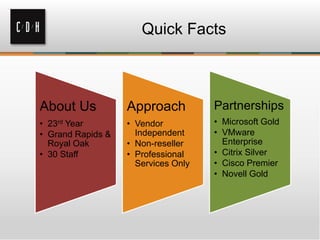
Quick Facts


About Us           Approach          Partnerships
• 23rd Year        • Vendor          • Microsoft Gold
• Grand Rapids &     Independent     • VMware
  Royal Oak        • Non-reseller      Enterprise
• 30 Staff         • Professional    • Citrix Silver
                     Services Only   • Cisco Premier
                                     • Novell Gold
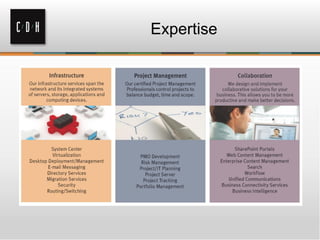
Expertise
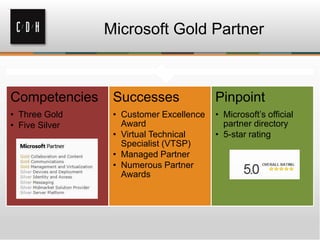
Microsoft Gold Partner


Competencies     Successes               Pinpoint
• Three Gold     • Customer Excellence   • Microsoft’s official
• Five Silver      Award                   partner directory
                 • Virtual Technical     • 5-star rating
                   Specialist (VTSP)
                 • Managed Partner
                 • Numerous Partner
                   Awards
Get Social with C/D/H

                    C/D/H Talks Tech


@cdhtweetstech                         facebook.com/cdhtech
Your Presenter


Corey McClain
Consultant
MCITP, MCTS, CCA, CompTIA A+

CoreyM@cdh.com
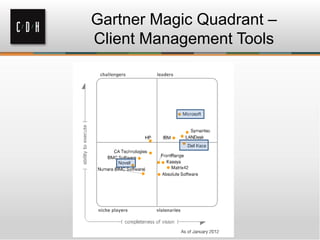
Gartner Magic Quadrant –
Client Management Tools
Novell - Summary


• Almost no new deployments, exclusively
  upgrades
• Ability to differentiate between device and
  user, managing both configurations distinctly
• Asset Management, Patch Management, and
  Endpoint Security in a common console
• Strong Linux and Windows management
• Newest version supports MacOS; “MDM”
  through ActiveSync
Dell - Summary


• Appliance based – separate devices for OSD,
  management, and MDM (spring 2013)
• Appliances are easy to deploy, maintain, and
  upgrade (a challenge in this space)
• Meets needs of midsize (200-5k PCs)
  organizations, but doesn’t scale for
  enterprises
• OSD is strong and intuitive, but other areas
  such as reporting are weak
Microsoft - Summary


• SCCM is the dominant product in the
  market
• New user-centric model
• Maintain corporate compliance and control
  while empowering employees
• Unified infrastructure that gives a “single
  pane of glass” to manage physical, virtual,
  and mobile clients.
Microsoft – Strengths and
               Weaknesses

• Tight integration with the SC2012 suite
• Large install base makes it easy to find consultants,
  contractors, IT personnel and active user communities
• Supports Mac OS X and Linux (discovery, inventory,
  app deployment, updates, Antivirus)
• MDM with Intune add-on
• Single pane of glass with Role-Based Access Control
  (RBAC)

• While the product has been simplified, SCCM is still
  complex; it requires deep expertise to implement and
  use successfully
SCCM 2012

New                             Benefits
• Improved settings             • Reduce compliance
  management with               complexity
  remediation                   • Reduce cost through
• Integrated antimalware        integrated security
• Delegated administration


SP1 release includes the ability to manage and deploy thin
clients, POS devices, and other Windows Embedded
devices, as well as create and provision Windows To Go
portable workspaces
SCCM 2012 Feature Set


•   Systems Management/Remote Control
•   Inventory
•   Software Metering
•   Software Updates
•   Application Management
•   Operating System Deployment
•   Endpoint Protection
•   Mobile Device Management
Systems Management/Remote
              Control

• The SCCM Client Agent
• Discovery
   – AD integration finds users and workstations
   – Software discovery finds all installed applications
   – Can be scheduled
• Collections
   – Logical units for managing users or computers
   – Dynamic or static
• Remote Control Tools
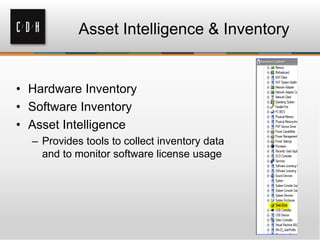
Asset Intelligence & Inventory


• Hardware Inventory
• Software Inventory
• Asset Intelligence
  – Provides tools to collect inventory data
    and to monitor software license usage
Software Metering


• Monitors software usage data
  –   Track where software is deployed
  –   How many users actually run the program
  –   Whether users still use the program (lifecycle)
  –   Which times of day a program is most used
• Increases value of expensive software
• Provides a means to “true up”
  – Reconcile licensing requirements for renewals
  – Remain compliant
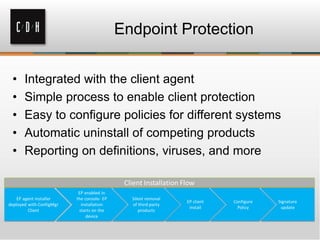
Endpoint Protection


•   Integrated with the client agent
•   Simple process to enable client protection
•   Easy to configure policies for different systems
•   Automatic uninstall of competing products
•   Reporting on definitions, viruses, and more
Software Updates


• Integrated with Windows Server Update
  Services (WSUS)
  – Leverages the client agent
  – No need for GPOs in this case
• Create packages of updates for deployment
  (just like applications)
• Updates can be configured for automatic
  approval
  – Endpoint Protection definition updates
Application Deployment


•   Deployment Type
•   Detection Method
•   Install Command
•   Requirement Rules
•   Dependencies
•   Supersedence
•   Updates
Application Management


• Create Applications for Deployment
  – Several deployment types are supported:
     •   Windows Installer (.msi files)
     •   Script Installer (.exe or .bat files)
     •   Application Virtualization (App-V)
     •   Windows Mobile Cabinet (.cab files), IOS, Android
  – Applications are Published to Distribution Points
     • Distribution Points are great for WANs
     • Reduces latency on remote networks
     • Increases efficiency and speed of deployment
Application Management (cont.)

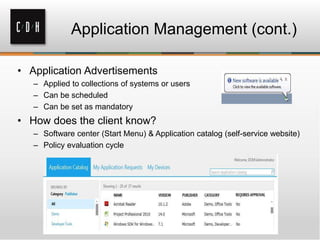
• Application Advertisements
   – Applied to collections of systems or users
   – Can be scheduled
   – Can be set as mandatory
• How does the client know?
   – Software center (Start Menu) & Application catalog (self-service website)
   – Policy evaluation cycle
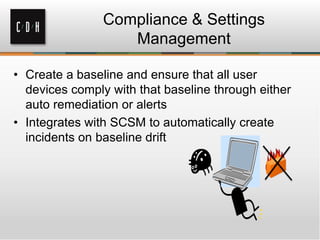
Compliance & Settings
                   Management

• Create a baseline and ensure that all user
  devices comply with that baseline through either
  auto remediation or alerts
• Integrates with SCSM to automatically create
  incidents on baseline drift
Operating System Deployment


• Creates OS images for deployment
  – Standardized for your organization
  – Reduces time to deploy or upgrade systems
• Methods for deployment
  – PXE-boot
  – Bootable media
  – Removable media
OSD (cont.)


• Task Sequences in OSD
  –   Custom tailor your deployments
  –   Add model-specific driver packages
  –   Join domain, configure networking
  –   Migrate user profiles using USMT
  –   Install applications
  –   Install software updates and patches
That’s not all!

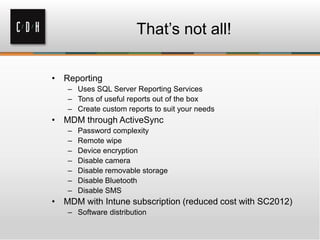
• Reporting
   – Uses SQL Server Reporting Services
   – Tons of useful reports out of the box
   – Create custom reports to suit your needs
• MDM through ActiveSync
   –   Password complexity
   –   Remote wipe
   –   Device encryption
   –   Disable camera
   –   Disable removable storage
   –   Disable Bluetooth
   –   Disable SMS
• MDM with Intune subscription (reduced cost with SC2012)
   – Software distribution
Thank You

Royal Oak                   Grand Rapids
306 S. Washington Ave.      15 Ionia SW
Suite 212                   Suite 270
Royal Oak, MI 48067         Grand Rapids, MI 49503
(248) 546-1800              (616) 776-1600


                    www.cdh.com

System Center Configuration Manager-The Most Popular System Center Component

  • 1.
  • 2.
    Quick Facts About Us Approach Partnerships • 23rd Year • Vendor • Microsoft Gold • Grand Rapids & Independent • VMware Royal Oak • Non-reseller Enterprise • 30 Staff • Professional • Citrix Silver Services Only • Cisco Premier • Novell Gold
  • 3.
  • 4.
    Microsoft Gold Partner Competencies Successes Pinpoint • Three Gold • Customer Excellence • Microsoft’s official • Five Silver Award partner directory • Virtual Technical • 5-star rating Specialist (VTSP) • Managed Partner • Numerous Partner Awards
  • 5.
    Get Social withC/D/H C/D/H Talks Tech @cdhtweetstech facebook.com/cdhtech
  • 6.
    Your Presenter Corey McClain Consultant MCITP,MCTS, CCA, CompTIA A+ CoreyM@cdh.com
  • 7.
    Gartner Magic Quadrant– Client Management Tools
  • 8.
    Novell - Summary •Almost no new deployments, exclusively upgrades • Ability to differentiate between device and user, managing both configurations distinctly • Asset Management, Patch Management, and Endpoint Security in a common console • Strong Linux and Windows management • Newest version supports MacOS; “MDM” through ActiveSync
  • 9.
    Dell - Summary •Appliance based – separate devices for OSD, management, and MDM (spring 2013) • Appliances are easy to deploy, maintain, and upgrade (a challenge in this space) • Meets needs of midsize (200-5k PCs) organizations, but doesn’t scale for enterprises • OSD is strong and intuitive, but other areas such as reporting are weak
  • 10.
    Microsoft - Summary •SCCM is the dominant product in the market • New user-centric model • Maintain corporate compliance and control while empowering employees • Unified infrastructure that gives a “single pane of glass” to manage physical, virtual, and mobile clients.
  • 11.
    Microsoft – Strengthsand Weaknesses • Tight integration with the SC2012 suite • Large install base makes it easy to find consultants, contractors, IT personnel and active user communities • Supports Mac OS X and Linux (discovery, inventory, app deployment, updates, Antivirus) • MDM with Intune add-on • Single pane of glass with Role-Based Access Control (RBAC) • While the product has been simplified, SCCM is still complex; it requires deep expertise to implement and use successfully
  • 12.
    SCCM 2012 New Benefits • Improved settings • Reduce compliance management with complexity remediation • Reduce cost through • Integrated antimalware integrated security • Delegated administration SP1 release includes the ability to manage and deploy thin clients, POS devices, and other Windows Embedded devices, as well as create and provision Windows To Go portable workspaces
  • 13.
    SCCM 2012 FeatureSet • Systems Management/Remote Control • Inventory • Software Metering • Software Updates • Application Management • Operating System Deployment • Endpoint Protection • Mobile Device Management
  • 14.
    Systems Management/Remote Control • The SCCM Client Agent • Discovery – AD integration finds users and workstations – Software discovery finds all installed applications – Can be scheduled • Collections – Logical units for managing users or computers – Dynamic or static • Remote Control Tools
  • 15.
    Asset Intelligence &Inventory • Hardware Inventory • Software Inventory • Asset Intelligence – Provides tools to collect inventory data and to monitor software license usage
  • 16.
    Software Metering • Monitorssoftware usage data – Track where software is deployed – How many users actually run the program – Whether users still use the program (lifecycle) – Which times of day a program is most used • Increases value of expensive software • Provides a means to “true up” – Reconcile licensing requirements for renewals – Remain compliant
  • 17.
    Endpoint Protection • Integrated with the client agent • Simple process to enable client protection • Easy to configure policies for different systems • Automatic uninstall of competing products • Reporting on definitions, viruses, and more
  • 18.
    Software Updates • Integratedwith Windows Server Update Services (WSUS) – Leverages the client agent – No need for GPOs in this case • Create packages of updates for deployment (just like applications) • Updates can be configured for automatic approval – Endpoint Protection definition updates
  • 19.
    Application Deployment • Deployment Type • Detection Method • Install Command • Requirement Rules • Dependencies • Supersedence • Updates
  • 20.
    Application Management • CreateApplications for Deployment – Several deployment types are supported: • Windows Installer (.msi files) • Script Installer (.exe or .bat files) • Application Virtualization (App-V) • Windows Mobile Cabinet (.cab files), IOS, Android – Applications are Published to Distribution Points • Distribution Points are great for WANs • Reduces latency on remote networks • Increases efficiency and speed of deployment
  • 21.
    Application Management (cont.) •Application Advertisements – Applied to collections of systems or users – Can be scheduled – Can be set as mandatory • How does the client know? – Software center (Start Menu) & Application catalog (self-service website) – Policy evaluation cycle
  • 22.
    Compliance & Settings Management • Create a baseline and ensure that all user devices comply with that baseline through either auto remediation or alerts • Integrates with SCSM to automatically create incidents on baseline drift
  • 23.
    Operating System Deployment •Creates OS images for deployment – Standardized for your organization – Reduces time to deploy or upgrade systems • Methods for deployment – PXE-boot – Bootable media – Removable media
  • 24.
    OSD (cont.) • TaskSequences in OSD – Custom tailor your deployments – Add model-specific driver packages – Join domain, configure networking – Migrate user profiles using USMT – Install applications – Install software updates and patches
  • 25.
    That’s not all! •Reporting – Uses SQL Server Reporting Services – Tons of useful reports out of the box – Create custom reports to suit your needs • MDM through ActiveSync – Password complexity – Remote wipe – Device encryption – Disable camera – Disable removable storage – Disable Bluetooth – Disable SMS • MDM with Intune subscription (reduced cost with SC2012) – Software distribution
  • 26.
    Thank You Royal Oak Grand Rapids 306 S. Washington Ave. 15 Ionia SW Suite 212 Suite 270 Royal Oak, MI 48067 Grand Rapids, MI 49503 (248) 546-1800 (616) 776-1600 www.cdh.com