
Keross Philosophy At Keross, we believe the key to business success is the ability to harness and understand conclusions inspired by several un-correlated events – Synchronicity. For us, Synchronicity means success found through business and technical harmony which is why we created  IKON Managed Services
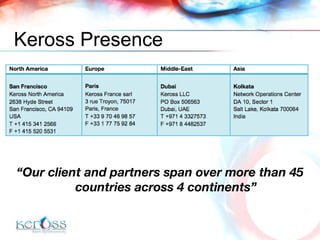
Keross Presence “ Our client and partners span over more than 45 countries across 4 continents”
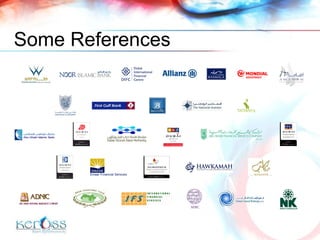
Some References
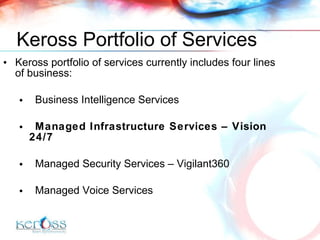
Keross Portfolio of Services Keross portfolio of services currently includes four lines of business: Business Intelligence Services Managed Infrastructure Services – Vision 24/7 Managed Security Services  –   Vigilant360 Managed Voice Services
 
Introduction Monitoring and Notifications Microsoft OS Monitoring and Management UNIX OS Monitoring and Management Networks Monitoring and Management Databases Monitoring Helpdesk Application Reporting  Pricing Model References Contact AGENDA
Advantages Operational Cost reduction Up to 40% reduction. ROIin less than 6 months. No investment, very low TCO. Downtime Reduction Anticipation of downtime, ProActive Monitoring and Active Support Technical Flexibility Independant of Customer environment and architecture Free of charge customization Adaptative Pricing Customer Oriented Pricing to match budget requirements
What  We  Provide Monitoring and Availability Management 24x7 automated network support, with user-defined notification and escalation rules Proactively stop issues before they happen and reduce their impact Performance Management  Reports for capacity planning and predictive analysis, so you can make informed decisions Service Management  Measure the value you are getting from vendors and service providers Requests and outages processing using best practices based on ITIL Remote Diagnostics ,  Remote Control  and On-site support Notifications containing important information about the machine and network Ability to take control of a device for immediate remediation Local support
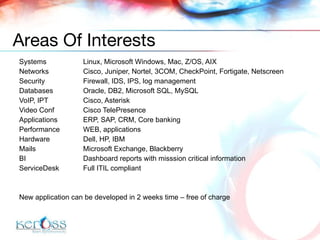
Systems Linux,  Microsoft Windows , Mac, Z/OS, AIX  Networks Cisco, Juniper, Nortel, 3COM, CheckPoint, Fortigate, Netscreen Security Firewall, IDS, IPS, log management Databases Oracle, DB2, Microsoft SQL, MySQL VoIP, IPT Cisco, Asterisk Video Conf Cisco Tele P resen c e Applications ERP,  SAP,  CRM , Core banking Performance W EB , applications Hardware Dell, HP, IBM Mails Microsoft Exchange, Blackberry BI Dashboard reports with misssion critical information ServiceDesk  Full ITIL compliant New application can be developed in 2 weeks time – free of charge Areas Of Interests
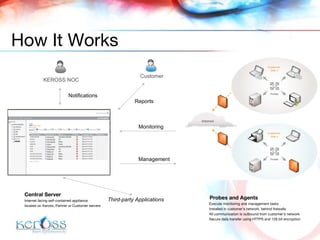
KEROSS NOC Customer Notifications Reports Monitoring Management Third-party Applications How It Works Probes and Agents   Execute monitoring and management tasks  Installed in customer’s network ,  behind firewall s All communication is outbound from customer’s network Secure data transfer using HTTPS and 128 bit encryption Central Server Internet facing self-contained appliance  located on  Keross, Partner or Customer  servers
Introduction  Monitoring and Notifications Microsoft OS Monitoring and Management UNIX OS Monitoring and Management Networks Monitoring and Management Databases Monitoring Helpdesk Application Reporting  Pricing Model References Contact AGENDA
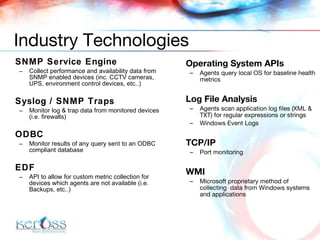
Operating System APIs Agents query local OS for baseline health metrics Log File Analysis Agents scan application log files (XML & TXT) for regular expressions or strings Windows Event Logs TCP/IP Port monitoring WMI Microsoft proprietary method of collecting  data from Windows systems and applications SNMP Service Engine Collect performance and availability data from SNMP enabled devices  (inc. CCTV cameras, UPS, environment control devices, etc..) Syslog / SNMP Traps Monitor log & trap data from monitored devices (i.e. firewalls) ODBC Monitor results of any query sent to an ODBC compliant database EDF API to allow for custom metric collection for devices which agents are not available  (i.e. Backups, etc..) Industry Technologies
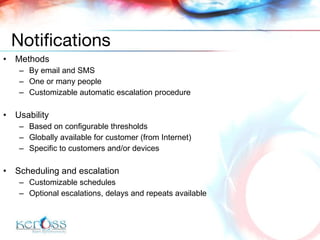
Methods By email and SMS One or many people Customizable automatic escalation procedure Usability Based on configurable thresholds Globally available for customer  (from Internet) Specific to customers and/or devices  Scheduling and escalation Customizable schedules Optional escalations, delays and repeats available Notifications
Introduction  Monitoring and Notifications Microsoft OS Monitoring and Management UNIX OS Monitoring and Management Networks Monitoring and Management Databases Monitoring Helpdesk Application Reporting  Pricing Model References Contact AGENDA
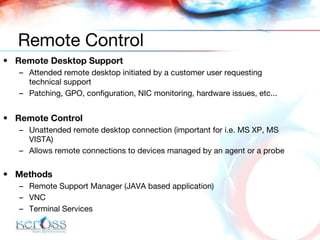
Remote Desktop Support Attended remote desktop initiated by a customer user requesting technical support Patching, GPO, configuration, NIC monitoring, hardware issues, etc... Remote Control Unattended remote desktop connection  (important for i.e. MS XP, MS VISTA) Allows remote connections to devices managed by an agent or a probe Methods Remote Support Manager (JAVA based application) VNC Terminal Services Remote Control
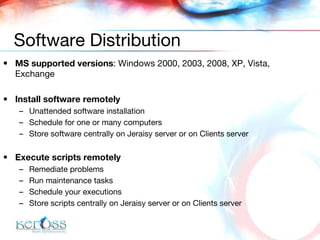
MS supported versions :  Windows 2000, 2003, 2008, XP, Vista , Exchange Install software remotely Unattended software installation Schedule for one or many computers Store software centrally on  Jeraisy  server or  on Clients server Execute scripts remotely Remediate problems Run maintenance tasks Schedule your executions Store scripts centrally on  Jeraisy  server or  on Clients server Software Distribution
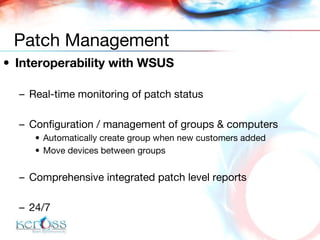
Interoperability with WSUS Real-time monitoring of patch status Configuration / management of groups & computers Automatically create group when new customers added Move devices between groups Comprehensive integrated patch level reports 24/7 Patch Management
Asset discovery Asset reports Asset tracking for hardware License compliance for installed software Keep track of warranty, lease and expected replacement dates for your customers equipment Asset Management
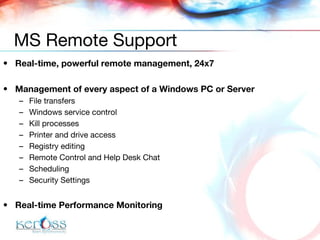
Real-time, powerful remote management, 24x7 Management of every aspect of a Windows PC or Server File transfers Windows service control Kill processes Printer and drive access Registry editing Remote Control and Help Desk Chat Scheduling  Security Settings Real-time Performance Monitoring MS Remote Support
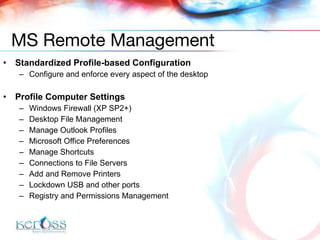
Standardized Profile-based Configuration Configure and enforce every aspect of the desktop Profile Computer Settings Windows Firewall (XP SP2+)  Desktop File Management  Manage Outlook Profiles  Microsoft Office Preferences  Manage Shortcuts  Connections to File Servers  Add and Remove Printers  Lockdown USB and other ports  Registry and Permissions Management MS Remote Management
Real-time status of Windows Services Blackberry:  Alert, Attachment Service, Collaboration Service, Controller, Database Consistency Service, Dispatcher, Instant Messaging Connector, Messaging Agent, MDS Connection Service, MDS Services – Apache Tomcat Service, Police Service, Router, Synchronization Service, User Administration Service On-demand reports about messages Failed, Expired Pending Sent per minute Received per minute Additionally General server metrics Connecitvity/ Service tests Server Health Checks BES Management
Introduction  Monitoring and Notifications Microsoft OS Monitoring and Management UNIX OS Monitoring and Management Networks Monitoring and Management Databases Monitoring Helpdesk Application Reporting  Pricing Model References Contact AGENDA
Distributions D istribution  independent, our customers use  RHEL 3/4/5, CentOS, Debian, Ubuntu, Fedora, Slackware , Z/OS, MAC OS, Suse Linux-based blackboxes such as Beeware Standard  Monitoring CPU, Memory, Disk, Processes, Interface health/ status, device status and more... Application level  Monitoring Apache , Asterisk Custom application  Monitoring  Remote Management Method SSH Overview
Real time Monitoring and Management Proactively alert customers about Saturated VoIP service Danger of going offline Monitoring and Reporting Active calls and channels (inc. SIP, ZAP and IAX2) Queues and running threads Other Asterisk metrics Asterisk VoIP
Introduction  Monitoring and Notifications Microsoft OS Monitoring and Management *NIX OS Monitoring and Management Networks Monitoring and Management Databases Monitoring Helpdesk Application Reporting  Pricing Model References Contact AGENDA
Supported devices: Cisco, Juniper, Nortel, Sonic Wall, CheckPoint, Fortigate, Netscreen  Any SNMP based network device Monitoring Bandwidth, Line quality, device status: temperature, fan, etc... Cisco Call Manager, Cisco Telepresence,  And many more... Remote Management method SSH telnet Overview
Monitored services: CCM Analog Gateway FXS Port  (in service, active, port utilization %) CCM Annunciator  (state of call recorded announcements) CCM CTI Activity  (state of lines and devices) CCM CTI Registration  (state of CTI devices: reg, unreg, lost contact) CCM Call Activity  (state of all calls: active, attempted, in progress, completed) CCM Call Mgr Status  (availability of applications used to deliver IP Telephony) CCM Conference Activity  (all of conference hardware resources) CCM Conference Registration  (conference media devices) CCM Gateway Registration  (gateway devices) CCM ISDN-Basic Rate Interface  (utilization of BRI trunks) CCM ISDN-Primary Rate Interface  (utilization of ISDN PRI trunks) CCM ISDN-T1 Trunk  (utilization of T1 trunks) CCM MTP Transcoder  (state of transcoder resources) CCM Music On Hold  (state of MoH) CCM Performance  (monitors key performance indicators: delays, throttling, etc..) CCM Phone Registration  (monitors presence of telephone instruments) CCM Server (monitors CPU, Disk, Memory utilization) CCM Analog Gateway FXO Port  (state of FXO port pn gateway CCM VoiceMail Registration  (monitors presence of voice mail devices) Cisco Call Manager
Encountered problems Video flickering Voice delay Link disturbance Monitored metrics Packet Loss %, Availability (TTL), Round-Trip-Time (RTT), Peripheral status, Peripheral port status (via RS232), Cable status (by DVI),  Power status Advantages Comprehensive monitoring mechanism, Providing alerts agains downtime caused by improper network link or hardware issues Cisco Telepresence
Introduction  Monitoring and Notifications Microsoft OS Monitoring and Management *NIX OS Monitoring and Management Networks Monitoring and Management Databases Monitoring Helpdesk Application Reporting  Pricing Model References Contact AGENDA
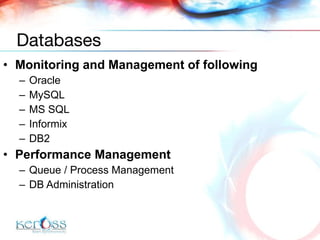
Monitoring and Management of following Oracle MySQL MS SQL Informix DB2 Performance Management Queue / Process Management DB Administration Databases
Introduction  Monitoring and Notifications Microsoft OS Monitoring and Management UNIX OS Monitoring and Management Networks Monitoring and Management Databases Monitoring Helpdesk Application Reporting  Pricing Model References Contact AGENDA
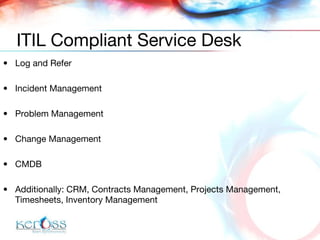
Log and Refer Incident Management Problem Management Change Management CMDB Additionally: CRM, Contracts Management, Projects Management, Timesheets, Inventory Management ITIL Compliant Service Desk
Introduction  Monitoring and Notifications Microsoft OS Monitoring and Management *NIX OS Monitoring and Management Networks Monitoring and Management Databases Monitoring Helpdesk Application Reporting  Pricing Model References Contact AGENDA
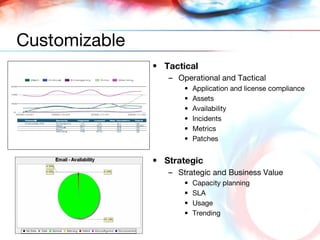
Tactical Operational and Tactical Application and license compliance Assets Availability Incidents Metrics Patches Strategic Strategic and Business Value Capacity planning SLA Usage Trending Customizable
Introduction  Monitoring and Notifications Microsoft OS Monitoring and Management *NIX OS Monitoring and Management Networks Monitoring and Management Databases Monitoring Helpdesk Application Reporting  Pricing Model References Contact AGENDA
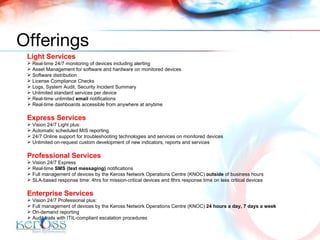
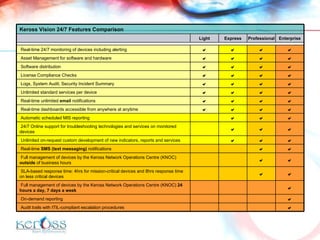
Light Services Real-time 24/7 monitoring of devices including alerting Asset Management for software and hardware on monitored devices Software distribution  License Compliance Checks Logs, System Audit, Security Incident Summary Unlimited standard services per device Real-time unlimited  email  notifications Real-time dashboards accessible from anywhere at anytime Express Services Vision 24/7 Light plus: Automatic scheduled MIS reporting 24/7 Online support for troubleshooting technologies and services on monitored devices Unlimited on-request custom development of new indicators, reports and services Professional Services Vision 24/7 Express Real-time  SMS (text messaging)  notifications Full management of devices by the Keross Network Operations Centre (KNOC)  outside  of business hours  SLA-based response time: 4hrs for mission-critical devices and 8hrs response time on less critical devices Enterprise Services Vision 24/7 Professional plus: Full management of devices by the Keross Network Operations Centre (KNOC)  24 hours a day, 7 days a week On-demand reporting Audit trails with ITIL-compliant escalation procedures Offerings
Keross Vision 24/7 Features Comparison Light Express Professional Enterprise Real-time 24/7 monitoring of devices including alerting     Asset Management for software and hardware     Software distribution     License Compliance Checks     Logs, System Audit, Security Incident Summary     Unlimited standard services per device     Real-time unlimited  email  notifications     Real-time dashboards accessible from anywhere at anytime     Automatic scheduled MIS reporting    24/7 Online support for troubleshooting technologies and services on monitored devices    Unlimited on-request custom development of new indicators, reports and services    Real-time  SMS (text messaging)  notifications   Full management of devices by the Keross Network Operations Centre (KNOC)  outside  of business hours    SLA-based response time: 4hrs for mission-critical devices and 8hrs response time on less critical devices   Full management of devices by the Keross Network Operations Centre (KNOC)  24 hours a day, 7 days a week  On-demand reporting  Audit trails with ITIL-compliant escalation procedures 
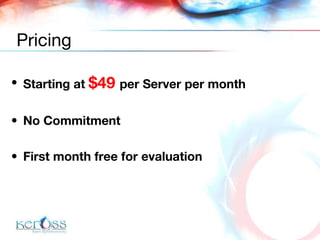
Starting at  $49  per Server per month No Commitment First month free for evaluation Pricing
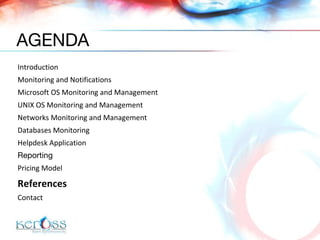
Introduction  Monitoring and Notifications Microsoft OS Monitoring and Management UNIX OS Monitoring and Management Networks Monitoring and Management Databases Monitoring Helpdesk Application Reporting   Pricing Model References Contact AGENDA
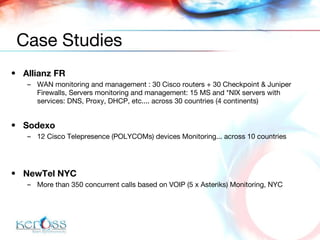
Allianz FR WAN monitoring  and  management  :  30  Cisco  routers + 30 Checkpoint   & Juniper  Firewalls, Servers monitoring and management:  15  MS and *NIX  servers  with services: D NS, Proxy, DHCP, etc.... across 30 countries (4 continents) Sodexo 12 Cisco Telepresence  ( POLYCOMs)  devices  Monitoring ... across  10 countries NewTel NYC M ore than 350 concur r ent calls based on VOIP ( 5 x  Asteriks)  Monitoring, NYC Case Studies
Introduction  Monitoring and Notifications Microsoft OS Monitoring and Management *NIX OS Monitoring and Management Networks Monitoring and Management Databases Monitoring Helpdesk Application Reporting  Pricing Model References Contact AGENDA
Cyril Simonnet [email_address] +971 50 220 9963 / +33 6 08 36 45 97 Contact Details

Ikon Managed Services

  • 1.
  • 2.
    Keross Philosophy AtKeross, we believe the key to business success is the ability to harness and understand conclusions inspired by several un-correlated events – Synchronicity. For us, Synchronicity means success found through business and technical harmony which is why we created IKON Managed Services
  • 3.
    Keross Presence “Our client and partners span over more than 45 countries across 4 continents”
  • 4.
  • 5.
    Keross Portfolio ofServices Keross portfolio of services currently includes four lines of business: Business Intelligence Services Managed Infrastructure Services – Vision 24/7 Managed Security Services – Vigilant360 Managed Voice Services
  • 6.
  • 7.
    Introduction Monitoring andNotifications Microsoft OS Monitoring and Management UNIX OS Monitoring and Management Networks Monitoring and Management Databases Monitoring Helpdesk Application Reporting Pricing Model References Contact AGENDA
  • 8.
    Advantages Operational Costreduction Up to 40% reduction. ROIin less than 6 months. No investment, very low TCO. Downtime Reduction Anticipation of downtime, ProActive Monitoring and Active Support Technical Flexibility Independant of Customer environment and architecture Free of charge customization Adaptative Pricing Customer Oriented Pricing to match budget requirements
  • 9.
    What We Provide Monitoring and Availability Management 24x7 automated network support, with user-defined notification and escalation rules Proactively stop issues before they happen and reduce their impact Performance Management Reports for capacity planning and predictive analysis, so you can make informed decisions Service Management Measure the value you are getting from vendors and service providers Requests and outages processing using best practices based on ITIL Remote Diagnostics , Remote Control and On-site support Notifications containing important information about the machine and network Ability to take control of a device for immediate remediation Local support
  • 10.
    Systems Linux, Microsoft Windows , Mac, Z/OS, AIX Networks Cisco, Juniper, Nortel, 3COM, CheckPoint, Fortigate, Netscreen Security Firewall, IDS, IPS, log management Databases Oracle, DB2, Microsoft SQL, MySQL VoIP, IPT Cisco, Asterisk Video Conf Cisco Tele P resen c e Applications ERP, SAP, CRM , Core banking Performance W EB , applications Hardware Dell, HP, IBM Mails Microsoft Exchange, Blackberry BI Dashboard reports with misssion critical information ServiceDesk Full ITIL compliant New application can be developed in 2 weeks time – free of charge Areas Of Interests
  • 11.
    KEROSS NOC CustomerNotifications Reports Monitoring Management Third-party Applications How It Works Probes and Agents Execute monitoring and management tasks Installed in customer’s network , behind firewall s All communication is outbound from customer’s network Secure data transfer using HTTPS and 128 bit encryption Central Server Internet facing self-contained appliance located on Keross, Partner or Customer servers
  • 12.
    Introduction Monitoringand Notifications Microsoft OS Monitoring and Management UNIX OS Monitoring and Management Networks Monitoring and Management Databases Monitoring Helpdesk Application Reporting Pricing Model References Contact AGENDA
  • 13.
    Operating System APIsAgents query local OS for baseline health metrics Log File Analysis Agents scan application log files (XML & TXT) for regular expressions or strings Windows Event Logs TCP/IP Port monitoring WMI Microsoft proprietary method of collecting data from Windows systems and applications SNMP Service Engine Collect performance and availability data from SNMP enabled devices (inc. CCTV cameras, UPS, environment control devices, etc..) Syslog / SNMP Traps Monitor log & trap data from monitored devices (i.e. firewalls) ODBC Monitor results of any query sent to an ODBC compliant database EDF API to allow for custom metric collection for devices which agents are not available (i.e. Backups, etc..) Industry Technologies
  • 14.
    Methods By emailand SMS One or many people Customizable automatic escalation procedure Usability Based on configurable thresholds Globally available for customer (from Internet) Specific to customers and/or devices Scheduling and escalation Customizable schedules Optional escalations, delays and repeats available Notifications
  • 15.
    Introduction Monitoringand Notifications Microsoft OS Monitoring and Management UNIX OS Monitoring and Management Networks Monitoring and Management Databases Monitoring Helpdesk Application Reporting Pricing Model References Contact AGENDA
  • 16.
    Remote Desktop SupportAttended remote desktop initiated by a customer user requesting technical support Patching, GPO, configuration, NIC monitoring, hardware issues, etc... Remote Control Unattended remote desktop connection (important for i.e. MS XP, MS VISTA) Allows remote connections to devices managed by an agent or a probe Methods Remote Support Manager (JAVA based application) VNC Terminal Services Remote Control
  • 17.
    MS supported versions: Windows 2000, 2003, 2008, XP, Vista , Exchange Install software remotely Unattended software installation Schedule for one or many computers Store software centrally on Jeraisy server or on Clients server Execute scripts remotely Remediate problems Run maintenance tasks Schedule your executions Store scripts centrally on Jeraisy server or on Clients server Software Distribution
  • 18.
    Interoperability with WSUSReal-time monitoring of patch status Configuration / management of groups & computers Automatically create group when new customers added Move devices between groups Comprehensive integrated patch level reports 24/7 Patch Management
  • 19.
    Asset discovery Assetreports Asset tracking for hardware License compliance for installed software Keep track of warranty, lease and expected replacement dates for your customers equipment Asset Management
  • 20.
    Real-time, powerful remotemanagement, 24x7 Management of every aspect of a Windows PC or Server File transfers Windows service control Kill processes Printer and drive access Registry editing Remote Control and Help Desk Chat Scheduling Security Settings Real-time Performance Monitoring MS Remote Support
  • 21.
    Standardized Profile-based ConfigurationConfigure and enforce every aspect of the desktop Profile Computer Settings Windows Firewall (XP SP2+) Desktop File Management Manage Outlook Profiles Microsoft Office Preferences Manage Shortcuts Connections to File Servers Add and Remove Printers Lockdown USB and other ports Registry and Permissions Management MS Remote Management
  • 22.
    Real-time status ofWindows Services Blackberry: Alert, Attachment Service, Collaboration Service, Controller, Database Consistency Service, Dispatcher, Instant Messaging Connector, Messaging Agent, MDS Connection Service, MDS Services – Apache Tomcat Service, Police Service, Router, Synchronization Service, User Administration Service On-demand reports about messages Failed, Expired Pending Sent per minute Received per minute Additionally General server metrics Connecitvity/ Service tests Server Health Checks BES Management
  • 23.
    Introduction Monitoringand Notifications Microsoft OS Monitoring and Management UNIX OS Monitoring and Management Networks Monitoring and Management Databases Monitoring Helpdesk Application Reporting Pricing Model References Contact AGENDA
  • 24.
    Distributions D istribution independent, our customers use RHEL 3/4/5, CentOS, Debian, Ubuntu, Fedora, Slackware , Z/OS, MAC OS, Suse Linux-based blackboxes such as Beeware Standard Monitoring CPU, Memory, Disk, Processes, Interface health/ status, device status and more... Application level Monitoring Apache , Asterisk Custom application Monitoring Remote Management Method SSH Overview
  • 25.
    Real time Monitoringand Management Proactively alert customers about Saturated VoIP service Danger of going offline Monitoring and Reporting Active calls and channels (inc. SIP, ZAP and IAX2) Queues and running threads Other Asterisk metrics Asterisk VoIP
  • 26.
    Introduction Monitoringand Notifications Microsoft OS Monitoring and Management *NIX OS Monitoring and Management Networks Monitoring and Management Databases Monitoring Helpdesk Application Reporting Pricing Model References Contact AGENDA
  • 27.
    Supported devices: Cisco,Juniper, Nortel, Sonic Wall, CheckPoint, Fortigate, Netscreen Any SNMP based network device Monitoring Bandwidth, Line quality, device status: temperature, fan, etc... Cisco Call Manager, Cisco Telepresence, And many more... Remote Management method SSH telnet Overview
  • 28.
    Monitored services: CCMAnalog Gateway FXS Port (in service, active, port utilization %) CCM Annunciator (state of call recorded announcements) CCM CTI Activity (state of lines and devices) CCM CTI Registration (state of CTI devices: reg, unreg, lost contact) CCM Call Activity (state of all calls: active, attempted, in progress, completed) CCM Call Mgr Status (availability of applications used to deliver IP Telephony) CCM Conference Activity (all of conference hardware resources) CCM Conference Registration (conference media devices) CCM Gateway Registration (gateway devices) CCM ISDN-Basic Rate Interface (utilization of BRI trunks) CCM ISDN-Primary Rate Interface (utilization of ISDN PRI trunks) CCM ISDN-T1 Trunk (utilization of T1 trunks) CCM MTP Transcoder (state of transcoder resources) CCM Music On Hold (state of MoH) CCM Performance (monitors key performance indicators: delays, throttling, etc..) CCM Phone Registration (monitors presence of telephone instruments) CCM Server (monitors CPU, Disk, Memory utilization) CCM Analog Gateway FXO Port (state of FXO port pn gateway CCM VoiceMail Registration (monitors presence of voice mail devices) Cisco Call Manager
  • 29.
    Encountered problems Videoflickering Voice delay Link disturbance Monitored metrics Packet Loss %, Availability (TTL), Round-Trip-Time (RTT), Peripheral status, Peripheral port status (via RS232), Cable status (by DVI), Power status Advantages Comprehensive monitoring mechanism, Providing alerts agains downtime caused by improper network link or hardware issues Cisco Telepresence
  • 30.
    Introduction Monitoringand Notifications Microsoft OS Monitoring and Management *NIX OS Monitoring and Management Networks Monitoring and Management Databases Monitoring Helpdesk Application Reporting Pricing Model References Contact AGENDA
  • 31.
    Monitoring and Managementof following Oracle MySQL MS SQL Informix DB2 Performance Management Queue / Process Management DB Administration Databases
  • 32.
    Introduction Monitoringand Notifications Microsoft OS Monitoring and Management UNIX OS Monitoring and Management Networks Monitoring and Management Databases Monitoring Helpdesk Application Reporting Pricing Model References Contact AGENDA
  • 33.
    Log and ReferIncident Management Problem Management Change Management CMDB Additionally: CRM, Contracts Management, Projects Management, Timesheets, Inventory Management ITIL Compliant Service Desk
  • 34.
    Introduction Monitoringand Notifications Microsoft OS Monitoring and Management *NIX OS Monitoring and Management Networks Monitoring and Management Databases Monitoring Helpdesk Application Reporting Pricing Model References Contact AGENDA
  • 35.
    Tactical Operational andTactical Application and license compliance Assets Availability Incidents Metrics Patches Strategic Strategic and Business Value Capacity planning SLA Usage Trending Customizable
  • 36.
    Introduction Monitoringand Notifications Microsoft OS Monitoring and Management *NIX OS Monitoring and Management Networks Monitoring and Management Databases Monitoring Helpdesk Application Reporting Pricing Model References Contact AGENDA
  • 37.
    Light Services Real-time24/7 monitoring of devices including alerting Asset Management for software and hardware on monitored devices Software distribution License Compliance Checks Logs, System Audit, Security Incident Summary Unlimited standard services per device Real-time unlimited email notifications Real-time dashboards accessible from anywhere at anytime Express Services Vision 24/7 Light plus: Automatic scheduled MIS reporting 24/7 Online support for troubleshooting technologies and services on monitored devices Unlimited on-request custom development of new indicators, reports and services Professional Services Vision 24/7 Express Real-time SMS (text messaging) notifications Full management of devices by the Keross Network Operations Centre (KNOC) outside of business hours SLA-based response time: 4hrs for mission-critical devices and 8hrs response time on less critical devices Enterprise Services Vision 24/7 Professional plus: Full management of devices by the Keross Network Operations Centre (KNOC) 24 hours a day, 7 days a week On-demand reporting Audit trails with ITIL-compliant escalation procedures Offerings
  • 38.
    Keross Vision 24/7Features Comparison Light Express Professional Enterprise Real-time 24/7 monitoring of devices including alerting     Asset Management for software and hardware     Software distribution     License Compliance Checks     Logs, System Audit, Security Incident Summary     Unlimited standard services per device     Real-time unlimited email notifications     Real-time dashboards accessible from anywhere at anytime     Automatic scheduled MIS reporting    24/7 Online support for troubleshooting technologies and services on monitored devices    Unlimited on-request custom development of new indicators, reports and services    Real-time SMS (text messaging) notifications   Full management of devices by the Keross Network Operations Centre (KNOC) outside of business hours   SLA-based response time: 4hrs for mission-critical devices and 8hrs response time on less critical devices   Full management of devices by the Keross Network Operations Centre (KNOC) 24 hours a day, 7 days a week  On-demand reporting  Audit trails with ITIL-compliant escalation procedures 
  • 39.
    Starting at $49 per Server per month No Commitment First month free for evaluation Pricing
  • 40.
    Introduction Monitoringand Notifications Microsoft OS Monitoring and Management UNIX OS Monitoring and Management Networks Monitoring and Management Databases Monitoring Helpdesk Application Reporting Pricing Model References Contact AGENDA
  • 41.
    Allianz FR WANmonitoring and management : 30 Cisco routers + 30 Checkpoint & Juniper Firewalls, Servers monitoring and management: 15 MS and *NIX servers with services: D NS, Proxy, DHCP, etc.... across 30 countries (4 continents) Sodexo 12 Cisco Telepresence ( POLYCOMs) devices Monitoring ... across 10 countries NewTel NYC M ore than 350 concur r ent calls based on VOIP ( 5 x Asteriks) Monitoring, NYC Case Studies
  • 42.
    Introduction Monitoringand Notifications Microsoft OS Monitoring and Management *NIX OS Monitoring and Management Networks Monitoring and Management Databases Monitoring Helpdesk Application Reporting Pricing Model References Contact AGENDA
  • 43.
    Cyril Simonnet [email_address]+971 50 220 9963 / +33 6 08 36 45 97 Contact Details

Editor's Notes

  • #2 copyright exclusive to Keross LLC
  • #3 copyright exclusive to Keross LLC
  • #4 copyright exclusive to Keross LLC
  • #5 copyright exclusive to Keross LLC
  • #6 copyright exclusive to Keross LLC
  • #7 copyright exclusive to Keross LLC
  • #8 copyright exclusive to Keross LLC
  • #9 copyright exclusive to Keross LLC
  • #10 copyright exclusive to Keross LLC
  • #11 copyright exclusive to Keross LLC
  • #12 copyright exclusive to Keross LLC
  • #13 copyright exclusive to Keross LLC
  • #14 copyright exclusive to Keross LLC
  • #15 copyright exclusive to Keross LLC
  • #16 copyright exclusive to Keross LLC
  • #17 copyright exclusive to Keross LLC
  • #18 copyright exclusive to Keross LLC
  • #19 copyright exclusive to Keross LLC
  • #20 copyright exclusive to Keross LLC
  • #21 copyright exclusive to Keross LLC
  • #22 copyright exclusive to Keross LLC
  • #23 copyright exclusive to Keross LLC
  • #24 copyright exclusive to Keross LLC
  • #25 copyright exclusive to Keross LLC
  • #26 copyright exclusive to Keross LLC
  • #27 copyright exclusive to Keross LLC
  • #28 copyright exclusive to Keross LLC
  • #29 copyright exclusive to Keross LLC
  • #30 copyright exclusive to Keross LLC
  • #31 copyright exclusive to Keross LLC
  • #32 copyright exclusive to Keross LLC
  • #33 copyright exclusive to Keross LLC
  • #34 copyright exclusive to Keross LLC
  • #35 copyright exclusive to Keross LLC
  • #36 copyright exclusive to Keross LLC
  • #37 copyright exclusive to Keross LLC
  • #38 copyright exclusive to Keross LLC
  • #39 copyright exclusive to Keross LLC
  • #40 copyright exclusive to Keross LLC
  • #41 copyright exclusive to Keross LLC
  • #42 copyright exclusive to Keross LLC
  • #43 copyright exclusive to Keross LLC