Windows Autopilot
Andrew Bettany MCT, MVP
IT Masterclasses Ltd

andrew@itmasterclasses.com
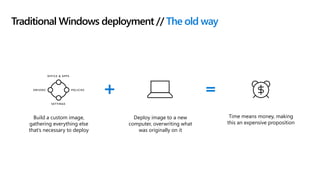
Traditional Windows deployment // The old way
Build a custom image,
gathering everything else
that’s necessary to deploy
Time means money, making
this an expensive proposition
Deploy image to a new
computer, overwriting what
was originally on it
DRIVERS POLICIES
OFFICE & APPS
SETTINGS
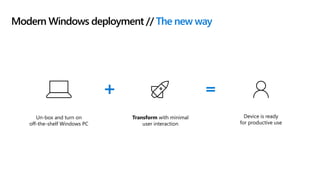
Modern Windows deployment // The new way
Un-box and turn on
off-the-shelf Windows PC
Device is ready
for productive use
Transform with minimal
user interaction
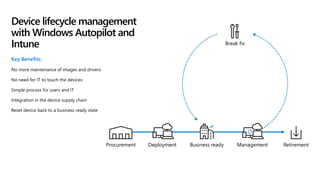
Key Benefits:
No more maintenance of images and drivers
No need for IT to touch the devices
Simple process for users and IT
Integration in the device supply chain
Reset device back to a business ready state
Device lifecycle management
with Windows Autopilot and
Intune
Business ready
Break fix
RetirementManagementProcurement Deployment
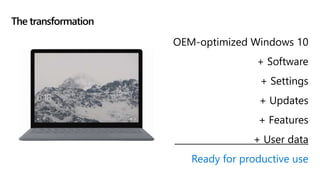
OEM-optimized Windows 10
+ Software
+ Settings
+ Updates
+ Features
+ User data
Ready for productive use
The transformation
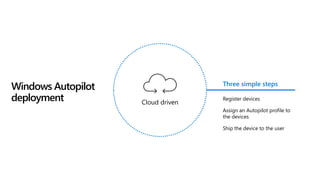
Windows Autopilot
deployment
Three simple steps
Register devices
Assign an Autopilot profile to
the devices
Ship the device to the user
Cloud driven
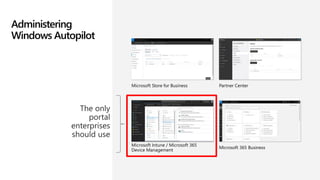
Administering
Windows Autopilot
Microsoft Store for Business
Microsoft Intune / Microsoft 365
Device Management
Partner Center
Microsoft 365 Business
Step 1. Registering devices
OEM Device registration Clean images

Free

$30/PC offering
(Targeting later CY19)

$3 option

$5/device

Free; additional offerings at
$5/PC and $8-35/PC

Free

Free
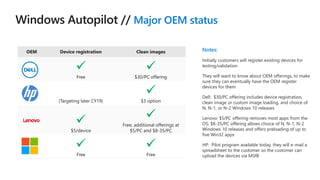
Major OEM status
Notes:
Initially customers will register existing devices for
testing/validation
They will want to know about OEM offerings, to make
sure they can eventually have the OEM register
devices for them
Dell: $30/PC offering includes device registration,
clean image or custom image loading, and choice of
N, N-1, or N-2 Windows 10 releases
Lenovo: $5/PC offering removes most apps from the
OS; $8-35/PC offering allows choice of N, N-1, N-2
Windows 10 releases and offers preloading of up to
five Win32 apps
HP: Pilot program available today, they will e-mail a
spreadsheet to the customer so the customer can
upload the devices via MSfB
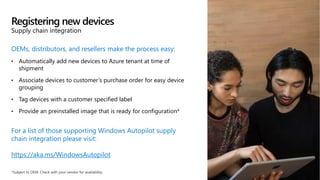
OEMs, distributors, and resellers make the process easy:
• Automatically add new devices to Azure tenant at time of
shipment
• Associate devices to customer’s purchase order for easy device
grouping
• Tag devices with a customer specified label
• Provide an preinstalled image that is ready for configuration*
For a list of those supporting Windows Autopilot supply
chain integration please visit:
https://aka.ms/WindowsAutopilot
Registering new devices
Supply chain integration
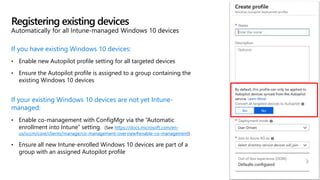
If you have existing Windows 10 devices:
• Enable new Autopilot profile setting for all targeted devices
• Ensure the Autopilot profile is assigned to a group containing the
existing Windows 10 devices
If your existing Windows 10 devices are not yet Intune-
managed:
• Enable co-management with ConfigMgr via the “Automatic
enrollment into Intune” setting. (See https://docs.microsoft.com/en-
us/sccm/core/clients/manage/co-management-overview#enable-co-management)
• Ensure all new Intune-enrolled Windows 10 devices are part of a
group with an assigned Autopilot profile
Registering existing devices
Automatically for all Intune-managed Windows 10 devices
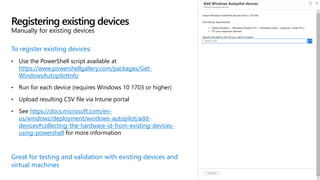
To register existing devices:
• Use the PowerShell script available at
https://www.powershellgallery.com/packages/Get-
WindowsAutopilotInfo
• Run for each device (requires Windows 10 1703 or higher)
• Upload resulting CSV file via Intune portal
• See https://docs.microsoft.com/en-
us/windows/deployment/windows-autopilot/add-
devices#collecting-the-hardware-id-from-existing-devices-
using-powershell for more information
Great for testing and validation with existing devices and
virtual machines
Registering existing devices
Manually for existing devices
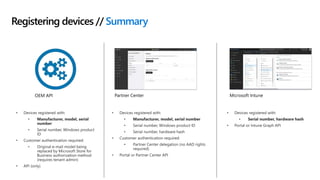
Registering devices // Summary
Microsoft IntunePartner CenterOEM API
Step 2. Assign profile
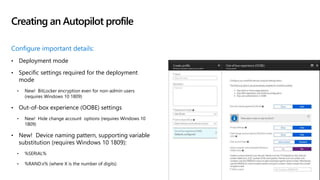
Configure important details:
• Deployment mode
• Specific settings required for the deployment
mode
• New! BitLocker encryption even for non-admin users
(requires Windows 10 1809)
• Out-of-box experience (OOBE) settings
• New! Hide change account options (requires Windows 10
1809)
• New! Device naming pattern, supporting variable
substitution (requires Windows 10 1809):
• %SERIAL%
• %RAND:x% (where X is the number of digits)
Creating an Autopilot profile
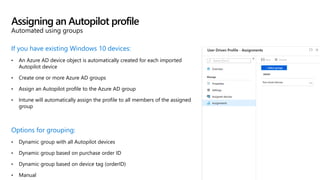
If you have existing Windows 10 devices:
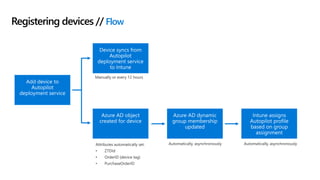
• An Azure AD device object is automatically created for each imported
Autopilot device
• Create one or more Azure AD groups
• Assign an Autopilot profile to the Azure AD group
• Intune will automatically assign the profile to all members of the assigned
group
Options for grouping:
• Dynamic group with all Autopilot devices
• Dynamic group based on purchase order ID
• Dynamic group based on device tag (orderID)
• Manual
Assigning an Autopilot profile
Automated using groups
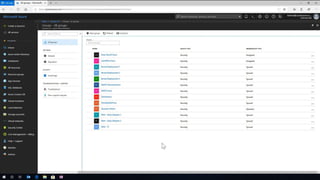
Creating a group with all Autopilot devices
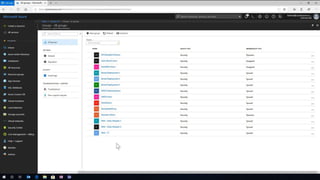
Creating a group for a device tag (Order ID)
Assigning a profile
Registering devices // Flow
Step 3. Deploy!
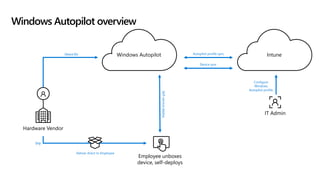
Windows Autopilot overview
Configure
Windows
Autopilot profile
Self-servicedeploy
Device IDs
Hardware Vendor
IT Admin
Ship
Deliver direct to Employee
Employee unboxes
device, self-deploys
IntuneWindows Autopilot
Device sync
Autopilot profile sync
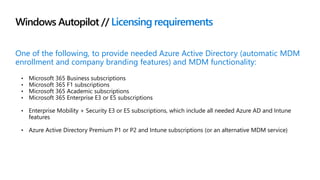
Windows Autopilot // Licensing requirements
One of the following, to provide needed Azure Active Directory (automatic MDM
enrollment and company branding features) and MDM functionality:
• Microsoft 365 Business subscriptions
• Microsoft 365 F1 subscriptions
• Microsoft 365 Academic subscriptions
• Microsoft 365 Enterprise E3 or E5 subscriptions
• Enterprise Mobility + Security E3 or E5 subscriptions, which include all needed Azure AD and Intune
features
• Azure Active Directory Premium P1 or P2 and Intune subscriptions (or an alternative MDM service)
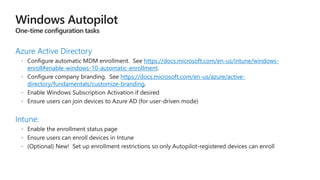
Azure Active Directory
https://docs.microsoft.com/en-us/intune/windows-
enroll#enable-windows-10-automatic-enrollment
https://docs.microsoft.com/en-us/azure/active-
directory/fundamentals/customize-branding
Intune:
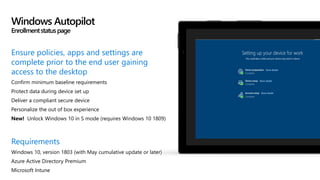
Ensure policies, apps and settings are
complete prior to the end user gaining
access to the desktop
Confirm minimum baseline requirements
Protect data during device set up
Deliver a compliant secure device
Personalize the out of box experience
New! Unlock Windows 10 in S mode (requires Windows 10 1809)
Requirements
Windows 10, version 1803 (with May cumulative update or later)
Azure Active Directory Premium
Microsoft Intune
Windows Autopilot
Enrollmentstatuspage
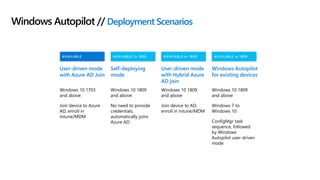
Scenarios
AVAILABLE in 1809AVAILABLE in 1809AVAILABLE in 1809AVAILABLE
Windows Autopilot // Deployment Scenarios
User-driven mode
with Azure AD Join
Windows 10 1703
and above
Join device to Azure
AD, enroll in
Intune/MDM
Windows Autopilot
for existing devices
Windows 10 1809
and above
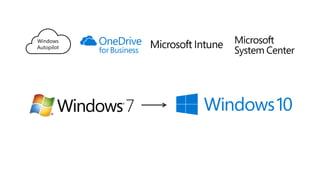
Windows 7 to
Windows 10
ConfigMgr task
sequence, followed
by Windows
Autopilot user-driven
mode
Self-deploying
mode
Windows 10 1809
and above
No need to provide
credentials,
automatically joins
Azure AD
User-driven mode
with Hybrid Azure
AD join
Windows 10 1809
and above
Join device to AD,
enroll in Intune/MDM
User-driven deployment
with Azure AD
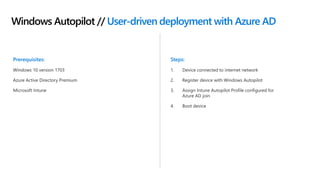
Windows Autopilot // User-driven deployment with Azure AD
Prerequisites:
Windows 10 version 1703
Azure Active Directory Premium
Microsoft Intune
Steps:
1. Device connected to internet network
2. Register device with Windows Autopilot
3. Assign Intune Autopilot Profile configured for
Azure AD join
4. Boot device
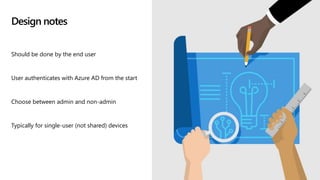
Design notes
Should be done by the end user
User authenticates with Azure AD from the start
Choose between admin and non-admin
Typically for single-user (not shared) devices
User-driven deployment with Azure AD
Self-deploying mode
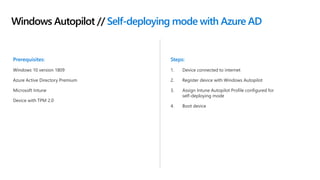
Windows Autopilot // Self-deploying mode with Azure AD
Prerequisites:
Windows 10 version 1809
Azure Active Directory Premium
Microsoft Intune
Device with TPM 2.0
Steps:
1. Device connected to internet
2. Register device with Windows Autopilot
3. Assign Intune Autopilot Profile configured for
self-deploying mode
4. Boot device
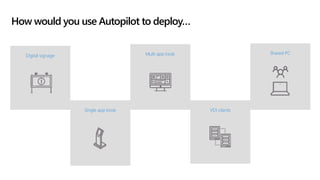
VDI clients
Digital signage
Single app kiosk
Multi app kiosk Shared PC
How would you use Autopilot to deploy…
Design notes
Technicians usually set up these types of devices
No defined user to auth or set up the device
May not have peripherals (keyboards, mice, etc.)
Typically involve “walk up and use” scenarios
Self-deploying mode (kiosks)
for existing devices
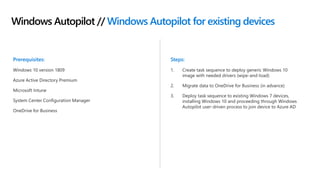
Windows Autopilot // Windows Autopilot for existing devices
Prerequisites:
Windows 10 version 1809
Azure Active Directory Premium
Microsoft Intune
System Center Configuration Manager
OneDrive for Business
Steps:
1. Create task sequence to deploy generic Windows 10
image with needed drivers (wipe-and-load)
2. Migrate data to OneDrive for Business (in advance)
3. Deploy task sequence to existing Windows 7 devices,
installing Windows 10 and proceeding through Windows
Autopilot user-driven process to join device to Azure AD
January 14, 2020
Windows
Autopilot
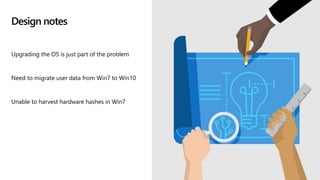
Design notes
Upgrading the OS is just part of the problem
Need to migrate user data from Win7 to Win10
Unable to harvest hardware hashes in Win7
Autopilot for existing devices
Roadmap
AVAILABLE in 1903AVAILABLE in 1903AVAILABLE in 1903
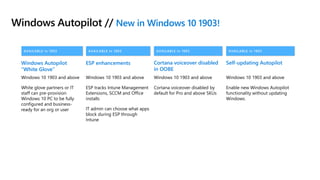
Windows Autopilot // New in Windows 10 1903!
Windows Autopilot
“White Glove”
Windows 10 1903 and above
White glove partners or IT
staff can pre-provision
Windows 10 PC to be fully
configured and business-
ready for an org or user
ESP enhancements
Windows 10 1903 and above
ESP tracks Intune Management
Extensions, SCCM and Office
installs
IT admin can choose what apps
block during ESP through
Intune
Cortana voiceover disabled
in OOBE
Windows 10 1903 and above
Cortana voiceover disabled by
default for Pro and above SKUs
AVAILABLE in 1903
Self-updating Autopilot
Windows 10 1903 and above
Enable new Windows Autopilot
functionality without updating
Windows.
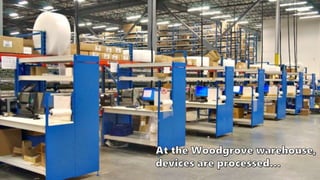
White Glove
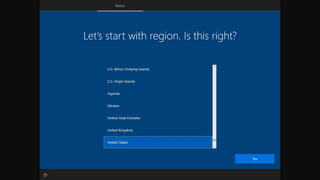
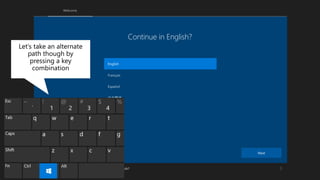
Continue in English?
English
Next
Would you like to continue in English? 
Next
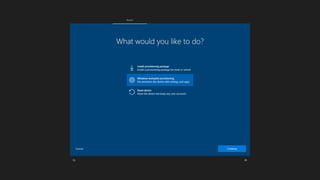
Let’s take an alternate
path though by
pressing a key
combination
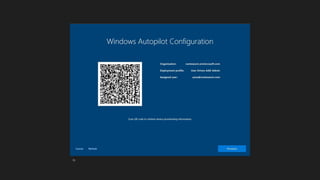
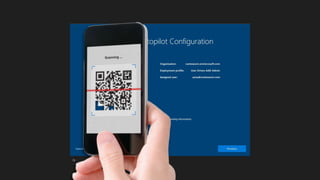
Now we can go look for any updates…
 Alright, you’re connected. Now we can go look for any updates…
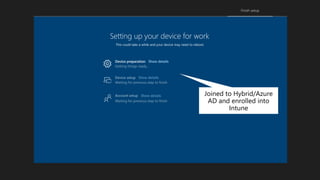
Setting up your device for work
This could take a while and your device may need to reboot.
Device preparation Show details
Joined to Hybrid/Azure
AD and enrolled into
Intune
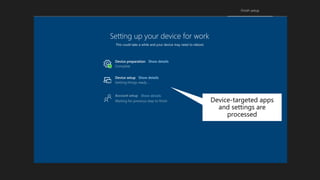
Setting up your device for work
This could take a while and your device may need to reboot.
Device setup
Device preparation Show details
Show details
Device-targeted apps
and settings are
processed
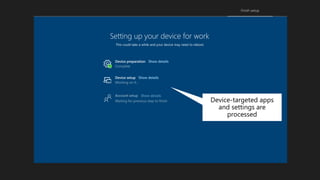
Setting up your device for work
This could take a while and your device may need to reboot.
Device setup
Device preparation Show details
Show details
Device-targeted apps
and settings are
processed
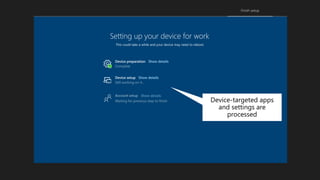
Setting up your device for work
This could take a while and your device may need to reboot.
Device setup
Device preparation Show details
Show details
Device-targeted apps
and settings are
processed
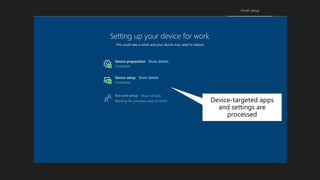
Setting up your device for work
This could take a while and your device may need to reboot.
Device setup
Device preparation Show details
Show details
Device-targeted apps
and settings are
processed
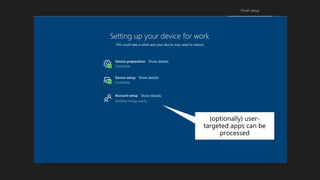
Setting up your device for work
This could take a while and your device may need to reboot.
Device setup
Account setup
Device preparation Show details
Show details
Show details
{optionally} user-
targeted apps can be
processed
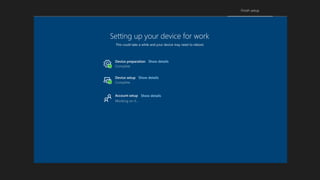
Setting up your device for work
This could take a while and your device may need to reboot.
Device setup
Account setup
Device preparation Show details
Show details
Show details
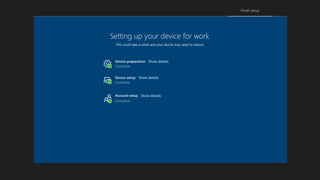
Setting up your device for work
This could take a while and your device may need to reboot.
Device setup
Account setup
Device preparation Show details
Show details
Show details
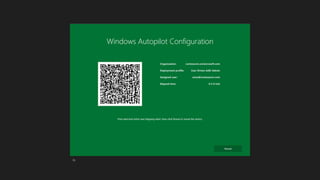
Now the device (with all apps,
updates, and policies applied)
can be shipped to the user…
5   modern desktop - windows autopilot

5 modern desktop - windows autopilot

  • 1.
    Windows Autopilot Andrew BettanyMCT, MVP IT Masterclasses Ltd andrew@itmasterclasses.com
  • 2.
    Traditional Windows deployment// The old way Build a custom image, gathering everything else that’s necessary to deploy Time means money, making this an expensive proposition Deploy image to a new computer, overwriting what was originally on it DRIVERS POLICIES OFFICE & APPS SETTINGS
  • 3.
    Modern Windows deployment// The new way Un-box and turn on off-the-shelf Windows PC Device is ready for productive use Transform with minimal user interaction
  • 4.
    Key Benefits: No moremaintenance of images and drivers No need for IT to touch the devices Simple process for users and IT Integration in the device supply chain Reset device back to a business ready state Device lifecycle management with Windows Autopilot and Intune Business ready Break fix RetirementManagementProcurement Deployment
  • 5.
    OEM-optimized Windows 10 +Software + Settings + Updates + Features + User data Ready for productive use The transformation
  • 6.
    Windows Autopilot deployment Three simplesteps Register devices Assign an Autopilot profile to the devices Ship the device to the user Cloud driven
  • 7.
    Administering Windows Autopilot Microsoft Storefor Business Microsoft Intune / Microsoft 365 Device Management Partner Center Microsoft 365 Business
  • 8.
  • 10.
    OEM Device registrationClean images  Free  $30/PC offering (Targeting later CY19)  $3 option  $5/device  Free; additional offerings at $5/PC and $8-35/PC  Free  Free Major OEM status Notes: Initially customers will register existing devices for testing/validation They will want to know about OEM offerings, to make sure they can eventually have the OEM register devices for them Dell: $30/PC offering includes device registration, clean image or custom image loading, and choice of N, N-1, or N-2 Windows 10 releases Lenovo: $5/PC offering removes most apps from the OS; $8-35/PC offering allows choice of N, N-1, N-2 Windows 10 releases and offers preloading of up to five Win32 apps HP: Pilot program available today, they will e-mail a spreadsheet to the customer so the customer can upload the devices via MSfB
  • 11.
    OEMs, distributors, andresellers make the process easy: • Automatically add new devices to Azure tenant at time of shipment • Associate devices to customer’s purchase order for easy device grouping • Tag devices with a customer specified label • Provide an preinstalled image that is ready for configuration* For a list of those supporting Windows Autopilot supply chain integration please visit: https://aka.ms/WindowsAutopilot Registering new devices Supply chain integration
  • 12.
    If you haveexisting Windows 10 devices: • Enable new Autopilot profile setting for all targeted devices • Ensure the Autopilot profile is assigned to a group containing the existing Windows 10 devices If your existing Windows 10 devices are not yet Intune- managed: • Enable co-management with ConfigMgr via the “Automatic enrollment into Intune” setting. (See https://docs.microsoft.com/en- us/sccm/core/clients/manage/co-management-overview#enable-co-management) • Ensure all new Intune-enrolled Windows 10 devices are part of a group with an assigned Autopilot profile Registering existing devices Automatically for all Intune-managed Windows 10 devices
  • 13.
    To register existingdevices: • Use the PowerShell script available at https://www.powershellgallery.com/packages/Get- WindowsAutopilotInfo • Run for each device (requires Windows 10 1703 or higher) • Upload resulting CSV file via Intune portal • See https://docs.microsoft.com/en- us/windows/deployment/windows-autopilot/add- devices#collecting-the-hardware-id-from-existing-devices- using-powershell for more information Great for testing and validation with existing devices and virtual machines Registering existing devices Manually for existing devices
  • 14.
    Registering devices //Summary Microsoft IntunePartner CenterOEM API
  • 15.
  • 16.
    Configure important details: •Deployment mode • Specific settings required for the deployment mode • New! BitLocker encryption even for non-admin users (requires Windows 10 1809) • Out-of-box experience (OOBE) settings • New! Hide change account options (requires Windows 10 1809) • New! Device naming pattern, supporting variable substitution (requires Windows 10 1809): • %SERIAL% • %RAND:x% (where X is the number of digits) Creating an Autopilot profile
  • 17.
    If you haveexisting Windows 10 devices: • An Azure AD device object is automatically created for each imported Autopilot device • Create one or more Azure AD groups • Assign an Autopilot profile to the Azure AD group • Intune will automatically assign the profile to all members of the assigned group Options for grouping: • Dynamic group with all Autopilot devices • Dynamic group based on purchase order ID • Dynamic group based on device tag (orderID) • Manual Assigning an Autopilot profile Automated using groups
  • 18.
    Creating a groupwith all Autopilot devices
  • 20.
    Creating a groupfor a device tag (Order ID)
  • 22.
  • 24.
  • 25.
  • 26.
    Windows Autopilot overview Configure Windows Autopilotprofile Self-servicedeploy Device IDs Hardware Vendor IT Admin Ship Deliver direct to Employee Employee unboxes device, self-deploys IntuneWindows Autopilot Device sync Autopilot profile sync
  • 27.
    Windows Autopilot //Licensing requirements One of the following, to provide needed Azure Active Directory (automatic MDM enrollment and company branding features) and MDM functionality: • Microsoft 365 Business subscriptions • Microsoft 365 F1 subscriptions • Microsoft 365 Academic subscriptions • Microsoft 365 Enterprise E3 or E5 subscriptions • Enterprise Mobility + Security E3 or E5 subscriptions, which include all needed Azure AD and Intune features • Azure Active Directory Premium P1 or P2 and Intune subscriptions (or an alternative MDM service)
  • 28.
  • 29.
    Ensure policies, appsand settings are complete prior to the end user gaining access to the desktop Confirm minimum baseline requirements Protect data during device set up Deliver a compliant secure device Personalize the out of box experience New! Unlock Windows 10 in S mode (requires Windows 10 1809) Requirements Windows 10, version 1803 (with May cumulative update or later) Azure Active Directory Premium Microsoft Intune Windows Autopilot Enrollmentstatuspage
  • 30.
  • 31.
    AVAILABLE in 1809AVAILABLEin 1809AVAILABLE in 1809AVAILABLE Windows Autopilot // Deployment Scenarios User-driven mode with Azure AD Join Windows 10 1703 and above Join device to Azure AD, enroll in Intune/MDM Windows Autopilot for existing devices Windows 10 1809 and above Windows 7 to Windows 10 ConfigMgr task sequence, followed by Windows Autopilot user-driven mode Self-deploying mode Windows 10 1809 and above No need to provide credentials, automatically joins Azure AD User-driven mode with Hybrid Azure AD join Windows 10 1809 and above Join device to AD, enroll in Intune/MDM
  • 32.
  • 33.
    Windows Autopilot //User-driven deployment with Azure AD Prerequisites: Windows 10 version 1703 Azure Active Directory Premium Microsoft Intune Steps: 1. Device connected to internet network 2. Register device with Windows Autopilot 3. Assign Intune Autopilot Profile configured for Azure AD join 4. Boot device
  • 34.
    Design notes Should bedone by the end user User authenticates with Azure AD from the start Choose between admin and non-admin Typically for single-user (not shared) devices
  • 35.
  • 37.
  • 38.
    Windows Autopilot //Self-deploying mode with Azure AD Prerequisites: Windows 10 version 1809 Azure Active Directory Premium Microsoft Intune Device with TPM 2.0 Steps: 1. Device connected to internet 2. Register device with Windows Autopilot 3. Assign Intune Autopilot Profile configured for self-deploying mode 4. Boot device
  • 39.
    VDI clients Digital signage Singleapp kiosk Multi app kiosk Shared PC How would you use Autopilot to deploy…
  • 40.
    Design notes Technicians usuallyset up these types of devices No defined user to auth or set up the device May not have peripherals (keyboards, mice, etc.) Typically involve “walk up and use” scenarios
  • 41.
  • 43.
  • 44.
    Windows Autopilot //Windows Autopilot for existing devices Prerequisites: Windows 10 version 1809 Azure Active Directory Premium Microsoft Intune System Center Configuration Manager OneDrive for Business Steps: 1. Create task sequence to deploy generic Windows 10 image with needed drivers (wipe-and-load) 2. Migrate data to OneDrive for Business (in advance) 3. Deploy task sequence to existing Windows 7 devices, installing Windows 10 and proceeding through Windows Autopilot user-driven process to join device to Azure AD
  • 45.
  • 46.
  • 47.
    Design notes Upgrading theOS is just part of the problem Need to migrate user data from Win7 to Win10 Unable to harvest hardware hashes in Win7
  • 48.
  • 50.
  • 51.
    AVAILABLE in 1903AVAILABLEin 1903AVAILABLE in 1903 Windows Autopilot // New in Windows 10 1903! Windows Autopilot “White Glove” Windows 10 1903 and above White glove partners or IT staff can pre-provision Windows 10 PC to be fully configured and business- ready for an org or user ESP enhancements Windows 10 1903 and above ESP tracks Intune Management Extensions, SCCM and Office installs IT admin can choose what apps block during ESP through Intune Cortana voiceover disabled in OOBE Windows 10 1903 and above Cortana voiceover disabled by default for Pro and above SKUs AVAILABLE in 1903 Self-updating Autopilot Windows 10 1903 and above Enable new Windows Autopilot functionality without updating Windows.
  • 52.
  • 54.
    Continue in English? English Next Wouldyou like to continue in English?  Next Let’s take an alternate path though by pressing a key combination
  • 58.
    Now we cango look for any updates…  Alright, you’re connected. Now we can go look for any updates…
  • 59.
    Setting up yourdevice for work This could take a while and your device may need to reboot. Device preparation Show details Joined to Hybrid/Azure AD and enrolled into Intune
  • 60.
    Setting up yourdevice for work This could take a while and your device may need to reboot. Device setup Device preparation Show details Show details Device-targeted apps and settings are processed
  • 61.
    Setting up yourdevice for work This could take a while and your device may need to reboot. Device setup Device preparation Show details Show details Device-targeted apps and settings are processed
  • 62.
    Setting up yourdevice for work This could take a while and your device may need to reboot. Device setup Device preparation Show details Show details Device-targeted apps and settings are processed
  • 63.
    Setting up yourdevice for work This could take a while and your device may need to reboot. Device setup Device preparation Show details Show details Device-targeted apps and settings are processed
  • 64.
    Setting up yourdevice for work This could take a while and your device may need to reboot. Device setup Account setup Device preparation Show details Show details Show details {optionally} user- targeted apps can be processed
  • 65.
    Setting up yourdevice for work This could take a while and your device may need to reboot. Device setup Account setup Device preparation Show details Show details Show details
  • 66.
    Setting up yourdevice for work This could take a while and your device may need to reboot. Device setup Account setup Device preparation Show details Show details Show details
  • 68.
    Now the device(with all apps, updates, and policies applied) can be shipped to the user…

Editor's Notes

  • #6 5
  • #9 3:00
  • #12 2:00
  • #13 12
  • #14 13
  • #15 14
  • #18 17
  • #19 18
  • #35 4:00
  • #46 1:13
  • #56 4:00
  • #63 Woodgrove will use a wired connection for the best performance, so no wireless connection details are needed.
  • #64 The device is joined to Azure Active Directory on behalf of Juliet, the user who will receive this device. It will also be enrolled in Intune on behalf of Anna, so that user-targeted apps and policies can be targeted as expected.
  • #65 Apps and policies targeting the machine are processed. Depending on the number of Wn32 apps, this might take a while…
  • #68 IWs and Admins prefer to know details about what’s happening as opposed to simplified spinner experience (User research). This can take a few minutes to an hour. Hero moment where we instill trust by being transparent with user and affirm the device will be set up for their work environment
  • #69 Now user-targeted apps and policies can be applied.