Microsoft
                                               System Center Configuration
                                               Manager


Microsoft Consulting Practice

    Richard Owen – Ultima Business Solutions
Ultima Business Solutions

 Founded 1990
 Microsoft Gold Education Large Account Reseller
 System Integrator – Microsoft Core Infrastructure
     Virtualisation
     Systems Management
     Desktop & Application Optimisation
     Collaboration (Lync)
 Existing Footprint within Further Education
Agenda

 Management Challenges
• Operating System Deployment
 Software Deployment / Updates
 Inventory Services
 SCCM Reporting
 Hyper-V
 Case Reference
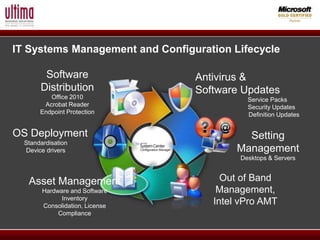
IT Systems Management and Configuration Lifecycle

        Software                 Antivirus &
       Distribution              Software Updates
          Office 2010                      Service Packs
        Acrobat Reader                     Security Updates
       Endpoint Protection                 Definition Updates


OS Deployment                              Setting
  Standardisation
  Device drivers                         Management
                                         Desktops & Servers


   Asset Management                   Out of Band
        Hardware and Software        Management,
              Inventory
        Consolidation, License
                                    Intel vPro AMT
             Compliance
Example Management Challenges

 Resourcing the Demand
 High Ratio of Desktops / Users to Administrators (666)
 Re-Image Cycle
 Remote Locations
 Management tools not performing over WAN links
 Limited Window to perform upgrades
 Pressures to reduce energy costs
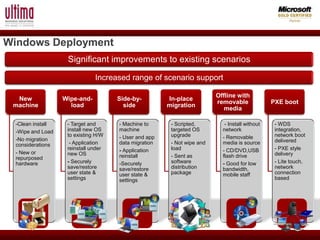
Windows Deployment
                    Significant improvements to existing scenarios

                               Increased range of scenario support

                                                                         Offline with
  New              Wipe-and-          Side-by-         In-place
                                                                         removable              PXE boot
 machine             load               side           migration
                                                                            media

  -Clean install    - Target and      - Machine to      - Scripted,         - Install without    - WDS
  -Wipe and Load    install new OS    machine           targeted OS        network               integration,
                    to existing H/W   - User and app    upgrade            - Removable           network boot
  -No migration                                                                                  delivered
  considerations     - Application    data migration    - Not wipe and     media is source
                    reinstall under   - Application     load               - CD/DVD,USB          - PXE style
  - New or          new OS                                                                       delivery
  repurposed                          reinstall         - Sent as          flash drive
  hardware          - Securely        -Securely         software           - Good for low        - Lite touch,
                    save/restore      save/restore      distribution       bandwidth,            network
                    user state &      user state &      package            mobile staff          connection
                    settings          settings                                                   based
Operating System Deployment -
Considerations
 Create the Operating System Package using built in Wizard
 NOTE: - SCCM Agent Package Included by Default
 Deploy to Distribution Points or Collections
 Distribution Points can contain up to 4000 Clients
 Recommended to create distribution points if deploying Operating
    Systems over WAN Links
 Build Collections around departments / subject
 Clients can be Auto-Assigned to collections via IP Address,
    AD Sites, IP Subnet
Operating System Deployment - PXE

 Install Windows Deployments Services
 Create PXE Service Point
 NOTE: - Uncheck Client Require Password that boot to PXE
 Assign a boot image to the Service Point
 Push out to DP or Collection
 Use Task Sequence’s to complete the build, (join domain)
 Wake on LAN ?
SCCM – Software Distribution

 Automate Software Deployments to reduce desktop Visits
 Create .msi .exe or App-V packages
 Copy Package option for Distribution Points
 Silent Mode Options, Failure Options
 Task Sequence to customise the applications
 Task Sequence can also form part of the OS deployment (Light touch
deployment to increase speed of deploying across campus)
 Package Cache for re-deployment Purposes



SCCM – Software Updates

 Integrate WSUS 3.0 into SCCM (Low cost Option)
 Deploy Microsoft Patches and application patches (Servers &
Desktops)
 Capable of deploying over the internet with PKI infrastructure
 Faster Client update engine than in previous versions (No Longer
Hardware Inventory)



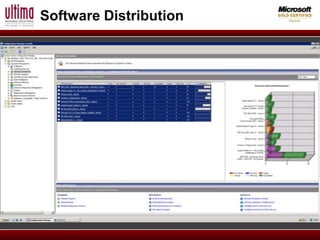
Software Distribution
SCCM – Inventory

 Use the Inventory Engine to report on Hardware Information prior to
Windows 7 Upgrades
 Report on Chipsets or PC’s of a certain age
 Software asset management
 Redeploy if software is un-installed (avoid helpdesk calls)
 Software Metering (Software Usage)
 Use Reporting Engine
Asset Intelligence (Who’s Using What)
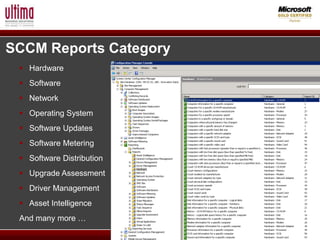
SCCM Reports Category
  Hardware
  Software
  Network
  Operating System
  Software Updates
  Software Metering
  Software Distribution
  Upgrade Assessment
  Driver Management
  Asset Intelligence
 And many more …
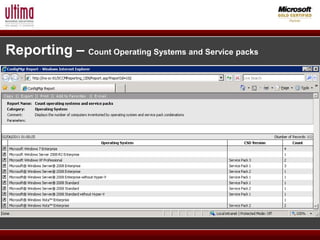
Reporting – Count Operating Systems and Service packs
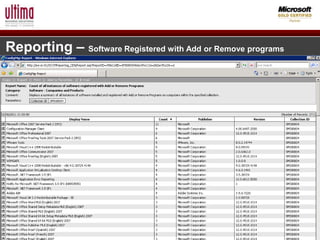
Reporting – Software Registered with Add or Remove programs
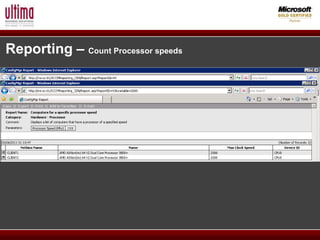
Reporting – Count Processor speeds
Hyper-V – Have NO Fear!

 Consolidate Hardware (Cap Planning)
 Be Careful of Disk IOPS’s (Free Tools available)
 Adoption Rates increasing
 Performance! (64bit)
 Live Migration
 Cluster Services for High Availability
 Driven by SCVMM
 Leverage Windows Server skills (already in house)
 Value for Money in comparison to VMware
 VMware .vmdk’s can be converted using SCVMM
Case Reference – College

 Ultima engaged on SCCM project to deploy Windows 7
 Ultima consulted with the college to identify areas of repetition (AV,
VPN’s, Systems Monitoring)
 Strategy document produced


 Reduced 42 servers down to 3 Hyper-V Hosts
 Full System Centre Suite deployed
 Significantly reduced annual maintenance costs
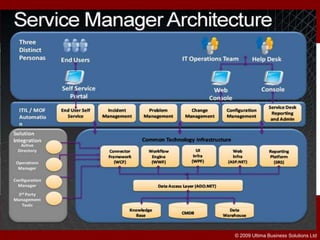
 Migrated Helpdesk solution to Service Manager
Direct Access
Case Reference

 Upcoming Webinar with Ultima’s Lead Consultant
© 2009 Ultima Business Solutions Ltd

Ultima 14th March

  • 1.
    Microsoft System Center Configuration Manager Microsoft Consulting Practice Richard Owen – Ultima Business Solutions
  • 2.
    Ultima Business Solutions Founded 1990  Microsoft Gold Education Large Account Reseller  System Integrator – Microsoft Core Infrastructure  Virtualisation  Systems Management  Desktop & Application Optimisation  Collaboration (Lync)  Existing Footprint within Further Education
  • 3.
    Agenda  Management Challenges •Operating System Deployment  Software Deployment / Updates  Inventory Services  SCCM Reporting  Hyper-V  Case Reference
  • 4.
    IT Systems Managementand Configuration Lifecycle Software Antivirus & Distribution Software Updates Office 2010 Service Packs Acrobat Reader Security Updates Endpoint Protection Definition Updates OS Deployment Setting Standardisation Device drivers Management Desktops & Servers Asset Management Out of Band Hardware and Software Management, Inventory Consolidation, License Intel vPro AMT Compliance
  • 5.
    Example Management Challenges Resourcing the Demand  High Ratio of Desktops / Users to Administrators (666)  Re-Image Cycle  Remote Locations  Management tools not performing over WAN links  Limited Window to perform upgrades  Pressures to reduce energy costs
  • 6.
    Windows Deployment Significant improvements to existing scenarios Increased range of scenario support Offline with New Wipe-and- Side-by- In-place removable PXE boot machine load side migration media -Clean install - Target and - Machine to - Scripted, - Install without - WDS -Wipe and Load install new OS machine targeted OS network integration, to existing H/W - User and app upgrade - Removable network boot -No migration delivered considerations - Application data migration - Not wipe and media is source reinstall under - Application load - CD/DVD,USB - PXE style - New or new OS delivery repurposed reinstall - Sent as flash drive hardware - Securely -Securely software - Good for low - Lite touch, save/restore save/restore distribution bandwidth, network user state & user state & package mobile staff connection settings settings based
  • 7.
    Operating System Deployment- Considerations  Create the Operating System Package using built in Wizard  NOTE: - SCCM Agent Package Included by Default  Deploy to Distribution Points or Collections  Distribution Points can contain up to 4000 Clients  Recommended to create distribution points if deploying Operating Systems over WAN Links  Build Collections around departments / subject  Clients can be Auto-Assigned to collections via IP Address, AD Sites, IP Subnet
  • 8.
    Operating System Deployment- PXE  Install Windows Deployments Services  Create PXE Service Point  NOTE: - Uncheck Client Require Password that boot to PXE  Assign a boot image to the Service Point  Push out to DP or Collection  Use Task Sequence’s to complete the build, (join domain)  Wake on LAN ?
  • 9.
    SCCM – SoftwareDistribution  Automate Software Deployments to reduce desktop Visits  Create .msi .exe or App-V packages  Copy Package option for Distribution Points  Silent Mode Options, Failure Options  Task Sequence to customise the applications  Task Sequence can also form part of the OS deployment (Light touch deployment to increase speed of deploying across campus)  Package Cache for re-deployment Purposes 
  • 10.
    SCCM – SoftwareUpdates  Integrate WSUS 3.0 into SCCM (Low cost Option)  Deploy Microsoft Patches and application patches (Servers & Desktops)  Capable of deploying over the internet with PKI infrastructure  Faster Client update engine than in previous versions (No Longer Hardware Inventory) 
  • 11.
  • 12.
    SCCM – Inventory Use the Inventory Engine to report on Hardware Information prior to Windows 7 Upgrades  Report on Chipsets or PC’s of a certain age  Software asset management  Redeploy if software is un-installed (avoid helpdesk calls)  Software Metering (Software Usage)  Use Reporting Engine Asset Intelligence (Who’s Using What)
  • 13.
    SCCM Reports Category  Hardware  Software  Network  Operating System  Software Updates  Software Metering  Software Distribution  Upgrade Assessment  Driver Management  Asset Intelligence And many more …
  • 14.
    Reporting – CountOperating Systems and Service packs
  • 15.
    Reporting – SoftwareRegistered with Add or Remove programs
  • 16.
    Reporting – CountProcessor speeds
  • 17.
    Hyper-V – HaveNO Fear!  Consolidate Hardware (Cap Planning)  Be Careful of Disk IOPS’s (Free Tools available)  Adoption Rates increasing  Performance! (64bit)  Live Migration  Cluster Services for High Availability  Driven by SCVMM  Leverage Windows Server skills (already in house)  Value for Money in comparison to VMware  VMware .vmdk’s can be converted using SCVMM
  • 18.
    Case Reference –College  Ultima engaged on SCCM project to deploy Windows 7  Ultima consulted with the college to identify areas of repetition (AV, VPN’s, Systems Monitoring)  Strategy document produced  Reduced 42 servers down to 3 Hyper-V Hosts  Full System Centre Suite deployed  Significantly reduced annual maintenance costs  Migrated Helpdesk solution to Service Manager Direct Access
  • 19.
    Case Reference  UpcomingWebinar with Ultima’s Lead Consultant
  • 20.
    © 2009 UltimaBusiness Solutions Ltd