System Center Configuration Manager 2007
Presented to Mr. Anwar Hussain Mirza [GMIT]
By: Faisal Alvi
Agenda
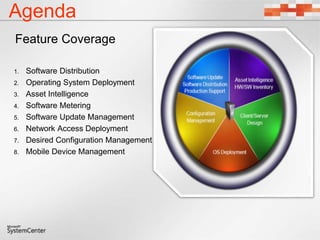
Feature Coverage
1. Software Distribution
2. Operating System Deployment
3. Asset Intelligence
4. Software Metering
5. Software Update Management
6. Network Access Deployment
7. Desired Configuration Management
8. Mobile Device Management
Implemented Features at PPL
1. Software Distribution
2. Operating System Deployment
3. Asset Intelligence
4. Software Metering
5. Software Update Management
6. Network Access Deployment
7. Desired Configuration Management
3
Software Distribution
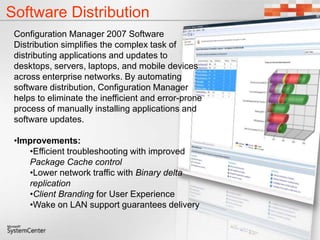
Configuration Manager 2007 Software
Distribution simplifies the complex task of
distributing applications and updates to
desktops, servers, laptops, and mobile devices
across enterprise networks. By automating
software distribution, Configuration Manager
helps to eliminate the inefficient and error-prone
process of manually installing applications and
software updates.
•Improvements:
•Efficient troubleshooting with improved
Package Cache control
•Lower network traffic with Binary delta
replication
•Client Branding for User Experience
•Wake on LAN support guarantees delivery
6
Operating System Deployment
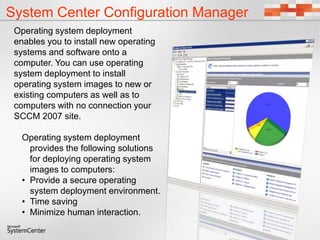
System Center Configuration Manager
Operating system deployment
enables you to install new operating
systems and software onto a
computer. You can use operating
system deployment to install
operating system images to new or
existing computers as well as to
computers with no connection your
SCCM 2007 site.
Operating system deployment
provides the following solutions
for deploying operating system
images to computers:
• Provide a secure operating
system deployment environment.
• Time saving
• Minimize human interaction.
8
Software Update Management
Software Updates
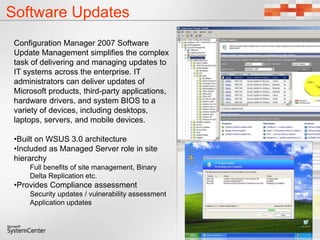
Configuration Manager 2007 Software
Update Management simplifies the complex
task of delivering and managing updates to
IT systems across the enterprise. IT
administrators can deliver updates of
Microsoft products, third-party applications,
hardware drivers, and system BIOS to a
variety of devices, including desktops,
laptops, servers, and mobile devices.
•Built on WSUS 3.0 architecture
•Included as Managed Server role in site
hierarchy
Full benefits of site management, Binary
Delta Replication etc.
•Provides Compliance assessment
Security updates / vulnerability assessment
Application updates
10
Software Metering
Software Metering
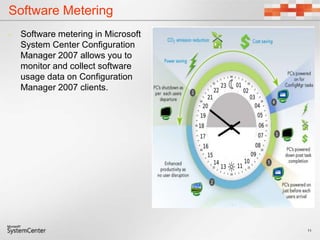
• Software metering in Microsoft
System Center Configuration
Manager 2007 allows you to
monitor and collect software
usage data on Configuration
Manager 2007 clients.
11
12
Asset Intelligence
Hardware/software Inventory
Asset Intelligence
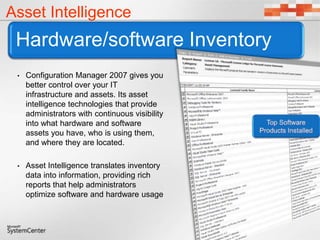
• Configuration Manager 2007 gives you
better control over your IT
infrastructure and assets. Its asset
intelligence technologies that provide
administrators with continuous visibility
into what hardware and software
assets you have, who is using them,
and where they are located.
• Asset Intelligence translates inventory
data into information, providing rich
reports that help administrators
optimize software and hardware usage
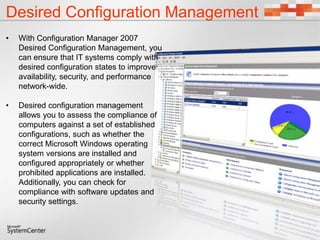
Desired Configuration Management
• With Configuration Manager 2007
Desired Configuration Management, you
can ensure that IT systems comply with
desired configuration states to improve
availability, security, and performance
network-wide.
• Desired configuration management
allows you to assess the compliance of
computers against a set of established
configurations, such as whether the
correct Microsoft Windows operating
system versions are installed and
configured appropriately or whether
prohibited applications are installed.
Additionally, you can check for
compliance with software updates and
security settings.
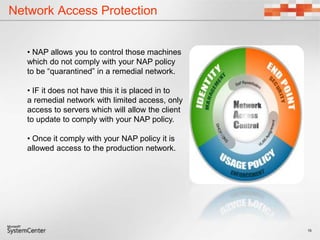
Network Access Protection
15
• NAP allows you to control those machines
which do not comply with your NAP policy
to be “quarantined” in a remedial network.
• IF it does not have this it is placed in to
a remedial network with limited access, only
access to servers which will allow the client
to update to comply with your NAP policy.
• Once it comply with your NAP policy it is
allowed access to the production network.
16
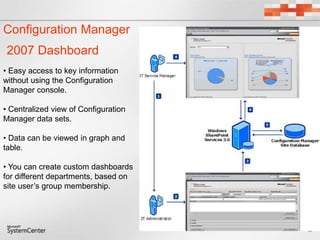
Configuration Manager
2007 Dashboard
• Easy access to key information
without using the Configuration
Manager console.
• Centralized view of Configuration
Manager data sets.
• Data can be viewed in graph and
table.
• You can create custom dashboards
for different departments, based on
site user’s group membership.
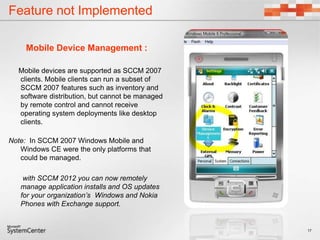
Feature not Implemented
Mobile Device Management :
Mobile devices are supported as SCCM 2007
clients. Mobile clients can run a subset of
SCCM 2007 features such as inventory and
software distribution, but cannot be managed
by remote control and cannot receive
operating system deployments like desktop
clients.
Note: In SCCM 2007 Windows Mobile and
Windows CE were the only platforms that
could be managed.
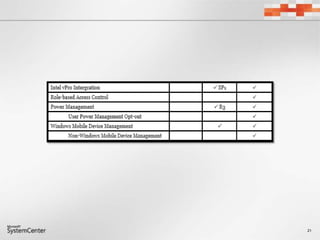
with SCCM 2012 you can now remotely
manage application installs and OS updates
for your organization’s Windows and Nokia
Phones with Exchange support.
17
18
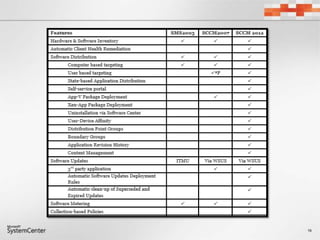
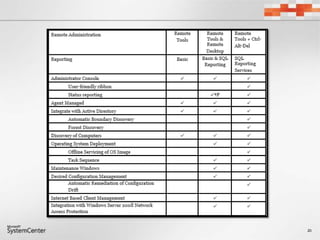
Configuration Manager comparison 2007 and 2012
19
20
21
22

SCCM 2007 Presentation

  • 1.
    System Center ConfigurationManager 2007 Presented to Mr. Anwar Hussain Mirza [GMIT] By: Faisal Alvi
  • 2.
    Agenda Feature Coverage 1. SoftwareDistribution 2. Operating System Deployment 3. Asset Intelligence 4. Software Metering 5. Software Update Management 6. Network Access Deployment 7. Desired Configuration Management 8. Mobile Device Management
  • 3.
    Implemented Features atPPL 1. Software Distribution 2. Operating System Deployment 3. Asset Intelligence 4. Software Metering 5. Software Update Management 6. Network Access Deployment 7. Desired Configuration Management 3
  • 4.
  • 5.
    Software Distribution Configuration Manager2007 Software Distribution simplifies the complex task of distributing applications and updates to desktops, servers, laptops, and mobile devices across enterprise networks. By automating software distribution, Configuration Manager helps to eliminate the inefficient and error-prone process of manually installing applications and software updates. •Improvements: •Efficient troubleshooting with improved Package Cache control •Lower network traffic with Binary delta replication •Client Branding for User Experience •Wake on LAN support guarantees delivery
  • 6.
  • 7.
    System Center ConfigurationManager Operating system deployment enables you to install new operating systems and software onto a computer. You can use operating system deployment to install operating system images to new or existing computers as well as to computers with no connection your SCCM 2007 site. Operating system deployment provides the following solutions for deploying operating system images to computers: • Provide a secure operating system deployment environment. • Time saving • Minimize human interaction.
  • 8.
  • 9.
    Software Updates Configuration Manager2007 Software Update Management simplifies the complex task of delivering and managing updates to IT systems across the enterprise. IT administrators can deliver updates of Microsoft products, third-party applications, hardware drivers, and system BIOS to a variety of devices, including desktops, laptops, servers, and mobile devices. •Built on WSUS 3.0 architecture •Included as Managed Server role in site hierarchy Full benefits of site management, Binary Delta Replication etc. •Provides Compliance assessment Security updates / vulnerability assessment Application updates
  • 10.
  • 11.
    Software Metering • Softwaremetering in Microsoft System Center Configuration Manager 2007 allows you to monitor and collect software usage data on Configuration Manager 2007 clients. 11
  • 12.
  • 13.
    Hardware/software Inventory Asset Intelligence •Configuration Manager 2007 gives you better control over your IT infrastructure and assets. Its asset intelligence technologies that provide administrators with continuous visibility into what hardware and software assets you have, who is using them, and where they are located. • Asset Intelligence translates inventory data into information, providing rich reports that help administrators optimize software and hardware usage
  • 14.
    Desired Configuration Management •With Configuration Manager 2007 Desired Configuration Management, you can ensure that IT systems comply with desired configuration states to improve availability, security, and performance network-wide. • Desired configuration management allows you to assess the compliance of computers against a set of established configurations, such as whether the correct Microsoft Windows operating system versions are installed and configured appropriately or whether prohibited applications are installed. Additionally, you can check for compliance with software updates and security settings.
  • 15.
    Network Access Protection 15 •NAP allows you to control those machines which do not comply with your NAP policy to be “quarantined” in a remedial network. • IF it does not have this it is placed in to a remedial network with limited access, only access to servers which will allow the client to update to comply with your NAP policy. • Once it comply with your NAP policy it is allowed access to the production network.
  • 16.
    16 Configuration Manager 2007 Dashboard •Easy access to key information without using the Configuration Manager console. • Centralized view of Configuration Manager data sets. • Data can be viewed in graph and table. • You can create custom dashboards for different departments, based on site user’s group membership.
  • 17.
    Feature not Implemented MobileDevice Management : Mobile devices are supported as SCCM 2007 clients. Mobile clients can run a subset of SCCM 2007 features such as inventory and software distribution, but cannot be managed by remote control and cannot receive operating system deployments like desktop clients. Note: In SCCM 2007 Windows Mobile and Windows CE were the only platforms that could be managed. with SCCM 2012 you can now remotely manage application installs and OS updates for your organization’s Windows and Nokia Phones with Exchange support. 17
  • 18.
  • 19.
  • 20.
  • 21.
  • 22.